
Welcome to My Blog
Opinion: 8 reasons iPads are losing to Chromebooks in education, and what Apple needs to do about it
Phil Schiller said in 2013 that “education is in Apple’s DNA,” and it’s no exaggeration. The company’s commitment to the education sector was there from the very beginning. Steve Jobs told the Smithsonian that he wanted to donate a computer to every school in the U.S. as long ago as 1979.
I thought if there was just one computer in every school, some of the kids would find it. It will change their life. We saw the rate at which this was happening and the rate at which the school bureaucracies were deciding to buy a computer for the school and it was real slow. We realized that a whole generation of kids was going to go through the school before they even got their first computer so we thought the kids can’t wait. We wanted to donate a computer to every school in America.
The company couldn’t afford it in those days, but Steve lobbied Congress to introduce a bill that would have created sufficient tax breaks to make it possible. That attempt failed, but Apple did succeed in brokering a tax deal in California that saw the company donate an Apple IIe to every school in California. Apple led the PC market in education for a time, and even created education-specific Mac models.
More recently, Apple appeared set to bring its educational success into the iPad era in 2013 when it announced a $30M deal (that would eventually have been worth a quarter of a billion dollars) to equip every student in the LA Unified School District with an iPad. If that program had succeeded, it would have created a template for rolling out similar ones across the whole of the USA. Instead, it failed catastrophically, and it now appears that Chromebooks are winning where iPads have failed …
CNBC reported last month that Chromebooks now make up more than half of all devices in U.S. classrooms, while Apple’s share of classroom purchases more than halved between 2012 and 2015. Why is that, and what – if anything – can Apple do to reverse the trend?
Below are the are eight reasons I think Chromebooks are currently winning the battle, and in italics the steps I think Apple needs to take to address each …
1. The LAUSD disaster
There’s no other word to use to describe what happened to the LA deal. Well, there is, but the first part of that word is ‘cluster’ and the second part isn’t suitable for a family-friendly site. For those who don’t recall the details, here’s a summary I prepared earlier:
The first sign of trouble emerged when students managed to bypass the restrictions designed to ensure the devices could be used only for school work, but that was only the start. The LAUSD was accused of having miscalculated the cost of the program, resulting in its suspension and later abandonment.
Both the FBI and the SEC were called in to investigate allegations of corruption, and a federal review concluded that the entire project had been doomed from the start. Apple paid back the $4.2M it had received to date.
You’d have to be a pretty brave administrator to announce that, despite all that, you wanted to invest in the same deal.
Apple seems to have mostly kept its head down, with little sign of any public comment. I think this is the wrong approach. Apple needs to present a clear analysis of exactly what went wrong, how it happened, what parts were and weren’t Apple’s fault – and the steps it has taken to ensure the same thing can’t happen again. Only with that approach will school districts elsewhere regain confidence in investing in iPads.
2. Cost
iPads are relatively expensive devices. You might think schools would be offered deep discounts for purchasing in bulk, but instead they reportedly paid an additional $200 per device for the software and support package.
Chromebooks, in contrast, are cheap. One of the models offered to schools is the CTL J2, priced at $199, while Toshiba’s Chromebook 2 runs to $249.99, with a $30 management fee covering teacher-approved apps and books. Other models start from just $149.
Apple operates on the highest profit margins in the business on all its major products, and is of course perfectly entitled to do so: nobody is forcing anyone to buy Apple devices. But you’d have thought that a company that once gave products to schools free of charge when it was very much smaller might at least offer a deal at close to cost now that it can comfortably afford to do so.
Shareholders might object, but Tim Cook has stated on more than one occasion that Apple does what’s right, and any investor not happy with that should get out of the stock. I’d also argue that it doesn’t exactly hurt the company’s long-term prospects to introduce entire new generations of people to the Apple ecosystem from an early age.
3. Multi-user support
While one device per student is obviously the ideal, that’s an expensive approach no matter what the device. Many schools need to share devices between students, and that requires support for multiple users.
iPads have so far been single-user devices. Chromebooks have always been cloud-based and account-based, and thus intrinsically suited to multi-user setups. Every time someone logs into a Chromebook, it becomes their device.
Apple is finally addressing this soon in iOS 9.3, but really it should have happened a long time ago.
4. Control
Both iPads and Chromebooks are very nearly immune to viruses, so equally appealing in that respect, but Chromebooks offer schools greater levels of control.
With Chromebooks, student accounts are linked to the individual school, and the school gets full administrative control of what those accounts can and can’t do. iPads offer profiles that provide some degree of control (when kids don’t figure out how to bypass them), but this is an area where Apple needs to up its game.
Again, the changes seen in iOS 9.3 suggest that Apple is aware of this.
5. Apps
For the LAUSD program, Apple did a deal with Pearson to provide educational software and electronic textbooks pre-installed on the iPads. It’s unclear exactly what went wrong here, but teachers complained that the apps were unreliable and not fit for purpose.
Chromebooks, in contrast, come supplied with teacher-approved apps in addition to ad-free versions of the standard Google Apps suite and access to school-specific shared Google Drives, Calendars and documents. Google also provides a dedicated Classroom app designed to help teachers organize classes and communicate with students.
Whatever the root cause of the issues with the education apps, this is clearly something that Apple urgently needs to fix. See point 6.
6. Sales process
Google appears to have made it extremely easy for schools to purchase and setup Chromebooks for use in schools. Apple has a reputation for being great at selling direct to consumers, not so great at dealing with IT departments.
It strikes me that Apple’s IBM partnership could be the perfect vehicle for educational sales. IBM knows exactly how to sell to IT departments, and it also knows how to create bespoke apps for specific industries. Harnessing this expertise could solve problems five and six in a single stroke.
7. Hardware keyboards
We may be moving toward a world where keyboards are less important, and voice input comes more to the fore, but we’re not there yet. Even if we were, a school classroom is not a suitable environment for 30+ kids to all be dictating to their devices. Software keyboards are fine for brief notes, but not for things like writing essays.
So physical keyboards are needed, and Chromebooks have them as standard. The iPad Pro aside, Apple doesn’t have its own keyboard for iPads (something I’ve always felt was a huge missed opportunity), meaning that third-party ones have to be bought at extra cost – and separately negotiated. At the very least, Apple needs to bundle keyboards with education iPads.
8. iPads ‘walk’
The final problem with iPads is one Apple should be pleased to have: kids love them. One of the problems experienced in the LAUSD program was that a number of them mysteriously disappeared.
Apple obviously shouldn’t do anything to make its hardware less desirable, but it does need to address point four to ensure that a stolen iPad is a useless iPad when it comes to using it away from school premises.
Do you think Apple needs to prioritize the education market, even if it makes little direct profit doing so? Or should it cede the market to Chromebooks and focus on the more profitable consumer and business markets? Take our poll, and share your thoughts in the comments.
The intro to this piece drew on historical research from Hack Edu.
Filed under: AAPL Company, iOS Devices, Opinion Tagged: Apple Inc, Education, iPads in schools, LA Unified School District, LAUSD, Philip Schiller, schools, Steve Jobs
Visit 9to5Mac to find more special coverage of AAPL Company, iOS Devices, and Steve Jobs.
What do you think? Discuss “Opinion: 8 reasons iPads are losing to Chromebooks in education, and what Apple needs to do about it” with our community.
Quanta reportedly starting trial Apple Watch 2 production later this month
The Chinese technology media site Commercial Times is claiming that Quanta will begin initial production runs of Apple Watch 2 in January, later in the month. This would match current expectations that the next-generation Apple Watch 2 will be launched about a year after the first Apple Watch, around April. A 4-inch ‘iPhone 6c’ is also on the cards for a March/April debut.
9to5Mac first reported on Apple’s plans for a March event in December. The company has tested an assortement of new features for Apple Watch 2, including the addition of a front-facing camera for FaceTime video calls. The new smartwatch may also add new health and sleep tracking sensors to expand on the fitness foundations from the first-generation Apple Watch. Apple reporting by Chinese media is always sketchy, but can be accurate with regard to direct supply chain events due to their proximity.
Parts and components leaks for Apple Watch 2 have yet to appear in the wild, although there are also rumors that the second-generation Watch will feature a thinner overall design.
Filed under: AAPL Company, Apple Watch Tagged: Apple watch, Apple Watch 2, iOS
Visit 9to5Mac to find more special coverage of AAPL Company, iOS, and Apple watch.
What do you think? Discuss “Quanta reportedly starting trial Apple Watch 2 production later this month” with our community.
38 Visual Content Marketing Statistics You Should Know in 2016
At the beginning of every year, we like to read through some of the major reports on inbound marketing, content marketing, social media, and online behavior.
At the risk of sounding like a broken record, it’s honestly amazing how fast things can change in twelve short months — and 2015 was certainly no exception.
Download our full collection of do-it-yourself templates for designing stunning visual content here.
This past year, we’ve seen the importance of visual content emphasized by the changes that occurred across almost every major social network, including Facebook, Twitter, Instagram, and Pinterest. At the same time, both video and infographics have become powerful tools for brands looking to communicate more easily with their readers.
To help you keep pace with these trends, let’s take a look at some statistics that demonstrate the impact visual content has on reach, engagement, and sales.
38 Stats You Should Know About Visual Content Marketing in 2016
General Visual Content Stats
1) Researchers found that colored visuals increase people’s willingness to read a piece of content by 80%. Tweet this stat! (Source)
2) When people hear information, they’re likely to remember only 10% of that information three days later. However, if a relevant image is paired with that same information, people retained 65% of the information three days later. Tweet this stat! (Source)
3) 46% of marketers say photography is critical to their current marketing and storytelling strategies. Tweet this stat! (Source)
Image Credit: CMO Council
4) 34% of marketers selected visual assets as their most important content, behind blogging (45%) and before videos (19%). Tweet this stat! (Source)
5) 65% of senior marketing executives believe that visual assets (photos, video, illustrations and infographics) are core to how their brand story is communicated. Tweet this stat! (Source)
6) Content with relevant images gets 94% more views than content without relevant images. Tweet this stat! (Source)
Image Credit: QuickSprout
7) Only 27% of marketers have a process in place to aggregate, organize, and manage the visual assets being used across their marketing teams. Tweet this stat! (Source)
8) 39% of marketers believe that more of their budget should be allocated to the acquisition or creation of compelling visual assets. Tweet this stat! (Source)
9) 73% of content creators plan to prioritize creating more engaging content in 2016, and 55% plan to prioritize creating visual content. Tweet this stat! (Source)
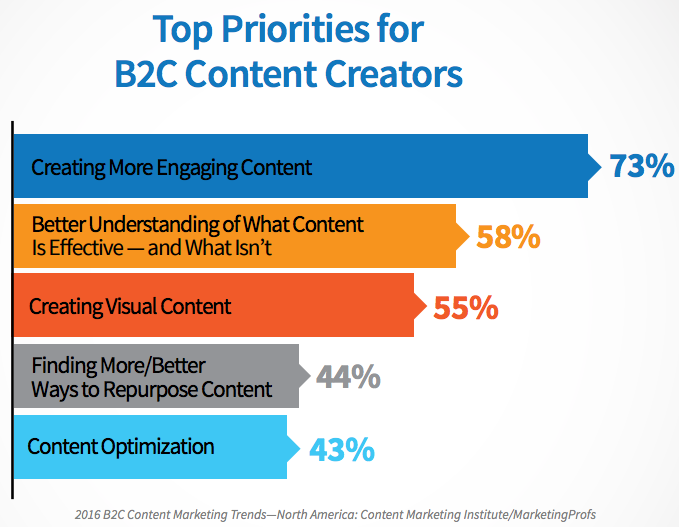
Image Credit: Content Marketing Institute
Video Stats
10) 51.9% of marketing professionals worldwide name video as the type of content with the best ROI. Tweet this stat! (Source)
11) Shoppers who view video are 1.81X more likely to purchase than non-viewers. Tweet this stat! (Source)
12) Using the word “video” in an email subject line boosts open rates by 19%, click-through rates by 65% and reduces unsubscribes by 26%. Tweet this stat! (Source)
13) Midway through 2015, mobile video plays exceeded 44% — up 74% from 2014 and up a whopping 844% since 2012. Tweet this stat! (Source)
Image Credit: Ooyala
14) Between April 2015 and November 2015, the amount of average daily video views on Facebook doubled from 4 billion video views per day to 8 billion. Tweet this stat! (Source)
15) In July 2015, Periscope users were watching 40 years’ worth of videos every day. Tweet this stat! (Source)
Image Credit: FastCompany
16) In Q2 of 2015, mobile phones (34%) and tablets (15%) combined for 49% of video ad impressions — up from 38% in Q1 of 2015. Publishers saw PC impressions drop from 62% to 50% in the previous quarter. Tweet this stat! (Source)
17) Syndacast predicts 74% of all internet traffic in 2017 will be video. Tweet this stat! (Source)
Image Credit: Syndacast
Infographic Stats
18) Eye-tracking studies show internet readers pay close attention to information-carrying images. In fact, when the images are relevant, readers spend more time looking at the images than they do reading text on the page. Tweet this stat! (Source)
19) Infographics are Liked and shared on social media 3X more than other any other type of content. Tweet this stat! (Source)
20) Infographics were the B2B content marketing tactic with the biggest increase from 2014 to 2015, up from 51% to 62%. Tweet this stat! (Source)
21) People following directions with text and illustrations do 323% better than people following directions without illustrations. Tweet this stat! (Source)
Image Credit: NeoMam
22) 60% of marketers predict the use of infographics will increase in 2016 compared to 2015. Tweet this stat! (Source)
Image Credit: CMO Council
Social Media Stats
23) Visual content is more than 40X more likely to get shared on social media than other types of content. Tweet this stat! (Source)
24) Articles with an image once every 75-100 words got double the number of social shares than articles with fewer images. Tweet this stat! (Source)
25) 71% of online marketers use visual assets in their social media marketing. Tweet this stat! (Source)
26) B2C marketers place more importance on visual content than B2B marketers — and a whopping 40% of B2C marketers say visual content is the most important type of content. Tweet this stat! (Source)
27) Facebook posts with images see 2.3X more engagement than those without images. Tweet this stat! (Source)
Image Credit: BuzzSumo
28) Buffer reported that for its user base, tweets with images received 150% more retweets than tweets without images. Tweet this stat! (Source)
Image Credit: QuickSprout
29) The Instagram community has grown to more than 400 million as of September 2015. Tweet this stat! (Source)
30) On Instagram, photos showing faces get 38% more Likes than photos not showing faces. Tweet this stat! (Source)
31) Organic engagement on Facebook more than doubled in 2015, while organic engagement on Instagram almost halved. Tweet this stat! (Source)
Image Credit: Forrester Research
32) The average engagement per Instagram post has grown by 416% over 2 years. Tweet this stat! (Source)
33) 52% of teens use Instagram, and nearly as many (41%) use Snapchat. Tweet this stat! (Source)
Image Credit: Pew Research Center
34) Snapchat has 100 million daily users, 65% of whom upload photos using the app. Tweet this stat! (Source)
35) Women continue to dominate Pinterest: 44% of online women use Pinterest compared with 16% of online men. Tweet this stat! (Source)
Image Credit: Pew Research Center
36) Shopify users referred by Pinterest spend an average of $80 compared to the Facebook referral average of $40. Tweet this stat! (Source)
37) Pins on Pinterest have viral potential: Over 80% of pins are re-pins compared to 1.4% of tweets retweeted. Tweet this stat! (Source)
38) 88% of consumers have purchased a product they pinned, and 49% have purchased 5 or more products they’ve pinned. Tweet this stat! (Source)
Image Credit: Jeff Bullas
How do you plan to incorporate more visual and interactive content into your 2016 marketing strategy? Share with us in the comments.
Editor’s Note: This post was originally published in January 2015 and has been updated for accuracy and comprehensiveness.
Report: Apple closely watching for Time Warner buyout opportunities to accelerate streaming TV plans
The New York Post reports that Apple is closely following the situation with Time Warner; the company is facing pressure from investors to put itself up for sale and Apple is interested in acquiring it. Many investors believe Time Warner stock is trading far below its asset value and many investors believe that a buyout or spinoff of some kind is the best option. Apple could use the company to accelerate its efforts to launch a digital streaming cable service for Apple TV. Time Warner controls a vast content library, including popular shows like Game of Thrones as well as entities like CNN News.
Cupertino, Calif.-based Apple has struggled to create a skinny bundle of programming from existing content partners. A deal with Time Warner would give Apple most of what it needs: CNN news, Turner Sports and such hugely popular shows as “Game of Thrones” and “Sesame Street” from HBO — not to mention Warner Bros. movies and TV shows.
Although there is a chance Apple could buyout the whole company, Time Warner may end up spinning off parts of the business, although the CEO is resistant.
The New York Post says Eddy Cue is watching the events unfold, with Apple potentially interested in jumping at the opportunity if it arises. Apple partnered with HBO (a Time Warner subsidiary) earlier in the year, so a business relationship already exists for the two companies.
Eddy Cue, one of Apple Chief Executive Tim Cook’s top lieutenants, in charge of content deals, has been keeping tabs on proceedings at Time Warner, a source close to Apple said.
The Posts also says that unlike other media companies, Time Warner does not have a tiered share structure, making a potential buyout easier to execute without managerial consultation. Other potential suitors for the deal include AT&T, owner of DirecTV.
Apple has been long-rumored to be working on a digital streaming TV cable service, featuring a ‘skinny bundle’ of about 30-40 channels for a monthly subscription as low as $40. Reportedly, the original plan was for the Apple TV 4 to launch alongside the ‘Apple Video’ service. However, due to delays, Apple decided to launch the new hardware last October standalone.
Filed under: AAPL Company, Apple TV, iOS, iOS Devices, Tech Industry Tagged: Apple TV, iOS, streaming service
Visit 9to5Mac to find more special coverage of AAPL Company, iOS Devices, and Tech Industry.
What do you think? Discuss “Report: Apple closely watching for Time Warner buyout opportunities to accelerate streaming TV plans” with our community.
A Nonprofit’s Guide to Building Audience Personas
If you’ve found your way to this blog post, you’re probably well acquainted with the concept of a customer persona (but if you do happen to be looking for a quick refresher, check out this free template that we put together in mid-2015).
The challenge is that you probably haven’t come across a definitive resource for nonprofits. Why? These organizations think about their communities, audiences, and stakeholders much differently from typical for-profit companies.
But if you think about it, the strategies for the two groups should be more aligned than they are different. Here’s why: Consumers are consumers, no matter the context. The same buyers in a B2B context will be retail shoppers and supporters of causes.
Organizations, no matter the type or size, all have growth goals. In the for-profit world, growth is tied to metrics like subscriber counts, sales over time, revenue per customer, etc. In the nonprofit world, it’s all about memberships and donations. Revenue is still an important part of the nonprofit equation—organizations just raise and utilize money in different forms.
The process of developing customer personas, as a result, will be similar between nonprofit and for-profit sectors. At the same time, you’ll want to pay attention to some important nuances. The following steps will help you strike the right balance:
1) Interview Your Stakeholders
Your customer persona process should always begin with qualitative research. In the business world, this concept—a system for interviewing and analyzing data from your company’s target audience—is known as customer development and incorporates a blend of field research, anthropology, and ethnographic analysis.
The idea, from a corporate standpoint, makes sense: instead of making assumptions, rely on your key customers and stakeholders to guide you. Conduct interviews to make sure that your messaging and value proposition are making an impact. Make sure to consult multiple perspectives and talk with donors, volunteers, past members, new members, and long-time members, too. You’ll want this blend to see multiple, hidden sides to your customers’ stories. Here’s a quick checklist to get you up and running with your qualitative interviews:
- Take a look through your community database. Identify patterns based on common attributes, and create groupings.
- Recruit a few people from each of those groups (maybe 2-3). Schedule 30-45 minute calls with individuals who opt-in: keep reaching out to new contacts until your bandwidth is full.
- Record your calls so that you can analyze patterns and introduce new groups that you may not have noticed.
The beauty of this process? It will create a rough blueprint for your customer personas. The ‘groupings’ that you come up with will be your personas. The attributes of those individuals will help you tailor your marketing messaging.
Persona development is that straightforward.
2) Sanity Check Your Data
In addition to the qualitative research that you’re conducting, you’ve probably collected a lot of information about your members and stakeholders–particularly details around what made them become active.
You’ll want to keep in mind, however, that not all data is fact. Why? The answer boils down to two words that you probably haven’t heard since college: selection bias. The groups that opt into your organization are very different from the population as a whole. But how so?
One way to answer this question is to cross-check your data with industry publications and trend reports. To get started, take a look at the sector-specific reports that your donors and leadership team are already consulting.
And if you’re not sure where to start? Take a look at government resources: The Census Bureau, Bureau of Labor Statistics, and Centers for Disease Control (CDC) are great places to find information. Your goal here shouldn’t be to validate your numbers: instead, understand your organization’s greater story, and focus on the nuance.
3) Understand ‘Negative Personas’
By now–based on internal and external data that you’ve gathered, analyzed, and vetted, you’ll understand who makes a strong member within your nonprofit’s community. You’ll also know who doesn’t.
It’s critical that you identify these ‘negative personas’ early. They’re a waste of energy, time, and money for your organization to chase: if you’re actively marketing to these negative personas, you’re likely facing some severe opportunity costs.
Understand your ‘negative personas’ so that you can focus on more of the good ones. As a nonprofit, especially, your teams have limited bandwidth. Make sure that you’re investing your efforts in the areas with the highest ROI.
Now Comes the Fun Part
Steps 1-3, as simple as they seem, will ensure that no detail falls through the cracks when you’re defining your audience personas. In addition to the patterns you’ve uncovered, you’ll want to incorporate demographic and psychographic variables that are relevant (i.e. if you’re aiming to reach audiences in a specific age bracket or geography who have a particular interest-base).
With the right personas in place, you’ll have a natural way to tailor your messaging. The best part? You won’t even need to think about your strategy: you’ll just imagine that you’re talking to your most engaged audiences, in person.
What could be better?
With the right planning and forethought, your personas can supercharge your messaging. Make sure to give your research and exploration process, steps 1-3, the attention that it deserves.
6 Location-based Social Media Monitoring Tools
Do you want to reach local customers on social media? Are you monitoring the online conversations near your business? Geo-specific social media monitoring tools help businesses engage with customers who are close to their brick and mortar stores. In this article I’ll share six location-based monitoring tools to use for local social media marketing. Why […]
This post 6 Location-based Social Media Monitoring Tools first appeared on .
– Your Guide to the Social Media Jungle
from http://ift.tt/1ShSI7j
via socialmediaexaminer
Why Overworking Is Bad For Your Health (And Who’s to Blame)
There’s no doubt that technology has simplified the way we carry out our day-to-day routines. Computers help us do things faster, emails and text messages let us always be in touch, and the internet makes it easy to find the answer to any question with just a quick Google search.
While being constantly plugged in can make us feel safe, connected, and in-the-know — both at work and at home — it also means we never really clock out.
It’s one thing to pull a long day every once in a while to finish a project or deal with a crisis, but it’s another to routinely stay late at the office or work into the night. That’s chronic overwork — and it can have extremely negative impacts on your health, happiness, and overall quality of life.
But working overtime has become the norm for most people. It’s one of those things everyone kinda knows is bad for us, but no one really listens. Trouble is, failure to prioritize a healthy balance isn’t just bad for the employees — it’s actually bad for employers, too. Read on to learn exactly why it’s bad for our health and our performance at work, and who’s to blame.
Why Overworking is Bad For Your Health
There are numerous research studies out there showing the overwork — and the resulting stress — can lead to all matter of health problems.
It impairs your sleep.
A wide body of research has shown that overwork can negatively impact your sleep — whether it’s the resulting stress, the staring at the computer screen, or just not having enough time to unwind before hitting the hay. This can cause us to build up what’s called “sleep debt,” which is kind of like being overdrawn at a bank. Chronic sleep debt raises the risk of obesity, heart disease, stroke, and diabetes. In the short-term, lack of sleep can have significant effects on the hippocampus, an area of the brain involved in memory creation and consolidation.
The fact is, most of us get tired more easily than we think we do. Think you’re one of those “lucky people” who can get by fine with only five or six hours of sleep? The Wall Street Journal reports that for every 100 people who think they’re a member of this “sleepless elite,” only five actually are. Only 1–3% of people can actually pull off sleeping five or six hours a night without their performance suffering
It gets in the way of good habits.
Working too much can take a toll on the body and brain in two main ways — by boosting stress and by getting in the way of exercise, healthy eating, and other good habits.
For example, when you’re overtired, you rely more on caffeine to get you through the day, you tend to make unhealthy food choices and working out becomes a thing of the past. A study in the journal Nature Communications found that when people are overtired, healthy food choices tend to go out the window for two reasons. First, it slows activity in the areas of our brains responsible for ranking different foods based on what we want and need. Secondly, it causes an increase in the brain’s amygdala, which is responsible for controlling the salience of food. Over time, poor food choices can lead to weight gain and even obesity.
It’s really bad for your heart.
A long-running study of more than 10,000 civil servants in London found that white-collar workers who worked three or more hours longer than a normal, seven-hour day had a 60% higher risk of heart-related problems than white-collar workers who didn’t work overtime. Examples of heart-related problems included death due to heart disease, non-fatal heart attacks, and angina, a condition caused by low blood supply to the heart.
A follow-up study of over 22,000 participants found that people who worked long hours were 40% more likely to suffer from coronary heart disease than those who worked standard hours.
What about overworking might be causing heart disease, specifically?
Research suggests that it might have something to do with your personality. In fact, the “Type A vs. Type B” personality test was originally aimed to determine how likely it was that a person would develop coronary heart disease. Considering Type A folks tend to be more competitive, tense, time-oriented, and stressed out — which is often intensified by overworking — their personality type is often associated with a higher risk.
It can cause heavy drinking.
In 2015, the Finnish Institute of Occupational Health published the largest ever study of the correlation between working patterns and alcohol consumption. In the study, a group of researchers put together a dataset of over 330,000 workers across 14 different countries.
They found that 48 hours of work per week was the magic number: When people worked more than 48 hours per week, they were more likely to engage in “increased risky alcohol use.” Risky alcohol use was defined as more than 14 drinks per week for women and more than 21 drinks per week for men.
They also found that people who worked long hours were 11% more likely to be heavier drinkers than those who worked normal hours, regardless of gender.
It can lead to type 2 diabetes in low-income workers.
In 2015, a group of researchers investigated the role of long working hours as a risk factor for type 2 diabetes. They found that the link between longer working hours and type 2 diabetes is apparent in individuals in the low socioeconomic status groups. This was true regardless of age, sex, obesity, and physical activity, and remained even when they excluded shift workers from the analysis. Another study showed an association between long hours and type 2 diabetes in low-income workers.
Overall, these findings show how strong of a relationship a person’s mental state can have on physical health.
Why Overworking is Bad for Business
If better health and happiness isn’t enough of an incentive to do something about chronic overwork, it turns out overworking can have a legitimately negative impact on a business’ bottom line. Sarah Green Carmichael of Harvard Business Review calls the story of overwork “the story of diminishing returns”: keep overworking, and you’ll keep making avoidable mistakes and getting lost in the weeds — all while not actually producing more.
More input doesn’t necessarily mean more output.
Do longer work hours equate to more work getting done? From time to time, yes — but not when “overtime” becomes “all the time.”
Research by the Business Roundtable found employees saw short-term gains when they pushed their workweek to 60 or 70 hours for a few weeks at a time if, for example, they needed to meet a critical production deadline. But increasing the number of hours worked in the office from 40 to 60 hours doesn’t result in more output: “In fact, the numbers may typically be something closer to 25–30% more work in 50% more time,” writes Sara Robinson for Salon.
Why? Robinson explains that most people do their best work between hours two and six of working in a given day. By the end of an eight-hour day, their best work tends to be behind them — and by hour nine, fatigue begins to set in and productivity levels drop. They won’t be able to deliver to their full potential — especially if they aren’t invigorated by something like a rare, critical deadline — and they’ll end the day completely exhausted.
Interestingly, one study out of Boston University’s Questrom School of Business found that managers actually couldn’t tell the difference between employees who actually worked 80 hours per week and those who just pretended to. What’s more, managers tended to punish employees who were transparent about working less — but there was no evidence that those employees actually accomplished less, nor were there any signs that the overworking employees accomplished more.
You’re more likely to make mistakes.
Speaking of exhaustion, researchers have found that overwork — and the resulting stress and exhaustion — can make it far more difficult to do everything that a modern office requires, including interpersonal communication, making judgment calls, reading people, or managing one’s own emotional reactions.
You lose sight of the bigger picture.
Ever heard of the term “goal reactivation?” According to a 2011 study from the University of Illinois, people can easily lose focus and get lost in the weeds of a task or project if they work on it continuously without stopping.
The breaks we take to recharge, eat meals, or spend time with the people we love help us step back from our work and stay mindful of how our work contributes to our goals. The study cites that these things reliably contribute to overall better performance at work.
Who’s to Blame?
Chronically overworking isn’t fun. It doesn’t feel good to realize you have to work through yet another family dinner or relaxing weekend. So why do people do it? Is it because our bosses told us to? Or because we want to make more money? Or do we have some deep-seated psychological need? In her article for Harvard Business Review, Carmichael asks, “who’s to blame?”
Our managers?
In many cultures, bosses want and expect employees to put in long days, make themselves available on email 24/7, and work nights, weekends, and during vacation without protest. In this version, writes Carmichael, we overwork because we’re told to. This is especially evident in the three countries in which employees work the longest hours of all advanced countries in the world: America, South Korea, and Japan.
… Or ourselves?
But most of us can’t place all the blame on others. More often than not, working long hours is a way for us to prove something to ourselves.
Maybe working late makes us feel ambitious or important. Maybe it’s because we think it’s the only way to get a promotion, make more money, or avoid falling behind. Maybe we straight up feel guilty when we get up and leave at 5:00 P.M. Several studies have even shown some of us consider work a safe haven — a place in which we feel confident and in control as compared with stresses outside the office.
And who could blame us? More and more, working beyond normal business hours has become something people brag about. In some cases, it becomes an addiction.
“We live in a competitive society,” writes Laura Vanderkam for The Wall Street Journal, “and so by lamenting our overwork and sleep deprivation — even if that requires workweek inflation and claiming our worst nights are typical — we show that we are dedicated to our jobs and our families.”
Sometimes, working long hours can feel rewarding — even invigorating. Other times, especially when we make a habit out of it, it can make us feel stressed, mad, lonely, and generally unhealthy. The key is paying attention to how it makes you feel. If it’s interfering with your mental, physical, or emotional help, it may be time to reprioritize.
11 Intelligent Examples of Inbound-y Ads in the Real World
How are your paid ad campaigns? Are you impressed or do you wish you could give them a shot of espresso? If it’s the latter then you should consider making your paid ads inbound-y. Wait, did you ask, what are inbound-y ads? Good question, well let’s start from the beginning.
Traditionally, paid advertising was considered to be incompatible with inbound marketing. As you will have probably experienced, many paid ads can be unhelpful and fail to satisfy the needs of the user conducting the search:
Interruptive, unexpected ads are certainly not inbound-y
However, it’s possible to create paid ads that satisfy the needs of the user. By creating an ad that incorporates the inbound methodology, you can create an ‘inbound-y’ ad.
Hold Up, What Exactly is an ‘Inbound-y’ Ad?
When HubSpot realised 53% of their customers were using PPC alongside inbound marketing, they considered if it was possible to create ‘inbound-y’ ads.
PPC + Inbound = Inbound-y Ads!
We’ve determined the following criteria for classifying inbound-y ads:
- The ad is shown to the right people, at the right time
- The ad presents a direct solution to a search query
- The ad moves the searcher further down the Buyer’s Journey
At least two of the above must be true for the ad to be considered ‘inbound-y’.
So, What Are The Benefits?
Combining the inbound methodology with your paid search strategy allows you to understand your audience and create extremely effective ads that will engage at all stages of the Buyer’s Journey. Moreover, ads that are inbound-y are smarter and will be more inviting to people searching online rather than traditional interruptive paid searches.
We’ve scoured the web and collected 11 smart examples so you can see some inbound-centric paid advertisements in action.
1) EA Access
This EA Access ad was seen on the user’s Facebook account after they had preordered the Xbox One game FIFA 16. The buyer had reached the buying stage of the journey by pre-ordering. This ad then retargeted all customers who pre-ordered the game to offer them an exclusive opportunity to upgrade their purchase and gain early access to play before everyone else.
Inbound-y ads such as this one are far more intelligent than the interruptive and un-targeted ads we have been used to in the past. As with this example, they are created to engage with the right audience and offer helpful and timely information that encourages the searcher along the Buyer’s Journey.
2) The Blog Starter
To find this inbound-y ad, the user searched the term ‘blogging’, into Google. Rather than offering opportunities to build their own blog, The Blog Starter ad offered a free step-by-step guide to learn all about blogging. As the user is at the beginning of the buyer’s journey, they just want to know more about it rather than get started themselves, so this ad is attracting visitors with useful information.
This ad directs the user to a FREE step-by-step beginner’s guide on how to make a blog. This is valuable content that answers many preliminary questions people have before they create a blog. It’s inbound-y because it appears at the right time, to the right people and offers helpful information to educate the searcher.
3) Yext
To see this ad, the searcher visited the Yext website and signed up for an online demo. Then through effective retargeting, this ad appeared in their Facebook newsfeed, offering a free gift for the searcher to come back to the website. As the user has visited the website previously, the ad is immediately more relevant which means that the viewer will more likely be interested in this incentive to visit the site again.
This is a great example of bottom of the funnel lead nurturing as this inbound-y ad attempts to close the deal and does so in a relevant format, at the right time.
4) Contently
As a suggested post, this ad from Contently appeared in the news feed of a user who is interested in content marketing. Rather than bombarding every Facebook user, this ad appears in front of the right audience only. In this case, the user works in content marketing so the topic of this type of ad was certainly relevant.
This sponsored ad is inherently inbound-y as it’s offering useful content about SEO, bringing the reader in at the top of the funnel and moving the searcher further down the buyer’s journey.
5) AO.com, Currys and others
Here, the user knows exactly what they want. They aren’t looking for blogs to help them decide what size or type of television they want, they are looking to buy a TV. The 32” curved TV ads by AO.com, Currys (and the others) are further examples of inbound-y advertisements. They are satisfying the user’s exact need by showing the exact television size rather than trying to catch the searcher’s attention with a different size or type of television.
6) Internet Advertising Bureau UK
When the user saw this advert on LinkedIn it was a result of visiting Internet Advertising Bureau’s (IAB) website and signing up to their newsletter. This ad retargeted the user and invited them to listen to a webinar discussion about the future of video in marketing. As the user has signed up to IAB, the ad is relevant to them and attracts them to the website with insightful information – making this ad inbound-y.
7) Money Advice Service
After making a search query about buying a house, this ad offers all the information to questions people will likely have when buying a property. The ad is perfect for visitors at the beginning of the buyer’s journey. At this point in time, they are lacking information and don’t want to be hassled by house sellers, they just want to increase their knowledge.
This inbound-y ad offers all the insightful information first time home buyers would need to attract them to the website.
8) Intercom.io
This Facebook ad appeared on the user’s sidebar after they had been searching for more information online on how to improve their business’ marketing strategy. At this stage, the user is still looking for information so this ad by Intercom, a marketing software company, is a perfect example of an inbound-y ad in action. It attracts the user to the site with valuable information and will hopefully guide them onto the next stage of the buyer’s journey.
9) Michael Hyatt – Virtual Mentor
This Facebook ad is inbound-y as it appeared in front of relevant people. As the user follows Jeff Goins on Facebook, this invitation to join their FREE online event was a great top of the funnel offer. The ad is being shown to the right people and encourages them along the buyer’s journey as the free session offered insightful and valuable information.
10) Gum Gum
Another inbound-y advert found on LinkedIn. The user follows GumGum on LinkedIn and has been to their website before. By retargeting the user with paid advertising, GumGum’s inbound-y ad works to attract the user to the site with valuable information in the form of a free guide. After the user downloads the guide they are directed further down the journey.
11) WordStream
After visiting WordStream on multiple occasions, this user saw this inbound-y ad whilst surfing the internet. As the user had visited WordStream before this isn’t a random advert to them, it’s relevant to their interests. This ad is inbound-y because it targets people who have already visited their website and is offering valuable information in the form of a free guide to encourage them to visit the site again and hopefully move them further down the buyer’s journey.
Convinced?
If you’re convinced ads can be inbound-y and want to jump straight in, make sure you read our amazing eBook first. In the eBook you will find 5 simple steps you can take to reduce your PPC investment without sacrificing the success of the campaign.
Download the FREE eBook:
Tim Cook voices views on encryption during meeting w/ White House officials
Last Friday, Tim Cook was among a handful of Silicon Valley officials who met with White House officials to discuss the use of technology and social media in fighting terrorism. The Intercept today reports that Tim Cook again took the stance of there being no backdoors in technology to allow access to user data and devices.
Cook argued during the meeting that it is the responsibility of the White House to come out and say firmly that there should be “no backdoors” to user information. This would mean that the government would have to overrule requests from FBI director James Comey, who believes that prominent tech companies should build a way for law enforcement to access information.
Cook has repeatedly spoken about how there should not be a sacrifice of user privacy to obtain national security, but Attorney General Loretta Lynch responded to Cook’s call for no backdoors with the argument that there should be a balance, decided by the administration, between privacy and national security.
The meeting last Friday consisted of executives from Apple, Facebook, Twitter, Cloudflare, Google, Dropbox, Microsoft, and LinkedIn, as well as White House Chief of Staff Denis McDonough, Loretta Lynch, James Comey, Secretary of Homeland Security Jeh Johnson, NSA Director Michael Rogers, and Director of National Intelligence James Clapper.
President Obama this evening gave his final State of the Union address and while many speculated that encryption and using technology to fight terrorism would be a tentpole of the speech, it was noticeably absent. Obama did mention that technology should be used to fight things like climate change and that computer science should be taught in all schools, but encryption did not come up.
In the past, Obama has been against there being a backdoor to user data, but the ideas of many Washington officials have changed since the attacks on Paris and San Bernardino. Obama has often said that he would rather work with Silicon Valley companies on other ways to counteract terrorism (via Re/code). The President, however left out his stance during his final State of the Union address tonight.
As the United States prepares for the election in November, encryption will continue to be a big topic and Apple will continue to be a company often brought up in encryption related debates. It remains to be seen as to whether Apple and Cook will be able to fight the growing number of people who would prefer backdoor access to user data.
Filed under: AAPL Company Tagged: Apple, Barack Obama, Encryption, Tim Cook, White House
Visit 9to5Mac to find more special coverage of AAPL Company, Apple, and Tim Cook.
What do you think? Discuss “Tim Cook voices views on encryption during meeting w/ White House officials” with our community.
How-To: Add iOS 9.3’s Night Shift mode to your Mac right now with Flux
Yesterday, released the first beta of iOS 9.3 and it includes a new feature called Night Shift. Apple says that Night Shift uses your iOS device’s location and clock to automatically adjust the colors in your display, making them warmer and easier on the eyes at nighttime. In the end, Apple says this should make it easier to fall asleep as the bright blue light normally emitted from a display has been found to disrupt your circadian rhythms, making it harder to sleep. While Apple has solved this feature on iOS, it remains an issue on OS X…
Despite Apple touting it as so, Night Shift is not necessarily a new feature. Popular third-party app Flux (or f.lux) has offered this feature for some time now, but only briefly was the app available for iOS. Late last year, Flux was made available for iOS via side loading with Xcode, but not through the App Store as to not break Apple’s policies. A day later, however, Flux for iOS was removed from the developer’s website at the request of Apple. Nevertheless, Flux for Mac remains available it’s incredibly easy to set up…
Flux on Mac does essentially the same thing as Night Shift does on iOS. Flux determines your location and when the sun starts to set, it changes the colors of you display to be more conducive to a setting without natural lighting. Here’s how you set it up…
First, you’ll want to head to Flux’s website. From there, you can download the application for free. Then, you can open the Flux app just like you would any other OS X application. The first time you open it, Flux should ask you to share your location with it. This is important because it allows the app to track what time the sun will rise and set in your area. If for some reason Flux doesn’t ask for your location on launch, there’s a field in the preferences window of the app to enter your location.Once it knows your location, Flux will automatically adjust the temperature of your screen. If it’s past sunset, it by default will adjust the warmth to 3400K. You can adjust this number, however, by dragging the setting at the top of the preferences window to your desired temperature.
During the daytime, Flux sets your display to 6500K, which is the default setting of your Mac. Likewise, you can customize this by dragging the slider at the top of the window. Finally, there’s a bedtime mode that sets the display warmth to 1900K, which is meant to be used in dark rooms.
Because there is a considerable shock to switching between sunrise and sunset modes, Flux will gradually change the temperature of your display instead of instantly changing it. If, however, you’d like fast transitions between modes, you can enable this feature by clicking on the Flux icon in the menu bar, mousing over “Options” and choosing the “Fast transitions” setting. From the same menu, you can set it to add an extra hour of sleep, which starts the bedtime mode one hour earlier. You can also enable warmer daytime settings for those who want to reduce eyestrain or match office lighting. There’s also a weekend mode that gives brighter light late on Friday and Saturday more bedtime mode each the following morning.
The Color Effects menu has a few more options, as well. These options include a darkroom setting, a movie mode, and a setting to automatically enable OS X’s built-in dark theme at sunset each night.
- Darkroom: Removes 100% of blue and green light and inverts colors. Darkroom mode also preserves night vision while using a screen.
- Movie mode: Lasts 2.5 hours. Preserves colors and shadow detail for watching movies with reduced alerting light.
- OS X Dark theme at sunset: Uses the normal theme during the day and switches to dark theme (dock and menu bar) each night at sunset. Disabling f.lux will also disable dark theme.
Flux for Mac is available as a free download here. With the announcement of Night Shift for iOS, it might become more common knowledge that staring at your device screens could have a real effect on your sleeping schedule. Flux aims to solve that issue on Mac and it does a great job of it.
Filed under: Mac, Tips and Tricks Tagged: flux, iOS, Mac, Night Shift, OS X
For more news on iOS, Tips and Tricks, and Mac continue reading at 9to5Mac.
What do you think? Discuss “How-To: Add iOS 9.3’s Night Shift mode to your Mac right now with Flux” with our community.
iPhone shipments overtook Windows in 2015 for the first time, iOS 9 adoption hits 75%
Last July, sales of iOS devices caught up with sales of Windows devices, making it a tight race as to who would ship the most units as 2015 wrapped up. Now, Asymco has shared a chart depicting the extraordinary growth of iPhone shipments and showing that in 2015, iPhone shipments overtook Windows shipments as a whole.
As you can see in the graph below, Apple shipped just over 300 million iPhones in 2015, continuing its consistent yearly growth. There were 275 million Windows devices shipped in 2015, according to Asymco, down from 300 million in 2014. In total, Asymco says that around 375 million iOS devices were shipped in 2015, with 75 million being iPads.
While Android shipments still considerably outpace iOS and Windows shipments, it’s important to remember that iOS devices are made by one manufacturer and one manufacturer only, whereas Android devices are made by a plethora of different manufacturers and are available in all sorts of different variants.
Furthermore, Apple today announced that iOS 9 is now installed on 75 percent of active iOS devices. Apple updated its App Store support page for developers with new data recently, announcing this milestone. iOS 9, of course, was made available last September. Over the past month, iOS 9 adoption increased from 71 percent to 75 percent. 19 percent of users are now running iOS 8, while 7 percent are running earlier versions.
Yesterday, Apple announced the first beta of iOS 9.3, brining with it new CarPlay features, Night Shift mode, new Health features, and more. This should lead to even more users finally taking the plunge and updating to iOS 9 at long last.
Filed under: iOS, iOS Devices Tagged: Apple, iOS, iPhone, Windows
Visit 9to5Mac to find more special coverage of iOS Devices, Apple, and iPhone.
What do you think? Discuss “iPhone shipments overtook Windows in 2015 for the first time, iOS 9 adoption hits 75%” with our community.
iOS 9.3 Preview: First look at Night Shift mode, Touch ID Notes, new 3D Touch quick actions, much more [Video]
This week’s iOS 9.3 beta software update for iPhone and iPad is a pretty major release for a mid-cycle version. New features including the F.lux-like Night Shift which lets you change the color temperature of your display and Touch ID plus secure passwords for Notes feel more major version features. Other parts like new 3D Touch quick actions for many of Apple’s stock apps feel more like playing catch up, but overall iOS 9.3 is shaping up to be an impressive release. Check out the details below:
iOS 9.3 also includes new Siri languages including Hebrew, Finnish, and Malay, as well as the ability to pair multiple Apple Watches to one iPhone. Apple Watch users can also now view Activity data in the Health app, and detailed Workout data in the Activity app. These changes make Apple’s fitness featured much more integrated than before.
And on the iPad, there’s a whole new education-focused update included with features like user accounts by Apple ID, although these are currently only available to educational institutions. Still, iOS 9.3 has a lot to go around for everyone.
Check out our hands-on video with iOS 9.3 below:
For more details on iOS 9.3, check out our coverage this week of Apple’s upcoming software update as well as what’s new with Apple TV, Apple Watch, the Mac, and CarPlay:
- Apple releases first iOS 9.3, OS X 10.11.4, tvOS 9.2, & watchOS 2.2 betas
- iOS 9.3 adds multi-user support for iPads in schools, new Classroom app, more
- iOS 9.3 adds Night Mode, upgraded Health, Notes & News Apps + CarPlay Music
- Photos: With tvOS 9.2, Apple TV adds Podcasts app, Folders, Bluetooth keyboard support, new app switcher and more
- iOS 9.3 Gallery & Feature List: Night Shift, New 3D Touch features, updated Health app, Notes Touch ID, more
- iOS 9.3 Preview: First look at updated Apple Music + Maps apps in CarPlay [Video]
- tvOS 9.2 Preview: First look at Apple TV’s new Podcasts app, folders & switcher UI, Bluetooth keyboard support, more [Video]
Filed under: iOS Devices Tagged: 3D Touch, Apple watch, F.lux, Health, iOS, iOS 9, iPad, iPhone, Night Shift, notes, Siri, Touch ID
Check out 9to5Mac for more breaking coverage of iOS Devices, iPhone, and iPad.
What do you think? Discuss “iOS 9.3 Preview: First look at Night Shift mode, Touch ID Notes, new 3D Touch quick actions, much more [Video]” with our community.
Skype bringing free group video calling to iPhone and iPad
Skype today announced that tits bringing free group video calling— a feature it’s long had available on the desktop—to mobile devices including iPhone and iPad users.
Yes, it really has been a decade since Skype changed the way people connect with their loved ones. 6 years ago, we innovated again with one-to-one video calling on mobile phones. Today, we are excited to announce the next evolution – group video calling on Android, iPhone, iPad and Windows 10 Mobile.
The feature will officially launch in the coming weeks, but you can pre-register through Skype’s website here.
And keep an eye out for updates to the Skype for iPhone and Skype for iPad apps. In the latest update to the apps earlier this month, Skype also introduced to the ability to “Send video messages to groups directly from group chats.”
Filed under: Apps Tagged: Apple, calling, group, iPad, iPhone, Skype, update, video
Check out 9to5Mac for more breaking coverage of Apple, Apps, and iPhone.
What do you think? Discuss “Skype bringing free group video calling to iPhone and iPad” with our community.
Are You a Micromanager? Take This Quiz to Find Out [Infographic]
Ever heard the term “helicopter parents”? They’re the hyper-present, overbearing parents who take pay excessively close attention to their kids’ experiences and problems.
Well, helicopter parents are to their kids what micromanagers are to the people they manage. While being engaged in your colleagues’ lives is important, micromanaging their every move can backfire. Overinvolvement often sends the underlying message that you don’t trust that they can successfully accomplish anything on their own. That can take a serious toll on self-confidence.
Other consequences of micromanaging include inhibiting their growth, slowing their productivity, increasing their anxiety, and making them feel like they need to wait to be told what to do.
So, what do you think: Are you a micromanager? Take the quiz below from Wrike, and then total your points to find out whether you’re a micromanager, a team player, or someone who’s being micromanaged yourself.

9to5Toys Lunch Break: 3000mAh iPhone 6/s Battery Case $20, Samsung 1TB SSD $290, View-Master VR Kit $20, more
Keep up with the best gear and deals on the web by signing up for the 9to5Toys Newsletter. Also, be sure to check us out on: Twitter, RSS Feed, Facebook, Google+ and Safari push notifications.
TODAY’S CAN’T MISS DEALS:
Lenmar MFi Apple-Certified 3,000mAh Battery Case for iPhone 6/s: $20 Prime shipped (Reg. $30)
Samsung 850 EVO 1TB 2.5-inch Internal Solid-State Drive: $290 shipped (Reg. $350+)
View-Master Virtual Reality Starter Pack for iPhone/Android: $20 Prime shipped (Reg. $30)
Quick Review: SoundPEATS’ Q9A Bluetooth earbuds offer solid value at less than $20, exclusive discount
A Dark Room for iOS goes free as IGN’s Game of the Month (Reg. $1)
Giveaway: 1-yr. subscription to Apple Music, Beats Pill+ and Solo 2 Over-ear Headphones ($549 value)
You can finally use a Bluetooth keyboard with your Apple TV. Here are our favorite options: wp.me/p1xTlR-IWM https://t.co/00cM9VJc1I
—
9to5Mac (@9to5mac) January 11, 2016
MORE NEW GEAR FROM TODAY:
iPhone 5s 16GB in Silver or Gray (No-Contract) from $100 shipped (Reg. $300)
- USB Power: Lumsing 16,000mAh Dual-USB Power Bank $20, more
- Kingtop Waterproof Solar Powered Motion Sensor Light $10 Prime shipped (Reg. $16)
- Games/Apps: Skylanders SuperChargers Pack for iOS $20, more
- Audio-Technica’s ATH-M50x headphones + Apogee Groove headphone amp $329
- Daily Deals: Withings Wi-Fi Body Smart Scale $90, Mpow Bluetooth Receiver $14, more
- Refurbished HDTV Deals: VIZIO 40-inch 1080p 120Hz Smart $180, more
- Game pre-orders for Amazon Prime members – Final Fantasy XV, more: $48 ea (Reg. $60)
- Motorola Nexus 6 factory unlocked 32GB in blue/white: $250 shipped (Reg. $330)
- Fashion: Lucky Brand Jeans up to 50% off – 361 Vintage Straight $50 (Reg. $100), more
- Pick up a copy of Moby Dick as a Kindle download and audiobook for free (Reg. $6+)
Amazon Gold Box – Hoover T-Series WindTunnel Bagless Vac $75 shipped (Reg. $130) bit.ly/1Q2oNyx https://t.co/ZHCYebPdmE
—
9to5Toys (@9to5toys) January 12, 2016
MORE DEALS STILL ALIVE:
iPhone 6/s/Plus and Android Cases from $1: Dual-Layer in Gold or Space Gray $4.50 (Reg. $10), more
iPhone 6/s/Plus Accessories w/ Prime shipping: Dual-layer Cases from $3 (Reg. $8+)
WD My Book 5TB USB 3.0 External Hard Drive: $110 shipped (Reg. $140)
- Anker Tech Prime shipped: 13,000mAh Dual-USB Power Bank $25, more
- NES30 Bluetooth controller gives the latest titles a retro twist: $37 shipped (Orig. $50)
- Hawkeye-I remote controlled quadcopter drone w/ 720p HD cam $46 shipped (Reg. $79+)
- FitBit’s Charge HR fitness tracker available for just $110 shipped (Reg. $150)
- Download the iPad at Work for Dummies eBook for free (Reg. up to $17)
- Your Choice of 10 Top-Rated Mac Apps for $20 (up to $500 value), more
- Keep your Macs running smoothly with a CleanMyMac two-pack: $36 (Orig. $60)
- Add Bluetooth capabilities + a dual-port USB charger to your car for $16 (Reg. $28)
- 1-month free Marvel Unlimited comic subscription plus an exclusive digital starter pack
- Grab a free MP3 download of Elvis Presley’s 30 #1 Hits, more
- Fitbit ZIP Wireless Activity Tracker $30 shipped (Orig. $60)
- Over 100 audiobooks priced at $5 each to help motivate you in 2016
- Apple 27-inch Retina 5K iMac (Late 2014) 3.5GHz/8GB/1TB Fusion: $1,699 (Orig. $2,499)
- Apple is giving away Pixite’s Union image blending iOS app ($2 value)
- DJI Phantom 3 Standard Quadcopter w/ 2.7K Camera: $500 shipped (Reg. $699)
- Get in shape this year w/ huge savings on home workout gear
- Lightning 3600mAh Aukey Portable Battery Pack + MFi cable: $10 shipped
NEW PRODUCTS & MORE:
This new touchscreen Smart Remote controls your devices just by pointing at them
Report: Amazon planning to launch smaller, more portable version of its Echo speaker
- Segway and Intel got together to create a futuristic robot butler
- Activeon’s new 4K action camera uses solar power to provide six hours of recording
- Satechi adds pass-through charging to its USB-C hub
- Bang & Olufsen releases a new aluminum soundbar with AirPlay and a big price tag
- Reddit has compiled the best AMA sessions into a limited edition book, order now
- Nostalgia runs high on Kodak’s modern take of the Super 8 camera
- Polaroid’s new Snap+ is the beneficiary of a touchscreen display
- Sony takes to CES 2016 with new 4K HDR Ultra HDTVs, multi-room audio, more
- Nikon jumps into the action camera fray with its new Keymission 360
- LG drops new ultra-slim OLED 4K UHDTVs at CES that focus on HDR capabilities
- DJI introduces new 4K drone with a more affordable price, updates Inspire 1 PRO
Catch up on our CES 2016 coverage: DJI 4K Drones, new 4K UHDTVs, action cameras, more bit.ly/1mL10rd https://t.co/zcclfFgilU
—
9to5Toys (@9to5toys) January 08, 2016
Filed under: Tips and Tricks Tagged: 9to5Toys, Amazon, app deals, Best Buy, Daily Deals, free apps, Gold Box, iPhone case, lenmar, Samsung 850 EVO, video games, View Master
Check out 9to5Mac for more breaking coverage of Tips and Tricks, 9to5Toys, and Daily Deals.
What do you think? Discuss “9to5Toys Lunch Break: 3000mAh iPhone 6/s Battery Case $20, Samsung 1TB SSD $290, View-Master VR Kit $20, more” with our community.
Popular VLC media player app arrives on the new Apple TV
After a false start late last month, VLC for Mobile has now arrived on the new Apple TV. VideoLAN officially announced the new Apple TV version of the VLC media player app, which it calls “a full port of VLC media player combined with platform specific features.” VLC enables unsupported media formats to be played on Apple products including the new Apple TV for the first time.
VideoLAN notes that the first version of VLC for Apple TV is notably missing connections to cloud services like Dropbox and OneDrive, but these features are being tested and will be added in the future. The shipping version currently relies on server-based content for media playback on the 4th-gen Apple TV:
VLC on the Apple TV automatically discovers storage and shares on your local network (using the SMB, UPnP media server, FTP and PLEX protocols). You can browse them with the clicker or the Remote, select the content you want and it will play.
During playback, you’ll be able to add subtitles from OpenSubtitles.org. Login credentials can be securely stored on your Apple TV and will be synchronized to your iPad or iPhone (and the other way around) to ease access.
VLC for Apple TV also supports remote playback and controlling media playback from a web browser as well. The app let you change playback speed, view album art, and much more. The app is especially notable because apps like it were not sanctioned before on older Apple TVs and only now possible because of the more open tvOS app platform which allows developers to create channels on the new device.
VLC for Mobile is a universal app so downloading version 2.7.2 on your iPhone or iPad should place the Apple TV app in the purchased section of the tvOS App Store. Otherwise simply search for VLC on the Apple TV App Store as the update is rolling out now.
Filed under: Apple TV, Apps Tagged: Apple TV, VLC
Check out 9to5Mac for more breaking coverage of Apps, Apple TV, and Apple TV.
What do you think? Discuss “Popular VLC media player app arrives on the new Apple TV” with our community.
As Apple looks to ditch 3.5mm socket, patent hints at higher-quality speakers in future iPhones
A new patent awarded to Apple today suggests that the company’s audio plans for future iPhones may go beyond reportedly ditching the 3.5mm headphone socket in favor of Lightning and Bluetooth. The patent is very densely-worded, but seemingly describes a method of getting higher-quality and higher-volume audio from speakers built into slimmer devices.
Apple’s statement of the problem is clear enough.
Given the area constraints imposed on many portable electronic devices, it is increasingly difficult to provide high-quality audio sound output and pickup without hindering the ability to make portable electronic devices smaller and thinner. Consequently, there is a need for improved approaches to provide high-quality audio sound output and/or pickup from portable electronic devices as they get smaller and thinner.
The language describing Apple’s proposed solution is less clear, but from a combination of this and the accompanying diagrams, I at least have a working theory of what is being suggested …
Rather than just using the volume of air you can push through the speakers themselves, Apple appears to be proposing to allow more of the internal space of the device to act as an audio chamber.
The invention pertains to a portable electronic device that provides compact configurations for audio elements. The audio elements can be drivers (e.g., speakers) or receivers (e.g., microphones). In one embodiment, an audio element can be mounted on or coupled to an intermediate structure (e.g., a flexible electrical substrate) having an opening therein to allow audio sound to pass there through. In another embodiment, an audio chamber can be formed to assist in directing audio sound between an opening an outer housing and a flexible electronic substrate to which the audio element is mounted or coupled thereto.
Effectively, turning other components of the iPhone – like a circuit board – into part of the speaker. This would allow a greater volume of air to be pushed, increasing the sound volume achievable from internal speakers, as well as potentially increasing the quality of the audio. The patent describes using the same technique to improve the microphone(s).
Interestingly, the views of 9to5Mac readers on ditching the 3.5mm headphone socket appear to be almost evenly split between the 43% happy to use Lightning or Bluetooth and the combined 40% who don’t care about a slimmer iPhone and/or want to strangle Jony Ive with their headphone cable.
Photo: TechnoBezz
Filed under: iOS Devices Tagged: Apple Inc, audio, iPhone, iPhone 7, Music, speakers
Check out 9to5Mac for more breaking coverage of iOS Devices, iPhone, and Apple Inc.
What do you think? Discuss “As Apple looks to ditch 3.5mm socket, patent hints at higher-quality speakers in future iPhones” with our community.
Poll: Is iOS 9.3 a big enough upgrade to persuade you to try the beta?
Personally, I’m a coward where betas are concerned. Trying one on a secondary device is fine, but I tend to steer clear of them on my daily drivers.
But the iOS 9.3 beta, released yesterday, was a big one! There was Night Shift, that gradually warms the colors on the display to match our natural circadian rhythms, making it easier to fall asleep after staring at the screen until late. Notes secured by Touch ID. Better access to health data. Improved Apple Music integration within CarPlay. Improved personalization for News. And additional 3D Touch functionality for the stock apps.
Not only that, but our usage so far suggests that it’s an extremely stable beta, with no issues at all noted yet …
If you haven’t already done so, check out the full details and gallery, then let us know whether iOS 9.3 might be the release that finally tempts you to venture out there into beta-land.
While you once had to have a developer account to gain access to iOS betas, Apple introduced a public beta program last year that allows anyone to sign up. You can register for it here.
Developers still get a head-start, sometimes by a day or less, but for bigger releases they get access 1-2 weeks before the rest of the world. Signing up as a developer costs $99/year, so we’re also asking whether that might be a route you’d consider for bigger releases.
Let us know in the poll, and share your thoughts and experiences in the comments.
Filed under: iOS Devices Tagged: beta, iOS 9, iOS 9.3
Continue reading more about iOS Devices, iOS 9, and beta at 9to5Mac.
What do you think? Discuss “Poll: Is iOS 9.3 a big enough upgrade to persuade you to try the beta?” with our community.