
Welcome to My Blog
Tim Cook labels claims Apple avoids taxes ‘political crap’ in CBS interview, will talk encryption & terrorism
We learned last night that CBS is set to air a tour inside Jony Ive’s “secret” design lab on the 60 Minutes program this Sunday evening, and now the network has shared a clip of Tim Cook being interviewed by Charlie Rose as a separate segment due to air in the same episode.
While Apple’s design chief will likely discuss lighter topics, the legendary CBS interviewer is seen pushing the Apple CEO on claims that the company keeps profit overseas in order to avoid paying the United States government fair taxes.
Cook is also expected to address questions on Apple’s strong privacy position and encryption, which law enforcement officials say prevent proper investigations into criminal activity even when a warrant is issued.
In the released clip, Cook reduces the long-running claim that Apple improperly holds funds in international accounts in order to avoid paying their fair share of taxes to the federal government to “political crap” while adding that Apple pays more taxes in the US than anyone.
Cook acknowledges that the company also has more money overseas than anyone, while two-thirds of the company is located out of the United States. While he says he’d love to repatriate the funds, Cook says it would cost 40% to bring the money home and that Apple pays every cent it owes. Back in 2013, the Apple CEO voluntarily testified before a Senate committee investigating the tax issue.
While the clip shared above (Flash/Chrome required on desktop) teases the “political crap” portion of the conversation, CBS News says that Cook will also address new pressure to stop encrypting iPhones and iPads, iMessage, FaceTime, and their iCloud services. Apple has been under added pressure to accommodate law enforcement officials and national security agencies, which argue Apple’s marketing a platform that creates a safe haven for criminals and terrorists to communicate under the radar.
These groups have called for Apple to provide a back door for officials at least when a warrant is provided, but Apple has maintained its position that a backdoor for government officials would create a backdoor for criminals as well and put all customer privacy in jeopardy.
While the privacy versus security debate continues, the interview will also see the Apple CEO address the issue of the United States company making most of its products in China.
60 Minutes airs on CBS on Sunday, December 20th at 7:30 pm ET and 7 pm PT.
Filed under: AAPL Company
Check out 9to5Mac for more breaking coverage of AAPL Company.
What do you think? Discuss “Tim Cook labels claims Apple avoids taxes ‘political crap’ in CBS interview, will talk encryption & terrorism” with our community.
10 Books Every Marketer Needs to Have in Their Library
In the fast-paced, ever-evolving world of inbound marketing, the key to success is to always be observing, adapting, and learning. You need to be a lifelong student of the industry and how it changes. And sometimes, like all great students, that means you need to hit the books.
There is a wealth of business and marketing books out there for new or even seasoned marketers to indulge in, but with so many options, it can be difficult to know which ones deserve the time of day.
In this article, I’ve shared a collection of ten must-reads that every marketer should have on their business bookshelf.
From growth hacking and copywriting to performance and PR, each title touches upon an essential part of the inbound methodology, in hopes that you’ll walk away with a well-rounded understanding of it as you turn the last page.
Don’t worry; there won’t be a pop quiz after this, but I can’t guarantee it won’t show up on the test during your next team meeting.
So, grab your Kindle (or if you’re like me, your old school bookmark), here are the 10 books every marketer needs to have in their library.
1) Purple Cow: Transform Your Business by Being Remarkable by Seth Godin
When I first started at IMPACT, this is all that anyone would talk about. I just sat there thinking “Dang, am I the only one who’s never seen a purple cow before?”
Ok, no. I never really thought that, but I would’ve considering how popular the book was in the office and throughout the industry.
In Purple Cow, world-renowned Marketer and Author, Seth Godin, urges businesses big and small to create remarkable products (or offer remarkable services); things that people in their industry would talk about and would ultimately market and sell themselves.
While the book offers a great deal of inspiration and noteworthy examples, it also ends with an actionable checklist for creating a remarkable product.
Overall, it is a must-read for any budding entrepreneur.
2) Inbound Marketing: Attract, Engage and Delight Customers Online by Brian Halligan and Dharmesh Shah
No one is more at the forefront of inbound marketing than HubSpot’s Brian Halligan and Dharmesh Shah. In this must-read, the technology giants outline the intricate Inbound Methodology in a way that is easy to understand and follow.
From using your website as a marketing hub to attract leads, right down the sales funnel, this read from Halligan and Shah is a wonderful introduction to the world of inbound marketing for any beginner.
3) All Marketers Are Liars by Seth Godin
Another page-turner from Seth Godin, All Marketers Are Liars talks about the importance of authentic storytelling as a brand and the role it plays in inbound marketing.
It is scientifically proven that human beings respond to stories. They make messages easier to remember and make a deeper emotional impact than standalone statements. It is because of this that Godin, contrary to his title, calls all great marketers storytellers, not liars.
He then goes on to use examples of organic products, the Goodyear Blimp, and even Cold Stone Creamery to illustrate the power of marketing an authentic story and how to do so effectively.
4) Blue Ocean Strategy by W. Chan Kim & Renée Mauborgne
In Blue Ocean Strategy, W. Chan Kim and Renee Mauborgne explore the idea that success lies in making your competition irrelevant. In other words, businesses need to create “clear waters”, free of competition, in order to corner their market and thrive.
As the team explains, this is achieved through offering unmatched value using these four principles:
- Creating uncontested market space by reconstructing market boundaries,
- Focusing on the big picture,
- Reaching beyond existing demand
- Getting the strategic sequence right
5) Growth Hacker Marketing by Ryan Holiday
Much like Purple Cow, Growth Hacker Marketing starts from the ground-up, arguing that great marketing starts with the product at hand. If you’re creating a product that people actually want and need, then half of your battle is already won; you won’t have to sell it to the masses, they’ll demand it.
With this strong product to begin with, Holiday teaches that businesses then need to think-outside of the traditional marketing avenues and make use of low-cost digital alternatives. He helps illustrate his point using examples from his own meteoric rise in marketing as well as stories from tech giants like Hotmail, Dropbox, and Instagram.
6) Marketing Performance Blueprint by Paul Roetzer
While in it, Paul Roetzer of PR 20/20 tackles inbound from more of an agency standpoint, Marketing Performance Blueprint has a number of valuable insights for marketers in general.
Aside from his personal research and experience, Roetzer shares the processes, tools, and strategies needed to build successful, performance-driven organizations, while also touching upon creating remarkable customer experiences and building a strong team.
7) The New Rules of Marketing & PR by David Meerman Scott
This addition to our collection is now in its fifth edition — so I think it’s safe to say that it’s just that good.
In this must-read, international best-selling author and marketer, David Meerman Scott, teaches traditional marketers how to use both new and old methods to reach modern buyers. From social media and blogs to press releases and online video, Scott lays out all of the basics for any marketer looking to balance the inbound and outbound worlds.
8) Everybody Writes by Ann Handley
I have to admit; I’m a bit of F-Ann Girl.
Inbound marketing success depends greatly on the quality of content that you produce, and quite frankly, no one produces more high-quality content than Ann Handley in my book.
In her baby, Everybody Writes, Ann teaches readers how to write more valuable, relatable copy that will truly resonate with their target audience and increase conversions. In addition to these content creation tips, Ann also includes a long list of resources that you can use to keep learning and get your message out to even more people.
(Not to mention, with her unique sense of humor and pop culture references this one’s full of tweet-worthy quotes.)
9) Youtility by Jay Baer
Are you helping or selling? That’s the question Jay Baer poses to businesses in this New York Times Best-Seller.
As he explains, Baer believes that if you sell a product to someone, you get a customer for today, but if you help that person through valuable content, a unique experience, and a high-quality product, you’ll have a customer for life.
With this in mind, his book teaches businesses how to be “genuinely and inherently useful” in order to stand out from their competition. In an age where everyone (and their mom) can create and share content, this is the only way your brand can stand out from the noise and Jay wants to make sure you do.
10) The 22 Immutable Laws of Marketing by Al Ries & Jack Trout
Last, but not least, The 22 Immutable Laws of Marketing strives to investigate the “science” behind marketing success. According to the authors, all successful marketing campaigns can attribute their accomplishments to the 22 laws outlined in their book.
Using examples from big brands like Nordstrom and Crest, Ries and Trout help prove their point and show you how to apply the 22 laws to any organization’s marketing.
Shop Apple’s holiday gift guide, save up to $350: great 9to5 deals on every device + accessory
Every year, Apple puts together a beautiful-looking holiday gift guide on Apple.com, packed with the latest iOS devices, Macs, and accessories people would love to receive as gifts. The hitch is that Apple’s prices are almost always full retail, with no discounting, so it’s easy to spend anywhere from $5 to $300 more per item than if you shopped around.
This year, 9to5Toys and 9to5Mac have done the bargain hunting for you. We’ve found savings on virtually every item on Apple’s holiday shopping list, which this year is organized into 6 sections: Gaming, Photography, Music, Fitness, Learning and Travel. Using the links below, you can save up to $350 on a new 12″ MacBook, between $20 and $80 on many third-party accessories, and up to $130 on a pair of Beats headphones…
Gaming
Apple’s Gifts for Gamers page is fairly heavy on apps this year, all of which can only be purchased through the iOS App Store. We’ve provided links to save on Apple hardware, several major accessories, and high-value alternatives.
- Apple TV 4 for $139 — save $10 off Apple’s price
- Battle Supremacy: Evolution App for $5 — iOS App Store download
- SteelSeries Nimbus for $50 — no savings off Apple’s price, but consider Mad Catz’ excellent $41 Micro C.T.R.L.-i instead
- Guitar Hero Live for $60 — save $40 off Apple’s price
- iPad Air 2 for $375 — save $124 off Apple’s price
- iTunes Gift Card for 10-25% off — follow 9to5Toys for these brief pop-up deals, saving cash on apps, videos, music + more
- iPad Air 2 Smart Cover for $20 — save $19 off Apple’s price
- Gamevice Controller for $100 — no savings off Apple’s price, but consider Mad Catz’ excellent $41 Micro C.T.R.L.-i instead
- Beats Studio Wireless Headphones for $250 — save $130 off Apple’s price
- iPod touch 6G for $190 — save $10 off Apple’s price
- Parrot Bebop (Quadcopter) Drone for $437 — save $62 off Apple’s price
- FreeFlight 3 App for free — iOS App Store download
- BB-8 App-Enabled Droid by Sphero for $150 — no savings off Apple’s price
- Parrot MiniDrone Airborne Cargo for $100, no tax outside NYS — $7+ savings off Apple’s price
Photography
Apple’s Gifts for Photographers page offers everything from add-on camera lenses and microphones to apps and carrying cases. Only one item in here is an Apple Store-exclusive bundle, and there are a couple of apps, too; everything else can be had at a savings.
- iPhone 6s for $1 (16GB with 2-year Verizon or Sprint contract) — buy one get one free (!!) with AT&T Next, or go with an unlocked 64GB for $719, no tax
- iPhone 6s Silicone Case for $34.99 — save $0.01 off Apple’s price, or save $21 and get this much better case
- Olloclip Active Lens for $100 — no savings off Apple’s price, but consider Olloclip’s superior Telephoto/Wide-Angle/Macro CPL bundle for $96 instead
- Instagram app for free — iOS App Store download
- JOBY GripTight GorillaPod Video for $23 — save $17 off Apple’s price
- Photography Kit for iPhone 6/6s and 6 Plus/6s Plus for $200 — custom Apple Store bundle, no savings
- MeFOTO Sidekick360 for $30 — save $10 off Apple’s price
- iPad Pro for $769, no tax outside NYS — save $37+ off Apple’s price
- iPad Pro Smart Cover for $59, no tax outside NYS — save $4 off Apple’s price
- Shure MOTIV MV5 Digital Condenser Microphone for $99, no tax in NYS — save $8+ off Apple’s price
- iMovie App for free or $5 — no charge if downloaded with new iPhone or iPad purchase
- MacBook (12″ Retina) for $999 — save $300 off Apple’s price, or $350 with an .edu email address (.edu details here)
- Incase Neoprene Sleeve for $35 — save $5 off Apple’s price
- HISY Camera Remote for $23 — save $2 off Apple’s price
Music
Apple’s Gifts for Music Lovers page notably leaves out any mention of iPods — amazing, right? — to focus on Beats, Bose, and B&O audio accessories. We found an awesome 12″ Retina MacBook deal for this section, as well.
- iPhone 6s for $1 (16GB with 2-year Verizon or Sprint contract) — buy one get one free (!!) with AT&T Next, or go with an unlocked 64GB for $719, no tax
- Beats Solo2 Wireless Headphones for $220 — save $80 off Apple’s price
- Beats Pill+ for $184 — save $46 off Apple’s price
- Apple Music Gift Card — same as the iTunes Gift Card for 10-25% off — follow 9to5Toys for these brief pop-up deals
- Bose SoundLink Mini Bluetooth Speaker II for $199, no tax outside NYS — save $14+ off Apple’s price
- B&O BeoPlay A2 for $345 — save $55 off Apple’s price
- MacBook (12″ Retina) for $999 — save $300 off Apple’s price, or $350 with an .edu email address (.edu details here)
- Apogee MiC for $229, no tax outside NYS — save $16+ off Apple’s price
- IK Multimedia iRig Pads for $110 — save $40 off Apple’s price
- GarageBand App for free or $5 — iOS App Store download, no charge if downloaded with new iPhone or iPad purchase
- Apple TV 4 for $139 — save $10 off Apple’s price
Fitness
Apple’s Gifts for Fitness Enthusiasts page leans heavily on the Apple Watch, accessories, and apps this year. We found some nice savings on the Apple Watch and Beats audio gear, plus some other bonuses.
- Apple Watch Sport for $249 (38mm) or $299 (42mm), no tax outside NYS — save $107+ off Apple’s prices
- Beats Powerbeats2 Wireless Headphones for $130 — save $70 off Apple’s price
- Strava for free, Pocket Yoga for $3 — no savings off Apple’s prices
- Wahoo Fitness KICKR SNAP Bike Trainer for $699, no tax — save $50+ off Apple’s price
- iPhone 6s for $1 (16GB with 2-year Verizon or Sprint contract) — buy one get one free (!!) with AT&T Next, or go with an unlocked 64GB for $719, no tax
- Beats Pill+ for $184 — save $46 off Apple’s price
- iTunes Gift Card for 10-25% off — follow 9to5Toys for these brief pop-up deals, saving cash on apps, videos, music + more
- iPhone 6s Silicone Case for $34.99 — save $0.01 off Apple’s price, or save $21 and get this much better case
- Nike+ Running App for free — no savings off Apple’s price
- Apple EarPods for $22 — save $7 off Apple’s price
- Wahoo TICKR X Heart Rate Monitor for $100, no tax — save $7+ off Apple’s price
- Incase iPhone 6s Sports Armband for $37 — save $2 off Apple’s price
Learning
Apple’s Gifts for Learners page is heavy on science education tools and toys. If you’re interested in saving money on an iPad or MacBook, this is a good section; apps are inexpensive but not discounted.
- Sphero SPRK for $130 — no savings off Apple’s price
- SPRK App for free — no savings off Apple’s price
- iPad Air 2 for $375 — save $124 off Apple’s price
- Osmo Genius Kit for $100 — no savings off Apple’s price, but save $20 by getting Osmo’s regular Game System instead
- iPod touch 6G for $190 — save $10 off Apple’s price
- Quick Fractions App for $2 — iOS App Store download
- Algebra Touch App for $3 — iOS App Store download
- Plants by Tinybop for $3 — iOS App Store download
- iTunes Gift Card for 10-25% off — follow 9to5Toys for these brief pop-up deals, saving cash on apps, videos, music + more
- Apple TV 4 for $139 — save $10 off Apple’s price
- Star Walk Kids for $3 — no savings off Apple’s price
- MacBook (12″ Retina) for $999 — save $300 off Apple’s price, or $350 with an .edu email address (.edu details here)
- Pages App for free or $10 — no charge if downloaded with new iPhone or iPad purchase
- Numbers App for free or $10 — no charge if downloaded with new iPhone or iPad purchase
- Keynote App for free or $10 — no charge if downloaded with new iPhone or iPad purchase
- Twelve South BookArc (MacBook) for $50, no tax outside NYS — save $3+ off Apple’s price
- LaCie Fuel 1TB Wireless Storage for $171 — save $9 off Apple’s price
Travel
- Apple’s Gifts for Travelers page has a lot of Apple Watch gear, audio and power accessories, as well as the list’s only mention of the iPad mini, and a shoehorned Apple TV section as well.
- Apple Watch Sport for $249 (38mm) or $299 (42mm), no tax outside NYS — save $107+ off Apple’s prices
- iTranslate App for free — iOS App Store download
- Apple Watch Sport Band for $49, no tax outside NYS — save $3 off Apple’s price
- Apple Watch Leather Loop for $149 — no savings off Apple’s price, but consider JETech’s highly-rated $40 alternative
- Apple Watch Link Bracelet for $449 — no savings off Apple’s price, but consider MoKo’s highly-rated $90 alternative
- Apple Watch Modern Buckle for $249 — no savings off Apple’s price, but consider HappyCell’s highly-rated $40 alternative
- Apple Watch Milanese Loop for $149, no tax outside NYS — save $10 off Apple’s price, or consider JETech’s highly-rated $27 alternative
- Apple Watch Classic Buckle for $149 — no savings off Apple’s price, but consider MyCell’s highly-rated $40 alternative
- iPad mini 4 for $300 — save $99 off Apple’s price
- iPad mini 4 Smart Cover for $39, no tax outside NYS — save $3+ off Apple’s price
- Bose QC25 / QuietComfort 25 Acoustic Noise Cancelling Headphones for $269 — save $31 off Apple’s price
- UE Boom 2 (360) Wireless Speaker for $180 — save $20 off Apple’s price
- Mophie Powerstation Plus 2x With Lightning Connector for $80 — no savings off Apple’s price, but Mophie’s more powerful sequel is only $60
- Apple TV 4 for $139 — save $10 off Apple’s price
- Airbnb App for free — iOS App Store download
More From This Author
Check out more of my reviews, How-To guides and editorials for 9to5Mac here! I’ve published a lot of different topics of interest to Mac, iPad, iPhone, iPod, Apple TV, and Apple Watch users, as well as a last-minute holiday gift guide for Apple fans, a great holiday gift guide for iPhone users, a detailed holiday gift guide for Mac users, and a separate holiday gift guide for Apple photographers.
Filed under: Apple TV, Apple Watch, Buying Guides, iOS Devices, Mac Tagged: Accessories, Apple gift guide, Apple TV, Beats, discounts, gift guide, Gifts, iPad, iPhone, IPod Touch, Mac, Shopping
Check out 9to5Mac for more breaking coverage of iOS Devices, iPhone, and iPad.
What do you think? Discuss “Shop Apple’s holiday gift guide, save up to $350: great 9to5 deals on every device + accessory” with our community.
How to Hire the Right Employees: 6 Qualities to Look For [Infographic]
Successfully recruiting new employees to your team is a grueling process. It can take months to find someone who’s the perfect fit for both the position and company culture — and sometimes, when the going’s really rough, it can be tempting to settle on someone who’s good … but not great.
But bad hiring decisions are not only frustrating for you and your team, they can also jeopardize the longevity of other valuable employees, slow down productivity, and cost your company money.
So what should hiring managers look for in candidates to ensure they aren’t setting themselves up for failure? Check out the infographic below from Rymax to learn more about the negative impact of a bad hire and the qualities to look for in job candidates. (And read this blog post for 10 of the best job interview questions to ask candidates, and what to look for in their answers.)

9to5Toys Lunch Break: 12-inch Retina MacBook from $950, iPhone 6s on contract $1, Bastion for iOS $1, more
Keep up with the best gear and deals on the web by signing up for the 9to5Toys Newsletter. Also, be sure to check us out on: Twitter, RSS Feed, Facebook, Google+ and Safari push notifications.
TODAY’S CAN’T MISS DEALS:
Apple 12-inch MacBook 1.1GHz/8GB/256GB in all colors: $1,000 or $950 w/ .edu (Reg. $1,300)
Best Buy offering iPhone 6s for $1 on contract w/ Sprint & Verizon
Games/Apps: Bastion for iOS $1 (Reg. $5), 50% off Final Fantasy 1-7, freebies, more
Shop Apple’s holiday gift guide, save up to $350: great 9to5 deals on every device + accessory
Grab the entire Infinity Blade Trilogy on iOS for just $1 each ($20 value)
App Store Free App of the Week: Attack the Light RPG goes free ($3 value)
Frogmind drops the new BADLAND 2 for iOS, original down to $3 (Reg. $5)
Hitman Sniper for iOS drops to its lowest price yet: $1 (Reg. up to $5)
Gift Cards w/ Email Delivery: JCPenney $60 for $50, Toys R Us $100 for $90, more
Apple Watch Sport $100 off at B&H Photo, prices start at $249 with tax only in NY
Best Buy’s latest Apple sale is your best chance to score iPad, Mac, & Watch deals before Christmas: iPad Air 2 $125 off, iPad Air $100 off, iPad mini 4 $100 off, much more!
MORE NEW GEAR FROM TODAY:

Fitness Trackers: Fitbit Charge HR $110 (Reg. $130+), The Microsoft Band 2 $200 (Reg. $250)
- Apple iPad mini 2 Wi-Fi 32GB in two colors: $240 w/ two-day shipping (Reg. $319)
- littleBits Electronics Kits up to 35% Off: cloudBit Starter kit $64 shipped (Reg. $99), more
- Daily Deals: Black & Decker Drill Kit $63, Seinfeld: The Complete Series Gift Set $50, more
- Logitech Harmony Smart Control Universal Remote w/ Hub: $70 shipped (Reg. $110+)
MORE DEALS STILL ALIVE:
Seagate Backup Plus USB 3.0 5TB Desktop External Hard Drive $115 (Orig. $180)
iPhone 6/s/Plus Accessories: Sport Armbands from $6, cases in a variety of colors/styles from $3 shipped, more
USB Chargers w/ Prime shipping: Imneed 10,000mah Slim power bank $12, Nylon Braided Lightning Cable $8, more
Anker USB Power Deals: Astro E7 26,800mAh Power Bank $40 (Reg. $60), Braided Nylon MFi Lightning Cables from $8, more
- RAVPower 5-in-1 SD Card Reader, Battery Pack, Wireless Bridge $30 (Reg. $40)
- Aukey Bluetooth Audio: Sport Earbuds from $14 (Reg. $25), more
- LifeProof Nüüd iPad Air Waterproof Case in white $20 shipped (Reg. $48), more
- Sports/Fitness: SKLZ Mini Basketball Hoop $15 (Reg. $30+), more
- Bose SoundLink Color Bluetooth Speaker $99, QC25 Headphones $269
- Bluetooth Speakers: Inateck MercuryBox Aluminum $30, Aukey Rugged $15
- MacPhun Photo Editing apps for Mac 40% off: Intensify & Tonality $10 ea, more
- Toca Nature is now available for free on the App Store (Reg. $3)
- Nexus 6P 32GB Android Factory Unlocked Smartphone: $449 (Reg. $499)
- Networking: TP-LINK OnHub 802.11ac Router + Google Chromecast $179
- Buy a new Chromecast, receive a $20 Google Play credit plus more offers
- Google is offering a free $20 Best Buy Gift Card when you use Android Pay
- Media: iTunes HD Movie $10 Sale, Blu-rays from $4, more
- Pencil by FiftyThree smart iPad stylus from $30 Prime shipped (Orig. $50)
- Get half off a replacement Apple MagSafe 2 Power Adapter: $40 (Orig. $79)
- The Room for iOS goes free for the first time in two years (Reg. $1), more
- Download Josh Groban’s latest album Stages for free ($11 value)
- The Wonderful Wizard of Oz free Kindle download and audiobook (Reg. $9+)
- Mophie iPhone 6/s Juice Pack Air: $75 (Reg. $100)
- Buy select movies from Google Play and get a second copy to gift to a friend for free
- 1-month free Marvel Unlimited comic subscription
NEW PRODUCTS & MORE:
Tiny Arcade puts those 80’s gaming cabinets in the palm of your hand
Justin’s Holiday Gift Guide: speakers, Lightning mics, pocket synths & more to up your home recording set-up
Trevor’s Holiday Gift Guide: The perfect accessories for travel – backpacks, cord management, more
Dan’s Holiday Gift Guide: rare Apple collectibles & swag for the techie who has everything
Skip the holiday blues with these practical stocking stuffers
Top 10 holiday movies you can stream right now on Netflix
- The FLUXO Smart Lamp lets iOS and Android users paint their walls with light
- YoCam tops GoPro’s tiny action camera in features, but does it matter?
- This limited edition Rolls Royce cocktail kit is a must see for car and James Bond fans alike
- LEGO Architecture teases upcoming Skyline series featuring the world’s most famous cities
- De’Longhi launches new PrimaDonna Elite coffeemaker w/ iOS connectivity
- Pine64 aims to knock off Raspberry Pi with its low-price 4K-capable microcomputer
- Amazon names the best-selling books of 2015, snag one as a surefire holiday gift
Filed under: Tips and Tricks Tagged: 12-inch, 9to5Toys, Amazon, app deals, Bastion, Best Buy, Daily Deals, free apps, Gold Box, iPhone 6s, MacBook, video games
Check out 9to5Mac for more breaking coverage of Tips and Tricks, 9to5Toys, and Daily Deals.
What do you think? Discuss “9to5Toys Lunch Break: 12-inch Retina MacBook from $950, iPhone 6s on contract $1, Bastion for iOS $1, more” with our community.
Get Canary’s all-in-one home security system + air quality/temperature sensor for $179 (Reg. $200)
This is one of the best deals yet on our favorite all-in-one home security system and air quality detector.
Just in time for the holidays, get $20 off Canary. That brings the price down to $179 from the regular $199. Better yet, you can save a total of $50 off regular price when purchasing the Canary Two-Pack.
This Wi-Fi, smartphone connected security system does a whole lot more than the webcam style security cameras gaining popularity recently, and it does it all with gorgeous, Apple-like industrial design and slick companion apps for iPhone and Apple Watch…
Canary has specs that rival all the latest range of smart, Wi-Fi connected security systems— 1080p video, motion detection, audio, a siren, night vision— and it adds it some unique features that make it a step ahead the competition including sensors that detect air quality, temperature and humidity, and the ability to intelligently learn your habits.
Here’s a look at the iPhone app in action:
And for Apple Watch users, the company brings the core experience to your wrist with a companion app for the device:
With most other smart security cameras on the market, you have to pay to get access to live streaming or video history. With Canary, you get live streaming, 12 hours of video history, and video saves on the entry-level free plan. That means, unlike the competitors, you can give Canary as a gift and not have to worry about the recipient having to pay monthly.
And if you need more storage or history, Canary’s upgrade plans start at $5/month.
Head over to Canary’s site now to take advantage of the deals.

Filed under: Sponsored Post Tagged: air quality, Apple watch, Camera, Canary, deal, discount, humidity, iPhone, Security, Temperature
For more news on iPhone, Apple watch, and Security continue reading at 9to5Mac.
What do you think? Discuss “Get Canary’s all-in-one home security system + air quality/temperature sensor for $179 (Reg. $200)” with our community.
Feature Request: Give Siri access to third-party apps, and (in time) much more
I know not everyone gets along with Siri, but personally I love it. It wouldn’t be an exaggeration to say that it’s my default way of interacting with my iPhone, whether it’s searching the web, dictating a text message, setting an alarm, setting for location-based reminders, noting appointments, phoning friends, playing music, getting directions … even opening apps.
The main reason I use Siri is simply efficiency – which some of my friends insist is spelled ‘laziness.’ But really, if I can simply ask my phone to do something for me, or tell me something, why wouldn’t I? Interacting with a touchscreen and manually typing things is so last century.
It also saves time. If I’m walking down the street, I can ask Siri to do something without breaking stride. Doing the same task manually would mean either stopping or ending up walking in front of a bus. I’ve also used my Apple Watch to ask Siri to do something at traffic light stops when cycling – there simply wouldn’t be time in that situation to pull out my phone and do the same thing manually.
But powerful as Siri is, I’d like to see it be able to do more – much, much more …
My single biggest frustration with it right now is that I have all these apps on my phone that can answer lots of questions and do lots of things, but Siri has no access to most of them. If it’s an Apple app, no problem. I can ask Siri to send a text, remind me to buy milk when I pass my local shop, play some Anna Nalick, show me the photos I took yesterday and a lot more.
But what I can’t yet do is ask the time of my next train home, despite having an app on my phone that can answer that question. I can’t ask it to show me today’s Timehop, nor can I ask it to post that to Facebook. I can’t ask it to post something to a Hipchat or Slack chatroom. I can’t ask it to call an Uber car. I can’t ask it to translate ‘Where is the nearest pharmacy’ into Mandarin. I could name many other examples, but you get the idea.
Almost nobody buys an iPhone and then installs no third-party apps, so it feels odd that Siri is entirely unaware of them. An API that allows third-party apps to interface with Siri seems, at first glance, a small thing to ask.
But I recognize that the reality is very different. What I’m asking for here is non-trivial. Let’s take the train home example, and look at exactly what I’d be asking Siri to achieve.
What time is my next train home?
Let’s start with the good news. Siri knows where my home is, and it knows my nearest train station. It knows where I am now. My train app also knows which station I need to get to, and it knows when the next train is. It can tell me which platform it goes from and what time it gets me home. So far, so good. But after that, things get complicated.
First, Siri has to parse the question. While I know mileages vary, my own experience is that Siri is almost faultless at this – but that’s in large part because there are a limited number of questions you can ask. The more questions we add to the list, the greater the chances of it failing to properly understand what I’m asking.
Second, Siri has to know which app is able to answer the question. That may be relatively trivial if I only have one app capable of answering the question, but what if I have two or three trains apps, each of which could do so? Which app does Siri query?
Third, the train app has to make sense of the query passed to it by Siri and pass the required information back to Siri.
Fourth, Siri has to be able to translate the data handed over by the app into speech – which isn’t as trivial as it sounds.
We could offer Siri a helping hand with the second step. I could tell Siri which app to ask.
Ask myTrains Pro the time of my next train home
But that’s horribly clunky. Worse, I had to actually look at my iPhone to check the name of the app – I just think of it as my train app. I couldn’t tell you offhand the names of half the apps on my phone, and I bet the same is true for most people. There’s little benefit to using Siri if we first have to look at the screen and perhaps flip through to the correct screen and maybe open a folder too.
But there is one very practical way we could make the task easier. The iPhone 6s prompted third-party apps to learn a new trick: 3D Touch actions. These are a very limited number of things they can do right from the Home screen. My train app hasn’t yet learned this trick, but when it does, ‘Next train home’ would be the most obvious 3D Touch action.
So Siri wouldn’t have to learn to parse a massive number of new queries, only the very limited number of queries/actions available through the 3D Touch function. With that approach, it becomes a lot more practical.
But I’m not done yet. In time, I’d like Siri to be able to handle tasks like this:
Arrange lunch with Sam next week
Siri knows who Sam is, so that bit’s fine. It has access to my calendar, so knows when I have free lunch slots. Next, it needs to know when Sam has free lunch slots.
This shouldn’t be complicated. Microsoft Outlook may be one of my least-favorite apps in the world, but it has for years offered delegated access to calendars, where work colleagues are allowed to check each other’s diaries for free slots, and authorized people are allowed to add appointments. So what we need here is the iCloud equivalent.
I pre-approve contacts allowed to do this. iOS could show me my Favorites list as an initial prompt (though I’m probably not going to authorize my local cab company). Those approved contacts are then given access to my iCloud calendar at a busy/free level, without actually getting access to the data itself. My iPhone checks Sam’s iCloud calendar for free lunch slots and matches them with mine. It finds we’re both free on Wednesday so schedules the lunch.
And it could do even more. My iPhone could easily note my favourite eateries, and Sam’s, and find one we both like. It could then go online to the restaurant’s reservation system to make the booking. The process would then look (well, sound) like this …
Hey Siri, arrange lunch with Sam next week
Working – I’ll get back to you shortly …
Ok, I arranged lunch with Sam for 1pm next Wednesday at Bistro Union at Clapham Park
There are a few data privacy issues to figure out. In order to work out a convenient location, it would need to know where each of us will be before and after, to ensure the location is practical. So, in practice, Siri would need a little more access to Sam’s diary than just busy/free. But as long as only Siri sees location info, and we’re approving the contacts we allow such access, I think that’s acceptable.
What are your thoughts? Is this exactly what you’ve been waiting for? Is Siri so hopeless for you that you never use it? Or something in between? As ever, take our poll and share your views in the comments.
Benjamin Mayo kindly lent his developer expertise to assist with this piece.
Images: apple.com; livetrainsapp.co.uk; apple.com; me; Standard
Filed under: Feature Request Tagged: Feature Request, icloud, iOS, iPhone, Siri
For more information about iPhone, iOS, and icloud continue reading at 9to5Mac.
What do you think? Discuss “Feature Request: Give Siri access to third-party apps, and (in time) much more” with our community.
Target reportedly developing its own Apple Pay-like mobile wallet service
American retail chain Target is said to be developing its own mobile payment service that would compete with Apple Pay, according to the latest Reuters report this morning. Target’s mobile wallet service is described as being in the early stages of development with a possible launch possibly planned for sometime next year. Like other retailer-specific mobile wallets, Target’s mobile wallet would let customers pay for goods through a smartphone app.
While Target is certainly no stranger to Apple, with all the Apple Watch and iPad sales headlining during Black Friday this year, the retailer has resisted accepting Apple Pay for purchases in its stores since Apple’s wallet service launch in October 2014. Target has, however, made Apple Pay checkout through its app available for online orders since day one.
Target CEO Brian C. Cornell has even been open to the idea of introducing Apple Pay for in-store purchases in the near future, although during a Recode conference interview this year the executive importance of first rolling out chip-and-pin support for more secure debit and credit cards that are now growing common in the United States, then revisiting Apple Pay in stores after the holiday shopping season. Both chip-in-pin and contactless payment support is critical for Target which was hit with a massive security breach in 2013, which prompted the retailer to promote the use of paper checks (of all things) at checkout.
Notably, Target is among the list of retailers included in the Merchant Customer Exchange consortium, a band of retailers behind the arguably-failed CurrentC mobile wallet service. News of Target developing its own mobile wallet service likely says more about the demise of CurrentC and less about future plans not to accept Apple Pay in stores next year based on Cornell’s past comments.
Walmart, another early CurrentC backer that has so far resisted accepting Apple Pay in its stores, recently officially announced its own Walmart Pay mobile wallet service. Several other early CurrentC backers including Kohl’s, Best Buy, Chili’s, and Dunkin’ Donuts have adopted Apple Pay payments in either their stores, iPhone and iPad apps, or both.
Filed under: iOS Devices Tagged: Apple pay, Commerce, mobile payment service, Security, target, wallet
Check out 9to5Mac for more breaking coverage of iOS Devices, Apple pay, and Security.
What do you think? Discuss “Target reportedly developing its own Apple Pay-like mobile wallet service” with our community.
Apple facing second (unrelated) lawsuit over excess data usage, this one for iPhone 5/5s
Apple is already facing one class action lawsuit alleging that customers were unknowingly using up substantial amounts of mobile data, and it now faces a second.
The issue at stake in this new suit is that the iPhone 5/5s could silently switch from WiFi to LTE under some circumstances, resulting in mobile data usage even when the phone was on WiFi. This was fixed for Verizon users back in September 2012, but law firm Hagens Berman Sobol Shapiro LLP claims that Apple didn’t fix it for AT&T users until more than a year later.
According to the complaint, filed in the U.S. District Court for the Northern District of California in San Jose, Apple knew about the defect “almost immediately,” yet failed to fix it for AT&T wireless subscribers for years, and did not even disclose the defect. The defect affected all versions of iOS 6 and 7 and was only resolved with the release of iOS 8.1 in October 2014.
The firm said that the problem occurred when streaming video, when the phone was working so intensively it shut down other functions to cope, causing it to switch off WiFi. (Swift here refers to the name of the CPU on the A6/A7 chip rather than the programming language.)
In the iPhone 5 and 5S, when a consumer streamed high volumes of data for a period even as short as a couple of minutes, the graphics processing unit (GPU) would take over all video decompression, decoding and presentation to the display. Because the Swift central processing unit (CPU) no longer played a role in the video decompression, decoding and presentation process, the Swift CPU would go to sleep to conserve battery life. Once the Swift CPU was asleep, the iPhone 5 and 5S would automatically switch from streaming data via a Wi-Fi signal to streaming data via a cellular signal.
Hagens Berman Sobol Shapiro LLP said that because Apple was allegedly aware of the defect but failed to either fix it or warn customers, the company violated California consumer laws, “including the Unfair Competition Law, the Consumers Legal Remedies Act and the False Advertising Law.”
Anyone wanting to join the class action suit can do so via the firm’s website.
Photo: AnandTech
Filed under: iOS Devices Tagged: Apple Inc, AT&T, class action lawsuit, iPhone, Lawsuit, LTE, mobile data, mobile data lawsuit, Verizon, Wi-Fi
Check out 9to5Mac for more breaking coverage of iOS Devices, iPhone, and Apple Inc.
What do you think? Discuss “Apple facing second (unrelated) lawsuit over excess data usage, this one for iPhone 5/5s” with our community.
15 of the Best Product Page Design Examples We’ve Ever Seen
If you look at how product pages take shape from company to company, you’ll notice they truly run the gamut. Some go for the direct approach and put up an image of their product with short explanations of why visitors should want it. Other companies create elaborate pages with moving parts and fancy coded elements.
Of course, some companies fare better than others at creating awesome product pages. We prefer to focus on the positive, so here are 15 examples that we think are really admirable. They nail it with messaging, value propositions, and promoting their product features in a persona-friendly way.
After checking out these pages, why wouldn’t you want to buy their product?
Click here to download even more great website design examples.
15 Drool-worthy Product Landing Page Designs
1) Bellroy
Bellroy sells wallets that are thinner than your typical wallet. Now there’s definitely value to having a skinnier wallet, but how do you really get the consumer to understand the value of something like that?
To do that, they broke up their product page into three stages: understanding the problem, how to fix the problem, and how Bellroy can help you with the problem. There’s even an interactive section that shows how the skinny wallet will fill up in comparison to a different wallet: As users move a slider back and forth along a line, both of the wallets fill up with cards and cash, helping them see firsthand the problem Bellroy’s skinny wallet solves.
[Click here to see Bellroy’s full product page.]
2) Wistia
Wistia is a video hosting and analytics company that allows you to get detailed analytics about how your videos perform. When I first went to their product page, I seriously could not tear myself away. It’s engaging, entertaining, and has a dog in the featured video. (Seriously, what more could you want?)
Let’s dive into what really makes this product page stand apart. First, we’re presented with five, colorful graphics illustrating their tools’ value propositions, followed by two calls-to-action in case that’s all we needed to see. As we continue scrolling, we see the video along with information about Wistia’s capabilities for that video, including adding calls-to-action, email collectors, video heatmaps, and viewing trends.
The perfect way to explain a visual platform is to make a product page that demonstrates the abilities of that visual platform. The entire page lets users see all of Wistia’s features and how they’d fit into their day-to-day.
[Click here to see Wistia’s full product page.]
3) Square
Square is a mobile payments company that merchants can use to collect payments from their customers. Their product marketing challenge is showing the world why they’re an easier alternative than your typical cash register. Their product page clearly lays out those reasons in a very visual way.
The main headline of each section of this product page has bold, succinct copy: “Small credit card reader, big possibilities” — so that a visitor immediately knows what Square is.
The rest of the page is laid out really clearly with bold headlines (which kind of read like answers to frequently asked questions), lots of white space, succinct copy, and appropriate graphics or photos. Anyone digging deeper into each section can easily understand exactly how Square works from the time someone comes into a store and picks out something to purchase to the time payment is processed.
4) Rent the Runway
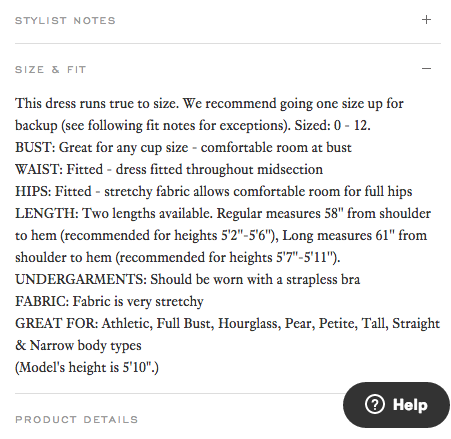
Some companies, especially ecommerce companies, have hundreds of thousands of product pages. The online dress rental company Rent the Runway is one such example. Each one of their product pages for individual dresses has everything you’d expect it to: images of the dresses, measurements, fabric, price, and reviews. So what makes them really different? The exceptional detail in their “Stylist Notes” and “Size & Fit” sections.
These sections go above and beyond with details that are clearly, carefully curated from stylists and reviewers. They don’t just explain what a dress is made of and how it looks; they cover details like exactly how it fits on every part of your body, which undergarments should be worn with it, and which body types it looks best on. Information like this not only delights customers and encourages their trust, but it also makes them more confident in their buying decision.
5) Coin
Coin is like a credit card, except it’s one card that holds the information of all your other credit cards. In other words, instead of filling your wallet with two credit cards, a debit card, three gift cards, and two rewards cards, you can fill your wallet with one card: Coin.
Whereas other product pages depend on text that highlights product differentiation, this page depends on a viewer taking in all of the visual elements. To start, there’s a video at the top that really does answer all of your questions about how Coin works. What about my rewards cards? Yes. What if I lose the card? It alerts you when it isn’t near your phone. And it goes on and on.
As you scroll down, you see the real magic of this page. Coin provides their product positioning and differentiation, but also shows you how it works by taking you through a visual journey of the Coin card.
6) Oreo
If you’ve seen any of Oreo’s marketing, you shouldn’t be surprised they’re on this list. But sometimes, being well known can actually make it harder to create a product page. Let’s see how they did it.
Oreo’s focus on their product page is showing how Oreos can help you unleash your imagination, dare to wonder, and become a generally happier person. It features a series of videos, one after another. In one about sharing Oreos with friends, the lyrics go, “If I gave ’em to my friend in the hallway, would he keep an optimistic outlook all day?” This page takes an out-of-the-box (pun intended) approach to marketing what could be thought of as just an ordinary cookie.
Oreo also has a unique approach to the design of this page. Even though Oreos are just black and white, the page is wonderfully colorful, from the videos to the backgrounds to the graphics.
[Click here to see Oreo’s full product page.]
7) Fitbit Charge
Before I started writing this post, I asked a few people for suggestions on their favorite product pages — and you’d be amazed how many people immediately recommended Fitbit. So I checked out their site … and they were right.
The page starts off with a value proposition, not a feature list. Specifically, it’s a hero image of people hiking a mountain, presumably wearing Fitbits, along with the copy, “Energize your day.” As you scroll down the page, it goes through four quick steps explaining how the product works (and why it’s valuable).
As an example, the feature is tracking everything you do from walking to running to sleeping. Why does it matter? So you can have this information at your fingertips and have something to beat. When users click on a feature explanation, the image to the right animates to show what you’d see on the screen on a Fitbit when activating that feature.
Aware that users will likely walk away from their page not remembering all of the specific features, Fitbit was sure to focus on conveying the difference each feature will make in their lives. Well played.
[Click here for Fitbit Charge’s full product page.]
8) Volkswagen
Volkswagen takes an interactive approach to their product marketing. Instead of listing out all of the features you can have in a car, they walk you through the process of actually building your car. As you go through that process, Volkswagen highlights the different features you could choose, then gives you a preview of what the car will look like and how that will affect the price.
(If you want to see a regular product page, they’ve got that, too.)
[Click here to see Volkwagen’s full product page.]
9) Seattle Cider
The folks at Seattle Cider claim their cider is “not your standard cider.” Well, neither is their product page. It’s a beautifully designed page that reads kind of like a story. It begins with attractive, up-close images of their cider selection, which happen to have really cool label designs. As you scroll, they explain what differentiates Seattle Cider’s product from other, similar products using descriptive words.
But my favorite part is what comes next: a really cool, interactive story of how the cider process works from start to finish, which plays for users as they scroll. This is an example of surprising and delightful user experience that goes above and beyond your typical product page by showing not only the products they sell, but how they’re actually made.
[Click here to see Seattle Cider’s full product page.]
10) OfficeSpace Software
OfficeSpace Software sells facility management software to help you manage your office space. Their product page is very clear and direct.
Each section of this product page is dedicated to a different feature. The headline explains the feature, and the subheadline explains why this feature is important as you evaluate different software. That makes it easy for prospects to quickly digest what the product offers, but also get into more detail about its value proposition if they choose to. There are also clear calls-to-action if someone wants to learn more about a particular feature.
[Click here to see OfficeSpace’s full product page.]
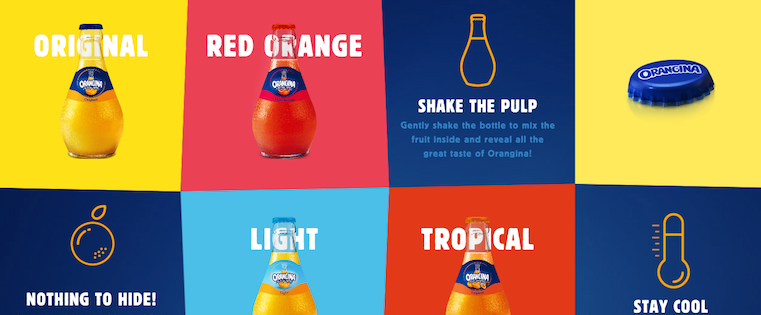
11) Orangina
This carbonated citrus drink has been around since 1935, and it has exactly four products: original, red orange, light, and tropical. So how do they make their product page special?
For one, they made it a lot of fun to explore. When you hover your mouse over any of the blocks, the picture or icon will animate: the bottles dance around, the orange slices in half, and the thermometer drops. The animated images and bold colors fit in perfectly with the Orangina brand’s bold, fun personality.
Also, you might notice that some of the blocks are actual products, while the others are simply tips and details about their products. If you don’t have a lot of products to sell, consider interspersing them with tips and information about the products you do have available.
[Click here to see Orangina’s full product page.]
12) Roku
Roku sells a variety of digital media players that solve different problems. Their biggest challenge is clearly conveying to their potential customers which players do what. To combat this, Roku does a great job of laying out all the different player options in a clean, color-coded features matrix.
Some of the highlights: They organize the products by price, include pictures, and include “Add to cart” call-to-action buttons both at the top and the bottom of the matrix since anyone who scrolls to the bottom will lose the first CTA above the fold.
[Click here to see Roku’s full product page.]
13) Mango Languages
Mango Languages creates “lovable” language-learning experiences for libraries, schools, corporations, government agencies, and individuals. On their homepage, they have illustrated calls-to-action for each of these buyer personas — from public libraries to government offices to homeschool teachers. Each of those calls-to-action leads to a different product page that’s colorful, clearly written, and very comprehensive.
Take a look at the example for homeschool teachers below. Like every other part of their website, it exudes their friendly, approachable, and helpful brand personality. The video couldn’t be more delightful. (A mango in a top hat playing the guitar? Yes, please.) As you scroll, you’re greeted with clear value propositions that use playful language that’s true to brand — for example: “Keep a language-learning transcript to stay ready for your kiddo’s next step.” Everything about the page says easy, fun, and effective.
[Click here to see Mango’s full product page.]
14) PaletteApp
Like Volkwagen, PaletteApp took the interactive approach for their product page. They help make designers’ lives easier by leveraging the world’s largest digital database of architectural products and materials. They have a lot of products — from flooring to countertops — and the goal of their product pages is to make it easy for designers to find and collect the products they like.
Notice in the screenshot below how users can hover their mouse over each product to request a sample, add it to their library, or add it to their personal palette. They also make it easy for users to filter by application, price, product type, color, and manufacturer. With so many products available, PaletteApp does an impressive job of making it easy to whittle down your choices.
[Click here to see PaletteApp’s full product page.]
15) Minwax
To help users find what they’re looking for more quickly and easily, Minwax actually has a Product Finder module on their product page.
The Product Finder functions like a sort of quiz: It asks you a series of multiple-choice questions, like “What kind of project is it?” and “What are you looking to do?” Once you answer the questions, it’ll spit out recommended products. In addition, they include a “Don’t Forget” list that lists the tools you’ll need to do what you’re trying to do — like safety glasses, gloves, sandpaper, masking tape, and so on. Helpful tips like this go above and beyond a normal ecommerce product page.
[Click here to see Minwax’s full product page.]
What other great product pages have you seen, and what makes them great? Share with us in the comments.
Editor’s Note: This post was originally published in March 2014 and has been updated for accuracy and comprehensiveness.
>
Caption contest: What is Jony Ive explaining to Charlie Rose?
When CBS shared a photo of Charlie Rose touring Apple’s secretive design studio to promote an upcoming 60 Minutes piece, we got to wondering what it was Jony Ive was explaining to Rose.
How thick the iPhone 7 will be now Apple has decided to include all the various features people have asked for? What the first prototype of the battery hump looked like? How much thicker his wallet got after his promotion?
Does this guy ever stop with the "thinner and thinner' stuff? http://ift.tt/22deRHz https://t.co/B2kjvotdYX
—
Seth Weintraub (@llsethj) December 18, 2015
Post your entries in the comments or on Twitter or Facebook, and the best one will win an Aukey Bluetooth Speaker and a 20000mAh USB battery pack. Keep it clean, please …
We’ll update the post with the winner on Sunday before the show airs. Good luck!
Filed under: AAPL Company Tagged: 60 Minutes, Apple Inc, Caption contest, Charlie Rose, Design studio, Jony Ive
Check out 9to5Mac for more breaking coverage of AAPL Company, Apple Inc, and Jony Ive.
What do you think? Discuss “Caption contest: What is Jony Ive explaining to Charlie Rose?” with our community.
6 Holiday Offers For Your Ecommerce Company That Don’t Include Discounts
When it comes to discounts and coupons during the holiday season, it seems like everyone is doing it. If retail giants are knocking a big percentage off their prices, a small ecommerce company like yours must do the same to keep up, right?
The problem with discounts and dollar savings is that your new lower prices might confuse buyers. See, if they get a great deal on your products now, they won’t want to pay the higher regular prices when they return. The value of your products will be firmly set at the lower amount. And that’s no good, is it? So, what can you do to keep up with the big box giants without offering discounts? Believe it or not, the options are endless.
Offer Choices
One reason a buyer may head over to a bigger ecommerce store is the sheer amount of choices. The smaller companies just can’t offer as many, can they? And choices don’t just end at the products you offer, either. You should definitely give them more to choose from, but then give them better payment options, shipping selections, and even customer service outlets.
Offer Easy Payment
Let’s talk about the payment options for a minute. Do you still accept only credit cards for your sales? If so, you’re probably losing a lot of customers at the checkout page. The more you can streamline payment, the more your buyers will complete the sales.
There are a few reasons for the incomplete sales at this point. The first is simply that people have become accustomed to instant gratification. If they can go to Amazon and click one button to make a purchase, then that’s what they’ll do. Then, of course, there are the mobile shoppers who really don’t want to enter their credit card info over and over on tiny screens with tiny buttons. As the number of mobile shoppers flies through the roof this holiday season, you can’t afford to miss out on those buyers.
Offer Free Shipping
Whether your offer for shipping lasts only through the holidays or sticks around all year, this is one of the biggest offers you can make to your buyer. See, they’re not just leaving your checkout page because you don’t offer enough payment options. They’re also running scared when they see the total price with shipping added. Maybe you can’t afford to ship everything for free, and that’s okay. By offering an option for free shipping with the purchase of a certain dollar amount, you might just increase your average order value, too.
Offer Multichannel Experiences
How can your buyers make purchases? How can they reach you? How do they receive information about your company and your holiday offers? The more avenues you offer into your business, the more people you’ll attract. Buyers should be able to reach you, to interact with your brand, and to make purchases whenever and wherever they choose. Social media, apps, email, phone, your blog, and most importantly your website—these are all channels through which your buyers will want to reach you.
Offer Information and Education
Many of the people shopping with your company during the holiday season are just there to buy something for loved ones. They don’t have any intention of coming back. Does that mean you should let them be? No way! Make sure they’re armed with all the information they need to make smart choices. Whether you do that through blogs, tutorial videos, or gift guides.
Offer Stunning Service
Through it all, what will really set you apart from the big box stores offering massive holiday sales is your service. You can afford to make the season bright for every last person who buys from you. That means you must have someone available at all times, ready to answer questions through phone calls, social media, and email. Your returns and exchanges should be hassle-free and delivered with a smile. Above all, keep the promises you make, listen to your customers, and be completely honest.
Now you’re ready to face the holiday season, and you won’t have to give a single discount to compete with the big box retailers.
Apple lets you take your gift shopping to the wire with free overnight delivery & in-store pickup
If you’re one of those people who likes to leave your holiday gift shopping until the last minute, Apple has you covered. Apple notes on its website that you can order products online right up to 2pm on 23rd December and the company will deliver them overnight free of charge. The replaces the normal two-day shipping.
Still not cutting things fine enough for you? No problem …
In selected countries, Apple also allows you to place your online order right up until two hours before the closing time of your local Apple Store, and pick up the goods the same day. The company recently extended its Personal Pickup service first to Australia and Canada, then to the UK, and most recently to six more European countries.
Apple is offering gift suggestions in six different categories: gaming, photography, music, fitness, learning and travel – with the iPad Pro featured front-and-center. If you need additional ideas, check out our collection of holiday gift guides. Amazon also has its own set of last-minute deals in electronics.
Filed under: AAPL Company Tagged: Apple gifts, Apple Inc, Gifts, holiday gifts
For more news on AAPL Company, Apple Inc, and Gifts continue reading at 9to5Mac.
What do you think? Discuss “Apple lets you take your gift shopping to the wire with free overnight delivery & in-store pickup” with our community.
Social Growth: How to Use Pinterest to Grow Your Following on Facebook, YouTube and Beyond
Are you active on Pinterest? Have you thought about using Pinterest to grow your other social networks? To discover how to drive traffic from Pinterest to other networks, I interview Natalie Jill. More About This Show The Social Media Marketing podcast is an on-demand talk radio show from Social Media Examiner. It’s designed to help […]
This post Social Growth: How to Use Pinterest to Grow Your Following on Facebook, YouTube and Beyond first appeared on Social Media Examiner.
Social Media Examiner – Your Guide to the Social Media Jungle
from Social Media Examiner http://ift.tt/1RWc6ps
via socialmediaexaminer
How to Be a Better Marketer Through Mindfulness and Meditation
Let’s get this out into the open: I bite my nails. Or at least I did. (Kinda gross, right?)
But this past summer, I watched as my then three-year-old son chomped down on his fingernail. That was it. The final kick in the butt I needed to see to finally stop a decades-old bad habit. Little did I know that in my quest to stop biting my nails I’d unlock something much bigger for myself — both personally and professionally. It was mindfulness.
What’s that? According to the folks at U-Cal Berkeley’s Greater Good Science Center, mindfulness is about “maintaining a moment-by-moment awareness of our thoughts, feelings, bodily sensations, and surrounding environment.”
For me, it’s helped me make better decisions, listen more, and above all, be present. Amidst the chaos of our busy, multi-screen, let-me-bookmark-that-because-I-don’t-have-five-minutes-wait-what-was-I-doing? lives, mindfulness helps me return to a more centered self.
And more and more people are getting in on it — Oprah, Jerry Seinfeld, Katy Perry, Anderson Cooper, and even some companies, too. So what can you do to get in on the goodness? I’ll tell you. Here’s how I met mindfulness.
Meet Paul: My Meditation Guy
I knew that guided meditation and hypnosis was probably a good bet to kick the nail-biting habit. So, I reached out to Paul Gustafson, a Boston-area consulting hypnotist. Gustafson helps people — via guided meditation and hypnotic suggestion — with anything from quitting smoking to overcoming a fear of flying.
I sat down with him for three, 30-minute sessions where he talked me into a deep relaxation and then, as I reached a deep meditative state, he provided guidance and suggestions for me to figuratively cut the cord of my past nail-biting behavior. From there, I kept his guided meditation recording on repeat.
“The immediate benefit of guided meditation is profound relaxation,” Gustafson told me. “It’s impossible to be stressed or to worry while enjoying deep meditative bliss. One of the long-term benefits of meditation is that the relaxation becomes the rule rather than the exception. People who meditate are happier, less affected by the pace of day-to-day life. They’re healthier, and more productive.”
Paul has become an oft-invoked name at my house. My wife, also a marketer, has gone to see him and notes that it’s been entirely transformative in finding her chi, both in and out of work. (After all, anyone with small children can attest to the need for mindfulness.)
How Mindfulness Contributes to Better Marketing
Mindfulness is a terrific asset for today’s marketers … but you’re probably wondering where the data is, right?
Well, a recent study conducted by researchers at INSEAD and The Wharton School of the University of Pennsylvania found that 15 minutes of mindful meditation could help a person make better decisions. That same study shows that mindfulness “can reduce confirmation bias and overconfidence, allowing decision makers to better differentiate between relevant and irrelevant information.”
Considering the vast information available to marketers, having a filter for the superfluous can let you focus on what’s most important and make decisions accordingly.
Gustafson has helped patients deal with stress related to dealing with a boss, or co-worker, too. “I’ve had many clients come to me because of work-related stress. When someone repeats a stressful response to certain situations it becomes a pattern. Over time, patterns become rooted and people feel powerless to change the situation. Guided meditation offers access to this level of thought, enabling individuals to release and become free of unpleasant patterns,” he told me.
Some companies are getting on board the mindfulness train, too.
I’m lucky enough to work for a company that values its employees’ approach to work, rather than just the output. HubSpot’s received quite a bit of buzz around our amazing perks, but the one I take full advantage of is the Nap Room in our Cambridge office. For me, it’s a meditation chamber. Just 20 minutes of guided meditation — or slow, deep breathing as the hammock gently rocks back and forth — will clear the mind and bring a sense of focus that even the strongest cup of coffee can’t conjure.
A Recipe for Mindfulness: How to Get Started
So, what do you say? Want to give it a try? Here’s your (simple) recipe for mindfulness …
Ingredients:
- A quiet spot
- An open mind
- 20 minutes daily
Add to taste:
- Headphones, with guided sessions
- Popular apps for reminders or self-guided meditation
Some tips:
- Wake up earlier. Akin to the adage that a trip to the gym in the morning gives you more energy, a trip to mindfulness early in your day sets your mind up for success, too. You don’t even have to leave the comfort of your bed. Just put on the headphones as you awake.
- Let meditation tuck you in at night. At the other end of the day, it’s entirely acceptable and effective to fall asleep as you meditate. If you’re using a guided meditation track, whether you’re awake or asleep, your mind is taking in the information.
- Make a meeting out of it. Set up a recurring daily calendar item so that others don’t cut into your “mindfulness meeting.” My colleague Steve Haase has written quite a bit on meditation and mindfulness. Haase and other colleagues sit in silence for 20 minutes on Wednesday mornings to clear their minds for the day.
- Deep breathing. Sometimes the biggest rewards come from the smallest of actions. Deep breathing falls into that category. Take deep breaths throughout the day when you feel overwhelmed, overstimulated, or just need to top off the mindfulness tank.
- Resist temptation. For many of us, our instincts when idle — in line at the grocery store checkout, in the elevator, at the traffic light — are to fill the void with a few swipes of the screen. Don’t do it. In much the same way that good ideas sometimes arrive whilst in the shower, lying in bed, or even sleeping, simply being present can be the difference in finding clarity or that elusive good idea you’ve been chasing.
- Don’t expect perfection. Are you going to enter a state of deep bliss every time you sit down to meditate? Probably not. Your mind will wander. Just like some runs or workouts feel better than others, so too do meditation sessions. No two are alike.
Yields:
- Open to opportunities. If you expect a lot from yourself, you’ve probably experienced the anxiety of your expectations actually getting in the way of success. With mindfulness, you can open yourself up to the moment. You can focus less on the eventual outcome (though mindful of that goal) and instead be present to new ideas.
- Don’t sweat the small stuff. Do I get worked up still? Sure (ask my wife). But more often I can find myself navigating stressful situations with a bit more grace or awareness of solutions rather than focusing on frustrations.
- A planful approach. A less cluttered, focused mind tends to provide more room for planful thought. I’ve found myself able to pull together a thoughtful response or tidy plan in less time.
- Be here. Take it from Bill Murray. We do our best when we’re present. But it’s not easy.
Has meditation made you a better marketer? Do you have tips to share for being more mindful? Leave your thoughts in the comments section below (or find me on Twitter: @thaneberle).
Star Wars: The Force Awakens soundtrack now available in Apple Music and iTunes
Released today, fans of JJ Abram’s interpretation of Star Wars can now buy the full soundtrack album for the Star Wars: The Force Awakens movie ($11.99) or stream it with Apple Music. There are a total of 23 tracks with a total runtime around 70 minutes. The album starts with the iconic opening credits soundtrack and ends with an track 8 minute entitled ‘The Jedi Steps and Finale’. The long-awaited seventh instalment in the film series is expected to break box office records, after strong first showings around the world.
Apple is also running a special Star Wars Apple Music Radio station, as we reported earlier in the week, in coordination with various other promotions of Star Wars content across the iTunes Store. You can download all six previous films as a digital movie collection for $90.
Filed under: Apple Music, iOS, iOS Devices, Tech Industry Tagged: soundtrack, Star Wars
For more information about iOS Devices, Tech Industry, and iOS continue reading at 9to5Mac.
What do you think? Discuss “Star Wars: The Force Awakens soundtrack now available in Apple Music and iTunes” with our community.
Charlie Rose to tour Jony Ive’s ‘secret design studio’ and new Store design for CBS on Sunday
Jony Ive will give a rare look into Apple’s secret design studio in Cupertino this coming Sunday, December 20th. Ive will lead Charlie Rose through the secret design study for his popular show 60 Minutes on CBS. In addition to a tour of the design lab, Rose will also get a “first look at Apple’s store of the future” from retail chief Angela Ahrendts.
The news was revealed in a pair of tweets from the 60 Minutes Twitter account tonight, both of which included a teaser image. In one image, Ive can be seen showing Rose a portion of his secret design lab in Cupertino. In the other, Ahrendts can be seen leading Rose into an unidentified Apple Store.
This isn’t the first time Charlie Rose has landed an interview with notable Apple executives. In 2013, Rose sat down with Jony Ive and Marc Newson to discuss Apple’s partnership with RED, as well as other details about the design process at Apple. Last year, Tim Cook joined Charlie Rose to discuss Steve Jobs, Beats, Apple TV, and much more.
60 Minutes with Jony Ive and Angela Ahrendts airs this Sunday, December 20th, at 7:30PM ET & 7PM PT on CBS in the United States. The teaser tweets can be seen below:
.@CharlieRose goes inside Jonathan Ive’s secret design studio at Apple headquarters, Sunday on @60Minutes https://t.co/q1V6rI5yKi
—
60 Minutes (@60Minutes) December 17, 2015
.@CharlieRose gets a first look at Apple’s store of the future, Sunday on @60Minutes https://t.co/BdjygqqIdc
—
60 Minutes (@60Minutes) December 17, 2015
Filed under: AAPL Company Tagged: 60 Minutes, Angela Ahrendts, Charlie, interview, Jony Ive
Check out 9to5Mac for more breaking coverage of AAPL Company, Angela Ahrendts, and Jony Ive.
What do you think? Discuss “Charlie Rose to tour Jony Ive’s ‘secret design studio’ and new Store design for CBS on Sunday” with our community.
Apple announces partnership with UnionPay to bring Apple Pay to China in 2016
Apple today announced in a press release that it is brining Apple Pay to China. The company revealed that it is partnering with UnionPay in the country to bring support for its mobile payment solution to iPhone, Apple Watch, and iPad users in the country.
In China, Apple Pay will support 15 of the country’s leading banks. At this point, however, it’s unclear what banks will be supported. In China, Apple Pay will work with the UnionPay Quickpass, which is an existing contactless payment method in the country. iOS users in China will be able to simply hold their iPhone or Apple Watch near a UnionPay terminal at participating stores to activate Apple Pay.
“China UnionPay is dedicated to promoting payment innovations and providing secure, convenient mobile payment experiences for its hundreds of millions of cardholders, aligning multiple parties in the industry,” said Chai Hongfeng, executive vice president of China UnionPay. “We’re very excited to offer Apple Pay among a diverse set of innovative payment options that work with China UnionPay QuickPass.”
Apple says that the partnership with UnionPay allows for a secure and vast rollout in China. The rollout will commence “as early as 2016,” following the completion of tests and certification required by the Chinese government.
Apple Pay has been a long time coming for China. A report last month claimed Apple was hoping to launch the service in the country by February of 2016, while earlier this year the company invested $13 million into bringing it to China.
Apple & China UnionPay to Bring Apple Pay to China
BEIJING — December 18, 2015 — Apple® and China UnionPay today announced a partnership to bring Apple Pay®, which transforms mobile payments with an easy, secure and private way to pay, to China. China UnionPay cardholders will be able to easily add their bank cards to Apple Pay on iPhone®, Apple Watch® and iPad®, providing added convenience and security to everyday shopping.
“China UnionPay is dedicated to promoting payment innovations and providing secure, convenient mobile payment experiences for its hundreds of millions of cardholders, aligning multiple parties in the industry,” said Chai Hongfeng, executive vice president of China UnionPay. “We’re very excited to offer Apple Pay among a diverse set of innovative payment options that work with China UnionPay QuickPass.”
“Apple Pay has revolutionized the way millions of people pay every day with their iPhone, Apple Watch and iPad,” said Eddy Cue, Apple’s senior vice president of Internet Software and Services. “China is an extremely important market for Apple and with China UnionPay and support from 15 of China’s leading banks, users will soon have a convenient, private and secure payment experience.”
China UnionPay’s QuickPass and Apple Pay together will protect customer payment information through industry-leading payment tokenization technology. Security is at the core of Apple Pay, so when you add a credit or debit card, the actual card numbers are not stored on the device, nor on Apple servers. Instead, a unique Device Account Number is assigned, encrypted and securely stored in a dedicated chip called the Secure Element on your device. Each transaction is also authorized with a one-time unique dynamic security code.
Paying is simple with the touch of a finger and can happen in one motion. In stores, there’s no need to open an app or wake your display. With the innovative NFC antenna design, simply hold iPhone near China UnionPay’s QuickPass-enabled POS terminals with your finger on Touch ID® to pay. With Apple Watch, just double click the side button and hold the watch face up to the contactless reader to make a purchase right from your wrist. Shopping within apps accepting Apple Pay has never been easier and there’s no need to manually fill out lengthy account forms or repeatedly type in shipping and billing information.
Apple Pay will roll out to China UnionPay cardholders as soon as early 2016 after relevant tests and certification required by Chinese regulators, with the service itself in compliance with the applicable national mobile payment and financial industry standards in China.
In stores, Apple Pay works with iPhone 6s, iPhone 6s Plus, iPhone 6, iPhone 6 Plus and Apple Watch. When paying within apps, Apple Pay is compatible with iPhone 6s, iPhone 6s Plus, iPhone 6, iPhone 6 Plus, iPad Air® 2, iPad mini™ 3, iPad mini 4 and iPad Pro™. For more information on Apple Pay, visit http://ift.tt/1IcfBpO.
As a bankcard network, China UnionPay operates China’s national inter-bank clearing and settlement system, develops the worldwide UnionPay Card acceptance network, promotes the issuance and usage of the UnionPay cards as well as other innovative payment solutions, so as to provide quality, efficient and safe payment services to cardholders. To date, the total number of the UnionPay Card issued both at home and abroad has been over 5 billion. The UnionPay network has been extended to all the cities and rural areas in China. In addition, UnionPay has enabled UnionPay Card acceptance across more than 150 countries and regions through extensive cooperation with financial and payment institutions around the world. UnionPay cards can be used in more than 26 million merchants and 1.9 million ATMs. Additional information may be found at www.unionpay.com.
Apple revolutionized personal technology with the introduction of the Macintosh in 1984. Today, Apple leads the world in innovation with iPhone, iPad, Mac, Apple Watch and Apple TV. Apple’s four software platforms — iOS, OS X, watchOS and tvOS — provide seamless experiences across all Apple devices and empower people with breakthrough services including the App Store, Apple Music, Apple Pay and iCloud. Apple’s 100,000 employees are dedicated to making the best products on earth, and to leaving the world better than we found it.
Filed under: iOS Devices
Visit 9to5Mac to find more special coverage of iOS Devices.
What do you think? Discuss “Apple announces partnership with UnionPay to bring Apple Pay to China in 2016” with our community.