
Welcome to My Blog
The Ultimate Guide to Cybersecurity
If asked you to list the most valuable things you own, how would you answer? I guess this would be another way of asking the infamous “What would you grab if your house was on fire?” question.
For me, I’d grab an old keepsake box filled with things from my childhood, my engagement ring, my phone and computer (for pictures and writings!), and an old Iowa sweatshirt of my dad’s.
But I’d also have to say that my identity, social security number, credit cards, and bank accounts are valuable to me.
While these things can’t exactly burn down in a fire, they can be stolen … and if I were to ask a computer hacker what they thought my most valuable possessions were, they’d probably quote the intangible.
That’s why we’ve compiled this guide on cybersecurity. Below, we’ll talk about why you should care about cybersecurity, how to secure your and your customer’s digital data, and what resources to follow to stay up-to-date with emerging tech.
Personal data is incredibly valuable. Hackers know it, and businesses know it. That’s why both go to great lengths to collect it — albeit one following a much more legal and moral avenue to do so.
Unfortunately, as technology and data collection practices progress, so do the methods that hackers follow to steal data. As business owners, we have a special responsibility to protect our customers’ data and be transparent with our practices.
Why You Should Care About Cybersecurity
In the first half of 2019, data breaches exposed over 4 billion records. Moreover, a recent study found that hackers attack every 39 seconds — that adds up to, on average, 2,244 attacks per day.
Small to medium-sized businesses (SMBs) are especially at risk. You might see corporations like Target and Sears topping the headlines as top data breach victims, but it’s actually SMBs that hackers prefer to target.
Why? They have more — and more valuable — digital assets than your average consumer but less security than a larger enterprise-level company … placing them right in a “hackers’ cybersecurity sweet spot.”
Security breaches are frustrating and frightening for both businesses and consumers. Studies show that, after a company data breach, many consumers take a break from shopping at that business — and some consumers quit altogether.
But cybersecurity is about more than just avoiding a PR nightmare. Investing in cybersecurity builds trust with your customers. It encourages transparency and reduces friction as customers become advocates for your brand.
“Everyone has a role in helping to protect customers’ data. Here at HubSpot, every employee is empowered to solve for customer needs in a safe and secure way. We want to harness everyone’s energy to provide a platform that customers trust to correctly and safely store their data.” — Chris McLellan, HubSpot Chief Security Officer
Cybersecurity Terms to Know
Cybersecurity is a very intimidating topic, not unlike cryptocurrency and artificial intelligence. It can be hard to understand, and, frankly, it sounds kind of ominous and complicated.
But fear not. We’re here to break this topic down into digestible pieces that you can rebuild into your own cybersecurity strategy. Bookmark this post to keep this handy glossary at your fingertips.
Here’s a comprehensive list of general cybersecurity terms you should know.
Authentication
Authentication is the process of verifying who you are. Your passwords authenticate that you really are the person who should have the corresponding username. When you show your ID (e.g., driver’s license, etc), the fact that your picture generally looks like you is a way of authenticating that the name, age, and address on the ID belong to you. Many organizations use two-factor authentication, which we cover later.
Backup
A backup refers to the process of transferring important data to a secure location like a cloud storage system or an external hard drive. Backups let you recover your systems to a healthy state in case of a cyber attack or system crash.
Data Breach
A data breach refers to the moment a hacker gains unauthorized entry or access to a company’s or an individual’s data.
Digital Certificate
A digital certificate, also known as an identity certificate or public key certificate, is a type of passcode used to securely exchange data over the internet. It’s essentially a digital file embedded in a device or piece of hardware that provides authentication when it sends and receives data to and from another device or server.
Encryption
Encryption is the practice of using codes and ciphers to encrypt data. When data is encrypted, a computer uses a key to turn the data into unintelligible gibberish. Only a recipient with the correct key is able to decrypt the data. If an attacker gets access to strongly encrypted data but doesn’t have the key, they aren’t able to see the unencrypted version.
HTTP and HTTPS
Hypertext Transfer Protocol (HTTP) is how web browsers communicate. You’ll probably see an http:// or https:// in front of the websites you visit. HTTP and HTTPS are the same, except HTTPS encrypts all data sent between you and the web server — hence the “S” for security. Today, nearly all websites use HTTPS to improve the privacy of your data.
Vulnerability
A vulnerability is a place of weakness that a hacker might exploit when launching a cyber attack. Vulnerabilities might be software bugs that need to be patched, or a password reset process that can be triggered by unauthorized people. Defensive cybersecurity measures (like the ones we talk about later) help ensure data is protected by putting layers of protections between attackers and the things they’re trying to do or access.
A cyber attack is a deliberate and typically malicious intent to capture, modify, or erase private data. Cyber attacks are committed by external security hackers and, sometimes, unintentionally by compromised users or employees. These cyber attacks are committed for a variety of reasons. The majority are looking for ransom, while some are simply launched for fun.
Here are the four most common cyber threats.
1. Password Guessing (Brute Force) Attack
A password guessing (or “credential stuffing”) attack is when an attacker continually attempts to guess usernames and passwords. This attack will often use known username and password combinations from past data breaches. An attacker is successful when people use weak passwords or use the password between different systems (e.g., when your Facebook and Twitter password are the same, etc). Your best defense against this kind of attack is using strong passwords and avoiding using the same password in multiple places as well as using two factor authentication, as we talk about later.)
2. Distributed Denial of Service (DDoS) Attack
A distributed denial of service (DDoS) attack is when a hacker floods a network or system with a ton of activity (such as messages, requests, or web traffic) in order to paralyze it. This is typically done using botnets, which are groups of internet-connected devices (e.g., laptops, light bulbs, game consoles, servers, etc) infected by viruses that allow a hacker to harness them into performing many kinds of attacks.
3. Malware Attack
Malware refers to all types of malicious software used by hackers to infiltrate computers and networks and collect susceptible private data. Types of malware include:
- Keyloggers, which track everything a person types on their keyboard. Keyloggers are usually used to capture passwords and other private information, such as social security numbers.
- Ransomware, which encrypts data and holds it hostage, forcing users to pay a ransom in order to unlock and regain access to their data.
- Spyware, which monitors and “spies” on user activity on behalf of a hacker.
Furthermore, malware can be delivered via:
- Trojan horses, which infect computers through a seemingly benign entry point, often disguised as a legitimate application or other piece of software.
- Viruses, which corrupt, erase, modify, or capture data and, at times, physically damage computers. Viruses can spread from computer to computer, including when they are unintentionally installed by compromised users.
- Worms, which are designed to self-replicate and autonomously spread through all connected computers that are susceptible to the same vulnerabilities. .
4. Phishing Attack
A phishing attack is when hackers try to trick people into doing something. Phishing scams can be delivered through a seemingly legitimate download, link, or message. It’s a very common type of cyber attack — over 75% of organizations fell victim to phishing in 2018. Phishing is typically done over email or through a fake website; it’s also known as spoofing. Additionally, spear phishing refers to when a hacker focuses on attacking a particular person or company, instead of creating more general-purpose spams.
Cybersecurity Best Practices: How to Secure Your Data
Cybersecurity can’t be boiled down into a 1-2-3-step process. Securing your data involves a mix of best practices and defensive cybersecurity techniques. Dedicating time and resources to both is the best way to secure your — and your customers’ — data.
Defensive Cybersecurity Solutions
All businesses should invest in preventative cybersecurity solutions. Implementing these systems and adopting good cybersecurity habits (which we discuss next) will protect your network and computers from outside threats.
Here’s a list of six defensive cybersecurity systems and software options that can prevent cyber attacks — and the inevitable headache that follows. Consider combining these solutions to cover all your digital bases.
Antivirus Software
Antivirus software is the digital equivalent of taking that vitamin C boost during flu season. It’s a preventative measure that monitors for bugs. The job of antivirus software is to detect viruses on your computer and remove them, much like vitamin C does when bad things enter your immune system. (Spoken like a true medical professional …) Antivirus software also alerts you to potentially unsafe web pages and software.
Learn more: McAfee, Norton. or Panda (for free)
Firewall
A firewall is a digital wall that keeps malicious users and software out of your computer. It uses a filter that assesses the safety and legitimacy of everything that wants to enter your computer; it’s like an invisible judge that sits between you and the internet. Firewalls are both software and hardware-based.
Learn more: McAfee LiveSafe or Kaspersky Internet Security
Single Sign-On (SSO)
Single sign-on (SSO) is a centralized authentication service through which one login is used to access an entire platform of accounts and software. If you’ve ever used your Google account to sign up or into an account, you’ve used SSO. Enterprises and corporations use SSO to allow employees access to internal applications that contain proprietary data.
Two-Factor Authentication (2FA)
Two-factor authentication (2FA) is a login process that requires a username or pin number and access to an external device or account, such as an email address, phone number, or security software. 2FA requires users to confirm their identity through both and, because of that, is far more secure than single factor authentication.
Learn more: Duo
Virtual Private Network (VPN)
A virtual private network (VPN) creates a “tunnel” through which your data travels when entering and exiting a web server. That tunnel encrypts and protects your data so that it can’t be read (or spied on) by hackers or malicious software. While a VPN protects against spyware, it can’t prevent viruses from entering your computer through seemingly legitimate channels, like phishing or even a fake VPN link. Because of this, VPNs should be combined with other defensive cybersecurity measures in order to protect your data.
Learn more: Cisco’s AnyConnect or Palo Alto Networks’ GlobalProtect
Cybersecurity Tips for Business
Defensive cybersecurity solutions won’t work unless you do. To ensure your business and customer data is protected, adopt these good cybersecurity habits across your organization.
Require strong credentials.
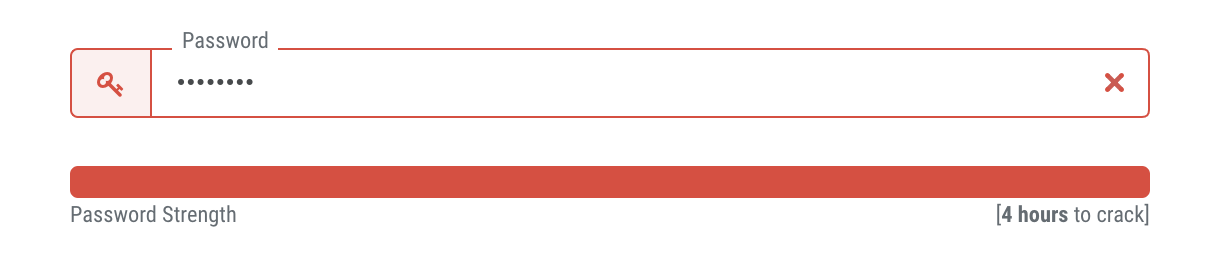
Require both your employees and users (if applicable) to create strong passwords. This can be done by implementing a character minimum as well as requiring a mix of upper and lowercase letters, numbers, and symbols. More complicated passwords are harder to guess by both individuals and bots. Also, require that passwords be changed regularly.
Control and monitor employee activity.
Within your business, only give access to important data to authorized employees who need it for their job. Prohibit data from sharing outside the organization, require permission for external software downloads, and encourage employees to lock their computers and accounts whenever not in use.
Know your network.
With the rise of the Internet of Things, IoT devices are popping up on company networks like crazy. These devices, which are not under company management, can introduce risk as they’re often unsecured and run vulnerable software that can be exploited by hackers and provide a direct pathway into an internal network.
“Make sure you have visibility into all the IoT devices on your network. Everything on your corporate network should be identified, properly categorized, and controlled. By knowing what devices are on your network, controlling how they connect to it, and monitoring them for suspicious activities, you’ll drastically reduce the landscape attackers are playing on.” — Nick Duda, Principal Security Officer at HubSpot
Read about how HubSpot gains device visibility and automates security management in this case study compiled by security software ForeScout.
Download patches and updates regularly.
Software vendors regularly release updates that address and fix vulnerabilities. Keep your software safe by updating it on a consistent basis. Consider configuring your software to update automatically so you never forget.
Make it easy for employees to escalate issues.
If your employee comes across a phishing email or compromised web page, you want to know immediately. Set up a system for receiving these issues from employees by dedicating an inbox to these notifications or creating a form that people can fill out.
Cybersecurity Tips for Individuals
Cyber threats can affect you as an individual consumer and internet user, too. Adopt these good habits to protect your personal data and avoid cyber attacks.
Mix up your passwords.
Using the same password for all your important accounts is the digital equivalent of leaving a spare key under your front doormat. A recent study found that over 80% of data breaches were a result of weak or stolen passwords. Even if a business or software account doesn’t require a strong password, always choose one that has a mix of letters, numbers, and symbols and change it regularly.
Monitor your bank accounts and credit frequently.
Review your statements, credit reports, and other critical data on a regular basis and report any suspicious activity. Additionally, only release your social security number when absolutely necessary.
Be intentional online.
Keep an eye out for phishing emails or illegitimate downloads. If a link or website looks fishy (ha — get it?), it probably is. Look for bad spelling and grammar, suspicious URLs, and mismatched email addresses. Lastly, download antivirus and security software to alert you of potential and known malware sources.
Back up your data regularly.
This habit is good for businesses and individuals to master — data can be compromised for both parties. Consider backups on both cloud and physical locations, such as a hard drive or thumb drive.
Cybersecurity Resources
To learn more about cybersecurity and how to better equip your business and team, tap into the resources below. Check out some of the most popular cybersecurity podcasts and cybersecurity blogs, too.
National Institute of Standards and Technology (NIST)
NIST is a government agency that promotes excellence in science and industry. It also contains a Cybersecurity department and routinely publishes guides that standards.
Bookmark: The Computer Security Resource Center (CSRC) for security best practices, called NIST Special Publications (SPs).
The Center for Internet Security (CIS)
CIS is a global, non-profit security resource and IT community used and trusted by experts in the field.
Bookmark: The CIS Top 20 Critical Security Controls, which is a prioritized set of best practices created to stop the most pervasive and dangerous threats of today. It was developed by leading security experts from around the world and is refined and validated every year.
Cybrary
Cybrary is an online cybersecurity education resource. It offers mostly free, full-length educational videos, certifications, and more for all kinds of cybersecurity topics and specializations.
Signing Off … Securely
Cyber attacks may be intimidating, but cybersecurity as a topic doesn’t have to be. It’s imperative to be prepared and armed, especially if you’re handling others’ data. Businesses should dedicate time and resources to protecting their computers, servers, networks, and software and should stay up-to-date with emerging tech. Handling data with care only makes your business more trustworthy and transparent — and your customers more loyal.
Note: Any legal information in this content is not the same as legal advice, where an attorney applies the law to your specific circumstances, so we insist that you consult an attorney if you’d like advice on your interpretation of this information or its accuracy. In a nutshell, you may not rely on this as legal advice or as a recommendation of any particular legal understanding.
Editor’s note: This post was originally published in February 2019 and has been updated for comprehensiveness.

Is Page One Overrated? The Truth About Organic Search Results
For many marketers, ranking on page one of Google is the ultimate sign that your piece of content has made it.
Every SEO strategy ever devised aims to get you there. If you’re lucky enough to land a high ranking, you’ll enjoy a pretty big advantage over competitors when it comes to finding new customers. At least that’s the prevailing belief among modern marketers and SEO specialists.
But — just how valuable is a page-one ranking?
Teknicks surveyed more than 1,000 internet users using a representative sampling method to uncover their Google search behavior and find out how far they’d go to find what they’re looking for online.
Answers were predictably varied, but they allowed us to draw some pretty clear SERP statistics and conclusions.
For starters, marketers who say the first page is the only page that matters aren’t exactly wrong.
However, simply making page one might not be good enough — more than 43% of survey respondents said they wouldn’t be very likely to scroll down the page to see additional results. If you’re going to aim high, you might as well aim for the very top.
And if you think page two is good enough, you might want to reconsider this search engine traffic statistic: roughly 56% said they would rather try a different search query or engine than click on the second page of search results. That’s a lot of traffic to miss out on.
And as for clicks? Pages two and three get just 5.59% combined. The percentage of Google traffic by results page decreases drastically with every new page you click on.
So what do these SERP statistics mean for you?
What Marketers Can Learn About Keywords, Rankings, and Users
When you know how far people are willing to search, you have a better idea of what your goals should be. Getting to page one on Google is far from easy. In fact, it requires a huge investment of time, and potentially money (depending on the keyword you want to rank for).
For instance, let’s say a marketer knows that only the top three results for a particular term attract users. If they’re nowhere near that ranking, then they should put some budget toward paid search or social (if applicable).
Of course, such a big investment of time and money doesn’t make sense for certain keywords, since the value of Google result positioning varies. An easy way to calculate a keyword’s traffic value is to multiply its earnings per click by the number of searches that incorporate it and then multiply that by the click-through rate. Just don’t expect that value to remain constant.
It’s also worth noting that keywords shouldn’t be the main focus of your content strategy. Google’s algorithm is constantly evolving thanks to machine learning. As it does, keywords are becoming less integral to a high ranking.
This makes sense — keywords were useful during the early days of search, but computers have evolved to more effectively interpret human speech. So go ahead and write naturally, incorporating keywords only where it makes sense.
The BERT update, for instance, helps Google process words in relation to the rest of the sentence, rather than one at a time in order. For example, the search query “Can you get driver’s license renewed for someone else?” forces BERT to acknowledge “for someone” changes the meaning of the query.
This is especially important considering how often people use voice-controlled devices like Amazon’s Alexa or Apple’s Siri. In fact, over 25% of our respondents have conducted a voice search, and we expect that percentage to increase in the coming years. To make page one, you should focus on answering these questions and securing featured or Google rich snippets.
And if you’re wondering why we’re only talking about Google search results statistics, it’s because the search engine has cornered roughly 92% of the total search market.
Does that mean Google search stats are the only ones that matter? No, but we think it’s safe to assume that Google search behavior is representative of broader user behavior.
So let’s talk about how you can capitalize on said behavior by getting to page one.
1. Start With a Question
On the basis of the Google search statistics our data provided (and corroborating stats from around the web), we’d recommend starting your SEO journey with a question: Should I even aim for page one?
To answer this, you’ll need to have a general idea of where you’re starting. If you already have a fairly robust content marketing program, you may not be that far away. But maybe you haven’t heavily invested in content yet. That doesn’t mean you can’t start — just don’t plan on reaching search results stardom overnight.
You should also evaluate the competitiveness of the keyword you want to rank for and be realistic about your chances for success. Depending on how competitive the term is, you might want to focus on other discovery avenues such as voice discovery (and no, we can’t emphasize this enough).
You might also conduct an eye-tracking study for your term to find out where a user’s gaze typically goes when results appear. It might land on one of the top three results, but it might also drift down the page.
That said, if you’re going to attempt a page-one ranking, you should still aim for the top even if users scroll down (more on that in a moment).
2. Try Pivoting to a PPC Strategy
If you don’t see yourself on the first page anytime soon — or ever, you can pursue plenty of other avenues. Put some budget toward paid search, which can be even more effective than organic search results.
Roughly 35% of our respondents weren’t sure whether they could distinguish between an ad and an organic search result, and people who click on ads deliberately intend to make a purchase. And the top three advertising spots get 46% of the clicks on the page.
However, you may have a shot at achieving success on the first page organically. How? Let’s dive into that, next.
3. Play the Long Game
To land a high ranking for a fairly competitive term across all channels that your customers are using, you’re going to need to put in the time. Here’s what to focus on:
- Get your FAQ page optimized. An SEO friendly FAQ page can be a great way to increase your rankings and CTR. Just don’t overdo it: The primary purpose of this page is customer support, so be sure it adds value. You can then mark up that content using FAQ schema and be eligible to have a rich result.
- Focus on link building. Search engine algorithms are driven by links, which is why link building is critical to SEO. Build highly resourceful content, develop relationships with other site owners, and work on getting links on their pages to your best content. Pro tip: Focus on quality over quantity.
- Be relevant. You should be creating content consistently, and that content should be fresh. Regularly update old blog posts and pay attention to current events. The news can be a great source of inspiration, and building content around trending topics enhances its visibility.
Search engines want to give their users the best experience possible because they want those users to keep searching. Google search query statistics show that the tech giant’s algorithm is constantly improving, leading users to more relevant results and more useful content.
People want to find what they’re looking for fast. If you want them to find you, make sure your strategy is constantly evolving, as well. The moment you stop trying is the moment you slide onto page two.

Instagram Reels: What Marketers Need to Know
Want to create engaging short-form video on Instagram? Have you heard about Instagram Reels? In this article, you’ll discover what Instagram Reels is, learn how to create a reel on Instagram, and discover how to use Instagram Reels for business. What Is Instagram Reels? Instagram Reels rolled out to the majority of users in August […]
The post Instagram Reels: What Marketers Need to Know appeared first on Social Media Examiner | Social Media Marketing.
from Social Media Examiner | Social Media Marketing https://ift.tt/34qzGIr
via socialmediaexaminer
The Top Benefits of Marketing Automation
For some reason, whenever I hear the words “marketing automation,” I think of the “Transformers” movie with Shia LaBeouf and Megan Fox.
It makes me think of the Autobots doing all our marketing — which would be pretty cool.
But today, we’re not going to be talking about the robots from Cybertron.
Instead, let’s focus on how marketing automation can benefit your business. Marketing automation is the process of making systems or processes occur automatically within a software.
Essentially, marketing automation can help streamline your marketing efforts and make your department more efficient.
In today’s post, let’s review the top benefits of marketing automation.
1. Efficiency.
First and foremost, marketing automation makes your entire department more efficient. You can potentially reduce staffing costs while freeing up your team’s time to work on more important, strategic projects.
Instead of manually posting on social media every day, marketing automation software can automate that process.
This means that your team can do more creative work, like planning and brainstorming for upcoming campaigns and projects.
Additionally, working in an automation platform will make your team’s tasks easier. Your staff can post on social media, create an email nurturing campaign, post a blog, or create a landing page all in the same software. Ultimately, this saves your team time when you’re creating campaigns.
2. Marketing and sales alignment.
If you combine your sales and marketing automation efforts by using the same software, you’ll be able to align company goals and efforts.
Essentially, it’ll make the process of going from marketing qualified lead to sales qualified lead that much easier.
Plus, it can also help you generate more leads and increase sales. Your marketing team will spend more time strategizing ways to increase conversion rate, while your sales team increases productivity. It’s a win-win.
3. Increase conversion rate.
Speaking of increasing conversion rates, marketing automation can also make your team more effective.
Marketing automation software can help you increase your conversion rate and manage your leads more efficiently.
Your marketing automation software will track your leads and you can even use it to retarget your website visitors who don’t convert, increasing your CRO.
Again, marketing automation should give your team more time to analyze your marketing strategy and consider how to get visitors to convert.
4. Accurate reporting.
Reporting your analytics can seem like a daunting process, but with marketing automation platforms, it doesn’t have to be.
You should be able to use your software to generate automated reports. All of a sudden, a cumbersome task is simplified.
Additionally, marketing automation platforms can give you a high-level overview of your overall process. This will help you see complications and friction points. With accurate, streamlined reporting you can see where things are going wrong.
Do leads drop off during your lead nurturing email campaigns? Or is it during your sales process? Either way, accurate analytics will help you spot those points and fix them in a timely manner.
5. Personalized marketing strategy.
As your team spends more time creating instead of doing manual data entry, marketing automation software will allow them to create more personalized content through its segmentation capabilities and reporting.
With marketing automation, you can target your persona on multiple channels. You can target them on social media, with search ads, or through email campaigns.
How does marketing automation facilitate this?
Well, marketing automation turns your web visitors into leads and once you know who your leads are, you can segment them by behavior or characteristics.
The entire lead nurturing process should be personalized — did someone read a post about sales conferences? Maybe your lead nurturing email invites them to a sales conference your team is hosting.
This way your leads get personalized messaging and you can track their engagement. This will also help with lead scoring.
6. Lead scoring.
Marketing automation software can set up lead scoring for your team which will notify your sales team when a lead goes from marketing qualified lead to a sales qualified lead.
Again, this speaks to the better alignment between your marketing and sales teams. Plus, it automates the process, which makes it easier and in real-time. This means no time is wasted and your sales team can reach out to prospects immediately.
7. Data management.
Not to repeat myself, but marketing automation platforms will keep track of your leads and their engagement with your site.
That means that managing your data is easier than ever. Plus, it keeps your data up to date automatically.
8. Scalable processes.
Whenever you set up your marketing systems and processes, it’s important to keep scale in mind. Can this process grow with your company? If it’s not scalable, then it will be hard for your company to expand.
Marketing automation will help you create processes that are scalable. The more manual a process is and the more it depends on one person, the harder it’ll be to scale when the team grows.
9. Lead nurturing.
Last but not least, marketing automation makes lead nurturing possible. Marketing automation software is the place you’ll create drip email campaigns and track their success.
Without lead nurturing, you’ll have a harder time converting leads to sales prospects.
Now, it’s not just me who promotes marketing automation. Optimus Prime actually believes that marketing automation is one of the best ways to create a marketing program that will grow with your company. Plus, it can even align other departments like sales and customer service.

What’s an Implementation Partner & How Do You Work With One?
In college, I took a class on graphic design. One requirement for the class was to have working knowledge of Adobe. Since most of us in the class had no idea how to use Adobe’s expansive design suite, my school invited an implementation partner to visit and show us the ropes.
Someone from the partnering agency came to our class and demonstrated how to use the tools we had for InDesign to maximize our success in the class. I loved this presentation because it was created just for our group — the presenter polled us about what we wanted to learn and delivered relevant information based on that feedback.
I would’ve definitely struggled with using the software had it not been for the agency partner. I loved the experience, and it gave me an understanding of just how amazing implementation partners can be for the companies they support.
Implementation partners work directly with your customers to ensure they’re getting the most out of your product. You can think of an implementation partner in the same way you think about tech support. Often, tech support agents are certified by the company they work for to give actionable solutions for problems.
The difference between tech support and implementation partners is that the latter can benefit from an increase in brand awareness and leads. If you work with them, you can offer their services to those who might need help with your tools past onboarding.
If you offer software that takes time to implement and learn, like a CMS, you might look into working with implementation partners. They would be separate from the onboarding team you already have set in place. Their focus would be to give an in-depth training about your product, designed just for that customer.
You might use implementation partners if you want to offer consumers alternate methods to learn how to use your technology. Implementation partners have the bandwidth parent companies may not have when offering personalized solutions. In other words, a “do-it-for-me” approach is more feasible with partners.
For customers, implementation partners can be a cost-effective solution for selecting and understanding your services. If you charge an onboarding fee some can’t afford, for instance, partners with lower overhead may offer lower prices. This way, you wouldn’t miss out on a customer with a more restrictive budget and can be assured they’re getting a proper onboarding experience.
Additionally, some partners can handle larger customers, and they can meet customer needs as your business scales. For instance, one of HubSpot’s agency partners, IMPACT, specializes in helping large teams acclimate to their software. They offer an interactive training program that’s designed specifically for the business they’re working with.
So, that’s what implementation partners are — now let’s talk about how to work with them.
How to Work With Implementation Partners
The relationship your company has with implementation agencies should be mutually beneficial. The agency can look forward to more work and customers. Additionally, customers will have multiple onboarding options, some at lower costs, to your benefit. Let’s talk about how to maximize your relationship with partners.
1. Set up a program or process for partnerships.
HubSpot has an implementation program called Solutions Partners. Agencies proficient in HubSpot’s offerings can apply to be a partner and have their website listed on the Agencies page. This page is where HubSpot customers go to locate outside help with implementation, social strategy, and more.
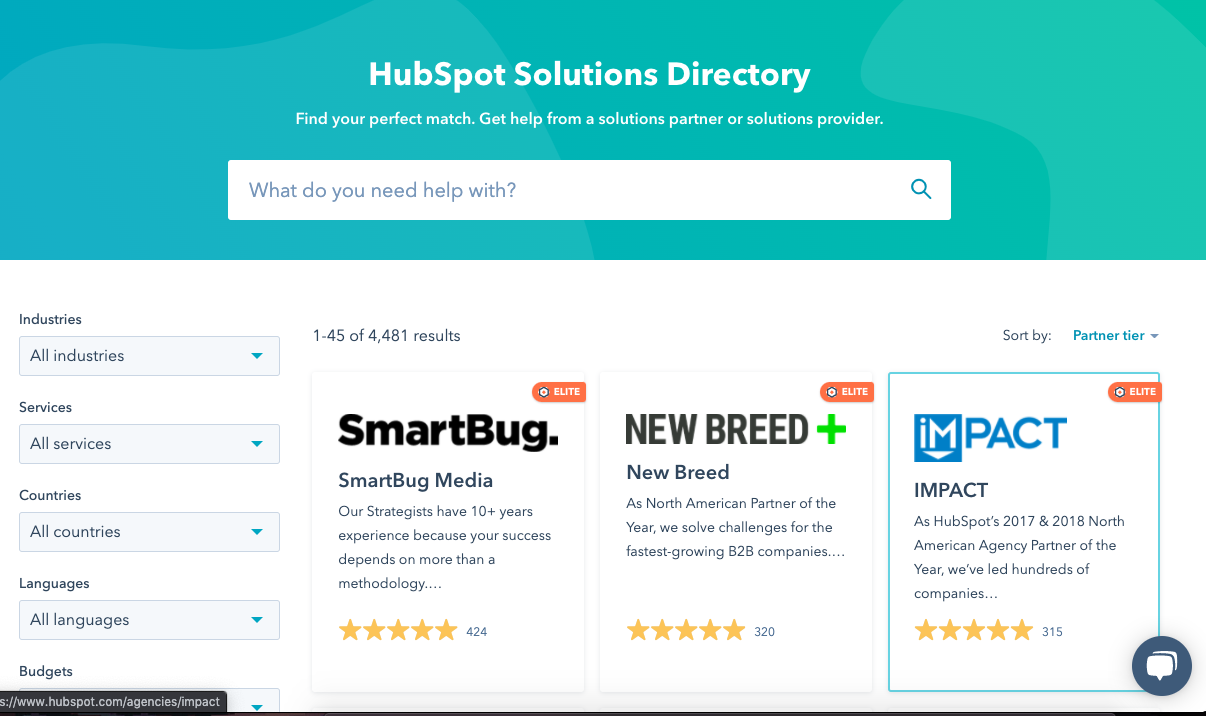
Consider creating a similar program that facilitates focused and organized agreements. You’ll already know what you’re looking for in an agency, as well as what you intend to get out of the partnership.
Keep the purpose of the program in mind during the design process. Choose agencies that honor this goal. In addition, outline what your company can offer the agency. For instance, HubSpot partners can enjoy a website feature, a space for reviews, and the approval from the company as a valued source for onboarding.
2. Identify co-marketing opportunities with prospects.
When you begin to look for prospective partners, identify co-marketing opportunities.
This is because partners can enjoy the chance to win awards for their work. Agencies can display awards, tiers, or badges on their websites as well as company-approved program designs.
Consider similar co-marketing ideas as you search and select partners. Communicate how all parties can benefit. For incentives, you can give awards based on success, offer quotes for webpages, and even launch a new onboarding process.
For example, if there’s an agency in your network that’s pioneered a revolutionary method in onboarding customers, debut a joint campaign to generate more leads and interest in the program.
3. Make sure agencies are well-versed in your product.
This seems like a no-brainer, but it’s critical to partner with agencies whose teams are experts in your product(s). If your company offers a certification course, you can make that a requirement in the application process.
You can also make it a requirement for agencies to have a certain level of success using your offerings. For instance, if you offer a CMS, you can set the expectation that agencies who have at least 500 customers can apply to help SMB customers.
Make sure your method gives agencies a clearly defined way to show their expertise with your product. Look for their knowledge of offerings, mission, and vision, in tandem with their know-how. Remember, agencies should deliver an experience on-par with your company’s own offering.
4. Have an easy application process.
Even though you should be selective with approving partners, it’s important to make your process accessible. Make the application flexible so every interested agency can show their work. You might find a rockstar partnership that way.
For instance, at some companies, all agencies need is proof of previous success and experience with the software. From there, they can expect a short interview period.
An easy application process will also be able to scale as your business grows. A two-step application is easier to manage as your company acquires more leads and broader goals. In addition, agencies that are interested in partnering with your company might be more inclined to apply if the steps are simple.
5. Make sure agencies can deliver highly technical solutions.
Agencies should be well-versed in the product and capable of delivering solutions. Solutions, in this realm, generally come in two forms: Results-driven, and those that are technical.
In the results-driven category, implementation partners need to locate where customers are having problems with the software, then identify solutions. For instance, if a company can’t figure out how to use workflows to organize leads, the agency should be able to identify that, then show customers a fix that maximizes their software.
Fixing that workflow should improve organization between members of the team and drive growth for the customer.
On the other hand, maybe a customer can’t figure out how to download a necessary extension. Agencies should have the know-how to lead customers toward the answer.
If your company offers a certification, consider whether it’s intensive enough for an agency application point. And consider developing a new course that covers the extra material companies should know about in order to be a successful partner.
Alternatively, develop a test or video challenge agencies must complete. At HubSpot, partners specializing in Sales Hub have to upload a video that shows proof of a highly-technical, results-driven solution. Consider developing a case study agencies must complete to apply.
Make sure your method for partnerships accurately demonstrates the agencies’ expertise with your product. For example, a five-question quiz might not be the best route, but an interactive test could be better. A test could tap into each area of your software, and the interactive elements would give agencies the chance to put their own spin on your questions.
Implementation partners are an amazing way to grow the network within your business. You can begin to foster an ecosystem of users with agencies that help onboard customers. Agencies should have the capabilities to adapt to the way your company sells and serves customers — kind of like the gift that keeps on giving.
If you’re interested in starting a partner program, you’re all set to begin. Don’t forget to keep your customers at the core of your planning, and you’ll make extremely valuable partnerships that can help your business grow. Good luck, and happy onboarding.

Do AR Product Previews Actually Lead to Purchases [New Research]
According to a recent Retail Dive survey, 55% of consumers still prefer to shop in stores because they like to see or test out products before they buy them.
But, if consumers could see or try products virtually from home, would they still need to go to the store before making a purchase?
This question has been asked by companies like Amazon, Warby Parker, and IKEA which have embraced AR product reviews. With these previews, ecommerce visitors can see an item of clothing on a photo of their body, preview what furniture will look like in their bedroom, and even size themselves to ensure they’re buying a product with the best fit.
But is this virtual experience really as effective as a traditional store or fitting room at getting people to buy?
Skeptics might say no. With AR being costly to implement and product viewings only requiring a physical store location, many marketers think that this technology isn’t worth the fuss.
However, as the world grows more and more digital, each new generation is making even more online purchases. They’re also embracing technologies like AR/VR for entertainment or retail purposes.
Not to mention, while holidays like Black Friday cause a burst in foot-traffic, retail businesses are finding it more challenging to keep people coming into stores throughout the rest of the year.
While AR might have been inaccessible to retail marketers in the past, could it be a revenue-generating opportunity at some point in the near future?
To determine if augmented reality was actually a beneficial marketing technology, I asked 300 consumers about their experiences with AR product previews using Lucid survey software.
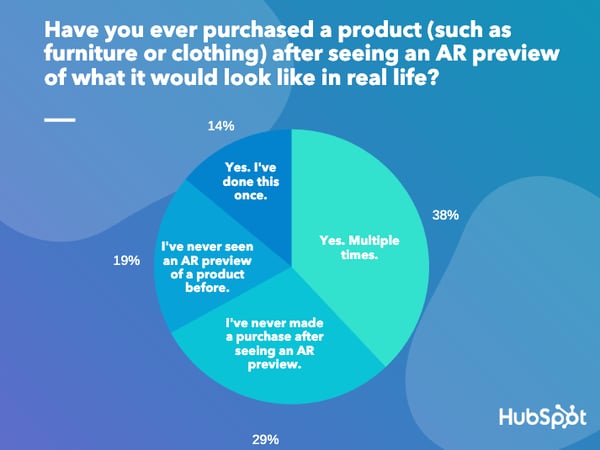
In the survey, consumers were asked, “Have you ever purchased a product (such as furniture or clothing) after seeing an augmented-reality preview of what it would look like in real life?”
Since the technology is still rather new, you might expect consumers to say they’ve never used an AR product preview. However, you might also be wondering if those who’ve used an AR product preview actually converted.
If you think that the general population hasn’t used this new retail technology, you might be surprised by the result below.
Data Source: Lucid
According to the survey, 52% of consumers have purchased at least one item after seeing an AR preview of how it would look in real life. Over 30% of that group have purchased multiple products after previewing them with AR.
So, what does this mean for small or medium-sized retailers?
Understandably, you might not be able to afford AR technology to highlight your products just yet. However, the fact that more brands are using this feature to influence purchasing decisions means that technology and personalized digital marketing tactics like AR previews will likely become more prominent.
Just because you can’t afford AR now, doesn’t mean you’ll be unable to leverage it in the future. As augmented reality grows more prominent and more valuable to businesses, AR ecommerce tools might become more accessible or competitively priced. This is a theme we’ve seen with the influence of artificial intelligence.
While the technology was pricey and inaccessible to small-to-medium businesses at first, there are now a number of affordable out-of-the-box tools that marketers and businesses can leverage.
Even if you can’t take advantage of the latest marketing technology today, it’s still important to keep up with how other retailers are using it — especially if they’re selling products in a similar category as you.
Below, I’ll walk you through a few AR strategies that effectively benefit retailers now, or could be a vital product marketing tactic in the future:
3 AR Product Marketing Strategies to Watch in 2020
Mobile Previews on Ecommerce Sites
With this strategy, a mobile ecommerce website visitor can find a product they’re interested in, open a camera when tapping an AR preview button, and then view how the product — such as furniture — will look in the room they’re in. Some ecommerce platforms also allow prospects to see what an accessory such as glasses, will look on their face. If a customer likes what they see in an AR preview, they can exit the preview and make a purchase without setting foot in a store.
With increasing mobile ecommerce, this strategy allows visitors to discover a product through mobile search or an app, visit an ecommerce site, get an idea of what it looks like in real life, and then smoothly purchase it wherever they are. It also eliminates key friction points that could halt a purchase such as going to the store or not finding a product in the right size or color in a physical retail location.
At the moment, we’re already seeing corporations like IKEA, Home Depot, and Amazon embrace AR product previews on mobile sites and apps. But, this strategy might not be totally inaccessible to smaller businesses.
For example, a small bicycle retailer called PureCycles wanted to improve its website’s mobile experience and conversions. With a large catalog of bicycle product shots taken from multiple angles, they created AR previews with Shopify.
PureCycles says its use of virtual previews improved the customer experience on mobile-optimized browsers and allowed customers to answer key questions about their products, such as “Will this bicycle fit in my small apartment?”
Virtual Mirrors
Ever seen a shirt you loved in a clothing store but couldn’t find it in your size? Or, have you ever wanted to test out expensive makeup before buying it? These are two business cases that could call for AR mirrors, often called “virtual” or “magic” mirrors.
With AR mirror technology, you can stand in front of a screen in selfie mode, and see an overlay of how products in the store’s catalog will look on you in the right size or shade.
After your virtual experience, some virtual mirrors will allow you to order the product or send yourself a link for it so you can order it later. This prevents any additional friction related to having to wait until the item comes back in stock.
This virtual process also allows you to see products that the store sells but might not sell in the store due to seasonality or space-related limitations.
This strategy is used by Charlotte Tilbury, a UK-based beauty retailer.
Virtual mirrors, purchased and installed by Holition, line the boutique’s walls. When a customer looks into one, the camera and software scan the measurements and skin tone of their face. From there, the customer taps different makeup items on the screen to see how the products will look on their face. Here’s a quick video demonstration of how the software works:
Social Media Filters
Have you ever launched Instagram or Facebook Stories and noticed new AR filters that allowed you to test out products directly through your app? If not, you’ll definitely see more of this soon.
Recognizing the low-hanging fruit of AR previews in ecommerce, Facebook and Instagram, are actively taking steps to provide more commerce that leverage this technology. For example, in late 2019, Facebook made AR filter ads available in Facebook Ads. These ads allow users to test out products in Facebook Stories and its News Feed.
Here’s an example of what one of these ads might look like:
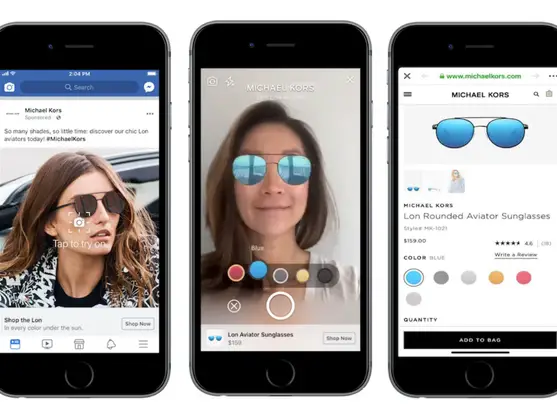
Leveraging product-centric AR filters on social media provides the perks of the mobile AR previews without relying on shoppers to actually visit an ecommerce site.
As social media users tap through their friend’s Stories or content, they might notice a Story with an AR product in it or discover and AR preview that they can experience. These types of experiences are much more natural than seeing an influencer posting about a dress or makeup item, visiting the ecommerce site, and then doing added research to see if it’s the right shade.
While social AR previews are still in early phases, platforms like Facebook are already identifying types of retailers that could thrive with these tools. For example, AR features that allow users to preview products via social media could be a game-changer in the world of fashion and beauty. In 2018, this industry already saw a 164% social media revenue increase from paid promotions.
With social media users actively engaging with paid beauty ads, brands that are able to leverage AR on Facebook and Instagram would be able to reach social-media-friendly audiences on popular platforms and allow them to try new products.
One company that’s already leveraging AR to highlight products on social media is Dior, which allows users to try looks from its Fall/Winter fashion line on their Instagram Stories camera.

As social media and mobile surfing continue to dominate how millennials and Gen Z spend their time, the need to invest in clever mobile advertising, such as AR ads, will also grow. .Although the combination of AR tactics and social media is still new — and not worth blowing your budget on just yet — you should still continue to follow brands and competitors that leverage it in case this technology becomes more accessible in the future.
What AR Success Means for Retailers
While the growth of AR shows how businesses are using new technology to benefit the customer journey, the effectiveness of AR and other retail technologies shows that customers are increasingly looking for digital, personalized, and frictionless shopping experiences.
And this makes sense. More and more, people are using mobile ecommerce stores and online social platforms to find, vet, and ultimately purchase products.
Even if you do have a physical store, you’ll need to embrace highly digital tactics to ensure that you’re gaining brand awareness from people online along with people in your neighborhood.
And while you shouldn’t spend all of your money investing in AR, there are other tactics you can take on to inform your audience about your products or services. These include highlighting your products on social media, launching a small but scalable ecommerce store, or sending customers personalized emails about products they might like based on what they’ve already purchased from your store.

How to Use Facebook Live Producer to Go Live From the Desktop
Want to live-stream on Facebook? Wondering how to go live without third-party tools? In this article, you’ll discover how to set up a live stream with Facebook Live Producer. You’ll learn how to activate valuable features that improve engagement and live-stream management, and find out how to customize the thumbnail for your Facebook live video. […]
The post How to Use Facebook Live Producer to Go Live From the Desktop appeared first on Social Media Examiner | Social Media Marketing.
from Social Media Examiner | Social Media Marketing https://ift.tt/31ZvfBu
via socialmediaexaminer
How to Find Your Business’s White Space Opportunities
When McDonald’s first opened its doors, they had two items on the menu: burgers and fries. After surveying competitors, the founders saw that in order to stand out as a food company, they had to be different. Instead of offering a multitude of menu options, they decided to hyper-focus on the bestsellers, which catapulted their customer satisfaction.
What McDonalds’ founders did was find white space opportunities in their industry. While other fast food restaurants at the time were offering a diverse menu but lacking in customer service — the McDonald’s team decided to focus on two items so customer service would be at the forefront.
By surveying what was missing from the market, McDonald’s was able to grow into a billion-dollar empire. The founders saw what customers were lacking and turned that industry gap into a success.
But what exactly are white space opportunities, and how can they be an asset to your company? Let’s find out below.
Sometimes, consumers don’t know what they need until, well, they need it, so it’s up to companies to be proactive. White space opportunities help marketers uncover customer needs that haven’t yet been met.
It’s a useful tactic when identifying how to provide the most value to customers. But, because white space opportunities aren’t as obvious as, say, keyword opportunities, it can be hard to know where to start.
Sounds pretty taboo, right? How can businesses uncover value customers are looking for when the customer themselves aren’t sure what they want? However, you may already have the right tools and knowledge at hand — they just need to be shaped for white space opportunities.
Let’s talk about what you can do to find white space for your company.
1. Innovate upon what you offer customers.
One of the best places to start with finding white space is within what you currently offer customers. Think of Apple’s iPod. Apple’s team probably came up with the idea to add a music player to their product stack by looking at what they already produce. Then, they figured out what other forms of entertainment they can make accessible with their resources.
Consider identifying where, in your products, you can spot white space. Ask yourself where customer needs are and aren’t being met. For example, if your blog team comes across a topic with high interest from your followers, but haven’t written about it yet, that’s white space.
Then, you can decide how to innovate: Are you going to write a series of posts about the topic, include subcategories for smaller posts, or turn the topic into an ebook?
2. Target a different audience segment.
If you’re struggling to find where you can innovate for a certain audience, maybe it’s time to shift your focus. Consider targeting a different part of your audience. For instance, if you’re hyper-focused on providing value for your content marketing audience segment, consider the white space you might have for SEO audiences.
Let’s say you’re in charge of a social media marketing agency focused on B2B clients in the technology sphere. Well, there are plenty of those — and yours is getting lost in the shuffle. Time to find white space.
Instead of marketing your company as one focused on B2B clients in technology, you decide to shift your customer base to one that serves B2B developers. While this is still in the technology space, your focus on a different audience segment allows you to reach out to a market that’s not as saturated in your industry.
3. Ask customers how they use your products.
Research how customers fit your offerings into their day-to-day. You might find white space you didn’t know existed.
For instance, if you’re part of a company that focuses on chatbot software, survey your customers and ask them for their stories. Ask them how your services fit into their companies and webpages.
Let’s say you find that customers really enjoy using your chatbots for lead nurturing on ecommerce sites. That’s an area you missed during the initial launch, but knowing this, your team can now work on making chatbots more online shopping-friendly. Maybe you add a way for your customers to demo their products and prices within the chat.
That white space will help you serve your customers and improve their selling strategy.
4. Find where your company is different.
Imagine you’re in charge of an analytics software company. Aware that there’s a countless number of those companies in the market, you’re struggling to find white space.
In your business plan, you recognized that your company is going to be an easy-to-use, intuitive platform. That’s the element that sets you apart from competitors. That’s white space.
A lot of analytics and reporting software is hard to implement. Yours eliminates the struggle of turning numbers into results. Your company is going to be the one that’s user-friendly — even a newbie can find success.
Additionally, you can use this discovery to find the most qualified leads. If your company is struggling to find white space, revisit your business plan. You may uncover the tactic you need to get back on track.
White space can be used to solidify your company’s branding strategy. Maybe you’re struggling to identify where your product fits in the market. If you find a space for innovation, you can use that to strengthen how your company is seen by others.
The McDonald’s founders didn’t have to look far for their opportunities, but things have changed since the 1950s. You might have to dig a little deeper and do some research, but ultimately, your business has something about it that’s attractive to customers. Once you find it, you’ll be able to keep delighting your clients, growing your company, and changing the industry.

How to Optimize Your Content for Google’s Featured Snippet Box
In the past few years Google have been refining the way that it displays results to users. In particular, Google has been increasing the number of Featured Snippets that it displays for queries. This actually pushes organic results further down the page. So what does that mean for SEOs?
Well, that’s what I set out to explore. Naturally, ranking in the Featured Snippet itself remedies the problem of positioning, but is this strategy something worth doing? What is a Featured Snippet, anyway? And more importantly, what do you have to do to appear there?
What Is a Featured Snippet?
Featured Snippets — also known as answer boxes — are selections of content displayed on the search engine results page (SERP) without the user having to visit the page where the content lives. Google puts these snippets above regular SERP results but below the ads in an effort of serving the user better.
For example, the Featured Snippet below displays the direct instructions pulled from the tasteofhome.com web page.

There are no ads for this query, so the Featured Snippet shown in the answer box is above position 1 of the SERPs for “how to make bread.” The directions are shown in four steps before the user has to click a single link.
Types of Featured Snippet
- Paragraph
- List
- Table
- Video
- Accordion
- Rich Answer
- Tool or Calculator
Paragraph
Paragraph-formatted answer to the searcher’s query. This is the most common type of Featured Snippet, encompassing 50% of all snippet results (Moz 2019).
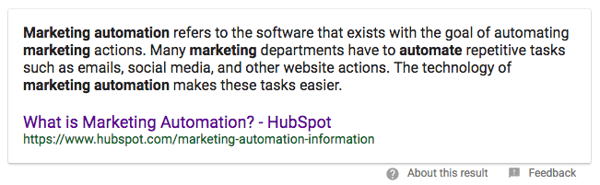
List
Bulleted or numbered list that answers the searcher’s query (typically shows up for more process-driven, step-by-step, and list queries). This is the next most common type of Featured Snippet, encompassing 37% of snippet results (Moz).

List snippets can take the form of numbered or bulleted lists.
Table
Answer to the searcher’s query involving data or other information presented in a table format.
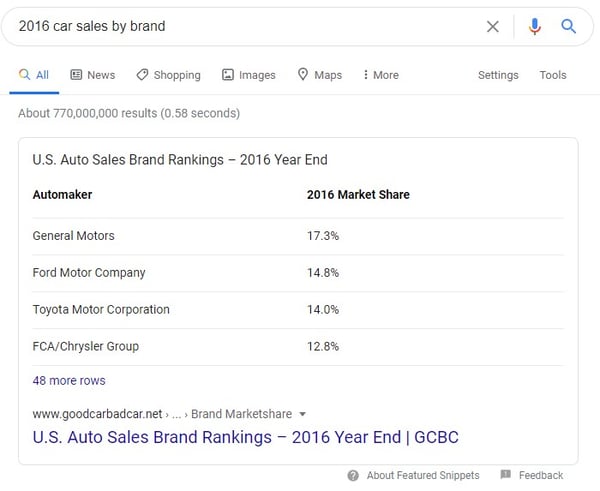
Video
Video result embedded on the page intended to answer the searcher’s query in a visual/auditory format.

Accordion
Answer to the searcher’s query presented with additional information that the searcher can choose to expand to learn more about.
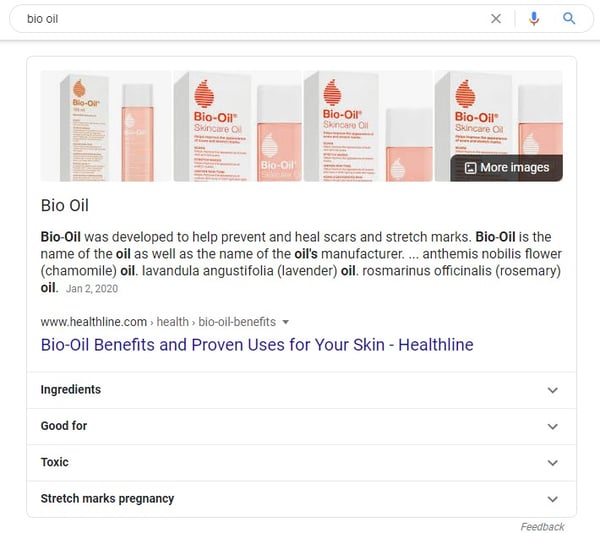
Rich Answer
Short call-out in which the answer to the searcher’s query is featured in bold along with additional information.
These often manifest for questions that have factual, metric-based answers:

In addition, dictionary definitions are common rich answers:
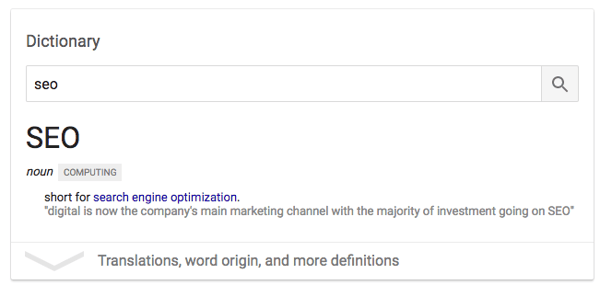
Tool or Calculator
Answer to the searcher’s query in the form of an interactive tool that can output user-specific answers.
Tools can appear for very high-level and concrete queries. Examples of tools that Google shows are calculators, conversions, time zones, weather, game scores, and more.

Why Should You Care About Featured Snippets?
One of the first conclusions that a lot of people involved with SEO jumped to was that Featured Snippets would have a hugely negative impact on the amount of people that actually click through to the pages within the results. This actually hasn’t been the case. In fact, it’s dramatically increased the click-through rate (CTR) of results ranking within it.
From a sample of just under 5,000 queries, I found that the CTR to the HubSpot website for high volume keywords increased by over 114%, even when we ranked #1 (just below the Featured Snippet — like in the example below).
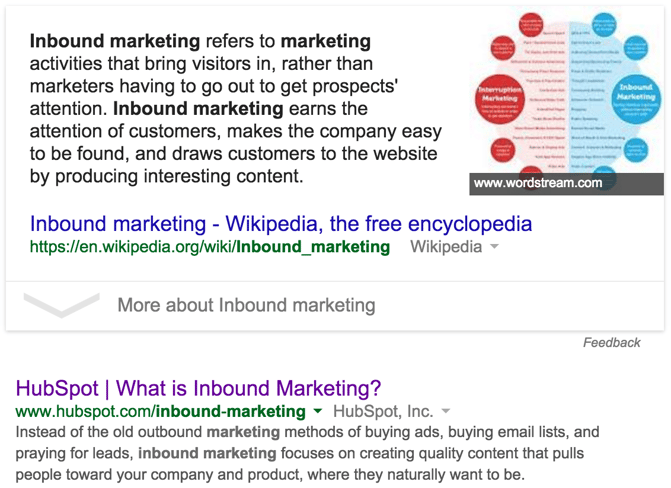
So to give you an example, let’s say you rank #1 (the first post below the snippet) on page one of Google for a keyword that’s searched for 10,000 times. From the data I’ve collected, you could expect roughly 1,700 visits, compared to the 3,700 you might see if you landed the Featured Snippet spot — and that’s just one keyword.
Here’s another interesting piece of data that illustrates how valuable it can be to rank in the Featured Snippet within Google:
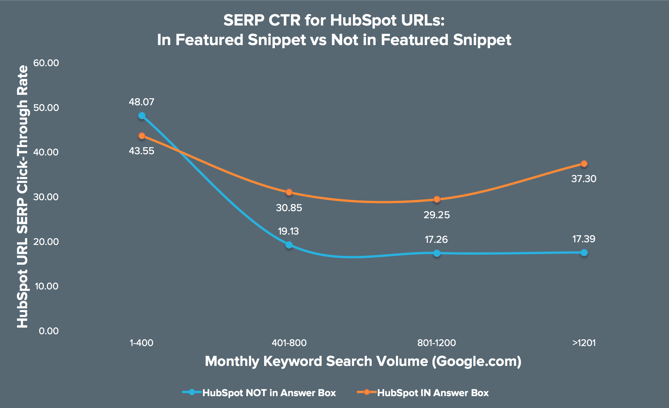
Again, to decipher this graph, here’s a brief overview:
- The x-axis relates to the monthly search volume for the search queries measured.
- The y-axis shows the click-through rate (CTR) of the ranking HubSpot URL from within Google (i.e. how many people clicked on our search result versus the rest of the results in the search results page for a query).
- The blue line plots the CTR from the SERPs for HubSpot URLs when we do not appear in the Featured Snippet, broken down by query search volume (x-axis).
- The orange line plots the CTR from the SERPs for HubSpot URLs when we do appear in the Featured Snippet, broken down by query search volume (x-axis).
By and large, we get much more clicks through to our content when we appear in the Featured Snippet, but this becomes increasingly important as the search volume for a query increases.
For high traffic keywords, ranking in the Featured Snippet saw an average increase in CTR of over 114%, and that’s even if we’re ranking #1 on page one.
Now that you know that featured snippet acquisition is a worthwhile SEO strategy, there are a few things that you should keep in mind as you attempt to win your own placements.
How to Get a Featured Snippet
- Target question-based queries.
- You don’t necessarily need to use schema.
- Organize the structure of your pages with headings and paragraph tags.
- For non question-based keywords, take a definition-style approach.
- When applicable, include steps for solving a problem or answering the question.
- The content should be between 54-48 words long.
- Don’t rule out an international approach.
- Don’t worry about backlinks as much for Featured Snippets.
If you’re looking to learn more about how to optimize your content for Featured Snippets, HubSpot Research has a full research report: HubSpot’s Guide to Winning Google’s Featured Snippet and HubSpot Academy has a free SEO course.
Featured Snippets have been a bit of a mystery for a lot of people involved with SEO, as it hasn’t been that easy to determine what influences getting your content to appear within them. Here’s what we know for sure:
1. Target question-based queries.
Stone Temple found that from 850,000 question-based queries, 19% of them had a Featured Snippet.
2. You don’t necessarily need to use schema.
There’s been a lot of conflicting advice out there about markup for snippets, including the idea that Schema.org data was the reason behind Google displaying this data. However, considering that more than 80% of the websites I’ve looked at that rank within the Featured Snippet don’t use any kind of Schema.org markup data, it’s safe to say that this isn’t the case.
Not only that but Gary Illyes, a Webmaster Trends Analyst at Google, has said outright that structured data has nothing to do with ranking in the Featured Snippet.
3. Organize the structure of your pages with headings and paragraph tags.
Markup aside, a clear page structure seems to be important as well as the semantic relevance to the keyword in question.
There should be an area on the page where the search query appears in a header (h2, h3, h4, etc.). The content you want to appear in the Featured Snippet should be placed in a <p> tag directly below the header.
4. For non question-based keywords, take a definition-style approach.
For shorter, less question-orientated keywords that display a Featured Snippet (e.g. “Inbound Sales”), it’s much more likely that Google will pull through a paragraph of text. Google tends to prefer ‘answers’ that begin logically as an answer would.
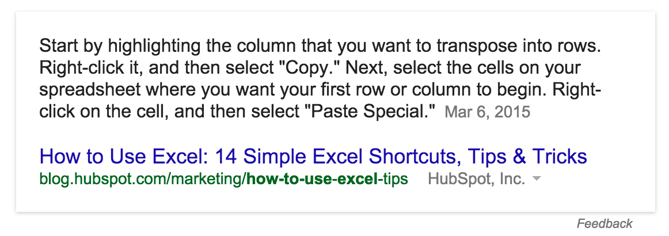
5. When applicable, include steps for solving a problem or answering the question.
Some answers require a more in-depth explanation, often involving a step-by-step process. Page structure is incredibly important here. Each step should be structured appropriately in a list format or represented on the page as heading (h3) tags.

6. The content should be between 54-58 words long.
For the paragraph-style answers (not the steps), content that’s between 54-58 words long tends to perform the best.
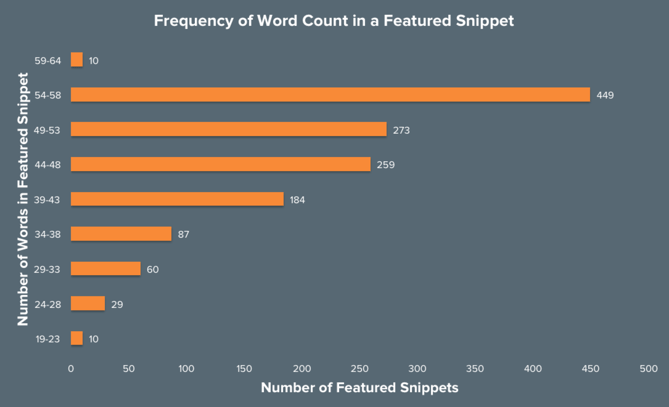
I extracted all of the content from within the Featured Snippets that I sampled. I did this to identify any trends in the content being displayed in order to better understand what Google is looking for.
As you can see, content between the length of 54-58 words in total seemed to appear by far the most frequently.
7. Don’t rule out an international approach.
Featured Snippets for the same query often have different content within Google.com, Google.co.uk, Google.com.au, and Google.ie. Try “how to search on Google” as one of many examples.
8. Don’t worry about backlinks as much for Featured Snippets.
During my analysis of 4,713 HubSpot queries for Featured Snippets, I uncovered something unusual, shown in the chart below.
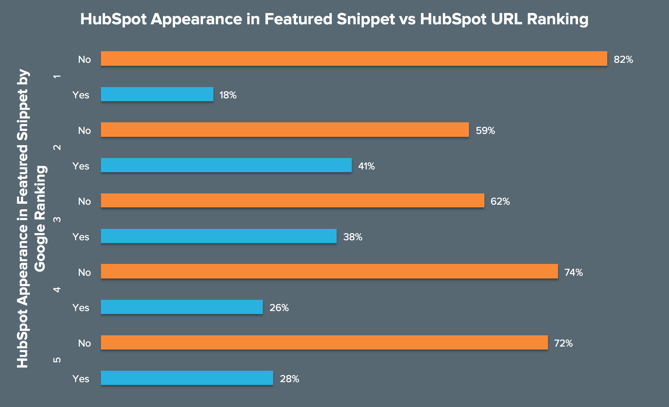
Allow me to explain what this chart is demonstrating:
- The numbers (1–5) in the y-axis relate to the position on page one that a HubSpot URL ranks for a given query.
- For each position HubSpot ranks for, there is a bar that shows how often we appear in the Featured Snippet (blue) and how often we don’t (orange).
So, for keywords that we rank #1 for on page one in Google SERPs, we only appear in the Featured Snippet 18% of the time. Contrastingly, we appear in the Featured Snippet 28% of the time when we rank #5. Strange, right?
Well, what this says to us is that once you’re in the top 5 results on page one, building backlinks and other authority signals matter much less for ranking in the Featured Snippet.
In fact, I’ve seen lots of occasions where relatively unknown websites with much less SEO authority than HubSpot have ranked above us, possibly due to more intentional use of page structure and other best practices described above.
My advice for anyone looking to increase their visibility within the Featured Snippet box is to first run a quick audit of the keywords that you’re ranking for within your current SEO campaign and how many of them are question-based queries. Once you’ve got this list, you can drill down on where you’re currently ranking, how well your content is structured, and then devise a plan to reoptimize your content based on the advice I’ve given above.
Editor’s note: This post was originally published in July 2020 and has been updated for comprehensiveness.

Comparativa de Hosting (2020) entre GoDaddy, A2 Hosting, Bluehost y HostGator
¿Por qué es importante una comparativa de hosting?, porque tu eCommerce es del tamaño de tu alojamiento web.
En este texto abordaremos cuatro servicios de hosting muy populares: GoDaddy, A2 Hosting, Bluehost y HostGator. Hablaremos de sus características, precios y fortalezas y debilidades.
Esto toma relevancia porque el hosting que contrates determinará dos aspectos fundamentales de tu website: la velocidad de carga y el nivel de seguridad.
Si no entiendes muy bien de lo que estamos hablando, no te preocupes porque comenzaremos con algunos conceptos básicos del profesional hosting.
Comparativa de Hosting: qué es y sus tipos
No todos los marketers tenemos un perfil tecnológico (y a lo mejor no hay necesidad). Sin embargo, al hablar de comparativa de hosting sí es importante tener claros algunos conceptos básicos.
Empezaremos por lo primero:
¿Qué es un Hosting y su diferencia con el Dominio?
El hosting es un espacio físico. Si hacemos una analogía con una tienda, el hosting es el local, mientras que el dominio sería la dirección de tu negocio (en lugar de visitar la tienda en Avenida Siempreviva 123, tus usuarios van a www.tunegocio.com).
Entonces, el hosting es una carpeta virtual dentro de una computadora (el servidor). En esa carpeta se almacenan los datos que se necesitan para que tu sitio web se vea.
Esto te da la primera dirección sobre lo que debes buscar en una comparativa de hosting: la confiabilidad de las empresas. No vas a instalar tu negocio en un edificio que se está cayendo, ¿o sí?
Tipos de Hosting
Cuando estés realizando una comparativa de hosting, verás que los planes generalmente te ofrecen 3 tipos: compartido, VPS y dedicado. Aquí están sus particularidades.
- Compartido: es de los más baratos porque una misma computadora archiva varias páginas web. Sería el equivalente a rentar una oficina dentro de un edificio. Compartes recursos como velocidad, banda ancha, espacio, entre otros. Lo que le ocurre a las otras web podría afectarte. Si estás empezando o no tienes muchas visitas, es una buena opción.
- VPS: sería como tener una propiedad dentro de un barrio cerrado. Compartes espacio con otros pero tienes más independencia que con un simple departamento. Lo que obtienes es una partición de disco. Te da más opciones de control y puedes añadir más memoria. Generalmente lo usan medianas empresas con webs consolidadas que requieren estabilidad, rendimiento y seguridad.
- Dedicado: felicidades, ¡has comprado un local! Tienes tu propio ordenador con los recursos que quieras. Este hosting lo contratas cuando estás en posibilidades de delegar tu sitio web a expertos porque requiere conocimientos técnicos.
Tablas de Comparativa de Hosting
Para que la comparativa de hosting te sea de mayor utilidad, comenzaremos con tres tablas que te permitirán ver características y precios.
Servidor Compartido
| Nombre | Características | Precio
(En dólares. Puede cambiar sin previo aviso) |
| A2 Hosting |
|
A partir de 2,99$ al mes |
| Bluehost |
|
A partir de 2,95$ al mes |
| GoDaddy |
|
A partir de 5,99$ al mes |
| HostGator |
|
A partir de 2,75$ al mes |
Servidor VPS
| Nombre | Características | Precio
(En dólares. Puede cambiar sin previo aviso) |
| A2 Hosting |
|
A partir de 25$ al mes |
| Bluehost |
|
A partir de 18,99$ al mes |
| GoDaddy |
|
A partir de 4,99$ al mes |
| HostGator |
|
A partir de 19,95$ al mes |
Servidor Dedicado
| Nombre | Características | Precio
(En dólares. Puede cambiar sin previo aviso) |
| A2 Hosting |
|
A partir de 99,59$ al mes |
| Bluehost |
|
A partir de 79,99$ al mes |
| GoDaddy |
|
A partir de 94,99$ al mes |
| HostGator |
|
A partir de 89,98$ al mes |
Análisis de características de la Comparativa de Hosting
Hasta aquí ya tienes un pantallazo inicial de la comparativa de hosting. Ahora entraremos en detalles de cada plataforma.
A2 Hosting opiniones

A2 Hosting ofrece optimización para diferentes plataformas: WordPress, Joomla, Drupal, Magneto, etc. Sus servidores turbo son hasta 20 veces más rápidos y es un servicio reconocido en el mercado, eso te da un nivel de seguridad.
Tiene gestión de DNS gratis, es decir, convierte el nombre de tu dominio en sus correspondientes números de Internet para que el servidor lo encuentre y se lo muestre a los usuarios que quieren acceder a tu página.
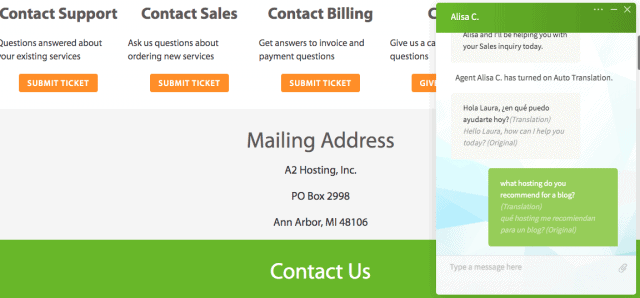
Su servicio de atención al cliente cuenta con un chat con auto traducción, por lo que se puede acceder a ayuda en español.
Contras
Algunos usuarios se quejan de que puede haber problemas en el funcionamiento del servicio como interrupciones.
Comparativa de Hosting: Bluehost WordPress
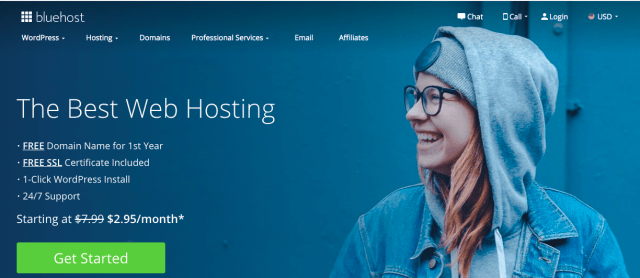
Alrededor de 2 millones de sitios web confían en Bluehost por su infraestructura y seguridad. Es uno de los más antiguos y consolidados del mercado, se creó en 1996.
Hay una alianza entre este servicio y WordPress que hace que sus planes de alojamiento sean ideales para sitios que se crearon en WP.
Otra de sus ventajas es que ofrece una garantía de reembolso por 30 días, por lo que si el servicio no es lo que esperabas, te devuelven tu dinero.
Contras
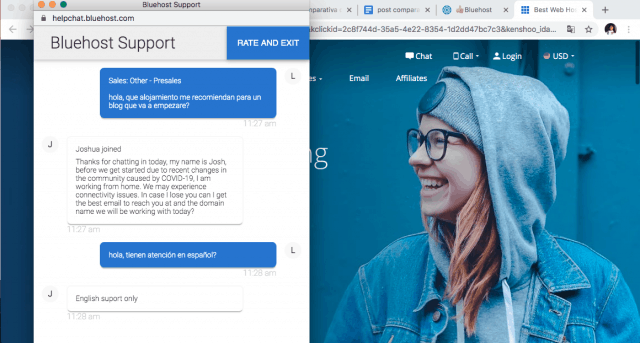
No tienen servicio de atención al cliente en español y todos los materiales de consulta están en inglés.
GoDaddy en Español
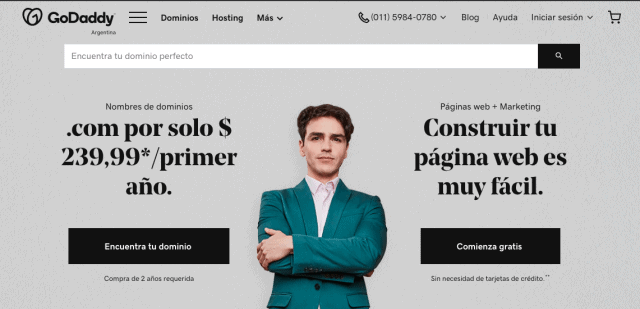
Al hacer una comparativa de hosting es inevitable hablar de GoDaddy. Es un servicio muy popular en Hispanoamérica porque tiene muy buena atención al cliente en español. De hecho, de acuerdo al país en el que te encuentres, hay un número de teléfono local al que puedes llamar.
Tiene servidores en todo el mundo y la velocidad de carga de los sitios web es óptima. Sus planes vienen preconfigurados, por lo que es muy fácil echarlo a andar. Además, ante cualquier problema, su servicio de atención al cliente suele ser bastante eficiente.
Contras:
El primer año resulta barato pero a partir del segundo, el precio suele incrementarse.
Opiniones HostGator
Por sus precios competitivos, HostGator es uno de los servicios más extendidos en el mercado. Cada nivel de alojamiento (compartido, VPS o dedicado) ofrece, al menos, tres planes. Esto facilita que los sitios web escalen según lo vayan necesitando.
Tiene una de las garantías de reembolso más atractivas porque te protege a lo largo de 45 días. Si el servicio no es lo que esperabas, te devuelven tu dinero siempre y cuando lo solicites en el periodo antes mencionado.
Otra cosa que nos gusta es su panel de control desde el que puedes gestionar tus sitios y tiene funcionalidades como agregar carritos de compra.

Contras:
Solo está en inglés.
Comparativa de Hosting: cómo saber lo que necesitas
Cuando hacemos una comparativa de hosting, muchas veces en lo primero en lo que nos fijamos es en el precio. De hecho, en este artículo fue el primer subtítulo que agregamos. Esto es un error.
Tienes que tener en cuenta las características de tu negocio. Tu sitio web es una inversión como cualquier otra de tu empresa y debes darle justo lo que necesita. De manera general, te describimos tres panoramas y el tipo de hosting que necesitarás en cada uno:
- #1. Acabas de empezar, necesitas un sitio web que te dé presencia en Internet y que no te demande mucho tiempo. Lo más probable es que lo vas a realizar tú (aún sin conocimientos técnicos), por eso requieres una plantilla que te permita hacer con facilidad algo bonito. En este caso, comienza por un servicio de hosting compartido.
¿Conoces ThemeMaker?, es un creador de plantillas para WordPress.
- #2. Ya empezaste tu sitio web y resulta que tenías razón: ¡tu idea funcionó! Cada vez recibes más visitas por lo que necesitas agregar elementos, por ejemplo, un carrito de la compra. O tal vez es momento de lanzar un servicio de membresías. En fin, estás escalando y necesitas más. En esta situación, piensa en un servicio de hosting VPS.
¿Necesitas mejorar tu atención al cliente? Evalúa las herramientas de chat. Aquí hay una comparativa.
- #3. En este panorama ya sabes que necesitas un servidor dedicado porque alguien de tu equipo te lo recomendó. Tu web está más que consolidada, recibes miles de visitas al mes y te has visto en la necesidad/oportunidad de contratar personal.
Conclusión de la Comparativa de Hosting
Esta comparativa de hosting tiene una intención oculta: queremos sensibilizarte de la importancia que el hosting tiene en tu sitio web.
Como te comentamos al principio, el hosting te ayudará a escalar tu web. Si tu idea fue un éxito, tienes clientes, personas interesadas, visitas, pero tu sitio web ofrece una mala experiencia, corres riesgo de que el éxito se esfume.
Este es nuestro top 3 de precauciones antes de contratar un hosting:
- #1. Revisa que las características del plan que vas a comprar se ajustan a tus necesidades.
- #2. Asegúrate de que la empresa ofrezca un buen servicio de atención al cliente. Para esto te recomendamos que antes de comprar les hagas una pregunta y veas cuánto tardan en responderte y cómo.
- #3. Escoge un servicio que tenga una garantía de reembolso.
Por último, queremos compartirte un par de contenidos más que te van a ayudar en tu proyecto:
- Uno es un artículo que realizamos sobre las mejores prácticas para hacer un sitio responsive. No se trata solo de achicar elementos sino de redistribuirlos.
>>> Responsive: una landing page responsiva puede afectar a tu web
- El segundo es un texto sobre cómo escribir los contenidos de tu página web orientados para vender.
>>> Copywriting para vender: 31 tips de línea editorial para tu landing page
Esperamos que este post te haya sido de utilidad. Cualquier duda que tengas, déjala en los comentarios.
from Socialancer https://ift.tt/3h4IB5F
via
The Ultimate Guide to Managing Remote Marketing Teams
Behind many great teams are great managers.
Take my manager for example. Each day, she oversees a team of blog writers and editors, reports on the HubSpot Blog’s progress to stakeholders, and also manages many of the logistics and processes that keep our site running smoothly.
But, the blog’s editorial processes and traffic strategies aren’t the only things she focuses on. Most importantly, she takes time to empower each individual on our team. She mentors us as we lead projects that benefit the blog, plans team bonding activities, ensures that we’re getting the tools and training we need to do our jobs, and checks in with us regularly to make sure the work we’re doing is fulfilling.
It sounds like she does a lot, right? And the kicker? Half of the team she manages, mentors, and empowers isn’t even based in HubSpot’s Cambridge office.
By this point, you might know that managing a team, even isolated to one office, isn’t for everyone. On any given day, you need to balance your own workload, overall team success strategies, and working with individuals within your department. To do this, you must balance being a team player and a leader. You also must be highly organized, strategic, and have a high level of emotional intelligence.
In a company that’s primarily in-office, a manager can directly impact the success of their team. But, this role is even more important when it oversees a fully or partially remote team.
Why? When your team is widely dispersed, a manager is tasked with bringing together their employees and giving them the tools to work well together. In times of confusion, questions, or ambiguity related to remote work styles, the manager is expected to make calls or answer critical questions.
As the manager of a remote team, you need all the skills of an in-office manager — and more. Not only do you need to be tactical and organized, but you also need to take extra time to make sure that colleagues feel in the loop, included, and like they can succeed at your company. This takes added time, much more communication, and a strong sense of inclusion and empathy.
Whether you’re a new or experienced manager, moving from leading an in-office to a dispersed team can be a major transition. To help you, I’ve compiled a guide of 10 tips for remote team management. These tips relate to logistically planning your remote team’s processes, building an inclusive culture, and using emotional intelligence as a team leader.
How to Effectively Manage Remote Teams
Creating Processes Around Remote Work
1. Create an effective remote hiring and onboarding process.
Before you can manage a remote team, you’ll need to hire and onboard your talent.
To get started, use digital platforms such as Indeed or LinkedIn to announce and promote your new job position. Be sure to note that the position can be held remotely in any location. This descriptive language will make it easier for prospective candidates to find your listings via search engines, as well as your own promotions.
Our managers have seen that one of the best ways to interview and evaluate a remote candidate is through a virtual hiring process. While this process could include video interviews with hiring managers and the candidate, it could also include other steps such as a writing test to evaluate a candidate’s writing or other virtual tasks that allow a candidate to show off their level of skill in a given area.
If you can accept candidates in different locations and timezones, you should also take steps to accommodate them in the hiring process. This could include hosting an interview during their work hours.
When you interview remote talent, you’ll also want to put any judgments related to a candidate’s location aside and interview them in their natural work environment.
Additionally, “If you’re hiring for a position that is open to being remote or in office, conduct all interviews via video call to avoid any location biases in your hiring panel,” says HubSpot Marketing, Sales, and Service Managing Editor Meg Prater.
After you complete the hiring process, you’ll want to welcome your new hire with a smooth virtual onboarding process that teaches how the company works while allowing them to get to know their teammates remotely.
As you prepare an onboarding process for a remote employee, identify ways that you can digitize your current onboarding process. For example, if there are documents or resources an employee should read up on, make sure they are in a PDF, Google Doc, or online format. You might also want to create an internal training website, or knowledge base, where employees can find these documents even after they’ve completed a new-hire orientation.
If there’s an aspect of your onboarding that is too complex for a PDF format, consider doing a virtual training session where you walk your employee through various tasks. This will allow them to see a demonstration of a process they’ll do first-hand and ask you questions about it as they learn.
On the HubSpot Blog team, each employee’s onboarding process lasts roughly 100 days and can be fully virtual. During this process, remote employees receive virtual training sessions, links to blog posts, and digital resources that relate to their role, self-paced mini-online courses that familiarize them with our software, and informal virtual coffee chats which allow the new employee to get to know colleagues.
On top of virtual onboarding, every employee has regular check-ins, career chats, and ongoing training with his or her supervisor to ensure that they’re progressing in their role.
Ultimately, the goal any manager should have when onboarding remote employees is to make them feel supported, informed about how their company works, and more confident in their new role.
To start an employee off on the right foot, think about your current onboarding processes and where they can be improved to add more communication and decrease confusion. Then, determine how you can make these processes virtual.
As you identify elements of the onboarding process that can be made virtual, create an outline for your process. Then, to help you refine or improve on this process, ask new remote employees who undergo it for feedback at the end of their first few months. This will give you an idea of what’s working and what needs to be improved.
To learn more about the logistics behind onboarding, the paperwork you’ll need to have your employee filled out, and the things you can do to make their experience feel welcoming, check out this detailed onboarding checklist. If you’re looking to onboard an employee in a customer-facing role, you can also check out this remote onboarding guide.
2. Schedule and run effective virtual team meetings.
When you or your team members are remote, team meetings will be a crucial means of communication. Not only do they allow you to all join on one video call to talk about projects or goals, but they also enable teammates to get to know each other and stay visible.
Determining Which Meetings You Need
When you have a remote or global team, you’ll want to have at least one fairly regular meeting to regroup and get on the same page. For example, you might want a monthly meeting with your team and other stakeholders to discuss team performance and goals, and a weekly standup meeting to learn what your immediate team is doing.
“Conduct a weekly standup meeting for everyone on your team to be together in the same virtual room,” advises Prater. “It’s important to have that face-to-face time each week.”
“Our team starts by giving a one-word overview of how they’re feeling, followed by an ice breaker, a roundup of what everyone’s working on, and then a discussion article provided by a different member of the team each week.” Prater shares.
Preparing for a Virtual Meeting
If you haven’t already, you’ll want to designate a meeting software, such as Zoom or GoToMeeting based on your needs, budget, and how large your virtual meeting will be. Then, you’ll want to make sure that all of your team members have the program on their computers.
When you’re ready to schedule the meeting, be sure to pick a time that works for team members in different timezones. Stick to this meeting time and avoid canceling to ensure that remote employees who didn’t get a cancellation notice don’t tune in.
Send an email and calendar invitation to your team explaining why you’ve decided to hold the meeting and what they should do to prepare for it. You’ll also want to include meeting login information or a number they can call into if they aren’t near a computer.
If you’d like employees other than yourself to present at the meeting, it can also be helpful to create a slide deck ahead of time so each teammate asked to speak can submit and get their slides approved by you beforehand.
Allowing teammates to submit slides beforehand will help you ensure that each teammate will give the most valuable information to other remote employees in the time they have to present. Using one slide deck will also limit any issues related to switching screen-shares during the meeting.
Running the Meeting
Just before you launch the meeting, make sure that your computer’s sound and video are working and that you have a work-appropriate background. You should also ensure that the environment around you is quiet and not distracting to your teammates.
Once you launch the meeting, wait a minute or two before starting the discussion, just in case other remote employees are running late from another virtual meeting. During this time, feel free to mingle with teammates and get to know them.
If you have colleagues that can’t attend the meeting, plan to record it. This way, someone who wasn’t available or had technical difficulties can listen to the meeting discussion after to stay in the loop.
If the meeting includes a small group of people or a new employee, leave time in the beginning for everyone to introduce themselves and give a brief description of what they do at your company.
You can also consider a quick virtual ice-breaker. As Prater mentioned above, this is something that the blog team has embraced in our weekly meetings.
“Ice breakers might sound cringe-worthy, but they single-handedly transformed our meetings from transactional run-downs of everyone’s to-list to a fun, personal opportunity to get to know our teammates a little better,” Prater says.
Wrapping Up the Meeting
At the end of the meeting, leave time for questions. If you have some in-office employees and some remote employees, it can be helpful to invite remote employees to ask questions first to avoid teams accidentally speaking over each other.
Then, send the slide deck and meeting recording link to your team so they can reference these resources later on.
Refining Your Meeting Schedule
As you start to run multiple virtual meetings, Nataly Kelly, HubSpot’s VP of Localization, says you should continue to evaluate their effectiveness.
After each meeting, Kelly says you should try to answer questions like, “Are the right people in the meeting?”, “Is this the right frequency for meetings?”, “Is the meeting too long or too short?”, and “Is this the best use of everyone’s time?”
“Often, you only need to change one variable to make things work better for a remote team,” Kelly says.
While it might be tempting to book your team with tons of virtual meetings to stay on the same page, Kelly instead advises that you leave team members with some flexible calendar space each week.
“Make sure you’re not filling your calendar with eight hours of video calls per day. Encourage your team to block time to work on other projects,” Kelly adds. “Or, if the team lends itself to it, consider doing most of your meetings in the mornings and leaving afternoons for other work. Just make sure you give people time in their day that is unscheduled.”
To learn more about scheduling an effective virtual team meeting, check out this list of tips and strategies.
3. Check-in with individuals on your team regularly.
When you or your teammate is working remotely, you can’t easily turn to them to ask them a question, get to know them, or have a casual work conversation. This is why, on top of your roster of remote meetings, you should also consider booking one-on-ones or informal virtual coffee chats with people you don’t often see daily.
This will allow you to keep up with your employees, discuss their work with them, help them with any blockers they might be facing, and offer visibility so they can feel like you’re an accessible manager.
Aside from discussing work with each employee, Prater says you should also schedule times to discuss your employee’s career growth and progress.
“The biggest worry I hear from remote folks or those being managed by a remote manager is that they won’t have the same opportunities for advancement,” says Prater. “I over-communicate when it comes to career growth.”
“I have weekly check-ins with each of my direct reports where we talk about what they’re working on. But I also schedule quarterly career chats where I draw up a personalized growth plan for each of them, and we run through prompts to check their satisfaction in their current role and their aspirations for what’s next,” Prater explains.
Aside from scheduled one-on-ones, you should also consider leaving some areas of flexible time on your calendar. This way, if a remote colleague has a question or concern that’s easier to discuss in person than via text-based message, you’re able to quickly jump on a call.
“Be ready to jump on a phone call or video conference without having to schedule a time for it,” advises,” Susanne Ronnqvist Ahmadi, HubSpot’s VP of International Marketing advises. “Let your team know you’re available over your instant messaging software and build “air-time” into your calendar for check-ins and quick talks.”
4. Embrace and implement digital productivity tools.
On top of video call software, there are many helpful tools that you can use to manage remote or dispersed teams. Here just a few types of tools you should consider implementing:
Scheduling Tools
When everyone is remote, having an email or Slack discussion just to determine a good time for a meeting can be redundant and non-productive. Luckily, there are plenty of tools that allow you to request, manage, and schedule meetings with your team.
For example, if you have Microsoft Outlook or GSuite, you can see your teammate’s calendars, working hours, and availability. Then, you can send a meeting invite for a time that they’re free. From there, your teammate can accept, reject, or suggest a new time for an event.
Task Management Systems
With a task management system like Trello or Asana, you can create a joint team project and assign different team members to tasks virtually. You can also give tasks deadlines and check to see if they’re been marked as completed.
Instant Messengers
Ever got caught up in a giant email thread where multiple people were replying to the same message? An instant messaging app, such as Slack, will allow you to create group threads to discuss projects, upload assets within the conversation, and see when other team members have replied clearly. This is also a helpful way to communicate with your team about topics that don’t require a full video call to discuss.
Aside from quick conversations, you can also host mini-meetings on your instant messaging platform. For example, the HubSpot Blog has a weekly meeting where we submit blog titles to a group chat and request feedback on them virtually. This takes little time and provides us with an opportunity to work with in-office and remote employees.
To learn more about 35 remote work tools, check out this detailed guide.
5. Be mindful of timezones and remote employee boundaries.
Remote work options allow you to hire talent from every area of the world. This is a great way to boost the level of diverse thinking on your team and learn about different marketers.
However, one challenge global teams face is adapting to teammates in different timezones.
As a remote team manager, it’s important to navigate around your teammates’ differing work hours, while also encouraging teammates in your timezone to be mindful of other remote teammate schedules.
As you onboard employees or implement a team calendar, ask remote teammates to mark their working and non-working hours on their schedule. You can also have an intro conversation with teams to discuss timezones and preferred work hours, just to ensure that all team members are up to date with who will be working when.
If a large chunk of your team is in another timezone, you might also want to consider working on that timezone’s schedule one day a week or doing a split shift, where you complete half of your work hours when one chunk of your team is most active and another do another shift when a team in another timezone is online. This strategy could help you be more available to your global teammates and stay in the loop of what they’re up to.
6. Align with outside teams virtually.
At a company with remote or dispersed employees, you shouldn’t just focus on your own team. You should also be sure to communicate regularly with other departments to see where your team’s work can align with there’s and where you can benefit the bigger business.
One example of this is sales and marketing alignment. While marketers aim to reach goals related to traffic and brand awareness, salespeople are focused purely on the bottom line. While both teams are vital for their businesses, they can get disjointed due to their differing success metrics. However, when these two teams work well together, marketers can hit their KPIs while also benefiting the company’s overall sales.
As a marketing manager, you should try to plan virtual chats with sales managers and other teams to discuss goals and where your team can align with theirs. You can also use digital tools, like marketing attribution software, to get an idea of how your work impacts the greater company.
In the long run, these meetings will allow you to think of the company with a broader scope rather than just focusing on your team’s efforts all the time.
Creating an Inclusive Culture
7. Take steps to ensure all teammates feel included.
Commonly, remote employees struggle with feelings of disconnection and a lack of visibility.
Without an office filled with people, remote employees don’t have the opportunity to make small talk with colleagues, ask questions, or have a quick work-related chat. This can leave them feeling unincluded or out of the loop on team projects. They might also worry that it will be hard to excel at their company if they aren’t as visible as other employees.
To help each employee feel a sense of belonging, identify where you can make processes and group events more inclusive.
“We often remind managers that it truly is the little things that can make a difference in allowing a remote employee to feel included,” says Siobhán McGinty, a Principle Marketing Manager.
“That feeling of inclusion can make such a difference to employee retention, happiness, and performance — so the little things actually matter quite a lot,” McGinty adds. “During the remote week, we heard lots of examples of how managers and teams go above and beyond in ensuring that their remote counterparts are included in the day-to-day.”
In a recent post about the HubSpot marketing team’s experimental work-from-home week, McGinty offered a list of actions that could make remote teammates feel more included. These could include sending e-birthday cards, inviting remote teammates to in-person get-togethers via video call, or organizing a virtual gift exchange around the holidays.
Aside from making your remote employees feel included through simple actions, you can also schedule activities that allow them to offer ideas or work virtually with the rest of the broader team.
For example, you could host a campaign brainstorm where all remote members are invited to share their ideas. Or, before you leave for the holidays, you could expense your team’s dinners and host a virtual hack night where you work ahead to ensure the business still runs smoothly when everyone’s on vacation.
Not only do team bonding activities allow the team to work together, but they also allow remote members to feel included and get to know their colleagues.
8. Identify opportunities for virtual team bonding.
It can be easy to think that your team is bonding during business meetings and team celebrations. But, the truth is, your colleagues might only see each other during these times.
To build an even better team, consider virtual opportunities that allow teammates to get to know each other on a more human level.
Just the other day, my team took part in a virtual Pictionary-like game called Drawasaurus. While this meeting had nothing to do with work, it allowed us to chat, learn about each other, and have fun with teammates we don’t get to see daily.
If your schedule is incredibly limited, you can also make time for virtual bonding in regular team meetings. For example, as Prater, noted earlier each of our blog meetings begins with at least two icebreakers.
Aside from enabling teammates to get to know each other during virtual events, you should also identify opportunities where you can get to know the individuals on your team more personally. For example, rather than scheduling a one-on-one to discuss only work with a remote employee, you could schedule a remote coffee chat that’s just devoted to getting to know teammates.
“As with any relationship, time spent together is important. And if you’re remote, that time naturally is more limited. As a result, building rapport is even more challenging,” says Susanne Ronnqvist Ahmadi, HubSpot’s VP of International Marketing.
“I try and make an effort in getting to know the people I’m working with to understand how we can best work together, communicate, and interact with each other,” Ronnqvist Ahmadi explains.
Using Emotional Intelligence
9. Encourage empathy among in-office and out-of-office teammates.
When it comes to remote work, some of the biggest challenges that employees face are feelings of loneliness and disconnection. They also find it hard to unplug at the end of the day because their work is not clearly separated from their home life.
As a remote team manager, it’s important to recognize the challenges your employees might face and give them any other guidance when necessary. If you have any teammates who are in-office, you should also encourage them to consider the challenges a remote employee might go through on a regular basis.
Recently, to help in-office employees understand the benefits and challenges of working from home, HubSpot asked the entire marketing department to remote for one week. While some people really enjoyed the opportunity to work remotely, some struggled with staying focused, communicating with teammates, and finding an effective workspace. Although the experiment only lasted for a week, it gave in-office employees a taste of the workstyles benefits and challenges.
10. Use emotional intelligence at all times.
While you might be calm and collected when managing a team in the office, overseeing remote teams might feel different to you emotionally. Even though you can’t see a team and they can’t see you, you should still use emotional intelligence at all times.
Emotional intelligence, also called EQ, is a sought after skill that enables you to understand your emotions and train yourself to react in an appropriate way to certain scenarios.
For example, when managing a remote team, you might need to resist the urge to mistrust or micromanage colleagues that you can’t see every day.
In this scenario, leaders that lack emotional intelligence might panic about their team going off-course and begin to control every aspect of everyone’s work. Meanwhile, an emotionally intelligent leader might address this concern by scheduling check-ins with teammates to make sure a project is on the right track.
“Resist the temptation to micro-manage, even if you feel uncomfortable about having less visibility into the day-to-day,” says Kelly. “Autonomy and flexibility are hugely important for managing remotely.”
“Keep your team focused on the critical goals, and don’t worry about how they get there,” Kelly adds/ “Trust them to solve problems and make good decisions, but set a high bar to show you trust them to accomplish great things with the privilege of autonomy and flexibility.”
In another common team management scenario, you might find that your employee made a big mistake when you were offline.
While a less emotionally intelligent leader might send a long ranting email, someone who understands their emotions will take a minute to note what frustrated them about a situation and then plan a chat to discuss constructive feedback with the employee.
“No angry emails,” Kelly advises. “Trust and respect matter hugely for remote teams to operate well, and because email is more important for remote teams, it’s important to keep emotions out of it where possible.”
Kelly explains that email and other digital communication should be respectful and “not a place for venting.”
Emotional intelligence can also help you in scenarios when there’s a disagreement amongst your teammates, according to Kelly.
“When you sense someone is angry or disagrees with a decision on a remote team, jump on a call quickly to resolve it,” Kelly says. “Don’t let things fester.
“Sometimes, the lack of face to face interaction makes it easier for people to jump to conclusions or feel misunderstood. It’s important that you signal to your team that if they are upset or concerned, that you’re there for them,” Kelly advises.
While you should use emotional intelligence to manage your own responses, you should also encourage your team to use the skill in their work life, too.
For example, if you find that someone is inappropriately venting over a communication platform. “make it clear what people should do instead.” Alternatively, ask your teammates to schedule one-on-ones or send polite messages requesting a quick chat to discuss a situation.
“Give your team an option to vent about things that won’t be disruptive to others, and importantly, won’t lead to side chatter either,” Kelly says.
When you use emotional intelligence properly, your teammates will feel comfortable coming to you with questions and concerns more often. They’ll also develop a stronger sense of trust in you as their manager. Ultimately, a manager who understands their emotions and the emotions of others can manage teams in a number of different scenarios.
Navigating Remote Work
If you’ve never worked remotely or managed remote teammates, it might take time to develop the perfect dispersed team management strategy.
As you build up your management tactics, your most important goals should be to help the team to function smoothly, build an inclusive work culture that enables employees to succeed, and use emotional intelligence at all times. While building solid processes is key to ensuring work gets done, taking time to build a positive company culture will allow team members from every region to feel like they can contribute their diverse thoughts, ideas, and strategies.
Want to learn more about the remote work style? Check out this blog post on remote work stats or this post on work-from-home productivity tools. If you’re curious about how work styles like remote work could expand and evolve, this post will walk you through how the marketing workplace could change in the near future. You can also check out our Ultimate Guide to Management for more tips for running in-office and remote teams.

How to Analyze Instagram Stories: 7 Metrics to Track
Want to know if your Instagram Stories content is working? Wondering how to make sense of Instagram Stories Insights? In this article, you’ll discover seven key Instagram story metrics that reveal what content piqued users’ interest, where interest may have dropped off, and whether people are taking action and engaging with your stories. Note: This […]
The post How to Analyze Instagram Stories: 7 Metrics to Track appeared first on Social Media Examiner | Social Media Marketing.
from Social Media Examiner | Social Media Marketing https://ift.tt/3iOExqu
via socialmediaexaminer
Instagram Influencer Marketing Myths, Debunked
Growing up for me, becoming an influencer wasn’t a job someone could aspire to be.
But nowadays, it’s a job that kids dream of and an industry that impacts young adults purchasing decisions.
At this point, you might be wondering, “What’s an influencer?”
According to Influencer Marketing Hub, “An influencer is someone who has the power to affect the purchasing decisions of others because of their authority, knowledge, position, or relationship with their audience.”
On the other hand, Andrew Delaney, a senior manager on the HubSpot social media team, says, “We are all influencers every time we choose to post. We could be suggesting or recommending a location, a business, an item, or another person by taking the action of sharing that content in the first place. In each of these instances, we are influential, even when we are not trying to directly influence.”
The influencer industry has been around for over a decade now, and a lot of myths about the industry have circulated in that time.
In this post, let’s review the top influencer marketing myths that have been debunked.
1. Influencer marketing is diminishing in popularity.
When social media first came on the scene, a lot of old-school businesses were hesitant to adopt it as a major marketing tactic. The influencer industry has been no different.
Many organizations haven’t adopted influencer marketing in their ongoing marketing strategy because they think it’s a fad that will diminish in popularity.
However, that isn’t correct.
In 2018 alone there were 3.7 million brand-sponsored influencer posts on Instagram.
Additionally, 49% of consumers today depend on influencer recommendations for their purchase decisions. 60% say they’ve been influenced by a recommendation when shopping in-store.
According to Krystal Wu, a social media community manager at HubSpot, “The Instagram influencer marketing trend is not and will not, in the near future be canceled. With businesses relying more on social media, now more than ever, influencer marketing is helping businesses reach larger audiences.”
She added, “Think about it like this — influencers on Instagram are the new model examples on how products wear, work, function, and are used rather than in-store experiences.”
2. You shouldn’t use smaller accounts.
One of the most prominent myths of influencer marketing is that you need to use large accounts to see results.
However, the opposite is often true.
While micro-influencers seem like a small player in the influencer marketing game, in a recent study, 82% of respondents said they were “highly likely to follow a micro-influencers’ recommendation.”
So, how does this work in practice?
Nicole Acosta, a social media and marketing manager at Iron Physical Therapy and Edison Innovation Foundation, says, “Instagram influencers don’t have to have a huge following to be effective. They only need an engaged following.”
This means that you don’t have to spend a large amount of money on your influencer marketing.
Acosta added, “Choose people who may not have hundreds of thousands of followers but have clear authority in their niche because their followers will trust their opinion and engage more with the content they make for you (which is the whole point!).”
Another expert, Raquel Swan, agreed with Acosta’s assessment.
Swan, a social media coordinator at Digital Standout, says, “Brands need to carefully select their influencers and ensure that the followers and the influencers relate to the product or service offering to have a successful marketing campaign.”
HubSpot’s social media campaign manager, Leslie Green, concurred.
Green says, “Partnering with an influencer with tons of followers doesn’t guarantee tons of sales. Don’t breeze over the power of nano-influencers who have built meaningful relationships with their audience and are incredible content creators and storytellers.”
The point here is that more followers don’t always equal more sales. If the key performance indicator (KPI) is conversion, then you should look into using micro-influencers.
“The trust micro-influencers have fostered is way more valuable than you think. And in the end, everyone is an influencer. As a brand, it’s so important to do your research and make sure the partnership makes sense for the audience and feels authentic to the influencer. Don’t just become starry-eyed from a massive following,” Green added.
3. Influencers will be hard to work with.
Another popular myth is that influencers aren’t professional. Many people think they’re shallow or untrustworthy.
On the contrary, influencers are actually entrepreneurs and content creators whose reputation impacts their ability to make a living.
Two digital content creators/influencers, Kimia Kalbasi and Martin Tettey, found this myth to be the most misleading.
Kalbasi, founder/influencer at Kimia’s Kravings, says, “A myth is that all influencers are shallow or disingenuous. There are people like that in all walks of life regardless of their job title but because influencers are at the forefront of social media, put themselves out there, and showcase their lifestyle, it’s perceived otherwise. But they’re human, too.”
Tettey, a successful writer, wears many hats. He’s a client consultant at McCann WorldGroup, a co-chair of diversity & inclusion at PRSA, and a digital content creator on Instagram.
He says, “Influencers are often ridiculed as self-absorbed people who try to sell things they don’t believe in when that’s not always true. A vast majority of influencers gave up their full-time careers as architects or engineers to pursue a life worth creating according to their passions.”
Essentially, influencers are entrepreneurs and content creators.
“Many people, like myself, love food, interior design, and travel. The best way to create inspiration for others was to create a personal brand on social media and a blog that is fully aligned and dedicated to my passion and various creative journeys that inspire myself and many others,” Tettey added.
4. You won’t see results if you work with influencers.
The name of the game is ROI and you might be thinking that you won’t see results if you work with influencers.
However, 80% of marketers say influencer marketing is effective, and 89% say it works just as well (if not better) than other marketing channels.
You might deduce that when you’re deciding on which marketing channels to use, it’s important to consider influencer marketing.
Almost 50% of customers say they follow influencers’ product or service recommendations.
Additionally, according to HubSpot’s Not Another State of Marketing Report, over 10% of respondents said influencer posts are among the most successful content for engaging your social audience.
5. You won’t get quality referrals from influencers.
Similar to the point above, many people inaccurately assume that referrals from influencers won’t be qualified leads.
However, 70% of businesses say the quality of traffic from influencers is better than from other sources.
That’s why it’s important to look at influencer marketing when you’re planning your marketing strategy for the year.
6. Success is hard to measure.
Calculating ROI is a major challenge in marketing. That’s why people assume it’s hard to measure success for influencer marketing as well.
However, that’s not exactly true.
Influencer marketing can be measured with normal KPIs including engagement, conversion rate, and impressions.
You could even run a brand awareness campaign. In fact, influencer marketing strategies focused on branding or engagements generate 8x the ROI.
7. My industry won’t do well with influencer marketing.
While you might think that influencer marketing is just for B2C companies in the beauty or fashion industry, there are influencers for every niche.
In fact, even a B2B company like HubSpot uses influencer marketing.
Samantha Giedris, a social media and video specialist at Frazer Consultants, says “There are influencers in every industry, no matter how niche it is. So it’s worth looking into who has influence in your industry even if they’re not exactly who you’d typically think of as influencers.”
Additionally, it’s important to consider influencer marketing as a strategy even if you don’t think it’s for you.
Diego Santos, a marketing manager at HubSpot, said in the Not Another State of Marketing Report, “Pay attention to private groups, micro-influencers and social movements that are relevant to your brand.”
8. Influencer marketing isn’t a legitimate form of marketing.
If I haven’t convinced you yet, influencer marketing is a legitimate strategy, even if you’ve been guilty of believing this myth.
In HubSpot’s Not Another State of Marketing Report, Lee Odden, the CEO of TopRank Marketing, is quoted saying, “To win the content marketing game, brands need to focus more on optimized, personalized and influencer activated content experiences.”
If you haven’t jumped on the influencer marketing bandwagon, it’s probably time that you think about doing so. To start, you can create a strategy and brainstorm who the influencers are in your industry.

How to Design Content Remarketing Campaigns That Actually Work
You know content marketing works, so you’ve been plugging away at blog posts, ebooks, and other valuable, educational content for your potential customers.
And people come — they find your content in search results and in their social media feeds. But they may not fill out a form and become a lead right then and there. It’s not always because they’re not interested in your message — so how do you recapture those viewers who left your site?
Recapturing audience attention to turn lookers into leads is an effective marketing tactic, and if you’re not doing it, you’re leaving money on the table.
Let me outline for you the sections I’m going to cover in this post:
- What the Heck is Remarketing?
- What Is the Google Display Network?
- Remarketing Campaign Examples
- How to Set Up a Remarketing Campaign
What the Heck Is Remarketing?
At its core, remarketing is the process of tagging your site visitors and targeting them with content after they leave your site in an effort to reengage them and bring them back to your site.
Remarketing gives you the opportunity to appear in front of people who have already expressed an interest in your website. They could be checking their email, reading the news, watching a YouTube video… and there you are, with something new and awesome to show them. It could be a reminder to complete an action they had started, or a new piece of content to further a buying decision, and so on.
Remarketing provides the opportunity to:
- Turn bounced website visitors into leads.
- Increase brand recall (and thus increase branded searches).
- Increase repeat visitor rates and engagement.
- Increase the effectiveness of search engine optimization (SEO) and content marketing.
A common stat in the industry is that 96% of people who visit a website leave without completing the action the marketer would have liked them to take. Remarketing gives you a second chance to make that first impression (and even a third, and a fourth). We can’t afford to be forgettable — we have to make our content more sticky.
Alright, so we understand both the problem and the opportunity. Now, let’s dive into the solution. You’re going to learn how to use remarketing strategies with the Google Display Network to dramatically increase the effectiveness of your inbound marketing efforts.
What Is the Google Display Network?
The Google Display Network is a group of websites where your Google display (banner) ads can appear.
More than 2 million sites are in the network, including heavily trafficked ones such as YouTube. Google estimates that the GDN can reach 90% of people on the internet.
Who you reach and how often will depend on your ad targeting (more on that later).
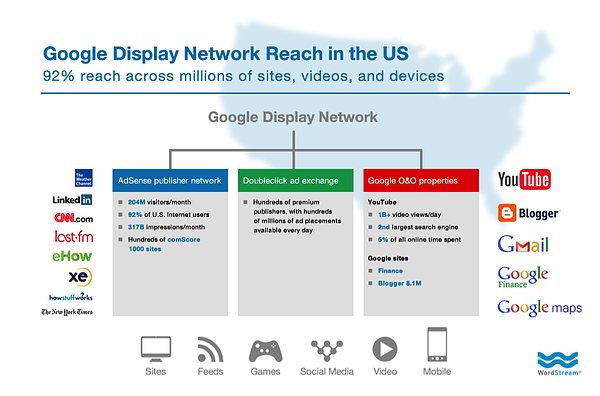
Remarking Campaign Examples
To further underscore the opportunity that remarketing has to offer, there are some really cool campaign types that you can dig into.
Online Activity
By far the most common remarketing tactic is creating an audience based on their behavior on your website. Your options here are virtually endless — with parameters such as by number of page views (indicating a high level of interest) or by which pages viewed (indicating intent).
Here are some ideas for using this type of campaign:
Targeting by Buyer’s Journey Stage
Your blog posts are earlier in the buyer’s journey than other pages on your site. That means you’d match their intent with an ad that moves them further down their journey rather than one that sells. Targeting by topic or category-say you run a bakery. Why run general ads to audiences that landed on your wedding-related content? Instead, you’d target them with more personalized ads around wedding cakes and desserts.
Targeting by Intent
Aside from just topic, there’s a lot you can learn from your audience’s site behavior. For example, visiting a product page indicates interest, but not making it to checkout could mean a price objection or other friction. This means you need to sweeten the deal in some way (like a promo or discount).
Past Purchases
You can also target those that did make it through your purchasing process and target them with ads to earn an upsell.
YouTube TrueView
The human race spends billions of hours every month watching YouTube ads. You may have your own YouTube content, but perhaps your viewing metrics aren’t quite as high as you’d like them to be, or perhaps your users have no idea you have interesting video content to share.
Using YouTube TrueView ads, you can target your audiences as they are watching other videos on YouTube.
Take the screenshot below, for example. I’m trying to watch a Teenage Mutant Ninja Turtle video and it’s showing me an ad for a tourism company in Italy. Why? Because I was planning a trip to Florence at the time I took this screenshot, and they’re remarketing to me.

The cool thing about TrueView videos is that you only pay if people view your video content. There’s no cost if the person clicks on the “skip ad” button. If you’re creating video content, why wouldn’t you pay a few bucks to promote it?
Video Views
Speaking of YouTube, your visitors don’t even need to make it to your website in order for you to retarget them. If you have a solid YouTube presence, you can create an audience based on video views. If someone watched one of your videos, you can create a display campaign that shows them your ads even beyond the YouTube platform.
Remarketing Lists for Search Ads (RLSA)
Here’s another interesting but advanced thing you can do. It’s a little complicated, but I promise it’s awesome. It’s called Remarking Lists for Search Ads.
RLSA lets you target people in your audiences with customized ads when they perform searches for specific keywords on Google.
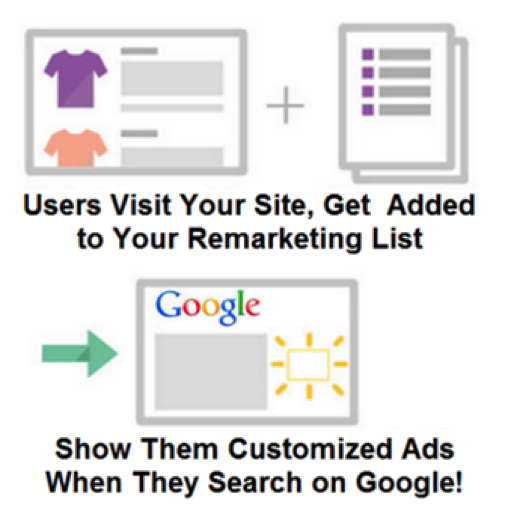
Say, for example, someone visits your site. You tag them, and now they’re in one of your audiences.
That person then searches for a competitor of yours. This probably means they’re doing some comparison shopping.
Using RLSA, you can target that comparison shopper with a specific ad, like a 10% discount code or something similar. Knowing that the person visited specific pages on your site and is now performing specific searches, it’s possible to come up with very specific and compelling ad copy.
Bonus: Remarketing With Facebook
Noticeably absent from the GDN is Facebook, the other big player on the web, and that’s because they have their own remarketing system through Facebook Custom Audiences.
It works in much the same way — the difference being that ads are shown to users within the Facebook platform.
How to Set Up a Remarketing Campaign With Google Ads
Like I said earlier, using the GDN for remarketing gives you a great deal of reach. Generally, you can find your tagged site visitors on the network many times per day, several days per week, and across many different sites.
1. Define your audience.
One of your first steps in remarketing is to define the specific audience(s) you want to remarket to. For example, you could create an audience for people who visited your blog or for people who visited specific pages on your website, like your pricing page. This will enable you to reach out to just those people with offers and messaging to suit their interests.
To define an audience, create a new remarketing list in Google Ad. Google will take care of setting all of the cookies; all you need to do is specify which website visitors to include or exclude from your audience.
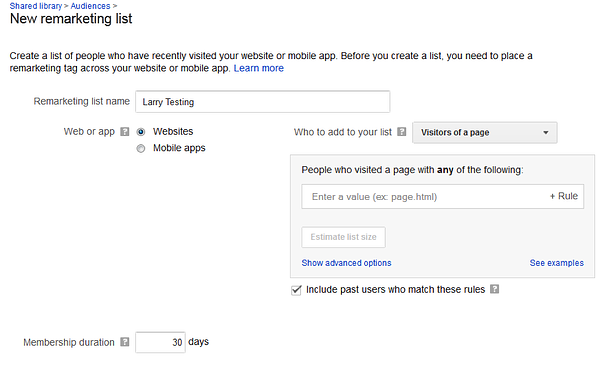
Segmenting different lists of users enables you to show different ads, depending on which section of your site they visited.
A secondary benefit is that you can bid more aggressively to get more impressions and higher ad positions, and to get visitors to the higher value sections of your website. For example, your data might show that visitors to your pricing or product page are more valuable than your blog visitors.
Another creative remarketing strategy for content marketers is to define audience categories in Google Ads based on the different post categories in your blog. If you already have a ton of blog content that is classified by topic, leverage those existing classifications in your remarketing audience definition strategy.
3. Set audience membership duration.
In remarketing, the audience membership duration is the number of days that you follow a user around with your ads. For example, if I set my audience membership duration to 60 days, then users who visit my site will see my ads for 60 days. You can test and tweak this number to see what’s right for your audience.
Ad fatigue is a real thing in every industry and across every medium: TV, radio, print … and, yes, display ads.
Now, I’d like to address a concern I’ve heard from some fellow marketers: that overly aggressive remarketing will make your prospective customer feel uncomfortable. Let’s look at a few facts and see just how “creepy” remarketing really is.
According to
Kenshoo, retargeting can lift ad engagement rates up to 400%, 60% of consumers are neutral about the topic of retargeting ads, and 25% say they actually like them.
Wishpond reports that the average click-through rate for retargeted ads is 10 times that of a regular display ad, and retargeting can lead to a 726% lift in site visitation after four weeks of exposure.
So, be bold! People visited your site for a reason, and past browsing history is among the strongest predictors of future purchasing intent. It’s worth testing out remarketing with relatively higher impression caps and membership durations and seeing what happens. As long as your offers and messaging are on target and you’re providing value, it’s not creepy. I would suggest:
- Try setting your audience membership duration to an amount equal to 3x your average sale cycle length.
- If it typically takes an average of one week to go from first touch to sale, set the audience membership duration to three weeks.
- Don’t worry too much about impression caps. (Remember, more impressions means higher conversion rates. Consider rotating though multiple ads per campaign to combat ad fatigue.)
3. Create a killer ad.
Now that we’ve talked about defining an audience to remarket to, let’s focus on how to create killer remarketing ads.
Understand Ad Formats on the GDN
There are several different display ad formats on the Google Display Network, some of which are shown below.
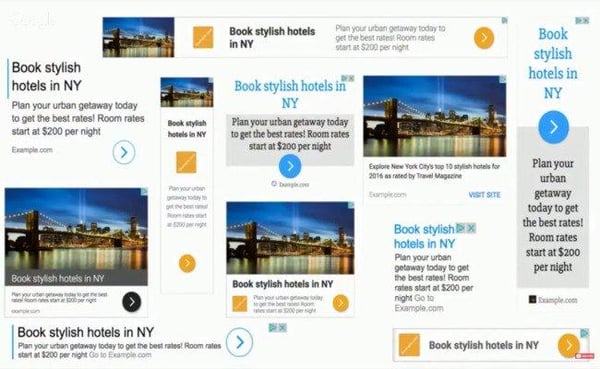
| Type | Dimensions |
| Mobile | 300×250, 320×50, 320×100, 250×250, 200×200 |
| Desktop | 300×250, 336×280, 728×90, 300×600, 160×600, 970×90, 468×60 |
Ad formats matter to marketers because of how the ad auction works. Different ad formats do not compete against each other for positioning, as shown in this screenshot:
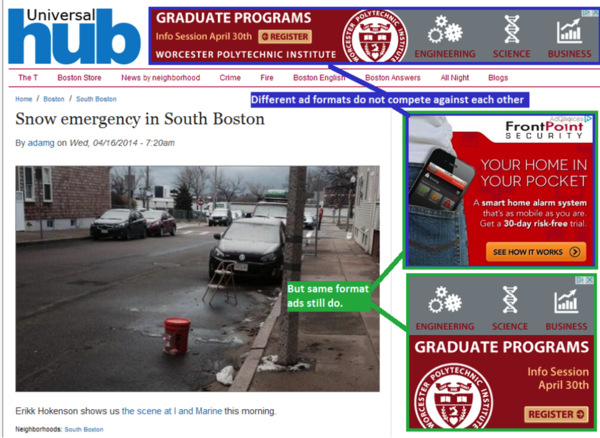
Write Copy That Resonates Emotionally
According to neurosciencemarketing.com, an emotional approach in advertising is nearly twice as effective as a rational approach. The same emotions that draw people to your content will drive people to click on your ads.
The key here is to create ads that resonate with users on an emotional level. Stay away from boring, plain, informational ads that look the same as every other ad out there. Instead, create ads that appeal to your audience on an emotional level.
Content marketers are uniquely qualified to become fabulous PPC marketers. Why? Because so much of the success and failure of PPC marketing relies on the creativity of your ads.
For example, look at these ads for a search of “Big Data Solutions” — the ads are essentially all the same:
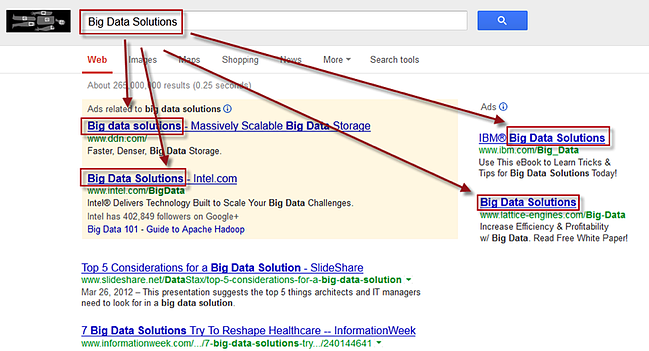
Content marketers, on the other hand, tend to have a few creative bones in their bodies. I call this a Google Ads Jackpot because it reminds me of hitting a row of lucky 7s in Vegas — I just hit a Big Data Solutions jackpot! If you can come up with an emotionally charged, totally different and stand-out ad, you can blow away the competition.
4. Perform ongoing CTR optimization.
Google doesn’t make money by showing ads no one clicks on, so it makes sense for them to show ads that are more likely to get clicks. They use an algorithm called Quality Score to determine which ads to show, what position each will display in, and how much to charge the advertiser for each ad click.
To provide an incentive for advertisers to create great ads, they give out huge discounts for ads with high clickthrough rates… and dish out huge penalties for ads with low clickthrough rates.
This all sounds good in theory, but how do you create an ad with high clickthrough rate?
1. Send people to your high-value offers.
What should you be featuring in your image ads? The most common tactic is to simply promote your highest value offers, like a free trial of your product, a request for a demo, etc. This is my top-performing ad:
Of course it has a cute puppy. How could it not? Make people love your ads, not dread them.
2. Do a conversion path analysis.
The goal here is to figure out which pages on your site, if visited during a user’s session, result in a much higher probability of the user converting to a lead or a sale. For example, the highest converting page on your site could be your product overview page. Come up with a list like this one and target those pages in your remarketing audience.
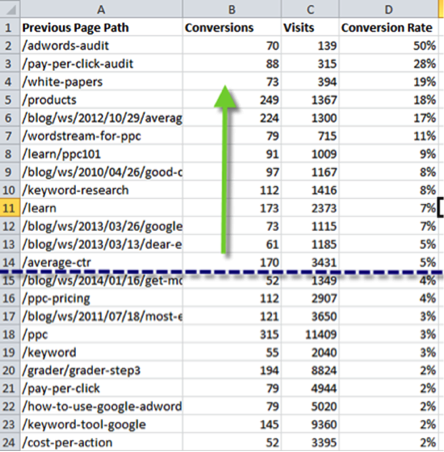
3. Send people to your best content.
Check out this ad from my colleague Marty Weintraub at AimClear, which sends anyone who clicks to his PPC analyses.
But how do you know what content to feature in your ads?
4. Analyze social shares on your blog content.
If you analyze your blog content, what you’ll usually find is that around 5% of your pages generate half of the shares on social media.
For example, I analyzed all of the articles on one business blog over the last year and found that on average, a typical article gets several hundred shares on social media. However, the top 5% of articles gets tens of thousands of social shares. Not surprisingly, we found that the same stories that work well on social media also tend to do very well as featured content within ads.
5. Get strategic with bid management.
Now that you have remarketing audiences and ads down to a science, let’s turn our attention to bid management strategies.
Remember, in PPC marketing, you have to pay for each click. The advertiser specifies a maximum cost per click that they’re willing to pay, but the key here is not to buy every possible click. Rather, you want to be super picky and just cherry-pick the clicks that are the most relevant to your business. The way to do this is through bid management.
It doesn’t make any sense to remarket ads to everyone in your audience. Why? Because not everyone who visits your website is a qualified buyer.
With Google Ads, you can overlay user demographic information on top of your remarketing audiences to find the needles in the haystack. For example, someone from Zimbabwe could visit your site — but they can’t convert if you can’t ship there.
Here’s when it comes in handy to know a thing or two about your target customer persona.
- What are the ages?
- Parental status?
- Where do they live?
- Gender?
- What time do they search for your products?
- What is their income?
You can be very picky, and just bid for the people in your audience who also meet your demographic filters.
You’ve done your research, you know your topic, you have something interesting and entertaining to say — but sometimes you need that extra push. As individuals and brands have become publishers, the game has been upped big time. Competition is fierce.
With remarketing, we at WordStream increased our repeat visitors by 50%, tripled our average time on site, and saw a huge increase in direct visits to our site.
In short, content remarketing enabled us to maximize the value of every piece of content we put out. We were able to get each piece in front of the audience with the most intent, at the right time, and via the right channels.
You can achieve this kind of success too with a killer remarketing campaign and the right advertising plan.
Editor’s note: This post was originally published in October 2014 and has been updated for comprehensiveness.

Portadas de Facebook: fotos, tamaños, textos y todo lo que tienes que saber para hacerlas bien
Cómo hacer portadas de Facebook es un tema que preocupa a nuestros lectores. Por darte un ejemplo, sabes cuál fue una de las preguntas que recibimos en Socialancer: ¿Con qué herramienta diseñaron el video que está en su portada de Facebook?… Spolier alert: fue con SocioWide, un editor de imágenes sociales que trabaja con PowerPoint.
Pero todavía no entraremos en el tema de las herramientas. Primero queremos ponerte en contexto. Las portadas para Facebook son tu carta de presentación en esa red social, no por nada ocupan un espacio tan grande.
Deben cumplir con 3 características fundamentales:
#1. Imágenes atrayentes que demuestren gráficamente quién eres.
#2. Un texto sintético que resuma tu identidad, producto o servicio.
#3. Debe estar en el formato adecuado para verse bien tanto en computadoras como en dispositivos móviles.
Aquí abordaremos los aspectos que no deben faltar en tus portadas de Facebook y te hablaremos de algunas herramientas de diseño gráfico gratuitas y de pago.
¿Qué dice Facebook sobre la foto de perfil y la foto de portada?
Medidas portada Facebook: Listado de Dimensiones de las portadas de Facebook
Las portadas de Facebook pueden llevar tanto una foto como un video. Cada uno de esos elementos gráficos tiene sus particularidades.
Fotos para portadas de Facebook
Si cargas fotos de un tamaño inadecuado, Facebook la ajustará a sus dimensiones predeterminadas, por lo tanto, podría verse distorsionada. Te aseguramos, no es lo que quieres.

Para evitarlo, te recomendamos seguir los siguientes lineamientos:
- La foto de perfil debe tener al menos 400 píxeles de ancho y 150 de alto.
- El tamaño de la portada de Facebook es el siguiente: 851 píxeles de ancho por 315 de alto.
- Debe pesar menos de 100 KB.
- Se cargará más rápido si la subes en archivo jpg RGB.
- Si contiene logotipos y texto, los archivos .png pueden ofrecer un resultado con más calidad.
- La foto de perfil de tu página se recortará de forma circular en anuncios y publicaciones y conservará la forma cuadrada cuando las personas visiten tu página. Se verá así:

Videos de la portada de Facebook

Para subir los videos que insertarás en tus portadas de Facebook, te recomendamos lo siguiente:
- No pueden ser engañosos ni tampoco violar los derechos de autor. Asegúrate de hacer ofertas reales, poner características que sí cumplas y no tomar material que no te pertenezca.
- El video debe tener mínimo 820 x 312 píxeles.
- El tiempo de duración debe ser entre 20 y 90 segundos.
- Ten en cuenta que si después lo quieres eliminar, el video seguirá disponible en la biblioteca de tu página.
¿Cómo hacer Portadas de Facebook perfectas?
Las portadas de Facebook se regían por la regla del 20% de texto. Esto quería decir que solo el 20% de tu portada podía ser texto y lo demás tenían que ser gráficos.
Lo anterior ya no es tan restrictivo. Sin embargo, la intención era buena. Lo que te recomendamos es que, en verdad, uses poco texto. Nuestro mantra en Socialancer es: no digas en tres líneas lo que quedaría más claro en dos.
Aprende a distribuir Texto y Fotos en tus portadas de Facebook
Si las frases para portada de Facebook son breves, tu foto tomará relevancia. ¿Notaste la encrucijada que hay detrás?… Exacto, tus imágenes deben ser increíbles. Para tus portadas de Facebook te recomendamos que tengan un objetivo específico.
¿Tienes una zapatería?, muestra zapatos. También debe tener espacios limpios para que puedas agregar el texto y los Call To Action.
Mira cómo lo resolvieron en la página de Toonly, un editor de videos animados. Pusieron los gráficos a los costados y en el centro está el texto. Además, en 5 líneas explicaron cómo funciona su herramienta, (nosotros hicimos un post entero para describir lo que hace Toonly).
¿Arriba o abajo, dónde va el texto importante de las Portadas de Facebook?
En la parte de abajo de las portadas de Facebook aparecen los botones de esa red social, por lo tanto, no te conviene poner texto importante en esa parte.
Para saber dónde colocarlo, traza una línea imaginaria a partir de tu foto de perfil. El texto importante deberá colocarse arriba.
¿A la derecha o a la izquierda, dónde poner los elementos gráficos?
En realidad, no hay una regla de dónde es mejor colocar los elementos gráficos de las portadas de Facebook, lo que sí te recomendamos es que seas congruente.
Determina el lugar, izquierda o derecha, y no sobrecargues el otro extremo. La regla aquí es tratar de dar equilibrio y no agregar elementos por todos lados.
AgoraPulse (un gestor de redes sociales) tiene la imagen a la izquierda y el texto a la derecha.

Por su parte, WebinarJam colocó la imagen a la derecha y el texto a la izquierda
Dos maneras de elegir el tono de tus portadas de Facebook
Además del balance entre texto e imagen y la distribución, también debes cuidar la tonalidad de tus portadas de Facebook.
Hay dos paradigmas que puedes seguir. Uno es utilizar tonos contrastados. Generalmente, será brillante, asegúrate de hacerlo con buen gusto. Mira cómo MailChimp (plataforma de email marketing) combina el naranja, verde y amarillo.

Mailchimp hizo otra cosa interesante, prácticamente no explican su servicio. Por si no lo sabes, es una plataforma de email marketing. A nosotros nos parece un recurso osado, ellos están muy consolidados en su sector y tal vez pueden darse el lujo de no describir quiénes son.
Si quieres utilizar esta estrategia, te recomendamos ir midiendo los resultados. Si ves que baja el número de likes, seguramente necesitarás explicar quién eres.
Ahora mira lo que hizo la suite de redes sociales Connectio. Utilizó tonalidades mate y prácticamente no sale de la gama de los lilas y morados.
¿Las portadas de Facebook se cambian con la estación?
Las portadas de Facebook son parte de tu identidad como marca. Esto aplica aunque seas una persona que vende servicios. Al momento de estar en una red social, te conviertes en un mensaje.
Entendemos que las marcas no son estáticas. Lo que te recomendamos es cambiar tu portada de Facebook cuando tengas algo nuevo para comunicar.
Algunas situaciones son:
- ¿Acabas de hacer un lanzamiento de tu producto o servicio? Anúncialo en tus portadas de Facebook.
- Cámbiala cuando tengas una oferta especial por tiempo limitado.
- Ajústala si cambiaste tu logo, dirección, teléfono o sitio web.
- Si tienes una marca a la que le conviene tener una comunicación estacional, debes cambiar tu portada cada cierto tiempo. Mira por ejemplo lo que hizo la marketer Vilma Núñez en Navidad

Para terminar de redondear esta idea. Haz una planeación anual de los momentos en los que vas a cambiar tus portadas de Facebook. Esto te dará tiempo para diseñarlas mejor.
8 herramientas (algunas gratis) para diseñar portadas de Facebook
Ahora viene el quid de la cuestión, ¿cómo hacer portadas de Facebook? Bueno, en realidad no es tan misterioso.
Aquí te compartimos un listado de herramientas que te ayudarán a que te queden perfectas.
#1. Sociowide: es con la que diseñamos el video que está en nuestra portada de Facebook. Te permite crear piezas para redes sociales a través de plantillas de PowerPoint.
#2. Canva: es una herramienta gratuita, fácil de utilizar y que tiene una biblioteca de recursos gráficos (algunos tienes que pagarlos).
#4. GraphySuite: también con plantillas de PowerPoint, permite crear portadas para las diferentes redes sociales.
#5. Bannersnack: la licencia gratis te da 10 portadas de Facebook de por vida y puedes diseñarlas a través de plantillas.
#6. Sheendio: es una herramienta de pago único en la que puedes crear diferentes piezas para redes sociales, incluidas portadas.
#7. Desingbundle: tiene 10 herramientas de diseño gráfico que te servirán para toda tu comunicación audiovisual, incluidas las portadas para redes sociales.
#8. Snappa: su versión gratis te permite un máximo de 3 descargas al mes. Si necesitas más, tendrías que pagar.
Conclusión sobre Portadas de Facebook
Lo único que se necesita para que un usuario juzgue a tu marca es un golpe de vista. Ten por seguro que no invertirá más de 10 segundos en tu página si tus portadas de Facebook no lo atraen.
Por ese motivo, te invitamos a que no la demerites. Trátala con el mismo empeño que le pusiste a tu logo, a tu producto e identidad.
Recuerda que debe ser clara, sencilla y estética. Por cierto, todas las capturas de pantalla de las portadas de Facebook que usamos en este post, son de herramientas que recomendamos.
Si te interesa saber cualquier detalle de alguna de ellas, no dudes en buscarnos.
from Socialancer https://ift.tt/3anKzvr
via
What is a Business Plan? Definition, Tips, and Templates
The business plan is an undeniably critical component to getting any company off the ground. It’s key to securing financing, documenting your business model, outlining your financial projections, and turning that nugget of a business idea into a reality.
In an era where more than 50% of small enterprises fail in their first year, having a clear, defined, and well thought-out business plan is a crucial first step for setting up a business for long-term success.
Business plans are a required tool for all entrepreneurs, business owners, business acquirers, and even business school students. But … what exactly is a business plan?
In this post, we’ll explain what a business plan is, list the reasons why you’d need one, and identify different types of business plans.
What is a Business Plan?
A business plan is a documented strategy for a business that highlights its goals and its plans for achieving them.
Business plans outline a company’s go-to-market strategy, financial projections, market research, business purpose, and mission. The business plan is also a prominent tool used to secure investors and financing for a business.
Business Plan Template
 Working on your business plan? Try using our Business Plan Template. Pre-filled with the sections a great business plan needs, the template will give aspiring entrepreneurs a feel for what a business plan is, what should be in it, and how it can be used to establish and grow a business from the ground up.
Purposes of a Business Plan
Chances are, someone drafting a business plan will be doing so for one or more of the following reasons:
1. Securing financing from investors.
Since its contents revolve around how businesses succeed, break even, and turn a profit, a business plan is primarily used as a tool for sourcing capital. This document is an entrepreneur’s way of showing potential investors and/or loaners how their capital will be put to work and how it will help a business thrive.
All banks, investors, and venture capital firms will want to see a business plan before handing over their money, and investors typically want a 20-25% ROI from the capital they invest in a business.
Therefore, these investors need to know if – and when – they’ll be making their money back (and then some). Additionally, they’ll want to read about the process and strategy for how the business will reach those financial goals, which is where the context provided by sales, marketing, and operations plans come into play.
2. Documenting a company’s strategy and goals.
A business plan should leave no stone unturned.
Business plans can span dozens or even hundreds of pages, affording their drafters the opportunity to explain what a business’s goals are and how the business will achieve them.
To show potential investors that they’ve addressed every question and thought through every possible scenario, entrepreneurs should thoroughly explain their marketing, sales, and operations strategies – from acquiring a physical location for the business to explaining a tactical approach for marketing penetration.
These explanations should ultimately lead to a business’s break even point supported by a sales forecast and financial projections, with the business plan writer being able to speak to the why behind anything outlined in the plan.
3. Legitimizing a business idea.
Everyone’s got a great idea for a company – until they put pen to paper and realize that it’s not exactly feasible.
The business plan is an aspiring entrepreneur’s way to prove that a business idea is actually worth pursuing.
As entrepreneurs document their go-to-market process, capital needs, and expected return on investment, entrepreneurs likely come across a few hiccups that will make them second guess their strategies and metrics – and that’s exactly what the business plan is for.
It ensures an entrepreneur’s ducks are in a row before bring their business idea to the world and reassures the plan’s readers that whoever wrote the plan is serious about the idea, having put hours into thinking of the business idea, fleshing out growth tactics, and calculating financial projections.
4. Getting an A in your Business class.
Speaking from personal experience, there’s a chance you’re here to get business plan ideas for your Business 101 class project.
If that’s the case, might we suggest checking out this post on How to Write a Business Plan – providing a section-by-section guide on creating your plan?
Types of Business Plans
1. Startup Business Plan
Arguably the most common type of business plan, a startup business plan is used for brand new business ideas. This plan is used to take a business concept and lay the foundation for its eventual success.
The biggest challenge with the startup business plan is that it requires its writer to completely start from scratch. Startup business plans start with a blank word document, and before they are finished, need to reference existing industry data and explain unique business strategies and go-to-market plans.
2. Business Acquisition Plan
Investors will still want to see a business plan to acquire funding to purchase an existing business in order to see how its new owner will run the business.
What will change and what will stay the same under new ownership, and why? Additionally, the business plan should speak to what the current state of the to-be-acquired business is, and why it’s up for sale.
For example, if someone is purchasing a failing business, the business plan should explain why the business is being purchased and what the new owner will do to turn the business around, referencing previous business metrics, sales projections after the acquisition, and a justification for those projections.
3. Business Repositioning Plan
When a business wants to save itself, reposition its brand, or try something new, some CEOs or owners will want to develop a business repositioning plan.
This plan should:
- Acknowledge the current state of the company.
- State a vision for the future of the company.
- Explain why the business should (or must) be repositioned.
- Outline a process for how the company will adjust.
Companies planning for a business reposition do so – proactively or retroactively – due to a shift in market trends and customer needs. For example, Pizza Hut announced a plan to drastically overhaul its brand last year, as it sees the need to shift from dine-in to delivery – a decision resulting from observing years of industry and company trends and acknowledging the need to reposition itself for the future of its sector.
4. Expansion Business Plan
Building onto a successful business venture with another location typically requires its own business plan, as the project may require a new location, focus on a new target market, and demand more capital.
Fortunately, an expansion business plan allows its writers to reference sales, revenue, and successes from any previous location(s). However, as great as a reference as these points can be, it’s important to not be too reliant on them, since it’s still a new business that could succeed or fail for a myriad of reasons.
Getting Started With Your Business Plan
At the end of the day, a business plan is simply an explanation of a business idea and why it will be successful. The more detail and thought you put into it, the more successful your plan – and the business it outlines – will be.
If you need help starting your business plan, download Download HubSpot’s Free Business Plan Template and fill out the sections to meet your business idea’s concept.

The 11 Facebook Ad Campaign Objectives and How to Choose What’s Right For Your Business
Facebook ads are a great tool to get your message in front of the platform’s 2.5 billion monthly users. With such a large audience, you can understand why the platform is attractive to advertisers. Over 7 million advertisers to be exact.
To succeed and maximize your return on investment (ROI) among so many audience members and competitors, start with why you want to use Facebook ads and what you hope to achieve with them. After all, your campaign objective is the first thing Facebook will ask you about when you go to create an ad.
Your Facebook campaign objective — meaning the action you want someone to take after they see your ad — is one way the platform determines who should be shown your ad.
Within Facebook Ads Manager, there are 11 objectives spanning the three overarching categories of the buyer’s journey: awareness, consideration, and conversions.
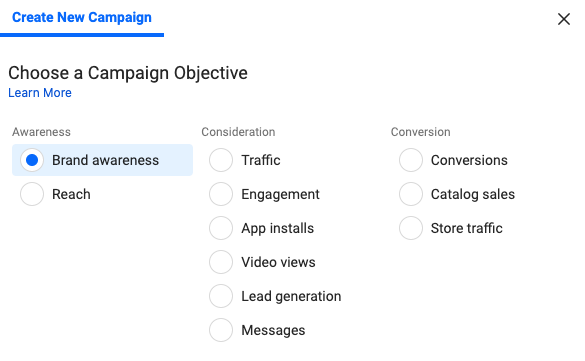
With so many options, the thought of determining which objective is best for you may feel a bit overwhelming, but no sweat — we’ll break them down below.
Check out HubSpot’s free course on Facebook Ads Training: How to Build Great Ads & Audiences
Awareness Facebook Campaign Objectives
Awareness objectives help generate interest in your product or service.
1. Brand Awareness
As you may have guessed, these ads help increase people’s awareness of your business. If you’re looking to introduce your brand to new audiences, this can be a great option. That’s because Facebook will show these ads to members of your target audience who are more likely to pay attention to and recall the ads.
Facebook predicts recall ability by polling users on whether they remember seeing an ad and analyzing their past behavior and interactions with ads.
Keep in mind the sole focus of these ads is to make people aware of your brand, so you shouldn’t expect significant engagement or click-throughs. However, they will help you establish brand familiarity and pique the interest of your target audience.
Use these ads to keep consumers aware of, and able to recall, your brand as well as highlight what makes your business and product/service unique.
TLDR: Choose this ad to increase the chances of your target audience recognizing and recalling your brand, and the features that make it stand out from competitors.
2. Reach
Facebook reach ads are shown to as many people in your target audience as possible while staying within your budget constraints. You can even specify the specific location you would like your audience to be in, so the ad only reaches people near your business. An added bonus is the ability to choose the frequency of these ads, meaning how many times someone will see the ad.
On one hand, this strategy maximizes the number of people who see your ad. On the other, Facebook doesn’t take into consideration the likelihood of the user paying attention to the ad. Meaning, you may end up paying for your ad to be displayed to audience members who tend to scroll past any form of advertisement on the platform.
TLDR: Choose this ad to send your business message to as many of your target audience members as possible, even if it means attempting to reach those who typically ignore ads. This objective can work well for local businesses.
Consideration Facebook Campaign Objectives
Consideration objectives encourage audiences to think and learn more about your business.
3. Traffic
The traffic objective aims to send people from Facebook to any URL of your choosing, such as your website’s homepage, online storefront, app, event page, etc.
Facebook does this by showing your ads to users who are likely to click based on their past behavior on the platform (newsflash: Facebook knows a lot about its users). By bringing more visitors to your featured destination, you’ll increase the likelihood of a user taking favorable actions on your landing page.
Note that, with the traffic objective, Facebook is only responsible for collecting clicks and does not measure any action(s) — or lack thereof — a user takes once they leave the platform.
TLDR: Choose this ad to direct viewers to a new URL destination so they can learn more about what you’re offering or promoting.
4. Engagement
Also based on past behavior, the platform shows engagement ads to those who they predict will engage with your ads in the form of likes, reactions, comments, and shares. The are 3 types of engagement ads: post engagement, page likes, and event responses.
Post engagement and page likes will boost engagement for your ad and Facebook business page respectively. Event response engagement ads are a unique way to promote your event to increase attendance and get people excited.
Engagement ads use social proof to determine where users are more likely to pay attention to, and be interested in, an ad after seeing how others interact with it.
Take yourself for example — would you spend more time considering an ad with 473 likes or an ad with 14 likes? I’ll take the former, please.
When others engage with your ads, their activity will also be shared with their Facebook friends, reaching even more people. Their validation will help your online word-of-mouth marketing.
TLDR: Choose this ad to establish brand credibility through likes, comments, and shares and increase interaction with your business on Facebook.
5. App Installs
This objective helps drive mobile app installs by taking users directly to the App Store or Google Play store to download your app. Facebook shows these ads to members of your target audience who have previously downloaded apps from ads to increase chances of your app installations.
TLDR: Choose app installs ads to increase app downloads for your business.
6. Video Views
Facebook will push video views ads to your target audience with the objective of getting as many views as possible. These ads can be a powerful way to tell your brand story or show your service in an engaging and consumable. After all, a HubSpot report found that over 50% of consumers want to see video content from brands.
What’s really valuable about video view ads is their ability to help you retarget those who watched your video. You can retarget people who watched your video content to remind them of your brand and product/service in hopes of boosting brand awareness and conversions.
TLDR: Choose this ad to use video to share information about your business and reach your audience via an engaging medium. Then, retarget your viewers to boost chances of conversion.
7. Lead Generation
Lead generation ads are a great way to embed lead magnets and collect leads while allowing the user to stay on Facebook. Users submit their personal information in exchange for an offer created by your business, such as an email newsletter or workbook.
The ability for the user to remain on Facebook is a huge advantage for this type of ad. This makes it easy for the user to fill in the ad’s form, while never leaving the page or straying too far from what it is they originally went to the platform for — this results in a seamless UX and can increase chances of conversion.
Facebook can even auto-fill these forms by pulling contact information from the user’s account details so all they have to do is click “Submit”.
TLDR: Choose this ad to collect leads for your business with an enticing offer. This works best when the user is already in the consideration stage of their buyer’s journey and is therefore willing to exchange their information for something of value in return.
8. Messages
With the messages objective, viewers can directly message your business through the ad using Facebook Messenger.
This is an effective way to personally connect with users to generate more interest in your business. Engaging with your audience through Messenger allows you to connect with your audience versus talking at them.
Leverage your conversations as an opportunity to answer any questions, offer customer support, build rapport with your audience, collect leads, and drive sales. Messenger is a great way to show your customers that there’s a human on the other end, ready to help them.
With these ads, it’s crucial that you’re ready to respond quickly and effectively once the messages flow in. Otherwise, prospective customers may lose interest if you’re not responsive to their inquiries.
TLDR: Choose this ad to encourage users to contact your business through Facebook Messenger, if you’re prepared to respond in a timely manner.
Conversion Facebook Campaign Objectives
Conversion objectives nudge audiences to buy or use your product or service.
9. Conversions
The goal of conversion ads is to encourage people to take valuable actions on your website or app, such as registering for an event, adding an item to cart, or making a purchase.
These ads are most successful when delivered to people who are already familiar with your product — likely, those who have gone through the awareness and consideration stages and need an extra push toward conversion.
Installing the Facebook pixel on your website will be required for these ads to help Facebook optimize your campaigns. The pixel is a piece of code for your site that tracks each time a user takes action and converts through a Facebook ad. With each conversion, Facebook learns who to target in the ads to maximize conversions.
TLDR: Choose this ad to increase conversion actions on your site or app. These ads should be served to those who are already knowledgeable about your business.
10. Catalog Sales
The catalog sales ad is made with a holistic view of ecommerce stores in mind. Instead of promoting a single product or service, ads with this objective will show relevant products from your store to people who have demonstrated interest in them before. Facebook is able to recognize this behavior based on its understanding of your offerings and the user through its pixel.
These ads require you to integrate your product catalog with Facebook so the platform can pull a selection from your store and adjust it as needed for audience members based on various factors, such as your latest arrivals.
Catalog sales ads are also more specific than conversion ads because the end goal is to generate sales, whereas the goal of conversions ads can vary from increasing registration or adding payment information.
TLDR: Choose this ad if you prefer Facebook select which products from your catalog are most relevant for your audience, based on their machine learning predictions, in order to increase sales.
11. Store Traffic
The store traffic objective is perfect for businesses with physical locations as the goal is to remove the digital barrier and bring in-person foot traffic to your store.
The ads are delivered to people who are physically near your store, so they are more likely to visit. It’s important to mention these ads target based on location only, which means audience demographics will not be considered.
There are two necessities for store traffic ads to work. As the advertiser, you must ensure that all your business locations are properly entered in Business Manager. For the consumer, their location services must be enabled so Facebook knows when to show the ad.
With those stars aligned, you’ll be able to track your store visits at each location from the ad.
TLDR: Choose this ad if your business has brick and mortar locations and you’re looking to increase store visits.
Now, when you log into Facebook Ads Manager, you should have a better idea what all the campaign objectives mean. If you’re ready to roll your sleeves up, we can help you step-by-step through the Facebook ad creation process.

Instagram Live: Creative Hacks to Get Engaged Viewers

Do you want more Instagram engagement? Wondering how to grow and engage your Instagram Live audience? To explore how to get more engaged viewers on Instagram Live, I interview Natasha Samuel on the Social Media Marketing Podcast. Natasha is an Instagram expert, founder of Sol Studio—an Instagram creative studio—and host of the Shine Online Podcast. […]
The post Instagram Live: Creative Hacks to Get Engaged Viewers appeared first on Social Media Examiner | Social Media Marketing.
from Social Media Examiner | Social Media Marketing https://ift.tt/2DIzCZC
via socialmediaexaminer