
Welcome to My Blog
Google AMP Helps You Make Stunning Web Experiences. Here’s How.
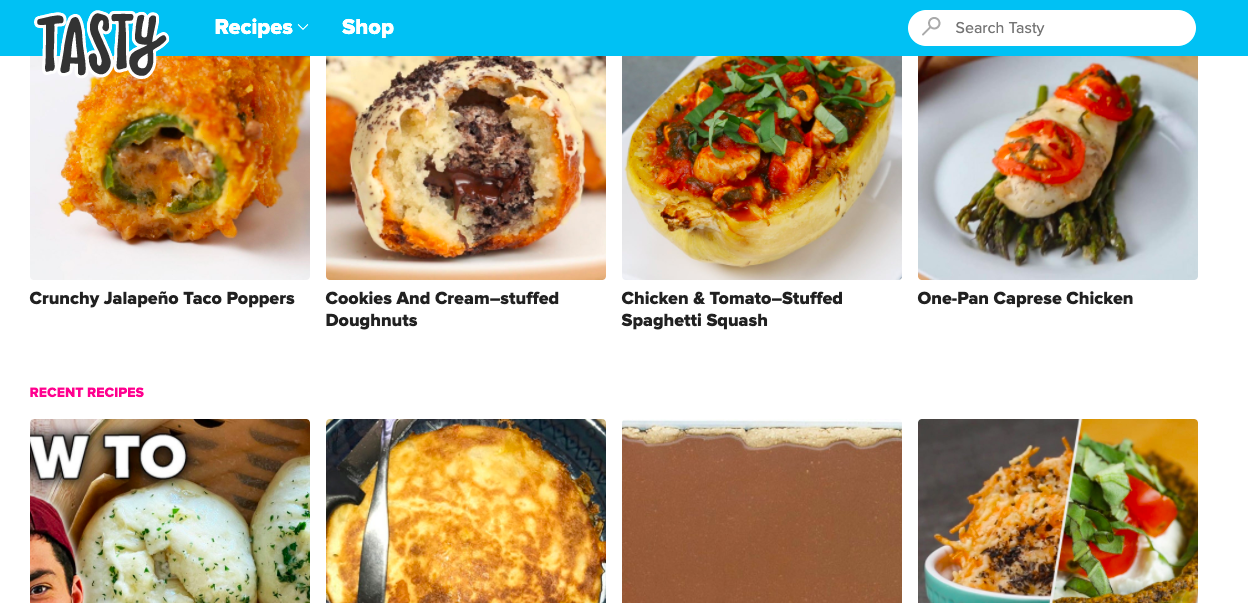
Earlier today, I learned about a type of page that would load “almost instantaneously.” Well, with a rap like that, I had to test this out for myself. So, I went to Tasty, a cooking website, on my desktop and on my phone to test the loading times for each. The homepage for both took one second to load and display. That was impressive.
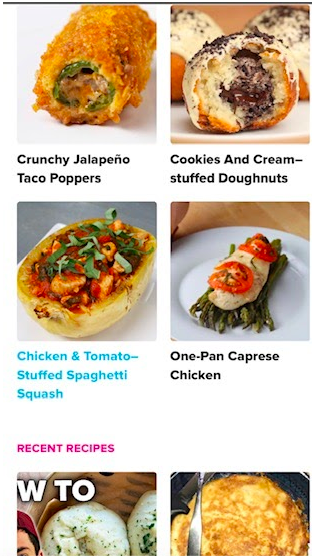
When comparing the mobile homepage and desktop homepage, I saw that the images and layouts were optimized perfectly. This checked off another item on my list.
And finally, when clicking on a recipe, I was greeted with a video demo, in perfect quality. This was unexpected and entirely welcoming. That was the moment I regarded Google AMP as an awesome tool for sophisticated, compelling websites.
Google AMP pages can help you design ecommerce pages, compelling advertisements, and thrilling mobile experiences by hosting pages that load almost instantly. For instance, Gizmodo found their pages loaded three times faster and Mashable saw a 200% increase in average CTR.
.gif?width=600&name=ezgif.com-video-to-gif%20(16).gif)
As a user, my experience with Google AMP pages was spectacular. So, let’s dive into AMPs: How they work, what they are, why they’re amazing for businesses, and how you can create one of your own.
Unlike other AMP, Google’s integrates with the website’s many channels, such as Search, AMP Cache, and Analytics. As well as being able to integrate with Google’s channels, you can monetize AMP HTML framework with Google’s ad suite (Ads, AdSense, and AdManager).
AMP is a great choice to improve core business metrics, such as the number of conversions on web pages. AMP pages load almost instantly across all devices. AMP also lets you convert your entire website archive in days if you use a popular CMS, such as WordPress or HubSpot.
Another great benefit for businesses using Google AMP is that the AMP framework is used by popular global sites like Bing and Twitter and allows you to create a seamless, native experience. Essentially, if your AMP website content has a link to Twitter, for example, the tweet would embed in your web page and users wouldn’t have to leave to see the tweet.
Now that we’ve covered the basic definition of AMP and why it’s great for businesses, let’s go more into depth about how AMP works.
How Google AMP Works
In this section, I’ll talk about how AMP pages are able to load so quickly. There are seven reasons in total, and you can find an explanation on this page uploaded by a Google AMP Developer.
1. AMP pages load all of the page’s content at once.
AMP makes all components of a web page load at the same time. This differs from a non-AMP web page feature of assets loading one by one. AMP pages don’t allow any custom JavaScript that could interrupt that simultaneous loading time.
AMP uses iFrames, which doesn’t block the main page from rendering and only allows asynchronous JavaScript. AMP might have some JavaScript in the background, but they are designed very carefully to make sure they don’t slow performance.
2. The layout of AMP pages is known to browsers beforehand.
In a non-AMP page, the web browser, like Google or Firefox, doesn’t know all the components of a web page until it’s fully loaded. In AMP, all external images or site frames must state their size in the HTML. This is so the browser knows how much it will be loading before the download initiates.
This allows AMP to load all of the content of the page without having to wait for other elements or resources to download. This is called “static layouting” and is a crucial element of AMP.
3. The CSS is in-line and size bound.
In AMP pages, only one stylesheet is needed: inline. This removes multiple HTTP requests from the rendering path. HTTP is designed to enable communication between web browsers and servers.
The removal of multiple HTTP requests streamlines the communication browsers and servers needed to have in order to fully load the page. Additionally, inline stylesheets have a data max (50 kilobytes) that allows content to be sophisticated but easy enough to comply with CSS rules.
4. Web fonts are super large, so AMP pages download them first.
The optimization of fonts being used on web pages is a crucial element of page performance. On a non-AMP web page with few scripts and stylesheets, the browser has to wait for them to download before downloading fonts.
The AMP doesn’t require HTTP requests to start until the fonts begin to download. This is possible because of reasons one and two. So with AMP, there’s no HTTP communication blocking the browser from downloading fonts.
5. AMP pages minimize style and layout recalculations.
Each time something on a page is changed, the browser has to recalculate downloading the page. A non-AMP page doesn’t load all elements simultaneously, so the browser doesn’t know the layout of the page as it’s downloading.
This can be a problem, because in traditional pages multiple scripts and sheets are being used to execute many dynamic functions at once. When this happens, re-layouts may occur and end up looking unattractive to users.
But because AMP has the power to simultaneously download content and rendering, it also has the ability to read, comprehend, and implement those changes seamlessly.
6. The power to load images is shifted from the CPU to the GPU for acceleration.
Instead of using your computer’s processor, or CPU, to generate the images for your page, AMP uses the GPU, or graphic processor, which is more efficient. This frees up the work the CPU has to do, making the page run and load faster.
When the CPU makes images, it creates layers, then sends them over to the GPU for further changes. For instance, the GPU can then shrink, enlarge, rotate, or crop images.
7. Resource downloading is a top priority for AMP pages.
When an AMP page starts downloading, it begins to optimize its resources. This is done so the most important components have priority. Ads and images are only downloaded if the user is likely to see them below the fold.
It’s important to note that all of the content has already been prepared to download by an AMP page because of the static layout. They only fully download if the page determines that the user is likely to see them.
These reasons are why AMP pages are optimized to the point where they download almost instantly. Pretty cool, right? All this behind-the-scenes work is being done by AMP pages to accelerate the loading process.
At this point, you may be wondering how to create one of these AMP pages of your own. Luckily, making an AMP page — even trying it out — is pretty intuitive. Let’s go over that process in the next section.
How to Make Google AMP Pages
At this point, we’ve earned the Google AMP pages are web pages that improve the user experience by using engaging graphics, smooth layouts, and load almost instantly. But is creating an AMP web page as simple as it looks?
Short answer: It can be.
I am not a developer, and my knowledge around the coding sphere is very minimal. But when I started toying around with the “AMP Playground,” I was able to make a very simple web page.
When you develop an AMP page, Google offers a workflow process. First, you build a page, dubbed ‘Hello World’ by Google. Then, you integrate your page, learn the fundamentals of AMP pages, optimize the page and set up analytics tracking, and design the page for your website’s needs and goals.
Google AMP integrates with CMS platforms. You can find a full list of those platforms here.
If you want to make a web page, Google guides you through the process. The platform provides a template of code that you can copy and save to a .html extension. It gives you a list of required mark-up that you must include in your page to make it a workable AMP HTML document.
The toggle sidebar in the create page has instructions for including images, modifying layout, optimizing for SEO, previews, and final steps before publishing.
If you want a taste of what working with an AMP page will be like, visit the homepage, amp.dev. There, you can experiment a little with the AMP playground, like I did. Here, I used my very limited coding knowledge to experiment, like below, when I added text to a blank ad:
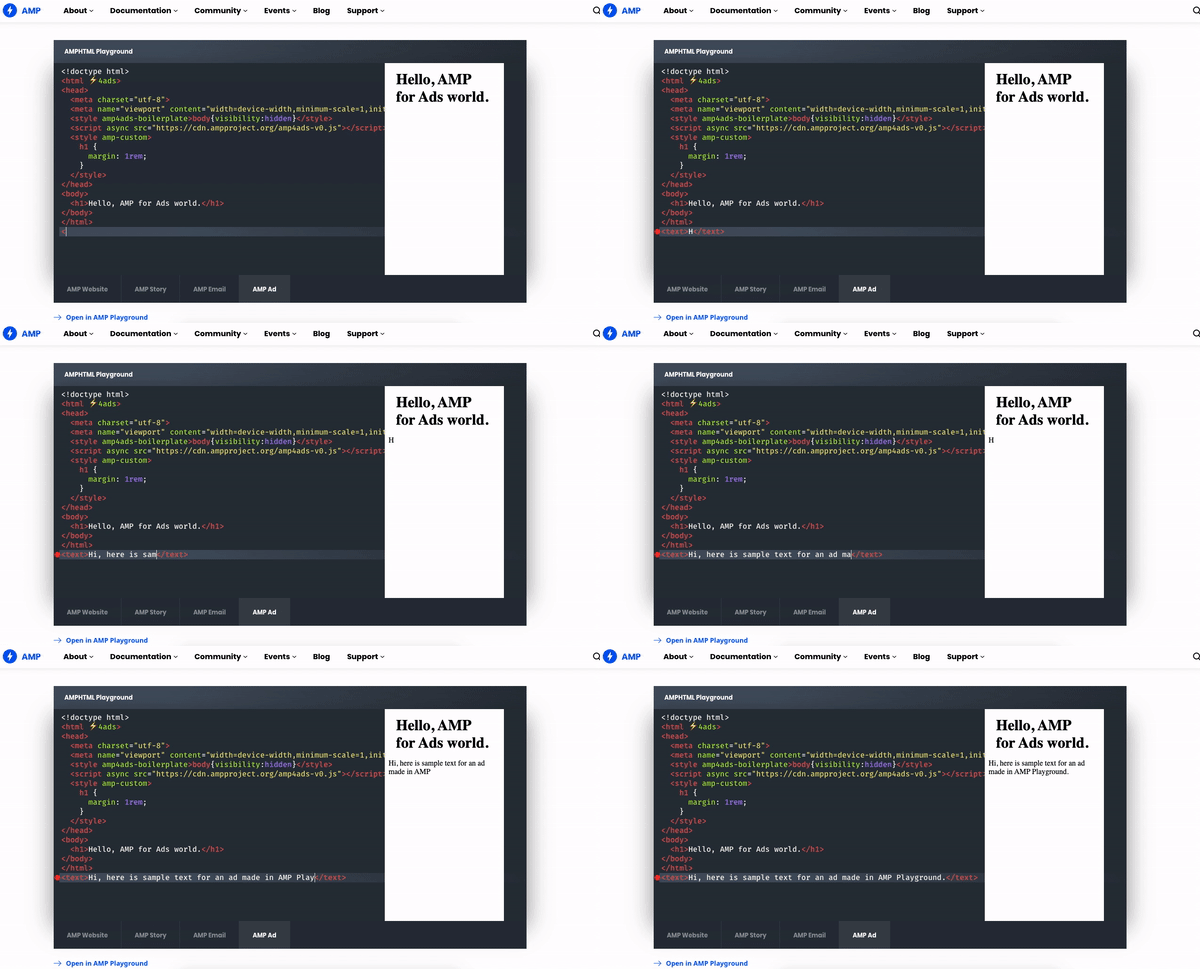 I had a lot of fun with this tool. I could visualize the changes I was making as they were happening. If you want to make a sample web page with the playground, here is what I did.
1. Implement and change header text.
First, I started with the boilerplate template given. I followed the keywords in the code, “<body>,” and “<h2>,” which tell me that I will work on an H2 inside the body of the page. I changed the title from “AMP is easy” to “Welcome to my site!” by putting text inside the h2 brackets.
2. Work on the body paragraphs.
Then, I moved to the paragraph section. In the code, paragraphs are notated with red “<p>,” and “</p>.” The red is like a signal; It tells the web page what the content following will include. In this case, it was text I changed to “Below is a responsive image. Responsive images are optimized for mobile and desktop.”
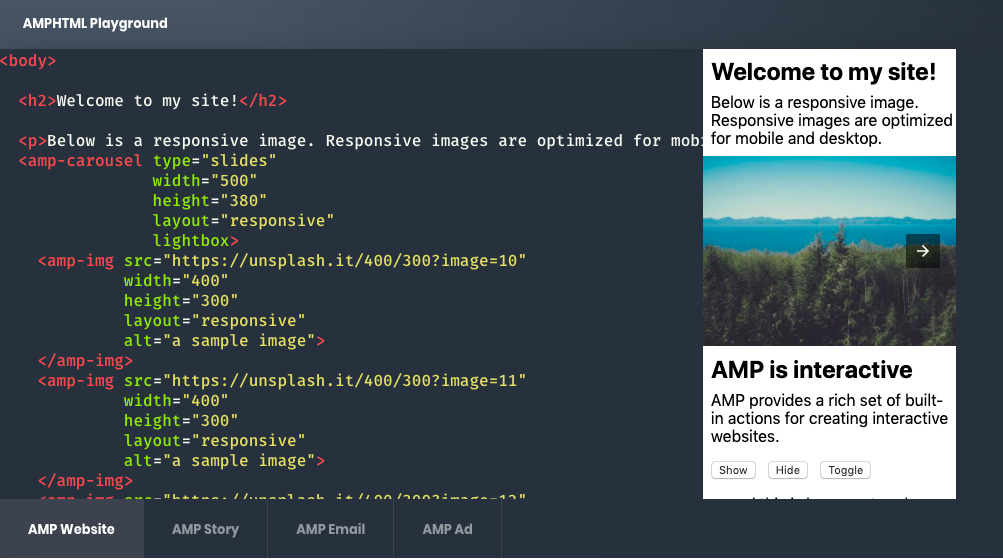
3. Modify the buttons to fit your web page’s needs.
After learning how to change paragraphs, I scrolled to the buttons. The green text, “on,” tells the web page that the phrase following will be the kind of button. In this case, the button will work by tapping, the type is greeting, and it will show up on the web page.
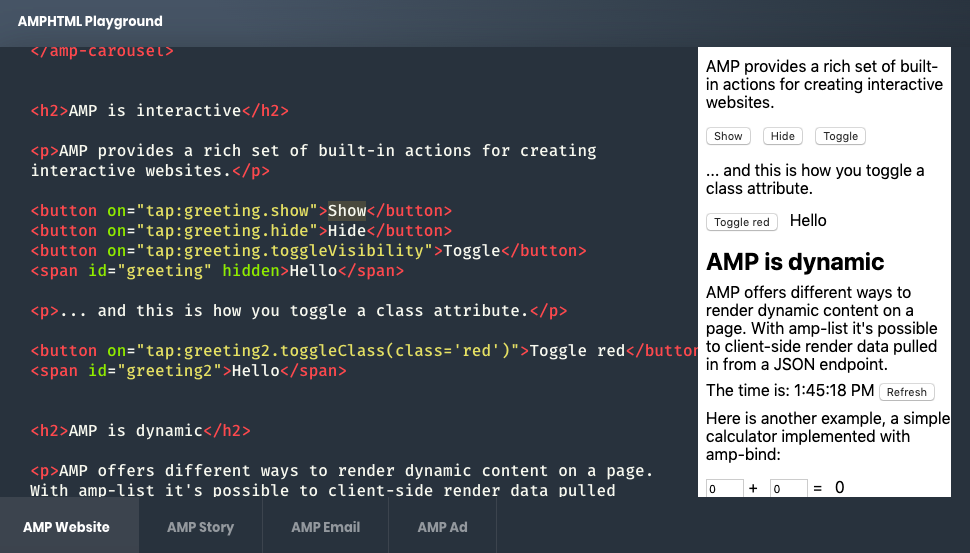 We know this by the code, “tap:greeting.show”. I modified the white text to change what the button said before making sure that ending, “</button>,” was added. This is to signal that I was finished with the first button.
4. Toggle class attributes if desired.
The AMP Playground’s code gives you directions for making changes inside of its text. For this step, the text tells you how to toggle a class attribute. If you follow the lines of code, you can figure out how to make simple changes.
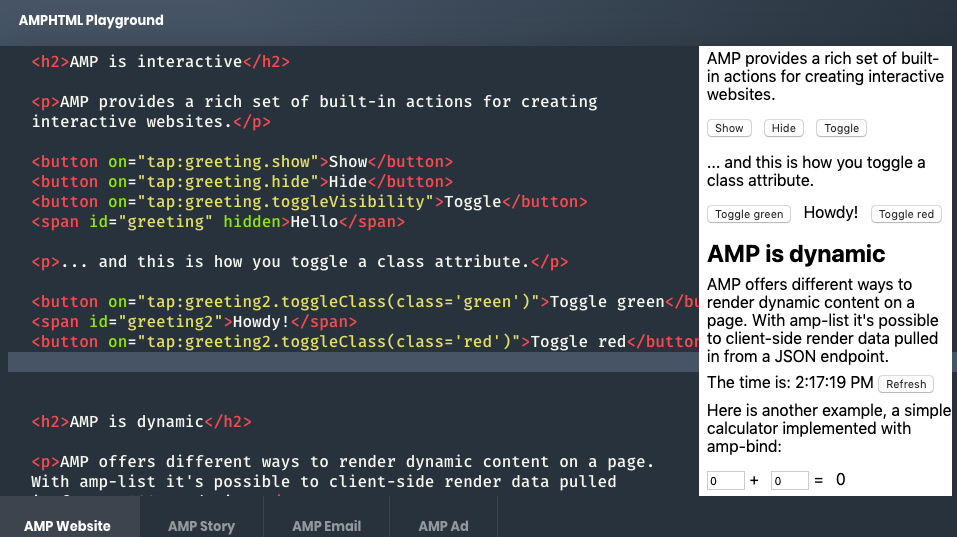 When I switched up toggle attributes, I played with colors and text. Instead of the original red, I changed the toggle to green and switched up the greeting text from “Hello,” to “Howdy!”.
Class in HTML is used to define the type of attribute if you have multiple. (If you were to list different beverages on your site, you would use “class” to specify the design for wine, water juice, etc). In this case, the class attribute was for a color.
Remember, this is just a blank customization template to get you comfortable with building a web page. You don’t need a separate .html file for this, you can work directly in Google. You can also do a trial run for stories, emails, and ads. I loved using this because it was fun, it got me comfortable with using coding language, and the playground interface was easy to follow.
You can use AMP pages to make the customer experience delightful, from beginning to end, like my experience with Tasty’s website. How are you going to fit in these pages to your strategy in the future?

Funnel marketing: comparativa entre ClickFunnels, MaxFunnels, GroovePages y Convertri
Cuando tienes un negocio online debes invertir, eso es un hecho. En ese sentido, al funnel marketing o embudo de ventas de tu página de Internet es necesario dedicarle tiempo y dinero. Es el corazón de tu emprendimiento.
Sabemos que circulan plantillas gratis para crear embudos y landing pages, sin embargo, suelen ser limitadas y con pocas opciones de personalización.
Tú lo sabes, un funnel de ventas mal diseñado se transformará en conversiones no concretadas. Entonces salta la pregunta, ¿cuál es el mejor software de gestión para crear un embudo de venta?
La respuesta es una combinación entre el plan de marketing de una empresa, sus objetivos, tipo de negocio, fase en la que está el emprendimiento y, obviamente, presupuesto.
Hemos notado que los artículos sobre creadores de funnel marketing generalmente hacen comparativas entre un par de software. Pero creemos que es difícil categorizar a todos los negocios online en solo dos opciones.
Por eso redactamos este artículo. No te vamos a hablar ni de 1 ni de 2 sino de 4 creadores y editores de funnels de venta.
Al final, tendrás un panorama más completo y podrás elegir mucho mejor en función de tus necesidades y plan de mercadeo.
ClickFunnels, MaxFunnels, GroovePages y Convertri son fáciles de manejar incluso para personas sin conocimientos previos en programación. Lo que sí debes tener en cuenta es que cada uno tiene fortalezas y debilidades.
¡Vamos a conocerlas!
# 1. El todo en uno del funnel marketing: ClickFunnels
ClickFunnels es uno de los software más populares y completos del mercado. En realidad, no solo es un creador de embudo de venta sino una herramienta integral de estrategias de marketing.
Entre otras cosas, puedes crear:
- Programas de afiliación
- Gestiones de membresías
- Carritos de compra
- Organización de cursos
- Formularios de datos de contacto
- Páginas de venta de productos
- Cualquier tipo de landing page
Su editor es muy sencillo de utilizar. Te compartimos una captura de pantalla para que entiendas cómo visualizan ellos el embudo de ventas.

Como se muestra en la imagen, ClickFunnels literalmente te va llevando de la mano para crear el funnel.
Empiezas por la Squeeze Page, saltas a la Página de Ventas donde puedes agregar un video, después a la Página de Pago con diferentes métodos de cobro y terminas con una Página de Agradecimiento.
Si buscas ejemplos de estrategias de venta, encontrarás que este modelo de embudo es muy utilizado.
¿Recuerdas que te comentamos que ClickFunnels en realidad es una herramienta integral de ventas y marketing?
Bueno, a lo que nos referimos es a que no solo podrás editar funneles de venta. Es también una plataforma de email marketing, por lo que podrás programar envíos automáticos de correos electrónicos.
Además, podrás programar publicaciones en redes sociales. Todo lo anterior, desde el mismo panel de ClickFunnels.
Pero la cosa no termina ahí, ClickFunnels permite hacer segmentación de mercado y envía estadísticas que son fáciles de entender.
Tiene dos licencias, Estándar y Etison editor. En la primera puedes crear 20 embudos de venta, 100 páginas y la maneja un usuario.
En la Etison puedes crear funnel marketing y páginas ilimitadas. La manejan tres usuarios. Además, puedes agregar Paypal como forma de pago, lo que abre posibilidades de conversión.
Uno de los contras de ClicksFunnels es que no cuenta con garantía de devolución pero sí con un período de prueba de 14 días.
Otro de sus puntos en contra es que no tiene interfaz en español. Sin embargo, recuerda que si lo compras desde el enlace exclusivo de Socialancer, siempre tendrás acceso a nuestro soporte en español.
Es para ti si…
- Tienes un presupuesto no tan limitado.
- Necesitas, además, una herramienta de envío automático de correos.
- Tienes la necesidad de hacer segmentos de clientes para tu estrategia de mercadeo y ventas.
#2. El accesible: MaxFunnels
En relación a sus competidores, MaxFunnels es una herramienta económica. Esto no quiere decir que sea limitada o de baja calidad.
Desde el enlace exclusivo de Socialancer lo puedes adquirir con un pago único. Es una gran ventaja porque eso te permite controlar al 100% tu inversión.
Si quieres conocer la herramienta más a fondo, puedes ver nuestro tutorial.
Tiene un creador de páginas de aterrizaje con el sistema de soltar y arrastrar, además de un constructor visual de embudos de ventas con estadísticas de conversiones.
Hay más de 100 plantillas que se orientan a distintos nichos y objetivos del marketing en ventas, por ejemplo:
- Generación de leads
- Páginas de venta
- Registro a Webinar
- Páginas para descargar materiales
- Opiniones de productos
- Páginas de bonus
- Páginas de eventos
Tiene dos licencias. La personal, que no permite comercializar los diseños, y la comercial, que sí se usa para clientes que buscan ejecutar en sus negocios lo que es un embudo.
Si lo compras desde Socialancer hemos creado una serie de Bonus.
Pero como todo, MaxFunnels tiene puntos débiles. Por ejemplo, el hecho de que para acceder a algunas funcionalidades se tengan que comprar otras ampliaciones (OTOs).
Es para ti si…
- No tienes un presupuesto muy alto.
- Necesitas hacer integraciones con auto respondedores.
- Necesitas gestionar campañas, proyectos y clientes desde un mismo panel de control.
#3. El funnel de venta SEO friendly: GroovePages
GroovePages es útil tanto para personas que no tienen conocimientos en programación de funnel marketing como para los que sí. Accede desde Socialancer a su oferta de pago único y de por vida desde aquí.
Se construyó con tecnología VUE.JS. Por eso ofrece la libertad de crear cualquier sitio con más flexibilidad de lo que se podría hacer con HTML, CSS y Javascript.
Pero para los que no sabemos programar es muy fácil de usar. Es posible crear funnels de venta con solo arrastrar y soltar elementos.
Una de sus ventajas en relación a sus competidores es la de integrar SEO para el posicionamiento web.
Te mostramos una captura de pantalla del editor de páginas de GroovePages. Funciona a través de bloques que se arrastran a un lienzo limpio, esto realmente facilita el diseño.
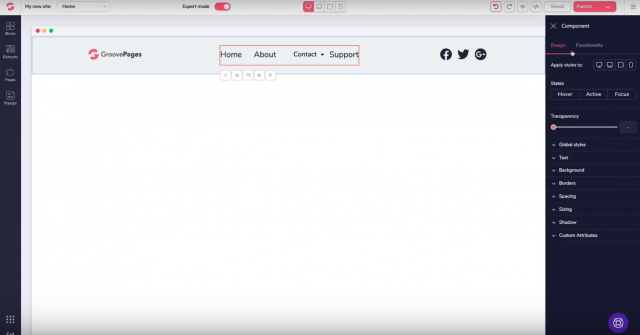
La idea de los desarrolladores fue construir un software lo suficientemente intuitivo que les evite a los usuarios crear embudos de venta feos.
GroovePages es una herramienta que te da el control completo de la experiencia de tus visitantes. Lo anterior es porque permite agregar páginas al sitio web pero también esconderlas de la navegación.
El punto en contra de GroovePages tal vez es su falta de historia. La versión beta fue lanzada recién a finales de 2019.
En contraparte, los creadores tienen una buena reputación. Son los mismos que lanzaron WebinarJam y EverWebinar.
Tiene tres tipos de licencias.
- Trial: gratis durante 14 días.
- Most popular para emprendimientos pequeños.
- Best Deal, que también es funcional para las agencias.
Es para ti si…
- No tienes conocimientos en programación y buscas una herramienta realmente fácil de usar.
- Tienes conocimientos en programación pero buscas una herramienta que te permita modificar elementos.
- Quieres una herramienta que te ofrezca dominios y diseños ilimitados incluso en su licencia más barata.
- Si quieres una herramienta de pago único y acceso de por vida.
# 4. El embudo de ventas veloz: Convertri
En nuestra opinión, la joya de la corona de Convertri es la tecnología que utiliza. El funnel marketing que se crea desde ahí se carga más rápido, lo que aumenta las posibilidades de conversión.
La velocidad de carga no es un dato menor. Para fundamentar nuestra idea, te compartimos dos datos:
#1. Un segundo de retraso en la carga de páginas desde el celular reduce las conversiones en un 20%.
#2. Una velocidad de carga de 3 segundos incrementa la tasa de rebote en un 32%.
Cómo optimizar tu web para que convierta: analiza, formula e implementa.
Regresando a Convertri, su programa de diseño tiene la facilidad de arrastrar y soltar. Puedes crear desde funnels de venta, una landing page o cualquier tipo de website que necesites.
Tiene tanto plantillas personalizadas como la posibilidad de crear páginas desde cero.
Su interfaz es amigable porque deja arrastrar los elementos a un lienzo limpio.
A lo que nos referimos es a que no hay filas ni columnas que muchas veces limitan el diseño que tenemos en mente.
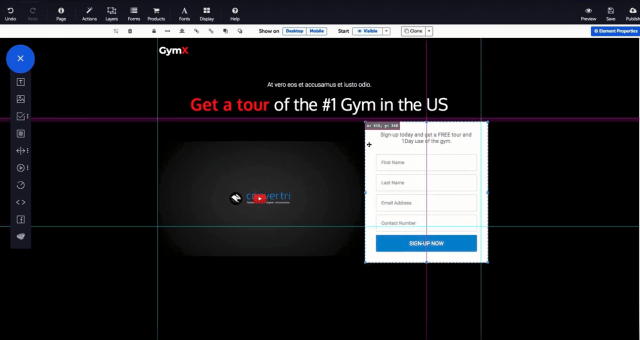
Permite añadir pop-ups, botones de necesidad de urgencia, formularios, videos y vincularlo con los mensajes de Facebook.
Algo que nos gusta mucho es que tiene servicio de hosting y la posibilidad de diseñar páginas para clientes.
Para ello, solo necesitas que el cliente te proporcione su correo electrónico. Es decir, no se requiere que tenga una cuenta en Convertri.
Una característica que hace diferente a Convertri es su editor exclusivo para móviles. Ellos dieron un paso más allá al de solamente crear sitios responsive.
Los desarrolladores parten de la premisa de que es diferente la experiencia de usuario en escritorio y dispositivos móviles. Por lo tanto, si solamente achicas los elementos de tu página, podría afectar la venta de productos porque no siempre es amigable para el posible cliente.
Hay que diseñar experiencias de usuario específicas para cada tamaño de pantalla.
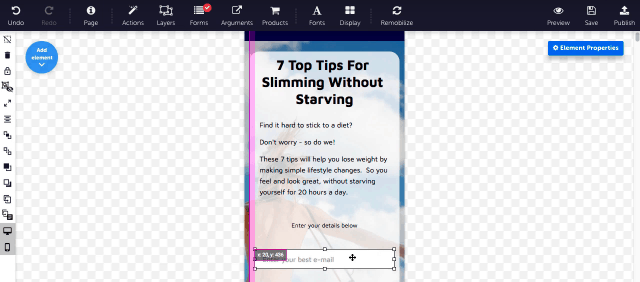
Otro aspecto valioso para los embudos de venta es que Convertri mide los clics y conversiones en tiempo real. Esto acelera tu capacidad de reacción para rediseñar lo que no está funcionando.
Tiene tres tipos de licencias: Standard, Pro y Agency, que es en la que creas páginas para clientes.
El aspecto débil de Convertri es que tiene un límite de páginas vistas al mes, que va aumentando según la licencia que se compre. En la más barata, la Standard, la capacidad es de 25 mil páginas vistas al mes. No es poco, pero es un límite.
Es para ti si…
- Necesitas crear páginas para clientes.
- Necesitas crear funnels con varios caminos para concretar la venta (upsells, downsells, etc.).
- Necesitas integrar diferentes monedas en el carrito de compra.
- Y obvio, si quieres aumentar la velocidad de carga de los funnels de venta.
Conclusión sobre creadores de embudos de ventas y un tip
Es difícil elegir las herramientas en las cuales invertir para nuestro negocio online. Por eso, recomendamos que antes de tomar una decisión, regreses a tu documento de objetivos. Ahí está la ruta a seguir.
En materia de creación de funnel marketing, para nosotros hay tres características básicas que un buen software debe cumplir:
#1. Que resulte fácil de usar.
#2. Que ofrezca algo más que solo crear funnels de venta.
#3. Que el control del diseño lo tengas tú y no el software.
Un tip
Las encuestas son una herramienta excelente para conocer a tus clientes, captar leads y planificar una estrategia de ventas que después se vea reflejada en el embudo.
Es un formato fácil de realizar y que a los usuarios les divierte, por lo tanto, genera interacción.
Si quieres ahondar en el tema, Beatriz Aguilar, cofundadora de Socialancer, aborda en este artículo 10 ejemplos para crear encuestas online.
¿Has descubierto algún truco para optimizar tu embudo de ventas? En caso de que sí, estaría increíble que nos lo compartieras.
from Socialancer https://ift.tt/30dD9bb
via
Deals Closed Rise Significantly as May Comes to an End [COVID-19 Benchmark Data]
For the last few months, businesses around the world have had to rapidly adapt to the impact of COVID-19.
In a time where it seems like things change every day, it can be difficult to gauge whether the challenges your business is facing are widespread.
That’s why we’re publishing week-over-week benchmark data for core business metrics like website traffic, email send and open rates, sales engagements, close rates, and more. These core metrics are split by region, company size, and industry cuts, so you can explore data for companies most similar to yours. You can find the data, and more context on the dataset and sources, here.
Because the data is aggregated from our customer base, please keep in mind that individual businesses, including HubSpot’s, may differ based on their own markets, customer base, industry, geography, stage, and/or other factors.
These insights are refreshed every Thursday morning ET, and will be accompanied by this short writeup. You can find past writeups using this timeline.
We hope to establish useful benchmarks to measure your business against, and serve as an early indicator of when short- or long-term adjustments may be needed in your strategy.
What We’re Seeing
Here are the three key takeaways from the most recent week’s data:
1. Deals closed rise significantly as May comes to an end. Deal creation remains flat with NORTHAM experiencing a small setback.
Last week, we were deeply concerned that the positive momentum we were seeing for deals closed was lost. This turned out to be an aberration, as this week we saw a 24% increase in deals closed and posted the most deals closed-won since pre-COVID. Both the APAC and LATAM regions had a positive week, and are now at or just below the benchmark for deals closed. The industries leading the charge with the most closed-won deals last week were computer software, consumer goods, and manufacturing. They’re all now sitting at or just below the benchmark as we come to the end of May.
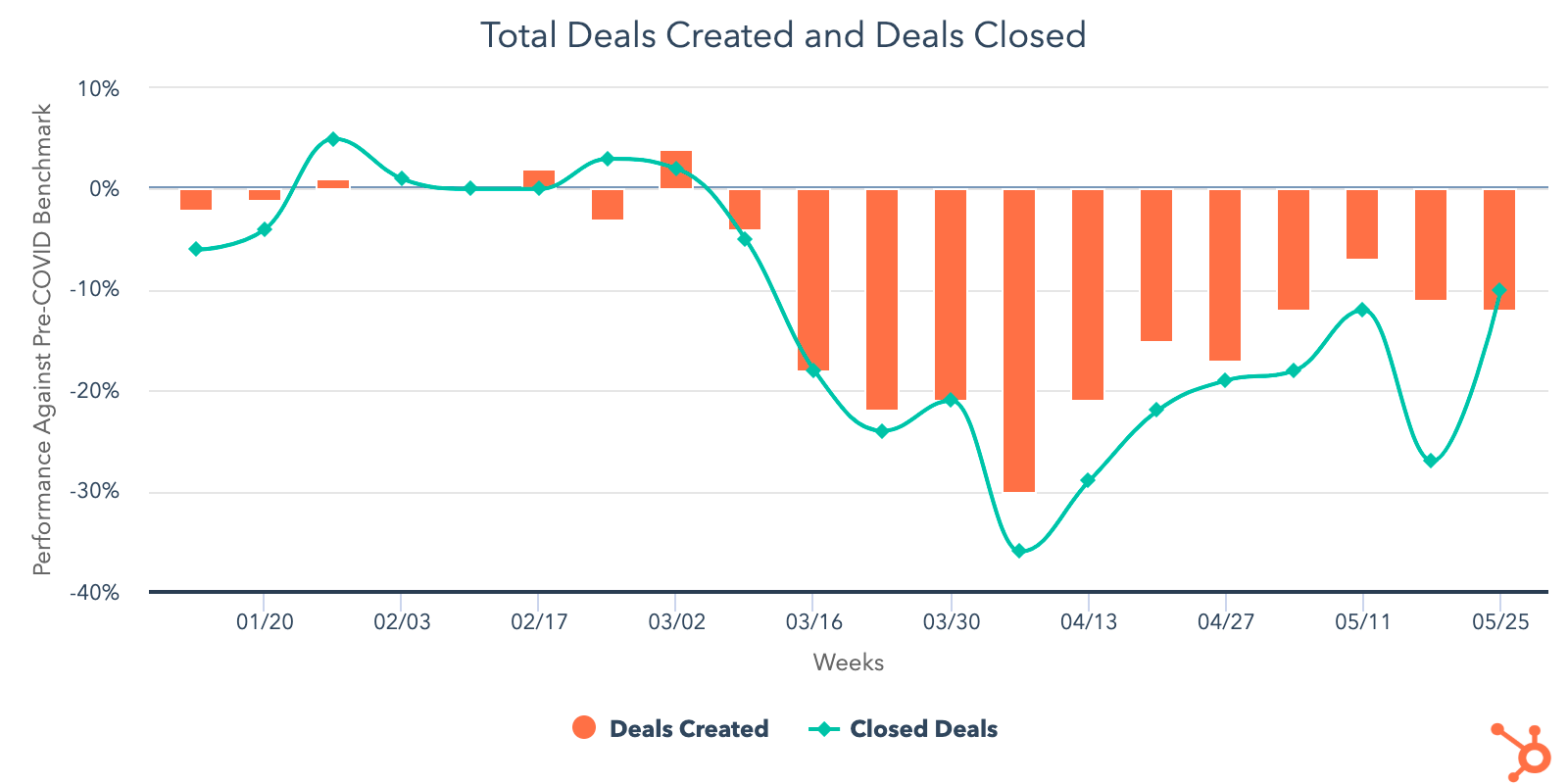
On the other hand, global deal creation didn’t gain momentum last week hanging at 12% below pre-COVID levels. NORTHAM recorded an 8% drop in deal creation as every other region either saw an increase in deals created or remained consistent with the week of May 18. As the initial reaction to current events settle and more states in the U.S. continue to reopen their economies, we’ll look for this metric to bounce back in the coming weeks.
The drop in deals created affected nearly all industries, except human resources and entertainment, which both saw small increases last week but are still below pre-COVID levels. As of now, the only industry that’s trending above the benchmark is construction, which sits 16% above pre-COVID levels. Consumer goods, computer software, and manufacturing have all fallen back below the benchmark after trending slightly above it in early May. These industries are now roughly 10% below pre-COVID levels. They’re still in a safe spot and are positioned nicely to have positive performances in June.
2. Sales teams send fewer emails, email engagement continues to grow slowly, and marketing metrics remain strong.
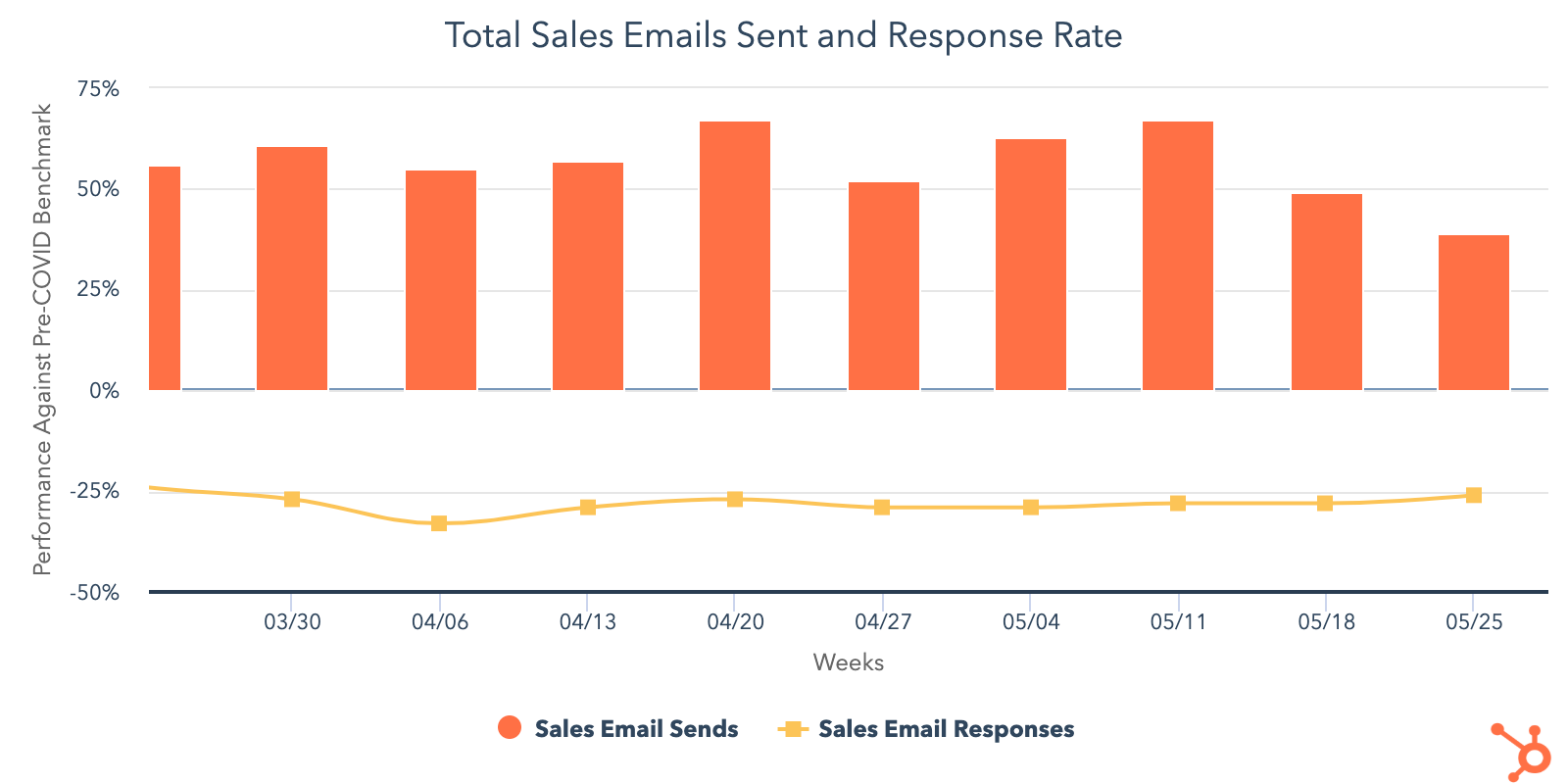
While sales email volume is still trending 39% above the benchmark, it’s dropped 18% in the last two weeks. Sales teams sent fewer emails as they seemed to be focused on closing deals toward the end of May. Accordingly, email engagement increased 3% last week and continues to be on a slow — but steady — rise since late April. It’s now sitting at 26% below pre-COVID levels.
After increases in early May, call prospecting continues to drop recording a 6% decrease following the Memorial Day holiday in the US. It’s now fallen back to 22% below pre-COVID averages as reps continue to struggle with connecting on multiple channels as well as bringing a balanced approach to outreach efforts. This is consistent across all company sizes and fairly consistent across global business regions. The only region that made more sales calls last was EMEA, which saw a 7% increase but this region is still making fewer calls than any other.
While the number of meetings booked fell for the second week in a row, it’s sitting significantly above pre-COVID levels. Currently, meetings are trending 16% above the benchmark and have been above it since early April. As more businesses open up and companies master the art of social distancing, we should expect sales teams to continue booking online or in-person meetings as an effective way to engage their customers.
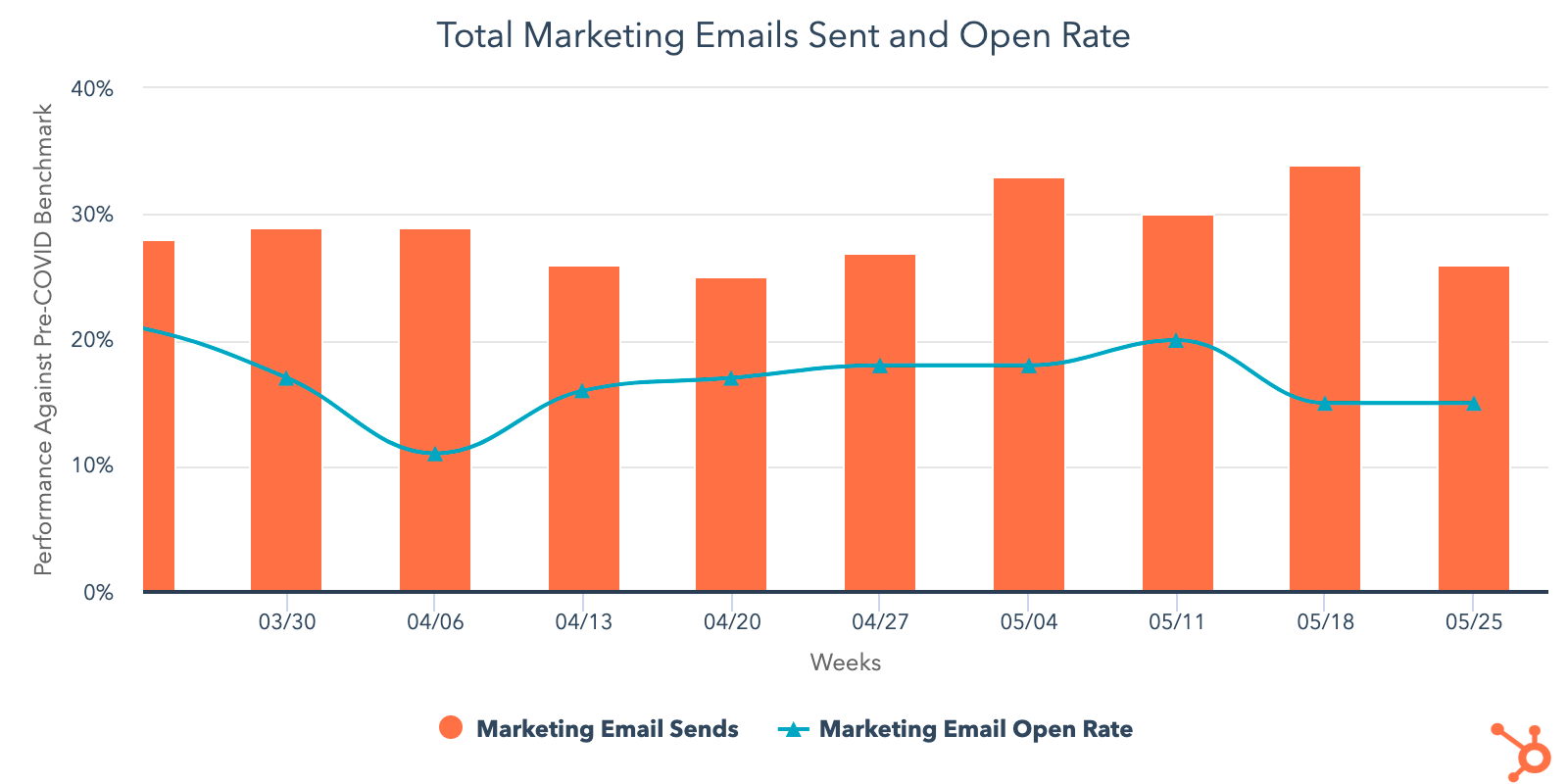
Email marketing continues to be an effective channel for communication as open rates last week remained consistent with the week of May 18 and are still trending 15% above pre-COVID levels. Marketers did send fewer emails — likely due to the holiday weekend — but, despite this 6% dip, email volume still remains far above the benchmark at 26%. All of the industries we’re tracking are trending above pre-COVID levels, except for travel which seems to be sending fewer emails compared to the rest.
Other marketing channels, like customer-initiated conversations and web activity, are showing strong numbers as well. The number of conversations initiated last week increased 6% and reached a year-high at 43% above the benchmark. Customers are clearly embracing live chat as this marks the seventh week in a row where global conversations have increased. Website activity is also performing well even though it has trended downward over the past two weeks. It still sits well above the benchmark at 17%.
3. In the United States, sales and marketing metrics fall during Memorial Day weekend.
After three weeks of steady performance, deal creation fell 11% last week and is now sitting at 16% below pre-COVID levels. Though deals closed did improve last week compared to the previous one, it’s still trending 15% below the benchmark. Sales email volume dropped 14% while response rates dipped slightly at just 1%. Although sales email volume has dipped over the past few weeks, sales teams are still sending significantly more emails than they were before COVID-19. Response rates have remained steady since April, but continue to trend well below the benchmark.
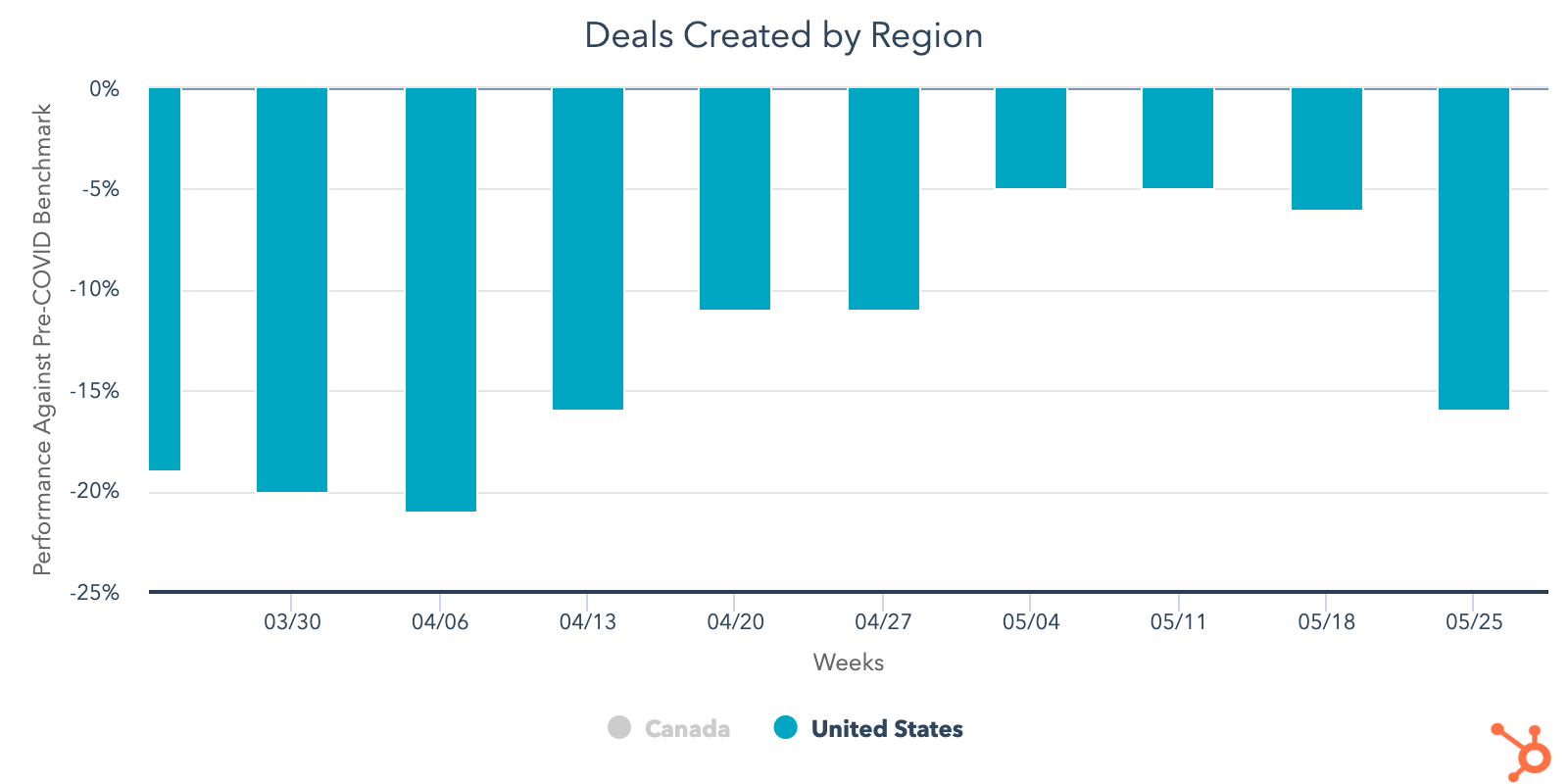
Marketing metrics took a small hit in the U.S., but overall remained positive compared to pre-COVID levels. Even though Memorial Day dug slightly into email volume, U.S. consumers are still engaging with this type of content. Open rates are consistent with the week of May 18 and are holding at 15% above pre-COVID levels. Email send volume dropped 9% last week, but is still 25% above the benchmark.
Web traffic took a slight dip in the U.S., falling 4% last week. Despite this, U.S. websites are still seeing a lot of traffic and are trending 19% above the benchmark. Conversations followed a similar path, dropping 4% last week but remain 25% above pre-COVID levels. Marketers should continue to lean on these channels as they keep searching for more conversion opportunities.
What This Means for Businesses
Sales teams need to reinvent how they prospect.
While buyer engagement reaches all-time highs, sales results have not come close to seeing a corresponding increase, suggesting that salespeople are reaching out to poor-fit prospects. This month has seen improvements in deal pipeline metrics compared to March and early April, an encouraging sign that more businesses are reentering buying processes — but it’s too early to tell how much of this growth will be sustained. For now, it’s a safe bet that your sales team should continue prioritizing high-interest, good-fit buyers rather than indiscriminately prospecting.
Resources to Help
- Refresh your email outreach with these sales templates.
- Start using video in your sales outreach to engage more prospects.
- Use this guide to increase your sales close rates.
- Lead with empathy in sales emails to build rapport and increase response rates.
Free Software to Get Started
- HubSpot CRM is free and comes with included advertising and sales acceleration tools, including free 1:1 video, meetings, and chatbot tools
- Gmail and Google Calendar integrations with HubSpot
- Zoom integration with HubSpot
- LinkedIn Sales Navigator integration with HubSpot
- Check out what HubSpot’s app partners are offering at this time with this list of relief initiatives
Consider whether online advertising is a fit for your business.
The significant dip in advertising spend tells us that many businesses have paused their ad campaigns either temporarily or indefinitely. There’s an opportunity for companies to enter a more affordable market. Whether or not this approach is right for your company entirely depends on your audience and offering, but if online ads work for your business, now may be a good time to un-pause campaigns.
Resources to Help
- Get up to speed on using Facebook Lead Ads with this beginner’s guide to building audiences and ads
- Read our ultimate guide to online advertising
- Plan your investment with this guide to budgeting for advertising
- Set up and run campaigns using HubSpot Ads, Facebook Lead Ads, or Google Ads
Invest in employees.
The last few weeks have been a volatile time for both business owners and employees. The HubSpot Research team surveyed over 1,000 consumers on their company’s COVID-19 response, and found that 33% were likely or very likely to look for a new job in the next six months. Of that group, 77% rated work-life balance as “important” or “very important” in deciding what job to take. Burnout, already a concern pre-COVID for workers around the globe, will be even more important for employers to guard against as the pandemic progresses.
In addition, violence and racial injustice has hit a point of crisis in the United States and exacerbated the strain on many. This acute confluence of factors makes this an incredibly complex and important time for workplace culture. Because of this, we’re dedicating this week’s Adapt series entirely to how companies can support employees in times of crisis.
Join this week’s Adapt 2020 webinar to learn how to serve your employees better in times of uncertainty.
Resources for Company Culture
- Read our ultimate guide to company culture
- Understand employee sentiment with these survey questions
- Improve team communication with these tried-and-true tactics
- Learn how employee happiness leads to higher productivity
Resources to Support Your Employees of Color
- Become an action-oriented ally with these tips.
- Read about Ella Baker and the Black Freedom Movement.
- Watch this video on how studying privilege can strengthen compassion.
- Get involved with the Anti-Racism Project.

How Dynamic Content Makes Your Marketing More Personal
The first time Amazon introduced me to the perfect book for me via their recommendation engine, I was completely awed.
The idea that a website could not only recognize a return visitor, but also discern their interests and alter their site experience accordingly felt like nothing short of magic. For instance, when I check Amazon’s site, I can find numerous personalized recommendations just for me, and it still feels like a delight, every time.
Since then, data-driven personalization has become more common, though not entirely pervasive in the marketing space — perhaps due to a lack of understanding around how it really works. I mean, just what drives all this highly adaptive content?
More than that, how does adaptive content affect a lead’s decision-making process? That’s what we’ll go to in this post. I’ll break down the concept of “smart,” or “dynamic” content, explain what it is, how it works, and give you some strategies for incorporating it into your marketing.
First, let’s explain what dynamic content is and why it’s important to use for your business.
What is Dynamic Content?
Smart content delights customers. When you utilize data-driven content, you can influence a lead’s buyer journey. Let’s talk about what exactly dynamic content means.
Dynamic content creates an experience that’s customized specifically for the visitor or reader at that moment. One of the most well-known examples of smart content is Amazon’s recommendation engine, which we talked about earlier. Other forms, however, range from personalization fields in emails to entire images or offers on a webpage that shift based on who is looking at them.
For example, let’s say I visit an ecommerce site for the first time. During this first visit, I browse around, click the “like” button on a few products, and maybe purchase something. When I come back a couple of weeks later, the home site has now changed to say “Welcome back, Kayla!”, and recommends items I might like based on my history.
Suggested items were chosen based on what I purchased previously, and the information I gave while purchasing, such as my name, was stored by the website’s scripts to create a personalized experience the next time I visited.
Dynamic content also works with ads. Earlier this morning, I browsed a cosmetics site I hadn’t visited before. After closing the website, I opened Facebook, and all of my ads were from that company I’d just visited. Facebook chooses ads to show users based on their browsing history and interests, so when I visited that makeup website, Facebook found the ads from that business and displayed them on my feed.
Now that we have a deep understanding of dynamic content, let’s take a look at how it works.
How Dynamic Content Works
The key to dynamic content’s effectiveness is its relevance. This content is developed from data known about the user based on behavior.
The data collection works by scripts in a webpage’s HTML that changes to make the page relevant to the user. This data is stored in the site’s database, and is what’s called a database driven website.
If a website is database driven, it’s dynamic. This is because most of the content on these websites are stored in its database. The content being stored is user data that’s then used to create personalized experiences.
Ultimately, dynamic content is collected from what the user gives the website, such as an email address, first name, or shopping history. This data will be organized and stored in database driven websites with associated values — think of this as a filing system. The website then assess the need of the page and shows the viewer content that’s relevant to the user.
There’s two different types of content-based websites, however. Other than database driven, dynamic websites, there’s websites that have its content stored in HTML files, known as static websites.
Next, let’s go in deeper about the differences between dynamic and static websites and how they work together.
Dynamic content vs static content
As we’ve learned, dynamic content is powered by a database driven website. Static websites are powered by websites where the content isn’t stored on a database, rather HTML files.
Generally, most are used to static websites. To sum it up, static websites are the ones that don’t recognize user behavior and change to be personalized. Think of pages you visit that don’t change based on your past behavior, such as ecommerce sites that don’t give you suggestions and marketing emails that don’t mention you by name.
It might be a good idea to use static pages if you don’t have the time to devote to creating dynamic pages. Additionally, if you want to get more comfortable with running a website, static pages take less time to create, and you can still create a delightful experience for customers if you manage your website using software to manage your pages seamlessly, like a CMS.
Even webpages that have a section similar to “Based on people you follow,” like Twitter, are dynamic. There’s awesome benefits to using dynamic websites, for instance, the personalized aspect can help improve KPIs like conversions and return visits.
Other benefits include an improved user experience, clean web design, and low maintenance. A page that’s dynamic doesn’t need to be constantly updated — it’ll always be active.
Technology dynamic web pages uses to be dynamic include:
- A Centralized Marketing Database — Your marketing database is the brain behind your dynamic content. It stores your contacts’ download and interaction history with your site.
- A Smart Content Generator — Informed by the database, a smart content generator will show or hide content (blocks of images or text) based on rules you set.
- Malleable Web Pages — A dynamic site has to be one that is easily editable and typically marketing-controlled, rather than run through another department like IT.
- An Integrated Email System — Extending smart content to the emails you send will require an email system that is tied into your contact database.
To sum it up, static content is easier to use and manage. Dynamic content thrills the viewer, but both can provide an engaging content to the reader if managed using the right software.
Let’s take a look at some strategies that can help you create dynamic experiences.
Smart Content Marketing Strategies
Now that you know what smart content is and how it works, you should use it all the time without discrimination.
Just kidding. Actually, the bottom line with smart content is to make sure you’re purposeful and intentional about its use. Smart content should create a better experience for your leads and customers.
When you’re integrating smart content of any sort into your marketing strategy, it’s a good idea to start with the question of how it will improve potential customers’ time on your site or with your emails. Here are a few places to start if you’re having trouble envisioning how to integrate smart content into your marketing.
Eliminate Repeat Conversions
If a website visitor has already downloaded a particular lead generation offer or purchased a particular item, you can use smart rules to remove that offer from their view. The result is two-fold: you’ll create a website or shopping experience that never gets old for your customers, and create an opportunity for you as a marketer to expose fresh offers and products that boost reconversions.
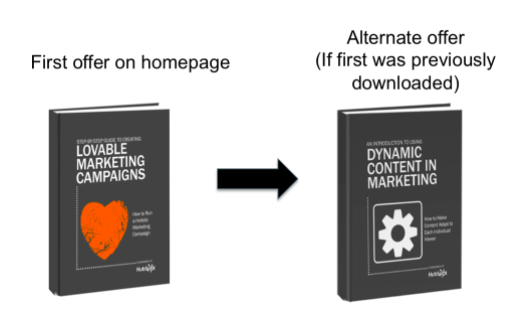
To use smart rules, check for the option to add it on your CMS software. Alternatively, code it into your website. Here’s a page on how to add a transaction ID into your dynamic page to eliminate a repeat conversion.
Lead the Lifecycle Stage
A lead’s lifecycle stage refers to how far along the visitor is in his or her decision-making process. Is this their first visit? Are they ready to buy? Are they still evaluating options?
Taking what you know about how much experience a particular lead has can help you avoid over-selling to someone who is in the early stage of their research — or miss out on an opportunity to sell to someone who is ready to make a purchase.
The perfect remedy? Mapping content to the stages of a potential customer’s buying cycle . This is typically done through a series of gradually evolving emails in a lead nurturing campaign. Smart content tools, like HubSpot’s smart call-to-actions (CTAs) , can also extend this adaptability to your website and landing pages.
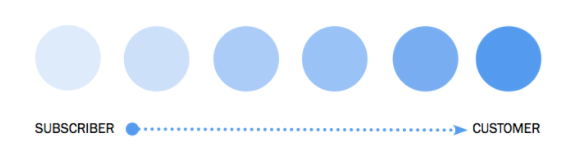 When you use smart CTAs, you are helping the customer along through every part of their journey.
Help Loyal Customers Skip Excess Steps
Many B2B companies offer content behind a form in order to generate leads. While this is a nice way to get to know new leads, it can be a hassle for customers who may be interested in the content, but have already filled out your forms previously.
Rather than having a customer fill out another form, using dynamic content recognizes a visitor as a customer and gives them a CTA. This CTA either minimizes the form fields or lets them bypass the download form entirely.
Reflect Different Industries or Personas
Most companies serve a number of personas from a variety of industries. While it may be difficult to tailor to every different industry you touch, dynamic content can help you create a highly customized experience for your highest-value industries.
Start by talking with your sales team about the different personas or industries with whom they have had the best success. Then pick one or two industries to focus in on at first as a test.
Use smart content to set a default, and then another set of images that reflect your top industry segments. In the example below, we’ve selected two images — one to represent the manufacturing industry, and another the healthcare industry. When anyone from those industries lands on a given page, this image will change to reflect that context.
Smart content leverages the valuable insights your visitors, leads, and customers have provided you with: their interests, preferences, and historical behavior. Make sure you put that knowledge to work by guiding and supporting your prospective customers with personalized content. Every potential buyer should be recognized as an individual with unique and evolving questions; smart content is one tool in your arsenal for creating marketing that’s more personalized and tailored to their needs.

How to Master Content Marketing on LinkedIn
There are a few different avenues for sharing information on LinkedIn, but which one is the best method? And what if you’re not ready to invest in paid advertising? There has to be another option, right?
The good news is that there is another option. In fact, there are a couple of ways that marketers can leverage LinkedIn’s platform for content distribution without having to pay for it.
Looking to send out short, digestible content? Engage with a status update.
Have something long and poignant to say? Publish an article.
To help you get a better handle on where and how to execute a content marketing strategy on LinkedIn, keep reading. I’ve covered everything you need to know from tips on content you should (and shouldn’t) share to how to determine the right frequency for posting.
How to Distribute Your Content on LinkedIn
1. Publish quick status updates.
One of LinkedIn’s most underutilized features is the “LinkedIn Status Update” (also called your “Network Update”) in your LinkedIn Profile. This is one of the best ways to stay in front of your target audience on a consistent basis. And when used correctly, these little messages pack a big punch.
Your status update “block” is a white box located just below your picture on your homepage. Whenever you share an update, your message is then broadcast to all of your network connections.
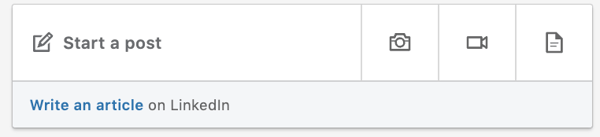
You can also control the visibility of your posts before sharing. This means that you can pick and choose which posts you want to share with everyone, share with just your connections, or share with both everyone and your Twitter network.
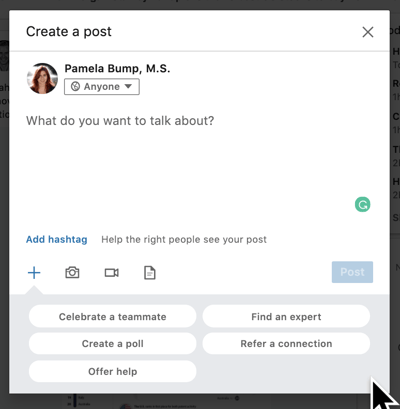
While updates serve as a great place to share your thoughts, linking in a blog post or interesting website will help you to provide an even richer source of insight.
4 Tips for Sharing Updates on LinkedIn
- Share links to interesting articles, websites or videos. Use words that grab the readers and encourage them to click the link.
- Attach a document to your status update. Your audience might appreciate receiving checklists, white papers, or case studies. Job seekers, this is a great place for your resume.
- Mention a person or situation that might be helpful to some of your connections. For instance, “I just met with @AlexPirouz from @Linkfluencer and found out they’ve just won the readers choice award from Anthill Magazine.” The “@” before an individual or company name allows the reader to click through to that person’s LinkedIn profile or company page.
- Talk about an event you are attending or have attended. This might encourage involvement and/or questions about what you learned there.
5 Things You Should Avoid When Sharing Updates on LinkedIn
- Talking about what you had for breakfast (or your cat). LinkedIn is a professional network. Before you post, make sure that what you’re sharing is relevant to your audience and provides value. While your pancakes this morning may have been delicious, this isn’t the place for it.
- Being a spammer. While it may be acceptable to post 20 times a day on Twitter, the landscape of LinkedIn is a little different. To avoid coming off as spammy, try to limit your updates to no more than a couple times per day.
- Talking about sensitive topics. I am too embarrassed to even think about, let alone share, some of the items I see posted as status updates. If your mother wouldn’t want you talking about it, don’t include it in your status.
- Continually pitching products and services. This takes people back to the days of big newspaper ads and screaming radio messages. This is not the purpose of social media, especially LinkedIn.
- Don’t bother posting when no one’s looking. The update you posted at 11:30 p.m. on Friday probably won’t get much traction. Try to align your posting schedule with the business hours in which people in your industry operate. Of course, this varies if you have a global audience.
2. Publish and share an article on LinkedIn
Another powerful way to distribute content on LinkedIn is through the publishing platform. With all members now having access to the platform, it serves as a great opportunity to expand your reach in a major way.
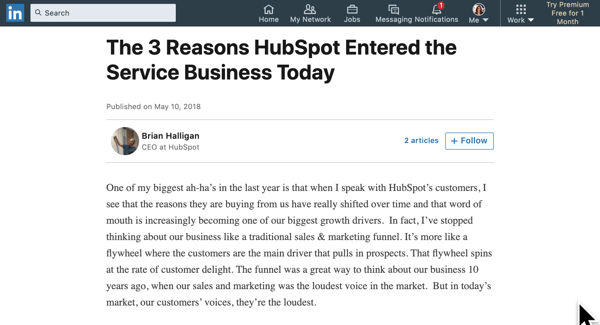
I was first made aware of this feature when a friend of mine posted an update on Facebook mentioning how his article on LinkedIn managed to achieve over 6000 views and 550+ shares in little over 10 hours. I was intrigued, so I decided to conduct an investigation to see how it all worked.
I decided to test it out by publishing one of my articles, “5 Things All Great Leaders Have In Common.” Given that it was my first time publishing on the platform, I had no idea what to expect. However, what happened next totally blew me away …
Within a matter of minutes I started receiving invitation requests and messages on LinkedIn from members who had came across my article.
Within a matter of hours the article had gone viral — achieving over 70K views, 11K+ shares, and close to 500 comments. Over the years, I have written hundreds of business articles but none of them had achieved the exposure and interaction that this one did.
In addition to the exposure, I also managed to secure a few speaking engagements and an opportunity to coach clients for our business advisory firm.
And while the article continued to gain traction as time went on, I couldn’t help but think that it was too good to be true. Unable to shake this thought, I decided to publish a few more articles over the coming weeks. Whilst none of them achieved the level of exposure my first article received, each article has now reached 10k+ views, 1000+ shares and 100+ comments on average.
If my success story wasn’t enough to sell you on the value of this platform, maybe the following benefits will.
3 Key Benefits of Publishing Long-Form Posts
- Targeted audience. Considering a majority of your connections are like-minded professionals, it’s easy select topics that will resonate. This type of shared interest provides an opportunity to create a two-way dialogue where everyone is sharing their expertise and strengthening their relationships.
- More exposure. Every post you write and publish prompts a notification for your connections. This is a great way for you to showcase your thought leadership on your chosen topic and add value to those within your network.
- Increased following. If your connections like your content enough to like it or share it, that can open doors to a whole new audience. And if your connection’s network sees your posts and finds value, there’s a chance they will follow you to keep up with your contributions.
4 Steps for Publishing on LinkedIn
- Define your purpose. What is your outcome in publishing content on LinkedIn? Who is the main target market you’re writing the content for? What are the main challenges they face within their role or industry?
- Brainstorm topics. Once you have a clear understanding of why you’re writing the content (and who you’re writing it for), try to come up with a handful of working titles based on your audience’s challenges.
- Narrow your focus. Once you’ve created a backlog of ideas, it’s time to hone in on one. Select the one that you think is most relevant to your audience and get writing. If you need guidance, refer to this resource from LinkedIn for tips on how to write effective long-form content.
- Select an image. Pick out a compelling cover image to accompany your post. (If you’re stumped for an image, check out these free stock photos sites.)
3. Publish video content.
If you’re a video marketer, you can alternatively publish pre-recorded or live video content on the platform. To upload a video, all you have to do is go to your status box and upload a file you’ve created. If you’d prefer to do something a bit more interactive, like a Q&A or a live stream, you can now use LinkedIn Live.
Here’s a great example of a video recently published on the social platform:

4 Key Benefits of Publishing Video on LinkedIn
- Targeted audience: Similarly to status updates and long-form publishing, you can cater content to the audiences that are following your brand or account on the platform.
- More exposure: Like many other platforms, LinkedIn’s algorithms aim to show users a feed with diversified content from users in their networks. When you launch a stream on LinkedIn Live, your followers might be notified or see it pop up on their feeds. Similarly, when you upload a video, it might capture a user’s eye more than a text-based post.
- Increased following: Similarly to other content strategies, those who like your videos will share, comment, or engage with them, which could cause their own followers or audiences to see your content.
- Co-branding opportunities: Know a thought leader, or want to partner with another non-competing brand in your industry? Video is a great place to do this. When you feature a Q&A with an expert or a co-produced film on your LinkedIn, then tag the affiliated influencers or brands, their networks will see it as well. Not to mention, those involved with the video will probably share it to ensure their work goes noticed.
3 Steps to Publishing a Video on LinkedIn
- Brainstorm ideas: Before you start producing something, you should work with your team to build out a video idea that will be engaging to your audience, provide valuable information, and can be scalably created on your budget.
- Create a recording environment: Once you have an idea, create an environment that you can film in, while also investing in any equipment you might need such as a camera or lighting.
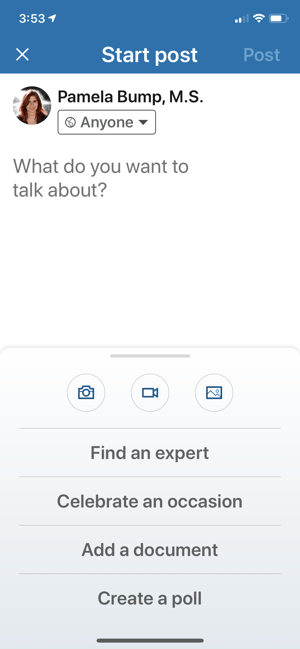
- Go live on LinkedIn or pre-record your video: To go Live or record a video through LinkedIn directly, go to the app and click the camera button in the status bar. From there a camera screen will open where you can start recording. To upload a video you’ve already recorded, simply go to the status bar on the app or desktop site and click the photo icon to add a video file.
How to Execute a Content Marketing Strategy on LinkedIn
Now that we have discussed the two main strategies you can use to distribute your content on LinkedIn, let’s discuss best practices for executing that content. Although each industry is different, keep in mind that the right frequency can make a difference.
Step 1: Plan Your Content in Advance
In order to achieve optimal results, you need to plan the content you are going to share. Here are some tips for how to plan more effectively:
- Start by taking some time to find articles you want to share, status updates you want to post, or infographics that are relevant to your industry.
- Organize the content on a calendar and decide when you want to share them. (Click here to access HubSpot’s free social media content calendar template.)
- Leverage software — like HubSpot’s Social Publishing App — to schedule your content in advance.
When you have a plan, you not only save time, but you are able to focus your energy on finding the right content for your audience.
Step 2: Determine Your Frequency Strategy
When sharing content, the goal is to identify a frequency that allows you to stay top-of-mind without overwhelming your audience. To help you achieve this balance, here are the publishing guidelines I follow:
- Status Updates: 2-3 times a day.
- Long Form Publishing: 1-2 times a week.
Keep in mind that every industry is different. While this works for me, you may need to modify this schedule as you see fit.
Step 3: Follow Up With Generated Activity
If your content marketing efforts are working, you’re going to notice a spike in your activity. This could be anything from increased views, connection requests, or even direct messages from viewers.
With that said, now is the time to strike up a conversation. If people are viewing your LinkedIn profile or requesting to connect, consider striking up a dialogue with them. By uncovering what interested them about your profile, you can then begin to uncover potential opportunities for collaboration.
Editor’s Note: This blog post was originally published in July 2015, but was updated for comprehensiveness in May 2020.

How to Audit Your PPC Campaign & Identify Metrics for Success
If you manage a Google AdWords account to supplement your organic SEO efforts, you know there are a plenty of metrics available to track and analyze.
Sometimes it can be confusing and overwhelming.
Since we all have limited bandwidth, it’s a good idea to narrow down the key metrics that really give you meaningful insight into what’s working — and what isn’t — in your paid search campaigns.
Before we dive into the key metrics to track, let’s review a checklist to look over when you’re auditing your pay-per-click (PPC) campaigns.
1. Check your location and target settings.
When you’re auditing your PPC campaigns, the first step should be to check your location targeting settings.
To do this, ensure that you’ve properly set up the regions that your business serves. Keep in mind that you can also exclude locations where your company doesn’t have stores or can’t deliver to.
Additionally, you can review geo-reports to see what locations perform best. By doing this, you can prioritize your ad budget by location.
2. Evaluate your ad compared to your landing page.
After reviewing your analytics, you might realize that your PPC ads aren’t converting.
When this happens, it’s time to look at your ads and see if your landing page follows through on expectations.
For example, if an ad markets a “Free CMS,” but your landing page is focused on an inbound marketing certification, there’s going to be a disconnect.
To avoid this, ensure that your headlines and ad copy match the landing page you’re linking to.
3.Use ad extensions.
Ad extensions are one of the only ways to set your ad apart from the rest.
Essentially, ad Extensions allow you to supplement your ad with additional information at no additional cost. The information could be your phone number, additional site links, or even ratings.
If you don’t have these set up for your PPC campaigns, it might be time to see how they can enhance your ads.
4. Assess your keywords.
When you choose keywords for your PPC campaign, you should consider the search volume, match type, and negative keywords.
Usually, the keywords you’re targeting should have high search volume.
Then, you should consider the match type on your keywords. For example, if you use broad match, then you’ll want to add negative keywords.
If you use exact and phrase match, you’re more likely to get clicks and conversions, but you might miss out on other opportunities.
Generally, it’s a good idea to target keywords with a high search volume and use broad match. Then, you should modify your campaign with negative keywords so you can increase your conversion rate.
5. Measure your success with analytics.
When you want to audit your PPC campaigns, you have to take a look at your analytics.
These analytics will let you know what campaigns have been successful and what hasn’t. When a campaign hasn’t been successful, then you can troubleshoot and figure out why.
Now, you might be wondering, “What PPC metrics should I be looking at?”
Below, let’s review five metrics that will give you the most bang for your buck.
PPC Metrics
If you have limited time, these five metrics will give you a great overview of your performance. I’m not saying you should ignore all the other available metrics, but tracking these five over time will provide a solid measure of your success.
1. Quality Score
Quality Score is Google’s measure of the relevance of your keywords, used to ensure that searchers see relevant ads and have a positive experience. The factors that determine your Quality Score include:
- The click-through rate (CTR) of the keyword and its corresponding ad
- The relevance of the keyword and ad to the search query
- The relevance of the keyword to its ad group
- The CTR of the display URLs in the ad group
- The quality of your landing page
It’s important to maintain good Quality Scores because Google uses them to determine your ad rankings as well as how much you pay per click.
Even if you think you’ve dotted your i’s and crossed your t’s when it comes to keyword research, campaign structure, and ad text optimization, low average Quality Scores are an indication that you’re missing some piece of the puzzle.
2. Click-Through Rate
Recently, I asked 17 PPC experts to tell me the top three PPC metrics they pay the most attention to when analyzing their AdWords accounts. Click-through rate was the #1 most common answer. CTR is important for several reasons, among them:
- It’s one of the most important factors in determining your Quality Scores
- It tells you whether or not your ads are relevant to searchers
Low click-through rates are a sign that either your keywords or your ad creative (or both) need improvement.
3. Conversion Rate
Another very popular answer in our PPC metrics interview, conversion rate tells you how many people who clicked your ad went on to complete the desired action on your landing page.
Conversion rate is just as important as click-through rate -– you don’t want to pay for tons of clicks and traffic if none of that traffic ends up taking a meaningful action.
Strong conversion rates mean that the money you spend per click is coming back to you in profits (that’s what we call return on investment, folks).
4. Cost Per Conversion
As Joe Vivolo of KoMarketing Associates put it, “This obviously is the number that makes or breaks a campaign from a success/failure standpoint.”
In other words, if you have to pay more to gain a new customer than that customer is actually worth to your business, then your campaign is failing; you haven’t attained a return on investment.
5. Wasted Spend
Wasted spend is a measure of how much money you’re essentially pouring down the toilet by paying for clicks that don’t convert. In other words, it’s an ROI killer.
The best way to reduce your wasted spend is through smart use of negative keywords. Negative keywords allow you to filter out traffic that is irrelevant to your business and unlikely to convert.
By creating a negative keyword, you’re preventing your ads from displaying for search queries that contain that keyword. Bidding on non-converting keywords is a waste of your marketing budget.
Want a quick way to check your performance for key metrics like these?
The AdWords Performance Grader is a free tool that performs an instant PPC audit on your AdWords account, comparing your performance in areas like Quality Score and wasteful spending to other advertisers in the same budget range.
It’s an easy way to see how you measure up to competitors and to benchmark your campaigns so you can track changes (hopefully improvements) in your results over time.
Editor’s note: This post was originally published in October 2011 and has been updated for comprehensiveness.

How to Use Instagram Branded Content Ads With Influencers
Do you partner with Instagram influencers? Want to easily turn influencer content into ads? In this article, you’ll discover how to use Instagram Branded Content Ads to amplify the reach of your influencer campaigns. Why Use Instagram Branded Content Ads? According to Instagram, branded content is defined as “a creator or publisher’s content that features […]
The post How to Use Instagram Branded Content Ads With Influencers appeared first on Social Media Marketing | Social Media Examiner.
from Social Media Marketing | Social Media Examiner https://ift.tt/2AyL5Je
via socialmediaexaminer
9 Ways to Crush the End of a Blog Post
When I graduated from college a few years ago, there were a couple of lessons that stuck with me.
First, as a journalism student, I was taught to never write a conclusion for an article.
While this became a habit, it’s something I’ve had to unlearn as a marketing writer because you need to write a conclusion in your blog posts.
Second, in my screenwriting class, I learned that every sentence you write should either move your story forward or reveal information.
As a blog writer, this second lesson is the standard I hold myself to. With conclusions, it’s no different.
Conclusions are a necessary element of your blog posts because they guide your reader on what to do next.
Below, let’s review the top ways to absolutely crush the ending of your blog post.
1. Write a summary.
Unlike a journalism article, when you’re ending a blog post, writing a summary is a great way to go.
That’s because your reader most likely forgot a lot of the points you made throughout the piece.
A summary conclusion should list the key takeaways from the article. Keep in mind that you shouldn’t just reiterate your points, but draw actionable conclusions that will educate your audience.
Additionally, it’s important to remember that your summary conclusion shouldn’t contain any fluff. That means all the information should be relevant and tie everything together.
2. Ask a question.
When I write a blog post, I try to remember that it shouldn’t feel dictatorial.
In fact, it’s quite the opposite. Blog posts should feel conversational. It should be informative, educational, and display empathy with your readers.
One way to do this is by asking your reader a question. You can ask them for their opinion and tell them to comment below. Note that you should only use this tactic if you have comments enabled on your blog posts.
Also, I think it’s important that your questions are specific. Readers are more likely to answer a specific question instead of, “Tell me your thoughts below!”
3. Include a call-to-action (CTA).
After reading a blog post, most users are thinking, “Okay, now what?”
This is why the end of a blog post is a great place to provide actionable solutions in the form of a CTA.
Your CTA could be a content offer, promote your product or service, or ask users to subscribe to your email newsletter.
Either way, every time a reader makes it to the end of a blog post, you should encourage them to continue consuming your content.
4. Inspire your audience.
When I read a blog post or am scrolling through social media, I want to feel inspired.
In fact, sometimes a simple blog post gives me an idea of how I could implement a new habit and inspires me to get started.
So, how can you inspire your audience?
At the end of your blog posts, you should challenge your readers to do something. For instance, if you’re writing a fitness blog, you can challenge readers to write a new grocery list.
Giving people a goal can inspire them to take action, download your content offer, or continue reading your blogs.
5. Direct your readers to do something.
You’ve probably noticed the pattern with the tactics I’ve listed above. All of them have to do with guiding your readers on what their next steps should be.
Whether you summarize your article or ask a question, the end of your blog post should direct readers on what to do next.
Sometimes it can be as simple as asking them to share the post or comment below. You’d be surprised how many people will do something just because they’ve been asked to do it.
6. Provide links to another blog post.
Have you ever been watching a video on YouTube, and then noticed a video in the recommendations on the side that you want to watch?
I don’t know about you, but the recommended videos are the reason I’m usually on YouTube for hours at a time.
When a reader finishes your blog post, we want to enact the same effect.
To do that, you can provide a link to another blog post of yours.
In a previous blog of mine on product knowledge, I ended the post by linking to one of our ultimate guides.
Here’s what that looked like: “Want to learn more about new hire training for salespeople? Check out our ultimate guide.”
7. Start a discussion.
Not to reiterate, but your blog posts should be engaging and start a conversation.
At the end of your blogs, you can encourage this by asking a discussion question.
Sometimes this comes down to the topics you’ve chosen to write about. Not all blog posts will warrant a discussion question, but if it does, it’s a great way to end a post.
8. Produce a teaser.
Teasing future content is a tactic that I see used on YouTube or podcasts a lot. However, I think it has its place in blogging as well.
If you’re on a writing schedule and you know what blog posts are coming up, you can end your blogs by promoting future content.
You can tell readers what’s coming next and what to look out for, so you can entice them to come back. Sometimes teasing future content can even inspire readers to subscribe to your blog.
9. Answer who, what, where, when, why, and how.
At the end of your blog post, you want to tie it up with a bow. That means that you should’ve answered all the questions a user might have.
To do this, think about the who, what, where, when, why, and how.
You can end a blog post by summarizing what the topic was, why it’ll impact the reader, what they should do with this information, and how they can implement it in their daily lives.
Keep in mind that this information should be personalized. It should be targeted to your buyer persona and answer why they should care.
Now, I know you’re probably wondering, “Well, how are you going to end this blog post?”
I’m going to cheat because I’m going to use several tactics I listed above — summary and CTA.
First, I want to remind you that it’s important to keep in mind how the end of a blog post will impact your reader’s journey on your site.
Ultimately, you want readers to continue on your site or engage with your brand, whether they read another blog post, share the post on social media, or download a content offer.
Now, I want to let you know about a great course from HubSpot Academy that’ll help you improve every element of your blogging strategy. You’ll learn how to craft a blogging strategy, and create quality blog content that your audience will love.

How to Create a Landing Page: The Simple Step-by-Step Guide
The other day, I was reading a blog post about using Twitter for marketing. While reading through the post, I noticed an offer for a free ebook about the same thing, and by clicking on it, I was taken to a new page.
This page let me know what was in the ebook, how to download it, and the benefits of this content. I also noticed a few things that separated this particular webpage from others.
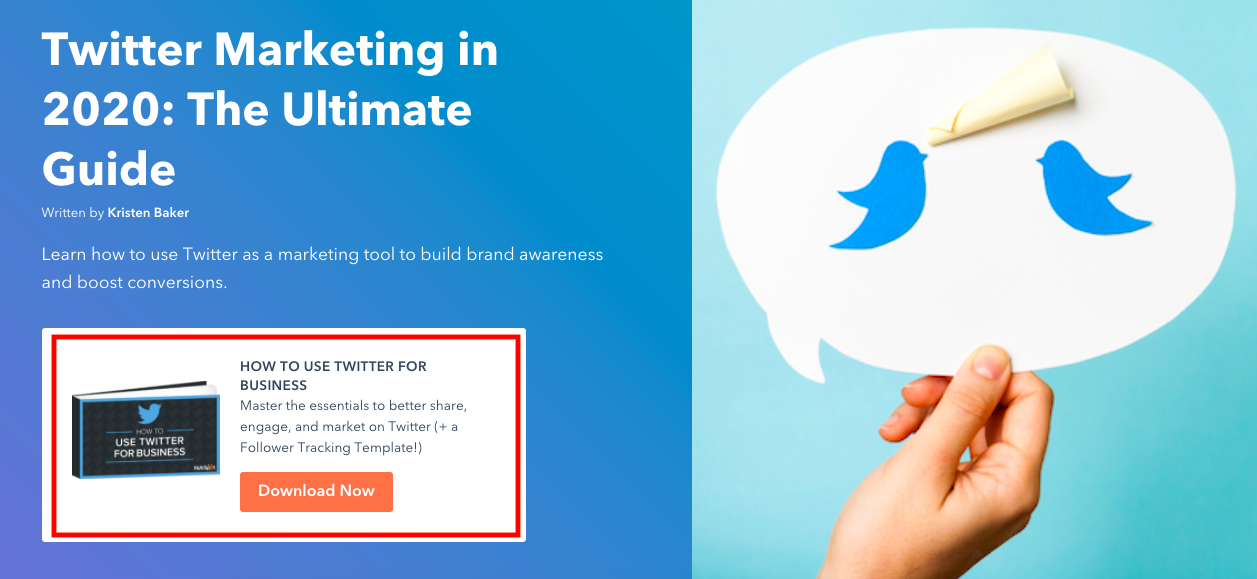
First, I noticed that this landing page was simple. It wasn’t terribly busy, and the design seemed to directly support the ebook. Second, I noticed that all of the copy was nicely organized and made the ebook sound like a must-have. And finally, I learned that I could obtain this ebook just by entering my name and email address.
To me, this was a pretty sweet trade. I could access even more information about using Twitter for marketing — for free. I thought devoting an entire page to this offer was a pretty smart idea; That way, it could focus solely on communicating the usefulness of a guide.
This is the glory of using a landing page, which we’ll get into in this post. We’ll also go over how to create a landing page of your own, step by step. To start, let’s talk about what a landing page is and how it can be a useful asset for your business.
Landing pages are great for acquisition and can easily fit into your content strategy. If customers see a CTA on one of your webpages, ads, or email, clicking on it should land them on a page that has an offer or service.
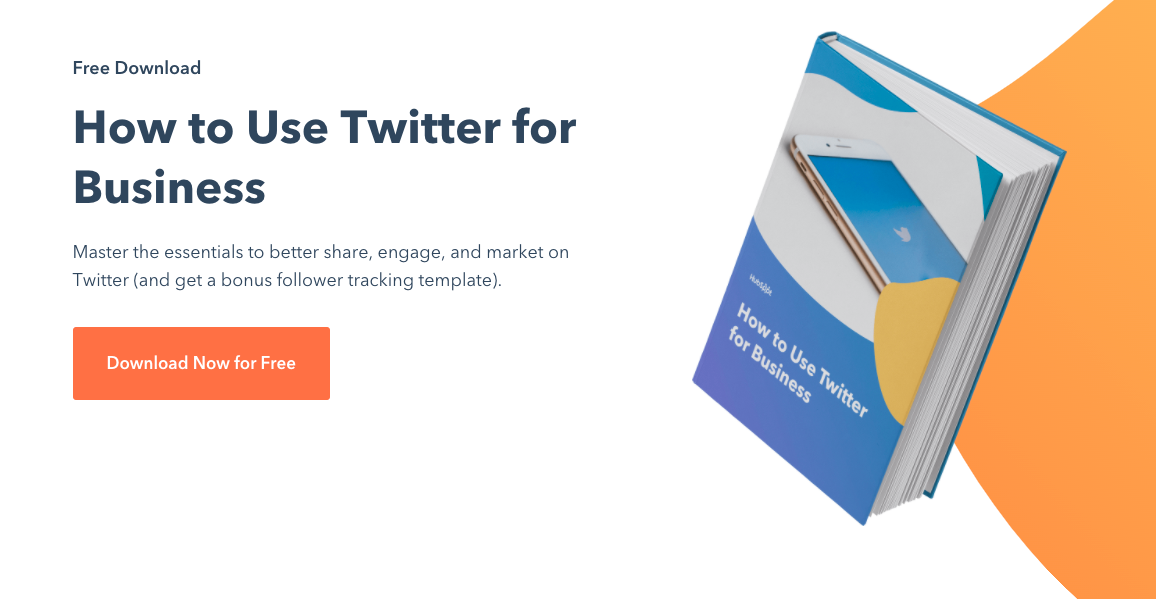
Generally, landing pages come in two different forms: reference and transactional. Reference landing pages provide valuable information or a summary of your business. They are like a snapshot of your business, whereas transactional landing pages usually require the visitor to make a purchase or complete a form.
The types of valuable information you could provide to viewers covers a wide range. Some examples of content include a mailing list offer, an online purchase, a free guide for download, or a coupon for first-time buyers.
Landing pages are a useful function of marketing and sales strategies, and they give your sales team possible leads.
For example, if your company is in the technology industry, you can use a landing page to net email newsletter signups for your weekly roundup of tech news. Your sales team can be assured that the viewer who completed that form is a lead that’s already displayed their interest in your company’s offerings.
Landing pages are separate from other pages on your website — such as an about page or a product page — because the specific purpose is acquisition. Through expressive, engaging content, landing pages convey the message that completing a form or supporting your business will provide the visitor with desired benefits.
So when you’re designing your landing page, think about what will make that visitor want to provide their name and email address.
As a consumer, what really makes me want to interact with a landing page is an offer that seems too good to pass up and a form that makes obtaining that offer easy.
Landing page designs don’t have a lot of bells and whistles that are going to distract the visitor. This makes for a quick and easy browsing experience.
To make sure your landing page is effective, consider making the graphic content less of a priority unless it supports the benefits of your offer. Create copy that engages the reader and is succinct. To help with the design that’s successful, choose a landing page template.
Now that you’re clear on a couple of best practices, let’s talk about how to create a landing page using a template.
How to Create a Landing Page
We’ve talked about how effective landing pages are simple and great for acquisition. Now it’s time for the fun part: creating your own.
I’ll take you through the motions of creating a unique, clean landing page. I used HubSpot’s CMS, but you can use any similar software that offers landing page templates, like Mailchimp.
I love using templates because they take the coding complications out of designing, and I can focus on maximizing the design to be successful.
Let’s get started!
For this example, let’s say that I’m a marketer for a fictional NASA-esque space corporation, and I’ve been tasked with making a landing page for a fantasy ebook about space to get children interested in aeronautics. This landing page’s goal is to increase leads.
1. Choose a template that will help you achieve your goal.
To build my page, I chose from a list of templates, while keeping my end goal in mind.
Knowing that increasing leads and the customer experience were top priorities, I chose a template that showcased my ebook offer and provided a form. I also wanted a unique, eye-catching structure and a simple design.
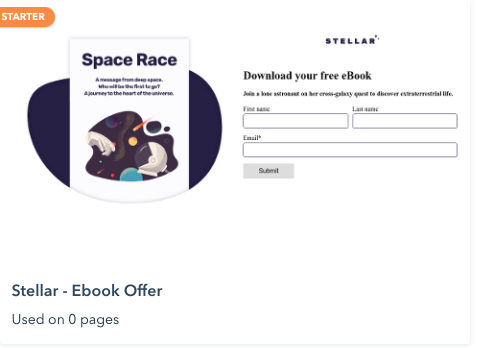
What I like about this landing page template — in addition to the criteria above — is that it’s labeled as “Starter.” As a marketer with little to no design experience, a beginner-level working template sounded right up my alley.
2. Name your landing page so you can find it later.
Next, it’s a good idea to name your landing page. If you plan on having multiple pages exist on the same system, be sure to name each something that will distinguish one design from future pages. For this example, I decided to name it “Ebook Offer One.”
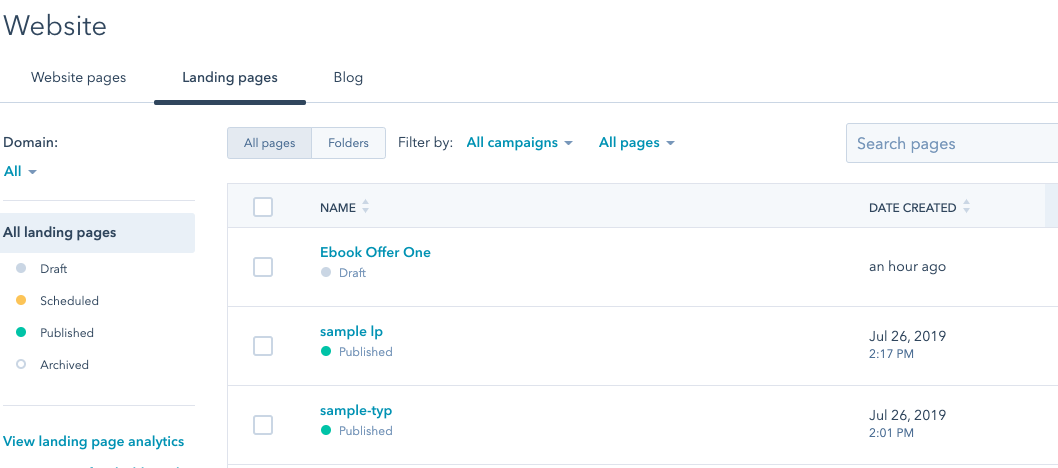
That way, when I check on the performance of this particular landing page, I’ll locate it easily on my dashboard.
3. Design your page layout according to what you want your audience to see first.
After labeling your landing page, let’s start designing. For this step, I was able to use a drag and drop editor. I’d decided that it was important for the leads to see the eBook’s cover, an engaging description, and the form.
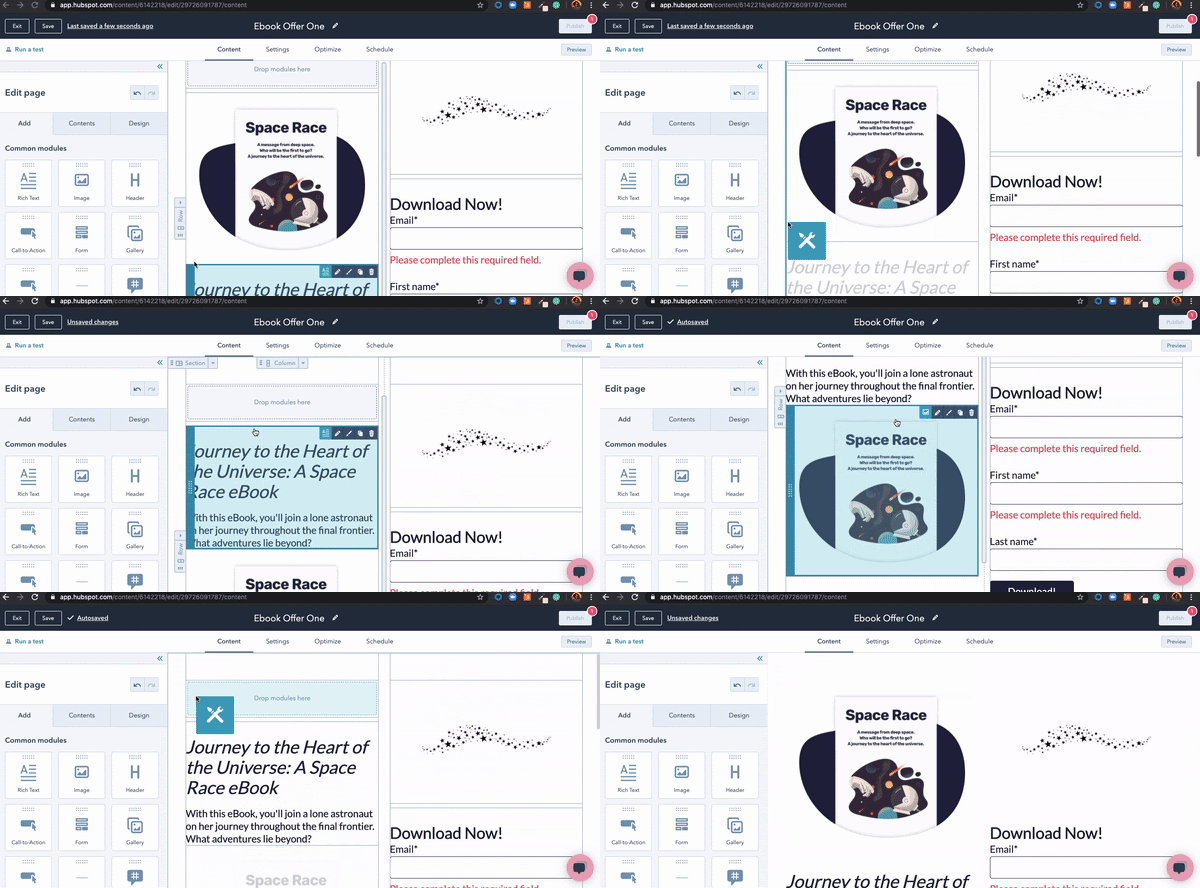
As a visual learner, a drag-and-drop editor is a dream come true. I can spend less time trying to learn code that would fix these elements and more time visualizing the experience for the lead. I can look at how the header’s copy will be presented and if it’s effective at keeping audiences engaged.
4. Communicate the benefits of completing the landing page to the website visitor.
Somewhere on my landing page, I wanted to provide short, impactful blurbs of value that would ultimately persuade the reader to complete the process.
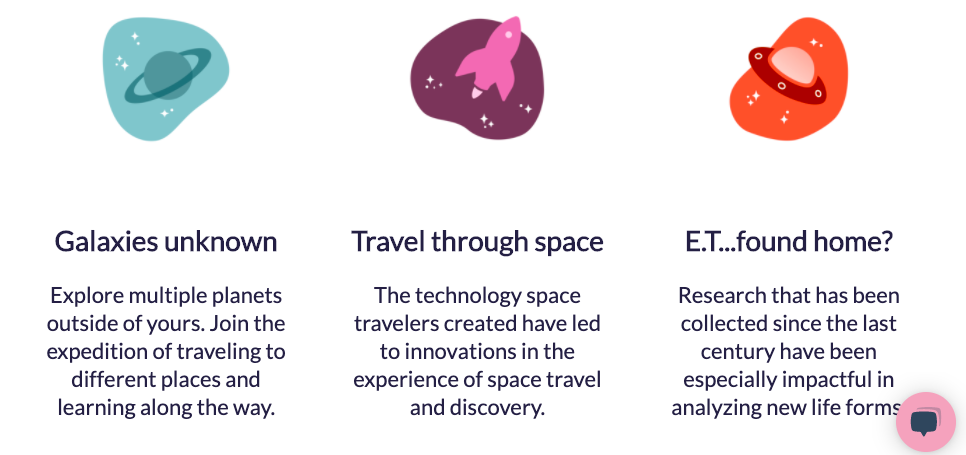
The three columns at the bottom of the form communicate the value of my ebook. These columns each had their own engaging icon that was colorful, professional, and clean. I used the text to communicate a main benefit, then described it in a sentence below.
5. Personalize the page so it’s unique to the purpose and your brand.
The next step is sort of a “Choose your own adventure.” Here, I added elements that would fit with the brand of my imaginary company. I uploaded a logo image and made sure the colors were consistent throughout.
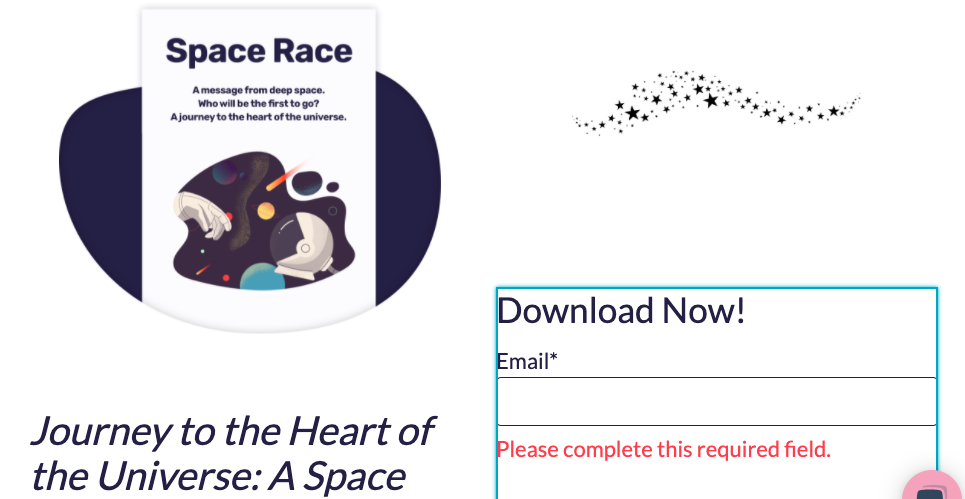
I wanted to make sure the text stayed black and white to match my logo and the images didn’t disrupt the usability of my webpage. This choice makes the page look professional and functional.
Once you’re satisfied with the layout and design, it’s time to move on to the final steps.
6. Test your landing page for dynamic content and user experience.
Because mobile phone usage is increasing each year, it’s a good idea to test your page to ensure it’s dynamic. When your page is “dynamic” it simply means that the content on your webpage automatically adapts according to the type of screen being used to access the content.
Here, I tested my landing page for formatting on mobile. I wanted to make sure that the content was still displaying neatly and professionally, despite being shown on a different screen type than the one I used to create the page.

If you’re using a CMS to make your landing page, check if the software offers dynamic content options. For example, if you find that the logo you’re using doesn’t appear as beautifully on a smaller screen, you can make the necessary adjustments.
7. If you desire, run a test to analyze page performance before making it live.
Finally, consider running a test on your page. Testing can show variations of your page to audiences and analyze which variations perform better. In this case, the winning page would have the most conversions.
With the software I’m using, I can choose to run an A/B test or adaptive test. Both of them achieve the same goal, with the only difference being that the first runs two different versions and the latter runs many.
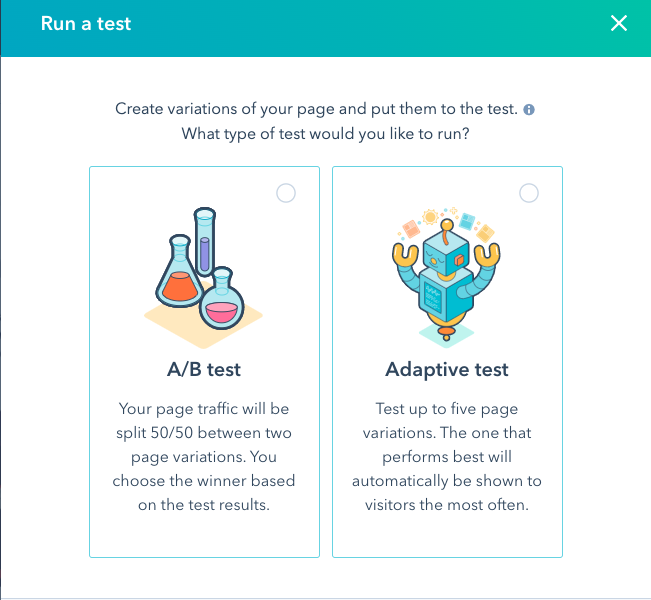
These tests will be running with a real audience, so make sure your pages look publish-ready before you begin. Be sure that the form fields work and your copy is free of any typos.
After completing these steps, your landing page is complete. I bet it looks fabulous. Now, let’s talk about how to get your landing page seen.
How To Get Traffic Using Landing Pages
Landing pages are only effective if they receive traffic. You can boost the traffic of your pages in a couple of ways.
For instance, you can build CTAs that link to your page and drop them in related content. If I were to create a CTA for my landing page, for example, I would include a line of text that hyperlinked to my landing page in a related blog post.
For example, check out how this CTA that directs to a landing page fits into this HubSpot post about product marketing:
This CTA relates to the topic, product marketing, and fits in nicely with the post’s introduction. It doesn’t interrupt the flow of the piece but allows for a chance to get more downloads.
I would also add a similar CTA button to the bottom of my blog post, shown below, or add it to email newsletters. In addition to blog posts and emails, a great way to drive traffic to your landing page is to promote the offer within the page on social media. This increases visibility without spending extra money.
Remember to optimize your landing page for SEO. Most CMS software is really good at pointing out SEO opportunities for web pages. Optimizing your page could get more traffic from queries on search engines.
For example, to optimize my space ebook for SEO, I would make sure the ebook has an engaging, yet relevant title. I would also tag the post with relevant keywords in order to boost visibility on search engine results pages.
How have you recently seen a landing page promoted? I’ve seen some while scrolling through LinkedIn and in email newsletters. After I dig into this ebook for using Twitter for business, I’m going to try my hand at creating another — after all, you can never have too many opportunities to earn more leads.

77 Essential Social Media Marketing Statistics for 2020
Social media is everywhere. For many people, social media is used daily for entertainment, socialization, and even news consumption — myself included.
Additionally, over the last two decades, it has risen as one of the primary marketing channels.
With over 40% of the world’s population on social media, it’s critical your business devise an effective social media strategy to reach your intended audience.
But whether you’re pitching a social media campaign to your boss or deciding which social media platform your business should put paid advertising behind, it’s vital you use data to support your efforts.
Here, we’ve compiled a list of essential social media stats to ensure you know where to focus your marketing efforts in 2020 to get the highest ROI.
Social Media Marketing Statistics/Data 2020
- Nearly 50% of the world’s population uses social media. That’s over 3 billion users worldwide. (Statista)
- In 2019, 90.4% of Millennials, 77.5% of Generation X, and 48.2% of Baby Boomers were active social media users. (Emarketer)
- 54% of social browsers use social media to research products. (GlobalWebIndex)
- Each person spends an average of 2 hours and 22 minutes on social networks and messaging. (Globalwebindex)
- 321 million new people joined social media in 2019, which brought the total from 3.48 billion to 3.8 billion social media users (an increase of 9%) in 2020. (Hootsuite)
- Millennials are logged on to social media for an average of two hours and 38 minutes daily while Gen Z logs on for two hours and 55 minutes. (World Economic Forum)
Facebook Statistics
- Facebook usage among teens is dropping gradually according to the latest social media statistics. While 71% of teens claimed to use the platform in 2015, the number has now dropped to 51%. (Pew Research Center)
- 68% of Americans use Facebook. (Pew Research Center)
- 74% of Facebook users check it daily. (Pew Research Center)
- Most people access Facebook around eight times each day. (SmartInsights)
- 96% of Facebook users access it on mobile. (Statista)
- If your Facebook ads contain images, then they will be between 75% and 90% more effective. (Consumer Acquisition)
- 93% of social media advertisers use Facebook ads on a regular basis. (Social Media Examiner)
- At least 3% of Facebook profiles are fake. (Facebook)
- The best time to post on Facebook is weekdays between 10 a.m. and 3 p.m. Wednesday is the best day to post while Sundays show the least traffic. (Sprout Social)
- .6% of marketers use Facebook video ads. (Buffer)
- Facebook Stories has 500 million daily viewers. (TechCrunch)
- With 36% of viewers watching political Story content, politics is the top-Facebook Stories topic. (Statista)
-
Video promotions are equally as important as photo promotions. (Social Bakers)
-
81% of businesses prefer video marketing on Facebook. (Buffer)
For more stats related to Facebook, Facebook Stories, and Facebook Ads, check out this detailed list.
Twitter Statistics
- Twitter has more than 330 million monthly active users. (Statista)
- In Q3 of 2019, Twitter had more than 145 million monetizable daily active users — a 17% YoY growth. (Twitter)
- Twitter’s 2019 Q3 revenue was $824 million, or 9% higher than Q3 in 2018. (Twitter)
- 22% of adults in the U.S. use Twitter, down from 24% in 2018. (Statista)
- Link clicks account for 92% of all user interaction with tweets. (HubSpot)
- 83% of the people who sent a Tweet to a company and received a response, felt better about the company and were more likely to do business with them. (Twitter)
- Only 3% of Tweets about customer service issues call out the company’s username with the @ symbol. (Marketing Land)
- People are 31% more likely to recall what they saw on Twitter vs. general online browsing. (Twitter)
- 53% of users say they bought a product they first saw on Twitter. (WebFX)
- Twitter ads are 11% more effective than TV ads during live events. (Twitter)
- The best times to post on Twitter are Wednesdays at 9am and Fridays at 9am. The best days to post are Tuesday and Wednesday, while Saturday sees the least engagement. (Sprout Social)
For more on Twitter, check out Twitter Marketing in 2020: The Ultimate Guide.
Instagram Statistics
- As of late 2019, Instagram has 1 billion monthly active users, and 500 million of them use it daily. (Statista)
- Instagram continues to attract a younger audience with 72% of teens saying that they use the platform. (Sprout Social)
- 64% of Instagram users are under the age of 34. (Statista)
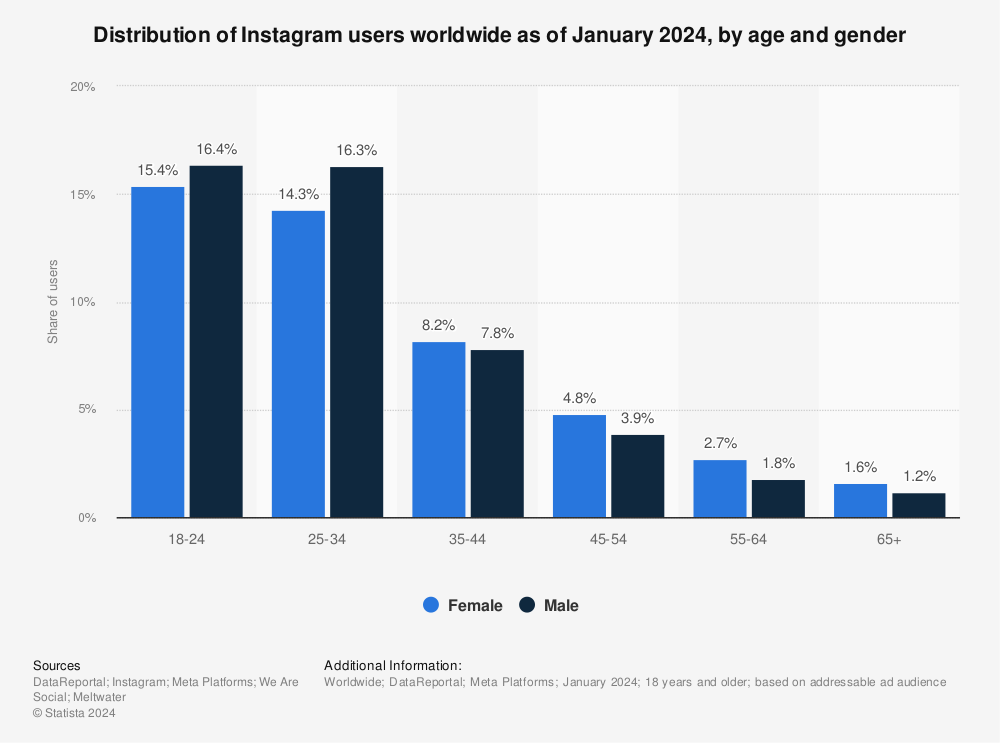
- Ad spending on Instagram is 23% higher than on Facebook according to an internal analysis by Merkle. (DigiDay)
- Videos get 21.2% more interactions compared to images and 18.6% more interactions compared to carousels. (Sprout Social)
- 71% of US businesses use Instagram. It surpassed Twitter in business users in 2017. (eMarketer)
- The best times to post on Instagram are Wednesday at 11am and Friday from 10-11am. Wednesday is the overall best day to post while Sunday sees the least amount of engagement. (Sprout Social)
- Between 2016 and 2020, eMarketer estimates Instagram added 26.9 million users — almost double the incremental users expected for Twitter, and far more than any other social platform tracked. (eMarketer)
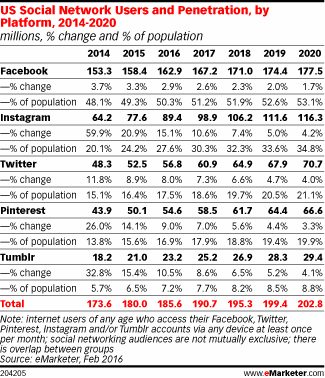
- In 2019, an estimated 25% of Facebook’s total ad revenue came from Instagram. By the end of 2020, Instagram’s share of that revenue will grow to 30% globally. (Recode)
For more Instagram stats,
click here.
LinkedIn Statistics
- LinkedIn has more than 690 million active users. (LinkedIn)
- In Q1 of 2020, LinkedIn sessions increased 22 percent year-over-year. (LinkedIn)
- In Q2 of 2020, LinkedIn revenue increased 21 percent year-over-year (LinkedIn)
- In 2019, LinkedIn made more than 6.8 billion in revenue. (LinkedIn)
- Marketing Solutions is LinkedIn’s fastest-growing segment. It grew 44 percent year-over-year in Q1. (LinkedIn)
- LinkedIn received 30 billion sessions from its members in 2019. This was a year-over-year increase of 27 percent. (LinkedIn)
- In 2019, LinkedIn was voted the most trusted network. (Business Insider)
- 80% of social media B2B leads come from LinkedIn. (LinkedIn)
- Over 46% of all social media traffic to company websites comes from LinkedIn. (LinkedIn)
- The best times to post on LinkedIn are Wednesdays from 9-10 a.m. and 12 p.m. The best day for posting is Wednesday and the day with the least engagement is Sunday. (Sprout Social)
Want to learn how to up your marketing game on LinkedIn? This post walks you through the ins and outs of using LinkedIn for business.
YouTube Statistics
- YouTube is the second-largest search engine globally. (HubSpot)
- YouTube is the preferred form of social media marketing worldwide. 83% of all consumers prefer it. (Hubspot)
- 54% of all people want marketers to put out more video content, and this is an excellent place to begin. (Hubspot)
- Most of YouTube’s user base is male. The ratio is 55% men to 45% women. (Journalism.org)
-
On mobile devices alone, YouTube reaches more adults aged 18 to 49 during prime time than any cable network does in an average week. (Think With Google)
-
75% of adults report watching YouTube on their mobile devices. (Think With Google)
-
More than 70% of YouTube watch time is generated from mobile devices. (YouTube)
- 96% of all teens in the United States use YouTube. (Forrester)
TikTok Stats
- According to a leaked advertising pitch deck from October 2019, TikTok reports having 800 million monthly active users worldwide. (AdAge)
- Douyin, TikTok’s original standalone app in China, had 300 million users at the time Musical.ly merged with TikTok. (The Verge)
- In early 2019, TikTok was the third-most downloaded app globally. (Business of Apps)
- By February 2019, TikTok hit 1 billion downloads, beating Instagram and Facebook in app stores. (Business Insider)
- Roughly 50% of TikTok’s global audience is under the age of 34 with 26% between 18 and 24. (MarketingCharts)
- Just over one in eight adults have joined TikTok. (MarketingCharts)
- 56% of TikTok users are male. (AppApeLab)
For more on TikTok, check out this blog post on its growth and popularity.
Reddit Stats
- Between 2017 and 2019 Reddit grew from 330 million monthly active users to 430 million. (Reddit)
- The site receives more than 21 billion monthly screen views. (Reddit)
- While Reddit was reportedly sold for between $10-$20 million, the company’s valuation grew to 1.8 billion after 2017 funding rounds. (CNBC)
- Reddit is predominantly male. 15% of male internet users between 18 to 29 say they use Reddit. (Pew Research Center)
- Only 10% of female internet users under 50 say they use Reddit. (Pew Research Center)
Want to determine if Reddit is right for you? Read this blog post for 27 more Reddit stats.
Social Media Consulting Services
Many businesses hire external social media consulting agencies to manage their voice and reputation online. Alternatively, some businesses create roles in-house for a social media consultant — this is someone who is responsible for increasing brand awareness, responding to customer service complaints across social media platforms, and engaging with your audience online.
Whether you’re considering hiring an external social media consulting service or creating a role in-house, take a look at these trends that demonstrate the importance of social media consulting:
- 71% of consumers who’ve had a good social media service experience with a brand are likely to recommend it to others. (Ambassador)
- 80% of companies online are under the impression that they deliver exceptional social media customer service, while only 8% of their customers say they agree. (Smart Insights)
- 73% of marketers believe that their efforts through social media marketing have been “somewhat effective” or “very effective” for their business. (Buffer)
- Social networks are the biggest source of inspiration for consumer purchases with 37% of consumers finding purchase inspiration through the channel. (PWC)
- Social media is the most relevant advertising channel for 50% of Gen Z and 42% of millennials. (Adobe)
- 50% of consumers say that seeing user-generated content would increase their chances of buying products through a brand’s social media. (Curalate)
Social Media Consulting Proposal
All these stats have given you the data you need to work with — now it’s time to put your knowledge to use and create your own social media consulting proposal.
If you’re a social media consultant and you’re pitching a branding, marketing, or advertising campaign to a client, it’s critical you’re able to show how you’ll help your client grow their business.
Here are six steps you’ll need to take to ensure your social media consulting proposal or business plan is effective:
- Set clear goals. Figure out exactly where your company or client wants to go as far as their business and social media numbers. The clearer and more detailed the vision, the better. Follow SMART Goal guidelines to ensure that you’re on the right track.
- Understand your customers. Know who your target demographics are, because these are the people you’re trying to reach and engage. Gather your own social media statistics and use existing data your company or client might already have to figure out who’s interacting with the business and who might be good future prospects to reach. After you’ve done your research, you can create useful character personas to help you better understand and categorize customers.
- Understand your competition. Those “similar-but-different” companies are going to be out there. And, as with most aspects of the business world, the better you know them, the better you can know how to have a leg up on them. You can conduct this research at the same time you’re researching your customers, because chances are they’re interacting with competitors as well. Once you’ve gathered the data on your competitors, one of the most effective ways to use it is to figure out where there might be voids in their services that your business can fill.
- Be familiar with any existing social media presence. If you’re hired to run a company’s social media accounts, it’s critical you know about any previous social media postings, accounts, and experiments. By understanding what your client has already tried, you’re better equipped to take them where they need to go in the future.
- Don’t forget to pull your data. Before your new implemented strategies go underway, it’s important to collect a baseline of how it was before, so that you have something to measure against in the future. For example, if you take inventory of how many views you’re getting on Instagram Stories before the new strategy is in effect, you can see if the new ideas are improving these numbers or not. It’s important to keep a close eye on what is affecting your growth (positively or negatively) so that you know when you’re on the right track or when you need to try something new so your business can keep growing.
- Develop your strategy based on your findings. Define what your content will be, what platforms it will be distributed on, and how it will vary between platforms. Figure out smaller details at this stage too, like your client’s tone and voice on social media (either what it currently is or what it should be), along with design and style elements. Always be sure you’re staying true to your company or client’s brand by consulting with existing materials like mission statements, guides, or brand books.
Finally, take a look at HubSpot’s free Marketing proposal template (useful for both PDF & Word) to get you started creating a comprehensive social media consulting proposal.
Let data drive your social strategy.
Social media marketing statistics can show you the state of the business world today, where it might be going, and how you can ensure your business is continuously meeting customers where they want to be met. Use these statistics to your advantage to help you understand what you need to do to effectively use social media for your business today.
Editor’s Note: This blog post was originally published in August 2019, but was updated for comprehensiveness and freshness in May 2020.

How to Create Detailed Buyer Personas for Your Business [Free Persona Template]
Marketing Margie. Sales Sam. IT Isabel. Accounting Alan.
Do you know who your business’s buyer personas are? And if so, how much do you know about them?
Buyer personas are semi-fictional representations of your ideal customers based on data and research. They help you focus your time on qualified prospects, guide product development to suit the needs of your target customers, and align all work across your organization (from marketing to sales to service).
As a result, you’ll be able to attract high-value visitors, leads, and customers to your business who you’ll be more likely to retain over time.
More specifically, having a deep understanding of your buyer persona(s) is critical to driving content creation, product development, sales follow up, and really anything that relates to customer acquisition and retention.
“Okay, so personas are really important to my business. But … how do I actually make one?”
Ahh … the million-dollar question. The good news is, they aren’t that difficult to create. It’s all about how you obtain your market research and customer data, and then present that information within your business.
Follow along with this guide and download these persona templates to simplify this process. Before you know it, you’ll have complete, well-planned buyer personas to show off to your entire company!
Before we dive into the buyer persona-creation process, let’s pause to understand the impact of well-developed buyer personas on your business (most specifically, your marketing efforts).
Why exactly are buyer personas so important to your business?
Buyer personas help you understand your customers (and prospective customers) better. This makes it easier for you to tailor your content, messaging, product development, and services to meet the specific needs, behaviors, and concerns of the members of your target audience.
For example, you may know your target buyers are caregivers, but do you know what their specific needs and interests are? What is the typical background of your ideal buyer? In order to get a full understanding of what makes your best customers tick, it’s critical to develop detailed personas for your business.
The strongest buyer personas are based on market research as well as insights you gather from your actual customer base (through surveys, interviews, etc.).
Depending on your business, you could have as few as one or two personas, or as many as 10 or 20. But if you’re new to personas, start small — you can always develop more personas later if needed.
What about “negative” buyer personas?
While a buyer persona is a representation of your ideal customer, a negative — or “exclusionary” — persona is a representation of who you don’t want as a customer.
For example, this could include professionals who are too advanced for your product or service, students who are only engaging with your content for research/ knowledge, or potential customers who are just too expensive to acquire (because of a low average sale price, their propensity to churn, or their unlikeliness to purchase again from your company).
How can buyer personas be used in marketing?
At the most basic level, developing personas allows you to create content and messaging that appeals to your target audience. It also enables you to target or personalize your marketing for different segments of your audience.
For example, instead of sending the same lead nurturing emails to everyone in your database, you can segment by buyer persona and tailor your messaging to what you know about those different personas.
Furthermore, when combined with lifecycle stage (i.e. how far along someone is in your sales cycle), buyer personas also allow you to map out and create highly targeted content. (You can learn more about how to do that by downloading our Content Mapping Template.)
And if you take the time to also create negative personas, you’ll have the added advantage of being able to segment out the “bad apples” from the rest of your contacts, which can help you achieve a lower cost-per-lead and cost-per-customer — and, therefore, see higher sales productivity.
Different Types of Buyer Personas
While beginning work on your personas, you may ask yourself, “What are the different types of buyer personas?” From there, it’d be simple to adjust one for your business — right?
Well, that’s not exactly how it works — there isn’t a set list of universally-recognized buyer personas to choose from, nor is there a standard for the number of personas you need. This is because each business (no matter how many competitors they have) is unique — and for that reason, their buyer personas should be unique to them, too.
For these reasons, identifying and creating your different buyer personas can, at times, be slightly challenging. This is why we recommend using HubSpot’s Make My Persona generator (as well as HubSpot’s persona templates) to simplify the process of creating different personas.
In general, companies may have the same, or similar, categories for their buyer personas (e.g. a marketer, an HR rep, an IT manager, etc.). But the different personas your business has and the number of them your business requires will be tailored to who your target audience includes and what you offer your customers.
Now, are you ready to start creating your buyer personas?
How to Create Buyer Personas
Buyer personas can be created through research, surveys, and interviews — all with a mix of customers, prospects, and those outside your contacts database who might align with your target audience.
Here are some practical methods for gathering the information you need to develop personas:
-
Look through your contacts database to uncover trends about how certain leads or customers find and consume your content.
-
Use form fields that capture important persona information when creating forms to use on your website. For example, if all of your personas vary based on company size, ask each lead for information about company size on your forms.
-
Consider your sales team’s feedback on the leads they’re interacting with most. What generalizations can they make about the different types of customers you serve best?
- Interview customers and prospects to discover what they like about your product or service.
Now, how can you use the above research to create your personas?
Once you’ve gone through the research process, you’ll have a lot of meaty, raw data about your potential and current customers. But what do you do with it? How do you distill all of it so it’s easy for everyone to understand all the information you’ve gathered?
The next step is to use your research to identify patterns and commonalities from the answers to your interview questions, develop at least one primary persona, and share that persona with the rest of the company.
Use our free, downloadable persona template to organize the information you’ve gathered about your persona(s). Then share these slides with the rest of your company so everyone can benefit from the research you’ve done and develop an in-depth understanding of the person (or people) they’re targeting every day at work.
Here’s how to work through the steps involved in creating your buyer personas in more detail.
1. Fill in your persona’s basic demographic information.
Ask demographic-based questions over the phone, in person, or through online surveys. (Some people are more comfortable disclosing personal information like this.)
It’s also helpful to include some descriptive buzzwords and mannerisms of your persona that you may have picked up on during your conversations to make it easier for people on your team to identify certain personas when they’re talking to prospects.
Here’s an example of how you might complete Section 1 in your template for one of your personas:
2. Share what you’ve learned about your persona’s motivations.
This is where you’ll distill the information you learned from asking “why” during those interviews. What keeps your persona up at night? Who do they want to be? Most importantly, tie that all together by telling people how your company can help them.
3. Help your sales team prepare for conversations with your persona.
Include some real quotes from your interviews that exemplify what your personas are concerned about, who they are, and what they want. Then create a list of the objections they might raise so your sales team is prepared to address those during their conversations with prospects.
4. Craft messaging for your persona.
Tell people how to talk about your products/ services with your persona. This includes the nitty-gritty vernacular you should use, as well as a more general elevator pitch that positions your solution in a way that resonates with your persona.
This will help you ensure everyone in your company is speaking the same language when they’re having conversations with leads and customers.
Finally, make sure you give your persona a name (e.g. Finance Manager Margie, IT Ian, or Landscaper Larry) so everyone internally refers to each persona the same way, allowing for cross-team consistency.
How to Find Interviewees for Researching Buyer Personas
One of the most critical steps to establishing your buyer persona(s) is finding some people to speak with to suss out, well, who your buyer persona is.
That means you’ll have to conduct some interviews to get to know what drives your target audience. But how do you find those interviewees? There are a few sources you should tap into:
1. Use your current customers.
Your existing customer base is the perfect place to start with your interviews because they’ve already purchased your product and engaged with your company. At least some of them are likely to exemplify your target persona(s).
Don’t just talk to people who love your product and want to spend an hour gushing about you (as good as that feels). Customers who are unhappy with your product will show other patterns that will help you form a solid understanding of your personas.
For example, you might find that some of your less happy customers have bigger teams and need greater collaboration functionality from your product. Or, you may find they find your product too technical and difficult to use. In both cases, you learn something about your product and what your customers’ challenges are.
Another benefit to interviewing current customers is that you may not need to offer them an incentive (e.g. gift card) to do so. Customers often like being heard — interviewing them gives them a chance to tell you about their world, their challenges, and what they think of your product.
Customers also like to have an impact on the products they use. So, as you involve them in interviews like this, you may find they become even more loyal to your company. When you reach out to customers, be clear that your goal is to get their feedback, and that their feedback is highly-valued by your team.
2. Use your prospects.
Be sure to interview people who have not purchased your product and don’t know much about your brand, too. Your current prospects and leads are a great option here because you already have their contact information.
Use the data you do have about them (i.e. anything you’ve collected through lead generation forms or website analytics) to figure out who might fit into your target personas.
3. Use your referrals.
You’ll probably also need to rely on some referrals to talk to people who may fit into your target personas, particularly if you’re heading into new markets or don’t have any leads or customers yet.
Use your network — such as your coworkers, existing customers, social media contacts — to find people you’d like to interview and be introduced to. It may be tough to get a large volume of people this way, but you’ll likely get some very high-quality interviews out of it.
If you don’t know where to start, try searching on LinkedIn for people who may fit into your target personas and see which results have any connections in common with you. Then, reach out to your common connections for introductions.
4. Use third-party networks.
For interviewees who are completely removed from your company, there are a few third-party networks you can recruit from. Craigslist allows you to post ads for people interested in any kind of job and UserTesting.com allows you to run remote user testing (with some follow-up questions).
You’ll have less control over sessions run through UserTesting.com, but it’s a great resource for quick user testing recruiting.
Now that how to identity interviewees, let’s look at some tips for recruiting them.
Tips for Recruiting Interviewees
As you reach out to potential interviewees, here are a few ideas to improve your response rates.
1. Use incentives.
While you may not need them in all scenarios (e.g. customers who already want to talk to you), incentives give people a reason to participate in an interview if they don’t have a relationship with you. A simple gift card is an easy option.
2. Be clear that this isn’t a sales call.
This is especially important when dealing with non-customers. Be clear that you’re doing research and that you just want to learn from them. You are not getting them to commit to a one-hour sales call; you’re getting them to commit to telling you about their lives, jobs, and challenges.
3. Make it easy to say yes.
Take care of everything for your potential interviewee — suggest times but be flexible, allow them to pick a time right off the bat, and send a calendar invitation with a reminder to block off their time.
4. Decide how many people you need to interview.
Unfortunately, the answer is, it depends. Start with at least three-to-five interviews for each persona you’re creating. If you already know a lot about your persona, then that may be enough. You may need to do multiple interviews in each category of interviewees (customers, prospects, people who don’t know your company).
The rule of thumb is when you start accurately predicting what your interviewee is going to say, it’s probably time to stop. Through these interviews, you’ll naturally start to notice patterns.
Once you start expecting and predicting what your interviewee is going to say, that means you’ve interviewed enough people to find and internalize these patterns.
5. Determine which questions you’ll ask interviewees.
It’s time to conduct the interview! After the normal small talk and thank-you’s, it’s time to jump into your questions. There are several categories of questions you’ll want to ask in persona interviews to create a complete persona profile.
20 Questions to Ask in Persona Interviews
The following questions are organized into eight categories, but, feel free to customize this list and remove or add more questions that may be appropriate for your target customers.
1. Role Questions
- What is your job role? Your title?
- How is your job measured?
- What does a typical day look like?
- What skills are required to do your job?
- What knowledge and tools do you use in your job?
- Who do you report to? Who reports to you?
2. Company Questions
-
In which industry or industries does your company work?
- What is the size of your company (revenue, employees)?
3. Goal Questions
- What are you responsible for?
- What does it mean to be successful in your role?
4. Challenge Question
- What are your biggest challenges?
5. Watering Hole Questions
- How do you learn about new information for your job?
- What publications or blogs do you read?
- What associations and social networks do you participate in?
6. Personal Background Questions
- Describe your personal demographics (if possible, ask their age, whether they’re married, and if they have children).
- Describe your educational background. What level of education did you complete, which schools did you attend, and what did you study?
- Describe your career path. How did you end up where you are today?
7. Shopping Preference Questions
- How do you prefer to interact with vendors (e.g. email, phone, in person)?
- Do you use the internet to research vendors or products? If yes, how do you search for information?
- Describe a recent purchase. Why did you consider a purchase, what was the evaluation process, and how did you decide to purchase that product or service?
8. The “Why?” Question
This is the number one tip for a successful persona interview.
The follow-up question to pretty much every question in the above list should be “why?” Through these interviews, you’re trying to understand your customers’ (or potential customers’) goals, behaviors, and motivators. But keep in mind that people aren’t always great at reflecting on their behaviors to tell you what drives them at their core.
You don’t care that they measure the number of visits to their website, for example. What you care about is that they measure these visits as a way to show their higher-ups that they’re doing a good job.
Start with a simple question — for instance, “What is your biggest challenge?” Then spend a good amount of time diving deeper into that one question to learn more about that person. You learn more by asking, “why?” than more superficial questions.
Create Your Buyer Personas
Create your buyer personas to understand your target customers on a deeper level and ensure everyone on your team knows how to best target, support, and work with your customers. This will help you improve reach, boost conversions, and increase loyalty.
And if you’re a HubSpot customer, add your persona to your HubSpot Marketing Platform by following this step-by-step setup guide.
Editor’s note: This post was originally published in May 2015 and has been updated for comprehensiveness.

How to Design Your Ecommerce Site for More Conversions
To increase conversion rates on your ecommerce website, no part of the user journey can be overlooked. From your landing page to your checkout page, every aspect of your ecommerce website needs to be carefully designed.
But building a user path that successfully balances an enjoyable shopping experience with a clear path to conversion is easier said than done.
To help you design a more delightful and intentional conversion path on your ecommerce website, we’ve put together a list of some best practices to follow.
Design Your Ecommerce Website for More Conversions
When designing your ecommerce website, consider the following tips to enhance its user experience for your visitors and customers.
1. Add clear CTAs.
Having a clear call-to-action (CTA) is essential to convert website traffic into sales. Ecommerce website CTAs are often “Buy Now” or “Add to Basket” buttons that stand out on a web page to grab the attention of visitors and encourage them to click. This is typically done by using contrasting colors and unique design elements, among other tactics. And like the examples mentioned above, the wording in the CTA should be kept short and sweet.
In addition, make sure your CTA is aligned with the intent of the web page it’s located on. For example, the CTA on your product page may read “Buy Now” whereas the CTA on a content page may be”Read More.”
2. Create a sense of urgency.
Consider creating a sense of urgency on your ecommerce site. In one instance, by creating a sense of urgency on an ecommerce site, conversation rates were increased by 332%.
This can be done simply by changing the way you word your CTAs — for example, changing the CTA from “Shop Here” to “Shop Now” may give your visitor the nudge they need to convert.
2. Offer simple, one-click checkout for all customers.
By adopting a one-click checkout process, customers can skip the “add to cart” step and check out quickly and efficiently while still on the product page. In fact, by doing this, one-click checkout can shorten the checkout process by 90%.
This is important because by eliminating extra steps required in a traditional checkout process, cart abandonment is less likely due to the streamlined and simple process.
Even if you choose not to implement a one-click checkout, streamline your site’s checkout process as much as possible to boost conversions and lower cart abandonment. You may do this by requiring the very minimum data input from your customers to make the process efficient for them.
3. Add green-bar SSL.
It has been found that shopping cart abandonment may decrease if you display the green-bar SSL on your website. Here is what this looks like on different search engines:
The greenbar SSL helps convey a trustworthy and reputable website — it’s not only a visual cue to customers but it also plays an important role in the security of your site as well.
Having a greenbar SSL encrypts the visitor’s payment information, which makes it harder for hackers and scam artists to steal their information. Simply put, users do not want to purchase from an unsecure website.
In a test, two forms were created for customers to complete — one without a Verisign seal and the another with it.
There was a 42% increase in conversions on the form containing the Verisign seal, demonstrating that visitors are more inclined to share personal data and convert when they are confident that it is secure.
4. Offer different payment methods.
There are over 200 different ways to pay online that aren’t reliant on a card, including direct debit, bank transfers, digital wallets, e-invoices, digital currencies (like Bitcoin), and many more.
Although it is impossible to have over 200 different payment methods on your website, it is important that you understand your target market and are able to offer payment methods best suited for them.
For example, a website where the average spend is $50 may benefit from offering mainly credit and debit card-style payments, whereas a website such as overclockers.co.uk may want to push a financing option as the value of the products being sold is significantly higher.
Try to provide the top three payment methods in your sector — doing so has resulted in an increase in conversion rates of 30% for businesses.
Overclockers does a great job of this by showing all their available options to buy in the product description, and near the CTA.
5. Incorporate product or company reviews.
Reviews are one of the most powerful tools to convert any interest in your product to a sale — potential customers want to hear from other buyers like them.
Add customer reviews directly next to or below your products to demonstrate your trustworthiness. Customer recommendations drive purchasing decisions as customers tend to believe the reviews from customers they relate to. To do this, give customers opportunities to provide instant feedback on the quality of your product or service.
Amazon manages their customer reviews well — in fact, one of the first things you see when searching for any product is a list of customer reviews.
6. Add well-selected imagery.
Excellent imagery of the product or service you are selling is pivotal when trying to boost conversions online — as the old saying goes, “a picture is worth a 1000 words.”
Ensure you have high-quality photos of your product, covering all angles and details. This gives the buyer confidence in what the product is, its quality, and what they are to expect when they receive it.
On the other hand, if you have low-quality pictures without a zoom function and a lack of detail, you’ll leave your potential customers feeling anxious and wondering what you have to hide.
Not to mention that data shows only 16% of site visitors actually go through the entire page and read it word for word — meaning your images can make an impact on a customer’s understanding of your brand and product.
7. Optimize your website for mobile.
Mobile accounts for approximately half of web traffic worldwide. With this in mind, it’s essential that your ecommerce site is mobile-friendly.
Having a simple checkout process is even more important on mobile than it is on desktop. Users are working with a significantly smaller screen, so the less distractions the better. Keep it simple.
It’s also important to remember the unreliable nature of phone data. With phone signal dropping in a split second, reducing a user’s download speed (to a snail’s pace!), it’s imperative that your site is mobile-optimized. This will allow for fast load times, even when on a slow internet connection. Simple steps like this can make the difference between a customer converting on mobile or visiting a competitor’s site.
8. Write concise and effective product descriptions.
Product descriptions are a key tool in your ecommerce selling arsenal. Without effective product descriptions, you’re bound to miss out on clicks and purchases.
Focus on your ideal buyer and target them with words and descriptions of your products that relate to them, their goals, and their challenges. This will give customers the feeling that you understand who they are and what they need from you — which, ultimately, makes them feel more confident in choosing to do business with you.
Above all, the most important factor to consider when writing your product descriptions is to keep them concise. As we mentioned earlier, users will skim anything longer than a few lines. If you do have a large amount of information that you need to convey to your customer, you might consider hiding it behind a “read more” button or cutting it down in easy-to-digest bullet points or even incorporating an infographic.
9. Design a simplistic layout.
Creating an easy-to-follow and cohesive journey from homepage to checkout is one of the most important factors when lowering your bounce rate and boosting conversion rate.
A study shows that websites that have a clean look (meaning, more white space, bigger images, and less text) see significantly higher user engagement rates than websites that do not.
While it might seem daunting to think about redesigning your ecommerce site to be more minimalistic, it is actually relatively straightforward if you follow a few simple rules:
- Focus on product imagery with fewer design elements and distractions on product pages.
- Direct your customers to your CTA buttons and make sure they stand out.
- Test your website on different devices to ensure the shopping and checkout processes are streamlined no matter how customers are visiting your site.
- Stay away from creating any distractions on your site — less is more. Typically, if the page works without something, then you can lose it.
Editor’s note: This post was originally published in September, 2018 and has been updated for comprehensiveness.

27 Ways to Drive Traffic to Your Website
You know you’re a marketer when you’re sitting in traffic on the highway, it’s completely bumper to bumper, and all you can think about is “Why can’t I drive traffic to my website like this?“
If you’ve struggled with driving traffic to your website, you’re not alone. According to 2019 research done by Content Marketing Institute, 61% of content professionals are challenged with knowing what is most important to their audiences, 50% are challenged with knowing the goal of the audience at a particular stage of the customer’s journey, and 49% are challenged with knowing the steps in the customer’s journey.
Between writing a new blog post, posting on social media, and strategizing for a new email campaign, it’s hard to look back and see what’s driving traffic to your site and what isn’t.
The list below will help you increase the traffic to your website, generate more leads, and improve ROI.
1. Content Creation
Inbound marketing focuses on attracting the right people to your company. One of the best ways to do this is by creating content through blogging.
To come up with content that will attract the right visitors to your website, you should know your buyer persona. Once you know your audience, you can create content that will attract them to your website.
But how do you write a good blog post that will attract the right audience? Follow these five steps:
- Identify your buyer persona: Find out more about your audience, from job title to pain points.
- Conduct SEO research: Learn what your audience is searching for on search engines so you provide the right content.
- Write a draft: Begin by drafting a post that answers your audience’s questions.
- Publish: Publish your post on your blog.
- Promote: Promote your blog post on social media and email newsletters to generate traffic. The more traffic your post generates, the higher it will rank in search engines.
You can learn more about how to implement a blogging strategy here.
2. Topic Expertise
Ranking higher in Google will increase the organic traffic to your site. At HubSpot, we do this by using the pillar/ topic cluster model. Google favors sites that are known to be topic experts on the subject matter they’re writing about.
To be seen as an expert, you can create a pillar page, which is essentially a longer blog post that broadly covers all aspects of a topic. Then, you write “cluster content,” or supporting blog posts, targeting long tail keywords that show you’ve covered a topic exhaustively. Focusing on long-term traffic will help you rank higher on search engines
Christina Perricone, team manager of HubSpot’s pillar page content, says, “The pillar cluster model organizes content on your site around a single topic and search term through internal linking. This organization helps search engines easily crawl and categorize all of the content that you have on a particular topic, thereby making it easier for you to rank for that search term. When the model is done right, it also helps visitors navigate your site and move through related pages, boosting traffic for all of the pages in your topic cluster.”
Want to get started on pillar pages for your company? Learn more here and here.
3. Paid Advertising
You can drive traffic to your website quickly with paid advertising. With search engines, you can run pay-per-click or retargeting ads. With social media you can run display ads or sponsored posts. Your strategy will most likely include a combination of different types of advertising. In fact, according to the 2020 CMO Survey, firms expect social spending to rise by 62% over five years.
(Getting started with paid advertising can be a simple process — learn more about it here.)
4. Organic Social Media
Organic social media is not a new strategy, but it’s still something marketers should pay attention to. Besides posting on social media platforms, you can also use Instagram Stories (Hello, swipe up feature!), live video, IGTV, or Facebook Messenger. The key with organic social media is to be an early adopter of new features
For instance, Facebook is releasing an automated lead generation feature on Messenger, allowing businesses to create an automated chatbot experience within Messenger to link to content offers on your site. This is a great feature for sending traffic to your website.
It’s also important to have a diverse social media strategy and use the right social media platforms — not just Facebook, Instagram, and Twitter. Platforms like YouTube or Pinterest generate a lot of traffic. Pinterest has great engagement rates — 66% of Pinterest users make a purchase after seeing a brand’s Pins.
Henry Franco, a brand marketing associate at HubSpot, recommends two things regarding organic social media. “First, don’t spam your audience — it costs a user nothing to scroll past your post, and if you don’t offer them any value, that’s exactly what they’ll do.
Know your audience, and craft content that speaks directly to them,” Franco says. “Second, stay active with community management. People love when brands like and reply to them — it’ll humanize your business, and keep people coming back for more content.”
Check out our social media marketing guide to learn more.
5. Website Analysis
Let’s do a little reverse engineering of our thought process. Before you drive traffic to your website, it’s important to learn about your audience. To do this, there are platforms that will analyze your website, such as Crazy Egg, to see where you’re losing visitors. With this information at your disposal, you can create the right content to drive the right traffic to your website.
6. Contests and Giveaways
A simple way to drive traffic to your website is through contests and giveaways. This can give you a quick boost, while also rewarding your followers. You can host giveaways on social media, through your email list, or both.
Implementing a strategy like this can be simple. Just follow these six steps:
- Decide what platform on which to host your giveaway (can be multiple)
- Choose a prize (free tickets, discount, etc … )
- Select the criteria (website comments, email sign up, etc … )
- Write ad copy
- Create graphics
- Post and promote
7. Influencers
Influencer marketing isn’t a passing fad. In fact, it’s a budget-friendly option to drive traffic to your website. According to Think with Google, collaborations with YouTube influencers are four times more effective at driving brand familiarity than those with celebrities. When influencers post discount codes, links, reviews, or giveaways, you are tapping into their audience to drive traffic to your website.
Remember Brian Halligan’s INBOUND 2018 keynote speech? Customers are more likely to buy from organizations with excellent word of mouth. How do you create great word of mouth? First, delight your customers. Second, work with influencers.
8. Email List Building
Using your current readers and customers is a great way to drive traffic to your website. When you post a new blog or content offer, you can promote it to your followers/subscribers for a quick traffic boost. With content-heavy websites, having repeat readership is helpful for traffic goals, conversions, and lead generation.
To get started with this, build an email list or grow your current list. Below are a few strategies you can use:
- Content offers (see #23 for more information): Generate gated content for visitors that requires them to provide an email address to receive. Include CTAs (calls to action) for your content offers on your website.
- Easy-access newsletter sign-up: Include sign-up forms on your website, from your homepage to your about page. If a visitor had a delightful experience on your site, they might want to sign up for a newsletter. Make this an easy process.
Use HubSpot’s free forms tool to easily add a form to your site and start growing your email list.
- Social media: Promoting your email newsletter on social media, whether through a post or contest/giveaway, is a great way to convert your current followers into subscribers.
Learn how to build an email list from scratch here or grow your email list here.
9. Community Engagement
The more brand recognition you have, the more traffic you will drive to your website. One way to achieve brand recognition is to be active and engaged in your community. You can implement an engagement strategy today by participating in Facebook group discussions in your industry, answering questions on public forum websites, and interacting with your followers on social media.
One of my favorite brands on social media is Taco Bell. Taco Bell engages with users on social media to delight their customers every day. See a couple examples from Twitter below.
Just remember to be helpful and human. No one likes spammy links when they’re asking a quick question online.
10. Guest Posting
In that same vein, writing guest posts can generate traffic to your site. Guest posting shows you’re active in your community, while also linking to your website — more on generating backlinks below.
To implement a guest posting strategy, you need to find a site that would be a good fit for your company, draft a blog post, and then write a pitch. Caroline Forsey, staff writer on the HubSpot Marketing Blog, says, “I’m always particularly intrigued with a guest pitch if it shows me the writer has done their research ahead of time.
For instance, I’d pay much closer attention to a pitch if it tells me how this piece could appeal to my readers. Additionally, I’m impressed when a writer can recognize gaps in our content and how their piece will fill those gaps, rather than competing with existing content.”
11. On-Page SEO
On-page SEO can help your website rank higher in search engines and bring in more traffic. Some on-page SEO elements include page title, header, meta description, image alt-text, and the URL (plus more). Showing up in search engines will generate more traffic for your site. To get started with on-page SEO, check out our ultimate guide on on-page SEO here.
12. Quality Backlinks
In order to drive traffic to your site, you need to rank high in search engines. In order to rank higher in search engines, you need to be an authority in your industry. One way to do that, besides the topic/cluster model described above, is by acquiring quality backlinks. If websites with high authority link to your site, that gives you more credibility.
Irina Nica, senior content strategist at HubSpot says, “There are two main ways in which high-quality backlinks can help drive more traffic to a website: boosting ranking and driving referral traffic. On the one hand, backlinks are one of the most important ranking factors for every major search engine out there. By constantly earning high-quality backlinks from relevant websites, you’ll improve your rankings in SERP and, as a result, see a lift in your organic traffic.”
Nica adds, “On the other hand, backlinks can also drive a substantial amount of referral traffic. That’s something to be expected if you get a mention in popular news website. You can also see referral traffic coming through if you’re mentioned (and linked to) in an article that’s already ranking well for high search volume keywords and is getting a constant flow of traffic.
Want to learn how to earn backlinks? Find out more here.
13. Video Marketing
It’s time to add video marketing to your content strategy. According to a report by Cisco, video will account for 82% of traffic by 2022. Start implementing video marketing into your strategy as soon as possible because this is the content people are clicking on.
You can create video for Instagram or Facebook Stories, live videos, IGTV, Facebook Watch, news feed videos, YouTube, etc. Want to get started today? Learn everything you need to know in our ultimate guide to video marketing.
14. Content Repurposing
Need content to drive traffic to your site but struggling to come up with ideas? I get it. A great way to overcome this hurdle is to repurpose old content. Take a well-performing blog post and repurpose that into a video. Or if you have a podcast that did really well, write up a blog post on that topic. Using content that has already performed well will continue to drive traffic to your site.
15. SEO Tools
To drive traffic to your website, it’s important to be a student of SEO. Learning SEO tools such as Google Analytics, Ahrefs, and SEMrush will help you develop a strategy to generate traffic to your website.
These tools will help you learn and analyze what’s working on your site and what isn’t. Plus, these help you come up with ideas for content that has potential for high traffic. Check out our roundup of the best SEO tools to monitor your website.
16. Historical Optimization
Historical optimization is the process we use at HubSpot to update old blog content and generate more traffic and leads. If you’re anything like us, a majority of your monthly blog views and leads come from older posts.
Pamela Vaughan, a principal marketing manager on HubSpot’s Web Strategy team, a.k.a. the woman who introduced us to the concept of historical optimization, has written about this extensively.
She says, “Historical optimization is a tactic best-suited for a blog that’s been around for several years, because you need to be generating a significant amount of organic search traffic, have built up a critical mass of blog subscribers and social media followers, and you need a sizable repository of old posts at your disposal.”
Vaughan adds, “Historical optimization should be a piece of your overall blogging strategy — not the whole strategy.”
Here, she lays out her step-by-step process to historical optimization.
17. Voice Search Optimization
Remember in “The Little Mermaid” when Ariel wanted to go where the people were? That same principle applies to digital marketing. In order to drive traffic to your website, it’s important to show up where people are searching.
Voice search is an increasingly important area in which to rank. In fact, according to PwC, 65% of 25- to 49-year-olds speak to their voice-enabled devices at least once per day. That’s why optimizing your content for voice search is essential.
Here are a few tips to get started:
- Research long tail keywords: When people use voice search, they speak in full sentences. To optimize for voice search, start researching longer tail keywords.
- Write answer-focused content: The content you write should answer your audience’s questions.
- Optimize for snippets: Smart speakers like Alexa and Google Home look for short, concise answers. Writing quick summaries in your posts make it easier for search engines and smart speakers to find the answer they need.
18. Local SEO
If your company is a brick and mortar store, local SEO is an important factor to consider. My colleague, Kelsey Smith, wrote about it in this blog. She says, “To gather information for local search, search engines rely on signals such as local content, social profile pages, links, and citations to provide the most relevant local results to the user.”
For example, when someone types in “best pizza near me” on Google, the results are generated by the user’s location. Tools such as Google My Business and Moz Local help businesses manage their directory listings and citations so they show up in local searches.
To rank for local search:
- Ensure your name, address, and phone number (NAP) is consistent on your Google My Business and social media pages.
- Use a directory management tool to monitor directories like Yelp, Foursquare, Best of the Web, etc.
- Research and use location-based search terms on sites like Google Trends, which analyzes popular search terms across various regions.
19. A/B Testing
Besides driving traffic to your website, you know you’re a marketer when your motto is “Test, test, and test again.”
A/B testing is a split test that helps you determine what version of a campaign performs best. These tests can give you key information about your audience so you can create tailored content and offers that drive traffic to your site. There are a lot of tools you can use to get started. Check out our roundup of the best A/B testing tools here.
20. Internal Linking
When a visitor comes to your blog, your goal is to get them to continue reading on other pages of your website. That’s why internal links — links to other pages on your site — are very important. When visitors continue to other pages of your website they’re more likely to convert and become a brand enthusiast.
For example, you can create an internal linking structure using the pillar/cluster model described above. Pillar and cluster pages link back and forth, which boosts your site’s credibility on search engines, while also increasing the likelihood of a conversion.
21. Technical SEO
Technical SEO focuses on the backend of your website to see how the pages are technically set up and organized. Factors include elements like page speed, crawling, indexing, and more. Matthew Howells-Barby, HubSpot’s director of acquisition, has written about technical SEO in this blog.
In it, he says, “Don’t underestimate the power technical SEO changes. [Technical SEO] resulted in us growing our organic traffic by more than 50% in just one month.”
To get started with your technical SEO, use some of the tips from Howells-Barby’s article, including:
- Fix broken links and redirects
- Create an XML sitemap for your subdomains
- Set up language meta tags
- Add custom H1 and introductions to topic pages
22. Community Building
Building a community of brand enthusiasts is a great way to continuously drive traffic to your website. You can build a Facebook group, Twitter chat, LinkedIn Group, or Quora Space specifically for your followers and others in your industry where you create value, while also linking back to your site.
A great example of community building comes from career coaching business CultiVitae. They have a closed Facebook group where Emily, the founder, answers questions and provides networking opportunities.

These types of communities keep you top of mind in your customer’s eyes. Plus, it’s a great way to engage with your followers and learn more about your audience as they evolve over time.
23. Content Offers
Content offers, sometimes referred to as lead magnets, are a way to use content to drive traffic to your site and generate leads. Content offers vary depending on what stage of the buyer’s journey your customer is in, but can include webinars, guides, reports, trials, demos, checklists, and more.
You can learn about different types of content offers here and how to create content for every stage in the buyer’s journey here.
24. Media Coverage and Public Relations
Earned media coverage is a great way to drive brand awareness for your company and traffic to your website. If your marketing and public relations teams work together, you can generate traffic to your site and create excellent word of mouth.
Ellie Flanagan, a senior corporate communications manager at HubSpot, says, “Although most outlets these days try to stay away from including backlinks in their stories (it’s usually against their editorial guidelines), that doesn’t mean that a good story won’t drive folks back to your site.
Media coverage provides great third-party validation for your company. Stories about new products or services, your company culture, or even industry thought leadership can all be great drivers for a reader who maybe hadn’t heard of your company before and wants to learn more.”
25. Social Share Buttons
Social share buttons are links that make it easy for your readers to share your content on social media. When your readers become promoters of your content, your traffic will increase. Here’s a quick cheat sheet on creating social share buttons.
Once you’ve created your social share buttons, how do you get people to share your content? Here are a few tips to get started:
- Ask people to share on social media
- Create strong content
- Include quotable content
- Add multimedia such as images, videos, infographics, etc.
26. CTR Optimization
Once your content is posted and you begin ranking on search engines, make sure people are clicking through to read your posts. Your click through rate (CTR) measures who clicked on your post and read it against the number of people who viewed the link to your post (e.g., the landing page, email, or advertisement) in total.
A great tool to measure your organic CTR is Google Search Console. To get more people to click through and drive traffic to your site, it’s important to write compelling and apt meta descriptions and titles. To write quality meta tags that are click-worthy, make sure your titles are short and snappy, and your description leaves visitors wanting more. This ties into on-page SEO, described above.
27. Academy and Knowledge Base Posts
One form of content that can drive traffic to your website is educational content. If you create courses, certifications, or educational posts that are helpful to your audience, you’ll likely see an increase in traffic.
For example, HubSpot uses HubSpot Academy to generate content that is helpful to our audience. We provide videos, certification courses, and knowledge base articles to answer questions. See an example of a knowledge base article below.
If you’re struggling to get traffic to your website, you’re not alone. Implementing the tips above can help you increase your traffic as soon as possible. Once your traffic has started to improve, it’s time to think about conversions. Learn more about conversion rate optimization here.
Editor’s note: This post was originally published in October, 2019 and has been updated for comprehensiveness.

How to Use LinkedIn Polls for Business: 9 Ideas
Want to improve your marketing insight? Have you considered LinkedIn Polls? In this article, you’ll find nine ways to use LinkedIn Polls for your business. How to Set Up a LinkedIn Poll You can create LinkedIn polls just about anywhere on the LinkedIn platform, including your professional profile (individual account), company page, showcase page, group, […]
The post How to Use LinkedIn Polls for Business: 9 Ideas appeared first on Social Media Marketing | Social Media Examiner.
from Social Media Marketing | Social Media Examiner https://ift.tt/2MkNLwB
via socialmediaexaminer
The Tactics HubSpot Used to Rank #1 for More Than 34,000
People are hungry for immediate answers.
Luckily, it has never been easier to find the information you’re seeking via search.
A lot of marketers want to know: how does HubSpot optimize for search?
I talked to our blogging team to find out, and put together a series of insider tips we’re eager to share with you. Check out the tactics below, and start maximizing organic traffic to your own blog.
1. Embrace complex clusters.
Search algorithms are ever-evolving, and in 2020 they’re as smart as ever. Search engines are now capable of recognizing connections across search queries.
This has big implications for marketers. Gone are the days when the searcher typed in simple keywords. Searches today are complex, putting the heavy lifting back on Google and other search engines to connect the dots.
For example, if you type “movie about doctor clown” into Google the first result will be the movie Patch Adams, despite the fact that there is no overlap in the search terminology.
The takeaway: search engines are incredibly intuitive. Google recognizes exactly what the searcher wants without the searcher explicitly stating their question.
At HubSpot, our blogging team realized this shifting behavior, so they altered our blog strategy to focus on topic clusters, instead of specific keywords.
To do this, they first identified what topics to prioritize. Then, they aligned our existing blog posts into the aforementioned clusters and generated tons of new content under those clusters.
Finally, they built internal and external links at every available opportunity, creating connection points between content that share the same topic cluster.
In doing so, we signal to search engines exactly how the pieces fit together. While it can be time-consuming to reorganize your content, the payoff is huge.
2. Write for featured snippets.
Let’s use the example of Patch Adams once more. If you type “movie about doctor clown” into Google, you’ll see a small box with a short answer summarizing the premise of the film right below the search bar.
There’s no need to click into a link to see the answer; instead, Google makes it easy to get the information on first glance. This answer box is a featured snippet. And if you’re not using your blog to optimize for featured snippets, start now.
Here’s the incentive: Google pulls the featured snippet from one of the pages that ranks on page one of the search results, but the featured snippet does not necessarily need to exist in the #1 link.
This is a huge opportunity to get content that is not in the #1 spot to actually appear above the #1 spot.
To identify which content is good for featured snippets, Google frequently serves up answers for “Who, What, When, Where, Why and How” queries.
If you think your content is addressing one of the aforementioned questions, prioritize writing a golden-nugget answer, and you may just see your content sitting right below the search bar.

Another key reason to prioritize for the featured snippet is voice search. As voice search is on trend to become 50% of all mobile searches by 2020 — a prediction by both Google and Bing — featured snippets are now being tapped as the trigger response by virtual assistants. So, as search evolves, so should you.
3. Revamp out-of-date blog posts.
There are a number of benefits to creating new content like having additional pages to be indexed by search engines, providing education to your curious users, and it’s a good way to stay relevant in your industry.
However, as any tenured blogger knows, new posts can take a while to build up steam. In fact, it is often slightly older posts that generate a large portion of traffic because they have had time to develop authority.
One of the most effective strategies HubSpot’s blogging team implements to boost SEO is to historically optimize our old posts.
Historical optimization is the process of taking old posts and making them new again with higher-quality, refreshed content, keywords, and links. By leveraging your already existing search authority on these posts, search engines will reward your freshness, which will then lead to a surge of new visits to your content.
4. Publish high-quality content.
To rank really well on Google, your content needs to be high-quality. You’re probably thinking, “What does that even mean?”
High-quality content can be defined as content that people are searching for, want to share, or provides new information in an easy-to-digest format.
I usually relate this step to something I learned in screenwriting class: Everything you write should move the story forward or reveal new information.
This means that you’ll want to research what content your audience wants from you. While you should conduct keyword research, it’s also important to write about topics that people would find interesting — even if the keyword volume doesn’t back it up.
Not to be simplistic, but your posts should also contain visuals and be long-form.
5. Pay attention to search intent.
Ranking in the #1 position on Google should mean that you’ve completely answered a user’s question.
That’s a major factor for Google’s rankings.
That means that you need to pay attention to search intent. When someone types in “how to rank on Google,” what are they really looking for?
Are they looking for a list? Are they looking for actionable items?
Before you write any blog post, it’s important to know why a user is searching something so you can properly fulfill their request.
6. Conduct an SEO audit.
Yes, writing your content well is a major factor in ranking on Google. But we’d be remiss if we didn’t mention SEO.
To rank highly on Google, you need to pay attention to on-page and off-page SEO tactics.
That means that you’re conducting keyword research, optimizing your meta tags, and gathering backlinks.
To see how well you’re doing, you should conduct an SEO audit. The only way to move forward is to know where you’re at and where you want to be so you can create a plan.
We surveyed 295 individuals across the United States, asking the question “Do you know how search engines, like Google, rank the results you get after a search?”
An astounding 48% of people answered “no.” As a marketer, you do not want to be in that 48%. If you do not evolve with SEO, you risk losing key business opportunities to maximize your brand awareness and generate leads.
It is time to understand, strategize, and capitalize on invaluable SEO tactics — like blogging — that will propel your business into success.
Editor’s note: This post was originally published in May 2018 and has been updated for comprehensiveness.

What is N testing? (In 100 Words or Less)
During summer, my favorite time of day was when the ice cream truck would drive on our street.
Usually, I didn’t know what I wanted. If I had saved enough money, I’d order a push-up (am I dating myself, or is this still offered?), the rocket popsicle, and an ice cream sandwich.
Little did I know, I was actually conducting an A/B/n test. I wanted to taste several flavors — not just two.
As a marketer, I’ve encountered the same problem with split testing.
When I was working at an agency, I’d usually write four to five headlines for a landing page. To taste all the flavors, so to speak (as I did with my ice cream), we’d conduct A/B/n tests.
Below, let’s review what N testing is and tools to help you get started.
Now, you might be wondering, “How does this differ from multivariate testing?”
It’s a good question.
Multivariate testing is usually more comprehensive than A/B/n tests. For example, an A/B/n test will test one element of a web page, while a multivariate test will test multiple variables at once.
For instance, an A/B/n test might test the color of a CTA button, while a multivariate test is testing the headline, button, and image.
So, now that we understand what N testing is, let’s examine why you should implement an A/B/n test in your campaigns.
Why should you implement A/B/n testing?
Sometimes when you’re creating a landing page, you’ll have multiple versions of the copy, CTA, or images.
In fact, in my experience, when I was creating landing pages, I almost always had about three to four different versions of each of those elements before I decided which one I wanted to go with.
That’s where A/B/n testing comes in.
This type of split testing gives you the power to test several versions of your web pages.
If you’re still gathering information and data on your audience, this is especially helpful. When you aren’t sure what your audience will respond do, you should run an A/B/n test to gather information on what performs best with your target market.
What are some disadvantages of A/B/n tests?
While A/B/n tests are useful when you have multiple versions of a web page you want to test, there is a possible disadvantage to this type of testing.
Since you’re dividing traffic on your site, the more variations you want to test, the more traffic and time it’ll take to reach a statistically significant result.
Additionally, it’s important to use A/B/n tests to gather information on your audience and draw significant conclusions about the type of content they want to see.
Testing minor changes, such as the color of a button, won’t drastically increase your conversion rate.
Once you’ve decided that you want to run an A/B/n test, you might be wondering, “How do I get started?”
Well, there are actually tools that can help. When you’re looking at A/B testing tools, you should always check to make sure they can run multiple variations, not just two.
Below, let’s review the top tools you can use to implement an A/B/n test.
A/B/n Testing Tools
1. VWO Testing
VWO is a popular A/B testing tool among marketers and developers because it’s easy to use and intuitive.
Additionally, it’s a powerful, robust tool that can help you implement comprehensive multivariate testing or a simple A/B/n test. It’s most popular among enterprise brands, including Target, eBay, and Virgin Holidays.
The top features include audience targeting, campaign segmentation, statistical relevance analysis, and heat maps.
2. Crazy Egg
Crazy Egg is a great alternative for smaller businesses that are looking for a more cost-effective solution.
With this tool, you can run A/B/n tests so you can understand the customer journey. With advanced heat maps and visitor recordings, you can see where your audience is getting stuck.
Its top features include funnel analysis, split testing, campaign segmentation, and statistical relevance analysis.
3. Instapage
Instapage is an excellent A/B/n testing tool that’s designed to help marketers create more impactful campaigns.
With this tool, you can create, personalize, and optimize your landing pages at scale. The goal is test your user behavior, speak to your audience, and validate what works best.
Its top features include audience targeting, heat maps, multivariate testing, and ad-to-page personalization.
Running a split test isn’t always as easy as testing two versions of a web page. Sometimes you’ll have multiple versions that you want to test. With A/B/n testing, you can see what version of your landing page performs best.

How Frequently Should I Publish on Social Media? A HubSpot Experiment
Social media can be an overwhelming place — even for the experts.
Which networks should they use, what should they write, how frequently should they post, and does the time they post really matter?
I wanted to answer these questions for marketers once and for all: How frequently should social media marketers post on Facebook, Twitter, and LinkedIn to get the most bang for their buck? And when they should do it?
I analyzed HubSpot customer data for one week during the month of June — comprised of a total of roughly 10K different accounts on each different platforms, as well as 15K posts to LinkedIn company pages, 25K posts to Facebook business Pages, and nearly 60K posts on Twitter.
Should I Publish More or Less Often on Social Media?
How frequently you post on social media will depend on a number of factors, namely how the platform works and the ecosystem on each platform you choose. With chronological-based social media platforms, such as Twitter, a high frequency is better — the more you post, the more visibility you get. However, for algorithm-based social media platforms, quality content beats frequency of publishing as too many posts can cannibalize performance.
This rule of thumb corresponds with how businesses have adapted their social media publishing schedules to meet audience demands. According to HubSpot’s Not Another State of Marketing Report (2020), out of 3,400 marketers surveyed, the majority post between 1-6 times per week.
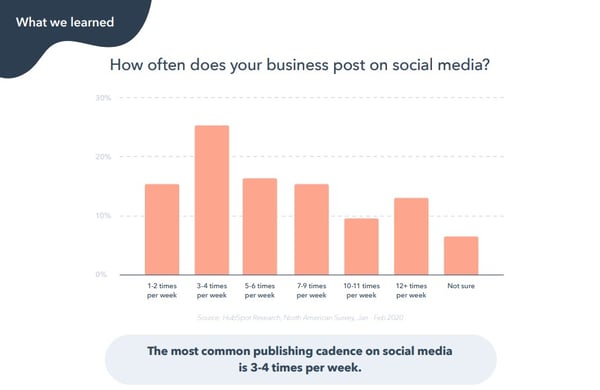
When’s the Best Time to Post on Twitter?
Time generally doesn’t matter — that’s right, you heard it here. There’s some uptick in the number of clicks at the very end and very beginning of the day, but we also see a lot less volume during that time so it’s not a statistical trend.
Post on Twitter whenever is convenient for you. Your focus should be on content, not on the time of day.

Which Is the Best Day to Post on Twitter?
For most tweets, there’s no difference in the day of the week that you post.
For really good tweets — the ones in the 95th percentile — there could be some benefit to posting on Sunday, Monday or Tuesday, but it is not terribly significant.
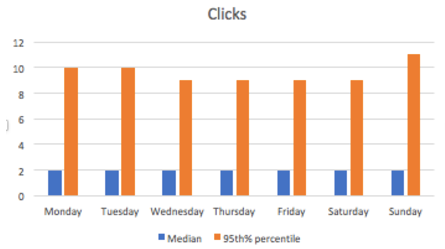
What’s the Optimal Publishing Frequency on Twitter?
Twitter is still mostly a chronological social network, and therefore the more marketers post, the more visibility and total clicks their posts get.
On Twitter, publishing more is better.

For marketers with at least 100 followers on Twitter, each message earns marketers a median of 2.5-3 clicks. This isn’t license to publish terrible posts — that’s not beneficial to your brand or for clicks — but as a temporal platform, it’s not as critical to have perfectly polished prose as it is on other social apps.
When’s the Best Time to Post on LinkedIn?
The median number of clicks doesn’t vary at all, but the 95th percentile of posts does show a drop off with posts that are published late in the evening — after 5 p.m. or so. Therefore, schedule posts on LinkedIn to go out during business hours (after all, it is a business networking site), but the focus should be on content, not the time of day.
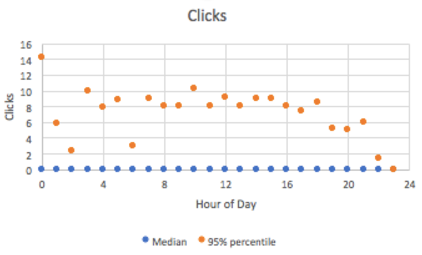
Which Is the Best Day to Post on LinkedIn?
Posts published Mondays, Saturdays and Sundays don’t perform as well as posts published Tuesdays, Wednesdays, Thursdays, and Fridays. Audiences must be too busy working to check LinkedIn on Mondays, and who wants to think about work over the weekend?
Tuesdays and Wednesdays are especially good times to publish on LinkedIn — they have a generally higher median as well as 95% percentile clicks.
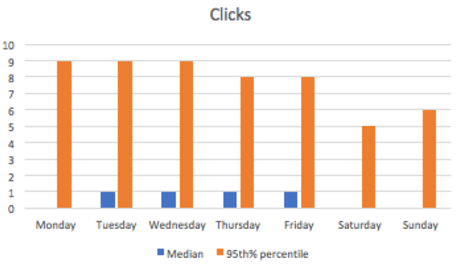
What is the Optimal Publishing Frequency on LinkedIn?
Once you publish more than 5 times per week (for most companies, this means once per work day) the return on investment drops substantially.
What is likely happening is LinkedIn doesn’t want users’ feeds to be overwhelmed by posts by the same company, so the second post in a day that a marketer publishes can cannibalize the performance of the first.
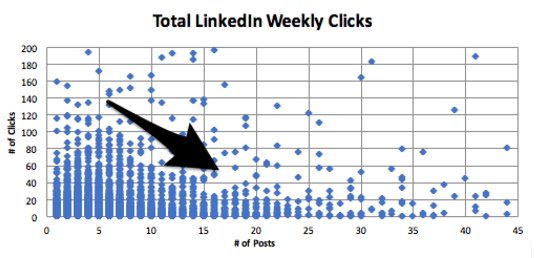
For pages with at least 100 followers, the first two posts on LinkedIn per week will typically bring in two clicks each. However, the 10th post in a week for those channels only adds about 0.5 clicks. The marginal effectiveness of creating content for LinkedIn maxes out at 2 posts per week, so we suggest sharing between two and five posts per week on LinkedIn to get the maximum value from the network for the time spent creating the content.
When Is the Best Time to Post on Facebook?
At the median, most posts on Facebook don’t do very well. But at the high end (95th percentile) there’s a lot of variability, especially at the beginning and end of the day. Since there are fewer posts during the beginning and end of the day, these aren’t statistical trends that marketers can count on. We suggest marketers focus on the content, not the time of day or day of the week when publishing — more on that later.
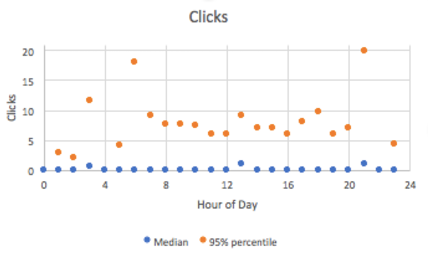
Which Is the Best Day to Post on Facebook?
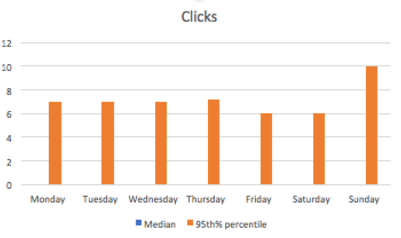
Wait, there’s no median. Actually, that’s not a typo. The number of median clicks for all accounts is actually 0 — because only really good content on Facebook gets surfaced highly. There isn’t an ideal day to post on Facebook. However, it’s slightly better to post on Sundays, and there’s a natural dip in post frequency and engagement on Friday and Saturday.
What Is the Optimal Publishing Frequency on Facebook?
Similar to LinkedIn, once you publish more than five times per week (for most companies, that’s once per workday) the return on investment drops substantially.
For Pages with at least 100 followers, the first two posts on Facebook earn a median of a single click on them, and after the 10th post, each additional post nets just half a click, and then continues to fall. Therefore, we suggest publishing between two and five times per week on Facebook.
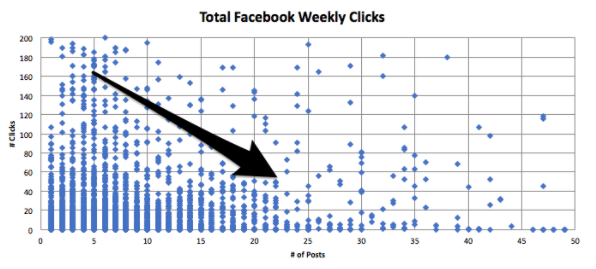
Facebook prioritizes “fresh” content and doesn’t want to overwhelm users with just one company in their feed, so when companies publish more than once in a day, their first post can be cannibalized by the second. Publishing more than once per day won’t just earn you diminishing ROI — Facebook could even punish your Page with the algorithm if you don’t get a lot of engagement with your posts.
That said, if your posts are consistently getting many likes or comments — at least more than five on each one — then it makes sense to post more. The key with this platform is engagement. So as long as your audience likes what you’re writing, Facebook will continue to reward you and show it in the News Feed.
So … Why Publish on Facebook at All?
There are three big reasons to keep publishing on Facebook:
1. Publishing on Facebook shows leads and potential customers that you’re actively in business.
Many people go to Facebook simply to research companies and look for thought leadership, and if your Facebook page is incomplete and inactive, they may go with a competitor who is more prominent on the platform.
2. It’s easier to go viral on Facebook.
The number of outliers that we see at every level is substantial — which means that when you go viral on Facebook, the upside is very, very high. The maximum clicks that a single Facebook Page received during this time frame was 8K — and the Page published just five times that week.
The peak number of clicks that a single account on LinkedIn received was about 1K, and the peak on Twitter was just under 7K… but that Twitter account published more than 100 times that week. The lesson here? When you go viral on Facebook, you can go viral more than on other networks.
3. Facebook Ads offer some of the highest ROI of social ads you can buy.
This is especially true if you are doing any retargeting. And once you’ve published on Facebook, it’s the easiest platform from which to boost posts and get more distribution (and followers).
What Does This All Mean for Your Social Media Strategy?
When it comes to posting on Facebook and LinkedIn, remember that you may only have between two and five posts per week that will get distribution by the networks’ news feeds. With that in mind, focus on the quality of each post (and the content preferences of your audience), and aim to get more likes, comments, and shares as your metrics of success to build up your audience and to make the news feed algorithms work for you.
And when it comes to Twitter, post freely — the timeline updates so frequently that you’re at an advantage posting more often to reach more people.
Many thanks to Monty Solomon, Kelsey Dietz, Dan Kulla, and Lincoln Bryant for helping with the data.

Ultimate List of Ecommerce Tools For 2020
The ecommerce industry is booming.
These trends are showing no signs of slowing down in the foreseeable future. In fact, the global ecommerce market is expected to eclipse $6.54 trillion in sales by 2023. That’s up from $3.53 trillion in 2019.
Whether you’re interested in starting a new ecommerce business from scratch or looking to expand your retail operation to an online store, you can use an ecommerce tool to achieve your goal.
Not all ecommerce solutions are created equally. Some tools are all-in-one website builders, while others are plug-ins, add-ons, or shopping cart software.
So what’s the best ecommerce tool for 2020? The answer depends on your unique situation. Use this guide to find the best ecommerce solution for you and your business.
In a market saturated with dozens, if not hundreds, of different ecommerce tools, there are the top ten that I’d recommend. I’ll give you an in-depth overview of the features, benefits, pricing, and use cases for each one of these tools as we continue through this guide.
1. Shopify
Shopify has everything you need and more to start an ecommerce website from scratch. It’s an all-in-one ecommerce solution for website creation and shopping cart software.
Regardless of your technical skill level, Shopify is easy for anyone to set up and use right out of the box.
Shopify makes it possible for you to sell from anywhere. In addition to your own ecommerce store, Shopify supports third-party marketplaces, social media selling, and in-person sales with Shopify POS (point of sale) software.
Every Shopify theme is optimized for mobile devices. Additionally, with tools like BuildFire, you could always build a Shopify mobile app to take your mobile sales strategy to the next level.
One of the most significant standouts of Shopify is its versatility. From startups to small businesses and large-scale operations, this ecommerce tool can fit the needs of any organization.
Pricing: Shopify has three different plans—Basic Shopify, Shopify, and Advanced Shopify. These plans start at $29, $79, and $299 per month, respectively. You can try Shopify for free with a 14-day trial.
2. WooCommerce
WooCommerce is unique compared to some of the other ecommerce tools on our list. That’s because it’s not an all-in-one ecommerce solution.
If you already have a WordPress website, you can add ecommerce functionality by installing the WooCommerce plugin.
From selling products to subscriptions and memberships, WooCommerce has everything you need to add ecommerce capabilities to WordPress.
The tool is fully customizable. It integrates with popular payment platforms like Stripe, Square, PayPal, Amazon Pay, and more. WooCommerce has other extensions for things like printing shipping labels and integrating with your email marketing platform.
For those of you who have an existing WordPress site, WooCommerce is the best way to start selling online without doing a complete rebuild. Simply install the plugin, and customize your settings from there.
Pricing: WooCommerce is free to install on your WordPress site. But other extensions to customize the WooCommerce plugin do cost money. Tons of extensions are free, while others range up to $300 per installation.
3. BigCommerce
Since launching back in 2009, BigCommerce has processed more than $25 billion in merchant sales. It’s used by businesses in 120+ countries worldwide.
As another full-service ecommerce platform provider, BigCommerce offers everything you need to start selling online.
Compared to other ecommerce tools on the market today, BigCommerce comes pre-loaded with the most native features.
BigCommerce has exceptional tools for inventory management, SEO, and conversions. You’ll also benefit from 24/7 customer support via phone, email, and live chat. So you can rest assured knowing that you’ll have access to assistance if you ever have any questions.
In addition to traditional online sales, BigCommerce supports B2B wholesale websites and provides enterprise-grade ecommerce solutions as well.
BigCommerce is an industry leader in ecommerce performance. When it comes to page loading speed, uptime, and security, this tool is second to none.
Pricing: The Standard plan starts at $29.95 per month. BigCommerce Plus starts at $79.95 per month, and Pro starts at $299.95 per month. You’ll need to contact the sales team for a custom quote on Enterprise solutions.
4. Wix
Wix is arguably the world’s simplest website builder. The platform is the easiest way for anyone to build a new website from scratch without any technical knowledge or coding experience.
Using the intuitive drag-and-drop builder, you can design a high-quality website with text, images, videos, and other media types in minutes. Adding new pages or starting a blog with Wix is just as easy.
Wix has 500+ templates for you to choose from. Your website will automatically be optimized for SEO and mobile web browsers. If you build a site with Wix, you’ll have access to the Wix App Market. This resource is filled with powerful web apps to customize your site.
You can also create an online store with your Wix website.
Wix offers a fully customizable storefront and shopping cart. Add features like a shopping wishlist, related product galleries, a quick add-to-cart button, mini-carts, and more.
For those of you who want to start selling new products online but don’t know where to start, Wix’s platform supports dropshipping. Browse from thousands of products that you can sell, with no inventory costs. Products ship in 5-7 business days.
Wix allows you to set up custom shipping rules as well. Manage international orders, choose your carrier preferences, and give customers real-time delivery estimates.
Pricing: Wix has plans starting at $13 per month. But not every Wix subscription supports online selling. The ecommerce plans with the ability to accept online payments range from $23 to $49 per month. Enterprise solutions start at $500 per month.
5. Magento
Magento is an ecommerce tool offered by Adobe. It’s an all-in-one ecommerce solution that processes more than $100 billion in gross merchandise sales each year.
With Magento, you can create an ecommerce store no matter how big or small your website is. This platform supports small businesses, mid-market and enterprise, and B2B online sales as well.
Magento stands out from other platforms with its efficiency, automation, and access to crucial data. You’ll benefit from inventory management, business intelligence, shipping solutions, and order management.
This ecommerce tool has specific features for customer segmentation and personalization.
Your store will automatically display products, promotions, content, and prices based on factors like customer location, order history, customer gender, LTV, and wish list items. You can even improve the shopping experience for unknown website visitors based on their shopping cart or products viewed.
Pricing: Contact the Magento sales team for a custom quote on a Magento Commerce license. You can request a free demo to try it out before you commit.
6. Squarespace
Squarespace is another well-known website builder. Unlike Wix, Squarespace has integrated ecommerce capabilities built-in to all of its business plans.
This ecommerce tool is popular for businesses and individuals in creative industries. The Squarespace designs are known for being both beautiful and modern. These award-winning templates are perfect for fashion designers, artists, musicians, and photographers.
If you want to showcase your work and sell it online, Squarespace is the place to do it.
You can also Squarespace to sell subscriptions and digital content.
If you’re selling physical products, Squarespace offers automatic inventory management, shipping calculator tools, and a rich product display. Use this ecommerce tool to showcase videos of your products as well.
Squarespace integrates with other popular online selling tools such as PayPal, Stripe, USPS, FedEx, and Apple Pay. It also integrates with popular accounting solutions like Xero.
For those of you who want to create a portfolio website and monetize it with ecommerce capabilities, Squarespace is the best choice for you.
Pricing: Squarespace Personal costs $12 per month. But you can’t sell online with this option. The $18 business plan has a fully integrated ecommerce store with the ability to sell unlimited products, although it does have some limitations.
To take full advantage of Squarespace as an ecommerce tool, consider the Basic Commerce or Advanced Commerce plan. These start at $26 and $40 per month, respectively.
7. 3DCart
3DCart is one of the oldest ecommerce tools on our list. The platform was founded back in 1997. More than 25,000 merchants use this tool to power their ecommerce website.
To be clear, 3DCart is not for everyone. It’s ecommerce software that’s designed for advanced ecommerce stores. The platform doesn’t offer a drag-and-drop site builder like Wix. Instead, you’ll need to have some knowledge related to development and coding to fully customize your templates and themes.
Just install 3DCart into your existing website to turn it into an ecommerce shop. If you aren’t comfortable editing your site’s code, you’ll likely need to hire a developer to do this.
Once installed, you’ll have access to more than 200 built-in ecommerce features. 3DCart has 50 free themes and supports 100+ payment processors.
Integrate 3DCart with platforms like MailChimp, Stripe, Facebook, Amazon, PayPal, QuickBooks, and more.
For those of you who don’t want the restrictions associated with an all-in-one ecommerce website builder, 3DCart offers full customization. You’ll just need to handle the coding on your own.
Pricing: 3DCart has five different plans ranging from $19 per month to $229 per month. You can try the software for free with a 15-day trial. All plans are backed by a 30-day money-back guarantee.
8. Easy Digital Downloads
Just as its name implies, Easy Digital Downloads is an ecommerce tool designed for selling digital products. Similar to WooCommerce, it’s a plugin for WordPress websites.
More than 2.44 million users have downloaded EDD.
This ecommerce tool makes it easy for you to create discount codes, track download activity, and restrict file access. It comes with a fully integrated shopping cart that allows customers to purchase multiple downloads simultaneously.
There are no limitations on how many digital products you can sell with the Easy Digital Downloads plugin.
The tool integrates with other popular tools and extensions that you’re already using. Some examples include PayPal, Authorize.net, Stripe, Slack, Zapier, AWeber, Dropbox, and Amazon Web Services.
Pricing: There are four different plans for the EDD plugin license. All of them are billed on an annual basis until canceled. The Personal Pass is $99, Extended Pass is $199, Professional Pass is $299, and All Access Pass is $499.
9. Ecwid
Ecwid is a free commerce extension that’s compatible with WordPress and other popular CMS platforms. You can add the Ecwid tool to Weebly, Joomla, Tumblr, Squarespace, Wix, Blogger, and Adobe Muse.
You’ll also be able to sell online from marketplaces like Amazon and eBay or sell on social media via Facebook and Instagram.
Unlike 3DCart, you can install Ecwid to your website without any development or coding experience. The Ecwid software can integrate with in-person selling at your brick and mortar retail stores as well.
If you’re currently using WordPress but don’t want to use WooCommerce as an ecommerce tool, Ecwid is a viable alternative.
Ecwid has a free forever plan, but it’s extremely limited. You’ll only be able to sell up to ten products and won’t have access to sales channels outside of your website.
Pricing: The entry-level Venture plan starts at $15 per month. Business and Unlimited plans start at $35 per month and $99 per month, respectively. You can save money on all of these if you commit to an annual contract.
10. OpenCart
Last but certainly not least on our list is OpenCart. Unlike some of the other tools listed above, this is not a website builder. OpenCart is a free and open-source platform that adds ecommerce functionality to existing websites.
Over 342,000 ecommerce websites across the world use OpenCart for selling online.
The most significant standout of this ecommerce tool is the OpenCart marketplace. You’ll have access to 13,000+ modules and themes. You can integrate OpenCart with an extensive list of payment gateways and shipping providers.
As an open-source platform, OpenCart has an outstanding community support forum with more than 550,000 posts from 110,000+ registered members.
For a one-time fee or ongoing monthly service, you can have access to OpenCart’s dedicated support staff.
Pricing: As I mentioned earlier, OpenCart is free to download and install. But extensions and dedicated support will cost extra.
What’s the best ecommerce tool to use in 2020? It depends on your unique situation.
An ecommerce startup won’t have the same needs as a small business retailer that wants to expand online. There are ecommerce tools that are better for selling wholesale B2B products and other tools made for digital downloads.
Do you want to create a new website from scratch? Or are you adding ecommerce functionality to your existing site?
All of these scenarios will impact how you choose an ecommerce solution.
Since I included something for everyone in this guide, I’m confident that you can find what you’re looking for in one of the ten options listed above.
Editor’s note: This post was originally published in April 2020 and has been updated for comprehensiveness.
