
Welcome to My Blog
8 Examples of Influencer Marketing on TikTok
Since TikTok launched in 2017, marketers have been trying to wrap their minds around the odd-ball video platform. Now, many are realizing that the key to brand awareness might involve sponsoring influencer content on the app.
Why does this strategy make sense? There are a few great reasons why influencer marketing can be beneficial on a new or niche app like TikTok.
First of all, rather than spending weeks or months analyzing the app and its audiences to determine what content will be interesting, you can work with an influencer who has a decent following, videos with high engagements, and a visible track record of reaching the TikTok audience.
Additionally, this strategy also might limit the time and resources needed to create your own videos. Rather than trying to figure out how the app works, fiddling endlessly with all its features and launching a bunch of videos that don’t gain any traction, you can work with an influencer who will already have a large, engaged audience and can create quality content for you.
If you don’t have the funds to pay an influencer, co-marketing and creating TikTok content with a user or brand that has a greater following than yours will help your audiences learn about the person or brand you’re co-marketing with, while their audience can learn more about you.
When it comes to most social media channels, influencer marketing, sponsored content, or co-marketing can be an incredibly beneficial way to spread awareness about your brand to a new platform.
Even though influencer marketing and sponsored content might seem like a great idea, you still might not be sure of where to start when it comes to finding and identifying people or companies to work with — especially on a new platform like TikTok.
While you’ll obviously want to look at a user’s follower numbers, total likes, and the comments and like-counts on individual videos, you should also look at their content to see if it’s interesting, good quality, in line with your brand, and — most importantly — attention-grabbing. You also might want to look at any past sponsored campaigns that an influencer account has posted to see how they creatively work in the product, brand, or person they’re sponsored by.
Once you start working or co-marketing with TikTok creators, you might also want to bring some unique TikTok video ideas to the table that will intrigue the user’s audience while appropriately highlighting your brand.
To help you identify great ideas for sponsored content and what you should be looking for in a TikTok influencer, I’ve compiled a list of eight sponsored TikTok videos that you can learn from.
8 Sponsored TiKTok Campaigns
1. Mucinex
One of the biggest influencer campaigns on TikTok so far has been Mucinex, which recently worked with a handful of creators to promote its product in the time between Halloween and flu season.
In the various videos, influencers wake up looking like goofy zombies. Then, then grab Mucinex. After that, the videos cut to the influencers looking fabulous and dressed for the club. The idea is that Mucinex can help you recover in time for a weekend party, even if you feel like death.
In one example of the Mucinex videos, OurFire, an account with over 2.4 million followers that follows two siblings, shows the sister and brother de-zombifying themselves before a party.
This is an excellent example of how a brand can leverage a number of influencers and an interesting holiday theme to create a viral campaign that could touch many different audiences at once. While your company might not be able to leverage multiple big influencers at the same time, you might still want to take a note from Mucinex and work with multiple affordable creators with wide-ranging audiences.
For example, if a number of lower-level thought leaders or influencers are somewhat affordable and align well with your campaign, consider working with multiple people instead of paying for just one big influencer. By doing this, you could get even more content created that discusses your product, and reach multiple different audiences associated with each influencer or thought leader.
2. Target and Vera Bradley
In a recent back-to-school themed TikTok video, influencer Victoria Bachlet presents a montage of video clips that show her visiting Target, buying Vera Bradley self-care products, and using them at home as she prepped for a new year of school.
The video was aimed at spreading brand awareness for both Target and the Vera Bradley X Venues self-care product collection.
Bachlet, who has 2.9 million TikTok followers, often uses her TikTok as a vlog where she gives viewers a look into her daily life. She often posts about romance, parties, self-care, and many other topics that teen or young-adult women can relate to.
Because Target markets itself to a variety of age groups and is a business that a lot of young people enjoy shopping at, this influencer choice and video aligns well with their audience. While viewers might be able to relate to a back-to-school Target trip, they might also be interested to find out about the new Vera Bradley products being sold there.
Although the video caption clearly says the post is an ad, it still feels like it was made by the influencer herself. This makes the video natural and more like an endorsement rather than a native ad.
The strategy of showing a customer or influencer’s shopping experience could also work for smaller businesses on TikTok or other video-friendly social media platforms.
For example, you could have an influencer or frequent customer in your area or industry film themselves using your products or walking around in your physical store. This type of video will highlight all the great products you have to offer while showing audiences that relatable people like themselves shop for your products. Then you could adapt and edit this video content for TikTok or other platforms, like Instagram or YouTube.
3. Too Faced
To spread awareness for Too Faced’s new Damn Girl Mascara, the cosmetics brand sponsored a video from top TikTok user Kristen Hancher. In the video, Hancher, a vlogger with more than 23 million TikTok followers, sings into the camera with no eye makeup on. The video then cuts to her singing with Too Faced mascara on as she flashes the mascara bottle in front of the camera.
Although TikTok videos are often too short for full how-to’s and tutorials, Hancher and TooFaced have leveraged the same effect by showing a musical before-and-after video instead. This is a great example of how brands can creatively embrace short-form videos on this platform.
This video also quickly grabs the viewer’s attention, which is absolutely vital on an app like TikTok where you can simply swipe to another video in your feed if certain content doesn’t immediately interest you.
Aside from TikTok, Internet users and most social platforms are also getting more and more fast-paced. Because of this, being able to create short videos that quickly highlight your product’s value proposition could be incredibly beneficial and essential to your future marketing strategies.
Even if you don’t want to use TikTok for social media marketing, creating video content that immediately grabs the viewer’s attention can be beneficial on most of today’s big platforms. Looking at TikTok posts like the one above will give you good inspiration of how to show off your product as quickly and intriguingly as possible.
4. Blinger and Wicked Cool Toys
In a recent sponsored video, TikTok influencer Jasmine Gonzalez takes her brother’s shoes, decorates them with her Wicked Cool Toys’ Blinger kit, and gives them back to her excitedly happy brother.
The Blinger promotion is another example of how a brand and TikTok creator have found a short-form alternative to a how-to video or tutorial. Instead of showing the process of decorating the shoes, Gonzalez’s video shows a before-and-after of the shoes, as well as the pure candid joy of her little brother as he gets the shoes back.
Gonzalez’s TikTok video is both fun and pleasant, which makes Blinger and the idea of shoe decoration pretty memorable. Similarly to a more traditional commercial, the video also demonstrates how every-day people, such as Gonzelez’s brother, might enjoy items that are decorated with the kit.
5. Run Around
Recently Run Around, a smartphone game that requires your character to run in a full circle without hitting any obstacles, leveraged a gaming influencer, Candice867, for sponsored content. In the TikTok video, Candice simply records her screen and her voice as she plays the game:
The video-game content seen above is not unnatural to this particular influencer’s channel. In fact, all of her TikTok posts are simply videos of her playing mobile games.
While this video will likely be seen by Candice’s video game-oriented followers, this is also a great piece of sponsored content because it shows prospective users exactly what the game is like and how it’s played. If the game looks fun, viewers might be quick to go there app store and find it.
Like the other videos on this list, the content attempts to gain attention by simply showing how its product works as quickly as possible.
When it comes to TikTok promotions, it’s clearly more beneficial to be more upfront about what your product does as quickly as possible, rather than posting content which beats around the bush and doesn’t show off your value proposition immediately.
6. Just Dance 2019
In another video game-oriented post, an influencer named Jelina posted a sponsored duet video with a character from Just Dance 2019. During the duet, the influencer follows the same dance steps as the character on the right of the video.
For those who are familiar with Just Dance games, each edition of the game allows you to follow the dance steps of cartoon characters to the sounds of popular music. The games can also record you dancing next to the characters dancing so you can see how close your steps were to their own.
With TikTok’s Duet feature, which allows you to see two videos back-to-back, Jelina, the influencer, nearly mimics the playback experience that you can get when you’re playing the Just Dance games.
Like the Run Around example above, this video allows you to see exactly how Just Dance is played while watching an influencer dance up against one of the characters in the game. This is a fun video for the influencer’s audience as they can see how close her moves are to the characters, but it also reminds viewers of how fun the game can be to play. If viewers haven’t played a Just Dance game in the past, a video demonstration like Jelina’s might spark their interest in it.
7. Freal
To promote its smoothies and milkshakes, Freal sponsored a funny video from the HaueterFamily, a TikTok account that follows an every-day family.
In the video skit, a boy tells his mom that something is wrong with his brother. When the mother, filming the video, goes outside, she sees that her son is “hangry.” The video cuts to her bringing her sons to the convenience store, where they feed Freal to the son with “hanger.”
This video is so memorable because it comedically shows how Freal is both tasty and helps eliminate the mood-related pain point of hanger: anger related to hunger.
If you can’t do a how-to or mini-tutorial on TikTok or another short-form video app, you could take a note from Freal by sponsoring a funny, yet relatable, skit about your product. While this content doesn’t prove that Freal is better than other products, it still makes the food brand stick in the viewer’s mind well after they’ve watched the content.
8. Red Bull
in a recent video from a TikTok user Keeoh, the smaller-scale influencer with nearly five thousand followers makes viewers think he’s going to perform a magic trick with Red Bull. He taps a Red Bull can with a spoon, opens it and pours the drink into a travel mug. Then, he flips the mug upside down to reveal that there’s no Red Bull inside it.
Just as you think that the drink’s disappeared, Keeoh’s friend pops up from behind the table with his shirt covered in Red Bull. It then becomes humorously obvious that the influencer was actually pouring the drink into his mouth and not the mug.
This Red Bull magic trick video is simple, pretty funny, and doesn’t seem like it was hard to make. Still, because of its humor, it’s pretty memorable. Although the content doesn’t show you why Red Bull is a great product, you still might remember the brand due to the entertainment factor,
Additionally, if a younger person sees an influencer they follow doing tricks or skits featuring Red Bull, they might be more interested in the product or think that the influencer is endorsing it because they also enjoy the product.
Lastly, this is also a great example of how you can leverage a smaller scale influencer to create somewhat affordable content. While the video is short, memorable, and spreads awareness of Red Bull to the influencer’s audience, it doesn’t look like it was a high-budget piece of content for the company or the influencer.
What makes a successful TikTok influencer campaign?
If you’re interested in leveraging influencers on TikTok or another social platform, keep these ideas in mind as you vet them and work with them to create interesting content:
- Look for influencers who have a strong sense of what great content is on their platform: You should also check out an influencer’s video comments, like-counts, and followers to see if they have established a following.
- Vet influencers that might have a similar audience: This might make their endorsements of you feel more natural and less like an ad. A great example of this is how Run Around sponsored content from a mobile gamer with a high TikTok following.
- Brainstorm ideas that align well with the influencer’s content and as well as your brand’s goals: If the influencer doesn’t have any ideas in mind, pitch content that quickly grabs attention from fast-paced social media audiences and concisely explains why your product matters to them.
Still trying to wrap your mind around this whole TikTok thing? We’ve got plenty of blog posts to help you catch up on the app’s short history, learn how to use the app, get inspiration from successful brand accounts, and find the stats you need.

5 Examples of Sensory Branding in Retail
When I was in middle school, the coolest place to shop was Abercrombie & Fitch. I loved going in and picking out my favorite jeans and hoodies. The issue was that my mom — who I depended on to drive me to the mall — couldn’t stand going into the store. Why? Long story short, she referred to her experiences at the Abercrombie store as “sensory overload”.
Now, I don’t know if you’ve been in an Abercrombie & Fitch store before, but it’s quite dark due to their dim lighting. They also spray their identifiable and unique perfumes and colognes everywhere — on, above, below, and around all of their clothing. Lastly, they play really loud music.
As a 14-year-old, none of this bothered me. In fact, all of these factors — which are actually examples of Abercrombie’s sensory branding at work — made me feel more mature, older, and (most definitely) cooler than I was. The mood lighting, smell, and the music made me — a member of their target audience — want to become and remain a loyal Abercrombie customer.
Not only that, but, if I closed my eyes and walked into one of their stores, I’d immediately know I was at Abercrombie based on the smell and music alone. Or if I was unable to hear, I’d know I was in an Abercrombie store due to the dim lighting and the smell of the cologne and perfume floating around. The feeling I had as a customer was one I thoroughly enjoyed and sought out.
So, whether or not you agree with my view or my mom’s view of the store, it’s clear that Abercrombie & Fitch’s sensory branding efforts were effective and successful among their target audience.
Sensory branding has the potential to improve customer loyalty, strengthen brand advocacy, and make for a memorable experience for customers that keeps them coming back. It can help build a sense of trust and familiarity between customers and your brand as well as offer a feeling of comfort as they complete a transaction.
The Future of Retail: Sensory Branding
Sensory branding is a powerful tactic for businesses because it elicits a variety of meaningful and memorable responses from individuals. It plays a large role in your ability to become a brand that your consumers can’t forget — one that your customers and promoters recognize based on a sensory response they experience when they come in contact with your branding.
When your business incorporates sensory branding, your marketing efforts are bound to be more powerful and will be more likely to resonate on a deep level with the members of your target audience. (Did you know that studies have shown people can remember a scent with 65% accuracy after one year?)
How Sensory Branding Works
Sensory branding, via any of the five senses, often takes place at the beginning or middle of the buyer’s journey (similar to the Abercrombie & Fitch example above). However, it has become more common for businesses to create sensory branding experiences at the end of transactions, too.
Whether it’s a noise, vibration, or visual that customers experience at the end of a transaction, this type of sensory branding can provide a sense of comfort for the consumer and make them feel more confident in their purchase. For example, Visa created a sensory experience that happens when a customer’s transaction is finalized (which we’ll explain in more detail momentarily).
Next, to help you gain a better understanding of the ways you can successfully implement sensory branding in your marketing efforts, let’s look at five examples of businesses that did so successfully.
1. Sensory Branding by Visa
As mentioned above, Visa has started incorporating a sensory branding experience at the end of their users’ transactions. That’s because they’ve found that sound plays a part in how consumers make purchases.

Once a Visa cardholder uses their card and their transaction is officially complete, consumers hear a unique sound — one the company worked long and hard to perfect. When customers hear this sound, they know their purchase was finalized successfully and securely. This type of sensory branding provides comfort and consistency for Visa cardholders. The Visa Checkout sound fosters a feeling of trust and safety that consumers associate with the brand.
2. Sensory Branding by Singapore Airlines
Singapore Airlines’ branding targets multiple senses — specifically, scent and sight. The airline has a one-of-a-kind, refreshing, and subtle scent (rose, lavender, and citrus) worn by all flight attendants that’s also sprayed onto their towels and throughout other elements throughout services. This specific smell is one you’ll only experience while flying with the airline.

Additionally, the airline requires all flight attendants to wear “The Singapore Girl” uniform, in the color and pattern that matches their earned designation. These sensory branding examples are uniquely Singapore Airlines and add a professional, high-end, and consistent experience for the flyers who make up their target audience.
3. Sensory Branding by Apple
Apple taps into numerous senses at once with their branding. Their stores, for example, are all white, minimalist, and clean — this gives customers the feeling of a modern, sleek, and high-end tech company. Their packaging provides the same feeling through a similar look. In addition to sight and touch, Apple targets its customers through sound.
For example, when one of the hundreds of millions of iPhone users go to lock their iPhones, the devices all make the same, identifiable, and memorable noise.
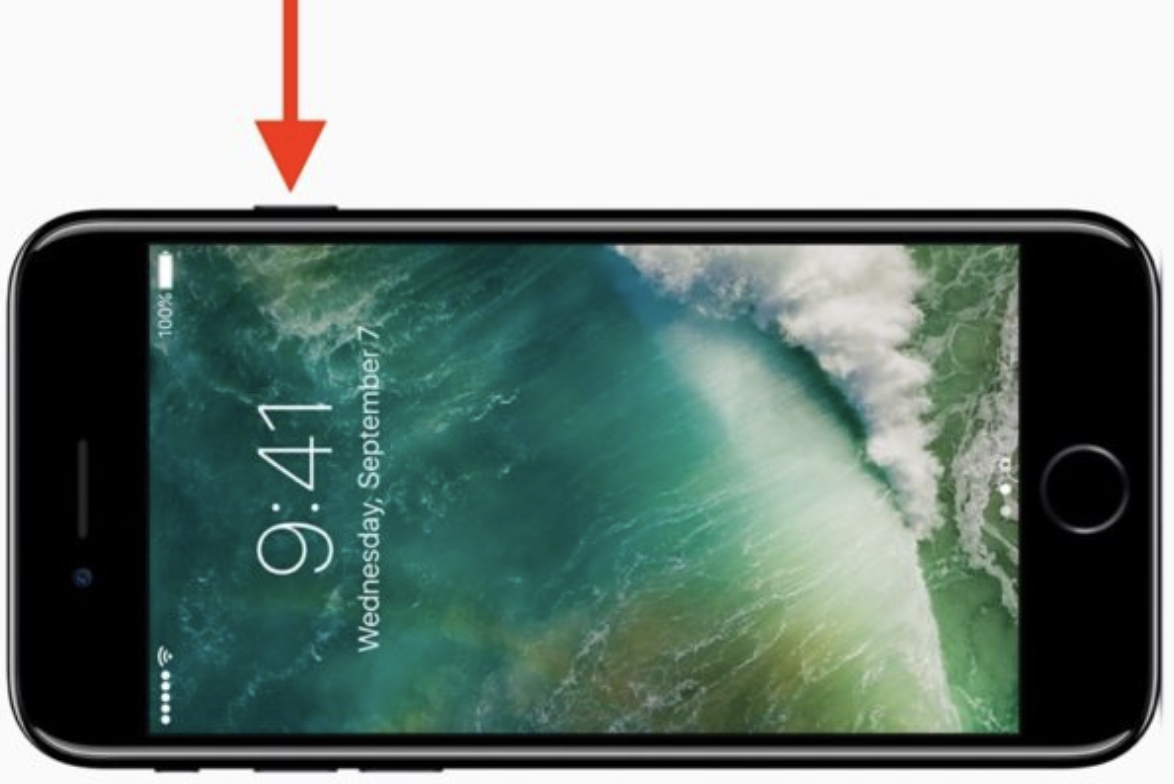
The lock noise sounds a bit like something is latching or clicking together, which contributes to users feeling as though they’re closing their phone securely. This sound is universal among all iPhones which provides a sense of consistency and familiarity.
4. Sensory Branding by Starbucks
The smell of fresh coffee in all Starbucks stores is known to be strong — that’s because every store is required to grind their unique coffee beans. This allows for the coffee aroma to float around the store and hit customers the moment they walk through the door.

Starbucks ensures the aroma is potent in its stores so that it elicits a sensory reaction from customers. The company does this even though it has been found that it’d be more cost-effective to grind and package the beans, and then send them to individual stores.
This would also allow the baristas more time to focus on other tasks. However, Starbucks knows its stores would no longer have the same aroma if they made this change. Instead, they go for the memorable, soothing, and consistent aroma their coffee beans provide for customers in stores across the globe to help boost customer loyalty and improve sales.
5. Sensory Branding by Mastercard
Mastercard is using sensory branding to create a new identity for consumers using their credit cards — the “sonic identity”, to be exact. Consumers hear the sonic sound when they complete a transaction. the sound is meant to symbolize the intersection of the red and yellow circles in Mastercard’s logo.

The sonic sound is a form of sensory branding that consumers hear while shopping with their Mastercards online, in stores, and while using voice search. The noise provides a sense of security and consistency — consumers know their transactions were successful due to the familiar sound. Additionally, although the sonic sound isn’t actually made by the circles in the Mastercard logo intersecting, it still provides an imaginary visual experience for customers, too.
Start Using Sensory Branding
Sensory branding has the ability to help you reach your target audience and customers in a way that no other form of marketing can. It has the power to help you boost loyalty and advocacy as well as increase revenue. So, look to the examples we reviewed for inspiration, and begin working on your sensory branding experience.

How to Build a Product Ecosystem Buyers Will Want to Be In
When I hear the word ecosystem, I think of my science class as a kid. Specifically, I remember having to choose an environmental ecosystem to do a project on. I chose the tundra ecosystem and talked about how the living and nonliving things in this climate worked together to survive the harsh, frozen, and typically snow-covered environment — none of them would make it without the value each element and organism provided.
You might be wondering why I’m telling you this story (a valid thought on your part, if that’s the case). Here’s my logic: An environmental ecosystem functions in a very similar way to a product ecosystem. A product ecosystem is when products can coexist in a way that’s beneficial for the customer (not to mention, brings in more revenue for the business).
In this post, we’ll take a look at successful product ecosystems and why buyers want to be a part of them.
Why is a product ecosystem valuable?
The process of building a successful product ecosystem is valuable for businesses for numerous reasons — product ecosystems work …
- To solve for all of the needs of your customers — which helps improve brand loyalty and advocacy.
- To boost revenue by making it easy for customers to expand their library of your products.
- To prevent your customers from having to invest in other products that are sold by your competitors and other brands.
- To make the lives of your customers easier by solving for a wide array of challenges within the system they’re already a part of.
- To create products that support each other and coexist in a way that makes them stronger and more useful for customers.
- To support the development of your product line over time by making updates that improve their ability to connect and work in tandem with each other.
- To offer a greater range of services for customers and, therefore, improve your chances of becoming known as an impactful player in your industry.
Next, consider an example of a successful ecosystem to gain a better understanding of the way in which they function.
Example of a Product Ecosystem
An example of a successful product ecosystem is the one Apple has created. Apple has a host of products that connect with each other to effectively and easily meet the technological needs of its target audience. Read the following potential scenario to see what I mean.
Plug your iPhone into your MacBook Pro to view all details related to the phone including your storage, different aspects of your phone’s history, your music library, and more via your laptop. And speaking of your music, connect your AirPods in just seconds to your iPhone and your MacBook for seamless listening opportunities cross-device.
Then, lock your phone and close your MacBook Pro prior to heading out on a run. Throw on your Apple Watch so you can leave those larger devices at home while maintaining access to your music with your AirPods. Don’t worry, your Apple Watch will still notify you of your call, text, and email notifications while out on the running trail. Meanwhile, your mileage, time, heart rate, and other workout details will also be recorded while you’re running. Then, when you return from your run, head into your home office and plug your Apple Watch into your iMac to view your workout summary on the easy-to-view display screen.
This is just one example of how a few of the products within Apple’s ecosystem coexist to improve their value to and simplify the lives of its customers.
How to Build a Product Ecosystem
You can build your product ecosystem in a number of ways. Below, we’ll review four of the most common steps when doing so. These steps are all-encompassing so you can incorporate them into your process no matter the industry you’re in.
1. Listen to your customers.
For a product ecosystem to be beneficial to buyers, you need to ensure your products or services are effectively solve the challenges and pain points of your target audience. To do this, listen to your customers. Ask them what they’re missing in your current products and services; ask them about the work they do on a daily basis so you can determine the best ways to meet and exceed their needs with the support of your product ecosystem.
Here are some ways to develop a stronger understanding of your customers, and listen to their needs, to ensure your product ecosystem is valuable:
- Create buyer personas
- Conduct focus groups
- Share customer feedback surveys
- Look at the product ecosystems of your competitors
2. Simplify the connections within your product ecosystem.
Part of the reason buyers want to be in a product ecosystem is the ease that comes from using the products of a single brand. For example, as a HubSpot user, you can manage your entire business, across all departments, within the one system. As the businesses of HubSpot customers grow and their needs expand, they can easily purchase or connect to additional products, tools, or Hubs within the software in mere seconds.
By making connections and integrations simple, your product ecosystem becomes more valuable for customers. This also helps you improve your brand loyalty, as customers will be less likely to get frustrated and spend time identifying the product ecosystems of other businesses that are simpler and more efficient.
3. Consistently update and improve your product ecosystem.
As mentioned, your first step in creating a product ecosystem requires you to ask for, and listen to, customer feedback. Continue to do this as your ecosystem evolves and expands, not just as you make your initial plans to build it.
This way, you create products within the ecosystem that effectively solve the needs of your customers. It will also help you update and improve individual parts of your ecosystem as needed in a way that makes being a part of it valuable for customers.
4. Make joining your ecosystem valuable for customers.
By working through the above steps, you’ll likely have no issue achieving this final step — however, it’s still important to reiterate the need for your product ecosystem to be valuable for customers to join.
Think about it — your ecosystem won’t succeed among your target audience and customers if it includes products with functions and features that aren’t cohesive or powerful when grouped together. After all, this is how any ecosystem functions — through the collaboration of each piece and member.
Build Your Product Ecosystem
Building a product ecosystem your buyers want to be a part of is how your business can improve loyalty among customers, boost revenue, improve retention rates, and become better-known as an industry leader. So, think about the needs of your customers, the ways in which you can better serve them with your ecosystem, and how an ecosystem can make your product line more valuable.

How to Develop a Unique Instagram Marketing Style
Are your posts getting lost in the Instagram feed? Wondering how to make your Instagram posts more recognizable to your followers? In this article, you’ll discover how to create an Instagram style that’s easy for fans to recognize. Why a Strong and Cohesive Instagram Feed Matters An Instagram user is scrolling through their feed and […]
The post How to Develop a Unique Instagram Marketing Style appeared first on Social Media Marketing | Social Media Examiner.
from Social Media Marketing | Social Media Examiner https://ift.tt/2R5pIna
via socialmediaexaminer
Twitter Adds New Ad Unit and Alters Core Features
Welcome to this week’s edition of the Social Media Marketing Talk Show, a news show for marketers who want to stay on the leading edge of social media. On this week’s Social Media Marketing Talk Show, we explore Twitter’s new Promoted Trend Spotlight ad unit, limits on tweet replies, and other upcoming changes to core […]
The post Twitter Adds New Ad Unit and Alters Core Features appeared first on Social Media Marketing | Social Media Examiner.
from Social Media Marketing | Social Media Examiner https://ift.tt/2uEuZe6
via socialmediaexaminer
The Beginner’s Guide to Structured Data for Organizing & Optimizing Your Website
It’s Friday afternoon, and your team is jonesing for Happy Hour.
For the last few weeks, you’ve been going to the same ol’ bar by your office, so you decide it’s time to try something new. What do you do? Step outside and walk around until you find a new spot? No, you hop on Google and let it conduct the search for you.
Your ideal post-work pub is nearby, open right after work, and offers a few gluten-free options so your entire team can partake. You plug these criteria into Google, and you’ve got three viable options at your fingertips — in a handy map format to boot.
Pause. Have you ever wondered how Google can whip up such accurate, precise answers in so little time … and present them in such an easy-to-read way? Moreover, what are those restaurants doing to get featured so dominantly on Google’s search engine results pages (SERPs)?
Heck, I’d love my business to pop up when consumers search for criteria relevant to me … wouldn’t you?
No one knows exactly how Google’s algorithm works — but, there are a few ways to organize and optimize your website content so Google knows what content to feature on the SERPs for the various searches people conduct to find you.
This is where structured data comes in. Structured data can make your organization more visible to potential customers and increase your click-through rate by up to 30%.
Not sure what structured data is? That’s OK. By the end of this guide, you’ll be a structured data wizard — and your website will reap the benefits.
We know that what searchers see online is much different than what search engines see.
While searchers see this…
… search engines see this:
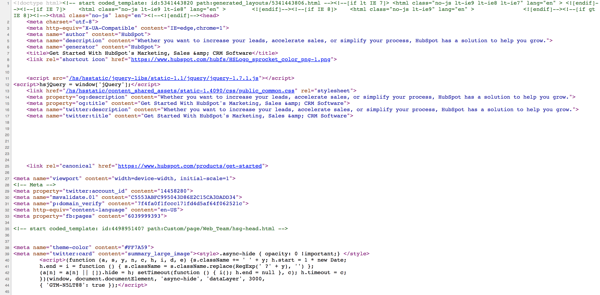 View the source code for any website by going to View > Developer > View Source.
This behind-the-scenes code tells browsers how information should be organized on the website (as part of its website development) and tells web crawlers what’s on the page.
Structured data is also at play here. Embedded tags of code (a.k.a. “markup”) throughout the HTML of a webpage tell Google and other search engines what information to display in the SERPs and what this information represents. It also helps social media platforms synthesize your social media posts into snippets that preview the content using Open Graph Protocol (which we touch on later).
This markup is important. It educates search engines on what specific content is on the page. This creates more relevant, informed searches and makes the site a candidate for enhanced results like featured snippets, rich snippets, image and video carousels, knowledge boxes, and more (which we’ll touch on later).
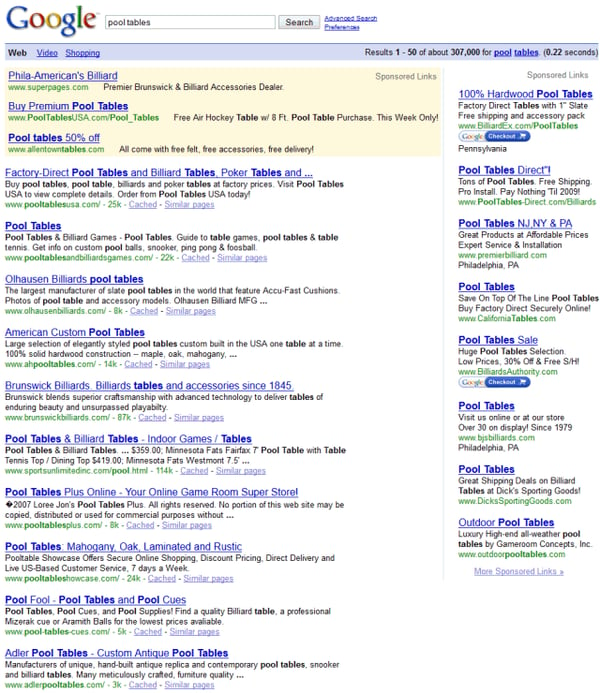
Google’s SERPs weren’t always as easy on the eye as they are today. Don’t remember? Check out this Google result for “pool tables” from 2008.
Let’s compare. Here’s the same result from today.
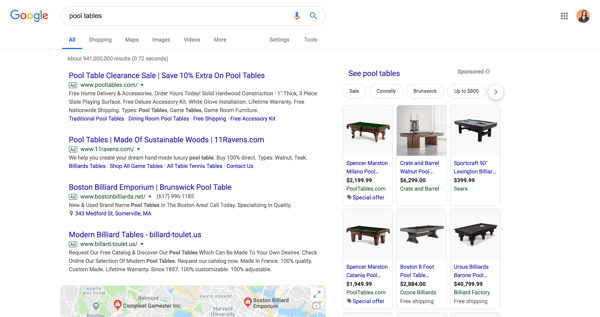
Wow. That’s a world of difference. Not only are these results easier to read, but the extra features make for a much more informative, intelligent searching — and shopping — experience. Between the sponsored content and live map (plus the product carousel, question snippets, and related searches not shown in the screenshot), Google provides pretty much everything I need to know about pool tables.
Heck, sometimes I search for something and find the answer right on the SERP — I don’t even have to click on a result. Does that ever happen to you? If it has, you can thank structured data.
How does structured data work?
At this point, you might be asking: How can there exist a language (markup) that is consistently recognized by search engines and people alike?
In order for this markup to be accurately and universally understood, there are standardized formats and vocabularies that should be used.
Let’s go back to basics for a minute. When conveying information, whether you’re communicating with a human or a computer, you need two main things: vocabulary (a set of words with known meanings) and syntax (a set of rules on how to use those words to convey meaning).
Most terminology surrounding structured data markup can be organized into these two concepts — vocabularies and syntaxes — and webmasters can combine whichever two they need to structure their data (with the exception of Microformats).
| VocabulaRY | SYNTAX |
| Schema.org | Microdata |
| DCMI | JSON-LD |
| FOAF | RDFa |
Okay … that’s enough of the fancy developer speak. What should you be using for your structured data?
Schema.org is the accepted universal vocabulary standard for structured data. It was founded and is currently sponsored by Google, Bing, Yahoo, and Yandex. It’s flexible, open-sourced, and constantly updated and improved.
Note: Schema is called such because it features markup for a wide variety of schemas — or data models — for different types of content.
Here’s an example of Schema Markup language (which is good for SEO) pulled from my article on branding.
“@context” : “http://schema.org”,
“@type” : “Article”,
“name” : “The Ultimate Guide to Branding in 2019”
“author” : {
“@type” : “Person”,
“name” : “Allie Decker”
},
“datePublished” : “2019-04-02”,
“image” : “https://ift.tt/2QIjj2s”,
“url” : “https://ift.tt/2TS1xrM”,
“publisher” : {
“@type” : “Organization”,
“name” : “HubSpot”
As for syntax, there’s no correct answer. Google recommends JSON-LD (and defaults to that syntax when using its Structured Data Markup Helper — as you see below). JSON-LD uses Javascript code and embedded widgets to dynamically display your content, which is typically a simpler development process.
Google also recognizes Microdata and RDFa. Both of these syntaxes use HTML to identify properties within structured data. Microdata is typically only used in the page body, whereas RDFa is commonly used in both the page head and body.
On the other hand, JSON-LD is only placed in the page head, meaning, for certain types of markup, JSON-LD makes it so you don’t have to navigate subheaders, supporting copy, and related styling that’s included in the page’s HTML. This is why JSON-LD is considered simpler than the other two.
Ultimately, it all depends on the data you’re trying to implement, what the benefit is to your website, and what would be easier to share with your team.
Structured Data and Mobile
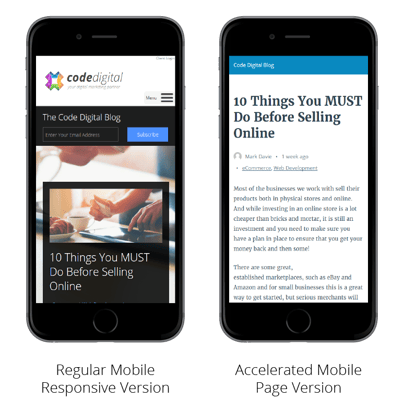
Structured data affects mobile a little differently — through Accelerated Mobile Pages (AMP). Accelerated Mobile Pages is a Google-backed, open source project to help all mobile pages load quickly regardless of device.
Pages with AMP markup appear within Google’s special SERP features, such as Top Stories and News Carousels. Here’s how to create an AMP HTML page.
Structured Data and Social Media
Structured data markup works a little differently for social platforms. This requires Open Graph Protocol and similar languages that ensure your website and blog content appear in an easy-to-read way when you promote this content on a social network. Two common social media features that use Open Graph Protocol are Pinterest Rich Pins and Twitter cards. We talk more about how to do this below.
Here’s an example of Open Graph Protocol language (which is good for social media) using the same source.
<meta property=”og:title” content=”The Ultimate Guide to Branding in 2019”/>
<meta property=”og:type” content=”article”/>
<meta property=”og:URL” content=”https://blog.hubspot.com/marketing/branding”
<meta property=”og:image” content=”https://blog.hubspot.com/hubfs/branding-2.jpg”
<meta property=”og:admins” content=”Allie Decker”
<meta property=”og:site_name” content=”HubSpot”
<meta property=”og:description” content=”Discover how to create and manage a brand that helps your business become known, loved, and preferred”
Note: Unfortunately, structured data doesn’t impact your organic search ranking (besides helping you grab a spot in a knowledge panel or Featured Snippet at the top of the list). It also doesn’t change how your content looks or behaves on your website — it only affects how and where it might appear on SERPs.
Examples of Structured Data
To the average internet user, structured data can’t be seen. It’s hidden among the code that makes up our favorite websites and online platforms. So, how does structured data affect what we (and our customers) see? What does it look like to the “naked” eye?
When webmasters adhere to structured data standards, search engines like Google and Bing reward their websites and organizations by featuring their content in a variety of SERP features (another reason to use structured data).
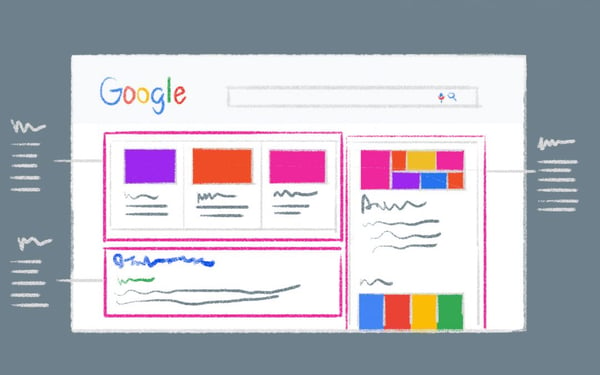
Let’s talk about those features — specifically on Google. Google SERPs display a wide variety of information, but the ones we talk about below are specifically influenced by structured data.
There are also a couple of ways that structured data can benefit your non-SERP marketing efforts on social media and email marketing.
Content Features
Content features appear as separate search results among normal search results.
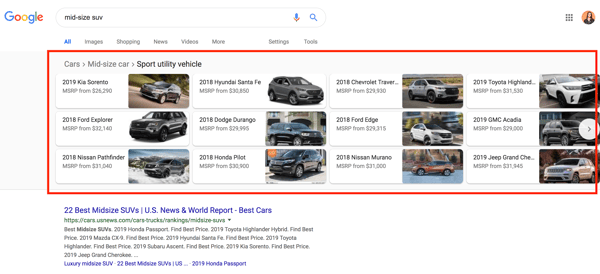
1. Carousels
Carousels show up as images with captions related to a search, such as movie actors, cars, or news articles. Searchers can click through these images to access a separate SERP for that search. Here’s how to use structured data to show up on Carousels.
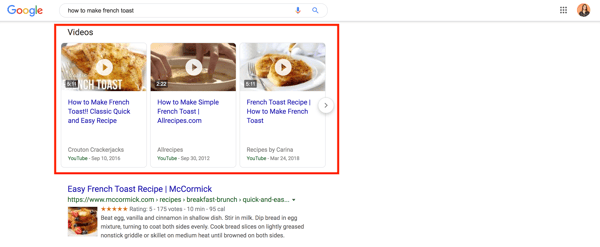
2. Videos
Videos function similarly to carousels but feature videos instead of images or other listings. Searchers can scroll through these results to directly access and watch each video.
Based on how you mark-up your content, you may also qualify for video enhancements such as LIVE badges and video host carousels. Here’s how to use structured data to show up on videos.
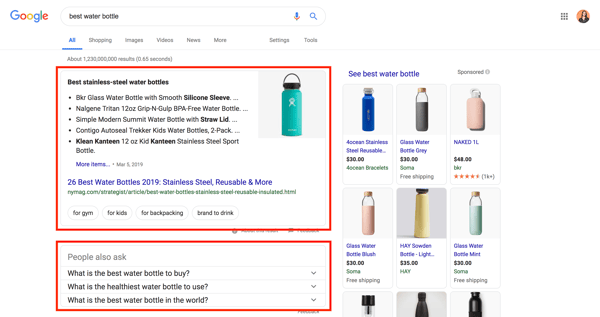
3. Featured Snippets
Featured Snippets display information relevant to a query — and link to a third-party website (which sets them apart from Answer Boxes and Knowledge Panels, which draw from public domain databases). They don’t count as one of the ten organic results on a SERP, so if you “win” the Snippet, your website shows up twice.
Featured Snippets can also be displayed as quotes, tables, jobs, rich cards (for movies and recipes), or the question section titled “People may ask”. Here’s how to optimize your content for Google’s Featured Snippet box.
4. Knowledge Panels (a.k.a. Knowledge Graph Cards)
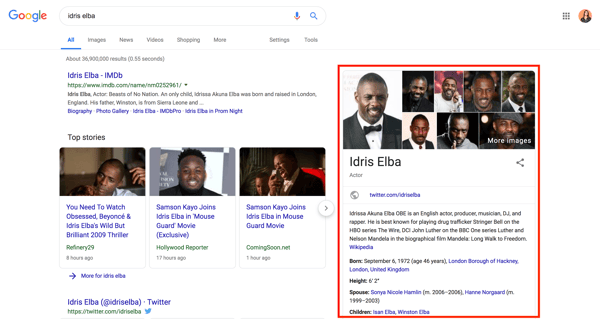
Knowledge Panels pull together the most relevant information from a search and display it as a separate panel on the right side of a SERP. They typically include images, dates, and category-specific information, such as stock prices for companies or birthdays for celebrities. You can use a structured data markup like Schema to tag your content with all of these categories, but there’s no guarantee that Google will reward you with your own knowledge panel.
In fact, structured data doesn’t promise anything, it only makes it easier for search engines and social networks to interpret your content.
Also, Knowledge Panels aim to answer queries without requiring a click-through … good news for searchers, and bad news for businesses. Here’s how to make your site easier for bots to crawl (to increase your chances of showing up in a Knowledge Panel).
Enriched Search Features
Unlike content features, enriched result features enhance regular search results. They’re also called rich search results or rich snippets.
1. Breadcrumbs
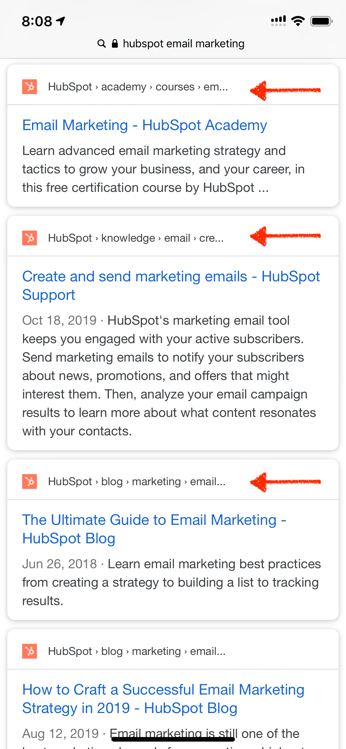
Breadcrumbs “indicate a page’s position in the site hierarchy,” according to Google. Breadcrumbs appear on mobile devices, in place of a URL, above the title of the results page, and next to the site’s favicon (as of 2019). They help searchers understand a page’s relationship to the rest of a website. Here’s how to use structured data to display breadcrumbs in your results.
2. Sitelinks and Sitelinks Searchbox
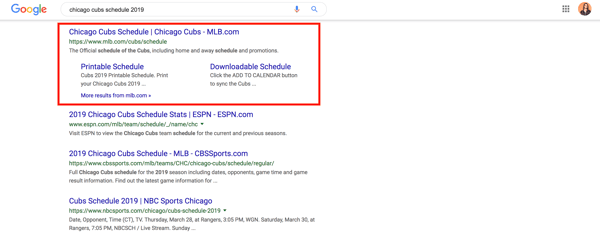
Sitelinks are additional links displayed beneath a search result that navigate to different parts of a website. Google pulls them into a SERP when it thinks additional results would benefit a searcher. Websites with intelligent anchor text and alt text that’s informative, compact, and avoids repetition have a good chance of displaying a result with Sitelinks.
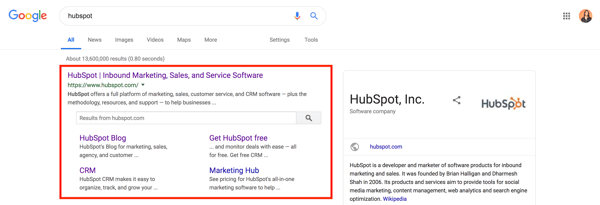
Sitelinks Searchbox is like Sitelinks with a search bar directly featured in the result. That search box uses Google — not the featured website — which creates a brand new SERP. Sitelinks Searchboxes only show up in branded searches.
Here’s how to get a Sitelinks Searchbox for your website.
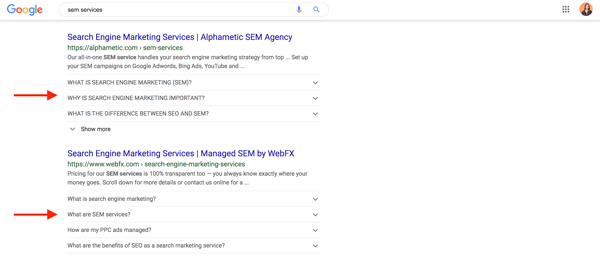
3. FAQ
FAQ can be used on any page that lists questions and answers — not just traditional frequently asked questions (FAQ) pages.
This feature allows searchers to access your questions and answers right from the SERP; it also extends your result vertically, taking up even more SERP real estate and helping your site stand out. Here’s how to use structured data to display FAQ in your search results.
4. How-To
The how-to feature is similar to FAQ in that it displays a page’s content (if it fits certain criteria) on the SERP so searchers can see that information. It walks searchers through a set of steps and can feature video, text, and images.
Unlike FAQ, the individual steps in how-to result aren’t linkable; however, searchers can access the entire list of steps by clicking your results. These results can show up in two formats: standard accordion layout or rich result carousel, depending on the content. Here’s how to use structured data to display how-to content in your search results.

Non-SERP Features
Structured data can also be used to enhance to non-SERP features.
1. Social Cards
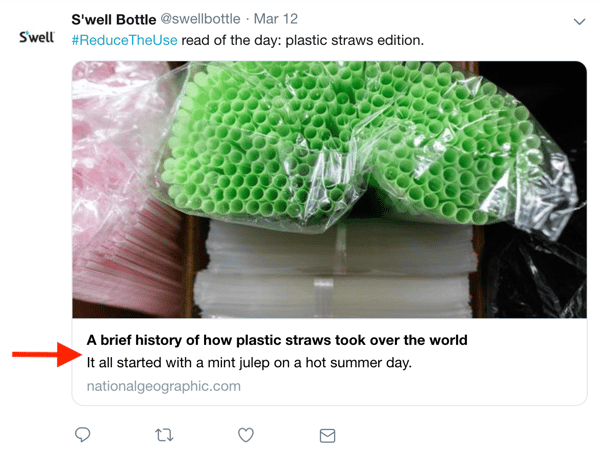
Social-specific markup doesn’t have a big impact on SEO, but it’s still important for marketers to understand. Not only does this markup enhance your social posts and ad efforts, but it can also be read by search engines — which could contribute to any SEO changes in the future.
Social cards display images and rich text when links are shared on social media. Any organization who uses social media to share content should be using proper social markup, such as Open Graph Protocol.
Here’s how you ensure your social content displays social cards:
- Open Graph Protocol (for Facebook, LinkedIn, and Instagram)
- Facebook Validation Tool
- Twitter Cards
- Twitter Validation Tool
- Pinterest Rich Pins
- Pinterest Validation Tool
2. Email Marketing
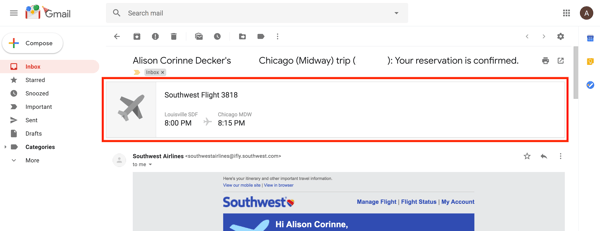
Have you recently booked a flight or ordered something online? If you have Gmail, you might’ve seen your reservation or order details summarized at the top of the confirmation email. This is due to email markup.
If you send emails for orders, reservations, confirmations, or bookings, consider using email markup to make your email recipients’ lives easier. Here’s how to get started with email markup in Gmail.
The concept of structured data might seem confusing, but its implementation isn’t nearly as complicated. In fact, there are a number of structured data tools that can help you along the way, namely Google’s Structured Data Markup Helper and Testing tools. Sure, you can implement structured data by hand, but Google’s tool ensures accuracy — and makes your life easier.
It’s important to note that adding structured data markup on your website doesn’t guarantee a Featured Snippet or Sitelinks Sitebox. Google can take weeks to crawl your new HTML markup, and sometimes, the information doesn’t show up at all.
However, taking the steps to implement structured data is critical. Google might be smart, but it can’t (yet) understand everything on its own. It might seem like a lot of extra work, but using the correct structured data markup will ensure Google can make sense of your content and can help you potentially increase your click-through rates and visibility.
Here’s how to implement structured data by using Google’s Structured Data Markup Helper tool.
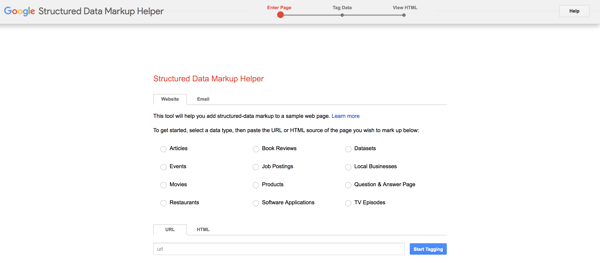
1. Open Google’s Structured Data Markup Helper.
Open up Google’s Structured Data Markup Helper tool.
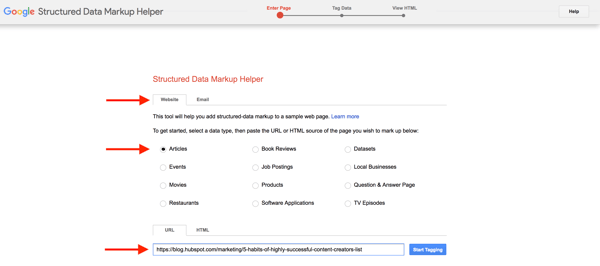
2. Select your data type and enter the URL.
Make sure the Website tab is open. Choose the type of data to which you’d like to add the HTML markup. Plug the web page URL (or the HTML code) at the bottom, and click Start Tagging.
3. Highlight page elements and assign data tags.
When the tool loads, you should see your web page on the left side and data items on the right. Highlight different components of your web page to assign data tags such as name, author, and date published. (The tool will suggest different data tags for different types of data, i.e. Events or Book Reviews.)
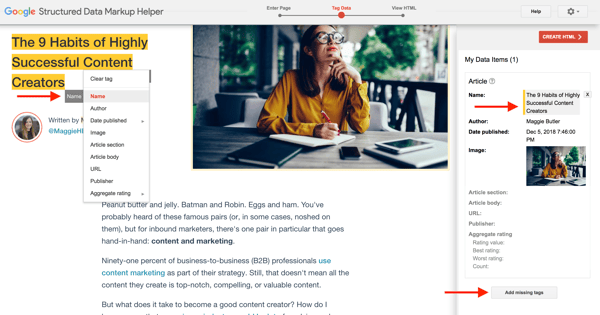
As you select and assign data tags, you’ll see the information pop up under My Data Tags on the right panel. You can also add any missing tags that might not be visible on the web page; just click Add missing tags.
4. Create the HTML.
When you’re finished tagging and assigning data items, click Create HTML in the upper right-hand corner.
5. Add the schema markup to your page.
On the next screen, you should see your structured data markup on the right side. The tool automatically produces the script as JSON-LD markup, but you can change it to Microdata by clicking the JSON-LD drop-down menu in the top menu.

Click Download to download the script as an HTML file. To read more about adding structured data to your article (or any other data type), click Articles in the right corner above the markup.
To “publish” your markup, copy and paste the new HTML markup into your CMS or source code of your web page. Lastly, click Finish in the top right corner to check out Google’s recommended Next Steps … one of which will bring you to this next one.
6. Test your markup with Google’s Structured Data Testing Tool.
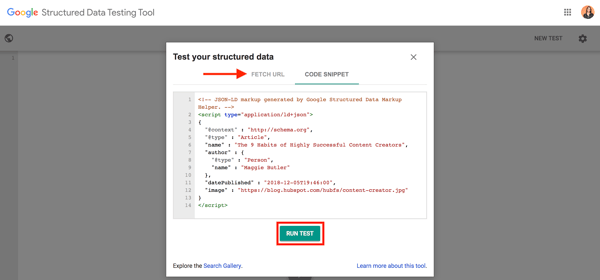
Open up Google’s Structured Data Testing Tool. You can enter any URL of a web page you’d like to test, or you can enter HTML code. (In the example below, I’m analyzing the code previously produced by Google’s Structured Data Markup Helper Tool.) Click Run Test to begin.
7. Diagnose and fix any detected issues.
The tool will show you your HTML markup on the left side and the markup analysis on the right. Note any red errors or warnings. Click on any data row to highlight the corresponding markup on the left.
If necessary, you can edit any errors in the HTML directly in the tool panel before “publishing” the tested HTML markup.
8. Be patient.
This last step is simple but arguably the hardest — to sit back and wait. Google can take weeks to re-crawl new HTML, and even then, your content isn’t guaranteed to show up in rich snippets or other SERP features.
As long as you follow the correct structured data standards and markup, give Google all the information it needs to know, and be patient, your website and business can benefit greatly from structured data and enhanced SEO.
Get Started with Structured Data Today
Google and other search engines continuously improve how they aggregate and present information. They offer enhanced, intelligent search experiences with the customer in mind. It’s up to you as a business to keep up, and you can do so through structured data.
Structured data benefits businesses — through increased visibility — and consumers — through better usability. Use this guide, tools, and resources to optimize and organize your website and make your customers’ lives easier.
Editor’s note: This post was originally published in April 2019 and has been updated for comprehensiveness.

How to Manage Your Entire Marketing Budget [Free Budget Planner Templates]
Let’s say your company decided to invest in a website redesign so you can improve lead generation, and you’re responsible for managing the project. Naturally, one of the first questions you have is, “How much is this website redesign going to cost?”
The answer, of course, is “it depends.” Are you simply switching to a new template and adding some new CTAs, or are you migrating your entire website to a new platform?
If only there were a way to organize your answers to all of these questions — a place where you could enter in estimated costs for all of your line items, and then compare your projected marketing budget to what you actually end up spending.Good news: Our free marketing budget templates have got you covered. Included in our eight budget templates bundle is a template to manage your website redesign … as well as templates for both Excel and Google Sheets to help you track your content budget, paid advertising budget, event budget, and more.
In this blog post, you’ll find the following content (click a link below to jump to that section):
- How to Create a Marketing Budget
- 8 Free Marketing Budget Templates You Need to Manage Your Expenses
- Sample Marketing Budget
Marketing Budget
A marketing budget outlines all the money a business intends to spend on marketing-related projects over the quarter or year. Marketing budgets can include expenses such as paid advertising, sponsored web content, new marketing staff, a registered blog domain, and marketing automation software.
Marketing budgets can be difficult to establish for both small and large businesses. If you’re a small business, you might wonder which marketing expenses you should start with. If you’re a large business, having multiple marketing teams or operations in play can make it harder to ensure everyone across the department gets what they need.
So, what should you spend your marketing cash on? First, let’s identify a focal point: According to investment agency, Magna, money spent on digital media will increase by 11.8% in 2019, up from $106.6 million in the U.S. alone in 2018. This includes initiatives that cater to audiences on desktop computers, search engines, video streaming platforms, social media, and mobile devices.
Digital media makes up more than half of the country’s total advertising spend. Given the success marketers have seen in it, you might consider spending at least half of your marketing budget on some of the digital channels mentioned above.
Marketing Budget Breakdown
As you build a marketing budget, here are a few items you’ll want to keep in mind and plan your spending on.
- Software: When it comes to digital and even print media, you may need software to create your marketing campaigns, or handle your daily processes.
- Freelancers: If you have a temporary campaign or want to test out a new marketing strategy, you might want to hire a short term freelancer before bringing on a full-timer.
- New personnel: When you do hire full-time employees, you’ll want to budget costs including their computer, technology, benefits, and onboarding-related needs.
- Advertising: Budget how much money you’ll spend on paid opportunities such as physical ads, native ads, sponsored content, search engine ads, and social media promotions.
- Content creation: When you create content such as videos, photos, or even blog posts, you’ll need to put paid time into it. Budget how much money will go into creating this content so you can adjust accordingly based on its return on investment.
How to Create a Marketing Budget
Spreadsheet knowledge, alone, won’t help you understand how you’ll spend your marketing money this year. Creating a sound marketing budget starts with knowing what purpose this budget will serve and which marketing teams it will represent.
1. Align your budget with your marketing goals.
What you spend and where you spend it will depend on what you’re trying to accomplish. So, when starting to create your marketing budget, make sure you’re only spending money on the things required by your current marketing goals. This can include:
- Display ads to promote a new product you’re launching this year.
- Sponsored social media posts to generate followers of your new Facebook page.
- Paid search engine ads to drive traffic (and purchases) to a specific product page.
- Contract bloggers to get more organic search traffic to your company’s website.
HubSpot’s former Demand Generation Marketer and Trello’s current Growth Marketing Lead, Jessica Webb, says this about how your costs can change when focusing on lead generation vs. lead conversion: “The majority of the money you spend on paid efforts is usually calculated based on volume of clicks or impressions. Because of this, you’ll often want to put more budget toward campaigns with higher-volume offers and audiences.”
“For example, a tweet or Facebook ad promoting a lead generation offer that leans more top of the funnel will likely receive more clicks than something that falls more toward the middle or bottom of the funnel,” she explains.
Your paid advertising costs will also change depending on how wide of an audience you are attempting to reach. “You can look at Twitter advertising as an example,” Webb explains. “You have to option to target your campaigns based on users’ interests or keywords searched for. Interests are a much broader category, whereas smaller pockets of users are searching for any given keyword, therefore your interests-based audience is going to be much larger and require a larger budget.”
To keep better track of your paid advertising efforts, download the Paid Advertising Budget Template (included in the8 Budget Templates to Manage Your Marketing Spend).
2. Beware of hidden costs.
One of the great advantages to having and maintaining a budget spreadsheet is that it helps you avoid those end-of-the-quarter or end-of-the-year freak outs when you realize, “Whoa … what did I spend all that money on?”
In many cases, unanticipated costs can force marketers to fork over cash that they didn’t plan on spending. Product marketing offers a perfect example. According HubSpot’s VP of Marketing Meghan Keaney Anderson, it’s easy to forget that successfully marketing your products and services requires more than just promotion.
“When people allocate budget for product marketing, they tend to think in terms of product launches and promotional activities,” Anderson explains. “That’s certainly an important part of it, but another area of focus to remember is setting aside resources to conduct research and message testing long before the product ever goes to market. Having conversations with customers about the pain points your product will ultimately address is critical to shaping the messaging and having a successful launch.”
To better manage your product marketing efforts, download the Product Marketing Budget Template (included in the 8 Budget Templates to Manage Your Marketing Spend).
3. Remember where your priorities lie.
Marketing is overflowing with add-ons and extras, upsells, and “premium” versions. One of the best ways to assess what’s nice to have versus what’s absolutely necessary is to (you guessed it) organize all of your expenses. By keeping tabs on where your budget is being allocated, and cross-checking that spending with the results you’re getting, it will be much easier to figure out what should keep getting budget and what should get kicked to the curb.
For example, let’s look to the world of public relations. In PR, there are countless tools to which you can allocate budget, which could leave you overspending where it doesn’t matter — and underspending where it does.
“Tools abound to help PR practitioners not only create and distribute great content and find and target key stakeholders, but to ultimately measure reach and effectiveness,” says Nathaniel Eberle, HubSpot’s former Director of PR & Brand and LogMeIn’s current Director of Global Brand Management. “The key is making sure you’re laser-focused on who you’re setting out to reach and influence, then ensuring that your budget supports how they’ll most likely want to receive (and share) your key messages.
“As the media and digital landscape evolves at breakneck speed, continually reassessing the tools, services, and programs you’re employing is a great way to determine real-time ROI of your overall spend. Today’s measurement tool may be worthless to you tomorrow.”
To get better at prioritizing your PR line items, download the PR Budget Template (included in the 8 Budget Templates to Manage Your Marketing Spend).
4. It’s not all about the Benjamins.
When you open up these budget templates and check out all the various expenses detailed in them, don’t fret if you can’t tick every box. I’m not advocating for an “always spend more” approach to marketing. I’m advocating for an “always spend smart” approach. The expenses listed out aren’t mandatory — they’re just meant to guide your thinking and to help ensure that you haven’t overlooked any hidden costs.
5. Prepare to measure ROI.
When you put a certain amount of money into a certain area, you’ll want to determine if your budgeting helped you or hurt you as you plan out future budgets. The best way to do this is by measuring ROI — or return on investment. If you’re the money you spend on one item results in your company making more in return, you may want to increase budget in the next year. If your money went nowhere, you should examine your budget.
With that in mind, here’s the full list of budget templates included in the bundle.
8 Marketing Budget Templates You Need to Manage Your Marketing Spend
With the 8 Free Budget Planner Templates to Manage Your Marketing Spend, you’ll be able to manage all of the moving pieces of your budget at a monthly and quarterly level. Use the Excel version of the templates to keep all of your budgets in one place. When you download the zip file, you’ll find a separate file for each marketing team, as well as a Master Budget Template to maintain a high-level view of your overall expenses.
Interested in sharing your marketing budget across a larger team? Try the Google Sheets version of the same eight templates to share access with other Gmail users. For the Google Sheets templates, each team budget is found in a separate tab of the same Google Sheet. No matter which version you choose, each budget is optimized with the same line items, tips, and graphs. Read on to learn how to use each budget template.
1. Master Marketing Budget Template
Download the Master Marketing Budget Template here.
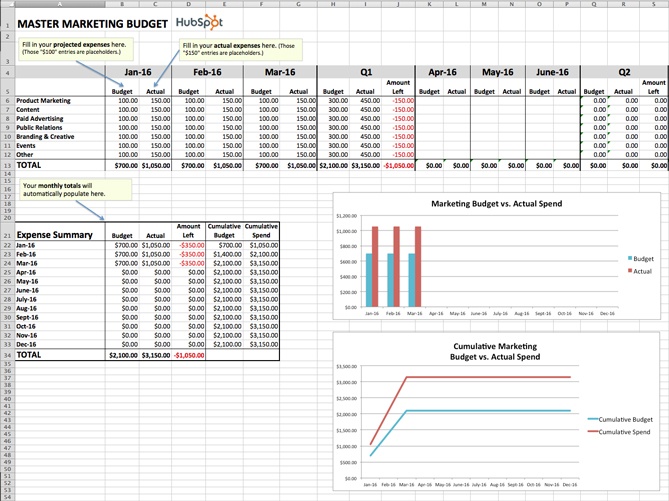
While it’s helpful to have individual budget templates for specific marketing departments and activities, it’s also nice to be able to take a step back and see the bigger picture. The Master Marketing Budget Template lets you do just that: It’s the place where you can collect the totals from the other seven templates in the bundle and see all of your expenses in one place.
2. Product Marketing Budget Template
Download the Product Marketing Budget Template here.
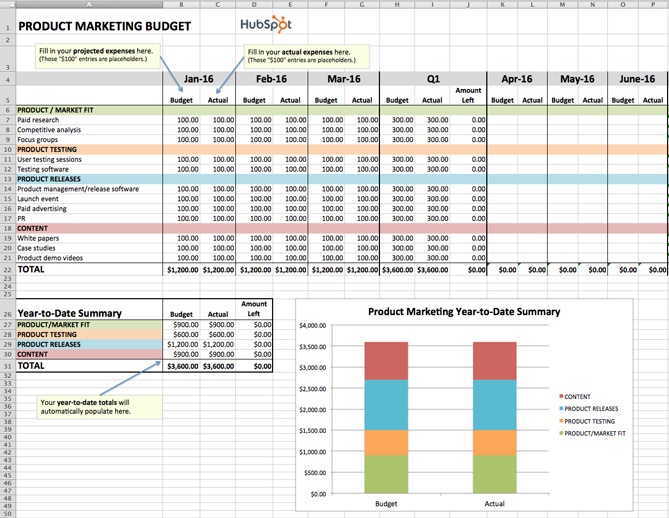
This template will guide you step-by-step through the process of budgeting for a product launch. From determining product/market fit, to running user testing sessions, to promoting your finished product, our Product Marketing Budget Template will help ensure you don’t overlook any important expenses.
3. Content Budget Template
Download the Content Budget Template here.
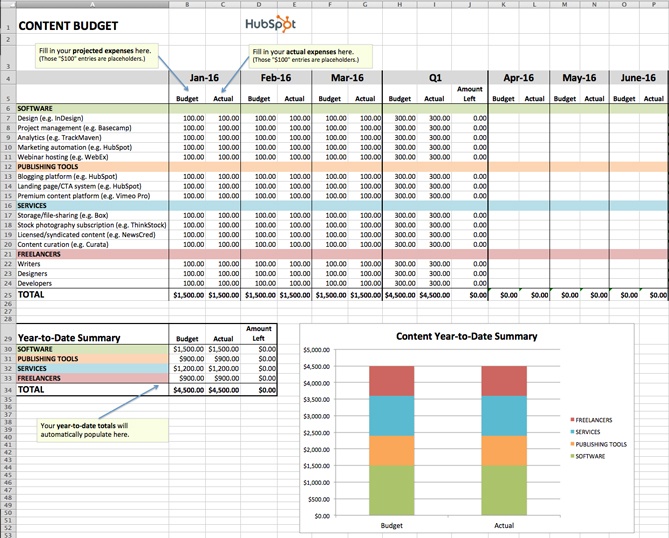
The budget required for creating and promoting content can vary greatly from organization to organization. For example, while some organizations keep most of their content operations in-house, others rely more heavily on freelancers and contractors. And while some use many different software products, publishing tools, and services, others take a much simpler approach.
Our Content Budget Template is designed to cover as many content-related bases as possible. So, if you see any expenses listed that don’t apply to your organization, go ahead and delete them. (That’s the beauty of Excel spreadsheets: You can customize them to your specific needs.)
4. Paid Advertising Budget Template
Download the Paid Advertising Budget Template here.
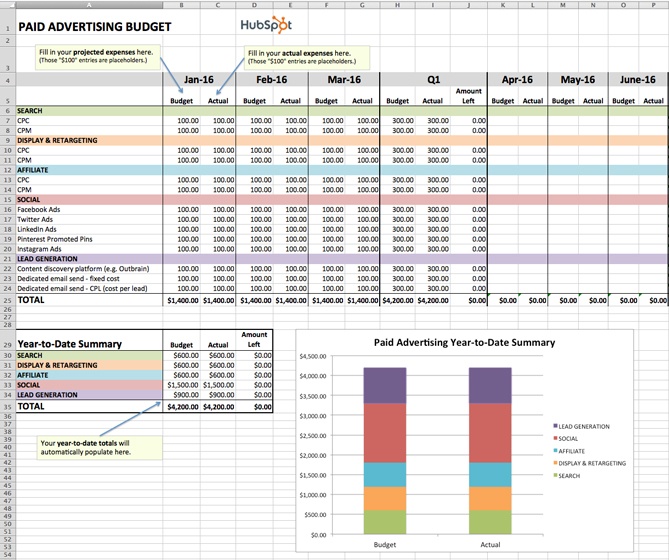
Paid advertising: Does it really qualify as an inbound marketing tactic/channel? That is a loaded question, my friends, and one that I don’t have room to answer in-depth in this post. What I can tell you for sure is that you can do paid advertising in an “inboundy” way — i.e. by targeting specific buyer personas and using paid advertising as a supplement to your organic efforts to help drive awareness and conversion opportunities.
Measuring the effectiveness of your paid advertising campaigns is also paramount to doing things the inbound way. Using our Paid Advertising Budget Template, you can keep tabs on your monthly (and quarterly) ad spending, and then cross-reference the amounts with your lead-generation metrics to determine your cost-per-lead.
5. Public Relations Budget Template
Download the Public Relations Budget Template here.
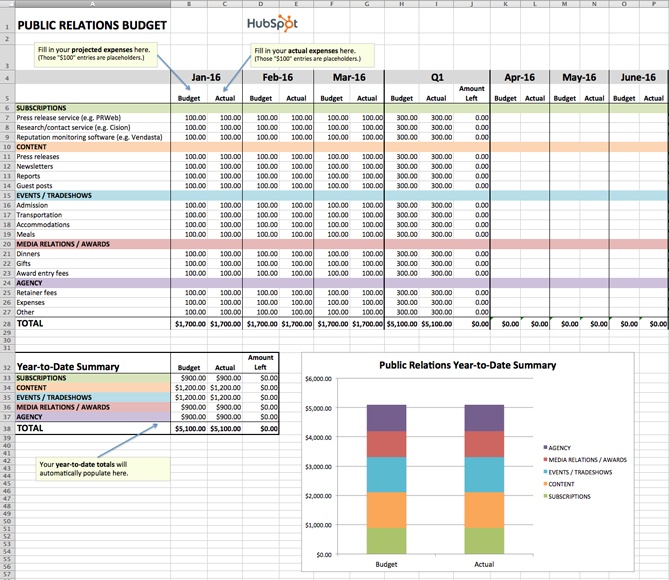
Public relations expenses amount to more than just paying for press releases. From reputation monitoring software, to traveling (e.g., to events and tradeshows), to applying for awards, there are many PR costs that can be all too easy to overlook.
To ensure you’re accounting for all of your organization’s PR-related expenses, check out our Public Relations Budget Template.
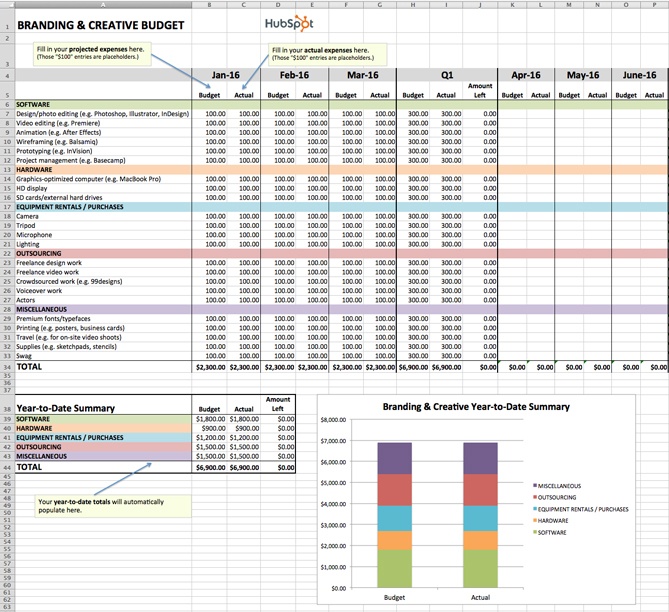
6. Branding & Creative Budget Template
Download the Creative Budget Template here.
In order to produce high-quality, innovative graphics, videos, and other content, the branding and creative teams of today need more than just Photoshop … a lot more. One of the largest — and often most overlooked — expenses is storage.
If your organization is producing a lot of video, storage is especially important. Because as it turns out, when budgeting for video storage, you shouldn’t be thinking on a megabyte (MB) or even a gigabyte (GB) scale, but on a terabyte (TB) scale. FYI: 1 terabyte = 1 trillion bytes. You can keep track of all your storage costs (and other branding and creative costs) using our free template.
7. Website Redesign Budget Template
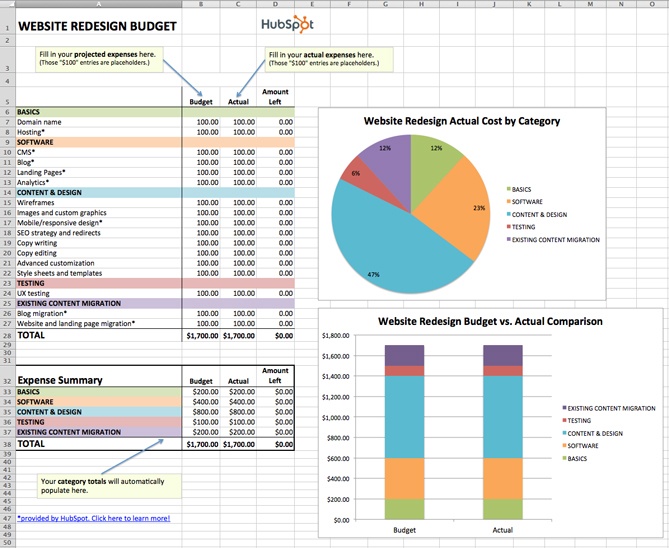
Download the Website Redesign Budget Template here.
Budgeting for a website redesign can be seriously tricky. With so many moving pieces to consider, there is a lot of room for underestimating or miscalculating costs. We created our Website Redesign Budget Template so you can keep all of your redesign-related expenses in one convenient location.
Unsure if your current website is right for a redesign? Check out this HubSpot research report: Does Your Website Make the Grade? Chances Are, It’s Barely Passing.
8. Event Budget Template
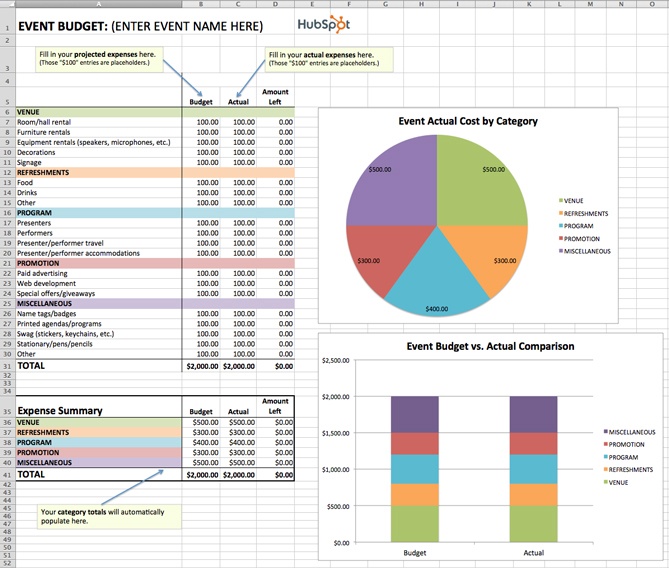
Download the Event Budget Template here.
When planning an event, the associated costs can seem obvious at first. There’s the venue to consider, of course. And the P.A. system and microphones. And then the costs associated with booking and bringing in presenters/performers. That’s pretty much it, right?
Wrong.
For example, does the venue come with tables/chairs, or will you have to rent those separately? Do you want your attendees to wear name tags, and if so, will you be printing out the name tags ahead of time or will attendees be writing their own names on blank tags? If the latter, have you factored in the pens or markers you’ll need to accommodate that? As you can see, planning for an event can lead you down many rabbit holes.
Use our Event Budget Template to stay organized.
Sample Marketing Budget
With your chosen template downloaded, it’s time to consider which digital channels to allot a budget for. Hint: There’s no right answer — it’ll depend the market research you do to figure out where your specific audience spends most of its time. If you find your buyer prefers learning and consuming content in the form of video, for example, you might invest more of your money in YouTube advertising.
Alright, enough explanation. Here’s a small, sample budget for a quarter’s worth of expenses by a hypothetical company that has decided to invest heavily in video marketing. This template was created using the Master Budget Template, the first template listed in the section above.
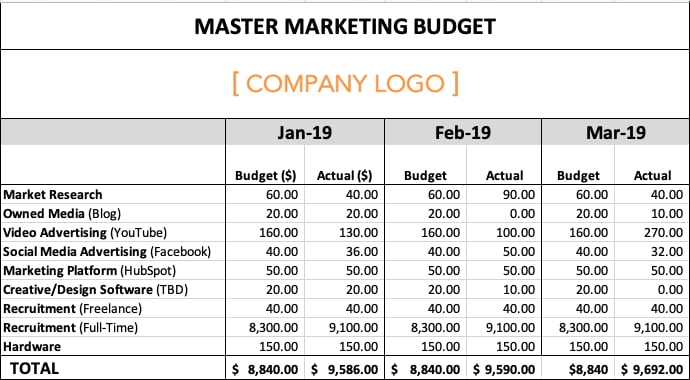
Based on the figures above, video advertising’s total expenses for the quarter exceeded budget by $20, while full-time recruitment’s total expenses exceeded budget by $2,400. This means the company is trending over budget for the first three months of the year. Why might this happen? Perhaps a pay-per-click (PPC) campaign on YouTube received more clicks by viewers than expected, and a sharp video-savvy job candidate negotiated a higher salary.
Based on the difference between this company’s planned spend and actual spend, their budget template produced the following graph: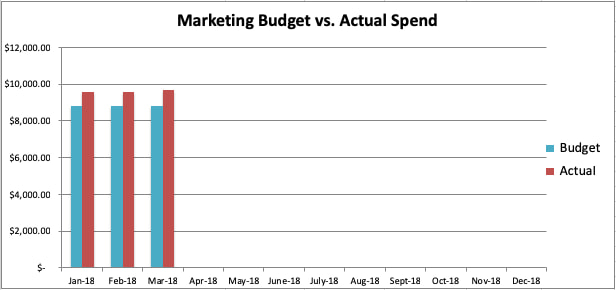
Go now, and plan wisely — your marketing staff is counting on you.
Editor’s Note: This blog post was originally published in December 2015, but was updated in January 2019 for comprehensiveness.

Images, GIFs or Video: Which Perform Best on Instagram?
Instagram is a wildly popular platform for consumers and companies alike. One reason the platform is so successful is due to its visual nature. Not only are images and videos more engaging than written text, but visual content is remembered more than text.
But deciphering exactly what kind of visual content to post is tough. It can take a lot of work to develop visual content, so it’s important to know where to focus your resources.
When it comes to Instagram, should you be posting more images, GIFs, or videos? Which medium is best for engaging your audience? Where should you dedicate your resources?
I sat down with Kelly Hendrickson, Social Media Marketing Manager at HubSpot, to better understand the answer.
Images vs. GIFs vs. Video
Before we dive into Hendrickson’s comparison, let’s outline a few important distinctions on Instagram.
First, there are two sides to social media content: organic and paid. Organic content is unpaid content that falls into the natural Instagram algorithm. Paid content follows a different algorithm. “With a lot more factors at play, the question of performance involves more than just the medium,” Hendrickson commented.
Secondly, Instagram offers two main ways to share content: posts and Stories. These channels affect the performance of certain media, so the question of images versus GIFs versus video varies between the two.
Lastly, according to Hendrickson, GIFs are seen as video content on the Instagram wall. (Technically, you can’t upload a GIF to Instagram — to post one, you’d need to upload it as a video anyway. Learn more how to do that here.)
So, how do images and videos/GIFs stack up when shared …
- … organically and via paid content?
- … on posts and Instagram Stories?
Let’s start with organic versus paid.
“Organically, images can reach as many as 2x more people,” Hendrickson shared. “This isn’t to say that video couldn’t work for you, but Instagram was always designed as an image-first platform.”
Considering that both networks are owned by Facebook and that Facebook is so video-heavy, it makes sense that Instagram is the original image platform.
“This isn’t black-and-white, but algorithms can reveal themselves,” Hendrickson said. “Now, a video with high engagement — that could bust through the algorithm. However, we’ve seen images perform much better on Instagram.”
Although paid content is faced with many more factors beyond the medium itself, the HubSpot team has seen the same impact of images. Note: This is more an observation of user behavior trends on the market, not something the team itself has proven.
The main question with paid content, however, is: what is the purpose of the ad? The answer to this will help determine how well a certain medium might perform on Instagram.
Hendrickson and her team haven’t explored much with paid video content because of their organic results, but they have noticed a growing trend. “Something that has become popular … is subtle animation — a five-second animated image. It’s technically a video but visually closer to a GIF,” Hendrickson explained.
Many marketers use them to garner clicks and attract Instagram users from the content stream to their profiles and websites.
When analyzing Instagram Stories, the answer is less clear. “Stories are truly the black box of social media,” Hendrickson admitted. “With everything else, you can understand the reasons for certain results — it’s not the same for Stories.” Because of this, it’s tough to decipher the very best medium for Stories.
One important distinction that Hendrickson and her team have been able to identify, however, is this: the more branded your Instagram Story content looks (whether a video or image), the poorer it performs.
“The closer it could look to everyday posts shared by friends, the better it will do,” Hendrickson explained.
There are plenty of engagement opportunities with Instagram Stories. Stories themselves are helpful in engaging audiences; it’s not as much about the medium.
When it comes to paid Story content, Instagram sets tight restrictions. Marketers only get one feature — a single frame or poll — which means there’s not much room for A/B tests on Stories. For that reason, HubSpot hasn’t explored paid Stories much.
On the other hand, organic Instagram Stories have revealed some new trends. “While we’ve seen image-based Stories can do a bit better than videos of people talking to the camera, on any given day, you could have a Story with many of the same metrics but a reach of 30% more. With a lot of social media, you can figure out why — but not the same with Instagram Stories,” Hendrickson shared.
There you have it — images perform better for both organic and paid Instagram content, as well as in Instagram Stories. If you choose to post on your Instagram Stories, the more natural your content, the better. These findings aren’t to say video and GIF content doesn’t succeed, however. Implement these trends alongside your audience analytics to produce the most impactful Instagram content.

YouTube Trends: What Marketers Need to Know

Do you use YouTube in your marketing? Wondering how often you should publish videos and what type of content works on YouTube? To explore the YouTube trends marketers need to know about, I interview Sean Cannell on the Social Media Marketing Podcast. Sean is a video marketing expert, host of the Think Marketing Podcast, and […]
The post YouTube Trends: What Marketers Need to Know appeared first on Social Media Marketing | Social Media Examiner.
from Social Media Marketing | Social Media Examiner https://ift.tt/3a0x3NQ
via socialmediaexaminer
Marketers Deserve Enterprise Software That Doesn’t Suck
“Old and clunky”
“So hard to use”
“This makes my head hurt”
“The product feels like it was built without any customers in mind”
Perhaps enterprise software providers should consider one of these phrases for the tagline of their next campaign. After all, they are direct quotes from users of their tools, left on review site G2.
The general consensus? Their software sucks. Really sucks.
How is this still the case in 2020? We live in an age of artificial intelligence, autonomous vehicles, and augmented reality. We are awash with incredibly advanced technology. But marketers still can’t find an enterprise software solution that doesn’t make their head hurt.
As far back as 2009, there were calls on enterprise software providers to pay more attention to the user-friendliness of their products, but like the proverbial ostrich, they put their head in the sand, rested on their laurels, and blindly trusted the lazy assumption that customers will forever accept pain as the price of power.
It’s one of the most extreme examples I’ve seen of Jim Collins’ ‘tyranny of the OR’ concept — the destructive tendency of some businesses to view all decisions as binary; a choice between A or B, but never both. Enterprise software providers have for years had the option to offer marketers tools that are both powerful and easy to use. But they haven’t. Rather, they’ve consistently fallen victim to the ‘tyranny of the OR’, pushing out endless features that are only powerful and never, ever easy to use.
Frankly, there’s no excuse for this. In recent years we’ve seen companies like Zoom, Shopify, and Slack refuse to compromise like other enterprise software providers. They’ve listened to customers, they’ve embraced advanced technologies, and they’ve completely transformed their industries by offering consumer-grade usability along with the deep power needed by rapidly growing businesses.
Y Combinator co-founder, Paul Graham, recently called out the vulnerability of enterprise software providers still stuck in the past, suggesting that they could someday “suddenly crumble.”

That day is coming sooner than you might think.
One third of B2B buyers say their customer experience expectations have increased. Even more say they’re ready to switch to a better solution. It’s time marketers were given an enterprise software solution they’ll actually enjoy using. One that combines power and ease-of-use. One that doesn’t suck.
The Burden of the Legacy System
So how did enterprise software providers lose their way? In short, they failed to adapt to the breadth of needs of the modern marketing team, which has undergone a major transformation over the past decade.
The explosion of marketing technology accelerated this transformation and significantly expanded the archetypes of marketers. New tools gave rise to new specialties and skill sets, which, when combined well, can make modern marketing teams greater than the sum of their parts. Enterprise software’s race to keep up was choppy at best, and it sacrificed usability as it added new features. Heading into the new decade, growing businesses have no choice but to demand more from their enterprise software. Customer expectations have risen to new heights, thanks to a wave of new B2C innovators that have disrupted entire industries by prioritizing user experience above all else.
Casper will ship a mattress to your door as if it was delivery pizza, Robinhood will let you trade stocks while you wait for the bus, and Netflix will give you — yes, you, personally — a carefully curated list of movie recommendations every time you sign in.
So why is it still so infuriatingly difficult to build a simple email campaign with most enterprise marketing tools?
Today’s providers, despite their big promises and wordy taglines, slow businesses down precisely at the moment they need to be moving faster. Over time, their software becomes overloaded with unnecessary forms, fields, workflows, and more, all of which get in the way of marketers trying to deliver the type of experience their customers expect.
For marketing operations leaders, this pain is multiplied. Whenever any marketer on their team is let down by their software — be they an email marketer struggling to segment a list, or a marketing analyst trying in vain to generate a report — the ops leader feels their pain. They are deep in the weeds with every tool, forced to wrestle daily with unwieldy systems that aren’t fit for purpose. And when those systems inevitably fail, they’re the ones on the front lines, trying to find a fix.
So why do so many marketers and operations leaders still put up with all of this complexity and clunkiness? Why don’t they simply switch to a different platform more suited to their needs?
Enterprise software providers have convinced their users that complex tools are in fact essential if they want to do complex things. They present confusion and clunkiness as an indicator of power, and ease-of-use as an indicator of technological limitations. It’s a myth. And it’s perpetuated by incumbents to dupe their customers into sticking with the same outdated, counter-intuitive platforms year after year.
For too long, enterprise software providers have gotten away with foisting tools built for the past on businesses trying to create the future.
Move Fast and Market Things
What growing businesses deserve is enterprise software that’s built for the modern era — solutions that combine power and ease-of-use, and make it easy for them to put their most innovative ideas into practice, fast.
Speed has always mattered in marketing. The early adopters of email marketing saw open rates that marketers today can only dream of. The first Facebook advertisers got phenomenal bang for their buck. The quickest SEO strategists enjoyed years of first-page SERP rankings. To take advantage of marketing’s new frontiers and stay ahead of the competition, marketers need to be able to innovate quickly and execute efficiently.
And yet, slow strategy execution and insufficient digital capabilities remain top concerns of business leaders heading into the new decade. These two concerns are opposite sides of the same coin — without the right tools, strategy execution will never be fast enough. The enterprise platform you buy in 2020 should be able to evolve and adopt new technical approaches in such a way so that it is almost an entirely different platform by the time you hit 2022. It should combine innovation within its own feature set with extensibility found through integrations and an active app ecosystem. Slow-to-evolve technology leads to outdated marketing strategies. Maintaining seamless usability while steadily evolving will be the superpower of the next era of enterprise software.
Putting Enterprise Software to the Test
With the wealth of powerful technology now available, growing businesses have an opportunity as never before to truly delight their customers, and gain a competitive advantage by doing so. But when it comes to choosing an enterprise software solution to fuel this growth, information asymmetry can get in the way of buyers picking the right provider for their team’s needs. The software evaluation process is notoriously noisy, as salespeople bamboozle buyers with bells, whistles, and add-ons they don’t need and will never use.
To cut through the noise and simplify the buying process, marketing and operations leaders should focus on five key ‘tests’. If the software doesn’t pass all five with flying colors, it isn’t right for any business that wants to grow better.
1. The Speed Test — enterprise software should significantly reduce the amount of time it takes marketers to complete essential tasks like building an email campaign and running a report. The less time it takes to complete standard tasks, the more time there is to focus on delighting customers.
2. The People Test — it’s a given that every type of marketer, from data analyst to creative designer, should be able to work with their company’s enterprise software, but they should also each have an equally positive experience with it. If even one marketing function isn’t set up for success with its software, it will negatively impact all aspects of the team’s work.
3. The Customer Test — enterprise software should make marketers’ jobs easier, and should therefore be loved by its users. If its reviews on sites like G2.com and Capterra aren’t glowing, it’s a sign that there could be usability or functionality issues, which may only show up after a contract is signed.
4. The Window Test — if completing standard marketing tasks requires multiple windows and tabs open at the same time, it’s an indicator that the software is not built with user-friendliness in mind. The more tabs open, the greater the likelihood of oversights, errors, and ultimately, unhappy customers.
5. The Extensibility Test — enterprise software should grow with a business. Full stop. As a team’s needs evolve, it should be easy to integrate new tools directly into its flow of work, and to sync data bidirectionally. Systems that lack this ability can stifle innovation and create stagnation. Customers’ expectations are always evolving and marketers need to be able to adopt new tools that help them offer ongoing delightful experiences.
It’s 2020. Businesses should not have to compromise on any of these essential requirements of a modern enterprise marketing solution. Emailing should be enjoyable. Reporting should be reliable. Segmentation should be straightforward. A/B testing should not test your patience. This is what enterprise software should look like. And with the newly revamped Marketing Hub Enterprise, it does.
At the beginning of this post, I shared quotes from G2 reviews of enterprise marketing software. And I will leave you with the words of another exasperated enterprise software user whose advice to marketers is to simply, “Save your time and use HubSpot.”
HubSpot’s Marketing Hub Enterprise now includes new revenue attribution reporting, partitioning, AI-powered A/B testing, and ABM features, as well as increased limits on lists and workflows.
Marketing Hub Enterprise: Always Easy. Now deeply powerful.

Programas para hacer Videos Animados: Doodly vs Toonly
Si estás leyendo este artículo es muy probable que ya sepas lo que un video animado puede potenciar en tu negocio o estrategia de marketing digital, pero tal vez todavía no has encontrado el mejor creador de videos.
Sabemos lo que es estar evaluando opciones, leyendo reseñas y viendo tutoriales, por eso hemos decidido realizar esta comparativa de Doodly vs. Toonly, dos software de creación de videos que permiten editar con solo soltar y arrastrar elementos y que conocemos bien porque llevamos años trabajando con ellos y con sus creadores.
Cuando necesitamos una animación en video, un profesional siempre es una figura que aparece entre las opciones; sin embargo, no todas las veces es lo más recomendable.
No solamente por el costo de sus servicios (la creatividad se tiene que pagar). También es importante ponderar los tiempos.
Con un profesional, generalmente tardarás más en producir videos de dibujo y, algunas veces, los negocios online necesitan respuestas inmediatas y que no alarguen la cadena de producción.
En dichos escenarios, tanto Doodly como Toonly son buenas alternativas, y sí, independientemente de cualquier cosa, es más barata la producción audiovisual con un software creador de videos que con un ilustrador profesional.
A lo largo de esta comparativa de Doodly vs. Toonly te contaremos las particularidades de cada uno para que puedas decidir cuál es la mejor respuesta para ti.
Demo en español de Doodly y Toonly
Antes de seguir adelante, te dejamos los tutoriales en español que hemos preparado de ambas aplicaciones, para que veas su potencial, los puedas comparar y seguir paso a paso su funcionamiento en caso de que ya los estés utilizando.
Demo de Doodly en español
Demo de Toonly en español
Doodly vs. Toonly: Semejanzas
El punto donde ambas plataformas convergen es en la usabilidad. Tanto Toonly como Doodly son:
- Sencillas de utilizar.
- Baratas en relación al costo del mercado por minuto animado.
- No se requieren conocimientos técnicos sobre animación y edición.
- Tienen galerías de imagen y audio predeterminadas (escenas de fondo, personajes, diseños y pistas musicales).
- Los videos son fáciles de exportar y compartir.
- Ambos son software que se descargan en tu computadora pero se actualizan desde la nube. (Con esto tienes lo mejor de los dos mundos, pues en local se trabaja más deprisa pero tu información se sincroniza con todos los equipos en los que tengas instalados Doodly o Toonly.)
- Funcionan tanto en Windows como en Mac.
- Los videos tienen una apariencia profesional. No hay forma de darte cuenta de si los dibujó un software o un humano.
- No es necesario tener conocimientos previos en dibujo.
- Incluyen bibliotecas de imágenes pero también puedes subir las tuyas propias.
Doodly vs. Toonly: Diferencias
En el momento de hacer una comparativa de Doodly vs. Toonly su primer elemento diferencial salta desde el nombre. Ambos son editores de videos que trabajan con bibliotecas de ilustraciones y audios, pero tienen algunas particularidades.
Doodly
Es un creador de videos cuyo nombre hace referencia al formato doodle, un estilo de video explicativo que simula una mano dibujando todo el trazado de la animación.
Durante ese trayecto se puede agregar voz o música. (Después te lo explico con más calma, pero en el caso de Doodly se puede prescindir de la mano.)
A continuación te muestro un video que hicimos con Doodly. Es una idea muy concreta que se explica de forma sencilla pero dinámica porque, como la mano se mueve, todo el tiempo te da la sensación de que están pasando cosas.
Toonly
Toonly, por su parte, se asocia a cartoon, es decir, ‘dibujos animados’ que recuerdan al espectador personajes de su infancia y que por tanto facilitan su identificación con el mensaje de marketing que se está transmitiendo.
En este creador de videos no se muestra el proceso de trazado de los dibujos. Tiene fondos con animación y personajes que directamente actúan en las escenas. También se puede añadir voz y música.
Versiones y Precios
Aunque, si te diriges a la web oficial, verás que tanto Doodly como Toonly tienen versiones de pago mensual y anual. Pero si accedes desde estos enlaces (Doodly y Toonly) podrás tenerlas, ahora mismo, por un pago único y con acceso de por vida.
Tanto en un caso como en otro puedes acceder inicialmente a la Versión Estándar y, si luego quieres más funcionalidades, puedes ampliar a la Versión Enterprise.
La Versión Estándar en ambos casos cuesta desde aquí 67$ (pago único) y la Enterprise es una ampliación posterior que ahora tiene un precio de 97$ (también pago único).
Es decir, que si quieres la Enterprise primero tienes que adquirir la Estándar.
La diferencia entre una y otra es que la ampliación a la Enterprise ofrece entre 5 y 6 veces más recursos que la Versión Estándar, además de que la podrás utilizar para proyectos de clientes. Con la Estándar funciona perfectamente la aplicación pero, si quieres sacarles mucho más partido, ampliar a la Enterprise con este precio es ahora mismo una muy buena oportunidad.
No hay prueba gratuita, pero Doodly viene con una Garantía de Devolución de 14 días y Toonly de 30 días. Si no es lo que esperabas, te devuelven el dinero sin problemas (y nos tienes a nosotros en el chat para lo que necesites).
Diferencia entre la Licencia Estándar y la Licencia Enterprise
Para que veas cuál es la diferencia entre una licencia y otra, te dejamos una tabla-resumen de cada una:
Doodly – Licencia Estándar y Licencia Enterprise
| Estándar | Enterprise | |
| Personajes | 10 | 30 |
| Diseños | 200 | 1.100 |
| Posturas | 20 | 360 |
| Fondos | 10 | 120 |
| Escenas de transición | 20 | 100 |
| Audios | 20 | 80 |
| Animaciones de texto | 3 | 5 |
| Imágenes nuevas cada mes | No | Sí |
| Subir tus propias imágenes | Sí | Sí |
| Derechos Comerciales | No | Sí |
Toonly – Licencia Estándar y Licencia Enterprise
| Estándar | Enterprise | |
| Personajes | 15 | 35 |
| Personajes animados | 12 | 28 |
| Diseños | 200 | 2.080 |
| Expresiones faciales | 25 | 360 |
| Fondos | 10 | 120 |
| Escenas de transición | 20 | 100 |
| Audios | 20 | 100 |
| Animaciones de texto | 3 | 5 |
| Imágenes nuevas cada mes | No | Sí |
| Subir tus propias imágenes | Sí | Sí |
| Derechos comerciales | No | Sí |
Fortalezas de Doodly
Escenas, Personajes y Diseños en Doodly
Lo bueno de Doodly es que, al incorporar escenas ya prediseñadas, te facilitará la creación de escenarios para cada diapositiva. Pero lo mejor es que las podrás ajustar a tu gusto según lo necesites.
Es decir, si hay una escena en una playa, no es necesario que la uses tal cual. Si aparece una pelota, la quitas y la cambias por un elemento de otra escena (por ejemplo, un perro). O añades los personajes que quieras.
Los requerimientos técnicos para funcionar son mínimos. Doodly funciona en Mac y en Windows indistintamente. Aquí tienes los requisitos técnicos de Doodly.
Manos para dibujar escenas y estilos
Te había comentado que en los videos aparece una mano dibujando las escenas, pero esto también es personalizable. En primer lugar hay varias opciones de brazos o puedes elegir que no aparezca ninguna mano dibujando:
Los brazos aparecen diferentes en función del fondo que escojas: pizarra blanca, pizarra negra, pizarra verde y fondo de cristal.
¡E incluso acaban de añadir manos de dibujos animados!
Además, también dispones del efecto de ir trazando las animaciones.
Puedes añadir texto, por lo que no es necesario que grabes voz (aunque también puedes grabar voz desde dentro de la aplicación).
Doodly a color
Si bien en las Versiones Estándar y Enterprise los bocetos de Doodly son en blanco y negro, puedes conseguir una ampliación también de pago único desde dentro de la propia herramienta que te ofrecerá todos los diseños, personajes y demás en color.
Lo bueno de eso es que se duplica el número de elementos de los que dispones, pues los tendrás tanto a color como en blanco y negro.
Las piezas resultantes (videos hasta Full HD y calidad máxima) se pueden embeber en cualquier landing page con el objetivo de incrementar el rango de conversión.
Fortalezas de Toonly
Hay un elemento de Toonly que nos gusta destacar: este creador de videos ofrece la posibilidad de exportar los archivos en formato 4K. Obviamente, para que esto te sea funcional tienes que verlo en dispositivos y apps que permitan 4K; si los quieres para redes sociales, no es necesario que sean tan grandes.
Cuenta con un botón para que publiques directamente los videos en redes sociales como Facebook, Instagram o Twitter, entre otras.
Otra de las cosas interesantes de Toonly es que es muy intuitivo. Cuenta con un archivo de escenas de fondo, personajes y otros accesorios. Las animaciones se crean literalmente arrastrando y soltando.
Puedes agregar texto, audio o, incluso, tus propios dibujos, tal vez el logo de tu empresa o algún fondo.
Aunque la curva de aprendizaje es ligeramente más elevada que con Doodly, una vez ves cómo funciona según el tutorial que te hemos dejado más arriba, te darás cuenta de que es muy sencilla.
Toonly funciona también indistintamente en Mac y en Windows. Aquí tienes los requisitos técnicos de Toonly.
Si compras Toonly desde este enlace lo podrás adquirir por un pago único y de por vida que va desde los 67$.
Debilidades de Doodly
El punto más débil de Doodly como creador de videos, en nuestra opinión, es que permite contar historias solo con el formato doodle. Aunque esto es relativo porque puede suceder que una marca quiera homogeneizar su imagen audiovisual y, en ese sentido, será muy útil realizar videos con el mismo formato.
No tiene versión de prueba y eso le agrega un punto en contra. Aunque sí cuenta con garantía de devolución de 14 días, como te comentábamos antes.
Debilidades de Toonly
Una de las debilidades de Toonly es que las acciones de los personajes no son personalizadas, es decir, que cada personaje tiene sus propios movimientos estándar. También es cierto que, de poder personalizarlas, llevaría más tiempo crear las personalizaciones, y lo que buscan tanto Doodly como Toonly es sencillez y efectividad, pero debes tenerlo en cuenta.
Tampoco tiene versión de prueba pero sí una garantía de devolución de 30 días, sin compromiso.
Aunque los videos funcionan en todos los dispositivos solo se pueden editar en ordenadores.
Doodly o Toonly: ¿cuál es mejor para mi negocio?
Esta es una pregunta que nos hace mucha gente: ¿me conviene más Doodly o Toonly?
Lo cierto es que, a pesar de ser creadores de animación, cada uno te vendrá mejor para una cosa u otra.
Por ejemplo, si quieres transmitir una idea fácilmente y con un objetivo muy claro (especialmente si incluyes texto), entonces Doodly te vendrá mejor, pues además de tu voz, el usuario puede ir leyendo los textos que van apareciendo.
En este sentido, podrías utilizarlo en cartas de ventas en video (Video Sales Letters), en Facebook Ads o en páginas de ventas, y contar cosas como:
- Explicarte cómo mi producto soluciona un problema.
- Cómo ponerte en contacto con mi empresa.
- Mostrarte cuál es la ventaja de determinado servicio.
Pero si quieres contar una historia, Toonly te resultará más visual, ya que podrás introducir interacción entre los personajes, hacer que se muevan hacia un lado y hacia otro de la escena y contar una historia al estilo “dibujos animados”.
Seguro que has oído hablar bastante de Storytelling. Toonly es una herramienta ideal para contar historias en este sentido.
¿Qué necesitas para sacarles provecho?
Más allá de cualquier comparativa, para que cualquier creador de videos te funcione debe haber una planeación previa.
Los guiones tienen su razón de ser. Marcan el camino a seguir y es la forma de asegurarte de que vas a transmitir el mensaje que quieres. En serio, se nota cuando no hay un guión porque las ideas quedan desordenadas.
En ese sentido, tanto Toonly como Doodly ganan un punto. Una vez adquieras cualquiera de ellos, puedes ampliar para conseguir el Automatic Script, que es una plantilla predeterminada para realizar guiones. Solo rellenas con el nombre de tu empresa, tu producto, los beneficios, entre otras particularidades.
Todo el resto de la estructura está pre-armada e incluso hay bloques de texto pensados para la venta.
Te damos un tip
Hay estudios que afirman que tenemos 6 segundos para captar la atención del espectador. Cuando te sientes a diseñar tus guiones piensa que la primera imagen es crucial, no pierdas tiempo ahí.
Conclusión de la comparativa de Doodly vs. Toonly
En nuestra opinión, Doodly y Toonly no compiten, se complementan. De hecho, fueron diseñados por los mismos realizadores.
Cada creador de video tiene una narrativa propia que funciona para casos específicos. Ciertamente no todas las personas ni empresas pueden invertir en ambos software. Si tienes que elegir entre uno u otro, la respuesta está en función de lo que necesitas.
Elige Doodly si quieres videos con una imagen muy específica y para transmitir de forma sencilla explicaciones complejas.
Elige Toonly si necesitas contar de forma más detallada algunos aspectos de tu marca.
Reflexión final
No te subas a la cresta de la ola de los videos solo porque todo el mundo dice que es lo mejor y lo que más convierte; si lo haces así es probable que no vayas a tener el resultado que esperas.
Date un tiempo para planear lo que quieres conseguir y cómo. La identidad audiovisual de tu marca es crucial.
¿Has usado Doodly o Toonly? Cuéntanos tu experiencia en los comentarios.
from Socialancer https://ift.tt/2s7kdfl
via
Google Discover: What It Is and What Marketers Need to Know
Since 2018, online publishers have been seeing sudden noticeable spikes of mobile traffic to their websites.
And while you might think these spikes are just due to the growing pool of mobile internet users, SEO and content strategists have identified an additional culprit: Google Discover.
But, despite Google Discover’s effectiveness in pulling in mobile traffic, a lot of marketers still don’t know what it is or how it can be leveraged in the online marketing world.
In this blog post, I’ll explain what Google Discover is, why marketers need to know about it, and how you can increase the chances of your content getting highlighted on the platform.
After the Google app’s feed feature — which also gave users recommendations based on past searches — reached 800 million monthly active users, the tech giant decided to revamp and rebrand it into Google Discover.
The Google Discover launch was part of a bigger initiative that aimed to identify ways that the company could improve its overall platform, and online search experiences, in the long-term. During the initiative, Google’s overall platform began a series of updates that correlated with major shifts in the company’s way of thinking about user experiences. These updates impacted Search, the Google app, and its recommendation feed.
Prior to the Google Discover rebrand, the Google app’s original feed had a more text-based layout which primarily presented headlines, meta descriptions, and occasional photos to users. The design was quite similar to Google’s desktop search result page format but with content recommendations instead of results.
To give you an idea of what the feed looked like, I dug up an old screenshot:

Source: ComputerWorld
When the feed was rebranded as Google Discover, it was re-designed with a more visual, customizable, and user-friendly format.
Google Discover also embraces a broader scope of online content than the Google feed did. Rather than recommending mostly news and recently published content, Google says that Discover pulls in a mix of news and evergreen content, such as photos, videos, recipes, and how-tos.
Here’s what the current Google Discover design looks like:
Source: Google
Aside from improving on the variety of online visuals and content topics, Discover’s platform also allows users to customize their experience. Each content recommendation shown has a specific header topic associated with it. For example, if you’re looking for a lot of technology topics with Google Search, you might see headlines like “artificial intelligence” or “autonomous cars” associated with Google Discover recommendations.
When users are interested in the content they see, they can view it, tap the header to see similar content, or “follow” the topic so similar posts will show up on their Discover feed in the future.
If users no longer wish to follow a topic, they can simply tap the “More” button in their Google app, then tap “Your Data in Search” to see the topics their search results have generated. From there, they can follow or unfollow topics that Google algorithms have identified in their search query history.
Why Google Discover is Important
Think a feature that’s only exclusive to Google’s app isn’t worth worrying about? Think again. Websites are already seeing the mobile benefits of Discover.
One example of a publisher that’s benefiting from Google Discover is Vogue, which saw more traffic come from Google Discover than Google Search in October 2019.
Condé Nast, which owns Vogue and a handful of other notable publications, also reports that Discover is now responsible for 20% of its U.S. sites’ Google-based traffic.
Aside from all the positive data, Google Discover is symbolic of where the internet, search engines, and most other online platforms are going. Engaging online content is getting more visual, personalized, and mobile-optimized.
Now and in the future, the best way to stand out or gain attention against a huge pool of similar websites is to publish blog pieces, articles, videos, images, or graphics that embrace the online trends that Google Discover is already algorithmically promoting.
Although Google Discover seems pretty beneficial, the feature is still relatively new, only app-based, and isn’t a replacement for Google search.
While I don’t encourage you to drop your entire Google Search strategy to focus on Discover, a few tactics that increase your chances of landing on Discover will also optimize your site for SEO at the same time.
To help you learn more about optimizing your site for Google Discover, I did some research and spoke to HubSpot Senior SEO Strategist Braden Becker to learn more about this platform.
Here are six tips that will boost your website’s online experience, potentially improve search rankings, and increase your chances of landing on Google Discover.
1. Create and link meaningful pieces of web content around overarching topics.
Beyond all other tactics, Google says content creators should focus on what they do best: creating content that people will enjoy.
“Discover content is algorithmically ranked by what Google thinks a user would find most interesting. Content ranking is powered by the strength of the match between an article’s content and a user’s interests,” advises a Google Support post.
HubSpot Senior SEO Strategist Braden Becker also says that one of the most important things you can do to get on Google Discover is to create multiple quality pieces of content related to overarching topics. Then, internally link them together.
“The main thing content creators need to remember about Google Discover is that it depends heavily on a user’s past search behavior. This means it has the potential to surface a lot of content that’s similar in subject matter to the content the user has already consumed,” Becker explains.
“Creating multiple types of content on a related topic, and linking between these pages, is a great way to tell Google that this content is all connected,” Becker advises. “That way, when a user clicks through to page A in normal organic results, they’re more likely to find page B in their Discover feed.”
Aside from increasing your chances of getting on Google Discover, internal linking will also be beneficial to your SEO.
At HubSpot, we embrace internal linking and quality topic coverage with our Pillar page strategy. First, we identify and write multiple specific articles about a broad topic, like Instagram. Then we create a long-form blog post about that same topic, often called a Pillar page or an Ultimate Guide.
When we internally link blog posts with similar overarching topics together, a user who wants to read up on something like Instagram can click through one blog post to multiple other blog posts about it in one sitting. This is great for the user experience, keeps our readers informed and engaged, and can boost SEO rankings for certain topics and keywords.
2. Include and optimize photos whenever possible.
Aside from creating and interconnecting quality content, Google says the next best thing you can do is add and optimize high-quality photos to your content or website.
Along with videos, Discover also makes content more appealing by showing large photos along with text descriptions. Even in text-based posts, you’ll want to include visually appealing or informative photos that can capture a user’s attention.
To optimize them for both Discover and Search algorithms, be sure to add alternate text and compress the files so they don’t slow page-load speeds or harm your search ranking.
Need help with this step? Here’s a great guide to photo optimization.
3. Post more videos.
Google Discover is highly visual and aims to help people get lost in content recommendations that are interesting to them. Because online video viewing is growing with each new generation, it’s no surprise that Google Discover and Google search algorithms are favoring this type of content.
Because Google Discover emphasizes video, as well as a mix of evergreen and recent content, you should experiment with different types of video posts like tutorials, demos, interviews with thought leaders, or even short videos that inform viewers of a new trend in your industry.
Regardless of what you do, embracing video can’t hurt your Google Discover or overall brand marketing strategy. After all, more and more people prefer to learn about brands through video.
If you’re worried that you don’t have time or resources to create a video strategy, fear not! In 2019, you don’t need a camera crew or a huge budget to afford recording tools and editing software. Here’s a great guide to filming an affordable and low-lift marketing video.
4. Create a mix of trendy and evergreen content.
Google has publicly posted that Google Discover will show audiences a mix of new and evergreen content. This gives users well-rounded experiences where they can catch up on important or time-sensitive trends while still gaining value or entertainment from more evergreen tips, videos, or photos.
Aside from Google Discover, putting out a mix of trend-related and evergreen content will also help boost your brand’s strength as a content creator.
As the HubSpot Blog’s Audience Growth Writer, I’ve seen that you can gain great SEO traffic, shareability, and engagement on your website when combining newsy and evergreen topics in your content strategy. Not only will your audiences recognize that you are in-the-know of your field of industry, but they’ll also use your site as a resource for both time-sensitive information and foundational tips.
5. Follow Google News guidelines.
Google says that stories and content shown on Discover must follow Google News guidelines and policies. Google News requirements include publishing original content, keeping ads around the content to a minimum, and writing transparently so a reader can easily understand who wrote the piece, publish dates, where outside sources were used, and other important credibility-related factors. Here’s a full list of Google News policies.
6. Optimize your site and content for mobile devices.
If you haven’t already, you’ll want to make sure you’re posting content on a site that’s easy to navigate and looks visually pleasing on mobile devices. If and when people find your content on Google Discover, they’ll click into it from a mobile device. If the content isn’t functional or easy to consume, they might exit your page quickly.
While it’s not clear if Google Discover algorithms favor mobile-optimized sites, Google search algorithms have been rewarding mobile content since 2015. While a mobile-optimized site will boost your search ranking, and thus improve your credibility in the eyes of Google, it will also make your site more seamless and engaging to those who enter via Google Discover.
Landing on Google DIscover and Search Results
Ultimately, Google Discover and Google Search are trying to do one similar thing: offer up quality content that gives readers a seamless experience that matches what they’re interested in or searching for.
Because of this, you should always focus on creating a solid and informative experience for your audience. While strong editorial judgment will help you create intriguing content, SEO strategies can also help you gain credibility in the eyes of Google algorithms. Both of these strategies can heighten your search rankings while also increasing your chances of landing on Google Discover.
If you’ve practiced even basic SEO strategies on your blog or website, you’ll notice that optimizing your website for Google Discover and SERPs can be like killing two birds with one stone. Even if you don’t land on Discover feeds immediately, this approach will help you embrace a new breed of online content and traditional SEO strategies at the same time.
Want to learn even more about how to rank on Google search result pages? We’ve got you covered. Check out our Ultimate Guide to SEO in 2019.

Businesses Still Can’t Nail Effective Communication [New Data]
Whatever your niche or industry, there can surely be no debate — effective communication is critical to success.
Businesses universally recognize the importance of sharing and documenting information effectively, both internally and with customers.
And yet, counterintuitively, with more technology available than ever before, new data published by Project.co reveals that businesses are struggling as much as ever to effectively communicate.
For instance, while 89% of people believe that effective communication is extremely important, only 17% of people believe their own business’ communication is excellent. (In fact, 8 out of 10 say it’s average or even poor.)
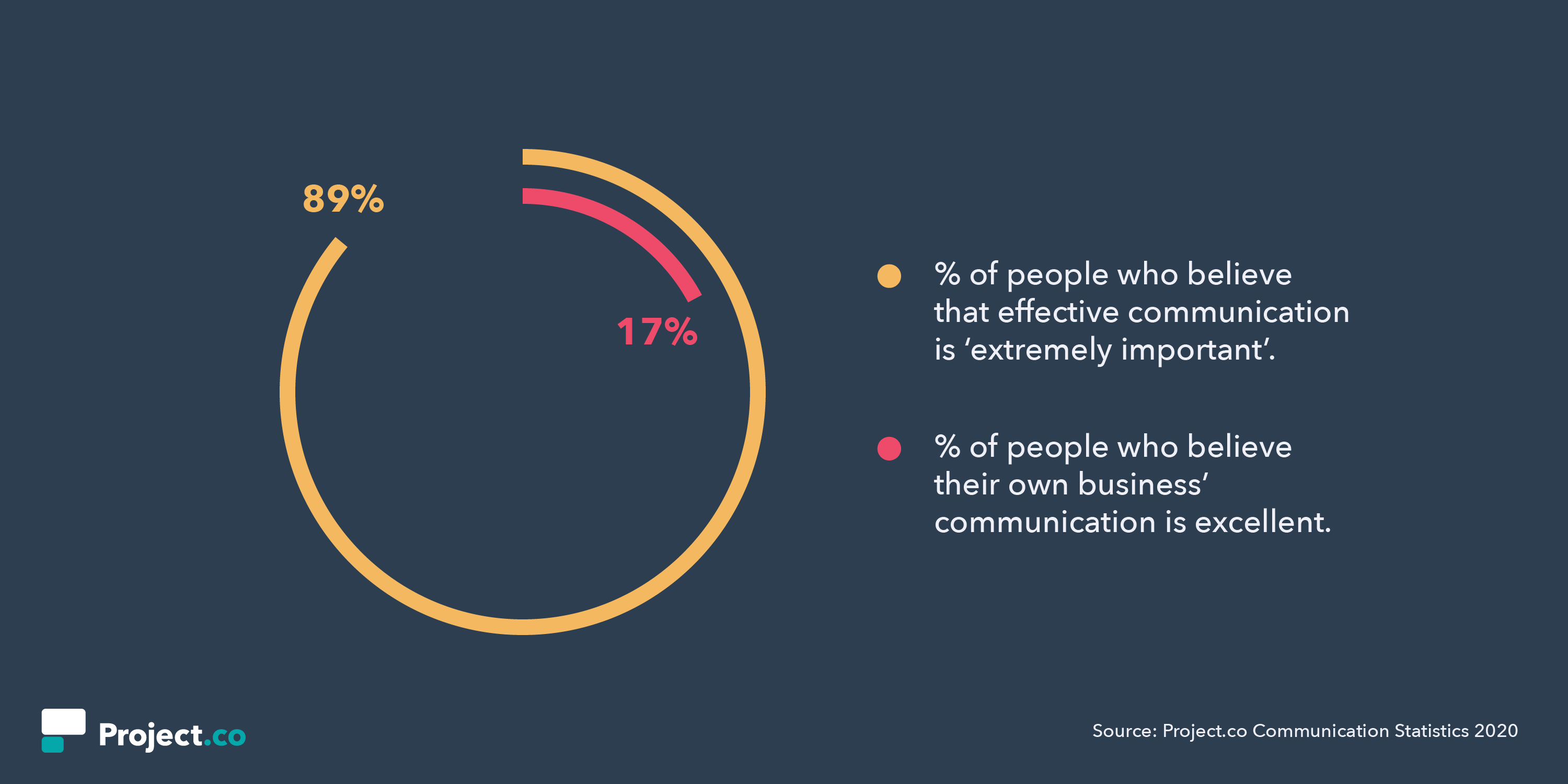
People know the stakes are high here. But still, they can’t get things right. So what gives?
The Changing World of Work
We all know the world of work is changing. Of course, these changes offer incredible benefits — but also considerable challenges.
We’ve seen a huge rise in remote working, for instance, with research suggesting a 91% growth over the last 10 years. This is a total departure from the typical, established workplace, and change — as always — has not been without its bumps in the road.
Many companies have had to take significant steps to facilitate effective communication through the advent of remote and flexible working. But have they gone far enough?
According to Buffer’s State of Remote Work survey (2018) “collaborating/communicating” was cited by 21% of remote workers as their biggest struggle.
Equally, we’ve seen communication shortcomings in businesses that continue to work in on-site offices. Open-plan has become the dominant trend in office design, intended to improve communication — but it’s repeatedly accused of making things worse.
In fact, research has shown that workers in open-plan offices spend 73% less time on face-to-face interactions, with email and instant messaging increasing by over 67%.
What’s clear is that, whether it’s distance, office design or just preference, people are less likely than ever before to actually speak to their co-workers face-to-face.
An over-reliance on email?
This is all backed up by Project.co’s research, which suggests a particular over-reliance on email. When asked how they primarily communicate with their co-workers, 39% of people cited email — the most commonly cited answer by far — compared to online tools (28%), face-to-face interactions (23%), and phone calls (2%).
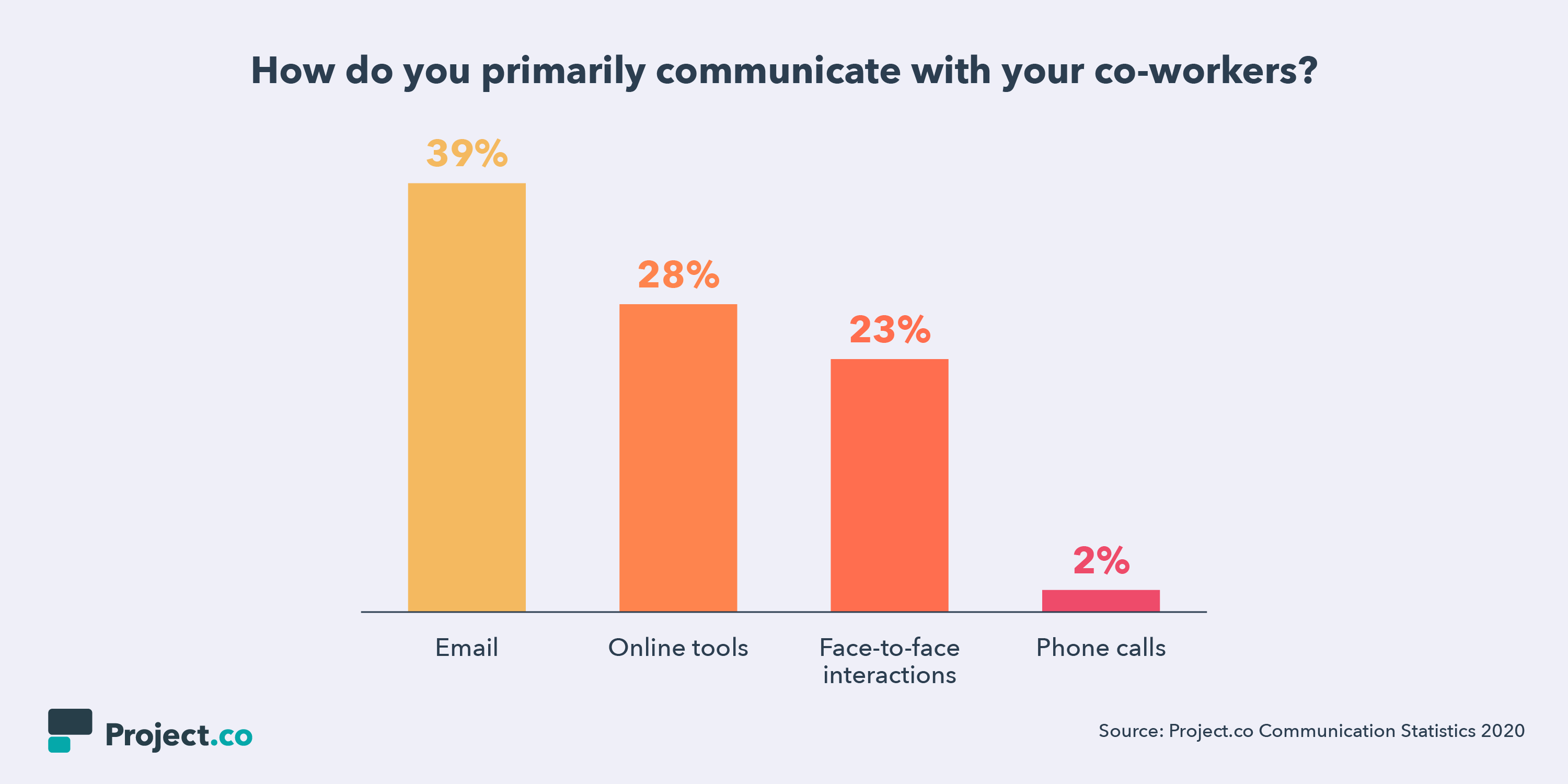
Email has plenty of benefits, of course. It’s fast, easy, and simple. But when it comes to collaborating and trying to create in-sync teams, it can often make things more confusing and decrease opportunities for spontaneous brainstorming.
Communication inevitably becomes siloed, happening in private inboxes away from the rest of your team and beyond the view of management — which sometimes results in crossed wires, confusion, lost files, and wasted time.
Additionally, never-empty inboxes can be hard to organize. In fact, nearly two-thirds (65%) of people say that, at some point, they’ve lost a file in their own inbox or on a personal hard drive.
There are also continuity issues when people are absent or leave the team, with 63% of people admitting they’ve missed a message or important piece of information that went into a colleague’s inbox while that colleague was away or absent.
And what about the impact on work-life balance?
With increasing access to work emails outside the office, there’s a pervasive sense for many that work never really ends. For many, the temptation — or, worse, requirement — to check email off-hours is eating into family and leisure time, resulting in stress and anxiety.
RescueTime found that over a quarter of work is done outside of regular working hours, during evenings, and on weekends, which can’t be healthy and will lead to burnout for your employees.
Transparency and visibility
With group communication floundering, the first casualty is collaboration.
Project.co found 52% of people say they find it difficult to work out how their individual tasks contribute to their company’s overall goals.
Of course, one solution to demonstrate to employees their work matters is meetings. By holding productive weekly or quarterly standup meetings, individual contributors are able to interact with the larger team to see how their work benefits and improves their team’s workflow.
However, meetings for the sake of meetings can be dangerous.
In fact, research from The Muse who found that as much as 15% of all company time is spent on meetings, which 67% of executives view as failures.
The new Project.co study corroborates this, finding that 61% of people feel they regularly waste time in meetings.
So, now we’ve seen both email and meetings can be hindrances to your employees’ internal communication. But, of course, your employees aren’t the only ones who lose out.
Your Customers Lose Out When Communication is Ineffective
So far we’ve only touched on the internal headaches associated with ineffective communication. But the people who truly lose in this situation are your customers.
When asked about their experiences as customers, an almost unanimous 96% of people believe that the businesses they deal with could improve their communication and project management.
What’s more, around three-quarters told us they’ve stopped dealing with a business because it was too disorganized, and bought from a competitor instead.
The cost of ineffective communication is clearly a heavy one.
But, there’s still good news …
Ok, so if you’re thinking that this has been a pretty grim read so far, you’d be right. But there’s a silver lining behind those clouds.
The good news is that, where technology is applied correctly, it seems to have the power to massively improve communication, organization, productivity, and customer satisfaction.
Project.co found that, when people use an online tool to manage their projects, they’re twice as likely to rate their levels of efficiency, communication and organization as ‘excellent’.
Across every data point, people find it easier to communicate effectively, measure project progress, and keep information organized and accessible when they use an online tool. In fact, people reported communication easier with an online tool over email, meetings, and paper to-do lists.
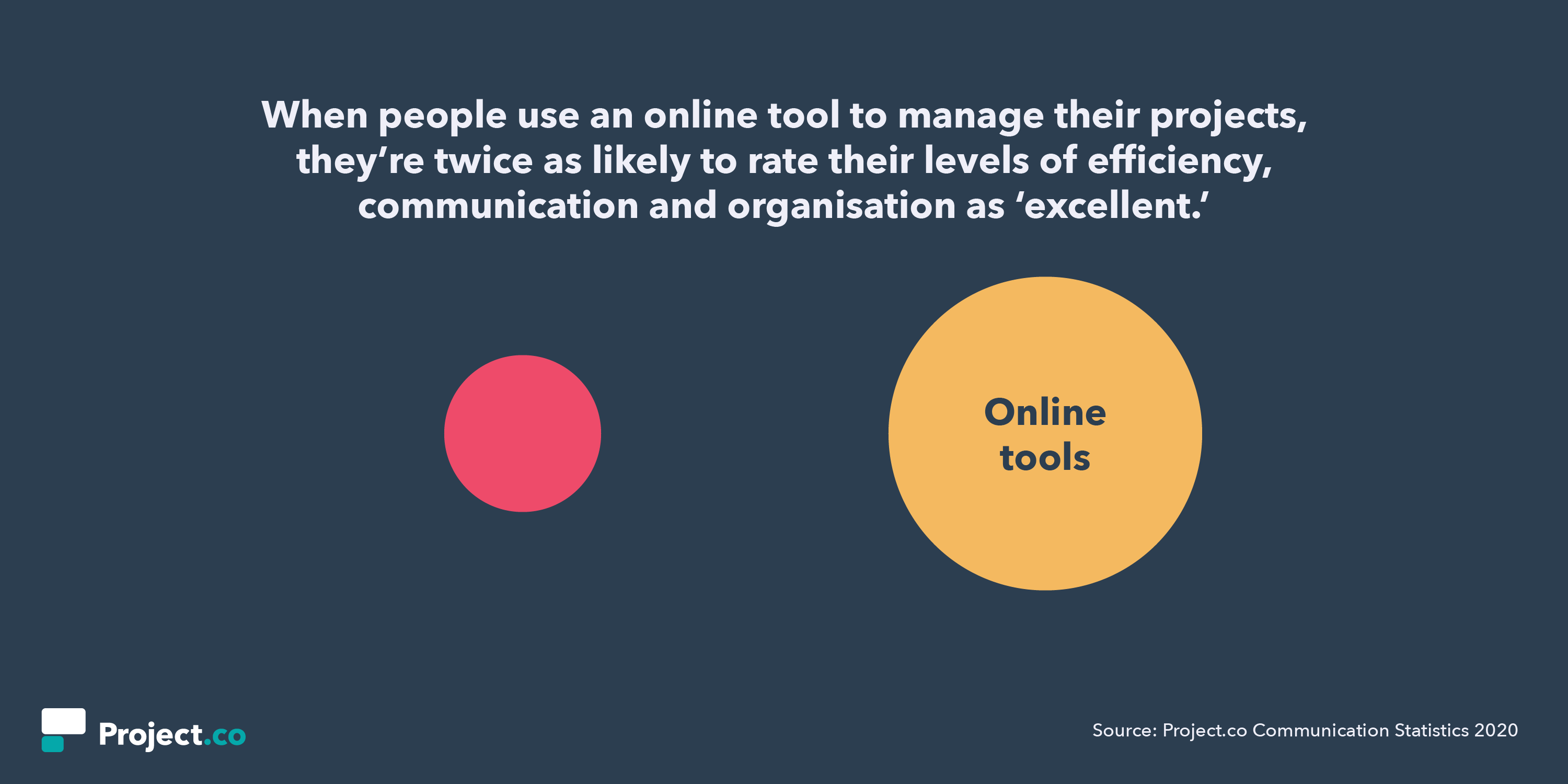
So, there’s good news and bad news.
The good news — many problems in today’s rapidly-changing world of work can be mitigated and even solved by using an online tool for communication and project management.
The bad news — the problems won’t simply resolve themselves without positive action from business leaders. It takes strong, decisive leadership to identify the need for change, explore to find the right systems, tools and software, and then drive change throughout the organization.
It’s a challenge, but it’s one well worth facing down.

What Is a Blog, & Why Should You Create One
Even if you’re not sure what a blog is, you’ve no doubt come across one at some point in time. Perhaps you’ve stumbled across a blog when you’ve searched “healthy dinner recipes”.
Alternatively, maybe you used a blog to get more information on SEO strategies.
In fact, if you’re reading this, guess what? You’re on a blog. (Very meta, I know.)
If your business doesn’t have a blog, you might want to reconsider — B2B marketers who use blogs receive 67% more leads than those who do not, and blogs have been rated the 5th most trusted source for accurate online information.
At its most basic, blogs can help you develop an online presence, prove yourself an expert in an industry, and attract more quality leads to all pages of your site.
If you’re contemplating creating a blog for your business, or simply want to know what one is, keep reading.
What is a blog?
First, let’s go over a brief history — in 1994, Swarthmore College student Justin Hall is credited with the creation of the first blog, Links.net. At the time, however, it wasn’t considered a blog … just a personal homepage.
In 1997, Jorn Barger, blogger for Robot Wisdom, coined the term “weblog”, which was meant to describe his process for “logging the web” as he surfed the internet. The term “weblog” was shortened to “blog” in 1999, by programmer Peter Merholz.
In the early stages, a blog was a personal web log or journal in which someone could share information or their opinion on a variety of topics. The information was posted reverse chronologically, so the most recent post would appear first.
Nowadays, a blog is a regularly updated website or web page, and can either be used for personal use or to fulfill a business need.
For instance, HubSpot blogs about various topics concerning marketing, sales, and service because HubSpot sells products related to those three subjects — so, more than likely, the type of readers HubSpot’s blog attracts are going to be similar to HubSpot’s core buyer persona.
Alternatively, a woman named Kiki started a personal travel blog, called The Blonde Abroad, to document her travel experiences and provide readers with helpful tips and travel recommendations. Her blog doesn’t serve a larger company, but it does help her create a personal brand.
If a personal blog is successful enough, the writer can also make money off of it via sponsorships or advertisements. Take a look at 5 Strategies to Monetize a Blog to learn more.
What is a blog post?
A blog post is an individual web page on your website that dives into a particular sub-topic of your blog.
For instance, let’s say you start a fashion blog on your retail website. One blog post might be titled, “The Best Fall Shoes for 2019”. The post ties back to your overall blog topic as a whole (fashion), but it also addresses a very particular sub-topic (fall shoes).
Blog posts allow you to rank on search engines for a variety of keywords. In the above example, your blog post could enable your business to rank on Google for “fall shoes”. When someone searches for fall shoes and comes across your blog post, they have access to the rest of your company’s website. They might click “Products” after they read your post, and take a look at the clothing items your company sells.
A blog post links back to your overall blog site. For instance, right now, you’re on blog.hubspot.com/marketing/what-is-a-blog. The “what-is-a-blog” section of the URL is tied back to /marketing/, which is the blog as a whole.
There are plenty of benefits to blogging — it helps drive traffic to your website, it enables you to better convert that traffic into leads, it allows your business to establish authority in an industry, and it continues to help your business grow and attract new customers months and even years after publication.
To learn more about the benefits of blogging, check out Why Blog? The Benefits of Blogging for Business and Marketing.
1. To help your company rank on search engines.
Typically, a business will use a blog to help the business’s website rank on search engines. You can absolutely employ SEO tactics, or use paid ads, to help your company homepage rank on page one of Google — but a more effective, long-term solution is blogging.
To consider how your company can rank on search engines via a blog, we’ll start with an example — let’s say you work for a web design start-up with very little online presence.
You decide to spend the first year writing and posting regular blog content that strongly relates to web design. Over time, your traffic increases and other companies link to your site for information regarding web design. When this happens, Google recognizes your company as a legitimate source for web design information. Eventually (with a lot of trial and error), your blog posts begin ranking on page one of Google for terms like “web design”, “website builder”, and “e-commerce website”.
Then, one day, you search “web design companies in X city” and find your company is now on page one. This is likely due, in large part, to your consistent blogging efforts.
Take a look at How HubSpot Uses Blogging to Rank #1 on Google to learn more about specific strategies you can implement to rank on search engines.
2. To share information about a given topic and become an expert in an industry.
In 2006, Boston-native Matt Kepnes quit his job and began traveling the world. He documented his travels in his now infamous blog, NomadicMatt.com.
After about a year, thanks to tireless blogging efforts and SEO strategies that enabled him to rank on Google, he began pulling in $60,000. Matt also created e-books, and used sponsorships and affiliate marketing to make money. Additionally, he wrote a New York Times best-seller, “How to Travel the World on $50 a Day.”
Now, Matt’s blog attracts 1.5 million visitors a month and grosses about $750,000 a year — and he’s become a well-known expert in the travel space.
If you want to become known as an expert in a topic that interests you, from fashion to blogging to fitness, you can — and, oftentimes, it starts with a blog.
3. To attract visitors to your site, and turn those visitors into leads.
There’s only so much traffic you can get from the homepage or About Us page of your company’s website. Of course, those pages are critical for leads who are already interested in your products — but they often won’t attract traffic from top-of-the-funnel. That’s where your blog comes into play.
Your blog can be a general resource to help your website visitors even before those visitors are ready to purchase from you. For instance, let’s say you sell products for e-commerce stores. You might attract some e-commerce owners who are already searching online for your products, but in most cases, the e-commerce owner isn’t going to be ready to buy right out of the gate.
Alternatively, if you begin blogging about tips to help the retail owner who is just starting out — like “How to start a retail website”, or “Benefits of e-commerce vs. physical store” — you’ll slowly attract an audience who enjoys your content and finds it useful. Then, when those site visitors’ e-commerce stores begin growing (thanks, in part, to your blog), they’ll already know about your brand and already trust it as a helpful source. That’s when they’ll check out your product pages.
4. To cultivate an online community and engage with an audience.
At the very least, you might create a blog to engage with an online community of readers with similar interests. Maybe you start a food blog and ask readers to share their own recipes with you.
Alternatively, perhaps you start a blog that focuses on DIY projects. You post the fun, DIY projects you’ve completed in your own home, and you ask your readers to share their own DIY tips in exchange.
1. Choose your target audience.
When you’re starting your own blog, it’s important to think of your target audience. Who are you creating the blog for? And who do you want reading your blog posts? Before you can get started, you have to consider the niche you’re writing about and what topics you’ll cover and why.
Brainstorming your target audience is similar to creating a buyer persona for your company. Plus, this will give you an idea on what kind of content you want to produce.
2. Brainstorm content ideas frequently based on your market segment.
Once you’ve started a blog, you’ll want to churn out high-quality, consistent content on a regular basis. This isn’t always easy. Creating content is a time-consuming task. You want to ensure your content is something your readers would be interested in and hopefully can help with your SEO — more on that in a minute.
To begin brainstorming content, consider what your competitors are doing. Look for gaps in their content that you can fulfill. Additionally, you should also do SEO research to verify that users are searching for and interested in the topic you want to write about. Sites like Ahrefs, Google Keyword Planner, and Answer The Public can help.
You’ll want to brainstorm content frequently so you always have ideas that you can execute.
3. Research and review a content management system (CMS).
In order to host your blog, you’ll most likely use a CMS. A CMS is a tool you can use to design, manage, and publish on your website.
Once you’ve decided to start a blog, figure out if your current CMS has all the capabilities of hosting a blog. If not, you’ll want to review CMS options that might integrate with your site or look for an entirely new CMS to migrate your site on. There are several options in the CMS world including HubSpot, WordPress, and Squarespace.
4. Create a blog strategy and editorial calendar.
Just like creating a business, you can’t create a blog without a strategy in mind. Your strategy should answer questions like:
- Who are you targeting?
- What type of content will you produce?
- When will you post?
- Where will you promote your content?
Overall, you should have a mission, vision, and goals for your blog.
Then, create an editorial calendar to keep you organized and on track. A calendar will help you track what posts are coming up, ensure writers are meeting deadlines, and assure you have enough content ideas for the foreseeable future.
5. Pay attention to article structure.
When you’re writing your blog posts, it’s important to consider the article structure. For instance, are you using subheads to break up the post so it’s easy to digest? Are you using bullet points and images that make the post easy to scan? These are important factors that will help keep your reader on the page.
Additionally, you’ll want to make sure that you’re using calls-to-action (CTAs), that will guide the reader on what you want them to do next. This is how you can start making money and generating leads from your blog.
6. Become an expert in marketing and promoting your blog.
Another element of blogging is marketing and promoting your blog posts. It’s like the age-old adage — “When a tree falls in the woods and there is no one there to hear it, does it make a sound?”
Consequently, if you write a blog post but nobody reads it, will it have a positive impact on your company or brand? Probably not. That’s why you’ll have to market your posts. You can use social media, SEO, your website, or your email newsletter to reach current and potential customers.
7. Learn about SEO.
Like I mentioned above, you want people to read your blog posts. One way to do that is to get organic traffic through SEO. If you want your blog to be successful, learn how to research keywords, how to rank in search engines, and how to build an SEO strategy.
8. Use a variety of blog post styles.
Your blog posts should be interesting to everyone who reads them, and especially for customers who read every single post. For those that are active followers and ambassadors of your blog, you should use a variety of blog post styles so your blog doesn’t get stale. Consider using how-to posts, list-based posts, or thought leadership.
9. Repurpose old content.
Producing blog content consistently can be hard. But you don’t have to reinvent the wheel every time you write a blog post. You can update old blog posts to keep them accurate and comprehensive. Additionally, you can use other content of yours, perhaps a YouTube video or a podcast, and repurpose the content into a blog post.
10. Perform a competitive analysis.
To understand your audience, run a competitive analysis on your top blog competitors. This will help you identify trends, uncover gaps in the content in your industry, and give you ideas on topics and ways to promote your blog.
Running a competitive analysis will help you build and iterate on your own blog strategy.
With a blog, the sky’s the limit — and so are the benefits for your business. If you’re officially ready to get started with your own blog, take a look at How to Create a Successful Blog Strategy: A Step-by-Step Guide.
Alternatively, if you’re starting at the beginning and anxious about your first post, read How to Write a Blog Post: A Step-by-Step Guide [+ Free Blog Post Templates].
Editor’s note: This post was originally published in February 2019 and has been updated for comprehensiveness.

How to Search Tweets Using Twitter Advanced Search
Let’s say you want to find a specific @elonmusk tweet about machine learning, but can’t find the tweet when you scroll back in your feed.
Or you’re hosting a “2018 web design” webinar and want to compile a list of experts using Twitter.
Or maybe you just want to see Twitter conversations between @garyvee and @bcuban from 2016.
There’s no denying that Twitter is a great social media tool. But with 300 million people using Twitter every month, it’s often tricky to find the information you need.
Twitter’s regular search feature can’t help you find any highly specific information. Luckily, Twitter’s advanced search can.
But using advanced search isn’t as intuitive as using the basic search functions, so we’ve covered the four steps to master advanced search. Once you have these down, you can explore the various search fields depending on your search intent.
How do you use Twitter Advanced Search?
- Enter your search into the search bar on Twitter.
- At the top left of your results page, click “Search filters” and then “Advanced search.”
- Fill in the appropriate fields to refine search results.
- Click “search” to see results.
Okay, so let’s get to it. Here are the four steps you need to use Twitter’s advanced search.
1. Enter your search terms into the search bar on Twitter.
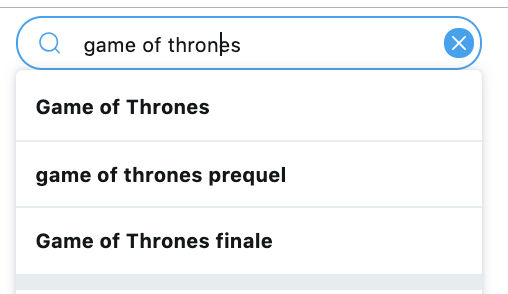
2. At the top left of your results page, click “Advanced Search” or select filters you’d like to use under the “Search filters” tab.
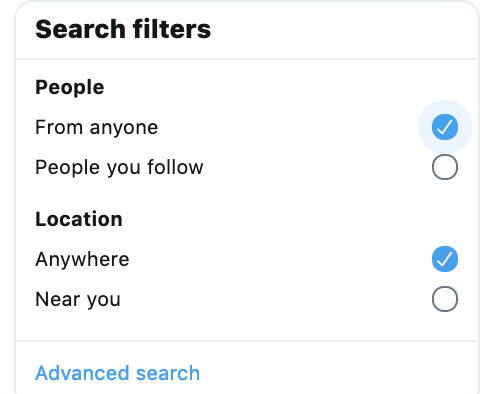
3. Fill in the appropriate fields to refine search results.
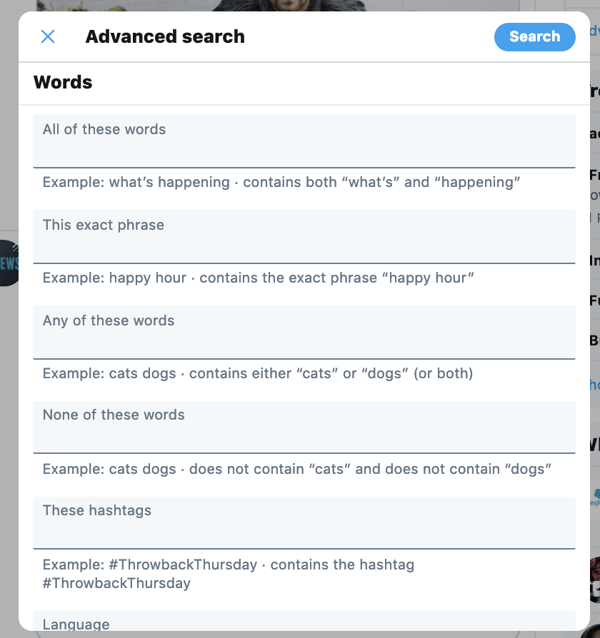
4. Click “search” to see results.
In the example above, I used advanced search to see every time @HubSpot mentioned the TV show Game of Thrones after January 1, 2018.
I needed to use the “exact phrase” because, as I learned through trial and error, “any of these words” produced results for anytime HubSpot mentioned the word “game,” “of,” or “thrones.”
This broadened my results, but didn’t provide accuracy.
If I wanted to find other information regarding Game of Thrones, I could search “these hashtags” (#gameofthrones) to see tweets where GoT is mentioned.
I could also see if @GameofThrones has mentioned @HubSpot (they haven’t …).
I could even choose a specific place and time if I wanted to know what people were saying about GoT last September in Ireland.
The advanced search fields provide ample opportunities to explore Twitter’s deep crevices, including:
- “all of these words” to ensure you’re narrowing in on a specific query
- “any of these words” to broaden your research scope
- “none of these words” to exclude irrelevant search information
- “these hashtags” to find popular topics.
- “from account” and “to account” to see interactions between specific people
- “mentioning these accounts” to see who’s talking about you
How to Search Tweets From a Specific Account
If you want to look for tweets from a specific account, advanced search can help with this too. When you get to the Advanced Search tab in step three, scroll down to Accounts and type in the handle of the account you’d like to search.
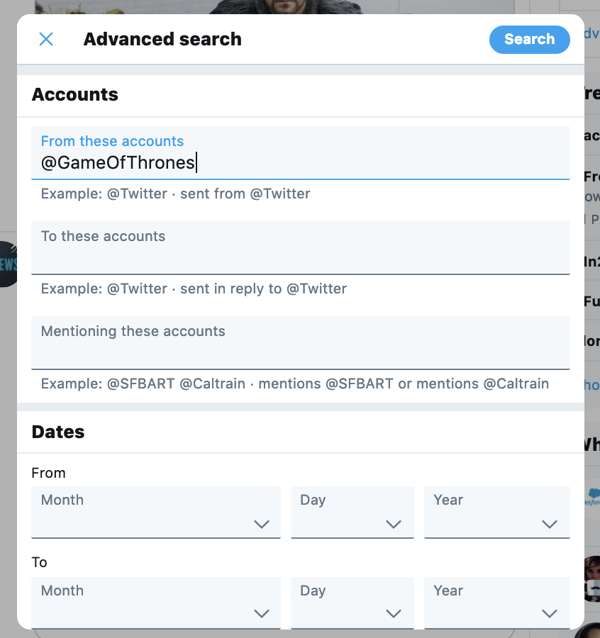
Another method you can use is by search code, which is also fairly simple.
First, go to your search bar and type in the phrase, “from:,” followed by the account name.
 Click “Search,” and then you will have all mentions, tweets, and media from the account you searched.
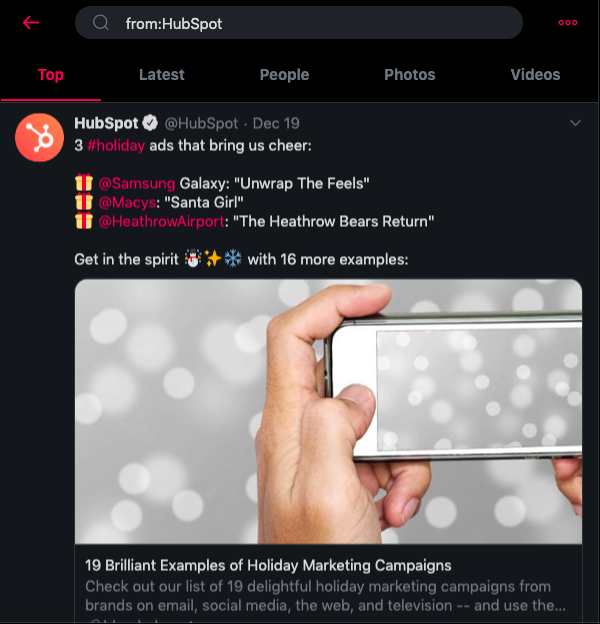 This is a good alternative to advance search if you want to see an overview of the account you’re looking for, not just a specific few keywords.
Now that you know how to Twitter search like a pro, try it yourself.
Editor’s Note: This blog post was originally published in March 2018, but was updated in November 2019 for comprehensiveness.

What is a 301 Redirect, and When Should You Use One?
I moved five times in the last year. And every single time I moved, I forgot to sign up to have my mail forwarded to my new address.
Mail forwarding is an important step in any moving process, as it ensures you don’t lose any valuable information that’s sent to you.
And the same can be said for your website: If you’re moving a website from one URL to another, you need to take the necessary steps to ensure your visitors get sent to the right place. In the world of tech, this is called a 301 redirect.
A 301 redirect is key to maintaining a website’s domain authority and search rankings when the site’s URL is changed for any reason. It easily sends visitors and search engines to a different URL than the one they originally requested — without having to actually type in a different URL.
What is a 301 Redirect?
A 301 redirect is a permanent redirect from one URL to another. 301 redirects send site visitors and search engines to a different URL than the one they originally typed into their browser or selected from a search engine results page.
Let’s put it into practice. Below are two different URLs that take you to the same site. That’s thanks to a 301 redirect. That way, when people link to HubSpot Blogs using either URL, the URL we direct blog traffic to (blog.hubspot.com) retains the search engine authority associated with inbound links to either URL.
Did you notice that even though the second link has “http://” at the beginning of the URL, by the time you arrived at the blog, the URL in your browser read “blog.hubspot.com“? That’s because of a 301 redirect. It’s essential to set this up so the domain authority from inbound links to the http:// address are linked to blog.hubspot.com to improve its search rankings.
1. Implement the code.
First, you’ll want to open a fresh new document or a text editor. After this, write this line of code, exchanging “yourwebsite” with your actual domain.
Redirect 301 / http://www.yourwebsite.com/
2. Save and upload the file.
Next, save this file as .htaccess and upload it to your website. And if you’re using the .htaccess only method, you’re done!
If, however, you’re redirecting a URL to a non-URL, there’s a different codebase to be used.
3. Implement the www code.
After you open your text editor, instead of saving the file as an .htaccess file, write or copy this line of code, exchanging “yourwebsite” with your actual domain.
Options +FollowSymLinks
RewriteEngine on
RewriteCond %{HTTP_HOST} .
RewriteCond %{HTTP_HOST} !^yourwebsite.com
RewriteRule (.*) https://ift.tt/1aXDhxw [R=301,L]
4. Save this file.
Just like if you were implementing redirects using just an .htaccess, in this step you’ll also save the file as such and upload it to your webpage. And there you have it — a brand new, shiny, 301 redirect.
Why Set Up a 301 Redirect?
The big reasons marketers might set up a 301 redirect are:
1. Associate common web conventions (http://, www., etc.) with one URL to maximize domain authority.
Like the scenario above, 301 redirects are extremely helpful in making sure your SEO is as accurate as possible. This is also helpful in content migration; it helps audiences and search engines find your website faster.
2. Rebrand or rename a website with a different URL.
When a brand is changing its company or website name, a 301 redirect is integral to maintaining the power of
inbound links to the original URL on the migrated new domain. Additionally, the 301 redirect is necessary in this case to do exactly what redirect means — to send website visitors to the right web address to get what they’re looking for.
3. Direct traffic to a website from other URLs owned by the same organization.
Brands sometimes purchase domains that are similar in name or subject matter to their brand to generate more search traffic to their website. A 301 redirect is necessary to make certain that the brand’s original domain maintains its search authority in the process.
4. Quick fixes.
Let’s say you accidentally make a small mistake on a blog post or subscriber email and you post a broken link. We’re human, it happens. To remedy this, adding a redirect line in the .htaccess file will do the job for you.
5. Ad tracking.
Redirects have a marketing benefit, as well. If you run banner ads, you can track responses to them by using URLs in those ads. By implementing a redirect, the traffic you gain from that ad is potential traffic you can earn from that URL.
Generally speaking, a 301 permanent redirect is better for search engine optimization than a temporary redirect because it transfers the inbound links from the redirected domain to the new one, which helps the website maintain its search rankings and prevent any dip in search traffic.
There are few situations where a 302 temporary redirect would be preferable over a 301 permanent redirect — except for when website content needs to be moved temporarily, such as when a site is undergoing maintenance and visitors need to be directed to a different domain to consume their content.
301 Redirect Mistakes to Avoid
Now that you understand the importance of the 301 redirect, we’ll review common steps in the process to review to make sure you don’t make a mistake that could adversely impact your site’s SEO.
1. Setting up a 302 redirect between versions of your domains.
301 redirects point the power of inbound links from one URL to another, and although it might not look like it, http://blog.hubspot.com and blog.hubspot.com are two different URLs. Make sure you set up a 301 redirect from all of the different iterations of your brand’s domain to boost your search engine results.
2. Setting up a 301 redirect after creating a new page.
Back in 2010, Toys ‘R Us purchased the toys.com domain without setting up a 301 redirect first, and their new site’s SEO results plummeted because it was re-crawled by Google as a brand-new domain without inbound links from the original Toys ‘R Us domain pointing to it. Be sure to set up the 301 redirect before migrating your website content so your site doesn’t lose traffic in the process.
3. Using a 302 redirect during content migration.
Unless you’re temporarily migrating your website’s content while updating or repairing your website, use a 301 redirect to maintain the inbound links and your search rankings while making changes to your domain.
4. Having redirects link to outdated content.
If you don’t set up redirects from the older internal links on your website (such as a link to your company blog on your homepage), you’ll create a bad user experience for site visitors who click on these older, not-directed links. The old internal link will eventually kick over to the new domain, but it might take several seconds or show a white screen in the meantime.
The good news is that it’s easy to set up a 301 redirect correctly following the steps above and if you’re using HubSpot software to optimize your website. We wish you the best of luck with your next website redirect and moving process. (P.S. – We can help with one of those.)
5. Redirect a page with a different intent than the destination page.
This will be a breeze with proper organization and record keeping, but make sure that you’re redirecting to the correct pages. To illustrate, you wouldn’t want to redirect a user looking for your homepage to your blog page.
Keeping this transition smooth will contribute to SEO being accurate, and will lead to more happy visitors to your site.
Whether you’re thinking about overhauling all content in a site migration, or you’re just refurbishing some outdated webpages, 301 redirects help. If you’re planning out this new stage, think about incorporating them in your project; your SEO won’t take a dive and website visitors will continue to find the helpful content they’re looking for.
Editor’s Note: This post was originally published in December 2010 and has been updated for accuracy and comprehensiveness.

50 Bright Ideas for Promoting Content to Drive Leads
There’s nothing quite as euphoric as launching a new piece of content. You’ve put in days, weeks, or even months’ worth of work into it, and nothing can express your excitement to get in front of the eyes of your customers, leads, and website visitors.
All that said, there’s nothing quite as soul-crushing (on a professional level, at least) as having no one interact with your content.
Content is being created, published, and refreshed every second of every day. In 2019, more than four million blog posts were published on a daily basis — not to mention the abundance of ebooks, templates, podcast episodes, infographics, and videos that go live every minute, as well.
This brings up the imperative question that all great content marketers ask themselves: how do I get more people to see, engage with, and react to my content?
To help you make the most of your content marketing efforts, we’ve outlined the best content promotion ideas across various mediums. From podcasting to blogging, to everything in between, you can use these best practices to get a strong ROI from your content.
Follow Along With the Content Promotion Kit
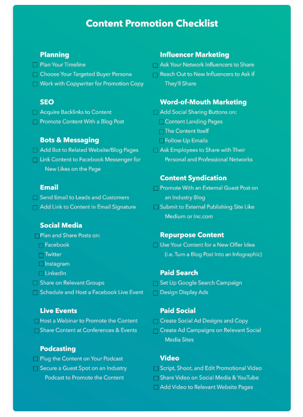 HubSpot’s Content Promotion Kit and Templates puts the tips from this blog into an actionable, step-by-step process for your content promotion efforts. You’ll gain access to four templates to help you plan your promotion and reach out to leads, customers, and influencers so even more people will interact with your content. Download the Kit to follow along with the examples in this post.
Social Media Content Promotion Ideas
Social media is an ideal place to promote your content, as those following your accounts already know your brand and likely look forward to the content that you post. Here are nine ideas to help you promote content on social media.
One warning about social media, however, is that different sites prioritize different factors when determining which posts users see first. In other words, just because you were the latest to post something doesn’t mean a follower will see your content when he or she logs on. Keep that in mind as you implement these ideas.
1. Update your cover photo to promote the content. If using Facebook, link to the offer in the photo’s description.
2. Pin a post to the top of your page linking to the landing page of your content.
3. Add a link to the offer in your business page’s bio.
4. Post several times a week to the piece of content, varying the images and copy you use in each post, for several weeks (or months).
5. Create a hashtag for the campaign or the offer and utilize it in your posts.
Join a group on Facebook or LinkedIn and start a discussion.
6. If you have a group of your own, send out the content to all group members.
Promote the offer in your social media stories.
7. Make the content offer appear on your Facebook Messenger when visitors come to your page.
Website Content Promotion Ideas
Lots of people overlook how they can optimize their website to promote new offers — but it’s most likely one of your biggest marketing assets.
When someone comes to your website, chances are that visitor wants to learn more about your business and its content. It’s the perfect opportunity to point the visitor to a piece of content you think would enhance the buyer’s journey.
Here are five things you can do to promote website content.
10. Create a CTA on your homepage or log-in screen.
11. As you create more content, create a content library: a page on your site dedicated to the content you create.
12. On related pages within your site (such as product pages and thank-you pages of other content), include a link to the offer to download.
13. Include social sharing buttons on the thank-you page of the content.
14. Set up a live chat bot to promote the content on relevant pages.
Blogging Promotion Ideas
Blogging can drive traffic to your landing pages and website better than any other medium.
Why? Each time you blog, you give Google and other search engines one more opportunity to find you. Each blog post gives you the opportunity to rank for more and more keywords and grow your reach.
Here are seven tips for promoting your blog posts.
15. Blog about the piece of content multiple times, targeting a new angle or keyword each time to avoid redundancy. Spread out posts over a few weeks or months to continue a steady stream of traffic to the landing page.
16. Create a CTA at the bottom of each relevant blog post that links to the offer.
17. Create anchor text CTA towards the top of the page, using hyperlinked words to point to the offer. HubSpot’s blogging team has found this to be one of the most successful CTA placements.
18. Create a trigger-based CTA to appear or slide in at a certain point. For example, the CTA could appear when a reader has been on the page for 15 seconds, has scrolled through 20% of the page, or is about to exit the page.
19. Make existing CTAs smart so that users who have already downloaded content from your site see your new offer instead.
20. Encourage social sharing of blog posts with built-in social share buttons and tweetable quotes.
21. Guest blog on related sites to increase awareness of the content.
Video Marketing Promotion Ideas
Video promotion typically requires more planning and effort than other promotion types, since you’ll have to script, shoot, and edit with the help of a dedicated videographer.
However, if you have video experts at your disposal, it’s one of the most effective methods for promoting content.
Here are three tips to ensure you’re correctly promoting your videos once you’ve made them.
22. Make a video for YouTube, capitalizing on a term with high search volume and promoting the content as a featured resource. Don’t forget to link to the content landing page in the description of your video.
23. Make a video for your social media channels with appropriate dimensions, messaging, and length.
24. Make a video for your website and content landing page describing the value of the offer.
Email Marketing Promotion Ideas
Emailing segments of your contact database will not only increase their engagement with your company, it will also generate new leads through the sharing power of your database.
Most of the people who have engaged with your company may not be aware of every piece of content you put out, but may still want to know about them.
Emailing those people — who already have shown they’ll fill out a form to see what you’ve created — should be a no-brainer.
Here are four strategies for promoting email.
25. Email your customer database to delight your existing users with additional content. Remember – content should not just be a tool for acquiring new customers, but also for reminding existing ones why they decided to do business with you!
26. Email your leads and subscribers and alert them of a new offer.
27. Add the offer to your nurture streams, or replace older offers with a new one, wherever appropriate.
28. Add a link to your content in your email signature.
Paid Promotion Ideas
Ideally, your content should be optimized for SEO and promoted within your existing channels. However, for content offers that aren’t supported by ample search volume, or for smaller companies looking to build awareness, paid promotion can be a useful way to get your content in front of a larger audience.
Luckily, there are plenty of sites with billions of users that could be perfect for your content promotion.
Here are a few examples of the ways you can advertise on them:
29. Set up Google Ads campaign for search, with multiple ad groups targeting different keywords and angles.
30. Use display ads to show off the visuals of your offer with Google Display Network.
31. Set up promoted tweets for your Twitter account and collab with designers for visual assets.
32. Use LinkedIn’s Sponsored Updates feature to promote the Company Page update related to the content and collab with designers for visual assets.
33. Create YouTube pre-roll ads with the help of your video team or a video agency.
34. Boost the engagement of an organic Facebook post by putting some money behind it.
35. Create a Facebook ad or a dedicated group of Facebook ads.
36. Get even more visual with Instagram ads. You can also try GIF and video ads here rather than just images.
Podcasting Promotion Ideas
Approximately 150 million Americans listen to podcasts, so even if your company doesn’t have its own, there’s still plenty of reason to utilize podcasting to promote your content.
Here are a few ways you can do that.
37. Plug the content on your own podcast, giving listeners a specific link so you can track its engagement and including it in the description of the podcast.
38. Secure a guest spot on a relevant industry podcast to promote the content.
39. Purchase ad space with a podcast network to promote your content. They’ll likely provide you with audience demographics so you can advertise to the most qualified listeners.
Influencer Marketing Promotion Ideas
Influencers can be an effective way to reach new people who already follow someone in your industry. Building and maintaining strong relationships with these influencers can pay off in the long run, especially if their following is in the tens or hundreds of thousands.
Quick note: some influencers will require ongoing payment for a formal relationship, so just be aware of this in case you’re looking for free promotion strategies.
Here are a few strategies for using influencers for content promotion.
40. Reach out directly to influencers in your industry whom you already are connected to and ask them to share the content with their audience. To make it easier for them, have pre-written tweets or email copy ready for them to use.
41. Ask new influencers in your industry to share the content with their audience. Consider looking to Instagram, Twitter, and other industry blogs to find good candidates.
Other Content Promotion Ideas
The rest of the ideas in this list sort of fall into their own bucket, so we decided to compile them together here.
That said, this shouldn’t discount the effectiveness of these promotion tactics. Give them all a try if you’re looking to promote content in out-of-the-box ways.
42. Repurpose your content into new formats. For example, turn your blog post into an infographic, or your latest blog series into a gated ebook, to make the most out of each offer.
43. Acquire backlinks to your content through partner marketing. Your partners may be willing to allow you to guest post or feature your content as a helpful resource on their website or social media accounts.
44. Leverage your internal teams to share the content on social media and with their colleagues. This is especially helpful when you get your sales team involved, as they can utilize their existing relationships with prospects to promote the content.
45. Push for word of mouth marketing. This one doesn’t have as concrete a strategy, but simply talking about the content on phone calls, at trade shows and events, and with your coworkers and colleagues can create a groundswell of interest for your content offer.
Additional Content Promotion Strategy Ideas
All of the ideas we’ve mentioned on this list have great potential to generate leads and views for your content. However, it’s crucial to know which content promotion ideas make the most sense for what you’ve created, when to launch each initiative, and how to measure each initiative’s success.
To help you stay strategic in your content promotion efforts, here are five bonus content strategy ideas to consider before sending an email or posting a tweet.
46. Create a content promotion calendar.
Content promotion should never be a guess, and you’ll want to be able to look back on your messaging to see what worked and what didn’t so you can adjust for future content launches.
That’s why you should use a social media calendar and/or an editorial calendar to schedule what’s going out, what channel it’s going out on, and when it’s launching.
47. Use audience segmentation.
Part of the reason there are so many content promotion ideas is because each platform you can promote on has different users and appeals to different audiences. For example, if your piece of content is better fitted for the decision stage of the buyer’s journey, it might make more sense to promote on LinkedIn instead of Instagram.
Audience segmentation is a two-pronged approach to your content promotion strategy. Part one, as listed above, is picking the right platforms for each piece of content — and isolating the wrong ones.
Part two is actually segmenting your audience on that platform to get even more granular. For example, you could use Facebook’s advertising platform or HubSpot’s lists tool to segment your audience for ads and emails, respectively.
48. Customize messaging for each channel.
Building off the last point, what you write on email doesn’t always make sense for a Facebook post. Alternatively, your character counts on Twitter are 280, which is far lower than the limit on Instagram.
You’ll want to customize the design, value prop, and copy utilized in each of your promotions. Not only does this ensure you avoid the risk of coming across as redundant across all channels, it also ensures your messaging is appropriate for each platform.
49. Experiment and optimize often.
When it comes to content promotion, “better” should trump “best.”
In other words, you can always find a way to promote content smarter and in new ways. Whenever you release a new piece of content, challenge yourself or your team to find a new channel to promote it. You should also keep a keen eye on which promotion tactics are not producing projected results so that you can consider resetting goals or abandoning that tactic altogether.
50. Analyze your results often.
Use tracking links and analytics tools to keep your eye on what promotion ideas are generating views to your content, submissions, leads, and customers.
While not the primary task of all content marketers, it can’t hurt to know the numerical and monetary impact your content has on the business.
This step also holds true when analyzing specific promotion channels. Social media and digital marketing are constantly changing, with new platforms and algorithms developing all the time.
Ultimately, it’s critical you keep an eye out for which methods work best for you and your business. Hopefully this list will get you started, but this should be an iterative process in which you regularly analyze and pivot as you see which platforms and content best serves your audiences’ needs.

How to Turn Customers Into Fans
How do some brands attract word-of-mouth buzz and radical devotion around products as every day as car insurance, surfboards, and underwear?
Ultimately, they embody the most powerful marketing force in the world — die-hard fans.
As a massive fan of live music (I’ve seen over 790 live shows including 75 Grateful Dead concerts), the idea of “fandom” has fascinated me for decades.
Five years ago, I set out to study fandom. I began by asking myself — Why do I love live music so much? Why do other people love watching the Boston Red Sox or running a 5K or NASCAR?
Based on discussions with hundreds of people about their passions, I’ve come to realize the key is genuine human connection.
We love to be near like-minded people. When we are part of a tribe, when we speak the same language and know the rituals, we feel powerful connections with others who share that same interest. That’s why I love live music — because I go to shows with my friends.

Because of the changing nature of the world, I knew it was essential to understand how to reach all kinds of people, including millennials and Generation Z. It is for this reason that I teamed up with my 26-year-old daughter Reiko to research and write our book called Fanocracy: Turning Fans into Customers and Customers into Fans.
This post, on how to build a fandom for your business using the power of proximity, is based in part on the ideas in our book.
Fandom isn’t just for celebrities anymore. It can be rocket fuel for any business or nonprofit that chooses to focus on inspiring and nurturing true fans.
Fandom is everywhere. It’s the key for any organization, artist, or entrepreneur to be successful in bringing people together. Fandom spans generations to bind individuals together in excitement, purpose, and buying power. No matter who you’re dealing with, understanding fandom is the cornerstone to your success.
We call this act of consciously bringing people together through a shared endeavor a fanocracy: an organization or person that honors fans and consciously fosters meaningful connections among them.
The suffix “-ocracy”, from the Greek “kratos” for rule, is used in popular culture as well as by academics, to mean government by a particular sort of people or according to a particular principle. A fanocracy is a culture where fans rule, and that’s what we see emerging in today’s world.
We are moving into an era that prizes people over products.
For instance, let’s say you visit a city for a music festival. While waiting for a show to start, we spontaneously form a community, striking up conversations with those around us, secure in the knowledge that we have instant rapport because we share the same interest and the conversation is smooth and natural, as if you’ve been friends for a long time.
In a digital world where our lives are increasingly cluttered and superficial, we’re missing something tremendously powerful: genuine human connection. The relationship we build with our customers is more important than the products and services we sell them.
Here, let’s explore how you can turn your own customers into true fans of your business.
Take a look at the full HubSpot Academy Fanocracy: Turn Your Customers Into Fans and Your Fans Into Customers course here.
Degrees of Proximity Make the Difference in How You Connect
We spoke with neuroscientists to understand what’s going on in our brains when we connect with other people.
We wanted to know — what’s really going on when, for example, I’m with my friends at a live music show? We’ve discovered a prescription for developing fans of any business using simple but frequently overlooked dynamic in our digital age: physical proximity.
Building connections to like-minded people leads to success in our business, as well as stronger brand advocates for the long-run.
What is it about being around other people that drives connection? Why does physical proximity make such a difference? Cultural anthropologist Edward T. Hall has answers to those questions.
Dr. Hall defined humans’ use of space in a simple way. As director of the State Department’s Point Four Training Program in the 1950s, Dr. Hall’s mission was to teach foreign country-bound technicians and administrators how to communicate effectively across cultural boundaries.
His 1966 book The Hidden Dimension describes how people like to keep certain distances between themselves and other people — how our use of space can affect personal and business relations, cross-cultural interactions, architecture, city planning, and urban renewal.
If we want to be effective in our communication, we need to learn how to consciously manage the physical space between ourselves and others.
It’s not just a matter of being close or far, or that the closer we get the better it is. Rather, the significance of each level of proximity can be precisely predicted and managed so as to create the most optimal outcomes.
For instance, Hall described “public distance” as more than 12 feet away from others, a distance that lacks any sense of precise interaction among those involved. He identified “social distance” for interactions among acquaintances as being from four feet to 12 feet, “personal distance” for interactions among good friends or family from about a foot and a half to four feet, and anything closer as “intimate distance” for embracing, touching, or whispering.
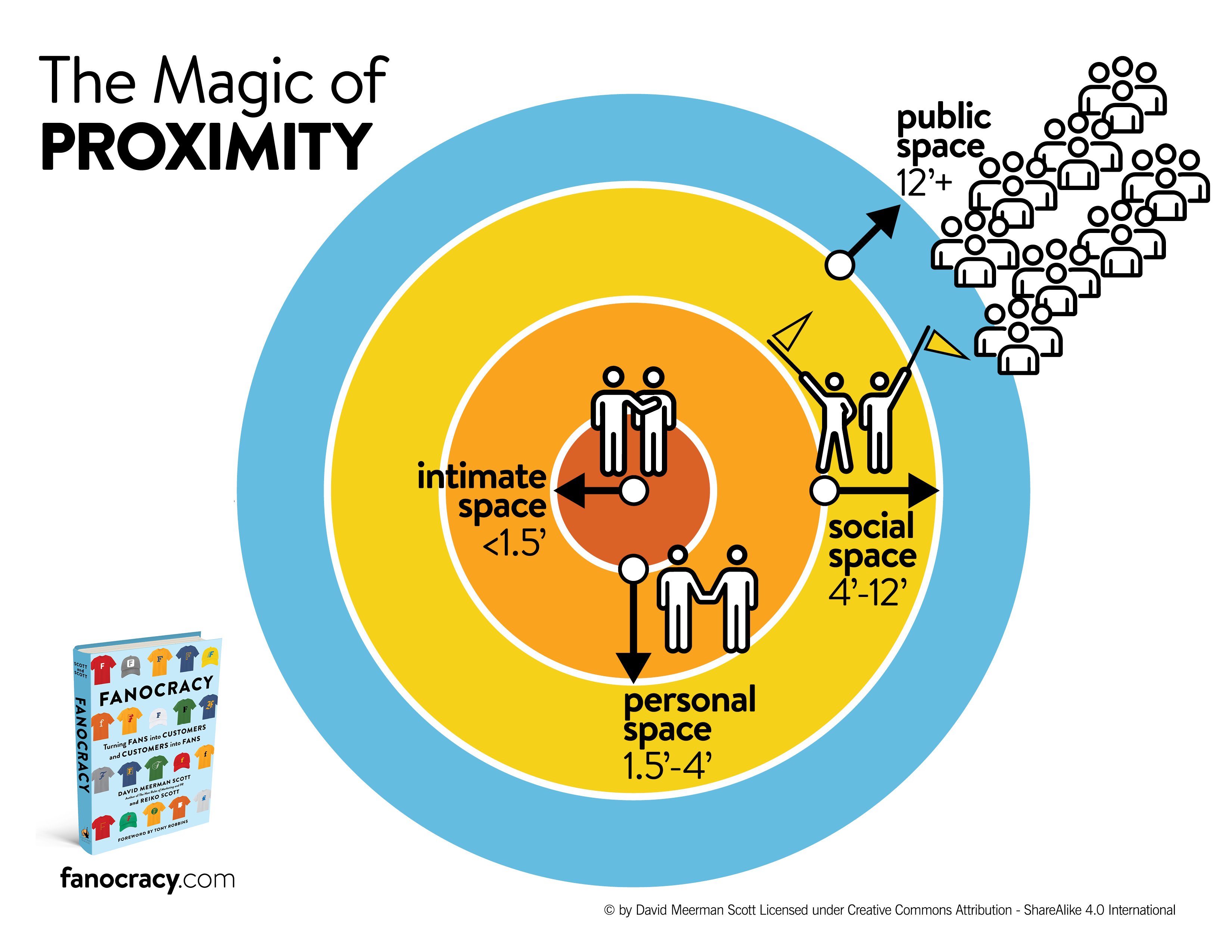
The degree of human proximity ties to shared emotion and has an enormous effect on how well we do in business.
Because these basic instincts are so powerful, when we are close to people we don’t know, like on a subway platform, we’re wary. We can’t help that response. It’s built into all of us. We’re preparing to flee or to fight if presented with any sign of danger.
However, when we are in close proximity to people we trust, a personal connection develops. People who are able to cultivate physical closeness with customers by engaging with them face-to-face can create stronger emotional bonds.
We think this explains the tremendous success of Starbucks. Sure, the patrons at my local Starbucks are enjoying their drinks and they’re making use of the free WiFi. It’s certainly a convenient spot to meet somebody. Yes, the seats are comfortable and there’s ample parking.
Yet, a typical Starbucks scene includes perhaps a dozen people, each alone, but together with others nearby.
Starbucks sales have grown by tremendously — from $19.1 billion to $26.5 billion — in just two years. Why is that? We think it’s because Starbucks sells physical proximity to like minded people.
The most rewarding interactions in our lives occur in our social space and personal space. Those people sitting near one another at a game or at Starbucks or standing near each other in a line at a movie theater or a live music show? They’re well within each other’s social space and as such each person can feel the human connection in a positive and safe, unconscious way.
Here are a few questions to ask yourself to encourage physical proximity with customers:
- How can you bring your customers face-to-face with other customers and with your employees?
- Can you host meetings, conferences, or meet-and-greets?
- Can you offer a tour of your factory, research center, or laboratory?
- Would it make sense for your executives to embark on a tour to meet customers where they live and work?
Building Fans of your Business With Virtual Proximity
If you’re a fan of something, I’m willing to bet you didn’t make a logical decision to become a fan. More likely than not, you became a fan because of passion and enjoyment, two sensations that have little to do with logic.
To successfully build a fanbase out of whatever it is you’re doing for a living, or if you want to sell or market a product or service, begin to think of creative ways to develop and cultivate human connections.
So far we’ve looked at the importance of proximate human connection in growing a fanbase. People go to live music for more than the show — they go to enjoy close proximity with other like-minded people. Let’s face it, we humans are hardwired to react to those who are nearby. Our evolution has taught us to unconsciously track those who come near us in order to quickly determine if they are good or harmful.
However, how can businesses and artists who can’t possibly have a direct personal connection with every fan achieve similar success? It turns out that if your product is used by millions of consumers or you run a virtual business, you can still use the power of connection.
Our unconscious brain can respond to what we see as if it is our own experience, even if it is on social media, film, a screen, or a faraway stage through something called “mirror neurons”.
Mirror neurons are a group of cells in the premotor cortex and inferior parietal cortex of our brain. These neurons are fascinating because they not only activate when we perform an action — biting into an apple, smiling — but they also fire when we observe somebody else performing the same action. For instance, when those around us are happy and smiling, our unconscious brain tells us we’re happy, and we often smile, too.
A critical aspect of understanding mirror neurons is to remember that it’s how we’re hardwired. It’s our ancient brain at work helping us to cope with the world around us. It’s not something we can choose to turn on or choose to ignore. It’s innate. We can’t help ourselves to react in the way that we do.
People unconsciously bond with actors and artists and speakers they see on screens and on-stage because of mirror neurons. Mirror neurons also help to explain why we feel that we “know” movie stars and television personalities. Our brain tells us that we’ve been in their personal space because of the feeling of proximity to them as we are seeing them up on the screen.
A deeper understanding of mirror neurons can help you build fans within your organization, or market any products and services you want to sell.
Businesses can use the concept of mirror neurons to build fans in many ways. For instance, you might try focusing on creating photos and video with images of people — your employees, customers, and partners — to help your customers feel closer to your brand.
Virtual proximity through mirror neurons can be used to build fans in many ways:
- Use real people, instead of stock photos, on your website.
- When you shoot videos, look directly into the camera and adopt a friendly and open approach.
- When you conduct Webinars, use the video feature and look directly into the camera, preferably up-close to the camera lens.
- Try to have a photo of employees or customers, and/or a video of employees or customers, on every page of your website.
You can develop your fandom today by being in close proximity to others and sharing that proximity with other people you can’t be near.
Applying the strategies in Fanocracy will make your company more likely to dominate your category and win business. And beyond the financial benefits, a fanocracy spreads more joy and inspiration to the world at large.
Take a look at the full HubSpot Academy Fanocracy: Turn Your Customers Into Fans and Your Fans Into Customers course.
