Welcome to My Blog
Everything You Need to Know About Ecommerce Marketing
With nearly every marketing operation now taking place online, it can be tough to distinguish between the various types of digital marketing people use today. What about
ecommerce marketing? What is it, and how does it compare to practices like social media, content, search engine, and email marketing?
Ecommerce marketing and digital marketing are not mutually exclusive. Ecommerce websites can use all of the above digital channels to promote a product and grow their business.
This ecommerce marketing guide will explore all of the digital media available today.
What is ecommerce marketing?
Ecommerce marketing is the act of driving awareness and action toward a business that sells its product or service electronically. Ecommerce marketers can use social media, digital content, search engines, and email campaigns to attract visitors and facilitate purchases online.
Ecommerce marketing is just one community of marketers who can use the principles of digital and inbound marketing to convert visitors into customers. However, ecommerce marketers don’t necessarily use these marketing channels the same way a traditional brand or content marketer would.

To give you a sense of what an ecommerce marketing strategy looks like, here are some common marketing channels and how you’d use them to build an online store.
Social Media Marketing
Brands, publishers, contractors, and growing businesses all launch pages on today’s most popular social networks to connect with their audience and post content that audience is interested in. As an ecommerce marketer, you can do the same thing, but the campaigns you run might look a bit different, and not every social network is a good fit for your needs.
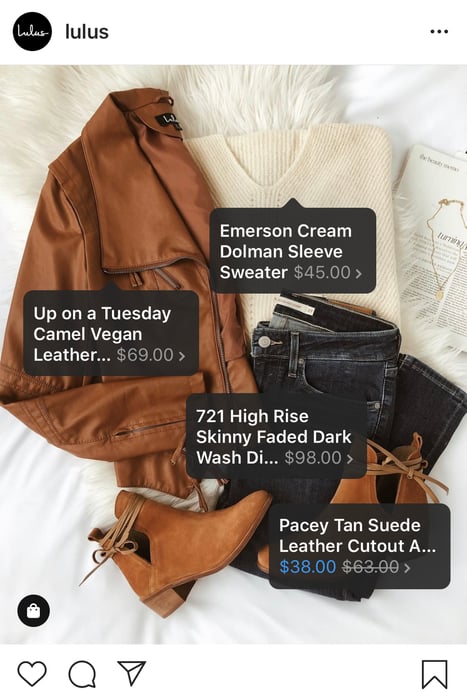
Ecommerce websites are highly visual — you have to show off the product, after all — so your success on social media depends on your use of imagery to drive attention and traffic to your product pages. Instagram is an appropriate platform for ecommerce businesses because it enables you to post sharp product photography and expand your product’s reach beyond its purchase page.
You can take your social media posts a step further by creating shoppable content, which is content that enables visitors to buy right away. That can include anything from strategically placed display ads within a social feed to additional tags that take users directly to a shopping cart. These methods help you eliminate friction from the buying process.
An ecommerce business is no stranger to product reviews, either. Using a Facebook Business Page to share product praise is a perfect fit for businesses that already solicit customer reviews across their online store. We’ll dive deeper into product reviews below.
Content Marketing
When you hear “content marketing,” you might think of blogging and video marketing — content that is meant to improve your website’s ranking in search engines and answer questions related to your industry. But if you’re selling a product online, do you really need articles and videos to generate transactions? You sure do.
Here are some ways to use content to market your ecommerce store.
Optimize your product page copy.
Optimize your product pages for short, product-driven keywords that include the name of the product. If you sell wedding dresses, for example, a Google search for “brown bridesmaid dress” is more likely to produce product pages like yours if you’ve included that term on the page. Also, make sure that your page titles, headers, and image alt text focus on the right keywords so search engines know to return your ecommerce store for the right query.
Write relevant blog posts.
If you manage an online wedding dress store, writing blog posts about “how to plan a wedding” can attract everyone involved in wedding preparations no matter where they are in the planning process. As visitors become more engaged, you can create posts that will move them into consideration, like “how to select the right wedding dress, and turn them into leads, like a downloadable “wedding planning checklist”.
Create guest posts for external websites.
Guest posts can get you and your products in front of relevant audiences (oftentimes for free). Submitting guests posts will also help you get more domain authority for your ecommerce site, thereby telling search engines that you have a reliable site.You’ll need to search for sites that rank for keywords related to your product. Sometimes you won’t even need to create an entire post. If a site already has a relatable post, offer to expand on it by providing additional context, like a video or infographic with a link to your site.
Put product-related videos on YouTube.
YouTube has over billion active users … chances are your target audience is somewhere in there. It’s also the second largest search engine behind Google. If you’re looking for a massive, captive audience, YouTube is where you’ll find it. Use highly searched keyword terms to determine your topics, then share videos that are related to your product and helpful to your audience. This is also a great option for tutorial videos that show current customers how to use your product — these videos can show people how best to use your product, increasing customer satisfaction and building long-term relationships with website visitors.
Include a keyword-driven FAQ section on your website.
If your audience is asking questions related to your product, then you need to be the one to answer them. Create an FAQ page on your website with responses to high volume, long-tail keyword searches to get users to your site. You’ll be building both authority and traffic — two crucial components of a successful ecommerce store.
Search Engine Marketing
Search engine marketing (SEM) includes both search engine optimization (SEO) and paid advertising. While SEO relies on your knowledge of Google’s ranking algorithm to optimize content, SEM can involve pay-per-click (PPC) campaigns, display campaigns, or product-specific ad campaigns (think Google Shopping), which allow you to pay for top spots on search engine results pages.
On Google, PPC campaigns guarantee that potential buyers will see a link to your page when they enter search terms that match the terms of your campaign. But because you’re paying Google each time a person clicks on your result, the payoff to you should be high.
This is why ecommerce marketers often register with Google AdWords and promote their product pages through PPC campaigns. The campaign puts searchers right in front of the business’s product when they click on a paid result, increasing the likelihood that the searcher will make a purchase before leaving the business’s website.
Email Marketing
Email marketing is one of the oldest forms of digital marketing, and believe it or not, it holds specific value in the world of ecommerce marketing.
The best part about email marketing is it can be automated. Automation means that you can set up a successful drip campaign to subscribers that are segmented by interest or stage in the buyer’s journey and let your email campaign do its magic. It’s one less marketing tactic that you need to worry about on your long list of tasks.
Even so, it’s imperative that you’re meticulous about your email list so you maintain trust among your leads. In a time when data privacy runs high on an internet user’s priority list, not every commercial email is welcome in that user’s inbox. Ecommerce marketers need to be careful when and how they add website visitors to their mailing list. Here are two ways an ecommerce marketer might use email marketing.
Post-Purchase Follow Up
If a user has already purchased a product from your website — and agreed to receive emails from you during the checkout process — sending a follow-up email a few days after the product is delivered keeps the conversation going and gauges their future interest in your product line.
A post-purchase follow up also shows that you care about them beyond a sale and that your company has an interest in their success using your product (more on why customer success is an important part of your marketing strategy below). It gives you an opportunity to get feedback on their purchase experience, which, in turn, helps you reduce friction for future customers.
Some best practices for this type of email are to ask them to write a review of your product and/or read original content on how to use your product (those YouTube videos you created would be perfect here).
The Abandoned Shopping Cart
Users abandon their shopping carts for a number of reasons, and emails to diagnose the problem and retain their business can make the difference between a purchase and a lost customer. We’ll cover ways to reduce shopping cart abandonment below.
If a website visitor fails to complete a transaction while they’re in your shopping cart, consider sending a polite email to remind them to complete the checkout process, offer assistance, or recommend other related products to get their mind back on you and their browser back to your ecommerce store.
Learn more about why users are abandoning your shopping cart and how to fix it.
Influencer Marketing
Influencer marketing focuses on people or brands that already have influence over your target market. The term is commonly used to denote Instagram accounts with several thousand followers, but it could also mean a celebrity or community that your target audience follows or belongs to. Influencers build communities of people that know, like, and trust them. It is, therefore, easy for them to garner attention around your online product through a recommendation, or “sponsored post.”
Affiliate Marketing
Eight-one percent of brands employ affiliate marketing, and ecommerce sites are particularly good candidates. Affiliates are people or businesses that help sell your product online for a commission. Unlike most social media influencers, affiliates generate interest in products via old fashioned (yet effective) marketing tactics. They often use paid advertising, content marketing, and other means to drive traffic to your their pages on your product — it’s like having a team market for you.
Local Marketing
This is an often overlooked tactic for ecommerce businesses, but local marketing allows you to double down on the areas where most of your prospects are (if you have a large population of them in one area) and allows you to offer incentives to your potential customer base. Here’s how: use tracking cookies to determine where your prospects are located. Then, offer discounted (or free) shipping to potential customers in the areas where you have warehouses or shipping facilities. The incentive might be just what you need to gain a new customer.
Ecommerce Marketing Tips
There are countless ecommerce marketing tactics that you can employ to drive visitors to your online store beyond the traditional methods that we reviewed above. Let’s get into some more creative ways you can market your ecommerce business.
Use Personalization
Companies that use personalization are seeing revenue increases ranging from six to ten percent. What is this magic bullet? Personalization is finding ways to cater to individuals within the marketing materials that you already have; it is tailoring your outputs to reflect the unique needs of your consumer. This can come in the form of a prospect’s name in the subject line of an email, recommended content or products based on a visitor’s behavior, or even showing smart content on a webpage when a user visits for a second time or has moved along their buyer’s journey.
Personalization can move people along their buyer’s journey faster — instead of searching for what they need, you put it right in front of them, making it easy for them to take your desired action, that is, make a purchase.
Capitalize on User-Generated Content (UGC)
What if you could have your customers market for you for free? That’s exactly what user-generated content, or UGC, is. It’s about finding ways for your customers to promote and share your business. This helps in a couple ways: 1) It drives traffic to your ecommerce store, and 2) it builds an authentic following of people who are interested in what you offer.
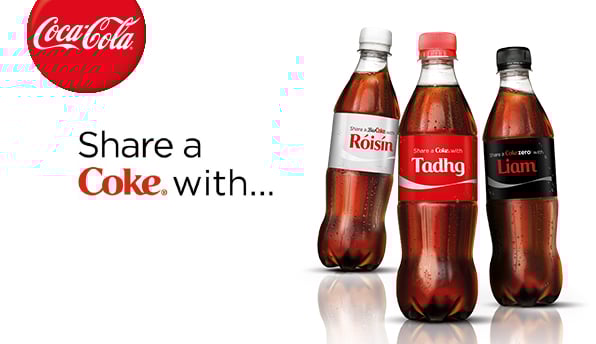
Coca-Cola® did an amazing job of this with their “Share a Coke” campaign by creating customized Coke® bottles with people’s names, which naturally was shared across social media platforms.
 Source
Here are some effective ways to drive UGC:
- Competitions, where customers enter to win by displaying your product in some way
- Review platforms, where customers share feedback about your product
- Social media hashtags, where users submit content using a branded hashtag
Build a Loyalty Program
A loyal customer is a long-term customer, and who doesn’t want repeat business? A loyalty program provides an incentive for a customer to continue doing business with you through relevant offers and discounts. While building a customer loyalty program takes some planning and work, it pays off in repeat business, UGC, referrals, and retention.
There are a couple of things to consider as an ecommerce business when building out a loyalty program. For one, consider diversifying the ways in which customers can show loyalty, whether it be through repeat purchases, mentions on social media, or sharing your content. Also, think about how you will pay off their loyalty, be it through points, discount codes, or exclusive perks.
Generate Word-of-Mouth Marketing (WOMM)
Word-of-mouth marketing is one of the most powerful marketing tools out here. It’s based on the premise that people want advice from others like them. As buyers becoming more skeptical of marketing tactics from companies, the need for word-of-mouth marketing in your business becomes more apparent.
While you can make this to happen organically by providing a great customer experience, you can also encourage, and even create, forms of WOMM that are equally as effective.
Reviews
Remember how I just said that prospects trust companies less and less? Well, customer reviews help mitigate that mistrust because they come from people who are not invested in the success of your company — instead, they’re an authentic and oftentimes brutally honest review of your product and how it worked out for them. Reviews serve as marketing tools for you because they include mentions of your product and oftentimes they do the selling for you … people think, “If it worked for them, it might work for me, too.” Encourage your customers to leave reviews however you can, and that post-purchase email we talked about above might be a good start.
Referral Marketing
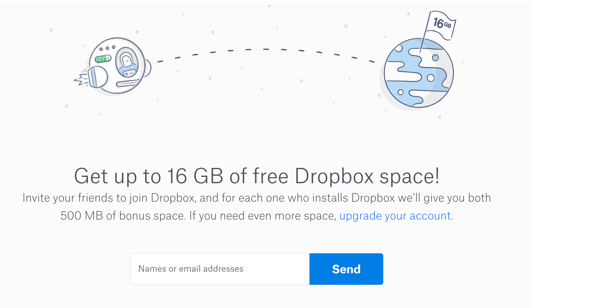
When customers solicit their friends, family members, and co-workers to buy from you, that is a referral. Sure, this may happen naturally if they really enjoy your product, but you can ensure that it happens more frequently through a referral program. Simply ask your customers to refer others in exchange for something of value (e.g. discount, money, free gift) that you can offer to either your new customer, your existing customer, or both. Dropbox does a good job of this — they offer additional cloud storage space when you refer a friend to sign up.
Testimonials
You can use customer testimonials to get the word out about how great your product is. Testimonials are essentially tailored reviews because you typically produce them from interviews where you can ask specific questions that get to the points you want to address and share with prospects. Being that you have an ecommerce store, some topics you might want to focus on for your testimonial interviews would be ease of the buying process, the level of customer support, and frictionless delivery and setup methods.
Case Studies
Case studies allow you to promote customers’ successes in a way that pushes prospects over the edge. They are meant to relate to your buyer persona, so you should interview customers that most closely represent your target audience. Case study best practice is to show a customer’s life before your product and how it has drastically improved since.
Invest in Live Chat
Chatbots — you’ve heard about them, right? Well, they’re one of two ways to employ a live chat strategy. Depending on your business size, you can have a live person available to chat with potential customers who visit your store. Whether you decide to go the bot or human route, live chat will prove especially effective while people are browsing your store so they can get answers right away and when they’re in the checkout process to mitigate any objections just before buying.
Cater to the Shopping Cart
We discussed the reasons why people abandon their shopping cart above, and a lot of it has to do with trust in your business, in the product, or in the delivery system. You want to give customers every reason to want to buy from you without hesitation by confronting their objections head on.
Some ways to mitigate shopping cart abandonment are:
- Money back guarantees
- A clear and simple return policy
- Superior delivery options
- Immediate access to customer support
Ecommerce Marketing Strategy
Now that you know the ins and outs of ecommerce marketing, let’s put it all together and talk about how to build a marketing plan for your online store.
Set goals based on industry benchmarks.
Depending on your industry, location, business size, and a multitude of other factors, there are some standards you can use to measure your goals against — those standards are industry benchmarks. Consider goals like website visits, click-through rates, conversion rates, and customer acquisition cost and compare those to other ecommerce business in your field.
Break down your strategy by small tactics.
When building out a marketing plan for your online store, there are several paths you could follow — we listed many of them above. It can be tempting to chase after every single one, but that’s a sure way to not be effective at any of them. We recommend that you focus on a couple key strategies first that you believe will have the most ROI — and are the most accessible to you — and create action items for each.
For example, say you decided that you wanted to focus on a paid strategy to drive users to your store. A few of your action items would be: set up a Google Ads account, determine your ad spend, create an ad group based on your target keywords, and monitor your account daily. This may sound oversimplified — that’s because it should be. You don’t want to get lost in chasing the next “great ecommerce strategy” without executing on one thoroughly and allowing it to work for you.
Remember Your Customer
Marketing doesn’t stop with a sale. Once someone becomes your customer, you should continue to engage them and nurture them. The benefits to you as a company are many: you’ll have successful customers that you can use for testimonials and case studies, you’ll receive glowing reviews about your product, and you’ll have the power of word-of-mouth marketing behind you as you turn customers into fans.
Ready, Set, Sell
Ecommerce businesses have several marketing tools at their disposal. Using digital and inbound marketing just the right way, you can create campaigns that are designed to help your online store attract customers and grow better.

The 11 Best Job Search Sites for Your Industry & Goals
We all know the usual suspects: Craigslist. Monster. Career Builder. Newspapers (half-kidding on that one).
Or perhaps you’re more of a networking kind of person when looking or hiring for a job: frequenting marketing events to get some face time with heavy hitters who might want you to join their teams. Marketers — or anyone — looking for work have probably spent time in all of these places at one time or another.
But like … what else? Those can’t be the only ways to find a new job. Or, if you’re looking to hire someone, to find your next great team addition. To paraphrase every infomercial ever, there’s gotta be a better way.

There is. The “better way” to hire and get hired is to get found in the places candidates and employers are looking for you. Kind of like inbound marketing — what a coincidence …
Below, you’ll find 11 places you might not have thought of, but often prove to be excellent marketing venues for finding job openings and the candidates to fill them.
Best Job Sites
- Mashable Jobs
- American Marketing Association (AMA)
- LinkedIn Jobs
- Job.com
- Talent Zoo
- Mediabistro
- Behance
- ProBlogger
- AngelList
- Your Own Web Properties
1. Mashable Jobs
Perfect for: Jobs sorted by employer
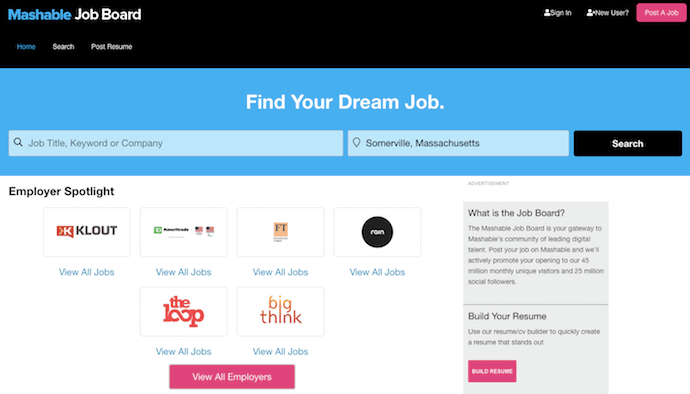
If you’re job hunting, there are several ways to browse current job openings from the dashboard shown above. To start, you can simply type keywords related to your job into the blue search bar. You can also search by employer (if you have your heart set on that one company you’ve always wanted to work for). If you’re an employer trying to expand a job opening’s reach, click that big pink rectangle in the top-righthand corner of the page.
Mashable’s job site is dedicated to jobs in social media, marketing, technology, and business. And they post for companies that are, well, kind of a big deal — like Yelp, Viacom, and Digitas.
2. American Marketing Association (AMA)
Perfect for: Marketing jobs
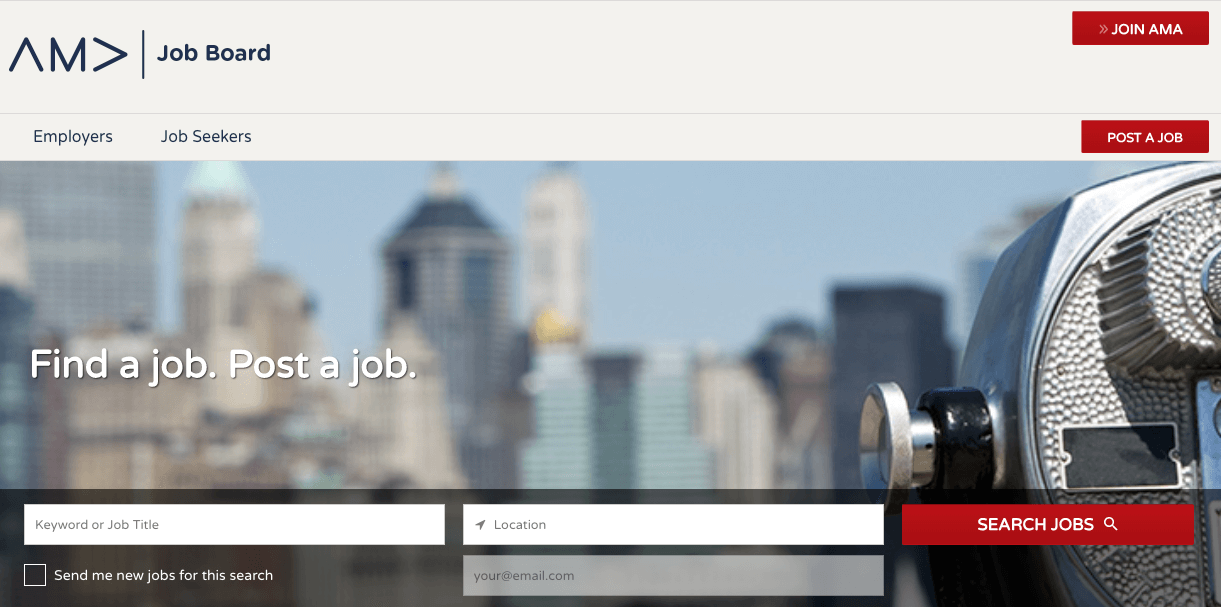
The AMA is a well-known and respected marketing association that publishes content and hosts networking and teaching events that keep members up to date on what’s going on in the world of marketing. The positions there range across many sub-specialties in marketing and across many different industries. Those looking to recruit candidates can also post jobs at a discounted rate if they’re an AMA member.
Another added benefit of the AMA jobs board? It also offers educational resources like resume writing tips, information about reference checking, and how to use social networking in your job or recruitment search.
3. LinkedIn Jobs
Perfect for: Jobs & candidates sorted by industry
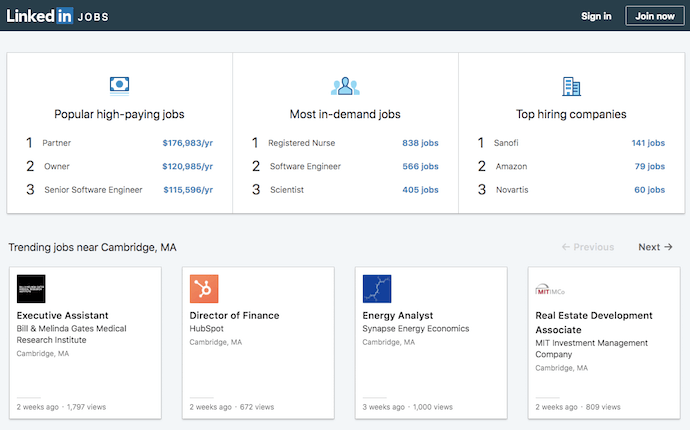
Speaking of social networking … you didn’t think we’d neglect the holy grail of social recruiting and job hunting, did you? LinkedIn is unbelievable if you’re looking for a marketing job. Seriously, I can’t state it enough. It. Is. Awesome.
LinkedIn Jobs lets you search for jobs by industry and location, plus it suggests jobs you might be interested in based on the information in your LinkedIn profile, such as where you’re located and the experience you already have.
What’s great about applying for jobs through LinkedIn is that your resume’s already done — if you’ve completed your LinkedIn profile, that is. Let me explain what some of the greatest features are so you can leverage them now if you aren’t already:
Online Resume
If you haven’t already, fill out your LinkedIn profile as completely as you possibly can. They make it foolproof, too, including a progress bar that tells you how complete your profile is, what more you can do to beef it up, and why doing those things will benefit you.
Sanctioned Stalking
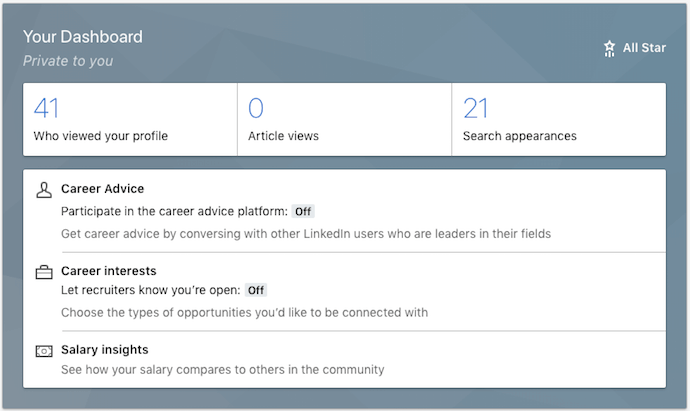
Don’t feel bad about stalking — it’s business stalking. For instance, LinkedIn has a groovy feature that lets you see who has been viewing your LinkedIn profile (provided your privacy settings are set so others can see when you’re viewing their profile).
Want to see exactly who’s been viewing your LinkedIn profile? LinkedIn Premium shows you exactly who might be interested in you as a professional. Whether they’re recruiters, HR managers, or work for a company you’ve been eyeing, this visibility enables you to reach out to them proactively.
Networking Events
If you’re one of those people who prefers face-to-face networking, you can also leverage a tool called LinkedIn Events. This allows you to see who on LinkedIn is attending industry events — if your hopeful future boss is going, it might be a good idea for you to show up, too.
Groups and Company Pages
If you’re vying for a specific company, follow that company on their LinkedIn Company Page. Not only will you be able to get a feel for what the people that work there are like and what their employee turnover and promotions looks like (just go to the ‘Insights’ tab), you might see new jobs pop up, too!
Or if you’re not looking to join one company in particular, consider joining some inbound marketing groups to establish your name as a thought leader — and get to know people who are hiring, or know people who are hiring. We recommend a little group called Inbound Marketers – For Marketing Professionals.
4. Twitter
Perfect for: Jobs & candidates sorted by industry
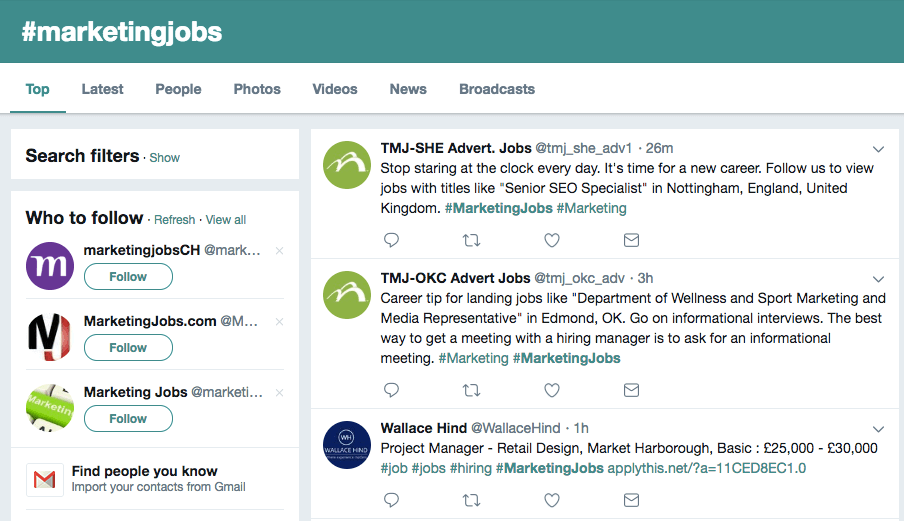
Career opportunities for marketers don’t end with LinkedIn. Believe it or not, Twitter is also a great way to find jobs (and people to fill them). And because most people won’t think to head to Twitter when they’re job hunting, it’s a way to stand out from other applicants. There’s a few tactics you can use here:
- Follow specific jobs Twitter accounts. Do a quick search for “inbound marketing jobs” or “marketing jobs” and you’ll come across tons of Twitter accounts whose sole job is to tweet out open roles in our fine industry.
- Follow specific jobs hashtags. You know what else you might find when you conduct that search? Hashtags associated with those jobs. Hashtags like #marketingjobs or #jobsearch are good places to periodically check in for recent opportunities.
- Follow the companies you want to work for, and the people who work there. Look for job postings that come from them, particularly if these companies have a referral bonus. At HubSpot, for instance, many employees take it upon themselves to tweet out new jobs because, if they bring in a new hire (even from Twitter), there’s a nice referral bonus at the end of the tunnel.
5. Job.com
Perfect for: Jobs & candidates sorted by qualifications
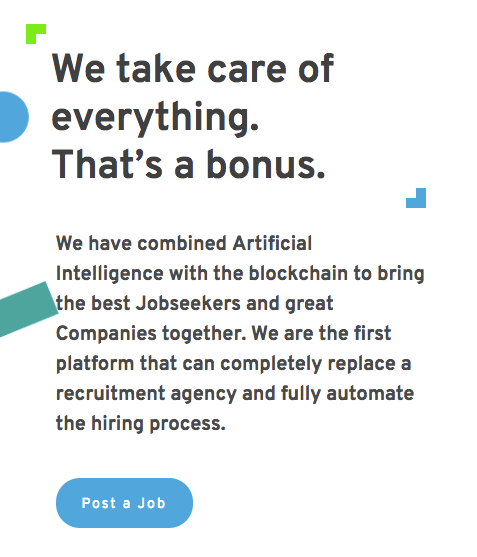
You’ve never seen something like job.com, I can assure you. This intriguing recruitment site uses blockchain technology to match candidates with employers based on the attributes both parties are endorsing.
Although it caters to professionals in every industry, job.com is a perfect fit for writers, optimizers, and analysts who leave no stone unturned when advertising themselves to a new employer or candidate. In other words, if you love optimizing your resume or job listing with specific language that appeals to professionals like you, you might want to give this site a try.
6. Talent Zoo
Perfect for: Marketing & advertising jobs

Doesn’t this job site sound like a recruiter’s dream? Talent Zoo does indeed have a zoo of talent — and job listings in need of that talent — specifically for marketers, advertisers, designers, and even web developers. In addition to a place to upload a resume for repeat use, the site has a slew of articles offering career advice to help employers and applicants put their best foot forward when reaching out (and, ultimately, working together).
Talent Zoo also takes a playful approach to its user experience — you need not look further than its search button, “Bring It, Daddy-O!” If you or your company culture is just as casual, posting to this site can ensure both parties would be a fit for each other on a social level.
7. Mediabistro
Perfect for: Marketing jobs & freelance candidates
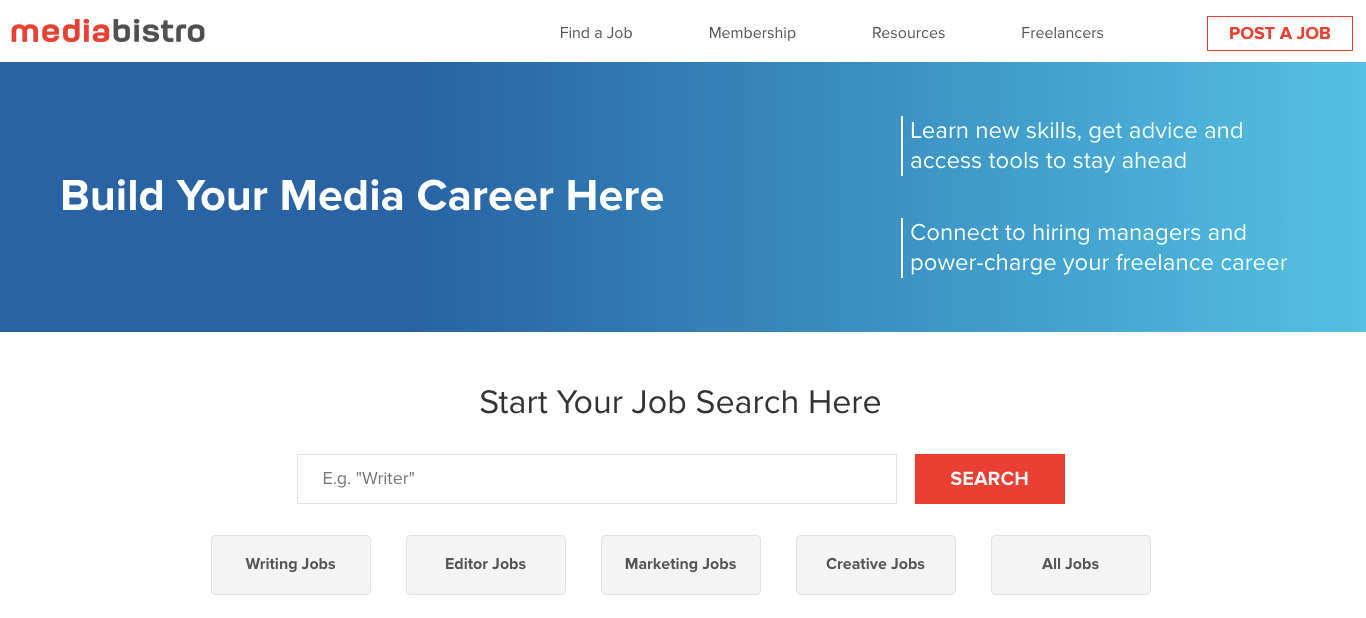
Mediabistro has been around for a long while, and although it’s changed a lot as the internet has grown, it’s remained committed to an audience of marketers, content creators, and media professionals since day one. The site organizes its job listings across five navigation buttons to give you a sense of what opportunities to expect:
- Writing Jobs
- Editor Jobs
- Marketing Jobs
- Creative Jobs
- All Jobs
Not shy about its commitment to contract workers, Mediabistro also reserves a section of its website for freelance — accessible from the top navigation bar. There, you’ll see a database of freelancers across each of the industries listed above where you can find a professional that’s perfect for the work you need done. Are you a freelancer, yourself? Become a Mediabistro member and create a profile.
8. Behance
Perfect for: Design & creative jobs / Networking
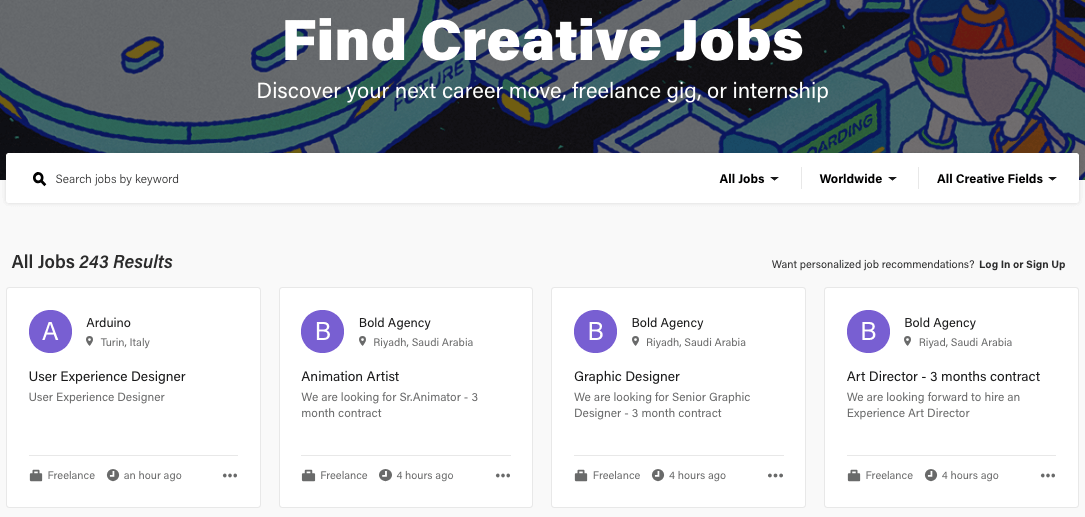
You might associate Behance with downloadable design templates, creative tools, and collections of artwork. But where would Behance be if it didn’t also help find employment for the people who seek inspiration on its website? For that, there’s Behance’s job list, which surfaces job listings across dozens of industries that depend on creative professionals.
What really sets this job site apart from other creative recruitment platforms is its company profiles. Inside each job listing is a project page for the company that posted the job. The employer can list current projects they’re working on, who’s following them, and even their most active team members. It’s a great way to get to know companies and candidates as individuals so they don’t become just another application.
9. ProBlogger
Perfect for: Writing jobs
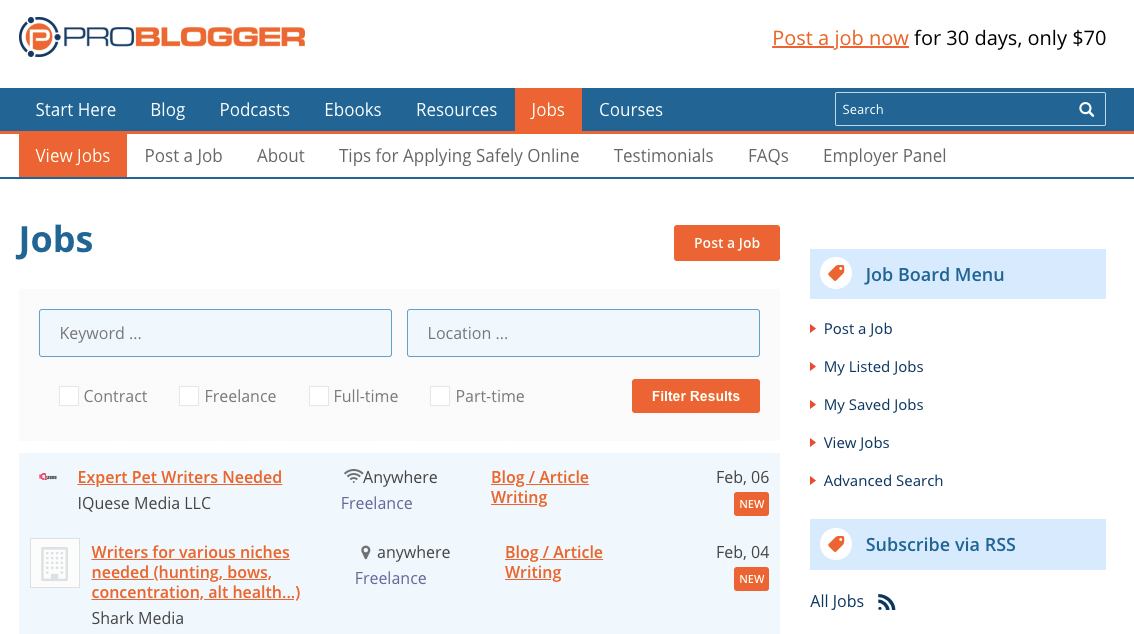
This job site tells you precisely what it is in its name. Want to be a professional blogger or find writers to create content for you? ProBlogger makes it easy for companies and candidates to find each other for various content marketing initiatives. Jobs are clearly sorted by contract, freelance, full-time, and part-time.
10. AngelList
Perfect for: Jobs at startups
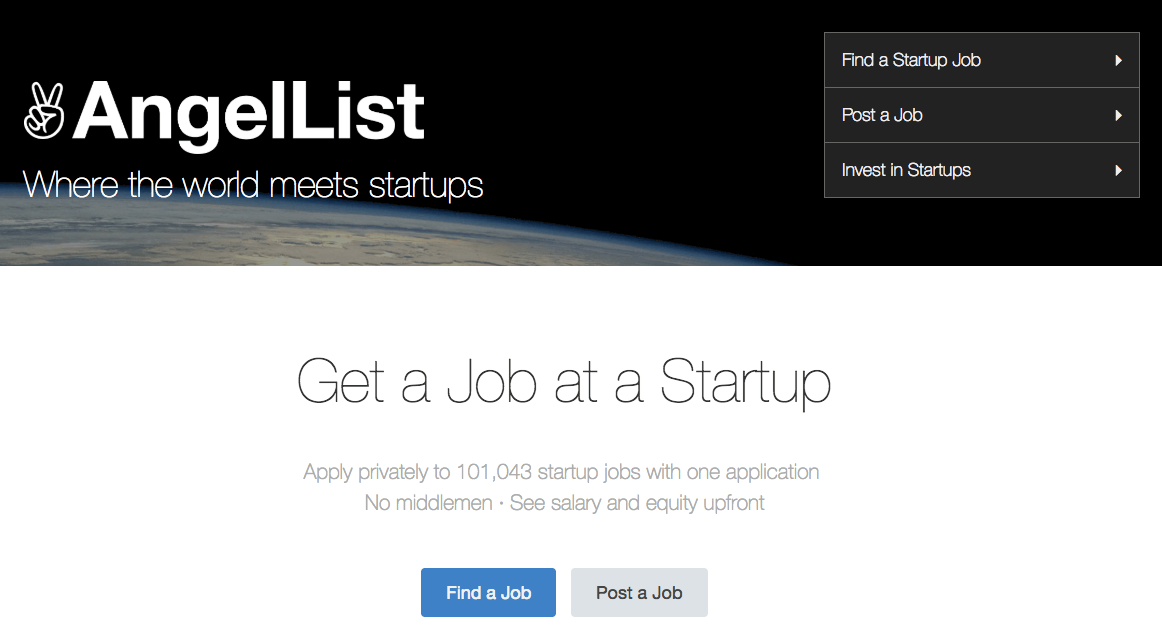
It can be hard for startups to attract awesome talent on big recruitment sites like Indeed or even LinkedIn, especially when they’re competing against big brands for exposure. But there are millions of skilled professionals who want to work for startups but just can’t find them. That’s where AngelList comes in.
AngelList is a job site exclusively for startups and those who want to work for them to find each other. Growing companies like DuckDuckGo, a search engine; Asana, a productivity tool; and Hinge, a dating app, all find top-tier talent on this job site.
11. Your Own Web Properties
Perfect for: Personal branding
Why wait for someone else to post a job listing? Take matters into your own hands. Marketers can be notoriously bad at marketing themselves, but if you’re really good at marketing, why not use your skill to your own advantage?
If you want a new job, help yourself get found all on your own. Think of your job hunt as its own marketing campaign. In fact, we’ve had plenty of our own inbound marketing hires execute full-fledged inbound marketing campaigns to get the attention of recruiters, hiring managers, and even recruiters here at HubSpot.
So, if you’re not maintaining an online portfolio or a website that showcases you in all your [marketing] glory, hop to it. I can tell you firsthand that every new potential marketing hire that crosses my desk gets promptly Googled. What am I looking for? An active, up-to-date online presence that demonstrates their knowledge. That could mean they’re blogging for their current company, their own online portfolio, frequent activity on sites like LinkedIn and Quora, even a healthy Twitter following. All of these are indications that they “get it.”
No matter how hard a time you’re having finding a new gig on third-party sites, remember that you always have you to fall back on.
Click here for more job sites that are particularly helpful for recruiters, and sign up below to learn how to become your own best professional advocate.


5 Reasons to Get Excited About the HubSpot Platform in 2019
This time last year, we put a stake in the ground by announcing that HubSpot was building a centralized platform.
We believe the world has changed. We see businesses using more kinds of software, not less, that all needs to work together. To help our customers grow better in this environment, HubSpot is evolving from an “all-in-one” suite into an “all-on-one” platform.
Delivering remarkable end-to-end customer experiences is a team sport. Our goal in becoming a lovable platform is to make it easy to complement HubSpot with a rich landscape of apps built by other companies, or custom apps built uniquely for your business by an agency or your own developers.
We want to make it easy for our customers to orchestrate all of this.
In collaboration with our growing collection of platform partners, we made great progress in that mission over the past year. Here are our platform highlights from 2018:
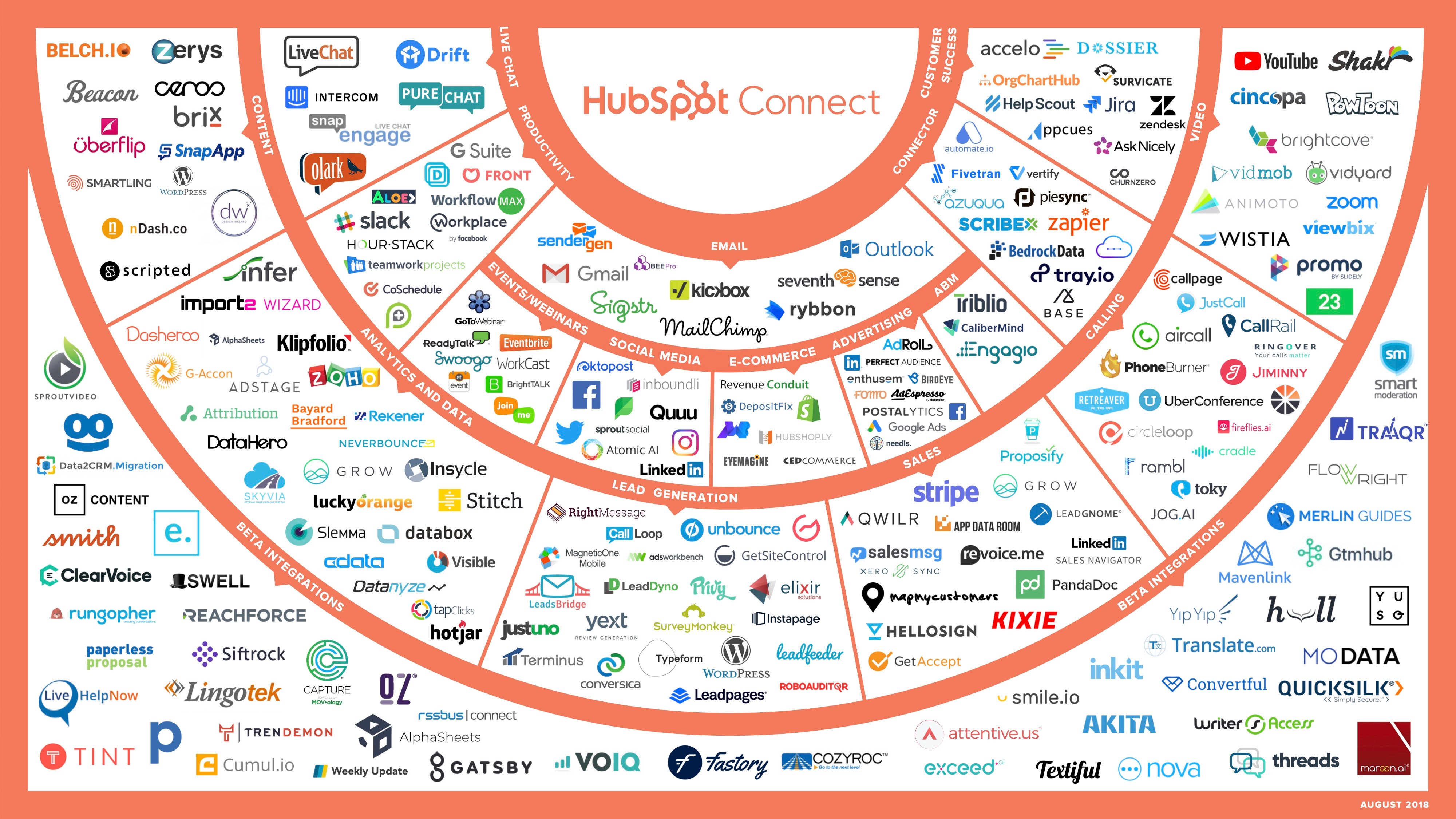
1. We listed 94 new apps in our directory, growing our platform partner ecosystem by 70%.
Good platforms are flywheels: More customers attract more developers, who build more apps, which attract more customers, and so on. Customers get an ever wider set of capabilities, while developers get an ever wider audience they can distribute their apps to.
That flywheel is starting to accelerate on our platform, and it’s inspiring to see the wide variety of innovative companies who are bringing new integrated apps to our customers.
We welcomed 94 new official apps into our ecosystem in 2018, bringing our integrations count to over 200 across 17 categories, that help grow our customers’ businesses.
One of the categories that grew the most in 2018 was Calling. Just within that category, you can find 21 different apps for video conferencing, integrating with cloud-based phone systems and call centers, inbound and outbound SMS, voice-powered chatbots, AI-driven analysis of phone calls, and more.
In 2018, the top 20 most popular non-native apps in our ecosystem by total number of installs were:
- Zapier — integrations automation
- Mailchimp — email and marketing automation
- Slack — collaboration hub for work
- WordPress — free content management system
- SurveyMonkey — survey collection
- Eventbrite — event management and ticketing
- Salesforce — CRM
- Databox — mobile analytics
- GoToWebinar — video conferencing
- MagneticOne Mobile — business card sync
- Automate.io — integrations automation
- Hotjar — heat mapping
- UberConference — video conferencing
- Zendesk — support ticketing and customer service software
- Shopify — ecommerce platform
- Typeform — online form and survey-building
- PandaDoc — docusigning
- Unbounce — landing page building
- Import2 Wizard — seamless data sync
- PieSync — integrations automation
As you might expect, many of these were our earliest partners, and it’s great to see their continued success. But we were also excited to see new partners quickly gain traction. The 10 fastest-growing new apps in our ecosystem last year were:
- Import2 Wizard — seamless data sync
- Typeform — online form and survey-building
- Slack — collaboration hub for work
- Zoho Analytics — informative sales reports and dashboards
- GetSiteControl — online form and survey-building
- CircleLoop — advanced calling
- OrgChartHub — organizational chart building
- Map My Customers — mapping and data visualization
- Jira — project management
- Skyvia — cloud application and database sync
Many more exciting apps are in the pipeline now and will be launching over the course of 2019.
We also built a number of native integrations last year, including Zoom, Slack, Shopify, Stripe, Youtube, and Workplace by Facebook.
We deliberately invest in a small number of native integrations relative to our ecosystem’s size. This allows us to focus our developers’ time on the handful of companies that we know will be the most valuable for our customers. For instance, we were launch partners for some of Slack’s new APIs, enabling a deep integration between our two products. We were a launch partner for Workplace by Facebook. And we built a groovy new YouTube integration for actionable video metrics.
Whenever we build an integration ourselves, we look for ways to enable other partners in our ecosystem to build off those same extension points. For instance, when we built our Shopify integration, we also created the Ecommerce Bridge API, which enables companies to sync and manipulate ecommerce data using HubSpot functionality. One of our integration partners, Unific, enables customers to connect their Magento, Shopify, Bigcommerce, or WooCommerce store to HubSpot using this API. We also recently added a tight integration with Zoom and are working to make it possible for other video conferencing providers to plug into HubSpot in the same way.
2. We added 95 new API endpoints and hosted our first annual platform partner day.
Our product teams have been enthusiastically opening more APIs and UI extension points to enable developers to build and integrate more kinds of apps on our platform.
Last year, we added 95 new API endpoints (for a total of 355), creating programmatic access to tickets, products, line items, CRM pipelines, GDPR compliance features, and more. We launched an Ecommerce Bridge API and Analytics API to facilitate deeper integrations with a wide range of partners in ecommerce and analytics categories. And we unveiled a new Workflow Extensions model that lets partners create branded, native-like actions for customers within workflows across our Marketing Hub, Sales Hub, and Service Hub products.
Last spring, we also hosted our first annual Platform Partner Day at our headquarters in Cambridge. Over 60 of our top integration partners joined us to meet with our engineering and marketing teams, learn about upcoming product releases, and discuss how we can jointly create better apps and integrations for our shared customers.
We’re now gearing up for our second annual Platform Partner Day this spring with exciting new developments to share and even greater opportunities to collaborate.
Traveling back to Seattle from inaugural @HubSpot Connect partner day. Enthused, empowered and excited to be part of program and part of @INBOUND. Looking forward to working with @HubSpotAgencies and customers. Thanks @albiedrzycki @ChristineIanni and co for a great program. pic.twitter.com/Y0hYEGuwwm
— Barney Brown (@BrownBarney)
May 10, 2018
3. Customers adopted integrations at a record pace.
There’s a positive correlation between the number of apps a customer connects to HubSpot and their growth on our platform. It makes sense: The more our customers invest in a unified experience for their customers, the more they can accomplish.
App adoption across our customer base in 2018 was record-breaking. The vast majority of our customers now have at least one other app integrated with HubSpot, and the average number of apps per customer jumped by more than more than 50% year-over-year. We’re talking hundreds of thousands of additional app installs.
We’re energized by this number, which indicates that customers are seeing benefits from our platform. But it’s also exciting for our platform partners who are seeing greater adoption among our customer base.
4. We connected our platform partners, agencies, and startups.
Some of the most valuable opportunities we can offer platform partners are connections with programs and communities across HubSpot.
For instance, our global network of thousands of agencies and consultants helps businesses leverage our software to grow better. Increasingly, these providers are adding our platform partners’ products to the solutions they’re delivering to clients. This gives their clients more capabilities, expands their own service offerings, and lays the foundation for a powerful go-to-market channel.
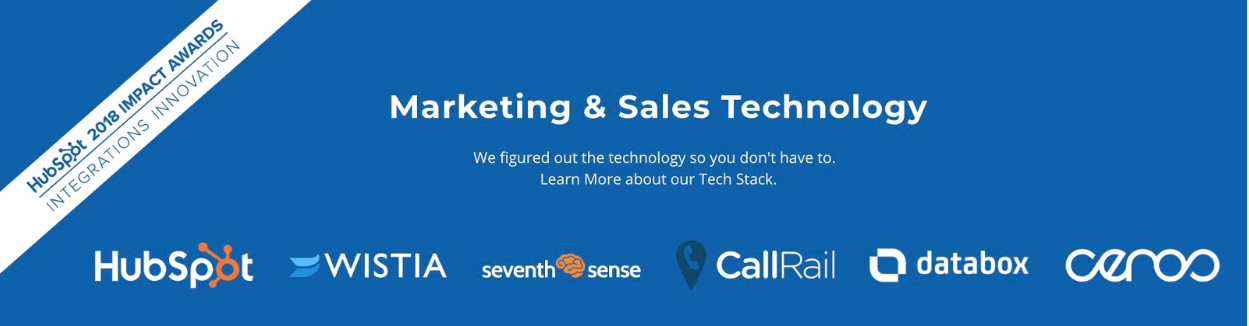
We’re seeing our agency partners leverage our platform in powerful and innovative ways. For example, Nextiny, a Platinum agency partner has curated a “tech stack” of apps from HubSpot’s platform ecosystem that they regularly deploy together for clients. Nextiny used this stack to overachieve on key business goals for their client, Jeeves Florida Rentals, and their success landed them a 2018 Impact Award for Integrations Innovation.
To facilitate these types of relationships, we launched the Apps for Agency Services program last spring. It provides a structured way for platform partners who qualify to help agencies sell and service their software, including sales enablement tools and a free subscription for their own internal use.
HubSpot for Startups is another thriving program partners with over 1,500 accelerators, incubators, and VC firms (like Y Combinator and Sequoia Capital) to provide startups with educational resources, event programs, and startup-friendly discounts on our software.
Last year, we enabled platform partners to provide special discounts to qualified startups to help them build relationships with new ventures.
To further build momentum between our platform partners and startup community, our platform marketing team researched the most commonly used apps for startups in our ecosystem and curated collections of apps for startups and free apps (including those with a freemium offering) in our directory.
We were inspired by all the successful connections between platform partners, agencies, and startups that happened last year. We’re committed to facilitating even more of them in the year ahead.
5. We launched HubSpot Ventures and announced co-investment from Amazon Web Services (AWS) in programs to grow our ecosystem.
In addition to expanding our platform’s APIs and extensibility and creating new app distribution opportunities for partners, we also made a couple of big announcements about growing the ecosystem itself.
In December, we launched HubSpot Ventures, a new $30 million fund to invest in startups that align with our mission to help millions of organizations grow better. Some of the previous investments that we have made include Blissfully, Grow, Lorem, Privy and Terminus.
At the same time, we announced a three-year commitment with Amazon Web Services (AWS) to help startups grow better. All AWS Activate members have access to HubSpot for Startups and AWS now offers Activate memberships and credits to participants in HubSpot for Startups too. AWS will also support HubSpot’s platform partner program by co-investing to build an ecosystem for HubSpot partners, including content tailored to developers.
And, in the spirit of investing in our platform partners, we also extended HubSpot for Startups discounts to all certified platform partners who aren’t yet HubSpot customers but want to make the switch.
Onward and Upward in 2019
We’ve got big plans for our platform ecosystem in the year ahead. For customers, we’re eager to bring you more apps and integrations that will expand your business’s digital superpowers. To see the latest ones, check out the new and noteworthy category in our directory.
For partners, we’re dedicated to creating more opportunities for you to build your business on our platform. Last year, our entire executive team went on a field trip to learn from some of the best platform companies in the Bay Area. Our overarching takeaway was this credo: A platform should be measured by the success of its ecosystem. In 2018, we added three key hires to our team who are specifically tasked with helping our ecosystem succeed. Samantha Ceppos, our director of global partner and platform marketing, scales our ecosystem and ensures our partners are always looped in to changes and updates. Elizabeth Ruscitto, our director of developer relations, is leading the charge in improving our developer documentation, tools, and support. You can access our latest resources and sign up for a developer portal for free here. Hugh Durkin, our director of platform partner success, is focused on shaping our platform partner program to help partners grow their businesses within our ecosystem.
Are you interested in joining us as an app platform partner? Learn more about the program here.
We’re eager to grow better together.

How a Minority of Business Bloggers Outperform the Majority [New Data]
When Orbit Media Studios decided to research how business bloggers go about doing their thing in 2014, it wasn’t intended to be a one-and-done project. The mission was — and still is — to track how business blogging evolves.
Why? Because successful inbound marketers thrive when they master content marketing and, of course, blogging is an all-important cornerstone for most strategies.
After establishing some essential benchmarks regarding how bloggers create, format, and measure their posts in years one and two of the study, Orbit Media began probing the 1000+ bloggers that participated in the survey to learn which tactics contributed most to achieving their desired results.
For the past three years, Orbit’s been focused on correlating blogging tactics with results. As trends emerge, the story continues to get more intriguing with each passing year.
In late 2018, the father of the study, research master Andy Crestodina, put considerable effort into reporting how those that saw their efforts reap strong results differed from the pack.
The results of the survey, along with Andy’s comprehensive analysis and 25 graphs to depict the data, are presented in full here. However, this year — year five of research — me, Andy, and the data-crunchers at Orbit also set out to create a side-by-side-comparison of how the average bloggers’ tactics differ from the top 20%.
Spoiler alert — the conclusion is the more you put into business blogging, the more you get out of it.
Take a look at how above average bloggers get above average results.


The Ultimate Guide to Google Shopping in 2019
Online shopping — we all do it. Heck, it’s arguably the greatest thing since sliced bread. (Did you know you can shop online for that, too? Crazy.)
But, have you ever been looking for a product and wanted to shop among a variety of brands and labels? This can be a pretty clunky process if you’re hopping between ecommerce websites.
This is where online shopping marketplaces come in handy. Think: Amazon, eBay, Etsy, and — you guessed it — Google Shopping. While Google Shopping isn’t technically an online marketplace (it’s more of an ad platform, but more on that later), it provides shoppers the same opportunity to browse a variety of products based on their search query.
Google Shopping also benefits retailers because, when a shopper clicks on a product link, they’re sent back to the retailer’s site to make the purchase.
If you’re not advertising your products on Google Shopping, you’re missing out, my friend. We compiled this guide to help you better understand Google Shopping and get started with your first Shopping campaign. Keep reading to get started, or use the chapter links to jump ahead.
When it was released in 2002, Google Shopping was called Froogle. The service simply indexed product data based on certain search terms. In 2012, the service shifted to a paid advertising model where retailers had to pay to be featured in the Google Shopping search results.
From that point forward, Google Shopping became a “branch” of Google AdWords — yet another way for retailers and e-commerce businesses to advertise their physical products on Google. But unlike text-based Google ads that show up based on keywords, Google uses product data uploaded by merchants to display Google Shopping ads.
Why use Google Shopping?
Why use Google Shopping? In short, it works. Here’s my personal anecdote about Google Shopping.
I’m currently in the process of moving apartments here in Chicago, and my boyfriend and I are looking for a sleeper sofa — preferably a sectional — for our new apartment. I’m not loyal to a specific furniture or home goods brand, so I’ve been looking for ways to easily search for a new sofa across multiple retailers.
Enter: Google Shopping. When I Google “sleeper sectional sofa,” it pulls up lots of websites … along with the sponsored Google Shopping results. Bingo.
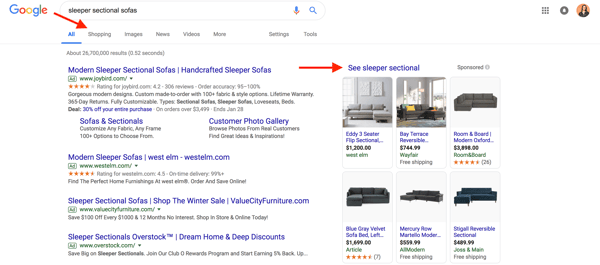
See sleeper sectional or on the
Shopping tab below the search query box, I can access a variety of sofas from different retailers. Google Shopping also allows me to filter the results by price point, size, fabric, and more.
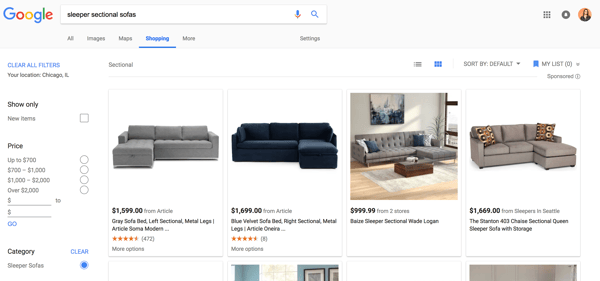
So, I’m a fan of Google Shopping. I haven’t made a purchase yet, but I do anticipate that I’ll find our ideal sofa by using this service.
Here are a few other reasons to use Google Shopping:
- Google Shopping adds a visual touch to an otherwise text-heavy searching and shopping experience.
- Google Shopping allows you to show up multiple times in Google SERPs — as a website result, a text-only PPC result, and a Shopping result.
- Google Shopping is proven to have 30% higher conversion rates than text ads.
How to Add Products to Google Shopping
- Set up a Google Merchant Center account
- Optimize your product imagery
- Collect and input your product feed data
- Link your Google AdWords account
- Create a Google Shopping campaign
- Place bids on your Shopping campaign
- Target and schedule your Shopping campaign
- Build ad groups
Let’s talk about how to get your products listed on Google Shopping. Below, we’ll walk through the steps required to manually set up your account. Tip: If you have a lot of products, this process might be easier to outsource to a Google Shopping data feed tool.
1. Set up a Google Merchant Center account
To get your products featured in Google Shopping results, you must sign up for a Google Merchant Center account.
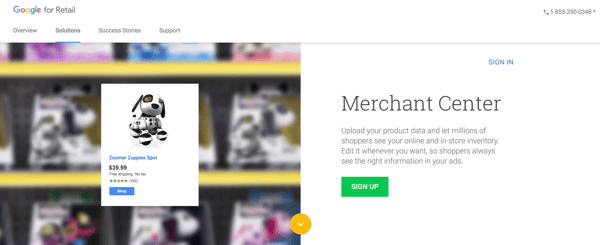
Google Merchant Center is simple to set up, is easy to navigate, and essentially serves as your home base for your products and product information. (You’ll manage your future Google Shopping campaigns through Google Ads, but more on that later.)
Read our guide to Google Merchant Center to learn more about creating and managing your account.
2. Optimize your product imagery
Google Shopping uses uploaded product feeds to index search results, but it pulls the featured images from the respective retail sites. Because of that, it’s important to optimize your product imagery and listings on your own website before you market them on Google Shopping.
Google Shopping is a highly visual experience. Your product photos are arguably the most important part of your listing, and they may be how shoppers choose which product to click and buy. Google knows this and — in the interest of providing a great shopping experience for consumers — will actually deny Google Shopping campaigns if the images are low-quality.
(If you think you can cut corners here, think again. Google does frequent quality checks and doesn’t hesitate to suspend Google Shopping accounts. Bad product imagery doesn’t just hurt sales, it can prevent them altogether.)
If you want your products to be featured on Google Shopping, we recommend following Google’s image guidelines from the start:
- Use a solid white, gray, or light-colored background
- Use clear, even lighting
- Show the product clearly being sold. (Rear views and close-ups can be used as additional images, but not as the main image.)
- Show the product at the correct scale and not too big or too small. (Your product should take up between 75% and 90% of the full image.)
- Avoid blur, noise, excessive .jpeg additions, or other image tweaks like pixelation, fringing, and fading out.
Other best practices include showing apparel products on-body, using shadows to add depth, providing multiple angles of your product, and featuring real people using it. These product image specifications are also good to master if you sell your products on other marketplaces such as Amazon, eBay, or Etsy.
3. Collect and input your product data feed
With your images optimized, it’s time to create your product data feed. Your product feed tells Google all about your products. This data is essential because it helps Google find and display your products when people search for certain product terms or attributes.
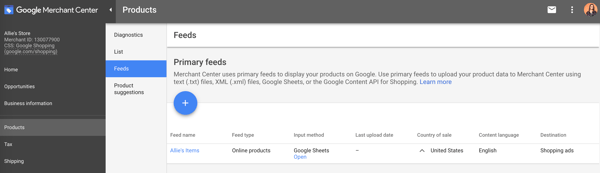
To set up your product feed, go to your Google Merchant Center account. Click Products > Feeds, and then click the blue “+” icon.
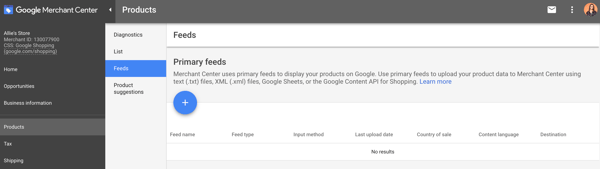
First, enter your country and language. This data determines which demographic(s) will see your products, so it’s important.
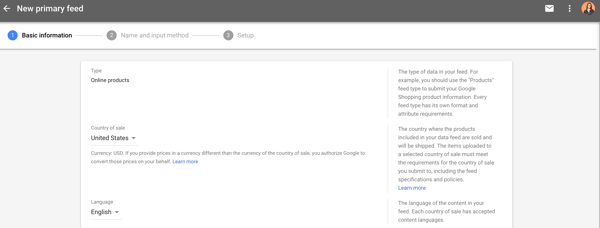
Next, name your product feed and choose how you’ll input your product information.
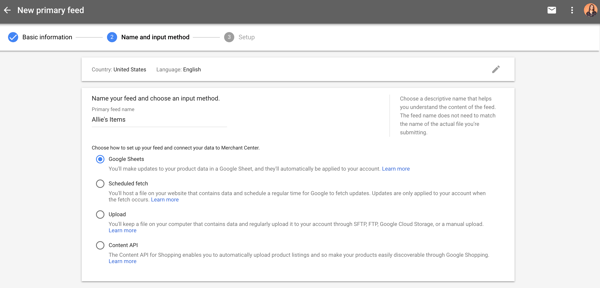
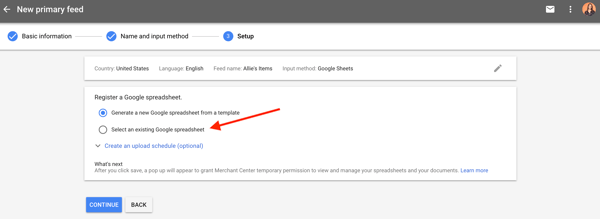
If you choose Google Sheets, you can either upload your own spreadsheet or use a template provided by Google Merchant Center. This step also allows you to create an upload schedule depending on how often you update your inventory.
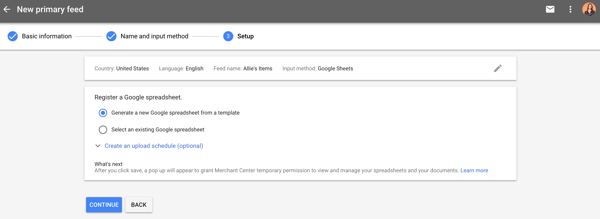
This spreadsheet is used to assemble the product attributes that Google will use to index and display your products. Below is a brief list of some required product attributes that Google uses to create your Google Shopping ads (plus a cheeky sofa example).
id — Your product’s unique identifier. Use the SKU if possible. Example: S123
title — Your product’s title. Should match the product landing page. Add any specifics that shoppers may search for, such as size, color, or style. Example: Allie’s Super Comfy Sleeper Sectional Sofa, Grey
description — An accurate description of your product. Should match the product landing page. Only include information about the product. Example: This sleeper sectional sofa was made especially for Allie’s new apartment. Made from 100% cloud-based material, this sofa is perfect for snuggling her dog, binging on Cheez-its, and watching too much Netflix. It also has a pull-out bed for when her mom comes to visit.
link — The URL of your product’s landing page. Should start with http or https. Example: http://bit.ly/2tgMPjv
image_link — The URL of your product’s main image. Should start with http or https. Example: http://bit.ly/2I4YvzI
availability — Your product’s availability. Match the availability from the product landing page. Example: In stock
price — Your product’s price. Match the price from the product landing page and the currency from the country in which the product is predominately sold. Example: $500.00
google_product_category — The Google-defined product category for your product. Include the single most relevant category. Example: Sectional > Sleeper
brand — Your product’s brand name. Provide the name generally recognized by customers. Example: Allie’s
You can find the full list of Google’s Product data specification here. We recommend you read it as we couldn’t fit the entire list of required and optional attributes in this blog post.
If you choose to use the template provided by Google Merchant Center, the spreadsheet will already reflect the product attributes as column headers.

If you choose to create your own spreadsheet, input your chosen product attributes as the column headers. Fill out the respective data with each product as its own row. If an attribute doesn’t apply to a product, leave that cell blank. When complete, simply upload the document to Google Merchant Center.
Voila! From that point forward, you can access your product feed on your Google Merchant Center account under Products > Feeds > Primary feeds.
4. Link your Google AdWords account
When you search for a product on Google, the Google Shopping results you see are actually advertisements.
That’s right — in order to get your products on Google Shopping, you have to pay. While Google Merchant Center is how Google gets your product information, Google AdWords is how consumers see your products … through Shopping campaigns, which we’ll get to next.
To get your products in front of shoppers via Google Shopping, you’ll have to link your Google AdWords account.
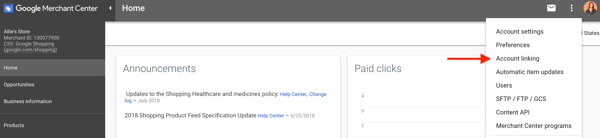
Log into your Google Merchant Center account. In the top right-hand corner, you’ll find three vertical dots. Click those to expand the menu, and then click Account linking.
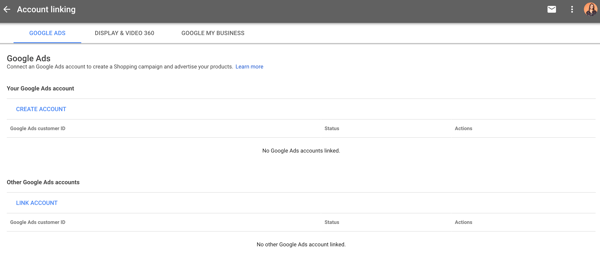
If you don’t have a Google AdWords account, you can create one from this screen. Otherwise, click Link account to enter your Google AdWords customer ID. Once you’re finished, your AdWords account should be linked.
5. Create a Google Shopping campaign
Once your Google AdWords account is linked, you’ll be able to create a Google Shopping campaign and advertise your products. There are a couple different ways to get started.
One way to create a Google Shopping campaign is through your Google Merchant Center account. After you link your Google AdWords account via the Account linking page, you should be able to access it from the same place. From there, you can simply click Create Shopping Campaign.
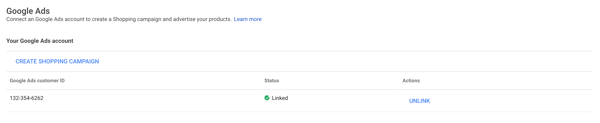
Next, insert the campaign name, country of sale, and daily budget. Once you click Create, you’ll be prompted to continue managing your campaign through Google AdWords.
The other way to create a Google Shopping campaign is through Google AdWords. Log into your Google AdWords account. Open the Campaigns tab on the left-hand side menu, click the blue “+” icon, and choose New campaign.
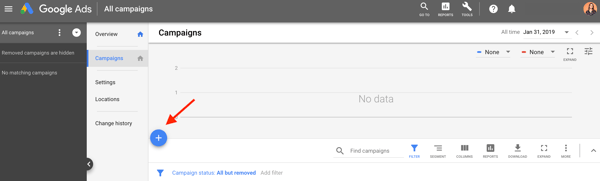
First, choose a campaign goal. A Shopping campaign can have a goal of Sales, Leads, or Website traffic. (You can see the Shopping designation if you hover over the goal.)
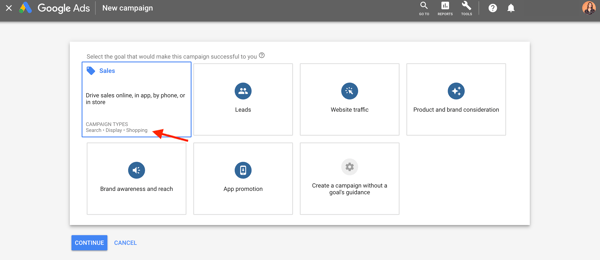
Sales campaigns drive sales online or in person. Leads campaigns gather leads and other conversions by encouraging shoppers to complete an action. Website traffic campaigns bring the right people to your website. Google tailors each campaign to align with your goal, so be sure to choose whichever one is best for your business.
After you choose a campaign goal, designate the campaign type as Shopping. Make sure your Google Merchant Center account is displayed (so Google AdWords knows where to pull your product data from) and indicate your country of sale.
Lastly, choose a campaign subtype. Note: Smart Shopping campaigns require conversion tracking so AdWords can track when your ads lead to sales on your website.
For explanatory purposes, let’s choose a Standard Shopping campaign.
The next screen contains all your Google Shopping campaign settings. First, enter a campaign name, and click Additional settings if you want to set an inventory filter, enable local inventory ads, or change your campaign URL options.
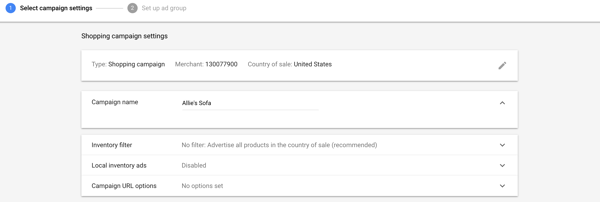
6. Place bids on your Shopping campaign
Next, under your Google Shopping settings, you’ll be asked to select your bidding strategy and set your campaign budget.
Bidding is how you pay for people to see, click on, and interact with your ads. According to Google, “a sufficient bid and high-quality product data will earn your ad a higher rank.”
(Tip: Google has a pretty cool Bid Simulator Tool that’ll show you how bid changes might affect your ad performance. Also, GoDataFeed wrote an awesome guide to Google Shopping bidding strategies that may be helpful, too.)
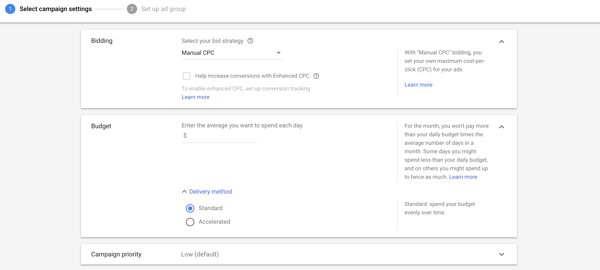
First, select your bid strategy. Manual CPC (cost-per-click) means you set your own maximum CPC for your ads. You can also set an automated bid strategy. Target ROAS (return on ad spend) and Enhanced CPC both require conversion tracking as Google uses your ad’s conversion rates to set the most efficient bid for your products.
With “Maximize clicks”, Google Ads automatically sets your bids to get as many clicks as possible within your budget. You can set a Maximum CPC bid limit to cap your spend on each ad.
Next, choose your campaign budget. This is the amount of money you want to spend on average each day … but the amount isn’t capped daily. Instead, Google manages your budget monthly: in a month, you won’t spend more than your daily budget times the number of days in each month.
For example, let’s say I set my campaign budget to $100 for the month of February. Google sees that I’m willing to spend $100 x 28 days = $2,800 in February. As it places bids on my ads, Google might spend over $100 in a day, but it’ll never spend more than $2,800 in the month.
You can also set a delivery method for your budget: Standard spends your budget evenly over time, and Accelerated spends it quicker.
Lastly, if you are running more than one campaign, you can set a campaign priority so Google knows which bid will be used.
Read more about the fundamentals of PPC advertising in our ultimate guide.
7. Target and schedule your Shopping campaign
The last section of the Google Shopping campaign settings is all about targeting and scheduling your campaign. This part is important because it dictates who will see your product ads and when.
The first two settings — Networks and Devices — shouldn’t change. They’re basically just telling you where your product ads will show up.
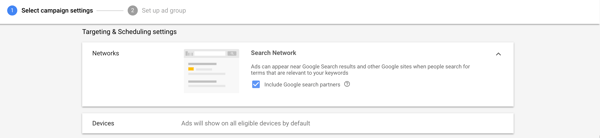
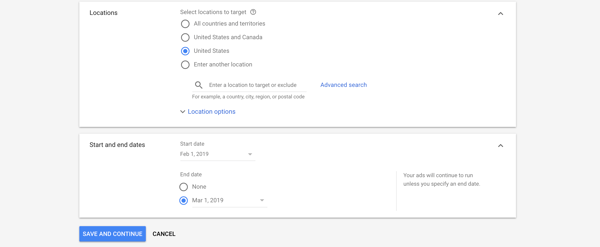
Next, select the locations that your ad will target. Make sure you only choose locations where you’re located and/or can ship to. Under Location options, you can change the Target and Exclude settings, although we recommend Google’s default choices. These options ensure that you’re marketing to the very best people: those located in your target location and those who are searching for (a.k.a. interested in) those locations, too. (The same goes for your excluded locations.)
Finally, set the start and end dates of your Shopping campaign. Your ad will continue to run unless you set an end date, so don’t forget that section.
8. Build ad groups
After you complete your Google Shopping campaign settings, you’ll be prompted to build ad groups for your campaign. Ad groups determine what type of ads you’ll run and how you’ll organize bidding for those ads.
There are two types of ad groups you can run: Product Shopping ads and Showcase Shopping ads. Product Shopping ads promote a single product. Showcase Shopping ads are a new format and allow you to advertise multiple products as part of a product or lifestyle ad that represents your brand or business.
If you choose a Product Shopping ad group, enter your ad group name and set a maximum CPC bid.
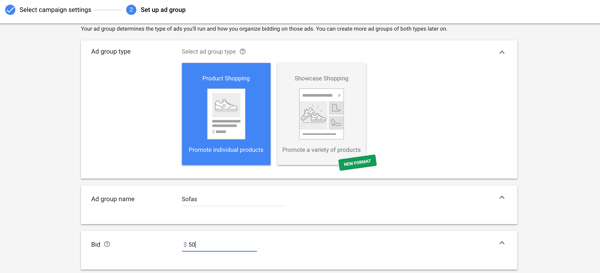
This creates one big ad group for all your products. If you wish to filter your products further, you can create separate ad groups for different categories.
If you choose a Showcase Shopping ad group, enter your ad group name and set a maximum CPE (cost per engagement) bid. (Engagement occurs when someone expands your Showcase Shopping ad and clicks on spends at least 10 seconds within the ad.) Lastly, choose what products to advertise as part of the Showcase Shopping ad.
Once you click Save, your campaign is submitted. Congratulations on completing your first Google Shopping campaign … we hope to see your products in Google Shopping results! 🎉
Conclusion
Google Shopping is a welcome change from an otherwise text-heavy online shopping experience. It’s almost like a digital mall — shoppers can enter, search for what they want, and see many different brands and types of products on one screen. For that reason, many people (including myself) prefer marketplaces over shopping for products on a standalone ecommerce site.
If your physical products aren’t being advertised in the Google Shopping results, consider adding this tool to your marketing repertoire. Not only will it boost your website traffic, but it’ll also give you leads and sales you otherwise might not have collected. Use this guide to get your Google Shopping campaign up and running, and you’ll see how it can greatly benefit your ecommerce strategy.

How The Flesch Reading Ease Test Can Help You Write Clear and Concise Copy
After writing The Old Man and the Sea, Ernest Hemingway famously said his novel was “the best I can write ever for all of my life.” To a certain extent, he was right. The Old Man and the Sea won the Pulitzer Prize for Fiction in 1953 and was specifically cited when Hemingway won the Nobel Prize in Literature the following year. Sadly, he never published a major work of fiction again.
Many critics hold The Old Man and the Sea in the same regard as William Faulkner’s short story The Bear and Herman Melville’s classic novel Moby-Dick. But unlike Faulkner and Melville, whose flowery, meandering prose is almost too poetic to follow, Hemingway crafted his iconic novel in a crisp, economical fashion — writing it at a fourth-grade reading level.
It might be shocking that one of the 20th century’s most influential writers wrote for nine-year-olds, but that’s exactly why so much of his work is considered classic American literature.
The best writing zips you across the page. If your eyes can fall down the piece and you can easily grasp the material, you’ll lose yourself in the story. But, on the surface, readability seems like a subjective measure. How can you objectively gauge it?
Interestingly enough, in 1975, J. Peter Kincaid developed the Flesch-Kincaid readability formula, which helped the U.S. Army measure the reading difficulty of technical manuals and is now used to make sure insurance companies write their policies at a ninth-grade reading level or below, in most American states.
To truly grasp the benefits of examining your content using the Flesch reading ease test, let’s go over what it is, the formula it follows, and how you can use it to craft clear and concise copy.
Flesch Reading Ease
The Flesch reading ease test is a formula that measures the readability of your writing. The higher your score, the more digestible it is. The lower your score, the more difficult it is to read.
Flesch Reading Score Formula
To calculate your writing’s readability, the Flesh reading ease test follows this formula:
206.835 – 1.015*(total words/total sentences) – 84.6*(total syllables/total words)
After calculating your score, check out the following table to match it with a corresponding reading level:
| Score | Reading Level |
| 100.00 – 90.00 | 5th Grade |
| 90.00 – 80.00 | 6th Grade |
| 80.00 – 70.00 | 7th Grade |
| 70.00 – 60.00 | 8th & 9th Grade |
| 60.00 – 50.00 | 10th to 12th Grade |
| 50.00 – 30.00 | College |
| 30.00 – 0.00 | College Graduate |
However, no one has time to calculate an entire piece’s syllables, words, and sentences. Fortunately, the Hemingway App can calculate its readability for you.
.jpg)
Although it doesn’t follow the Flesch reading ease test formula to grade your writing’s readability, The Hemingway App follows a similar formula — the Automated Readability Index. The Automated Readability Index will grade your writing by reading level, so if your piece receives a score of “8”, you write at an 8th-grade level. According to The Hemingway App, most people read at a 10th grade level, so try to aim for a readability score of 10 when writing content.
If you want to grip an audience, write like Hemingway.
In the content marketing industry, it’s not enough to acquire people’s attention anymore — you must hold it. But to truly engage an audience and emotionally resonate with them, showing off your intelligence and writing like an academic will only confuse your readers and disengage them from your content. Instead, write clear and concise pieces like Hemingway did. Because even though he wrote at a fourth-grade reading level, his writing style captured the imagination of the entire world.

How to Improve Your Pinterest Reach: 4 Tips
Has your Pinterest traffic dropped off? Wondering how to encourage more pinners to interact with your content? In this article, you’ll discover four tips to develop pins and boards that spark engagement from your audience on Pinterest. Pinterest Can Work for Your Business Many businesses struggle with how to successfully establish themselves on Pinterest, especially […]
The post How to Improve Your Pinterest Reach: 4 Tips appeared first on Social Media Marketing | Social Media Examiner.
from Social Media Marketing | Social Media Examiner http://bit.ly/2RIF4w9
via socialmediaexaminer
How to Create an Email Newsletter [Checklist]
When starting an email newsletter, you’re juggling a lot of balls in the air at once.
You have to worry about proofreading the copy, creating compelling calls-to-action, designing the email to work for multiple inboxes and devices, avoiding any spam triggers, and brainstorming clickable subject lines — all while staying within the confines of email law (yes, there is such a thing).
Oh, and if you mess any of your email up, there’s no undoing it once you send it to your subscribers.

If you want to make sure you won’t miss any steps when making a newsletter, keep reading. Inspired by a blog post from former leader of HubSpot Academy, Mark Kilens, we pulled together a completely updated and comprehensive checklist for anyone looking to send an email newsletter.
If you’re sending newsletters, bookmark the following steps in your browser, or print it out and hang it up next to you. You don’t want to miss out on these crucial steps.
How to Create an Email Newsletter
Here are 12 steps to create the best email newsletter for your business or personal goals.
Step 1: Figure out your newsletter’s goal.
Before you start drafting a single word, make sure you’re fully aware of the newsletter’s goal and how it fits into your larger content strategy. (Have one in place? Go ahead, skip to the next section.)
Is your newsletter supposed to help you generate leads? Get more email contacts? Send traffic to your website? Figure out your goal and let the rest of your decisions flow from it.
Keep in mind your goal should be something beyond “how many people opened it.” Instead, it should be more closely tied to your overall business goals. Your email’s open rate can give you an indication of the newsletter’s performance, but it shouldn’t be the only number you care about each month. Here are some email marketing metrics to consider.
Step 2: Gather your content.
Once you have a goal for your newsletter, you’ll find content for it. Depending on how early you set your newsletter’s goal and how often you plan on sending this newsletter, you could be able to actively or passively find content in the time between two email sends. Active means you’re going on the hunt for content that’ll solve a specific goal. Passive means that you’ll randomly stumble on it when browsing for other content, but realize it could fit in nicely.
When I put together newsletters, I tended to do a lot of active searching … but I could’ve saved myself a lot of time if I were passive. Since I knew a newsletter needed to be sent each month, bookmarking links throughout the month would’ve been a great timesaver. Instead, I usually spent several hours clicking the “Back” button on my blog, hunting for content.
However you like to gather content is up to you, but great places to look for content are your company’s blog, social media accounts, lead-generation content, internal newsletters, and training documents.
Step 3: Design your template.
Make sure you’ve got an idea of how your newsletter will look before writing copy. That way, you’ll know exactly how much space you have to promote a piece of content — there’s few things more frustrating than trying to squeeze copy into too tight a space.
Your template doesn’t have to be flashy or anything — even newsletters with minimal text and color formatting will look great. The design just needs to make it easy for your recipients to read, scan, and click elements of the email. This means it should be mobile-friendly, too. According to data from Litmus, most people (46%) opened their email on a mobile device in 2018 — nearly 30% higher than email opens on desktop.
If you want to get some inspiration for great email newsletter design, check out this post. I’d also recommend looking into pre-made templates if you’re not familiar with designing emails — it can save you a lot of heartache down the road. If you’re a HubSpot customer, you’ll have a bunch of pre-made templates in the email tool.
Step 4: Set your email newsletter size.
Unfortunately, email newsletters don’t size themselves when you send them to subscribers. But because everyone opens their email on their device and email service of choice, how are you supposed to know what size or resolution they should be?
Most providers will default your email newsletter size to 600px wide, with email body padding another 30px wide on all sides. And when this happens, the content inside your newsletter might not survive the adjustment. Therefore, it’s important to ensure your newsletter design fits inside that universal 600px width.
What about height? Ultimately, your email can be as high (or, rather, as long) as you want it to be without the email client distorting its design. However, people are much less likely to click through to your website if the email goes on forever — and email clients with sensitive spam filters might take notice as well. As a general rule, try not to make your email recipients scroll for more than a second before reaching the end of it.
Step 5: Add in your body content.
Next up: filling in the template with words and pictures. This will be the meat of your email newsletter, so spend time perfecting it. Most people keep the copy short and sweet to encourage clickthroughs, though some notable newsletter take the opposite approach. This post can help you with email newsletter copy if you need it. Be sure to add in some images if they can help support your copy.
Don’t forget to edit your email thoroughly — maybe even send it on to one of your teammates for a once-over. Remember, once you send the thing, you can’t fix those embarrassing typos like you can with web content.
Step 6: Add in personalization tokens and smart content.
The best email newsletters I get feel like they’ve been written personally for me — like a friend actually took the time to put together a newsletter with things only I would like. I open them, I click on them, I share them … pretty much every time.
If you want your newsletters to feel that personal, you should do three things:
- Segment your emails and choose content that group of people will love.
- Add in personalization tokens. If your marketing software supports personalization, this is a really easy thing to implement that could have big results for your conversion rates. That being said, only add in a few personalization tokens — you don’t want to creep out your email recipients. 😉
- Also add in smart content. This is content that shows one thing to one part of your audience and one thing to another. An example would be a Smart CTA — your leads would see a CTA for talking to your sales reps and your customers would see one about getting tickets to a customer-only event. Neither audience would want to see the other audience’s CTA, so smart content will show only the right CTA to the right person.
Step 7: Choose your subject line and sender name.
Your audience may like different things, but we’ve found that having a sender name from a real person increased opens and clickthroughs. Try running an A/B test to see if it works for you, too. Whatever you choose, make sure it’s something recognizable so recipients aren’t confused as to why they’re receiving your email.
Subject lines are a little trickier. Lots of things can help you put together a click-worthy subject line, including brevity and an immediately actionable value proposition. That being said, some really great marketing emails have been sent with the subject “Hey.” Use the subject line best practices as a jumping-off point, then run your own A/B tests to see what your audience loves.
Step 8: Support your newsletter content with alt text and plain text.
At this point, you’ll have the email pretty much ready to go. While going through the steps above, I’m guessing you forgot two absolutely crucial things (I know I forget them almost every time I make an email): the alt text and plain text.
Alt text is the text that appears when a picture isn’t loaded. Since not all email providers load images properly, you have to make sure the alt text is there so your recipients know what they’re looking at. If you’re including a CTA that’s an image, your conversion rates will definitely suffer without alt text.
Some email clients also won’t display HTML properly, which is why you need to make sure your emails look great in plain text. Make sure the links are easy to click and that it’s clear what the email is about without the photos.
Step 9: Make sure you’re legally compliant.
Before you hit “Send,” be sure that your emails are all good from a legal perspective. The two biggest laws you need to worry about? CAN-SPAM and GDPR.
- CAN-SPAM requires that you have a footer in your email with your address and an easy way to unsubscribe from your emails if they don’t want to receive them anymore.
- GDPR is a similar but more comprehensive privacy law that passed in Europe in 2018, requiring (among other things) that email marketers only send newsletters to those people who have manually opted in to receive them. In other words, wherever on your website you collect email subscribers, you cannot automatically check the “opt-in” box for them if these recipients live in Europe. They must deliberately check this box themselves.
Step 10: Test different browsers and email providers.
Email providers don’t all read email code the same way — what looks fine on Gmail in Chrome will look terrible in Outlook, for example. So you need to test out emails in the most popular browsers and email providers.
If you have HubSpot, you can test emails for different providers in the tool. If you don’t, check out Litmus, or create a bunch of fake email accounts and test everything manually.
Step 11: Send your email.
The moment of truth! Having made sure all your email recipients have subscribed to receive this email, and your email has all the branding and legal compliance it’s worthy of, it’s time to click send. Then, wait for the data to roll in.
Step 12: Analyze and iterate.
Fast-forward a few days: The data’s in. How did your newsletter do? What do you do next?
Check to see how your email newsletter performed on the goals you set back in step one. See which parts of your email got the most clicks, and which parts of the newsletter contributed most to your goal. If you have closed-loop analytics, measuring this all will be pretty easy.
Once you have that data, you have a direction to go in for your next email newsletter send. Whether your next send is in a day, a week, a month, or a quarter, you’ll have insights to make the next newsletter even better.
What other tips do you have for creating successful email newsletters? For more inspiration, check out these awesome newsletter examples.


The Ultimate Social Media Holiday Calendar for 2019 [Template]
Whether it’s International Cat Day, Pizza Day, or Talk Like a Pirate Day, it seems like almost every day, the internet is celebrating a holiday.
Whenever I log onto Twitter, I quickly scan what’s trending on the lefthand side of the screen.
Have you ever had this experience — when you see an obscure holiday or observance day trending, and you think to yourself “Yup, I’m celebrating that”?
Some of these holidays might be simply too silly for your brand to engage with (and we certainly don’t suggest sharing content on social media and then tacking on a completely irrelevant hashtag for the sake of traffic — that’s just plain annoying). But others might not be. You could be missing valuable opportunities to take advantage of trending topics with fun and relevant “holiday” content on social media.
From food to politics to animals and everything in between, there is a plethora of observance days worldwide during which marketers can share content relevant to their industries, get involved in a movement, or simply generate more awareness.
To help you plan for trending holidays, we created a list that you can bookmark, as well as a downloadable calendar so you can get automatic reminders. The list isn’t exhaustive (there are a lot of food-specific holidays out there) and these dates and hashtags may still be subject to change. But this is a great starting point for social media marketers who want to learn more about what’s trending and how they can plan their content in a way that will be fun and engaging on Twitter and other social platforms.
Want to finish out your 2018 calendar with some upcoming holiday posts? Tap the “+” symbol in the lower righthand corner of the calendar below to add it to your own Gmail calendar.
Downloadable Holiday Calendar
National & Global Holiday Calendar: 2019-2020
- January 2019
- February 2019
- March 2019
- April 2019
- May 2019
- June 2019
- July 2019
- August 2019
- September 2019
- October 2019
- November 2019
- December 2019
January 2019
1. Tuesday, New Year’s Day #NewYearsDay
2. Wednesday, Science Fiction Day #ScienceFictionDay
4. Friday, National Trivia Day #NationalTriviaDay
5. Saturday, National Bird Day #NationalBirdDay
11. Friday, Human Trafficking Awareness Day #HumanTraffickingDay
13. Sunday, National Sticker Day #NationalStickerDay
14. Monday, Clean Off Your Desk Day #CleanOffYourDeskDay
15. Tuesday, National Hat Day #NationalHatDay
17. Thursday, Get to Know Your Customers Day (third Thursday of every quarter) #GetToKnowYourCustomersDay
20. Sunday, Cheese Lovers Day #CheeseLoversDay
21. Monday, Martin Luther King, Jr. Day #MLKDay
21. Monday, National Hugging Day #NationalHuggingDay
23. Wednesday, National Pie Day #PieDay
24. Thursday, National Compliment Day #NationalComplimentDay
25. Friday, Opposite Day #OppositeDay
28. Monday, Community Manager Appreciation Day #CMAD
28. Monday, Data Privacy Day #PrivacyAware
February 2019
2. Saturday, Groundhog Day #GroundhogDay
2. Saturday, World Wetlands Day #WorldWetlandsDay
3. Sunday, Super Bowl LIII #SBLIII
4. Monday, World Cancer Day #WorldCancerDay
5. Tuesday, Chinese New Year #YearOfThePig
5. Tuesday, Safer Internet Day #SID2019
5. Tuesday, National Weatherperson’s Day #NationalWeatherpersonsDay
7. Thursday, National Send a Card to a Friend Day #SendACardToAFriendDay
8. Friday, National Boy Scouts Day #BoyScoutsDay
9. Saturday, National Pizza Day #NationalPizzaDay
11. Monday, Inventors Day #InventorsDay
13. Wednesday, World Radio Day #WorldRadioDay
14. Thursday, Valentine’s Day #ValentinesDay
17. Sunday, Random Acts of Kindness Day #RandomActsOfKindnessDay
18. Monday, National Battery Day #NationalBatteryDay
18. Monday, Presidents Day #PresidentsDay
20. Wednesday, World Day of Social Justice #SocialJusticeDay
20. Wednesday, Love Your Pet Day #LoveYourPetDay
21. Thursday, International Mother Language Day #IMLD
March 2019
1. Friday, National Peanut Butter Lover’s Day #PeanutButterLoversDay
1. Friday, National Employee Appreciation Day #EmployeeAppreciationDay
2. Saturday, National Read Across America Day #ReadAcrossAmerica & #DrSeuss
3. Sunday, World Wildlife Day #WorldWildlifeDay
4. Monday, National Grammar Day #NationalGrammarDay
5. Tuesday, National Pancake Day #NationalPancakeDay
5. Tuesday, Mardi Gras #MardiGras
6. Wednesday, National Dentist’s Day #DentistsDay
7. Thursday, National Be Heard Day #NationalBeHeardDay
7. Thursday, National Cereal Day #NationalCerealDay
8. Friday, International Women’s Day #BeBoldForChange
8. Friday, National Proofreading Day #NationalProofreadingDay
8. Friday, National Day of Unplugging #NationalDayOfUnplugging
10. Sunday, National Pack Your Lunch Day #NationalPackYourLunchDay
10. Sunday, National Women and Girls HIV/AIDS Awareness Day #NWGHAAD
10. Sunday, Daylight Savings #DaylightSavings
11. Monday, National Worship of Tools Day #WorshipOfToolsDay
11. Monday, National Napping Day #NationalNappingDay
12: Tuesday, National Girl Scout Day #GirlScoutDay
14. Thursday, Popcorn Lover’s Day #PopcornLoversDay
14. Thursday, Potato Chip Day #NationalPotatoChipDay
14. Thursday, Pi Day #PiDay (To go the extra mile, post this at 1:59, as Pi equals 3.14159…)
15. Friday, World Consumer Rights Day #WCRD2019
15. Friday, World Sleep Day #WorldSleepDay
16. Saturday, National Freedom of Information Day #FreedomOfInformationDay
17. Sunday, St. Patrick’s Day #StPatricksDay
18. Monday, Awkward Moments Day #NationalAwkwardMomentsDay
19. Tuesday, National Let’s Laugh Day #NationalLetsLaughDay
20. Wednesday, International Day of Happiness #InternationalDayofHappiness
20. Wednesday, World Storytelling Day #WorldStorytellingDay
20. Wednesday, First Day of Spring #FirstDayofSpring
21. Thursday, International Day for the Elimination of Racial Discrimination #RacialDiscriminationDay
21. Thursday, World Poetry Day #WorldPoetryDay
22: Friday, World Water Day #WorldWaterDay
23. Saturday, National Puppy Day #NationalPuppyDay
25. Monday, Tolkien Reading Day #TolkienReadingDay
26. Tuesday, National Spinach Day #NationalSpinachDay
26. Tuesday, Purple Day #PurpleDay
26. Tuesday, American Diabetes Association Alert Day #AmericanDiabetesAssociationAlertDay
30. Saturday, Doctor’s Day #NationalDoctorsDay
30. Saturday, Earth Hour Day #EarthHour
30. Saturday, National Take a Walk in the Park Day #NationalWalkInTheParkDay
31. Sunday, World Backup Day #WorldBackupDay
31. Sunday, Transgender Day of Visibility #TDOV
April 2019
1. Monday, April Fools Day #AprilFools
2. Tuesday, World Autism Awareness Day #WAAD
3. Wednesday, Find a Rainbow Day #FindARainbowDay
3. Wednesday, National Walking Day #NationalWalkingDay
4. Thursday, Hug a Newsperson Day #HugANewsperson
7. Sunday, World Health Day #LetsTalk
9. Tuesday, Equal Pay Day #EqualPayDay
10. Wednesday, National Siblings Day #NationalSiblingsDay
10. Wednesday, Encourage a Young Writer Day #EncourageAYoungWriterDay
11. Thursday, National Pet Day #NationalPetDay
12. Friday, International Day of Human Space Flight #InternationalDayOfHumanSpaceFlight
15. Monday, National Tax Day #TaxDay
16. Tuesday, National Stress Awareness Day #StressAwarenessDay
16. Tuesday, National Wear Your Pajamas to Work Day #PJDay
17. Wednesday, Haiku Poetry Day #HaikuPoetryDay
18. Thursday, National Columnists’ Day #NationalColumnistDay
18. Thursday, Get to Know Your Customers Day #GetToKnowYourCustomersDay
18. Thursday, National High-Five Day #NH5D
20. Saturday, National Look-Alike Day #NationalLookAlikeDay
22. Monday, Earth Day #EarthDay2018
23. Tuesday, National Picnic Day #NationalPicnicDay
23. Tuesday, World Book Day #WorldBookDay
24. Wednesday, National Administrative Professionals Day #AdministrativeProfessionalsDay
24. Wednesday, Denim Day #DenimDay
25. Thursday, National Telephone Day #NationalTelephoneDay
25. Thursday, World Malaria Day #EndMalariaForGood
25. Thursday, National Take Our Daughters and Sons to Work Day #COUNTONME
26. Friday, Arbor Day #ArborDay
29. Monday, International Dance Day #InternationalDanceDay
30. Tuesday, National Honesty Day #NationalHonestyDay
30. Tuesday, National Adopt a Shelter Pet Day #AdoptAShelterPetDay
30. Tuesday, International Jazz Day #JazzDay
May 2019
TBD: Red Nose Day #RedNoseDay
1. Wednesday, May Day #MayDay
1. Wednesday, International Workers Day #IntWorkersDay
2. Thursday, World Password Day #WorldPasswordDay
3. Friday, World Press Freedom Day #WPFD2019 #PressFreedom
3. Friday, Space Day #SpaceDay
4. Saturday, Star Wars Day #StarWarsDay & #Maythe4thBeWithYou
4. Saturday, International Firefighters Day #InternationalFirefightersDay
5. Sunday, Cinco de Mayo #CincoDeMayo
6. Monday, National Nurses Day #NursesDay
7. Tuesday, World Asthma Day #WorldAsthmaDay
7. Tuesday, Thank a Teacher Day #ThankATeacher
8. Wednesday, National Receptionist Day #NationalReceptionistDay
9. Thursday, Europe Day #EuropeDay
12. Sunday, National Limerick Day #NationalLimerickDay
13. Sunday, Mother’s Day #MothersDay
15. Wednesday, International Day of Families #FamilyDay
16. Thursday, Love a Tree Day #LoveATreeDay
17. Friday, International Day Against Homophobia and Transphobia #IDAHOT2019
17. Friday, National Bike to Work Day #BTWD
17. Friday, Endangered Species Day #EndangeredSpeciesDay
21. Tuesday, National Memo Day #NationalMemoDay
24. Friday, National Scavenger Hunt Day #NationalScavengerHuntDay
27. Monday, Memorial Day #MemorialDay #MDW
28. Tuesday, Hamburger Day #NationalHamburgerDay
29. Wednesday, Paperclip Day #PaperclipDay
31. Friday, World No-Tobacco Day #NoTobacco
31. Friday, Heat Awareness Day #NoFryDay
June 2019
1. Saturday, Global Day of Parents #GlobalDayOfParents
1. Saturday, International Children’s Day #ChildrensDay
2. Sunday, National Cancer Survivor’s Day #NCSD2019
3. Monday, Leave The Office Early Day #LeaveTheOfficeEarlyDay
5. Wednesday, World Environment Day #WorldEnvironmentDay
6. Thursday, Higher Education Day #HigherEducationDay
7. Friday, National Donut Day #NationalDonutDay
8. Saturday, World Oceans Day #WorldOceansDay
8. Saturday, Best Friends Day #BestFriendsDay
14. Friday, World Blood Donor Day #GiveBlood
14. Friday, National Flag Day #FlagDay
16. Sunday, Father’s Day #FathersDay
20. Thursday, World Refugee Day #WithRefugees
21. Friday, National Selfie Day #NationalSelfieDay
21. Friday, World Music Day #WorldMusicDay
21. Friday, International Yoga Day #InternationalYogaDay
21. Friday, First Day of Summer
21. Friday, Take Your Dog to Work Day #TakeYourDogToWorkDay
27. Thursday, National Sunglasses Day #NationalSunglassesDay
27. Thursday, National Handshake Day #HandshakeDay
30. Sunday, Social Media Day #SMDay
July 2019
1. Monday, National Postal Worker Day #NationalPostalWorkerDay
2. Tuesday, World UFO Day #WorldUFODay
4. Thursday, Independence Day (United States)
7. Sunday, World Chocolate Day #WorldChocolateDay
11. Thursday, Cheer Up the Lonely Day #CheerUpTheLonelyDay
12. Friday, Malala Day #MalalaDay
15. Monday, Give Something Away Day #GiveSomethingAwayDay
17. Wednesday, World Emoji Day #WorldEmojiDay
18. Thursday, Nelson Mandela International Day #MandelaDay
18. Thursday, Get to Know Your Customers Day #GetToKnowYourCustomersDay
26. Friday, Talk in an Elevator Day #TalkInAnElevatorDay
30. Tuesday, International Day of Friendship #DayOfFriendship
August 2019
1. Thursday, Respect for Parents Day #RespectForParentsDay
2. Friday, National Coloring Book Day #NationalColoringBookDay
8. Thursday, International Cat Day #InternationalCatDay
9. Friday, National Book Lovers Day #NationalBookLoversDay
10. Saturday, National Lazy Day #LazyDay
11. Sunday, National Sons and Daughters Day #SonsAndDaughtersDay
12. Monday, International Youth Day #YouthDay
12. Monday, World Elephant Day #WorldElephantDay
13. Tuesday, International Lefthanders Day #LefthandersDay
15. Thursday, National Relaxation Day #NationalRelaxationDay
16. Friday, National Tell a Joke Day #NationalTellAJokeDay
19. Monday, World Photo Day #WorldPhotoDay
19. Monday, World Humanitarian Day #WorldHumanitarianDay
20. Tuesday, National Lemonade Day #NationalLemonadeDay
26. Monday, National Dog Day #NationalDogDay
26. Monday, National Women’s Equality Day #WomensEqualityDay
September 2019
2. Monday, Labor Day #LaborDay
4. Wednesday, National Wildlife Day #NationalWildlifeDay
5. Thursday, International Day of Charity #CharityDay
6. Friday, Read a Book Day #ReadABookDay
8. Sunday, International Literacy Day #LiteracyDay
8. Sunday, National Grandparents Day #NationalGrandparentsDay
11. Wednesday, National Day of Service and Remembrance #911Day
12. Thursday, National Day of Encouragement #DayOfEncouragement
12. Thursday, National Video Games Day #NationalVideoGamesDay
13. Friday, Stand Up To Cancer Day #KissCancerGoodbye
19. Thursday, Talk Like a Pirate Day #TalkLikeAPirateDay
21. Saturday, International Day of Peace #PeaceDay
21. Saturday, Miniature Golf Day #MiniGolfDay
21. Saturday, Civic Day of Hacking #HackForChange
22. Sunday, Car-Free Day #CarFreeDay
22. Sunday, Hobbit Day #HobbitDay
23. Monday, First Day of Fall
25. Wednesday, National Women’s Health and Fitness Day #FitnessDay
26. Thursday, European Day of Languages #EDL2019
27. Friday, World Tourism Day #WTD2019
28. Saturday, World Rabies Day #WorldRabiesDay
28. Saturday, National Good Neighbor Day #GoodNeighborDay
30. Monday, International Podcast Day #InternationalPodcastDay
October 2019
1. Tuesday, International Day of Older Persons #UNDOP
1. Tuesday, International Coffee Day #InternationalCoffeeDay
1. Tuesday, World Vegetarian Day #WorldVegetarianDay
2. Wednesday, International Day of Nonviolence #InternationalDayOfNonviolence
3. Thursday, National Techies Day #TechiesDay
4. Friday, World Animal Day #WorldAnimalDay
4. Friday, National Taco Day #NationalTacoDay
4. Friday, World Smile Day #WorldSmileDay
5. Saturday, World Teachers Day #WorldTeachersDay
7. Monday, World Habitat Day #WorldHabitatDay
10. Thursday, World Mental Health Day #WorldMentalHeathDay
10. Thursday, World Sight Day #WorldSightDay
11. Friday, International Day of the Girl #DayOfTheGirl
13. Sunday, National Train Your Brain Day #TrainYourBrainDay
14. Monday, National Dessert Day #DessertDay
15. Tuesday, Global Handwashing Day #GlobalHandwashingDay
16. Wednesday, World Food Day #FoodDay
16. Wednesday, Bosses Day #BossesDay
17. Thursday, International Day for the Eradication of Poverty #EndPoverty
17. Thursday, Get to Know Your Customers Day #GetToKnowYourCustomersDay
20. Sunday, World Statistics Day #StatisticsDay
21. Monday, Reptile Awareness Day #ReptileAwarenessDay
24. Thursday, United Nations Day #UNDay
25. Friday, Greasy Foods Day #GreasyFoodsDay
30. Wednesday, National Publicist Day #NationalPublicistDay
30. Wednesday, Checklist Day #ChecklistDay
31. Thursday, Halloween #Halloween
November 2019
1. Friday, World Vegan Day #WorldVeganDay
1. Friday, National Authors Day #NationalAuthorsDay
1. Friday, National Cook For Your Pets Day #CookForYourPetsDay
3. Sunday, National Sandwich Day #NationalSandwichDay
3. Sunday, Daylight Saving Time Ends #DaylightSavings
4. Monday, National Candy Day #NationalCandyDay
8. Friday, National Cappuccino Day #CappuccinoDay
8. Friday, Science, Technology, Engineering, and Medicine (STEM) Day #STEMDay
11. Monday, Veterans Day #VeteransDay
13. Wednesday, World Kindness Day #WKD
14. Thursday, World Diabetes Day #WDD
15. Friday, Clean Out Your Refrigerator Day #CleanOutYourRefrigeratorDay
15. Friday, America Recycles Day #BeRecycled
16. Saturday, International Day for Tolerance #ToleranceDay
17. Sunday, International Students Day #InternationalStudentsDay
19. Tuesday, International Men’s Day #InternationalMensDay
19. Tuesday, National Entrepreneurs Day #EntrepreneursDay
20. Wednesday, Universal Children’s Day #UNChildrensDay
21. Thursday, World Hello Day #WorldHelloDay
26. Tuesday, National Cake Day #NationalCakeDay
28. Thursday, Thanksgiving Day #Thanksgiving
29. Friday, National Day of Listening #DayOfListening
29. Friday, Electronic Greeting Card Day #ElectronicGreetingCardDay
30. Saturday, Computer Security Day #ComputerSecurityDay
30. Saturday, Small Business Saturday #ShopSmall
December 2019
1. Sunday, World AIDS Day #WAD2019
2. Monday, Cyber Monday #CyberMonday
3. Tuesday, International Day of Persons with Disabilities #IDPWD
4. Wednesday, National Cookie Day #NationalCookieDay
5. Thursday, World Soil Day #WorldSoilDay
6. Friday, Microwave Oven Day #MicrowaveOvenDay
8. Sunday, Pretend to Be a Time Traveler Day #PretendToBeATimeTravelerDay
10. Tuesday, Human Rights Day #HumanRightsDay
10. Tuesday, Nobel Prize Day #NobelPrize
11. Wednesday, International Mountain Day #InternationalMountainDay
13. Friday, National Salesperson Day #SalespersonDay
21. Saturday, Crossword Puzzle Day #CrosswordPuzzleDay
21. Saturday, First Day of Winter #WinterSolstice
30. Monday, No Interruptions Day – Last Work Day of the Year #NoInterruptionsDay
31. Tuesday, New Year’s Eve #NYE
Sources: National Day Calendar, Sprout Social, TrackMaven, Holiday Insights, Brownielocks, National Peace Corps Association, Sparkflow

How Using Humans And Chatbots Together Generated 182% More Qualified Leads
Prospect expectations for businesses have never been higher — in fact, according to Google, 61% of people now expect brands to deliver personalized experiences.
At the same time, the amount of people who want to reach a business through messaging continues to rise. Which means keeping up on chat can be tough, even for well-trained teams.
At HubSpot, we felt the brunt of that pain in early 2018. We have a specific sales team that handles chatting with people on our website. At the time, we’d been using live chat across most of HubSpot.com to engage with prospects in a way that felt natural.
Unfortunately, sales leadership began noticing we were losing out on valuable, high-intent prospects who were attempting to reach us via live chat. We simply didn’t have a guaranteed way of ensuring their needs were addressed by a member of our team — which meant we were losing out on potential sales, big time.
When my marketing team at HubSpot connected with the sales team to discuss the issue, we recognized live chat alone no longer suited our needs. To appropriately communicate with each prospect and create that highly personalized experience our website visitors crave, we needed to scale our sales team’s productivity with a chatbot.
Here, we’ll explore why we decided to build a chatbot, how we designed the experience, and why it might be an outstanding solution for your own business in 2019 — and beyond.
Why Live Chat Didn’t Work For Us
When the live chat sales team reached out to us, we knew we needed to make the team more efficient.
Live chat in-and-of-itself wasn’t a problem — but, unfortunately, we weren’t tailoring the conversations to the visitor and their problems. We knew sifting through each and every visitor’s inquiry was the right thing to do, since it helped solve for the customer and answer any prospect’s questions. But, since they all fell under the same bucket, it became increasingly difficult for the sales team to keep up. And for the majority of people who didn’t leave us with a way to get back in touch, they were gone forever.
At one point, over a third of the people who chatted with us
never heard anything back.
Additionally, hundreds of the chats we received each month were from users who simply needed product support. This ate part of our sales team’s valuable bandwidth, making it harder for them to get in touch with site visitors who actually needed to speak with a sales rep.
Ultimately, this poor experience added unnecessary friction for our site visitors and sales reps.
Why We Decided to Build a Chatbot
After some internal discussion, we set out to build a chatbot that would engage with visitors, triage them, and get them to the right place, sooner. This would be a win-win for both visitors to our site, and the sales team.
To figure out what this chatbot should do, we first looked at live chat transcripts. They’re an invaluable resource when doing conversational marketing, since you can hear in the prospect’s own words what they want to do. There are technical ways to classify chats (like natural language processing), but a qualitative approach is fine to start.
We then bucketed intents from live chat into three buckets — sales, support, and a catch-all “other”. To start the chatbot, we prompted people to select the topic that best matched their intent.
After speaking with our support team, we learned that getting technical help with a product while on the website can be tricky. There are rich and thorough resources better-suited for getting these kinds of answers. So, rather than keeping someone in the chatbot, we used what we know about them in the CRM to point them in the right direction. The chatbot would look at their contact record, and then serve up a contextual web page depending on the products they were using.
Even though our prospects couldn’t connect with a human right away, we set them up for better long-term success.
Next, we recognized a large percentage of the people who interacted with live chat did, in fact, want to talk to our sales team. But that didn’t mean trying to connect them to a human right away was efficient for either group.
We interviewed and observed the sales team to understand their experience with chat. Right away, we noticed each sales rep needed to know three key facts about the user to tailor the conversation to their business — name, email, and website.
The sales team said in an ideal world, they wanted this context before chatting with a prospect — an issue we knew a chatbot could solve. We programmed the chatbot to collect this information in a natural, contextual way.
Additionally, we knew a prospect would become frustrated if they needed to repeat themselves — in fact, NewVoiceMedia found it to be the most frustrating aspect of customer experience. To combat this issue, we again checked the CRM, and if you’d ever filled out a HubSpot form, we’d skip the questions altogether.
Collecting this information up-front enabled the sales team to spend more time selling, and less time chasing down email addresses.
Our Results
At the beginning of this project, our main goal was to deflect support-related chats away from our sales team. But, even as someone who has been building chatbots for almost four years, I’ll admit — what we saw was shocking.
When compared to live chat, 75% more people engaged with the chatbot.
Additionally, over 55% of people gave real answers to the basic qualifying questions and reached a human. While the drop-off there may seem steep, sifting out low-intent people proved incredibly helpful for the sales team.
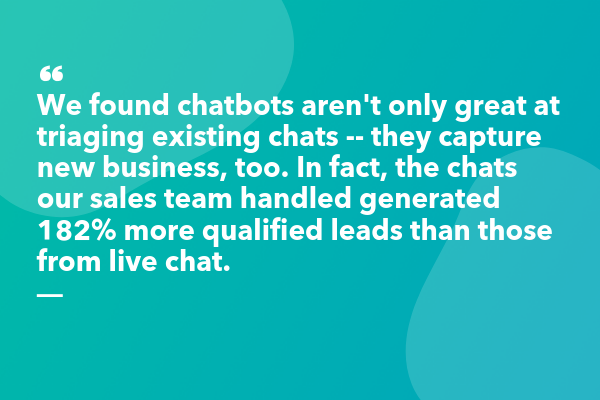 Ultimately, our chatbot’s success came in a few ways — first, the chatbot anticipated the next step of the conversation and used quick replies to drive a visitor forward. Opening up a chat and clicking a contextual button has less friction than typing in a text field — now, people didn’t need to come up with the first message themselves.
It makes sense that multiple choice options drive more engagement. Think of it this way — when you meet someone new, often the hardest part of the conversation is the beginning, when you’re trying to think of something to say. But once the conversation starts rolling, things become smoother.
The same is true for our prospects when they engage with a chatbot versus live chat.
Additionally, 9% of people who chatted with the bot needed support help — we were able to deflect those visitors away from humans in a helpful way, serving up the best place to get answers to their questions quickly.
It’s important to note when designing conversations, the hardest and most overlooked aspect is to write like a human. As consumers, we rarely process in our heads that we want to “talk to sales”. Instead, we only know we want to talk about “products I’m not yet using”. Writing with the “jobs to be done” in mind is a great philosophy for conversational design.
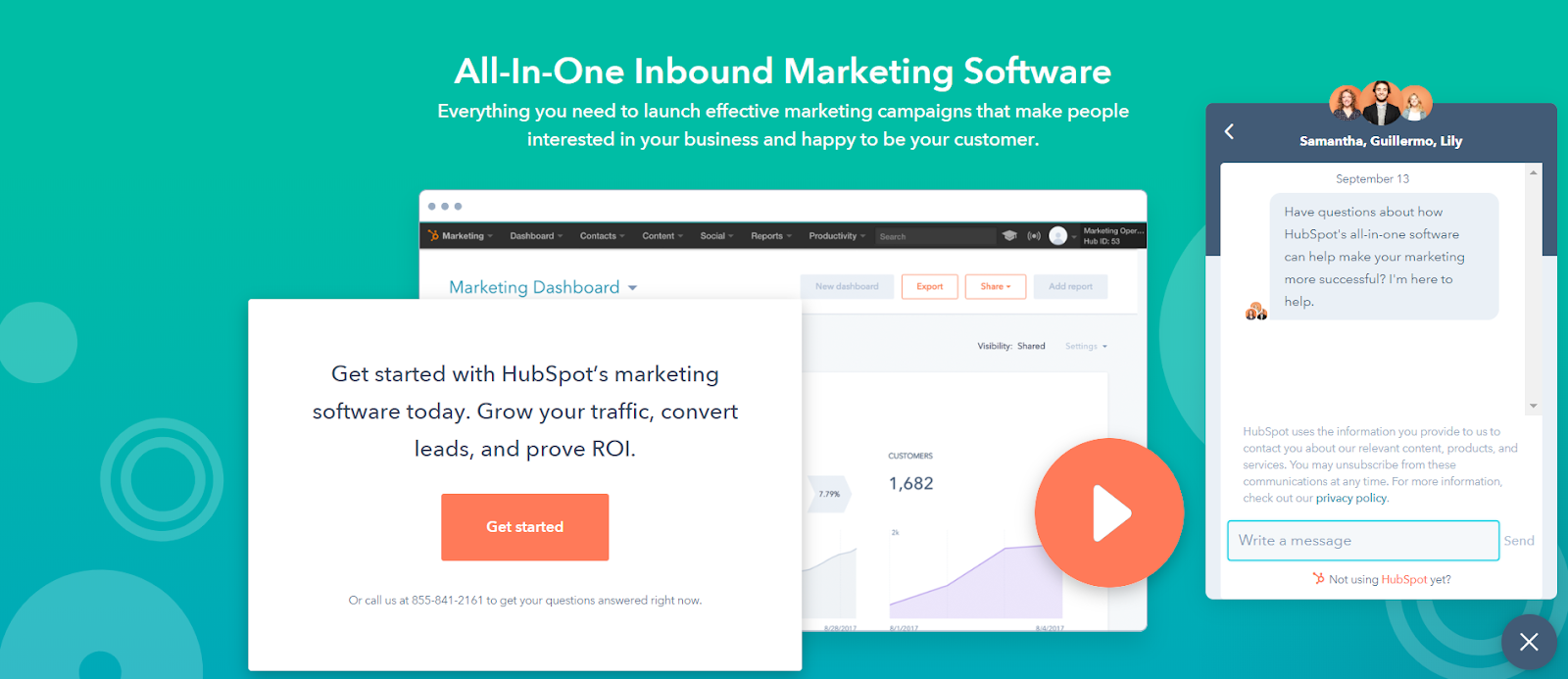
Takeaways for Your Business
At the end of the experiment, I’ve found a few takeaways that can help you and your business succeed, as well.
First, chatbots are a great opportunity to meet your visitors where they are. If you want to get started with a chatbot, look at chat transcripts, or interview your sales team to understand the types of questions people typically ask. Bucket those questions into a few critical categories.
Also, it’s critical you and your team think through and anticipate the best way to help those various buckets of people. The more you can personalize — perhaps through your CRM — the better.
Ultimately, using a chatbot to get people the help they need is a huge win for both your prospects and your business. In our case, site visitors now had the best resources for their support issues, and our sales team was able to capture more qualified leads.
The best part? Both sides did this in a frictionless, efficient way.

Guía de marketing móvil para profesionales del marketing [Kit gratuito]
Como profesionales del marketing, sabemos que el concepto de «optimización móvil» nos puede llegar a parecer tan solo otro tema de moda. Sumado a esto, el proceso para optimizar el sitio web de tu empresa puede resultar abrumador.
Con la esperanza de que el proceso sea menos intimidante, colaboramos con Localytics para ofrecerte la Guía de marketing móvil para profesionales del marketing.
En este kit de 5 secciones analizaremos las buenas prácticas del marketing móvil, te ayudaremos a decidir si tu empresa debe desarrollar una aplicación propia y te ofreceremos información acerca de la evolución de los dispositivos móviles durante los últimos años.
Específicamente, con esta guía descubrirás:
- Cuál es el estado del marketing móvil actual y por qué es importante optimizar la estrategia de marketing para dispositivos móviles.
- Cómo optimizar tu sitio web y cuáles son los aspectos clave que debes tener en cuenta al trabajar con el equipo de desarrollo web o con los trabajadores autónomos.
- Cuáles son las buenas prácticas del marketing móvil y cómo asegurarte de que tus esfuerzos resulten eficaces.
- Cómo aprovechar el ecosistema de la aplicación y por qué es importante para tu empresa.
- ¿Cómo será el marketing móvil del futuro? Qué debes hacer para mantenerte al tanto de las tendencias en dispositivos móviles y lograr que tu empresa se clasifique en las búsquedas y genere oportunidades de venta y clientes.
- *Recurso adicional* Diagrama de flujo: ¿Necesito una aplicación propia?
Descarga una copia de la Guía de marketing móvil para profesionales del marketing ahora.


An Introduction to Persuasive Advertising vs. Informative Advertising
Out of all the entertaining ads that played during Super Bowl 53, there’s only one commercial that I woke up thinking about the next morning: Pepsi’s “More Than OK”.
“More Than OK” poked fun at how Pepsi usually takes a back seat to Coke, especially at restaurants. And by featuring a star-studded cast that included Steve Carell, Lil Jon, and Cardi-B (who hilariously and fervently backed up Pepsi’s OKness) their boldness to call people out for undermining Pepsi’s quality got a lot of laughs and persuaded a massive audience to reconsider their own perception of the soft drink.
As marketers, we know that if we want to persuade an audience, we need to evoke an emotional response from them. But how do you actually do that? Below, we’ll examine six persuasive advertising techniques you can use in your advertisements, five examples you can reference if you ever need some inspiration, and three informative advertisement examples that are surprisingly just as compelling as the persuasive advertising examples.
Persuasive Techniques in Advertising
- The Carrot and The Stick
- The Scarcity Principle
- One Message Per Advertisement
- Write In the Second Person
- Give Your Audience a Sense of Control
- Use a Call-to-Value Instead of a Call-to-Action
1. The Carrot and The Stick
Humans are hardwired to move towards pleasure, like a horse towards a carrot, and away from pain, like a donkey avoids a stick. When people read or watch your advertisements, “carrots”, or promises of gain, can fill your prospects with hope and compel them to pursue that potential feeling of pleasure. “Sticks”, possibilities of loss, evoke fear in your prospects, which will compel them to flee from that potential feeling of pain.
Both tactics can pull your prospects into a narrative and evoke emotions that inspire your desired action. Carrots, like a product’s benefit, entice people to take a desired action. Sticks, on the other hand, like anti-smoking campaigns, evoke fear in people to stop doing a certain action and start doing the alternative. To better understand how to craft advertisements that feature a carrot or stick, check out these insurance copywriting examples below.
Carrot: “15 minutes could save you 15% on car insurance.” — Geico
Stick: “Get All-State. You can save money and be better protected from Mayhem like me. ” — All-State
As you can see, Geico’s ad uses a small time investment that could potentially produce big gains as a lure to get you to buy their product. Conversely, All-State’s ad uses the character “Mayhem” to evoke fear into people to stop using their “inferior” insurance and start using All-State’s.
2. The Scarcity Principle
People value objects and experiences that are rare — having something that most people want, but can’t have, boosts our sense of self-worth and power. If you use words and phrases that imply scarcity and evoke a sense of urgency, like “Exclusive offer” or “Limited availability”, you can skyrocket your product’s perceived scarcity and consumer demand.
3. One Message Per Advertisement
To immediately hook people and persuade them to read or watch the rest of your advertisement, try sticking to only one message. Spotlighting your product or offer’s main benefit or feature will make it easy for your customers to understand its value and increase the likelihood of their conversion because you’re only conveying one message to your audience: your product’s main feature will benefit your customer’s life somehow, someway.
4. Write in the Second Person
Since your prospects primarily care about how you can help them, and pronouns like “you” and “your” can engage them on a personal level and help them insert themselves in the narrative you’re creating, writing advertisements in the second person can instantly grip their attention and help them imagine a future with your product or service bettering their lives.
5. Give Your Audience a Sense of Control
According to a research study conducted by three psychology professors at Rutgers University, the need for control is a biological and psychological necessity. People have to feel like they have control over their lives.
If you want to give your audience a sense of control, you need to give them the ability to choose. In other words, after reading or watching your advertisement, they must feel like they can choose between the option you suggest or another path. If they feel like you’re trying to force them to buy your product, they’ll get annoyed and disengage from your message.
To give your audience the ability to choose, and in turn, a sense of control, use phrases like “Feel free” or “No pressure” in your advertisements, like this example from Hotwire.com below.
6. Use a Call-to-Value Instead of a Call-to-Action
Call-to-actions are crucial for getting prospects to take the next step, but a “Download Now” or “Call Now” CTA isn’t always going to convince the more skeptical prospects to take your desired action. You need to make sure your ad’s last line of copy or quip is the best of them all.
So instead of writing an uninspiring, final line of copy like “Download Now”, write one that clearly communicates your offer’s value and gives a glimpse into your prospects’ potential life if they take your desired action, like this call-to-value prompting readers to download a blogging eBook: “Click today and be a blogger tomorrow.”
Persuasive Advertising Examples
1. Nikol
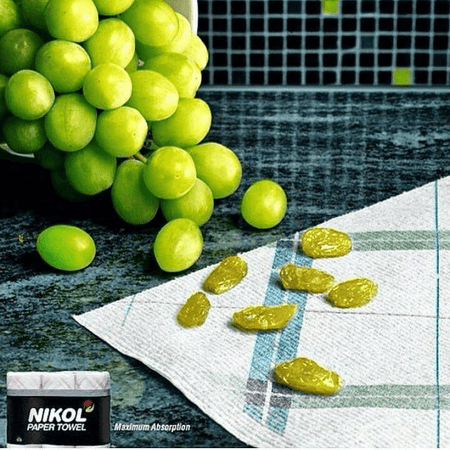
Image Credit: Brilliant Ads
Showing — not telling — your audience about your product’s benefits is one of the best ways to capture attention and get an emotional response. Obviously, Nikol’s paper towels can’t actually turn grapes into raisins, but this ad highlights the product’s absorbent powers in a such a clear and clever way, they didn’t need write a single line of copy.
2. Heinz
-9.png?width=450&name=pasted%20image%200%20(1)-9.png)
Image Credit: Brilliant Ads
In relation to food, the word “hot” has multiple meanings: having a high temperature and being spicy. Heinz brilliantly used the connotation of high temperature to highlight the spiciness of their ketchup, and their creative method of communicating the value of their product helped them instantly attract people’s attention.
3. Mondo Pasta
-6.png?width=450&name=pasted%20image%200%20(2)-6.png)
Image Credit: Brilliant Ads
With this crafty use of guerrilla marketing, Mondo Pasta perfectly aligns their copy with their creative — the guy slurping the noodle literally “can’t let go” because its a rope tied to a dock. By designing such a visual, unexpected, and literal ad with a seemingly one-dimensional prop, people’s eyes can’t let go of this ad either.
4. Bic
-5.png)
Image Credit: Brilliant Ads
Another example of guerrilla marketing, Bic takes advantage of an unkept field to highlight the power of their razors. By just mowing a small strip of grass on a field, this ad is an unconventional, simple, and extremely creative way to catch people’s attention and spotlight a razor’s shaving capabilities.
5. Siemens
-5.png)
Image Credit: Brilliant Ads
Siemens’ skillful ad shows the benefits of their product by unexpectedly placing their washers and dryers in a library to show you that they’re so quiet, even a librarian wouldn’t need to shush them.
Informative Advertising
Compared to persuasive advertising, informative advertising focuses more on the facts, and less on emotions. It highlight how your product’s features and benefits solve your customers’ problems and can even compare your product to your competitors’ product. Although this type of advertising relies on facts and figures to trigger a desired action, the ad’s message is usually framed in a compelling way.
Informative Advertising Examples
- Drink Responsibly
- Miller Lite
- Siskiyou Eye Center
1. Drink Responsibly
-3.png)
Image Credit: Bloggs74
Even though this ad might seem like it’s only aiming to evoke fear in its target audience, it actually leans on the facts to get their message across. If you drink and drive, your risk of crashing skyrockets 11 fold. And by focusing on this alarming reality, this ad can persuade people to get an Uber or Lyft home after a night out instead of getting behind the wheel.
2. Miller Lite
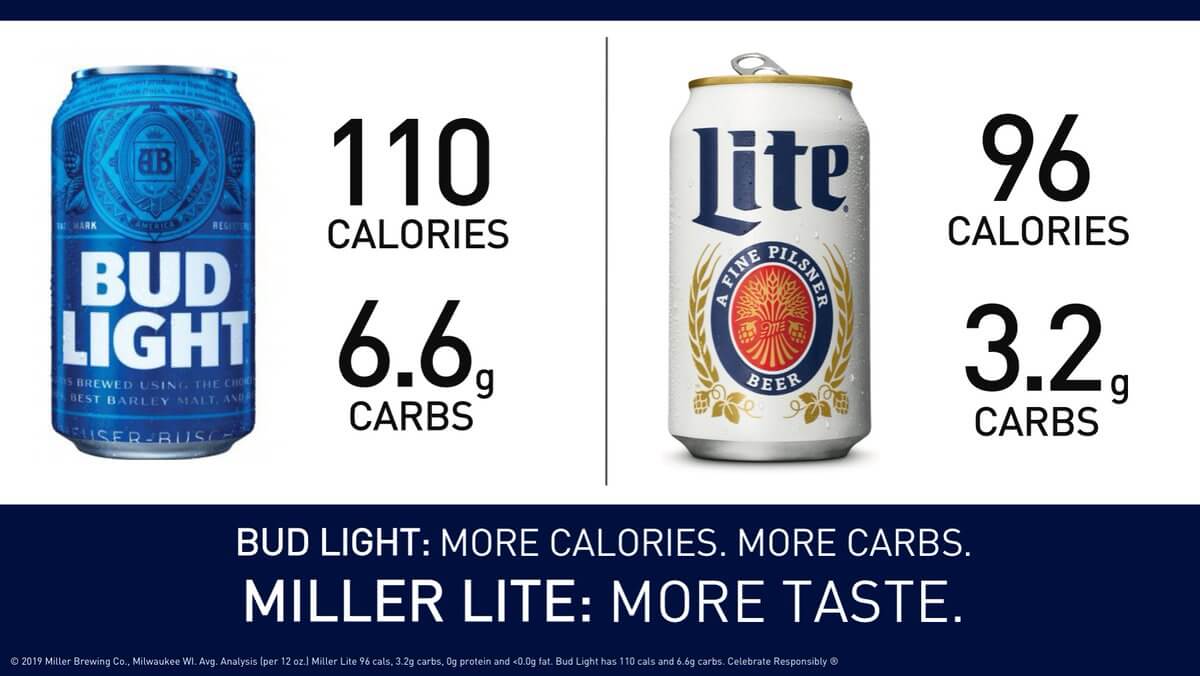
Miller Lite
After Bud Light took some jabs at Miller Lite for using corn syrup in their beer during their Super Bowl 53 ads, Miller Lite decided to throw a few punches back. A day later on Twitter, they revealed that their beer actually has less calories and carbs than Bud Light, which helped them persuade people that drinking Bud Light and Miller Lite actually have similar health benefits.
3. Siskiyou Eye Center
-2.png?width=450&name=pasted%20image%200%20(6)-2.png)
Entractech
There’s an old folk tale that carrots can improve your eyesight, but science has actually debunked this myth. That’s why this Siskiyou Eye Center ad is such a creative informative advertisement. While it pokes fun at this common fable, it’s still relying on the facts of carrots not being able to improve your vision and the Eye Center’s ability to provide quality treatment for your eyes to persuade people to do business with them.
Persuasive advertising vs. informative advertising: which one is better?
Persuasive advertising and informative advertising definitely focus on different aspects of persuasion, but they still aim to achieve the same goal: convincing your audience to take a desired action. So whether you pursue one advertising strategy or another, remember that if you can trigger an emotional response, regardless of the stimuli, your ad will be a success.

5 Ways B2B Businesses Can Use Online Video
Does your business need to create more videos? Looking for creative inspiration for your video content? In this article, you’ll discover five video types to add to your social media content mix. Why Should My Marketing Include Video Content? Over the past several years, one of the best B2B content strategies has been to create […]
The post 5 Ways B2B Businesses Can Use Online Video appeared first on Social Media Marketing | Social Media Examiner.
from Social Media Marketing | Social Media Examiner http://bit.ly/2MP7KD8
via socialmediaexaminer
How to Optimize Blog Images for Social Sharing: An Intro to Open Graph Tags
We’ve all been there before. You’ve written a great blog post, and you’ve plopped a featured image in there to represent the post on social media, your blog’s main page, and so on.
Then, you hop on your social media accounts and paste the link into a new post. You’re all ready to share it with your network, but there’s just one problem.Unfortunately, the social networks are pulling the wrong thumbnail image. Or worse, they’re pulling none at all.
Not only is this annoying — you were so close to being done — but a bad thumbnail image (or no thumbnail image) could seriously hurt your post’s performance on social. Images are a key play for garnering engagement on your social pages, and data shows they help generate more likes, shares, and comments. For example, tweets that feature an image result in 150% more retweets. But that image needs to be the right image — not your logo, not a cut-off picture of your call-to-action button, and not some other image randomly pulled from the page.

So, how do you ensure each of your social networks pulls in the image you want it to? The answer lies with something called the Open Graph Protocol.
Open Graph
Open graph is a protocol first created by Facebook in 2010 for extracting the title, images, URL, and meta-information from a webpage and displaying it in a social media post. Today, Facebook, Twitter, and LinkedIn all use open graph protocol to help publishers include more content on the front of their social media posts.
When you share a website or an article on Facebook or LinkedIn, or via Twitter Cards, you’ll notice each of these social networks automatically pulls in a few pieces of information into your social post: the website’s title, an image, the URL, and a short description. This is made possible using each social network’s open graph protocol.
LinkedIn has since adopted the same protocol Facebook originally developed, while Twitter uses its own open graph system that’s based on the same conventions — although Twitter accommodates the Open Graph protocol if you already have it on your site. Also note that Twitter only automatically pulls in information from a link when you use Twitter Cards — not for regular tweets.
How to Use Open Graph Protocol
Marketers need open graph (OG) protocol if they want to post better-looking content on social media. But where does each social network find that information? That’s where open graph tags come in. When you put OG tags in the head section of a webpage, social networks have a much easier time finding the correct information for each part of the social post.
Open Graph Tags
Open graph tags are the specific pieces of information that publishers can insert into their webpages so social networks know which site attributes to pull into the social media post. Some CMS’s include meta tags automatically, while other websites need you to add them manually through the page’s HTML.
If your webpage doesn’t have OG tags in the code, they’ll take a guess on where to find the right information. Usually they’ll do OK with the title, URL, and description, but they might have trouble picking the right image. OG image tags tell social networks exactly which image to pull.
If you plan to use certain webpages or blog posts in your social media posts, there are few OG tags you’ll include most often in each page: one for the webpage title, one for the image you want displayed, one for the URL of the webpage, and one for a one- to two-sentence meta description that describes the page. Here’s what they all look like below, with placeholder text in all caps denoting where you’d customize the content of each tag to reflect what you want the social media post to display.
- <meta property=”og:title” content=”TITLE OF PAGE” />
- <meta property=”og:image” content=”URL OF IMAGE ONLY” />
- <meta property=”og:url” content=”URL OF WEBPAGE” />
- <meta property=”og:description” content=”DESCRIPTION OF PAGE” />
See that “og: … ” text describing the meta property of each line above? The text that comes after it defines the the tag category you’re using the OG tag to define. For example, the first one says “og:title” because this tag dictates the title of the webpage you want to appear at the top of your social media post. Posting a blog article? The OG title tag will probably be the title of your article.
Depending on the type of media you’re posting — image, video, infographic, or just text — you might find a need for other OG tags as well to further customize the OG that appears on your social media feed once you post your content. Here are a few of them:
- “og:image:width” — This OG tag is nested within the image tag, allowing you to define the specific width of your feature image in your social media post.
- “og:image:height” — This tag is nested within the image tag, allowing you to define the specific height of your feature image. We’ll talk more about recommended image sizes for each social network in the next section.
- “og:article” — This tag lets the social network know your post is an article, and there are several other tags you can nest inside this one to further promote the article in your social media post.
- “og:article:author” — This tag is nested within the article tag, allowing you to promote the author (or the byline) of the article in your social media post.
- “og:audio” — This tag allows you to promote and describe a playable audio file in your social media post.
- “og:video” — This tag allows you to promote and describe a playable video in your social media post.
- “og:video:series” — This tag is nested within the video tag, allowing you to promote and define a video series if your video belongs to a larger video campaign.
The list goes on for the OG tag categories available to you. Blog, game, city, book, company, hotel, and country are all categories of OG tags you can use to customize your Facebook, Twitter, and LinkedIn posts to best represent the content you’re serving to your audience.
Open Graph Image Size
Although your images look similar when posted to Facebook, Twitter, and LinkedIn, each social network’s open graph protocol has its own minimum image size requirements. Facebook, for example, recommends using images that are 1200 x 630.
Good news for HubSpot and WordPress users: If you use HubSpot for blogging, your social networks will pull in the featured image automatically — just make sure you designate a featured image in each of your blog posts. (Pro tip: Try uploading your featured images to the COS as at least 610 pixels wide, which ends up looking better on Facebook, Twitter, and LinkedIn. Although LinkedIn’s photo dimensions ask for a small image, the COS should resize it automatically.)
If you use WordPress, you’ll need to install this plugin or one like it, but then you’ll be set to go.
Ultimately, this post is for you if you don’t use a content management system (CMS), as you’ll need to do it manually for each page on your site. We’ll show you step-by-step instructions for how to manually optimize images for social posting on the top three social networks for sharing content: Facebook, LinkedIn, and Twitter.
Facebook Open Graph
Here’s what a Facebook link post looks like:
To ensure Facebook pulls the right image from your blog post into your Facebook posts, you’ll need to first optimize the image size for Facebook and then add the proper OG tags to your website.
Optimizing the Image Size for Facebook Open Graph
Required: Facebook requires you to use an image that’s at least 200 x 200 pixels.
Suggested: Although 200 x 200 is the absolute minimum, Facebook advises using an image that’s at least 600 x 314 pixels. For the best display on high-resolution devices, the company suggests choosing an image that’s at least 1200 x 630 pixels.
Image Credit: Facebook
If your image is smaller than 600 x 314 pixels, it’ll still display in your post, but appear as a thumbnail-sized picture. So, if your images carry a lot of important detail that would be lost in such a small frame, it’s best to set your OG image tags to 1200 x 630.
Adding the Open Graph Tags
If your page is static and you don’t use a CMS like HubSpot, you’ll need to manually add OG tags to each of the pages your blog posts are on. The tags are meta data, so you need to add them to the head section of the page your blog post is on. (If you don’t manage the code on your site, you’ll need to ask your web developer for help.)
1. Copy the meta tags below.
<meta property=“og:image” content=“http://bit.ly/1zPpzUn ” />
<meta property=”og:image:width” content=”1200” />
<meta property=”og:image:height” content=”630” />
2. Replace the placeholder text with your selected image’s URL.
Next, remove the sample image URL above, highlighted in red, with the actual URL of your image. Do the same with the height and width numbers, highlighted in green, replacing them with the correct dimensions of your image. Keep in mind Facebook’s image size requirements.
3. Copy the resulting code snippet into the HTML head section of your page.
Once you’ve filled in the code in step 1 with your own content’s image URL and dimensions, open the source code (often denoted with this icon: “<>“) and paste it into the top of the page’s HTML.
4. Enter previously shared webpages into Facebook’s Sharing Debugger.
(Don’t worry about this step if the webpage you’re working on has never been published before.)
If you’ve previously published this webpage without tags, or if you publish the page and then realize you messed the tags up and need to adjust them, you’ll need to run the URL through Facebook’s debugger once you make any changes. This is because Facebook caches its shared pages — so if you don’t refresh the cache, the thumbnail won’t be corrected.
That’s it! Now, when you post a link to your article to Facebook, the Open Graph Protocol will read the OG:image tag and display the image you point it to. (Learn more about OG tags for titles, descriptions, and more on the Facebook dev blog.)
LinkedIn Open Graph
Like Facebook, LinkedIn also uses the open graph protocol. So, when you share a link with your LinkedIn network, LinkedIn scrapes the article for a title, images, and a URL, and then uses that information to fill our your LinkedIn post. (While they don’t explicitly say they scrape for a meta description, their algorithm does pull this in as well.) Here’s an example of a LinkedIn post by HubSpot with a meta description shown underneath the page title:
To ensure LinkedIn pulls the right image from your post to use as a thumbnail, you’ll need to optimize that image’s size and then add the proper OG tags to your website, much in the same way as you did for Facebook.
Optimizing the Image Size for LinkedIn Open Graph
Required: LinkedIn requires thumbnail images to be at least 80 x 150 pixels but no larger than 80 x 110. If your image doesn’t meet these requirements, LinkedIn will automatically pull in an different image on your page that fits the right dimensions.
Recommended: LinkedIn’s sharing module has the ability to promote wide, rectangular images, which can increase your post’s clickthrough rate over a 80 x 150 thumbnail. To share an image like this, the company advises using an image that is 1200 x 627, and as close to a 1:91:1 aspect ratio as you can (i.e. rectangular, rather than square).
Adding the Open Graph Tags
Just like on Facebook, if your page is static and you don’t use a content management system (CMS) like HubSpot, you’ll need to manually add OG tags to each of the pages your blog posts are on. The tags are meta data, so you need to add them to the head section of the page your blog post is on. (Again, if you don’t have control over the code on your website, you’ll need to ask your web developer for help.)
1. Copy the meta tags below.
<meta property=“og:image” content=“http://bit.ly/1zPpzUn ” />
<meta property=”og:image:width” content=”1200” />
<meta property=”og:image:height” content=”627” />
2. Replace the placeholder text with your selected image’s URL.
Next, remove the sample image URL above, highlighted in red, with the actual URL of your image. Do the same with the height and width numbers, highlighted in green, replacing them with the correct dimensions of your image. Keep in mind Facebook’s image size requirements.
3. Copy the resulting code snippet into the HTML head section of your page.
Once you’ve filled in the code in step 1 with your own content’s image URL and dimensions, open the source code (often denoted with this icon: “<>“) and paste it into the top of the page’s HTML.
That’s it! Now, when you post a link to your article to LinkedIn, the Open Graph Protocol will read the OG:image tag and display the image you point it to.
Important Note If You Plan to Post to Both Facebook & LinkedIn
You might notice there’s a conflict in the required image sizes if you’re optimizing your webpage for thumbnail images: LinkedIn requires your featured image be no larger than 180 x 110 pixels, while Facebook requires your image be no smaller than 200 x 200 pixels.
While you could technically size your featured image as close to 180 x 110 pixels as possible without going over, that would optimize for LinkedIn while resulting in a very small image on Facebook. Remember, although Facebook requires an image size of 200 x 200 pixels or larger, they recommend you don’t go smaller than 600 x 314 pixels so the image in the post is large.
Instead, according to web developer Jay Holtslander, you can include two OG tags for the same image in two difference sizes in the head section of your page using this code (and you’d replace the code in red with the URLs of your differently sized images):
<meta property=”og:image” content=”image-180×110.jpg ” /> <!– 180×110 Image for Linkedin –>
<meta property=”og:image:width” content=”180″ />
<meta property=”og:image:height” content=”110″ />
<meta property=”og:image” content=”image-600×315.jpg ” /> <!– 600×315 Image for Facebook –>
<meta property=”og:image:width” content=”600″ />
<meta property=”og:image:height” content=”314″ />
Twitter Open Graph
Twitter uses a system similar to Open Graph tags called Twitter Card tags. (You need to have Twitter Cards already set up in order to use Twitter Card tags.)
If you already have OG tags set up on your website, the folks at Twitter made it pretty easy for you to generate a Twitter Card without duplicating your tags and data. According to Twitter’s dev blog, “When the Twitter card processor looks for tags on your page, it first checks for the Twitter property, and if not present, falls back to the supported Open Graph property. This allows for both to be defined on the page independently, and minimizes the amount of duplicate markup required to describe your content and experience.”
But Twitter Cards look pretty similar to link posts on Facebook and LinkedIn — it pulls the title, an image, the URL, and a short description. Here’s an example:
Research has shown that people perform best when they feel included—when they feel valued, empowered, and respected by their peers.https://t.co/ZfcdlULWfo
— HubSpot (@HubSpot)
January 21, 2019
To set up Twitter Card tags, you’ll need to optimize your image size and then add the proper Twitter Card tags to your website.
Optimizing the Image Size for Twitter Open Graph
Required: Twitter requires your image to be no smaller than 144 x 144 pixels and less than 1 MB in file size. The social network also says it’ll automatically resize images larger than 4096 x 4096 pixels.
Recommended: Like LinkedIn, Twitter Cards support large images as well, not just the square-shaped thumbnail. To optimize your images for this open graph, format the image you want featured in your tweet to be no smaller than 300 x 157.
Adding the Twitter Card Tags
Just like on Facebook and LinkedIn, if your page is static and you don’t use a Content Management System (CMS) like HubSpot, you’ll need to manually add Twitter Card tags to each of the pages your blog posts are on. Like the other social networks’ tags, Twitter’s tags are meta data, so you need to add them to the head section of the page your blog post is on. (Your developer can help with this if you don’t have access to your website’s code.)
Step 1: Copy this tag:
<meta name=”twitter:image” content=” http://bit.ly/1zPpzUn”>
Step 2: Replace the example image URL, highlighted in red, with your selected image’s URL.
Step 3: Copy and paste the resulting code snippet into the HTML head section of your page.
That’s it! Now, when you post a link to your article to Twitter, it’ll properly display your desired image.


Lead Scoring 101: How to Use Data to Calculate a Basic Lead Score
When most people start implementing inbound marketing, they’re primarily worried about getting enough new leads in the funnel.
But once you have a lot of leads, you need to figure out who’s really interested in your product and who’s just starting to look around.
That’s where lead scoring comes in.
What Is Lead Scoring?
Lead scoring is the process of assigning values, often in the form of numerical “points,” to each lead you generate for the business. You can score your leads based on multiple attributes, including the professional information they’ve submitted to you and how they’ve engaged with your website and brand across the internet. This process helps sales and marketing teams prioritize leads, respond to them appropriately, and increase the rate at which those leads become customers.
Learn more about the concept of lead scoring in the video below.
Every company has a different model for assigning points to score their leads, but one of the most common ways is using data from past leads to create the value system.
How? First, you’ll take a look at your contacts who became customers to see what they have in common. Next, you’ll look at the attributes of your contacts who didn’t become customers. Once you’ve looked at the historical data from both sides, you can decide which attributes should be weighted heavily based on how likely they are to indicate someone’s a good fit for your product.

Lead scoring sounds easy, right? Depending on your business model and the leads in your database, this can quickly become complicated. To make this process a little easier on you, we’re going to walk you through the basics of creating a lead score, including what data you should look at, how to find the most important attributes, and the process for actually calculating a basic score.
Lead Scoring Models
Lead scoring models ensure the values you assign to each lead reflect the actual compatibility they have with your product. Many lead scores are based on a point range of 0 to 100, but every lead scoring model you create will support a particular attribute of your core customer.
Here are six different lead scoring models based on the type of data you can collect from the people who engage with your business:
1. Demographic Information
Are you only selling to people of a certain demographic, like parents of young children or CIOs? Ask demographic questions in the forms on your landing pages, and you can use your leads’ answers to see how well they fit in with your target audience.
One thing you can do with this information is remove outliers from your sales team’s queue by subtracting points for people who fall into a category you don’t sell to. For example, if you only sell to a certain geographic location, you might give a negative score to any lead who falls outside the proper city, state, zip code, country, and so on.
If some of your form fields are optional (like a phone number, for instance), then you also might award extra points to leads who provide that option information anyway.
2. Company Information
If you’re a B2B organization, are you more interested in selling to organizations of a certain size, type, or industry? Are you more interested in B2B organizations or B2C organizations? You can ask questions like these on your landing page forms, too, so you can give points to leads who fit in with your target audience and take points away from leads who aren’t at all what you’re looking for.
3. Online Behavior
How a lead interacts with your website can tell you a lot about how interested they are in buying from you. Take a look at your leads who eventually become customers: Which offers did they download? How many offers did they download? Which pages — and how many pages — did they visit on your site before becoming a customer?
Both the number and types of forms and pages are important. You might give higher lead scores to leads who visited high-value pages (like pricing pages) or filled out high-value forms (like a demo request). Similarly, you might give higher scores to leads who had 30 page views on your site, as opposed to three.
What about leads who have changed their behavior over time? If a lead has stopped visiting your website or downloading your offers, they may not be interested anymore. You might take points away from leads who’ve stopped engaging with your website after a certain period of time. How long — 10 days, 30 days, 90 days — depends on your typical sales cycle.
4. Email Engagement
If someone’s opted in to receive emails from your company, you’re not sure how interested that person is in buying from you. Open and clickthrough rates, on the other hand, will give you a much better idea of their interest level. Your sales team will want to know who opened every email in your lead nurturing series, or who always clicked through your offer promotion emails. That way, they can focus on the ones who seem most engaged. You might also give a higher lead score to leads who click through on high-value emails, like demo offers.
5. Social Engagement
How engaged a lead is with your brand on social networks can also give you an idea of how interested they are. How many times did they click through on your company’s tweets and Facebook posts? How many times did they retweet or share those posts? If your target buyers are active on social networks, then you might consider awarding points to leads with certain Klout scores or numbers of followers.
6. Spam Detection
Last but not least, you might want to give negative scores to leads who filled out landing page forms in ways that could indicate they’re spam. For example, were first name, last name, and/or company name not capitalized? Did the lead complete any form fields by typing four or more letters in the traditional “QWERTY” keyword side-by-side?
You might also want to think about which types of email addresses leads are using compared with the email addresses of your customer base. If you’re selling to businesses, for example, you might take points away from leads who use a Gmail or Yahoo! email address.
How Do You Know What Matters Most?
That’s a lot of data to weed through — how do you know which data matters most? Should you find out from your sales team? Should you interview your customers? Should you dive into your analytics and run a few reports?
Actually, we recommend a combination of all three. Your sales team, your customers, and your analytics reports will all help you piece together what content is most valuable for converting leads into customers, which will help you attach certain points to certain offers, emails, and so on.
Talk to your sales team.
Sales reps are the ones on the ground, communicating directly with both leads who turned into customers and those who didn’t. They tend to have a pretty good idea of which pieces of marketing material helps encourage conversion.
Which blog posts and offers do your sales reps like to send leads? You might find some of them telling you, “Every time I send people this certain piece of collateral, it’s easier to close them.” This is valuable information. Find out what those pieces of collateral are, and assign points accordingly.
Talk to your customers.
While your sales team might claim certain content converts customers, you might find that the people who actually went through the sales process have different opinions. That’s okay: You want to hear it from both sides.
Conduct a few customer interviews to learn what they think was responsible for their decision to buy from you. Be sure you’re interviewing customers who had both short and long sales cycles so you get diverse perspectives.
Turn to the analytics.
You should also complement all this in-person research with hard data from your marketing analytics.
Run an attribution report to figure out which marketing efforts lead to conversions throughout the funnel. Don’t only look at the content that converts leads to customers — what about the content people view before they become a lead? You might award a certain number of points to people who download content that’s historically converted people into leads, and a higher number of points to people who download content that’s historically converted people into customers. (HubSpot customers: Click here to learn more about running attribution reports in HubSpot.)
Another way to help you piece together valuable pieces of content on your site is to run a contacts report. A contacts report will show you how many contacts — and how much revenue — has been generated as a result of certain, specific marketing activities. Marketing activities might include certain offer downloads, email campaign clickthroughs, and so on. Take note of which activities tend to be first-touch conversions, last-touch conversions, and so on, and assign points accordingly. (HubSpot customers: Click here to learn more about creating a contacts report in HubSpot.)
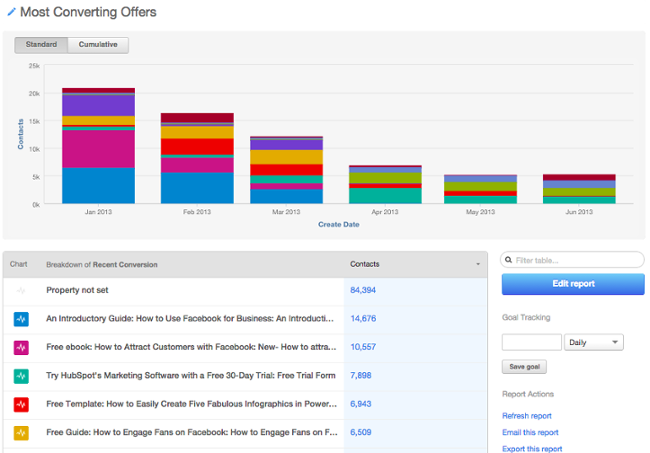
Image Credit: HubSpot’s Academy Blog
Is One Lead Score Enough?
If you have one core customer right now, a single score suffices. But as your company scales, you’ll sell to new audiences. You might expand into new product lines, new regions, or new personas. You might even focus more on up-selling and cross-selling to existing customers, rather than pursuing new ones. If your contacts aren’t “one size fits all,” your scoring system shouldn’t be either.
With some marketing platforms, you can create multiple lead-scoring systems, giving you the flexibility to qualify different sets of contacts in different ways. Not sure how to set up more than one score? Here are a few examples to inspire you:
Fit vs. Interest
Let’s say, for instance, your sales team wants to evaluate customers on both fit (i.e. is a contact in the right region? The right industry? The right role?) and interest level (e.g. how engaged have they been with your online content?). If both of these attributes are a priority, you can create both an engagement score and a fit score, so that you can prioritize outreach to contacts whose values are high in both categories.
Multiple Personas
Say you’re a software company that sells two different types of software, via different sales teams, to different types of buyers. You could create two different lead scores — one for a buyer’s fit and the other for their interest in each tool. The, you’d use these respective scores to route leads to the right sales teams.
New Business vs. Up-sell
As you grow, you might start to focus on up-sell or cross-sell as much as new business. But keep in mind the signals that indicate quality of new prospects and existing customers often look completely different.
For prospects, you might look at demographics and website engagement, whereas for existing customers, you might look at how many customer support tickets they’ve submitted, their engagement with an onboarding consultant, and how active they currently are with your products. If these buying signals look different for different types of sales, consider creating multiple lead scores.
(Note: HubSpot recently launched the ability to create up to twenty-five scores. Read more on HubSpot lead scoring here.)
How to Calculate a Basic Lead Score
There are many different ways to calculate a lead score. The simplest way to do it is this:
Manual Lead Scoring
1. Calculate the lead-to-customer conversion rate of all of your leads.
Your lead-to-customer conversion rate is equal to the number of new customers you acquire, divided by the number of leads you generate. Use this conversion rate as your benchmark.
2. Pick and choose different attributes customers who you believe were higher quality leads.
Attributes could be customers who requested a free trial at some point, or customers in the finance industry, or customers with 10-20 employees.
There’s a certain kind of art to choosing which attributes to include in your model. You’ll choose attributes based on those conversations you had with your sales team, your analytics, and so on — but overall, it’s a judgment call. You could have five different people do the same exercise, and they could come up with five different models. But that’s okay as long as your scoring is based on the data we mentioned previously.
3. Calculate the individual close rates of each of those attributes.
Calculating the close rates of each type of action a person takes on your website — or the type of person taking that action — is important because it dictates the actions you’ll take in response.
So, figure out how many people become qualified leads (and ultimately, customers) based on the actions they take or who they are in relation to your core customer. You’ll use these close rates to actually “score” them in the step below.
4. Compare the close rates of each attribute with your overall close rate, and assign point values accordingly.
Look for the attributes with close rates that are significantly higher than your overall close rate. Then, choose which attributes you’ll assign points to, and if so, how many points. Base the point values of each attribute on the magnitude of their individual close rates.
The actual point values will be a little arbitrary, but try to be as consistent as possible. For example, if your overall close rate is 1% and your “requested demo” close rate is 20%, then the close rate of the “requested demo” attribute is 20X your overall close rate — so you could, for example, award 20 points to leads with those attributes.
Logistic Regression Lead Scoring
The simple method, above, for calculating a lead score is a great start. However, the most mathematically sound method is one that employs a data mining technique, such as logistic regression.
Data mining techniques are more complex, and often more intuitive to your actual close rates as a result. Logistic regression involves building a formula in Excel that’ll spit out the probability that a lead will close into a customer. It’s more accurate than the technique we’ve outlined above since it’s a holistic approach that takes into account how all of the customer attributes — like industry, company size, and whether or not someone requested a trial — interact with one another.
If you’d like to explore logistic regression in Excel, check out this resource. In the meantime, the manual approach above this section is a great way to get started.
Predictive Lead Scoring
Creating a lead score can do great things for your business: improve the lead-handoff process, increase lead conversion rate, improve rep productivity, and more. But, as you can see from the two methods above, coming up with a scoring system can be a time-consuming task when done manually.
Plus, coming up with scoring criteria isn’t “set it and forget it.” As you get feedback from your team and stress-test your scores, you’ll need to tweak your lead-scoring system on a regular basis to ensure it remains accurate. Wouldn’t it be easier if technology could take the manual setup and continuous tweaking out, leaving your team more time to build relationships with your customers?
That’s where predictive scoring comes in. Predictive scoring uses machine learning to parse through thousands of data points in order to identify your best leads, so you don’t have to. Predictive scoring looks at what information your customers have in common, as well as what information the leads that didn’t close have in common, and comes up with a formula that sorts your contacts by importance based on their potential to become customers. This allows you and your sales team to prioritize leads so you’re not harassing those who aren’t (yet) interested and engaging those who are.
The best part about predictive scoring? As with any application of machine learning, your predictive score gets smarter over time, so your lead follow-up strategy will optimize itself.
Want to find out more about predictive scoring? Learn about this automated process here.


15 Inspiring Storytelling Quotes to Help You Move an Audience
There’s an old saying you might have seen floating around the internet that states, “Those who tell the stories rule the world”.
Even without the modern neurological research that proves storytelling is the best way to capture people’s attention, bake information into their memories, and forge close, personal bonds, humanity has always inherently known that people crave and seek out great stories almost as much as food and water. And the people (and brands) who can tell the most compelling stories are able to command the most influence within their community.
In the marketing industry, where 5% of branded content attracts 90% of total engagement, the need for storytelling is more pressing than ever before. Brands are creating content at a record pace and volume, but producing more content doesn’t necessarily mean it’s attracting more attention — it’s really just making more noise.
If brands actually want to slash through the clutter and engage an audience, solely focusing on listicles and ultimate guides won’t suffice anymore — they must also tell gripping stories.
To help you channel your inner storyteller, we’ve curated 15 quotes about storytelling from some of the world’s most insightful authors and filmmakers. Read on to get inspired.
Storytelling Quotes
- “No story lives unless someone wants to listen. The stories we love best do live in us forever. So whether you come back by page or by the big screen, Hogwarts will always be there to welcome you home.” – J.K. Rowling, author
- “There is no friend as loyal as a book” – Ernest Hemingway, author
- “I’m obsessed with giving the audience something they don’t see coming.” – Jordan Peele, writer and director of Get Out
- “You’re never going to kill storytelling, because it’s built in the human plan. We come with it.” – Margaret Atwood, author of The Handmaid’s Tale
- “The most amazing thing for me is that every single person who sees a movie, not necessarily one of my movies, brings a whole set of unique experiences, but through careful manipulation and good storytelling, you can get everybody to clap at the same time, to hopefully laugh at the same time, and to be afraid at the same time.” – Steven Spielberg, filmmaker
- “I’m writing my story so that others might see fragments of themselves.” – Lena Waithe, screenwriter for Bones and Master of None
- “I’ll tell you a secret. Old storytellers never die. They disappear into their own story.” – Vera Nazarian, author
- “The very reason I write is so that I might not sleepwalk through my entire life.” – Zadie Smith, author
- “Many stories matter. Stories have been used to dispossess and to malign. But stories can also be used to empower, and to humanize. Stories can break the dignity of a people. But stories can also repair that broken dignity.” – Chimamanda Ngozi Adichie, author
- “Think about the word destroy. Do you know what it is? De-story. Destroy. Destory. You see. And restore. That’s re-story. Do you know that only two things have been proven to help survivors of the Holocaust? Massage is one. Telling their story is another. Being touched and touching. Telling your story is touching. It sets you free.” – Francesca Lia Block, author
- “We are, as a species, addicted to story. Even when the body goes to sleep, the mind stays up all night, telling itself stories.” – Jonathan Gottschall, The Storytelling Animal
- “Story, as it turns out, was crucial to our evolution — more so than opposable thumbs. Opposable thumbs let us hang on; story told us what to hang on to.” – Lisa Cron, Wired for Story
- “Good stories surprise us. They make us think and feel. They stick in our minds and help us remember ideas and concepts in a way that a PowerPoint crammed with bar graphs never can.” – Joe Lazauskas and Shane Snow, The Storytelling Edge
- “Whether you know it or not, your desire to write comes from the urge to not just be “creative,” it’s a need (one every human being on earth has) to help others. A well-told Story is a gift to the reader/listener/viewer because it teaches them how to confront their own discomforts.” – Shawn Coyne, The Story Grid
- “Create those things where human protagonists relate to us, where the stakes and conflict grip us, and where the emotions move us. Craft those simple things, those glorious things, those things so often forgotten but so desperately needed. There’s no hidden or corporate meaning behind the word ‘story.’ We know what they are. And we need to start telling them.” – Jay Acunzo, founder of Unthinkable Media
15 Inspiring Storytelling Quotes to Help You Move an Audience
1. “No story lives unless someone wants to listen. The stories we love best do live in us forever. So whether you come back by page or by the big screen, Hogwarts will always be there to welcome you home.” – J.K. Rowling, author
2. “There is no friend as loyal as a book” – Ernest Hemingway, author
3. “I’m obsessed with giving the audience something they don’t see coming.” – Jordan Peele, writer and director of Get Out
4. “You’re never going to kill storytelling, because it’s built in the human plan. We come with it.” – Margaret Atwood, author of The Handmaid’s Tale
5. “The most amazing thing for me is that every single person who sees a movie, not necessarily one of my movies, brings a whole set of unique experiences, but through careful manipulation and good storytelling, you can get everybody to clap at the same time, to hopefully laugh at the same time, and to be afraid at the same time.” – Steven Spielberg, filmmaker
6. “I’m writing my story so that others might see fragments of themselves.” – Lena Waithe, screenwriter for Bones and Master of None
7. “I’ll tell you a secret. Old storytellers never die. They disappear into their own story.” – Vera Nazarian, author
8. “The very reason I write is so that I might not sleepwalk through my entire life.” – Zadie Smith, author
 9. “Many stories matter. Stories have been used to dispossess and to malign. But stories can also be used to empower, and to humanize. Stories can break the dignity of a people. But stories can also repair that broken dignity.” – Chimamanda Ngozi Adichie, author
10. “Think about the word destroy. Do you know what it is? De-story. Destroy. Destory. You see. And restore. That’s re-story. Do you know that only two things have been proven to help survivors of the Holocaust? Massage is one. Telling their story is another. Being touched and touching. Telling your story is touching. It sets you free.” – Francesca Lia Block, author
11. “We are, as a species, addicted to story. Even when the body goes to sleep, the mind stays up all night, telling itself stories.” – Jonathan Gottschall, The Storytelling Animal
12. “Story, as it turns out, was crucial to our evolution — more so than opposable thumbs. Opposable thumbs let us hang on; story told us what to hang on to.” – Lisa Cron, Wired for Story
13. “Good stories surprise us. They make us think and feel. They stick in our minds and help us remember ideas and concepts in a way that a PowerPoint crammed with bar graphs never can.” – Joe Lazauskas and Shane Snow, The Storytelling Edge
14. “Whether you know it or not, your desire to write comes from the urge to not just be “creative,” it’s a need (one every human being on earth has) to help others. A well-told Story is a gift to the reader/listener/viewer because it teaches them how to confront their own discomforts.” – Shawn Coyne, The Story Grid
15. “Create those things where human protagonists relate to us, where the stakes and conflict grip us, and where the emotions move us. Craft those simple things, those glorious things, those things so often forgotten but so desperately needed. There’s no hidden or corporate meaning behind the word ‘story.’ We know what they are. And we need to start telling them.” – Jay Acunzo, founder of Unthinkable Media

How to Improve Your Instagram Story Engagement
Want people to spend more time on your Instagram story content? Looking for tips to prompt active engagement on your stories? In this article, you’ll discover seven ways to encourage followers to tap on, reply to, and screenshot your Instagram stories. #1: Add a Tap for More Prompt The “tap for more” tactic is pretty […]
The post How to Improve Your Instagram Story Engagement appeared first on Social Media Marketing | Social Media Examiner.
from Social Media Marketing | Social Media Examiner http://bit.ly/2ScmAtr
via socialmediaexaminer
The 33 Best Free Fonts Designers Should Download
Finding stylish fonts for your design projects can be a major time sink — especially when you have to wade through seemingly endless pages of typefaces that don’t suit the vision you have in your head.
Finding a free font can be even more of a hassle.
So what’s a budget-strapped designer to do?
We’ve scoured the depths of the internet so you don’t have to, coming up with 33 of the best free fonts you deserve to have on your computer. Here’s how we sorted them:
- Free Script Fonts
- Free Serif Fonts
- Free Modern/Sans-Serif Fonts
- Good Fonts for Logos
- Free Retro Fonts

Many of the free fonts featured here were developed by designers, for designers, so they understand the need for versatile, polished, free typefaces firsthand. Check out the fonts below and keep them in mind for your next design project.
Best Free Fonts for Designers
- Hello Stockholm — script font
- Wildera Regular — script font
- Mightype — script font
- Selima — script font
- Oranienbaum Regular — serif font
- Butler — serif font
- Arctic — serif font
- Canvas — serif font
- Bitter ht — serif font
- Agne Regular — serif font
- Yeseva One Regular — serif font
- Moon — modern font
- Kolikö — modern font
- Mohave — modern font
- 20 db
- Alcubierre Regular — modern font
- Bourbon Grotesque — modern font
- Frontage Outline — modern font
- Arciform Sans Regular — modern font
- De La Fuente — modern font
- Westfalia — font for logos
- Atami — font for logos
- Anders — font for logos
- Westmeath — font for logos
- Modeno — font for logos
- Rezland — font for logos
- Polya — font for logos
- Horizon — retro font
- Sweet Sensations — retro font
- ITC Bauhaus — retro font
- Bobbers — retro font
- FF Blur — retro font
- Canterbury — retro font
Free Script Fonts
1. Hello Stockholm
What happens when you combine Scandinavian minimalism with classic brushstrokes? You get Hello Stockholm, a casual script that plays well with sans-serif fonts.

2. Wildera Regular
We think this whimsical, light-weight script would look right at home in a fairy tale (or in your next project).

3. Mightype
Subtle hand-drawn details set this script apart from the pack. Mightype is sophisticated without being stuffy.
4. Selima
Selima’s breezy brushstrokes are perfect proof that script typefaces don’t have to look old-fashioned or uptight — they can be casual and modern.
Free Serif Fonts
5. Oranienbaum Regular
From small print to bold headlines, multi-tasking Oranienbaum is up to the challenge.
6. Butler
A decidedly modern serif typeface, Butler comes in 14 different weights to suit a wide variety of different uses.

7. Arctic
If you’re looking for a slab serif font with a modern edge, give Arctic a try. It’s a great way to give your headlines some character.

8. Canvas
Canvas offers a modest but professional typeface that manipulates the thickness in the details of each letter. If you’re looking for formality and creativity in the same font, this one takes the cake.

9. Bitter ht
We love the versatility of Bitter ht, a contemporary serif typeface that looks stylish at any size or weight.
10. Agne Regular
With bold lines and contrasting stems, this elegant font is a fresh take on old-fashioned serif typefaces.

11. Yeseva One Regular
If you’re concerned that serif typefaces come across as too uptight or formal, consider Yeseva, a laid-back option for headlines and subtitles.
Free Modern Fonts
12. Moon
Have you exhausted your library of simple and free sans-serif typefaces? Add Moon to the mix. We love this font’s clean simplicity and round edges.
13. Kolikö
This bold font evokes a sense of mystery to any creative work. Or, if you just want to geek out about something on your new tech blog, we can totally see this font playing a part.
14. Mohave
This all-caps font was designed with bold headlines and big type settings in mind.
15. 20 db
The font below is simply timeless. Whether you’re designing for an event advertisement or the headers of your blog, 20 db is confidence in written form.

16. Alcubierre Regular
Clean, minimal, and geometric, Alcubierre is well-suited to projects that require subtle headlines and a clear focus on the content.
17. Bourbon Grotesque
Inspired by — you guessed it — classic bourbon labels, this sans-serif has a big personality that demands attention.
18. Frontage Outline
Frontage Outline is reminiscent of handcrafted facade signs, making it a suitable pick for logotypes.
19. Arciform Sans Regular
Arciform might be simple, but this sleek sans-serif is far from boring. Consider including this easy-to-read typeface in your next web design project.
20. De La Fuente
This cool typeface is decorative without being over-the-top, making it ideal for headlines, logotypes, and other design projects that focus primarily on the text.
Good Fonts for Logos
21. Westfalia
Give your next project an outdoorsy, authentic feel with this hand-painted brush sans, which makes for a playful logo as well.

22. Atami
Atami’s numerous weights and display options make it the Swiss Army Knife of modern sans-serifs — it can really do it all for a rising brand.
23. Anders
Anders just might be the avant-garde font of your dreams. It’s unique geometric lines make it an excellent choice for logotypes.

24. Westmeath
Westmeath adds a dose of swagger to an otherwise basic font, making a logo that uses this font both legible and stylish.

25. Modeno
The Modeno font is consistent with the thin designs that many contemporary artists have gravitated to over the last few years. But don’t mistake this one for just any new-wave typeface — its lanky quality is hard to come by in today’s sans-serif options.
26. Rezland
Rezland is just plain cool. It almost doesn’t have time for you … that’s just how cool this font choice is.

27. Polya
Polya is perhaps the most interesting font we could find. The webbing of each letter makes for a truly mesmerizing logo.

Free Retro Fonts
28. Horizon
Horizon is a simple but retro font that elicits images of an old outer space movie. And yet, it still holds up.
29. Sweet Sensations

30. ITC Bauhaus
Similar to Horizon, ITC Bauhaus has a rounded, retro look that comes in numerous thicknesses. Thicker versions look like the header of an old playbill, while thinner styles give off a jazzy vibe.

31. Bobbers
Bobbers is a script font that has the goofy and over-the-top qualities of an old sitcom. Bring it back from the 1970s in your next design project for a truly confident header.

32. FF Blur
The haunting glow of FF Blur reminds us of an old horror movie. But it might be just soft enough to intrigue the audience of your next project.
33. Canterbury
No list of old-fashioned fonts is complete without the old-English stylings of Canterbury. Emulate many of today’s most famous newspaper logos with this traditional typeface.

We hope you find these fonts helpful — but because they are offered by other parties on their sites, we can’t make any guarantees or promises about them (like that they will be available or free to use).
Also, we want to mention that the designers who offer these fonts might have rules about how you can or can’t use them, so there might be limitations that are applicable to use of the font.
Want more font tips? Check out this tip for identifying the name of a font.