Welcome to My Blog
47% of Social Media Users Report Seeing More Spam in Their Feeds, Even as Networks Fight to Stop It
Over the past two years, social media networks have made no secret of their efforts to fight the spread of spam on their sites.
It largely began when it was revealed that foreign actors had weaponized Facebook to spread misinformation and divisive content in hopes of influencing the 2016 U.S. presidential election.
It was then revealed that Facebook was not alone in that phenomenon — and that some of its fellow Big Tech peers, like Twitter and Google, were also being leveraged by the same or similar foreign actors to influence the election.
That’s prompted these companies to take action — publicly.
Facebook has released a number of statements since this revelation about its efforts to emphasize news from “trusted sources” and change its algorithm to focus on friends and family. Twitter released an request for proposals to study the “health” of its network and began sweeping account removals. YouTube, which is owned by Google, made its own efforts to add more context to videos on its platform.
We’re committing Twitter to help increase the collective health, openness, and civility of public conversation, and to hold ourselves publicly accountable towards progress.
— jack (@jack)
March 1, 2018
So, how have these efforts been paying off — and are users noticing them?
According to our data, the survey largely says: No. Here’s what we found.
47% of Social Media Users Report Seeing More Spam in Their Feeds
Seeing Spam
The controversy surrounding social media networks and the way they manage, distribute, or suppress content shows no signs of slowing down. Just this week, the U.S. House Judiciary Committee held a hearing — the second one this year — on the “filtering practices” of social media networks, where representatives from Facebook, YouTube, and Twitter testified.
But for all the publicity around these tech giants fixing the aforementioned flaws (and answering to lawmakers in the process), many users aren’t reporting any improvement.
In our survey of 542 internet users across the U.S., UK, and Canada, only 20% reported seeing less spam in their social media feeds over the past month. Nearly half, meanwhile, reported seeing more.
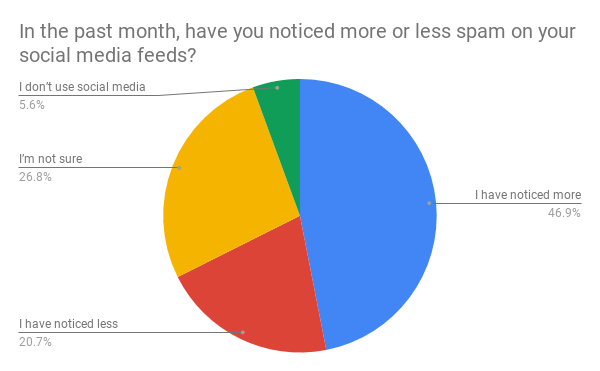
Data collected using Lucid
That figure could indicate a number of things. First, it’s important to note that what constitutes spam is somewhat subjective. Facebook, for its part, defines spam as “contacting people with unwanted content or requests [like] sending bulk messages, excessively posting links or images to people’s timelines and sending friend requests to people you don’t know personally.”
Something like fake news, for instance, does not seem to fall under that definition — but according to our research, about 79% of people seem to think that it generally counts as spam.
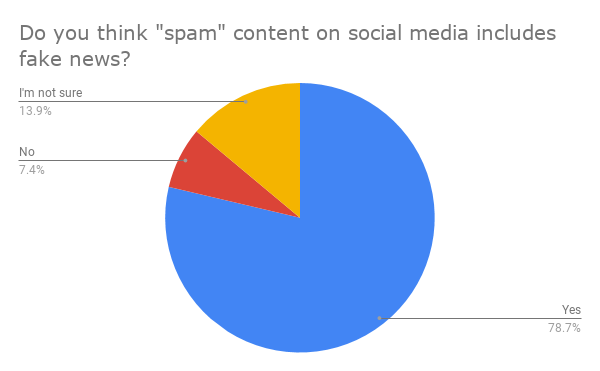
Data collected using Lucid. Survey sample = 375 internet users from the U.S. and Canada.
Facebook has struggled to define “fake news,” despite CEO Mark Zuckerberg’s best efforts in his congressional hearings and a recent interview with Kara Swisher on Recode Decode.
Recent reports have also emerged that Facebook content moderators are sometimes instructed to take a “hands-off” approach to content that some might consider spam, according to The Verge — such as “flagged and reported content like graphic violence, hate speech, and racist and other bigoted rhetoric from far-right groups.”
That contrasts some testimony from Facebook’s VP of Global Policy Management Monika Bickert at this week’s hearing, as well as much of what Zuckerberg recounted in his interview with Swisher.
The company has previously spoken to the subjectivity challenges of moderating hate speech, and released a statement how it plans to address these reports.
However, the recent findings that content moderators are instructed not to remove content that leans in a particular political direction — even if it violates Facebook’s terms or policies — contradicts the greater emphasis the company has said it’s placing on a positive (and safe) user experience over ad revenue.
The Fight Against Election Meddling
We also ran a second survey — of of 579 internet users across the U.S., UK, and Canada — to measure the public perception of Facebook’s specific efforts to fight election meddling.
Here, respondents indicated a bit more confidence, with about 28% reporting that they think the company’s battle against the use of its platform to interfere with elections will work.
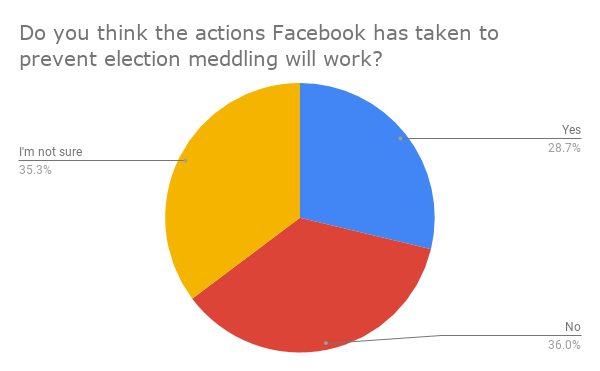
Data collected using Lucid
But almost as many people who believe the efforts are futile also seem to be uncertain — which could indicate a widespread confusion over what, exactly, the company is doing to prevent the same weaponization of its platform that previously took place.
It’s an area where Facebook fell short, Zuckerberg told Swisher, because it was “too slow to identify this new kind of attack, which was a coordinated online information operation.” To be more proactive, he — and many of his big tech peers — have identified artificial intelligence (AI) systems that can identify and flag this type of behavior quicker than human intervention can.
But AI is also widely misunderstood, with some reports of people fearing it without knowing just how frequently they use it day-to-day. That lends itself to a degree of indecision over whether — and if — Facebook and its social media counterparts will be successful in its heavily AI-dependent efforts to curb this type of activity.
One item to consider when it comes to both surveys and their corresponding results is the aspect of salience. Right now, the potential misuse of social media is top-of-mind for many, likely due to the prevalence of hearings like the one that took place this week and its presence in the news cycle.
That could sway the public perception of spam — and how much of it they’re seeing — as well as the efficacy of social media’s fight against election interference.
When HubSpot VP Meghan Anderson saw the data, “my first reaction was that people just have a heightened awareness of it at this moment.”
“It’s part of our global dialogue,” she explains. “There are apology ads running on TV. The impact of misinformation and spam is still setting in.”
But with the issue of prevalence and clarity also comes the topic of trust.
“What I think the data does show,” Anderson says, “is that when you lose someone’s trust, that distrust lingers for long after you’ve made changes to remedy it.”

9 Best Practices for Creating a High Converting Pricing Page (With Examples)
Your pricing page is one of the most important parts of your website. It’s where all your effort in building a relationship with your customer finally leads to a sale.
But I’ve seen enough badly designed pricing pages to know that some businesses simply don’t know how to sell their offer. They either get confused on how much to charge, especially if they offer services, or don’t know how to demonstrate value on the price page.

Knowing the fundamentals of a good pricing page is important because simply copying the pricing page of another business without understanding why it’s designed the way it is, will only lead to a poorly optimized page.
Businesses too often forget the human element. Even though we buy all the time, when it comes to selling we forget the internal processes we go through before making a purchase.
In this post, I’ll share nine best practices to ensure your pricing page does what it’s supposed to do, make sales happen.
9 Pricing Page Best Practices
1. Keep your language simple and straightforward.
Buyers don’t like confusion. They’re about to give you their hard earned money and they want the entire process to be as clear as possible. In essence, they want to know what exactly they’re paying for and what it’s going to do for them. Your pricing page should clearly convey what your product or service will do for the buyer. Your pricing page is not the place to get witty or show expertise with hard to grasp grammar.
Making your pricing page as simple as possible should be at the core of your entire design.
The SaaS DNA project found that ease of understanding is crucial for visitors, so the best pricing pages for companies are often the simplest. The study recommends that pricing pages should stick to simplicity.
Dollar Shave Club is a brand synonymous with humor and eccentricity. Yet even they know that clear, easy to understand language beats being witty when it comes to talking price.

2. Limit your pricing plans to a few options.
The theme of simplicity extends beyond language. Even your price plans should be easy to understand. While this can be difficult if you serve multiple customer segments, complex price plans do limit sales. The less your buyer has to think before choosing a plan the better your conversion rate will be.
Take a page from Groove, they initially had a complicated pricing page that had a conversion rate of 1.17%.
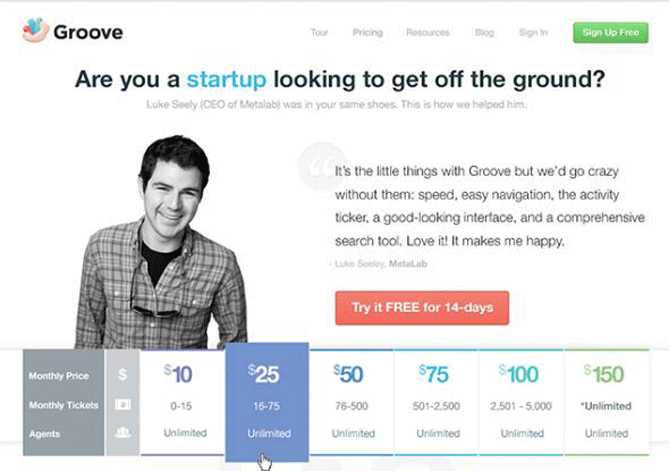
And their conversion rate increased by 350% when they simplified their pricing page.

Due to the nature of what you offer, having one price plan isn’t always an option. You can fix the issue of complex pricing by offering a customizable plan instead.
You can do this by offering: A ‘contact us’ option for enterprise: Where people can get in touch for a tailored plan.
Sliding scale plan: Where buyers can view price and features with a simple interactive element.
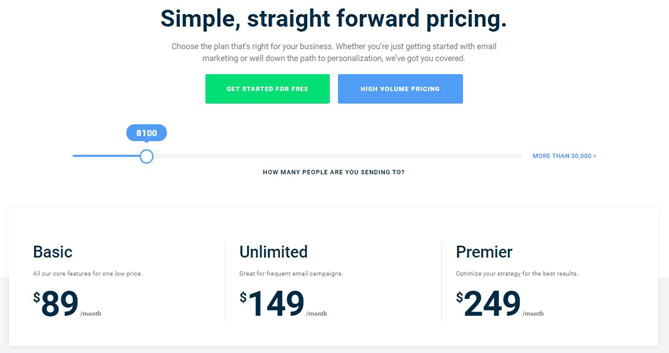
Campaign Monitor captures the essence of a customizable plan with both a sliding scale and an option for more demanding businesses. They save their customers from going through an otherwise complicated buying process.
3. Reduce friction points.
Friction points, also known as FUDs (fear, uncertainties and doubts), are factors that keep people from buying — and you’ve probably experienced them yourself as a buyer.
There are several ways to reduce friction points:
Add FAQs to your pricing page
Have a chat with your customer service team and create a list of the most common questions potential buyers ask and answer them on your pricing page.
Include live chat
Something that’s becoming more popular by the day, is presenting buyers with an option to speak with a sales rep. Especially if you sell expensive products, buyers can get questions unique to them answered in a personalized way.
Offer a free trial or money-back guarantee
Before purchasing most people wonder if a service or product will meet their particular need, this objection might be strong enough to make them cancel a purchase. Businesses avoid this by offering a free trial for services or a money back guarantee for physical products.
Include testimonials
What other people can say about your business matters more than anything you can say about it. When people see others like them achieving success with your product they feel more confident about buying.
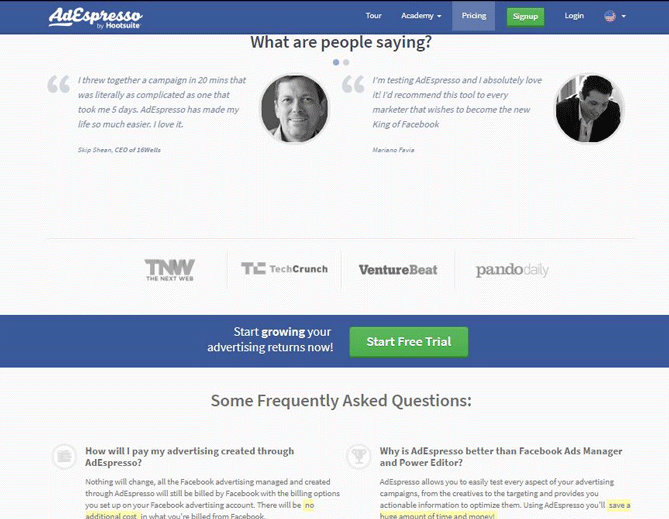
Adespresso deals with friction points on their pricing page by offering testimonials, answering FAQs and displaying the logos of companies already using their service.
4. Utilize price anchoring.
Imagine you’re in a store for a watch and the store clerk shows you a $20,000 watch, your pulse quickens, then she displays the $12,000 variety and then finally a $2,000 watch. Psychology tells us that you’d probably see the $2,000 watch as cheap even though on it’s own you would’ve judged its price as too high.
A study conducted by the University of Arizona revealed that participants were more likely to judge a house as a bargain when it was placed next to an identical building with an artificially inflated price. Regardless of whether they were inexperienced undergrad students or real estate experts. This is because we tend to judge things based on what we were exposed to prior.
Price anchoring is applied in pricing pages by displaying the most expensive plans first. To test the effect of this on pricing pages, Conversionxl conducted a study and used task scenarios, eye-tracking and survey tools to gather feedback.
The result of the study revealed that participants chose more expensive packages more often when they were listed first, or furthest left in left-right order.
They found that why people generally took in the information at the same, listing the expensive plans first on the left resulted in longer ‘dwell times’ on the page. Overall the first two positions received the most attention.
Here’s a bar graph of the results when participants were asked to choose a plan.
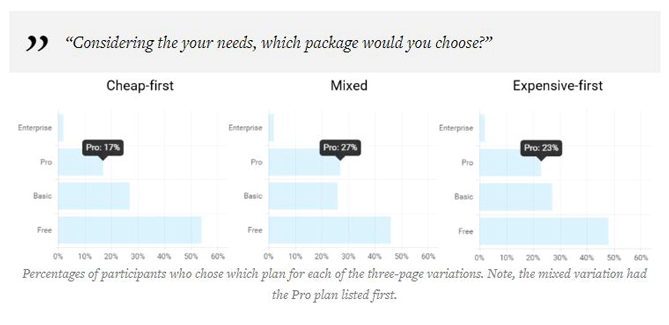
The participants chose the Pro plan more when it was offered first.
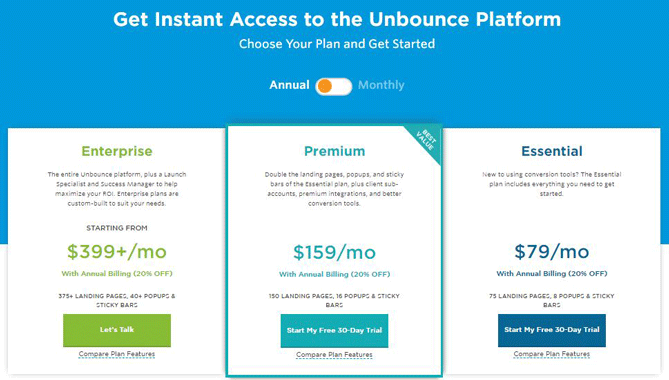
Here’s how Unbounce, a company that knows a thing or two about optimization, designs their pricing page.
5. Highlight a recommended plan.
You know better than anyone what option would fit the needs of the majority of your customers. Reduce the confusion faced by buyers by highlighting a plan you think will be a good fit for the majority of visitors.
It shouldn’t just be your most expensive plan though — it has to be a price plan that based on evidence, most of your customers will derive value from. And there’s proof that highlighting a plan works to reduce pricing page friction and buyer confusion.
Another study conducted by ConversionXL examined how highlighting a recommended plan impacted results.
Here’s a table showing the results of the study.

The major takeaway from the study is that participants chose the PRO plan more often when it was highlighted, especially if it was placed in the expensive first order.
6. Add the number nine to prices.
Also known as psychological or charm pricing. It’s based on the theory that certain prices have a psychological impact. And you’ve probably seen this effect used in grocery stores and car slots.
Though not supported by everyone, some studies do show that charm prices work, for example, an experiment conducted by MIT and the University of Chicago found that clothing items at a women store sold more when it was priced at $39 than when it only cost $34 and even $44.
In another study, Gumroad shows how the number nine improves conversion rates.
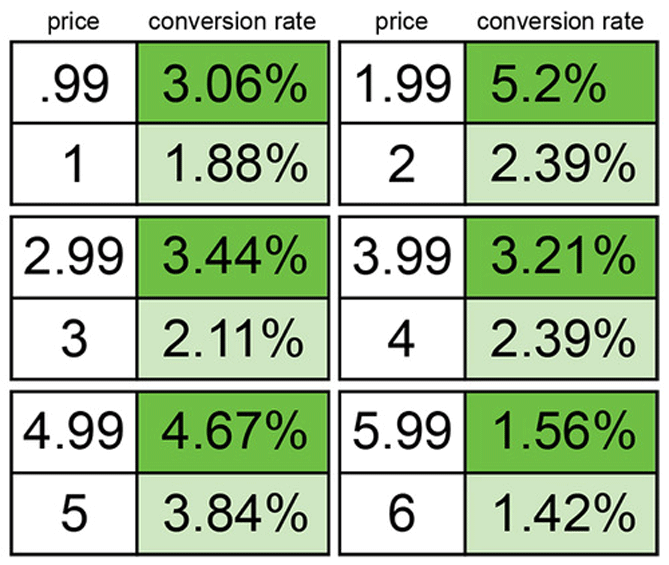
7. Make the CTA prominent.
The CTA is crucial to the success of your pricing page. Your CTA has to stand out and clearly convey what you want your readers to do. It shouldn’t be blocked by features and price.
Also, the wording in you CTA matter, for example, research done by HubSpot found that the word ‘submit’ negatively affects conversion rates.
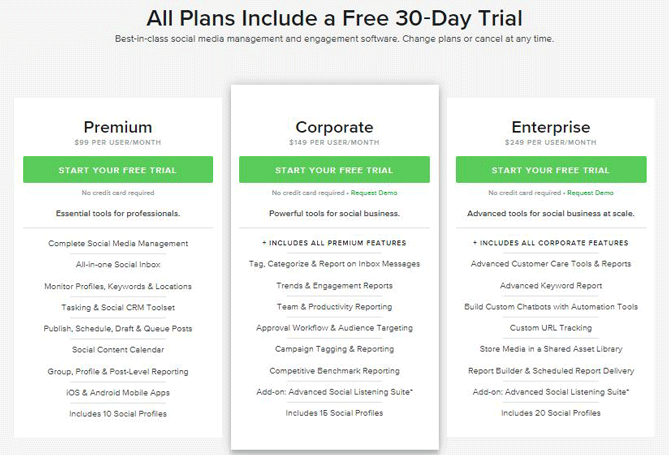
Your CTA has to be in essence: Prominent, actionable, and specific. The best CTAs start with a verb and tell the reader what they’ll get by taking action.
Here’s how Sprout Social does it.
8. Improve information and action
The SaaS DNA project, which I cited earlier, also revealed that pricing pages that had the most information and were action-oriented resulted in more confident users who in turn converted better. The study showed that pages that lacked either information or action resulted in lower conversions.
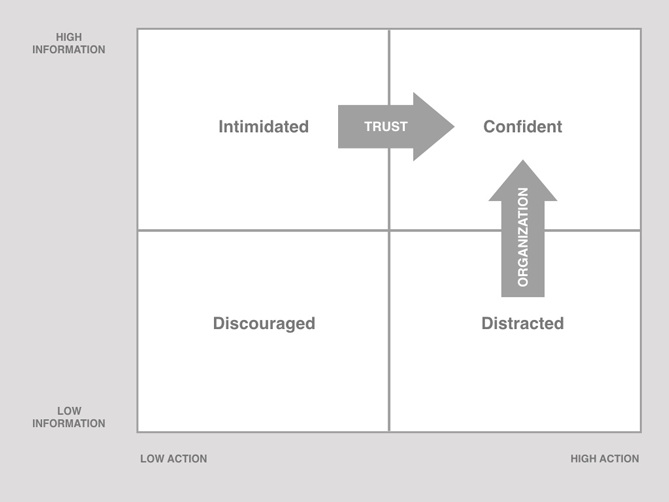
The study advised that for a pricing page to be both informative and actionable people should be able to connect the dots between what each plan offered, and how they would actually apply the offerings in their own lives. An indicator that you’re on the right track, is if a new user can understand your pricing page.
Here’s an example from Box, a company that ranks highly in the SaaS DNA high information and action category.

Easy to understand and actionable.
Box not only segments pricing by customer base so as not to overwhelm buyers, but each section clearly tells you what you get and how to get it.
9. Never stop testing.
As with anything in optimization, you have to keep testing. What works for one company might not work for yours and the only way to make sure that the features you implement are the best they can be is to test continuously. But these best practices provide you with guidelines to help you decide on what features to implement in your pricing page for better conversions.



TSMC optimistic about 2018 iPhone sales after period of ‘lethargic’ smartphone demand

Facebook Ads: A Facebook Advertising Guide for Marketers
[Last Updated June 27, 2018] If you’re new to Facebook ads or want to add something new to your current Facebook advertising plan, this page is for you. Here you’ll find articles and resources to help beginner, intermediate, and advanced marketers use Facebook ads to promote a business, products, and services. Set Up a Facebook […]
The post Facebook Ads: A Facebook Advertising Guide for Marketers appeared first on Social Media Examiner.
from Social Media Examiner https://ift.tt/2NtQhPL
via socialmediaexaminer
The 30-60-90 Day Plan: Your Guide for Mastering a New Role [Template + Example]
With all the joy and excitement of landing a new job, you can feel just as much fear and anxiety. Overcoming your new role’s learning curve and the desire to make a lasting impression on your employer can put a lot of pressure on you. What if you can’t adapt in time?
Fortunately, there’s a way to organize and prioritize your time and tasks, helping you seamlessly adapt to your new environment. It’s called a 30-60-90 day plan. And following it enables you to soak in as much information as possible, master your core job responsibilities, and sets you up to make a lasting impact on your new team.

Think of your 30-60-90 day plan as your North Star, keeping your sights set in the right direction and guiding you toward success as a new hire. But before we show you how to write this plan, let’s go over what exactly it is and how it’ll enhance your performance during your first three months on the job.
What is a 30-60-90 Day Plan?
A 30-60-90 day plan lays out a clear course of action for you during the first 30, 60, and 90 days of your new job. By setting concrete goals and a vision for your abilities at each stage of the plan, you can make your transition into a new organization smooth and empowering.
There are two situations where you’d write a 30-60-90 day plan. The first is during the final stages of an interview process. Some hiring managers ask candidates to think about and explain their potential 30-60-90 day plan as a new hire. They want to see if you can organize your time, prioritize the tasks you’d likely take on, and strategize an approach to your job description.
A well thought-out 30-60-90 day plan is a great way to help the hiring manager visualize you in the role and differentiate yourself from all other candidates.
The second situation where you’d write a 30-60-90 day plan is during the first week of your new job. This plan will allow your hiring manager to learn how you operate, address any of your concerns or preconceived notions about the role, and ultimately help you succeed.
If you’re not asked to craft a 30-60-90 day plan during the interview process or the first week of your job, it’s still a good idea to write one for yourself. A new job can feel like a completely foreign environment during the first few months. Having a plan in place can make it feel more like home.
Even though 90 days is the standard grace period for new employees to learn the ropes, it’s also the best time to make a great first impression.
The purpose of your plan is to help you transition into your new role, but it should also be a catalyst for your career development. Instead of just guiding you over your job’s learning curve, the goals outlined in your plan should push you to perform up to your potential and raise your bar for success at its every stage.
Improving your skills requires concrete performance goals, so watch out for vagueness in the objectives you set for yourself. “Write a better blog post,” or “get better at brainstorming” are terrific ambitions, but they don’t give you a way to measure your progress in them. Set goals that are realistic, quantifiable, and focused. You’ll know exactly how to achieve them and gauge your success.
To write challenging yet feasible performance goals, ask yourself the following questions:
What are my team’s goals?
Try to understand the purpose behind your team’s goals. It’ll give you more insight into why you and your team should achieve them, motivating you to work as hard as possible to meet those goals.
What will be my main priorities?
By connecting your personal responsibilities to your team’s goals, you’ll know exactly how to align your tasks with the needs of the team, which keeps you accountable and compels you to help your team achieve their goals.
How will I measure my progress?
Tracking your progress helps you gauge your performance and rate of improvement. To see how you’re doing, set up weekly meetings with your manager to ask her what she thinks of your work and track the improvement of your own performance metrics, like the growth of your blog posts’ average views or the amount of qualified leads your eBooks generate.
Reaching your performance goals isn’t the only path toward future success in your new role, though. You also need to study the ins and outs of your team and company, take initiative, and develop relationships with coworkers — all things that a lot of new hires underestimate the importance of.
Consider setting the following types of goals during each stage of your 30-60-90 day plan:
- Learning Goals – How will you absorb as much information as possible about your company, team, and role?
- Initiative Goals – What will you do to stand out?
- Personal Goals – How will you integrate with your company and team?
Aiming to achieve these types of goals will help you hit the ground running in all the right areas of your job. And if you stick to your plan, you’ll notice you’ll be able to spend less time learning and more time executing.
30-60-90 Day Plan Template with Examples
30 Days
Primer:
Many new hires are eager to impress, so they dive head-first into their work or try to make suggestions about their team’s process with limited experience in how their new team operates. But have patience.
Understanding your company’s vision and your team’s existing strategy is crucial for producing high-quality work and actually making an impact. If you don’t know the purpose behind your role or the optimal way to perform, you’ll risk missing the mark and your early efforts won’t pay off the way you expect them to.
It’s always better to over-prepare than under-prepare. And it’s okay to take time to learn the ropes — it pays huge dividends in the long run. In the first 30 days of your employment, your priority is to be a sponge and soak in as much information as possible. Once you do that, you can then try to improve more specific parts of your team’s work style.
Theme: Be a Sponge
Learning Goals:
- Study my company’s mission, vision, and overarching strategy.
- Read my company’s culture code to learn more about our company culture and why we implement it.
- Read the customer persona and target audience overview to truly understand who our customers are, their pain points, and how our product and content can help them.
- Meet with my team’s director to learn about how meeting our goals will help our business grow.
- Read up on our team’s new SEO strategy, editorial process, and traffic goals.
- Learn how to use the SEO Insights Report to plan and structure blog posts.
- Review my team’s pillar-cluster model overview and understand how to match posts to clusters.
- Meet with my manager to learn more about her expectations.
Performance Goals:
- Complete new hire training and pass the test with a 90% or higher.
- Be able to write 3 blog posts per week.
Initiative Goals:
- Run the Facebook Instant Article experiment that my manager recommended me to do.
Personal Goals:
- Grab coffee with everyone on my team, so I can get to know them on a professional and personal level.
60 Days
Primer:
By the end of your first 60 days, you should ramp up your workload, start overachieving, and make a name for yourself on your team. To do this, start speaking up more at meetings. Don’t be afraid to share your ideas about improving your team’s processes. This shows you’re quickly conquering the learning curve and recognizing some flaws that your colleagues might’ve overlooked. You still have a fresh perspective on the company, so your insight is invaluable.
Theme: Be a Contributor
Learning Goals:
- Learn how to optimize a new post from scratch based on both the SEO Insights Report and my own competitive research.
- Read every other marketing team’s wiki page to learn about other marketing initiatives and how our entire department works together to grow our business.
- Deep dive into my company’s product roadmap and strategy to fully grasp our mission and vision.
Performance Goals:
- Be able to write 5 blog posts per week.
- Be down to one cycle of edits per post.
- Understand how to edit a guest post — clean up at least one rough draft.
Initiative Goals:
- Share content strategy idea at my team’s monthly meeting and ask if I can spearhead the project to boost blog traffic.
- Ask my manager if I can oversee Facebook messenger and Slack distribution strategy.
Personal Goals:
- Meet with my colleagues on other teams to learn about their marketing initiatives and develop relationships outside of my team.
90 Days
Primer:
By the end of your first three months, you should have a firm grasp of your role, feel confident about your abilities, and be on the cusp of making a breakthrough contribution to your team. Instead of reacting to problems that pop up at random, be proactive and spearhead a new initiative for your team.
You should also be cognizant of how you can collaborate with other teams to improve your own team’s processes. By taking on some new projects outside of your main role, you’ll start turning some heads and catch the attention of the department at large.
Theme: Be a Leader
Learning Goals:
- Do an analysis of my highest and lowest performing blog post up to date. How can I use this information to optimize new content so it performs better out of the gate?
Performance Goals:
- Be comfortable with writing five blog posts per week
- Edit one guest post per week
- Try to have 75% of my blog posts not require revisions.
- Write at least one new post that generates over 10,000 views in one month.
Initiative Goals:
- Ask SEO team if they want to partner with product marketing team to brainstorm content topics related to our product road map.
- Ask social media team if they’re willing to develop a relationship where we can share each other’s content.
- Ask sales team what our customers’ pain points are, so we can write content that our target audience craves and help them close more qualified leads.
Personal Goals:
- Join the yoga club.
Learning the nuances of your new role in less than three months won’t be easy. But crafting a strong 30-60-90 day plan is your best bet for accelerating your development and adapting to your new work environment as quickly as possible.

The last remaining Siri cofounder departs Apple, as does its head of search

According to a new report from The Information, the last remaining Siri cofounder has departed Apple. Tom Gruber, who served as the head of Siri’s Advanced Development group, has retired in an effort to “pursue personal interests in photography and ocean conversation,” the report says…
Netflix shows off redesigned TV app with new slide-out navigation menu

9to5Mac Happy Hour 182: 2018 MacBook Pro upgrade, thermal throttling concerns, macOS Mojave and watchOS 5 changes

This week Benjamin and Zac discuss the newly announced 2018 MacBook Pro hardware upgrades, higher RAM and SSD storage upgrades, Apple’s T2 chip in the iMac Pro and MacBook Pro, Hey Siri and True Tone, iFixit’s keyboard discovery, the 6-core i9 thermal throttling issue, the state of HomeKit doorbell cameras, and the latest changes in iOS 12, watchOS 5, and macOS Mojave betas.
9to5Mac Happy Hour is available on iTunes and Apple’s Podcasts app, Stitcher, TuneIn, Google Play Music, or through our dedicated RSS feed for Overcast and other podcast players.
Sponsored by Udemy: Visit Ude.my/happyhour and use coupon code HAPPYHOUR to get 90% off life-changing classes!
watchOS 5: How to force Walkie-Talkie to re-appear

One of the more bizarre things we’ve seen in the watchOS 5 betas is that some users (including myself) are experiencing the Walkie-Talkie app disappearing throughout the beta process.
Survey: iOS users averse to subscription-based apps, but willing to spend more than Android users

Earlier this week, a report explained that the App Store is still bringing in nearly double the revenue of Google Play, despite the fact that the Play Store accumulates one twice as many downloads as the App Store.
Now, new research from Creative Strategies dives deeper into how consumers view and spend on the App Store…
How to Run an Instagram Contest: A 10-Step Guide
With 400 million monthly active users and more than 80 million posts per day, Instagram has established itself as an obvious platform for brands looking to expand their reach and engage with their audience.
Figuring out how to launch a successful Instagram contest, however, is much less obvious. Sure, it sounds like an effective strategy for stirring up conversation — it capitalizes on user generated content (UGC) and typically requires very little commitment for participants. But where do you start? And how can you be sure that you’re covering all the bases? To help give you some direction, we put together a detailed list of steps to run through when planning an engaging Instagram contest. From setting goals to monitoring submissions, we’ve covered all of the basics below — and we’ve included some inspirational examples along the way. Check it out …
Disclaimer: This blog post includes some information on legal issues surrounding internet marketing, but legal information is not the same as legal advice — applying the law to a specific circumstance. We’ve conducted research to better ensure that our information is accurate and useful, but we insist that you talk to a lawyer if you want professional assurance that our information, and your interpretation of it, is accurate. In a nutshell, you may not rely on this information as legal advice, nor as a recommendation or endorsement of any particular legal understanding, and you should instead see this post’s info as for entertainment purposes only.
How to Run an Instagram Contest: A 10-Step Guide
1) Plan objectives and goals.
Before you dive into an Instagram marketing contest, it’s important to plan it out first. The key to running a successful contest is to have a purpose — one that aligns with the interests and behaviors of your target audience.
Whether you’re looking to grow your brand presence on Instagram or build out your list of followers, it’s important that you set a specific goal so that you’re not left wondering whether or not you were successful in the end.
To help narrow your focus, think about the audience you’re trying to reach: What kinds of posts do they like seeing on your account? What kinds of posts do they enjoy posting on their own feeds? How do they behave on the platform? If you’re looking to drum up a lot of engagement, you should aim to center your goals and purpose around content that your audience actually wants to post and engage with.
Don’t forget to establish a time frame and budget for your contest, as determining these logistical details upfront will help you design a more effective contest.
2) Create an entry method.
Although the most effective and engaging Instagram contests are those that actually prompt your audience to post their own photos, there are number of different ways brands can create contests on Instagram. Because of this, it’s important to establish and emphasize what it takes for your audience to actually enter the contest.
Here are some ideas for how your audience might enter your contest:
- Have your audience post a photo or a video to Instagram with a specific hashtag and a specific theme.
- Have your audience solely follow you or do so in addition to creating a post.
- Have your audience tag your brand in their post.
- Have your audience Like or comment on one of your posts.
Make sure you establish what the guidelines are for entering the contest, and make that clear on your promotional materials. Maybe your contest is centered around a hashtag that doesn’t include your brand name. If you still want your brand to be tagged to gain recognition, you have to make that clear in your rules.

3) Find the perfect hashtag.
A good hashtag is a key to any engaging Instagram contest. Without it, there’s no link between the contest and the content being generated. In other words, hashtags help create brand and/or contest recognition by serving as a mechanism for sharing and driving participation.
Trouble is, creating the perfect hashtag can be tricky. If your contest is going to have a timeframe (and it should), you want to create a hashtag that you’re not going to want to use over and over again. Not to mention, there are tons of hashtags being created each day, making it difficult to land on something unique and catchy.
To help you come up with the best fit, consider these contest hashtag guidelines:
- Short: Create a hashtag that sticks in people’s minds. The more readable and identifiable your hashtag is, the better it is for your contest.
- Relevant: Make sure you’re creating a hashtag that is very clearly related back to your brand name, product, or services. If you settle on a generic, crowded hashtag such as #ThrowbackThursday, it’s likely that you’ll have a hard time figuring out who your participants actually are.
- Memorable: Users are likely to see promotions for your contest prior to actually posting the content. This means your hashtag needs to be memorable enough for users to think about it once and remember to act sometime later. Try to make your hashtag catchy, easy to search, and easy to write. Avoid weird spellings and confusing word choices.
- Universal: Think about your audience. Does everyone speak the same language or use similar words? If you have an international audience, make sure you’re careful about using slang words or region-specific terms that might confuse people.
- Rare: Do a search before you choose a hashtag. Are there lots of users using your ideal hashtag for some other purposes? If so, you may want to head back to the drawing board.
An example of an effective, engaging hashtag:
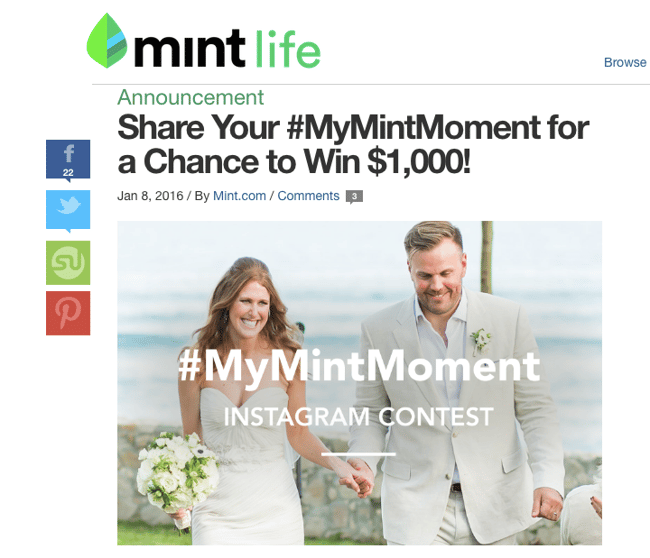
Earlier this year, Mint.com, an online personal budgeting and financial management company, hosted their #MyMintMoment contest.

The contest was well-designed for a number of reasons, one of which is its hashtag. The hashtag — #MyMintMoment — is simple, short, memorable, and easy to understand. It stayed on-brand and had a clear theme.
The goal of the contest was to get users to post about the things they were saving for. Participants posted pictures of tattoos, vacations, weddings, children, cars — you name it.

This is a great example of an effective hashtag, but it’s also a great example of how UGC can be used to drive marketing decisions. Think about it: Mint asked participants to share posts about things they were saving for. Sounds like an easy way to gain insight surrounding the unique motives and interests that fuel the usage of their service, doesn’t it?
4) Clearly define a theme.
Because most Instagram contests are UGC-based, it’s important to pick a theme so your users know what kinds of pictures and videos to post.
Ideally, you want to a pick a theme that aligns with your market, product, or services. But you can also take advantage of holidays, seasons, and events that align with your product or brand.
An example of an effective theme:
Last summer, D Magazine, a city and lifestyle magazine based in Dallas, used the Texas summer heat to create an effective #StayCoolDallas contest. The contest encouraged participants to submit photos of ways to stay cool in the Dallas heat. Submissions included everything from cold drinks at favorite bars and restaurants to fun summer activities.

This contest and hashtag worked particularly well because of the double meaning of the word “cool” — which ultimately left room for participants to get creative with their interpretations. This is a great example of how to make engagement super easy.
While the hashtag wasn’t totally brand-specific, the theme was very much in line with their brand and passion for all things Dallas. And as a result of the contest, they were left with a ton of new material to get ideas for their next issue.

5) Decide how winners will be chosen.
Part of a well-designed contest is informing your participants of how the winner will be chosen. Most contests are determined based on one of two ways: a vote or a jury. Let’s explore how each option works …
Voting:
A great way to boost the virality of your contest is to have participants compete for the most Likes. If the prize is valuable enough, your participants will likely share their posts with their friends across channels in order to get as many Likes as possible.
This strategy helps maximize your audience’s reach. At the same time, it can be detrimental to your contest, as you run into issues with folks using “Like bots” to gain artificial Likes. To avoid any complications here, you’ll want to put forth very specific rules that address the use of these types of workarounds.
Jury:
For the sake of quality and overall fairness, the jury method is the clear winner. With the jury method, you select a group of experts to decide upon a winner, rather than relying on a voting system.
There are pros and cons to votes or juries, but no matter the way you choose, make sure to clearly state your method so your users know what they’re vying for. Many brands choose to have a mixed-method approach and use a combination of voting and jury to determine the winner.
6) Choose an appropriate award.
When determining what the award for you contest should be, you need to consider your target audience, your budgetary constraints, and how aggressive your goals are.
Remember that by asking your audience to participate in the contest, you’re asking them to take action on something. As with any effort like this, you’ll need the value of the prize to outweigh the cost and energy required to enter the contest. While people might gloss over an opportunity to win a free t-shirt, it’s likely that they’d be willing to jump through a few hoops for something like a free trip.
While your prize should match the entry action, it should also align with the interests of your target audience. Ask yourself: What might my target audience like to have? Your list of answers for this — budget not considered — might be huge. Sure, everyone wants that free trip we mentioned earlier, but that’s not the point. The goal is to find a prize that’s both valuable and relevant to your brand.
Gift cards, free services, coupons, giveaways, and product goodie bags are all common prizes that brands use for contests, but we’re always in favor of getting creative, too.
Example of a creative contest prize:
One of our favorite examples of contest prizes was Sperry’s Photo Real Design Contest. Sperry encouraged users to post “epic photos” that represented an “odyssey.”
Participants then submitted photos of all kinds of things — nature shots, colorful art, real people, etc. — to be judged based on creativity and the number of Likes it received.

The winner that was chosen received a unique pair of Sperry shoes featuring their photo. Talk about a creative prize, right? Not to mention, it served as a great example of how brands can use contests to inspire real product ideas.
7) Create terms & conditions.
Don’t forget that when you create a competition with a prize, you must follow legal guidelines. The laws that will apply to you depend on where you’re based and who you allow to enter your contest, so you should consult your lawyer for help drafting your terms and conditions. Creating a terms & conditions page is a must.
Here are some common terms people include:
- The name and contact details of the promoting brand
- The dates of the contest
- The rules of who can enter (such as age and employee restrictions)
- The guidelines for how people enter
- The guidelines for how a winner is chosen
- The date and way winners will be announced
- The date and way the winner will be informed
- The time period the winner has to respond and claim their prize
- The specific of the prize (including number of prizes, description of prizes, and any caveats)
- The details of how the prize will be delivered
- Acknowledge that the promotion isn’t sponsored, endorsed or administered by, or associated with Instagram or any other social media used throughout the contest.
Note: Check out Instagram’s Promotion guidelines and make sure to comply with their rules.
8) Promote like crazy.
Now that you’ve got a solid plan in place, it’s time to promote the heck out of your contest.
Where’s the best place to start spreading the word? The possibilities are seemingly endless, but here are a few ideas to inspire your promotion efforts:
- Your blog. Write a post on your site detailing the contest, and use it as a launch point for your contest’s landing page.
- Social media. What better place to launch a social media contest than on social media? Direct your existing followers to the contest by including a shortened link in your bio and referencing that link in your promotional posts.

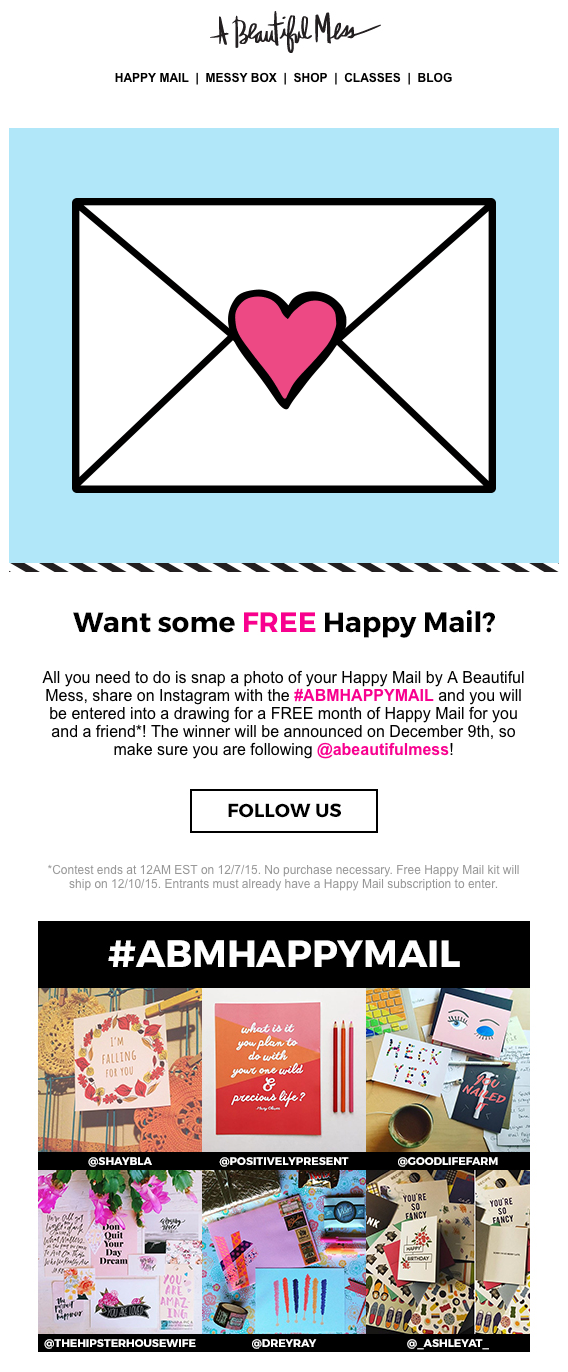
- Email. Extend the invitation to participate to your email subscribers by sending over a quick and friendly email to announce the offer.
9) Monitor submissions.
Monitoring both your promotional efforts and the level of participation during your contest is essential for meeting your goals and creating a plan to follow up on your contest.
Make sure to determine what metrics you’d like to use and how you’ll keep track of them. Here are some metrics to consider using:
- Number of submissions – Total number of posts submitted in compliance with your terms and conditions.
- Likes per submission – Helps you keep track of potential winners if your contest is decided by vote.
- Number of participants – If users can submit more than one submission, how many unique participants contributed to your contest?
- Top participants – Who shared the most content during your campaign? Keeping track of this helps you better engage with your biggest fans.
- Total Likes – Measures the total number of Likes on all submissions in your contest.
- Total reach – Captures the number of followers of your participants at the time of submission. Meant to show you the potential reach of your campaign.
- Follower growth during contest – Measure how much your following increased during the contest’s time period.
If your current audience is relatively small, and you don’t expect more than 30 submissions to your contest, you may decide to monitor your contest manually. To do this, assign someone the task of keeping track of submissions each day. At the end of the contest, someone will have to go through each submission and measure and write down the results from each submission.
If you’re monitoring your contest manually, try using a tool like Tagboard or Google Alerts to keep track of when your hashtag is being mentioned online, making it easier to track submissions. (HubSpot customers: You can set up a custom Stream in your Social Monitoring tool to keep tabs on a specific hashtag. Learn more here.)
If you’re expecting well over 30 submissions, however, you can imagine how difficult monitoring your submissions might be. If that’s the case, you may want to explore an Instagram-specific tool such as Iconosquare.
10) Follow up accordingly.
Once the contest is over, you can’t forget to follow up on the rules you set in the first place. Keep your terms and conditions in mind when reviewing the submissions to ensure that you’re being 100% fair in your evaluation.
Again, this is why establishing your terms and conditions early on is so important, as it will provide you with an documented plan for selecting, contacting, and awarding the winner.
Once you’ve selected and notified the winner, don’t forget to make the announcement publicly. Here’s an example of how to do so from D Magazine‘s #StayCoolDallas contest:

Ready to Run a Contest?
Now that you know everything it takes to run a successful, engaging Instagram contest, go put your knowledge to work for your brand.
Not only will you end up engaging and expanding your audience, but you’ll also end up with great new content you can use to inspire future content and contests.
What tips do you have for running a successful Instagram contest? Share them in the comments below.

Here’s how Apple’s new MacBook Pro throttles with Final Cut Pro X exports

It seems like there’s always some controversy surrounding new Apple hardware. These devices are some of the most popular in the world, which means that they’re bound to get closely scrutinized, perhaps more so than any other tech product on earth.
With that said, there’s a brewing controversy over CPU throttling in the new MacBook Pro. Of course, throttling on a laptop as thin as the MacBook Pro is to be expected, but issue has been taken with the amount of throttling present in Apple’s high-end 6-core Core i9-powered machine.
The scrutinization is warranted, especially when you consider that the least-expensive Core i9 MacBook Pro sells for $2,700. If you opt to max out the GPU, RAM, and SSD storage, the price quickly balloons to nearly $7000 after tax.
Just how bad is CPU throttling on the 2018 MacBook Pro? Let’s do a brief export test with Final Cut Pro X to investigate further. more…
43 Handy Excel Shortcuts You Can’t Live Without
Many marketers use Microsoft Excel every day, whether it’s to create a chart, analyze data, or run a report to present at the next team meeting.
Creating reports like these in Excel is time-consuming enough. How can we spend a little less time navigating, formatting, selecting, and entering formulas for our data? Wouldn’t it be great if there were keyboard shortcuts that could help us get our work done faster?
So glad you asked.
We’ve put together a list of 43 keyboard shortcuts for Microsoft Excel. Although you can do all of these maneuvers manually, knowing these tricks will help save you time so you can focus on the stuff that really matters.

All of these shortcuts can be accessed on PC and Mac, so we’ve included both types below where applicable.
(Note for Mac users: To access the F keys (F1–F12), you’ll have to hold the Fn key before pressing any F key — unless you’ve enabled those keys as standard function keys.)
43 Excel Shortcuts You’ll Definitely Want to Bookmark
Navigation Shortcuts
These simple shortcuts can help you navigate between workbooks, sheets, rows and columns:
| Move up through a selection | Shift + Enter (PC and Mac) |
| Jump to the top of a column | CTRL + ↑ (PC); Command + ↑ (Mac) |
| Jump to the bottom of a column | CTRL + ↓ (PC); Command + ↓ (Mac) |
| Jump to the corner of a selection (Note: Rotate to each corner by repeating this keystroke) | CTRL + . (PC and Mac) |
| Close the active workbook window | CTRL + w (PC); Command + W (Mac) |
| Switch to previous workbook window | CTRL + Shift + F6 (PC); Command + Shift + F6 (Mac) |
| Switch to the next open worksheet | CTRL + Tab (Mac only) |
| Switch to the previous open worksheet (Mac) | CTRL + Shift + Tab (Mac only) |
| Start a new chart sheet | F11 (PC and Mac) |
| Insert a new sheet | Shift + F11 (PC and Mac) |
| Repeat the last action | CTRL + y (PC); Command + Y (Mac) |
| Fill selected cell with the content in the cell above selected cell | CTRL + d (PC and Mac) |
| Fill selected cell with the content in the cell to the left of selected cell | CTRL + r (PC and Mac) |
Format Shortcuts
Formatting in Excel can be difficult if you don’t know of what you’re doing. Here are a few shortcuts that to help you easily format your cells. To start, here’s a featured formatting shortcut you might not have known about:
Excel Strikethrough Shortcut
The Excel strikethrough shortcut will strike a line through the middle of the value or text in a highlighted cell. To strike a line through a cell, highlight the cell and press CTRL + 5 on your keyboard.
| Find and replace values | CTRL + F (PC); Command + F (Mac) |
| Show all values as percentages | CTRL + Shift + % (PC and Mac) |
| Show all values as currency (Note: Replace $ with your own country’s currency key) | CTRL + Shift + $ (PC and Mac) |
| Show all values in general number format | CTRL + Shift + ~ (PC and Mac) |
| Apply or remove bold formatting to selected cells | CTRL + 2 (PC); Command + b (Mac) |
| Apply or remove italic formatting to selected cells | CTRL + 3 (PC); Command + i (Mac) |
| Hide selected rows | CTRL + 9 (PC and Mac) |
| Unhide selected rows | CTRL + Shift + ( (PC and Mac) |
| Hide selected columns | CTRL + 0 (PC and Mac) |
| Unhide selected columns | CTRL + Shift + ) (PC and Mac) |
| Insert current date | CTRL + ; (PC and Mac) |
| Insert current time | CTRL + Shift + : (PC); Command + ; (Mac) |
| Insert a hyperlink | CTRL + k (PC); Command + k (Mac) |
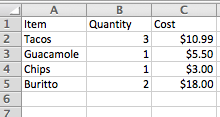
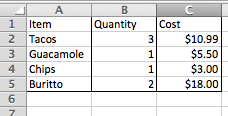
| Apply an outline border to selected cells (see screenshot below) | CTRL + Shift + & (PC); Command + Option + 0 (Mac) |
Here’s what cells look like with (left) and without (right) a border:
Shortcuts for Selecting Rows & Columns
Save yourself the manual dragging and selecting rows and columns with these handy keyboard tricks. To start, here are two featured rows-related shortcuts you might not have known about:
Excel Insert Row Shortcut
The insert row shortcut in Excel will create a new row below a highlighted cell. To insert a new row, highlight a cell or entire row and press CTRL + Shift + + on your keyword, literally pressing the plus sign after Shift. This will open a small window of options where you can insert a new row or column.
| Expand the selection by one cell either upward (↑) or downward (↓) | Shift + ↑ [or] Shift + ↓ (PC and Mac) |
| Expand the selection to the last non-empty cell | CTRL + Shift + Arrow Key (PC); Command + Shift + Arrow Key (Mac) |
| Select entire column | CTRL + [spacebar] (PC and Mac) |
| Select entire row | Shift + [spacebar] (PC and Mac) |
| Select entire sheet | CTRL + a (PC); Command + a (Mac) |
| Select only the visible cells in the current selection | Alt + ; (PC); Command + Shift + z (Mac) |
Formula Shortcuts
Formulas are a huge part of every marketer’s Excel toolkit. Here are a few shortcuts that’ll make you a formula wiz:
| Start a formula (e.g. “=A4+A5”) | = (i.e. press the “equals” sign; PC and Mac) |
| Insert AutoSum formula | Alt + (PC); Command + Shift + t (Mac) |
| Edit active cell | F2 (PC); CTRL + u (Mac) |
| Display the Formula Builder after you type a valid function name in a formula | CTRL + a (PC and Mac) |
Miscellaneous Shortcuts
Here are a few more time-saving shortcuts. To start, here’s a final featured shortcut for managing the size of your Excel worksheet:
Excel Delete Row Shortcut
The Excel delete row shortcut will delete the row below a highlighted cell. To delete this row, highlight a cell or entire row and press CTRL + – on your keyboard, literally pressing the minus sign after CTRL. This will open a small window of options where you can “shift cells up.”
| Save your work as… | Control + Shift + s (PC); Command + Shift + s (Mac) |
| Open spelling & grammar check | F7 (PC and Mac) |
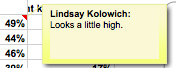
| Insert a comment (see screenshot below) | Shift + F2 (PC and Mac) |
Want more Excel tips? Check out this list of common Excel error messages and how to fix them.


How to Get Promoted This Month: Impress Your Boss by Doing These 7 Things
I once made a really big hiring mistake.
After a series of promising interviews, I took on an intern whose level of professionalism, performance, and overall demeanor quickly took a turn for the worse. I discussed it with my supervisor, we agreed that it was in everyone’s best interests not to move forward with the internship.
However, when we sat her down to talk, she countered our concerns about her performance by saying, “But … I was driving all the way from [insert desolate location here] to get here every day.”
I recall staring at her blankly. Since when does the length of your commute warrant special praise? 
We all wake up every morning, brush our teeth (hopefully), and make our way to work. However, the simple truth is that the act of “showing up” isn’t enough to propel career advancement. The most successful people earn the attention and respect of their bosses by proving they’re an asset to the team. So if you’ve ever entertained the thought of how to get promoted — or, at least, how to impress your boss — we’ve identified a few things every boss would love to see you doing.
How to Get Promoted With 7 Great Behaviors
1) Take ownership.
At HubSpot, we’ve been known to “fire” our best people.
No, that wasn’t a typo.
Here’s how it works: If you have a great idea — and you can prove that it actually delivers — you will be fired from your day job to own and grow that idea. After all, that’s what happened to HubSpot’s former VP of Sales, Pete Caputa. The story goes, according to CEO Brian Halligan speaking to Inc:
In 2008, one of our sales reps came to me with an idea that he believed could revolutionize HubSpot. At the time, we sold our software directly to consumers. But the rep, Pete Caputa, thought HubSpot should have a reseller channel in order to expand the business model. Basically, he wanted to sell our core product to third parties, who would then turn around and sell the product to their customers.”
Halligan was far from sold on the idea, but he decided to give Caputa an opportunity to prove himself. “If you want to do it so bad, start doing it nights and weekends and show us this will work,” he said.
Not long after accepting the challenge, Caputa was, in fact, encouraged to leave his day job here to grow what is now HubSpot’s Agency Partner Program.
Our point: Don’t be afraid to bring big ideas to the table. That’s the type of behavior that good bosses love to see because it illustrates your ability to solve problems for the business (and customers) on a high level. And while it’s easy to solve problems that specifically pertain to you and your reports, the goal is to identify and solve problems that influence the grand scheme of things. Think like a founder, and your boss will take note.
2) Support your colleagues.
Depending on your industry, getting ahead at work might sometimes feel like a dog-eat-dog type of situation. And while the old saying goes, “Nice guys finish last,” there is actually an opportunity for self-advancement through the act of helping others. Not to mention, if your boss catches you in the act, it can highlight your ability to be remarkably helpful: a trait almost every good boss cares about.
But don’t just take it from me. Adam Grant, author of Give and Take: A Revolutionary Approach to Success, also has something to say about it:
The more I help out, the more successful I become. But I measure success in what it has done for the people around me. That is the real accolade.”
In this book, Grant dives into the idea that in the workplace, people can be divided into three categories: takers, matchers, and givers.
- Takers are known to, well, take from other people.
- Matchers are more apt to make even exchanges.
- Givers separate themselves from the rest by doing good without expectations for reciprocation.
Grant goes on to provide examples of successful givers throughout history, such as U.S. President Abraham Lincoln, venture capitalist David Hornik, and businessman Jon Huntsman, Sr. So do yourself a favor and dig into their accomplishments a bit — we have a hunch that it’ll inspire you to rethink the potential benefits of lending a helping hand.
3) Measure and report.
Not long ago, I swore I saw a notable actor from the TV show “Lost” on my flight.
I excitedly texted my friend to tell him, to which he replied, “Send pictures, or it didn’t happen.”
That request got me thinking about our innate desire to “see it to believe it.” If my own friend wouldn’t believe my claims without photo evidence, why would my boss simply take my word for it when it comes time to talk about my performance?
The simple truth: Most bosses are busy, leaving little time for them to investigate whether or not you’re accomplishing what you’re supposed to be accomplishing. If you’re not vocal (and visual) about your performance, you run the risk of going unnoticed. That’s why supervisors love to see employees who not only measure their efforts but also report on them. Clear, specific, goal-oriented reports serve as one of the most effective ways to communicate your progress and prove to your boss that you’re capable of taking on more.
In terms of what to include in these reports, focus on ROI. While vanity metrics like social media views might be worth noting for yourself, your boss wants to see how your efforts are specifically influencing the bottom line.
“Don’t just report on what you crossed off your to-do list, report on what those activities achieved. So often, young staff want to prove that they’re working,” explains HubSpot’s VP of Marketing, Meghan Keaney Anderson. “We know you’re working. We see it and are proud of you for it. Prove not that you’re working, but that what you are doing is working.”
4) Be proactive, not reactive.
“My kids will have chocolate dripping from their mouths, and I’ll say, ‘Did you just eat chocolate?'” Peter Bregman, author of Four Seconds, once recounted for HBR’s IdeaCast. “And they’ll be like, ‘No, I didn’t just eat chocolate.'”
What in the world does that have to do with impressing your boss? Well, it’s a silly, yet accurate example of how you sound when you’re being reactive — and maybe even a little defensive — rather than proactive. Not a situation you’d want to be caught in with your boss, right?
From a psychological perspective, we react to avoid punishment. It’s a direct result of the stimulation that our amygdala — a subcortical brain structure that is linked to both fear responses and pleasure — experiences when we’re caught off-guard. And while it’s unrealistic to assume that you’ll never be faced with a quick decision in front of your boss, proactive employees aim to control situations by causing things to happen, rather than waiting to respond after things happen.
What does that look like, though? Well, aside from taking steps to plan ahead and anticipate “what-ifs,” Bregman encourages people to pause for four seconds before responding to something. That way, you’re allowing yourself a moment to process the situation you’ve been faced with, which can help you strategically and intentionally choose the words that you’re going to say — instead of instinctively saying something that you don’t mean.
5) Make more with less.
Part of being a noteworthy employee is being able to adapt to the industry and company changes that, eventually, will come your way. Let’s say, for example, that your company runs into an unplanned expense, or an important member of the team unexpectedly gives her two weeks notice. That could certainly throw a wrench in your budget and bandwidth, couldn’t it?
Some employees might see these events as a huge setback — one that serves as an excuse for falling short on goals. But the most successful people find a way to do more with less — and the really successful people find a way to do better with less.
Take that hypothetical budgeting issue. If it forces you to reduce or reallocate funds for freelancers, don’t use it as an excuse to allow content production to come to a halt. Instead, consider what you can do to turn the situation around. Maybe you work toward creating one strong piece of content on your own, like an ebook, that can be repurposed as separate blog articles to fill your editorial calendar until the budget gets back to a healthy level. Or, what about reaching out to a co-marketing partner to join forces on a piece of content that benefits you both?
Another great way to demonstrate your ability to do more with less would be to scale back the average time of your meetings. According to the book Time Talent Energy: Overcome Organizational Drag & Unleash Your Team’s Productive Power, “the average organization spends 15% of its collective time in meetings.” That plays into the belief that simply working longer hours is comparable to doing more with less when really, it’s all about making better use of your time. Cutting your meeting time in half will force you to get to the point quicker — and leave you with extra time to allocate toward other projects and tasks.
Remember: Excuses don’t promote career advancement. Solutions do.
6) Welcome feedback.
I have a confession to make. I hate it when I don’t have the answer for something. I want to think I know everything — so when I’m faced with the reality that I don’t, admitting so is a bitter pill to swallow. But being able to do so is a big part of getting ahead.
That’s one reason why it can be so helpful to welcome third-party feedback when we need to know what we’re missing — like when you’ve worked on a long-term project, and you start to see any progress through rose-colored glasses. At that stage, it’s most helpful to invite an outsider in to poke holes in your approach. What’s working? What’s missing? What is needed to take this project from good to great?
According to Gallup, the most engaged employees are the ones who meet with their managers at least once a week — which suggests that both positive and negative feedback, as well as overall effective communication, plays an instrumental role in the way we perceive goals. Asking for that kind of time with your manager is a reasonable request, if you make it count. Make sure that you’re prepared to handle whatever feedback comes your way. While positive feedback is often pretty easy to accept, negative feedback can come as a challenge for many but is often the most valuable.
To ensure that you make the most out of constructive criticism, take note of the following tips:
- Listen. Sure, it’s easy to tune someone out when you’re not particularly thrilled with what they are saying, but that doesn’t make it right. Give the person the respect she deserves by listening to what she has to say, before you interject.
- Ask clarifying questions. If you don’t understand the point someone is trying to make, don’t hesitate to ask him to elaborate. Following up with questions will help to ensure that you both walk away on the same page.
- Consider the source. All feedback is not created equal. While getting some honest feedback from a co-worker who knows little about your project may help you to identify weak spots, it’s important that you focus on the feedback coming from those to whom you report. In other words, give attention and energy where they’re due most.
7) Smile.
We hate to sound like a bunch of “Pollyannas,” but trust us: No supervisor wants to walk into an office and see a team of people that look like they are suffering through a dental appointment. Not only is it detrimental to company morale, but it also sends a signal that there’s something wrong with his management. If there is, that’s an important conversation to have — but not by going around looking like someone just asked you to spend the day watching paint dry.
At work (and at home), it’s important to try to focus on the positive, no matter what’s on your plate. According to a 2010 study from the National Bureau of Economic Research, it pays to be positive — literally. Not only did it find that optimistically inclined MBA students have an easier time finding jobs compared to their peers, but also, they saw a 5-10% increase in the probability of being promoted over their pessimistic peers.
Note to Self: Keep On and Smile On
Research like the study cited above taps into the idea that success can correlate with an ability to stay positive, even when completing overwhelming tasks.
And really, those findings align with many of the behaviors we’ve covered here. Even when something happens at work to upset us, proactively addressing it is more likely to be productive than reactively sulking and wallowing in it.
It may sound cliche, but beneath most of these tips is the foundation of a good attitude. So the next time something at the office bums you out — or you’re searching for the best way to progress in your career — revisit this list to see what you can actively do about it.


VLC for iPhone and iPad updated to support 360 video, Chromecast, more
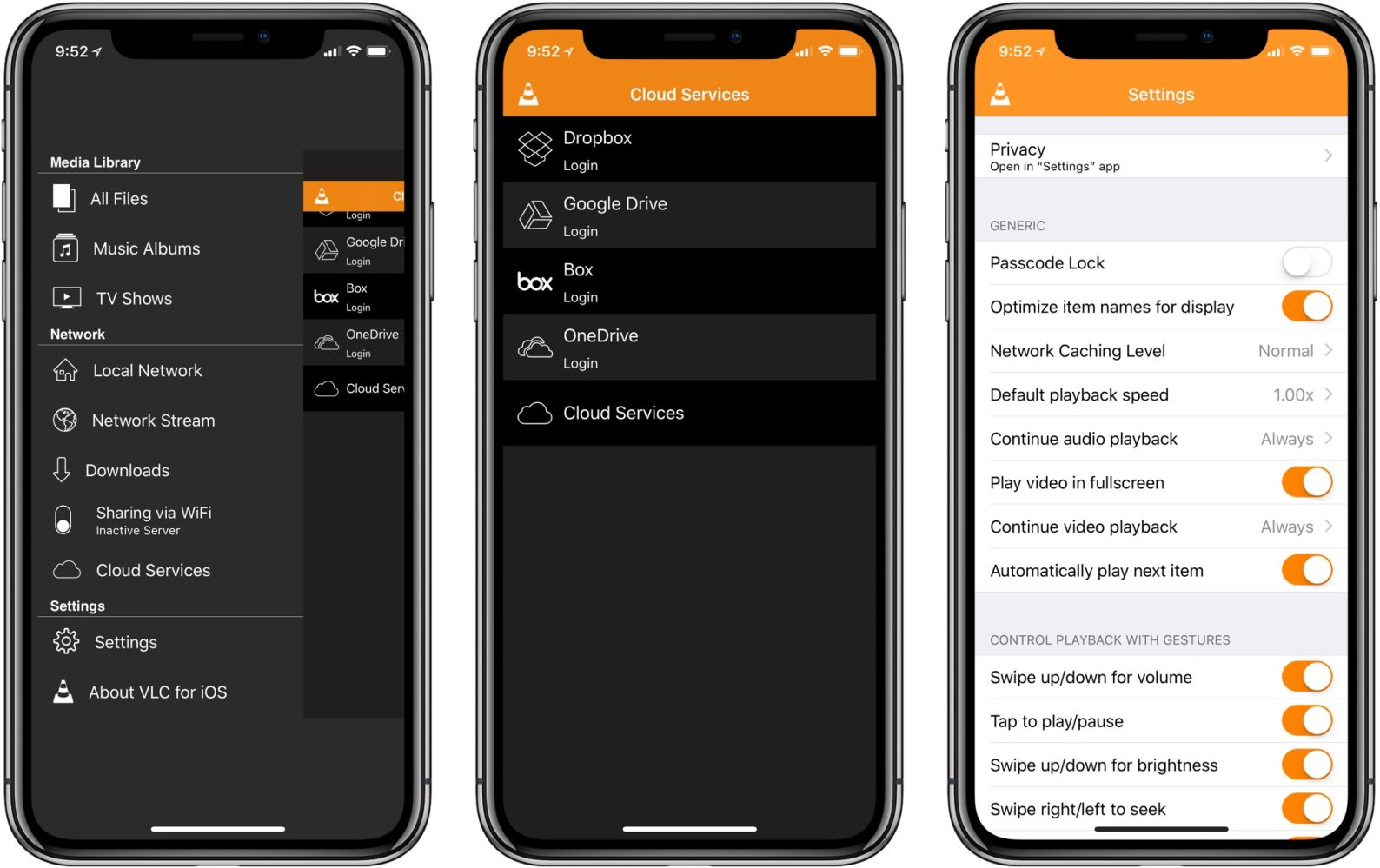
VLC has today updated its app on iOS with a handful of new features. Today’s update brings the app to version 3.1.0 and includes several long-awaited features sure to please users…
Facebook wants you to sync your Instagram contacts to Messenger, and some users are not happy

Facebook today is rolling out its latest feature to try to bridge the gap between its services and Instagram. As reported by TechCrunch, Facebook is now allowing users to sync their Instagram contact directly to Messenger, for better or for worse…
9to5Mac Daily: July 18, 2018

Listen to a recap of the top stories of the day from 9to5Mac. 9to5Mac Daily is available on iTunes and Apple’s Podcasts app, Stitcher, TuneIn, Google Play, or through our dedicated RSS feed for Overcast and other podcast players.