
Welcome to My Blog
The HubSpot Culture Code: Creating a Company We Love
Several years ago, we published a public beta of the HubSpot Culture Code slide deck. This deck started out as an internal document, and as a company who values transparency, we decided to share it with the world.
Like HubSpot, the Culture Code is a perpetual “work in progress,” so we’ll update it periodically. To date, we’ve updated it more than 25 times, and what you see below is our latest version. The presentation has been very well received, with more than 3.9 million views so far. (Thank you!)
HubSpot is growing. We have about 44,500 customers and more than 2,200 employees in the company now. We have more than $375 million in annual revenue. We are grateful to our customers and to the inbound community for the success we’ve had so far.
And we’re grateful to those of you who have hopped on for the ride. We thought it could be interesting and possibly even useful to offer up this inside look at HubSpot and the people behind it. What do we believe? What makes us tick?
The answers to those questions (and more!) are in the mega-slide-deck included above. The document has evolved and expanded over several years into this latest version. We hope you like it and will share it.
Download our free culture code guide here to learn how to create a company culture your own employees love.
HubSpot Culture
HubSpot culture is driven by a shared passion for our mission and metrics. It is a culture of amazing, growth-minded people who are all encouraged to use good judgment and solve for the customer. Employees who work at HubSpot have HEART: Humble, Empathetic, Adaptable, Remarkable, Transparent.
HubSpot Culture Code Highlights
- Culture is to recruiting as product is to marketing.
- Whether you like it or not, you’re going to have a culture. Why not make it one you love?
- Solve For The Customer — not just their happiness, but also their success.
- Power is now gained by sharing knowledge, not hoarding it.
- “Sunlight is the best disinfectant.” -Louis Brandeis
- HubSpot has a no-door policy, where everyone has access to anyone in the company.
- You shouldn’t penalize the many for the mistakes of the few.
- Results should matter more than when or where they are produced.
- Influence should be independent of hierarchy.
- Great people want direction on where they’re going — not directions on how to get there.
- “Better a diamond with a flaw than a pebble without.”
- We’d rather be failing frequently than never trying.
—
We hope you found the deck useful. If you’d like to reach out or provide feedback, you can do so in the comments below. Or, you can find me on twitter @dharmesh.


Uber focuses on passenger safety as it starts rolling out continuous driver background checks

To improve the safety of both its customers and its drivers, Uber is now pushing out a more aggressive background check program to ensure drivers are fit for the job.
How to Write a LinkedIn Recommendation in 2018 [Quick Tip]
“Lisa has recommended you!”
Awww, she has?!
When I get a LinkedIn recommendation from someone I respect and admire professionally, I feel both honored and encouraged to return the favor. But for some reason, I always get writer’s block. I never know how to start or what to say — only that I like this person’s work and I want others to know it.
Unfortunately, simply writing “Lisa is the best!!!!” isn’t reflective of Lisa’s skills — plus it makes you look like a total goon.
Luckily, in the past few weeks I’ve written a couple of LinkedIn recommendations that I think turned out pretty well, and they reflected a pattern that’s easy to replicate in subsequent recommendations. I thought I’d share that pattern with others that suffer the same writer’s block.
Download our ultimate guide to LinkedIn here for more tips about how to use LinkedIn for professional networking.
Here’s a quick little “template” you can use that makes for a LinkedIn recommendation that’s specific, honest, succinct, and helpful for the person you’re recommending.
How to Write a LinkedIn Recommendation (in 6 Steps)
1. Explain the nature of your professional relationship.
That sounds really serious, but it’s simply a helpful piece of context that acts as an “intro” for your recommendation. Whether it’s a coworker you’ve worked closely with for years, a manager, a direct report, a point of contact at an agency, or something else entirely, it sets the stage for the reader to learn why you’re writing this recommendation.
For Example:
I’ve worked alongside Lisa for close to two years now.
2. Provide details of the position for which you’re recommending the person.
Are you recommending this person for their work in one position? Or are you writing about their work across multiple jobs they’ve held while you worked with them? Either way, a great next step is to explain some of the notable parts of their job(s). It may feel strange — kind of like you’re listing out their job description. But this is very helpful for anyone reading the recommendation, looking to get a feel for what precisely it is they did in their job.
Resist the urge to create a laundry list of their job duties. If they’ve really worn that many hats, I recommend contacting them to see if there’s a certain part of their role they’d like emphasized over others.
For Example:
In those two years, I’ve seen her not only excel at the core elements of her job — like copywriting and copyediting — but also learn other tasks that extend well beyond the scope of her role, like email marketing, event planning, and even championing our company’s internal communications.
3. Explain how they’ve grown at the company.
If this person reports (or once reported) to you, this aspect of a LinkedIn recommendation can go a long way. Explaining how a person has grown — either in their role or from one role to another — can demonstrate an ability to adapt as the organization expands.
Just be careful not to overstate any low points in their career that can dilute the value of the growth you’re trying to highlight.
For Example:
Lisa has grown as quickly as our business has, and her willingness to learn and take on these new responsibilities is something to be desired in any professional.
4. Indicate how their contribution helped grow the team or company.
This could be an explanation of how their performance helped hit hard metrics, or it could demonstrate a contribution toward more esoteric things, like leading their teammates or fostering new initiatives.
For Example:
Lisa’s mastery for both her core role, and the projects that extend beyond it, have been critical to the company’s growth. In fact, her taking on internal company communication aligned with a sharp increase in employee happiness.
5. Explain what these achievements reveal about that person.
By now, you’ve included some specifics — so let’s explain what those specifics mean for the larger theme of your recommendation. Do the examples you’ve detailed reveal that person is hard-working? Ambitious? Great for team morale? Connect their accomplishments with their attributes.
For Example:
This rare mix of productivity and ambition sets a great example for the rest of the team, and explains why everyone loves working with Lisa — no matter where they fall on the org chart.
6. End with a note about the personal aspect of working with him/her.
In this section, hit the message home with a mention of how you felt working with the person, your hopes for their career, or simply a prediction about their future.
For Example:
While Lisa’s work has continued to pay dividends long past her tenure here, I certainly miss working with her every day. I have only optimistic predictions for her career trajectory.
LinkedIn Recommendation Sample (for a Manager)
Now, writing a LinkedIn recommendation can seem easier said than done. What if the employee you’re recommending is your superior? This can make it more difficult to recommend the person — even if you’re saying stellar things about them.
To avoid sounding patronizing or tone deaf when addressing a higher-level professional, here’s a sample LinkedIn recommendation — written in full — that a manager would be proud to receive (notice how it embraces every step outlined above).
I’ve worked for Lisa for two years, and in those two years, I’ve seen her quickly take on new responsibilities while having the time to teach this information back into her employees. By inheriting tasks like campaign analytics and email A/B testing — both of which extend beyond the scope of our team — she’s made our department much more agile, and set me up for a promotion last month. Lisa is as great a person as she was a manager, and her next employer will be lucky to have her.
Now proofread, and hit send. Remember, the recipient has the opportunity to review and request changes to your recommendation, so if you’re concerned you haven’t written a recommendation in the most helpful way possible, they can still get in touch with edit requests.


9to5Toys Lunch Break: $150 off new MacBook Pro, BOGO FREE iPhone, Twelve South BookArc $43, more

Keep up with the best gear and deals on the web by signing up for the 9to5Toys Newsletter. Also, be sure to check us out on: Twitter, RSS Feed, Facebook, Google+ and Safari push notifications.
Listen to the new 9to5Toys Daily Podcast:
Prepare to receive more emergency alerts on your iPhone, but there’s no cause for panic

The US government’s Emergency Alert System (EAS) is, unfortunately, probably best known for the false alarm in Hawaii back in January. Residents of the island were woken by a loud alarm sound and a message stating that ballistic missiles were on the way …
Plex grid view of live TV guide now available on Apple TV

When Plex launched a live TV guide in the traditional grid format, it did so first on the web, promising that other platforms would be coming later.
It has now made good on that promise, with Apple TV seeing the new feature today …
Comment: Two things seem obvious about the new MacBook Pro keyboard …

Apple files for 2018 iPhone lineup in Eurasian database ahead of fall release, two additional iPad models

The Eurasian database continues to be a good indicator of Apple’s forthcoming product releases. Some of the model identifiers unearthed earlier this month were unveiled yesterday as the new MacBook Pro laptops. Consomac today noticed that Apple has now registered a fleet of new iPhones running iOS 12, almost certainly destined to be the 2018 iPhone lineup launching in September.
Best Buy takes $150 off latest 2018 MacBook Pro models for students

Yesterday, Apple surprised by announcing a refreshed MacBook Pro lineup. Now Best Buy is offering its own surprise. Students, or those with access to a .edu email address, can take $150 off the latest MacBook Pros. Simply head over to this landing page and sign-up for the offers, and you’ll receive a coupon code in your email inbox within hours. This brings the entry-level 13-inch Touch Bar model to $1,649.99 shipped. Various other configurations are also available here. Learn more about student discounts at Best Buy here.
Adobe developing a ‘full version’ of Photoshop for iPad as part of major platform rewrite, reportedly launching next year

Bloomberg reports that Adobe is currently developing a cross-platform Photoshop app for iOS, described as a ‘full version’ of the popular desktop image editing suite. Adobe’s Creative Cloud product officer confirmed the plans and wants to get them ‘on the market as soon as possible. Bloomberg’s sources indicate the new app will be demoed in October, targeting a 2019 debut.
Adobe currently has several mobile ‘Photoshop’ apps on the App Store, but they constitute small slices of the full desktop app feature-set. The new app will compete against upcoming platform rich photo-editor apps like Affinity Photo. Photoshop for iPad would be included as part of the Adobe Creative Cloud subscription, which starts at $9.99 per month.
Supply-chain report says LG to supply screens for 20M 6.1-inch LCD iPhones

Earlier reports have suggested that LG is likely to supply OLED screens for between two million and five million 2018 iPhones, and a new report today says that the company will also pick up a more substantial order for the LCD model …
London aerial photographer says new MacBook Pro lets him finish the edit before the helicopter lands

London-based aerial photographer Jason Hawkes was given early access to a maxed-out 2018 MacBook Pro, and was impressed …
Email Writing: How To Craft Effective Emails For International Teams
Are you a non-native English speaker who needs to regularly write emails to your international colleagues?
It can be a challenge to write effective, conversational emails when English isn’t your first language, but this article will provide some helpful tips to help you improve the overall quality of your emails and sound more like a native English speaker.
Being a non-native English speaker doesn’t mean you need to be limited by fear and insecurity every single time you hit the “send” button. Once you’ve applied these simple strategies to your writing, you should be able to confidently send emails to anyone (even those from native English-speaking countries like the US.)
Email Writing Tips for International Teams
Most people won’t tell you this, but crafting a good email begins even before you put down a single word. Writing a good email starts with your mindset.
When you’re in the correct frame of mind, you’ll be able to write effective emails that communicate and persuade.
Sounds logical … but how do you enter the “correct frame of mind”?
You internalize a few important email writing rules that you should apply to every single email you write. The best part is — these rules can also be applied to any form of communication, not just email.
Email Writing Rule #1: Imagine Receiving The Email You’re Writing
Have you ever received an email that it was so incoherent you couldn’t even finish reading it, let alone even consider replying? Or included a completely irrelevant proposition?
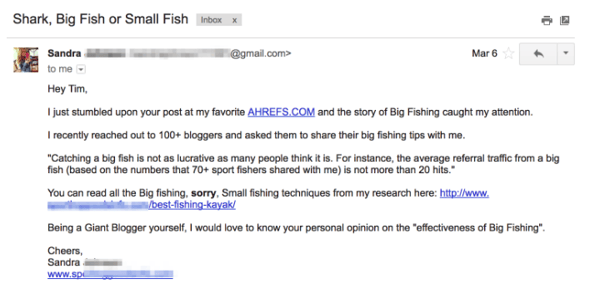
Ahrefs is an SEO tool, yet they received an email from a fishing company
One of the biggest problems when it comes to email writing is the lack of empathy for the recipient. Before even writing an email, most people won’t even consider whether their email will be well-received by the other party.
If you want your email taken seriously, you need to be able to empathize with your recipient before you even start writing. Think about the person you’re sending an email to:
- Why are you emailing this person?
- What does the person you’re emailing want?
- Is this the right person to contact, considering what I’m trying to achieve?
Of course, if you’re already close to this person, then these questions are not as necessary. You can probably dash off a quick email, and still get a reply.
But, if you’re sending an email to someone new, or unfamiliar, then take some time to reflect on these questions. Your answers will help you write a more thoughtful, coherent email.
Email Writing Rule #2: Write Like You Talk
If you’re not a native English speaker, it’s normal to feel like you should be more formal when it comes to your email writing.
However, this results in emails that are too formal, and come off as awkward or stiff. For example:
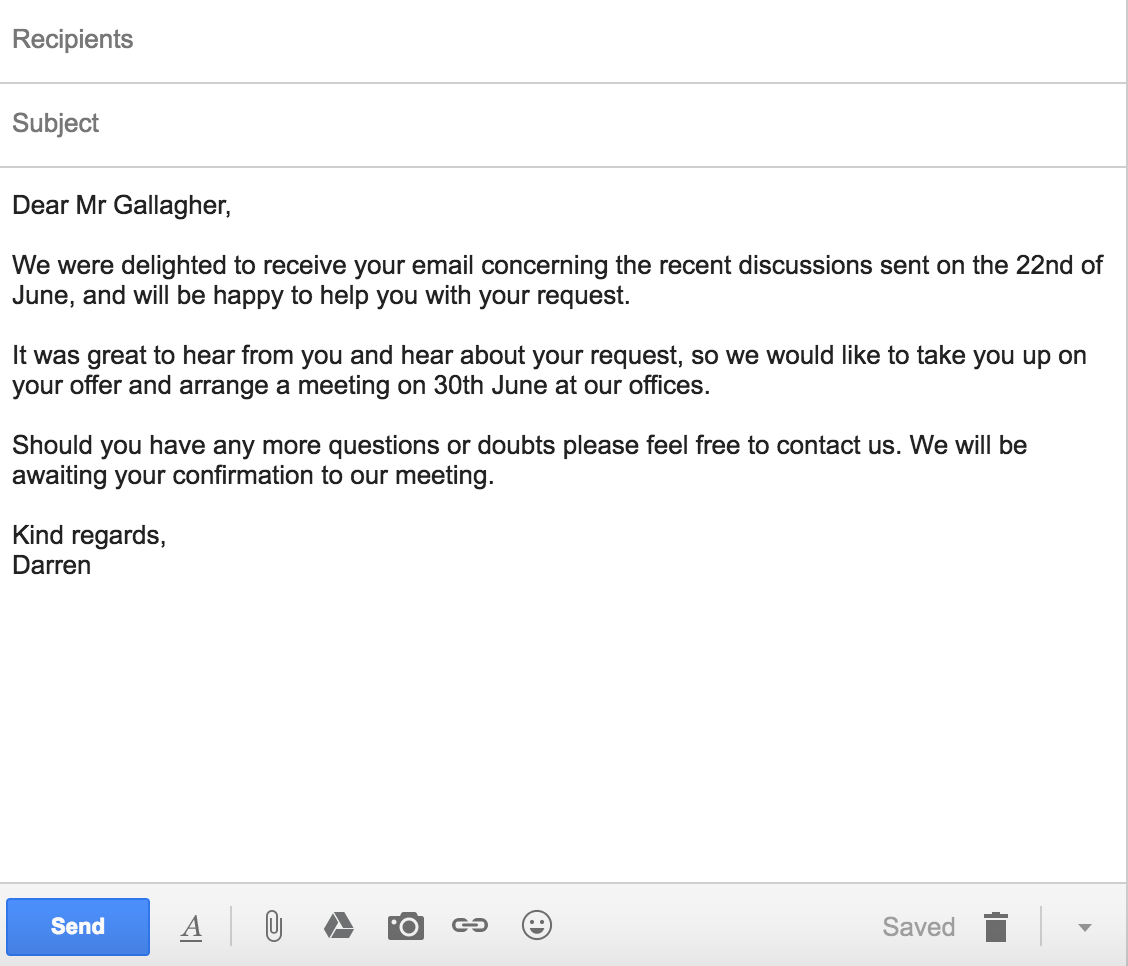
Native English speakers write more informally — their writing sounds like one person talking to another.
Here is a quick grammar tip that will always help you sound more native: Write in an active voice and avoid the passive voice.
An “active voice” shows that a subject is performing the verb’s action, e.g.: “Marilyn mailed the letter.”
In contrast, the “passive voice” shows that the verb is acted upon by the subject, e.g.: “The letter was mailed by Marilyn.”
Instead of writing “your feedback would be much appreciated”, try saying “I would appreciate your feedback.” Instead of writing “your request has been received”, try saying “I received your request.”
Notice how writing in an active voice sounds more human.
How To Write An Effective Email
1. The Subject Line
The subject line is usually the first thing someone reads before they decide to open your email. This also means that the subject line holds the key to whether your email is opened, ignored, or deleted.
Unfortunately, non-native English speakers don’t always know what to write in the subject line.
Take a look at this example:

This particular subject line (real-life example by the way) is vague, indirect and does not hint to me at all what the content of the email will be about.
The result? *Delete*.
Subject lines are especially important if you’re reaching out to someone for the first time. The recipient doesn’t know who you are, and can only judge you from your subject line.
Even if you’re sending emails internally at your company, it still pays to write a great subject line so your recipient has an idea of what to expect. Like any busy person, your teammates receives a ton of email every day, and would certainly appreciate the extra effort of a descriptive subject line.
So, how do you write a good subject line?
Be clear, direct and describe the content of your email. Don’t be afraid to take up the whole subject line. Go ahead and tell them what to expect.
As you can see, there’s no need to resort to sneaky tricks or clickbait titles just to induce an open. Remember – you don’t want people to be tricked into reading your email, you actually want them to read it and take some kind of action.
You want to associate positive feelings with your email, not anger and disappointment.

Here are some good examples of subject lines:
- I’m going to be in Town next Tues – are you available?
- Introduction to Kevin Bacon
- FAQ — will you take you 2 minutes — need answer today
- Susan suggested I reach out to you
2. Start with an appropriate greeting.
To kick off the email, you should begin with an appropriate greeting. There are two components to the greeting: the salutation and the opening sentence.
Most non-native English speakers, probably out of fear of offending someone, tend to stick to just one salutation — Dear [X]. No matter the context, non-native English speakers will use Dear [X] over and over again.
The appropriate salutation actually depends on the situation. If you’re writing a formal email to a bank or government institution, it would be better to start off with Dear [X].
If you’re sending an email to someone you know, or work in a casual environment, then it is perfectly fine to go with a Hi [name].
To help you out, here is a list of salutations you can open with in your emails:
- Dear [First Name]
- Dear Mr./Ms. [Last Name]
- [Name]
- Good morning/afternoon
- Hi
- Hey
- Hey/Hi there
Once you’ve gotten the salutation out of the way, it is time for an appropriate opening sentence. While the subject line determines whether your email is opened, your opening sentence determines whether your email is read till the end.
The best way to do this correctly is to research the person you’re writing to. Find out what your recipient is interested in. Look around their social media profiles (e.g Facebook, LinkedIn, etc.), and if they publish, read some of their blog posts.
Do a Google search on their name, and see if anything interesting comes up. Visit their company’s website, read their About Us page, and find out what they are working on or interested in collaborating on.
With this information, you can write an opening sentence that builds rapport. Show that you understand them, what they need, and how you can help them.
With this, you can also show that you’re different — that you’re interested in them, are willing to go the extra mile to find out more. Showing that you understand their challenges helps build trust.
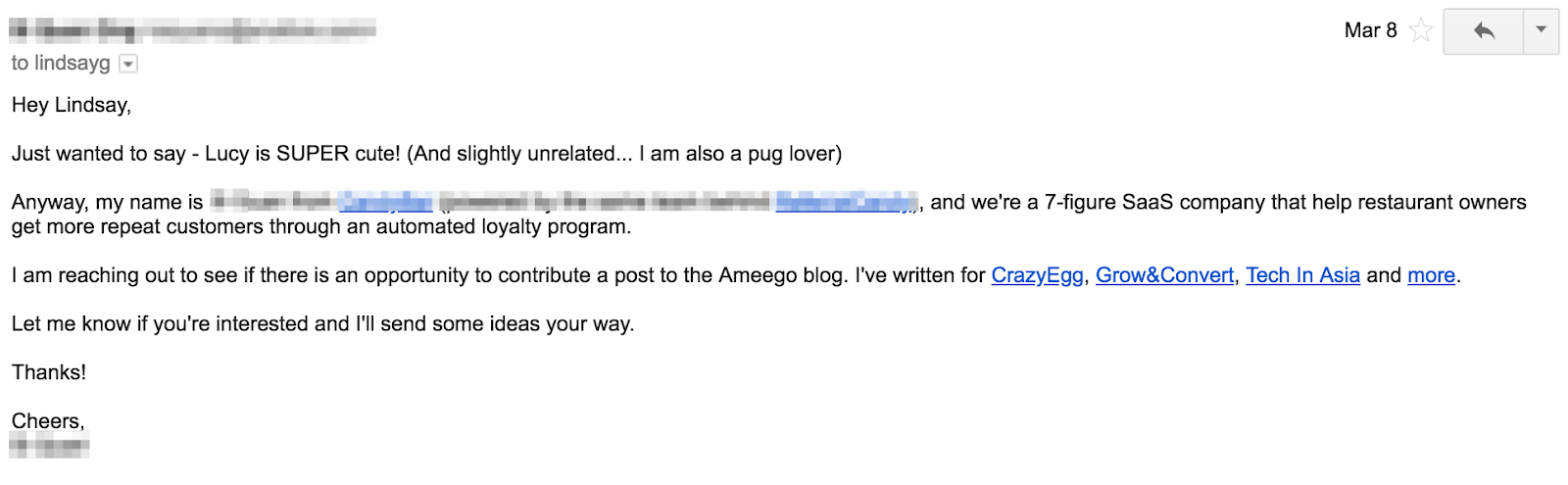
Of course, this is not necessary if you’re emailing a colleague or someone you know, but it is still important to establish some kind of context so that they know what’s happening.
3. Keep your message short and concise.
According to Statista, we send and receive roughly 269 billion emails a day.
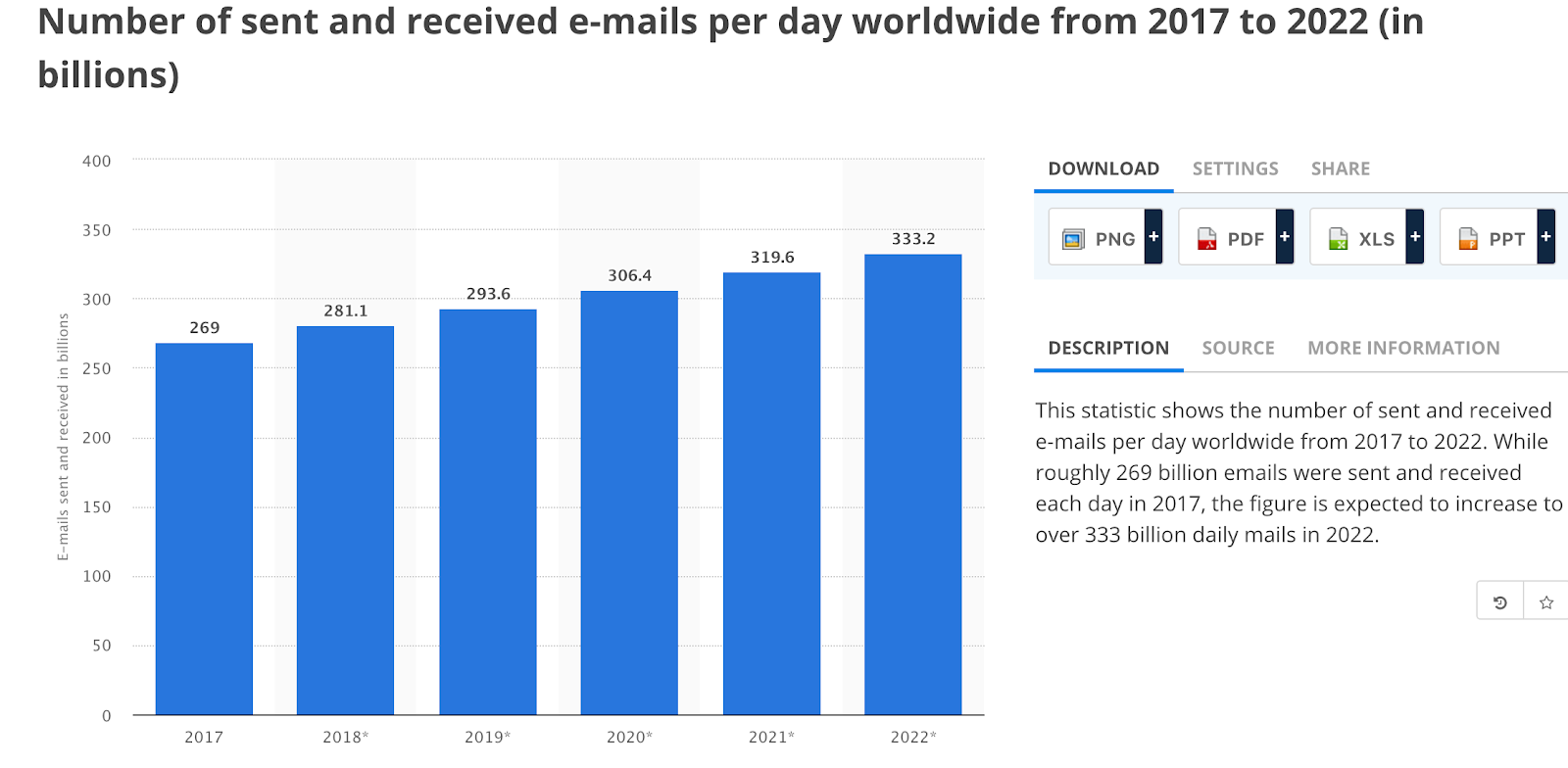
If we average out across everyone in the developed world (~4 billion people), every single person would receive about 68 emails/day!
This alarming statistic make one thing very clear: we spend a lot of time reading emails.
To write an email that is opened, read and acted upon is not easy. You have to put in the work upfront to ensure that the email is professional, empathetic, and easy to read.
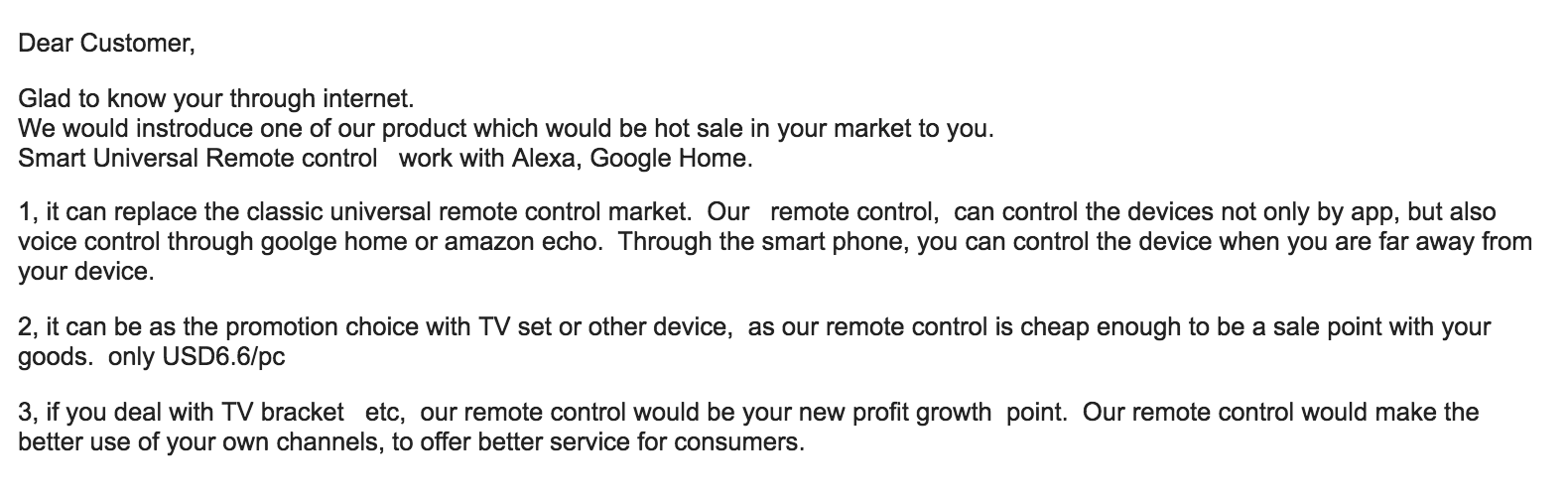
You have to respect your readers’ time. While you may feel like you need to tell them everything in one email, don’t. No one is eagerly awaiting a three-page essay arriving in their inbox. Here’s one I received recently:
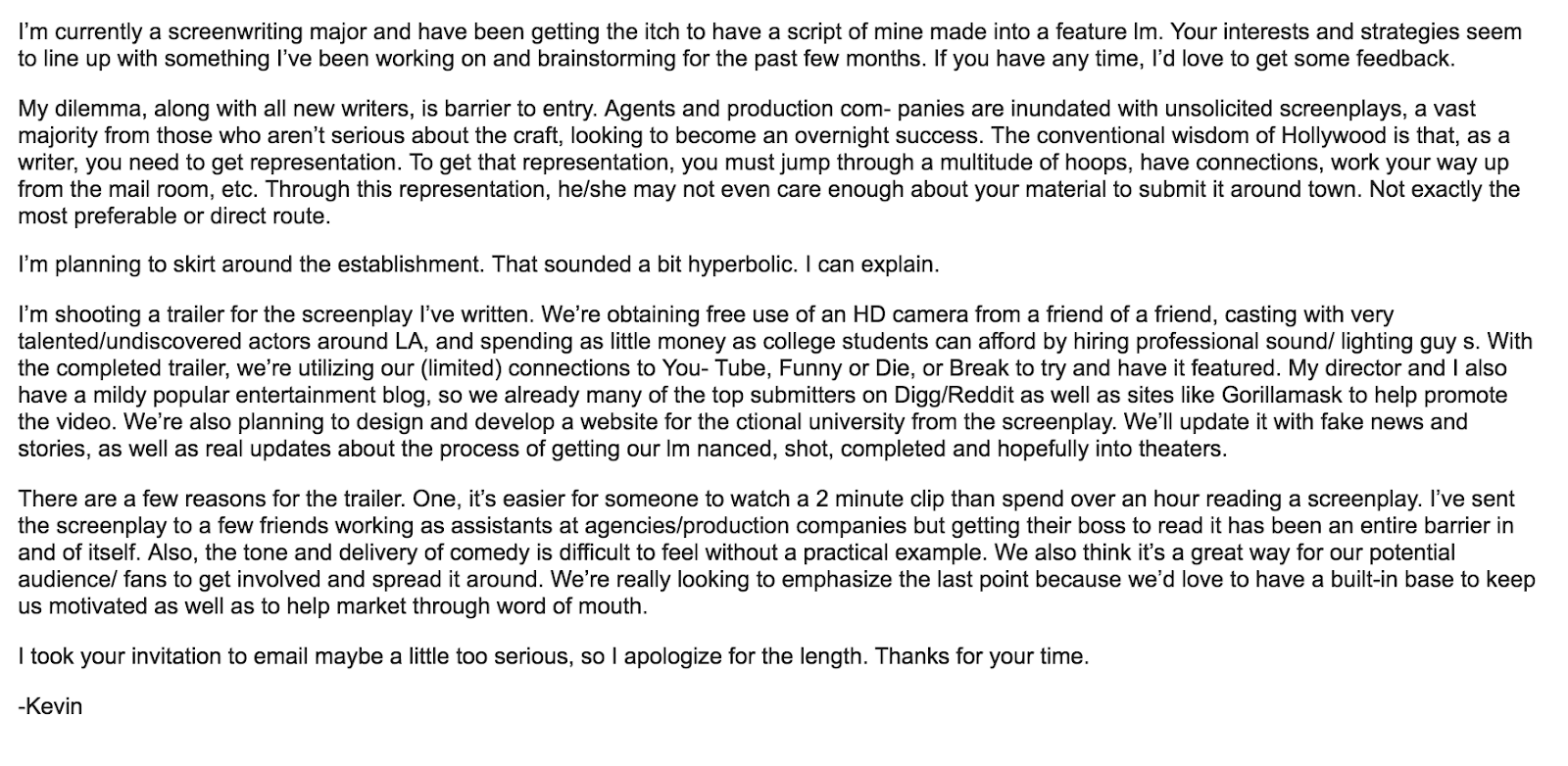
Ugh.
Instead, keep the email short, concise and to the point. Stick to essential and specific information.
Think about it this way: what’s the ONE thing you want to achieve after the person sees your email?
Make sure the email is written in such a way where it achieves the end result you want.
When you need to include a lot of information in an email, it’s probably better to suggest a phone call or a meeting instead.
Pro-Tip: Use this free meeting tool to schedule your meetings faster and avoid back-and-forth emails.
4. Use standard fonts.
If you’re using a non-English keyboard, your fonts may not show up properly on the other person’s device.
If you’re trying to look like a native speaker, use standard fonts. Some fonts for languages have their own “English font”, which are a dead giveaway that the person writing is a non-native speaker:
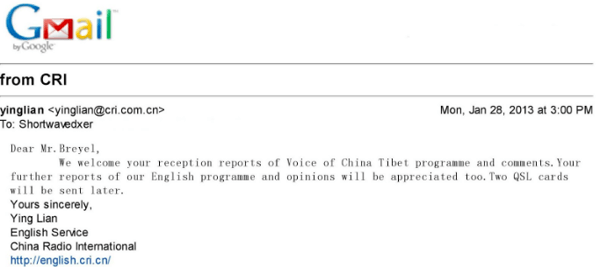
To prevent all kinds of tech issues from coming up, stick to what is safe. Use web-safe email fonts like:
- Arial
- Courier
- Georgia
- Helvetica
- Lucida Sans
- Tahoma
- Times New Roman
- Trebuchet MS
- Verdana
In fact, this is the exact list Gmail gives:
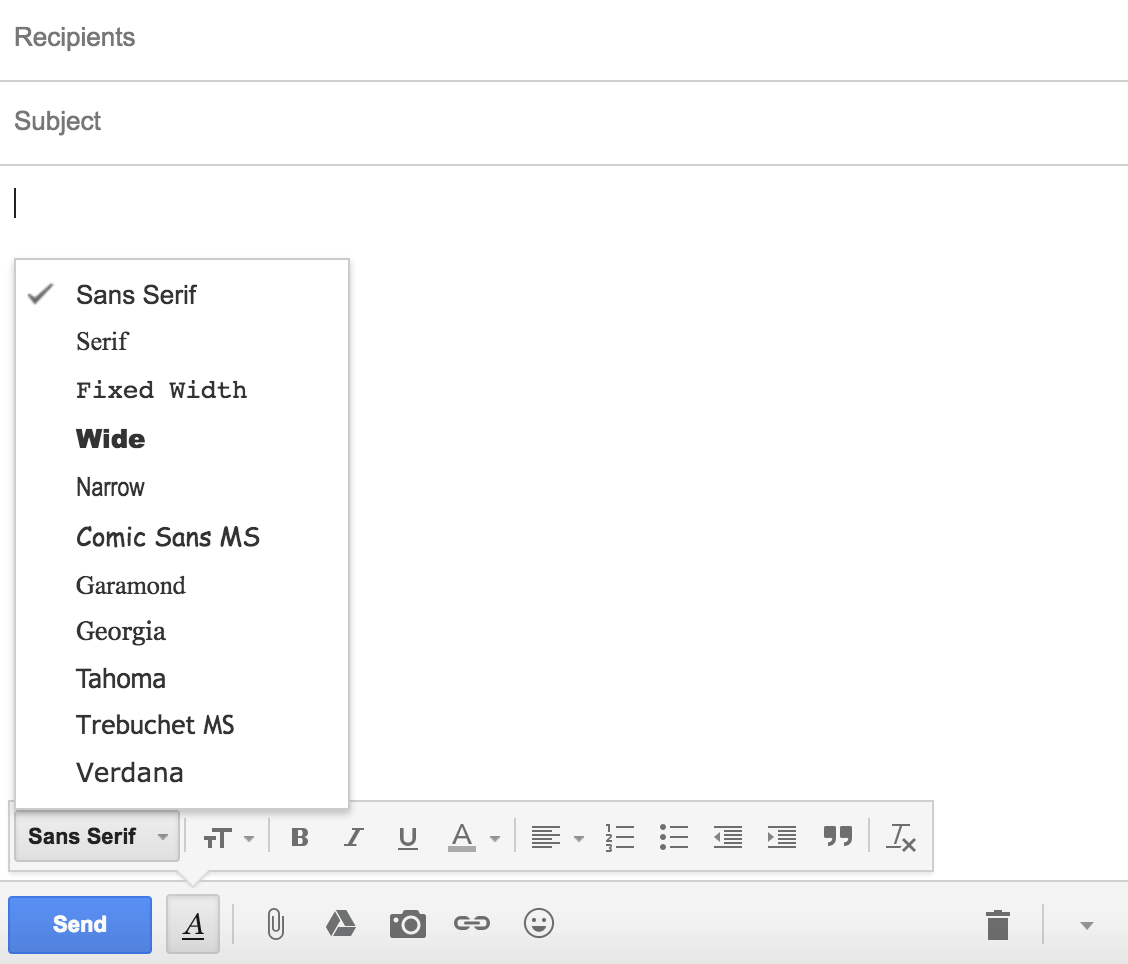
This will ensure that your recipient will receive your message in a normal font no matter what devices or operating system they are using.
5. Writing your closing.
Once you’re done with the content of your email, it’s time to close it off.
You don’t have to make it fancy — just keep your closing simple and straightforward.
So, nothing like this:

Instead, stick to the safe, proven closing lines — and you should be good.
You can choose from some of the most common closing lines below:
- Yours sincerely
- Yours truly
- Yours
- Sincerely
- Best regards
- Best
- Warm regards
- Warm wishes
- Kind regards
- Kind wishes
- Thank you
- Thanks
If you’re really looking for something out-of-the-ordinary and fancy, then take a look at this list of email sign-offs that you can try.
6. Schedule your emails.
Because you’re writing an international email, time zones matter.
Due to the influx of emails one receives, an email you sent early in the morning could be buried at the bottom of his inbox by the time your recipient checks it. This may also mean that all your hard work spent crafting the email would be wasted.
Instead, set yourself up for success.
Remember Rule #1? Put yourself in their shoes.
When would they be most receptive? When would their inbox be “emptier”?
It might be during lunch. It might be Sunday evening when they are preparing for the week ahead. It might even be Friday — they’re probably in a good mood because the weekend is coming.
Then, use our free email scheduling tool to ensure that your emails are sent at the right time to the recipient’s inbox.
7. Do a final spelling and grammar check.
Don’t fail at the last mile.
Don’t spend all your time crafting a perfect message, only to be ignored by the recipient because it’s riddled with spelling and grammar errors.
After you’ve finished drafting your email, copy and paste it into Microsoft Word or Google Docs to give it a quick grammar, phrasing, and spelling check. Alternatively, you can also use checkers like Grammarly to automate the process while you’re drafting.
Do a quick read-aloud to make sure that you’re not writing clunkily, or sound like a robot. You need your email copy to sound human.
Remember — help the reader focus on the message, not on your spelling errors.
[a]Source: http://shortwavedxer.blogspot.com/2013/01/china-tibet-broadcasting-voice-of-china.html[b]Couldn’t replicate what you wanted.. But I found this example.[c]Made the change

Will Apple let you swap your recently-bought 2017 MacBook Pro for a 2018 one?

Apple managed to keep the lid on its plans to update the MacBook Pro yesterday. It was clear that it would need to support the latest Intel processors at some point, but nobody knew the launch date.
Which would be annoying, to say the least, if you’ve recently bought the 2017 model. The question is, will Apple let you exchange it for the 2018 one … ?
Facebook Ads for Webinar Funnels: How to Maximize Your Results

Want a scalable way to share your webinar? Looking for tips on building trust with a cold audience? To explore how to build a Facebook ads funnel for an evergreen webinar, I interview Andrew Hubbard. More About This Show The Social Media Marketing podcast is an on-demand talk radio show from Social Media Examiner. It’s […]
The post Facebook Ads for Webinar Funnels: How to Maximize Your Results appeared first on Social Media Examiner.
from Social Media Examiner https://ift.tt/2L6CrFb
via socialmediaexaminer
The Definition of Market Research in 100 Words or Less
In some circles, market research is a catch-all term for asking the industry what it wants. “Do we know what the demand is for this product? Who’s even looking for our services? Let me do some market research to find out,” someone might say.
Market research can answer various questions about the state of an industry, but it’s hardly a crystal ball that marketers can rely on for insights on their customers. Market researchers investigate several areas of the market, and it can take weeks or even months to paint an accurate picture of the business landscape.
However, researching just one of those areas can make you more intuitive to who your buyers are and how to deliver value that no other business is offering them right now.

Here’s a simple definition of market research that encompasses all the possible goals of this practice, in fewer than 100 words:
Market Research Definition
Market research is the process of examining an industry’s buyers, the product these buyers want, and where they’re currently getting it. By engaging the right people and data, a business can use this research to position itself in the market and predict where the market will go in the future.
To give you an idea of how extensive market research can get, consider that it can either be qualitative or quantitative in nature — depending on the studies you conduct and what you’re trying to learn about your industry. Qualitative research is concerned with public opinion, and explores how the market feels about the products currently available in that market. Quantitative research is concerned with data, and looks for relevant trends in the information that’s gathered from public records.
Let’s talk about four different types of market research studies you can conduct, a potential goal of each one, and how these studies help you better understand your market.
Interviews
Qualitative information
Interviews are the personal, one-on-one conversations you can have with the buyers in your industry. You can conduct interviews in person or over the phone.
Your interviewees can answer questions about themselves to help you design your buyer personas. These buyer personas describe your ideal customer’s age, family size, budget, job title, the challenges they face at work, and similar aspects of their lifestyle. Having this buyer profile in hand can shape your entire marketing strategy, from the features you add to your product to the content you publish on your website.
Focus Groups
Qualitative information
Focus groups are similar to interviews, but in this case, you’re assembling a large group of people for one shared interview. A focus group consists of people who have at least one element of your buyer persona in common — age or job title, for instance.
This type of market research can give you ideas for product differentiation, or the qualities of your product that make it unique in the marketplace. Consider asking your focus group questions about (and showing them examples of) your services, and ultimately use the group’s feedback to make these services better.
Surveys
Quantitative information
Surveys are a form of quantitative research, and you can distribute them over the phone, via email, or through an online survey. A survey could cater to people who’ve downloaded content from your website or interacted with a member of your business.
Enough completed surveys can help you determine your customer satisfaction level. This denotes how happy your customers are with what you’re selling them. You might include questions like, “How well did we solve your problem?” and “Would you recommend our product to a friend?”
Secondary Data
Quantitative information
The interviews, focus groups, and surveys are all sources of primary data. Secondary data, on the other hand, is the public information — online and offline — that characterizes your industry. This includes competitor websites, social media business pages, trade magazines, market reports, and even census data published by the government.
If you examine enough secondary data, you can learn how much brand awareness you have in the marketplace compared to the companies that provide the same product or service as you.
The market research you perform doesn’t have to include every source of information described above. What data you collect will depend on the needs of your business and what you might be most interested in at the moment. Ready to give market research a shot? Learn how to get started in this blog post.



What is the Deep Web? A 3-Minute Rundown
Most marketers say the best place to hide a dead body is on page two of Google. I disagree. There’s a darker digital graveyard. It’s called the deep web. A place where Google can’t find anything.
I’ll admit, that was a pretty grim description of the deep web. But it isn’t the sinister abyss of illegal and disturbing activity that the media clamors about. That place is called the dark web.
The terms “deep web” and “dark web” are often used interchangeably — they’re not the same thing, though. The dark web is technically a tiny sliver of the deep web, making up 0.01% of it, but the horror stories you hear about the dark web don’t actually happen on the deep web.
In fact, most of the content on the deep web is quite similar to the content that you can find on Google, which is called the surface web. And we use it everyday without even knowing it.
The deep web is just content you can’t find on a search engine, like your personal email account, social media accounts, online banking account, a brand’s gated pages, or a corporation’s private database.
The only difference between the deep web and the surface web is that a thin layer of security stonewalls the public from accessing content on the deep web, whereas anyone can access content on the surface web.
Over 96% of online content is on the deep web — most of the information we access on the internet requires authentication, like your online banking portal or email account. Imagine if anybody could access these accounts by just Googling your name. Your most personal information would be publicized to the entire world.
Websites don’t index these authentication-protected pages for Google to find for good reason — only certain people should have access to them, not everyone.
The deep web isn’t entirely without fault, though. While the dark web only makes up 0.01% of the deep web, this tiny sliver is arguably its most dangerous part.
You can’t access the dark web through a standard web browser like Google Chrome or Safari — you need to download an encryption software like Tor to do so. Tor anonymizes users’ identity, location, and data transfers, so there tends to be a lot of criminal activity on the dark web. According to a study by two cyber-intelligence threat experts, over half of sites on the dark web offer illegal products or services. And it’s virtually impossible to track any of these criminals or their activities.
But even though it’s nearly impossible for law enforcement to catch these criminals, the dark web’s anonymity is actually beneficial for its ethical users.
Since you can use the dark web to communicate online without leaving a digital footprint, political whistleblowers, activists, and journalists who live in oppressive countries that censor the internet or punish outspoken citizens can leverage the dark web to state their true opinions without revealing their identities.
The dark web has two stark spectrums. It can be a platform for the silenced or it can be a breeding ground for illegal activity. And that begs the question …
Is the Dark Web Illegal?
Accessing the dark web is not illegal. Even though people do illegal things on the dark web, using it to access hidden content isn’t against the law. In fact, Tor, the most popular software solution for accessing the dark web, was originally created by the U.S. Navy and is funded by the U.S. government today.
They support Tor because it protects the privacy of activists who are trying to upend their countries’ tyrannical regimes. These people’s survival and freedom depend on this technology.
The Deep Web: Unfairly Misunderstood?
The deep web is mistakenly associated with the dark web’s illegal activity all the time, and it’s also called the invisible or hidden web, which further mystifies its surprisingly normal uses.
The deep web isn’t just a marketplace for drugs and other illegal items — that description isn’t even remotely accurate. The deep web is mostly harmless and extremely important for protecting our personal information and privacy.
It’s essential for everyday life.

Apple shows off Apple Pay Cash in latest advertisement [Video]

Apple this evening is out with its latest Apple Pay-focused advertisement. This video focuses on Apple Pay Cash and how it can be used between roommates to easily handle things such as rent payments.