
Welcome to My Blog
Elgato goes all-in on HomeKit with new Eve name, gaming division sold

Elgato makes a lot of great HomeKit hardware and smart home accessories — and now that’s going to be Elgato’s only focus and it tightens up and rebrands.
Elgato Systems is changing its name to Eve Systems and going all-in on HomeKit as it shifts its focus totally to its extensive Eve live of smart home products.
Review: Sonos Beam is the perfect smart soundbar for bedrooms and apartments

First unveiled earlier this month, Beam is the latest smart speaker and TV soundbar from wireless speaker maker Sonos. The compact TV soundbar promises hi-fi music playback and voice control through Alexa — all at an affordable price. Sonos Beam hits the market later next month, but we’ve been testing it for a few weeks ahead of its launch.
For the purpose of this review, Apple’s new AirPlay 2 wireless streaming feature wasn’t ready for testing — stay tuned for our full impressions next month when Sonos adds the feature. AirPlay 2 aside, Sonos Beam is a hit for bedrooms, apartments, or budget home theaters.
Wisconsin taxpayers to pay extra $1B for Foxconn plant; on hook for 40% of risk

The wisdom of Wisconsin offering $3B in subsidies to persuade Foxconn to build a display factory in Racine County is being further questioned today.
It’s been revealed that taxpayers are now coughing up an additional billion dollars in sweeteners not long after it was reported that Foxconn may not be investing the full $10B it promised …
New Fortnite practice mode gives you an hour of safe play to learn the game

Twitter addressing fake accounts, taking tougher action on abuse

Here’s Exactly How We Got 105k+ People Using Our Chatbot
It’s not impossible for humans and even a lot of software to do exactly what chatbots do.
It’s how bots do it that matters.
When we work alongside bots, they make life easier. They help us do things faster and with more efficiency. They give us more time to do “human stuff” — and do it even better.
Bots don’t have to be as ubiquitous as searching the web. That’s not the point.
Bots do have to carve out a space as a different but equal resource that takes humans where they want to go more easily than ever before.
Chatbots can and will change business and marketing as we know it, if given a fighting chance.
But right now, they must win over naysayers crying “trend!” and comparing the budding technology to channels that have had decades to develop.
It’s easy to get wrong. And when we do get it right, it’s all too easy to run it utterly into the ground as we have with many marketing opportunities in the past.
This time around, we’ve pledged to use this powerful element of change for good instead of evil.
Here’s how we’re making a sales, marketing, and biz-building chatbot that doesn’t suck: GrowthBot.
Apps build a silo, bots fill a niche.

Apple’s “There’s an app for that” has been the rallying cry for the past decade.
As such, it’s left the tech battlefield littered with millions of apps that do everything from letting you solve crime with your favorite celebrity avatar to ordering delivery with an emoji (OK, that one is kind of useful).
There’s more than just an app for that; there’s a name for that. It’s called app fatigue.
In 2016, comScore found almost half of all smartphone users in the U.S. downloaded a whopping average of zero apps per month. Yet in 2017, the Google Play store added more than 1,300 apps every single day.

Why so many apps? Mostly because it’s what everyone else is doing. Marketers aren’t exactly known for having a lot of chill when it comes to the tech du jour.
That’s not to say apps are dead in the water, but we are starting to see a trend which indicates people are using far fewer apps than are being put on the market daily.
App Annie’s 2017 research shows people use the same nine apps per day and no more than 30 over the course of a month. On average, users only touch as few as one-third of the apps they’ve downloaded.
Millennials especially are using utilities like maps and search engines along with apps for social networking, messaging, entertainment, and retail.
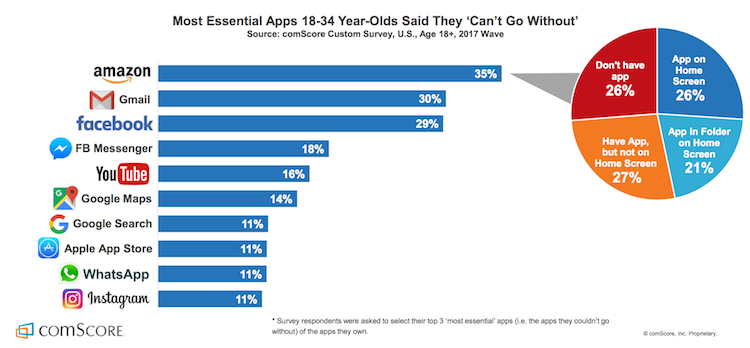
When users do open an app, it’s no surprise it’s rarely that one that lets you drink beer … without the beer.
Bots don’t add to the onslaught of app, decision, or fake beer fatigue. Instead, they live right inside and actually enhance the functionality of some of the most popular messaging apps.
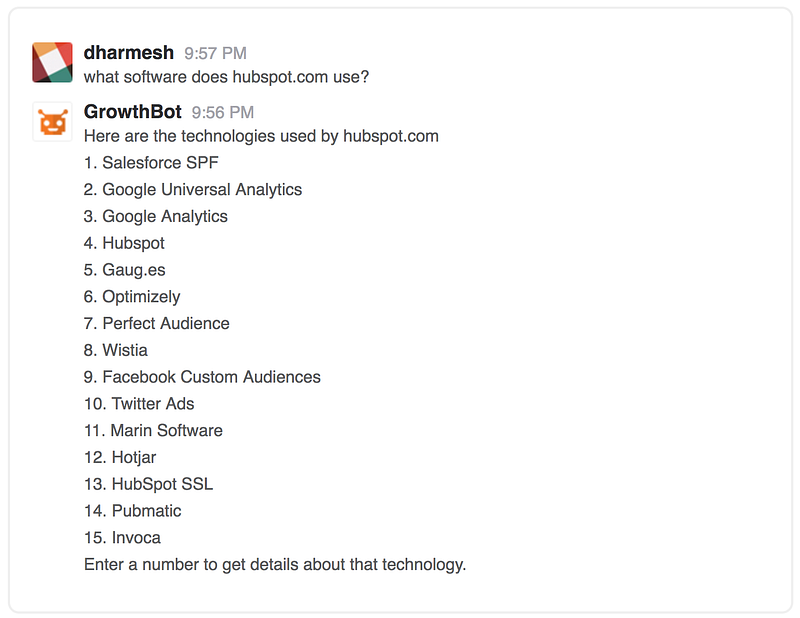
For example, GrowthBot helps users access tons of marketing and sales data using an app they probably already have open all day — Slack.

We have to agree with data scientist and software developer P. Daniel Tyreusin this case:
“I’m willing to speculate that it’s easier to acquire a user if the user doesn’t have to download a new app to use a service. I’m also willing to speculate that users are more likely to continue using a service that’s integrated into an app they already use.”
In the words of Seth Godin: If your target audience isn’t listening, it’s not their fault — it’s yours.

Before we even began building our chatbot, we focused on exactly how it would create value in a way no other tool could for our audience.
We work consistently to grow GrowthBot’s natural language processing (NLP) skills because we know our audience and we know how much easier it makes their lives when they’re able to access and compare tons of data by typing a few quick phrases into Slack.
NLP enables chatbots to understand what a user is looking for. It also allows consumers to enjoy personalized conversation instead of interacting with the same tired “intuitive” menu in a vacuum.
That’s important when your bot functions as a customer service rep, personal shopper, or research partner and conversation is the ideal way to answer a request.
Dennis Thomas, CTO at AI-powered consulting firm NeuraFlash, knows the importance of understanding how users interact with your chatbot.
“Another place where NLP is a big win is when the bot’s objective is focused on helping users with the discovery phase of products or shopping. Finding the right item via conversation helps to drive the user’s goal, as well as the product criteria to match to the company’s inventory.”
By the same token, NLP could actually be a detriment in cases where text-based chatbots can make the process simpler.
“When you have a visual medium and buttons can accomplish the task in a couple clicks (think easy re-order), open-ended natural language is not making the user’s life easier.”
We didn’t throw everything we’ve learned about our audience out the window when developing new bot software. Instead we implemented that knowledge to make GrowthBot just useful enough without being overwhelming.
We believe chatbots should be useful first and useful always.

NLP only accounts for half the conversation — the input part.
Output is just as important in terms of usefulness.
Your bot might have the personality of The Most Interesting Man in the World, but it will still suck if it can’t answer a user’s query.
You don’t need to build an entire search engine from scratch. You don’t even need to build an app. All you have to do is make sure your chatbot has access to enough data to prove useful in the niche you’ve chosen.
If it can’t do that, it’s no better than the aforementioned beer-simulating apps of the world.
GrowthBot has solid conversational skills, but it would be nothing without the marketing and sales data that help it achieve its goal — providing value to people who are growing businesses.
There are already tons of pieces of software and far too many apps for sales and marketing professionals. Useful chatbots don’t mimic, they empower users to find exactly what they’re looking for using a natural instinct: Simply asking.
Not spending hours customizing dashboards and poking through tens of different workflows just to uncover their own data. Simply asking.
Everytime we link a new database to GrowthBot, it gets more valuable for users. Right now it can pull information from dozens of sources; including HubSpot (of course), Google Analytics, MailChimp, social networking sites, and so on.
Bots are first and foremost data scanning machines. They take input, provide relevant feedback, and do so in a way that is easier to manage than any other platform.
“Products, like people, have personalities…”

David Ogilvy famously understood the importance of personality in products. We believe that’s also the case for brands and bots. That’s why we made GrowthBot sound like someone we know and like.
If your brand already has a solid personality, translate that into the voice and tone your bot uses when interacting with people.
If not, there’s no time like building a chatbot to determine whom you want to be in the online world.
Because there are so many tools out there that take the technical aspect out of building a bot, creating a great conversational flow might just be the greatest challenge you’ll face.

The messaging framework you build into your chatbot will influence the way people perceive the value of your brand, so give it some personality.
MailChimp is famous for its distinctly helpful personality that manages to be playful and humble at the same time. If your cat is wearing its very own monkey-themed knit hat right now, you know exactly what I mean.

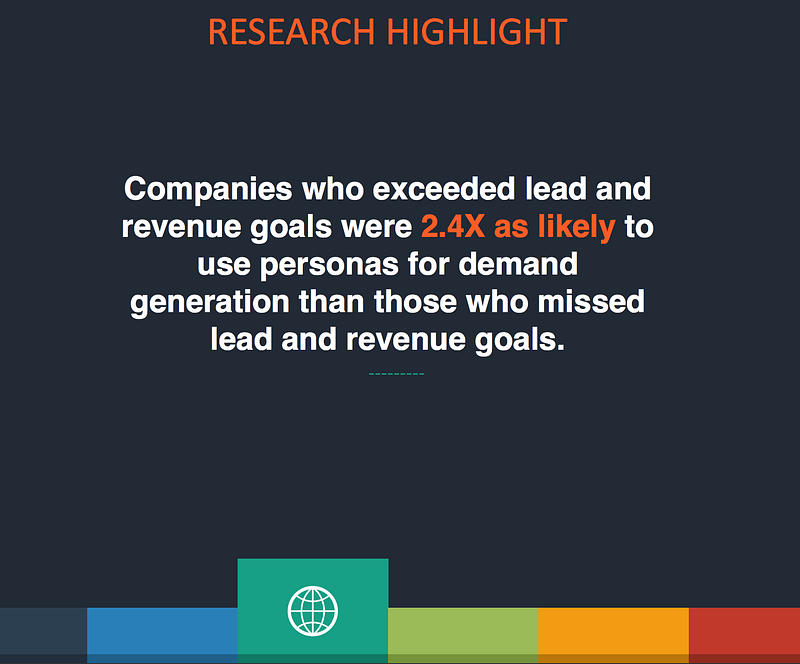
Cintell’s 2016 benchmark study on B2B buyers found that companies who exceed lead and revenue goals are two and a half times as likely to use personas than companies who miss lead and revenue goals.
Today’s consumers have nearly countless brands to choose from. And they know it.
A well-defined voice that aligns with your ideal customer is an effective and low-cost way to develop return buyers and bot users.
For example, GrowthBot sounds like Dharmesh Shah — founder and CTO at HubSpot and loving father to the chatbot itself.
That means it’s light-hearted, respectful, and just a tad quirky all while being truly helpful.
We’ve found that a truly helpful voice in a world of chatter is more powerful than you might think.
Bots make life so simple, search feels painful
Google search has made an impact. There’s no denying that.
It’s almost a force of habit to visit a search engine to find what you’re looking for. Habits are notoriously hard to change, especially the more gratifying and automatic they are.
Current studies show it takes an average of 66 days for a behavior to become “unchangingly automatic.”
Because search behavior is second nature to us now, bots must do what a search can’t:
- Provide customer service conversations and solutions without the wait
- Deliver the information a user is looking for in just seconds, on the first try
- Make recommendations based on powerful personalization
- Aggregate information from a variety of sources right inside the apps we’re already using
That last point is what GrowthBot is founded on. We make growing your business easier by using the power of a chatbot to put information at your fingertips — not siloed in more apps and interfaces than you can count.
That’s just the tip of the iceberg of what AI-enabled bots can do with enough data and well-planned conversational flow.
But things can still go wrong if you aren’t aware of and managing your users’ expectations.
Where Facebook’s Assistant M Got It All Wrong

Chatbots are relatively new and their capabilities are varied. If you want people to love your bot, it’s important they understand why they need it and how to use it.
It’s not that Facebook’s Assistant M chatbot didn’t work. It’s that expectations weren’t managed; which overwhelmed the system and underwhelmed its users all at once.
“The first thing chatbots should do is quickly introduce their core competencies. Not only should chatbots start within a specific scope, they should always firstly tell you how they can help you and what they can do best.”
— Instabot
Clarify upfront exactly what your bot is capable of. Provide specific examples and invite the user to try out a few practice questions. Don’t make them learn any new tricks right away.
Using your chatbot for the first time should feel like starting an online chat with a new friend or customer service agent.
There will inevitably be times when users ask your bot to do something it can’t do yet. Offer them an alternative, but don’t let that learning opportunity slip away.
Scan your chat logs regularly, they’re the most valuable market research you’ll ever get on what people want your chatbot to do.
Wait, have I mentioned value already?

Be on the lookout for every chance you can find to provide extreme value to your users.
Go above and beyond what people expect your chatbot to provide. Delight them with thoughtful little extras that make their days better.
Extreme value doesn’t have to stop when a user leaves your bot interface.
Offer to send customers an alert when their size is back in stock. Tell readers where they can find more articles like the one they just read on your website. Or, like us, celebrate with them every time you connect another tool that will make their jobs easier.
These kinds of interactions don’t just provide extreme value, they keep you top of mind and keep your customers coming back for more.
Nobody needs another app for this, that, or anything.
Instead, people need smart ways to accomplish more within the tools they already know and use regularly. When our chatbots deliver that level of service, we’re sure to start changing behavior and creating better automatic habits.
Fight back against bad bots. Build yours to be delightful to interact with, provide extreme value, and just not suck.
Originally published at blog.growthbot.org.

Unriddled: “Not a Media Company” Facebook Launches a Quarterly Publication, Apple Fights Election Interference, and More Tech News You Need
Welcome one, welcome all to another Wednesday: the day that marks the halfway point — almost — to the weekend.
The tech industry has seen quite a busy week, so we’re bringing you another edition of “Unriddled”: the HubSpot Marketing Blog’s mid-week digest of the tech news you need to know.
It’s our Wednesday tech news roundup, and we’re breaking it down.
Unriddled: The Tech News You Need
1. Facebook Launches Grow: A Print Quarterly Publication for Business Leaders
Despite repeated insistence from its leaders that it is not a media company, Facebook has launched a print quarterly publication in the UK — Grow by Facebook — which it describes as “a thought leadership platform shining a light on people, companies and trends that challenge the status quo.” According to the Grow website, a permanent online “home” for the publication (which Facebook won’t call a magazine) will launch soon, and feature content like niche brand case studies, as well as profiles of business leaders that achieved seemingly impressive feats. The Press Gazette’s Charlotte Tobitt has more. Read full story >>
2. Apple’s Fight Against Election Interference
Apple News — which was rumored to be experimenting with products competing with those of Google News in April — will now have a dedicated section for the 2018 U.S. Midterm Elections.
With a mission of “providing a new resource for timely, trustworthy midterm election information,” Apple is drawing attention to a key factor that differentiates it from other tech giants who are fighting election interference, like Facebook: human editors.
To address fake news —
Facebook:
-3rd party fact checkers
-Algorithm ranked by news trustworthiness poll
-“how to spot fake news” education
– less news in feed
– publishers in political ad database
– not being “arbiters of truth”
Apple:
-human editorshttps://t.co/hsqE5rHIcj— Sarah Frier (@sarahfrier)
June 25, 2018
(Twitter, too, announced on Tuesday new efforts to combat the spread of fake content and platform abuse — largely through machine learning.)
According to its official statement, Apple will employ a “team of editors focused on discovering and spotlighting well-sourced fact-based stories,” which will include exclusive pieces from the likes of the Washington Post and Axios, as well as coverage from televised news sources. Read full statement >>
3. The Less-Than-Successful Meeting of Big Tech and Intelligence Officials
Within the realm of preventing election interference, several representatives from eight tech giants — including Facebook (which hosted the summit and recently published an update on its efforts to fight fake news), Apple, Google, and Twitter — met with representatives from the U.S. Department of Homeland Security and the FBI to discuss how they can better fight election interference in the months leading up to November’s midterm elections.
(Facebook, meanwhile, announced yesterday that it has removed 10,000 fake Pages, Groups, and accounts in Mexico and across Latin America because they violated Community Standards — though it is unclear if the removal is related to possible election interference.)
The desired outcome, it seems, was to compare potential meddling activity each company had witnessed on its own platform to what U.S. intelligence has been monitoring and intercepting, as well. But those hopes were all but thwarted, with the U.S. government officials sharing no intelligence and leaving the business leaders assuming they would have to fight election interference without any federal intervention or assistance.
It’s a particularly interesting outcome considering April’s congressional hearings, in which Facebook CEO Mark Zuckerberg was challenged with questions about the potential regulation of the company, as well as its Big Tech peers. But that potential regulation — should it materialize — does not appear as though it will play a role in the company’s efforts to cease the weaponization of social media sites by foreign actors. Sheera Frenkel and Matthew Rosenberg of the New York Times share more. Read full story >>
4. New Metrics Emerge for Time Spent on Social Media
According to new data from SimilarWeb, the average Instagram user spends about 53 minutes on the app each day, trailing closely behind an average 58 minutes on Facebook. (Snapchat, evidently, isn’t too far behind, with an average of 49.5 minutes.)
The data comes at an interesting time, after recent announcements from Apple that it will include a Screen Time app in the next version of iOS to help users manage the time they spend using their phones. Not long after that feature was unveiled, Instagram confirmed it was testing a “time well spent” feature and rumors emerged that Facebook (which owns Instagram) is experimenting with similar technology.
Screenshots reveal Facebook is building a Time Well Spent dashboard https://t.co/C8bmfsK4fz pic.twitter.com/dlyAnSh7tA
— Josh Constine (@JoshConstine)
June 22, 2018
But despite the efforts of the latter two apps to, on the surface, help users better manage time spent on them, both have released new long-form video products — as well as newly-released group chat options and a redesigned explore tab from Instagram — over the past few weeks that appear to be designed at least in part to encourage more time spent on each platform. Recode’s Rani Molla and Kurt Wagner explain why these metrics matter. Read full story >>
5. Uber is on Probation in London
Since Transport for London revoked Uber’s license to operate, CEO Dara Khosrowshahi has spent much of his time doing “damage control” to repair the company’s relationships in the UK, as well as in its U.S. homebase. Now, the ride-sharing company has regained a license to operate in London, after a UK judge ruled that it can legally offer its “digital services” there. But it might not be permanent — the ruling comes with 15 months of probation, which is three months short of the 18-month period the company was seeking. Politico‘s Mark Scott has more. Read full story >>
6. Facebook Will Allow Cryptocurrency Ads Again
In a statement released Tuesday, Facebook announced it would once again permit the purchase and publication of “binary options, initial coin offerings and cryptocurrency.” The new policy follows a January decision to ban any “misleading or deceptive promotional” content related to financial products — which has been revised to allow such ads from pre-approved accounts only. Facebook and Google were among the first platforms to ban ads related to cryptocurrency, and were followed shortly thereafter by Twitter. Read full statement >>
That’s all for today. Until next week, feel free to weigh in on Twitter to ask us your tech news questions, or to let us know what kind of events and topics you’d like us to cover.
Featured image credit: Facebook

Satirical piece on MacBook Pro keyboard is the funniest thing you’ll read today

A satirical blog post about the problems with the MacBook Pro keyboard made me laugh aloud this morning …
Freemium Pokémon Quest game now available on iPhone and iPad [Video]

Nintendo last month launched a brand new game for the Switch – Pokémon Quest – and told us that it would be coming to iOS sometime in June.
The game is now live in the App Store …
How to Use Instagram Hashtags for Business: A Strategy for Visibility
Wondering which hashtags your business should be using on Instagram? Want to know how many hashtags to use for the best results? In this article, you’ll discover how to use hashtags for maximum effect on your Instagram posts. Understand the Structure of an Effective Instagram Hashtag Recipe There are countless hashtags you can use to […]
The post How to Use Instagram Hashtags for Business: A Strategy for Visibility appeared first on .
from https://ift.tt/2KbfhxP
via socialmediaexaminer
The 7-Minute Guide to Getting Started With Google Tasks
If you’re anything like me, you love to-do lists. Heck, sometimes you love to-do lists so much, you even put completed tasks on your list just for the satisfaction of crossing them off (No? Just me?).
Up until recently, I’ve been using my Google Calendar as my to-do list — but it can get confusing, particularly when someone wants to book time with me but sees “buy salmon” already takes up most of the afternoon. Even worse, you can’t prioritize your Google Calendar to put more important tasks ahead of less important ones.
Fortunately, Google offers an alternative solution: Google Tasks, a tool which enables you to create to-do lists within your email, links those tasks to your calendar, and more.
Google Tasks
Google Tasks lets you create a to-do list within your desktop Gmail or the Google Tasks app. When you add a task, you can integrate it into your Gmail calendar, and add details or subtasks. Tasks also enable you to drag and drop emails into your to-do list, rearrange the order of your tasks, and check off completed ones. With the updated Gmail design, Google Tasks is sleeker and easier to incorporate into your work routine.
Gmail has offered a Tasks tool for years, but with the new Google design, Tasks is sleeker and easier to use. Here, we’ll show you how to get started with Google Tasks in just seven minutes, on your desktop or phone.
How to Use Google Tasks on a Desktop
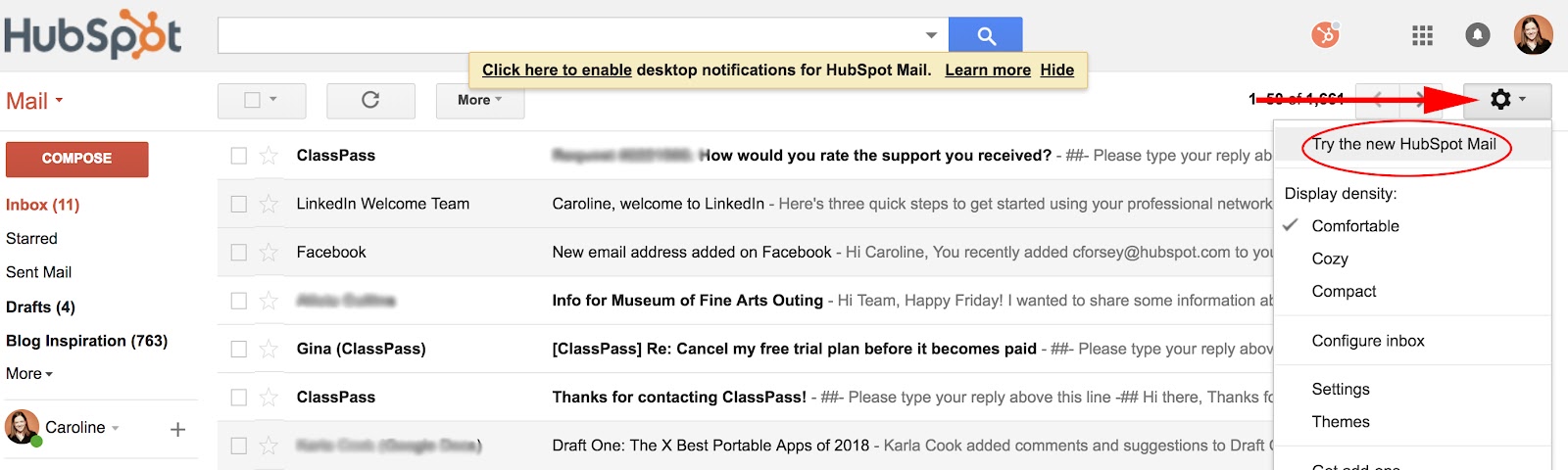
1. Log into your Gmail account. Click your “Settings” icon, as indicated by the arrow below, and then select, “Try the new [Gmail].” Since I’m on a work email, it says HubSpot, but it’ll say something different depending on your email account.
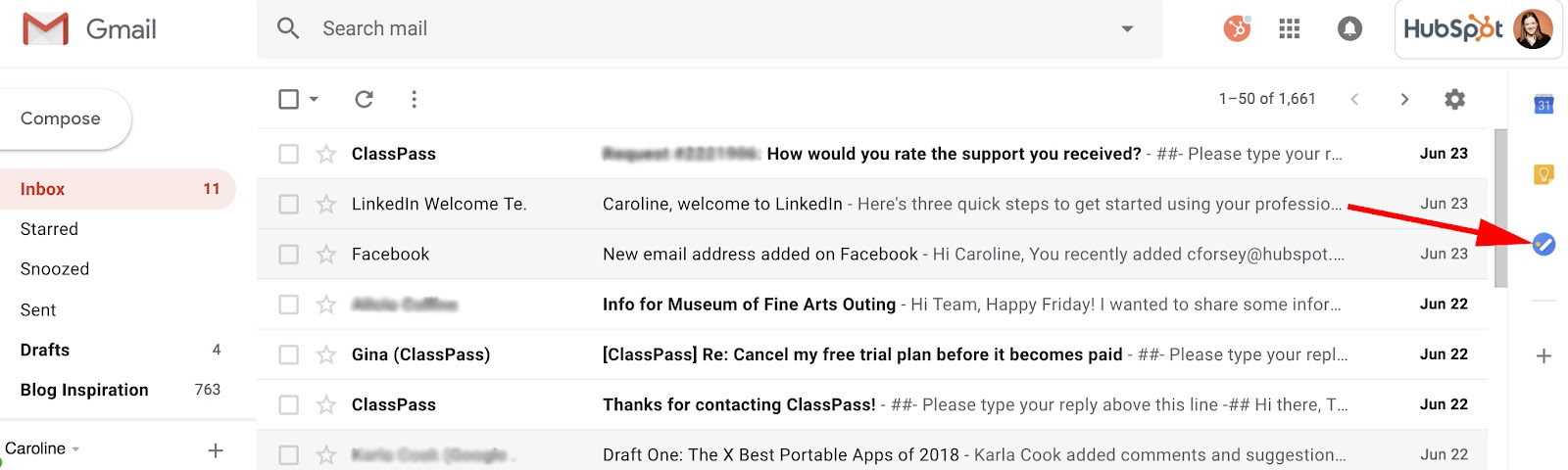
2. With your new updated Gmail, you’ll see a blue icon on the right side (underneath Calendar and Keep). Click the icon, labelled “Tasks”.
3. Click the blue “+” button to add your first task.
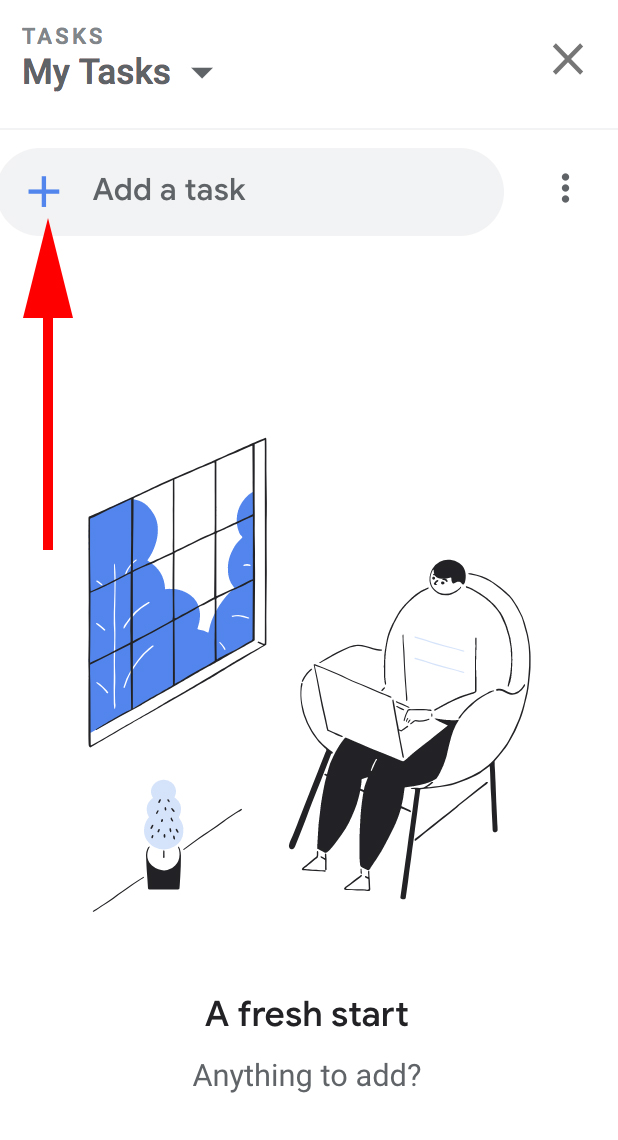
4. Now, type a task in the line beside the bubble and then click the “Enter” or “Return” key.

5. If you only need to add a basic task, you’re all set. However, the Tasks tool also allows you to edit your task — to do this, click the pencil icon beside your task.
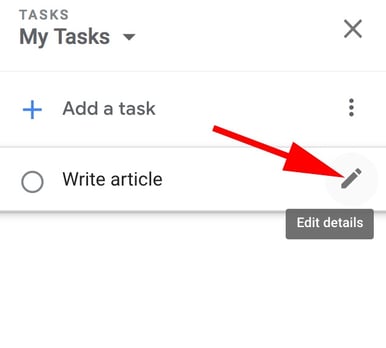
6. Here, you can add details including when your task is due (which will integrate into your Calendar), a paragraph box for your own notes, and the option to add subtasks if you feel the need to break up your task into parts.
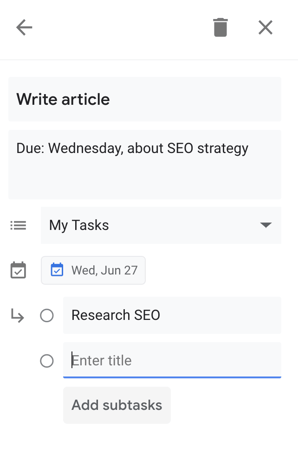
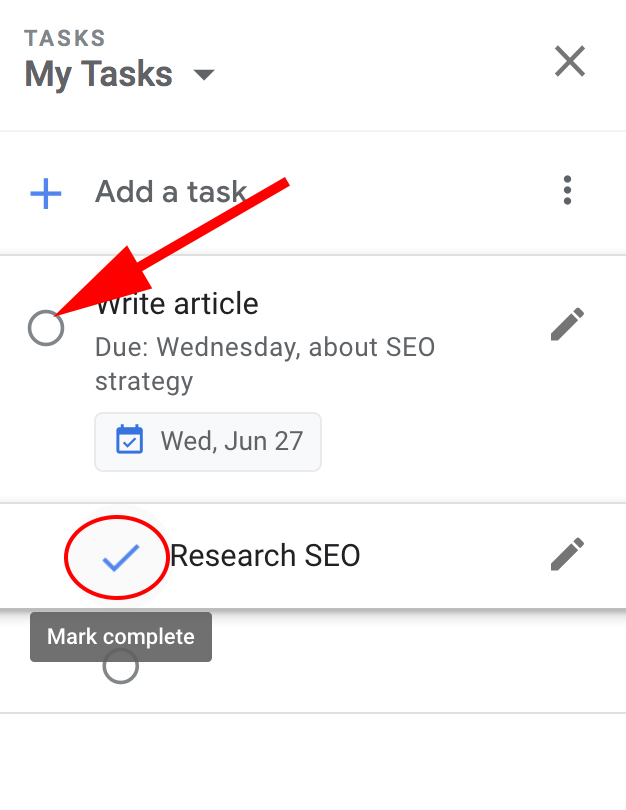
7. When you’ve completed a task, simply click the bubble beside the task. When you do, it will briefly show a check mark, cross itself off, and then disappear off your list.
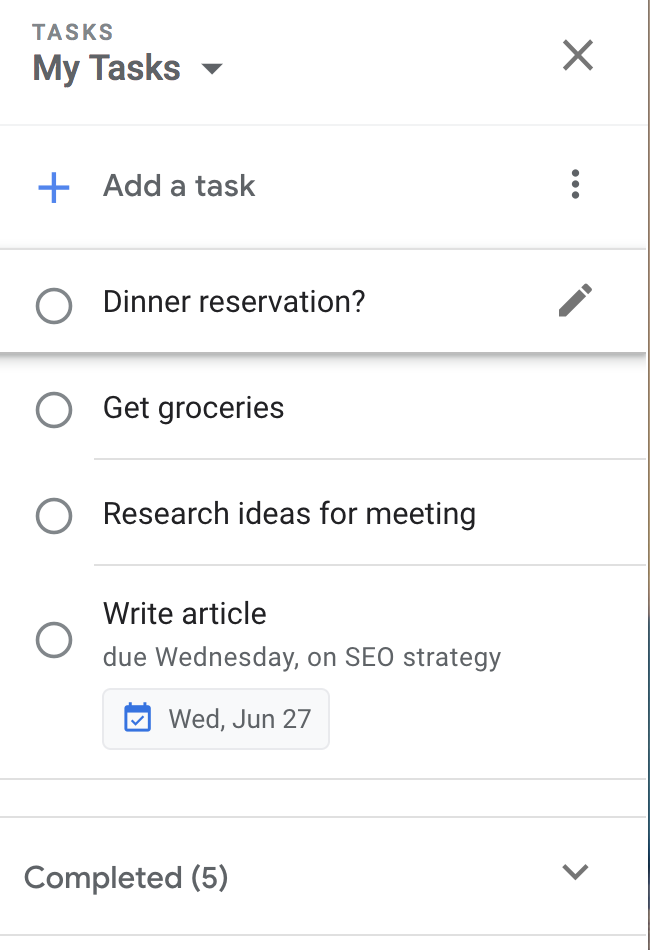
8. You can also drag and drop your tasks to rearrange the order — for instance, I dragged “Dinner reservation?” to the first item on my to-do list.
How to Add Tasks to Google Calendar
- Click “Edit details” if you’re using Google Tasks on a desktop, or “Add date” if you’re using the app version.
- Choose a date on the calendar that pops up on your desktop or app.
- The task will be automatically integrated into both your phone and desktop’s Gmail calendar.
How to Add an Email to Your Google Tasks
If you receive an important email you’re too busy to answer immediately, you can add it to your Tasks list for later. Here are two different ways to do this:
1. Simply hold the email and drag it to your open Task list. You’ll see the email icon underneath the task, which, if you click, will take you to the email.
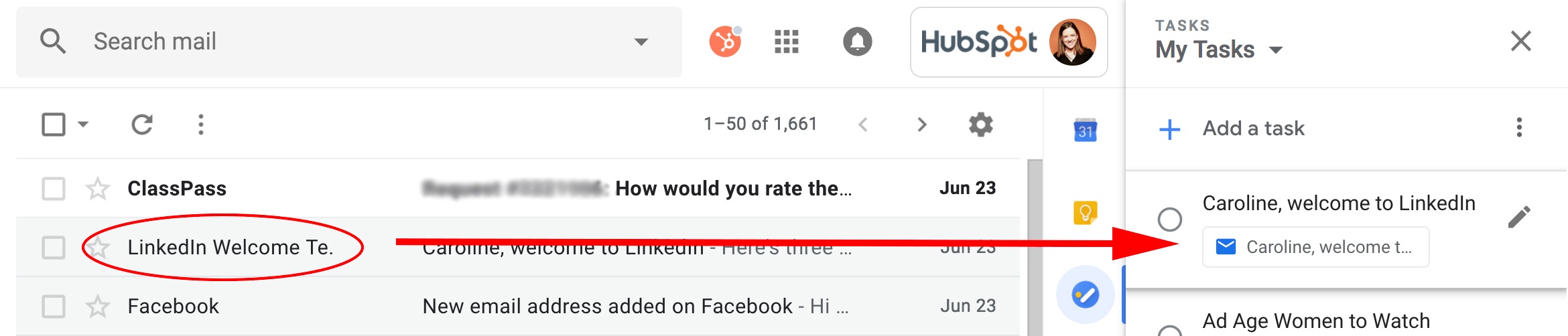
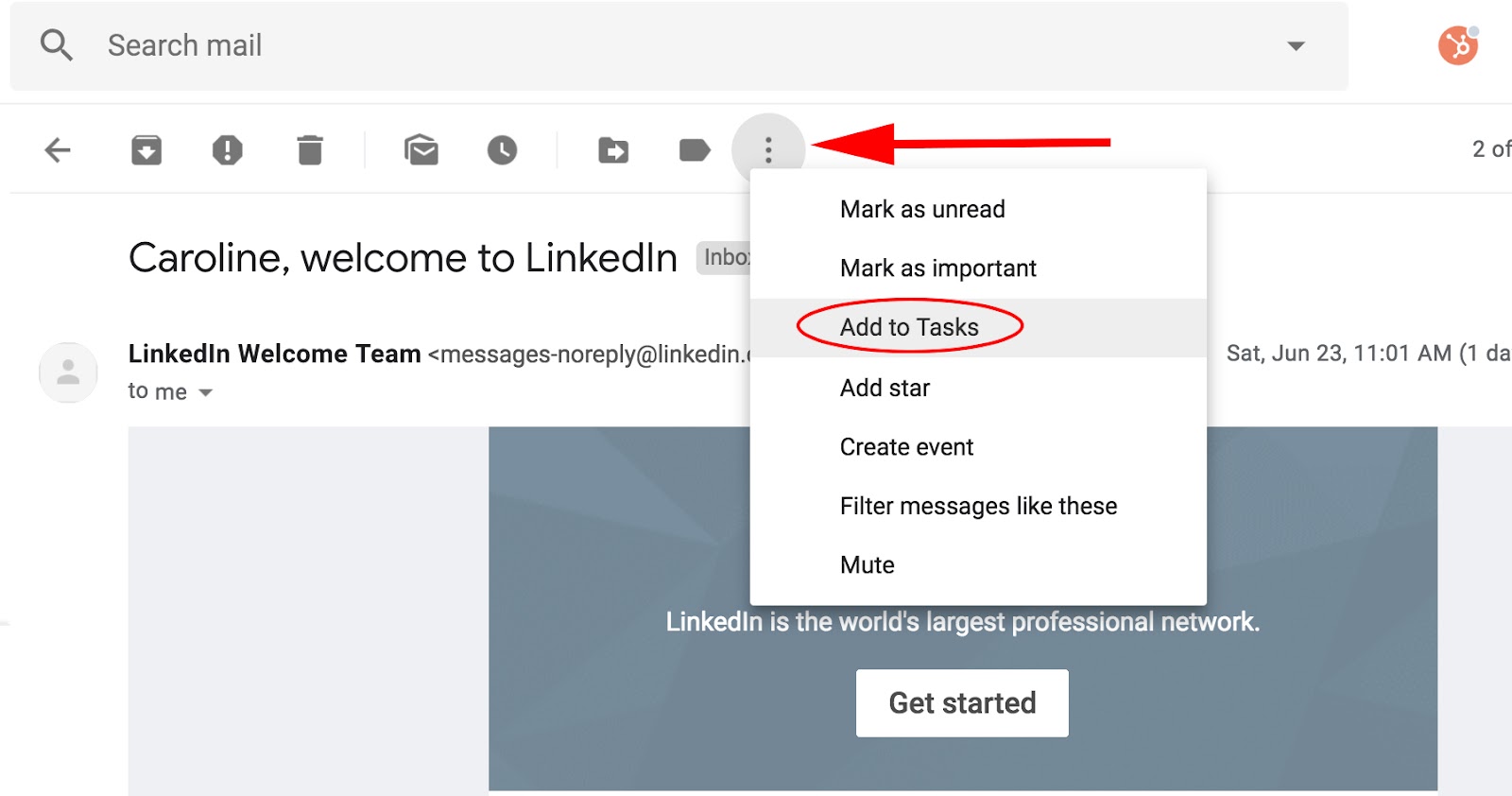
2. If you’re within the email when you decide you want to add it to Tasks, simply click the three-dot icon at the top of your email and select, “Add to Tasks”.
How to Use the Google Tasks App
If you’re often making to-do lists on the go, you might want to use the Google Tasks app supplementarily — since it’s connected to your email, your tasks will sync up with your desktop Task list, and they’ll also integrate into your Calendar on both your phone and desktop.
After you download the app on your phone, here’s how to use it:
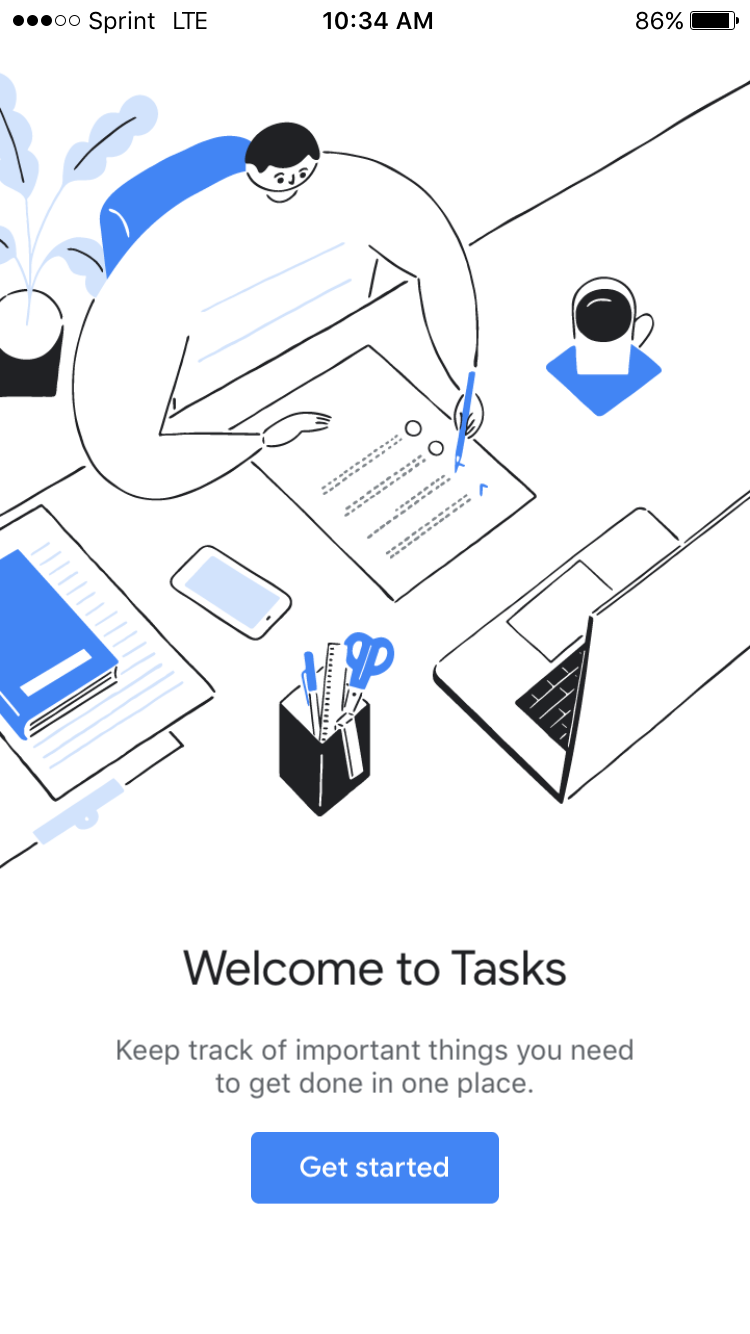
1. When you open the app for the first time, here’s what you’ll see (look familiar?). Click the blue “Get started” button.
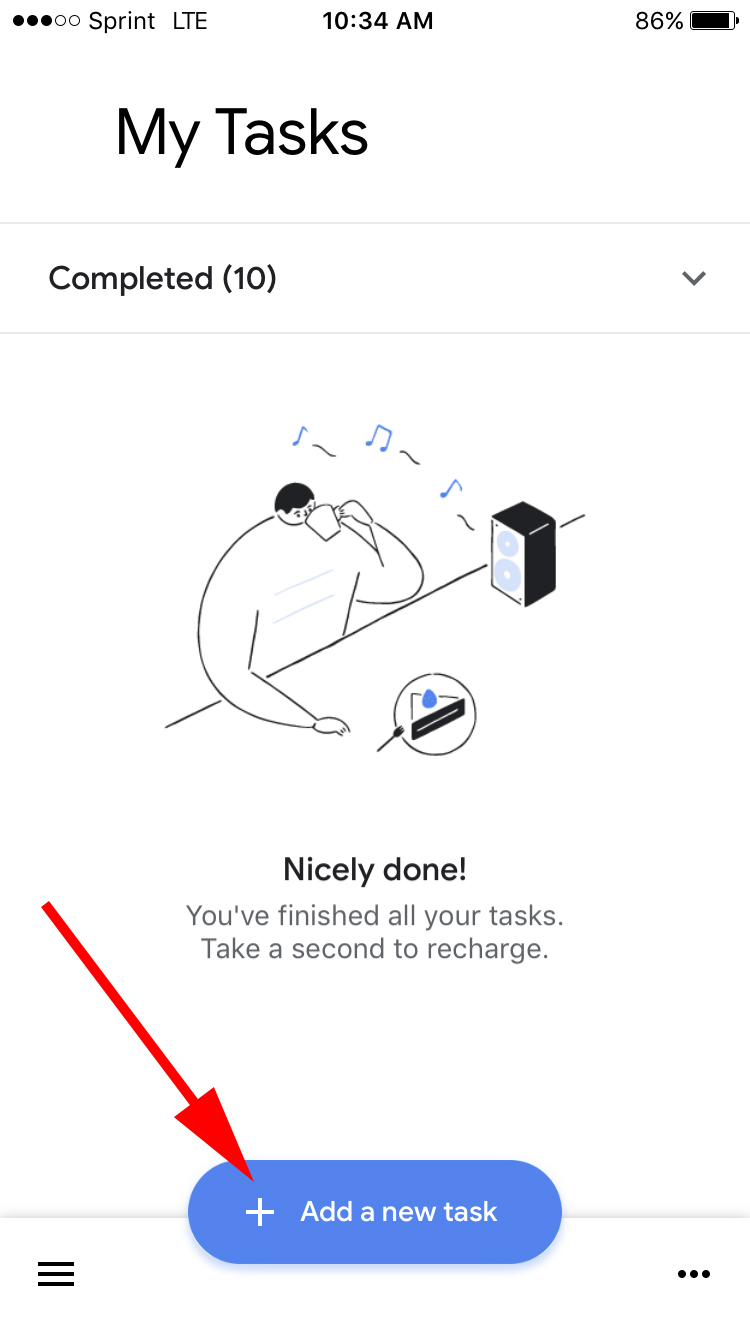
2. Next, click the blue “Add a new task” button.
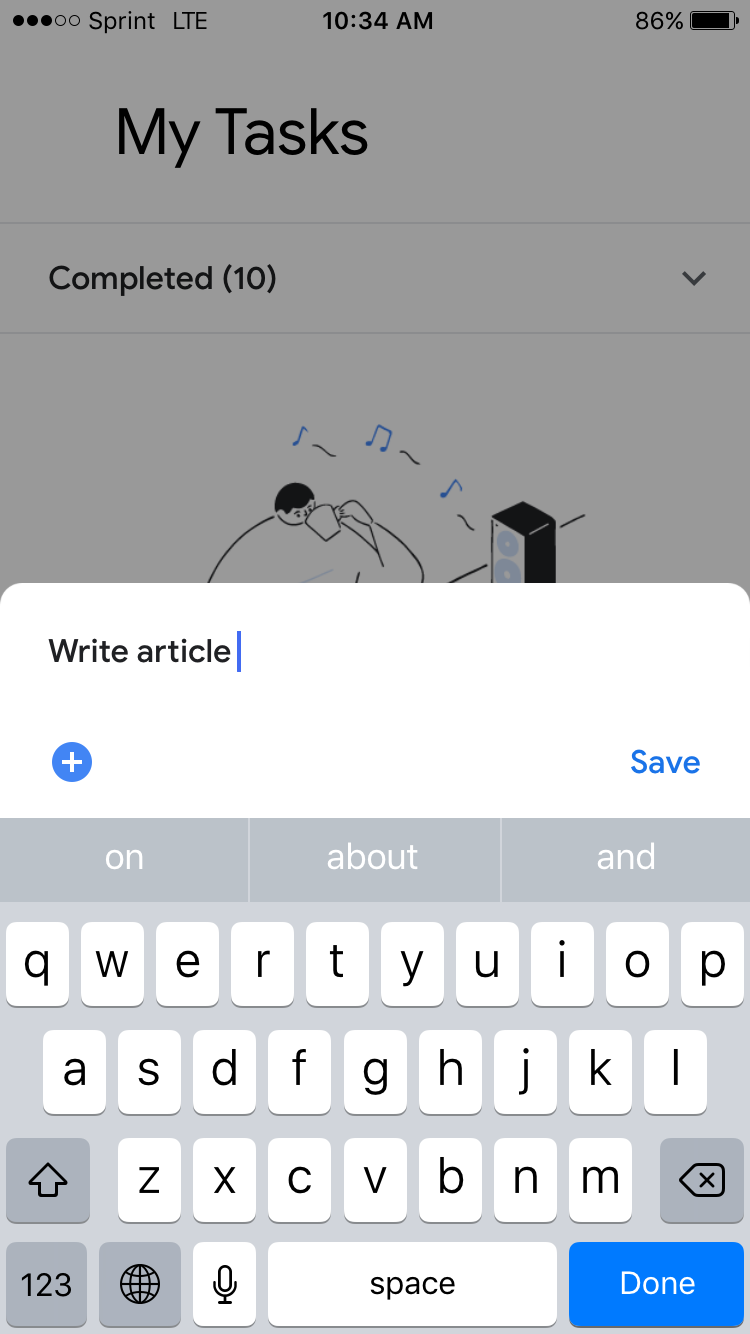
3. Using your phone’s keyboard, type your task and then click “Save” or “Done”.
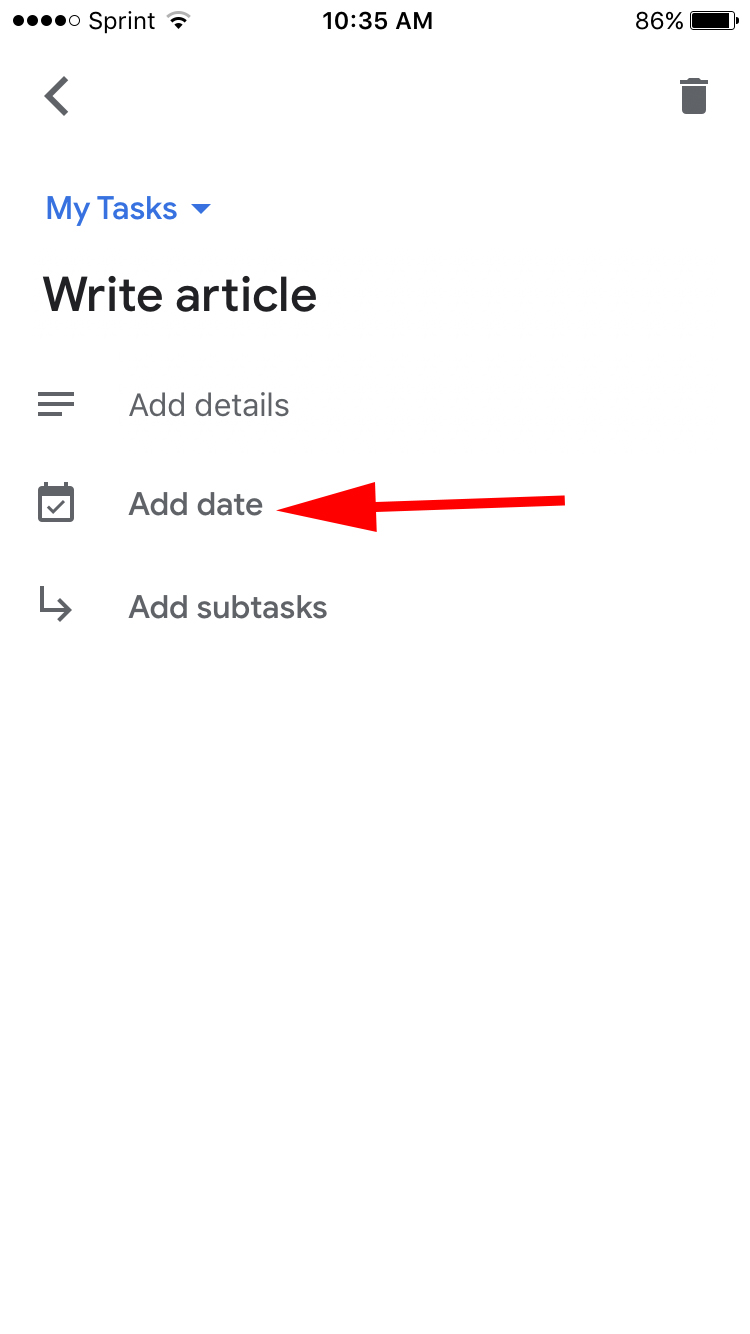
4. If you click on your task within the app, you’ll have the option to “Add details”, “Add date”, or “Add subtasks”. For this instance, if I want to add my task to my calendar, I’ll click “Add date”.
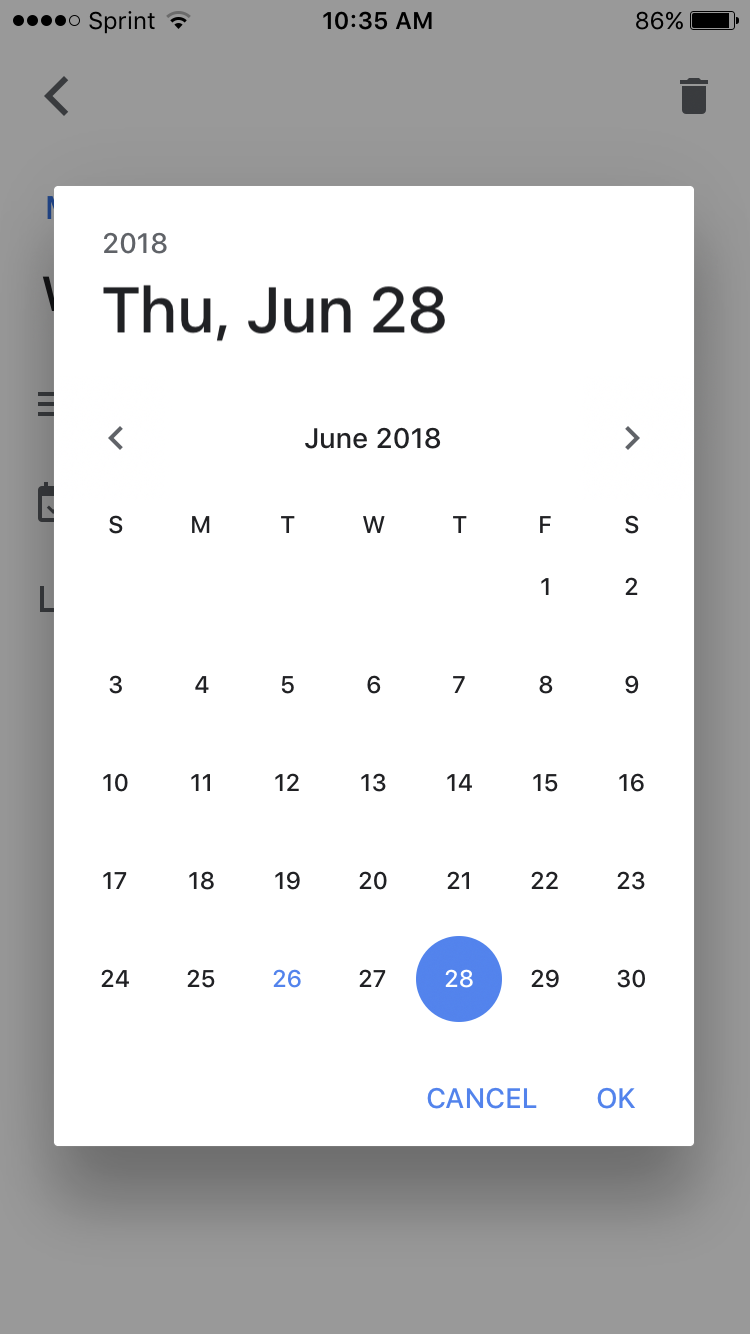
4. A calendar will pop up within the app. Choose the date your task is due, and then click “Ok”.
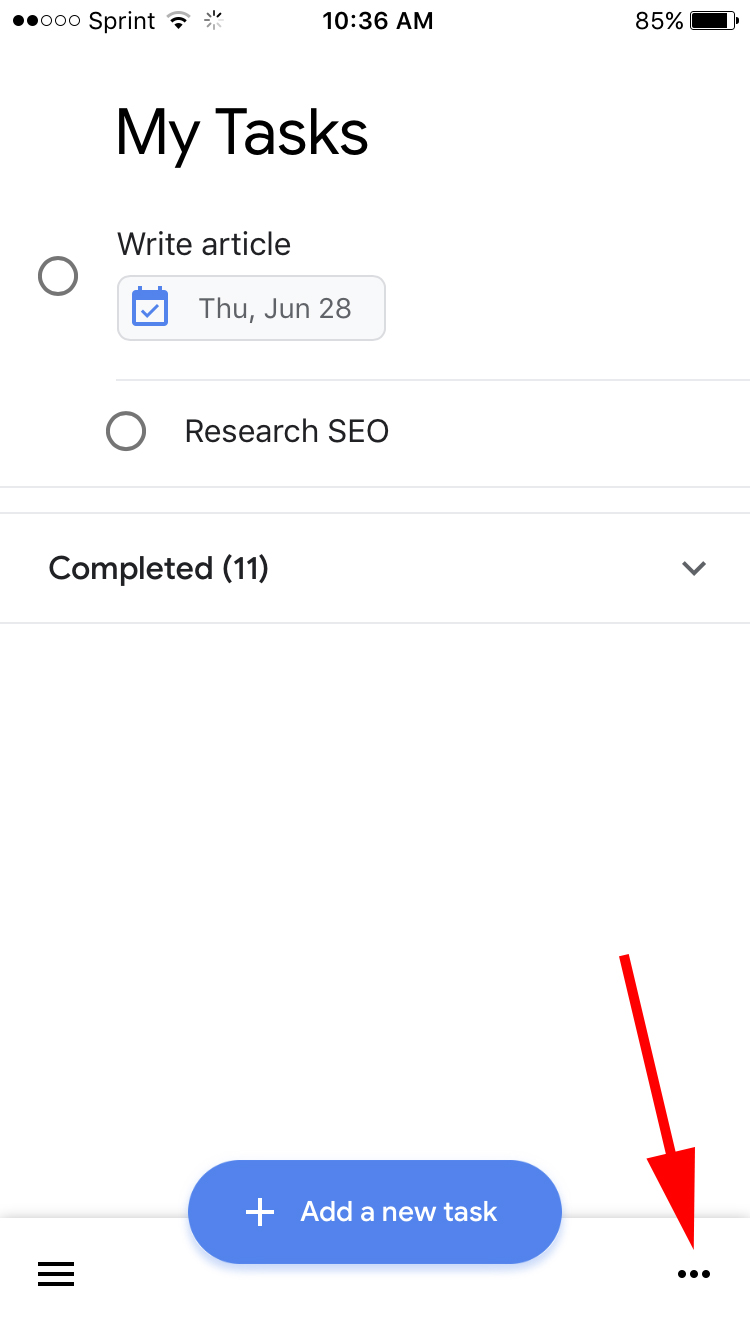
5. When you add subtasks, you’ll see the bubble beside each task. When you complete a task, simply click the bubble.

6. To rearrange the order or change the dates of your tasks, click the three-dot icon in the bottom right corner.
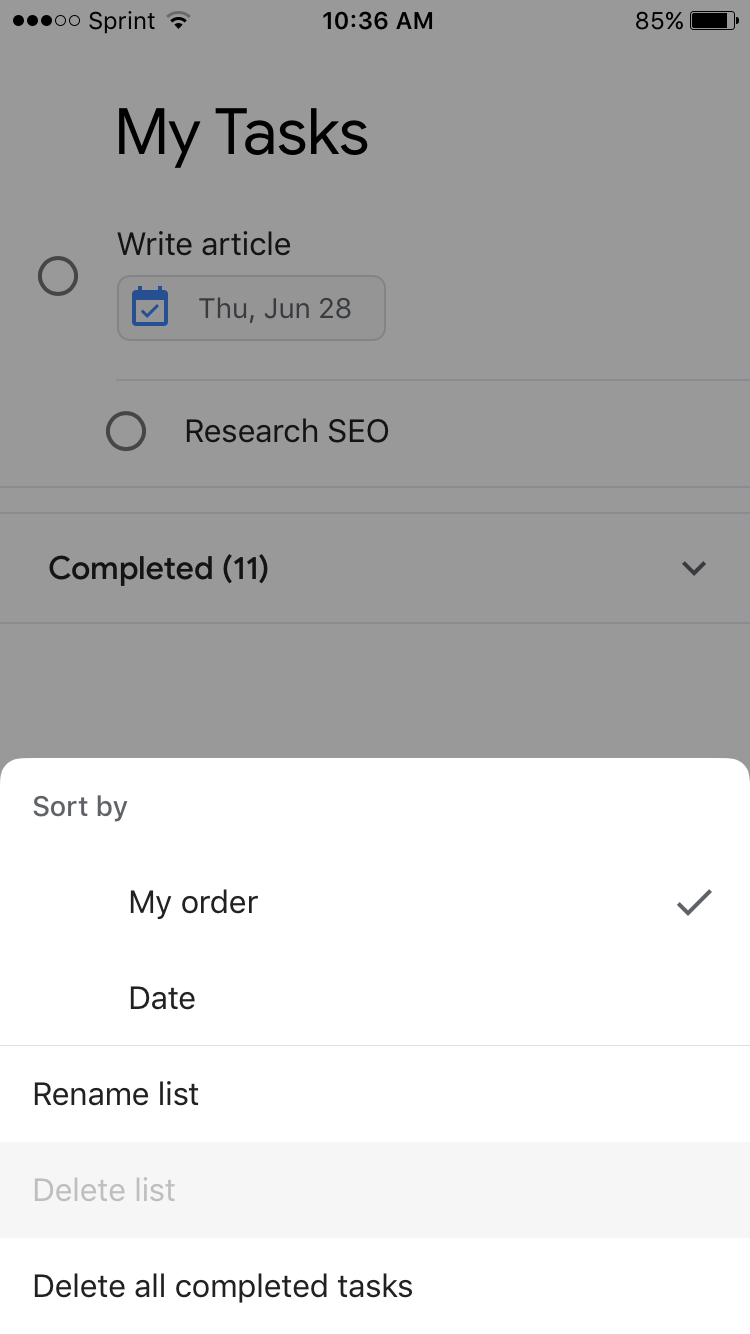
7. Here, you can sort your full task list by customized order or date, rename the list, or delete all completed tasks.
Google Tasks vs. Reminders
You can add reminders to your Google Calendar at any time, by clicking a spot on the calendar and choosing “Reminder” instead of “Event”. When you’ve scheduled a reminder, it pops up in the right corner of your screen at the time you’ve entered, i.e. “finish article, 10 a.m.”. Google Tasks also integrates into your Calendar, but offers more details than date and time, so it’s a better tool when you need to include more in-depth information, such as personal notes or subtasks.
Ultimately, Google Tasks is an effective organizational method, since it integrates seamlessly into other Google features including Gmail and Calendar. If you’re feeling overwhelmed filling up your calendar or sticky notes with to-do lists that range in level of importance, you might want to give Tasks a try.
Additionally, take a look at 12 Tools That’ll Keep You Productive Morning, Noon & Night to further increase your efficiency levels.

The 5 Critical Components of Fantastic Lead-Capture Forms
Did you know that without a lead-capture form, your digital content can’t generate leads?
The lead-capture form is the main focus of a lead-capture page — better known as a landing page. The ultimate goal of this page is to get your visitors to fill it out with contact information in exchange for a piece of content, such as an ebook.

Because the formatting and design of your lead-capture form has a direct impact on your conversion rates, it’s absolutely critical that you approach them wisely. Here are the five most critical components of successful lead-capture forms.
The Five Components of a Lead-Capture Form
1. The Lead Form’s Positioning on the Landing Page
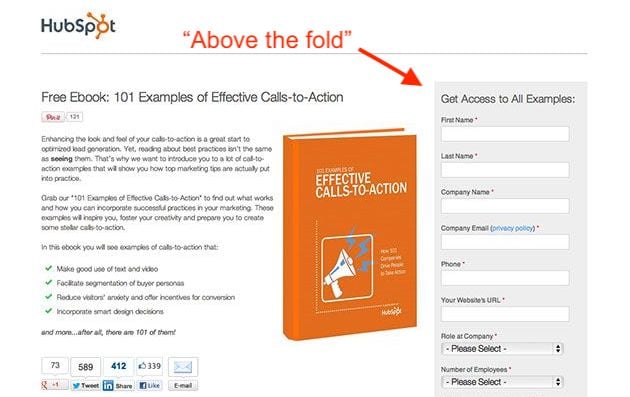
First of all, you should make sure your form appears above the fold or easily findable on the lead-capture page. In other words, the viewer should not have to manually scroll down the page in order to see it. Visibility is important, since you want to draw the visitor’s attention to the form.
However, you don’t want this form to spook visitors who are less willing to disclose information at first glance. To ensure the content you’re offering is the main appeal of your lead-capture page, consider two different form positioning techniques:
Next to the Content Offer’s Picture
The form below might be above the fold, but it’s not the most eye-catching object on the page — the content itself is. Putting a picture of the content next to the form is an appealing reminder of what a user will get in return for his or her basic information.
At the Bottom of an Auto-Scroll Landing Page
Still many of HubSpot’s forms have lead-capture forms at the very bottom of the landing page.
Why on Earth would you do that? This positioning ensures the content we’re offering is center stage so a user can adequately determine if it’s worth downloading. See what this looks like below:
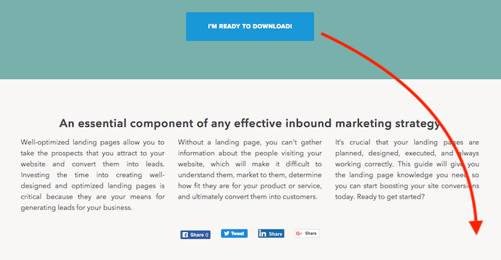
If they decide they want the content, clicking the Download button shown above automatically scrolls them down to a brief form at the bottom of the page:
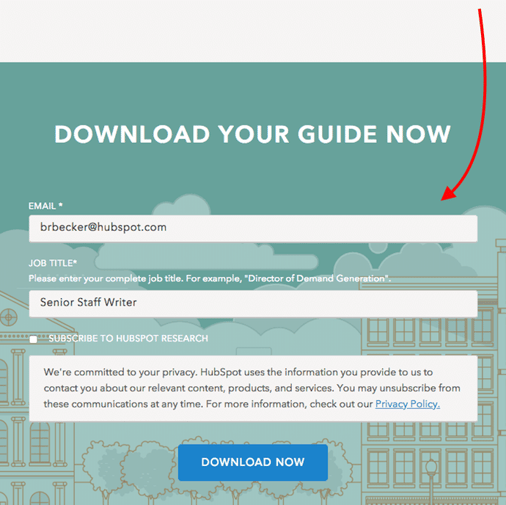
Once they fill out the form, they can confirm their download and retrieve their content.
2. The Lead Form’s Length
The next — and probably biggest — question when designing your forms is, how long should it be? This is a tricky question, because the length of your form inevitably leads to a tradeoff between the quantity and quality of the leads you generate.
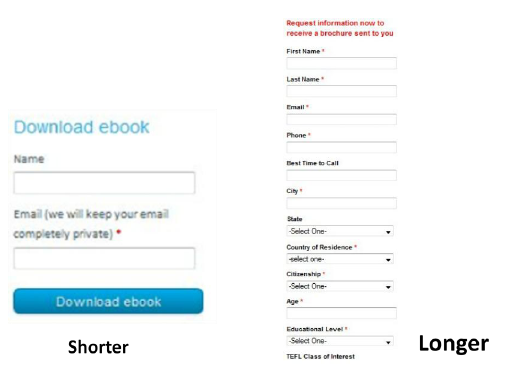
A shorter form usually means more people will be willing to fill it out, so you’ll generate more leads. But the quality of the leads will be higher when visitors are willing to fill out more forms fields and provide you with more information about themselves and what they’re looking for. Therefore, shorter forms usually result in more leads, and longer forms will result in fewer, but higher quality leads.
The other critical factor to consider is the effect of the length of the form on the prospect’s willingness to fill it out. If the form is too long, prospects are going to stop and evaluate whether it is worth their time to complete all of those fields. So you need to find a good balance between collecting enough information and not asking for too much information that they’re not willing to give.
3. The Form Fields You Use
Of course the next question is, what should those form fields be? What information should I ask for? Oftentimes, companies have forms on their sites that ask for way too much information (or the wrong kind of information). Your goal should be to collect enough information through your form to enable you to both contact and qualify the lead.
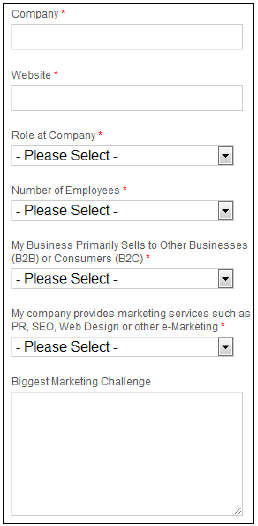
You can use fields such as name and email address to gather contact information about the lead. It is important to be able to follow up with your newly converted lead so you can put them into your sales funnel to try to convert them into a customer.
Lead-Qualifying Fields
Before you do that, though, you’ll want to be able to qualify the lead. To do this, include fields and questions in your form that will help you identify how strong that lead is – in other words, how likely they are to become a customer. You can include fields such as company, website, role at company, and number of employees to learn some basic background information. Then add in a question that will allow you to gauge their need for your product, their likelihood to purchase your service, or their fit with your company.
For example, HubSpot sells marketing software, and all of the forms on our landing pages include an optional field that asks visitors to describe their biggest marketing challenge. We use this information to learn more about and qualify our leads before putting them into our sales funnel.
Asking Only Essential Questions
When you’re deciding which fields and questions to include on your form, remember that you should only be asking for information that is essential to be able to contact and qualify them. You can always ask for more information later, and in fact, that is usually the better approach. Too often, companies request all kinds of contact information and ask tons of questions of their visitors, neglecting to realize that their 15-field forms are significantly lowering conversion rates.
4. Your Privacy Policy
This brings us to the next concern that prospects have with regard to filling out forms: security. Most people experience some sort of anxiety when asked to provide sensitive information, especially online. You need to show your visitors they can trust you with their information.
Link to your privacy policy next to the field that asks for the visitor’s email address. Have your logo and a client testimonial visible. Use some sort of authority endorsement, third-party security certification, or guarantee seal. Just make sure that your website looks credible, and that should help to reduce friction for filling out your form.
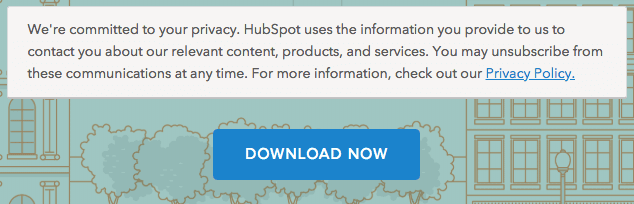
On our lead-capture forms, we offer a brief preview of our privacy policy right above the download button. See what this looks like below:
5. The Lead Form’s Submission Button
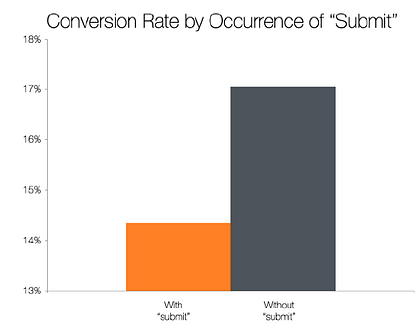
The last major component of your form is the button the visitor must press to complete the form and send you their information. The default text for this button is usually “Submit,” but studies show that landing pages with buttons labeled “Submit” actually have lower conversion rates than those that use other wording.
The top-performing variations in this study were “Click Here” and “Go.” Compared to “Submit,” these buttons feel much less committal and imply a lower investment of time and effort.



Parallels debuts feature-packed Toolbox Packs for Mac, priced from $9.99/year

Parallels is upgrading its Mac app today with three new Toolbox Packs that include various collections of features for specific needs. Each Toolbox Pack is available for Parallels on both macOS and Windows, and Toolbox Packs can be bought individually or as a bundle so customers have more choice.
Apple attended meeting w/ US intelligence officials in May to discuss midterm election interference

iOS 12: How to automatically delete Voice Memos

Apple revamped the Voice Memos app in iOS 12 and with that comes a handful of new features, including the ability to automatically delete Voice Memos after a certain time period.
Report: YouTuber Mark Rober working as Apple engineer to create VR tech for self-driving cars

You can now use Alexa voice control directly on your iOS device

Amazon has rolled out a notable update for its Alexa app on iOS today. With this update, users can now use the Alexa virtual assistant directly from their iOS device to control smart home accessories, ask questions, and much more.
Roundup: Everything we know so far about the iPhone X Plus

Apple is widely expected to release three new iPhone models this year, including a refreshed version of the current iPhone X, as well as a new 6-inch LCD model and a 6.4-inch OLED model.
While we’re still a few months away from Apple’s announcement, there’s quite a bit we already know about the so-called “iPhone X Plus.” Read on as we roundup the latest rumors about the 6.4-inch device…