
Welcome to My Blog
The 27 Best Free Fonts You Can Download
Finding stylish fonts for your design projects can be a major time sink — especially when you have to wade through seemingly endless pages of typefaces that don’t suit the vision you have in your head.
Finding a free font can be even more of a hassle.
So what’s a budget-strapped designer to do?
We’ve scoured the depths of the internet so you don’t have to, coming up with 27 of the best free fonts you deserve to have on your computer. Here’s how we sorted them:
- Free Scripts
- Free Serifs
- Free Modern/Sans-Serifs
- Good Fonts for Logos
- Old-Fashioned Fonts
Many of the free fonts featured here were developed by designers, for designers, so they understand the need for versatile, polished, free typefaces firsthand. Check out the fonts below and keep them in mind for your next design project.

27 of the Best Free Fonts for Designers of All Skill Levels
Free Script Fonts
1. Hello Stockholm
What happens when you combine Scandinavian minimalism with classic brushstrokes? You get Hello Stockholm, a casual script that plays well with sans-serif fonts.

2. Wildera Regular
We think this whimsical, light-weight script would look right at home in a fairy tale (or in your next project).

3. Mightype
Subtle hand-drawn details set this script apart from the pack. Mightype is sophisticated without being stuffy.

4. Selima
Selima’s breezy brushstrokes are perfect proof that script typefaces don’t have to look old-fashioned or uptight — they can be casual and modern.

Free Serif Fonts
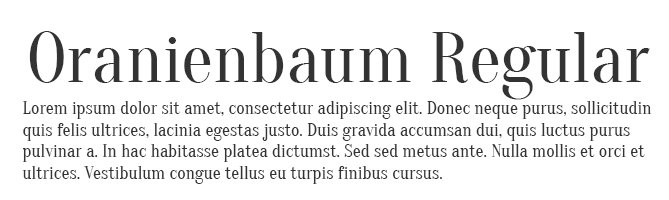
5. Oranienbaum Regular
From small print to bold headlines, multi-tasking Oranienbaum is up to the challenge.
6. Butler
A decidedly modern serif typeface, Butler comes in 14 different weights to suit a wide variety of different uses.

7. Arctic
If you’re looking for a slab serif font with a modern edge, give Arctic a try. It’s a great way to give your headlines some character.

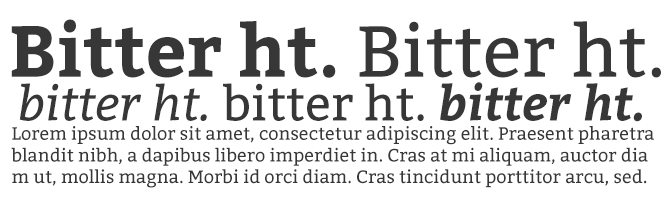
8. Bitter ht
We love the versatility of Bitter ht, a contemporary serif typeface that looks stylish at any size or weight.
9. Agne Regular
With bold lines and contrasting stems, this elegant font is a fresh take on old-fashioned serif typefaces.

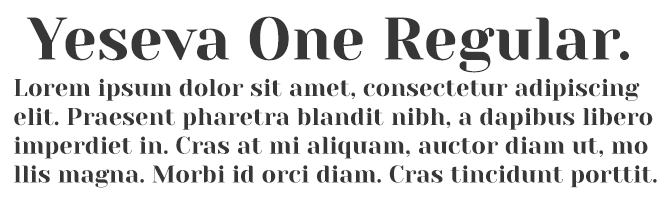
10. Yeseva One Regular
If you’re concerned that serif typefaces come across as too uptight or formal, consider Yeseva, a laid-back option for headlines and subtitles.
Free Modern Fonts
11. Moon
Have you exhausted your library of simple and free sans-serif typefaces? Add Moon to the mix. We love this font’s clean simplicity and round edges.

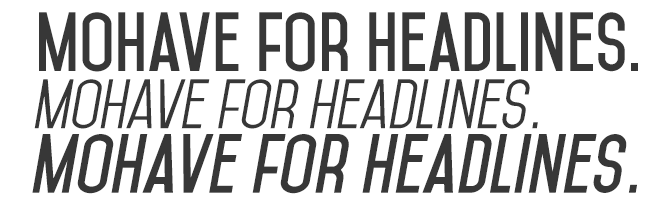
12. Mohave
This all-caps font was designed with bold headlines and big type settings in mind.
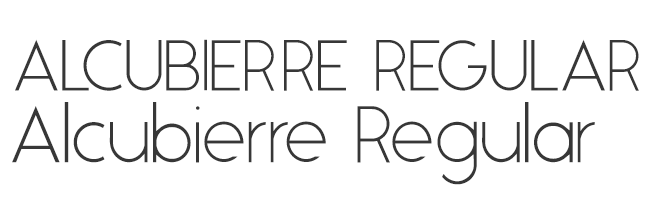
13. Alcubierre Regular
Clean, minimal, and geometric, Alcubierre is well-suited to projects that require subtle headlines and a clear focus on the content.
14. Bourbon Grotesque
Inspired by — you guessed it — classic bourbon labels, this sans-serif has a big personality that demands attention.

15. Frontage Outline
Frontage Outline is reminiscent of handcrafted facade signs, making it a suitable pick for logotypes.

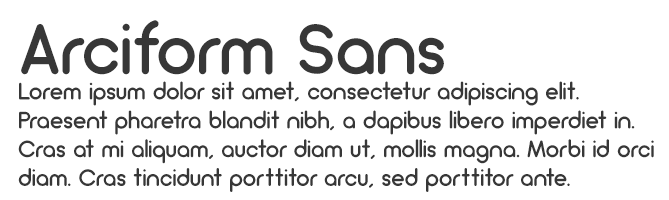
16. Arciform Sans Regular
Arciform might be simple, but this sleek sans-serif is far from boring. Consider including this easy-to-read typeface in your next web design project.
17. De La Fuente
This cool typeface is decorative without being over-the-top, making it ideal for headlines, logotypes, and other design projects that focus primarily on the text.

Good Fonts for Logos
18. Westfalia
Give your next project an outdoorsy, authentic feel with this hand-painted brush sans, which makes for a playful logo as well.

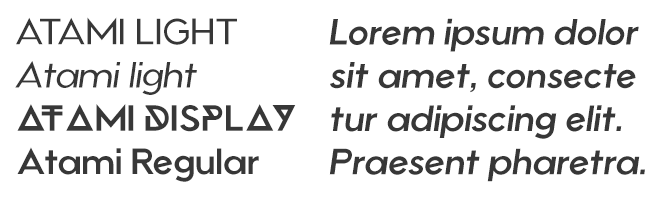
19. Atami
Atami’s numerous weights and display options make it the Swiss Army Knife of modern sans-serifs — it can really do it all for a rising brand.
20. Anders
Anders just might be the avant-garde font of your dreams. It’s unique geometric lines make it an excellent choice for logotypes.

21. Westmeath
Westmeath adds a dose of swagger to an otherwise basic font, making a logo that uses this font both legible and stylish.

22. Polya
Polya is perhaps the most interesting font we could find. The webbing of each letter makes for a truly mesmerizing logo.

Old-Fashioned Fonts
23. Horizon
Horizon is a simple but retro font that elicits images of an old outer space movie. And yet, it still holds up.

24. ITC Bauhaus
Similar to Horizon, ITC Bauhaus has a rounded, retro look that comes in numerous thicknesses. Thicker versions look like the header of an old playbill, while thinner styles give off a jazzy vibe.

25. Bobbers
Bobbers is a script font that has the goofy and over-the-top qualities of an old sitcom. Bring it back from the 1970s in your next design project for a truly confident header.

26. FF Blur
The haunting glow of FF Blur reminds us of an old horror movie. But it might be just soft enough to intrigue the audience of your next project.

27. Canterbury
No list of old-fashioned fonts is complete without the old-English stylings of Canterbury. Emulate many of today’s most famous newspaper logos with this traditional typeface.

We hope you find these fonts helpful — but because they are offered by other parties on their sites, we can’t make any guarantees or promises about them (like that they will be available or free to use).
Also, we want to mention that the designers who offer these fonts might have rules about how you can or can’t use them, so there might be limitations that are applicable to use of the font.
Want more font tips? Check out this tip for identifying the name of a font.



Apple talks accessibility ahead of Global Accessibility Awareness Day

In the run-up to Global Accessibility Awareness Day this Thursday, Apple has been highlighting a few of the ways that it has worked to make life easier for people with disabilities …
The New Email Nurturing Strategy That Improved Our Engagement By Over 1,000%
There’s been a ton of research about lead nurturing and its ability to affect a funnel. We know that, on average, we see more qualified leads, shorter sales cycles, and larger purchase amounts made by nurtured leads when compared with non-nurtured leads. Who doesn’t want that?
And using automation, a single marketer can scale and own a global nurturing strategy.
However, with great power, comes great responsibility.
Nurturing is all about building relationships and providing value. Through helping your leads, users, and customers answer questions and tackle challenges, you build trust and prime them to buy from your company. However, many businesses today are using automation in ways that run counter to these goals and create a poor experience for their contacts.
Before we go any further, some context about our nurturing and automation “fundamental truths” will be helpful. At HubSpot, we believe that nurturing and automation:
- Should not be about your company. If your flow only talks about your business, the awards you’ve won, how many customers you have, etc. people will tune you out, and your nurturing won’t be effective.
- Should be customer-centric. You want your customer to feel empowered by your business.
- Should not be a sales pitch. If your flow only talks about feature lists, price points, and discounts, people will lose interest quickly.
- Should be helpful. You want to provide value up front, giving your contacts something that helps them before asking them for a single thing.
- Should not be left on autopilot. If you leave your flow running for long periods without analyzing its performance, your nurturing won’t be effective.
- Should be continually improved. You want to test, learn, and iterate to create an ever-better experience for your contacts.
If your automation falls into one of the “should not” categories above, don’t panic. This stuff IS NOT easy. Heck, we didn’t even nail this the first time. Read on to see how you can start fixing your nurturing strategy, and how we grew our own engagement by over 1000%.
Nurturing Based on Content Topic
We’ll start by taking a quick trip back in time.
It’s 2015. You come to hubspot.com and, after filling out a form, you download a social media offer, becoming a new lead in our system.
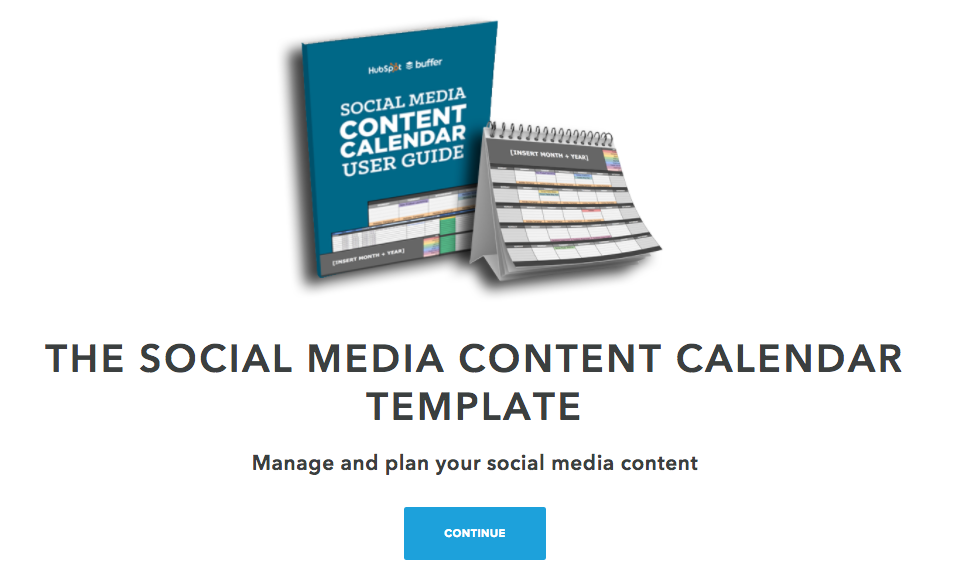
Because we see you’ve downloaded a social media offer, we enroll you in an email nurturing flow focused on social media, sending you additional social media content, and eventually trying to get you to book a social media assessment call with our sales team.
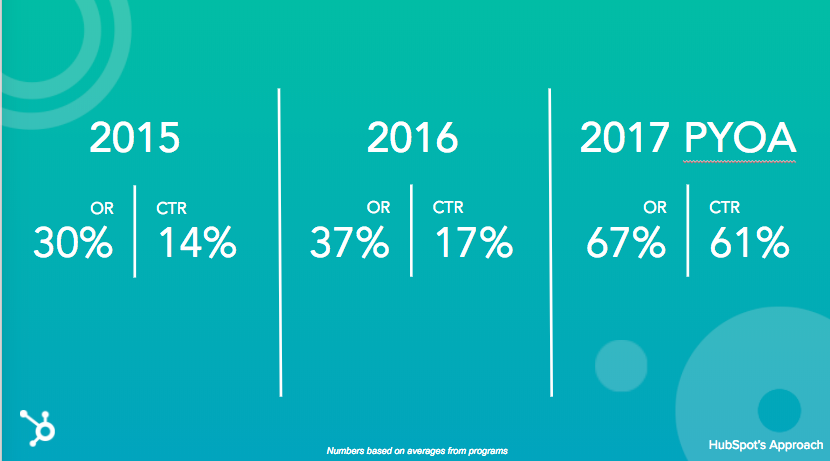
This strategy worked pretty well for us. 30% open rate (OR), and a 14% click-through-rate (CTR).
Nurturing Based on Goals
Now let’s fast forward to 2016.
We reflected on our 2015 strategy, and thought we may have gone too narrow. We know that the majority of our leads “wear many hats” or, do more than just one thing for their company.
So we aimed to broaden our approach. We identified the main problems HubSpot solved for: driving traffic to your site, converting that traffic into leads, and closing those leads into customers. We then bucketed all of our content offers into one of those three buckets. Then, when a new lead was created through a content download, we enrolled them into a nurturing flow associated with the appropriate bucket.
We appropriately named this our bucketed approach.
This approach worked well for us too. We saw an uptick in OR to 27% and CTR to 17%.
Our New Nurturing Strategy Yet: Pick Your Own Adventure
However, moving into 2017, we still had some work to do. We realized we were making assumptions about our leads’ most pressing business challenges, and we made the decision to stop assuming.
What did this look like in practice?
Well, we did something pretty crazy:
We asked.
We asked our contacts what their biggest challenge was and then contextually nurtured them to tackle that challenge. And maybe the craziest part? We saw our engagement skyrocket.

We call this strategy Pick Your Own Adventure. Here’s how it works.
You come to hubspot.com and, after filling out a form, download a social media offer. This action enters you as a new lead into our system.
The first email we send comes from me, and asks you what your biggest challenge is.
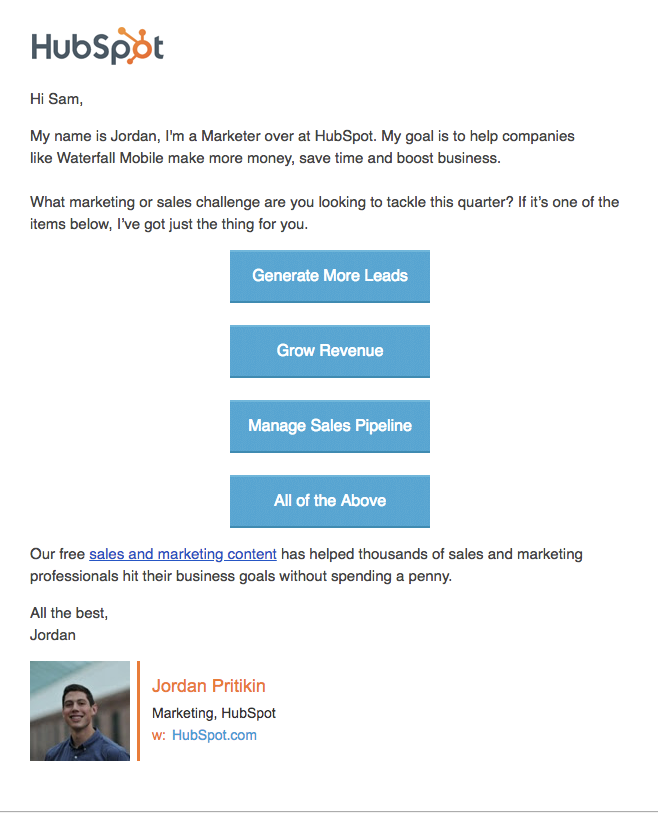
Let’s say, in this example, you selected “Generate More Leads”.
We then send you directly to a thank you page where you can download one of our top offers to help you tackle that challenge (no additional form fill necessary).
Next, you’re enrolled in a contextual nurturing track designed to help you tackle your lead generation challenges. Here are some of the emails that follow:
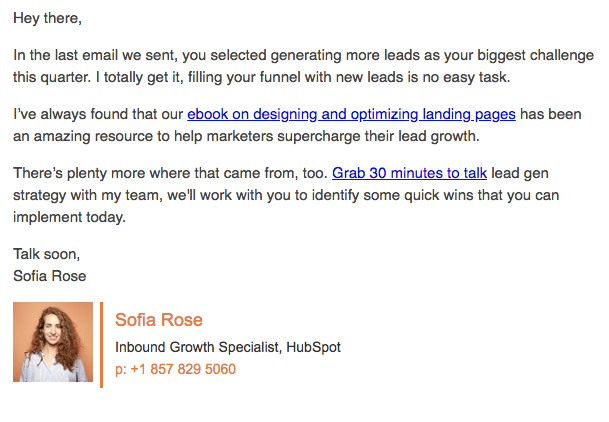
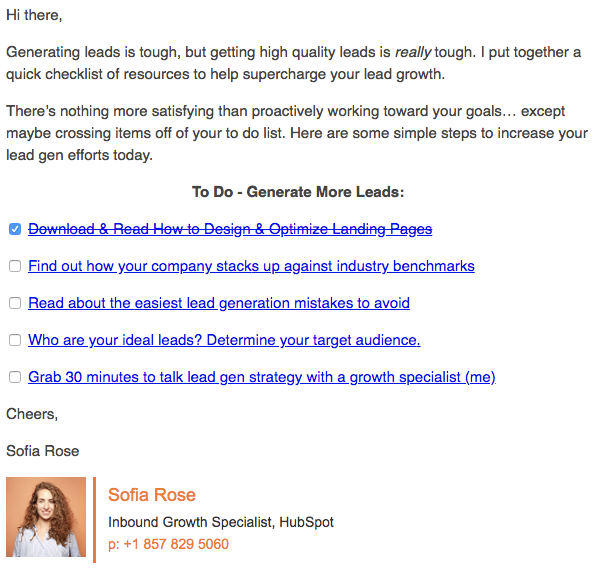

This last email generates the most meetings for our sales team of the entire flow.
Because of the relationship we’ve been building, through empathizing with your challenge, helping you address that challenge, and checking on your progress, our leads now feel comfortable enough to have a strategy conversation.
The final email of our flow goes to people who have not booked a meeting.
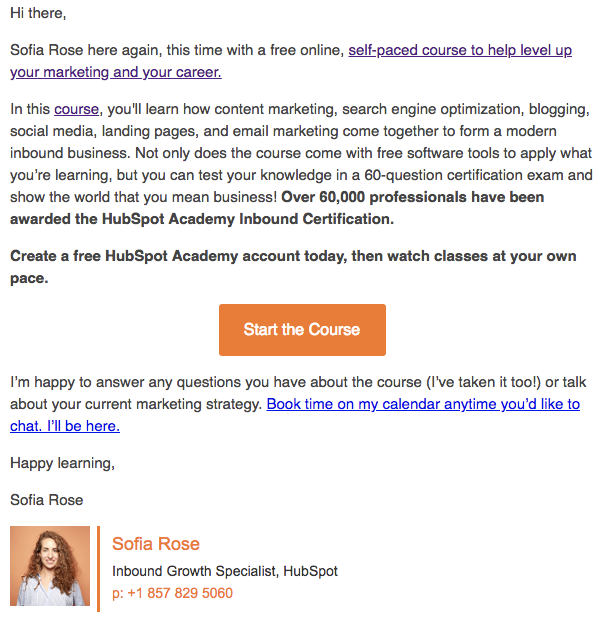
HubSpot Academy is a team of brilliant educators with an entire library of content, courses, and certifications dedicated to helping you grow your business and your career. Through this message, we show that we want to continue to provide value to you over time — and we’re here if you ever want to talk.
So how did our Pick Your Own Adventure Strategy perform?
Drum roll please …

We saw incredible success with this strategy. It’s extremely rare to see open and clickthrough rates like this.
Okay, that’s pretty cool… but where does the 1000+% come from?
When comparing contacts who identified their challenge in our Pick Your Own Adventure Strategy versus those who did not, we saw over 1000% increase in engagement (CTR).
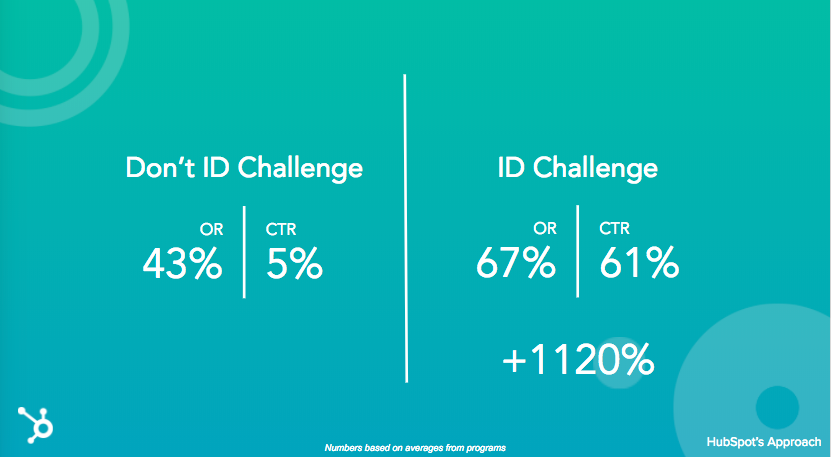
Looking at our email metrics year over year we can see that our Pick Your Own Adventure Strategy performed significantly above our 2015 and 2016 strategies.
How to Launch a Pick Your Own Adventure Nurturing Strategy at Your Company
Nurturing is all about building relationships. To provide the best experience, we need to stop assuming we know what our leads’ challenges are. Instead, just ask. Then, follow up contextually to help them tackle that challenge.
To create a Pick Your Own Adventure Strategy of your own follow these simple steps:
- Identify your main persona’s biggest challenges.
- Which challenges can your business solve for? You’ve just identified your “adventures”. These will be the CTAs you use in your email campaign.
- Identify which pieces of content can help your persona tackle the challenges you’ve identified. If you don’t have content for a specific challenge, that’s okay. This is a great exercise to identify opportunities to create new content.
- When new prospects enter your database, send them an email welcoming them and provide your “adventures.” I recommend providing four adventures total — three specific, and one catch-all — and each should be a CTA.
- Based on which CTA the lead clicks, enroll them into a distinct nurturing track associated with a specific adventure. If they don’t click a CTA, enroll them in the catch-all option. Pro Tip: Using the HubSpot Workflows tool you can easily take care of this part using if/then branching logic.
- Once enrolled in the unique track, send a series of emails with the content you outlined above.
- When crafting your emails, think about providing value up front. Focus the first few emails on addressing their challenge. Pro Tip: Make sure to acknowledge and empathize with the challenge your lead has selected in your emails. Try using some copy like the following “Last time we spoke, you mentioned your biggest challenge is X. I get it, X isn’t easy!”
- Once you’ve provided value, aim for your goal, whether that’s encouraging them to book a demo of your product, scheduling a consultation call, or something else entirely.
- Collect data, analyze, and iterate.
Once you’ve finished your build, give yourself a pat on the back — this stuff isn’t easy.
However, just because you’ve built it once doesn’t mean it’s done. I like to check in on my program every 30 days to collect email metrics and gauge the impact on down funnel metrics like marketing qualified leads, opportunities created, and new customers generated.
Pro Tip: Put a recurring event on your calendar for the first day of the month to report on how your program performed the previous month. This calendar event will hold you accountable to monitoring performance and improving over time.
Good luck and happy nurturing.

New Yorker artist explains why he went from ‘technologically illiterate’ to iPad evangelist

Mark Ulriksen, an artist who created illustrations for New Yorker magazine for almost 20 years, says that he went from being ‘technologically illiterate’ to an iPad evangelist after buying an iPad Pro, an Apple Pencil and the drawing app Procreate …
Security flaws found in Apple Mail can reveal encrypted email as plaintext

Researchers have found flaws in the HTML rendering of Apple Mail on Mac and iOS, as well as Mozilla Thunderbird, that allows attackers to extract decrypted plain text from encrypted mail messages.
Whilst most email is sent unencrypted, many businesses and people rely on S/MIME and PGP encrypted email communications to talk in private. These newly-published security holes wholly undermine these security safety nets.
How to Use the Facebook Budget Optimization Tool for Improved Results
Wondering how to allocate your budget to reach the most effective Facebook audiences? Facebook’s Budget Optimization tool uses an algorithm to automatically optimize your budget distribution across ad sets. In this article, you’ll discover what the Facebook Budget Optimization tool offers, how it works, and when you should use it. #1: Determine Initial Budget Allocations […]
This post How to Use the Facebook Budget Optimization Tool for Improved Results first appeared on Social Media Examiner.
from https://ift.tt/2If1K7G
via socialmediaexaminer
How to Write a Professional Resignation Letter [Samples + Template]
Telling your boss that you’re leaving the company is never an easy conversation.
But a respectful resignation letter can mean the difference between an awkward goodbye, and a chance for a long-term professional connection.
Ideally, you’ll provide a resignation letter two weeks before you leave the company. A resignation letter lets you officially announce your termination at the company, and also provides important housekeeping information, like your last day and other details about your departure.
Arming yourself with a powerful resignation letter helps you ensure a positive conversation with your boss, and a smooth transition to your next journey.
But how do you write a good resignation letter? What should you include, and exclude?
Writing a resignation letter can feel like a daunting task, so we’ve created a professional resignation letter template to get you started, and included examples for inspiration.
How to write a professional resignation letter: template
Below is a professional resignation letter template. Remember, your letter should be brief, and only include relevant and helpful information. Don’t focus on the advantages of your next role. Instead, take the time to reflect on any appreciation you feel for the company you’re leaving behind.
Your Name
Your Address
Your City, State, Zip Code
Your Phone Number
Your Email
Date
Name
Title
Organization
Address
City, State, Zip Code
Dear Mr./Ms. Last Name:
I would like to inform you that I am resigning from my position as X for Company A, effective December 21.
I appreciate the opportunities for professional development that you have provided me over the past two years. I have enjoyed my tenure at Company A, and in particular feel honored to have been apart of such a supportive team.
If I can be of any help during this transition, please let me know. I am available to help train my replacement, and will ensure all my reports are updated before my last day of work.
Thank you again for the opportunity to work at Company A. I wish you all the best and look forward to staying in touch. You can email me at X.
Sincerely,
Your Signature (hard copy letter)
Your Typed Name
Paragraph one:
Begin your letter by stating your position, and the company — this might seem superfluous if you work at a small company and your boss knows you well, but since the letter is your official termination, it’s important to include.
Also, providing an end date in the first body paragraph is helpful, since that’s one of the first questions your employer is going to have.
Paragraph two:
Take the time to consider how you’ve grown, or what you’ve appreciated most about your time at the company. Be as specific as possible — perhaps the company provided professional development opportunities, or maybe you’ve appreciated the climate the company fostered, and the supportive atmosphere. It’s nice for your employer to receive a thank you for the time and resources she’s used to support your career growth.
If you’d like, you can include where you’re headed next, too. If you’re switching industries to pursue a passion, or going to graduate school, it might be appropriate to include. However, if you’re leaving the company for a competitor, you might feel it better to omit.
Paragraph three:
In the third paragraph, mention your willingness to make the transition easier. I’ve written, “I am available to help train my replacement, and will ensure all my reports are updated …” This sentence might look different for you; regardless of what you write, it’s impressive if you include specific details regarding how you’ll help.
Paragraph four:
Lastly, I’ve written, “You can email me at X.” This is optional, but if you truly want to keep in touch with your old employer or use her as a resource, it might be a good addition.
Resignation Letter Samples
A)
Dear Mr./Ms. Last Name:
I would like to inform you that I am resigning from my position as Data Analyst for Company A, effective January 3.
I appreciate the opportunities for professional development that you have provided me over the past four years. I have enjoyed my tenure at Company A, and feel grateful to have started my career alongside such a dedicated team.
I have accepted a teaching position in Virginia. While my experience at Company A was rewarding, I’m excited to pursue my passion for teaching.
If I can be of any help during this transition, please let me know. I am willing to help out with freelance work until you find a replacement.
Thank you again for the opportunity to work at Company A. I wish you all the best and look forward to staying in touch. You can email me at X.
Sincerely,
Caroline
B)
Dear Mr./Ms. Last Name:
Please accept this letter of resignation from my position as content creator at Company Y. My last day of employment will be June 1.
It has been a pleasure working with you and the team for the past two years. In particular, I’ve enjoyed tackling extensive copywriting projects as the business has grown. I’m so appreciative for the opportunities to develop my skills in the field, and want to thank you for all your guidance and insight. I wish your company much success.
Please let me know if you need any assistance with the transition. I look forward to staying in touch. You can call me at 123-4567.
Sincerely,
Caroline

Tim Cook encourages fearlessness, echoes Steve Jobs during Duke commencement

As originally announced back in January, Tim Cook made the trek to Duke University this weekend to give the 2018 commencement address. That day has now come, with Tim Cook gracing the stage at Duke’s graduation to talk immigration, #MeToo, and more…
What’s the best photo management solution? Google Photos or iCloud Photos?

I’ve always been a huge fan of cloud-managed photo systems. I did a review of Everpix back in 2013. I even challenged Apple to release something similar to iCloud Photo Library. I’ve written countless articles about Photo Management and discussed it on countless podcasts. Photo management is something I care deeply about.
While I have all my photos and videos in iCloud Photo Library (the 2TB plan), I also still use Google Photos as well. You might wonder why? While I’m firmly entrenched in the Apple ecosystem from a hardware and software perspective, I always like to be flexible.
By keeping a dual copy of my photos in both system, I can easily swap to a Chromebook or Android device without missing a beat. Anytime I make an album in iCloud Photo Library; I always create the same album in Google Photos. Doing this allows me to stay up to date on the strengths and weaknesses of both.
Sketchy report says iPhone SE 2 coming in September w/ Face ID, design still undecided

As we rounded up yesterday, there have been quite a few reports about the iPhone SE – but there’s still a lot that is unclear about the future of the device. Making things even more unclear today is a report from French Apple news site iPhoneAddict, which makes new claims about the iPhone SE 2…
Amazon’s highest rated iPad case now available for Apple’s new 9.7-inch iPad

ZUGU CASE, maker of Amazon’s highest rated case for iPad, has now officially confirmed support for Apple’s latest 9.7-inch iPad released just last month.
The Prodigy Case– also available for the 12.9-inch iPad Pro and iPad Pro 10.5– has become one of the most popular iPad cases on Amazon for a reason, with over 90% 5 star ratings it has quickly become a favorite among iPad users because of its very functional magnetic kickstand, while also being rugged and lightweight.
Let’s take a look:
Everything we know (and don’t know) about Apple’s rumored iPhone SE 2

At this point, it’s starting look more and more likely everyday that Apple has a refreshed iPhone SE up its sleeve, likely launching sooner rather than later. However, over the past few months, there have been several contradicting reports as to what the so-called iPhone SE 2 will feature.
Read on as we attempt to make sense of all the iPhone SE 2 rumors and speculation…
This week’s top stories: iPhone X Plus details, an Apple Pay credit card, iPhone SE 2 pictures, more

In this week’s top stories: New iPhone X Plus details, iPhone SE 2 leaks continue, Apple wins a round-face watch patent, and more. Read on for all of this week’s top stories…
Apple faces class action lawsuit over failing MacBook butterfly keyboards

Apple’s polarizing butterfly keyboard design is now causing the company some legal issues. A new class action lawsuit has been filed against Apple, alleging that the company knew about the reliability issues of the design before launch, yet released it anyway…
Making The Grade: How iPads put digital whiteboards on life support

Making The Grade is a weekly series from Bradley Chambers covering Apple in education. Bradley has been managing Apple devices in an education environment since 2009. Through his experience deploying and managing 100s of Macs and 100s of iPads, Bradley will highlight ways in which Apple’s products work at scale, stories from the trenches of IT management, and ways Apple could improve its products for students.
Back when I first started working in education (2009), Digital Whiteboards seemed all the rage. Fast forward to 2018, and that market is all but dried up. Let’s step back and look at what’s changed:
Best Buy 1-Day Sale includes up to $400 off MacBooks, HomeKit Lighting, Roku TVs, more

Best Buy has launched a one-day sale this morning, discounting MacBooks, TVs, and much more. Free shipping is available on orders of $35+ or you can opt for in-store pickup and start enjoying your new gear right away. Our top picks are below.
Ralph Nader pens open letter to Tim Cook criticizing $100B buyback, suggests lowering prices & more instead

During its earnings release over a week ago, Apple announced a new $100 billion share buyback program. The move, while praised by some investors, has been controversial among some who say Apple should put its profits to use in another manner. Now, American politician Ralph Nader is joining those criticizing the new buyback program…
Facebook Rolls Out New Live Video Tools

Welcome to this week’s edition of the Social Media Marketing Talk Show, a news show for marketers who want to stay on the leading edge of social media. On this week’s Social Media Marketing Talk Show, we explore new Facebook Live Video tools with David Foster, new Instagram business tools with Jeff Sieh, and more […]
This post Facebook Rolls Out New Live Video Tools first appeared on Social Media Examiner.
from https://ift.tt/2KcPTDx
via socialmediaexaminer