
Welcome to My Blog
Fortnite for iOS updated with new landscape and 100 tiers of new rewards [Video]

After out-earning Candy Crush and notching up $25M during its first month on iOS, Fortnite has seen the updates keep coming as Epic Games seeks to maintain the momentum …
Dual camera company backed by Samsung and Foxconn extends patent infringement claim to iPhone X

Coretronics, a company with patents for smartphone dual-camera technology, has filed a second patent infringement claim against Apple.
The company first sued Apple in November of last year. At that point, the claimed infringement related to the dual-lens system used in the iPhone 7 Plus, while the latest case targets the iPhone 8 Plus and iPhone X also …
Qualcomm offers three concessions it hopes will help resolve Apple lawsuits

Qualcomm has announced three concessions that it hopes will help resolve its long-running legal battle with Apple over the fees it charges for use of its wireless chips and patented technology.
First, it is making it easier for smartphone makers to choose a lower-cost licence, for which it charges 3.25% of the cost of the device, rather than the 5% Apple and others have so far been paying …
Expectations of soft iPhone sales put increased focus on AAPL’s $50B target for Services

The consensus prediction for Apple’s Q2 earnings call later today is that the company will reveal iPhone sales some way below earlier analyst expectations. While analysts expect Apple to hit guidance, which would see revenue almost $8B up year-on-year, talk of the iPhone X driving an iPhone 6-like ‘supercycle’ has disappeared.
Assuming that turns out to be the case, it will put increased focus on the company’s revenue from Services …
What Does a Future With No Jobs Look Like?
In 1931, at the height of the Great Depression, British economist John Maynard Keynes published the essay, “Economic Possibilities for Our Grandchildren.”
Keynes concluded that the Depression was only temporary and predicted that by 2030, people would work no more than 15 hours a week, devoting the rest of their time to leisure and culture.
Keynes was right about economic growth recovering, but most of us work far more than 15 hours a week. We’re still living in a time of over-rapid changes. Technological innovation has fundamentally changed the way we work, but are we really moving toward a society where humans are free to pursue culture and leisure while enjoying an age of abundance?
We Are Living in An Unprecedented Age of Change & Progress

For the majority of human existence, we’ve made progress at an unremarkable pace, but in the last 80 years, as this chart shows, progress has exploded.
Human progress can be marked by five significant revolutions, the most transformative of which occurred 50 years ago, as Yuval Noah Harari wrote in Sapiens. First was the Cognitive Revolution; about 70,000 years ago, we invented language and started to preserve knowledge. Then came the Agricultural Revolution; about 11,000 years ago, we transformed from nomadic tribes to town and city dwellers after we learned how to harness the power of nature to farm instead of forage for food. The Scientific Revolution brought Europe into the age of imperialism and rapid expansion about 500 years ago. This in turn kickstarted the Industrial Revolution, about 250 years ago and Information Revolution, about 50 years ago.
Each time human history jumps forward, we’ve replaced countless jobs by inventing ways to do them better: The farmer replaced the hunter, steam engines replaced human workers. At every single point, such inventions have coincided with rapid economic growth, making the lives of humans better off as a whole.
Even though we’ve demonstrably been good at replacing ourselves with machines, we still pride ourselves on being the best thinkers and decision makers on earth. Because while machines could help a farmer increase his crop yield, the ultimate decision on what to sow and when to harvest still lies on him.
We believed we were the best thinkers and fastest learners on earth. But it’s no longer true.
In 2016, history was made when AlphaGo became the first computer program to beat the highest ranked professional Go player, Lee Sedol, without handicaps. One reason this was so impressive is that Go is considered much more difficult than other strategy-based board games, with over 250 possible opening moves compared to chess’ 20.
Machines are rapidly replicating (and improving upon) our previously unique ability to learn quickly and make decisions in reaction to changes in our environment. Eventually, machines could replace most types of jobs — including roles where the worker has to make decisions based on limited amounts of information, not just routine and predictable human labor.
It’s Hard for Humans to Predict Technological Change
If someone invented a time machine and transported an ordinary person from the 16th century to the 18th century, she would not, for all intents and purposes, have a hard time understanding the world. The same would not be true if someone was transported from the 18th century to the 20th century — technology has changed so quickly that she’d probably think she’d been brought to a different universe!
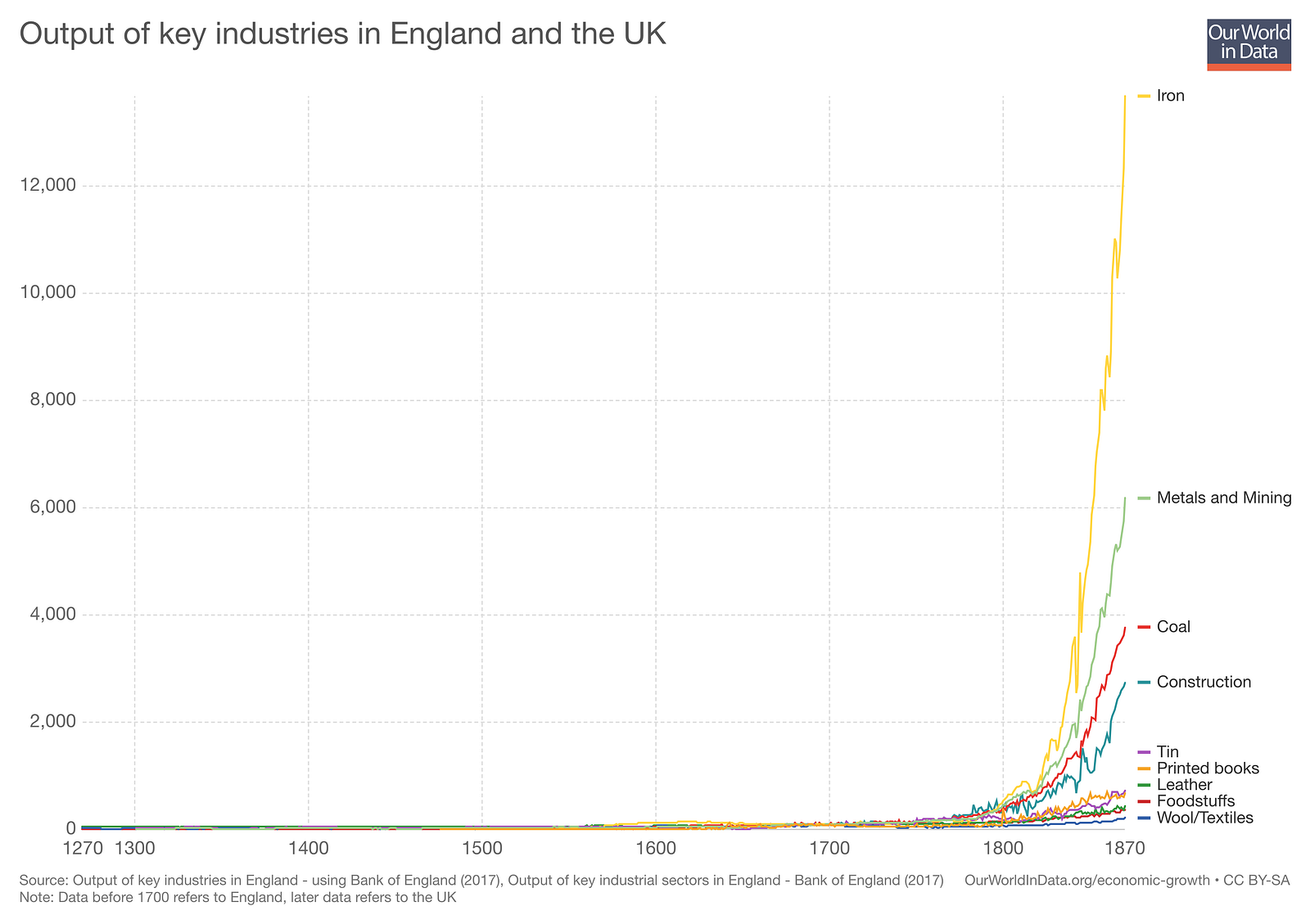
The changes in outputs of key industries created a drastically different worldThe changes in outputs of key industries created a drastically different world.
In the same vein, if you asked a factory worker from the 1970s if he believed that machines would eventually put him out of a job, he would find the question hard to understand, let alone answer. That’s why we must constantly question our understanding of the rate of technological progress and acknowledge that the vast majority of us are ill-equipped to make sense of it all.
It’s estimated that as much as half the world’s labor could be automated over the next 20 years. There are two potential outcomes of this massive disruption of the labor market:
(1) an era of mass unemployment and social instability, or
(2) an age of abundance where we are free to pursue creative work
Scenario 1: An Era of Social Instability
In 1990, the real inflation-adjusted income of the median American household reached $54,932, but then started falling. By 2011, it had fallen nearly 10%, even as overall GDP hit a record high, according to The Second Machine Age by Erik Brynjolfsson and Andrew McAfee.

Source: The Second Machine Age
In contrast, productivity grew at an average of 1.56% per year during this period, and most of this growth directly translated into comparable increases in average income. Brynjolffson and McAfee argue that median income shrank because of increases in inequality.
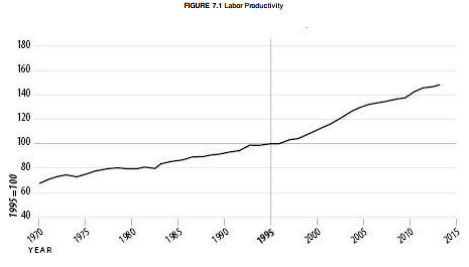
Source: The Second Machine AgeRay Dalio, founder of Bridgewater Associates , came to the same conclusion. In October 2016, Dalio evaluated the US economy by separating it into two cohorts, the top 40% and the bottom 60%.
He found that the average household in the top 40% earns four times more than the average household in the bottom 60%. While the bottom 60% has experienced some recent income growth, real incomes have been flat to slightly down since 1980 (in the same time period, income has increased for the top 40%). Those in the top 40% now have on average 10 times as much wealth as those in the bottom 60%.

Brynjolfsson and McAfee argue that the main driver of this inequality in income is the rapid downward pressure on wages for jobs that are being fully or partially replaced with automation.
For example, if one hour’s worth of human labor can be done by a machine for one dollar, then under a free-market system, profit-focused employers won’t offer a wage of more than one dollar. That worker will need to settle for lower wages, and could be laid off entirely.
Because digital technologies can replicate innovative ideas at low cost, a person who finds a way to leverage them will earn exponentially more than has been possible –what Brynjolfsson and McAfee call a “winner-take-all” market. For example, a relatively small number of designers and engineers could create fact-checking software. Once the software works, it can be delivered to millions of users at almost zero cost. If this software gains widespread adoption, tens of thousands of fact checkers will be put out of work while a small group of individuals capture the wealth their software created.
A second important characteristic of winner-take-all markets is that individuals who create disruptive technologies don’t just get relative advantages — they win the whole market. In a traditional market, someone who was 90% as good would make 90% as much money. But in today’s market, there’s no reason to use the second-best fact-checking software when you can access the best.
In this type of economy, innovators gain disproportionate wealth while reducing demand for previously important types of labor.
This wealth gap will likely intensify if we fail to implement preemptive measures. In a hyperbolic scenario where technology causes mass unemployment, consumers will have less money to spend on products and services. Businesses will have to chase a shrinking pool of customers by cutting prices, sending the whole economy into a deflationary spiral.

Scenario 2: An Age of Abundance
The economic inequality that’s resulted from technological progress doesn’t show any signs of slowing, and the gap has implications beyond just differences in net worth. Another data point from Dalio’s study suggests that as differences in wealth get wider, premature deaths among the bottom 60% will also increase. We’ve already been seeing this trend from an increase in deaths associated with drug and alcohol use (up 100% since 2000) and an increase in suicides (up over 50% since 2000).
Unless action is taken to reduce this inequality, it is very likely that it will only continue to rapidly worsen. It won’t be an easy path — potential solutions require major changes in social policy that can only occur through a political process and require a dramatic shift in how we distribute wealth.
If policies aimed at solving this issue are successful, there’s a chance technological advancement could create an age of abundance, where we find viable solutions to mitigate the effects of a widening income gap caused by a consolidation of wealth.
One possible solution to provide people with basic security is a Universal Basic Income (UBI). A country using this system would pay citizens a basic wage that is conditional on their participation in the economy. By providing people with a safety net given their participation in the economy, people are incentivized to be productive and given the means to participate in the market.
Some proponents of UBI argue that we’ll be able to eliminate all social welfare programs once UBI is instituted, since those programs are just alternate ways of giving people money. One income system eliminates the need to run multiple programs side by side, reducing cost and complexity.
Another potential solution is the negative income tax. Under the present tax law, we operate a positive income tax, where a household is progressively taxed after income reaches a certain cutoff point. Under a negative income tax system, a person earning less than that cutoff point has a negative taxable income of the difference between their earnings and a cutoff point. Think of the cutoff point as a mirror of progressive tax brackets — the higher a person’s total earnings are before they hit the cutoff, the less taxable income they have and the less they’ll receive from the government.
This system provides a minimum income while incentivizing people to work. Research by Brynjolfsson and McAfee shows that people still stay productive if a negative income tax is in use. For example, if a cutoff point was $3,000 in annual income, someone who earned nothing could receive something like $1,500 in negative income tax and have $1,500 in total earnings for the year, but someone who earned $2,000 might receive $500 and would still end up with higher total income.
This system incentivizes people to find work, even if the income for that work is low, because they still get an uplift from every dollar they make.
A universal basic income or negative income tax could:
- Allow people to pursue work that has traditionally not been compensated well in a capitalist economy, such as community-building and social work.
- Create a more progressive entrepreneurial environment by enabling people to take bigger risks in pursuing valuable work.
- Help reorder social expectations. At the moment, we treat employment as a choice — but UBI and NIT treat unemployment as a market failure, not an individual one. As more and more people face being phased out of their jobs by automation, reframing how we think about work is essential to maintaining social stability.
- On top of UBI, another option is what Nobel Prize–winning conservative economist Milton Friedman termed as Negative Income Tax. Under the present tax law, we operate a Positive Income Tax, where a household is taxed on a Progressive Income Tax system above a certain cutoff point. Under a Negative Income Tax system, a person earning below the cutoff point will get a certain percentage of that difference from the government.
A future without jobs does not equal a future without work.
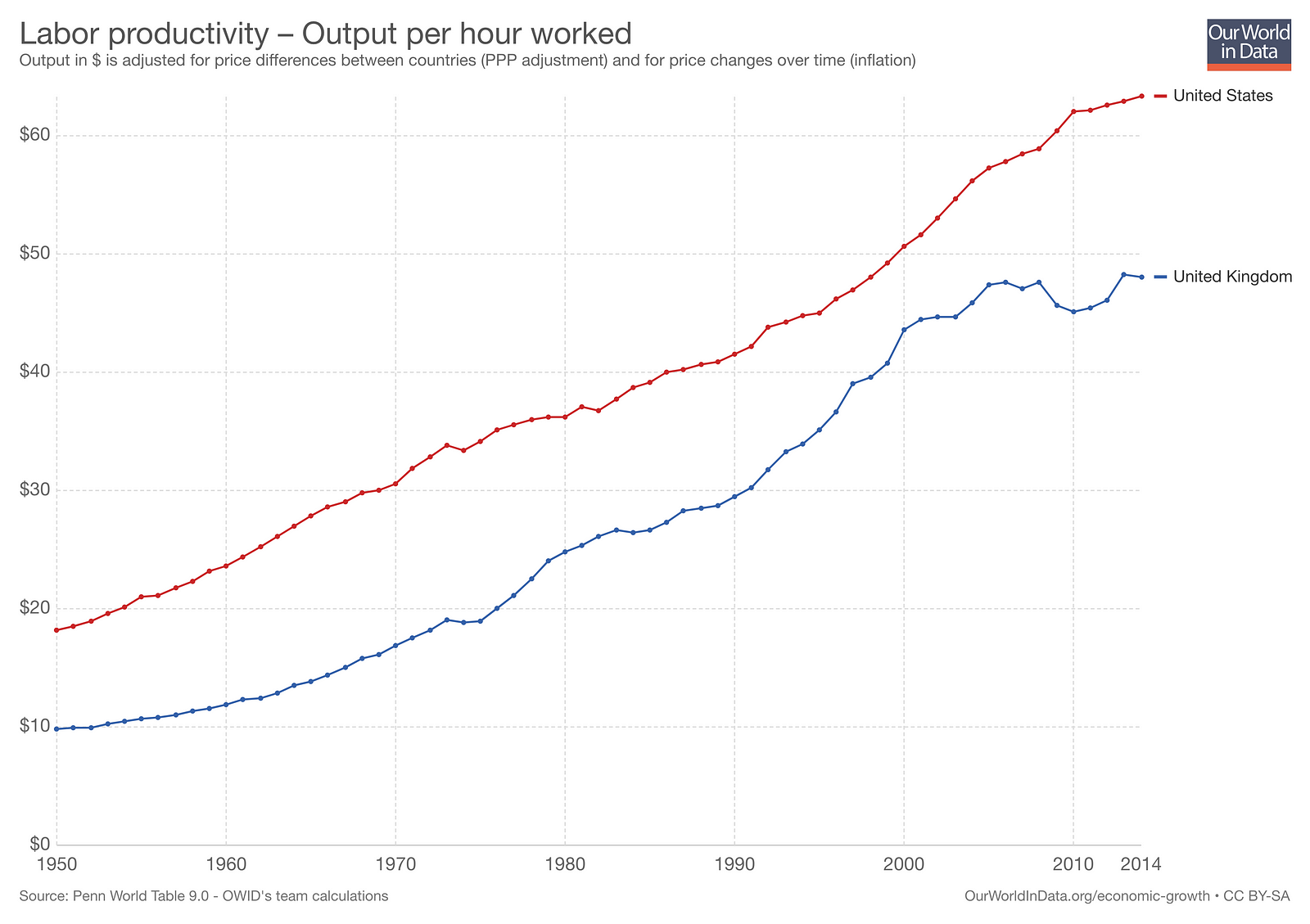
For either of these systems to work, we still have to focus on productivity, the driver of economic growth. Distributing money to be used just for consumption as a basic income rather than for improving production will diminish the value of money and stagnate the economy.
Unconditional grants of money can cause demand-pull inflation to occur because the aggregate demand for goods and services in an economy will increase more rapidly than an economy’s production.
So the key to an effective tax program would be:
- A cutoff point or grant amount low enough that people will still strive for more
- Grants that are only released to eligible consumers
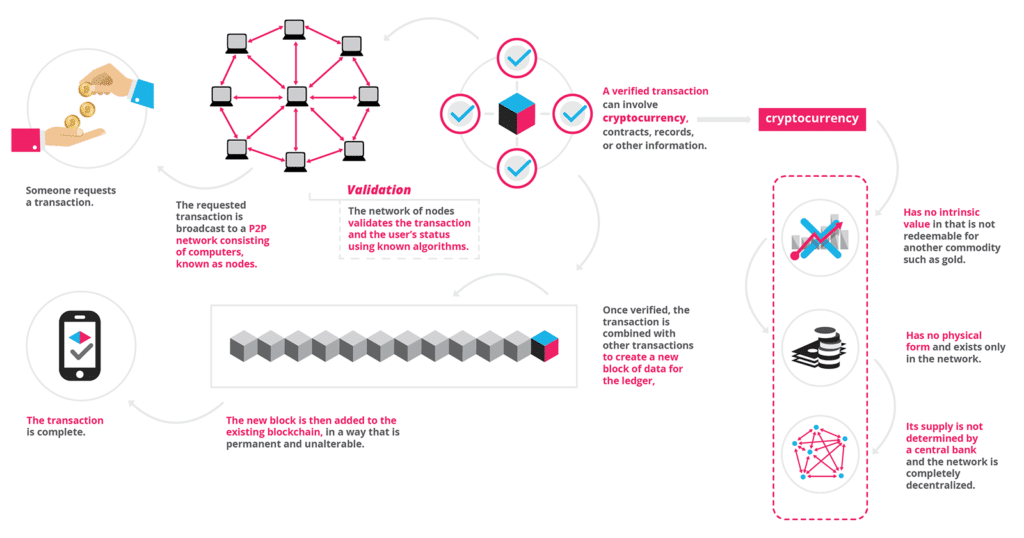
Technology like blockchain creates an unprecedented opportunity to test out decentralized decision making on resource allocation. Using a distributed ledger system to ensure money is distributed only to people who’ve done productive work, as determined by an ever-changing set of conditions or priorities monitored by an artificial intelligence engine.
While we are still far away from developing general-purpose artificial intelligence, the computational tools we have at hand are already helping us make decisions on the factors that motivate different people. For example, Eitan Hersh, a political science professor at Yale University and the author of Hacking the Electorate: How Campaigns Perceive Voters studied how campaigns use big data and machine learning to mobilize voters. The algorithms developed to analyze voter behavior might be a precursor to developing more sophisticated models that predict how best to encourage participation in the economy.
Ultimately, the question of whether to adopt a tax system that could help solve for growing inequality is more of a political than an economic question. It’ll be difficult to suggest the concept of ‘free money’ to a country built on the idea of free markets and fiscal conservatism. Any solution will have to blend new and existing policy, and allocate spending to training programs that can help workers be better equipped to work in a post-job economy, rather than just offering a universal payment for consumption.
The fact remains that no one has all the answers, and navigating the political landscape to arrive at a solution will be an uphill battle.
The policies advocated in this piece will not be easy to implement, and even if they are successfully adopted, rising inflation and decreasing wages will not be curbed immediately.
The Way Forward
As technology continues to progress, more traditional jobs will be threatened by automation. Any solution will involve government intervention to regulate the free-market conditions that create inequality in the first place.
One potential outcome of is the call for technology to be regulated or restricted in a way so fewer jobs will be threatened. That would be a huge mistake that can happen because progress in technology is the reason why we are better off today than even just a decade ago. Research done by the team at Human Progress shows that the cost of light has fallen by a factor of 500,000, where the amount of labor that once bought 54 minutes of light now buys 52 years of light.
However, the belief that the American government agreeing to tax reformers’ idea on handing out monthly checks to support a working class is a huge leap of faith.
My hope is that we have to actively tap on technology to help make our lives better and if not, change the way we utilize it with small course corrections instead of halting advancements through regulation or denying UBI and negative income tax based on pre-conceived notions of what a free capital market is.
The policies that are currently evaluated include:
- Support sectoral training, apprenticeships, and earn-while-you-learn programs.
- Implement universal pre-K, with subsidies that phase out as incomes rise.
- Raise the minimum wage and index it to inflation while raising the overtime salary threshold.
It is likely no single solution is perfect and we have to discuss and explore a multitude of policies to create a better future. While there’s a lot of work to be done, I’m just hopeful and optimistic that the future is bright.
Interested in taking a first hand look on how Artificial Intelligence can help you do your job better instead of replacing it? GrowthBot is a chat based digital assistant to help growth professionals (Sales & Marketing) grow better.
Message GrowthBot on Facebook Messenger or Slack.

3 Overlooked Facebook Lookalike Audiences That Will Improve Your Ad Results
Want better results from your Facebook lookalike audiences? Wondering which custom audiences yield the best-performing lookalike audiences? In this article, you’ll discover how to create three highly tuned Facebook lookalike audiences from your most valuable custom audiences. #1: Reach a Lookalike Audience of People Who Spend Time on Your Website’s Product Pages Website traffic lookalike […]
This post 3 Overlooked Facebook Lookalike Audiences That Will Improve Your Ad Results first appeared on Social Media Examiner.
from https://ift.tt/2rccatq
via socialmediaexaminer
9 of the Best Free Website Builders
Today, it’s almost impossible to maintain a successful business without a fully functional, responsive, SEO-compatible website — but you don’t have to shell out the big bucks to afford one.
There are plenty of options for building and designing a website for free — whether you know how to code, or not — and these website builders are often comparable in quality to their paid alternatives, particularly for small businesses or personal brands.
The free website builders we’re sharing today offer SEO benefits, embedded analytics systems, mobile optimization, and professional-looking templates. If you’re on a tight budget and can’t quite swing the paid builders, these are the next best thing. Read on to check out nine of the best free website builders, so you can build a website for free without forfeiting quality.
Best free website builders
- Wix
- Weebly
- WebNode
- Jimdo
- Mozello
- Webstarts
- Webflow
- IM Creator
- SITE123
1. Wix: Wix is one of the most popular free website builders out there, with 110 million users. The fully hosted platform offers an easy drag-and-drop editor, and a large collection of professional-looking templates that are well-suited for small businesses, online stores, restaurants, or personal portfolios.
Wix supplies built-in Google Analytics to monitor your site, and even offers additional apps for individual preferences. If you want, Wix can even design your site for you. The biggest downside of Wix’s free version is it doesn’t come ad-free, and each page of your site will have a prominent Wix ad. Ad-free is only an option if you pay for the premium version.

2. Weebly: This open source SaaS offers web hosting, domain registration, web design, and even ecommerce functions, making it suitable for businesses and startups. Weebly’s a particularly flexible website builder, compatible with every device and platform, and easy to use — like Wix, it has drag-and-drop functionality, as well as an integrated CMS solution, and hand-coded HTML files. The in-house editor comes with SEO tools and Google Analytics. With PayPal integration, an automatic tax calculator, digital gift cards, and more, Weebly is a smart choice for ecommerce businesses. Unlike some of its other free competitors, Weebly is ad-free.

3. WebNode: WebNode is a popular choice for both personal brands and professionals — it’s easy to use, and you can create a website in a different language or on a different platform to suit your business’s needs. WebNode supports ecommerce stores, and the sites are compatible with Android, Mac, and IOS devices. WebNode will provide statistics to track your site’s success, free of charge, and even with the free version, you won’t have ads.
4. Jimdo: Based in Germany, Jimdo is a valuable option for international companies, with options to create a site in more than nine different languages. The builder is compatible with smartphones and tablets, and there’s a mobile app you can use to build a mobile-optimized site, as well. With no page limit and 500 MB of space, you’ll likely have more than enough space to build your site, and it even provides HTTPS/SSL encryption, meaning your visitor’s information will be kept safe. Plus, you’re able to integrate your site seamlessly with social media accounts. If you do decide to use Jimdo, beware of one thing: the builder prevents free websites from being indexed by search engines.

5. Mozello: One of the biggest selling-points for this Latvian-based company is the builder allows you to create a multilingual site for free — something unmatched by other website builders. Its features include a blog, online store, SEO options, and 500 MB of storage. There is an advertisment, but it’s just a link in the footer, so most visitors won’t see it. The only drawback is the drag-and-drop system isn’t as intuitive or complex as some other options, and there aren’t a ton of design customization options.

6. Webstarts: With a wide collection of beautiful templates and a user-friendly drag and drop functionality, Webstarts makes building a website as simple as possible: best of all, whatever you see when you’re designing is exactly what your visitors will see when you publish the site. This can take some of the guess-work out of the process.

7. Webflow: While most of the other builders in this list are for people without a ton of coding knowledge, Webflow is specifically for designers and agencies who build sites for clients — this means the HTML and CSS is entirely in your control. After you’ve built a site on Webflow, you will need to transfer it to a content management system. There are some features, like drag-and-drop widgets for adding social components, maps, and videos, that don’t require coding knowledge, but if you want the full benefits of Webflow, you’ll need to know HTML or CSS. There’s a limited set of themes, a responsive interface, and your Webflow site can be customized for desktop, tablets, or smartphones. Apart from the necessity of knowing code, one other drawback of Webflow is you can only have two pages, and there’s a limit of 500 visits for free users.

8. IM Creator: With over 11, 240, 766 sites build on IM Creator, it’s a popular option for a few reasons: there’s an easy point-and-click interface, an extensive range of templates and images, and unlimited web hosting and domain services. Plus, the platform is scalable, and you can have either single or multipage layouts. This builder is unique for its built-in ecommerce tools, and offers SEO and Google Analytics to fully optimize your site for search engines.

9. SITE123: Arguably one of the most flexible and easy-to-use builders, Site123 lets you customize anything and offers a one-click installation wizard with graphics and templates. Site123 stands out as particularly helpful with its free images library, professional fonts to add visual elements to your site, and creative DIY plans for creating multiple pages (which are unlimited). Plus, since it offers web hosting domain registration, 500 MB storage space, Google Analytics, and is ad-free, you won’t feel pressured to switch to a paid plan.

And there you have it! Since all of these website builders are free, try out a couple if you’re unsure of the best fit. In particular, take note of what you really want to get out of your site to ensure your needs will be met by one of these free builders.

Linksys expands Velop mesh Wi-Fi system with cheaper dual-band nodes from $129

Linksys is expanding its Velop router lineup today with more budget-friendly options that still offer mesh capabilities. Linksys Velop already offers tri-band mesh Wi-Fi routers (which Apple Stores sell), but those cost $349 and $479 for two and three router systems. Now Linksys is introducing more affordable dual-band mesh Wi-Fi routers that start at $129…
New report suggests Apple’s cross-platform app feature not launching until 2019

Over the last few months, reports have suggested that Apple is working on a new cross-platform feature that would allow across iOS and macOS. While the feature has been speculated to be included in iOS 12, a new report says it’s actually not coming until 2019 and may not be as extensive as initially thought…
How to Write Your First Blog Post: A Simple Formula [+ Free Blog Post Templates]
You’ve probably heard how paramount blogging is to the success of your marketing. But it’s important that you learn how to write a blog post correctly.
Without a blog, your SEO can tank, you’ll have nothing to promote in social media, you’ll have no clout with your leads and customers, and you’ll have fewer pages to put those valuable calls-to-action that generate inbound leads.
So why, oh why, does almost every marketer I talk to have a laundry list of excuses for why they can’t consistently blog? Maybe because, unless you’re one of the few people who actually like writing, business blogging kind of stinks. You have to find words, string them together into sentences … ugh, where do you even start?
Well my friend, the time for excuses is over.
After you read this post, there will be absolutely no reason you can’t blog every single day — and do it quickly. Not only am I about to provide you with a simple blogging formula to follow, but I’m also going to give you free templates for creating five different types of blog posts:
- The How-To Post
- The List-Based Post
- The Curated Collection Post
- The SlideShare Presentation Post
- The Newsjacking Post
With all this blogging how-to, literally anyone can blog as long as they truly know the subject matter they’re writing about. And since you’re an expert in your industry, there’s no longer any reason you can’t sit down every day and hammer out an excellent blog post.
Want to learn how to apply blogging and other forms of content marketing to your business? Check out HubSpot Academy’s free content marketing training resource page.

How to Write a Blog Post: From Your First Blog Post to Your First Customer
Step 1: Understand your audience.
Before you start to write, have a clear understanding of your target audience. What do they want to know about? What will resonate with them? This is where creating your buyer personas comes in handy. Consider what you know about your buyer personas and their interests while you’re coming up with a topic for your blog post.
For instance, if your readers are millennials looking to start their own business, you probably don’t need to provide them with information about getting started in social media — most of them already have that down. You might, however, want to give them information about how to adjust their approach to social media from a more casual, personal one to a more business-savvy, networking-focused approach. That kind of tweak is what separates you from blogging about generic stuff to the stuff your audience really wants (and needs) to hear.
Don’t have buyer personas in place for your business? Here are a few resources to help you get started:
- Create Buyer Personas for Your Business [Free Template]
- Blog Post: How to Create Detailed Buyer Personas for Your Business
- MakeMyPersona.com [Free Tool]

Step 2: Create your blog domain.
Next, you’ll need a place to host this and every other blog post you write. Even if you already manage a website, it’s worth getting a basic refresher on how a strong, presentable blog domain is set up.
Sign Up With a CMS
CMS stands for content management system. A CMS helps you create a website domain where you’ll actually publish your blog. The CMS platforms available for you to sign up for can host domains, where you create your own website; and subdomains, where you create a webpage that connects with an existing website.
Want to create a subdomain? If you already own a cooking business at www.yourcompany.com, you might create a blog that looks like this: blog.yourcompany.com. In other words, your blog’s subdomain will live in its own section of yourcompany.com.
Customize Your Blog’s Theme
Once you have your blog domain set up, customize the appearance of your blog to reflect the theme of the content you plan on creating.
Are you writing about sustainability and the environment? Green might be a color to keep in mind when designing the look and feel of your blog, as green is often associated with sustainability.
If you already manage a website, and are writing your first blog post for that website, it’s important that your blog is consistent in appearance with this existing website.
Step 3: Identify your first blog post’s topic.
Before you even write anything, you need to pick a topic for your blog post. The topic can be pretty general to start with. For example, if you’re a plumber, you might start out thinking you want to write about leaky faucets.
Then, as you do your research, you can expand the topic to discuss how to fix a leaky faucet based on the various causes of a faucet leak.
You might not want to jump right into a “how-to” article for your first blog post, though, and that’s okay. Perhaps you’d like to write about modern types of faucet setups, or tell one particular success story you had rescuing a faucet before it flooded someone’s house.
If a plumber’s first how-to article is about how to fix a leaky faucet, for example, here are four other types of sample blog post ideas a plumber might start with, based on the five free blog templates we’ve offered to you:
- List-based Post: 5 ways to fix a leaky faucet
- Curated Collection Post: 10 faucet and sink brands you should look into today
- SlideShare Presentation: 5 types of faucets that should replace your old one (with pictures)
- News post: New study shows X% of people don’t replace their faucet on time
If you’re having trouble coming up with topic ideas, check out this blog post from my colleague Ginny Soskey. In this post, Soskey walks through a helpful process for turning one idea into many. Similar to the “leaky faucet” examples above, she suggests that you “iterate off old topics to come up with unique and compelling new topics.” This can be done by:
- Changing the topic scope
- Adjusting the time frame
- Choosing a new audience
- Taking a positive/negative approach
- Introducing a new format
Step 4: Come up with a working title.
Then you might come up with a few different working titles — in other words, iterations or different ways of approaching that topic to help you focus your writing. For example, you might decide to narrow your topic to “Tools for Fixing Leaky Faucets” or “Common Causes of Leaky Faucets.” A working title is specific and will guide your post so you can start writing.
Let’s take a real post as an example: “How to Choose a Solid Topic for Your Next Blog Post.” Appropriate, right? The topic, in this case, was probably simply “blogging.” Then the working title may have been something like, “The Process for Selecting a Blog Post Topic.” And the final title ended up being “How to Choose a Solid Topic for Your Next Blog Post.”
See that evolution from topic, to working title, to final title? Even though the working title may not end up being the final title (more on that in a moment), it still provides enough information so you can focus your blog post on something more specific than a generic, overwhelming topic.
Step 5: Write an intro (and make it captivating).
We’ve written more specifically about writing captivating introductions in the post, “How to Write an Introduction,” but let’s review, shall we?
First, grab the reader’s attention. If you lose the reader in the first few paragraphs — or even sentences — of the introduction, they will stop reading even before they’ve given your post a fair shake. You can do this in a number of ways: tell a story or a joke, be empathetic, or grip the reader with an interesting fact or statistic.
Then describe the purpose of the post and explain how it will address a problem the reader may be having. This will give the reader a reason to keep reading and give them a connection to how it will help them improve their work/lives. Here’s an example of a post that we think does a good job of attracting a reader’s attention right away:

Step 6: Organize your content in an outline.
Sometimes, blog posts can have an overwhelming amount of information — for the reader and the writer. The trick is to organize the info so readers are not intimidated by the length or amount of content. The organization can take multiple forms — sections, lists, tips, whatever’s most appropriate. But it must be organized!
Let’s take a look at the post, “How to Use Snapchat: A Detailed Look Into HubSpot’s Snapchat Strategy.” There is a lot of content in this post, so we broke it into a few different sections using the following headers: How to Setup Your Snapchat Account, Snaps vs. Stories: What’s the Difference?, and How to Use Snapchat for Business. These sections are then separated into sub-sections that to go into more detail and also make the content easier to read.
To complete this step, all you really need to do is outline your post. That way, before you start writing, you know which points you want to cover, and the best order in which to do it. To make things even easier, you can also download and use our free blog post templates, which are pre-organized for five of the most common blog post types. Just fill in the blanks!
Step 7: Write your blog post!
The next step — but not the last — is actually writing the content. We couldn’t forget about that, of course.
Now that you have your outline/template, you’re ready to fill in the blanks. Use your outline as a guide and be sure to expand on all of your points as needed. Write about what you already know, and if necessary, do additional research to gather more information, examples, and data to back up your points, providing proper attribution when incorporating external sources. Need help finding accurate and compelling data to use in your post? Check out this roundup of sources — from Pew Research to Google Trends.
If you find you’re having trouble stringing sentences together, you’re not alone. Finding your “flow” can be really challenging for a lot of folks. Luckily, there are a ton of tools you can lean on to help you improve your writing. Here are a few to get you started:
- Power Thesaurus: Stuck on a word? Power Thesaurus is a crowdsourced tool that provides users with a ton of alternative word choices from a community of writers.
- ZenPen: If you’re having trouble staying focused, check out this distraction-free writing tool. ZenPen creates a minimalist “writing zone” that’s designed to help you get words down without having to fuss with formatting right away.
- Cliché Finder: Feeling like your writing might be coming off a little cheesy? Identify instances where you can be more specific using this handy cliché tool.
For a complete list of tools for improving your writing skills, check out this post. And if you’re looking for more direction, the following resources are chock-full of valuable writing advice:
- The Marketer’s Pocket Guide to Writing Well [Free Ebook]
- How to Write Compelling Copy: 7 Tips for Writing Content That Converts
- How to Write With Clarity: 9 Tips for Simplifying Your Message
- Your Blog Posts Are Boring: 9 Tips for Making Your Writing More Interesting
- Your Blog Posts Are Boring: 9 Tips for Making Your Writing More Interesting
Step 8: Edit/proofread your post, and fix your formatting.
You’re not quite done yet, but you’re close! The editing process is an important part of blogging — don’t overlook it. Ask a grammar-conscious co-worker to copy, edit, and proofread your post, and consider enlisting the help of The Ultimate Editing Checklist (or try using a free grammar checker, like the one developed by Grammarly). And if you’re looking to brush up on your own self-editing skills, turn to these helpful posts for some tips and tricks to get you started:
- Confessions of a HubSpot Editor: 11 Editing Tips From the Trenches
- How to Become a More Efficient Editor: 12 Ways to Speed Up the Editorial Process
- 10 Simple Edits That’ll Instantly Improve Any Piece of Writing
When you’re ready to check your formatting, keep the following advice in mind …
Featured Image

Make sure you choose a visually appealing and relevant image for your post. As social networks treat content with images more prominently, visuals are now more responsible than ever for the success of your blog content in social media. In fact, it’s been shown that content with relevant images receives 94% more views than content without relevant images.
For help selecting an image for your post, read “How to Select the Perfect Image for Your Next Blog Post” — and pay close attention to the section about copyright law.
Visual Appearance
No one likes an ugly blog post. And it’s not just pictures that make a post visually appealing — it’s the formatting and organization of the post, too.
In a properly formatted and visually appealing blog post, you’ll notice that header and sub-headers are used to break up large blocks of text — and those headers are styled consistently. Here’s an example of what that looks like:

Also, screenshots should always have a similar, defined border (see screenshot above for example) so they don’t appear as if they’re floating in space. And that style should stay consistent from post to post.
Maintaining this consistency makes your content (and your brand) look more professional, and makes it easier on the eyes.
Topics/Tags
Tags are specific, public-facing keywords that describe a post. They also allow readers to browse for more content in the same category on your blog. Refrain from adding a laundry list of tags to each post. Instead, put some thought into a tagging strategy. Think of tags as “topics” or “categories,” and choose 10-20 tags that represent all the main topics you want to cover on your blog. Then stick to those.
Step 9: Insert a call-to-action (CTA) at the end.
At the end of every blog post, you should have a CTA that indicates what you want the reader to do next — subscribe to your blog, download an ebook, register for a webinar or event, read a related article, etc. Typically, you think about the CTA being beneficial for the marketer. Your visitors read your blog post, they click on the CTA, and eventually you generate a lead. But the CTA is also a valuable resource for the person reading your content — use your CTAs to offer more content similar to the subject of the post they just finished reading.
In the blog post, “What to Post on Instagram: 18 Photo & Video Ideas to Spark Inspiration,” for instance, readers are given actionable ideas for creating valuable Instagram content. At the end of the post is a CTA referring readers to download a comprehensive guide on how to use Instagram for business:

See how that’s a win-win for everyone? Readers who want to learn more have the opportunity to do so, and the business receives a lead they can nurture … who may even become a customer! Learn more about how to choose the right CTA for every blog post in this article. And check out this collection of clever CTAs to inspire your own efforts.
Step 10: Optimize for on-page SEO.
After you finish writing, go back and optimize your post for search.
Don’t obsess over how many keywords to include. If there are opportunities to incorporate keywords you’re targeting, and it won’t impact reader experience, do it. If you can make your URL shorter and more keyword-friendly, go for it. But don’t cram keywords or shoot for some arbitrary keyword density — Google’s smarter than that!
Here’s a little reminder of what you can and should look for:
Meta Description
Meta descriptions are the descriptions below the post’s page title on Google’s search results pages. They provide searchers with a short summary of the post before clicking into it. They are ideally between 150-160 characters and start with a verb, such as “Learn,” “Read,” or “Discover.” While meta descriptions no longer factor into Google’s keyword ranking algorithm, they do give searchers a snapshot of what they will get by reading the post and can help improve your clickthrough rate from search.
Page Title and Headers
Most blogging software uses your post title as your page title, which is the most important on-page SEO element at your disposal. But if you’ve followed our formula so far, you should already have a working title that will naturally include keywords/phrases your target audience is interested in. Don’t over-complicate your title by trying to fit keywords where they don’t naturally belong. That said, if there are clear opportunities to add keywords you’re targeting to your post title and headers, feel free to take them. Also, try to keep your headlines short — ideally, under 65 characters — so they don’t get truncated in search engine results.
Anchor Text
Anchor text is the word or words that link to another page — either on your website or on another website. Carefully select which keywords you want to link to other pages on your site, because search engines take that into consideration when ranking your page for certain keywords.
It’s also important to consider which pages you link to. Consider linking to pages that you want to rank well for that keyword. You could end up getting it to rank on Google’s first page of results instead of its second page, and that ain’t small potatoes.
Mobile Optimization
With mobile devices now accounting for nearly 2 out of every 3 minutes spent online, having a website that is responsive or designed for mobile has become more and more critical. In addition to making sure your website’s visitors (including your blog’s visitors) have the best experience possible, optimizing for mobile will score your website some SEO points.
Back in 2015, Google made a change to its algorithm that now penalizes sites that aren’t mobile optimized. This month (May 2016), Google rolled out their second version of the mobile-friendly algorithm update — creating a sense of urgency for the folks that have yet to update their websites. To make sure your site is getting the maximum SEO benefit possible, check out this free guide: How to Make a Mobile-Friendly Website: SEO Tips for a Post-“Mobilegeddon” World.
Step 11: Pick a catchy title.
Last but not least, it’s time to spruce up that working title of yours. Luckily, we have a simple formula for writing catchy titles that will grab the attention of your reader. Here’s what to consider:
- Start with your working title.
- As you start to edit your title, keep in mind that it’s important to keep the title accurate and clear.
- Then, work on making your title sexy — whether it’s through strong language, alliteration, or another literary tactic.
- If you can, optimize for SEO by sneaking some keywords in there (only if it’s natural, though!).
- Finally, see if you can shorten it at all. No one likes a long, overwhelming title — and remember, Google prefers 65 characters or fewer before it truncates it on its search engine results pages.
If you’ve mastered the steps above, learn about some way to take your blog posts to the next level in this post. What other steps do you take to refine your blog posts? Don’t forget to download your five free blog post templates right here.
Editor’s Note: This post was originally published in October 2013 and has been updated for freshness, accuracy, and comprehensiveness.


Iran attempts to crackdown on Telegram use, orders telecoms to block access

Telegram’s rocky relationship with governments is only getting worse. According to a new report from The Wall Street Journal the Iranian government has moved to shut down the messaging application due to growing unrest in the country that it attributes to the app…
How to disable Auto-Brightness on iPhone or iPad in iOS 11

Auto-Brightness is a handy feature that uses the ambient light sensors built into iOS devices. Recently, in the iOS 11 cycle, Apple has hidden the toggle to either enable or disable this feature deep into the Settings.
Microsoft updates Office 365 w/ new AI features in Word, Draft Sync in Outlook for iOS, more

Microsoft has announced a slew of new features coming to its Office 365 suite of applications. Both the desktop and mobile versions of the applications have received updates, with Outlook for iOS adding Draft Sync, AI enhancements in Word for Mac, and more.
Rumors suggest Apple could acquire ‘all or parts of’ media company Condé Nast

Apple has been pushing deeper into news over the last year, increasing its focus on Apple News and publishing its own exclusive pieces. Now, a rumor is circulating that Apple might be interested in purchasing Condé Nast…
WhatsApp cofounder to leave Facebook amid growing differences over data sharing

WhatsApp cofounder Jan Koum announced today that he will be leaving the company. While Koum himself doesn’t elaborate on reasoning for the departure, a report from The Washington Post indicates that the decision comes amid growing discord with WhatsApp parent company, Facebook…
How to record iPhone calls

Have you ever needed to record a call on your iPhone? While there’s no direct way to do this built in to iOS, there are some easy to use software and hardware options. Follow along for how to record iPhone calls.
macOS tip: Use Hot Corners to speed up access to Notification Center, Desktop and more

There are a lot of little tweaks in macOS that I rely on to make a Mac feel like my own. Placing frequently accessed folders on the right side of the Dock, turning off auto-correct, and turning up mouse and trackpad tracking speed are all in this category for me.
A rather hidden but critical example is Hot Corners. My Mac just feels broken with Hot Corners disabled, and my workflow is severely slowed. Here’s how it works:
Swift Playgrounds updated with support for ‘What’s Next’ suggestions, speed improvements

Swift Playgrounds, Apple’s introductory programming application for iPad, has been updated today with a few notable features.