
Welcome to My Blog
Facebook Is Updating Its Privacy Tools. Here’s a Look at What to Expect.
Facebook announced this morning that it will roll out changes to its privacy tools to make them clearer and easier to find.
The announcement, penned by Facebook’s VP and Chief Privacy Officer Erin Egan and VP/Deputy General Counsel Ashlie Beringer, led with an acknowledgment of how confusing the privacy tools were previously — with a claim that the new updates “have been in the works for some time” but were prompted by “the events of the past several days.”
Those events, of course, refer to the fallout Facebook has experienced from the alleged spread and misuse of personal user data from analytics firm Cambridge Analytica.
These changes will be made “in the coming weeks,” the announcement said — and when I re-downloaded the Facebook mobile app (the latest version available on iOS after the announcement was published), I didn’t see the updates described and illustrated in this morning’s statement.
That said, here’s what Facebook says we can expect.
1. “Controls That Are Easier to Find and Use”
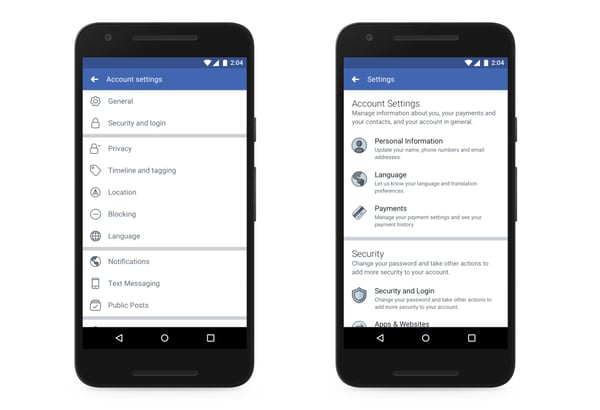
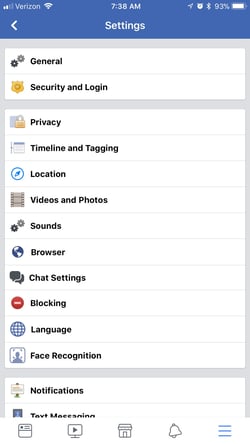
According to Egan and Beringer’s announcement, the settings menu has been redesigned on the Facebook mobile app to help make controls easier to find. Previously, account (and other) settings were distributed among 20 different pages — but now, Facebook says, they’ll be accessible from one place.
Here’s a before-and-after snapshot:
Source: Facebook
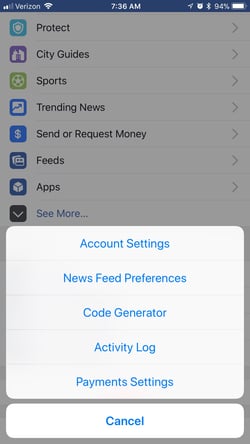
Again, when I tried to access my own account and privacy settings, I didn’t see any changes. Here’s what mine looked like:
Additionally, the statement says, Facebook has “cleaned up outdated settings so it’s clear what information can and can’t be shared with apps.”
2. “New Privacy Shortcuts Menu”
There’s been a “privacy shortcuts” menu on the Facebook mobile app for a while now, but according to the statement, users can expect major changes.
Here’s what they look like now, on my app:
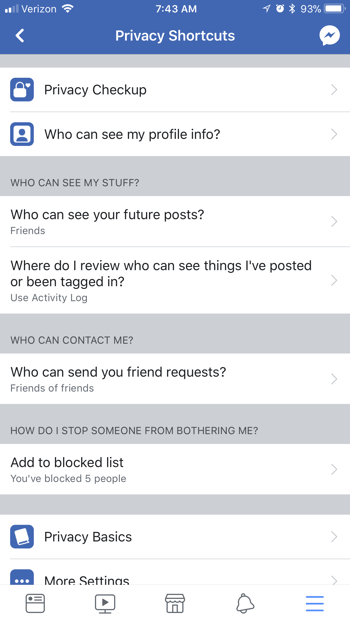
With the updates, however, these shortcuts should be “clearer, more visual, and easy-to-find.” They’ll include capabilities like adding such protections as two-factor authentication for more secure logins — that’s the message you receive when you log in from a new device and have to confirm if it’s actually you.
The shortcuts will also include personal information controls that allow users to review what they’ve shared, and delete it if they want to — including posts shared or reacted to, friend requests sent, and Facebook search history.
The privacy shortcuts will also include ad controls, allowing users to manage the data used by Facebook to determine which ads to show you. However, in the announcement, users are directed to the platform’s ad preferences for an explanation of how ads work.
Finally, the new privacy shortcuts will include user management of who sees their Facebook posts and profile.
These features and controls are not entirely new, but the gist of the statement is that they should now be easier for users to access and change.
3. “Tools to Find, Download and Delete Your Facebook Data”
Facebook’s new privacy tools will also introduce something called “Access Your Information,” which Egan and Beringer describe as “a secure way for people to access and manage their information” — things like their posts, search history, and the various other treasures that can be found in your data file.
Access Your Information will also allow users to delete anything from their timelines and profiles that they no longer want on Facebook — with, we can only assume and hope, with greater ease.
It’ll also be easier to download said data file, according to the announcement — with the option to “move it to another service,” which could be faced with trepidation by many users, given the current scrutiny around personal data ending up in the hands of others. Again, here’s some of what that data file includes, and what happened when I downloaded mine.
Looking ahead, Facebook has a great deal of ground to cover in terms of re-earning user trust, especially when considering recent data from a Reuters/Ipsos poll indicating that it falls short when compared to some of its Big Tech counterparts.
The thesis of Facebook’s communication in the days following these data misuse allegations is that it’s open to change and transparency — even if that means losing revenue and having to bow to the regulation it’s seemingly worked to avoid.
Mark Zuckerberg is reported to be testifying before Congress — specifically, the House Energy and Commerce, which Politico expects to take place as soon as April 12 — and the company postponed plans to debut a suite of hardware products at its F8 developer conference in May (though it does say it still plans to eventually release them).
I’ll be monitoring the situation as it continues to unfold. Questions? Feel free to weigh in on Twitter.
Featured image credit: Facebook

Best Buy’s 24-hr. Flash Sale is loaded w/ Apple deals: MacBook Air $650, Apple Watch S3 $299, much more

Best Buy has a surprise to start your Wednesday morning. It just launched a new 24-hour sale, which is arguably one of the best that we’ve ever seen from them. Not only will you find all-time lows on MacBooks, but we’re also seeing a rare Apple Watch discount along with deals on TVs, smart home gear and much more. Free shipping is available on orders of $35+ or you can opt for in-store pickup on just about anything. We’ve rounded up our favorite Apple deals below…
Zuckerberg plans to testify to Congress as Facebook makes it easier to see data held on users

Facebook CEO Mark Zuckerberg reportedly plans to accept an invitation to testify before Congress on the user data privacy controversy. The Senate Judiciary Committee yesterday demanded that the chief exec appear before them, and the House Energy and Commerce Committee also expects Zuckerberg to testify.
Lawmakers want to know how the social network seemingly permitted data from around 50 million users to be used to influence the US presidential election …
Meeting tomorrow aims to combine 59 iPhone throttling lawsuits into one class action case

The interval between Apple being accused of wrong-doing and the first lawsuit is never very long, but the revelation that the company was deliberately slowing older iPhones appears to have resulted in a record number of cases.
Last time we counted, there were 30 separate cases, and that number has now almost doubled. However, a meeting tomorrow aims to combine all the US cases into a single class action lawsuit …
Unriddled: New Data on Trust in Facebook, Product Announcements from Apple, and More Tech News You Need
Welcome one, welcome all to Wednesday — the day that marks not just the week’s halfway point, but another edition of “Unriddled”: the HubSpot Marketing Blog’s mid-week digest of the tech news you need to know.
This week, we continue to wade through the very crowded pool of tech news items to help you decrypt what’s happening in this vast, often complex sector.
It’s our Wednesday tech news roundup, and we’re breaking it down.
Unriddled: The Tech News You Need
1. A New Poll Shows Americans Trust Facebook Less Than Its Big Tech Counterparts
In the midst of ongoing backlash from the alleged misuse of personal user data, Facebook is earning less trust from Americans than other key players in the Big Tech space, according to a recent Reuters/Ipsos poll.
When asked how much they trust a selection of tech companies to obey data privacy protection laws, 41% of Americans say they trust Facebook, while 51% do not.
Out of the same set of respondents, 66% say they trust Amazon to obey data privacy protection laws, while 62% trust Google. The audience was also asked the same question about Microsoft (60% trust), Apple (53%), and Yahoo (48%).
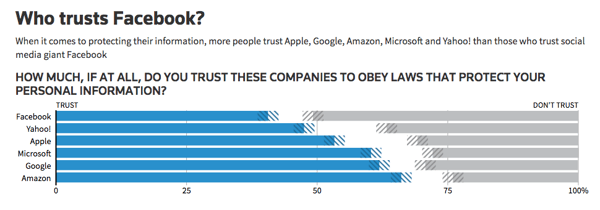
Source: Reuters
The poll results, which were released on Sunday, came shortly before the Federal Trade Commission (FTC) confirmed it will be conducting a non-public investigation into Facebook’s privacy practices. It’s not the social network’s first run-in with this particular federal agency — in 2011, it also had to settle FTC charges after failing to make good on several promises regarding user privacy.
2. Facebook, Meanwhile, Continues to Make News Feed Changes: This Time, With Local News
Facebook announced yesterday it would continue to prioritize local news in users’ News Feeds: a change that was first announced in January, while being tested in six U.S. cities.
Now, according to yesterday’s announcement, the change will be rolling out “in all countries, in all languages.”
The statement, written by Facebook’s Head of News Product Alex Hardiman and Head of News Partnerships Campbell Brown, notes these changes to the News Feed algorithm will allow users to see more news “from local sources covering their current city and other cities they may care about.”
According to the initial January pilot, a “local” news source is defined by the number of clicks its links receive by users in a certain geographic area. That means, for a user in a given region, stories from these sources are more likely to appear higher in the News Feed if you follow their Pages, or your friends share content from them.
But with this update, the scope of “local” is a bit more flexible — and now, “we’ll consider a publisher as local to multiple cities if the people in those cities are more likely than the people outside of those cities to read articles from the publisher’s domain,” write Hardiman and Brown.
These changes appear to be part of Facebook’s ongoing efforts to emphasize personal-network-focused content in the News Feed. That overarching change to the algorithm was also first announced in January, following initial revelations the network had been weaponized to spread misinformation and divisive content to influence the 2016 U.S. presidential election.
3. Uber Is Exiting Southeast Asia
In an email to the company’s Southwest Asia staff, Uber CEO Dara Khosrowshahi confirmed that the ride-hailing app would be exiting that region, and selling its shares to its largest competitor there: Grab.
Grab, which describes itself as “O2O mobile platform” (online-to-offline), currently operates across six countries in the region, including Singapore and Thailand. For Uber, this is not the first major international market exit of this nature — in China, one of its largest geographical competitors, Didi, acquired Uber’s business in that country in 2016. And in Europe, Uber merged with Russian competitor Yandex.Taxi last July, ceasing its operations there.
“One of the potential dangers of our global strategy is that we take on too many battles across too many fronts and with too many competitors,” wrote Khosrowshahi. “This transaction now puts us in a position to compete with real focus and weight in the core markets where we operate.”
Partnering with #grab to create the market leader and bet on @AnthonyPY_Tan and team. Huge thanks to teamUber to get us here and good result for our shareholders and partners. https://t.co/c1ANSp9qjH
— dara khosrowshahi (@dkhos)
March 26, 2018
To some, those “core markets” are the U.S. and Europe, where SoftBank — Uber’s largest shareholder following a $9.3 billion investment in January — has verbally stressed it wants the company to focus its efforts.
The deal with Grab will leave Uber with a 27.5% stake in what Khosrowshahi called “the combined company,” where roughly 500 Uber employees will be working once the transition is complete.
The news comes on the heels of a fatal incident involving one of Uber’s self-driving cars in Arizona last week, which has led to the suspension of autonomous vehicle testing by several manufacturers — including, according to Recode‘s Johana Bhuiyan, Toyota and Nvidia.
4. Twitter Has Officially Banned Cryptocurrency Ads
Following rumors it might join its counterparts at Facebook and Google, Twitter has officially banned ads pertaining to cryptocurrency.
According to Reuters, the new policies will prohibit ads pertaining to both cryptocurrency sales, as well as initial coin offerings (ICO). The rules are said to have rolled out yesterday — and the following appears on Twitter’s Restricted Content Policies for financial services:
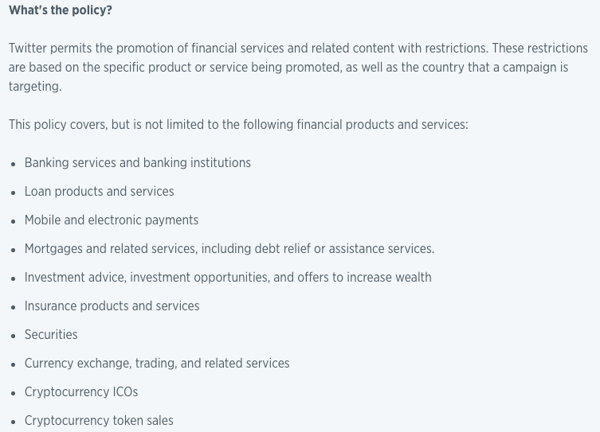
The announcement comes among suspicions that Twitter, as well as Facebook and Google, might be facing government regulation that it has seemingly sought to avoid. Following recent allegations that personal Facebook user data was misused by bad actors, the CEOs of all three companies have been invited to testify before the U.S. Senate Judiciary Committee (Zuckerberg has been asked to appear before two additional congressional committees, as well, and there are reports he has agreed), raising questions about the potential of a federal gatekeeping role in the area of user privacy.
It’s also worth noting that the General Data Privacy Regulation (GDPR) comes into force this May, which concerns the personal data of EU citizens — leaving many wondering if a U.S. version might be on the horizon.
5. Apple Unveiled An “Affordable” iPad for Students
At a press event in Chicago yesterday, Apple announced it would be selling a new 9.7-inch iPad at a lower price point with a certain audience in mind: students. The product unveil came ahead of the company’s June World Wide Developers Conference.
In keeping with the theme of education — the event was held at Chicago’s Lane Tech high school — Apple also announced the iPad will be available for $299 for students and schools, compared to $329 for other consumers. It’s also designed to work with Apple Pencil: a digital wand that allows users to draw and write on the device screens as they might with a pen.
Before this announcement, the Apple Pencil was only supported by the (pricier) iPad Pro, and wasn’t included. Instead, it had to be purchased separately for $99.
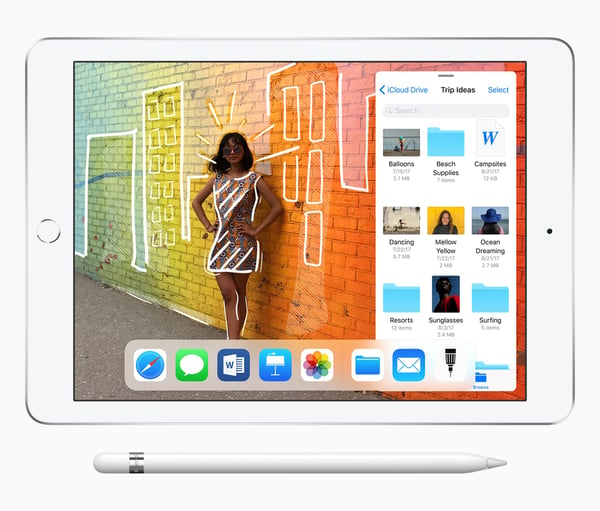
Source: Apple
With this newest product release, the Apple Pencil still has to be purchased separately, but it’s available at a lower price point for students and schools at $89 (the price point for other consumers is $99). That makes the total combined product cost just shy of $400, or more if users also choose to purchase a keyboard.
Compare that to the very first Chromebook tablet, which was unveiled the day before Apple’s event, and is also priced at $329 — and according to Google’s official announcement, it comes with a stylus — a similar digital pen — inside the package.
It’s also being positioned as a product particularly fitting for the education sector, with the benefits to students outlined in the product launch announcement, including the tablet’s augmented reality (AR) capabilities that will allow students to simulate such experiences as looking “into the eye of a miniature Category 5 hurricane or … a strand of DNA.”

Source: Google
Promotion around Apple’s new iPad also emphasizes its “immersive AR experiences” that allow students to simulate activities like dissections.
What Else Is Going Down in Tech Town?
No Smart Speaker from Facebook … For Now
Facebook has reportedly shelved its plans to unveil an AI-powered smart speaker at its May 2018 F8 developer conference. The plans, and their undefined postponement, come among the growing scrutiny and backlash from the alleged misuse of Facebook personal user data by third-party bad actors. Read full story >>
Facebook Knows a Lot About Me
What, exactly, does Cambridge Analytica know about me — and what does it mean for Facebook and its users? To find out, I downloaded my Facebook data, and it got very weird, very quickly. Here’s what it contains, and what it all means. Read full story >>
It Looks Like Zuckerberg Will Testify
Yesterday, unconfirmed reports Mark Zuckerberg will testify before Congress were swirling, aligning closely with the announcement he will not agree to requests to do so from Damian Collins, the U.K. Parliament’s media committee chair (Facebook says Chief Technology Officer, Mike Schroepfer, or Chief Product Officer, Chris Cox would appear instead). Zuckerberg has been invited to appear by three congressional committees, but it is not yet clear which he will answer to. Read full story >>
Changes From Instagram
Since Instagram changed its algorithm to stray from chronological order in 2016, some users have been displeased. Last week, the app announced that could change, with the possible introduction of a “New Posts” feature and more. The announcement came among rumors the app would be emulating more Snapchat-like features, including code scanning. Read full story >>
Why Are We So Infatuated With Bots?
Bots are not a new concept. But, as they permeate pop culture, customer service, and more, our obsession with them grows. So, why are we so intrigued by them? Read full story >>
That’s all for today. Until next week, feel free to weigh in on Twitter to ask us your tech news questions, or to let us know what kind of events and topics you’d like us to cover.

7 of the Best Free Apps for Startups to Kickstart Growth
Chances are, at this very moment, you have more then one application open on your computer or phone.
The question today is not if you should use tools, but which ones should you be using. There’s no shortage of options. With over 5,300 marketing tools alone, how does someone choose the best solution? In the age of convenience, a long list of tools can feel more like an inconvenience than an advantage. Before investing time in yet another new application, businesses want to understand what their competitors are using and what’s relevant to a company of their size and industry.
Perhaps most importantly, how does the proposed application compliment and integrate with my other tried-and-true tools? Ignoring that question is costly with 82% of marketers and salespeople losing up to an hour a day managing siloed tools.
Startups in particular are short on time, money, and resources, which makes the question of connectivity a vital one. The right integration should give employees time back in their day to focus on what’s important — doing their job.
At HubSpot, we have thousands of startup customers that integrate tools into HubSpot to help their company grow. We looked at the most commonly used free integrations leveraged by our startup customers, and compiled a list of the most popular free tools in use.
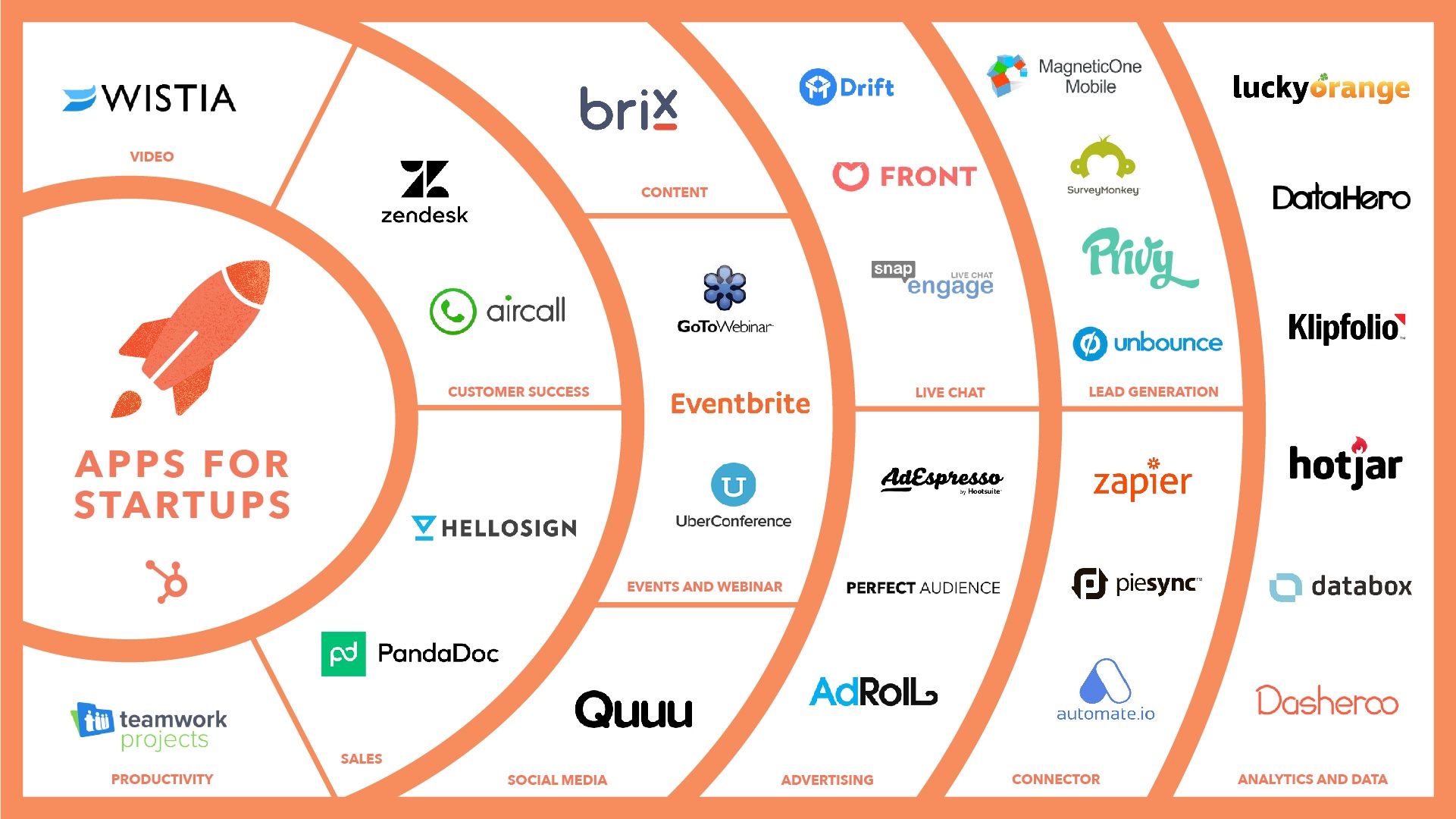
7 Free Apps for Startups to Help Kickstart Growth
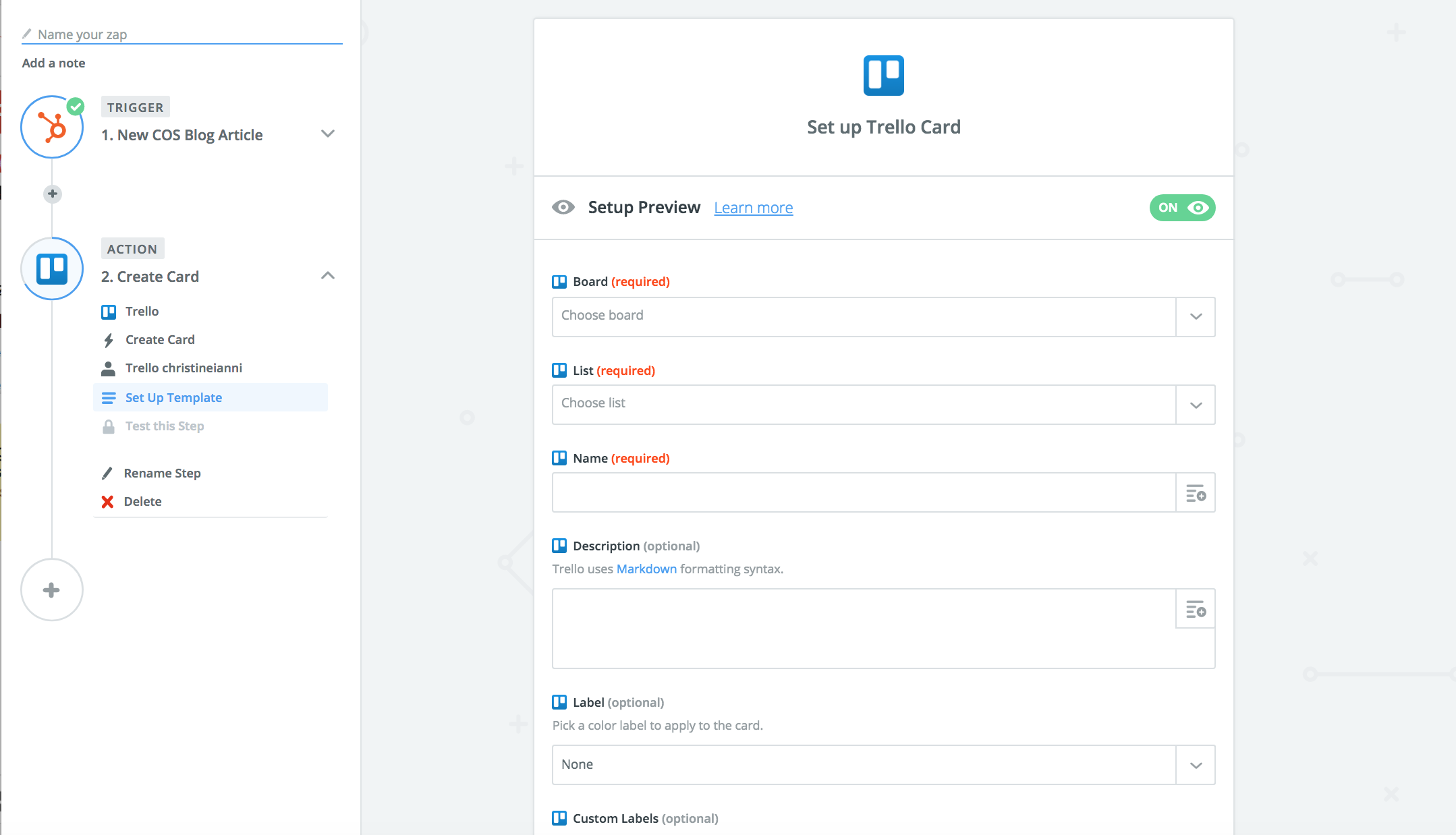
1) Automate Your Workflow with Zapier.
Zapier allows you to automate your workflow by connecting all your favorite apps. With over a thousand tools to choose from plus customizable triggers and actions, it’s easy to automate manual processes in your daily work.
How you could use it: Keep all the your contacts and leads in one system by setting up “Zaps” to automatically sync contacts to keep your email lists up-to-date.
“Zapier enables us to distribute HubSpot data seamlessly between all of our systems and build in-house processes that just were not possible for us before. It’s amazing how much company time and money you can save with something that just takes a couple of minutes to build.” – Stefan Milev, CMO, Taylor & Hart
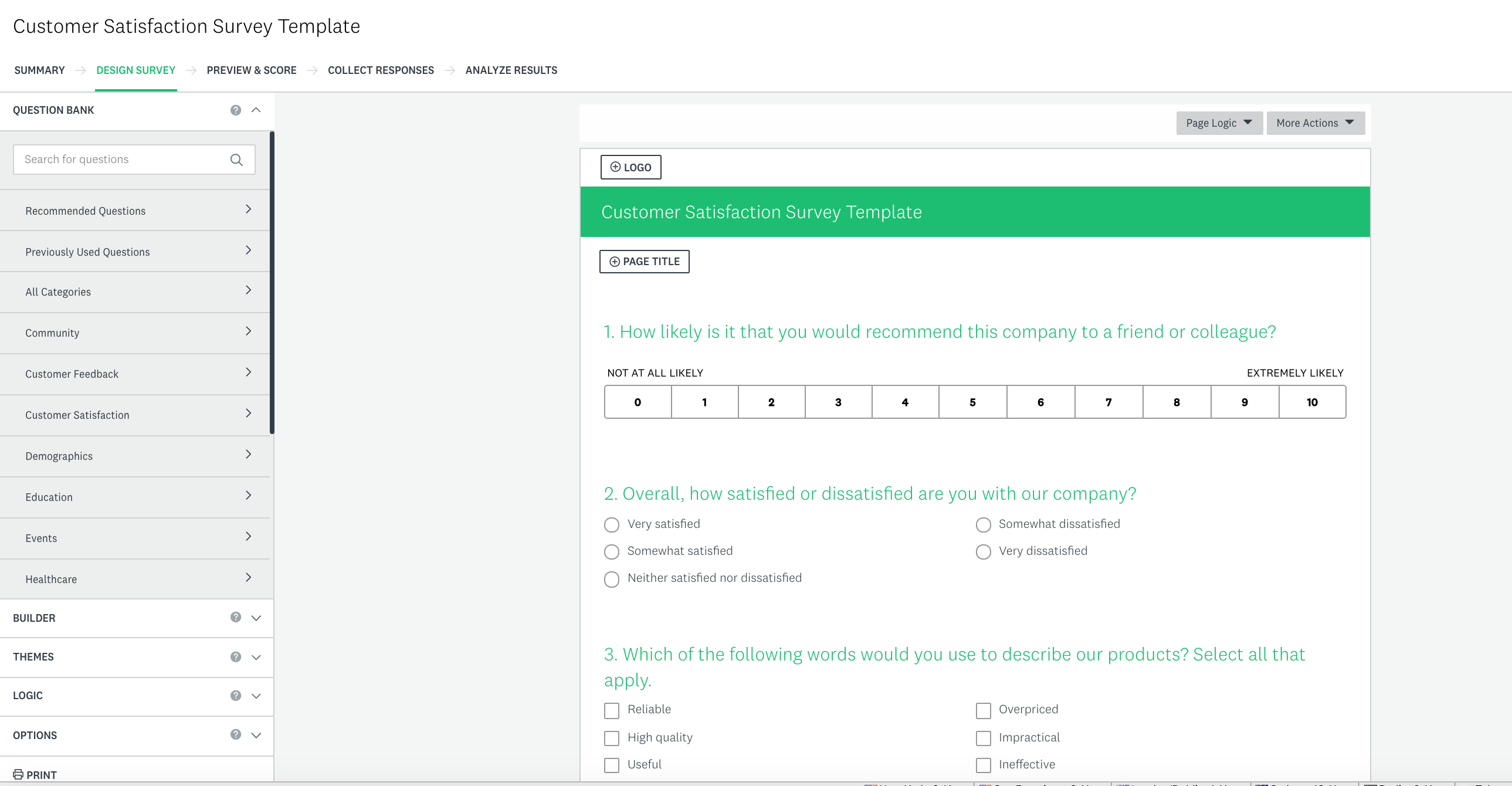
2) Survey Customers with Surveymonkey
Create and send surveys to gauge customer sentiment and action responses at scale. Don’t know where to start? Leverage popular survey templates with survey scientist approved questions.
How you could use it: Create a survey to understand customer satisfaction by leveraging a template for Net Promoter Score or a Customer Satisfaction Survey. Action auto-synced survey responses in HubSpot by setting up a workflow to evangelize promoters and re-engage or follow up with detractors.
“We use SurveyMonkey to send automated client satisfaction surveys. Each response is tied to the client’s contact record in HubSpot, making it extremely easy to track, analyze, and trigger different marketing workflows depending on the survey results.” Ricardo Garcia-Amaya,Co-founder & CEO at VOIQ
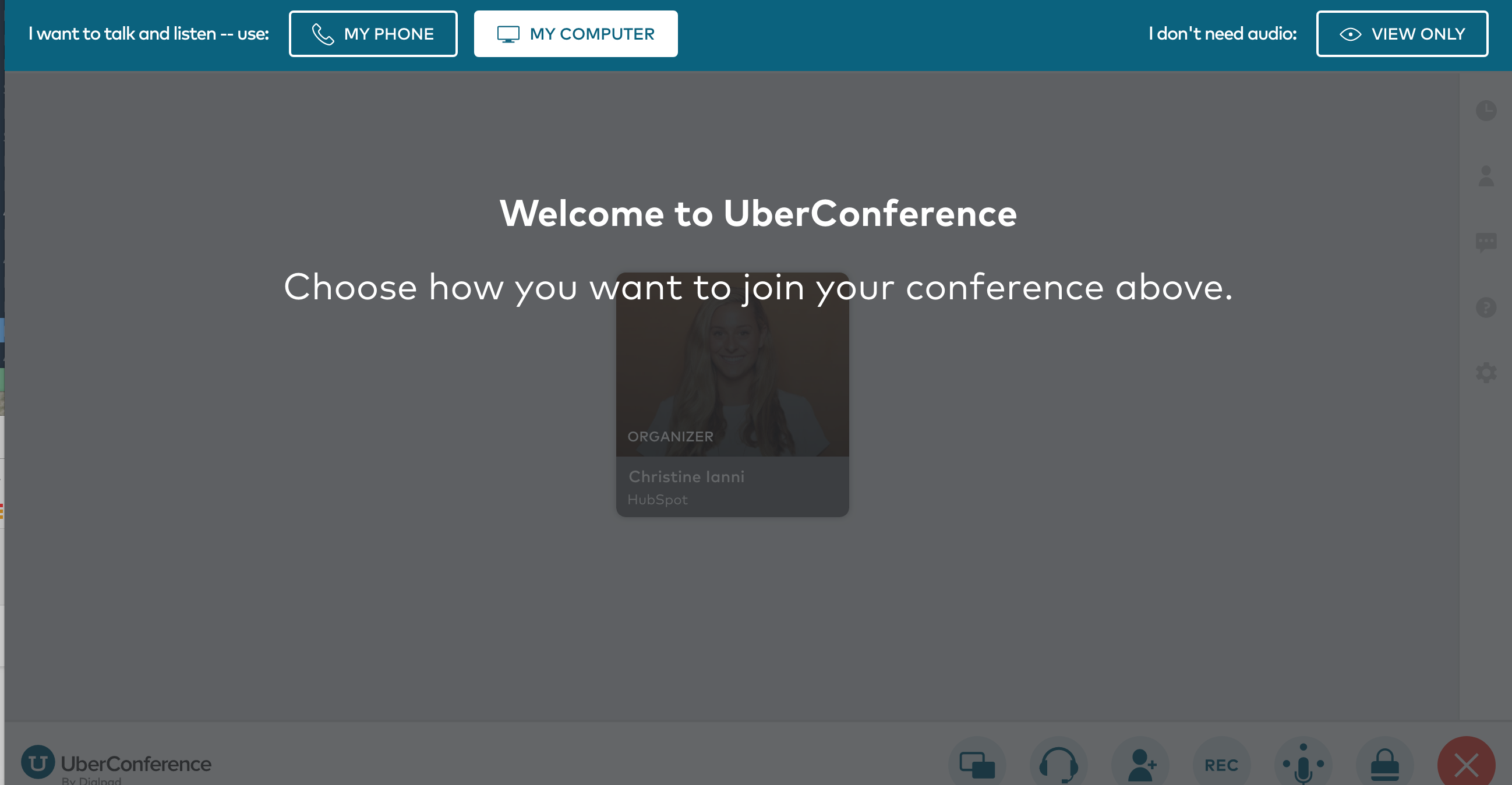
3) Hold virtual meetings with UberConference.
Schedule virtual meetings to speak directly with prospects or customers right from within HubSpot. Keep record of past conversations with notes on the contact timeline.
How you could use it: Save time by scheduling an afternoon of prospect meetings in advance and get reminders to your phone or email before your call. No need to look up call information ahead of each call as it’s sent straight to your phone or email, so you can dial in at your convenience.
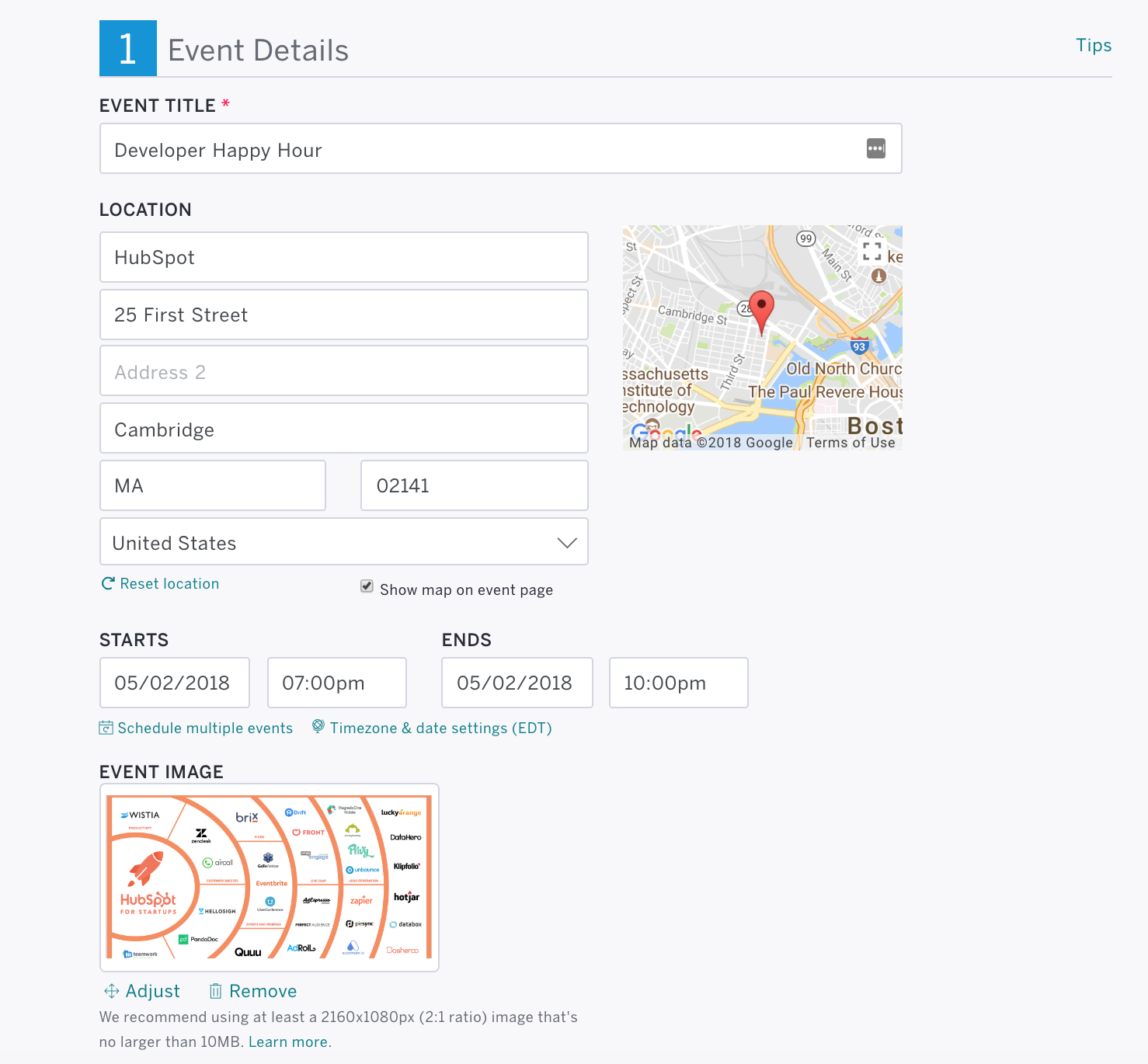
4) Manage events with Eventbrite.
Create, manage, and market free events. Bonus: use Eventbrite to search for events in your industry for inspiration.
How you could use it: Set up a regional prospect event. See how your contacts have engaged with your company in the past, and use it to make an impact in person. After the event, create lists and workflows based on information synced from Eventbrite to re-engage no shows and turn attendees into customers.
“The integration with Eventbrite is smooth and simple, and great for follow-up and lead nurturing after events. I can highly recommend it.” – Chris Schack Noesgarrd, CCO at Adapto Technologies
5) See How Visitors Interact with Your Site with Hotjar.
Understand how visitors interact with your site without having them fill out a form or get on a call. Leverage heat maps and visitor recordings to see what people do and care about on your site — and where you need to improve.
How you can use it: Understand visitor behavior on your most important site pages to improve important conversion points. See how your site performs and use engagement data to help with your site structure.
“We love how easy it is with HotJar to visualize the data with their site heat map and overlay. As they say, a picture is worth a thousand words – or in this case data points.” – Sarnen Steinbarth, Founder/CEO at TurboTenant
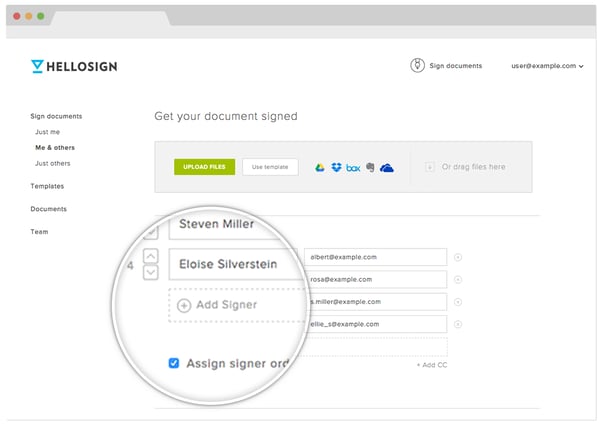
6) Deliver and Collect eSignatures with HelloSign.
Easily create and manage contracts from one place to close deals faster. Request signatures, autofill contact information, and track status. View signature status and last view to know when to follow up with leads.
How you can use it: Sign, sync, and deliver contract with an average turnaround time of 44 minutes. Manage all of your contracts easily from one place. Sort documents by signature status or last view in order to time reach-out.
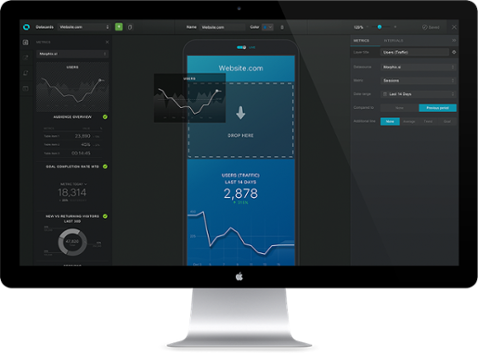
7) Track progress and share reports with Databox.
Access all of your business key performance indicators on one shareable dashboard automatically delivered to any device. Eliminate the collection process of compiling reports and formatting charts from multiple systems and data sources by creating an all-in-one dashboard. Leverage one of Databox’s 100 reporting templates to deliver meaningful insights to your team.
How you could use it: Get a daily scorecard on how your business is performing with topline metrics delivered in a beautifully customized report to your mobile, desktop, TV display, Apple Watch or Slack channels. Schedule weekly reports for your team for a quick health-check on their key performance indicators.
Want to kickstart growth? Arm yourself with the right tools. Start by adding these 7 apps for startups to your repertoire — it might be the difference from moving from a startup to a scaleup.
What are your go-to tools?

Facebook Won’t Unveil a Smart Speaker This Spring
Facebook has reportedly suspended its plans to debut a new smart speaker at its annual F8 developer conference in May. The decision comes amidst ongoing scrutiny and backlash from the alleged misuse of its users’ personal data by analytics firm Cambridge Analytica.
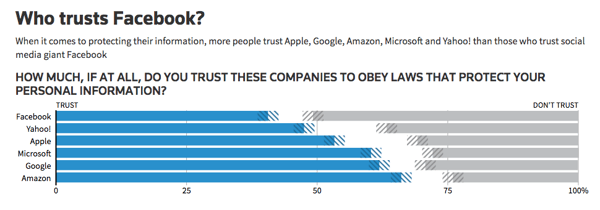
The postponement, first reported by Bloomberg, comes at a time when user trust in Facebook is comparatively low next to trust in some of its Big Tech counterparts like Google and Amazon. Have a look at this poll data from Reuters:
Source: Reuters
Given that the public, as well as lawmakers, is already questioning the extent of how personal data is shared and used by Facebook, it almost seems like an obvious decision to hold off on plans to unveil smart home devices.
Such devices are said to always be “listening” to its users — take, for example, the fact that they must be prompted by verbal cues (e.g., “Alexa” or “okay, Google”), indicating that they must always be monitoring for audible cues. The Amazon Echo, for instance, recently made headlines for misinterpreting these cues with creepy, unprompted laughing.
Facebook’s plans to build these devices was also first reported by Bloomberg last August, when the social media company’s CEO Mark Zuckerberg announced an intent to launch hardware products for video chat from its Building 8 program, like a large screen and a smart camera. A major purpose of these products, it was said, was to “help farflung people feel like they’re in the same room.”
Those plans also included the smart home speaker in question, which would be equipped with Facebook’s own version of a voice assistant.
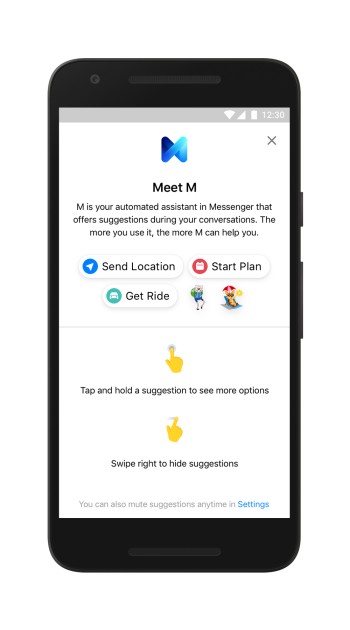
The branding around that assistant would be clear, though its Messenger platform previously used something called M: an AI assistant that picked up on verbiage cues from your conversations to figure out what you might need, like ordering food or sending someone a sticker related to such sentiments as “good morning.” Facebook discontinued M earlier this year.
Source: Facebook
According to the Bloomberg report, Facebook does still plan to launch products later this year. Originally, the new hardware was expected to ship in the fall, but now the target launch date is unclear.
Facebook does hold an annual event in the fall: Oculus Connect. However, that gathering is traditionally focused almost wholly on virtual reality.
It raises questions about what will be discussed at this year’s F8 conference, where many expect Zuckerberg and other Facebook executives to speak to the role of user privacy in the company’s future plans.
Facebook is also not the only one with plans to release new voice assistant technology this year. Rumors have been circulating about Spotify’s development of a smart speaker, and Samsung is also said to be releasing such a device this year powered by its own voice assistant, Bixby.
I spy @Spotify laying the foundation for a smart speaker… pic.twitter.com/n1slxIFUNA
— Hunter Owens (@owens)
March 14, 2018
In the weeks leading up to F8, scheduled to take place May 1-2, I’ll be keeping an eye on this story. Questions? Feel free to weigh in on Twitter.

How to Add a Link to Your Instagram Bio
Every social network makes it clear how to put a link in your bio on their platform — except Instagram.
Twitter lets you tag other handles in your bio. LinkedIn gives you the ability to link yourself to your employer’s official page. Facebook allows you to tag a number of different businesses, interest pages, and people in your “About” section, so you can let friends know who you work for, what brands you like, your alma mater, your relationship status, and so on.
What about Instagram?
Until recently, Instagram didn’t give you a ton of space to brand your profile with hashtags and profile handles — you could only link to their respective pages in photo captions.
Websites were the only types of links you could put in your bio (hence the common phrase “link in bio” by Instagram users who were promoting something).
But Instagram recently gifted us two new features: linkable profiles and hashtags, right in your bio. You can now add them alongside the link to your website.
How to Add a Link to Your Instagram Bio
- Open your Instagram mobile app.
- Visit your profile by tapping the person icon on the bottom right.
- Tap “Edit Profile” at the top of the screen.
- Write a custom description in 150 characters or less.
- Add a brief link to your website in the form of yourdomain.com.
- Add links to other profiles by tapping “@” followed by the profile’s handle.
- Add hashtags by tapping “#” followed by the hashtag you associate with.
- Tap “Done” to save your bio.
Note: The instructions above apply to the latest version of Instagram — 37.0 on iOS. You can also edit your bio on Instagram’s website by navigating to your profile and clicking “Edit Profile” next to your name.
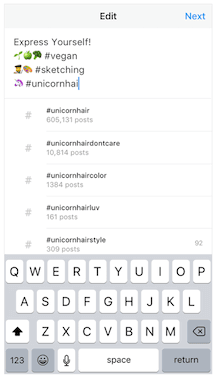
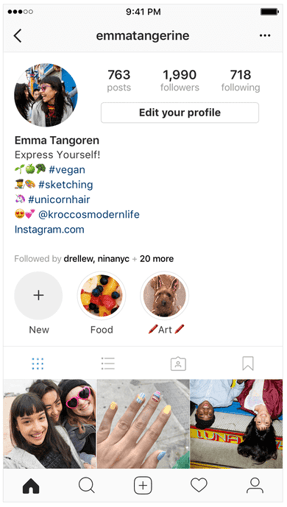
On the screen to the left, below, you can see how Instagram suggests popular hashtags as you edit the bio text field, just like it would when you add a hashtag to a picture’s caption. On the screen to the right, you’ll see the profile of a person who uses hashtags, profile links, and websites in her bio.
 Images via Newsweek
Things have changed at Instagram as of late, and you now have options to link to other pages you identify with right beneath your Instagram profile picture. But keep in mind that users who don’t want their profile tagged in others’ bios can opt to untag themselves.
It’s best to reserve this space for the accounts you know would agree with the association you’re making.

How to Set Up an Alexa Flash Briefing: A Guide for Marketers
Want a new way to deliver content to customers and prospects? Wondering how Amazon’s Echo or Echo Dot can help? In this article, you’ll discover how to set up an Amazon Alexa flash briefing to regularly deliver product updates, event information, and expert tips to an engaged audience. What Is a Flash Briefing? The Amazon […]
This post How to Set Up an Alexa Flash Briefing: A Guide for Marketers first appeared on Social Media Examiner.
from https://ift.tt/2GealpX
via socialmediaexaminer
Here’s what a PRODUCT(RED) iPhone X could look like [Video]

Several reports over the past few weeks have indicated that Apple has another color option for the iPhone X planned. Now, designer Martin Hajek has created mockups imagining what a PRODUCT(RED) iPhone X could look like…
How to use the new drawing & Smart Annotation features in Pages on iPad [Video]

The iWork suite, including Pages, received a substantial update today as a part of Apple’s iPad education event in Chicago. The biggest feature included in the new update is Apple Pencil support for annotating text and objects and for drawing within a document.
In this hands-on video walkthrough, we step through how to use both drawing and Smart Annotations in Pages. Even if you don’t have an Apple Pencil, Smart Annotations and drawing support enhances the overall usefulness of the entire iWork suite. more…
Tim Cook stops by Apple’s flagship Michigan Ave retail store in Chicago following education event

Following Apple’s education event this morning, Apple CEO Tim Cook made his way to Apple’s new flagship Michigan Avenue retail store to mingle with employees and customers…
Here’s everything Apple announced at its education event today

Apple today held its “field trip” education event in Chicago, unveiling a new iPad with Apple Pencil support, a slew of software features, and much more. While the event wasn’t as jam-packed as usual Apple showcases, there were a few things that may have easily slipped under the radar.
Head below for our full roundup of everything Apple announced today….
Twitterrific on iOS & macOS adds support for attaching video, new muting & muffling features

In the realm of Twitter clients for Mac, users are turning to third-party clients in light of Twitter for Mac’s shuttering. Today, Twitterrific for both macOS and iOS has been updated with some handy new features.
Apple’s education page previews ‘one simplified login experience’ coming this winter

In addition to the slew of new education features highlighted this morning, Apple seems to be preparing a new simplified login experience for education users, as first noted by David Colville.
Best Apple-friendly deals from eBay’s one-day 15% off sitewide sale

Earlier today, eBay launched a one-day sale that takes 15% off sitewide through 11PM EST tonight. While there is plenty to sort through here, we wanted to briefly highlight the best Apple-friendly deals we’ve found over at 9to5Toys. This coupon code is limited to one use per customer. You can find additional details here. Our top picks are below.
Some users having issues connecting to the iTunes and App Store

It looks like today’s software releases are taking a toll on the App Store servers. We’re seeing several reports of users having trouble making purchases, downloading apps or just browsing the App Store or iTunes Store. I myself have been seeing “Cannot connect to the iTunes Store” errors and failures to download apps and updates.
more…
Google acquires GIF platform, keyboard Tenor to improve image search, Gboard, & more

Google Images has seen a spate of updates in recent weeks, with the latest now being an acqusition of Tenor to improve its GIF capabilities. With keyboard apps for several platforms, Tenor is also notable for being a GIF platform that powers the likes of Gboard and Facebook.