
Welcome to My Blog
Comment: The upcoming ‘ePad’ could be the rebirth of Apple’s eMac strategy for education

Tomorrow’s education event is strongly rumored to include the announcement of a new iPad aimed at the education market.
There have been two main strands to the speculation about that iPad. First, that it would be offered at an even lower price than the $329 model launched almost exactly a year ago …
10 Universal Writing Rules from The Onion’s Founding Editor
“If you want to create a great piece of writing, you have to be in total control of the reader’s experience,” said Scott Dikkers, The Onion’s founding editor and longest-serving editor-in-chief.
Dikkers held the position from 1988 to 1999, then from 2005 to 2008, and again from 2011 to 2013. He’s also a screenwriter and a #1 New York Times best selling author with more than twenty books to his name.
During his tenure, The Onion evolved from a local print magazine in Madison, Wisconsin, into a satirical juggernaut. Today, it’s a globally renowned media house with nearly 20 million social followers and over 10 million monthly visitors.
We were speaking over the phone. I was interviewing Scott to better understand his approach to writing, the process he uses to engage and connect with readers.
“The reader is a puppet and the writer is pulling the strings,” said Dikkers.
“The writer’s job is to manipulate the reader’s emotions, to push their buttons — and if you don’t know what you’re doing, you’re never going to succeed, whether you’re writing satire or anything else.”
Needless to say, if anybody knows how to write great content — content that readers can’t help but to consume, share, and come back to again and again — it’s Scott Dikkers. He grew The Onion from a seed in the dirt to a brand that commands attention around the world.
This article is about the writing principles that enabled his success.
Scott Dikkers, On Writing
The Onion is a humor publication. Its content is satire. That is, the jokes have something to say about the world, about society, politics, and people with power.
Over the years, Dikkers has punched up and published thousands of articles that have made readers laugh — and think. And like any professional editor, he’s maintained his standards by following a set of guidelines.
In his book, How to Write Funny, Scott details his process, explaining how to create hilarious writing at an elite level. And while some of his techniques are specific to crafting jokes, many are also applicable to any writing discipline.
Dikkers and other talented humorists are playing by the same engagement rules as are copywriters and content marketers.
In other words, the tenants of humor writing are transferable to lead-gen articles and columns, landing pages and emails, web pages, video scripts, and speeches.
Because every writer’s goal is identical: control the reader’s experience.
When you have control, you have leverage to deliver the message in an engaging and compelling way, a way that sells. And whether you’re selling a product or a service, a belief system or a joke, following these writing principles will help you reliably hook, engage, and compel readers.
Ready for a master class? Let’s dive in …
1. Concept is king.
“What’s going to make your content stand out?”
For a long time, The Onion was a physical weekly newspaper distributed for free on the street. So, in the early days — before anyone cared enough about the brand to seek it out — the success of every issue hinged on the strength of its headline.
“I knew we had to grab people’s attention with the concept, the headline,” said Dikkers. “I knew we had to put the joke first so that people were laughing before they even picked up the paper.”
Decades later, the internet has only reinforced this principle.
“We live in an attention economy where there are billions of online articles to read,” said Dikkers. “But when the headline really speaks to you — when it addresses a personal problem or promises to answer a burning question — you’re going to click it. You’re going to read that article.
“Your concept — and I would equate that with your headline or title — is the flag you’re raising, it’s the shingle on your door. And if it’s not a good concept or the right concept, then you’re sunk before you’ve even written a word.”
How do you know what the “right” concept is? Start with your target audience:
What pleasures are they seeking?
What pains are they trying to assuage?
2. The key to quality is quantity.
“Basically, 95% of everything we create is garbage.”
When The Onion grew to about six or seven staff writers, each one was expected to bring 20 headlines to a weekly brainstorming meeting.
“We quickly realized that the quality of our ideas increased with the number of ideas people brought in,” said Dikkers. “When you have six high-performing comedy writers coming up with 20 ideas each, you’re gonna walk away with a dozen headlines that are just solid, I mean really funny — and that practice is still in use at The Onion.”
Today’s team examines several hundred headlines every week, picking only a dozen or so for publication. Late-night talk shows follow the same strategy: selecting their best monologue jokes from a place of abundance.
“This is how professionals work,” said Dikkers, “because they understand that most of what they write is dreck.”
3. Omit needless words.
“The shorter the better.”
Superfluous words take up space, slow down the reader, and dilute the message.
“Any time I edit a joke, I look for ways to reduce,” said Dikkers. “Cutting even a single syllable can make the joke punchier, better.
“But this applies to all kinds of writing because when you trim the fat, you get to the core of your message. And sometimes, after you’ve cut everything, you could realize that you weren’t really saying anything at all — and while that realization might be sad, it’s also very valuable.
“Because if you don’t have a message, why are you writing in the first place?”
4. Ruffle some feathers.
“This is how your message will stand the test of time.”
Satire is divided into a couple categories, which are based on two ancient Roman satirists: Juvenal and Horace.
Horatian satire, generally, is not offensive. It’s acceptable to all strata of society because it’s relatively gentle and light-hearted, designed to amuse people and get a laugh. It’s foolish and innocent and superficial, like a court jester.
Juvenalian satire, on the other hand, pushes buttons. It addresses perceived social evils, poking holes in the status quo. It defends the marginalized and speaks truth to power. It’s bitter and dangerous and important, like 1984.
“Thing is, Horatian satire isn’t really remembered because it’s toothless,” said Dikkers. “It might get a lot of laughs today but it’s not going to live in our cultural memory. Only satire that angers or offends people will be remembered.”
What is your content’s message? What’s your goal?
5. Don’t fall in love.
“Kill your darlings.”
If you get so attached to an idea (e.g., a headline; a turn of phrase) that you’re unwilling to 1) hear feedback on it and 2) move onto something new, then you’re “in love.”
This happens a lot, especially to new writers with a small body of work. After all, the less work you have to your name, the more weight each new idea holds.
“When a writer has just one idea, it causes their soul to feel crushed when someone critiques that idea in a way that makes them doubt it,” said Dikkers. “They link that idea with their personality and, in turn, take any feedback as a personal slight against them.”
Avoid falling in love with any one idea. It’s unproductive, a distraction that’ll keep you from giving the audience what they want or need.
Serve your readers, not yourself.
6. Be specific.
“Detail almost always makes writing better.”
Specificity doesn’t necessarily call for verbosity. Instead, it demands clarity: crisp imagery that uses one or more of the five senses to paint a mental picture.
The Catcher in the Rye, for example, is saturated with specificity:
He came over and stood right in my light. “Hey,” I said. “I’ve read this sentence about twenty times since you came in.”
Notice how Salinger gives the reader incredible context — how he illustrates a clear physical and metaphysical image — using only a handful of words.
“Whether you’re writing humor or anything else, the same rule applies: use specific detail,” said Dikkers. “These little pieces of specific detail are critical because they help the author paint a picture that enables the reader to feel an emotion.”
And almost all writers should strive to conjure an emotional response, as it’ll compel people to take action: to laugh, to hit the like button, to take out their credit card and make a purchase.
7. Proofread.
“It’s a mode of conveying professionalism.”
Mistakes, even little ones, set something off in an editor’s brain — and it’s never anything good.
“When it comes to submitting — because many people get jobs in comedy by submitting a packet of jokes or sketches — you might’ve done all the hard work of learning how to write comedy and you’re perfect for the job,” explained Dikkers, “but if you don’t take the time to proofread it for grammar and spelling and syntax, there are plenty of other qualified, hilarious people who will. And they’ll get hired.
“Proofing your work is an easy way to increase your chances of achieving your goal, whether that’s connecting with readers or getting a life-changing job.”
8. Show, don’t tell.
“You’re going to be so much more effective at engaging an audience if you do.”
This concept can tie a knot in your brain because, as a writer, all you do is “tell” the reader things, right? How can you “show” people something by merely using black letters on a white page?
“It’s easy to say, ‘Bob is mean,’” said Dikkers. “That’s telling. You’re telling the reader what the character’s traits are. But if you show the character’s traits, it’s so much more engaging for the reader. So, instead, you’d say, ‘Bob just stabbed a baby through the heart!’”
Using an example, analogy, or any number of literary devices is just a better way to communicate information. It paints an image that conjures a feeling, an emotion — and that’s what readers want.
“If you want to write engaging content,” said Dikkers, “you need to take one step back, hide your message, and instead just show what you think and feel. Let the audience get there on their own.”
9. Make it accessible.
“Your writing needs to be understandable to just about every level of reader.”
If your writing is too dense, too complicated or confusing, most people won’t read it. As a writer, the onus is on you to compel people to read.
“Your work needs to reference things that people can understand without caveats or prerequisites,” said Dikkers. “It should be an easy-on ramp to the superhighway of your writing.”
Authorial intent, or the need to interpret the underlying meaning of an author’s work, has no place in the attention economy. As a 21st century writer, your priority is to ensure the audience understands you — and if they don’t, it’s your job to think, How can I make this more clear?
10. Know your joke and make sure the reader knows your joke.
“Always be in control.”
When you give a speech, you’re supposed to say what you’re going to talk about, then you talk about it, and then, at the end, you tell the audience what you talked about. In other words, be explicit. Make sure your point is unambiguous.
Of course, this principle applies to all writing.
“As a humor writer, you have to know your joke’s subtext,” said Dikkers. “You have to know what funny filters you’re using to elucidate that subtext and how you’re organizing your joke to make sure the audience is laughing at the right thing and time.
“You need to control as much of the experience as possible in order to make it all work.”
This is also true for copywriters and columnist, novelists, screenwriters, and playwrights. In fact, writers in every discipline must understand their topic, their audience, and the purpose behind their work.
Without that information, the puppeteer is pulling strings in the dark.
“Here’s the thing, Eddie,” said Scott.
I turned up the volume on my phone.
“Readers want to know they’re in the hands of a master who is going to manipulate them,” he said, “the way Spielberg does in his movies. He takes you on a ride, through the highs and lows.
“Audiences love that. Readers love that. They want to be taken for that ride.”
Want more world-class writing advice from Scott Dikkers? Click HERE to preview his book, How to Write Funny, one of the best writing manuals I’ve ever read.

Vulnerability in iOS camera QR code reader could direct users to malicious websites

A vulnerability in the QR code reader built into the iOS camera app could allow users to be directed to a malicious website without their knowledge.
As of iOS 11, you can simply point your iPhone at a QR code using the standard camera app, and it will read and act on the code. In the case of an embedded website URL, iOS shows you the link address and asks you to tap to confirm you want to visit it. But you may not be visiting the link displayed …
The Ultimate Guide to Instagram Filters
Instagram isn’t a new platform, but it changes so often, sometimes it’s hard to keep up.
You might have some questions: how can I add the new geofilters feature to my Instagram Story? Can I use my Snapchat filters on my Instagram pictures? What’s up with this new update — how do I even apply a filter anymore?
Whether you’re an Instagram pro and stuck on choosing the best filter, or an Instagram beginner and not sure how to even apply a filter, you’re in luck. Here, we’ve covered everything from the most popular filters in the U.S., to how to use Instagram filters and even how to use a Snapchat filter on Instagram. Get ready to take your Instagram images to the next level.
Most Popular Filters
There’s a reason most of us turn to our friends to ask, “Which filter should I use?”
With 25 Instagram filter options, it can be tough to choose one. A filter can change the whole mood of an image, and it can even lead to more likes and comments. So wouldn’t it be helpful to know which filters the majority of the U.S. likes best?
Luckily for you, Canva recently analyzed the filters of over one million Instagram photos to figure out which filters are most popular.
Next time you’re in decision-paralysis over an Instagram filter, take a look at this list of the top eight Instagram filters below.
What are the most popular filters on Instagram?
- Clarendon
- Gingham
- Juno
- Lark
- Mayfair
- Sierra
- Valencia
- Walden
1. Clarendon

2. Gingham

3. Juno

4. Lark

5. Mayfair

6. Sierra

7. Valencia

8. Walden

How to Use Instagram Filters?
Using Instagram filters is relatively simple. After opening the app and either taking a picture or uploading your own, tap “next” and then tap the filter you wish to apply. You can also adjust the filter’s strength by tapping the filter again. When you’re happy with your filter, click “done.”
To use Instagram filters, open the app and either take a picture or upload a picture (or video) from your camera roll.

Tap next, and then tap the filter you want to apply.

If you want to adjust the filter’s strength, tap the filter again.

Click done when you’re happy with your filter.
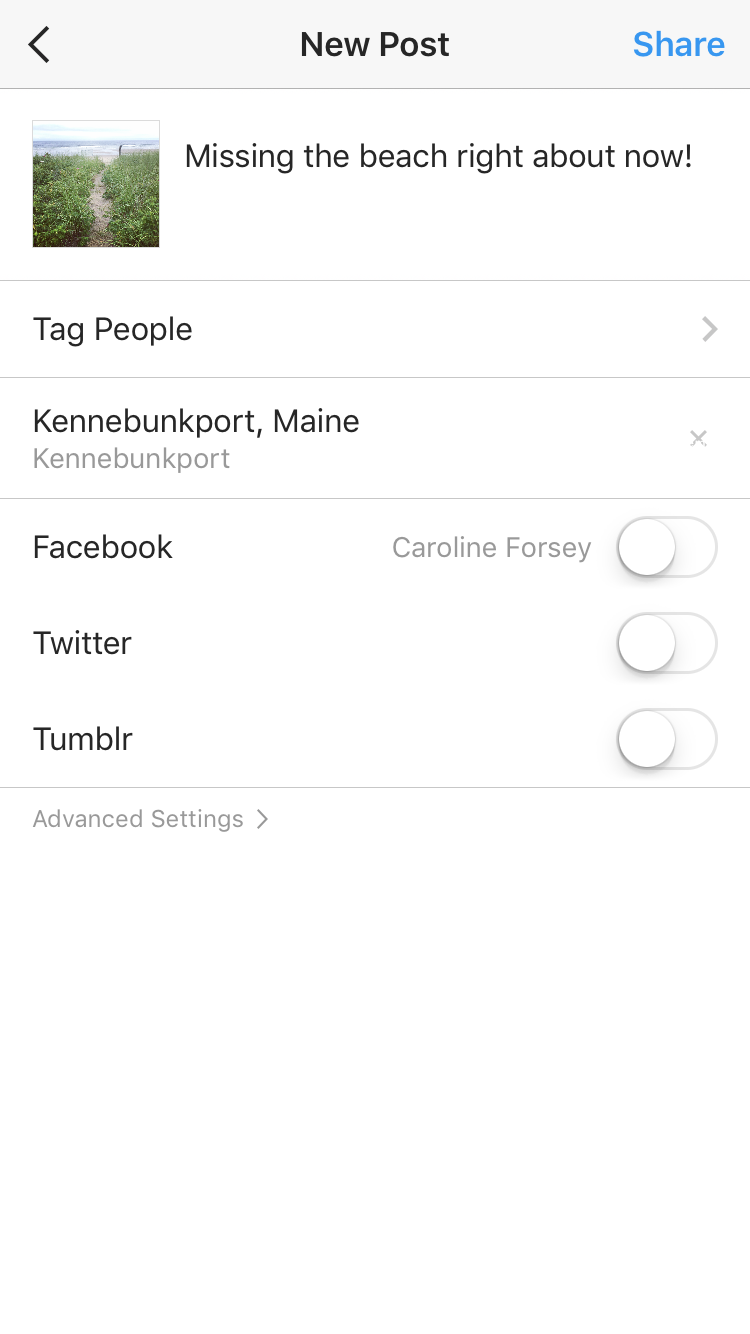 On the next page, you can add captions, tag people, or add locations. When you’re ready, click share in the top right corner.

How to Use Snapchat Filters on Instagram
But what about when you want to use a filter outside of Instagram’s options? Snapchat offers a whole different array of filters, including face filters and animated filters. If you want to show your Instagram audience your goofiest Snapchat puppy-dog face, you’re in luck. Here’s how.
How can I use a Snapchat filter on Instagram?
Add Snapchat filters to your image in the Snapchat app, and then tap the download/save button in the bottom left hand corner. This Snaptchat-filtered image is now saved to your phone’s camera roll. Open the Instagram app and either post the image to your feed, or to Instagram Stories.
When you post a picture to your Instagram story, have you ever been frustrated you can’t add a fun geofilter to the image like you can on Snapchat? Recently, Instagram released its own version of Snapchat’s geofilters, called Instagram “Geostickers.” Right now, Geostickers are only available in New York City and Jakarta, Indonesia, so if you live in one of those places, here’s how you can use the new Geosticker feature.
How to use Instagram Geofilters
Instagram Geostickers are currently only available in New York City and Jakarta, Indonesia. If you’re in one of those cities, take or upload a photo to your Instagram Story, and then swipe up to reveal your Geostickers, Instagram’s version of Geofilters.

Apple reportedly targeting March 2019 for original content TV show launch

A nice overview on the state of Apple’s Worldwide Video division was published by the New York Times, including a recap of what we know and a few new tidbits. With 12 projects currently in the works, the paper says Apple is targeting a launch somewhere around the summer of next year, as soon as March 2019.
The original content group comprises about 40 staff spanning adult dramas, children’s TV, Latin America and European content.
How to Use Facebook Ads for Market Research

Do you sell products or services on Facebook? Wondering how to test your targeting and messaging? In this article, you’ll learn how to use Facebook ads to find the perfect audience, test your messaging, and confirm whether your audience is ready to buy. #1: Use Video Ads to Analyze Audience Interest Level Finding your ideal […]
This post How to Use Facebook Ads for Market Research first appeared on .
– Your Guide to the Social Media Jungle
from https://ift.tt/2DVCDjc
via socialmediaexaminer
The 17 Best Resume Templates for Every Type of Professional
While an eye-catching resume alone probably won’t land you your dream gig, it doesn’t hurt to put a little extra effort into how you present yourself on paper.
The right resume design speaks to your individual skills and personality, and can propel your application to the top of the stack. But finding a cool design that also fits your professional identity can be a major hassle — and applying for jobs is already hard enough.
We’ve scoured the web for some of the best resume templates to help you stand out in a sea of Times New Roman and crowded copy.

You’ll want to steal each and every one of these creative resume templates — and the good news is: You can! These generous designers have made their work available for free download. Read on to check them out and find a great fit for your next job application.
We’ve organized them by the type of candidate they’re best for.
The 17 Best Resume Templates for Every Type of Professional
Best for Creatives
These templates emphasize the design, color, and typography skills that creatives need to show from the get-go.
1. Resume Template with a Photo Background
This template from Polish designer Patryk Korycki is perfect for photographers, graphic designers, and other creatives looking to showcase a sample of their best work. The template can be downloaded here for free.
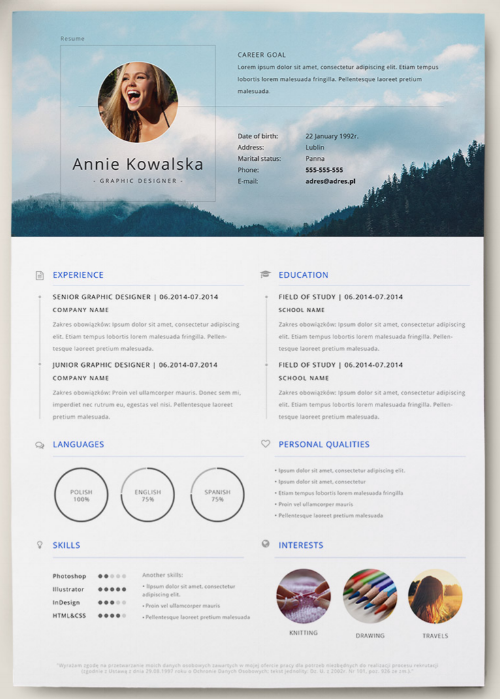
2. Monochromatic and Retro Resume Template
This design from freelancer Fay Zodiac is a whimsical take on traditional resumes. The retro typography adds a playful element, while the boxy layout keeps everything from looking too busy or crowded. You can download this resume design here for free.
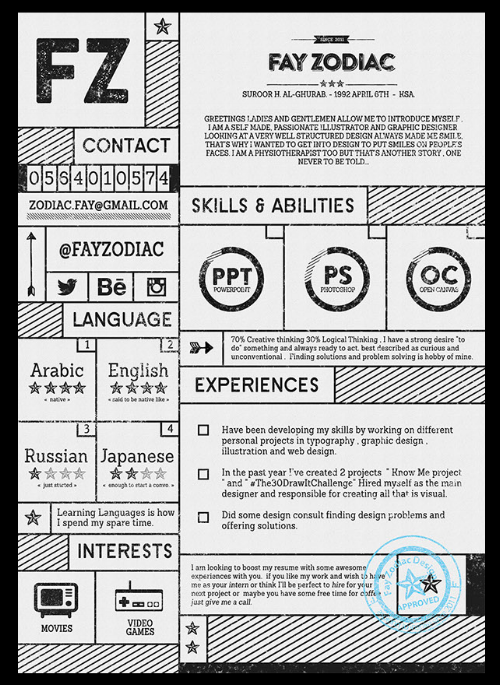
3. Vibrant and Visual Resume Template
Alessia Curcio, a Copenhagen-based designer, gives us a perfect example of how to incorporate kaleidoscopic color without going over the top. Infographic-inspired elements help clearly display work experience and skills with minimal text. Download Curcio’s free template here.
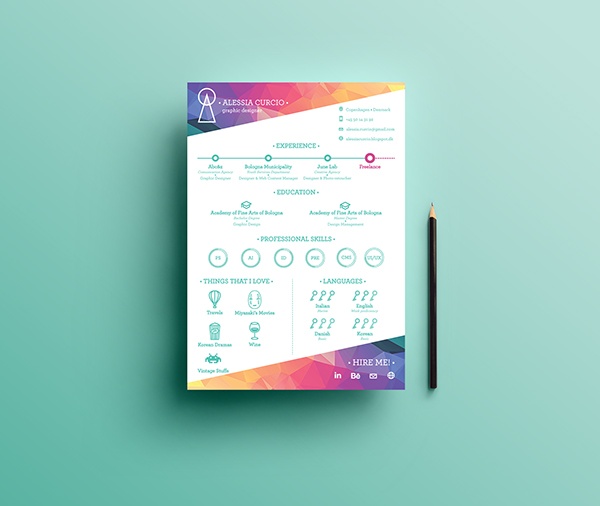
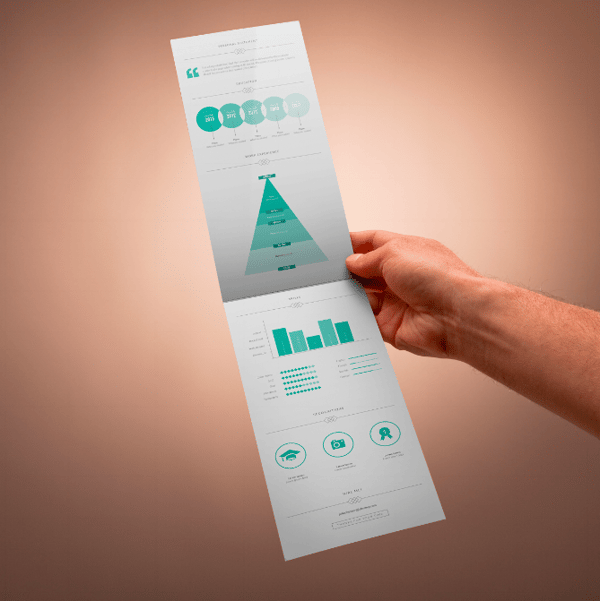
4. Infographic Style Resume Template
Created by digital art director and freelance designer Fernando Báez, this unique, infographic-inspired resume template helps you organize your work experience and skills into a minimal visual layout. Báez has made the template available for free download here.
Best for Freelancers
These templates emphasize the headshot photo for freelancers who might not meet their employers in person, and need substantial text space and a visual to offer something memorable.
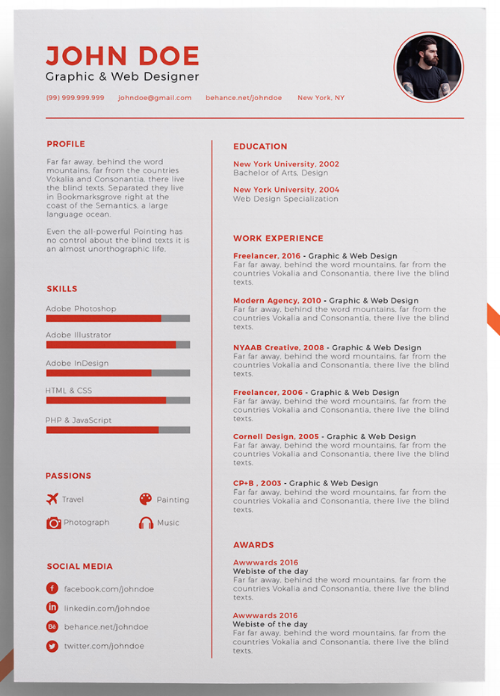
5. Resume Template with a Simple Color Accent
Adding color to a resume might seem intimidating at first — especially if you’re applying to a more traditional workplace — but a few sophisticated pops of color can add some interest without compromising on professionalism. This template from designer Eduardo Ogawa uses bright accents to spice up the traditional layout. You can download it for free here.
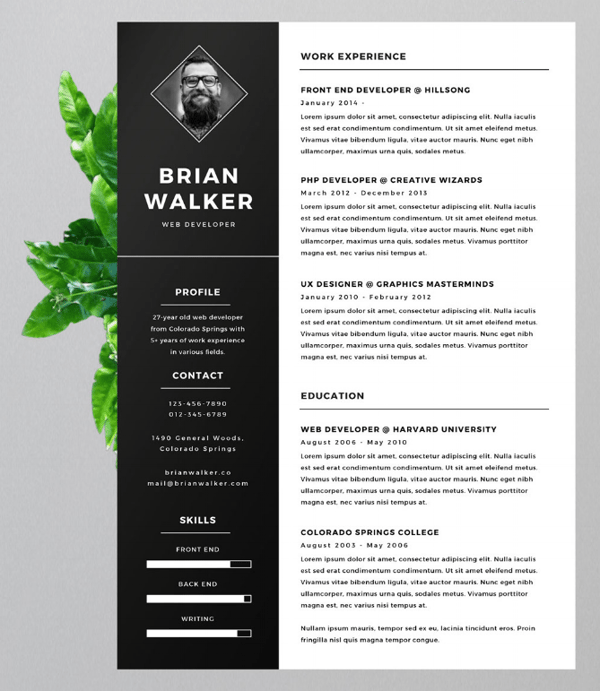
6. Bold Classic Resume Template
If you’re looking for a more traditional resume template that still makes a bold impression, check out this creation from Finish designer Mats-Peter Forss. The template includes space for a headshot, and is available for free download here.
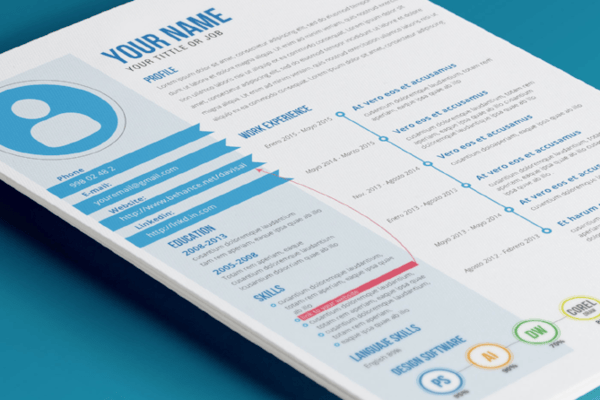
7. Resume Template with Pops of Primary Colors
Proof that color can be professional, this template boasts a compact, sophisticated layout and bright, colorful accents. It also has room for a substantial summary. Designer David Gómez actually uses this resume template himself, and he’s been generous enough to share it for free download here.
Best for Recent Graduates
These templates make great use of empty space — perfect for students who are still building experience — through eye-catching designs that help these candidates make a splash in their industry.
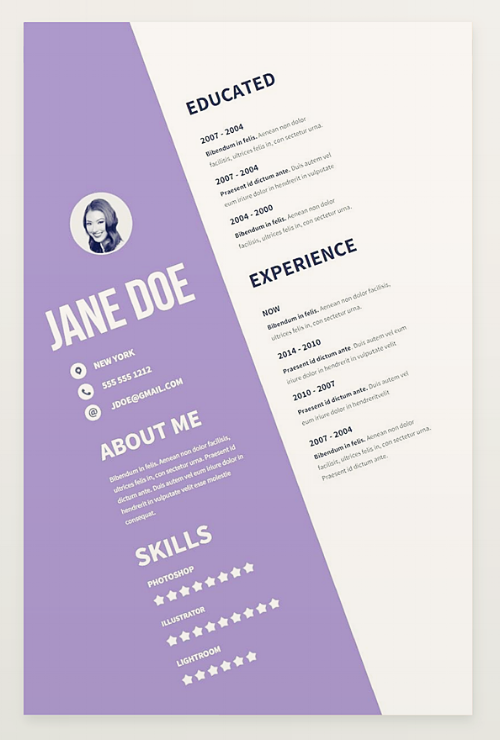
8. Graphic and Adventurous Resume Template
This is not a resume template for wallflowers. The folks at Createer whipped up this daring design as part of a free resume template pack, which you can check out here.
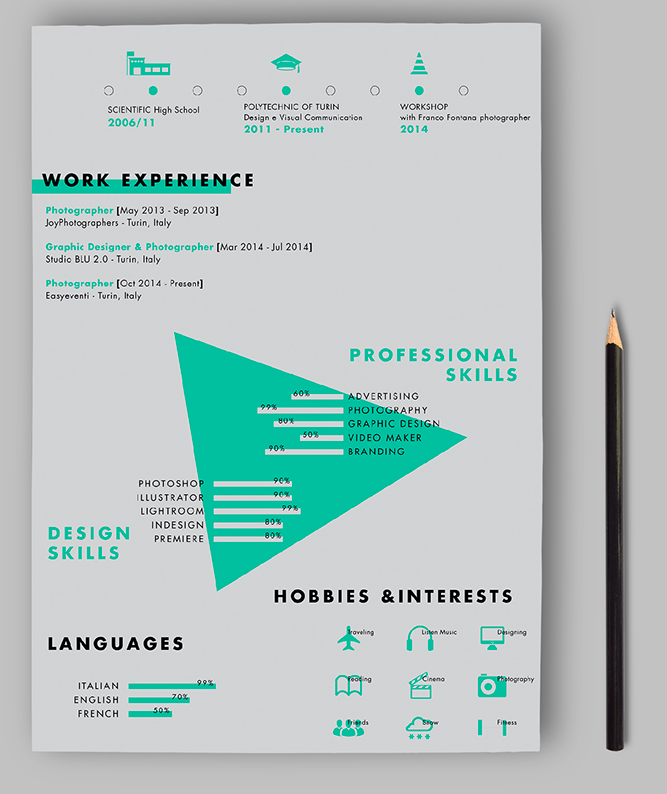
9. Resume Template with an Unexpected Format
If you want to really stand out in a crowded applicant pool, then this resume is definitely for you. Graphic designer and freelance photographer Paolo Pettigiani created this bold template for his own professional use, but has made it available for free download here.
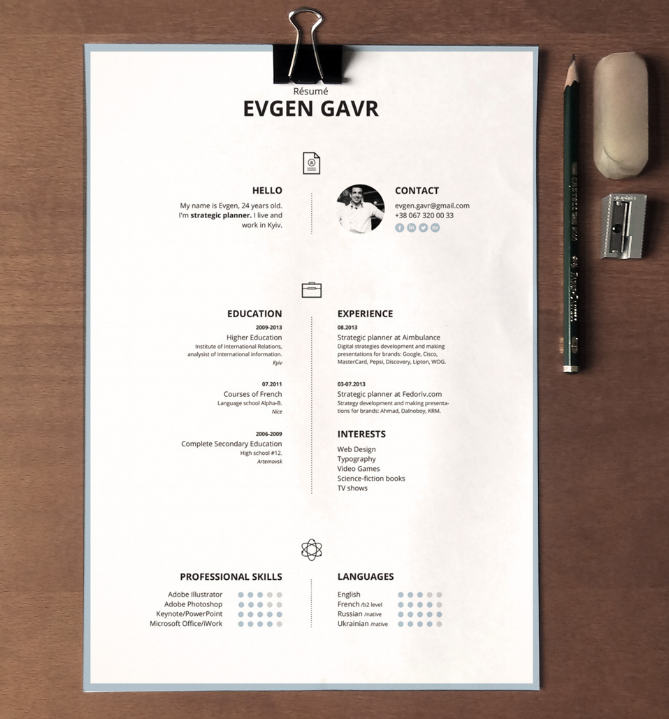
10. Center-Aligned Resume Template
If you want to mix up your resume format without going too crazy, try a center-aligned layout, like this clean, modern design by Zohan Habib. The custom icons and colored border add a nice creative touch. This template is available for free download here.
Best for Executive/Upper-Level Professionals
These templates offer ample real estate for candidates to express their deep experience in the plain but formal manner that many employers expect.
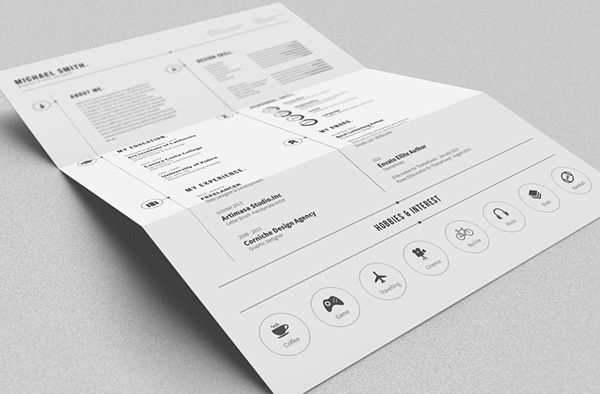
11. Black and White Resume Template
Running low on colored ink? Check out this minimal black and white template from editorial designer Bro Luthfi. The simple design is anything but boring, and includes a set of custom icons to add some visual interest. You can download the free template here.
12. Clean and Modern Resume Template
Your resume is really your first impression with a potential employer, and this template design from the team at GoaShape is modern without being too edgy. The template pack includes a two-page resume layout and cover letter design, and can be downloaded for free here.
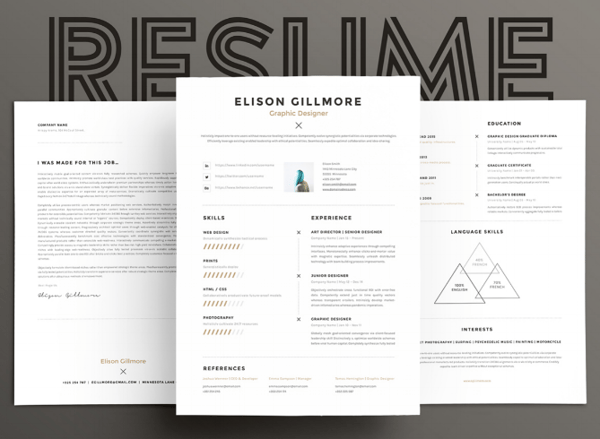
13. Resume Template with Subtle Color Scheme
Beirut-based designer Wassim Awadallah serves up a simple, two-page resume template for more advanced professionals. Displaying the headshot and contact information on the cover leaves plenty of room on the second page to document all your career highlights and accomplishments. Download the template for free here.
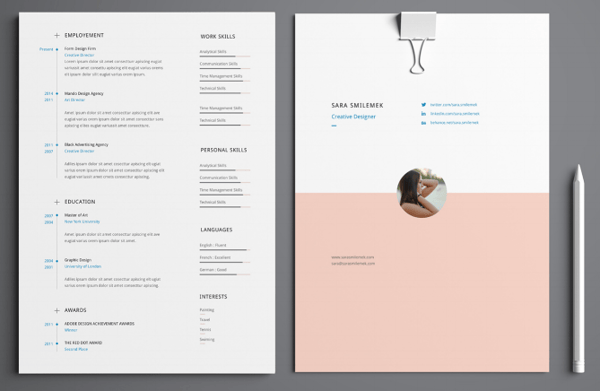
Best for People Changing Careers
These templates help those who are changing industries organize their experience by skill, rather than employer. Sections can be customized to the candidate who needs to show how his/her background can transfer.
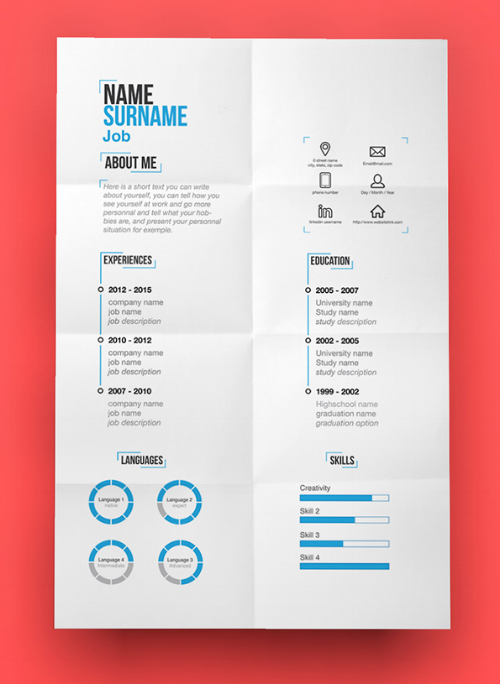
14. Resume Template with an Organized Use of Space
When you’re trying to crunch years of work experience and a laundry list of skills onto a single sheet of paper, things tend to get crowded quickly. This template from designer Tina Von Helsinki invites you to simplify. The distinct sections highlight different aspects of your qualifications — eliminating anything extraneous and putting the focus on what matters to your potential employers the most. Download the template here.
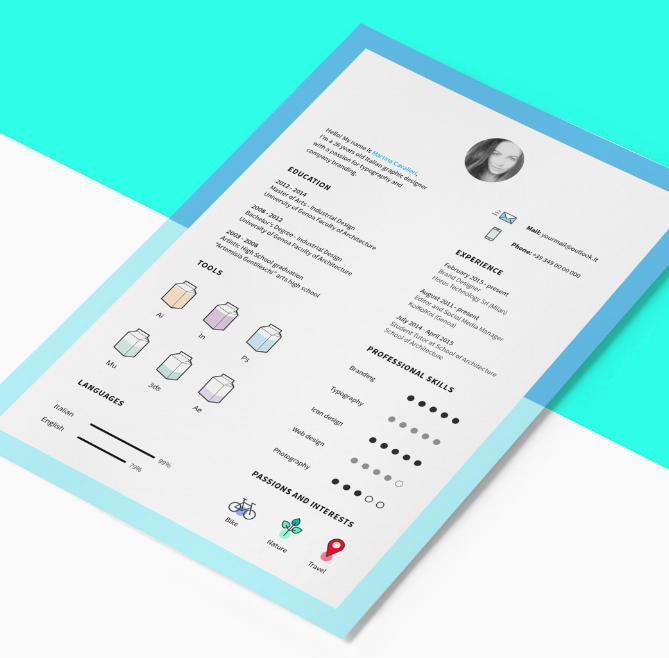
15. Playful and Professional Resume Template
Italian designer Martina Cavalieri created this resume template with a set of 16 custom icons to highlight your interests and skills. The modern layout is anchored by a bold two-toned border: just enough color to help your resume stand out in the pile. Cavalieri offers this template for free download here.
Best for Hardcore Marketers
We couldn’t help ourselves. Although every template in this blog post can work for marketers, the templates below are perfect for those who love to brand themselves.
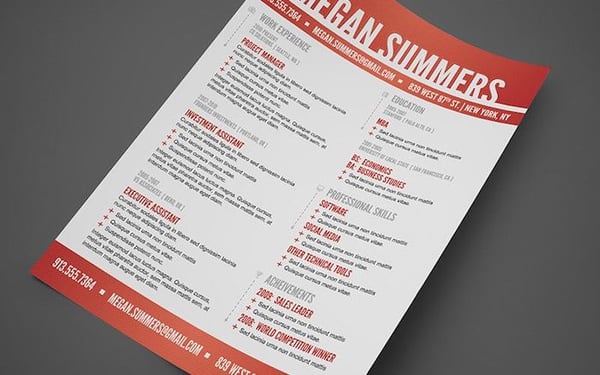
16. Heavy Header Resume Template
“Hey, you!” That’s what I think of when I see this flashy yet classy template. Made by designer Mike Bradshaw, the resume features a variety of sections without seeming too cluttered. Long first or last names might look overwhelming with this header, but it certainly does a good job conveying a breadth of information. Download it for free here.
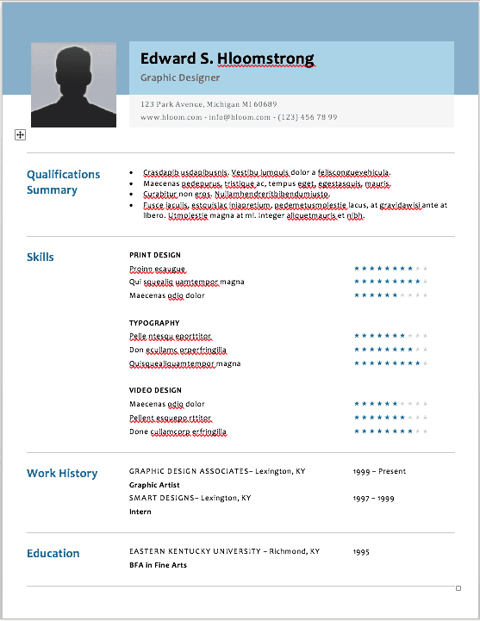
17. Profile Style Resume Template
This last resume was actually designed by the company, Hloom, and is rather plain. But there’s something so familiar about it: The resume header looks like a Facebook profile! While Hloom suggests the lengthy skills section could make this template appealing to the IT industry, we think it is equally perfect for digital marketers — especially those who work in social media. Download it for free here.
Didn’t find the design you were looking for? We bet you’ll find an awesome template in this free resume template pack.

Photos: Apple starts setting up for March 27 education event at Lane Tech High School

Apple has started some temporary construction works at the Lane Technical College Prep High School ahead of its education focused event on Tuesday, March 27. Apple appears to be setting up some kind of stage/demo area outside the main buildings.
Photos after the jump …
Report: Apple planning new iPhone X color option to ‘restore sales,’ updated $329 iPad coming in Q3

A new report from rumor site Macotakara this morning claims that Apple is preparing to introduce a new color variant of the iPhone X as a way to “restore sales” of the device. While details are scarce at this point, this isn’t the first time we’ve heard such a rumor…
[YouTube SEO] Cómo hacer SEO para YouTube y Google: Los 2 Factores de Posicionamiento
¿Quieres conocer una estrategia de SEO para posicionar tus videos en YouTube y, en consecuencia, también en Google?
A estas alturas ya debes de saber que una mala estrategia de SEO es elegir palabras clave con un volumen de búsquedas enorme (especialmente cuando empiezas). ¿Por qué? Pues porque todavía no tienes autoridad en tu canal, es decir, suficiente tráfico que valide lo que estás diciendo como para que consiga más visualizaciones.
Bien, hoy te voy a dar unos tips para que tengas una estrategia ganadora con la que empezar a posicionar tus videos en YouTube y un secreto de esos que nadie comparte pero que utilizan muchos youtubers para posicionarse, ganando autoridad y acercándose a esas palabras clave más genéricas con las que resulta tan difícil aparecer en las primeras posiciones.
#1. YouTube, el hermano pequeño de Google
Si todavía eres de los que no ven YouTube como plataforma de posicionamiento, te diré que mal andas.
La principal razón de eso es que YouTube es el hermano pequeño de Google. Es decir, si estás en un mercado muy competido en palabras clave debes intentar posicionarte a través de contenido de vídeo para poder aparecer en los resultados del buscador con este tipo de contenido.
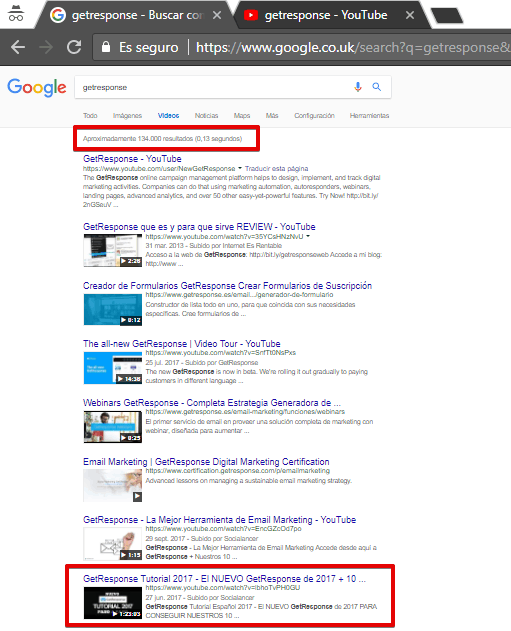
Mira por ejemplo cómo se han posicionado estos vídeos nuestros sobre GetResponse:
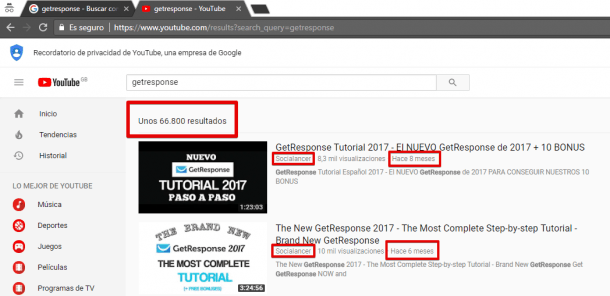
Esa búsqueda es con navegador oculto en YouTube. Y tanto uno como otro aparecen en las primeras posiciones después de 8 y 6 meses respectivamente.
¿Qué es lo bueno de esto?
Que cuando haces una búsqueda en Google con navegador oculto, en el apartado Vídeos, el primero de nuestros vídeos aparece en la posición #8 en Google ¡desde Reino Unido y justo después de los vídeos de la propia marca!
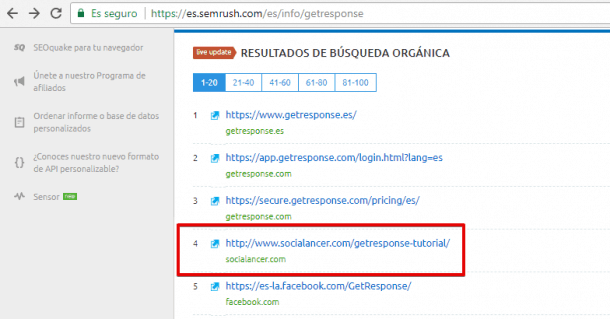
Y si hacemos una búsqueda en SEMRush sobre GetResponse en España, fíjate que el post de socialancer.com en el que está embebido ese vídeo aparece en Google justo después de los resultados de búsqueda de la propia marca (y antes de su página de Facebook):
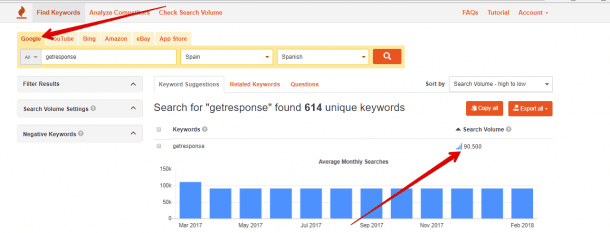
Solo para que veas la competencia en esas búsquedas, si afinamos un poco más verás que el volumen de búsquedas mensuales en YouTube solo en España y en español es muy considerable:

Y, si vas a Google en la misma situación, todavía mucho mayor:
Bien, pero ¿CÓMO hemos conseguido esto?
#2. Los 2 Factores de SEO en YouTube
Cuando quieras posicionarte en YouTube hay 2 factores que debes tener en cuenta:
- Las primeras 24 horas
- La larga cola
Te dejo el primer vídeo de un entrenamiento que ofrecemos sobre SEO en YouTube:
Este vídeo parte de nuestra experiencia en YouTube con más de 120 o 130 vídeos públicos publicados, la mayoría de ellos en los últimos 2 años.
La cuestión aquí es que, aparte de ese empujón inicial, es importante que utilices palabras de longtail (larga cola) para posicionarte, es decir, palabras que no tienen muchas búsquedas pero suficiente como para crecer en el tiempo y hacerte más relevante en palabras que tienen muchas más búsquedas.
Y que las utilices tanto en el Título, como en la Descripción como en las Etiquetas de YouTube.
Algo como esto, empezar por las palabras más específicas para subir posiciones hasta las más genéricas:

Por otra parte, si utilizas palabras que hoy no están muy competidas, para cuando lo estén tú ya tendrás el contenido posicionado a lo largo del tiempo.
¿Y después qué? Incluyes esas palabras en los Títulos, las Descripciones y las Etiquetas de tus videos y ¿qué? ¡¡¡¿A esperar?!!!
#3. Realiza un análisis que vaya más allá de las Búsquedas en YouTube o Google
¿Sabes por qué puede suceder que sigas esperando? Porque es posible que tu análisis se haya quedado a medias.
¿Qué quiero decir con esto? Pues que una cosa es saber si una palabra tiene muchas búsquedas de usuarios pero otra igual de necesaria es conocer cuánta competencia tiene (es decir, cuántos vídeos se han creado que incluyen esa palabra clave).
Por ejemplo, imagina que estás en el sector de belleza. Palabras clave como “trucos de maquillaje” sería un concepto genérico con el que tardarías tiempo en posicionarte porque tiene muchísima competencia en YouTube, como ves en esta imagen (19.583 resultados en competidores, etiquetas y sugerencias de YouTube):
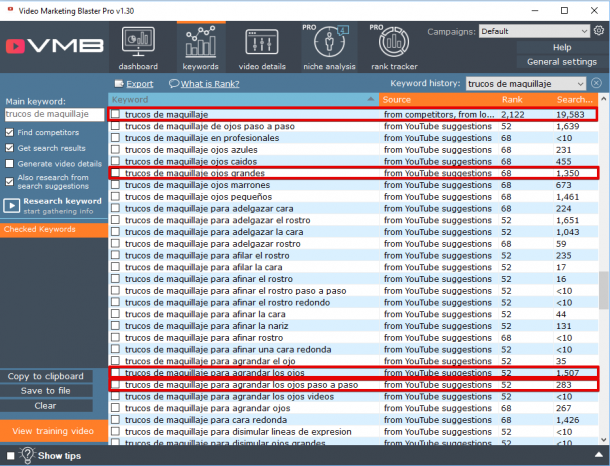
Lo ideal sería acotar más esa búsqueda y buscar palabras clave más específicas. Por ejemplo, “trucos de maquillaje ojos grandes” ya aparece solo 1.350 veces en sugerencias de YouTube. Sin embargo, sería más inteligente todavía centrarse en un tema dentro de los trucos de belleza y crear un vídeo para agrandar los ojos utilizando frases como “trucos de maquillaje para agrandar los ojos paso a paso” para posicionarse, que aparece ya únicamente 283 veces en las sugerencias de YouTube.
Obviamente, vas a reducir el volumen de búsquedas de palabras clave al ir de más genéricas a más específicas, pero te estarás centrando en públicos más interesados en lo que les tienes que ofrecer, potenciales compradores que están más cerca del momento de compra en el funnel.
#4. Cómo analizar a tu competencia en YouTube
Así como para analizar la cantidad de búsquedas que aparecen en Google o YouTube puedes utilizar herramientas gratuitas o herramientas freemium como SEMrush, la herramienta que utilizamos nosotros para entender la competencia de una palabra clave y conseguir sugerencias de las palabras de larga cola más interesantes es Video Marketing Blaster.
Lo bueno es que no solo te permitirá definir mejor la competencia que hay en YouTube con respecto a determinadas palabras clave, sino que también:
- Te sugerirá palabras clave de larga cola que podrás utilizar en tus búsquedas
- Te sugerirá Títulos, Descripciones y Etiquetas ideales para tus términos
E incluso, en su Versión PRO, saber qué es lo que necesitas exactamente para superar a tus competidores y ver cómo evoluciona el posicionamiento de tus vídeos para poder seguir perfilando las palabras clave adecuadas.
De hecho, nos parece una opción tan interesante que junto con Video Marketing Blaster ofrecemos un entrenamiento gratuito en vídeo y en español no solo sobre el funcionamiento de la herramienta sino también sobre ideas de estrategia de SEO en YouTube.
Se trata de un software que funciona únicamente con Windows, pero, si tienes la posibilidad de descargarlo en un ordenador con Windows, seguro que te va a facilitar mucho el trabajo de posicionamiento a partir de la competencia que tienen determinadas palabras clave en YouTube y de cómo lo están haciendo tus competidores.
Aquí puedes ver una demo en español de Video Marketing Blaster:
Conclusión
Como has podido ver en el vídeo de Benet y en este post, el posicionamiento en YouTube -y, en consecuencia, en Google- no depende únicamente de un factor, sino que es un conjunto de factores.
Sin embargo, tendemos a dejar de lado el análisis de los competidores y el uso de palabras de larga cola porque “tenemos prisa” de llegar a las primeras posiciones en los términos más competidos.
Una buena estrategia para hacer SEO en YouTube tiene que permitirte pensar tanto en el corto como en el largo plazo, pues el negocio está en el crecimiento sostenido de tu canal a partir de todos estos factores.
¿Cuál es tu experiencia en YouTube? ¿Tienes otras sugerencias para el posicionamiento en YouTube y en Google a partir de vídeos?
from Socialancer.com https://ift.tt/2GmBndW
via
Apple touts Apple Pay Cash in latest iPhone X & Face ID ad [Video]

Earlier this week, Apple debuted a new ad for the iPhone X that highlights the ease of Apple Pay with Face ID. Now, the company has shared an addition ad in a similar format, this time showcasing Apple Pay Cash via iMessage…
This week’s top stories: Apple’s March event, sleep tracking with Apple Watch, and more

In this week’s top stories: Sleep tracking with Apple Watch, expectations for Apple’s March event, WWDC wallpapers, the forgotten history of obscure Apple accessories, and much more. Read on for all of this week’s biggest stories…
Tim Cook calls for ‘well-crafted regulation’ in light of Facebook data mining controversy

At the China Development Forum today, Tim Cook was asked about the leak of Facebook user data that saw Cambridge Analytica amass information on 50 million users. As reported by Bloomberg, Cook stated that the Facebook controversy is another sign that “well-crafted” regulations are necessary to protect user data…
Hands-on: Fibaro’s ‘The Button’ HomeKit multi-controller, now available to order

After unveiling plans to offer a HomeKit version of The Button at CES in January, Fibaro is now shipping its multi-controller for Apple’s smart home platform. The Button is available to order for $49.99, and we’ve tried it out to see how it works with HomeKit.
Original creator of the Mac startup chime talks its demise & more in new interview [Video]

Tim Cook kicks off China Development Forum, talks trade war concerns and more

As we noted yesterday, Tim Cook is in China this weekend to serve as co-chair of the China Development Forum, which is taking place amid increasing fears of a trade war between China and the United States. Speaking at the event today, Cook said that he hopes “calm heads” will ultimately prevail…
Making The Grade: What’s lacking in Apple’s Deployment Model for iPads?

Making The Grade is a new weekly series from Bradley Chambers covering Apple in education. Bradley has been managing Apple devices in an education environment since 2009. Through his experience deploying and managing 100s of Macs and 100s of iPads, Bradley will highlight ways in which Apple’s products work at scale, stories from the trenches of IT management, and ways Apple could improve its products for students.
I’ve been deploying and managing iPads since the fall of 2010, so I’ve truly been managing them from the beginning. Even before the iPad, we had deployed 80 or so iPod touches around our school. Things have changed a lot since then. Back in the early days, we were syncing apps via iTunes. If you think iTunes is slow now, try updating iOS on 15 iPod touches at one time!
Fast forward to 2018, and iOS deployment is a solved problem. Thanks to tools like JAMF and Apple’s Device Enrollment Program, I can deploy hundreds of iPads with much the same effort I can ten. For me, unboxing them takes as long as it does to get them configured. For all the great ways Apple has improved this process, however, there are still two things they have yet to address:
Instagram Adds Hashtag and Profile Links in Bio
Welcome to this week’s edition of the Social Media Marketing Talk Show, a news show for marketers who want to stay on the leading edge of social media. On this week’s Social Media Marketing Talk Show, we explore YouTube updates with Owen Video, Instagram adding hashtags and profile links with Jenn Herman, LinkedIn creative video […]
This post Instagram Adds Hashtag and Profile Links in Bio first appeared on .
– Your Guide to the Social Media Jungle
from https://ift.tt/2G0aj4Z
via socialmediaexaminer