
Welcome to My Blog
Samsung’s latest Galaxy S9 beaten in some benchmarks by iPhone 7, in all by iPhone 8 & X

Samsung has just launched its latest flagship smartphone, the Galaxy S9/S9+, and an early reviewer has been putting it through its paces in a series of benchmark tests. The news isn’t good for the Korean brand …
Longer upgrade cycles and growing purchases of used smartphones said to threaten iPhone sales

Longer upgrade cycles and an increasing number of consumers opting to buy used models poses a threat to future sales of flagship models from the likes of Apple and Samsung, argue industry commentators.
Back in 2014, the average upgrade cycle was 23 months – likely attributable to most consumers upgrading every two years, while a much smaller number upgraded every year. But that number has already hit 31 months, says BayStreet Research, and is set to climb higher still …
The Ultimate Guide to Ranking #1 on YouTube
If you enter the term “ecommerce seo” into YouTube, the following video shows up in the number one spot:
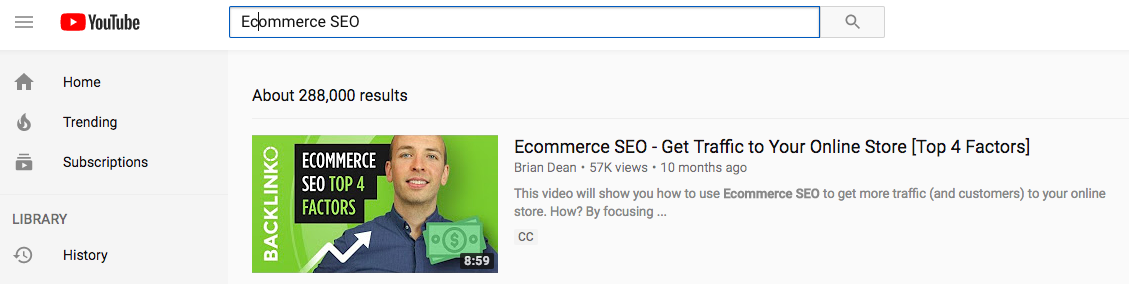
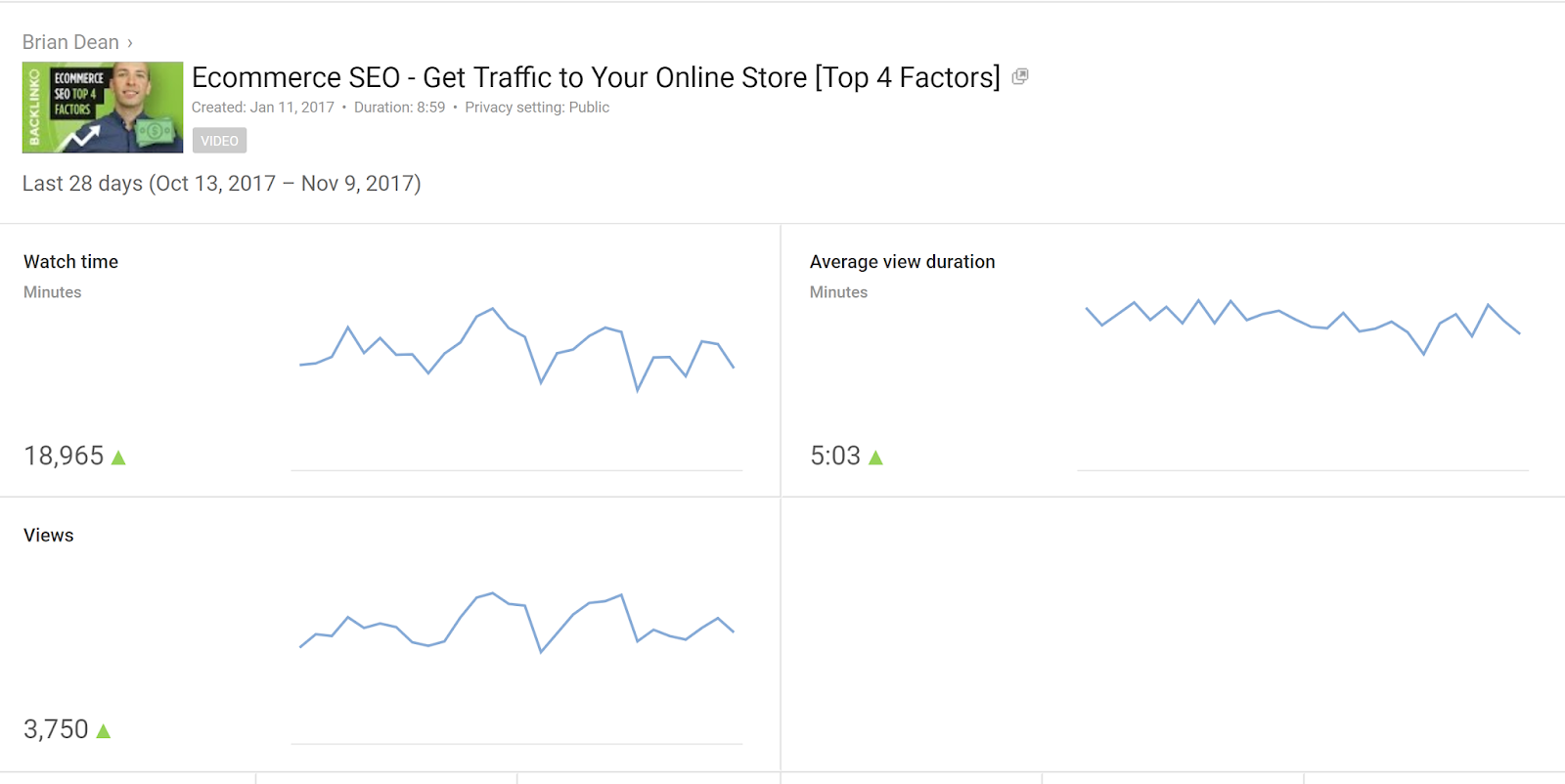
It was published Jan 11, 2017 and was in the number one spot six months later. The video has received over 57,000 views total, and more than 3,750 just within the past month.
You might be wondering, who really cares? What does the number one ranking on YouTube really give you? Maybe it gives you brand awareness, but does it actually bring in sales?
This particular video was created by well known SEO expert and founder of Backlinko, Brian Dean.
I asked Brian about his YouTube video ranking, and here is what he said:
Ranking on YouTube has been one of the biggest drivers of leads and sales for me this year. I send out a ‘welcome’ email to new email subscribers. And a growing percentage (around 15%) say they first found me on YouTube. But more importantly, surveys from customers show that they’re also finding me via YouTube. They also cite my YouTube videos as a specific reason that they decided to sign up.
So to boil it down, having the number one spot on YouTube:
- Directly builds Brian Dean’s email list (people subscribe to his email after watching the video)
- Allows Brain to cultivate personal relationships with people who watch his videos. These people feel like they know him when they return to his site after watching his video
It is not possible to track Brian’s sales numbers directly from YouTube since Brian does not add links or a lot of CTAs in his YouTube videos. Instead, Brian engages his viewers with content and waits for them to Google his name and find his blog that way.
However, the survey data for new email subscribers shows a significant uptick in people saying they found him through YouTube.
In short: YouTube is great for top of the funnel for Brian Dean, even though it does not directly generate sales.
I worked with Brian on this project, and asked him if I could document the entire process he executed, from being unranked to being the number spot on YouTube. Here are the steps and insights he shared.
How to Rank Number One on YouTube
- Step One: Find a Keyword
- Step Two: Script Your Video
- Step Three: Produce Your Video
- Step Four: Upload and Optimize Your Video
- Step Five: Promote Your Video
Step 1: Find a Keyword
Just like with “normal” SEO, the first step in YouTube SEO is keyword research. I documented my process of researching rankings for highly competitive keywords in 90 days for articles in an experiment I ran early last year. The process is really similar to how you’d find keywords in Google.
First, you generate a list of potential keyword ideas. Then, you drill down to a handful of the best keywords.
Keyword research tools designed for Google (like SEMRush) don’t work for YouTube. To find video keywords, you need use a tool designed for YouTube. Brian recommends two:
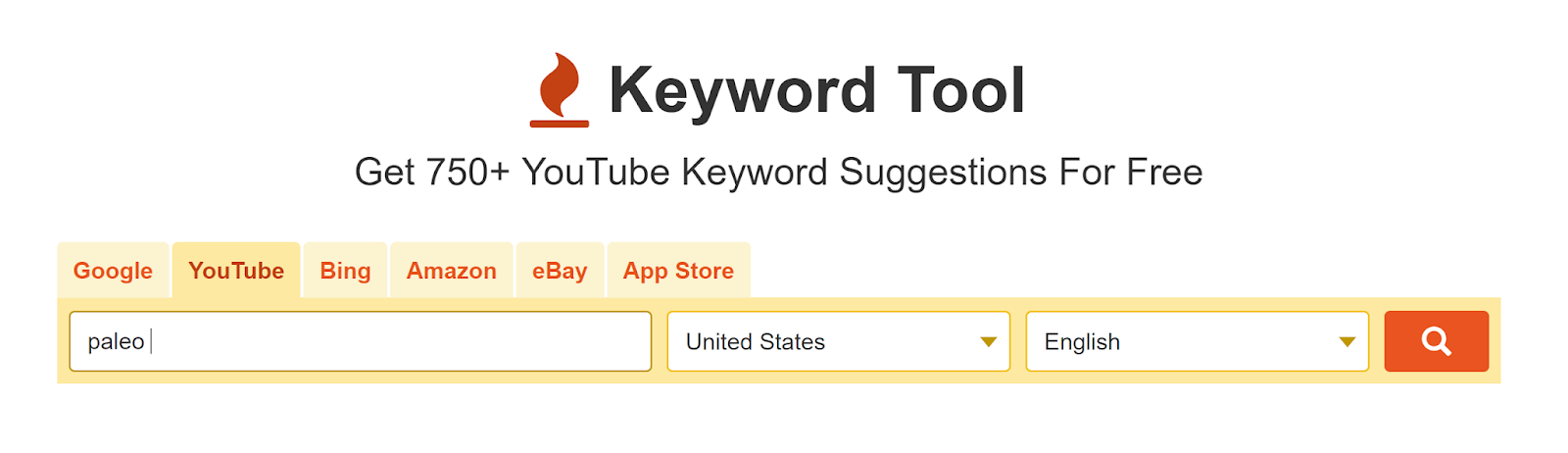
First, we have Keywordtool.com. Click the “YouTube” tab, enter a seed keyword, and it’ll scrape “YouTube Suggest” for hundreds of possible keywords.
If that doesn’t do the trick, check out VidIQ. They have a nifty keyword research tool that’s like Google Keyword Planner for videos.
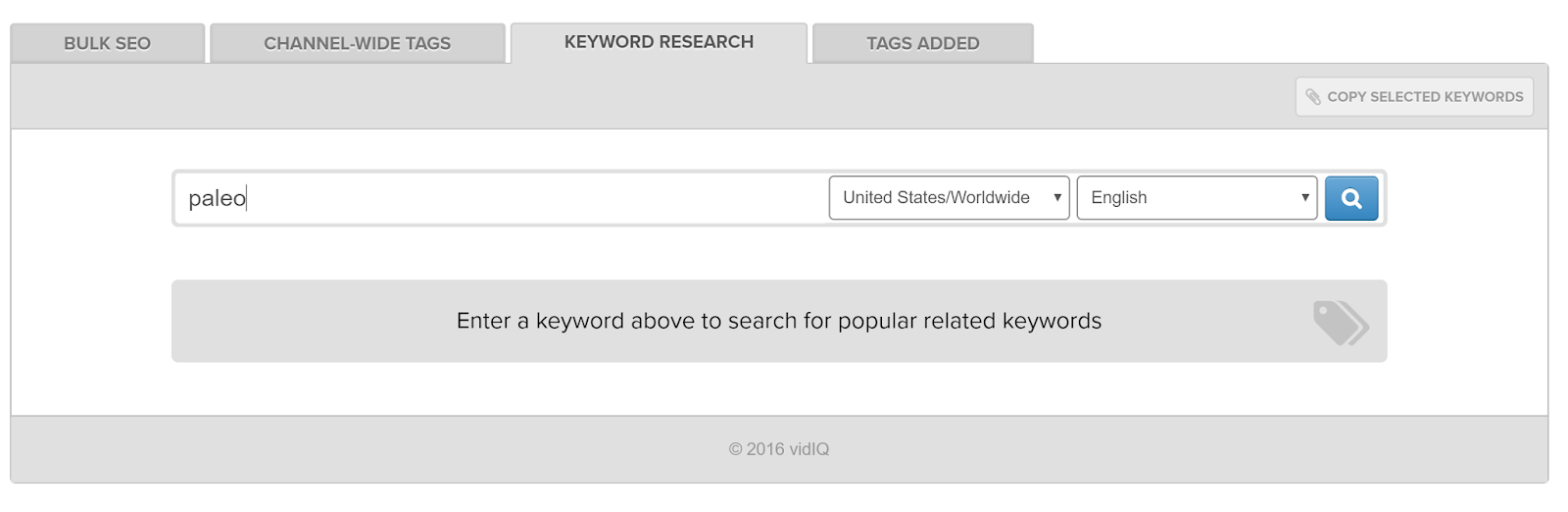
In addition to generating a huge list of keyword ideas, VidIQ also gives you helpful metrics (like competition and search volume) to help you find the best keyword.
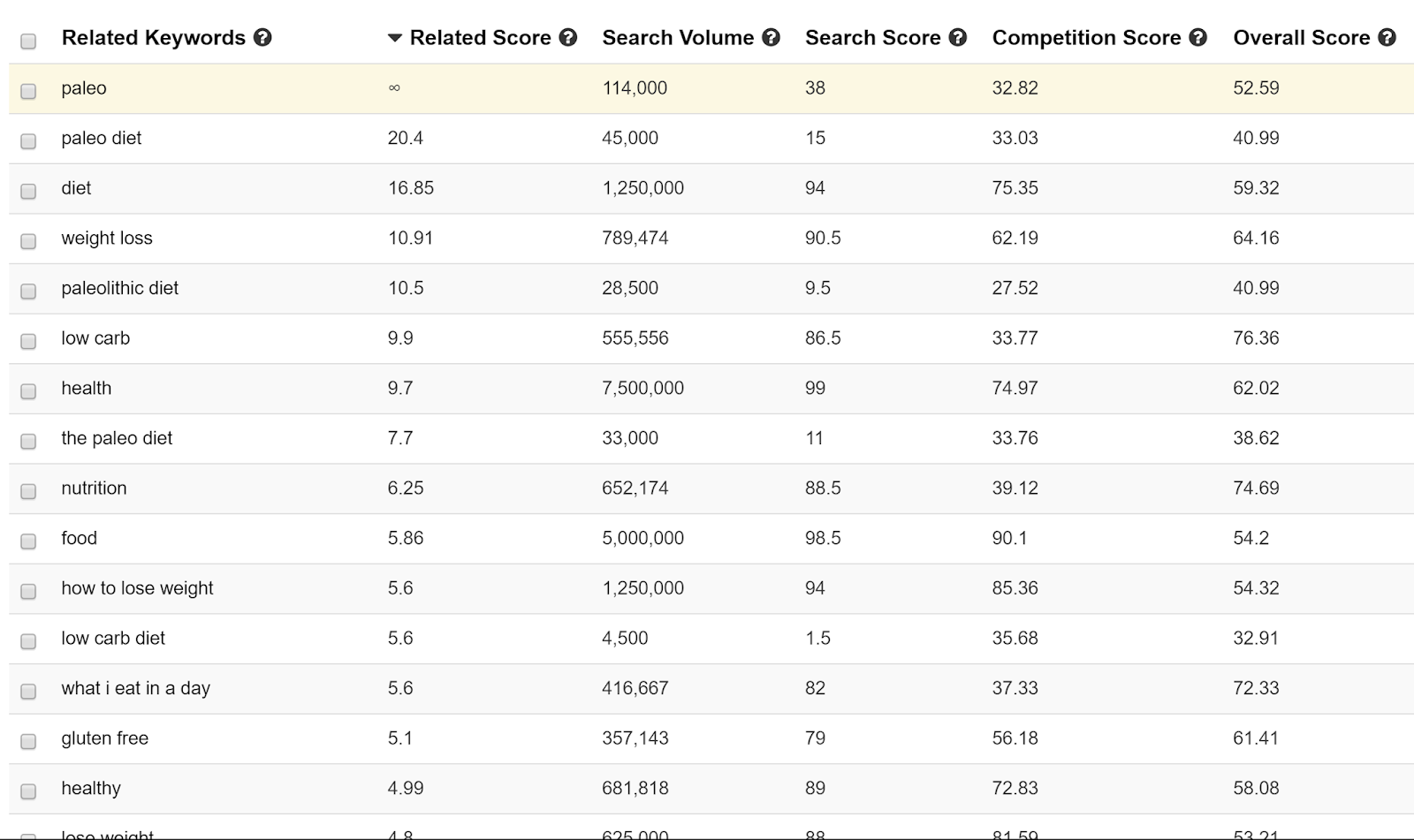
Now, you should have a big fat list of keywords. But how do you choose the best one for your video topic and title?
Just like with Google SEO, choosing the “best” keyword from a list is more art than science. That said, you should choose a keyword that has these factors going for it:
- Search volume: The more searches the better
- Competition: Less is better (duh)
- Market “fit”: Would your target customer search for this keyword?
For example, Brian noticed that “ecommerce SEO” got a decent amount of searches, and wasn’t super competitive, so he used that as his main keyword.

Step 2: Script Your Video
Now that you have a keyword, it’s time to get into the brass tacks of creating your video.
According to Brian, that process should start by outlining and scripting your video.
People on YouTube have VERY short attention spans. That’s why many pro YouTubers (even vloggers) script out their videos line-by-line.
A tight script ensures you stay on topic throughout the entire video.
It also helps eliminate phrases that make YouTube viewers click away (like “umms”, pauses, and “where was I…”).
Brian tells me he meticulously writes out each script for his videos. Here’s an example:
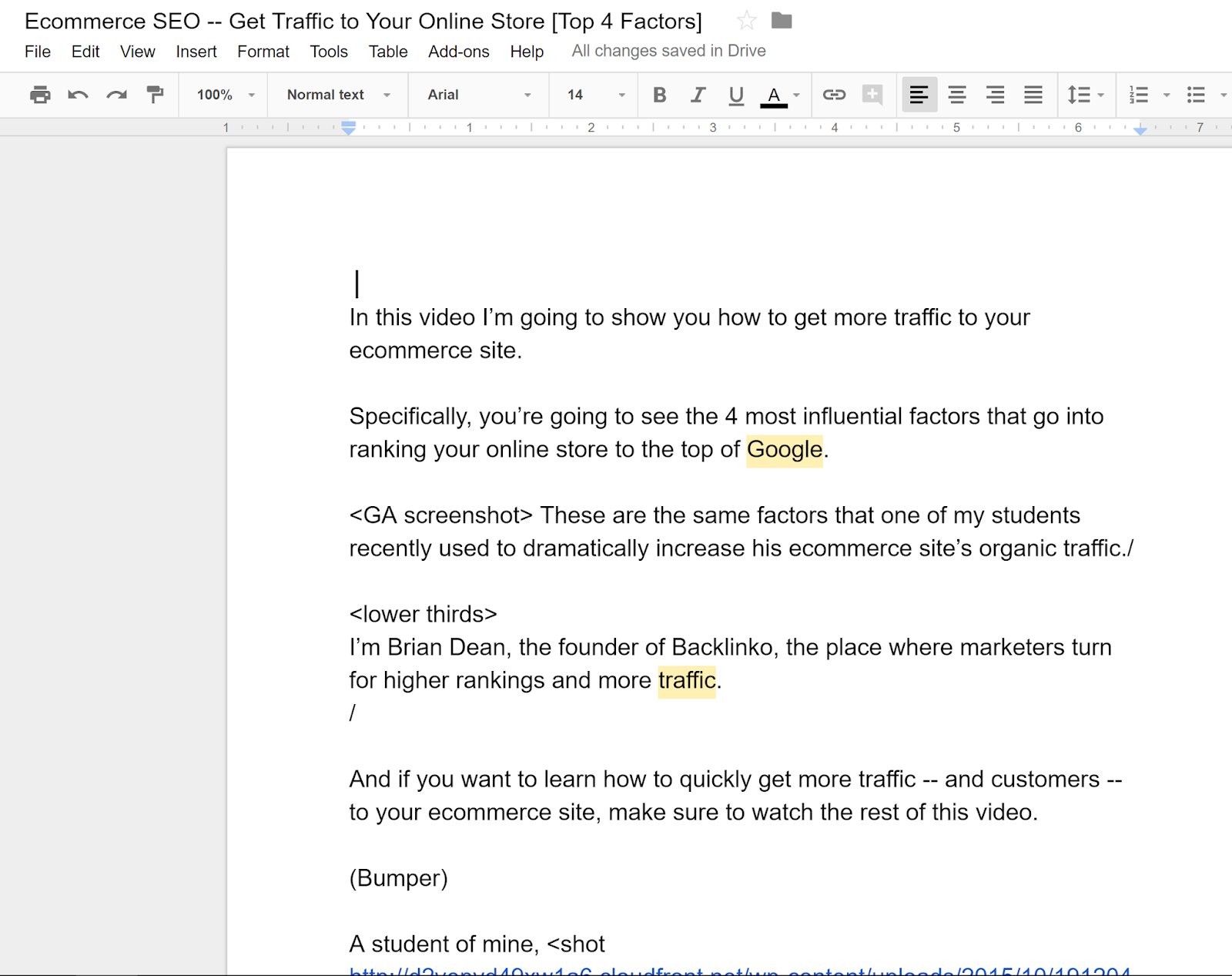
And here’s the basic outline that Brian uses for most of his videos (including his ecommerce SEO video):
- Intro: Preview for what is coming later in the video. He also introduces himself and his brand (Backlinko).
- Steps or List of Tips: The bulk of the content. For case studies, this is a story told step-by-step. But sometimes (like with his ecommerce SEO video), Brian will list out a handful of tips or techniques.
- Conclusion/CTA: Brian ends the video with multiple calls to action: one to subscribe to the channel, another to sign up for his email newsletter, and a third to comment on the video they just watched.
Step 3: Produce Your Video
Video production is a massive topic that could be its own post (or even an entire course).
Instead of trying to cover everything there is to know about video production here, I’ll link to some of my favorite resources on the topic.
I worked with the folks at Wistia on various content and PR projects a few years ago. We’re good friends and I still follow their blog. Here are some of my favorite tutorials on the topic from their learning center:
- The Down and Dirty DIY Lighting Kit
- Setting Up a DIY Office Video Studio
- Choosing a Background for Your Video
One of the first things you’ll notice about Brian’s video is that it’s professionally done. It’s shot with a nice camera, and has nice lighting, and high-quality audio. Of course, this isn’t 100% required (plenty of successful YouTube videos were recorded with cheap cameras and even iPhones).
Here’s what Brian said about the process he used to create his ecommerce SEO video:
Personally, I use a studio to shoot my videos. But that’s 100% NOT required to do well. In fact, my first batch of videos were done in my apartment and they look almost as good. The main reasons I use a studio are a) so I don’t need to worry about production stuff like lighting etc. and b) the sound quality is usually better. So if you’re just getting started, I’d do whatever’s easiest for you.
Step 4: Upload and Optimize Your Video
OK, so you’ve created an awesome video. Now it’s time to upload and optimize it for YouTube.
Here’s how Brian optimized his video around the keyword “ecommerce SEO”.
First, Brian made sure to verbally say the term “ecommerce seo” in his video. YouTube now automatically transcribes all of its videos (and it’s pretty darn accurate, too). Brian is convinced that YouTube “listens” to your video content in the same way that a Google spider indexes the body of a webpage. I haven’t personally seen YouTube confirm this, but it makes sense.
Next, he included the keyword in his video title. Just like with a web page, YouTube wants to see the keyword in your title.
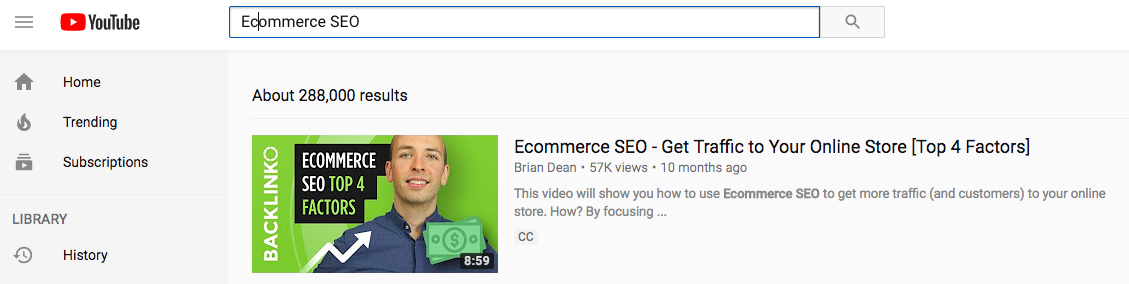
YouTube isn’t as sophisticated as Google (it lacks anything close to Hummingbird or RankBrain), so you want to use your exact keyword here (no synonyms or variations if you can help it).
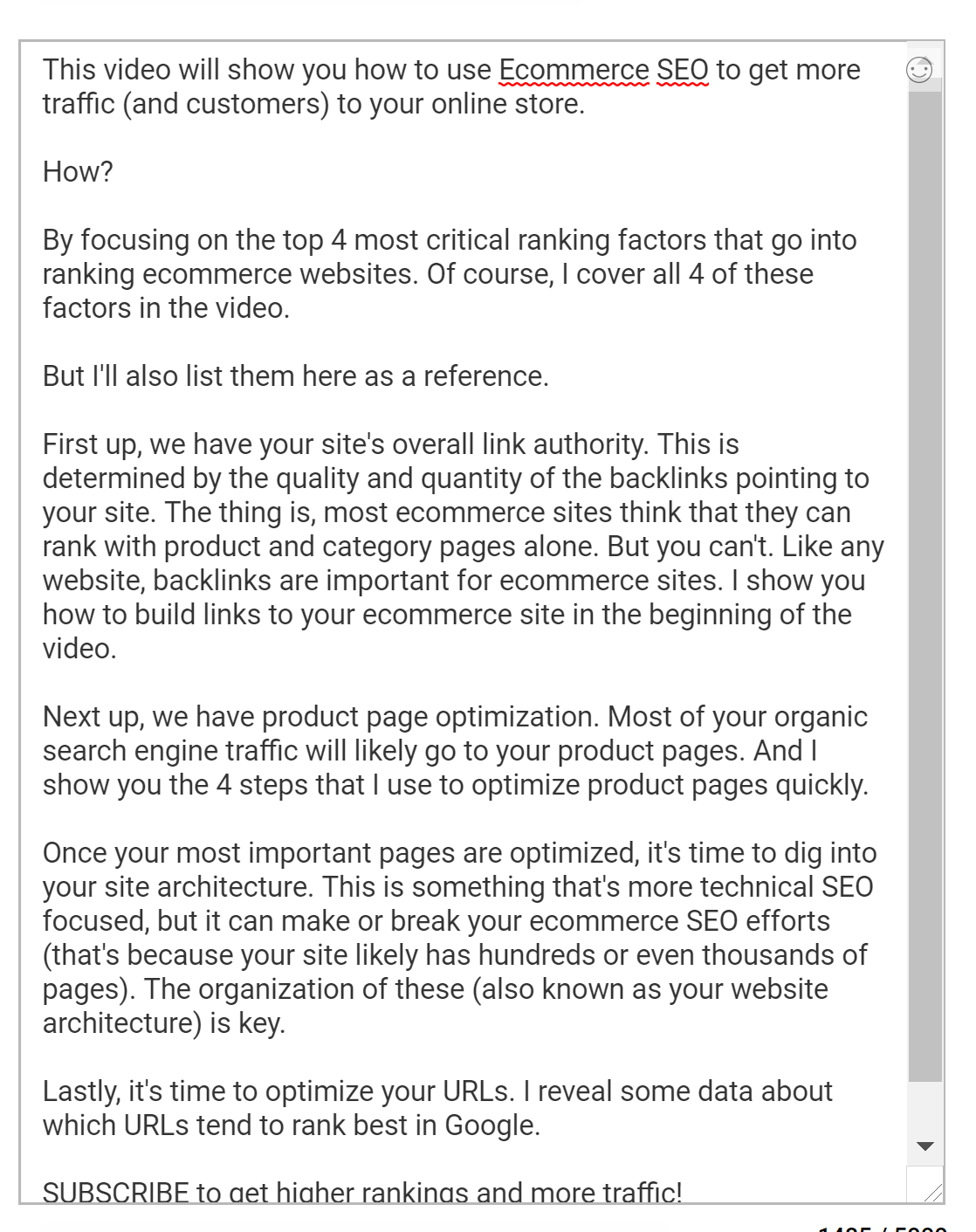
Next, it’s time to write the video description. Your video description is a summary of what your video is about. Brian prefers to write long, in-depth descriptions so YouTube has a lot of content to work with. For example, the description for his ecommerce SEO video is 252 words. This is significantly longer than most other video descriptions on YouTube.
Finally, Brian created tags for his video. As Brian found in his recent YouTube ranking factors video, tags aren’t as important as they once were. But it’s still worthwhile to tag your videos. Brian recommends a tag mix that looks like this:
- Your exact keyword + variations (“ecommerce SEO”, “ecommerce traffic”)
- A few broad keywords that describe the “big topic” your video falls under (“search engine optimization”)
- A few keywords that describe topics you touch on in the video (“link building” and “on-page SEO”).
From an SEO perspective, that’s really all you can do to keyword-optimize your video. The rest is decided by YouTube algorithms based on your video’s overall quality.
Step 5: Promote Your Video
When I first talked with Brian about this step, I naturally gravitated towards an approach where you would essentially do your own PR to get the video included on different blogs and publications. However, this strategy is more of a long term approach that might take weeks or even months before you get the embed or reference to the video on a blog post.
We needed something more short term. One of the first lessons Brian learned about YouTube is that it’s extremely competitive:
When I first started on YouTube, I underestimated the competition. I thought that the sheer amount of users meant that competition wasn’t a big deal. But I was wrong. YouTube has a ton of viewers, but there’s also a ton of video content to compete with.
Just like a blog post or infographic, YouTube videos need a little “push” to get going. And one of the great things about YouTube is that it’s a discovery platform. YouTube actively promotes videos it thinks you’ll like on their homepage, the “Suggested Video” sidebar, and yes, in YouTube’s search results.
But YouTube needs to collect a critical mass of data on your video (by measuring likes, views, audience retention, and comments) in order to determine if people actually enjoy watching your video.
So Brian found that an initial promotional “push” gives YouTube the user feedback it needs to actively show your video to its user base.
I asked Brian how he promoted his YouTube ecommerce SEO video. Here is the process he used:
First, he emailed his email subscribers about the video. His email was brief with two links directly to his Youtube video.
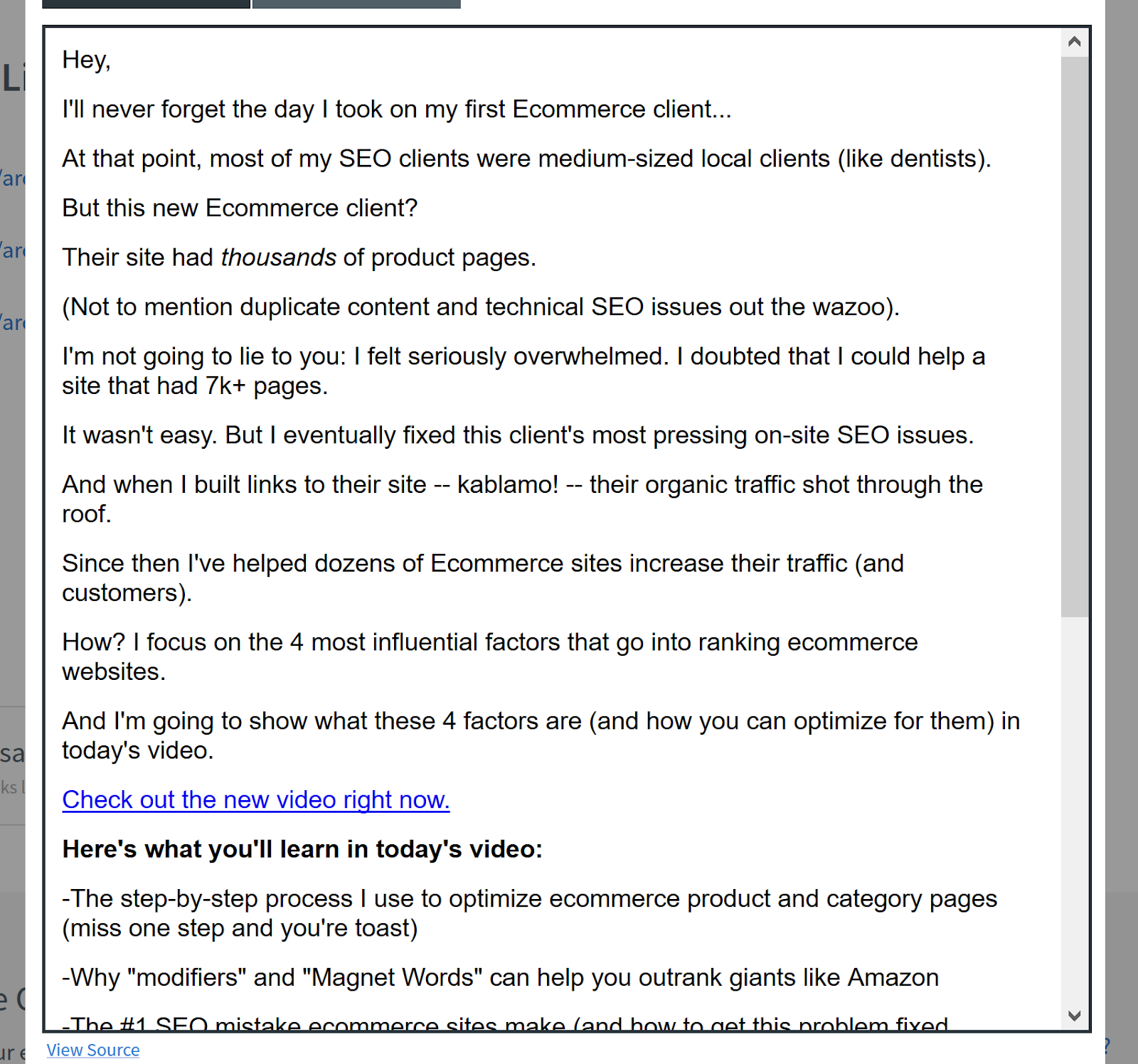
Some people embed the video on their blog and send people there. Brian says that can also work, but he prefers to direct people to YouTube because then they have the opportunity to like, comment, and subscribe.
Brian also shared his video on social media (specifically, Twitter and Facebook).
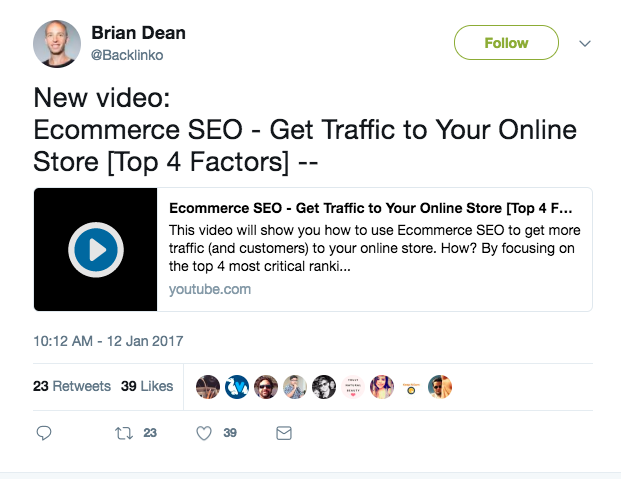
Sharing on these two social networks helped Brian boost the video’s organic ranking.
Brian also posted a preview of the video on Facebook to entice people to watch the full video, as you can see below:
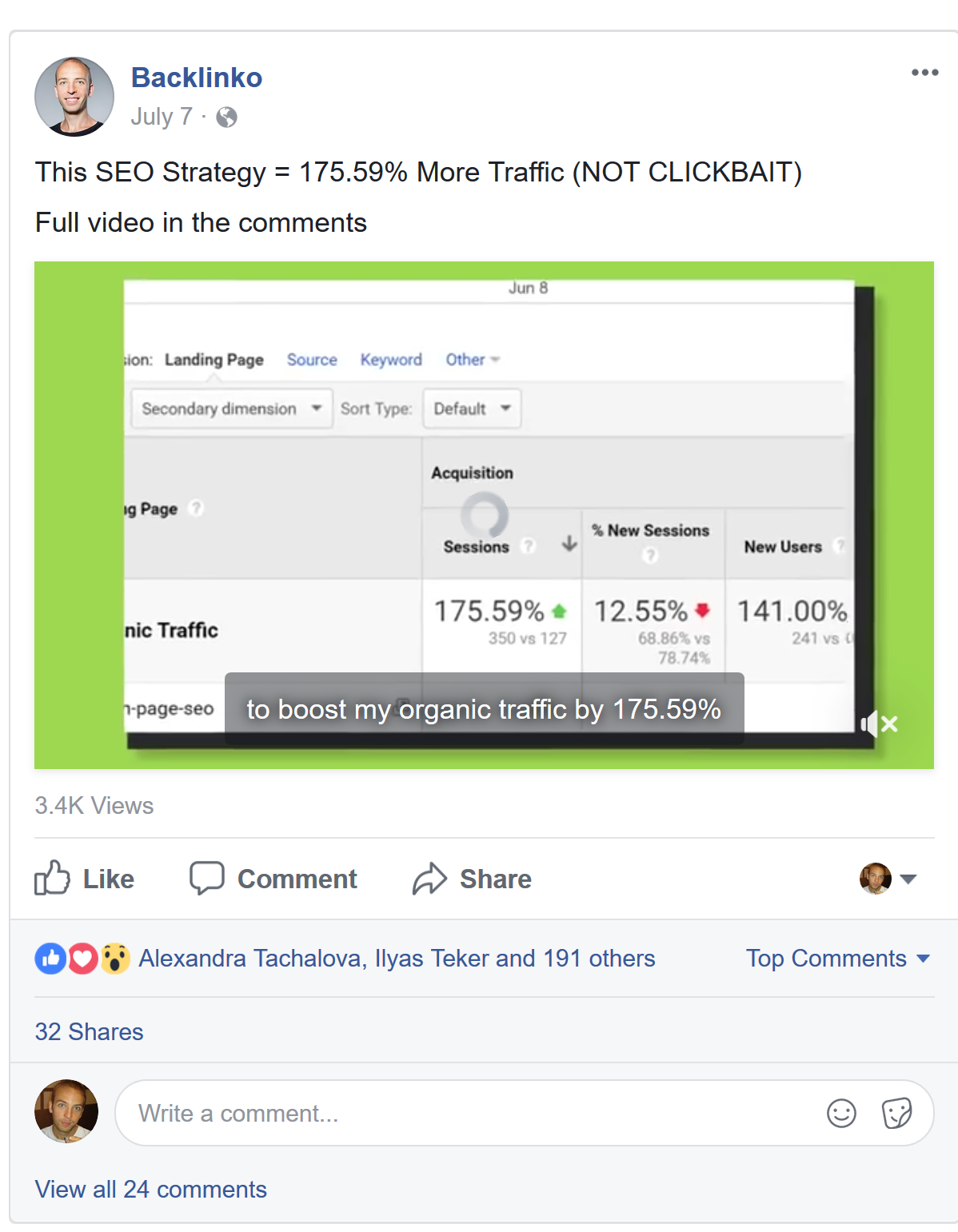
As a general rule of thumb: if the video is up to snuff, and optimized well, it just needs a promotional push to get the ball rolling. YouTube takes care of the rest.
You can use Facebook, Twitter, and Email for that “little push.” Some of you might say “I don’t have such a huge audience!” Brian’s answer to that is:
You don’t need a huge audience. What you’re trying to do is get some eyeballs on your video to help Google get some data about it. You don’t need hundreds of thousands or even tens of thousands to see it, just a few thousand or so to take a look at it.
There you have it. The process Brian used to create, optimize, and promote a highly successful YouTube video that now ranks number one for a high volume keyword.

How to Use Google AdWords to Promote YouTube Videos
Do you want a specific audience to see your YouTube content? Wondering how Google AdWords targeting can help? In this article, you’ll discover five ways Google AdWords targeting can improve delivery of your YouTube video ads. #1: Use Placement Targeting to Reach Other Channels’ Viewers A Google AdWords video ad campaign with placement targeting allows […]
This post How to Use Google AdWords to Promote YouTube Videos first appeared on .
– Your Guide to the Social Media Jungle
from http://ift.tt/2FGnrsL
via socialmediaexaminer
Nomad introduces new versatile Wireless Travel Stand for iPhone 8 & iPhone X

Popular accessory maker Nomad has unveiled its latest product for iPhone users. This week, the company has taken the wraps off of the Wireless Travel Stand, which it says is the perfect Qi-enabled wireless charging stand for the traveling iPhone 8 and iPhone X user…
What new Apple product are you most excited for this year? [Poll]

As we head into March, we could be just days away from Apple’s first new hardware releases of the year. While 2018 has already marked the release of the HomePod, Zac outlined earlier today that Apple still has quite a few new products up its sleeve for this year.
What potential new product are you most excited for this year?
You Can Apply for Jobs on Facebook Now
Today Facebook announced a new feature that will allow business Pages to post jobs and manage applications on its platform.
In over 40 countries, administrators will be able to create job listings directly from their Pages, where they’ll appear throughout Facebook like any other post or ad would: the Page itself, followers’ News Feeds, and Marketplace, as well as Facebook’s new Jobs dashboard.
Benefits to Businesses and Users
Facebook has positioned the Jobs feature as a benefit to both employers and job seekers. On top of being able to track hiring the way they might analyze any other promoted post campaign, Page administrators can also manage and communicate with applicants via Messenger.
That’s a plus for applicants themselves, who can look for listings on the new Jobs dashboard according to criteria like location, full- or part-time status, and industry.
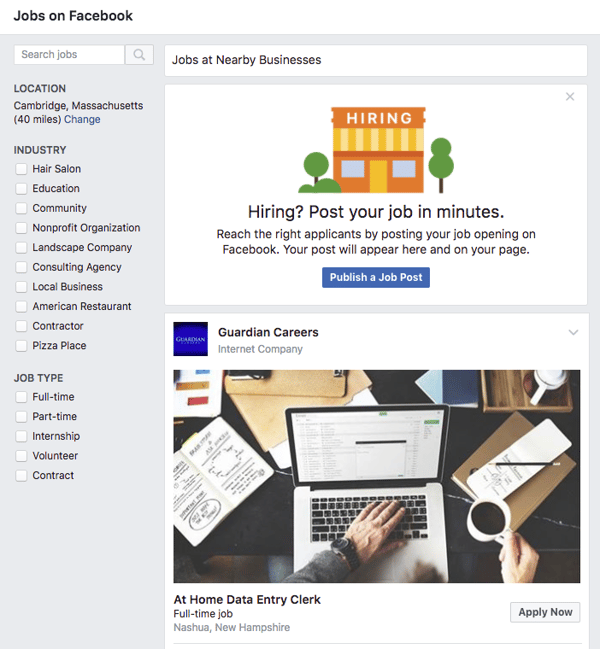
The application process works similarly to one like LinkedIn, allowing users to automatically populate job history according to what’s publicly available on his or her Facebook profile.
And for those who shudder at the thought of an employer seeing such a profile, fear not — Facebook has emphasized that “businesses will only be able to see information you provide them directly, and what’s available publicly on your Facebook profile.”
Once an application is submitted, a Messenger conversation between the applicant and the employer’s Page is created to maintain contact, confirm that the application was received, and send reminders for or schedule things like interviews.
Built With Users (and LinkedIn) In Mind?
The launch comes at an interesting time when Facebook has been making a series of moves to promote more content from a user’s own personal network — more than that from Pages.
The development also comes on the heels of recent predictions that Facebook will lose 5.8% of users between 18 and 24 in 2018. At the same time, HubSpot’s own research has indicated plans to increase the use of LinkedIn among a similar demographic — ages 18 to 34.
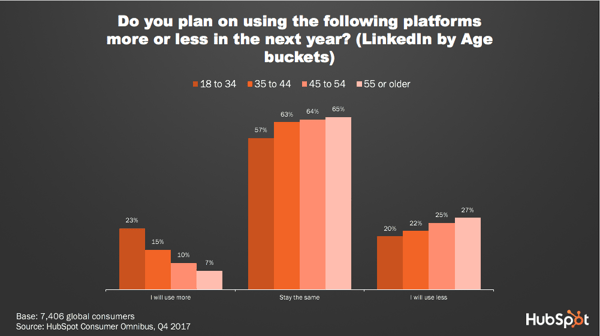
But Facebook didn’t necessarily build the Jobs features with one subset of users in mind — even if LinkedIn shows signs of growing popularity among a population that coincides with the same one where Facebook is predicted to see a loss.
Instead, says HubSpot Social Media Campaign Associate Henry Franco, this move is the latest in a series from Facebook to address the loss or disinterest of any users — “a sign,” he says, “that Facebook lost site of users and had been way too focused on advertisers” and is continuing efforts to both address and remedy that issue.
And while the new Jobs feature does carry benefits for Page owners, it does introduce a new way for users who are seeking work that isn’t traditionally listed on business-heavy networks like LinkedIn.
“While candidate information might not be as rich as it is on LinkedIn, Facebook definitely has a more active user base and serves a much easier way for businesses to get jobs in front of potential applicants,” says Franco. “I expect companies will find it much easier to hire entry-level or low-skill jobs on Facebook, whereas for higher-skilled jobs or ones that simply require more experience, LinkedIn will provide a deeper pool of candidates.”
A Crowded Market
The new Jobs feature also signals a key change in the way people look for and apply for jobs. In 2017, “Google for Jobs” premiered, in which job seekers could type in search criteria like “jobs in Boston” or “marketing jobs” to see listings displayed right in the general search engine results page (SERP).
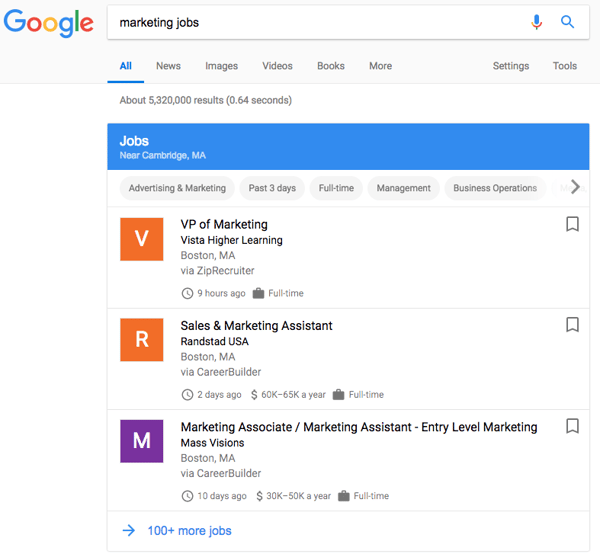
Both Facebook and Google have been making changes to shape the way people discover, consume, and engage with content — and to prevent them from doing so in a way that navigates them away from either site. Facebook, for example, modified its algorithm at one point to favor native content, like Live video, that people could do without leaving the network.
Google has been moving in a similar direction, as indicated by a recent announcement that AMP features will be coming to Gmail in a way that allows users to complete email-related tasks — managing subscriptions, RSVPing to non-Google-Calendar events, and scheduling appointments — without leaving their inboxes.
Searching for jobs, says Franco, is just the latest integration to that trend, which he predicts could significantly cut into traffic previously earned by existing job listing sites.
“It’s interesting that the job posting market is becoming so crowded here,” he says. “It builds out not only the business experience, but the candidate one, too.”
Featured Image Credit: Facebook

037: Spotify IPO, Apple Watch skiiing and snowboarding, Sketch design update | 9to5Mac Daily

Today we’ve got Spotify officially going public, Apple Watch gaining new ski and snowboarding activity tracking features, and Sketch’s latest update for designers.
9to5Mac Daily is available on iTunes and Apple’s Podcasts app, Stitcher, TuneIn, Google Play, or through our dedicated RSS feed for Overcast and other podcast players.
Apple Maps expands transit directions and lane guidance in several locations

Apple has today made some improvements to both transit directions and lane guidance in Apple Maps. The company has been making a rapid push to get both of these features out the door and has been looking to expand them in as many cities as possible.
What You Missed This Month in Google
It’s time for that March lion to roar onto the scene. Time for St. Patrick’s Day, the first signs of spring, and the end of Q1.
February is coming to a close.
And being that it’s a shorter month, February seems to have flown by. A lot happened in the world of tech, much of the news coming from Google.
We’ve put together another list of the major highlights from Google — this time, for the month of February. Read on for the full recap.
February News About Google
1. Double Featured Snippets Are Coming
Google announced today that it will be rolling out a new element to its search engine results page (SERP): featured snippets.
The announcement comes somewhat on the heels of a recent post on Google’s official blog took a deep dive into how its featured snippets work, where Danny Sullivan, public liaison for search, explained that while this piece of the SERP has been helpful to many, it isn’t quite perfect.
One item to be addressed, Google Search Product Management Director Emily Moxley wrote today, is the concept of nuanced queries: the ones that could be seeking multiple answers on a given issue. Using the example of a query like “tooth pain after a filling,” Moxley explains that user could be looking to find out if this type of pain is normal (the “why”), or learn about the duration of the pain (the “how” or “how long”).
For that reason, Google will begin rolling out the display of more than one featured snippet in the SERP that could answer the user’s question, depending on the words used in the search — what Moxley calls “multi-intent queries.”
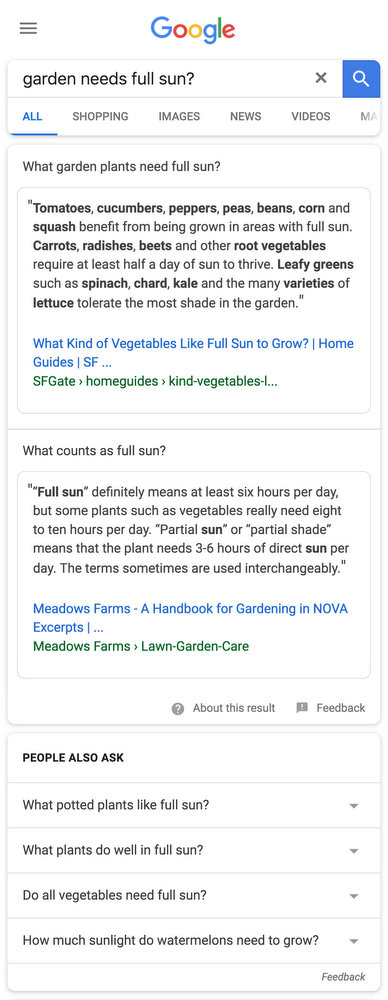
Source: The Keyword
As we wrote earlier this month, displaying more featured snippets in the SERP introduces a higher barrier to earning clicks, especially if the snippets answer the query sufficiently enough that the user doesn’t need to look — or click — any further.
“Testing methods to maximize featured snippet exposure is going to become the norm in SEO,” says Victor Pan, HubSpot’s Manager of SEO. “But being able to turn that view to a click, an engagement with content, and trust with your website has, and will always be the tougher problem.”
2. Better Ads Standards Take Effect
Last summer, Google announced that on its Chrome browser, it would be removing ads from sites that don’t meet the Better Ads Standards. The initiative launched on February 15, and Google began blocking ads that did not meet the criteria.
The goal was not to do away with ads completely. Rather, it was to discourage webmasters from creating and placing digital ads that interrupt a user’s content consumption — characteristics like automatically playing loudly, or not allowing users to navigate away from the ad until a certain amount of time has passed.
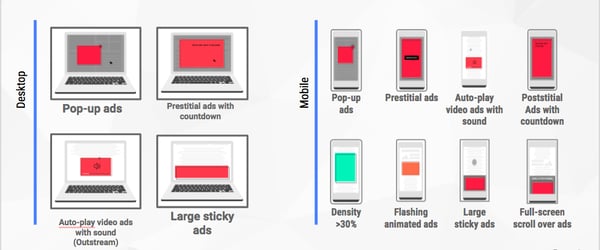
Source: Coalition for Better Ads
However, Google also wanted to ensure that critical ad revenue wouldn’t be lost as a result of these changes. In fact, better ads would actually boost those efforts, as intrusive ones motivated users to install browser plugins that block ads altogether — which would remove any ad engagement and the resulting income from its display.
According to Chris Bentzel, Google’s Engineering Manager, early tests of this feature showed that it was, for the most part, effective. The 42% of tested sites that failed the Better Ads Standards actively took the initiative to remove their intrusive ads and, three days before the launch, passed and met the criteria for a better user experience.
It sounds as though webmasters will be notified by Google if their sites contain non-compliant ad experiences. If, they have not addressed and modified the ads to meet the new standards within 30 days of notification, Chrome will actively block ads on that site.
Sites with such intrusive ads will display the following message:
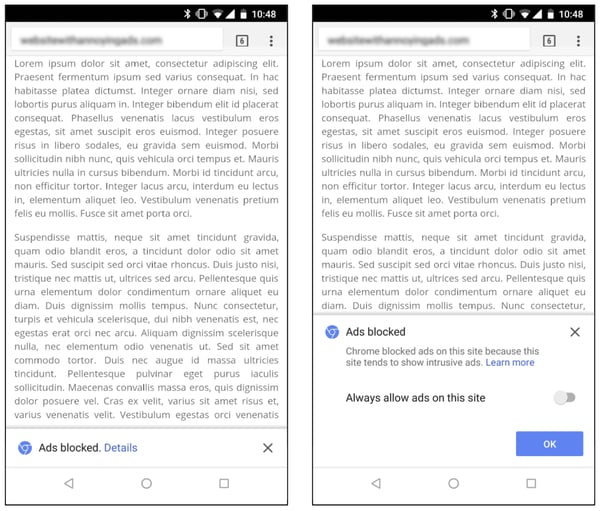
Source: Google Chromium Blog
3. AI Comes to AdSense
We’ve written a lot about the things that a bot can do (albeit, not always well): write a screenplay, compose a classical masterpiece, name paint colors. And now, it seems, AI can help you build an ad campaign.
Last month, Google AdSense introduced a new feature called “Auto ads,” in which machine learning helps marketers place and monetize ads with smart automation.
With Auto ads, the AI behind the feature crawls your site to find the best pages and areas for potential ad placements, and displays them only when the probability of both a strong performance and user experience are high.
It does this, as the name suggests, automatically — all the ad manager has to do is select the ad formats she wants to use in her AdSense settings, then copy and paste the generated code on the pages where ads can be displayed.
To emphasize, copying the code onto all pages doesn’t mean ads will actually display there. That’s where the machine learning comes in to determine if it’s an optimal location for ad placement.
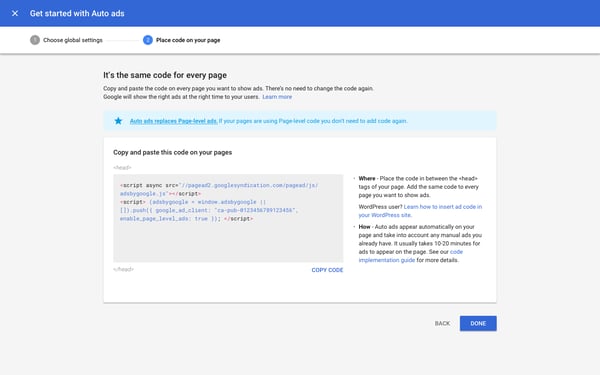
Source: Inside AdSense
4. AMP’d Up Emails
The AMP initiative — or Accelerated Mobile Pages — was first introduced by Google to help webmasters create sites and ads that provide a rich experience, but also load quickly and maintain a high performance across different browsing platforms. That, as the name suggests, includes mobile.
Until recently, the open-source AMP initiative only applied to websites. But early this month, Google announced that it would be launching a preview of “AMP for Email” for Gmail developers, which is slated to bring those same fast, rich, and high-performing experiences to email.
One of the primary goals, according to the official announcement, is to allow users to complete more tasks without navigating away from their inboxes — things like RSVPing to events for which they receive HTML email invites, completing a survey, or managing email subscriptions.
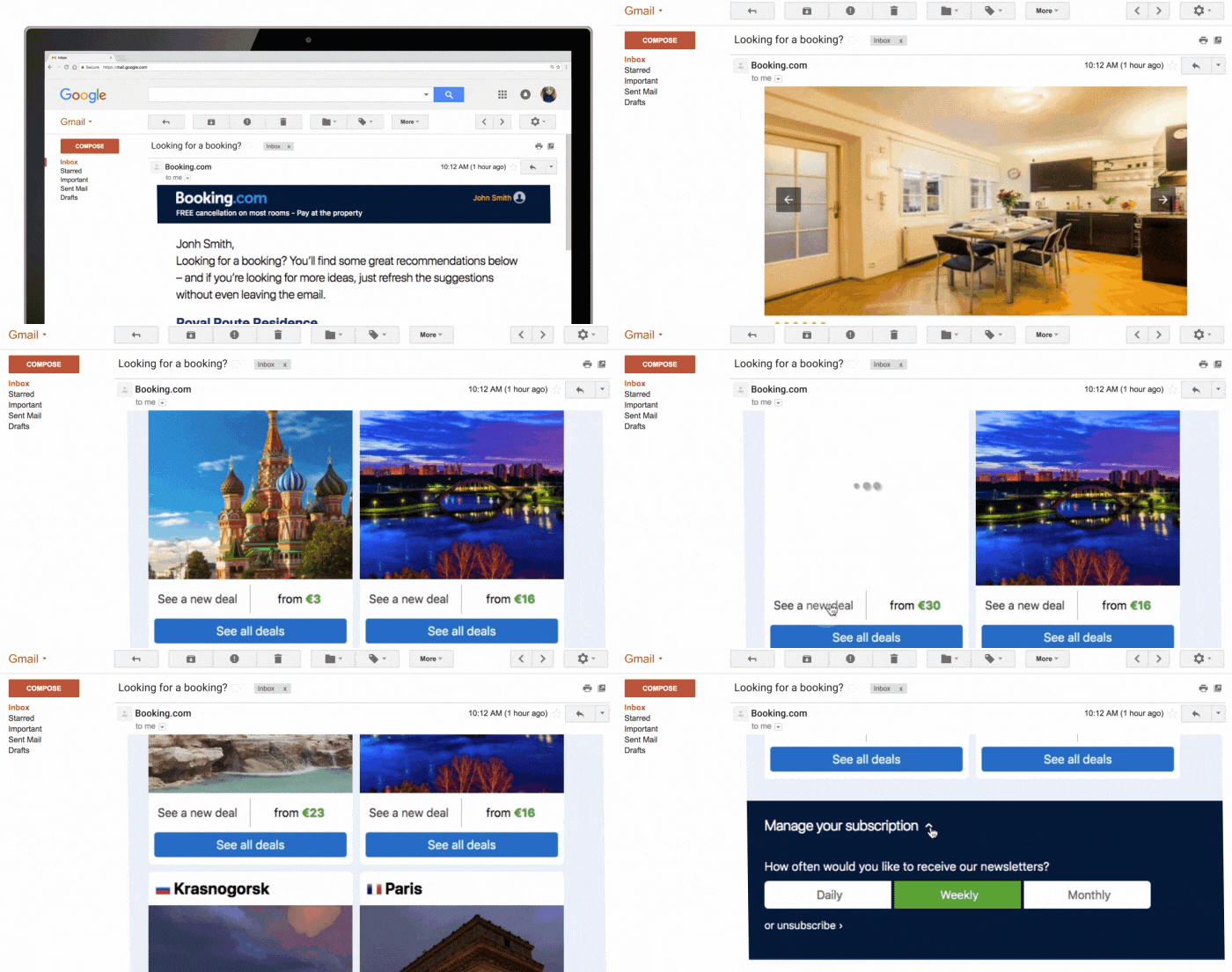
Source: The Keyword
Email marketers and developers can sign up for a preview here.
5. Other Google News You May Have Missed
Clips Is Now Available for Purchase
Google Clips, the wireless smart camera announced at the company’s October 2017 #MadeByGoogle event, was officially released for purchase last month — only to receive less-than-stellar reviews.
Many were confused about the camera’s purpose when it was first released, The Verge reporter Sean O’Kane describing it as a “deeply weird product.” On Tuesday, his colleague Dan Seifert didn’t have much better to say, reviewing Clips as something that “just doesn’t work that well.”
Android Announcements From Mobile World Congress
At Mobile World Congress 2018 (MWC), Google announced it will be introducing two new Android programs to smartphones: The Go edition of Android Oreo, and Android One.
The former — which will be built into select phones from Alcatel and Huawei, among others — boasts a more optimized experience with higher speeds for devices with a memory capacity of less than 1 GB. The latter will introduce an entirely new suite of devices, primarily from Nokia.

Source: The Keyword
A Further Foray Into the Internet of Things
Google is no stranger to the internet of things (IoT), with the ability to control Smart Home lighting and more with Google Assistant-enabled devices. And with its recent acquisition of Xively, it appears that the company has grander plans for that sector.
Xively, previously a division of LogMeIn, is largely known for its device management capabilities. But rather than contributing toward future buildout of consumer IoT products, this “addition of Xively’s robust, enterprise-ready IoT platform,” wrote Google’s IoT Product Manager Antony Passemard in a statement, “can accelerate our customers’ timeline from IoT vision to product, as they look to build their connected business,” making it a logical fit for Google’s Cloud IoT Core team.
Until Next Month
As always, we’re watching all things Google. We’ll continue to pick out top news items, algorithm updates, and trends that can aid your marketing.
Until the month goes out like a lamb, have a great March.

Consumer Reports ranks iPhone X the best smartphone camera, iPhone 8 a close second

Consumer Reports today has published an updated list of its “Best Smartphone Cameras,” reflecting Apple’s most recent releases. The testing agency, which is sometimes accused of being unfairly anti-Apple, now claims the iPhone X and iPhone 8 Plus are the two best smartphone cameras…
Spotify IPO now official, claims twice as many paid subscribers as Apple Music, seeking $1 billion

Spotify, the popular music service and Apple Music’s biggest competitor quietly filed for its IPO with the SEC early last month. Now, the filing has gone public.
Logitech announces official third-party SDK for input dial Craft keyboard

Logitech has today announced expanded support for their tactile-focused Craft keyboard. The keyboard’s standout feature is its creative input dial dubbed the Crown. By twisting, turning, and clicking the Crown, users can quickly adjust and use different tools in a set number of apps. Today’s announcement introduces support for Adobe Lightroom Classic CC and unveils an official SDK opening the door for third-party application developers.
From AirPower to the biggest iPhone yet: all the new Apple hardware we expect this year

We’re now two months into 2018 and possibly just days away from Apple releasing new products, so let’s take a look at all the new hardware we expect Apple to release this year. From new iPhones to upgraded iPads and unreleased products and features we’ve already seen announced, there’s a lot on the table this year.
Twitter rolling out updated share icon with private bookmarking feature and DM tweets

Twitter today has announced that its highly anticipated private bookmarking feature is starting to roll out along with some other sharing options. The new features come via a new share icon.
PlayStation Vue TV service adds support for signing up outside of home, local channels wherever you are, more

The PlayStation Vue TV service has added multiple features that will enhance its mobile viewing experience. The company originally rolled out its PS Vue app on Apple TV back in 2016, being one of the first internet TV providers to launch a client on the tvOS platform.
9to5Toys Lunch Break: SanDisk Amazon Sale from $19, Apple Watch Series 3 $279, 13-inch MacBook Air 256GB $920, more

Keep up with the best gear and deals on the web by signing up for the 9to5Toys Newsletter. Also, be sure to check us out on: Twitter, RSS Feed, Facebook, Google+ and Safari push notifications. more…
Why you should use Malwarebytes to protect your Mac

When we cover dozens of stories each year about Mac related security issues and malware discovered in the wild, it’s hard to imagine that the misconception that “Macs don’t get viruses” still exists. Although there is some truth to it. Macs are much more resilient to what are commonly classified as “viruses” and in general malware is much more rare for Mac users versus Windows. But that doesn’t mean Mac users don’t need to protect themselves from malware threats. And it’s not just malware, there are a long list of other threats that Mac users should be aware of and protecting themselves against.
The security experts at long-time Mac software developer Malwarebytes are often the source of security stories we cover throughout the year on 9to5Mac. We’ve come to trust its team for the many discoveries and coverage of malware and security related issues for Mac users. That’s why it’s easy to give a recommendation on the Malwarebytes software as a go-to option for protecting your Mac. Here’s how it works: