
Welcome to My Blog
How to Use Instagram Insights
It’s no secret that we love data.
Data helps you understand your audience. It tells you how they do things, what they prefer, and who they are.
And when it comes to social media, our love for data doesn’t fade.
That’s why we love analytics and insights. They help you measure the impact of your marketing efforts across different channels to see if there’s something you need to do differently — like target a different audience, post at a certain time of day, or experiment with a new content format.
Instagram Insights are no exception. Here are the analytics on this channel that marketers need to know and understand — and how to use them.
How to Convert to a Business Profile on Instagram
To use Instagram Insights, you must first have a business profile. If you’re already using a personal account, you can switch to a business profile with a few steps:
- Make sure your Instagram profile is public. Private profiles cannot be used as business ones.
- Go to your profile and tap the gearshift wheel icon to visit your settings.
- Tap “Switch to Business Profile.”
- When prompted, select the Facebook Page you want to be associated with your Instagram profile. In order to have a Business Account, you must also have a Facebook Page for your brand — Instagram will give you the option to create a new one during this process if you don’t already have one.
- Review and change any contact information on the “Set Up Your Business Profile page,” then tap “Done.”
How to Use Instagram Account Insights
To view insights into your overall Instagram account, start by visiting your profile. Then, at the top, click the icon of a bar chart, which will take you to your overall insights.
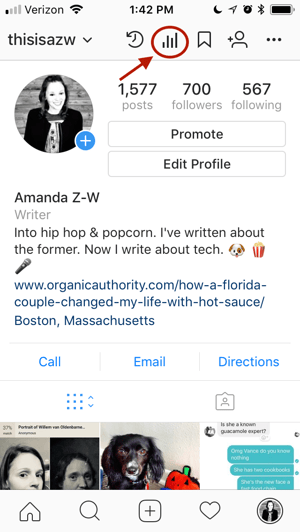
From there, you’ll see some general information about people are engaging with your profile, like how many followers you gained or lost in the past week.
Next, we’ll get into the more specific profile insights you can explore.
1. Impressions
This insight represents how many times your ads appeared on users’ screens.
2. Reach
This insight reflects the number of unique users that have seen any of your Instagram posts.
3. Website Clicks
This insight reflects the number of times any links you’ve included in your business profile have been clicked.
4. Profile Visits
This insight reflects the number of times your profile has been viewed.
5. Followers
This insight reflects how many followers you’ve gained or lost over the past week, as well as the average times of day when your followers are using Instagram — data that can be highly beneficial when planning posts.
To view insights into a specific Instagram post, start by visiting your profile. Tap on the post you’d like to look into, then click “View Insights” below the image.
You may have also promoted a certain post — if that’s the case, an arrow icon that looks like this will appear:

For these posts, you can either view insights on the original version of the post, or specific ones from its promotion. For the latter, tap “Promotion.”
Next, we’ll get into the more specific post insights you can explore.
1. Likes
This one speaks for itself, and reflects the number of users who liked your post.
2. Comments
As with likes, this insight reflects the number of comments left on your post.
3. Saves
The number of unique users or accounts who saved your post, or clicked the bookmark-like icon that appeared below it in their feeds.
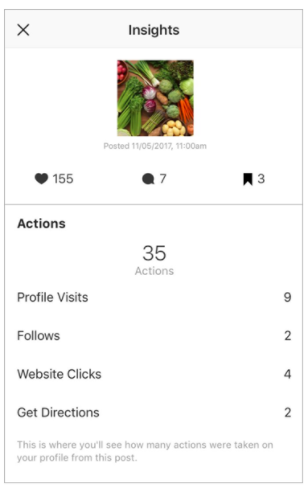
4. Actions
These insights indicate the number of actions that users took on your profile as a result of seeing your post — things like visiting your profile, then taking an action like clicking on your website link or following you.
Source: Instagram
5. Discovery
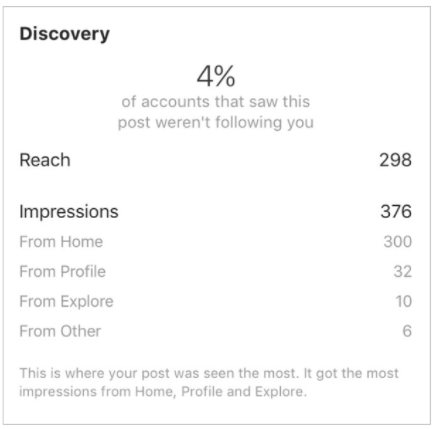
As the name might suggest, these insights indicate where your post was seen — or discovered — the most, including how many accounts weren’t already following you when they first saw the post.
This section includes metrics on Impressions, which reflect the number of times your post was discovered from a particular place within Instagram, like the user’s home feed, a search, your profile, a location tag, or a hashtag.
Source: Instagram
Discovery insights also include data on a post’s reach — which reflects the number of unique accounts that saw your post
How to Use Instagram Stories Insights
Finally, Instagram users with a business profile are able to view insights into their ephemeral Stories. Instagram does not, however, offer such analytics for live videos.
To view your Story insights, start by visiting your profile. Then, at the top, tap the icon of the bar chart, which will take you to your overall profile insights.
Scroll down to the Stories section, and you’ll be able to see insights for older stories, as well as any that have not yet expired.
Next, we’ll get into the more specific Story insights you can explore.
1. Impressions
This insight represents how many times your Story was seen.
When viewing these insights, keep in mind that you’re able to add multiple images or videos to your Story. When you do this, every piece of visual content in your Story is counted as a single photo or video in your post.
Let’s say you add six photos to your Story. Whether someone only views one or views all six, Instagram only counts your entire Story having received one impression.
The same goes for Story content that has been viewed by a single user more than once. Instagram still only counts that interaction as the entire Story having received one impression.
2. Reach
This insight reflects the number of unique users that have seen your Story.
3. Taps Forward
This insight reflects the number of times a user taps your Story photo or video to skip to the next piece of media.
4. Taps Back
This insight reflects the number of time a user taps your Story photo or video to go back to the previous piece of media.
5. Replies
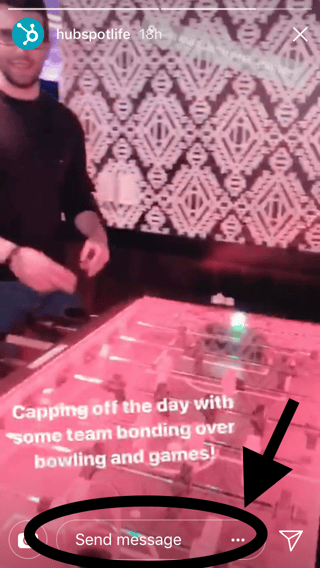
This insight reflects the number of times users send messages through the “Send Message” text box on your Story.
6. Swipe away
This insight reflects the number of times users swipe to skip to the next account’s Story — not to be mistaken for “tap forward,” which reflects users skipping ahead to your next piece of Story media.
7. Exits
This insight reflects the number of times a user leaves the Stories section entirely to return to the home feed.

After Uber, Lyft employees now said to abuse customer data

Seems it’s not a good time for ride companies. Following a whole series of allegations of questionable practices at Uber – some of them relating to abusing customer data – similar claims are being made about ride-sharing company Lyft …
Apple now given permission to move employees into five of the 12 Apple Park sections

The city of Cupertino has reportedly now given Apple the permits needed to move employees into five of the 12 sections of the spaceship ring at Apple Park …
‘Best case’ of Apple’s Shazam acquisition would add 7.5M Apple Music subscribers, says early investor

There have been conflicting theories about why Apple spent a rumored $400M on acquiring Shazam. Some suggested it was nothing more than protecting Siri’s Shazam-powered music recognition. Others wondered whether it was to expose Shazam’s customer base to Apple Music. Yet others theorized it was for the data.
Now one early investor in Shazam has suggested that the combination of the latter two elements could significantly boost Apple Music subscriptions …
Storytelling With Video: The Journey
Want to use video to help more people know, like, and trust you? Wondering how to create episodic video content that keeps people watching? To explore how and why we produce a weekly video documentary, I pull back the curtain on our show, The Journey. More About This Show The Social Media Marketing podcast is […]
This post Storytelling With Video: The Journey first appeared on .
– Your Guide to the Social Media Jungle
from http://ift.tt/2DEefHr
via socialmediaexaminer
How to Turn Off Instagram’s New “Last Online” Feature
Instagram scrollers beware: your favorite photo-sharing app recently released a new feature that shows friends when you were last online. Similar to the activity status found on Facebook Messenger and WhatsApp, Instagram’s new setting is now turned on by default in your account.
Only people you follow or have recently DM’d will be able to see when you were last active. So if someone follows you, and you don’t follow them back, they won’t be able to view your activity status. You can see exactly when your friends were last online by navigating to your direct messages:
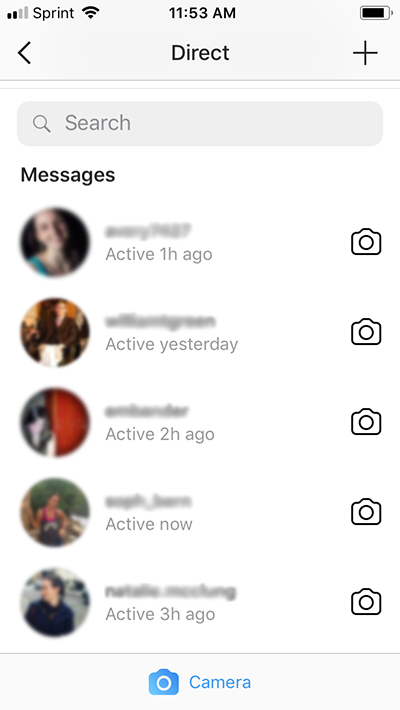
If you want to keep your late-night puppy picture scroll fests completely private, don’t fret. You can turn off Instagram’s “last online” feature with the following quick steps.
Keep in mind that once you turn the feature off, you won’t be able to view anyone else’s “last online” status.
How to Turn Off “Last Online” on Instagram
- Open up Instagram on your phone.
- Navigate to your profile by tapping your profile picture on the far right of the bottom navigation bar.
- If you’re on iOS, navigate to settings by tapping the gear icon next to the Edit Profile button on your profile. On Android, tap the three dot icon in the upper right corner of your profile.
- Scroll down until you see the option for “Show Activity Status” and toggle it off.
Here’s the setting you’re looking for:
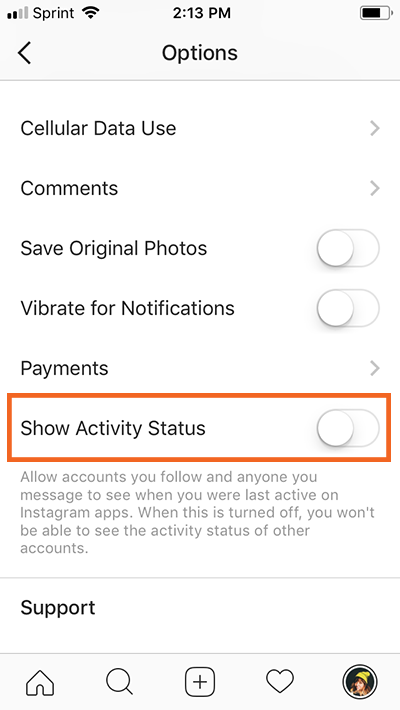
Once that setting is toggled off, you’re free to resume scrolling undetected.

Digitimes claims Apple will only launch one new OLED iPhone this year, the 6.5-inch ‘iPhone X Plus’

KGI’s Ming-Chi Kuo has been reporting the 2018 iPhone lineup as two OLED models (5.8-inch and 6.5-inch) and one LCD model (6.1-inch) for a little while now. Today, a Digitimes analyst says that Apple has been testing various screen panels, and may only launch a single new OLED iPhone this year, with a 6.5-inch screen.
The report also corroborates a new iPhone SE successor with wireless charging, and no 3D Touch, and will launch in the first half of 2018.
Latest HomePod hands-on praises sound quality & calls it an ‘excellent Siri ambassador’

Following Refinery29’s hands-on earlier this morning, Lance Ulanoff has now published his take on Apple’s HomePod after spending some time with it. Ulanoff dives into the sounds quality of the speaker, Siri integration, physical hardware, and more…
Snapchat will no longer add a massive border to images shared from the iOS camera roll

Apple Watch Series 3 with cellular coming to Singapore & Hong Kong next month

Apple originally released the Apple Watch Series 3 with cellular back in September, but because of the carrier requirements, cellular connectivity was only supported in a handful of countries. Apple today announced, however, that Apple Watch Series 3 with cellular is coming to two new countries next month…
014: Apple Books overhaul, watchOS 4.3 changes, HomePod tidbits | 9to5Mac Daily

Today we’ve got details about an Apple Books overhaul, watchOS 4.3 beta changes, and new details about HomePod.
9to5Mac Daily is available on iTunes and Apple’s Podcasts app, Stitcher, TuneIn, Google Play, or through our dedicated RSS feed for Overcast and other podcast players.
Apple releases first tvOS 11.3 public beta for Apple TV

In addition to iOS 11.3 public beta 1, Apple has released the first tvOS 11.3 public beta for Apple TV (fourth gen) and Apple TV 4K.
In-app Apple Pay promotions continue this week with offer from Dunkin’ Donuts

Apple is continuing its weekly Apple Pay promotions this week with a nice deal for Dunkin’ Donuts fans. Apple says that when you reload your Dunkin Donuts account using Apple Pay, you’ll receive a bonus of 50 DD Perks Points…
157: iOS 11.3 Preview, 6.1-inch iPhone rumors, HomePod is coming | 9to5Mac Happy Hour

This week Benjmain and Zac are joined by Guilherme Rambo to discuss HomePod launch details, iOS 11.2.5 and new Siri skills, iOS 11.3 beta and changes included, and a new 6.1-inch iPhone rumor.
9to5Mac Happy Hour is available on iTunes and Apple’s Podcasts app, Stitcher, TuneIn, Google Play Music, or through our dedicated RSS feed for Overcast and other podcast players.
Apple updates Clips w/ new poster for Chinese New Year & more

After the last major Clips update, which included support for iPhone X and a handful of new filters, today Apple has pushed a new update for the app. Albeit not as exciting, the update includes a new poster for Chinese New Year and a few other minor changes.
T-Mobile offering customers attending Winter Olympics in South Korea free unlimited data abroad

Director Damien Chazelle takes on straight-to-series order for future Apple drama

On the heels of Apple reportedly being in a bidding war over a new J.J. Abrams sci-fi series, the company has signed on director Damien Chazelle for another straight-to-seires drama, according to a report from Variety.
