
Welcome to My Blog
Apple adds new mail-in option to iPhone Upgrade program ahead of iPhone 8/iPhone X release
Ahead of the new iPhone 8 and iPhone X, Apple has made a small but notable change to its iPhone Upgrade Program. While customers previously had to go into an Apple retail store to trade in their device and pick up their new one, Apple is now allowing trade-in devices to be mailed in…
Apple’s big iPhone X event is tomorrow, what are you most excited for? [Poll]
Tomorrow’s the day Apple finally unwraps everything it’s been working on leading up to its September iPhone event. Though the past weekend’s leaks have unveiled a ton of information, there is still plenty to be revealed. With that in mind, what are you most excited to see?
People are already lining up for Apple’s $1000 iPhone X before tomorrow’s event
Apple hasn’t even officially announced its new iPhone 8 and iPhone X lineup of devices, and people are already lining up for it in Australia. As noted by CNBC, the first people have started camping out in front of Apple’s Sydney retail store…
Can’t wait for iPhone X? Social app Polygram gives a preview of Animoji-style effects on current iPhones
Over the weekend we gave you an exclusive look at some of the big new features coming to iOS 11 and the soon-to-be-announced iPhone 8, 8 Plus, and iPhone X. One of the highlights is a novelty feature for iMessage called Animoji, which will allow users to send their friends 3D emoji animated by actual facial expressions. Apple isn’t the first company to pull off this effect, however. A new social app called Polygram has already implemented its own version of facial reactions, and you can run it on your iPhone today.
Apple ranks third on Fortune’s ‘Change the World’ list, Cook says products are the biggest influencer
Fortune has put together its “Change the World” list, which recognizes company’s that are making a positive impact, and Apple has come in at number three. Tim Cook also spoke with Fortune to explain more about how he thinks Apple is changing the world for the better and also shared that he believes Apple products aren’t just for the rich (a day before the ~$1000 iPhone X debut).
9to5Toys Lunch Break: Logitech 1-Day Mac Accessory Sale, LG 29-inch USB-C Monitor $199, iPhone SE 32GB $129, more
Keep up with the best gear and deals on the web by signing up for the 9to5Toys Newsletter. Also, be sure to check us out on: Twitter, RSS Feed, Facebook, Google+ and Safari push notifications. more…
tvOS 11 firmware leak suggests ‘Apple TV 4K’ name, new HDR details, more
Following 9to5Mac‘s iPhone X feature discoveries from the iOS 11 GM leak we received over the weekend, new tvOS 11 firmware appears to be out in the wild today with details about the new Apple TV. The new Apple TV has widely been expected to include 4K HDR video playback, and the firmware leak both corroborates that and explains how the new video quality will be handled.
KGI: OLED iPhone X production under 10k/day, gold model could launch later than other colors
Ahead of tomorrow’s iPhone event, KGI is out with one last update on the status of the iPhone X production. According to the analyst, production of the OLED iPhone is reportedly under 10,000 units a day. This will mean the new phone will face severe supply constraints for a while.
The gold model is apparently facing additional production problems and will be available in even lower quantities. KGI suggests that the color may even have a delayed release date compared with the other colors.
tvOS 11 firmware leak includes updated 4K HDR screensavers for Apple TV 4K [Video]
tvOS 11 firmware for the upcoming Apple TV 4K appears to be out in the wild ahead of the anticipated unveil tomorrow during Apple’s keynote at the Steve Jobs Theater in Cupertino, CA. Here is an exclusive first look at the device’s 4K-enabled default screensaver 9to5Mac has received from the new firmware.
more…
Analysts suggest consumers will pay $999+ price of iPhone X as they prioritize spending
With just one day to go before the official announcement of the iPhone X and iPhone 8/Plus, there has been considerable debate about public reaction to the anticipated $999+ price-tag of the flagship phone.
Barclays recently suggested that only one in five iPhone owners would be willing to pay a four-figure sum for the device, even making the unlikely suggestion that they would switch to Samsung. This was countered by a survey which found that 40% of iPhone owners were planning to buy the top-of-the-range iPhone this time around.
This latter view has seen further support today …
Twitter is testing a new feature in its Android app for easier tweeting of threads
Twitter’s character limit of 140 characters still gives the social network a unique advantage over its competitors, but sometimes, you need to send out multiple tweets in rapid succession to truly get your point across. Thankfully, it looks like Twitter is testing a feature in its Android app that makes doing this a whole lot easier.
Spotify’s web player no longer works on Safari on the Mac due to apparent security concern
Blog SEO: How to Search Engine Optimize Your Blog Content
Search engine optimization is incredibly important for marketers. When you optimize your web pages — including your blog posts — you’re making your website more visible to people who are looking for keywords associated with your brand, product, or service via search engines like Google.
But it can be a pretty tricky tactic to master with Google’s copious algorithm updates.
How do you know what matters and what doesn’t? What are today’s blog SEO best practices, and what’s considered “old-school”? How on earth can you keep it all straight?
We understand confusion is a common issue facing inbound marketers — and we want to help. In this post, we’ll cover how to optimize your blog posts for the keywords you care about, along with a few other optimization tactics you should keep in mind.
Note that this list doesn’t cover every single SEO tactic under the sun. Rather, these tips are meant to get you started with improving SEO for your blog in particular.
SEO can be confusing. Listen as HubSpot’s own Matt Barby and Victor Pan clear things up:
HubSpot customers: If you want to see specific SEO optimization tips for your individual blog posts, click the chart icon on the far left side of the blog editor when you’re working on the post to access the SEO Optimization screen.
If you’re not a customer, you can use these tips as a sort of checklist as you blog.
(Want to learn more about content creation, strategy, and promotion? Sign up here to be the first in line for our new Content Marketing Certification course.)
How to Search Engine Optimize Your Blog Content
1) Focus on 1–2 long-tail keywords.
Optimizing your blog posts for keywords is not about incorporating as many keywords into your posts as possible. Turns out that’ll actually hurt your SEO because search engines will think you’re keyword stuffing (i.e., including your keywords as much as possible with the sole purpose of gaining ranking in organic search).
But that’s not cool with search engines, nor does it make for a very good reader experience. Instead, you should use keywords in your content in a way that doesn’t feel unnatural or forced.
A good rule of thumb is to focus on one or two keywords per blog post. This’ll help keep you focused on a goal for your post. While you can use more than one keyword in a single post, keep the focus of the post narrow enough to allow you to spend time actually optimizing for just one or two keywords.
Using long-tail keywords may be more efficient to this end, since website visitors searching long-tail terms will often be more qualified. In other words, you’ll bring in the right type of traffic — visitors who convert — by using long-tail keywords.
2) Include these 1–2 keywords in specific parts of your post.
Now that you’ve got your one or two keywords, it’s time to incorporate them into your blog post. Where are the best parts of your posts to include these terms so you rank high in search results?
There are four essential places where you should try to include your keywords: headline, headers and body, URL, and meta description.
Title
The title (i.e., headline) of your blog post will be a search engine’s and reader’s first step in determining the relevancy of your content, so including a keyword here is vital.
Be sure to include your keyword within the first 65 characters of your headline, which is just about where Google cuts it off on search engine results pages (SERPs). Technically, Google measures by pixel width, not character count, and it recently increased the pixel width for organic search results from approximately 500 pixels to approximately 600 pixels, which translates into around 65 characters.
Long title? When you have a lengthy headline, it’s a good idea to get your keyword in the beginning since it might be cut off in SERPs towards the end, which can take a toll on your post’s perceived relevancy. In the example below, we had a long title that went over 65 characters, so we front-loaded it with the keyword we were trying to rank for: “on-page SEO.”
Headers & Body
Mention your keyword at a normal cadence throughout the body of your post and in the headers. That means including your keywords in your copy, but only in a natural, reader-friendly way. Don’t go overboard at the risk of being penalized for keyword stuffing. Before you start writing a new blog post, you’ll probably think about how to incorporate your keywords into your post. That’s a smart idea, but it shouldn’t be your only focus, nor even your primary focus.
Whenever you create content, your primary focus should be on what matters to your audience, not how many times you can include a keyword or keyword phrase in that content. Focus on being helpful and answering whatever question your customer might have asked to arrive on your post. Do that, and you’ll usually find you naturally optimize for important keywords, anyway.
URL
Search engines also look to your URL to figure out what your post is about, and it’s one of the first things it’ll crawl on a page. You have a huge opportunity to optimize your URLs on every post you publish, as every post lives on its own unique URL — so make sure you include your one to two keywords in it.
In the example below, we created the URL using the long-tail keyword we were trying to rank for: “email marketing examples.”
Meta Description
Later in this post, we’ll dive into explaining meta descriptions. Your meta description is meant to give search engines and readers information about your blog post’s content — so be certain to use your long-tail term so Google and your audience are clear on your post’s content. At the same time, keep in mind that the copy matters a great deal for click rates — the more engaging, the better.
3) Make sure your blog is mobile-friendly.
It’s been some time since Google revealed that more people use the search engine on their mobile phones than on desktop. And for all those valuable search queries being done on mobile, Google displays the mobile-friendly results first. This is yet another example of Google heavily favoring mobile-friendly websites, which has been true ever since the algorithm was updated to do so in April 2015.
While responsive design and mobile-friendly websites have always been important for user experience, they’re becoming more and more important for SEO as well. So if you haven’t been focusing on improving your mobile experience, you’d better prioritize it now, or your search rankings could suffer.
(HubSpot customers: Breathe easy. All content created on HubSpot’s platform is automatically responsive to mobile devices.)
If your website uses responsive design, your blog pages will only have one URL instead of two different ones — for desktop and mobile, respectively. This helps your post’s SEO because any inbound links that come back to your site won’t be divided between the separate URLs. Any SEO power you gain from these links will be centralized, helping Google more easily recognize your post’s value and rank it accordingly.
Pro tip: What search engines value is constantly changing. Be sure you’re keeping on top of these changes by subscribing to Google’s official blog.
4) Optimize the meta description.
To review, a meta description is the additional text that appears in SERPs that lets readers know what the link is about. The meta description gives searchers information they need to determine whether or not your content is what they’re looking for, and ultimately helps them decide if they’ll click or not.
In addition to being reader-friendly (compelling and relevant), your meta description should include the long-tail keyword you are trying to rank for, because if we’re doing blogging right, that keyword is representative of the contents of your post.
In the example above, I searched for “newsletter examples.” The term is bolded in the meta description — helping readers make the connection between their search term and the result — and the copy “get inspired” catches attention and compels clicks.
Note: Nowadays, it’s not guaranteed that your meta description is always pulled into SERPs as it once was. More and more, Google has been pulling in other parts of your blog post that includes the keywords searched, presumably to give searchers optimal context around how the result matches their specific query.
Let me show you what I mean. Below is an example of two different search queries delivering two different snippets of text on Google SERPs. The first is a result of the query “no index no follow,” and pulls in the original meta description:
The second is a result of the query “noindex nofollow,” and pulls in the first instance of these specific keywords coming up in the body of the blog post:
While there’s not much you can do to influence what text gets pulled in, you should continue to optimize your post for readability (see above). By creating reader-friendly content with natural keyword inclusion, you’ll make it easier for Google to prove your post’s relevancy in SERPs for you.
5) Optimize your images.
Blog posts shouldn’t only contain text — you should also include images that help explain your content. But search engines don’t just look for images. Rather, they look for images with alt text.
Because search engines can’t “see” images the same way humans can, an image’s alt text tells them what an image is about — which ultimately helps those images be found in search. Alt text also makes for a better user experience, as it’ll display inside the image container when an image can’t be found or displayed, and can also improve accessibility for people with poor vision who are using screen readers.
Technically, alt text is an attribute that can be added to an image tag in HTML. Here’s what a complete image tag might look like (bolding added for emphasis):
<img class=”wt-blog__normal-image” src=”image.jpg” alt=”image-description” title=”image tooltip”>
Adding keywords to your alt text may seem minor — and it isn’t going to impact your search rankings as much as other things on this list. But it is worth the extra minute it takes to change the name from “IMG23940” to something accurate and descriptive, like “puppies-playing-in-basket:”
Read this blog post to learn more on-page SEO tips for keyword optimizing the most critical parts of your website.
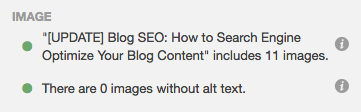
HubSpot customers: The SEO Panel will recognize whether or not you have optimized your images. Though these elements are not as important as some other optimizations, they’re still necessary (not to mention easy to add).
6) Don’t use too many similar topic tags.
Topic tags can help organize your blog content, but if you overuse them, they can actually be harmful. If you have too many similar tags, you may get penalized by search engines for having duplicate content.
Think of it this way: When you create a topic tag, you also create a new site page where the content from those topic tags will appear. If you use too many similar tags for the same content, it then appears to search engines as if you’re showing the content multiple times throughout your website. For example, topic tags like “blogging,” “blog,” and “blog posts” are too similar to one another to be used on the same post.
If you’re worried that your current blog posts have too many similar tags, take some time in the near future to clear them up. Choose about 15–25 topic tags that you think are important to your blog and that aren’t too similar to each other, and then only tag your posts with those keywords. That way, you won’t have to worry about duplicate content.
7) Use URL structures that help your visitors.
The URL structure of your web pages (which are different from the specific URLs of your posts) should make it easy for your visitors to understand the structure of your website and the content they’re about to see. Search engines favor web page URLs that make it easier for them and website visitors to understand the content on the page.
This differentiation is baked into the HubSpot blogs’ respective URL structures. If I decided to go to the Marketing section from this main page, I would be taken to the URL http://ift.tt/19PNGaV. If we want to read the Sales section, all we have to do is change where it says “marketing” in the URL to “sales”: http://ift.tt/19WtlCB. This URL structure helps me understand that “/marketing” and “/sales” are smaller sections within the larger blog.
What if there’s a specific article we want to read — perhaps “How to Do Keyword Research: A Beginner’s Guide”? Its URL structure — http://ift.tt/1l5bKLb — denotes that it’s an article from the Marketing section of the blog.
In this way, URL structure acts as a categorization system for readers, letting them know where they are on the website and how to access new site pages. Search engines appreciate this, as it makes it easier for them to identify exactly what information searchers will access on different parts of your blog or website.
Get more best practices for URL structure from Moz here.
8) Link internally when possible.
Inbound links to your content help show search engines the validity or relevancy of your content. The same goes for linking internally to other pages on your website. If you’ve written about a topic that’s mentioned in your blog post on another blog post, ebook, or web page, it’s a best practice to link to that page.
You might’ve noticed that I’ve been doing that from time to time throughout this blog post when I think it’s helpful for our readers. Not only will internal linking help keep visitors on your website, but it also surfaces your other relevant and authoritative pages to search engines.
HubSpot customers: The SEO Panel automatically suggests linking to other internal resources on your website. Think of it as solving for your SEO while also helping your visitors get more information from your content.
If you’re looking for more internal links to add to your post but aren’t sure which would be relevant, you can click “Explore some internal links you might use in this post” for a list of recommendations.
9) Use Google’s Search Console.
Google’s free Search Console contains a section called the Search Analytics Report. This report helps you analyze clicks from Google Search, and it’s useful to determine which keywords people are using to find your blog content. Learn how to use it by reading this blog post written by my colleague Matthew Barby and by reading Google’s official support page here.
If you’re interested in optimizing your best-performing older blog posts for traffic and leads like we’ve been doing since 2015, this tool can help identify low-hanging fruit.
A lot of content marketers struggle with optimizing their blog posts for search. The truth is, your blog posts won’t start ranking immediately. It takes time to build up search authority. But when you publish blog posts frequently and consistently optimize them for search while maintaining a reader-friendly experience, you’ll reap the rewards in the form of traffic and leads long-term.
10) Use Topic Clusters.
The way most blogs are currently structured (including our own blogs, until very recently), bloggers and SEOs have worked to create individual blog posts that rank for specific keywords. The result is disorganized, and hard for the user to find the exact information he or she needs. It also results in your own URLs competing against one another in search engine rankings when you produce multiple blog posts about similar topics. Here’s what our blog architecture used to look like using this old playbook:
Now, in order to rank in search and best answer the new types of queries searchers are submitting, the solution is to use the topic cluster model: Choose the broad topics you want to rank for, then create content based on specific keywords related to that topic that all link to each other, to create broader search engine authority. Using this model, this is what our blog infrastructure looks like now — with specific topics surrounded by blog posts related to the topic, connected to other URLs in the cluster via hyperlinks:
This model uses a more deliberate site architecture to organize and link URLs together to help more pages on your site rank in Google — and to help searchers find information on your site more easily. This architecture consists of three components — pillar content, cluster content, and hyperlinks:
iPhone X and 8 face an uphill battle in China, say analysts, despite lucky number
Analysts and industry commenters believe that the iPhone X and iPhone 8 face a big challenge in China, the world’s largest smartphone market.
On the positive side, Chinese consumers respond particularly well to new designs which make a device stand out from earlier models, and eight is considered a lucky number in the country …
iOS 11 includes software to avoid burn-in on iPhone X OLED screen
In digging through the iPhone X firmware leaked over the weekend, we have found one more small tidbit: reference to a burn-in mitigation feature for the OLED screen.
How to watch the live-stream of tomorrow’s iPhone X/iPhone 8 keynote on your iPhone, iPad, Mac and Apple TV
We’ve been learning rather more about tomorrow’s event than Apple would like thanks to iOS 11 GM firmware leaked to us on Friday evening. Info we were able to glean from the code ranged from new wallpapers to the apparent names of this year’s iPhones.
But while 9to5Mac readers may be in for fewer surprises than most, there’s still no substitute for watching the keynote live …
Creator Monetization Report 2017: How Bloggers, Video Creators, and Podcasters Make Money
Are you a blogger, video creator, or podcaster? Are you wondering how creators are making money? Look no further. In the first study of its kind, Social Media Examiner commissioned a comprehensive study of more than 4,300 creators. In this report, you’ll discover: The most common ways creators monetize their work. What produces the most […]
This post Creator Monetization Report 2017: How Bloggers, Video Creators, and Podcasters Make Money first appeared on .
– Your Guide to the Social Media Jungle
from http://ift.tt/2vOUYev
via socialmediaexaminer
5 Pillar Page Examples to Get You Started With Your Own
Earlier this year, a handful of my extremely bright and capable colleagues compiled a report on topic clusters: a method using a single pillar page as the main hub of content for a given topic. All of your content assets related to that topic link back to the pillar page — and to each other.
Cool, huh?
But it’s not just a nice, clean way of organizing content that brings glee to the most Type A of marketers (read: yours truly). It also keeps Google happy. As it turns out, the search engine giant has changed its algorithm to favor topic-based content, making pillar pages a requirement for content marketers who want to maintain a high SERP ranking.
Let’s dive in — read on.
What Is a Pillar Page?
My colleague, Sophia Bernazzani, does an excellent job of summarizing pillar pages (and comparing them to HubSpot Marketing Blog’s own previous method of topic organization) in her post on the subject here. As the previous paragraphs suggest, she says:
“A pillar page is the basis on which a topic cluster is built. A pillar page covers all aspects of the topic on a single page, with room for more in-depth reporting in more detailed cluster blog posts that hyperlink back to the pillar page. Pillar pages broadly cover a particular topic, and cluster content should address a specific keyword related to that topic in-depth.”
What’s more, however, is that the idea of a pillar page is to cover broad content in a way that is highly linkable itself — that is, external sites would link to it as a canonical resource for the topic. So, to put it into visual terms, here’s what our blog architecture used to look like using this old playbook:
This is where the search ranking piece comes in: the topic cluster model. Using topics you want to rank for, create content based on specific keywords related to that topic that are inter-(hyper)linked — that can support efforts for greater search engine authority. Here’s what our blog infrastructure looks like now using that model:
See how the site architecture is more deliberate in this model? The visual above shows how it organizes content assets together to help searchers more easily find information within your domain.
It has three main components:
- Pillar content (your pillar page)
- Cluster content
- Hyperlinks
Okay, you get it — pillar pages are both nice and important for SEO. After all, on average, a page that ranks #1 in Google will also rank well for around 1,000 other related keywords. But what are they supposed to look like? Are aesthetics important? How do you organize all of your content assets on a pillar page?
Actions speak louder than words — says the writer — which is why we sought answers to those questions by way of pillar page examples that do an excellent job of organizing and linking to content assets.
5 Great Examples of Pillar Pages
1) Typeform: Brand Awareness
At first glance, it’s hard to ignore the positively inbound-y nature Typeform’s Brand Awareness pillar page. It was built to inform, and lives up to its tagline: “Nearly everything you need to know.”
Not only is it aesthetically pleasing — the color palette is, somehow, at once both soothing and bold — but it’s quite easy to navigate. The table of contents appears immediately, and once you begin to consume the content, it’s clear, comprehensive, and quotable. Notice how the information is interjected with CTAs to tweet various stand-out quotes:
And while there are several links throughout the pillar page, the vast majority of them don’t link to other Typeform content assets. In fact, it’s not until toward the end of the pillar page that those links to other Typeform pages begin to appear, and even them, they’re used sparingly, and typically used to support points and direct readers to solutions.
2) Matthew Barby: Customer Acquisition Strategies
HubSpot’s Global Head of Growth and SEO, Matthew Barby, is no stranger to the HubSpot Marketing Blog, or the people who comprise its team. We regularly quote him here, and frequently pester him with our own questions. Naturally, his website is a go-to resource for marketers who want to learn about SEO — and it includes an exemplary pillar page on customer acquisition strategies.
Similarly to the Typeform example, there’s a noticeable shortage of promotional hyperlinks within the first section of the page. In fact, as you scroll down the page, you’ll also see that links to Barby’s other content assets are both tastefully and seamlessly inserted between large pieces of tactical information.
But these links are supplemental and relevant, and there aren’t tons of them — all of them direct the user to Barby’s tools on the topic at hand, which is customer acquisition. Instead of bombarding the user with numerous in-text links, well-designed CTAs are used to allow readers to click to learn about these tools.
3) The Atlantic: Population Healthier
Pillar pages are also an excellent way to organize and create sponsored content with a co-marketing partner. Case in point: The Atlantic partnered with athenahealth to compile a report (and pillar page) on healthcare in the U.S.
The content is absolutely bananas — in the absolutely best way possible. It begins with a story about a historical building in the Massachusetts town of Lowell, which forays into a full-blown interactive, animated, and highly information report about the state of healthcare coverage in cities like this one as the user scrolls down. But the entire time, there’s a helpful plus-sign along the left side of the page that, when clicked on, presents a table of contents.
Here, links to additional content found on theatlantic.com are a bit more prevalent than the previous example — but remember, this pillar page was created to support sponsored content. Therefore, it presents an organized, non-intrusive way of linking to this sponsored (but still informative) content that relates back to the central topic of healthcare in the U.S.
The Atlantic achieves that by placing well-designed, but noticeable links at the end of each section, which match the visual theme that precede them — such as with the link to “The Culture Wars” content in the example above.
4) ProfitWell: SaaS DNA Project
We love content that makes good use of examples to point out best practices — just have a look at what we’re doing in this post. But in a move similar to Typeform’s in its Brand Awareness pillar page, ProfitWell’s pillar page on “The Anatomy of a SaaS Marketing Site” incorporates plenty of “in-the-while” instances of both what to do when it comes to SaaS marketing content — and what not to do.
Building that sort of information into a pillar page — or any content, for that matter — preemptively answers the question of, “I know what I’m supposed to do. But what should I avoid at all costs?”
Once again, there’s a noticeable lack of link inundation here. Within each chapter, a visual CTA lingers along the right-hand side of the page that allows users to download the full Anatomy of a Saas Marketing Site guide, as well as a single click-to-tweet option for one line of quotable text from the section. It’s a no muss, no fuss approach that fits in well with a text-heavy site, which doesn’t distract from the main content.
5) GoodUI: Evidence
We’re absolutely delighted by the concept of “Easter eggs” — those little hidden, puzzle-like treasures on the internet that turn up cool tricks or nuggets of information. And to us, GoodUI’s “Evidence” pillar page is one big Easter egg.
The page consists of data — or “evidence” — from multiple A/B tests that have uncovered patterns for higher conversions. Clicking on any data point throughout the page will direct the viewer to an expanded, detailed view of the test leading to that information. It’s a treasure trove of eye-catching, compelling experiment results.
Within that sub-content, there’s a CTA at the bottom of each dedicated test section to share your own test, providing the reader with an opportunity to contribute her own content and findings to an already impressive plethora of information.
Want to learn more? Check out the video below.