
Welcome to My Blog
Apple releases tvOS 10 beta 2 for Apple TV to developers
Apple has just released the second beta for tvOS 10 today to all current testers and developers. Users looking to update their devices can check through the Software Update section on the Apple TV, or grab the Configuration Profile from Apple’s Developer center if they’d like to install it for the first time.
Filed under: Apple
Alleged spy spot of iPhone 7 once again shows redesigned antenna & camera
Today yet another alleged spy spot of iPhone 7 shows a redesigned antenna and camera consistent with past leaks. It’s unclear if the component is legitimate, but the photo was published by techtastic.nl, a site that in the past has had accurate leaked photos of iPhone packaging and components found floating around the China.
Filed under: Apple
9to5Toys Lunch Break: 15” Retina MacBook Pro $1,600, CyberPower UPS $85, Italian Leather Apple Watch Band $80, more
Keep up with the best gear and deals on the web by signing up for the 9to5Toys Newsletter. Also, be sure to check us out on: Twitter, RSS Feed, Facebook, Google+ and Safari push notifications.
TODAY’S CAN’T MISS DEALS:
Apple’s 15-inch Retina MacBook Pro brings power and a beautiful display to your work: $1,600 shipped (Reg. $1,999)
Everyone needs a reliable uninterruptible power supply, score this CyberPower model for $85 shipped (Reg. $140)
Bring Nomad’s handsome Italian Leather Apple Watch Bands to your wrist for as low as $80 shipped
PowerTime Apple Watch Charging Dock w/ 3 USB Ports: $39 shipped (Reg. $49)
Just $9 Prime shipped for a new Apple Watch band? Sounds good to me.
Amazon Prime Day 2016 revealed: Tons of deals, increased inventory and Alexa specials for Echo owners
Parallels Desktop 11: Run Windows/Android/Linux/anything seamlessly on your Mac: $40 (50% off) shipped or less
App Store Free App of the Week: Mimpi Dreams puzzle-platformer goes free for the first time (Reg. $2)
Apple offering free download of sketching app Procreate via Apple Store app
One of the best sniper titles on the App Store just went 50% off: Hitman Sniper $1 (Reg. $2)
Short Lightning cables are more useful than you’d think, here are the best MFi options
Review: Mophie’s new Charge Force line brings carefree wireless charging to iPhone [Video]
Apple’s Thunderbolt Display is dead: These are the best 4K & 5K displays for Mac
Skip your pockets, the LD West gun-style iPhone holsters turn your whole life into an 80’s cop show
MORE NEW GEAR FROM TODAY:
Here’s a bunch of iPhone and Android clear cases on sale from $3 w/ free shipping over at Amazon
Amazon Prime Day offers up deep deals on SONOS refurbished speakers: PLAY:3 $224, more
- GOOLOO Portable 4-Outlet Surge Protector with USB Charger $20 (Reg. $25), more
- One of VIZIO’s top 4K Smart Ultra HDTVs just received a rare discount: $899 (Reg. $1,100)
- Daily Deals: Toshiba Canvio AeroCast 1TB Wireless Portable Hard Drive $60, more
- Grab The Ultimate Bond Collection + Spectre Bundle on Blu-ray for $90 (Reg. $300)
- Prime Day is coming but the deals have started: Acer Chromebook 15 on sale for $250, more
- Crocs have evolved to be less revolting, get all shapes today at Amazon starting at $12
- Games/Apps: Batman Arkham Knight $20, PS Plus 1yr. $40, freebies, more
- Kevin Durant probably didn’t train on this basketball hoop, but it’s still a great deal at $500
- $49 (58% off) snags you an excellent Black & Decker 20V Lithium Drill/Driver Project Kit
MORE DEALS STILL ALIVE:
Load up on $5 HD movies: Gone Girl, Peanuts Movie, Spy, much more
Illuminate your garden or outdoor space w/ the OSRAM LIGHTIFY Kit $54 shipped
Filed under: Apple
Review: Lifespan Under Desk Treadmill is a solid standing desk companion [Video]
As someone who’s been involved in IT for the last 15 years, sitting while working comes with the territory. Since transitioning from IT to full-time blogging, it’s just been more of the same.
Shooting video tends to get me out of my chair on most days, but I still find myself sitting for inordinate amounts of time. Having a good exercise routine is crucial, as many of my colleagues will attest to, but even with regular exercise, it can still be fatiguing to sit for most of the working day.
This is why I ended up researching, and ultimately acquired, a standing desk. Standing desks are great as I noted in my full review of the UpDesk Power Up, but after a month or so of regularly standing for portions of my work day, I craved something more.
Enter the Under Desk Treadmill from LifeSpan. It’s a device that helps transition a standing-while-working routine into to a moving-while-working routine. Can an under desk treadmill really allow you to maintain productivity while in motion?
Filed under: Apple
11 Leadership Qualities of a Great Project Manager
You have just been promoted to project manager. Congratulations! I’m sure it’s something you’ve been hoping for, for quite some time – and no doubt you deserve it. With that being said, there will be some adjustments that you’ll have to make. After all, leadership is nothing like what you have done before. Your acquired technical skills and taking orders don’t necessarily help when your delegating. Interpersonal skills are important. Without them, it doesn’t matter what project management tools you might have.
Before we start looking at those management skills, let me just make one point. Despite what some people might be say, leadership is not something that you’re born with. Leadership is learned. It takes practice, intentional learning and dedication. That should both be frightening and liberating. Frightening because it means you might just suck. Liberating because you may be bad at the start but that doesn’t mean you always will be. You can improve. You simply have to apply yourself.
Good? Now let’s look at those skills.
1. Convey the big picture
The first step of being a good leader is to realize that you are responsible for the big picture, while those under you are responsible for the nitty gritty. That means you have to steer the boat, without telling each sailor how to row their oars.
Yes, that’s right, that’s a metaphor for micromanagement. If you’re micromanaging, not only will the people on your team hate you, you won’t be able to keep your head above the fray. That will be bad for everybody involved. Focus on the big picture and making certain that everybody knows their place. Then let them do their part.
2. Build the team
Great leaders make other people better. Don’t simply lead, but give the people under you the opportunity to blossom. Allow them to become better at what they do.
This could include: hosting workshops, having regular discussions about what can be improved, or just sitting down and listening to what the team members have to say. Do this without feeling the need to interject, interrupt or defend yourself. Ensure sure you’re doing it right.
3. Superior communication skills
When it comes down to it, communication is the key to being an excellent leader. Unfortunately, a lot of people don’t realize how bad they are at it. There are lots of reports about companies who discover that their new graduates are exceedingly bad at communicating. However, the graduates believe they excel at it. Resulting in them not improving their communication skills. Now obviously that’s a nightmare for both the graduates and the people they work with.
Don’t be like those graduates. You can always work on improving your communications skills.
4. Find the solution
When other people complain, leaders find solutions. It is very important that a leader solves the problem rather than fixating on it. This requires a certain amount of creativity and thinking outside the box.
Most importantly, it involves understanding who in your team is capable of what. As well, make certain that you discuss the problem with the right person. This person is more likely to give you a solution or at least the key puzzle piece that will help you find it.
5. Delegate
In fact, delegation is another one of those skills that you need to master. Delegation isn’t easy, let me be clear about that. It means trusting people to do their task. Additionally, it means knowing what everybody is capable of and what they are not.
This is not something you can do when the hurricane has hit. You need to start figuring all that out when the waters are still calm. So when the storm hits you know who is capable of what, so that the ship doesn’t capsize.
6. Optimism
You’re not the anchor that needs to be dragged, you’re the sail that propels the team forward. That means you have to remain optimistic. If not, it is like your are telling them that they’re not going to be able to surmount to the challenges ahead.
That sucks the energy right out of everyone.
Have a negative thought? Everybody does. Just keep it to yourself and instead focus on motivating your team on completing tasks, rather than complaining about how much they still have to do.
7. Set the example
How can you expect people to behave in a proper fashion if you don’t? Leaders are supposed to show how to be better. Yes, though that’s hard to live up to, that means don’t gossip, stay composed, don’t slack off and whatever you do, try not to give into your weird habits! If you do, then other people will take that as their cue to do the same and you won’t have the authority to tell them differently, without looking like a hypocrite.
8. Empathy
We want to know that when we have a problem we can go to our bosses and they will understand. If we don’t have that feeling then we might not even mention the problem. That can lead to all sorts of other problems down the road. For that reason make sure you’re willing to listen to your team.
Do not forget that everyone is balancing work and life, and may have some challenges outside of your business. Understand the needs of your employees.
Yes, that might be hard sometimes. After all, you’ve got a busy schedule as well, but if you don’t then you’re going to find yourself fighting off fires, when you could have just snuffed out sparks.
9. Remain composed
Never blow your top off, become overwrought, or flip out. You’re in charge, it’s unbecoming. If you start losing your cool, it’s going to be very hard for those in your team to maintain theirs – or, for that matter, to keep their respect for you.
So learn to breath, give a second thought to everything you’re going to say in a highly emotional state. If things aren’t going well with another person in your team, take them aside so that if words are said in anger, at least they’re between you and that person.
10. Passion
Be passionate about what you’re doing. If you’re not, how is your team ever going to be? Believe that what you’re doing is worthwhile.We like passionate people and are willing to follow them. That means that we’ll put in extra hours if it’s necessary. That will never happen if you’re just blasé and don’t really seem to care. So try to remain passionate about what you’re doing and where you’re going with the project. It will pay dividends in the long run.
11. Rise to your full potential
And finally, I’m going to say it again that leadership is a skill. For that reason, you can always keep improving to make yourself better at it. Never despair because you’re not great yet and equally never think that you’re the best you can be. Always assume there is something more to learn. There is some other way you can improve.
Concluding thought
As long as you keep improving, you’ll inspire your team to do the same. That means the work environment and results will follow suit. Which is ultimately what everyone wants.
The post 11 Leadership Qualities of a Great Project Manager appeared first on Project-Management.com.
from Project Management Articles – Project-Management.com http://ift.tt/29fyJ5P
via Project-Management.com
Poll Update: The battle of the two Steves was played out again in yesterday’s opinion comments
When I posted my opinion piece yesterday, I did so knowing that fans of the old 17-inch MacBook Pro are in a tiny minority. Most people are happy enough with a 15-inch screen when mobile, and most also seem content to use a mix of on-board storage, external drives and the cloud, so I also didn’t expect to see much support for my own preference for 2TB of on-board storage.
Filed under: Apple
How to Pick the Perfect Color Combination for Your Data Visualization
Choosing any color scheme — whether for graphics, websites, brands, etc. — is a challenge in and of itself. That choice of colors sets the mood for anything and everything you create.
When it comes to data visualization, color is especially important. The color scheme sets the tone of the imagery and each color serves to represent a unique piece of information.
The colors you use in your data visualizations represent more than just one idea. The color scheme you choose has the power to display the type of data your showing, its relationship, the differences between categories, and more.
This post will take you through the process of choosing the perfect color combination for your next data visualization — from understanding your data to finding the right color tool.
How to Pick the Perfect Color Combination for Your Data Visualization
Is Your Data Sequential or Qualitative?
The first step when choosing a color scheme for your data visualization is understanding the data that you’re working with. There are three main categories that matter when choosing color schemes for data: sequential, diverging, and qualitative color schemes.
Sequential color schemes are those schemes that are used to organize quantitative data from high to low using a gradient effect. With quantitative data, you typically want to show a progression rather than a contrast. Using a gradient-based color scheme allows you to show this progression without causing any confusion.
Diverging color schemes allow you to highlight the middle range/extremes of quantitative data by using two contrasting hues on the extremes and a lighter tinted mixture to highlight the middle range.

Qualitative color schemes are used to highlight — you guessed it — qualitative categories. With qualitative data, you typically want to create a lot of contrast, which means using different hues to represent each of your data points.
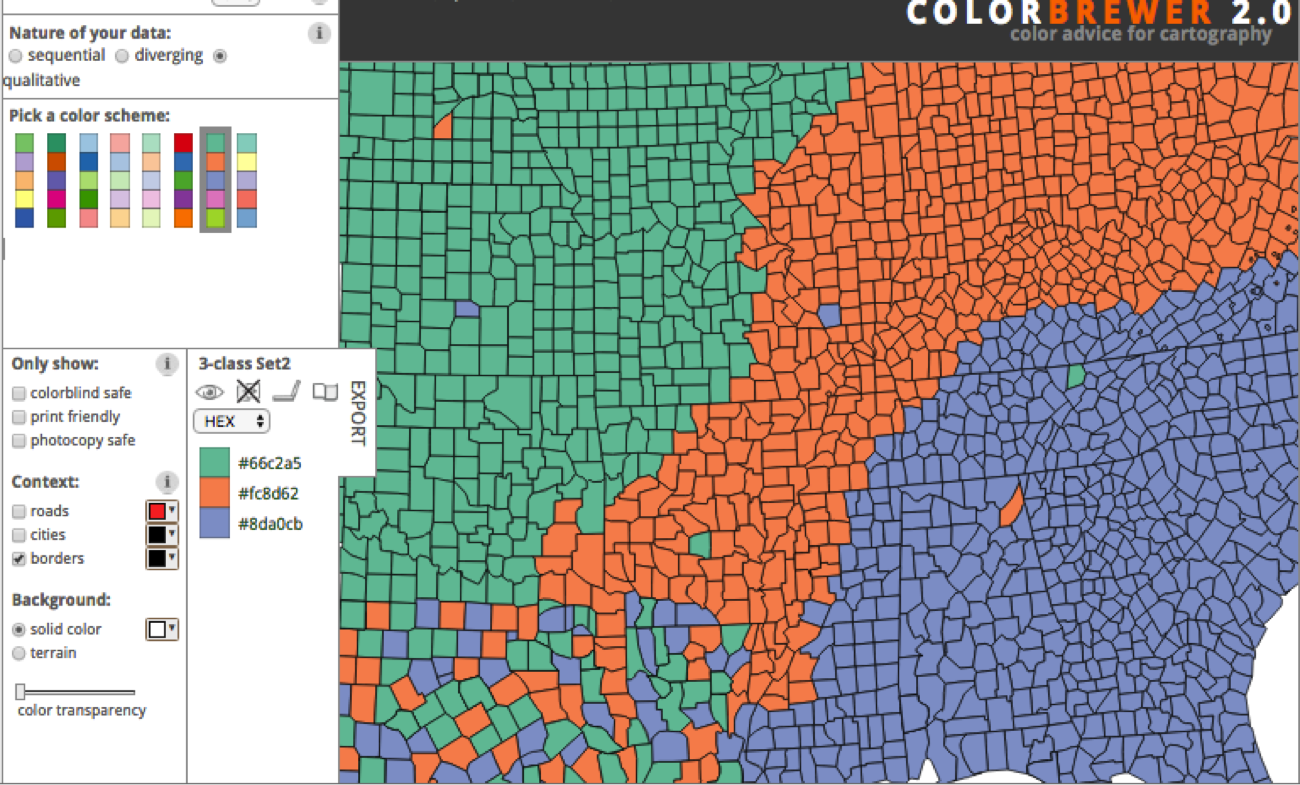
Note: The images above are from Color Brewer 2.0 — a data visualization color tool designed for working with data mapping. Check it out for your next data map visualization or for grabbing pre-made color schemes to use based on the sequential, diverging, and qualitative models.
How Many Unique Hues Do You Need to Use?
Now that you’ve determined which kind of display you want to use, it’s time to determine the number of hues you need to use.
Your hues are the unique colors (like red or blue) in their purest form (without any tinting or shading). Using unique hues is what creates contrast. In data visualization, creating contrast is highly important because it tells the viewer that the contrasting colors are comparative data points. Contrasting colors suggest that the data points are categorical, not correlated, showing you the difference between them rather than the relationship of progression.
Keep in mind that it’s possible to use both a sequential and qualitative color scheme in the same visualization. And if this is the case, you’ll need to build a scheme that uses both gradients and unique hues.
The Role of Brightness in Color Selection
One very important tip for creating and finding color schemes for you data visualizations concerns understanding and utilizing the brilliance of colors for a purpose.
In the two pie charts below, notice the brightness of the colors used. On the left pie chart, you can see that there are four main hues used and four tints of each hue. This might signify a relationship between the hue and the tints, or it may just be used to draw attention to some sections of the data over the others.
On the right pie chart, all of the eight hues used have the same brightness. None have more white or black added them to create a shade or a tint, which ultimately creates a balanced, contrasting aesthetic.
Shading and brightness is incredibly important to consider when creating data visualizations because it can be easy to skew the interpretation of your data by drawing attention to some data points over others.
For qualitative data, unless you’re trying to point out one specific data point’s significance, try to use equally bright hues with contrasting colors to display your data.
For sequential quantitative data, shading is important because you’re likely using a gradient. Gradients are made up of different shades and tints of a hue to show the progression of one hue from light to dark — much like the progression of the data from high to low.
What Tools Can You Use to Find the Perfect Color Combination?
When it comes to finding the perfect color scheme for your data visualizations, I highly recommend finding a scheme that’s already out there. This isn’t to say that you don’t need to have a strong grasp on basics of color selection, though — even existing color schemes will need to be customized to the data you’re using. In other words, it’s still important that you know you’re stuff.
Let’s check out a few tools that’ll help you get started …
1) Colorpicker for Data
A fairly simple tool, Colorpicker let’s you hold one color in place while you drag the other locator around to find a multi-hued, gradient-based color scheme. Although this tool is limited in nature, I like that it gives you the option to visualize your color scheme on a map to show you what the scheme looks like in practice.
2) Color Hunt
If you’re just looking for premade color schemes to browse through, Color Hunt is the tool for you. This website is devoted to just color schemes, allowing you to easily gain inspiration and uncover HEX codes.
A caveat, however, is that each of the schemes are limited to four colors. If you’re data visualization requires more hues than four, this may not be the tool for you.
3) Designspiration.net
One of my personal favorite sites for design work, be it data visualization or otherwise, is Designspiration.net. Not only does Designspiration give you thousands of graphics to look through for inspiration, but it also allows you to sort through designs by color.
This is a great tool to use for your data visualization (even if the representations aren’t data-based) because it shows you what colors look like in contrast to one another. The color-sort tool also gives you the HEX codes ready to access, making it really easy to put together a combination that suits your needs.
4) FlatUIColorpicker.com
As a part of Designmodo’s Free User Interface toolkit, they created a tool to help you uncover colors to use in your design process. Although these colors aren’t necessarily part of premade schemes, they are really great for showing you bright, vibrant colors used for user interface design. You can easily browse through their color lists and create your own color schemes using the color picker.
5) Adobe Color CC
A classic tool for designers using Adobe products, Adobe Color CC allows you to create your own color schemes using the mathematical model-based color schemes (monochromatic, analogous, triadic, complementary, etc.). Adobe Color CC also has a great browser section you can use to find premade color schemes.
What If You Still Can’t Find What You Need?
What if you decide you’re really looking for a color scheme that isn’t already out there? What do you do?
Creating a color scheme for data visualizations from scratch can be especially difficult because the colors you use have to either show vast contrast or natural progressions.
A great way to find inspiration for these types of color schemes is to draw on your surroundings. This could be a colorful photo, a mural, a sunset, or anything in nature — you name it. If you look around to find color schemes that appeal to you in your physical surroundings, you can use this to create a color scheme for the virtual.
If you have a good eye, you may even be able to create a color scheme this way by trial and error. However, it’s more likely that you’ll need to use a tool like Adobe Capture CC or Chroma by Softpress to snap a picture and grab the colors from the picture to use in your designs.
When creating data visualizations, the most important part of choosing the right color scheme comes down to understanding your data.
With so many different tools and premade color schemes out there, the hardest part isn’t actually finding the right colors; it’s knowing how to use those colors to display the information in the best way possible.
Now that you know how to find your color schemes, go put your newfound knowledge to work.
How do you choose color schemes for your data visualizations? Share your tips below.
Foxconn, Pegatron & other Apple suppliers reportedly under pressure as Apple squeezes margins
A Digitimes report claims that Apple suppliers are facing pressure from Apple to reduce costs, with major players like Foxconn and Pegatron affected. Apple is in some cases adding suppliers into the mix to help drive down pricing. It was recently reported that Sharp was gearing up to compete with Samsung and LG for the OLED displays Apple is expected to use for future iPhones.
Currently, Largan is facing strong competition from Japan-based Kantatsu over camera module orders, while Foxconn and Pegatron are seeing Apple adding new ODM partners such as Wistron for the production of its new iPhone.
Taiwan’s printed circuit board (PCB) players are also competing aggressively over Apple’s orders by cutting prices.
A major British supplier has also just posted the largest loss in its history …
Filed under: Apple
Apple promotes organ donation with iOS 10, sign up as a donor from the Health app
Apple will promote organ donation with its newest mobile operating system, iOS 10, when it ships in the fall. Via the Associated Press, Apple will include a new simple sign-up button inside the Health app to enable users to register to become an organ donor in a national donor registry. It appears the integrated sign up option will only be available to US iPhone customers, at least at launch.
Tim Cook told the AP that he hopes Apple’s efforts will help improve the availability of organs to those that need them, saying that the problem “hit home when Apple co-founder Steve Jobs endured an excruciating wait for a liver transplant in 2009”.
Filed under: Apple
Do You Have a Clutter Problem? [Flowchart]
Have you ever looked around you — at your desk, your room, your car, your garage — and realized that the clutter has gotten out of control?
Don’t worry, we all have those moments.
Everyone has a unique relationship with their “stuff.” I, for example, have a drawer full of youth soccer jerseys I just can’t seem to part with. (I swear I’m going to make a T-shirt quilt out of them someday!) For a friend of mine, it’s mugs. She has like six of them on her desk at work. Who needs six mugs?
And yet, I know plenty of people who are really good at “spring cleaning” — i.e., clearing out their unnecessary stuff in spontaneous purges. Sometimes, I wish I were brave enough to set them loose on my stuff to see what I could get rid of if I wasn’t so darn sentimental.
That makes me what the folks at QuickQuid call a “sentimental clutterer.” There are a few other types, including the folks who binge shop (who can resist a good sale?), those whose living spaces are filled with books, papers, and schoolwork, and so on.
What type of “clutterer” are you, and how is it affecting your life and work? If you’ve ever wondered where you might fall on the spectrum, take the flowchart quiz below from QuickQuid. It’ll help you identify your relationship with your stuff, and give you some quick tips for how to live a more balanced lifestyle.
3 Tips to Improve the Search Ranking for Your Blog Posts
Are your blog posts ranking lower in search than you’d like? Do you want to rank higher for specific keywords? In this article, you’ll discover tools and tips to help you improve the search ranking of your blog posts. How Ranking for Keywords Has Changed Optimizing your blog post to rank high in search engines […]
This post 3 Tips to Improve the Search Ranking for Your Blog Posts first appeared on .
– Your Guide to the Social Media Jungle
from http://ift.tt/29gPygS
via socialmediaexaminer
6 Important Questions to Ask Before Your Agency Grows
Many agency leaders think the path to success is through growth. Grow bigger, grow faster, and don’t look back.
But do they have the right business practices in place to actually achieve this? And are they prepared for the inevitable changes that occur as a company gets larger?
6 Questions to Ask Before Your Agency Grows
1) How do you want to grow?
What do you want your agency to look like in a few years? There are two main approaches to growth, and they look very different.
For one type of firm, you can grow through increased sales — or growing by volume. You bring on lots of clients, and hire more people to service those clients. Client accounts will most likely be smaller, and the firm will be more concerned with productivity and the profitability of projects.
You can also grow through the size of your accounts, taking on fewer clients and focusing on longer engagements and less tactical or project-based work. For this type of growth to occur, the agency needs to be committed to a strong positioning as well as be able to showcase its value to obtain more revenue from clients. The agency may only need to win a few key accounts each year to replace leaving clients.
2) Are your current hiring practices in line with your future agency?
As you grow, your agency changes. Your clients’ needs evolve. And you need more people to manage, train, and lead different teams. While some might rely on hiring for the role when they reach that size, most owners want to develop leadership skills in the people who have been with them when the team could easily fit in one room for a meeting. A key external hire — someone with a specific skill set and experience — can benefit the agency’s growth; however, you’ll have a hard time retaining people in the long-run if you fail to create a path of advancement for your current employees.
That means that you need to begin developing a bench of future leaders, and that requires a different approach to hiring and training. In the past, you might have simply been concerned about whether or not the candidate can do the job or be trained to complete the work. Now, you need to consider other qualities in top performers, such as emotional intelligence, interest in long-term career growth and management, and if the person has skills that challenge the team. You’re looking for someone who will add to the overall talent of the team, rather than simply fit into a vacant seat.
3) How will you attract the right type of clients?
When you’re just starting out, your agency could thrive on word-of-mouth, referrals, and projects from local companies. But if you want to grow, you’ll need to tap a new group of prospects — and do so in a sustainable way.
And it means you need to think differently about your company. Why would someone located 1,000 miles away want to work with your agency? What facts would make a prospect say, “I only want to work with your firm”? What do you need to change about the way you market your agency? Or do you need to actually start building your brand?
4) What does your sales process look like?
A lot of time is wasted on lunch meetings, calls with “prospects” who simply want to learn a few marketing tips, and proposals that never even reach a decision-maker.
This wasted time could be better spent with prospects that actually want to work with your agency and that your agency wants to work with — you know you can provide value to the client, the account will be profitable, and your team members will enjoy working with the client.
But without a sales process, it’s easy to get distracted by this prospect or that project. Without a goal, you’ll always be running towards a finish line, yet the line will keep moving.
By defining your sales process with steps and processes for qualifying clients, prospecting, closing, and upselling, you’ll be able to more quickly and efficiently grow.
5) How will your role change?
As the company grows, many agency owners struggle with the fact that they can’t be everywhere and do everything. In the beginning, they were involved in every client account, approved all the creative, tracked financials, and made the final decision for all hires.
This isn’t possible as your agency grows — leaders have to make themselves irrelevant. And you need to take some time to figure out if this is really what you want. Do you want to be able to scale your influence on a larger team and client base? Or do you more enjoy the day-to-day management and involvement in your clients’ accounts? These are two different types of businesses, and it’s worth considering what type of company you actually want to build, rather than growing for growth’s sake.
6) Is your approach to creating work repeatable and consistent?
Finally, to scale you need to create, document, and train people on your processes. Without a way to create and deliver work on time and profitably, you can’t scale. To retain clients, you can’t miss deadlines or deliver poor quality work. New employees need to be properly trained and onboarded to deliver a consistent experience to clients. While it might be fun to “figure things out as you go,” it doesn’t lead to creating a growing and stable company.
4 Tips for More SlideShare Leads
Do you use SlideShare? Wondering how to generate leads from SlideShare? With the right design and content, your SlideShare presentation can become a powerful lead-generating marketing tool. In this article, you’ll discover four simple steps for creating a SlideShare presentation that people can’t resist. Why SlideShare for Lead Generation? The great thing about SlideShare is […]
This post 4 Tips for More SlideShare Leads first appeared on .
– Your Guide to the Social Media Jungle
from http://ift.tt/29KhdIl
via socialmediaexaminer
Apple’s Thunderbolt Display is dead: These are the best 4K & 5K displays for Mac
If you’ve been holding out for a new standalone desktop display from Apple, you’re either going to take news of the Thunderbolt Display being discontinued as a sign of good things to come, or as a cue to finally purchase a new 4K or 5K display from someone else. For most, especially considering Apple itself is recommending you purchase a third-party display, the latter option is going to be the more likely.
While Apple didn’t recommend any specific third-party alternatives during its discontinuation announcement of the Thunderbolt display last week, we’ve done the work for you and put together our top picks for the best 4K & 5K displays for Mac available to buy right now.
Filed under: Apple
Opinion: Why I’m resigned to my next MacBook Pro being worse than my current one
Regular readers will know that I still have a 17-inch MacBook Pro as my main computer. It’s almost five years old now, which is a relatively long time in Mac terms, and an absolute age for someone who usually does poorly when it comes to resisting shiny new tech.
But when Apple stopped selling the machine, I’d initially hoped that it was just a temporary measure. The company had only just introduced new Retina displays in the 13- and 15-inch MacBook Pros, both of which carried a hefty price-tag, and my theory then was that a 17-inch Retina screen wasn’t practical. Yield rates were too low, I supposed, meaning that the cost of a 17-inch model would have been too expensive even for Apple to contemplate.
So I hung in there …
Filed under: Apple
As Apple sells out of remaining Thunderbolt displays, users speculate on future of line
When Apple officially discontinued the Thunderbolt Display, directing customers to look at third-party displays, it naturally led to speculation about whether this was a temporary or permanent state of affairs. Now Reddit users are upping the speculation by pointing to a redirect on the company’s website.
Filed under: Apple
Celebgate iCloud phisher pleads guilty to accessing 30+ celebrity accounts, faces 5 years
One of the men behind the ‘Celebgate‘ phishing attack has pleaded guilty to accessing more than 300 iCloud and Gmail accounts, including ‘at least 30’ belonging to celebrities. The plea was announced by the U.S. Attorneys Office for the Central District of California.
Edward Majerczyk, 28, who resides in Chicago and Orland Park, Illinois, was named in a criminal information filed today in United States District Court in Los Angeles. Majerczyk has signed a plea agreement in which he agrees to plead guilty to a felony violation of the Computer Fraud and Abuse Act, specifically, one count of unauthorized access to a protected computer to obtain information.
Another of the Celebgate offenders, Ryan Collins, also took a plea back in March in return for a recommended sentence of 18 months …
Filed under: Apple
Progressive Elaboration Is the Only Sane Approach to Planning!
Progressive Elaboration Is the Only Sane Approach to Planning!
By Kiron D. Bondale
Imagine that you are planning a multi-day road trip across the country to a town which you’ve never visited before. Chances are that you will load your smartphone with maps to help you navigate the journey as well as identifying some points of interest […]
from Project Management Articles – PM Hut http://ift.tt/29q2k1c
via pmhut.com