
Welcome to My Blog
Dr Dre said to be starring in Apple Music’s first original series called Vital Signs
When Apple bought Beats back in 2014, it got a headphone/speaker line and the foundation for what became Apple Music. Now it appears that Beats co-founder and rap legend Dr Dre is going to be playing an even bigger role in the company. According to The Hollywood Reporter, Apple is currently producing an original series called Vital Signs with Dr Dre as the show’s star. It’s a new move for Apple, creating original video content, and one that is expected to be used to promote Apple Music.
While rumors of Apple developing a streaming TV package have been up and down over the last few years, there has been talk separately in recent months that Apple could be interested in creating original content as well. But Vital Signs is said to be distributed over Apple Music, not iTunes specifically or a new streaming package, which follows similar moves from Google’s YouTube to promote subscriptions.
THR notes that the series will run six-episodes long at around 30 minutes each with Apple funding the project. The series itself is described as a “semi-autobiographical” drama, which suggests it could resemble the film Compton that Apple Music made a point to promote along an exclusive soundtrack.
While technically a half-hour, the show is not a comedy. Instead, it is described as a dark drama with no shortage of violence and sex. In fact, an episode filming Monday and Tuesday this week featured an extended orgy scene. Sources tell THR naked extras simulated sex in a mansion in the Bird Streets neighborhood of Los Angeles’ Hollywood Hills. (Dre’s wife Nicole Threatt Young was on set to witness the shenanigans, one insider says.)
The series is expected to be released all at once when it’s complete, although filming is still ongoing and the project hasn’t been officially announced. The report also notes that similar projects aren’t currently in development, although other series with artists on Apple Music remain possible.
The focus of the Vital Signs project seems to be promoting Apple Music through exposure and a likely-exclusive series. Dr Dre currently hosts a regularly scheduled radio show on Apple Music’s Internet streaming Beats 1 station as well.
Apple has previously experimented with Apple Music as a video platform as well. Music videos are already available on the platform, and late last year Apple Music exclusively carried Taylor Swift’s 1989 World Tour film for subscribers.
Filed under: Apple Music Tagged: Apple Music, Apple TV, Dr Dre, iTunes, video, Vital Signs
For more information about iTunes, Apple TV, and video continue reading at 9to5Mac.
What do you think? Discuss “Dr Dre said to be starring in Apple Music’s first original series called Vital Signs” with our community.
Apple execs Eddy Cue & Craig Federighi talk Apple Music, App Store & more in new interview
John Gruber surprised podcast listeners today by getting Apple’s own Eddy Cue and Craig Federighi on The Talk Show to discuss a variety of topics behind Apple. Since Tim Cook took leadership at Apple, it hasn’t been unheard of for Apple execs to appear on Gruber’s show. The first occurrence was last June when Phil Schiler met John Gruber on stage during WWDC to discuss Apple’s recent announcements and decisions over the past few years. This marks the second time that Federighi has been on the The Talk Show, and Cue’s first.
Very special guests Eddy Cue and Craig Federighi join the show. Topics include: the new features in Apple’s upcoming OS releases (iOS 9.3 and tvOS 9.2); why Apple is expanding its public beta program for OS releases; iTunes’s monolithic design; how personally involved Eddy and Craig are in using, testing, and installing beta software; the sad decline of Duke’s men’s basketball team; and more.
Some scoops too, including: the weekly number of iTunes and App Store transactions, an updated Apple Music subscriber count, peak iMessage traffic per second, and the number of iCloud account holders.
Be sure to listen to the interview on Gruber’s site, or within iTunes‘ podcast section.
We’re breaking down the finer points. Check back shortly
Filed under: AAPL Company, General, iOS, iOS Devices, Mac Tagged: App Store, craig federighi, Eddy Cue, iMessage, iTunes, John Gruber, the talk show
Continue reading more about AAPL Company, iOS Devices, and iOS at 9to5Mac.
What do you think? Discuss “Apple execs Eddy Cue & Craig Federighi talk Apple Music, App Store & more in new interview” with our community.
9to5Toys Lunch Break: 12-inch MacBook $999, iPhone 6s 64GB w/ contract $100, iTunes $50 Gift Card $40, more
Keep up with the best gear and deals on the web by signing up for the 9to5Toys Newsletter. Also, be sure to check us out on: Twitter, RSS Feed, Facebook, Google+ and Safari push notifications.
TODAY’S CAN’T MISS DEALS:
12-inch Retina MacBook $300 off across the board at B&H, prices start at just $999 – tax only in NY
Apple iPhone 6s/Plus (Verizon + Sprint) on-contract pricing gets slashed by $200, 64GB now just $100
$50 iTunes gift card for $40 w/ email delivery from PayPal (20% savings)
Best Buy, Target and Radio Shack are all discounting 4th Gen. Apple TV, 32GB from $117 & 64GB from $162 shipped
Many Apple Watch models now $100 off at Target and Best Buy: 38mm Sport $249 w/ free shipping (Reg. $349), more
App Store Free App of the Week: The Mesh puzzler goes free for the first time (Reg. $2)
Download Lara Croft Go, Apple’s Game of the Year 2015, for just $2 (Reg. $5)
Heroes Reborn: Enigma for iOS goes free for the first time as IGN’s Game of the Month (Reg. $5)
Final Fantasy IX is now available for download on iOS/Android
The Martian official iOS/Apple Watch game goes free (up to $3 value)
Apple offering popular iOS video editing app ‘Videoshop’ for free ($2 value)
Final Fantasy II on iOS available free inside the FF Portal app ($8 value)
MORE NEW GEAR FROM TODAY:
Beats by Dr. Dre Solo 2 On-Ear Headphones now half off: $100 w/ free shipping (Reg. $200)
- Best Buy Presidents’ Day Sale: Logitech wireless mouse $10, Samsung 4K HDTV $450, more
- Toshiba Canvio Slim II 1TB USB 3.0 Portable Hard Drive: $50 shipped (Reg. $60+)
- Logitech Harmony Touch 15-Device Universal Remote $100 shipped (Reg. $130)
- Games/Apps: Deadpool $25, Fallout 4 hardcover game guide from $20, freebies, more
- Daily Deals: Lenovo 21.5″ 1080p HD Monitor $80, VIZIO 2.1-ch. Sound Stand (refurb) $78, more
- Incase Valentine’s Day Sale – 35% off: EO Duffel for MacBooks $130 (Reg. $200), more
- Philips 60 Watt Equivalent SlimStyle Dimmable A19 LED Light Bulb: $2.97 (add-on, limit 3)
OtterBox COMMUTER WALLET Case for iPhone 6/s (used, very good): $6 Prime shipped (Reg. $30) amzn.to/1LkTysL https://t.co/h9WcsoB41S
—
9to5Toys (@9to5toys) February 12, 2016
MORE DEALS STILL ALIVE:
Pad & Quill’s high-quality leather Lowry Cuff Apple Watch band offers Hermès style for just $104 shipped (Reg. $130)
Save on Apple’s monster 12.9-inch iPad Pro: 128GB Wi-Fi $850 (Reg. $949), 128GB Wi-Fi + Cellular $950 (Reg. $1,079)
Apple iPad mini 3 128GB: Wi-Fi $300 (Orig. $599), Wi-Fi + Cellular $430 (Orig. $729)
Best Buy just cut prices for Apple’s iPad mini 4 and iPad Air 2 by $100, deals start at $300 w/ free shipping
Apple iPad Air Wi-Fi 16GB $299 or 64GB $349 shipped (Reg. $399/$449)
- iPhone 6/s/Plus Cases from $3 Prime shipped: Dual-Layer w/ Screen Protector $8, more
- Fitbit Charge Wireless Activity & Sleep Band w/ OLED display: $80 shipped (Reg. $130)
- Amazon offers rare 25% discount on Kindle Unlimited : 6-months $45 (Reg. $60), more
- Grand Theft Auto Liberty City Stories on iOS gets its first price drop: $4 (Reg. $7)
- Beats Studio 2.0 Over-Ear headphones (multiple colors) $150 (Orig. $300)
- TiVo Roamio OTA HD DVR (Refurbished): $30 (Orig. $50), more
- Acer 19.5-inch 1920 x 1080 LED Monitor w/ VGA + DVI: $50 (Reg. $100)
- Sharp 50-inch 1080p 3x HDMI Smart LED HDTV w/ built-in Roku: $380 (Reg. $500)
- Everything you need to know to get the most out of Amazon’s Prime Pantry service
- RAVPower USB-C/A Charger $38 (Reg. $56), uNu w/ Lightning Cable $12 (Reg. $20)
- QNAP 4-Bay NAS w/ AirPlay: $354 shipped (Orig. $480)
- Free MP3 downloads from hit artists like Adele, Ed Sheeran, 1D, more
- Microsoft’s new Quantum Break Cirrus White Xbox One Bundle, pre-order now
- Luminid Touch light-up charging cable: $10 (Orig. $20, CA Tax only)
- A .edu email can get you the Sharp 32-inch 1080p HDTV for $150 shipped (Reg. $170)
- Add 2TB of portable storage w/ WD USB 3.0 Hard Drive for $73 (Reg. $90)
- JBL Headphones: J22 In-Ears $15 (Reg. $40) + 3 more deeply discounted pairs
- Multi/Single year magazine subs from $3/yr: Motor Trend, more
- Internal 2.5-inch SSDs: Samsung 850 EVO 1TB $280 (Reg. $300+)
- Samson Meteorite USB Mic for Mac/PC: $30 Prime shipped (Reg. $40)
- Get your engines ready: Rocket League is coming to Xbox One next week
- Amazon’s 7-inch Fire tablet is on sale for $40 shipped (Reg. $50)
- Watch ‘Southpaw’ starring Jake Gyllenhaal & Forest Whitaker for just $0.99 (Reg. $5)
- SizeUp for Mac offers instant window control via keyboard shortcuts: $5 (Orig. $13)
- Sam’s Club Membership + $20 gift card + $21 food credits for $45 ($180 value)
- Free TV HD Digital Downloads at Google Play & iTunes
- Fitbit’s Aria Wi-Fi Scale tracks body fat percentage (open-box): $80 (Orig. $130)
- AmazonBasics 35-Mile HDTV Antenna $20 (Reg. $25)
- Aukey 15,000mAh Dual-USB Power Bank: $18.50 Prime shipped (Reg. $30)
- Xbox One 1TB Elite Bundle + $75 Microsoft Gift Card & game $499 ($600+ value)
- Bowers & Wilkins P3 Headphones (recertified) in multiple colors: $90 (Orig. $200)
- Media: $5 Blu-ray Sale – A Beautiful Mind, Seabiscuit, Knocked Up, more
- $100 worth of Xbox gift cards for $81 shipped
- Aukey’s Bluetooth 4.1 Sport Earbuds + Armband for $16 Prime shipped ($28 value)
- LG Google Nexus 5 32GB Unlocked 4G LTE (Refurb) $140 shipped
- ASUS Transformer Touch Laptop 1.6GHz/2GB/32GB: $179 shipped (Reg. $219)
- Beats by Dr. Dre Solo2 Wireless Headphones Active Collection: $230 (Reg. $300)
NEW PRODUCTS & MORE:
Review: Anker’s PowerCore+ gear is some of the best money can buy
PowerEgg Drone has a unique design w/ a 4K camera
- OMBEE’s modular standing desk turns any table into a upright workstation
- The new Andy Warhol Where’s Waldo book is perfect for any Pop Art connoisseur
- 3Doodler Start reimagines the popular Kickstarter project with a focus on children
- BearTek’s new Smart Gloves offer iPhone/Android controls + GoPro support
- Review: Incase and surfer Kelly Slater team up for the ultimate GoPro-focused backpack
- Review: $13 GRDE Explorer Rugged 10,000mAh Solar dual USB Battery w/ 2 USB lamps
- LEGO strikes gold again w/ its latest Ghostbusters set based on the upcoming film
- Be a hero this Valentine’s Day w/ these best-selling Adult Coloring Books from $6
- Ubuntu’s first tablet offers a converged desktop PC experience as well
Filed under: Tips and Tricks Tagged: 9to5Toys, Amazon, app deals, Best Buy, Daily Deals, free apps, Gold Box, iPhone 6s, iTunes Gift Card, MacBook, video games
Visit 9to5Mac to find more special coverage of Tips and Tricks, 9to5Toys, and Daily Deals.
What do you think? Discuss “9to5Toys Lunch Break: 12-inch MacBook $999, iPhone 6s 64GB w/ contract $100, iTunes $50 Gift Card $40, more” with our community.
Effective Time Management for Project Success
As one of the three parameters of every project, time is a commodity that project managers want the most, but often have the least. The business world is moving at an increasingly fast pace, so project managers are under pressure to deliver projects more quickly than ever before.
Upper management and clients will judge a project’s success not only by the achievement of goals, but by whether these goals were achieved within the deadline to retain the company’s competitive edge. As a result, project managers need effective time management skills to lead a project to success.
Apply the 80/20 Rule to achieve maximum results with little effort
Also known as the Pareto principle, the 80/20 rule is simple: 80 percent of effort is used on 20 percent of the tasks that are not that important, so there is only 20 percent of your effort remaining for the really important tasks – those that bring in 80 percent of results. In short: most people waste most of their effort on the wrong tasks.
Identify those 20 percent of tasks that create the most value and make them your priority. Don’t get lost in the details, keep your eyes on the bigger picture and definitely don’t strive for perfection – ‘good enough’ in project management is most of the time truly good enough. Start with the essential and perfect your work later.
Identify the urgency
Not every task has to be completed immediately. A method to identify and prioritize important tasks is the Eisenhower Principle. It is a matrix that identifies two types of tasks, the urgent ones and the important ones. However, the urgent tasks are usually not that important, and the important tasks are often not urgent. Most people tend to concentrate on the urgent tasks, because they are time-sensitive, but if you want to work more effectively and efficiently, you need to plan your work day so that you have enough time to work on the important tasks.
Delegate the tasks that you don’t necessarily have to do yourself and use the time saved to concentrate on your own important tasks. If delegation is not an option, then start working through your task list by tackling the urgent, but not important items first. Additionally, don’t forget to set a deadline for your important tasks that aren’t urgent – you don’t want them to become important and urgent tasks, and risk not finishing them on time.
Create a schedule
It is simply not enough to identify important tasks and prioritize them, you also need to accurately estimate how much time you need to finish them. A schedule has to include time blocks for testing, meetings, etc., but should also break time and take into consideration time differences if you have a remote team.
There are a number of methods and tools that can be used to create effective schedules. Begin with time trackers to measure how much time each activity takes, and then use project management tools to create a schedule of project tasks and activities. Additionally, the critical path method in combination with a Gantt chart, can help you visualize the tasks that need to be completed and track your team’s progress throughout the project.
Include buffer times
Of course it would be ideal if everything went according to plan, but that’s not realistic. You will face unexpected events in every project, some that might not have a big impact on your overall project plan, and others that can seriously derail your schedule. The biggest mistake you can make when creating a schedule for your project is to forget to include buffer times. Buffer time increases flexibility, allowing you and your team wiggle room in case something happens unexpectedly and you need to shift priorities. If nothing unexpected does happen and everything goes smoothly, you can use that buffer time or “free slots” to start the next tasks early. As the saying goes “better three hours too soon than a minute too late.”
The post Effective Time Management for Project Success appeared first on Project-Management.com.
from Project Management Articles – Project-Management.com http://ift.tt/1Td2Qh1
via Project-Management.com
3 Monster Reasons to Leave Online Marketplaces and Start Your Own Online Store
Online marketplaces such as Etsy, eBay, and Amazon Marketplace helped to create and then boost an online shopping environment. There’s no denying that online marketplaces—something like a flea market for the internet—have been useful to thousands of startup ecommerce companies.
At some point, however, you have to leave the flea market behind and start your own endeavor. If you’re still bringing in plenty of money as a vendor through one of these marketplaces, the idea of moving on may seem ludicrous. Why shake up a good thing? Why risk everything you have while reaching for more? Well, here’s why.
Get More for Your Money
Whether you plan to sell a little or a lot on Amazon, you’ll have to pay fees either way. You can choose unlimited sales for around $40 per month, or just pay a $0.99 transaction fee for individual sales. Then, you’ll pay other fees on top of that. Etsy isn’t a lot better. They’ll take 3.5% of every sale you make.
“But I’d have to pay for my own online store,” you say. And that might be true. There are many options out there for online stores, like Shopify and 3dcart. Both offer basic point-of-sale services for around $9-10 per month. For a basic online store, you’ll pay more—somewhere in the neighborhood of $30 per month. You get a lot for those fees, though. How about a fully functional website, with room for all the content you can create?
Of course, there are also some free options available, too. Wix and Spaces both provide ecommerce solutions for small businesses, and both are incredibly easy to use. You’ll also have the space and freedom you need to build your brand, though features may not be as plentiful as they would for paid platforms.
Why keep paying service fees to a marketplace when you could do everything on your own?
Build Your Own Brand
When you use marketplaces, you do get the benefit of those brand names. After all, most people know what Amazon, eBay, and Etsy are. You don’t need to campaign to get people onto the website, that’s for sure.
These marketplaces may bring you more customers that your online store can. After all, visitors to Amazon, Etsy, and eBay may search for specific products that your little shop sells. When they do make a purchase from you, it’s one that may not have happened otherwise. However, when that customer tells someone where they bought their amazing new [thing you sell], do you think they’ll name your company? Nope. They’ll say Amazon/Etsy/eBay.
Without the ability to create your own content and build your own brand, you’re just a needle in a haystack. In fact, you’re continuing to build someone else’s brand when you sell within the online marketplaces. Amazon and Etsy just keep getting bigger and bigger, while your little store is just one of millions.
Market Your Company…Not Someone Else’s
If you do create content outside of your marketplace “stall,” then congratulations! Perhaps you use social marketing and a free blog site to point potential customers toward your little store. Just remember that the marketplace you’re using won’t be doing the same to help you out. They’re more concerned with sharing the products you sell than the name of your company. In other words, you make them look good.
With your own online store, everything you do to market your brand, your products, and your company serves to elevate only you. No other company will receive benefits from the blogs you write, the social media posts you share, or the tutorials you post to YouTube.
The road is long and bumpy, but at the end, you have your own ecommerce company, independent of the behemoth online marketplaces. Your work goes to support your company. Your income goes right back into your pocket or business. Your brand grows and becomes familiar. Isn’t that worth making the leap if you haven’t already?
Kanye West wants to tap Kim Kardashian’s App Store success … with a bizarre game
In between a fashion show and album debut at his super confusing Madison Square Garden event yesterday, Kanye West also found some time to take the wraps off his upcoming video game dubbed “Only One”.
And the game is just as bat sh*t crazy as you could have hoped for with characters controlling West’s dead mother in angel form as they guide her through the gates of heaven on a flying white pegasus in the clouds.
But apart from the gameplay that we get a glimpse of in the full trailer below, it also seems like the game will feature some remastered versions of well-known Kanye tracks, or at least the “Only One” song that accompanies the trailer and shares a name with the game. Kanye first released the song Only One featuring Paul McCartney in 2014 as a tribute of sorts to his mother Donda West who passed away in 2007.
When Kanye showed the game trailer during his live event at Madison Square Garden yesterday, which was also live streamed on music streaming service Tidal, he noted that he had some trouble developing the game initially with some pushback by unknown game developers in San Francisco who didn’t like the concept much:
I worked on a video game and I wanted to show yall… The idea of the game is my mom traveling through the gates of heaven… You don’t understand.. I go out and meet with everybody in San Fran and they’ll diss the f*ck out of me… and I’ll be like ‘I wanna make a game’ and they be like ‘F*ck you’… this sh*t was hard to do man…
Kanye didn’t confirm a platform or release for the game with only a mention that it will be “coming soon” during the trailer. But it’s very likely Kanye wants to tap into some of the success his wifey Kim Kardashian has had on the App Store (and this doesn’t exactly look like a console title we’ll be seeing on Xbox any time soon). That includes the record breaking Kim Kardashian: Hollywood game for mobile devices that took in around $200 million in 2014, and more recently the Kimoji app.
Filed under: Apps Tagged: App Store, Apps, Games, kanye west, kim kardashian
Continue reading more about Apps, App Store, and Apps at 9to5Mac.
What do you think? Discuss “Kanye West wants to tap Kim Kardashian’s App Store success … with a bizarre game” with our community.
AT&T joins Verizon in 5G testing this year, promising speeds 10-100x faster than LTE
Verizon began lab-testing its 5G network last year, aiming to carry out the first real-world tests this year, and and AT&T has now announced that it will be doing the same. The company seems even more optimistic than Verizon, which estimated 5G speeds some 30-50 times faster than LTE.
We expect 5G to deliver speeds 10-100 times faster than today’s average 4G LTE connections. Customers will see speeds measured in gigabits per second, not megabits. For reference, at one gigabit per second, you can download a TV show in less than 3 seconds.
Don’t get too excited just yet, though, as there are a couple of small hurdles to be overcome first …
The first is that there is as yet no international agreement on 5G standards. Carriers are currently using their own ideas of the best technology for high-speed data services, but the eventual tech used need to be agreed by 3GPP – the international body originally formed way back in 1998 to agree 3G standards. This is going to take some time.
The original timetable called for a draft standard to be published by 2018, with rollout sometime between then and 2020, but some players are pushing hard for at least some level of 5G service to be offered next year. Re/code reports that AT&T hopes to use the high-speed wireless service to offer broadband to homes in remote areas, and that it can do this even before mobile data standards are finalized.
The second hurdle for iPhone fans is Apple’s attitude to new standards. Apple often adopts a wait-and-see policy, having waited until 2012 to include LTE in the iPhone 5 – some two years after carriers began offering the service. Apple did, though, move more swiftly with LTE Advanced (LTE-A), adding support for the 150Mbit/s fast-track LTE service in the iPhone 6 and 6 Plus.
Image: nablabs.org
Filed under: iOS Devices Tagged: 4G, 5G, iPhone 7, iPhone 8, LTE
For more information about iOS Devices, LTE, and 4G continue reading at 9to5Mac.
What do you think? Discuss “AT&T joins Verizon in 5G testing this year, promising speeds 10-100x faster than LTE” with our community.
HubSpot’s 2015 Year in Review: A Movement That Moved the Needle
What a year 2015 was for the inbound community! For HubSpot, it was a year of moving the needle — and being moved along the way.
We’re lucky enough to have built a company and a community that’s ambitious, crazy-focused, and talented enough to transform how the world’s organizations do business every day. We wouldn’t be here without the incredible global inbound community, including our customers and partners.
It’s these people that inspire me on a daily basis and make all the work that we do as a company worth it. Each year I find myself welling up time and time again during our annual INBOUND event where the impact of the inbound movement resonates for four days straight. The personal stories of individual people whose careers have dramatically changed trajectories for the better after embracing HubSpot and inbound get me every time.
In honor of their successes and the incredible growth that we saw as a company in 2015, I’d like to take a moment to celebrate with HubSpot’s 2015 Year in Review. In the past year:
- We celebrated reaching 15,000 customers by dropping 15,000 orange ping pong balls over a balcony. (Naturally.) By year’s end, we reached 18,116 total customers.
- We partnered with 2,900 agencies for our Agency Partner program.
- We crossed the 1,000 employee mark and now have 1,157 talented employees, whose talent and culture earned us Glassdoor’s #4 Best Places to Work ranking.
- We hosted 150 HUGs (HubSpot User Groups) all over the world.
- We launched blogs in five new languages, including Portuguese, German, and French.
But as I noted earlier, our Year in Review isn’t just about us; it’s about the entire inbound community. So, think about your own Year in Review, and your own year ahead. How have you been moved by others in your career? How have you moved the needle? What moves have you made — and will you make — to do business better?
All in all, how are you #MovingAhead in 2016?
Click here to see HubSpot’s 2015 Year in Review.
The Social Media Content Calendar Template Every Marketer Needs [Free Template]
We have a 9 a.m. meeting? Yikes! Hold on — let me just click around the internet like a maniac to find something for the morning tweet.
Sound familiar? Scrambling for social content is not a new phenomenon. We have meetings. We run late. Things come up. And it’s really hard to get any meaningful amount of work done when you have the next social media update looming over your head every 30, 60, or 90 minutes. It all moves so fast that you might periodically feel a case of the vapors coming on, which is why pre-scheduled social media content should be your new best friend.
A few years ago, we created a social media content calendar template to help, which we recently updated to be better, faster, stronger, and just generally prettier. You can fill it in at the same day and time every single week to prep for the following week’s social media content. That means when you burst through the office doors at 9 a.m., you won’t be in panic mode looking for something to push out to your Facebook fans — you already took care of that last week.
Download the free social media content calendar template here. Then learn how to use it in this post.
This blog post will walk you through exactly how to use the template to stay on top of your social media content planning for Facebook, Twitter, LinkedIn, Instagram, Pinterest, and Google+.
(Note: HubSpot customers can also schedule content through Social Inbox, or use this spreadsheet to organize their content and subsequently upload it to Social Inbox. Detailed instructions for doing this exist in the cover sheet of the template.)
How to Use the Social Media Calendar to Plan Your Content Schedule
When you open up the social media content calendar template, you’ll notice the bottom of the Excel spreadsheet has several different tabs, most of which are dedicated to a specific social network.
The reason you’ll want a different worksheet for every social network is simply that every social network is a little bit different. You can’t just craft one, single social media update and use it across LinkedIn, Facebook, Twitter, Instagram, Pinterest, and Google+. You can certainly promote the same piece of content across all six of those networks, but that doesn’t mean you’ll craft your update in the same way for every single one of them. (In fact, you may even want to add additional tabs if you’re active on other networks, like Quora or YouTube.)
This following sub-sections will walk you through how to fill out each of the four tabs you see in this template — the updates for Twitter, Facebook, LinkedIn, Instagram, Pinterest, and Google+. But before we get to that, let’s just walk through the “Monthly Planning Calendar” so you know what that’s for.
Monthly Social Media Schedule
The tab “Monthly Planning Calendar” provides an overall snapshot of your monthly social media campaigns. It’ll help you coordinate better with other stakeholders, not to mention keep all the moving parts straight in your own mind. Here’s what it looks like:
There are three sections to take note of when you edit this template for your own purposes. First, the color-coding key: These are the types of content or campaigns around which you might coordinate, like ebooks, webinars, blog posts, product launches, and so on. Though only some of these might be relevant to you, they’re there to indicate what you may want to put in there — so be sure to edit these categories to align with your own campaigns.
The other two sections you’ll need to edit are the Month and Year at the top of the calendar (duh), as well as the cells below each day of the week. In those cells, you should enter the type of content you’ll be promoting that day and color-code it to align with the campaign it’s supporting.
Instead of deleting all the content in this spreadsheet each month, I recommend copying this worksheet twelve times over, and creating a separate sheet for each month. (If that gets to be too overwhelming, you can always save those tabs as a separate file.)
Planning Your Scheduled Tweets
Alright, now let’s get to the social media content. This section will be the lengthiest, because all subsequent sections will draw on the instructions we go through here. So if you read one section in this whole post, make it this one.
Let’s say you want to add some tweets to your scheduling template. Skip over to the “Twitter Updates” tab, where you’ll see this:
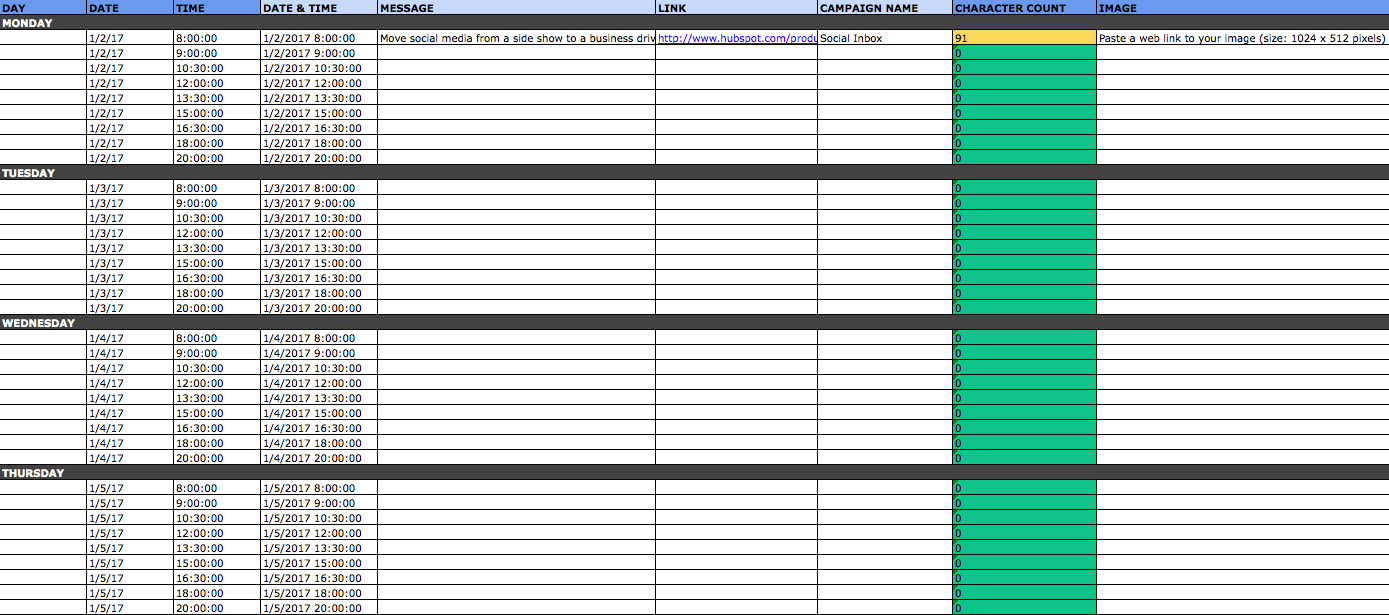
The first four columns, “Day,” “Date,” “Time,” and “Date & Time” are there for your convenience, and if you choose to use a third-party app for pre-scheduling your tweets (like HubSpot’s Social Inbox), then these columns will be useful. For now, just fill in the date on which you’d like your updates to publish to Twitter, and the time at which you’d like them to go out. The “Date & Time” column will automatically change based on what you input in the previous two columns.
Now, let’s move over to the “Message” column. Here, input the copy you’d like to appear in your tweet, bearing in mind you should cap it at 116 characters to allow enough room for a link, and at 115 characters to allow room for an image. (Read this blog post for a full character count guide.) This spreadsheet will auto-calculate the number of characters you’ve entered to keep you on-point, turning yellow when you’ve reached 95 characters, and red when you’ve reached 116 characters.
After you’ve composed your tweet, paste the URL you’d like to include in your tweet in the “Link” column. Be sure to include UTM parameters so you’ll know whether all of these tweets are actually driving traffic, leads, and customers. This is an important step to remember if you’d like to be able to demonstrate ROI from social. You can also use the “Campaign” column to add an associated campaign, which helps which more robust tracking and reporting.
Finally, in the “Image” column, attach the tweet’s image (if you have one). For Twitter, we recommend images that are 1024 x 512 pixels. (Click here for a full cheat sheet of social media image sizes.) If you’re having trouble attaching your image to the spreadsheet, follow these steps:
Step 1: Right-click the cell in which you’d like your image.
Step 2: Click “Hyperlink,” then click the “Document” button, and finally, click “Select” to choose your image.
Step 3: In the “Choose a File” window, select the image from your computer and click “Open.”
Step 4: You’ll now see the image attached to the “Insert Hyperlink” screen. Feel free to edit the “Display” text to change the file name, then click “OK.”
Note: This process is simply for organizational purposes. If you decide to upload the spreadsheet to your social media publishing software, it will not attach — you’ll have to do that with your marketing software. If you’re a HubSpot customer, details for how to bulk upload your Twitter content to Social Inbox can be found within the downloaded template.
Planning Your Facebook Updates
Now, let’s talk about how to set up your Facebook content in advance with the template. Navigate on over to the tab in your template labeled “Facebook Updates.”
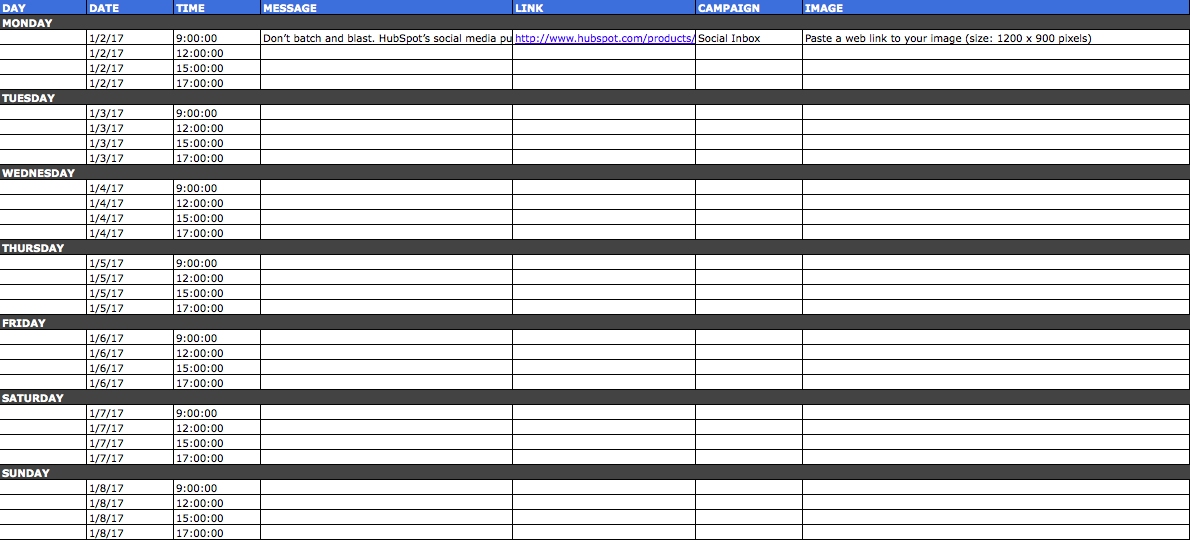
Facebook updates work similarly to Twitter updates, with the exception being bulk uploading your content is not possible in Social Inbox.
The first three columns, “Day,” “Date,” and “Time” are there for your convenience. Head on over to the column labeled “Message” and input the copy you’d like to appear in your status update, corresponding to the days and times you’d like those updates to run. Then, move to the “Link” column and input the link you’ll be, you know, linking to in the update. (Don’t forget that tracking token.) If you’d like the update to be tagged to a certain campaign, include this in the “Campaigns” column. Finally, attach an image just like you did with your Twitter updates — if you’re using one, we suggest you edit it to be 1200 x 900 pixels. (Click here for a full cheat sheet of social media image sizes.)
Planning Your LinkedIn Updates
LinkedIn updates are the most unique, because you have both Company Pages and Groups to consider. To demonstrate the difference between Company Page updates and Group updates, let’s navigate over to the column labeled “Title (For Group Discussions Only).”
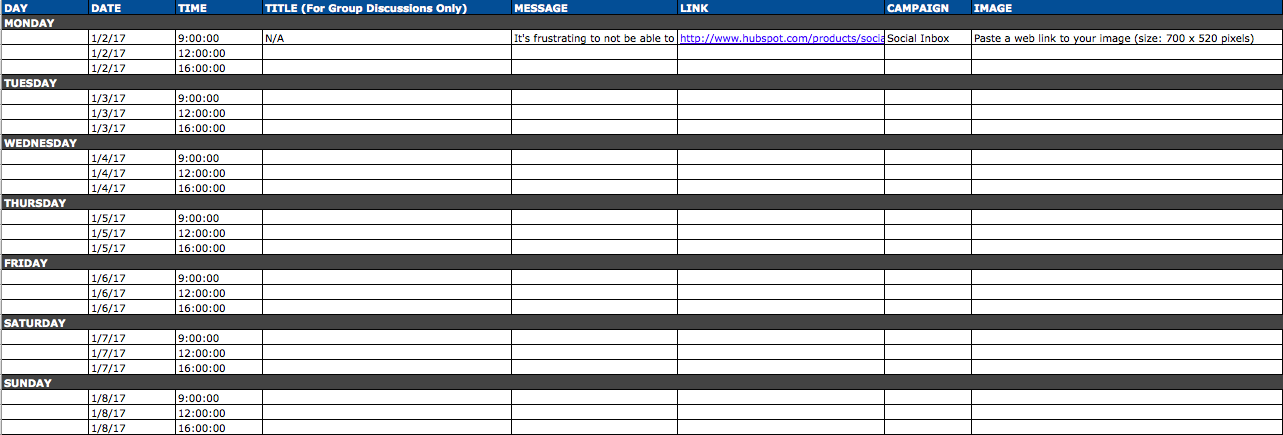
LinkedIn Groups let you post a few kinds of updates, one of which is called a “Discussion.” You will only fill out the “Title (For Group Discussions Only)” column if you’re looking to post a Discussion to your LinkedIn Group — because Discussions are the only update you’ll be posting that requires a title. If you’re not posting a Discussion to a LinkedIn Group, you don’t need to fill out this field, because your update will not have a title.
You’ll fill out the next column, “Message,” for every type of update you post, whether it’s for a Company Page or a Group. Simply input your copy into this column, and then navigate to the next two columns, “Link” and “Campaign” to input the URL to which you’re directing readers with the tracking token you’ll use to track activity, and the associated campaign if one exists. If you’d like to use an image for an update, attach it per the instructions laid out in the “Twitter” section. We recommend editing the image to 700 x 520 pixels.
Planning Your Instagram Posts
Now, let’s move on to how to set up your Instagram photos and videos in advance with the template. Navigate on over to the tab in your template labeled “Instagram Updates.”
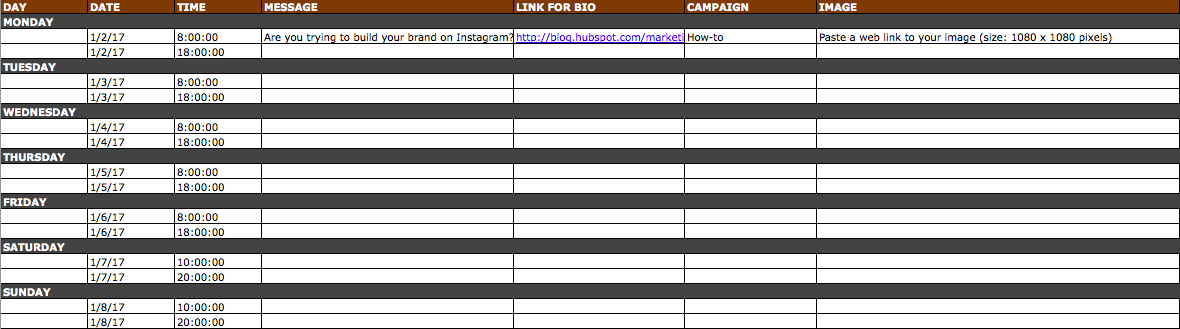
Instagram updates work similarly to Facebook updates, in that content can’t be uploaded in bulk to Social Inbox like it can with Twitter.
The first three columns, “Day,” “Date,” and “Time” are there for your convenience. Head on over to the column labeled “Message,” and input the copy you’d like to appear in your post’s caption, corresponding to the days and times you’d like those updates to run. Keep in mind that although Instagram captions can be up to 2,200 characters long, they cut off in users’ feeds after three lines of text. The exact length of these three lines depends on the length of your Instagram handle. (Read this blog post for a full character count guide.)
Next, move to the “Link for Bio” column and input whichever link you plan to put in the bio when you publish the accompanying Instagram post. (The reason you’d put a link in your bio and not the photo caption itself is because clickable URLs aren’t allowed anywhere except the single “website” box in your bio. See #13 in this blog post for more on how that works.) Oh, and don’t forget that tracking token.
If you’d like the update to be tagged to a certain campaign, include this in the “Campaigns” column. Finally, attach an image just like you did with your other social media updates — we suggest you edit it to be 1080 pixels x 1080 pixels. (Click here for a full cheat sheet of social media image sizes.)
Planning Your Pinterest Updates
Alright, now let’s go over how to set up your Pinterest pins in advance with the template. Navigate on over to the tab in your template labeled “Pinterest Updates.”
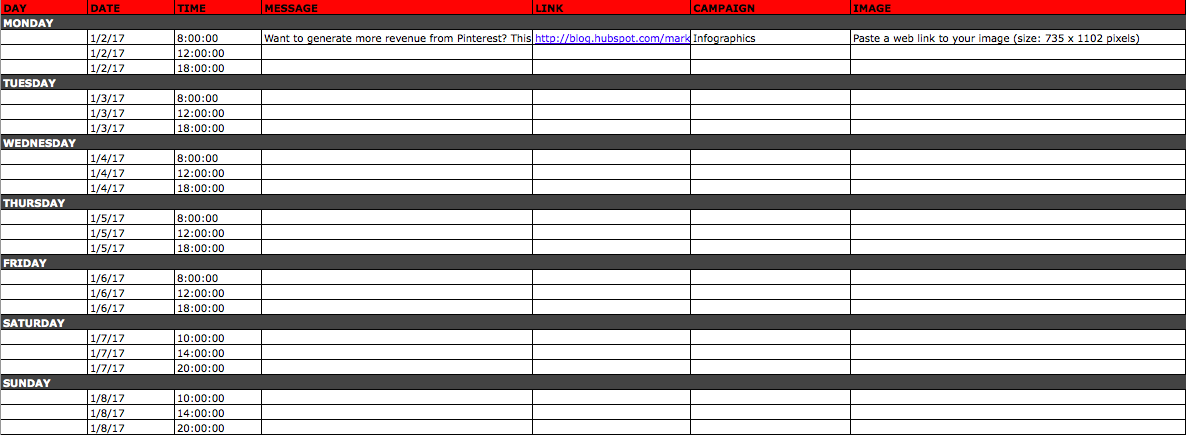
Pinterest updates work similarly to Facebook and Instagram updates, in that content can’t be uploaded in bulk to Social Inbox like it can with Twitter.
The first three columns, “Day,” “Date,” and “Time” are there for your convenience. Go to the column labeled “Message,” and input the copy you’d like to appear in your pin’s description, corresponding to the days and times you’d like those updates to run. Then, move to the “Link” column and input the link you’ll be, you know, linking to in the update. (Don’t forget that tracking token.)
If you’d like the update to be tagged to a certain campaign, include this in the “Campaigns” column. Finally, attach an image like you did with your other social media updates — we suggest you edit it to be 735 pixels x 1102 pixels.
Planning Your Google+ Posts
Finally, we come to Google+.
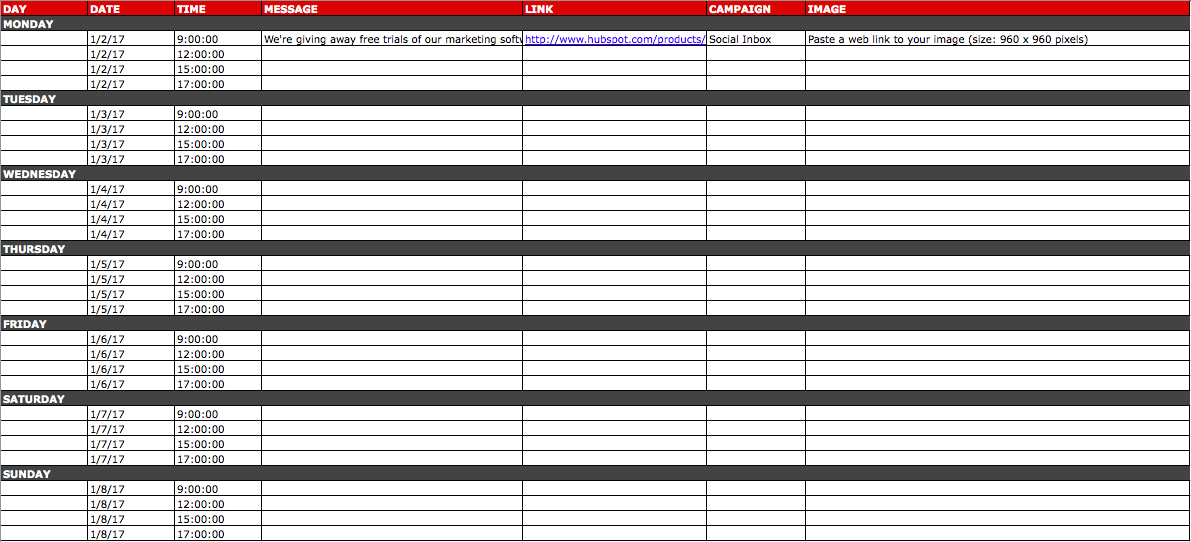
Start in the “Message” column, and input your status update. Then move over to “Link” column, where you’ll input the link to which you’re directing readers. If you’d like the update to be tagged to a certain campaign, include this in the “Campaigns” column. If you’re attaching an image, you could use multiple different sizes, but 960 pixels x 960 pixels works best. (Click here for a full cheat sheet of social media image sizes.)
Content Repository (Or, Where to Source Social Media Content)
This template also provides you with a tab called “Content Repository,” which should help you keep track of all your content and maintain a healthy backlog of fodder to make sourcing social media content easier.
As you create more assets, you’ll likely want to resurface and re-promote those pieces down the line, too. To ensure you don’t lose track of all of that content, record it on this tab so you’re never at a loss for what to publish on social. If the content you’re promoting isn’t evergreen, be sure to include an expiration date in the column marked “Expiration” so you don’t promote it when it’s jumped the shark.
This tab will also help you maintain a healthy balance of content: A mix of your own content and others’, a mix of content formats and types, and mix of lead generation content vs. MQL-generating content vs. traffic-friendly content.
Don’t Forget
Whether you use this spreadsheet to plan your content out in advance or upload to a third-party app, you’ll still need to supplement these updates with one the fly content. Breaking news hits? Whip up a quick update to share it with your network. Someone in your network tweets something interesting? Give it a retweet with some commentary. Got a fascinating comment on one of your updates? Respond with a “thank you” for their interaction or an additional follow-up comment. Coming up with and scheduling your social media content in advance is a huge time-saver, but it should go without saying that you still need to monitor and add to your social presence throughout the day.
Finally, we encourage you to experiment with your social media publishing. This template provides publishing dates and times for each social network, but you may find those are way too many updates for you to fill, or perhaps too infrequent for your booming social presence. You should adjust your social media publishing frequency as needed.
Editor’s Note: This post was originally published in June 2012 and has been updated for accuracy and comprehensiveness.
Snapchat Content Strategy: How Marketers Can Win With Snapchat
Are you on Snapchat? Want to know how to use it for marketing? To discover how to create a content strategy on Snapchat, I interview Carlos Gil. More About This Show The Social Media Marketing podcast is an on-demand talk radio show from Social Media Examiner. It’s designed to help busy marketers and business owners […]
This post Snapchat Content Strategy: How Marketers Can Win With Snapchat first appeared on .
– Your Guide to the Social Media Jungle
from http://ift.tt/1TWqBKZ
via socialmediaexaminer
ASICS will acquire Runkeeper, following Adidas and Under Armor’s example
Following in the footsteps of competitors, Adidas and Under Armor, ASICS will buy fitness app-maker, Runkeeper. The move was announced on Medium by Runkeeper’s founder, Jason Jacobs, and indicates that all fitness apparel companies clearly see the need to embed tracking technology, and/or tie-in apps with their brands.
Jacobs notes that partnering with ASICS to fulfill the company’s vision made complete sense. Not only is ASICS a running-oriented company, but, the manufacturer’s shoes are ‘by far’ the most popular brand among Runkeeper users.
In the short term, nothing major will change. Runkeeper will continue on its path, and will be improved faster now that it has major infrastructure (and budget) behind it.
From the end-user standpoint, not much will change. Not only will the Runkeeper product carry on, but we will be able to move even faster. We will be able to pursue the vision we’ve set out to pursue all along, with a partner that can bring many resources to bear that we couldn’t fathom having access to on our own.
While Nike opted to develop its own tracking technology and products years ago with the ill-fated Fuel Band lineup, other fitness companies opted to buy-in to existing apps. Under Armor, as an example, now owns MyFitnessPal and Endomondo, and also has its own tracking wearables. Its recently launched ‘RE’ running shoes, and the Healthbox announced at CES show the fitness giant’s focus on adopting modern tech. Adidas, likewise, purchased Runtastic.
While the post claims nothing will change, it would be unusual if ASICS didn’t leverage the partnership to develop embedded tracking tech in to its running shoes. Having a pair of shoes which automatically track runs, and sync with Runkeeper seems like a no-brainer.
Filed under: iOS Devices Tagged: Apps, ASICS, fitness, RunKeeper
Check out 9to5Mac for more breaking coverage of iOS Devices, Apps, and fitness.
What do you think? Discuss “ASICS will acquire Runkeeper, following Adidas and Under Armor’s example” with our community.
How ChefSteps Plans to Make You Fall in Love With Cooking Again [Podcast]
For many people (myself is included), cooking is a chore.
After a long day of work, the last thing you want to do is spend a ton of time putting together a dinner — even if the end result will be delicious. Instead, you whip up something that’s easy to make and healthy enough, and promptly wolf it down. Then, you’re on to your next activity of the day: time with family, mountains of emails, or a quick episode of How I Met Your Mother before you hit the hay.
ChefSteps wants to change all that.
With an engaged community, a huge backlog of creative recipes, and most recently, a shiny new piece of hardware called Joule, the company wants to help regular people have more fun in the kitchen again.
In this episode of The Growth Show, ChefSteps Co-Founder Chris Young joins us to talk about his path to building the cooking startup — and what he’s learned along the way.
To listen to this episode in your browser, click the play button below, or click here to listen in your iTunes app.
Check out the latest recaps of The Growth Show episodes by clicking here.
JBL’s Legend CP100 head unit with CarPlay support to be available February 14 for $399
Back at the Consumer Electronics Show in Las Vegas, JBL took the wraps off of its first CarPlay-capable aftermarket head unit, the Legend CP100. At the time, the company teased only that it would be “coming soon,” but now we have an official release date. The Legend CP100 head unit will be available starting February 14 for $399 via JBL’s website.
The JBL Legend CP100 features a 6.75-inch capacitive touchscreen, which is not bad at all for the price. Capacitive touchscreens are also often easier to use as they require a lighter touch than resistive touchscreens that are used in many in-car units. The Legend CP100 also has an AM/FC tuner, rear USB input, rear camera input for adding up a backup camera, and support for steering wheel controls in your car.
While the JBL CP100 does not offer wireless Carplay support, it does offer Bluetooth capabilities so you can quickly place calls and play music wirelessly in your car through a JBL-designed interface, as opposed to using the CarPlay interface via USB connection.
As far as design goes, you can tell in the image above that it is pretty basic. It has a black design with white illuminated buttons. In addition to your standard volume and power buttons, there is also a “push to talk” button, which JBL says provides instant access to Siri.
The JBL Legend CP100 is available for pre-order now on the company’s website for $399.
Filed under: CarPlay Tagged: CarPlay, JBL, Legend CP100
Visit 9to5Mac to find more special coverage of CarPlay, JBL, and CarPlay.
What do you think? Discuss “JBL’s Legend CP100 head unit with CarPlay support to be available February 14 for $399” with our community.
Law firm follows through with plan to file class action suit against Apple over ‘Error 53’
Earlier this month, Apple acknowledged an issue referred to as “Error 53” that causes iPhone 6 units with home buttons repaired by a third-party to potentially be bricked with software updates. Shortly after Apple acknowledged the issue, a Seattle-based law firm announce that it was considering filing a class action lawsuit against Apple for forcing people to use the company’s own repair outlet, which is often more expensive. Now, the law firm PCVA has officially filed the case with the U.S. District Court for the Northern District of California.
In a press release announcing the lawsuit, PCVA stated that the first goal of the suit is to get all affected customers “re-outfitted” with working phones “without the overwhelming costs” that they are facing right now.
The lawyer behind the case, Darrell Cochran, states in the release that while Apple claims the Error 53 is put in place as a security measure, that logic doesn’t add up due to it being implemented following software updates. Cochran argues that Apple needs to inform users of the risks associated with installing a software update, which is ultimately how Error 53 has come to affect users.
“If security was the primary concern, then why did the phones work just fine, sometimes for several months, without the software update,” Cochran asked. “Error 53 only rears its ugly head when downloading a newer version of Apple’s operating system.”
Finally, Cochran notes of how lax Apple has been in its response to the Error 53 issue. The company issued a statement last week saying that Error 53 is put in place as a security measure, but not offering a specific why for people to fix their bricked devices.
It’s not out of the ordinary for class action suits to be filed against Apple. Recently the company has been hit with suits relating to iOS 9 performance on older devices and two different ones relating to mobile data charges.
The full press release from PCVA can be seen below:
SEATTLE, WA – Pfau Cochran Vertetis Amala PLLC (PCVA), a nationally respected trial law firm, filed a class-action lawsuit against Apple, Inc. in federal court today in response to Apple’s “Error 53” iPhone controversy.
Apple has been under fire for its policy of permanently disabling (a practice referred to as “bricking”) iPhone 6 and 6 Plus units that have had their fingerprint sensors damaged or had hardware replaced by third-party repair stores. The phones are bricked after users install a phone update. Once bricked the phone is essentially useless. “Error 53” refers to the message displayed to users who are no longer able to use their phones after installing the update.
“The first objective is to get all the affected iPhone customers re-outfitted with working phones, and without the overwhelming costs that thousands of people are facing right now with error 53 codes and bricked phones,” said Darrell Cochran, lead attorney for the class action lawsuit. “That will provide immediate relief to the consumers and, in the end, it will also help Apple,” Cochran said.
Apple representatives have claimed the policy of disabling phones was a security measure to protect users from having their personal data compromised. But PCVA attorney Cochran doesn’t buy into Apple’s security safeguard explanations.
“If security was the primary concern, then why did the phones work just fine, sometimes for several months, without the software update,” Cochran asked. “Error 53 only rears its ugly head when downloading a newer version of Apple’s operating system.”
Cochran said Apple’s failure to give a warning about the consequences of its update on phones, including the loss of all information in the phone, has consumers crying foul.
“No materials we’ve seen from Apple ever show a disclosure that your phone would self-destruct if you download new software onto a phone,” Cochran said. “If Apple wants to kill your phone under any set of circumstances and for any reason, it has to make it crystal clear to its customers before the damage is done.”
Compounding the problem, according to Cochran, is how disagreeable Apple’s reaction to the problem has been. “The error code 53 signals the death of the phone, and Apple’s response has been to say ‘you have no options; it’s not covered under warranty, and you have to buy a new phone.’”
If you’ve been a victim of Apple’s Error 53, contact the team of attorneys at PCVA to help hold Apple responsible for its wrongdoing.
For more information about PCVA, visit the firm’s website, http://www.pcvalaw.com.
Filed under: iOS Devices Tagged: Error 53, iPhone 6, Touch ID
For more information about iOS Devices, iPhone 6, and Touch ID continue reading at 9to5Mac.
What do you think? Discuss “Law firm follows through with plan to file class action suit against Apple over ‘Error 53’” with our community.
TestFlight updated with support for watchOS 2.2 and iOS 9.3
Apple’s TestFlight iOS app has received an updated today with support for watchOS 2.2 and iOS 9.3, as well as the standard “stability and performance improvements.” Upon first glance, users who were having trouble installing beta apps from TestFlight onto the latest watchOS 2.2 betas won’t see much more success with today’s TestFlight update.
What’s New in Version 1.3.2
Includes support for watchOS 2.2 and iOS 9.3, as well as minor stability and performance improvements
The original TestFlight platform was acquired by Apple nearly two years ago, and just recently saw a doubling in the number of allowed external testers and beta’s expiration days.
TestFlight is available for free in the App Store and compatible with all devices running iOS 8.0 or higher.
Filed under: Apps, General, iOS, iOS Devices Tagged: betas, iOS 9.3, TestFlight, TestFlightApp, watchOS 2.2
For more news on iOS Devices, Apps, and iOS continue reading at 9to5Mac.
What do you think? Discuss “TestFlight updated with support for watchOS 2.2 and iOS 9.3” with our community.
Review: Bluelounge’s Kosta Apple Watch Charging Coaster is an affordable, Nightstand mode-friendly dock
Earlier this year at CES, I got the chance to stop by Bluelounge’s booth and discovered a product announced late last year that I hadn’t seen before, the Kosta Apple Watch Charging Coaster. What caught my attention is that it’s designed similarly to Apple’s Magnetic Charging Dock, but comes in three non-white colors including dark grey and costs $15 instead of $80. There are a few key differences to consider with Kosta compared to other Apple Watch docks …
Bluelounge offers Kosta in three different colors: dark grey (pictured above), light grey (which looks a bit beige to me), and green (on the lime side).
The dark grey option really appeals to me and looks nice next to Apple’s charcoal gray iPad Pro Smart Cover and space gray Lightning Dock which I also keep on my bedside table. My primary dislike for Apple’s Magnetic Charging Stand is that it’s only available in white, which would stand out too much for my preferences and not fit in with my other gear. Both look similar, which a reader pointed out when Apple’s was introduced not longer after Bluelounge’s.
Kosta’s also reasonably priced at $14.95 versus Apple’s $79 Magnetic Charging Stand. Kosta is flexible silicone disc that resembles a cross between a cup coaster and a Tumbler lid while Apple’s looks a bit more like a pillow.
The biggest justification for the price difference is that Kosta requires you to bring your own Apple Watch Magnetic Charging Cable (the one Apple Watch comes with works) like most other third-party docks; Apple’s much pricier Magnetic Charging Stand features an integrated connector that powers over a Lightning cable, but spare Apple Watch chargers are only $30.
Setting up Kosta is super easy. Just pull the magnetic end of the charging cable through a slit on the bottom of the dock, then place it either flat or standing upright near the center which is magnetized to hold it in place. Underneath Kosta is a section to hide the cable underneath and cleanly run it away from the dock.
Similar to Apple’s official dock, Kosta docks Apple Watches with both open and closed bands so it’s not limited to supporting just certain models. It’s a mostly flat dock, however, so keep it mind that open straps will make contact with the surface under Kosta if that’s a concern.
Kosta’s centered magnet supports standing up the magnetic end of the charging cable in a way that lets you dock your Apple Watch with the strap closed as well. This is my preferred way to use it as it supports Apple Watch’s Nightstand mode that turns it into a mini-alarm clock. Kosta’s silicone material is soft, too, so there’s no concern about scuffing the watch’s side when clanking it down on a hard material.
In testing, I did find that Kosta and Nightstand mode requires a bit more effort than other solutions. For instance, I needed to adjust the connector, which does a pretty good job of staying fixed as long as it’s near the magnetic center, when I changed straps. Sport band worked well when centered, but Classic Buckle needed the connector to be moved forward a bit.
I also noticed that the connector needed to be raised just a tad on certain bands. Sport worked best, but Classic Buckle needed a little lift. I tested Kosta with the 42mm Apple Watch only, so the 38mm Apple Watch may have a slightly different experience, although there are no major issues that would rule out compatibility with any model or band.
Kosta does a great job of doing what Bluelounge does best: enhancing the cable management experience (I also use Bluelounge’s CableBox under my desk and CableDrops around the house). I prefer the color and price to Apple’s solution and find that it fits in nicely with my other bedside table accessories.
The Nightstand mode use isn’t quiet as convenient as Spigen’s similarly priced Night Stand Apple Watch dock, but Bluelounge’s Kosta looks more at home on a table which makes it a worthy contender for a low-cost solution that’s both functional and discreet. Highly recommended for $14.95 if Kosta fits your taste like it does mine.
Filed under: Apple Watch, Reviews Tagged: Apple watch, Apple Watch dock, BlueLounge, dock, Kosta, Nightstand mode
Continue reading more about Apple watch, Apple Watch, and Reviews at 9to5Mac.
What do you think? Discuss “Review: Bluelounge’s Kosta Apple Watch Charging Coaster is an affordable, Nightstand mode-friendly dock” with our community.
CBS CEO now says company has had no ‘recent talks’ with Apple about streaming TV service
Apple’s streaming web TV service has been rumored for nearly a year now, with reports originating last March claiming that Apple was planning to announce a service at $30-$40 per month. The service was said to feature upwards of 25 channels and be available on the fourth-gen Apple TV. Recently, however, reports have claimed that Apple’s talks with major networks have stalled. Now, speaking to CNN, CBS CEO Les Moonves has confirmed that talks between Apple and CBS have stopped recently.
“We had conversations awhile back, and we haven’t had recent conversations with them,” Moonves said regarding CBS’ talks with Apple regarding a streaming TV service. Regarding current talks about streaming TV, Moonves said that “the phone is always ringing,” but it appears none of those calls are from Apple anymore.
In the past, Moonves commented that Apple was “having conversations with everyone about doing their own streaming service,” even going as far as to say CBS was “very excited” about reaching a deal for the service.
Recent reports have echoed Moonves’ comments. In December, it was reported that Apple had suspended its plans for a web TV service due to the struggles it was facing in negotiating with networks, something that has plagued Apple since it began its mission to launch streaming TV. ESPN’s president delivered a similar message last month.
In an interview last November, Eddy Cue bounced around the idea of Apple launching a streaming service, explaining that with the tvOS App Store, networks are free to release their own subscription services at their own prices.
Filed under: Apple TV Tagged: Apple TV, Apple TV service, CBS, Les Moonves, streaming, web tv
Check out 9to5Mac for more breaking coverage of Apple TV, Apple TV, and streaming.
What do you think? Discuss “CBS CEO now says company has had no ‘recent talks’ with Apple about streaming TV service” with our community.
Kanex launches new MultiSync Bluetooth keyboards for Mac and iOS users
Popular accessory maker Kanex today announced a new lineup of Bluetooth keyboards for Mac and iOS users that allow easy switching between up to four wirelessly connected devices, as well as two products aimed specifically at iPad users.
There are four new keyboards in the lineup including the full-sized keyboard in black and aluminum pictured below, and a smaller miniature version (above) that is a lot like Apple’s own wireless keyboard in form factor (minus the questionable arrow key size).
Additionally, you’ll find two new iPad keyboards with stand covers, one for the iPad mini and one for either the iPad Air or iPad Pro:
- MultiSync Aluminum Keyboard $99.95
- MultiSync Mini Keyboard $49.95
- EasySync iPad Keyboard with Stand Cover $49.95
- EasySync iPad Mini Keyboard with Stand Cover $39.95
The company notes the stand on the iPad keyboards can support a smartphone in case you want to use the keyboard with an iPhone or other device.
Perhaps my favorite feature of the new keyboards at first glance is the design of the two black and aluminum keyboards that will fit in nicely for Mac users where the all-white and aluminumm Apple keyboard feels a bit out of place these days (like with my MacBook or Mac Pro desktop setup and mostly black monitors and gear).
The larger of the two aluminum keyboards unfortunately takes two AAA batteries, while the compact version and the two iPad keyboards include the expected charging cable and built-in batteries.
All of the new keyboards are available alongside specs and more info on Kanex’s website now. Keep an eye out for a full review in the near future.
Filed under: iOS, Mac Tagged: Air, Aluminium, Bluetooth, iPad Pro, iPhone, Kanex, Keyboards, multisync, stand cover
Visit 9to5Mac to find more special coverage of iPhone, iOS, and Mac.
What do you think? Discuss “Kanex launches new MultiSync Bluetooth keyboards for Mac and iOS users” with our community.