
Welcome to My Blog
Leveraging Alumni to Help Drive Inquiries and Applications
Nearly 80% of alumni feel positively about their alma maters. That doesn’t translate to 80% of your alumni making donations to the school, but according to the same study — nearly half of non-donors do want to find ways to get more involved with their schools. Are you using this fully to your advantage?
Ask yourself: When was the last time you asked your alumni to contribute content to your school blog, newsletter, or annual report?
We don’t mean asking them to be featured in an annual review or give a testimonial (although that’s probably already a part of your plan, if not, it should be). We’re talking about having your alums write articles about their life experiences, or tips to share, or whatever else is going on in their lives that would be inspirational to students.
Why Alumni Content Works to Convince Prospective Parents and Students
Your admissions team already uses alums as school ambassadors. They conduct applicant interviews or have meetings to answer their questions. Alumni may also participate in local career events. These events all make good use of alumni but have their limitations.
First, there are logistics. Alumni involved in these activities must be willing and able to donate their time. In many cases, they also need to be in the right location to participate. Second, the reach of these types of interactions is limited. They’re valuable for those prospects such activities do reach, but that’s a small sample compared to the broader audience of potential students out there.
Using alumni content extends the power of these great ambassadors to influence a wider pool of prospects. And influence they have. Eduventures researched the key drivers influencing students’ enrollment decisions. They found that among school personnel, alumni were the most influential, after current students and admissions officers, in getting a prospect to enroll. Alumni had more influence over their decision than teachers, faculty, or coaches.
It’s not hard to understand why. Alums once wore those students’ shoes and chose to go to your school. They can speak with an authenticity based on first-hand knowledge. They can share how and why they decided to attend your school. They can share their experiences of what life is like as a student there.
It’s far easier for prospects to connect and identify with another human being than to connect and create a relationship with an institution. Alumni stories personalize your school in a way no other group can.
Of course, prospects don’t just think about life at your school when deciding where to apply. They’re also thinking of how well your school can position them for success in the next stage of their life. Parents want their kids to get into a great college because they know how important a life choice college is. College students want to be attractive to employers in a difficult job market. Alumni are the living proof of the ROI a prospect could achieve.
What Kind of Content Can Alumni Contribute?
Interviews and “where are they now” pieces are always valuable. Focus on their journey from the potential students’ perspectives. The audience for this content isn’t fellow alumni. The best times to approach specific alumni for an interview, or to write a story about them are after winning an award or another achievement. Telling the stories of the ones who took the road less traveled, or the ones who just returned home from a stint overseas, can broaden your prospective students’ horizons and unlock their imaginations.
You should also encourage alums to create by-lined content. Don’t wait to interview them! Run campaigns encouraging alums to post content on your social media sites. How about a selfie in their cool office on Instagram? Or updates on your Facebook page when they’re starting a new job, got promoted, or overseeing a juicy new project? What about photos of art, ads, or products they’ve created on Pinterest?
These aren’t alumni-siloed social media profiles. Direct the alumni-generated content (AGC) to the social media pages that prospects visit. Create a branded hashtag they can use to tag alumni stories. Promote these hashtags in your admissions content. Tell prospects to use them to hear from and connect directly with alumni.
You can also run AGC campaigns asking specific questions: “What I wish I’d known at 15” or “My favorite school memory.” Alumni can email back responses or post directly to your social media channels with a campaign-branded hashtag. Then curate the best responses into a blog post. You can also drop individual responses into relevant spots in your admissions collateral.
Don’t forget about distribution. In addition to social media, you can promote and include alumni stories and AGC in newsletters, emails, and your school’s blog.
Alumni Content — the Best Credibility Builder
Alumni content is the ultimate credibility builder for prospects. It attracts prospective students because they want reassurance about the unknown of probably the first, and most important decision of their adult lives. It helps alleviate the fears they have of making “a monumental mistake.”
Alums’ stories help prospects picture them living those lives, having those experiences, doing those jobs. Such stories can deepen your prospects’ emotional attachment to your institution. Because they can imagine having the same, or better experiences, than Bill and Judy Alumni. The personal experiences these kids have on campus, plus the current students they meet, capped off by your alums sharing their success, are the 1-2-3 punch that can cast away their doubts, and seal the deal for your prospective students and their parents.
Younger Alums Offer Different, but Equal Value
How much will your younger alumni appreciate hearing from you without being asked for money? Tons! Many alums are still at the beginning of their life’s journey and don’t have much money — yet they’ve got time and energy to spare. Their fondness for their school is still strong. But they’re embarrassed when they can’t give money. Ask them too often for money when they aren’t in a financial position to give, and resentment can set in.
Recognize that until they hit their mid-30s, early 40s, they’re busy building a career, starting families, and getting set financially. They don’t have a lot of extra cash lying around to give to your school.
Try a different path that yields equal, if not greater, value.
Ask them to share their memories and “hard lessons learned.” What advice can they offer students just starting college? What secrets did they learn that helped them succeed in school?
Reliving those memories and sharing their thoughts will do more to deepen your alums’ school bond than pleas for money ever will at this stage in their lives. Eventually, when they reach the point where they can give back financially, you’ll get your donations — and more!
Medium for Business: The Complete Guide for Marketers
Have you considered publishing your content on Medium? Are you looking for a way to distribute your ideas to a larger audience? In this post you’ll discover what marketers think about Medium, along with a step-by-step guide to using Medium. Why Medium? Jay Baer, a New York Times bestselling author and well-known keynote speaker, has been […]
This post Medium for Business: The Complete Guide for Marketers first appeared on .
– Your Guide to the Social Media Jungle
from http://ift.tt/23Wvt7b
via socialmediaexaminer
How to Write a Review in iTunes [Quick Tip]
Every time I subscribe to a new podcast or download a new app I have a moment of panic.
Is this show or app really going to be worth my time? I’m giving up valuable space in my phone for this. Do I really need this in my life?
When that moment of worry sets in, I turn to one thing, and one thing only: the show or app’s reviews. If it’s passed the litmus test of countless other people, I’m sure I’ll be fine.
Fast-forward a few months. That podcast or app I worried about? It’s now a favorite of mine. I talk about it over cocktails with coworkers … yet never actually write a review to help someone else make the “to download or not to download” decision.
If you’re like me — the review-seeker but never the review-maker — this post is for you. Turns out, writing a review isn’t that hard — you just have to follow a few specific steps.
Check the post out to see just how easy it is to write review on your Mac/PC or your iPhone — and then go on over to your favorite show or app and put your newfound knowledge to work. Not only will you be giving other users valuable information on which to make better decisions, but you’ll also be giving the creator valuable feedback on which to iterate. Win-win, amirite?
Note: I’ll be using our podcast, The Growth Show, as an example throughout the post, but the same principles will apply regardless of what you’re reviewing.
How to Write an iTunes Review on a Mac or PC
1) Open up the iTunes Store.
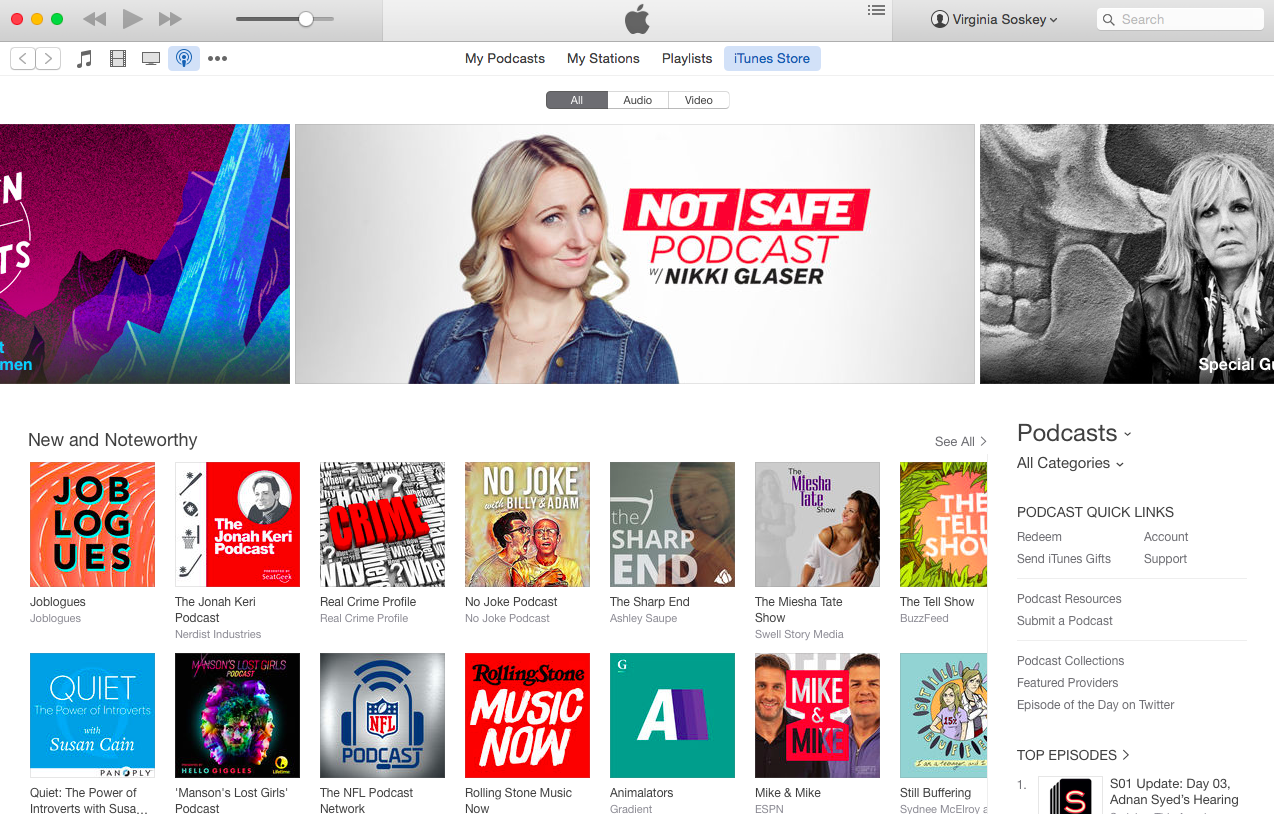
2) In the search box, type in the name of the podcast, show, movie, TV show, book, or app you’d like to review.
3) Click on the correct item in the search results to be taken to its iTunes page.
4) On the item’s iTunes page, choose “Ratings and Reviews” from the top navigation.
5) Click the button, “Write a Review.”
If you’re not signed in yet, Apple will prompt you to sign in.
6) Write your review.
A few things Apple suggests you keep in mind:
- Reviews are limited to 300 words.
- Apple does not edit reviews, so triple check your spelling and grammar before submitting them.
- Avoid the following things:
- Single-word reviews
- Bad language
- Contact information (email addresses, phone numbers, etc.)
- URLs
- Time-sensitive material
- Alternative ordering information
- Comments about non-product related issues such as service and support, resellers, shipping, sales policies, other Apple partners or Apple topics not directly related to the product’s features or functionality.
7) Hit “Submit.”
Note that you probably won’t see your review appear right away. According to Apple, “Your review might need to be approved before it’s published, so it might not appear immediately.”
How to Write an iTunes Review on an iPhone
1) Open up the right app for what you want to review.
Unlike on Desktop, you can’t just review your podcasts, shows, albums, and apps through the iTunes Store. Instead, you have to navigate to certain apps first. Here’s where you need to navigate depending on what you want to review:
- Review a Podcast = Podcasts App
- Review an App = App Store
- Review Music, Movies & TV Shows = iTunes Store
- Review a Book = Books App
2) Tap the “Search” button in the bottom navigation.
3) Type in the name of the item you’d like to review, and select it from the search results.
4) On the item’s listing page, tap “Reviews.”
5) Tap “Write a Review.”
If you’re not signed in yet, Apple will prompt you to sign in.
7) Write your review.
A few things Apple suggests you keep in mind:
- Your review must be under 300 words.
- Apple doesn’t edit reviews, so make sure your grammar and spelling is correct before submitting.
- Avoid the following things:
- Single-word reviews
- Bad language
- Contact information (email addresses, phone numbers, etc.)
- URLs
- Time-sensitive material
- Alternative ordering information
- Comments about non-product related issues such as service and support, resellers, shipping, sales policies, other Apple partners or Apple topics not directly related to the product’s features or functionality.
8) Hit “Send.”
Note that your review may take a few hours to show up in iTunes.
And that’s it! In just a few minutes you can help your fellow fans make better decisions about what they listen to, watch, and play — and help your favorite podcasts, shows, and artists get the info they need to improve.
Sonos to officially support Apple Music starting tomorrow
After launching in public beta last December, Sonos has revealed that it will officially add support for Apple Music to its connected speaker lineup tomorrow, February 10th. We had an opportunity to go hands-on with Sonos support for Apple Music when the beta was announced last year and noted that in some cases, using Apple Music through the Sonos Controller app is better than Apple’s own app.
“We’re big fans of Sonos,” Apple senior vice president of internet software and services Eddy Cue said to BuzzFeed. “We’ve been looking forward to this.” When asked why Sonos didn’t support Apple Music from the start, especially considering it supported Beats Music, Cue explained that it took some time to get it right. “It’s important to get the integration right the first time out,” Cue said. “Apple has a high bar for this stuff; So does Sonos. Apple Music isn’t even 6 months old yet, so this really did not take much time at all.”
In the Sonos Controller app, Apple Music is organized by For You, New, Radio, and My Music, just like in iTunes or the iOS Music app. The app even supports streaming Apple’s Beats 1 station, as well as other featured stations or stations you create.
For those who aren’t entirely familiar with Sonos, the company offers a ranger of connected speakers that offer the opportunity to set up a whole-home speaker system. Sonos offers a Play:1 speaker for $199, a Play:3 for $299, as well as a more recent Play:5 for $500. We had the opportunity to go hands-on with the Play:5 speaker last year and praised the speaker’s combination of a sleek design and premium sound.
In addition to support for Apple Music, Sonos supports Spotify, Pandora, Amazon Prime Music, and more. Again, Apple Music support will be live tomorrow. Read our hands-on with Apple Music support for Sonos here.
Apple Music in Sonos
Apple Music On Sonos Available Tomorrow
SANTA BARBARA, Calif., Feb. 9, 2016 /PRNewswire/ — Sonos announced today that Apple Music will be available on Sonos systems worldwide starting Wednesday, Feb. 10. Music fans worldwide will have access to Apple Music features like For You, New, Radio, and My Music, and will also be able to stream the entire Apple Music catalog through Sonos smart speakers tuned for great sound in every room of their homes.
Apple Music on Sonos was tested by hundreds of thousands of listeners through a successful beta program that started in early December. To stream Apple Music on Sonos, customers simply select “Add Music Services” from any Sonos controller app, scroll down to the Apple Music icon, and login.
“The feedback from Apple Music members on Sonos during the beta period has been great,” said Eddy Cue, Apple’s senior vice president of Internet Software and Services. “Sonos plus Apple Music provides an amazing listening experience at home – and we’re excited to offer it to all Sonos customers starting tomorrow.”
“This partnership has been an excellent example of two companies that truly care about music coming together to deliver a great listening experience,” said John MacFarlane, Sonos chief executive officer. “Working with Apple gives us the opportunity to share Apple Music throughout people’s homes in a way that’s easy, intuitive, and sounds great.”
Apple Music is all the ways you love music, all in one place, with the expertise of world-class music experts who have programmed playlists for any moment. Curation is at the core of every element of Apple Music, from the handcrafted radio stations and Beats 1, to the suggestions in For You and top albums and songs in New. A Sonos station on Apple Music, curated by artists in collaboration with Sonos, is also launching tomorrow. New users can sign up for a free, three-month trail membership of Apple Music.
About Sonos
Founded in 2002, Sonos® creates the leading smart speaker system. Once a tech start-up populated with nerdy engineers and brilliant designers who love music, Sonos has grown into a global music brand dedicated to transforming the experience of listening out loud to music in the home. Its family of wireless smart speakers and home audio products make it easy for everyone to listen to the music they love in every room of their home. To hear their favorites, discover new music, and appreciate it all with the highest sound quality.
Sonos is doing it all over the world – in more than 60 countries, with dozens of streaming music providers, through thousands of retailers, and in millions of homes. With a constant investment in software and services, Sonos is improving the experience customers have with music in the home for years after they buy it. Sonos is changing the way people listen to music – one home at a time.
Sonos, Inc. is a privately held company, headquartered in Santa Barbara, California with additional offices in Boston and Seattle, as well as in the Netherlands, United Kingdom, Australia, Germany and China.
© 2004-2016 by Sonos Inc. All rights reserved.
Sonos and all Sonos product names and slogans are registered trademarks of Sonos, Inc.
Filed under: Apple Music Tagged: Apple Music, Music, Sonos, speakers
Visit 9to5Mac to find more special coverage of Apple Music, Apple Music, and Music.
What do you think? Discuss “Sonos to officially support Apple Music starting tomorrow” with our community.
Sparkle Updater vulnerability puts ‘huge’ number of Mac apps at risk of hijacking
A new vulnerability in Sparkle has put a “huge” number of Mac applications at risk for hijacking. For those unfamiliar, Sparkle is a tool used often by third-party apps that are not in the App Store to allow updates to be pushed to users. Apps susceptible to this hijacking hack include Camtasia, uTorrent, DuetDisplay, and Sketch. The attack applies to both OS X Yosemite and El Capitan (via Ars Technica).
The Sparkle vulnerability could allow for an attacker to take control of another computer on the network via a Man In The Middle attack, security researcher Radek points out on his blog. A Man In The Middle attack works when a third party intercepts traffic between a user and another server and then captures and modifies that traffic from the user.
Lately, I was doing research connected with different updating strategies, and I tested a few applications working under Mac OS X. This short weekend research revealed that we have many insecure applications in the wild. As a result, I have found a vulnerability which allows an attacker take control of another computer on the same network (via MITM).
The vulnerability is not in code signing itself. It exists due to the functionality provided by the WebKit view that allows JavaScript execution and the ability to modify unencrypted HTTP traffic (XML response).
Essentially, the vulnerability exists because the Sparkle Updater framework connects over HTTP versus HTTPS. It’s important to note, however, that Sparkle has already updated its framework to close the vulnerability, but it is up to the apps that implement the Sparkle Updater framework to update their apps with the newest version of the framework. Many app developers are doing this as we speak, including popular media playback software VLC, which was updated earlier this week to implement the newest Sparkle Updater framework.
It’s important to note that the updater mechanism used within OS X does not use the Sparkle Updater, making it unsusceptible to this Man In The Middle attack. Issues like this vulnerability certainly make a compelling argument for developers to move more towards the Mac App Store, but both growth and use of it has been relatively stagnant.
There’s much more in Raedek’s full breakdown of the Sparkle Updater vulnerability on his blog.
Image via EvilSocket
Filed under: Mac Tagged: Sparkle Updater, vulnerability
For more news on Mac, vulnerability, and Sparkle Updater continue reading at 9to5Mac.
What do you think? Discuss “Sparkle Updater vulnerability puts ‘huge’ number of Mac apps at risk of hijacking” with our community.
Apple highlights certificate change deadline affecting certain developers
Apple has shared an update on its developer news and updates site to highlight an upcoming change to Apple Worldwide Developer Relations Intermediate certificates from Sunday, February 14th.
Starting February 14, the renewed Apple Worldwide Developer Relations Intermediate certificate must be included when signing all new Apple Wallet Passes, push packages for Safari Push Notifications, and Safari Extensions. While most developers and users will not be affected by the certificate change, we recommend that all developers download and install the renewed certificate on their development systems and servers as a best practice.
Apple previously shared a detailed explainer on the upcoming certificate expiration and required actions, which developers can read here, that details which developers will be affected:
Apple Wallet Passes
Update your pass signing server to replace the expired certificate with the renewed certificate by February 14, 2016. After this date, apps that generate passes for Apple Wallet will not be able to install new passes until the server has been updated.
Mac Apps
You can verify your receipt validation code is compatible with the renewed certificate in the test and production environments. The Mac App Store Update for OS X Snow Leopard is available via OS X Software Update.
Safari Extensions
Install the renewed certificate to build your extensions after February 14, 2016. In some cases, you may need to delete the expired intermediate certificate from your keychain in order to build updates to your extension. All existing Safari Extensions will continue to run as expected.
Safari Push Notifications
Update your notification package signing server to include your web push certificate and the renewed intermediate certificate by February 14, 2016. After this date, new users will not be able to sign up for push notifications from your website until your server has been updated. If you were using the openssl_pkcs7_sign function to sign your push package with only your web push certificate, you should pass the path to the renewed intermediate for the extra certificates parameter.
Finally, Apple notes that the renewed certificates in this case will run through February 7, 2023.
Filed under: Developers
Visit 9to5Mac to find more special coverage of Developers.
What do you think? Discuss “Apple highlights certificate change deadline affecting certain developers” with our community.
BitTorrent launches first peer-to-peer streaming iOS and tvOS app
The first official implementation of BitTorrent’s peer-to-peer technology hits iOS and the Apple TV today, but not in the way you may have expected. OTT News, a small team bringing a different perspective to the election coverage, has launched an app in partnership with BitTorrent to livestream coverage of the New Hampshire primaries and beyond.
The app, which broadcasts live footage from the primaries each afternoon, makes use of BitTorrent Live. The peer-to-peer system dedicated to live video helps mitigate latency and CDN issues broadcasters usually face when live-streaming.
BitTorrent states that BitTorrent Live has been “undergoing real world tests with a number of broadcast partners and OTT News is the latest.” While OTT News is the first of it’s kind to use Live, BitTorrent encourages broadcasters to sign up to receive emails for more information of the platforms’ availability. For those looking for more information on the benefits of using BitTorrent’s Live system, take a look at the BitTorrent’s post explaining the challenges with live online broadcasting.
BitTorrent states that the protocol they’ve developed delivers very little lag, regardless of how many viewers are on and viewing the broadcast. Coupling this with the fact that most viewers have a second screen streaming data while watching live events, such as an iPhone with Twitter or Facebook open, maintaining a truly “live” experience is fundamental.
OTT News is available for free from the App Store and is compatible with iPhones, iPads, and the Apple TV.
Filed under: Apple TV, Apps, iOS Tagged: Apple TV, BitTorrent, BitTorrent Live, Electon, OTT News, Primaries
Visit 9to5Mac to find more special coverage of Apps, iOS, and Apple TV.
What do you think? Discuss “BitTorrent launches first peer-to-peer streaming iOS and tvOS app” with our community.
The Need for Leads: Why Marketing is the Perfect Wingman for Sales
Historically, the two “top guns” of customer engagement have never really seen eye-to-eye thanks to a long time rivalry fueled by their ego and perpetuated by differing metrics. All over the world, sales and marketing teams have inherited various roadblocks that keep them from working well together. Mistrust, miscommunication and different goals continue to pull the teams in separate directions.
And while the two departments have been on a highway to the danger zone since they were created, the past decade has introduced many changes within each position to bring back that loving feeling with respect to promoting your business, getting in front of customers and closing the sale.
The Customer Journey Has Changed Over the Years
Gone are the days of taking leads straight to bed or losing them forever. And you can’t just ask for permission to buzz the tower with a little bit of information and expect to create a long and distinguished list of customers who have everything they need to make a purchasing decision.
No, to create a successful strategy that helps convert prospects into customers, this tenuous relationship between marketing and sales must be rebuilt.
Okay… if you haven’t made the connection yet, this is just another example of how life imitates the quintessential 80’s film Top Gun; sales and marketing fall into the role of wingmen with the same reluctant, lone-wolf turned altruistic hero mentality as the film’s main conflicting characters, Maverick and Iceman.
Both enter the relationship thinking the other doesn’t know what they’re doing, but, once they are forced to collaborate, they discover how much easier it is to be successful with another expert at your side. All that’s missing is a beach volleyball scene…
How Inbound Marketing Helps Marketing and Sales Teams Work Together
Nowadays, if you want top gun performance, there are certain rules of engagement to follow and they’re dictated by, who else, but the customer. Yes, thanks to inbound marketing, the goal is to attract visitors, convert them into leads, close the sale and then delight them with a continued high standard of quality content and service.
Businesses that match these requirements are among the elite. So, how do we optimize our content to attract qualified leads? It starts with rebuilding and then cultivating the relationship between marketing and sales.
To do that, we need to address what is pulling the two apart and what can be done to mend them back together again.
6 Common Issues Between Marketing and Sales and How to Solve Them
1) Sales doesn’t always see the relevance in marketing campaigns
This is often due to a lack of communication that can easily be mitigated by joining each other’s meetings or talking through the goal of each campaign. Maybe some fine-tuning can be done to optimize the results and provide a much needed outsider’s view.
2) Marketing gets frustrated when sales doesn’t share the content that has been created
Usually, this is because sales doesn’t know the best way to bridge the gap between the content and the intended audience. Remedy this by discussing the purpose of your content and what pain points or topics they address.
3) Sometimes, sales just can’t find the marketing collateral
To help with this, marketing can create a shared space on the intranet or CRM or even Google Drive where updated content can be added or removed to help educate a sales prospect.
4) Marketing isn’t providing quality leads.
It’s the age-old complaint of sales and it’s often yet another result of miscommunication or conflicting metrics. To help, sales can forward any questions they get from prospects or customers so marketing can create content around the pain point, which should attract more optimum leads.
5) Sales needs to “close the loop” and mark contacts in the CRM
This will provide critical feedback to Marketing so they know if the leads that are coming in are working. Additional training in the CRM can help both sides create a more productive system for everyone involved. Data input isn’t necessarily fun – it’s just necessary.
6) Marketing often hands over information to sales and then goes their separate way
For many companies, there isn’t enough accountability for lead generation, nurturing and conversions. By working together through the entire buyer’s journey, Marketing and Sales can further delight customers.
When It Gets Too Close For Missiles, Switch to Guns
There is an intimate, shared responsibility between Marketing and Sales that must be understood by both sides to move forward. Collecting leads doesn’t make you a good marketer, and contacting leads doesn’t make you good at sales. Quality is what sets it apart. Are the leads qualified? Are they being contacted regarding their interests? Anything less and the customer will hit the brakes and let you fly right by.
Before the credits roll on another missed sale opportunity, your business must create the professional relationship we’re left with between Iceman and Maverick. To do this, Marketing and Sales must set aside their differences and start working for the same boss – the customer.
TL;DR Recap
Get sales and marketing on the same page by working through your differences. Tighten up your communication by discussing lead quality and establishing clear goals and expectations. Also, take the time to walk a mile in each other’s shoes by attending each other’s meetings and sitting in on calls. This helps both see the other’s perspective more clearly.
Finally, track and measure what you’re doing by gating content that’s relevant to different stages of the customer journey behind forms so the leads can be filtered to appropriate channels. Sales and marketing automation make life a lot easier, but you must remain vigilant in entering the data that will make it easier to qualify your leads.
With a proper relationship in place, marketing can be sales wingman anytime.
10 Resolutions for Effective Project Management
Commonly the reasons why new year resolutions have a bad name is because they seldom last more than a couple of days due to a lack of determination. It is with an expectation this year will aid us with this much-needed determination, here are some resolutions to abide by this year.
1. Always Aim to be a Leader
Being a manager simply means you need to meet the expectations, whereas a leader paves the way and leads by example.
2. Treat Employees as Humans rather than Resources
Although industries refer to people as resources, a leader views them as human and not some assigned robots.
3. Use Technology Adequately
In this way, draw the most out of the tools you employ for project management tasks, by capturing, analyzing, monitoring, and reporting for the success of a project.
4. Collaboration is Key
Ensure that the customers, stakeholders, contractors, and team members are always connected and on the same page, as this is an important part of project success.
5. Focus on Quality
Effectiveness of a business depends on three key aspects: money, time, and effort. So, choosing quality over quantity of these parameters always define outcomes in the workplace.
6. Promote Organizational Culture
A good example of the organizational culture is the difference between the total amount of work done and the total amount of quality work done.
7. Prioritize Skills Over Resume
The highest priority should be on the improvement and development of skills for both the leader and team members as this is the only way to have a better and successful career.
8. Utilize Data in Decision-Making
When it comes to process, people, and risk management, leaders need to have a keen instinct in order to make difficult decision. Utilizing data in making these decisions can simplify the process greatly.
9. Health and Happiness Leads to Success
A work-life balance is absolutely necessary to stay focused, sharp, and succeed. Make sure to regularly meditate and exercise to overcome stress.
10. Have Vision, Determination, Focus
In all workplaces, you are faced with good and bad moments. Having vision, determination, and focus makes sure that you are able to overcome these moments.
Conclusion
As a Project Manager, a necessity is to bring tools, people, and culture together. Subsequently, as a leader, it is your duty to ensure that bad moments are overcome, milestones are reached, and projects are delivered on time with a high quality throughout the year.
How about looking for a tool to become effective?
The points made above all demonstrate different aspects to how it is important to become effective in your projects. There exist many tools/apps that can help in many of these and should be considered. Here are a few below that might set your projects on a successful path.
The post 10 Resolutions for Effective Project Management appeared first on Project-Management.com.
from Project Management Articles – Project-Management.com http://ift.tt/1TQvsNR
via Project-Management.com
Vine for iPhone gains 3D Touch shortcuts, new video sort order options
Twitter-owned Vine for iOS, which lets you create and share short video loops, received a new update today that adds new shortcuts from the Home screen on the latest iPhones. Users can press the updated Vine icon firmly on the iPhone 6s and iPhone 6s Plus to jump directly into making a short Vine clip or viewing the explore section of the app.
The new Vine update also adds an option for sorting clips from other users in different orders. For example, you can now sort videos by newest, oldest, and popular. The toggle for sort order can be found on account pages next to the Posts section.
The latest update follows the release of Vine’s Apple Watch app last fall, which works on watchOS 2 and lets you watch and discover popular short videos right on the Apple Watch. Vine also added new music editing tools and expanded social sharing last year.
Vine for iPhone version 5.3 is rolling out now on the App Store.
Filed under: Apps Tagged: 3D Touch, clips, explore, social, Twitter, videos, Vine
Visit 9to5Mac to find more special coverage of Apps, Twitter, and 3D Touch.
What do you think? Discuss “Vine for iPhone gains 3D Touch shortcuts, new video sort order options” with our community.
9to5Toys Lunch Break: light-up MFi Lightning cable $10, SONOS PLAY:1 $161, TP-LINK Smart Plug $20, more
Keep up with the best gear and deals on the web by signing up for the 9to5Toys Newsletter. Also, be sure to check us out on: Twitter, RSS Feed, Facebook, Google+ and Safari push notifications.
TODAY’S CAN’T MISS DEALS:
Luminid Touch light-up charging cable is ideal for plugging in at night: $10 (Orig. $20, CA Tax only)
2-pack of 3-ft. MFi Lightning + microUSB cables: $8 Prime shipped (Reg. $18)
The best-selling SONOS PLAY:1 Wireless Music System is on sale today in both colors for $161 shipped (Reg. $199)
Get into home automation with TP-LINK’s Smart Plug for $20 Prime shipped (Reg. $30)
Many Apple Watch models now $100 off at Target and Best Buy: 38mm Sport $249 w/ free shipping (Reg. $349), more
Best Buy just cut prices for Apple’s iPad mini 4 and iPad Air 2 by $100, deals start at $300 w/ free shipping
Save on Apple’s monster 12.9-inch tablet: iPad Pro 32GB Wi-Fi in all colors for $700 shipped (Reg. $799)
Apple iPad Air Wi-Fi 16GB $299 or 64GB $349 shipped (Reg. $399/$449)
Apple 15-inch Retina MacBook Pro (Newest Version) 2.2GHz/16GB/256GB: $1,600 shipped (Reg. $1,999)
Heroes Reborn: Enigma for iOS goes free for the first time as IGN’s Game of the Month (Reg. $5)
The Martian official iOS/Apple Watch game goes free (up to $3 value)
Apple offering popular iOS video editing app ‘Videoshop’ for free ($2 value)
App Store Free App of the Week: Over graphic design & photo editing app ($4 value)
Grand Theft Auto: Chinatown Wars for iOS hits its lowest price in years: $2 (Reg. $5)
Final Fantasy II on iOS available free inside the FF Portal app ($8 value)
MORE NEW GEAR FROM TODAY:
A .edu email can get you the Sharp 32-inch 1080p HDTV for $150 shipped (Reg. $170)
- Games/Apps: Mortal Kombat X from $25, Disney Infinity Toy Box from $15, more
- Watch ‘Southpaw’ starring Jake Gyllenhaal & Forest Whitaker for just $0.99 (Reg. $5)
- Canon imageCLASS Mono Laser Printer w/ AirPrint $90, August Smart Lock $150
- SizeUp for Mac offers instant window control via keyboard shortcuts: $5 (Orig. $13)
- Sam’s Club Membership + $20 gift card + $21 food credits for $45 ($180 value)
- Free TV HD Digital Downloads at Google Play & iTunes
- Kinda Deal: Rabbit Wine Aerator/Pourer $12.50 Prime shipped (Reg. $14+), more
MORE DEALS STILL ALIVE:
Add 2TB of portable storage to your Mac, PC or Xbox One w/ this WD USB 3.0 Hard Drive for $73 (Reg. $90)
Amazon’s 7-inch Fire tablet is now even more affordable, get it on sale for $40 shipped (Reg. $50)
It’s time to ditch your cable bill! Get the AmazonBasics 35-Mile HDTV Antenna for $20 (Reg. $25)
- Aukey 15,000mAh Dual-USB Power Bank: $18.50 Prime shipped (Reg. $30)
- Xbox One 1TB Elite Bundle + $75 Microsoft Gift Card & game $499 ($600+ value)
- Bowers & Wilkins P3 Headphones (recertified) in multiple colors: $90 (Orig. $200)
- Media: $5 Blu-ray Sale – A Beautiful Mind, Seabiscuit, Knocked Up, more
- Monoprice up to 40% off: Bluetooth & NFC Brick Speaker $20, more
- $100 worth of Xbox gift cards for $81 shipped
- Aukey’s Bluetooth 4.1 Sport Earbuds + Armband for $16 Prime shipped ($28 value)
- ASUS Transformer Touch Laptop 1.6GHz/2GB/32GB: $179 shipped (Reg. $219)
- Kinda Deal – microUSB Flash Drives: Samsung 32GB $12 (Reg. $15)
- Beats by Dr. Dre Solo2 Wireless Headphones Active Collection: $230 (Reg. $300)
- Bluetooth Headphones: JayBird BlueBuds X $58 (Orig. $170), more
- Twelve South HiRise Apple Watch Dock $43 shipped (Reg. $50)
- Add two charges to iPhone 6s with this Poweradd 5,200mAh Power Bank: $5 (Reg. $12)
- 5 great video, 3D and music apps from Leawo, $8 (and rising! Orig. $150)
- Networking: TRENDnet AV600 Gigabit Powerline Kit $40 shipped (Reg. $53+), more
- Panasonic eneloop 4-pack Rechargeable AA Batteries w/ Charger $16 (Reg. $18)
- Toca Boca offers 4 of its popular kids iOS apps free (Reg. $3 ea)
- Add Bluetooth hands-free calling to your car with this Omaker kit: $24 (Reg. $35)
- Pebble Time iOS/Android Smartwatch w/ color e-paper display: $120 shipped (Reg. $150)
- TechMatte’s approved USB-C cables are on sale right now: 1-ft $5 (Reg. $8), more
- Drive safely with these iPhone or Android device car mounts from $5 (Reg. up to $20)
- Anker’s Bluetooth speaker gets its first discount at $27 (Reg. $30)
- LG Google Nexus 5X 16GB Unlocked $280 shipped (Reg. $350)
- Sprint/Virgin announces unlimited/streaming plans: $40/mo, more
- Get a 1-year Costco Gold Star Membership + $20 Cash Card for $55 (value ~$134)
NEW PRODUCTS & MORE:
BearTek’s new Smart Gloves offer iPhone/Android controls + GoPro support
Review: Incase and surfer Kelly Slater team up for the ultimate GoPro-focused backpack
- Review: $13 GRDE Explorer Rugged 10,000mAh Solar dual USB Battery w/ 2 USB lamps
- LEGO strikes gold again w/ its latest Ghostbusters set based on the upcoming film
- Be a hero this Valentine’s Day w/ these best-selling Adult Coloring Books from $6
- Ubuntu’s first tablet offers a converged desktop PC experience as well
- Here’s our first look at the new Uncharted 4 Limited Edition PS4 bundle, pre-order now
- Sony and Canon introduce new 4K digital cameras with two very different price tags
- Amazon Echo speaker can order your Super Bowl Dominoes Pizza, FireTVs get updates
- The Draplin coffee table book reveals how designs from Nike, Ford and more were made
- This guy has a built-in Google Now display in his mirror and it’s perfect
Filed under: Tips and Tricks
For more news on Tips and Tricks continue reading at 9to5Mac.
What do you think? Discuss “9to5Toys Lunch Break: light-up MFi Lightning cable $10, SONOS PLAY:1 $161, TP-LINK Smart Plug $20, more” with our community.
Final Fantasy IX is now available for download on iOS w/ special launch pricing
From 9to5Toys.com:
Late last year, Square Enix announced that a re-releases of Final Fantasy IX would be coming to iOS, Android and PC. At the time, there was no specific word as to when North American gamers would actually get their hands on it. However, this morning we noticed a listing for the iOS version of the game go live on the App Store.
While the game is currently listed at $16.99, it appears as though it will be 20% off from February 10th to February 21st. At this point, it is hard to tell whether or not the current $17 price tag reflects the discount or not, especially considering Square’s tendency for premium mobile pricing, but it most likely does. Nonetheless, if you’re worried about it, check back with this post tomorrow morning for updated pricing data.
The game remains intact outside of added achievements, additional game modes like no encounter/high speed and autosave along with “High-definition movies and character models.” Here’s a quick look at what to expect from the story and gameplay features:
Zidane and the Tantalus Theater Troupe have kidnapped Princess Garnet, the heir of Alexandria. To their surprise, however, the princess herself yearned to escape the castle. Through a series of unusual circumstances, she and her personal guard, Steiner, fall in with Zidane and set out on an incredible journey. Meeting unforgettable characters like Vivi and Quina along the way, they learn about themselves, the secrets of the Crystal, and a malevolent force that threatens to destroy their world.
Abilities
Learn new abilities by equipping items.
When fully mastered, these abilities can be used even without equipping items, allowing for nearly endless customization options.
Trance
Fill your Trance gauge as you sustain hits in battle.
When fully charged, your characters will enter Trance mode, granting them powerful new skills!
Synthesis
Never let items go to waste. Combine two items or pieces of equipment together and make better, stronger items!
Minigames
Whether it’s Chocobo Hot and Cold, Jump Rope, or Tetra Master, there are plenty of minigames to enjoy when you’re not off saving the world. You can even earn special item rewards!
iOS Universal: Final Fantasy IX: $17 (Just released)
The rest of our best game/app deals can be found in our daily roundups.
Filed under: Apps Tagged: Final Fantasy IX, iOS apps, new iOS games, Square Enix
Check out 9to5Mac for more breaking coverage of Apps, iOS apps, and Square Enix.
What do you think? Discuss “Final Fantasy IX is now available for download on iOS w/ special launch pricing” with our community.
How-To: Migrate notes from Evernote to Apple Notes
Apple dramatically improved its Notes app with iOS 9 and OS X El Capitan last fall thanks to enhanced photo support, new formatting tools, URL snippets, a share extension, and an iCloud Drive backend to keep it all in sync. So much so that people have actually been moving from Evernote to Apple Notes and not looking back, but there hasn’t been a simple way to make the leap until now. Included in the OS X 10.11.4 software update is a new option in the Notes app that makes migrating content from Evernote to Apple Notes a very simple process. Here’s what you’ll need to get started:
- A Mac running OS X 10.11.4, it’s currently in beta although there’s a public beta version available as well, this will likely be available to everyone next month
- Evernote for Mac, you can download it for free from the Mac App Store
- Notes on your Mac, this is pre-installed, just make sure you’re signed in with your iCloud account and using iCloud Drive for the full experience
Note: Migration doesn’t work yet on iPhones and iPads. You’ll need a Mac to do the heavy lifting, then your migrated notes will sync across all platforms including the web. With that in mind, let’s get started.
Install Evernote for Mac from the Mac App Store if you haven’t already. You can download it here.
Log in to Evernote, but first click the ‘Sign in’ option as ‘Create an account’ deceptively defaults on launch.
Let all your notes sync in (you’ll know they’re finished loading in when the spinner next to your email address in the top left stops spinning), then look around and decide which notes you want to migrate. By default, you view all your notes across different notebooks together.
To migrate everything all at once, click ‘Edit’ at the top of your screen while you’re in Evernote, then click ‘Select All’ to pick all of your entries for exporting. This makes bulk migration easier, but Evernote includes some notes of their own from time to time (which might be why people are migrating) so you might want to be more selective. If you’re like me and just have a few entries, you can hold the Command (⌘) key and click each note individually.
Optionally, you can view your notes in separate collections by clicking the ‘Notebooks’ section on the left side. This lets you choose which collections you want to export. However, you can only select one notebook at a time.
Once you’ve chosen which notes or notebooks to export, the export process is very easy. While you’re in Evernote, click ‘File’ at the top of your screen, then click the ‘Export Notes…’ option.
Next you’ll see a menu with a few options like what you want to name your Evernote export file, where you want to save it, and which file type it will use. The default ‘My Notes’ filename is fine, I chose Desktop as the save location to make finding it later easier, and we’ll use the ‘Evernote XML Format (.enex)’ for this.
Once you hit ‘Save’ and see the ‘Export complete.’ dialog, click ‘OK’ and verify that you now have a file on your desktop or wherever you picked to save it called ‘My Notes.enex’.
Now you’re finished with Evernote and can close the app. Next, launch Notes and click ‘File’ at the top of your screen, then click the ‘Import Notes…’ option. Remember, this requires OS X 10.11.4 or later.
This will bring up a new window that lets you select the .enex file we exported earlier. Choose the ‘My Notes.enex’ file, then click the ‘Import’ button to start the importing process. You may see a prompt with a warning that your notes “may look different in Notes”, then select ‘Import Notes’ to go forward. Remember, your data is still in Evernote at this point if anything goes wrong.
Finally, Notes will migrate your data in and file your notes from Evernote into a nearly created Imported Notes folder. Look around and make sure everything looks correct, then you can move your migrated notes into their own folders if you prefer.
And that’s it! For me, the only data I had left in Evernote was from the defunct Evernote Food app where I briefly journaled my favorite meals, but I hadn’t bothered to try more complicated migration methods in the past. The new import option on OS X 10.11.4 makes migrating notes from Evernote to Apple Notes much simpler than previous workarounds, and all of the dates and formatting for my entries remained intact.
Ideally, a similar migration on iPhones and iPads would help even more users make the switch, but this new method works effectively for users with access to a Mac and iCloud pushes the data to Notes on iOS and the web as well.
If you’re completely satisfied with Apple Notes and no longer need Evernote, you can even delete your data there, deactivate your account, and request that your email be removed from their system for good using these instructions.
The software update also adds password-protected notes to the Apple Notes app on OS X and iOS, with Touch ID devices even having the option to use the fingerprint sensor to unlock entries. Currently in developer and public betas, these new features will likely be available to all users next month.
Filed under:
How-To, Mac Tagged: Apple Notes, Evernote, icloud, Mac, notes
Visit 9to5Mac to find more special coverage of Mac, Mac, and icloud.
What do you think? Discuss “How-To: Migrate notes from Evernote to Apple Notes” with our community.
What is Retention Marketing, and Why You Need to Start Today
Retention marketing, the mysterious form of marketing that seems to be popping into your favorite ecommerce blogs, podcasts, and even into conversations with your other merchant friends. The whisperings have started, but do you really know what retention marketing is?
What is Retention Marketing?
Retention marketing is a new form of marketing that is becoming more and more prevalent in the ecommerce world. The focus of this school of marketing is to create engaged customers that return to your store to shop again. It is a shift in focusing only on the acquisition of countless new customers, to also focusing on the profitability of those you already have!
In short, retention marketing is:
The activities a store uses to increase the likelihood of a customer purchasing again, while focusing on increasing the profitability of each repeat purchase.
Will retention marketing ever become the only way you market your store? No! You will still need to use traditional digital marketing to first acquire customers, but you can increase your ROI from those channels by getting them to shop with you more often.
Retention marketing drives an increase in purchase frequency (how often a typical customer buys) and repeat purchase rate (likelihood a shopper returns). A boost to these two metrics means that you are increasing the customer lifetime value (CLV) which leads to long term profitability, rather than short term acquisition gains.
Retention Marketing vs. Acquisition Marketing
Retention marketing is never going to completely replace acquisition marketing that is focused on bringing new customers to your store. The two methodologies need to be used in tandem. Think of ecommerce marketing as a sport. Some teams are good at offense, and some are good at defense. But will a team ever win only playing one or the other?
Retention is your store’s defense and acquisition is your offense, play both to truly dominate the game!
Retention is your store’s defense and acquisition is your offense, play both well to truly dominate the game. The amount of each your store uses will vary based on what you sell, the margins you have, the industry you are in, but most importantly the life stage of your store.
The life stage of your store is the biggest influencer of what your retention/acquisition mix should be. Did you start yesterday? Retention will do nothing for you if you have no customers, so put 100% of your effort and budget into acquisition. However, as you gain a more established customer base and increase your sales, you can start to add more and more retention marketing.
Marketing Budget Allocation
As your store grows you can (and will want to) add more retention marketing into your mix. At a certain size it becomes much more difficult to grow by “adding more” than it does to grow by “getting more.” A study by Harvard found that a 5% increase in online retention can boost profits by 95 percent!
Why Start Retention Marketing?
Some of you may be asking yourselves, “If this is so profitable, why am I just hearing about this now?” Great question! We, as humans, tend to only discover things when we are presented with a need.
In the past SEM and social media were cheap and effective ways to drive traffic to our ecommerce sites. You could afford to sell to someone once and never speak to them again. Unfortunately this isn’t the case anymore. These traditional ads are more expensive and less effective than they were in the past.
Adwords CPC’s are on the rise and I don’t see that trend changing! Search Engine Land shows non-brand keywords have risen 75% while branded keywords are up 300% from two years ago. That is tough to swallow if you are already operating with small margins.
Social media is seeing a similar trend to Adwords. According to a study by AdAge, your organic social reach is on the decline as well. While Facebook says you can expect to reach around 16% of your audience with a post, AdAge says it is more like 6%. To get real exposure on social media you can pay for social ads or promoted posts. That will cost you though.
The trend you should spot is that it is becoming tougher than ever to acquire a customer. You need retention marketing to make each customer you do acquire more valuable. With retention marketing you are essentially increasing the ROI of every paid acquisition you achieve. There is also the added benefit that a return shopper is 9x more likely to convert on a purchase than a first time shopper.
Effectiveness of Retention Marketing
The effectiveness of a retention marketing strategy will vary depending on what you sell. Dish washers are not going to be purchased as frequently as coffee, for example. So you will not see the same results in different situations. That being said, at Sweet Tooth our clients have seen an average increase of 40% in lifetime value and a 20% increase in repeat purchase rate after adopting retention marketing tactics like loyalty programs.
Apple screen protector installation program officially rolling out to US Apple Stores and beyond from today
Apple is now deploying its new screen protector program to Apple Stores across the United States and other countries from today. The introduction of the program was first reported by 9to5Mac and rolled out to Japanese Apple Stores last week. The program allows customers to get a Belkin screen protector carefully applied to their iPhone in store. At Apple Stores across America, customers can purchase a Belkin screen protector and have it applied in store by an Apple Store employee. The program supports only Apple’s latest iPhone models in both 4.7 and 5.5 inch variants: the iPhone 6, iPhone 6 Plus, iPhone 6s and iPhone 6s Plus.
The service has been offered in select stores from late last week, but has officially launched today according to Belkin’s website. The main benefit of the service is the assisted application, which prevents bubbles or imperfections from appearing on the screen when the protective cover film is applied …
Air bubble problems are common with third-party screen protectors, as they have to be applied naively by hand. For the official experience, Apple employees will use a cloth to remove any dust from the iPhone before applying the protector with the mechanical system. As a guarantee, after application, unsatisfied customers can ask the Apple employee to repeat the process with a new cover to get the fit just right. Pricing for this service is yet to be confirmed; the Japanese price is equivalent to approximately $20.
As always, if you can’t get to an Apple Store, you can always buy a screen protector online and apply it yourself. However, the screen protector service offered by Apple gives peace of mind that the protector will be applied as perfectly as possible with no visible air gaps. It’s a big change for Apple, as just a few years ago Apple would refuse to sell screen protectors on store shelves. Now, customers can visit Apple Stores and get official Apple employees to add a screen protector to their phone.
Here’s a video from Belkin demonstrating the Screencare+ Application System, used in the retail stores. Find more information about the service at Belkin’s website.
Filed under: AAPL Company, iOS, iOS Devices, Tech Industry Tagged: iOS, iPhone 6, iPhone 6s
Continue reading more about AAPL Company, iOS Devices, and Tech Industry at 9to5Mac.
What do you think? Discuss “Apple screen protector installation program officially rolling out to US Apple Stores and beyond from today” with our community.
How to Undertake a Project Quality Review that will Increase Your Bottom-Line
How to Undertake a Project Quality Review that will Increase Your Bottom-Line
By Michael Stanleigh
A project quality review helps to identify the root causes of problems on a flailing project and provides detailed guidance for how to get it back on track. It has a direct, positive impact on an organization’s bottom-line. When undertaken at the […]
from Project Management Articles – PM Hut http://ift.tt/1oorjED
via pmhut.com
Apple set to open largest Florida retail store in new Miami shopping center
Apple is set to open its largest Florida-based Apple Store yet in Greater Downtown Miami, according to a new report. Sources close to The Real Deal and South Florida Business Journal have confirmed that Apple has signed a lease with Miami’s new Brickell City Centre to open the new retail location.
The new destination, which is planned to open by fall, currently lists 75 confirmed stores and restaurants that will be nestled inside of the new open-air shopping center. Featuring a Climate Ribbon to keep shoppers cool, the centre won’t rely on traditional air-conditioning. Along with the stores and restaurants, the new city center also incorporates two condominium towers, office buildings, and even a hotel.
It boasts five levels of retail oriented design across a 500,000 square foot size. With a movie theatre on the fourth floor, and a garden on the fifth, it would be safe to assume that the new Apple Store will be opened on either the second or third floor where overall retail square footage is larger.
Reports seem to indicate as much, stating that “luxury stores will be located on the first floor, with premium and contemporary retailers on the second and third floors…anchored by a three-floor Saks Fifth Avenue, [which] will include street-level access to an underground two-story garage.”
Current renderings of the location show a mix of steel and aluminum colored facades, glass, open air environments, and an all around atmosphere where an Apple Store would fit in neatly. With the shopping center opening later this year, it will be curious to see if this new store implements Jony Ive’s touch and design as we’ve seen in the newly redesigned Brussels Apple Store.
Renderings via Brickell City Centre
Filed under: AAPL Company, General Tagged: Apple Retail, Apple Store, Brickell City Centre, Brussels, Miami, retail, Stores
For more information about AAPL Company, Apple Store, and General continue reading at 9to5Mac.
What do you think? Discuss “Apple set to open largest Florida retail store in new Miami shopping center” with our community.
Why play iPhone games yourself when you can build a robot to do it for you? [Video]
We’ve all been there, right? You download a game, can’t be bothered to play it so you build a robot to do it for you …
Engadget spotted this one.
Puzzle & Dragons is a ridiculously popular mobile game in Japan that tasks players with matching coloured orbs in order to take down enemy monsters. If you’ve played Pokemon Shuffle before, it’s just like that. To help with the trickier stages, YouTube user Junya Sakamoto has developed a robot that can play the game for him.
Filed under: Apps Tagged: Game-playing robot, iPhone game, iPhone game robot, Japan, Mobile game, Puzzle & Dragons, Robot
Check out 9to5Mac for more breaking coverage of Apps, Japan, and Robot.
What do you think? Discuss “Why play iPhone games yourself when you can build a robot to do it for you? [Video]” with our community.