
Welcome to My Blog
4 Major Ways Your Creative Agency Can Make Money
Every once in a while, I see a commercial that makes me think, “Well, who did they get to do that?”
As a marketer, it’s something I can’t really help. I immediately strategize about target audiences and selling tactics — especially during commercials for the Super Bowl.
When a video really impresses me, I research the advertising agency that conceptualized the campaign for its clients — like this one, from Sarto Restaurant:
I loved how this commercial mixed funky music with action shots. Plus, it was intertwined with an interview with the Chef Du Cuisine. Hearing about the menu, inspirations about the restaurant, and seeing the type of food being made gave me a good idea of the atmosphere in Sarto.
My admiration for the commercial led me to Erba, a creative agency offering a full range of marketing and advertising services. Companies leverage agencies like Erba to produce professional, effective campaigns.
It’s likely that the team at Sarto wanted to use an agency like Erba to raise awareness of their restaurant. But what else can creative agencies offer? And how do they make money? Let’s explore those questions next.
What is a creative agency? What do they do?
An agency is an organization that offers a list of services for one specific industry. A creative agency, then, is one that offers services related to marketing and advertising.
For instance, some creative agencies you’ll see are ones that offer marketing services, social media scheduling, advertising and branding, influencer marketing, and more. These agencies usually have different tiers or models for how they operate, and what they offer.
Creative agencies take on a large workload. They usually have a client base and execute different projects for them from start-to-finish. For instance, an influencer agency might find brand deals that relate to their niche.
If this sounds pretty broad, that’s because marketing agencies usually are — there’s so many niches and specialties agencies can tackle. Because of the slight ambiguity, you might be wondering how these agencies operate, or even … how they make money.
Agencies are a business. Businesses have plans in place to earn revenue, but there are some exceptions that are unique to agencies. Next, let’s dive into a list of ways agencies stay afloat.

1. Pricing Models
Every company needs a pricing model in order to charge for their services, and agencies are no exception. Pricing models are determined by the agency and should reflect the value of the services offered, as well as industry standards.
Some pricing models are more beneficial to agencies than others — it differs from company to company. Maybe your pricing model is based on one you’ve seen from a different agency, but it doesn’t quite work for your business goals.
If you’re struggling to come up with a pricing model, or your agency is outgrowing your current strategy, refer to this rundown of common ones for agencies.
Fixed Rate
If you’ve ever put down a deposit for a service, and then paid the rest of the rate after completion, you’ve participated in a fixed-rate model. This model is determined by calculating how many hours a project takes, combined with the hourly rate. That amount is split into two fees: One upfront, and one due after the project.
For instance, let’s say I charge $125 for social media services for one campaign. In a fixed rate model, this price is made up of projected hours needed and how much I charge per hour. In the beginning, my client and I agree to a $50 deposit, with the rest due after.
This pricing model can be useful if your agency works case by case, as this method also includes the retainer approach. In a nutshell, you wouldn’t need to think about how much to charge for each client because it would already be determined.
However, agencies can run into an issue if the project takes much more than the projected hour amount. If that happens, the pricing should reflect the work, but that’s difficult if the fee is already set. To alleviate this, specify your offerings — for instance, one Twitter campaign for one month could be its own rate.
Value-based
This pricing model is determined after a project’s completion. Based on ROI, the price will be determined according to what the agency and clients agree on, sharing risk and rewards.
To implement this model, you need to work through a few steps. First, you’ll determine the clients’ goals and make sure they’re measurable. In this case, let’s say the client wants to boost conversion rates with an ad campaign.
After identifying the client’s goals, estimating a price, and reminding the client that it’s subject to change upon completion. Failing to meet goals might negate a lower price, while exceeding them would have the opposite effect.
For this pricing model to work, agencies need a proven track record of exceeding customer expectations. That’s why, it can be hard to sell this model if you work for a startup — you’d have little history to show past work.
This model is a good choice for agencies with a solid reputation and history of high-performing projects. Showing proof of the value you give clients reinforces your rate and makes them more comfortable when choosing your agency.
Hourly Rate
An hourly rate is determined by the amount of hours a company spends working on a project for a client. In this scenario, if my social media agency ran a client’s social media channels for the duration of a campaign, I would charge based on the amount of hours spent doing that.
If I spent 40 hours working on a campaign at a rate of $125/hr, then I would earn $5,000 from that client. Generally, agencies come up with their hourly rate based on the seniority of the employee(s) involved, or agree on a set price across the board.
This is a useful pricing model if your organization has multiple specializations. You can offer one price for the same set of services across the board. Or, you can assign the best employees for certain projects based on bandwidth.
However, it can be hard to predict cash flow with this model. It can also place weariness on the client — the longer it takes to do the work, the more you get paid. So clients might be unsure about efficiency during the length of their project.
2. Advertising
Agencies often offer advertising services to help the client broadcast the campaign they’ve helped the client create … Typically, agencies will take a percentage of the ROI from those ads, which is one way to make extra revenue.
In the same vein, agencies can also run ads for their own company. In this case, all revenue from ads would go back directly to the organization. Let’s look at those options more in-depth here.
Paid Media
Agencies can charge clients based on ROI of paid media. Ads, search results, and sponsored content that’s paid to be promoted are common examples of this ad type. Usually, they’re used to expand reach and traffic.
For example, If I were running a social media campaign for a client, and one of my content marketing strategies included paid ads, I might consider including the cost it takes to run them in the total price I charge the client. Alternatively, I could also choose to take a percentage of the ROI after the campaign is over.
The inclusion of paid ad return in projects ensures the work gets paid for, regardless of results. You can also use paid media to promote your company. Because paid media supports waiting until the end of a campaign to charge, this strategy works well with a value-based pricing model.
Owned Media
Owned media simply means all the content created by your agency. So if my social media company makes blog posts, tweets, main feed posts, pins, and other multimedia elements, those are all considered “owned”. The purpose of this type of media is to nurture leads.
Agencies can charge based on the amount of owned media created per campaign, or by agreeing on a percent of ROI with the client. For example, my social media campaign might involve 15 owned media that I can charge for all at once, or based on the client’s goal.
You’ll want to consider using owned media to promote your brand. It’ll convey the value of your company to prospects, and ideally convince them to convert.
3. Projects
Here, “projects” means how you offer your services. While pricing models determine how much you’ll charge, this aspect focuses on what you’ll provide. Agencies tackle projects in a couple of different ways, and some are unique to their own rules.
Next, let’s review the most common ways agencies can tackle projects.
One-off
This is a case-by-case basis. For one-off projects, the client and agency agree on a set of services and price. Generally, one-offs call for pricing models that can be flexible, so that prices can be set individually.
Agencies can offer simple campaigns, content creation, or other services that meet client goals with this method. For instance, my social media company might offer ad campaigns by social media channel or duration at a fixed rate.
One-off structures are useful for agencies that can sustain a flexible pricing model. Additionally, if companies offer many services that clients can choose from, one-offs keeps goals focused. This approach allows clients full customization.
Contracted Clients
Agencies can execute projects based on an agreed-upon contract signed by both parties. This contract would outline the services provided, the length of the agreement, and a rate. Typically, contracted clients are for long-term projects.
Let’s say my social media company signs a client with the intent of running their Facebook and Instagram accounts for a fixed monthly rate. The length of the contract is one year and includes a bundle of services that correlate, such as monthly analytics reporting.
This scenario is common, and a lot of agencies set their client relationships up with contracts.
Contacted clients can be a good avenue for your agency if you want a set income and deep client relationships. Over time, your team will get to know the client and their needs as they evolve. This can lead to improved ROI.
However, clients may be hesitant to sign a long-term contract. Make sure you show the client previous long-term successful campaigns to alleviate their worries. You can also introduce a trial run for a shorter amount of time.
Inbound Marketing
Agencies can make money from their marketing efforts. Of course, your agency most likely runs marketing campaigns for clients. However, there are ways to monetize marketing for your agency — for instance, if you run PPC ads on your website.
Inbound marketing is one of the best ways to save money from branding your company. If you provide value for your target audience upfront, you won’t have to waste time and resources cold calling and emailing. Additionally, your leads will be more valuable.
When you run ads, consider looking for PPC options, so you can earn money with every click. Additionally, produce content, for example, ebooks and white papers, that promote your brand. This can be included in offers for prospective clients.
Referrals
You probably rely on referrals at some capacity for new clients. The referrals from happy customers give you quality contacts and new potential customers. Essentially, this form of word-of-mouth marketing helps you generate leads.
Other than gaining more business, referrals help strengthen the relationship you have with clients. Ask them for their input on your offerings, and if they would recommend your company to a friend. That way, you’re being proactive about lead generation.
4. Partnerships
Agencies can benefit from partnering with other organizations to generate revenue and leads. Think about influencers, clients, and other agencies in your industry that have potential to be in a campaign with your company.
Partnerships are mutually beneficial relationships that earn both parties leads and generate revenue. Thought leaders are going to reach out to even if you don’t secure a partnership; You can still expand your network and make new connections.
With Influencers
If your agency works with influencers, consider partnering with a few on a brand awareness campaign. They will be an advocate for your company, and maybe appear in a few ads or sponsored posts.
As you’re thinking about influencers with whom to partner, remember to choose one related closely to your industry if they’re not a client. Those influencers will have audience members that are interested in content similar to yours, and have great potential to be quality leads.
Check out this post from Twitch’s Instagram, for example. The post announces popular gaming YouTuber, lilsimsie, as an ambassador. Kayla Sims hosts streams on Twitch, where she often plays the computer game The Sims 4.
Because she has 200,000 followers, she’s likely an effective influencer for Twitch. Between her YouTube following and Instagram following, Sims has the potential to bring views and ad revenue to Twitch from streams.
With Clients
Similar to the last example, instead of partnering with an influencer, team up with a client. You can use their testimonials as part of a lead generation campaign. This is also a lower-cost alternative to the price of leveraging influencers.
You can obtain the testimonial for free, and use the visual assets you created for the client as the content for the ad. For instance, take a look at this post from influencer agency Viral Nation:
The post shows how one of their clients worked with Goldfish for a sponsorship. Ideally, this post will demonstrate the types of clients Viral Nation works with, so similar influencers will consider reaching out. This type of content is helpful for prospective agencies and influencers that are looking for campaign help and representation.
Additionally, fans from the influencer, Priscilla Ventura, and agencies that follow Goldfish, could come across this post and decide to inquire about services.
With other agencies
Maybe you run an agency that focuses solely on social media. Your team conceptualizes, creates, and implements campaigns solely for social media. It works, and it’s great.
But you know your agency would benefit from offering a little more to clients. For that, consider partnering with an agency that offers services that complement social media — perhaps this is a website branding company.
A partnership deal could include a bundled services offer: Clients can receive both services from each agency for a special price. This is a great way to obtain new leads and generate new business. Complementary agencies wouldn’t be direct competition, and there’s an advantage of tapping into their clientele.
Sometimes, creative agencies are the unsung heroes behind your favorite campaign. It’s always fun to look at which agencies produced a viral campaign. But in order to obtain the resources to create an effective campaign, you need revenue.
For extra inspiration, check out what your favorite agencies are doing. How are they managing pricing models, and how are they using their social channels? Do you come across ads for that agency?
Creative agencies can use a lot of the resources around them to pull in extra money. If you’re part of an agency that is struggling to make ends meet, consider some of the out-of-the-box ideas, above, to either restructure your pricing model or increase revenue through partnerships or additional services.

How to Optimize Your URLs for Search [Quick Tip]
Organic search is the most consistent, long-term way to drive traffic to your website — if you can perform well on the SERPs (Search Engine Results Pages). While many SEO factors are out of your control, such as who you’re competing with and what they’re doing, you can still benefit from on-page optimization, which is very much in your control.
One on-page best practice is optimizing your URL slug for each page and post you create. It’s one of those SEO best practices that’s actually stood the test of time, left relatively unscathed by violent little penguins and fuzzy-yet-aggressive pandas.
What Is a URL Slug?
A slug refers to the part of the URL that identifies the address of the individual page. The slug is located at the end of the URL after the domain and any subdirectories.
Let’s use a physical address as an analogy. If your website was a complex filled with offices, your domain is the address where the “complex” can be found. The slug, then, would be a box number or suite number that corresponds to a specific place in that complex.
Just as that box or suite number directs people to the correct office in the complex, a URL slug directs your browser to the correct page on your site, differentiating it from all the others on your domain.
URL Slug Example
Let’s take our URL for this post:
https://ift.tt/2s7r043
Here are the elements of this URL:
- Protocol: https
- Subdomain: blog.
- Domain: hubspot.com
- Subdirectory: marketing
- URL Slug: how-to-optimize-urls-for-search
At minimum, a URL is composed of the protocol and the domain. Other elements are added depending on the page and where it is within your site’s structure.
In this example, it’s really clear from the subdomain and subdirectory where you are — you’re on HubSpot’s blog in the Marketing section. From there, you can tell what you’re going to read about on the Marketing section of HubSpot’s blog — how to optimize URLs for search. Search engines get it. Readers get it. It doesn’t look like spam. All good.
URL Slug Best Practices
- Keep it as simple as possible.
- Take out the extra words in the page part of the URL slug.
- Include relevant keywords.
- Don’t keyword stuff.
- Make it reader-friendly.
- Separate words with hyphens.
- Don’t use slugs that already belong to other pages.
- Avoid using dynamically generated URLs.
- Standardize your URL naming conventions.
1. Keep it as simple as possible.
In SEO, where much is left to experimentation and theory, it doesn’t get much better than the search engine telling you exactly what it prefers. According to Google, “A site’s URL structure should be as simple as possible.”
A shorter URL also has the added benefit of being easier to remember should your website visitor want to return to the content without bookmarking it.
2. Take out the extra words in the page part of the URL slug.
In the spirit of keeping things simple, words that add little or no meaning to the URL — like “and” or “that” — can be removed for the sake of brevity and/or readability. Here’s a before & after of this post’s URL, for instance:
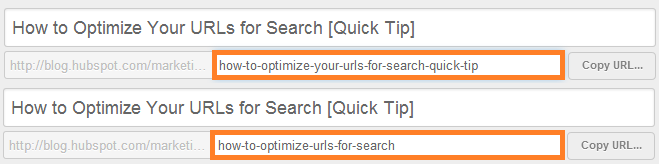
I removed “your” for brevity and the fact that it didn’t add any value for readers or search engines. I removed “quick tip” for the same reasons since most website visitors will know it’s a quick tip from the title or description.
I could go either way in keeping “for” in, but I decided to keep it in because it helps make the URL more readable for humans. If anyone stumbles on this URL elsewhere, I’d like it to be readable so they understand the contents of the page and feel they can trust the site.
In theory, I could’ve also chosen “url-slug” as the slug. This would’ve been more desirable in terms of simplicity, but ultimately, I wanted to URL to convey value to readers by explaining what they’re getting from the post.
3. Include relevant keywords.
One way search engines and humans learn about your page contents is through the keywords in the URL. Include keywords in your URL slug, but be sure they align with the actual page contents. Luckily, this URL is already pretty well-optimized as it is, because it’s a long-tail search term on its own.
4. Don’t keyword stuff.
Even though this article may be useful for a number of different keywords, that doesn’t mean I should have them all in the URL. Otherwise, you’re left with a mess like this:
https://ift.tt/39uT2wj
Wow, that looks ugly.
Keyword stuffing in content, titles, and URLs is an outdated tactic and only hurts your SEO and the experience on your site. Instead of cramming keywords into the slug, choose a single keyword for the URL and let the content on the page drive the rest of the conversation.
5. Make it reader-friendly.
We talked about this a little already, but it’s worth reiterating. Both search engines and readers should be able to look at your URL and understand what they might find should they click to the other side. That means when you add a bunch of keywords and delete those little extraneous words, you should end up with a URL that still makes sense.
6. Separate words with hyphens.
Don’t use underscores to separate words or try to squish a bunch of words together. The hyphens are meant to help with readability. Use them.
7. Don’t use slugs that already belong to other pages.
Your office/home only has one address, and only one office/home exists at that address. This goes for your website.
Using similar or duplicate slugs can result errors or Google seeing pages as duplicate content. Either scenario will hurt your SEO performance.
You can also consider updating the settings in your CMS to prevent this from happening accidentally.
8. Avoid using dynamically generated URLs.
A dynamic URL contains parameters that are automatically generated when the page is loaded. This is in contrast to a static URL that is consistent every time it’s accessed.
Dynamic URLs can cause crawling issues, which will result in poor performance.
9. Standardize your URL naming conventions.
Create a standard process for naming URLs, a system that can be applied to any of the pages and posts you create. This will help you develop a more consistent experience across your site and make navigation simpler and easier for your website visitors.
Your URLs are an important element of on-page SEO, and just one element to consider as you build your site’s foundation. By implementing the above best practices for URL slugs and optimizing pages according to additional SEO guidelines, you’re one step further to increasing your visibility on search engines such as Google.
Editor’s note: This post was originally published in April 2014 and has been updated for comprehensiveness.

What Is a Virtual Team? Definition & Examples
Why Our Social Team Developed a Private Facebook Group and How It Impacted Our Audience
In 2019, the HubSpot Social Media Team set out to evaluate new opportunities for the brand to create and engage with the specific user communities on Facebook.
We know that today’s Facebook user behavior is shifting. While people still value video, image, and text content, they are finding authentic connections in shared interest groups instead of in their existing personal networks.
These community groups on Facebook are a major opportunity for HubSpot to provide value to our target personas around the world. This would not only help us foster connections and growth for our current, future, and potential growing audience, but it would also provide us with a unique insight into the various communities of people and their experiences today.
Since then, we have launched our first Facebook Group, Marketer to Marketer … because nobody knows marketing like marketers do.
Why a Facebook Group, and why now?
Facebook Groups allow our audience to connect with each other and have valuable discussions. Businesses who center a Group around their brand or industry can build a community around it — making our brand and products even more valuable to potential customers.
Groups also give us the chance to showcase our industry expertise and dedication to our members, especially since questions asked by members (and answers provided by us) are visible to others.
And what’s better than gathering a group of people who love you and the industry in which you’re the thought leader?
Organic reach for Facebook posts has been steadily declining. Facebook Group posts are a different story. At Facebook’s F8 conference in 2019, Mark Zuckerberg announced their plan to really focus on supporting and promoting Groups going forward. They’ve been explicit in their desire to prioritize meaningful content in people’s feeds.
That being said, we wanted to take this opportunity to create a Group as they are the perfect way to spark meaningful discussions with an audience.
How We Created the HubSpot Marketer to Marketer Facebook Group
When building out our Facebook Group strategy, we followed a number of steps to get our team aligned and working.
1. Research
To start, we researched the value of Facebook Groups and why businesses should create them. We did this to determine if this would be an opportunity for social growth and a benefit to our social audience.
Determining the value of this Group — not just for our audience, but also for HubSpot — was key in helping us identify the purpose of the Group.
One way we conducted this research was by gathering feedback from our audience across all social channels to see what topic they considered to be the biggest “missing link”. This was helpful because it showed us that marketing was the biggest topic in which they had an interest.
We also connected with other teams internally to see how they leveraged their Facebook Groups (like HubSpot Academy) and piece together their research. Lastly, we listed out all the potential risks of our Facebook Group. This helped us be prepared for any red flags if they were to come up.
2. Planning
Once in the planning phase, we outlined what resources were needed to create and maintain a Group. This included any header or profile images and what a daily workflow would look like for managing Marketer to Marketer. We also reviewed what steps we needed to take to create the Group, such as the smaller details for building it.
We put together a brief that compiled all the research and best practices we learned in order to map out the launch of this Facebook Group. This included a proposed timeline, necessary resourcing, and an overview of what the Group would look like.
We also crafted two months’ worth of content ideas for the Group. This content wasn’t set in stone but has helped create conversations when Group activity has lulled.
3. Reporting
In order to understand how we’d track and grow Marketer to Marketer, we defined how we would report on the data provided by the Group. This also helped us understand how it creates value for our audience and for HubSpot.
Lastly, we used that data gathered to inform future content areas in which to expand as well as other audiences to support through Groups.
The Impact of the Marketer to Marketer Facebook Group
We examined the impact of Marketer to Marketer in a few different ways.
In terms of the Facebook platform, our Marketer to Marketer Group hasn’t really had a significant impact on the broader HubSpot Facebook Page — the Group is probably too small to make a difference there.
The HubSpot Facebook Page has almost two million followers and Marketer to Marketer has just over 2,000. In this case, the pool of people in our Group is simply too small to impact such a large audience.
Instead, the Group gives us a more direct way to interact with a more engaged audience. The Group content gets preferential placement in followers’ news feeds, whereas our normal Page content is a different content angle — we share brand awareness content related to different areas of Marketing, Sales, and Customer Service. (View examples here and here.)
In short, we consider our Group followers as our VIPs.
The Facebook Group also gives our members an outlet for more niched conversations, providing security and privacy to open up about any struggles, techniques, opportunities, or new information they’ve discovered about their industry.
Learnings, Discoveries, and Next Steps
Since launching the Group in March 2020, it’s been successful. Due to the depth of the conversations we’re seeing there as well as the fact that the group has become a self-sustaining community, it’s continued to grow with a higher than expected average of posts per week — while only doing organic promotion.
During this tumultuous time for marketers, we’ve seen that people can use the Group as a resource to gather ideas or help from other marketers to work through their business needs. The first 90 days were specifically challenging due to national and global events, but even with the odds stacked against it, the Marketer to Marketer Facebook Group is still thriving with members participating in conversations and helping marketers along the way.
Our learnings on Facebook Group growth have shown that it’s important to do ongoing promotion to reach an audience that could benefit from the conversations — now more than ever. From there, establish a consistent admin posting cadence with questions of the week or thought starters for marketers.
We’ve established a dedicated day of the week to be “question day,” which has allowed the Group to function on its own while making our presence known and drumming up engagement. Since the Group started, it’s grown 2,000 members, and we plan to push it larger and larger for more marketers to take advantage of this outlet of community.

HubSpot Ran A Co-marketing Campaign: Here’s What We Learned
Co-marketing campaigns can be undeniably effective for increasing brand awareness, reaching new audiences, or creating amazing — and potentially delicious — new products.
For instance, consider the partnership between Doritos and Taco Bell, which resulted in Doritos Locos Tacos, a delicious product promoted in a brilliant co-marketing campaign. If you haven’t heard of the partnership, watch the story unfold in this promotional video:
In this case, the two B2C companies saw success in their venture — and now, the popular item is a mainstay on the Taco Bell menu. Marketers at the two companies can attribute the home-run to a certain tactic: co-marketing.
A wonderful way for two companies to partner together, co-marketing can create opportunities for businesses to reach new audiences and delight existing audiences at the same time.
For instance, HubSpot has the Partner program, which offers unique benefits, including co-marketing opportunities. Recently, the team decided to run a few tests to see if co-marketing could expand past content offers — and what that would look like.
Essentially, the team aimed to answer three questions:
- How do we move co-marketing programming forward?
- How do we keep providing top-notch education?
- How do we keep our lead number high while creating value for our audience?
HubSpot Academy gives educational value to its audiences, so it was a great channel for partners to get involved. It’s the home of hundreds of world-leading courses about marketing and sales. Lessons even include tools to help viewers take actionable steps as they learn.
“Maybe, to expand co-marketing opportunities,” the team hypothesized, “We could have partners upload their own lessons within courses and certification tracks. They can demo how their tools work with the current lesson in practice.”
This could mean more traffic from audiences with interests that align closely with partners’ target audiences.
Having settled on the experiment, HubSpot’s team then needed to stop and think through possible speed bumps. For starters, will partners be able to drive leads with Academy? Will HubSpot audiences even be interested in offers?
Here, let’s explore how HubSpot’s Academy team created and ran a co-marketing campaign, and lessons they learned that you can apply to your own co-marketing efforts.
HubSpot’s Co-marketing Campaign
To start, Moz hosted a video lesson for HubSpot Academy’s Content Marketing Course.
“Creating Topic Clusters and Pillar Pages” was a demo for Moz’s free Keyword Explorer tool.
Users can leverage the lesson’s content for keyword research, making finding value blog topics easy and organized.
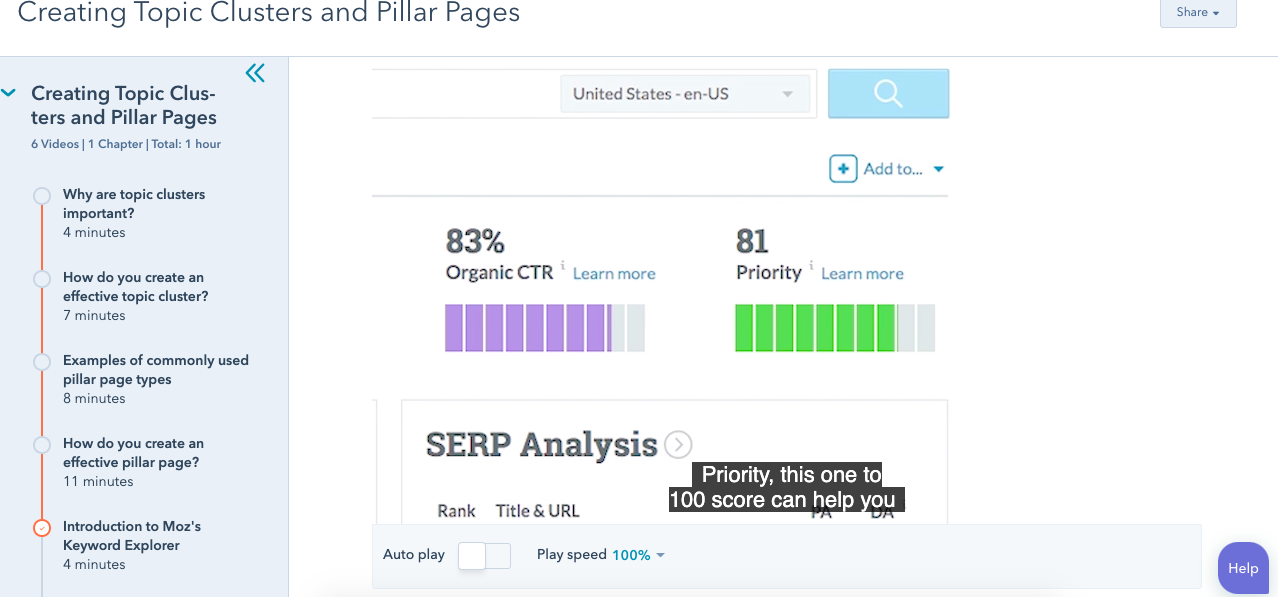
“Folks go through this course and see a video saying, ‘Hey, you can use this tool for free to do exactly what this course is teaching you,’” Margot Mazur, Senior Co-marketing Manager, told me.
It worked.
Results positively supported the questions HubSpot’s team asked. In four months, the video earned 8,000 lesson views, and 6,000 clicks to Moz. In total, Moz earned 1,460 new contacts.
Similar experiments also brought favorable results. After reaching out, partners could host a lesson, demo a relevant resource, and share a CTA with a direct link.
From this successful campaign, the co-marketing team guessed that the tactic could be beneficial in other areas of HubSpot.
For instance, the team considered trying the same experiment during Adapt 2020, a series of webinars that help audiences adapt to different business challenges.
“I reached out to partners to see if they wanted to lead weekly webinars,” recalls Mazur. “The experience for that has been really good — it’s positive for both parties.”
Webinars, similar to the lessons on Academy, were released for Adapt. This one featured Sally Woellner, Template Design Lead, talking about creating brand kits using Canva:

The webinar also explained how to use themes in HubSpot, the importance of website design and helpful design tools including Canva.
Another expansion of co-marketing opportunities comes from the HubSpot Blogs. Mazur thought blog posts could be an excellent way to add more value to partners and readers.

Posts like the one above display how partners can leverage HubSpot’s Blogs for guest posts. These posts tackled topics that interest audiences of both parties, and ultimately result in driving leads for partners and providing value for HubSpot readers.
At this point, the co-marketing team identified four tactics for improving partner involvement: Academy education courses, blogs, quarterly campaigns (Such as Adapt), and content offers.
So, what did the co-marketing team take away from this experiment? Let’s dive into four lessons they learned, next.
1. Co-marketing can expand — and should.
The purpose of HubSpot’s experiment was to find effective co-marketing opportunities across a range of teams and on various company platforms. The results demonstrate how co-marketing can be a strategy used company-wide to reach business goals.
With the inclusion of blogs, video, and content offers, partnerships can be leveraged to provide value for both parties. To try a similar tactic, you might consider running a co-marketing campaign for a team you normally wouldn’t.
For instance, maybe your company produces webinars and blog content. Those are channels that can benefit from a guest lesson or post about something that’s relevant to the industry.
2. Videos perform better than ebooks for partner content.
About two years ago, one of the highest-performing co-marketing avenues was an ebook offer.
Now, however, Mazur and her team have found that videos perform better than ebooks when it comes to partner content.
Take the Academy lessons and webinars, for instance. Results from those two tactics have proven more successful, averaging a thousand more submissions than ebooks. In a world where social audiences often prefer video to text, adapting to this shift has served the team well.
3. Driving partner leads through new channels is difficult.
Even though the experiment saw success, it wasn’t without some low moments. “Driving leads for partners is difficult, and we have to continue to work to make that easier for partners,” notes Mazur.
She says low performance could be a result of account sign-ups being confused with partner sign-ups. Now that there’s proof it’s possible, one of the next steps in this process is to make sure partners have a way to earn more leads.
4. Partners find value in product sign-ups from other channels.
Even though leads weren’t record-breaking from the first experiment, partners found value in those Academy signups. The excellent performance is because of the types of partners and content chosen.
Mazur’s team was tasked with finding the right partners to host lessons for Academy. The lessons had to make sense, be actionable, reputable, and a natural fit into the larger, existing course.
To illustrate, one of the courses on Academy is “The Importance of Website Performance.” One of the lessons, “Using Heatmaps to Optimize Performance,” is led by a Customer Experience professional at Hotjar. In the lesson, we see a tutorial about how to use Hotjar’s heatmaps to analyze web page engagement.
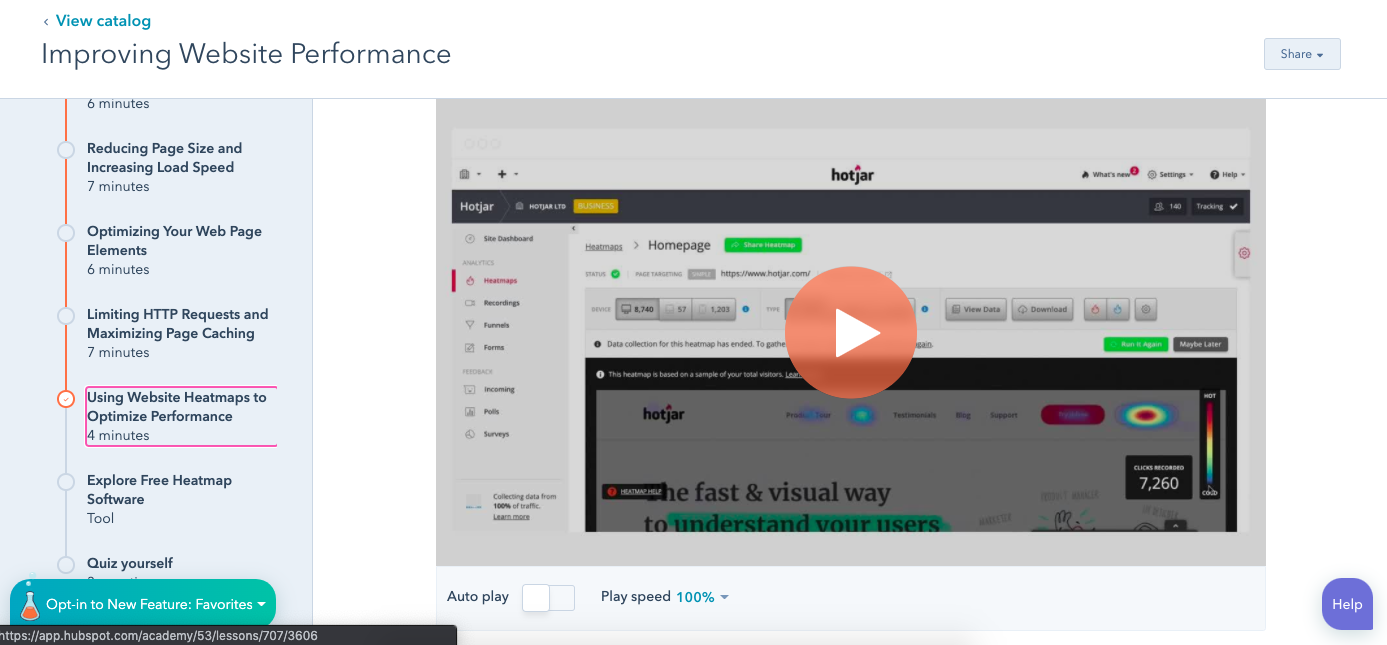
A lesson about using a helpful tool to analyze website performance in this course — great fit, right? Now, imagine if the Hotjar lesson was inserted into a Social Media Certification course — not as helpful.
Because the subjects fit, the audiences watching the course will most likely find content from both partners equally useful — which, ultimately, results in higher-quality leads.
Now that the Academy strategy has proven successful, Mazur’s team wants to keep it going. They’re going to continue identifying partners for more Academy lessons, and, in addition to Academy lessons, they will keep supporting Adapt with more partnership opportunities.
Ultimately, Mazur’s team will continue to offer creative partner driven solutions across HubSpot to reach business goals.
What are some co-marketing campaigns that you love? Personally, the Doritos Locos Taco is pretty up there (As is the Mountain Dew Baja Blast drink — also a permanent addition to the menu). How can you include some winning tactics into your next campaign?

How to Do Keyword Research for SEO: A Beginner’s Guide
While Google keeps us on our toes with all the algorithm updates they keep rollin’ out, one thing has stayed pretty consistent for inbound marketers looking to optimize their websites for search: keyword research.
Well, the need to do keyword research has stayed the same. How you actually do it hasn’t.
What Is Keyword Research?
Keyword research is the process of finding and analyzing search terms that people enter into search engines with the goal of using that data for a specific purpose, often for search engine optimization (SEO) or general marketing. Keyword research can uncover queries to target, the popularity of theses queries, their ranking difficulty, and more.
Why Is Keyword Research Important?
Keyword research provides valuable insight into the queries that your target audience is actually searching on Google. The insight that you can get into these actual search terms can help inform content strategy as well as your larger marketing strategy. However, keywords themselves may not be as important to SEO as you may think.
More and more, we hear how much SEO has evolved over just the last 10 years, and how unimportant keywords themselves have become to our ability to rank well for the searches people make every day.
And to some extent, this is true; using keywords that exactly match a person’s search is no longer the most important ranking factor in the eyes of an SEO professional. Rather, it’s the intent behind that keyword, and whether or not a piece of content solves for that intent (we’ll talk more about intent in just a minute).
But that doesn’t mean keyword research is an outdated process. Let me explain:
Keyword research tells you what topics people care about and, assuming you use the right SEO tool, how popular those topics actually are among your audience. The operative term here is topics — by researching keywords that are getting a high volume of searches per month, you can identify and sort your content into topics that you want to create content on. Then, you can use these topics to dictate which keywords you look for and target.
By researching keywords for their popularity, search volume, and general intent, you can tackle the questions that the most people in your audience want answers to.
How to Research Keywords for Your SEO Strategy
I’m going to lay out a keyword research process you can follow to help you come up with a list of terms you should be targeting. That way, you’ll be able to establish and execute a strong keyword strategy that helps you get found for the search terms you actually care about.
Step 1: Make a list of important, relevant topics based on what you know about your business.
To kick off this process, think about the topics you want to rank for in terms of generic buckets. You’ll come up with about 5-10 topic buckets you think are important to your business, and then you’ll use those topic buckets to help come up with some specific keywords later in the process.
If you’re a regular blogger, these are probably the topics you blog about most frequently. Or perhaps they’re the topics that come up the most in sales conversations. Put yourself in the shoes of your buyer personas — what types of topics would your target audience search that you’d want your business to get found for? If you were a company like HubSpot, for example — selling marketing software (which happens to have some awesome SEO tools… but I digress), you might have general topic buckets like:
- “inbound marketing” (21K)
- “blogging” (19K)
- “email marketing” (30K)
- “lead generation” (17K)
- “SEO” (214K)
- “social media marketing” (71K)
- “marketing analytics” (6.2K)
- “marketing automation” (8.5K)
See those numbers in parentheses to the right of each keyword? That’s their monthly search volume. This data allows you to gauge how important these topics are to your audience, and how many different sub-topics you might need to create content on to be successful with that keyword. To learn more about these sub-topics, we move onto step 2 …
Step 2: Fill in those topic buckets with keywords.
Now that you have a few topic buckets you want to focus on, it’s time to identify some keywords that fall into those buckets. These are keyword phrases you think are important to rank for in the SERPs (search engine results pages) because your target customer is probably conducting searches for those specific terms.
For instance, if I took that last topic bucket for an inbound marketing software company — “marketing automation” — I’d brainstorm some keyword phrases that I think people would type in related to that topic. Those might include:
- marketing automation tools
- how to use marketing automation software
- what is marketing automation?
- how to tell if I need marketing automation software
- lead nurturing
- email marketing automation
- top automation tools
And so on and so on. The point of this step isn’t to come up with your final list of keyword phrases. You just want to end up with a brain dump of phrases you think potential customers might use to search for content related to that particular topic bucket. We’ll narrow the lists down later in the process so you don’t have something too unwieldy.
Although more and more keywords are getting encrypted by Google every day, another smart way to come up with keyword ideas is to figure out which keywords your website is already getting found for. To do this, you’ll need website analytics software like Google Analytics or HubSpot’s Sources report, available in the Traffic Analytics tool. Drill down into your website’s traffic sources, and sift through your organic search traffic bucket to identify the keywords people are using to arrive at your site.
Repeat this exercise for as many topic buckets as you have. And remember, if you’re having trouble coming up with relevant search terms, you can always head on over to your customer-facing colleagues — those who are in Sales or Service — and ask them what types of terms their prospects and customers use, or common questions they have. Those are often great starting points for keyword research.
Step 3: Understand How Intent Affects Keyword Research and Analyze Accordingly.
Like I said in the previous section, user intent is now one of the most pivotal factors in your ability to rank well on search engines like Google. Today, it’s more important that your web page addresses the problem a searcher intended to solve than simply carries the keyword the searcher used. So, how does this affect the keyword research you do?
It’s easy to take keywords for face value, and unfortunately, keywords can have many different meanings beneath the surface. Because the intent behind a search is so important to your ranking potential, you need to be extra-careful how you interpret the keywords you target.
Let’s say, for example, you’re researching the keyword “how to start a blog” for an article you want to create. “Blog” can mean a blog post or the blog website itself, and what a searcher’s intent is behind that keyword will influence the direction of your article. Does the searcher want to learn how to start an individual blog post? Or do they want to know how to actually launch a website domain for the purposes of blogging? If your content strategy is only targeting people interested in the latter, you’ll need to make sure of the keyword’s intent before committing to it.
To verify what a user’s intent is in a keyword, it’s a good idea to simply enter this keyword into a search engine yourself, and see what types of results come up. Make sure the type of content Google is closely related to what you’d intend to create for the keyword.
Step 4: Research related search terms.
This is a creative step you may have already thought of when doing keyword research. If not, it’s a great way to fill out those lists.
If you’re struggling to think of more keywords people might be searching about a specific topic, take a look at the related search terms that appear when you plug in a keyword into Google. When you type in your phrase and scroll to the bottom of Google’s results, you’ll notice some suggestions for searches related to your original input. These keywords can spark ideas for other keywords you may want to take into consideration.
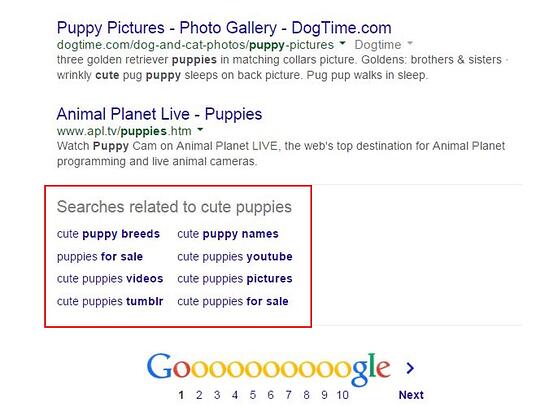
Want a bonus? Type in some of those related search terms and look at their related search terms.
Step 5: Use keyword research tools to your advantage.
Keyword research and SEO tools such as Ahrefs, SEMrush, and Ubersuggest can help you come up with more keyword ideas based on exact match keywords and phrase match keywords based on the ideas you’ve generated up to this point. This exercise might give you alternatives that you might not have considered.
How to Find and Choose Keywords for Your Website
Once you have an idea of the keywords that you want to rank for, now it’s time to refine your list based on the best ones for your strategy. Here’s how:
Step 1. Understand the three main factors for choosing good keywords.
Before choosing keywords and expecting your content to rank for them, you must curate keywords for three things:
1. Relevance
Google ranks content for relevance. This is where the concept of search intent comes in. Your content will only rank for a keyword if it meets the searchers’ needs. In addition, your content must be the best resource out there for the query. After all, why would Google rank your content higher if it provides less value than other content that exists on the web?
2. Authority
Google will provide more weight to sources it deems authoritative. That means you must do all you can to become an authoritative source by enriching your site with helpful, information content and promoting that content to earn social signals and backlinks. If you’re not seen as authoritative in the space, or if a keyword’s SERPs are loaded with heavy sources you can’t compete with (like Forbes or The Mayo Clinic), you have a lower chance of ranking unless your content is exceptional.
3. Volume
You may end up ranking on the first page for a specific keyword, but if no one ever searches for it, it will not result in traffic to your site. Kind of like setting up shop in a ghost town.
Volume is measured by MSV (monthly search volume), which means the number of times the keyword is searched per month across all audiences.
Step 2: Check for a mix of head terms and long-tail keywords in each bucket.
If you don’t know the difference between head terms and long-tail keywords, let me explain. Head terms are keywords phrases that are generally shorter and more generic — they’re typically just one to three words in length, depending on who you talk to. Long-tail keywords, on the other hand, are longer keyword phrases usually containing three or more words.
It’s important to check that you have a mix of head terms and long-tail terms because it’ll give you a keyword strategy that’s well balanced with long-term goals and short-term wins. That’s because head terms are generally searched more frequently, making them often (not always, but often) much more competitive and harder to rank for than long-tail terms. Think about it: Without even looking up search volume or difficulty, which of the following terms do you think would be harder to rank for?
- how to write a great blog post
- blogging
If you answered #2, you’re absolutely right. But don’t get discouraged. While head terms generally boast the most search volume (meaning greater potential to send you traffic), frankly, the traffic you’ll get from the term “how to write a great blog post” is usually more desirable.
Why?
Because someone who is looking for something that specific is probably a much more qualified searcher for your product or service (presuming you’re in the blogging space) than someone looking for something really generic. And because long-tail keywords tend to be more specific, it’s usually easier to tell what people who search for those keywords are really looking for. Someone searching for the head term “blogging,” on the other hand, could be searching it for a whole host of reasons unrelated to your business.
So check your keyword lists to make sure you have a healthy mix of head terms and long-tail keywords. You definitely want some quick wins that long-tail keywords will afford you, but you should also try to chip away at more difficult head terms over the long haul.
Step 3: See how competitors are ranking for these keywords.
Just because your competitor is doing something doesn’t mean you need to. The same goes for keywords. Just because a keyword is important to your competitor, doesn’t mean it’s important to you. However, understanding what keywords your competitors are trying to rank for is a great way to help you give your list of keywords another evaluation.
If your competitor is ranking for certain keywords that are on your list, too, it definitely makes sense to work on improving your ranking for those. However, don’t ignore the ones your competitors don’t seem to care about. This could be a great opportunity for you to own market share on important terms, too.
Understanding the balance of terms that might be a little more difficult due to competition, versus those terms that are a little more realistic, will help you maintain a similar balance that the mix of long-tail and head terms allows. Remember, the goal is to end up with a list of keywords that provide some quick wins but also helps you make progress toward bigger, more challenging SEO goals.
How do you figure out what keywords your competitors are ranking for, you ask? Aside from manually searching for keywords in an incognito browser and seeing what positions your competitors are in, Ahrefs allows you to run a number of free reports that show you the top keywords for the domain you enter. This is a quick way to get a sense of the types of terms your competitors are ranking for.
Step 4: Use Google’s Keyword Planner to cut down your keyword list.
Now that you’ve got the right mix of keywords, it’s time to narrow down your lists with some more quantitative data. You have a lot of tools at your disposal to do this, but let me share my favorite methodology.
I like to use a mix of the Google’s Keyword Planner (you’ll need to set up an Ads account for this, but you can turn your example ad off before you pay any money), and Google Trends.
In Keyword Planner, you can get search volume and traffic estimates for keywords you’re considering. Then, take the information you learn from Keyword Planner and use Google Trends to fill in some blanks.
Use the Keyword Planner to flag any terms on your list that have way too little (or way too much) search volume, and don’t help you maintain a healthy mix like we talked about above. But before you delete anything, check out their trend history and projections in Google Trends. You can see whether, say, some low-volume terms might actually be something you should invest in now — and reap the benefits for later.
Or perhaps you’re just looking at a list of terms that is way too unwieldy, and you have to narrow it down somehow … Google Trends can help you determine which terms are trending upward, and are thus worth more of your focus.
Best Keywords for SEO
Understand that there’s no “best” keywords, just those that are highly searched by your audience. With this in mind, it’s up to you to craft a strategy that will help you rank pages and drive traffic.
The best keywords for your SEO strategy will take into account relevance, authority, and volume. You want to find highly searched keywords that you can reasonably compete for based on:
- The level of competition you’re up against.
- Your ability to produce content that exceeds in quality what’s currently ranking.
And … You’re done!
Congratulations! You’ve now got a list of keywords that’ll help you focus on the right topics for your business, and get you some short-term and long-term gains.
Be sure to re-evaluate these keywords every few months — once a quarter is a good benchmark, but some businesses like to do it even more often than that. As you gain even more authority in the SERPs, you’ll find that you can add more and more keywords to your lists to tackle as you work on maintaining your current presence, and then growing in new areas on top of that.

The Ultimate List of Email Marketing Stats for 2020
Nowadays, marketers put a lot of emphasis on chatbots, Instagram influencers, and other new opportunities to reach their customers.
But your contemporary communication methods shouldn’t distract you from one of the oldest and yet most effective messaging channels — email.
You might be wondering if email is still a worthwhile marketing strategy. Well, it is.
In fact, email generates $38 for every $1 spent, which is an astounding 3,800% ROI, making it one of the most effective options available.
If you’re still hesitant, keep reading — we’ve cultivated a list of email marketing statistics for 2020 to demonstrate just how powerful email can be.
Email Marketing Stats (Highlights)
- There are 3.9 billion daily email users
- Mobile opens account for 46 percent of all email opens.
- 35% of business professionals check email on a mobile device.
- 73% of millennials prefer communications from businesses to come via email.
-
Marketers who use segmented campaigns note as much as a 760% increase in revenue.
-
35% of marketers send their customers 3-5 emails per week.
-
78% of marketers have seen an increase in email engagement over the last 12 months
- 80% of business professionals believe that email marketing increases customer retention.
- 59% of respondents say marketing emails influence their purchase decisions.
- Marketers who use segmented campaigns note as much as a 760% increase in revenue.
General Email Marketing Statistics and Best Practices
- There are 3.9 billion daily email users. This number is expected to climb to 4.3 billion by 2023. (Statista, 2020)
- Active email accounts surpassed 5.6 billion in 2019. (Statista, 2019)
- Marketers who use segmented campaigns note as much as a 760% increase in revenue. (Campaign Monitor, 2019)
- 35% of marketers send their customers 3-5 emails per week. (Not Another State of Marketing, 2020)
- 78% of marketers have seen an increase in email engagement over the last 12 months (Not Another State of Marketing, 2020)
- 31% of B2B marketers say email newsletters are the best way to nurture leads. (Content Marketing Institute, 2020)
- The U.S. spent over 350 million dollars on email advertising in 2019. (Statista, 2019)
B2B Email Marketing Statistics
- 81% of B2B marketers say their most used form of content marketing is email newsletters. (Content Marketing Institute, 2020)
- 16% of all emails never make it into the inbox. (Email Tool Tester, 2019)
- 87% of B2B marketers say email is one of their top free organic distribution channels. (Content Marketing Institute, 2020)
- 90% of content marketers say email engagement is the top metric they track to measure content performance. (Content Marketing Institute, 2020)
- The second-most common technology B2B organizations use to assist with content marketing is mail marketing software. Roughly 85% of marketers say they work with these tools. (Content Marketing Institute, 2020)
Mobile Email Marketing Statistics
- Mobile opens accounted for 46 percent of all email opens. (Litmus.com, 2018)
- 35% of business professionals check email on a mobile device. (Convince & Convert, 2018)
- Apple iPhone is the most popular mobile client for reading emails with 29 percent of all opens occurring on this platform. Gmail is a close runner-up at 27 percent (Campaign Monitor, 2018)
B2C Email Marketing Statistics
- 80% of business professionals believe that email marketing increases customer retention. (Emarsys, 2018)
- 59% of respondents say marketing emails influence their purchase decisions. (SaleCycle, 2018)
- The most opened emails relate to hobbies, with an open rate of 27.35 percent. (MailChimp, 2018)
- 59% of marketers say email is their biggest source of ROI. (Emma, 2018)
Test Your Email Knowledge
Many of the data points will be helpful in making the case for investing more time and money into your email marketing strategy. While you can refer back to this post at any time, you can also try to memorize a few for your next meeting. If you want to test your memory right now, take this knowledge check quiz to see how well you retained the information above. Remember, no peaking!
Editor’s Note: This blog post was originally published in March 2019, but was updated in July 2020 for comprehensiveness and freshness.

What is a 301 Redirect, and When Should You Use One?
I moved five times in the last year. And every single time I moved, I forgot to sign up to have my mail forwarded to my new address.
Mail forwarding is an important step in any moving process, as it ensures you don’t lose any valuable information that’s sent to you.
And the same can be said for your website: If you’re moving a website from one URL to another, you need to take the necessary steps to ensure your visitors get sent to the right place. In the world of tech, this is called a 301 redirect.
Here, we’re going to discuss what a 301 redirect is and when you need to use one, as well as how to redirect a URL in HubSpot or WordPress. Additionally, we’ll explore the differences between a 301 and 302 redirect.
Let’s dive in.
What is a 301 redirect?
301 is a status code which a server sends to your browser. It is one of many possible status codes, some of which you’ve probably heard about (including 404 – Not Found, 403 – Forbidden and, 500 – Server Error). When you visit a webpage and the server sends the page normally, the status code it attaches to that page is 200 – OK.
You can think of a 301 redirect like a mail forwarder. Once you’ve moved a piece of content away from a specific URL, anyone who tries to visit it will receive a 404 – page not found message.
To improve their user journey, you can ask the server to forward visits from the old URL to a new location — the new home of your piece of content — using a 301 redirect.
Now, when you attempt to visit the old URL, the server will send back the 301 – Permanently Moved status code, and then move you on to the new location.
This happens so quickly that you’re usually not aware of it, and will simply find yourself on the piece of content for which you’d searched. You might notice that the URL is different from the one you clicked on, or typed in. Or you might have a browser extension such as Ayima Redirect Path which lets you know when you’ve been redirected.
The other key role that a 301 redirect fulfills is with search engines. Having useful status codes that correctly signal where content has moved to allows search engines such as Google and Bing to keep their index up-to-date.
Essentially, a 301 redirect will let search engines know:“Hey, you know that piece of content that users enjoyed clicking on from the SERPs? Well, it now lives over here, so take all that visibility you associated with this page, and transfer it over to this new URL.”
This is why 301 redirects are important for SEO.
Now that we’ve covered that, let’s dive into how you can do a 301 redirect for yourself.
How to Do a 301 Redirect
The actual process of implementing a 301 redirect varies from CMS to CMS and platform to platform. While we aren’t able to discuss the specifics of every CMS platform, we can take a close look at HubSpot and WordPress. Hopefully, these instructions should help you get started regardless of the CMS you use.
How to Redirect a URL in HubSpot
1. To set up a redirect in HubSpot, navigate to Settings (using the cog in the top right) > Domains and URLs > URL Redirects.
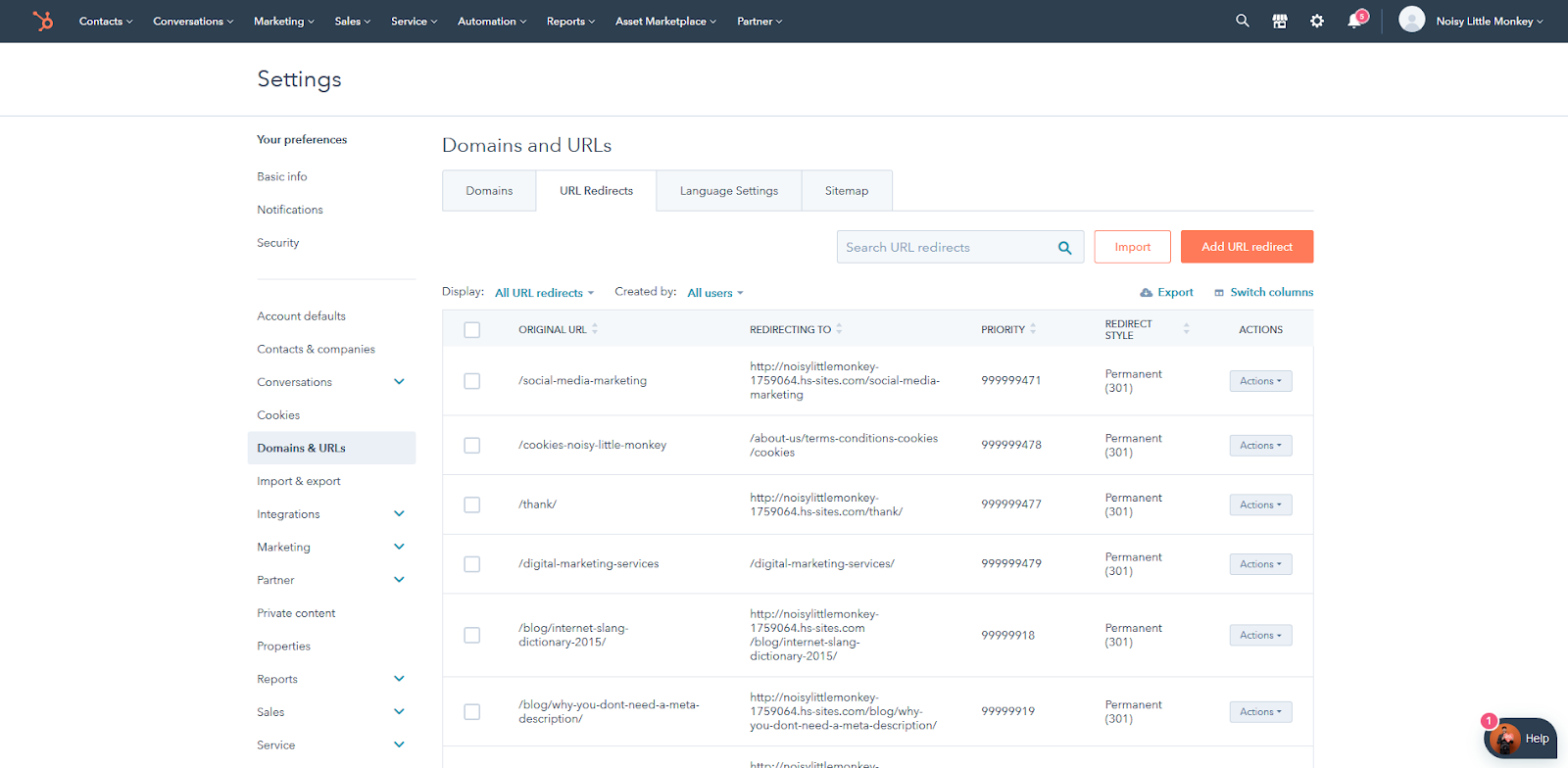
2. From here, choose “Add a URL redirect”. The interface looks like this:
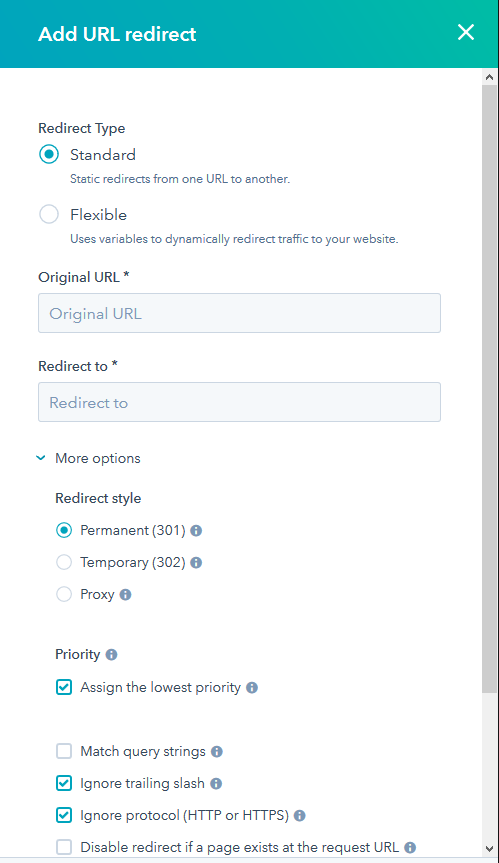
We’ll go over some use cases later, but for now let’s look at the options here.
Standard
In most cases, you will want to implement a single page-to-page redirect. In this case, choose “standard.” Next, you’ll want to add the Original URL and the Redirect To URL — for your old and new URLs, respectively.
You can hit “Add URL Redirect” and the redirect will be added to HubSpot.
At this stage, we would always recommend testing your redirect. First, expect to wait a few minutes for the change to apply to the server. Next, try visiting the Original URL in an incognito browser window and check that it works as you expected.
Flexible
In some cases, creating single page-to-page redirects is very inefficient. For example, if you have just moved an entire folder of content, you may have 15 pages within a subfolder that you now need to redirect. In such cases, it’s a better idea to use a flexible redirect.
You can think of a flexible redirect as a formula, or a rule. It will allow you to redirect everything within a certain folder to a different folder, while keeping the rest of the URL the same.
When you select Flexible redirect, HubSpot will automatically provide you the link to the flexible URL pattern redirect help page, which will give you specific guidance on how to use the syntax for this feature.
More Options
Under More Options, HubSpot offers various advanced variations on these redirect types. It will allow you to deliver a 302 Temporary Redirect instead, choose the order which HubSpot moves through the redirect rules when resolving a URL (which may change which valid rule is triggered), disable a redirect if content is present at the URL, preserve query strings, force HTTPS, and force trailing slashes on the end of all URLs.
How to Redirect a URL in WordPress
If you aren’t a HubSpot customer, then you will need to apply 301 redirects differently. WordPress is the most popular CMS in the world, so it makes sense for us to touch upon how one might go about looking at redirects in a WordPress context next.
However, it’s important to note that WordPress itself is very flexible. Installations of WordPress can vary wildly, and so there is no one-size-fits-all guide we can provide as was the case with the HubSpot CMS.
If in doubt, you should consult your web developer when it comes to adding URL redirects.
1. Apply a redirect via the server itself.
The best way to apply redirects from a speed and technical point of view is actually via the server itself, rather than relying on WordPress to do it. WordPress does not offer a facility to implement 301 redirects out-the-box, although there are plenty of plugins available that will give you access to this functionality.
When applying 301 redirects via the server itself, this is going to vary wildly depending on the software stack your server is using. You might be using Apache, nginx, IIS or some other platform, each of which will need to be tackled differently. This may also vary depending on your hosting provider.
If you do not know how to apply a redirect via the server itself, it’s not something we’d recommend fiddling with as it may lead to an interruption of service for your website — instead, we’d suggest consulting with your IT team or web development partner.
2. Redirect a URL using a free WordPress plugin.
Sometimes in marketing, you must compromise that optimal solution for the solution you can actually achieve. This may be one of those cases. If for some reason you are not able to implement a redirect via your server, you can consider using a WordPress plugin.
This is not the optimal method — plugins will be slower, and you are forced to rely on third-party code, so proceed at your own risk.
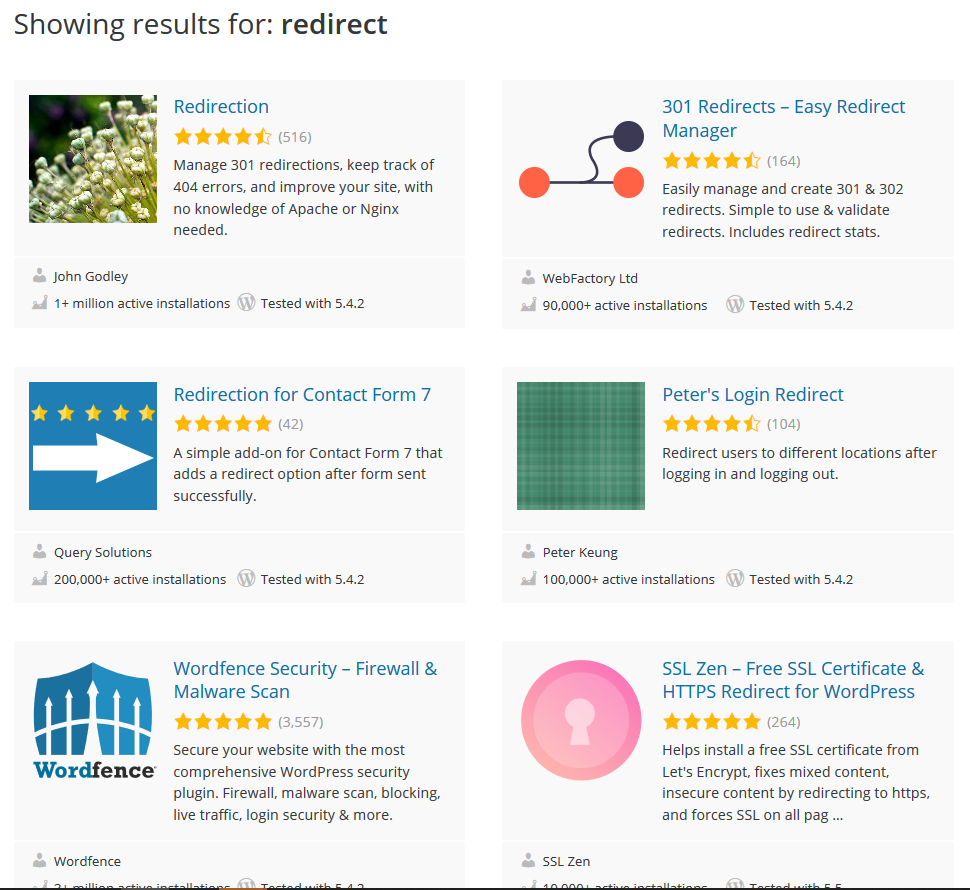
Each interface will be different, so you will have to consult any third-party plugin’s help documentation for specific guidance.
When to Use a 301 Redirect vs. a 302 Redirect
In general, you should expect to use 301 redirects.
However, there are a few cases when you might want to use a 302, instead, including:
- You might be using a phased website launch plan.
- You might be redirecting users as part of functionality where SEO does not apply, such as login gateways or e-commerce checkouts.
- You might be using a temporary holding page, and do not want to confuse search engines or damage your search engine rankings by signaling that you’re permanently redirecting your detailed, rich content to an empty holding page.
301 Redirect Use Cases
Here are some specific cases where you will want to reach for the 301 redirect as a tool.
1. Changing a URL.
Maybe your original URL was poorly optimized, or you are re-organizing the folder structure of your website URLs.
Moving a piece of content in HubSpot CMS is very simple — just change the URL on the settings tab of the content’s edit page, and HubSpot will automatically add a URL redirect for you. Be sure to check that this is working before you move on.
2. Recreating a piece of content.
Sometimes, you might want to completely rebuild your old piece of content on an entirely new page — for instance, if you decide you want to use a different webpage template.
In this case, you’ll want to make sure that you have implemented a simple 301 redirect from the old URL to your new one. Once this is in place, be sure to un-publish and archive the old page.
If doing a lot of these, we suggest using a flexible rule or, if a flexible rule is not appropriate, using a tool such as Screaming Frog SEO Spider in conjunction with Google Sheets or Microsoft Excel to map your redirects in bulk, and then import them into HubSpot.
You can do this on the URL Redirects page using the Import button:

HubSpot will provide you with a sample file to structure your redirects, and a link to the bulk upload redirects help page.
3. Consolidating several pieces of content.
If you have decided that you have multiple pieces of content that overlap, compete for the same keywords, or all cover the same topic, you might want to consolidate them. However, you will not want to throw away the search engine visibility that these old pages might have achieved.
Once you have created your new, consolidated resource, you should set up a simple 301 redirect from each of the old pages, to the single new page.
4. Migrating content from one domain to another.
If you’re moving your website from one domain to another, it is vitally important that you implement page-to-page 301 redirects from your old content to your new content.
This is easy if the site is moving a domain, but remaining the same in terms of structure and layout. If the content is changing or being restructured, it is still important that you make sensible redirection choices that honor your users original intent, in order to pass the visibility of each of your old pages to their new counterparts.
When implementing page-to-page 301 redirects from one domain to another, you have a specific challenge to keep in-mind: your redirects must be served from the Original URL.
It is useless if, for instance, you’ve connected HubSpot to your new domain, but not your old domain, for you to then host the 301 redirects for your old domain onto HubSpot. You will need to work with your IT partner, web development partner, and/or HubSpot partner to ensure that serving redirects from your old domain has been accounted for. We recommend that these remain in place indefinitely.
Migrating a Website During a Phased Web Launch
You may be moving your website from one domain to another as outlined above, but due to project constraints, you are using a phased launch approach. This means that you’re launching the core website pages in phase one, then a second wave of pages in phase two, and so on.
In this case, we recommend creating a phased redirect map. All URLs from your old domain should be accounted for, and a redirect outlined for each phase.
For phase one, you will expect to implement 301 redirects for all the pages that will be accounted for on the new site. You will also add 302 redirects for all other pages, usually to the new website’s homepage. This will prevent users trying to visit your old domain from receiving a 404 error, without confusing search engines by having your pages suddenly redirect to seemingly irrelevant content.
As you launch each phase, you should update your redirects, replacing your 302s with 301s as the counterpart content becomes available.
Once again, these redirects must be implemented such that they are served from your old domain.
301 Redirect Mistakes to Avoid
Now that you understand the importance of the 301 redirect, we’ll review common steps in the process to review to make sure you don’t make a mistake that could adversely impact your site’s SEO.
1. Setting up a 302 redirect between versions of your domains.
301 redirects point the power of inbound links from one URL to another, and although it might not look like it, http://blog.hubspot.com and blog.hubspot.com are two different URLs. Make sure you set up a 301 redirect from all of the different iterations of your brand’s domain to boost your search engine results.
2. Setting up a 301 redirect after creating a new page.
Back in 2010, Toys ‘R Us purchased the toys.com domain without setting up a 301 redirect first, and their new site’s SEO results plummeted because it was re-crawled by Google as a brand-new domain without inbound links from the original Toys ‘R Us domain pointing to it. Be sure to set up the 301 redirect before migrating your website content so your site doesn’t lose traffic in the process.
3. Using a 302 redirect during content migration.
Unless you’re temporarily migrating your website’s content while updating or repairing your website, use a 301 redirect to maintain the inbound links and your search rankings while making changes to your domain.
4. Having redirects link to outdated content.
If you don’t set up redirects from the older internal links on your website (such as a link to your company blog on your homepage), you’ll create a bad user experience for site visitors who click on these older, not-directed links. The old internal link will eventually kick over to the new domain, but it might take several seconds or show a white screen in the meantime.
5. Redirect a page with a different intent than the destination page.
This will be a breeze with proper organization and record keeping, but make sure that you’re redirecting to the correct pages. To illustrate, you wouldn’t want to redirect a user looking for your homepage to your blog page.
Keeping this transition smooth will contribute to SEO being accurate, and will lead to more happy visitors to your site.
Whether you’re thinking about overhauling all content in a site migration, or you’re just refurbishing some outdated webpages, 301 redirects help. If you’re planning out this new stage, think about incorporating them in your project; your SEO won’t take a dive and website visitors will continue to find the helpful content they’re looking for.
Other Types of Redirects
There are other types of redirect too, including:
1. 302 – Temporarily Moved
This functions almost identically to a 301 redirect. However in this instance, we are acknowledging that the move is temporary. For a user, this makes no practical difference, but for a search engine the message is clear — don’t worry about ranking this new page, as it won’t be around for long. Stick to using the old one, it will be back.
2. Meta Refresh, or Javascript Redirects
This is different from the previous two approaches. The page will load normally with a 200 – OK status code. Then, a script runs on the page that moves the user onto another page.
There may be certain edge cases when this is the only practical option, but in general you should avoid this approach. It is not associated with SEO best practices and often can provide a confusing user experience.
Addressing Internal 404 Errors
Your SEO or web team might have identified some broken links on your website. In this case, it’s best practice to create a 301 redirect to forward users from the broken URL through to an appropriate resource — one that is fundamentally congruent with the piece of content they were expecting to find.
However, you should also look to update the offending hyperlinks to point to the new URL, as well. Having a website that relies on 301 redirects for internal navigation is not best practice.
Addressing 404 Errors Reported in Google Search Console
Sometimes, you will see Google Search Console reporting 404 pages that you don’t even link to internally. So where do these come from?
Google Search Console populates its “Coverage” section from all kinds of sources. Sometimes the URLs are simply ones that it has seen before on a previous incarnation of your website, or it might have seen an external link on some other website.
Your mindset should be that if Google has seen this URL before, a user might have as well. They might have it saved as a bookmark, or have it written down in an email, or on a third party website, and they may still click on it. That being the case, you want to make sure that those users receive the optimum user experience, so you should try to create 301 redirects to push these users to an appropriate piece of content that is fundamentally congruent with the piece of content they were expecting to find.
301 redirects are vitally important for maintaining a healthy website. They serve a core function in signaling to both users and search engines when your website content moves and changes, and ensure that as your web presence evolves, your user journey remains clear and logical, and your visibility in search engines is preserved from iteration to iteration.
Be sure to familiarize yourself with the method of implementing redirects within your current website environment, so that you can manage this effectively.
Editor’s Note: This post was originally published in December 2010 and has been updated for accuracy and comprehensiveness.

How to Conduct Successful Remote Interviews, According to HubSpot’s Recruitment Coordinator
For your business to thrive, it’s critical you set up a process for conducting effective interviews — and, in 2020, it’s equally vital you create a comprehensive virtual interview strategy, as well.
As a Program Coordinator on HubSpot’s Recruiting Operations Team, I’m familiar with the struggles of creating a cohesive remote interview experience. But, as HubSpot continues to grow globally, I also know how important it is to create a scalable remote candidate interviewing process.
Plus, at HubSpot, we have a strong commitment to global-first and remote inclusion — so further developing our remote interview practices only makes sense.
While there’s no “secret sauce” to remote interviewing, we’ve iterated on a process that helps both candidates and interviewers have strong, purposeful conversations virtually.
Here, I’m going to tell you about the best practices we’ve learned as a result of listening to both candidate and interviewer feedback so you can learn how to create your own powerful virtual recruitment process in 2020.
How to Conduct Successful Remote Interviews
1. Be human and keep the personal touch.
While it’s a bit harder to make a personal connection when interviewing remotely, putting in the extra effort can be the difference between an average and remarkable candidate experience.
There are many ways to do this, but some efforts our candidates are loving are:
- Providing 15-minute prep calls with recruiters if candidates are nervous about interviewing remotely. We want to set up candidates for success, so having quick sessions to familiarize themselves with Zoom (our video conferencing tool of choice) and have a test run can make all the difference.
- Hold a virtual meet-and-greet before the interview starts, so you can have a pulse check with your candidate, workout any pre-interview jitters, and make sure they are comfortable before handing them off to their first interviewer.
- Over-communicate the interview logistics to the candidate so they know exactly when the interview starts and how the exchange between interviewers will work to ensure a smooth process.
2. Knowledge and resources are power.
Interviewing remotely presents its own set of unique challenges for candidates: how to prepare, what to wear, and how to get an idea of the office, team, or culture they could be joining.
The good news is that there are many ways you can share information and resources with candidates to fill these gaps, such as:
- A one-pager for how to prepare your work space, download your video conferencing software of choice, and practice with it
- This blog post: How to Prepare for Your Video Interview Debut
- Virtual office tours
- Content that gives candidates a glimpse into your culture and lets it shine, like your YouTube channel, your brand’s Instagram page, or your business’s Glassdoor page
- Team lunches or weekly stand-ups, to give candidates a look at their future team’s culture
3. Remote interviewing can feel very different from in-person, so make it as comfortable as possible.
Without the natural flow and physical reminders of an in-person interview, it’s easy to forget the small things that would make a remote interview just as comfortable as coming into the office.
Here are some small things that you can do to make your candidates feel as comfortable as possible:
- Before starting your interview, offer the candidate a water and restroom break.
- Ideally, take notes on paper so that you’re not typing while the person is talking. If you’ll be taking notes on the computer, call out the fact that you’ll be typing during the interview. In this scenario, it’s also best to mute yourself so that you’re not typing in their ears as they’re speaking, but keep in mind that for them it will feel like they’re talking to a silent crowd.
- Don’t lose the small talk you would normally have with candidates in-person.
- Be overly expressive — interviews are extra stressful when it’s hard to read body language. Nod, smile, and laugh, to help make the situation more comfortable.
- Include a “breather” whenever possible by building in 10 to 15-minute breaks in the interview schedule.
4. Channel your inner technology support specialist.
While most of our interviewers aren’t in tech support roles, it’s easy to forget that we use remote collaboration tools regularly, so we may be (and usually are) more experienced using and troubleshooting issues that can come up during a remote interview.
Technology issues can happen, so don’t panic and stay strong in the face of adversity. Here are some of our tips for working through tech issues:
- When in doubt, leave and rejoin the meeting. If that doesn’t work, we recommend giving the candidate a call (which we list in all of our interview calendar invites).
- If the issue is Wi-Fi connectivity, the first troubleshooting step we recommend is suggesting that the candidate move closer to the wifi router (if able). Second step would be to turn off video and attempt to communicate just over audio. Third and final step would be to switch the call to take place over the phone.
- If you’re spending more than five minutes troubleshooting tech issues, it may be best to reschedule for a later time. Work with your internal stakeholders to make it happen.
- At HubSpot, we use Zoom, so keeping Zoom’s troubleshooting guide open makes it easier to search and troubleshoot on-the-fly. Make sure, whichever video tool you choose, that you have the tool’s troubleshooting or FAQ page open just in case.
The way we have approached the adoption, measurement, and evaluation of the remote interviewing process is very HubSpot by nature.
HubSpot pushes its employees to have HEART — be humble and listen, be empathetic towards others, adapt to changing situations, generate remarkable experience for everyone, and be transparent and share what you learn.
I would encourage you to take this a step further and let the culture of your company shine throughout your interview process, whether in-person or virtually.
Additionally, remember your candidates and interviewers can offer critical feedback to help you strengthen your process over time. Continue to collect feedback from both sides, and use it to improve your virtual experience.
Editor’s note: This post was originally written in April 2020 and has been updated for comprehensiveness.

Remote Smarketing 101: How to Align Distributed Marketing and Sales Teams
To create the optimal customer experience, it’s undeniably critical that your sales and marketing teams are well-aligned.
If you don’t, your prospects will suffer.
For instance, imagine this: your prospect has been researching a new video conferencing tool for weeks. She’s finally found one company she’s extremely interested in — yours.
Before calling a sales rep, your prospect decides to read numerous blog posts on your website. She also downloads an ebook, watches your company’s YouTube videos, and even chats in a few of your community forums.
Once your marketing materials have convinced her your product could be a good fit, she decides to call one of your company’s sales rep.
Unfortunately, the sales rep has no background knowledge on the content with which the prospect has already interacted. The sales rep begins a generic introductory sales pitch, not realizing your prospect is almost ready to buy — she just has a few final questions.
This results in a less-than-ideal user experience for your prospect, who won’t feel valued as someone who’s been interacting with your brand’s content for weeks already.
This isn’t an ideal experience for your company’s sales or marketing teams, either. If the sales rep was aware of the content with which the prospect has interacted, they’d have an easier time connecting with the prospect and understanding her needs upfront.
Ultimately, well-aligned sales and marketing teams have a major impact on your business’ bottom line. In fact, companies with well-aligned sales and marketing teams generate 208% more revenue from marketing efforts.
However, if your marketing and sales teams are primarily remote or operate out of different locations, it can be even more challenging to align the teams than it would be in-person. That’s where good remote leadership comes into play.
For this article, I’ve spoken with Debbie Farese, HubSpot’s former Director of Sales Enablement and current Director of Global Web Strategy, and Matt Hambor, HubSpot’s Corporate Sales Manager, to gather insights into how you might align your own distributed marketing and sales teams.
3 Tips for Aligning Distributed Marketing and Sales Teams
1. Ensure your goals are aligned across distributed marketing and sales teams.
Ultimately, to align distributed marketing and sales teams, it’s critical you ensure both teams have clearly identified mutually-beneficial goals.
Debbie Farese told me: “Goal alignment is the best way to ensure sales and marketing teams are aligned, no matter where they sit. For marketing, this means looking at metrics that factor in the quality of leads generated, not just the quantity. Examples are lead-to-qualified-lead rates, close rates, revenue per lead, and more.”
Farese added, “For sales, this means committing to working the leads that marketing generates and tracking this along with success in closing deals. Examples are work rates, productivity per rep, and more.”
Ultimately, it’s not enough to say you’ve aligned goals across teams. Instead, you need to prove it, with some of the metrics Farese mentions above. And, whether your team is remote or in-office, you’ll want to continue to foster meetings that allow both teams to pivot if your current strategy isn’t enabling the teams to work hand-in-hand effectively.
For instance, let’s say your sales team has identified “inform customers of new product features” as a major goal for the year. However, this goal hasn’t been properly communicated with the marketing team.
Undoubtedly, this causes friction for the prospect. A prospect might receive tons of high-quality marketing materials before speaking with a sales rep — including ebooks, blog posts, webinars, newsletters, and YouTube videos — but they’ll feel caught-off guard if most marketing materials don’t mention the product’s new features.
It makes it easier for both your sales and marketing teams to effectively perform their roles if both teams are well-aligned in a few critical goals.
And, most importantly, it makes it easier on your prospects and customers if your teams are aligned. You don’t want your prospects to feel like your company is disorganized, or that they’re receiving disparate information from different teams within your larger organization.
2. Have your marketing team listen to sales calls or join Slack conversations.
If your sales team is largely remote, that likely means your sales reps function primarily via video or conference calls to close deals, rather than in-person customer meetings. This could make it easier to integrate marketing into the sales process, or enable marketing leaders to listen, on occasion, to prospect conversations to ensure the marketing team is delivering relevant content.
For instance, Farese told me, “Through remote work, it’s easier than ever for marketing to listen in on customer and prospect calls to understand their persona even better, develop empathy for sales reps, and get an understanding for what content and messaging really resonates.”
Additionally, Matt Hambor mentioned as a leader of a remote team, it’s critical you “encourage everyone to contribute to communication via Slack, email, or text. If you hear a good idea or success story from a member of your team, encourage them to share it with the larger group.”
This concept can also help align your marketing and sales teams — for instance, you might invite members of your marketing team to your sales team’s Slack channel, so they can take note of customer concerns and successes and consider using those stories as Case Studies or by highlighting the customer in a company newsletter.
3. Create both formal and informal opportunities for sales and marketing to collaborate.
Matt Hambor, who’s been managing a majority remote sales team for over two years, told me a few tactics he’s used to facilitate team bonding and cross collaboration. Hambor says, “Setting clear expectations and being transparent when dealing cross-functionally is critical with any type of collaboration, but even more important when it’s remote.”
You might try implementing a few cross-department virtual meetings once a month, or once a quarter. Hambor’s team, for instance, meets with a HubSpot Marketing Manager once a month for a standup meeting in which both teams are able to ask questions and ensure their priorities are well-aligned.
By ensuring your sales team is able to glean insight into marketing strategies and priorities, you’re ensuring your sales reps have a firm understanding of your prospects’ entire start-to-finish buyer’s journey, so they can better meet prospects wherever, and whenever, they’d like to be met.
Additionally, Hambor mentions he often hosts weekly happy hours, contests within the team, and other more casual events to facilitate team bonding. To align your sales and marketing teams, then, you might try creating a quarterly remote happy hour, trivia game, or cross-department bonding activity.
Ultimately, whether your teams are remote, in-person, or a mixture of both, Hambor says it’s vital as a manager that you show you care about your employees’ well-being. Hambor says, “It’s important you ask how your employees are doing … and actually care. They could be going through things you don’t have exposure to. It’s important you have a genuine interest in their well-being and success. The last thing you want is your remote teammates feeling isolated and insecure reaching out and asking for help.”
Once you’ve implemented some strategies mentioned above, consider sending a survey to your sales and marketing teams to gather insights into other potential opportunities for cross-department collaboration and partnership. Your marketing and sales teams will thank you — and so will your prospects and customers.
Editor’s note: The post was originally written in March 2020 and has been updated for comprehensiveness.

14 Signs Your Remote Team is Communicating Ineffectively
Every weekend, my friends and I have online video calls to catch-up with each other.
Sometimes it feels like certain people dominate the conversation and others don’t feel comfortable speaking up.
These types of communication issues via remote conversations are actually normal.
In fact, for remote teams communication with co-workers is a challenge that remote workers face daily.
Additionally, according to HubSpot’s findings, non-HubSpot remote workers noted a lack of social connection (29%) and communicating with co-workers (29%) as the two biggest challenges they face being remote.
When your team can’t be in the same space, communication needs to become more intentional. So, how do you do that? And how do you know when your communication needs some work?
Below, let’s review some signs that your remote team isn’t communicating as effectively as possible.
1. Your team has too many meetings.
As a remote worker, I know I’ve had days where I jump from meeting to meeting with no time for a break. Sometimes, this can actually be a symptom of poor communication.
Typically, your team shouldn’t have to meet several times a week. In fact, plenty of meetings can be sent in an email.
Before scheduling a meeting, think about whether that meeting will waste time. If you aren’t sure, then reevaluate whether the content can be sent in an email.
Additionally, keep in mind when you schedule a meeting that every person you invited needs to be there. If not, let them know it’s optional. Plus, think about the length of your meetings. If it can be shorter, make it shorter.
Regardless, it’s important to be intentional when you’re planning remote meetings.
2. You’ve never thought about digital body language.
When you’re communicating via video conferencing, it can be easy to forget about digital body language.
However, it’s important to keep in mind that nothing on camera is subtle and it can feel like you have a spotlight on you.
That means you have to pay even more attention to body language.
For instance, you should still maintain eye contact, speak clearly, and have your video on during remote calls.
3. Team members don’t contribute during online team meetings.
Have you ever been to a meeting where the same people speak up and other team members don’t?
This can be a symptom of poor communication on your team because it might mean that some team members don’t feel comfortable talking during meetings.
On the other hand, it’s important to keep in mind that some people are more introverted than others.
To ensure that all team members are contributing, consider asking everyone a question and going round-robin so everyone has a chance to speak.
4. Your team isn’t collaborating.
Do you collaborate with your team when the opportunity arises? As a manager, do you notice that your team isn’t collaborating?
If collaboration isn’t happening, this could be a sign that team members don’t feel comfortable reaching out to each other.
Additionally, this could mean that your team doesn’t have the tools they need to collaborate effectively.
For example, on the HubSpot blog team, we use Trello to keep track of our editorial assignments. With this tool, writers can easily collaborate with other team members when they want to lean on them for expertise.
5. There’s no communication throughout the day.
In previous remote roles, I was able to go days without talking to another coworker. While the introverted part of my personality loved that, it was a sign that our team wasn’t communicating well.
The more you talk to people on your team, the more trust you’ll have. This makes it easier to reach out when you need help. That’s why it’s important to make sure your team feels comfortable communicating throughout the day — even if it’s just to send a GIF to the group chat.
While you don’t want to inundate your team with messages, checking in every so often is important for camaraderie and team communication.
6. Emails are overly complicated.
Emails should always be simple, clear, and specific. If you’re writing an email and it’s overly complicated, you might want to schedule a quick Zoom meeting with that person.
To communicate effectively, it’s important to know what channel to use to deliver your message. Sometimes it works in an email, but sometimes it requires a meeting.
7. There’s no agenda or meeting structure.
If you don’t have an agenda or meeting structure, you might not be communicating effectively during your meetings.
Meetings should be organized and structured so they’re productive. Having an agenda will keep you on track.
You might even want to schedule in the five minutes of informal chat before a meeting gets started. This will help team members self-regulate.
If it’s possible, you should always send the agenda prior to the meeting.
However, this isn’t necessary with regularly scheduled meetings. For those, just make sure you’ve set expectations.
8. Your team doesn’t use “Working With Me” documents.
Every member on your team should have a “Working With Me” document that details work habits, expectations, and even interests.
These documents are helpful for managers to learn about their team so they can properly manage communication among various team members.
Additionally, you can also share these with everyone on the team so coworkers can get to know their teammates better.
Knowing each other’s work habits will help build trust and psychological safety on your team.
Instead of spending time trying to figure people out, your team can just talk about it.
9. Norms for communication haven’t been established.
If you’ve ever been stressed about communicating with your remote team, that’s probably because norms for communication haven’t been established.
For example, everyone’s work hours and breaks should be clear. This could mean that everyone is on the same Google calendar or they’ve added a status on their Slack so people know that they aren’t available.
Whatever your team’s method is, make sure that’s communicated among everyone.
Additionally, it might be wise to set expectations in your emails. When you send an email that doesn’t need a response, you might want to call that out.
Setting expectations and norms will help improve communication immensely.
10. Your team hasn’t built psychological safety.
If there’s no psychological safety on your team, then you aren’t communicating effectively.
On remote teams, sometimes it can be hard to feel included. However, the option to be included is so important.
When people don’t feel included, they won’t feel comfortable speaking up.
To build psychological safety in a remote meeting, make sure you go round-robin so everyone has a chance to speak.
Additionally, try to focus on bigger picture conversations and ask people specific questions.
Plus, you can do a “This or That” activity. Doing a quick icebreaker where everyone has to go around and answer a question can help people feel confident about communicating with the team.
11. Your team doesn’t express appreciation for one another.
Forming connections is paramount for communication.
One of the best ways to do this is to express gratitude for each other. For example, people should feel free to congratulate each other in a group chat.
Additionally, you can send birthday cards or just create an email thread of appreciation.
Expressing gratitude is a great way to renew your energy and create a safe space on your team.
12. Managers redo work from team members.
If you’re a manager and you’ve found yourself redoing work from your team, that means you aren’t communicating effectively.
When assignments are sent back with errors, typically this means that the assignment wasn’t clear and expectations weren’t communicated.
If you ever redo someone’s work, that shows that you might not feel comfortable sending edits.
Again, the problem here is all about communication. The only way to improve this process is to … you guessed it, communicate with each other.
13. Assignments fall through the cracks.
Have you ever had an assignment just fall through the cracks? Or perhaps you’re unsure where you left off on a project.
When this happens, it’s clear that you aren’t using a great project management tool that enables communication.
With project management tools, you should be able to see what stage a project is on and collaborate with others right in the tool. By improving communication, assignments won’t fall through the cracks.
14. Your team has a high turnover rate.
If your team has a high turnover rate, that could mean that your communication isn’t effective. When this happens, it’s important to talk to your team so you can figure out what’s working and what isn’t.
While working remotely can make communication feel harder, it doesn’t have to be that way. If your team is communicating ineffectively, you can use these productivity tips to help.
Editor’s note: This post was originally published in May, 2020 and has been updated for comprehensiveness.

How to Host an Inclusive Virtual Meeting, According to HubSpot’s Remote Work Manager
As HubSpot’s remote population has grown from a handful of folks to over 300 in the past few years, we’ve learned a number of lessons on how to pivot in-person communications into a virtual environment.
When it comes to a team meeting, we’ve learned that while the content often remains the same, the way in which that content is presented and discussed often needs to be modified to ensure that the information resonates and all attendees are actively engaged.
We’ve all been on a conference call that goes something like this:
But, with remote working on the rise, conference calls are no longer the only option.
Today, there are loads of options available to host meetings over a virtual meeting platform such as Google Hangouts, Zoom, WebEx, or Join.me.
While every business will have different needs to consider, if you’re just starting to think about virtual meetings, we recommend starting with a platform that allows video, audio, and screen sharing as these tools allow for better engagement and collaboration during the meeting as opposed to the standard conference call.
Here, I’ll dive into some of the best practices I’ve picked up along the way as HubSpot’s Remote Work and Inclusion Program Manager.
How to Host an Inclusive Virtual Meeting
1. Have ground rules in place for your first meeting.
Whether it’s your first time managing a remote team or your team is suddenly working from home, virtual meetings are often a new environment for everyone. So it’s important to lay some ground rules for how meetings will work and what you expect from your attendees.
Here are a few things to consider:
- Video: Encourage attendees to use their video for meetings as this allows us to better engage with each other through non-verbal communication.
- Audio: Generally speaking, it’s best practice to stay muted in a virtual meeting unless you’re presenting or answering a question. This prevents background noise from becoming a distraction and creates a signal (unmuting) when someone has something to say.
- Engagement: Be clear about how you expect participants to engage in meetings (see Tip #3 for more details).
- Etiquette: Be intentional in calling out meeting etiquette expectations. Some common ones that come up are use of phones, having to step away from your desk, checking notifications, or eating during meetings. If you have specific expectations around meeting etiquette, be explicit about this up front with your attendees.
- Set the Stage: If you’re meeting with a larger group, it can be helpful to set expectations on a starting slide that attendees will see upon entering the meeting.
For instance, at HubSpot, I often present with this slide at the beginning, so my attendees know ground rules for the meeting:
 Additionally, you might consider including a slide that says, “Record the meeting”, as a reminder for yourself, in case anyone misses the meeting or wants to refer back to it later.
2. Take some time to break the ice.
Virtual environments can be intimidating, especially if you aren’t accustomed to them or if you’re meeting with folks you’re unfamiliar with. To warm things up, we recommend starting your meetings with an icebreaker. It’s a great way to test that everyone’s audio works properly and it’s an even better way to learn more about each other and get everyone feeling comfortable before jumping into the agenda.
To make this easier, we suggest:
Keep it simple: Depending on the meeting, it might make sense to start with a standard question such as “How are you feeling today?”
Mix it up: If you have the time, try mixing in some unique ice breakers to get to know each other better (take a look at some of our suggestions here).
Pass the microphone: We’re all likely familiar with that awkward silence that occurs when everyone is expecting someone else to jump in. To solve for this, encourage teams to “Pass the Microphone” to each other after their own answer.
If everyone is expected to provide an answer, have the host start and then pass the proverbial microphone to any participant. Once that participant answers, they’ll end their statement with, “Next, I’ll pass the microphone to [name].” This keeps the conversation moving and prevents the awkward silence of waiting for someone else to jump in.
3. Determine a structure for how you expect participants to engage during the meeting.
It’s not always obvious how folks should provide feedback or answers during a virtual meeting. To keep the conversation flowing, determine a structure for how you expect participants to engage during meetings, and be upfront about these expectations at the start of the meeting.
A few of our favorite strategies are:
Raise your virtual hand. Many virtual meeting platforms have non-verbal feedback tools that allow a participant to indicate they have a question — for example, Zoom’s “raise hand” feature. For large meetings, ask folks to use these tools to indicate when they have a question or input and the host can then call on them directly. This can also be a great way to have a quick yes/no question answered by the group and expanded upon.
Example: “Raise your hand if you have had a positive interaction with an external Support team.” Based on who raises their hand, you can then call on one person to expand on that answer if needed.
Use the chat feature: For quick questions, you may ask folks to enter their answers into the chat (for instance, Google Hangouts’ Chat feature). This allows you to quickly hear answers from a large group and allows everyone to learn from each other’s answer. In addition, as our APAC Customer Success Trainer, Mariel Argonza, points out, this is also a great way to be inclusive of attendees who use English as a Second Language.
Example: “How is everyone feeling today? Describe it in one word in the chat pane.”
Jump in: Depending on the size of your meeting and psychological safety of your attendees, you may opt to have folks simply jump in with their feedback and questions. As the facilitator, it’s important to be cognizant of participation in order to ensure that one individual isn’t dominating the conversation.
Example: “Can anyone tell me the definition of Inbound Marketing? Feel free to jump right in.”
4. Ensure every attendee is on the same page.
Depending on the nature of your meeting, you may need some additional tools to get on the same page with your idea, such as a virtual whiteboard or collaboration tool. Some of our favorites include:
- Virtual Whiteboard: Many of the virtual meeting tools have a native whiteboard tool built in that will allow attendees to whiteboard their ideas as well as save their whiteboard images for future use.
- Share Your Screen: Looking at an email you need help with or struggling to explain a glitch you’re seeing? Use a screen sharing tool such as Zoom’s Screen Share so that your attendees can see what you’re seeing from your point of view.
- JamBoard: Part of GSuite, JamBoard allows you to use a virtual whiteboard, insert pictures and text, and save/share your whiteboard for future use.
- LucidChart: Lucidchart is a visual productivity platform that helps individuals understand and share ideas, information, and processes with clarity.
- Miro: Miro is an online whiteboard tool that allows distributed teams to collaborate virtually from wherever they may be seated.
5. Stay on track with a clear agenda or slides.
Even with a clear agenda, it can be challenging to keep a conversation on track — and on time — in a virtual setting. To help your meeting stay on course, try:
Circulate the agenda: In the meeting invitation, make it clear what topics you’ll be discussing, what’s expected of attendees in terms of preparation, and what the outcomes of the meeting will be.
Pause: When everyone is on mute and staring at you on camera, it can be instinctual to race through your notes without coming up for air. However, in a virtual atmosphere, it’s more important than ever to slow down and pause often to ensure that folks have an opportunity to jump in, slower WiFi connections can catch up with a delayed sound response, and participants have the opportunity to digest your words.
Ask for questions: In a virtual setting, you may not always catch a confused look and folks might not feel as comfortable interrupting you for clarification. So, intentionally ask your participants – what questions do you have for me? Pause longer than you normally would to wait for questions.
Use slides to stay on-track: Having a visual to keep you on track will allow everyone to be more organized and focused during the meeting. You can choose to send slides out in advance of or following the meeting, but it’s a helpful way to have a record of what was discussed. In addition, sending out slides means that folks won’t have to take as many notes (and therefore won’t spend the meeting typing).
Even with preparation, you’re likely to encounter some awkward pauses, technical glitches, and uncomfortable moments. But, we encourage you to embrace these moments, learn from them, and move past them. We’re all in this together after all!
If you’re just starting out with virtual meetings, we encourage you to be honest with your team that this is a skill you’re working on. Practice different techniques to find what works best for you. Ask for feedback from your team on what’s working in the context of your meetings and what isn’t.
Plus, when you find something that works for you, share it with others so that we can all learn together.
Editor’s note: This post was originally published in May 2020 and has been updated for comprehensiveness.

500 Apps of Summer: Customers’ Top App Marketplace Picks
Last month, the HubSpot app partner ecosystem passed a notable milestone in our platform journey: we officially welcomed the 500th app to our App Marketplace.
App #500 was FaleMais VoiP, a popular virtual calling platform headquartered in Brazil that now integrates with the HubSpot CRM. It was great to celebrate the 500-app milestone with their launch in the marketplace, as they represent the growing number of international partners in our ecosystem.
We’re thrilled to have apps from over 30 countries worldwide, from giant market-makers such as Shopify, Slack, and Zoom to entrepreneurial startups that are building apps exclusively for HubSpot, such as DepositFix, GeoMapper, and PSOhub. A wide variety of solutions, from front-office ABM to back-office ERP, are available.
Now, to be candid, the number of apps in our marketplace isn’t our key performance indicator. We value quality over quantity, and we primarily measure success by how many customers find the apps in our ecosystem to be useful for their business. We’re much more excited by the fact that customers have installed over 1,000,000 instances of these apps.
In fact, most HubSpot customers each install 5 or more apps, indicating customers know the value of an integrated stack. We’re not the only ones seeing this growth, Blissfully’s 2020 Saas Trends report shares mid-market companies (101-1,000 employees) average over 137 apps to grow their business — a 30% increase year over year.
For our customers, HubSpot is able to serve as their system of record — “a single source of truth” — for customer data and engagement activity across their different tools. Acting as the glue to bring greater cohesion to their stack of SaaS business apps.
As the ecosystem grows, HubSpot has launched improvements to the App Marketplace to help ensure customers continue to gain value.
Leaning into the pursuit of quality apps and improvements to aid customer choice, we added ratings and reviews and a new certification process to our App Marketplace last quarter.
Ratings and reviews allow customers to share what they like best about these apps, how well they work with HubSpot, and what they want to see improved. Reviews include sub-ratings for ease of use, features & functionality, value, and support & documentation.
We are happy to see how thoughtful customers are in sharing their feedback and opinions. App certification helps signify quality and trust for the customer. App certification is the process of having the HubSpot product team complete a technical review and approve an app for quality and efficiency.
To celebrate the ecosystem’s growth — in number of apps and in improvements to usability — we want to highlight some of our top apps.
Top 30 Apps by Ratings and Reviews
One of the best indicators of our customers preferred integrations is to look to the top rated and review apps in our App Marketplace. The top rated apps from June 2020 include a wide variety of capabilities offered by partners from all around the world and show the diversity of tools customers use to grow better.
Top 30 Apps by Ratings and Reviews
- Zadarma — business phone system
- JustCall — phone system with texting automation
- DepositFix — accept payments with HubSpot forms
- Unific — sync your third party shopping cart
- UpContent — content curation
- Kixie PowerCall — AI-powered voice and SMS
- CloudTalk — make and receive calls in HubSpot
- Lucky Orange — recordings and heatmaps in your CRM
- Zoho Analytics — insight into your sales pipeline
- Dear Lucy — dashboards for sales and marketing
- Survicate — surveys to segment leads
- Cradle — phone conversations and records
- Qwilr — proposals and quotes
- OrgChartHub — build and store customer org charts
- Insycle Data Management — deduplicate, cleanse, and import data
- Integromat — connect your apps and automate your work
- WooCommerce by MakeWebBetter — eCommerce
- Help Desk Migration — service hub import and export
- GeoMapper — map your companies and contacts
- PhoneWagon — call tracking and cloud phone system
- PartnerTap — partner sales joint-sell and co-sell
- JotForm — lead generation
- Sakari SMS — SMS automation and text messaging
- Skyvia — integrate HubSpot with major cloud apps and databases
- Gravity Forms — WordPress forms, polls, quizzes, surveys
- Wicked Reports — SMART attribution
- Supermetrics — spreadsheets and dashboards
- WhatHub: WhatsApp Integration — live chat
- Aircall — inbound and outbound calling
- SmartReach.io — automate email outreach and follow-ups
Top 10 Fastest Growing Apps
Our customers are always eager to learn about new popular apps they can leverage to grow better. The fastest growing apps help customers get a sense of what peers are using to build out their software stack. The following are the fastest growing apps in Q2 2020 that were first listed in Q1 2020.
- monday.com — manage your leads, contacts and companies
- RingCentral — two-way sync your data
- GeoMapper — map your companies and contacts
- DeBounce – Email Validation — reduce your email bounce rate
- Portal Replicator – replicate your HubSpot portal structure
- Demand Sage — sales and marketing intelligence
- WebinarGeek — webinar software with marketing tools
- ScanContacts for HubSpot — business card scanner app
- QuickBooks Advanced Automation — Intuit approved QuickBooks automation
- Albacross — turn your website visitors into customers
- Dear Lucy— dashboards for sales and marketing
- Help Desk Migration — service hub import and export
- Cloud Talk — make and receive calls in HubSpot
- Plecto — create dashboards for team performance and KPIs
- Octoboard — live business performance metrics
- SMSZap — SMS marketing and sales automation
- MailOptin — grow and engage your email list
- Callingly — notify your sales team when you get a new lead
- Dialpad — connect and automate your business phone system
- MoData — sales forecasting, pipeline, activity tracking
Top 10 Remote Selling Apps
The world has rapidly shifted to an almost fully remote sales experience for both sales teams and consumers. Most sales teams today are remote and lack the previous experience of selling remotely.
Recently published HubSpot benchmark data reveals, “The ratio of call prospecting to email prospecting was almost 1:1 before the pandemic. Now it’s closer to 1:2.” With the increase in email and decrease in calling, response rates are historically low. Sales teams are entering uncharted waters.
To aid the change we’ve compiled a list of top remote selling apps from July 2020 to help get the numbers of calls back to equilibrium and resources to help companies sell from anywhere.
Top 10 Remote Selling Apps By Rating/Review
- Dear Lucy — dashboards for sales and marketing
- Zadarma — business phone system
- JustCall — phone system with texting automation
- Cradle — phone conversations and records
- Insycle Data Management — deduplicate, cleanse, and import data
- Help Desk Migration — service hub import and export
- GeoMapper — map your companies and contacts
- Kixie PowerCall — AI-powered voice and SMS
- Qwilr — proposals and quotes
- Phone Wagon — call tracking software and cloud phone
- Gmail
- Outlook
- Google Calendar
- Facebook Messenger
- Slack
- Outlook Calendar
- LinkedIn Sales Navigator
- PandaDoc
- Salesforce
- Import2 Data Migration
10 Newest Certified Apps
A certified flag on an app listing page signifies trust and quality for our customers. Our app partners apply to be considered for certification after being listed for six months and reaching a minimum number of installs. Certified apps gain HubSpot’s stamp of quality after undergoing a technical review by our product team.. Below are the newest certified apps available in the App Marketplace for July 2020.
We’re grateful to our app partners who continue to innovate and build as our customers’ needs evolve. We look forward to continuing to elevate these new solutions to help our customers’ businesses grow better. To learn more about these apps or discover additional ones, visit the App Marketplace.

How to Get More Organic LinkedIn Exposure for Your Content

Want to get your content in front of more people on LinkedIn without using ads? Looking for tips to increase the chances LinkedIn will show your organic content in the feed? In this article, you’ll learn how to improve exposure for organic content on LinkedIn. #1: Build Your LinkedIn Network Around Your Topical Expertise The […]
The post How to Get More Organic LinkedIn Exposure for Your Content appeared first on Social Media Examiner | Social Media Marketing.
from Social Media Examiner | Social Media Marketing https://ift.tt/2WKYOEP
via socialmediaexaminer
Grow Your Marketing Agency With These 7 Tips
Creative agencies are at the heart of the campaign process for their clients. Did you know that over 75% of agency marketers believe that they directly influence revenue? From this stat, it’s easy to see that, whether your agency specializes in advertising or branding, you’re actively helping clients reach their revenue goals.
But maybe your agency hasn’t been growing as much as you’d like. If you’re finding that you’re having trouble gaining qualified leads and sticking out from competitors, you’ve come to the right place.
Growing your agency happens from the inside. In this post, we’re going to talk about seven things you can do in-house that will help your agency grow. When things are uncertain, refer to these tips to grow your client base and develop lasting strategies that will support your business.
Branding is an image that gives definition to your company in public. Sometimes, the first contact prospects have with agencies are their brand, so yours should speak to your agency.
For those just starting out with branding, think about your company’s mission and goals. From there, create a branding strategy that keeps those values, and your customer’s needs, at the helm.
Think about colors, symbols, and formats that represent the values of your organization. For more resources, check out some of these branding strategies and tips.
If you have a brand strategy set in place, focus on improving its structure. Invest in upping the branded content on your social media and website. Your specific, unique style will draw the eyes of customers, and the messaging will keep them engaged.
2. Adjust your pricing model if needed.
Do your prices accurately reflect the quality of your service offerings? If not, it might be time to adjust them. Make sure the price matches the effort, especially if you’ve experienced an increase in clientele.
A set pricing model ensures you have enough resources to allocate within your company. You can charge hourly, by commission, or at a fixed rate. But in any case, if you change the pricing model, make it scalable.
Scaling alleviates the need to constantly change pricing in the future. Frequently adjusting pricing models may result in a loss of certainty with clients. So, reflect what you offer with pricing, stick to it, and alert customers of the adjustment.
3. Find and optimize keywords on your website.
Think about some of the keywords most commonly associated with your company. Your industry, target audience, and offerings are most likely keywords essential to your business. A social media marketing agency, for example, might use keywords “marketing industry,” “social media agency,” “social post scheduling,” and “social network analytics.”
When you figure out useful keywords, use them on webpages and in supporting content following SEO rules.
Optimizing your content with keywords gives those web pages a greater chance of ranking highly on Google. Google reads SEO language used on web pages to suggest the best ones for search queries.
For instance, assigning negative keywords makes your content show up on more relevant SERPs. In addition to negative keywords, producing branded content with those keywords gets your brand more reach, especially on Google.
A keyword research strategy exposes the content you produce to a wide range of valuable prospects. The right keywords will help draw in the right people.
4. Use tools to create a scalable strategy.
The process you have for attracting new clients should be able to grow with your company. Your current strategy may not be scalable. Let’s talk about how to create one that’s more flexible.
First, identify where in your strategy variables like time management and workload become a problem. When you know what to focus on, you can come up with a solution that serves your company’s goals.
Your new strategy should have room to expand as your company does. Take ArchiMedia, for instance. The New Zealand-based company went from offering a few marketing services to being a full-service inbound agency. Using HubSpot’s growth platform, the team expanded their strategy into a scalable one that supported the new services.
The growth platform is a mix of HubSpot’s CRM, marketing, and sales tools, specifically designed to maximize growth. ArchiMedia’s team created CTAs, landing pages, forms, and analytics to refine lead capture. In five months, their newly expanded strategy doubled leads and increased turnover rate by 30%.
The new strategy fits the expanded services, and makes the process organized and streamlined. If you’re not yet using tools to help you improve your strategy, it might be outdated. See what you can do with automation software — it may be what you need to flexibly grow your process.
5. Determine an upselling process.
Upselling offers more services to a customer on top of what they’ve agreed to purchase. It involves explaining to the consumer why they can’t be without another product. Think about being asked about dessert after finishing dinner at a restaurant — that tactic is upselling.
Agencies with an upselling process can use it to strengthen client relationships by providing for them at another stage of the buyer’s journey. Instead of just offering the social media package to clients, offer analytics reporting for an added fee so they won’t have to worry about it later.
Think about what you can add to solve the challenges of your target audience beyond your core product. That way, your company earns more business. For more resources about how to upsell, check out these posts:
- 9 Non-Sleazy Strategies for Upselling Your Customers
- Cross-Selling and Upselling: The Ultimate Guide
- How to Upsell Your Customers
6. Leverage client referrals to earn new customers.
Agencies often rely on referrals to boost lead generation. Referrals earn qualified leads from already existing clientele. Being proactive about collecting them gives you a larger sphere of influence, even if clients are already referring.
Referrals help you gain clients with similar challenges to the ones of your buyer personas. They can work towards increasing your market share and drive revenue.
Ask clients for a referral after they’ve shown satisfaction with your work. For supporting content, send an NPS survey, create an offer to share, or build an email template. When you ask clients, you’ll have measurable content to give.
When you ask customers, think about giving an incentive so your client will be more inclined to take part. Alternatively, you can start a referral program, so you’ll always have a set process for referrals. For more ideas about how to use client referrals, check out this list of 14.
7. Have a specialization as a selling point.
Whether your agency offers one specific skill set or a multitude of services, focus on a specialization. In other words, choose one offering that your customers love, and use it as a selling point.
Having a specialization helps you earn leads looking for companies with that expertise. When they find your business, they’ll be exposed to the full range of how you can help, giving you an upselling opportunity.
Specialization also helps with branding, as customers identify one service the company is known for — defining your business to prospects. If your social media agency runs near-foolproof campaigns for clients, market that component, and use client referrals to gain more business in that sector.
You can also use specializations to point out which offering needs more clients by using referrals to revamp and remarket to target customers.
Whether you’re part of a young agency that’s just starting out, or in the process of revamping, there’s always room for improvement. Maybe you’ve had a couple of these ideas on the back burner. It might be the perfect time to really dive into how they can help your business in the long run.
What are going to choose from this list to grow your marketing agency? I can’t wait to see what you come up with.

Why You Need a Responsive Web Design and How to Do It [+ Examples]
The insights from this article came from the HubSpot Academy’s Free Website Optimization Course. Take the full course to learn more about responsive design and how to optimize your website’s performance.
Across the world, over 50% of total internet activity is done on mobile devices. Desktops follow behind with a little over 45% of total internet activity, and tablets make up the rest.
Today, with so many people surfing the web from their phones, it’s essential to offer a great mobile website experience. Without it, you can’t cater to the majority of internet users, and are likely missing out on traffic and leads for your business as a result.
So how do you create an effective mobile experience? That’s where responsive design comes in.
Simply put, responsive web design is the method of designing web pages that appear in their optimized form across all devices.
In other words, a responsive design will automatically reformat your website for all screen sizes. This allows your website visitors to easily view and interact with your site no matter what device they’re using.
Here, let’s explore how responsive design works, and take a look at some examples to inspire your own responsive web design in 2020.
How does responsive design work?
A website developed with responsiveness in-mind adjusts to the size of the device and browser to display the content appropriately. Breakpoints are set up to target ranges that define specific displays. For example, you generally see breakpoints for phones, tablets, and desktops.

There are a number of responsive web design best practices to follow:
- Buttons: A person’s finger is much larger than the pointer on a computer screen. Buttons and hyperlinks should be at least 48 pixels wide and 48 pixels tall to ensure all users can click them.
- SVGs: Scalable Vector Graphic Files define an image’s shape in terms of vectors, meaning they can scale infinitely without losing quality image quality.
- Responsive Images: Not all of your images are going to be SVGs. For these, you’ll want to use CSS rules to automatically adjust the dimensions of the image to fit the users’ screen size.
- Fonts: Make sure that your font is legible across all devices. At a minimum, Google recommends using a base font size of 16 CSS pixels.
- Device Features: While prospects and customers can’t call you over their computers, they definitely can on their smartphones. Consider changing your “Chat Now!” CTA to “Call Now!” and include your business phone number in lieu of email.
- Test: As always, test your responsive website on different devices and browsers. To see how your website is currently performing, check out HubSpot’s Website Grader tool.
Responsive Web Design vs. Isolated Mobile Web Pages
There are two major methods for creating mobile websites: responsive design and mobile templates. Responsive design requires you only have one website that is coded to adapt to all screen sizes, no matter the device the website’s being displayed on.
In contrast, a mobile template is a completely separate entity requiring you to have a second, mobile-only website or subdomain. Mobile templates are also built for each specific site, not per screen size.
Mobile-only websites can be great solutions for larger applications such as Facebook and Twitter, but for most businesses, a responsive website is much more cost-efficient, and easier to develop and maintain.
Unlike isolated mobile websites, where you create a whole separate version of a website for mobile devices, responsive design adapts the layout to any screen size by using fluid, proportion-based grids. Responsive websites serve the same HTML to all devices and use CSS media queries to change how your website should look on each device.
As the number of people surfing the web from their phones continues to climb, a responsive design will make your life as a marketer easier and your website more effective. A mobile-friendly website will save you money in the long run, deliver a great user experience, and perform better across all devices.
Responsive Web Design Examples
If you aren’t using responsive web design already, then you’re in luck because it’s very easy nowadays to get started with it.
For example, on the HubSpot CMS Hub alone, there are hundreds of templates available for free or purchase that are all responsive right out of the box. Let’s take a look at five remarkable examples of responsive web design in action from HubSpot developers for some inspiration.
1. Gingr, a pet-care software company, outshines the competition.
SmartBug Media designed a new website for a pet-focused SaaS company, Gingr, that reflected the brand’s fun voice while providing rich UX and mobile functionality. The design balances organic shapes with realistic imagery, which conveys and reinforces Gingr’s unique solution and professional yet modern voice.
To add texture without creating clutter, the site integrates shapes that play off Gingr’s logo, as well as uses organic shapes that resemble animal hair. The website functions well across devices by reorganizing the page elements while keeping the CTA above-the-fold.
2. Sunspace Twin Cities’ new website drives 40% increase in revenue.
Specializing in sunspace porch windows, Sunspace Twin Cities provides luxury porch windows to homeowners and contractors in Minnesota and Western Wisconsin.
The website has a functional UX that makes the most out of the space available on desktop, tablets, and mobile devices. Both the header and body copy are clearly legible, and the simple design allows the website’s content to speak for itself. Best of all, once the company updated their website’s design, they saw a 40% increase in revenue.

3. Hongda Service‘s B2B website redesign.
It can be difficult to design a website that translates well cross-culturally. Hongda’s management team knew that appealing to foreigners was paramount to their success as a China-based company, and they were happy to progress with HubSpot to generate more leads.
The purpose of their design was to resonate with a Western audience. The blue primary and orange accent colors help this website stand out. Additionally, the site’s elements are easy to engage with across devices.

4. Energy sustainability platform Net4energy redesigns for both B2C and B2B customers.
Net4energy is a multisided platform that connects users who want to learn more about energy sustainability concepts and providers of products and services. Net4energy aims to inspire and educate users with guides, ebooks, and helpful content.
With their responsive design, Net4energy is able to offer their content to audiences whether they’re in the office or on-the-go. This example functions well because the header copy and CTA are resized to take up the right amount of space on each device without decreasing the readability or usability of the site.
5. ACYP creates a modular website design.
ACYP (the Advocate for Children and Young People) wanted to create a fresh new look for their website and the ability to manage it going forward. This required building page templates and modules using HubSpots’s draggable module CMS function.
The website uses a variety of modules that automatically adjust their width and height depending on the device they’re being viewed on. The images resize to take up just the right amount of space so that the header and body copy are immediately visible, even on mobile.
To learn more about how to create a high-performing website to grow traffic and leads, check out HubSpot Academy’s free Website Optimization Course.

Zendesk Chat, Oct8ne y Freshchat. ¿Cuál Live Chat es mejor para un eCommerce? (2020)
Aunque parezca increíble, aún hay eCommerce que no ofrecen una asistencia inmediata dentro de su web a través de un live chat. Para ponerse en contacto, los clientes tienen que llamar a un teléfono o enviar un e-mail.
Esto es un problema porque que un eCommerce no esté disponible para resolver las dudas de sus clientes en tiempo real, genera un gran punto de fuga. No todos levantarán el teléfono o abrirán su correo electrónico.
Un dato que soporta la afirmación anterior es que el 78% de los usuarios abandona su carrito de compra al tener una mala experiencia con el servicio de atención al cliente, como, por ejemplo, que no exista o que les haga esperar.
Por eso, aunque tu objetivo sea aumentar las ventas, debes empezar desde las bases. Lo primero que tienes que hacer es NO perder conversiones. Para ello debes tener la capacidad de disipar todas las dudas antes de que el usuario llegue al proceso de checkout.
Si el customer service puede generar oportunidades de venta, la recomendación es establecer herramientas de atención al cliente adecuadas para aprovechar al máximo esa oportunidad.
Ventajas de instalar un Live Chat en tu tienda Online
Una herramienta de live chat en un eCommerce debería ser una inversión tan lógica como la de una url personalizada.
Las ventajas de instalarla son las siguientes:
- Una misma persona puede atender a varios usuarios a la vez. Esto te da la oportunidad de brindar un servicio de atención al cliente multicanal.
- Crea engagement: el cliente puede exponer sus dudas en el live chat antes de abandonar tu página web.
- Ayuda a evitar el abandono del carrito al contestar inmediatamente las dudas de los clientes. Esto potencia la conversión.
- Como muchas veces los usuarios dejan su correo electrónico para recibir la atención, puedes aplicar técnicas de up-selling y cross-selling súper personalizadas para aumentar tu ticket medio. No solo vas a tener un correo electrónico sino la intención de compra real.
- Mejoras la comunicación con tus clientes y te permite saber cuáles son las dudas más comunes. Tal vez descubras que la descripción de tu producto no es tan clara como creías. Esa información deberás transformarla con un adecuado business intelligence.
- Los usuarios tendrán un mayor nivel de satisfacción en su experiencia de compra.
- Mejoras la reputación y la confianza de tu marca.
- Te ayuda a fidelizar clientes. Alguien satisfecho y que se siente bien atendido, generalmente vuelve.
Comparativa de Live Chat: ¿cuál es el mejor para mi eCommerce?
De acuerdo a las características de tu negocio, necesitarás un tipo de chat u otro. Si te dedicas a la venta de productos físicos, es muy probable que requerirás un live chat de atención en tiempo real que te ayude a concretar las ventas en el momento.
Si ofreces algo que no sea tan usual o que requiera alguna explicación, un chatbot te ayudará a responder las dudas más frecuentes. Te permitirá que tus agentes multicanal se centren en los clientes que tienen preguntas más concretas.
Sigue leyendo porque te vamos a explicar cómo funcionan 3 herramientas de atención al cliente líderes en el mercado. Ahodaremos también en qué es lo que podrían hacer en tu negocio.
Oct8ne para ofrecer una Atención Visual y una experiencia como en la tienda física
Empezaremos mostrándote cómo es Oct8ne por dentro. Para ver todas las imágenes haz clic en la flecha.


Ya hemos contado por qué desde Socialancer consideran esta herramienta como el mejor chat para e-commerce. Es el único sistema de atención al cliente con soporte visual que no solo permite atender a los clientes con inmediatez.
También permite mostrar los productos de tu catálogo en tiempo real a través del covisor – una ventana que se despliega del chat – imitando la experiencia de una tienda física.
Ofrecer una atención visual como la de Oct8ne facilita el trabajo a tus agentes. Pueden entender mucho mejor a los clientes y conseguir una experiencia ultra personalizada durante la asistencia de la compra.
Esto sucede porque la herramienta ofrece al agente información del posible comprador. Le indica cuánto tiempo lleva navegando en la página, los productos vistos, si tiene algún producto en el carrito de compra, entre otros datos.
Dentro del covisor, el agente puede compartir fotos o videos de los productos de la tienda por los que se ha interesado el cliente. También puede sugerir otros de forma proactiva para visualizarlos conjuntamente con el usuario.

Ahondaremos en un ejemplo para que quede más claro. Si tienes una tienda de zapatos y el cliente pregunta por unas botas rojas, el agente le muestra la foto de las botas rojas desde el catálogo de la tienda. Esta imagen se abre directamente en la ventana de chat del cliente, no es necesario que dé clic ni salga de la página.
Gracias a este soporte visual, el agente multicanal puede resolver las dudas de manera mucho más completa
Decántalo es el caso de éxito más reciente de Oct8ne. Este eCommerce aumentó su conversión un 20,15% mostrando su catálogo de vinos a través del covisor.
Descubre cómo Decántalo logró más ventas con un chat visual.
Este software, además de las típicas funcionalidades de chat (triggers, formularios, videollamada o integraciones con CRM), también ofrece un servicio de chatbot.
¿Qué es un chatbot y cuáles son sus ventajas y desventajas?
Justo ahora, acaban de lanzar su nuevo bot que combina la navegación por flujos de respuesta y la Inteligencia Artificial. Esto permite resolver dudas automatizadamente y que tus agentes estén más libres para dedicarse al 100% a las ventas personalizadas.
Esto es útil porque el bot contesta las dudas en las que no es necesario que intervenga un humano.
Freshchat: el Live Chat para unificar la atención al cliente
Para ver cómo es el live chat de Freshchat por dentro haz clic en la flecha que aparece sobre las imágenes.
Freshchat es el livechat de Freshdesk, una plataforma que puede unificar todas las conversaciones de los clientes en una herramienta.
Este servicio aparecerá en tu web como cualquier otro chat online. Esto te permite mantener conversaciones en tiempo real con tus clientes de manera rápida y sencilla.
Gestionar los mensajes de diferentes canales en una plataforma simplificará el trabajo de tus agentes y unificará bases de datos. Eso es una gran ventaja.
Los agentes pueden contestar al chat, responder a un correo electrónico o atender una llamada desde Help Desk.
También tendrán acceso a las conversaciones anteriores que se han producido por cualquier canal.
El objetivo de este live chat es integrar un canal de comunicación inmediato en la plataforma de Help Desk.
El beneficio de esto es que, después de cada conversación, puedes crear un perfil del cliente y abrir un ticket para controlar cada caso concreto con facilidad.
Zendesk chat, el clásico Live Chat de larga trayectoria
Como en las dos herramientas anteriores, primero te compartimos capturas de pantalla del live chat. Recuerda hacer clic en la flecha para ver todas las imágenes.
Zendesk Chat es una de las herramientas de atención al cliente más utilizadas debido a su larga trayectoria. Anteriormente se llamaba Zopim.
También ofrece un chat sencillo para comunicarte con tus clientes y resolver dudas rápidamente.
Zendesk chat es muy popular. La razón es que su versión gratuita no limita la cantidad de chats que atiendes, aunque solo ofrece las funcionalidades más sencillas.
Este live chat en línea es el ejemplo del clásico chat de toda la vida. Incluye una pestaña para que los clientes se dirijan a ti cuando tienen dudas. Te ofrece también disparadores para ‘atacar’ a los usuarios cuando detectes que necesitan ayuda, pero aún no te lo han comunicado.
La plataforma de Zendesk chat también fusiona las interacciones con el cliente por teléfono, chat, e-mail y redes sociales. Así como cualquier otro canal que permita resolver las dudas por mensajería instantánea durante el proceso de compra.
Conclusión: ¿Qué Live Chat elegir para tu eCommerce?
Como ves, cada servicio de live chat ofrece opciones válidas, pero diferentes. Tendrás que valorar cuáles son las necesidades de tu empresa. Igualmente, es interesante destacar sus puntos fuertes:
- Oct8ne: aporta un valor añadido único a la experiencia de atención al cliente. El soporte visual mejora la personalización y potencia directamente la conversión de tu e-commerce. El movito es porque transforma a tu equipo de customer service en una fuerza de ventas. Además, si utilizas algún CRM como Zendesk o Helpdesk, puedes integrarlo sin problema.
- Freshchat: unifica todos tus canales de atención al cliente en una misma plataforma. Esto permite que tus agentes puedan gestionarlo todo desde un mismo lugar. Se integra con su propio CRM y sistema de tickets.
- Zendesk chat: es la solución de chat más sencilla. Si no tienes mucha experiencia con este tipo de servicios, te posibilita responder a tus clientes de forma gratuita.
Utilizar un tipo de herramienta u otra no es algo excluyente. Puedes integrar Oct8ne con cualquiera de las otras dos y aprovechar la tecnología del covisor. Al hacerlo así no perderás la facilidad que ofrece Freshchat o Zendesk de manejarlo todo desde un mismo panel.
Básicamente, la elección de la mejor herramienta de live chat deberás tomarla en relación a las necesidades de tu negocio: vender directamente online, contestar dudas, ampliar los canales de comunicación.
¿Qué te han parecido estas herramientas?, ¿conoces una cuarta plataforma de chat que nos quieras compartir?
from Socialancer https://ift.tt/32F0fIP
via
How Marketers Can Leverage WhatsApp’s New Payments Feature
Since launching over a decade ago, WhatsApp has gained popularity all over the world.
As the chat app’sglobal user-base has continued to expand, so has its platform. After adding features like group chat and video capabilities, the platform quickly became a place where brands can directly interact with consumers.
In 2019, due to WhatsApp’s booming popularity, it launched one of its biggest features yet:a specialized app called WhatsApp Business. This app, which passed five million active users in its first year, is quite similar to the consumer version of WhatsApp. However, it allows companies to create a public business profile that includes links to ecommerce stores and a catalog of product shots.
But WhatsApp didn’t stop at Business pages. In 2020, the company began rolling out an online payment feature. The feature has already launched on the Brazil-based app but will ultimately expand globally.
According to the brand, the WhatsApp payments tool will allow payments to be accepted by brands with WhatsApp Business pages for a 3.99% processing fee.
One of the major reasons WhatsApp’s payment feature, powered by Facebook Pay‘s transaction software, is being launched in Brazil first is so WhatsApp can learn more about how local benefits can benefit from chat transactions. Prior to this launch, WhatsApp was already one of the top messaging platforms in Brazil and had already seen a number of brands use it to engage with audiences in this region.
“Over 10 million small and micro-businesses are the heartbeat of Brazil’s communities. It’s become second nature to send a zap to a business to get questions answered. Now in addition to viewing a store’s catalog, customers will be able to send payments for products as well. Making payments simple can help bring more businesses into the digital economy, opening up new opportunities for growth,” a blog post from WhatsApp explains.
Below, I’ll walk through how the payments feature works and how brands can leverage it within their WhatsApp or mobile messaging strategies.
How WhatsApp’s Payment Feature Works
Because the payment feature is powered by Facebook Pay‘s software, sending a payment on WhatsApp will be quite similar to sending one via Facebook.
To give you a better idea of how the tool will work when it appears on global WhatsApp platforms, I’ll start by walking you through what the consumer sees.
Like Facebook Pay, WhatsApp users will have to enter their MasterCard or Visa information in the settings area of their profile. Users do not need Facebook to use the WhatsApp feature, however, the two companies are working on an integration that will enable users also on Facebook Pay to submit one payment method for both platforms, rather than having to enter the same information twice.
Aside from adding a credit or debit card, users will also need to include information for the bank account which will receive their payments. Currently, to receive or send money, users need an account at one of WhatsApp’s three Brazilian bank partners. However, as the feature expands to different countries, WhatsApp will be partnering with banks in each new area.
Once payment information has been added, users can open a chat thread with a friend, go to the message field, and tap a pay button. From there, they can type in the amount they’d like to send, and send it to their contact with no added transaction fees.
Before the transaction is finalized, WhatsApp will ask senders to confirm their identity with a six-digit pin or fingerprint.
Although WhatsApp has not gone into great detail about how this feature will look for brands, its announcement suggests that shoppers can start a chat with a business — as they would with a friend, discuss a product or service, and then securely make a purchase directly in the chat.
Now that you know a bit about how WhatsApp payments will work, here are a few benefits that this feature could offer your business.
How Brands Can Benefit From WhatsApp Payments
1. Chatting with customers could result in immediate purchases.
Each day, conversational marketers and community managers answer a handful of questions asked in social media posts, comment threads, and direct messages. Meanwhile, sales reps might communicate with prospects via email, Slack, WhatsApp, or another form of direct messaging.
While modern technology has provided a number of ways to communicate with prospects, there can still be a major friction point when the chat ends. After that point, the rep or marketer needs the prospect to venture to an ecommerce site or landing page, fill in their personal information, and buy the product or service. When prospects spend a lot of time chatting with company reps, but ultimately don’t buy the product, the time devoted to messaging them can feel like a major waste.
WhatsApp’s payment tool removes some of the friction that comes between a chat and a purchase. Rather than sending a prospect links to your WhatsApp Business catalog or ecommerce site and hoping they click, research the product, add it to their cart, and buy it, you can give them all the information they might need, answer any of their questions, and then offer them the opportunity to purchase a product or service directly in the chat.
2. The WhatsApp payment tool offers local businesses new or additional revenue streams.
As WhatsApp noted in its announcement, consumers in Brazil were already contacting brands, asking them questions, getting product recommendations, and even sending their payment details in chats before WhatsApp added the option to make a full transaction. WhatsApp has also become a common way for people in Brazil to learn about and interact with local businesses or shops that might not have full ecommerce sites.
For small and local businesses dabbling in online sales, WhatsApp offers a new revenue stream opportunity that doesn’t require them to build a robust online catalog or website. They can now promote their business and current products, chat with prospects, and sell products all from one platform.
For example, if you own or work as a marketer for a small or local business, especially in a region that heavily uses WhatsApp, creating a Business account could allow you to promote your brand with a business page and online product catalog. From there, when a user is interested in one of your catalog items, you can begin to experiment with processing online purchases for the first time.
If you already have an ecommerce site, you can use a WhatsApp Business account to promote your online store while also using your catalog and chat features to highlight or sell specific items, such as products that are new to the store
3. Marketers and brands can better track customer journeys and ROI.
Now that customers can learn about a brand, chat with them, and make a purchase directly on WhatsApp, brands can use past threads to learn more about which chats lead to purchases, which don’t, and how much ROI they’re getting from WhatsApp payments — even with the service fee.
As brands tiptoe further into digital transformation, learning about how to reel in and convert customers will be important. Because the entire buyer’s journey can now happen on WhatsApp, brands can better get an idea of why consumers convert and what might be knocking them off of a conversion path.
Similarly, if a brand tests out a marketing campaign on WhatsApp, that company isn’t limited to sending online store tracking URLs to determine how successful their marketing content was. If a user who interacts with the WhatsApp campaign also makes a purchase through a private chat, this could also be tracked as ROI.
On WhatsApp, marketers and sales reps might use chats to get to know the user, inform them of great purchases they could make, and ultimately build the trust needed to convert the person to a customer.
Although a brand could simply end a chat after a customer makes a payment, they could alternatively check back in with a customer to let them know their package was shipped, check-in to see how the product is working, and inform them of new deals or products they might be interested in later. This method could, in turn, result in upselling, more purchases, and more brand trust.
If you intend to leverage WhatsApp’s payment tool once it’s fully launched, keep in mind that there are major benefits to continuing customer relationships rather than just abandoning the chat after you get their money.
Bringing the Buyer’s Journey to WhatsApp Chat
Now that WhatsApp allows users to better discover, learn about, interact with, and pay brands through WhatsApp Business, the platform has brought the buyer’s journey fully mobile.
As a marketer or sales rep, it will be your job to help the prospect with their questions and guide them through the buyer’s journey. With the WhatsApp payment feature, you can more smoothly move them from a lead to a customer. Then, you can continue to use the chat and other WhatsApp features to build your brand to customer relationship with them so their buyer’s journey and brand trust still continue even after the first purchase.
To learn more about how to leverage WhatsApp to guide users through the customer funnel, read this post on effective WhatsApp marketing campaigns and this guide to WhatsApp for Business. Still not sure if a messaging platform like WhatsApp is right for your marketing or sales strategy? Check out this list of messaging app stats to learn more about this landscape.
