
Welcome to My Blog
Why ABM Is Your Small Team’s Secret Weapon
We’re all too familiar with the dilemma most marketers face: higher expectations, and fewer resources.
This pressure can feel even greater if you’re already strapped with a leaner team.
Plus, there’s a lot of rhetoric around marketing strategies and buzzwords that seem complex and hard to implement, only making the water murkier.
One of those buzzwords we’re here to demystify is ABM — and especially the myth that it takes a large team, and tons of time, to scale. The truth is, having a leaner team may actually be your secret weapon to successfully implementing ABM.
Here, we’re going to explore how your small team can reap the ABM benefits that larger teams have been implementing for years.
ABM is a Mindset, Not an Isolated Tactic
Before we dive into how small teams can take those higher expectations and fewer resources and turn them into real results, it’s key to break ABM down to what it really is.
While ABM is often ranked among tactics like ’email marketing’ or ‘display advertising’ or ‘social media marketing’, it’s actually more of a mindset.
In essence, account-based marketing is just a smarter way to do B2B marketing. It’s choosing to reserve your budget for those high-value prospects most likely to convert, instead of throwing your budget at a large group of people with less insights into their chances of becoming a customer.
The method was just far more cumbersome to scale before data and AI caught up to make it possible for smaller teams, who needed to show results quicker and on a leaner budget.
If you could, why not reserve your budget for those most likely to convert to pipeline or revenue? That’s what ABM helps you do. That’s why it’s especially powerful for teams without overflowing budgets — because ABM enables you to start with ready-to-buy, high-fit accounts and tailor how you engage with them until you’re able to have a fast-tracked funnel from the first to last touch.
Kickstarting ABM for Small Teams
Now that you’re in the mindset, we can get to kickoff. The simplest way to approach ABM is to think in three straightforward steps. Let’s dive into those in more detail now.
1. Identify your best accounts and associated buying committees based on fit, intent, and engagement signals.
Build Your ICP
We get it, one of the aspects that held smaller teams back from ABM in the past was the ability to parse through data and understand their true ideal customer profile (ICP). For more traditional inbound or demand generation approaches, this usually got left at a persona.
Rather than rely on the buyer alone, this is instead a business-minded measure of who’s mostly likely to become a customer. This includes firmographic or technographic information like company size, revenue, industry, location, tech stack, and many other attributes.
Rather than use your ‘best guess’, you should rely on your CRM data or website traffic to analyze traits of your best customers in the past. This is where ABM tech comes in to help you distill information quickly, instead of relying on manual spreadsheets.
Develop Your Target Account List
Once you have this concept of your best ‘fit’, you can then begin to build your target account list (TAL) full of companies that are close matches to your developed ICP. Again, this is where you’ll want to leverage pre-existing databases with thousands of companies ready to fill your list.
If you want to get even more laser-focused with your marketing budget, you can begin to divide your new TAL into tiers based on how valuable they may be to your business. There’s a chance that some accounts are the best fit while others are a looser fit. AI can help save you the headache with predictive models that compare your list against your best customers. From there, you can work with a list of highest to lowest-fit accounts to help you decide where to invest the most time and money.
Beyond Fit
While making sure you begin building a TAL based on the right ICP is critical, there are also other measures of buyer readiness that should be layered on to make sure you’re approaching your strategy with the most information at hand.
Account Engagement is a first-party measure of which accounts are engaging with a business through activities such as email clicks, digital advertising impressions, website visits, webinar registrations, physical events attendance, blog post reads, and online product demos. Not all activity is equal (a product demo is probably a stronger signal than a blog visit). However, aggregating activity from all the people who are interacting with a company at the account level is critical so that marketing and sales teams can respond rapidly when engagement is spiking. Follow up speed matters in this digital, always-on world.
What to do:
- First, list your prospects that are showing clear signs of engagement for high-interest pages like pricing, product overviews, case studies, etc.
- Next, start to look in your CRM for sales stages that could be reworked like closed-lost opportunities, past demo requests, meeting no shows, etc.
- Finally, add colleagues of people who have historically exhibited high value engagement (nothing like name dropping to increase email open rates)!
Account Intent is a measure of which companies are engaging with your solution area but are not (yet) engaging with your business. Intent is measured through third parties (like Bombora) identifying buyers consuming business content relevant to a solution area or topic. These are the accounts that are traditionally invisible to marketers.
What to do:
- Work with your team to come up with a short list of topics your potential prospects would be looking for that are a fit for you and compile them.
- From there, work with intent signals that show surging topics for certain accounts, like how often they’re searching for topics related to your service.
- If you have partnerships with review sites, you can also tap into their database of companies searching for your category or visiting your profile.
2. Define your marketing mix and invest in the channels most likely to reach and engage your audience with the right messaging.
When you ask marketers what being ‘account-based’ means, some jump to in-person events, direct mail, special sporting events, or dinners with high-value prospects — you name it. These are also typically more challenging to scale as a more nimble team with tighter budgets. But more than ever, recent events (goodbye conferences, lunch and learns, happy hours) have called on marketers to reexamine how they view an account-based marketing mix and what can drive impact.
The resounding answer? Go digital. Even before the world changed, Forrester showed that 65% of B2B buyers prefer to conduct their purchase research online rather than work with a salesperson (and we know that’s who you had staffing your booths).
Now’s your chance to use that data to rethink your marketing mix and lean in where it makes sense. We know this much: People are spending more and more time online. Within our own internal data, we’ve seen that prices are going down (50%) inventory is going up (13%), and key measures of return on advertising spending (ROAS) are moving in the right direction.
Get Started With Air Cover
The best way to begin building momentum and alignment with your sales team (also known as, building pipeline) is to kick off an air cover play. Here’s how you can do it:
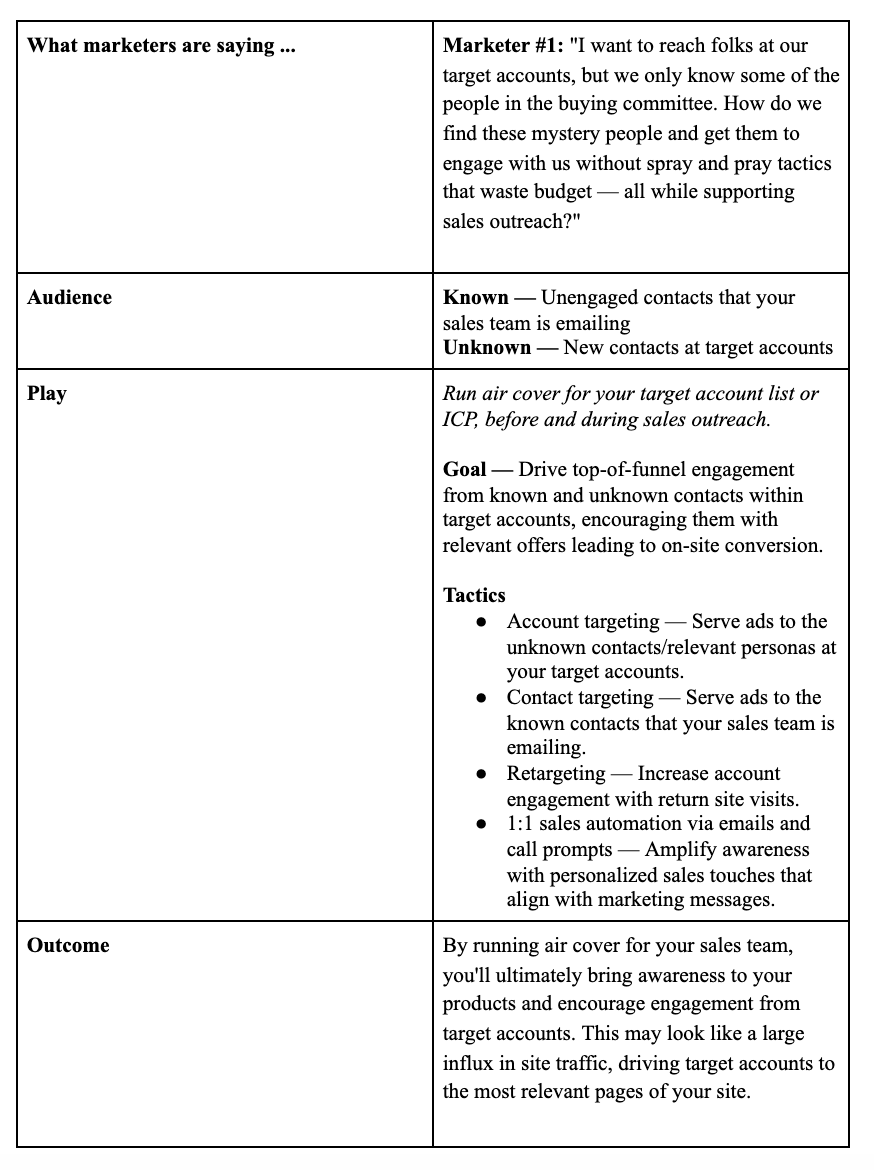 The real result you’re looking for? Increased site engagement increases the likelihood of your sales team booking a meeting or closing a deal.
In the real world: While running our own ABM program (in 2017), we found that accounts that had a marketing touch during sales outreach were 2X more likely to book a meeting.
3. Shift key metrics used to show impact, slowly moving from lead-based to account-based metrics with multi-touch attribution.
First, you’ll want to look at campaign metrics to make slight tweaks or optimizations. This will look like CTR, CPM, CPA, CTOR, etc. You may begin to prioritize spend on certain higher-value accounts and begin drilling down to engagement on the account level.
Here are a few other key metrics you’ll want to key your eye on to show demand impact:
Accounts Targeted — As a baseline, you should always be aware of just how many accounts are on your list. By keeping this number front and center, marketers can make sense of other metrics.
TAL Responses Generated — The number of targeted contacts that responded to the offers as measured by a form fill, page view, or email response.
TAL Meetings Booked — The number of meetings booked with your sellers that had a 3x3x3 play response as a preceding event prior to Opportunity creation.
LT TAL Opportunities Generated — The number of net new opportunities created with a 3x3x3 response as an event prior to opportunity creation.
LT TAL Pipeline Value $ — The dollar value of the net new opportunities generated as defined above.
Spend — Amount spent on all selected campaigns.
Value Over Volume
What you’ll want to dig into is a potential shift in the volume of demand moving more toward value in demand. This is a very typical shift when moving toward a higher fit/engagement/intent audience.
But with this more high-value over high-volume, you’ll start to see a faster conversion through the funnel from meeting to revenue thanks to being more selective with your audience. You can measure this, as well.

How to Create a Facebook Organic Sales Funnel
Want to attract and convert more people without Facebook ads? Looking for tips to develop an organic Facebook funnel? In this article, you’ll learn how to model an effective sales funnel with organic Facebook content. #1: Leverage Existing Facebook Audience Engagement to Create Awareness With New Prospects Back in the good old days when organic […]
The post How to Create a Facebook Organic Sales Funnel appeared first on Social Media Examiner | Social Media Marketing.
from Social Media Examiner | Social Media Marketing https://ift.tt/3ewL7j4
via socialmediaexaminer
The Ultimate Social Media Holiday Calendar for 2020 [Template]
Whether it’s International Cat Day, Pizza Day, or Talk Like a Pirate Day, it seems like almost every day, the internet is celebrating a holiday.
Odds are, you don’t celebrate all of these social media holidays. Think about it. When was the last time you saw an obscure holiday or observance day trending and thought to yourself “Yup, I’m celebrating that”?
Some of these holidays might be simply too silly for your brand to engage with. But despite all of the oddities, social media managers are always eyeing trends and holidays that they can leverage for brand awareness.
While we certainly don’t suggest sharing content on social media and then tacking on a completely irrelevant hashtag on it, you should still take some time to recognize the brand opportunities that could come your way in the next year.
By ignoring all of the holiday opportunities you could be taking, you could be missing valuable opportunities to take advantage of trending topics with fun and relevant “holiday” content on social media.
From food to politics to animals and everything in between, there is a plethora of observance days worldwide during which marketers can share content relevant to their industries, get involved in a movement, or simply generate more awareness.
To help you plan for trending holidays, we created a list that you can bookmark, as well as a downloadable calendar so you can get automatic reminders.
The list isn’t exhaustive (there are a lot of food-specific holidays out there) and these dates and hashtags may still be subject to change. But this is a great starting point for social media marketers who want to learn more about what’s trending and how they can plan their content in a way that will be fun and engaging on Twitter and other social platforms.
Want to finish out your 2020 calendar with some upcoming holiday posts? Tap the “+” symbol in the lower righthand corner of the calendar below to add it to your own Google calendar.
Downloadable Holiday Calendar
To help you keep track of all the holidays, here’s a Social Media Holiday Google Calendar.
Aside from 2020 holidays, we’ve also set dates on the calendar to repeat annually — either on the exact date they occur or the weekday they occur within the month.
Reminder, click the plus sign below to add it to your own Google Calendar list.
National & Global Holiday Calendar: 2020-2021
- January 2020
- February 2020
- March 2020
- April 2020
- May 2020
- June 2020
- July 2020
- August 2020
- September 2020
- October 2020
- November 2020
- December 2020
January 2020
1. Wednesday, New Year’s Day #NewYearsDay
2. Thursday, Science Fiction Day #ScienceFictionDay
4. Saturday, National Trivia Day #NationalTriviaDay
5. Sunday, National Bird Day #NationalBirdDay
11. Saturday, Human Trafficking Awareness Day #HumanTraffickingDay
13. Monday, National Sticker Day #NationalStickerDay
13. Monday, Clean Off Your Desk Day #CleanOffYourDeskDay
15. Wednesday, National Hat Day #NationalHatDay
16. Thursday, Get to Know Your Customers Day (third Thursday of every quarter) #GetToKnowYourCustomersDay
20. Monday, Cheese Lovers Day #CheeseLoversDay
20. Monday, Martin Luther King, Jr. Day (Third Monday of January) #MLKDay
21. Tuesday, National Hugging Day #NationalHuggingDay
23. Thursday, National Pie Day #PieDay
24. Friday, National Compliment Day #NationalComplimentDay
25. Saturday, Opposite Day #OppositeDay
25. Saturday, Chinese New Year #ChineseNewYear
27. Monday, Community Manager Appreciation Day (Last Monday of January) #CMAD
28. Tuesday, Data Privacy Day #PrivacyAware
February 2020
2. Sunday, Groundhog Day #GroundhogDay
2. Sunday, World Wetlands Day #WorldWetlandsDay
2. Sunday, Super Bowl LIV (Varies each year based on the U.S. Football season) #SBLLIV #SuperBowlSunday #SuperBowl
4. Tuesday, World Cancer Day #WorldCancerDay
5. Wednesday, National Weatherperson’s Day #NationalWeatherpersonsDay
7. Friday, National Send a Card to a Friend Day #SendACardToAFriendDay
8. Saturday, National Boy Scouts Day #BoyScoutsDay
9. Sunday, National Pizza Day #NationalPizzaDay
11. Tuesday, Safer Internet Day #SID2020
11. Tuesday, Inventors Day #InventorsDay
13. Thursday, World Radio Day #WorldRadioDay
14. Friday, Valentine’s Day #ValentinesDay
17. Monday, Random Acts of Kindness Day #RandomActsOfKindnessDay
17. Monday, Presidents Day (Third Monday of February) #PresidentsDay
18. Tuesday, National Battery Day #NationalBatteryDay
20. Thursday, World Day of Social Justice #SocialJusticeDay
20. Wednesday, Love Your Pet Day #LoveYourPetDay
21. Friday, International Mother Language Day #IMLD
25. Tuesday, Mardi Gras #MardiGras
March 2020
2. Monday, National Read Across America Day #ReadAcrossAmerica & #DrSeuss
3. Tuesday, World Wildlife Day #WorldWildlifeDay
4. Wednesday, National Grammar Day #NationalGrammarDay
5. Thursday, National Pancake Day #NationalPancakeDay
6. Friday, National Dentist’s Day #DentistsDay
6. Friday, National Employee Appreciation Day (First Friday of March) #EmployeeAppreciationDay
6. Friday, National Day of Unplugging (First Friday of March) #NationalDayOfUnplugging
7. Saturday, National Be Heard Day #NationalBeHeardDay
7. Saturday, National Cereal Day #NationalCerealDay
8. Sunday, International Women’s Day #BeBoldForChange
8. Sunday, National Proofreading Day #NationalProofreadingDay
8. Sunday, Daylight Savings #DaylightSavings
10. Tuesday, National Pack Your Lunch Day #NationalPackYourLunchDay
10. Tuesday, National Women and Girls HIV/AIDS Awareness Day #NWGHAAD
11. Wednesday, National Worship of Tools Day #WorshipOfToolsDay
11. Wednesday, National Napping Day #NationalNappingDay
12: Thursday, National Girl Scout Day #GirlScoutDay
14. Saturday, Popcorn Lover’s Day #PopcornLoversDay
14. Saturday, Potato Chip Day #NationalPotatoChipDay
14. Saturday, Pi Day #PiDay (To go the extra mile, post this at 1:59, as Pi equals 3.14159…)
15. Sunday, World Consumer Rights Day #WCRD2020
15. Sunday, World Sleep Day #WorldSleepDay
16. Monday, National Freedom of Information Day #FreedomOfInformationDay
17. Tuesday, St. Patrick’s Day #StPatricksDay
18. Wednesday, Awkward Moments Day #NationalAwkwardMomentsDay
19. Thursday, National Let’s Laugh Day #NationalLetsLaughDay
20. Friday, International Day of Happiness #InternationalDayofHappiness
20. Friday, World Storytelling Day #WorldStorytellingDay
20. Friday, First Day of Spring #FirstDayofSpring
21. Saturday, International Day for the Elimination of Racial Discrimination #RacialDiscriminationDay
21. Saturday, World Poetry Day #WorldPoetryDay
22: Sunday, World Water Day #WorldWaterDay
23. Monday, National Puppy Day #NationalPuppyDay
25. Wednesday, Tolkien Reading Day #TolkienReadingDay
26. Thursday, National Spinach Day #NationalSpinachDay
26. Thursday, Purple Day #PurpleDay
26. Thursday, American Diabetes Association Alert Day #AmericanDiabetesAssociationAlertDay
28. Saturday, Earth Hour Day #EarthHour
30. Monday, Doctor’s Day #NationalDoctorsDay
30. Monday, National Take a Walk in the Park Day #NationalWalkInTheParkDay
31. Tuesday, World Backup Day #WorldBackupDay
31. Tuesday, Transgender Day of Visibility #TDOV
31. Tuesday, Equal Pay Day #EqualPayDay
April 2020
1. Wednesday, April Fools Day #AprilFools
2. Thursday, World Autism Awareness Day #WAAD
3. Friday, Find a Rainbow Day #FindARainbowDay
3. Friday, National Walking Day #NationalWalkingDay
4. Saturday, Hug a Newsperson Day #HugANewsperson
7. Tuesday, World Health Day #LetsTalk
10. Friday, National Siblings Day #NationalSiblingsDay
10. Friday, Encourage a Young Writer Day #EncourageAYoungWriterDay
11. Saturday, National Pet Day #NationalPetDay
12. Sunday, International Day of Human Space Flight #InternationalDayOfHumanSpaceFlight
15. Wednesday, National Tax Day #TaxDay
16. Thursday, National Stress Awareness Day #StressAwarenessDay
16. Thursday, National Wear Your Pajamas to Work Day #PJDay
17. Friday, Haiku Poetry Day #HaikuPoetryDay
18. Saturday, National Columnists’ Day #NationalColumnistDay
18. Saturday, Get to Know Your Customers Day #GetToKnowYourCustomersDay
18. Saturday, National High-Five Day #NH5D
20. Monday, National Look-Alike Day #NationalLookAlikeDay
22. Wednesday, Earth Day #EarthDay2018
23. Thursday, National Picnic Day #NationalPicnicDay
23. Thursday, World Book Day #WorldBookDay
24. Friday, National Administrative Professionals Day #AdministrativeProfessionalsDay
24. Friday, Denim Day #DenimDay
25. Saturday, National Telephone Day #NationalTelephoneDay
25. Saturday, World Malaria Day #EndMalariaForGood
25. Saturday, National Take Our Daughters and Sons to Work Day #COUNTONME
26. Sunday, Arbor Day #ArborDay
29. Wednesday, International Dance Day #InternationalDanceDay
30. Thursday, National Honesty Day #NationalHonestyDay
30. Thursday, National Adopt a Shelter Pet Day #AdoptAShelterPetDay
30. Thursday, International Jazz Day #JazzDay
May 2020
1. Friday, May Day #MayDay
1. Friday, International Workers Day #IntWorkersDay
2. Saturday, World Password Day #WorldPasswordDay
3. Sunday, World Press Freedom Day #WPFD2020 #PressFreedom
3. Sunday, Space Day #SpaceDay
4. Monday, Star Wars Day #StarWarsDay & #Maythe4thBeWithYou
4. Monday, International Firefighters Day #InternationalFirefightersDay
5. Tuesday, Cinco de Mayo #CincoDeMayo
6. Wednesday, National Nurses Day #NursesDay
7. Thursday, World Asthma Day #WorldAsthmaDay
7. Thursday, Thank a Teacher Day #ThankATeacher
8. Friday, National Receptionist Day #NationalReceptionistDay
9. Saturday, Europe Day #EuropeDay
10. Sunday, Mother’s Day #MothersDay
12. Tuesday, National Limerick Day #NationalLimerickDay
15. Friday, International Day of Families #FamilyDay
15. Friday, National Bike to Work Day #BTWD
16. Saturday, Love a Tree Day #LoveATreeDay
17. Sunday, International Day Against Homophobia and Transphobia #IDAHOT2020
17. Sunday, Endangered Species Day #EndangeredSpeciesDay
21. Thursday, National Memo Day #NationalMemoDay
21. Thursday, Red Nose Day #RedNoseDay
24. Sunday, National Scavenger Hunt Day #NationalScavengerHuntDay
25. Monday, Memorial Day (Fourth Monday of May) #MemorialDay #MDW
28. Thursday, Hamburger Day #NationalHamburgerDay
29. Friday, Paperclip Day #PaperclipDay
29. Friday, Heat Awareness Day (Last Friday of May) #NoFryDay
31. Sunday, World No-Tobacco Day #NoTobacco
June 2020
1. Monday, Global Day of Parents #GlobalDayOfParents
1. Monday, International Children’s Day #ChildrensDay
3. Wednesday, Leave The Office Early Day #LeaveTheOfficeEarlyDay
4. Thursday, National Donut Day #NationalDonutDay
5. Friday, World Environment Day #WorldEnvironmentDay
6. Saturday, National Cancer Survivor’s Day #NCSD2020
6. Saturday, Higher Education Day #HigherEducationDay
7. Sunday, World Oceans Day #WorldOceansDay
7. Sunday, Best Friends Day #BestFriendsDay
14. Sunday, World Blood Donor Day #GiveBlood
14. Sunday, National Flag Day #FlagDay
20. Saturday, World Refugee Day #WithRefugees
20. Saturday, First Day of Summer
21. Sunday, National Selfie Day #NationalSelfieDay
21. Sunday, World Music Day #WorldMusicDay
21. Sunday, Father’s Day #FathersDay
21. Sunday, International Yoga Day #InternationalYogaDay
26. Friday, Take Your Dog to Work Day #TakeYourDogToWorkDay
27. Saturday, National Sunglasses Day #NationalSunglassesDay
27. Saturday, National Handshake Day #HandshakeDay
30. Tuesday, Social Media Day #SMDay
July 2020
1. Wednesday, National Postal Worker Day #NationalPostalWorkerDay
2. Thursday, World UFO Day #WorldUFODay
4. Saturday, Independence Day (United States)
7. Tuesday, World Chocolate Day #WorldChocolateDay
11. Saturday, Cheer Up the Lonely Day #CheerUpTheLonelyDay
12. Sunday, Malala Day #MalalaDay
15. Wednesday, Give Something Away Day #GiveSomethingAwayDay
17. Friday, World Emoji Day #WorldEmojiDay
18. Saturday, Nelson Mandela International Day #MandelaDay
18. Saturday, Get to Know Your Customers Day #GetToKnowYourCustomersDay
30. Thursday, Talk in an Elevator Day #TalkInAnElevatorDay
30. Thursday, International Day of Friendship #DayOfFriendship
August 2020
1. Saturday, Respect for Parents Day #RespectForParentsDay
2. Sunday, National Coloring Book Day #NationalColoringBookDay
8. Saturday, International Cat Day #InternationalCatDay
9. Sunday, National Book Lovers Day #NationalBookLoversDay
10. Monday, National Lazy Day #LazyDay
11. Tuesday, National Sons and Daughters Day #SonsAndDaughtersDay
12. Wednesday, International Youth Day #YouthDay
12. Wednesday, World Elephant Day #WorldElephantDay
13. Thursday, International Lefthanders Day #LefthandersDay
15. Saturday, National Relaxation Day #NationalRelaxationDay
16. Sunday, National Tell a Joke Day #NationalTellAJokeDay
19. Wednesday, World Photo Day #WorldPhotoDay
19. Friday, World Humanitarian Day #WorldHumanitarianDay
20. Saturday, National Lemonade Day #NationalLemonadeDay
26. Friday, National Dog Day #NationalDogDay
26. Friday, National Women’s Equality Day #WomensEqualityDay
September 2019
Date Varies, Stand Up To Cancer Day #KissCancerGoodbye
4. Friday, National Wildlife Day #NationalWildlifeDay
5. Saturday, International Day of Charity #CharityDay
6. Sunday, Read a Book Day #ReadABookDay
6. Tuesday, National Grandparents Day (First Monday of September) #NationalGrandparentsDay
8. Tuesday, International Literacy Day #LiteracyDay
7. Monday, Labor Day #LaborDay
11. Friday, National Day of Service and Remembrance #911Day
12. Saturday, National Day of Encouragement #DayOfEncouragement
12. Saturday, National Video Games Day #NationalVideoGamesDay
19. Saturday, Talk Like a Pirate Day #TalkLikeAPirateDay
21. Monday, International Day of Peace #PeaceDay
21. Monday, Miniature Golf Day #MiniGolfDay
21. Monday, Civic Day of Hacking #HackForChange
22. Tuesday, Car-Free Day #CarFreeDay
22. Tuesday, Hobbit Day #HobbitDay
22. Tuesday, First Day of Fall
23. Wednesday, National Women’s Health and Fitness Day #FitnessDay
26. Saturday, European Day of Languages #EDL2020
27. Sunday, World Tourism Day #WTD2020
28. Monday, World Rabies Day #WorldRabiesDay
28. Monday, National Good Neighbor Day #GoodNeighborDay
30. Wednesday, International Podcast Day #InternationalPodcastDay
October 2020
1. Thursday, International Day of Older Persons #UNDOP
1. Thursday, International Coffee Day #InternationalCoffeeDay
1. Thursday, World Vegetarian Day #WorldVegetarianDay
2. Friday, International Day of Nonviolence #InternationalDayOfNonviolence
2. Friday, World Smile Day #WorldSmileDay
3. Saturday, National Techies Day #TechiesDay
4. Sunday, World Animal Day #WorldAnimalDay
4. Sunday, National Taco Day #NationalTacoDay
5. Monday, World Teachers Day #WorldTeachersDay
7. Wednesday, World Habitat Day #WorldHabitatDay
10. Saturday, World Mental Health Day #WorldMentalHeathDay
10. Saturday, World Sight Day #WorldSightDay
11. Sunday, International Day of the Girl #DayOfTheGirl
14. Wednesday, National Dessert Day #DessertDay
15. Thursday, Global Handwashing Day #GlobalHandwashingDay
16. Friday, World Food Day #FoodDay
16. Friday, Bosses Day #BossesDay
17. Saturday, International Day for the Eradication of Poverty #EndPoverty
20. Tuesday, World Statistics Day #StatisticsDay
21. Wednesday, Reptile Awareness Day #ReptileAwarenessDay
24. Saturday, United Nations Day #UNDay
25. Sunday, Greasy Foods Day #GreasyFoodsDay
30. Friday, National Publicist Day #NationalPublicistDay
30. Friday, Checklist Day #ChecklistDay
31. Saturday, Halloween #Halloween
November 2020
1. Sunday, World Vegan Day #WorldVeganDay
1. Sunday, National Authors Day #NationalAuthorsDay
1. Sunday, National Cook For Your Pets Day #CookForYourPetsDay
3. Tuesday, National Sandwich Day #NationalSandwichDay
3. Tuesday, Daylight Saving Time Ends #DaylightSavings
4. Wednesday, National Candy Day #NationalCandyDay
8. Sunday, National Cappuccino Day #CappuccinoDay
8. Sunday, Science, Technology, Engineering, and Medicine (STEM) Day #STEMDay
11. Wednesday, Veterans Day #VeteransDay
13. Friday, World Kindness Day #WKD
14. Saturday, World Diabetes Day #WDD
15. Sunday, Clean Out Your Refrigerator Day #CleanOutYourRefrigeratorDay
15. Sunday, America Recycles Day #BeRecycled
16. Monday, International Day for Tolerance #ToleranceDay
17. Tuesday, International Students Day #InternationalStudentsDay
19. Thursday, International Men’s Day #InternationalMensDay
19. Thursday, National Entrepreneurs Day #EntrepreneursDay
20. Friday, Universal Children’s Day #UNChildrensDay
21. Saturday, World Hello Day #WorldHelloDay
25. Wednesday, Thanksgiving Day #Thanksgiving
26. Thursday, National Cake Day #NationalCakeDay
28. Saturday, Small Business Saturday (The last Saturday of November) #ShopSmall
29. Sunday, National Day of Listening #DayOfListening
29. Sunday, Electronic Greeting Card Day #ElectronicGreetingCardDay
30. Monday, Computer Security Day #ComputerSecurityDay
December 2020
1. Tuesday, World AIDS Day #WAD2020
2. Wednesday, Cyber Monday #CyberMonday
3. Thursday, International Day of Persons with Disabilities #IDPWD
4. Friday, National Cookie Day #NationalCookieDay
5. Saturday, World Soil Day #WorldSoilDay
6. Sunday, Microwave Oven Day #MicrowaveOvenDay
8. Tuesday, Pretend to Be a Time Traveler Day #PretendToBeATimeTravelerDay
10. Thursday, Human Rights Day #HumanRightsDay
10. Thursday, Nobel Prize Day #NobelPrize
11. Friday, International Mountain Day #InternationalMountainDay
11. Friday, National Salesperson Day #SalespersonDay
21. Monday, Crossword Puzzle Day #CrosswordPuzzleDay
21. Monday, First Day of Winter #WinterSolstice
30. Wednesday, No Interruptions Day – Last Work Day of the Year #NoInterruptionsDay
31. Thursday, New Year’s Eve #NYE
Sources: National Day Calendar, Sprout Social, TrackMaven, Holiday Insights, Brownielocks, National Peace Corps Association, Sparkflow
Editor’s Note: This post was originally published in January 2017 but is updated annually for comprehensiveness. The most recent update of this post was July 2020.

11 Best Practices for Facebook Cover Photos & Videos [Templates]
When people arrive at your Facebook Page, where do you think they first look?
I’ll give you some hints. It’s a visual piece of content that sits at the top of your Page. Its dimensions are 820 pixels wide by 312 pixels tall. It takes up almost a quarter of the screen on most desktop browsers.
That’s right — it’s your Facebook cover photo.
Sometimes called your Facebook banner, this graphic is one of the most noticeable parts of your Page. It’s therefore crucial that you follow Facebook cover photo best practices.
Facebook Cover Photo Size
Optimize your cover photo for the right dimensions: 820 pixels wide and 312 pixels tall for desktop, 640 pixels wide by 360 pixels tall for mobile. If your uploaded image is smaller than these dimensions, Facebook will stretch it to fit — making it look blurry.
Whether you’re using Facebook to generate leads, close your next sale, or create a customer community, knowing how to make and optimize your cover photo is very important. And when you consider the Facebook cover photo dimensions above, it can be tough to balance creativity with the requirements of the platform.
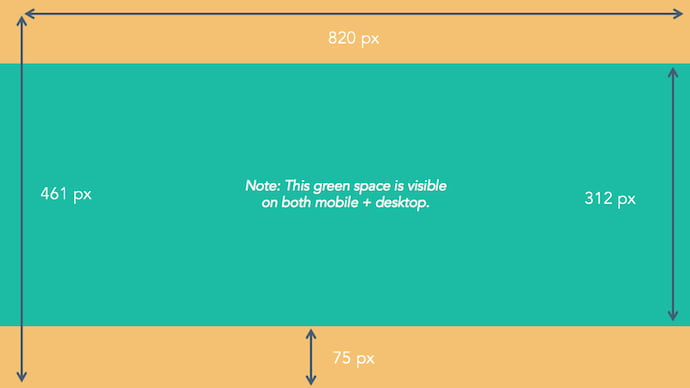
As you can see from the figure above, there’s a lot of space that you can risk cutting off of your final cover photo design depending on where your audience is viewing — mobile or desktop. Therefore, it’s best to focus the brunt of your content in that green space, where everyone can see your cover photo regardless of the device they’re using.
Need help getting started? Below, you’ll find 11 Facebook cover photo templates, and just as many best practices to guide you when designing your brand’s banner artwork. At the bottom of this post, find out how to turn your cover photo into a cover video, and check out a few examples to see what others have done.
11 Facebook Cover Photo Best Practices
1. Do abide by Facebook’s cover photo guidelines.
It seems like a no-brainer, but obeying Facebook guidelines is crucial to your Facebook Page existing in the first place. I’d highly suggest reading through the full Page Guidelines, but here are a few important things to keep in mind for your Facebook banner:
- Your cover is public.
- Covers can’t be deceptive, misleading, or infringe on anyone else’s copyright.
- You can’t encourage people to upload your cover to their personal timelines.
If you get caught violating the above terms, Facebook could take action against your Page. And while Facebook doesn’t explicitly say what will happen if you violate their Page guidelines, it’s probably not smart to get your Facebook Page taken down over a cover photo infraction, so read the guidelines in full and adhere to them.
2. Do make sure your Facebook cover photo size is right.
As stated at the beginning of this article, the best Facebook banner size is 820 pixels wide by 312 pixels tall for computers, and 640 pixels wide by 360 pixels tall on mobile devices.
You don’t want to spend all this time designing a cover photo only to have it look weird when you upload it to Facebook.
If you upload an image smaller than those dimensions, Facebook will stretch it to fit the right size, as long as it’s at least 399 pixels wide and 150 pixels tall.
If you want a no-hassle way to make sure your cover photos are the right size, download our pre-sized template for Facebook cover photos here.
3. Don’t worry about the old ‘20% text’ rule, but still try to stay visual.
Back in 2013, Facebook removed any reference to the 20% rule on text in cover photos … but that doesn’t mean you should go wild with using text in your cover photo. The previous rule said that only 20% of your cover photo could be text. Personally, I thought that was way too restrictive for marketers, but the sentiment behind the rule was a good one.
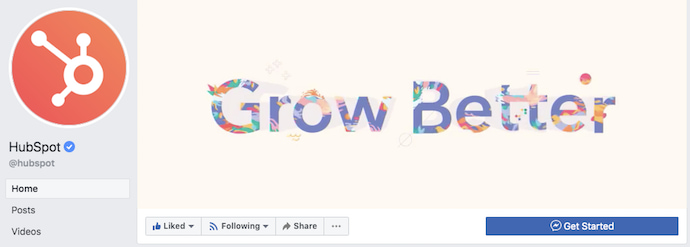
If you’re going to use text in your cover photo, keep that text concise. Your photo will be much more informative and engaging. You can see how we’ve tried to strike that balance on HubSpot’s Facebook Page below.
4. Do give your cover image a focal point and colors that match your brand.
Think of your cover photo as the portion of your Page that’s “above the fold.” If it’s distracting or confusing, people will be more likely to click off the Page.
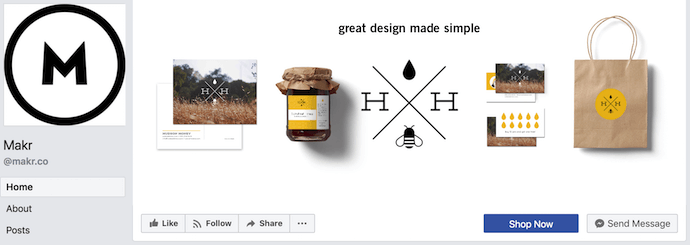
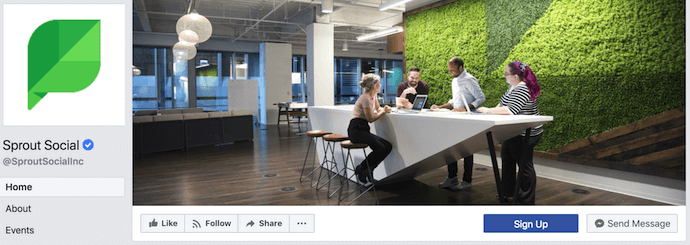
Many of the best Facebook cover photos include a centerpiece to focus visitors’ attention, along with a color scheme that aligns with the rest of their brand. Remember, your social media accounts are extensions of your business, and should give that impression to visitors right away.
They also use negative white (i.e., empty) space as an advantage to make the subject, any copy on there, and other elements unique to Facebook (like the CTA button on Facebook business Pages) stand out even more.
Here’s an example from Makr:
And one from social media management platform Sprout Social:
5. Don’t try to blend the contents of your cover photo with your profile picture.
With some clever design tweaks, you used to be able to manipulate your profile picture and cover photo so they appear as if they’re two parts of the same canvas. You can still do this on your personal profile, but Facebook no longer sets up Business Pages this way.
One of Paris’ former cover photos did this nicely:
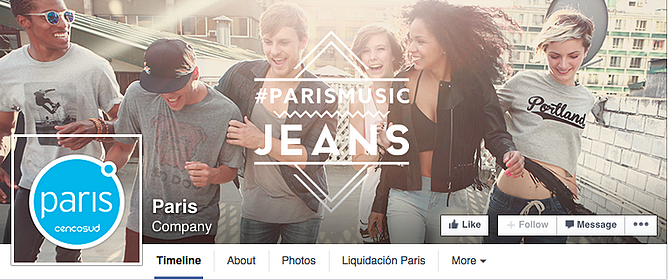
Now, as shown in the examples earlier in this article, the profile picture is completely separate from the cover photo.
We admire your creativity, but don’t prepare your design this way if you haven’t yet launched a Business Page — you’ll be disappointed.
6. Do draw attention to the action buttons on the bottom right.
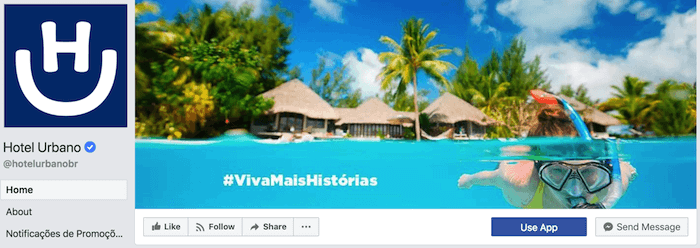
You might’ve noticed in a few of the cover photo examples above that their primary call-to-action (CTA) buttons were different. Makr’s says “Shop Now,” while Sprout Social’s says “Sign Up.”
Depending on your business, you can launch a Page on Facebook with a unique CTA button to the bottom right of your cover photo. Take this button into consideration when designing your cover photo, and make it clear in the photo that this is a visitor’s next step.
Hotel Urbano does this is a charming way below, using the girl in goggles to draw your eyes toward the buttons she seems to be swimming toward …
Note: While it might seem like a good idea to add directional cues like an arrow to get people to click on the CTA buttons, note that those CTA buttons don’t appear the same way on the mobile app. In other words, it might be confusing to mobile users if you directly integrate the cover photo design with the buttons.
I’ll show you how Business Pages look on mobile devices in just a minute.
7. Do right-align the objects in your cover photo.
Since your profile picture is on the left, you want to add some balance to your Facebook cover photo design by having the focus of the image be on the right.
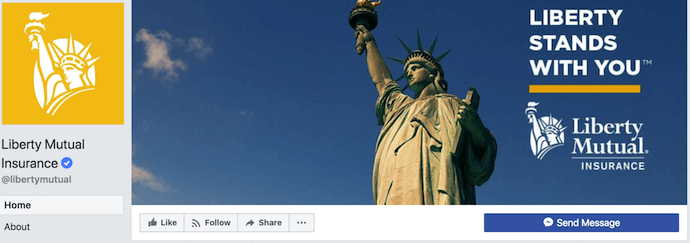
Take a look at these cover photos. Which one looks more aesthetically pleasing?
Right-aligned focus:
Left-aligned focus:
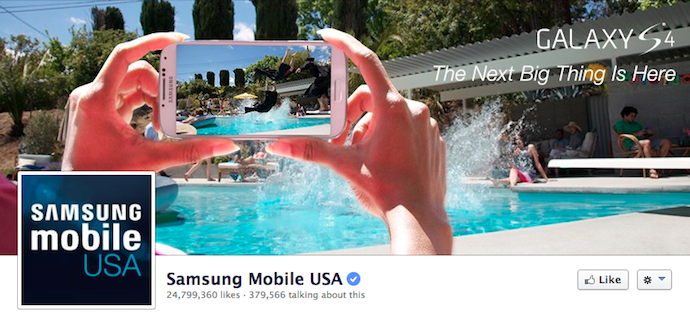
Doesn’t the right-aligned cover photo look better? The biggest design elements (the profile picture, the text, and the Statue of Liberty) are evenly spaced. In Samsung’s old cover photo, your attention goes immediately to the left side of the page, completely missing the name of the product on the upper-right side.
Not only is adding balance a crucial element of design, but it also allows for your cover photos to be more visually effective on mobile. Which brings me to my next point …
8. Do keep mobile users in mind.
As of 2019, reports Statista, 96% of Facebook’s user base accesses the social network from mobile devices like smartphones and tablets. That’s huge — and it’s exactly why it’s so important to keep mobile users top-of-mind when designing your Facebook cover photo.
On mobile, a much larger portion of your cover photo is blocked out because the profile picture and the Page name are on top of the cover photo.
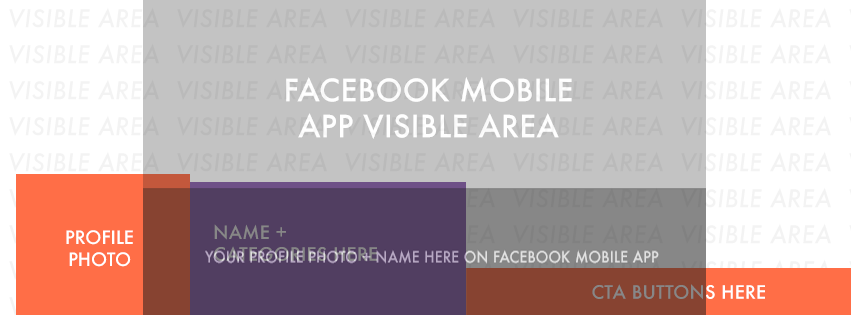 Image Credit: Twelveskip
Let’s take a look at a real-life example. Below, take a look at what Cisco’s Facebook Page looks like in a desktop browser versus on Facebook’s mobile app.
Desktop:
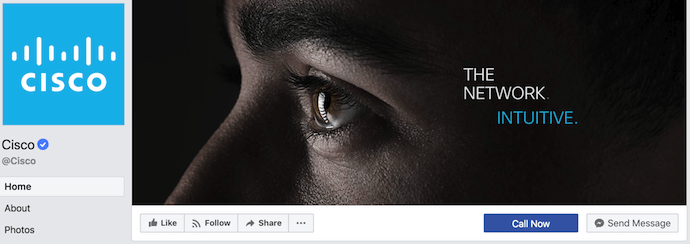
Mobile:
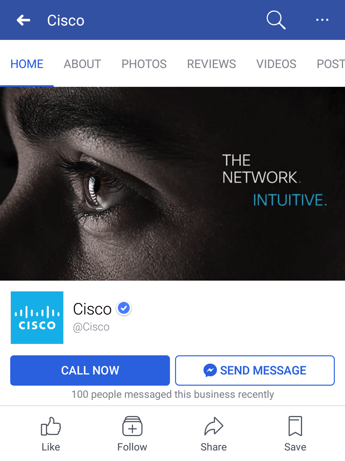
Notice that the sides of the photo are cut off on mobile. Whereas your cover photo displays at 820 pixels wide by 312 pixels tall on desktop, it displays only the center 640 pixels wide by 360 pixels tall on smartphones. Take a look at this Facebook help document for more information.
Notice, by the way, how the text in Adobe’s cover photo is cut off on the right-hand side. While it looks best to right-align your visual elements, be careful not to put important content so far to the right that it gets cut off on mobile.
9. Do include a shortened link in your cover photo description that aligns with your page CTA.
If you want to use your cover photo to support a Page CTA, make sure your cover photo description also includes a text CTA and link to the same offer. This way, any time people view your cover photo directly, they can access the download link.
Here’s this practice in action on Adobe’s Facebook Page:
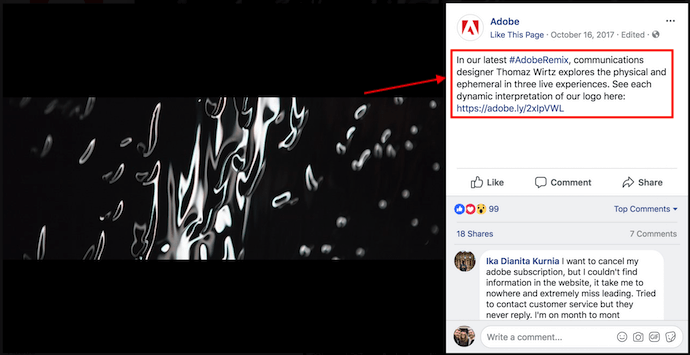
Make sure you shorten your links and add UTM codes so you can track clicks on them. Shortening and tracking features are available in the HubSpot Marketing Platform and in tools like bitly.
(If you want to learn more about how to write effective call-to-action copy for your cover photo description, click here to download our free ebook on creating compelling CTAs.)
10. Do pin a related post right below your Facebook cover image.
Have you ever “pinned” a post to your Facebook Page’s Timeline? Basically, pinning a post allows you to highlight a typical Facebook post on the top of your Timeline for seven days. It’s signified by a small blue push pin on the top right of the post, like on Fashion Nova’s Page below:
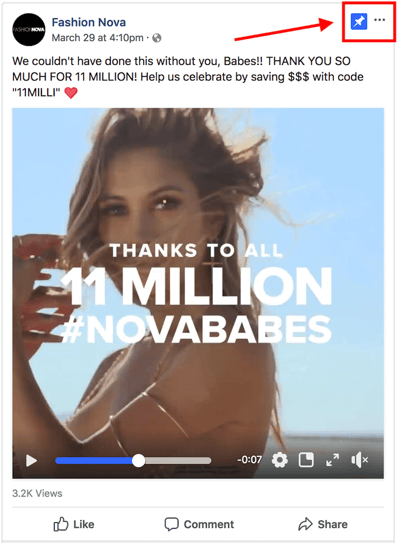
How does this relate to optimizing your Facebook cover photo? Well, if you’re spending time aligning your Facebook Page CTA, your cover photo design, and your cover photo description copy, you should also make sure to post about the same thing directly to your page, and pin that post to the top of your Timeline.
That way, you’re giving people one very clear call-to-action when they arrive to your page (albeit in several different locations) — which should help conversions.
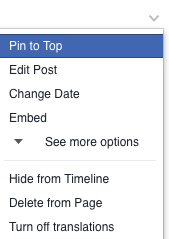
To pin a Facebook post: Simply publish the post to Facebook, then click the three dots on the top right corner of the post and choose “Pin to Top.”
11. Do consider publishing a Facebook cover video.
You read that right. Facebook Business Pages now have the option to add a video in lieu of a static cover photo, provided they meet certain requirements — which we dug up for you:
How to Make a Facebook Cover Video
Post a Facebook cover video by saving a video file at 820 pixels wide by 426 pixels tall to your desktop. Open your Facebook Business page, click “Change Cover” at the top-left of your cover photo, and select “Upload Photo/Video.” This allows you to format and publish the desktop file to your Facebook page.
Facebook currently supports cover videos that are between 20 and 90 seconds long, and a minimum of 820 pixels wide by 312 pixels tall. The maximum (and recommended) size is 820 by 462 pixels with a video resolution of 1080p.
Keep in mind that Facebook cover videos play on a loop — once it ends, it automatically starts over if the viewer is still on your Facebook page. With that in mind, make sure whatever you post is pleasant if seen more than once. Extreme, action-packed videos might appear exhausting when played over and over …
Once you pull the file from your desktop, you’ll click “Next” where you’ll be asked to select from 10 thumbnail versions of your video. The thumbnail you choose will display for users who hover their cursor over your profile photo before visiting your full Business Page.
Facebook Cover Video Examples
Cover videos are a terrific option for the video-inclined, and brands across numerous industries have already taken advantage of it to hold their visitors’ attention. Here are some great cover videos to inspire you:
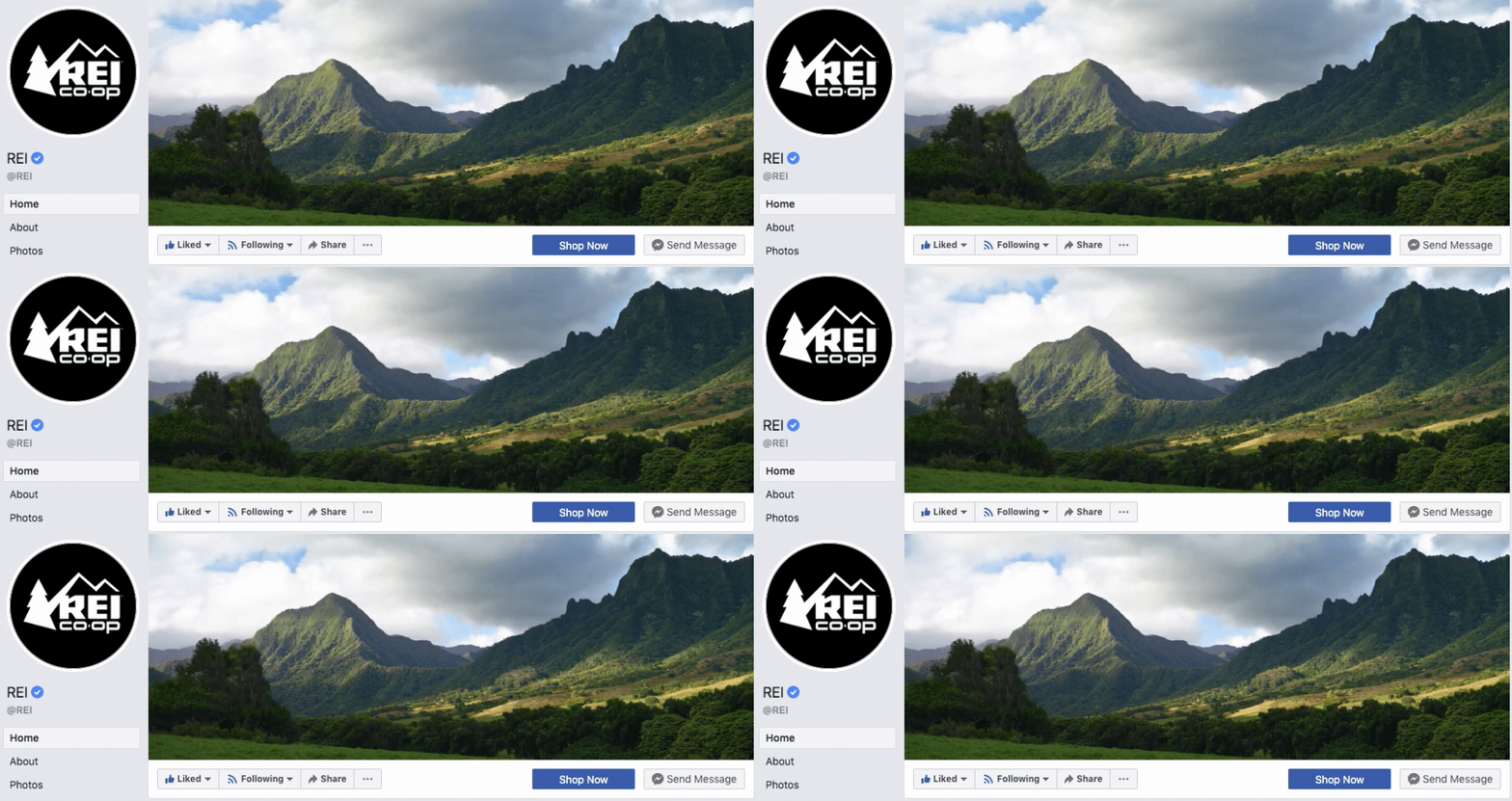
REI
REI sells outdoor equipment for activities like camping, hiking, running, boating, and biking. The company’s subtle cover video reflects its products, all in one peaceful time lapse of the scenery it knows its audience craves.
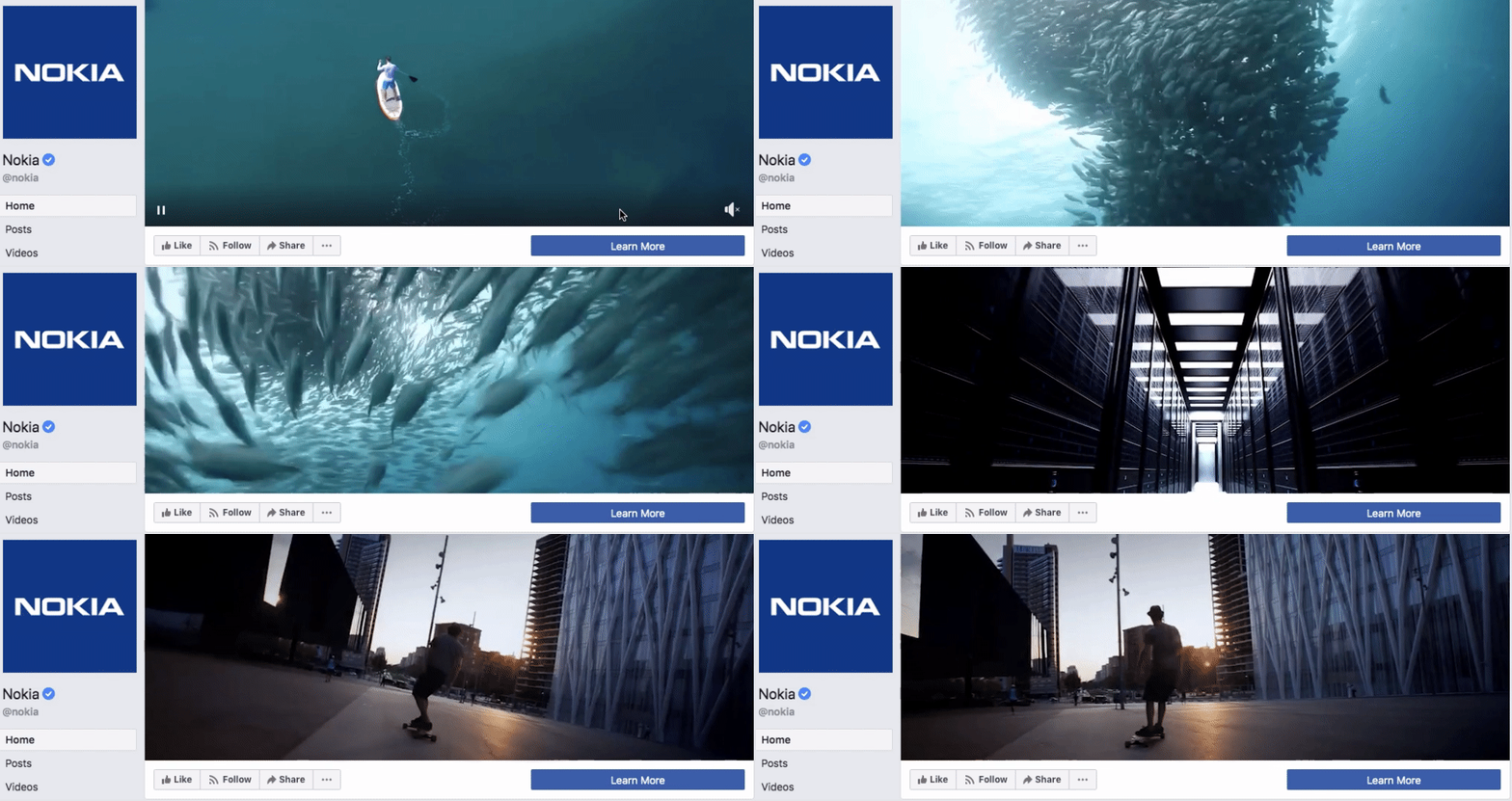
Nokia
Nokia wants to be everywhere its users are — whether they’re paddle-boarding, scuba diving, skateboarding, or working. Its Facebook cover video embodies its core customer in a visually pleasing way.
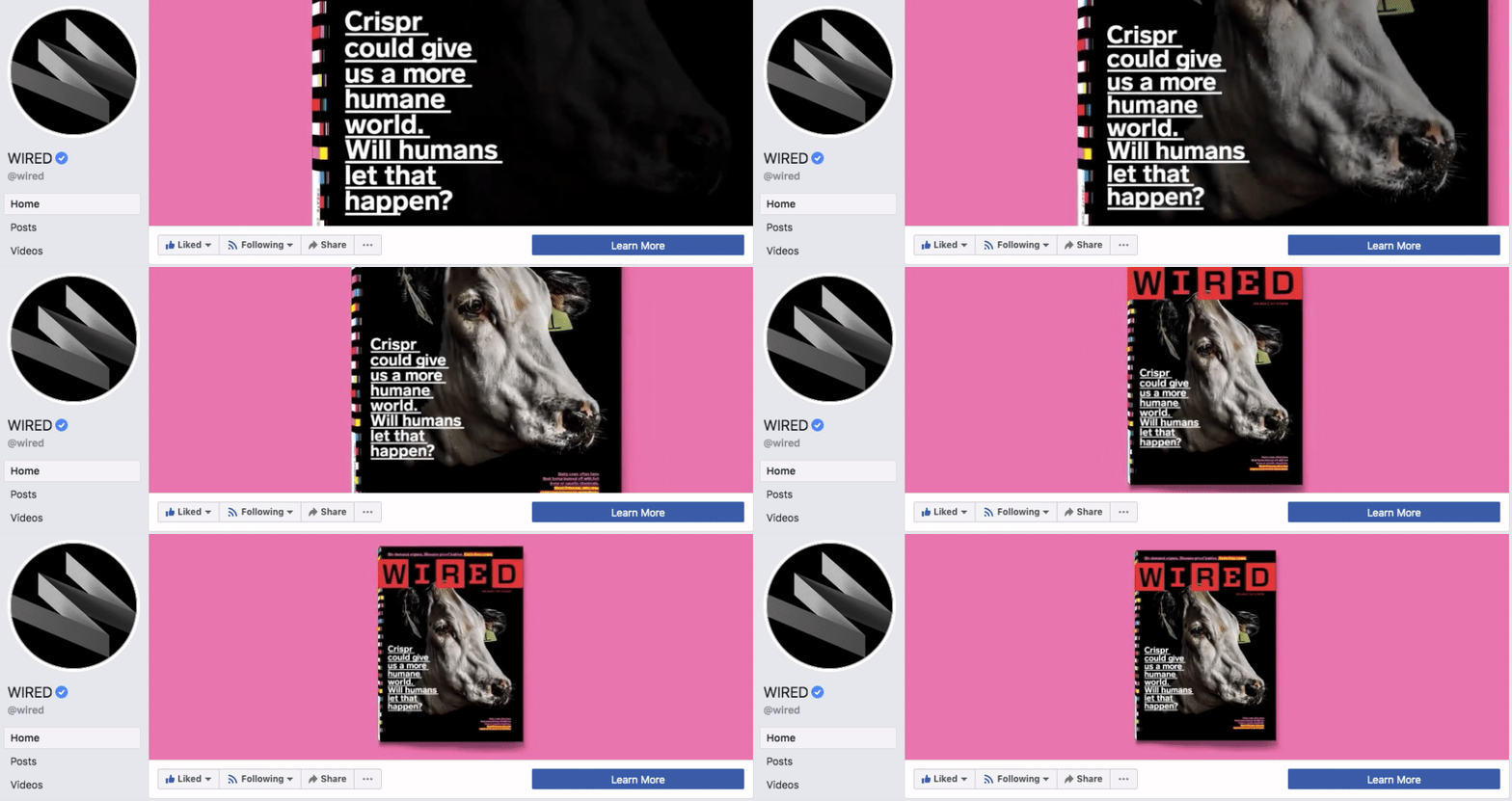
WIRED Magazine
When your publication changes as fast as the news cycle, it can be hard to keep your readers focused on the stories you feel deserve extra attention. WIRED Magazine uses its Facebook cover video for just this purpose, as shown in the example below.
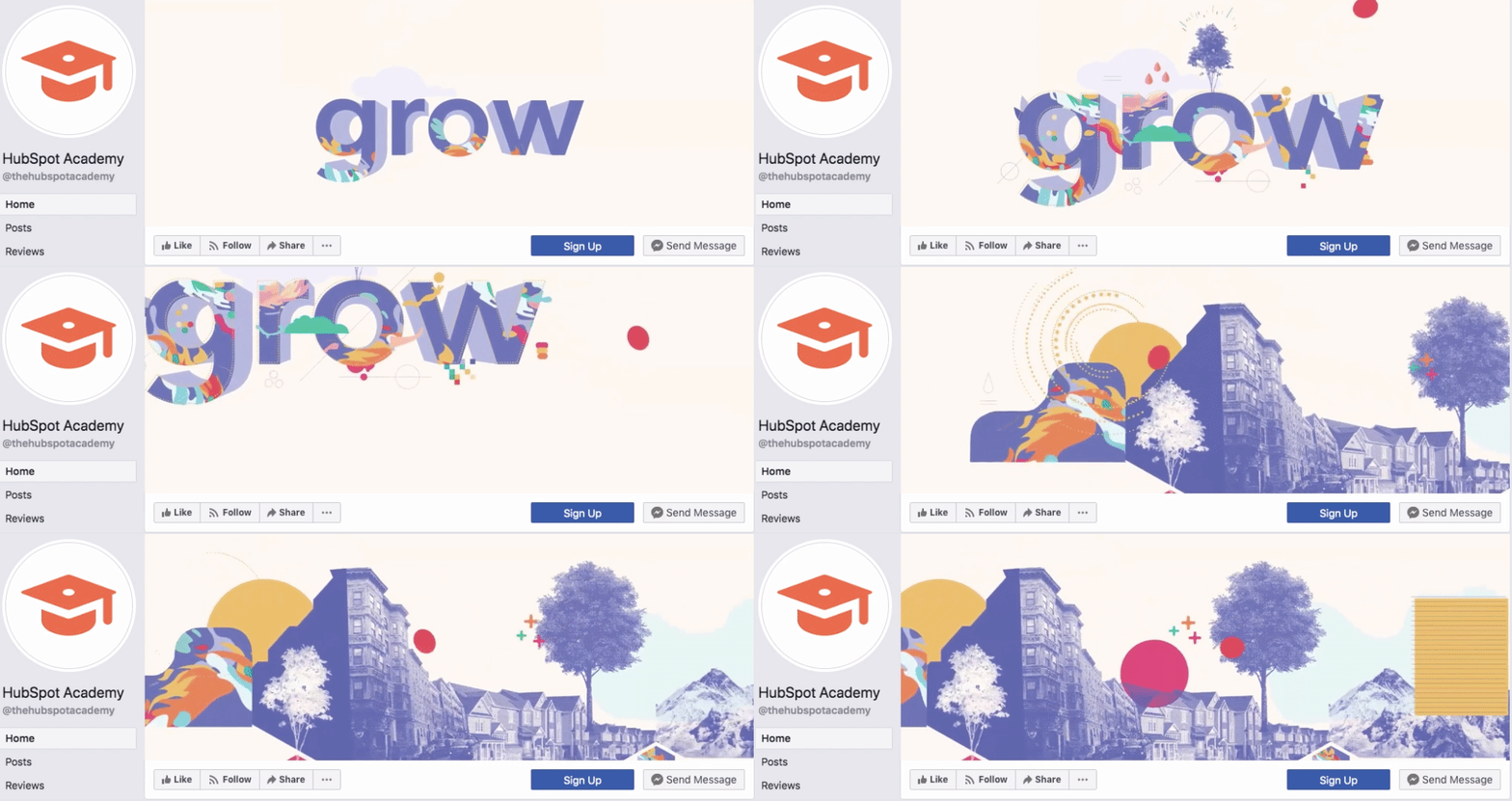
HubSpot Academy
Alright, maybe we’re biased, but our brilliant creative team crushed it with the video below, made for HubSpot Academy. Sometimes, animation is the best way to capture the essence of your brand.
As you can see from these examples, your video should be just as simple as a cover photo. Keep in mind the same guidelines outlined in best practice #1 apply to cover videos as well.
Want to see how HubSpot uses Facebook? Like our Facebook Page here.

Adwords Google: tutorial para publicar Anuncios Online y EVITAR errores
Ok. Estás convencido de que quieres comenzar en el mundo de Adwords Google. Creaste una cuenta en Google Ads, hiciste algunos clic, tu campaña se ejecutó, pagaste y listo. Pero, ¿es así de fácil?… Un poco sí; un poco no.
Debes tener en consideración que algunos errores al crear una campaña de Google Ads pueden repercutir negativamente en los resultados que esperas conseguir.
Estoy segura de que al tener conocimiento de cuáles suelen ser los errores al crear una campaña de Google Ads, incluso algunos que son poco frecuentes, tendrás más posibilidades de lograr los resultados que necesitas.
Este es el segundo texto de una serie que están preparando en Socialancer sobre buenas prácticas en Google Ads. En un artículo anterior, lanzaron una CAMPAÑA REAL para explicar un sistema que permite gastar menos y aumentar el rendimiento en Adwords.
PPCkit- Crea cientos de Google Ads en minutos y con más ROI.
¿Cómo funciona Google Ads antes Adwords Google?
Google Ads, antes conocido como Google Adwords, muestra anuncios online a través de las búsquedas que hacen los usuarios.
Los anunciantes establecen el límite del presupuesto y el tiempo de duración la campaña, que además se puede medir a través Google Analytics. Lo mejor es que el presupuesto puede detenerse en cualquier momento y se paga por clic que hace el usuario, no por las veces que se muestra el anuncio.
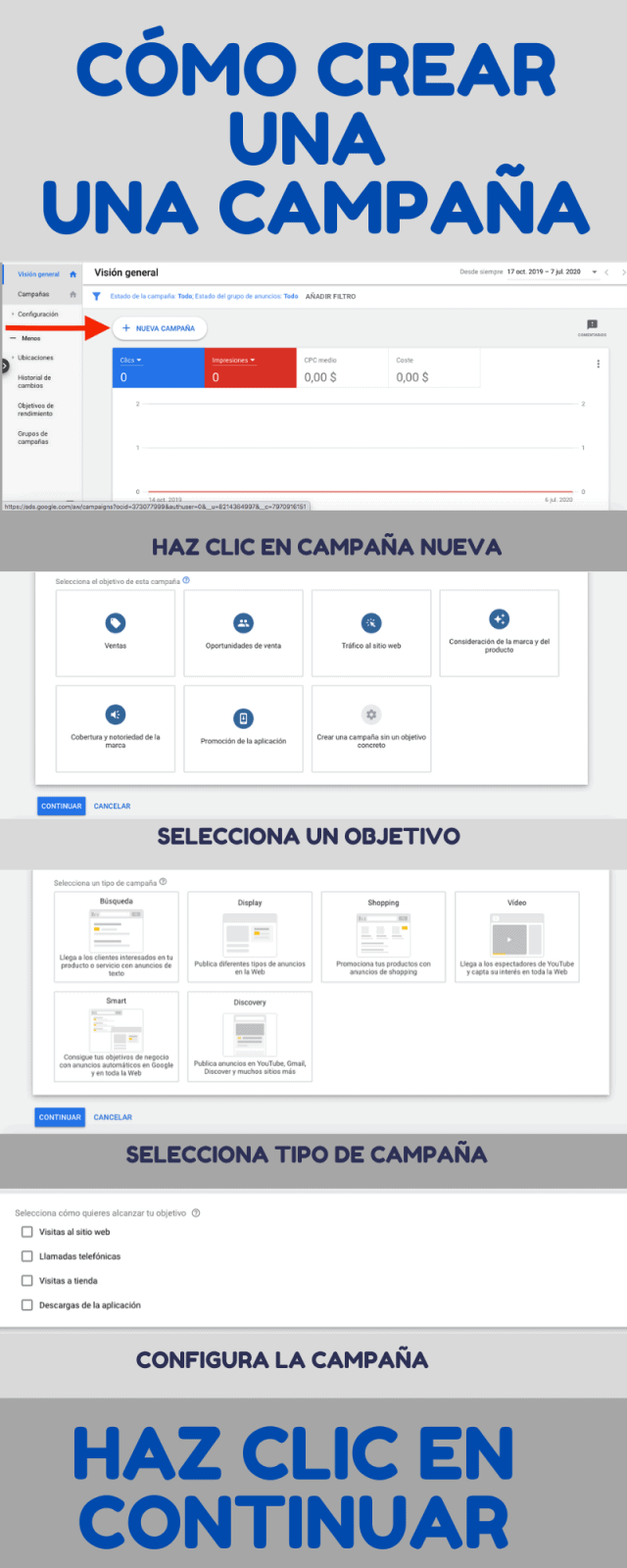
Infografía: ¿Cómo iniciar una campaña de Adwords Google?
Esta infografía es útil, sobre todo, para quienes no tienen ningún tipo de experiencia en Google Adwords. Verás cada uno de los pasos con su respectiva captura de pantalla.
¿Cuáles son los objetivos de las campañas de Adwords Google?

Los objetivos de Adwords Google están vinculados a los resultados que quieres conseguir y son los siguientes:
- Ventas: este objetivo lo puedes usar en todos los tipos de campañas menos en las de aplicaciones. Obviamente, la debes usar cuando quieres vender un producto o servicio.
- Clientes potenciales: la debes usar cuando necesitas captar datos, puede ser invitando a suscribirse a algo, descargando un boletín, etc. Se utiliza en todos los tipos de campañas menos en las de aplicaciones.
- Tráfico del sitio web: redirige los clics a un sitio web. Se usa para incrementar el tráfico. Se utiliza en todos los tipos de campañas menos en las de aplicaciones.
- Consideración de la marca y producto: la usas para darte a conocer. Permite mostrar qué hacen tus productos o servicios. Se utilizan solo en las campañas de display y de video.
- Conocimiento y alcance de la marca: brinda herramientas para ampliar la información de los usuarios sobre tu producto o servicio. Se aplica en las campañas de display y de video.
- Promoción de aplicación: la usas para promocionar apps. Motiva a los internautas a instalar aplicaciones. Obviamente, solo se usa en las campañas de aplicaciones.
Tipos de campañas de Adwords Google / Google Ads
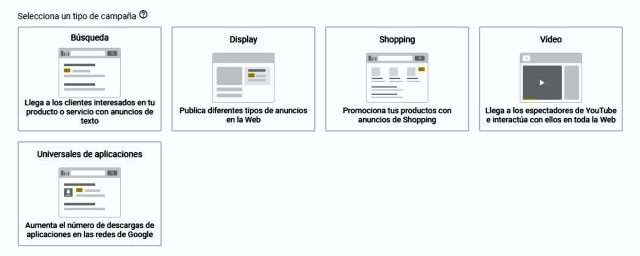
Los tipos de campañas de Adwords Google están relacionados a lo que quieres conseguir, el formato del anuncio y el lugar en el que se va a mostrar. El detalle de cada una de las opciones te lo comento a continuación.
#1. Campañas de búsqueda
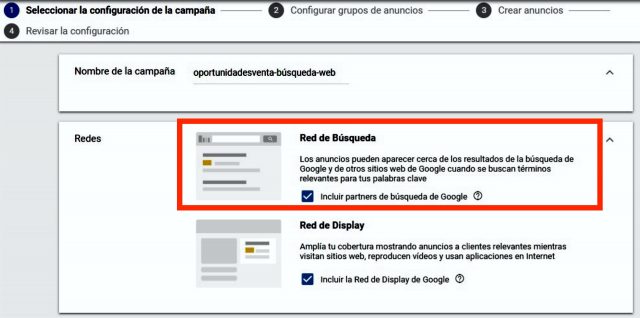
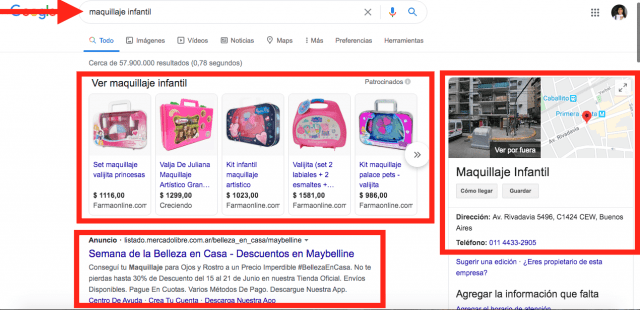
Es para que tu anuncio se muestre a través de la Red de Búsqueda de Google, es decir, en una página de resultados. Este tipo de campañas son las que están vinculadas con la necesidad de información porque los anuncios aparecen relacionados a una búsqueda del usuario.
Por ejemplo, si un usuario escribe el término “maquillaje infantil”, además de los resultados orgánicos, Google mostraría varios tipos de anuncios que aparecen o debajo o encima de dichos resultados orgánicos. Haz clic en la flecha que está sobre las fotos para ver un par de ejemplos.
#2. Campañas de la red de Display de Google Ads
Son los anuncios que aparecen en sitios web, medios de comunicación, videos de Youtube, Gmail o webs para móviles.
Se diferencia de la Red de Búsqueda porque el anuncio no proviene de una búsqueda. El usuario lo encuentra mientras ve otro contenido.
Sin embargo, Google permite hacer segmentaciones para que el mensaje se muestre a potenciales clientes en el momento y lugar adecuados. Una de las ventajas es que Google busca públicos con alto rendimiento.

#3. Campañas de Shopping
Permite mostrar tus productos con fotos, precios y un link que lleva directamente a la venta.

Pueden publicarse simultáneamente anuncios de Shopping y de texto, lo que permite duplicar el alcance.
#4. Campañas de video
Muestra anuncios de video tanto en YouTube como en la Red de Display de Google. Se puede permitir que el usuario tenga la opción de omitirlos o que tenga que verlos completos para seguir navegando en el contenido. Haz clic en la flecha de las fotos para ver un par de ejemplos.


#5. Campañas de aplicaciones
Son para quienes desean dar a conocer sus aplicaciones. Los anuncios se muestran en Google, incluidas las búsquedas, YouTube y Google Play.
Estas campañas no tienen diseño de anuncios originales, el algoritmo construye el anuncio con los elementos existentes. Debes proporcionar una oferta, un texto y el presupuesto inicial, indicando posteriormente las ubicaciones y los idiomas.

- Te recomiendo usar al menos una imagen horizontal, un video horizontal y uno vertical. Los sistemas de Google probarán con diversas combinaciones de elementos y publicarán con más frecuencia aquellos anuncios que cuenten con el mejor rendimiento.
Así se crean los anuncios en Google Ads (antes Adwords Google)
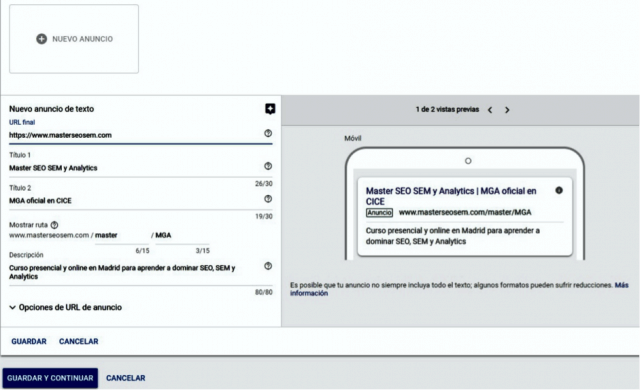
Los anuncios son el elemento clave en las campañas de Google Ads. Para no cometer errores, debes dedicarles tiempo. Por lo tanto, te recomiendo seguir los siguientes pasos:
Paso #1. Define el objetivo
Este paso se basa en la adaptación del anuncio según los resultados esperados. Los objetivos de este paso son los siguientes:
- Llamadas: este objetivo tiene como finalidad aumentar el número de clientes que te contacten ya sea para programar tareas, concertar entrevistas o cerrar ventas.
- Visitas: debes escoger este objetivo si tu propósito es aumentar las visitas a una tienda online. Te recomendamos tener contenido de valor que retenga a la audiencia.
- Acciones en tu sitio web: dirige el mayor número de usuarios a un sitio para que realicen alguna conversión, comprar, registrarse, descargar algo. En este caso, te recomendamos tener una landing page con un llamado a la acción muy claro.
Paso #2. Establece dónde se publicarán los anuncios
Esta fase de la creación del anuncio de Google Ads es conocida como Alcance y tiene como propósito establecer dónde se publicarán los anuncios, ya que esto puede hacerse a nivel local o mundial.
Te recomendamos configurarlo según tus características, de lo contrario desperdiciarás la inversión. Lo que quiero decir es que no te anuncies en Madrid, por ejemplo, si no puedes hacer entregas de tu producto o servicio en esa ciudad.
Paso #3. Crea el mensaje
Resalta lo mejor de la empresa en 3 oraciones breves y/o usando una imagen.
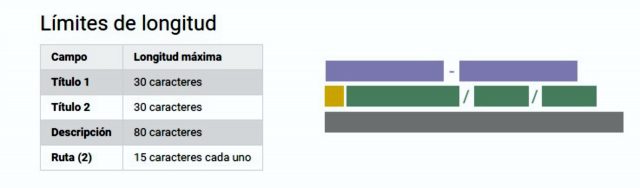
Paso #4. Fija el límite del presupuesto
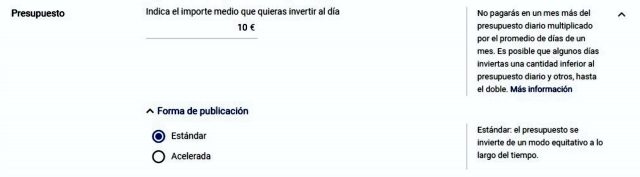
Google Ads permite establecer un presupuesto y ajustar o cancelar en cualquier momento. También te dará una estimación de resultados según la inversión que hayas realizado. Quédate con la tranquilidad de que tu campaña nunca excederá el límite que estableciste.
Paso #5. Publica los anuncios
Al lanzar tu campaña no pagarás cuando tu anuncio se muestre sino cuando una persona haga clic. Para mí, ese es uno de los grandes aciertos de Google Ads.
Idea de presupuesto mínimo para invertir en Google Ads
No hay una sola fórmula para determinar el presupuesto a invertir en Google Ads. Cuando ya has lanzado varias campañas, te vas dando una idea de con cuánto dinero obtienes las conversiones deseadas.
Sin embargo, el problema viene con la primera inversión. Te recomiendo probar con un presupuesto limitado en función de las palabras clave que quieras posicionar, de modo tal que si los resultados no son los esperados, no se produzca una pérdida que no se pueda soportar.
La inversión debe permitirte evaluar los resultados, de tal forma que vayas decidiendo dónde aumentar el presupuesto y dónde bajarlo o, incluso, pausarlo.
- Aunque influyen muchas variables para establecer un presupuesto mínimo para crear un anuncio de Google Ads, en NeoAttack hemos visto que se ubica entre los 1000 € y 10000 € mensuales.
Lo anterior quiere decir que tendrían que ser mínimo 33 euros al día. Si corres una campaña de 5 días, requerirás una inversión de 166 euros. Pero esto es cuando ya tienes campañas probadas, si es tu primera inversión y apenas vas a comenzar, destina menos dinero.
¿Qué es el Costo Por Clic (CPC) de un anuncio de Adwords Google?
El costo por clic (CPC) de un anuncio de Adwords Google se fija según el valor de la palabra clave que se utilizará, que suele ser más costosa en la medida de que sea má específica y pueda ayudar a obtener los resultados esperados con la publicidad de Google Ads.
Para esto se deben evitar las palabras claves genéricas como “limpieza” y por el contrario utilizar algunas más específicas.
Un claro ejemplo de esto sería “empresa de limpieza”, cuyo costo por clic es de 9,2 €, ya que se ciñe a una intención de búsqueda determinada y permite ubicar clientes que realmente necesiten tus servicios.
Además, las palabras clave con una mayor competencia tendrán un costo más elevado, ya que estas keywords se asocian a un ROI, es decir, al rendimiento obtenido de una inversión.
8 herramientas para medir el social media ROI.
Es importante definir adecuadamente la palabra clave manteniendo la relación de tu producto o servicio y las intenciones de búsqueda de los usuarios. Incluso, es válido echar una miradita en las palabras clave de la competencia.
Para hacer este proceso puedes utilizar algunas herramientas gratuitas como el Planificador de palabras clave de Google, Keyword Tool de Google, Ubersuggest de Neil Patel o incluso SemRush, que aunque tiene un costo es muy útil para conocer las palabras clave de la competencia.
Desde la agencia Google Adwords NeoAttack también consideramos que es útil contratar los servicos de una agencia de marketing online.
Principales errores al crear una campaña de Adwords Google
Estos son los 8 errores al crear una campaña de Google Ads que pueden afectar a tus resultados.
#1. No definir adecuadamente los objetivos de la campaña
Si defines bien los objetivos, tu anuncio se mostrará de la forma adecuada a las personas adecuadas. Por el contrario, si no, esto influye negativamente en los resultados, causando pérdidas de dinero porque se harán clics que no se transformarán en conversiones.
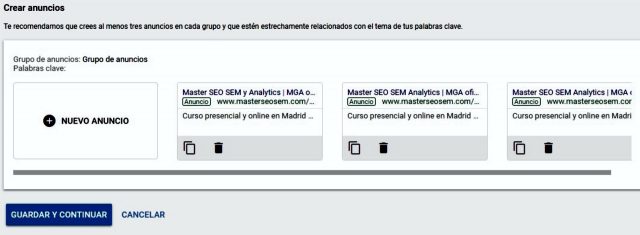
#2. No agrupar adecuadamente los anuncios
No debes poner todos los ads en un solo grupo de anuncios porque los mostrará sin un criterio incluso a los usuarios que no tengan una intención de búsqueda que se relacione contigo.
Pongo el ejemplo de una tienda de artículos para mujer que vende ropa, bisutería y bolsos. Aunque sean anuncios de la misma tienda, lo correcto es que haga tres grupos con las siguientes palabras clave:
- Bolsos para mujer, cómo combinar el bolso con el cabello, etc.
- Blusas de verano, pantalones vaqueros, etc.
- Collares de plata, accesorios de temporada, etc.
#3. Equivocarse en la segmentación de las campañas
Uno de los errores más frecuentes es el de no especificar los lugares donde se vende el producto o se presta el servicio.
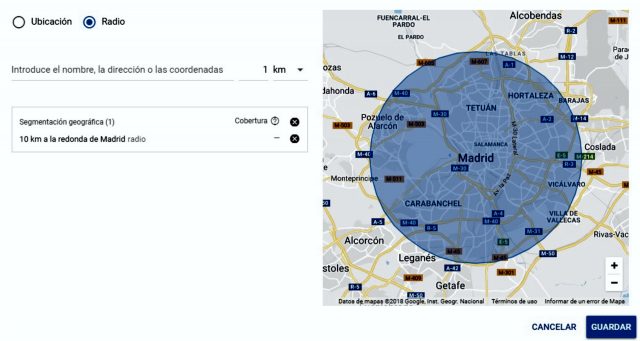
Si vendes “vestidos de fiesta para mujer” solamente en lugares pertenecientes a la Península de España, sin incluir a las Islas Canarias o las Baleares, tienes que indicar que en estas localidades no se muestre el anuncio.
Esto se debe a que si en la campaña de Google Ads no está claramente especificada esta información, los anuncios también van a aparecer en los resultados de búsqueda de las SERPs de estas áreas geográficas. Cuando un usuario intente comprar, se encontrará con la desagradable sorpresa de que no puede hacerlo.
Al igual que con los errores al crear una campaña de Google Ads descritos anteriormente, en estos casos también se generarán pérdidas de dinero por clics y además, la imagen de la tienda online puede ir adquiriendo una reputación negativa.
Por otro lado, las extensiones de números telefónicos que se agregan en las campañas también son uno de los factores en los que hay que poner especial atención.
Principalmente cuando se trata de negocios que prestan servicios de comida a domicilio es importante agregar el horario en el cual se podrán hacer pedidos.
Si esta información se omite, se podrían perder los clics realizados en horas en las cuales no se venda la comida a domicilio.
#4. No emplear la concordancia de frase adecuada
La concordancia de frase permite que Google muestre los anuncios solo cuando la búsqueda incluya la frase exacta o algunas muy parecidas, por ejemplo “vestidos de fiesta para mujer” o “vestidos de fiesta de mujer”.
Otras concordancias que puedes elegir son:
- Concordancia exacta: el anuncio se mostrará a quienes escriban la frase exactamente igual o las que conserven el mismo significado, por ejemplo “vestidos de fiesta para mujer” o “vestidos fiesta mujer”.
- Concordancia amplia: incluye todas las variaciones en lo que respecta a una búsqueda, incluso sinónimos, errores ortográficos, diferentes conjunciones. Por ejemplo: “vestidos de fiesta para mujer” y “vestidos para fiestas mujeres”.
- Modificador de concordancia amplia: muestra el término exacto con alguna modificación. Ejemplo: “vestidos de fiesta para mujer”, ”renta de vestidos de fiesta para mujer”, ”dónde comprar vestidos de fiesta para mujer”.
- Palabras clave negativas: elimina palabras clave relacionadas que no te funciona que aparezcan, por ejemplo si tú no vendes ese producto. Una palabra negativa sería “vestidos de fiesta para mujer de talla XXL”, en el caso de que no tengas ese producto.
Para elegir la mejor concordancia, lo que te recomiendo es iniciar con una concordancia de frase amplia. Al hacer un seguimiento, si detectas muchas variaciones irrelevantes, entonces agrégalas como palabras clave negativas para detener las que no generen conversiones.
#5. No elegir el tipo de campaña correcto
Funciona el mismo criterio que cuando te equivocas en los objetivos. Si lo haces mal, puedes desperdiciar tu inversión así que antes de lanzar una campaña, define lo que quieres conseguir.
#6. Si tu página no tiene cookies la pueden penalizar
El hecho de que una página web a la que se dirige el anuncio no contenga mensajes de cookies puede influir en los resultados de la campaña de Google Ads, por lo que es muy importante cerciorarse de que el sitio web cuente con esta información.
#7. Evita los PopUp
Los PopUp son ventanas emergentes que en ocasiones se emplean para mostrar la publicidad de Google, sin embargo, pueden aumentar el riesgo de que los usuarios abandonen nuestra página, razón por la que no se deben utilizar este tipo de prácticas.
#8. Cuida el tamaño de los anuncios + guía de tamaños
El diseño de los anuncios es uno de los aspectos más importantes que puede generar errores al crear una campaña de Google Ads, ya que si son de un tamaño muy grande Google los podría penalizar porque considerará que es una práctica ilícita para que los usuarios accedan involuntariamente al sitio web al que dirigen los anuncios.
Los tamaños de anuncios más efectivos son:

300 x 250
Tienen la forma de un rectángulo mediano y aceptan tanto el formato de texto como el de imagen, lo que hace que se vean bien en dispositivos móviles. Suelen ser muy efectivos en la publicidad de display al final de los artículos o si se insertan entre el contenido de un texto.
336 x 280
El rectángulo es más grande que en el anuncio anterior. Ten en cuenta que no se visualiza en teléfonos móviles.
728 x 90
Es un formato “banner” más clásico. Idóneo para colocarlo en las cabeceras de las páginas, por encima del contenido o incluso en foros. Tampoco se muestra en las versiones móviles.
320 x 100
Usado para banners, es un formato perfecto para los dispositivos móviles. Su altura hace que sea fácil de ver en pantallas chicas.
300 x 600
Tiene un formato más grande y suele ser uno de los más funcionales, ya que motiva a que el usuario interactúe, destacándose por su gran impacto visual. Regularmente se colocan en los laterales de las páginas.
Conclusiones: bien ejecutado Adwords Google es una buena idea
Google Adwords es una de las formas más eficaces de conseguir conversiones por parte de los usuarios aumentando la venta de productos o servicios ofrecidos, siempre y cuando se lleve a cabo un correcto proceso de optimización.
De este modo, el uso de Google Ads puede ser de mucha utilidad para lograr conseguir objetivos de un modo más rápido y eficiente.
Sin embargo, es importante verificar que no se cometa ninguno de los errores mencionados al crear una campaña de Google Ads.
Me interesa tu experiencia, ¿qué errores has tenido al lanzar campañas de Google Ads y qué aprendizaje te dejaron?
from Socialancer https://ift.tt/32d8FXH
via
How to A/B Test CTAs Like HubSpot Experts
The call to action is a put up or shut up moment that can turn curiosity into a legitimate business opportunity. It’s the bridge between visitors and leads — a point of entry that allows you to capitalize on the web traffic you generate.
Despite its potentially massive business implications, your average CTA is generally pretty small and unassuming — maybe a button or a line of text. It might seem like the blog post or product page the CTA is placed on is all that matters when it comes to how many leads it ultimately generates
It’s easy to think that the copy, color, or placement of a call to action doesn’t really matter, but that’s not the case. A lot goes into creating an effective CTA. The best ones have been carefully crafted and consistently tested. Here, we’ll focus on that process.
We’ll learn how to A/B test CTAs successfully and get some insight on the subject from some expert HubSpotters.
1. Decide on a specific factor you want to test.
A/B testing isn’t supposed to be some indiscriminately applied process. In this context, it’s designed to help you best optimize specific aspects of your CTAs. That means conducting a thoughtful, effective A/B test rests on you definitively selecting the individual variables you want to better understand.
Are you trying to zero in on the best word-choice for your CTA? Are you looking for its optimum visual characteristics? Do you want to identify where its most effective placement on your blog posts might be?
Try to lock in on one factor — above all others. You don’t want to A/B test multiple CTAs with different shapes, colors, and copy all at once.
2. Create multiple, distinct CTAs.
There’s a reason A/B testing is called “A/B” testing — not just “A” testing. The concept itself rests on comparing multiple options, so naturally, if you want to A/B test CTAs, you need more than one.
There are a variety of variables you can use to create unique, distinguishable CTAs, including color, position, size, shape, and wording. Here’s an example of the components of an A/B test with multiple variants HubSpot used to test the efficacy of some anchor text CTAs.
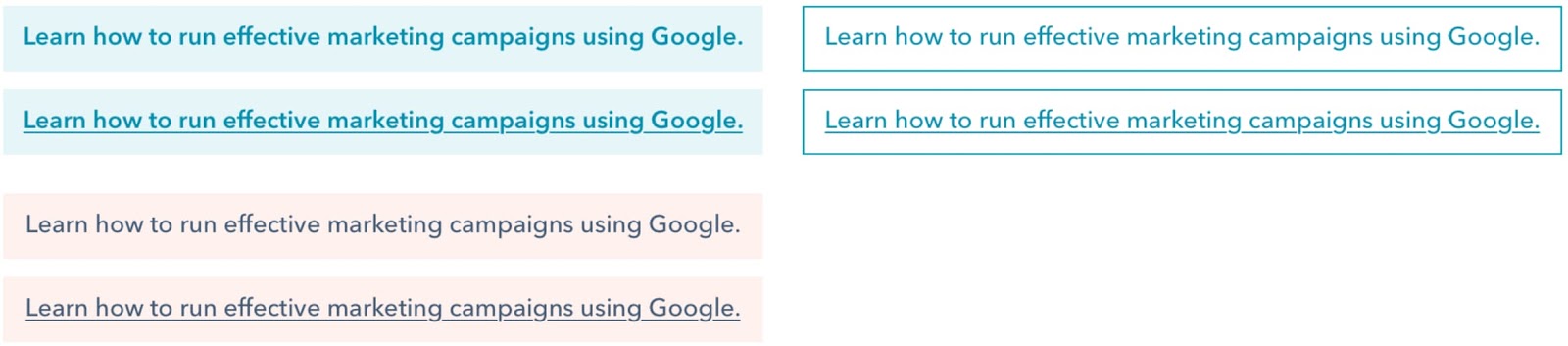
This A/B test took fundamentally similar CTAs that conveyed the same information in unique ways. It leveraged unique — but not outrageously different — options to help it hone in on the slight distinctions between choices blog readers would be most receptive to.
3. Measure your Results
Identify a date range you’d like to use as your reference point for your experiment. Once you’ve carried out your testing across that period, take the time to analyze and understand your results.
Get a feel for how your various choices performed in terms of metrics like overall views, clicks, and submissions to see which of your CTAs are garnering the most attention and converting the best. Here’s an example of what that looks like from HubSpot’s own experiment with including brackets in anchor CTAs.

Once you have your results, you can start to identify the more effective aspects of each option and start to piece together CTAs that will consistently deliver the results you need.
How to A/B Test CTAs like HubSpot Marketers
Avoid testing multiple variables at the same time.
It’s recommended that you don’t employ radically different variations of the same CTA when A/B testing. The hope in carrying out these tests is to identify the specific factors that make your CTAs most effective.
If you’re comparing CTAs with various aspects when A/B testing, your results might be muddled. You won’t have a clear idea of which aspects are most effective — you’ll lose out on the ability to identify the factors worth applying to your CTAs going forward.
As Carly Stec, Team Manager for Blog and Academy Acquisition at HubSpot, suggests you “avoid testing multiple variables at the same time.” She stresses the value of keeping things straightforward.
She discussed a recent series of A/B tests her team ran for HubSpot’s thank-you pages that involved changing the messaging, placement, and visuals of a CTA. She noticed strong increases in conversion but didn’t have a firm picture of the key factor at play, “While we saw a strong increase in conversion, we were left wondering, what exactly did the trick? Was it one of the elements or all three?”
Her team opted to partition the tests to identify what was making the difference. As she put it, “We reran the test as three separate single variable tests and found that placement actually had the most influence on conversion. The lesson? Keep it simple so success is easier to trace.”
Treat it as a marathon — not a sprint.
Slow and steady — that’s the name of the game when it comes to A/B testing CTAs. It’s a piece-by-piece process. Your most successful CTAs will be the sum of several minor adjustments, often carried out over somewhat substantial periods of time.
As AJ Beltis, HubSpot Marketing Manager for Content and Acquisition, put it, “Don’t be afraid to start testing incremental changes.” Minor tweaks to language, visual characteristics, placement, and other factors wind up making for the most effective CTAs. If every A/B test you run for your CTAs is based on a major overhaul, you might pass over the aspects that were working best for you.
Beltis went on to discuss an experience with some tests he and his team ran for the HubSpot blog, “For example, we did an entire series on testing our anchor text CTAs. While we saw marginal increases from every test, it was the combination of these results that resulted in the optimal version of this CTA, which has resulted in a significant increase in annual leads from the blog.”
What HubSpot Learned From A/B Testing CTAs
If there’s one lesson that HubSpot has taken away from A/B testing CTAs, it’s that there’s always room for improvement. A/B testing CTAs is an ongoing process. As Stec put it, “At HubSpot, we constantly iterate on our tests to make sure we’re not settling for the winner. Just because something won once, doesn’t mean it can’t be beat. Keep going.”
A/B testing CTAs is about zeroing in on the perfect option — the caveat here is that perfection isn’t real. Always aspire to consistently improve your CTAs, and A/B testing is central to that process.
It’s important to maintain focus and effort when it comes to this process, and Stec captured the essence of that mindset when she said, “Don’t underestimate the importance of persistence in A/B testing.”

How to Create LinkedIn Videos That Work
Want to use more video in your LinkedIn marketing? Wondering what kind of LinkedIn video to create? In this article, you’ll discover how to produce LinkedIn video that connects with your audience. #1: Begin With a Video Content Audit Research shows that expertise and competence are two of the critical components people require to trust a brand, […]
The post How to Create LinkedIn Videos That Work appeared first on Social Media Examiner | Social Media Marketing.
from Social Media Examiner | Social Media Marketing https://ift.tt/2ZrwTMb
via socialmediaexaminer
HubSpot Marketers’ Favorite Integrated Marketing Campaigns
A tv show is returning, and I am pumped. “The Umbrella Academy” is a sci-fi show based on the comic book of the same name, and it’s nothing short of fantastic.
Superheroes, comedy, a talking animal, and saving the world from imploding — what more could you want?
When I first learned about the season, I was scrolling Twitter and came across the video announcement. I was stoked. A little later, I decided to check Facebook, and saw promo stills for the new season — only building my excitement.
A couple of weeks later, I saw the official trailer for the first time on Instagram, and again on YouTube. Up until that point, I’d come across promotional content from three different channels for the new season.
This rollout has become one of my favorite integrated marketing campaigns of 2020. The Netflix team is pulling out all the stops across multiple different fronts to keep users excited about the premiere.
It’s working for me — I can hardly wait. And in this post, we’re going to go over other integrated marketing examples that were extremely effective for them.
HubSpot’s Favorite Integrated Marketing Campaigns
Integrated marketing is any marketing campaign that uses multiple channels in execution. For example, you might see a popular new donut flavor in a commercial, then drive past the donut shop to see posters of the donut. And if you flip through Instagram once you get to your destination, you might see a GIF on your feed, displaying the donut.
This style of marketing is great for boosting leads and brand awareness. Using multiple sources to deliver the same campaign diversifies the audience that interacts with its content. Let’s look at some recent integrated marketing campaigns that delivered a great experience for customers and leads alike.
1. Hulu’s HAHA Awards
Channels: Twitter, LinkedIn, YouTube, Website
One of my favorite integrated marketing campaigns to come along is the launch of Hulu’s HAHA Awards. HAHA is a clever acronym, standing for “Hilarious Animated Hulu Awards,” which I love.
Initially, I saw the commercial during a regular ad break while watching — of course — Hulu:
Because there’s no awards show for animated content, the team at Hulu decided to change that — and get fans involved. Fans can vote for the awards on Twitter and Hulu’s website.
I appreciate that anyone with a Twitter account can participate in voting, regardless of if they are Hulu customers. Some of the categories are popular tv shows, like Archer and Bob Burgers, so the masses can vote. Additionally, people without a Twitter or Hulu account can vote, just by visiting the website.
The tactic of using YouTube to introduce the campaign, as well as alternate methods of voting, make this campaign a chance for Hulu to delight customers and earn more quality leads from social media.
2. Victoria Monet’s “Audience”
Channels: Instagram, Facebook, Billboards
For new single, “Experience,” R&B singers Victoria Monet and Khalid collaborated with Spotify for a release campaign. The campaign included online and in-person marketing tactics, and is the favorite campaign of staff writer Jay Fuchs.
In Canada, there was a billboard put up in Toronto, promoting the song’s Spotify release. In response, Monet posted a picture on Instagram to share with her fans and promote the single:
The use of online and in-person marketing methods makes this integrated campaign one that can be seen by eyes from anywhere. From the billboard in Canada, to international Facebook and Instagram fans, the release of “Experience” was anticipated globally. In fact, in one month, the single has become Monet’s most popular song on the streaming service.
3. Gillette, “The Best Men Can Be”
Channels: Website, YouTube
“In 2019, Gillette launched their campaign, “The Best Men Can Be”. The campaign included an inspiring video, a landing page that celebrates male advocates and leaders in the community, and a hashtag, #thebestmencanbe, to encourage user participation across social channels,” says HubSpot’s Marketing Blog Editor, Caroline Forsey.
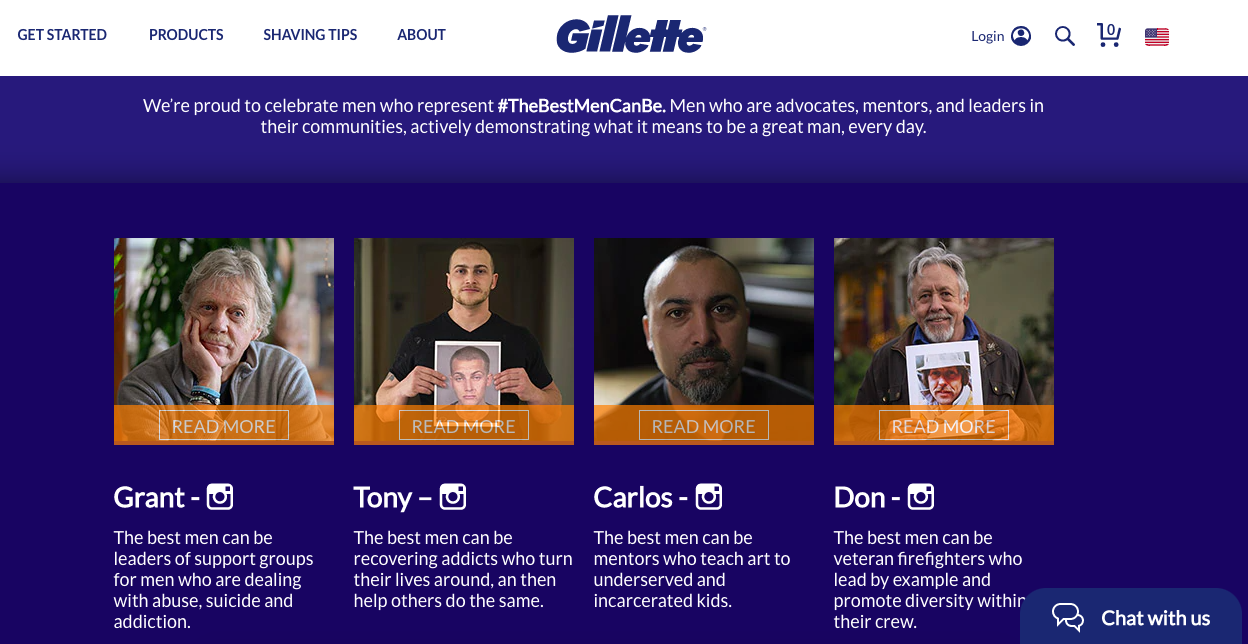
“The campaign, created in response to the #metoo movement, urged men to hold themselves to a higher standard,” says Forsey. In the corresponding ad for the movement, viewers are shown hypothetical real-life instances of men stepping in to be themselves, and making positive change in their community. To heighten awareness of the movement, the landing page highlights real accounts of men upholding the hashtag Gillette created.
“While the campaign received some backlash from both stakeholders and consumers, I think it was worth the price because it redefined the shaving brand as a relevant, values-oriented brand. For me personally, I shared the ad with all my male friends and family members, and it sparked a discussion — which, really, is what marketing is all about,” Forsey commented.
Gillette’s tactic of getting their customers involved proved to be successful in the moment and long-term. Discussions, like the one Forsey had with males in her life, were happening nationwide; In fact, my university class had one about the campaign. This integrated campaign, boosted by real accounts, was proven to be not only successful, but valuable.
4. REI, #RecreateResponsibly
Channels: Website, Instagram
Outdoor activity is at the core of REI’s products. REI sells camping essentials, such as tents, clothes, and insulated containers. In 2020, REI partnered with several groups in Washington state that aim to preserve wildlife and nature, making it the favorite campaign of service blog manager, Clint Fontanella.
Outdoor Alliance, The Outdoor Industry Association, and national parks came together for the #RecreateResponsibly campaign. The point of which was to educate the public about how to stay safe when venturing outdoors, with the main content player being graphics similar to the one below:
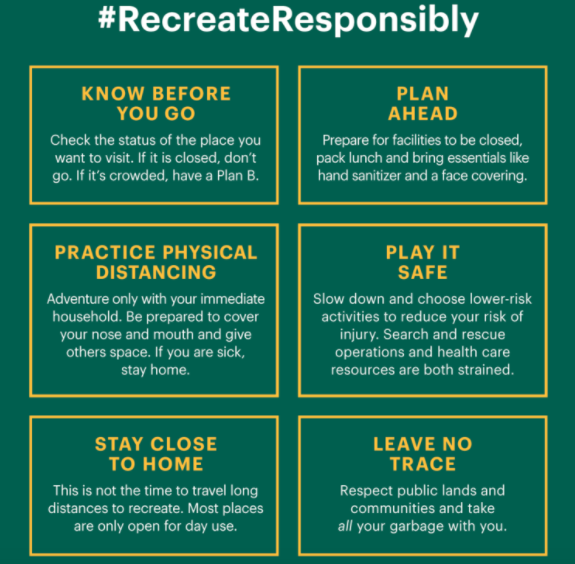
This graphic was shared on social media to spread awareness of tips to responsibly venture outdoors to avoid health concerns. #RecreateResponsibly‘s hashtag asks followers to share the tips in real life situations, shared by REI’s Instagram.
With the hashtag and partnerships, the campaign is also boosted by related blog posts on REI’s website. Posts like this one offer ways to stay safe while traveling.
The hashtag has been used by The National Park Service, Colorado Parks and Wildlife, and Los Angeles National Forest, and brings awareness to large audiences. The partnerships and REI’s content share an educational message and an interactive component — making this campaign diverse and engaging.
5. Melt Cosmetics, “She’s in Parties”
Channels: Website, Instagram, Facebook
“She’s in Parties” is the name of an eyeshadow palette from Melt Cosmetics. Says staff writer Rebecca Riserbato, “The purple palette sparked a hashtag of the same name on Instagram. On the landing page for the collection, there’s a section dedicated to Instagram posts with the hashtag.”
The campaign inspired a purple theme, which took over the company’s Facebook and Instagram accounts. Along with this social media content, influencers who were sent the palette began to upload their reviews on YouTube.
For this launch, a variety of social tactics were used. A matching social campaign, user-generated hashtag, YouTube recommendations, and a revolving landing page were all contributions to where the campaign was distributed. When you know where your audience spends their time, like the team at Melt, you can reach them with a diverse, omnichannel strategy.
6. Brew Dr. Kombucha, “Love Wins”
Channels: Website, Instagram
“In May 2020, Brew Dr. Kombucha released its signature kombucha with limited-edition colorful, rainbow-wrapping for Pride Month,” Forsey recalls. “The wrapping has the lifeline number to The Trevor Project printed directly on it — the company partnered with The Trevor Project and supports the organization through proceeds of its limited-edition kombucha.”
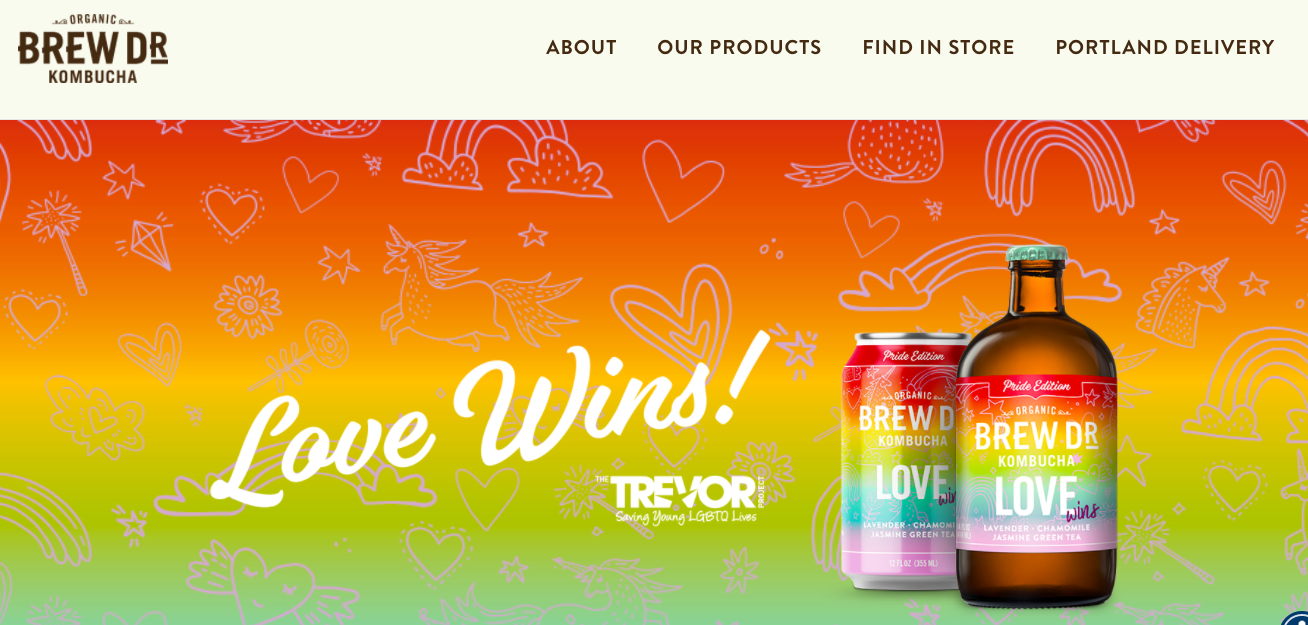
“Along with the limited-edition wrapping, the company created a dedicated landing page for #LoveWins, and supported Pride Month with the #LoveWins hashtag across its social channels.”
Forsey continues, “Ultimately, I chose this campaign as one of my favorite integrated campaigns of 2020 because I was inspired to see this brand uplift and inspire communities while giving proceeds back to an incredibly worthy cause.”
The brand chose a social movement that was important to them, Pride, and celebrated it with this integrated campaign. This tactic brings awareness to a social cause, a respected organization, and enhances a celebration.
7. The New York Times, “The Truth Is Hard”
Channels: Commercial, Facebook, Billboard
In early 2018, newspaper The New York Times was struggling. With dwindling subscriptions and dwindling trust in the news from the general public, the team behind the famous publication had to figure out how to build widespread trust.
That’s where “The Truth Is Hard” came in — It was a campaign designed to offer transparency. “I think the best advertising not only gets you to pause and pay attention in the moment, but also encourages the viewer to take action and learn more after the fact,” says Alicia Collins, senior brand manager.
“The New York Times’ ‘The Truth Is Hard’ campaign does that. It tells a clear and impactful story, and demonstrates the value and importance of journalism right away.”
Following a tribute to journalism at the 2018 Oscars, the campaign began. The Times aired a minimalist film to display the clarity of newsprint, and challenged viewers to think about what truth means to them.
Refugee crises, sickness, and wars — the second phase dove deep into conveying what journalists endure in order to deliver the most accurate coverage. And, with a paid media campaign on Facebook, Twitter, and Instagram, all of this content was broadcasted for the world to see.

This campaign earned the Times their highest number of new subscriptions since the paywall started, increasing signups by 100%. The multiple channels used by the news source to restore their image to the public worked, and made this integrated campaign a win.
I’ll have to wait a few more weeks to see the return of The Umbrella Academy. I’m sure until then, I’ll see more diverse social media content. In the meantime, what are some of your favorite integrated marketing campaigns — did they make the list?

GroovePages – La alternativa gratuita para crear Landing pages
GrooveFunnels no solo es un creador de embudos de venta y sitios web. Es un software de marketing con opción gratuita que te permitirá administrar tu eCommerce con integraciones como venta de productos UpSell con solo un clic. Además, el editor de sitios online y funnels funciona con el sistema de soltar y arrastrar, por lo que es accesible incluso para novatos.
Demo de GrooveFunnels
Qué es GrooveFunnels
GrooveFunnels es una completa suite para eCommerce que ofrece creación de sitios web, embudos de venta, una plataforma de email marketing, programa de afiliados y mucho más. Algunos de sus productos todavía están en fase de preparación, pero ya hay varias herramientas funcionando con éxito. A continuación las detallamos:
#1. GroovePages LITE contiene una plantilla para crear cualquier funnel de ventas. Tiene un sistema de bloques que hace que sea muy fácil de utilizar. Puedes crear un total de 3 proyectos de sitio o 3 embudos con la misma cantidad de dominios personalizados.
#2. Groove Pages Pro se incluye en la licencia Platinum de GrooveFunnels. Tiene un gran número de plantillas para sitios web y embudos de venta, además constantemente irán agregando más. Te da hosting de por vida, dominios personalizados y la posibilidad de hacer proyectos de forma ilimitada.
También obtendrás imágenes libres de derechos, PopUps y elementos de diseño ilimitados.
#3. GrooveSell es un carrito de compra completo y robusto.
#4. GrooveAffiliate es un programa de afiliados que paga comisiones a quien comercialice los productos de la suite de GrooveFunnels.
#5. Groove Kart es una plataforma que compite con Shopify.
Los productos que próximamente se incorporarán son:
- GrooveMail: plataforma de email marketing.
- GrooveMember: plataforma de membresías para crear tu propia escuela online.
- GrooveVideo: plataforma de alojamiento de videos tipo Vimeo o Wistia.
- GrooveWebinars: dos productos en uno porque permite hacer webinars en vivo y automáticos.
- GrooveBlog: un hosting más robusto que WordPress para alojar tu blog.
- GrooveDesk: plataforma de soporte que te permitirá gestionar reembolsos.
- GrooveQuiz y GrooveSurvey: para captar leads.
Qué es GroovePages en imágenes
Precios de GrooveFunnels
from Socialancer https://ift.tt/3iSKFyS
via
How to Use Instagram Stories to Promote Your Products
Want to promote your products and services with Instagram Stories? Looking for actionable tips to create intrigue and excitement via Instagram Stories? In this article, you’ll discover how to use Instagram Stories features to create a sense of urgency and leverage scarcity for limited products or offers. To learn how to use Instagram Stories to […]
The post How to Use Instagram Stories to Promote Your Products appeared first on Social Media Examiner | Social Media Marketing.
from Social Media Examiner | Social Media Marketing https://ift.tt/3eq5UVe
via socialmediaexaminer
Integrations: The Newest Addition to Your Marketing Ops
Marketing isn’t just about campaigns, content, and creativity. There’s a whole lot of “getting things done” that needs to happen behind the scenes for campaigns to roll out on time and performance to scale.
This is where marketing operations comes in. Also called marketing ops or MOps, marketing operations is how a marketing team is run. It’s the processes, technology, data, and people that power a marketing strategy.
Of these key pillars of marketing operations, data sounds like the most abstract one. But getting the data right in your marketing ops is crucial.
How do you do this? By cleaning, organizing, and enriching the data in every app as well as integrating data between your apps.
An increasingly important role for any team or Marketing Operation Manager is maintaining data quality and connectedness. This not only includes marketing apps but also bridges to other departments in the organization.
Let’s dig into how to make this happen so you can scale the impact of your marketing ops.
What Are Integrations?
Integration brings different pieces of software together and enables their data to interact.
When done well, integrations enable your marketing team to:
- Create the most holistic marketing ops strategy across your software ecosystem.
- Allow data to seamlessly flow between key platforms and enrich each one.
- Automate more tasks and free up time.
- Provide stronger customer experiences with more accessible and insightful data.
- Remove data silos and other barriers to collaboration.
- Deliver accurate insights, reporting, and decision making.
As an example of a valuable integration, think of your CRM and email marketing app. A good email list is a marketer’s most treasured possession, but for your email marketing to be successful, you need accurate and in-depth insights into each contact’s interests, behavior, and communication preferences. You can solve this by integrating data from your CRM.
The integrations that matter most to your marketing operations depend on your organization and industry.
That said, there are certain integration best practices that businesses with strong marketing operations follow. Let’s explore those.
1. Understand the Ecosystem Your Marketing Data Lives in
A strong marketing stack that your team loves using is a pivotal part of your marketing operations management.
This can include an all-in-one marketing platform or individual systems for:
- Content management
- Marketing automation
- Lead Generation
- Email marketing
- Analytics and reporting
- Project management
- Communication
One of the first steps to perfect your marketing ops is understanding the ecosystem your marketing data lives in. Some valuable questions to ask are:
- What data are we collecting in each app?
- How should data interact with other apps?
- How can we sync apps to enrich the data in each one?
With answers to these questions in mind, you can decide how best to integrate your apps and allow data to flow between them.
2. Ensure Clean, Up-to-date Data in Every App
To get the best results from integrations, you need high-quality data in every app. Dirty data in one app is bad, but the negative impact is multiplied for every new app it enters.
To prevent this, clean up the data in every app before adding new integrations. This includes:
- Duplicate contacts
- Inaccurate contact data
- Unsubscribes
- Bounced email addresses
With clean data in every app, you can seamlessly integrate your marketing platforms and create the most streamlined and effective marketing ops.
3. Make Your CRM the Heart of Your Marketing Ops
There’s a high chance your sales team is already using a CRM to store all of the key insights about your customers and their interactions with your business. That’s because centralizing your data in your CRM is one of the best things you can do for strong contact management.
One way to test the strength of your CRM is by checking if anyone in your business can answer questions about a contact and their interactions with your business – whether in sales, support, marketing, or billing – just by glancing at their contact record.
To make this happen, you can use integration to bring data from other apps into your CRM. The inverse is also valuable: syncing your CRM data with your marketing apps to enrich the data in those places.
Alongside syncing names and emails, you can choose which other information makes sense to have available in your other marketing apps. This could include:
- Lead status/stage
- Location
- Industry
- Customer Success Owner
- Business size
- Communication preferences
4. Use Contact Segmentation
Segmenting your contacts using lists, tags, and properties is a fantastic way to deliver the most personalized customer experience. But it’s also a key ingredient for effective integrations.
With an iPaaS (Integration Platform as a Service) solution like PieSync, you can create customized workflows and sync data based on specific conditions. That way, you maintain the segmentation of your database across tools. These specific conditions could be configured according to If-this-then-that rules. For instance:
- IF a contact’s Lifecycle Stage is ‘Lead’
- THEN sync the contact to your email marketing tool and add to the list ‘List of leads’
If the contact stops being a customer, you can automatically reflect that in your email marketing app, remove the ‘Customer’ tag, and no longer send relevant communications.
To create powerful if-this-then-that rules, first segment data in individual apps, and then create connections across your ecosystem.
5. Create Strong Alignment With Sales Via Integrations
Your marketing operations strategy isn’t just about marketing. It’s essential to look at the other teams in your organization and understand how to create the strongest alignment.
The most important bridge for marketers to maintain is with sales. By working collaboratively instead of in silos, marketers can deliver the perfect leads for sales and both teams can share what’s working as well as opportunities.
To optimize your bridge with sales, you can integrate your marketing software with sales apps such as:
- Sales CRM
- Contact Management
- Live chat software
- Sales automation software
- Integrations between your marketing apps and customer support software
With your marketing and sales apps in sync, both teams are in the best position to exchange data, deliver unified reporting, and do their best work both independently and together.
6. Integrate Customer Data with Your Marketing Apps
Although marketing usually has the strongest alignment with sales, make sure not to forget about your service team.
If your data is siloed, you run the risk of the nightmare scenario of sending a promotion offer to a customer who subscribed a week ago at full price.
With integrated apps and data, you can keep your customers in mind for every marketing campaign and create personalizations based on the products, services, and upgrades that are most relevant to them.
You can align your Marketing and Service team with either:
- All-in-one CRM with support functionality
A good starting point is to make sure that all customer interactions and support requests are synced with your CRM. Marketers can then easily use this information to personalize campaigns and workflows.
How to Measure the Effectiveness of Your Integrations
You can measure the impact of integrations in your marketing operations strategy by asking if:
- Your data is accurate, enriched, and reliable in every app.
- You have a centralized contact database that quickly gives you a 360-degree view of each contact.
- Your marketing team is aligned with sales and can quickly collaborate.
- You have removed all data silos.
- You can personalize marketing campaigns for customers or exclude them from certain messaging.
- You have clear marketing reporting that brings together data from all channels and apps and highlights key areas for optimization.
As you optimize your marketing operations, remember to look at the holistic view of your marketing stack and the individual pieces of the puzzle. By paying attention to the two in tandem, you can understand where to connect the dots for the best overall outcomes in your marketing team and throughout your organization.

Visual Design for Non-Designers
Want to create better visuals for your marketing? Looking for tools and tips to help you easily create visual content? To explore visual design for non-designers, I interview Donna Moritz on the Social Media Marketing Podcast. Donna is a visual content strategist and founder of Socially Sorted. Her course is Visual Content Made Easy. Donna […]
The post Visual Design for Non-Designers appeared first on Social Media Examiner | Social Media Marketing.
from Social Media Examiner | Social Media Marketing https://ift.tt/2W2MC1O
via socialmediaexaminer
How to Make an Ideal Kanban Workflow for Your Team
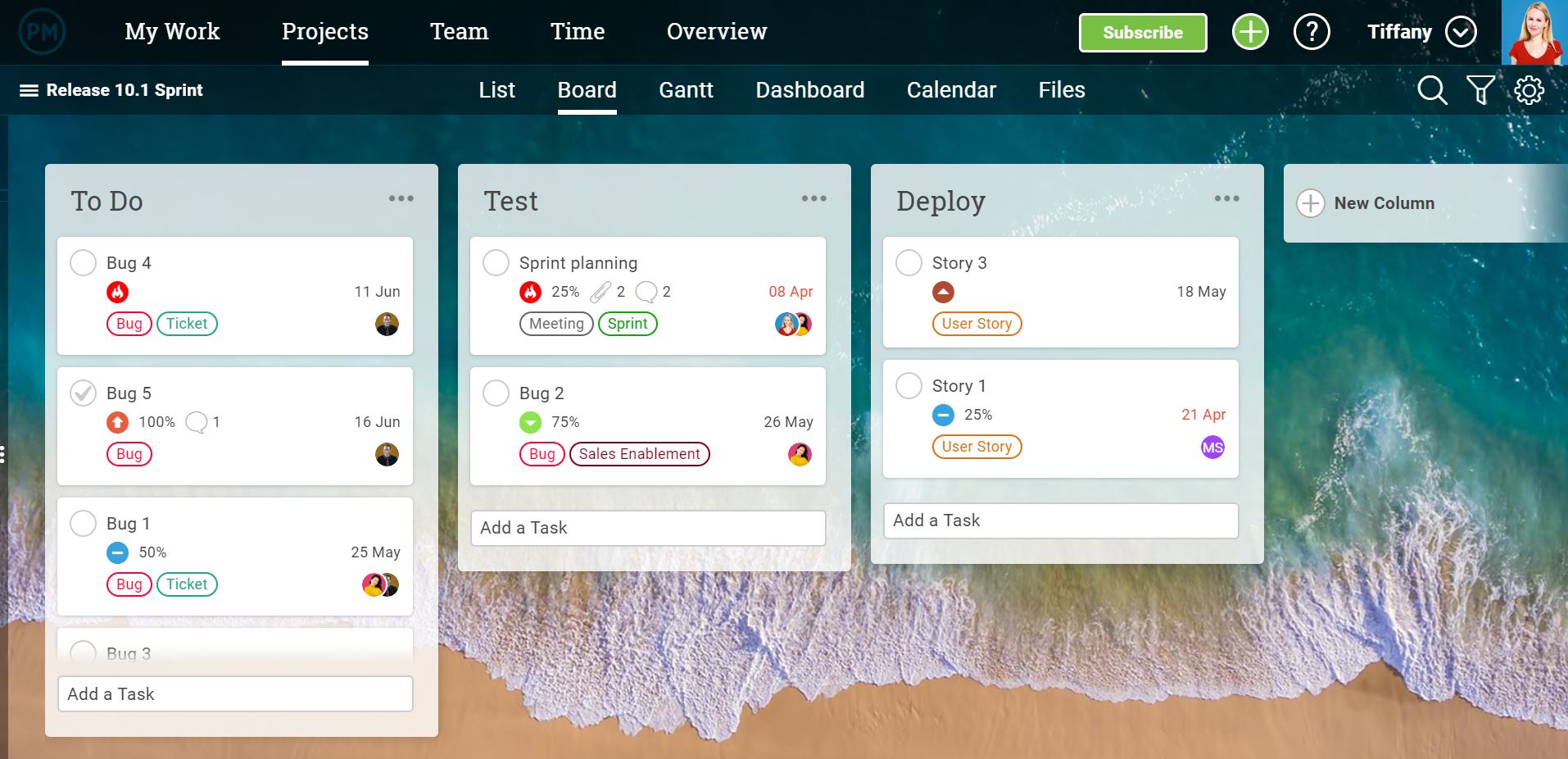
How HubSpot Adjusted Our Reporting Process After GDPR Changed Its Cookie Consent Laws
This post is a part of Made @ HubSpot, an internal thought series through which we extract lessons from experiments conducted by our very own HubSpotters.
GDPR (General Data Protection Regulation) is an EU law that protects the personal data of EU users and regulates how businesses process and handle this data.
GDPR has been around since May 2018, and per the European Council ruling on October 1, 2019, businesses — including HubSpot — can only drop cookies once a user has given explicit consent (i.e., clicked “Yes” on a cookie banner).
In short, you can’t imply consent if users take no action on the banner and continue to browse the site. Before a site visitor has taken any action, you can only drop “strictly necessary” cookies — cookies that make your website function, such as a shopping cart.
Once the new GDPR ruling was introduced, businesses scrambled to understand how to become GDPR-compliant. This process raised another concern about how the regulation would impact the overall reporting process.
The HubSpot analytics team was no exception when it came to these concerns. We had to brainstorm innovative solutions that could help the team better track users’ data to provide a more intuitive website experience — while still remaining GDPR-compliant.
Before GDPR, HubSpot used Google Analytics (GA) for website reporting and insights for all HubSpot domains — specifically, to track various metrics related to page sessions, button clicks, freemium signups, campaigns, A/B testing, and more.
On October 26, 2019, in response to GDPR, HubSpot implemented a new and improved cookie banner, making our sites fully compliant with the GDPR and cookie consent laws in the EU. This action meant we couldn’t gather data on EU users that accessed a HubSpot website until they explicitly provided consent by clicking “Yes” on the cookie banner.

The table below highlights how HubSpot’s traffic was impacted by GDPR. These calculations are estimates based on how many users visit the HubSpot domains from both within and outside the EU.
|
Domain |
% Traffic from Outside EU |
% Traffic From EU |
Impact on Overall Traffic Per Google Analytics |
| HubSpot.com | 83% | 17% | Drop by 15-20% |
| HubSpot.de | 13% | 87% | Drop by 60-70% |
| HubSpot.fr | 19% | 81% | Drop by 55-65% |
| HubSpot.jp | 99.86% | 0.14% | Drop by 5-10% |
| br.HubSpot.com | 97% | 3% | Drop by 15-20% |
| HubSpot.es | 86% | 14% | Drop by 12-17% |
How did we calculate this multiplier? Download and copy this Google Sheet to learn more.
How HubSpot Adjusted Our Reporting Process After GDPR
The HubSpot Analytics team decided to use a mixture of HubSpot Analytics tools and Google Analytics to adjust for the new GDPR policies. Here’s how:
- We used HubSpot Analytics as a source of truth for reporting as HubSpot is GDPR-compliant
- We used Google Analytics to see all data trends.
- We used a multiplier to estimate the traffic we’d inevitably lose and not be able to track in either HubSpot Analytics or Google Analytics.
According to data around user interaction with the cookie policy banner from the HubSpot Google Analytics account, around 31% of users typically accept, 6% decline, and the rest (63%) take no action on the cookie banner. This was an eye-opener as we did not expect that the majority of users didn’t interact with the cookie policy banner at all.
In response, we had to estimate the loss of those non-tracked users on the HubSpot website. We did that by calculating an estimation multiplier. Here’s how:
We assumed that our Accept (31%), Decline (6%), and no action (63%) rates remain the same for the short-term.
- We took into consideration historical traffic from GDPR/EU countries on every HubSpot domain from Google Analytics.
With this information, we calculated the multiplier for recovering the loss of traffic (based on users without cookies).
For example, for HubSpot.com, we got a multiplier of 1.17:
|
Domain |
Users with Cookies |
Users Without Cookies |
Estimated Traffic Loss |
Multiplier |
| HubSpot.com | 83% | 17% | 15-20% | 1.17 |
How did we calculate this multiplier? Download and copy this Google Sheet to learn more.
For example, if reported traffic for hubspot.com was 1,000 after the GDPR implementation in Google Analytics (November 1 to November 30), the estimated total traffic would be 1000 x 1.17 = 1,150.
The above method has helped us to estimate traffic loss and minimize the impact of GDPR on our reporting, which has allowed us to keep using Google Analytics for better insights and reporting.
These simple adjustments in reporting using HubSpot Analytics and estimation for Google Analytics helped the HubSpot Analytics team get a better idea of our true website traffic — whether or not visitors took action on the cookie banners.
We hope these suggested methods can help you and your team adjust your reporting and minimize the impact of GDPR.

How to Master Website Personalization
In the summer, there’s so many things I enjoy: The sun, the temperature, chilled drinks, BBC’s Pride and Prejudice miniseries, but most of all … my summer subscription box.
The seasonal subscription box I’m subscribed to gives me a little something extra to look forward to every couple of months, and the company has a knack for making me feel like a valued customer.
In my opinion, it starts with the website. Every time I log on, the homepage is configured to my account, browsing history, and activity:
The dashboard greets me by name and gives me an update about my next box, like when it’ll be shipped. Next to that, I can look at order history and manage account settings. Underneath, I can look at what I received the previous season with the option to purchase something I really love.
Websites that are designed to adapt based on previous behavior make me feel like a valued customer. Every time I visit FabFitFun, I know I won’t have to follow multiple links for updated shipping information because it’s displayed at the top of the page. This tells me that the company thought of a question I might have and solved for it beforehand.
If you’re one of the 63% of marketers ready to update their website, let’s talk about an essential: personalization. Personalized websites deliver a customized experience to visitors. They configure based on a visitor’s behavior on the website, demographics, and interests.
88% of marketers believe that customers expect a personalized website experience when they visit. Static, generic websites are becoming a thing of the past. Given these figures, a multi-channel personalization strategy should be among your top priorities.
However, only 12% of marketers are satisfied with their personalization efforts. Personalization helps with traffic, customer retention, and sales. But if you aren’t experiencing that with yours, it can be easy to think you’re doing something wrong.
Maybe there’s something you can be doing better. Let’s look at examples of personalized websites that are doing it right, and tools that’ll help you deliver the best visit possible to customers.
How does website personalization work?
When I visit Disney+ or Hulu after a long day of work, I don’t feel like searching for new things to watch; Instead, I’d rather jump right back into The Bachelor. Hulu tracks which shows I’m currently watching and my homepage configures accordingly — so I can quickly play them without having to go to the search bar. When I do want to browse my options, though, the recommendations based on my interests have me covered.
Hulu’s team thought about the intentions I might have for streaming, like to unwind after a long day, and streamlined the process of catching up on shows by offering them on my homepage. This makes me feel like a valued customer, and knowing I can easily jump back in makes me want to stay a customer. And, when I’m browsing my options, I spend a lot of time going through my recommendations, increasing my time spent on the service.
My challenges are solved before I identify them, making me an advocate for the service. This is how website personalization adds to the customer experience — by making the consumer’s life easier.
You can use website personalization to give customers recommendations based on what they like, and offer premium content to repeat visitors. Ultimately, it tailors content based on your buyer personas to delight your audience.
Website personalization happens with data. Data that’s collected by the website is then used to add unique features to homepages, enhancing the browsing experience for the visitor. For example, you may be recommended products on an ecommerce website based on your past browsing history the next time you visit.
Customers want their website visit to be individualized because it makes them feel valued. Having the security of knowing that I can easily repeat an order on Amazon makes me feel as if they know what I want — it’s the joy of being a “regular,” just online.
Personalization can happen in a variety of ways; It’s not just regulated to a fancy homepage. Having CTAs that are relevant to a specific audience is personalization. Product recommendations and location-based copy are also examples.
Even though subscription services and streaming platforms are probably the most prominent examples of website personalization, nearly every company can benefit from having it on their website. Let’s look at some ways B2Bs, ecommerce, and software websites are using it to engage audiences.
1. English Tea Store
I’m a huge loose leaf tea fan. Unfortunately, new flavors are hard to find — so I decided to get international with my next purchase. That’s how I found English Tea Store, which offers a variety of teas, tea accessories, and sweets.
Today, I visited the website for the first time, and I explored how the ecommerce experience was personalized for leads. When I found a tea I liked, I was brought to a page that was full of customized options:
Teas I might like based were displayed to the right, catching my attention. Additionally, I was given a special offer as a lead: I could sign up for the website and use the special code for a percentage off of my first order. A completed form is one way websites collect data to improve future visits.
I appreciated having a discount offer right off the bat; it gave me an incentive to complete that form. The recommendations streamlined browsing the products on the website. Instead of becoming overwhelmed with the many offerings, I was able to navigate through a smaller set of recommendations.
If your business has a large array of products like English Tea Company, use personalization to offer recommendations based on the products viewers are exploring. To gain leads, consider adding a special offer to first-time visitors like a discount — give them an incentive to fill out the form.
2. HubSpot Academy
Every quarter, I challenge myself to learn something new. Online courses like HubSpot Academy make that easy for me with personalized homepages.
When I log into the Academy homepage, this is what I see:
The page greets me by name and lists the courses in progress. Unlike the first example, I’ve been using Academy for a while, so every time I come back, I can quickly jump right back in where I left off.
Personalization doesn’t have to be overly complicated. If you’re a B2B marketer that prefers minimalist design, think about simple elements that will still give you the results you need. Greeting the user by name and showing previous interactions are great ways to make the customer feel valued.
3. AccuWeather
Every morning, I check the weather so I can dress accordingly. Even though I work from home, I like to match my wardrobe with Boston’s unpredictable forecasts. On AccuWeather, I don’t have to type a thing to find what I need.
AccuWeather’s website uses location data to automatically generate the current forecast in that area. This is a great example of how a company guessed what visitors would want to know, then used personalization to cater to them.
If location-based data is huge for your company’s offerings, like Zipcar or Airbnb, offer visitors suggestions based on where they are in the world. It’ll make them feel like you’re an expert in offerings that only locals know.
4. Google News
If I’m on a website I visit frequently, I instantly go to the section marked “For you.” Google News is no exception. This app looks at my browsing history on Google and pulls relevant, recent news articles that I may like in the “For you” section.
For instance, I’ve been really into searching for sci-fi movies and pasta recipes lately, so I had quite an interesting mix of articles for today:
Google pulls from different sources, including websites I visit, to give a range of options for me to read. Remember, personalization doesn’t have to be limited to one goal. You can use the data you have from customers to think of new content to offer them.
5. Topshop
Online shopping for clothing is tough sometimes. Often, it’s hard to know what you’re looking for with so many options. Especially if you don’t know your sizes. That’s why I really like Topshop’s personalization.
The website has a quiz that gives visitors an entire edit, wardrobe, and outfit recommendations based on the answers. The quiz asked me to choose clothes I liked, what I wanted suggested, and my budget. For sizes, I go to choose from competitors I frequent, like Forever 21 and H&M, and use their sizing details to inform Topshop of mine.
After taking the quiz, this is the screen I saw (Not before creating an account, so the website could store my data):
I loved that my wardrobe had a name. Plus, I liked the organization — I could choose recommendations by piece, season, occasion, or outfit. It was also cool to see what closet staples to have and avoid.
Topshop’s team thought about the worries I have about online shopping and solved it with a quiz that personalized my visit. Offer a quiz or chatbot that answers questions and uncertainties first-time visitors might face. Use them to create a page just for that visitor or lead them to the one they need.
We’ve seen how personalization can look when it’s done well. So next, let’s talk about some best practices to keep in mind when you’re setting up personalization on your website.
Personalization Best Practices
When website personalization works, it can account for a delightful, interactive website visit for visitors. But what about when things don’t work so perfectly?
For example, what if a repeat customer visited your website and got an offer for leads? Or, what if your website gives inaccurate recommendations to audience segments? Websites that are personalized, but done poorly, may result in a loss of leads or customers.
To make sure your website aces personalization, let’s look at some best practices.
1. Solve for your buyer personas.
Buyer personas are fictionalized accounts of your ideal customer. They help you identify challenges, interests, and demographic information about your audience. Figuring these things out helps you improve the effectiveness of marketing messaging.
Use personalization to create content that will be valuable to your personas. To illustrate, let’s say you’re part of a computer company and you have two buyer personas: The university student and the professional.
The university student is looking for an affordable, functional laptop that’ll allow them to complete assignments without hassle, while the professional is looking for a sleek computer with all the bells and whistles.
To personalize your website for those personas, you can create two content offers for each; One that advertises an upcoming webinar, “Choosing Your College Computer,” and one that promotes an ebook for the best professional laptops by industry. That way, when these personas visit your website, they’ll see special offers that are specific to their needs.
When you personalize according to the challenges, or needs, of your personas, they’ll feel like a valued advocate for your company.
2. Make the design simple.
Poor personalization can be a result of too many moving parts at once. Would you want a first-time visitor to access your homepage and be bombarded with content offers, their name plastered across the banner, and product recommendations from every section of your website?
All of these functions, while helpful, can be overwhelming when working together — and lower the load time of the webpage. To avoid a busy webpage, keep your personalization simple. Choose one or two elements that will be the most useful for your company and audience.
Think of Amazon or a streaming service. The personalization tool, recommendations, used on homepages are usually separated into minimal, relevant categories. Keep categories based on genres or audience preference — Like “Horror movies” or “Based on your last purchase.”
3. Keep your goals in mind.
Identify the reasons why you’re personalizing your website. In addition to thinking of your customers, keep those goals at the forefront of personalization decisions.
Let’s say one of your goals is to increase customer retention. How can you keep customers coming back, outside of retargeted ads and emails? Design webpages for returners that feel familiar to them and are easy to navigate.
Save login information, make the homepage greet a customer by name, and display recommendations based on their recent purchases. That way, when customers return to your site, they’ll find it easy to navigate and repurchase. In addition, they’ll recognize that your company wants its audience to feel catered to directly, even online.
The ease and delight of your website will keep customers coming back for quick purchases. Because you made personalization choices based on your goals, you were able to delight your customer and accomplish your company’s objectives.
4. Make sure your data is quality.
We know by now that website personalization is powered by data. This data needs to be accurate to make an impact. When you make forms, add fields that will give you the right information for personalization.
One way to do this easily, especially if you have an ecommerce website, is to use chatbots or quizzes. Think back to the style quiz from Topshop and how the questions were related to products and preferences. Use chatbots to answer FAQs leads might have.
These tactics will give you the data you need to make accurate personalization choices. If you don’t know about your audience’s interests, it can be hard to know which strategies you should implement with your design.
The right data helps your audience do what you want them to, and nurture them along in their buyer’s journey. You’ll have those insights about what they want and how you can help.
5. Pick the right tools.
Behind every great personalized website is fantastic software. Choosing the right software is important — it’s what powers those beautiful web pages. A CRM and a CMS work together to make this happen.
Customer relationship management (CRM) software is what you’ll use to manage and organize customers, leads, and your relationships with them. It’s what will store that quality data you need.
This data can range from completed forms and chatbot conversations to lead tracking. Look at the pages your visitors are returning to often and the time spent on pages to personalize offers.
Then, your content management system (CMS) will allow you to implement what you’ve gathered on your website. It will change based on the data it has about specific customers. Data, like location and returning visitors, can be logged by a CMS.
Next, let’s talk about some software options you can use to build your website.
Website Personalization Tools
For ease, look for software that has a CRM and CMS rolled into one, like HubSpot. Software should be simple to operate and its tools should be useful to your customers and business goals.
1. HubSpot
Price: $300/mo. For CMS Hub Professional
HubSpot’s CMS allows you to build and manage a stunning, personalized website. You can also leverage forms and chatbots to enhance the options you give customers to customize their experience with the software.
The drag and drop editor in HubSpot’s software makes it easy to add smart rules or personalized features. Using the CMS, you’ll collect data about the behavior of website visitors and use those insights to enhance your website.
You can also test different web pages to find out which options are the most valuable for customers. This can help you decide on a final personalization design that’s exciting and functional. If you’re looking for an all-in-one software package that’s easy to use and scalable, check out HubSpot.
2. Barilliance
Price: Contact for pricing
Ecommerce platform Barilliance offers tools to personalize online storefronts. Options, like relevant recommendations, can help reduce shopping cart abandonment and close more sales. With Barilliance, you can optimize and customize shopping trips for every visitor.
Pushys website was created using Barilliance. In the image above, notice how you can add relevant product recommendations to fit the visitor’s interests. There are two categories that show off the expansive catalog of Pushys’ health products.
If you have an ecommerce website that you want to tailor to every visitor, consider using Barilliance’s campaign and website features to make that a breeze.
3. Qubit
Price: Contact for pricing
Personalization using Qubit is just as unique as the websites you can create with the software. Offerings are categorized into three parts: Start, Grow, and Pro. These categories target company goals and are separated by experience level.
Qubit Start is for those who just want personalization foundational tools, like chatbots or recommendations. Grow is meant for solving more specific goals — for instance, integrating customer data across platforms. Pro, on the other hand, offers different packages for you to choose.
Every Qubit category comes equipped with the same base features: tests, integrations, recommendations, and omnichannel personalization. If you’re looking for software that has tools fit for your skill level and business size, look into Qubit.
4. SiteSpect
Price: Contact for pricing
If user behavior is one of your biggest goals, SiteSpect is a great option. Its tools offer personalization that is based on user data, like previous visits, sessions, and omnichannel behavior.
This data is collected by SiteSpect, which you can analyze and use to customize web pages for audience segments. When you create segments with the software, choose from an array of factors that will enhance the impact of your site, like location and device type.
Home decor company, Temple & Webster, uses SiteSpect. The “Room ideas” tab offers tons of different rooms styled using the company’s products. As you scroll down the page, you can see similar ideas based on the one you chose initially.
This website’s personalization features are very interactive and cover a range of decor styles, so it’s easy to find furniture attuned to your interests.
SiteSpect can help you build a website like Temple & Webster’s — and track their effectiveness among your visitors. When you analyze campaign performance, you can know what’s working and what’s not, to better configure your design for customers.
5. Hyperise
Price: Starts at $29/mo.
If your company is a B2B, Hyperise was created just for you. With it, you can use hyper-personalization (using data to recommend products) to boost conversions, all without coding experience.
You’ll be able to use tools that nurture leads such as IP lookup and form completion. For company branding, you can add your logo, profile images, and dynamic text. Additionally, you can create multiple, custom, CTAs to engage your audience.
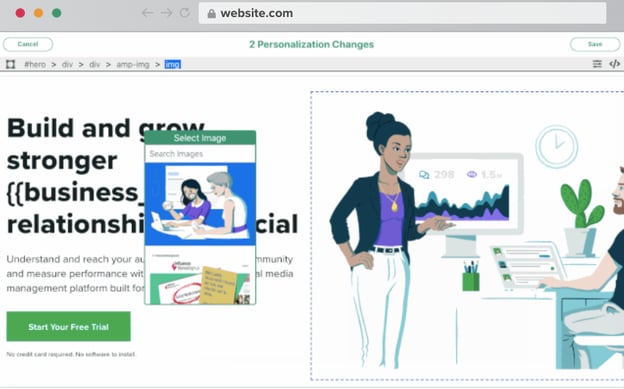
This software lets you pull data from your CRM and upload it into Hyperise, so the platform is highly integratable. Hyperise also offers an extension you can download to make it easy to continue on website building.
Maybe you’re in search of a personalization tool that will integrate with your HubSpot, Salesforce, Shopify, or Google Sheets account. For that, Hyperise could be the solution.
When you visit sites that give you an amazing personalization experience, what about it makes it great? Pull influence from your favorite brands if you find yourself stuck. But ultimately, personalization allows you to take a decent website to one that behaves like customers expect it to, every time.
My subscription box order shipped today, and I can see when it will arrive from my homepage. While I excitedly await its arrival, I can’t wait to see what you come up with for your shiny, new, personalized website.

5 Creative Ways to Use Social Media Data as a Source for Your Content
Creating powerful, newsworthy, and informative content is the goal, but it can be hard to achieve if it’s not data-driven.
After creating content for seven years, our team fully believes that having data as the driving element in your content campaign is the differentiator between good content and newsworthy, link-worthy content.
Coming up with creative sources for your data-driven content can be difficult sometimes, especially if what you want to examine with your content can’t be revealed through a survey methodology or an existing data set.
There are hundreds of sources of data you can use to shape your content, but the type of data I’m focusing on today can be collected from scraping publicly available information from social media platforms.
Social media platforms offer something unique that other data sources cannot. When you scrape a social media platform with intention, you have the opportunity to acquire massive amounts of information from real people, in a matter of minutes.
With the right analysis, this information can glean insights into your topic of choice that the public wouldn’t have otherwise known. Any new, surprising, or controversial information you infer from the analysis will have journalists begging to take the exclusive and cover your content marketing campaign for their publisher.
In this post, I’m going to share five examples of social media scrapes that earned top-tier publisher press, and why they worked. But first — what does social media data scraping mean, anyway?
What is social media data scraping?
Social media data scraping is a methodology that incorporates third-party technology to automatically scrape data from a website such as Twitter, Instagram, or Facebook.
By using third-party data scraping tools such as Octoparse or Parsehub, you’ll receive your data in a neat excel package that will then allow you to analyze it however you wish.
Popular aspects to analyze with social media data sets include conducting a sentiment analysis, analyzing volume and frequency of certain words or symbols, and looking at patterns of individual words with location data.
Next, let’s dive into how you can use the data you scrape as inspiration for future content.
How to Use Social Media Data as a Source for Your Content
1. Peruse Instagram to come up with fun content ideas.
In our first example, we’ll look at a content campaign called #SexiestLocations on Instagram.
The execution of this project was fairly simple: our research team collected over 4 million posts on Instagram that contained the hashtag #sexy. They then analyzed the posts that included a geolocation tag. From this, they were able to glean the “sexiest” countries in the world, as well as U.S. states.
Safe to say, publishers ate it up.
While it’s actually impossible to truly learn what the sexiest place in the world is (sexy is a subjective term) our team produced a fun campaign for our client that used geo-bait to appeal to light-hearted online sites, like Glamour, E! Online, Women’s Health, and Elite Daily.
2. Explore Twitter to learn more about a pressing topic.
In our second example, we’ll look at a campaign covering a much different topic: college drinking habits.
In this methodology, rather than exploring Instagram, the team analyzed Tweets from Twitter instead. The researchers looked at tweets within a 1.5 mile radius of the center of small, four-year colleges and universities that included the keywords “drunk,” “drinking,” “alcohol,” “booze,” “beer,” or “wine.”
There are official rankings that come out every year that pit universities in America against each other for the top “party school” in the nation. This project speaks to this notion in a new way, by looking to data from Twitter to back up those claims.
This campaign speaks to the ongoing conversation about the problem and prevalence of dangerous levels of college drinking in America. Again, using geo-bait and highly targeted digital PR outreach, this campaign was able to earn coverage at the Huffington Post, Adweek, Elite Daily, and BroBible.
3. Don’t overlook niche social platforms, like Yelp.
You don’t just have to stick to Twitter, Facebook, and Instagram when creating content from social media data. There is a world of niche community platforms that can give you so much unique, interesting information that you can’t find anywhere else.
For instance, this content example uses popular restaurant review platform Yelp to glean insights about Americans’ dining preferences. What are the most popular cuisines in different cities across America? Using Yelp’s Fusion API, this study analyzed more than 120,000 restaurants in the U.S. with their ratings, pricing, and restaurant categories.
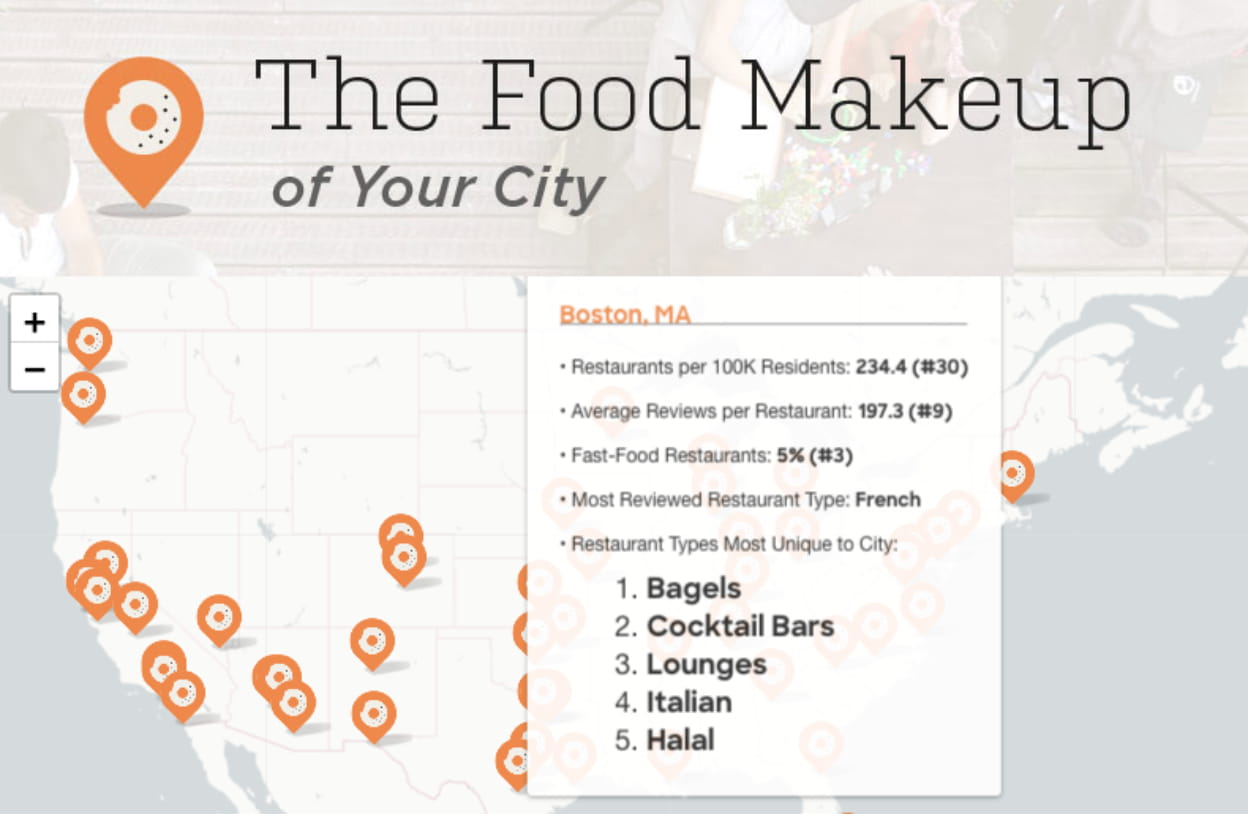
Yelp turned out to be a treasure trove of solid data. This visualization shows viewers the most unique restaurants for each city, the number of restaurants, and more. From this, you can see that Boston has more bagel restaurants than other cities, per capita.
This project saw a lot of success very quickly — once the exclusive went live on the Temple University section of ULOOP, it quickly syndicated to other U.S. university sites and earned over 100 pieces of unique media coverage.
4. Analyze tweets for advanced textual insights.
There are times when using a Twitter scrape just isn’t enough, and you need external analysis. In one of the coolest uses of Twitter data I’ve seen, a campaign called “Most Powerful Women” does just that.
IBM Watson Personality Insights is a free online tool by IBM that allows you to analyze text for prevalence of character traits. Typically you might use this tool to analyze speeches that people have given, or articles they’ve written. In the absence of that, you can use their own personal Twitter timeline to get samples of their writing.
The study sought to find out what the similarities and differences are between some of the top 100 “most powerful” women in the world. From Oprah to Queen Elizabeth, the takeaways gleaned from this study are numerous.
The exclusive to this project went to Bravo, a site that often covers powerful women for their audience, anyway.
For those of us who want to be powerful women too, we can learn which traits will take us all the way to the top, based on the most common traits shared by these famous and powerful women.
5. Conduct a survey for more actionable insights.
In my final example, we’ll look at #AdAnalysis, a campaign that combines an Instagram scrape methodology with a survey of 1,000 Americans to derive fascinating insights on the topic of influencer marketing on Instagram.
The campaign researchers sought to answer a few questions: What types of photos are popular for advertisements, and which demographics respond to promoted posts the most positively?
The first question was answered with a data scraping, and the second was answered with a survey.
Combining the two methods of research allowed the campaign to offer more well-rounded and actionable insights to journalists and news publishers.
This campaign earned coverage for our clients’ desired niche with placements on Adweek, eMarketer, MarketingProfs, and Tech.co.
Best Practices for Scraping Social Media for Content Marketing Campaigns
After producing over a hundred social media scrape campaigns over the past seven years, we’ve learned first-hand what types of social media campaigns excel during digital PR outreach.
Twitter, Instagram, Facebook, LinkedIn, Reddit, and Yelp all have their unique benefits and can offer valuable insight into topics across the spectrum.
In this post, I walked through five campaigns that used social scraping as a methodology. All three campaigns represented diverse subject matter: college education, sex and relationships, food, leadership, and advertising. This methodology can clearly be used across all verticals — for nearly any brand in any niche.
Here’s some tips to keep in mind when producing content with a social media scrape.
- Hashtags are typically subjective, so keep projects lighthearted in nature in order to earn major coverage.
- Stay away from using social scrape methodologies to talk about things that are scientific or close to health topics — people looking for health advice should get information from licensed professionals.
- Make sure that no matter the topic, whatever you produce contributes to an ongoing conversation.
- Exercise caution when combining newsjacking and the scrape methodology, because trending news topics can become old very quickly if you don’t earn coverage immediately.
Happy scraping!

Everything You Need to Know About Twitter Ecommerce Marketing in 2020
Twitter was one of the first social media platforms I ever joined, but it wasn’t nearly as fancy as it is today. Now, there are a variety of features you can use to take your ecommerce business to the next level.
In fact, according to Twitter, its users are 2.7x more likely to purchase a product after seeing it on the platform. Partner with influencers and that purchase intent increases by 5.2x! Needless to say, Twitter can be a powerful marketing tool for your business, whether you’re new to the platform or growing steadily.
Without further ado, let’s walk through some strategies and examples to help you perfect your Twitter presence
Twitter Ecommerce Marketing Strategies
1. Design an eye-catching profile.
To start, your Twitter profile should be optimized to make a great first impression and eventually generate sales. To do this, you’ll need consistent branding across your profile layout, which means your cover photo and profile picture should be complementary and visually appealing.
The profile picture will likely be a picture of your logo or something that represents your business while the cover photo will further communicate your brand, mission, or message.
As for your bio, this section is like the elevator pitch of your business. Think of this section as another opportunity to spark interest in those who come across your profile. You can use keywords relevant to your business here for a more targeted approach. Also, don’t forget to add a link to your ecommerce site so people know where to find your products!
Lastly, you can use the pinned tweet feature to keep a tweet at the top of your profile. This feature is great for emphasizing a message or promoting new products.
Here is an example of a well-optimized Twitter profile from Away, a travel & luggage ecommerce company:
2. Engage with your fanbase.
What’s great about Twitter is that it’s made for 24/7 interactions and constant activity, whereas very frequent posting from brands on platforms such as Instagram and Facebook may feel disingenuous and spam-like.
This perk means you should always be interacting with your followers and fans. To do this, keep an eye out for your mentions (tweets including @yourusername) and respond to them. You can also retweet and favorite mentions to give a nod to these users.
Another way to engage with your fanbase is by sending interactive tweets. Question prompts or Twitter polls, tweets where you can create polls and see instant results, are perfect for this.
You can ask about topics related to your product or even something entertaining relevant to your industry. Polls are also another way to gather opinions, so there’s some bonus market research! Here’s an example of a poll that Old Spice included in one of their Tweets:
Are you Ultra Smooth or After Hours #SmellLikeYourOwnManMan
— Old Spice (@OldSpice)
January 23, 2020
3. Grow your following.
Beyond your existing followers, it’s also important to grow your audience to increase your brand awareness and attract more customers to your ecommerce store. From a technical standpoint, having more followers also allows you to distribute your content and get the word out about whatever it is you sell faster.
Garner new attention by participating in Twitter conversations relevant to your business. A strategic way to be part of the conversation on a large scale is by using trending Twitter hashtags. With trending hashtags in your tweets, you’re tapping into an entirely new network of people who may find interest in what you have to offer.
On a smaller scale, you can reach new users by searching keywords relevant to your ecommerce business using Twitter’s search function. You’ll find conversations and questions about these keywords that you can offer some value in, which may lead someone to tap on your profile and give you a follow in return. You can go about this practice yourself, but here are some social listening tools to lend a hand.
To acknowledge new followers, set up your account with automated direct messages, which send new followers a customized message. Your message should be friendly, welcoming, and show appreciation for the new follow. An automated DM that feels sincere can begin a relationship and move a prospective customer forward in their buyer’s journey.
4. Schedule your content.
With Twitter, the more active you are, the better. Having constant activity boosts your brand reputation and keeps your business top of mind for prospective customers, assuming your tweets are meaningful and speak to the audience. You can enlist a social media management tool to help you maintain your presence by scheduling your posts in advance.
There are also optimal posting times on Twitter you can take advantage of when scheduling your content. B2C companies experience higher clickthrough rates on weekends while B2B companies see more success on weekdays. B2C companies also find the best times to post in the day to be 8 to 10 a.m., 12 p.m., and 7-9 p.m.
Scheduling your content is also a great way to plan ahead for special occasions such as holidays and cultural events. Joining conversations regarding these topics is another opportunity to promote your ecommerce business, so think in advance of how you want to craft your message.
Though scheduling your content can make your workflow more efficient, it doesn’t mean you can just schedule and forget. Twitter is a platform that is very much about the here and now as news and trending topics change by the hour. A mix of scheduled posts and live tweets are a perfect combination to grow your exposure.
5. Make the best of Twitter Ads.
Twitter offers a variety of ads depending on your objective. For ecommerce, the best types of ads are awareness and website click campaigns which promote your brand and generate conversions respectively.
For awareness ads, you will be billed for every 1,000 impressions and for website ads, you will be billed for every click to your website. You can also use remarketing in your ads to target people similar to those who have visited your website.
When creating ads, there are several tips to keep in mind for best performance. Twitter users crave short and sweet content, so keep your ads concise and to the point. You also want to make sure your ad copy is friendly, human, and approachable to match Twitter’s conversational atmosphere.
Beyond text, visuals are also a helpful tool to use since images and videos can speak louder than words. They can also be a great way to provide better context for your audience. Below is an example from Daily Harvest of a website click campaign so you can see how all of these characteristics of an effective Twitter ad complement each other:
Skip the shopping, chopping, and prepping and stock your freezer with delicious, good-for-you food built on organic fruits and vegetables. Delivered & ready in minutes.
☑️$25 OFF your first order
☑️Plant-based
☑️Dairy-free & gluten-free— Daily Harvest (@DlyHarvest)
May 6, 2020
For a step-by-step outline on how to set up Twitter Ads, check out our simple guide.
Twitter Ecommerce Marketing Examples
1. Alexa
Amassing 1.1million followers, Amazon’s Alexa is a fan favorite on Twitter for its funny and conversational tweets. Just a look at Alexa’s profile can provide a good idea of the account’s personality.
To break it down, the branding of this account is well done because the bio is written in such a human tone and is comparable to the typical Twitter bio of any other person. Additionally, its Twitter handle, @alexa99, is like what you would find of the average Twitter user handle, making the account much more relatable.
Alexa is also no stranger to sending polls and asking prompts to create engagement with its fans. Its prompts are also personal and lighthearted, so users who choose to share their opinions are happy to do so and feel like they are part of the conversation.
🎵
🎵
🎶
┏┓
┃┃╱╲ in
┃╱╱╲╲ this
╱╱╭╮╲╲ house
▔▏┗┛▕▔ we
╱▔▔▔▔▔▔▔▔▔▔╲
dance when Alexa plays music
╱╱┏┳┓╭╮┏┳┓ ╲╲
▔▏┗┻┛┃┃┗┻┛▕▔What song are you asking DJ Alexa to play? 💬🎤
— Alexa (@alexa99)
May 14, 2020
2. Zappos
Zappos is known for its phenomenal customer service, which certainly carries over to their Twitter. The Zappos Twitter account managers focus on social listening and reply to their mentions or relevant tweets almost every hour, allowing them to win over new fans and continue to impress loyal followers.
Below is an example of how Zappos uses social listening:
We will let you in on a secret… Santa works for us over summer because he’s bored. *DO
— Zappos.com (@Zappos)
June 22, 2020
Although Zappos was not directly mentioned with an “@,” they were still quick to hop in and provide a solution for the potential customer. Zappos also put the cherry on top by providing a direct link to solve the customer’s problem, accelerating the customer’s buying process while standing out against its competitors.
Above is another example of Zappos keeping in touch with customers. They replied in a witty way and also retweeted the customer’s mention. It may be easier to leave a satisfied customer be, but why not join the party and celebrate their satisfaction with them?
3. Warby Parker
Beyond celebrating customers, it’s also important to show customers your values and your support for them. In light of the continuing Black Lives Matter movement, Warby Parker has used Twitter to show their stance through words and actions.
— Warby Parker (@WarbyParker)
June 13, 2020
The above shows Warby Parker’s statement on the Black Lives Matter movement. The company not only shows solidarity but has also gone beyond performative activism by sharing what actions they will take to tackle the issue.
As a business with influence and power, their allyship and support for anti-racism speaks volumes to their target audience and has the potential to dramatically improve their customer and employee relations.
4. Fenty Beauty
Right off the bat, Fenty Beauty differentiates itself by using a hashtag in its bio. This makes the brand easier to find for people who are searching for cruelty-free beauty products on the platform. However, if you choose to put hashtags in your Twitter bio, one is enough. Try not to flood your description with hashtags since it can be off-putting.
What the Fenty Beauty Twitter account does well while selling beauty & cosmetics products is show real use cases of their collection that other customers can relate to.
@rihanna’s 👸🏽 back and she’s showin us how she gets her lips lookin juicy using our new no-fuss #SLIPSHINE Sheer Shiny Lipsticks ✨
Check it out now at https://t.co/CPcjVbHVDr 💻 pic.twitter.com/PZkDAiRJxu
— Fenty Beauty (@fentybeauty)
June 21, 2020
In the above example, Rihanna, founder of Fenty Beauty, shows a short demo of one of the company’s lipsticks. This video is an effective way to reel in people who may be on the lookout for similar products. On top of that, video content on Twitter is a useful tool to cut through the text-focused platform and grab the attention of more potential customers.
For your ecommerce business, consider how you can show your audience why they should care about your product through your tweets. This could be in the form of video demonstrations or perhaps a before and after comparison.
5. Chewy
Chewy is an online one-stop-shop for all pet needs, from pups to lizards. Chewy’s Twitter account lives up to its slogan and brings together pet owners of all kinds. Pet owners tweet at the account and, similarly to the previous accounts we reviewed, Chewy replies in a way that feels personal. Here’s an example of what I mean by this:
Hey Teri, we’ll always be here to help with anything and everything you may need. Losing a furbaby is never easy, but we hope the memories you two built together over the years can continue to bring comfort and warmth to your heart. We’ll continue to be here for you, too. ❤️
— Chewy (@Chewy)
June 24, 2020
In this customer interaction, Chewy was able to provide a solution while showing empathy, something customers often crave from businesses.
Chewy also takes advantage of their large Twitter following to promote their blog posts, which provide helpful information for the various types of pet owners their target audience includes. Their insights are relevant, valuable, and prove how much the company cares for pets and parents.
While we’re all wishing for the return of afternoons spent at the dog park, it’s important to ease your pet’s reintegration into the outside world.
We hope you continue to find moments of comfort with your pet.
https://t.co/wuwvFtMBuD— Chewy (@Chewy)
May 23, 2020
Phew! That’ll give you plenty to think about. If you want more examples of successful Twitter accounts, we’ve got you covered here. At the end of the day, Twitter is a top social media platform that can bring your business values and mission to life.
It’s also a powerful marketing tool to tune into your audience, build relationships with your followers, and boost sales. For more detailed information on exactly how to raise brand awareness and increase sales on Twitter, see our ultimate guide to Twitter marketing.

How to Succeed in Account-Based Advertising
Right now, Account-based Marketing (ABM) is the hottest B2B ticket in town — with 87% of marketers stating that it delivers better ROI than other marketing activities.
While for many people it may be a relatively new strategy, it has in fact been around for many years in different guises. In fact, you might’ve already heard the term as Key Account Management, Key Account Marketing, or Client-centric Marketing.
The objective of ABM is, quite simply, to treat one account as a market of one, i.e. to focus all your energy (and resources) on engaging, winning, and maintaining one named account.
Expanding on this, ABM has four underlying principles:
- Client centricity and insight
- Partnership between sales and marketing
- Focus on reputation, relationships and, ultimately, revenue
- Tailored programs and campaigns
Simple right? Well, the reality is that to justify this level of effort and resources the prize must be sufficiently large enough to warrant this expenditure. ABM therefore is best suited to complex, high ‘ticket price’ solutions with longer life-cycle sales, and where typically multiple stakeholders are involved.
Strategic ABM (one-to-one) and one-to-few (clusters of 15-20 accounts with shared commonality, i.e. vertical, industry, pain, challenge, etc.) have defined ABM for the last few years.
But there is a new ABM kid on the block who is shaking things up: one-to-many ABM.
The Rise of the ABM Tech Stack
One of the key reasons why ABM has become so popular and now forms a key part of any B2B marketing and sales playbook is the use of technology to automate and target those accounts (and individuals) you are looking to influence and convert.
The rise of one-to-many ABM programs targeting hundreds (and even thousands) of accounts has been largely possible due to the technological and data advances that are now available to B2B marketers.
Quite simply, one-to-many ABM would not have been possible several years ago.
Bev Burgess, one of the world’s leading ABM authorities, recently stated “One-to-many ABM now allows companies to have an ‘Always-on’ strategy to those accounts that are of interest to you'”.
What is Account-based Advertising?
The analogy most commonly used to describe the difference between ABM and Inbound Marketing is fishing with spears vs. fishing with nets. As the image below shows, ABM is the inverse of Inbound Marketing:
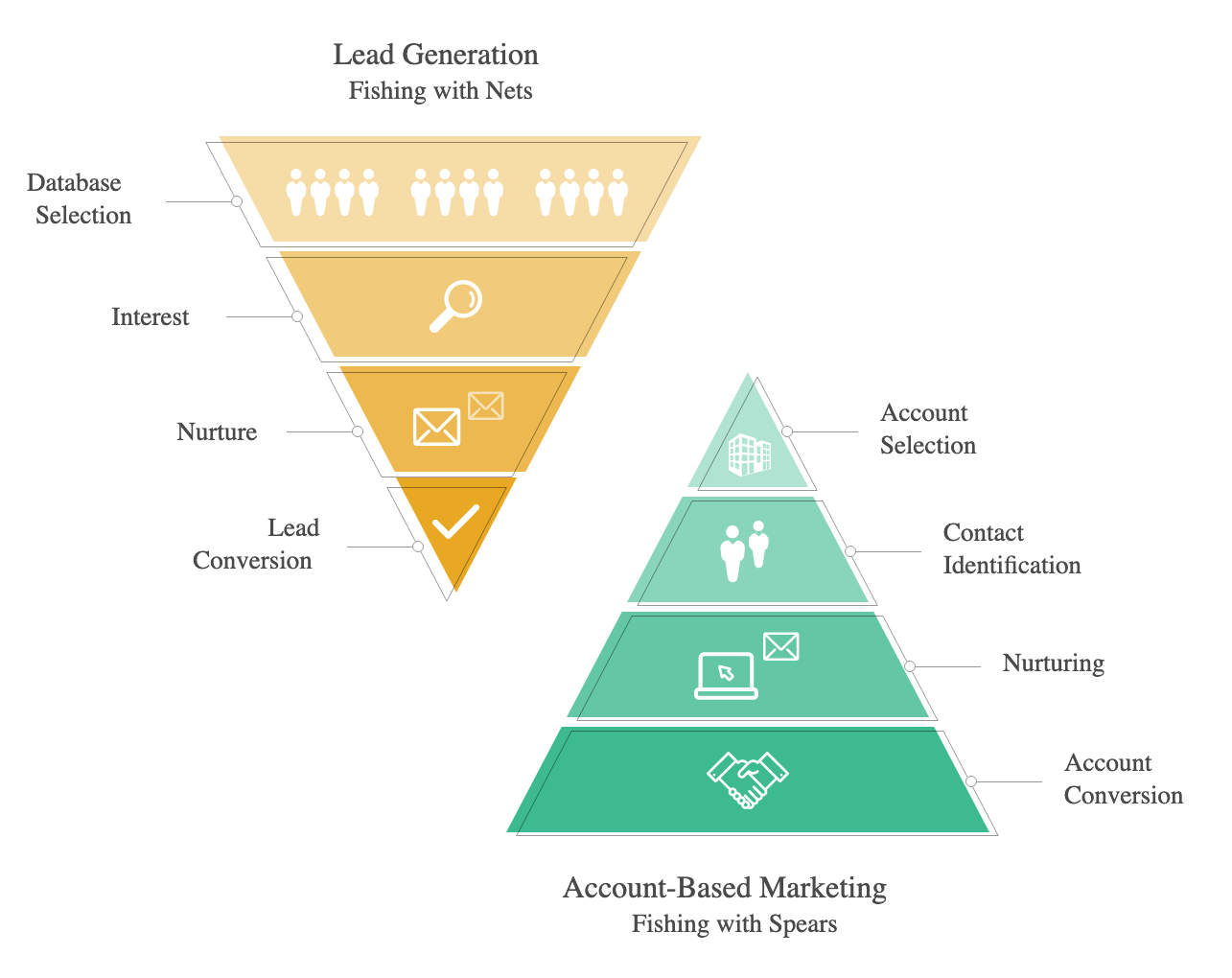
Account selection is the starting point. As such, being able, from the outset, to target named accounts and the relevant Decision Making Unit (DMU) within the account is the foundation of any successful Account-based Marketing program.
And this is where Account-based Advertising comes in. Account-based Advertising allows you to hyper-target and hyper-personalize digital marketing campaigns to these named accounts.
Simply put, account-based advertising means your digital advertising campaigns are highly focused and centered on only those accounts you wish to engage, penetrate, and win.
Account-based advertising allows you:
- Amplify your digital advertising campaigns to increase the chances of winning a deal. Expanding your retargeting from the original website visitor to the wider DMU will increase your chances significantly.
- We’re familiar with the large number of target account contacts involved in a decision making process (6-10 according to Gartner). Digital advertising allows you to reach and influence this wider important group.
- Focus your marketing spend and drive higher ROI of your digital advertising budget by targeting those accounts that display intent signals.
How to be Successful with Account-based Advertising
Let’s take a look at what makes up a successful account-based advertising campaign.
1. Consider your account-based advertising options.
There are many digital advertising options available (and the number is growing). There are a large number of digital advertising partners and ABM platforms that can provide access to these channel tactics.
Ensure you carefully choose your tactics and channels, based on your marketing budget, messaging, and audience.
A) Programmatic Advertising
Many of us are familiar with this form of advertising. These advertisements are generated via cookie-based targeting and the advertisements appear natively in-channel, delivering a far more natural impact. The ads are served up on websites and apps through online platforms such as Google, Avocet, or AdRoll publication networks.
A subset of Programmatic Advertising allows you to target the actual device that conducted the search, as well. This is a step forward from traditional IP-based targeting, particularly in light of the explosion in remote working in the last few months which will undoubtedly continue for some time.
B) LinkedIn Paid Advertising
LinkedIn has become a major player in the digital advertising arena. They offer a (growing) number of formats and options for you to target the Accounts and/or Persona of interest to you:
Advertising options such as Sponsored Content allow you to deliver content to the LinkedIn feed of members beyond those who are following you or your company — which enables you to target specific prospects within target Accounts. The important benefit is specific content can be delivered at-scale.
Additionally, LinkedIn paid advertising allows you to test different ad units depending on the campaign objectives, which stage of the funnel to which you’re looking to promote, and the scale of the tactic/channel.
C) Content Syndication
This is a common awareness stage tactic you might use for one-to-many ABM to promote your content across a wide B2B content syndication network of websites, blogs, social media, etc. (To learn more about how to syndicate your content, take a look at Content Syndication: What It Is & How to Do It Successfully).
D) Retargeting
We’re all familiar with retargeting, although we may not know it. Did you ever notice that ads appear related to your recent searches when you’re reading your favorite blog content or perusing Facebook? This is thanks to retargeting.
Retargeting is a feature that lets you customize your display ads campaign for people who have previously visited your site, and tailor your ads (using dynamic retargeting) to these visitors when they browse the web and use social media apps.
The key here is not to tire your audience with the same ads but to constantly refresh and always be relevant to your audience.
2. Keep your audience and persona top-of-mind when personalizing content.
Data-backed buyer persona research is the foundation of any ABM campaign and this is certainly true with any digital advertising campaign that accompanies it.
Personalization is key. Desk research and in-depth insight reports will shine a light on the account and the industry to which it belongs. Further research into the DMU and named individuals within the account will inform your messaging and digital advertising strategy.
Keeping your audience in-mind will ensure your content resonates.
Remember that your message will be read by human beings who are facing specific challenges, so make it a priority to understand their pain points and challenges.
Always ensure that your message is empathetic, builds rapport, and focuses on how you can help solve their challenges — rather than how great your business is.
Putting your personas at the heart of your campaign strategy will help you see success with your Account-based advertising campaign. Always review which of your previous campaigns have resonated strongly with your audience — what content formats and language do they respond to best?
3. Make your messages as relevant as possible to your target audience.
With an ABM one-to-one campaign, you should research the target company in detail to make sure your messaging is as relevant as possible, speaking to both the challenges of the persona and the organization at-large. With a one-to-few program, you might customize the message by industry vertical or sales challenge.
Even at the one-to-many level, consider how you can add light-touch personalization and keep it relevant. Review whether the advertising tactic/channel you choose enables you to add some helpful personalization tokens, including first name, last name, company name, job title, and industry.
As a general rule, it’s best not to get too carried away with the number of CTAs you use. Rather than presenting users with a short message and five CTAs, start by compelling them to take the most important action first (such as downloading an ebook) and then stagger the additional options using the sequence to ensure there’s enough context around each offer. The ‘ask’ should be crystal clear!
4. Consider your searcher’s intent and use the right keywords to match it.
Intent data can provide valuable insights to help you ensure that you target only those Accounts that are in an active buyer’s journey. The image below illustrates the process to narrow down an initial ‘in-house’ Target Account list by a) looking at your first party data — who is engaged with your brand? and b) using intent data to see which Accounts are in an active buyer journey.
This intersection of first and third-party data is the sweet spot and where your Account-based Advertising can be deployed at will.
Equally, when it comes to the topics and messaging you’ll be sharing, intent data can ensure they will resonate with your intended audience. What keywords are they trending around and does your messaging answer the questions they’re actively trying to solve?
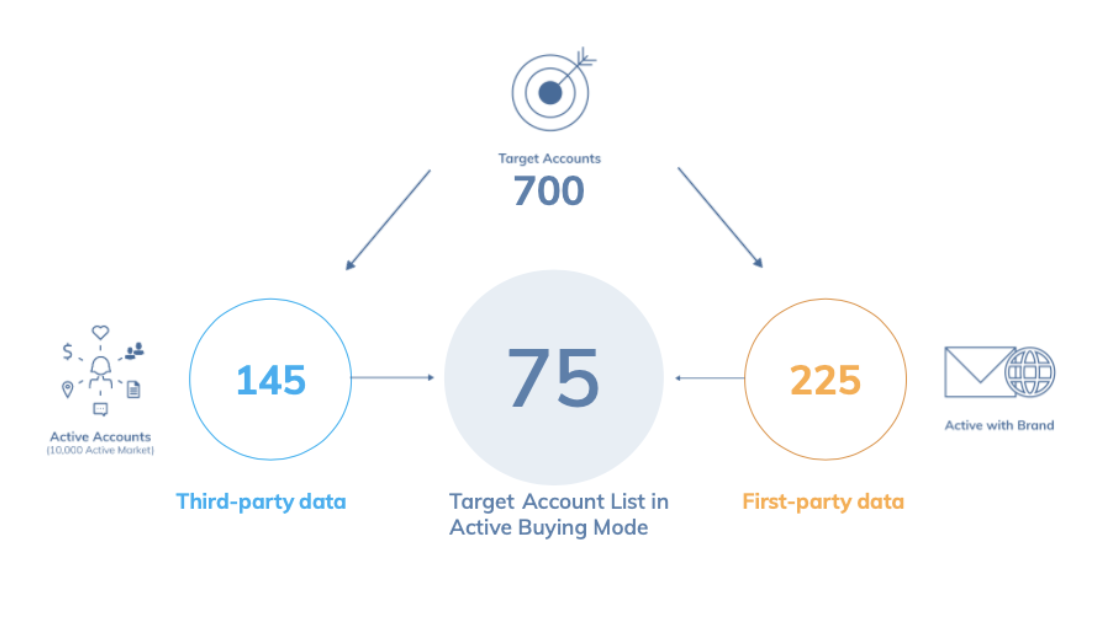
Work any relevant keywords into your sequence … without going overboard with buzzwords, of course!
Even though your audience may be trending around multiple topics, it’s best to keep your messaging focused on just one topic to avoid confusion. This ad format works especially well when you have multiple assets around a single topic — for instance, an ebook, video, and blog article. This enables users who aren’t ready to convert yet to explore some of your other content and increases your brand awareness within the audience.
Top tip: If you only want users to take a single action, then consider using LinkedIn InMail messaging or a Sponsored update, instead.
It’s All In Your Hands
Account-based Marketing is clearly here to stay, and more and more organizations will adopt or expand their existing ABM programs.
Data and technology now open up a myriad of opportunities to B2B marketers to deliver a hyper-personalized experience that will only increase as new ways are discovered to seek out and target the accounts you wish to win or grow. Account-based advertising will be a thrilling area to watch over the coming months and years.
