
Welcome to My Blog
Predictive SEO: How HubSpot Saves Traffic We Haven’t Lost Yet
This post is a part of Made @ HubSpot, an internal thought series through which we extract lessons from experiments conducted by our very own HubSpotters.
Have you ever tried to bring your clean laundry upstairs by hand, and things keep falling out of the giant blob of clothing you’re carrying? This is a lot like trying to grow organic website traffic.
Your content calendar is loaded with fresh ideas, but with every web page published, an older page drops in search engine ranking.
Getting SEO traffic is hard, but keeping SEO traffic is a whole other ball game. Content tends to “decay” over time due to new content created by competitors, constantly shifting search engine algorithms, or a myriad of other reasons.
You’re struggling to move the whole site forward, but things keep leaking traffic where you’re not paying attention.
Recently, the two of us (Alex Birkett and Braden Becker 👋) developed a way to find this traffic loss automatically, at scale, and before it even happens.
The Problem With Traffic Growth
At HubSpot, we grow our organic traffic by making two trips up from the laundry room instead of one.
The first trip is with new content, targeting new keywords we don’t rank for yet.
The second trip is with updated content, dedicating a portion of our editorial calendar to finding which content is losing the most traffic — and leads — and reinforcing it with new content and SEO-minded maneuvers that better serve certain keywords. It’s a concept we (and many marketers) have come to call “historical optimization.”
But, there’s a problem with this growth strategy.
As our website’s traffic grows, tracking every single page can be an unruly process. Selecting the right pages to update is even tougher.
Last year, we wondered if there was a way to find blog posts whose organic traffic is merely “at risk” of declining, to diversify our update choices and perhaps make traffic more stable as our blog gets bigger.
Restoring Traffic vs. Protecting Traffic
Before we talk about the absurdity of trying to restore traffic we haven’t lost yet, let’s look at the benefits.
When viewing the performance of one page, declining traffic is easy to spot. For most growth-minded marketers, the downward-pointing traffic trendline is hard to ignore, and there’s nothing quite as satisfying as seeing that trend recover.
But all traffic recovery comes at a cost: Because you can’t know where you’re losing traffic until you’ve lost it, the time between the traffic’s decline, and its recovery, is a sacrifice of leads, demos, free users, subscribers, or some similar metric of growth that comes from your most interested visitors.
You can see that visualized in the organic trend graph below, for an individual blog post. Even with traffic saved, you’ve missed out on opportunities to support your sales efforts downstream.
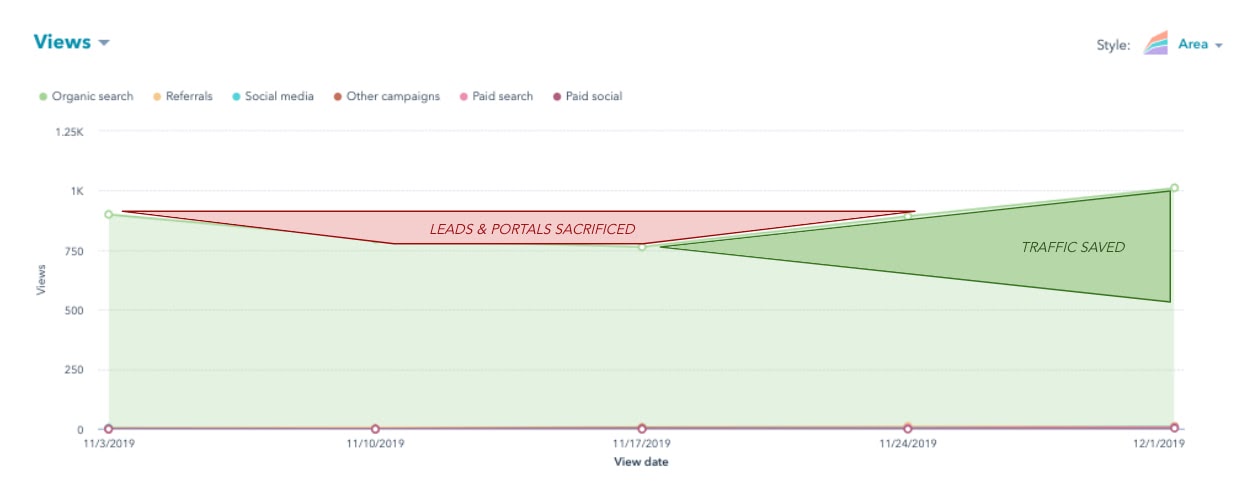
If you had a way to find and protect (or even increase) the page’s traffic before it needs to be restored, you wouldn’t have to make the sacrifice shown in the image above. The question is: how do we do that?
How to Predict Falling Traffic
To our delight, we didn’t need a crystal ball to predict traffic attrition. What we did need, however, was SEO data that suggests we could see traffic go bye-bye for particular blog posts if something were to continue. (We also needed to write a script that could extract this data for the whole website — more on that in a minute.)
High keyword rankings are what generate organic traffic for a website. Not only that, but the lion’s share of traffic goes to websites fortunate enough to rank on the first page. That traffic reward is all the greater for keywords that receive a particularly high number of searches per month.
If a blog post were to slip off Google’s first page, for that high-volume keyword, it’s toast.
Keeping in mind the relationship between keywords, keyword search volume, ranking position, and organic traffic, we knew this was where we’d see the prelude to a traffic loss.
And luckily, the SEO tools at our disposal can show us that ranking slippage over time:
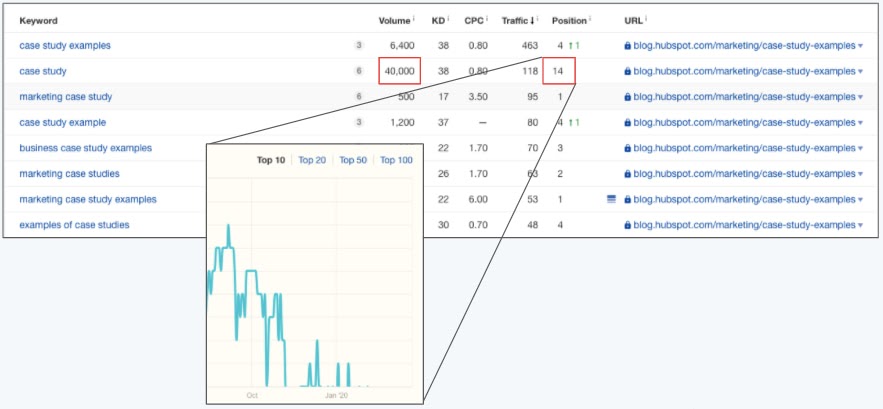
The image above shows a table of keywords for which one single blog post is ranking.
For one of those keywords, this blog post ranks in position 14 (page 1 of Google consists of positions 1-10). The red boxes show that ranking position, as well as the heavy volume of 40,000 monthly searches for this keyword.
Even sadder than this article’s position-14 ranking is how it got there.
As you can see in the teal trendline above, this blog post was once a high-ranking result, but consistently dropped over the next few weeks. The post’s traffic corroborated what we saw — a noticeable dip in organic page views shortly after this post dropped off of page 1 for this keyword.
You can see where this is going … we wanted to detect these ranking drops when they’re on the verge of leaving page 1, and in doing so, restore traffic we were “at risk” of losing. And we wanted to do this automatically, for dozens of blog posts at a time.
The “At Risk” Traffic Tool
The way the At Risk Tool works is actually somewhat simple. We thought of it in three parts:
- Where do we get our input data?
- How do we clean it?
- What are the outputs of that data that allow us to make better decisions when optimizing content?
First, where do we get the data?
1. Keyword Data from SEMRush
What we wanted was keyword research data on a property level. So we want to see all of the keywords that hubspot.com ranks for, particularly blog.hubspot.com, and all associated data that corresponds to those keywords.
Some fields that are valuable to us are our current search engine ranking, our past search engine ranking, the monthly search volume of that keyword, and, potentially, the value (estimated with keyword difficulty, or CPC) of that keyword.
To get this data, we used the SEMrush API (specifically, we use their “Domain Organic Search Keywords” report):
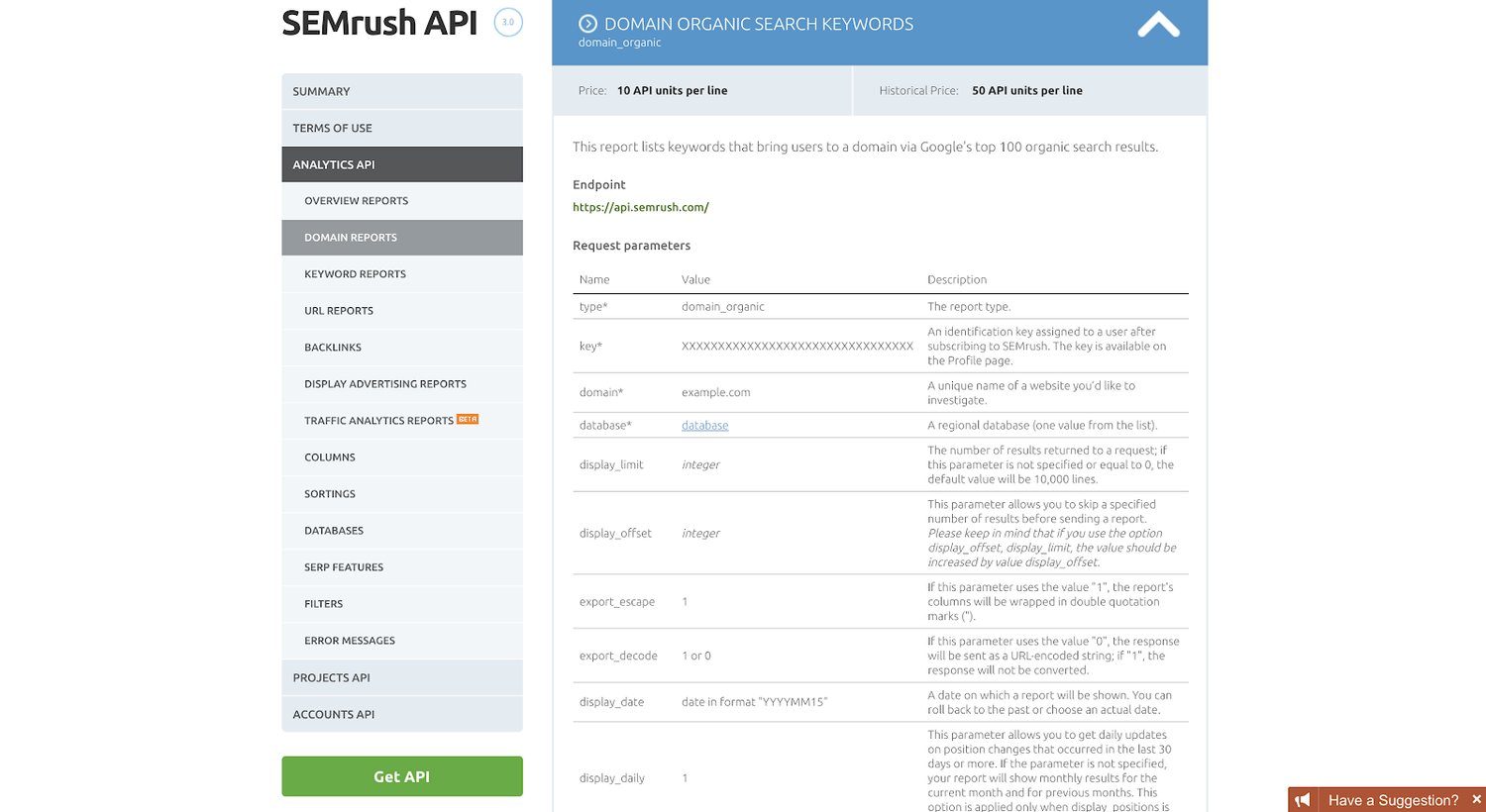
Using R, a popular programming language for statisticians and analytics as well as marketers (specifically, we use the ‘httr’ library to work with APIs), we then pulled the top 10,000 keywords that drive traffic to blog.hubspot.com (as well as our Spanish, German, French, and Portuguese properties). We currently do this once per quarter.
This is a lot of raw data, which is useless by itself. So we have to clean the data and warp it into a format that is useful for us.
Next, how do we actually clean the data and build formulas to give us some answers as to what content to update?
2. Cleaning the Data and Building the Formulas
We do most of the data cleaning in our R script as well. So before our data ever hits another data storage source (whether that be Sheets or a database data table), our data is, for the most part, cleaned and formatted how we want it to.
We do this with a few short lines of code:
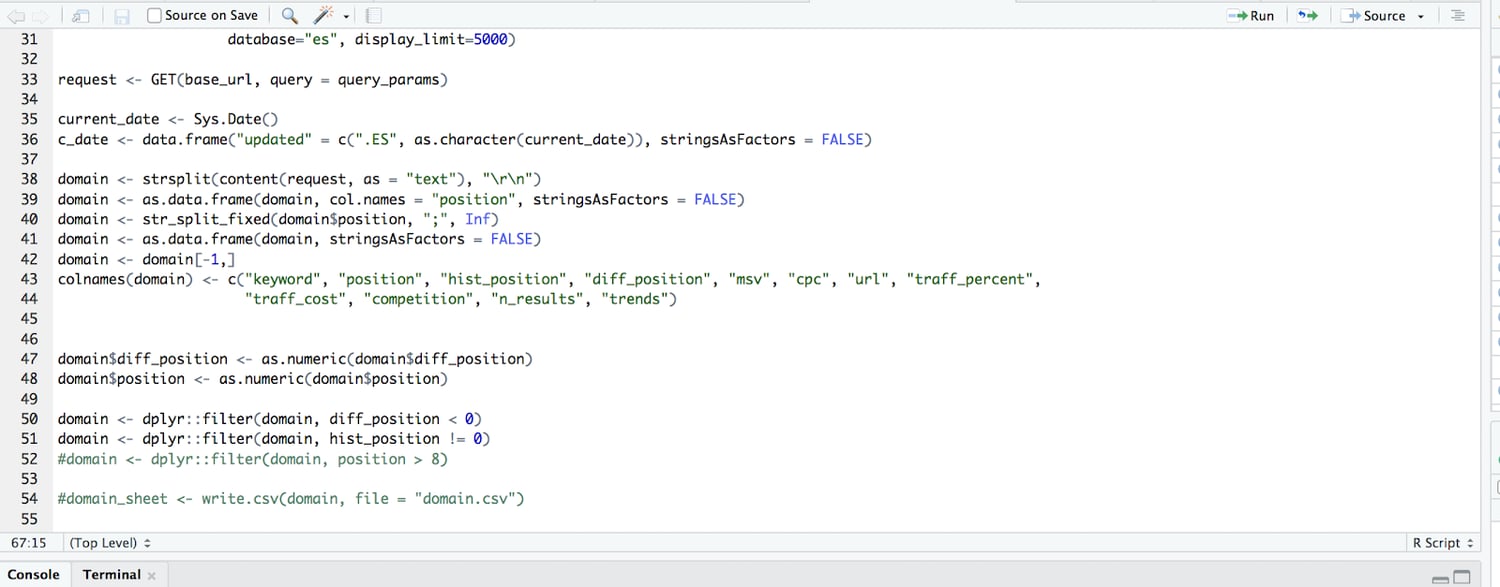
What we’re doing in the code above, after pulling 10,000 rows of keyword data, is parsing it from the API so it’s readable and then building it into a data table. We then subtract the current ranking from the past ranking to get the difference in ranking (so if we used to rank in position 4, and we now rank 9, the difference in ranking is -5).
We further filtered so we only surface those with a difference in ranking of negative value (so only keywords that we’ve lost rankings for, not those that we gained or that remained the same).
We then send this cleaned and filtered data table to Google Sheets where we apply tons of custom formulas and conditional formatting.
Finally, we needed to know: what are the outputs and how do we actually make decisions when optimizing content?
3. At Risk Content Tool Outputs: How We Make Decisions
Given the input columns (keyword, current position, historical position, the difference in position, and the monthly search volume), and the formulas above, we compute a categorical variable for an output.
A URL/row can be one of the following:
- “AT RISK”
- “VOLATILE”
- Blank (no value)
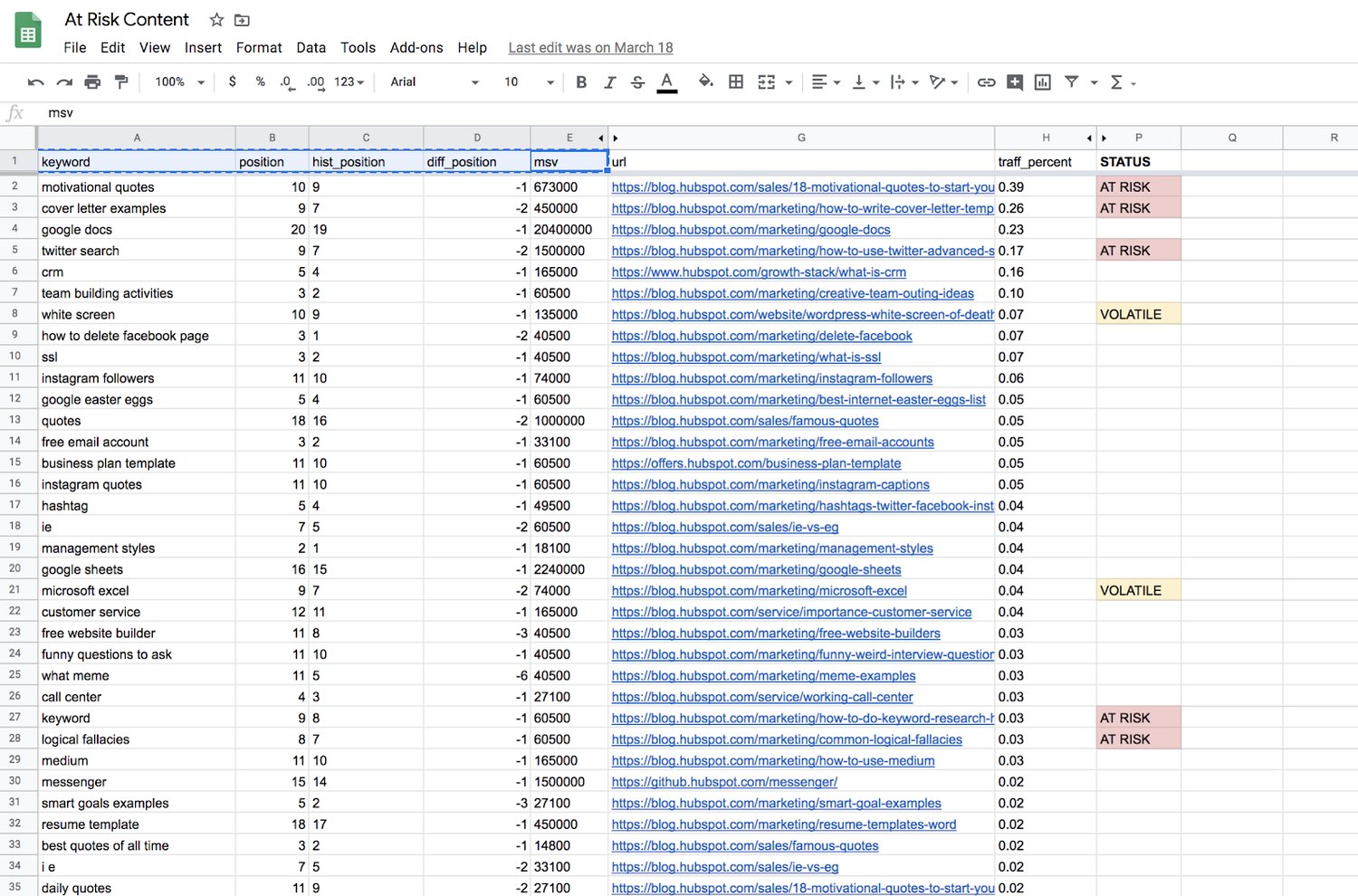
Blank outputs, or those rows with no value, mean that we can essentially ignore those URLs for now. They haven’t lost a significant amount of ranking, or they were already on page 2 of Google.
“Volatile” means the page is dropping in rank, but isn’t an old-enough blog post to warrant any action yet. New web pages jump around in rankings all the time as they get older. At a certain point, they generate enough “topic authority” to stay put for a while, generally speaking. For content supporting a product launch, or an otherwise critical marketing campaign, we might give these posts some TLC as they’re still maturing, so it is worth flagging them.
“At Risk” is mainly what we’re after — blog posts that were published more than six months ago, dropped in ranking, and are now ranking between positions 8 and 10 for a high-volume keyword. We see this as the “red zone” for failing content, where it’s fewer than 3 positions away from dropping from page 1 to page 2 of Google.
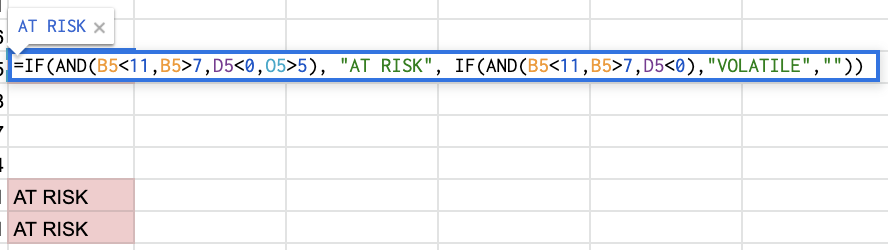
The spreadsheet formula for these three tags is below — basically a compound IF statement to find page-1 rankings, a negative ranking difference, and the publish date’s distance from the current day.
What We Learned
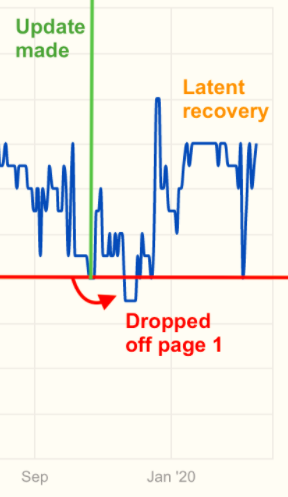
In short, it works! The tool described above has been a regular, if not frequent addition to our workflow. However, not all predictive updates save traffic right on time. In the example below, we saw a blog post fall off of page 1 after an update was made, then later return to a higher position.
And that’s okay.
We don’t have control over when, and how often, Google decides to recrawl a page and re-rank it.
Of course, you can re-submit the URL to Google and ask them to recrawl (for critical or time-sensitive content, it may be worth this extra step). But the objective is to minimize the amount of time this content underperforms, and stop the bleeding — even if that means leaving the quickness of recovery to chance.
Although you’ll never truly know how many page views, leads, signups, or subscriptions you stand to lose on each page, the precautions you take now will save time you’d otherwise spend trying to pinpoint why your website’s total traffic took a dive last week.

Where and How Often Do Consumers Watch Live Video? [New Data]
By 2027, the live video market is expected to surpass $184 billion. And brands are taking notice.
By the end of 2018, marketers were using live video as part of their social media strategy. Since then, this number has likely grown as brands continue to use a number of online platforms to stream virtual events, Q&As, and other content that their audiences will value.
Although brands are jumping on the live video bandwagon, you might still wonder if live video is really worth investing in. After all, creating any video costs your company time and money. Additionally, measuring the ROI of a live video can be tricky.
Before you decide to implement live video planning and production into your strategy, you’ll need to learn more about this content’s consumers, how often they watch this content, and which platforms they primarily use to stream it.
Learning about your prospective audience’s live video behaviors will allow you to consider a strategy that offers them valuable content while meeting them on the platforms they’re already on.
To give you insight on how often and where general internet users watch live video, I conducted a survey of more than 400 people using Lucid software. In the survey, I asked two questions: “How often do you watch live videos?” and “Where do you watch live video most often?”
How Often Consumers Watch Live
When I asked consumers how often they were watching live video, I didn’t expect a large percentage to say they were consuming it more than once or twice weekly. As a marketer and social media user, I was expecting that only a few people would regularly stop everything and devote time to watching streams on fast-paced online platforms.
However, when I looked at the results, I was surprised by how frequently consumers were actually watching live videos.
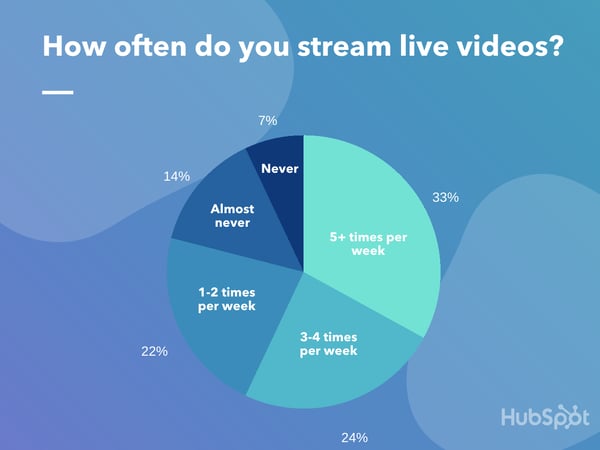
According to the data, 57% of those surveyed watch live video at least three times per week, while only seven percent said they never watch live video.
While the result above is fascinating to think about, you should keep in mind that this is just a survey of one small group of consumers rather than a representation of the global internet user population. Additionally, just because our pool of consumers regularly watches live content, this doesn’t necessarily mean they’re watching branded content.
Although you should take this result with a grain of salt, the data above, combined with mounting research that shows how live video is growing, signifies that this format might be more than just a trend. .
Although you should consider your budget, audience, and the time involved in a live video strategy before your create or plan content, this result indicates that you might want to keep this tactic on your radar.
Where Consumers Watch Live Video
Now that you know live video is capable of generating solid viewership, you might be wondering where the best place to stream your first video actually is.
You’ll want to pick a platform with a high user base, but you’ll also want to make sure that the site you choose has an audience that aligns with the audience you want to engage with..
When you start by picking the best platform for your brand and audience, you can learn what it takes to be engaging on this site, and adapt your content from there.
But, simply choosing a platform can be easier said than done.
At the moment, almost all of the top social media platforms — including Facebook, YouTube, Instagram, Twitter, LinkedIn, Reddit, and now even TikTok — have live streaming features. Additionally, emerging platforms like Twitch.tv have gained notoriety for primarily hosting live content.
To help you identify a few platforms worth looking into, I asked the same Lucid participants. “Where do you watch live videos most often?”
While the results about how often consumers watched live video surprised me, I wasn’t as shocked when I discovered where they were watching their content.
The platforms with the biggest audiences, and the most mature live streaming tools, took the lead. These platforms were YouTube (48%), Facebook (20%), and Instagram (13%).
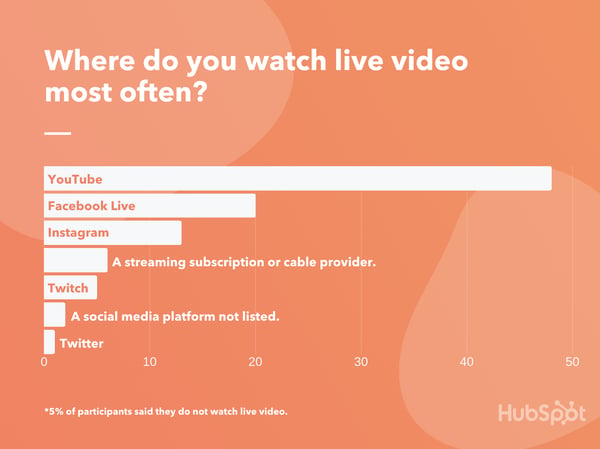
One thing that did surprise me was that fewer people were viewing live videos on Twitter. Although the platform isn’t primarily known for live streaming, Twitter’s company was one of the first to invest in it with the 2015 acquisition of Periscope.
Although some platforms were less popular than others in this poll, you shouldn’t necessarily rule them out. For example, if your most engaged audience is already on Twitter, or your followers love your B2B content on LinkedIn, you could consider testing those platforms first since you might already have a great sense of what those audiences will engage with.
Or, if you’re selling a B2C product, you might want to focus on the bigger, broader networks like Facebook or YouTube since they have a large range of audience demographics.
As you plan your next live video event, here’s a look at what other brands are doing on popular live video platforms.
The Top 3 Platforms Consumers Use to Stream Live Video
YouTube
As the world’s second-largest search engine, YouTube’s more than 2 billion-person user base is incredibly broad. This means that almost anyone will log on to YouTube and search its content for a number of different reasons.
Aside from being one of the oldest and biggest online platforms out there, YouTube’s also offered a live stream feature, called YouTube Live, since 2011.
YouTube Live allows users to broadcast live content to viewers. With this live video feature, you can share unfiltered moments, as well as allow the audience to participate with real-time comments and reactions. Live videos on YouTube are recorded, appear on profiles and feeds like any other video upload, and can be watched even after the stream has ended.
Below is a great example of a live video launched by Adobe as part of its Sketch Party series. During each Sketch Party stream, Adobe films a graphic designer sketching or designing something with Creative Cloud software, such as Adobe Illustrator. While the artist is sketching something visibly on screen, they read comments and answer questions from viewers.
This stream allows Adobe to engage with audiences, highlight the raw talent of graphic artists, and show off how its software works at the same time.
Today, more than one-quarter of videos uploaded to Facebook are live. This, plus the fact that one in five of the consumers we polled watch videos on Facebook Live most often, show that this platform might be incredibly useful for live video strategies.
Like YouTube, Facebook has the benefit of having a giant global audience that represents different ages, interests, and cultural backgrounds. While this broad audience has allowed B2B and B2C brands to effectively grow audiences on the platform, many companies have also developed successful Facebook Live tactics, too.
In the branded Facebook Live example below, a clothing store called By Alexa Rae Boutique highlights some of the clothing products that can be purchased from the store’s website.
The video is formatted like a show you’d see on the Home Shopping Network as the host shows each clothing item to the camera, explains the perks of each, and notes when items are close to sold out to encourage urgency
According to our survey above, 13% of people say they watch live video on Instagram most often, making it the third most popular live platform among the group we surveyed.
Instagram has been rising in popularity for years, especially to millennial and Gen Z audiences. The success of the overall app is due in part to Stories, live video, and IGTV.
Instagram’s Live feature allows you to film streams that show up in your following’s Stories feed for 24 hours before disappearing.
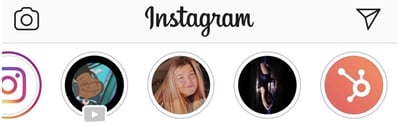
These videos are often filmed vertically, but have similar features as YouTube Live. For instance, those recording live video are able to see and respond to questions from viewers.
Before putting time and effort into creating an Instagram Live video, it’s important to keep a few things in mind.
First of all, although Instagram will show followers that you’re live through the Stories feed and via app notifications, the live symbol — as shown above — can be very subtle and easy to miss. This is unlike Facebook, which might prioritize a live video on your followers’ News Feeds.
Another thing to note is that your content will disappear within 24 hours. However, you can send your pre-recorded streams to the IGTV tab of your profile when you’re done with them. Although these videos would no longer be live, presenting them on IGTV might get them more additional views after they’ve aired.
Non-verified users can post a video between 10 seconds and 15 minutes to IGTV, while users who are verified or have more than 10,000 followers can publish videos or streams up to one hour long to this tab.
At this point, a number of brands have already gone live on Instagram and later added this content to their IGTV tab. Below is just one example of a live post that was later shared on IGTV. In the video, a representative from Providence, R.I.-based Bolt Coffee walks viewers through how to brew iced coffee with the brand’s products:
Other Platforms for Live Video Streaming
While Twitter allows you to connect with friends on its social network, many use the platform to follow news, trends, and topical discussions. This is why a large portion of the live videos you’ll see include news coverage, video of current events, or someone discussing a hot trend.
Despite much of the live video being dedicated to news or trends, some brands have experimented with streaming content on Twitter. One example of a brand that’s done this is Coinbase — a platform for storing and selling cryptocurrency. In a recent live stream, Coinbas’s CEO did an AMA — or Ask Me Anything — session where he answered questions submitted live by users.
I did a live AMA yesterday answering people’s questions on Twitter/YouTube https://t.co/Ifq7naVlA6
Let me know what you think. Maybe next time can add someone else from the Coinbase team, make it more conversational. Or just walk around the office and chat with folks!
— Brian Armstrong (@brian_armstrong)
April 4, 2019
Although Twitter owns Periscope, a live video streaming app, you can go live directly through the Twitter app. To do this, tap the “Compose” button, then tap the “Upload” icon which looks like a camera. Once you’re in camera mode, you can toggle from “Capture” to “Live” mode.
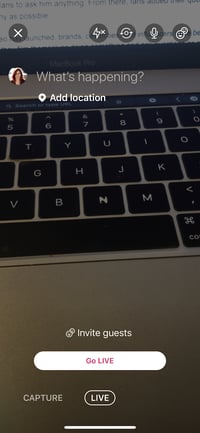
If you want to add a second video box where other Twitter users can stream with you at the same time, tap the symbol with two smiley faces in the upper right hand corner to invite guests.
Before you go live on Twitter, you should keep in mind that the platform doesn’t center around live video. While it algorithmically might show your content in a followers’ feed, Twitter does not have a specific home for past-recorded live videos like Facebook Live or YouTube Live does. This means that to see your video after it’s streamed, users will have to go to your profile or search for it.
You should also note whether one of the other platforms above might be better suited for your audience targets. While Twitter does have a large audience, consumers — such as those who took our survey — might think of Twitter as more of a general social media network rather than a live video platform.
While Reddit was later to the game by launching live video in 2019, brands have still leveraged it quite a bit to engage with the platform’s niche communities, or subreddits.
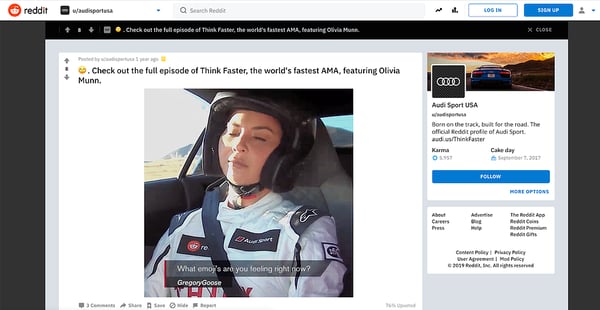
One way brands have leveraged live streaming is by hosting live AMAs with celebrities, company leaders, or thought leaders. The AMA format originally started as text-based discussion threads in subreddits. For example, to promote Microsoft and his non-profit organizations, Bill Gates has published a number of threads in technology-related subreddits that asked his fans to ask him anything. From there, fans added their questions and he tried to answer as many as possible.
Since live video launched on Reddit, brands have re-formatted traditional AMAs into video streams. For example, Audi recently posted a series of live streams called “Think Faster.” In each live stream, celebrities sped around in one of Audi’s newest cars while answering Redditor questions. Here’s a screenshot from one of the events which featured actress, Olivia Munn.
Twitch.tv
Twitch is one of the newest platforms on this list. However, the live-streaming site has notably gone viral as video gamers have been using it to stream their sessions.
But Twitch isn’t just for gamers anymore. At this point, a number of marketers and brands have identified ways to leverage the platform.
One major brand that won a Clio for its Twitch-based campaign was the fast-food chain, Wendy’s. In 2019, a mission set in the popular video game Fortnite, told players to harvest beef and place it in freezers of nearby restaurants to collect coins.
Because Wendy’s claims to sell, “Fresh, Never Frozen Beef,” its marketing team decided to launch a nine-hour Twitch stream where a Fortnite avatar dressed like Wendy ran around the video game attempting to destroy freezers. As a Fortnite player, you could join Wendy and help her smash the appliance.
According to the Clio sizzle reel, the Wendy’s stream began to go viral as more people logged in to watch and post in the comment thread. Gamers also began to start attacking freezers to help Wendy’s avatar.
Building a Live Video Strategy
Although live video might seem like a great opportunity to engage with your audience, it still could cost time and money to plan and produce. Like any marketing strategy, you’ll want to research the tactic before diving into it.
As you determine if live video is right for you, and identify the platforms you’ll experiment on first, it’s important to lay out what goals you’ll want to achieve with the content.
For example, if you’re interested in pulling in views or awareness from broader, more general audiences, YouTube or Facebook might be the perfect live platforms for you. Or, if you’re interested in pulling in a younger audience, you might want to consider Instagram, which has a slightly younger audience.
To help you learn more about the live video platforms and strategies out there, check out this list of live video stats. If you’ve determined where you want to publish, but don’t know how to format your content, read this post to find out which types of live video are most engaging to consumers.

What I Learned From Counting Every Marketing Agency in America [4 Takeways]
It’s a defining human impulse — the desire to quantify the world around us. And given the pending 2020 U.S. Census, it seems a fitting time to contribute.
Recently, my team did just that: Like our astronomic ancestors under ancient skies, we looked outward and began to count.
What did we count?
Every marketing agency in America. Sort of.
Truth be told, it would be foolish to declare an exact tally. Our source was online listings, so there’s plenty of margin for error. Some agencies get gobbled up by competitors two weeks after you count them. Others shutter in the real world but endure online. And some never existed; they were always empty shells, built by hustlers with an UpWork account, pronouncing their “team” ready for your next big project.
What I can say is this: America is home to at least several thousand marketing agencies. We trawled 6,000 listings, and analyzed 600 websites and LinkedIn company profiles, to cover as many disciplines as possible. Those include:
- Advertising
- Branding
- Content Marketing
- Design
- PR
- SEO/SEM
- Social Media
- Web Design
- Web and App Development
We gathered a number of measurements, too, including:
- Agency size
- Agency age
- Agencies per capita
- Top disciplines
- Hourly rates
- Gender distribution in leadership
- Homepage hero images
- Company names
- Company taglines
You’re encouraged to read the full report.
Below, I’ll share our four key takeaways from the state of marketing agencies in America in 2020. I encourage leaders and contributors alike: sit back, take a breath, and think big thoughts about your trajectory in the agency universe.
1. Preserve What’s Special as You Grow
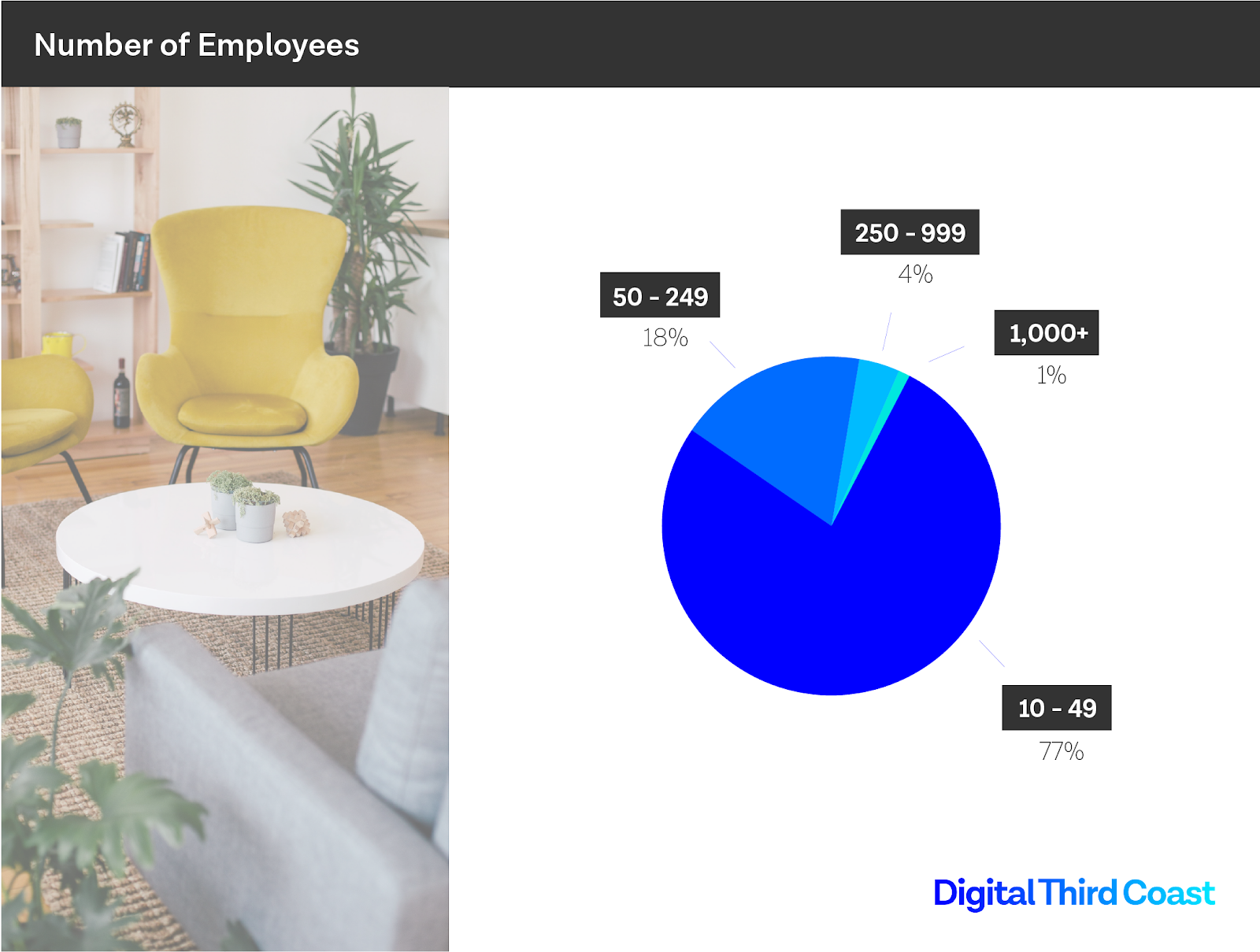
Our analysis found 77% of agencies have 10 to 49 employees, and 18% of agencies have 50 to 249 employees.
I wonder how many in the smaller range wish they could get to the next level, and how many big agencies long to be small again? Like rock bands, do agencies graduate to playing arenas, only to find themselves slumped over a shrimp buffet backstage, longing for their leaner, grimier club days?
It raises the fundamental question: What do we lose as we grow?
Small agencies should anticipate the challenge and make a vocal commitment to certain values that can be threatened when scaling. Big agencies should take stock. What’s been sacrificed — agility, focus, community? Pick something that once defined you, that you want back. Make it a 2020 goal.
2. Anticipate Lifespan and Legacy
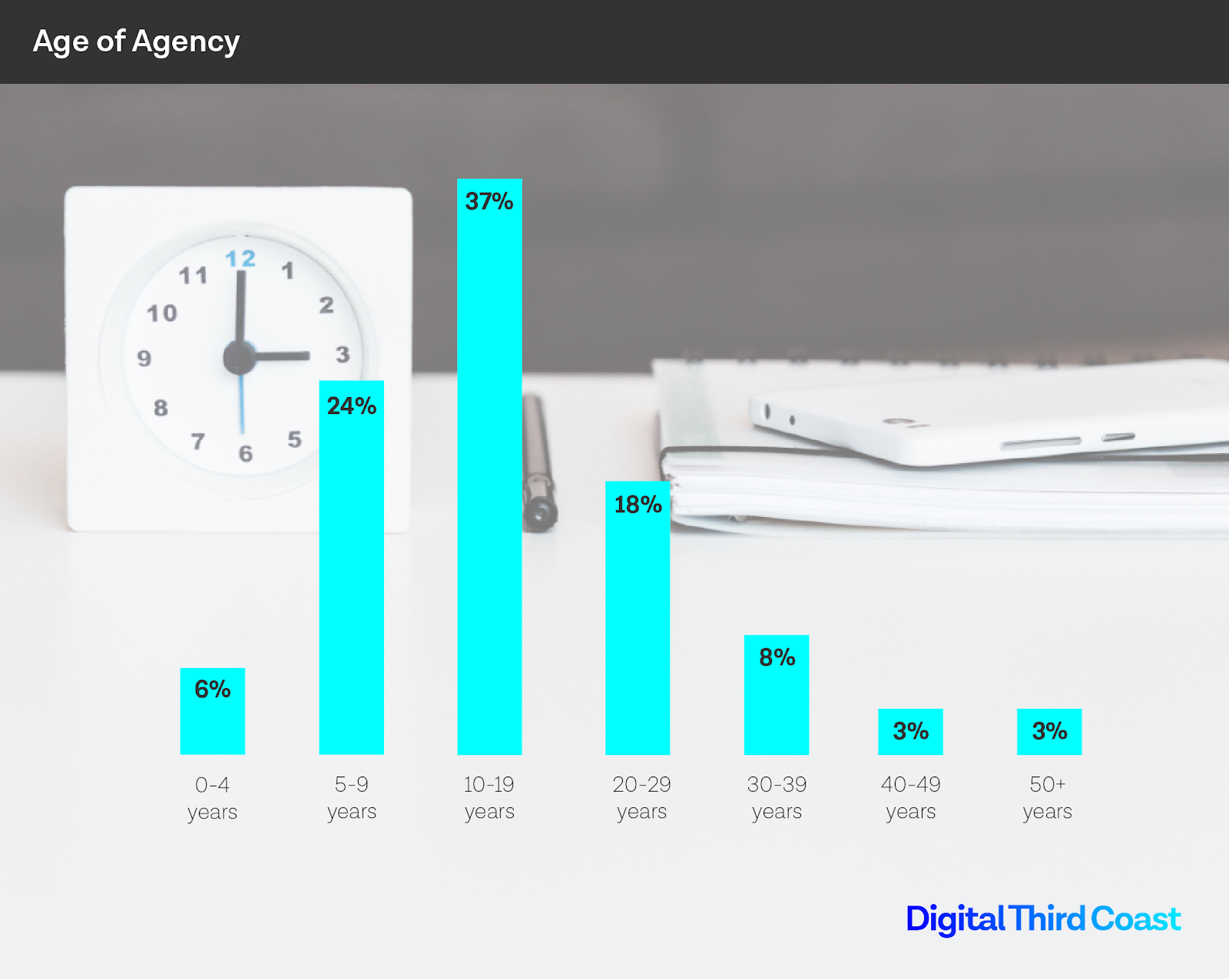
On average, a dog will live 10 to 13 years. As for a marketing agency? Not much longer.
In America, 61% of marketing agencies are between five and 19 years old, after which the population drops off significantly.
Why is that?
Think about what influences an agency’s lifespan. How much is external versus internal? Are agencies barely outliving dogs because markets and technology tend to evolve beyond their original mastery? Or because 20 years roughly aligns with the sweet spot of a human career and visionary founders struggle to make their businesses outlive them?
In either case, there’s lots to anticipate and act on at various points in the lifespan of an agency.
Be mindful of where the heart is in your agency — its center of energy. If it comes from a single charismatic founder, beware. The heartbeat of an organization should be sustained by many people.
Take an unflinching look at the evolution of markets and technology around you, since the beginning. Just because you mastered something that was new five years ago doesn’t mean you’re positioned to master what’s around the corner. A long life depends on lots of planning (and a little luck).
3. Don’t Just Hire Women — Empower Them to Lead
This topic is a monster, and certainly deserving of much more attention than I’ll give it here. But I’d like to share a candid note about how our agency was founded, and what it means for gender equality in agency leadership.
The founders of Digital Third Coast are both men. They worked together at an early iteration of a digital marketing agency, early in their careers. They left that agency and ventured out to start their own business.
For the purposes of our analysis, we classified our agency as having “all men” in leadership. In this case, the highest identifiable tier of leadership is “owner”, and there are two owners, both men.
Our owners are conscientious, fair, and progressive. They value contributions of women as much as men, they hire women regularly, and they give women opportunities to lead in our organization. But none of that changes where they started. When they were at their previous agency, they looked around and found each other, among other men.
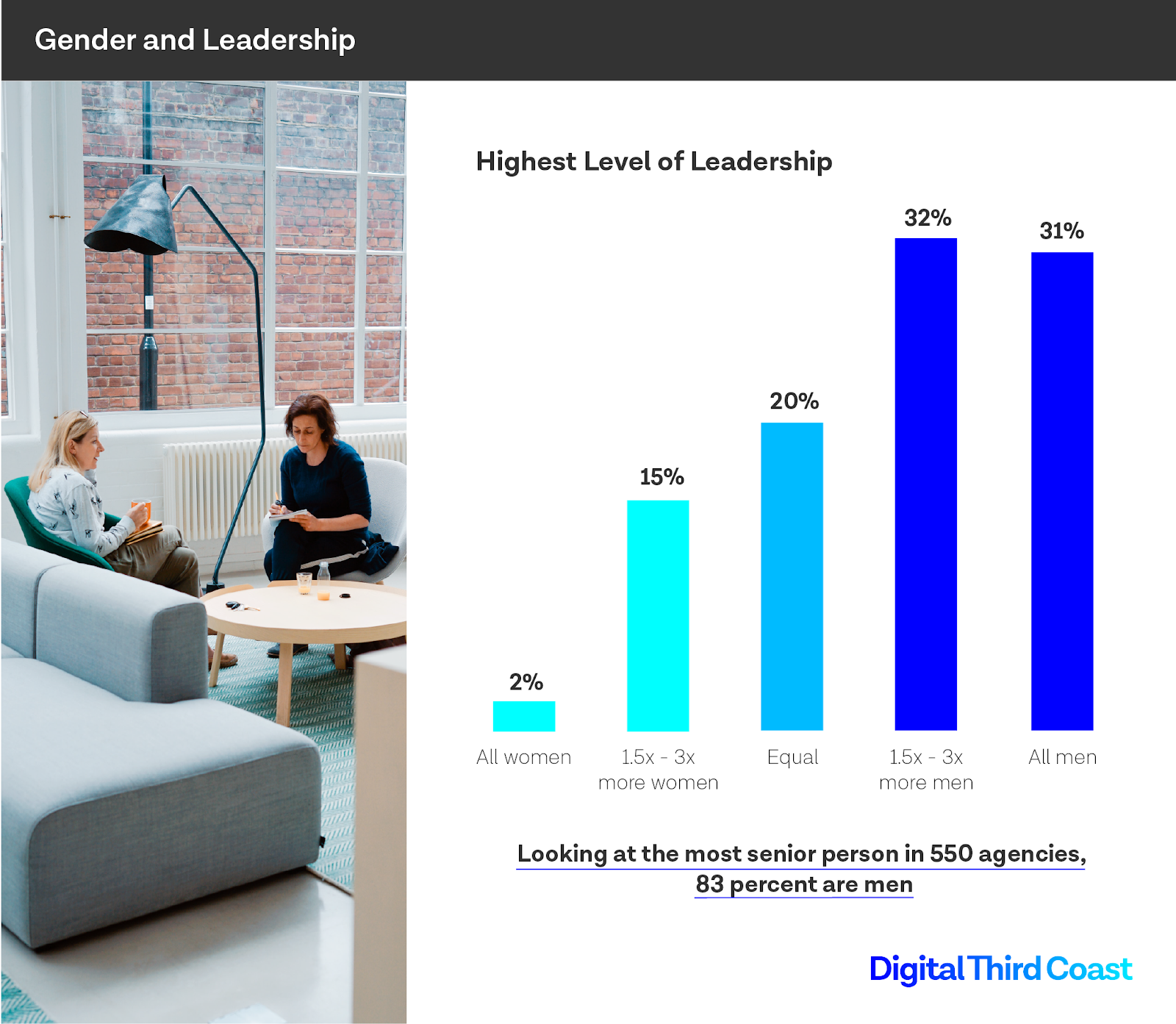
The numbers are abysmal in the agency world, as they are in so many other sectors of business. But female leaders don’t materialize out of thin air, and we won’t reach a state of equality through promotions alone. If we flipped a switch and suddenly every marketing agency in the country with 250+ employees had all-female C-suites, these numbers would barely budge.
This is a small business problem, not a corporate problem. We need an industry, economy, and society where young women feel empowered to
start their own businesses, just as our owners once did.
A challenge for agency leaders: right this minute, are there women in your organization who are working and growing with other women, in substantive ways, who may one day feel empowered to venture out on their own? There should be.
4. Make an Authentic First Impression
On a (slightly) lighter note — can we end the scourge of stock model photography? Please.
In a world defined and dominated by user-generated content and the unprecedented intimacy and access of social media, agencies should not be representing themselves with sterile stock imagery.
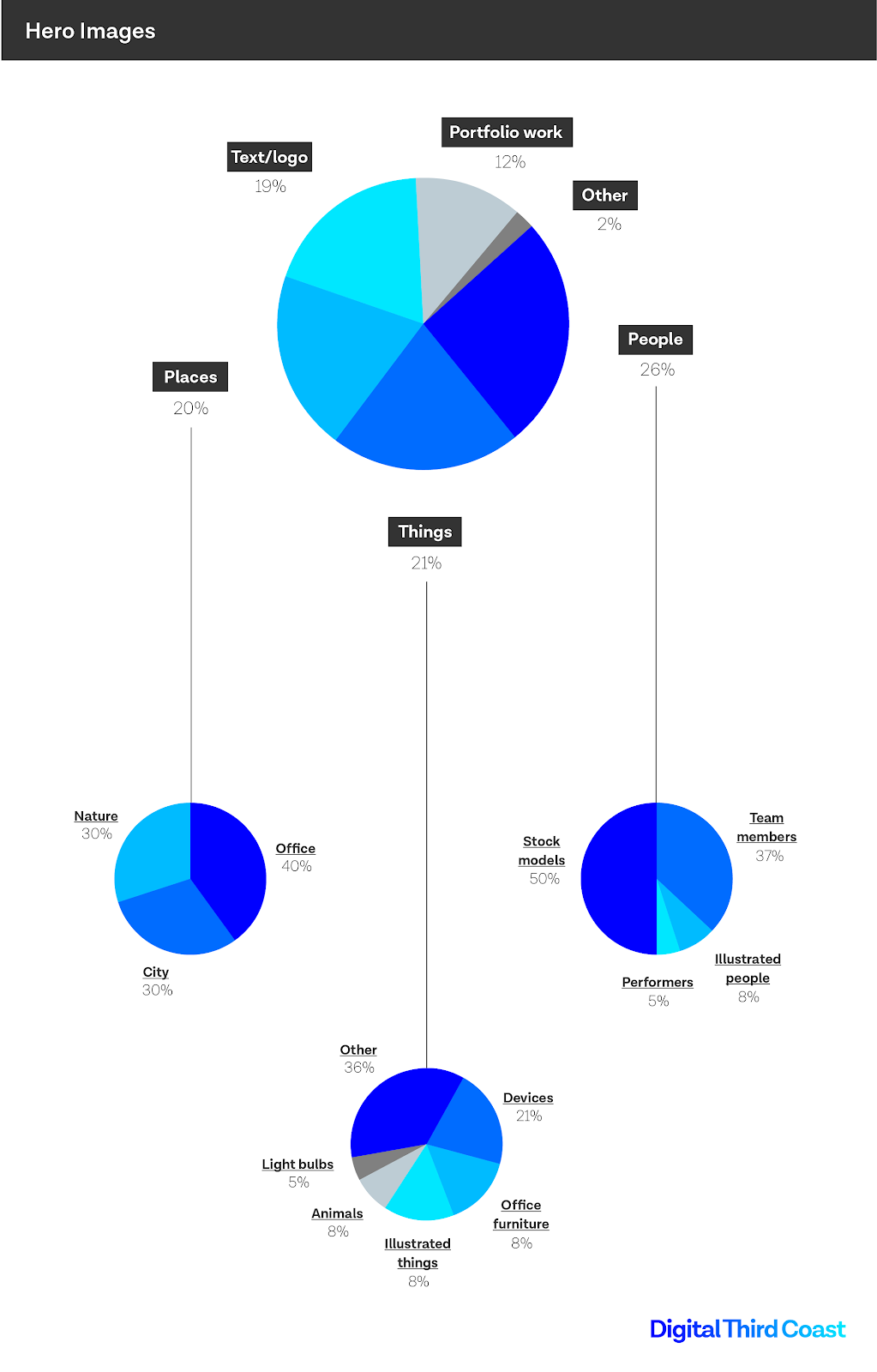
The homepage hero image is an enormous opportunity. Marketing agencies in America do various things with it. Most show people, objects, or places. You might see a light bulb, a group of people standing around a table, or a city skyline.
The opportunity, of course, is not just to look good, or look on-trend, but to reflect expertise, integrity, and professional values.
Agency leaders should reflect: is my homepage hero everything it can be, or is it what I’ve seen everyone else do?
Much of our daily grind is occupied by an appropriate depth of focus — we manage the work at hand, our people, our quarterly and annual goals, our company vision. Occasionally we venture beyond that and consider our competitors and our markets.
And, once in a while, we’re prompted to go a step further and consider existential questions about longevity, equality, and connection to our past. I hope this data helps you with that.

10 Content Marketing Analytics Tools That Finally Do What You Need
70% of companies are actively investing in content marketing, and 60% regard it as an important part of overall strategic planning. These points emphasize the need for a strong content marketing strategy.
A strategy is only as good as its tools. If you have a winning strategy, but unreliable resources to pull it all together, your plan might fall apart at the execution level. The challenge isn’t creating a strategy, but rather, finding the perfect tools to help you manage and work through your plan.
You need tools to provide accurate metrics, the insights that will inform better decisions, and come ready with the customization options that will make your dashboard a functional asset.
Here’s a list of analytics tools that will help you measure the impact of your content marketing. If you’re looking for customizable metrics, social media ROI, team collaboration, and SEO information, these tools are here to help.
Content Marketing Analytics
Your campaigns should be tracked every step of the way — not only for your benefit, but your audiences’. To continuously delight your customers, you have to know what’s working and what’s not. That’s why the tools you’re using to analyze results are so important — you get a better picture of who your customers are and how they interact with your content.
Whether it’s a Twitter campaign, an email newsletter, or a new batch of offers, your strategy depends on content marketing to connect with customers.
1. HubSpot Marketing Hub
Price: Starts at $40/mo. for Marketing Hub Starter
HubSpot’s Marketing Hub was designed with the busy content marketer in mind. This set of tools offers robust analytics software to help you keep track of performance in one place.
For example, you’ll be able to track customer lifecycles from beginning to end and configure reports by contact or company. This will help you analyze trends your customers display as time passes.
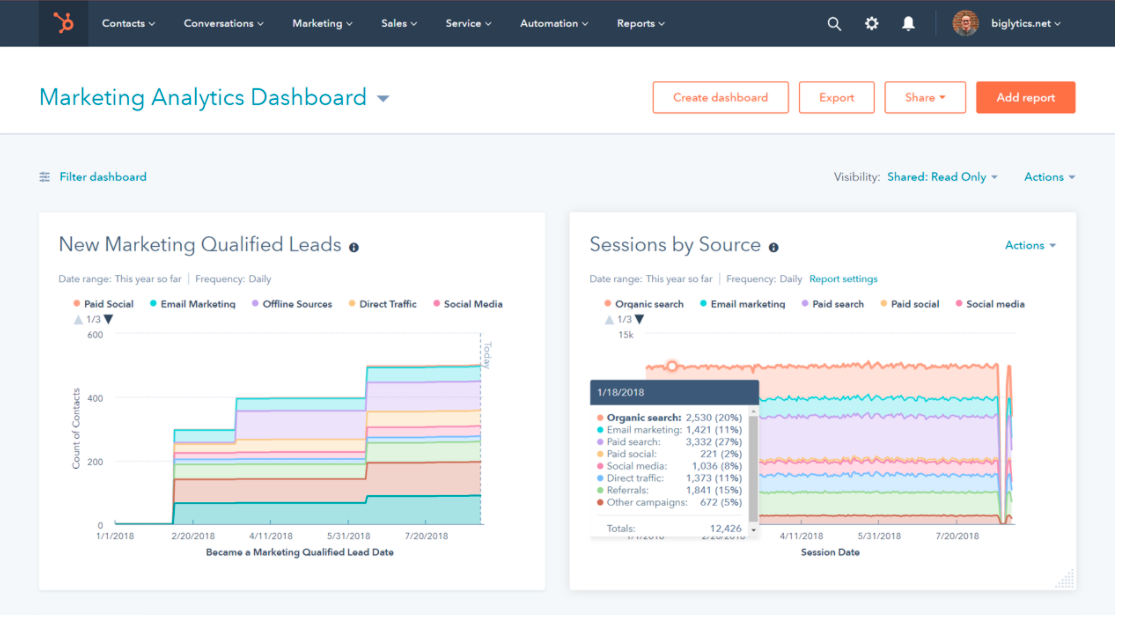
Additionally, you have the tools to track website activity and analyze web behavior in a page-by-page breakdown. Locate the traffic sources that are most beneficial in bringing in customers with the metrics tool, and if you want to access this data based on a specific region or URL, you’ll have those options available.
HubSpot’s analytics tools help you figure out how to drive value and target your campaigns so you’re performing campaigns that are going to bring you the most benefit. You’ll have nearly everything you need to make data-driven marketing decisions.
2. Buffer
Price: Starts at $15/mo. for Buffer Pro
Buffer’s content marketing analytics offer you the option to build reports according to your goals. You can add or remove custom metrics on the performance of numerous social media accounts. With these reports, you can export those reports for shareability.
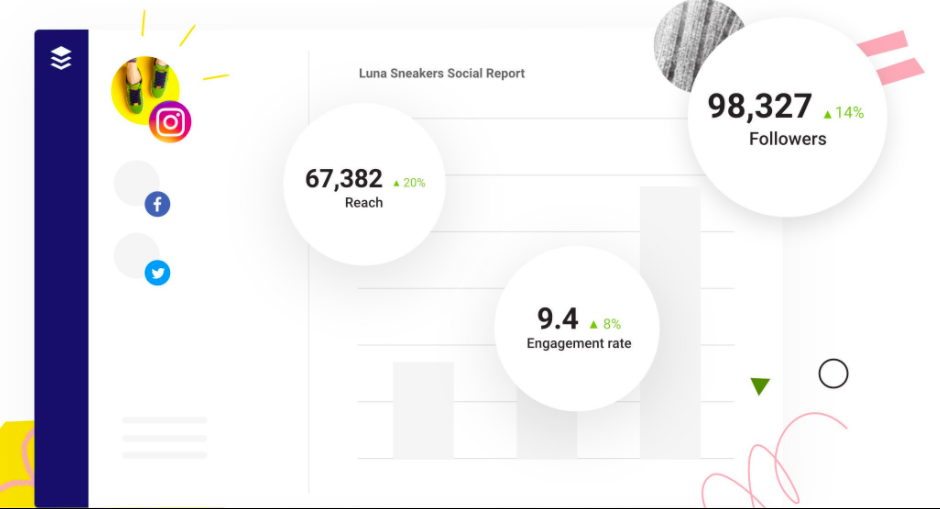
Your reports will be updated on a daily basis, so you can be sure you’re receiving timely data. Buffer’s analytics are designed to help you see channel performance at a detailed level, from one dashboard.
The software offers engagement metrics for each account individually. This helps you gain an intricate understanding of how customers are interacting with social content. You can measure stories, posts, and hashtag performance, as well as access the demographics of your audience across channels.
3. Google Analytics
Price: Free
Google Analytics has an expansive system of tools for content marketing analysis. For example, you can use the software to access insights that are unique to campaigns you run with the search engine.
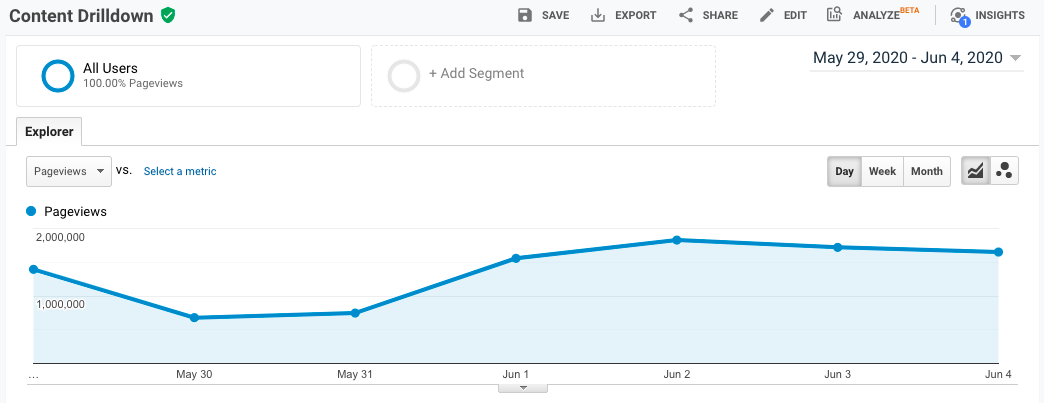
The intuitive interface is easy to pick up, and it can be used to understand the performance of your content on multiple platforms. The analytics tool integrates with Google’s array of business software, so you can access insights in one place.
4. SimilarWeb
Price: Free plan, or starts at $199/mo.
SimilarWeb provides traffic and engagement industry standards and tells you where your website stands among them. This information is useful for discovering how your performance stacks up against that of competitors’.
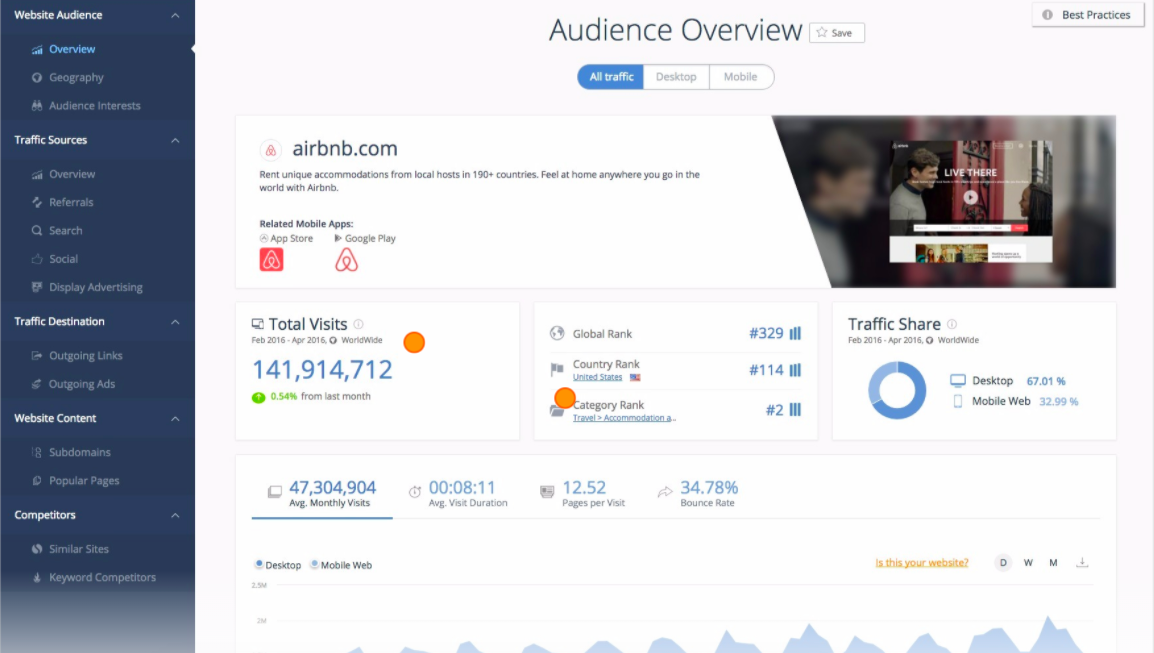
With SimilarWeb’s software, you’ll be able to break down the numbers of your content by daily active users, sessions per user, use time, and their rank. Discover more information about your audience, like their web behavior and interests, to improve acquisition strategy.
When you have a deep understanding of how to acquire customers using SimilarWeb’s tools, you’ll know what type of content is most interesting to them.
5. Moz
Price: Starts at $99/mo. for Moz Starter
Moz measures the impact of your SEO-optimized content. You’ll gain insight about how your work is ranking among others in your industry and what keywords are the most effective to use in your strategy.
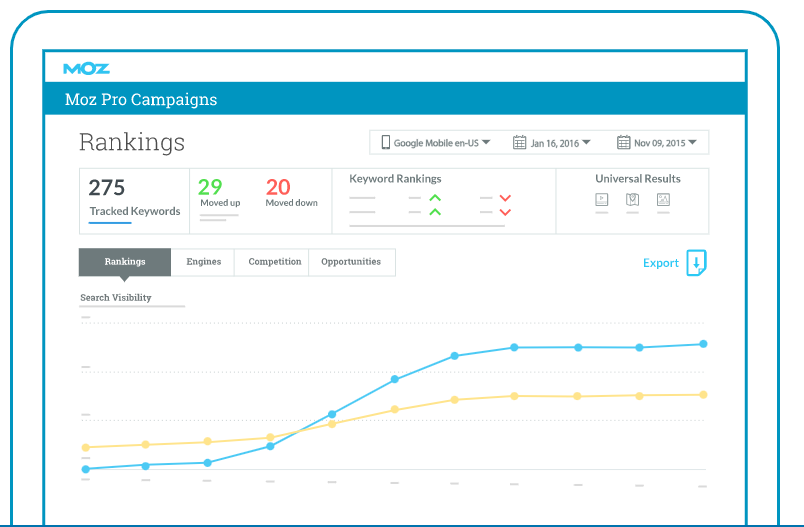
Moz’s software will track your site’s keyword rank and how visible it is over time to learn what is and isn’t performing well among audiences. Additionally, track how competitors are ranking on search engine results pages; This will help you spot how they aren’t reaching customers and where you can reach them in your campaigns.
Use Moz’s detailed reports to see how your content is reaching audiences and what you can do to improve that reach.
5. Hotjar
Price: Starts at $89/mo. for 2,000 page views a day
Use Hotjar to track sessions on your site. Hotjar provides heat maps of how and where customers are spending their time when they visit your website. They create real-time videos of how visitors are moving and clicking through your site.
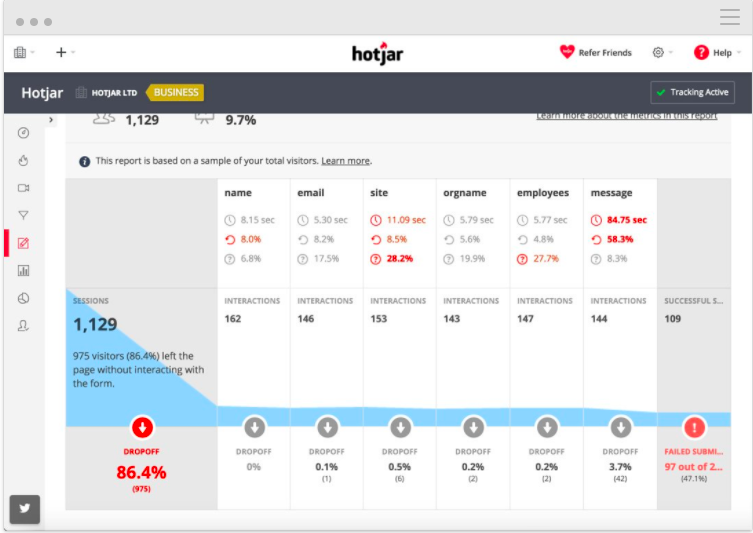
This allows you to hone in on what content is catching your customer’s eye. You can also track conversions and make inferences about which stage in the buyer’s journey customers might be leaving.
7. SEMrush
Price: Starts at $99/mo. for Pro
Though this tool is used for SEO tracking, it’s super helpful for digital marketers. Use it for tracking keyword performance in your latest campaign or to learn what language is grabbing your customers’ attention.
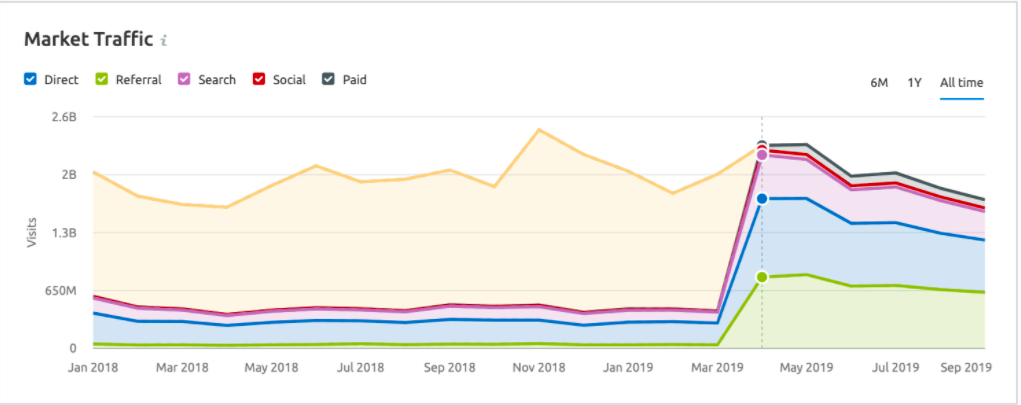
SEMrush also provides tools for monitoring brand mentions. So if people are talking about your company online, in a LinkedIn post, for example, you’ll see that activity. This way, you can monitor the perception of your brand.
Additionally, the software tracks Google rankings and what pages on your website are earning the most traffic. Discovering what is driving visitors to your website helps you adjust the content you’re presenting accordingly.
8. Quintly
Price: Starts at $300/mo.
This software provides you with social media analytics to analyze your content marketing campaigns. Quintly helps you make smarter decisions when it comes to social planning. The tools equip you with customizable metrics, so you can learn the insights that will be the most helpful in planning your strategy.
Quintly does a deep dive into all of your accounts to uncover metrics, such as tweet performance. You can also sort the reports by teams, so your colleagues also have access.
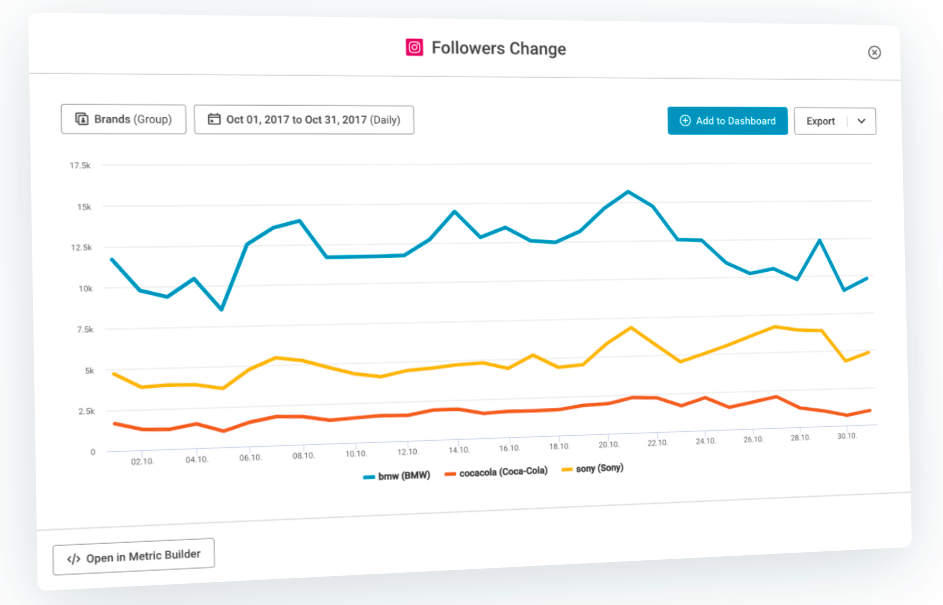
Reports can be automated and measured by impact using quintly’s machine learning-powered system. Users can access the API, integrate with popular software like Google Search, and learn how to overcome data silos.
Quintly serves as a great source for customizable metrics for you and your team.
9. BuzzSumo
Price: Starts at $99/mo. for Pro
Analyze trends using BuzzSumo. This software shows you real-time views of the most popular trends by location or topic. So if you want to create content that has a great chance of being relevant to your audience.
Trends are also available to be filtered by location, so if you have international customers, you’ll have knowledge about what’s popular in their regions.
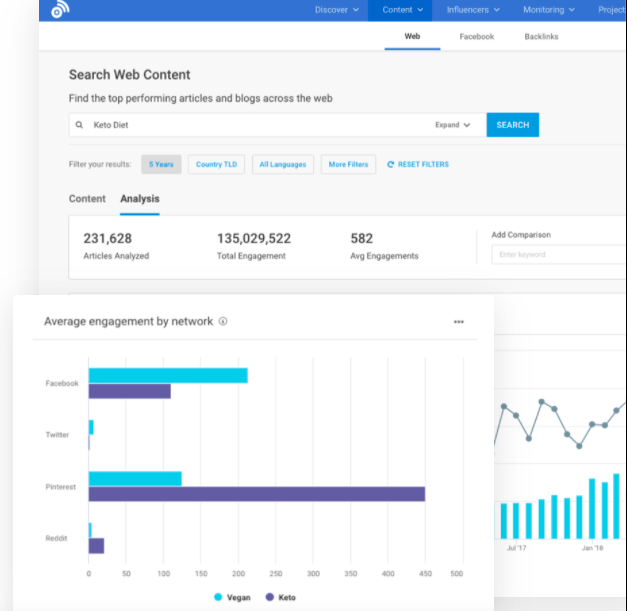
BuzzSumo lets you customize your feed after joining, so you’ll only gain data that matters. If you’re struggling to come up with content ideas, you can find inspiration on the website. Additionally, you can identify keywords, access content examples that are proven to be successful, and use the data provided by the software to learn how to drive traffic to your content.
10. Kissmetrics
Price: Starts at $199/mo. for Silver
With Kissmetrics, you can put a person behind the data. The software allows you to spot a customer’s journey across multiple devices, analyze their behavior on your website, and provides data about conversions.
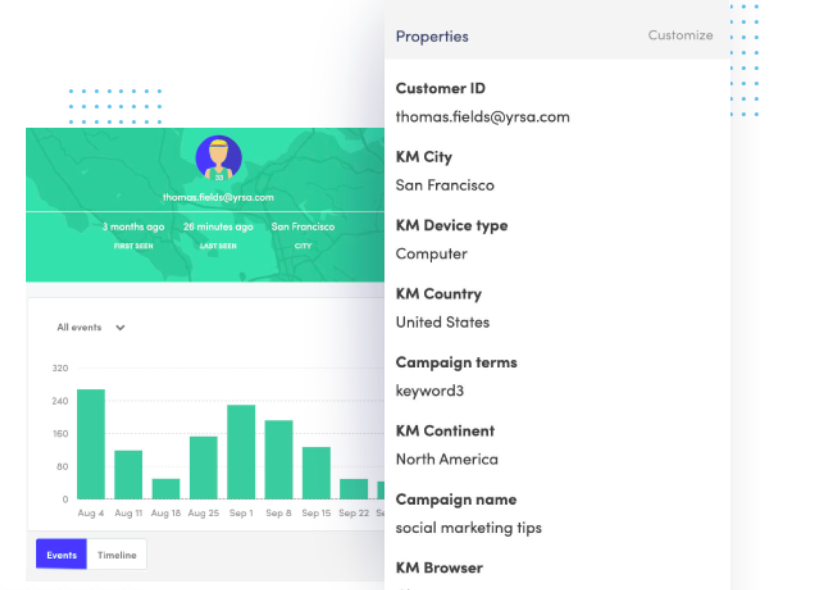
The conversion metrics provided include bounce rate and time on site. Kissmetrics’ software focuses on behavioral analytics — helpful for knowledge about how customers react to your content. You’ll learn what’s valuable to users and how to keep them coming back.
Content tools are going to make your life as a marketer easier. Software that offers organization, supports collaboration, and gives you creative freedom will help you bring your ideas to life. When you think about how to delight your audience, having the right tools on your side can eliminate the worry of making sure it’s all being managed.

7 Tips for a Smooth Virtual Meeting
7 Companies Hosting Great Virtual Conferences
In April 2020, I attended the two-hour special “ACM Presents: Our Country“. In my pajamas with a bowl of popcorn, I was able to watch Miranda Lambert, Thomas Rhett, and Florida Georgia Line perform from their own living rooms.
And, while the show didn’t have the same top-notch special effects as past country awards shows, it still managed to deliver exactly what I wanted: live country music.
In 2020, many companies have needed to pivot to virtual conferences. HubSpot is no exception — for the first time in nine years, INBOUND, an event hosted by HubSpot, will not be held in-person. Instead, it will be a two-day immersive online experience.
More than likely, we’ll continue to see a rise in virtual conferences over the coming years. It makes sense: Virtual conferences enable you to lower set-up costs as well as cost of admission, and increases the opportunity for people across the globe to attend.
Whether you’re planning on pivoting your own in-person conference to a virtual experience, or simply want to attend a virtual conference in 2020, you’re in luck.
Here, we’ve cultivated a list of seven companies hosting amazing virtual conferences. Best of all, these examples range in size from 50,000 attendees to a few hundred, so you can find inspiration regardless of your budget.
1. SaaStr Annual
SaaStr Annual is the largest SaaS conference in the world, with over 50,000 SaaS executives, founders, and VCs in attendance. This September, SaaStr will still happen virtually, with over 200 live, handcrafted sessions and featured speakers ranging from Founder and CEO of Zoom to Chief Technology Officer at Shopify.
The immersive experience will include speakers, AMAs, mentoring sessions, and one-on-ones with SaaS CEOs and leaders across the globe, with the goal of helping attendees scale their businesses faster. And, despite being virtual, the conference will still include opportunities to network and learn from peers in the industry.
Fortunately, attending a virtual conference is much cheaper than attending in-person (especially since your company doesn’t also have to pay for travel expenses). In fact, you can attend SaaStr’s event for free with a two-day digital pass to access select live content.
Alternatively, you might purchase the VIP Startup Founders & Execs Pass, or the Investor Pass, for full access and opportunities for networking and mentorship.
2. Venture Café
More than 200,000 people have attended Cambridge-based Venture Cafe’s free networking, learning sessions, and office hours since 2010.
The company enables small business owners and entrepreneurs to connect with industry experts, offers open mic nights for entrepreneurs to pitch their start-up ideas to the community, and hosts conferences that aim to connect entrepreneurs with investors and mentors.
Ruth Saunders, Venture Cafe’s Vice President of Partnerships, told me Venture Cafe pivoted their in-person weekly Thursday Gathering to virtual on March 12, and have since hosted 12 virtual weekly Thursday Gatherings, four virtual conferences, and two pitch events.
Their virtual conferences (including SheConnects, FinTech, and Digital Health) have amassed over 4,000 attendees.
The company uses Remo, a virtual networking tool, to showcase startup demos and host networking events and clinics.
Saunders says, “Every week, we try something new, and we’re constantly learning from our community and from other Venture Cafes globally.”
Ultimately, it’s a good idea to assess how one virtual event performs before planning another — especially since you can use that information to iterate on your processes and find greater success in the future.
3. Penguin Strategies
Penguin Strategies, a marketing agency focused on generating quality leads and improving conversion rates for B2B Tech companies, was planning a HubSpot User Group meet-up in March of 2020. Realizing an in-person event was no longer feasible, the agency pivoted to an online event in just three weeks — and secured over 1,000 attendees.
Writing about the agency’s strategies in this blog post, CMO Shoham Eckhaus notes the company knew it was vital to give the marketing community an alternative platform for sharing ideas.
Additionally, she shares four key takeaways for creating a virtual conference — “Deliver the right topic at the right time; share high-quality content from experts in the field; stay focused; and engage influencers to share with their networks.”
Penguin Strategies’ event, which was aptly called “CMOs Surviving in a Panicked Economy” with featured speakers Kipp Bodnar (HubSpot CMO), Tyler Lessard (Vidyard CMO), and moderated by Penguin Strategies’ CEO, had an attendance rate of over 75% — greatly above the average webinar attendance rate of 44%.
4. Future For Us
Future for Us, a platform dedicated to advancing women of color in the workplace, has seen massive growth in one year, quickly creating a community of over 10,000 women of color and allies across the U.S. as well as globally. The platform has been recognized in major publications including People Magazine, Vogue, and Forbes.
In 2019, Future For Us hosted their first Assembly and jam-packed a conference space with keynote speakers, fireside chats and workshops, and panel discussions with industry leaders. However, in early 2020 they were tasked with pivoting the Future for Us Assembly from in-person to entirely virtual.
Their virtual conference didn’t disappoint. The day-long virtual experience included the same panels, fireside chats, and workshops that made 2019’s Assembly so popular. Speakers included Tiffany Dufu, Founder and CEO of The Cru, and Minda Harts, best-selling author of The Memo: What Women of Color Need to Know to Secure a Seat at the Table.
I spoke to Sage Quiamno, the CEO and co-founder of Future for Us, to learn the strategies she believes helped them successfully deliver a virtual experience.
Quiamno mentions a few best practices she urges other brands to consider when hosting a virtual event: “First, research different formats and technology tools that both big and small brands use to get their content out there and encourage engagement from their audiences. Second, I’d recommend hiring a technology expert in whatever platform you’re using. For me, I had a one-on-one consultation for Zoom to understand the ins-and-outs of the platform.”
“If you’re a community-based company, and see attendees as a big value proposition for your brand, it’s important you choose a platform that aligns with your brand and reflects your community.”
Quiamno adds that she used Zoom’s chat feature to encourage continuous engagement from the audience throughout the six-hour conference. Additionally, she also played music at the beginning of the conference and in-between speakers to create a more energetic, exciting atmosphere for attendees.
From their virtual event, Future for Us has achieved a 10% increase in membership per week, and doubled the attendees from their 2019 in-person event. Best of all, the virtual event enabled women of color from across the globe to attend, without cost of travel inhibiting anyone from partaking.
5. INBOUND
INBOUND has been hosted by HubSpot for over nine years and is one of the world’s largest marketing conferences, attracting more than 26,000 attendees from 110 countries across the globe. The Boston-based event features powerhouse speakers, uproarious entertainment, and educational breakout sessions to inspire and educate professionals and help them grow.
This year, INBOUND will become entirely virtual and offer unique Q&As with breakout speakers, interactivity with keynote speakers, and creative opportunities to network and even “meet by chance” to mirror the real thing.
Kim Darling, VP and Executive Producer of INBOUND, says, “The audience has to be our hero — their energy, conversation, connection, and passion is what makes the in-person event so special.”
“INBOUND aims to inspire a huge community of professionals who can learn and share so as they can go back to their jobs and take the world by storm. [Virtually], we have to find a way to create space for that energy to be created by them.”
You can purchase a two-day Premium pass to everything INBOUND’s digital experience has to offer, plus perks, for $49 a day, or get a free Starter pass to attend limited events.
6. MozCon
MozCon is an annual event hosted by SEO software company Moz, and is now entirely virtual on July 14-15. The conference aims to connect marketers with industry-leading experts regarding topics ranging from SEO to conversion optimization and more.
The virtual conference will include experts from Moz, WordStream, Backlinko and more, and enable marketers to network and share industry best practices.
Whether you need to sharpen your SEO and local SEO knowledge for clients or to increase conversion rates for your own business’ marketing strategy, this is a great conference to consider attending, virtual or otherwise. Tickets to 2020’s virtual event are $129.
7. DeveloperWeek Global 2020
DeveloperWeek Global, the world’s largest virtual developer and engineering conference hosted by DevNetwork, enables thousands of developer professionals to connect with each other and learn from industry experts.
This year, in lieu of an in-person conference, DeveloperWeek will become the world’s largest virtual conference series with over 15,000 attendees and immersive events ranging in topics from API, cloud computing, and DevOps. Featured speakers include Head of Engineering at Bloomberg Media and Principal Software Architect at eBay.
The virtual experience includes over 100 keynote and technical talks, demos on upcoming technology, exhibitor chat rooms, peer networking groups, and a global hackathon.
Best of all, if you’re unable to pay for the Deve Leadership Summit Pass, you can attend the conference for free with access to live keynote, leadership, and technology talks, as well as the hackathon.
Hopefully, these seven examples can kickstart your own team’s inspiration if you’re planning on hosting a virtual conference in the years to come. If you need more help with the nitty-gritty of virtual conference planning, take a look at How to Run a Successful Virtual Event [+ Examples].

How to Improve Your Instagram Video Ads: 5 Tips
Want to do more with Instagram video ads? Wondering how to enhance your Instagram video ads? In this article, you’ll discover five tips to create Instagram video ads that perform well in the feed. #1: Focus on One Goal in Your Instagram Video Ad Advertisers often think that to generate maximum ROI from their ads, […]
The post How to Improve Your Instagram Video Ads: 5 Tips appeared first on Social Media Marketing | Social Media Examiner.
from Social Media Marketing | Social Media Examiner https://ift.tt/3f9ABif
via socialmediaexaminer
7 Steps to (Effectively) Branding Your Business on a Budget
In marketing, it seems like the word “brand” is used a lot — the leading brand, off-brand, personal brand … you get the picture.
But there’s often confusion around its meaning in business. What does it entail? Should you hire an expert?
Most of all — branding is expensive, right?
Not exactly. As it turns out, there are some creative ways to brand your business effectively without a ton of cash. And while it can require an investment of time, the ROI won’t go unnoticed — in some cases, it can actually help you save money, while also growing your business.
Building your brand is a crucial part of developing your business. It’s the foundation of giving your organization a voice, identity, value, and awareness among consumers. And, thanks to the plentiful number of resources, tools, and platforms available today, a brand build might not be as burdensome (or costly) as some think.
So read on, and see how you can use the following seven steps as a guide for your brand build.
How to Brand Your Business on a Budget
You don’t have to break the bank to grow and maintain a brand. In fact, you can complete most of these tips without spending money. The most important things to remember when brand building are to keep your customers in mind and deliver messages that support your company’s mission.
Below, let’s discuss a budget-friendly way to grow better on a budget.
1. Create a persona to understand your audience.
You’ve probably heard that knowing your audience is the key to creating marketing messages that appeal to them. A great way to get to know them? Create a buyer persona — a semi-fictionalized representation of the values and characteristics of your ideal customer.
Personas outline the challenges of that customer and where your business fits in to solving their problems. Below is an example of a buyer persona, Marketing Macy. Notice how my persona lists demographics, like age and education, as well as tools needed for the day-to-day, like a CRM.
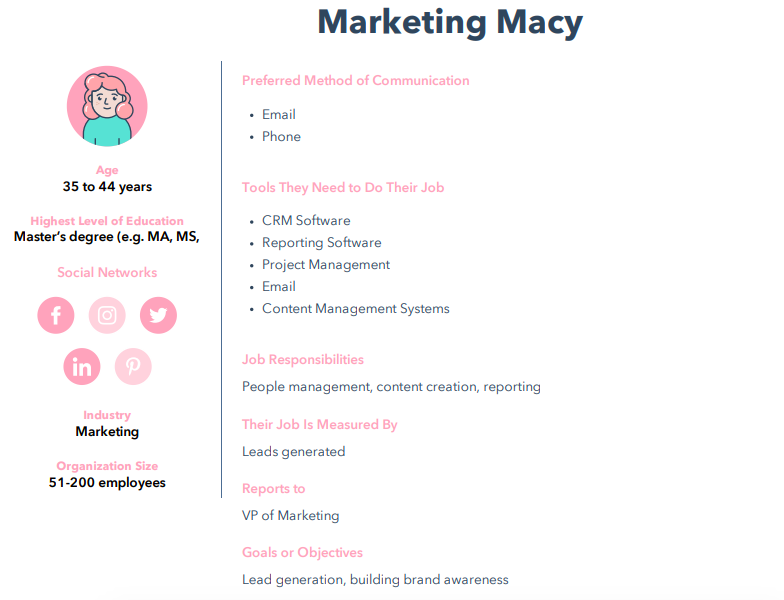 The needs, goals, and behavior of your potential customers dictate how you convey your product or service. So for Macy, I want to focus on a B2B strategy that caters to her goals of lead generation and brand building.
Understanding those goals helps you determine what kind of media your personas are consuming, what motivates them, and where they “live” online. This information allows you to develop a compelling, effective brand that reaches the right people.
Make your own buyer persona with HubSpot’s free MakeMyPersona tool, which guides you through a series of questions about your ideal customer. The tool is fun, interactive, and meant to get you thinking critically about who you want to reach with your brand and how you want to reach them.
2. Develop an identity and voice for your brand.
Once you’ve identified your buyer personas, your brand can start to take shape. Create a brand identity — what makes your brand, your brand — and its voice, which is the tone you use in any copy or public communication.
Developing brand voice and identity is similar to constructing your personas. But instead of answering questions about your target audience, you’re answering questions that are more introspective to your brand: What are your company’s values, what do they represent, and how do you want people to talk about you?
When you answer these questions, focus on creating content that supports them. Craft compelling emails, blogs, social posts, and multimedia that reflect your company’s mission, values, and how you want to appear to customers.
For example, if one of your values is to be accessible to customers, communicate contact information on social media pages and answer service questions that appear in comment sections.
Developing your voice comes through in the copy of that content. Are you going to use conversational language that relates to customers? Or will it be more beneficial to reach your audience from a technical standpoint?
For example, one of my favorite brands to follow is Glossier, a beauty company with a great understanding of brand voice.
When I tag the company in a photo on Instagram, I usually get a reply with one of their famous logos: An emoji version of a smile and wave (🙂👋). This logo appears on the bottom of marketing emails and packaging, keeping the brand consistent across multiple formats.
Even if you’re not starting from scratch, establishing a strong(er) brand voice can be valuable. Just take operating system software service Android, for instance: Their 2019 rebrand was a logo re-up, making the design cleaner and modern:
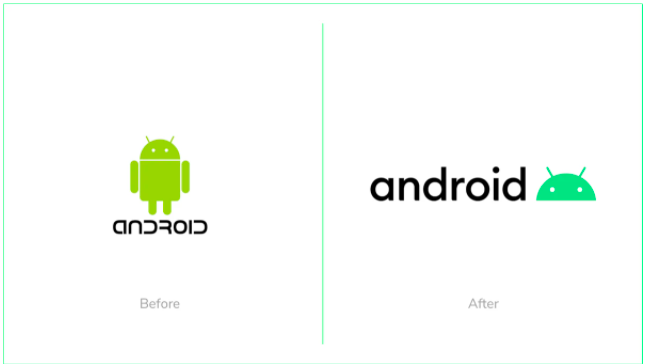
The logo came from a need to speak to a shift in audience. Initially, Android’s target audience was the developer, but instead, the company has become more consumer-facing. The change was bred from this analysis.
3. Map out a consistent social media presence.
So, we know who your personas are. And now, we have an idea of what and how to create messaging that connects with them. But where are they?
Since you have a clear picture of what your audience is interested in, next, figure out where they’re spending the most time on social media. We’ve talked about how effective it is to reach people where they’re already present, and that includes their online behavior.
Don’t worry, you don’t have to play Inspector Gadget to figure out where your audience spends time online. Check out competitors — see where they’re most active (and how their language may or may not connect to audiences).
Additionally, look at how your audience interacts with social media. For instance, the highest percentage of U.S. men and women who use Facebook are between the ages of 24 and 35. So, if your persona fits that bill, focus your strategy on Facebook.
If you find the majority of your audience prioritizes one social network, you’ll have an idea of where to allocate your resources. But don’t ignore other sites. When you build a presence on multiple social media platforms, you’ll have an opportunity to diversify how you reach audiences. Diversifying the methods and channels you use for obtaining new leads helps you to connect with as many potential customers as possible.
Maintaining a presence is just as important as building one — for example, have you ever gone to a brand’s Facebook page, only to find that nothing has been posted in the past three months? Chances are, it didn’t have a positive impact on your perception.
That can be avoided by planning and scheduling social media posts, like you would with any marketing calendar. This free Social Media Content Calendar can help.
4. Start a company blog.
We’ve covered the importance of blogging before, and it can’t be emphasized enough. It’s a core part of the inbound marketing flywheel, especially the “attract” stage, which turns website browsers from strangers to visitors.
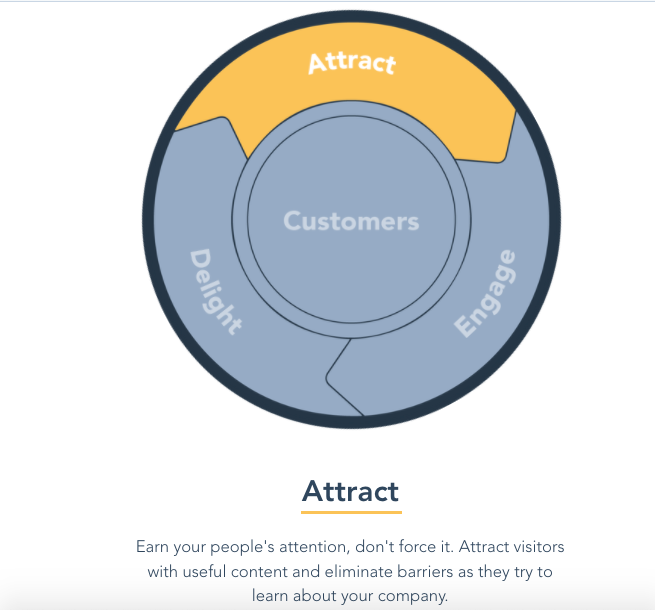
In fact, blogging is a fundamental step of inbound marketing. It helps you reach qualified customers, like your personas, by creating the content that matches what they’re searching for. That’s why it’s so important to make blog posts relevant to audiences (and optimize them for search engines — here’s how).
Customers are definitely looking for the information you’re able to provide. Plus, that content can serve as material to populate your social media networks. To find what your audience is searching for, conduct keyword research, which will tell you what the most important topics for your audience are via search engines.
While blogging is fiscally inexpensive, it does take time.
The inbound marketing version of that question would ask, “Would you rather blog for one hour each day and promote content created by and for your company, or several hours a day sourcing content for your ideal customer from your competitors?”
An editorial calendar is also helpful in maintaining consistent timing and fresh content on your blog. That’s why we put together a free blog editorial calendar template, complete with instructions and content management tips.
5. Make customer service a priority.
When we hear the name “Zappos,” most of us immediately think, “Unparalleled customer service.” The online apparel retailer built this level of service into its core approach to doing business.
Why is that so important? For Zappos, making excellent customer service the cornerstone of its brand actually saved money on marketing and advertising. That’s because it created word-of-mouth among existing and potential customers.
This is called earned media: The recognition that your brand has earned, not paid for, from people talking about something you did that was remarkable.
For example, when I’m shopping on a new website, the first thing I do is read reviews. If I see reviews that mention speedy shipping, friendly customer service, and high quality products, I’m more inclined to purchase.
This revisits the importance of your identity and voice. As you go through these brand-building steps, think about the values that you want your audience to experience, like excellent service. Those values are what shape the brand’s culture, and that influence the voice you project to an audience.
6. Take advantage of co-branding.
I’ll never forget what my colleague, Lisa Toner, says about negotiating co-branding agreements.
“Larger companies may have a large reach,” she explains, “But what do they not have?”
When you’re just starting to build a brand, you might not have the reach that Toner’s talking about. You can take the steps to build it, but that takes time. Until then, one way to get your name in front of a broader audience is to partner with a brand that does have that reach.
But don’t just pick any brand for a partnership. Make sure it’s one that’s aligned with yours so it makes sense in the minds of your audience. Here’s what we recommend in seeking a co-brand:
- Will your partner’s audience be interested in your brand? Is this audience difficult for you to reach without this partnership?
- Will your audience trust your co-brand. That’s crucial to getting them to listen to you, so make sure your partner reaches the audience in a way that instills confidence.
- Do you have something to offer your co-brand? Just like Toner asks, “What do they not have?” The experience should be a win-win-win: For you, your co-brand, and the consumer. As an example, if you have an international audience that your partnering brand doesn’t, consider pointing to that when discussing the partnership.
Building a brand might seem like a huge undertaking, especially when resources are limited. But there are plenty of economical ways to not only get started, but to continue the momentum.
And please, have fun with the process. Of course, there has to be a degree of strategy and logic involved — that’s why there’s tools to help you determine the different pieces of your brand. But it’s a creative exercise, so keep that in mind if you get bogged down in technicalities.
7. Host a masterclass or webinar.
What are some of the talents the minds at your company display on a daily basis? Are they masters of email marketing? Do they excel at coding? Do you earn a “World’s Best Brand Strategist” superlative every year?
A fantastic way to grow your brand — and earn leads — is to leverage these talents into a masterclass or webinar, and promote them online.
By optimizing your class with hashtags and witty captions, you’ll find audiences that are interested in the talents for which you’re offering lessons. These masterclasses can be a 45- to 60-minute session that provides an overview of your special expertise, how to do it right, and how use your own strategies to illustrate.
For example, if I were to offer a webinar, it would highlight the art of using emojis for business, an experiment I’m passionate about. I would start by describing why engaging copy is important for attracting customers. Then, I’d explain the pros and cons of emoji usage. Finally, I’d share the right and wrong times to include emojis in marketing messages.
After that, I would present an experiment and report on my findings. Whether the experiment supports or negates my thesis always leaves room for fruitful discussion — leading to the last portion, questions. Voila: An outline for a masterclass that uses my talents to back up the credibility of a business that focuses on, let’s say, marketing or social media.
Running experiments doesn’t have to cost a dime, and hosting a webinar takes only about an hour of your day. The result, however, is spreading the word about the talents of a company, providing data that supports credibility, and promotes company values like delighting customers and giving helpful, educational content to your audience.
Branding on a budget? Absolutely possible. What counts, when you’re brainstorming ways to brand effectively, is how to use the resources you have to the best of your ability. Keeping your audience in mind is the first step — after that, it’s about thinking of creative ways to engage those target customers.
Have fun with building your brand. After all, this is a creative process and while every experiment may not work, you can always learn to improve. Good luck, and happy branding.

8 Engaging Examples of Interactive Storytelling in Content Marketing
As inbound marketers, content plays an important role in attracting attention and building trust with prospects. Our content can come in many different formats, and the format we choose can speak volumes about the research and ideas within.
Interactive content has become increasingly more popular as brands try to cut through the noise and keep prospects’ attention long enough to deliver a message.
What Is Interactive Content?
Interactive content is a type of content created not just for consumption but also engagement. It’s designed to prompt action and participation from the audience.
The benefit being a higher likelihood of harnessing the audience’s ever-decreasing attention span by publishing stories with interactive elements so they gain an active role in consuming information. By dazzling the audience with an unexpected experience, you can increase engagement, on-site dwell time, and social share rates.
Types of Interactive Content
- Quizzes
- Interactive Video
- Surveys and Polls
- Calculators
- Gamified Content
In theory, any type of content can incorporate interactive elements. Interactive marketing requires ingenuity and innovation, and here are some of the ways interactive content currently shows up on the web:
Quizzes
By their very nature, quizzes are interactive since input is required from the audience in exchange for valuable personalized content.
Interactive Infographics
Unlike static infographics, interactive infographics prompt the audience to take their own journey through the information being presented.
Interactive Video
Video viewing is often a passive activity, but interactive videos can improve engagement and enhance the experience. This is done by adding 360 views, audience controls, or embedded content and interactivity.
Surveys and Polls
If the audience wants macro data on a particular topic, they can be incentivized to take a survey. Then, both the survey (the input) and its results (your output) becomes consumable pieces of content.
Calculators
In many cases, information itself may not be useful for your audience but rather how that information can be applied to their individual situation.
Gamified Content
One of the best ways to turn content into an experience is by making it a game. Examples of this include playable game ads or interactive worlds.
You’re not confined to just these buckets, either. Interactive content is limited only by your imagination.
Interactive Content Examples from Real Brands
Each industry poses its own obstacles and unique characteristics, but share one common denominator: Interactive content works for all topics and audiences.
1. HubSpot’s Website Grader
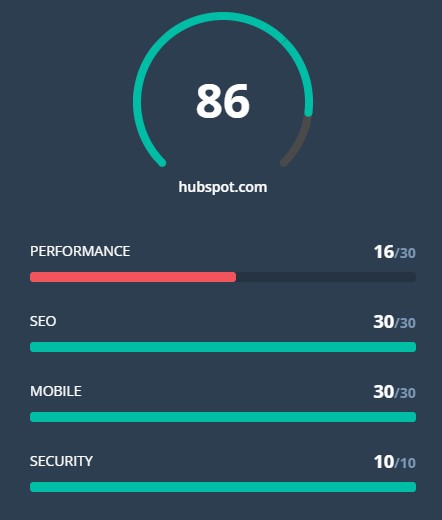
This personalized web experience allows users to type in their website and receive a detailed analysis based on different criteria. By pointing out specific pain points and providing actionable tips, the content turns into a lead-generator, getting the conversation between HubSpot and potential users started.
How can you incorporate this into your content marketing? Personalization is key for building relationships with your audience. Pointing out opportunities for improvement and growth in an interactive way increases the trust your readers have that your brand is an expert in this topic and industry, which is easily done through interactivity. Think: “Show, don’t tell.
2. The Wall Street Journal
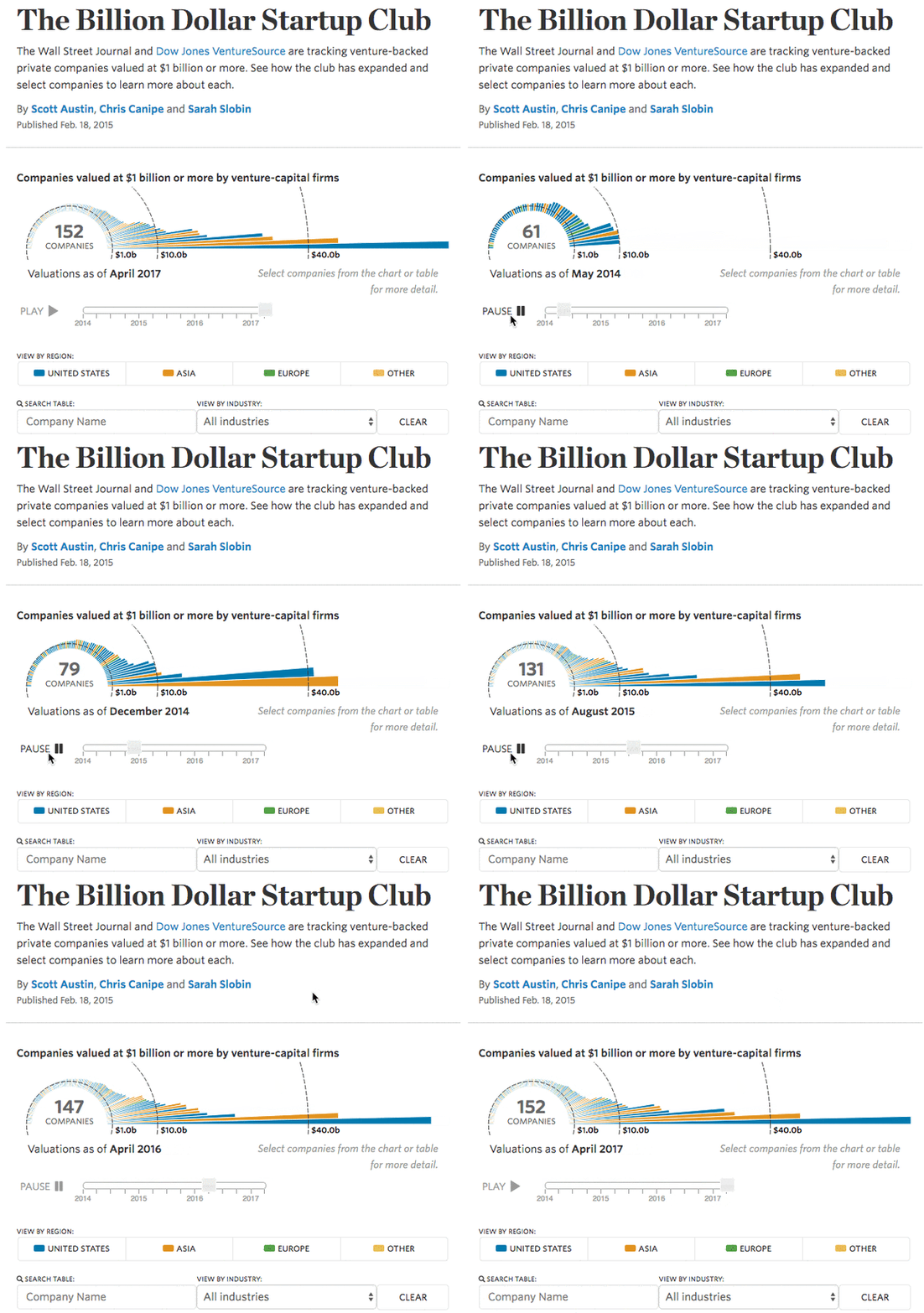
Delivering a large amount of information is a challenge for content creators. This example from the Wall Street Journal does so using searchable, visual stats. The facts are arranged in a number of ways, including a recorded timeline for readers to hit “play” and simply watch.
How can you incorporate this into your content marketing? Search is an interactive action on its own and can be easily incorporated into your content. Using search provides readers with a task to keep them engaged while presenting a healthy amount of information in a positive manner. Adding search options very much depends on the content you create, but tools like FlippingBook and Viostream make even PDF and video content searchable.
3. National Geographic

Some of the most inspiring forms of interactive content match the topics they address. This example allows readers to follow the ancient cave paintings as if they are touring a prehistoric cave, with color-coded topics to provide insights.
How can you incorporate this into your content marketing? Making history come to life can be a hard task. Don’t shy away from numbers and important facts, but don’t skimp on the imagery and engagement, either. Leave the canvas clear for creative imagery and video, while the text wraps the visuals but does not interfere.
4. Information is Beautiful
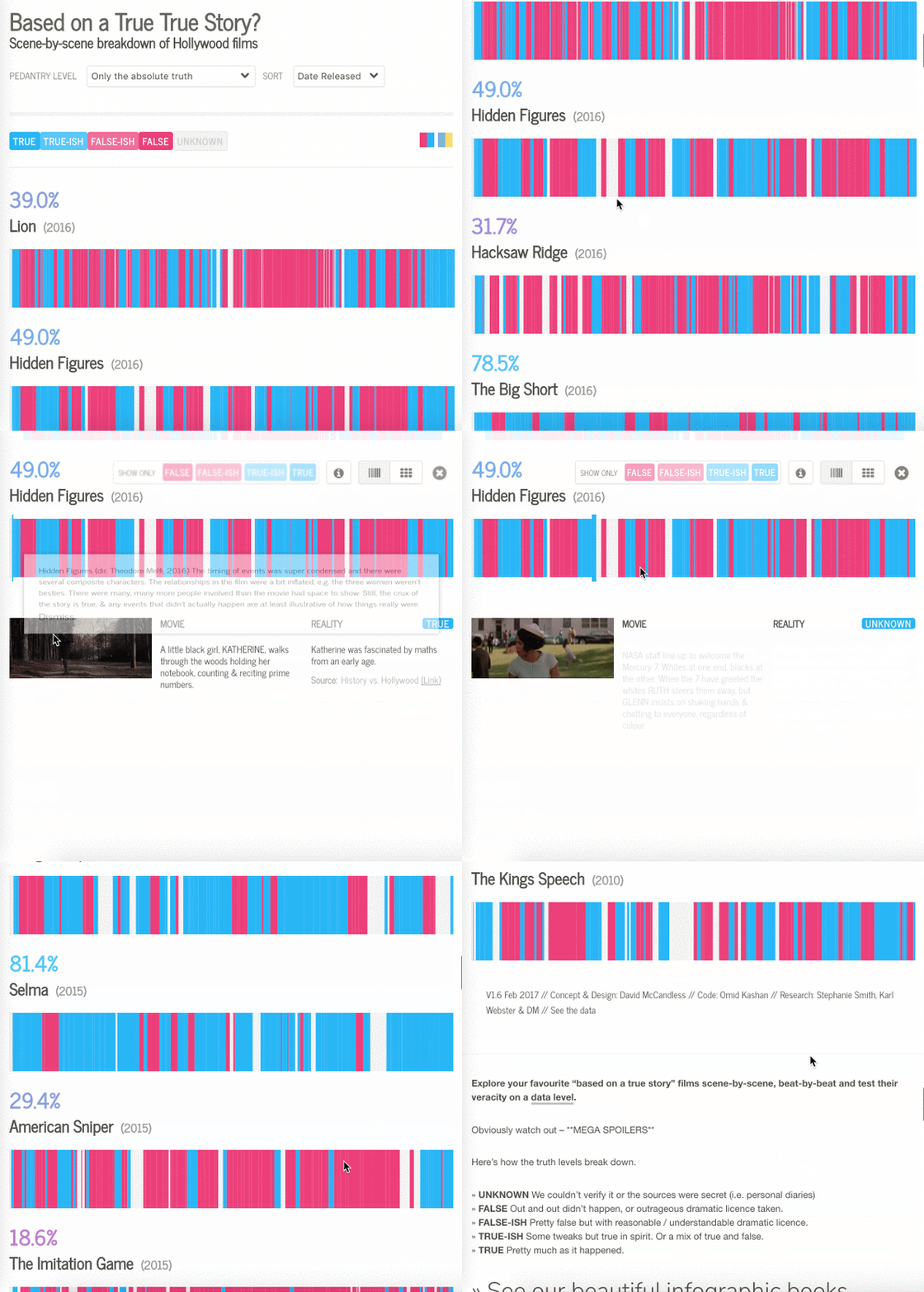
Viewers love trivia about their favorite movies, and this is a visually appealing way to serve it to them. Breaking the movie down into specific scenes clarifies which parts are based on a true story, while color-coding gives readers a broader overview.
How can you incorporate this into your content marketing? For a more holistic reading experience, allow readers to go back-and-forth between the small details and the big picture.
5. CNBC
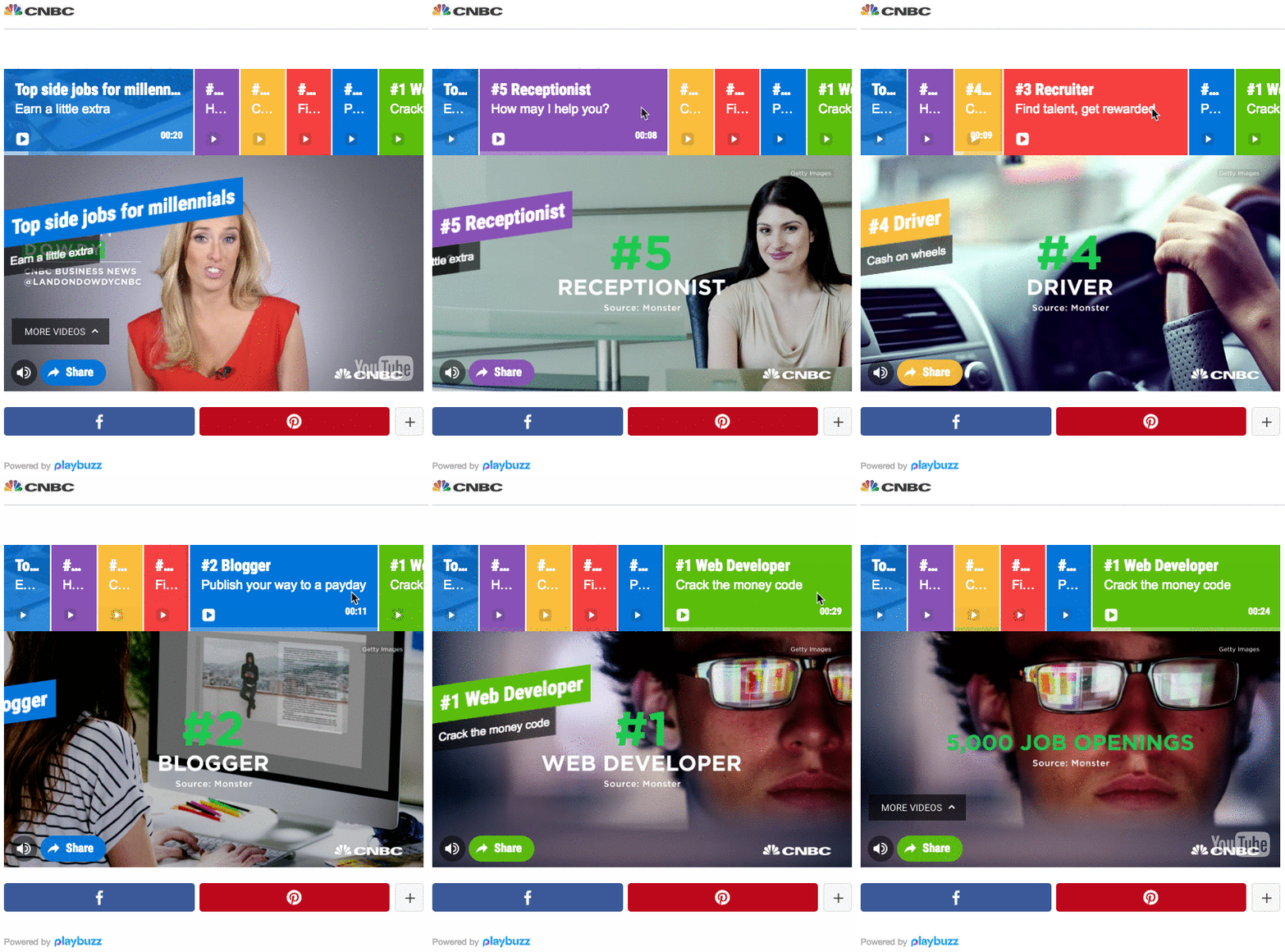
Adapting listicles to the age of video can be done by dividing a lengthy clip into Video Snaps. Each snap can be edited from a different video, and is assigned a customized title and color. Once viewed, readers can share the snap (or in this case, perhaps the side job) they enjoyed most on their social channels, or the entire article.
How can you incorporate this into your content marketing? Instead of including full-length videos, cut to the chase (literally) and only include the parts that are truly instrumental to your message. Gone are the days of “skip to 1:32 to view this” video content.
6. The Solutions Project
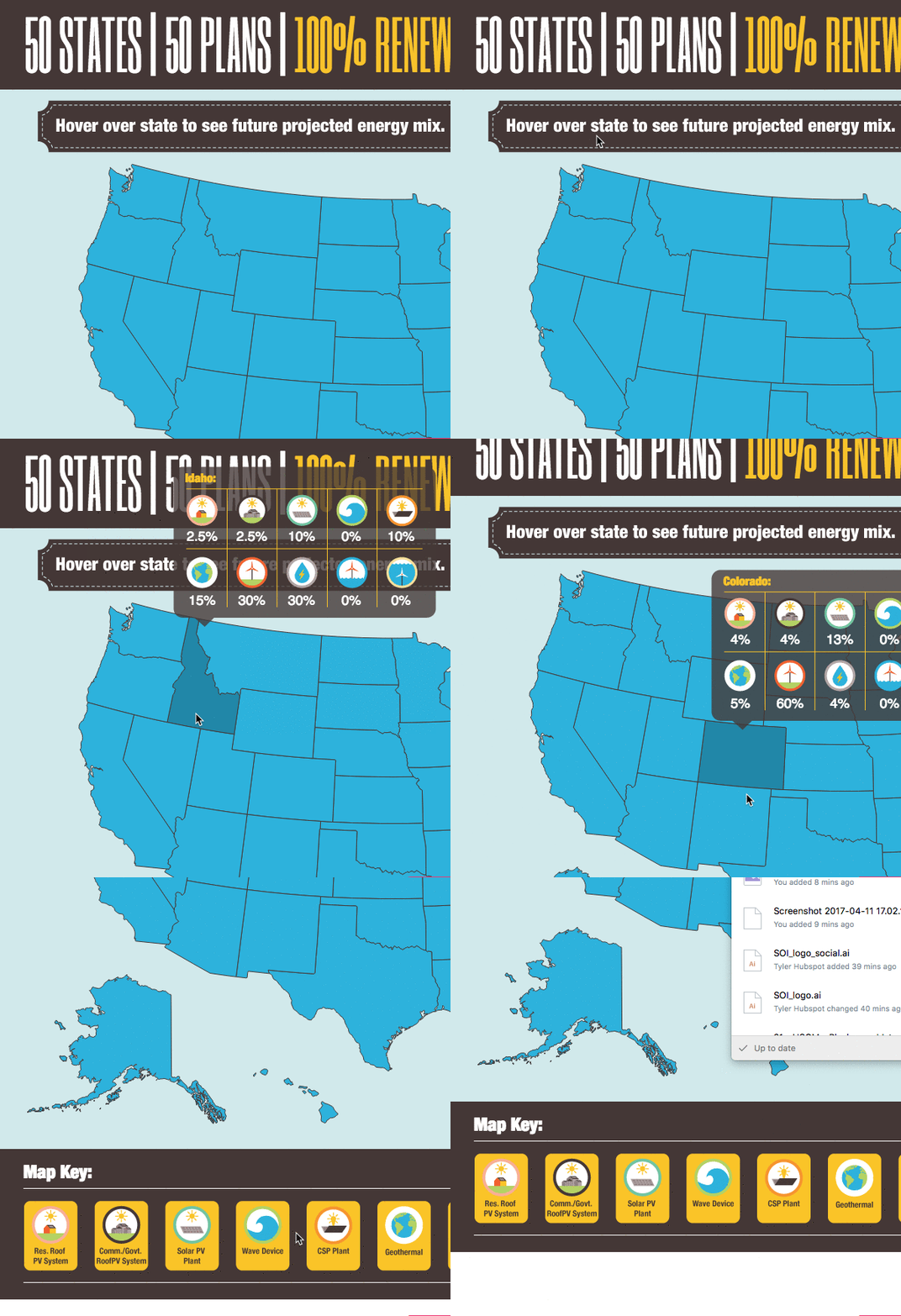
This interactive map presents data when hovering over specific states, and dives into the stats after clicking. This makes information that much more accessible, and gives readers the option to discover more, if they choose to do so.
How can you incorporate this into your content marketing? For presenting a geographic distribution of data, create a interactive map to help readers visualize the topic. Check out free tools like Mapme and MapMaker Interactive to create your own. Using icons and uplifting design elements makes complicated topics seem more digestible.
7. Crown Courtroom
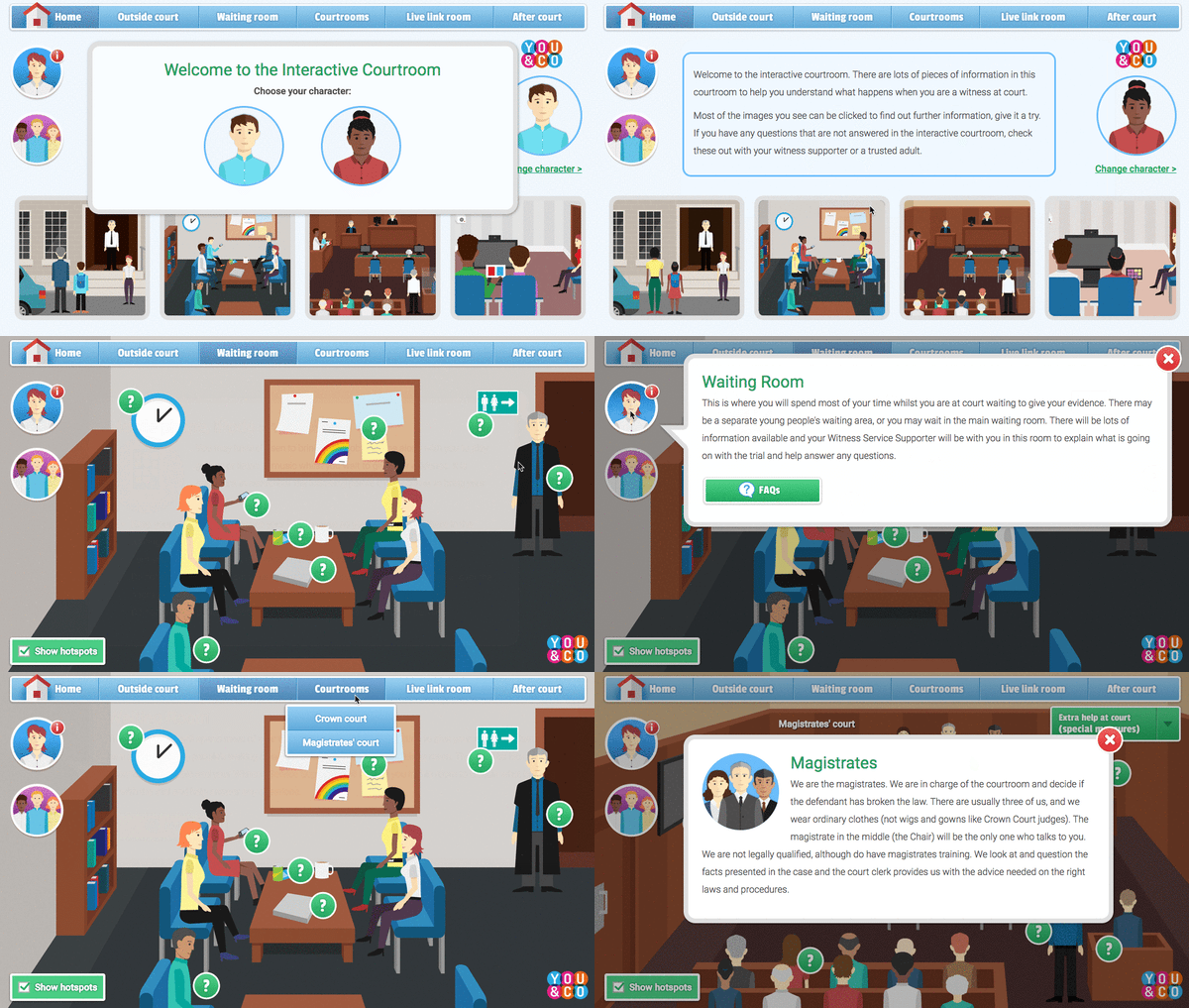
This interactive animation aims (and succeeds) at educating readers about a potentially intimidating experience in a friendly, gamified and comprehensible way. Viewers can choose a character to represent them in a mock courtroom and learn about various court-related situations.
How can you incorporate this into your content marketing? Simplify complex topics for readers with a combination of gamification and snackable insights. Animate a relevant scenario and personalize the content by allowing the reader to customize their own “character.”
8. Robbi Leonardi
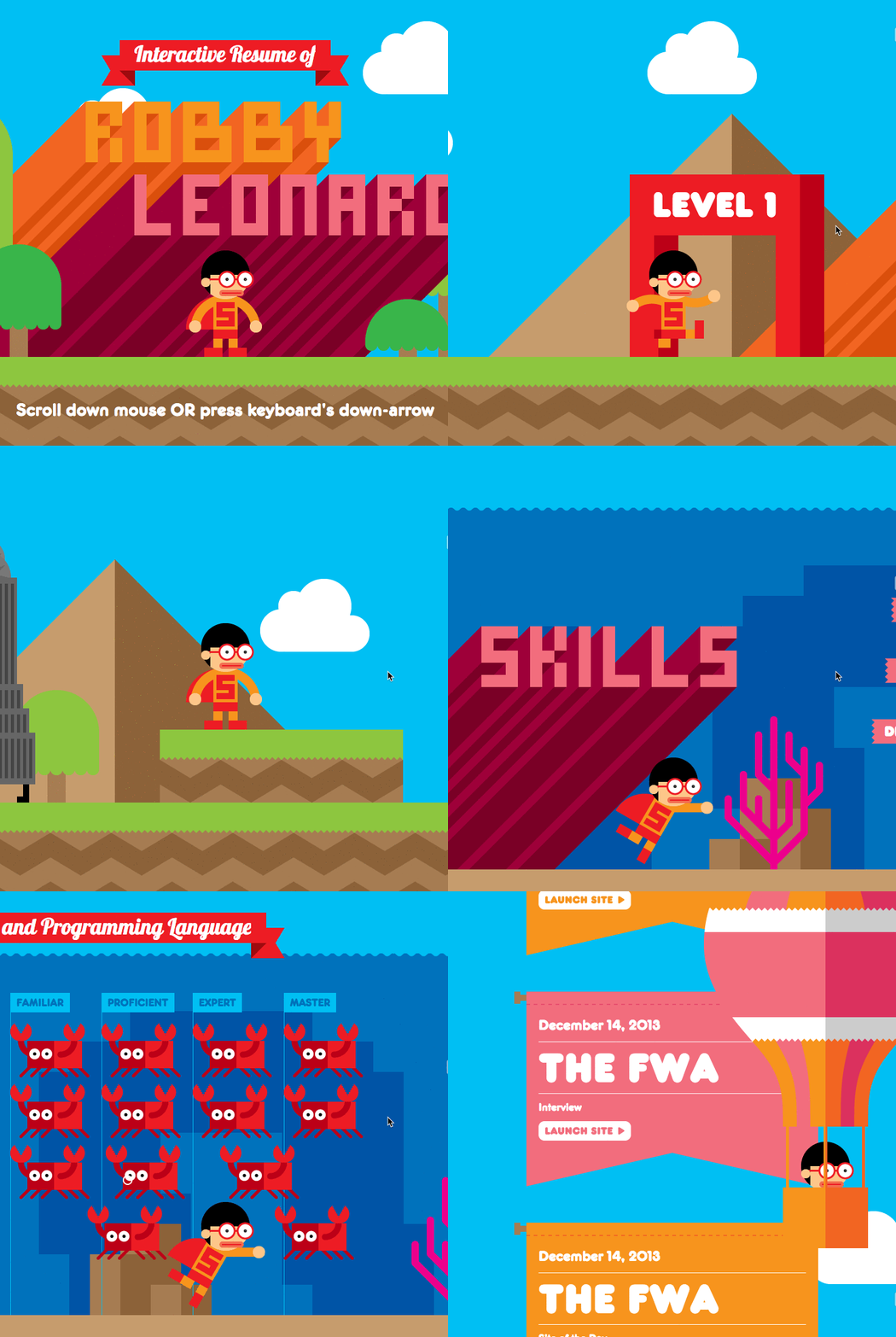
What better way to demonstrate interactive design skills than by crafting a brilliantly designed, interactive CV? Designer Robby Leonardi made some noise with his groundbreaking approach to job hunting, creating an animated “game” where his skills and experience are the main components.
How can you incorporate this into your content marketing? If you happen to be looking for your next adventure, Leonardi should inspire you to be creative and daring. If not, notice the clever use of animation and the consistent narrative that ties images and text together. To add animation to your content, try these free tools: PowToon and Animaker.
How to Get Started with Interactive Storytelling
If you’re new to creating digital content, start small with a simple quiz or interactive infographic. These assets perform well at the top of the funnel because they motivate the user to share and see how their peers stack up against their own experience.
When it’s time to build something more sophisticated, consider working with a developer to determine how to build the user experience and interactive elements you’re looking for.
Experiment with new formats, topics, and which stage in the buyer’s journey your content serves. That means release early and often so you’re consistently collecting feedback and iterating on your interactive content.

How to Use LinkedIn Message Ads to Get Into LinkedIn Inboxes
Want to guarantee your message makes it into your prospects’ LinkedIn inboxes? Are you familiar with LinkedIn message ads? In this article, you’ll learn how to set up LinkedIn message ads. What Are LinkedIn Message Ads? With all of the other ad formats on LinkedIn, you pay only when someone clicks. But with LinkedIn message […]
The post How to Use LinkedIn Message Ads to Get Into LinkedIn Inboxes appeared first on Social Media Marketing | Social Media Examiner.
from Social Media Marketing | Social Media Examiner https://ift.tt/3fbUENj
via socialmediaexaminer
The Ins and Outs of Writing Long-Form Content
Let’s talk about content.
More specifically, long-form content.
Not only that, but why it’s a good idea to have on your website.
Let’s say you’re looking for a resource about how to start an online business. You want a full rundown, concrete information, and actionable tips that will assist you begin a successful company. You’re probably going to want a lengthy resource that’s valuable, right?
This is the glory of long-form writing. It gives you a chance to provide highly motivated readers with a ton of value and context. Long-form content generally has a word count of more than 1,000 words — so, it’s not the shortest read.
That doesn’t mean that short-form content isn’t useful for your website. You should have both to serve different purposes. Let’s take a minute to look at how.
Long-Form Content
On the surface, long-form content doesn’t sound like it’s great for user engagement. It might seem counterintuitive to give your audience more to read in order to keep them on your website longer. But it’s true, and I’m going to dive into why below.
I’m here, however, to debunk that myth. Let’s add a definition to the term, first.
The purpose of long-form content is to provide valuable information to the reader. If you write long-form pieces — and make sure those articles are useful to your audience — you can increase the time spent on your site and value to your reader.
More than that, if you optimize your website for search engines and add calls-to-action in the body of your piece, you can improve lead generation. Your articles will have a higher chance of showing up on the first page of SERPs, and you can guide readers to offers that relate to the topic of your work.
Sounds pretty great, right?
But wait — if there’s content that’s long-form, there has to be a short version, right? It’s important to know the difference between the two so you know how to best serve your audience.
Long-form content vs. short-form content
Short-form content can be extremely helpful to readers who want a quick answer to their queries. For instance, you can offer short-form content to provide a simple definition or explain a product in small portions. Short-form content gives your reader the information fast so their attention doesn’t wane.
This type of shorter writing is generally under 1,000 words. It provides a general overview and saves readers time. Long-form content, on the other hand, goes deeper into topics.
In addition to diving deeper into topics, long-form content can aid with ranking highly on search engines and build your website’s reputation.
For example, this article, about how to write a blog post, has earned thousands of views. Additionally, the average time spent on the page is about four minutes. From these metrics, we can guess that this 17-minute read, well over 1,000 words, was successful in providing value to the reader.
This doesn’t mean that you should fill your blog with 17-minute reads. But it can be useful to start thinking of how long-form content can be effective for your audience. How can you provide ample writing that’s actionable for readers?
If you build an archive of long-form content that’s valuable for readers, you can create a reputation as a source people look to first to help them solve their questions. It’s kind of like ordering a product online. You’re probably more likely to order from a site you’ve used many times before, that has proved to be reputable, instead of trying out a brand new ecommerce option.
Let’s look at another reason why long-form, valuable writing is successful: page rank on Google. Backlinko found that websites with a high “time on site” are more likely to rank highly on search engine results pages (SERPs).
When a search query is typed into Google, the search engine crawls websites for content that will help solve that user’s query. Web pages that have a longer time spent on site than others suggest to Google that browsers found that information important enough to stay on that page.
As a result, Google is more likely to suggest that page above others. (Don’t forget that a page optimized for SEO is also a huge boost to improving rank).
So now you know why long-form content is important to have on your site: It provides values to readers, can earn you a reputable reputation, and brings more eyes to your site. But what does successful long-form content look like? Let’s take a look at some examples.
Long-Form Content Examples
Before we talk about how to write long-form content, let’s look at some effective examples. These examples show how long-form content can be optimized for the reader’s comprehension.
1. Hayley Williams Isn’t Afraid Anymore by Rolling Stone
This long-form profile about solo artist Hayley Wiliams, written by Brittany Spanos for Rolling Stone, does a great job of performing other content produced by Rolling Stone about the same topic, or those that are similar.
Within the profile, other works previously done by Williams or her rock band, Paramore, are featured and hyperlinked to previous RS articles that are applicable. For instance, the word “Paramore” was hyperlinked to an internal tag of the same name, showing all previous RS posts that mentioned the band.
A particularly intriguing mention of past works related to the topic, Williams, comes up in the sidebar of the feature. There, you can find previous music reviews of the singer/songwriter’s releases. This is a visual way to promote past content, and one that catches the attention of readers.
If you want to include other works in your long-form content that relate to the article, consider an approach similar to this one. You’ll give the reader a break from reading the piece to queue up similar posts for later. Additionally, you’ll provide more value to the article by offering up supporting ideas.
2. Getting Started with Google Remarketing Ads by Mailchimp
Mailchimp is a marketing software platform. This post is a guide to navigating setting up Google Remarketing Ads. Complete guides about a topic that pertains to your industry are a wonderful example of a long-form content piece that you can add to your blog.
What’s great about this article is that it shows off a table of contents, different languages to read in, and social sharing options.
Adding in a table of contents helps the reader easily navigate through a longer piece if they are only interested in one section. And international readers are able to read in their native language with the opportunity to translate the text.
3. Delivering Emails with Litmus by Litmus
This long-form content is a transcription of a podcast episode that was embedded into the post. I get it: Even with software available, it’s taxing work to do a transcription. Even this short, 18-minute episode was not an easy feat to transpose.
However, if you create YouTube videos or podcasts, a transcription can make your audio/video content accessible to audience members who are hearing impaired.
If for some reason, the embed of the audio file doesn’t work or a quote doesn’t come through clearly, the non-hearing impaired listeners can identify what was said without having to mentally fill in the blanks. I would find a transcription helpful if I were writing an article and wanted to pull a quote, or if I wanted directions on how to use software and didn’t want to keep rewinding.
4. 77 Essential Social Media Marketing Statistics for 2020 by HubSpot
Data is great material for a long-form post, like this one from HubSpot. This post is classified as a long read, but because the statistics included are short and formatted in a comprehensible way, readers are able to get through the post easily.
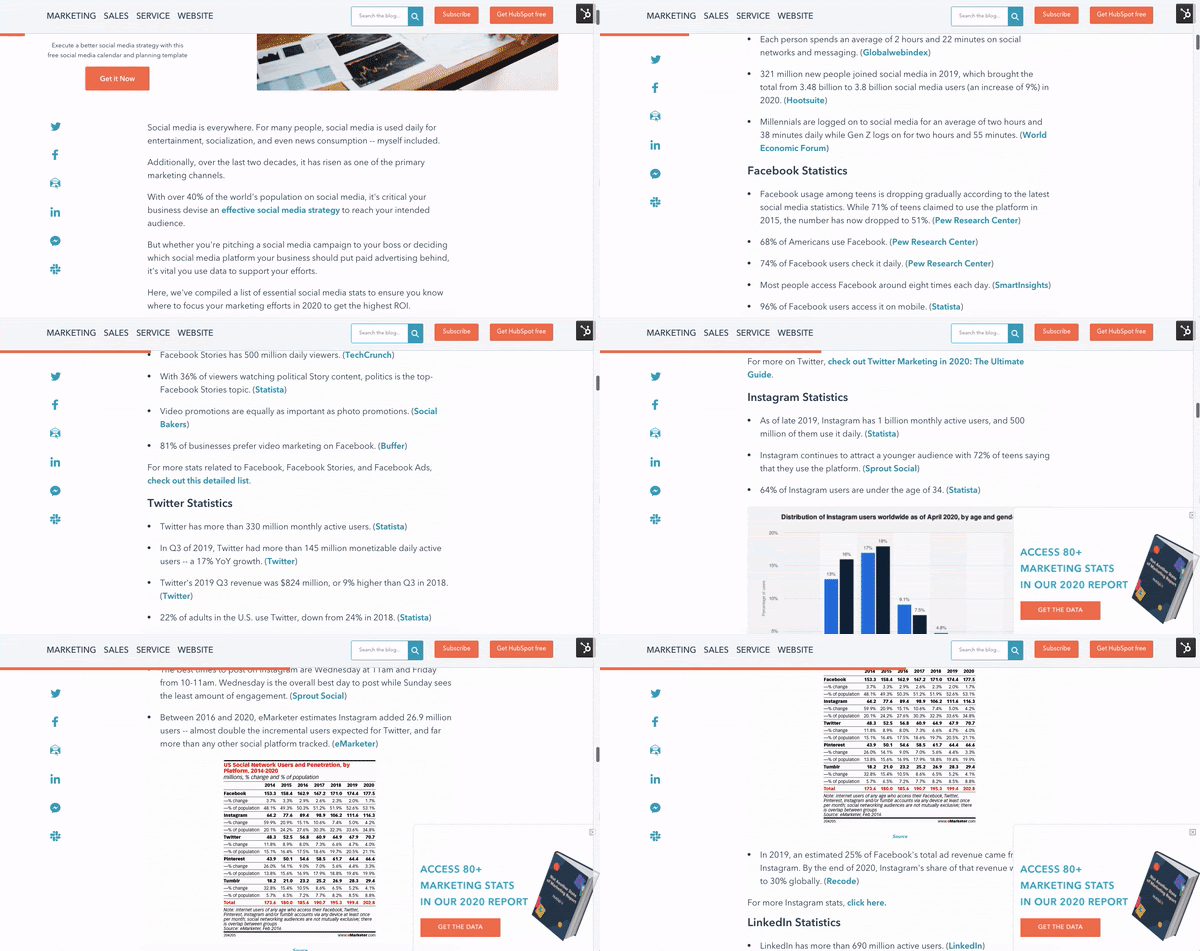
When you section off stats, for instance, “General Social Media Marketing Statistics,” and “Facebook Statistics,” you make it easier for readers to jump to the section they’re looking for. Additionally, the words are sectioned off for organization.
Now that you’ve seen some examples, you’re probably stoked to get started writing your long-form content. Before you do, take a look at the tips below to make sure your work is actionable, comprehensive, and accessible.
How to Write Long-Form Content
Outside of concrete grammar rules, like subjects and predicates, there’s no “right” or “wrong” way to write. That said, there are ways to create content that’s digestible and useful to readers. I’m going to be referencing using HubSpot, but feel free to use similar software to format your post.
1. Form your paragraphs in comprehensible sections.
When you sit down to write your long-form piece, take note of paragraph structure. To optimize your piece for readability, keep paragraphs short. Ideally, paragraphs shouldn’t be longer than three sentences, unless it makes sense to add more.
Let’s talk about that exception. If you’re writing a paragraph where the impact is best presented in rhetorical questions, for example, it might look better to keep those questions in the same section.
Does the paragraph have an effect on the reader? Do you effectively get your point across? How will you use paragraphs to make content digestible? Are you pulling the reader in with your formatting?
In some cases, it’s alright to ignore the three-sentence rule if, like above, each sentence flows together. Adding an entire new paragraph just to fit that extra question doesn’t provide the same effect and does little for formatting.
2. Section off your main ideas.
Headers are your friends. H2s, H3s, and H4s can be found in almost every writing tool, such as Docs, Word, WordPress, HubSpot, and other software programs. Headers help you guide the reader through the main ideas of your piece by breaking off your content into sections.
For instance, in this piece, the main idea of this section is “How to Write Long-form Content,” so I made it the H2, which is generally used for titles and main ideas. The list items underneath this section are formatted into H3s, which support that main idea. If I were to add subsections underneath any of these list items, they would be H4s.
Headers split up long sections of your text and assist with organization. If this piece lacked these items, it would be pretty difficult to navigate. Additionally, when I’m outlining a long-form post, planning headers in advance supports me in writing effective content — I can visualize what I need to add to make each portion effective.
3. Make sure your thoughts are organized.
It’s crucial for long-form content to make sense. So, before you press “publish,” read over your piece for organization. Ask yourself if your piece has a beginning, middle, and ending that readers can follow.
Your sections should have a logical format. For example, in this piece, I wouldn’t have jumped into providing steps to writing long-form content without first explaining the definition. Think about if Cinderella started with the royal wedding, then circled back to Cinderella cleaning the house — that wouldn’t make much sense.
Readers could get confused if your work isn’t organized in a logical way, so be mindful of formatting.
4. Describe the ‘so what?’ of each section.
Long-form content has an added difficulty of keeping readers engaged throughout the piece. To combat this, make every paragraph count. This will do two things: Avoid unnecessary added length, and keep readers compelled.
When you write a longer piece, you don’t need to add extra information that doesn’t serve the purpose of the post. This can lead to convoluted, intricate paragraphs or sections that don’t make much sense.
To keep readers interested, get to the point. End sections with why the readers should care. This ensures they get the most out of your article.
5. Keep a conversational tone throughout your piece.
This tip circles back to keeping the attention of viewers. Instead of taking an extremely formal tone, it’s okay to lighten up a little. In college, whenever I read academic textbooks, it was hard to keep my focus. The highly technical language couldn’t keep my interest.
Unless your article is an academic journal, you don’t have to use complicated language to seem like an expert on your topic. If you give well, researched, thoughtful, and actionable content, readers will find your post useful. Trying to sound “too” formal could actually have the negative effect and leave your readers feeling like they don’t have any takeaways.
6. Hook the reader with an engaging introduction.
Depending on the platform you use to post your long-form article, the estimated read time is given to the reader. For instance, on the HubSpot Blog, when you click on an article, you can see the read time underneath the title.
Some people might see that read time and immediately feel compelled to skim, especially if it’s something like 18 minutes. To hook the reader, make your introduction something that grabs their attention.
One of my colleagues is great at this — he will present an anecdote in the beginning of the piece and continues to use that anecdote to illustrate points throughout the rest of the article. It leads to gripping posts I’m sad to finish.
If you can’t think of a story or life experience to use to pull the reader in, give a relevant statistic in the above-the-fold information. What you present above the fold is what’s going to make that reader think, “Oh, I have to keep going!”
7. Add visuals to break up long sections of text.
In addition to breaking up long sections with short paragraphs and headers, eye-catching visuals are another way to break up long sections and keep the reader engaged. Personally, if I’m skimming an article and see a picture or graph included, I’m immediately drawn back into the piece.
You don’t always have to use images or videos. Blockquotes and anchor text are also amazing tools. Blockquotes are those huge quotes you see highlighted in articles, and anchor text directs your reader back to sections you reference earlier in the piece.
Generally, you can find these tools within the software you’re using. In HubSpot, blockquotes can be added by going to the header tab, and anchor text can be found by opening the “Insert” category.
Remember to have fun with your long-form content. Writing is a creative process, and readers can tell when something was a drag to write (It’s probably a drag to read).
Long-form writing has its own advantages over short-form content, even though the latter might be the quickest way to beef up your archive. It’s so valuable to have longer pieces on your site, and readers will definitely find them useful.

Think You Know LinkedIn? 8 Common Myths Debunked
Ever wonder what happens when you hit the magical “500+ connections” level on LinkedIn? Or how people connect with those outside of their immediate network? Or how to keep your entire network from seeing a tiny profile update?
Though LinkedIn is a powerful tool for business professionals across all industries, there are still a lot of misconceptions about how it works.
Read on to learn the truth behind some of the most pervasive LinkedIn myths.
Myth #1: LinkedIn is only helpful if you are looking for a job.
Truth: LinkedIn is a great place to build your professional brand, stay up-to-date with your network, and gain insights and knowledge at every point in your career.
Krystal Wu, a social media community manager at HubSpot, says, “LinkedIn isn’t just a tool that’s used to search for a new job or connect with your employees. It’s a place for users to show off their expertise around a subject and grow relationships with like-minded people.”
Tip: Keep your profile up-to-date even when you’re not looking for a job so opportunities can find you. By staying up-to-date with your network, you can make use of those connections when you need them.
Additionally, you should follow channels, influencers, groups, and company pages to get personalized news and insights. By following the right content and engaging in conversations with your network, you can find potential business opportunities that you hadn’t thought of before.
Myth #2: If I update my profile, everyone in my network will be notified.
Truth: You can control what is broadcast to your network so you can get that much-deserved congratulations on your terms.
Tip: When you go into “edit” mode on your profile, there is an option at the bottom of the page that asks if you want your network notified of profile edits. Just turn this on/off as you see fit.

Myth #3: I can only connect with someone I know well.
Truth: You should feel free to invite someone to connect with you, even if they’re not your best friend. The best connections are those that are mutually beneficial in building a relationship.
Tip: The best way to make a connection is to send a personalized invitation or ask someone in your network to make an introduction. Make sure you specify what’s in it for the person you’re requesting to connect with, too.
Myth #4: There are secret features that get unlocked when you hit 500 connections.
Truth: LinkedIn stops displaying your number of connections on your profile after 500, but nothing happens once you go beyond.
Tip: The trick to a successful network is to have both quality and quantity. Developing better relationships with your connections opens you up to more opportunities with like-minded professionals in your industry.
Myth #5: Accepting invitations from people I don’t know well will open me up to spam.
Truth: If you find someone acting inappropriately, you can remove them from your network or flag them to LinkedIn’s support team as a spammer.
Tip: Manage your network by clicking on “My Network.” This is the central hub from which you can add or remove connections. It’s also a great and easy way to keep in touch with your connections.
Myth #6: I can only message people I am connected to.
Truth: Beyond your network, you can also message members who are in the same groups as you are in or by using Premium Inmails.
Tip: Join groups that are relevant to your business, industry, or areas of interest and expertise. Use groups as a way to share your knowledge, gain insights, and build relationships that can help you achieve your goals on the platform.
Myth #7: I should only post content about my company and industry.
Truth: You should share anything that feels like a representation of you and your professional brand. A great and simple question to ask yourself before posting something is, “Would the people in my network find this interesting?”
Wu adds, “Actually, LinkedIn is about more than just work. It’s about your skills, your connections and your projects. You can use LinkedIn to amplify your message to a network of people and highlight the talented human you are, when it comes to your job or not.”
Tip: Vary the topics that you post about to keep your network engaged and wanting to hear more. Whether you’re posting your own content or reposting something that you find read in the news, sharing is a great way to build relationships, flesh out a bit more about who you are and your interests, and stay top-of-mind with your target audience.
Myth #8: LinkedIn is the least social platform.
Truth: LinkedIn is a popular platform for professionals. It’s used to network, and even sell your product. In fact, when making B2B purchasing decisions, 50% of buyers turn to LinkedIn as a resource.
Tip: Use social features such as LinkedIn Stories or LinkedIn Live to connect with your audience.
Kelly Hendrickson, a marketing manager on HubSpot’s social media team, says “Audiences are having human conversations on the platform, concurrent to LinkedIn adding more social features to nurture this engagement.”
LinkedIn is a great tool for professionals to connect with potential collaborators or even prospects. Don’t sleep on this social media site, because the platform continues to grow in popularity and usage.
Editor’s note: This post was originally published in August 2014 and has been updated for comprehensiveness.

5 Ways to Use Audio in B2B Marketing
Whether you prefer to stream music in the car or listening to the hottest podcasts — odds are there’s some form of audio content that you love to consume.
I too am one of those people who always has to be listening to something. Whether it’s a new Spotify playlist or the latest episode of a podcast, I use pretty much every opportunity to consume audible content.
I’m hardly the only one who’s partial to audio in this way.
With consumers spending more time alone or at home in 2020, marketers have noticed a major uptick in audio content and listenership.
This isn’t shocking. In recent years consumers have increasingly turned away from traditional TV content in favor of mobile or online platforms — especially those that promote and produce audio content.
At this point, marketers are taking notice of audio opportunities. Consumer listening behavior has created a tremendous opportunity for marketers — especially those in the B2B sector — to create branded, audible content. Audio is often associated with consumer marketing, but those kind of assumptions create a missed opportunity for B2B brands.
After all, here at HubSpot, we create content for marketing and sales professionals in a variety of formats, and if you read our blog, it’s no secret that we’re constantly nagging you to do the same — even with audio. So let’s explore the ways that can be done, starting with a look at the science behind the act of listening.
The Listening Process
Before you start creating audio content, it might be helpful to understand how and why people listen. The act of listening, according to Merriam-Webster, is “to hear what someone has said and understand that it is serious, important, or true.”
It also helps satisfy different physiological goals. We listen to alter our moods, stay alert, and figure stuff out. In humans, that’s been the case for pretty much as long as we’ve been in existence. The process starts when we receive auditory stimuli, which our brains then have to interpret. That’s aided by other senses — like sight — and helps us better figure out what we’re hearing.
Once our brains have interpreted these auditory signals, we follow a series of steps that consist of recalling, evaluating, and responding to the information we consume:
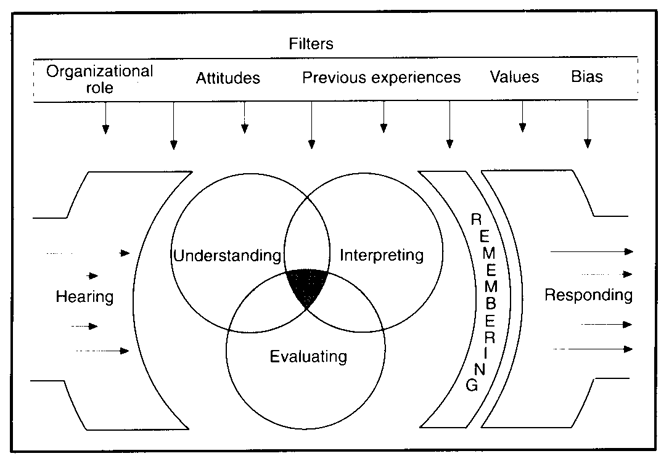
It’s that third step in the process — recalling — that might be the most important one for marketers. Numerous studies have discovered how listening triggers a widespread network of activity throughout the brain. That activity is what links auditory stimuli so strongly to memory.
That might be why we love to talk about things we’ve heard, like a great song, for example. We’re actually sharing a story about our memory of what we heard. And that comes back around to what we do as marketers. We share the stories of and about our brands in a way that will get people to pay attention and listen to us.
So, let’s get started, and begin creating content that people will listen.
4 Ways to Use Audio in B2B Marketing
1. Create or sponsor branded podcasts.
According to Edison Research, podcast listenership has been on a steady rise since 2006. In 2018, podcast listenership saw a 26% YoY increase.
Along with listenership, podcast revenue has also grown. By 2021, podcast ad spending is expected to hit $354 million.

People often make the mistake of thinking that podcasts are largely consumer-facing. We think of those that are aired on public radio or hosted by celebrities for the masses of bored commuters trying to pass the time. But in reality, there are a number of B2B podcasts out there, like Duct Tape Marketing, ZenDesk’s Relate, and HubSpot’s The Growth Show.
But when it comes to creating branded podcasts, many B2B marketers make similar objections that we used to hear about blogging — such as, “I don’t have time,” or, “I don’t have anything to say.”
Podcasts, like blogs, follow the pillars of inbound marketing, in that you’re creating valuable, educational content for people who are searching for information on what your business does best. That’s one way The Growth Show works, for example. Because HubSpot’s marketing, sales, and CRM software comprise a growth stack, we use our podcast to discuss related topics with business leaders who have accomplished notable growth, and who have good stories.
“Companies — especially B2B companies — have such a hard time telling their organization’s story,” says Kierran Petersen, The Growth Show’s associate producer. “Creating a branded podcast is the perfect opportunity to do that. It’s such a personal way to give people insight into what you do, by showing your audience who you actually are.”
That’s where the answer to the second objection — “I don’t have anything to say” — comes in. When people tell us that’s why they can’t invest time in blogging, we usually say, “Write what you know.” The same thing goes for podcasting, but instead of writing, you’re speaking about what you know. And for some, that might even come easier than writing.
Of course, creating a branded podcast isn’t as simple as recording 30 minutes of stream-of-thought remarks on your business. It helps to approach this content creation the same way you would for a blog, and create an editorial calendar to plan and outline different topics, as well as people who you’d like to interview.
You should also consider how you’re going to distribute that content and the different platforms that your audience can use to consume the podcast. For beginners, we recommend free tools like SoundCloud, or experimenting with different ways to share the audio across social media.
Repurposing Blogs as Podcasts
If you’re still feeling a bit uncertain about creating an original podcast, you can start on a smaller scale by repurposing your existing content. On some blogs, you may have come across the option to listen to an audio version of the post. That’s one fairly easy way for businesses to create original audible content — take what you’ve already written, and turn it into a spoken-word version.
There are several ways to pull that off. Some brands turn their blog posts into full-blown podcasts of varying length, complete with an introduction, music, quotes, and sound effects. That’s what National Public Radio — better known as NPR — often does with its various news stories. Notice how this piece, for example, has both full text and audio, the latter of which can be heard below.
But others, like The Atlantic, take a different approach, and dictate the full text of articles, treating it like an audiobook. Check it out:
There’s no “right” way to repurpose existing content for audio this way — that largely depends on the length of the piece, or if you want to abridge the writing for the spoken word. The important thing to remember is that it’s not impossible, and with a bit of creativity, there are numerous ways for B2B marketers to create audible content of this kind.
2. Produce short or long audiograms.
An audiogram is a recorded soundbite where you can explain or promote something fairly quickly. It’s slightly different from an advertisement in that you don’t necessarily have to pay to promote it and you don’t necessarily need a call to action. Brands have experimented with audio snippets, which are short soundbites, as well as longer-form recorded announcements.
Audio Snippets
In February, you may have noticed that HubSpot’s co-founders, Brian Halligan and Dharmesh Shah, penned a special post on the Marketing Blog dedicated to the 2016 year in review. But it didn’t end there. Across our online presence, HubSpot distributed year-in-review messages in various formats, including nifty little audiograms.
“But what’s an audiogram, Amanda?”
I thought you might ask that. Well, an audiogram is a snippet of — imagine that — audio that overlays a still image. We curated a collection of these on our website, and posted some on Facebook, like this quote from Bertie Ocampo, Hubspot’s APAC event & field marketing manager.
Audiograms can be shared on Instagram, too, which is “mobile first, so odds are good that folks will have their headphones in,” says Marissa Emanuele, HubSpot’s social media manager. But she encourages providing context — don’t just post a snippet over a picture and expect people to understand its purpose. “Audiograms are always better,” she explains, “if they incorporate text or captioning of some kind.”
Long-form Audiograms
This strategy can also work with longer audio files, says Chelsea Hunersen, a social media manager at HubSpot. “We’ve shared some videos,” she says, for example, “that play an episode of The Growth Show, with an image that says, ‘this is audio’.”
That means you can use this same technique with audio samples that are “longer than 30 seconds,” says Hunersen. So when you’re thinking about ways to distribute your podcasts, here’s one — consider turning them into audiograms, or pairing them with these images-as-video.
3. Stream audio on Facebook.
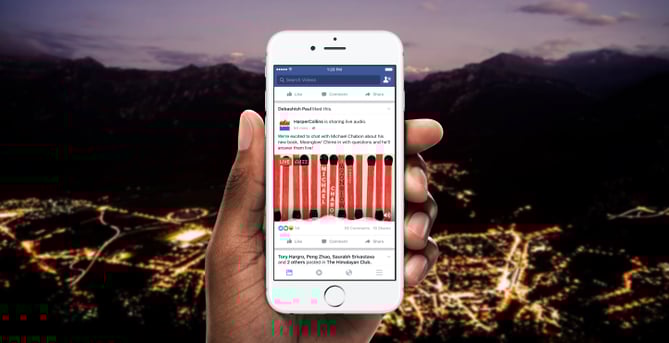
Source: Facebook
In December 2016, Facebook announced its latest live content feature: Live Audio. “Sometimes,” read the official announcement, “publishers want to tell a story on Facebook with words and not video.” That’s usually due to two reasons:
- Audio is often a bit lower-maintenance than video, in that it requires less hardware — like cameras — and lower connectivity.
- It’s also a bit easier on the listener. “Audio is a really low commitment way to consume content,” explains Hunersen. “I can have the audio open in my browser and listen to something like I would a podcast, even if I don’t watch it at the same time on Facebook.”
Facebook Live Audio has flown a bit under the radar since this announcement, and it’s unclear whether or not it’s actually available to marketers yet — so far, we haven’t seen it used. Plus, Hunersen explains, “It’s supposedly only available on Android” devices.
But it does present another audio content distribution option for marketers, however: To double a podcast recording as a Facebook Live broadcast.
How does that work, exactly? Well, perhaps you’ve seen videos of radio hosts broadcasting live videos of themselves in the recording studio, and sharing a visual version of the interviews they’re conducting, for example. Here’s one example of a German radio station that created this kind of content with independent musician Astronautalis:
While that example might fall into the B2C realm, it can easily be adapted by B2B organizations. It also shows how a Facebook Live stream of your podcast recording or interview can be repurposed as pre-recorded video later on. Film a brief intro from your guest, and follow it with a clip of one of the most interesting moments from the conversation. It also brings up a great way to keep the audience engaged — ask them for questions they’d like to ask your guest in real-time.
4. Leverage other spoken content
When marketers set out to create content, accessibility isn’t always something that’s top of mind. For individuals with visual impairment, for example, something like an infographic or a flowchart isn’t the most consumable piece of content.
That’s just one reason why adapting your visual and written content into audio versions can be so valuable. Not only does it create a way to consume what you’ve created in a portable way, but also, you’re making it available to a broader audience.
It’s like creating audible versions of books, for example — that allows people to enjoy or consume novels or nonfiction when reading isn’t an option, like while driving. B2B marketers can do the same thing with their ebooks and whitepapers. But be certain that it’s still interesting to the listener. There’s nothing less engaging, for example, than a computerized dictation of written content. When you record the spoken versions of this content, make sure it’s read aloud by someone who can bring energy to the words, instead of just reciting them in a monotone fashion.
5. Create an audio advertisement.
Don’t have time to create individual or co-branded content? You can also consider creating a short audio ad that could appear on a podcast, radio. show, or streaming service.
With this method, the soundbites you’ll need to produce will be shorter and less time-consuming. However, due to the vast amount of audio content out there, it might be more challenging to determine where your ad dollars should go and where to place your ad.
Here’s an example of a Hendrick’s Gin ad that Gimlet has circulated on a number of its podcasts and displayed on its advertising page.
For expert tips on how to advertise on a podcast specifically, check out this blog post.
Start Talking
I don’t know about you, but I’m pretty excited. I feel a newfound motivation to get out there and create something for people to listen to, and I hope you do, too.
As these examples show, using audio in B2B marketing doesn’t have to be a huge undertaking — it can be as simple or as large-scale as you want, depending on your resources. You can create something completely new, or repurpose what you’ve already got.
Just remember: Always keep it engaging. And whatever you create, we can’t wait to hear it — we’ll be here, listening.
Editor’s Note: This post was originally published in 2017, but was updated for freshness and comprehensiveness in June 2020.

5 Areas of Marketing You Should Practice the “Less is More” Approach
This crisis has created a need to do a lot more with less resources.
Marketers, in particular, are under a lot of pressure to pivot their strategy and ensure their brand stays relevant during difficult times.
But, although quality does make a difference, marketing right now is a game of strategy and scale. At the end of the day, only a small fraction of the people reached by a brand will actually convert.
Which means the more people marketers reach — and the more touchpoints involved — the better. If you’re already feeling stretched thin, don’t worry. Reaching more people doesn’t necessarily mean doing more. In fact, there are a few circumstances where it’s actually better to do less.
Here, let’s dive into five areas of marketing you can practice the “less is more” approach to ensure higher efficiency, and less time wasted.
Less Stress, More Productivity
When you take a hard look at marketing tactics, you’ll see there are actually a lot of opportunities to generate and convert more leads with less work. Let’s dive into five areas of marketing where you might be wasting your time — and how to create more efficient processes instead.
1. Management
Management has two meanings in marketing: the management of employees, and the management of campaigns. Both contain plenty of chances to do more with less work.
Campaigns
Every tool in your marketing stack claims to make your life easier. In most cases, though, they’re just one more window or tool to keep tabs on. Despite the fact that the typical martech stack contains dozens of tools, Gartner research suggests marketers use barely half of them to their fullest potential. That’s the thinking behind HubSpot’s “hub” approach: All-in-one tools are a better investment because they’re more efficient. Not only do employees actually use them, but they spend a lot less time doing things like switching windows and exporting data.
People
If I’ve learned anything about management, it’s that trust and autonomy are key. Nothing creates disengagement quite like micromanagement.
Micromanagement is a double-whammy to productivity because it takes more of managers’ time while reducing employees’ performance. And as someone who co-founded a content marketing company, trust me when I say micromanagement also cuts into content quality.
The best managers aren’t hands-off, but they’re far from hands-on. Instead of worrying about nitty-gritty details, good managers focus on creating the right work environment. Your direct reports should feel safe making their own decisions, but also comfortable coming to you with questions.
2. Scheduling Your Calendar
A “less is more” mentality works both with how you schedule your time, and how other people schedule meetings with you. At a past company, we used what I call the “big rocks” system. Each morning, members of the team would share the top three or four things they expected to accomplish that day.
Although they did all sorts of smaller tasks in between, nobody ever listed “answering emails” or “creating Facebook posts.”
Why not? Because trying to schedule every single chore every day is a waste of time. Appointments fall through. Things come up. Being flexible and squeezing in extra work whenever it makes sense is more efficient than having to rearrange your calendar every hour.
Think, too, about how you schedule things. I spend a lot of my days in meetings, so I could easily spend hours going back and forth in email to set them all up. Instead, I use workflow automation to let people pick a time that works for both of us.
3. Content Creation
I may not be a professional novelist, but one thing I do know is short, snappy writing tends to perform better than long, complex copy.Search engines favor shorter sentences and paragraphs. And more anecdotally, Stephen King, one of my favorite authors, warns writers against overusing adjectives and adverbs.
The point is this: Concise writing tends to be strong writing. Rather than trying to sound like the next Shakespeare in your blog content, be natural. A down-to-earth style is both easier on you and easier on your reader.
4. Conducting Meetings
There are only a few select situations where I would ever hold a hour-long meeting. Not only are they expensive — a hour-long meeting with a dozen employees costs 12 hours of company time — but they simply don’t make sense from a productivity standpoint.
Don’t get me wrong: Meetings can be valuable opportunities to get on the same page. But they can also be enormous time-sucks. In fact, Research published in Harvard Business Review found 71% of executives think meetings tend to be unproductive and inefficient; and 65% of those surveyed said meetings keep them from completing their own work.
Take an “only when necessary and only as long as necessary” approach to meetings. If a message can be conveyed just as well in an email, don’t drag people away from their desks for it. If a meeting is required, send out the agenda beforehand, and explain how long you expect it to take. If it’s done after five minutes, great — let people get back to work.
5. Team Brainstorming Sessions
Marketing is an industry of ideas. Every strategy, campaign, and piece of content begins with ideation. Although I like the cerebral side of marketing, I can’t get on board with how many teams brainstorm.
Nearly 60 years ago, a Yale study showed individuals come up with twice as many solutions to creative puzzles as those working in groups. Yet the team brainstorm remains a staple at most agencies I know.
Just as much time is wasted in post-brainstorm winnowing. Marketing runs on experimentation. The only way to truly tell how a campaign, title, or image will perform is to test it. In the time some teams spend debating different ideas, they could’ve collected real-world data and pivoted if the initial idea didn’t work.
Practice Pulling Back
Doing less might not sound like something that takes practice to get right. But I’ve found marketing is full of Type A personalities: People who hold themselves to high standards, and as a result, tend to give their all to every task they tackle.
When I see members of my team overdoing it, I tell them this: Perfection does not equal performance. I understand the urge to get it right, but remember, marketing is a matter of scale. Doing less is the smartest way to squeeze more in.

How to Convert More Instagram Traffic: 3 Tips
Are you marketing products or services on Instagram? Are you looking for ways to improve your conversions from Instagram? In this article, you’ll discover three tips to improve the chances that people on Instagram will convert into customers on your website. #1: Create and Optimize a Dedicated Landing Page Building traffic to your website from […]
The post How to Convert More Instagram Traffic: 3 Tips appeared first on Social Media Marketing | Social Media Examiner.
from Social Media Marketing | Social Media Examiner https://ift.tt/37bGlW1
via socialmediaexaminer
How 7 Brands Are Using LinkedIn Live to Reach Their Audiences
While you might have been going live on both Facebook and Instagram since 2016, LinkedIn has recently decided to join the live streaming platforms.
In fact, in February 2019, LinkedIn Live was launched to individual users. It was just recently announced that LinkedIn Live would also become available to business pages.
While your business page might not have live capabilities yet, once it’s available you can use it to launch new products, demonstrate thought leadership, and boost your content strategy.
In this post, we’ll look at how seven brands have been doing that with LinkedIn Live.
1. Vimeo’s Working Lunch
When Vimeo received access to LinkedIn Live, the brand started to showcase a weekly show called “Working Lunch.”
With this series, Vimeo used the popular “lunch and learn” format. They sat down with experts in business, tech, and communications to educate their audience.
In fact, this is a great example of how to use LinkedIn Live to reach your audience with serialized content. A series gives your followers something to look forward to on a regular basis. It’ll keep them coming back for more.
Additionally, Vimeo’s series is a great example of educating your audience. Inbound marketing focuses on being helpful and providing educational content, and you can use LinkedIn Live to support those efforts in an interactive way.
2. MIT’s Commencement Ceremonies
Celebratory events, like graduation ceremonies, are a great way to connect your audience and attract new talent.
MIT did this on a brand new scale by live-streaming its commencement ceremonies in 2019. This helped the brand celebrate a big moment, while also transporting its audience who couldn’t be there to a live celebratory event.
3. BCG’s Advice for the Graduating Class
Boston Consulting Group (BCG), a management consulting firm, partners with leaders in business and society to tackle their most important challenges and capture their greatest opportunities.
LinkedIn, in general, is a great place for them to inspire young professionals and engage with their community.
BCG decided to do this on LinkedIn Live by live streaming advice for the graduating class from Elliot Vaughn, its partner & managing director.
This was also a great way to demonstrate experience, foster a relationship with its audience, attract new talent, and promote brand awareness.
4. Hootsuite’s Brand Partnership Announcement
Hootsuite is an excellent example of using LinkedIn Live to reach its audience in an innovative way.
In this example, Hootsuite went live to educate audiences on Google My Business, while also announcing a strategic partnership that showcased innovation.
In this discussion, a panel discusses how to improve your Google My Business listing. They also announced that you can now do all of this through Hootsuite.
Using LinkedIn Live, Hootsuite’s expert panel discussion was used as a way to announce a strategic partnership to its audience.
5. Thrive Global’s AMA with Arianna Huffington
Thrive Global is a brand that offers companies and individuals sustainable, science-based solutions to enhance both mental and physical well-being and performance.
At its core, interacting with its audience is one of the most important elements of Thrive Global’s LinkedIn strategy.
To interact with its audience on LinkedIn Live, the brand decided to host a live AMA with its founder, Arianna Huffington.
In this video, they discussed effectively communicating at work, while also answering questions from its audience.
Additionally, live video allowed them to educate their audience and foster real communication.
6. Gong.io’s Interactive Blog
As we mentioned before, LinkedIn Live is a great tool to boost your content strategy. You might be wondering, “How?”
Let’s look at Gong.io for this example.
Gong.io decided to host a weekly live show on LinkedIn Live that was inspired by existing content.
This meant that they repurposed previous blog content by adding live video, which made it more interactive.
Additionally, this was an excellent way to promote their content. When a brand goes live on LinkedIn, a notification is sent to its followers, which lets them know that something is happening right now.
7. PwC Sweden’s Recruitment Panel
LinkedIn is one of the top tools for recruiters, so you might be wondering, “How can we use LinkedIn Live for our recruitment efforts?”
It’s a great question.
In this example, PwC Sweden, a global consulting firm, hosted a casual panel discussion with its employees on what it’s like to work there.
Employees discussed why it’s an awesome place to work, and were able to authentically showcase why.
This conversation helped promote its talent brand in an interactive way.
Additionally, you can also use LinkedIn Live to showcase your office space or interview hiring managers about how to get hired by your company.
Ultimately, LinkedIn Live is a great tool to reach your audience. You can educate, interact, inspire, and promote your own brand through this medium.

Creating Live Video Like a Pro: Tips for Any Personality
Need to do more with live video? Not sure what to talk about when you go live? To explore how to create live video like a pro, regardless of your personality, I interview Luria Petrucci on the Social Media Marketing Podcast. Luria is a live video strategist and the co-founder of Live Streaming Pros. Her […]
The post Creating Live Video Like a Pro: Tips for Any Personality appeared first on Social Media Marketing | Social Media Examiner.
from Social Media Marketing | Social Media Examiner https://ift.tt/2XyrFNu
via socialmediaexaminer
Bayesian A/B Testing: A More Calculated Approach to an A/B Test
What are some of the reasons you run an A/B test?
When I think of the benefits of A/B testing, I think of one of the most popular and concrete ways to experiment with ad designs that are effective for target audiences. I think of how changing one simple element can be the deciding factor for customers, and that running a test will help me figure out the preferred design.
Up until recently, I thought that there was only one kind of A/B test. After all, the definition itself is pretty straightforward.
Then, I came across a different kind of A/B test. This method still involves testing variants to discover the preference of an audience, but it involves more calculation, and more trial and error.
This method is called Bayesian A/B testing, and if you want to take a more specific, tactical approach to your ad testing, this might be the answer.
But first, let’s talk about how Bayesian A/B testing is different from traditional A/B tests.
Bayesian A/B Testing
There are two types of A/B tests: Frequentist and Bayesian.
Every A/B test has the same few components. They use data, based on a metric, that determines variants A and B. For example, a metric can be the amount of times an ad is clicked. To determine the winner, that metric is measured statistically.
Let’s apply this to an example of using the frequentist, or traditional, approach. In this scenario, you would design two ads and change one variable, such as the copy of the ad. Then, pick the metric, like the amount of times an ad is clicked.
The winner of the frequentist A/B test in this example would be which ad was clicked the most by your target audience based solely on results from that experiment.
If you were to illustrate these components in a Bayesian A/B test, you would approach the test using different data.
That definition can sound a little difficult to visualize without an example, so let’s go over one.
If your previous ad on Facebook drew 867 unique visitors and acquired 360 conversions, earning a 41% conversion rate, you would use that data to inform an expectation. If you were to figure that your next Facebook ad reached 5,000 unique visitors, you could infer that you’d earn 2,050 conversions based on that prior experience. This would be variant “A.”
Let’s say you look at a similar Facebook ad’s performance and ultimately earned a 52% conversion rate. This is variant “B.” What you have done by collecting the data from the two variants is to calculate the posterior distribution, and the previous tests you’ve run have now become the ground for your Bayesian test.
If, before calculating the posterior distribution, you had inferences about conversion rates earned from each variable, you can now update them based on the data you’ve collected. You can ask hypothetical questions about your test, such as “How likely is it that ‘B’ will be larger than variant ‘A’?” In this case, you can infer that the answer to this is 9%.
Then, the trial and error portion begins.
Bayesian methodology makes decisions by doing some inference. You can calculate expected loss by the rate your metric decreases when choosing either variable. Set a boundary, such as 2%, that the metric should drop below. Once you have collected enough data to support that a variant dropped below 2%, you’ll have your test winner.
Because your inferred loss for a variant is the average amount of what your metric would decrease by if you chose said variant, your boundary should be small enough to comfortably suggest making a mistake that large.
The methodology suggests that you are more willing to make a mistake of a certain amount, then move on to a more refined experiment instead of wasting time on a mistake that dropped below that threshold.
If you were to run two experiments, they would stop when the expected loss is below that 4% boundary. You would use the values of your variants to calculate your average loss. Then, you would begin the test again using these values as your prosperity distribution.
Bayesian A/B testing proves that you can make a business decision that won’t fall below that boundary you set. You can use the data you’ve collected to continuously run tests until you see metrics increase with each experiment.
When you use Bayesian testing, you can modify the test periodically and improve the results as the test runs. Bayesian A/B testing uses constant innovation to give you concrete results by making small improvements in increments. You don’t have to use inference as a result, but instead, use it as a variant.
If you’re running A/B tests on software or different channels, you don’t have to change them to run a Bayesian A/B test. Instead, you can look at the tools you have at your disposal in that software to give you more calculated results. Then, you can continuously run those tests and analyze them to pick your winners.
You might use a Bayesian A/B test instead of a traditional A/B test if you want to factor in more metrics into your findings. This is a really good test to calculate a more concrete ROI on ads. Of course, if you have less time on your hands, you can always use a frequentist approach to get more of a “big picture” conclusion.
Whichever method you choose, A/B testing is popular because it gives you an inference that can be useful for you in future campaigns.
