
Welcome to My Blog
8 Strategies for Writing Product Descriptions That’ll Generate Revenue
I’ll admit it — I love online shopping. Recently, I’ve been shopping online more than ever.
And I’m not the only one.
In fact, last year annual online sales were over $3 billion. In 2020, online sales are projected to reach $4.2 billion.
That’s why product descriptions are more important than ever.
As a marketer, it might be time to rewrite your product descriptions to increase online sales.
Below, let’s review what a product description is and how to write one. Then, to help guide your own writing process, we’ll look at some examples and templates to get you started.
Usually, a product description will include product details. Additionally, it should tell a story about how the product can solve the target audience’s pain points. If a visitor can’t imagine themselves benefiting from a product, they won’t purchase it.
1. Consider your buyer persona.
With any copy you write, you need to keep your buyer persona in mind. It’s important that your product description is catered to your target audience.
For example, your product description should specifically address pain points and goals of your buyer persona.
Online visitors need to be able to visualize themselves using a product before they’ll purchase it.
Additionally, you should use the same language that potential customers use. Doing your keyword research will help you do this (more on that below).
For instance, does your product description use the same humor of your target audience? Does it answer questions they might have?
This is important to keep in mind when you’re writing your product descriptions because you want to reduce any barriers or concerns potential customers might have.
2. Get creative.
Any marketing copy you write should be creative. Product descriptions are no different.
Ultimately, your product description should tell a story and sell an experience. Not to reiterate, but visitors need to be able to imagine themselves using the product.
Your product description should let them know what’s in it for them. How will they benefit from buying your product?
When you’re brainstorming what story to tell, think of what inspired you to create your product, how it was tested, and obstacles you overcame.
Perhaps the answers to these questions are things that align with your buyer persona’s values or pain points.
3. Use details.
When you write a product description, you should be as specific as possible. That means you shouldn’t use any fluffy or vague language that doesn’t add value to the description.
After writing a draft, see if every sentence adds value. For example, does each sentence educate a visitor about either the product or brand? If not, take it out.
Additionally, instead of listing features, you should focus on listing benefits that solve customer pain points. And be detailed about it.
The more details, the more credible the product is.
4. Optimize for SEO.
SEO is extremely important in product descriptions. You want your products to show up when people are shopping online.
To optimize your product descriptions, do keyword research and discover what customers are searching for.
You should use keywords in your page titles, meta descriptions, image alt tags, and product description copy.
Using keywords should make your product easier to find online.
5. Include social proof.
Before anyone makes a purchase nowadays, they look at the reviews online. The better the reviews, the more likely people are to make a purchase.
By including social proof in your product description or on your product page, you’re making that step easier.
It’s important to reduce the need for a customer to do further research. All the information they need should be on your product page.
Some brands include social proof in the form of a quote. Others just include reviews below the product description. Either way, social proof should be easy to find.
6. Make it easy to read.
Information shouldn’t just be easy to find, but it should be easy to digest as well. If you only have one large block of text, visitors aren’t going to read that.
Your product description should be easy to scan. You can accomplish this visually and with simple formatting.
For example, use larger headlines, include bullet points, and take advantage of white space. The easier it is to read your description, the more likely visitors are to actually read it.
7. Incorporate graphics and images.
Sometimes you can be tempted to include a long list of bulleted features. However, that might not be the best way to get your message across.
If there’s something you want your audience to know that you don’t want to include in the text, create a graphic.
You can use symbols or graphics above your product description. For example, if your product is vegan, perhaps you’d want to include the vegan symbol above your product description instead of stating that feature in the description itself.
8. Measure your success.
Once you finish writing your product descriptions, you might have different versions you want to test. If that’s the case, don’t be afraid to do an A/B test.
You might test different lengths, keywords, or formulas. Testing will help you optimize your descriptions.
Additionally, once you’ve decided which description is working, you’ll want to measure your success.
To do this, choose the metrics you want to track. Is it conversion rate? Cart abandonment rate? Or maybe it’s organic rankings?
Whatever you decide, make sure you track your success so you know if your new descriptions are generating revenue.
Product Description Examples
1. Betabrand
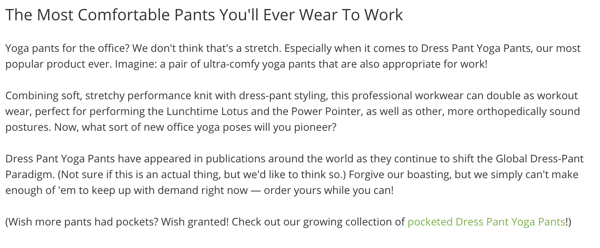
Betabrand is known for selling dress yoga pants for women. In their product description below, they used personality to relate to their target audience.
This description is creative and includes important information such as social proof and the benefits of wearing the pants.
Additionally, the last paragraph adds an element of exclusivity to the product, leaning into the FOMO phenomenon.
2. Fabletics
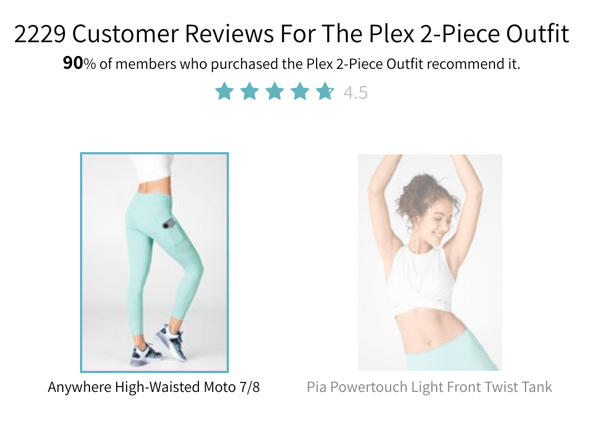
One of the main things that Fabletics does really well is social proof. Below their product descriptions, they include a large graphic that discusses reviews and customer happiness.
They even tell you how many people have reviewed the product and the percentage of people who were happy with it.
The reason this works really well is because it makes the visitor feel like everyone likes the product, so there’s no reason not to purchase it.
3. Wayfair
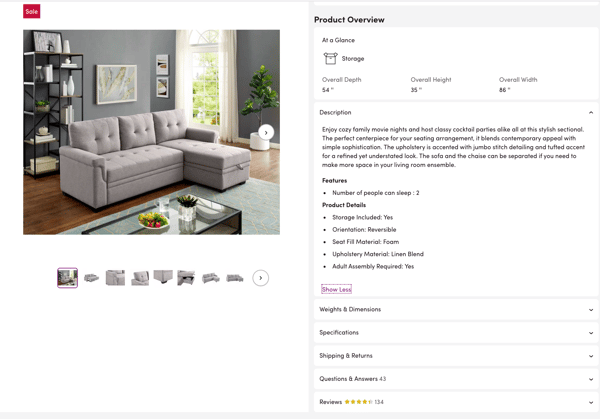
The Wayfair product description is probably the most extensive. Besides the description itself, the product page includes graphics at the top and expandable information at the bottom, including reviews and questions and answers.
Additionally, the product description itself is written really well. It tells a story so the reader can imagine themselves using the product. Plus, the description discusses benefits, while the bullet points review the features.
Product Description Template
Now that you know how to write a product description and you saw some examples, it’s time to get started on your own.
While you’re brainstorming the content you want to include, answer these questions:
- Who is the product for and what kind of language are they using?
- What are the main benefits of your product?
- How does someone use your product?
- What’s the value of your product? Why is it better than competitors?
These answers should give you a good place to start.
Once you have all the information you need, consider using this formula:
- Begin by telling a story and setting the scene (about 1-2 sentences)
- List the benefits of using your product (can be a bulleted list of maybe 3-5 items)
- Finish by including social proof if you can (a quote or award)
All the while, make sure you’re sprinkling in details and optimizing for keywords based on your research. Additionally, below your description, you might include reviews or graphics that list out some key features.
Product descriptions are an important element of your product pages. They help tell the story of your product so your visitors can imagine themselves using it.

12 Social Media Tools You Need to Use in 2020
You already know how important social media is to increase brand awareness, generate more leads, and ultimately score more conversions. The world is on social media — 45 percent of it, at least — so if you want your product, service, and mission to reach the maximum amount of people, your business needs to be on social media, too.
Social media, however, can be extremely time-consuming. Additionally, it spans so many diverse tasks, ranging from number-based activities like tracking analytics, to creative jobs such as designing graphics.
It can be difficult to find the skills and manpower needed to execute a good social media strategy — which is why you need social media tools to help you out.
Here, we’ll cover the top eight social media tools you should be using in 2019 to help you save time, while getting more conversions than ever.
What Makes A Good Social Media Tool?
Although the term “social media tool” is very general and can apply to a wide range of services, there are a few key features each social media tool should have.
1. Saves You Time
The goal of a social media tool is to save you time while getting similar — or better — results than you could without it. Look for social media tools that automate a process, but make sure the process still happens correctly, since some shortcuts might be too fast and therefore won’t focus on quality.
2. Increases Brand Awareness
One of the biggest benefits of social media is its ability to increase your brand awareness, which is why each social media tool you select should perform its services with brand awareness in mind. Maybe your tool of choice is an editing platform such as Lightroom, which can help you create images to match the rest of your feed. Or, maybe it’s an Instagram scheduler so you can preview your profile before you post images. Whatever the case may be, social media tools should focus largely on brand awareness.
3. Easy to Use
Social media tools are only a time-saver if they’re easy and intuitive to learn how to use. Each tool you select should be super user-friendly so that your accounting team could edit photos if they needed too, and your creative, right-brained writers could still use the analytics function to track daily social metrics.
Many social media tools provide tutorials on their websites. Others, such as Kicksta, have top-notch customer service so you can get immediate expert advice if you need help getting off the ground.
4. Affordable
Social media tools should be affordable (and most of them are). Many high-quality social media tools are even free, such as the Unfold app, which is perfect for creating Instagram stories. With social media tools, there’s no need for you to go back and forth with the accounting department trying to get your budget approved. Most social media tools are already budget-friendly so all you need to do is sign up.
5. Focuses on Organization
One of the ways social media tools save you time is by keeping you organized, so make sure the social media tools you decide to use are efficient and tidy.
For example, HubSpot’s social inbox tool helps you prioritize your social media interactions, and graphic design website Canva saves your designs so you can go back and edit them later.
1. HubSpot’s Social Inbox Tool
Price: Starts at $800/month, included in the Marketing Hub Professional tier
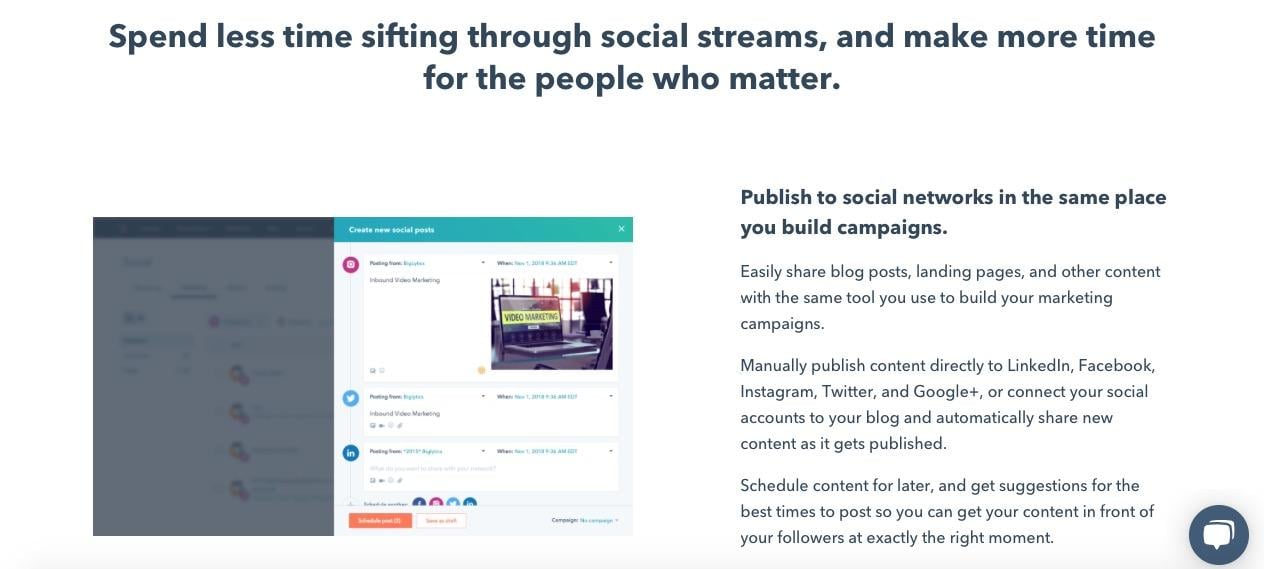
HubSpot’s social inbox tool saves you valuable time while still optimizing your social efforts. Schedule your posts, integrate your social networks with your blog, and monitor messages and mentions so you can nurture new leads.
HubSpot also integrates all of your marketing with your CRM, so it’s easy to figure out how many leads and customers you’re receiving directly from social media. “HubSpot Marketing Hub… puts the potential of corporate marketing within everyone’s reach,” one customer says.
2. Kicksta
Price: Starts at $49/month for individual creatives
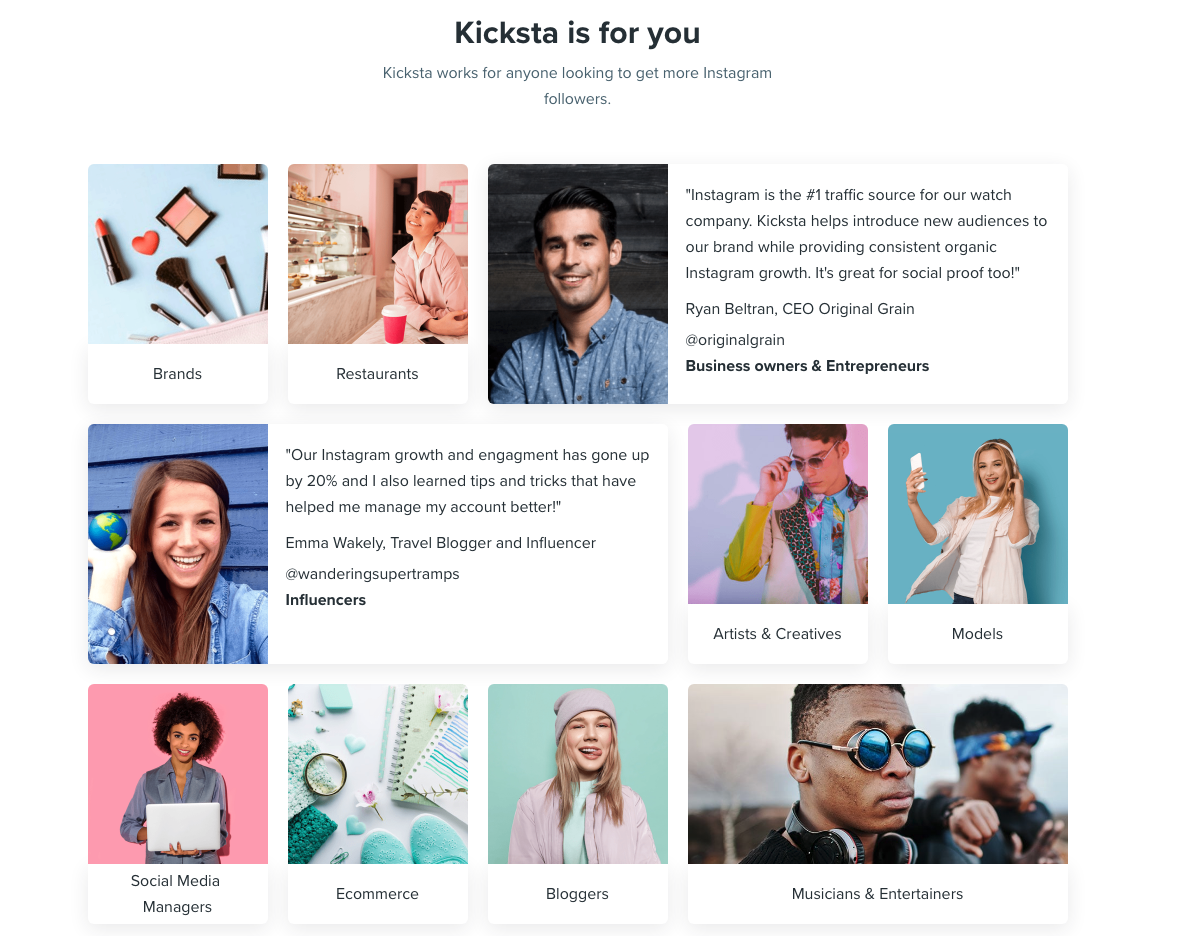
Kicksta is an Instagram growth service that helps you get more organic followers on your Instagram business account. Using your company account, the growth service “likes” around 30,000 photos a month on carefully-targeted accounts. Those users — real people, not spam bots or fake accounts — will begin to follow your account, increasing your brand awareness.
Kicksta is a good fit for any industry and provides a friendly, responsive, and helpful customer success team. “Kicksta helps introduce new audiences to our brand while providing consistent organic Instagram growth,” says Ryan Beltran, CEO of watch company Original Grain. “It’s great for social proof too!”
3. Later
Price: Starts at $9/month
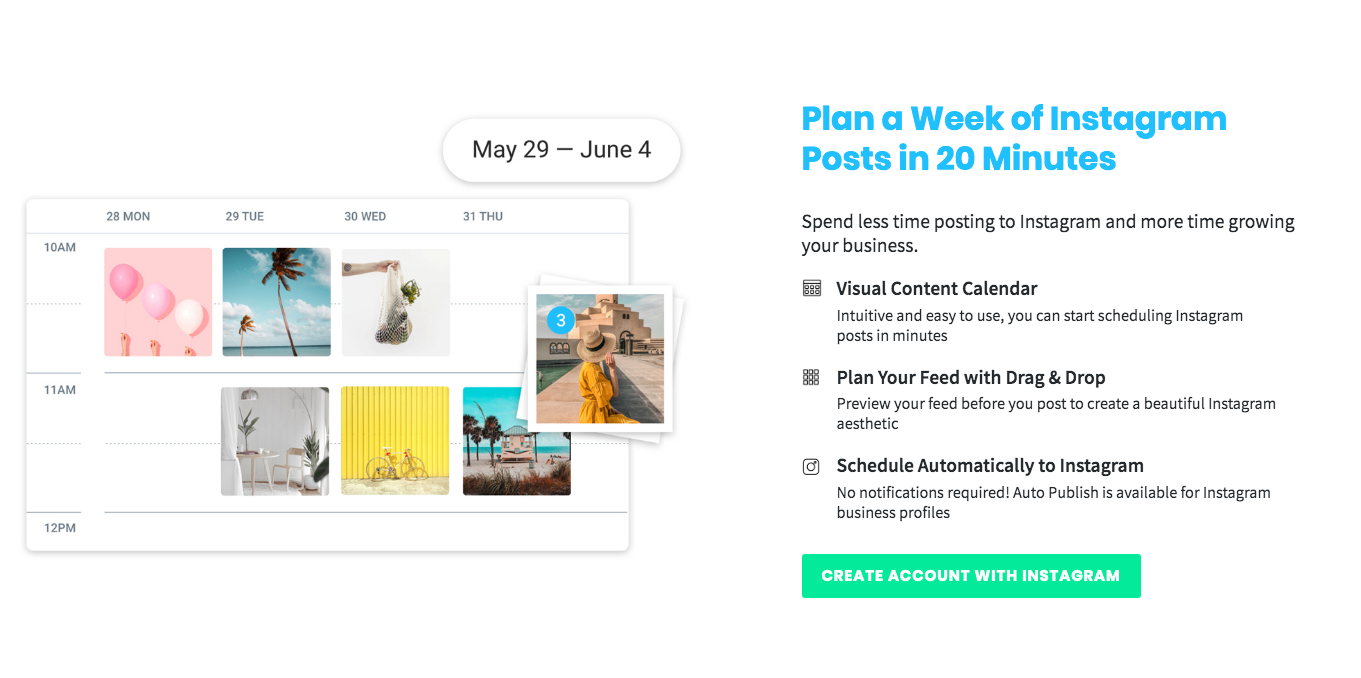
Social media marketing platform Later lets you plan and schedule your Instagram, Twitter, Facebook, and Pinterest posts. The drag-and-drop calendar makes it easy for you to map out your upcoming posts and see at a glance how your feed will look.
You can also track your analytics, which will help you figure out the best time of day to post, and the best hashtags to use. Additionally, the Linkin.Bio feature for Instagram helps your posts become instantly shoppable.
“I love that you can either use it via the website or app on-the-go,” one user remarks. “It is one of those apps that I could not live without … Later is [a] super easy tool to set up.”
4. Lightroom
Price: Starts at $9.99/month
Adobe’s Lightroom product is a tool that lets you organize and edit photos. Since social media is all about visuals, it’s critical your business’s social media accounts showcase vibrant, on-brand photos.
Sliders, filters, and many other features make Lightroom a user-friendly tool to create beautiful photos even if you don’t have much editing experience. Lightroom is available for both mobile and desktop, and best of all, changes made on one device immediately apply to all devices.

5. Canva
Price: Free or $12.95 per team member per month
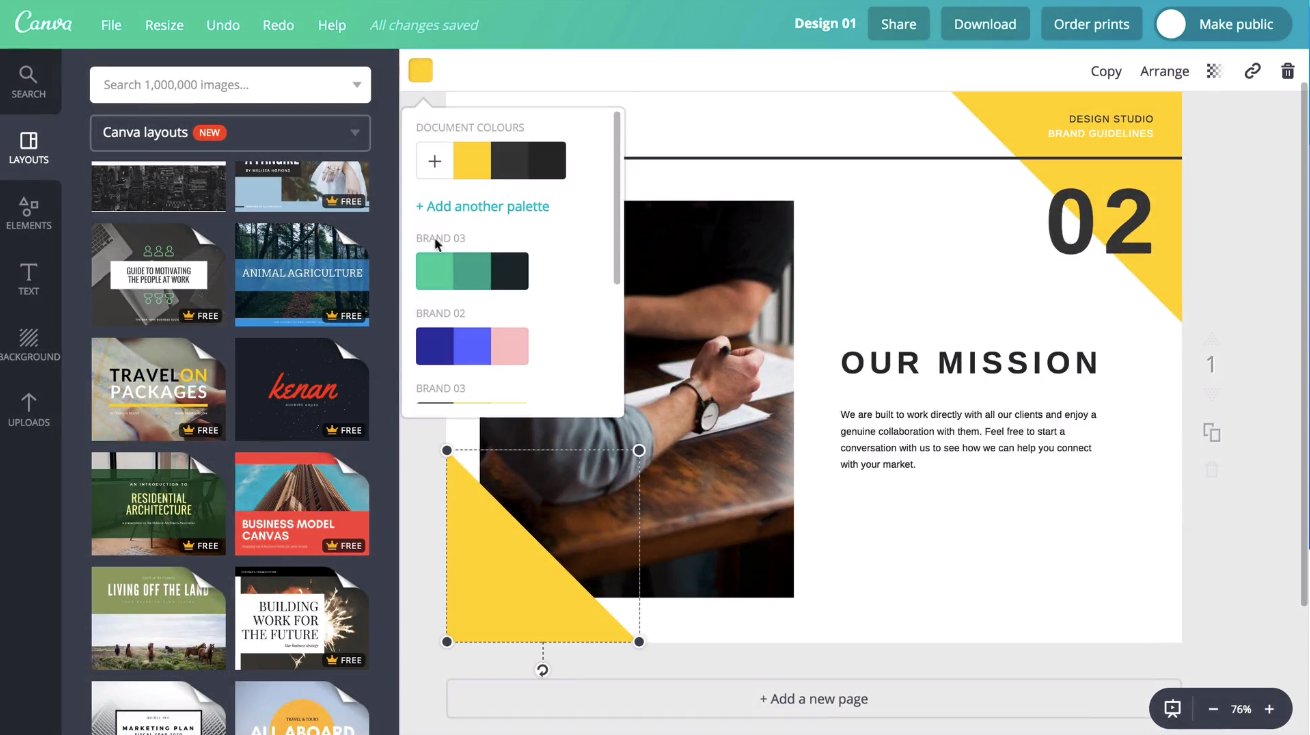
Canva is an easy-to-use graphic design website where you can create custom, on-brand graphics for your company’s social media accounts. The website has dozens of templates — everything from Facebook banners to Instagram stories to Twitter posts — so if starting from scratch to create social graphics seems intimidating, use a template instead.
One user said, “Canva has been a lifesaver to me and my business. No more hours sitting in front of the computer coming up with graphics for social media post[s] or Pinterest post[s].”
6. Unfold
Price: Free
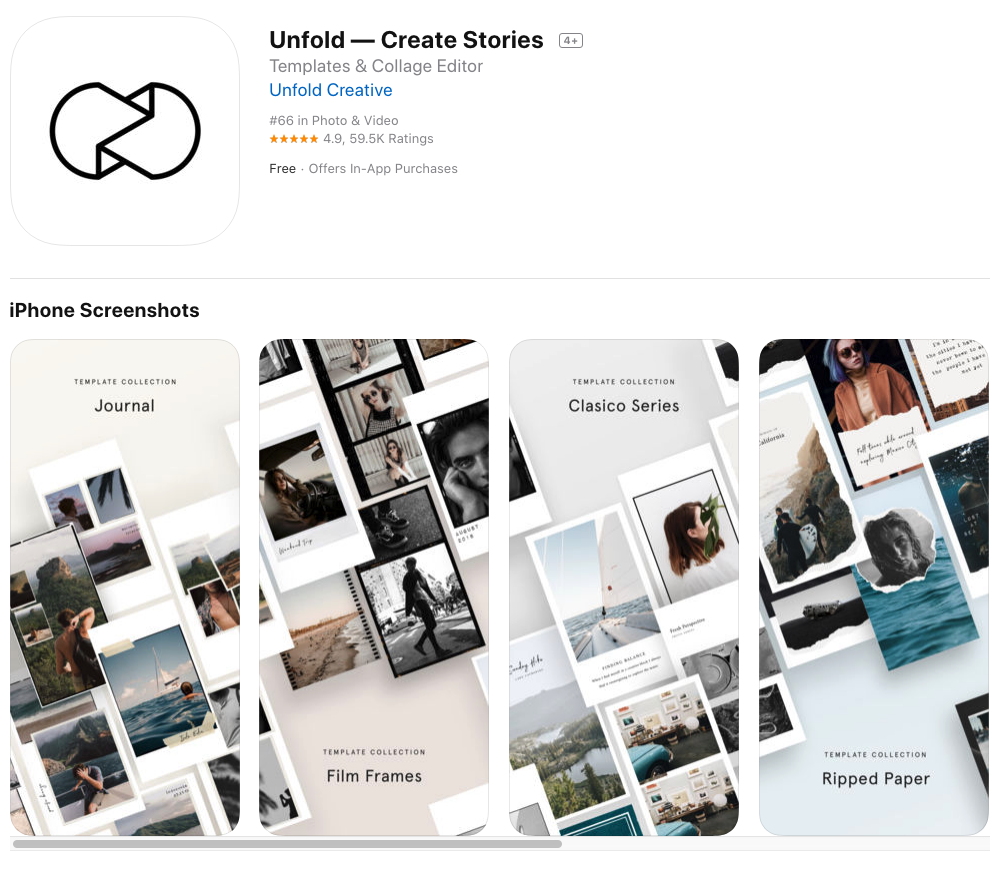
Described as “a toolkit for storytellers”, Unfold is an iOS and Android app that helps you create beautiful templates for Instagram stories. Bringing your creative visions to life is the driving idea behind Unfold. It’s an ideal app for lifestyle brands who want to create stylish collages to keep their social media accounts on-brand and receive the maximum amount of engagement from followers.
7. HypeAuditor
Price: Starts at $30/credit (one credit equals one Instagram report for one year)
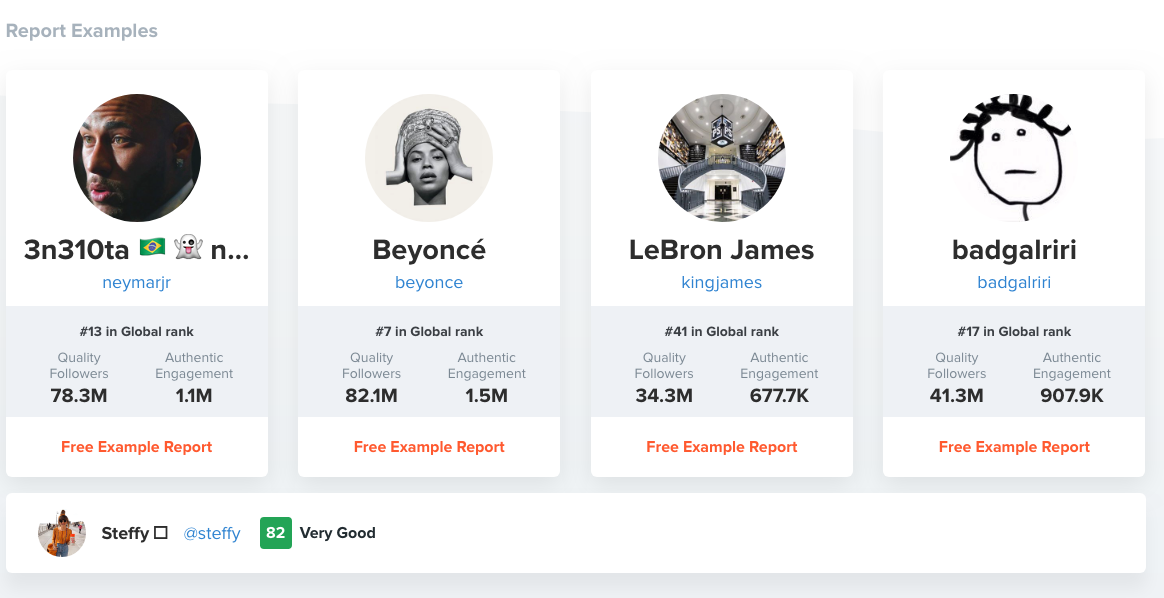
You’ll never earn money from fake followers — they just make your engagement look bad (think millions of followers, but only a few hundred likes per photo) and ruin your reputation. That’s why HypeAuditor weeds out fake followers on your Instagram account to help you determine your organic reach.
Additionally, HypeAuditor analyzes your audience to figure out where they live, their age and gender, and which of your followers are ghosts.
8. Retouchup
Price: Starts at $0.25 per image
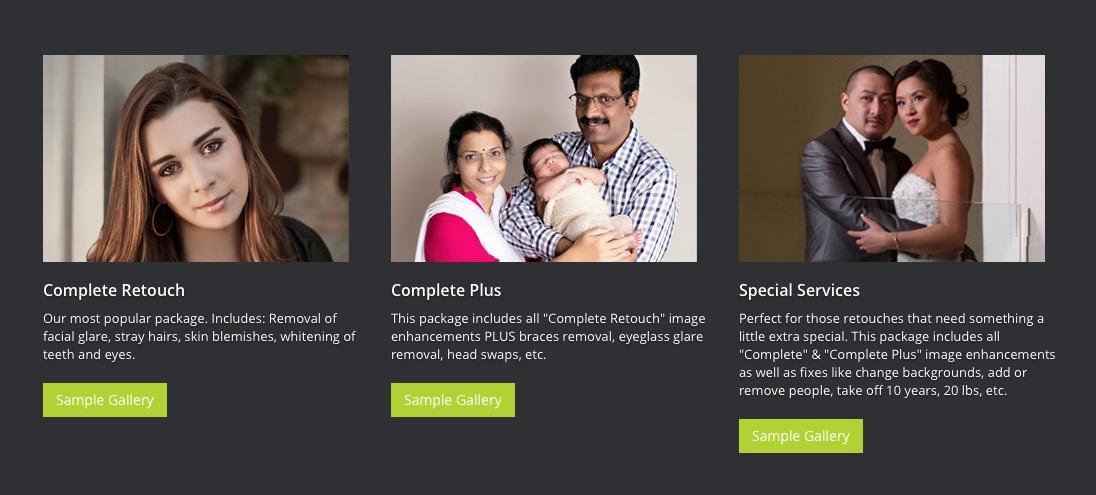
The website Retouchup provides an easy way to edit photos for social media, from basic color correction to more advanced Photoshop-like features such as adding or removing people from a photo. With Retouchup, you don’t do the work yourself — instead, just submit a photo and the website’s experts will edit the photo for you within 24 hours.
“You’re making me look like an awesome photographer!” one user gushed. Retouchup can save you time during the editing stage, and make your images appear higher-quality and more compelling.
9. Quuu
Price: Free, or starts at $19/month.
Quuu is a platform that helps its users execute visually stunning social media content. It automates the time-consuming process of properly creating professional, engaging multimedia assets for campaigns.
When using Quuu, you can choose from over 500 interest categories, like marketing or real estate, and receive content suggestions based on those choices. You’ll receive a certain amount of content suggestions per day per profile based on your settings, ensuring you’ll always have relevant posts for your audience.
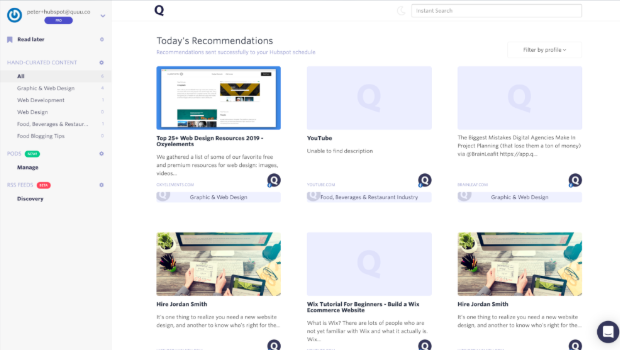
If you’re a HubSpot customer, you can integrate the two platforms. Quuu finds the best content for your social profiles, and HubSpot lets you control those suggestions. You can go to your draft folder via HubSpot and pick which content you want to upload if your Quuu account isn’t automated, which you can change.
Quuu looks for content so you don’t have to. The tool also integrates with Buffer, Hootsuite, and Socialbee.
10. Marketing Video Builder
Price: Free, or starts at $33/month.
Marketing Video Builder by Animoto helps you make professional-tier videos to engage with audiences. Videos can be created in minutes using the online video editor. The best part about the tool is that you don’t even need editing experience to get started.
You can increase brand awareness by making videos for your company, and share them across social channels to grow your audience. Additionally, if you’re a HubSpot customer, you can integrate that account with your Animoto account.
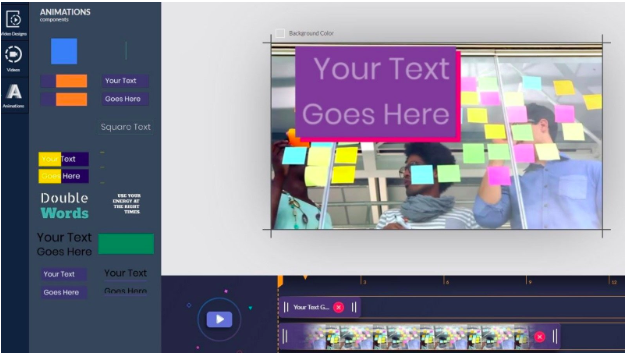
When you create videos, you can use a pre-built storyboard template curated by either Animoto or HubSpot. Alternatively, you can make a video from scratch. When you’re done, you can export the video to your HubSpot file manager with one click and manage it from there.
Animoto also integrates with Getty Images, Facebook, YouTube, Twitter, and LinkedIn, so you can have video tools for a good portion of social media platforms all in one place.
11. Design Wizard
Price: Free, or starts at $33/month
This tool lets you create different types of content, like photos and videos, with no professional editing experience required. If you have a limited budget and time on your hands, this free visual content tool is ideal for you.
Design Wizard has a library of over a million multimedia graphics for inspiration and use. Plus, all images are licensed for commercial use, so if you use one from the site, you won’t run into copyright infringements.
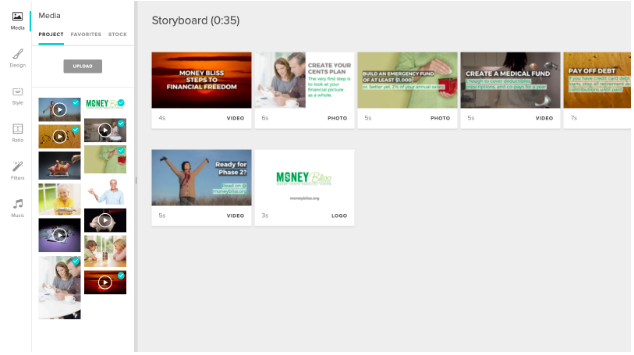
Your beautiful, on-brand images will be able to integrate with HubSpot. You can manage all of the files you create with Design Wizard from your HubSpot account, which you can use for campaign posts.
12. Falcon
Price: Free, then $129/mo.
Falcon is a social media management platform that allows you to create posts for social networks on a collaborative content calendar.
It integrates with HubSpot, Microsoft, and Salesforce to help users streamline marketing tasks among teams. For a visual to see how Falcon integrates with other software, refer to the photo below:
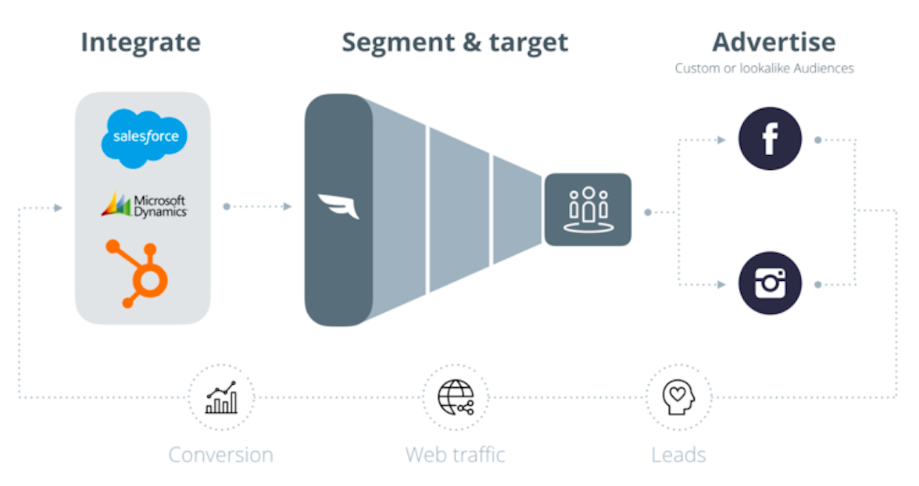
HubSpot customers can use this integration to create audience segments. These segmentations will help you target your customers with social media posts, making sure your content is being seen by the right people. Any changes you make within HubSpot will automatically transfer to Falcon, so you don’t have to worry about manually updating content.
There are numerous choices out there for high-quality social media tools. Ultimately, it’s your job to decide which tool is the best fit for your needs, your budget, and your marketing goals.
Need a painless way to track your social interactions? Try HubSpot’s social inbox tool today.

25 Herramientas para crear Infoproductos y promocionarlos
En esta época, una de las mejores alternativas que está encontrando mucha gente para trabajar desde casa y mantener a flote su negocio o incluso potenciarlo en un área que puede ser muy rentable, es vender sus propios cursos, infoproductos o capacitaciones.
Si quieres adentrarte en este mundo, vas a necesitar herramientas para alojar tus cursos, promocionarlos, alcanzar a más gente, hacerles seguimiento…
Esto viene a cuenta porque profesores, terapeutas, psicólogos, músicos, entrenadores y un gran abanico de prestadores de servicios están frente a un área de oportunidad profesional.
Los cambios de patrón en la interacción social originados por la aparición del coronavirus están planteando nuevas formas de abordar el trabajo, la carrera profesional y los negocios.
Cuando trabajas en una organización, las medidas para evitar el contacto social implican migrar la oficina a la casa.
Ya hemos comentado que no todos saben cómo abordar el home office. Por eso en nuestro post anterior recomendamos 17 herramientas y recursos para trabajar desde casa. El texto no solo se orientó a hablar de plataformas, también dimos consejos para organizar el tiempo y liderar equipos de forma remota.
Pero, ¿cuáles son los recursos con los que cuenta una pastelera, el profesor de yoga, la directora de una compañía de teatro?
La crisis es la madre de muchas transformaciones. A algunos perfiles en situaciones límite se les dispara la creatividad.
¿Has pensado en ofrecer algún tipo de curso, infoproducto o capacitación a través de Internet?
Como desde 2009 en Socialancer trabajamos en la industria digital, hemos desarrollado esta serie de artículos en los que queremos hablarte de las posibilidades que tienes para transformar tu mercado laboral.
En esta ocasión, nos enfocaremos en explicar 25 herramientas que conocemos bien porque las usamos con las que cuenta el emprendedor para transmitir sus conocimientos a través de internet.
5 Herramientas de Editores de Video para transmitir conocimientos y experiencia profesional
Si quieres ofrecer clases en vivo, lo primero que vas a tener que decidir es qué editor de video vas a utilizar.
Aquí te recomendamos las plataformas que hemos utilizado en Socialancer durante años por orden de uso. Recuerda que las herramientas de videoconferencia también son una buena opción.
#1. Create
Con solo 3 pasos puedes realizar y editar un video en Create. El primer paso implica grabar tus videos y audios con la webcam de tu computadora (puedes aparecer tú o el escritorio).
Después edita el material con un sencillo sistema de soltar y arrastrar (puedes subir otros videos o recursos audiovisuales para darle más dinamismo).
Por último, exporta el video en calidad 4k listo para publicarlo donde quieras (YouTube, redes sociales, páginas web).
Para que veas lo sencillo que es de manejar, te compartimos esta demo.
#2. Camtasia (tiene periodo de prueba)
Camtasia es un software que te ayuda a grabar la pantalla de tu computadora y editar los videos resultantes. Lo interesante es que también puedes añadir efectos como transiciones y objetos, con esto les darás a tus videos un toque profesional.
Es muy sencillo de usar, prácticamente editas soltando y arrastrando. Entre las cosas que puedes agregar son música, audio, títulos y anotaciones.
Funciona para cualquier tipo de capacitación o video tutorial. Por ejemplo, un contable puede crear una serie de mini clips para explicar cosas específicas de una reforma fiscal.
Tiene un periodo de prueba gratuito de 30 días.
#3. ScreenFlow
Antes que nada, debes saber que ScreenFlow es un programa compatible solo para MAC, por lo que no te servirá en una computadora con otro sistema operativo. Aclarado lo anterior, te explicamos sus características.
- Permite grabar la pantalla de tu computadora.
- Puedes editar los videos.
- Tiene una librería de recursos audiovisuales para que les des dinamismo a los videos.
- Tiene gráficos animados como títulos y logos.

#4. Screencast O Matic
La filosofía de Screencast O Matic es que la grabación y edición de video no tiene por qué ser difícil ni costar una fortuna.
Este software también te permite grabar la pantalla de la computadora y editar el producto final. Una de las cosas que nos gustan es que permite añadir subtítulos automáticamente.
Y que, aunque se trata de una cuota anual, es mucho más baja que las principales y todo se hace online.
#5. Loom (con versión gratuita)
Loom es una extensión de Chrome. Es decir, una funcionalidad que se instala en tu navegador. Te permite grabarte compartiendo pantalla y cámara.
Esto quiere decir que graba desde la cámara de tu computadora, puedes elegir que aparezca tu cara o el escritorio de tu ordenador.
Es ideal para explicaciones breves en las que tienes que mostrar cómo se hace algo en internet. Por ejemplo, si eres un diseñador y quieres mostrar a tus clientes algo en particular sobre el diseño que has creado, esta herramienta te servirá mucho.
Puedes también hacer explicaciones a tu equipo de trabajo para mostrarles paso a paso procesos que deban hacer dentro de sus tareas.
3 Herramientas para alojar videos
Después de editar los videos de nada te servirá que se queden en tu computadora. Vas a necesitar un sitio para alojarlos que sea seguro y rápido.
Esto te dará una vía fácil para compartirlos con tu público objetivo.
#6. Kaptiwa
Si subes tus videos a YouTube, aunque sea en modo oculto, siempre corres el riesgo de que alguien los comparta con otros usuarios. Ese es el motivo por el que deberías evaluar pagar por un alojamiento de video.
Suena fuerte pero realmente estas herramientas no precisamente son caras. Kaptiwa, por ejemplo, es muy asequible.
Además de alojar los videos para que después los puedas distribuir, esta herramienta te ayudará a que se carguen rápidamente para que la experiencia de tus usuarios sea mejor.
En este tutorial podrás conocer la plataforma más a fondo, además hay algunas promociones de pago que te pueden interesar.
#7. Vimeo (prueba gratuita)
Vimeo es una de las plataformas más populares para alojar videos en privado y en público. Una de sus ventajas es que también permite hacer transmisiones en vivo.
Ofrece una prueba gratuita de 30 días y después planes de pago que varían según la capacidad de almacenamiento que necesites.
#8. Wistia (con versión gratis)
Es un servicio similar al de Vimeo, pero Wistia sí tiene una licencia gratis. Esta te permite subir tres videos al mes y tener un máximo de 250 suscriptores en tu cuenta.
A partir de ahí comienzan sus planes de pago, que van en función de la cantidad de videos que puedes subir al mes.
2 Software de eLearning
Si tu idea no es ofrecer cursos aislados sino comenzar con un programa de capacitaciones, es momento de que empieces a evaluar alguna herramienta de eLearning.
#9. Everlesson
Everlesson es uno de los sitios más completos para crear cursos ilimitados. De hecho, te permite tener varias escuelas en una cuenta.
Además, desde la misma herramienta podrás:
- Construir una base de suscriptores.
- Generar cursos de entrenamiento.
- Con la versión PRO puedes implementar un sistema de calificaciones.
- Gamificación. Si tienes en cuenta que el porcentaje de alumnos que terminan los cursos es muy bajo, con el sistema de gamificación de Everlesson motivarás a que sigan con ellos hasta el final.
- Construir páginas de venta.
En este video te mostramos bien cómo funciona.
Hemos llegado a un acuerdo exclusivo con Everlesson de modo que, si compras ahora desde este enlace, podrás conseguir la Versión Básica + la Versión PRO de Everlesson por un pago único (sin pagos recurrentes).
#10. Memberpress
Memberpress te servirá solo si tienes una plantilla de WordPress. Es un plugin que se configura rápido y fácilmente.
Te permite crear sitios de membresía, medios de pago y subir los productos que vas a promocionar.
3 Herramientas de Email Marketing para promocionar tus cursos online a tu comunidad
Si quieres comenzar a difundir contenido educativo entre tu comunidad sobre tu área de especialidad u ofrecer tus servicios a través de plataformas digitales, debes pensar en tener una herramienta de email marketing para gestionar eficazmente tu base de datos.
Te servirá para dos cosas:
- A través de una base de correos electrónicos puedes difundir tus servicios y captar clientes.
- Es una de las vías más efectivas para transmitir contenidos: ebooks, newsletters, etc.
Algunas plataformas que están disponibles son:
#11. BriteVerify
Cuando ya creaste una lista de correos electrónicos tu trabajo no ha terminado, apenas empieza. Debes tener en cuenta que no todos los que te enviaron sus datos están realmente interesados en tu producto.
Además, al hacer tu envío de emails te encontrarás con uno de tus enemigos: el terrorífico spam. BriteVerify te ayudará a detectar correos electrónicos falsos, que ya no estén en uso o con errores.
Al verificar y eliminar las direcciones no válidas, esos correos no rebotarán. Lo anterior mejora las posibilidades de que el mensaje llegue a la bandeja de entrada de los correos válidos.
#12. GetResponse
Por su parte, GetResponse es una herramienta completa pero destacamos las siguientes:
- Te permite el envío masivo de correos basado en la mejor hora de apertura de emails de tus usuarios. Además de que la interfaz está en español.
- Los webinars son una forma muy popular de realizar capacitaciones en tiempo real con varios usuarios conectados al mismo tiempo. Sobre todo recomendamos esta opción para aquellos que están en sus inicios de probar webinars con su audiencia, ya que te permite probar nuevas acciones sin contratar una nueva herramienta extra de webinars o si tu presupuesto para este tipo de acciones es ajustado.
- GetResponse tiene un creador de encuestas. Esto te facilitará conseguir una retroalimentación de tus usuarios sobre la calidad del servicio que ofreciste.
En este video podrás conocer más detalles:
#13. Acumbamail (con versión gratuita)
Dentro del amplio mundo de las herramientas de envío masivo de correos electrónicos, Acumbamail tiene varios aspectos que la hacen destacar:
- Es una herramienta totalmente en español.
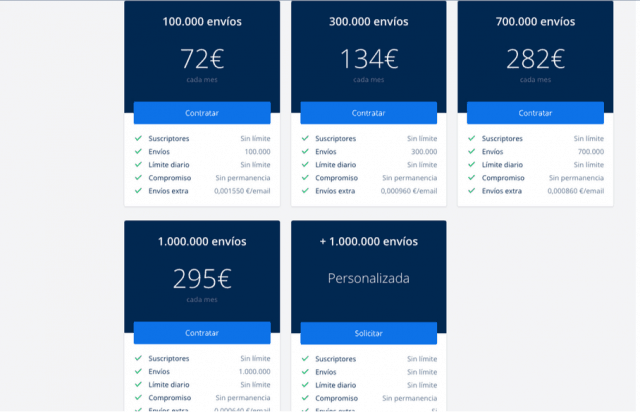
- Su versión gratuita te permite 2.000 envíos al mes a 250 suscriptores.
- Puedes pagar por ocasión única, en caso de que no estés haciendo cursos constantemente.
Para que puedas corroborar que con esta herramienta pagas menos mientras más envías, te compartimos una captura de pantalla de algunas de sus tarifas.
3 Herramientas para conseguir Leads o seguidores para tus entrenamientos digitales
Para captar audiencia hacia tus cursos, infoproductos o capacitaciones, es muy importante promocionarlos y conseguir mayor comunidad. Estas dos herramientas te ayudarán a hacerlo desde tus redes sociales, de forma viral y sin tener que invertir en publicidad.
#14. Easypromos
Easypromos es una plataforma que te permite hacer varias cosas:
- Diseñar juegos y promociones para dar a conocer tus cursos en redes sociales como Facebook e Instagram.
- También te ayudará a captar correos electrónicos de tu audiencia interesada para después hacer una campaña de email marketing.
#15. UpViral
UpViral también sirve para promocionarte en redes sociales. Los concursos y sorteos que se diseñan desde esta plataforma estimularán a tus seguidores para que compartan tus publicaciones a cambio de puntos. Esto te ayudará a atraer el tráfico indicado.
En esta demo podrás ver cómo funciona.
#16. Connect Explore
Una buena idea para atraer audiencia a tus cursos, infoproductos o capacitaciones es hacer campañas de Facebook Ads. Ahí es donde entra ConnectExplore.
Esta herramienta te ayuda a encontrar intereses ocultos entre los públicos de Facebook para que segmentes tus anuncios de forma más certera. Esto se traduce en que tu inversión irá más enfocada a quienes realmente podría interesarles tu servicio.
Si el tema te interesa, entonces te recomendamos ver nuestro tutorial de la herramienta.
4 Herramientas de Video para promocionar tus cursos:
El video además de ayudarte a transmitir tu conocimiento, es un excelente vehículo para promocionar tus infoproductos.
Decidimos insertar este apartado para hablarte de herramientas que puedes usar en ambos sentidos: compartir conocimiento o promocionarte.
#17. Doodly
A nosotros nos encanta Doodly. Es un creador y editor que con el sistema de soltar y arrastrar te permite crear videos animados en los que aparece una mano dibujando las escenas.
Si quieres explicar algo de forma sencilla, es una herramienta muy potente. Puedes agregar tu voz o usar algunos de los audios que vienen en el software. Como se aloja en la nube, podrás, además, usarla en varias computadoras.
Para que veas lo chulos que quedan los videos, te compartimos la demo que preparamos.
#18. Toonly
Toonly es el hermano de Doodly (también nos gusta mucho). La diferencia es que en Toonly no aparece la mano dibujando las escenas.
Los videos quedan en el formato tradicional de animación. Tiene una biblioteca de plantillas y cada una de las escenas se puede personalizar de tal forma que tu video no se parecerá a otro.
En este video te enseñamos cómo se usa.
#19. Interactr
Interactr es una herramienta con un alto potencial didáctico porque permite crear videos interactivos. Esto quiere decir que puedes establecer rutas en diferentes partes de tu discurso del video para que el usuario clique en la opción que más le interese y seguir un camino diferente, más adaptado a su situación.
Te lo explicamos con un ejemplo: si estás relacionado con la psicología puedes diseñar un acompañamiento terapéutico a través de preguntas: ¿Tienes la sensación de que el mundo está en tu contra? Si el usuario hiciera clic en la respuesta “Sí”, irá a un video diseñado para ayudarlo con esa problemática. Si hiciera clic en “No”, le permitiría seguir con el cuestionario.
Para que veas un ejemplo de cómo funciona, te compartimos el siguiente tutorial.
#20. GraphySuite
Desde siempre, las plantillas de power point han sido utilizadas con fines educativos. Graphysuite es una herramienta que aprovecha al máximo esa característica.
Está dotado de un paquete de plantillas de ppt avanzadas que se pueden personalizar para abordar el tema que necesites. Es posible hacer presentaciones y/o grabarlas en formato de video.
Sirve para cualquier tipo de capacitación. Debes tener en cuenta que los videos creados en la versión básica solo los puedes usar en tus proyectos personales. Si quieres hacer grabaciones para clientes, tendrás que ampliar a la versión Máxima.
En esta demo verás cómo funciona:
3 herramientas de Webinar para promocionar tus Infoproductos
Tal vez tu idea es desarrollar un sistema de webinars. En ese caso, estos software te serán de utilidad.
#21. Demio
Demio es ideal para principiantes porque su uso es muy intuitivo.
En menos de 10 segundos puedes empezar a transmitir sin necesidad de preguntarte qué son y para qué sirven los iconos que aparecen en la herramienta.
Para los asistentes también es sencillo porque funciona desde el navegador, por lo que no tienen que descargar nada como sí sucede en Zoom.
En el tutorial te enseñamos cómo automatizar tus webinars.
#22. WebinarJam
WebinarJam permite brindar seminarios y capacitaciones a una audiencia ilimitada y hacer varias transmisiones de forma simultánea, por lo que podrías tener a un grupo de maestros impartiendo clases en el mismo horario.
Las capacitaciones las puedes transmitir directamente desde tu página web o canal de Youtube, donde podrás incluso editar el contenido antes de subirlo.
#23. EverWebinar
Lo destacable de EverWebinar es que podrás realizar webinars automatizados simulando que son en tiempo real. También puedes transmitir los eventos en vivo y grabarlos en la plataforma para hacer retransmisiones.
Además, está integrado con algunas herramientas de email marketing como Getresponse, que ya mencionamos en párrafos anteriores.
Si lo que quieres es apoyar tus Cursos Online con webinarios, éstas pueden ser tus Herramientas de Videoconferencia
Las herramientas de webinarios también te servirían para organizar sesiones de apoyo a tus videos y resolver dudas o problemas que les surjan a tus usuarios tras la visualización de tus videos. Esto es muy recomendable para crear una comunidad de clientes sólida y fiel.
No obstante, las herramientas de video conferencia son una buena opción:
#24. Zoom
Zoom ha ganado mucha popularidad, sin embargo, debes tener en cuenta que la versión gratuita se corta transcurridos los primeros 40 minutos de la llamada. La buena noticia es que inmediatamente puedes volver a enviar un link para que se conecten los asistentes.
#25. Meet de Hangouts
Meet de Hangouts también es una buena opción. Es el servicio de video conferencias de Google. Tiene un periodo de prueba de 14 días y a partir de ahí comienzan sus planes de pago.
Conclusiones e invitación
Vender infoproductos, cursos y capacitaciones es una forma de rentabilizar tu conocimiento. Sin embargo, a base de prueba y error en Socialancer hemos aprendido algunas cosas que nos gustaría compartir:
- No vendas cualquier cosa: todos los infoproductos o servicios que desarrolles deben estar orientados a satisfacer alguna necesidad mostrando tu experiencia REAL como profesional. Es decir, no crees únicamente un curso porque has leído mucho sobre la materia (eso se nota mucho), sino porque puedes demostrar que tienes experiencia en ella.
- El que mucho abarca poco aprieta: sobre todo si estás empezando, será mejor si te enfocas en objetivos muy concretos orientados a audiencias determinadas resolviendo problemas específicos.
- Planifica: los resultados no llegarán de la noche a la mañana ni solos. Dedica un tiempo a planear lo que quieres conseguir y cómo hacerlo. Si los resultados al principio no son los que esperas, no desesperes, tómalo como un aprendizaje para saber qué mejorar la próxima vez. Recuerda que nadie nació aprendido, y los buenos resultados que muestran los profesionales a los que admiras son producto de un aprendizaje continuo de datos, análisis y la incorporación de nuevas acciones porque han tenido tiempo de aprender de sus públicos.
Ahora sí la invitación. Como habíamos comentado, estos tiempos son una oportunidad para reinventarnos. No tengas miedo en pensarte de una forma diferente.
Nos gustaría leerte, ¿cómo crees que tu carrera profesional podría mejorarse en tiempos de crisis?
from Socialancer https://ift.tt/2Jwjppr
via
25 Stats That Prove Why Workplaces Need to Embrace Diversity
As a legally blind person who’s held roles that involve editing, design, and highly visual tasks, I thought I had it easier than a lot of other visually impaired people in my field.
I’d never been blatantly discriminated against or felt like I didn’t receive an offer due to my vision. In fact, I’ve been lucky enough to work on teams run by women or diverse leaders.
However, as I got older, I realized that I hadn’t completely evaded misjudgments related to my eyesight. While I’ve had a handful of great experiences, I’ve run into a few subtle job interview scenarios that seem more and more unacceptable each time I reflect on them.
In my first job search after college, I realized that disclosing my blindness would always result in a look of concern or an incredibly awkward series of questions from a hiring manager. Many of these questions didn’t even have to do with the job role I was interviewing for.
Sometimes, an interviewer would try to hide a look of concern. Then, they’d make things even more awkward by trying to relate to me with statements like, “My second cousin is blind too! I should ask her what she has.”
Ultimately, I followed my instincts and didn’t work for any of these people. However, even after I built a list of glowing recommendations from past employers, those uncomfortable interview memories stuck with me.
Because of how these experiences, I felt like I had to give certain prospective companies a “fluffier” description of my sight to protect myself against any possibility of job discrimination.
For example, if a hiring manager noticed my low vision, I’d say, “I’m just visually impaired” or “I’m super nearsighted.” If I didn’t think they could tell, I’d say nothing about it until I was handed an offer. Even when filling out anonymous self-identification forms on job applications, I’d always decline to check the “disabled” box.
It wasn’t until I learned more about self-advocacy and workplace inclusion that I realized that some of the interview experiences I had weren’t okay. And, by following my gut instinct of not working for employers that made me feel uncomfortable during the interview process, I ended up working for employers that accepted and empowered me.
Today, I work at HubSpot, a company that heavily invests heavily in diversity and inclusion. Because my organization is always taking steps to make everyone feel a sense of belonging, I find it much easier to open up about my own differences.
But, as I’ve learned, most companies aren’t as forward-thinking as HubSpot. And the sad reality is, people like me still do feel that they need to protect themselves from job discrimination.
Although my negative workplace experiences have been light, I personally know plenty of people who’ve dealt with something worse due to a disability, cultural background, or gender identity.
In fact, three in five people have experienced or witnessed workplace discrimination.
Scary right?
This is why businesses need to invest in diversity and inclusion.
Diversity and inclusion isn’t just a strategy that helps managers keep employees feeling psychologically safe. Embracing diverse backgrounds also opens the door to better problem solving and innovative ideas.
In fact, diversity is so important to innovation that HubSpot’s CTO Dharmesh Shah took the main stage at INBOUND 2019 to make the case for it.
In his speech, Shah told the story of YouTube’s early days. When the platform first launched its app, they realized that 10% of users were uploading horizontal videos upside-down.
Upon further research, YouTube’s team realized that 10% of the population was left-handed. When these left-handed users filmed videos from their own perspective, they held the phone in the opposite way that the average right-handed users would. As it turns out, there were no left-handed people on the app’s early team to point out this UX issue before the launch.
When the app feature was fixed to include left-handed tilts, the user experience was better for all possible users.
The moral of the story?
“Magic happens when different but complementary people intersect,” says Shah.
When you have diverse people and perspectives on your team, your product will benefit. This is because there’s a greater likelihood that someone with different experiences will pitch a great idea that you haven’t even thought of yet.
But achieving success with diversity and inclusion isn’t just about hiring someone who identifies as different and speaking to them in a politically correct way. It’s about looking at talent for their accomplishments, recognizing how their differences can help you, and creating a culture that encourages your employees to similarly embrace diversity.
If you’re aiming to truly embrace your team’s unique qualities in 2020, here are 25 stats to know about the state of workplace diversity, how it benefits companies, and where companies are still falling behind.
25 Stats About Diversity in the Workplace
General Stats
- Diversity in the U.S. is growing. Roughly 51% of children under 15 identify with a social or ethnic minority — more than any percentage in past generations. (Brookings)
- In 2019, 29% of Baby Boomers were working or looking for work, outpacing generations before them at their age. (Pew Research Center)
- The workforce is aging. In 2018, employees over 55 made up 23% of the labor force. This number is expected to rise to over 25% by 2028. (Bureau of Labor Statistics)
- More than 40 million Americans have a disability. (Pew Research Center)
- More than 4.5% of U.S. adults identify as LGBTQ+. (Gallup)
- The workforce will grow more diverse as Gen Z enters it. More than 48% of the age group, which outnumbers millennials, identifies as racially or ethnically diverse. (Pew Research Center)
How Diversity Improves the Workplace
- In a 2018 study of over 1,700 companies, organizations with a diverse leadership team had 19% higher revenue on average than companies with less diverse leaders. (Boston Consulting Group)
- By 2022, 75% of organizations with frontline decision-making teams that have diverse members and embrace inclusive strategies will exceed financial targets. (Gartner)
- More than 77% of job candidates consider a company’s culture at some point when determining if they’ll accept an offer. (Glassdoor)
- 65% of people say they stay at their jobs primarily because of the company culture. (Glassdoor)
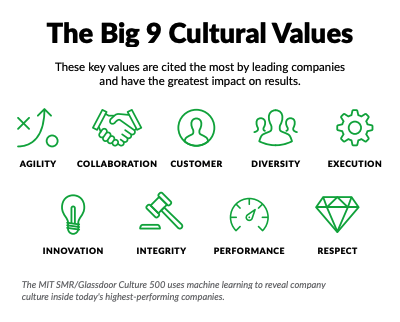
- Most leading companies site diversity as one of the most valuable aspects of company culture. (Glassdoor)
- Average employee performance in diverse organizations is 12% higher than performance at non-diverse organizations. (Gartner)
- In 2019, more than half of employees globally prioritized solid work culture over salary when deciding on a job position. (Glassdoor)
- In 2017, gender diverse executive teams deliver 21% more profitability than teams with no gender diversity. This number rose from 15% in 2014. (McKinsey & Company)
Improvements in Workplace Diversity
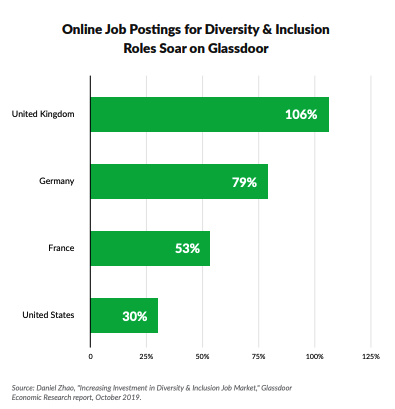
- From 2018 to 2019, the number of U.S. job listings related to diversity and inclusion rose by 30% while the U.K. saw a 106% boost. (Glassdoor)
- In a 2018 global study, 75% of companies said their workplaces were aiming to improve diversity at their companies. (Boston Consulting Group)
- In 2018, the unemployment rate of male and female U.S. veterans dropped to 3.5% and 3% respectively. This decreased from an average of 5.1% for all veterans in 2016. (BLS)
- In 2019, the unemployment rate of foreign-born workers (3.1%) was less than U.S.-born workers (3.8%). (BLS)
Where Workplaces are Lacking
- In 2019, a survey found that three in five U.S. employees have experienced or witnessed workplace discrimination related to age, race, gender or LGBTQ+ identity. This is higher than the global average of 49%. (Glassdoor)
- In 2018, the unemployment rate of people with disabilities rose to 8% while the unemployment rate of those without disabilities is only 3.7% (BLS)
- The most commonly witnessed form of discrimination is ageism, which 45% of people say they’ve witnessed or experienced. (Glassdoor)
- The second and third most common forms of workplace discrimination are racism and gender discrimination. Roughly 42% of employees say they’ve witnessed or experienced each. (Glassdoor)
- When it comes to ageism, 52% of employees between 18 to 34 have seen or experienced it while only 39% of employees aged 55 or older have reported it. (Glassdoor)
- More men (38%) have experienced or witnessed LGBTQ discrimination than women (28%). (Glassdoor)
- Between 2008 and 2018, the number of job reviews that spoke negatively about a company’s diversity rose from 25% to 32%. (Glassdoor)

Embracing Diversity in the Workplace and Beyond
As you can see, embracing diversity can provide numerous benefits to your company. And while diversity and inclusion still have a long way to go in the workplace, your company shouldn’t stop there. Inclusion should span every aspect of your company, from your people operations to your marketing campaigns.
To learn more about how to cultivate an inclusive work environment, check out this helpful blog post. If you want to take things further by embracing diversity in your marketing, here’s a rundown of seven brands that nailed inclusive marketing.
Want to learn more about the benefits of diversity? Click here.

How to Connect With Consumers on LinkedIn: 5 B2C Examples
Does your business sell consumer goods? Looking for alternative ways to reach your B2C customers? In this article, you’ll discover how businesses in five B2C industries are using LinkedIn to connect with individual prospects and consumers. The Case for B2C Outreach on LinkedIn Although LinkedIn has traditionally been known as a B2B network, the platform […]
The post How to Connect With Consumers on LinkedIn: 5 B2C Examples appeared first on Social Media Marketing | Social Media Examiner.
from Social Media Marketing | Social Media Examiner https://ift.tt/3dLEuKw
via socialmediaexaminer
4 Predictions Marketing Experts Got Wrong About Social Media in 2020
As a marketer, reading trending predictions or industry forecasts is the norm.
But sometimes you just want to pull a Regina George and say, “Stop trying to make fetch happen. It’s not going to happen.”
We’ve all been there, especially with social media predictions.
Although we’re always trying to forecast what the future holds so we can run successful campaigns and strategize for the future, things don’t always go as planned.
Sometimes we even get it wrong.
In this post, we’re going to look at the top social media predictions that marketing experts got wrong.
Bad Social Media Predictions
1. Google would have a successful social media platform.
Google has been trying to get into the social media game for years. In fact, the company started Google Wave in 2009, Google Buzz in 2010, and Google+ in 2011.
But one after the other, the projects were discontinued or defunct.
However, not everyone saw the writing on the wall. In fact, industry experts were optimistic about Google+.
Although I was never convinced as a user (call me a late adopter), when new social media platforms come around, especially by industry giants like Google, marketers pay attention.
Even when the Google+ founding father left Google, marketers at Marketing Land thought the social network still had a chance.

In 2014, Mark Traphagen predicted that “Google+ the social network and user data infrastructure of Google is not going away” and “the Google+ project has been an incredible success because it drove the unification of Google products.”
As it turns out, Google+ happened to follow in its predecessor’s footsteps and is officially defunct.
#ScaryStoriesIn5Words People still use Google Plus. 😂✌️ pic.twitter.com/bpdl2BOU1Q
— Larry Kim (@larrykim)
October 28, 2016
“Google Plus? More like Google Minus! Am I right people?”
-Me if I were in the #demdebate— Seth Masket (@smotus)
October 16, 2019
2. Facebook use will decline after continued drama.
Is it me or is there always Facebook drama nowadays?
With the Cambridge Analytica scandal, the trending hashtag #DeleteFacebook, and the election scandal, Facebook’s reputation has continued to decline.
In fact, some marketers thought the social network would see a decline in users due to the drama.

But, if you were one of the people that thought Facebook would see its end, it turns out you were wrong … so far.
According to HubSpot research, 60% of survey respondents said they haven’t left Facebook despite the drama and don’t plan to leave.
Even after the Analytica scandal, Facebook still saw a 1.6% increase in active users.
It appears that Facebook users are too invested to cut the chord completely. Facebook has stored memories and connects people to old friends and family.
Additionally, many other accounts of yours might be linked to your Facebook account. Deleting this social network might just be an unnecessary pain.
3. Virtual reality will grow like crazy.
Virtual and augmented reality have been the buzz topic on social media for years now. It seems like I’m always reading about how it’s going to grow like crazy.
In 2015, Business Insider said virtual reality would grow like crazy in the next five years. They predicted that “26.5 million units would be sold in 2020.”

Additionally, in 2016, Fortune predicted that VR would sell 200 million headsets worldwide by 2020.
Spoiler alert: it hasn’t happened.
According to the latest estimated figures, only 7 million VR headsets were sold in 2019 and 14 million are expected to sell for 2020.
With VR, it appears that slow and steady wins the race. Maybe the industry will get there one day.
4. Anonymous social media will get bigger.
Do you remember the social media platforms Secret, YikYak, and Whisper?
Truthfully, me neither. They’re all anonymous social media sites, two of which are now defunct. Back in my day, the anonymous social media site du jour was Formspring.
But in 2015 Ryan Holmes, CEO at Hootsuite, predicted that “demand for anonymous social media will only get bigger.”
As it turns out, the struggles seemed to continue. There were constant issues of cyberbullying and harassment.
The apps closed down one after another. Secret dissolved in 2015 and YikYak shut down in 2017.
And it looks like Whisper is on the same trajectory. In 2017 the app had to lay off 20% of its employees to save the company. Now, they’re having privacy issues. According to “The Washington Post”, private data was publicly available.
Plus, the app continues to fall in popularity, landing at 122nd in social networking in the iPhone app store.
Although it can be hard to admit, marketers don’t always get it right. And that’s okay. All we can do is use the data available to forecast industry trends so we can plan for the future.

How to Run a Social Media Contest That Gets Tons of Engagement (11 Contest Ideas)
There are so many rules and guidelines and so much planning and preparation involved. A contest could be the best tactic you’ve ever introduced to grow your reach, drive site traffic, and generate leads, but you want to ensure you’re doing it right.
Here’s how you can set yourself up for success with contests on Facebook, Twitter, Pinterest, and Instagram.
How to Run a Contest on Facebook
Facebook is the most widely used social media platform, so running a contest on Facebook makes sense. After all, your prospects most likely hang out here. Here are some best practices:
Follow the Rules
Before you start your Facebook contest, make sure you can actually run it legally. Facebook has cracked down on contests due to liability issues, so read through their strict rules ahead of time. Some of those rules include:
- The onus is on you to communicate the terms of the contest.
- You must acknowledge that Facebook has not sponsored the contest and is not liable in its administration.
- You cannot use personal timelines as an entry mechanism for the contest (e.g. sharing, tagging, etc.).
In general, you can assume you’re responsible for the legal and logistical portions of your contest; Facebook just provides the people.
To learn more about Facebook’s contest rules, visit their Page Guidelines.
Include a Form on a Landing Page to Generate Leads
If your goal is to generate leads from your contest, you might want to include a form directly on your landing page. This will make the process much easier for people trying to register for the contest. Avoid making your entrants dig through mountains of rules or a maze of links to get to where they want to go.
Create Your Own Terms & Conditions / Official Rules Page
Facebook makes it very clear that you must provide the official terms, rules, and eligibility requirements for your contest. You need to “include a complete release of Facebook by each entrant or participant and include acknowledgement that the promotion is in no way sponsored, endorsed, or administered by, or associated with, Facebook.” In addition, it is important to provide disclosure information — that if the participant is filling out a form and giving you personal information, that information is going to you and not to Facebook.
Make Use of Third Party Apps
The most common and effective way of managing Facebook contests is by using third party apps — some good ones are ShortStack, Woobox, and Offerpop. All of these make it easier to track participation and measure engagement.
Give Away Something Awesome
If you’re asking people to fill out a form, tell a story about their first experience with your brand, or explain why they love your product, a lousy keychain will not incentivize many entrants. If you have an amazing prize, people are more likely to put some serious effort into your contest.
Remember Your Goals and Measure Your Results
You can create the most impressive contest in the world, but if it doesn’t align with your goals or if you didn’t measure it correctly, who really cares? If you want to generate leads from your contest, for example, you know you need to collect entrants’ information via a form. If you’re looking to build reach and brand awareness, have entrants engage with the contest in some way. Whatever the objective is, Facebook Insights can let you know how much your reach has grown, or you can invest in closed-loop marketing software to track the number of leads generated and the growth of your reach.
How to Run a Contest on Twitter
Nearly 330 million people are active on Twitter, and 40% of Twitter users purchased something after seeing it on the platform. This makes it a great platform to spread brand awareness through a contest.
Follow the Rules
When you’re running a contest, just like any day on Twitter, make sure you’re following Twitter’s rules. Discourage dishonest behavior such as the creation of multiple accounts or posting the same tweet repeatedly. However, do encourage good behavior such as topic relevance and creativity. Your entrants must also comply with applicable laws and regulations — Twitter makes it clear that this portion is your responsibility. In other words, you write the official rules, and any legal backlash will be your problem, not Twitter’s.
Set Your Goals
If you don’t know what you’re looking to achieve with the contest, how will you know if you’ve achieved it? Plus, your goals will help you figure out how to run the contest. If you’re looking to promote a specific event or offer, for example, have your entrants tweet a link to it; just make sure you’re using tracking tokens to measure your leads and clicks to see exactly how successful the contest was. If you are trying to improve reach, on the other hand, have entrants retweet the original tweet you sent out about the contest. And if you’re looking to build awareness of your brand, require your entrants to follow you in order to be eligible.
Hey Word Nerds! RT to win a $50 Game Card! One winner a week, winner chosen on Fridays, contest ends 7/1 #ZyngaLove50
— Words With Friends (@WordsWFriends)
June 26, 2012
Iron Out the Details, Including Contest Type and Timing
There are several types of contests you could choose from, so make sure you pick one that aligns with your goals. Popular types of contests on Twitter include:
- Sweepstakes-style contests – Great for generating leads if you have them sign up on your site or reach if you require a follow and retweet for entry.
- Caption or creative answer contests – Great for improving engagement.
- Photo contests – Great for spreading awareness for your contest if you require them to post the photo to their own Twitter feed.
You also need to figure out when the contest will take place, how long it will run, and when the announcement of the contest will take place — will it be days before via your blog and other social media networks, or just minutes before the contest? Once you have your goals set, details like these are the easy part.
Direct Users to Mention You or Create a Specific Hashtag for the Contest
It’s impossible to honestly select a winner for a contest if you can’t find and weed through all the submissions. Make sure you set yourself up for success by creating streams specifically dedicated to the contest.
When tweeting the announcement that you’re having a contest, ask users to include either an @mention to you in their tweet or a specific hashtag dedicated to the contest or campaign you’re running at the time. This way you can clearly see all the entrants, making your life much easier when the time comes to select a winner.
Measure Your Results
Track your contest hashtag over time using a third-party app, use a contest-specific bit.ly link, or view any contest-generated traffic using an analytics platform or your marketing software.
How to Run a Contest on Pinterest
Pinterest has more than 322 million monthly active users, and about 70% of them are female. If your target audience is women, and you’re in a creative or visual industry, Pinterest is a great choice for your contest. Here are some tips to knock it out of the park:
Follow Proper Pin Etiquette
Pinterest has relaxed guidelines for running contests:
- Don’t suggest that your contest is endorsed by Pinterest.
- Don’t require users to save a specific image.
- Don’t allow more than one entry per person.
- Follow the Pinterest brand guidelines and terms of service.
In a nutshell, Pinterest encourages users to be respectful and authentic. For a more in-depth understanding of their rules, access their Community Guidelines.
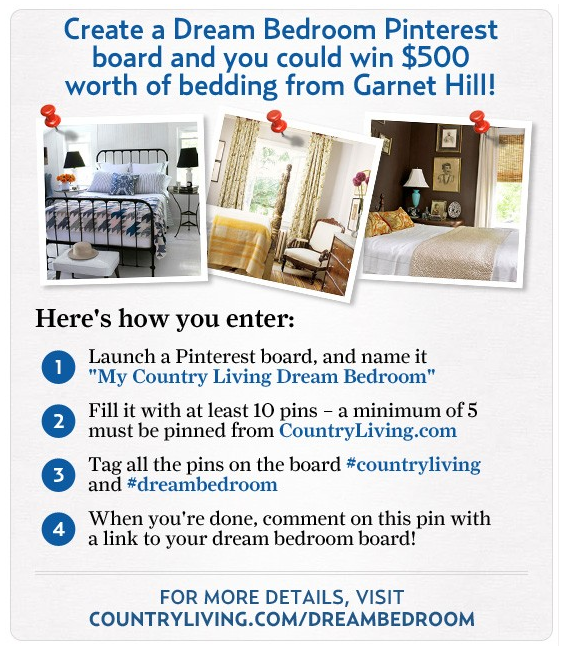
This contest from Garnet Hill falls right in line with what pinners love to do.
Make an Announcement
Leverage your social networks. Don’t just announce that you’re having a contest on Pinterest; tell your followers on Twitter, your fans on Facebook, and your following on Instagram, too. Depending on the length of the contest, you should make social promotion a regular part of your social media schedule to encourage participation.
Clearly Articulate the Rules of the Contest
Whether you’re asking entrants to create a whole new board for your contest, like Garnet Hill, or you want them to simply repin one image, let participants know so they can follow your rules properly. Include a bullet point list of the rules right on a repinnable image. Behind the image, include a link to more details about your contest using a landing page on your website.
Remember Your Goals and Measure Your Results
Tailor your contest to suit your goals and measure your results accordingly. For example, if you are looking to generate leads and you could care less about engagement, you wouldn’t measure reach. If you align your goals and metrics with your contest, you’ll be much more successful in the long-run.
Use a Pre-Defined Hashtag to Find Submissions
Use a hashtag so people can follow the contest entries on Pinterest. This will help spread the word about your contest, and it can also help you find participants. If you’re requiring entrants to create a board for your contest, have them use a pre-defined hashtag on their images so it’s easy to find. Or are they simply repinning the original contest image? That’s easy — just click on the pin to see who repinned it!
Have a Prize Your Audience Will Love
If participants are creating an entire board on their Pinterest account dedicated to your company, you’ll need to give away something really awesome. The more effort your participants need to put in, the better the prize should be. You will get fewer participants with a contest giving away a koozie than a contest giving away an entire bedroom set. Plus, a prize like a beautiful new bedroom set plays right into the interests of Pinterest users — beautiful, visual items.
How to Run a Contest on Instagram
Like Pinterest, Instagram is a visual social media platform. If you have aesthetic products or are creating a striking campaign, it will do well on this platform. Here are some tips to get the most out of your Instagram contest:
Follow Best Practices
Instagram, now owned by Facebook but independently managed, has similar rules for running contests. The big one being that Instagram does not want any language that implies endorsement, and they do not want to be involved in the administration of the contest. You can read more about Instagram’s contest rules here.
Set Your Goals and Clearly Articulate the Rules
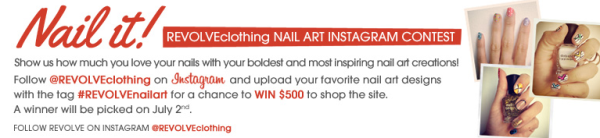
Your goals should be directly correlated with how you run your contest. If you want to drive traffic to your website, make participants go there to enter. If you’re more interested in boosting engagement, have them leave a comment. You are the owner of your contest, so only you get to decide what is required for entry.
Make an Announcement
Photos on Instagram fly through the feed so quickly, you might have trouble being successful with only one contest announcement. Promote the contest on your website and other social networks to get as many participants as possible. You can certainly post about the contest multiple times if you keep it creative and always craft unique updates.
Follow a Theme to Inspire Excitement in Your Followers
Are you currently running a campaign that you want your contest to run alongside of? Follow the same theme. Your Instagram followers are certainly a creative bunch, so even if you’re a B2B company, they will find a way to add excitement to your brand. For example, GE ran a contest on Instagram using the hashtag #geinspiredme. After the contest, they featured the top photos as a board on their Pinterest account.
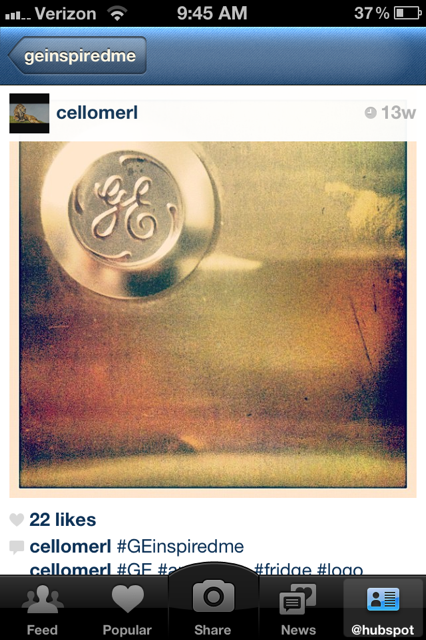
Consider a Hashtag or RSS Feed to Filter Submissions
Using a hashtag, like GE did, is a great way to filter your contest. However, if you get thousands of submissions, it might be tough to weed through them all. So in addition to the hashtag, try filtering with an RSS feed. Webstagram allows you to search a hashtag, and you can view every Instagram photo using this tag with the original caption and comments.
Measure Your Results
Statigram is a great site for management, measurement, and promotion on Instagram. And lucky for you, it even has a “Contest” section with a toolkit for running photo contests. Now that you have all the tools working for you, match your measurement tactics with your goals and rules, and your contest should be a breeze.
Social Media Contest Ideas (With Examples)
Once you have determined what channel(s) to run your contest on, the fun part begins: outlining the details and rules for entry. Below are some contest ideas to help you get your creative juices flowing:
1. Ask them to tag a friend or share to win.

This is one of the most common types of social media contest because it necessitates entrants to spread the word, which in turn attracts other entrants.
209 Magazine used Instagram to promote their contest so they could take advantage of hashtags. Notice that they used local hashtags, which means that they’ll likely get participants in their local area, making for a more targeted approach to the contest. The end result being new local followers who may be interested in additional content from the magazine.
2. Ask them to showcase their creativity.
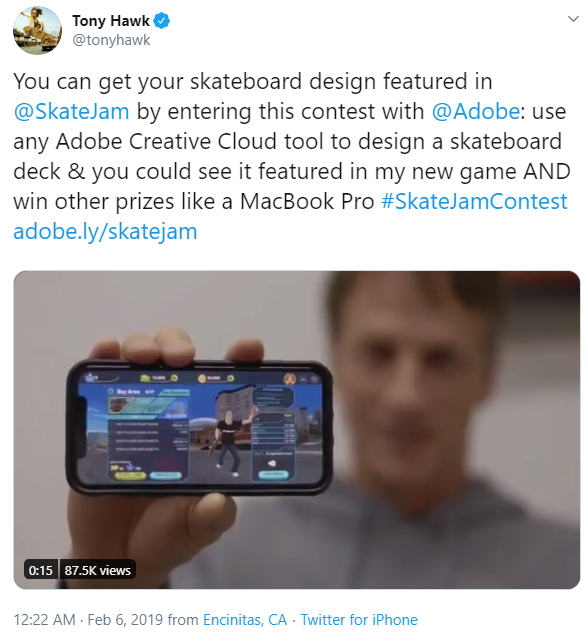
Many people are inherently creative, but unless they work in a creative field, they may not have the opportunity to indulge in artistic endeavors as often as they’d like. This is why coloring, poetry, and art contests are a great choice for social media — participants are incentivized by both the prize and the means to get it.
This Twitter contest by Tony Hawk, SkateJam, and Adobe is an excellent example for a few reasons:
- It’s a partnership between multiple brands who can cross-promote.
- The rules of the contest require using one of the brand’s products to enter.
- Not only are entrants eligible for a cool prize, but they also could see their art featured in the game! How cool is that?
3. Ask them to get on camera.

Photo contests are a great option because many people access social media platforms on mobile devices. That means the camera is likely built into the device they’re using when they first see the contest announcement, making for a frictionless entry. Plus, it can be fun to be a model for a day.
Torrid, a plus-size clothing brand, is on a mission to make their customers feel confident and beautiful when wearing their products. With this in mind, photo contests like this one they held on Facebook are greatly aligned with their overall brand.
4. Ask them to share their opinion.
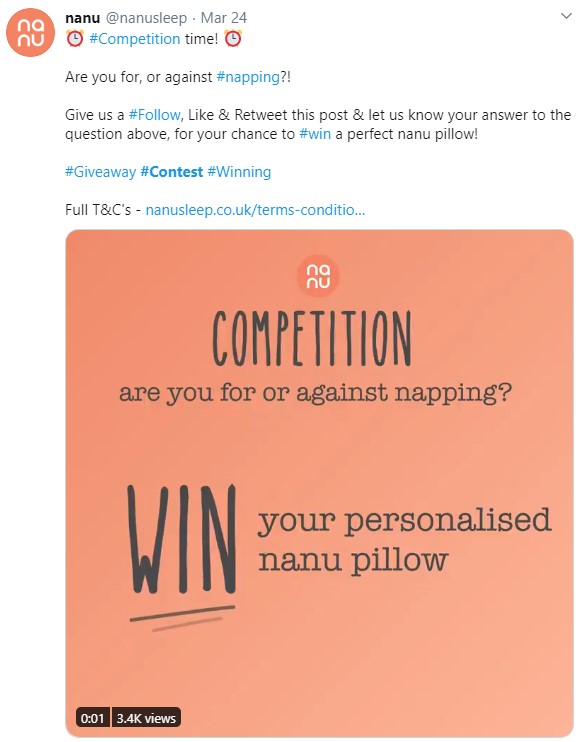
If you’ve ever read the comments section of a trending social media post, you know that people are social and love to share their opinions. Consider prompting participants with a question they must answer in order to enter the contest. By asking them to share their opinion, you’re getting them to think about a topic related to your brand, and you benefit from the engagement and interaction that happens as a result.
Nanu, a company that offers personalized pillows, decided to ask Twitter users about their napping habits for the chance to win free product. This spreads awareness about their product while staying on topic, bringing their offerings top of mind.
5. Ask them to contribute and be featured.
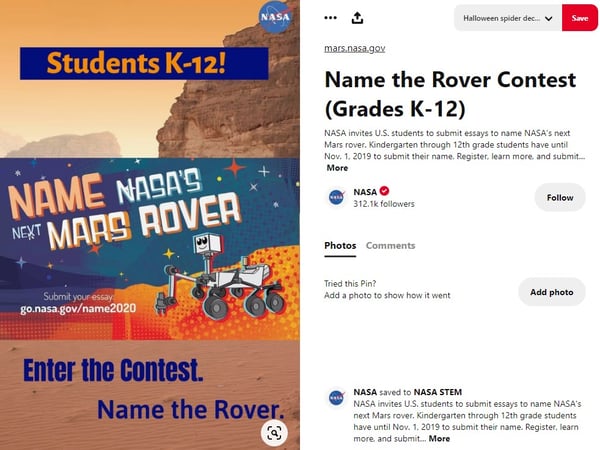
Recognition is a common motivator, so contests where being featured is the prize can have pretty decent success. These types of contests are a great idea because:
- You get free content in the form of contributions.
- The prize is promoting the best contribution.
- You get amazing brand awareness as entrants must think about how they want to contribute.
In some cases, just being featured might be a good enough accolade to motivate people to enter. In others, you may want to consider an additional prize similar to the way the Tony Hawk example does.
This NASA example on Pinterest is particularly neat because it targets K-12 students as entrants, spreading interest for the STEM field. The prize is pretty cool, too: The winner gets to brag that they contributed to a space project.
6. Ask them for laughs.

They say that laughing takes years off our lives, and incorporating it into social media can bring some of that energy into your marketing. One of the best ways to incorporate humor into a social media contest is with caption contests. Post a photo with no context, ask participants to caption the photo to enter the contest, and then crown the funniest submission as the winner.
The BYU Alumni department held one of these contests on Twitter. It works particularly well not only for the humor factor but also in that it serves to remind alumni of crazy college antics. The more that BYU is able to tap into this nostalgia factor, the better their relationships with the alumni get.
7. Ask them to vote.

Contests that have a voting element are great for engagement because it prompts users to interact in order to win, and it’s in the contestants’ best interests to spread the word.
This Facebook contest by Inked Magazine is a great example of this. The winner gets featured on the cover of this prominent publication in addition to some pretty serious monetary winnings. Inked Magazine asks for followers to participate by voting, and the final contestants will also likely be asking their circle of influence to participate. This drives awareness of Inked Magazine’s brand.
8. Ask them what they know.
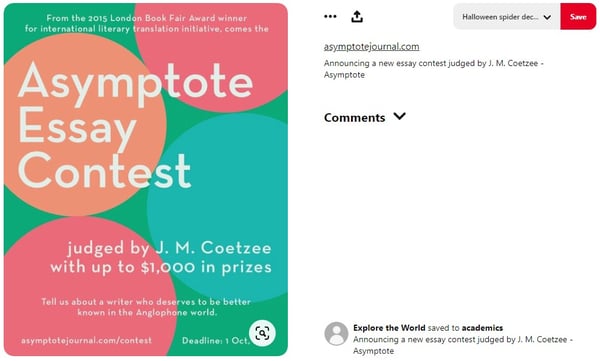
One of the coolest things about social media is how quickly information can be shared. One contest idea is to tap into this by prompting people to demonstrate their knowledge. This can be done by asking them to answer a trivia question, solve a puzzle, or pen an article.
Asymptote Journal taps into this category by promoting their essay contest on Pinterest. Entrants get the chance to win prizes by spreading awareness about an author they want others to know about.
9. Ask them to share a part of their lives with you.

Brands that have the most success on social media are the ones that build a community. That begins with humanizing the brand and also demonstrating compassion for its followers. What better way to do that than not making your social posts about you? Instead, fashion a contest that makes it about the individuals in your community. Ask them questions. Prompt them to talk about things that matter to them. Create discussions.
If there’s something that people love to talk about, it’s their furbabies. For many of us, pets are a big part of our life, and PetSmart taps into this by asking Instagram followers to share that passion. In addition, this type of contest is on topic for their brand, which keeps people aware of PetSmart and what they offer.
10. Ask them to demonstrate your product.

One of the best ways to engage people with your products is by incentivizing them to do it with a contest. By requesting customer product photos, you benefit from free product placement and social proof, demonstrating that real people use and benefit from them.
Converse is a brand that runs a lot of contests, and they do it magnificently. This example is one they ran on Facebook, and there are a few reasons why it works:
- They’ve partnered with another brand to benefit from cross-promotion.
- They are targeting existing customers (those who already have Converse shoes) in an effort to engage and delight them.
- Converses have always been an extremely photogenic shoe with mass appeal, and they are emphasizing this appeal to spread brand awareness.
11. Ask them to participate in a challenge.
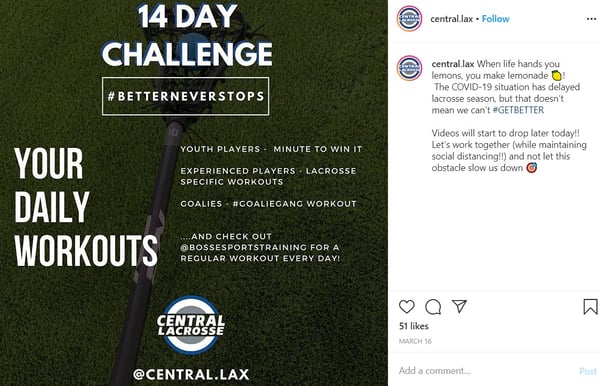
Have you ever been determined to do something because you were dared to? Maybe you became even more adamant about doing it because someone told you that you couldn’t. This sentiment is one reason why challenge contests are so popular. Entrants are motivated both by the dare and the vision of victory.
This Instagram contest by Central Lacrosse is interesting because they run the contest over 14 days. That gets people engaged with the challenge over a longer period of time, which extends the effectiveness of the contest’s goals. The longer it sticks around, the more people are likely to participate.
Now that you’ve been inspired by all of these ideas, here’s our challenge to you: come up with a great contest that reflects your brand, choose a social channel, come up with an amazing prize, and start earning those sweet, sweet engagement numbers.

A Quick Guide to Strategic Initiatives
How to Guide Your Employees to Post More on Social Media
Want your employees to share more about your business on social media? Wondering how best to guide their social media posts? In this article, you’ll discover how to develop guidelines to help employees post more on social media and find examples of types of posts employees can model. #1: Create Clear Social Media Guidelines for […]
The post How to Guide Your Employees to Post More on Social Media appeared first on Social Media Marketing | Social Media Examiner.
from Social Media Marketing | Social Media Examiner https://ift.tt/2WVUQKz
via socialmediaexaminer
The Plain-English Guide to Local PPC
For the last few weeks, my husband and I have been ordering more takeout than ever.
As we were trying to find a restaurant to order from, we came across an online ad for one of our favorite local restaurants that just started offering delivery.
We were so excited and immediately placed an order.
That’s why local pay-per-click (PPC) can be a great option for local businesses.
Even when budgets are tight, a local PPC campaign can improve the efficiency of your local marketing as it allows you to get in front of the right audience.
Below, let’s review the benefits and top strategies for implementing a successful PPC campaign.
Benefits of Local PPC
When you own or run a local business, you know it can be hard to get in front of the right audience. When the budget is tight, it can be even harder.
However, with local PPC campaigns, you can run effective online advertising without breaking the bank.
Below, let’s discuss the top benefits of local PPC.
1. Running relevant ads.
With local PPC, your ads will only show up in front of the right audiences because you’re in control of who you’re targeting. Ideally, you’re only targeting people who can benefit from your business.
Additionally, you won’t be competing with national big names, so your budget will go a lot further. With more local campaigns, you’ll see less competition and more clicks and conversions.
2. Increasing brand awareness.
As a local business, it’s always important to get your name out there so your local community knows you exist.
With a local PPC campaign, you’ll increase brand awareness just by getting your name out there and in front of your audience. Even if those people don’t convert, brand awareness is very important in the success of a local business.
3. Improving conversions.
With people shifting to online shopping, it’s more important than ever to run a local PPC campaign.
When local audiences see your ad during their online shopping search, they’re more likely to convert because they’re actively searching for a solution to their problem.
4. Easily trackable.
Local PPC ads are easier to track than other local marketing tactics like banners or flyers. With these ads, you can see impressions, clicks, and conversions.
5. Low barrier to entry.
If you’re new to online advertising, local PPC is a great place to start. You don’t need to have a ton of SEO knowledge to run a local PPC campaign.
With local PPC, you can easily target people outside of your existing followers and cast a wide net to find new customers. Plus, most of the steps are intuitive when you’re in a PPC platform.
6. Flexible options.
With local PPC, there’s a lot of flexibility. For instance, you don’t have to spend a lot of money to see success. You can choose your budget and set a limit on what you’re willing to spend.
Then, if things go well, you can immediately scale up. On the other hand, you can also pause campaigns whenever you need to.
Additionally, local PPC ads give you flexibility with your targeting options. You can run ads based on geographic location or specific behaviors.
Local PPC Strategy
Now that we know what local PPC is and the benefits of running a local PPC campaign, let’s review the top strategies to get started.
1. Be specific with location.
When you’re deciding what locations to target, be specific. For instance, you can use zipcodes or city names to describe your service area.
However, keep in mind that it’s just as important to exclude areas where potential customers aren’t.
When you’re more specific with location, you’ll use your budget wisely so your ad never shows up to someone who can’t use your service.
2. Use the local language in your keywords.
The language in your PPC ads should be specific to your location. For instance, you can use Google Trends to see if people in your area are more likely to search “tennis shoes” than “sneakers.”
Additionally, you should include the location in your ad. For example, including the city name in your title can remove unqualified traffic from clicking on your ad. This will also save you money, so you don’t have to pay for a click that’ll never convert.
Using hyper-local language will help you succeed in local PPC.
3. Quickly test and optimize.
With local PPC campaigns, you can quickly test and optimize your ads based on immediate results.
A part of your local PPC strategy should be to make changes quickly when you see an ad performing well or underperforming.
Additionally, you can implement A/B testing to help you decide what ad will be more successful in your area.
4. Analyze the results of your current SEO.
If you track the health of your SEO, you should take note of your best-performing keywords and target those in your local PPC campaign.
For instance, if you see that a keyword performs well in organic rankings, you should use that keyword in your paid campaigns as well.
Typically, you can find these keywords in tools like Google Search Console, SEMrush or Ahrefs.
5. Enable ad extensions.
With ad extensions, you can include more details in your local PPC campaign. The more details you add, the better your ads will perform and the more you’ll get out of your budget.
You can add extensions such as location or call extensions. With these extensions, you can add more business information including your address and phone number. Additionally, call extensions can add a clickable button so customers can call you directly.
Before you enable ad extensions, make sure your Google My Business account information is up to date. Local PPC platforms pull data from GMB.
6. Use multiple PPC platforms.
You can run a local PPC ad on social media platforms or search engines. To reach more people with your online advertising, try using several platforms.
Additionally, you might be able to use your marketing automation software to facilitate the process. For example, with HubSpot Marketing Hub, you can use the Ads Management tool to track and manage your PPC ads.
7. Don’t neglect your landing page.
The website or landing page your PPC ad directs visitors to is very important. For instance, your site should include contact information that is easy to find so there’s no friction in the conversion process.
Additionally, your copy and images should highlight community love, either with local awards, local images, or local keywords.
Implementing a local PPC strategy doesn’t have to break the bank. Even more, it can be a cost-effective way to reach local audiences and increase brand awareness.

Does Your Blog Need Its Own Social Media Channels?
If you were to take a quick scroll down my Instagram feed, you’d see the three types of accounts I follow: reality TV stars, musicians, and food bloggers.
Yes, you read that right: food bloggers. And, while it might sound a little out of the ordinary that blogs are popping up on social media channels, like Instagram, it’s not an out of the ordinary practice.
Blog owners can see great success on social media. They can engage with followers, use hashtags to find new ones and expand reach, and promote their posts. For instance, one of the bloggers I follow, Sweet Simple Vegan, has over 200,000 followers and posts new content daily.
But, how do blog owners, like Sweet Simple Vegan’s Jasmine Briones, know whether social media is the right choice for their blogs? And … does every blog need social media?
Every business is unique, and so are each business’ goals. If you’re trying to make that decision, read on to figure out whether or not your blog really needs social media.
How to Know if Your Company Blog Needs Social Media
You may be on the fence about whether or not your blog needs social media channels.
According to one of HubSpot’s social media marketing managers, Kelly Hendrickson, “If you’re asking yourself if your business’ blog should have its own social channels, the first question you should ask is, ‘What is the goal of having a social account for your blog’?”
When you identify your goal, you can begin inferring whether or not a social media account will be useful towards the success of your blog. For instance, if your goal is increasing awareness, Hendrickson says, “A social account could be a possible solution. Helpful content in people’s feeds, that they don’t need to click out to see, can bring awareness to your blog and let the blog be seen as a valuable resource.”
Next, let’s go over some more signs that might signify that your blog needs a social media channel.
If your blog is your brand.
If your blog is company-specific, you may not need a heavy social media focus for it to be successful. On the other hand, if your blog is your business or your brand, then you most likely need social media channels.
For instance, Who What Wear is a fashion blog that started in 2006. The corresponding social media channels, like the Twitter account, highlight new content from the site.
Our March cover star, @alexa_chung, talks her @netflix series, @nextinfashion, what the future of the fashion industry looks like, and being everyone’s forever style icon in #TheSpringIssue. https://t.co/RMoRW4eIMw pic.twitter.com/FUPN14qEAE
— Who What Wear (@WhoWhatWear)
March 3, 2020
Who What Wear uses social media to update fans on new content, share fashion-related posts, and engage with their audience.
Social media helps you connect with a large audience, so bringing your blog to socials is a great way to find new audiences. You don’t need to sign up for every social media channel under the sun, but having an account or two builds your online presence.
If your traffic is low
Low traffic can be due to many different factors, like poor optimization. However, other than brushing up on SEO, another way to boost traffic is by having social media channels. When you post and use popular hashtags, you are exposing your content to an audience who might find it valuable.
“Clicks are getting harder and harder for marketers, so delighting an audience member in their feed builds real affinity for your business or blog,” Hendrickson says.
When audiences don’t have to click away from their favorite social media channel to engage with your content, they’ll feel more inclined to read in your post. For example, if you were to boost your latest post on Facebook, it’s likely that your followers will engage with the post because it’s already a part of their news feed.
To raise the credibility of your business
If you are providing valuable content to potential customers to increase your credibility by blogging, you can also bring that strategy to a social media account.
For instance, if you have a statistics-based post, a study, or an interview, you can use standout facts or statements from those blogs for content ideas on your social channel. That way, you are giving readers the same valuable information, just on a different platform.
Raising credibility can also serve as the goal for your content marketing strategy. You can plan posts for your blog’s social media account with the intent of giving your audience a sneak peek into the types of posts you have on your website.
In a nutshell, if your blog is your business, or if you want to build awareness and validity to audience members who might have never engaged with your brand before, having a blog-specific social channel is a great idea.
Reasons Why Your Blog Doesn’t Need Social Media
You might want to focus your marketing efforts on other areas of the business, which could make it superfluous to create a social media account specifically for your blog. Company size, timing, marketing team goals, and audiences are all factors that might impact your decision on whether or not to start a blog social channel.
Let’s go over some reasons your blog doesn’t need social media in order to be successful.
If it’s company-specific
Having a social media account for your blog means you will likely have multiple social media accounts, for one company, competing for visibility.
“The trouble with a business’ blog having its own social channels is that it can fracture a business’s social audience. It’s two accounts for an audience member to follow, not one. It’s also two accounts for the business to manage,” notes Hendrickson.
If your blog is a big part of your brand, you can still promote it on social media to raise awareness. Instead of having an entire account dedicated to your blog content, you can make blog posts a part of your content strategy and scale it to fit the needs of your business. Take this post, for example:
This post on HubSpot’s Facebook account highlights a blog post, but it fits in as part of the business’s page. This diversifies the content of the account, and gives the blog its own time in the spotlight.
It might take up too much time
You might work for a small company where it’s all hands on deck. If that’s the case, you’re probably used to structuring your marketing strategy around the essentials. Running multiple accounts, plus an extra social media account for your blog, means you have to plan for an expansive content strategy.
Think about all that goes into managing an account: from visuals, content, to audience engagement. Then, ask yourself if you have the extra time to maintain and keep an active social media account for your blog. If that doesn’t sound like it can fit into your schedule, maybe a social channel can wait for now.
Also, if you are already engaging with audiences regarding blog content in other ways, such as in email newsletters, you can think about how you can make your existing strategy more blog-specific, instead.
Your audience isn’t interested
How does your blog content perform on social media? If you’ve never posted a blog on your social media accounts, test a couple posts and see how they perform before you create an entire account.
Perhaps you find that your audience on social media is more interested in other types of content and don’t engage with blog posts. If that’s the case, you might want to re-think making a social media account that is dedicated to delighting that audience with blog content.
Alternatively, if you want to build upon the audience you have while promoting blog content, think about how you can make blog posts your audience connects with. Remember, some parts of content marketing involve experimentation, and that’s okay.
So, there are some downsides to having a social account just for your blog. Remember, your blog doesn’t need a social media account to be successful.
You might still be on the fence about whether or not your blog could potentially benefit from having a social media account. If that’s accurate, let’s get into the good and bad of having a blog-specific social strategy.
Pros and Cons of a Blog Specific Strategy
If you’ve been a social media manager for a company before, you know that having a content plan is essential to the success of your accounts. When you’re thinking about creating a social media account for your blog, you also must think about how to plan for it.
First, let’s go over some positives of having a social strategy that’s blog-specific.
For starters, you can focus on content that delights your blog readers. Your company’s social media account is most likely centered around catering to your entire target audience. A blog-specific social strategy, on the other hand, can target your readers directly.
You can also save time with a strategy focused on blog content. You won’t have to think about where your content is coming from, because you’ve created it before. This makes it easier for you to take those posts and turn them into dazzling, engaging posts that excite your audience.
A blog-specific strategy will also give you insight into how your audience responds to blog content on social media. If you use analytics software to track your data, you can begin to infer how your blog fits into the web behavior of your audience, and use that to improve your content.
So, a blog-specific strategy refines future content and optimizes existing content, which will excite your readers on social. But — what about the downsides?
“The challenge in creating a social strategy specific to just a business blog is that your content is largely limited to the confines of the blogs you create or your blog content strategy,” Hendrickson says. “When you have a business social account, you are able to address the many needs of a customer to provide them value from your social content. This can have a wider range potentially than your blog.”
While you can create content that will delight a specific section of your audience, you are also limiting the chance for your content to be diverse with a blog-specific strategy. You can make other content that supports your company’s social media account, but if the main purpose of the account is to support your blog, that has to be the majority of the content.
“This can trickle into how you target and promote social content to certain sections of your audience as well,” Hendrickson adds.
“Are you in fact limiting the audience that your business could speak to limiting your channel to the blog?”
When your content source is reduced, your strategies for showcasing and promoting that content are also diminished. Some of the methods you’re using to bring your social media content to audiences might not be as successful.
You also might be restricting the audience that will find your brand if you limit the type of content you produce on social media. If your company is young, closing the potential reach of readers could hurt your overall website traffic.
While some blogs on social media show massive follower counts, others have probably not seen the same success. Remember to think about why you want to start a social media channel. If you can accomplish those goals with the pages you already have, you might save time.
Alternatively, you may have found that the only way to make your blog shine is by starting a social media channel. If that’s true, great! I can’t wait to follow your business’s blog’s social media account next.

9 Ways to Deal With Imposter Syndrome Before It Hinders Your Success
“I got lucky.”
“I don’t belong here.”
“I’m a fraud, and it’s just a matter of time before everyone finds out.”
Sound familiar?
Most of us have experienced feelings of doubt and unworthiness at some point in our lives. But when your accomplishments are a result of your own knowledge, hard work, and preparation and you still feel inadequate … you’re probably suffering from impostor syndrome.
People who suffer from this syndrome often feel like frauds — despite being smart, skilled, capable professionals who actually deserve whatever commendations and praise they’re given. Rather than celebrating their accomplishments, they worry that they’ve somehow tricked people into thinking they’re good enough. As a result, they live in fear of being “found out” or “exposed.”
Impostor syndrome is actually fairly common: Researchers believe that up to 70% of people have suffered from it at one point or another. But that doesn’t make it any less damaging to a person’s confidence and career growth.
So if you feel like you’re suffering from impostor syndrome or something like it, know that there are ways to curb these feelings in a healthy, proactive way. Here are 11 tips to help you get started.
9 Tips for Coping With Impostor Syndrome
1. Know the signs.
We often overlook the signs of impostor syndrome that come up in our day-to-day lives. However, recognizing these signs is the first step toward overcoming them.
You might suffer from impostor syndrome if:
- You feel like you “got lucky” when you actually prepared well and worked hard.
- You find it hard to accept praise.
- You apologize for yourself when you didn’t actually do something wrong.
- You hold yourself to incredibly — sometimes impossibly — high standards.
- You find the fear of failure paralyzing.
- You avoid expressing confidence because you think people will see it as overcompensating or obnoxious.
- You’re convinced you’re not enough.
Pay attention to your language choices, both when you’re talking to other people and when you’re talking to yourself — especially when it comes to talking about work. If you find your own success or the praise others give you uncomfortable, do some reflective thinking on where those types of thoughts came from and what it means in your professional life.
2. Know you’re not alone.
When you have impostor syndrome, some of the most important encouragement comes from realizing how many hugely successful people, both male and female, have built amazing careers even while regularly coping with it.
Which highly accomplished people have spoken about their impostor syndrome? Here are some quotes from The New York Times and Forbes:
“I have written eleven books, but each time I think, ‘uh oh, they’re going to find out now. I’ve run a game on everybody, and they’re going to find me out.'” – Author, Poet & Civil Rights Activist Maya Angelou:
All I can see is everything I’m doing wrong that is a sham and a fraud.”
“All I can see is everything I’m doing wrong that is a sham and a fraud.” Actor Don Cheadle
“The beauty of the impostor syndrome is you vacillate between extreme egomania and a complete feeling of: ‘I’m a fraud! Oh God, they’re on to me! I’m a fraud!’ So you just try to ride the egomania when it comes and enjoy it, and then slide through the idea of fraud.” – Actress, Writer & Producer Tina Fey, from her book Bossypants
3. Distinguish humility and fear.
There’s taking humility in your hard work and accomplishments, and then there’s feeling overcome with fear because of them. Sometimes, simply being good at something can cause is to discount its value. But as Carl Richards wrote in a New York Times article, “After spending a lot of time fine-tuning our ability, isn’t it sort of the point for our skill to look and feel natural?”
It all boils down to feeling unworthy. I like how Seth Godin put it in a blog post: “When you feel unworthy, any kind response, positive feedback or reward feels like a trick, a scam, the luck of the draw.”
But it is possible to feel worthy without feeling entitled, and overcoming impostor syndrome is all about finding a healthy balance between the two. Godin goes on to write, “Humility and worthiness have nothing at all to do with defending our territory. We don’t have to feel like a fraud to also be gracious, open or humble.”
4. Let go of your inner perfectionist.
I recently wrote about how perfectionism, while helpful in certain contexts, can be a major roadblock for productivity. Turns out it can be a major roadblock for overcoming impostor syndrome, too.
Many people who suffer from impostor syndrome are high achievers; people who set extremely high standards for themselves and are committed to doing their best and being the best.
But perfectionism only feeds into your impostor syndrome. When you feel like a fraud, it’s usually because you’re comparing yourself to some *perfect* outcome that’s either impossible or unrealistic.
Not only can no one do everything perfectly, but holding yourself to that standard can actually be super counterproductive. At some point, you need to take a step back and ask yourself: When is good enough good enough?
Read this blog post to see what a formula for “good enough” might look like. And if you need further encouragement, read this article from The Guardian.
Bottom line? While striving for perfection is certainly noble, it’s usually not realistic — and often, it’s counterproductive and will only make you feel more like a fraud.
5. Be kind to yourself.
“Take the pressure off yourself and stop trying to be the expert on day one.” advises HubSpot marketing manager Jennifer Stafancik.
Impostor syndrome often manifests itself as a voice in our heads, berating us with negative messages like “you’re not smart enough” or “you’re a fraud.”
Negative self-talk is a bad habit, and it can heavily influence our stress and anxiety levels.
“Being kind to yourself” simply means changing the way you talk to yourself in your head by practicing positive self-talk. Not only can it help you become less stress and anxious, but it can also help you build the courage to do things that’ll bring you greater rewards.
Maria Klawe, the president of Harvey Mudd College, suffered from what she called “impostoritis” for most of her career. While she found it hard to silence the negative thoughts completely, she practiced hard to add positive thoughts to her inner voice. “Now I wake up most days with a voice on the left side of my head telling me what an incredible failure I am,” she wrote. “But the voice on the right side tells me that I can change the world — and I try to pay more attention to it.”
First, try to catch yourself whenever you have a negative thought. Then, turn around and challenge your own claim. For example, if you find yourself thinking, “I just got lucky,” challenge that by thinking, “What steps did I take and what work did I put in to get to this point?”
Then, you can answer your own question using affirmations, which are short, focused, positive statements about a goal you have. In this case, one might be as simple as, “I worked hard – and I always work hard.”
“For me, I put a lot of pressure on myself when joining HubSpot since it was a lateral move, which ended up sparking imposter syndrome — something I honestly thought I was immune to.” Stefancik explains. “Once I realized there was no reason to rush and to give myself more realistic milestones the imposter syndrome symptoms started to melt away.
Psychologists have found that repeating affirmations like this can improve stress and anxiety levels, perhaps because these positive statements build a bridge into your subconscious mind.
6. Track and measure your successes.
When you feel like an impostor, one of the hardest things to grasp is how much of a role you have in your own successes. You might default them to luck or others’ hard work, when in fact, your own work, knowledge, and preparation had a lot to do with it.
To help show yourself that you’re actually doing well, keep track of your wins in a private document.
There are a lot of different ways to track these successes, and the metrics you use will depend entirely on your job. If you’re a blogger, you might keep track of your posts’ monthly average page views and watch them go up, or compare them to the team average. You might also keep a separate tab to paste kind words people have written to you via email, Twitter, blog comments, and so on.
In the same vein as keeping track of your success metrics, keep a file on your computer of wins and positive reinforcement both at work and in your personal life. One of the best things I’ve done is created a folder on my personal Gmail account called “Happy,” where I’ve stored everything from my college acceptance email to praise from my colleagues and bosses. Whenever I need a lift, I open that Gmail folder and scroll through them.
You can create an email folder for these emails like I did, or create something like a “swipe file” (i.e. a digital file) on your computer or phone to store screenshots of emails, tweets, dashboard metrics … whatever makes you feel good about your hard work and preparation.
7. Talk about it with a mentor and your manager.
No one should suffer in silence. Sharing your thoughts and experiences with someone else will make you better equipped to deal with your impostor syndrome. We recommend sharing them with both a mentor and your direct manager.
Your mentor will be able to help you talk candidly about your struggles with impostor syndrome, while giving you a more objective point of view — especially if they work on a different team or at a different company. When you share your experience with them, you might ask if they’ve ever felt that way, or if they know someone who has.
The best mentors are forthcoming about the struggles they’ve gone through and the mistakes they’ve made in their careers, and you may find that they have some helpful stories or advice for how to deal with what you’re feeling.
We’d also suggest that you talk with your direct manager about your experiences, too. Why? Because they’re more likely to have the knowledge and tools to help you overcome your impostor syndrome in the context of your current job.
For example, you might ask them to help you find a system for tracking your successes, or figure out which metrics you should measure. Knowing what they know about both you and your role, they may also help you seek out more opportunities to shine and gain visibility on your team or at your company in general.
Finding a mentor or manager to talk to is a strategy that Krystal Wu, HubSpot’s Social Media Community Manager highly recommends.
“I’ve learned the best way to deal with imposter syndrome was to find a mentor to help guide me through my career choices,” Wu says.
As an example, Wu reflects, “I was new to my social community role and to marketing and I wanted to do my best work but I didn’t know what that meant all the time.”
“When I put myself out there to find people in roles similar to mine, attended events to learn more about my industry and learned from my mentor it helped me gain confidence in my career,” Wu explains. “The more confidence and education I had the more the imposter syndrome started to fade.”
“I won’t say it’s completely gone — because let’s be real, I’m always learning,” Wu admits. “But it’s not something hanging over my head all the time. It comes and goes and I know that surrounding myself with people that are more knowledgeable in my field has helped me grown.”
Speaking of opportunities …
8. Say “yes” to new opportunities.
It’s impossible to say “yes” to everything, especially when you’re feeling stressed or spread thin. But it’s all too common for people who have impostor syndrome to turn down career-making opportunities because they don’t feel like they’d do a good job.
When you’re presented with a new opportunity, it’s important to distinguish between the voice in your head saying you can’t do it because you’re not worthy and the one saying you can’t do it because you have too much on your plate. The former is your impostor syndrome speaking.
But remember: Taking on challenging new work and doing well at it can open a lot of doors for you. Don’t let your inner impostor turn down these game-changing opportunities. They can do wonders to help you learn, grow, and advance your career.
Keep Richard Branson’s famous quote in mind: “If someone offers you an amazing opportunity and you are not sure you can do it, say yes. Then learn how to do it later.”
While it might be intimidating to take on a role you’re not sure you can succeed in, know that you were asked to do it for a reason, and there’s nothing wrong with learning new things and asking questions along the way.
9. Embrace the feeling, and use it.
It’s really hard to get rid of impostor syndrome completely — especially if you’ve had it for years and years. The fact that hugely successful people like Maya Angelou and Don Cheadle feel that way after all they’ve accomplished is evidence that it can sometimes be a lifelong condition.
That’s why the best angle from which to tackle your impostor syndrome isn’t getting rid of it completely; it’s stopping it from hindering your success.
Taking on Imposter Syndrome
I like the way Richards put it: “We know what the feeling is called. We know others suffer from it. We know a little bit about why we feel this way. And we now know how to handle it: Invite it in and remind ourselves why it’s here and what it means.”
Richards says he’s been invited to speak about his work and career all over the world, and yet he still hasn’t been able to get rid of his impostor syndrome. What he has learned to do is think of it “as a friend.”
Whenever he hears that negative voice in his head, he pauses for a minute, takes a deep breath, and says to himself, “Welcome back, old friend. I’m glad you’re here. Now, let’s get to work.”
Editor’s Note: This blog post was originally published in January 2016, but was updated in March 2020 for comprehensiveness and freshness.

7 Steps for Effective Problem Management in IT
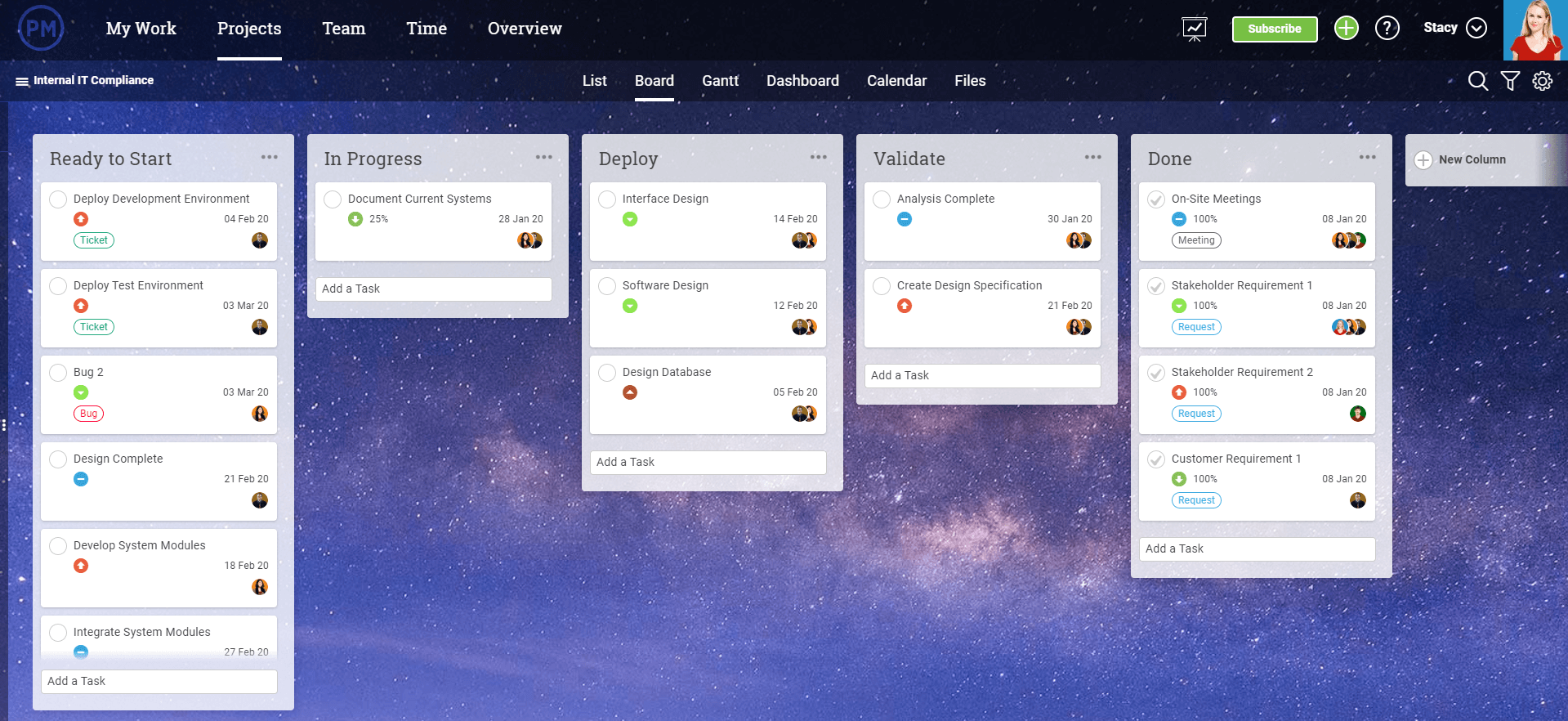
How 5 Brands Use WhatsApp For Marketing
In 2019, WhatsApp reached 2 billion global users and solidified itself as the most popular mobile messaging app worldwide.
When the app launched in 2009, it was just a basic SMS platform that allowed you to log on, text message friends, send photos or videos, and make voice calls globally using Wi-Fi. The app became popular as an alternative to paying costly phone bills to communicate with loved ones around the world.
As one of WhatsApp’s earlier adopters, I discovered the app when studying abroad in Ireland.
After blowing up my U.S. cell phone bill with roaming fees and spending countless euros just to text my roommate on pay-as-you-go Irish phone, my classmates told me to download WhatsApp. Almost instantly, I was able to call my parents and connect with friends in the U.S. and Ireland. I never needed to use my junky temporary phone again.
After using WhatsApp for a few months, it was pretty apparent that this simple Wi-Fi fueled tool was going to be a big innovation in the telecommunication industry.
A few years after my trip abroad, WhatsApp became even more well known when it was acquired by Facebook in 2014. Since then, WhatsApp’s evolved from an SMS tool to a full platform of features. It’s also gained major attention from brands.
Most recently, in 2018, the app innovated even further by adding a group chat option and group video calls. With these features, companies like British Vogue could build group chats filled with prospects and send content or offers to them. Meanwhile, other brands have leveraged WhatsAp as a channel where customers or prospects can contact them with questions about a product.
Aside from WhatsApp’s large user base and brand-friendly features, the app’s also become intriguing to companies because of how it’s pulled in users from all around the world. While the app was created in the United States and is popular throughout North America, the two countries with the most users are actually India and Brazil.
Because of its global audience, brands that are looking to market internationally are able to leverage WhatsApp, as well as global social networks, and paid advertising campaigns.
But, despite WhatsApp’s global opportunities, the platform still presents a few challenges for brands.Early Challenges of WhatsApp
Prior to 2019, WhatsApp’s format was designed to keep people’s contact information private so that random accounts can’t easily find and message them. It was not initially designed for business usage. Because of this, neither you or your brand could create public accounts that users can easily search for.
Because WhatsApp required you to know someone’s contact information, brands similarly couldn’t use the network to find, add, and contact prospects that might have been interested in their product. Alternatively, the companies would need to get WhatsApp information directly from the prospect or a contact list they already had or add them.
Another issue with WhatsApp was that you couldn’t publish content publically. While Facebook or other platforms allowed you to post content to audiences on feeds or a profile, you had to create a group of WhatsApp contacts and post links there.
But, things are changing for brands on WhatsApp.
WhatsApp’s Growing Business Opportunities
Recently, WhatsApp and Facebook announced the launch of WhatsApp for Business, an app that allows companies to create an account with company information, allow contacts to text or call them, and monitor app-related insights.
WhatsApp for Business, which has gained over 5 million users since its 2019 launch, also enables companies to build and share product catalogs, which highlight current offerings and can link to ecommerce sites. Once a business creates a catalog, its marketing team can share its link on the brand’s profile or in chats with prospects. Here’s a quick demo of how the catalog tool works:
Additionally, even though connecting with broad international targets was challenging at first on WhatsApp, some companies say the smaller groups they’ve interacted with on were more engaged than larger social audiences. This could be because a person who gives a company their contact information or is willing to add a company’s contact to might be incredibly interested in learning about that brand from the start.
Aside from WhatsApp’s engagement and branding opportunities, Facebook’s ownership of the platform also benefits advertisers. Recent findings reveal that branded ad targeting has resulted in more ROI due to data sharing between WhatsApp and Facebook.
Although Facebook plans to integrate WhatsApp and Instagram into its own flagship platform, CEO Mark Zuckerberg says WhatsApp will remain a standalone app that benefits from Facebook’s app ecosystem.
Because WhatsApp is a growing app that probably won’t get discontinued any time soon, businesses of all sizes are continuing to experiment with it. Top Industries on WhatsApp\
Most recently, two specific industries that are flocking to WhatsApp are publishing and fashion. Meanwhile, food and beverage companies like Absolut Vodka also leverage the platform for marketing.
If you’re similarly aiming to target global audiences, a WhatsApp strategy could be worth considering now or in the future. But, if you’re new to the platform, you might need some inspiration to learn more about what makes a mobile messaging app’s strategy successful.
To help you plan your first experiment, here are a few of the best WhatsApp tactics that marketers can learn from.
How 5 Brands Are Using WhatsApp
Adidas: “100% Unfair Pred”
Adidas has been using WhatsApp since 2015 to answer questions about their products and promote new items to prospects. But recently, they launched a campaign that combined live chats and influencer marketing.
In 2019, after realizing that athletic teams used WhatsApp to send team-wide communications or announcements, Adidas offered to help recreational sports players “rent” a professional athlete — or “predator” — for one of their upcoming games.
In a WhatsApp Group temporarily opened by Adidas, the company shared that they wanted to help one uncoordinated recreational sports team win a single game by “renting” them a professional athlete. From there, recreational athletes and coaches were asked to send WhatsApp messages noting the sport they play, when their next game was, and why they needed to borrow a professional athlete to win.
Days later, Adidas sent a direct message to the winning recreational athlete. The “pred” then showed up to the recreational game dressed in Adidas sportswear.
“We know our audience use it to share fixture info, team selection — and team-mates messaging to find last-minute replacements,” Adidas’ Managing Editor Laura Coveney told Digiday.
“WhatsApp was perfect for the more functional elements of the ‘Rent-a-Pred’ hotline as it allowed consumers to share private information one-to-one with us for review, before being allocated a Predator player near them,” Coveney explained.
The Financial Times Shares Free Content
Think an age-old publication known for long-form content can’t succeed on an instant-messaging app? Think again.
In late 2019, the Financial Times, a subscriber-only publication, posted two free daily articles in its WhatsApp Group. According to Digiday, the tactic of sharing content has given them more conversions than other social platforms, more brand awareness, and insight into what topics are important to their potential subscribers.
Interestingly, the publication discovered that although its audience was much smaller, it was more engaged with the content and more likely to subscribe than audiences on other online platforms.
For example, people who clicked a Financial Times link on WhatsApp were 40% more likely to return to the site within three days than those who clicked their links on other channels. The publication also found that traffic gained from WhatsApp was similar to what it received from its average Twitter post.
“People liked the convenience of having [news] come through to their phone, pushed to them where they are, without having to go to our site, on a service they are already signed up to,” said the Times’ Audience Engagement Editor, Alana Coates, in an interview.
Absolut Vodka Launch Party Campaign
One of WhatsApp’s earliest success stories came from the Swedish liquor company Absolut Vodka. When marketing the launch of its Absolut Unique vodka product in 2013, Absolut struggled with driving global audiences and was tightly competing with other liquor companies that had many more years of history supporting them.
Unlike many other alcoholic beverage companies, Absolut didn’t have a story of long-running success behind its brand just yet. While some liquor companies could easily market how they’d been using the same recipes for hundreds of years, Absolut was only established in 1979.
Nostalgic content, such as this ad from Jim Beam, allows older brands to tell a story about their successful history, while emotionally connecting with their audiences. This was something that a young company, like Absolut, couldn’t play up as a marketing tactic.
Instead of inventing a story that spoke to audiences of all ages, Absolut decided to leverage WhatsApp’s messaging system to earn credibility and awareness from younger audiences globally.
To mark the Argentinian launch of Absolut Unique, the beverage company promoted a contest where you could win two tickets to a celebration of the new product in Argentina. To enter the tickets, you had to go on WhatsApp and message the account of a doorman named Sven to convince him why you deserved to attend the party.
According to a case study, 600 Argentinian users contacted Sven over the course of three days. The campaign was also widely discussed locally which helped Absolut gain brand awareness even from people who didn’t contact the account.
Although Absolut is now a giant, well-known company, this is a great example of how the brand recognized and leveraged WhatsApp as a platform that could be used to boost local brand awareness and sales in another part of the world.
Hellmann’s: “WhatsCook”
Back in 2014, Hellmann’s, a U.S.-based Mayonnaise company, wanted to reach audiences in Brazil, Argentina, Chile, Uruguay, and Paraguay. To do this, they hired a team of professional chefs to help them with a WhatsApp campaign.
According to Cubo, an agency that assisted with this campaign, 13,000 people signed up for the service and the average participant interacted with a chef for 65 minutes.
With the “WhatsCook” campaign, Hellmann’s leveraged industry experts as a way to get in contact with fans. The company already knew that people who bought its mayo wanted to use it. But, they also knew that people might not know many mayonnaise-friendly recipes. With this strategy, the brand engaged with people who love to cook and solved for the customer by showing them how to use Hellmann’s main product in different ways.
Yoox Personal Shoppers
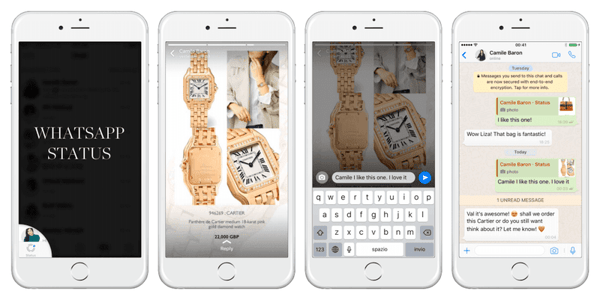
During Yoox’s WhatsApp experiment, they made $80,000 off of sales through the app.
This is a great example of how a company leveraged WhatsApp to reach interested prospects, ease them through the buyer’s journey with a highly interactive messaging experience, and successfully make sales without having customers enter a store.
Navigating Mobile Messaging
As seen above, WhatsApp can help brands to nurture interesting prospects into leads. At the moment, you can’t send a message to the entire social platform, but you can send links and engage with contacts that have already shown interest in your brand.
While all of the examples are fairly different, they all emphasize how interactive and highly personalized mobile messaging techniques can be beneficial to marketing.
If you’re planning to test out a WhatsApp experience, keep these tactics in mind:
Interested in learning more about messaging app strategies? Check out this blog post that compares WhatsApp, Snapchat, and Kik.

How to Choose the Right Facebook Attribution Model
Are you struggling to track the impact of your Facebook ads? Wondering which Facebook attribution model to use? In this article, you’ll discover seven different Facebook ad attribution models to assess your campaigns’ performance. About Facebook Attribution Models The Facebook attribution tool gives you insights into your customers’ purchasing journey and the roles of different […]
The post How to Choose the Right Facebook Attribution Model appeared first on Social Media Marketing | Social Media Examiner.
from Social Media Marketing | Social Media Examiner https://ift.tt/3auSOFc
via socialmediaexaminer
What Is Twitch? How Do Brands Use It?
I am an avid player of The Sims video games.
For over a decade, I’ve been a dedicated fan, buying each new release and playing them over and over again. Eventually, my interest in the simulation game led me to find a community of others who feel the same way.
So, I started watching YouTube videos of people playing the Sims. Most of the YouTubers promoted their Twitch accounts, where they would broadcast live play-throughs. I didn’t pay attention to Twitch at first, but eventually, curiosity got the best of me and I decided to check it out one day.
Warning: Twitch can get highly addicting.
The first time I tried Twitch, I was on the platform for three hours, exploring the content of my favorite YouTubers and chatting with others, like in the screenshot below:
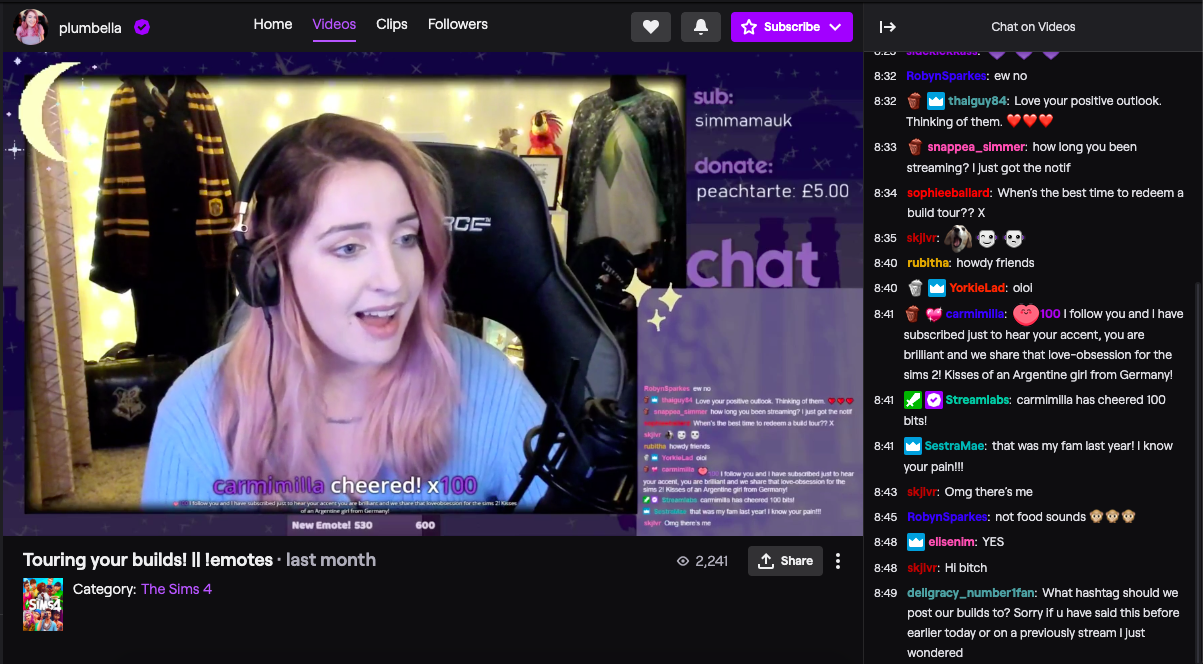
The streaming platform gave me a larger community to connect with because of the chat section in each broadcast, where users can comment on the content they’re seeing. The streamer can also interact with them, making the experience feel more natural.
But, other than a streaming platform, what exactly is Twitch? In this post, we’ll explore what twitch is, and how you might use it to engage with prospects and increase brand awareness.
Let’s begin by defining Twitch. Then, we’ll talk about how Twitch is used and what it’s used for.
When you visit Twitch, you’ll see a screen very similar to this:
The homepage is curated based on previous activity, so though this screen is covered with gaming content, streamers don’t have a limit on what they produce. While Twitch is largely a platform for live gameplay and commentary, talk shows, cooking shows, sporting events, and gaming conventions also pop up on the site.
Twitch enables fans to connect with streamers. It allows users to watch content they’re interested in on a platform that supports long-form, live broadcasts. For instance, you might find that it’s not abnormal for streams to be over an hour, or sometimes even two hours.
It’s not all streaming, though. In fact, the platform has its own convention, TwitchCon. This bi-annual event celebrates the streaming industry and is a chance for the platform’s broadcasters to connect with their fans and peers in person.
Fans can attend sessions led by their favorite streamers and buy branded merchandise from a slew of vendors and event sponsors (For example, Doritos is a proud sponsor of TwitchCon).
Though the streamers produce the content, Twitch has a dedicated fanbase that expands across the globe. To get an idea of Twitch’s users, next, we’ll go more into depth about Twitch’s primary audience.
Who uses Twitch?
Twitch’s audience is mainly comprised of teen gamers. Let’s look at that a little further.
When SimilarWeb studied the web behavior of Twitch users, they found primary keywords this audience searched for were “games,” “computers,” and “technology”. From that information, we can infer that the majority of Twitch users are interested in games and the technology needed to play them.
In the same report, it was also noted that 22% of traffic comes from the U.S., making it the country with the most representation on the platform, with Germany, Korea, and France not too far behind.
It’s also important to note — according to Twitch, the platform has over 28 million unique users per month in the U.S., who watch, on average, 95 minutes per day. And, of those users, 80% are teen males.
Though the audience has a large teen male presence, know that this isn’t the entire platform’s user base. In fact, my favorite Twitch streamers are adult women of color. So, if you’re thinking your audience isn’t on Twitch, they actually might be, just in a smaller number.
Still, as marketers know, those numbers could be an essential part of your target audience.
If, by now, you are mulling over a few ideas about how you can fit in Twitch into your marketing efforts, let’s talk about how brands are using Twitch, next.
6 Ways Brands Use Twitch
Brands use Twitch to increase brand awareness, target specific audiences, produce branded streams, and leverage influencer marketing. Twitch reports that the platform is great for scaled engagement and reaching specific campaign goals. Because the site is powered by visual content, let’s explore some examples to back up these goals.
1. 1,000 Dreams Fund
Tactic: Brand Awareness
1,000 Dreams Fund is a non-profit devoted to providing 1,000 university women with grants to help them achieve their dreams and provides new grants every academic semester. The people behind 1DF partnered with Twitch to bring the program to streamers.
The Twitch spin on the fund gives financial assistance to streamers who are female and currently attending university, to help with school expenses. For example, Twitch might provide financial aid for conventions like TwitchCon, conferences, new hardware, or educational programs that are devoted to creative pursuits.
For Women’s History Month, Twitch’s Facebook account ran an ad that supported the fund, bringing awareness to 1DF and what it does for women streamers.
This gave an entirely new audience an introduction to the non-profit. It also showed Twitch’s diverse user base, and highlighted a cause the company supports.
2. WildEarth
Tactic: Target Specific Audiences
WildEarth (WE) is a broadcaster that shows the day-to-day lives of animals, led by expert zoologists in Johannesburg, Australia. Recently, the site’s leaders decided to expand their broadcast onto Twitch in order to broaden their audience.
The streams are short, which is unusual for Twitch, but makes sense for WildEarth. Content includes a sunrise safari led by expert Lauren, in which she focuses on animals she sees on her drive and provides information about them.

In the clip above, Lauren talked about how elephants are shy but friendly. Most clips on the channel are similar in that they show close-ups of animals making their homes or other animals roaming about.
WE is aimed towards younger viewers, so it’s no surprise that broadcasts have expanded to Twitch and YouTube. Some clips even have kid-friendly titles with emojis and current slang to attract these younger viewers.
3. Nissin Noodles
Tactic: Lead Generation
Streamer Pokimane boasts over four million followers on her channel and plays mostly role-playing, fantasy games. Recently, she partnered with Nissin Foods to produce a branded League of Legends broadcast.
The broadcast featured her making the instant noodles during a stream. To keep the content fun and engaging, Pokimane added a ‘Slurp Meter’ graphic on-screen that measures the volume of her eating her meal.

If I were a younger viewer watching this stream, I would think about how it would be easy to prepare and eat Nissin Noodles while using Twitch, as Pokimane did. I would want to use the ‘Slurp Meter’ to measure the noise-level of myself eating and report back to the community in the comments.
Nissin’s branded stream has been seen by over 11,000 of Pokimane’s fans. This marketing technique cemented Nissin as a brand associated with her community, showing how their product fits into the gaming lifestyle.
4. PSD Underwear
Tactic: Influencer Marketing
Ninja is one of Twitch’s most-followed streamers. For perspective, 14.7 million is half of the platform’s U.S. user base. It’s also the number of followers Ninja has. To get those followers interested in their brand, and celebrate TwitchCon 2018, athletic underwear brand PSD gave the streamer a bus.
No, really. A bus:
Hitting the road and heading to TwitchCon with our newly wrapped @ninja bus! 🔥🔥 pic.twitter.com/AHKDI1ocVC
— PSD Underwear (@PSDunderwear)
October 25, 2018
PSD’s marketing campaign used TwitchCon to build brand awareness with its ‘Ninja Bus’ and corresponding Twitter post.
This partnership is a change for PSD, which usually partners with basketball, football, or wrestling athletes. A video game athlete partnership could be part of a strategy to attract audiences on a different platform. It also shows the flexibility of the product.
If I were a Ninja follower attending TwitchCon and saw the bus, plastered with Ninja’s branding, my very first instinct would be to Google PSD and browse the products. This advertisement speaks for itself, and no doubt earned some looks at TwitchCon.
5. Indeed
Tactic: Paid Advertising
In a similar practice to Facebook and YouTube, Twitch plays video ads before their streams, also known as pre-roll ads.
This Indeed ad shows a case study about how a Twitch streamer and digital artist used Indeed to connect. The streamer was looking for a designer to make her streams more engaging and found her talent on Indeed, a career search engine.
The ad paints a picture of how gamers, streamers, developers, and creatives can use Indeed to find support for their work on Twitch. It shows how a streamer can leverage Twitch to find talent — and how talent can find work.
6. Wendy’s
Tactic: Lead Generation
Popular gaming series Animal Crossing has a new addition, New Horizons, that came out in March 2020. Marketers at Wendy’s knew Twitch would be flooded with Animal Crossing streams upon the release, so they decided to capitalize on that.
The campaign is simple: a gameplay broadcast, following the Animal Crossing adventures of the store’s mascot Wendy. There are several clips and streams on the account, and most of the titles include “Free Delivery” to remind Twitch users that they don’t have to leave the site to eat Wendy’s.
Notice the extra steps the campaign takes for the branded stream. In the bottom left, there’s an advertisement for free delivery from Postmates and GrubHub. At the top is the title of the campaign, “Choppin’ Trees & Free Deliveries,” as well as the logos of participating brands.
Should your brand leverage Twitch?
You might be unsure about using Twitch in your next campaign, and trust me, you’re not the only one. However, as we’ve seen, multiple brands use Twitch to promote their brand by catering to a young audience. If your company has a similar goal, then Twitch might be a great asset to you.
If you’re interested in influencer marketing, you might think about using Twitch, as well. Influencers expand your audience by endorsing your brand, as we saw with Pokimane’s noodle stream.
Another benefit of leveraging Twitch is boosting leads with ads. Take haircare brand Head & Shoulders, for example. To market their new men’s styling creams, the creative team partnered with the platform to run a contest, in which Twitch users could win 100,000 Bits, which is the site’s virtual currency.
The target audience for this campaign is men, so the team behind the campaign knew they would have an audience on Twitch. This is also another great reason to use the platform: if your audience is mostly male. Recall that 80% of Twitch’s users are teen males, so if your product needs that kind of audience, look to Twitch.
Alternatively, if your audience is using Twitch as part of their web behavior, you might look into investing in Twitch content. While you don’t have to create a Twitch account and start uploading numerous streams, you can go the Indeed route and use an ad that relates to Twitch’s users.
For instance, maybe the company you work for sells computers. A great way to leverage Twitch in a product marketing campaign is by making an ad that shows a popular PC game on the platform right now, like League of Legends, and how it works with the computer you’re aiming to sell.
Twitch is an expansive platform where creatives can engage with subjects that interest them. Remember, Twitch isn’t all about games — there are other categories on the platform too, like cooking and live event broadcasting.
You can leverage Twitch in multiple ways and reach an expansive audience by doing so. As a casual Twitch user, I look forward to seeing what you come up with for your Twitch campaign.

Email Analytics: The 8 Email Marketing Metrics & KPIs You Should Be Tracking
There’s a lot to say when it comes to how to do email marketing well. We could talk for days about the most critical components of an optimized email, common email marketing mistakes you might be making, and examples of brilliant email marketing that will inspire you. But at the end of the day, it doesn’t matter how optimized your emails are if you can’t see the results of your efforts — not to mention measure whether email is helping you hit your goals.
So before sending your next email, pause for a few minutes and ask yourself: What is the goal of my email marketing? Is it to grow my subscriber database? Generate more leads? To convert more existing leads into customers?
Whatever you decide your goal is (and you can have more than one), the next thing you need to do is figure out which metrics you’ll need to track in order to determine how you’re progressing toward that goal.
Let’s take a look at the metrics you should be paying attention to in your email marketing efforts. We’ll start with the metrics every email marketer should be tracking, and then we’ll take a look at how to tie certain metrics to your specific goals.
1. Clickthrough Rate
- What It Is: The percentage of email recipients who clicked on one or more links contained in a given email.
- How to Calculate It: (Total clicks OR unique clicks ÷ Number of delivered emails) * 100
- Example: 500 total clicks ÷ 10,000 delivered emails * 100 = 5% clickthrough rate
(Using either total clicks or unique clicks in the calculation above works, as long as you use the same approach consistently.)
Clickthrough rate (CTR) is likely the first answer you’ll get when you ask an email marketer what metrics they track. It’s what I like to call the “day-to-day” email marketing metric, because it lets you easily calculate performance for every individual email you send. From there, you can track how your CTR changes over time.
CTR is also frequently used for determining the results of A/B tests, as these tests are often designed with the intention of finding new ways to get more clicks in your emails. Clickthrough rate is a very important metric for all email marketers to be tracking, as it gives you direct insight into how many people on your list are engaging with your content and interested in learning more about your brand or your offer. Read this blog post to learn what a “good” clickthrough rate is, according to industry benchmarks.
(HubSpot customers: Click here to learn how to easily set up click tracking in your emails using HubSpot.)
2. Conversion Rate
- What It Is: The percentage of email recipients who clicked on a link within an email and completed a desired action, such as filling out a lead generation form or purchasing a product.
- How to Calculate It: (Number of people who completed the desired action ÷ Number of total emails delivered) * 100
- Example: 400 people who completed the desired action ÷ 10,000 total email delivered * 100 = 4% conversion rate
After an email recipient has clicked through on your email, the next goal is typically to get them to convert on your offer — in other words, to take the action that your email has asked them to take. So if you’re sending an email to offer your audience the chance to download, say, a free ebook, you’d consider anyone who actually downloads that ebook to be a conversion.
Because your definition of a conversion is directly tied to the call-to-action in your email, and your call-to-action should be directly tied to the overall goal of your email marketing, conversion rate is one of the most important metrics for determining the extent to which you’re achieving your goals. (We’ll discuss more specific goal-related metrics later.)
In order to measure conversion rate on your emails, you’ll need to integrate your email platform and your web analytics. You can do this by creating unique tracking URLs for your email links that identify the source of the click as coming from a specific email campaign.
3. Bounce Rate
- What It Is: The percentage of your total emails sent that could not be successfully delivered to the recipient’s inbox.
- How to Calculate It: (Total number of bounced emails ÷ Number of emails sent) * 100
- Example: 75 bounced emails ÷ 10,000 total emails sent * 100 = 0.75% bounce rate
There are two kinds of bounces to track: “hard” bounces and “soft” bounces.
Soft bounces are the result of a temporary problem with a valid email address, such as a full inbox or a problem with the recipient’s server. The recipient’s server may hold these emails for delivery once the problem clears up, or you may try re-sending your email message to soft bounces.
Hard bounces are the result of an invalid, closed, or non-existent email address, and these emails will never be successfully delivered. You should immediately remove hard bounce addresses from your email list, because internet service providers (ISPs) use bounce rates as one of the key factors to determine an email sender’s reputation. Having too many hard bounces can make your company look like a spammer in the eyes of an ISP. (Read this blog post to learn more about the difference between hard and soft bounces.)
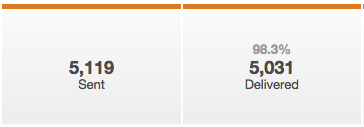
4. List Growth Rate
- What It Is: The rate at which your email list is growing.
- How to Calculate It: ([(Number of new subscribers) minus (Number of unsubscribes + email/spam complaints)] ÷ Total number of email addresses on your list]) * 100
- Example: (500 new subscribers – 100 unsubscribes and email/spam complaints) ÷ 10,000 email addresses on the list * 100 = 4% list growth rate
Aside from the call-to-action metrics (CTR, conversion rates), you’ll also want to be keeping tabs on your list growth and loss. Of course, you should be aiming to grow your list in order to extend your reach, expand your audience, and position yourself as an industry thought leader. But believe it or not, there’s a natural decay of your email marketing list, and it expires by about 22.5% every year — which means that it’s more important than ever to pay attention to growing your subscriber list and keeping it at a healthy size.
5. Email Sharing/Forwarding Rate
- What It Is: The percentage of email recipients who clicked on a “share this” button to post email content to a social network, and/or who clicked on a “forward to a friend” button.
- How to Calculate It: (Number of clicks on a share and/or forward button ÷ Number of total delivered emails) * 100
- Example: 100 clicks on a share/forward button ÷ 10,000 total delivered emails * 100 = 1% email sharing/forwarding rate
The rate at which your email recipients forward or share your email with others may not seem all that significant, but it’s arguably one of the most important metrics you should be tracking.
Why? Because this is how you generate new contacts. The folks on your email list are already in your database. So while conversion is still a primary focus, this doesn’t help you attract new leads. Encourage your readers to pass along your email to a friend or colleague if they found the content useful, and start tracking how many new people you can add to your database this way. (Read this blog post for tips on getting people to forward your emails.)
Keep a careful eye on your sharing rates to discover which types of articles and offers tend to get shared the most, and use that insight when you plan email campaigns in the future.
6. Overall ROI
- What It Is: The overall return on investment for your email campaigns. In other words, total revenue divided by total spend.
- How to Calculate It: [($ in additional sales made minus $ invested in the campaign) ÷ $ invested in the campaign] * 100
- Example: ($1,000 in additional sales – $100 invested in the campaign / $100 invested in the campaign) * 100 = a 900% return on investment for the campaign
This is the most basic formula to calculate ROI — but there are several ways to approach calculating the ROI of your email campaigns. Depending on your type of business, you might prefer a different one.)
As with every marketing channel, you should be able to determine the overall ROI of your email marketing. If you haven’t yet, set up an SLA system whereby you assign different values to various types of leads based on their likelihood to generate revenue for your company.
How many of each of these types of leads did you generate via email marketing? How does this translate to potential revenue? Actual revenue? These are the types of metrics that will help you show your boss and your sales team how valuable email marketing is as a channel that drives real, tangible results.
7. Open Rate
What It Is: The percentage of email recipients who open a given email.
Most email marketers are still bent over backwards trying to optimize their subject lines for higher open rates. While this can have a positive impact — and more opens are a great thing — they really should be focused on optimizing their clickthrough rates, instead.
The fact of the matter is that open rate is actually a very misleading metric for a few reasons. Most importantly, an email is only counted as “opened” if the recipient also receives the images embedded in that message. And a large percentage of your email users likely have image-blocking enabled on their email client. This means that even if they open the email, they won’t be included in your open rate, making it an inaccurate and unreliable metric for marketers, as it underreports on your true numbers.
You can get some value out of open rate as a metric if you use it as a comparative metric. For instance, if you compare the open rates of this week’s email send to last week’s email send (both to the same lists) it might give you some insight since the variables are somewhat controlled.
8. Unsubscribe Rate
What It Is: The percentage of email recipients unsubscribe from your send list after opening a given email.
As with open rate, the unsubscribe rate isn’t a reliable picture of the health of your email list. Many subscribers who are tired of receiving email messages from your brand won’t bother to go through the formal unsubscribe process. They’ll just stop opening, reading, and clicking on your email messages.
That’s why it’s much more effective to measure subscriber engagement by clickthrough rates and conversion rates. From there, you can keep an eye out on unengaged subscribers so you can consider removing them at some point, like we went over earlier. Checking your monthly unsubscribe rate is helpful for calculating your overall list growth rate, though, so do keep an eye on it every once in a while.
How to Know Which Email Metrics to Track, Based on Your Goals
The goal of your email marketing may be very different from the goals of another company like yours, and may even vary within your own company over time. But again, it’s crucial that you determine exactly what it is you’re looking to achieve with your email marketing before you begin (or continue) to send and measure your emails.
Here’s how you can align your specific goal with key metrics.
Subscriber List Growth Rate
If your focus is on growing the top of your funnel — attracting more visitors to your site, signing up more blog subscribers, getting more people to use your free tools, that kind of thing — your goal will probably be growing your subscriber list. Your emails will likely contain calls-to-action such as “Subscribe to Our Blog” or “Join Our Weekly Email List.” So of course, the most important metric you should be tracking for this goal is the growth rate of your subscriber list. (Read this blog post for more detailed tips on how to grow your subscriber list.)
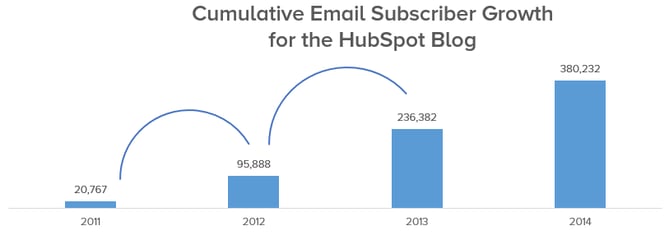
Unengaged Subscribers
Just as you want to track and grow your subscribers, it’s also important to keep an eye on your unengaged subscribers — and consider removing them from your list altogether. Why? Because sending emails to people who aren’t engaged with your emails (called “graymail”) can hurt the deliverability of your email overall. Email clients might get tipped off by low engagement rates and deliver email from known-graymail senders straight to recipients’ “junk” folders, meaning your emails will technically get sent and delivered, but won’t necessarily be seen.
Here at HubSpot, we deliberately unsubscribed 250,000 people from HubSpot’s Marketing Blog, which included people who had opted in to receive emails about new content we published on the blog. This subscriber purge brought our total subscriber count from 550,000 down to 300,000. Read this blog post to learn more about why and how we purged our subscriber list, and why you might consider doing the same.
Number of New (or Total) Leads Generated
Maybe instead of focusing on subscribers, you’d like to work on growing lead generation. If this is the case, you should be sending emails that offer lead generation content — in other words, content that requires the viewer to fill out a lead capture form in order to access it.
If the goal of your email marketing is lead gen, you should be tracking how many leads you’re capturing every day, and every month. You can decide to focus on all leads generated, or only new ones added to your database, depending on your priorities.
Lead-to-Customer Conversion Rate
Finally, let’s say you want to focus more toward the middle/bottom of your marketing funnel, and convert more of your existing leads into customers. If this is your goal, the emails you’re sending will likely provide content more closely related to your business and your product or service. Your calls-to-action may include “Get a demo,” “Watch a Video of Our Product in Action,” or “Start a Free Trial.” If this is your goal, you should be tracking changes in your lead-to-customer conversion rate.
As obvious as this all seems, you’d be surprised how many email marketers determine their goals and then don’t bother to track their progress against them. Make sure that you’re able to track how closely you’re trending toward your goal at any point during the month, and that you’re looking carefully at any changes in these metrics month over month.
Navigating Email Marketing Metrics
The bottom line? Be smart about which metrics you’re tracking, and make sure you’re able to effectively measure your individual email performance, the health of your email list, and your progress toward your overarching goals. As long as you’re able to determine each of those, you’re on the right track for more effective email marketing.
Editor’s Note: This post was originally published in March 2014 and has been updated for accuracy and comprehensiveness.

Social Media Use Surges: How Marketers Should Respond
Welcome to this week’s edition of the Social Media Marketing Talk Show, a news show for marketers who want to stay on the leading edge of social media. On this week’s Social Media Marketing Talk Show, we explore what global spikes in social media usage mean for marketing strategies and LinkedIn’s new conversation ads format […]
The post Social Media Use Surges: How Marketers Should Respond appeared first on Social Media Marketing | Social Media Examiner.
from Social Media Marketing | Social Media Examiner https://ift.tt/3aBwQAB
via socialmediaexaminer