
Welcome to My Blog
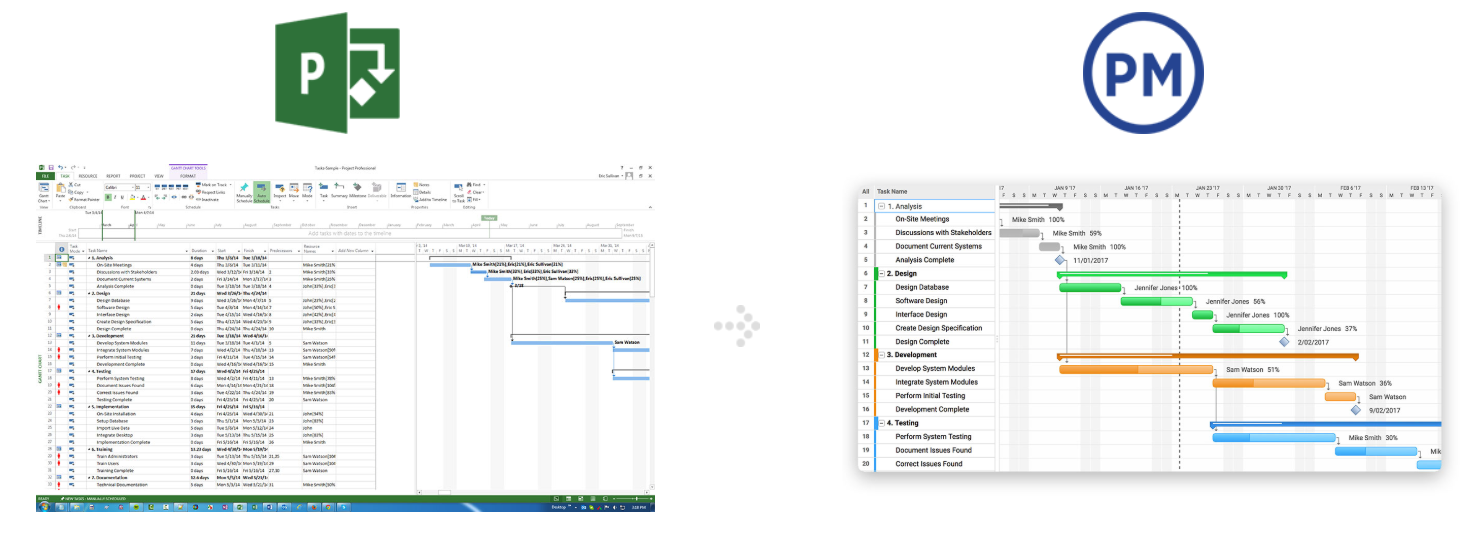
How to Make a Gantt Chart on Mac
8 Technical SEO Tools You Should Be Using Today
Most people see search engine optimization, or SEO, as having two parts: on-site optimization and off-site optimization. Both of these having to do with content, keywords, and links, but a lot of the time technical SEO gets overlooked. Many people are either not educated enough about the subject, or get nervous when they hear the word technical.
So what is technical SEO? It is essentially the more involved optimization tweaks that help give your content the best chance it can have to rank for relevant keywords and phrases. Technical SEO allows you to focus on analyzing how well the search engines are crawling and accessing your website.
If the search engines are able to get to your website easier, it will be easy for you to rank with the on-site and off-site optimization that comes after. There are many different areas that should be reviewed and fixed as part of this process and as part of your ongoing SEO campaign.
Throughout this post, we’ll cover several tools that can be used to determine what needs improvement as far as technical SEO goes, and the purpose each tool serves.
Technical SEO Tools
1. Website Grader by HubSpot
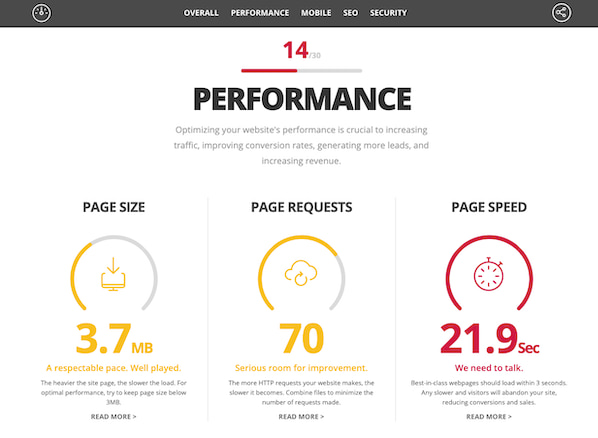
Your first stop is HubSpot’s Website Grader. This free dashboard asks you to enter the root domain (or subdomain) you want to analyze, and returns to you a full report card of that domain’s performance.
The report card given to you by Website Grader shows you site metrics across a number of categories, including:
- Performance
- Mobile
- SEO
- Security
Not only does this tool give you performance data in the above categories, but Website Grader also offers simple next steps to make your site better if you scored low in a particular area. This free tool is a must for all site owners looking to level up their site’s performance.
1. Google Webmaster Tools
Google Webmaster Tools (GWT) is probably the technical SEO tool I use the most. It has a ton of great features to use when implementing technical SEO. Arguably it’s most useful feature is its ability to pinpoint 404 errors, or pages on your website that are not showing up to website visitors. Because an issue like this can severely hinder your website’s marketing performance, it’s important to locate these errors and redirect the 404 to the correct page.
Additionally, Google Webmaster Tools allows you to check you Robots.txt file (a file on your website that prevents search engines from listing certain pages in search results) to ensure none of the important pages are being blocked from search engines.
It also allows you to see if your sitemap of your website is error free. This is important, because a sitemap that’s riddled with errors can create an unpleasant user experience for website visitors. Among other things, it also allows you to pick out the duplicate page titles and descriptions so you can go into the website and fix them in order to avoid ranking penalties by search engines.

2. Screaming Frog
Screaming Frog is also a tool I use almost every day. If you have not downloaded this tool, I strongly suggest you do so. Why? It crawls so many aspects of a domain that will really assist you with your technical SEO process.
It primarily helps with on-page SEO– finding duplicate page titles and descriptions, as well as examining URL structures to determine what needs to be fixed.

3. Google’s PageSpeed Insights
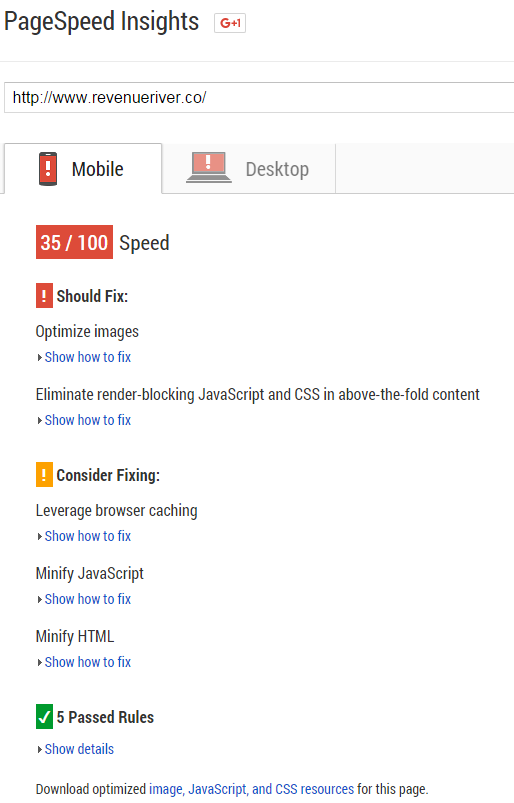
As you probably know, faster page load time can help improve your webpage rankings and at least make your website’s experience more enjoyable for visitors. Google’s PageSpeed Insights Tool allows you to analyze a specific page’s site speed and user experience with that site speed. It analyzes it on mobile devices and desktop devices. Additionally, it will show you how to fix any errors to help improve the speed or user experience.
4. Google’s Mobile Friendly Testing Tool
As of April, 2015, Google released an update to their mobile algorithm that would give higher rank to those websites that had a responsive or mobile website. In addition to this, they came out with a mobile-friendly testing tool to help you cover all of your bases to make sure your website would not lose rankings from this update. Additionally, if the page you are analyzing turns out to not pass standards, the tool will tell you how to fix it.

5. Responsinator
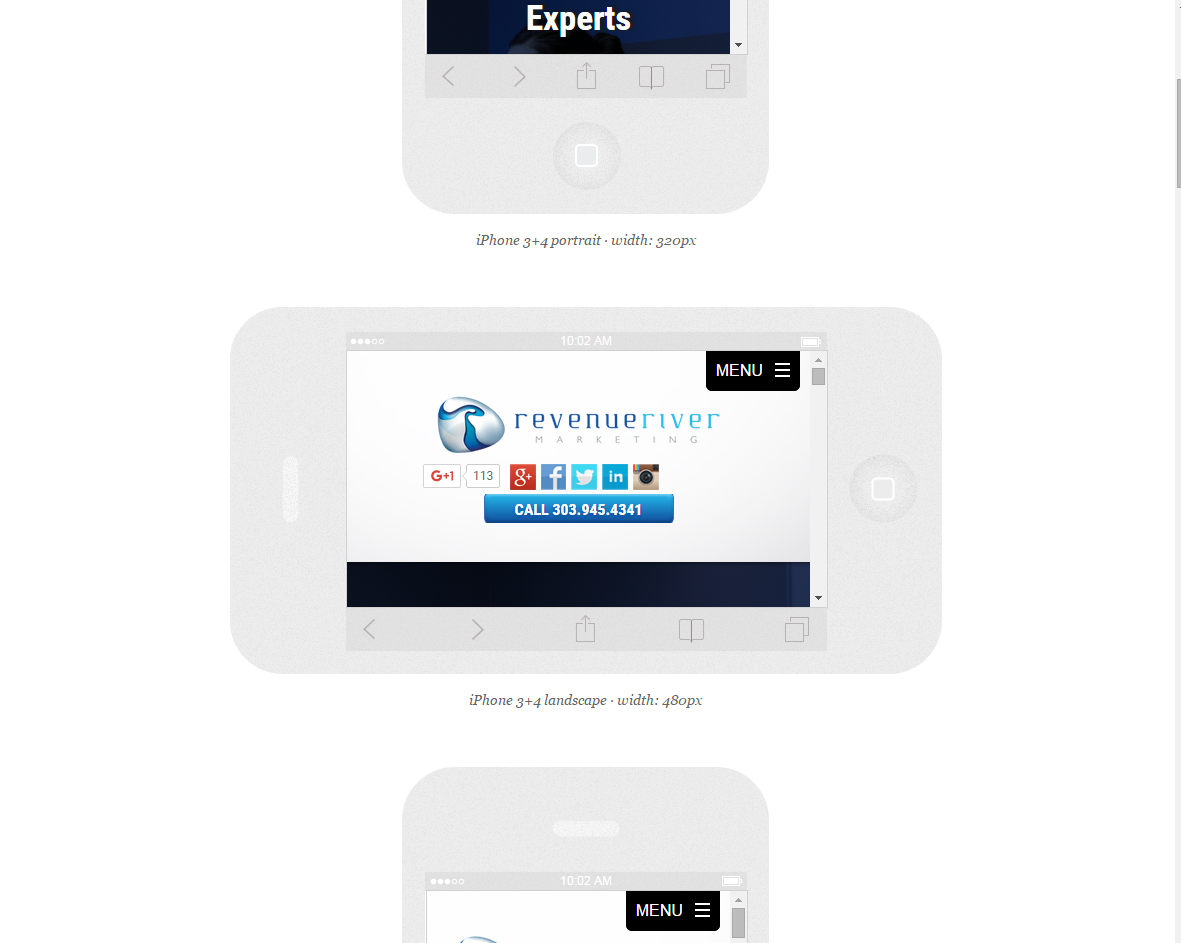
The Responsinator is very similar to the Google Mobile-Friendly Testing Tool, but there are some differences. First, it shows you what your web page would look like on all different mobile and tablet devices, landscape and portrait.
This includes different types of iPhones, Androids, iPads, and Tablets. Although it does not tell you how to fix the issue, it does give you a full representation of what your website looks like across all devices.
6. Siteliner
Siteliner is a tool that allows you to find duplicate content within your website. All you do is insert your domain and the tool crawls up to 250 pages. It then analyzes the percentage of your website that is duplicate content.
Additionally, it will tell you which pages have the duplicate content and the percentage of duplicate content. You can then analyze each page further to make the necessary changes needed to avoid too much duplicate content.

7. SEO Browser
SEO Browser allows you to view your website as search engines see it. This allows you to make sure that all your content is showing up the way you want it to and that the search engines are getting everything you are trying to convey. For one reason or another, search engines may not pick something important up and this website will help you figure out what that is.

As you can see, it’s very important that technical SEO does not fall off your radar. It’s the foundation of your search engine optimization efforts and letting it fall by the wayside could have a detrimental impact on your marketing efforts.
If you need to revamp your SEO strategy, make sure you perform a technical SEO audit on your website and use these tools to do so. What other tools and resources are good for those looking to start focusing on technical SEO?

5 Ways to Analyze Your Instagram Marketing

Do you know how well your Instagram marketing is really performing? Your Instagram business profile provides you access to valuable metrics that can help you understand what’s working. In this article, you’ll discover five ways to analyze the performance of your Instagram business profile. Why Instagram Business Profile Insights Matter Instagram is a powerful tool […]
The post 5 Ways to Analyze Your Instagram Marketing appeared first on Social Media Marketing | Social Media Examiner.
from Social Media Marketing | Social Media Examiner https://ift.tt/2QpXUL0
via socialmediaexaminer
A Marketer’s Crash Course to Hyperlocal Marketing
A couple of weeks ago, I was planning a trip to New York. I’d never been, so I was excited to start planning and figure out my itinerary.
Once my hotel room was booked, I started looking for things to do during my time. I wanted to stay close to my hotel so I could find my way back after a long day of exploring. This goal of mine meant that most of my Google searches would have “near greenwich village, NY” in the queries.
When I was planning out places to get food, for example, my query was “vegan restaurant near greenwich village”. The results Google picked for me based on this search weren’t by guessing or magic — most likely, the restaurants used hyperlocal marketing efforts to optimize their businesses for “near me” searches.
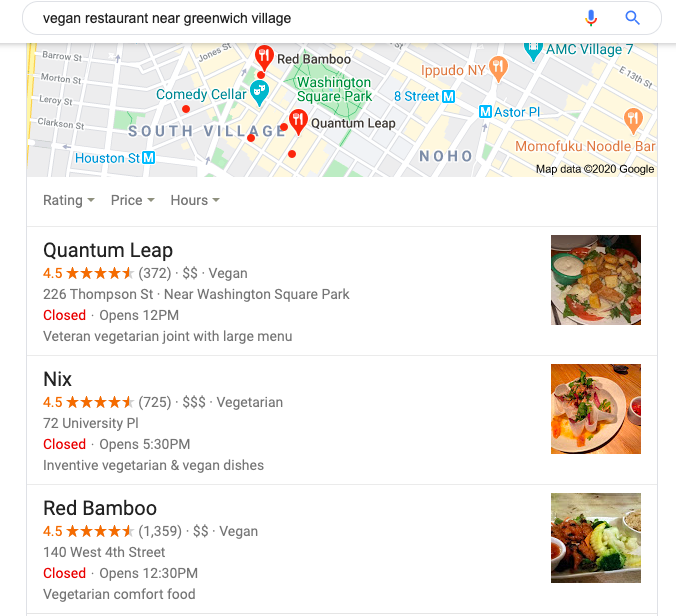
Hyperlocal marketing targets audiences who have similar researching methods to mine — those who use “near me” in search queries in hopes of picking out a business to try out in person based on the business’s location.
For my New York trip, I didn’t want to spend a lot of time commuting, so finding places near my hotel was essential. I knew I was going to see a Broadway play during my trip, and I found similar results for “shopping near broadway”.
If your business is struggling locally, or you’re looking for a way to boost foot traffic, you may benefit from hyperlocal marketing. Here, let’s explore what hyperlocal marketing is, how you can implement hyperlocal marketing at your own company, and examples of hyperlocal marketing to further understand why it matters.
What is Hyperlocal Marketing?
Hyperlocal marketing is a method of marketing that focuses on a targeted audience within a local area. This tactic zeroes in on a small number of consumers who want to buy from businesses near them.
Hyperlocal marketing accomplishes one main goal: raising foot traffic to a store’s physical location for people who rely on “near me” queries for shopping.
For example, if I wanted to find a coffee shop in my area, I would Google “coffee shops near me” to figure out where the nearest one is. Any coffee shops that has teams are using hyperlocal marketing as a strategy would then pop up on the results page.
Hyperlocal marketing is a good choice for you if you want to increase in-person sales and boost brand awareness. Next, let’s talk about some strategies that’ll impact your hyperlocal marketing results.
Hyperlocal marketing strategies
These marketing strategies contribute to the goal of getting more local audiences to find your business from a simple Google search. Although they’re focused on hyperlocal results, you can also use these strategies to make sure your business is optimized for online search in general.
1. Make and Optimize Your Google My Business Listing
If your business isn’t set up on Google My Business, that’s an important first step. Google My Business is the aptly-named tool businesses use to show up on “near me” search queries. When you make your listing, or if you already have one, it’s critical you properly optimize the page to show up on search results for “near me” queries.
Some things to keep in mind: add relevant keywords in your business description to increase your chances of being found. Make sure you post high-quality photos to make your listing professional. Additionally, increase your visibility by choosing categories that best describe your business and business goals.
Google My Business queries’ most fundamental element is location, so your optimization efforts should focus on that. When you optimize your listing, you raise your chances of being ranked highly on local results pages.
2. Make Sure You’re Accessible
On your website, make your contact information easy to find. It should be labeled clearly on your webpage. This tells customers your business is accessible and welcomes interaction.
If you have business pages on social media platforms, be sure to link back to your website, provide your store location, and include contact information as well. As a consumer, I find most new local restaurants on social media — if I can’t contact them about my dietary restrictions, I won’t make a reservation.
If your business is near any popular landmarks or attractions, you can note them in the description of your business to draw in customers who are looking for businesses near attractions. Those keywords will expand your reach.
3. Optimize For Local Search
Review your website. When was the last time it was optimized for SEO? Your website should be optimized to the same standards your Google My Business page is.
Let’s go over what it means to have your website properly optimized. First, it should be easy to navigate, so first-time visitors can find their way around.
Next, your URL structure should be informative. Google sees URLs first and asks questions later, so the information in your URL should be relevant to search queries. If your business provides marketing solutions in Las Vegas, for example, one of your website pages should have a URL structure that includes the keywords “marketing company,” and “Las Vegas”.
After checking URL structure, be sure to check the language on your website. It should emphasize the locality of your business. What helps with this is using hyperlocal keywords, like nearby landmarks or popular tourist destinations near your business.
When you use hyperlocal keywords on your site, have a local-based website structure, and keep your website properly optimized for SEO, you increase the chances of locals and tourists finding your business on Google.
4. Create Content That’s Hyperlocal
In the same notion of making language on your site hyperlocal, take it a step further and make content that’s hyperlocal. Small businesses whose teams turn to a local marketing plan have the advantage of leveraging content ideas that center around locality. Local content can increase the rank you have on pages that concern location.
How do you come up with local content? Think about your current strategy, what you’re doing now, and how you can put a local spin on it. If your highest-performing content is already focused on location, see how you can modify previous or upcoming content to do the same.
Additionally, local businesses can make content about local events, like a city-wide festival or pop-up shop. You could write a short blog post about the history of a local festival, or take pictures of your business participating in a local networking event for social media.
Most content ideas you have, you most likely won’t have to modify that much, especially if they’re performing well with audiences.
Now, let’s look at some examples of companies whose online presence is benefitting from hyperlocal marketing content.
Hyperlocal marketing examples
1. Diesel Cafe
Let’s look at an example of an awesome Google My Business page. Remember, Google My Business pages helps those who turn to Google first to find local spots near them. So when I typed in “cafe near me” as a search query, this is what I saw:
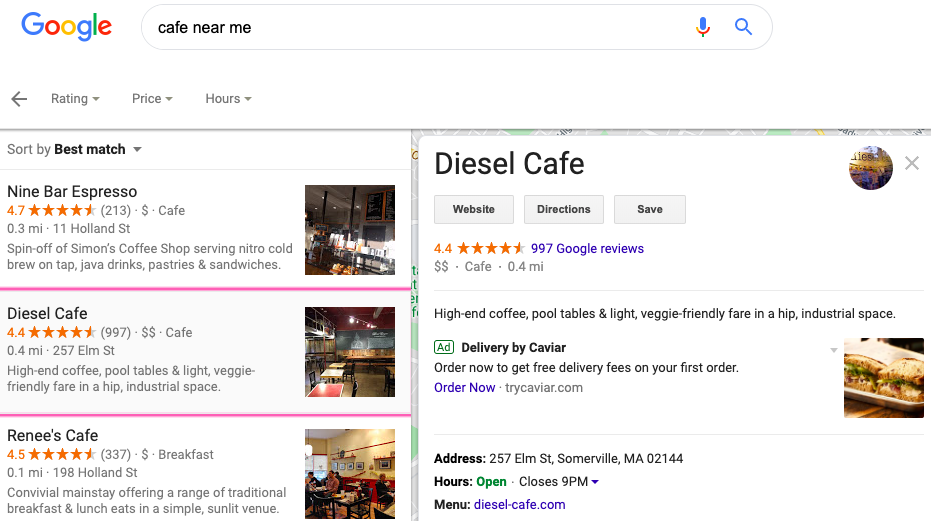
Let’s talk about why this example is awesome.
First, the most important details are listed: the company address, menu, contact information, and website. If I were to click on the website or the menu, all of the links work, making this listing accessible and comprehensible.
There are also plenty of photos, from customers and business owners, to establish the vibe the cafe has from the inside to the outside. Additionally, look at the rating and amount of reviews: I could pour over almost 1,000 reviews if the 4.4 stars didn’t convince me at first glance.
Diesel Cafe excelled at hyperlocal marketing here because their page is properly optimized for hyperlocal marketing. The biggest clue is that it was one of the first results when I typed in my search query. To test the quality of your page, see if you can use a vague search query, like “cafes near me,” to find it.
2. Lamplighter Brewing Co.
For this example, let’s look at an optimized website.
Boston-based brewery Lamplighter Brewing has been filling the glasses of locals and visitors alike since 2014. Lamplighter is very successful at hyperlocal marketing and their website reflects how dedicated they are to providing visitors with an experience that keeps Boston at the forefront.
For instance, let’s look at Lamplighter’s “About” page. As a first-time visitor, I’d be looking for local language, such as location, and business hours in the location’s time zone. I’d also be looking for services and local flair to help make my decisions.

From the “About page,” I can see the brewery’s location, services offered, a business goal of sticking to New England IPAs, and what makes the brewery different from other options in the area. This is a wonderful example of a business page that was optimized using hyperlocal strategies, like location, and the business’s local ties.
Because of their optimized website, when I search “craft beer in cambridge mass” in Google, I could find Lamplighter in the first five results, with their website listed on Google.
3. Glossier
Here’s an example of hyperlocal marketing by a global company. Beauty company Glossier opened a pop-up location in Boston’s Seaport area during 2019. To market their new pop-up, Glossier used a lot of Boston-based hyperlocal marketing efforts to build interest with a specific audience: Boston-based customers who could travel to Seaport.
Let’s look at their Instagram ad:
This post was uploaded three days after the New England Patriots won Super Bowl LIII. The location of the image? A public transit stop less than ten minutes away from the location of Glossier’s pop-up.
The image shows the middle of Super Bowl festivities, sure, but it also shows an ad for a Glossier product. The marketers at Glossier saw a golden opportunity to boost local interest by showcasing their ad and how locals interact with it during a massive local event.
4. Dollop Coffee Co.
Hyperlocal marketing on Twitter? Chicago-based coffee chain Dollop proves it’s possible. From their bio, which includes local language and contact information, to their tweets, which have a theme of slipping location into most of them, it’s clear Dollop uses Twitter to target and engage with local audiences.
For instance, check out their pinned tweet from December 2019:
Hey what are you up to Thursday? Nothing? Cool- a new new Dollop opens @ 4613 N Lincoln, serving our Dollop Diner Breakfast sandwiches, fancy coffee dranks and our new “healthy chocolate shake” smoothie. See you @ 7am! pic.twitter.com/s45OD9BnA6
— Dollop Coffee Co. (@DollopCoffeeCo)
December 12, 2019
This tweet gives the hyperlocal marketing essentials: location, cool features, a peek at the store’s hours, and high-quality photos. If I were visiting Chicago and came across this tweet, I could easily copy and paste the address in my search bar.
To check and see if Dollop’s hyperlocal Twitter strategy was working, I searched “coffee chicago” on Twitter, and clicked on the “People” section. Dollop’s account is in the top ten results. For such a vague search query, it’s clear to see that Dollop’s strategy is paying off.
Now that we’ve gone over some hyperlocal strategies and examples, you’re ready to start planning how to effectively implement a hyperlocal plan for your business. To see how your business ranks hyperlocally, start with search queries. Type in “near me” queries and see what businesses ranking above yours are doing to improve their ranking.
Will I see your business next time I’m traveling and looking for places “near me”?

HubSpot’s Guide to Building a Killer Marketing Team
We all know the age-old expression, “There is more than one way to skin a cat.” Though I’ve never tried, I’m going to guess they’re right about that.
Likewise, there are many different ways to build a high-performing, growth-focused marketing team. However, in my experience, I have found that there are six absolute must-have positions that the majority of best-in-class B2B companies employ.
Particularly if you’re at a small business or startup, it’s important to think about building your team with these six roles first. Let’s go through how to build a marketing team, what these roles are and where to find the right people to fill them.
How to Build a Marketing Team
Before you can hire anyone, it’s important to have a strategy in place for building your team.
For instance, you should have a clear understanding of your organizations hierarchy. Think about how the Acquisition and Content teams will work together. Consider how the roles within these teams overlap.
Once you have a clear understanding of your marketing department’s teams, you can start to write the job descriptions and begin recruiting.
You can post jobs on your website, or on job boards like Indeed. When the applications begin rolling in, you can start to interview and vet your candidates.
It’s important that the people you hire mesh well with your team, so don’t hesitate to ask marketing friends for referrals.
Additionally, pay attention to LinkedIn connections while you’re vetting potential candidates in case you have a mutual connection. Leadership skills and the ability to fit in with your company’s culture are key here.
Plus, keep in mind that you want to hire experts. Your team should have experience and know what they’re doing.
After you’ve hired your team, you aren’t done building a great team. Building a great team continues long after the hiring process. For example, your onboarding process should help your employees understand the team culture.
Over time, building a great team is about documenting your goals, identifying gaps, and iterating on your process.
1. Team Leader
It all starts with a leader. No matter what the title — Director of Online Marketing is one example — you need someone with high intellectual capacity, an entrepreneurial spirit, and the ability to lead others. While this person will spend a lot of their time managing or coaching others, they’ll also need to roll up their sleeves and get their hands dirty. They’ll need to be very hands-on with several tactics and do the proverbial “wearing of many hats.” Think all-around athlete with this position: Specific experience matters less than passion, energy, and brainpower.
2. SEO Specialist
Let’s face it: Google is still king — and no matter what business you’re in, SEO is going to be a big part of your marketing game plan. There are a few things more valuable than having someone who is not only willing and able, but also passionate about diving into the details of search algorithms, principles of bid management, and keeping up on all those Google updates. (What does this Panda have to do with my SEO rankings, anyway?) Search has become a serious discipline, and you need a serious player to manage your efforts here.
This candidate should have experience managing SEO for another company or at an agency, so look for this type of experience in their resume. Also, since the SEO community is an active one, you canfind potential candidates by engaging with people who are regularly participating in SEO LinkedIn group conversations.
3. Content Creator
If Google is king, then Content is the queen, prince, and probably court jester of your marketing portfolio. No matter what type of content you’re creating, the majority of it has one thing in common: It needs to be written! Having an exceptional writer on your staff is a must if you plan to have a website, publish a blog, participate in social media, offer long-form content, do PR, or advertise. (In other words, if you plan to do marketing.)
Once you have a strong writer in place, you can look to hiring freelancers to supplement and help you scale the quantity of content. Oftentimes, this writer can transition into an Editor-in-Chief type of role over time, managing your content operations.
This candidate should hail from the publishing/journalism world. They should have a lot of experience writing, managing an editorial calendar, and expressing creativity. MediaBistro and Ed2010 are great places to post job descriptions to find a promising candidate.
4. Website Designer
I don’t necessarily mean the traditional “webmaster” title, but rather, someone who is a master of website design and/or development. Whenever possible, I’m a believer in managing as much of your website as possible in-house, instead of outsourcing to an agency. It’s just too important as the primary face of your company to put in the hands of others.
If you can find someone that is a hybrid of a designer and a developer, you’ve struck gold. Otherwise, figure out which side of the coin you value more and target the best talent you can you find in that area. Nearly all of your potential customers will visit your website — most beginning their journey at that point. Your company’s website should be an absolute priority investment, so make sure an owner of it is one of your first hires.
Designers and developers belong to very active communities since they’re continuously exchanging information with each other to hone their skills. Take advantage of this by tapping into these forums and looking to sites like CrunchBoard and Dribble to post your job description.
5. Analytics & Operations Specialist
Marketing Operations might be the more appropriate way to describe this function or title. In the modern world of B2B marketing, you’ll struggle to survive without a data-driven, operations-focused team member — someone to help manage and drive your technology solutions and provide analytics and reporting for the team.
This person, by their very nature, should help keep the whole department armed with data to drive decision-making, track progress, and set goals and forecasts. You’ll know this person when you meet them. It will be hard to pry them out of Excel and the latest business intelligence tools!
Experience with data is crucial here. Look for candidates with a background in finance and who have excellent Excel skills.
6. Creativity Specialist
After you find these hires, search for the most creative person you can find and add them to your team. Marketing is both an art and a science, and you need to balance out the data and hard tactics with some right-brain creative DNA. In the past, I’ve hired improv comics and struggling filmmakers and turned them into amazing marketing contributors.
With these roles in place, you’ll be well on your way to executing that brilliant growth strategy that you have cooked up. Remember, you are only as great as your people.
Want to learn more about working in Marketing? Check out How to Structure a Kick-Ass Marketing Team for Any Company.
Editor’s note: This post was originally published in February 2015 and has been updated for comprehensiveness.

How to Write Good Instagram Captions: 8 Bookmarkable Tips for Perfecting Your Copy
Instagram marketing is all about the visuals. The quality of your photos will be the differentiating factor when it comes to gaining Instagram followers, getting them interested in your brand and what it’s about, and showing off the human side of your business.
But the hard work doesn’t end once you’ve taken that beautiful photo and edited it to perfection. The caption of your post is where you can give a voice to that visual content.
A good Instagram captions explains what the photo is about, tells your followers to take action, or cracks a joke that makes your content all the more delightful and shareable.
If you think of the caption on your Instagram posts as an afterthought, you’re losing out on an opportunity to engage and delight your followers in ways you can’t with just a visual. Here are some tips to help you write better Instagram captions.
How to Write Instagram Captions
- Write several drafts first.
- Front-load the important stuff.
- Include a call-to-action.
- Limit yourself to four hashtags.
- Meld your brand voice with Instagram’s lighthearted tone.
- Use emojis.
- Cross-promote your other social channels.
- When in doubt, keep it brief.
1. Write several drafts first.
Ever thought of the perfect joke after it was a little too late to tell it? We’ve all had a similar feeling when we come up with the perfect Instagram caption once we’ve already published the post.
The lesson? Don’t rush the process. Instead, write a few ideas for captions down, sit on them for a bit, poll coworkers on which one is best, and generally take your time.
You might be asking yourself at this point, “But aren’t timeliness and chronology important on Instagram?” They can be, depending on the subject of your post. For example, professional Instagrammer Patrick Janelle says he uses Instagram as a kind of chronological journey of his activities and lifestyle. He likes to post in real time to document what he’s doing at a given moment.
But thanks to the impending Instagram feed algorithm change, the level of engagement your posts receive will soon matter more than chronology. Soon, our Instagram feeds will be ordered to show the moments Instagram thinks we’ll care about the most. The visibility of your posts in your followers’ feeds will depend on the number of Likes and comments a post has, your relationship with the user posting, and other factors.
That’s why it’s important to take your time constructing a great caption that’ll keep your followers around, delight them enough to share with their friends, and encourage them to engage with your content.
2. Front-load the important stuff.
The maximum character count for an Instagram caption (2,200 characters) is basically a formality. But the important thing to note is that captions cut off in users’ feeds after three to four lines of text.

That doesn’t mean you should keep your captions super short so users can see 100% of it without having to click “more.” Instead, frontload your captions with the important content or text calls-to-action — and leave any hashtags, @mentions, or extraneous information for the end.
Here’s an example of an enticing, front-loaded caption from coffee-based skincare company Frank Body:

3. Include a call-to-action.
The best way to increase the share potential of your Instagram post and engage your followers is to have some sort of call-to-action in the captions of your photos. That means using action verbs to prompt people to do something, instead of just passively scrolling by. We found that verbs generate more shares on Twitter than nouns and adjectives — the same can be true for Instagram.
For example, you might say, “double-tap if you find this funny” or “share your story in the comments.”
Here are a few other action-based ideas to get you started:
Ask a question.
Encourage people to comment with their own experiences. You might be able to draw on these experiences to shape your Instagram strategy moving forward, or to come up with new content ideas. To increase engagement and delight your followers even more, respond to users’ answers to make it like a conversation.
H&M: “All you need for a weekend get-away. Where would you go?”

Lorna Jane: “Be you, everyone else is taken. Today’s inspo inspired by our leading lady @ljclarkson – how are you finding your BELIEVE today?”

Direct people to a link in your bio.
Clickable URLs aren’t allowed anywhere except the single “website” box in your bio. That’s why optimized Instagram profiles update that URL frequently to point to their latest blog content, YouTube videos, products, or offers — and then refer to that link in their Instagram captions.
For example, are you running a contest, or want to increase subscribers to your blog? Just change the link, and then post a photo that mentions the new link in its caption.
Pro tip: Use shortened links that include UTM tracking codes so you can see how much of your traffic came from your Instagram page. (Learn how to create UTM codes to track your URLs here.)

To change the link in your bio, go to your profile page and click “Edit Profile.”
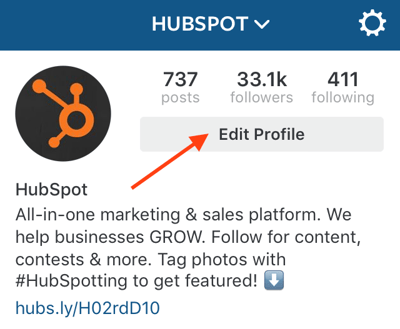
Then, simply insert the URL of your choosing into the URL box.

Invite people to tag their friends.
Encourage your followers to share your post with friends by inviting them to tag their friends. Here are a few examples of fun, clever ways brands have asked followers to tag friends.
Frooti: “It’s scrabble day! Tag some friends you’d like to play with.”

H&M: “Planning for a luxe escape with your bestie? Tag your travel partner in crime!”

HubSpot: “Coffee with coworkers make Friday mornings that much brighter. Tag your office coffee buddy – and better yet, take a break!”

Invite people to enter a contest.
Contests are great for increasing engagement and brand exposure on Instagram.
Simply invite people to post their own pictures and tag them in the caption using a hashtag, like BuzzFeed Tasty does below.

Consider including the contest’s official rules in your caption for folks who are interested, and even a link in your bio.

4. Limit yourself to four hashtags.
On Instagram, a hashtag behaves the same way as it does on Twitter and Facebook: It ties the conversations of different users into one stream. As long as your account is public, anyone who does a search for that hashtag may find your Instagram post. (Read this blog post to learn more about how hashtags work on Instagram, Twitter, and Facebook.)
Hashtags are great for connecting users who aren’t otherwise connected to one another, but who are talking about — and interested — in the same topics, events, brands, and so on. They’re also a great way to add some fun and coy humor to your posts, like FOMU did below.

But, use hashtags sparingly. Some Instagram users include a string of searchable hashtags as a way to get more followers — but the fact is, it looks spammy to the followers you do have. If you use a ton of hashtags, people will notice, and they will think it’s lame. Limit your hashtags to three or four, tops.
And remember, you don’t have to include any at all if you don’t want to. You don’t need a hashtag to have an awesome Instagram caption. Here’s an example of a good caption with no hashtag from Starbucks:

Use hashtags at the end of your caption.
Unless the hashtagged phrase fits naturally into a sentence, don’t list any hashtags until the very end of the caption. That way, the part of your caption that’s more appealing to humans will come first, making it more user-friendly.
Plus, if your caption is long enough to get cut off, the hashtags that are there to connect people (as opposed to delight people) will be hidden. So the hashtags in this caption …

… will be hidden from folks scrolling by in their Instagram feeds — which is totally fine, since they’re just there for search reasons.

Pro tip: Need inspiration for a hashtag that’s already popular? Instagram will suggest hashtags to you based on their popularity when you open up a new post and type out the # symbol followed by an incomplete search. Here’s an example of that in action:

5. Meld your brand voice with Instagram’s lighthearted tone.
Every social network has a different tone that works best. While serious, jargon-heavy copy may work well on LinkedIn, for example, that same copy won’t work as well on Instagram. The best Instagram posts tend to have a lighthearted, fun tone, showing off the more authentic, human, and personable side of a brand.
That’s why you’ll want to adapt your brand voice for Instagram’s more lighthearted tone. This’ll be easier for brands whose brand voices are already lighthearted and fun, like Wistia’s:

For others with a more serious brand voice, find a balance between sincerity and relatability.

Being relatively consistent in your Instagram voice can help you build your brand on the channel. For example, think about how long you’ll typically want most of your posts to be. Do you want to be a storyteller who writes a paragraph or more?
Or do you need the space to write out instructions, or a recipe?
Or do you favor a minimalist approach with just a few words?
When in doubt, be punny. Cleverness tends to perform quite well on social media, especially Instagram. People love when brands crack a joke or include a play on words. JetBlue, for example, is always an excellent source of puns:

Here’s another one from Chobani:

If you’re experience caption writer’s block, the Wall Street Journal‘s Elizabeth Holmes suggests playing a word association game or brainstorming with a friend.
6. Use emojis.
Emojis, the cartoon-like emoticons available to most smartphone users, can add some personality to an Instagram caption. That’s why a lot of brands use them in their captions — even the more “serious” brands.
There are a lot of different ways to use emojis in your posts. For example, you can use them at the beginning of post to catch people’s eye, like this:

You can also use them in the middle of sentences to replace words, or at the end of a post as a sort of “punchline,” like this:

7. Cross-promote your other social channels.
You can also use your caption to cross-promote your other social media accounts. This is a great way to let your followers know where else on social media they can find you — so that your Instagram followers can become your Twitter followers, your Facebook fans, your Snapchat audience, and so on.
For example, you might promote a campaign that’s taking place on another channel, like Coca-Cola did here:

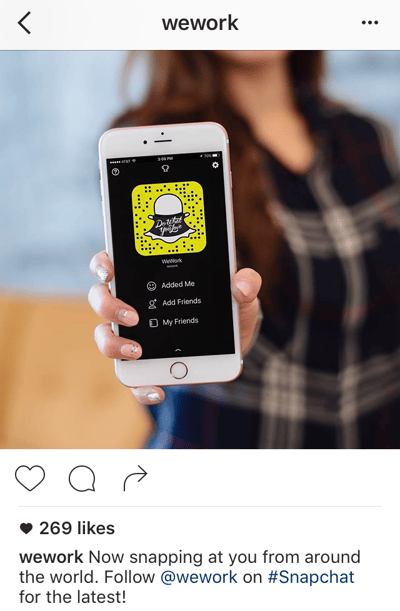
Pro Tip: If you have a Snapchat account, Snapcodes are perfect for cross channel promotion on your other social media profiles. Every Snapchat user has a unique Snapcode, which is an image that looks like the Snapchat logo but with a unique pattern of dots. To follow you on Snapchat, all users will have to do to is open the Snapchat app, take a photo of your Snapcode, and tap their screen.
Here’s an example from WeWork:
8. When in doubt, keep it brief.
Depending on your audience, your captions might need to be longer than a few words or a sentence. For example, if you’re a food company, you might post entire recipes in your captions — and that’s OK, as long as you’re front-loading the caption with the most important information (like the name of the recipe) so it doesn’t get cut off.
But if you’re not sure what your brand voice is yet, a good rule of thumb is to keep it brief. Some of the best Instagram captions are short punchlines, or in some way make their point quickly and let the visual content do most of the talking.
Coca-Cola: “Goodbye, tan lines. Hello #SpringBreak.”

WeWork: “Every day.”

BuzzFeed Tasty: “Whip it good.”
How to Write a Good Instagram Caption
So, what makes a good caption on Instagram? Let’s recap:
- Leading with the good stuff
- A call-to-action (CTA)
- A healthy number of hashtags
- A lighthearted tone
- Emojis
- Cross-promoting other social channels
- Brevity
- Helpful information
The companies cited in the steps above all have their own way of engaging their followers on Instagram, but how can you apply their approach to captions of your own?
Let’s take a look at some more Instagram captions that celebrate these important qualities and that you can apply to your business’s Instagram strategy.
Captions that lead with the good stuff
“That’s a wrap on [company event], day 1! It was a great day of good people, sessions, and keynotes…”
“[New product] is now live! Get your free 30-day demo right now and see for yourself…”
“We’re working with [partner/company] on a new initiative to [shared goal]. Our staff can’t wait to get started…”
“We’re here at [industry event]! Come say hi at [booth #] and see our CEO before he takes the stage at [panel discussion]…”
“Congrats to our own [employee name] for winning [award]! A well-deserved honor for someone who crushed it this month…”
Captions with CTAs
The best [product] for this time of year. What’s your favorite part of the fall? Let us know in the comments!
We’ll be closed January 1, but back with an exciting announcement after New Years … where will you be on New Years Eve? Share your plans, below!
[Podcast] episode 1 is now available for listening! Couldn’t be happier with our guest, [name of guest]. Link in bio.
Team synergy is crucial to a great company culture. Tag a coworker you love working with in the comments below.
We’re so excited to launch [new product], but every great [type of product] needs a great name. Submit your name suggestions and the best one wins a year of free service! Link in bio.
Captions with one to four hashtags
We’re here at Mile 17 of the #NYCMarathon cheering on our company running club! Amazing day for 26.2. #ILoveNYC
[Event name] attendees: Join us at the 3 PM panel to learn how #NewTrend is changing the industry. #EventHashtag
Surprised the marketing team with donuts for hitting their #LeadGeneration goal and because they’re free today! #FreeDonutDay #FridayFeeling
Captions with a lighthearted tone
High fives to everyone who hit their goal for the quarter! If not, get psyched to crush it this quarter. You’re gonna’ do great. #goals
Recycling isn’t just a requirement in our office park — it’s the right thing to do. Happy Recycling Day! #RecyclingDay
Happy Monday! Don’t dread the week, embrace it! Happy employees make for happy customers. 🙂 #MondayMotivation
Captions with emojis
Spotted 👀 the [company name] logo downtown! Love seeing the community give us some love. ❤️
Everybody contributes to the health of our planet. To be successful at [company name], we need to be respectful of 🌎. Happy #EarthDay!
#MarchMadness has begun, and we’re cheering for our state team at [name of college] tonight. Let’s do it, [team mascot]! 🏀
🏆 ALERT! 🏆 Excited to be named in the Top 20 Best Places to Work in [State] for [year]! We owe it all to our hardworking employees and loyal customers. You all rock.
Captions that cross-promote other social channels
At 11 AM tomorrow, we’ll be live tweeting from our CEO’s keynote at [industry event]. Follow along on our Twitter page! Link in bio.
We’re so sorry if you couldn’t log in to your [company name] account yesterday, and want to make it right. Check in with us on Facebook Messenger and get your redeemable discount code.
We’re up and running on LinkedIn, and so are our employees! Find and connect with us now (we don’t bite). Link in bio.
Brief captions
New year, new logo.
We’ve moved! Check out our new office.
Happy #Thanksgiving! What are you thankful for?
#TGIF.
Happy New Year!!
[Your slogan or tagline].
Captions with Helpful Information
When you do go into detail in an Instagram caption, make sure the information you give is valuable and eye-catching to the viewer. Here’s a great example where SmartBug’s Instagram posted a photo and caption with a mini-article about how to avoid poor bounce rates.
Embracing All of the Tips Above
When you can, try to embrace all of the tips above for the best chances of publishing a caption that stands out to Instagram users. Here’s an example of an international HubSpot parter that weaved many of the tactics noted above into an Instagram post.
Tracking and Refining Instagram Caption Strategies
As you test out different types of posts on Instagram, keep track of how different post types work — including your captions. Instagram doesn’t have a whole lot to offer in terms of analytics, so you’ll have to do this manually.
Try listing each post on a spreadsheet and keeping track of its URL, the time it was posted, how many Likes and comments it got, and the types of feedback you’re getting from your followers.
Editor’s Note: This blog post was originally published in October 2018, but was updated in March 2020 for comprehensiveness and freshness.

The Ultimate Guide to Mastering the Basics of Effective Social Media Advertising
It’s hard to imagine any company today could be successful and experience substantial growth without advertising their product or service and brand on social media.
Advertising is how businesses promote themselves and whatever it is they sell to their audience members — and with billions of people on social media, it’s clear why businesses choose to advertise and promote themselves through this medium.
Social media advertising is a powerful marketing tactic that has the power to drive leads, boost revenue, increase brand awareness, and more. In this guide, we’ll talk about why it’s so effective, how to create a strategy for your business, and provide inspiration to help get you started.
Now you might be wondering whether or not this type of advertising really works and if it’s worth your time and monetary investment.
How effective is social media advertising?
Did you know there are over 2.38 billion monthly active users on Facebook? Or that there are over 500 million daily Instagram users?
And did you know 74% of global marketers already invest in social media marketing, which includes social advertising? Not to mention 70% of businesses say they generate leads on social media and 58% of marketers say social media has helped them boost their sales.
These are just some of the many stats related to social media advertising that prove its impact and importance among all types of businesses.
In addition to stats that support the effectiveness and impressive reach of social media advertising, this marketing tactic allows you to nurture your leads in real-time. You can communicate and engage with your followers and audience directly on the platform to nurture and build relationships with them.
The cherry on top? Social media advertising is more cost-effective than traditional advertising. With social media ads, you can easily set a budget and add to or remove from that set amount within the social platform you’re using.
Now that you have a better understanding of the power of social media ads, let’s cover the steps involved in making an advertisement on social for your business.
How to Create a Social Media Ad
Here are the major steps involved in creating a social media ad that you’ll want to follow.
1. Think about your budget.
One of the most daunting things about social media advertising is determining your budget. That’s because there are so many unique and flexible options on every social platforms for your ads and campaigns.
For example, if you’re looking to run a social campaign on Facebook with the Facebook Ad Campaign tool, start by setting a budget. Then, Facebook will run your campaign for you and spend your budget as evenly as possible throughout your selected time period (or until your budget has been completely used). You can then leave your Facebook ad campaign as is or add more money to your budget to continue.
To help you plan your budget, be sure to align your marketing objectives with your social media advertising strategy. Consider the amount you’re comfortable pulling out of the larger marketing strategy to put towards your social ads.
Use this paid advertising budget template to map out your costs before your launch your ads.
2. Choose which type of social media advertisement you’ll run.
The landscape of paid social advertising is constantly changing; new technologies, channels, formats, and trends emerge every day.
That means there’s no one-size-fits-all answer to which social channels you should advertise on. Ultimately, testing different channels is the best way to determine what works best for your business and audience.
Here are some of the most common types of social media platforms you can advertise through and which demographic of people you’ll want to target through each:
About 69% of adults use Facebook — although 25-34-year-olds make up the greatest number of users on the platform, Facebook still has the widest age range of active users of any other platform. This includes teens and seniors — in fact, 62% of online seniors, ages 65+, are on Facebook.
Due to the fact Facebook ads allow you to reach audience members who haven’t Liked your Page, you can see why the platform is such a popular one to advertise through — you reach the greatest population of audience members compared to other platforms by a landslide.
Instagram is ideal if you’re targeting younger generations. That’s because 75% of 18-24-year-olds use the platform and 57% of 25-29-year-olds use it. Meanwhile, only 8% of people over 65-years-old are on the platform.
Twitter is a good option if you’re looking to target young to middle-aged adults with your social media ads. That’s because 22% of adults in the U.S. use Twitter. 38% of users on the platform are between 18-29-years-old while 26% of users are between the pages of 30-49-years-old.
It’s no secret LinkedIn is a professional network — meaning, you’ll likely want to stick with more formal, business and career-related advertisements on the platform. This also means the demographic on LinkedIn you’ll want to target includes current or soon-to-be members of the workforce.
There are over 660 million LinkedIn users and 37% of adults in the U.S. between the ages of 30-49 use the platform. And in terms of students and college grads, 51% of U.S. college graduates are said to be on the platform.
Snapchat
Snapchat is a platform you’ll want to advertise through if you’re looking to target a young crowd. The platform has around 210 million daily active users — about 90% of Snapchat users are between 13-24-years-old.
3. Make your ad relevant.
Your ads should be relevant to your target audience and customers. There are a few ways you can ensure this is the case.
- Use your buyer personas to target the interests and needs of your audience and customers
- Conduct customer feedback surveys and focus groups to fulfill the needs of your target audience even when they aren’t actively searching for solutions
- Search engine optimize (SEO) your social content so it’s more likely to organically appear when specific keywords and phrases are being searched (and use image alt text when you can)
Download free templates to easily organize your audience segments into buyer personas.
4. Design a beautiful, eye-catching ad.
On social media, it seems as though there’s a never-ending amount of new visual content. So, how do you make your social media ads stand out?
Your ads need to be engaging, beautifully-designed, and eye-catching — they should make someone who’s scrolling through their feed stop in their tracks and want to take a closer look at your content.
You also want your ad to look on-brand so your audience members can easily associate the ad with your business. (This will help you continue to build brand recognition, too.)
Here are some of the elements of your ads you’ll want to think about when designing an effective social media ad that grabs the attention of your target audience:
- Images
- Videos
- Font
- Colors
- Written content and messaging
- CTA buttons
5. Write copy that converts.
Every word and character you include in your advertisements count. This is especially true of social media ads which often have word-count and text limitations.
So, to ensure your copy converts all while being straightforward, direct, and short, you should:
- Be compelling
- Communicate your value proposition clearly
- Be actionable
And once you’ve created your social media ad, you’ll want to make sure it’s successful among your audience members — here’s how to measure your ad’s success.
6. Measure your ad’s success.
With social media advertising comes a multitude of metrics you should monitor to determine the success of your work. It’s vital you focus on the social media metrics that matter most to your campaigns and business when doing this.
To help get you started, here are three of the most commonly-monitored metrics related to social media advertising you might consider keeping a close eye on:
Click-Through Rate (CTR)
CTR is the number of clicks your ad has divided by the number of impressions it received (clicks/ impressions). The metric indicates the relevance of your content among your audience and the quality of that traffic.
Cost Per Conversion (CPC)
Every campaign should have one core conversion goal (signups, app install, downloads, visits to blog posts). To calculate CPC, divide the amount of money you have spent by the number of conversions that resulted. This gives you insight into whether your ads are profitable and helps you project your future ad spending.
Conversion Rate
The conversion rate of the number of visits to your landing page that result from your social media ads provides a good idea of the quality of the clicks you’re receiving as well as the performance of your landing page. You can also benchmark your social ad traffic against the conversion rate of traffic from other sources.
Now let’s review some examples of successful social media ads for a little inspiration.
1. Dollar Shave Club Facebook Ad
Dollar Shave Club is a company that’s all about minimalism, efficiency, and ease which is why this Facebook ad is straightforward and simplistic, making it on-brand. The images included provide a clear look into what customers can expect out of a membership and their products.

Facebook is an ideal platform for sharing a generic ad like this one because of the wide pool of people who are active on the platform. After all, most adults — both male and female — shave and are therefore part of their target audience.
2. Dick’s Sporting Goods Instagram Ad
Dick’s Sporting Goods’ Instagram ad is promoting a pair of Adidas sneakers. The ad includes a series of photos displaying the shoes and athletes wearing them before/ after and during the workouts.

The ad is well-planned because it doesn’t feel like an ad — the visually-pleasing post looks like one that a friend of yours would post on the platform. In other words, this ad doesn’t feel like a disruptive ad, yet it still grabs your attention.
3. Postmates Twitter Ad
Postmates’ Twitter ad includes a short blurb of text explaining the deal they’re offering — this was required of Postmates because the platform has a Tweet text limit. They also used emojis so the ad feels conversational and casual.
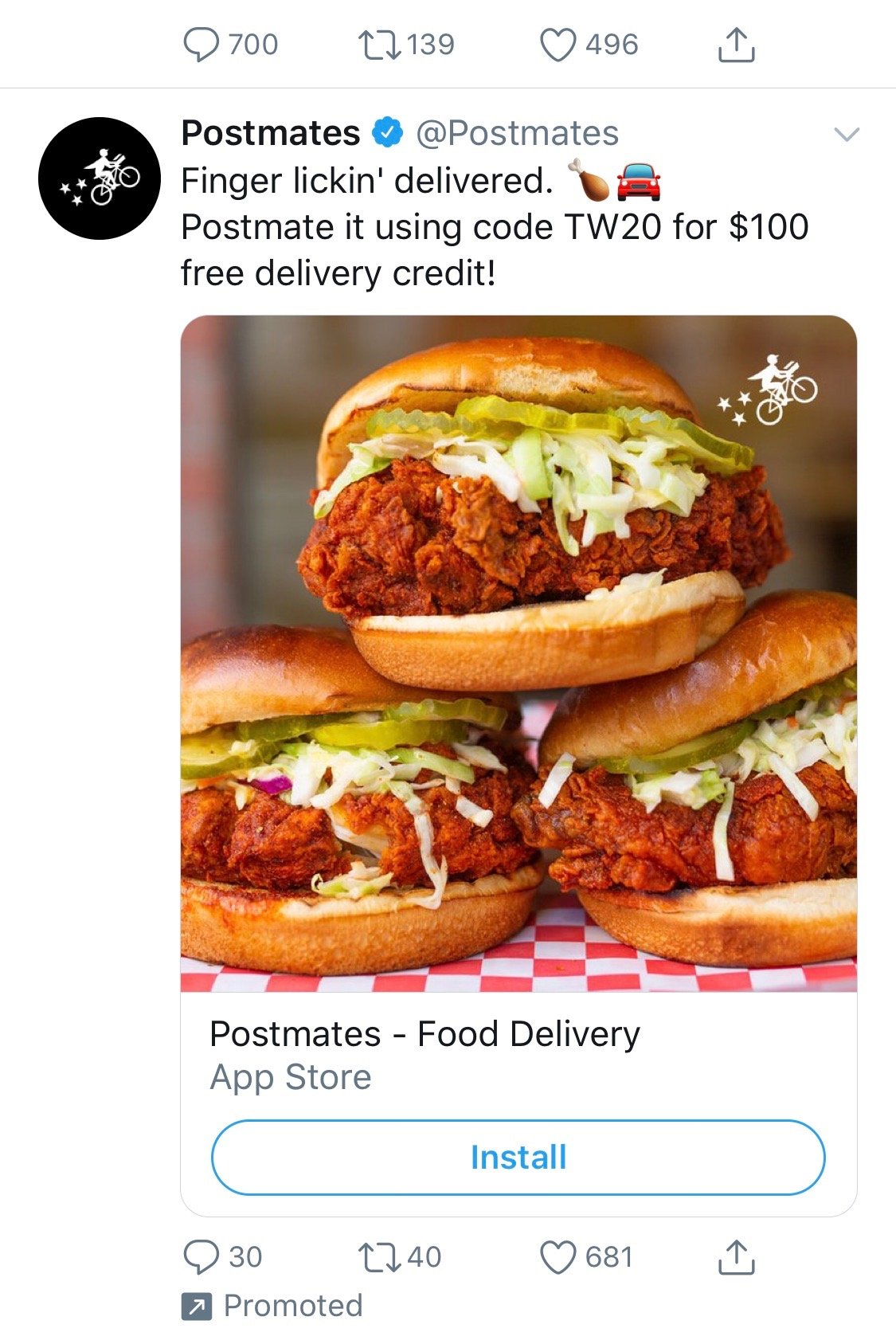
The ad also has an attention-grabbing photo sure to stop any hungry Twitter user in their tracks. They make it easy for leads to click on the CTA to download the Postmates app if they choose, or continue scrolling through their feed.
4. Workhuman LinkedIn Ad
Workhuman, a human resources company, advertises their business on LinkedIn. Due to the professional nature of LinkedIn, and the networking capabilities the platform has, it’s ideal for an HR firm to advertise their services, job openings, and more.

The company created a sponsored ad on LinkedIn to promote their marketing job openings. The easy-to-understand ad caption, image, and CTA don’t feel disruptive or out of place on the professional network. And considering the frequency in which people log onto LinkedIn to identify job opportunities, it’s an ideal location for this type of advertisement.
5. Hopper Snapchat Ad
Hopper has a Snapchat ad that appears when users are looking through their newsfeeds. The ad works in the form of a multi-part Snapchat video — the video includes a woman describing how the airline flight price checking and booking site works.

She’s talking directly to the camera on her phone in a conversational tone that makes it feel as though you’re simply watching one of your friend’s Snapchat videos. At the end of her casual Snap video is a CTA that provides users the opportunity to head to the Hopper website or just continue working their way through their newsfeed, disruption-free.

Get Started With Social Media Advertising
The paid social advertising landscape is always evolving, to be a superstar paid marketer you need to be reactive to new channels, tactics and formats on an ongoing basis. Get started by planning your strategy so you can create your next social media ad.
Editor’s note: This post was originally published in May 2016 and has been updated for comprehensiveness.

How to Make a Procurement Management Plan
Why Playing Games at Work Could Increase Productivity and Employee Satisfaction
Consider this — you’re trying to add the final slides to an important presentation, but you can’t seem to finish. Secretly, you want a change of scenery. You either want to pull up a game of solitaire on your laptop, or play Words With Friends on your phone.
You can’t though, because you’re at work. Your team or manager may not like it. It’s simply not acceptable.
You might know the feeling.
Despite cultural notions that playing games at work is counterproductive, it’s actually quite the opposite. Games can be a great tool to create a better work environment for a number of reasons. In fact, games can help your team increase productivity and overall employee satisfaction. Keep reading to learn how.
1. Games can bridge the gap between work and leisure.
Many people seem to think of work as entirely distinct from their home life. Home is a place of relaxation, while work might seem like “merely a chore“.
Gaming in the workplace allows this gap to be bridged — since gaming is associated with relaxation and the “home” aspect of one’s life, incorporating gaming into the work environment makes work feel more fun.
Games are a surefire way of boosting employee satisfaction. They can prevent employees from seeing work as a “negative” facet of their lives, and instead allows for employees to associate work with relaxation and joy.
2. Games are a great way to release stress.
Granted, work can be stressful. Clients, deadlines, challenging coworkers … the list goes on.
Gaming is an excellent way to release any pent up stress one may have surrounding their job (or life in general). In fact, gaming is known to have powerful stress-relief properties, so incorporating gaming into the workplace can provide an avenue for employees’ to eliminate daily stress.
And eliminating stress isn’t just important for your employees’ satisfaction — it’s critical for your bottom-line, as well, since happy employees are more productive employees.
3. Games can create an environment of trust.
Today’s workforce wants an environment of autonomy, and having a culture where games are acceptable underscores exactly that. Gaming in the workplace signals a relaxed and friendly company culture that allows employees to both work hard, and play hard.
More importantly, it’s a sign that companies trust their employees to manage their time and personal productivity.
Gaming also has the added benefit of helping talent acquisition and retention. If someone you want to hire is deciding between your company and someone else’s, the unique factor that gaming provides may become the differentiator that causes them to choose and stay with your company.
4. Games support Pomodoro-style productivity.
Short breaks are known to boost cognitive function significantly, as highlighted by the Pomodoro technique, which encourages breaks between learning and working. Working for brief periods with short breaks in-between can lead to a work output of much greater quality and quantity compared to working for long stretches at a time.
In fact, the Pomodoro technique can be used in many facets of life — reading a book, working on a project, learning a subject, or even activities involving physical exertion. These Pomodoro breaks from work can be made more effective if gaming is involved, since the breaks become truly immersive and free of any relation to work.
Merely taking a few minutes off work isn’t as effective, since your mind will probably still be on work. However, if you spend those breaks gaming, your break will be truly separate from any work activities. When you get back to work, you’ll be able to do so with a fresh mindset.
5. Games can initiate team bonding.
Any good team needs to be cohesive. The relationships that coworkers forge between each other not only lead to friendships, but can also help the workplace achieve better results thanks to teamwork and improved communication. Fortunately, gaming is one of the best ways to foster strong social bonds.
Gaming together provides an opportunity for coworkers to bond together over non-work related activities. This fosters a sense of community and helps the team bond. Getting closer with coworkers allows you to operate as a single unit with less discrepancies, resulting in a much more productive workplace overall.
Regular gaming in the workplace is an excellent way of ensuring that your office is as efficient and effective as it can possibly be, since it ensures your team members have stronger relationships and a sense of camaraderie with one another.
If your company does not embrace any type of gaming, try incorporating it in small ways. Perhaps you can organize a team building event at Escape the Room, or bring a checkers board to the lunch area. You’ll find that it improves the workplace in invaluable ways.

6 Costly Facebook Ad Mistakes and How to Fix Them
Want better results from your Facebook ad campaigns? Are you making one of these six mistakes that could reduce your Facebook ad results? In this article, you’ll discover six Facebook advertising mistakes and how to fix them. #1: Mistake: Facebook Ads Aren’t Aligned With a Funnel The biggest mistake that Facebook advertisers make on the […]
The post 6 Costly Facebook Ad Mistakes and How to Fix Them appeared first on Social Media Marketing | Social Media Examiner.
from Social Media Marketing | Social Media Examiner https://ift.tt/39TLiDF
via socialmediaexaminer
5 Brands That Let You Try a Product Before Buying It [What Marketers Can Learn]
Recently, I took a leap of faith, and bought leggings online.
I was nervous because of the obvious: I couldn’t see the leggings in person or try them on in-store, and I wasn’t sure how the sizing worked. I didn’t want to pay for shipping and item tax without even knowing if I was going to love my purchase.
During the checkout process, I kept thinking about how much I wanted to try the leggings on before I bought them, just to make sure I was making a good choice. The fear of not knowing made me hesitant to spend money online.
Even though ecommerce is a booming industry, projected to earn $6 trillion in 2022, there’s still some anxiety for consumers when buying products through a screen.
Fortunately, some brands have taken that into consideration, and have come up with a way to let consumers try products and services before purchasing them.
You may be wondering how try-before-you-buy services work online. Additionally, you might question why businesses would send prospective customers products with no commitment, or how to start a business that offers a similar service.
To answer your questions and offer some inspiration, we’ve made a list of five brands that offer unique try-before-you-buy models and takeaways marketers can gain from them.
Who knows — maybe you’ll find the model you can emulate for your business.
Let’s take a look.
1. BlackCart
BlackCart was created to make try-before-you-buy shopping less of a painful guessing game for merchants. They offer a service for merchants that want to implement a try-before-you-buy option within their online store.
With BlackCart, merchants can enjoy integrations with Shopify, Magneto, and WooCommerce, customization options to fit their branding, and no fulfillment charges, all on a fully automated platform.
Merchants can use multiple settings to personalize the sale and shopping experience on their website. These settings include choices such as placing the trial period, exclusions, minimums, a deposit requirement, price, and refunds.
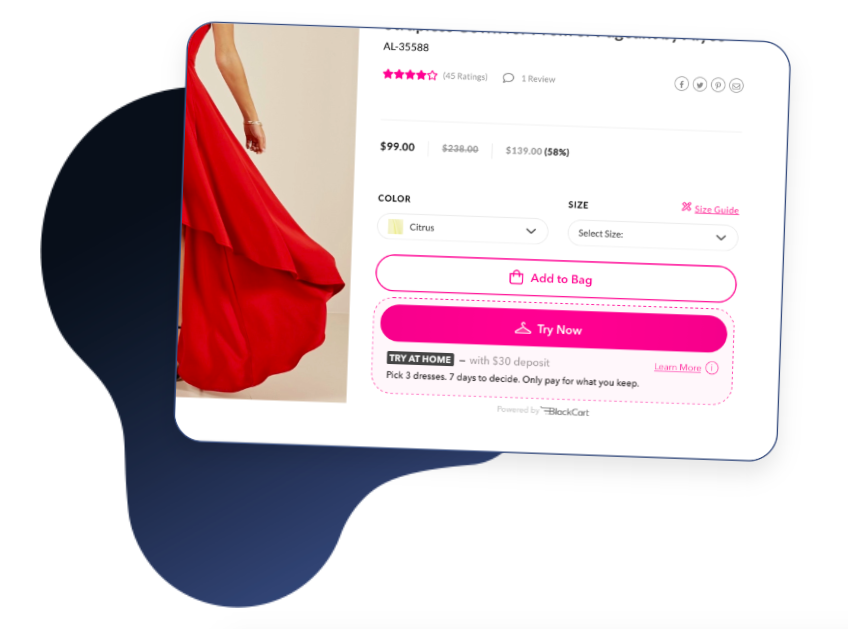
On the consumer side, shoppers can select items to try from the merchant’s website and pay a fee set by the merchant (shown in the photo above). From there, the items are shipped to try on at home for the time period set by the merchant. After the customer sends unwanted items back, the kept items are charged automatically.
Online business owners will appreciate that BlackCart fits in as part of a merchant’s online store. BlackCart is an example of B2B having a place with try-before-you-buy services as well. They make sure the merchant experience is seamless so they can focus on delighting the consumer.
2. Warby Parker
As someone who wears glasses, I was especially interested to dive into how Warby Parker works. Here’s the low-down: consumers try five pairs of frames at home for free, prescription-ready, pick and pay for the frame(s) they like, and send the rest back.

Let’s expand on that.
Warby Parker’s shopping experience can start a few different ways: consumers can either begin shopping for glasses right away or take a quiz for suggested pairs. All consumers need to do is upload their prescription to get started.
If you don’t have an updated prescription, you can receive one from Warby Parker by booking a comprehensive eye exam at a physical store location. After about 20 minutes, you’ll receive a prescription on the spot. This option shows the business’s commitment to being a full-service eyewear company.
Marketers can learn from the no-hassle way Warby Parker is run. The site is very straight-forward, and answers all the questions a glasses-wearer might have. For selection, the site organizes choices by frame type, color, fit, and material. The user-friendliness and simple process takes the pain out of setting appointments and waiting weeks for new glasses.
3. Casper
Casper is a mattress company that provides consumers with 100 nights of trying out their new bed before they commit to buying it. Additionally, the company offers free shipping, returns, and a 10-year limited warranty on all mattresses.
Casper offers six different mattress types and sizes, like ‘The Wave,’ pictured below.

On the website, consumers can also purchase other bedding items, such as sheets, glow lights, or pillows, to complete a shopper’s bedroom experience. After a consumer picks their mattress, extras, and finishes their trial, they make the decision.
If the consumer does not fall in love with their mattress, they can enjoy a full refund of the mattress and ship it back for free. If they do love their mattress, they get to keep it and enjoy night 101 with their new bed.
Casper’s extended free trial is something unique to their service. The idea is that customers can take the time to get used to their new mattress and incorporate it into their nightly routine. After a couple of months with a new mattress, it would be a culture shock to go back to a different one.
Best of all, customers can feel peace-of-mind knowing that even if they make a huge purchase such as a mattress, they can receive a full refund and free return if they’re not happy — but if they are, their job is done.
4. Stitch Fix
Stitch Fix is an online clothing company that lets customers create a personalized shopping experience using collections made by real stylists. Customers can take a style quiz, set their budget, and pay a $20 styling fee.
Then, after paying the styling fee, customers get sent five pieces based on their quiz answers and budget, which they can try on at home before they commit to a purchase. They keep their favorites, send back the others with the company’s free shipping policy, and that’s it.
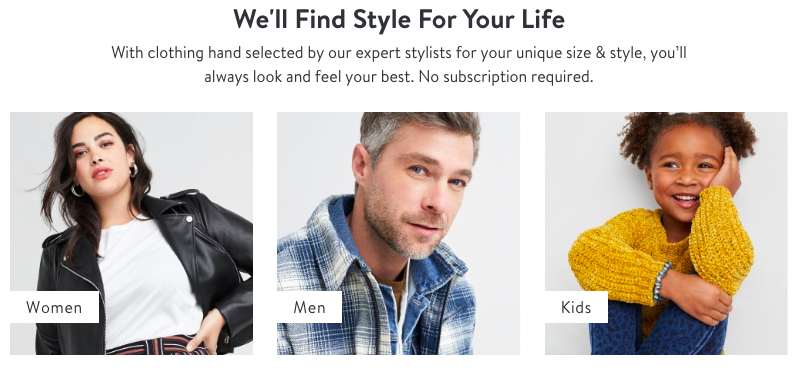
Stitch Fix’s wardrobe options include a variety of brands. A customer, depending on their budget, can receive clothes from retailers including The North Face, Free People, Calvin Klein, Nike, Bonobos, Toms, and O’Neil.
The company’s model is appealing to customers who don’t want to leave their house to find an outfit they’d love. The style quiz, with questions about sizing, shopping behavior, and personal preference, is built to ensure that customers will receive choices they like.
The company also doesn’t run on a subscription, so there’s no set commitment. Customers also can enjoy free shipping and returns using Stitch Fix, and the $20 styling fee is a credit towards the items kept, so the customer will always have $20 off their purchase.
Stitch Fix’s service gives the power to the customer and delivers the most personalized shopping experience possible to the shopper, from the style quiz to the curated collections by real stylists. They take the worries out of commitments to online shopping, such as shipping prices, incorrect sizing, and receiving items you might not like.
5. Prime Wardrobe
Amazon Prime offers a try-before-you-buy service through their clothing service, Prime Wardrobe. The model is very similar to the previous examples — customers get to shop on the website and choose up to eight items to enjoy for seven days, and they’re only charged for what they decide to keep.
Members can enjoy a full-service shopping experience, with options sorted by style, occasion, or fit, shown below. For consumers that want even more help, Prime Wardrobe offers a Personal Styling tool that chooses items based on customer preferences.

A customer might choose Prime Wardrobe if they are already a Prime member for the ease of the process. It can feel like an exclusive membership because Wardrobe is only available to Prime members.
Prime Wardrobe customers can enjoy free shipping and returns, as well as the speedy delivery process of being a Prime member. Marketers can take note of the fact that even though Amazon didn’t start as a try-before-you-buy service, they fit one into their business model to delight customers even further.
Try-before-you-buy programs are so versatile, and marketers can definitely take note of the unique ways these programs delight customers and personalize the shopping experience. As a consumer, I’d be more drawn to a business so confident in their product that they offer it for free before commitment.
As a marketer, I see the value in assuring consumers that their experience will be top-notch. Did you see a service that persuaded you to try-before-you-buy?

The Ideal Marketing Stack for Every Stage of Your Business
If your business has a web presence, odds are you support it with marketing tools — plural. If your marketing efforts rely solely on a single, siloed application, you’re selling yourself short.
Digital marketing efforts are generally a sum of several parts — a collection of tools and resources that serve distinct purposes, complement one another, and ultimately work together to generate and convert leads.
That “sum of several parts” is often referred to as a marketing tech stack. Let’s get some perspective on what that term means, which specific tools you can use to compose one of your one, and how those tools can help you through every stage of your business.
When constructing a marketing stack of your own, don’t hesitate to diversify. It can include everything from social media marketing resources to content intelligence software.
Include anything and everything you feel you need — so long as you can afford it. Your stack could wind up looking nothing like those of other companies in your space, and that’s fine.
Stacks are often specific to individual businesses’ particular structures and strategies. Your main priority is finding the tools that best suit your company’s needs, ambitions, and budget.
Your Marketing Stack Grocery List
Every marketing tech stack should be tailored to aid with three functions: attracting prospects, engaging them, and analyzing the interactions you have with them. Each stage of that process can involve several possible tools.
Attract
SEO Tools
SEO — or search engine optimization — has become a crucial component of most companies’ digital marketing efforts. Online visibility is an invaluable asset to any business with a web presence.
If your website turns up on the front page of Google when someone searches for a keyword — relevant to your space — your business will look more trustworthy and legitimate. That won’t be lost on the savvy, skeptical prospects of the modern age.
A solid presence on search engine pages is no longer a luxury, specific to large enterprises. It’s becoming a necessity for businesses of any size — particularly those in ecommerce. No matter what your business does, you’ll gain a lot from well-constructed, well-executed SEO efforts. Having tools to help facilitate those in your marketing stack is a big help.
SEO tools: Ahrefs, Botify, Browseo
SEM Tools
Paid advertising on search engines has become one of the most popular lead generation tactics among marketers. Just like SEO, SEM — or search engine marketing — can be central to improving your company’s online visibility. The quality of your SEM determines the placement of your paid ads on search engines. And just like a well-executed SEO effort, exceptional SEM adds a new layer of credibility to your marketing.
High ad placements mean your marketing material is relevant to your prospects and achieving its purpose. If you’re willing to budget for paid ads, then look into incorporating SEM tools into your marketing stack. They’ll allow you to get the most value of those kinds of campaigns.
SEM tools: Hubspot Ads, SEMrush, Supermetrics
Social Media Marketing
Social media plays a significant role in most companies’ digital marketing. 91% of all businesses in the United States use it to support their marketing efforts. And for good reason — seven out of ten American adults have a presence on at least one social media platform.
The concept of social media is inherently personal. Users are encouraged to express their interests on their preferred platforms, making them some of the most straightforward locations to identify and reach interested prospects. An effective marketing stack will almost always include resources to help your social media efforts.
Social media tools:
Content Creation and Blogging Tools
Content creation is central to any marketing effort that relies on organic traffic. A well-maintained blog is one of the most effective assets available for garnering and retaining interest from prospects.
If you can establish yourself as a thought leader in your industry through the content you produce, you’ll bring in a base of customers with an immediate interest in you and your space. That’s why it’s important to consider incorporating content creation and blogging tools when constructing your marketing stack.
Content creation tools: HubSpot, WordPress, Wix
Engage
Chatbots
Once you’ve hooked prospects with your lead generation tools, make them feel important. Demonstrate how much you value them and their business. Offer them their first experience with your exceptional customer support. Chatbots can be a big asset to that process. They can guide and gauge customer interest while also answering questions your prospects might have about your product, service, or business as a whole — no matter when they ask them.
This kind of software allows you to engage with your prospects automatically. If you create helpful, intelligent chatbots that can explain your product or service comprehensively, you’ll demonstrate that your business is well-managed and able to answer questions they might have as customers.
Chatbot software: HubSpot, Drift, LivePerson
Email Marketing
When done right, email marketing can both capture and sustain your leads’ interest. It’s designed to guide them through the purchasing process. Email marketing software allows you to reach a wide range of prospects with a degree of personalization that most other marketing applications can’t offer. You can send content to leads based on their interest levels, buyer personas, and where they stand in their buyers’ journeys.
Email marketing tools allow you to connect with and engage prospects on a more personal level than others on this list. There are several types of email marketing software available, and a solid marketing stack generally features one.
Email marketing software: MailChimp, Constant Contact, ActiveCampaign
Marketing Automation
A solid Marketing automation software might be the most critical application to include in your marketing stack. Almost every other tool on this list can hinge upon the data marketing automation tools can gather. Marketing automation platforms can organize and store customer data, score and manage leads, and perform several other functions to help construct and guide your marketing campaigns.
An exceptional marketing automation platform provides the foundation for a well-constructed marketing stack. No matter how you want to structure yours, consider adding marketing automation tools above all else.
Marketing automation software: HubSpot, Ontraport, Nextiva
Sales Engagement Platforms
Your company’s content and messaging should have some degree of consistency to them. You want your business to have a unique voice, message, and messaging cadence. Sales engagement platforms can help you establish that. They contain resources that allow content and messages to be centrally accessed and edited throughout an entire company, ensuring cohesion in messaging for sales and marketing efforts.
Sales engagement platforms perform other functions as well, including enabling integrated communication within your business, offering engagement analytics, and providing actionable insights and guided selling. If you want help defining your brand voice, consider incorporating a sales engagement platform into your marketing stack.
Sales engagement platforms: Outreach, SalesLoft, ClearSlide
Analyze
Web Analytics
If you want to understand how your prospects and leads are interacting with your website, you’ll need web analytics software. Like a marketing automation platform, it’s one of the most crucial components to an effective marketing stack. It measures, reports, and analyzes your web traffic, providing the basis for you to gauge the efficacy of your online marketing efforts and understand what you could be doing better.
Without web analytics software supporting your marketing stack, you could be shooting in the dark when it comes to honing your marketing efforts. You need to know what is and isn’t working for you, and web analytics software is one of the best means of understanding that.
Web analytics software: Sisense, Google Analytics, Looker
Business Intelligence
Business intelligence software tracks customer purchasing patterns and trends. It’s an aggregate of tools used by companies to retrieve data, analyze it, and ultimately turn it into actionable insights and solutions. The data business intelligence software uses comes from internally generated data — not from outside sources.
Business intelligence software can be another useful tool in a marketing stack. By leveraging one to track customer purchasing patterns, you can get a new layer of insight that can ultimately guide your marketing efforts.
Business intelligence software: Oracle BI, Domo, Tableau
Content Intelligence Software
Content intelligence software analyzes your customer data using artificial intelligence, machine learning, and natural language processing to improve your content marketing efforts. It can give insight into what content you should share, update, and promote — among other important factors and actions relevant to the content you produce.
If you’re making a substantial push in terms of content marketing, you could get a lot of mileage out of including this kind of software in your marketing stack. It can help you identify the right voice and topics necessary to establish yourself as a thought leader in your space.
Content intelligence software: Ceralytics, Crayon, BuzzSumo
A/B Testing
A/B testing software is designed to help you optimize your conversion rate. With A/B testing, two or more versions of a single webpage at random to your website visitors and identifies which version has the best conversion rate. It’s an effective way to hone your marketing efforts by allowing you to experiment with different web copy, messaging materials, and content.
Leveraging A/B testing is an effective way to bolster your marketing efforts. It allows you to better understand what your customers want out of your messaging. If you’re interested in tools to help you refine the tone and strategy you use to reach your customers, this kind of software can be a valuable asset to your marketing stack.
A/B testing software: Optimizely, VWO, Adobe Target
There’s no definitive list of resources you absolutely need to use to build your optimal marketing stack. You might wind up constructing one entirely specific to your business. Ultimately, you have to feel out how which applications and platforms work best for your needs, structure, size, and budget. Regardless of what it ends up looking like for you, a marketing stack will almost always be an asset to your online marketing efforts.

YouTube Rolling Out New Ads and Analytics Features
Welcome to this week’s edition of the Social Media Marketing Talk Show, a news show for marketers who want to stay on the leading edge of social media. On this week’s Social Media Marketing Talk Show, we explore updates to YouTube ads and analytics, and Stories features updates on Facebook and Instagram, Twitter, and LinkedIn. […]
The post YouTube Rolling Out New Ads and Analytics Features appeared first on Social Media Marketing | Social Media Examiner.
from Social Media Marketing | Social Media Examiner https://ift.tt/2xxFkd6
via socialmediaexaminer
How to Create an SEO Strategy for 2020 [Template Included]
Here’s a cliche among digital marketers: Search engine optimization (SEO) isn’t what it used to be.
Here’s a true statement you don’t hear as often: Your SEO strategy for 2019 shouldn’t focus on keywords.
These days, most businesses understand the basic concepts of SEO and why it’s important.
However, when it comes to developing and executing a sound SEO strategy for your business, just creating content for the keywords your customers are searching for is both arduous and, well, wrong.
What is an SEO?
Search engine optimizers (SEOs) are people who optimize websites to help them show up higher on search engines and gain more “organic traffic.” In essence, an SEO is a highly specialized content strategist, and helps a business discover opportunities to answer questions people have about the industry via search engines.
Here are three types of SEO that an SEO strategist can focus on:
- On-page SEO: This SEO focuses on the content that’s “on the page,” and how to optimize that content to help boost the website’s ranking for specific keywords.
- Off-page SEO: This SEO focuses on the links that are directing to the website from elsewhere on the internet. The number of “backlinks,” and the publishers carrying those links, that link to your website help you build trust in the eyes of a search engine. This causes your website to rank higher as a result.
- Technical SEO: This SEO focuses on a website’s architecture, examining the backend of that website to see how each webpage is “technically” set up. Google cares as much about the code of a website as it does its content, making this speciality quite important to a website’s search engine ranking.
Bear in mind that not every business can optimize their website for search the same way, and therefore not every SEO will have the same optimization process. It’s an SEO’s job to examine his or her industry, find out what’s important to their audience, and develop an SEO strategy that puts the right content in front of that audience.
With that in mind, here are nine steps you can take to make sure all of your SEO bases are covered in 2019. Then, at the bottom of this blog post, you can grab your free planning template to master on-page SEO.
1. Make a list of topics.
Keywords are at the heart of SEO, but they’re actually not your first step to an organic growth play anymore. Your first step is to make a list of topics you’d like to cover from one month to the next.
To start, compile a list of about 10 short words and terms associated with your product or service. Use Google’s Keyword Tool to identify their search volume and come up with variations that make sense for your business.
You are associating these topics with popular short-tail keywords, as you can tell, but you’re not dedicating individual blog posts to these keywords. These keywords are simply too competitive to rank highly for on Google if you’re just starting to optimize your website for search. We’ll go over how to use these topics in just a minute.
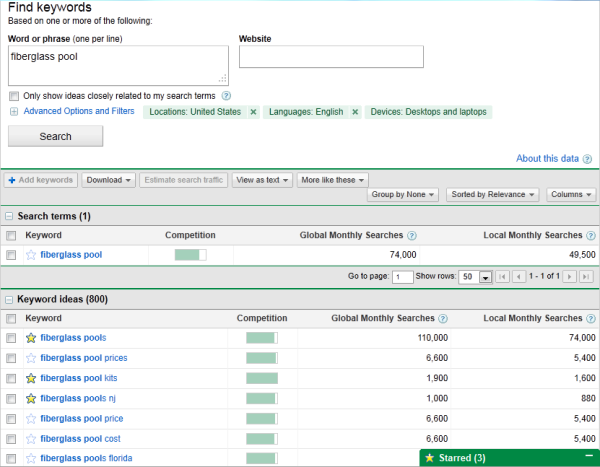
Using search volume and competition as your measure, narrow down your list to 10-15 short-tail keywords that are important to you, and that people within your audience are searching for. Then rank this list in order of priority, based on its monthly search volume and its relevance to your business.
For example, if a swimming pool business is trying to rank for “fiberglass pools” — which is receiving 110,000 searches per month — this short-tail keyword can be the one that represents the overarching topic on which they want to create content. The business would then identify a series of long-tail keywords that relate to this short-tail keyword, have reasonable monthly search volume, and help to elaborate on the topic of fiberglass pools. We’ll talk more about these long-tails in the next step of this process.
Each of these keywords is called a “pillar,” and it serves as the primary support for a larger “cluster” of long-tail keywords, which is what brings us to our next Step …
2. Make a list of long-tail keywords based on these topics.
Here’s where you’ll start optimizing your pages for specific keywords. For each pillar you’ve identified, use your keyword tool to identify five to 10 long-tail keywords that dig deeper into the original topic keyword.
For example, we regularly create content on the topic of “SEO,” but it’s still very difficult to rank well on Google for such a popular topic on this acronym alone. We also risk competing with our own content by creating multiple pages that are all targeting the exact same keyword — and potentially the same search engine results page (SERP). Therefore, we also create content on conducting keyword research, optimizing images for search engines, creating an SEO strategy (which you’re reading right now), and other subtopics within SEO.
This allows a business to attract people who have varying interests in and concerns about owning their product — and ultimately create more entry points for people who are interested in buying something.
Use subtopics to come up with blog post or webpage ideas that explain a specific concept within each larger topic you identified in Step 1. Plug these subtopics into your keyword research tool to identify long-tail keywords on which to base each blog post.
Together, these subtopics create a cluster. So, if you have 10 pillar topics, they should each be prepared to support one cluster of five to 10 subtopics. This SEO model is called a “topic cluster,” and modern search engine algorithms depend on them to connect users with the information they’re looking for.
Here’s a short video on this concept:
Think of it this way: The more specific your content, the more specific the needs of your audience are — and the more likely you’ll convert this traffic into leads. This is how Google finds value in the websites it crawls; the pages that dig into the interworkings of a general topic are seen as the best answer to a person’s query, and will rank higher.
3. Build pages for each topic.
When it comes to websites and ranking in search engines, trying to get one page to rank for a handful of keywords can be next to impossible. But here’s where the rubber meets the road:
Take the 10 pillar topics you came up with in Step 1 and create a web page for each one that outlines the topic at a high level — using the long-tail keywords you came up with for each cluster in Step 2. A pillar page on SEO, for example, can describe SEO in brief sections that introduce keyword research, image optimization, SEO strategy, and other subtopics as they are identified. Think of each pillar page as a table of contents, where you’re briefing your readers on subtopics you’ll elaborate on in blog posts.
Use your keyword list to determine how many different pillar pages you should create. Ultimately, the number of topics for which you create pillar pages should coincide with how many different products, offerings, and locations your business has. This will make it much easier for your prospects and customers to find you in search engines no matter what keywords they use.
Each web page needs to include relevant content for your prospects and customers and should include pictures and links to pages on your site to enhance the user experience. We’ll talk about those links in Step 4.
4. Set up a blog.
Blogging can be an incredible way to rank for keywords and engage your website’s users. After all, every blog post is a new web page that gives you another chance to rank in search engines. If your business does not already have a blog, set one up. This is where you’ll elaborate on each subtopic and actually start showing up on Google.
As you write each blog post and fill up your clusters, you should do three things:
- First, don’t include your long-tail keyword more than three or four times throughout the page. Google doesn’t consider exact keyword matches as often as it used to. In fact, too many instances of your keyword can be a red flag to search engines that you’re “keyword stuffing.” This can penalize your website and drop your rank.
- Second, link out to the pillar page you created on this topic. You can do this in the form of tags in your content management system (CMS), or as basic anchor text in the body of the article.
- Once you publish each blog post, link into it from the pillar page that supports this subtopic. Find the point in your pillar page that introduces this blog’s subtopic, and link it here.
By connecting both the pillar and the cluster in this way, you’re telling Google there’s a relationship between the long-tail keyword and the overarching topic you’re trying to rank for.
5. Blog every week to develop page authority.
Not every blog post or web page you write needs to belong to a topic cluster. There’s also value in writing about tangential topics your customers care about in order to give your website authority in the eyes of Google. This will cue Google to pay extra attention your domain as you add content to your primary topics.
With that in mind, make a point to blog at least once a week. Remember, you are blogging primarily for your audience, not the search engines. Write about things your audience and/or prospects are interested in, make sure you’re including relevant keywords where appropriate, and your audience will slowly start to notice and click.
Keep in mind that each topic won’t be equal in importance, and as your clusters get off the ground, you’ll need to prioritize based on your company’s needs. So, create a list of all the different web pages you would like to create and rank them. Then, develop a schedule and devise a plan of attack to get those pages built.
Keep your list updated and prioritized by what web pages will help you to best achieve your business goals.
6. Create a link-building plan.
The topic cluster model is your way forward in SEO this year, but it’s not the only way to get your website content to rank higher once it’s been created.
Our first five steps were dedicated to on-page SEO tactics. Link-building is the primary objective of off-page SEO, and is also a huge factor in how search engines rank your web pages. What is link-building? Glad you asked.
Link-building is the process of attracting inbound links (also called “backlinks”) to your website from elsewhere on the web. As a general rule, the more page authority the origin website has, the bigger affect it will have on the rank of the web page to which it is linking.
Dedicate some time to brainstorm all the different ways you can attract inbound links to your website. Start small –- maybe share your links with other local businesses in exchange for links to their sites. Write a few blog posts and share them on Twitter, Facebook, Google+, and LinkedIn. Consider approaching other bloggers for guest blogging opportunities through which you can link back to your website.
Another great way to attract inbound links is to use your blog to post articles related to current events or news. That way, you have shot of getting linked to from an industry influencer or other bloggers in your industry.
7. Compress all media before putting it on your website.
This is a small but important step in the SEO process. As your blog or website grows, you’ll undoubtedly have more images, videos, and related media to host there. These visual assets can help retain your visitors’ attention, but it’s easy to forget these assets are still technically computer files — and computer files have file sizes.
As a general rule, the bigger the file size, the harder it is for an internet browser to render your website. And it just so happens that page speed is one of the most important ranking factors when search engines decide where to place your content in its index.
So, the smaller the file size, the faster your website will load, and the higher you can rank on Google as a result. But how do you shrink a file size once it’s on your computer?
If you’re looking to upload an image to a blog post, for example, examine the file for its file size first. If it’s anywhere in megabyte (MB) territory, even just 1 MB, it’s a good idea to use an image compression tool to reduce the file size before uploading it to your blog. Sites like TinyPNG make it easy to compress images in bulk, while Google’s very own Squoosh has been known to shrink image file sizes to microscopic levels.
Ultimately, keeping your files in the kilobytes (KB) can sufficiently protect your website’s page speed.
Be careful when compressing your images, and check the file’s actual size once you export it back to your computer. While some tools might not be true to the size it shows you, others can sacrifice some image quality when compressing the artwork.
8. Stay current on SEO news & practices.
Like the overall marketing landscape, the search engine space is ever-evolving. Staying on top of current trends and best practices is a difficult task, but there are multiple online resources that can make it easy for you to stay on top of SEO news and changes that may impact your website and your SEO strategy.
Here are a few resources to check out:
9. Measure and track your content’s success.
SEO can take a lot of time and effort. What good is spending all this time and effort if you can’t see the fruits of your labor? There are many metrics you can track on a daily, weekly, or monthly basis to keep your SEO plan on track and measure your success.
Because the metric you care about is organic traffic (traffic that comes from a given search engine), seek out a tool that allows you to track both your overall organic traffic number and how your pages are ranking under each long-tail keyword your pages are targeting. SEMrush is a great reporting tool for just this purpose.
Create a monthly dashboard using Excel, Google Sheets, or a web analytics package so you can monitor how much traffic comes to your website from organic search.
Also, tracking indexed pages, leads, ROI, inbound links, keywords, and your actual ranking on SERPs (search engine results pages) can help you recognize your success as well as identify areas of opportunity.
SEO Process
Once you create your monthly SEO plan, you should also build a process to continue to optimizing it to fit new intent and keywords. Here are a few steps you can take.
1. Historically optimize your content.
Devote some time each month to updating old blog posts with new and up to date information so it continues to rank in SERPs. You can also use this time to add any SEO optimization that wasn’t in the original post, such as missing alt text.
2. Look out for changing keywords and new search intent.
After a few months, track where your blog posts are ranking and which keywords they’re ranking for. This can help you adjust subheads or text to leverage that new keyword ranking.
3. Add more editorial value to your old content.
Sometimes, you’ll find that a post is completely out of date. In this scenario, you should go beyond the average SEO update and give it a full refresher. You can do this by updating out of date information or stats, adding new sections that add depth to the post, or adding quotes or original data that can make the post gain more referral traffic.
4. Note new content and updates aimed at SEO in a monthly content plan.
To keep up with your SEO strategy, it can be helpful to create and refine a monthly content strategy. Then put your content plan into a spreadsheet or document that your team can monitor and track easily.
Below is an example of a content monthly content planning process that takes the steps above into account.
With a monthly SEO plan like the one above, plus a tracking document like a search insights report, you can build out and execute on an efficient SEO strategy. You can also identify and leverage low-hanging-fruit topics to discuss related to your industry.
To learn more about SEO, check out our Ultimate Guide to SEO
Editor’s Note: This blog post was originally published in April 2019 but was updated in March 2020 for consistency and freshness.

Best Resource Management Software of 2020

Instagram Strategy: Growing Your Followers and Business
Looking for a strategic approach to organic Instagram growth? Wondering how to develop content that will grow your business and your Instagram following? To explore how to use Instagram as a hub for shareable content that leads to business growth, I interview Vanessa Lau on the Social Media Marketing Podcast. Vanessa is a community development […]
The post Instagram Strategy: Growing Your Followers and Business appeared first on Social Media Marketing | Social Media Examiner.
from Social Media Marketing | Social Media Examiner https://ift.tt/2TN3hG4
via socialmediaexaminer
How to Use SEO Data to Make Better Marketing Decisions
As marketers, we know that search engine optimization (SEO) is necessary. It helps webpages rank highly on search engine results pages (SERPs). After all, 67% of all clicks go to the first five organic search results on Google.
So for traffic, SEO is a must.
But have you ever considered using SEO practices for, say, informing marketing decisions? Or creating networking opportunities?
Only using SEO for traffic purposes is closing the door to different ways you can use the skills you already have to inform decisions in other areas. To get an idea of the different ways to use SEO, we’re going to explain the types of SEO data, and a short list of how SEO data can lead to better marketing decisions.
Types of SEO Data
- Organic traffic — Organic traffic refers to the visitors that come to a website from the search engine results as opposed to paid ads. Organic traffic is important because it indicates whether or not your website has the answer to search queries that audiences are looking for.
- Organic impressions — Impressions are when digital content appears on the screen of the user, and organic impressions are when that happens without a paid ad. Impressions don’t suggest the user took action, but does suggest how far your reach is.
- Organic rankings — You might have noticed that Google ranks ads at the top of SERPs, and more rankings below. The rankings below those ads are organic, meaning they are what Google ranks your content based on how well it answers search queries.
- Keyword monthly search volume — Keyword monthly search volume is representative of the number of searches a keyword has over the course of a month. It represents how much interest there is in a particular keyword. You can measure MSV by region, but also globally. For example, a keyword can have 100 MSV in the U.S., 900 MSV worldwide.
- Number of backlinks — A backlink is the hyperlink on one webpage that links to another site. The number of backlinks your website has is important because it increases your chances of ranking highly on Google.
- Number of referring domains — These are websites that do the backlinking. So, for example, if you were to backlink this post to your site, then your site would have one referring domain. If you backlinked another post from another website, then you would have two. Referring domains can go up by the number of websites, but not the number of times a website was backlinked.
- Page speed (in milliseconds) — Page speed is determined by the amount of time it takes for a webpage to load. It’s determined by a multitude of different factors, such as file size and image compression. Page speed is important to SEO because a slow speed could cause a visitor to leave the site.
How SEO Data Can Help the Business
We’ve defined the types of SEO data that you can come across and use in different ways. In this section, we’re going to explain how the different components of SEO can positively impact business and marketing decisions.
1. Use search volume to guide product naming & branding.
Are you struggling to name your product in a way that will attract a large audience? Have your past few product launches not produced the results you were hoping for? Try using search volume to guide how you name and brand future products.
As I mentioned above, search volume refers to the number of times a search term is used by the public, and is usually presented in a per-month format. If you test the search volume of terms related to your product, you’ll be able to develop a name that reflects the types of words and phrases the public already uses to describe your service.
For instance, if you’re launching an online running apparel store, optimizing your product pages around the term “jogging shorts” won’t reach as big an audience as “running shorts,” because it’s likely that more search volume is going to the latter term.
You would want to name the product using language that has the most search volume. Following the search volume ensures that you’ll name the product in a way that aligns with how the public is referring to it.
2. Organizing your keyword strategy by interest level.
Every stage in the buyer’s journey is different, and because of that, search queries will differ based on which stage the customer is in.
Let’s look at an example of catering to the buyer’s journey using SEO.
The search query “what is inbound marketing” is most likely used by someone who is early into their journey, and still learning about the concept of inbound marketing. Alternatively, the query “inbound marketing software” suggests that person is already looking for a tool to solve their problem, and that they’re in a much later-stage of their purchase decision.
If you organize keywords by buyer’s journey stages, you’ll be able to develop a strategy that delivers the best experience to the customer. You can also analyze the traffic from these keywords to see how well your business is performing in the different buyer’s journey stages.
3. Use collected data to create a strategy that caters to the customer.
When you collect traffic data from your website, are you using it to see how you can improve the customer experience? SEO data can be used to assess how specific areas of your overall content strategy can be improved.
For instance, if you’ve noticed that you’re driving high traffic numbers on a content offer page — an ebook or webinar, for example — but aren’t noticing much conversion to the offer itself, that could be an indicator that your consideration-stage buyers aren’t finding their experience on your page useful.
Sort your content by topic, such as the buyer’s journey stage or content type, and analyze the traffic of pages related to those topics. This will give you an idea of how you can optimize your content so it performs well at any stage of the buyer’s journey.
4. Use organic rankings to find and understand competition.
You can use organic ranking to see how your product or content compares to your competitors. Not every business depends on a search engine to acquire customers, but even if you don’t, seeing how your competitors rank for search terms related to your industry can tell you what they’re doing that’s working. So, when you Google your product, where does your business fall on the SERP as opposed to others? If there are websites ranking above yours, try doing a quick crawl.
Think about how the website’s content might be valuable to customers, and how you can improve your content to convey messages in a way that resonates with them.
Note how competitors’ websites are different than yours. Are the webpages quick to load? Do the webpages rank for keywords that you don’t even show up for?
These are small technical changes that have a large impact on SEO. Loading time and keywords are two SEO factors that contribute to overall user experience and SERP rank. You may be able to pull inspiration that solves two problems at once by reviewing what high-ranking competitors are doing to see if they’re offering a type of information that you’re not.
5. Use backlink data to identify networking opportunities.
Maybe there’s a specific topic you feel like you could write an expert blog post about. Identify keywords about that topic. If the keyword you find matches the intent of your target audience but the content would compete with some of your other website content, don’t scrap the idea.
Instead, reach out to similar websites in the industry and inquire about a guest post or guest contributor space. That way, your work will still be seen by the right audience, and you can drive traffic to your website.
Use SEO metrics like backlinks to figure out which sites are already citing you in their own content, and then identify which domains are backlinking to them. This is a great way to hunt around for partners with whom you might want to guest post or even run a co-marketing campaign.
Keyword research tools like Ahrefs, SEMrush, Serpstat, Conductor, Moz, and more allow you to find backlink data on all of the pages on your website, making this prospecting process easy.
Contributing a guest post also begins a relationship with another business in the industry. This connection can be useful for future collaborations, and helps you build backlinks to your website from the sites you’re contributing to. Remember, backlinks are a critical ranking factor in the eyes of Google.
Similarly, if you find there’s a topic you think would be great on your blog but don’t have the resources/time to write it, you can reach out to an industry professional to contribute. That way, you won’t lose the chance for your website to rank highly on the SERP, you still build an industry relationship, and it gives your business more credibility. (Also, it’s not a bad cross-promotion idea to fit into your social media content strategy).
SEO can’t solve every job function, but it can lead to more informed marketing decisions. When you use data, like search volume, you can begin to make content that’s more personalized for the customer. Additionally, you can cater to the customer experience at every level, and make sure your campaigns stay relevant.
The next time you find yourself stuck with branding, content ideas, or understanding your customer, think about how SEO can help with your challenge.

12 Great Examples That Prove the Power of Repurposing Content
Stagnant organic traffic is the last thing you want to see when reviewing metrics, but it’s an issue that every marketer deals with at some point.
Those dips and plateaus in traffic can come from industry changes, how your audience digests content, the amount (and quality) of new content you’re producing, or how relevant your older content is.
Sometimes, all your content needs is a little refreshing and repurposing to keep your audience interested. So to inspire your repurposing efforts, I put together some benefits and examples below. Check ’em out.
Why You Should Repurpose Content
One of my favorite tidbits of advice about content marketing comes from Social Triggers founder Derek Halpern, in a post on why bloggers fail.
“You don’t have to create content day in and day out. You just have to work on getting the content you already have in the hands of more people,” Halpern explains.
And that’s the main idea behind repurposing content: Take something you’ve created, put a new spin on it, and give it new life.
Aside from the fact that the hard work is already done, here are a few other benefits for repurposing content:
Reaching New Audiences
When you first publish a piece of content, the performance might be average. However, over time, it gains traction and does a little better. When you repurpose that content in a new format and/or update it, you can reach new audience segments that otherwise may have never found it.
Reinforcing Your Message
When discussing the merits of repurposing content, Kevan Lee of Buffer points out that repetition is important with marketing. Marketing’s Rule of Seven states that buyers need to hear your message approximately seven times before they will close the deal.
Rather than covering a topic once and letting it disappear into the archives, repurpose your articles to consistently deliver your message to your audience. This works great if you’re starting with high-value, authoritative content. It makes it easier to find unique ways to reinforce your message.
Improved Organic Visibility
Organic search still provides the majority of site traffic. One study from BrightEdge found that organic search holds a 51% share among traffic sources. If that’s accurate, then repurposing optimized content in various formats can give you a significant lift in organic visibility and traffic.
Publishing a variety of content gives you more access to search real estate for targeted queries. If you publish your content on other sites, then you’ll also (sometimes) have the benefit of backlinks.
How to Choose Content for Repurposing
When choosing content for repurposing, look at your metrics. Note what has performed well, and think about what can be done to deliver a fresh experience. Dig into your archives to find content that would benefit from being updated.
Previous successes and relevant topics are two indicators that if the content were repurposed, it would be valuable. If you’re stuck on ideas how, we have listed a few below:
List snippet for How to Repurpose Content
Once you’ve chosen your content for repurposing, the next step is to figure out how to do so and distribute it. Let’s talk about some ideas how.
1. Turn blog posts into podcasts.
If you come across a blog post with the content you’d like to expand on, turn it into a podcast episode. Podcasts can be a platform to deliver “dry” or “difficult” content in a digestible way. An ultimate guide you’ve written with a lot of sections could be a contender for a podcast episode.
Podcasts are also more accessible. Listeners would be able to access the information on the go, rather than reading a blog post on a desktop. This could also expand the reach of your content.
A podcast episode, or a series of podcast episodes, allows you to expand on the information and provide examples you’ve pulled from the post in a conversational way. You can also provide updated facts you’ve found. For distribution, put the podcast at the top of the existing blog post and promote it through social media and email list content strategies.
2. Turn internal data into case studies
What types of data do you collect, and how do you interpret them? If you gather social media metrics, collect SEO data, or analyze traffic performance, there’s room to use that data to make a case study. You can draw inferences from the data you’ve collected in the past and try to learn something new.
One benefit of turning collected data into a case study is that it shows your readership that you are effective at interpreting data. It makes your blog look more credible. Another is that by doing the study, you’ll have the chance to figure out the cause and effect of important decisions you’ve made for your business.
For distribution, you can turn the case study into a blog post, but you can also make it a content offer to potentially boost conversion. It can also be a special download offer for email subscribers.
3. Use webpage content for video content.
85% of internet users enjoy video content. Blog posts already contain a lot of valuable information, and an alternative to producing a podcast to deliver information is by making a short video.
Videos are engaging and entertaining. Personally, I enjoy watching video versions of blog posts because I am a visual learner, even if it’s just someone talking. A video that has a couple of interesting graphics could really pull the viewer in.
If you have a YouTube content strategy, producing a video with blog post information could fit into that strategy like a glove. This tactic makes your content available across more than one platform.
Another distribution idea for video content is to add it to your blog post. You can add “Video” to the title, keep the introduction, and use the video for the body. A shorter post entices skimmers who want to digest information quickly and concisely.
4. Gather content for an ebook.
If one of your business goals is to increase the amount of content offers you have, consider collecting a series of content, such as templates you’ve created, analyzation processes for data, or interview content into an ebook.
ebooks boost your business’s credibility and work well as content offers. There’s so many subjects you can cover with an ebook — for example, HubSpot offers free ebooks about SEO, channel growth, marketing psychology, customer support, and expert advice, just to name a few.
Publishing an ebook of information you already have lessens the work for you, because the majority of it is already written. All that would be left is organizing the content, publishing it (Amazon publishes ebooks for free), and distribution.
Other than making the ebook a conversion opportunity, you can also add promoting the eBook into a LinkedIn content strategy. Because LinkedIn is a platform for professional networking, announcing an ebook to your industry connections draws in a related audience.
5. Make a slide deck for SlideShare.
Let’s say you have a data report that you want to repurpose. For this, you can make a slide deck with the data report’s information and upload it to SlideShare. SlideShare is a platform on LinkedIn that, in a nutshell, lets you upload public, shareable slide decks.
If you’ve found that the data you want to turn into a SlideShare is expansive, you can turn the roll out of data into a series of slide decks, separated by topic or section. That way, skimmers can jump to the appropriate deck to find the information they need quickly.
A data report on SlideShare expands your LinkedIn content and makes your business stand out on LinkedIn. Not every business uses SlideShare, so you have the chance to attract connections on your feed that are interested in data and want an accessible way to read it.
6. Use testimonials for social media content or product pages.
Have you received some stunning testimonials about your product? You can use this content to beef up your product page or include in your social media strategy.
Adding testimonials in visible places draws in customers who don’t consider purchasing from a business without reading a testimonial. It also lets customers know that your business is already trusted by audience members.
Testimonials can also improve customer relationships. Putting reviews or testimonials in the spotlight sends a message to customers that their voice is being heard and matters.
7. Update old blog posts with new information.
If you run a blog, updating blog posts should be a part of your content strategy. A large number of posts that contain good information don’t have to stay lost in the past. As you’re combing through your blog archive, pick out posts that can still be valuable with a few tweaks.
Updating blog posts is also a great time saver. You don’t have to write a completely new post, and most of the content is already publish-ready. All you have to do is make the information current.
When it comes to distribution, you can notate in the title that the post has been updated with new information. It draws in readers looking for the latest data and readers who previously enjoyed the post will have a nice refresher. If you don’t have a current update strategy, take a look at our complete guide to learn how to choose the right posts for updating.
8. Use statistics for social media content.
Here’s a great use for collected data — turn it into a graphic and use it to diversify social media content. For instance, if you’ve got a statistic about millennial blog readers, you can turn that into a visual experience.
Statistics on a social media page, such as Instagram or LinkedIn, makes your page as a whole look credible. It shows the public that your business cares about industry data as part of your brand.
If a statistic on the main feed doesn’t fit in with your current strategy, try using other platform features for distribution. For instance, you can create an Instagram Story highlight for stats and upload them there. That way, you can turn statistics into a part of your content strategy in a way that doesn’t interrupt it.
9. Refer to blog content for online courses.
Let’s say one of your current marketing goals is to really crack down on producing video content. You already have a backlog of content to refer to for ideas. Consider turning blog posts into an online course.
If your blog is sorted by different topic clusters, for example, “local advertising” and “ultimate guides,” you can create a course based on the content you’ve written for the topic cluster. Or, if your business has a team or department based on certain topics, you can work with them to structure a course.
Online courses are effective in showing your business’s expert opinion on topics, so for distribution, include segmented email subscribers. Email subscribers have already communicated that they value extra content from your business, and are likely to check out your online course.
10. Offer guest contributions for topics you’ve already covered.
Repurposing content can also build industry relationships. Let’s say there’s a topic you feel like an expert in, but you’ve already written a blog post about it. Have you reached out to similar businesses in the industry for an interview about the topic?
The interview can be about the content you’ve covered in the blog post and why it’s valuable information. Or, a guest post could use the information you’ve put in the initial blog.
This tactic for repurposing content builds a relationship with a business in your industry that can be useful in future endeavors. Additionally, the exposure brings the audience of that business to yours.
12 Examples of Strategic Content Repurposing
1. Joe Pulizzi’s Epic Content Marketing Book
In 2013, Content Marketing Institute founder Joe Pulizzi had committed to publishing another book, Epic Content Marketing, but he struggled to find time to write it.
He needed 25 chapters at about 2,000 words each to complete his book. Every week, he produced content that was relevant to the chapters of his book for LinkedIn and the blog at Content Marketing Institute. As the deadline for the book neared, Joe was able to utilize those blog posts to fulfill all of his content obligations— including the new book.
2. Jay Baer: Short Videos into Multiple Content Pieces
Jay Baer, founder of Convince and Convert, creates three-minute informational videos on a variety of topics — from business to social media. To maximize the reach of this content, his team repurposes his video content into a variety of formats and content pieces to publish on his site. These include:
- iTunes audio podcasts
- Blog content for the Convince and Convert website
- Blog content for the Jay Today website
- LinkedIn Pulse posts
- Posts on Medium
- Promotions through various social channels
3. Copyblogger: Leveraging Slide Decks
Copyblogger’s teams are well-known for the high-quality content they produce on the subjects of copywriting, content marketing, and engaging audiences through the power of words. They’re also no stranger to the power of repurposing content. They took one blog post, The 3-Step Journey of a Remarkable Piece of Content and transformed it into a SlideShare.
That SlideShare presentation has earned 38K+ views to date.
4. Ben Hardy/Goinswriter: Expanding to New Platforms
Ben started blogging in May of 2015 with the goal of growing his audience. He knew having a large readership would help him connect with a traditional publisher, so he began posting on his own blog and repurposed that content on Medium.
Some of his content went viral on Medium, generating a massive surge in traffic back to his site. He added a call-to-action to his Medium articles to opt-in and subscribe to his blog, and within 6 months, he grew his subscriber list from 0 to 20,000.
5. Videofruit: Repurposing Content to Drive a New Product
Launching a new product can be a challenge, and creating an entirely new product is even more difficult. But Bryan Harris simplified the launch of new products with content marketing.
Pulling from his most popular posts, he compiled data that revealed the needs and interests of his followers in order to develop a new product they would be most likely to purchase. The result: He banked $10,000 within 24 hours of launch.
6. Internet Business Mastery: Creating Audio Blogs to Boost Downloads
Jeremy and Jason host the Internet Business Mastery podcast, but they also have individual blogs to maintain. They decided to run an experiment where they read and recorded their more popular blogs and then uploaded them to their podcast. Those audio blogs saw 60-100% more downloads than their featured podcasts.
7. ProBlogger: From Blog to Ebook
Darren Rowse, founder of ProBlogger, received a lot of positive feedback on his series, “31 Days to Build a Better Blog.” To streamline the content and monetize it, Rowsepackaged the series into an ebook and started selling it for $29.99. Even years after the initial launch, the book is still available, and it’s even bought and used as material in online courses.
8. Matthew Woodward: Driving Subscribers with LinkedIn
In 2015, SEO professional Matthew Woodward started using LinkedIn as a publishing platform to expand his audience reach. His strategy included repurposing previous content that had been featured and creating follow-up articles to his popular content. By recycling just a few of his popular posts, he quickly snagged over 300 new subscribers at a 76.15% conversion rate.
9. Matthew Barby: To the Frontpage of BuzzFeed
Matthew Barby, head of growth at HubSpot, managed to make it to the frontpage of BuzzFeed not once, but twice. Rather than creating brand-new content, he repurposed content into a listicle featuring high protein vegetarian recipes. With a little paid social boost, he got the attention of editors and scored over 140,000 views.
10. Backlinko: Boosting Organic Traffic
Brian Dean of Backlinko received a great case study from a user, but instead of promoting it on its own, he added it to an older post and promoted that updated content to his social followers and subscribers. With a simple update and a quick promotion, that old post saw a 111.37% increase in organic traffic.
11. Moz: Whiteboard Fridays
The team over at Moz consistently creates Whiteboard Friday videos to provide visual demonstration and engagement to their audience. Those videos are distributed individually, but they’re also turned into blog posts with video transcriptions. That’s a perfect recipe for optimization and organic traffic.
12) Buffer: The “No New Content” Challenge
The Buffer team rolled out a brief experiment in 2015 to see what would happen if they stopped producing new content and only repurposed/refreshed their existing content. This strategy involved repurposing two to three new pieces each week for one month. At the end of the experiment, organic search traffic grew over 4%. New SlideShare presentations nabbed almost 200,000 views, and one Medium post captured 2,888 views and made it into the Top 20 for a day.
There are tremendous benefits to repurposing content, and it’s an easy way to fill the gaps of your content schedule because most of the work has already been done.
Go back through your data, find your best-performing content, and transform it into something new that will lift your organic traffic and leads. Take a cue from all the successful examples I’ve listed here — it’s a lot easier than you think.
