
Welcome to My Blog
The 7 Best Social Media Analytics Tools for Marketers in 2020
Social media is an undeniably powerful marketing tool in 2020.
We’ve seen the stats that back up using social media as a legitimate business practice. And we’ve seen examples of companies that saw phenomenal ROI after a social media campaign.
But how are marketers managing multiple social accounts, encouraging proper engagement, and analyzing and proving their social platforms ROI?
With social media analytics tools.
In a nutshell, social media analytics tools are generally part of a larger social media management software platform. They collect data from connected accounts, such as engagement, reposts, and replies, and compile them into reports that break down the numbers, providing you with insights about the performance of your brand online.
Social media analytics tools are at the heart of knowing how to communicate with your audience online, where to target them, and how to prove the value of social media to decision-makers.
To cut the expansive search of social media analytics tools down, (there are a lot) we’ve made a list of seven top options that we recommend, depending on your business type. These choices have expansive features and tools, offer a trial period, and in some cases, are even able to integrate with your HubSpot account.
1. HubSpot
Price: Marketing Hub Professional: $800/mo.
HubSpot’s analytics tools offer social reports that compare the performance of multiple social channels to measure campaign performance. To aid with monitoring engagement, HubSpot’s software allows users to publish on the go directly through the CRM.
Below is a screenshot of an analytics report HubSpot provides. It offers expansive graphs and visuals that break down the numbers by specific platform features, like audience, session lengths, and impressions.
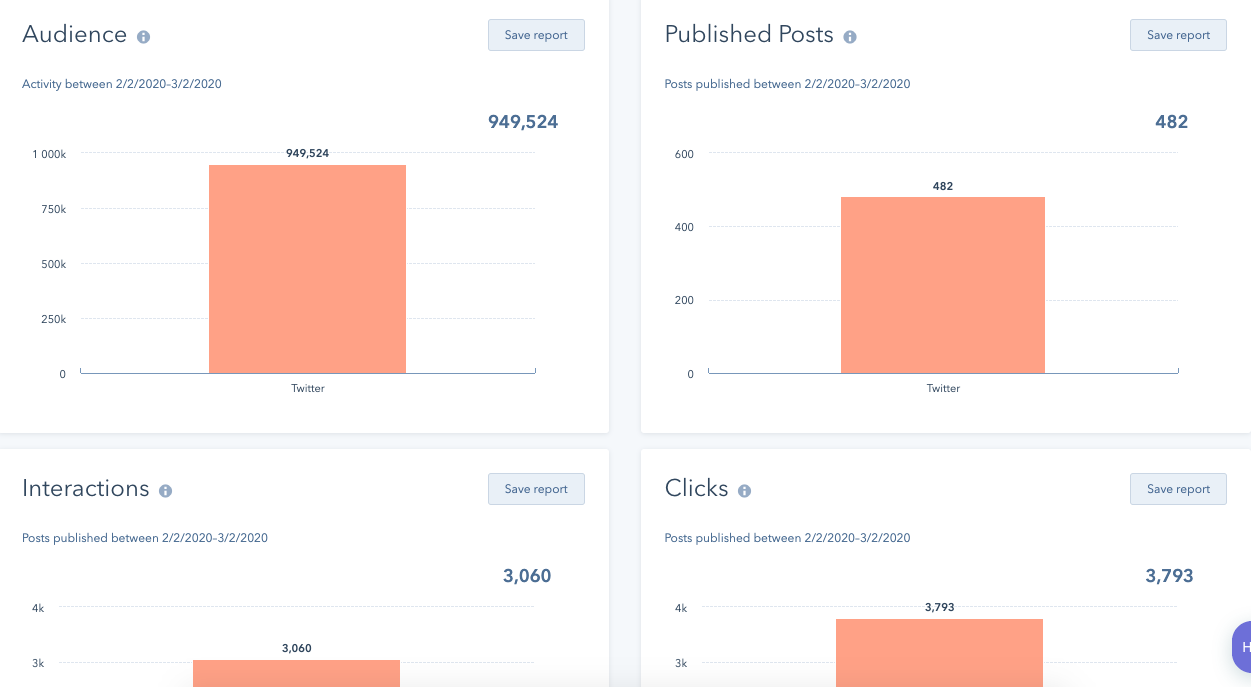
When monitoring performance using HubSpot, you’ll have insights on your customers through their entire journey, as well as which marketing messages perform the best among your audiences.
HubSpot is an excellent choice for businesses of any size, whose marketing teams want to keep all campaign functions in one place. Its integrations make that process more streamlined, and the detailed social performance reports break down and analyze the hard numbers for you.
2. Mailchimp
Price: Free, then $9-$299/mo.
Mailchimp is a full-service marketing platform that offers analytics for social media. I love Mailchimp because it’s easy to use for small marketing teams and requires little time to pour over the accompanying analytics.
Here’s a screenshot of how campaign data looks on Mailchimp. This is a sample report that gives a high-level overview of audience insights, demographics that are crucial when planning a social media campaign.
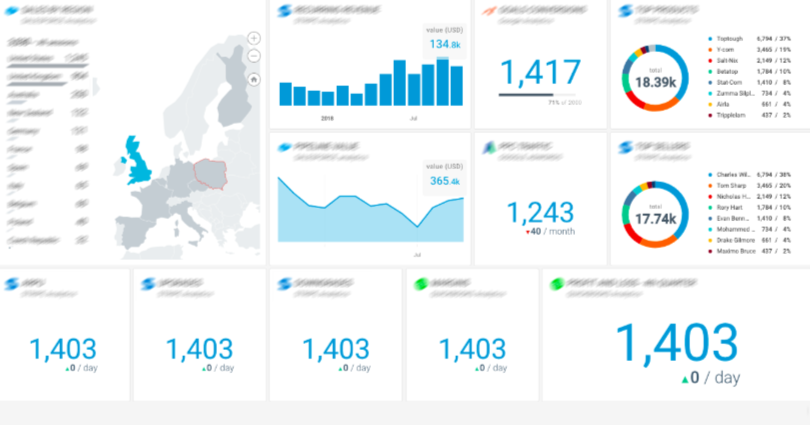
With Mailchimp, you’ll also have an audience dashboard, which is a page dedicated to understanding audience behavior. Additionally, the software offers tools to look into smart targeting and mobile integrations. These tools can diversify a social strategy and deliver higher engagement numbers by helping you create content specific audiences will respond well to.
This platform is a great idea for teams that need social media analytics tools that guide you towards creating a more holistic, impactful strategy.
3. Databox
Price: $49-248/mo.
Databox is an expansive analytics platform that puts all business data in one place. The platform lets you set campaign goals with your account and track them for their duration.
This screenshot gives an audience overview from a social profile, including graphs and session data.
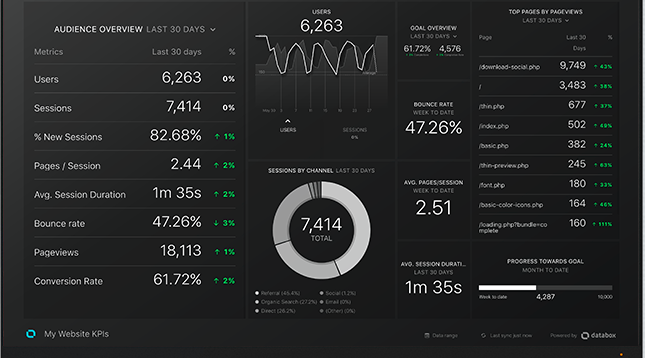
The key performance indicators (KPIs) of success on social media channels will be shown on the same dashboard.
You can customize metrics that matter most to your campaign or social channels for your reports. For instance, if you wanted to track just Twitter replies, you can customize that. These tools let you remain focused on the metrics you need to have.
Any integration you have, such as HubSpot, will also be visible from the dashboard, as well.
Databox is a good choice for businesses that have many contacts and social accounts to keep track of, many specific campaign goals by channel, or manage social accounts for several clients.
4. Grow.com
Price: Contact for pricing
Users of Grow.com software are able to access full visibility of engagement for social accounts. The tool connects to HubSpot, Salesforce, Google Ads, Facebook, Marketo, and Microsoft Office, so you can combine the software with any other tools you use for social monitoring or listening.
Below is an example of a Grow overview for sales and marketing. Notice how the expansive options are similar to Google Analytics, offering audience location, behavior, and trends.
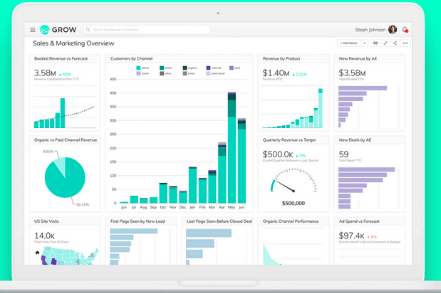
Grow.com breaks down complex data into graphs and visuals. Another perk of using Grow.com is that social reports are sharable, and you can integrate your account with HubSpot’s ecosystem tools. This is helpful for multiple teams working on the same project at once, since it can provide consistent, accurate data to various team members at once.
If your team wants a full-service platform for marketing and sales data, Grow.com is a good option. Grow.com’s analytics reports are built with metrics chosen by the user, so it’s a great tool for customizing, too.
5. ActiveCampaign
Price: $9/mo
ActiveCampaign is email marketing software that provides a ton of social features, including reporting. You can connect Facebook, Twitter, Digg, and other social media platforms to gather insights of performance across those social media sites.
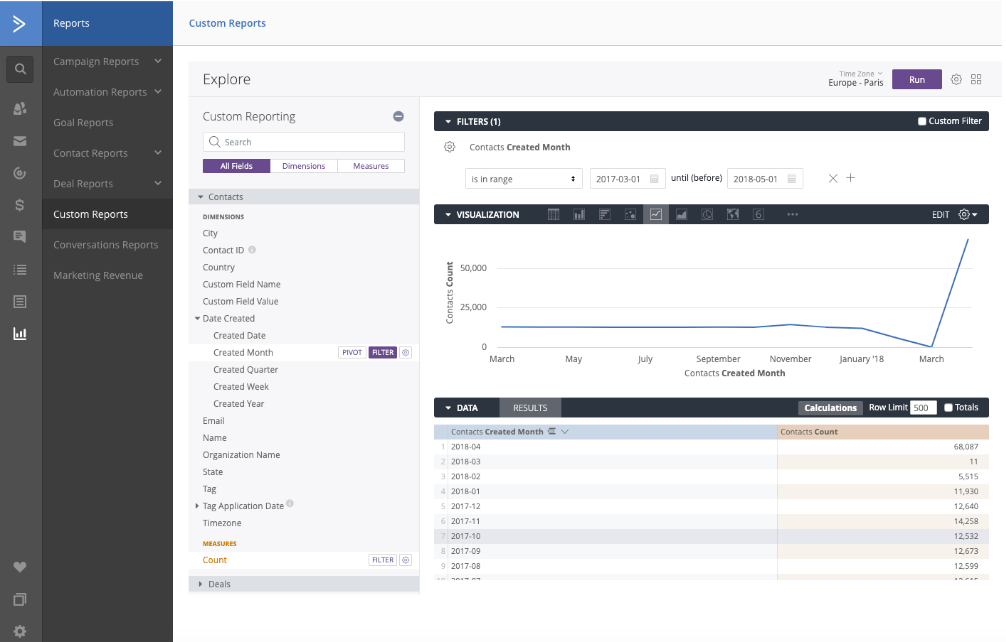
Here is a sample ActiveCampaign custom reports page. This is a blank slate, but you can see you have options to configure campaigns and templates onto your dashboard.
Source
Using this software, you can see how emails are performing, as well as campaign performance in general. Since you’ll have both social media and email metrics in one place, this is a good option for businesses with a heavy email marketing focus.
Additionally, another cool feature about ActiveCampaign is that its reports track what contacts do after they click through to your site. Further, if you’re a HubSpot customer, the software integrates with your HubSpot account.
6. CoSchedule
Price: $12.50/mo
Reports are CoSchedule’s specialty — in fact, CoSchedule gathers social network, campaign, and engagement reports for your social profiles automatically, and its software compiles real-time data and tracks engagement statistics.
These engagement statistics, like the example pictured below, are formulated and collected to diminish guesswork needed on how to connect with followers. You’ll be able to see the top fans of your social accounts, making it easier to create targeted content for them.
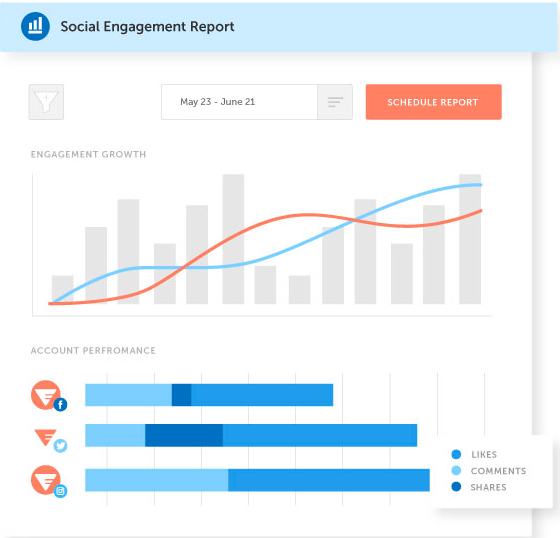
On a CoSchedule dashboard, you can see a birds’ eye view of unique data from campaigns, old and new. That way, you can compare multiple campaigns to determine the evolving ecosystem of audiences. If that’s not for you, that’s no problem — you can opt-out of having it on your dashboard.
CoSchedule is a good choice for companies that depend on reports for ROI. Plus, it’s always a nice choice if you want to see the difference in audience behavior over time, to get a clearer picture of an ideal buyer’s journey.
7. Sprout Social
Price: $99-$249/mo.
Sprout Social is a social media planning service that, as do many other platforms, offers expansive analytic reports of the performance of social media accounts.
Additionally, if you’re a HubSpot customer, you can integrate HubSpot with Sprout Social to collect accurate social reports all in one place.
Here is an example of a Twitter Engagement report from Sprout Social. Notice how you can customize the report, add widgets, and switch between other social engagement reports.
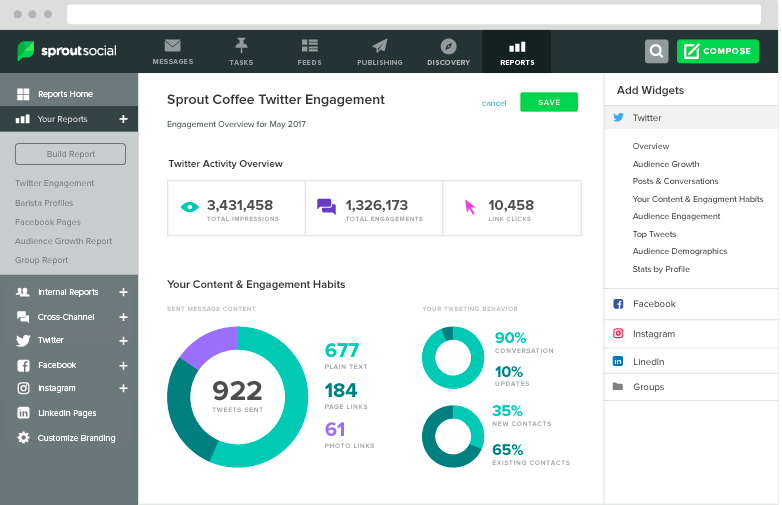
You can configure the metrics your reports provide, and choose options that scale with your business. For instance, you might not need to analyze ROI from an Instagram campaign now, but if needed in the future, you can have that option.
Sprout Social is beneficial if you are looking for a system that’s configurable and able to be integrated. It’s a flexible platform that offers reports curated to your specific social media goals with colorful graphs and expansive data.
Ultimately, choosing the right social media analytics tools for your business shouldn’t be a stressful process. The tools should align with your business goals and deliver the metrics you need to be successful.
Tools should also be able to work with the budget and time you have available, so if one of these choices seems to tick all of those boxes for you, check them out. Your social strategy will only be helped by having the correct tools on-hand.

How Long Should Blog Posts Be in 2020? [New Data]
If you’re a blogger, you’ve probably asked your editor “how long should this blog post be” more times than you’d care to admit.
And most of the time, you’ll hear an answer that sounds something like this: “However long it needs to be.”
There’s certainly a nugget of truth in there — you shouldn’t beholden yourself to a character count that’s either too low or too high. However, any experienced blogger will tell you that there is an ideal length or range for how long your blog posts should be, especially when you take certain criteria into account like your audience, the topic, the structure of the post, and what your main promotional channel is.
We’ve published thousands of blog posts here at HubSpot, and we analyzed our top-performing ones to see how blog post length impacts success in all of these areas.
Read on to see how long your blog posts should be in 2020.
Ideal Blog Post Length for SEO 2020
For SEO, the ideal blog post length should be 2,100-2,400 words, according to HubSpot data. We averaged the length of our 50 most-read blog posts in 2019, which yielded an average word count of 2,330. Individual blog post lengths ranged from 333 to 5,581 words, with a median length of 2,164 words.
But before you go writing your 2,300 word blog post, keep in mind that not all blog posts need to be super long — in fact, 16 of our top 50 read posts (or about one-third) were under 1,500 words, so there’s still plenty of opportunity to get your posts ranking even with a lower word count.
This can be accomplished by following SEO best practices, including:
- Proper backlinking.
- Attempting to capture Google’s featured snippet.
- Adding alt-text.
- Going after the right keywords.
- Achieving domain and topic authority.
- Incorporating media-rich content in your post body (videos, social media embeds, etc.).
For an overview of everything that goes into getting a blog post to rank on Google outside of word length, check out this blog post.
Ideal Blog Post Length for Lead Generation
Unfortunately, there’s often a disconnect between the posts that generate traffic and those that generate leads or new contacts for your business.
Typically, posts that get more traffic do so because they’re searched for by a wider audience, which sometimes means the topic you’ve written about is more generic and doesn’t align closely with your business.
To speak to this gap, we looked at the 50 posts that brought in the most net new leads for HubSpot in 2019 to see if there was a difference in average length, and to see if writers should adjust post length for posts written to generate leads.
Spoiler alert: there was, and they should.
Based on HubSpot’s data, the ideal length of a blog post intended to generate leads is 2,500 words. The 50 posts that generated the most leads in 2019 were an average of 2,569 words long and had a median length of 2,529 words, which is approximately 250 and 400 words longer than the average and median lengths of the most-read blog posts. The longest post in this cohort was 8,197 words, or approximately 2,500 words longer than the longest most-read post.
So, for a blog post intended to build your contact database, writing longer content definitely works in your favor. Longer content reinforces your knowledge and authority on a subject — particularly if it’s a keyword or a topic for a very specific audience. When your coverage is more in-depth for these ideas, you increase your chances of ranking better — and while your audience might be smaller, your chances of converting readers into leads are far greater.
Ideal Blog Post Lengths for Different Blog Post Types
We didn’t stop there: there are different types and formats of blog posts, so we wanted to see how blog post length impacted the performance of these different post structures.
How long should pillar pages be?
Pillar pages should be around 4,000 words, since they are supposed to cover significantly more content than an average blog post.
A pillar page is your attempt at being the all-encompassing guide to any given subject available on the Internet as a blog post. These posts serve as the “pillar” to a cluster of blog posts, all of which relate to the topic explained in the pillar. You can learn more about pillar pages by watching the video below.
To arrive at the suggested 4,000 word blog post length, we averaged the lengths of our most-read pillar pages in 2019 and found an average of 4,048 words and a median length of 3,639 words. Word lengths for these pillar pages ranged from 2,137 to 10,939 words.
That amount of words might seem scary, but keep in mind how extensive the work that goes into pillar pages — and the content that they cover — should be. Pillar pages should take several days to write, cite multiple sources, and link out to all of your related blog posts on the subject. The work will pay off, however, and you’ll likely see more traffic to the pillar post and the supporting cluster content.
Need help getting started with writing pillar pages? Try using our free blog post templates for organizing and writing your pillar pages.
How long should listicles be?
Listicles, or list blog posts, should be 2,300-2,600 words.
List blog posts are probably the most approachable blog post format for new bloggers. Anyone can make a blog post just by listing off and explaining a few examples, tools, resources, or ideas for a given topic. When it comes to the length of these blog posts, it seems that the rule of thumb is: the more examples, the better.
HubSpot’s most-read listicles in 2019 were an average of 2,574 words and had a median length of 2,332 words. They ranged between 1,040 and 5,581 words in length. All of these numbers are either around the same or higher than the lengths for the average blog post, suggesting that list blog posts perform better when they are longer.
And if you think about it, this makes total sense. When you search for a list of ideas or examples, would you rather see a list of five or a list of fifty? This post format demands plenty of list entries — preferably with images, explanations, and links to their original sources — so put in the effort to build an authoritative and complete list for your readers.
You can use these free listicle blog post templates to get started writing your list posts today.
How long should “how-to” blog posts be?
How-to blog posts should be between 1,700 and 2,100 words.
Because how-to posts describe, well, how to do something, the ideal length of the blog post depends on how difficult it is to do what you’re explaining how to do. For example, this blog post on how to type the shrug emoji is just over 300 words, while this blog post on how to start a business contains more than 8,000.
For our top-read how-to blog posts, we saw an average length of 2,151 words and a median of 1,669 words. While this a rather large range, it shouldn’t be too surprising, since readers don’t need too much — or worse — too little information on how to accomplish their desired task.
Writing a how-to blog post for the first time? Remember that they should be concise and clear, contain section headers, and leave little or nothing to the imagination. Readers are coming to you for instruction, not inspiration, so ensure the post succinctly covers your chosen topic. You can also use this how-to blog post template if you need help organizing and writing the post.
How long should “what is” blog posts be?
“What is” posts, or blog posts that answer a question (such as the one you’re reading right now), should be between 1,300 and 1,700 words (which this one is!).
This type of post is definitely the poster child for making blog posts “as long as they need to be.” When readers search for what, who, or when something is, they typically want a quick answer or explanation. Based on our data, bogging readers down with too much unnecessary information doesn’t always equate to more views — 30% of the HubSpot’s most-read “what is” posts are less than 1,000 words.
If you need help structuring these posts and keeping them short, try using these blog post templates.
Minimum Blog Post Length
Technically, there is no official minimum for blog post length, though Yoast recommends at least 300 words. That said, HubSpot data suggests writing longer posts should be the rule rather than the exception for your blog. This practice will help your website build authority in the eyes of search engines, which can help shorter blog posts rank better.
“Generally, it’s easier for longer content to rank,” says Aja Frost, HubSpot’s Head of Content SEO. “But unless you’re publishing hundreds of [blog] pages with less than 100 words, you won’t get dinged for thin content.”
While longer blog posts tend to perform the best, that’s not to say that every single blog post you publish must be more than 2,000 words. If you feel you’ve covered your topic well enough in 300, 800, or 1,000 words, then so be it.
Getting Started With Your Blog Posts
Now that you know how long your blog posts should be, it’s time to start writing! We’ve compiled a list of resources you can start utilizing today to make your blog more successful.
- A Guide on How to Start a Blog
- A Blog Post on How to Write a Blog (Please forgive us for being so meta)
- A Collection of Free Blog Post Templates [Download Now]
- CMS Software to Host Your Blog Content
- Marketing Analytics Software to Measure Blog Post Performance

Project Controls: A Quick Guide
How the Workplace Could Change for Marketers in 2020 [and Beyond]
Remember the TV show Mad Men?
For many in my generation, it opened our eyes to what working in advertising was like in the 1960s. When the show began, ad executive Don Draper‘s creative team was made up of only men, there were nearly no HR policies to protect employees in the workplace, women with creative aspirations were stuck behind secretary desks, and everyone smoked in the office.
Clearly — and luckily — workplaces have drastically changed. Today, I work with a diverse team to develop creative content for the HubSpot Blog. While I mostly work in-office, I occasionally write blogs from home. And, I’m not the only one. Roughly half our team is actually remote full time.
Although I love the flexibility of my job, the company culture is the reason I stay. I work with a corporation that values creative thinking while empowering all of its employees to “grow better.”
To me, HubSpot symbolizes what researchers call the “workplace of the future.”But HubSpot isn’t the only workplace changing to support a more modern idea of work. In fact, with the growth of technology and progressive attitudes around work culture, many other companies are following suit.
If you’re a people manager or entrepreneur, it’s necessary to look at where future workplaces are headed. This strategy can help you build your recruiting strategies, office policies, and overall company culture around forward-thinking approaches that will pull in competitive and talented job candidates.
Meanwhile, if you’re a marketer or advertiser, considering the future work landscape can help you make decisions about which work styles could be best for your career in the long run.
To help you visualize how the office landscape is changing, and give you an idea of which workplaces will enable talented professionals to thrive, here’s a list of how the job landscape will likely evolve in the next year and beyond.
8 Ways the Workplace is Changing for Marketers
1. The remote workforce will continue to grow.
If you think remote work is still a “new trend,” think again. In 2018, over 70% of professionals reported that they at least occasionally work remotely.
Remote work has benefited both employees and companies with more work flexibility. For example, companies can now hire more diverse talent from around the world now that they’re no longer limited to local recruiting for in-house positions.
Now that remote work has become a more of a traditional work style, companies are seeing positive results, In fact, research shows that remote employees can be more productive, happier, and will even work more hours as needed since they don’t have to spend time commuting to work.
As we see the growth of remote workforces, we also have seen the struggles remote employees face as well, such as loneliness and fears about not gaining valuable visibility. With these concerns in mind, we might also see more emphasis on company cultures as managers could be working more vigorously to keep their cross-continental teams connected and in the know of what’s going on.
2. Workplaces will offer more flexible perks.
Even if you or your team can’t work remotely, there will still be a growing expectation of flexibility-related perks at workplaces in the near future. These perks could include more or unlimited PTO and the ability to schedule your own work hours. Each year, more and more companies are embracing flexibility. In fact, 67% of small businesses now report that they offer some sort of flexible work arrangement. Meanwhile, 72% of recruiters and HR reps say this benefit will shape future workplaces.
The impact of flexibility on a company is apparent when looking at the data and stats related to it. Recent research shows that 73% of employees say their company’s level of flexibility directly impacts their level of satisfaction at work.
Additionally, flexible perks such as shorter workweeks have been seen to boost productivity. Here’s a chart from The Economist that shows the correlations between work hours and employee effectiveness:
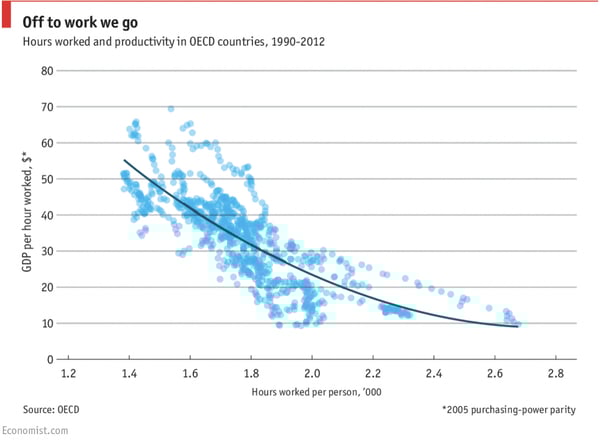
Source: The Economist
Flexibility might greatly benefit both employees and employers, but it can still be challenging for more traditional companies to adapt to flexible scheduling at first. For example, it may be harder to coordinate meetings or you may have trouble with team building. To find tips on how to navigate the pros and cons of flexible perks, check out this blog post.
3. Soft Skills will be even more crucial to your career.
In a highly-connected world, soft skills will be the hardest for technology to replace. While a bot can do many mundane tasks for you, it can’t (yet) present a convincing business pitch, write a great video script, or create campaigns that play off of an audience’s emotions. Soft skills, however, are what enable marketers to do all of those things.
But what exactly are soft skills? While technical skills relate to completing a more structured task, such as math, coding, or physically assembling products, soft skills often rely on context, the mind’s ability to adapt to certain situations, and occasionally strategic planning. Examples of soft skills include emotional intelligence, adaptability, public speaking, writing, or other skills related to team management.
Soft skills are especially important for recent graduates or professionals just entering their field. According to a Cengage survey, over 70% of employers are primarily looking for soft skills when vetting entry-level employees. The study also reports that some of the most valued soft skills are related to good listening and solid communication.
Even when you’re a seasoned marketer, soft skills will still continue to be important in your highly-creative and analytical career. Think about it? Even at an executive-level position, you could still be expected to pitch new or innovative ideas, manage a team, and use emotional intelligence to create a campaign that your audiences can relate to.
If you feel like your lacking in the soft skill department, here’s a quick guide to key skills that you’ll want to brush up on — especially in the world of marketing.
4. Creativity will be particularly valuable to employers.
Out of all the soft skills, one of the most highly valued — especially for marketers — is creativity. According to LinkedIn behavioral data, creativity is the most in-demand soft skill in “short supply.” LinkedIn’s recent report also notes that the demand for creative talent will rise sharply by 2030 as artificial intelligence becomes more prominent in the workplace.
While artificial intelligence can’t develop creative skills or projects on its own, a creative mindset enables marketers to think innovatively, experiment, and try new projects that will keep audiences engaged and intrigued.
Don’t believe me? Check out these highly creative and thought-provoking campaigns that both awed audiences and generated significant conversions. These wouldn’t have been at all possible had it not been for creative or innovative thinking.
5. Artificial intelligence will take over marketing tasks, but not jobs.
In the past, when we thought about technology, we feared that robots would steal our jobs. But, as marketers, it’s now apparent that we don’t generally have to worry too much about job security any time soon. This is because artificial intelligence or any other technology isn’t yet capable of the valuable soft-skills noted above — especially creativity.
However, while a bot can’t pitch an award-winning campaign, it certainly can help you streamline mundane tasks to allow more time to brainstorm your next high-conversion ad.
At this point, AI can help content creators identify highly-searched SEO keywords, generate analytics reports, manage basic social media posts, send automated emails, and adjust online ad spend to prevent you from losing money. These are all things that would have taken up hours of your time years ago.
Business executives are also recognizing the power of AI and how it can help streamline processes. According to a multi-year survey of corporations in the U.S., AI implementation climbed from 48% to 72% between 2018 and 2019. Additionally, 67% of the companies that implemented AI in or before 2018 say they’re expanding the areas of their business that use the technology.
While AI is still inaccessibly expensive for some smaller businesses, it is continuing to get more affordable and easier to manage as technology evolves. In the future, we’ll likely see more investment in technologies that help employees work smarter rather than technologies that will render your job obsolete.
6. Recruiters will embrace more pre-screening tactics before job interviews.
While employers previously might have screened candidates for technical skills using quizzes or skill-related challenges prior to an interview, professional organizations like LinkedIn now encourage businesses to pre-screen individuals for soft and hard skills through tactics like phone and video interviews.
This strategy allows recruiters and employers to leverage technology to verify that a candidate is a solid job prospect before scheduling a full, time-consuming interview with them. But, while it’s great for employers, this type of process might make job candidates a bit nervous or frustrated with the job interview process. If you’re intimidated by pre-screenings, check out this blog post about how to navigate video interviews and various pre-screening questions.
7. Effective anti-harassment policies will be even more critical in the workplace.
For years, many workplaces didn’t have effective policies related to harassment. In fact, the Supreme Court didn’t begin to pass laws related to harassment in the workplace until the 1980s. Even when businesses were required by law to implement these policies, some in-office rules were ineffective as they made it hard for people to come forward with a complaint against someone of a higher power, such as a boss.
The abundance of in-office harassment issues came to light in the midst of the #MeToo movement, which encouraged people of all genders to share stories of sexual harassment in the workplace. Aside from sexual harassment, other forms of harassment, such as discrimination and bullying also became more apparent during this movement.
In a LinkedIn survey, 71% of recruiters and HR reps report that anti-harassment policies will continue to change and evolve to fit the modern-day workplace as these rules could impact a talent’s interest in a position. This follows another report from Harvard Business Review that highlights how harassment claims are taken more seriously in offices when company leaders properly acknowledge and enforce them.
As the workplace grows more progressive, expect to see companies aiming to develop effective anti-harassment strategies to make prospective job seekers and current employees feel physically and psychologically safe in the workplace.
8. Wages could become more transparent.
LinkedIn reports that 53% of HR reps and recruiters say pay transparency will transform workplaces of the future.
The statistic above makes sense. To many, it’s considered “rude” to discuss salary with friends, family, or colleagues. However, with the growth of political activism and news related to gender-based pay gaps, researchers now believe that pay transparency inside and outside of the workplace can help employees negotiate better and fairer wages.
Additionally, while some employers frown upon discussing pay with your colleagues, employees legally have the right to discuss work-related issues such as wages with coworkers.
Although pay transparency can cause employees to negotiate higher salaries, researchers suggest that it still benefits companies because it attracts talent and keeps employees at a business for a longer amount of time.
According to a recent study from The Creative Group, pay transparency is already becoming a major trend with over 70% of companies claiming to be partially to fully transparent about job role wages.
Preparing for the Future of Work
As you’ve seen above, some of the biggest themes related to future workplaces will relate to flexibility, embracing technology, and building a psychologically safe office culture filled with diverse talent. Here are a few tips that can help you embrace these themes.
- Don’t be afraid of flexible work. If you’re an employer, consider how flexible work schedules or remote options could benefit you and intrigue talented job candidates. If you’re an employee, consider how flexible work options could positively impact your career.
- Identify where technology can help you. If you’re a manager, consider investing in technology that can help your team have more time to be creative. If you’re a marketer, it can also be great to look into technologies that you could recommend to your boss.
- Zone in on soft skills. With the growth of technology, success in the marketing field will depend on your level of irreplaceable soft skills, including emotional intelligence or creativity.
- Listen to your colleagues. If you’re a manager, come up with strategies to stay connected to your team members and meet with them regularly, even if they’re remote. If you’re a marketer, look for opportunities to reach out to team members to gain insight from them. Strong communication will help your team be more productive while also helping everyone identify when an aspect of your processes or office culture isn’t working.
To learn more about specific aspects of the future of work, check out this post on jobs artificial intelligence will and won’t replace, this guide to successful remote work, or this post on cultivating psychological safety at work.

How to Actually Generate Leads on TikTok [Infographic]
As a marketer, you’ve likely heard the buzz around popular social platform TikTok, which now has 500 million monthly active users and is the third-most downloaded app globally.
The video-based social app has incredible potential for marketers, particularly since it’s so popular with the Gen-Z and millennial demographic. But, despite its potential, many marketers are unsure how to approach marketing on the app.
Some brands are already making headway on TikTok, of course — for instance, Chipotle has over 55K fans on TikTok, while the NBA has an impressive 5.1 million.
But, despite a few early adopters, most marketers still haven’t figured out how to monetize TikTok … or whether it’s even worth it to do so.
If you’re considering investing in TikTok in 2020, we’ve got you covered. Here, Visme put together an infographic featuring 10 steps to generating leads on TikTok. Take a look to decide for yourself whether you’re interested in testing out these steps with your own social team./p>
But first — why use TikTok for lead generation at all?
Why use TikTok for lead generation?
There are a few good reasons TikTok can be a great platform to generate new leads:
1. It allows for mobile-first campaigns.
The 2010s has been the decade of mobile, and it doesn’t show signs of slowing. The number of mobile users in the world continues to grow, as even those from developing countries start to get their hands on smartphones at increasing rates.
But what makes TikTok particularly enticing, aside from its increasing growth, has been its use of micro-videos that are easy to watch on mobile.
The majority of mobile users allot their time to watching short videos. The way TikTok is built, users can create 15-second videos at most. It isn’t surprising, then, to see the platform grow the way it has over the years as its format is perfect with what mobile users prefer to consume.
Additionally, from an operations standpoint, the mobile format is relevant. You can run a business right from your phone, so investing in a mobile-based application like TikTok can fit right into your mobile-first campaigns.
2. It’s great for brands targeting a younger market.
From its inception, TikTok made it a point to target younger viewers. They understood the youth uses social media applications differently, and that directed most of their features and campaigns. Very quickly, they became the application younger audiences were addicted to.
To this day, the number of TikTok users online grows at a rapid rate, with a large chunk of those users in their late teens and early 20’s.
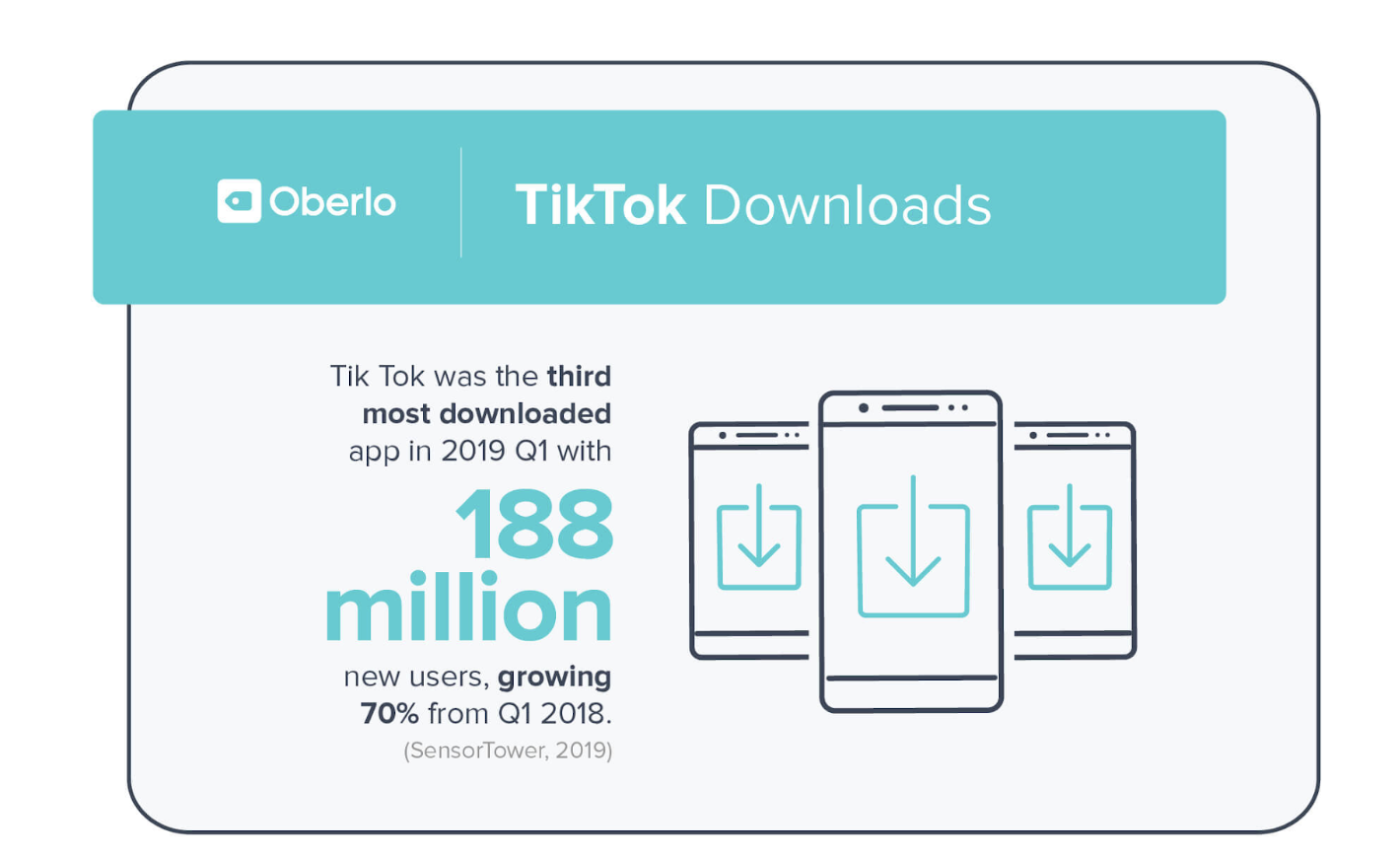
This information is especially important for businesses who are trying to reach a younger audience. After all, the younger demographic is going to be the market with the most purchasing power in the future — in fact, it’s already projected at about 40% in 2020.
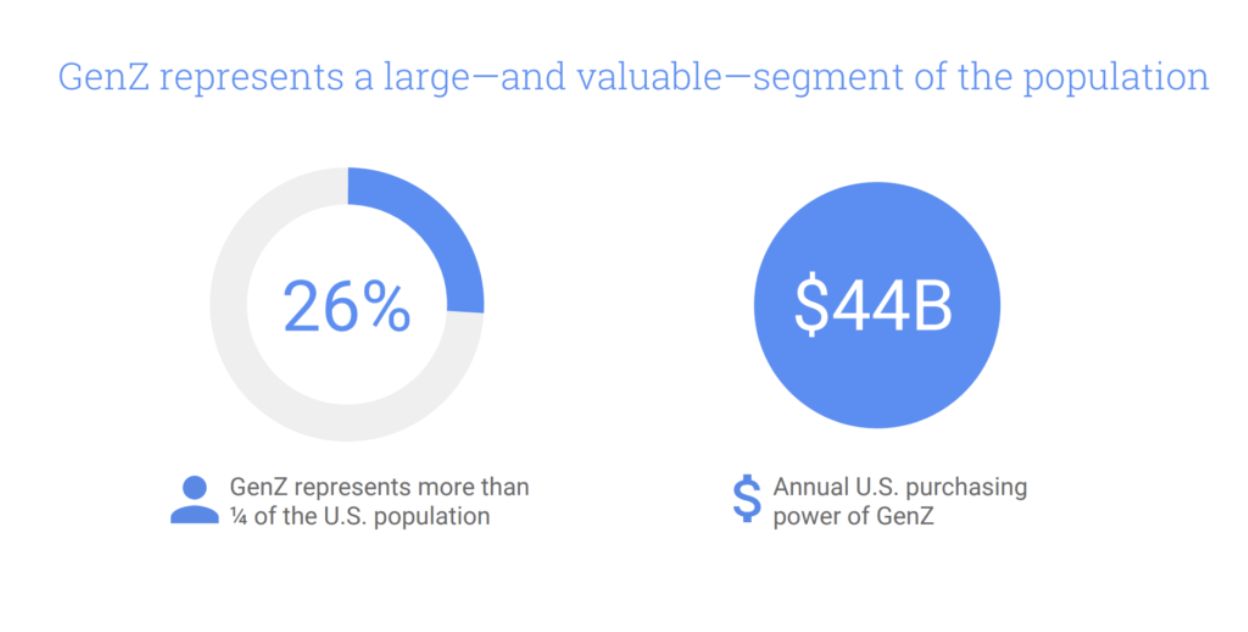
3. It enables your brand to produce authentic content.
Authenticity matters, especially to millennials and Gen Z. Keeping things real and genuine is key in getting buyers to believe your business does more than just get consumers to buy products.
Doing this can be difficult, but a great place to start is by focusing on storytelling. Focusing on narrative shows your business goes beyond money and emphasizes the human element to things.
In a nutshell? Authentic brands attract quality leads. And with TikTok paving the way for authentic brand building — especially with content creators who have huge influencing power — this platform is the place to be.
Next, let’s explore the 10 steps to generate leads on TikTok:
.jpg)

How to Easily Analyze Facebook Ad Results With 3 Custom Reports
Want to save time analyzing your Facebook ads results? Looking for an easy way to create custom reporting in Ads Manager? In this article, you’ll discover three custom reports in Ads Manager to help you quickly analyze your Facebook ad performance. Why Create Custom Reports in Facebook Ads Manager If you’re anything like me, you’re […]
The post How to Easily Analyze Facebook Ad Results With 3 Custom Reports appeared first on Social Media Marketing | Social Media Examiner.
from Social Media Marketing | Social Media Examiner https://ift.tt/2To2rxW
via socialmediaexaminer
Facebook Launches Live Producer and Creator Studio App
Welcome to this week’s edition of the Social Media Marketing Talk Show, a news show for marketers who want to stay on the leading edge of social media. On this week’s Social Media Marketing Talk Show, we explore the full rollout of Facebook’s Live Producer for managing live-stream video and the new Creator Studio app […]
The post Facebook Launches Live Producer and Creator Studio App appeared first on Social Media Marketing | Social Media Examiner.
from Social Media Marketing | Social Media Examiner https://ift.tt/2I5k2pd
via socialmediaexaminer
Help! My Brand Went Viral: 16 Small Brands That Made It Big
When you think of viral marketing, your mind probably wanders to that Oreos “You can still dunk in the dark” tweet, which garnered an enviable 40,000 retweets and Facebook likes during 2013’s Super Bowl power outage.
Or perhaps you think of the Dove “Real Beauty Sketches,” a video with more than 67 million views to date.
When these global brands go viral, it’s not a huge surprise.
Global brands have agencies and well-staffed marketing teams standing by to handle the good, the bad, and the ugly that can result when they go viral. But what happens to the little guys? What happens to small brands that hit on marketing gold, kind of by accident?
Below, we’re taking a look at how small brands have handled their 15 minutes of viral fame. Some struggled, some succeeded, but all of them earned a spot on this elusive roster. Here’s what they did, and what you can learn from their stories.
16 Small Brands That Went Viral
1. Dominique Ansel Bakery (The Cronut)

Image Credit: CNN Traveler
Pastry chef Dominique Ansel was not a doughnut devotee. The French-born, New York-based bakery owner had tasted a few, but he was far more familiar with the croissants he had grown up eating. When someone pointed out that he didn’t have a donut on the menu of his New York bakery, Ansel decided to head back to his roots and invent a new kind of pastry.
Enter: the Cronut.
Ansel’s new confection really gained steam after a food blogger from Grub Street tried a Cronut and documented the experience. Traffic to the bakery website rose by more than 300 percent, and hundreds would line up every day to get their hands on the trendiest pastry around.
Viral best practice: Focus on quality, not quantity
Each batch of Cronuts took Ansel’s team three days to prepare. They could make about 350 Cronuts every day in their bakery, which meant the numbers were limited.
By managing the output of his pastries and avoiding the draw of producing more than his team and facility could manage, Ansel created controlled demand that he could meet without sacrificing the quality of his product.
Four years later, you’ll still find a line outside of Ansel’s bakery before their 8:00 A.M. opening. But the true secret to his success? Ansel claims that he’s had one Cronut every day since their invention. I’m really hoping that’s the key to my next promotion as well.
2. Eva Kor and Candles
When my colleague, Kayla, was in college, she went to a nearby Holocaust memorial museum run by Auschwitz survivor Eva Kor.
Hearing Kor tell her story at Candles during the tour touched so many hearts in the community, including Kayla’s. Kor’s story is why a visit to Candles is essential to anyone visiting the area.
In 2017, BuzzFeed did a profile on Kor and the impact of Candles. At the time of this post, the profile video has 15 million views on YouTube alone, and over 100 million views on Facebook.
BuzzFeed’s profile gave Kor a global platform to share a story of bravery and remembrance. A visit to the cherished local museum became a viral topic that captured the hearts of millions, just like it had in Terre Haute, Indiana.
Viral best practice: Local stories can capture the hearts of millions
A large number of people in Terre Haute will enthusiastically tell you about their first time at Candles. Now, millions of people know about Candles and get to spread that message. Additionally, to keep Kor’s legacy remembered for future generations, in April 2019, two Indiana natives teamed up with PBS to release a documentary about Kor.
Everyone has a story to tell. Candles’ story is one of bravery, passion, and perseverance, feelings to which everyone can relate. By telling your story, you could capture the hearts and attention of the masses, as well.
3. ALSA (The Ice Bucket Challenge)

Image Credit: Iconosquare Blog
In 2014, the Amyotrophic Lateral Sclerosis (ALS) Association launched one of the most successful viral campaigns of all time. Justin Bieber, Oprah Winfrey, and Bill Gates were a handful of the celebrities who took the challenge and dumped buckets of ice over their heads to raise funds and awareness for ALSresearch.
By the time the videos had stopped filling newsfeeds around the world, the campaign had raised more than $220 million for ALSorganizations worldwide. Awareness of the disease rose and it reached the fifth most popular Google search for all of 2014.
In 2015, a year after the the ice bucket challenge went viral, money from the campaign was said to fund research that identified a new gene, NEK1, that contributes to the disease.
Viral best practice: They looked outside their target audience
True, most of those who made a donation during the video craze have never made a second. But overall A.L.S. contributions have stayed about 25 percent higher than the year before the challenge, and the average donor age has dropped from above 50 to 35.
By shooting outside of their target demographic and trying alternative marketing tactics (video) that might normally take a backseat to more traditional fundraising efforts (galas, email marketing, etc … ) A.L.S.A. was able to bring in millions in one-time donations, raise brand awareness, and gain an overall contribution baseline of 25 percent. I’d say that’s enough incentive to shake things up in your next campaign.
4. Roman Originals (The Dress)

What happens when your company isn’t even the one behind a viral sensation?
“We woke up one morning and had the world and media coming down upon us,” says Peter Christodoulou, the co-founder of Roman Originals. It started with a wedding photo posted online. A young woman was pictured standing next to a bride, and no one could agree on what color her dress was.
What followed was an international debate dubbed #DressGate.
Christodoulou explained that his company had hoped to sell 200 of the lace-detailed dresses per week, but the UK-based retailer sold 3,000 in just 10 days. Celebrities, global brands, and just about everyone else was tweeting, sharing, and talking about “The Dress.” At its height, the controversy sparked 10,000 tweets per minute.
Viral best practice: Other brands can and will capitalize on your success
Brands around the world capitalized on the craze and amplified the popularity of “The Dress.” Dunkin’ Donuts, Legos, and Tide were just a few of the brands that came out with clever dress-themed ads of their own.
A few months later, Christodoulou said his company “won the social media lottery. We’ve had a brilliant year … Hopefully our spring/summer 2016 range will be well-received.”
While the line might not have sparked the global frenzy the original $74 dress had, Roman Originals showed the marketing world that virality can happen to anyone. And retailers everywhere showed that jumping on trending topics can do as much for you as it does for the company that originated the trend.
5. Blendtec
In the early days of YouTube, there was some interesting content floating around — cat videos, sketch videos, and, of course, a guy in a white lab coat blending a whole chicken and can of soda.
Tom Dickson, CEO of blender company Blendtec, saw early on that YouTube could be a great marketing tool. With the platform’s emphasis on funny and quick content, the infomercial series “Will It Blend?” was the result of a minimal marketing budget and an experiment.
The series was built around Blendtec’s flagship high-speed blender. To show the blender’s power, the CEO decided to advertise that users could even blend household items. So, he put on a white lab coat, found a box of matches, and turned on a camera.
Dickson puts everything from golf balls, Amazon Echos, and my personal childhood favorite, Thanksgiving Dinner, to the test while cheesy game show music loftily plays in the background. (Spoiler alert: It always blends).
Gaining billions of views and great interest in the high-speed capabilities of a Blendtec blender, the company has now flourished into one of the most reputable brands in its industry. Popularity of the series led to the company’s CEO appearing on an episode of NBC’s “How I Made My Millions” , a show about startups that quickly found great success.
Viral best practice: Leveraging YouTube to create content that connects to the platform’s audience
Having little resources as a startup, Dickson stumbled upon a hidden gold mine. His story shows how adoption of YouTube as a digital marketing platform can skyrocket a company, even without a high budget or television ad slots.
Eventually, themed content, such as holiday episodes (Christmas Dinner smoothie, anyone?) began rolling out to expand its reach among YouTube’s audience.
Today, you can still go back and watch the “Will It Blend?” series on their YouTube channel. And of course, you can still purchase the blender and produce a few videos of your own (something else that became popular in light of the show’s success).
6. Metro Trains Melbourne (Dumb Ways to Die)

Are you already humming that catchy little song in your head? You’re welcome for that all day.
Melbourne’s metro system didn’t have a safety campaign in market before “Dumb Ways to Die” (DWTD). They had information at stations, but nothing that was really influencing safe behavior or showing that the company cared, so they brought agency McCann Melbourne on to help.
Metro Trains’ Chloe Alsop explained, “We kept coming back to the same thing: it’s really hard to get hit by a train. A wrong or careless behaviour is required.” Without a serious tone or tugging at heartstrings, an impactful, memorable, and shareable campaign was built.
By April 2014, the campaign had been viewed 77 million times on YouTube. The accompanying game became the No. 1 free app in 101 countries, and in six weeks, DWTD had garnered an estimated $60 million in earned media. The most important stat that came out of the campaign? A 21% reduction in railway accidents and near misses following the campaign.
Viral best practice: Launch outside your target market to build buzz
McCann created the original campaign using North American voices and characters because “the video had to go viral first, later it would catch the attention of the real target audience.”
Today, the campaign has become a franchise used by metro transit around the world. The takeaway for us? As McCann spokesperson John Mescall says, “It used to be ‘Think global, act local.’ That’s no longer true; we need to think and act global.”
The next time you launch a campaign, try thinking about where you might launch outside of your target market to build buzz.
7. Invisible Children (Kony 2012)
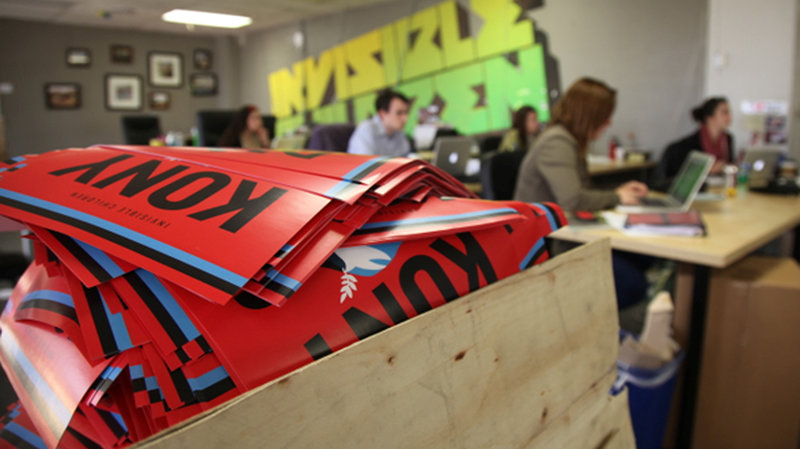
Invisible Children was around for eight years before Kony 2012 turned them into a household name. They got their start by showing a short film called “The Rough Cut” at high schools and community centers around the United States.
The goal was to raise awareness of Joseph Kony, a war criminal responsible for a decades-long civil war in Uganda and surrounding countries, and most maligned for his kidnapping and use of children as sex slaves and soldiers.
The group flipped Kony 2012, a 30-minute YouTube video, to public on March 5, 2012. It was not their first or their last video but it was their loudest. In six days, it garnered more than 100 million views becoming (for the moment) the fastest growing viral video of all time. As the days passed, however, criticism of the video, the organization, and its founders grew.
The San Diego-based company wasn’t ready for the deluge of attention, traffic, or critique the video brought upon them. Invisible Children’s co-founder and star of Kony 2012 received the brunt of the criticism, culminating in a public mental health breakdown a few days after the video’s infamous launch.
Viral best practice: Have a PR plan in place
In 2015, three years after Kony 2012 ignited the internet’s attention, the company shuttered most of its US operations. Joseph Kony is still at large, and Invisible Children’s downsized African programs have honed their focus to early warning systems and defection messaging.
Kony 2012 is still a divisive subject, but it’s also a cautionary tale for organizations whose aims to go viral may not match their infrastructure or readiness. Site traffic, man-power, and the lack of a PR agency/strategy all contributed to the chaos in the days following Kony 2012’s launch.
8. Netflix’s Bird Box
During the winter of 2018, it was pretty much impossible to access a Netflix account that didn’t have an ad for a thriller starring Sandra Bullock plastered across the home page. We’ll touch more on that a little later. First, some background history.
When Netflix released its original movie “Bird Box,” the movie was watched by 45 million viewers in seven days. In tandem, viewers took to social media with memes and reactions. While the social media attention could be a huge culprit of some of the movie’s widespread attention, it also could be something else.
Netflix’s marketing team has an effective strategy outside of traditional marketing channels: the platform’s own user interface (UI). Netflix decision-makers have complete control over what viewers see when they log in, so when “Bird Box” released, they made sure viewers knew about it, pushing the ad in the homepage slot.
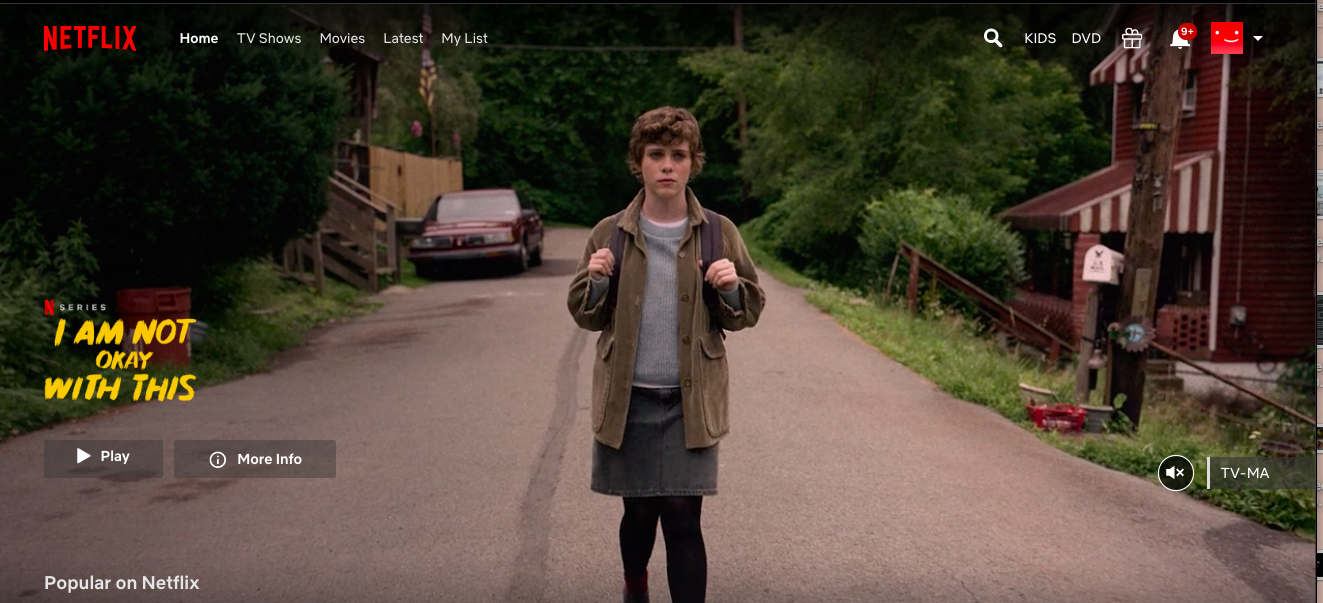 To illustrate, this is how much space a homepage ad takes up. Users see this every time they want to watch or search for something. Someone who watches Netflix after work everyday sees this ad — at least the movie title — at least 5X a week.
Mix an ad that’s virtually impossible to ignore with automatic playback, and viewers with more time to stream content due to the holiday season, and the result is a perfect viral storm.
Viral best practice: Leveraging UI to be advantageous in a campaign
Netflix recommendations are tailored to what viewers want to see, but everything else about homepage design is decided by the company’s team and gives great potential for their original content to go viral. For a streaming service with over 100 million subscribers, it’s excellent exposure.
Sometimes, the perfect aid to a campaign starts with what you can do in your own wheelhouse. Marketing for “Bird Box” created interest for viewers with an auto-play ad on the site homepage. Maybe you can leverage one of your popular webpages, e-books, or social channels to similarly shine light on an upcoming product or service launch.
9. Sphero (Makers of BB-8)

How did a small, Boulder, Colorado-based robotics company become the creator of spherical droid BB-8? Sphero was part of the inaugural class of Disney’s Accelerator tech-development program, which helps companies expand creatively using Disney’s impressive resources.
They happened to be in a meeting with Disney CEO Bob Iger as he was scrolling through offerings for Force Friday, a September 2015 toy and merchandising event held in anticipation of Star Wars: The Force Awakens. Iger asked the crew if they could make the rolling droid, BB-8, and they spent the next 10 months working on the product in time for a Force Friday launch. They sold more than a million robots in 2015 alone, more than doubling their all-time selling record.
Viral best practice: Use social media in new ways (and it doesn’t hurt to have Disney on your side)
Sphero hit the jackpot with their Snapchat marketing campaign for Force Friday. The droid’s creators waited in lines with throngs of Force Friday patrons, snapping the hype and excitement of fellow fans.
They leveraged the cast of The Force Awakens, along with Snapchat influencers at five flagship Disney stores around the world to build buzz about the movie and their robot.
It’s been labeled the first global product launch using Snapchat, and the results were impressive with 10.3 million views, 4.76 thousand screenshots, 69.1 million seconds watched, and 411 thousand social engagements.
Sphero also handled media requests and newfound attention with Brandfolder, a Digital Asset Management (DAM) platform that kept their product photos, company information, and tech specs easily accessible and accurate. For your next product launch, how could you leverage social media in unexpected or nontraditional ways?
10. Niantic Inc. (Pokemon Go)

Are you still recovering? Is it still too fresh to talk about?
Niantic Inc. was as surprised as you likely were when Pokemon Go became a global obsession. The company had prepared their server load for game launch with a ‘worst case’ estimate of five times the normal volume.
What they got was an astounding 50 times the expected traffic —within 24 hours of the game’s launch. But frustrated players and downed servers eventually gave way to 2016’s hottest trend.
Viral best practice: Focus on quality and innovation
After launch, the creators of Pokemon Go ironed out those kinks and continued to innovate on their product. They still release special, limited-time offerings like their ghost-themed Halloween event which saw a 1.3 billion increase in Pokemon caught by players, and a user spike of 13.2 percent globally.
Niantic also resisted the urge to monetize things too soon on a large scale. Instead, they focused on “core game mechanics, learning things on the technical side, the ops and customer support side, the community and marketing side.”
A more natural way for them to monetize early on? Quigley says, “We’re encouraging people to get out and about in their neighborhoods, their cities, their communities —what more natural way to integrate someone into the game than to have these paid sponsor locations that are interleaved among their other locations?”
Pokemon Go is a success story of a company that wasn’t expecting success but, by focusing on creating a quality product and resisting the urge to monetize too soon, was able to create not only a global sensation but a lasting one.
11. Popeyes’ Chicken Sandwich
So much has been said about the Popeyes chicken sandwich storm that exploded on social media in 2019. According to the CEO, because of taste and word-of-mouth, they just got lucky.
After a well-performing tweet, it seemed as if overnight, everyone had to get their hands on this sandwich.
Craze over the chicken sandwich grew to be so large that Popeyes ran out of chicken, drove sales up 16%, rose profits 13%, and caught the eye of their competition. Additionally, the response was so great that competitor Chick-fil-A got involved.
… y’all good? https://t.co/lPaTFXfnyP
— Popeyes Chicken (@PopeyesChicken)
August 19, 2019
Needless to say, Chick-fil-A’s response to Popeyes’s turn in the chicken sandwich spotlight backfired.
Viral best practices: Use social media user-generated content to spearhead a campaign.
In essence, the CEO was right: they were just lucky. One viral tweet about the chicken sandwich inspired others to post their reactions, participation from competitors only helped, and online tutorials were popping up everywhere.
Now, the team at Popeyes knows their audience behavior, and they’ve learned that posting on social media, where their audience is active, is the way to drive sales. Take the creation of their clothing line, for instance.
Announced on Twitter as a thinly veiled response to Beyonce’s athleisure brand Ivy Park, That Look From Popeyes was a real launch, and every item sold out. Social media is at the forefront of their campaigns, mixing pop culture into their brand to be more relatable to audiences.
The chicken sandwich wars showed that knowing your audience and connecting to them can yield great results. Though every tweet might not go viral, you’ll build a loyal customer base that feels understood by your brand with consistency and relatability.
12. Cards Against Humanity

You know it, you love it, and you’re embarrassed by it when your mom asks what it is. Your answer is invariably, “It’s like Apples to Apples … but different.”
This self-proclaimed “party game for horrible people” did not come from some hip Silicon Valley incubator. Instead, it was the brainchild of eight friends who’d known each other since grade school in their hometown of Chicago. They had no major outside investment, unless you count their one small crowdfunding campaign on Kickstarter, and it took them a while to even have a business address. “Our main priority is to be funny — and to have people like us,” says game co-creator Max Temkin.
Viral best practice: Know your brand voice (and stand by it)
Cards Against Humanity has always taken an unorthodox approach to marketing. You can download the full game for free on their website (something more than 1.5 million people have done). They once ran an anti-sale for Black Friday where they priced the game, normally $25, at $30 a box. With a tagline of “Today only! Cards Against Humanity products are $5 more. Consume!” the company inexplicably sold more cards. Their marketing strategy (or anti-strategy) would make most marketers cringe, but it works for them.
2016’s Black Friday campaign featured live video of the company “digging a holiday hole” and asking people to donate to its “cause.” They raised close to $30,000 with the stunt. Most recently, they launched their first-ever Super Bowl ad featuring nothing but a potato and a clever article about why the ad “failed.”
Cards Against Humanity is one of the clearest cases of knowing your brand voice and sticking with it. Their copy, creative, and campaigns are uniquely their own, and uniquely unapologetic about it, just like their game.
13. Chubbies
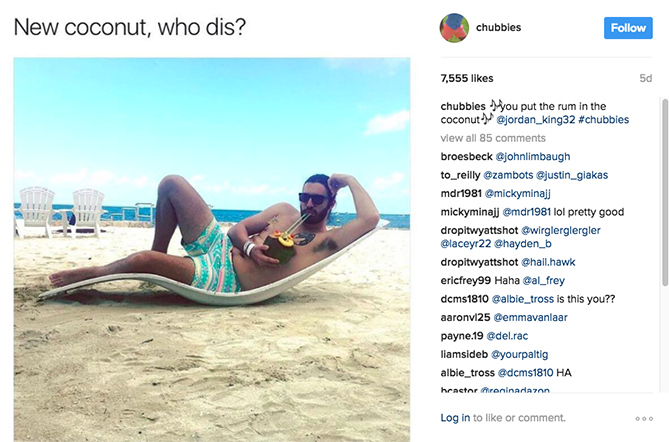
Love ’em, hate ’em, or loathe ’em, Chubbies is here to stay. The founders were four Stanford buddies who bonded over their mutual love of short shorts. Says co-founder Tom Montgomery, we noticed that “If you had a really cool pair of shorts, people would talk about it.” They decided to test their idea for Chubbies out at a Fourth of July beach party before going all in. They donned their “Chubbies,” headed to Lake Tahoe, and quickly found “the shorts struck the same emotional chord with other people that it struck with us.”
Their website launched in September 2011, just a few months before winter, giving them time to prepare for the busy spring months. Chubbies’ team spent that time building up inventory and marketing to their target audience: fraternities.
Witty emails, unapologetic copy, and bro-friendly photography set them apart, and their guerilla-style email tactics spread their name and their product through college towns everywhere.
Viral best practice: Build a strong narrative before you go viral
In 2014 they raised a $4.4 million round of funding and a steady growth curve followed. They’ve expanded beyond their signature shorts but continue to build the brand around what made them successful in the first place — the weekend. “We’re constantly building this brand around the weekend and the feeling you get around Friday at 5 p.m. When a guy throws them on, the stress and rigors of the work week can be put on hold for a bit.”
That connection to their brand identity creates a strong narrative in their marketing efforts across channels. They speak to their audience unwaveringly, and their audience responds.
14. James Frey (A Million Little Pieces)

Author James Frey had an explosive product launch in 2005. His book, A Million Little Pieces originally marketed as his memoir, was catapulted to overnight success after being named on Oprah’s television book club.
Two million copies were sold, making it the fastest-selling book in the club’s 10-year history. It topped the New York Times Best Seller list for 15 straight weeks and was published in 28 languages by 30 different publishers all over the world.
Unfortunately, months after Oprah lauded his bravery as well as his book, it was revealed that his memoir was more fiction than fact. Winfrey publicly chastised Frey on her show, famously asking “Why would you lie?” Frey was dropped from his publishing house and he was hit with lawsuits from many readers.
Viral best practice: It’s never too late to refresh your brand
Frey continues to write books, with successes like I Am Number Four being made into movies. Even Oprah apologized for how she turned on him so suddenly. While he enjoys renewed success, Frey maintains a life decidedly out of the spotlight. The lesson here? Well, make sure your marketing isn’t full of lies, and be prepared to stand by your content if Oprah ever picks it up. But it’s also never too late to reinvent yourself and still have a successful career, even after a bad viral moment.
15. Dollar Shave Club
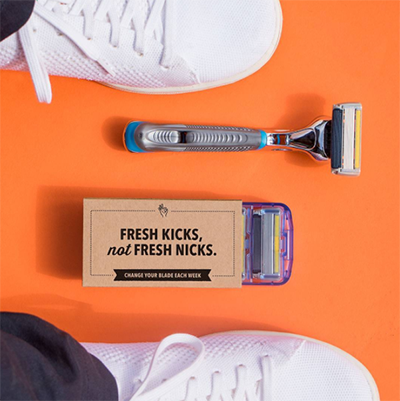
At this point, Dollar Shave Club‘s (DSC) inaugural video is legendary. My first reaction to a shaving subscription service was, “huh?” But with a single video, DSC flawlessly spoke to shaver pain points, poked fun at themselves, and announced to the world that they were ready to shake up a previously forgettable industry
Co-founder Michael Dubin wrote the video, starred in it, and had a friend shoot it in a single day for less than $4,500. It crashed the company’s servers 90 minutes after it went live and catapulted the company to become the second-largest men’s razor seller in America.
Viral best practice: Don’t be afraid to poke fun at yourself
That video has been viewed over 22 million times, and DSC has 1.1 million subscribers and growing. They earned a $615 million valuation in 2015, and in 2016 they were acquired by Unilever for $1 billion dollars cash. They continue with successful marketing, expertly branded packaging, and a unique presence in an industry that has finally been woken up. All thanks (in part) to a video that poked fun at the company while educating their consumer.
16. Chatbooks

A four-minute viral video? It goes against every 15-, 30-, and 45-second best practice in the book, but boy did it pay off for Utah-based subscription photo service Chatbooks. The video educates its viewer on how to use a relatively new app that turns your photos into albums so you don’t have to.
Why was it so successful? They nail their buyer persona. The video features a busy, realistic mom. She speaks to the audience with all the advice, sarcasm, and “I get it, I’ve been there” relatability that you’d look for from a fellow cool mom. It closes with a catchy tagline: “done is better than perfect.”
Chatbooks sold 1 million subscriptions in its first 18 months. It’s racked up over 1 million views on YouTube and the company is pushing 200,000 “likes” on Facebook. They continue to put out honest, pain-point driven videos featuring the same now-recognizable mom.
Viral best practice: Get detailed and personal with your personas
It’s easy to phone in your user personas. Instead of just targeting “moms,” Chatbooks clearly thought through how that mom thinks, what she worries about during the day, how she’s spending her time, and how photos figure into her hectic schedule. The result? A video their target audience couldn’t help but share.
The Next Time Your Boss Asks for a Viral Campaign …
It’s nearly impossible to know what will go viral, and trying for that elusive result will usually come across as forced and futile.
Instead, research your target audience, decide if you can expand that audience, and create campaigns that are thoughtful, actionable, and relevant. But before you launch, make sure you’re prepared for the maelstrom that could follow. It’s always smart to have a PR plan in place should the worst (or the best) happen.
Check out the webinar below by HubSpot Academy featuring a member of BuzzFeed’s video team, and how she’s managed to amass more than half abillion views from her content (with the right defenses for potential backlash).
As a final send-off, keep in mind that you shouldn’t expect every piece of content you release thereafter to be equally successful. Continue to create content that resonates with your audience and you’ll do just fine.

10 Free Project Management Software Options to Keep Your Team On-Track
59% of U.S. workers say communication is their team’s biggest obstacle to success, followed by accountability.
Managing multiple projects at once, delegating tasks, and collaborating across teams is difficult on a good day — but can become downright impossible when unforeseen obstacles get in the way.
Miscommunication and inefficiencies in your project management process can lead to confusing and stressful experiences for your employees, and hinder your company’s ability to satisfy your clients’ needs or hit end-of-year goals. This can lead to major losses over time.
Fortunately, there are plenty of free project management software options to keep your team on-track without breaking the bank. To streamline your process and ensure everyone on your team is on the same page, take a look at these ten exceptional free project management tools.
1. Project.co
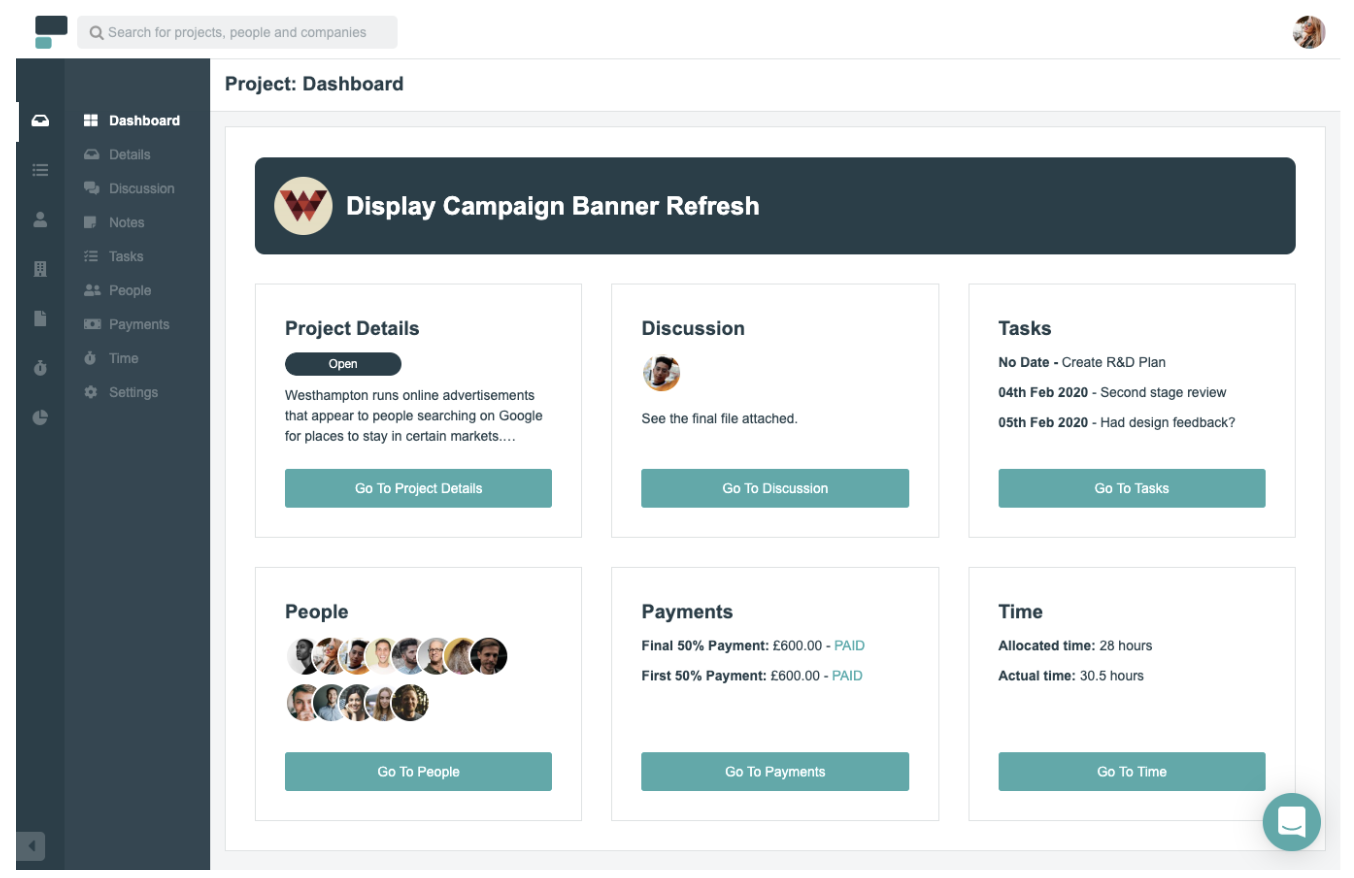
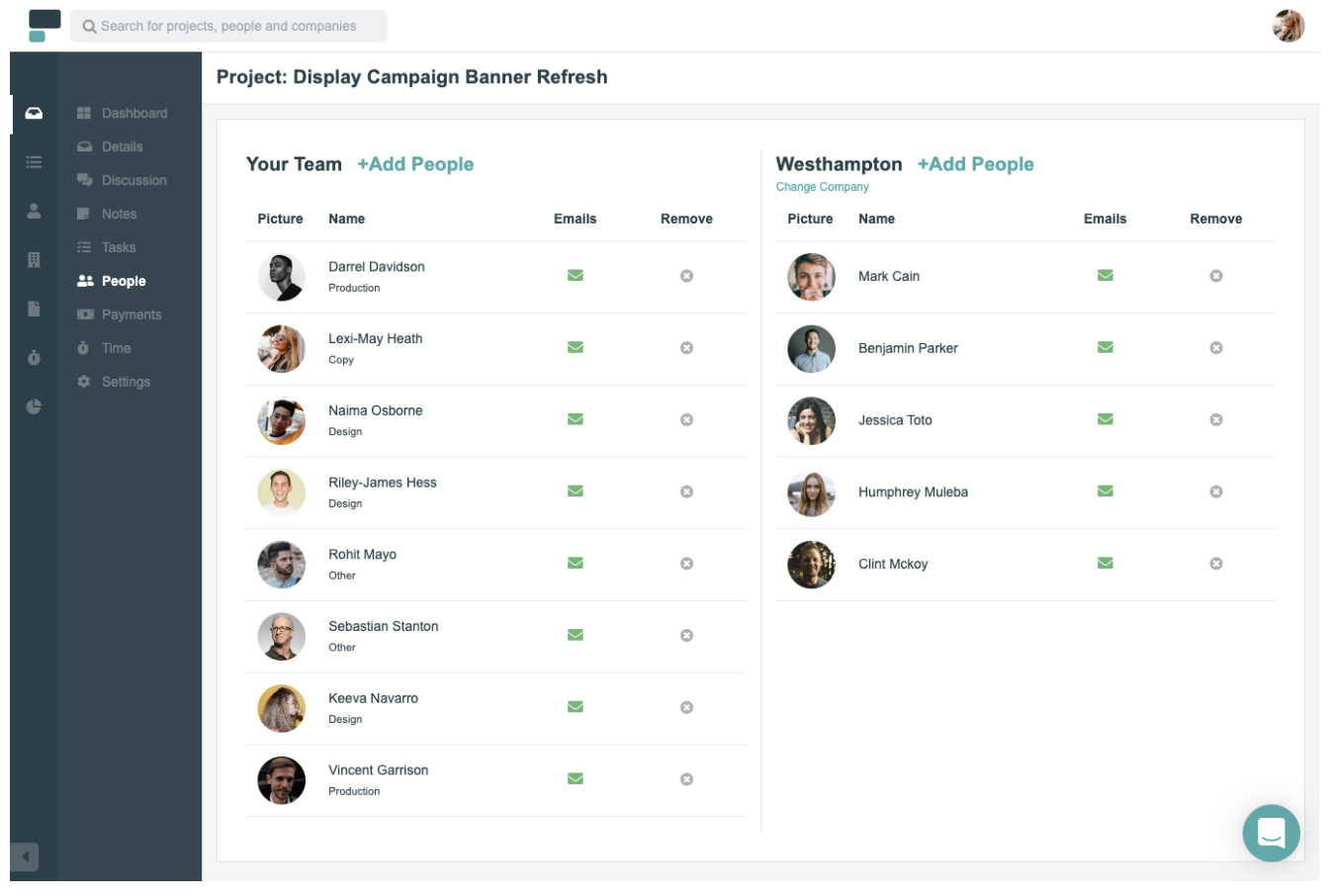
Project.co is a client-facing project management system that connects your team with your clients’ teams in one place. Each piece of work you do can be setup as its own project, with its own discussion feed, notes, tasks, team, and payments. You can also record time spent on each project.
A variety of different task and project views are available including calendar, scheduler and Kanban view — to give you the ideal overview of the work that’s happening within your team.
Features include:
- Ability to quickly add/invite both internal and external users
- Discussion feed for each project – with email alerts (and the ability to reply by email without logging in)
- Variety of task views – which can be filtered – giving your whole team, each department and even individual users their daily/weekly task lists
- Reporting tools that measure your most/least profitable/efficient projects
- Ability to integrate payment solutions and quickly, securely take card payments through the system
Pricing:
Free for up to five active projects and five internal users, with paid options starting from $7 per user per month.
2. Toggl Plan
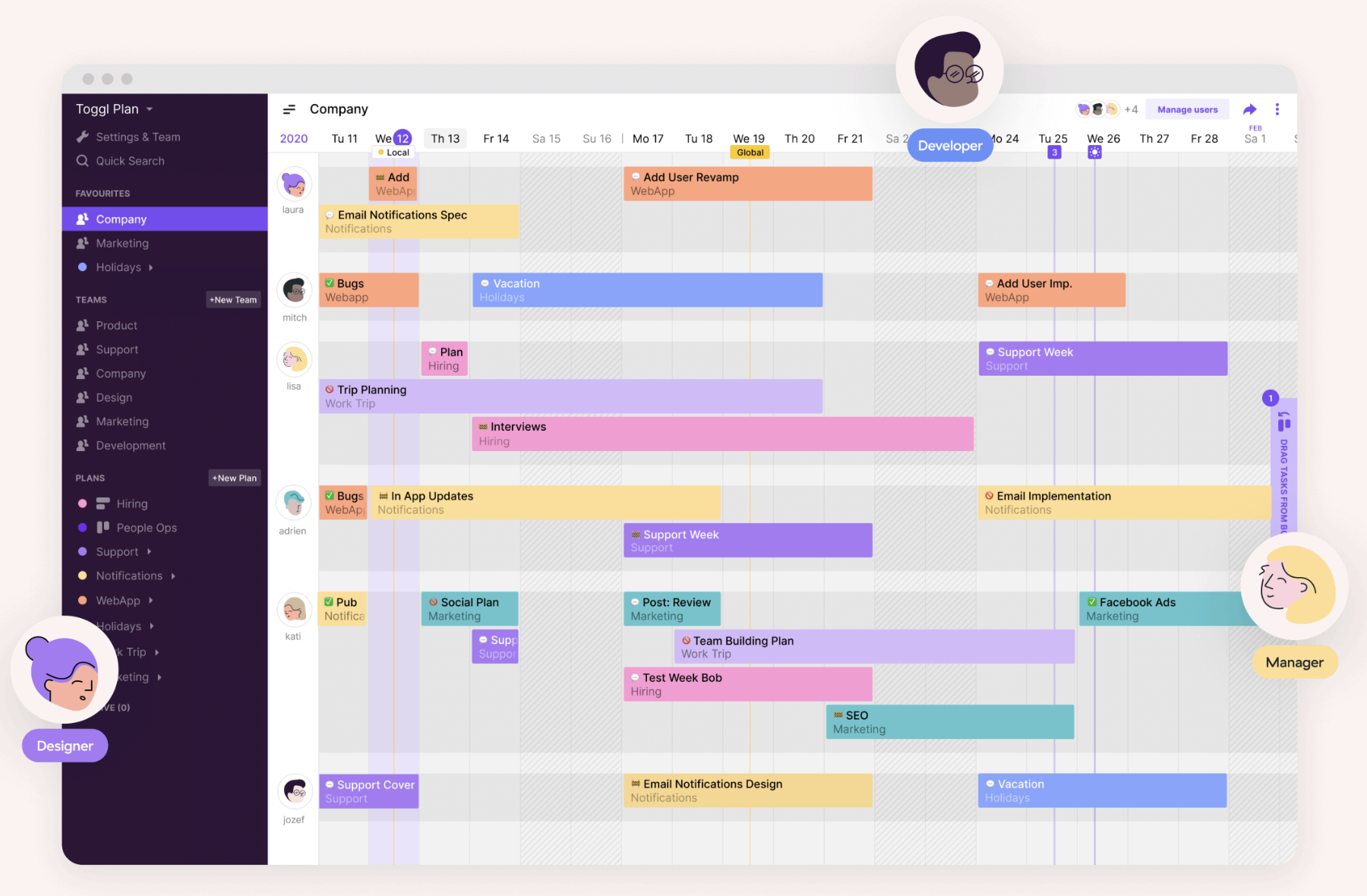
Toggl Plan is an effective project management tool to automate your task delegation process and visualize which project tasks have been completed, and which haven’t. If your team often collaborates with other departments on projects, this might be a useful tool for you.
Features include:
- Gantt-chart visualization to track important deadlines and projects
- Integrations with Slack, Github, Evernote, and others
- Team collaboration option through shared calendars and task notes
Pricing:
Free for an unlimited number of projects for up to five team members
3. Freedcamp
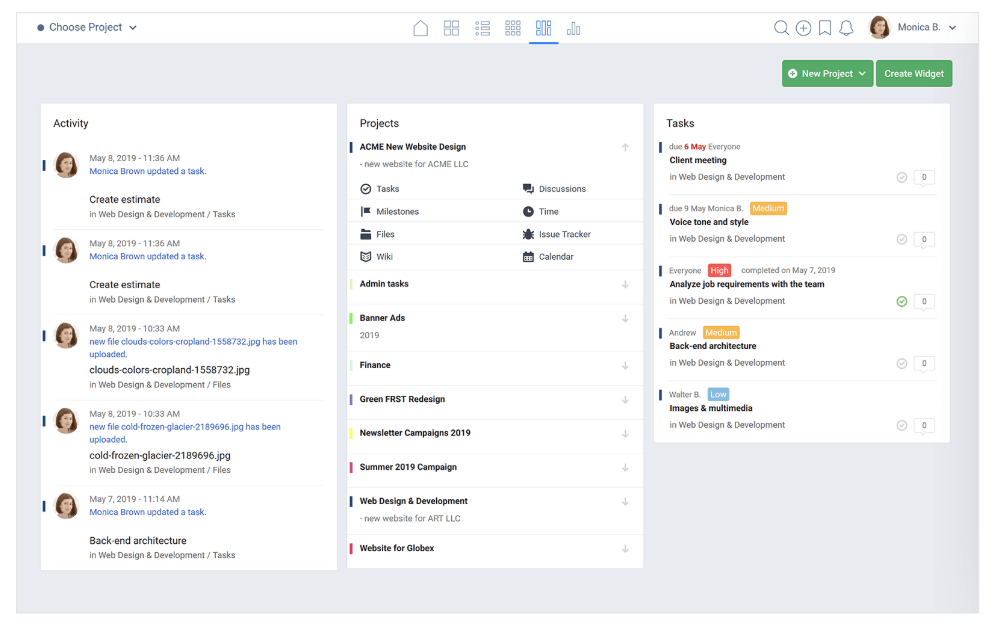
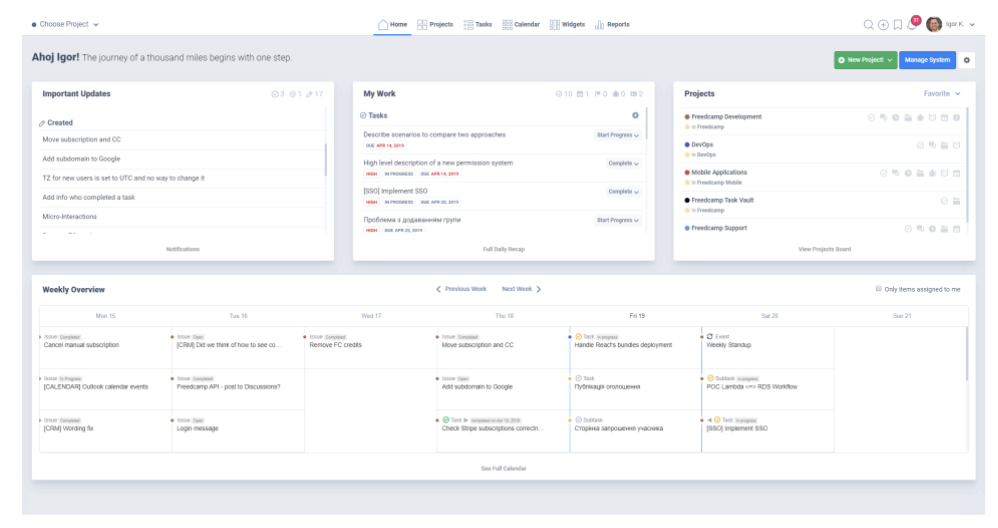
Freedcamp is a feature-rich project management tool that’s designed for personal and professional use. Each project has its own tasks, milestones, files, discussions, time, issue tracker and calendar. The dashboard gives you a clear, concise overview of what’s going on in your team including activity, projects, and tasks.
Features include:
- Message board style discussion feed, with the ability to create and carry out discussions on any topic
- Powerful calendar view laying out all upcoming events
- 3rd party integrations including Google Drive, Google Calendar, Dropbox and more
Pricing:
Free forever. Paid plans are available with additional features, starting from $1.49 per user per month.
4. Asana
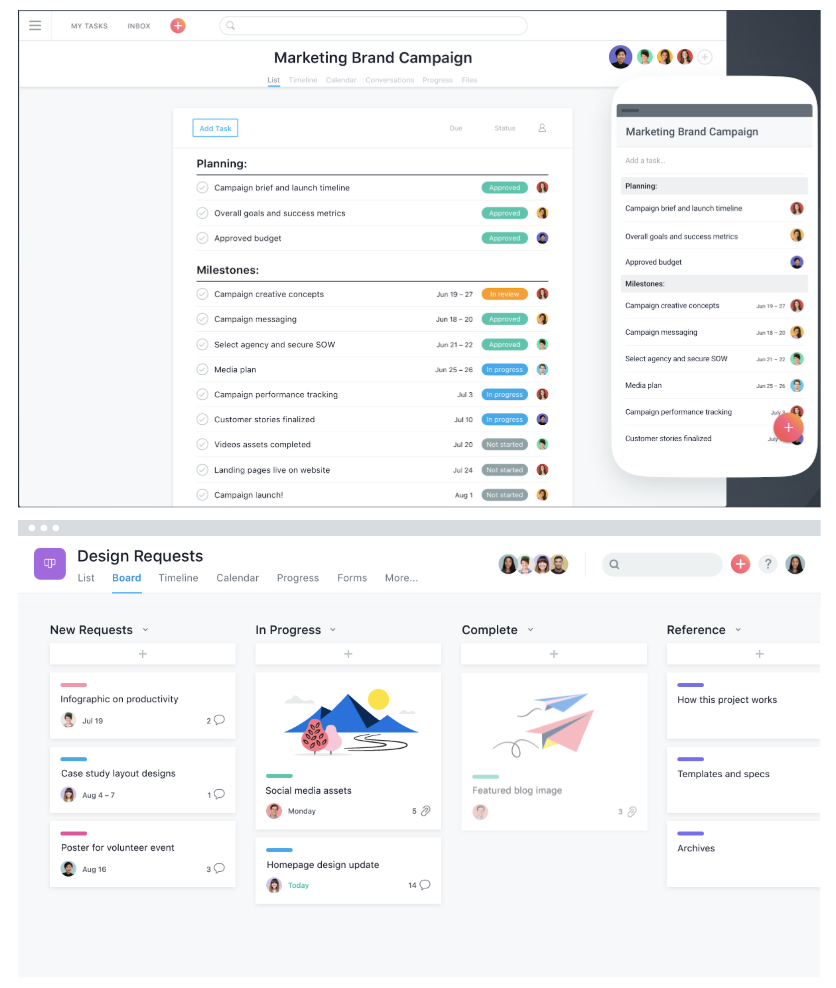
Asana, one of the most popular project management solutions used by millions of people across 192 countries, has a clean and user-friendly interface. The all-in-one tool lets you create boards to visualize which stage your project is in, and use reporting to keep track of finished tasks and tasks that need your attention.
Features include:
- The ability to create templates to automate mundane tasks
- The ability to collaborate and share information across the team, privately and securely
- The option to set security controls and designate admins
- Over 100 integrations for a more efficient start-to-finish process
- Custom project fields, share documents, and filter tasks
Pricing:
Free for unlimited projects for teams up to 15 people. Paid plans starting at $10.99 per user per month.
5. Teamwork
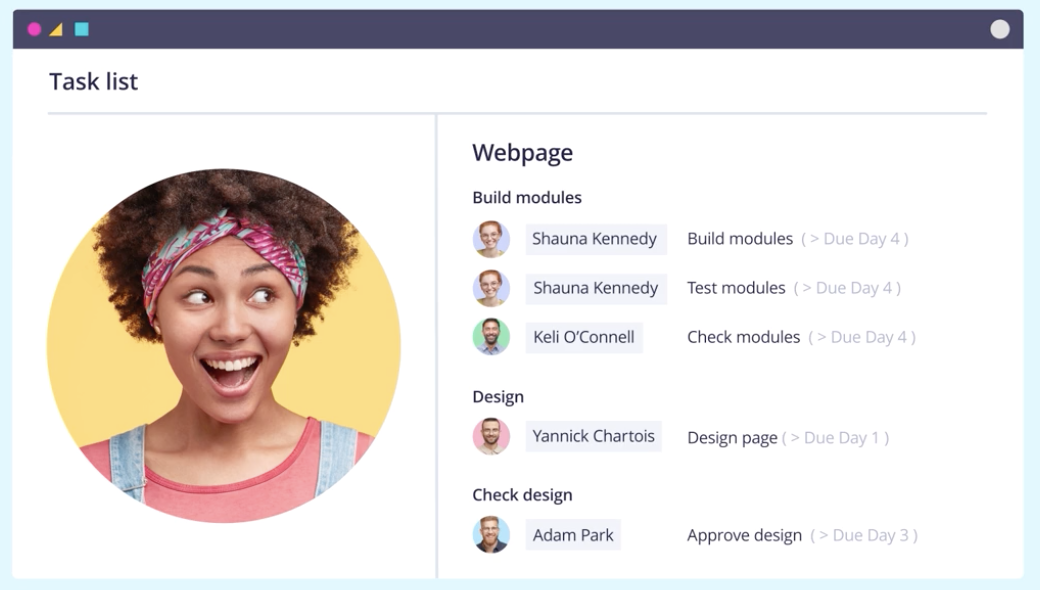
Teamwork, a project management tool that specializes in bringing together remote workers, allows you to create team member status updates so your remote and flexible teams know their coworkers’ schedules. It also provides customer service functions, including the option to assign tickets or view customer emails in one place. (Teamwork is a HubSpot integration partner).
Features include:
- Customizable navigation to prioritize your team’s needs
- Gantt chart for visualizing due dates and project timelines
- Private messaging, and option to make project details private
- Team member status updates for remote or flexible team members
Pricing:
Free for up to five users. Paid plans start at $9 per user per month with a minimum of 5 users.
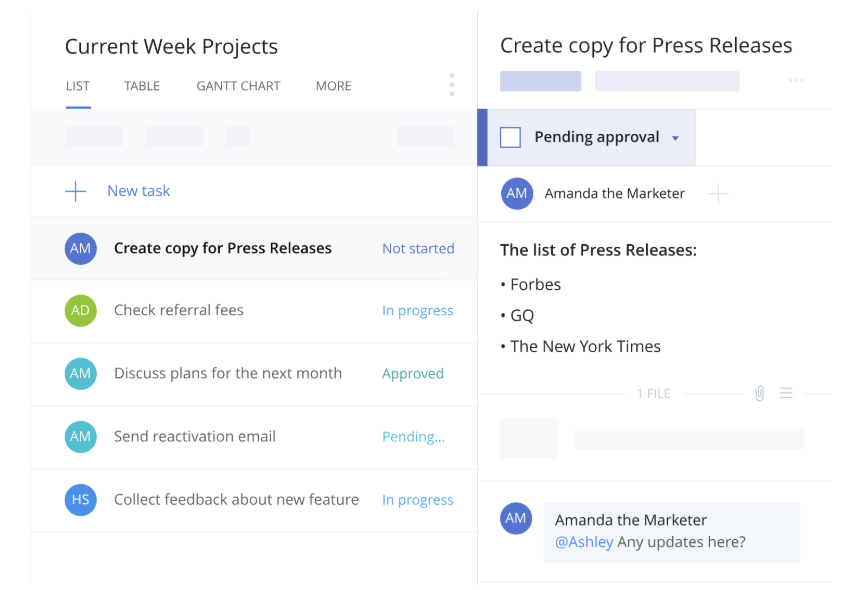
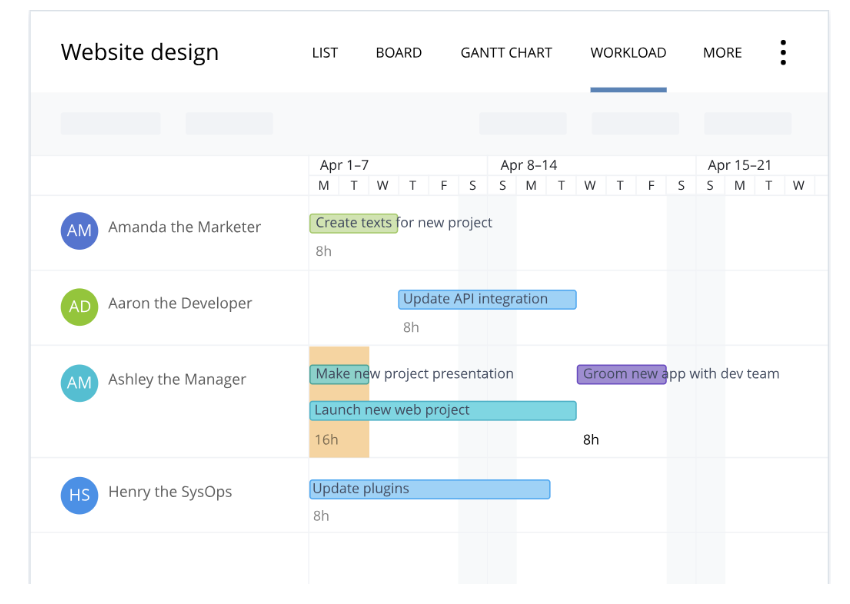
6. Wrike
Wrike stands out as an exceptional project management tool for teams who want the option to customize workflows and edit and revise projects from within the platform itself. The tool offers the ability to color code and layer calendars, and its mobile form allows colleagues to update project information on-the-go. You can add comments to sections, videos, or documents, and create custom fields to export data most relevant to your company.
Features include:
- Security measures to ensure only authorized personnel can access information
- Activity Stream to allow project managers to micromanage small tasks, see activities in chronological order, and tag team members
- The option to unfollow activities to declutter your own personal Stream
- Email and calendar synchronization
- Built-in editing and approval features
Pricing:
Free for five team members. Paid plans start at $9.80 per user per month with a minimum of 5 users.
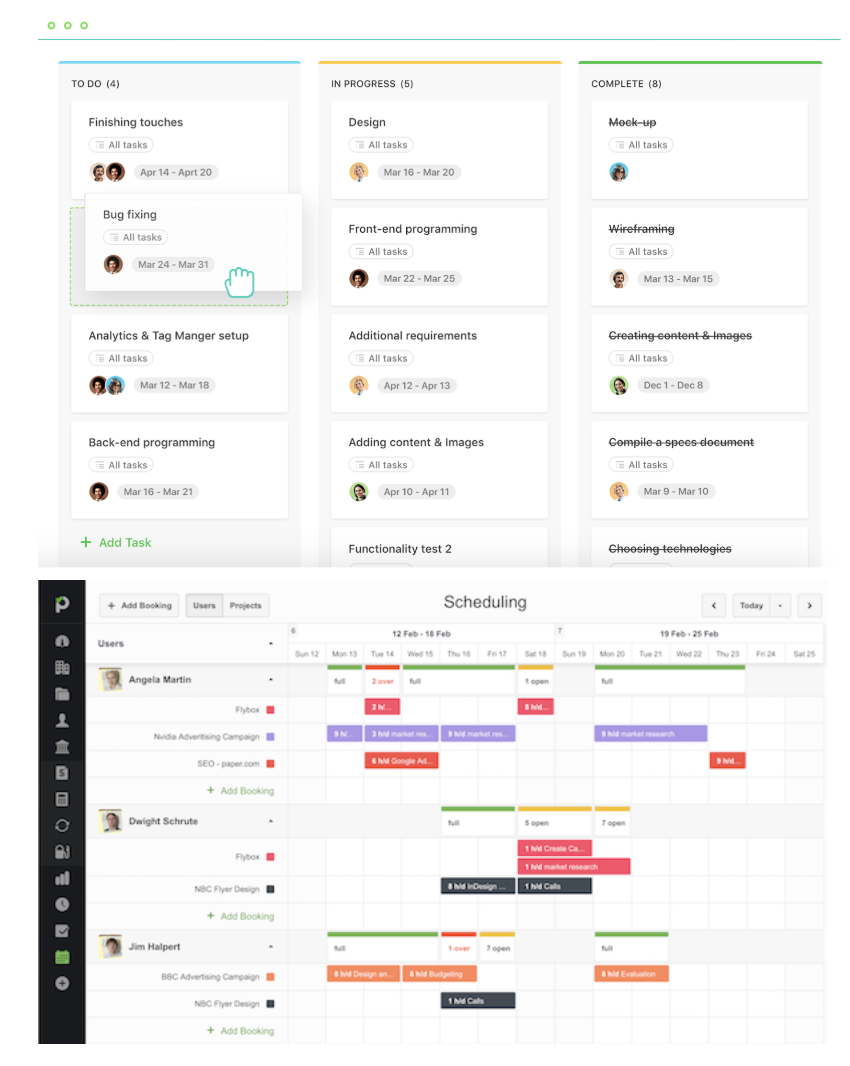
7. Paymo
Paymo’s free version only allows access for one user, but if you’ve got a small team or you’re a freelancer, this could be an efficient option for tracking billable hours and invoicing clients. Along with tracking finances, Paymo also allows you to organize project timelines, create to-do lists, and stay on top of your budgets for multiple projects at once.
Features include:
- Kanban Boards
- Time Tracking
- File Sharing and Adobe CC Extension
- Reporting
- Three Invoices
Pricing:
Free for one user. Paid plans start at $11.95 per user per month.
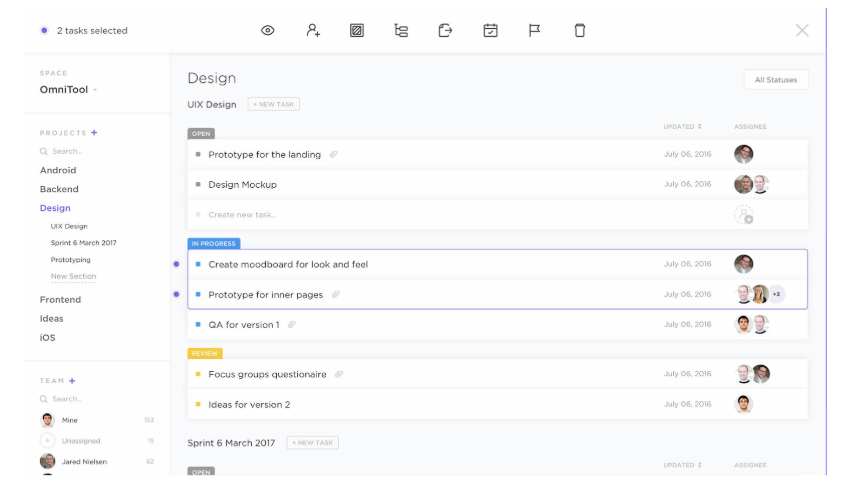
8. ClickUp
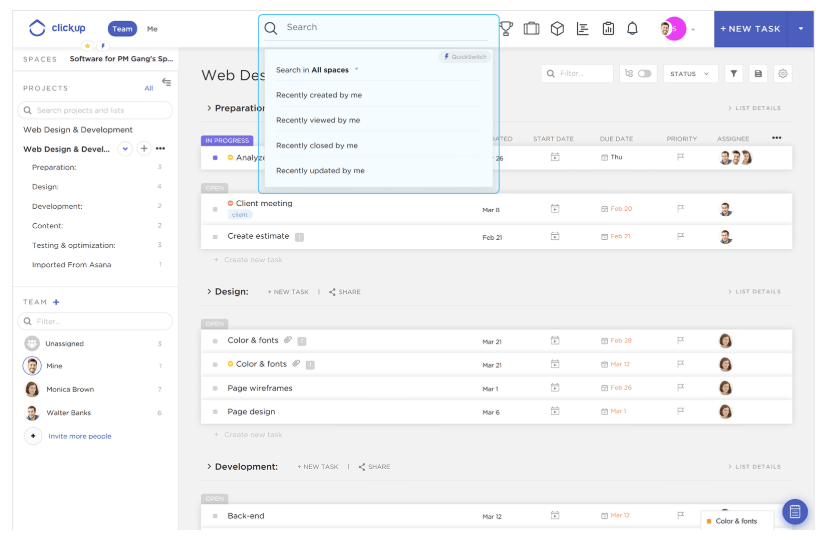
ClickUp provides a few impressive features to customize the all-in-one project management tool to suit your team members, including the option for each user to choose one of three different ways to view their projects and tasks depending on individual preference. If your marketing team overlaps with sales, design, or development, this is an effective solution, as it provides features for all of those four teams.
Features include:
- The ability to organize your projects based on priority, and assign tasks to groups
- The option to set goals to remind teams what they’re aiming to accomplish
- Google Calendar two-way sync
- An easy way to filter, search, sorting, and customize options for managing specific tasks
- Activity stream with mentions capability
- Image mockups
- 57 integrated apps
Pricing:
Free forever, with unlimited users limited features. Paid plans start at $5 per user per month.
9. Trello
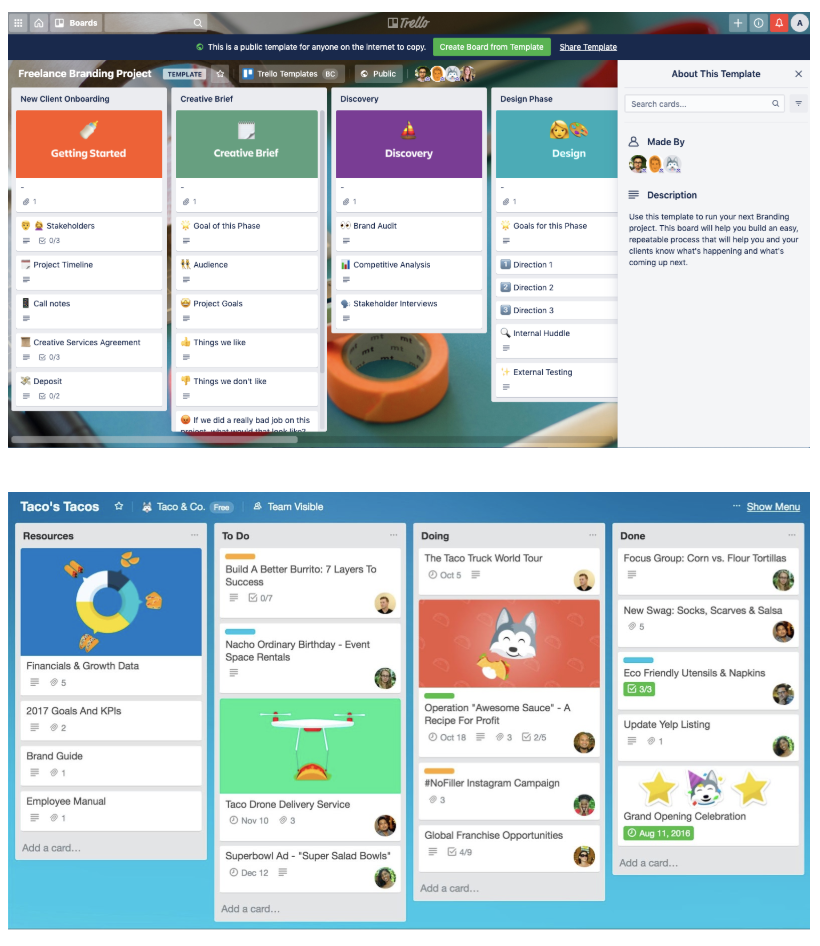
Trello is a drag-and-drop tool that lets you move projects – personal, or professional – through workflow stages, all the way to completion.
You define what those stages are – whether it’s work project statuses like ‘On Hold,’ or personal project categories like ‘Things to buy!’ – with tasks represented as ‘cards.’ Each card can be given a name, assigned to an individual, given a due date – and have files, such as images, attached to it.
Features include:
- Templates for a range of different types of project, from business to education through to personal productivity.
- Ability to add attachments such as images to any card on any board.
- Customise your workflow stages to reflect your actual process.
- Simple drag-and-drop movement of cards through workflow stages.
Pricing:
Free forever for unlimited personal boards, cards and lists – with 10 team boards. Paid plans start at $9.99 per user per month.
10. Todoist
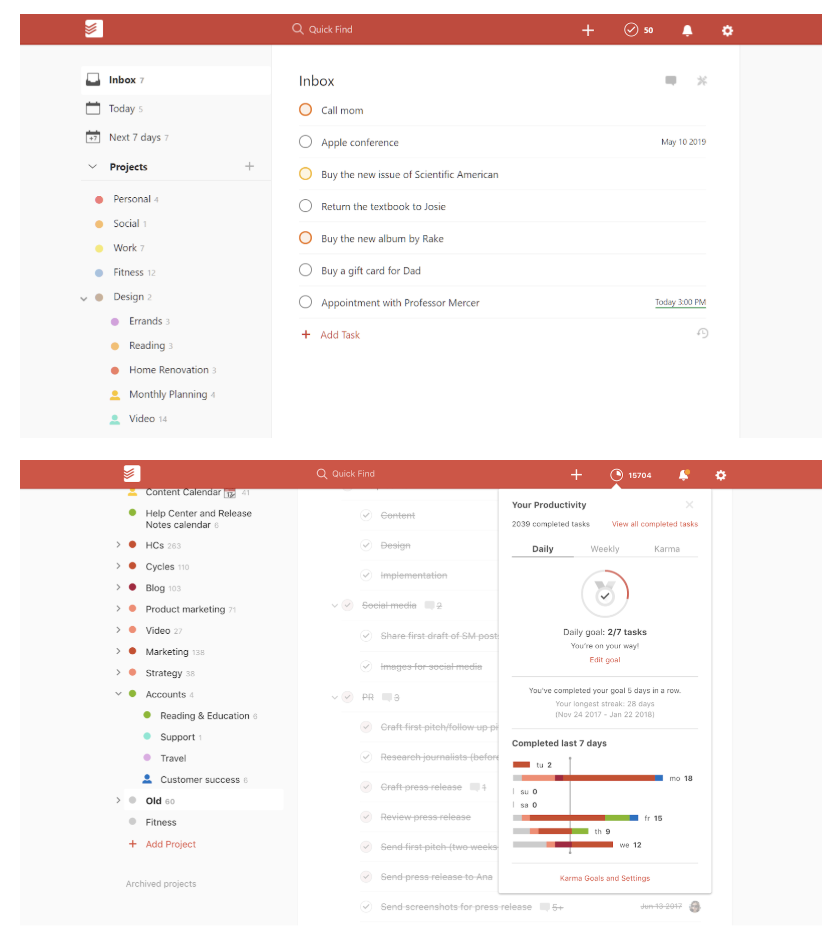
Todoist is a simple but powerful tool that lets you create powerful, interactive to-do lists. To-do items can be assigned priority levels, assigned to people in your team and flagged – with customisable reminders (although these are a premium feature.) Actionable items can also be categorised into different projects, making a simple, easily understandable structure where each ‘list’ has a title (project name) and a series of actions. This all makes it an extremely flexible, customisable tool to get work done.
Features include:
- Template lists to inspire and guide you.
- Recurring due dates for regularly recurring tasks.
- Productivity visualisations and ‘Karma’ points for completed tasks and streaks!
- Labels, notifications and discussion feeds to keep you organised.
Pricing:
Free, with an upgrade to premium (with extra features) available from $3 per user per month.

What Are Direct Costs & How Do They Differ From Indirect Costs?
It’s surprisingly inexpensive to start a business today — as little at $5,000, reports Fortunly. However, as encouraging as that is to aspiring business owners, the costs to run that business every day are a bit more complex.
Before research and development, and before you even rent an office space, you might want to know how much money you’ll need to make your product. These are your direct costs.
Direct Costs
Direct costs are what you spend specifically to develop and maintain your product or service. These costs can vary over time as the product is improved upon. Direct costs range from employee salaries to the price of the items needed to build each unit of your product.
Are direct costs different from fixed and variable costs?
Actually, direct costs are a type of fixed or variable cost. These expenses are not mutually exclusive. Whether or not a direct cost is fixed or variable simply depends on how likely (or regularly) the cost is to change as your business grows. Here are two examples:
- Variable direct cost: A SaaS company that sells cloud-based software is responsible for storing the data their customers put on their software. That information is stored on servers. The more clients the company has, the more servers the business will need to buy to store client data so the product can continue to operate. Server costs, in this case, are a variable direct cost to the business.
- Fixed direct cost: Consider the variable cost example, above. This company also employs an IT administrator to manage the storage of its customers’ data. Barring changes to his/her compensation, the salary the company pays this administrator remains unchanged each month. IT salaries are a fixed direct cost to the business.
Direct vs. Indirect Costs
Direct costs are invested “directly” in the development of a product or service. Indirect costs may affect the business’s overhead, but they do not directly contribute to the creation and quality of that service. These costs include office space rent, office security, and staff supplies.
Direct costs get their name because they have a “direct” line to the creation and management of your goods and services. You pay cost A in exchange for item B, you use item B to make product C. Cost A is a direct cost because product C can be traced back to the cost A you paid.
Indirect costs are more complicated and do not have this direct line to your product’s end result. You pay cost A in exchange for facility B, you use facility B to host machine C, machine C is used by team D to make product E. Cost A is an indirect cost because product E cannot be directly traced back to the cost A you paid. There are other direct costs that took place between A and E.
| Direct costs | InDIRECT costs |
|
The physical materials needed to make your product. The servers needed to power your ecommerce site. The salaries and commission you pay employees to produce and sell your product. Transportation methods that get your product to the customer. |
The rent prices and fees that come with facilitating an office. Expenses needed to keep your team happy and motivated. (i.e. office perks or team lunches.) Supplies needed to help your office run smoothly. Technology and IT that doesn’t directly help produce products. |
Examples of Direct Costs
- Physical materials
- Employee salaries
- Sales commission
- Servers
- Data center spaces
- Product transportation
It’s easy to attribute your direct costs to the money you spend physically making your goods and services. An automotive company, for example, might pay a steel manufacturer for the material used to create each car body. This is a direct cost to the car company.
However, there are other direct costs that can go into a product even if those costs don’t pay for the material your product is made out of. Here are some common examples of direct costs you can attribute directly to your product:
Physical materials
The raw materials, ingredients, and parts needed to build your product are all direct costs to your business.
For example, if sell computers, you’ll need to factor in the materials needed for the screen, the keyboard, and the hard-drive, as well as any other material needed to build the device when designating a cost for it.
Employee salaries
The individual salaries, particularly the ones you pay to those who make and sell your product, are direct costs.
If you hire any freelancers or contractors, you’ll also want to factor in how much money you will need to spend on their labor.
Sales commission
This is different than salary and is usually specific to salespeople, which often work partially on commission.
Every time a salesperson sells a unit of your product, he/she is paid commission. This is a direct cost to maintaining the value or your product. Compare how many units you’d like to sell with the commissions you’ll pay every time they get sold.
Servers
In 2020, almost every business needs some sort of a website. Meanwhile, every website needs a server. The servers needed to store customer data on your product, particularly if your product is in the form of software, is a direct cost to your business.
While you might be able to trim down costs buy building your website on a CMS that provides server support, you should still factor in the costs you’ll need to protect and store your data.
Data Center Space
Just paying for your servers isn’t the only thing you might have to factor in. You also might need to consider where you’ll place them and how much that could cost. Data center space you rent or own to store those servers is a direct cost.
Product transportation
Once a customer buys a product, how will it get to them? Will it come in the mail, or will a delivery tech from your company bring it? You’ll need to determine which strategy you’ll use and add up the costs associated with that. While mail will result in regular shipping costs, having your own company deliver it will results in costs of labor and costs related to purchasing your own modes of transit, such as trucks.
Click here to learn more about the types of variable costs you’ll encounter when growing your business.
Editor’s Note: This blog post was originally published in March 2019, but has been updated for comprehensiveness.

How HubSpot Manages a Giant Website With a Tiny Team
I can’t write a single line of code.
So, it was a big surprise to me when I was asked to lead our new global web strategy team three years ago.
If you’ve followed HubSpot’s history, it’s also probably a big surprise to you that we had 20,000 customers and went public years before we had a team to manage our web strategy.
And, as you might expect, things were pretty complicated before my team was implemented. Prior to 2016, we referred to our giant website as “the wild, wild west.”
The brand team owned the homepage, but anyone who asked for access could make or edit any of our web pages. The web developers and designers had an endless list of requests, but no way to prioritize them. And while some individual marketers measured the success of pages that contributed to their lead goals, nobody was measuring the overall success of the website.
You may be wondering how the HubSpot marketing team could fail to recognize the need for someone to manage its websites. The truth is, it wasn’t a matter of ignorance. — It was actually a matter of fear.
HubSpot has always had an autonomous culture. Before the team was implemented, stakeholders were afraid introducing a centralized team could hinder that autonomy. Because most of our marketers and cross-functional teams used the website for their initiatives, marketing leaders worried that one management team would slow people down or stifle innovation.
We needed a strategy for managing our websites that could accomplish our team needs: it needed to empower the many people at the company who contribute to the website and ensure a consistent user experience that delivered on measurable business goals.
As the days of the “wild, wild west” ended, my team, limited to a small group of people as we proved our worth, began creating a web management process.
The website management strategy we have today isn’t perfect, but it’s helped us grow and restored some sanity to the creators working on the site. Our team of just 17 people is able to manage our core website in six languages while providing an optimal user experience and consistent branding across our web properties.
Since developing the centralized website management team, we’ve grown the conversion rate on our core site by 76% while redesigning multiple related sites and site sections. And, thanks to the tools we’ve used, we’ve only needed to grow the team by a few people.
If you don’t have a huge budget to keep an agency on retainer or hire a full army of developers, here are five tips on how to scale your web strategy with a small team. For each tip, I’ll walk you through how we did it in our own strategy.
How to Develop a Scalable Website Strategy Like HubSpot
1. Identify your website’s purpose and goals.
Customers often touch a brand’s website at every single stage of the customer journey: From their first interaction of reading a blog post to looking for customer support documentation after they’ve become a customer.
This puts a lot of demand on a website and the team that manages it.
Since our strategy could go in multiple different directions, our team first needed to articulate a clear purpose. We did this by crafting mission and vision statements.
- Our Mission: Help professionals grow their businesses better by connecting them to HubSpot’s content and software on our global websites.
- Our Vision: Oversee HubSpot’s websites to ensure that they are on brand, user-friendly, global, and optimized for conversion.
We also wanted to go one step deeper in our responsibility to the business by creating some quantifiable goals.
When determining our KPIs, we debated between using click-through-rates, conversion rates, or estimated revenue. We ultimately decided to track the overall website’s performance by conversion rate.
The conversion rate was relatively easy to measure and the most isolated KPI that would relate most to the work that we’d do.
We also considered using revenue as our main measure, but we lacked direct attribution reporting. Revenue can also be impacted by many external factors such as changes in average sales prices and sales close rates. However, we still used revenue to evaluate the winner for any conversion rate optimization tests that we’d run, as they would be taken over a short period of time and less subject to changes in those external factors.
To make sure we still put the customer experience first, over quantified business metrics, we created a hierarchy of website goals.
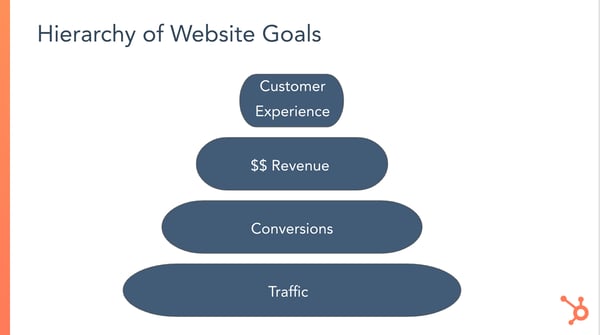
We felt this hierarchy was important to document because being too focused on increasing numbers like conversion rates can lead to bad behavior. Examples at their most extreme include the extensive use of misleading clickbait copy or interruptive pop-up CTAs. I wasn’t worried about my team getting that misguided, but we had seen pages that were off-brand or could be confusing to some users that still yielded high conversion rates.
We wanted to hold ourselves accountable for having the best of both worlds — iterating and testing a subpar design until we could find a variant that converted well, was consistent with our brand, and could generate positive user feedback.
2. Choose a content management technology that meets your team’s needs.
To help manage a website without a full team of developers, both big and small brands often use content management systems.
CMS platforms allow those with less web experience to create or design webpages or content using a simple interface. Meanwhile, those with development or coding knowledge can still customize or make more advanced changes to a website. In short, a CMS enables most employees to contribute productively to a website without any help.
Our website has always been powered by HubSpot’s CMS— as you probably might have guessed.
As HubSpot employees, we like to use our own products to do our jobs. Aside from staying loyal to our own brand, the CMS aligns with our web management needs,
The CMS software was designed for quickly-growing companies just like our own. It’s powerful enough to handle the governance and other website management needs our development team demands, and straightforward enough that marketers who can’t code can still easily use it. It empowers web managers or editors of all levels to create or manage successful website content.
Aside from the CMS, we also use our CRM, Marketing Hub, Sales Hub, and Service Hub.HubSpot products that power different aspects of our website. For example: while the Marketing Hub helps us with SEO, analytics; and automation, the Sales Hub allows us to enable chatbots and live chat on our site.
With HubSpot, we can also integrate third-party software to help us execute our strategy. Here are a few examples of helpful tools that work with HubSpot:
- Cloudwords: For localization of our non-English websites
- Google Analytics: For measuring web traffic, click-through rates, conversion rates.
- Google Optimize: For running conversion rate optimization experiments. We use this to complement HubSpot’s own testing tools.
3. Plan your operating model.
When you count every single blog post or landing page in every language across all of our domains, we have nearly one million website pages. That’s a lot of content to maintain and optimize. Our team simply can’t touch every page.
To help us manage even the pages we don’t regularly touch, we needed to develop a system of ownership and prioritization that would find the right balance of empowering other marketers to manage aspects of the site, while still maintaining control over consistent user experience and business goals.
So we developed a framework to define ownership across our various websites:
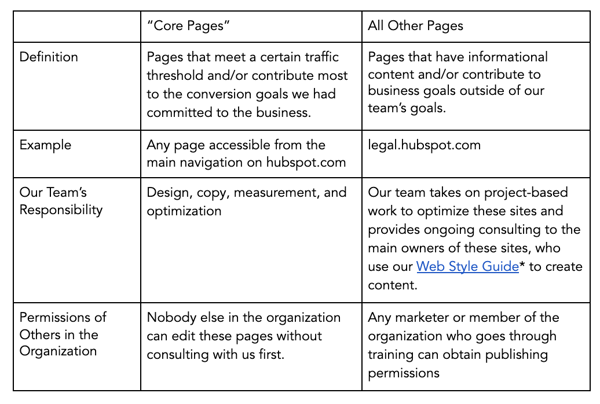
The design and development teams also created a Web Style Guide, which made it possible to have a flexible website that empowered others and ensured a consistent user experience. This guide is a toolkit of consistent, on-brand web modules that other stakeholders can use to create and edit website pages. These modules are the building blocks for making a landing page.
With all marketers and website stakeholders pulling from the same library of modules, there’s an automatic system in place to ensure a consistent user experience across our many site pages. And if we want to make a global change to update a design element, like one of our brand colors, our developers can roll it out universally.
If you’re building out a web strategy for your site, you’ll also want to prioritize what tasks are important for your core team and which site pages can be delegated to other marketers.
For example, if you have a core website and a robust blog, you might want one marketer to oversee the website’s main pages, while a blog manager manages your blog site. This will free you up to focus on the larger branding-related tasks that we were able to take on.
4. Identify talent with different strengths for your website management team.
Odds are, your website will have many different elements to it, such as a homepage, a mobile-optimized design, a blog, or product purchasing pages. Because of this, it only makes sense that you should build a web strategy team with multiple types of marketers that can give you insight on how to maintain each aspect of your site.
One of the really unique things about our team is that it brings together people with a wide range of expertise, all working towards common goals. Our group is incredibly cross-functional, and the work we create is a testament to the power of diversity of thought.
Below are examples of people you’ll want on your web strategy team. In my case, the people in the following roles don’t all report to me. However, I still consider anyone outside my direct org a member of my team:
- Conversion Rate Optimization strategists: Use qualitative and quantitative data to run experiments and improve the conversion rate on existing pages, or apply these principles to creating successful new pages
- Copywriters: Write short-form copy for website pages based on the audience’s needs and business goals
- Web developers: Develop site pages, applications, and user experiences
- Web data analysts: Implement analytics technologies and analyzes data to identify opportunities
- Project managers: Prioritize projects and facilitates collaboration across the team
- International website champion: Establishes our localization strategies across our various language sites
5. Prioritize your goals and projects.
As you scale up, it can seem like there are hundreds of things to do on your website. It can be hard to identify what’s really the most important thing to be working on. Even when you do, a sudden product launch or company announcement could cause you to need to change course on a project.
Once your website strategy and your team are in place, it’s crucial that you continue to prioritize work in a way that aligns with the goals, mission, and purpose you’ve decided on.
On our team, work falls within three main categories:
- Optimization: Conducting research to understand data and user behavior to inform website experiments intended to increase conversion rates on a page (ex: A/B testing copy headlines)
- Business Updates: Altering copy and design on a page or multiple pages to communicate information about our product offerings, brand messaging, partner programs, etc. when there is a strategy change (ex: launching a new product)
- Redesigns: Completely altering the site structure or making significant, multiple changes to design and copy all at once based on a complex business strategy change or insight about user behavior (ex: updating the site navigation and corresponding pages to simplify conversion paths)
Aside from picking key areas to focus on, as we’ve done, you should also consider an annual planning process or meetings designed for prioritizing upcoming tasks.
In our case, we always have more project ideas and opportunities than team bandwidth. And business changes come along all the time that we weren’t expecting. This combination has led us to create a diligent annual planning process with quarterly revisions.
At the beginning of each year, we spend time with leaders across the business to understand what business updates are coming and how they’d like the website to better support their initiatives.
We also create our own wish list where we see opportunities and create an additional bucket for ongoing maintenance, experimentation, and unforeseen projects.
Then, we determine how many people we’d need across our many disciplines to execute on every project. This helps us create a prioritization system to rank the projects.
After a series of meetings with the marketing leadership team, where we iterate on headcount and prioritization, we end up with the list of projects we’ll commit to delivering.
Every quarter, we revisit the priorities and make adjustments based on any business changes, new opportunities identified, or shifts in goals from our team or the broader business,
Through this process, we’re able to prioritize more urgent matters, while still being able to revisit or re-prioritize the less urgent matters in the future.
6. Recognize potential challenges and make goals to work through them.
Even if you have a winning team and an army of developers, you still will run into challenges as your site grows and your brand evolves. When running a web strategy, it’s helpful to acknowledge those challenges and how you’ll combat them.
Our team has come a long way in establishing an effective and scalable website model, but we still have a lot of room for improvement.
One of the main things we struggle with, which is common to any growing company, is finding the right balance of executing against short term goals with building scalable systems for the future. Trying to do both can feel like already driving a car while you’re still trying to build the car.
We’re trying to get to the point where we never have to do a classic redesign to any of our sites or site sections ever again; instead, we want to continually optimize, update, and evolve our web properties through testing and ongoing improvements.
Start Building Your Website Strategy
Even after three years of directing global web strategy, I still can’t write a line of code.
But, as long as I have a great tech stack and a team that’s committed to empowering marketers, I don’t intend to learn.
If you’re a marketer at a growing business, you don’t necessarily need to be a development expert to lead its website strategy. If you can envision what a smooth website experience looks like for your customers, navigate a CMS, and pick the right mix of development and marketing talent for your team, you can build a successful process.
To learn more about how to build an effective website or scale up your strategy, check out this step-by-step guide to creating a website, or this post on redesign strategies. If you’re interested in testing out our CMS, click here for a free trial.

How to Rethink Your Way to Business Growth
Do you want to grow your business? Is it time to rethink the way you market and deliver experiences? To explore how to grow your business via innovation, I interview Duncan Wardle on the Social Media Marketing Podcast. Duncan is the former head of innovation & creativity for Disney. He’s also a keynote speaker who […]
The post How to Rethink Your Way to Business Growth appeared first on Social Media Marketing | Social Media Examiner.
from Social Media Marketing | Social Media Examiner https://ift.tt/3cgB5m7
via socialmediaexaminer
Features vs. Benefits: A Crash Course on Proper Messaging
Earlier, I was scrolling on LinkedIn and came across this ad.
Instantly, I was impressed with the effectiveness of the language.
The language, concise and clear, offers up the benefit of the product being marketed in a way that stops scrollers in their tracks, including me.
Qordoba is an IT company that helps companies stay consistent with communication through AI technology.
The company’s ad caught my eye by communicating the benefits reading the report will have when it comes to customer-facing content, which does interest me.
‘How are tech companies managing their voice, tone, & writing style guides across their various types of customer-facing content?’
After reading this caption, I knew exactly what I would gain from this product, and why it was worth my time.
The beauty of proper messaging is that by communicating either the benefits or features of your product or service, you can tell customers what they need to know in a clever, concise way.
As a marketer, you’re likely wondering when you should use benefits versus features in your content. We’ve got an answer, and we’re going to dive into that in the next couple of sections.
Features vs. Benefits
What exactly is a “feature” or “benefit,” anyway?
Both methods are useful and give customers important information they’ll need during their buyer’s journey, such as design, price, and real-world relevance. Ultimately, however, the benefits of having a product or service are what make consumers purchase. If you do decide to highlight features, you’ll want to make sure consumers understand how they’ll benefit from those features.
Let’s look at another example of features and benefits at work. This is a marketing email I got this morning from Marriott hotels:
 This ad starts with the benefits of becoming a Marriott member — ‘yes to vacation views’ — while the rest of it explains the features of the program, including ‘no annual fees’ and ‘3X points per $1 spent at more than 7,000 Marriott locations.
Emphasizing that Marriott members enjoy free perks, then expanding on how this is done (by earning rewards points), is a really effective way to explain the benefits and features of the rewards membership.
Which is relatively straightforward — but what if you have multiple products being sold at once?
If you’re working with more than one campaign at once, remember the “Features or benefits?” the answer can change depending on the product.
If you’re unsure whether you should list features or benefits for a given product, consider this — features are an optimal choice in a saturated market. For instance, a small business making a meal-delivery kit would have some competition (such as HelloFresh or Home Chef), so they would have to communicate their service’s competitive advantage by naming one-of-a-kind features. This would include price, dietary restrictions, menu configuration, etc.
Benefits, on the other hand, are the way to go if your brand exists within a niche market or a “drier” topic. You’ll want to answer the following questions with your benefits: How does it work? How does it make a consumer’s life easier?
To resonate well with an audience who perhaps haven’t heard of your product or service before, try to include benefits in your demos, ebooks, and other marketing content..
Now that we’re more clear on features vs. benefits, let’s explore some examples to see both in-action.
Features and benefits: Examples
For the visual learners like myself, below are some real-world examples of how to work features or benefits into ads, product pages, email, or any other marketing materials:
1. Calm
This email about an exclusive deal made me excited, which is another way highlighting features in your marketing material can be beneficial — to build excitement. Here’s how sleep meditation company Calm did it:
 Framing singer/songwriter Lindsey Stirling‘s work as an exclusive feature improves customer relationships and makes them feel special. Opening this email made me think about how glad I am to be an email subscriber (especially since I grew up watching Stirling on YouTube) because of cool offers like this.
If you’re running a promotion or want to improve customer relationships, consider sending them an offer that reminds customers of your product or service’s unique features.
2. HubSpot Academy
In this product page for HubSpot Academy’s social media course, three benefits are listed at the bottom, so prospects can see how completing this course will be worth their time:
Benefits don’t always have to be short phrases – in fact, on product pages, more is often better. On web pages, it’s critical you give your customers the helpful information they need — including cost, structure, time required to complete, and a description on how your products or services’ benefits outweigh the benefits of competitors’.
3. Arcadia
Can you spot the benefits energy company Arcadia used in this promoted tweet?
Here’s the easiest way to save on your utility bill and get clean energy.
— Arcadia (@arcadia)
February 18, 2020
If you chose the entire tweet, you’re right!
Almost every word helps describe to the reader why they should open the linked website. As a consumer, I would think, “Well, what is the easiest way to save on my energy bill at no cost? That thing is sky high!”
Words that help the consumer are going to resonate with those who are just mindlessly scrolling and not necessarily looking to buy anything. To build interest in their promotion, Arcadia’s use of benefits to entice prospective customers was a good choice on Twitter.
Impress a scroller by using benefits in marketing messages. You have a few seconds to leave a mark.
4. Airtable
Beautiful, descriptive features in this Facebook ad told me exactly what Airtable is and what their software does, despite having no previous knowledge. In less than thirty words, I know that Airtable must be a product or service that makes dull spreadsheets a thing of the past — for free.
Marketing teams that don’t have the budget to spend on a full suite of fancy products might come across this ad, see the features, and think “Flexible, beautiful, and fun? Spreadsheets? For free? I should look into this,” and immediately hit that CTA.
Many of us use spreadsheets that are mostly text and less colorful, so Airtable does a good job detailing how they’re different from Microsoft Excel or Google Sheets, and helps them seem like a game-changer to consumers.
5. KeVita
Kombucha is a fermented tea drink with probiotics, which aid in helping digestion and improving energy levels. So, when marketing their kombucha on Instagram, the KeVita brand wanted to show that kombucha isn’t just a summer drink, contrary to popular belief.
Aesthetically pleasing, benefit-enforcing GIFs like this make visual platforms like Instagram a perfect canvas for an ad that displays benefits.
Animation often stops scrollers — especially animation paired with bright pink text. The backdrop, a ski lift covered in fresh snow, (“powder” to skiers), shows the accessibility of the drink, while the caption alludes to kombucha-fueled energy to get through a long ski trip.
Two benefits that instantly stuck out to me about this post are accessibility and energy. On snowy mountains, those two functions are going to be essential when thinking about snacks. Consider a scenario-based ad if your product is like KeVita, commonly perceived as a summer drink.
From phones to shampoo, , the features/benefits marketing method can be applied to almost anything. As we saw, it’s important to know the distinction so audience members can deliver a clear marketing message.
Asking yourself, “Does this ad convey features or benefits?” and structuring accordingly is a simple thought to consider when creating copy that could improve the interpretation of product pages or ads by the public. What do you want to say, and which messaging method will be best for that?

How to Make a RACI Chart for a Project (with Example)
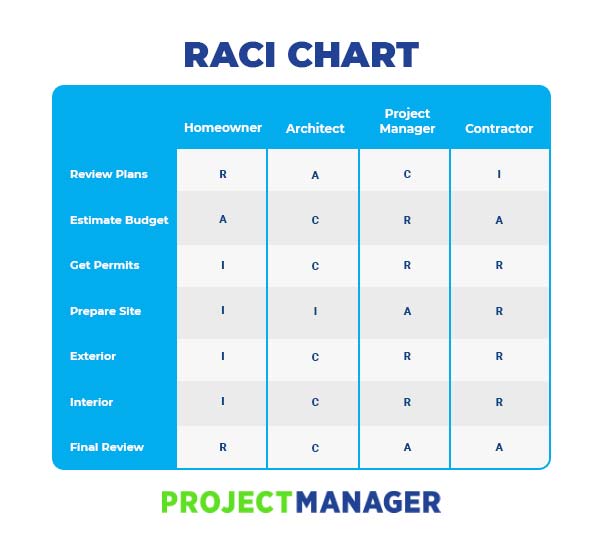
Best Project Planning Software of 2020

Kaptiwa – Alternativas a YouTube, Vimeo y Wistia
Demo en español de Kaptiwa
Qué es Kaptiwa
Kaptiwa es un software de almacenamiento de video de la altura de Vimeo o Wistia, ya sea para tus entrenamientos, infoproductos o membresías, páginas de productos o servicios, videos informativos para tu empresa, ventas por Internet…
Cautiva a tus visitantes con los videos de Kaptiwa en 3 pasos sencillos:
- Sube tus videos a la plataforma.
- Personaliza tus videos con un diseño original, desde agregar link hacia landing pages, botones de compra o links de afiliado.
- Públicalos en canales y listas de reproducción dentro de cualquier landing page, web, redes sociales o dispositivo. ¡Sin instalación, sin codificación, u otras complicaciones tecnológicas!
Si el contenido de video es el que más clican los usuarios, Kaptiwa se ha diseñado para que tus videos además sean interactivos, esto es, que dirijas tráfico hacia donde te interese poniendo llamadas a la acción y diferenciándote de tu competencia.
Al mismo tiempo Kaptiwa está diseñado para que conviertas ventas no solo captando la atención de tus clientes, sino que también puedes poner un producto a la venta con fecha límite o en cualquier lugar que deseas con tan solo copiar y pegar una línea de código.
¿Qué te ofrece Kaptiwa?
No hay límites para lo que puedes lograr hacer, te permite subir videos ILIMITADOS y, lo mejor, ¡nunca tendrás que pagar nuevamente por un hosting, como en Vimeo o Wistia! Porque puedes tener hasta 250 GB de almacenamiento y transferencia de datos ilimitada si coges la Versión Básica Comercial y la OTO1.
 Contarás con un reproductor que funciona en cualquier dispositivo y está perfectamente optimizado para reproducir tus videos al 100% Mobile Responsive.
Más rápido en carga, lo que significa más tiempo de permanencia de los usuarios en tus videos.
100% control de tu tráfico, lo que indica que no tendrás fugas de tráfico por los molestos “videos relacionados”.
Analiza a tu público y te presenta un informe con análisis precisos para que mejores los resultados de tus campañas.
Videos sin publicidad de otros, incluye tus anuncios y “llamadas a la acción” dentro de tus videos.
Plantillas de generación de leads de alta conversión y, aparte de esto, puedes conseguir impresionantes plantillas de promoción y uso compartido de redes sociales para obtener más ingresos y tráfico.
Una de las grandes barreras es poder editar las plantillas que tenemos y ajustarlas según nuestro criterio. Kaptiwa te ofrece el sistema de “arrastrar y soltar” para editar tus plantillas y anuncios en cuestión de minutos, sin código alguno.
¿Kaptiwa es para mí?
Seguro que sí, ya sea que lo necesites para monetizar e informar al público, Kaptiwa se encarga de crear un video profesional en HDR, SEO optimizado y eficiente para la visualización en cualquier dispositivo.
Por nombrar algunas personas que usan Kaptiwa:
- Marketers
- Profesionales dedicados a InfoProductos, entrenamientos o membresías
- e Commerce
- Agencias (especialmente si ofreces servicios de captación de Leads)
- Freelancers o emprendedores
- Marketing de afiliación
Kaptiwa en Imágenes
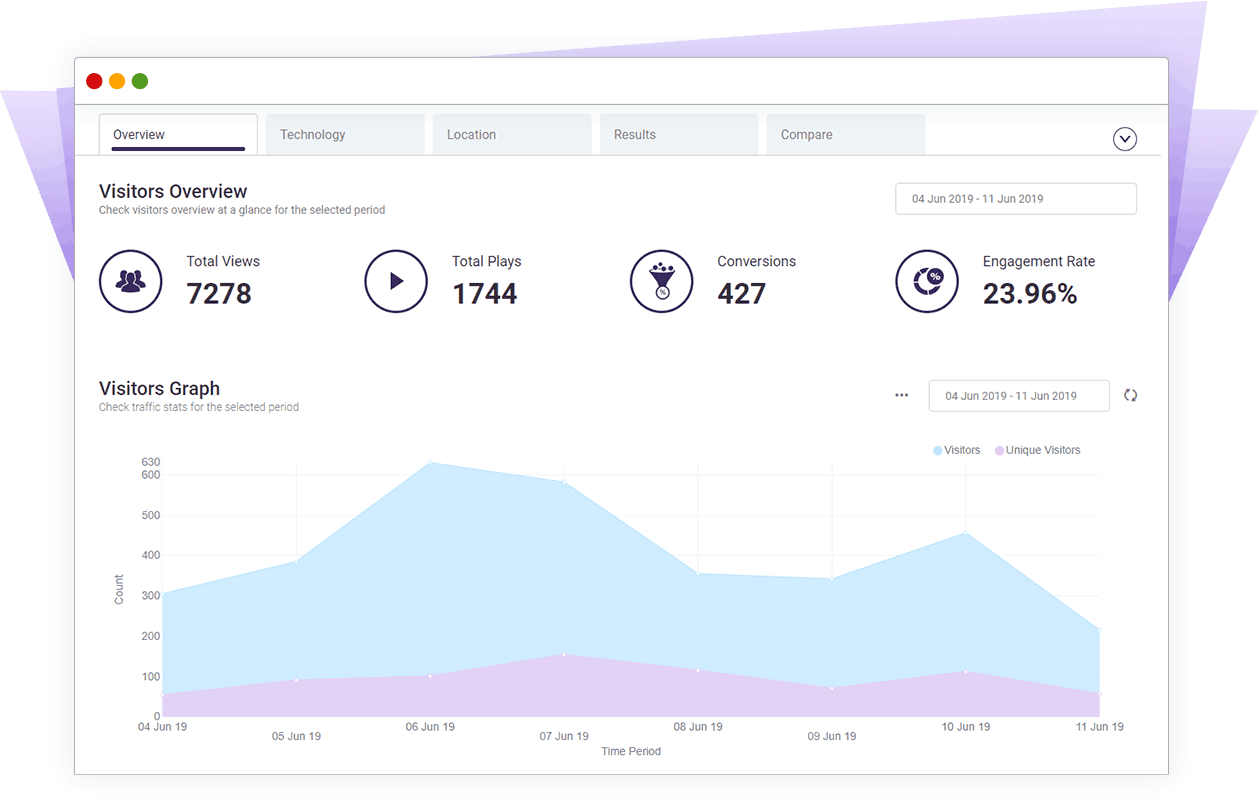

Precios de Kaptiwa
La Versión Básica tiene 2 Opciones:
- Versión PRO – Para tus videos y los de tus clientes (250 GB de almacenamiento y transferencia de datos mensual) – Licencia Comercial – RECOMENDACIÓN SOCIALANCER
- Versión Start – Para tus propios videos (50 GB de almacenamiento y transferencia de datos mensual)
Mira aquí el detalle de las Versiones PRO y Start:
Una vez compres la Versión Básica, podrás ampliar las funcionalidades del software con cualquiera de estas versiones:
BONUS EXCLUSIVOS SOCIALANCER
BONUS #1 – VideoTutoriales Detallados en español. Te explicaremos el proceso paso a paso para crear tus videos y sacarle todo el rendimiento a Kaptiwa desde su adquisición.
BONUS #2 – Soporte en español. Contáctanos para lo que necesites y te ayudaremos.
BONUS #3 [Únicamente si compras la Versión Básica Comercial] – 100 Licencias de Revendedor de ProfitMozo, un creador de landing pages rapidísimo que incluye 15 Plantillas de landings para webinars, páginas de captación de leads, páginas promocionales, páginas de bonus y reviews y mucho más. ¡Totalmente editables!
BONUS #4 – Creador de video automático. Descubre los secretos para crear tus propios videos profesionales en cuestión de minutos con este paquete asombroso. El software lo hará por ti
BONUS #5 – Conversor de texto a voz. Olvídate de leer interminables textos. ¡Tenemos la solución! El conversor de texto a voz es un software fácil de usar que convierte cualquier texto en audio, puedes escucharlo en cualquier momento y en donde sea. Si lo combinas con Kaptiwa 2.0 mejorarás tus resultados de video marketing
BONUS #6 – Pistas de música profesionales. Este software tiene innumerables pistas de calidad que varían en una duración de 30 segundos a 5 minutos y se pueden insertar en cualquier parte de tus videos.
BONUS #7 – Covert Video Squeeze Page Creator. La forma más efectiva de crear una lista es mediante el uso de “video squeeze pages”. Teniendo esto en cuenta, aquí tienes una herramienta muy útil que crea páginas increíbles y de alta conversión que generarán suscriptores ilimitados para ti.
BONUS #8 – Turbo GIF Animator. Los gráficos en productos o servicios son muy poderosos para las ventas, pero crearlos no es tan fácil. Así que, se ha creado esta herramienta útil con la cual puedes crear fácilmente imágenes animadas en formato GIF
BONUS #9 – 60 Photoshop Action Scripts. ¿Eres un Blogger, vendedor afiliado o un experto en marketing por correo electrónico? No es un secreto que las cosas atractivas capten la atención de tus visitantes y los tenga enganchados. Este paquete crea el diseño para la cubierta de un E-Book en 3D con solo un par de clicks
BONUS #10 – 300 Logo Templates. La marca es crítica para cada marketer, si no eres un diseñador es probable que tengas que invertir mucho tiempo y dinero en ello. Esta herramienta te ayuda a construir un paquete de plantillas en logotipos, que puedes usar para tus propios productos, a tus clientes o revenderlos.
BONUS #11 – Animated Pop Over Window Generator. Para tener éxito, debes captar la atención de tus visitantes y convertirlos en compradores de por vida. Este software crea una ventana que se desliza sobre tu ventana actual, cuando se hace clic en el enlace abierto.
BONUS #12 – Abstract Image Collection V4. Este paquete incluye un paquete de gráficos digitales abstractos que puedes usar de inmediato y capturar la atención de sus clientes atrayéndolos a tus ofertas.
BONUS #13 – Imágenes de Stock de Humanos. Las imágenes de personas reales han demostrado su valor, y estas imágenes son ampliamente utilizadas por los especialistas en marketing para captar una mayor atención de la audiencia. Incluye un paquete de fotos que puedes usar hoy para tus actividades de marketing.
Y el vendedor te ofrecerá también otros cursos y eBooks en inglés.
BONUS #14 (Si compras la OTO 1) – Palabras claves que valen oro. Este software te permitirá descubrir cómo investigar la demanda del mercado o palabras clave que las personas buscan con el planificador gratuito de palabras clave de Google.
BONUS #15 (Si compras la OTO1) – 100 Licencias de Revendedor de Tappit. Se trata de un software que te permite crear páginas para redirigir tráfico procedente de redes sociales hacia ellas de forma automática. El software busca contenido relevante en función de las palabras clave y lo publica en tu página, donde puedes tener links para monetización.
from Socialancer https://ift.tt/397AvFl
via
How to Leverage YouTube Advertising for Your Direct Response Campaign
While brand advertising on YouTube has been around for a while now, adopting the platform for direct response B2B advertising is relatively new.
Unlike branding, direct response focuses on compelling people to take immediate action after watching an ad. This action can be a site visit, sign-up, download, or purchase, which an advertiser can then track and measure.
Google has recently shown an increasing interest in expanding YouTube’s offerings for performance advertisers with TrueView for Action — a powerful campaign type that helps drive leads and conversions.
So it’s an ideal time to capitalize on a social platform that’s currently less competitive, slightly more affordable, and has a goldmine of nearly 2 billion monthly engaged users ready to take action. Here, let’s explore how to leverage YouTube for your next direct response campaign.
How to Create Effective Video Ad Creatives
Many advertisers perceive the video production process to be both intimidating and costly. And it can be, but it certainly doesn’t have to be.
Yes, YouTube requires specifically tailored video creatives, and that does require some money, time, and effort. But, for direct response, having an effective video ad is less about making sure you have polished video creatives. Instead, it’s more about having the right messaging strategy that will make people want to watch your ad and take action.
You only have a few seconds to grab the viewer’s attention before they have the option to skip your video ad — that’s it. Investing in an overly expensive production crew to produce perfectly polished videos isn’t going to be enough to captivate your audience.
That’s why you should focus on developing and testing the right messaging to help you with your KPIs, rather than worry about fixing bad white balance or low-quality audio.
Develop the Right Messaging
What exactly is the right messaging, though? It really depends on your audience. Before you start trying to write the perfect script, it’s important to determine who your target audience is and how to tailor your message to them.
Relevant messaging is incredibly important because a viewer’s first instinct is to skip an ad so they can continue to the video they intended to watch. You need to grab the viewer’s attention in the first few seconds while also making sure that they’re a relevant audience for your product.
This means, don’t use clickbait tactics. Why? Because it’s expensive. You pay when someone watches your ad beyond 30 seconds, watches until the end of the ad if it happens to be shorter than 30 seconds, or clicks the ad. So if you get a lot of people watching the full ad without any interest in your product, it could end up costing you a lot while offering you very little in return.
At the same time, you also don’t want to “leave the best for last.” It’s not a TV commercial with a build-up to an eventual climax that ends with a big reveal. YouTube ads are different.
As soon as the skip button appears, viewers begin skipping, and the number of people “dropping off” continues to increase the longer the ad runs. You want to make sure the relevant ones stick around, so it’s critical to lead with a captivating message so they keep watching.
-6.png)
A good approach is to lead with a specific problem or pain point that your product or service solves. Then, follow that up with why your product or service is the solution, and show them how it solves that problem or pain point.
You need to do it in such a way that’s either interesting or entertaining, and aligned with your brand personality — that’s where your team’s talent comes in.
Let’s take a look at examples of brands that get it right.
For instance, this monday.com video ad begins with a woman in an office talking about a major pain point for managers, which is “managing a team.” Then she shares that even though managing a team is hard, monday.com makes it easy.
If the viewer is interested in learning more, the ad continues on with what monday.com is and how the work OS solves this major pain point for managers.
Nectar mattress is another brand that uses a similar strategy in its direct response ads. It begins with a voice-over, “Hello there, are you sleeping on a Nectar mattress, or are you sleeping on a piece of garbage?”
In this case, the ad immediately follows this statement with what happens to your brain when you don’t get enough sleep, supported by scientific facts. If the viewer sticks around to watch the ad long enough, they’re told they can try the mattress out before they make a purchase, and so on.
Once you’re ready to start putting your ad’s script together, think about what you want the viewer to take away. Make sure you don’t over-do it. If you have a lot to communicate, don’t try to fit it all in the first few seconds, or even in a single video ad. If you push too much information out all at once, you risk drowning the main message and confusing the viewer. And that’s something you don’t want.
Starting with TrueView for Action
There are a few campaign types offered on YouTube, but for someone just getting started with direct response, TrueView for Action is a good place to start.
TrueView for Action pre-selects the ad type format to skippable in-stream. This means the ad is unskippable for five seconds before a “skip” button appears, allowing the viewer to continue to the video they were about to watch.
There is no maximum length for your ad, so it’s totally up to you, but there’s a minimum length of 12 seconds. The goal is to create a video ad that’s captivating enough to keep the viewer interested in watching beyond the first five seconds.
The big advantage of using TrueView for Action is the clickable assets and the smart bidding strategies that help support your ad creative. Let’s dive into those features next.
Clickable Assets
The clickable assets consist of a CTA overlay, companion banner, and an end screen that each has a customizable headline and customizable CTA button. These assets are designed to drive clicks, making them great for direct response.
CTA Overlay
The CTA overlay appears as an interactive asset over your ad for 15 seconds at the bottom left-hand corner before it collapses into a thumbnail image of your company logo.
Companion Banner
The companion banner is available with other in-stream ad formats, but the difference here is that it sticks around even after your video ad ends. It accompanies the viewer as they continue onto the video they intended to watch and will remain visible until another companion banner takes its place.
These banners work best when you can tie it back to your video ad through similar visuals or messaging. That way, if the viewer happens to notice it two videos later, they’ll easily recognize it’s connected to your video ad.
.png)
End Screen
The end screen is a single screen that appears when a viewer reaches the end of the video ad with a headline and CTA. It also includes your company logo, which is taken directly from your YouTube channel.
-4.png)
Later on, you might want to consider using other campaign types. For example, if your initial campaign has been running for a while and you want to remarket to viewers who’ve already seen the ads, you can add bumper ads. These ads are only six seconds, non-skippable, and use cost-per-mille (CPM) bidding rather than CPV or Target CPA.
Smart Bidding Options
With TrueView for Action, two smart bidding options use machine learning and conversion data to optimize results to your KPIs. They are Maximize Conversions and Target CPA.
Deciding between these two options depends on timing, advertising needs, and business goals.
-5.png)
Maximize Conversions Bidding
Maximize Conversions bidding strategy focuses on helping you get as many conversions as possible using the entire daily budget you’ve set for the campaign.
Google Ads recently expanded this bidding strategy to TrueView for Action, so you may be familiar with it from Google Search and Google Display.
Maximize Conversions is a great way to help ramp-up new campaigns and drive action. It optimizes ads for the most relevant audience based on how likely they are to convert without limiting delivery until its accumulated enough data.
After running with this bidding strategy from anywhere between a few days to one week, you should see the cost-per-action (CPA) stabilizing. This means the machine learning algorithm has already implemented the learning it acquired from those initial conversions.
It’s at this stage where you can decide if you want to switch to Target CPA.
Target CPA Bidding
This bidding strategy focuses on helping you get as many conversions as possible, at or below the Target CPA you’ve set. In most cases, it makes sense to use this as your long-term bidding strategy since it spends your budget more efficiently than Maximize Conversion.
A case where you may want to start with Target CPA from the beginning is when traffic from the new campaigns is expected to be similar to campaigns in the account that are already using this bidding strategy.
Targeting Relevant Audiences
One of the greatest benefits of using YouTube for direct response is its advanced and wide-ranged targeting capabilities. Some may be familiar to you from other channels, while others will be completely new and unique to YouTube.
As with bidding options, choosing the right target audiences will depend on your product, your funnel, and your goals.
Targeting Based on Viewer Interests and Characteristics
YouTube campaigns tap into Google’s wealth of search and browsing history data. This is primarily the reason why YouTube’s targeting capabilities are so strong.
If you’ve been advertising on other channels, you’re likely familiar with a lot of the targeting options available within YouTube, such as demographics, similar audiences, and in-market audiences.
What’s worth mentioning are the audience categories you may not necessarily be familiar with that can boost your targeting strategy.
Custom Intent Audiences
Custom Intent audiences on YouTube are not the same as in Display. With custom intent on YouTube, you can target viewers based on their recent search activity on Google. If you already have active Search campaigns, you can leverage your existing keyword knowledge to create custom intent audiences using those keywords.
One of the biggest advantages with Custom Intent on YouTube is that you can use it as a workaround for highly competitive keywords or keywords with low-quality scores in Search. This allows you to reach your target audience on YouTube without the high CPCs in Search. So if, for example, you know what your target audience is searching for but your product is not the direct answer to it, you’re still able to reach a very relevant audience.
Keep in mind that, unlike Search, you are unable to define match types or exclude keywords or phrases, so you should choose keywords that could work in broad match type, or without exclusions.
-2.png)
Life Events
Life Events is relatively new and allows you to target viewers based on key milestones in a person’s life, including graduation, marriage, first home purchase, and so on. All of these major life events can be related to purchasing decisions.
The targeting criteria is segmented into two: before, and after, the specific life event — so “getting married soon” and “recently got married” would be examples of these two segments. With this segmentation, you are able to specify your targeting according to what is relevant to your product.
If you can tie your product to a key milestone, Life Events is a more comprehensive targeting option that goes beyond just targeting the specific keywords that people are likely searching for around that time.
Video Re-marketing
As the name suggests, this type of re-marketing is specific to Youtube and allows you to target viewers based on their past interactions with your videos or YouTube channel.
For example, if you have a lot of channel subscribers, you can use this option to target them with your ad. Since they’ve already shown interest in your product or content, they make a high-potential target audience.
-1.png)
Targeting Based on Video Content
Rather than targeting based on personal characteristics or interests, you can target viewers based on the content of the video they intended to watch. That means you decide on the placement of your ad.
If you’re not targeting based on the video content, then your ads will appear on various videos automatically, regardless of whether the video content relates to your ad.
Keep in mind that you can use both types of targeting, but you may find yourself with a tiny audience since those with specific characteristics or interests who also happen to be watching a particular video is extremely accurate.
There are two ways you can approach placements: Managed and Automatic.
Managed Placements
This is a more manual placement option, meaning you need to research and handpick specific monetized YouTube videos or channels you want your ad to appear on.
While finding managed placements can be a tedious process, the placements are likely extremely accurate and therefore more likely to bring better results.
There are also external tools out there to help make this process a bit less manual, so it’s definitely worth testing.
Topics
Targeting by Topics is similar to Google Display campaigns since the category options are the same. YouTube videos are assigned a specific topic based on what the video is about, making it easier for you as an advertiser to target.
It is a much more scalable option compared to managed placements since you select topics rather than specific videos, and there are many sub-categories that help you narrow down the selection to get a more accurate result.
-3.png)
Understanding Your Campaign’s Impact Beyond Clicks
There are several ways to determine if your video campaigns are effective.
Viewers interested in your product or service will see your video ad and then typically take action through the clickable assets to reach your website, and hopefully continue through the funnel and eventually convert. For those who track campaigns on other channels, tracking click-through is standard and straightforward.
But there’s actually another way viewers can and do take action, and it’s not necessary during or directly after they’ve watched your ad.
If your ad left an impression, these viewers may type your brand name into their browser, click the paid brand ad or an organic search result, visit your website, and start moving through the funnel — all of which can be attributed to the YouTube ad they watched.
They may not even remember your brand name, but decide to search for the relevant product or service in hopes of finding you.
These impression-based viewers are critical to track and measure because they went the extra mile to get to your site, which is a good indication that they’re higher quality than someone who clicked on your ad.
The problem is, while important, they can be challenging to track.
One of the best ways to measure is to invest in an impression tracker like DoubleClick Campaign Manager and integrate it with your business intelligence software. If you’re able to do this, you can identify at the user-level those viewers who got to your site after seeing your YouTube ad.
If you’re not ready to invest in an impression tracker or if it isn’t relevant right now, you should consider using proxies to understand the full impact of your video ads.
Proxies
Proxies indicate a noticeable change in metrics from other data segments that exist in your BI software.
There are, of course, many proxies you can explore, but two easy ones to start with are geographic splitting and testing and brand searches.
Geographic Splitting and Testing
If you don’t have many user acquisition traffic sources and your traffic is relatively stable, then you should be able to see a lift in site visits that are unattributed to paid sources or attributed to paid brand campaigns. These additional site visits could then be attributed to your YouTube direct response campaign.
If you have multiple user acquisition sources, a simple way to isolate the impact of direct response on YouTube would be to target your ads to specific geographic locations. Then you can compare any lift in traffic there to other geographic areas where you didn’t run YouTube direct response, and attribute the gap to your YouTube campaigns.
For example, if your traffic from New York and Chicago typically behave the same and, after launching a campaign only targeting New York, you see a clear lift in site visits compared to Chicago, then you can attribute those extra site visits to your direct response campaign.
-7.png)
Increase in brand searches
Similarly, you might see an increase in brand term searches parallel to running direct response YouTube campaigns, either through your paid brand Search campaigns or other traffic sources. You can also then attribute that lift in site visits to your YouTube direct response campaign.
What To Expect Down The Road
YouTube is regularly coming out with new features and targeting capabilities. It’s important to stay in the loop so you don’t miss out on any changes that may affect your campaigns or new opportunities these features can open.

What a Social Media Target Audience Is and How to Find It
For my master’s program at Syracuse University, we were required to attend two immersion weekends.
These weekends were filled with networking events, guest speakers, and industry leader presentations.
The goal was to interact with classmates, faculty, and industry thought leaders to discuss the future of digital communication.
One of the immersions in Los Angeles was focused on public relations. An amazing guest speaker was discussing company publics and one thing he said really stood out to me: “If you don’t explicitly include someone, you implicitly exclude them.”
It’s important to keep that concept in mind when you’re learning about social media target audiences.
Since you can’t target everyone (though you can sell to anyone), you have to define, identify, and understand your audience so you can speak to them on social media.
Below, let’s review what a social media target audience is and how to find it.
Typically, defining your social media target audience is similar to drafting your company’s buyer personas and will help you develop brand guidelines.
You’ll answer questions like, “What content will your audience relate to?” and “What tone or voice should you use?”
This is important so you can speak the same language as your audience, making them more likely to interact on social media, develop brand loyalty, and ultimately purchase your product.
Just like the guest speaker told us on that immersion weekend, your social media target audience should be highly specific and detailed. That way you won’t implicitly leave people out who might be interested in your product.
Ultimately, a social media target audience will help you market your product effectively, and prioritize who you’re targeting.
Now that we’ve reviewed what a social media target audience is and why it’s helpful, let’s dive into how to find your target audience.
How to Find Your Target Audience on Social Media
When you go to develop your target audience, it should be based on research and data. Below, we’ve outlined five steps that can get you started:
1. Identify or create buyer personas.
If your business already has buyer personas, then you can use that same information for your social media target audience.
However, if you don’t, think about who your current customers are. What are their jobs? Age? Income?
A lot of the demographic details can be found by looking at your analytics. Look at your social media numbers and track any current campaigns. This information should allow you to build on what you already know about your audience.
Then, flesh out those demographic details. Answer questions like, “What are my audience’s pain points?” or “What problems does my product or service solve?”
Additionally, consider traits such as spending power, spending patterns, and their stage of life. All of this information plays into how customers interact on social media and spend their money.
In the end, you might have more than one persona. For example, if you sell more than one product, it makes sense that you’ll have different personas.
2. Find out where your audience is most active.
Once you have an understanding of who your audience is, figure out where they’re hanging out online.
You have to identify if your community is even on each separate social media platform.
For example, older generations have increased their Facebook use in the past four years. In fact, the share of the Silent generation using Facebook has nearly doubled.
On the other hand, Twitter appeals to younger audiences. In fact, 38% of Twitter users are between the ages of 18-29, and 26% of users are 30-49.
Instagram also appeals to younger generations, with 35% of users being ages 25-34 and 30% being 18-24.
Figuring out where your audience is will help you prioritize which social media platforms you want to focus on.
Then, you can adjust as you go. For instance, if a post works well on one platform but not the other, you can adapt. Or if the people you’re targeting aren’t interested, but another group is, you can change your target audience.
3. Look at your competitors.
When you’re trying to flesh out your target audience on social media, look to your competitors. What kind of voice are they using? Who are they appealing to?
You can figure this out by looking at who’s responding to their posts and engaging with them. Also, take note of what social networks they’re active on, who their top followers are, what their engagement rate is, and what hashtags they use.
Additionally, you can search for keywords that you’re targeting on social media apps and see what competitors show up.
Plus, you can even use your own analytics to see other pages that your audience likes.
4. Survey your customers.
Although you’ll have plenty of statistics available, it’s always a good idea to talk to your current customers.
Surveys help you figure out who your real customers are and what social media networks they prefer.
You can ask what type of content they consume, what social media sites they like, or who they follow.
5. Search Facebook Groups.
If your audience is mostly using Facebook, it’s a good idea to find them in Facebook groups. Facebook groups are becoming more popular amongst social media users and they’re a good place to learn more about your audience.
What are they posting? What tone of voice do they use? Not only can you learn more about how to communicate with your audience, but you can also use it as an opportunity to create your own community.
Developing your social media target audience is an important step in creating successful marketing campaigns. Plus, you can focus your efforts on the right social media platforms and posts. Social media is an important place to engage with your target audience and learn more about them.
Once you’ve found your target audience, you can create a well-balanced content plan that appeals to them and begin drafting brand guidelines.
