
Welcome to My Blog
5 Brands Using Social Media To Grow Buzzworthy Online Communities
Every marketer is focused on bringing attention to their product or service by growing a strong following. But not all realize the effects building and nurturing an online community can have on your brand. Social media marketing has evolved and the need to build relationships with your followers has never been more important.
Online communities are groups of people who have a connection with your brand and/or each other. They communicate with you about your products and often share brand experiences. When that relationship is nurtured, they become your strongest advocates and biggest assets.
However, many brands don’t know where or how to get started. Luckily, social platforms now offer useful features that can help build brand relationships, when used cleverly. Let’s take a look at some of these savvy brands, and how you too can start using social media to spark community growth.
Brands Using Social Media for Online Community Growth
1. Facebook groups: Peloton
Facebook has gone through some major changes in recent years. In 2019, Mark Zuckerberg announced they were putting groups at the center of the app and there are now 400 million users belonging to a group. Groups give brands an excellent opportunity to build stronger relationships with their customers and develop more personal engagement.
Peloton, the American exercise equipment brand, is one such brand seeing major success using Facebook Groups. Interestingly, their official Facebook Group began organically back in 2015, but in 2017 the brand began to moderate it.
The group has since grown to a whopping 200,000+ members. The brand enjoys high levels of engagement as the nature of a closed group provides the user with a stronger sense of privacy. It’s a safe space, where they can ask questions and feel supported.
Peloton group members share personal biking stories, weight loss journeys and offer each other advice. Engagement is so strong that any question posted is promptly answered by other members who act as advocates for the brand.
At the same time, Peloton diligently facilitates conversations and participates by asking members to share their progress in campaigns like their Fall Launch Challenge. Other brands can learn from this by investing time and effort into building a strong Facebook Group. Not sure how to get started garnering engagement? Incentives such as coupons for top contributors could help kick-start growth and encourage initial participation.
2. Twitter Social Listening: Fitbit
Most brands include Twitter in their social media mix, but not all use the platform to its full potential. Social listening is vital for brands to get a better understanding of their target audience and provide top notch customer service. Searching trending keywords will also return the latest tweets and give you the opportunity to jump in on a conversation and show them you care.
Fitbit is one such brand that monitors Twitter to manage brand perception and deliver strong customer service. In a previous ”Focus on customer service” podcast episode, Allison Leahy, Fitbit’s former director of community, said they use social media listening to “resolve all customer issues, provide customers with a little more delight from the brand, and give customers a really fast support experience.”
Fitbit also uses Twitter to discover new ideas from their community that can be implemented into their products. Interestingly, their “Reminders to move” feature — a notification that nudges you to walk at least 250 steps each hour — was suggested to them by a Fitbit user on social media.
Brands like Fitbit provide excellent customer service by listening to their customers and experience strong support as a result. When a community knows a brand is listening to them, they’re more fully engaged.
3. Chatbots: Sephora
According to Facebook, over 10 billion messages are sent between people and businesses on Messenger every month. It’s a great place for providing customer care by answering questions about your products or services that will encourage them to make a purchase.
Chatbots can help take care of all of this and ensure your brand is replying to customer queries — even while you sleep. Remember: people are also 3.5 times more likely to open a Messenger message than a marketing email.
Over the past few years, Sephora has been at the forefront of brands using chatbots to strengthen relationships with their online community. Using Facebook Messenger, the brand offers two bot-powered beauty tools.
The Sephora Reservation Assistant encourages customers to make appointments at Sephora stores across the country, while Sephora Visual Artist offers the user recommendations for makeup shades that match their complexion and AR features allow them to virtually try it on.
On Kik, their Sephora bot invites users to browse products and offers personalized beauty tips. By taking an initial quiz about your tastes, the bot will provide product recommendations, just like a sales assistant in a physical store. Kik users can then make purchases without even having to leave the app.
This is a perfect example of a brand using social media features and tools to improve the relationship they have with their online customers. Not only does it provide a strong first impression to potential customers, but it also does a great job of nurturing them.
The bot is developed to help the customer in a conversational way and ultimately lead them to making an appointment or purchase a product online. The more positive touch points your brand can have with its customers online, the more likely they will remain loyal and recommend your products and services to others.
4. Instagram Stories: National Geographic
Another great tool for sparking conversations and building community is through Instagram Stories. With the recent introduction of Create mode, brands can easily run polls, post question stickers, and host live streams.
The question stickers are particularly useful for increasing brand interactions, as you can invite followers to submit their queries or feedback on a particular product. These can then be shared with the wider audience.
National geographic does a stellar job of using Instagram Stories to engage their social followers. They use the feature to help educate the follower by asking them questions and providing them with two possible answers. The social user is encouraged to click through to the next story to see if they got the question correct.
They also use live Instagram stories to explore areas such as Yellowstone National Park. Viewers can then ask the expert any questions they may have and receive an answer in real-time.
Trailers to new shows such as Gordon Ramsay’s “Uncharted,” give users a teaser of what to expect, while the ‘swipe up’ function invites them to visit the website to learn more.
These features make the social user feel more connected to the brand and introduces them to other platforms that they may not have visited before.
5. Live Streaming: Buzzfeed
The popularity of live video has exploded in the past couple of years and shows no signs of slowing down. In fact, Tech Jury states that 87% of businesses now use live video as a marketing tool. Live streaming can help make your brand feel more real, and it’s an opportunity to share more authentic, less polished content.
Buzzfeed is known for their use of live streaming, and their online following relishes in the iconic humorous approach. One of their very first Facebook live streams gained significant attention when the publisher asked how many rubber bands it would take to crush a watermelon. As they carried out the experiment live, viewers commented with predictions, reactions, and even started chatting with each other.
Currently, the video has over 11 million views, and a massive 312,000 comments. More recently, Buzzfeed has shared live streams on YouTube where in-house artists compete in draw offs. Social users suggest how the drawings will look, often building on each other’s ideas. The Buzzfeed team pulls suggestions from social posts that use the hashtag #drawofflive.
This idea works well for a brand like Buzzfeed, as it presents them in a down-to-earth manner and shows they like to have fun. It opens a dialogue between the brand and their online community while users leave comments on the live stream and tweet at them using the specific hashtag. Social users also feel like they are creating something unique with the brand that helps develop a strong bond.
While social media platforms now offer features for helping you grow your community, brands should take the time to figure out what works best for them and their personality.
One size doesn’t necessarily fit all. Carefully consider what platform your target audience is most active on and strategize from there. Want a deeper dive? Check out this guide to launching an online community.

Facebook Lookalike Audience Changes: What Marketers Need to Know
Do you use Facebook lookalike audiences? Are you aware of Facebook’s recent changes to lookalike audiences? In this article, you’ll learn what’s changed with Facebook lookalike audiences and discover four lookalikes to use with Facebook and Instagram ads. Changes to Facebook Lookalike Audience Creation Facebook recently introduced a big change in how you create lookalike […]
The post Facebook Lookalike Audience Changes: What Marketers Need to Know appeared first on Social Media Marketing | Social Media Examiner.
from Social Media Marketing | Social Media Examiner https://ift.tt/305Gzuf
via socialmediaexaminer
How to Find Freelancers for Your Business
Finding and working with freelancers can seem like a rollercoaster ride. It’s often a game of email tag, trying to find the perfect person with the right experience and rates for your business.
And now, the market has finally realized what great freelancers (and editors) knew all along: Freelancers may be a dime a dozen, but a good one — who can not only do their job, but is also reliable — is one in a million. And absolutely worth the money.
So where do you find these freelancers? And once you find them, how do you lead them to create amazing, scalable content?
Below, let’s review where and how to find the best freelancers for your business. Then, we’ll dive into how to manage a freelancer once you’ve hired them.
Where to Find Freelancers
As a marketing team, you might be looking to ease your team’s workload by hiring a freelancer. Whether you’re looking for a freelance writer, graphic designer, or app developer, it can be a daunting task to start.
Your first question is probably, “Where do I start? Where can I find the right freelancer for my company?”
And in actuality, it’s not a very complicated process. You can begin your search in several places:
1. Freelance job sites.
The first place you’ll want to go in your search is freelance websites. There are general freelancing sites like CloudPeeps and UpWork, however there are also industry specific sites as well.
For example, if you’re looking for software developers, designers, engineers, product managers, or project managers, Toptal and Hired are the way to go. These are the top sites to find freelancers because they’re fully vetted. In fact, freelancers have to apply and Toptal only accept 3% of applicants.
Other common job sites include:
Additionally, freelancers also like to upload their work on portfolio sites, like Dribbble or Behance. If you find someone you like, you can reach out and get to know them more.
2. Freelance communities.
Besides looking at freelance job sites, there are also freelancing communities you could join. These groups provide a great opportunity to network organically so you can create a list of freelancers you like to work with.
For instance, you could join freelancer Facebook groups and engage with potential freelancers directly on social media. Personally, several of my freelance opportunities have come about through career and networking Facebook groups.
Also, if you’re on Slack, you can look into Freelancer Slack communities.
Keep in mind that freelance communities may differentiate depending on the type of freelance work you’re looking for. So you might consider looking into a freelance writing slack community or a software developer slack community depending on your needs.
3. Colleges.
One great place to reach top talent is colleges. Consider reaching out to local college professors to see if they know any students looking for freelance work.
This is another area where you’ll want to reach out to different department professors depending on the type of freelancer you want.
For instance, if you’re looking for a developer, you can reach out to the computer science department, but if you’re looking for a writer, you can reach out to the journalism or creative writing departments.
4. Your network.
It might be easy to forget, but reaching out to your own network is a great way to find talent. Ask your colleagues and see if anyone on your team knows someone who might be interested.
To recap, we’ve gone over tips on where to find a freelancer. Now the only question is how do you start this process once you’ve began looking?
1. Research.
Once you’ve started looking for freelancers on job sites and communities, you might be wondering, “Where do I go from here?” The first step is to begin researching your potential freelancers and the job you want to hire them for.
For instance, if you’re looking for a writer or an app developer, you should have a clear understanding of the job you want a freelancer to do. What’s the scope of the project? How often do you want them to work for you?
When you have a clear understanding of the job the freelancer will do, then you should begin refining your search on freelance websites and communities.
For instance, on sites like Behance or Elance you can browse based on their areas of interest or place.
2. Ask other marketers for recommendations.
Although we mentioned this above, it bears repeating.
Many freelancers come through personal recommendations. One time, for instance, I received an email from someone who I’d worked with on our college newspaper. We’d worked together before and she knew I was reliable, responsible, and a great writer, so she reached out.
You wouldn’t hire just anyone to walk your dog or babysit your kids, and the same should be said for your freelancers. Ask around to people in your industry. Chances are, they know a freelancer or two whom they’ve had great experiences with who could take on more projects.
Referrals and testimonials are a great way to ensure you’re going to get quality, consistent work from a freelancer.
3. Look to writers and publications you love.
Since most freelancers can handle more than one opportunity at a time, there’s nothing wrong with reaching out to ones who you find writing for other publications. Hey, that’s free market capitalism.
If you’re creating content, part of your day-to-day should be reading great content. Keep seeing one name pop up regularly or find one publication that consistently puts out great content? Contact them through Twitter or LinkedIn. Almost every freelancer I know can almost always use more work — why shouldn’t it be for you?
4. Consider experience.
When you’re looking at freelancers, experience is the number one qualification you should look for.
Try to find someone who is established in their niche and has previous work and testimonials to back it up.
I’ve been at too many companies that were burned because a freelancer was very charming and aced the interview, but didn’t have previous work or reviews to substantiate their work ethic.
5. Build rapport.
Crystal clear communication is vital for a successful freelancing relationship. To build this type of communication, rapport is necessary. Plus, forming a connection with a freelancer makes it easier to hire them for future projects.
Aja Frost, an SEO strategist at HubSpot and a successful freelance writer, says, “Communicate early and often. Proactiveness and transparency will be incredibly appreciated.”
6. Use set criteria to judge different types of freelancers.
Depending on the role you’re hiring for, your criteria for judging a freelancer will change.
For instance, if you’re looking for a writer, you’re going to look for writing skills whereas if you’re looking for a developer, you’re going to look for more technical skills like what programming language they know.
For any freelancer, you’ll want to consider criteria such as:
- Reviews and references
- Experience
- Project management
- Communication
You’ll want to discuss all these items in your first meetings. Ask questions such as:
- Do you have reviews and references of past and current customers I could read and/or reach out to?
- How much experience do you have? Can I see samples of your work?
- Would you be willing to sign an NDA and contract?
- How do you handle project management?
- How will we communicate during the process?
- What are your fees?
Managing Freelancers
Now that you’ve begun looking for a freelancer, you might be wondering, “How do I manage them once we begin working together?” Here are a few tips to get you started:
1. Make a point to communicate clearly.
I can’t stress this enough. Always err on the side of over communicating, or risk receiving work that is not exactly what was pitched.
For instance, if you’ve hired a freelance writer and want them to use a specific source or inspiration for a blog post, include it in your directions from the get-go. It will save everyone a lot of time and grief down the line. Always share as much brand or industry knowledge and information as soon as possible. Want your freelancers to steer clear of certain topics or competitors? Make that clear from day one as well.
I recommend making a Google Doc to keep all this knowledge organized and easily sharable. The sooner you and your freelancers are in sync, the faster you’ll have a seamless process.
2. Create a style guide and brand filter checklists.
Aligning with my previous thoughts on communication, a great way to make sure everyone is on the same page is to outline clear brand objectives. I recommend creating a style guide and brand filter checklists.
Your style guide should cover everything from brand voice and tone to content strategy and editorial idiosyncrasies. For example, does your brand use + or & to signify “and”? I’ve found it’s also helpful to include text samples from actual existing content of “good” brand voice, and not great brand voice. (Want to see an example? This is what HubSpot’s style guide looks like.)
Once you’ve created your style guide, you can distill it into three to five points that make up your “brand filter checklist” that freelancers can check before sending in their content. What are on these checklists? They should cover content objectives and what makes a piece sound and feel on-brand.
3. Stay organized.
Create documents to organize assignments, beats, invoice templates, pricing models, and upcoming projects that need content. With a solid infrastructure in place, you’ll save yourself a ton of time by simply filling in as you go.
If it’s in your budget, a robust content management software (like HubSpot’s) can help you manage your content calendar, workflows, and freelancers. Sharing this information will make them feel like part of the team and help everyone stay on the same wavelength. (Don’t have the budget for a content management software? Here’s a free template for a blog editorial calendar to get you started.)
4. Make your freelancers feel valued.
I’ve heard of companies that instituted an annual freelancer on-site where they go through brand vision, style guide, what content succeeded, and what content could have used a few more re-drafts. In exchange for their time and attention, the company took them out to lunch and then to dinner and drinks. Gestures like these create real-life bonds with the people who do so much for you virtually — and on whom a big portion of your success depends.
Additionally, you can gamify traffic by creating a system where the freelancer with the highest performing piece of content for each month gets a bonus. This incentivizes writers to care as much about the performance and promotion of their work as you do.
You should also write recommendations for your freelancers on LinkedIn, recommend them for other jobs, and praise their work consistently. For example, you can tag them in social media posts and freely give bylines where they can link to their social media pages or portfolios.
Great freelancers are hot commodities. Make them want to work for you more than anyone else.
For anyone in marketing, you’ll soon find that a good freelancer is worth their weight in gold. Treat them like a part of your team, pay them well and on time, and you may just seem some referrals for your business come in from their work.
Editor’s note: This post was originally published in March 2015 and has been updated for comprehensiveness.

The Ultimate Guide to LinkedIn Company Pages
In November 2018, LinkedIn launched LinkedIn Pages. This launch provided a new way for consumers to discover and vet their favorite businesses — and for businesses, organizations, and institutions to connect with their audiences.
A lot happens on LinkedIn. People post updates, professionals seek new jobs, salespeople pitch prospective customers, and LinkedIn members of all kinds connect, chat, and build relationships. With almost 600 million members, this level of activity comes as no surprise.
LinkedIn Company Pages provide a unique way for your organization to stand out from the noise — important noise, but noisy nonetheless. We developed this guide to help you get started.
LinkedIn Company Pages were developed to give your company a home base and reach your audience on the network. If you haven’t built a LinkedIn Page for your business yet, you’re missing out on new connections, followers, employees, and customers.
Before we talk about how to build your own LinkedIn Company Page, let’s discuss the benefits of the network.
Why LinkedIn?
When compared to Facebook, Twitter, and Instagram, LinkedIn may not seem like the most intriguing, exciting social media network. But it’s still important — especially because 62% of people trust a brand’s social media accounts and activity more than its advertising.
Creating a LinkedIn presence for your company only expands your brand trust and awareness. Here are a few reasons to invest time in building a LinkedIn Company Page.
1. Share company updates and news.
LinkedIn, like any other social network, features a content stream on which people share and discuss important articles and updates. This is a perfect place to post your company updates and news for customers, employees, investors, and fans to review and share.
2. Post open jobs and connect with potential employees.
LinkedIn is a professional social network, meaning users benefit from work and career-related updates, connections, and interactions. LinkedIn members are primed to discover and discuss job opportunities, including the ones at your company. If you have any open roles, LinkedIn is the perfect place to share them. In fact, LinkedIn provides Career Pages — a space separate from your Company Page that’s dedicated to open jobs, recruiting, and employer branding.
3. Build a community.
Every social network boasts its own ability to foster a sense of community, and LinkedIn is no exception, including LinkedIn. Your LinkedIn Company Page is a place to build a community of LinkedIn members who are interested in your business, updates, and jobs. Here, they can connect and collaborate on their shared interest in your company.
4. Grow and keep your brand’s image consistent on social media.
If you’re active on other social networks, having a presence on LinkedIn can help you grow your audience elsewhere. Most social networks allow you to link to and from your LinkedIn page to boost recognition and increase your number of followers. Additionally, some of your audience may only be active on LinkedIn, so creating a Page would give you a chance to connect with new potential customers and employees.
5. Improve your discoverability on search engines.
LinkedIn Company Pages rank on search engine results pages (SERPs) like any other website or social network. Creating a Page gives your company another opportunity to be discovered by those searching for your products, services, or brand.
LinkedIn Company Pages vs. LinkedIn Groups
Another popular feature on LinkedIn is LinkedIn Groups, where like-minded people digitally gather to discuss common topics, industries, or — in some cases — companies. Many users get these two features confused.
LinkedIn Company Pages are the equivalent to your website on LinkedIn; you create it on behalf of your company, and it belongs to you (as a business owner and/or marketer). You’re responsible for updating your Page and posting new content and updates. Other LinkedIn members can follow your Page and engage with your content.
On the other hand, LinkedIn Groups are collaborative networks that can be created and engaged with by any LinkedIn member. Some groups are private while Open Groups can be read or joined by anyone. Now, a company can create a LinkedIn Group for certain internal teams or subgroups, but LinkedIn Groups can’t necessarily replace LinkedIn Company Pages.
How to Create a Company Page on LinkedIn
Whether you already have a LinkedIn account or are new to the platform, creating a LinkedIn Company Page is easy. Follow these steps to get started.
1. Create a new LinkedIn Page.
Head to LinkedIn and visit the LinkedIn Marketing Solutions site. Hover over the LinkedIn Pages option in the top menu and click Create a LinkedIn Page.
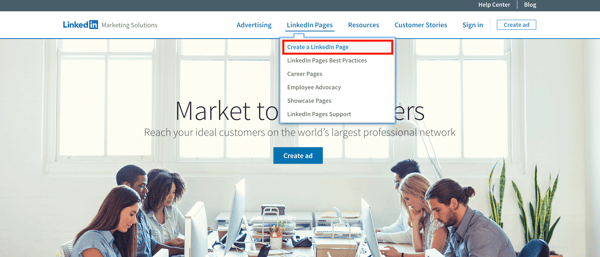
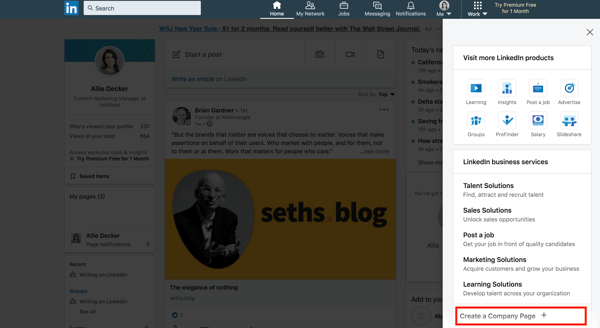
If you’re already signed into LinkedIn, tap the Work drop-down menu in the top right corner and click Create a LinkedIn Page+ from the very bottom.
2. Choose your company size and type.
Choose the size of your business from the first two options. (Notice the other two options to create a Showcase Page or create a LinkedIn Page for an educational institution, both of which you aren’t required to provide this information.)
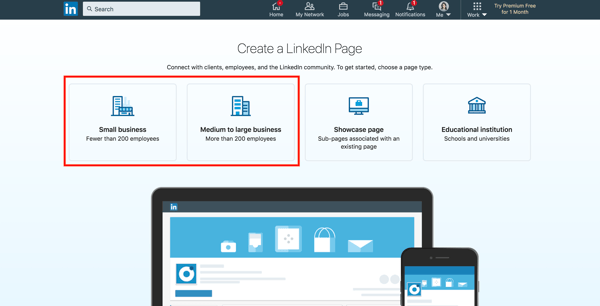
For the purpose of this guide, I’m going to choose Small Business.
3. Fill out your company details.
Next, fill out the details of your business. Only some of the details are required, but I recommend fully completing this step (as we’ll discuss in the best practices section below).
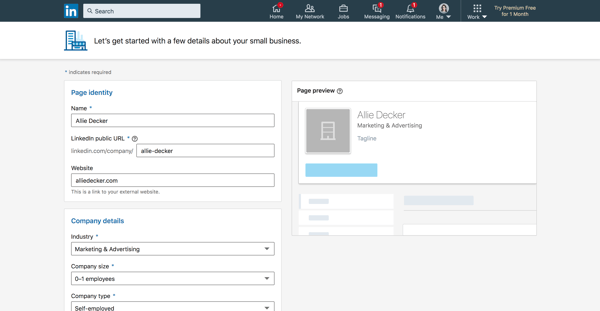
Let’s walk through the form fields.
- Name: Enter your entire company name to improve discoverability and searchability.
- LinkedIn public URL: As you fill out your Name, LinkedIn will automatically input your URL to match. Ideally, your URL will be your company name; this keeps your online identities consistent. For example, HubSpot’s LinkedIn Page URL is www.linkedin.com/company/hubspot/. If your company name isn’t available, choose a URL that’s similar and still identifiable, such as one of your social media handles and/or a shortened version of your brand name.
- Website: Enter your company’s website. Although not required, this information is critical as it connects LinkedIn followers to your company website.
- Industry: Choose this from the drop-down menu. This information helps LinkedIn categorize your company for Page visitors.
- Company size: Choose your company size from the ranges provided.
- Company type: Choose your company type from the options provided.
- Logo: Upload a high-quality logo that matches the logo on your other social media accounts. This is important so new followers can recognize your brand and Page. It must be 300 x 300px.
- Tagline: In 120 characters, briefly describe what your company does. Consider using the same tagline from your other social media accounts. You can change this information later.
When finished, check the checkbox at the bottom and click Create Page.
4. Complete your LinkedIn Page.
The final step should show you the Admin View of your LinkedIn Company Page. This is essentially the behind-the-scenes dashboard from which you can make changes to your Page.
If you’re building your Page from scratch, you’ll see that LinkedIn provides a helpful checklist of actions to complete. These tasks will also unlock new features such as Content Suggestions and Invite to Follow that can help grow your Page.
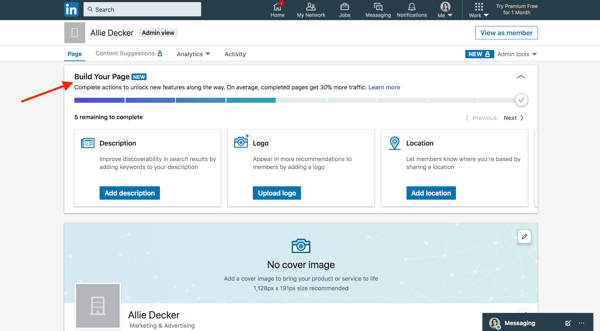
Let’s walk through the important tasks to complete in this step.
- Description: Add an About Us section that describes your company. It should be longer than your tagline. This is the place to include relevant keywords and phrases that can help people discover your Page on LinkedIn and through search engines. This section can be up to 2,000 words. LinkedIn also allows you to create taglines and descriptions in multiple languages.
- Location: Add at least one location for your company. You can add multiple locations and name each one. Consider at least adding your headquarters or central company location.
- Cover photo: Add a cover photo that will engage and entice visitors to check out your Page. Many brands upload another orientation of their logo or their latest marketing or advertising campaign graphics. This photo must be 1,128 x 191px.
- Hashtags: Although relatively uncommon on LinkedIn, hashtags on your Page provide a unique way to connect with followers and engage with posts. Add up to three hashtags that are related to your company, industry, and audience. They will be added as Community Hashtags to your Page.
You can also add a company phone number, the year your company was founded, and any LinkedIn Groups you want to show on your Page.
Voila! Your LinkedIn Company Page is now created and ready to share. Continue poking around your Page to complete all fields and features. The following section of LinkedIn Page best practices will help you use your Page to connect and grow.
Follow these six tips and techniques to optimize your LinkedIn Company Page.
1. Complete all the Page details.
According to LinkedIn, fully completed LinkedIn Company Pages get 30% more views. Take the time to fill out every Page detail, even those that aren’t required.
The more details you provide about your company, the easier it will be for people (a.k.a. potential customers) to discover and connect with you. It will also serve to educate those who are interested in working for or investing in your company.
2. Add important Page admins.
Maintaining a LinkedIn Company Page can be a lot of work, especially if your team is already manning multiple social networks and accounts. Once you create your Page, don’t forget to add more Page admins to give other people permissions.
Do add new Page admins, click Admin tools > Page admins in the top right corner of your Company Page.
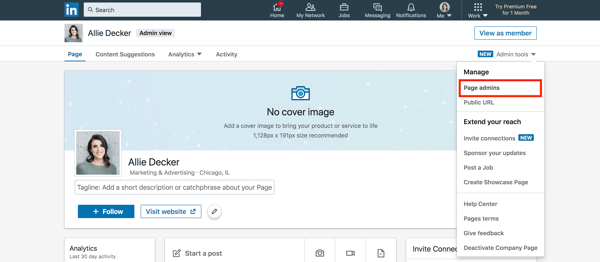
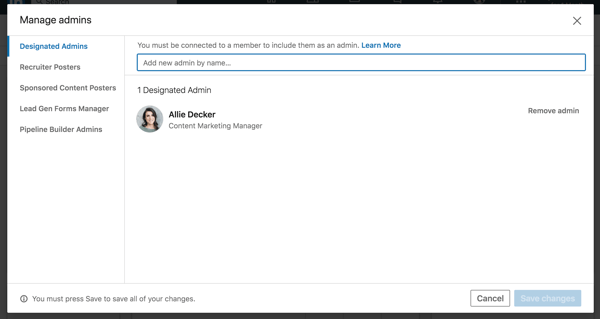
The following box will allow you to manage all your Page administrators. As you can see, there are five types of admins you can add to your Page. LinkedIn explains them in detail here.
You must be connected to your Page admins in order to add them. To do so, simply type in the person’s name, choose them, and click Save changes.
3. Keep your images up-to-date.
Your Page logo and cover photo are very important; they visually introduce and engage anyone who visits your Page. Keep these images up-to-date with your latest branding and marketing materials.
Not only is this critical for presenting a unified social presence, but it ensures your LinkedIn Company Page also matches your website, blog, and other digital marketing materials. Doing so will boost brand awareness and help new customers, employees, and fans discover your brand on LinkedIn.
4. Share content and engage with your followers.
Like any social network, you can’t expect to simply create your account and be finished. Building your LinkedIn Page is only half the battle; you must also consistently post content to successfully engage, inform, and market to your audience.
Consider posting updates to your products and services, job openings, trends or news that involve your brand, and behind-the-scenes content featuring employee life, product development, or other unique content.
LinkedIn also provides a handy Content Suggestions tool to help you discover topics and content your audience is already engaging with on the network. Tap Content Suggestions along the top menu of your Page, and update the filters as they apply to your audience.
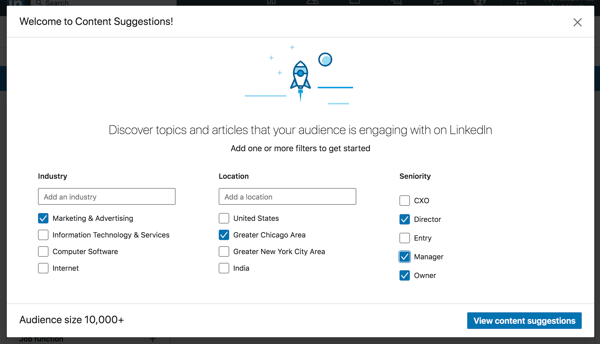
Tap View content suggestions, and you’ll see a content stream based on your chosen topic and audience parameters. You can edit the filters further in the left menu, and you can add or take away content topics along the top. This tool shows you the engagement rates of popular or trending content and makes it easy to share this content with your audience.
As always, don’t forget to engage with your audience, too. Like, comment on, and share things posted by your followers and connections. This will remind them there are humans behind your brand’s LinkedIn Company Page.
5. Customize your call-to-action.
On your LinkedIn Company Page, under your logo and next to the Follow + button, you’ll find a call-to-action (CTA). Mine says Visit website.
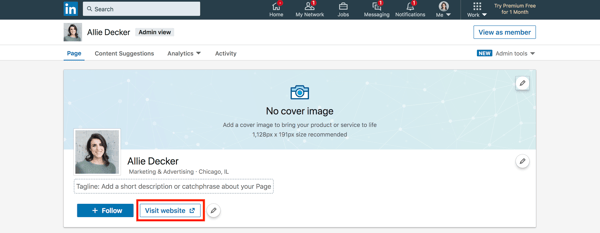
LinkedIn allows you to customize this CTA to better engage your followers and audience. To do this, tap the pencil icon next to your CTA. Make sure the Custom button option is turned on.
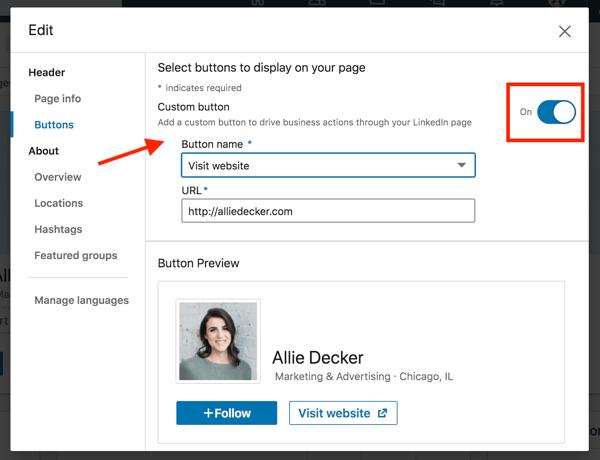
Choose a button name from the drop-down menu and enter a URL. Use this setting to direct followers to your website, landing pages, event registrations, and more.
6. Engage your employees.
Your employees are some of your best brand advocates. This is especially true on LinkedIn, where employees have an average of 10x more first-degree connections than a company has followers.
As you develop your Company Page, encourage your employees to follow and engage with it. Also, ask each employee to list your company as an employer, as this will link their profile to your Page and vice versa. This is a helpful resource when growing a new Page audience of customers and potential employees.
Connect with Your LinkedIn Company Page
Over 60% of consumers trust a brand’s social media over its advertising. Your LinkedIn Company Page contributes to this statistic, and, in turn, helps bolster your brand awareness, trust, and social activity. Use this guide to develop your LinkedIn Company Page and start engaging with new customers, employees, investors, and followers.
(If you’re looking for additional resources, LinkedIn also provides their own handy Playbook for optimizing your Company Page.)

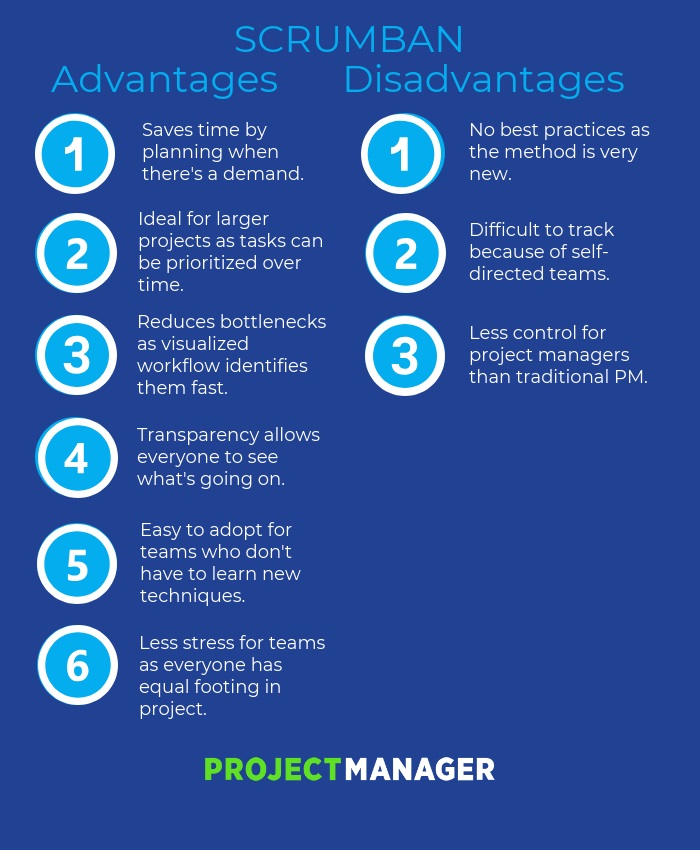
What Is Scrumban? How It Differs from Scrum & Kanban
How to Build a Marketing Stack That Will Grow With You
Dear Marketing ops professionals, what will your marketing team will look like six months from now? Or a year from now? How many people will you add? What new tools, systems, and data will you need?
There are a lot of potential questions you can ponder about the future of your business but there is one certainty you’ll be dealing with; more. More data, more people, more process, more complex problems, and more questions around security and data privacy.
As the owner of your companies’ tech stack it’s on you to future proof your company for more, not just today , but for every phase of your team from now until that point.
The Reality of More
The reality is that there is no out-of-the-box method that will help you prepare for more. Your company is unique, and your perfect marketing stack is not going to look exactly like anyone else’s. This is the time for choosing the right tech tools for your team, setting them up in a way that your future team can use and understand.
All of this, while ensuring a positive return on your marketing investment. (What could go wrong, right?)
Don’t worry — We’ve been there, too. HubSpot’s marketing operations team is all too familiar with the challenge of more, having tripled the size of our marketing team in just three years.
We’ve learned a lot along the way — so we gathered six insights from HubSpot’s resident ops experts to ask what they wish they would have known when growing HubSpot’s own marketing tech stack.
1. Keep systems simple.
Have you heard of the “keep it simple, stupid” (KISS) principle? The term, originally coined by an aeronautical engineer in the US Navy, states that simplicity guarantees the greatest levels of user acceptance and interaction.
The term is used often in software design, for example, where function and instruction creep can make products unmanageable over time.
How do you prevent this happening in your own company as it continues to grow? Put your current strategy down on paper, and review the value of every stage of your process with your leadership team. Consider what processes could be done more efficiently, and what could be eliminated altogether.
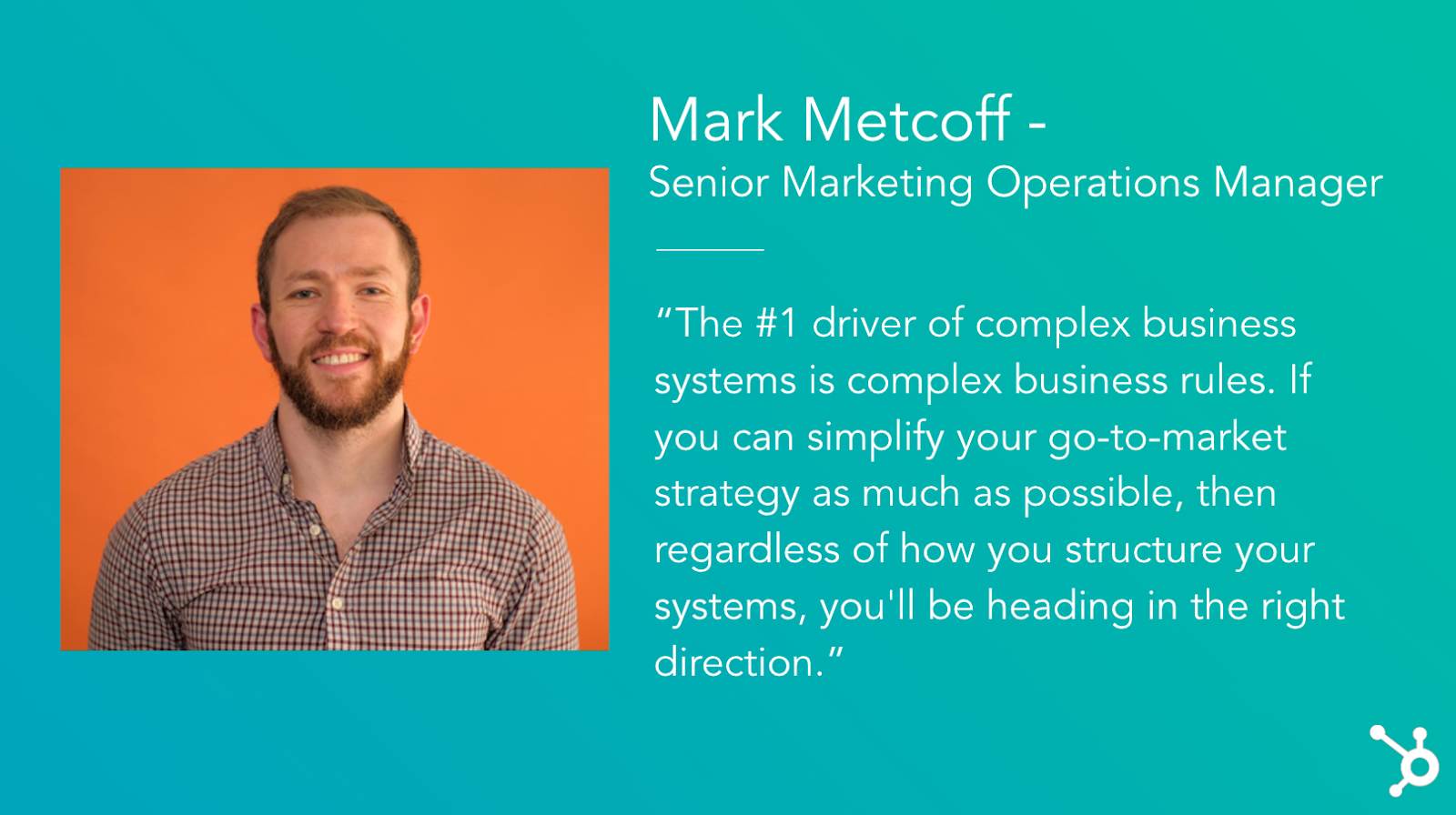
“The #1 driver of complex business systems is complex business rules,” says HubSpot Marketing Operations Manager Mark Metcoff. “If you can simplify your go-to-market strategy as much as possible, then regardless of how you structure your systems, you’ll be heading in the right direction.”
2. Aim for medium-term solutions.
In an ideal world, every decision you make about your tech stack today will work seamlessly for your team for years to come.
In reality, though, you are probably going to change systems a dozen times over the next few years if you continue to scale. You shouldn’t worry about picking your forever tech, but do not settle for a tool that will become obsolete in 6 months, either.
“Aim for the medium-term,” Mark suggests. “The costs of switching systems has never been lower, thanks to the emergence of more persistent datastores like customer data platforms that can under-lie front-office facing systems, and iPaaS solutions that allow you to integrate front-office providers for easy data transfer.”
3. Strategy first, technology second.
As companies grow, it can be tempting to rely on technology to support processes that are still evolving. Usually, this happens when a team adopts powerful tools that have a lot of potential, and they try to mold their systems around it.
HubSpot’s marketing operations team has made this mistake, too, and with an important takeaway: What sets apart truly powerful tech stacks isn’t just about the technology.
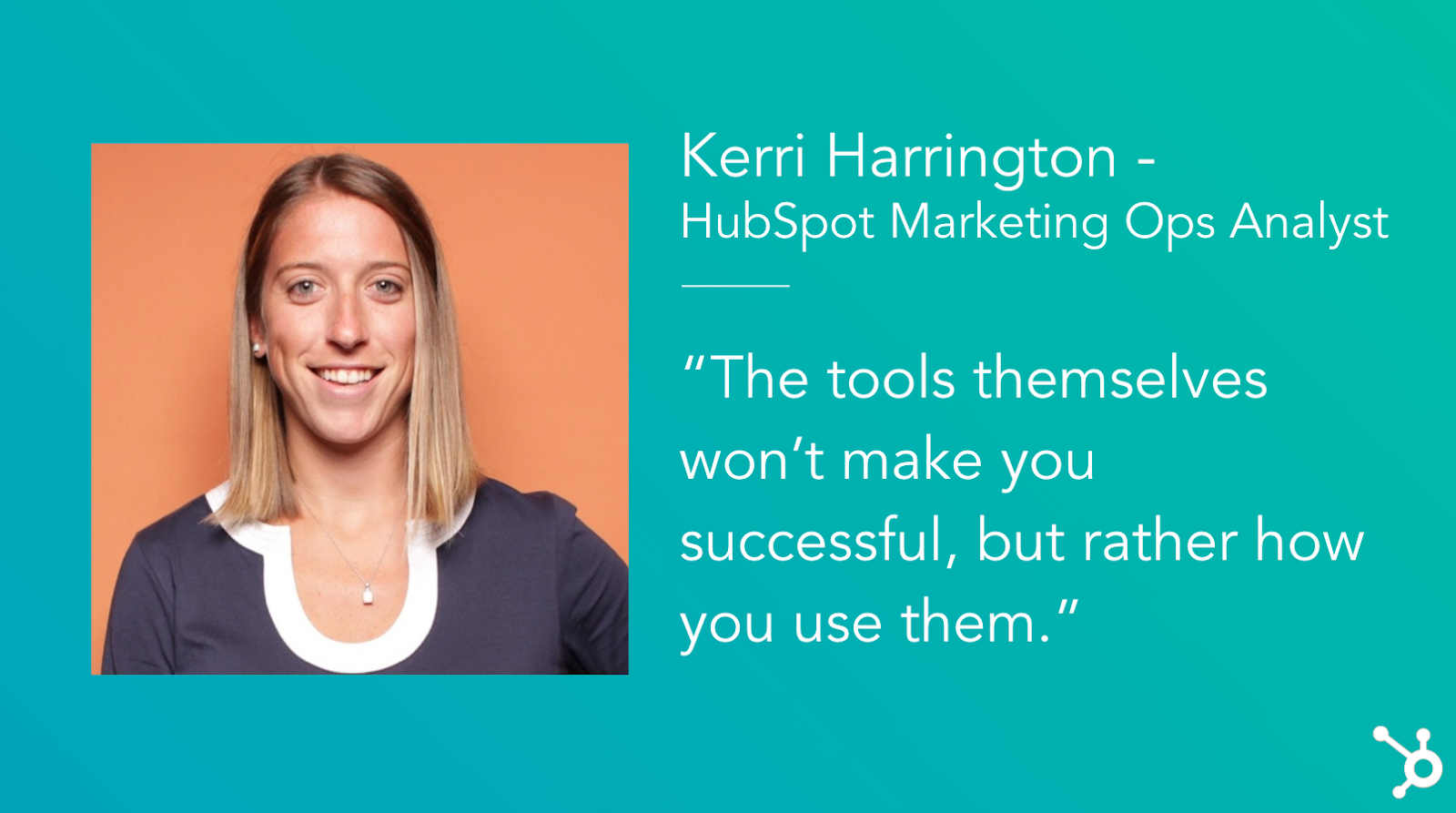
“The tools themselves won’t make you successful but rather how you use them,” explains Kerri Harrington, HubSpot Marketing Ops Analyst.
Kerri has worked closely with HubSpot Partners, consulting many who were in the midst of building their tech stacks. She taught them to think about their tech stack not as the powerhouse behind their systems, but a vehicle to efficiently and effectively execute their strategy.
If you are still developing your strategy, she says, try drawing out and visualizing your tech stack. This gives you an opportunity to think critically about each tool, the purpose it serves, and where there is any overlap or duplication in your tools. Check out the “Stackies” competition for inspiration.
4. Document everything, and document it well.
Imagine opening your spice cabinet, ready to cook up a chicken curry, to find that nothing in the cabinet is labeled. Every spice and herb is in the same colored jar, with no ingredient label or expiration date.
Barring a noteworthy sense of smell, this project would not be very easy or enjoyable.
This is what it’s like to step into a new role only to realize that over the years, your new team’s processes and database have not been properly documented. This is common among growing companies, because as your database grows and your systems evolve, it’s easy to end up with a lot of clutter, data integrity issues, and confusion.
Many will skip right over this — who likes to document? Who has the time to ‘waste’ a day of innovation to do seemingly admin work? We get it — But for the sake of your future team (and your future sanity), make sure you take the time to lay down the right foundation for data architecture.
“I can’t tell you how many times we have to review the history of a change or ‘walk through’ the last couple of years on a topic,” says Maggie Butler, Senior Marketing Enablement Manager. “It gets really, really hard if no one has documented anything.”
One incredibly valuable resource HubSpot had during one of its growth spurts, she says, was the documentation built by our engineers that detailed in simple language how the logic and code worked. Aim for this level of documentation to be comprehensive across all applications, and easily accessible for everyone on your team.
5. Point solutions serve a purpose.
A point solution is a product or service that addresses one very specific need in a marketing organization.
Sometimes, you just need to a piece of software to do a specific thing really, really well. There’s no shame in it.
But keep in mind that every piece you do add to your infrastructure comes with its own compliance risks, technical challenges, maintenance and upkeep, and general administration.
“Also look closely at whether or not it needs to be integrated into your tech stack,” explains Mark. “Sometimes point solutions work just fine in a silo.”
If you have any point solutions in your current stack, think about how it fits into the bigger picture: how does it interact with the rest of your technologies, and what do you need to do to keep it running?
6. Aim for ease of use, but don’t sacrifice the necessities.
There are a lot of options out there — so don’t settle for less than what you need. At the end of the day, you need to choose a system that’s easy for your team to pick up and use, but still has the power and flexibility you need to get things done.
The challenge with today’s marketing automation tools is that they offer either enterprise-grade power or consumer-grade ease-of-use, but never both. As a result, many still go with the safe bet — overpriced, overly complicated, and under-utilized tools — which translates to spending more time on systems than on your customers.
With all of the tools available these days, there is no need to use clunky, complex, and time-consuming legacy software. We believe you shouldn’t have to sacrifice productivity to get power, because the best tools combine both power and ease-of-use. When you focus on delighting your customers and creating great experiences instead of managing your software, you will grow better.
More, more, is a good thing.
Adding more can be terrifying, but more, more means you’re growing. And it’s never been a better time to be a marketing ops professional. With the wealth of powerful technology now available, it’s easier than ever to grow your tech stack with a smart ops leader and the right strategy in place.
We believe this is paramount for any growing business, which is why you should expect more out of your marketing software and from the tech stack you build with it — your future team will thank you.

How HubSpot Marketers Stay Creative Under Pressure
As 2020 begins, you might be under pressure to build strategies, create campaigns, and pitch new ideas quickly to start your first quarter off right.
The pressure to create can cause both stress or fears of failure which are scientifically proven creativity barriers. Not only can they stand in the way of your motivation, but they could also prevent you from coming up with new or unique ideas.
When you’re under pressure, you might feel less inspired, unmotivated, or run into a nasty case of writer’s block that leaves you wondering if you’ll ever come up with a great idea ever again.When that moment happens, don’t panic.Remember, this happens to everyone — especially marketers who need to churn out hundreds of creative assets or campaigns a year.
At HubSpot, we have a wealth of creative marketers who strive to come up with unique and attention-grabbing campaigns, like this one. We also have a team of bloggers who write an average of four to five blog posts each week.
While we work up against high expectations, we also achieve major goals, such as high web traffic and credibility in our industry — and a lot of that comes from learning how to harness our creativity when the stakes are high.
To help you, here are five tips for staying creative under pressure I got from my colleagues on the HubSpot marketing team.
5 Ways to Stay Creative Under Pressure
1. Pretend you’re working on behalf of someone else.
The stresses of knowing that your creative ideas could go wrong and make you look bad can stop you from thinking in creative ways or pitching unique ideas that others might not consider.
When your fears about your career are getting in the way of your thought processes, pretend you’re coming up with ideas for someone else — such as a client.
Pretending to work on a project on behalf of another person sounds like a strange tip, but it’s highly recommended by the HubSpot Blog’s Senior Team Manager, Karla Cook.
“This mindset is actually proven by research to produce more creative results,” Cook explains. “When you’re producing work that will be attributed to you, you typically put more pressure on yourself to get it perfect, which can restrict how creative you get. When you think the work will be attributed to someone else, you’re more likely to take creative risks.”
“Even when you know the final product will be attributed to you, try detaching a bit from the first draft and writing it as if you’re going to pass it off to someone else,” Cook adds. “Tricky in practice, but once you get the hang of it, it can really help with producing fast creative work.”
2. Just start outlining.
If you’re trying to produce creative content, such as a blog post, video script, or design, don’t let staring at an empty page intimidate you. Just get started by drafting an outline for possible content or campaigns.
Caroline Forsey, a staff writer on HubSpot’s Marketing Blog, says this a great strategy for fending off writer’s block.
“If you’re really feeling uninspired, just get the bare bones of the piece down on paper, and come back to it later,” Forsey says. “Once you have something semi-ready to publish (even if not the most well-written piece), the pressure should subside, allowing you to dive back into it a few hours later with fresh and innovative ideas for how to add flair.”
3. Work when you feel most creative.
On top of jumping into an outline, Forsey also suggests figuring out when your pique productive times are and scheduling your creative tasks during them.
“I know I work best in the morning,” Forsey explains. “I will snooze Slack notifications, put my phone away, and close my email tab, so I can focus during those two to three hours when I’m feeling most creative.”
4. When you’re absolutely stuck, walk away from your computer.
If you’ve tried everything and feel like your mind is absolutely fried, it’s time to take a break. But, don’t spend time getting distracted on the internet. Instead, take a walk or get out of your office for a few minutes.
Yes, it might seem scary to take a break away from your desk when you’re dealing with deadlines, but this can help you swiftly come up with new ideas and motivate you when you return to creating content.
This tip is a favorite of HubSpot Blog Managing Editor Meg Prater, who read about it in a book called “Still Writing” by Dani Shapiro. In the book, Shapiro talks about the “pitfalls of writing on a computer and the ease of escaping writing blocks by riding on the ‘log flume’ of the internet.”
Here’s a quote from Shapiro’s book that Prater recollects:
“By the time we return to our work — if, indeed, we return to our work at all — we will be further away from our deepest impulses rather than closer to them. Where were we? Oh, yes. We were stuck. We were feeling uncomfortable and lost. And how are we now? More stuck … Our thoughts have not drifted but, rather, have ricocheted from one bright and shiny thing to another.”
Prater explains, “When I take breaks to give my mind a rest or move through a ‘stuck’ point in my writing, I try to get up from my desk, walk around my house, or sit outside for a few minutes. It’s less distracting for me and easier to get back into my work once I’m ready.”
5. Get eight hours of sleep.
When you have deadlines coming up, it can be tempting to think that staying up late and skipping a few hours of sleep for just one or two nights will help you get more creative work done. However, mounting research says otherwise.
This is why my biggest tip is to get some sleep.
Not only are you less productive when you work at night, but a lack of sleep can also stifle creativity. Not to mention, sleep issues can be detrimental to mental health.
As a former employee of multiple startups and newsrooms, I was no stranger to late-night shifts and take-home projects. But, now, as the HubSpot Blog’s Audience Growth Writer, I’ve noticed that I come up with far more creative and effective content ideas when I’m well-rested.
As a night owl, I know this is easier said than done. So, I’ve trained myself into better sleep habits. Each night, I consider 9 PM to 10 PM my wind-down time where I sit in bed, watch TV, or do a little light social media surfing. Then I try to have my mobile devices off after 10:30 PM and hopefully fall asleep by 11 PM.
Regardless of when you sleep, developing a habit will help you stay on track so you aren’t wide awake and worrying about your deadlines at night.
6. Record your creative ideas when they hit you, then review them later.
Great ideas can happen at any time: in the car, while cooking, during a walk, or even when you’re falling asleep in bed. When something interesting pops into your head, record it.
“Use a voice recorder or voice assistant to record your creative thoughts when they come to you,” says Jim Ruocco, a senior customer success manager.
If you’re using a voice assistant, Ruocco adds that you should instruct it “to remind you the next day.”
For example, you could say, “Ok, Google. Remind me to create an app that can translate dolphin into English tomorrow morning at 9 AM.”
While ideas like the dolphin language app noted above might seem inaccessible in the short-term, you can still backlog a long list of thoughts that could lead to solid projects later.
Jump Start Creativity and Productivity
A creative mind can also be a very productive one. But if you’re feeling sluggish and non-productive, there are plenty of things to do to boost your energy and motivation.
Here are a few great posts that touch on finding motivation when you need it, productivity hacks, and the science behind productivity.

How to Attract and Nurture Quality Instagram Followers
Want more business from Instagram? Looking for a proven process to follow? In this article, you’ll learn three steps to attract and engage your Instagram audience, and convert them into leads and customers. #1: Attracting the Right Audience on Instagram At the top of the funnel, your job is simple: You need to grow your […]
The post How to Attract and Nurture Quality Instagram Followers appeared first on Social Media Marketing | Social Media Examiner.
from Social Media Marketing | Social Media Examiner https://ift.tt/37EesEY
via socialmediaexaminer
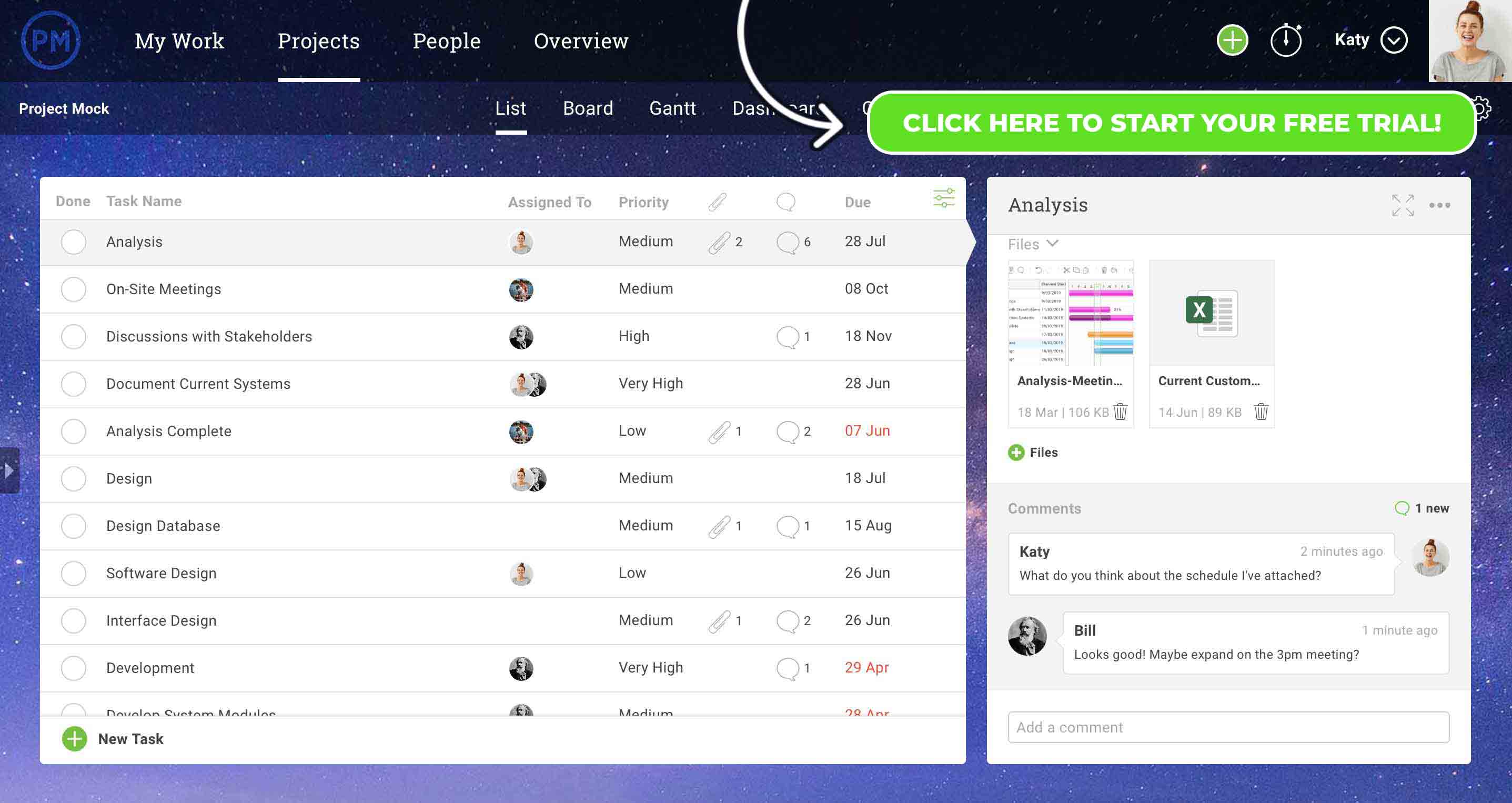
Communication Management Techniques Every PM Should Know
HubSpot Marketers Reveal Their Favorite Campaigns of 2019
In 2019, we saw a number of companies create award-winning campaigns that generated ROI, brought in new customers, and expanded their brand awareness.
And with digital and online media consumption growing, we’ll likely see even more fascinating or creative campaigns in 2020.
But, even if other brands are reaching ROI and awareness goals with their unique tactics, you might still have trouble brainstorming or creating an interesting plan for your 2020 campaigns.
When you can’t come up with a solid idea, it can be helpful to learn from the brands that have launched award-winning, memorable, and revenue-generating campaigns Simply learning more about these strategies and identifying aspects that could fit into your own tactics could give you a wealth of great ideas for 2020.
But in a world where we have ads literally everywhere, how do you identify and determine what the best ads were?
To help inspire new ideas and jumpstart your creativity for 2020, I asked six HubSpot Marketers to share their favorite campaigns of 2019. Here’s what they revealed:
6 Campaigns HubSpot Marketers Enjoyed in 2019
“The Truth is Worth It” – The New York Times
The New York Times’ “The Truth is Worth It” campaign features a series of commercials that follow actual Times’ journalists’ through the long, complicated, and challenging process of uncovering hidden truths for a story. It also emphasizes the barriers reporters must overcome to complete and report on a thorough investigation.
Each commercial follows an actual New York Times journalist as they make calls, take notes and begin writing a story about one of today’s hardest-hitting topics, such as immigration, climate change, and international conflicts.
The Times ads create a sense of tension by showing actual footage — primarily recorded by journalists — related to the controversial topics discussed. As the footage plays, you can hear soundbites of a featured reporter making a number of calls to confirm the controversy presented in each ad.
One HubSpot marketer that found this campaign powerful was Kyle Denhoff, a global acquisition campaign manager.
“In a time of climate change, conflicting political views, and terrorism, the New York Times set out to position itself as the source of truth,” says Denhoff. “While the Times generates revenue through subscriptions and advertising, it did not set out to sell its media products. The campaign doesn’t mention their website, podcasts, newsletters, or videos. It tells a story.”
“The creative is simple and incredibly effective. It positions the Times perfectly,” Denhoff says. “Being the source of truth for all subscribers is a powerful promise. When you’re subscribing to the New York Times you are subscribing to getting the truth every day with your morning coffee.”
Danhoff wasn’t the only marketing expert who found the campaign powerful. In fact, “The Truth is Worth It: Perseverance,” an ad that follows journalist Caitlyn Dickerson as she confirms child separation at the U.S. border, won a Gold Clio. Here’s the TV spot:
“Open Sunday” – Popeyes Louisiana Kitchen
In a short, but sweet, commercial, Popeyes Louisiana Kitchen announces that its popular Chicken Sandwich is returning and that it will now be open on Sundays, unlike its main competitor, Chick-Fil-A.
The commercial opens with text saying, “Y’all… The Sandwich is back. This Sunday,” which makes a bold assumption that the Popeyes Chicken Sandwich is so popular that audiences will know which sandwich the chain is talking about.
The ad cuts to an exit sign on a highway listing all the fast-food restaurants nearby. When the zooms in to Chick-Fil-A and Popeyes logos next to each other on the sign, Chick-Fil-A has text under its logo saying, “CLOSED SUNDAY,” while a painter reveals new text under the Popeyes logo saying, “OPEN SUNDAY.”
Here’s a look at the full ad:
This sassy commercial was a favorite of Kayla Carmicheal, a junior staff writer for the HubSpot Marketing Blog.
“I chose this commercial because of the complexity of marketing tactics they fit in 21 seconds,” Carmicheal explains. “In a direct response to competitor Chick-fil-A, the chain emphasized the one thing their competitor doesn’t have: the ability to open on Sunday.”
“As a final punch, they chose the launch date to be on a Sunday, highlighting that on billboards (right next to Chick-fil-A),” Carmicheal explains. “The impact of this commercial is felt even on silent, meaning that this perfectly-timed video is visually compelling as well.”
When it comes to the visual details she notes above, Carmicheal explains, “Popeyes used their brand-specific orange in an eye-catching and invigorating way, under text that’s hip and relatable to consumers.”
If you want to highlight what makes your product or service stand out from a competitor, take a note from Popeyes. Identify where your competitor is missing opportunities to please their customers, then one-up them by highlighting how you’re solving for those customer woes in your own campaign.
“We All Win” – Microsoft
After it came to Microsoft’s attention that people with missing limbs or limited mobility were having trouble holding and pressing buttons on video game controllers, the tech company developed an adaptive controller with touchpads rather than buttons.
After the controller’s launch, Microsoft highlighted this story of how they solved for the customer in a 2019 Super Bowl ad titled, “We All Win.”
In the Gold Clio-winning commercial, Microsoft interviewed children with mobility issues and missing limbs about why they loved video games, but how they still faced difficulties with game controllers due to their disabilities.
Many of the children and parents featured in the ad explain that gaming helps them connect with friends in ways that they might not be able to otherwise. However, because of the current line of controllers, they have difficulty playing or competing in many games.
“I never thought it was unfair. I just thought ‘Hey, this is the way it is and it’s not going to change,” says one boy.
After demonstrating the problem with game controllers, the ad shows the children using Microsoft’s new adaptive video game controller as they explain how it makes gaming easier and more accessible for them.
For example, one girl excitedly says, “I can hit the buttons just as fast as they can,” while a boy exclaims, “Now everyone can play!”
“‘We All Win’ hit all the marks in terms of emotion, starting a dialogue, and fun. It wasn’t an ad about disabilities, it was about kids wanting to play video games,” says Dmitry Shamis, Senior Director of Creative. “I loved it back in February and still love it in November.”
“We All Win” was also one of my favorite campaigns of 2019. Not only does it tug on your heartstrings, but it also encourages solving for the customer and accessibility by explaining how Microsoft took the time to develop a product that fixed a major problem faced by a unique group of customers. This ad makes you believe that Microsoft genuinely cares about its customers and will make extra efforts to ensure that everyone has a great experience with its products.
You can read more about this particular campaign and get inspired by a few more empowering ads in this blog post on inclusive marketing.
“Listen Like You Used To” – Spotify
When it comes to reaching millennials or Gen X, one tactic that many marketers use is leveraging nostalgia. Spotify is no different.
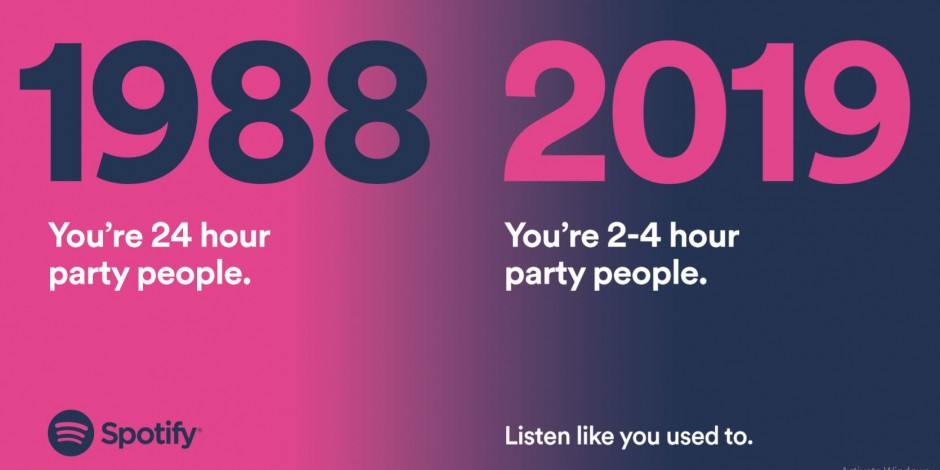
In a series of online Spotify ads created by the agency Who What Why, each graphic comedically compares music-related activities that adults did in the ’80s and ’90s with what they’re doing in 2019.
For example, one ad shows how adults were “24-hour party people” in 1988 are only “2-4 hour party people” in 2019.
Source: Spotify
Each ad in the series also features the tagline, “Listen like you used to,” to inspire audiences to embrace the nostalgia, blast some tunes, and party like they did when they were younger. The goal? To get adults, like Gen X or older millennials, to play their favorite songs for hours on Spotify.
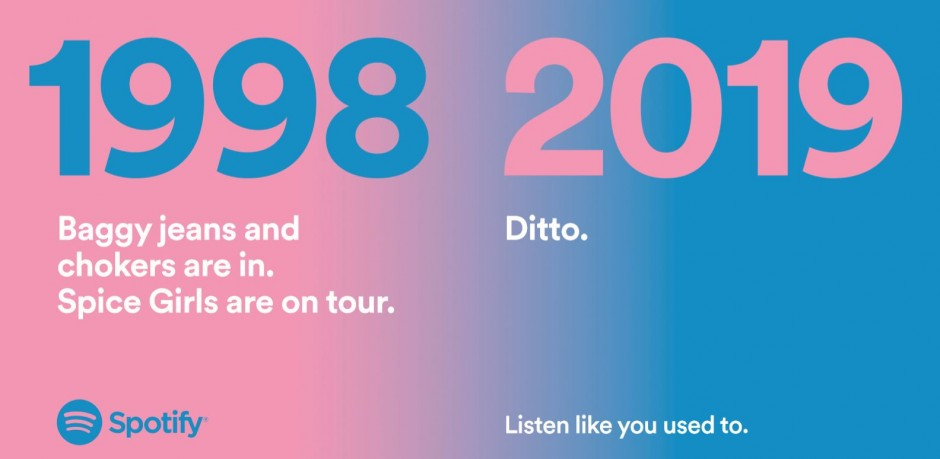
While the ad above might be more relevant to Gen X, Spotify also aims to capture older millennials with a Spice Girls reference:
Source: Spotify
“As an ‘older millennial’, I loved this one,” says Jami Oetting, HubSpot’s Director of Editorial Strategy.
Nostalgia is a great way to relate to your audience, remind them of the good times, and make them want to use your product to replicate their positive past experiences. With these ads, Spotify reminds people of the music-related fun they had in the past and says, “Listen like you used to,” to show those consumers how its app can still help them embrace similar music and fun as grownups.
Sleep Puzzle Subway Ad Campaign – Casper
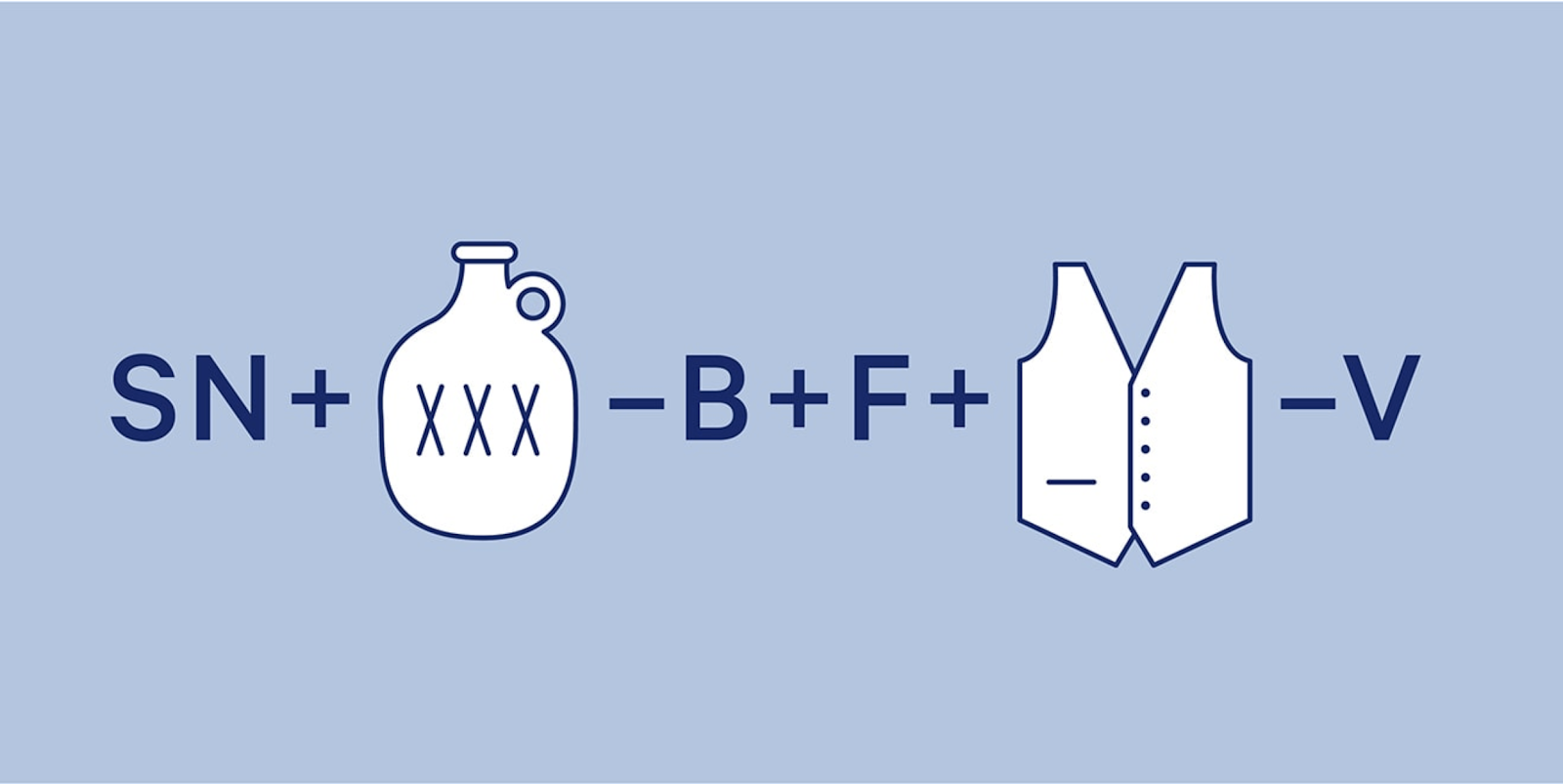
Can you solve this word puzzle?
Source: Casper
Struggling? Here’s the answer. SN + Booze – B = Snooze and F + Vest – V is Fest. The image says Snooze Fest.
Why would you make an ad that doesn’t state the brand name and takes a few minutes to comprehend? Simply because it’s pretty fun for the consumers that try to solve it.
In its series of subway ads, Casper encourages audiences to crack codes that also force them to think about sleep. The idea is behind the series is that when you think about sleep, you might think about mattresses. Then later, when you think about mattresses, you’ll remember these quirky ads from Casper.
This campaign was a favorite of Lucy Alexander, an associate marketing manager of customer communications and campaigns at HubSpot.
“I love how Casper simply and creatively delighted audiences with these subway ads. The light brain teaser was a fun way to pass a couple of minutes of my commute,” Alexander says. “It may seem like a short amount of time to grab someone’s attention compared to a long-form campaign, but it’s much longer than a typical ad, and it was an interactive experience that I found inviting rather than interruptive.”
As Alexander mentioned, the experience is not only fun, but it’s also interactive. Casper has done a great job of creating a campaign that people can interact with even when its just an image.
If you want to experiment with interactivity in your ads, but don’t have the time or resources to create digitally interactive material like a video game ad or live video Q&A, getting creative graphically could also be a beneficial strategy.
Brandwagon – Wistia
Rather than focusing marketing funds on a bunch of different types of ads, Wistia launched a marketing talk show called Brandwagon on its website.
Brandwagon episodes primarily include interviews with experts from Wistia and other companies about various marketing strategies and campaigns. This content aims to inform marketers of techniques they should try, keep viewers on Wistia’s website, and enable Wistia to show off its marketing credibility
“We’ve found that one of the most effective ways to set yourself apart from your competitors and build a well-loved brand is by creating binge-worthy content. In other words, content that provides enough value to viewers that they can’t help but want to consume more of it,” says a Wistia blog post that explains the motives behind Brandwagon.
To give you an idea of what the show is like, here’s a quick trailer posted on YouTube:
“I’m a big fan of Brandwagon and other original series from Wistia,” says Irina Nica, HubSpot’s Global Community and Influencer Relations Manager. “It brings a refreshing, late-night show format to the marketing world, which makes this campaign instantly stand out.
Nica notes that Brandwagon is also, “equal parts entertainment and education which I believe helps viewers stick around and enjoy the content, even though it’s long-form compared to formats like blog posts and webinars.”
Nica adds that she’s also noticed a growing trend of branded online series.
“Many other B2B and B2C brands, like Uber and Mailchimp, started creating their own original series in the form of talk shows, and documentaries,” Nica explains. “It’s a practical way to create content that can become binge-worthy and also enables marketers to then repurpose each episode into smaller microcontent.”
Campaign Like a Pro in 2020
As we’ve seen from this list, campaigns that win attention from audiences and expert marketers, often embrace quirkiness, competition, or a deep storyline.
While brands on this list have found unique ways to educate audiences about their company or one-up competitors, others have thought more outside the box with fun approaches such as leveraging visual puzzles or nostalgia.
Regardless of which campaigns you launch in 2020, it’s a great idea to look to these campaigns and others for inspiration.
Want more examples of amazing and memorable campaigns, check out our favorite Emmy nominated ads and this detailed roster of Clio Gold winners from 2019.

7 Marketing Experts Share What They’re Focusing on in 2020
From SEO and analytics to content and display, the marketing industry is one of the most rapidly changing landscapes this year — and 2020 will be no different.
Working closely with marketing leaders as president and co-founder of Share Your Genius, I’ve seen firsthand the rapid development of this industry, and one of the most prominent areas of growth is a marketer’s bread and butter: content.
Marketing wants to lean into an experience people want, which is why teams are constantly exploring new avenues to connect with their buyers. Content should be delivered in the way their audience wants to consume it, which is why marketers will focus on creating brand content that serves people through a combination of audio and video in 2020.
That said, content is just one of the many marketing pillars — and I’m not the only one with ideas about where our industry is headed. As marketers finalize their budgets and prepare their strategies for 2020, we’re taking a look at the predictions of several leaders in the marketing space.
Ranging from new success metrics to the latest use of AI, here are five things marketing leaders are focusing on in 2020.
6 Things Marketers are Watching in 2020
1. The MQL’s Irrelevance
Too often, marketers aren’t working toward a real business objective.
Fortunately, marketing will up its strategic presence in the organization in 2020.
As companies move toward a flywheel model to create a streamlined customer experience start-to-finish, marketing teams will need to align with sales and service to bring in new leads while maintaining strong relationships with current customers. As a result, the MQL in the traditional sense will be irrelevant, as Gartner predicted in 2017.
“We’ve been saddled with questionable metrics like the MQL and a Franken-stack of marketing products that don’t work, so we need to think big picture,” says Latane Conant, CMO of 6sense, an account-based orchestration platform powered by AINext year. “Next year, siloed marketing goals like MQLs will be irrelevant — instead, marketers will focus their efforts on aligning with overarching company goals to drive value across the board.”
2. Google Crackdowns in Some Industries
In 2019, 61% of marketers say improving SEO and growing their organic presence is their top inbound marketing priority. In 2020, we predict this number to increase.
And, while Google advertising solutions have benefitted more than 1.3 million businesses, website publishers, and nonprofits, in 2020 marketers may see a shift towards a more organic-first approach, particularly if Google continues to crack down on certain industries as it has with credit repair-related services.
“I believe we will see Google continue to crack down on certain advertising industries,” says Russ Jones, Principal Search Scientist at Moz. “The latest target is credit repair-related services, although we have seen the same in the medical and adult industries over Google’s lifetime. When these bans take place, it creates a short-term opportunity for companies to shift advertising dollars to organic.
“Those that make this pivot quickly and strongly stand to gain a substantial market share in the long run.”
—
3. Growth of Experiential Marketing
In a 2018 global survey of more than 700 business executives by HBR’s Analytic Services, 93% of respondents said their organizations placed a priority on hosting events.
In 2020, this will continue to grow. A study by Harris Group found that 72% of millennials (ages 18-34) now prefer to spend money on experiences over products.
As consumers prioritize based on experience and ease-of-use (take Uber, Spotify, or Airbnb, for instance), it will become increasingly important for all businesses to focus on high-quality experiences for their consumer.
“As more consumers cut the cord to cable, it is becoming harder to reach audiences with traditional brand-building ad campaigns. This is especially true for younger audiences — many of whom are not just cord-cutters but cord-nevers. At the same time, Gen Z and Millennial consumers are prioritizing experiences over ‘stuff.'”
“Innovative marketers can take advantage of these trends by shifting marketing focus to live events, which can create direct connections between customers and brands,” says Ben Carlson, co-President and co-Founder of Fizziology, a social insights firm.
“Take for example Buffy’s tie-dye tour or Glossier’s string of pop-up shops,” Carlson notes. “In the past, these experiential marketing tactics have been seen as more experimental than other, more trackable forms of advertising. But technology is now letting marketers listen to anonymized conversations at live events via social media to learn about consumer’s opinions, expressed in their native environments.
“We believe we will see experiential marketing mature into a regular part of a marketer’s brand-building campaign,” says Carlson.
4. New and Evolving Email Strategies
“The email industry is constantly changing, and the frequency of mergers and acquisitions in 2019 rivaled those of 2018,” says Anthony Chiulli, director of product marketing at 250ok, an email analytics and deliverability platform.
“Major moves so far this year included Validity purchasing Return Path in May, Mailgun purchasing Mailjet in October, and most recently, Sparkpost acquiring eDataSource, which makes it clear the industry as a whole is booming,” Chiulli says.
“Email remains a dominant and powerful digital marketing channel and is constantly evolving and finding new ways to reinvent itself,” Chiulli adds. “I anticipate we have not crested the peak of acquisition activity in the email ecosystem just yet, and will see a steady dose of those seeking further competitive advantages in an aggressive email industry market in 2020.”
5. Artificial Intelligence And Text Recommendations
According to the International Data Corporation (IDC) Worldwide Artificial Intelligence Systems Spending Guide, spending on AI systems will reach $97.9 billion in 2023, which is more than two and a half times the $37.5 billion that was spent in 2019.
But, while it’s obvious how AI can help in some instances — like security — it can be tricky to note exactly where it will change your marketing strategy. However, early predictions point towards text marketing.
“In text marketing, AI plays the role of informing the sender versus being the sender. Businesses will start to receive recommendations from their texting providers about the type of messages to send, which messages are seeing the most engagement, clicks, etc.”
“AI will be able to recommend more on the segments and groups from a business database on who reacts better or worse to certain messages, helping them to stop outreach to disinterested parties,” says Mattt Reid, CMO of EZ Texting, a leader in SMS marketing software for business.
Reid adds, “However, it is vital for text marketing to keep the human element while leveraging AI to help us have the best communication possible.”
Additionally, Crystal King, a Social Media Professor at HubSpot Academy, believes augmented reality will continue to influence social media.
She says, “People are craving to move beyond passive content and be part of the action, and savvy technology companies are looking for ways to make that happen. In 2020 we’re going to see augmented reality making it’s way into more social media efforts — whether that’s more advancement in the vein of Snapchat and Instagram filters, new AR ads available while you are scrolling through your social platforms, or the ability to network and attend live events in interesting ways.”
King adds, “We’re already seeing that AR is making a difference for brands like IKEA and Zenni Optical, which give fans the ability to directly and usefully interact with their products virtually. Plan on seeing more brands taking advantage of the power of AR to directly engage their audiences.”
6. Google’s Discover Tool Will Continue to Improve
launched Discover in 2017 and has been improving the tool ever since. Discover’s algorithm predicts what users will find interesting based on their search and web history and interactions with Google products, like Google Maps, Chrome, and Google Home. Discover then surfaces personalized content in a mobile feed on the Google homepage based on a user’s interests.”
- Build topical authority around your topics (cluster model) — Discover surfaces content by topic so the more relevant/useful information you have on a topic, the more likely you are to rank
- Use large (1200 px), high-quality images since the feed focuses on attractive imagery
- Create your content in all languages that are relevant to your audience, as users can select their preferred language for each interest.
How to Prepare for 2020 and Beyond
As companies continue to pivot, adapt, and evolve, the marketing space will only get more competitive. A new year proves a new opportunity for marketing teams to push away from the competition by leading the industry with the most innovative tactics, tools, and technologies.
Preparing for these trends will set successful companies apart in 2020. Want to learn more, check out this Ultimate Guide to Marketing Trends in 2020.

How to Promote a Flash Sale on Facebook and Instagram
Do you run flash sales? Wondering how to promote your flash sale on social media? In this article, you’ll discover how to promote short-term sales with organic posts and paid ads on Instagram and Facebook. Why You Need a Different Approach for Promoting a Flash Sale Everyone loves a flash sale. Limited-time offers and short-term […]
The post How to Promote a Flash Sale on Facebook and Instagram appeared first on Social Media Marketing | Social Media Examiner.
from Social Media Marketing | Social Media Examiner https://ift.tt/36uSJ26
via socialmediaexaminer
Our Favorite Remote Workspaces and Why They’re Effective
“The future of work is being able to work in your pajamas,” HubSpot’s CTO, Dharmesh Shah, said in his 2019 INBOUND keynote.
Shah noted how flexibility is the goal and remote work is a function. And, although productivity is one of the main concerns employers have when introducing remote work, it has actually been reported to increase employees’ productivity.
In fact, 85% of people have reported increased levels of productivity as a result of remote work.
This is my workspace when I choose to work from home:

My living room is an extremely effective workspace for me. Like many others, I like to work with some hubbub going on around me, and because I live on a busy street, the zooming cars outside provide the perfect amount of noise.
Natural light makes me feel centered and focused (maybe it’s that good ole’ Vitamin D) and the large windows contribute to that. I find that having minimal distractions and the built-in assets of my living room make it a great place to cozy up and get some work done throughout my day.
If you’re considering moving part-or-fully remote in 2020, but aren’t sure whether or not you have the office-like space for it, we’ve got you covered. Here, wee asked some of HubSpot’s 200 remote workers to share their workplaces, and why it works for them.
Our Favorite Remote Workspaces
1. A designated coffee shop, or outside.
When asked about her workspace, Senior Customer Success Manager Kat Reed said, “I like to work at a nearby coffee shop, where my other NOLA remoter meets up with me occasionally. One time we were there and Bryan Cranston from Breaking Bad was remote working next to us!”

Reed is based in New Orleans, LA. Because of the naturally warm climate, she finds great opportunities to work outside when she’s able. Reed has found that this contributes to her productivity.
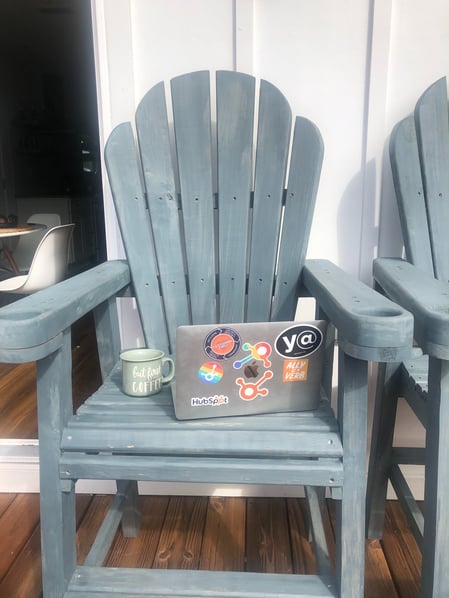
Kat Reed told me, “I’ve worked remote for 6+ years. I enjoy the flexibility of location because working all day from home can be too confining, and I also really enjoy working outside when the weather is nice. I choose places that have good outdoor spaces with plenty of outlets and a strong USB connection.”
2. A stand-up desk at home.
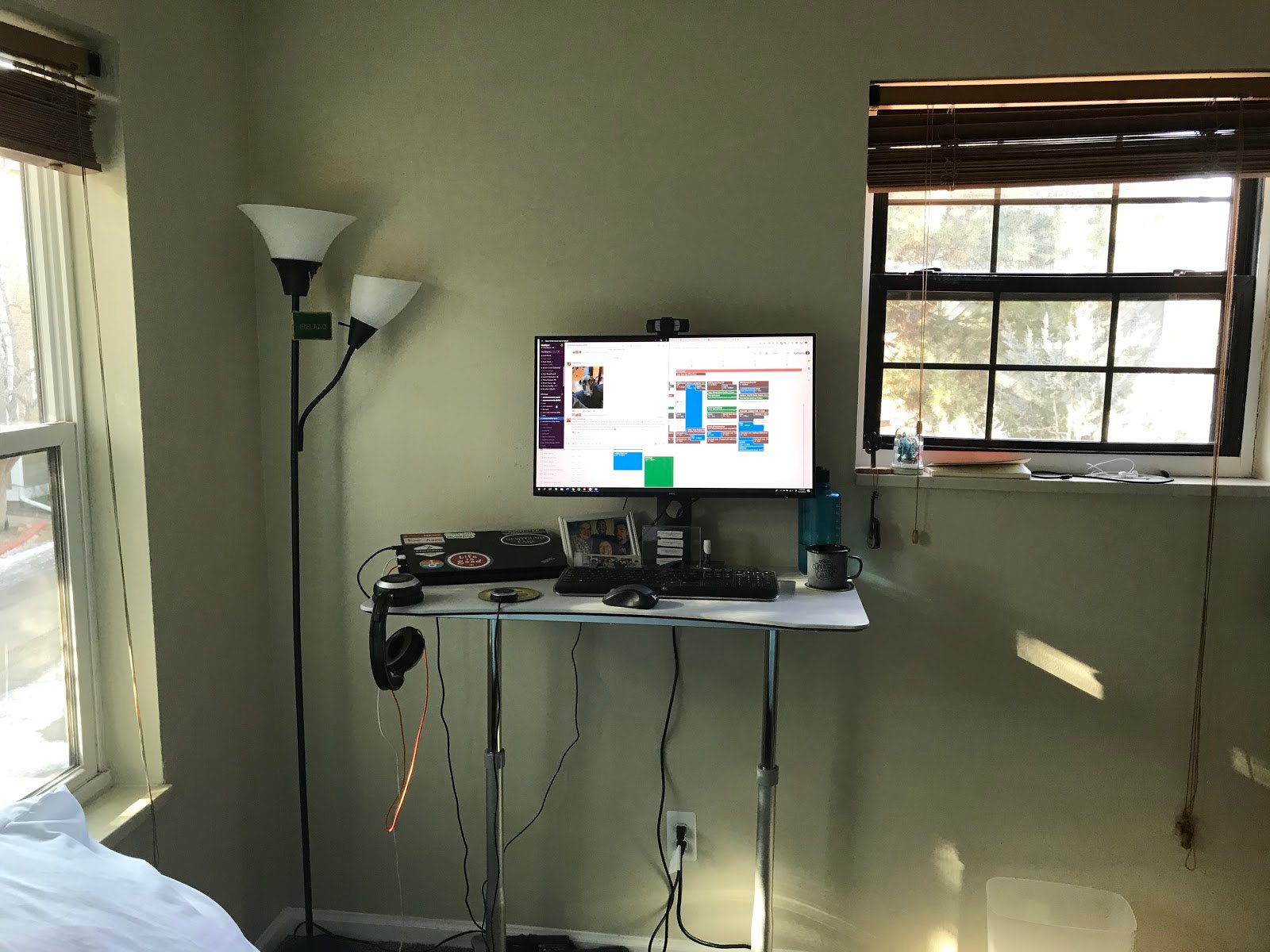
“Here is an image of my workspace. I find this to be effective because it allows me to use a stand-up desk like I did when I was working in Cambridge,” said Customer Success Manager Tony Baum.
Baum added, “I have plenty of sunshine from the two windows in my office. Luckily, in Boulder, Colorado, there is always sunshine.”
3. A cozy living room.

Caroline Forsey, Marketing Blog Manager in Cambridge, MA, told me, “When I WFH, I like to work on the couch in my living room with tea, a candle, and (during the winter months) a nice view of my Christmas tree. I find both my bedroom and kitchen to be too distracting (for bed/food reasons), so this is a cozy spot I typically find tons of productivity.”
4. A designated home office.
“Having designated space for my work has been a huge piece of my success as a remote HubSpotter,” said California-based Managing Editor, Meg Prater.

“It keeps me focused and helps me feel professional — even if I have a crying toddler homesick or a mountain of laundry laughing at me from the other room. I’m lucky enough to have an office space with a door as well, which helps me maintain work/life balance.”
Prater added, “It’s easy to pick up your laptop and answer a few more emails in the evening when your computer is sitting on the kitchen table. Being able to close the door on work every evening makes it easier for me to unplug.”
5. A simplistic setting.
 As told to me by Managing Editor, Christina Perricone, “What I love most about my remote office is the simplicity — just a desk, a chair, and a few decorations. I work best in quiet, calm environments where I can focus. My office provides me everything I need to get deep work done.”
Having the flexibility to work from a variety of spaces makes employees feel more comfortable. Sometimes, life gets in the way and employees can’t make it into the office. Having that knowledge that working from home, in a space that’s more familiar, can boost morale.
We love the workspaces of other HubSpotters because we can see how they contribute to the work ethic of our colleagues. If you’re still unsure about implementing a work from home option in the workplace, run an experiment for a week and see if it’s realistic. You might find that the internet has helped in the future of work a ton, and that includes making at-home meetings and collaboration with coworkers easier.

The Facebook Ad Types: How to Choose the Best Ad Type for Your Goals
Did you know that people in the U.S. spend 20% of their mobile time on Facebook or Instagram? And there are over 1.8 billion people using Facebook every month?
With so many active users, Facebook Ads are a no-brainer for any marketer looking to reach new audiences in a place where people are already spending a significant amount of time.
Facebook’s business platform has grown to be more and more sophisticated, giving advertisers more options to reach new audiences and retarget previous site visitors back to their brand. However, with so many different options, it can be difficult for advertisers to figure out which Facebook Ad type is best for any given campaign objective.
In this post, we’ll walk through each of the different Facebook Ad types and help you figure out which ads you should run for different campaign goals.
1. Post Engagement
If you regularly post content on your Facebook page, you probably know that some content performs better than others. With Facebook post engagement ads, you can drive more engagement on individual posts and expand its original reach. This helps you generate more activity on your posts and helps you get more organic followers quickly by offering them the kinds of posts they’ll see more of if they follow you.
In the example below, the Fashion Stork Club ad promotes an update this company made to their Facebook photos. Notice that the add displays the post engagement (likes, comments, shares) along with the post to encourage viewers to engage with it.
The ad also features a “like page” button which allows the advertiser to generate both page likes and post engagements all in one post.
2. Instant Experience
While app engagement ads are intended to highlight specific features to drive in-app engagements, app install ads are focused on generating new users. Instead of calling out specific features, app install ads are more likely to showcase the app’s core purpose and main functionality.
3. Video
The video ad features help educate your audience about your product features using video.
Videos should be the highest resolution possible in aspect ratios 9:16 or 16:9. They also need to be a minimum of one second to a max of 240 minutes. A cool thing about Facebook’s video ads is that you can upload a 360 ad, which is an immersive experience where users can drag their finger or turn their device to see an ad.
In the example above, Spotify’s ad uses a creative, colorful video that focuses on finding new music and playlists for users to enjoy. While a user might see the add and decide to sign up for Spotify immediately, Spotify used the brand awareness approach to create compelling content to draw the user’s attention.
4. Event Responses
Whether you have a new store opening or just want to boost awareness for one of your store’s existing locations, you might consider using the local awareness ad type to drive brand awareness in specific geographic regions. This ad type is largely the same as brand awareness ads, but will be more oriented and targeted via location.
For example, Cold Stone Creamery used a local awareness ad to target people in a geographic area when their store in Bangladesh opened. Notice how in this ad, Cold Stone chose to use a video as the creative asset featured in the ad. This is a great way to engage users and entice them to stop scrolling down their newsfeed.
5. Offers
During the website conversion ads section, we touched on the fact that you could use conversion-focused offers as a landing point for your Facebook ad. That said, Facebook also allows you to set off-site offer downloads as a campaign objective.
Whether you have discounts, holiday deals, or content-specific offers to promote via Facebook ads, the offer claim objective allows you to customize your ads with calls-to-action specific to the offer. For example, you might use a “Learn More” call-to-action if you’re offering something that’s good only for the first 500 sign-ups, like in the ad example below:
As you can see, the offer claim Facebook Ad type should lead your users directly to a sign-up page on your website where they can claim the offer you promoted.
6. Lead Generation Ads
In a traditional lead generation conversion path, users are driven to a landing page where they fill out a form. For example, you might use a Facebook offer claim ad (like we discussed in the previous section) to drive users to your website and have them fill out a form there.
The downside to this conversion path is that users are required to leave Facebook altogether once they’ve clicked on the ad to actually claim what you’re promoting. Luckily, Facebook offers the lead generation objective, which allows you to collect lead information without forcing your audience to ever leave the Facebook app.
Here’s an example that shows the conversion path the user goes through on a Facebook lead ad.
First, the user see a traditional conversion-focused ad:

Once the user clicks on the add and/or call-to-action (in this case, Sign-Up), they see this pop up within the Facebook app:
Next, the user can click the register button and see a form (of your choosing) with their information auto-filled.
Once the user submits the form on the lead ad, they can click out of the ad and go back to browsing on Facebook. It’s a great user experience and Facebook will sync with your CRM so your leads are right where you want them.
Want more information on how to set up and successful target Facebook lead ads to the right users? Check out this comprehensive guide.
7. Page Likes
In some cases, you may want to use Facebook Ads to expand your organic reach. When this is your campaign goal, you should use the page like ad type to encourage new users to “like” your page. Once they do, they’ll be able to see your organic content when you post it.

Page like campaigns are best for advertisers who put lots of effort into their social media presence and produce content specifically for their Facebook users to drive engagement.
Keep in mind, you can also ad a “like page” call-to-action option to other ad types if you want to accomplish two goals with one ad.
8. Slideshow
Slideshow ads, in Facebook’s opinion, are kind of in the video category, kind of not. Think of them as billboards: they move quickly and can give an immersive ad experience. Slideshows are an affordable alternative to video, and also provide a quick loading time, so you can capture the attention span of someone who doesn’t want to wait for videos.
These are a possible option for you if you want to quickly make ads. Facebook gives you the option of choosing from stock images and free video editing tools to make your ad spectacular. You can even choose music.
Slideshows are also great for you if you want to simplify a process that is a little bit more complex. Like Carousels, you can use quickly moving images to tell a story or sequence.
9. Carousel
Carousel ads are very diverse and Facebook hosts them on their website, Instagram, Messenger, and Audience Network. Carousels lets you show up to 10 images or videos in one ad. This expansive ad space embraces creativity.
Common ways to use carousel ads are product demos, product highlights, showcasing specs about a product, and a way to tell stories. Although they’re popular on Instagram, Carousels also have a place on Facebook, and can attract users who are into an interactive experience.
10. Collection
If you’re releasing a lot of products at once, collection ads may be something you look into, especially at the end of a campaign that drives a lot of interest. This is because collection ads lets interested buyers move from discovering your product to purchasing in a streamlined method.
Collection ads are pretty much like an online store, with a primary image of the product along with four images customers can tap through. If they decide to purchase, they can do so without leaving the platform.
11. Image
For driving visitors to your site, a quick creation process, and keeping things simple, image ads are right up your alley. They are a common form of an ad and come with fewer bells and whistles than other formats. Still, they can be extremely effective.
With a single, stunning image and little text, you can create a stunning image ad, where that picture will be the focal point. Images on Facebook gives you a format to use, with spaces to make sure your photo is incredible and you have the option to include copy.
How to Choose Which Facebook Ad Type to Use
We’ve covered all of the different Facebook Ad types campaign objectives you can use to meet your specific ads goals. But is that all encompassing? Not really.
In reality, many of the Facebook Ad type campaign objectives overlap, and you could use multiple ad types to accomplish the same objective. Additionally, Facebook has many different options for you to choose from once you pick a campaign objective, which means choosing an ad type isn’t even half of the battle.
So how do you decide which ad type to use?
1) Define your campaign goal.
Before you begin any ad campaign, you first need to determine what the goal of your campaign is. Are you trying to drive conversions on your website? Drive attendance for an upcoming event? Simply get more customers to your local store?
Don’t just come up with a campaign around which ad type you want to use. Instead, start with your own marketing needs and build your ad around it.
2) Choose relevant types you could use.
Once you’ve defined the goal of your ad campaign, take a look at the different Facebook Ad types available to you. Luckily, you already know what each of the ad types are.
Choose the type most relevant to your goals. You probably noticed Facebook has multiple ad types you could use for a single objective. If your goal is to drive downloads for an ebook, for example, you could use any one of the following options:
- Clicks to Website
- Website Conversions
- Lead Generation
- Offer Claims
3) Narrow down your options.
Once you’ve chosen which ad types are most applicable to your needs, choose the one you think will work best for you campaign. Or, use the same creative, copy, and targeting options to set up a campaign test using different ad types and see if one performs better than the other.
4) Write copy and create assets.
One great feature of Facebook’s Ads Manager tool is the wide range of creative and layout options you have available to you. Not only can you choose between image, video, photo grid, and carousel layouts, you can also customize your ads for mobile and desktop audiences.
Facebook also has lots of different calls-to-action you can use on your ads, or you can choose not to use one at all! As you run different ad campaigns, make sure to test and analyze what works best for your audience.
5) Use different ad types for different campaign goals.
Don’t just stick to one ad type for all of your campaigns. Instead, make sure you’re optimizing your ads for the right campaign objectives. Try out different Facebook Ad types and different ad campaigns to optimize your ad strategy for your audience.
6) Target the right audience.
Creating the draft of your ad is only half the battle. The other half is figuring out how to target the right audience for your ads campaign.
Luckily, our free guide to Facebook Lead Ads has an in-depth section on how to set up your targeting strategy for any ad campaign you run.
7) Test, analyze, and repeat.
Once you’ve defined your campaign objective, selected your ad type, created your ad, and targeted the right audience, it’s time to analyze your results.
Remember: digital advertising is all about testing, analyzing, and optimizing future ad campaigns over time. Make sure you follow this important final important step, and you’ll be on your way to implementing a high-ROI ads strategy in no time.
You may be wondering, “Okay, which Facebook Ad type should I definitely try right away?
We just put together this in-depth guide on Facebook Lead Ads. It’ll help you learn everything you need to know about optimizing lead generation ads that allow users to submit forms to you without ever leaving Facebook. Check it out here or click the banner below.

10 Logo Design Trends to Watch for in 2020 [Infographic]
We demand a lot from logos.
They have to be simple, yet still convey the ethos of the brand in a way that resonates with consumers. They have to be timeless and distinct, but still modern and consistent with contemporary graphic design trends.
It’s a lot to ask of a single symbol. As any designer will surely tell you, designing a logo that meets these varied expectations is no easy task.
To help you prepare for the new year, Logaster created the infographic below detailing their predictions for the most influential logo design trends of 2020. Keep an eye out for these design approaches in the coming year:


Instagram Stories Ads: What Marketers Need to Know
Want more leads and customers from Instagram? Have you considered Instagram Stories ads? To explore what you need to know about Instagram Stories ads, I interview Susan Wenograd on the Social Media Marketing Podcast. Susan is a Facebook ads expert and the chief marketing officer at Aimclear, a marketing agency focused on paid search and […]
The post Instagram Stories Ads: What Marketers Need to Know appeared first on Social Media Marketing | Social Media Examiner.
from Social Media Marketing | Social Media Examiner https://ift.tt/35jfHIl
via socialmediaexaminer
25 Case Study Examples Every Marketer Should See
The saying “lead by example” is important in politics and leadership roles — and it’s also critical in marketing.
Sure, you can tell potential customers your marketing team is the best at running YouTube campaigns or effectively increasing a website’s cost-per-acquisition (CPA), but until you offer examples, they’re going to have a hard time believing you.
What is a case study?
A case study is a detailed story of something your company did. It includes a beginning — often discussing a conflict, an explanation of what happened next, and a resolution that explains how the company solved or improved on something. A great case study is also often filled with research and stats to back up points made about a project’s results.
Putting together a compelling case study is one of the most powerful strategies for showcasing your marketing skills and attracting future customers. But it’s easier said than done — you’ve executed the campaign, you’ve collected the results, now what?
To help you create an attractive and high-converting case study, we’ve put together a list of some of our favorites. Take a look, and let these examples inspire your next brilliant case study design.
Case Study Examples
1. “Shopify Uses HubSpot CRM to Transform High Volume Sales Organization,” by HubSpot
What’s interesting about this case study is the way it leads with the customer. That reflects a major HubSpot credo, which is to always solve for the customer first. The copy leads with a brief description of why Shopify uses HubSpot, and is accompanied by a short video and some basic statistics on the company.
Notice that this case study uses mixed-media. Yes, there is a short video, but it’s elaborated upon in the additional text on the page. So while your case studies can use one or the other, don’t be afraid to combine written copy with visuals to emphasize the project’s success.
2. “Designing the Future of Urban Farming,” by IDEO
Here’s a design company that knows how to lead with simplicity in its case studies. As soon as the visitor arrives at the page, he or she is greeted with a big, bold photo, and two very simple columns of text — “The Challenge” and “The Outcome.”
Immediately, IDEO has communicated two of the case study’s major pillars. And while that’s great — the company created a solution for vertical farming startup INFARM’s challenge — it doesn’t stop there. As the user scrolls down, those pillars are elaborated upon with comprehensive (but not overwhelming) copy that outlines what that process looked like, replete with quotes and additional visuals.
3. “Secure Wi-Fi Wins Big for Tournament,” by WatchGuard
Then, there are the cases when visuals can tell almost the entire story — when executed correctly. Network security provider WatchGuard is able to do that through this video, which tells the story of how its services enhanced the attendee and vendor experience at the Windmill Ultimate Frisbee tournament.
4. “Customer Case Study: ElliotLee Estate Agents” by Pioneer Business Systems
In 2018, 45% of people watch more than an hour of Facebook or YouTube videos a week. A video case study could be a compelling way to attract potential customers who prefer watching a video over reading text. Additionally, a video allows you to convey customer emotion. This case study by Pioneer Business Systems, for instance, allows viewers to see firsthand the effects Pioneer’s telephone system had on their clients, ElliotLee Estate Agents. It includes text, as well, to thoughtfully organize and break-up the video into sections.
5. “Sapio User Acquisition Case Study” by Fractl
Fractl uses both text and graphic design on their Sapio case study web page to immerse the viewer in a more interesting user experience. For instance, as you scroll, you’ll see the results are illustrated in an infographic-design form as well as the text itself. Further down the page, they use icons like a heart and a circle to illustrate their pitch angles, and graphs to showcase their results. Rather than writing which publications covered their news story, they incorporated the media outlet’s icons for further visual diversity.
6. “USA Today” by Fantasy
What’s the best way to showcase the responsiveness and user interface of a website? Probably by diving right into it, via video — which is exactly what Fantasy does on their case study page for USA Today. They keep the page simple and clean, with a large red play button embedded at the top, inviting you to review their redesign of USA Today’s website via video. The video itself is simple, showing the website’s interface and clicking on various links with simple instrumental music in the background.
If you’re more interested in text, you can scroll to find their goal, “make USA Today’s website responsive”, in one short paragraph, followed by a simple “1” icon, with the text “Became the most visited US News site.” Fantasy understands that, as a potential customer, this is all you need to know. Scrolling further, you’re greeted with a simple “Contact Us” CTA.
7. “Coca-Cola Uses App Annie to Amaze & Delight Customers” by App Annie.
(embed link: https://www.youtube.com/watch?v=sHo0SnZFTMw)
A video is a phenomenal way to grab a viewer’s attention, but in our video-heavy world today, it can be hard to keep potential customers’ eyes on the screen. To combat this, App Annie’s case study of Coca-Cola includes drawings and text to highlight what Greg Chambers, Coca-Cola’s Director of Innovation, is talking about on-screen. They also occasionally cut away from his face to include full-screen text. By incorporating graphic designs and text in their video, App Annie encourages viewers to stay engaged.
8. “How One Ecommerce Business Solved the Omnichannel Challenge with Bitly Campaigns” by Bitly
Bitly takes a different approach to text-heavy case studies, by providing their case study of ecommerce company Vissla in PDF form. The case study is clean and easily scannable, with sections divided into “The Goal”, “Top Omnichannel Obstacles”, and images of “The Set-Up” and “The Launch.” The downloadable PDF format makes the case study feel like an exclusive behind-the-scenes look, and uses colors and text that align with Bitly’s brand. Since the PDF opens in a separate browser, it’s easier for the viewer to avoid distractions as they scroll the pages.
9. “How Social Media Insights Turned Around Lexus’ Holiday Campaigns” by Infegy
It can be risky to include hurdles to your case studies, but with great risk comes great reward, right? In Infegy’s case, their gated content is worth the fill-out form information, particularly since their client is such a big name in the automobile industry: Lexus. The PDF case study reads like a compelling news article, including titles like “The Rise of Lexus” and “The Fall of Lexus”, colorful pie charts, and real online comments from customers who were unhappy with Lexus’ old holiday ads. The PDF is six pages but features big font and plenty of white space, so viewers can easily skim it in only a few minutes.
10. “Fiesta Bowl” by OH Partners
OH Partners doesn’t let superfluous details distract from the most important themes of their case study — “The Situation”, “The Solution”, and “The Success”. Each one of their case studies, including this Fiesta Bowl one, is organized into those three categories, with a video at the beginning followed by a few large font, easily skimmable paragraphs.
Best of all, OH Partners puts other case studies on the left side of the page, with highly enticing visuals to ensure a potential consumer can continue perusing the case studies until they’re confident in OH Partner’s track record.
11. “The Gifted Day” by Digitas
Digitas’ case study page for LVNG With, a cancer support community created by AstraZeneca, is one of the more emotionally moving campaigns in our list and might even evoke a few tears. The page begins with a heart-wrenching video of all the moments — a grandmother holding her grandchild, someone riding a roller coaster — that “weren’t supposed to happen”, exemplifying the enormous gift a single day could be to a terminal patient. Scrolling down, it’s obvious that Digitas kept AstraZeneca at the forefront of their strategy, but more than that, they used real people as their focal point.
12. “Wine.com” by RichRelevance
What first attracted me to RichRelevance’s Wine.com case study was the box on the left-side that quickly summed up the case study, including requirements, solution, and results. Adding an abridged version to a case study enables you to attract a larger audience, by offering a quick-read for those short on time, and a longer version for those interested in the details. RichRelevance’s case study also offers an impressive amount of information for those wanting to understand the nuances of their strategy, including a section titled “Fine-tuning Recommendations by Geography”.
13. “Synapse Innovation” by Uniface
SlideShare is a platform that allows you to encourage engagement from your viewers — which is likely why Netherlands-headquartered Uniface chose to use a SlideShare for their customer case study. As you click to the right you’re able to easily read their process from challenge to solution, and they provide a link to the full case study, and their social media accounts, on the last slide. Since each slide only needs a few lines of text, the SlideShare feels especially digestible.
14. “StyleHaul” by Asana
While Asana’s case study design looks initially text-heavy, there’s good reason — it reads like a creative story, and is told entirely from the customer’s perspective. For instance, Asana knows you won’t trust their word alone on their impressive customer service, so they let StyleHaul’s SVP of Business & Network Operations, Drew, tell you instead: “Our Customer Success Manager, Michael, was amazing. If I had a question, I wasn’t put into a queue—I could get it answered right away.” The entire case study reads like an in-depth interview, and captivates the reader through creative storytelling.
15. “Patagonia” by Amp Agency

Amp Agency’s Patagonia marketing strategy aimed to appeal to a new audience through guerilla marketing efforts and a coast-to-coast roadtrip. Their case study page effectively conveys a voyager theme, complete with real photos of Patagonia customers from across the U.S., and a map of the expedition. Personally, I liked Amp Agency’s storytelling approach best, which captures viewers’ attention start-to-finish simply because it’s an intriguing and unique approach to marketing.
16. “Budweiser Influencer Marketing Case Study” by Anomaly
Budweiser’s one page, poster-esque case study is a good reflection of a brand knowing its audience. Anomaly’s case study for Budweiser appears edgy and modern, with a design that playfully pushes the text to the right as it showcases pictures of social media influencers wearing a campaign-related t-shirt. Both the top and the bottom of the page are eye-catching, and the text itself is simple and straightforward.
17. “Clinique” by AdRoll
Sometimes, starting with the results is the best way to capture your readers’ attention. In Clinique’s case study, AdRoll does just that, beginning with some impressive numbers: “8.5 Times ROI, 14 Times ROAS, 265% Amount of Sales”. Once it has boldly outlined their results, AdRoll smartly pulls back to discuss the “Benefits of Personalized Ads”, letting the viewer consider how these same benefits might help their own company.
The page is short and sweet and ends with a compelling call-to-action — “AdRoll has generated revenues in excess of seven billion for its customers. Try it now.” The clean, whitespace-heavy page is an effective example of using a case study to capture future leads.
18. “TEXTCARE” by The George Institute
The George Institute chose to display the case study for their program, TEXTCARE, in a documentary-style video with real people discussing how TEXTCARE helped them become healthier and more active. If your case study results benefited people, there’s likely no better way to showcase that than through on-screen interviews.
19. “Reclaiming The Identity of a Brand: A Levi’s Case Study” by Levi
If you’ve got a case study with dense text, one of the more creative solutions to breaking it up could be to organize it by pages. Levi’s case study uses this method — their page one, for instance, is labeled “Introduction”, while page two is labeled “Weaknesses in the late 1990s”. Each page tackles a different topic, and the design makes it feel more like reading a book than a business article.
20. “Red Sox Season Campaign” by CTP
What’s great about CTP’s case study page for their Red Sox Season Campaign is their combination of video, images, and text — a video automatically begins playing when you visit the page, and as you scroll, you’ll see additional embedded videos of Red Sox players, a compilation of print ads, and social media images you can click to enlarge. At the bottom, it says “Find out how we can do something similar for your brand.” The page is clean, cohesive, and aesthetically-pleasing, inviting viewers to appreciate the well-roundedness of CTP’s campaign for Boston’s beloved baseball team.
21. “BIC: Bringing One Stop Shopping to BIC Razors” by Genuine
Sometimes, simple is key. Genuine’s case study for BIC razor’s is straightforward and minimal, with only two short paragraphs, “The Insight” and “The Solution”, accompanied by two images. The simplicity of the page allows the reader to focus on the sense of humor in the text, like “Helping a consumer find their perfect match and making them smile along the way means gaining a brand loyalist for life. Or until they grow a beard.” The page displays Genuine’s brand personality well, while offering the viewer all the necessary information they’d need.
22. “Cisco Systems: Velocity to Value” by Apptio

An attention-grabbing title is one of the easiest, yet most effective, ways to help your case study stand out — like Apptio’s Cisco Systems case study, titled “Velocity to Value: A Mature IT Services Transformation Enables IT to Continually Simplify and Innovate.” The piece is well-organized and uses compelling headers to keep the reader engaged, and offers a side panel for viewers who just need the bullet points. Despite its length, Apptio’s case study is appealing enough to keep viewer’s attention.
23. “Airbnb’s Custom 360-view of the Customer” by Zendesk
Zendesk’s Airbnb case study reads like a blog, and focuses equally on Zendesk and Airbnb, highlighting a true partnership between the companies. To captivate readers, it begins like this: “Halfway around the globe is a place to stay with your name on it. At least for a weekend.” The piece focuses on telling a good story, and provides photographs of beautiful Airbnb locations. In a case study meant to highlight Zendesk’s helpfulness, nothing could be more authentic than their decision to focus on Airbnb’s service in such great detail.
24. “Herschel Delights with Hootsuite” by Hootsuite
If you didn’t know this video was a case study for Hootsuite, you’d assume it was simply an artsy video capturing Herschel’s startup success. The Herschel marketing team mentions Hootsuite, but they do it authentically and remain primarily focused on the appreciation they have for their social media community. This video doesn’t have the feel of a traditional advertisement — instead, it feels unique and true to Herschel, highlighting Hootsuite as both a helpful and unobtrusive partner.
25. “4 Content Marketing Success Stories [Infographic]” by Kapost
You don’t always need a ton of text or a video to convey your message — sometimes, you just need images. Kapost’s infographic does a fantastic job of quickly providing the fundamental statistics a potential customer would need to know, without boggling down their readers with dense paragraphs. The infographic includes percentages, customer quotes, and colorful charts to provide the viewer with both numerical and emotional reasons they might choose Kapost.
Start creating your case study.
Now that you’ve got a great list of examples of killer case studies, think about a topic you’d like to write about that highlights your company or work you did with a customer. For more examples, check out these social media case studies.

The New Approach to Work-Life Balance
CareerBuilder found that nearly half of American workers check email after they leave work, and 45% say they do work during non-business hours.
Additionally, this phenomenon crosses global borders, prompting new laws in France and a campaign in Japan to limit working hours.
Of course, we’d all love a little more balance in our lives. But it’s more than that. We need it.
Today’s “always on” mentality has serious consequences. Stanford professors Joel Goh, Jeffrey Pfeffer, and Stefanos Zenios found that more than 120,000 deaths per year and approximately 5%–8% of annual healthcare costs may be attributable to workplace stress from long working hours, job insecurity, work-family conflict, high job demands, and low social support at work.
But achieving work-life balance is hard. Obviously, reducing workplace stress is essential. But, despite finding that those who take vacation and travel are happier in their personal and professional lives, Project Time Off also found that more than half of American workers don’t take all of the vacation days they’ve earned.
By contrast, many other countries offer or mandate additional vacation days. For example, The Center for Economic and Policy Research found that the United States is the only country surveyed that doesn’t have a law requiring paid leave. Compare that to Germany (20 days), the United Kingdom (28 days), and Australia (20 days). With the exception of the United States, laws in other countries mandate a minimum of 10-30 days of paid leave per year.
The Work-Life Balance Matrix
Work life balance can (and should) look different for everyone, based on what’s most important to you. There may be times in life when you’re focused on career and personal development, and other times when your focus turns to family or a favorite hobby.
In other words, work-life balance examples run the gamut. But we’ve got some tips to help you find the work-life balance that’s just right for you.
Before addressing areas that might be out of balance, it’s a good idea to first understand what you value and how satisfied you are with the time you’re allocating to those areas of your life. When I was touring colleges, I used a weighted decision matrix to score each campus on the things I cared about. Ever since, I’ve used this handy tool to evaluate everything from jobs, to apartments, to vacation spots.
Here’s a sample of a completed matrix, with steps to complete your own, below:

Step 1: Create a list of 4-6 categories that most contribute to your satisfaction in life. I recommend using categories that are broad enough to encompass changing life phases, but narrow enough to act upon. You can use anything that contributes to your satisfaction, from hobbies, to career, to family, to spirituality, and volunteer work.
I also recommend that these categories have a significant effect on how you make life choices, how you spend your time, and have actionable and measurable steps associated with them.
For example, while it may significantly increase your satisfaction to “be a successful person,” a better category might be career. Or, if your satisfaction is impacted by “helping people,” a more actionable category might be “volunteer work.”
Step 2: Assign each of the chosen categories a percentage for the amount that the category impacts your satisfaction. For example, if your categories include family, career, hobbies, charity work, and education, you might say that family is 30%, career is 25%, hobbies are 10%, charity work is 20%, and education is 15%.
Be honest with yourself when choosing and rating each category. If you honestly don’t receive much satisfaction from hobbies, don’t give it more weight than career.
Step 3: Assign a percentage for your current satisfaction in each category. Are you 100% satisfied in your career? Are you only 50% satisfied with your family life? Go through each category and give an honest percentage with how satisfied you are with that area of your life.
Step 4: Multiply the satisfaction percentage with the weight of each category. Now add the categories up. The end percentage is how satisfied you are with your life. What’s your total? It’s rare than anyone will be 100% satisfied, but maybe 90%? What if your percentage is low, say, 30% satisfied?
Step 5: Analyze the results, and determine which areas of your life are causing the most dissatisfaction. What steps can you take to change that? How much of your satisfaction is built on choices and situations within your control, and how much is not in your control?
7 Work-Smart Strategies
Once you’ve quantified your life satisfaction, it’s time to start tackling areas with lower scores. Most people struggle with finding enough hours in the day to fit it all in, especially for personal time. Working smarter and savvy time management help you free up mental capacity, physical hours, and emotional space to accommodate more of the activities you love.
1. Just say no to low-impact work.
We all want to play as a team, but helping out on too many projects sucks up your time, leaving too little for the work that really matters. Setting quality OKRs (objectives and key results) is the key to knowing which activities are high-value, and which will distract you from accomplishing your goals.
And this doesn’t stop with office tasks. If the committee you’ve chaired for three years no longer brings you joy, step down and get back to participating in a way that feeds your soul. Are too many hobbies making you feel stressed and frenetic? Pare them down to the activities that bring the most pleasure. If an activity is not bringing you joy and helping you progress towards your goals, give it up!
When going through these steps last year, I recognized that I was feeling stressed and guilty about my role as a board member for a local community theater. I kept skipping meetings because of other commitments and I felt like I wasn’t contributing. I still wanted to volunteer on an ad-hoc basis, so I sent a note to the board president explaining that while I didn’t have time to make the required commitment to board duties for the coming year, I’d still love to participate by helping staff auditions, contributing time and money to opening night festivities, and acting as the house manager for productions. This allowed me to keep the things that brought me joy, and provided much needed support on a more reliable cadence for the theater.
2. Stop multi-tasking.
Seriously. How many browser tabs do you have open right now? Multitasking makes you think you’re getting more done, but research from the American Psychological Association has shown it reduces productivity by as much as 40%.
Instead, break each project into time-bound tasks, and spend focused amounts of time completing each element. Prioritize the tasks that require input from others for completion so that you can finish your portion of the project and hand it off to the next worker. Parallelizing work (where multiple work streams happen at the same time by different people) is an efficient use of time, but trying to do it all yourself is a recipe for disaster.
3. Break work down into achievable tasks.
Create a project plan that includes all the tasks you need to accomplish for the quarter. Then, divide the tasks in monthly and weekly to-dos. These can be kept on a team whiteboard, personal notepad, or shared Trello board. Whatever method you choose, make sure that you can check things off the list when complete, and move activities to the next phase of the project when ready.
4. Make your meetings matter.
Many people assume a weekly check-in meeting is needed for their projects … but is it? Do you really need to get in a room for 30 minutes to talk about the status of the checklist, instead of looking at the shared board or exchanging comments in writing?
Useless meetings waste tons of valuable time, so get ’em off the calendar if they aren’t adding value! If you want to take a bold step, delete all the recurring meetings off your calendar for the next quarter. Ask organizers to re-send the invites to meetings you should attend, and confirm why they feel your presence is valuable. You might find that check-ins for old projects never re-appear, and the meetings that remain actually do help you move work forward each quarter.
5. Create checklists.
Don’t procrastinate on checking things off your list. Sometimes we waste more energy worrying about doing the thing than actually doing the thing itself . David Allen, who wrote the book “Getting Things Done” and offers training on how to be more productive, says that the mind is for having ideas, not holding them.
He advocates for making a series of lists to capture and process all the things that you need to accomplish in a day. Once captured, do. Sometimes we get so mired down in the need to make the list perfect, make the steps perfect, make our desk perfect, that we forget that the act of starting means we’re one step closing to finishing our task. Once you’ve got a plan in place, take action.
6. Evaluate your daily schedule.
A long commute is another area that eats up time and contributes stress to most peoples’ lives. Want to reduce these effects? Try negotiating for a work-from-home day once or twice a week. Gallup found that in 2017, 43% of Americans said they worked remotely at least some of the time, and with collaboration tools like video, chat, and email, you can stay just as connected to your team.
If a long commute is non-negotiable, use that time for something that you’ve deemed important to your work life balance. For instance, if you have a goal to advance your knowledge or learn a new skill, you can listen to podcasts or audiobooks, or if you want to focus on well-being you can use apps like Headspace that offer guided meditations for relaxation.
7. Make time for self-care.
As you’re thinking about your daily plans, revisit your routines for physical health. You can gain time and nutrition benefits by meal planning and cooking in bulk on the weekends. Freeze meals in pre-portioned containers for easy reheating in the evenings. The time and stress you save each evening allows you to spend more time unwinding with your family, and getting to bed at a reasonable hour.
Speaking of which … how’s your sleep schedule? Are you going to bed at a reasonable time, getting a solid night’s rest, and waking with energy? If not, commit to a bedtime routine for 30 days, and see how you feel at the end. Keep the elements that improve your rest, and experiment with changes to ensure you get a good night’s sleep.
Of course, all of these new habits take time to build and practice to maintain. Some tactics, like deleting all your meetings and negotiating a regular WFH day, can be done right away. Others, like declining low-impact work and focusing on tasks individually, require diligent attention throughout the year.
This article was originally published on Atlassian.com and republished with permission.
