
Welcome to My Blog
The Guide to Successful Silent Videos for Facebook Video Ads (+ Examples)
In recent years, Facebook has become a powerful platform for posting, sharing, and watching videos. In fact, nowadays, people watch more than 100 million hours of Facebook videos on a daily basis.
However, unlike traditional viewing on television and even YouTube, a large percentage of people watch Facebook videos from their smartphones, and play them silently from their news feed.
This is creating an environment where content creators and brands must compete in a soundless, auto-play Facebook environment.
In addition, after Facebook went public and had pressure to monetize their platform, the social media giant turned to a paid-only ad-revenue model.
Due to Facebook’s pay-to-play environment, brands have to pay for Facebook reach, and also make sure what they’re putting out is getting high return on investment (ROI). Therefore, many brands are turning to video, as opposed to images, for their ads, since video typically results in higher engagement and improved conversions.
This creates a marketplace where brands have to keep two things in mind:
- To get seen, you have to pay
- To get attention, video is better but it’ll have to work without audio
Unfortunately, as more businesses jump into the Facebook marketplace, there are more and more mistakes being made. Graham Mudd, Facebook’s Director of Ads Product Marketing, estimates that up to 40% of Facebook video ads fail to communicate when the sound isn’t on.
When it comes to silent video ads for Facebook, the luxuries of audio are gone, but the pressure for conversions is still there. Therefore, brands and entrepreneurs need to change their thinking on what it means to communicate through video, and more specifically, silent video.
Storytelling Visually, Not Verbally
People watch 85% of videos on Facebook without clicking on the ‘sound’ button.
To satisfy the majority of viewers who will watch videos without sound, brands and entrepreneurs need to master what it means to tell a story without verbally saying anything.
Here are a few tips on how to do just that.
1. Create a script that can work with or without dialogue.
Notably, video production is usually based on a script. But you should avoid depending on the dialogue entirely, since this could set you up for a loss.
Content creators often know readers won’t read every line of content you publish — they might skim, skip paragraphs, or leave the page before reaching the end. Similarly, the majority of Facebook users will not listen to your videos.
Some filmmakers may find this odd, since traditional videos have a beautiful mix of both visuals and audio. But change is inevitable, so you need to adapt to the current methods that people view content.
When creating Facebook silent video ads, you want to get a competitive edge with a script that can still sell your brand even when silent.
Right off the bat, concepts such as interviews or a speaking host should be placed at bay. This includes those that could also pass the message through subtitles. Always remember that context is key, and you need to use a strong visual narrative.
For instance, Reolink’s Argus Security Camera offers a simple, yet effective example of a video that worked with no dialogue. At first glance it looks like the video is just images with captions, but a couple seconds in, a hand swoops in and yanks the camera out of the frame.
It’s a perfect example of communicating a product’s value with a combination of text and movement, without needing to rely on any narration or verbal explanation.
2. Emphasize big, bold visuals.
It’s equally important to make the images bold, big, and highly visual for your video to ‘pop.’ You have to catch the eyes of your viewers as they scroll the sea of jokes, celebrity gossip, their exes, and opinionated posts.
The images you choose should be high-contrast with bold visuals, and noticeable enough to prevent confusion with any regular video content with audio. By building a reputation of digestible silent content, your viewers will always slow down to check out any new videos from you on their feed.
You can see an example of this creative visual approach with the UAG MacBook Drop Test video.
Whatever it is, just make sure your visual editing touches add something that people aren’t used to seeing.
3. Create content that explains itself.
For an immediate impact, you need to come up with content that does not need audio or words to explain the happiness, frustration, or ‘cool factors’ of your brand. You can begin with a question or a shocking statement with great visuals.
This is one of those times where you don’t want to overcomplicate things. Think about your product or service and cut to the core of what you’re offering. There is no room for anything subtle or meta here — just cut to the chase.
Privacy Pop executes this extremely well in their videos. While introducing a relatively innovative product to the market, they cut straight to the core of what they are offering and communicate the value of their bed tents.
Often in the name of creativity, companies can really go off the deep end of messaging and symbolism. For Facebook Video Ads, everything is silent and you really only have a handful of seconds to stop the viewer from scrolling. A confusing message will ensure that they will not stop on your ad.
4. Place your call-to-action wisely.
Though not in the video itself, call-to-action buttons are extremely important in getting conversions. There are two decisions to make regarding your call-to-action. The first regards which CTA prompt will produce the best results.
To find out, Adespresso A/B tested four prompts (in addition to a CTA with no button at all) using a Facebook call-to-action button.
The results were compelling:
● No button at all produced the worst results — 20 leads for $12.50 each
● “Sign Up” generated 26 leads at $9.62 per lead
● “Learn More” generated 36 leads at $9.94 per lead
● “Download” garnered 49 leads at $5.10 per lead
The best performance was for “Download,” which generated 49 leads at a cost of $5.10 per lead.
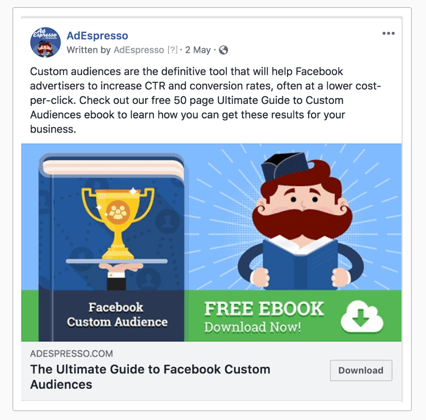
The reason? Researchers suspect it’s because “Sign Up” creates concerns that users will need to provide credit card information and “Learn More” suggests more reading, which would be time-consuming.
The second decision involves where in your video you want to place the CTA. The CTA of the video and the Facebook video ads should tie together.
Remember, your CTA in the video should ultimately urge the person to click the CTA button below the video. This is something you should A/B test — try placing your CTA at the opening, in the middle, and at the end to see which placement your viewers prefer.
You should also try displaying the CTA in graphic text throughout the video. See which placement performs best before launching your campaign.
5. Drop your discount or offer early.
There’s no guarantee consumers will watch an ad all the way through. In fact, Facebook ads on average capture just 60 seconds of viewers’ attention — some people, of course, will leave before that — so it’s important to frontload your most important information, like a discount or special offer.
Additionally, make sure your offer works naturally with what precedes and follows it — in other words, don’t segregate your discount from other video features, like the value and benefits of your product or service.
Visual Storytelling Toolset
Here are some tactics we use in our Facebook video production strategy that you can use to create successful silent video ads for Facebook.
1. Use Animations
Due to their visual-heavy nature, animations allow for an easy and effective transition to silent videos. We have found that for clients who are strapped on budget, animations provide a great alternative. Animated videos do not require actors, cameras, multiple locations, or other typical expenses needed for a video shoot.
Be sure to design an outline or script that can work without a voiceover. This way, the animated silent video ad could make a fast transition to the social platform without much effort.
When creating these silent animated videos there are certain factors that you need to think about beyond a typical video commercial shoot, including:
- Creating a Mood Board/Style Guide: The video you create will be all graphics, so it’s extremely important to keep colors, graphics, text, and transitions on-brand and looking clean. If you have ever tried designing a flier on your own, without design experience, you’ll know that people tend to go overboard with colors and clutter. Animations are exactly the same. Mood boards allow you to stay on theme and remind you of the aesthetic that you’re trying to achieve. Common tools that our team uses is Abduzeedo.com and Pinterest to share ideas when formulating mood boards.
- Create a Storyboard: With animations, video storyboards are extremely important. It reminds you of the message you are trying to tell and helps keep the animation concise.
2. Establish a Quick Connection
You must connect and capture the attention of your audience right away. According to research, 65% of viewers who watch the initial three seconds of a video ad will continue watching for more than 10 seconds. Therefore, you must consider videos and thumbnail images that can hook people to your story.
To connect the silent video to your brand, you might try using brand colors, imagery, and themes.
In this video, Airtable effectively grabs your attention with the use of child actors to detail the product’s features. It provides a nice change of pace from the usual business videos we see every day.
This is where your creativity needs to shine. You need to pique that curiosity. Create an introduction that makes people think, “What is this?”
When ideating on how to do this, our team always likes to review movie trailers and commercials that have caught our eye. When looking for these techniques, you don’t need to keep your search only to Facebook video ads — instead, you might check out Superbowl ads, trending YouTube commercials, or ads on Hulu.
3. Make Graphics Large
Need some extra help to get your point or idea across without using audio? You can get creative and use large titles that emphasize the key features or steps of your video.
To draw more attention to your video, you can also include flashy transitions. However, it’s critical you ensure they remain within your brand’s signature feel and look to retain consistency with your overall marketing strategy.
You might also consider keeping the title or point of the video at the top of the video at all times.
Here’s a great example from BBC Three:
This style of presenting videos is becoming more and more popular for brands and content creators as it helps overcome the silent aspects of videos, since it tells viewers who might not have been paying attention at the beginning of the video what the video is about.
4. Add Subtitles
Understandably, you might feel you can’t completely get your point across without using words. In this case, you can add subtitles as you upload.
Fortunately, Facebook has a feature where you can automatically add captions using their software.
We always recommend reviewing the captions before publishing. Captioning technology isn’t at the point where it gets everything 100% right. There are many tools that exist that can help you transcribe if you want a more exact transcription, but many can get pricey if you want 100% accuracy. Alternatively, if you use Facebook’s feature, you can go through and edit yourself for clarity.
5. Optimize the Ad Description and Title
For more a successful silent video ad, you need to keep the title and description engaging to let viewers know what to expect. These two sections also provide important information on your video topic to the site’s targeting algorithms. Therefore, you need to ensure that all the relevant keywords are included in your ad. Other than ensuring relevance in your copy, always generate enough curiosity since some titles are catchier than others.
To optimize the title and ad description, you need to refer back to your initial goals. Ad descriptions and titles are often an afterthought where companies have someone quickly upload and write the first thing that comes to mind. This is not the way to do it.
Facebook titles and descriptions are like the subject line of an email. They are often written last and with the least amount of time spent, yet they are often the most important part of the email. The same goes for Facebook titles.
6. Keep It Short
Considering most people tune out so fast, what is the ideal length for a Facebook video to tell your story and sell your brand? If you intend to use in-stream videos (those placed during or before other content), it is recommended that you keep it in the five –15 second range. The maximum allowance, however, stands at 31 seconds. Alternatively, standalone ads should last less than 15 seconds, since shorter video ads have higher completion rates.
A great example is the throwback Google Chrome YouTube commercials that the company used to demonstrate the browser’s superior speed.
What we recommend here is to be ruthless when creating your storyboard and script. Having discipline in the beginning of your video ideation will help reign in the excess further down the line.
Don’t wait until the end when all shots are done and you are trying to stuff everything in. You’ll often find that your video is at least 10x longer than needed. Having a strict storyboard and script in the beginning will help drive decision-making when certain members on the team have fallen in love with a scene and don’t want to make any cuts.
7. Copy the “News” Style
Most marketers are familiar with Facebook’s algorithm changes earlier this year, the ones that prioritized news from friends and family over those from publishers. This placed a new onus on advertisers to create ads which mimic what a user typically sees in their news feed.
Of course, this isn’t a new concept in advertising — “native ads” have been around for quite a while, as have best practice strategies for creating them. To get the most out of your Facebook ads, then, you might try copying the “news” style.
That means, among other things, using images and short video clips overlayed with text on colored backgrounds and using third-person delivery, similar to the style used in news feeds.
A great tool that you can use is Lumen5. Many publications use tools like Lumen5 to create real-time videos so that they can be the first to report, despite not having produced a short segment yet.
Below is an example of using the “news” style for brand marketing purposes:
You’ll notice that rather than looking like an overt advertisement, the Tesla video looks almost like a review.
Entrepreneurs can leverage tools like this to help create the same look and leverage the authoritative style that is associated with this style.
8. Blur Your Introduction
People watch a lot of videos on Facebook. According to WordStream, for example, almost half of Facebook users watch at least one hour of Facebook videos every day. That means, to be effective, your ad needs to make an impact in the first few seconds.
As Social Media Examiner notes, “To be effective, video ads have to accomplish two things: grab the user’s attention in 2-3 seconds and have a short duration, probably no more than 20 seconds total.”
There are several ways to grab the user’s attention at the start of your Facebook video ad. One trick you might try is to blur your introduction. This creates suspense as users become curious about what will follow, especially if they’re quickly scrolling through multiple video ads. For best results, limit the blurring to the first couple of seconds.
Ultimately, producing and distributing effective Facebook video ads — the kind that increase clickthrough and conversion rates and boost sales — is challenging, especially given the increasing competition among advertisers. Ideally, you can use the strategies above to get started, and iterate on your process as you learn more about what works for your brand’s unique Facebook audience.
Interested in further inspiration? Check out HubSpot’s 11 Soundless Videos We Love (And Why).

23 Valuable Tools and Apps for Marketers
Looking for some new ways to improve your social media management and content creation? Wondering which tools and apps to try? In this article, you’ll find 23 desktop tools and mobile apps that will save you time and effort in your daily marketing workflow. #1: Quickly Find the Best Emoji for Your Message Emojim is […]
The post 23 Valuable Tools and Apps for Marketers appeared first on Social Media Marketing | Social Media Examiner.
from Social Media Marketing | Social Media Examiner https://ift.tt/35PKvl9
via socialmediaexaminer
Instagram Brand Collab Manager and Pinterest Trends Tool
Welcome to this week’s edition of the Social Media Marketing Talk Show, a news show for marketers who want to stay on the leading edge of social media. On this week’s Social Media Marketing Talk Show, we explore the latest way Instagram is connecting brands with influencers on the platform and upcoming Instagram Stories features […]
The post Instagram Brand Collab Manager and Pinterest Trends Tool appeared first on Social Media Marketing | Social Media Examiner.
from Social Media Marketing | Social Media Examiner https://ift.tt/2EFsPMT
via socialmediaexaminer
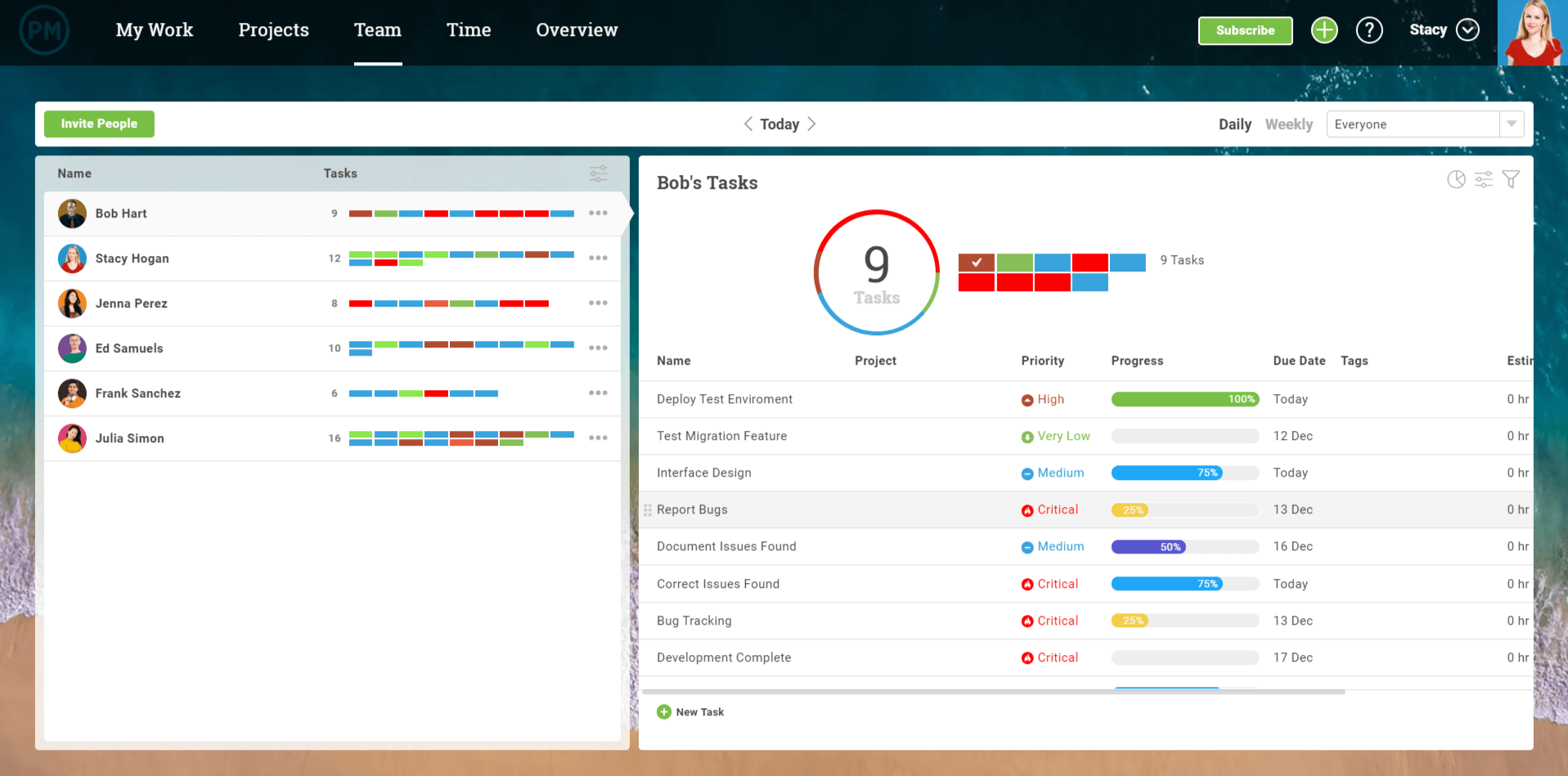
Product Update: A New Way to View Your Team’s Tasks
Neuroscience and Marketing: How People Make Decisions
Have you ever wondered why some marketing campaigns connect with people while others flop? Want insight into how the brain makes decisions that compel people to take action? To explore the science behind how people make decisions, I interview Tracy Trost on the Social Media Marketing Podcast. Tracy is a neuroscience marketing expert and the […]
The post Neuroscience and Marketing: How People Make Decisions appeared first on Social Media Marketing | Social Media Examiner.
from Social Media Marketing | Social Media Examiner https://ift.tt/2ZiT8Cl
via socialmediaexaminer
How to Create an HTML Form That Sends You an Email
Sometimes, improving UX can cost a lot of money.
And oftentimes, some of the problems website visitors have are easy, simple fixes.
That begs the question: How can you find out if customers are enjoying their website experience?
The answer may be simpler than you think.
Having forms on your website is an effective way to get customer feedback about their experience during their visit. These forms give you insight about how to improve your website’s UX for higher conversions in the long run.
Whether you want to convert more visitors to leads, collect information for your sales team, or create more loyal brand advocates, forms are imperative to an inbound strategy.
Ultimately, forms are critical for solving dissatisfaction in a customer’s experience, which ensures stronger customer relationships. If you don’t have a form on your website, you could be missing out on more leads, higher conversions, and happier long-term customers.
Here, we’re going to walk you through how to create a certain type of form — one that sends an email to you, as well as the customer, to ensure the form was received.
How to Create a Form in HTML and Send it to Email
It is possible to create an HTML form that sends emails, but it depends on how you work and on what platform you’re working. This is to say that things are a little different if the plan is to use a mix of HTML and different scripts.
Using the Basics
Using just HTML? We’ve got you covered. From starting fresh, here is a sample code for use:
<form action=”mailto:contact@yourdomain.com”
method=”POST”
enctype=”multipart/form-data”
name=”EmailForm”>
Name:<br>
<input type=”text” size=”19″ name=”ContactName”><br><br>
Message:<br> <textarea name=”ContactCommentt” rows=”6″ cols=”20″>
</textarea><br><br> <input type=”submit” value=”Submit”> </form>
This code will create a form that asks for the contact’s name, message, and includes a submit button. Note that this code is basic — it won’t look super snazzy. For a more beautiful one, you’ll have to add some more lines of code specific to your needs.
Another thing to note with this code is that it doesn’t directly send to email addresses, but it can open in an email client or tool window to submit the form.
To make it so the form can work with your email server and send it to a mailbox, PHP is the answer — let’s explore that option now.
Making a Complete Form
To create a form subscribers can contact you with, the PHP script is going to be your best friend. I know, another acronym. This one stands for Hypertext Preprocessor, and this language collaborates with HTML to process the form.
If you need to make a complete form, follow the steps below.
When you’re creating a webpage, instead of using the “.html” extension, type “.php” instead. This is similar to what happens when you save an image as “jpg” versus “png”.
By doing this, the server will know to host the PHP you write. Instead of saving the empty HTML page as such, save it as something like this: “subscriberform.php”. After your page is created and saved, you’ll then be able to create the form.
In this step, you’ll write the code to create the form. The following code is what’s needed for a basic form:
<form method=”post” action=”subscriberform.php”>
<textarea name=”message”></textarea>
<input type=”submit”>
</form>
Because this is similar to the HTML-only write-up, these lines will also create a name for the form and an area for subscribers to type a custom message and send it to you.
An important difference is the “action=contact.php” part. This portion of code is what will make the page send the form when submitted. Recall that in the first example, that wasn’t an option.
After you create the form and add all the proper fixings depending on your design preferences, it’s time to create the email portion.
For this, you’re going to scroll to the beginning of the page (the very beginning). To enable sending data in the email, we have to add code that will process the data. Copy this code or create something similar:
<?php
if($_POST[“message”]) {
mail(“your@email.address”, “Here is the subject line”,
$_POST[“insert your message here”]. “From: an@email.address”);
}
?>
Recall that everything inside the first and last lines will tell the webpage to make these functions perform as PHP. This code also checks to see if a subscriber uses the form. From there, it checks to see if the form was sent.
Further breaking it down, “mail” sends the completed form as an email to “your@email.address,” and the subject line is what follows. In the next line, you can write copy of the email message inside the quotes, to be sent from whichever email address you choose.
With that, you have the basic code you need to create the form.
Note that this is just one way to do this — alternatively, you can also create a form using a CRM like HubSpot.
If you’re a HubSpot customer, keep reading to learn how to use HubSpot’s tool to create an HTML form that sends you an email.
Using HubSpot
HubSpot Forms is part of the Marketing Hub, and doesn’t require any previous technical knowledge.
If you want to learn how to receive an email after a form submission, take a look at our Knowledge Base article.
When you’re using HubSpot Forms, you can build custom forms that connect to your contacts list. You can also customize those forms and trigger automatic emails based on the completion of your forms. Note that the latter requires a premium upgrade. Click here for more information about HubSpot’s forms.
HTML forms are a fairly simple process and an excellent way to connect with subscribers. Having these on your site gives customers an easy way to contact your company or sign-up for emails.
Forms that send an email back to you keeps information in your inbox for reference and ease. Remember that these aren’t your only options for building forms. If you want a list of tools that help build forms, check out our post here.

Hreflang Tags: The SEO Attribute for Content in Multiple Languages
Have you ever visited a webpage that was in a different language, and your browser asked you if you wanted to change it to your first language?
It’s a life-saver, right?
Now think about whether you’ve provided the functionality so your own webpages are ready for a global audience. If you haven’t properly tagged or re-directed your content to be optimized in different languages, it may not be gaining the traffic it could be.
The name for this attribute is called language tagging, and it’s an SEO tag you can use to make sure search engines know what language your content is in.
There are two different types of language tags: HTML tags and hreflang tags.
While both HTML and hreflang tags are intended to optimize content in multiple languages, they have a couple of differences.
Simply put, language (or lang) tag attributes on an HTML tag tells your browser the language of the current document or webpage, while the hreflang tag attribute tells your browser the language of the webpage that’s being linked — for instance, a lang tag on HubSpot.com tells your browser the language of HubSpot.com, but a hreflang tag attribute tells a search engine the language of HubSpot.com when a user searches for HubSpot.
If a user searches for HubSpot.com from Germany, a hreflang tag is responsible for changing the link available in the search engines. However, when someone lands on HubSpot.com in Germany, a lang tag changes the language on the page itself.
It might be easier to visualize, so here’s a sample lang tag:
<html lang=”en”>
Alternatively, here’s a sample hreflang tag:
<link rel=”alternate” href=”http://example.com/” hreflang=”en” />
Google recommends using hreflang when indexing websites that are in different languages.
Next, let’s explore what hreflang tags are used for and how you can use them for your own webpages.
The tag is:
rel=”alternate” hreflang=”x”
Hreflang tags allow you to show Google and other search engines the relationship between webpages that are in different languages. For instance, if your tag needs to link to an English-language blog, you’d use the following tag: hreflang=”en”.
This is a sample of what a website will look like when it’s tagged with an hreflang attribute:
<link rel=”alternate” href=”http://hubspot.com” hreflang=”en-us”/>
The “en” in the first part of the tag refers to the language code, English, and the “US” refers to the country code, for the United States.
Users with an IP address that notifies which language is being used will automatically see a properly tagged webpage, so a hreflang tag is especially helpful if you have a global audience and want to make their user experience delightful.
To illustrate how hreflang works, let’s consider an example. Let’s say you make two homepages that are the same, but one is in English (hreflang=”en”), and the other’s in Spanish (hreflang=”es”).
When a user searches for your homepage in Spanish or from a Spanish-language browser, they’ll receive the Spanish version of your homepage, as long as it’s properly tagged.
Each language and country has its own hreflang tag. Here’s a list of common ones:
German/Germany: de-de
English/USA: en-us
Irish/Ireland: ga-ie
Hindi/India: hi-in
Italian/Italy: it-it
Japanese/Japan: ja-jp
Korean/Korea: ko-kp
Portuguese/Brazil: pt-br
Russian/Russain Federation: ru-ru
Chinese (simplified)/China: zh-hans-cn
Thai/Thailand: th-th
If you are sharing the same page in different regions, note that it is possible to have multiple hreflang tags on the same page. For instance, if your French website sells to customers in Germany and Spain too, you’ll be able to tag your page accordingly in HTML.
Keep in mind that because hrefleg tags are able to be overridden by other SEO options, your page may rank higher in a different language. To avoid this, make sure search engines are equipped with the correct attributes, so they know which language to present your page in.
Ultimately, the point of hreflang tags is to give customers who speak different languages, or who live in different regions of the world, content meant for them. Search engines will give international users the version of the page in their language on the results page.
Now that you know a little bit more about hreflang tags, let’s talk about HTML language tags.
HTML Language Tag
HTML language attributes define the language of a webpage. For example, an HTML language tag for an English webpage would look like this:
<html lang=”en”>
Recall that Google doesn’t look at HTML language tags, but other search engines might, so it’s a good idea to still include them for search engines that don’t look at hreflang tags.
You might also want to use HTML language tags in conjunction with an hreflang tag — they can work together to inform search engines about the content on your webpages. Having both tags tells search engines what language a webpage is in, while directing users from other countries to the appropriate webpage.
When you’re optimizing your content for search engines, it’s important to do everything you can to rank on the SERPs. This helps people across the globe find your business.

What Is Marketing Attribution & How Do You Report on It?
A marketer’s job isn’t easy. You constantly have to create content and promote it through different channels. But with only 24 hours in the day, you need to spend your time promoting the right content through the right channels to declog the right parts of your funnel.
So how do you do that?
You may regularly run reports about the amount of traffic to your website or how many people clicked on a link in your email, but those are only one piece of the funnel pie. There’s a new report that will frankly change your life (or at least the way you do marketing). It’s called an attribution report.
To get you up to speed, let’s take a look at what attribution reports are and in which situations they can be helpful for you.
What is marketing attribution?
Marketing attribution is a reporting strategy that allows marketers and sales teams to see the impact that marketers made on a purchase or sale. For example, if marketers want to see how a blog post or social media strategy impacted sales, they might use marketing attribution techniques.
What Is an Attribution Report?
An attribution report is used to understand the journey someone takes from the first time they set foot on your website to the time they become a customer — basically, measuring the conversion path to see what made someone convert. In order for marketers to be successful, they need to understand all of the influencers that drive conversions throughout the funnel.
The value in this report is marketers can now pinpoint the exact marketing effort that lead to a conversion in the funnel. By using this information, they can then make better-informed decisions about where to invest their time and resources.
You may be thinking, “Wait! Not all page views or marketing channels are treated equally when it comes to conversions!” You are right! Depending on the type of attribution report you decide to run, different credit is given to different marketing efforts — and the ability to give more or less credit to certain parts of the conversion process is where the magic happens.
For instance, if you run a report based on First touch (as it is called by HubSpot) or First interaction (as it is called by Google Analytics), 100% of the credit is given to the page URL or source of the first visit a contact was on.
If you run a report based on All interactions/session (as it is called by HubSpot) or Linear (as it is called by Google Analytics), equal credit is distributed across all pages and sources visited before the conversion. How you assign “credit” here is extremely important because that’ll help you gain a better understand of which pages or sources were used to most to drive traffic to and convert on your website.
There isn’t a right or wrong answer to what type of report to run — it just depends what you hope to distill from the data. If you want to understand how all of the pages or channels viewed before conversion affect conversion, you will run one report. If you want to understand what happened at the exact point of conversion, you will run a different report. You could even run a combination of reports to understand what happens in certain parts of the funnel.
The best way to begin is to think about the problem you want to solve. Do you want to see how many leads you have generated from the blog? Do you want to see what source if driving the most conversions? Do you want to see what content someone viewed before they became a customer? An attribution report will be able to answer any question you have about what drives conversions throughout your funnel.
Lead Attribution
This is a specific type of marketing attribution related to showing how marketers impact the amount of leads in a given campaign. Although leads aren’t sales, they are still important because they show how marketing content or strategies are gaining prospects or new audiences that could very well turn into sales or large monetary gains.
B2B Marketing Attribution
This is another specific form of marketing attribution related to the business-to-business field. Companies in this field sell products or services to other businesses or professionals in their industry. While B2C attribution could very well relate to smaller purchases, B2B attribution might relate to bigger purchases from companies, memberships, or leads.
When Would You Want to Use It?
Marketers look to attribution reports to help them decide which pages and/or marketing channels drive the most conversions. There are many specific use-cases for this type of report, but let’s go over a few that you might want to use.
1. How many leads are generated from my blog? What other content generates the most leads?
Content lives at the heart of inbound marketing. Every marketer wants to know how their content contributes to the number of leads they are generating — especially on their blog. Attribution reports pull that information together to show the number of times a blog post is viewed before the conversion. For bloggers who have not been able to attribute lead generation directly to their blog content, this is a huge win.
The information gathered in these reports helps marketers dissect which types of content perform better. That could include popular topics, content formats, or even time of promotion. With a better understanding of which content generates more leads, marketers can make more informed decisions about their marketing.
2. What marketing channels generate the most leads? Where is the best place to invest my marketing resources?
After you find out which type of content generates the most leads, it’s important to understand which channels are the most successful in lead generation. Once you figure out the answer to this question, you will get deeper insight into why your content performs the way it does.
For example, your email marketing could be the best place to get content in the hands of your customers, but your social media could be tanking. Or vice versa. Understanding the health of these marketing channels is key to understanding where your team should invest their marketing resources. After all, if you’re doubling down on social media without getting many leads in return, but you’re generate a ton of leads from email marketing with very little effort, you may want to take a second look at your priorities.
3. Which pages are viewed the most before someone becomes a customer?
There is other content on your website that may be contributing to conversions besides blog posts, landing pages, and content offers. Your homepage, pricing page, about us page, or any other informational page may be contributing to conversions throughout your funnel. Run an attribution report based on pages that have been viewed on your website to figure out which pages are frequented the most. This will help you understand which pages should be promoted, which pages should be optimized, and which pages are helping to push people down the funnel quicker than others.
How Do You Run an Attribution Report in HubSpot?
HubSpot customers, navigate to Reports > Reports Home. Select “Create a new report,” and choose the Attribution report. You will see the following screen:
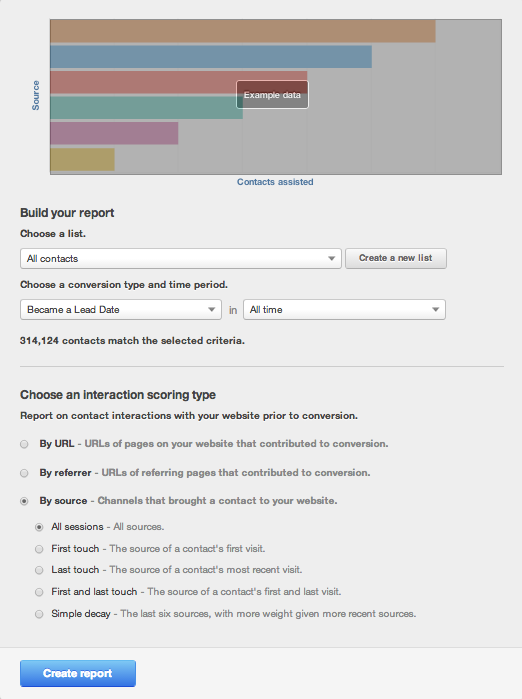
Let’s dig into the screen a bit more. The first step is to choose the people who belong in your report. Think of this part of the edit screen as a filter for your report.
- Select the contacts that you want to appear in the report — that could be all of your contacts or a specific list.
- Choose the conversion that you want to use for your report. That could be “Became a Lead Date” to better understand your lead conversions, “Became an MQL Date” to better understand your marketing qualified lead conversions, etc.
- Choose the time period for when your defined contacts converted.
- The number of contacts that will be included in your report will be listed in the edit screen.
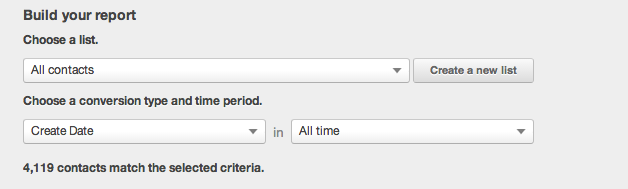
The second part of the screen deals with the different Attribution report models you may want to use to run.
Begin by deciding if you want to pull a report based on URL, Referrer, or Source. URL will pull up the pages on your website that contributed to the conversion. Referrer will pull up the referring page that contributed to the conversion. Source will pull up channels that brought a contact to your website.
Within these options you will see a detailed description of what the model will show including where the credit for the conversion will be given.
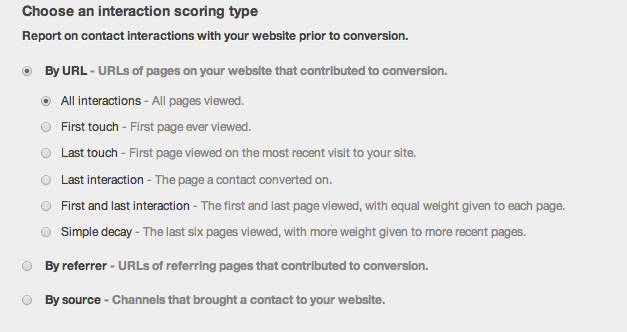
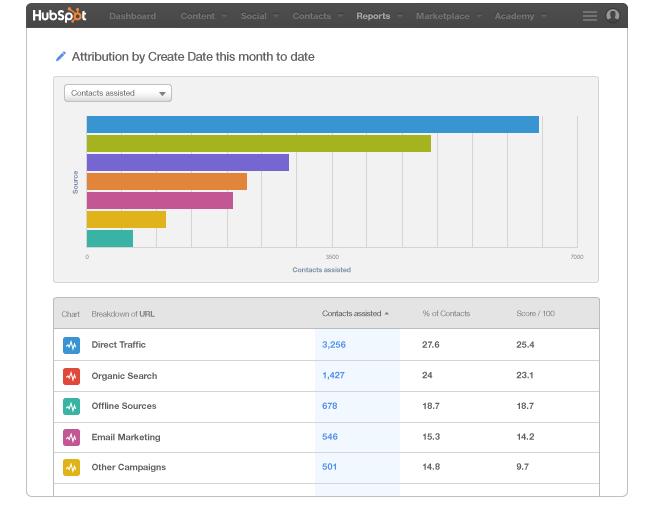
Then, create your report! In the example below, we ran a report by Source and All sessions by Create Date (aka when they became a lead in the system).
- The Contacts assisted column shows the number of contacts who became leads in the defined time period.
- The % of contacts shows the percent of contacts in the report that came from that particular channel.
- Score / 100 is the weighted importance of each channel in the report. The highest scores are your best channels.
How Do You Run an Attribution Report in Google Analytics?
Using Google Analytics, you can also run Attribution Models. You will notice that the terminology in the report differs slightly so let’s review what they mean.
- Last Interaction – In this model, the last page or source that someone visits is given 100% of the credit for the conversion.
- Last Non-Direct Click – In this model, the second-to-last page or source that someone visits before converting gets the credit.
- Last AdWords Click – In this model, the most recent time someone clicked through to your site from an AdWords campaign is given 100% of the credit for the conversion.
- First Interaction – In this model, the first source is given 100% of the credit for the conversion.
- Linear – In this model, each credit is given to each source or page visited in the conversion path.
- Time Decay – In this model, the pages or sources that were visited most recently are given more credit whereas pages or sources visited earlier in time are given less credit.
- Position Based – In this model, 40% of the credit for the conversion is given to the first and last interaction, and 20% of the credit for the conversion is given to the middle interactions.
You can read more about the different types of Google Analytics models and how to use them here. Also, Avinash Kaushik, Digital Marketing Evangelist at Google wrote a blog post describing how to use the different reports.
The biggest difference between using reports on Google Analytics vs. HubSpot is that you cannot connect the report back to specific contacts unless you use HubSpot. That means you cannot apply attribution trends to specific personas, contact groups, lifecycle stages, or other categories that are relevant to your business. So when deciding on what report to use, take that into consideration.
How to Run an Attribution Report in HubSpot
If you’re a member of HubSpot’s Enterprise Marketing Hub, you can now run attribution reporting. To learn how to use the new feature, check out this in-depth and free mini-course.
Editor’s Note: This blog post was originally published August 21, 2014 but was updated for comprehensiveness in December 2019.

The Plain English Guide to Google’s Knowledge Graph
Before I began writing at HubSpot, I worked at two small businesses. Really small. Both had fewer than five employees.
Honestly, any time “SEO” was mentioned the whole team got anxiety. There was no SEO expert — or even an employee who had vast experience in it.
Marketing teams who lack knowledge in SEO often feel like they’re playing catch up and aren’t sure if they can deliver results for their clients. Trust me — I get it.
For example, an old client wanted their business to show up in Google’s knowledge panel.
That’s the panel on the right side of a Google results page with a business’s hours, website, contact information, images, and related searches — all data that exists in Google’s Knowledge Graph (more on this in just a minute).
The client wanted to show up in that panel because 76% of online users determined that the most important aspect of web design is the ability to quickly access information. This extends to more than just web design — including web search.
Unfortunately, no one on our team knew how to do that. That’s why it’s important for marketers to understand the Google knowledge graph and how to create content that winds up in the knowledge panel you see on so many search engine results pages (SERPs) today.
The box you see, where Google synthesizes this information, is known as the knowledge panel, or the Knowledge Graph card.
Below is an example of what the Tom Cruise knowledge graph panel looks like on Google. It includes images, biography, family, quotes, and filmography. Google’s Knowledge Graph uses data it has collected on user intent behind the keyword “Tom Cruise” to deliver this panel.
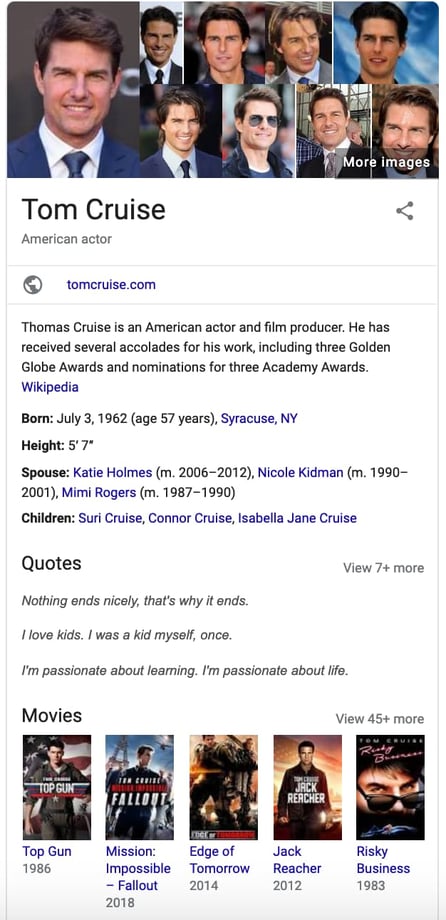
Essentially, the Knowledge Graph gives Google context into user intent so it knows why people are searching for certain information, and can deliver the right results.
To gather all this information, Google officially refers to three high-quality sites to collect data: Wikipedia, Wikidata, and CIA World Factbook. Unofficially, Google also takes other factors into consideration when referring to sources, including social media presence, keywords, and a site’s relative authority based on who else links into that domain.
While it might seem like the Knowledge Graph card will actually lower your clickthrough-rate, it’s still helpful for your site to be featured here.
The main benefit of knowledge panel optimization is that Google will feature somebody here, so even if you don’t receive traffic from it, it’s better that it’s you over a competitor.
Additionally, optimizing for Google’s Knowledge Graph has the added benefit of helping Google better understand your site, which will improve your overall rankings.
That’s why you should consider optimizing your site for Google’s Knowledge Graph. To do so, Google needs to understand what your site is about. Additionally, your content needs to match the intent of your ideal user. For example, when someone searches “knowledge graph,” they’re probably wondering what Google’s Knowledge Graph is, how it works, and how to show up in the resulting Knowledge Graph card. That’s why the content on this page answers those questions.
Your main focus should always be to answer your audience’s questions. If you understand user intent, and write content that solves your audience’s problems, Google’s knowledge graph can help you rank higher on Google.
As an aside, other search engines, like Bing, have their own Knowledge Graphs. Optimizing for one can simultaneously help you optimize for the other. However, each search engine is a separate entity with independent algorithms.
In Google’s case, the company uses three elements when deciding whether a brand is the right fit for a knowledge panel:
- User intent: Google’s Knowledge Graph will inform the search engine whether your brand answers user questions. Does your page answer the questions the user has based on historical searches, keywords, and context?
- Semantic search: Semantic search is what Google uses to understand the intent of a person’s query. At any time, it can use synonyms, context, and natural language processing to sort searches into topics, and produce accurate and relevant results.
- Entity indexing: Google has a catalog of all related entities to produce factual information about each entity. With entity indexing, Google can produce factual information about your entity to see if it’s a right fit for the knowledge graph panel.
Now that we understand the knowledge graph panel, you might be wondering, “How can I create a Google knowledge graph panel for my business?”
I want to start by saying that showing up in the Google knowledge graph panel isn’t as easy as creating a page that Google will display. However, there are some strategies you could implement to make it more likely and easier for Google to use your company in the panel.
1. Optimize your site for humans.
Primarily, Google’s knowledge graph makes it easier for Google to deliver the best results possible for a user’s query. That means your site needs to be optimized for the user. Is your content easy to read? Is it interesting? Does it answer user questions? Google’s knowledge graph will only pull information if it answers a user’s question directly and is easy to read.
To make your site optimized for humans, you can use bullet points and H2 or H3 headers to break up the content, making it easier to read.
Additionally, each piece of content you produce should be designed based on user intent. When a user searches for “X” keyword, what do they really want to know? Your page needs to answer those questions.
2. Utilize schema markup and meta tags to optimize your site for Google.
Once your site is optimized for humans, you can go back and do a few things to optimize it for Google as well.
First, you could fill out meta tags. Meta tags help describe important components of a website for Google, including meta description, author, and page title — a critical component of the knowledge graph. You should incorporate your primary keyword in your meta tags naturally including the title, description, URL, image name, and image alt text to indicate to Google what this page is about.
Second, you can use schema markup. Schema markup is a template of code you can add to your website that helps search engines understand how your content is structured, and return better results for users. Essentially, it gives vital information to search engines to include in your listing that can improve visibility online, as well as clickthrough rates. Schema markup can include reviews, ratings, pricing, events, location, publish date, and various content types you might want to be described as.
3. Create listings on local directories, including Google My Business.
One way Google ascertains whether your business is fit for the knowledge graph panel is by using local listings and directories to ensure your business matches with user intent.
For example, if someone searches for “marketing agency orange county,” your local directory listing tells Google your location, website, hours, and contact information. This helps Google produce personalized results.
Your company should be listed on basic directories, such as Google My Business, Yelp, Bing Places for Business, and Yahoo Small Business. It’s especially helpful when you’re listed on Google My Business, because that’s Google’s owned property, so your information is already in their database.
If applicable, you might also want to get listed on directories that are industry specific. For example, if you work at a school, you might consider a listing on Niche or Great Schools.
4. Be present on social media.
Google’s knowledge graph usually produces all the information someone might be searching for when they type in a query. That includes social media profiles.
Having an active social media presence helps Google provide all the information a user might be interested in. It also creates authority and helps Google understand your business as a whole.
5. Make a Wikipedia and Wikidata page.
Since Google uses Wikipedia and Wikidata to gather information for its knowledge graph, having a presence on these sites is helpful. You don’t need one to inform Google’s Knowledge Graph, but it can help.
Creating a Wikipedia page is actually fairly intuitive. All you need to do is create an account, create the page, provide citations, and submit the page for review. After that, it’s important to update it regularly as well.
To create a Wikidata page, this is a great resource from Wikidata you can use that outlines the process step-by-step.
6. Gather customer reviews.
Customer reviews are also something that a user might be interested in when they search for your company. That’s why it’s important to gather customer reviews, especially on Google Reviews.
These reviews are just another element that Google will display to give user’s a full view of your company.
7. Build authority.
Google is more likely to show high-authority sites in its results. To build authority for your site, you’ll want to create a backlink building strategy, write guest posts on authoritative sites, and be active on social media — especially sites like YouTube because it’s connected to Google through various products. Additionally, your site should have quality links and contain several pages of relevant and informative information.
Google’s Knowledge Graph is one of the top ways that information is disseminated on the popular search engine. That’s why it’s important to optimize your content so you can show up there. Want to learn more about SEO? Click here for our ultimate guide.

How to Write a Business Case
How, Where, & When to Find an App Developer for Your Business
A few years ago, I was on the myVEGAS app playing the slot machines. This is one of my favorite apps because I can play a game for free and redeem rewards like free hotel rooms and free buffets in one of my favorite places — Las Vegas.
As I was getting some free spins, I thought to myself, “I wonder how this app was made … “
Now, as a marketer, I understand how much work must’ve went into the making of myVegas.
To make an app, a company needs to come up with a concept, conduct market research, design the wireframe and graphics, and strategize the launch.
All of this is usually done with a team of people, but the app developer is one of the most important players.
In fact, in 2018, Tim Cook announced that there were 20 million registered iOS developers catering to the 500 million weekly visitors to the App Store alone. Additionally, there are about 2.6 million Android and 2.2 million iOS apps.
Suffice it to say, the app developer is an important role. That’s why it’s critical to hire the right one for your app.
Let’s review how, where, and when to find an app developer for your business.
How to Find an App Developer
Finding an app developer can seem like a daunting process. We know that there are a lot of developers out there, but that doesn’t mean they are all quality ones who will understand your business or needs.
Before you can begin looking at app developers, it’s important to ask yourself this question: “Do I want to hire an in-house team or a freelancer?”
To answer this, consider your business needs. For example, are you at an established company that wants to automate your process? An in-house team might work well for you. On the other hand, if you work at a startup, an expert specialist who can get in and get out quickly and cheaply might be the way to go.
Additionally, if you anticipate building more than one app, an in-house team would work well. However, if you’re just creating one app, a freelancer would work.
An in-house team will usually consist of a group of developers who have a deep understanding of your company, culture, and product or service. However, this team will be costly because you have to consider salary, benefits, and equipment. Additionally, you’ll need to have set systems and processes to ensure productive, quality work.
Alternatively, a freelancer or an app agency, consists of expert specialists who can work quickly. Plus, it’s often cheaper because you’re only paying for the project, and not each person’s salary and equipment. The only downside is that you’ll have to manage the communication and most likely project management as well.
No matter which route you decide to go, it’s important to find the right person or team. That’s why we’ve created a list of tips to help you find an app developer.
1. Do some research.
Before you can hire an app developer, it’s important to understand the basics of their job. What programming languages are used? What are the average rates? Having an understanding of the profession gives you the context you need to have productive meetings and interviews.
2. Look at experience.
Just like you wouldn’t want a pilot who hasn’t flown a day in their life, you probably don’t want an app developer who hasn’t ever developed an app. Be sure to ask about their experience and look at the work they’ve done.
3. Focus on communication.
Your app won’t get created well if there isn’t crystal clear communication. That’s why rapport is important to focus on in the first meetings. In addition to qualifications and experience, see how you and potential app developers get along and understand each other.
4. Be clear about your business needs.
When you’re meeting with app developers, make sure you’re clear about the app concept and your target market. The clearer you are about your business’s needs and goals, the easier it’ll be to create an app.
5. Use set criteria to judge each developer.
It’s important to have a list of criteria you’re using to judge each developer or agency you talk to. That way you can have productive meetings and get your questions answered.
Consider criteria such as:
- Reviews and references
- Experience
- Speciality
- Programming tools
- Development process
- Legal process/contracts
- Project management
- Communication
These are all important areas to discuss in your first meetings. Additionally, you might consider writing down a few questions about these topics.
A few questions you could ask are:
- Do you have reviews and references of past and current customers I could read and/or reach out to?
- How much experience do you have? Can I see samples of your work?
- What type of apps have you worked on in the past?
- What programming tools do you use to create an app?
- What is the development process like for you?
- Would you be willing to sign an NDA and contract?
- How do you handle project management?
- How will we communicate during the development process?
- What are your fees?
Where to Find an App Developer
Now that you’ve started thinking about finding an app developer and what that process looks like, you might be wondering, “Where will I find this person or team?”
In actuality, it’s a pretty simple process.
You can begin your search for an app developer or agency in a few places:
1. Freelance websites.
If you’re going the freelance route, looking at top freelance sites like Toptal and Hired is the way to go. Sites like these will have the best candidates because they’re fully vetted. In fact, Toptal only accepts 3% of applicants. Additionally, these sites have clear rates, so you can see how much a freelancer will cost from the get-go.
2. Tech blogs.
Blogs like Wired, The Verge, and TechCrunch are a great resource when you’re looking for an app developer. They’ll typically have articles about app development and the whole process, so you go into the process educated.
3. Creative communities.
There are communities online where designers and developers will upload portfolios and samples of their work, like Dribbble or Behance. If you find someone you like, you can reach out and get to know them more.
4. B2B directories.
If you’re going to hire an agency, consider looking at B2B directories where companies have information, reviews, and ratings listed. Sites like Clutch.co, B2B Marketing, and Relevance are all good options.
5. Colleges.
Sometimes it’s easy to forget that colleges have a lot of top talent. Reach out to professors in the computer science department to see if they know of any student developers.
6. Your network.
Another place that’s easy to forget about is your own network. Ask around. See if anyone you know can think of an app developer they’re in contact with.
7. Google.
Lastly, the holy grail. The only issue with Google is that you have to be careful and thoroughly vet people or companies you find on here.
To recap, we’ve gone over tips on finding an app developer and where to begin your search. Now the only question is when do you start this process?
When to Find an App Developer
Once you have a concept and you’ve done your research, you can begin looking for an app developer.
For instance, at this point, you’ve usually identified a problem your target market has and come up with an app concept that will be a solution to that problem. Then, you might’ve outlined some ideas for the app and even put together rough wireframes of what you want the app to look like.
When you get to this point, it’s probably time to find a developer to work with.
Finding an app developer is a big task. But as long as you thoroughly vet your candidates and are organized with your search, then the process should be fairly straightforward.

15 of the Best Email Newsletter Templates and Resources to Download Right Now
If you had to guess, how many email newsletters do you think you’re subscribed to? Ten? Twenty? Fifty?
To be honest, I’ve lost count — and I know I’m not alone. Email marketers have a lot to compete with in their subscribers’ inboxes. That’s why a solid newsletter template is crucial to designing an email that people are encouraged to click through.
Best Email Newsletter Templates
- Pook by Litmus
- Sonata by Web Canopy Studio
- ZURB Ink
- Wire by HubSpot
- 99designs
- Webinar Invite by WorkCast
- ThemeForest
- Resonant by HubSpot
- Antwort
- Useful Notifications by TemplateMonster
- Sonata by HubSpot
- Themezy
- Email on Acid
- Ridge by HubSpot
- HubSpot Template Marketplace
If done well, though, email newsletters can do wonders to help you build an engaged subscriber base, keep your business top-of-mind, and nurture leads that are already making their way down the funnel.
However, “done well” means more than just serving up great content. In fact, an often overlooked component of the newsletter creation process is the design.
Don’t have time to build out a custom template from scratch? We’ve scoured the internet for the best resources for email newsletter templates and compiled them below. Once you find one you like, download the template and customize it to fit your needs.
1. Pook by Litmus
Price: Free
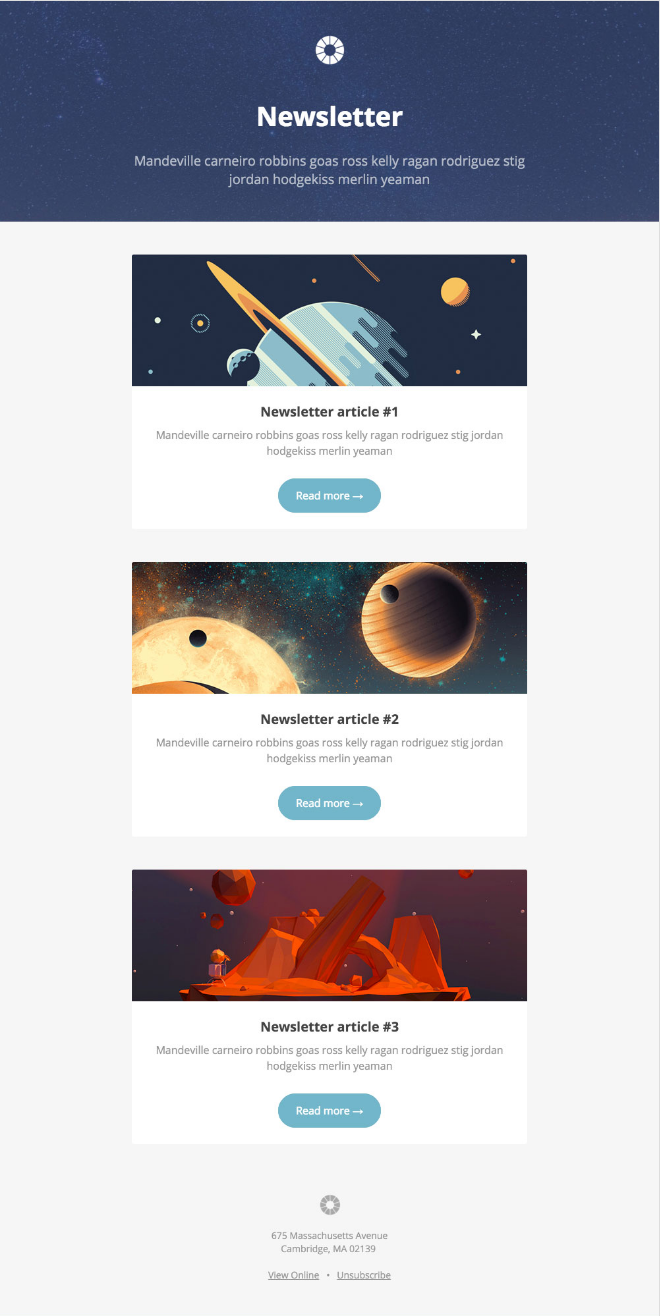
Litmus offers a free email template collection — from newsletter templates to account management templates. The marketing-specific theme, below — referred to as “Pook” — is modern and sleek, while still being kind of fun. All of the templates have been tested with Litmus, and you can easily check out how the email will appear in different email clients here.
While you are required to create a Litmus account with your email address to access the templates, the templates themselves are free of charge.
2. Sonata by Web Canopy Studio
Price: Free
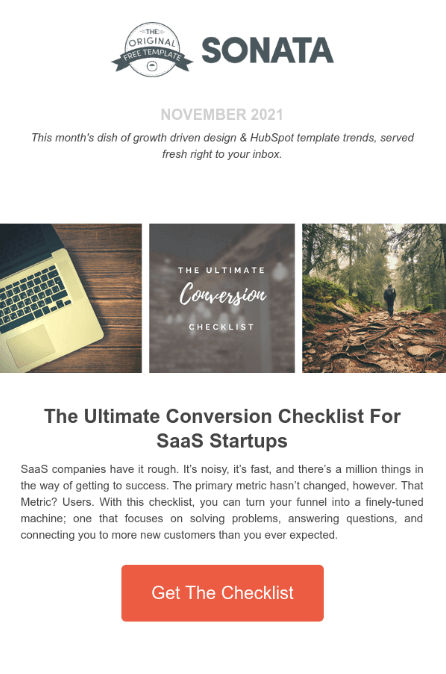
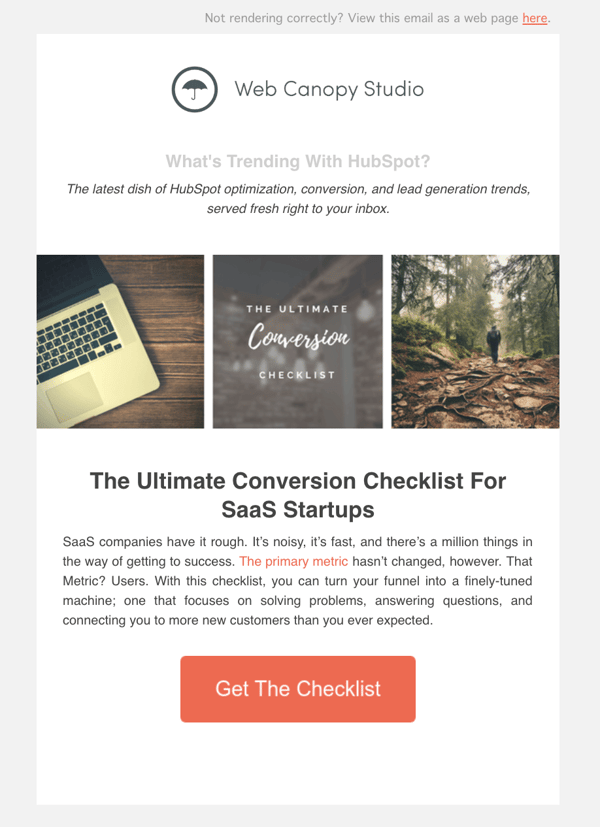
Sonata is an email template by Web Canopy Studio, available on the HubSpot platform to any HubSpot user, free or paid, looking to promote a special offer or resource to their loyal subscribers. As you can see, the newsletter template below embraces a clean aesthetic with image slots to capture the essence of your brand in three separate tiles.
You can customize almost any component of the template below, from the company logo at the top of the email to the “Get The Checklist” CTA at the bottom. Get this template from the HubSpot Template Marketplace, which includes a full gallery of similar templates linked at the end of this article.
3. ZURB Ink
Price: Free
ZURB Studios has five responsive email templates available for free, including the newsletter one below. It has a great, fluid layout you can customize with your own colors, images, and wording. If you want to see how each template looks on different email clients, you can check out screenshots from each template’s email client tests, which are on available the site. These layouts are optimized for most email clients — except for Outlook 2007, 2010, and 2013.
The template comes with a separate CSS stylesheet and HTML file to ease the editing process, and most clients put the CSS inline with the HTML itself after both are uploaded separately. If you’re going to add images to your newsletter, keep in mind you’ll have to create a separate folder and compress with the CSS stylesheet when uploaded.
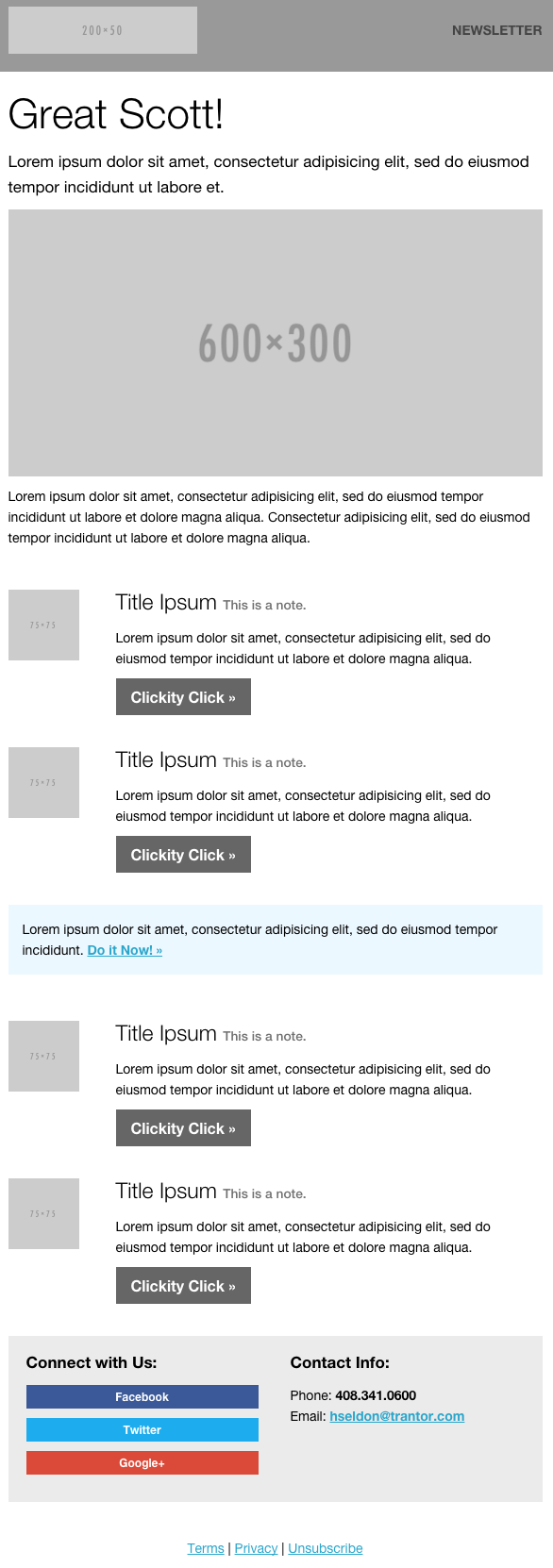
Image Credit: ZURB Studios
4. Wire by HubSpot
Price: Free
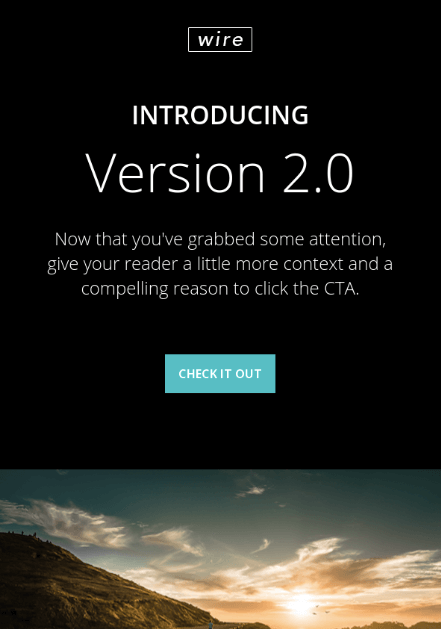
Wire is a HubSpot-designed newsletter template, catering to marketers who are rolling out a new product or service they want their prospects and customers to know about. The thin typeface and contrast between the dark background and vibrant product copy can add a sense of intensity to any new campaign.
5. 99designs
Price: Free
99designs is a growing online community and collaboration platform for designers and small businesses, and they have a great designer blog and business blog. As a free offering to their blog readers, they recently released a set of 45 free email templates — perfect for newsletters, promotional messages, and personalized responses. All of the templates are fully responsive and compatible with all major email clients.
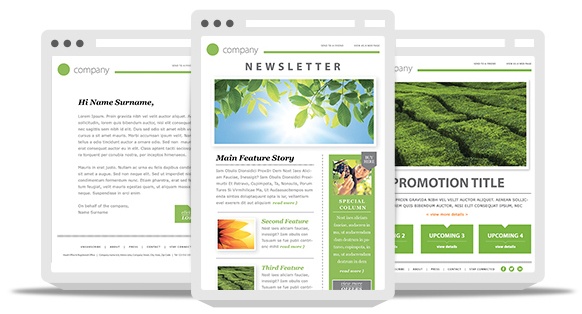
Image Credit: 99designs
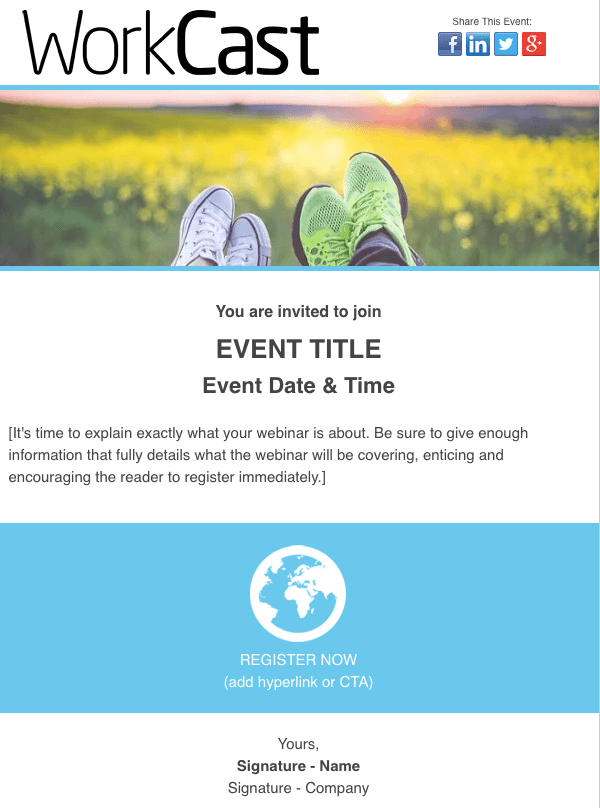
6. Webinar Invite by WorkCast
Price: Free
The email newsletter template below can promote anything from articles to new products, but it’s particularly useful for promoting a webinar you want people to register for.
Developed by WorkCast for the HubSpot platform, the template below offers a healthy balance of text and graphics so you can grab your recipients’ attention and give them the where and when of the webinar you think they’d be interested in attending.
7. ThemeForest
Price: $6-23/template
ThemeForest is an awesome resource for email templates if you have some budget to spend. Their library has over 460 newsletter templates in all different colors, styles, and themes. They’re rated using a four-star system, and you can filter by rating, price, recency, and popularity.
There are a lot to choose from, but here are four of our favorites:
Market – Responsive Newsletter with Template Builder ($19)
This template has eight prebuilt layouts, 24 color variations, 24 full-layered PSD files, and more. Plus, it’s supported by all major email clients.
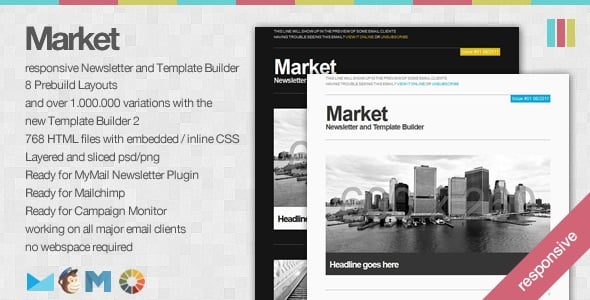
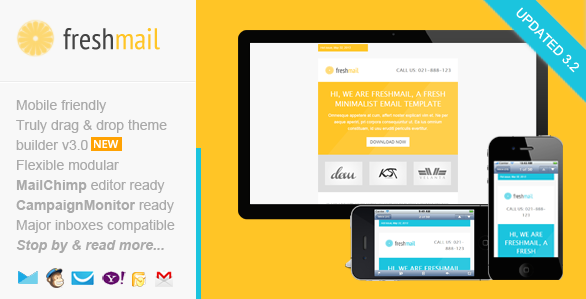
FreshMail, Responsive Email with Template Editor ($18)
Want a more minimalist look? This is a great template with minimalist design that’s also flexible and repeatable, so you can easily arrange the layout and use it to build your own unique template. Even better, it comes with helpful documentation and video tutorials to help you make the most of the design. It works for all major email clients and is responsive to mobile.
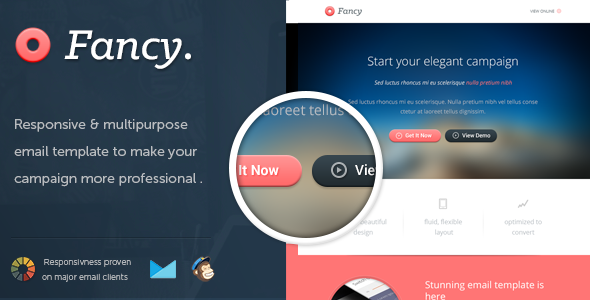
FancyMail – Responsive Email Template ($19)
If you’re looking for something more elegant and sophisticated, this might be the template for you. It comes in seven layout options and eight colors, along with six, fully-layered PSD files so you can customize as you wish. It works with all major email clients, is responsive to mobile devices, and includes helpful documentation so you can make the most of the template.
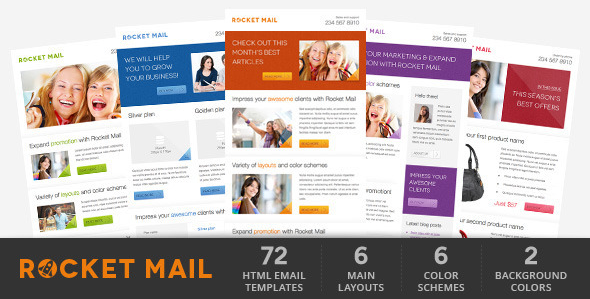
Rocket Mail – Clean & Modern Email Template ($16)
This template is great for marketers who are going for something that looks like your classic, basic newsletter design. It comes with 72 variations comprised of six color themes with six layouts each, and two backgrounds (light and dark) for each color. It has well commented HTML code to make it easier to follow along and customize. It works for all major email clients.
8. Resonant by HubSpot
Price: Free
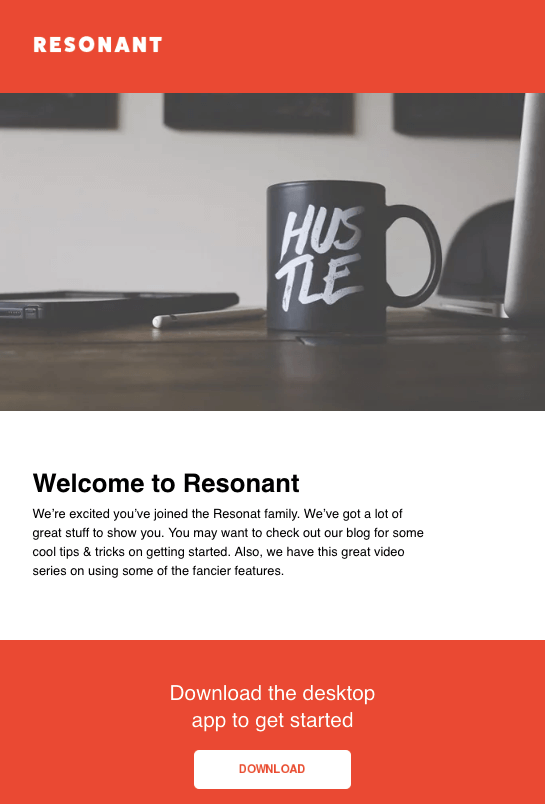
Resonant is another free email newsletter template by HubSpot. The template’s base design is perfect for welcoming new users to your service. At this stage in the customer journey, you don’t want to overwhelm your newest users with too much content right away — but you do want to give them a taste of who you are. The wide image space at the top and text blurb beneath it help you do just that.
Maybe you want to send this email to help new users complete their registration, or offer them the next tier of your product. The “Download” CTA at the bottom of the email template gives you a modest up-sell opportunity, which you can personalize with any links and copy you’d like.
9. Antwort
Price: Free
Antwort offers three newsletter templates: one single-column, one two-column, and one three-column. They’re all responsive to mobile devices, so columns on desktop automatically condense on mobile devices. You’ll notice they’re pretty minimalist in design, which helps if you want to do a lot of customization work. They were also designed with dynamic content in mind.
On desktop, they work for major email clients like Gmail, Yahoo!, Outlook, and AOL. On mobile, they work for Mail on iOS and Email on Android.
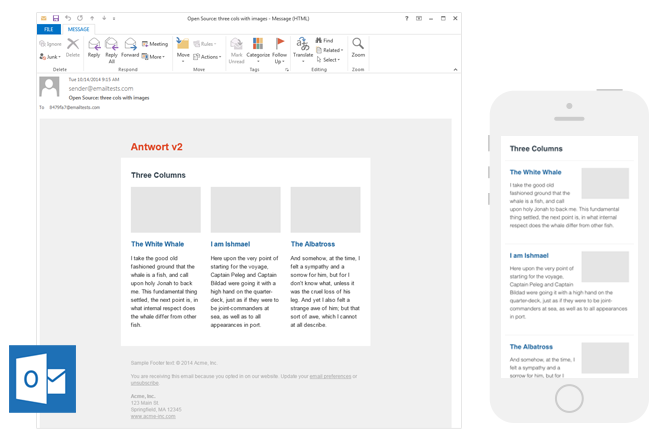
Image Credit: Julie Ng
10. Useful Notifications by TemplateMonster
Price: $14
TemplateMonster offers a variety of email newsletter templates, such as the Useful Notifications newsletter template pictured below, all of which are available for relatively low prices. Their templates are clean, customizable, and easy-to-use, and they’re compatible with most major email clients, such as Gmail and Yahoo Mail. Additionally, the templates come with built-in responsive layouts for screen adaptability, such as on the mobile phone pictured below, and PSD sources for a litany of customization options.
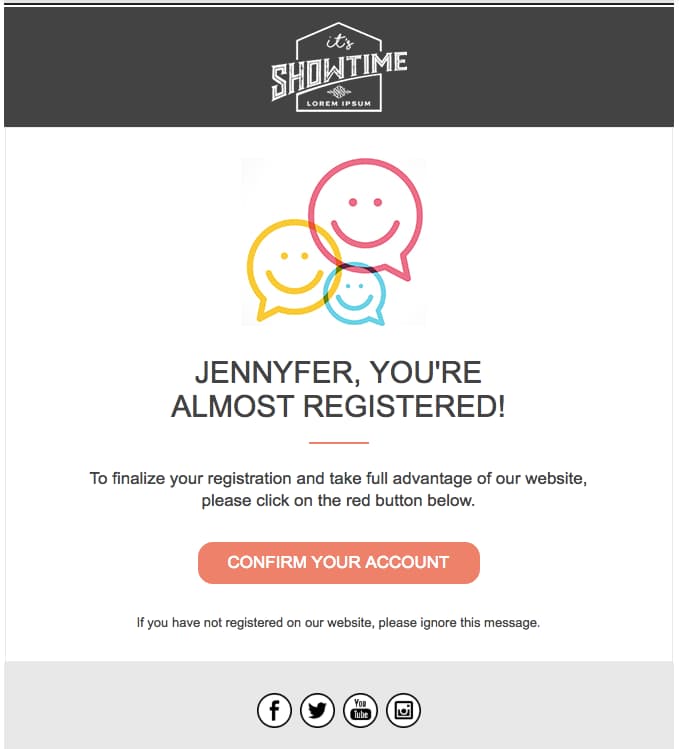
Image Credit: TemplateMonster
11, Sonata by HubSpot
Price: Free
Need a quick, simple, and sleek marketing email to make an announcement while showing off a few great photos? Check out Sonata by HubSpot. This template, available in the HubSpot Marketplace, is web friendly and looks great to the mobile reader.
12. Themezy
Price: Free
Download sixteen free HTML, CSS, and PSD sources of customizable email templates on Themezy. You don’t have to submit an email address to get started, and there are various color schemes and layouts to meet your email list’s needs. Plus, they’re designed to be responsive across devices to ensure that your subscribers can read your newsletter.
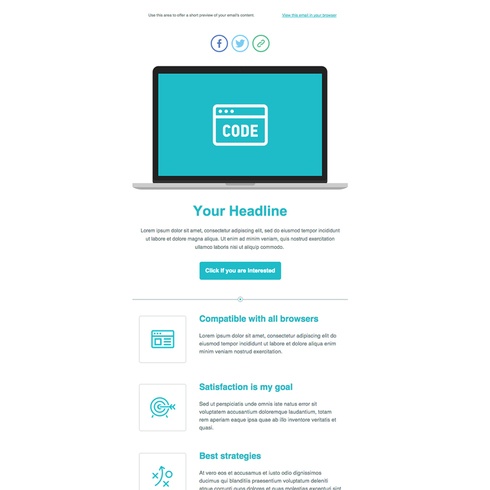
Image Credit: Themezy
13. Email on Acid
Price: Free
Email on Acid offers a free template with a basic, fluid design that’s also responsive to mobile devices. In other words, the three different “layouts” you see below trigger based on the width of the recipient’s screen.
Although there’s only one template here, you can actually mix and match each section of the layout to fit your specific design needs. The layout supports one, two, or three columns, and recipients on mobile devices will see the version that converts to a one-column layout for easy reading.
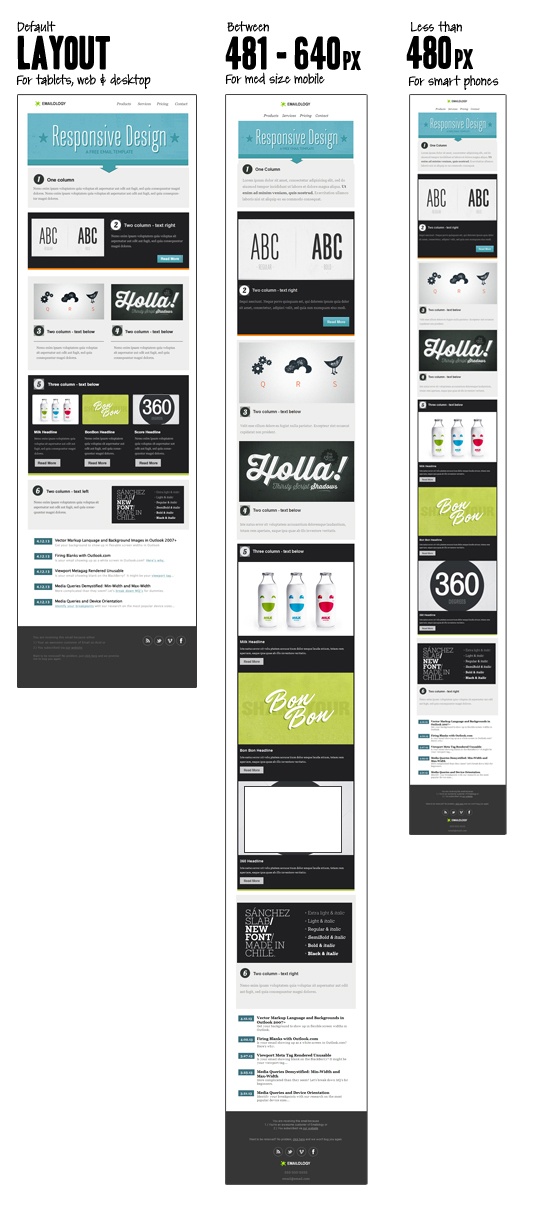 Image Credit: Email on Acid
14. Ridge by HubSpot
Price: Free
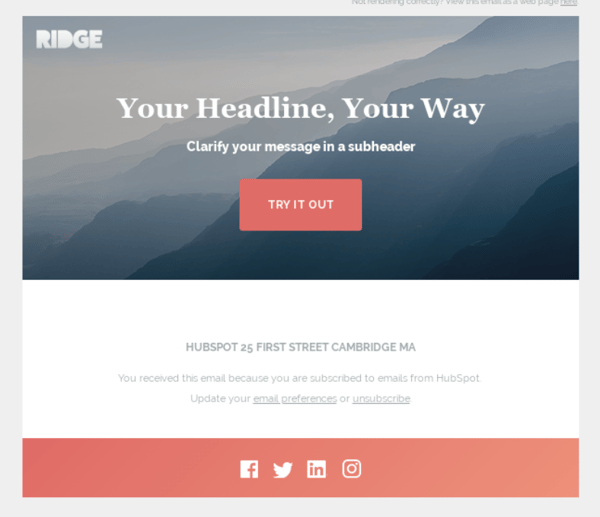
This one-column email format is both great for mobile readers and inserting colorful crisp visuals. It’s simplistic, so it could be used for multiple industries or purposes. While this preview displays a Thank You email, this type of format is great for a short and sweet announcement or an offer that deserves gorgeous imagery to go along with it. If you like the style but not the arrangement of images and text, you can also find more Ridge themes on the HubSpot Marketplace.
15. HubSpot Template Marketplace
Price: Free & paid options available
If you’re a HubSpot customer, HubSpot offers a great collection of email templates you can download or purchase from our template marketplace. Paid templates are available for as low as $1, and once you buy a template, you can start using it immediately right in HubSpot — no HTML or CSS required.
The second, fourth, sixth, and eighth templates on this list all came from our Marketplace.
Get Started on Your Email Marketing Newsletter
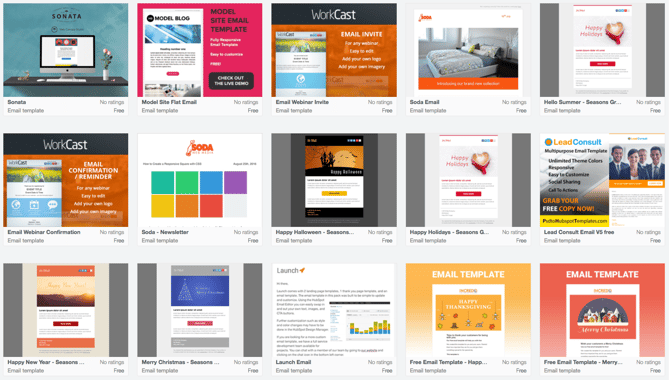
Ready to draft your next 2019 email newsletter campaign? Download one of the excellent newsletter templates from the template galleries and landing pages above. Then, grab your free guide below for creating an email newsletter your audience will want to engage with.
Interested in finding templates for canned responses or pitches related to marketing and sales? Check out these two great resources.
Editor’s Note: The post was originally published in December 2018 but was updated for comprehensiveness in December 2019.

5 Essential Facebook Analytics Reports for Marketers
Looking for people-centric marketing metrics to track and analyze your customers and prospects? Are you using the reports available inside of Facebook Analytics? In this article, you’ll discover five Facebook Analytics reports to help you make data-backed business decisions. Why Your Business Should Use Facebook Analytics Reports Every company has a growth model that includes […]
The post 5 Essential Facebook Analytics Reports for Marketers appeared first on Social Media Marketing | Social Media Examiner.
from Social Media Marketing | Social Media Examiner https://ift.tt/2Pz07DD
via socialmediaexaminer
6 Effective Ways to Use Video in Your Email Marketing
This morning, as usual, I started my day by checking my emails.
While this process doesn’t usually excite me and is just my method for waking up, I came across a subject line that made my heart race with excitement:

Knowing that I would be starting my day with a new music video from one of my favorite bands made me smile. It also made me feel valued as a subscriber to their record label’s emails — with just one video, Specialist Subject Records strengthened the consumer relationship I have with them.
This is why video email marketing is such an effective strategy. With a simple embed and subject line, you can build stronger relationships with customers, generate leads, and strengthen the content behind your brand.
Let’s talk a little more about it.
What is video email marketing?
Video email marketing is simply including videos in email marketing. If you’re unsure about how to do that, we have a quick how-to post here.
Because video is an extremely popular medium in marketing, (in fact, 83% of marketers feel its importance is only growing) including it in your email marketing can engage your subscribers and increase your conversions.
Additionally, did you know that over 80% of businesses use video in their marketing efforts? This is likely because of the results video implementation gives them. While using video in email can seem like a taboo topic, it can be very effective.
By using video, you can tap into the imagination of an audience that absorbs information visually — sometimes text just doesn’t do it. With video, you have a chance to make dense topics more compelling for your audience.
Next, let’s talk about ways you can use it in your next email campaign.
Ways to Use Video in Email Marketing
Videos can dramatically increase click-through rate (CTR).
For example, B2B software company Igloo Software decided to show off their workplace culture by creating 200 videos in three months for future email content. This approach doubled their CTR.
This is one way to use video in email marketing — showcase your brand in email and use it to increase CTR. We have six more, which we’ll explore now.
1. Personalized Emails
Do you have a backlog of video content on your website? Consider using that to your advantage and sending personalized emails.
For instance, let’s say someone watches a portion of a video on your website that they don’t finish, and you’re noticing this is a pattern when you analyze your website data. Marketo‘s formula is to automatically send that video in an email to remind that user to finish.
By doing this, Vidyard reported that Marketo raised their CTR by over 144% due to the personalization of that email. If I were sent a video I meant to finish in an email, I’d surely open it to complete that video. I’d also feel pretty important to the company as a customer.
From a business perspective, this means more clicks for you, a better relationship with the customer, and more views on videos.
2. Event Marketing
If your company hosts events, whether internal or external, take videos of the events for a recap to send subscribers. This way, you can give subscribers a taste of how your brand works in-action and build interest in your company’s events overall.
For instance, do you host or participate in quarterly industry mixers? Try including a video in an email about the most recent one, along with a CTA for subscribers to learn more about the next one. The video can also serve as social proof that these events are well-attended and informative for other people in your industry.
3. Include Video in Subject Line
Formatting is super important in emails and it starts with the subject line. As a consumer, if I see an email with emojis in the subject line, I’m immediately more interested in the email because emojis stick out to me and are more inviting.
Try including “Video” or a corresponding emoji in your subject line to entice subscribers to open it. You’ll likely want to A/B test a variety of subject lines in the beginning to figure out what your readers prefer.
Another important formatting tip is to embed the video in the email in a place that keeps readers interested. Putting videos at the beginning of an email is a good idea, but placing it near the end invites readers to keep reading to better understand the video.
4. Product Marketing
To build interest in your new product roll-out, film mini-teaser videos to include solely in emails. This will make subscribers feel as if their subscription is useful to them and strengthen your relationship. Additionally, it will keep the product in your customer’s minds.
In addition to a mini-teaser, you could also shoot a product demo that explains the new release and how it will fit into the lives of your audience. Giving a visual example, rather than just text, makes emails more interesting. Personally, if I see a product demo in a marketing email, I grow to expect and get excited about the next one.
Lastly, to improve relationships with customers, you might try introducing an exclusive sale on your most popular products to subscribers. Promoting a deal like that on social channels or your website can be an amazing conversion booster.
5. Newsletters
If you’re giving subscribers scheduled newsletters with no video, you’re missing out! There’s a lot of ways to include video in newsletters so they can be effective. Video-heavy businesses can benefit from newsletter video embeds so subscribers can catch up on content they may have missed.
Another way to use video in newsletters is to round-up your popular videos in your industry. If your company doesn’t do many videos, this is an excellent avenue for you. Alternatively, if a member of your team is interested in a routine video schedule, try filming a round-up of weekly content in video-form.
For instance, if there was a commercial that rocked your industry recently, include that video in your newsletter with a corresponding blog post about your thoughts to increase traffic on your blog.
6. Engage with Your Community
Industries are constantly changing. If new laws or industry standards go into effect that could possibly affect your relationship with customers, engage with them using a video.
Because subscribers are familiar with your company, they have a higher chance of being far enough along in their buyer’s journey to be invested in videos that call for their participation. These videos usually have a CTA, such as a code for an exclusive sale or a poll for future content.
Getting your community involved with a video keeps them engaged from beginning to end. 64% of consumers purchase after watching a branded video, so keep an eye on video trends in the industry and see if you can use them to engage with your community.
For instance, after watching the new music video from my email, I felt like my day was getting off on the right foot. I also ended up scrolling through Specialist Subject’s website to see if I could pre-order Garden Centre’s new album. From just one email, the company provided lanes to increase CTR and drive sales.
Try your hand at video email marketing and see if it improves your email metrics. Even if you don’t get the results you’re hoping for, you can archive some of the videos you have and use them in new ways for future content.

5 Dos and Don’ts When Making a SMART Goal [Examples]
When I was 14, my dream was to play college baseball. But I had one small problem: I only weighed 100 pounds. And even though I still had four years to bulk up and improve my skills, I knew I had a long way to go. Fortunately, my coach always knew how to give me opportunities to shoot for that kept my drive alive.
I think of SMART goals like my former baseball coach.
After a grueling practice or workout, he would harp on how the long term is just a series of short terms. And to hammer that mentality into our heads, he would make us write down our off-season training goals every year. But he didn’t just accept the first draft of your goal sheet. He never did. He would make you edit it until you knew exactly what your goals were and how you were going to achieve them.
Setting a goal like “improve upper body strength” and planning to lift weights three times a week wasn’t enough. You had to write down how much you would improve your bench press by and how many times you would work out your upper body per week.
Every year, I set concrete off-season training goals, and since I had a plan and clear direction, I always achieved them. By the time I was a senior in high school, I had gained 70 pounds of muscle and earned a baseball scholarship.
In this post, you’ll learn exactly what a SMART goal is, why it reminds me of my baseball coach, and how you can set one today, Want to skip to the information you need most? Click on one of these headlines to jump to the relevant section.
When I first learned about SMART goals, I had an epiphany. I realized the reason why I could keep improving my athleticism in high school was because my coach made me set SMART goals. But, to give you a more professional example, here’s a template that shows how HubSpot encourages users to create their own SMART goals:
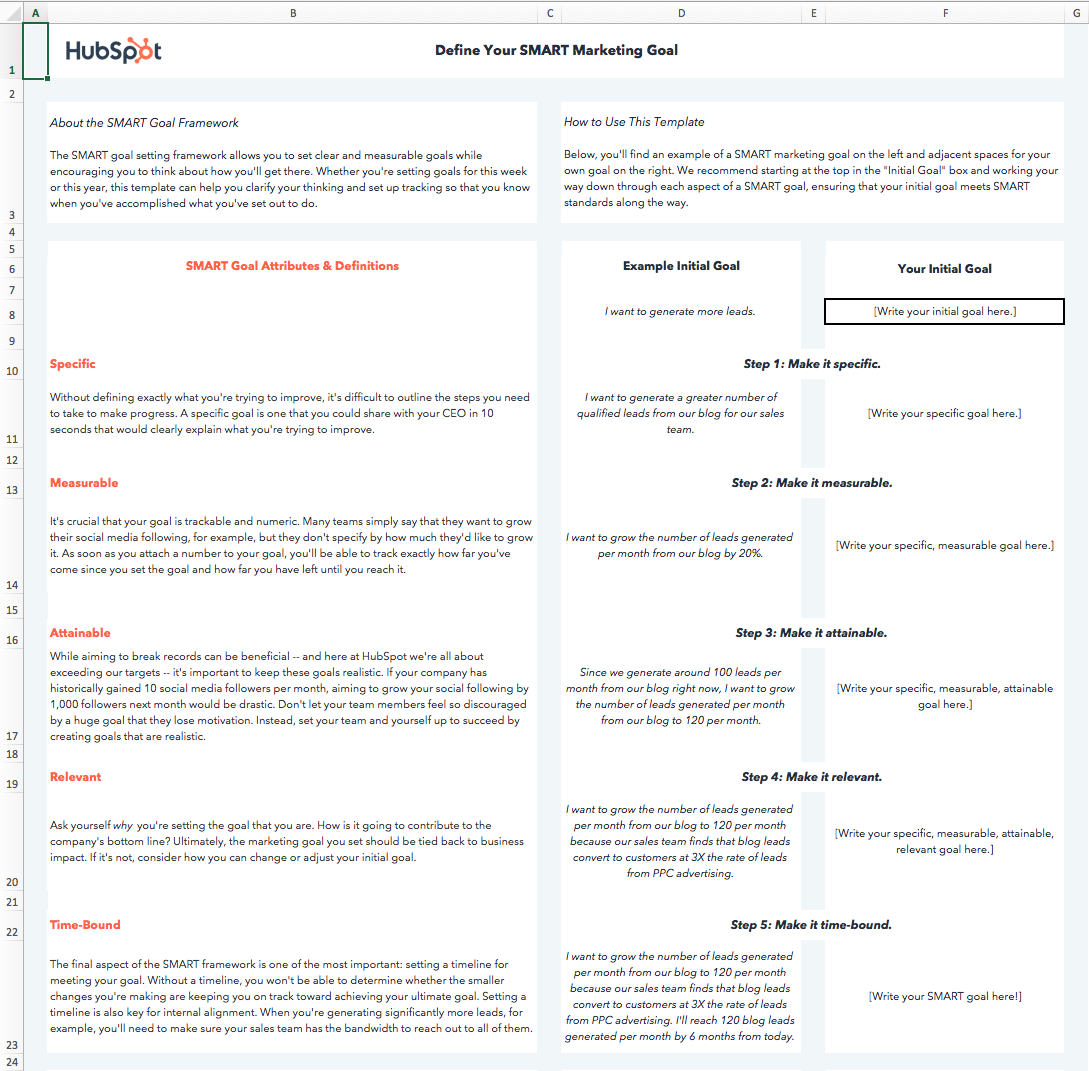 Download this Template for Free
In the working world, the influence of SMART goals continues to grow. The reason why successful marketing teams always hit their numbers is because they also set SMART goals.
The “SMART” acronym stands for “specific,” “measurable,” “attainable,” “relevant,” and “time-bound.” Each SMART goal you create should have these five characteristics to ensure the goal can be reached and benefits the employee. Find out what each characteristic means below, and how to write a SMART goal that exemplifies them.
The thing I love about sports is the life lessons you learn playing them directly apply to your career. Setting SMART goals not only helps you get better at baseball, but it also makes you a better marketer.
1. Use specific wording.
SMART goals are “specific” in that there’s a hard and fast destination the employee is trying to reach. “Get better at my job,” isn’t a SMART goal because it isn’t specific. Instead, ask yourself: What are you getting better at? How much better do you want to get?
If you’re a marketing professional, for example, your job probably revolves around key performance indicators, or KPIs. Therefore, you might choose a particular KPI or metric you want to improve on — like visitors, leads, or customers. You should also identify the team members working toward this goal, the resources they have, and their plan of action.
In practice, a specific SMART goal might say, “Clifford and Braden will increase the blog’s traffic from email …” You know exactly who’s involved and what you’re trying to improve on.
Common SMART Goal Mistake: Vagueness
While you may need to keep some goals more open-ended, you should avoid vagueness that could confuse your team later on. For example. instead of saying, “Clifford will boost email marketing experiences,” say “Clifford will boost email marketing click rates by 10%.”
2. Include measurable goals.
SMART goals should be “measurable” in that you can track and quantify the goal’s progress. “Increase the blog’s traffic from email,” by itself, isn’t a SMART goal because you can’t measure the increase. Instead, ask yourself: How much email marketing traffic should you strive for?
If you want to gauge your team’s progress, you need to quantify your goals, like achieving an X-percentage increase in visitors, leads, or customers.
Let’s build on the SMART goal we started three paragraphs above. Now, our measurable SMART goal might say, “Clifford and Braden will increase the blog’s traffic from email by 25% more sessions per month … ” You know what you’re increasing, and by how much.
Common SMART Goal Mistake: No KPIs
This is in the same light of avoiding vagueness. While you might need qualitative evidence or more open-ended evidence to prove your success, you should still come up with a quantifiable KPI. For example, instead of saying, “Customer service will improve customer happiness,” say, “We want the average post-customer service call satisfaction score from customers to be a seven out of ten or higher.”
3. Aim for realistically attainable goals.
An “attainable” SMART goal considers the employee’s ability to achieve it. Make sure that X-percentage increase is rooted in reality. If your blog traffic increased by 5% last month, for example, try to increase it by 8-10% this month, rather than a lofty 25%.
It’s crucial to base your goals off of your own analytics, not industry benchmarks, or else you might bite off more than you can chew. So, let’s add some “attainability” to the SMART goal we created earlier in this blog post: “Clifford and Braden will increase the blog’s traffic from email by 8-10% more sessions per month … ” This way, you’re not setting yourself up to fail.
Common SMART Goal Mistake: Unattainable Goals
Yes. You should always aim to improve. But reaching for completely unattainable goals may knock you off track and make it harder to track progress. Rather than saying, “We want to make 10,000% of what we made in 2019,” consider something more attainable, like, “We want to increase sales by 150% this year,” or “We have a quarterly goal to reach a 20% year-over-year sales increase.”
4. Pick relevant goals that relate to your business.
SMART goals that are “relevant” relate to your company’s overall business goals and account for current trends in your industry. For instance, will growing your traffic from email lead to more revenue? And is it actually possible for you to significantly boost your blog’s email traffic given your current email marketing campaigns?
If you’re aware of these factors, you’ll be more likely to set goals that benefit your company — not just you or your department.
So, what does that do to our SMART goal? It might encourage you to adjust the metric you’re using to track the goal’s progress. For example, maybe your business has historically relies on organic traffic for generating leads and revenue, and research suggests you can generate more qualified leads this way. Our SMART goal might instead say, “Clifford and Braden will increase the blog’s organic traffic by 8-10% more sessions per month.” This way, your traffic increase is aligned with the business’s revenue stream.
Common SMART Goal Mistake; Losing Sight of the Company
When your company’s doing well, it can be easy to say you want to pivot or grow in another direction. While companies can successfully do this, you don’t want your team to lose sight of how the core of your business works.
Rather than saying, “We want to start a new B2B business on top of our B2C business,” say something like, “We want to continue increasing B2C sales while researching the impact our products could have on the B2B space in the next year.”
5. Make goals time-bound by including timeframe and deadline information.
A “time-bound” SMART goal keeps you on schedule. Improving on a goal is great, but not if it takes too long. Attaching deadlines to your goals puts a healthy dose of pressure on your team to accomplish them. This helps you make consistent and significant progress in the long term.
For example, which would you prefer: increasing organic traffic by 5% every month, leading to a 30-35% increase in half a year? Or trying to increase traffic by 15% with no deadline and achieving that goal in the same time frame? If you picked the former, you’re right.
So, what does our SMART goal look like once we bound it to a timeframe? “Over the next three months, Clifford and Braden will work to increase the blog’s organic traffic by 8-10%, reaching a total of 50,000 organic sessions by the end of August.
Common SMART Goal Mistake: No Time Frame
Having no timeframe or really broad span of time noted in your goal will cause the effort to get reprioritized or make it hard for you to see if your team is on track. Rather than saying. “This year, we want to launch a major campaign,” say, “In quarter one, we will focus on campaign production in order to launch the campaign in quarter two.”
If you want a more concrete understanding of SMART goals, check out the examples below. You can always revisit this blog post and reference them when it’s time to set your goals.
6 SMART Goal Examples That’ll Make You a Better Marketer
1. Blog Traffic Goal
- Specific: I want to boost our blog’s traffic by increasing our weekly publishing frequency from 5 to 8 times a week. Our two bloggers will increase their workload from writing 2 posts a week to 3 posts a week, and our editor will increase her workload from writing 1 post a week to 2 posts a week.
- Measureable: An 8% increase is our goal.
- Attainable: Our blog traffic increased by 5% last month when we increased our weekly publishing frequency from 3 to 5 times a week.
- Relevant: By increasing blog traffic, we’ll boost brand awareness and generate more leads, giving sales more opportunities to close.
- Time-Bound: End of this month
- SMART Goal: At the end of this month, our blog will see an 8% lift in traffic by increasing our weekly publishing frequency from 5 posts per week to 8 post per week.
2. Facebook Video Views Goal
- Specific: I want to boost our average views per native video by cutting our video content mix from 8 topics to our 5 most popular topics.
- Measurable: A 25% increase is our goal.
- Attainable: When we cut down our video content mix on Facebook from 10 topics to our 8 most popular topics six months ago, our average views per native video increased by 20%.
- Relevant: By increasing average views per native video on Facebook, we’ll boost our social media following and brand awareness, reaching more potential customers with our video content.
- Time-Bound: In 6 months.
- SMART Goal: In 6 months, we’ll see a 25% increase in average video views per native video on Facebook by cutting our video content mix from 8 topics to our 5 most popular topics.
3. Email Subscription Goal
- Specific: I want to boost the number of our email blog subscribers by increasing our Facebook advertising budget on blog posts that historically acquire the most email subscribers.
- Measurable: A 50% increase is our goal.
- Attainable: Since we started using this tactic three months ago, our email blog subscriptions have increased by 40%.
- Relevant: By increasing the number of our email blog subscribers, our blog will drive more traffic, boost brand awareness, and drive more leads to our sales team.
- Time-Bound: In 3 months.
- SMART Goal: In 3 months, we’ll see a 50% increase in the number of our email blog subscribers by increasing our Facebook advertising budget on posts that historically acquire the most blog subscribers.
4. Webinar Sign-up Goal
- Specific: I want to increase the number of sign-ups for our Facebook Messenger webinar by promoting it through social, email, our blog, and Facebook Messenger.
- Measurable: A 15% increase is our goal.
- Attainable: Our last Facebook messenger webinar saw a 10% increase in sign-ups when we only promoted it through social, email, and our blog.
- Relevant: When our webinars generate more leads, sales has more opportunities to close.
- Time-Bound: By April 10, the day of the webinar.
- SMART Goal: By April 10, the day of our webinar, we’ll see a 15% increase in sign-ups by promoting it through social, email, our blog, and Facebook messenger.
5. Landing Page Performance Goal
- Specific: I want our landing pages to generate more leads by switching from a one column form to a two column form.
- Measurable: A 30% increase is our goal.
- Attainable: When we A/B tested our traditional one column form vs. a two column form on our highest traffic landing pages, we discovered that two column forms convert 27% better than our traditional one column forms, at a 99% significance level.
- Relevant: If we generate more content leads, sales can close more customers.
- Time-Bound: One year from now.
- SMART Goal: One year from now, our landing pages will generate 30% more leads by switching their forms from one-column to two columns.
6. Link-Building Strategy Goal
- Specific: I want to increase our website’s organic traffic by developing a link-building strategy that gets other publishers to link to our website. This increases our ranking in search engine results, allowing us to generate more organic traffic.
- Measurable: 40 backlinks to our company homepage is our goal.
- Attainable: According to our SEO analysis tool, there are currently 500 low-quality links directing to our homepage from elsewhere on the internet. Given the number of partnerships we currently have with other businesses, and that we generate 10 new inbound links per month without any outreach on our part, an additional 40 inbound links from a single link-building campaign is a significant but feasible target.
- Relevant: Organic traffic is our top source of new leads, and backlinks is one of the biggest ranking factors on search engines like Google. If we build links from high-quality publications, our organic ranking increases, boosting our traffic and leads as a result.
- Time-Bound: 4 months from now.
- SMART Goal: Over the next four months, I will build 40 additional backlinks that direct to www.ourcompany.com. To do so, I will collaborate with Ellie and Andrew from our PR department to connect with publishers and develop an effective outreach strategy.

IT Governance: Definitions, Frameworks and Planning
Cómo hacer sorteos de Navidad en Instagram para que hasta Papá Noel conozca tu marca
¿Tienes una tienda o un e-commerce y quieres aprovechar la Navidad para aumentar tus ventas? ¿Te han dicho que Instagram aumenta las ventas pero no sabes cómo? ¿Tener alcance en tu perfil de empresa de Instagram es misión imposible?
¡No te des por vencido/a! A continuación te doy consejos, ideas y ejemplos de cómo lo han conseguido otros negocios como el tuyo.
Y hay una palabra clave básica en tu acción navideña: SORTEO.
¿Cómo un sorteo en Instagram te ayudará en la campaña de Navidad?
La forma de llegar a tus futuros clientes en Instagram es conseguir una buena difusión de tus productos y, por lo tanto, de los post que vas publicando.
El problema es cuando tus publicaciones no consiguen muchas impresiones y menos interacciones (likes, comentarios, mensajes, etc.).
Si a eso le sumas que en Navidad toda marca genera promociones para vender sus productos, está claro que necesitas diferenciarte para conseguir captar la atención de los usuarios de Instagram.
Mi propuesta es que te salgas de la dinámica de hacer ofertas y promociones que siempre dicen ser imperdibles y te enfoques en crear un sorteo en una publicación de tu perfil.
El sorteo es una acción promocional fácil de crear y de difundir. Otra de sus características es que es un contenido que gusta mucho.
Los usuarios no tienen mayor conflicto en realizar un comentario o seguir a una marca para entrar en el sorteo.
Los sorteos en Instagram te permiten conseguir varios objetivos de marketing en un mismo post. Por ello es una acción muy efectiva y, a la vez, sencilla:
- Al realizar un sorteo en el que pides que se comente un post, consigues aumentar el engagement de esa publicación. Instagram premia a la interacción de valor entre marca y seguidores, con lo que incrementa el alcance del post.
- Es una acción ideal para presentar a los productos estrella de tu marca en Navidad. Esta publicación tendrá mucha más difusión de forma orgánica respecto al resto de publicaciones de tu perfil.
- Fomenta y aumenta el recuerdo de marca entre la gente que ve el post del sorteo. Por eso es importante que utilices tu logo en la imagen de la publicación y en todo elemento referente a la marca. Hay, por ejemplo, quien utiliza un hashtag para sus sorteos, eso les permite conseguir más visualización de marca.
Hasta aquí creo que ya hay bastantes argumentos para que te animes a probar los sorteos dentro de tu estrategia promocional.
También es importante mencionar que hablo desde la experiencia. En EasyPromos me doy cuenta de cómo se generan miles de sorteos en Instagram cada mes.
La cuestión es que tan importante es decidirse a hacer un sorteo como ejecutarlo bien para tener los resultados esperados.
¡Vamos a ello!
Consejos para que tu sorteo de Navidad en Instagram sea un éxito
¿Qué sería para tu marca un éxito? Puede ser el conseguir más interacciones en tus publicaciones, más visitas a tu perfil o a tu web, llegar a tal cantidad de participantes en el sorteo.
Otro parámetro de éxito sería el de obtener una notoriedad más importante de tu perfil según herramientas de medición como Metricool.
Tú eliges cómo mides el resultado, pero antes de empezar debes plantearte:
- ¿Qué quiero conseguir realizando un sorteo?
- ¿Qué tengo que conseguir con él para que lo considere un éxito?
Ya que definiste lo anterior, sigue estos consejos para crear tu sorteo y déjate llevar por una forma novedosa y divertida de generar promociones para tu comunidad online.
#1. Decide un premio atractivo para Navidad
Normalmente es un producto atractivo de tu catálogo que encaja mucho con la campaña actual. En este caso, sería un producto típico para regalar en Navidad.
En la siguiente imagen, te explico un ejemplo. Una tienda de productos para motos promociona su marca con un sorteo de guantes que se usan al momento de manejar. Un regalo clásico y útil para sorprender a los amantes de las motocicletas durante estas fechas.
La recomendación es siempre ofrecer un premio que sea producto de la marca.
A veces se emplean otros premios como gadgets tecnológicos, viajes, estancias, etc., que son más atractivos para la mayoría de la gente. En este caso, puedes obtener más participación que sorteando un producto propio pero no conseguirás seguidores de calidad.
Piensa que tal vez muchos concursaron porque les interesó el premio, no tu producto. No te estoy diciendo que esté mal, simplemente tenlo en cuenta y decide según tu objetivo principal.
#2. Piensa en los requisitos para participar en tu sorteo navideño
Aunque es una promoción sencilla de ejecutar, te sugiero que redactes la publicación del sorteo con antelación. Establece qué acciones quieres que hagan los usuarios para entrar en el sorteo.
Mi recomendación es que comentar el post sea el requisito indispensable. Hay muchas razones, la principal es que Instagram premia la visibilidad de aquellos post con interacciones de valor, o sea, cuando la marca y sus seguidores establecen una conversación.
Por ejemplo, la marca de ropa Kiabi realiza esta temporada navideña un sorteo diario a modo de Calendario de Adviento.
Para participar, los usuarios deben responder preguntas. Una de ellas fue: “¿Qué no puede faltar nunca en tu armario?”.
Como puedes comprobar en la imagen que te comparto, los usuarios responden y explican cuáles son sus básicos de armario, lo que ayuda a la marca a conocer a su audiencia y a ser más próxima a ella.
Aparte de COMENTAR, según la normativa de Instagram, también puedes pedir las siguientes acciones para participar en un sorteo:
- Seguir el perfil de la marca organizadora.
- Mencionar a uno o varios amigos, aunque recomiendo como máximo 5 para que no se convierta en una acción spaminosa que no le guste nada a Instagram.
#3. ¿No tienes tiempo y tienes dudas?
Una solución rápida para crear un sorteo sería utilizar las plantillas de EasyPromos que ya vienen preparadas para crear sorteos en Instagram.
¿Qué hay respecto a hacer “ME GUSTA” a la publicación?
Sí, pedir hacer “me gusta” no está prohibido pero no lo recomiendo como requisito por varios motivos:
- Porque hacer “me gusta” a una publicación no tiene por qué significar que quieres participar en el sorteo. Si la imagen no lleva la palabra “sorteo” puede ser que haya gente que haga “me gusta” solo porque le gusta la foto, no porque haya visto que hay un sorteo asociado.
- Porque es muy difícil obtener a todos los participantes que han hecho “me gusta” con alguna herramienta automática. Corres el riesgo de hacer un sorteo manual y con pocas garantías de transparencia.
- Porque los “me gusta” ya no son visibles públicamente y no reflejan si la publicación está siendo o no exitosa entre los usuarios.
¿Y compartir?
Como la opción de compartir desde un post es muy privada, muchas marcas están utilizando como requisito el “crear una story compartiendo este post”.
No lo recomiendo, en primer lugar porque es una acción que se puede viralizar y ser considerada como spam para Instagram, con las consecuencias que esto representa.
Además, de momento no hay herramientas que te permitan monitorear a todos los usuarios que comparten una story mencionando una marca concreta, con lo que sería una acción manual que deberías realizar. Eso significa un montón de tiempo y dedicación.
¿Lo tienes? La mayoría no, así que no pongas requisitos que no puedas comprobar de forma rápida, efectiva y transparente.
La imagen de tu sorteo tiene que ser clara y directa
El uso habitual de Instagram lleva a ir deslizando las imágenes hacia arriba. Lo que nos transmite cada foto es importantísimo para decidir si dedicamos más tiempo a ese contenido y leemos la publicación que acompaña a la imagen.
Muchos usuarios no leen el texto del post si la foto no capta su atención. Seguramente te pasa a ti, así que no es nada nuevo que debas aprender.
Por eso, la imagen del post del sorteo lo tiene que decir expresamente: SORTEO.
Y esta imagen debe ser especialmente pensada: puede ser divertida, atrayente, creativa, con una composición artística, etc.
Debe estar muy cuidada y en ella tienes que mostrar el premio que darás al participante afortunado.

Si te fijas en esta espléndida foto, están mostrando el premio pero no indican que se trata de un sorteo y que tú puedes ser el afortunado que disfrute de ese magnífico postre.
Solo quien lea el texto ve que se trata de una promoción y cómo debe participar.
¡No desperdicies ninguna oportunidad de captar participantes!
Reitero, incluye siempre el premio y la palabra SORTEO en la imagen del post.
Si las imágenes no son lo tuyo, te recomiendo este artículo en el que se explican 3 aplicaciones para crear imágenes de impacto.
#1. Un sorteo de Navidad refuerza la imagen de marca
Con una imagen y un texto tienes todo lo que necesitas para lanzar tu sorteo en Instagram. Pero como en toda acción con el azar de por medio, siempre hay imprevistos.
Para tener la promoción de Navidad controlada y sin sorpresas, te recomiendo que aparte de los requerimientos y el premio, expliques bien los siguientes aspectos en la publicación:
- Que el post es la base de un SORTEO y cuál es el premio.
- Cuántos días durará el sorteo y la fecha de finalización.
- Cómo se seleccionará al ganador y se difundirá el resultado.
- Dónde consultar las bases legales completas.
¿Bases legales?
¡No te asustes! Aquí encontrarás una plantilla de bases legales. Solo deberás completar el texto y tendrás un enlace URL para compartir este contenido.
Sí, es importante realizar unas bases legales para demostrar que eres una marca transparente y fiable, que el sorteo se realizará en base a estas premisas y que el ganador será escogido acorde a lo que dicen las bases legales.
También es importante porque las bases legales te permitirán gestionar cualquier imprevisto; decidir si excluyes a alguien porque no cumple con la edad, no está en tu zona geográfica, no ha cumplido los requisitos, etc.
Además dejarás claro cómo sustituirás al ganador si surge cualquier inconveniente.
Otra cosa que puede pasar es que no consigas contactar al ganador (pasa, pues hay gente que no está tan atenta de su perfil de Instagram y se olvida de comprobar las notificaciones).
#2. Difunde tu sorteo de Navidad
Hay quien tiene la percepción de que es difícil difundir un sorteo en Instagram, pero la verdad es que los mismos usuarios y las marcas han buscado muchas formas de informar y comunicarse.
En este artículo encontrarás 5 acciones para difundir tu sorteo en Instagram. Aprovecha los tips para las historias de Instagram y no te olvides de ir comunicando que tienes una promoción activa hasta el último día.
Además, en este otro texto Donna Moritz, especialista en marketing visual, ahonda en cómo usar Instagram en los negocios.
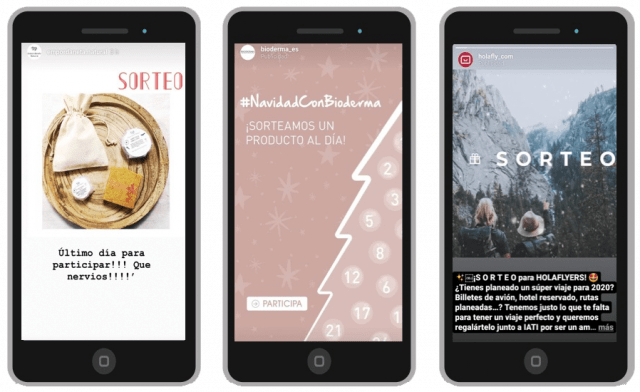
¿Qué hacer con tu post después del sorteo de Navidad?
No te olvides de los participantes una vez que han pasado los días y has obtenido una buena notoriedad de marca gracias a las interacciones que han hecho en tu publicación.
Llegado el momento, avisa de que el sorteo se cierra y busca una herramienta para seleccionar aleatoriamente los ganadores entre todos los que han comentado el post.
Por supuesto, te recomiendo Easypromos por su herramienta completa y fiable . Además, el primer sorteo en cada red social es gratis, lo que te permite probar esta acción sin más gastos.
¿Ya tienes claro que quieres probar un sorteo en Instagram para dinamizar tu perfil esta Navidad?
¡Lánzate ya y descubre esta forma fácil y asequible de conseguir más notoriedad de marca! Ah, y no olvides contarme en los comentarios cómo te fue.
from Socialancer https://ift.tt/2r082R0
via
50 Bright Ideas for Promoting Content to Drive Leads
There’s nothing quite as euphoric as launching a new piece of content. You’ve put in days, weeks, or even months’ worth of work into it, and nothing can express your excitement to get in front of the eyes of your customers, leads, and website visitors.
All that said, there’s nothing quite as soul-crushing (on a professional level, at least) as having no one interact with your content.
Content is being created, published, and refreshed every second of every day. In 2019, more than four million blog posts were published on a daily basis — not to mention the abundance of ebooks, templates, podcast episodes, infographics, and videos that go live every minute, as well.
This brings up the imperative question that all great content marketers ask themselves: how do I get more people to see, engage with, and react to my content?
To help you make the most of your content marketing efforts, we’ve outlined the best content promotion ideas across various mediums. From podcasting to blogging, to everything in between, you can use these best practices to get a strong ROI from your content.
Follow Along With the Content Promotion Kit
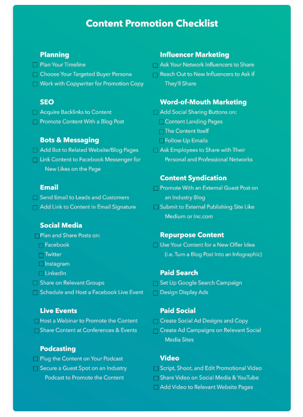 HubSpot’s Content Promotion Kit and Templates puts the tips from this blog into an actionable, step-by-step process for your content promotion efforts. You’ll gain access to four templates to help you plan your promotion and reach out to leads, customers, and influencers so even more people will interact with your content. Download the Kit to follow along with the examples in this post.
Social Media Content Promotion Ideas
Social media is an ideal place to promote your content, as those following your accounts already know your brand and likely look forward to the content that you post. Here are nine ideas to help you promote content on social media.
One warning about social media, however, is that different sites prioritize different factors when determining which posts users see first. In other words, just because you were the latest to post something doesn’t mean a follower will see your content when he or she logs on. Keep that in mind as you implement these ideas.
1. Update your cover photo to promote the content. If using Facebook, link to the offer in the photo’s description.
2. Pin a post to the top of your page linking to the landing page of your content.
3. Add a link to the offer in your business page’s bio.
4. Post several times a week to the piece of content, varying the images and copy you use in each post, for several weeks (or months).
5. Create a hashtag for the campaign or the offer and utilize it in your posts.
Join a group on Facebook or LinkedIn and start a discussion.
6. If you have a group of your own, send out the content to all group members.
Promote the offer in your social media stories.
7. Make the content offer appear on your Facebook Messenger when visitors come to your page.
Website Content Promotion Ideas
Lots of people overlook how they can optimize their website to promote new offers — but it’s most likely one of your biggest marketing assets.
When someone comes to your website, chances are that visitor wants to learn more about your business and its content. It’s the perfect opportunity to point the visitor to a piece of content you think would enhance the buyer’s journey.
Here are five things you can do to promote website content.
10. Create a CTA on your homepage or log-in screen.
11. As you create more content, create a content library: a page on your site dedicated to the content you create.
12. On related pages within your site (such as product pages and thank-you pages of other content), include a link to the offer to download.
13. Include social sharing buttons on the thank-you page of the content.
14. Set up a live chat bot to promote the content on relevant pages.
Blogging Promotion Ideas
Blogging can drive traffic to your landing pages and website better than any other medium.
Why? Each time you blog, you give Google and other search engines one more opportunity to find you. Each blog post gives you the opportunity to rank for more and more keywords and grow your reach.
Here are seven tips for promoting your blog posts.
15. Blog about the piece of content multiple times, targeting a new angle or keyword each time to avoid redundancy. Spread out posts over a few weeks or months to continue a steady stream of traffic to the landing page.
16. Create a CTA at the bottom of each relevant blog post that links to the offer.
17. Create anchor text CTA towards the top of the page, using hyperlinked words to point to the offer. HubSpot’s blogging team has found this to be one of the most successful CTA placements.
18. Create a trigger-based CTA to appear or slide in at a certain point. For example, the CTA could appear when a reader has been on the page for 15 seconds, has scrolled through 20% of the page, or is about to exit the page.
19. Make existing CTAs smart so that users who have already downloaded content from your site see your new offer instead.
20. Encourage social sharing of blog posts with built-in social share buttons and tweetable quotes.
21. Guest blog on related sites to increase awareness of the content.
Video Marketing Promotion Ideas
Video promotion typically requires more planning and effort than other promotion types, since you’ll have to script, shoot, and edit with the help of a dedicated videographer.
However, if you have video experts at your disposal, it’s one of the most effective methods for promoting content.
Here are three tips to ensure you’re correctly promoting your videos once you’ve made them.
22. Make a video for YouTube, capitalizing on a term with high search volume and promoting the content as a featured resource. Don’t forget to link to the content landing page in the description of your video.
23. Make a video for your social media channels with appropriate dimensions, messaging, and length.
24. Make a video for your website and content landing page describing the value of the offer.
Email Marketing Promotion Ideas
Emailing segments of your contact database will not only increase their engagement with your company, it will also generate new leads through the sharing power of your database.
Most of the people who have engaged with your company may not be aware of every piece of content you put out, but may still want to know about them.
Emailing those people — who already have shown they’ll fill out a form to see what you’ve created — should be a no-brainer.
Here are four strategies for promoting email.
25. Email your customer database to delight your existing users with additional content. Remember – content should not just be a tool for acquiring new customers, but also for reminding existing ones why they decided to do business with you!
26. Email your leads and subscribers and alert them of a new offer.
27. Add the offer to your nurture streams, or replace older offers with a new one, wherever appropriate.
28. Add a link to your content in your email signature.
Paid Promotion Ideas
Ideally, your content should be optimized for SEO and promoted within your existing channels. However, for content offers that aren’t supported by ample search volume, or for smaller companies looking to build awareness, paid promotion can be a useful way to get your content in front of a larger audience.
Luckily, there are plenty of sites with billions of users that could be perfect for your content promotion.
Here are a few examples of the ways you can advertise on them:
29. Set up Google Ads campaign for search, with multiple ad groups targeting different keywords and angles.
30. Use display ads to show off the visuals of your offer with Google Display Network.
31. Set up promoted tweets for your Twitter account and collab with designers for visual assets.
32. Use LinkedIn’s Sponsored Updates feature to promote the Company Page update related to the content and collab with designers for visual assets.
33. Create YouTube pre-roll ads with the help of your video team or a video agency.
34. Boost the engagement of an organic Facebook post by putting some money behind it.
35. Create a Facebook ad or a dedicated group of Facebook ads.
36. Get even more visual with Instagram ads. You can also try GIF and video ads here rather than just images.
Podcasting Promotion Ideas
Approximately 150 million Americans listen to podcasts, so even if your company doesn’t have its own, there’s still plenty of reason to utilize podcasting to promote your content.
Here are a few ways you can do that.
37. Plug the content on your own podcast, giving listeners a specific link so you can track its engagement and including it in the description of the podcast.
38. Secure a guest spot on a relevant industry podcast to promote the content.
39. Purchase ad space with a podcast network to promote your content. They’ll likely provide you with audience demographics so you can advertise to the most qualified listeners.
Influencer Marketing Promotion Ideas
Influencers can be an effective way to reach new people who already follow someone in your industry. Building and maintaining strong relationships with these influencers can pay off in the long run, especially if their following is in the tens or hundreds of thousands.
Quick note: some influencers will require ongoing payment for a formal relationship, so just be aware of this in case you’re looking for free promotion strategies.
Here are a few strategies for using influencers for content promotion.
40. Reach out directly to influencers in your industry whom you already are connected to and ask them to share the content with their audience. To make it easier for them, have pre-written tweets or email copy ready for them to use.
41. Ask new influencers in your industry to share the content with their audience. Consider looking to Instagram, Twitter, and other industry blogs to find good candidates.
Other Content Promotion Ideas
The rest of the ideas in this list sort of fall into their own bucket, so we decided to compile them together here.
That said, this shouldn’t discount the effectiveness of these promotion tactics. Give them all a try if you’re looking to promote content in out-of-the-box ways.
42. Repurpose your content into new formats. For example, turn your blog post into an infographic, or your latest blog series into a gated ebook, to make the most out of each offer.
43. Acquire backlinks to your content through partner marketing. Your partners may be willing to allow you to guest post or feature your content as a helpful resource on their website or social media accounts.
44. Leverage your internal teams to share the content on social media and with their colleagues. This is especially helpful when you get your sales team involved, as they can utilize their existing relationships with prospects to promote the content.
45. Push for word of mouth marketing. This one doesn’t have as concrete a strategy, but simply talking about the content on phone calls, at trade shows and events, and with your coworkers and colleagues can create a groundswell of interest for your content offer.
Additional Content Promotion Strategy Ideas
All of the ideas we’ve mentioned on this list have great potential to generate leads and views for your content. However, it’s crucial to know which content promotion ideas make the most sense for what you’ve created, when to launch each initiative, and how to measure each initiative’s success.
To help you stay strategic in your content promotion efforts, here are five bonus content strategy ideas to consider before sending an email or posting a tweet.
46. Create a content promotion calendar.
Content promotion should never be a guess, and you’ll want to be able to look back on your messaging to see what worked and what didn’t so you can adjust for future content launches.
That’s why you should use a social media calendar and/or an editorial calendar to schedule what’s going out, what channel it’s going out on, and when it’s launching.
47. Use audience segmentation.
Part of the reason there are so many content promotion ideas is because each platform you can promote on has different users and appeals to different audiences. For example, if your piece of content is better fitted for the decision stage of the buyer’s journey, it might make more sense to promote on LinkedIn instead of Instagram.
Audience segmentation is a two-pronged approach to your content promotion strategy. Part one, as listed above, is picking the right platforms for each piece of content — and isolating the wrong ones.
Part two is actually segmenting your audience on that platform to get even more granular. For example, you could use Facebook’s advertising platform or HubSpot’s lists tool to segment your audience for ads and emails, respectively.
48. Customize messaging for each channel.
Building off the last point, what you write on email doesn’t always make sense for a Facebook post. Alternatively, your character counts on Twitter are 280, which is far lower than the limit on Instagram.
You’ll want to customize the design, value prop, and copy utilized in each of your promotions. Not only does this ensure you avoid the risk of coming across as redundant across all channels, it also ensures your messaging is appropriate for each platform.
49. Experiment and optimize often.
When it comes to content promotion, “better” should trump “best.”
In other words, you can always find a way to promote content smarter and in new ways. Whenever you release a new piece of content, challenge yourself or your team to find a new channel to promote it. You should also keep a keen eye on which promotion tactics are not producing projected results so that you can consider resetting goals or abandoning that tactic altogether.
50. Analyze your results often.
Use tracking links and analytics tools to keep your eye on what promotion ideas are generating views to your content, submissions, leads, and customers.
While not the primary task of all content marketers, it can’t hurt to know the numerical and monetary impact your content has on the business.
This step also holds true when analyzing specific promotion channels. Social media and digital marketing are constantly changing, with new platforms and algorithms developing all the time.
Ultimately, it’s critical you keep an eye out for which methods work best for you and your business. Hopefully this list will get you started, but this should be an iterative process in which you regularly analyze and pivot as you see which platforms and content best serves your audiences’ needs.
