
Welcome to My Blog
The Human Element of Advertising, Why Targeting is Critical, and Other Advertising Insights from LinkedIn’s Marketing Manager
LinkedIn is a powerful tool for marketing — in fact, a HubSpot study found LinkedIn generates the highest visitor-to-lead conversion rate at 2.74%
Businesses in industries ranging from higher education to financial services have all seen success advertising on the platform. Even well-established consumer brands like Subway, the U.S. privately-held sub and sandwich franchise, managed to convert new corporate customers with the help of LinkedIn’s Website Demographics ad function.
However, advertising on any new tool can feel overwhelming, and if you don’t already use LinkedIn to generate leads through advertising, you might be unsure where to start.
Fortunately, we’ve got you covered. Gaurav Nihalani, a Digital Marketing Manager at LinkedIn, was interviewed as part of HubSpot’s new campaign, “Advertising, a Look Behind the Screens”.
Take a look at the full interview series here, or keep reading to learn Nihalani’s suggestions on how to successfully advertise on LinkedIn.
Gaurav Nihalani’s 5 Tips to Successfully Advertise on LinkedIn
1. When creating your ads, tap into the human element.
If you’re a marketer without much prior experience in the advertising industry, you might be dealing with a little bit of imposter syndrome, wondering if you have the skills necessary to create high-converting ads.
Fortunately, Nihalani believes you can still create a powerful ad as long as you understand the human element.
As Nihalani says, “I think marketing is more about the human element, right? If you’re able to speak to someone as you are speaking to me now, you should be able to market to that same person.”
As an example, Nihalani calls out old-school advertising — “You know, if you look at, historically, ads throughout the generations — whether it was on print, radio, or television — you know, the ones that were really successful were the ones that related to people the most … so if you think about brands such as Coca-Cola, you know, there was always a person drinking a Coke.”
He goes on to say, “They were talking about things like happiness, family, and gatherings. They weren’t really talking about, ‘Hey, our product is the best-tasting Cola’. So, I think when it comes to things like that, you can be very successful if you’re able to create a connection at a human level.”
Of course, you’ll want to A/B test to ensure you’re creating content that best resonates with your audience, and you can use analytics to refine your strategy.
But ultimately, your advertisement will likely perform best if you understand your persona as a three-dimensional person — What are his or her interests outside of business? What excites them most? These questions can help you formulate a more powerful, far-reaching ad.
2. If your business is booming, you still need to advertise.
If sales are steadily rising and your business is experiencing the benefits of a well-established brand in the marketplace such as name recognition, you might be thinking — Do I really need to advertise right now?
Nihalani, however, advises against this way of thinking — “I think there’s a misconception in the world of marketing that if you’re a successful business, you don’t need to market — and I think that’s a poor decision on the part of a business, because when you are successful, it might be the best time to market.”
Nihalani adds, “That’s why when you talk about tissues, you say Kleenex, right? When you talk about sports shoes, you talk about Nikes, and it’s not that those businesses have stopped advertising when they were successful.”
“[Instead] they started advertising even more, because the more you get in front of someone, the more you talk about your values and your brand, the more you establish a human connection with that customer or that buyer.”
He has a point. Plenty of well-established successful brands, like Nike, spend billions on advertising each year. Ultimately, long-term success is only guaranteed with long-term marketing efforts — even if your sales are in a good place, it’s still critical you use that success as leverage to reach more audiences and become a more widely recognizable and beloved brand.
3. Tailor content specific to personas in various stages of the buyer’s journey.
To explore the importance of customized content that aligns with various stages in your buyer’s journey, let’s start with Nihalani’s example for LinkedIn.
Nihalani points out — “For LinkedIn, for our marketing business, we want to advertise to marketers, so that’s a fairly broad function, but maybe there’s some marketers who really value our messaging and are ready to make that purchase right away.”
Alternatively, he says, “At the same time, there are other marketers who are maybe just brand-new. They just started their careers. Everything that we’re saying may be a little over their head, so we can tailor different messages to them. Now, simultaneously, what we want to do is make sure that they all understand our brand, but we want to make sure we do that without spending too much money.”
Nihalani adds, “We can create different personas within the marketing function itself, and tailor content specific to those personas so that we are maximizing our budget.”
Of course, this is easier said than done, but Nihalani offers a few tactical steps you can do to begin defining your target persona on the platform.
First, it’s critical you determine your goal or objective, as well as how you’ll measure your success (is it in leads, click-throughs, or sales?).
Once you’ve determined your objective, you’ll want to develop your target audience by considering a few critical questions, including — Where does he/she work? In which industry is he/she in? What is his/her job title or job junction? Where did he/she go to school?
As Nihalani points out, all these questions can be answered on LinkedIn. For instance, he says, “If you want to find a decision-maker in a specific industry, you can do that today using LinkedIn advertising. If you want to target an individual who just graduated from school, from an undergraduate program, you can do that today.”
Nihalani adds, “As soon as I graduated, I was seeing advertising from Master’s programs, highly relevant to me. I was in the process of considering maybe making that decision, and so because of their ability to use LinkedIn targeting, [marketers]were able to get that message to me and not waste that advertising spend on anyone else who may not find that relevant.”
Ultimately, LinkedIn is a phenomenal place to advertise because of the in-depth information it can provide on your target persona’s personal brand, workplace, and both current and past roles. Use this information wisely to target particular segments within a larger demographic.
For instance, if you’re selling email marketing software, rather than targeting all marketers (which is both expensive and time-consuming), you might consider targeting marketers with a current role in email marketing, and/or marketing executives specifically in the tech industry.
4. Brand awareness and thought leadership are just as important as acquisition.
When thinking about the goals of your advertising strategy, I’m willing to bet one thing initially comes to mind — sales.
Of course, it’s critical your ads drive revenue and results for your business.
However, that doesn’t mean it should be the only goal you have when creating an ad.
Nihalani suggests, instead, you think of your marketing objectives in a few different boxes — “One being pure acquisition, right? This is what you would consider direct sale … they click on your ad, and they’re going directly to a page where they’re buying a product or they’re giving you their personal information to have you contact them directly.”
“But you also have things like brand awareness and thought leadership,” he adds, “Which I think are [perhaps] more important than acquisition — because why would someone give you money and buy your product if they don’t believe in your brand, [or] they don’t align with what you believe in as a business?”
He mentions that a successful marketer knows that selling a business’s story is just as important as selling the business’s products or services.
Nihalani says, “I think everyone does have a story, you know, and behind every business is a story, how they got started, how they became successful, maybe a failure that they had, what they learned from that and where they’re at today.”
“Businesses grow and shrink and succeed and fail every single day, and you’ve seen some major businesses in the past no longer exist today and some new up-and-comer completely take over markets. You know, LinkedIn is a great example of that.”
5. Use LinkedIn resources to identify the tools that work best for your business.
When you first start using a new product, it can be intimidating to figure out how the product will fit into your overall strategy.
To help you identify the marketing solutions that are best-aligned with your needs, Nihalani suggests you start with the LinkedIn Marketing Solutions Success Hub, which offers case studies, tips and tricks on how to use their products more effectively, and LinkedIn’s new product offerings — including when to use those products, and when not to use them.
There’s also a Get Started Guide which helps you create a free LinkedIn Page for your business, learn how to share high-quality content like blog posts and Powerpoints, and monitor your success with LinkedIn analytics.
Ultimately, however, Nihalani points out that you likely already have all the content and marketing information necessary to succeed on LinkedIn — “You already know how to tell your story. Start there. Start using all of that kind of content and put it out on a platform like LinkedIn and advertise it, and from there, you can learn and develop and refine, just like you do today.”
Learn more from Gaurav Nihalani and other advertising leaders by accessing an exclusive interview series with LinkedIn, Google, and Facebook.

7 Brands That Got Inclusive Marketing Right
Have you ever had trouble relating to ads, TV, or other media because it told stories of people with lives that were vastly different from your own? If so, you’re not alone.
Growing up in a small town with partial blindness, the only people I could relate to were characters on TV or in ads. These characters, which included Mr. Magoo, often fit into a specific mold that many people would consider offensive today. They were usually elderly, clumsy, and regularly put themselves into danger by walking into certain situations.
It wasn’t until recently, when I was watching an NBC show called This Is Us, that I found a character that I could relate to. The current season follows a blind character over the course of his life — from birth to adulthood. Although he faces challenges as a blind man, he grows up to be an independent musician living in a city.
While I enjoy having a TV character that I can relate to, what I admire most about the show is that it actually cast a blind actor for the role. This has been fairly unseen in the blind community. In fact, This Is Us is one of the first in history to cast a legally blind actor in a leading network series role.
The results? Notable advocates and organizations, such as the Carroll Center for the Blind, began discussing and celebrating the casting on social media channels.

If I wasn’t already hooked on This Is Us, I would’ve probably started watching when the character was introduced.
As a marketing blogger, the reception of this show made me wonder, “if simply identifying with a unique character on a TV show gets people to tune in each week, what could inclusivity could do for a brand?”
Inclusivity can help brands connect on a deeper, more meaningful level with their audiences — which can be a major asset to marketing campaigns in 2019 and beyond.
Diversity by the Numbers
In the United States alone, racial and ethnic minorities make up nearly 40% of the population. And this number is likely to grow as 51% of children under 15 were considered part of a minority in 2019.
But the country’s diverse population doesn’t just include people of different races or ethnicities. Roughly 4.5% of U.S. adults identify as LGBTQ, and more than 40 million Americans have a disability.
Odds are, some or many people within your audience have something unique about them that makes them different, whether it be related to race, ethnicity, gender, sexuality, or physical abilities.
In 2019, inclusive marketing is a no brainer because it reflects the actual world we live in, rather than a fictional place filled with unrealistically perfect models.
Research has even backed up the idea that inclusivity is beneficial in the advertising world. Recently, a Kantar study found that ads that are considered progressive are 25% more effective. The study judged effectiveness by how pleased viewers were, the memorability of the advertisement, and actual metrics related to progressive campaigns.
With successful inclusive marketing campaigns, marketers aim to break advertising norms by highlighting people or groups that might be under- or misrepresented, such as people of color, those who identify as LGBTQ+, those who affiliate with various religions, those who are disabled, or even people of certain ages and genders.
But, inclusive marketing isn’t always easy to do right. An inclusive or thought-provoking campaign takes time, effort, and careful thought to be successful. And, it’s not just about picking the right stock image and giving yourself a gold star. It’s about making a solid effort to include or properly represent diverse people in your campaigns.
As Google noted in a recent post, “Diverse marketing isn’t just a box you can tick. There are so many layers to diversity beyond gender or skin color. It’s also about age. Geography. Socio-economic diversity. Relatable jobs. Abilities. Sexuality.”
But, what exactly does inclusivity look like in the marketing world? Keep reading to learn about how seven brands, including Google, absolutely nailed inclusive marketing in their campaigns.
Examples of Successful Inclusive Marketing
1. Procter & Gamble
While P&G is known for its ownership of a variety of cleaning and toiletry companies, including Tide, Dove, and Gillette, the major corporation also creates initiatives to ensure inclusivity in its marketing and products.
Not only do some P&G ads include people from diverse backgrounds, but they also use their platform to tell stories that spread powerful messages about equality, tackle controversial issues, and discuss topics related to diversity and identity.
One example of P&G’s inclusive commercials is a 2018 Emmy-winning ad called “The Talk.”
The hard-hitting commercial — which corresponded with P&G’s “Black is Beautiful” and “Proud Sponsor of Moms” initiatives — depicts African American mothers in multiple decades as they have difficult conversations with their children about racism.
At the beginning of the ad, a mother brushing her daughter’s hair ominously tells says, “It’s not a compliment.”
As you might wonder what she’s referring to, you start to see scenes of other black mothers talking to their children about racism and judgement that they’ll face in life. For example, one mother tells her son, “There are some people who think you don’t deserve the same privileges just because of what you look like. It’s not fair. It’s not.”
The ad begins to get darker as you see mothers instructing their children of what to do when they are pulled over to avoid police brutality.
At the climax of the ad, it’s revealed that the daughter featured at the beginning was called, “Beautiful for a black girl.” Her mother tells her not to accept this compliment and concludes, “You are beautiful, period!”
The ad ends with text in all caps stating, “LET’S ALL TALK ABOUT ‘THE TALK’ — SO WE CAN END THE NEED TO HAVE IT.”
This commercial doesn’t beat around the bush. Instead, its goal is to expose the unthinkable closed-door conversations that African American mothers need to have with their children to keep them safe and strong in the face of racism. By informing people of these conversations, P&G aims to create a discussion that might create change or end the need for mothers to feel they have to prepare their children for racism or judgment.
When it came to the commercial’s goal of creating a discussion, “The Talk” was a success in that it was chattered about by social media users, advocacy groups, and major news outlets.
During an interview about the ad, P&G’s Global Communications Director, Damon Jones told AdAge, “We know that bias is not just an African American issue. It’s an issue that takes on many shapes and forms, across gender, race, age, weight, sexual orientation, and more.”
“Our goal with ‘The Talk’ is to help raise awareness about the impact of bias,” he added. “We are also hopeful that we can make progress toward a less biased future by recognizing the power of people of all backgrounds and races showing up for one another.”
To learn more about “The Talk” and other Emmy-award nominated campaigns, check out this rundown.
2. Google
In a 2018 ThinkWithGoogle post, Lorraine Twohill revealed that the tech giant did a deep dive to determine the level and quality of diversity in its campaigns. The project, which was done with help from machine learning and experts at the Geena Davis Institute, allowed a task force to analyze diversity related to race, gender, and socioeconomics.
“Our images had lots of racial diversity. But everyone looked like they worked in tech and lived in a hip, urban neighborhoods,” Twohill wrote in the post.
Along with socioeconomic disparity, Twohill also revealed that Google needed to up its game when representing gender as well.
“My team brought me a new campaign to review. Dad was cooking in the kitchen. Great! I was proud that they had flipped a stereotype,” she explains. “But the next image showed he was there because mom was in the hospital having a baby. Sorry, dad, but we had to reshoot. Mom was away because she was on a business trip.”
To address issues related to misrepresenting or under-representing different backgrounds, Google launched a training course to tackle diversity in its campaigns. Twohill notes that 90% of her team and 200 agency partners have taken this course.
As a result, Google began to launch even more thought-provoking campaigns, including a Pixel 2 commercial called “The Picture-Perfect Life,” which shows real photos of Google Pixel users from different backgrounds, while also tackling the tough topic of mental illness.
In the commercial, Google aims to show that although someone might seem happy in photos or videos, they might still be struggling with mental distress on the inside:
The ad, narrated by Logic, a Grammy-nominated rapper who spread awareness of a suicide hotline in his thought-provoking song, “1-800-273-8255,” opens with images of seemingly happy people shot with the Pixel 2.
All of the photos you see look like the downright pleasant photos you’d see in any smartphone ad focused on highlighting a great camera. For example, you see crisp and clear shots of a man with his daughter, a girl making donuts, a man playing basketball, a mother singing in the car with her family, and a few people at parties with friends. But, as the commercial progresses, you learn that there’s a hidden side to each person’s story.
As the slideshow shows photos of each person, Logic introduces them and explains what the visuals are showing. For example, when the ad shows photos of a girl in an empty apartment, Logic explains, “This is Lauren, and this is her new place, which will soon be crammed with all of her friends.”
But, towards the end of the commercial, you see a girl looking down at a smartphone screen that repeatedly says “1-800-273-8255.” Logic says, “And this? This is the lifeline that all these people bravely called to find hope.”
“Not every picture tells the whole story,” Logic concludes. “Question your lens.”
“The Picture-Perfect Life” aims to represent and identify with people dealing with mental illness while informing viewers that friends, family, or loved ones might seem happy or put together on the outside while still struggling behind closed doors. While this content might educate viewers about mental health, it also informs those with these struggles that Google identifies with them and that there are resources that can help.
Overall, the commercial is Google’s attempt to present it’s real customers while spreading a message that the tech company is trustworthy and supports its followers.
Like P&G’s, “The Talk,” this campaign and Logic’s song, which played in the background of the ad, got heavy discussion and shares online. Since it originally aired during the Grammy Awards in 2018, it’s gotten major online discussion and was also covered in publications like AdWeek and The Washington Post.
3. Microsoft
Recently, it came to Microsoft’s attention that children with certain physical disabilities or missing limbs were having difficulty playing video games with traditional controllers. The company began working on an alternative controller which included touchpads instead of buttons and bright colors for the visually impaired. They also opened a channel of communication where disabled people who still couldn’t use the controller could write to them requesting customizations.
This product launch culminated in a Super Bowl commercial where Microsoft interviewed the gamers about how the controller helped them and featured quotes from the engineers that led the project. The commercial, titled “We All Win,” shows just how far the major tech company will go to help customers and prospects with all different abilities.
In the ad, a handful of children with physical disabilities introduce themselves and begin talking about how much they love video games and how it helps them bond with their friends.
“I love video games, my friends, family, and again video games,” says one boy. Meanwhile, a young girl points out that she enjoys “the fun let you have when you’re connecting with your friends.”
At one point, a child’s father adds, “It’s his way of interacting with his friends when he can’t physically otherwise do it.”
While video games make these children happy, the commercial reveals that there’s one underlying issue preventing accessibility: controller designs.
“When I’m playing with a regular controller, there are some things that don’t work for me,” says a boy with one hand.
Another boy who also has one hand says, “I never thought it was unfair. I just thought, ‘Hey. This is the way it is and it’s never going to change.”
After establishing the issue of accessibility, the commercial shows children excitedly opening new adaptive controllers from Microsoft.
“What I like about the adaptive controller is that now, everyone can play,” narrates one child, while another says “I can hit the buttons just as fast as [other gamers] can.”
Another boy giggles and says, “I think I can crush my friends.”
The commercial ends with inspirational text that says, “When everybody plays, we all win.”
While the adaptive controller ad successfully shows off happy customers and Microsoft’s newest technology, the overall campaign and product more importantly aim to empower young people with disabilities who might think that getting excluded from day-to-day activities is just going to be part of life.
Even if a viewer with disabilities isn’t interested in gaming, they might watch this commercial and trust Microsoft’s brand more because the company learned about the unique challenges of its customers and created a product just to solve those problems. Similarly, someone without disabilities might trust Microsoft brand more because they’ve seen the lengths that the company will go to to help unique groups of customers.
While the adaptive controller and Microsoft’s agency, McCann New York, won a Clios for Design, Innovation, and Branded Entertainment, the video advertisement itself received 29.5 million views and 250 thousand likes on YouTube.
4. Coca-Cola
Coca-Cola is no stranger to embracing diversity in its ads. If you grew up in the 1970s or 80s, you might remember the company’s famous “I’d Like to Buy the World a Coke” commercial. When filming the ad, Coca-Cola young adults from all around the world to sing the jingle, “I’d Like to Buy the World a Coke.”
The ad was considered groundbreaking as it united people from all different races and ethnicities around the common interests of Coca-Cola and world peace. In short, it aimed to show that even though people can come from different backgrounds, everyone has something in common.
Since then, Coca-Cola has continued to create campaigns that link diverse people together with a simple bottle of Coke.
Since 2013, Coca-Cola has run the “Share a Coke” campaign where labels on plastic bottles of Coke say “Share a Coke with …” and include names from around the world.
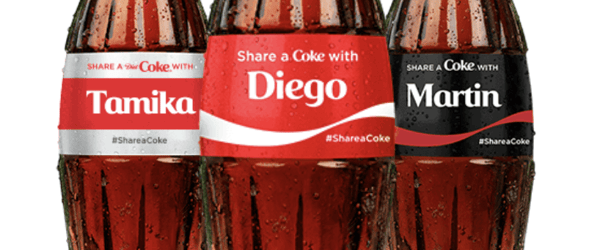
Source: Coca-Cola
This campaign celebrates names around the world and is highly shareable. For example, people regularly post images of bottles on social media when they see their own name or the name of someone they know.
Later in 2014, Coca-Cola launched an ad, titled “Together It’s Beautiful,” that gives you a small peek into the daily lives of U.S. residents who all share a similar sense of pride for the United States despite their vastly different ethnic or geographical backgrounds.
As the ad begins, you see a man on a horse with a cowboy hat in a rural area as you hear the opening line of, “America, The Beautiful” sung in English. Then, it shows children in a movie theater as the next line of the song is sung in Spanish. From this point, each lyric is sung in a different language as you see different scenes of people around the United States.
As you see each scene and hear the song, which embraces American pride, the commercial reminds you of how diverse the United States truly is.
At the pique of the commercial, you begin to see subtle Coca-Cola branding intertwined within each scene. At one point, children swim down to the bottom of a pool to pick up Coke caps. At another, you see the Coca-Cola logo painted on the wall of a building.
Similarly to the “I’d Like to Buy the World A Coke” ad noted above, Coca-Cola aims to unite people of different cultures around a few common things. While the 1971 ad connected people with a love of Coca-Cola and hopes for world peace, the 2014 commercial shows that even vastly different U.S. residents share the same love of Coke and a sense of American pride.
In 2017, Coca-Cola published a statement explaining the meaning of the ad:
“The premise of ‘It’s Beautiful’ can be simply stated: America is beautiful and Coca-Cola is for everyone. It celebrates Coca-Cola moments among all Americans and features snapshots of American families,” Coca-Cola writes. “We believe it’s a powerful ad that promotes optimism, inclusion and celebrates humanity – values that are core to Coca-Cola. ‘It’s Beautiful’ shows just a few of the ways Americans enjoy our brand and how Coca-Cola brings families and friends together every day.”
One of the things that makes Coca-Cola’s inclusive campaigns so successful is that they are able to identify and highlight the simple things that all sorts of people have in common. This commercial reminds us that Coke is a beloved and recognized brand, but it most importantly shows us that we all can find common ground regardless of how different we might seem from one another.
5. ThirdLove
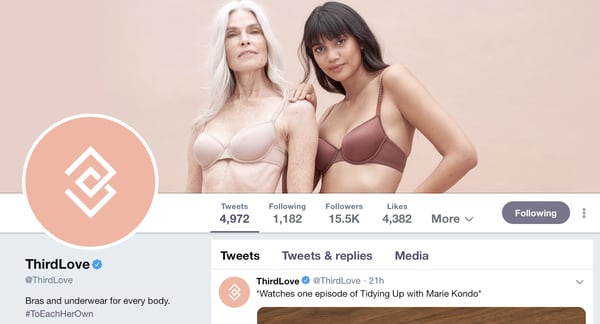
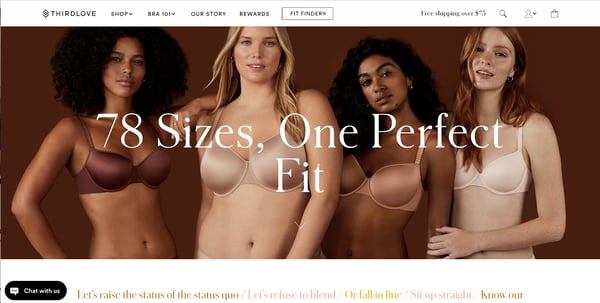
ThirdLove is a lingerie company that aims to make items for all different body types. To enforce this brand message, they show real women of all ages, shapes, and races — rather than touched up, high-fashioned models — in their marketing assets.
Here’s an example where ThirdLove’s Facebook cover photo shows an older woman and a younger woman wearing items from its lingerie line.
ThirdLove also shows imagery on its site and social media platforms that show multiple women wearing bras from the company to show off the variations in body types that its clothing can be made for:
In an open letter published in the New York Times, ThirdLove’s CEO and Co-Founder Heidi Zak discussed the company’s strategy of depicting all women, how brands like Victoria’s Secret should be empowered by diversity, and why inclusivity should be seen as a movement rather than a trend.
“We believe the future is building a brand for every woman, regardless of her shape, size, age, ethnicity, gender identity or sexual orientation. This shouldn’t be seen as groundbreaking, it should be the norm,” she wrote.
While ThirdLove’s ads and visuals might be relatable to many different types of women, its inclusive brand has also seen 347% year-over-year sales growth, according to Shopify.
6. Bumble
You don’t have to do a campaign just about diversity or equality to nail inclusive marketing. Sometimes, inclusive marketing simply entails showing off your wide range of real-life customers. Bumble’s “Find Me On Bumble” campaign is a great example of how a brand can be inclusive just by highlighting its awesome customers.
With the campaign, Bumble launched a webpage, video campaign, Instagram account, and geographically targeted ads which highlighted a number of “inspiring” Bumble users from New York City.
In a video for the campaign, Bumble explains that the app sees a variety of great users in the New York City area and the company wanted to celebrate them. To do this, the company sought out some of Bumble’s most interesting New Yorkers and brought them together to tell their stories.
“Every connection you make on Bumble is an opportunity to meet someone who can impact your life. Inspiring people are everywhere. We wanted to celebrate them,” notes text at the beginning of the content.
As the video continues, you get a glimpse of different Bumble users posing for a photoshoot as you see short clips of interviews with them.
A few examples of the people shown in the Bumble video are a political operative, an entrepreneur, an opera singer, and a model and activist.
In each person’s interview clip, they note a life lesson they’ve learned or given details on their backstory. For example, the political operative explains, “Lots of times, I felt like I had to be forced into a box. Now, I’m the type of person where I don’t really care what type of box you put on me or what type of label you put on me, but I’m going to still do what I want.”
At another point, an author and activist notes that she’s gotten far in her political career by working for people she believed in. “Fifteen years ago, no one even knew who Barack Obama was. So think of all the people who we don’t even know exist yet who could have such an impact,” she explains.
While the video highlights all the people you can find on Bumble Date, Bumble BFF, and Bumble Bizz, it also recognizes the diversity in New York City. At one point, an orthodontist being filmed says, “I love that there’s such a variety of different people here. Living in New York, you still get to meet people from all over the world.”
The video ends with images of more people posing for photos with overlaid text that says. “Really New Yorkers, Really Inspiring, Really on Bumble.” Then the content closes with a call to action of “Find them on Bumble.”
The people invited to Bumble’s photoshoot are also highlighted on the @FindThemOnBumble Instagram account.
Rather than marketing images of models or unrealistic people that you could match with on Bumble, the video, Instagram account, and overall campaign focus on real people that have made great accomplishments or embrace their inner confidence. Here’s one example where a Bumble user says that the most important lesson they’ve learned is to be themselves:
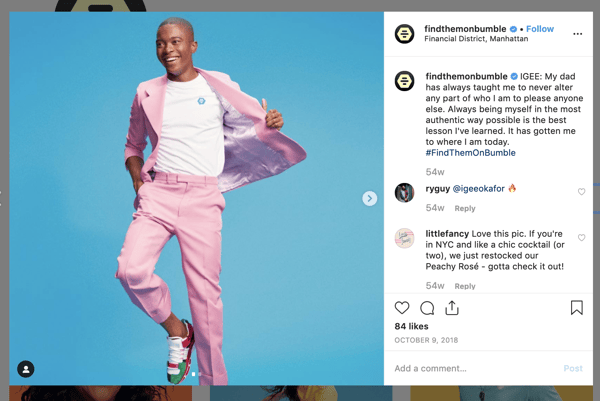
The “Find Them on Bumble” campaign is a good example of how a brand can market its customer diversity as one of its biggest assets. When you see multiple people with different backgrounds and motivations using the same product, you might feel that the product is of good quality or you might just connect more deeply with the marketing.
If you’re marketing any type of business that connects people to other people, highlighting your current customers or users could make prospects even more interested in working with your brand, especially if they’re interested in meeting and learning from interesting people.
7. Axe
In 2016, Axe launched a commercial that embraced all men who used its body spray. While many commercials targeted at men in the past presented unrealistic-looking athletes and related masculinity to physical strength, Axe’s ad argues that masculinity is about being confident with your own identity rather than being a stereotypical buff athlete.
The short commercial begins with a car pulling up on a street covered with billboards of buff male models. As a car pulls up with a man in it, a narrator exclaims, “Come on. A six-pack? Who needs a six-pack, when you got the nose?” At the end of the phrase, the man looks and smiles at the camera.
Then the commercial continues with, “Or a nose when you’ve got the suit?” as the man walks into a bar with a nice outfit. Then the narrator continues to state that a man doesn’t need one thing, such as a nice suit, if they have another thing, like “great moves.” As the narrator makes each statement, videos depict men doing an action, such as dancing, which goes along with what the narrator is saying.
For example, when the narrator says, “Who needs looks when you got the books?” the video shows a man holding a book titled, “The Power of the Banana” while his friend is shopping for records.
The commercial goes on to show images of all sorts of men finding their passions including a dancer wearing high heels and a man dancing with a woman in a wheelchair. The narration expresses that masculinity is about expressing yourself, embracing your passions, and being confident in who you are.
At the climax of the commercial, the narrator simply says, “And who needs all that when you get the door,” as he shows a man opening the door for someone. It ends with the narrator saying, “Who needs some other thing, when you’ve got your thing. Now work on it.”
Rather than encouraging men to work out or marketing to manly men, Axe embraces the idea that all men have different passions and encourages them to embrace the unique aspects of themselves. While some people might think another body spray which markets to strong muscular men is just for athletes and not meant for them, those who view this commercial from Axe might think that a number of people from all sorts of backgrounds use the body spray.
Tips for Building an Inclusive Marketing Strategy
As we’ve seen with some of today’s most successful brands, inclusive marketing is about understanding what makes your audience or customers unique and embracing it. By highlighting what’s interesting, inspiring, unique, or different about your audience and how your brand supports them, you might find new audiences that see your campaigns, start identifying more with you, and realize that your brand aligns with their lifestyle.
Here are three key strategies that you can take away from these examples when trying to create more inclusivity in your marketing campaigns:
- Solving for your customers: Like Microsoft or ThirdLove, learn about the unique audiences in your following or customer base. Then, think of ways that you can solve a problem for them or better represent them in your campaigns.
- Highlight real stories: If your brand has customers or even employees that have unique backstories or are driven by unique motivations, embrace these factors in your marketing campaigns. For example, you could take a note from Bumble and interview a few happy customers about what drives them to your product or service.
- Unite people with things they have in common: In ads for Coca-Cola, the beverage company is notable for connecting multiple different stories together by highlighting the major things people have in common, such as a love of Coke, hopes for world peace, or national pride. If you have a diverse audience that uses your service or product, use marketing to highlight how your brand can help all sorts of people rather than a set of unrealistic models.
Now that you’ve read about inclusivity in marketing, you might be wondering how to get started on your own campaigns. If so, check out this post on how to devise a multicultural marketing strategy. Want to embrace diversity in your overall business? Learn about five benefits in this blog post.

How to Create a YouTube Sales Funnel
Want more customers from YouTube? Wondering what types of YouTube videos you need to make? In this article, you’ll discover different types of videos to create for a YouTube sales funnel. How to Use Video in a YouTube Sales Funnel Building a YouTube marketing funnel means understanding what types of videos to produce, and there’s […]
The post How to Create a YouTube Sales Funnel appeared first on Social Media Marketing | Social Media Examiner.
from Social Media Marketing | Social Media Examiner https://ift.tt/2NEWWcH
via socialmediaexaminer
5 Types Of Project Reports (Updated Nov. 2019)
The Best Time to Post on Instagram, Facebook, Twitter, LinkedIn, & Pinterest
Social media is one of the best ways to amplify your brand and the great content you’re creating. But it isn’t enough to just post content to social whenever you feel like it. Some times are better than others.
So, what are the best hours to post on each social media channel?
Unfortunately, there’s no perfect answer. People browse each social network differently, and businesses may find different days and times work best for them. For example, while Twitter sees tweets perform well at hours like 6 p.m., Pinterest sees certain posts perform well as late at 2 a.m..
These aren’t your only (or best) times, though. Good post timing depends on the platform you’re using, as well as on how your target audience interacts with that platform, the regions and corresponding time zones you’re targeting, and your marketing goals (e.g., clickthroughs versus shares).
However, there is ample data out there on the best time to post on Instagram, Facebook, Twitter, LinkedIn, and Pinterest. The great folks at CoSchedule recently looked at a combination of its own original data and more than a dozen studies on this very topic — from the likes of Buffer and Quintly, just to name a couple — and created a helpful list of ideal posting times based on industry trends across today’s most popular social networks. The industries they analyzed include:
- B2C
- B2B
- Software
- Healthcare
- Media
- Higher Education
Bookmark this post as a go-to set of guidelines, and refer to it next time you need to find the optimal posting times for your business.
To start, let’s take a look at the U.S. About half of the country’s population is in the Eastern Time Zone, and combined with the Central Time Zone, that accounts for over 75% of the total U.S population.
Given that sizable share, if you’re targeting a U.S. audience, try alternating posting times in Eastern and Central Time Zones — we’ll get into those specific times in a bit.
If you’re targeting users outside of the U.S., conduct some research to find out where they live and which social media channels they’re using. That kind of data is available through studies like Smart Insights’ Global Social Media Research Summary, or We Are Social’s annual Digital Global Overview.
1. Best Time to Post on Instagram
Instagram is meant for use on mobile devices. Approximately 60% of its U.S. users use the app daily, though it would appear that many engage with content more during off-work hours than during the workday.
- On average, the best times to post on Instagram across industries are 1 p.m, and 5 p.m., during lunch and the end of the typical work day, respectively.
- B2B organizations have the most times of high-clickthrough rates to choose from: 12 to 1 p.m., 5:00 to 6:00 p.m., and even as late as 8 to 9 p.m. when people are winding down for the day.
- The best day to post on Instagram is Friday.
2. Best Time to Post on Facebook
People log in to Facebook on both mobile devices and desktop computers, both at work and at home. How it’s used depends heavily on the audience.
- On average, the best time to post across industries is 9 a.m., when people are just starting work and going online for the first time.
- Facebook sees another increase in clickthrough rates between 11:00 a.m. to 12 p.m., when folks are take their lunch break.
- The hours of 3:00 PM – 4:00 PM are also promising posting times for B2C, B2B, software, and higher-ed organizations.
- The best days to post on Facebook are Thursday to Sunday.
3. Best Time to Post on Twitter
Like Facebook, people use Twitter on both mobile devices and desktop computers, both at work and at home. How it’s used also depends heavily on audience — but people often treat it like an RSS feed, and something to read during downtimes in their day, like commutes, work breaks, and so on.
- Good times to tweet average around 8 to 10 a.m., as well as 6 – 9 p.m. — which makes sense, given that it correlates with both morning and evening commutes.
- B2C companies have the most hours to choose from where they would see heightened clickthrough rates on their content: 8 to 10 a.m., 12 p.m., and then 7 to 9 p.m.
- If your goal is to maximize retweets and clickthroughs, aim for noon or 5 to 6 p.m.
- For B2C companies, the best days to tweet are weekends. For B2B companies, the best days to tweet are weekdays. Coincidence? Not really. If you think about it, people shop for business needs when they’re working (weekdays) and personal needs when they’re off work (weekends).
4. Best Time to Post on LinkedIn
Roughly 25% of U.S. adults use LinkedIn, largely for professional purposes, during weekdays and the work hours. It’s used with slightly less frequency than some of the other channels on this list.
- Aim to post on LinkedIn between 10 a.m. to noon.
- B2C, media, and higher-ed organizations have the narrowest windows for when to post for maximum performance: 12 p.m., 8 a.m., and 10 a.m. are their best times, respectively.
- The best day to post on LinkedIn is Wednesday.
5. Best Time to Post on Pinterest
Pinterest users skew heavily female, and 29% of users are active on this channel on a regular basis.
- The best times to post on Pinterest are 8 to 11 p.m. and, interestingly, 2 p.m. to 4:00 a.m. This could indicate some interest in the platform in non-North American time zones, which means global content is all the more important here.
- Contrasting many of the other channels we’ve listed here, evening commutes tend to be some of the worst times to post to Pinterest. That could be due to the fact that it’s not as “browseable,” with many pins requiring navigation away from the channel.
Creating an Effective Posting Schedule
There you have it, folks. Keep in mind that although each social network sees its engagement and clickthrough rates increase at specific hours and days of the week, how much engagement you get depends on your audience and content you publish for them.
Perhaps you’ve established a weekly video series that your audience always expects to see on Friday morning. In this case, don’t listen to the data above — you have an agreement with you followers, and this day and time works just for you.
Need more help developing your social media content calendar? Check out this helpful blog post.
Happy posting, tweeting, and pinning.
Editor’s note: This post was originally published in 2017, but was updated for comprehensiveness in October 2019.

4 Must-Have Project Dashboard Tools (Updated Nov. 2019)
Technical SEO Rankability Checklist
Now we move to the more topical elements that you’re probably already aware of — how to improve ranking from a technical SEO standpoint. Getting your pages to rank involves some of the on-page and off-page elements that we mentioned before but from a technical lens.
Rankability Checklist
Remember that all of these elements work together to create an SEO-friendly site. So, we’d be remiss to leave out all the contributing factors. Let’s dive into it.
Internal and External Linking
Links help search bots understand where a page fits in the grand scheme of a query and gives context for how to rank that page. Links guide search bots (and users) to related content and transfer page importance. Overall, linking improves crawling, indexing, and your ability to rank.
Backlink Quality
Backlinks — links from other sites back to your own — provide a vote of confidence for your site. They tell search bots that External Website A believes your page is high-quality and worth crawling. As these votes add up, search bots notice and treat your site as more credible. Sounds like a great deal right? However, as with most great things, there’s a caveat. The quality of those backlinks matter, a lot.
Links from low-quality sites can actually hurt your rankings. There are many ways to get quality backlinks to your site, like outreach to relevant publications, claiming unlinked mentions, providing relevant publications, claiming unlinked mentions, and providing helpful content that other sites want to link to.
Content Clusters
We at HubSpot have not been shy about our love for content clusters or how they contribute to organic growth. Content clusters link related content so search bots can easily find, crawl, and index all of the pages you own on a particular topic. They act as a self-promotion tool to show search engines how much you know about a topic, so they are more likely to rank your site as an authority for any related search query.
Your rankability is the main determinant in organic traffic growth because studies show that searchers are more likely to click on the top three search results on SERPs. But how do you ensure that yours is the result that gets clicked?
Let’s round this out with the final piece to the organic traffic pyramid: clickability.
< Renderability Checklist Clickability Checklist >

Technical SEO Clickability Checklist
While click-through rate (CTR) has everything to do with searcher behavior, there are things you can do to improve your clickability on the SERPs. While meta descriptions and page titles with keywords do impact CTR, we’re going to focus on the technical elements because that’s why you’re here.
Ranking and click-through rate go hand-in-hand because, let’s be honest, searchers want immediate answers. The more your result stands out on the SERP, the more likely you’ll get the click. Let’s go over a few ways to improve your clickability.
1. Use structured data.
Structured data employs a specific vocabulary called schema to categorize and label elements on your webpage for search bots. The schema makes it crystal clear what each element is, how it relates to your site, and how to interpret it. Basically, structured data tells bots, “This is a video,” “This is a product,” or “This is a recipe,” leaving no room for interpretation.
To be clear, using structured data is not a “clickability factor” (if there even is such a thing), but it does help organize your content in a way that makes it easy for search bots to understand, index, and potentially rank your pages.
2. Win SERP features.
SERP features, otherwise known as rich results, are a double-edged sword. If you win them and get the click-through, you’re golden. If not, your organic results are pushed down the page beneath sponsored ads, text answer boxes, video carousels, and the like.
Rich results are those elements that don’t follow the page title, URL, meta description format of other search results. For example, the image below shows two SERP features — a video carousel and “People Also Ask” box — above the first organic result.
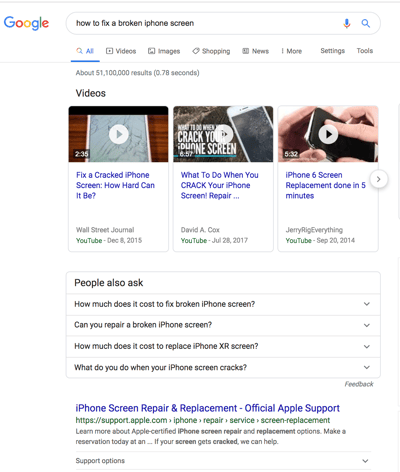
While you can still get clicks from appearing in the top organic results, your chances are greatly improved with rich results.
How do you increase your chances of earning rich results? Write useful content and use structured data. The easier it is for search bots to understand the elements of your site, the better your chances of getting a rich result.
Structured data is useful for getting these (and other search gallery elements) from your site to the top of the SERPs, thereby, increasing the probability of a click-through:
- Articles
- Videos
- Reviews
- Events
- How-Tos
- FAQs (“People Also Ask” boxes)
- Images
- Local Business Listings
- Products
- Sitelinks
3. Optimize for Featured Snippets.
One unicorn SERP feature that has nothing to do with schema markup is Featured Snippets, those boxes above the search results that provide concise answers to search queries.
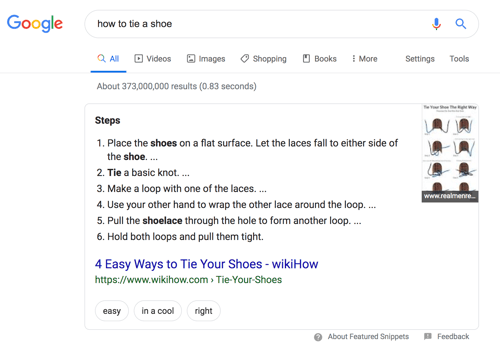
Featured Snippets are intended to get searchers the answers to their queries as quickly as possible. According to Google, providing the best answer to the searcher’s query is the only way to win a snippet. However, HubSpot’s research revealed a few additional ways to optimize your content for featured snippets.
4. Consider Google Discover.
Google Discover is a relatively new algorithmic listing of content by category specifically for mobile users. It’s no secret that Google has been doubling down on the mobile experience; with over 50% of searches coming from mobile, it’s no surprise either. The tool allows users to build a library of content by selecting categories of interest (think: gardening, music, or politics).
At HubSpot, we believe topic clustering can increase the likelihood of Google Discover inclusion and are actively monitoring our Google Discover traffic in Google Search Console to determine the validity of that hypothesis. We recommend that you also invest some time in researching this new feature. The payoff is a highly engaged user base that has basically hand-selected the content you’ve worked hard to create.
The Perfect Trio
Technical SEO, on-page SEO, and off-page SEO work together to unlock the door to organic traffic. While on-page and off-page techniques are often the first to be deployed, technical SEO plays a critical role in getting your site to the top of the search results and your content in front of your ideal audience. Use these technical tactics to round out your SEO strategy and watch the results unfold.

Technical SEO Renderability Checklist
Before we dive into this topic, it’s important to note the difference between SEO accessibility and web accessibility. The latter revolves around making your web pages easy to navigate for users with disabilities or impairments, like blindness or Dyslexia, for example. Many elements of online accessibility overlap with SEO best practices. However, an SEO accessibility audit does not account for everything you’d need to do to make your site more accessible to visitors who are disabled.
We’re going to focus on SEO accessibility, or rendering, in this section, but keep web accessibility top of mind as you develop and maintain your site.
Renderability Checklist
An accessible site is based on ease of rendering. Below are the website elements to review for your renderability audit.
Server Performance
As you learned above, server timeouts and errors will cause HTTP errors that hinder users and bots from accessing your site. If you notice that your server is experiencing issues, use the resources provided above to troubleshoot and resolve them. Failure to do so in a timely manner can result in search engines removing your web page from their index as it is a poor experience to show a broken page to a user.
HTTP Status
Similar to server performance, HTTP errors will prevent access to your webpages. You can use a web crawler, like Screaming Frog, Botify, or DeepCrawl to perform a comprehensive error audit of your site.
Load Time and Page Size
If your page takes too long to load, the bounce rate is not the only problem you have to worry about. A delay in page load time can result in a server error that will block bots from your webpages or have them crawl partially loaded versions that are missing important sections of content. Depending on how much crawl demand there is for a given resource, bots will spend an equivalent amount of resources to attempt to load, render, and index pages. However, you should do everything in your control to decrease your page load time.
JavaScript Rendering
Google admittedly has a difficult time processing JavaScript (JS) and, therefore, recommends employing pre-rendered content to improve accessibility. Google also has a host of resources to help you understand how search bots access JS on your site and how to improve search-related issues.
Orphan Pages
Every page on your site should be linked to at least one other page — preferably more, depending on how important the page is. When a page has no internal links, it’s called an orphan page. Like an article with no introduction, these pages lack the context that bots need to understand how they should be indexed.
Page Depth
Page depth refers to how many layers down a page exists in your site structure, i.e. how many clicks away from your homepage it is. It’s best to keep your site architecture as shallow as possible while still maintaining an intuitive hierarchy. Sometimes a multi-layered site is inevitable; in that case, you’ll want to prioritize a well-organized site over shallowness.
Regardless of how many layers in your site structure, keep important pages — like your product and contact pages — no more than three clicks deep. A structure that buries your product page so deep in your site that users and bots need to play detective to find them are less accessible and provide a poor experience
For example, a website URL like this that guides your target audience to your product page is an example of a poorly planned site structure: https://ift.tt/2rzutfR.
Redirect Chains
When you decide to redirect traffic from one page to another, you’re paying a price. That price is crawl efficiency. Redirects can slow down crawling, reduce page load time, and render your site inaccessible if those redirects aren’t set up properly. For all of these reasons, try to keep redirects to a minimum.
Once you’ve addressed accessibility issues, you can move onto how your pages rank in the SERPs.
< Indexability Checklist Rankability Checklist >

Technical SEO Indexability Checklist
As search bots crawl your website, they begin indexing pages based on their topic and relevance to that topic. Once indexed, your page is eligible to rank on the SERPs. Here are a few factors that can help your pages get indexed.
1. Unblock search bots from accessing pages.
You’ll likely take care of this step when addressing crawlability, but it’s worth mentioning here. You want to ensure that bots are sent to your preferred pages and that they can access them freely. You have a few tools at your disposal to do this. Google’s robots.txt tester will give you a list of pages that are disallowed and you can use the Google Search Console’s Inspect tool to determine the cause of blocked pages.
2. Remove duplicate content.
Duplicate content confuses search bots and negatively impacts your indexability. Remember to use canonical URLs to establish your preferred pages.
3. Audit your redirects.
Verify that all of your redirects are set up properly. Redirect loops, broken URLs, or — worse — improper redirects can cause issues when your site is being indexed. To avoid this, audit all of your redirects regularly.
4. Check the mobile-responsiveness of your site.
If your website is not mobile-friendly by now, then you’re far behind where you need to be. As early as 2016, Google started indexing mobile sites first, prioritizing the mobile experience over desktop. Today, that indexing is enabled by default. To keep up with this important trend, you can use Google’s mobile-friendly test to check where your website needs to improve.
5. Fix HTTP errors.
HTTP stands for HyperText Transfer Protocol, but you probably don’t care about that. What you do care about is when HTTP returns errors to your users or to search engines, and how to fix them.
HTTP errors can impede the work of search bots by blocking them from important content on your site. It is, therefore, incredibly important to address these errors quickly and thoroughly.
Since every HTTP error is unique and requires a specific resolution, the section below has a brief explanation of each, and you’ll use the links provided to learn more about or how to resolve them.
- 301 Permanent Redirects are used to permanently send traffic from one URL to another. Your CMS will allow you to set up these redirects, but too many of these can slow down your site and degrade your user experience as each additional redirect adds to page load time. Aim for zero redirect chains, if possible, as too many will cause search engines to give up crawling that page.
- 302 Temporary Redirect is a way to temporarily redirect traffic from a URL to a different webpage. While this status code will automatically send users to the new webpage, the cached title tag, URL, and description will remain consistent with the origin URL. If the temporary redirect stays in place long enough, though, it will eventually be treated as a permanent redirect and those elements will pass to the destination URL.
- 403 Forbidden Messages mean that the content a user has requested is restricted based on access permissions or due to a server misconfiguration.
- 404 Error Pages tell users that the page they have requested doesn’t exist, either because it’s been removed or they typed the wrong URL. It’s always a good idea to create 404 pages that are on-brand and engaging to keep visitors on your site (click the link above to see some good examples).
- 405 Method Not Allowed means that your website server recognized and still blocked the access method, resulting in an error message.
- 500 Internal Server Error is a general error message that means your web server is experiencing issues delivering your site to the requesting party.
- 502 Bad Gateway Error is related to miscommunication, or invalid response, between website servers.
- 503 Service Unavailable tells you that while your server is functioning properly, it is unable to fulfill the request.
- 504 Gateway Timeout means a server did not receive a timely response from your web server to access the requested information.
Whatever the reason for these errors, it’s important to address them to keep both users and search engines happy, and to keep both coming back to your site.
Even if your site has been crawled and indexed, accessibility issues that block users and bots will impact your SEO. That said, we need to move on to the next stage of your technical SEO audit — renderability.
< Crawlability Checklist Renderability Checklist >

Technical SEO Audit Fundamentals
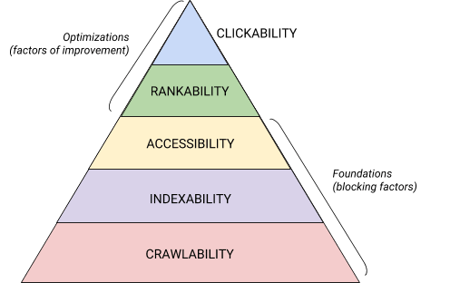
Technical SEO is a beast that is best broken down into digestible pieces. If you’re like me, you like to tackle big things in chunks and with checklists. Believe it or not, everything we’ve covered to this point can be placed into one of five categories, each of which deserves its own list of actionable items.
These five categories and their place in the technical SEO hierarchy is best illustrated by this beautiful graphic that is reminiscent of Maslov’s Hierarchy of Needs but remixed for search engine optimization. (Note that we will use the commonly used term “Rendering” in place of Accessibility.)
Technical SEO Audit Fundamentals
Before you begin with your technical SEO audit, there are a few fundamentals that you need to put in place.
Let’s cover these technical SEO fundamentals before we move on to the rest of your website audit.
Audit Your Preferred Domain
Your domain is the URL that people type to arrive on your site, like hubspot.com. Your website domain impacts whether people can find you through search and provides a consistent way to identify your site.
When you select a preferred domain, you’re telling search engines whether you prefer the www or non-www version of your site to be displayed in the search results. For example, you might select www.yourwebsite.com over yourwebsite.com. This tells search engines to prioritize the www version of your site and redirects all users to that URL. Otherwise, search engines will treat these two versions as separate sites, resulting in dispersed SEO value.
Previously, Google asked you to identify the version of your URL that you prefer. Now, Google will identify and select a version to show searchers for you. However, if you prefer to set the preferred version of your domain, then you can do so through canonical tags (which we’ll cover shortly). Either way, once you set your preferred domain, make sure that all variants, meaning www, non-www, http, and index.html, all permanently redirect to that version.
Implement SSL
You may have heard this term before — that’s because it’s pretty important. SSL, or Secure Sockets Layer, creates a layer of protection between the web server (the software responsible for fulfilling an online request) and a browser, thereby making your site secure. When a user sends information to your website, like payment or contact info, that information is less likely to be hacked because you have SSL to protect them.
An SSL certificate is denoted by a domain that begins with “https://” as opposed to “http://” and a lock symbol in the URL bar.

Search engines prioritize secure sites — in fact, Google announced as early as 2014 that SSL would be considered a ranking factor. Because of this, be sure to set the SSL variant of your homepage as your preferred domain.
After you set up SSL, you’ll need to migrate any non-SSL pages from http to https. It’s a tall order, but worth the effort in the name of improved ranking. Here are the steps you need to take:
- Redirect all http://yourwebsite.com pages to https://yourwebsite.com.
- Update all canonical and hreflang tags accordingly.
- Update the URLs on your sitemap (located at yourwebsite.com/sitemap.xml) and your robot.txt (located at yourwebsite.com/robots.txt).
- Set up a new instance of Google Search Console and Bing Webmaster Tools for your https website and track it to make sure 100% of the traffic migrates over.
Optimize Page Speed
Do you know how long a website visitor will wait for your website to load? Six seconds … and that’s being generous. Some data shows that the bounce rate increases by 90% with an increase in page load time from one to five seconds. You don’t have one second to waste, so improving your site load time should be a priority.
Site speed isn’t just important for user experience and conversion — it’s also a ranking factor.
Use these tips to improve your average page load time:
- Compress all of your files. Compression reduces the size of your images, as well as CSS, HTML, and JavaScript files, so they take up less space and load faster.
- Audit redirects regularly. A 301 redirect takes a few seconds to process. Multiply that over several pages or layers of redirects, and you’ll seriously impact your site speed.
- Trim down your code. Messy code can negatively impact your site speed. Messy code means code that’s lazy. It’s like writing — maybe in the first draft, you make your point in 6 sentences. In the second draft, you make it in 3. The more efficient code is, the more quickly the page will load (in general). Once you clean things up, you’ll minify and compress your code.
- Consider a content distribution network (CDN). CDNs are distributed web servers that store copies of your website in various geographical locations and deliver your site based on the searcher’s location. Since the information between servers has a shorter distance to travel, your site loads faster for the requesting party.
- Try not to go plugin happy. Outdated plugins often have security vulnerabilities that make your website susceptible to malicious hackers who can harm your website’s rankings. Make sure you’re always using the latest versions of plugins and minimize your use to the most essential. In the same vein, consider using custom-made themes, as pre-made website themes often come with a lot of unnecessary code.
- Take advantage of cache plugins. Cache plugins store a static version of your site to send to returning users, thereby decreasing the time to load the site during repeat visits.
- Use asynchronous (async) loading. Scripts are instructions that servers need to read before they can process the HTML, or body, of your webpage, i.e. the things visitors want to see on your site. Typically, scripts are placed in the <head> of a website (think: your Google Tag Manager script), where they are prioritized over the content on the rest of the page. Using async code means the server can process the HTML and script simultaneously, thereby decreasing the delay and increasing page load time.
Here’s how an async script looks: <script async src=”script.js“></script>
If you want to see where your website falls short in the speed department, you can use this resource from Google.
Once you have your technical SEO fundamentals in place, you’re ready to move onto the next stage — crawlability.
< What is technical SEO? Crawlability Checklist >

Technical SEO Crawlability Checklist
Crawlability is the foundation of your technical SEO strategy. Search bots will crawl your pages to gather information about your site.
If these bots are somehow blocked from crawling, they can’t index or rank your pages. The first step to implementing technical SEO is to ensure that all of your important pages are accessible and easy to navigate.
Below we’ll cover some items to add to your checklist as well as some website elements to audit to ensure that your pages are prime for crawling.
1. Create an XML sitemap.
Remember that site structure we went over? That belongs in something called an XML Sitemap that helps search bots understand and crawl your web pages. You can think of it as a map for your website. You’ll submit your sitemap to Google Search Console and Bing Webmaster Tools once it’s complete. Remember to keep your sitemap up-to-date as you add and remove web pages.
2. Maximize your crawl budget.
Your crawl budget refers to the pages and resources on your site search bots will crawl.
Because crawl budget isn’t infinite, make sure you’re prioritizing your most important pages for crawling.
Here are a few tips to ensure that you’re maximizing your crawl budget:
- Remove or canonicalize duplicate pages.
- Fix or redirect any broken links.
- Make sure your CSS and Javascript files are crawlable.
- Check your crawl stats regularly and watch for sudden dips or increases.
- Make sure any bot or page you’ve disallowed from crawling is meant to be blocked.
- Keep your sitemap updated and submit it to the appropriate webmaster tools.
- Prune your site of unnecessary or outdated content.
- Watch out for dynamically generated URLs, which can make the number of pages on your site skyrocket.
3. Optimize your site architecture.
Your website has multiple pages. Those pages need to be organized in a way that allows search engines to easily find and crawl them. That’s where your site structure — often referred to as your website’s information architecture — comes in.
In the same way that a building is based on architectural design, your site architecture is how you organize the pages on your site.
Related pages are grouped together; for example, your blog homepage links to individual blog posts, which each link to their respective author pages. This structure helps search bots understand the relationship between your pages.
Your site architecture should also shape, and be shaped by, the importance of individual pages. The closer Page A is to your homepage, the more pages link to Page A, and the more link equity those pages have, the more importance search engines will give to Page A.
For example, a link from your homepage to Page A demonstrates more significance than a link from a blog post. The more links to Page A, the more “significant” that page becomes to search engines.
Conceptually, a site architecture could look something like this, where the About, Product, News, etc. pages are positioned at the top of the hierarchy of page importance.
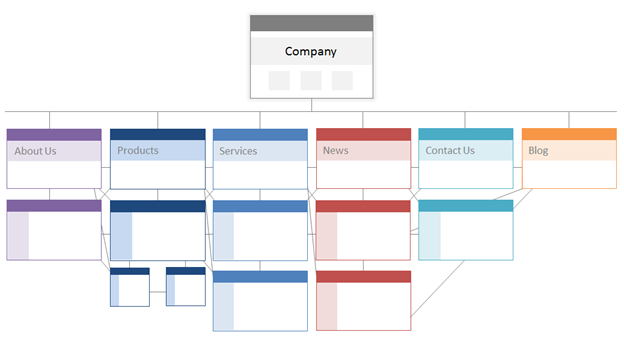
Make sure the most important pages to your business are at the top of the hierarchy with the greatest number of (relevant!) internal links.
4. Set a URL structure.
URL structure refers to how you structure your URLs, which could be determined by your site architecture. I’ll explain the connection in a moment. First, let’s clarify that URLs can have subdirectories, like blog.hubspot.com, and/or subfolders, like hubspot.com/blog, that indicate where the URL leads.
As an example, a blog post titled How to Groom Your Dog would fall under a blog subdomain or subdirectory. The URL might be https://ift.tt/2X4NQJf. Whereas a product page on that same site would be https://ift.tt/2X3SHKM.
Whether you use subdomains or subdirectories or “products” versus “store” in your URL is entirely up to you. The beauty of creating your own website is that you can create the rules. What’s important is that those rules follow a unified structure, meaning that you shouldn’t switch between blog.yourwebsite.com and yourwebsite.com/blogs on different pages. Create a roadmap, apply it to your URL naming structure, and stick to it.
Here are a few more tips about how to write your URLs:
- Use lowercase characters.
- Use dashes to separate words.
- Make them short and descriptive.
- Avoid using unnecessary characters or words (including prepositions).
- Include your target keywords.
Once you have your URL structure buttoned up, you’ll submit a list of URLs of your important pages to search engines in the form of an XML sitemap. Doing so gives search bots additional context about your site so they don’t have to figure it out as they crawl.
5. Utilize robots.txt.
When a web robot crawls your site, it will first check the /robot.txt, otherwise known as the Robot Exclusion Protocol. This protocol can allow or disallow specific web robots to crawl your site, including specific sections or even pages of your site. If you’d like to prevent bots from indexing your site, you’ll use a noindex robots meta tag. Let’s discuss both of these scenarios.
You may want to block certain bots from crawling your site altogether. Unfortunately, there are some bots out there with malicious intent — bots that will scrape your content or spam your community forums. If you notice this bad behavior, you’ll use your robot.txt to prevent them from entering your website. In this scenario, you can think of robot.txt as your force field from bad bots on the internet.
Regarding indexing, search bots crawl your site to gather clues and find keywords so they can match your web pages with relevant search queries. But, as we’ll discuss later, you have a crawl budget that you don’t want to spend on unnecessary data. So, you may want to exclude pages that don’t help search bots understand what your website is about, for example, a Thank You page from an offer or a login page.
No matter what, your robot.txt protocol will be unique depending on what you’d like to accomplish.
6. Add breadcrumb menus.
Remember the old fable Hansel and Gretel where two children dropped breadcrumbs on the ground to find their way back home? Well, they were on to something.
Breadcrumbs are exactly what they sound like — a trail that guides users to back to the start of their journey on your website. It’s a menu of pages that tells users how their current page relates to the rest of the site.
And they aren’t just for website visitors; search bots use them, too. 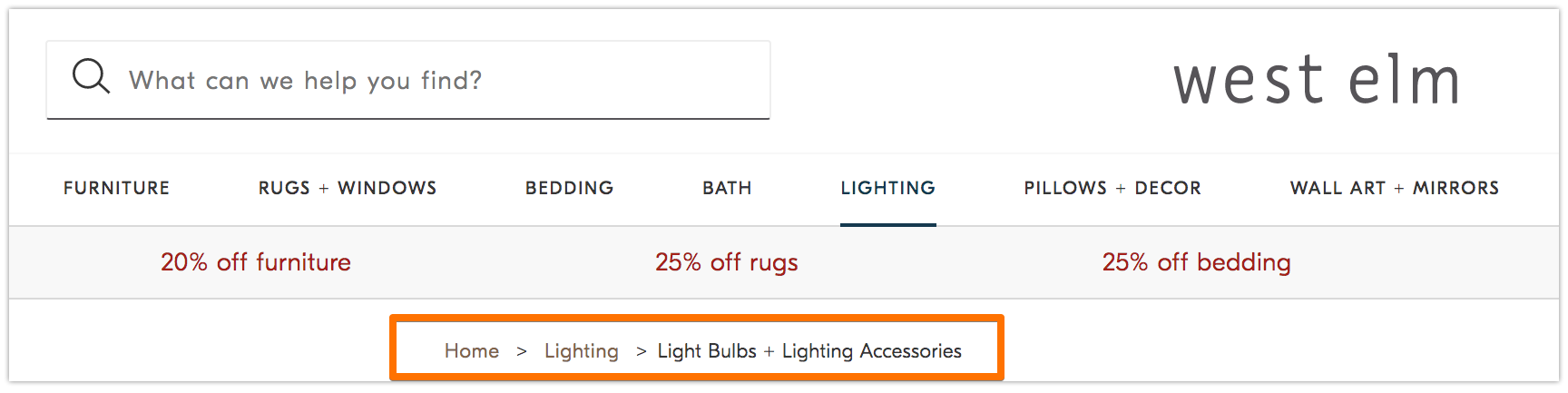
Breadcrumbs should be two things: 1) visible to users so they can easily navigate your web pages without using the Back button, and 2) have structured markup language to give accurate context to search bots that are crawling your site.
Not sure how to add structured data to your breadcrumbs? Use this guide for BreadcrumbList.
7. Use pagination.
Remember when teachers would require you to number the pages on your research paper? That’s called pagination. In the world of technical SEO, pagination has a slightly different role but you can still think of it as a form of organization.
Pagination uses code to tell search engines when pages with distinct URLs are related to each other. For instance, you may have a content series that you break up into chapters or multiple webpages. If you want to make it easy for search bots to discover and crawl these pages, then you’ll use pagination.
The way it works is pretty simple. You’ll go to the <head> of page one of the series and use
rel=”next” to tell the search bot which page to crawl second. Then, on page two, you’ll use rel=”prev” to indicate the prior page and rel=”next” to indicate the subsequent page, and so on.
It looks like this…
On page one:
On page two:
Note that pagination is useful for crawl discovery, but is no longer supported by Google to batch index pages as it once was.
8. Check your SEO log files.
You can think of log files like a journal entry. Web servers (the journaler) record and store log data about every action they take on your site in log files (the journal). The data recorded includes the time and date of the request, the content requested, and the requesting IP address. You can also identify the user agent, which is a uniquely identifiable software (like a search bot, for example) that fulfills the request for a user.
But what does this have to do with SEO?
Well, search bots leave a trail in the form of log files when they crawl your site. You can determine if, when, and what was crawled by checking the log files and filtering by the user agent and search engine.
This information is useful to you because you can determine how your crawl budget is spent and which barriers to indexing or access a bot is experiencing. To access your log files, you can either ask a developer or use a log file analyzer, like Screaming Frog.
Just because a search bot can crawl your site doesn’t necessarily mean that it can index all of your pages. Let’s take a look at the next layer of your technical SEO audit — indexability.
< Technical SEO Foundations Indexability Checklist >

The Ultimate Guide to Technical SEO
List three things you’ve done this year that pertain to search engine optimization (SEO).
Do these tactics revolve around keyword research, meta descriptions, and backlinks?
If so, you’re not alone. When it comes to SEO, these techniques are usually the first ones marketers add to their arsenal.
While these strategies do improve your site’s visibility in organic search, they’re not the only ones you should be employing. There’s another set of tactics that fall under the SEO umbrella.
Technical SEO refers to the behind-the-scenes elements that power your organic growth engine, such as site architecture, mobile optimization, and page speed. These aspects of SEO might not be the sexiest, but they are incredibly important.
The first step in improving your technical SEO is knowing where you stand by performing a site audit. The second step is to create a plan to address the areas where you fall short. We’ll cover these steps in-depth below.
Technical SEO vs. On-Page SEO vs. Off-Page SEO
Many people break down search engine optimization (SEO) into three different buckets: on-page SEO, off-page SEO, and technical SEO. Let’s quickly cover what each means.
On-Page SEO
On-page SEO refers to the content that tells search engines (and readers!) what your page is about, including image alt text, keyword usage, meta descriptions, H1 tags, URL naming, and internal linking. You have the most control over on-page SEO because, well, everything is on your site.
Off-Page SEO
Off-page SEO tells search engines how popular and useful your page is through votes of confidence — most notably backlinks, or links from other sites to your own. Backlink quantity and quality boost a page’s PageRank. All things being equal, a page with 100 relevant links from credible sites will outrank a page with 50 relevant links from credible sites (or 100 irrelevant links from credible sites.)
Technical SEO
Technical SEO is within your control as well, but it’s a bit trickier to master since it’s less intuitive.
Why is technical SEO important?
You may be tempted to ignore this component of SEO completely; however, it plays an important role in your organic traffic. Your content might be the most thorough, useful, and well-written, but unless a search engine can crawl it, very few people will ever see it.
It’s like a tree that falls in the forest when no one is around to hear it … does it make a sound? Without a strong technical SEO foundation, your content will make no sound to search engines.
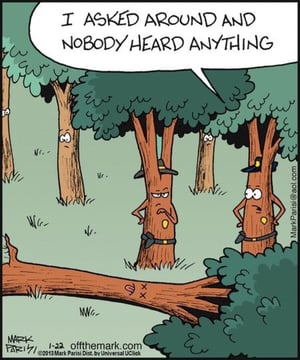
Let’s discuss how you can make your content resound through the internet.
Use the links below to navigate to the area(s) of technical SEO that you’d like to learn more about.

The Ultimate Guide to SEO in 2019
What is the first thing you do when you need new marketing ideas? What about when you decide it’s time to change the way you keep the books finally? Or even notice a flat tire in the car?
My guess, you turn to Google.
But did you know that 89% of B2B buyers and 81% of online shoppers do the same?
Faced with a problem, challenge or even a choice, they google it. Simply.
And so, it’s a cold, harsh truth that without at least some presence in Google, your business is unlikely to survive long.
In this guide, you’ll discover a strategy to build this presence – Search Engine Optimization (SEO.)
You’ll learn what SEO is, how it works, and what you must do to position your site in search engine results.
But before we begin, I want to reassure you of something.
So many resources make SEO complex. They scare readers with technical jargon, focus on advanced elements, and rarely explain anything beyond theory.
I promise you, this guide isn’t like that.
In the following pages, I’m going to break SEO into its most basic parts and show you how to use all its elements to construct a successful SEO strategy. (And to stay up-to-date on SEO strategy and trends, check out HubSpot’s Skill Up podcast.)
Keep on reading to understand SEO, or jump ahead to the section that interests you most.
When asked to explain what SEO is, I often choose to call it a strategy to ensure that when someone googles your product or service category, they find your website.
But this simplifies the discipline a bit. It doesn’t take elements like different customer information needs into consideration. However, it does reveal its essence.
In short, SEO drives two things — rankings and visibility.
Rankings
This is a process that search engines use to determine where to place a particular web page in SERPs.
Visibility
This term describes how prominent a particular domain is in search engine results. With high visibility, your domain is prominent in SERPs. Lower search visibility occurs when a domain isn’t visible for many relevant search queries.
Both are responsible for delivering the main SEO objectives – traffic and conversions.
There is one more reason why you should be using SEO.
The discipline helps you position your brand throughout almost the entire buying journey.
In turn, it can ensure that your marketing strategies match the new buying behavior.
Because, as Google admitted themselves – customer behavior has changed forever.
Today, more people use search engines to find products or services than any other marketing channel. 18% more shoppers choose Google over Amazon. 136% more prefer the search engine to other retail websites. And B2B buyers conduct up to 12 searches, on average, before engaging with a brand.
What’s more, they prefer going through the majority of the buying process on their own.
For example, in recent survey from HubSpot Research, we found that 77% people research a brand before engaging with it.
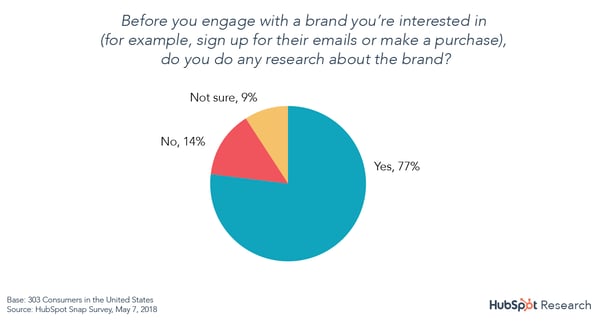
Forrester revealed that 60% of customers do not want any interaction with salespeople. Further, 68% prefer to research on their own. And 62% have developed their own criteria to select the right vendor.
What’s more, this process has never been more complicated.
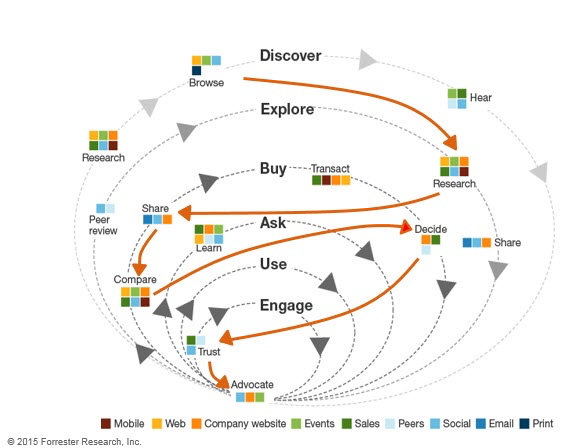
Source: Forrester Research
Finally, DemandGen’s 2017 B2B Buyer’s Survey found that 61% of B2B buyers start the buying process with a broad web search. In comparison, only 56% go directly to a vendor’s website.
But how do they use search engines during the process?
Early in the process, they use Google to find information about their problem. Some also inquire about potential solutions.
Then, they evaluate available alternatives based on reviews or social media hype before inquiring with a company. But this happens after they’ve exhausted all information sources.
And so, the only chance for customers to notice and consider you is by showing up in their search results.
Featured Resource
How Does Google Know How to Rank a Page?
Search engines have a single goal only. They aim to provide users with the most relevant answers or information.
Every time you use them, their algorithms choose pages that are the most relevant to your query. And then, rank them, displaying the most authoritative or popular ones first.
To deliver the right information to users, search engines analyze two factors:
Relevancy between the search query and the content on a page. Search engines assess it by various factors like topic or keywords.
Authority, measured by a website’s popularity on the Internet. Google assumes that the more popular a page or resource is, the more valuable is its content to readers.
And to analyze all this information they use complex equations calledsearch algorithms.
Search engines keep their algorithms secret. But over time, SEOs have identified some of the factors they consider when ranking a page. We refer to them as ranking factors, and they are the focus of an SEO strategy.
As you’ll shortly see, adding more content, optimizing image filenames, or improving internal links can affect your rankings and search visibility. And that’s because each of those actions improves a ranking factor.
Three Core Components of a Strong SEO Strategy
To optimize a site, you need to improve ranking factors in three areas — technical website setup, content, and links. So, let’s go through them in turn.
1. Technical Setup
For your website to rank, three things must happen:
First, a search engine needs find your pages on the Web.
Then, it must scan them to understand their topics and identify their keywords.
And finally, it needs to add them to its index — a database of all the content it has found on the web. This way, its algorithm can consider displaying your website for relevant queries.
Seem simple, doesn’t it? Certainly, nothing to worry about. After all, since you can visit your site without any problem, so should Google, right?
Unfortunately, there is a catch. A web page looks different for you and the search engine. You see it as a collection of graphics, colors, text with its formatting, and links.
To a search engine, it’s nothing but text.
As a result, any elements it cannot render this way remain invisible to the search engine. And so, in spite of your website looking fine to you, Google might find its content inaccessible.
Let me show you an example. Here’s how a typical search engine sees one of our articles. It’s this one, by the way, if you want to compare it with the original.
Notice some things about it:
- The page is just text. Although we carefully designed it, the only elements a search engine sees are text and links.
- As a result, it cannot see an image on the page (note the element marked with an arrow.) It only recognizes its name. If that image contained an important keyword we’d want the page to rank for, it would be invisible to the search engine.
That’s where technical setup, also called on-site optimization, comes in.
It ensures that your website and pages allow Google to scan and index them without any problems.
And the most important factors affecting it include:
Website navigation and links
Search engines crawl sites just like you would. They follow links. Search engine crawlers land on a page and use links to find other content to analyze. But as you’ve seen above, they cannot see images. So, set the navigation and links as text-only.
Simple URL structure
Search engines don’t like reading lengthy strings of words with complex structure. So, if possible, keep your URLs short. Set them up to include as little beyond the main keyword for which you want to optimize the page, as possible.
Page speed
Search engines, use the load time — the time it takes for a user to be able to read the page — as an indicator of quality. Many website elements can affect it. Image size, for example. Use Google’s Page Speed Insights Tool for suggestions how to improve your pages.
Dead links or broken redirects
A dead link sends a visitor to a nonexistent page. A broken redirect points to a resource that might no longer be there. Both provide poor user experience but also, prevent search engines from indexing your content.
Sitemap and Robots.txt files
A sitemap is a simple file that lists all URLs on your site. Search engines use it to identify what pages to crawl and index. A robots.txt file, on the other hand, tells search engines what content not to index (for example, specific policy pages you don’t want to appear in search.) Create both to speed up crawling and indexing of your content.
Duplicate content
Pages containing identical or quite similar content confuse search engines. They often find it near impossible to determine what content they should display in search results. For that reason, search engines consider duplicate content as a negative factor. And upon finding it, can penalize a website by not displaying any of those pages at all.
Featured Resource
2. Content
Every time you use a search engine, you’re looking for content — information on a particular issue or problem, for example.
True, this content might come in different formats. It could be text, like a blog post or a web page. But it could also be a video, product recommendation, and even a business listing.
It’s all content.
And for SEO, it’s what helps gain greater search visibility.
Here are two reasons why:
For one, content is what customers want when searching. Regardless of what they’re looking for, it’s content that provides it. And the more of it you publish, the higher your chance for greater search visibility.
But also, search engines use content to determine how to rank a page. It’s the idea of relevance between a page and a person’s search query that we talked about earlier.
While crawling a page, they determine its topic. Analyzing elements like page length or its structure helps them assess its quality. Based on this information, search algorithms can match a person’s query with pages they consider the most relevant to it.
The process of optimizing content begins with keyword research.
Keyword Research
SEO is not about getting any visitors to the site. You want to attract people who need what you sell and can become leads, and later, customers.
However, that’s possible only if it ranks for the keywords those people would use when searching. Otherwise, there’s no chance they’d ever find you. And that’s even if your website appeared at the top of the search results.
That’s why SEO work starts with discovering what phrases potential buyers enter into search engines.
The process typically involves identifying terms and topics relevant to your business. Then, converting them into initial keywords. And finally, conducting extensive research to uncover related terms your audience would use.
We’ve published a thorough guide to keyword research for beginners. It lays out the keyword research process in detail. Use it to identify search terms you should be targeting.
With a list of keywords at hand, the next step is to optimize your content. SEOs refer to this process as on-page optimization.
On-Page Optimization
On-page optimization, also called on-page SEO, ensures that search engines a.) understand a page’s topic and keywords, and b.) can match it to relevant searches.
Note, I said “page” not content. That’s because, although the bulk of on-page SEO work focuses on the words you use, it extends to optimizing some elements in the code.
You may have heard about some of them — meta-tags like title or description are two most popular ones. But there are more. So, here’s a list of the most crucial on-page optimization actions to take.
Note: Since blog content prevails on most websites, when speaking of those factors, I’ll focus on blog SEO — optimizing blog posts for relevant keywords. However, all this advice is equally valid for other page types too.
Featured Resource
i. Keyword Optimization
First, ensure that Google understands what keywords you want this page to rank. To achieve that, make sure you include at least the main keyword in the following:
Post’s title: Ideally, place it as close to the start of the title. Google is known to put more value on words at the start of the headline.
URL: Your page’s web address should also include the keyword. Ideally, including nothing else. Also, remove any stop words.
H1 Tag: In most content management systems, this tag displays the title of the page by default. However, make sure that your platform doesn’t use a different setting.
The first 100 words (or the first paragraph) of content: Finding the keyword at the start of your blog post will reassure Google that this is, in fact, the page’s topic.
Meta-title and meta-description tags: Search engines use these two code elements to display their listings. They display meta-title as the search listing’s title. Meta-description provides content for the little blurb below it. But above that, they use both to understand the page’s topic further.
Image file names and ALT tags: Remember how search engines see graphics on a page? They can only see their file names. So, make sure that at least one of the images contains the keyword in the file name.
The alt tag, on the other hand, is text browsers display instead of an image (for visually impaired visitors.) However, since ALT tag resides in the image code, search engines use it as a relevancy signal as well.
Also, add semantic keywords — variations or synonyms of your keyword. Google and other search engines use them to determine a page’s relevancy better.
Let me illustrate this with a quick example. Let’s pretend that your main keyword is “Apple.” But do you mean the fruit or the tech giant behind the iPhone?
Now, imagine what happens when Google finds terms like sugar, orchard, or cider in the copy? The choice what queries to rank it for would immediately become obvious, right?
That’s what semantic keywords do. Add them to ensure that your page doesn’t start showing up for irrelevant searches.
ii. Non-Keyword-Related On-Page Optimization Factors
On-page SEO is not just about sprinkling keywords across the page. The factors below help confirm a page’s credibility and authority too:
External links: Linking out to other, relevant pages on the topic helps Google determine its topic further. Plus, it provides a good user experience. How? By positioning your content as a valuable resource.
Internal links: Those links help you boost rankings in two ways. One, they allow search engines to find and crawl other pages on the site. And two, they show semantic relations between various pages, helping to determine its relevance to the search query better. As a rule, you should include at least 2-4 internal links per blog post.
Content’s length: Long content typically ranks better. That’s because, if done well, a longer blog post will always contain more exhaustive information on the topic.
Multimedia: Although not a requirement, multimedia elements like videos, diagrams, audio players can signal a page’s quality. It keeps readers on a page for longer. And in turn, it signals that they find the content valuable and worth perusing.
3. Links
From what you’ve read in this guide so far, you know that no page will rank without two factors — relevance and authority.
In their quest to provide users with the most accurate answers, Google and other search engines prioritize pages they consider the most relevant to their queries but also, popular.
The first two areas — technical setup and content — focused on increasing relevancy (though I admit, some of their elements can also help highlight the authority.)
Links, however, are responsible for popularity.
But before we talk more about how they work, here’s what SEOs mean when talking about links.
What Is a Backlink?
Links, also called backlinks, are references to your content on other websites. Every time another website mentions and points their readers to your content, you gain a backlink to your site.
For example, this article in Entrepreneur.com mentions our marketing statistics page. It also links to it allowing their readers to see other stats than the one quoted.
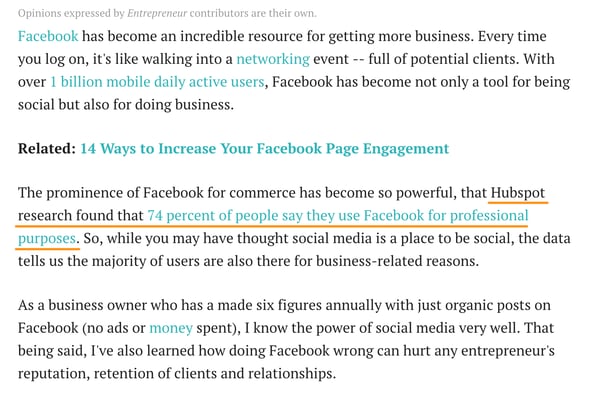
Google uses quantity and quality of links like this as a signal of a website’s authority. Its logic behind it is that webmasters would reference a popular and high-quality website more often than a mediocre one.
But note that I mentioned links quality as well. That’s because not all links are the same. Some — low-quality ones — can impact your rankings negatively.
Links Quality Factors
Low quality or suspicious links — for example, ones that Google would consider as built deliberately to make it consider a site as more authoritative — might reduce your rankings.
That’s why, when building links, SEOs focus not on building any links. They aim to generate the highest quality references possible.
Naturally, just like with the search algorithm, we don’t know what factors determine a link’s quality, specifically. However, over time, SEOs discovered some of them:
- The popularity of a linking site: Any link from a domain that search engines consider an authority will naturally have high quality. In other words, links from websites that have good quality links pointing to them, work better.
- Topic relevance: Links from domains on a topic similar to yours will carry more authority than those from random websites.
- Trust in a domain: Just like with popularity, search engines also assess a website’s trust. Links from more trustworthy sites will always impact rankings better.
Link Building
In SEO, we refer to the process of acquiring new backlinks as link building. And as many practitioners admit, it can be a challenging activity.
Link building, if you want to do it well, requires creativity, strategic thinking, and patience. To generate quality links, you need to come up with a link building strategy. And that’s no small feat.
Remember, your links must pass various quality criteria. Plus, it can’t be obvious to search engines that you’ve built them deliberately.
Here are some strategies to do it:
Editorial, organic links. These backlinks come from websites that reference your content on their own.
Outreach. In this strategy, you contact other websites for links. This can happen in many ways. You could create an amazing piece of content, and email them to tell them about it. In turn, if they find it valuable, they’ll reference it. You can also suggest where they could link to it.
Guest posting. Guest posts are blog articles that you publish on third-party websites. In turn, those companies often allow including one or two links to your site in the content and author bio.
Profile links. Finally, many websites offer an opportunity to create a link. Online profiles are a good example. Often, when setting up such profile, you can also list your website there as well. Not all such links carry strong authority, but some might. And given the ease of creating them, they’re worth pursuing.
Competitive analysis. Finally, many SEOs regularly analyze their competitors’ backlinks to identify those they could recreate for their sites too.
Now, if you’re still here with me, then you’ve just discovered what’s responsible for your site’s success in search.
The next step, then, is figuring out whether your efforts are working.
How to Monitor & Track SEO Results
Technical setup, content, and links are critical to getting a website into the search results. Monitoring your efforts helps improve your strategy further.
Measuring SEO success means tracking data about traffic, engagement, and links. And though, most companies develop their own sets of SEO KPIs (key performance indicators), here are the most common ones:
- Organic traffic growth
- Keyword rankings (split into branded and non-branded terms)
- Conversions from organic traffic
- Average time on page and the bounce rate
- Top landing pages attracting organic traffic
- Number of indexed pages
- Links growth (including new and lost links)
Local SEO
Up until now, we focused on getting a site rank in search results in general. If you run a local business, however, Google also lets you position it in front of potential customers in your area, specifically. But for that, you use local SEO.
And it’s well worth it.
97% of customers use search engines to find local information. They look for vendor suggestions, and even specific business addresses. In fact, 12% of customers look for local business information every day.
What’s more, they act on this information: 75% of searchers visit a local store or company’s premises within 24 hours of the search.
But hold on, is local SEO different from what we’ve been talking all along?
Yes and no.
Search engines follow similar principles for both local and global rankings. But given that they position a site for specific, location-based results, they need to analyze some other ranking factors too.
Local search results look different too:
- They appear only for searches with a local intent (for example, “restaurant near me” or when a person clearly defined the location.)
- They contain results specific to a relevant location.
- They concentrate on delivering specific information to users that they don’t need to go anywhere else to find.
- They target smartphone users primarily as local searches occur more often on mobile devices.
For example, a local pack, the most prominent element of local results, includes almost all information a person would need to choose a business. For example, here are local results Google displays for the phrase “best restaurant in Boston.”
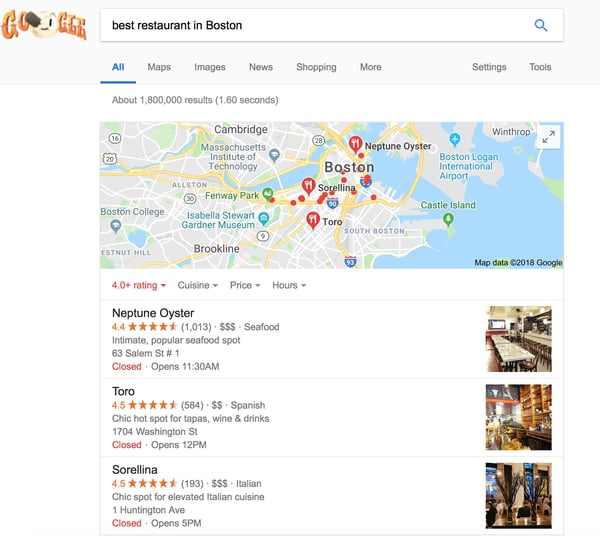
Note that these results contain no links to any content. Instead, they include a list of restaurants in the area, a map to show their locations, and additional information about each:
- Business name
- Description
- Image
- Opening hours
- Star Reviews
- Address
Often, they also include a company’s phone number or website address.
All this information combined helps customers choose which business to engage. But it also allows Google to determine how to rank it.
Local Search Ranking Factors
When analyzing local websites, Google looks at the proximity to a searcher’s location. With the rise of local searches containing the phrase, “near me,” it’s only fair that Google will try to present the closest businesses first.
Keywords are essential for local SEO too. However, one additional element of on-page optimization is the presence of a company’s name, address, and phone number of a page. In local SEO, we refer to it as the NAP.
Again, it makes sense, as the search engine needs a way to assess the company’s location.
Google assesses authority in local search not just by links. Reviews and citations (references of a business’s address or a phone number online) highlight its authority too.
Finally, the information a business includes in Google My Business — the search engine’s platform for managing local business listings — plays a huge part in its rankings.
The above is just the tip of the iceberg. But they are the ones to get right first if you want your business to rank well in local search.
What is Black Hat SEO?
The final aspect of SEO I want to highlight to you is something I also hope you’ll never get tempted to use. I mean it.
Because, although it might have its lure, using black hat SEO typically ends in a penalty from search listings.
Black hat practices aim at manipulating search engine algorithms using strategies against search engine guidelines. The most common black hat techniques include keyword stuffing, cloaking (hiding keywords in code so that users don’t see them, but search engines do,) and buying links.
So, why would someone use black hat SEO? For one, because, often, ranking a site following Google’s guidelines takes time. Long time, in fact.
Black hat strategies let you cut down the complexity of link building, for example. Keyword stuffing allows to rank one page for many keywords, without having to create more content assets.
But as said, getting caught often results in a site being completely wiped out from search listings.
And the reason I mention it here is that I want you to realize that there are no shortcuts in SEO. And be aware of anyone suggesting strategies that might seem too good to be true.
SEO Resources & Training
This guide is just a starting point for discovering SEO. But there’s much more to learn.
Here are online training resources to try next:
You can also pick SEO knowledge from industry experts and their blogs. Here are some worth reading:
- SEMrush
- MOZ
- Yoast
- BrightLocal (local SEO advice)
- Search Engine Journal
- Search Engine Watch
- Search Engine Land
- Bruce Clay Inc.
Over To You
Without actively positioning its content in search results, no business can survive long.
By increasing your search visibility, you can bring more visitors, and in turn, conversions and sales. And that’s well worth the time spent becoming an expert in SEO.

The Ultimate Guide to On-Page SEO in 2019
So, you’ve read dozens — if not hundreds — of SEO articles online. You’ve digested countless tips and tricks for improving your website’s SEO. You’ve even (over)paid that self-proclaimed “expert” to help you develop an SEO strategy that aligns with your business goals.
But after all of the reading and learning and strategizing, it dawns on you: You haven’t actually done anything yet. Perhaps you’re intimidated. Maybe you’re crunched for time.
Regardless, when it comes to on-page SEO, there’s no excuse for dragging your feet. On-page SEO has the power to bring countless new visitors — and customers — right to your website.
On-page SEO is also completely up to you: You get to establish what the topic and/or goal of each page will be. You get to decide on the target audience for that page. And you get to choose the target keywords and phrases you want to focus on.
All you have to do is get started, and we built this guide to help you.
Google’s algorithm ranks your website on three main factors: on-page SEO, off-page SEO, and technical SEO:
- We’ll cover on-page SEO elements below.
- Off-page SEO refers to social sharing, external linking, and more.
- Technical SEO refers to all the SEO elements not included in on-page and off-page practices, such as structured data, site speed, and mobile readiness — the more technical parts of SEO.
Note: This SEO “trilogy” isn’t always divided into three clean sections; some of these SEO elements will overlap. You’ll see how and why throughout this piece.
Why is on-page SEO important?
On-page SEO is important because it tells Google all about your website and how you provide value to visitors and customers. It helps your site be optimized for both human eyes and search engine bots.
Merely creating and publishing your website isn’t enough — you must optimize it for Google and other search engines in order to rank and attract new traffic.
On-page SEO is called “on-page” because the tweaks and changes you make to optimize your website can be seen by visitors on your page (whereas off-page and technical SEO elements aren’t always visible).
Every part of on-page SEO is completely up to you; that’s why it’s critical that you do it correctly. Now, let’s discuss the elements of on-page SEO.
All on-page SEO elements fall into three main categories:
You’ll see these elements divided into sections below.
Content Elements
Content elements refer to the elements within your site copy and content. In this section, we’ll focus mostly on crafting high-quality page content that benefits your visitors and tells Google that your website provides value.
High-quality page content
Page content is the heart of on-page SEO. It tells both search engines and readers what your website and business is all about and how you can help.
The first step to creating high-quality content is choosing relevant keywords and topics. Conduct keyword research by searching Google for terms and seeing what surfaces for competitors and other websites. You can also use tools like Ahrefs, AnswerthePublic, and UberSuggest.
Also, read our Beginner’s Guide on How to Do Keyword Research for SEO.
Next, consider how your page content falls into the buyer’s journey and visitors’ search intent. These will affect how you will use your keywords and what types of content you will create:
| Stage in the Buyer’s Journey | Suggested Content/Website Pages |
| Awareness |
Blog posts, videos |
| Consideration |
Buyer’s guides, case studies |
| Decision |
Product demos, comparison tools |
Now, it’s time to write your page content or clean it up if you’re currently auditing your on-page SEO.
Here are a few best practices for writing high-quality page content:
- Incorporate short and long-tail keywords naturally.
- Add engaging and relevant visual content.
- Write for your specific buyer persona(s).
- Actively solve your audience’s problem.
- Develop content people will share and link to.
- Optimize for conversions with CTAs to offers and product pages.
Page content is your opportunity to communicate value to Google and your site visitors; it’s the heart of the on-page SEO process. All other on-page SEO elements stem from high-quality page content, so invest ample resources to develop and optimize it.
HTML Elements
HTML elements refer to the elements in your source code. Note: To see the source code for any page in your browser, click View > Developer > View Source in the top menu.
Page titles
Your website page titles (also known as title tags) are one of the most important SEO elements.

Titles tell both visitors and search engines what they can find on the corresponding pages.
To ensure your site pages rank for the proper intent, be sure to include the focus keyword for each page in the title. Incorporate your keyword as naturally as possible.
Here are some best practices for when developing a page title:
- Keep it under 70 characters (per Google’s latest update) … any longer and your title will be cut off in search results. Mobile search results show up to 78 characters.
- Don’t stuff the title with keywords. Not only does keyword-stuffing present a spammy and tacky reading experience, but modern search engines are smarter than ever — they’ve been designed to specifically monitor for (and penalize!) content that’s unnaturally stuffed with keywords.
- Make it relevant to the page.
- Don’t use all caps.
- Include your brand in the title, i.e. “The Ultimate Guide to On-Page SEO in 2019 — HubSpot Blog“.
Check out our free data-driven guide to writing effective page titles.
Headers
Headers, also known as body tags, refer to the HTML element <h1>, <h2>, <h3>, and so on.

These tags help organize your content for readers and help search engines distinguish what part of your content is most important and relevant, depending on search intent.
Incorporate important keywords in your
headers, but choose different ones than what’s in your page title. Put your most important keywords in your <h1> and <h2> headers.
Meta descriptions
Meta descriptions are the short page descriptions that appear under the title in search results. Although it’s not an official ranking factor for search engines, it can influence whether or not your page is clicked on — therefore, it’s just as important when doing on-page SEO.

Meta descriptions can also be copied over to social media when your content is shared (by using structured markup, which we talk about below), so it can encourage click-throughs from there, too.
Here’s what makes for a good meta description:
- Keep it under 160 characters, although Google has been known to allow longer meta descriptions — up to 220 characters. (Note: Mobile devices cut off meta descriptions at 120 characters.)
- Include your entire keyword or keyword phrase.
- Use a complete, compelling sentence (or two).
- Avoid alphanumeric characters like —, &, or +.
Image alt-text
Image alt-text is like SEO for your images. It tells Google and other search engines what your images are about … which is important because Google now delivers almost as many image-based results as they do text-based results.
That means consumers may be discovering your site through your images. In order for them to do this, though, you have to add alt-text to your images.
Here’s what to keep in mind when adding image alt-text:
- Make it descriptive and specific.
- Make it contextually relevant to the broader page content.
- Keep it shorter than 125 characters.
- Use keywords sparingly, and don’t keyword stuff.
Structured markup
Structured markup, or structured data, is the process of “marking up” your website source code to make it easier for Google to find and understand different elements of your content.
Structured markup is the key behind those featured snippets, knowledge panels, and other content features you see when you search for something on Google. It’s also how your specific page information shows up so neatly when someone shares your content on social media.
Note: Structured data is considered technical SEO, but I’m including it here because optimizing it creates a better on-page experience for visitors.
Site Architecture Elements
Site architecture elements refer to the elements that make up your website and site pages. How you structure your website can help Google and other search engines easily crawl the pages and page content.
Page URLs
Your page URLs should be simple to digest for both readers and search engines. They are also important when keeping your site hierarchy consistent as you create subpages, blog posts, and other types of internal pages.

For example, in the above URL, “blog” is the sub-domain, “hubspot.com” is the domain, “sales” is the directory for the HubSpot Sales Blog, and “startups” indicates the specific path to that blog post.
Here are a few tips on how to write SEO-friendly URLs:
- Remove the extra, unnecessary words.
- Use only one or two keywords.
- Use HTTPS if possible, as Google now uses that as a positive ranking factor.
Internal linking
Internal linking is the process of hyperlinking to other helpful pages on your website. (See how the words “internal linking” are linked to another HubSpot blog post in the sentence above? That’s an example.)
Internal linking is important for on-page SEO because internal links send readers to other pages on your website, keeping them around longer and thus telling Google your site is valuable and helpful. Also, the longer visitors are on your website, the more time Google has to crawl and index your site pages. This ultimately helps Google absorb more information about your website and potentially rank it higher on the search engine results pages.
Download our free guide to Internal Linking for SEO.
Mobile responsiveness
Did you know over the last year, Google has started favoring sites that are optimized for faster mobile speeds — even for desktop searches? Mobile responsiveness matters.
It’s critical to choose a website hosting service, site design and theme, and content layout that’s readable and navigable on mobile devices. If you’re not sure about your own site’s mobile readiness, use Google’s Mobile-Friendly Test tool.
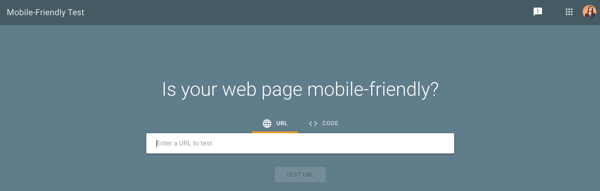
Site speed
Whether being viewed on a mobile device or desktop, your site must be able to load quickly. When it comes to on-page SEO, page speed counts big-time.
Google cares about user experience first and foremost. If your site loads slowly or haphazardly, it’s likely your visitors aren’t going to stick around — and Google knows that. Moreover, site speed can impact conversions and ROI.
Check your website’s speed anytime using Google’s PageSpeed Insights tool. If your website is movin’ slow, check out 5 Easy Ways to Help Reduce Your Website’s Page Loading Speed.
Note: Mobile responsiveness and site speed are considered technical SEO, but I’m including them here because optimizing them creates a better on-page experience for visitors.

Now that you understand the different on-page SEO elements, let’s talk through the steps of auditing and improving your on-page SEO.
One of the more difficult parts of this process is organizing and tracking all of these various on-page SEO elements.
If you’ve been in search of a solution, you’re in luck: The HubSpot marketing team recently released an updated version of our On-Page SEO Template, an Excel document that allows you to coordinate pages and keywords — and track changes — all in one place.
In this section, we’ll be using this template as a guide as we walk you through a checklist for your on-page SEO management, step by step. Download the template now and follow along.
(Note: The fictional website “http://www.quantify.ly” will be used as an example throughout this post. It’s simply meant to help you imagine how your own website will fit into the template.)
1. Crawl Your Website
Get an overview of all of your website pages that search engines have indexed. For HubSpot customers, our Page Performance tool (under Reports) will allow you to do this. If you’re not using HubSpot, you can try using a free tool like Xenu’s link crawler.
After crawling your site and exporting the results into an Excel (or .csv) file, there will be three key columns of data that you should focus on:
- The web address (a.k.a. URL)
- The page title
- The page meta description
Copy and paste these three columns into your template.
The URL should be pasted into column B, the page title into column C, and the description into column E.

2. Conduct an SEO Audit and Define Your Site Architecture
Now that you have a basic index of your site in the template, you’ll want to organize and prioritize your web pages. Start by defining where within your site architecture your existing pages currently sit. Do this in column A.
Note whether a page is your homepage (ideally you’ll only have one of those), a page in your primary (or secondary) navigation menu, an internal page, and so on.
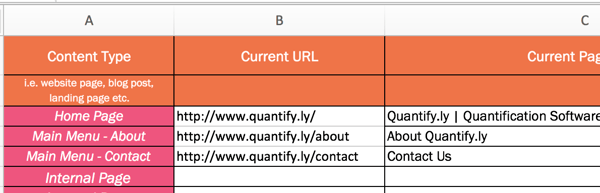
3. Update URLs, Page Titles, and Meta Descriptions
Review your current URLs, page titles, and meta descriptions to see if they need updating. This is the beauty of using a template to organize your SEO: You get a broad overview of the type of content you have on your website.

Notice how column D and column F automatically calculate the length of each element. The recommended length for page titles is anything under 60 characters. (And, actually, a quick and easy optimization project is to update all page titles that are longer than 60 characters.)
The recommended length for page meta descriptions is 155-160 characters. This is the perfect length to ensure none of the description is cut off by the ellipses. Make sure you’re not too repetitive with keywords in this space. Writing a good meta description isn’t tough, but it deserves just as much consideration as the page content itself.
(Note: For some sites, you may also have to update the URLs, but that’s not always the case and thus was not included as part of this optimization template.)
4. Establish Value Propositions for Each Page
A very important next step, which is often overlooked, is establishing a value proposition for each page of your website. Each page should have a goal aside from just ranking for a particular term. You’ll do this in column G.
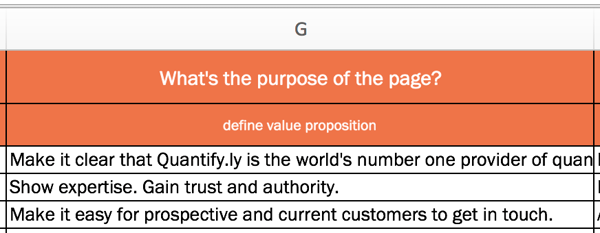
5. Define Your Target Audience
In column H, you have the opportunity to define your page’s target audience. Is it a single buyer persona or multiple personas? Keep this persona in mind as you optimize your site’s pages. (Remember, you are optimizing for humans, too — not just search engine robots.)
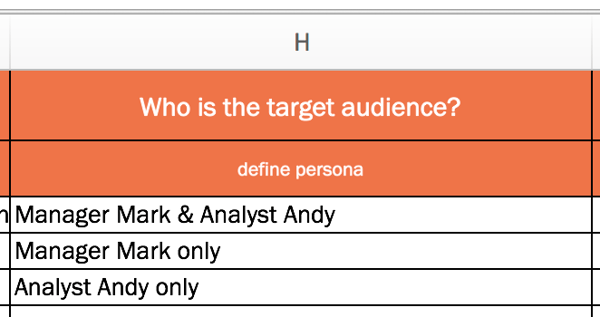
6. Plan New Page Titles
Now that you’ve documented your existing page titles and have established value propositions and target audiences for each of your pages, write new page titles (if necessary) to reflect your findings in column K. People usually follow the formula of “Keyword Phrase | Context.” The goal of the page title is to lay out the purpose of the page without being redundant. Double check each title length in column L.
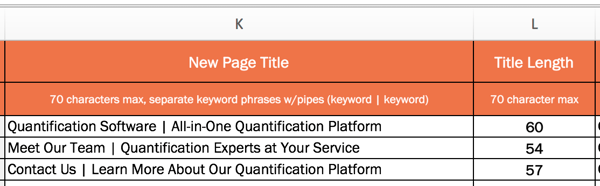
7. Add New Meta Descriptions
If you need to create new meta descriptions, do so in column M. Each meta description should be a short, declarative sentence that incorporates the same keyword as your page’s title. It should not reflect the content verbatim as it appears on the page. Get as close as you can to the 150-character limit to maximize space and tell visitors as much as possible about your page.
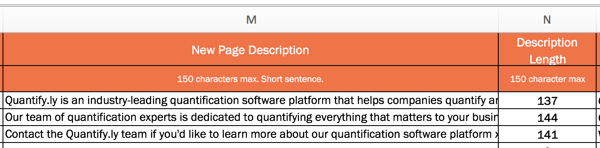
8. Track Keywords and Topics for Each Page
Think of your target keyword as the designated topic for a particular page. In column O, define just one topic per page. This allows you to go more in-depth and provide more detailed information about that topic. This also means that you are only optimizing for one keyword per page, meaning you have a greater chance to rank for that keyword.
There are, of course, a few exceptions to this rule. Your homepage is a classic example. The goal of your homepage is to explain what your entire website is about, and thus you’ll need a few keywords to do that. Another exception is overview pages like services and product pages, which outline what all of your products and services may be.
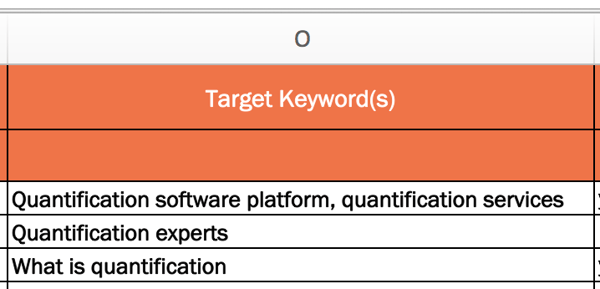
9. Review and Edit Page Content as Needed
Good copy needs to be thorough, clear, and provide solutions … so, be compelling! Write for your target audience and about how you can help them. Compelling content is also error-free, so double check your spelling and grammar.
Aim to have at least 500 words per page, and format content to make it easier to read and digest with the use of headers and subheaders. Columns P through R can be used to keep track of changes that you’ve made to your content or to note where changes need to be implemented.
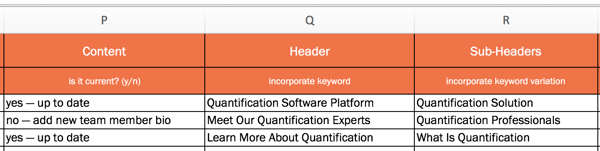
10. Incorporate Visual Content
Content can be more than just text, so consider what kind of visual content you can incorporate into each page (if it adds value and serves a purpose, of course). Columns S and T allow you to note which visual elements need to be added. When adding an image to a page, be sure to include a descriptive file name and image alt-text.
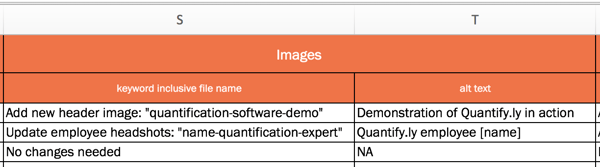
11. Add Internal Links
Incorporating links throughout your pages is a must, but it’s often something that’s easily overlooked. Use columns U through W to plan for these elements if you don’t already have them, or to document how you’ll improve them.

Make sure that your anchor text includes more than just your keywords. The goal isn’t to stuff in as many keywords as possible, but to make it easy for people to navigate your site.
12. Optimize for Conversions
If you’re also not optimizing your site to increase the number of leads, subscribers, and/or customers you’re attracting … you’re doing it wrong.
Columns X through AF allow you to plan for conversions. Remember that each page of your website presents a conversion opportunity. That means every page of your website should include at least one call-to-action (CTA), though many pages may have multiple CTAs.
Be sure that your site has a mix of CTAs for different stages of the flywheel.
(Note: The On-Page SEO Template refers to the stages of the buying funnel — top of the funnel, middle of the funnel, and bottom of the funnel. If you are a HubSpot customer, you can even use Smart Content to display these specific CTAs only to people in a specific part of the funnel.)
Also, as you add, edit, or update CTAs, be sure to note conversion rate changes in columns Z, AC, and AF.
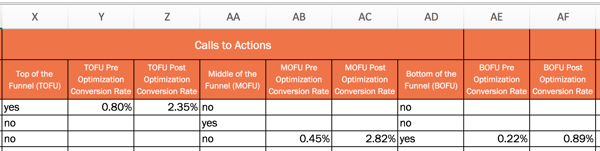
Put Your On-Page SEO to Work
Once you finalize your SEO plans, implement these changes on your website or pass them along to someone to implement for you. This will take time to complete, so aim to work on 5 to 10 pages per week.
Remember: SEO is not a one-and-done deal. It’s something you should continually improve upon. You should treat this On-Page SEO Template as a living, breathing document that will help guide your SEO strategy for months (or years) to come.
Editor’s Note: This post was originally published in October 2012 and has been updated for freshness, accuracy, and comprehensiveness.

How to Perform a SWOT Analysis (Example Included)
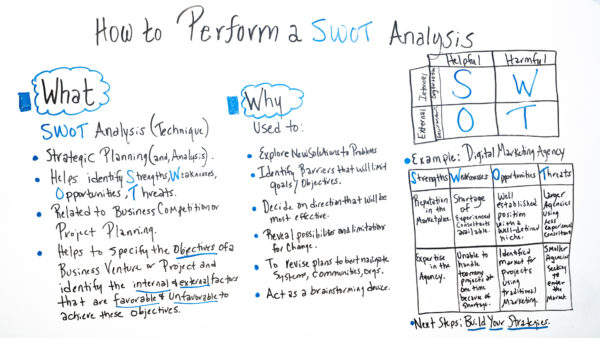
How to Analyze Your Facebook Ad Performance: 9 Ways
Are your Facebook ads working for you? Wondering which metrics you should be tracking? In this article, you’ll discover nine ways to analyze and assess the performance of your Instagram and Facebook ad campaigns. #1: Assess Awareness When you’re running social media ad campaigns, it’s interesting to see how many people are viewing your content. […]
The post How to Analyze Your Facebook Ad Performance: 9 Ways appeared first on Social Media Marketing | Social Media Examiner.
from Social Media Marketing | Social Media Examiner https://ift.tt/2Q6lpcD
via socialmediaexaminer
15 of the Best Social Media Marketing Courses to Take Today
One of my favorite things to do in my free time (besides binge reality shows Love Island and Vanderpump Rules) is to take free marketing courses online. Industries change all the time, especially in marketing, and keeping fresh up on my skills is something I’ve found to be not only vital to excelling at my job, but really fun.
The best thing about online courses is that I usually don’t pay a cent for them, and the ones I do pay for are worth it. Here are some of the best marketing courses you can sign up for right now, and yes, most of them are completely free and industry-recognized.
Best Social Media Marketing Courses
1. Fundamentals of Digital Marketing
Price: Free
Platform: Google Digital Garage
Why it’s great: SEO, Digital Certificate
Google’s social media certification has over 300,000 students and provides courses in social media, mobile marketing, SEO, and web optimization. The courses will go into depth about paid and organic search, and how to develop the most optimized web pages, so users can find content easier.
Learning how to optimize pages for search on a popular search engine (for free) sounds like a win-win. At the completion of the course, you’ll receive a digital certificate you can add to your LinkedIn profile and resume.
2. PPC 101
Price: Free
Platform: Wordstream
Why it’s great: Course in ads and social media skills
Wordstream has a great thing going here: their PPC 101 course is completely free and offers modules set up to teach its students about digital advertising. The course defines PPC, keywords, ad groups, text ads, conversion rate optimization, and provides a walkthrough of Google AdWords.
This course also has a marketing section, which will show you how to integrate social media and digital ads. Wordstream offers advertising software that has access to thousands of accounts spending billions on PPC ads. The course came about because Wordstream found that SMBs struggle particularly with managing social media ads cost-effectively.
3. Social Media Training for Beginners
Price: Free
Platform: Constant Contact
Why it’s great: Beginner training in social media
Constant Contact’s video-based social media training is designed for beginners. At the end of each lesson, the site gives you 10 relevant blog post resources to refer back to.
As an email marketing software, Constant Contact’s course focuses on how to integrate email with social media marketing. It also covers Instagram, Pinterest, Twitter, YouTube, and LinkedIn.
4. Social Media Certification
Price: Free
Platform: HubSpot Academy
Why it’s great: Inbound marketing course
HubSpot’s Social Media Certification course is a robust program designed to help you attract customers and partners, and build brand loyalty. Because social media is the key to inbound marketing, this course ties in the two concepts seamlessly.
I took it my senior year of college and found the course — which is less than five hours long — to be flexible with a busy schedule. It covers essential topics such as measuring ROI, extending reach, and social media content creation, as well as social listening.
5. Diploma in E-Business
Price: Free
Platform: Alison
Why it’s great: Google-approved SEO course
Alison is a site that provides numerous free courses, like the Diploma in E-Business one linked above. It will take under 10 hours to complete and focuses on building a strong e-commerce strategy, plus how to optimize that content on Google.
A LinkedIn-compatible certificate is included at completion, and the course has nearly 80,000 students. You’ll learn how to make an online marketing plan, integrate keywords into social media, and get training in Google’s Ad technology.
6. Social Media Marketing Course
Price: Free
Platform: Hootsuite Academy
Why it’s great: Beginner-level social media training
Hootsuite’s social media marketing training is led by its senior marketing managers and directors. The site itself offers social media scheduling software with clientele such as Pfizer and P&G. In this course, you’ll be taken through modules showing you how to develop a full social media strategy.
Hootsuite will also dive into growing an online community and developing content to engage audiences. Plus, this course is only six hours and self-paced — meaning you can fit it into your busy schedule.
7. Social Media in a Noisy Online World
Price: Two months free
Platform: Skillshare
Why it’s great: Build your own courseload from industry experts
Skillshare is a unique platform. It’s a site completely dedicated to experts providing classes on over 15,000 courses, from knitting to creating a perfect viral video. On Skillshare, you can pick classes that suit your interests and save classes to refer to later.
I particularly enjoyed Buffer’s Introduction into Social Strategy. These courses went into depth about how to make impactful content and organizing it for clients or personal use.
I enjoy Skillshare because of the specificity of the classes offered. There are numerous social media and digital marketing classes, as well as graphic design and email marketing classes. Having a 60-day trial takes the pressure off cramming as much knowledge as possible in one go, and you can cancel your membership at any time.
8. Understanding the Basics of Digital Advertising
Price: Free
Platform: HubSpot Academy
Why it’s great: Quick lesson on digital ads
HubSpot offers single lessons as well as full certification courses. This digital advertising lesson shows you how to fit digital ads into inbound strategy, and how those ads can be stunning on social media.
If you have 30 minutes of free time in your day, you can start and complete this course. Taught by one of HubSpot’s very own product marketers, it uses five different videos to give you an overview of how to use ads effectively and efficiently.
9. Digital Marketing Courses
Price: Free
Platform: GenM
Why it’s great: Build industry relationships
GenM’s classes are designed to be more like a college course. They are completely online and are a three-month, 10-hour-a-week program — ideal if you have a little more time on your hands.
GenM matches you to a verified business owner based on industry and skill level, and you receive one-on-one mentorship. This is a great opportunity to build industry relationships while learning about social media practices in the real world.
10. Social Media Marketing
Price: $19.99
Platform: Udemy
Why it’s great: Lifetime access to course
Udemy’s social media course goes from beginner to advanced in skill level. While the website has a few different courses, this one focuses on social media foundations. It will walk you through understanding the basics of social media platforms, blogging, strategy building, and using unique features of Twitter, Facebook, and Instagram to your advantage.
Currently, over 29,000 students are enrolled in the course which is rated 4.2 stars. Udemy constantly updates their content, so you don’t have to worry about whether the information you’re learning is outdated. Plus, once you purchase the course, there’s no expiration date.
11. Social Media 101 Training
Price: $97
Platform: Boot Camp Digital
Why it’s great: Industry-preferred training, bonus free course
Digital Marketing 101 by Boot Camp Digital is an impactful, video-led training that takes you on a deep dive into the basics of digital marketing and using it for social media. This is a beginner-level training and can be completed in six hours.
Boot Camp’s clientele includes Nike, NASA, GE, and Georgia-Pacific, and the platform gives buyers unlimited access once purchased. It provides a digital marketing template, ROI information, benchmarking, and a bonus free digital tools course.
12. Digital Marketing Specialization
Price: $49
Platform: University of Illinois
Why it’s great: MBA course with industry professionals
University of Illinois’s Social Media Certification is a beginner-level course that is also a part of their MBA degree. Completion of the course earns you an online certification and robust knowledge of digital marketing analytics, principles, and strategies.
In true college fashion, the course ends with a capstone project with university partner Grainger. You’ll be one of the over 40,000 students already enrolled and receive lectures from professors such as the head of Google Analytics.
13. Fundamentals of Digital Marketing
Price: $585
Platform: Wharton School of the University of Pennsylvania
Why it’s great: Marketing course designed for professionals
Wharton’s course is considered an intermediate dive into the intersection of social media and eCommerce. It’s a self-paced, six-week class that demands three hours of your time each week. This course will provide you with an understanding of eCommerce and the digital economy.
This course is structured specifically for marketing professionals, small business owners, and consumers who want to know social media techniques. You’ll learn how to produce marketing campaigns that are effective for your business.
14. The Strategy of Content Marketing
Price: $49
Platform: University of California, Davis
Why it’s great: Content marketing specific
A course entirely based around content marketing sounds like a joy to me. In this online class offered by University of California, Davis, you and 36,000 other students will learn about creating a content marketing strategy, and the ecosystem surrounding it. You’ll also spend ample time working on strategic writing and framework.
And, you’ll learn about the different types of content marketing and how they’re an integral component of social media marketing. If you’re like me, and this sounds write up your alley, consider checking out this course.
15. Social Media Marketing Masterclass
Price: $19.99
Platform: Udemy
Why it’s great: Social Media Masterclass
Rather than a complete level one course in social media, this offering, by Udemy is a Masterclass on the subject, uniquely centered around ethical digital marketing techniques. With 18,000 students, you’ll learn how to set up a powerful marketing strategy and a schedule that aligns with accomplishing business goals.
You’ll also dive into how social media marketing integrates with your business, email marketing, and building an online community. This course can be completed in 20 hours, and gives you a certificate of completion at its end.
If you find that you can brush up on your social media marketing skills, this is an excellent place to start. Most classes are flexible to your schedule and don’t require textbooks. Plus, I’ve found that courses like HubSpot‘s keep things engaging with diverse content and relatable language, so it’s all about finding the one that’s right for you.
