
Welcome to My Blog
How to Create and Use Twitter Cards to Maximize Your Social Media Traffic
If you’ve ever opened Twitter and watched a commercial, laughed at a YouTube video, or read an article, you’ve already interacted with Twitter Cards. Cards are a handy and essential function of using Twitter for business and driving traffic to your website.
It’s spooky season, witches.
🖤 this tweet to get a reminder to watch #31NightsOfHalloween on Tuesday, October 1 on @FreeformTV. pic.twitter.com/iDdlyWaDUE
31 Nights (@31Nights)
September 18, 2019
In the example above, ABC Freeform, uses a Player Card to get their audience into the Halloween spirit.
Twitter Cards are easy to implement and can revitalize a social strategy with an app almost half its users open every day (that’s roughly 150 million people). Learn how to use them to your benefit, below.
Twitter Cards are media-enriched tweets that stand out to Twitter users, encourage engagement, and ultimately drive traffic back to your landing pages. There are four different types of Cards: Summary, Summary Card With Large Image, App, and Player.
Go into peak hiring season with the tips you need to stand out and find the #job meant for you: https://t.co/EC0OlEJ8ek #InItTogether
LinkedIn (@LinkedIn)
September 23, 2019
The different types of Cards note the structure of the tweet. A Summary Card, for example, will include a small photo, a title, and brief summary of the content it’s teasing. Summary Card with Large Image has the same setup, just with a larger image.
App Cards pull the featured image and link of your app from the Play Store or App Store for the tweet. Player Card tweets will automatically play video and link to your website at the bottom of the tweet.
To the Tailgate Titans. The Champions of Cheering. The Halftime Heroes. Welcome back. #ShareaCoke
Coca-Cola (@CocaCola)
September 4, 2019
Cards are extremely versatile, like Twitter itself. There are a plethora of ways to use them to optimize your content. If you’re rolling out a new podcast or product update, Cards are a best friend for promoting them on Twitter.
How to Use Twitter Cards
The different types of Cards make it easy to decide how you want to use and promote them. Each Card type has specific requirements that optimize the content you intend to post. For instance, if you wanted to promote a video using Cards, Player Cards are specifically set up for the video to run at its most pristine level.
Summary Cards, for example, are a great way to highlight new blog posts or share articles, introduce a new sale on your products, and promote testimonials on your website.
TC’s Greg Epstein and Kate Clark talk mental health startups and the ‘Cult of the Founder’ https://t.co/b8N7udLLxX
TechCrunch (@TechCrunch)
September 27, 2019
This Summary Card by TechCrunch is promoting a recent blog article, using all of the attributions of a Summary Card: thumbnail image, description, and title. And the most important part: a link to TechCrunch’s website, ready to increase that lovely website traffic.
Summary With Large Image Cards are for content with a strong visual element.
On Oct. 4th, @PioneerWorks_, in Brooklyn, opens “You’re at Home,” an exhibition of digital projections, performances, sculptures, and music by Jacolby Satterwhite. https://t.co/PuIYEYWzHI
The New Yorker (@NewYorker)
September 27, 2019
These Cards use compelling photos to make a statement on audience timelines. Think of a colorful statistic or that new infographic you want to promote. Here, The New Yorker used their Card to display a large photo of the artist they’re highlighting.
Releasing a new app? There’s a Twitter Card for that too. Let’s see how Google uses the aptly named “App Card” to their advantage:
Buckle up, there’s more ahead. Pre-register for #MarioKartTour on the Play Store: https://t.co/EcKpztcMrT
Google Play (@GooglePlay)
September 5, 2019
Think of the traffic you can generate from a potential audience of 330 million. App Cards grab their information directly from the App Store or Google Play, so make sure the app you’re promoting is public before creating the Card.
Player Cards automatically play videos on a loop on timelines and feeds, so users don’t even have to leave the app to interact with rich multimedia, and your content gets views. Player Cards give your brand image a boost of promotion to a vast audience.
2.4 million jobs requiring #STEM education skills are predicted to go unfilled. Verizon Innovative Learning and @Pharrell have teamed up to bring technology, education and opportunity to schools to help make sure today’s students are ready to fill those jobs tomorrow.
Verizon (@verizon)
September 26, 2019
Verizon used this Player Card — and a partnership with Pharrell — to show their Twitter following how they’re introducing STEM job opportunities in schools. In 30 seconds, Verizon gets their message across in the video, using a celebrity endorsement to grab attention.
First, tell Twitter what type of Card you’re using with meta tag markup to the <head> section of your webpage. The one below is for Summary Cards:
meta name=”twitter:card” content=”summary”/meta
You can only have one Card per page.
To test your tags, test run the URL through Twitter’s validator tool. Note that if you’re using a Player Card, after this step, you’ll need to request approval for whitelisting. To complete this, a “Request Approval” button will appear on the validator tool.
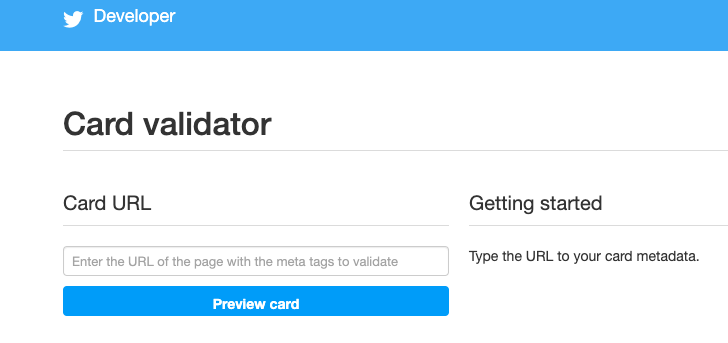 Image Source: Twitter Developer
Once you’ve tested in the validator or had your Player Card approved, tweet the URL and you’ll see the Card appear below your Tweet.
Twitter Card Meta Tags
Meta tags appear in a web page’s source code; they are little snippets of text used to describe what’s on a webpage. These meta tags are used to tell search engines what’s on the Cards, which can optimize website traffic for you. Adding the correct tags is important for SEO. These meta tags are used to describe the card type and username of the website. The third is for the Twitter User’s ID and can be interchanged with the second:
twitter:card, twitter:site, twitter:site:id
From there, meta tags are a sort of “mix-and-match” deal depending on what you’re using them for. For instance, if you were to implement a Summary Card With Large Image, your code would look like this:
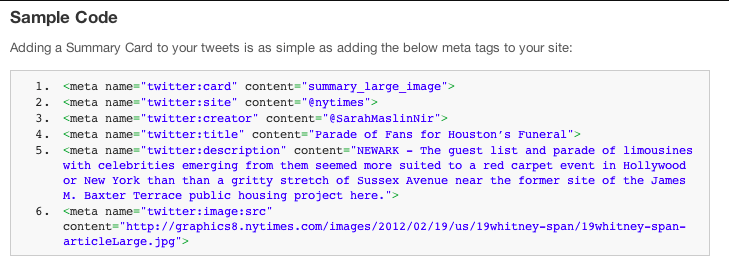
Image Source: Buffer
In this image:
- twitter:creator was used for the @username of the content creator
- twitter:title was used for the title of the content (which has a max of 70 characters)
- twitter:description has a max of 200 characters and describes the content
- content= needs to be in front of the description, and twitter:image is used to tell Twitter the URL of the image
Supported formats are JPG, PNG, WEBP, and GIF. Only the first frame of the GIF will be imported.
With all this talk of maximum optimization, you’re probably wondering what types of photos are best for Twitter Cards. Do they have a specification? I’m glad you asked.
Twitter Card Image Size: For Summary Cards, the image has to be at least 120 x 120 pixels, but cannot exceed 1MB. This is the same for a Summary Card With Large Image, but the smallest photo size is 280 x 150 pixels. App Cards require images to be 800 x 320 pixels, and Player Cards must have level 3.0, dimensions in 640 x 480 pixels, and 30 frames per second.
Social media channels are a reflection of brands. To some of 330 million users on Twitter, your tweets may be the first interaction they have with your company, so a properly optimized image is key to putting your brand’s best foot forward.
Because these dimensions are slightly different for each type of Card, think about the type of content you’re promoting and which Card will be best for that. If your blog post about eCommerce won’t have the best featured image but has a rich description, go with a Summary Card instead of a Summary Card With Large Image.
Twitter will let you preview your Card before you post it in the validator tool, so you can adjust your image to your desired effect. You can also preview Player content in the tool to make sure it runs smoothly, so be sure to check multimedia content before you post.
Twitter Card Examples
1. Summary Twitter Card example
If you scroll down your timeline for about five seconds, you’ll run into a Promoted Twitter Card, which are very handy if you’re looking for fresh ways to use your Twitter Cards. For instance, let’s look at Merriam-Webster (an account worthy of your follow — and yes, they are the “Dictionary People”).
Folks, this was your (quite crowded) week in words.https://t.co/N0oSLlAwPe
Merriam-Webster (@MerriamWebster)
September 27, 2019
This is beautiful use of a Summary Card. The title is less than 70 characters, the description is enticing, and the image is larger than 120 x 120. This Summary Card jumps out at you on a timeline and makes you want to read a recap of popular words used in the past seven days.
2. Summary Cards with Large Image example
In honor of #NationalCoffeeDay, WalletHub compared the 100 most populated American cities in terms of coffee-lover friendliness. https://t.co/3D5lVvfAex
HuffPost (@HuffPost)
September 29, 2019
The Huffington Post used their Summary Card to give potential readers the featured image of their blog post for National Coffee Day. Because the image is high quality, it pulls audience members in, especially those with a thing for latte art, like myself.
3. App Card example
Did you know World Wrestling Entertainment (WWE) knows their way around an App Card?
.@WWE Champion @TrueKofi selects 5 matches to start with – @Apple @AppStore https://t.co/mI7njYyQcu
WWE Public Relations (@WWEPR)
September 25, 2019
To promote their app, WWE used this amazing App Card to highlight champion Kofi’s five must-watch matches, curated by Kofi himself. The stunning graphic is an amazing image to use on Twitter because it stands out on timelines, especially on timelines with darker modes turned on.
4. Player Card example
Cartier is embracing the Player Card with this commercial promoting their new digital series.
#LOdysséedeCartier, the new digital series : dive into the heart of the Maison’s influences and the founders of the Cartier style. Discover more.
Cartier (@Cartier)
September 24, 2019
In the fast paced commercial, the team at Cartier uses video clips old and new, but all are optimized with a clear video format. Even the black and white snippets hold up very well.
Twitter Cards jump out at your audience and, lucky for us, they’re easy to use.. Take 15 minutes out of your busy day, and find your next content marketing obsession.

How to Choose a Blog Name That’ll Grow With Your Brand
Clothes, food, habits — outgrowing things is a natural part of life. That’s true for brands as well. When brands decide they’ve outgrown their current way of doing things, this might call for a rebrand.
Outgrowing a brand, or at least a brand name, is common. Marketing platform Mailchimp used their rebranding to help the company transition to a more “grownup” brand that would allow them to serve more small businesses. Many blogs I read, like “Liv’s Healthy Life,” (Now known as just “Liv B,”) quickly rebrand when they realize their old blog name just doesn’t make sense anymore.
While rebranding a business can be a smart and necessary step to growing a long-lasting business, renaming your blog or business doesn’t have to be. To combat outgrowing a blog name too quickly, let’s go over some strategies to use when naming a blog.
How to Choose a Blog Name
1. Identify your niche
What are you doing? What will your blog be about? Will it be an extension of your business or its own project? Identifying what your blog will be about is key to defining a name that’ll expand with you.
The blog name will represent your unique point of view in your industry or niche. It should vibe with the aesthetic of your blog and define the mood you want to give your readers when they visit your blog’s homepage. It should also be descriptive of the type of content you’ll publish.
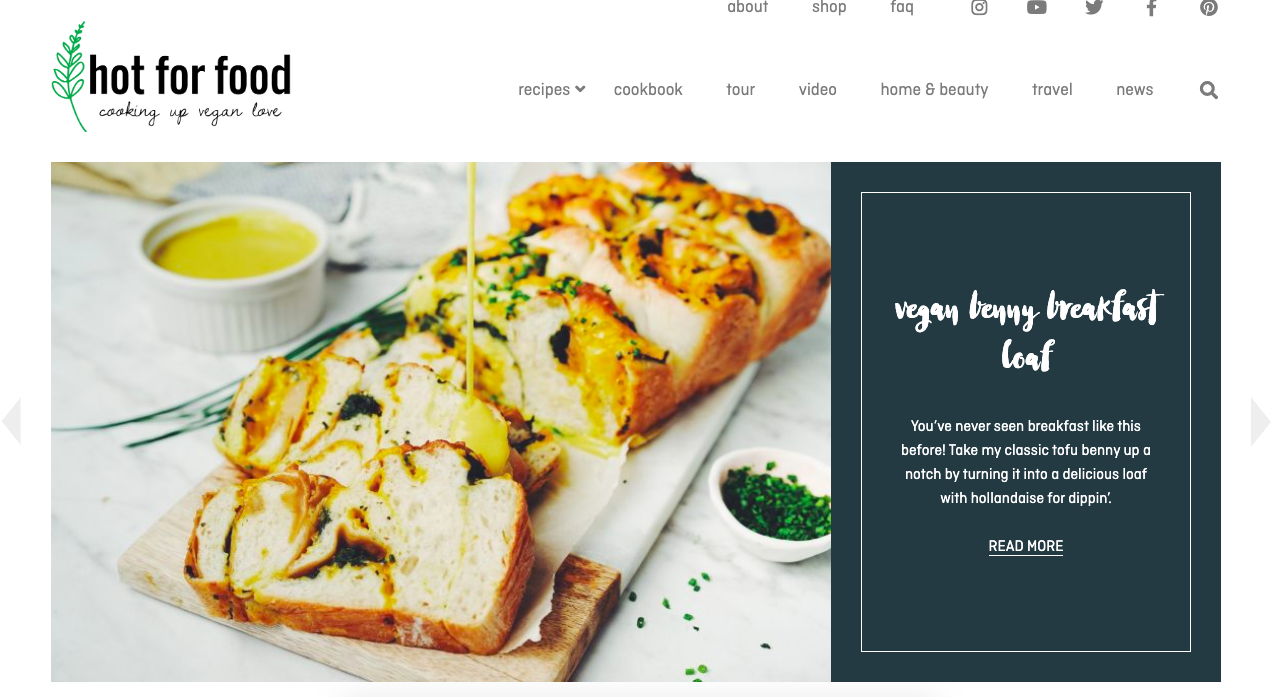
Image source: Hot for Food
I love the blog name “Hot for Food” so much. The blog is a companion to creator Lauren Toyota’s YouTube channel of the same name. It’s a great example of a name that goes well with its cooking niche.
The name is also broad enough that Toyota can grow her brand outward. If she wanted to release a cookware line down the road, “Hot for Food” would still make sense, and have about a million available puns at the ready. How fun would a saucepan labeled “Hot with Sauce” be?
2. Do your research
Look at what prominent blogs in your industry are doing. Take note of what you like and don’t like, and use their blogs as a springboard for what readers in your industry like to see. Look for how these blogs are branding, the names of their blogs, and the responses their content receives.
For example, if you’re starting a blog about technology, look at TechCrunch, a massive blog about startups and technology. Their name is short, memorable, and professes their content strategy all in one: to dissect and disseminate the latest tech news for their readers.
It’s also a good idea to think about how your blog will stand out from others. This is also a good time to find out if any of the blog names you were thinking of are already being used.
Start with a simple Google search and then get a bit more technical by checking LLCs in your state. Once you’ve found a name that’s free, make sure that the domain is also available, and consider registering your chosen name to protect it. That way, you can refine how you want your brand to be perceived, and how you want it to grow within the market you choose.
3. Think about your message
What do you want to communicate? Consider your message now and in the future. When looking over your five-year plan, does your message expand as your company does, and will your blog name still reflect that?
For example, to say media giant Buzzfeed has grown exponentially over the past decade would be an understatement. Buzzfeed’s YouTube channels alone each have billions of views and millions of subscribers. As the company has grown, it diversified and expanded its YouTube content.
Buzzfeed YouTube channels were originally named after colors, for example, Buzzfeed Blue, Buzzfeed Ultraviolet, and Buzzfeed Yellow. Recently, those names have been stripped.
Buzzfeed rebranded their content to grow with their company. Yellow rebranded into Boldly, and later, when Boldly outgrew their name, rebranded into As/Is.
According to founder Jonah Peretti, the rebrand of channel names was to reflect “design and product features that reinforce their unique identities and better serve their many fans.”
Blogs with Growth in Mind
1. LADbible
LADbible, an entertainment company, originally had a blog of the same name. Over time, their messages expanded and required different funnels for them. LADbible now has multiple blogs in tandem with the original: SPORTbible and Pretty52.
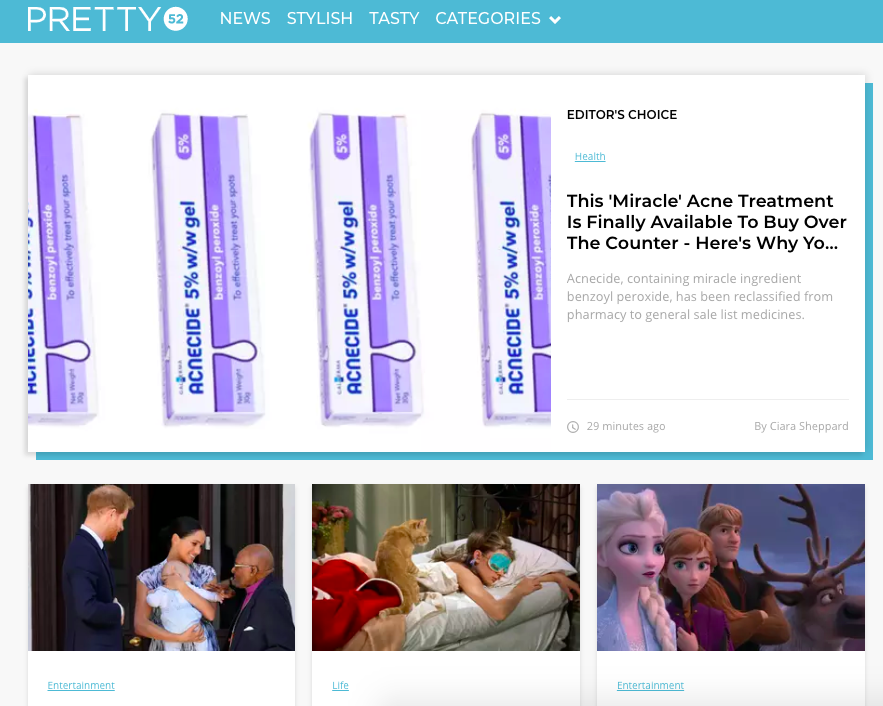
Image source: Pretty52
2. Contently
Similarly, Contently’s blog has a named separate from the company: The Content Strategist. This name suggests that the blog is named after their target audience, a clever way reach the readers they serve.
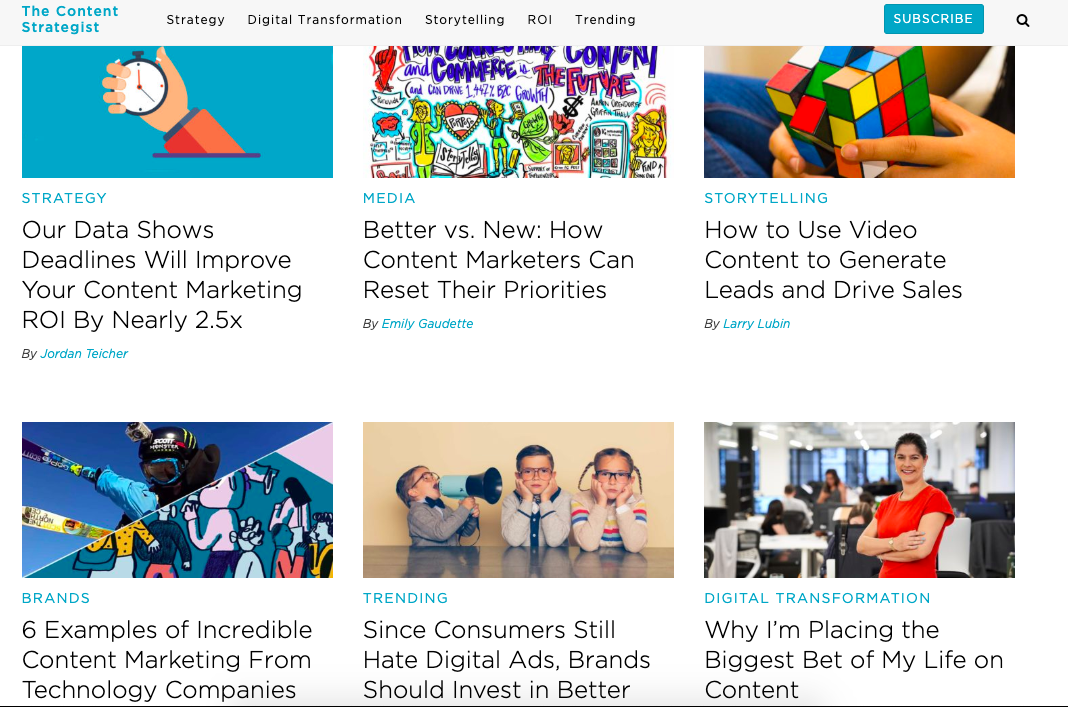
Image source: The Content Strategist
3. Whole Foods
Rather than name their blog “Whole Foods Blog,” the organic food company went with Whole Story. The name connects to its company but also has its own option for diverse content, telling stories of where their products come from and the customers it satisfies. Whole Foods also kept the keyword in the title, so SEO would be a breeze.
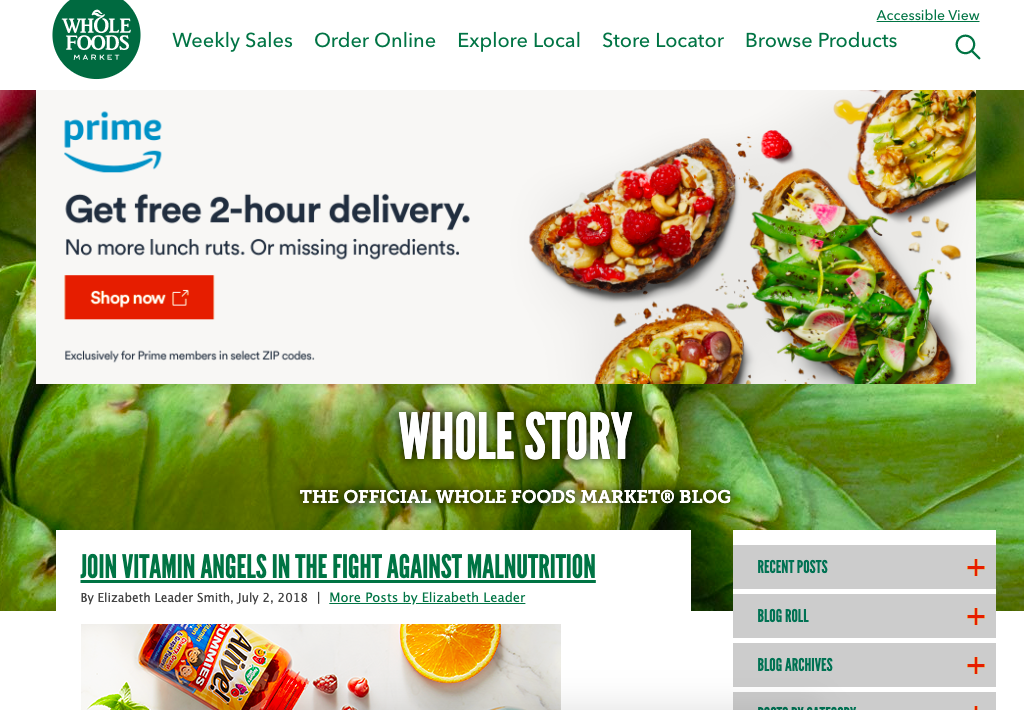
Image source: Whole Story
4. Target
‘A Bullseye View’ is Target’s all-encompassing blog name. Twisting in the logo was Target’s route, which reflects their branding. With a name like that, the opportunities are endless as to what Target can put on their blog as it grows, something the company keeps in mind with categories such as “Lifestyle,” “Team,” and “Company.”
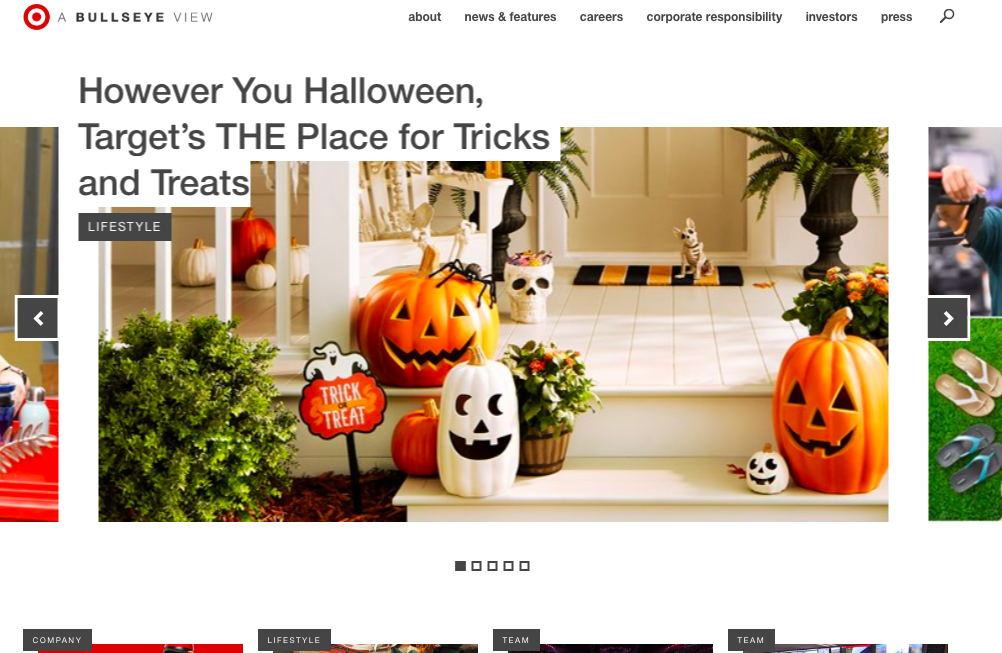
Image source: A Bullseye View
5. Pottery Barn
Pottery Barn wants you to know their company, ‘Inside and Out’ with this fun, immersive blog name. The name gives interior decorating buffs a nod, hinting that content will provide deeper information about the people behind the design, as well as the homes Pottery Barn caters to.
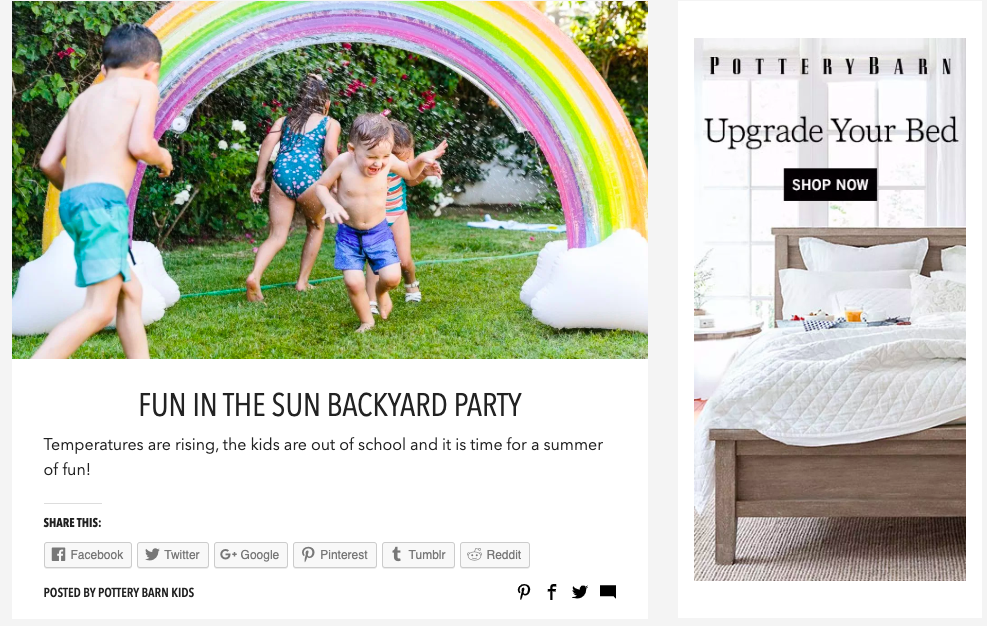
Image source: Inside and Out
When choosing a blog name that’s concurrent with the growth of your brand, think about how to be memorable. What’ll stick out to readers and search engines. And make sure the name will resonate with your target audience not only now, but five years from now.

How to Run Facebook Ads: A Step-by-Step Guide to Advertising on Facebook
When setting up a paid Facebook ad, there are a lot of boxes to be checked.
Are you targeting the right people? Are your image dimensions to scale? Are you running the right type of ad? If we’re being honest, it can get a little confusing.
With more than 2.3 billion people using Facebook every month, and nearly 1.6 billion users every day, Facebook offers up a unique opportunity for marketers to augment their organic efforts. The trouble is, with both an investment of time and money on the line, there’s not much room for oversight.
To help, we’ve put together a checklist to help you keep all of your campaign details straight. Or watch this short video on how to increase the effectiveness of your ads and budget. These will help ensure that you’re tapping into the right audience with the right ad at the right time.
How to Run Facebook Ads
Facebook offers a variety of paid ad options and placements, but all ads can be broken down into three elements:
- Campaigns. The campaign houses all of your assets.
- Ad sets. If you’re targeting separate audiences with different characteristics, you’ll need an individual ad set for each.
- Ads. Your actual ads live within your ad sets. Each ad set can hold a variety of ads that vary in color, copy, images, etc.
With that terminology out of the way, let’s dive in to creating an ad.
Start creating an ad through Facebook’s Ads Manager.
You can create a paid ad on Facebook using Facebook’s Ads Manager.
Once you log into this page, you’ll see a performance dashboard where all of your campaigns, ad sets, and ads will be listed including the results they’ve driven for your Facebook page. Unless you’ve already created an ad for your Facebook page, this dashboard will be empty.
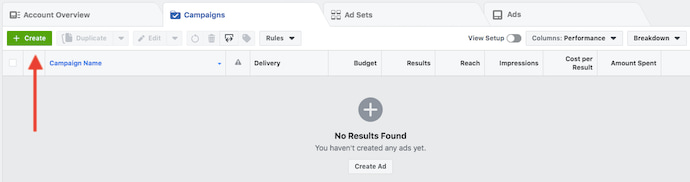
To create a new campaign, ad set, or ad through the Facebook Ad Manager, tab over to the type of ad you want to create and click the green “Create” button to far left of these ad types, as shown below. You can see from this screenshot that we’re currently set to create a new campaign.
Choose an objective.
Facebook’s Ads Manager, like many social media advertising networks, is designed with your campaign objective in mind. Before getting started, Ads Manager will prompt you to choose an objective for your campaign:
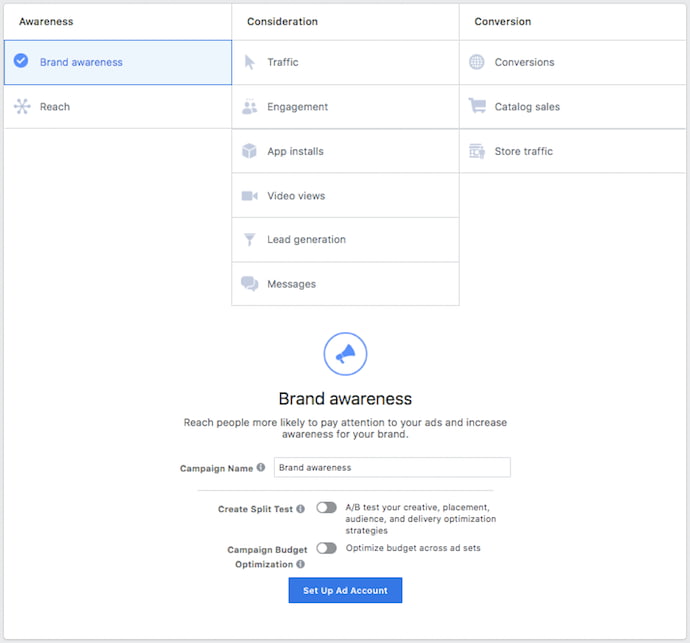
There are 11 different objectives to choose from. The list includes everything from general brand awareness, to getting installs of your app, to increasing traffic to your online store.
By choosing one of these objectives, you’re giving Facebook a better idea of what you’d like to do so they can present you with the best-suited ad options. As shown in the screenshot above, Facebook’s ad options include:
- Brand awareness
- Reach
- Website traffic
- Engagement
- App installs
- Video views
- Lead generation
- Messages
- Conversions
- Catalog sales
- Store traffic
Let’s say, for sake of this blog post, you’re looking to drive more traffic to your website. When you select this option, Facebook will prompt you to enter the URL you’re looking to promote. If you’re using marketing automation software, be sure to create a unique tracking URL with UTM parameters for this to ensure that you’ll be able to keep track of traffic and conversions from this ad. For HubSpot customers, this can be done using the Tracking URL Builder.
Once selected, Facebook will then display the ad option that makes the most sense in terms of achieving this objective.
Choose your audience.
Your next step is to configure your target audience — you can do this for each ad set that belongs to the same campaign. If you’re just starting out with paid advertising on Facebook, it’s likely that you’ll have to experiment with several different targeting options until you reach an audience that fits just right.
To help you narrow your focus, Facebook’s targeting criteria are accompanied by an audience definition gauge. This tool — located to the right of the audience targeting fields — takes all of your selected properties into consideration in order to come up with a potential reach number.
If you’re wavering between choosing a specific audience over a broad one, consider your objective. If you’re looking to drive traffic, you’ll probably want to focus on the type of people you know will be interested in your offering. However, if you’re looking to build brand awareness or promote a widely appealing offer, feel free to focus on a more general audience.
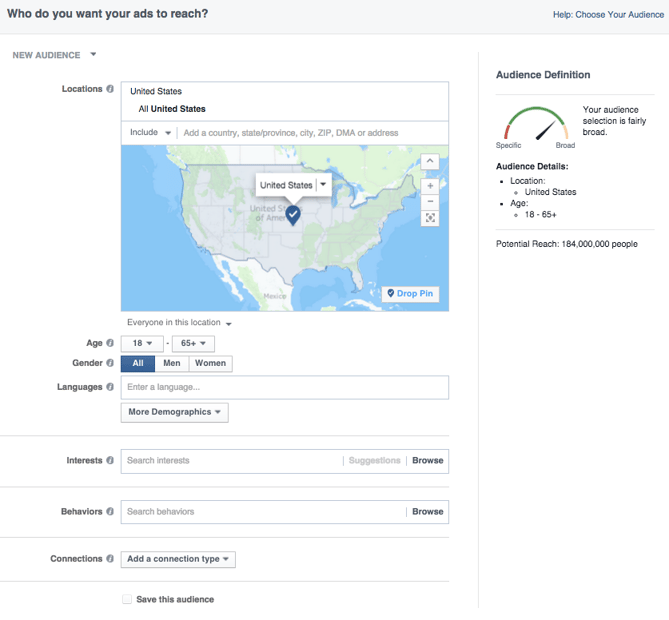
Facebook’s built-in targeting is vast, including options such as:
- Location
- Age
- Gender
- Languages
- Relationship
- Education
- Work
- Financial
- Home
- Ethnic Affinity
- Generation
- Parents
- Politics (U.S. only)
- Life Events
- Interests
- Behaviors
- Connections
You also have the option to select a Custom Audience — this allows you to target people on Facebook who are in your company’s contact database, visited a page on your website that has a tracking pixel, or use your app or game. To learn more about how to set up a Custom Audience on Facebook, check out these instructions. (And for more on the specifics of these criteria, visit this Facebook targeting resource.)
Once you find a group that responds well to your ads, Facebook allows you to save these audiences to be used again later — so you may not need to dive into this step once you’ve been running Facebook ads for a while.
Set your budget.
Facebook allows you to set either a daily budget or a lifetime budget. Here’s how they differ from each other:
- Daily budget. If you want your ad set to run continuously throughout the day, this is the option you’ll want to go for. Using a daily budget means that Facebook will pace your spending per day. Keep in mind that the minimum daily budget for an ad set is $1.00 USD and must be at least 2X your CPC.
- Lifetime budget. If you’re looking to run your ad for a specified length of time, select lifetime budget. This means Facebook will pace your spend over the time period you set for the ad to run.
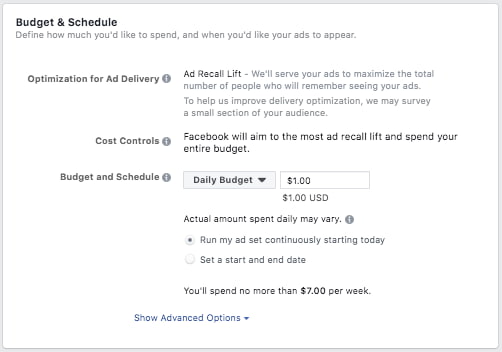
To further specify your budgeting, turn to the advanced options — this option is linked at the bottom of the screenshot shown above. This section allows you to specify a few things:
Schedule
Choose whether or not your want your campaign to run immediately and continuously or if you want to customize the start and end dates. You can also set parameters so that your ads only run during specific hours and days of the week.
Optimization & Pricing
Choose whether or not you want to bid for your objective, clicks, or impressions. (This will alter how your ad is displayed and paid for.) By doing so, you’ll pay for your ad to be shown to people within your target audience that are more likely to complete your desired action, but Facebook will control what your maximum bid is.
If you don’t want Facebook to set optimal bids for you, you’ll want to opt for manual bidding. This option awards you full control over how much you’re willing to pay per action completed. However, Facebook will provide a suggested bid based on other advertisers’ behavior to give you a sense of what you should shoot for.
Delivery
Delivery type falls under two categories: standard and accelerated. Standard delivery will show your ads throughout the day, while accelerated delivery helps you reach an audience quickly for time-sensitive ads (Note: this option requires manual bid pricing).
Create your ad.
What do you want your ad to look like? It all depends on your original objective.
If you’re looking to increase the number of clicks to your website, Facebook’s Ad Manager will suggest the Clicks to Website ad options. Makes sense, right?
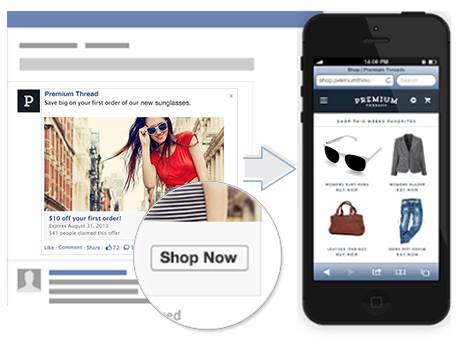
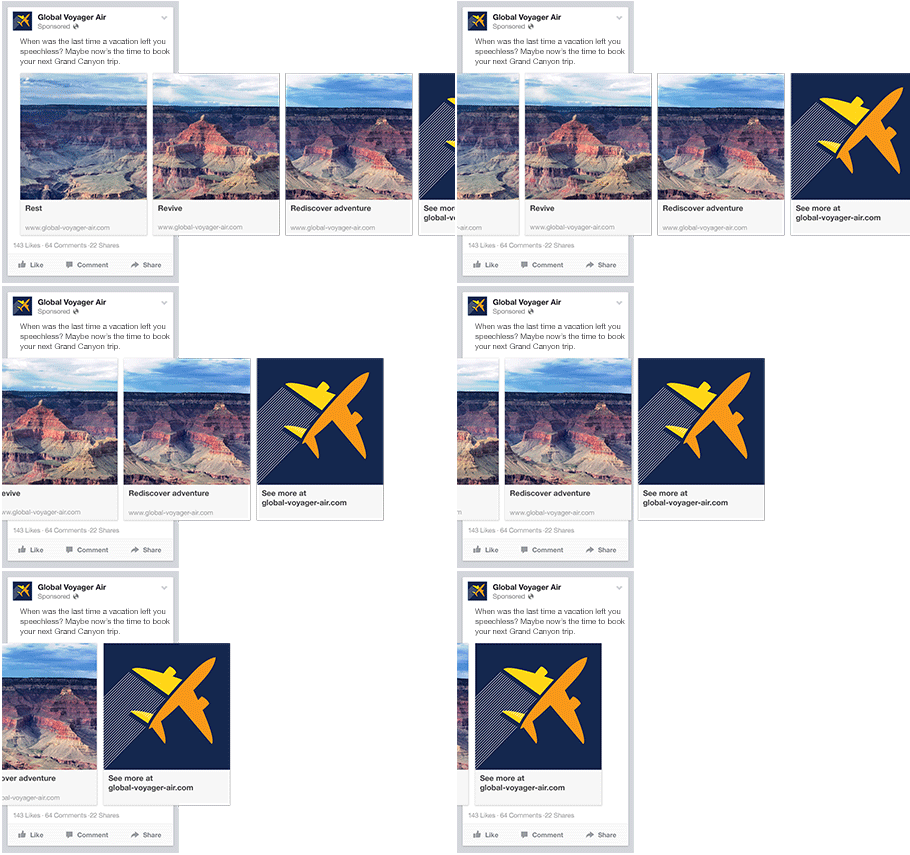
This ad option is broken down into two formats: Links and Carousels. Essentially, this means that you can either display a single image ad (Links) or a multi-image ad (Carousel) with three to five scrolling images at no additional cost.
A Links ad will be displayed like this:
A Carousel ad will be displayed like this:
Once you decide between the two, you’ll need to upload your creative assets. It’s important to note that for each type of ad, Facebook requires users to adhere to certain design criteria.
For single image ads, Facebook asks that users adhere to the following design recommendations:
- Text: 125 characters
- Ad Headline: 25 characters
- Image ratio: 1.91:1
- Image resolution (including CTA): 1080 x 1080 pixels
For multi-image ads — also known as Carousel Ads — Facebook provides the following design recommendations:
- Recommended image size: 1080 x 1080 pixels
- Image ratio: 1:1
- Text: 125 characters
- Headline: 40 characters
- Link description: 20 characters
See how much text is on your image.
Keep in mind that these are the ad options for the “Traffic” objective.
If you selected “boost your posts,” you’d be presented with different ad options like the Page Post Engagement: Photo ad. This ad has a unique set of design recommendations. To explore all of the ad options and their design specifics, refer to this resource.
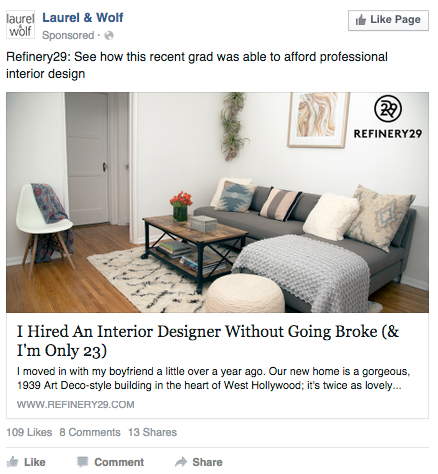
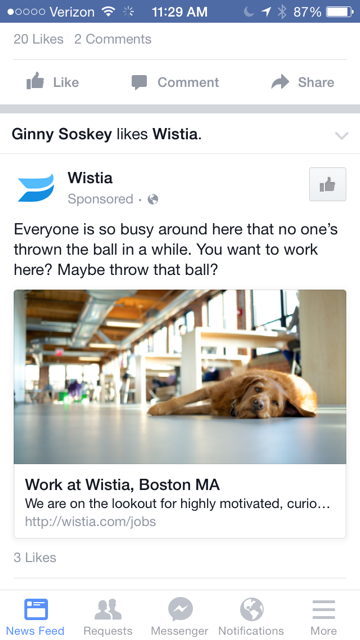
Once you select an ad type, the Ads Manager will prompt you to identify how you’d like to display your ad. The options they provide are as follows: Desktop News Feed, Mobile News Feed, and Desktop Right Column.
Here’s how each ad would appear:
Desktop News Feed
Mobile News Feed
Desktop Right Column
Be aware if your ad isn’t associated with a Facebook page, you’ll only be able to run Desktop Right Column ads. To leverage all three display locations, you can learn how to create a Facebook Page here.
Report on your ads’ performance.
Once your ads are running, you’ll want to keep an eye on how they’re doing. To see their results, you’ll want to look in two places: the Facebook Ad Manager and your marketing software.
Facebook’s Ad Manager
Facebook’s Ad Manager is a sophisticated dashboard that provides users with an overview of all their campaigns.
Upfront, the dashboard highlights an estimate of how much you’re spending each day. The dashboard is organized by columns, which makes it easy to filter through your ads so you can create a custom view of your results. Key numbers like reach, frequency, and cost are readily available, making reporting on performance a no brainer.
According to Facebook, here are some of the key metrics to look for (and their definitions):
- Performance. Can be customized further to include metrics like results, reach, frequency and impressions
- Engagement. Can be customized further to include metrics like Page likes, Page engagement and post engagement
- Videos. Can be customized further to include metrics like video views and avg. % of video viewed
- Website. Can be customized further to include metrics like website actions (all), checkouts, payment details, purchases and adds to cart
- Apps. Can be further customized to include metrics like app installs, app engagement, credit spends, mobile app actions and cost per app engagement
- Events. Can be further customized to include metrics like event responses and cost per event response
- Clicks. Can be further customized to include metrics like clicks, unique clicks, CTR (click-through rate) and CPC (cost per click)
- Settings. Can be further customized to include metrics like start date, end date, ad set name, ad ID, delivery, bid and objective
Your Marketing Software
While there are certainly a lot of details to keep straight when planning a paid Facebook ad, it’s important that you don’t lose sight of the big picture. Reporting on clicks and conversions from Facebook is important, however, if you’re using URLs with specific UTM codes, you have an opportunity to measure your ads’ full-funnel effectiveness using your marketing software.
Tracking URLs will help your marketing software keep track of how many leads, or better yet, how many customers you’ve gained from your advertising efforts. This information is useful in determining the ROI of this source, and can also be used to inform your overall Facebook marketing strategy.
If you’re a HubSpot customer using our ads tool, this process is already taken care of for you. You can also create unique tracking codes for your Facebook campaign by navigating to the Tracking URL Builder on the Reports Home page. All you’ll need to do is plug in the URL, attach a campaign, and choose the source you want the URL to be attributed to in your Sources Report. Once your ad launches and you start getting traffic and conversions on your website, you’ll be able to easily track how many visits, contacts, and customers you’re generating.

How to Productively Lead Your Team, from Musk, Bezos, and Other Founders [Infographic]
I think we can all agree: successful founders like Mark Zuckerberg, Elon Musk, and Steve Jobs are undeniably talented, innovative, and ambitious.
But there’s something else they have in common, too — they’re all productive.
Good ideas, and the willpower to follow through on them, is one aspect of creating a successful business, but without the ability to avoid distractions, these founders likely wouldn’t have been able to create such thriving companies.
To gather productivity tips and tricks from successful founders, Resume.io analyzed interviews, biographies, and blogs and put together the following infographic.
If you’re aiming to effectively drive results for your team in 2020 or ensure your ideas come into fruition, keep reading to learn how some of the world’s most innovative leaders stayed on-track.
.png?width=1200&name=15-productivity-lessons-from-successful-founders-and-how-to-apply-them%20(1).png)

How to Write Facebook Ads That Convert
Want your Facebook ads to move people to action? Looking for a framework to help? In this article, you’ll discover how to develop and compose Facebook ad copy that converts and sells your products. #1: Research Customer Needs and Preferences in Facebook Groups Marketers often talk about how hard it is to get accurate customer […]
The post How to Write Facebook Ads That Convert appeared first on Social Media Marketing | Social Media Examiner.
from Social Media Marketing | Social Media Examiner https://ift.tt/2oyx34f
via socialmediaexaminer
New Facebook Live Tools: What Marketers Need to Know
Welcome to this week’s edition of the Social Media Marketing Talk Show, a news show for marketers who want to stay on the leading edge of social media. On this week’s Social Media Marketing Talk Show, we explore new Facebook Live tools with Luria Petrucci. Tune In to the Social Media Marketing Talk Show Listen […]
The post New Facebook Live Tools: What Marketers Need to Know appeared first on Social Media Marketing | Social Media Examiner.
from Social Media Marketing | Social Media Examiner https://ift.tt/2lPGnQ7
via socialmediaexaminer
The Ultimate Guide to Google Ads for 2019
If you’re considering spending any amount of money on ads to reach your target audience, then you’d better spend it in the right place. That is, somewhere with over 246 million unique visitors, 3.5 billion daily interactions, and an estimated 700% return on investment.
Somewhere like… Google Ads.
Google Ads was launched just two years after what has become the most popular website in the world: Google.com. The advertising platform came on the scene in October 2000 as Google Adwords, but after some rebranding in 2018, it was renamed Google Ads. Given Google’s expansive reach, chances are you’ve seen (and probably clicked on) a Google ad … and so have your potential customers.
In this guide you’ll discover what Google Ads is and what you need to know to begin advertising on Google. We’ll cover features specific to the platform and teach you how to optimize your campaigns to achieve the best results with your ads.
What is Google Ads?
It’s no secret that, these days, the stronger and more focused your paid campaigns are, the more clicks you generate — leading to a greater probability of obtaining new customers. This is why Google Ads has become increasingly popular among businesses across all industries.
Google Ads is a paid advertising platform that falls under a marketing channel known as pay-per-click (PPC), where you (the advertiser) pays per click or per impression (CPM) on an ad.
Google Ads is an effective way to drive qualified traffic, or good-fit customers, to your business while they’re searching for products and services like the ones you offer. With Google Ads, you can boost your website traffic, receive more phone calls, and increase your in-store visits.
Google Ads allows you to create and share well-timed ads (via both mobile and desktop) among your target audience. This means your business will show up on the search engine results page (SERP) at the moment your ideal customers are looking for products and services like yours via Google Search or Google Maps. This way, you reach your target audience when it makes sense for them to come across your ad.
Note: Ads from the platform can span across other channels too, including YouTube, Blogger, and Google Display Network.
Over time, Google Ads will also help you analyze and improve those ads to reach more people so your business can hit all of your paid campaign goals.
Additionally, no matter the size of your business or your available resources, you can tailor your ads to suit your budget. The Google Ads tool gives you the opportunity to stay within your monthly cap and even pause or stop your ad spending at any point in time.
Discover how HubSpot can help you better manage your Google ads.
Now, onto another important question: Is Google Ads really effective?
Why advertise on Google?
Google is the most used search engine, receiving 3.5 billion search queries a day. Not to mention, the Google Ads platform has been around for nearly two decades, giving it some seniority in the area of paid advertising. Google is a resource used by people around the world to ask questions that are answered with a combination of paid advertisements and organic results.
And, according to Google, advertisers make $8 for every $1 they spend on Google Ads. So, there are a few reasons why you’d want to consider advertising on Google.
Need another reason? Your competitors are using Google Ads (and they might even be bidding on your branded terms). Thousands of companies use Google Ads to promote their businesses, which means that even if you’re ranking organically for a search term, your results are being pushed down the page, beneath your competitors.
If you’re using PPC to advertise your product or services, Google Ads should be a part of your paid strategy — there’s no way around it (except maybe Facebook Ads, but that’s another article).
Reasons Why Your Google Ads Aren’t Working
If you’ve tried unsuccessfully to advertise on Google, don’t give up. There are many reasons why your Google Ads could be underperforming. Let’s cover some common offenders.
- Broad Keyword Terms. You really need to nail it when it comes to your keywords, which is why testing and tweaking should be a part of your strategy. If your keywords are too broad, Google will be placing your ad in front of the wrong audience which means fewer clicks and a higher ad spend. Review what’s working (i.e. which keywords are generating clicks) and adjust them to best match your ads with your target audience. You likely won’t get the mix right the first time but you should keep adding, removing, and tweaking keywords until you do.
How to fix it: Review the keyword strategies that we cover below. - Irrelevant Ads. If your ad doesn’t match the searcher’s intent, you won’t get enough clicks to justify your ad spend. Your headline and ad copy need to match the keywords you’re bidding on, and the solution your ad is marketing needs to solve whatever pain point that searcher is experiencing. It’s a combination that will yield the results you’re looking for, and it may just be a few tweaks away. You have the option to create multiple ads per campaign — use this feature to split test which ads work best. Or, better yet, use Google’s Responsive Search Ads feature.
How to fix it: Read our best practices for ad copy. - Low Quality Score. Your Quality Score (QS) is how Google determines how your ad should rank. The higher your rank, the better your placements. If your quality score is low, you’ll have fewer eyeballs on your ad and fewer chances to convert. Google will tell you your Quality Score, but improving it is up to you.
How to fix it: Keep reading to learn how to improve your QS. - Poor Landing Page. Your efforts shouldn’t stop with your ad — the user experience after a click is equally important. What does your user see once they click your ad? Is your landing page optimized for conversions, meaning does it use the same keywords? Does the page solve your user’s pain point or answer their question? Your user should experience a seamless transition through to the conversion.
How to fix it: Review landing page best practices and implement them to increase your conversion rate.
These common terms will help you set up, manage, and optimize your Google Ads. Some of these are specific to Google Ads, while others are related to PPC in general. Either way, you’ll need to know these to run an effective ad campaign.
AdRank
Your AdRank determines your ad placement. The higher the value, the better you’ll rank, the more eyes will fall on your ad, and the higher the probability that users will click your ad. Your AdRank is determined by your maximum bid multiplied by your Quality Score.
Bidding
Google Ads is based on a bidding system, where you as the advertiser selects a maximum bid amount you’re willing to pay for a click on your ad. The higher your bid, the better your placement. You have three options for bidding: CPC, CPM, or CPE.
- CPC, or cost-per-click, is the amount you pay for each click on your ad.
- CPM, or cost per mille, is the amount you pay for one thousand ad impressions, that is when your ad is shown to a thousand people.
- CPE, or cost per engagement, is the amount you pay when someone takes a predetermined action with your ad.
And, yes, we’ll review bidding strategies below.
Campaign Type
Before you begin a paid campaign on Google Ads, you’ll select between one of three campaign types: search, display, or video.
- Search ads are text ads that are displayed among search results on a Google results page.
- Display ads are typically image-based and are shown on web pages within the Google Display Network.
- Video ads are between six and 15 seconds and appear on YouTube.
Click-Through Rate (CTR)
Your CTR is the number of clicks you get on your ad as a proportion of the number of views your ad gets. A higher CTR indicates a quality ad that matches search intent and targets relevant keywords.
Conversion Rate (CVR)
CVR is a measure of form submissions as a proportion of total visits to your landing page. Simplistically speaking, a high CVR means that your landing page presents a seamless user experience that matches the promise of the ad.
Display Network
Google ads can be displayed on either search results pages or a web page within Google’s Display Network (GDN). GDN is a network of websites that allow space on their webpages for Google Ads — these ads can be text-based or image ads and are displayed alongside content relevant to your target keywords. The most popular Display Ad options are Google Shopping and app campaigns.
Extensions
Ad Extensions allow you to supplement your ad with additional information at no additional cost. These extensions fall under one of five categories: Sitelink, Call, Location, Offer, or App; we’ll cover each of these ad extensions below.
Keywords
When a Google user types a query into the search field, Google returns a range of results that match the searcher’s intent. Keywords are words or phrases that align with what a searcher wants and will satisfy their query. You select keywords based on which queries you want to display your ad alongside. For example, a searcher that types “how to clean gum off shoes” will see results for advertisers that targeted keywords like “gum on shoes” and “clean shoes.”
- Negative Keywords are a list of keyword terms that you do not want to rank for. Google will pull you from the bid on these keywords. Typically, these are semi-related to your intended search terms but fall outside of the realm of what you offer or want to rank for.
PPC
Pay-per-click, or PPC, is a type of advertising where the advertiser pays per click on an ad. PPC is not specific to Google Ads, but it is the most common type of paid campaign. It’s important to understand the ins and outs of PPC before launching your first Google Ads campaign.
Quality Score (QS)
Your Quality Score measures the quality of your ad by your click-through rate (CTR), the relevance of your keywords, the quality of your landing page, and your past performance on the SERP. QS is a determining factor in your AdRank.
Click to get our free guide on how to use Google Ads.
Many factors impact your ability to create effective and high-performing Google Ads. Let’s cover them below.
AdRank and Quality Score
AdRank determines the placement of your ads, and Quality Score is one of the two factors (the other being bid amount) that determines your AdRank. Remember, your Quality Score is based on the quality and relevance of your ad, and Google measures that by how many people click on your ad when it’s displayed — i.e. your CTR. You CTR depends on the how well your ad matches searcher intent, which you can deduce from three areas:
- The relevance of your keywords
- If your ad copy and CTA deliver what the searcher expects based on their search
- The user experience of your landing page
Your QS is where you should focus most of your attention when you first set up your Google Ad campaign — even before you increase your bid amount. The higher your QS, the lower your acquisition costs will be and the better placement you’ll get.
Ad Campaign Types: Search, Display, and Video
You can select from one of three campaign types on Google Ads: search, display, or video. Let’s cover the optimal uses for each and why you might choose one over the other.
Search Ads
Search ads are text ads that are displayed on Google results pages. As an example, a search for “pocket squares” returns sponsored results, or ads, like these:
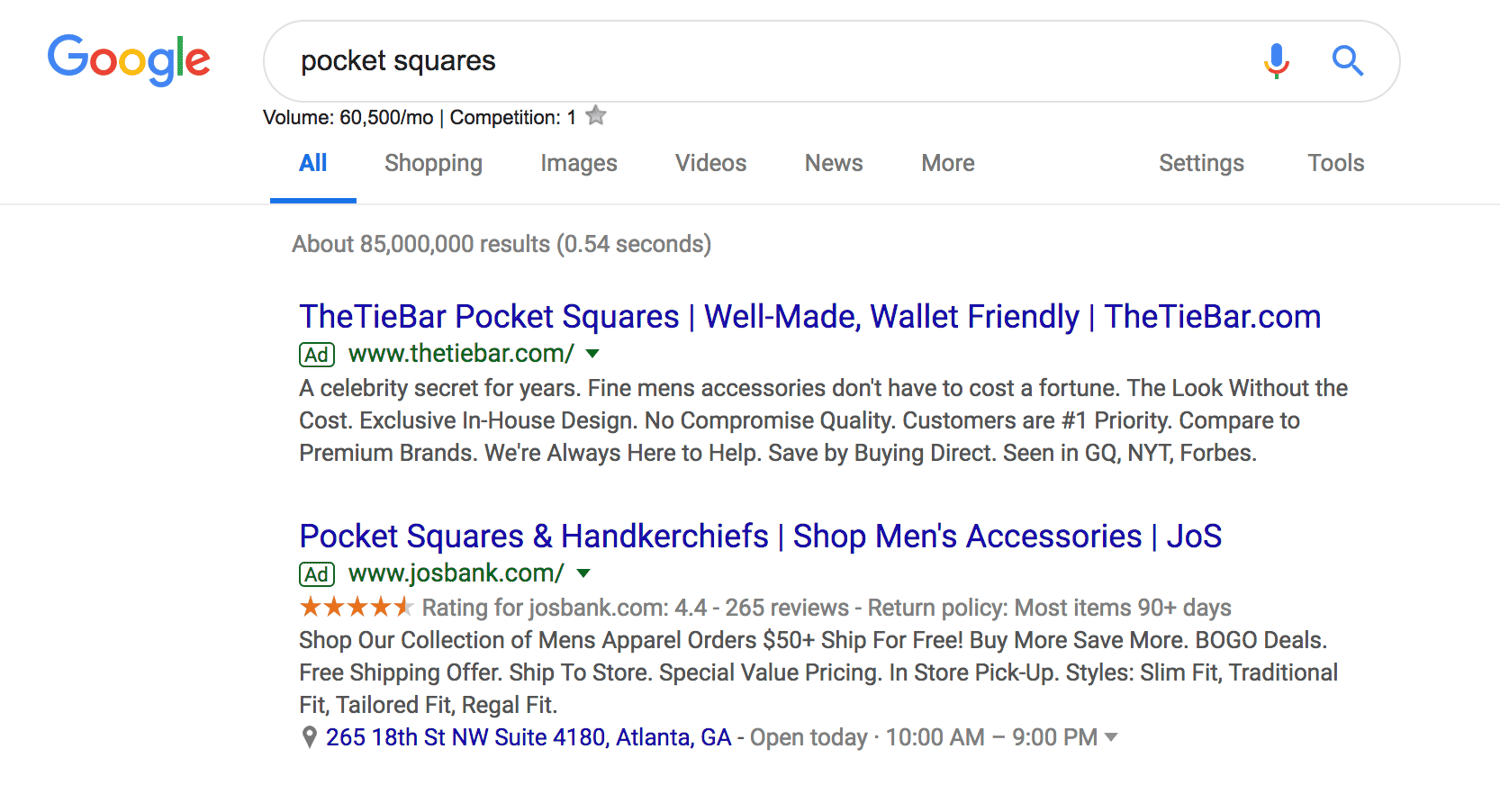
The benefit of search ads is that you’re displaying your ad in the place where most searchers look for information first — on Google. And Google shows your ad in the same format as other results (except for denoting it as an “Ad”) so users are accustomed to seeing and clicking on results.
Responsive Search Ads
Responsive search ads allow you to enter multiple versions of headlines and ad copy (15 and four variations, respectively) for Google to select the best performers to display to users. With traditional ads, create one static version of your ad, using the same headline and description each time. Responsive ads allow for a dynamic ad that is auto-tested until you arrive at the version that is best suited for your target audience — for Google, that means until you get the most clicks.
Display Ads
Google has a network of websites in various industries and with an array of audiences that opt in to display Google Ads, known as the Google Display Network. The benefit to the website owner is that they’re paid per click or impression on the ads. The benefit to advertisers is that they can get their content in front of audiences that are aligned with their personas. These are typically image ads that draw users attention away from the content on the webpage.
Additional options for Display Ads include shopping campaigns and app campaigns, which are displayed on search engine results pages.
Video Ads
Video ads are displayed before or after (and sometimes in the middle of) YouTube videos. Remember, YouTube is a search engine, too. The right keywords will place you in front of a video, disrupting the user’s behavior just enough to grab their attention.
Location
When you first set up your Google Ad, you’ll select a geographical area where your ad will be shown. If you have a storefront, this should be in a reasonable radius around your physical location. If you have an ecommerce store and a physical product, your location should be set in the places where you ship. If you provide a service or product that is accessible worldwide, then the sky’s the limit.
Your location settings will play a role in placement. For instance, if you own a yoga studio in San Francisco, someone in New York that enters “yoga studio” will not see your result, no matter your AdRank. That’s because Google’s main objective is to display the most relevant results to searchers, even when you’re paying.
Keywords
Keyword research is just as important for paid ads as it is for organic search. Your keywords need to match searcher intent as much as possible. That’s because Google matches your ad with search queries based on the keywords you selected. Each ad group that you create within your campaign will target a small set of keywords (one to five keywords is optimal) and Google will display your ad based on those selections.
Match Types
Match Types give you a little wiggle room when it comes to your keyword selections — they tell Google whether you want to match a search query exactly or if your ad should be shown to anyone with a search query that’s semi-related. There are four match types to choose from:
- Broad Match is the default setting that uses any word within your keyword phrase in any order. For example, “goat yoga in Oakland” will match “goat yoga” or “yoga Oakland.”
- Modified Broad Match allows you to lock in certain words within a keyword phrase by denoting them with a “+” sign. Your matches will include that locked-in word at the very least. For example, “+goats yoga in Oakland” could yield “goats,” “goats like food,” or “goats and yoga.”
- Phrase Match will match with queries that include your keyword phrase in the exact order but may include additional words before or after it. For example, “goat yoga” can yield “spotted goat yoga” or “goat yoga with puppies.”
- Exact Match maintains your keyword phrase as it is written in the exact order. For example, “goat yoga” will not show up if someone types “goats yoga” or “goat yoga class.”
If you’re just starting out and don’t know exactly how your persona will be searching, move from a broad match to a more narrow approach so you can test which queries yield the best results. However, since your ad will be ranking for many queries (some unrelated) you should keep a close eye on your ads and modify them as you can gain new information.
Headline and Description
Your ad copy can be the difference between a click on your ad and a click on your competitor’s ad. It’s important that your ad copy matches the searcher’s intent, is aligned with your target keywords, and addresses the personas pain point with a clear solution.
To illustrate what we mean, let’s review an example.

A search for “baby swim lessons” yielded this result. The copy is concise and uses the limited space wisely to convey their message and connect with their target audience.
The Swim Revolution knew to put the keyword in their headline so we instantly know that this ad matches what we’re looking for. The description tells us why this is the best option for swim lessons because it addresses the concerns of their persona — a parent looking to enroll their baby in a swim class.
They use words like “skills,” “fun,” “confidence,” and “comfort in the water” to ease our nerves about putting a baby in a pool and to prove to us that we will get what we want out of this class — an infant that can swim.
This kind of ad copy will get you clicks, but conversions will result from carrying this level of intention into your landing page copy.
Ad Extensions
If you’re running Google Ads, you should be using Ad Extensions for two reasons: they’re free, and they give users additional information and another reason to interact with your ad. These extensions fall within one of these five categories:
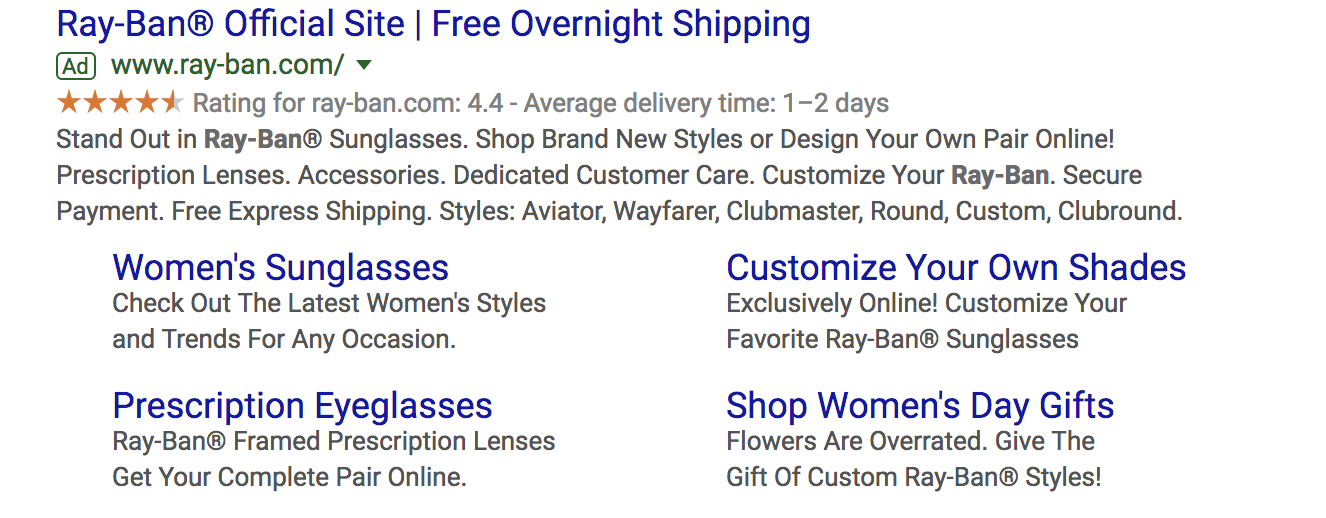
- Sitelink Extensions extend your add — helping you stand out — and provide additional links to your site that offer users more enticing reasons to click.
- Call Extensions allow you to incorporate your phone number in your ad so users have an additional (and instant) way to reach out to you. If you have a customer service team that is ready to engage and convert your audience, then include your phone number.

- Location Extensions include your location and phone number within your ad so Google can offer searchers a map to easily find you. This option is great for businesses with a storefront and it works well for the search query “…near me.”

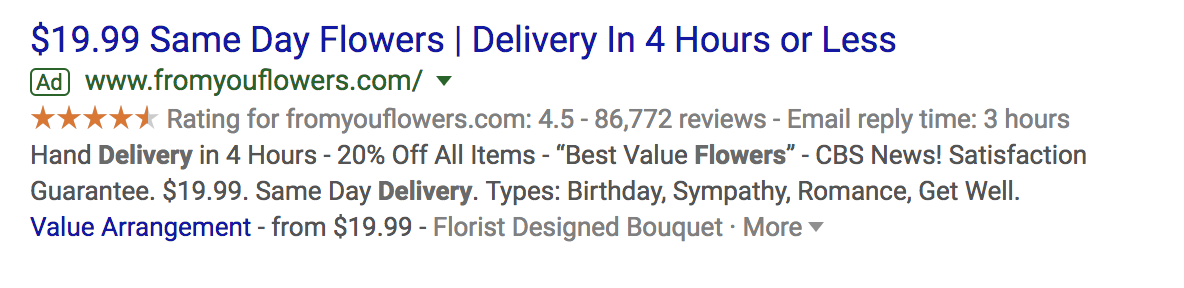
- Offer Extensions work if you’re running a current promotion. It can entice users to click your ad over others if they see that your options are discounted compared to your competitors.
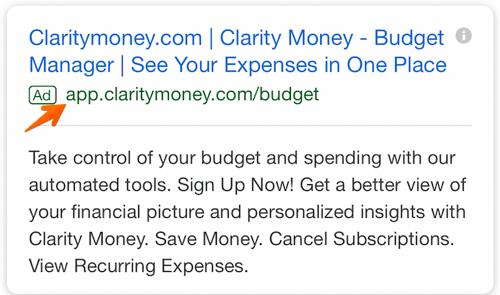
- App Extensions provide a link to an app download for mobile users. This reduces the friction from having to perform a new search to find and download the app in an AppStore.
Google Ads Retargeting
Retargeting, a.k.a. remarketing, in Google Ads is a way to advertise to users who have previously interacted with you online but have not yet converted. Tracking cookies will follow users around the web and target these users with your ads. Remarketing is effective since prospects need to see your marketing at least seven times before they become a customer.
How to Set Up Your Google Ads
Setting up your paid campaigns on Google is relatively easy (and quick), mostly because the platform takes you through the setup and provides helpful hints along the way. Once you visit the Google Ads site and click “Start Now,” you’ll be taken through a series of steps to get your ads up and running. If you have your ad copy and/or images created, set up should take you no more than 10 minutes.
What may be less obvious are all the additional things you need to do to make sure your ads are optimally set up and easily trackable. Let’s cover these together. These are the steps you’ll take once your ads are submitted for review.
Link Google Analytics
You likely have Google Analytics set up on your website so you can track traffic, conversions, goals, and any unique metrics. You also need to link your Analytics account to Google Ads. Linking these accounts will make tracking, analyzing, and reporting between channels and campaigns much easier because you can view these events in one place.
Add UTM Codes
Urchin Tracking Module (UTM) codes are used by Google to track any activity associated with a specific link. You’ve probably seen them before — it’s the part of a URL that follows a question mark (“?”). UTM codes will tell you which offer or ad led to a conversion so you can track the most effective parts of your campaign. UTM codes make it easier to optimize your Google Ads since you know exactly what’s working.
The trick, though, is to add your UTM codes at the campaign level when you set up your Google Ads so you don’t have to do so manually for each ad URL. Otherwise, you can add them manually with Google’s UTM builder.
Set Up Conversion Tracking
Conversion tracking tells you exactly how many customers or leads you’ve acquired from your ad campaigns. It’s not mandatory to set up but, without it, you’ll be guessing the ROI of your ads. Conversion tracking allows you to track sales (or other activities) on your website, app installs, or calls from your ads.
Manage and organize your ads with our free Google Ads Kit and Templates.
Integrate Your Google Ads With Your CRM
There is something to be said about keeping all of your data in one place where you can track, analyze, and report on it. You already use your CRM to track contact data and lead flows. Integrating Google Ads with your CRM gives you the ability to track which ad campaigns are working for your audience so you can continue marketing to them with offers that are relevant.
Google Ads Bidding Strategies
Once you’ve set up your ad campaigns and have tracking in place, it’s time to start bidding. Remember, your ability to rank in Google Ads depends on how you bid. While your bid amount will depend on your budget and goals, there are a few strategies and bid settings you should be aware of when launching your paid campaign.
Automated vs. Manual Bidding
You have two options when it comes to bidding on your keywords — automated and manual. Here’s how they work:
- Automated Bidding puts Google in the driver’s seat and allows the platform to adjust your bid based on your competitors. You can still set a maximum budget, and Google will work within a range to give you the best chance at winning the bid within those constraints.
- Manual Bidding let’s you set the bid amounts for your ad groups and keywords, giving you the chance to reduce spending on low-performing ads.
Bidding on Branded Search Terms
Branded terms are those with your company or unique product name in them, like “HubSpot CRM.” There is much debate on whether to bid on your branded terms or not. On one side of the debate, bidding on terms that will likely yield organic results could be seen as a waste of money.
On the other side, bidding on these terms gives you domain over these search results pages and helps you convert prospects that are further along the flywheel. For instance, if I’ve been doing research on live chat tools and am heavily considering HubSpot’s Live Chat, then a simple search for “HubSpot live chat software” will yield exactly the result I’m looking for without the effort of scrolling.
The other argument in favor of bidding on your branded terms is that competitors may bid on them if you don’t, thereby taking up valuable real estate that should belong to you.
Cost Per Acquisition (CPA)
If the idea of spending money to convert prospects into leads makes you uneasy, then you can set a CPA instead and only pay when a user converts into a customer. While this bidding strategy could cost more, you can take comfort in knowing that you only pay when you acquire a paying customer. This strategy makes it easy to track and justify your ad spend.
Additional Resources to Optimize Your Google Ads
Your ad copy and headline is not the only component that will make your paid campaign successful. Getting a user to click is only the beginning … they should arrive on a landing page that’s optimized for conversion and then be taken to a Thank You page that tells them what to do next.
If you want your Google Ads to produce qualified leads and customers, then check out these additional resources and use them as guidelines as you set up your Google Ads campaign.
- Landing Page Best Practices will teach you how to set up a landing page that’s prime for conversions so you don’t waste those precious clicks.
- Optimized “Thank You” Pages shows you what to do with your new lead post-conversion, how to keep them on your site, and ways to maintain their attention.
- Tips for Mobile Google Ads teaches you the key differences between desktop and mobile ads and how to optimize both.
- Optimizing Google Ads Costs will show you how we, at HubSpot, maximize our Google Ads spend to get the best ROI.
- Quality Google Ads Examples That Convert shares examples of Google advertising campaigns that got it right.
Start Your Campaign
Given its reach and authority, Google Ads should be a part of your paid strategy. Use the tips we covered to get started, and remember to refine and iterate as you go. There’s no such thing as a Google Ads campaign that doesn’t work — there are only ones that need a bit more work. Using the strategy and information provided above, you have what you need to create a successful Google Ad campaign that drives clicks and converts leads.

TikTok: What Marketers Need to Know
Are you curious about TikTok? Wondering how to use TikTok for your marketing? To explore what marketers need to know about TikTok, I interview Rachel Pedersen on the Social Media Marketing Podcast. Rachel is an organic social marketing pro and host of the Social Media Secrets podcast. Her new book is called, I Need Attention. […]
The post TikTok: What Marketers Need to Know appeared first on Social Media Marketing | Social Media Examiner.
from Social Media Marketing | Social Media Examiner https://ift.tt/2mf5aNO
via socialmediaexaminer
Instagram Ad Specs & Sizes in 2020: an Updated Guide
Working in marketing can feel like you’re constantly playing catch up. With new trends and algorithms to keep up with, it can be hard to find consistent success with your strategies.
One area that’s always changing is social media. But between uploading a blog and composing a drip campaign to nurture new leads, getting started with your Instagram ad campaign can seem daunting.
However, Instagram ad campaigns are still a powerful way to reach your audience. According to Sprout Social, Instagram’s ad revenue will bring in nearly a quarter of Facebook’s total ad revenue by the end of 2019, and 30% of total ad revenue by the end of 2020.
However, before you can get started with your ads, we want to ensure you have professional-looking images and avoid pesky error messages like “image is too small.” With more than one billion monthly active users, you want to put your best foot forward.
Here, you’ll find Instagram ad specs and sizes to help you get started, plus examples of different types of ads.
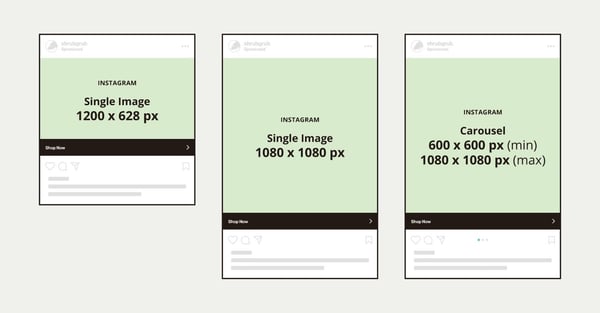
Image source: Mailchimp
Examples of Different Types of Ads
Whether you’re using an image or video ad on Instagram Feed or Stories, a few guidelines apply at all times:
- Avoid using URLs in captions since they aren’t clickable in Instagram.
- Captions can be up to 2,200 characters.
- Do not include text or logos on 14% of the top and bottom of your ads. If you do, these will be covered by other ad elements like the CTA or profile icon.
Below, we’ll cover more detailed specifications and examples on each type of ad.
Image ads
Image ads consist of an image that promotes your business, brand, or product. These ads are an effective way to convert social media followers. According to Omnicore, 60% of people say they discover new products on Instagram, and 70% of shoppers turn to Instagram for product discovery.
Below are the detailed specs from Facebook Business (reminder that Facebook owns Instagram):
Feed
- File type: jpg or png
- Recommended resolution: Upload the highest resolution image available that meets ratio requirements.
- Image dimension
- Minimum width: 500 pixels
- Image aspect ratio
- Minimum aspect ratio: 400×500
- Maximum aspect ratio: 191×100
- Aspect ratio tolerance: 0.01
- Square
- Minimum resolution: 600 x 600 pixels
- Maximum resolution: 1936 x 1936 pixels
- Landscape
- Minimum resolution: 600 x 315 pixels
- Maximum resolution: 1936 x 1936 pixels
- Vertical
- Minimum resolution: 600 x 750 pixels
- Maximum resolution: 1936 x 1936 pixels
Stories
- Image ratios: 9:16 and 16:9 to 4:5
- Images with more than 20% text may experience reduced delivery.
- Image dimension
- Minimum width: 500 pixels
- Image aspect ratio
- Maximum aspect ratio: 90 x 160
- Aspect ratio tolerance: 0.01
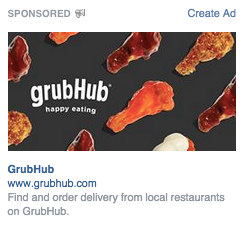
Below is an example of an image ad for Grubhub. Note how the “Order Now” text on their ad is not blocked by the CTA, because they made sure it was not in the bottom 14% of the image. In addition, the text on the Pick Up Stix logo on the top is pushed further down so it isn’t in the top 14% of the image. This is what an image ad will look like on the Instagram Feed.
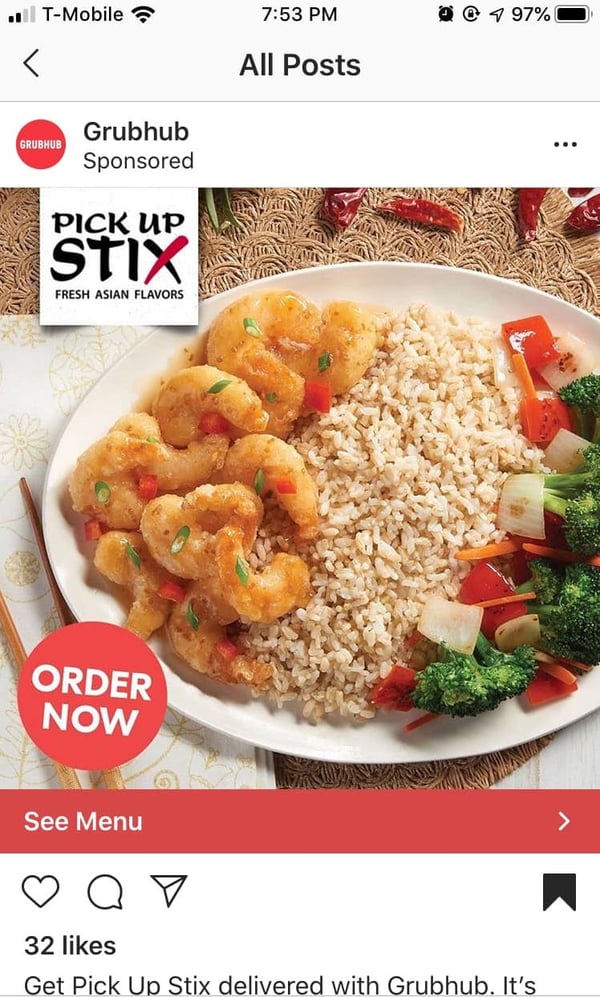
Image source: Grubhub
Carousel ads
Carousel ads are the ads that display multiple images. Instagram users can swipe to see a series of images in these ads, both in the feed and in Stories. These ads give you more space to creatively tell a story to promote your business or product.
In Stories, there are two types of Carousel ads: native or expandable. Native stories display three cards. Expandable stories display one to three cards that give people the option to “keep watching” to see the rest of the cards (up to 10 total).
Below are the detailed specs from Facebook Business:
Feed
- Minimum number of cards: two
- Maximum number of cards: 10
- Image file type: jpg or png
- Video file type: Supported file formats
- Video maximum file size: 4GB
- Video length: up to 60 seconds
- Recommended resolution: minimum 1080 x 1080 pixels
- Carousel ratio: 1:1
- Images with more than 20% text may experience reduced delivery.
- Aspect ratio tolerance: 1%
- Maximum number of hashtags in text: 30
Stories
- Aspect ratio tolerance: 1%
- Maximum number of cards in the prompted Carousel ads: 10
- Maximum video duration for carousel videos: 15 seconds
- Maximum video duration for prompted Carousel videos: 60 seconds
- Maximum video duration: 120 seconds
- Native Stories Carousel
- Minimum number of cards: two
- Maximum number of cards: three
- Ratio: 9:16
- Recommended resolution: 1080 x1920 pixels
- Expandable Stories Carousel
- Maximum number of cards: 10
- Ratio: same as newsfeed
- Images with more than 20% text may experience reduced delivery.
Below is an example of what a Carousel ad would look like on the Instagram feed. This ad contains four images that users can swipe through.
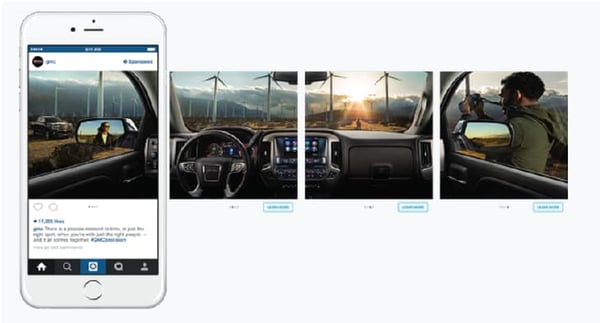
Image source: Online Advertising School
Video ads
Video ads can be used to bring your product or service to life. According to Omnicore, Instagram videos get over two times more engagement than Instagram photos.
Below are the detailed specs from Facebook Business:
Feed
- Recommended resolution: Upload the highest resolution available that meets file size and ratio limits.
- Maximum video length: 120 seconds
- Video dimension
- Minimum width: 500 pixels
- Video size
- Maximum video file size: 30MB
- Video aspect ratio
- Minimum aspect ratio: 400 x 500
- Maximum aspect ratio: 191 x 100
- Aspect ratio tolerance: 0.01
- Video thumbnail image dimension
- Minimum width: 500 pixels
Stories
- Video ratios: 9:16 and 16:9 to 4:5
- Video length: maximum 120 seconds
- Video dimension
- Minimum width: 500 pixels
- Video size
- Maximum video file size: 30MB
- Video aspect ratio
- Option 1
- Minimum aspect ratio: 400 x 500
- Maximum aspect ratio: 191 x 100
- Aspect ratio tolerance: 0.01
- Option 2
- Maximum aspect ratio: 90 x 160
- Aspect ratio tolerance: 0.01
- Option 1
- Video thumbnail image dimension
- Minimum width: 500 pixels
Below is an example of a video ad from Stitch Fix. Stitch Fix uses video footage of their products to showcase fun outfits, plus the benefits of their service. This ad also had better engagement than the image ad example. It had 2,761 likes compared to 32 likes from Grubhub’s image ad.
Image source: Instagram
Instagram ads as a marketing strategy are here to stay. That’s why it’s important to understand the image sizes and requirements for your ad campaigns. Besides ad specs and sizes, Instagram also has other ad policies online.
Want to learn more about social media dimensions? Check out our ultimate guide.

The Best Facebook Event Photo Size for 2019
Setting up events on Facebook is a fairly straightforward process. To go from zero to a fully-operational event page can take minutes. It’s like a breath of fresh air to see that event go live on news feeds and mobile devices alike … unless that beautiful cover photo you picked out looks more like a fuzzy, blurry mess.
What happened?
Facebook has a website feature that allows users to organize social gatherings called Facebook events. This feature comes with a separate page dedicated to the details and a guest list for the event.
How to Create an Event
Facebook has a list of numbers it goes by for event photo specifications. There are certain recommended sizes Facebook prefers for events. Your images will show up in different dimensions, depending on the medium you’re working with.
Launch parties, charity runs, community gatherings, and business openings are just a few reasons companies make Facebook events. Events can be private or public, the latter meaning they appear on the feeds of your company’s Facebook friends. Private events are only visible to you and the guest list. Guests have the option to RSVP or initiate their interest.
For example, let’s say you’re in charge of marketing for a company fundraiser this month and want to organize the event page on Facebook. You can do this by heading to your Facebook homepage, finding the right column and clicking the “Events” icon.
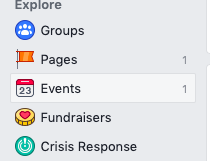


From there, an option pops up asking for the type of event. After you choose whether you want a public or private event, you will be taken to a template that shows how your event will look in the events feed. This is where you’ll input the event photo.
Cover photos for events are required. The purpose of the cover photo is to give your guests an idea of what to expect at the event. For instance, The Color Run might have a cover photo of people crossing the finish line covered in colorful powder.
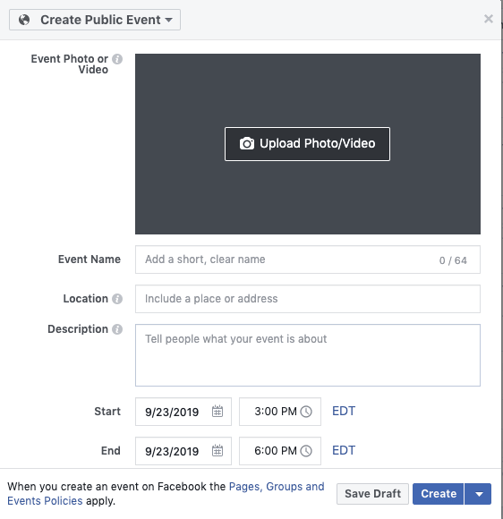
It’s important to format your images with the correct photo size, so your event looks professional and is optimized for feeds and mobile.
 If you use an image that’s smaller, Facebook automatically increases the size of the event photo for fit, resulting in a lower resolution of your photo.
When the event shows up on your guests’ feeds, Facebook changes the scale of the event photo to 470 x 174 pixels to match the scale of the feed. Make sure your photo looks professional in multiple different sizes.

Having a photo that’s blurry on phones but crystal clear on the desktop is inconsistent. Working with a scale of 1920 x 1080 looks consistent across all fronts, like this photo for a Halloween-themed event in Salem, Massachusetts.
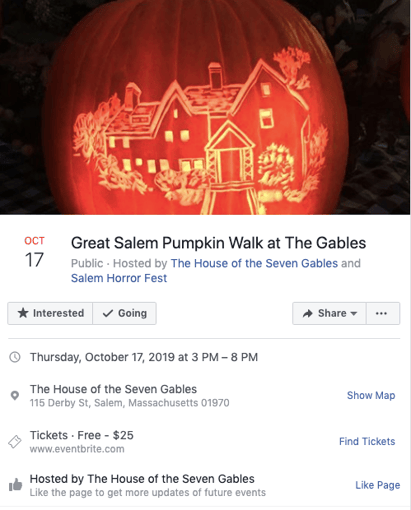
Image Source: Facebook
Let’s discuss where your event will appear within a person’s Facebook Feed. The first is shown as a thumbnail in the “Events You May Like” section.
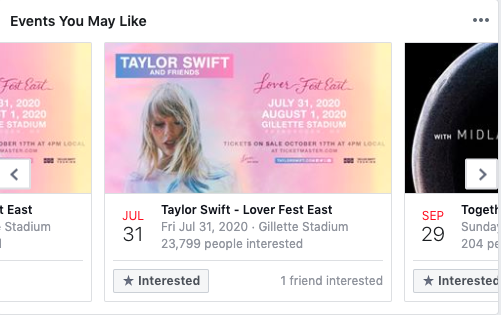
Image Source: Facebook
Next, the event page. This is the primary place people go to see details for events, including attendees, updates, and comments. If your event is public, it will also show up in “Suggested Events.”
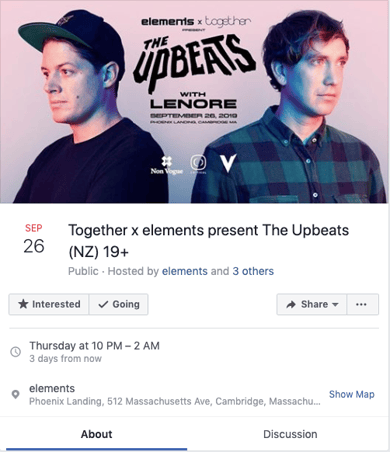
Image Source: Facebook
Finally, let’s look at how these images appear on users’ News Feeds. If your image doesn’t look great across all areas, it’s probably best to choose another one.
Facebook imposes different size preferences for the different places your event advertisement will be seen. Let’s go over the best photo size for all of these destinations.
The News Feed is also known as your Facebook homepage. Facebook will scale your photo so it has dimensions of 470 x 174, which is the thumbnail we see in the photos above.
For mobile Facebook app users, the cover photo will be scaled to 560 x 208 pixels.
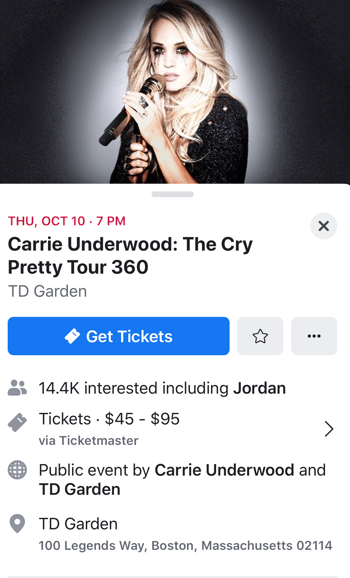
Image Source: Facebook
The display on the right column, where users see a snapshot of their feed, is 254 x 133 pixels.
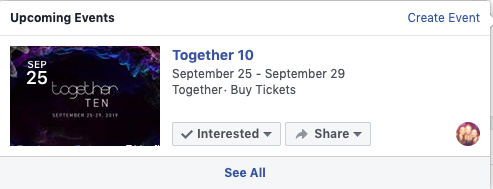
Image Source: Facebook
Another aspect of Facebook events to keep in mind is the caption or description. On the desktop News Feed, your display will include up to 500 characters. On mobile, that display shifts to only 110 characters.
Right column ads have the lowest character display, with a maximum of 90 characters available. This is fewer characters than the maximum for a tweet, so make sure your description is short and captivating.
Who knew there could be so many dimensions and photos to go with event sizes? Thankfully, it’s fairly easy to resize a photo or choose one that’s better suited for the cover photo. For a complete list of how to use Facebook in the best way for your business, check out this post.
With these tips, we show you how to create a rockin’ Business page and how to set up a feed that’s perfect for your brand

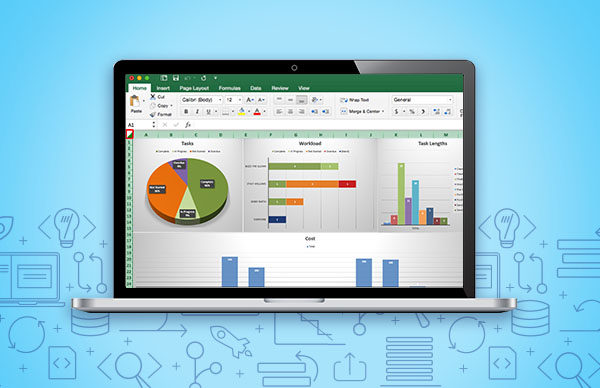
11 Must-Have Project Management Excel Templates (Updated Sept. 2019)
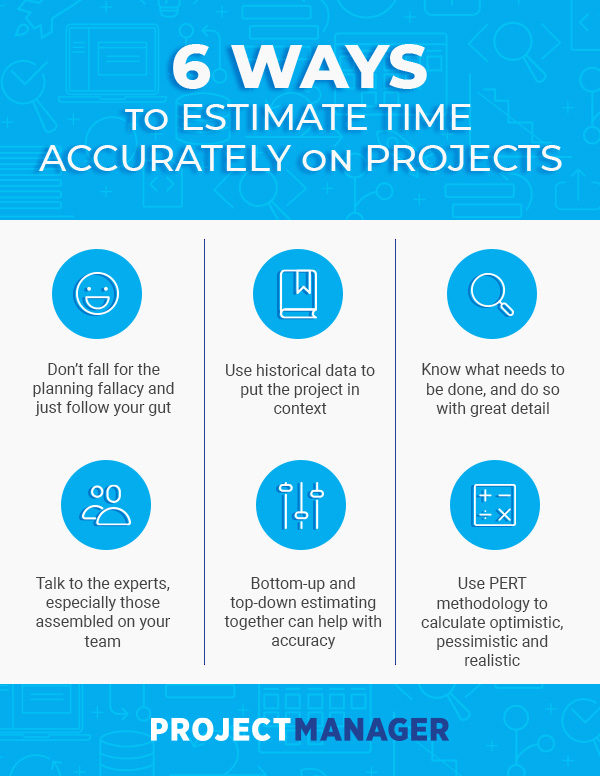
Time Estimation for Project Managers: Tips & Techniques
5 Types of Personality Tests to Help You Learn About Your Team
When I recently started a new project with a coworker with whom I don’t often work closely, I immediately noticed some differences in how we communicate.
First, while I prefer to spend some time catching up and making small talk, she wanted to dive straight into the work. She also seemed more observant and thoughtful in her responses, which made her difficult to read, and I found myself wondering during our initial meeting, Does she like me? and Am I communicating my points clearly?
Additionally, I noticed she struggled to share responsibilities equally with me. She’d often make comments like, “I can just do this myself, if you want, and then we can go from there.”
From my perspective, her behavior seemed cold, distant, and even a little rude. That is — until we shared our DiSC profiles with one another.
My colleague is a strong CD. Here’s an excerpt from her profile: “Because you have a CD style, you probably take an efficient, no-nonsense approach to your work. Like others with the CD style, you may come across as somewhat restrained and difficult to read when you first meet someone.”
I’m an iS, so my profile, on the other hand, reads something like this — “Because you have an iS style, you’re probably a very warm and sociable person who reaches out to others with your friendly, laid back approach. You make time for casual small talk and tend to have an open-door policy.”
After reviewing our DiSC profiles, our relationship quickly became stronger, and more efficient.
For instance, I recognized my colleague’s desire to avoid wasting time with small talk, so I limited conversation unrelated to the topic at-hand. On the flip side, I noticed my coworker made a more genuine effort to create connection with me, beginning each meeting with “How’s your day going?”
By understanding our strengths and weaknesses from an unbiased, test-based perspective, my colleague and I were able to understand why we work the way we do, and both of us became more open to the other’s approach.
Personality tests are an undeniably useful tool for creating a stronger, more efficient team. Personality tests can help you learn about your colleagues’ communication styles, preferred style of feedback, and even how to modify your own attitude towards personalities that might clash with yours.
Here, we’ve cultivated a list of five types of personality tests to help you learn more about your team members. You might already use some in your workplace, but others — like the Love Languages quiz — might surprise you.
1. Myers-Briggs
One of the oldest personality tests available, Myers-Briggs is a classic, dating back to the 1940’s and inspired by Jung’s personality theory. Essentially, the Myers-Briggs test separates people into 16 categories of personalities, providing insights into general strengths and weaknesses, desires and ambitions, communication styles, how people perceive you, and how you see the world.
For instance, let’s say you find out your manager is an INTJ, described as “skeptical and independent, [and] have high standards of competence and performance.”
On the other hand, you’re a ESFJ — “Warmhearted, conscientious, and cooperative. Want harmony in their environment, work with determination to establish it.”
More likely than not, these insights can help you understand why conflict might arise between yourself and your manager. Perhaps your manager has difficulty delegating, and oftentimes ends up finishing projects herself rather than giving them to you. Since you’re cooperative and desire harmony, you don’t push back and ask for more tasks than you’re given.
By better understanding each other, hopefully you and your manager can recognize the situation from an unbiased perspective. Your manager might realize, through her Myers-Briggs results, that she needs to lower her skepticism and trust you’re capable of meeting high-expectations. At the same time, you might realize your warmhearted nature is holding you back from asking for more responsibilities, even though you know you can handle it.
Price: $49.95 USD on MBTIOnline.com
2. DiSC Assessment
The DiSC assessment determines where you lie on four DiSC factors — dominance, influence, steadiness, and compliance.
DiSC is one of the most popular and authoritative career assessments out there, and many companies, including HubSpot, encourage their employees to take it.
The DiSC asks you to complete a series of questions, and then provides you with a PDF report on your behavior and personality — best of all, the report provides you with tips on how you might work better with others.
The DiSC profile can help you and your team members become more self-aware of each other’s intrinsic motivations, and potential areas of conflict. Among other things, the DiSC profile provides you with information regarding your team members’ communication styles and priorities.
For instance, you might learn your manager prioritizes connection, which is why she often begins 1:1s with casual small talk. In comparison, you might figure out your own personality values efficiency, which is why you feel antsy after five minutes of “wasted” 1:1 time. Figuring out these differences is the first step in solving for them.
Price: $64.50 per test for Everything DiSC Workplace® Profile.
3. Holland Code Career Test
This 10 minute questionnaire measures your interest in six major job areas and uses psychologist John Holland’s RIASEC model to provide potential career paths based on your interests.
The test can help managers provide appropriate career guidance depending on an employee’s workplace interests, and can help employees define a career path that would most likely make them happiest.
Ultimately, the test is meant to help employees’ learn about their professional motivations and aptitudes before matching them with roles best-suited for their strengths.
Price: Free for basic report, $19 for full report
4. The 5-Minute Personality Test
If you’ve only got a few minutes to spare, this is a fantastic (and speedy) test to help you learn about your strengths and weaknesses and how they can be applied to the workplace.
After you fill out the worksheet, simply add up the numbers to figure out which letter (L, O, G, B) represents your dominant personality type — this letter reveals your natural workplace strengths, weaknesses, and how you will respond in most situations.
The test results also include information such as motivations, communication and decision-making styles, and how you react to tense situations. For instance, an “L” (which stands for Lion) is known to make impulsive decisions, and in tense situations, takes command. A “G” (Golden Retriever), on the other hand, makes decisions slowly, and in tense situations, often gives in to opinions or wishes of others.
This information is undeniably useful if you have a few L’s and a few G’s on your team, and want to create space for both types of personalities to be heard.
Price: Free
5. The 5 Love Languages
More likely than not, The 5 Love Languages is the test you’re most surprised to see on here. While undoubtedly useful for figuring out your romantic partner likes gifts or your best friend needs quality time, how can you use this test in a professional capacity?
Christina Perricone, Content Marketing Manager at HubSpot, addresses this discrepancy — “Love languages are often overlooked when it comes to the work environment but they can tell you a lot about your team. The test is based on the idea that each of us has a unique way in which we receive love and appreciation from others.”
“Since each of us is a complete person, there is often little variance between our actions at home and at work. The way someone accepts love in their personal life is similar to how they receive praise and criticism at work.”
Perricone adds, “Love languages will help you understand the unique ways that your team members accept feedback and how they form close bonds with others. When applied, the end result is a tailored work relationship that promotes harmonious collaboration and psychological safety.”
Since each of us will likely spend 1/3 of our lives at work, this makes sense — why not go the extra mile to ensure each of your team members’ feels appreciated for their work?
For instance, you might find some of your team members like words of affirmation, while others prefer receiving gifts. Perhaps, then, you put a package of cookies on one coworker’s desk after she hits a workplace milestone, while you write a thoughtful note to another.
Price: Free
Ultimately, personality tests can help you uncover your own hidden motivations or perceptions of situations and can help you connect better with your team members, and lead better, as well. Try one (or a few!) of these to create a stronger, more engaged team today.
Additionally, check out 14 Free Personality Tests You Can Take Online Today if you’re looking for free tests to advance your own self-awareness.

IGTV for Business: New Research for Marketers
Thinking about adding IGTV to your marketing activities? Want to know how other businesses and marketers are finding success with IGTV? In this article, you’ll discover insights from new research that shows what types of businesses use IGTV, how marketers are reaching IGTV viewers in the Instagram feed, and more. Why Consider IGTV? According to […]
The post IGTV for Business: New Research for Marketers appeared first on Social Media Marketing | Social Media Examiner.
from Social Media Marketing | Social Media Examiner https://ift.tt/2lXVO8S
via socialmediaexaminer
The 11 Best Abandoned Cart Emails To Win Back Customers
It was a Saturday night, around 11 PM, and I was innocently scrolling on Amazon to look for a gift for my best friend’s birthday. But then, it happened.
I had an impulse to purchase everything. The female empowerment mug? The wine tumbler? The pillow that said “Nap Queen”? I wanted it all. I added everything I liked to my cart.
$200. Let’s be honest, $200 was going to be hard to pull off. I left Amazon so I wouldn’t be tempted to complete the purchase.
My hesitation to check out triggered abandoned cart emails. An abandoned cart email is an email sent to customers who almost made a purchase to encourage them to complete their transaction.
Abandoned cart emails are one way to convert lost business and turn a lost prospect into a brand enthusiast.
Morgan Jacobson, an inbound marketing specialist on the ecommerce team at HubSpot, wrote about abandoned cart emails in this blog. He says, “First off, if you’re doing any kind of shopping cart abandonment you’re way ahead of the game. Currently, only 19% of even the top 1,000 ecommerce companies engage in any kind of shopping cart abandonment recovery. Which is interesting, given that up to half of the customers who abandon their carts will complete the purchase when asked.”
Here, you’ll find abandoned cart email templates to get you started, plus effective abandoned cart email examples to inspire your own.
Abandoned Cart Email Template
To build your abandoned cart emails, you can find templates in any email marketing tool. Tools like Squarespace, Wix, or HubSpot will have templates to help you get started. For instance, you can use a pre-made template for the layout, but customize the message, images, and design. Here’s an example template from Wix:
Image source: Wix
The messaging in abandoned cart emails is fairly simple. Below is an outline of the basic structure:
- Snappy subject line
- Introduction text
- Items left in the cart
- Offer or discount
- Checkout button or call to action (CTA)
- Reviews or social proof
- Closing text
While this outline is helpful if you’re sending one abandoned cart email, you might consider a drip campaign for your cart recovery emails. A drip campaign is a series of automated emails.
For an abandoned cart workflow, the emails could be structured like this:
- Email 1: Cart reminder (sent a few hours after cart abandonment)
- Email 2: Follow up (sent a few days later)
- Email 3: Promotional discount (sent a few days after email two)
According to Omnisend, a series of emails works 63% better than a single email for abandoned cart emails.
Whether you send one email or implement a full drip campaign, there are a few best practices to keep in mind when planning an abandoned cart email. For example:
- Timing: Send your abandoned cart emails within a few hours after a customer abandons their cart. For example, if you work at a company like Zappos, and someone doesn’t complete their purchase, you might send an abandoned cart email anywhere from three to five hours after they leave your site without completing a purchase.
- Personalization: Abandoned cart emails should be personalized to the customer you’re sending them to by including the items that were left in their cart and addressing them by name.
- CTA: Your abandoned cart email should encourage customers to complete their purchase. For example, the CTA might be something like “Buy Now” or “Resume Your Order.”
- Copywriting: The copy should be snappy, concise, and compelling. Great copywriting is interesting enough to entice someone to complete their purchase. See some examples below.
- Subject line: Your subject line should be interesting enough to get people to open the email. For example, using something like discounts, humor, or questions could intrigue the customer enough to click. If you wanted to include a promotional offer, your subject line could be something like “20% off all purchases.”
- Social proof: You can use reviews and testimonials to strengthen your branding and create FOMO (fear of missing out) among customers who abandoned their cart. For example, including reviews in your abandoned cart emails for specific products can tempt someone to purchase.
Best Abandoned Cart Email Examples
1. Whiskey Loot
Image source: Really Good Emails
Whiskey Loot’s abandoned cart email utilizes unique and engaging copywriting to entice customers to complete their purchase. They include a list of reasons to purchase their whiskey, provide answers to frequently asked questions, and use clean design to draw your eye to the CTA. With this abandoned cart email, the customer has all the information they might need to complete a purchase.
2. Peel
Image source: Really Good Emails
The best element of Peel’s abandoned cart email is the free shipping offer. Not only do they encourage customers to purchase what’s in their cart, but they also include an incentive for buyers to add more items to their cart and complete checkout. In addition, this is a classic layout for an abandoned cart email: intro text, items in cart, CTA, questions, and footer.
3. 23andMe
Image source: Really Good Emails
Short, sweet and to the point, 23andMe has an abandoned cart email with only a few elements: introduction text (“Don’t forget to order your kit”), CTA (“Order today”), and closing text offering answers to questions (“Have additional questions?”). With this email, customers won’t get distracted by extraneous information and will focus on the action 23andMe wants: purchase completion.
4. Dyson
Image source: Really Good Emails
In this example, Dyson does several things very well:
- They use clear text that is helpful and fun to read. For example, “All is not lost” and “We saved the contents” let the customer know that Dyson wants to be helpful.
- They include an image of the product and list the item still in the customer’s cart.
- The add a sense of urgency. The text, “Your basket for this promotion was saved, but the offer is only for a limited time” creates a sense of importance about this purchase.
- They include two CTA buttons. This allows customers on mobile to see a CTA button even as they scroll down. These buttons make it easy to complete their purchase at every touchpoint.
Overall, this email includes the right elements, while also showcasing a sleek, clean design that makes it easy to read.
5. Virgin Atlantic
Image source: Really Good Emails
In this example, Virgin Atlantic uses engaging text and three CTA buttons to encourage customers to complete their purchase. The personalized intro text, “Smiles Davis, you’re so close…” makes customers feel like they’re being spoken to directly, while also reminding them how close they are to travel.
This email also includes flight information, so they have everything they need to make a purchase. When writing your own abandoned cart emails, this is a good example to follow because it takes away any roadblocks for the customer.
6. Ugmonk
Image source: Really Good Emails
Ugmonk uses a different approach to their abandoned cart email. They focus entirely on personalization, making it seem like the owner and designer is reaching out directly to answer any questions. Plus, this includes two in-line CTAs so the customer can finish checking out instantly if they want. This is a simple approach that your target audience may prefer.
7. Drop
Image source: Really Good Emails
Drop’s abandoned cart email is a good example because of its use of images and copywriting. Drop creates urgency in the bolded text “ends in 19 days.” After they create urgency and include their CTA, they also add other items that the customer might be interested in based on what’s in their cart. This is a good strategy to get the customer back on their site browsing other items they might want, hopefully turning into a completed purchase.
8. Google
Image source: Really Good Emails
This is a perfect example of an abandoned cart email because it includes every element: Great copywriting, clear CTA, personalization by showing the customer’s cart, and urgency. With text like “Going, going, (almost) gone” and “Our popular items sell out fast” customers are engaged. They also feel compelled to complete their purchase so they don’t miss out. This email closes with a CTA to answer questions and subscribe to their product updates. Again, Google focuses on ensuring the customer feels like they don’t want to miss out on anything.
9. Target
Image source: Really Good Emails
Target takes a different approach in their abandoned cart email by offering a discount on the items in the customer’s cart. The text “New price alert” and “Time to check out” make it hard to walk away. But if that approach doesn’t work on their customer, Target also includes similar items to get their customer browsing and shopping again.
10. Casper
Image source: Really Good Emails
What I love about this example is that Casper uses social proof. Word of mouth and reviews are becoming increasingly important in the world of marketing. When people don’t complete a purchase, it might be because they haven’t finished their research. Casper’s abandoned cart email makes it easy for the customer to pick up where they left off in regard to their research. Plus, it includes snappy text and clear CTA buttons that entice the customer to continue shopping.
11. Dote
Image source: Really Good Emails
Funny, interesting text is the way to your customer’s heart. Dote excels at it with humorous copywriting. In their email, they say “Your shopping bag has abandonment issues” and “Save these items hours of therapy and give them a loving home.” This text is entertaining, which makes the brand compelling to its customers. This example showcases how to use abandoned cart emails to illustrate your brand’s personality and create brand enthusiasts. Plus, this is short, sweet, and to the point, making it easy to continue shopping.
11. Moschino
Image source: Really Good Emails
The bottom of Moschino’s email is unique because it includes information on secure payments and easy returns. For clothing ecommerce businesses, these are some of the top reasons that customers don’t want to make a purchase online. With their abandoned cart email, Moschino is trying to quell any doubts and take away any reason for hesitation. In addition, they also list the items in the cart and use clear CTAs.
Undoubtedly there are many different approaches to the abandoned cart email. We suggest A/B testing different variations to see what works for your audience. Do they prefer personalized emails? Discounts? Humorous text? It’s important to find out.
Abandoned cart emails can create brand enthusiasts and delights customers at every touchpoint. With stellar copywriting and branding, you can earn your customer’s trust and loyalty.
Want to learn more about ecommerce marketing? Check out our ultimate guide.

16 Business Tips You Need to Read
So, you’ve started a business: check. Hired a team: check. Have a steady workflow up and going: check and check. Stressed because you don’t know what the next step is for your business: check.
Now, pause and throw out that checklist. It turned into a bummer — fast. Every business has room for improvement, whether your company has thousands of workers or just you. Here are the tips you need to take your business to the next stage of growth.
1. Build a brand
Who are you and what does your business do? Establishing a brand identity is essential to every business and key to framing social content.
Because a brand’s social media feeds are meant to attract existing and new customers, creating engaging content catered to them is key. Once you get to know what your target audience is interested in and what they love about your products, incorporate those ideas into your content.
- Additional reading: Corporate Identity Ultimate Guide
2. Be willing to learn more
As a business becomes more successful, it’s easy to get stuck in the complacency of success and experience a plateau. Commit to lifelong learning and invigorate your team. Here are a few ideas on how to do that:
- Catch up on the latest competitive research.
- Hold a company-wide Adobe Cloud Q&A session.
- Listen to podcasts on your morning commute. Check out this list of podcasts every entrepreneur should listen to.
- Read about your industry and profession
- Host team trainings
- Find a mentor
- Additional reading: Entrepreneurship Courses and Certifications
3. Understand your target audience
Defining a target customer helps you find and market to a specific audience. It can be tough to know exactly how to create a persona, but articles like this one can aid in the process. Perhaps you are catering to “Educator Elise” or “Sales Sam.” What’s unique about them?
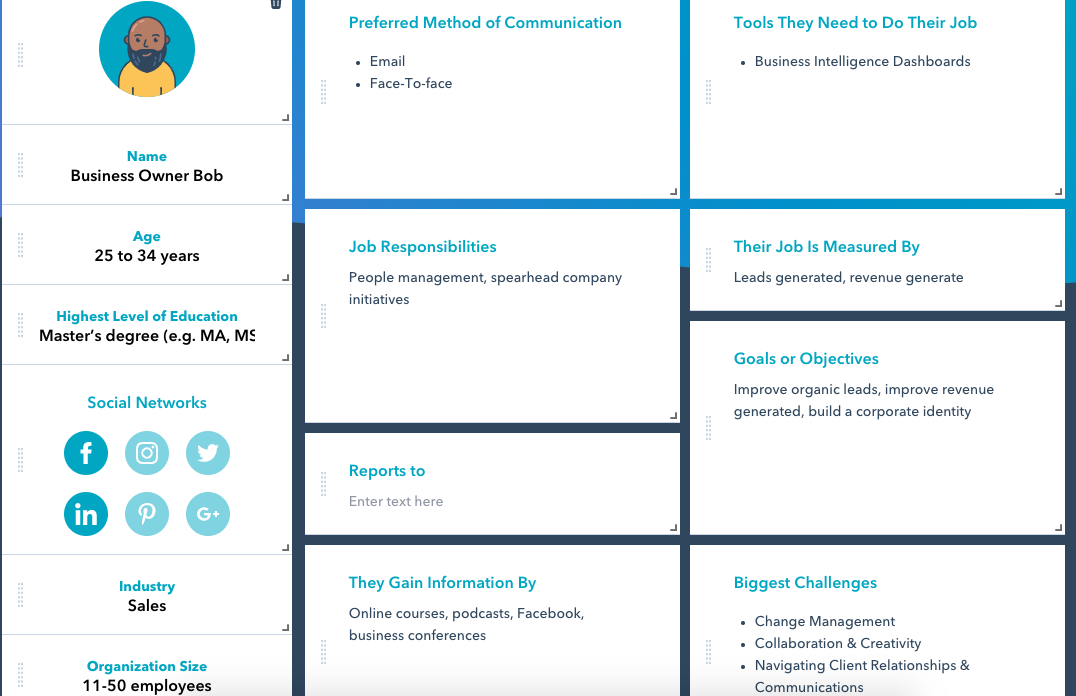
For example, “Business Owner Bob” is a CEO whose biggest challenges are improving revenue growth and organization. How can your company help his needs?
4. Be consistent
Being a business that’s inconsistent with its message, products, and goals can lead to a loss of revenue. In 2018, businesses with consistent branding increased revenue by up to 23%. Staying relevant and holding your business accountable will build customer trust.
For example, World Wildlife Fund’s branding on social media is consistent across their website, Twitter, and Instagram. Notice how their content is optimized depending on social channel, but still connects to their mission and panda mascot.
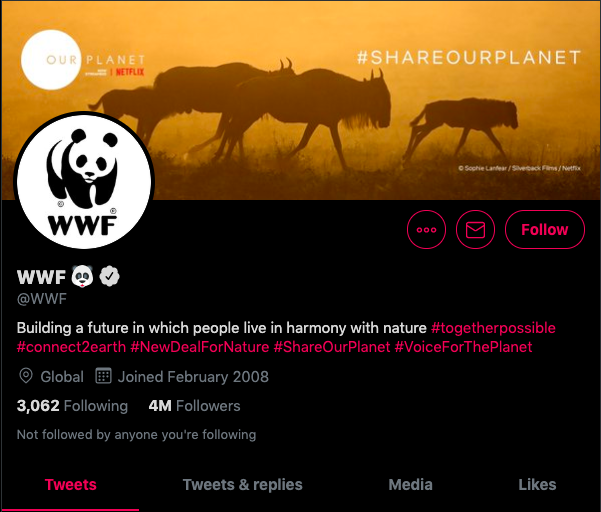
Image Source: Twitter
The hashtags in WWF’s Twitter bio really show how the nonprofit uses Twitter to expand engagement and reach. The hashtags also show the account’s goals, such as #VoiceForThePlanet. Plus, the panda emoji is the cutest thing ever, and it connects to the vibe on Instagram.
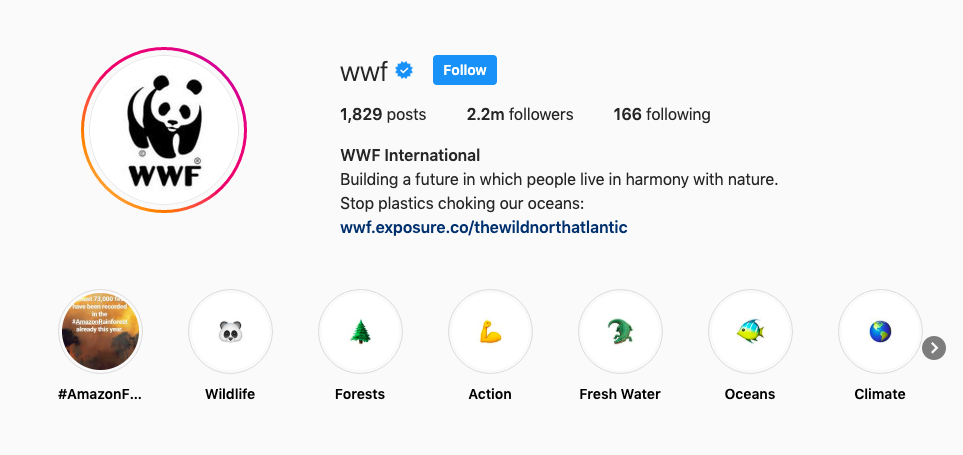
Image Source: World Wildlife Fund
WWF uses Instagram highlights to its advantage. The consistent look of using emojis as highlight covers and having the categories sync with the website’s mission is an excellent use of cross promotion on social media.
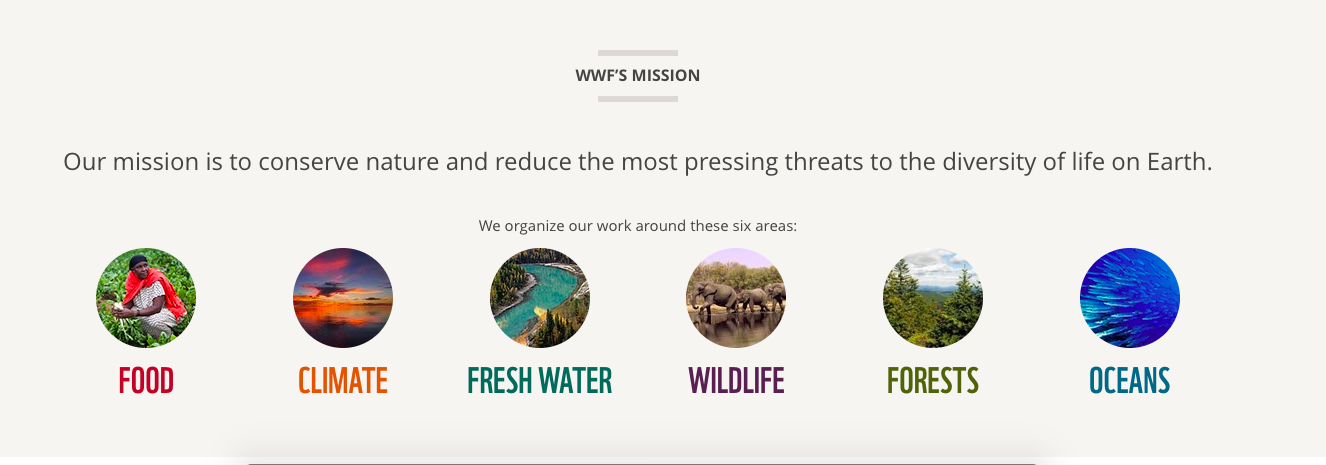
Image Source: World Wildlife Fund
The branding across three platforms makes WWF have an engaging and informative social media presence. The organization helps browsers explore with ease and navigate towards categories they are interested in.
- Additional reading: Power of Consistency
5. Focus on your team
Burnout is real. In fact, 61% of employees feel burnout at work. It doesn’t mean your product isn’t worth it anymore, but with a team tirelessly working towards bettering something they believe in, burnout is almost guaranteed to happen sooner or later. Something as simple as staff bonding days can lighten morale, give your team a chance to get to know each other better, and increase productivity.
For example, did a product designer come up with an awesome mock-up for their most recent project? Give them a shout out in an email and encourage them to keep up the good work. Another way to encourage team morale is to dedicate a regular meeting in which different team members present their favorite work hacks.
Food always draws a crowd, and if you have a team of foodies, try BYOB (Bring Your Own Bagel) Mondays, where an hour is dedicated to having breakfast together and blowing off steam before the week starts. (Remote members can virtually Skype or Zoom in!)
- Additional reading: Increase Team Empowerment
6. Be accessible to your customers
If you’ve ever called a support team, you know how important providing great customer service is. A customer can instantly cut ties with a business over unsatisfactory customer service.
An employee at Zappos once talked on the phone with a customer for 10 hours, upholding his employer’s devotion to the customer. Making sure your customer is satisfied through and through is your number one priority.
Incorporate great customer service into your social strategy. Engaging with customers about their concerns and praise builds brand loyalty.
- Additional reading: What Good Customer Service Looks Like
7. Stay organized
One challenge most startups run into is disorganization. Don’t fall into the trap of using too many tools — or too few. If you haven’t gone paperless yet, now is the time to try. Consolidate your tools, your strategy, and hit the ground running.
To get started, adopt a tool or two, like a CRM, collaborative project management software, or time-tracking tool. Choose a tool that enables every employee to easily find documents and communicate with their colleagues.
- Additional reading: Small Business Organization Strategies
8. Be transparent
Not every business secret should be a secret. If a customer wants to know the specs of your product, tell them. Being transparent with customers builds trust (94% of consumers cite transparency as their biggest reason for brand loyalty), could generate organic leads, and makes you stand out among competitors who aren’t as transparent.
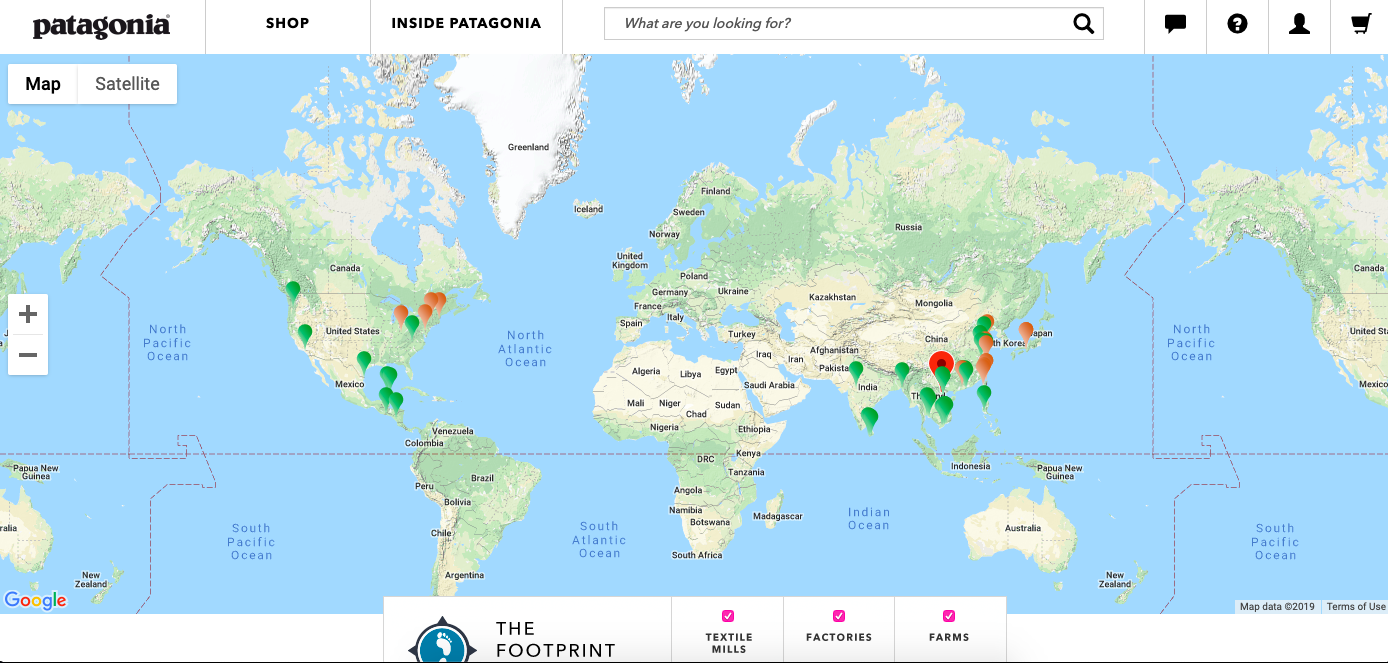
Image source: Patagonia
For instance, outerwear brand Patagonia took the charge on letting customers know the company’s supply chain routine, in an effort to reduce their carbon footprint. Their “Footprint Chronicles” page shows every textile factory, farm, and mill Patagonia uses and their impact on the earth.
- Additional reading: Why You Should Be Transparent
9. Stay updated on intellectual property
What’s yours is yours and deserves to stay that way. Making sure trademarks and copyrights are in place isn’t the most fun part of keeping a business afloat, but it’s necessary as the digital world grows more crowded.
To check if a trademark is already registered, The United States Patent and Trademark Office (USPTO) website has an online database you can search. Here’s a secondary global database from the World Intellectual Property Database.
- Additional reading: How to Protect Your IP
10. Upgrade social strategy
Social media is changing all the time. It’s important to keep up with those trends, especially to attract younger target audiences looking for the next new thing. Apps like Buffer, Hootsuite, and HubSpot’s CRM schedule posts so you don’t have to do them manually.
Can you imagine shopping for your next bed using Spotify? Mattress brand Casper can. Not only do they have ads on my favorite podcasts, they also found an awesome way to use different social sites — other than the big three: Twitter, Instagram, and Facebook — to maximize their audience reach, and it works.
If you can’t sleep, you can easily open Spotify and listen to the Casper sleep channel. Consumers might be curious to see if their mattresses feel as good as their favorite songs or lullaby music.
Similarly, comforting videos of dogs or montages of calm waves to the backdrop of soothing music can be the fireplace app you need to help lull you to sleep. YouTube being free means their videos are accessible to those who might not want to pay for a Spotify subscription.
- Additional reading: Proven Social Media Engagement Strategies
11. Get your customers involved
Customers help shape your business. They should be a part of it — and know that they are. Customer appreciation can be shown by using permission marketing and feedback forms, and soliciting positive feedback for testimonials to gain more leads.
Twitter sends its users a “Twitterversary” email every year on the date their users make their accounts. It’s a fun and simple way to acknowledge their customers and make them feel unique and special, like a birthday.
- Additional reading: How to Create a Customer Centric Marketing Strategy
12. Experiment
How else would you find out what works and what doesn’t? The uncertainty of experimenting with e-commerce, marketing practices, and customer loyalty benefits can seem like too much of a gamble, but by executing a planned “safe” experiment such as, say, a small sale on products to drive purchases, you could find favorable results on sales and brand loyalty.
For example, TikTok recently introduced ads into their app. It was a quiet rollout, due to the spirit of experimentation, but unsurprising. Ads are a known revenue booster for countless websites and apps, and this rollout has since been the segue to fully integrating them into the platform.
- Additional reading: The Importance of Experimentation in Business
13. Track your engagement
This is another instance of “You’ll never know until you do it.” Tracking social engagement gives you an eye into how your target audience responds to marketing campaigns and what performs the best. You’ll also be able to easily track when customers are commenting and replying to social posts. Tools are also out there to assist with this, which saves you time.
For instance, awareness metrics show your current audience as well as a potential one. Consumer metrics show the opinion customers have about your brand and its products.
Some of the top tools for tracking engagement include Google Analytics, Hootsuite, and Later.
- Additional reading: Social Media Metrics that Matter
14. Know your competitors
Running a competitive analysis helps you stay ahead of the curve, whether you’re a startup or a more established business. Always keep the practices of competitors in the back of your mind — especially ones seeing consistent growth in areas you might not have had success in.
The recent “Chicken Sandwich War” is a great example of companies who know their competitors. When Popeyes released their viral chicken sandwich, hoping to dethrone the famous Chick-fil-A sandwiches, Chick-fil-A instantly fired back with their own marketing, indirectly letting Popeyes and other competitors know that they weren’t going down without a fight.
Bun + Chicken + Pickles = all the ❤️ for the original. pic.twitter.com/qBAIIxZx5v
— Chick-fil-A, Inc. (@ChickfilA)
August 19, 2019
Before analyzing a competitor, make sure to analyze your business’s data to hone in on what you’re looking for and how you measure up to competitors.
- Additional reading: How to Start a Competitive Analysis
15. Focus on customer experience
Customer experience is just as important as customer service. Are your customers satisfied with your product? Are you measuring that satisfaction? Are you brainstorming and working on improvements to keep their satisfaction high? Running a Net Promoter Score (NPS) survey is a great way to measure customer satisfaction.
To run one, survey your customers and use the question, “On a scale of 1-10, how likely are you to recommend our services to a friend?” Then, categorize respondents based on their answers into three categories: Promoters (Answers were 9-10), Passives (Answers were 7-8), and Detractors (Answers were 0-6). Your NPS is the percentage of Detractors subtracted from the percentage of Promoters.
Having a CRM for your business can improve customer experience as well. A CRM automates emails and workflows to help you understand your customer better. Here are a few free CRMs to get you started.
- Additional reading: Customer Experience Guide
16. Keep going
If you believe in your idea and there’s a market for it, keep going. It can seem discouraging when businesses hit a plateau or a loss in revenue for that quarter. However, maintaining a persistent attitude can be the difference between seeing your business come out on the other side or failing. Not every day will be perfect, and that’s okay.
To illustrate, shoe company Adidas lost their footing (no pun intended) in the late 70’s and 80’s, reporting record losses after Nike’s surge in popularity. The company had to redesign its entire structure and connect to its initial purpose — being the best for the athlete — to come back.
For more information on how to elevate your business, check out our ideas on how to improve your marketing strategy.
- Additional reading: 5 Ways to Master Persistence
To run a successful business, you must understand your profession and industry, conduct social and company listening, and push through difficult times These business tips will help you stay ahead of the curve without feeling overwhelmed.

4 Things Every Task Management Tool Needs
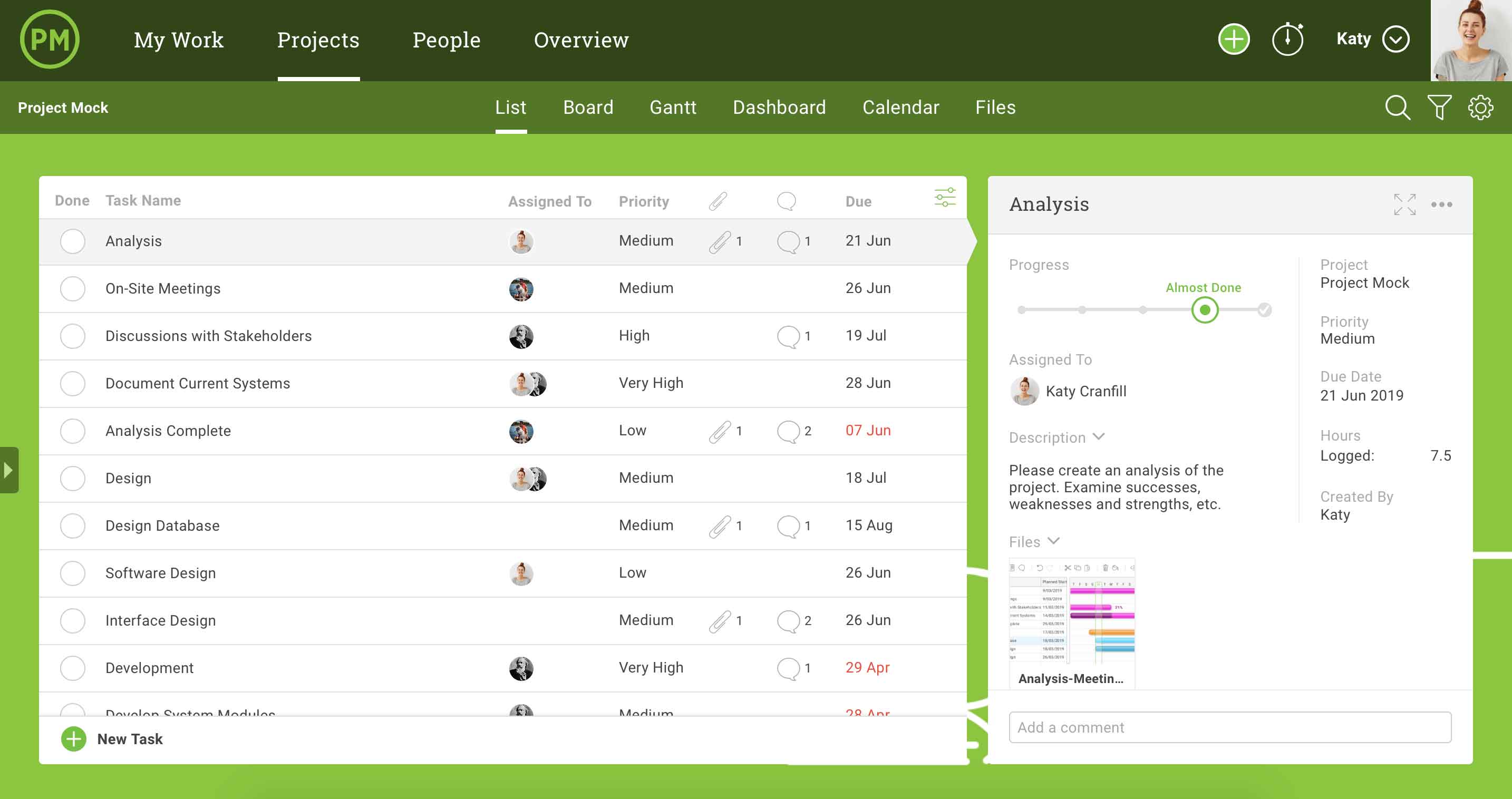
How 10 Brands Use Reddit for Marketing
Did you know that the most downvoted comment on Reddit was from a brand?
And surprisingly, that comment came from the major video game company EA.
Why is this so shocking? If you’ve ever surfed Reddit, a platform that encourages users to start discussion threads, you’ll find that a large chunk of its user base is very interested in gaming.
When EA replied to a comment in a thread discussing a game they created, users quickly pressed the down arrow symbol to downvote it. This moved the comment lower and lower in the thread until it was buried under other posts from users.
Here’s why that happened. Ahead of EA’s Starwars: Battlefront II launch, fans who got to test out the pre-release version of the game were annoyed that they needed to complete a certain number of playing hours or buy extra features in order to play their favorite characters.
Many of them took to the game’s subreddit to discuss how bogus they thought this was. EA caught wind of this and posted a long reply to one comment.
The company explained why they made these decisions and stood by them without offering a specific fix or solution, other than saying they’d look into price adjustments.
While this type of response might be acceptable on platforms like Facebook or Twitter, Redditors have no time for comments that offer them no value. Although the company stood up for its product and quickly responded to feedback, the comment may have made it seem like EA didn’t care to make improvements based on what fans were saying.
Based on the responses of Redditors, it seemed they weren’t falling for EA’s community management approach:
But, this struggle isn’t uncommon for brands on Reddit. In fact, it’s nearly expected. Even Digiday has referred to the social media site as one of the “trickiest platforms to crack.”
Redditors might be less likely to connect with branded content than users on other major platforms — like Facebook or Instagram. So, why is it that companies have a much easier time promoting themselves on other social networks?
This might be because, by nature, Reddit’s platform encourages users to create subreddits and communities around specific topics. The idea is to bring a variety of different people together to chat about something they have in common. These users, often called Redditors, are interested in reading tips, life-hacks, product criticisms, and other information from humans, rather than seeing branded content.
If a post isn’t valuable or interesting to them, they will downvote it. If a topic is interesting to them, they’ll upvote comments related to it and join in on the discussion to learn more.
To put it plainly, this social media network puts discussion first, rather than just focusing on content. While other networks offer comment threads, their feeds highlight content first and discussions second. Meanwhile, Reddit’s feeds highlight active threads, discussions, or subreddits, and most of the platform’s best content exists within those threads or subreddits.
Although companies like Budweiser are beginning to test out paid native ads on the platform, marketing on a budget, or just using community management strategies like EA can still be tough.
Why Reddit is So Tricky for Marketers
As mentioned, the social network focuses on community building and online discussion rather than highlighting individual profiles or specific content. Posts and comment threads, called subreddits, move up and down on feeds based on upvotes and downvotes from users.
As you might expect, upvotes are like Facebook likes which signal Reddit algorithms to move content up. Downvotes do the opposite by moving less engaging content down.
Posts that engage hundreds of others will get moved up and seen by more users. Meanwhile, content that bores or annoys many users get moved down where it might not even be seen. This causes users to see a feed that might be more engaging to them. But, this can also mean that non-promoted branded material that feels like a generic advertisement could get downvoted or marked as spam.
Another thing that makes Reddit challenging is that you can’t easily search for legitimate company profiles or official business pages. In fact, according to posts from this thread, you cannot verify a profile on the platform, and “anyone can be anyone” on Reddit.
Yes. That’s kind of scary.
There is a search filter for “Users and Communities,” but you’ll primarily see results for the most active subreddits — which could be created by anyone.
This is very different from Facebook, Twitter, and LinkedIn where you can easily search for people and verified business pages.
If a customer is looking for information on a product and searches a brand, they might see unofficial community pages that host more specific subreddits about the company. However, almost all of this content is usually created by fans or customers.
Here’s an example of what happens when you search McDonald’s on Reddit:
Although you see a number of communities related to McDonald’s, none of them say they’re official or run by the restaurant chain. When you click into them, their moderators seem to be Redditors that aren’t affiliated with the brand.
Although they aren’t brand affiliated, these communities can still be helpful to users and even companies. A prospect searching Reddit to learn more about a specific product might find great customer-posted chatter about the item they’re considering.
Gamers, for example, flock to the platform to discuss new launches, pro-tips, and issues they might be having while playing a popular video game. Similarly, users might create a subreddit or community about a restaurant, like Burger King, to talk about the weird or interesting things they’ve seen at the chain.
Since threads show positive and negative feedback, users might even recognize that positive feedback is more legitimate since the product would be destroyed by user comments if it were bad quality.
Common Reddit Marketing Strategies
If you really want to get your content front and center quickly, you might want to consider promoting your posts.
Promoting your posts will allow you to keep them prioritized higher up in subreddits as well as target them to specific groups of users. Like promoted posts on Facebook and other platforms, there will be an icon on the post that says its promoted. So, although the posts will be higher up, users will still know that it didn’t get to the top of the thread they’re reading on its own.
Here’s an example of what one of these posts looks like:
For brands who don’t want to pay for native ads, there seemto be two major promotional strategies at the moment. The first, and most prominent, is hosting an “Ask Me Anything” thread. The second strategy involves starting or participating in a subreddit discussion about your brand, product, or industry.
When “Ask Me Anything” (or AMA) threads are live, an influencer, executive, or staff member from the company creates a post announcing who they are and encouraging Redditors to ask them questions.
This type of promotion is best when you have an influencer or interesting person affiliated with your brand who can answer questions quickly and in an engaging way. However, it can be difficult to pull attention to these types of promotions if you don’t have an interesting host in mind.
The other major marketing strategy involves creating or participating in relevant subreddits. Creating a discussion gives prospective or current customers a place to talk about what they like about your product, or give you feedback. If they use your thread or a user-created thread to point out issues or compliment your product, you can respond to them accordingly to show that you’re interested in what they’re saying.
One downside to starting or participating in a thread is that you might need to keep a watchful eye on comments. If you receive a lot of negative feedback, you’ll want a community manager or team member to address it quickly and in a way that doesn’t feel like a fake PR-styled comment.
You cannot delete other people’s posts, even if they’re on a subreddit you created.
Because Reddit is such a niche platform and might require extra experimentation and brainstorming, we don’t encourage small businesses to put all of their time and effort into it just yet.
But, if you do want to test out a few posts — or even start a subreddit — here are a few examples of brands that creatively marketed themselves on the platform.
Examples of Brands on Reddit
Promoted Content
Toyota recently promoted a video-based post in the Formula 1 subreddit. Because this subreddit discusses everything related to Formula 1 race cars, Toyota’s video of two drivers racing Supras fit well within the stream of posts.
Even though Toyota’s content is promoted, the brand still focuses on telling Redditors an action-packed story about racing, rather than forcing a more traditional ad on them.
Additionally, by promoting a post specifically in a Formula 1 subreddit, they are leveraging an audience that has already shown a strong interest in cars and the video’s topic.
If you do promote content on Reddit, take a note from Toyota by picking out a few subreddits that really fit your brand. Then, make content that entertains or gives value to those audiences, rather than just promoting a post with a generic ad.
While Toyota made content for a specific subreddit that aligned with its brand, Ally Bank got creative by making and promoting content specifically for the Playstation subreddit.
A banking ad seems like a stretch for an audience that loves video games. So, to connect the two topics, Ally created an ad with an interesting analogy: “You wouldn’t settle for a 1-star controller, so why settle for a 1-star bank?”
This is pretty clever. While gamers might not respond well to a standard banking app advertisement, they might identify with buying a bad controller or heavily researching game-related purchases. This type of ad might make them question why they haven’t put the same amount of interest in a bank.
Later, when they go to make a banking decision, they might remember the bank a bit more than others because it related itself to a good gaming controller.
This is an interesting example of how you can experiment and think outside the box to create content that still fits in a subreddit which doesn’t immediately align with your brand.
Lemonade Inc.
Lemonade, an insurance app, created a promoted post that was targeted on a fast-food subreddit. This video highlights how insurance payments which cost as much as fast food items could help you cover property losses later on.
If you’re in a finance or insurance industry, it can be great to create and share content that shows people how valuable and affordable investments can be. This ad does that specifically by showing fast-food fans how much they can benefit from investing the amount of money they’d spend on a purchase into an insurance or savings plan.
AMA Promotion
Nissan was one of the early companies to experiment with the AMA format in 2015. During the promotion, their CEO created a thread in the subreddit “IAmA.” In his first post of the thread, he introduced himself, talked about a Nissan launch, and invited people to ask him questions.
While some people asked him about the product, others asked deeper questions like “What’s your rival brand?”
While the questions might not always be product-specific, this type of content can be interesting to car fans who want to learn more about the business or its new products.
Additionally, the fact that Nissan’s busy CEO gives time to answer questions might make customers trust him and the brand more.
Rather than thinking of him as a business executive, Redditors might begin to identify him more as a down-to-Earth business owner who wants to create a great product for his customers.
While Nissan leveraged its leadership for an AMA, The Economist, a London-based news publication, regularly has staff writers host these threads.
Recently, they had an obituary writer answer questions about her life and her job.
Although you might not immediately think a Q&A with an obituary writer could be an effective way to market your news publication, Redditors engaged in the thread and asked a number of interesting questions.
Because The Economist does this regularly, Redditors can get an inside look at what motivates the publication’s writers. After reading a few of these, users might relate to and trust The Economist’s writers. Because of this trust, they might look to this paper when they’re in search of a credible source.
The publication highlights a wide range of writers, users could also learn a little bit more about why each section can be fascinating.
For example, someone who’s never read the obituary section of a paper might want to take a look at it after learning about some of the unique life stories covered by the writer.
Using Reddit’s streaming feature, Audi posted AMAs with a visual twist. In a series of live streams, celebrities sped around in Audi’s newest car on a test track. As they hit high speeds, the celebrities answered questions from Redditors.
While most AMAs are text-based, Audi leveraged one of the platform’s new features to do something interesting and unique. Although people might not be drawn car brands, or to a thread that uses only text, they might be interested in watching an action-packed celebrity AMA.
If you aren’t on Reddit but want to show your product in action, you could do something similar by having a leader of your company or an influencer in your industry do a Facebook, Twitter or Instagram live video where they take comment-based questions while using that item.
To promote the launch of its BFR rocket, SpaceX had CEO Elon Musk host an AMA. Not only is Musk a chief officer who’s extremely knowledgeable about his product, but he’s also a major tech-industry thought leader.
Rather than posting this thread on a SpaceX subreddit, it was actually hosted on a broad subreddit called r/space.
This can be a great way to gain awareness from all space fans, rather than just Redditors who already follow SpaceX subreddits.
Because he’s regularly in the news for his work with space technology and autonomous vehicles, Musk might be incredibly interesting to people who follow r/space — even if they haven’t heard of him yet.
While you might not have someone of Musk-level fame on your company’s team, this is a good example of how SpaceX identified a subreddit where its biggest possible pool of Reddit fans could be. Then, they contributed to the community in an interesting and engaging way.
If you’re a business that wants to experiment with Reddit, you should consider posting interesting content that ties to your product or brand in a subreddit that’s broad, yet relevant to your brand.
For example, if you’re in the fashion industry, you could have your company’s clothing designer host an AMA in a fashion-related subreddit. Or, if you don’t have a team member who can host an AMA, you could ask a question in a post, such as, “What’s your favorite fall fashion?” and then respond to replies.
Bill and Melinda Gates Foundation
Bill Gates is no stranger to Reddit. According to the post screenshotted below, he’s already hosted a number of AMAs on various subreddits.
But, in this same post, he decided to focus less on products or technology and more on his nonprofit foundation. To do this, he posted in the broad r/IAmA subreddit with a blurb about what he was up to with his charity. He also included relevant links that users could click to learn more. Then, he asked Redditors to ask him anything.
Gates does a great job of lightly plugging his foundation so all Redditors will see it and learn more about it before diving into the questions and answers.
Even when AMAs are over and archived, they’re still public and the first post is always at the top. This means that including light, but interesting, information about your mission in this post can be helpful for brand awareness, even after your AMA isn’t live.
Branded Subreddits
In 2014, Nordstrom tweeted that they’d launched a new Nordstrom community. Since then, users have posted on the subreddit to discuss new products, share experiences related to being a Nordstrom employee, and to ask customer-service or product-related questions.
If you’d like to create an online community of fans, Reddit could be a great platform to do that. However, because the platform prioritizes engaging user-generated content, you’ll also want to promote the subreddit on other social platforms as Nordstrom did. Otherwise, you might be relying on users to stumble upon your branded subreddit or search for it on their own.
Because the channel doesn’t feel censored and you see both good and bad comments about products, consumers can do solid research on a product or two before deciding which they should buy.
If you see positive feedback on this subreddit, you might trust it even more and purchase the product knowing that Nordstrom customers would likely bad-talk the product here if it were not good.
Sometimes, brands don’t need to create and grow their own subreddits. If there are enough fans, Redditors will start one. However, even if a brand doesn’t create one, it might still leverage it and contribute content to it.
XboxOne is an example of this. At some point, users created a giant subreddit where they could talk about Xbox games, ask technical questions, and offer pro-tips. But, on a fairly regular basis, XboxOne game developers began to host AMAs on the subreddit. This happened so regularly that a Developer AMAs tab was added to the subreddit’s top navigation.
In this example, Xbox rewards loyal fans with exclusive content and finds a low-hanging-fruit opportunity on a niche platform.
While Reddit isn’t for everyone, the brand realized that many of its die-hard fans were there and had already created hundreds of discussions about its products. Rather than spending time on creating a new subreddit, Xbox reps and developers added to communities that already exist.
If you have a brand or product that is getting a lot of web chatter on any platform, it can be great to chime in and boost discussion about it. This can make your fans feel like you’re accessible to them if they have any questions or feedback.
Additionally, if you join the discussion with a piece of interesting content or a brand-related announcement, fans also might feel like they’re being rewarded for being a great customer. All in all, this might make them more loyal to your brand.
If you’re not planning to make Reddit part of your strategy, you could alternatively pay attention and respond to positive posts or comment threads that discuss your brand on Facebook, LinkedIn, or Twitter.
Navigating Reddit
Reddit is still a mystery to many marketers. And, if you don’t have an advertising budget, you’ll need to get creative and strategic to engage audiences.
Right now, the brands that will transition most easily onto the platform are companies that would benefit from community management.
For example, gaming is a major topic on Reddit because gamers are always using to ask for tips, tricks, and cheat codes. Because of this, gaming companies might benefit from joining in on video game discussions with posts or threads that provide value or helpful information.
If you do want to start learning more about the platform by testing a few threads, here are a few tips to keep in mind.
- Don’t post content that feels like an ad or press release. The Reddit community is very quick to down-vote advertise-y posts or mark them as spam.
- This audience will respond more to content that gives them value, even if it’s branded. So, whether you’re creating a tip thread about your product, responding to users, or hosting an AMA, make sure you’re giving Redditors valuable information or interesting content that they’ll upvote or share.
- Identify the best communities for your industry and find unique ways to engage with them. For example, if you sell gardening products, you might want to host an AMA on gardening in an agriculture subreddit.
If you’re still struggling with the platform and have a budget to play with, you could also consider sponsoring a post or buying a more traditional native ad-block.
At the moment, Reddit is still a pretty niche platform, and you should only consider paid content there if your mission or content aligns with Reddit audiences or various subreddits.
However, Reddit ads are starting to gain steam from bigger brands. Because the platform is aiming to improve its marketing features, small to mid-sized businesses might also be able to realistically budget this strategy in the near future.
If Reddit doesn’t feel like the right platform for your marketing strategy, check out this guide to see if any of the newest social media platforms pique your interest.
