
Welcome to My Blog
What Video Marketers Can Learn From 7 Emmy Nominated Commercials
As most people sit down to watch the Primetime Emmys on September 22, they might be rooting for their favorite shows or actors to take home the coveted award.
But, as a marketing blogger, one of the categories I’ll be paying attention to this year is “Outstanding Commercial.”
While these ads are almost always high-quality and require a big budget, they still use basic marketing tactics, such as storytelling and playing on human emotions, to successfully boost brand awareness. These are tactics any brand, big or small, can take advantage of.
Because more and more people prefer to learn about products through video, looking at popular commercials for marketing inspiration could be incredibly beneficial to your strategy.
Although you probably can’t hire celebrities to promote your products, these commercials could still give you ideas for scalable video content that boosts brand awareness.
To help you learn from the best of the best, I’ve compiled a list of fascinating 2019 and 2018 Outstanding Commercial nominees. I’ve also included a few takeaways that video marketers can learn from each.
Although there were a few powerful and thought-provoking PSA nominations this year and last year, this blog post will focus on the commercials specifically created by brands.
4 Outstanding Commercial Nominees of 2019
“A Great Day in Hollywood” (Netflix)
In this Netflix ad, the streaming service celebrates the talented and diverse range of black actors, writers, and showrunners creating award-winning content on the platform. The commercial, narrated by Stranger Things actor Caleb McLaughlin, showcases 47 of actors, writers, and crew members who “represent a limitless range of identities” in Netflix shows and movies.
As McLaughlin narrates, he makes empowering statements about how far black talent has come. For example, at one point he explains that we are living in a time when “black women are boldly the lead character, whether inmates or scholars.”
The commercial shows the faces of a few actors, including Laverne Cox of Orange Is the New Black. Then it slowly pans out to the group. They are posed similarly to a famous 1958 photograph of black jazz legends, titled “A Great Day in Harlem.”
At the end of the commercial, McLaughlin exclaims, “This is not a moment. This is a movement.”
The ad was part of Netflix’s larger campaign to highlight its more than 20 shows and movies created by black talent, such as Dear Black People and She’s Gotta Have It.
In this ad, Netflix takes a stand for diversity and gives a nod to inspiring black musicians of the past. This type of ad feels motivational and optimistic and leaves viewers on a high note. People who watch will know that Netflix values different backgrounds as well as the creativity and unique storylines that can come from them.
Aside from spreading an important, positive message, this strategy also allows Netflix to highlight and remind viewers of its track record for investing in inclusive, groundbreaking content.
“Behind the Mac — Make Something Wonderful” (Apple)
In this example, Apple leverages found footage to present a black and white slideshow of celebrities like Oprah, Bono, and Serena Williams working on their MacBooks. Because these images are candid and not posed, viewers get a glimpse of these celebrities’ day-to-day lives, while also seeing images of MacBooks being used.
Rather than simply showing models or product shots, Apple uses candid shots to prove to prospective customers that successful people they recognize are using the product.
Text-based reviews or customer testimonials are great, but a picture or video of someone successfully using a product is worth at least a thousand words.
And, because viewers associate the product with success and popularity, they might trust that it will be the best computer for them, too.
If you sell a product that’s on the higher end, one video marketing strategy you could use is telling a story that makes people trust that they’re investing in a credible item or service. You could do this through videos that show successful or influential customers using your product, or with a video that explains how your product can be helpful to a variety of different people.
For example, if you’re marketing an upscale fashion company, you could encourage happy customers to send you photos of themselves in your business attire. Then, you could create a video of real-life people wearing your clothing at work, on business trips, or at company outings. People might watch this and see that the clothing is popular and worn by people in a number of different business settings.
“Don’t Mess With Mother” (Apple)
This ad is similar to another spot from Apple that was nominated for the 2018 Outstanding Commercial Emmy. In the first version of the ad, called “Earth: Shot on iPhone,” Apple showed a montage of videos and photos of nature taken with the iPhone X. This year, they did essentially the same thing with the iPhone XS.
While both versions focus on nature footage, the new version pays tribute to Mother Nature specifically. Before the imagery is shown, viewers see the title of “Don’t Mess With Mother: Earth Shot on iPhone.”
The ad then opens with footage animals, like sharks and crocodiles, preparing to attack. As the video continues, you begin to see shots of storms and volcano explosions. Then, the animals all start opening their mouths and begin to chomp in the direction of the camera. It ends with the same opening statement of, “Don’t mess with Mother.”
This is an action-packed example of how a brand leverages and highlights its product’s strengths. A key feature of both the iPhone X and XS was the cameras. So, Apple used the phones to create a crisp and clear commercial that was both visually stunning and showed the power of its product.
Along with playing up visual strengths, Apple chooses Earth as the film subject. Not only does nature provide great visuals, but this ad might also be more memorable for those who are interested in sustainability, animals, and the environment.
Alternatively, this strategy could be helpful for businesses that sell visual tools, like cameras or video software. If your product can help create a crisp beautiful photo, you can create a montage of photos or videos that displays the product’s strength.
“Dream Crazy” (Nike)
“Dream Crazy” begins with a narration saying, “If people say your dreams are crazy — If they laugh at what you think you can do — good. Stay that way. Because what non-believers fail to understand is that calling a dream crazy is not an insult. It’s a compliment.”
Then, the ad shows a montage of athletes, like Serena Williams, winning major sports matches. As each win is shown, the narrator hints to a lesser achievement that the athletes would not settle for.
In Williams’ case, the narrator says, “If you’re a girl from Compton, don’t just become a tennis player, become the greatest athlete ever.”
While the Nike commercial focuses on sports achievements, it pivots dramatically at the end as it reveals the football player and activist, Colin Kaepernick, as the narrator. As he turns to the camera, he says, “So don’t ask if your dreams are crazy. Ask if they’re crazy enough.”
Although the ad might speak to athletes, it could also intrigue others who want to achieve greatness, make change, or take risks for something they believe in, like Kaepernick.
Sneakers aren’t just worn by athletes, so this style of speaking to a wider audience — while still highlighting your brand — is a strong strategy.
By far, the most important takeaway is that you can gain a great deal of brand awareness and maybe even trust by promoting positive messages. While people know Nike as a shoe brand, they might see this ad and favor the brand more because of its motivational mission.
While this ad strategy is obviously great for athletic brands, telling stories of people who achieved greatness, took risks, or beat the odds could also be a great content marketing tactic for political organizations or nonprofits that are trying to spread awareness of their own mission.
Say you’re part of an organization trying to fund higher education needs for students. With permission from students or alumni who’ve benefited from your work, you could share their stories or testimonials to show others that higher-education is possible.
This type of commercial could motivate young people to work hard and aim for success, while it also shows potential donors what the organization has already helped people achieve.
3 Outstanding Commercial Nominees of 2018
“The Talk” (Proctor & Gamble) – Winner
This hard-hitting theatrical ad and 2018 Emmy winner tells the story of African-American mothers talking to their children about race throughout different decades. At the beginning of the ad, a mother who’s brushing her daughter’s hair ominously tells her, “It’s not a compliment.”
As many viewers might wonder what she’s referring to, you see scenes of other black mothers talking to their children about race. At one point, one mother talks to her son about a racial slur. At another, one mother tells her son, “There are some people who think you don’t deserve the same privileges just because of what you look like. It’s not fair. It’s not.”
At one point, one mother tells her daughter, “Remember, you can do anything they can. The difference is you’ve got to work twice as hard and be twice as smart.”
From there, the ad gets darker. Viewers then begin to see scenes of mothers telling their children how they should behave when a police officer pulls them over so that they can be safe from possible police brutality.
Then the storyline becomes more motivational. Although the mothers tell their children that they will be judged differently because of their skin, they also tell them to “keep showing up,” and to not let discriminatory words define them.
As the ad closes, it’s revealed that the young girl who was getting her hair brushed was told she was, “Pretty, for a black girl.” Her mother disagrees and says, “You are beautiful. Period.”
After this, viewers see text that says “LET’S ALL TALK ABOUT ‘THE TALK’ — SO WE CAN END THE NEED TO HAVE IT.”
The “talk” they’re referring to is the discussion about bias. At the end of the video, they include the hashtag #TalkAboutBias.
The ad was made to promote P&G’s Black is Beautiful Initiative and how it is a “Proud Sponsor of Moms.”
Like the Netflix commercial, it powerfully touches on difficult political and societal topics that many people who aren’t from a diverse household might not think about.
As you watch this ad, you might be asking, “How does this commercial talk about P&G products?”
Well, it doesn’t. Like Nike’s Dream Crazy ad, P&G tells a story and uses its platform to spread awareness. But, how does this help boost a brand?
Although they didn’t promote one product or brand specifically, P&G’s ad launched significant discussions from social media and news outlets after the ad went viral. This resulted in many people wanting to learn more about them when they saw or heard about the ad.
P&G’s Global Communications Director, Damon Jones, told AdAge, “We know that bias is not just an African American issue. It’s an issue that takes on many shapes and forms, across gender, race, age, weight, sexual orientation, and more.”
“Our goal with ‘The Talk’ is to help raise awareness about the impact of bias,” he added. “We are also hopeful that we can make progress toward a less biased future by recognizing the power of people of all backgrounds and races showing up for one another.”
This ad not only informed people from non-diverse communities about the conversations some families must have about race, but it also showed people of color that the company supports them.
Because of this message, someone might want to purchase products from one of P&G’s many brands knowing that they’re taking a stance on hard topics and care about their customers’ backgrounds.
“Alexa Loses Her Voice” (Amazon)
In this funny ad, the Alexa Voice Assistant gets a cold and loses her voice. Then, celebrities have to substitute for her. Even though it shows the product malfunctioning, it also does a great job of showing many of the Echo’s popular voice-command skills. It also features Amazon’s CEO, Jeff Bezos.
Nope, a small business can’t afford to hire Gordon Ramsey or Cardi B for a commercial. But, they can take a note from Amazon and use video marketing to tell an interesting story about their product and its features.
If you’re a video marketer for a smaller technology company, you might similarly consider making a video that shows an every-day person using your app or product to get something done. This strategy can help you highlight different features all in one piece of content while showing viewers how they can easily use a product.
“It’s a Tide Ad” (Tide)
In 2017 and 2018, Tide released a number of commercials with storylines that had nothing to do with Tide, except for the actors’ noticeably clean clothes. When viewers were at the edge of their seats, someone in the ad would say, “It’s just another Tide ad.” Then, they’d see the Tide logo and text that said, “If it’s clean, it’s Tide.”
This commercial campaign started with a long Superbowl ad and follow-up commercials during each break of the game. In the first ad, which took the Emmy nomination, Stranger Things’ David Harbour shows up in several common ad scenes, including in the bathroom with a buff deodorant model, driving a sports car, and laughing on the couch with a fake family.
As he pops into each commercial, he explains that all of them have one thing in common: clean clothes that were washed by Tide detergent. In the end, he says, “So, does this make every Super Bowl commercial a Tide ad? I think it does.”
This ad is pretty funny and memorable. Since Tide has one job of keeping clothes clean, they show off the brand’s strength in multiple versatile scenarios.
Humor like this can also be a great way to make a simple product more memorable. If you go to the store to get detergent shortly after seeing this commercial, Tide might be the first thing to pop into your head because of the ridiculous ads.
Sometimes, it can be great to think outside the box and come up with an odd way to show off your product. And, if you can work in humor, people might identify with or remember your ad even more.
What These Nominations Can Teach Us
While many of last year’s commercials were funny and memorable, this year’s nominations were thought-provoking and motivational. While this year’s ads are all great examples of how video marketers can succeed by incorporating their product into stories about every-day people, last year’s nominees show that humor can make your brand more relatable.
If you loved these ads, but worry that you can’t create an interesting video on a low budget, don’t worry. Use the above examples to motivate you, while reading this guide for tips on how to film a cheap marketing video.
Want to learn more about all the different aspects of video marketing? Check out this ultimate list of stats and advice.

Push vs. Pull Marketing: How They Differ and Work Together
I recently bought a new laptop. Before deciding which one was right for me, I poured through Yelp and Google reviews to make an informed decision. Once I narrowed my search down to a couple of models, I visited the store to examine specs in person before committing.
To put this in a different way, I was “pulled” into brands by their marketing of laptops for a young professional. Then, I was “pushed” into selecting the right fit by looking at the marketing inside the store. This is how push and pull marketing are at work separately and together.
What is Push Marketing?
Push marketing is a strategy focused on “pushing” products to a specific audience. The goal is to bring what you offer to customers in your marketing. Social media channels are considered to be “push” sources because they’re great for launching new or niche products.
Push Marketing Strategy
Also known as direct marketing, push marketing is a form of general advertising. When I grocery shop, I look for the signs that notate sales and gravitate towards them — picking up limes I never knew I needed. This is an example of push marketing. Similarly, let’s look at Suzie.
Suzie’s marketing company — specializing in local businesses — is ready for its big debut. But these local businesses have no idea Suzie’s company exists. This is a job for push marketing. Suzie reaches out to businesses in her area via email marketing, put ads in participating locations, and create a social media business page to expand her reach.
Because Suzie’s goal is to introduce her company to local businesses as she launches a new product, push marketing is her best option.
For a business that’s been around for a while but still wants to execute a push strategy, another option is running a limited time offer for your product. Use a channel your target market is closely integrated with, such as social media, or use landing pages to your advantage by including a CTA at the end.
Pull Marketing Strategy
You guessed it — pull marketing is the opposite of push marketing. Pull marketing is best for when you want to draw consumers to your product. The goal is to create loyal customers by providing marketing that showcases what they’re looking for.
For instance, if someone is looking for a new babysitter, they might visit Care. They can select a babysitter based on a list of preferences that are specifically shown to fit their needs. To put this in the context of another business, let’s take a look at Luis.
When businesses are looking for a point-of-sale (POS) app, Luis wants his POS system to be the one they choose. Pull marketing channels are exactly what he needs. To pull his target market, Luis starts a blog on his app’s website, runs specialized and high-traffic social media campaigns, and focuses on differentiating his brand.
To amp up his pull marketing strategy, Luis focuses on SEO for his online marketing to make his system discoverable to his target market. Google reviews, and word-of-mouth reviews on sites like Yelp, are his best friends throughout his campaign.
Since Luis has already developed a following from his app’s debut, he can focus on credibility and reliability rather than marketing to make the next sale. After a while, this will pull customers to his business. Pull marketing strategies generally take longer than push marketing to drive results, but this strategy ensures long-term customers and growth.
In the age of consumers educating themselves on products and services, pull marketing has become vital to markets with heavy saturation, like new apps or clothing companies. Pull marketing shows how you are unique as a brand.
There are a few negatives to push marketing — mainly splitting costs and keeping long-term customers.
If your company is working with a supplier to implement a push marketing strategy, you’d have to split profits with the supplier at the end of the day, which means less revenue for you. Since push marketing focuses on short term sales, building brand loyalty is difficult with an outbound strategy.
A downside to pull marketing is that you might not cater to the right target audience. In order to connect to your consumers, you need to know who they are and what they’re looking for. For instance, an athlete shopping for running shoes might not be interested in advertisements for heels.
To decide which method best fits your business, think about how you want to approach consumers. If you are trying to get the word out about your business, push will most likely be the way to go. If you’re a marketer building brand buzz in your market — perhaps about a specific product or service — pull would probably be best.
Push and pull can also work together. Customers need a push for demand to be created and a pull to satisfy that demand. For those who haven’t heard of your company, a push is needed. For those a little further along in their buyer’s journey, you can pull them in.
Push and Pull Strategy Examples
Going back to Suzie’s marketing company, once she gains leads from her push strategies, she can focus on a pull campaign. She can take to her company’s social media to do client spotlights, run a sale on services, and remind clients to rate her services.
When Luis pulls customers into his app, he can push them towards his product. Luis can integrate push methods into his strategy by sending automated marketing emails, investing in a streaming service ad, or focusing on a social media channel he doesn’t actively focus on.
Image source: Apple
Apple’s iPhone 11 advertising is heavily focused on the three cameras, a new implementation in the iPhone line of products. From this kind of push marketing, we can see that Apple’s market research centered around customers that wanted to see improved camera quality with their next iPhone purchase.
The Star Wars: Episode IX trailer starts with footage from the first Star Wars film, Episode IV. Text entices the viewer to see how a 40-year-long saga will come to an end. Not only is this an example of push marketing for longtime fans, but it’s an attention-grabbing pull to people not familiar to Star Wars, who might be interested in seeing what a movie of that caliber is like.
Lastly, let’s say you work for a startup that sells computer screens. In order to push your product out there, you convince stores like Best Buy to carry it. Based on the market, your strategy could pull consumers in by using your ad space in Best Buy to promote the features of your screens that others don’t, like length, look, and display features.
Most marketing falls into these two general categories, but what you do with inbound and outbound strategies is up to you. When I was purchasing my laptop, I was convinced by a mix of the two and used them to my advantage as a consumer.

IT Audit: Definition & Quick Guide
How to Write a SMART Goal [+ Free SMART Goal Template]
There’s almost nothing more gratifying than the feeling you get when you accomplish a goal.
Whether you’re pressing “Publish” on a blog post or collecting initial analytics on a campaign months in the making, it’s undeniably satisfying to know you’ve successfully finished a task.
When you’re not chasing a clear goal, though, work can feel like a never-ending grind. Without goals, you’re setting yourself up to feel like the work you’re doing isn’t enough — or, worse, you position yourself to do work that doesn’t actually impact your company’s bottom line.
Making your goals SMART is an effective method for clarifying your motivations, setting a clear direction for you and your team members, and ensuring you’re able to celebrate the wins when they come along.
To help you write SMART goals, we’ve created a free template with all the tools needed to get you started. But first — what exactly is a SMART goal, and how does it differ from a regular goal?
What is a SMART goal?
The letters of SMART stand for:
- Specific
- Measurable
- Attainable
- Relevant
- Time-Bound
The SMART acronym is a framework that will enable you to write goals that drive greater impact. Write goals with each of these aspects in mind, and you’ll be able to quantify how far you’ve come and how far you have left to go against your goal.
When you reach the milestone you articulated in your SMART goal, you’ll be able to celebrate knowing that you achieved something tangible and impactful.
To make the process of setting a SMART goal simple, we’ve created a free, downloadable SMART goal setting template. I’ll walk through the template as we discuss each aspect of a SMART goal, below.
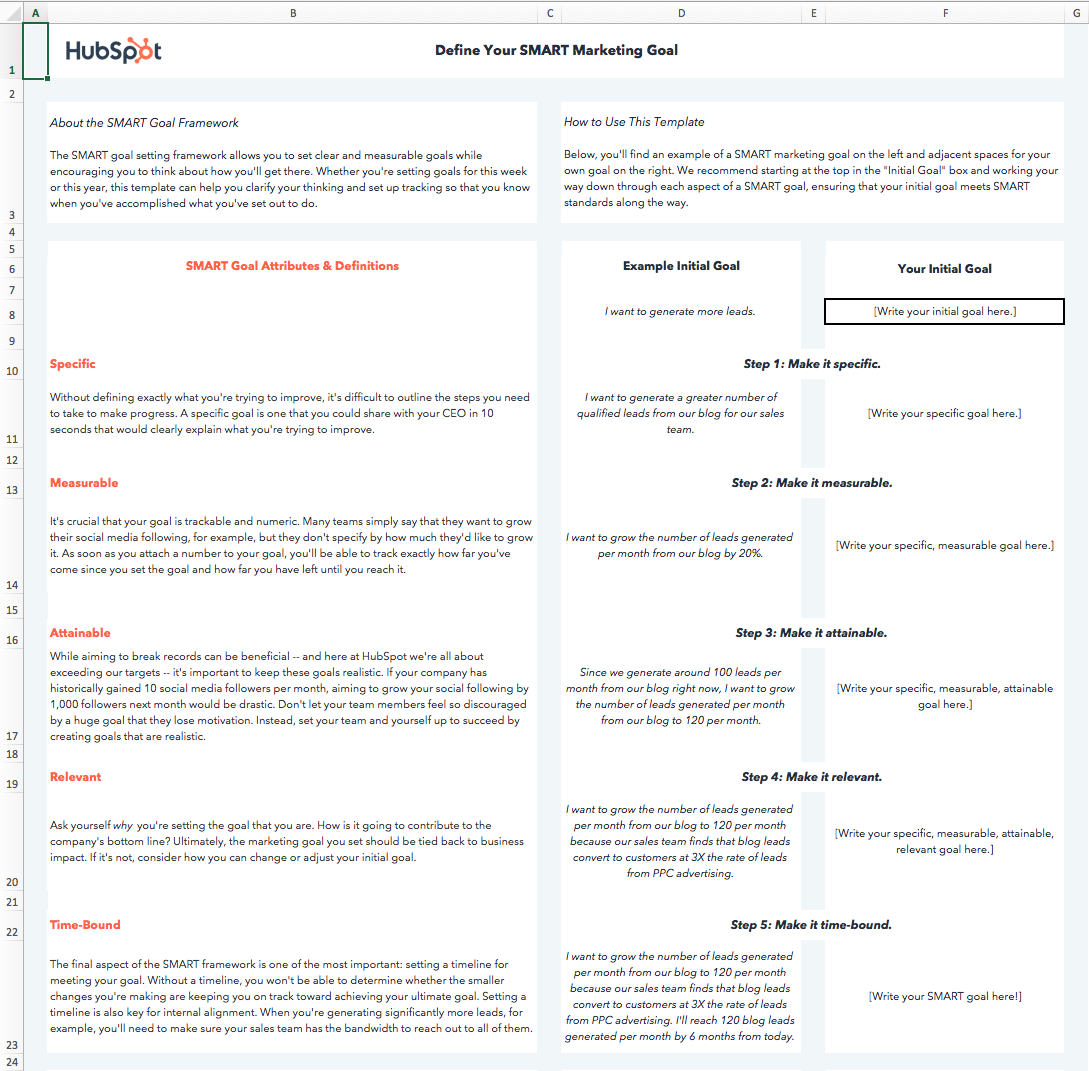
I’d suggest downloading the template yourself to follow along throughout the rest of this blog post. Next, let’s dive into the importance of each aspect of the SMART acronym.
What does each aspect of the SMART acronym actually mean?
While we run through the definition behind each aspect of the SMART framework, we’ll apply the framework to a real-world example as we go. You can download the template to follow along (input your starting goal in cell F8) or simply write your starting goal on a piece of paper.
Let’s start with a basic, non-SMART goal as our example — “I want to get more fit.”
1. Specific
Goal setting is often associated with striving toward our highest aspirations — and actually reaching those aspirations can seem daunting. Specificity helps us determine the path between where we are, and where we want to be.
“Getting more fit” is ambiguous. There are innumerable ways to get more fit, and everyone has their own definition of fitness — for instance, are you looking to lose weight? Perform more push-ups? Cut a minute off your mile time?
When a goal isn’t specific, there is no way to tell whether the actions you’re taking are going to help you achieve that goal. If your specific fitness goal is actually to increase the number of push-ups you can do at one time, following a running plan isn’t going to be very helpful in getting you to your true goal.
A specific goal is one that makes your next steps clear — or, at the very least, narrows down the potential next steps you might take.
To specify what we mean by “I want to get more fit,” I’ll alter our example goal to read, “I want to be able to do more push-ups.”
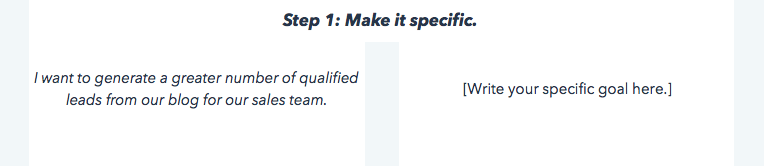
If you’re following along in the template, make your goal more specific and type it into the cell under Step 1.
2. Measurable
When a goal is measurable, you can easily track your progress. Typically, this means that a number will be attached to your goal.
A numerical goal is valuable for many reasons. In addition to giving you something to strive toward, you’ll be able to celebrate a victory when you reach the final benchmark.
If you say that you just want to do more push-ups”, for instance, does that mean that you want to be able to complete just one more push-up per session, or that you want to double the number of push-ups you can do overall? One goal will take a lot more time and dedication to achieve than the other.
Let’s say I can do ten push-ups in a row right now. To allow us to measure our progress against our final goal and know when we’ve reached a milestone, we’ll edit our push-ups goal to read, “I want to be able to do 25 push-ups in a row.”
3. Attainable
I’ve set some pretty lofty goals before — and if you’re reading this, you’re probably a self-motivated person, too.
Big aspirations are admirable, but it’s important to balance long-term goals with more achievable, short-term goals.
Setting attainable goals is all about looking at what you’ve done so far and adjusting your goals to be realistic relative to those benchmarks.
To consider the point in more concrete terms, think about business growth rates — if your company has been selling 2% more product each month for the past 12 months, aiming to sell 15% more product next month would be an unrealistic goal. Keep in mind that 2% growth is the status quo — so a good stretch goal might be selling 3 or 4% more product next month. Selling 4% more product would still be doubling your month-over-month growth.
Attainable goals are useful because they help you maintain momentum. It can be hugely discouraging to miss huge targets, whereas consistently making small gains will encourage you to continue delivering wins.
Each month, you’ll be aiming for the familiar satisfaction of hitting your target rather than dreading another seemingly major miss.
For instance, to make our example goal a bit more attainable, I’ll move the target from 25 push-ups to 20 push-ups. There’s still a significant amount of work required to get to where I want to be, but I’ll be able to celebrate a huge achievement — doubling the amount of push-ups I can do — and use that momentum and celebration to drive me to set a goal of doing 25 push-ups soon after I achieve my goal of 20.
Consider what you’ve done in the past in relation to the goal you’re in the process of setting, and adjust it accordingly.
4. Relevant
Relevant goals are ones that will help you move in the direction you truly desire. You can allocate your time to an infinite amount of activities, but which activities will actually push you closest to your ultimate goals?
It’s a common trap to feel like we’re being productive when we’re busy, even if our action isn’t creating a meaningful impact.
In the beginning, our example goal was to “get more fit.” To make sure our goal is relevant, we need to ask ourselves whether following through on this goal will really help us get to where we want to be.
In the case of our push-up goal, the answer is yes. Push-ups engage several muscle groups, including your back, arms, shoulders, and core, and doing a significant number consecutively can definitely elevate your heart rate. Therefore, executing on this goal will improve my muscular strength and perhaps even my cardiovascular strength, both of which are key elements to overall fitness.
Ask yourself whether the goal you’ve set is going to create real impact on your overarching targets, and adapt it or identify a way to track impact if the answer is currently no.
I’ll adjust our example goal to include its overarching purpose: “I want to be able to do 20 push-ups in a row to improve my overall muscular fitness.”
5. Time-bound
The final letter of the SMART acronym stands for time-bound. You should always aim to accomplish your goal within a specific time period. Adding in a time frame will not only motivate you to take steps every day toward your goal, but also allow you to track how much progress you’ve made against your goal versus the time that’s passed.
If I’m aiming to increase the number of push-ups I can do by ten in two months, I’m able to set a midpoint milestone of adding five push-ups in the first month. If a month passes and I’ve only increased the number by three, I’ll know I need to ramp up my efforts, re-evaluate my strategy for increasing my push-up strength, or adjust the time frame I initially chose.
Additionally, a time frame can help you chart your progress. I’ll make our example goal time-bound by saying, “I want to be able to do 20 consecutive push-ups two months from today to improve my overall muscular fitness.” Now, I have a goal that clarifies the path to where I want to be.
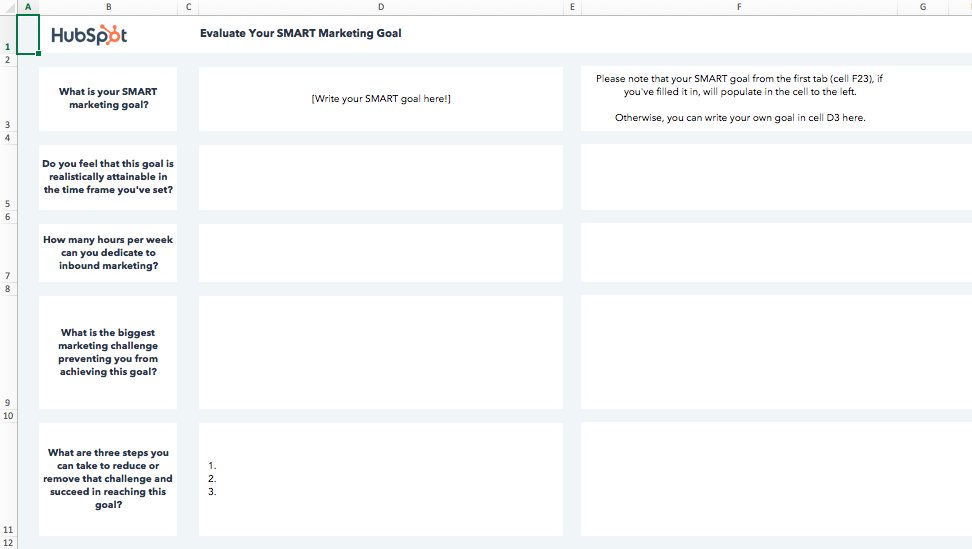
In the final tab of the SMART goals template, you’ll be able to document the roadblocks to achieving your goal that you anticipate, and make an action plan for overcoming those roadblocks to set you off on the right foot.
Before I made my goal SMART, it would’ve been easy for me to make excuses. It wasn’t clear how I’d measure whether I’d gotten fitter, or when I was going to check-in with myself to see whether I had.
With my new SMART goal, I have a clear target to aim for and metric for success. I can quickly evaluate whether I’m on pace with achieving my goal or behind, and I can celebrate the achievement when it does come because it’s a realistic metric that’s relevant to my ultimate goal.

How to Get Started With YouTube Ads
Want to market your products or services on YouTube? Wondering how to set up a YouTube video ad campaign? In this article, you’ll learn how to run ads on YouTube via the Google Ads dashboard. #1: Link Your YouTube Channel With Google Ads Before you start your YouTube video ad campaign, you must link your […]
The post How to Get Started With YouTube Ads appeared first on Social Media Marketing | Social Media Examiner.
from Social Media Marketing | Social Media Examiner https://ift.tt/34GFVFI
via socialmediaexaminer
How to Create Infographics in Under an Hour [15 Free Infographic Templates]
Wouldn’t it be great if creating infographics was as simple as writing regular old text-based blog posts? Unfortunately, making visual content like this usually takes a lot more time, effort, and let’s face it — skill — than the written word. Usually.
But considering the popularity and effectiveness of visual content in marketing today, you can’t just afford to throw in the towel.
That’s why we decided to take all the pain and suffering out of infographic creation. Seriously — don’t give up just yet. You, too, can create infographics that are professional-looking, high-quality, and completed in under an hour. I’m going to prove it. First things first:
Download our 15 free infographic templates here.
Then, all you have to do is provide the content to use inside them. Easy as that. In fact, I’m going to show you just how easy it is to make your own infographic by demonstrating with one of our 15 infographic templates in PowerPoint (pictured above). Then, I’ll explain exactly what I did so you get a sense of how easy it really is.
Want to watch and listen to the instructions as you read the steps below? Check out the video below:
How to Make an Infographic
- Identify the audience for your infographic.
- Collect your content and relevant data.
- Choose your desired infographic template.
- Download your template to PowerPoint.
- Customize your infographic.
- Include a footer with your sources and logo.
- Add an embed code and Pinterest button, and publish it.
***
1. Identify the audience for your infographic.
Infographics don’t sell themselves on design alone. You need to deliver “info” that’s just as compelling as the “graphic,” and to do that, you need to know the audience your infographic intends to reach.
According to Harvard Business Review, there are five possible audiences that can change how you choose and visualize your data: novice, generalist, managerial, expert, and executive. Start by comparing your infographic’s ideal reader with one of these five audiences — which one applies to your reader?
When thinking about the data you want to visualize, let the five audiences above dictate how advanced your data will be. A “novice” audience, for example, might need data whose meaning is more obvious at first blush. An “expert” might be more interested in getting into the weeds of your numbers and posing theories around them. An “executive” has more in common with a novice audience in that they only have time for the simplest or most critical information, and the affect it’ll have on the business.
2. Collect your content and relevant data
Using the audience you’ve chosen above, your next step is to organize all the content and data you’ll use in the infographic. You can either collect third-party data or use your own original data. If you use third-party data, just be sure you properly cite your sources — just like in any other good piece of content.
Organizing Your Data
When collecting your data, make sure you know what story you want to tell through this information. Data for the sake of data won’t add value to your infographic at all.
Compelling data needs to be “comprehensive” enough to give your readers proper context around the data you’re presenting. For example, a spike in website traffic from one month to the next doesn’t mean much — until, say, you reveal that traffic was on a steady decline over the previous three months. Suddenly you have a story of how you were able to reverse a downward trend.
Citing Your Sources
To keep your infographic uncluttered by a ton of different source URLs, a great way to cite your sources is to include a simple URL at the bottom of your infographic that links to a page on your site. You can also list the individual stats used in your infographic, and their sources — such as the landing page to the full offer on which you’re basing this free infographic. I’ll show you what this citation looks like in a minute.
That way, your infographic looks clean and professional, yet people will still be able to access the sources no matter where the infographic gets shared or embedded. It may also even drive visitors back to your site.
3. Choose your desired infographic template.
Your next step is to choose an infographic template appropriate for representing that data. The important thing is to choose a template that specifically works for the type of data set/content you want to present. As you saw pictured above, you can download our 15 infographic templates in PowerPoint and choose whichever template you’d like.
Some of your template options in the offer linked above include a timeline, flowchart, side-by-side comparison, and a data-driven infographic. Here are some basic ideas for choosing an infographic template that suits the story you want your data to tell:
- Side-by-side comparison infographic: This infographic design can help prove the advantage of one concept over another, or simply explain the differences between two competing entities.
- Flowchart infographic: This design is perfect for presenting a new workflow for your organization, or how a linear or cyclical process works across your industry.
- Timeline infographic: This design can tell a chronological story, or history, of a business, industry, product, or concept.
- Graph-based infographic: This design is suitable for content creators publishing a high volume of data and statistical information, making it a good fit for expert-level audiences, too.
- Image-heavy infographic: This design caters to content creators who are trying to reveal trends and information from shapes, designs, or photography — rather than just numbers and figures.
4. Download your template to PowerPoint.
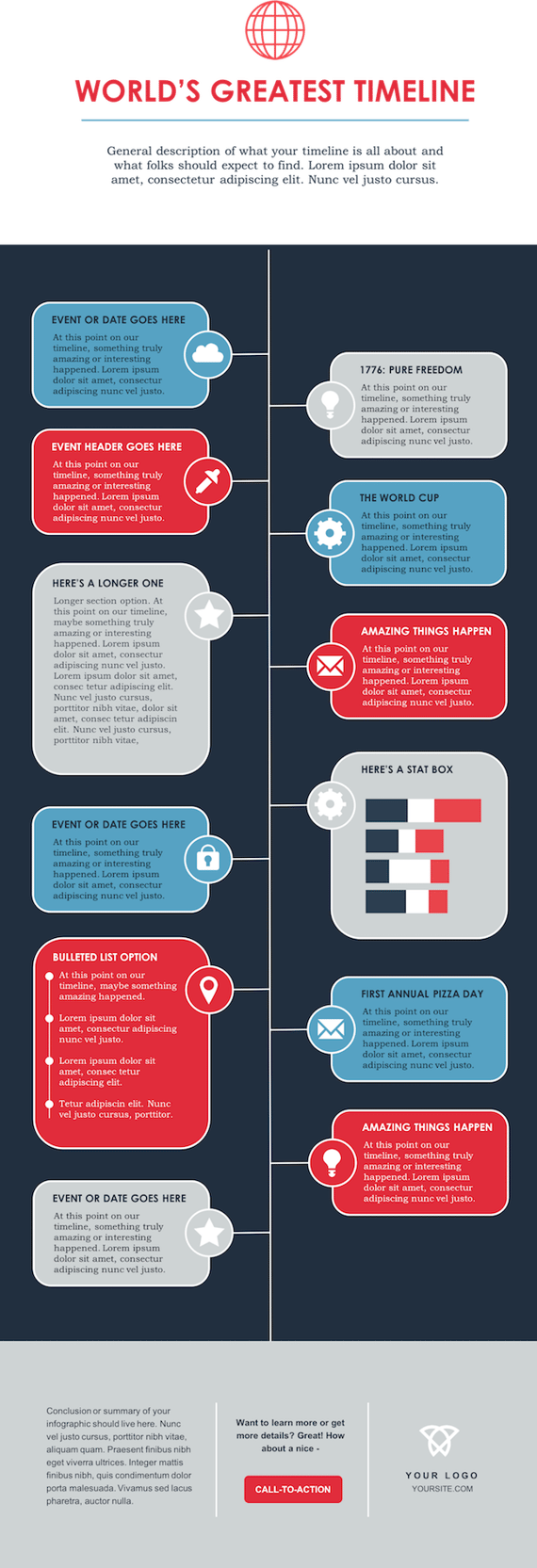
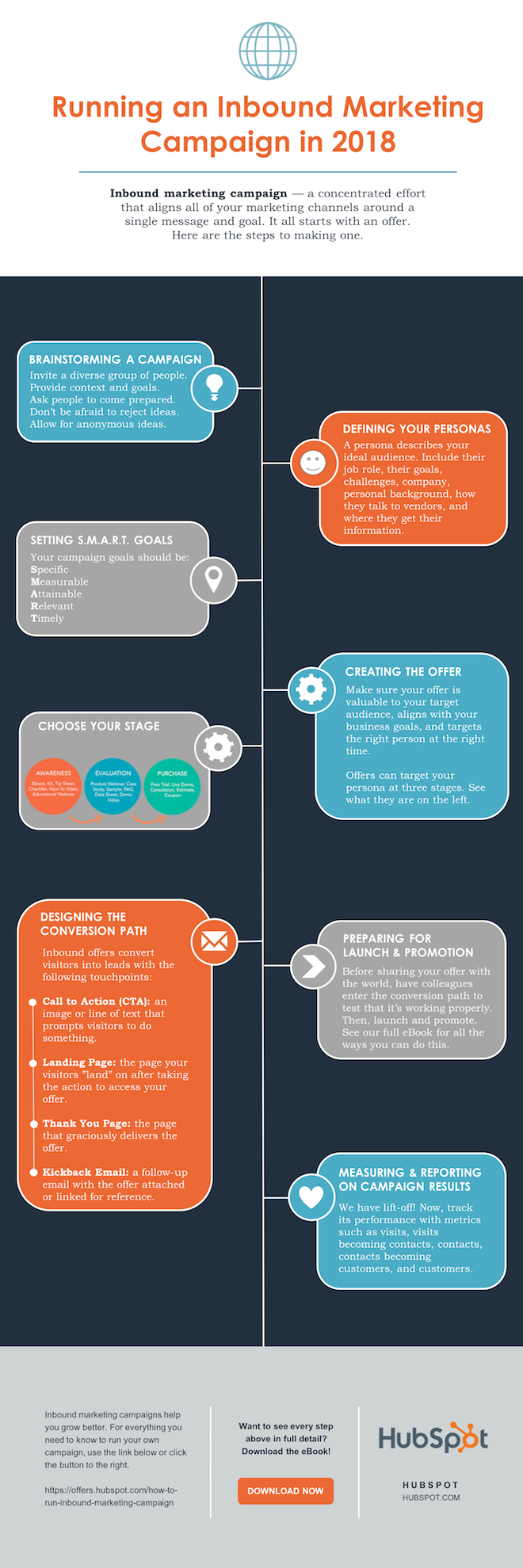
For the sake of time (remember, our mission is to create an infographic in under an hour), I’m going to create an infographic based on a compilation of steps and best practices we’ve put together in our new guide, How to Run an Inbound Marketing Campaign in 2018. For this, I’ve picked the “World’s Greatest Timeline” infographic template from our collection of infographic templates, which is helpful for my data set since it outlines each step of the campaign creation process in order.
The timeline infographic template is pictured below, and full of opportunities to make it your own:
 5. Customize your infographic
Obviously, this is the most time-consuming part — but it’s also the most fun. Simply come up with a catchy title, plug in your data/content, and adjust your font sizes and formatting. Feel free to switch up the graphics and colors, too, so they’re relevant to your brand and the data you’re providing. For other templates, you can use the simple graphs and charts provided by PowerPoint to create things like the bar graph or the pie chart. (Note: Download our free infographic templates for a cheat sheet for using PowerPoint’s various features and tools.)
To customize the look of the infographic even more, you might add or change up the colors or font styles.
6. Include a footer with your sources and logo.
Finally, I included a link to my source (which can be found here), as well as the HubSpot logo so people know who created the infographic if it gets shared in social media or embedded on other websites — which is definitely something you want, since one of the main benefits of creating infographics is their shareability.
That’s it! This whole thing took me under an hour to put together — much shorter than it would’ve taken me if I’d started from scratch (not to mention more professional looking … and less expensive than hiring a designer). Here it is:

Share This Image On Your Site
<p><strong>Please include attribution to blog.hubspot.com with this graphic.</strong><br /><br /><a href=’https://ift.tt/2Hw9RZq src=’https://ift.tt/2oi2Lio’ alt=’free_infographic_template_custom-1′ width=’660px’ border=’0′ /></a></p>
7. Add embed code and a Pinterest button, and publish it.
The only thing left to do is to publish and promote your awesome new infographic. As I mentioned earlier, we recommend using your blog to publish it (including your list of sources), including a Pinterest button for visitors to easily “pin” your infographic on Pinterest, and create and add an embed code for visitors to share it on their own websites and blogs, as we did above.
Want more? Read How to Create Top-Notch Visual Content in PowerPoint [Tutorial].


Five Tips for Becoming a Successful Remote Worker, According to 450 Remote Professionals [New Data]
The way businesses operate has changed — drastically.
Nowadays, successful companies are run in home offices, living rooms, and Starbucks tables. Meetings are hosted on Skype, Slack, and Google Hangouts. Employees can work in their pajamas, and commute from their kitchens to their desks.
Today, remote work has been established as a successful business model, and the number of people working remotely at least part-time is rising. In fact, a survey by Global Workplace Analytics and FlexJobs indicates that remote work has grown 91% over the last 10 years.
However, not everyone is well-suited for remote work. Some people work better in collaborative settings and enjoy the structure of a 9-to-5 desk role, while others prefer solitude and find themselves more productive when working from home.
Whether you’re considering hiring more remote workers at your company or you’ve just been hired for a remote role, it’s critical you know which skills are required for remote work, and how you can train your employees to become better at-home workers.
Fortunately, in 2019, TalentLMS surveyed 450 employees to figure out how remote employees work and train best for their at-home roles. Take a look at some of their answers, below, to figure out how you and your company can become more successful at offering and conducting remote work.
1. Acknowledge that you’ll be working fixed hours.
People sometimes believe remote work is equivalent with digital nomadism. However, being a digital nomad mostly has to do with freelancing, working at your own pace and hours, and running a business from anywhere in the world — which is different from remote work.
Remote workers are similar to onsite employees who have a “normal” 9-to-5 daily schedule. According to TalentLMS’s statistics, 60% of remote workers work fixed hours, which means they need to log onto their computers and be online at specific hours. Even if you’re remote, you still need to work similar hours as the rest of your team to communicate and collaborate effectively.
If you’ve been working as a freelancer for some time and are thinking about switching to a remote work career, remember that your daily schedule is going to change drastically.
2. Get familiar with apps and technology.
Everything happens at home. So to be part of a virtual team, you need to become familiar with certain apps and tools. Typically, your manager will let you know which tools you’ll be using — such as Zoom for meetings, or Slack for daily communication.
Additionally, there are certain tools necessary for training and on-boarding when you first join your team. 70% of remote workers say their companies provide online training with the help of a learning management system (LMS). An LMS is widely used by companies to onboard new hires, so it’s likely the first tool you’ll come across.
Communication apps is also the number one tool used regularly by remote workers. When asked to name the tools they use the most, 27% of remote workers said Skype, 14% said Dropbox, and 25% said both WhatsApp and Google Hangouts.
3. Work on your communication skills.
Most of TalentLMS’s survey respondents chose communication as the most essential skill aspiring remote workers should master.
After you get a grasp on the communication apps and software your company uses to send emails and direct messages, it’s critical you monitor how they use them.
For instance, which channels do they use for which purposes? Do they typically create an email thread when they want to provide feedback on a new project, or use direct message? Are team members more “official” when chatting with one another, or more laidback? Try to imitate their tone of voice and language so you can connect with them more effectively.
Additionally, figure out which channels or group chats your team engages with most often. Perhaps they often send motivational articles in a team Slack channel, or use a spreadsheet to share trending news articles.
Whatever the case, make sure your messages are clear, concise, and proofread.
4. Learn how to focus.
Although most of us find it easy to focus when we’re at home, working from home can be incredibly distracting. For instance, perhaps you’re working on a new blog post when you remember you have laundry that needs to be folded — or a new Netflix show to binge.
According to a 2018 survey by Buffer, 16% of remote employees say they feel distracted when working from home.
Ultimately, to find success as a remote employee, you need to practice focus.
Fortunately, remote workers from TalentLMS’s survey have found a trick. To help themselves focus, 25% of respondents say they work by the sound of some background noise (from sources like a TV or radio), 21% concentrate in silence, and another 21% focus by listening to meditative music.
Ultimately, if you’re finding it difficult to focus, figure out which environmental factors can help you increase productivity. Changing background noise, lighting, time-of-day, or room of the house in which you work can all help you become more focused.
5. Develop your time management and organizational skills.
If you’re a remote worker, you need to be self-disciplined. It’s vital you know when to work hard and when to take breaks throughout your at-home workday, particularly since you don’t have the pressure of your manager or peers to keep you on-task.
Ultimately, to organize your work days wisely, you need to develop organizational and time management skills.
Try creating a task list every night and write down your tasks in order of priority. This simple method will help you get more work done and distribute your eight hours accordingly. Alternatively, try the pomodoro technique or another productivity hack to keep yourself accountable.
Take a look at How to Work From Home: 20 Tips From People Who Do It Successfully for more tips and tricks.

5 Steps to LinkedIn Group Success: How to Create and Manage a Successful Group
Do you want to connect with ideal clients and prospects on LinkedIn? Have you considered a LinkedIn group? In this article, you’ll learn how to create a valuable and engaged group on LinkedIn. Why You Should Manage Your Own LinkedIn Group Starting your own LinkedIn group can be a great way to increase your thought […]
The post 5 Steps to LinkedIn Group Success: How to Create and Manage a Successful Group appeared first on Social Media Marketing | Social Media Examiner.
from Social Media Marketing | Social Media Examiner https://ift.tt/2NaMR8b
via socialmediaexaminer
How to Host a Twitter Chat That Connects with Your Audience
A Twitter chat, or TweetChat, is a virtual meeting or gathering of people on Twitter to discuss a common topic.
Companies like Cisco and FedEx have hosted their own TweetChats to engage with their audiences on a more personal level, and it’s a great inbound marketing tactic for your social media strategy.
For B2B companies, hosting TweetChats are an amazing way to get a better understanding of your fans, customers, and leads while also allowing you to grow your Twitter reach. But hosting a TweetChat also requires some thorough planning in order to be successful.
Below are eight steps you can take to plan a TweetChat for your business and ensure it’s a success.
How to Host a Twitter Chat
1. Monitor other chats and fill a void.
Before you even think about starting your own TweetChat, it’s important to take note of how other groups are conducting their chats. How do they interact with their followers? What are they discussing, and what types of questions are they asking? Monitoring other TweetChats will also allow you to refine your choice of topic for your own chat.
Try to identify a topic in your industry that is getting talked about a lot but hasn’t been represented yet in a formalized TweetChat. This is a great way to choose an appealing topic that generates interest from your target audience.
Once you’ve done this, attend a few Twitter chats that interest you and learn from what worked and what didn’t.
2. Determine your topic and make it the theme of your chat(s).
You may either decide that you want to run a one-time Twitter chat or that you’d like to host one every week. Either way, it’s important to have a common theme to guide your chat.
For example, FedEx’s TweetChats are always about some issue related to small business trends and issues. They stay core to their focus throughout the chat and don’t segue to other issues that don’t relate to their core theme. Make sure that when you pick your topic, you stick with it throughout the chat. This keeps things focused and organized.
3. Choose your hashtag.
Now that you have your TweetChat topic/theme figured out, the next step is to pick a hashtag so people can follow your chat. You may want to use your corporate name in the chat, but it’s more important to make sure that the hashtag reflects what the chat is about.
People want to get a sense of what they’ll be participating in — be straightforward with them. And if you’re hosting a weekly chat based on a particular theme, consider making the hashtag more general so it can be used for future chats. For example,
4. Pick a date and time.
It’s important for you to choose the timing for your TweetChat based on what’s accessible to both you and your followers. Try to find a time that doesn’t conflict with another chat that may overlap with your specific topic.
For example, if you noticed that there is a #SocialMediaChat, you probably wouldn’t want to schedule your #FacebookChat to occur at the same time.
5. Create engaging questions for discussion.
Now that you have your topic, date, and time nailed down, think about the needs of your prospects and customers and what questions related to the topic they might want answers for. It’s important to create questions and discussion points ahead of time that you can use to help facilitate conversation during your chat.
For example, think about asking your followers which tactics they use, what’s the one biggest problem they face, or what they think will be a solution to an industry problem. It’s important to make sure your questions can allow for some great engagement and interaction between your TweetChat attendees.
6. Bring in guest tweeters to help you host your chat.
If you want to make your TweetChat a “must-participate,” a great way to entice your followers is by asking an industry expert to join the chat from their personal account.
These guest tweeters can be from outside your company or they can be your business’ executives. Promoting that an industry expert will also be participating in your chat is a great way to add credibility to your chat and topic you’ll be discussing. It’s also a great way to encourage others to participate in your chat.
7. Promote your Twitter chat ahead of time.
After you have your chat organized and ready to go, it’s time to promote it!
Write a blog post about it, promote it to followers in other social networks, and tweet about the chat, its hashtag, and when it’s happening. Make sure people know that you’re organizing a TweetChat. If you want to attract key people in your industry to participate, go the extra mile and invite them personally, explaining how you think their insight on the topic would make for a truly valuable and engaging TweetChat.
8. Start your Twitter chat.
When the time and date comes, prepare to launch your Twitter chat. Confirm each host’s availability and be sure your they have solid questions and topics to discuss.
Once you get started, it can’t hurt to have someone other than your host monitoring the discussion. This way, if you get a lot of tweet responses, you’ll be able to easily answer them with your team. It’s also helpful to have someone on board with community management knowledge incase the chat gets dull or is plagued by bad language, complaints about your company, or other unfortunate tweets.
9. When the chat ends, continue to monitor the hashtag.
After you finish your chat, participants may still use your hashtag to engage in conversation, especially if you chose one that is more general. Make sure you’re still monitoring this discussion. It can help you identify followers who may be more qualified leads, and the discussion that sparks may even give you an idea for your next TweetChat!
10. Use highlights from your chat to promote future Twitter events.
In step seven, we suggested that you should write a blog post to promote a chat. But, if you’ve already had one chat that gave solid insights and plan to have another, you could also write a blog post with the best quotes and tweets from the previous chat. Then note when and where readers can go to see future Twitter chats hosted by you or your brand.
This might be a great way to reach audiences that aren’t following you yet, and might make people feel like they missed out. If they do feel that way, they might want to attend the next chat.
TweetChats can be a powerful tool for creating engagement and growing the reach of your Twitter account. These steps will help you on your way to becoming a TweetChat superstar.

The 9 Habits of Highly Successful Content Creators
Peanut butter and jelly. Batman and Robin. Eggs and ham. You’ve probably heard of these famous pairs (or, in some cases, noshed on them), but for inbound marketers, there’s one pair in particular that goes hand-in-hand: content and marketing.
Ninety-one percent of business-to-business (B2B) professionals use content marketing as part of their strategy. Still, that doesn’t mean all the content they create is top-notch, compelling, or valuable content.
But what does it take to become a good content creator? How do I become one that peers in my industry would look to for advice and opinions?
It all starts with what you do before you put your fingers to a keyboard.
Content Creator
A content creator produces entertaining or educational material that caters to the interests and challenges of a target audience. The content he/she produces can take many forms, including blog posts, videos, ebooks, photos, and infographics. Today, businesses employ content creators to engage new and existing customers on the brand’s behalf.
Whether you work on a content marketing team at your company or you’re riding solo, there are some tried-and-true habits you can adopt that will put you on the path to being a truly successful content creator.
Fair warning: Like all good things, it’s not going to happen overnight. And it shouldn’t, because you’re trying to get good at it, not just simply do it. But the sooner you start working these five habits into your routine, the sooner you’ll be well on your way to becoming a high-quality content creator.
How to Become a Content Creator
- Read news about your industry every day.
- Write on the regular.
- Study your industry’s audience.
- Establish your own voice.
- Curate other people’s content (when it makes sense to).
- Understand your KPIs.
- Network at every opportunity.
- Offer solutions, not just commentary.
- Question everything.
1. Read news about your industry every day.
Creating great content that really resonates with your target audience requires you to know what’s going on in your industry. And the best content creators scour — not just read, but scour — the internet for industry news and trends. This sets them up nicely to understand the context behind what’s happened historically in their industry and how that shapes their target audience’s mindset in the present.
Get in the habit of reading by putting everything you read in one place. You can set up an RSS feed with an app like Feedly for blogs you know that contain relevant industry news. Also, ask a few colleagues what they’re reading these days and follow suit. Discover where your buyer persona spends time online and snag those blogs, too. Ahead of the game and have a few favorites already? Add ’em to the list.
2. Write on the regular.
If you don’t use it, you lose it. Successful content creators understand the importance of constantly flexing their writing muscles. Doing so helps them work through ideas that might be jumbled in their head and identify nuggets that could turn into fully realized ideas later. Successful content creators may not always be inspired to write, but they know something inspiring can come from their writing.
Get in the habit of writing by doing it daily or every other day. I’m not saying you need to write a polished, 1500-word essay on an industry-relevant topic daily. Rather, I’m talking about setting aside 10 or 15 minutes to jot down some thoughts and ideas. Figure out when your mind is the clearest — for most people, that’s after or during a cup of coffee — and just free-form write. What did you read yesterday that stuck with you? What didn’t you understand? Asking yourself those questions should start the flow.
3. Study your industry’s audience.
One of the hardest pills to swallow as a creative professional is that you are at the mercy of your audience — and the needs of that audience can sap your creativity.
But, at the end of the day, your audience pays your bills. And if you study your audience deeply enough, you’ll find interests and creative opportunities you wouldn’t have found without them.
The third quality of all successful content creators: They know their audience inside and out. Examine your own readers and viewers: What do they want that you’re not yet giving them? What problems do they have that you can solve for them? Here are some other characteristics of your audience you can identify for yourself or for your employer:
- Age
- Gender
- Location
- Family size
- Job title
- Salary
4. Establish your own voice.
Quick reality check: You’re not the only content creator in your industry. That means you’re not the only one offering the advice, observations, and thought leadership your industry is asking for. There are lots of things you can do to stand out from the other content creators in your field: diversifying into a new content medium, promoting your content on different channels, and naturally gaining experience and trust over time. But even then, the content producers with whom you’re competing for attention are doing the same thing.
What you can bring to your content, that nobody else can, is your own personal voice.
Readers click on your content for the information, but they come back for the personality. Writing about cybersecurity? Don’t just offer fresh insight on today’s malware; offer analogies and personal stories of data breaches that justify your insights and that only you can offer. The brand you write for might restrict you from opinionated or overly informal content, but that doesn’t mean you can’t indulge in the unique perspective that inspired you to join this business in the first place.
Learn how to blend your employer’s content guidelines with your own creativity, and you’ll become a much more valuable content creator in the long run.
5. Curate other people’s content (when it makes sense to).
here’s no shortage of people curating content these days. In fact, anyone on the internet can take someone else’s content and retweet it, share it on Facebook, pin it — the list goes on. But successful content creators know it’s not enough to take relevant industry news and spit it back out to your fans and followers.
“You must also position yourself as an expert and genuinely interact with your communities,” says Guy Kawasaki, the New York Times best-selling author. Sharing content isn’t enough. Engaging with the content you’re sharing now makes it unique to you.
Get in the habit of curating content when you have something valuable to add. Now that you’ve started scouring the internet on a regular basis for industry news, you probably have a wider depth of knowledge than you think. So be confident, and give your readers additional, useful information or even a thought or opinion when sharing others’ content. Your networks will appreciate it, and the author probably will too (or it could at least spark a debate — bonus!).
6. Understand your KPIs.
The internet is a big place (obviously). In fact, it’s safe to say it’s too big for your content to be discovered by your audience all by itself. In 2018, 61% of professionals stated that generating traffic and leads was their top marketing challenge.
Just because you publish content online doesn’t mean you’ll get the traffic your insight deserves. To get your content discovered, you first need to focus in on a key performance indicator (KPI), and optimize your content for it. A KPI is a specific metric you’ve chosen to measure how well your content is doing against your expectations. Modern KPIs include:
- Social media traffic, the number of visitors that come to your content from a social media post.
- Direct traffic, the number of visitors that come to your content by entering your website’s URL directly into their browser’s address bar.
- Organic traffic, the number of visitors that come to your content from a search engine result link.
- Submissions, the number of people who visit your website and leave having submitted their contact information in exchange for a resource you offered them (a form of lead generation).
If you or your employer chooses to focus on organic traffic, for example, it’s a good idea to study Google’s search algorithm to find out how it ranks content. Then, optimize your content so that it performs well under the organic traffic KPI. The more knowledge you have of the KPIs available to content creators now, the more successful you’ll be as a marketer.
7. Network at every opportunity.
Successful content creators know their success is due not only to their passion, but also to those who taught them, inspired them, and pushed them to think in different ways.
This is one way content creators grow into successful content creators. They’ve accepted the fact there’s more to learn than what they already know, and they’re open to new ways of thinking. Networking forces you to do just that. It’s a time to listen to others’ ideas and take them into consideration alongside your own.
Get in the habit of networking by seizing the countless opportunities you have to do it. They aren’t called social networks for nothing! Spend some time on Twitter, Facebook, and LinkedIn to check out who the thought leaders are in your industry and follow them.
Once you do that, you can ease into in-person networking. If you’re not a natural extrovert, the thought of networking can make you cringe. Make it easy on yourself and start small with colleagues. You already have something in common, so striking up a conversation in the kitchen or at your desks shouldn’t be too scary.
8. Offer solutions, not just commentary.
When you’re just getting started as a content creator, you might already have the knowledge your market is looking for. For successful content creators, however, expertise isn’t everything.
Want your audience to remember your content? Don’t just recite the things you know — explain why they’re important and what your audience can take away from it. The people consuming your content aren’t interested in just hearing you talk. They come looking to satisfy specific needs. Whether those needs are to solve a problem to simply increase their confidence in your industry, it’s your job to put your market observations into terms they can understand and find lessons in.
9. Question everything.
Polished content creators are curious by nature. They’ve learned to be curious about the internal knowledge they already have and the external information that’s being promoted out in the world. It’s the insights that come from this inherent curiosity that makes great content.
“You need to be curious to identify problems worth solving,” says Lorraine Twohill, head of marketing at Google, “and then come up with new solutions.” It’s these proposed solutions to age-old problems that gets content creators on the radar.
Get in the habit of questioning the status quo by constantly playing devil’s advocate. Taking the contrarian view of a piece of content can be difficult at first, but if you start to question why the author thinks this way and what happened in the industry that triggered this viewpoint, you’ll begin to think more critically about the content you’re consuming. And if you didn’t know, critical thinkers make great content creators.
There’s a lot of pressure on content creators — and every inbound marketer, for that matter — to churn out great content as part of their marketing strategy. Just know that being a successful content creator starts with the habits you form, as they’ll set you up to produce some seriously valuable content for your target audience.

YouTube SEO: How to Optimize Videos for YouTube Search in 2019
As recently as a decade ago, inbound marketing was a brand new idea. Marketers were learning that they couldn’t just publish a high volume of content — it also had to be high-quality and optimized in ways that made it as discoverable as possible through search engines.
That content was once largely limited to the written word. Today, that’s no longer the case.
Today, a comprehensive content strategy includes written work like blogs and ebooks, as well as media like podcasts, visual assets, and videos.
That last part — video — continues to be on the rise. According to the 2018 State of Inbound report, 45% of marketers are investing more in YouTube over the course of this year — more than any other marketing channel available to them.
And with the rise of other content formats comes the need to optimize them for search. One increasingly important place to do that is on YouTube, a video distribution website used by the masses — HubSpot included.
But how does YouTube SEO work? What are the steps you need to take to optimize your YouTube channel for search? We’ve outlined some major tips and tools below.
YouTube SEO Tips
- Rename your video file using a target keyword.
- Insert your keyword naturally in the video title.
- Optimize your video description.
- Tag your video with popular keywords that relate to your topic.
- Categorize your video.
- Upload a custom thumbnail image for your video’s result link.
- Use an SRT file to add subtitles & closed captions.
- Add Cards and End Screens to increase your YouTube channel’s viewership.
1. Rename your video file using a target keyword.
Just like you would when optimizing written content, you’ll use an SEO tool to first identify keywords you’d like your video to focus on (you can browse popular YouTube SEO tools below these tips, or just click that link earlier in this sentence).
With a keyword identified, the first place you should put it is your video file — before you even upload it to YouTube. Why? YouTube can’t actually “watch” your video to see how relevant it is to your target keyword, and as you’ll learn in the tips below, there are only so many places you can safely insert this keyword on your video’s viewing page once it’s published. But, YouTube can read your video’s file name and all the code that comes with it when it’s uploaded.
With that in mind, replace the “business_ad_003FINAL.mov” file name (don’t be embarrassed … we’ve all been there during post-production) with your desired keyword. If your keyword is “house painting tips,” for example, your video’s file name should be “house-painting-tips” followed by your preferred video file type (MOV, MP4, and WMV are some of the most common that are compatible with YouTube).
2. Insert your keyword naturally in the video title.
When we search for videos, one of the first things that our eyes are drawn to is the title. That’s often what determines whether or not the viewer will click to watch your video, so the title should not only be compelling, but also clear and concise.
Although your keyword plays a big part in your video title, it also helps if the title closely matches what the viewer is searching for. Research conducted by Backlinko found that videos with an exact keyword match in the title have only a slight advantage over those that don’t. Here’s a linear representation of those findings:

Source: Backlinko
So, while “using your target keyword in your title may help you rank for that term,” report author Brian Dean explains, “the relationship between keyword-rich video titles and rankings” isn’t always a strong one. Nonetheless, it’s a good idea to optimize your title for this keyword so long as it fits naturally into a title that tells viewers exactly what they’re about to see.
Lastly, make sure to keep your title fairly short — HubSpot campaigns manager Alicia Collins recommends limiting it to 60 characters to help keep it from getting cut off in results pages.
3. Optimize your video description.
First things first: According to Google, the official character limit for YouTube video descriptions is 1,000 characters. And while it’s okay to use all of that space, remember that your viewer most likely came here to watch a video, not to read an essay.
If you do choose to write a longer description, keep in mind that YouTube only displays the first two or three lines of text — that amounts to about 100 characters. After that point, viewers have to click “show more” to see the full description. That’s why we suggest front-loading the description with the most important information, like CTAs or crucial links.
As for optimizing the video itself, it doesn’t hurt to add a transcript of the video, especially for those who have to watch it without volume. That said, Backlinko’s research also found no correlation between descriptions that were optimized for a certain keyword and the rankings for that term.
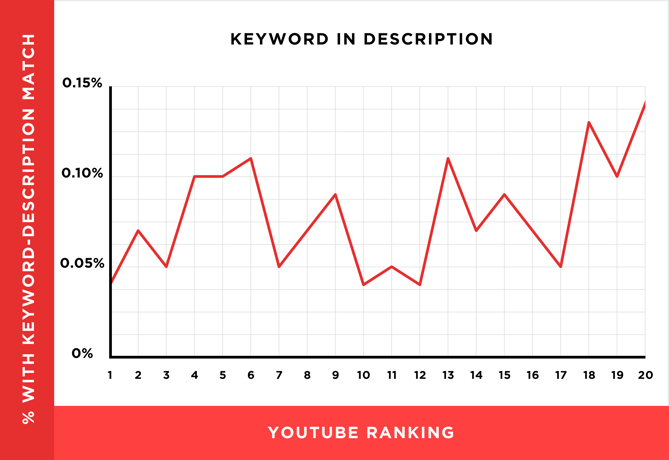
Source: Backlinko
Dean is careful not to encourage ditching an optimized description altogether, though. “An optimized description helps you show up in the suggested videos sidebar,” he writes, “which is a significant source of views for most channels.”
4. Tag your video with popular keywords that relate to your topic.
YouTube’s official Creator Academy suggests using tags to let viewers know what your video is about. But you’re not just informing your viewers — you’re also informing YouTube itself. Dean explains that the platform uses tags “to understand the content and context of your video.”
That way, YouTube figures out how to associate your video with similar videos, which can broaden your content’s reach. But choose your tags wisely. Don’t use an irrelevant tag because you think it’ll get you more views — in fact, Google might penalize you for that. And similar to your description, lead with the most important keywords, including a good mix of those that are common and more long-tail (as in, those that answer a question like “how do I?”).
5. Categorize your video.
Once you upload a video, you can categorize it under “Advanced settings.” Choosing a category is another way to group your video with similar content on YouTube so it winds up in different playlists and gains exposure to more viewers who identify with your audience.
It might not be as simple as it looks. In fact, YouTube’s Creator Academy suggests marketers go through a comprehensive process to determine which category each video belongs in. It’s helpful, the guide writes, “to think about what is working well for each category” you’re considering by answering questions like:
- Who are the top creators within the category? What are they known for and what do they do well?
- Are there any patterns between the audiences of similar channels within a given category?
- Do the videos within a similar category have share qualities like production value, length, or format?
6. Upload a custom thumbnail image for your video’s result link.
Your video thumbnail is the main image viewers see when scrolling through a list of video results. Along with the video’s title, that thumbnail sends a signal to the viewer about the video’s content, so it can impact the number of clicks and views your video receives.
While you can always pick one of the thumbnail options auto-generated by YouTube, we highly recommend uploading a custom thumbnail. The Creator Academy reports that “90% of the best performing videos on YouTube have custom thumbnails,” recommending the use of images that are 1280×720 pixels — representing a 16:9 ratio — that are saved as 2MB or smaller .jpg, .gif, .bmp, or .png files. If you follow those parameters, it can help to ensure that your thumbnail appears with equally high quality across multiple viewing platforms.
It’s important to note that your YouTube account has to be verified in order to upload a custom thumbnail image. To do that, visit youtube.com/verify and follow the instructions listed there.
7. Use an SRT File to add subtitles & closed captions.
Like much of the other text we’ve discussed here, subtitles and closed captions can boost YouTube search optimization by highlighting important keywords.
In order to add subtitles or closed captions to your video, you’ll have to upload a supported text transcript or timed subtitles file. For the former, you can also directly enter transcript text for a video so that it auto-syncs with the video.
Adding subtitles follows a similar process, however, you can limit the amount of text you want displayed. For either, head to your video manager then click on “Videos” under “Video Manager.” Find the video you want to add subtitles or closed captioning to, and click the drop-down arrow next to the edit button. Then, choose “Subtitles/CC.” You can then select how you’d like to add subtitles or closed captioning.
Find out how to add closed captions to your YouTube video in the video below.
8. Add Cards and End Screens to increase your YouTube channel’s viewership.
Cards
When you’re watching a video, have you ever seen a small white, circular icon with an “i” in the center appear in the corner, or a translucent bar of text asking you to subscribe? Those are Cards, which Creator Academy describes as “preformatted notifications that appear on desktop and mobile which you can set up to promote your brand and other videos on your channel.”
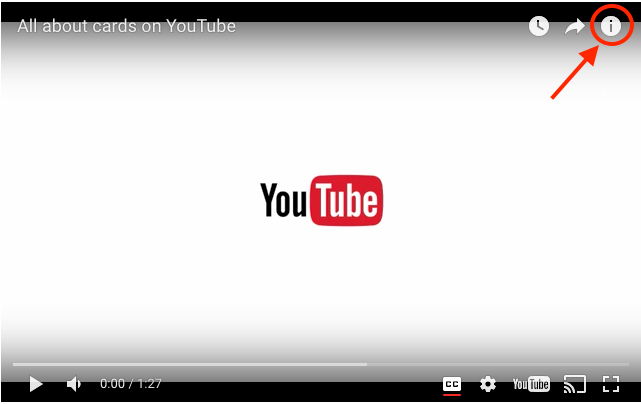
Source: Google
You can add up to five cards to a single video, and there are six types:
- Channel cards that direct viewers to another channel.
- Donation cards to encourage fundraising on behalf of U.S. nonprofit organizations.
- Fan funding to ask your viewers to help support the creation of your video content.
- Link cards, which direct viewers to an external site, approved crowdfunding platform, or an approved merchandise selling platform.
- Poll cards, which pose a question to viewers and allow them to vote for a response.
- Video or playlist cards, which link to other YouTube content of this kind.
For detailed steps on adding a card to your video, follow these official steps from Google, or check out the video below.
End Screens
End screens display similar information as cards, but as you may have guessed, they don’t display until a video is over, and are a bit more visually detailed in nature. A good example is the overlay with a book image and a visual link to view more on the video below:
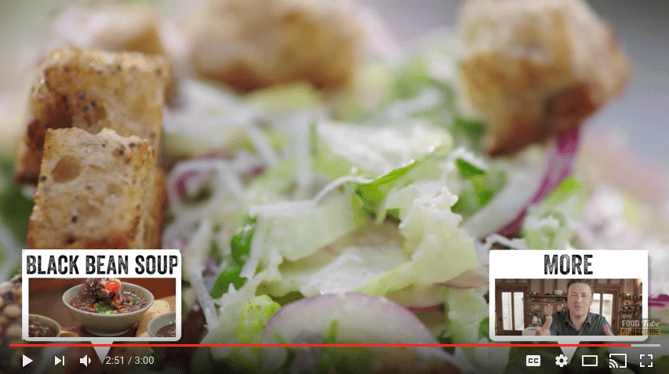
Source: Jamie Oliver on YouTube
There are a number of detailed instructions for adding end screens depending on what kind of platform you want to design them for, as well as different types of content allowed for them by YouTube. Google outlines the details for how to optimize for all of those considerations here.
It’s important to note that YouTube is always testing end screens to try to optimize the viewer experience, so there are times when “your end screen, as designated by you, may not appear.” Take these factors into account as you decide between using either cards or end screens.
These factors may seem a bit complicated and time-consuming, but remember: The time people spend watching YouTube on their TV has more than doubled year over year. There’s an audience to be discovered there, and when you optimize for YouTube, your chances of being discovered increase.
Now, most of the SEO tips above rely on you identifying a keyword and promoting your video correctly. And not all of those tips can be carried out through YouTube alone. To get the most bang for your videography buck, consider some of the tools below to optimize your video for search.
YouTube SEO Tools
- Ahrefs Keyword Explorer
- Canva
- HubSpot Content Strategy
- VidIQ Vision
- TubeBuddy
- Cyfe
1. Ahrefs Keywords Explorer
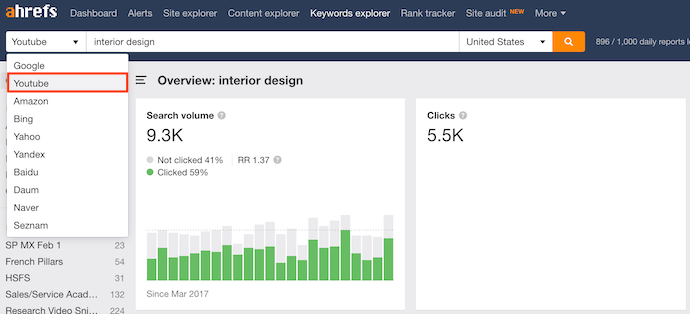
Ahrefs is a comprehensive SEO platform that allows you to monitor a website’s ranking, estimate the organic traffic you’d get from each keyword, and research keywords for which you might want to create new content.
One popular feature of Ahrefs is Keywords Explorer, which allows you to look up numerous details related to a keyword you’re interested in. And as you can see in the screenshot above, you can filter your keyword results by search engine — including YouTube.
Ahrefs Keywords Explorer gives you a keyword’s monthly search volume, how many clicks received by videos ranking for that keyword, related keywords, and more.
2. Canva
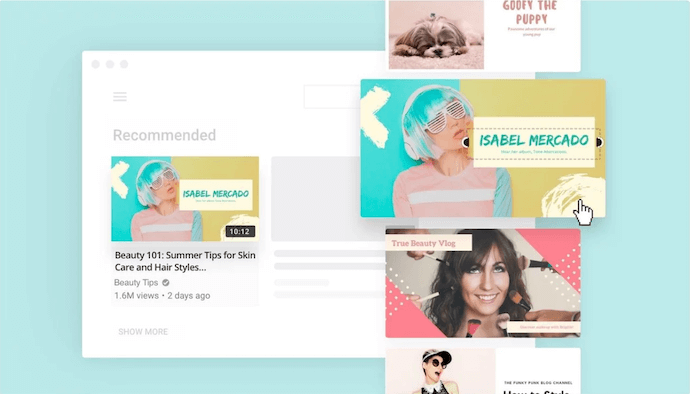
You might know Canva as a design template for creating all kinds of cards, photos, logos, and more. It just so happens this popular product has a Thumbnail Creator just for YouTube videos.
As stated in the tips above, thumbnail images are critical to promoting your content in YouTube search results and enticing users to click on your video. Using Canva’s Thumbnail Creator, you can create the perfect preview image for your video in 1280 x 720 pixels — the thumbnail dimensions YouTube requires.
3. HubSpot Content Strategy
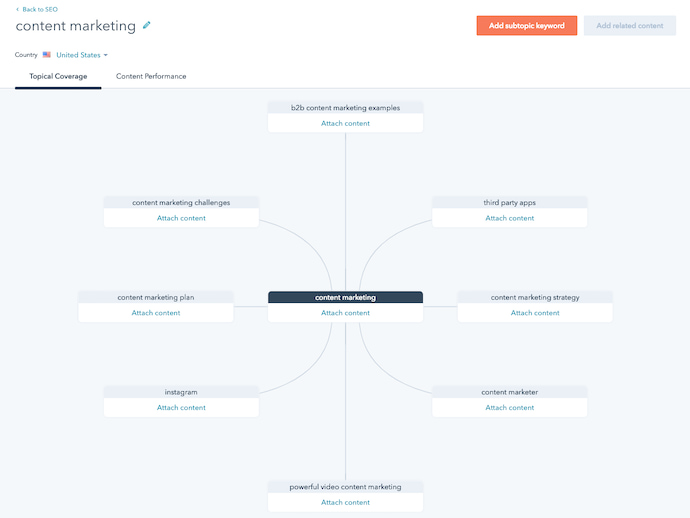 Our content strategy tool, developed here at HubSpot, allows you to find popular keywords for which to create content and then organize these keywords into groupings — what we call “topic clusters.” By sorting your content into topic clusters, you can oversee which pieces of content are related to one another, which types of content you have planned, and what you’ve already created.
While the keywords you discover in HubSpot reflect their popularity in a standard Google search, many of these topics will also produce videos on Google’s search engine results pages. In those cases, you can create topic clusters that have both blog and YouTube content belonging to them.
Clustering your content — and linking from videos to blog posts, and vice-versa — can give you more authority in the eyes of Google and YouTube, while giving you more ways to capture traffic from the people searching your topic.
4. vidIQ Vision
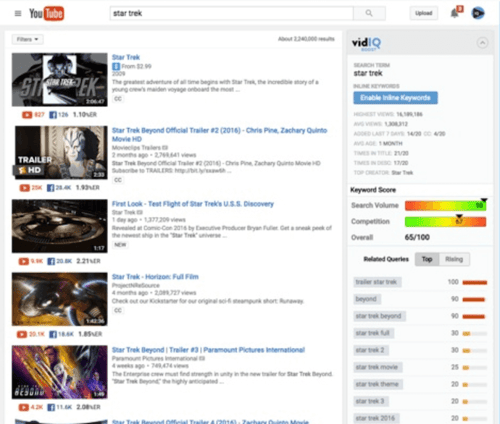 This is a Chrome extension, available through Chrome’s web store in the link above, that helps you analyze how and why certain YouTube videos perform so well. This includes the tags a video has been optimized for, its average watch time, and even how quickly that video might be gaining traffic.
The vidIQ tool then provides an SEO “score” you can use to create content that performs (or outperforms) the results you already see on YouTube.
5. TubeBuddy
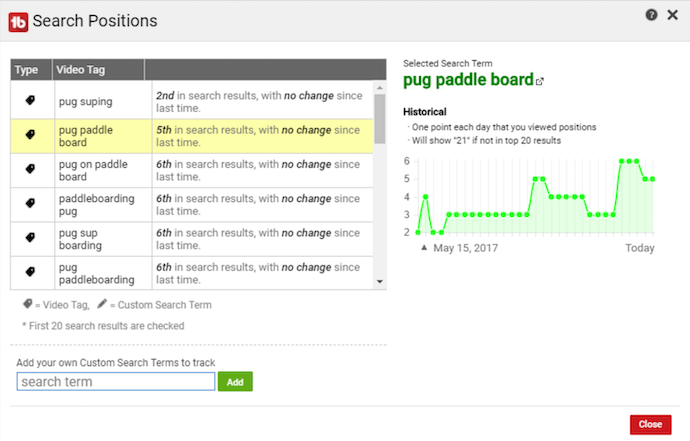
TubeBuddy is an all-in-one video platform that helps you manage the production, optimization, and promotion of your YouTube content. Its features include an automatic language translator (which helps you rank for non-English keywords), a keyword explorer, tag suggestions, a rank tracker for your published videos, and more.
6. Cyfe
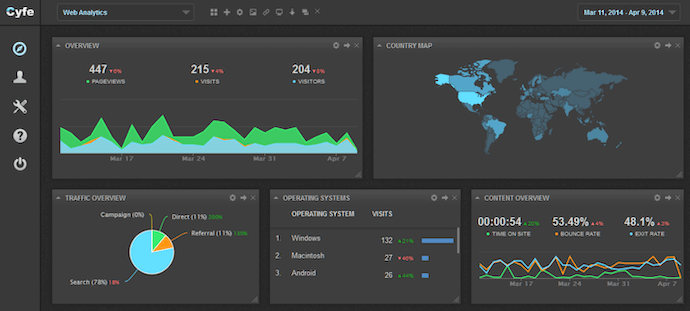
Cyfe is a large software suite that offers, among other things, a web analytics platform. On this platform, you can track page performance across every website property you have content on — including YouTube — and where each page’s traffic is coming from.
In addition to traffic analytics, Cyfe can show you which keywords you’re ranking for and which ones are most popular across various search engines. Sounds a lot like Google Analytics or Moz, right? That’s because Cyfe has data from both of those tools, and more, built into it.
No matter what SEO tip or tool you start with, a successful YouTube channel begins with good content. Make sure your viewers have something high-quality and relevant to watch when they find you. Want step-by-step help? Download our free guide on YouTube for Business below.

Cities & States That Will Pay You to Move There
Choosing a new place to live can be tricky. Whether you’re a new college graduate, buying your first house, or just short on cash, affordability is crucial when considering a location.
Luckily, not everywhere in the United States is experiencing skyrocketing rent prices. Cities and states across the country are incentivizing incoming residents with everything from discounted rent and forgivable home loans to free college tuition.
Here are the amazing communities that will pay you to live there.
1. Vermont
Details: A new policy is designed to help fill the state’s open jobs by giving people an incentive to relocate. If you move to Vermont after January 1, 2020, the program will pay as much as $5,000 in some areas, like Burlington, that have larger populations, and as much as $7,500 in most other smaller towns. It’s a variation on another program, launched earlier this year, that reimburses remote workers up to $10,000 when they move to the state.
Number of Open Jobs: 12,806
Companies Hiring: Northeastern Vermont Regional Hospital, Piedmont Airlines, HCRS, Marathon Health, State of Vermont, BioTek Instruments, Edward Jones & more.
2. New Haven, Connecticut
Details: The city’s Re:New Haven program is making New Haven look like your new home. The city offers up to $10,000 in interest-free loans to new homeowners in the area, along with $30,000 to make energy-saving upgrades. The deals don’t stop there: if you live in the house for a long enough period, the loans are 100% forgivable. New Haven also attracts new residents with families by promising to cover in-state college tuition for students who graduate from New Haven public schools.
Number of Open Jobs: 5,053
Companies Hiring: T-Mobile, Edward Jones, Great Clips, Intuit, Synagro & more.
3. Harmony, Minnesota
Details: Harmony, Minnesota lives up to its name with its residential home construction rebate. The city offers residents interested in building new homes up to $12,000 in cash rebates, depending on the estimated market value of the house, to encourage construction. And participants in the program won’t run into a bunch of red tape – there are no restrictions on age, income level or residency. Time to break out the blueprints for your dream home!
Number of Open Jobs: 665
Companies Hiring: Kwik Trip, American Consumer Panels, Cadence Design Systems, Platinum Supplemental Insurance, C.R. England & more.
4. Maine
Details: Are you still paying off your student loans? Decrease your debt while decreasing your taxes by moving to Maine. Through the Opportunity Maine Tax Credit, the state helps workers who are recent college graduates by subtracting the amount an individual pays in student loans from what they owe in state income tax. For example, if you owe $2,000 in state taxes, and pay off $1,800 in student loans, then you’ll only have $200 in taxes.
Number of Open Jobs: 20,284
Companies Hiring: Apple, Great Schools Partnership, WTB Law, Shipt, Fastaff & more.
5. Tulsa, Oklahoma
Details: Calling all remote workers! Tulsa, Oklahoma is incentivizing employees to move to the city through the Tulsa Remote program. Participants can access furnished housing with discounted rent and free utilities for the first three months. When they’re on the clock, workers can take advantage of coworking spaces (snacks included!) as well as networking and workshop opportunities. We haven’t even gotten to the biggest perk: individuals who stay in the program for one year are eligible to receive a $10,000 cash stipend.
Number of Open Jobs: 13,101
Companies Hiring: CBRE, 360 Payments, ConsumerAffairs, Macy’s, Midfirst Bank, Massage Envy & more.
6. Curtis, Nebraska
Details: You’re probably planning in the future to buy a house. But what if you could be a homeowner and a landowner? Nebraska’s “Easter City” is offering free plots of land to newcomers where they can construct a single-family homes. And the land isn’t in the middle of nowhere – all plots are already located on paved streets with access to utilities.
Number of Open Jobs: 27
Companies Hiring: UPS, BSB Construction, Acosta, Crete Carrier Corporation, H&M Trucking & more.
7. St. Clair, Michigan
Details: You may have received scholarships from your hometown in order to go to college. But what if a city paid you to move back after graduation? St. Clair is attracting recent grads by providing up to $15,000 in student loan repayments to newcomers. The “come home” award is available for future residents with degrees in science, technology, engineering, arts or math. Talk about an unforgettable welcome home!
Number of Open Jobs: 3,103
Companies Hiring: L&W Supply, Morrison Healthcare, Kohl’s, Super Service, Triumph Group & more.
8. Baltimore, Maryland
Details: Baltimore is eliminating property abandonment by making it easier for you to become a homeowner. The city is encouraging buyers to invest in homesthat have been marked vacant for one year or more through the Vacants to Value Booster incentive. The program contributes $10,000 loans to the downpayment and closing costs of distressed and formerly distressed properties. The best part? The loans are forgivable over a five year period.
Number of Open Jobs: 78,323
Companies Hiring: Bank of America, Baltimore City Health Department, Medifast, VIPKID International, Target & more.
This article was originally published on Glassdoor, one of the world’s largest job and recruiting sites. Glassdoor combines all the jobs with valuable data to make it easy for people to find a job that fits their life, while also helping employers hire quality talent at scale. Are you hiring? Post jobs for free with a 7-day trial.

How 7 Brands are Using TikTok
According to HubSpot’s social media team, the video-based social app TikTok is “leaking” with brand opportunities.
The one-year-old platform, which allows users to make short, looping videos with special effects and musical overlays, is booming with more than 500 million monthly active users — most of them young= adults.
While Gen-Z has begun using the platform to show their creative side, some brands are also beginning to experiment. But, because TikTok is still such a young app, many marketers might be wondering, “Is getting on this app even worth it?”
This question is understandable, considering that TikTok only recently launched an advertising process and hyperlinking capabilities for brands.
However, TikTok’s current big brands have done a great job of using it for brand awareness rather than generating traffic or leads. They’re also using it to engage younger audiences and show off a lighter side of themselves through funny videos, challenges, and other strategies that you’d only see on the platform specifically.
Since TikTok is so quirky by nature, brands need to be creative to truly gain attention from their audience. A simple ad or sponsored influencer endorsement might not cut it on this creative and fast-paced app.
While it’s too early to create a list of best practices around TikTok marketing, it’s a great time to start getting inspired by the brands who’ve already thought outside the box and succeeded on the app.
In this post, we’ll discuss seven companies and organizations that have already gone viral or achieved success on TikTok. We’ll also offer takeaways that even smaller companies can use to build a scalable, fun, and creative strategy.
Chipotle
Chipotle, a popular Mexican restaurant chain, has over 55,000 fans on TikTok. They publish a variety of posts that use music, memes, and other references to highlight menu items. Here are two examples:
Here, to celebrate #oneyearofTikTok, a video shows tortilla chips propped around a bowl of guac with the Adele song, “Someone Like You” overlaying the clip. Because the sound bite features Adele’s audience singing back to her, it feels like the chips are actually singing to the guac.
This is a funny way to work a well-known song into a video that creatively shows off menu items.
In this next video, posted on National Avocado Day, Chipotle nails a popular meme reference by posting The Guacamole Song’s music video with the caption, “TFW guac is free. Online/in-app only 7/31 #GuacDance Terms: chip.tl/avoday.”
Not only was the video fitting for the meme-friendly app, but it also sparked a viral #GuacDance Challenge. In just a week, it became the highest-performing branded challenge on TikTok to date.
As part of the challenge, people posted videos of themselves dancing with avocados. Here’s just one:
Although the original video is a pretty obvious plug for free guacamole, the content feels perfect for TikTok because it is musical, silly, and embraces pop culture. This is a great example of how a brand can use a beloved song or reference to promote their own product.
While it can be hard to get a challenge to go viral, posting or encouraging one — especially if it involves one of your products — can help your company spread brand awareness. It also allows you to engage with potential new fans in an interesting way.
People who didn’t know much about the restaurant deals or menu might follow this challenge, participate in it, and learn more about the brand indirectly in the process. If you need a creative way to spread brand awareness quickly, taking a note from Chipotle, and starting a challenge on any social media platform might be a great experiment.
NBA
With a whopping 5.1 million fans, the NBA’s account mixes game highlights with music montages and inspirational quotes.
Unlike its Instagram channel, which focuses purely on basketball games and highlights, the NBA’s TikTok posts show a lighter side of the organization. For example, they’ll often post videos of players working out dramatically to music, dancing on the court, or adventures of team mascots.
In this video, the NBA shows off a highlight reel of a gorilla mascot doing tricks and slam dunks:
Occasionally the NBA will post motivational posts, like this one where basketball player RJ Barrett talks about being drafted by the New York Knicks:
While you might expect the NBA to focus more seriously on stats and games, it uses the app’s musical features to lighten up the branding and make its athletes look more relatable. While the videos still promote basketball, they also fit in well with other funny or musical posts on TikTok feeds.
When a brand or company shows off a more personal side, audiences might start to relate to it a bit more. Even if a viewer isn’t a basketball fan, they might still consider following NBA players or rooting for certain teams if they saw a funny or motivational video about them.
In other business settings, making your brand feel more personal can have the same effect. For example, if your restaurant’s TikTok account posts funny videos of waiters dancing, viewers might think the restaurant has a pleasant and happy staff. This might make them want to eat there because they think they’ll have a dining experience with a fun waiter and positive vibes.
United Nations IFAD
When you think of how agriculture or government groups market themselves, the last place you’d expect them to be is on an app like TikTok.
But the United Nations’ IFAD (International Fund for Agricultural Development) is challenging that misconception with its fascinating account.
The group, which aims to fight world hunger by promoting rural agriculture, is using TikTok to spread awareness of their cause to new audiences. While most accounts on this list are using humor to engage fans, IFAD has taken an approach that embraces informative posts and motivational videos that optimistically encourage viewers to change the world.
In the more informative posts, IFAD publishes high-quality short films of people farming around the world. This allows viewers to learn how agriculture works and why supporting it might solve world hunger.
Recently, IFAD got creative by launching the #danceforchange challenge. As part of the challenge, the organization encouraged audiences to film themselves dancing while using the #danceforchange hashtag in captions.
Here’s the post that IFAD published to launch the challenge:
This is a great example of how getting creative can help you or your brand spread awareness about dryer topics, like agriculture or world hunger. Although the organization is trying to spread knowledge about a serious topic, it uses beautifully shot videos, peppy music, and challenges to engage, motivate, and entertain audiences at the same time.
Looking at IFAD’s strategy could be helpful for companies or organizations with a serious mission, like those in government, legal, or financial industries. While it might feel inappropriate or unnatural to make funny videos about a tough topic.
You can take a more informative route, like IFAD, by filming short narratives or starting a challenge that encourages people to learn about something related to your mission.
The Washington Post
The Washington Post was one of TikTok’s earliest brand adopters. Those who haven’t seen their videos, but follow them on other social networks, might be anticipating investigative or serious content. But in reality, The Washington Post operates differently on TikTok.
Surprisingly, the newspaper actually uses its account to post comedic behind-the-scenes videos and skits about the newsroom. These videos fit in perfectly with the platform because they;re funny, musical, and embrace some of TikTok’s weirdest special effects.
Here’s one great example where the news team discusses The Bachelorette instead of the Democratic Debates:
While this account is far from a breaking news page, posts occasionally infuse news and quotes into their videos. Here’s an example where they hilariously highlight a slip up made by Sen. Kamala Harris during a recent debate:
The Washington Post displays how brands can succeed on a given social platform by talking directly to its specific audience.
The prestigious newspaper is not trying to pose itself as that on the platform. Most people already know and respect the publication. Its marketers are also not trying to post investigative videos that might be more interesting for older crowds.
Instead, the team is tailoring content to the young viewers who want to laugh and be entertained.
And although they post edgy content, it isn’t totally off-brand. Their posts are still pleasant, appropriately funny, and show you the real people behind the hard journalism.
Young viewers might see these cheeky videos and trust the journalists in them because they seem like relatable people. For that reason, fans might go to The Washington Post as a trusted news source when they want to read something written by sources they identify with.
Because The Post has a long history of groundbreaking, award-winning, and intellectual journalism, this humble and comedic social media approach might also attract young readers who want to follow the news but used to worry that content from a newspaper would be too advanced or out of touch for them.
If your brand is in publishing, academia, or similar industries, testing out a video strategy that shows off your lighter side could be an interesting experiment. It might make your content and brand feel less intimidating and help you gain attention from newer audiences.
Guess
While Guess only has 35,000 fans and just three posts, the high-fashion company is included on this list because they were the first to launch a challenge on TikTok.
Shortly after the app launched, TikTok partnered with Guess for the #InMyDenim challenge, which encouraged users to film themselves in interesting places while wearing Guess’ new denim line. They also had to overlay Bebe Rexha’s “I’m A Mess.”
This is was the first branded challenge to go viral on TikTok. Here’s a clip of one of the responses:
While they haven’t done much experimentation with videos, Guess demonstrated how a challenge on a highly-visual platform like TikTok could quickly spread product-based awareness.
A challenge like this, that directly shows off clothing worn by real people, could also entice customers who might see an outfit and want to buy it for themselves.
This is a strategy that could easily be used by other fashion companies or businesses that sell visually interesting products.
For example, say an ecommerce company wants to sell a new line of spinning chairs. It might launch a challenge called “#SpinnyChairChallenge” where participants have to spin in one of the brand’s chairs to a specific song.
People who watch these videos might want to learn more about a brand that started such an odd challenge, or they might see the chairs and want to buy one for their office.
San Diego Zoo
Everyone loves a cute animal video once in a while. And the San Diego Zoo’s TikTok account pleasantly takes advantage of this well-known fact.
The zoo’s strategy is simple: Post videos of cute animals with fun music. And with over 50,000 fans, it seems to be working. How could anyone not want to follow them after seeing this video of a lounging meerkat?
If that cuteness wasn’t enough, the zoo has also dueted with other animal-friendly accounts, like the Monterey Aquarium:
Not only is this appealing to penguin lovers, but it’s also a great example of how two similar brands can cross-promote using TikTok features. Because of the zoo’s tagging strategy, this video might be seen by fans of the aquarium and the zoo. This way, zoo followers might gain more interest in the aquarium and vice versa.
Sometimes, your brand might be a perfect fit for a new social media app. When that happens, it can be important to get yourself on it and start experimenting. The San Diego Zoo is a great example of a brand that quickly identified a fitting platform and fully embraced it. At the end of the day, this can be much more productive than spending valuable time on platforms that make no sense for your industry or fan-base.
NBC’s Stay Tuned
Stay Tuned was originally an NBC-produced Snapchat news show targeted at Gen-Z. After gaining success on that platform, the network started making content for TikTok. The account, which has nearly one million fans, offers a mix of behind-the-scenes videos and quick news bites that touch on weird events and pop culture.
In this example, they report on a survey of the top fast-food chains:
In another post, a Stay Tuned host does a good job of explaining complicated AI news in a short amount of time:
Like The Washington Post, Stay Tuned creates content that is much lighter than NBC News’ usual journalistic work. When they report on stories, their videos are quickly paced, well-edited and focused on stories that might seem more interesting to the younger audiences on the app.
Although Stay Tuned has had huge success on Snapchat, they aren’t repurposing content or putting similar content on both channels. The news team tailors each piece of content to the app it will be published on.
While smaller companies may need to repurpose content to save resources, Stay Tuned demonstrates how creating specific content for different platforms can give you big wins for brand awareness and engagement.
Because they’ve done so well at curating and tailoring news stories for emerging platforms, Stay Tuned’s strategy might be helpful to publishers, entertainers, bloggers, or academics who are looking to post about news, studies, or other interesting topics on different platforms.
Tips for Brands on TikTok
While it might be challenging to get your content to go viral like the bigger brands, TikTok could be a great tool for getting into sync with younger audiences. And since the app is so new, you can pretty much experiment with any strategy you want to see if it works.
If you think TikTok might be part of your marketing strategy soon or in the future, now would be a great time to get ahead of your competitors by downloading the app and investigating what similar brands or potential audiences are doing there.
If you’re raring to go on a TikTok strategy, here are a few tips and takeaways that we’ve gained from looking at the brands who have already done well on the app.
- Show a different side of your company. The app is a hub for creativity and humor. Embracing a more personal tone or a behind-the-scenes approach could make your company appear more relatable or trustworthy to potential customers.
- Don’t be afraid to experiment. As mentioned above, the app is incredibly new. Unlike platforms like Facebook and LinkedIn, there aren’t as many norms, best practices, or rules about what works and what doesn’t. If you think something might be interesting or funny, try it and see if it gets any likes, comments, or shares.
- Engage with your audience. Between challenges, duets, likes, comments, and shares, there are plenty of ways to engage with other TikTok users — even if you don’t know them. Try to come up with videos, challenges, or duets that aim to interact with others. As with other platforms, the more you engage with people, the more your fan base could grow.
Even if you aren’t interested in TikTok right now, we highly recommend checking out the app. Although it might be too niche for you right now, its branded videos could help your brainstorm content ideas for your current social platforms, or give you insight on how other companies are experimenting with new platforms.
If you want to learn more about TikTok, check out this how-to guide or read about its backstory here. Interested in researching other new social platforms? We’ve also got a great guide for that.

5 Ways to Measure Your Instagram Marketing Results
Do you need a better way to report on your Instagram marketing results? Are you looking for ways to measure your Instagram posts and stories? In this article, you’ll learn how to combine data from Instagram Insights and other third-party tools to get a complete picture of your Instagram marketing activities. #1: Compare Your Instagram […]
The post 5 Ways to Measure Your Instagram Marketing Results appeared first on Social Media Marketing | Social Media Examiner.
from Social Media Marketing | Social Media Examiner https://ift.tt/2ZOloze
via socialmediaexaminer
Facebook Messenger Changes Bot Rules
Welcome to this week’s edition of the Social Media Marketing Talk Show, a news show for marketers who want to stay on the leading edge of social media. On this week’s Social Media Marketing Talk Show, we explore changes to business tools for Facebook Messenger with Kelly Noble Mirabella and YouTube updates. Tune In to […]
The post Facebook Messenger Changes Bot Rules appeared first on Social Media Marketing | Social Media Examiner.
from Social Media Marketing | Social Media Examiner https://ift.tt/2ZHRvBq
via socialmediaexaminer
ProjectManager.com Makes 2019 Austin Business Journal Fast 50
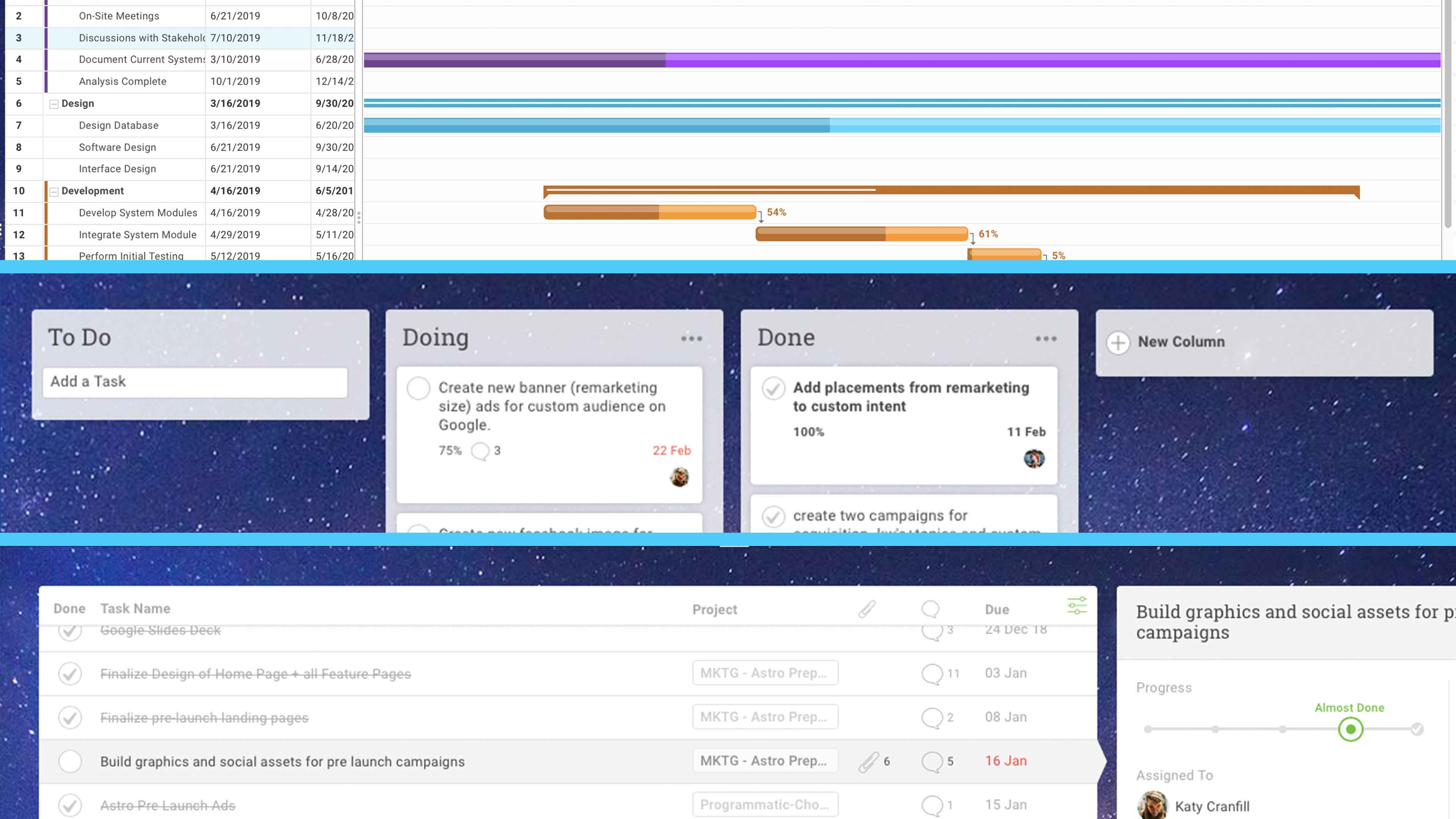
Artificial Intelligence and Marketing: What Marketers Need to Know
Wondering how artificial intelligence (AI) will impact your marketing? Looking for AI tools you can begin using now? To explore what marketers need to know about artificial intelligence and marketing, I interview Paul Roetzer on the Social Media Marketing Podcast. Paul founded the Marketing AI Institute, the Marketing AI conference, and PR 20/20. He’s also […]
The post Artificial Intelligence and Marketing: What Marketers Need to Know appeared first on Social Media Marketing | Social Media Examiner.
from Social Media Marketing | Social Media Examiner https://ift.tt/2ZUuK8s
via socialmediaexaminer
Premortem on Projects: How to Do It & Why
