
Welcome to My Blog
The Qualities of a Powerful Word-of-Mouth Marketing Strategy
Many businesses think that if their product or service is spectacular, it will speak for itself; they’ll need very little marketing effort for it to take off.
But in reality, any companies that seem to have achieved remarkable growth in this manner do indeed have phenomenal products. But it only appears to have been achieved with little or no marketing effort because their fame and fortune was won through word-of-mouth marketing.
Aside from the fact that the companies that benefit from word-of-mouth marketing appear to catapult from nothingness into fame and fortune, this marketing strategy is appealing because it is relatively inexpensive.
But successful word-of-mouth marketing takes work and serious marketing savvy, leveraging many components of inbound marketing like product marketing, content creation, and social media marketing.
If you’re trying to achieve success for your product or service with a word-of-mouth approach, make sure your campaign includes these qualities so you can effectively create buzz around your product from the ground up.
Need inspiration? Scroll down for a successful word of mouth marketing example.
Word of Mouth Marketing Strategy
Create personas to learn about your audience.
Create personas that exemplify who your target audience is. These should be ridiculously specific. You’ll have more luck inciting a ground-up movement if you speak to a very specific problem facing a niche demographic.
The more specific the problem, the more personal it is to your target audience. This means you’re the one solving a problem that strikes a chord with your audience, bringing you into their lives and inciting the passion necessary to create brand evangelists.
To be clear, this problem doesn’t need to be particularly emotional to be personal. You don’t have to solve deep-seated psychological issues that have been plaguing your customers since childhood.
Solving a personal problem simply means addressing something that is so specific to your audience, it’s easily overlooked by most people who can’t also relate to it in some way.
Know your product, service, company, and industry.
Know the ins and outs of your industry and your product/service like the back of your hand. This means getting your product marketing team, support staff, and engineers involved with your word-of-mouth marketing campaigns. Additionally, you need to really “get” your company and its mission statement. Have you established your brand’s position on the hard-hitting issues that are plaguing your industry? Do you know your competitors and their points of view on the questions and controversies that commonly arise?
Be poised to speak to literally any facet of your product, service, company, or industry that may arise from conversations with your prospects and customers. These are the traits of a thought leader; they are qualities that elicit the feeling of trust that is necessary to create word of mouth buzz. You’re asking people to put their reputation on the line for you, and there’s no way anyone will do so if they don’t trust you and know you are the best in your field.
Build a very close social media community.
This requires a deep understanding of your target audience (good thing you made those personas!) and how they like to communicate. What social networks are they using? You might find it’s not what you think. Do some research and figure out if a smaller, more niche social network like Quora appeals to your community more than, say, Facebook.
Building a close social media community relies on nuance, though. Establish the right voice to use; how do these folks like to be spoken to? What’s their sense of humor? Are they all business all the time, and want you to be straight to the point? Or are they there for some conversation? Monitoring and interacting with your social media community has to become a regular part of your life so you and your community are actually…well, friends. Their success should be intertwined with your success, and vice versa. This is how you build a following that will not just speak on your behalf, but also shout.
Identify community influencers.
If you’ve built a close social community, you know them well enough to know who among them are the influencers. But don’t forget to also look for influencers outside of your community.
There are influencers in the world that could benefit from what you have to offer, and it’s your job to introduce yourself to these people. Some common qualities of influencers are early adoption and large social media followings, and they are probably bloggers or creators of original content in some capacity and always on the front end of news. Get these people on your side, and use their reach to market your product or service.
Who influences your influencers?
Your influencers are independent thinkers, but they get their information somewhere. To which news outlets do they flock for information? Which publications do they read religiously? With what communities do they interact? What podcasts do they listen to?
Make sure you’re not only up to date on what these influencers are saying, but that you also market your brand to them and make connections within those communities. You should be a contributor or guest, and interact on a regular basis with these groups to get your brand the exposure it needs to create word-of-mouth buzz.
Don’t censor negative comments.
If you’re dedicated to word-of-mouth marketing, you need to be comfortable relinquishing control of the conversation around your brand. In word-of-mouth marketing, the whole point is getting people to talk about you. But they can say whatever they want to say, to whomever they choose.
You can, however, guide the conversation. First, make sure you don’t have any skeletons in your closet. Get ahead of any potentially bad PR by being the one to break bad news. You can also select the aspects of your product or service that you want to highlight, and promote those more heavily than others. But remember, people have a way of finding out the juicy details, so try to make sure the positive information outweighs the negative.
Consider leveraging exclusivity.
I just told you not to restrict people, and now I’m telling you to be exclusive. Sounds quite contradictory, doesn’t it? Let me explain.
Google+ was the most widely known example of leveraging the kind of exclusivity I’m talking about, but it can also be attributed to companies like Rue La La, Gilt Groupe, Spotify, and plenty of other invitation-only sites.
Consider not letting everyone use your product or service when it’s introduced. If you’re in beta (at a point where it’s usable enough to keep users around, of course) invite influencers and highly connected people in your community who will give you meaningful feedback.
They can then invite their community of influencers, and help it go viral. People want what they can’t have, so even if it’s out of curiosity, your product will be disseminated to a highly relevant audience. Plus, that audience will have received it from a family member, friend, or coworker that recommended it with their seal of approval.
Word of Mouth Marketing Example
GFuel, a sports drink company and HubSpot customer, wanted to amp up its marketing strategy. Because they had a number of happy customers, they leveraged them through a word-of-mouth strategy. After ordering the drink product four times, customers were encouraged to write an online review about the drink.

After doing this, the brand’s Google My Business page went from four to 1,500 reviews and their score rose to a 4.9-star rating.
The Key to a Word of Mouth Marketing Campaign
The success of a word-of-mouth marketing strategy relies, ultimately, on having a great product or service–and frankly a great company–that people can get behind. Ask yourself: are people willing to stick their neck on the line for me? Are they willing to not just use the product or service I offer, but vehemently evangelize it to their friends, family, and coworkers? If you can’t say with 100% certainty that they will, get back to work on your product or service and shelf the word-of-mouth marketing approach until you’ve worked out the kinks that are shirking your confidence.

How to Cultivate Psychological Safety for Your Team, According to Harvard Professor Amy Edmondson
Welcome to The Science Behind Success — a blog series that explores the best ways to help our brains perform better at work. With psychological research and interviews with leaders in the field, we’re showing you how psychology can help you overcome workplace obstacles and excel in your career. Because a little mindset change could go a long way.
Let’s start with a seemingly easy question — why do some workplace teams perform better than others?
If you’re anything like me, you’re probably thinking, “A good team consists of people who feel their work is purposeful, and are motivated by similar rewards.”
Alternatively, perhaps you’re thinking, “A good team consists of people who are, simply put, good at their jobs.“
In 2012, to answer this very question, Google launched an initiative known as “Project Aristotle”. They gathered Google’s top organizational psychologists, statisticians, and engineers, and asked them to study hundreds of teams at Google to figure out why some teams did remarkably better than others.
They considered the question from every angle — were the best teams made up of people with similar interests, motivations, or personalities? Or, maybe the best teams were a mix of introverts and extraverts? Alternatively, perhaps the best teams were simply a collection of people with the most impressive educational backgrounds?
Ultimately, Google found one norm was more critical than anything else for making a team work: a concept known as “psychological safety”.
You might’ve heard this term before. A simple Google search of “psychological safety” yields results from major publications, including The New York Times, Harvard Business Review, and Forbes.
However, it’s relatively new rise in popularity is credited, in part, to Amy Edmondson, who coined the term in her 1999 research study on workplace teams.
Here, I sat down with Edmondson, professor at Harvard Business School and author of the new book, The Fearless Organization: Creating Psychological Safety in the Workplace for Learning, Innovation, and Growth, to learn more about why psychological safety matters for business innovation, the risks involved in not having psychological safety, and how teams can increase psychological safety in their own workplaces, today.
But first, let’s explore how Edmondson discovered psychological safety in the first place.
Edmondson’s Accidental Encounter with Psychological Safety
In the mid-1990s, as a first-year doctoral student, Amy Edmondson set out to investigate whether high-performing medical teams made more or fewer mistakes than low-performing teams.
To conduct her research, Edmondson collected survey data to indicate whether teams were high-performing or low-performing, and then compared that data to statistics on which teams made the most mistakes. Simple, right?
However, when she put the data side-by-side, she noticed something puzzling: her highest-performing teams weren’t make the fewest mistakes, they were making the most.
How could that be possible?
Why were the best hospital teams messing up consistently, while the less powerful teams were making considerably less errors?
In her book, Edmondson describes one moment as a ‘eureka’ moment. “What if the better teams had a climate of openness,” she writes, “that made it easier to report and discuss error? The good teams, I suddenly thought, don’t make more mistakes; they report more.”
Since her initial findings, Edmondson has studied psychological safety across numerous companies, organizations, hospitals, and even government agencies. She’s a Professor of Leadership and Management at Harvard Business School, and her TED Talk, “Building a psychologically safe workplace” has been watched over 350,000 times.
Before diving into my interview with Edmondson, it’s critical to note — psychological safety isn’t equivalent with kindness, as I’d originally suspected.
For instance, you might feel like your coworkers are incredibly nice to you. They ask about your weekend, remember your birthday, and even invite you for after-work drinks.
And yet, at meetings, maybe you still find it difficult to speak up. Perhaps you’re nervous you’ll look stupid or you’ve seen how closed-off your manager is to new ideas, so you figure, What’s the point?
When speaking with me, Edmondson described a psychologically safe work environment as “one in which people absolutely take seriously and believe that it will be without punishment, without negative consequences. That they’re able to speak up with work-relevant ideas, questions, concerns, mistakes, and problems.”
“Simply put, it’s an interpersonal environment where people believe their voice is welcome.”
Psychological safety is about creating a space where new ideas are both encouraged and expected. It’s about leaders who ask each of their employees for feedback and are truly receptive to the feedback they receive; and it’s about any employee, whether entry-level or senior executive, feeling supported to voice when they’ve made mistakes, knowing those mistakes could lead to innovation, not embarrassment.
Ultimately, psychological safety isn’t just a “nice to have” for team bonding and workplace culture — it’s a necessity for company growth and long-term success.
Next, let’s dive into Edmondson’s take on how you can enact psychological safety in the workplace, why it matters, and what might happen if you don’t.
Amy Edmondson’s Tips on Cultivating Psychological Safety
1. Recognize its importance to both innovation and growth.
There are some risks to not having psychological safety that are relatively obvious. For instance, your company might have a high turnover rate if employees are unhappy or don’t feel comfortable bringing their authentic selves to the office.
But even more importantly, psychological safety is critical to innovation. As Edmondson told me, “Innovation happens in a psychologically safe environment, full stop. Without it, you’re at risk for failing to innovate, which won’t just jump out at you like, ‘Oh, there was a big failure.’ You know? It’s the innovation that didn’t happen that’s hard to see at the time.”
“But over time, the company becomes less relevant, less vital, in the marketplace because it didn’t innovate.”
Pixar is a prime example.
As Edmondson writes in her book, Pixar co-founder Ed Catmull “credits the studio’s success, in part, to candor … when candor is a part of workplace culture, people don’t feel silenced.”
But Catmull did more than encourage candor — he institutionalized it. For instance, he created a process called “Braintrust”, in which a small group meets every few months to assess a movie and provide feedback to the director. The iterative process forces employees to speak openly about what’s working in a movie, and what isn’t.
The Braintrust has rules — for instance, feedback must be about the project, not the person. The filmmaker can’t become defensive, or take criticism personally. And comments are merely suggestions — not prescriptions — and must come from a place of empathy.
Creating a safe space to iterate, share ideas, and brainstorm is critical, but it’s equally vital that the leader demonstrate psychologically safe behavior themselves. For instance, Catmull demonstrates honesty and humility in his own language, admitting, ” … early on, all our movies suck.”
By openly showing his employees he believes there’s plenty of room for improvement, Catmull makes it feel ridiculous not to share ideas.
In the early 1990’s, Pixar implemented a Braintrust during the creation of Toy Story. Due in part to the Braintrust, Toy Story became the highest grossing film of 1995.
2. Create structures and systems to encourage psychological safety, and show leaders how to model psychologically safe behavior.
I asked Edmondson whether she believed creating a psychologically safe environment requires structure and systems — like Pixar’s Braintrust — or whether it can be cultivated simply by encouraging leaders to remain open, receptive, and honest.
Edmondson told me your company needs both. “Leadership has the job of modeling behaviors that work, that matter, but also putting in place structures and systems that make it easier for people to bring their ideas forward, to bring their concerns forward. Ultimately, it’s really both. There’s the behavioral dimension of leadership that is very important and powerful in shaping others’ behaviors, but there’s also the wonderful structures and systems that make it just a little bit easier.”
Here are a few tips for leaders looking to adopt psychologically safe behavior:
- Replace criticism with curiosity. If you believe your employee messed up, don’t assume you know why. State the negative behavior as an observation, and then ask them to explain to you why it happened. For instance, you might say, “I noticed you haven’t been hitting your deadlines over the past two weeks. I assume there are a few factors that are inhibiting your ability to get your work done. Can you walk me through what those are?” Additionally, don’t spend too much time on fault — instead, focus on resolution. Say something like, “I’d like to brainstorm a few solutions with you, if that’s okay. How can I best support you?”
- Admit when you make a mistake. An employee is never going to speak up in meetings if he/she feels everyone else in the room is perfect. By admitting when you’ve made a mistake or misspoken, you’re allowing others in the room to do the same.
- Ask for feedback from employees, and remain thankful for any feedback you receive. One of the easiest ways to create a psychologically safe environment is to ask your employees what you could be doing better to support them or make them feel open to sharing ideas and opinions — but if you shut them down when they try to give feedback, you’ll never create a psychologically safe space. Instead, take their feedback seriously. Write it down in a notebook or on your computer, consider strategies that might help you strengthen your leadership skills for the team, and respond, “Thank you so much for your feedback. I really appreciate it.”
Additionally, you might create structures and systems by providing rules and regulations to your meetings. For instance, if you’re conducting a brainstorm, there are various opportunities for you to mix up the format to achieve honesty and openness.
For example, you might ask your employees to write down their suggestions ahead-of-time, anonymously. Alternatively, maybe you pose a question before the meeting — “In today’s meeting, I’d like everyone to come with the answer to this question: ‘What’s one way we can improve our Facebook campaign before launch?'”
Ultimately, it’s critical you create a space in which employees feel safe sharing new ideas, even if those ideas go against your team’s status quo. If you don’t, you truly risk losing out on long-term growth for your team, and your company.
3. Measure psychological safety.
Psychological safety can vary team-to-team within an organization. In fact, Edmondson found the teams she studied in the hospital back in 1999 varied drastically in terms of their levels of psychological safety.
If you’re a senior executive, it might be difficult to determine where strengths and weaknesses lie in your organization in terms of psychological safety. It’s best, then, to measure it objectively.
To measure a team’s psychological safety, you might ask team members to take Edmondson’s survey, with questions like the following:
- When someone makes a mistake in this team, it is often held against him or her.
- In this team, it is easy to discuss difficult issues and problems.
- In this team, people are sometimes rejected for being different.
- It is completely safe to take a risk on this team.
- It is difficult to ask other members of this team for help.
To measure her responses, Edmondson uses a seven-point Likert scale (from strongly agree to strongly disagree). For additional tools and resources, check out Edmondson’s tool kit, Is Yours a Learning Organization?
4. Make psychological safety a priority for your entire organization.
Now that we’ve explored the importance of psychological safety, and a few different methods to increase psychological safety in your own workplace, let’s dive into one final scenario: what might happen if you don’t practice psychological safety.
In Edmondson’s book, she describes a real-life scenario with Wells Fargo as a prime example of the risks you run as a company by not implementing psychological safety measures.
Here’s the gist: in 2015, Wells Fargo, a U.S. bank, encouraged employees to cross-sell a minimum of eight different financial service products to existing customers — they even had a slogan, “Going for GR8”.
While a great idea in theory, it was impractical — most Wells Fargo customers couldn’t afford the eight different products. However, leadership continued to push their employees. There was no space for openness or candor — leadership didn’t encourage or welcome feedback from their employees.
Instead, as Edmondson writes, people believed they’d be fired if they didn’t hit their quota.
So, ultimately, employees felt they needed to cross an ethical line. They began creating fake customers, or lying to customers to trick them into signing up for new products.
All of which is to say — having psychological safety isn’t just advantageous for long-term company growth. It’s also an absolutely critical component for ensuring you don’t run into major business failure.
Your boots-on-the-ground employees know your customers. They have perspectives and opinions you might not. Ultimately, it’s vital your leadership team create a space in which these employees feel safe and encouraged to bring forward their opinions, suggestions, and disagreements.
You’ll have a happier, healthier, more productive company as a result.

It’s An Open Platform World. HubSpot’s Growing App Ecosystem Helps You Thrive In It.
At INBOUND this week, over 24,000 people have come together to learn how to deliver remarkable customer experiences in today’s digital environment. How do you coordinate marketing, sales, and service teams across your company to attract, engage, and delight your audience? How do you accelerate that virtuous cycle of word-of-mouth — or, word-of-keyboard, as the case may be — to win more customers and make them happier customers?
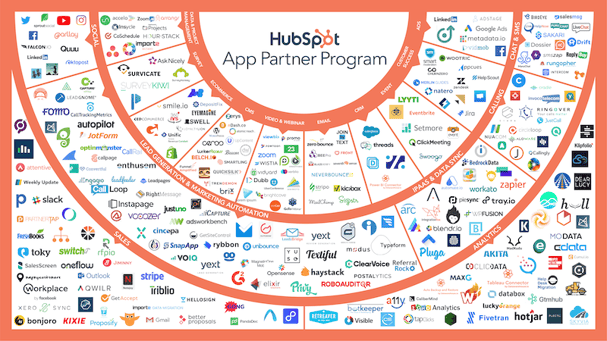
Increasingly, a key part of the answer is: an integrated ecosystem for your tech stack.
Software has eaten the world, as Marc Andreessen predicted eight years ago. Every company now uses a collection of cloud-based apps to run nearly every facet of their business. The term “tech stack” has entered everyday business conversations to describe these collections of tools.
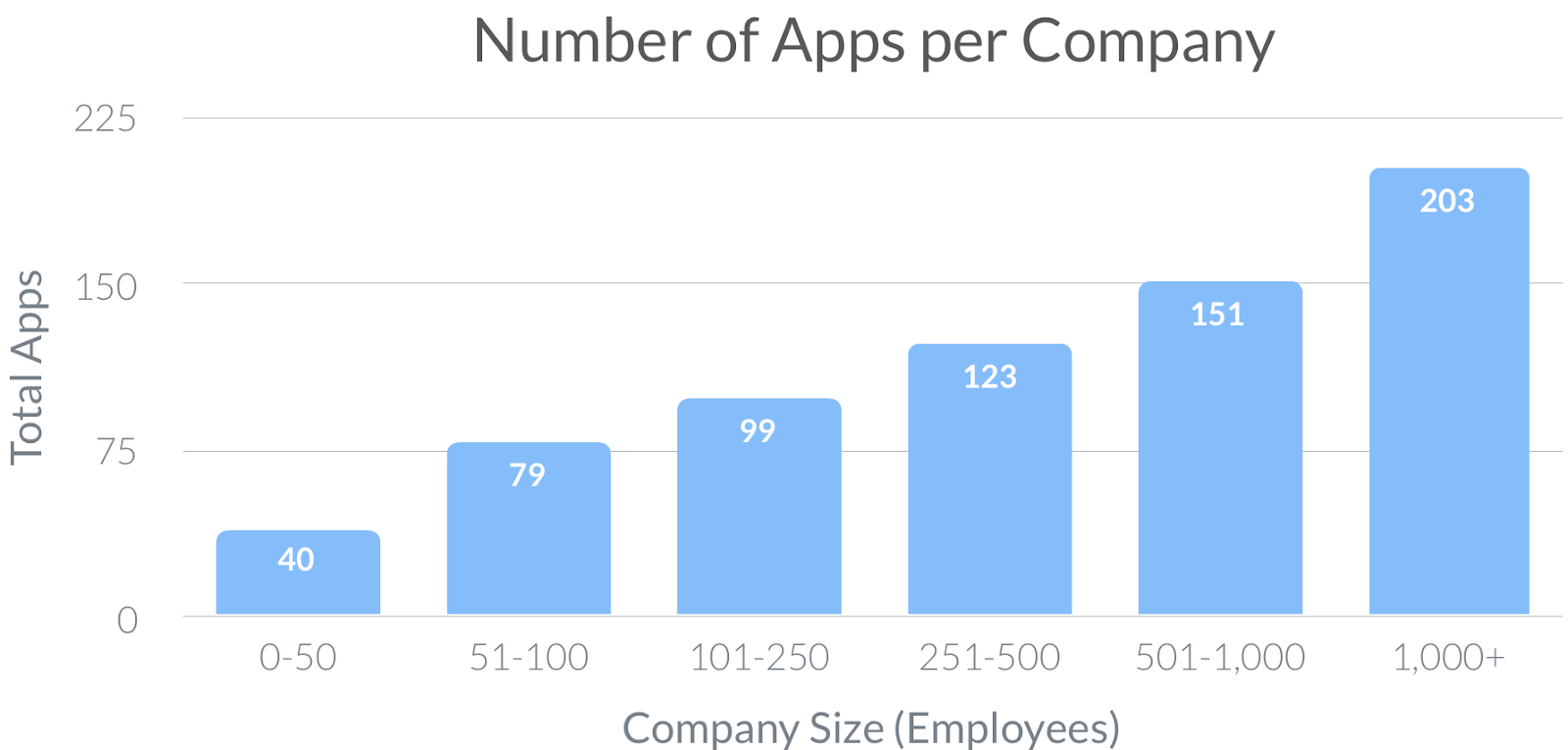
And these stacks are growing, even in the SMB space. According to data from Blissfully, businesses with 101-250 employees have an average of 99 SaaS app subscriptions.
It’s not enough to have the wondrous capabilities all these different apps offer, especially if each is locked in their own silo. To run your business effectively and to give customers a coherent and compelling experience across all the different touchpoints they have with you, all these different apps need to work together.
This is why HubSpot is committed to building an open platform that can serve as a “hub” for the myriad apps across your business that all contribute to improving the customer experience. We want to make it easy for you to orchestrate these apps, to better serve your customers, and to help you grow better.
At the beginning of the year, we shared our progress on this mission from 2018 and celebrated the many new and growing partners in our app ecosystem. We’re excited to give you an update on our platform ecosystem so far this year…
Growth in App Partners and App Adoption
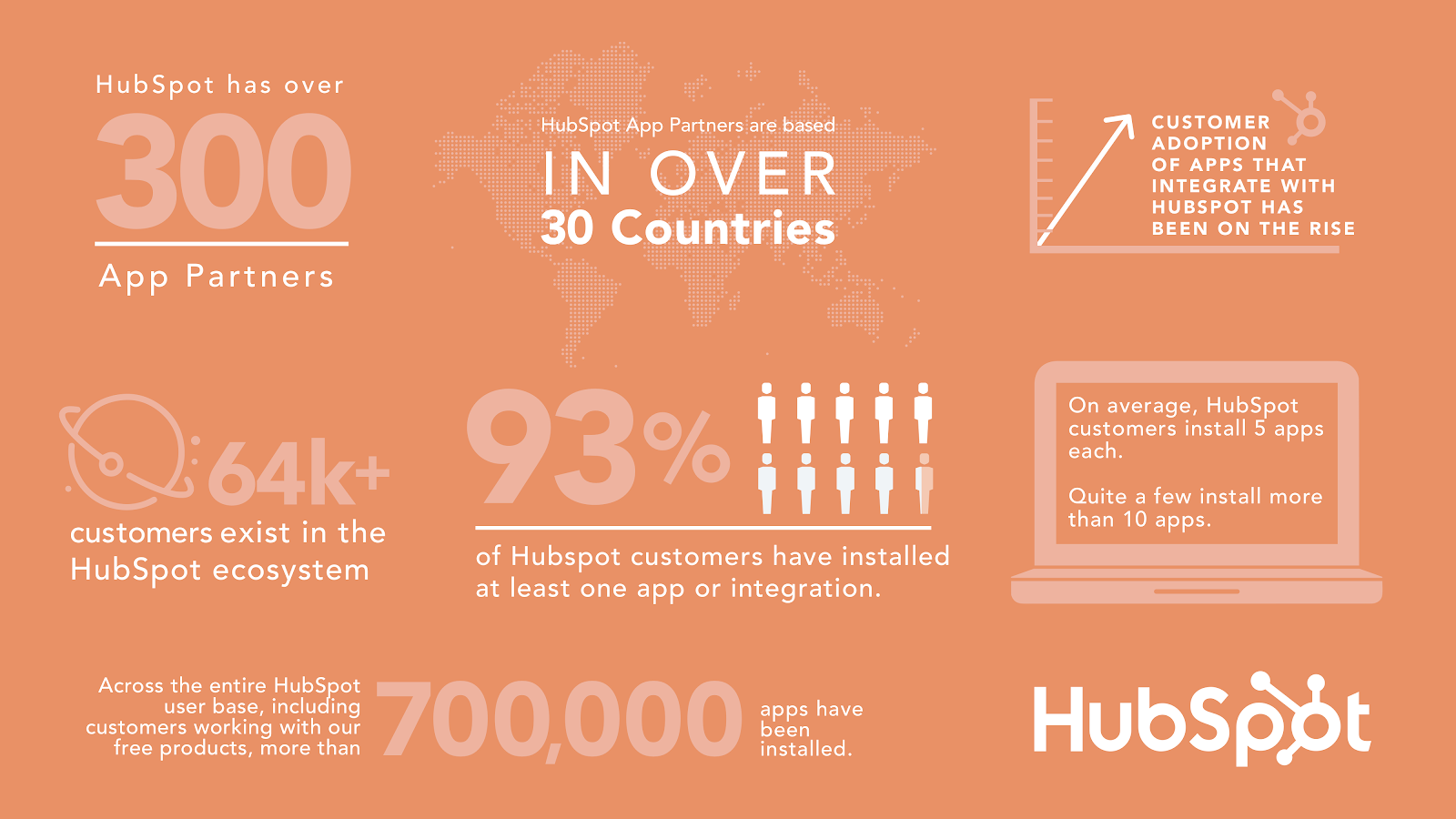
We now have over 300 app partners, based in over 30 countries, providing an incredible range of capabilities that you can plug into your HubSpot portal. Here is just a sample of the categories our partner ecosystem powers:
- Event management
- Employee advocacy programs
- Account-based marketing tools
- Call system integrations
- Webinar production
- SMS messaging
- Accounting integrations
- Interactive content
- Loyalty program management
- Influencer management
- RFP response management
- Content translation
- Videoconferencing
- Revenue forecasting
- Data cleaning and de-duplication
- Reputation and reviews management
- Direct mail automation
- Gift card delivery
- Affiliate program management
- … and so much more.
Even within these categories, our ecosystem includes a wide range of apps to provide choice and depth in these capabilities. For example, if you’re looking to implement world-class account-based marketing (ABM), you can leverage buyer intent data from G2, account-based ad targeting from Metadata.io, collaborative account mapping with OrgChartHub, coordinated account promotions in individual emails via Opensense and Sigstr, and dedicated ABM management solutions such as Engagio, Triblio, and Calibermind. All these apps can be integrated with the HubSpot platform as the common system of record.
App adoption is on the rise, as we’re seeing our customers taking advantage of the range of capabilities available in our ecosystem. Of our 64,000+ customers, 93% have installed at least one app or integration. On average, customers install five apps each, and some customers have more than 10 integrations. Across our entire user base, including those working with our free products, 700,000 apps have been installed.
A Brand New App Marketplace Built for Scale
We launched a brand new App Marketplace at INBOUND this week that makes it easier for HubSpot customers to find, understand, and install apps. (Read the announcement here.) With hundreds of app partners to choose from and rising customer appetite for integrations, the marketplace will be a powerful tool to help our customers optimize their processes and improve their customer experiences.
We want to make it easier for customers to find the right apps to grow their businesses and support “informed choice” — understanding the different features and pricing of several alternative products. Here’s what’s new:

1. We’ve organized apps into more granular categories and subcategories, so it’s easier to find what you’re looking for.
2. Want to discover new apps that can help you grow better? We’ve added more collections of apps that are hand-curated for different types of business and users, such as:
- Popular apps
- New apps
- Free apps
- Apps for marketing teams
- Apps for sales teams
- Apps for customer success teams
- Apps for startups
- Apps for agencies
- Made by HubSpot
3. We leveraged user feedback to help make app listings more helpful. App listing pages are now more robust, significantly expanding the information that app developers can publish in our marketplace. This means you can conveniently see all the important details about an app in one spot, like subscription requirements, shared data protocols, pricing, and demo videos.
.gif?width=650&name=Slack%20V2%20(1).gif)
4. For developers, the new app listing flow makes it easier than ever to create and list an app with HubSpot. If you’re an existing app partner, making updates to your app’s listing page has never been more frictionless. And now, your whole team can now access your tier status, install progress, and app listings all from one account — no more waiting for monthly emails.
The Most Popular Apps in Our Ecosystem Today
The advantage of a growing number of app partners is that you are more likely to find the one that meets your requirements, even if you’re looking for a solution that’s highly specialized. However, we also find it’s useful and interesting to see which apps are being widely adopted by HubSpot users, revealing trends about the capabilities many businesses are adding to their tech stacks.
Through July 2019, these were the top 20 most popular integrations in the HubSpot ecosystem:
- Gmail — email service
- Outlook Calendar — book meetings
- Zapier — integrations automation
- Facebook Ads — targeted social ads
- Google Calendar — time-management and scheduling
- Twitter — microblogging and social networking
- Mailchimp — email and marketing automation
- WordPress — free content management system
- LinkedIn — social network for professionals
- Facebook — social media and networking
- Slack — collaboration hub for work
- Google Search Console — website indexing and optimization
- HubSpot Video powered by Vidyard– create and manage videos
- Google Ads — online advertising
- SurveyMonkey — survey collection
- Databox — KPI dashboards
- Eventbrite — event management and ticketing
- Salesforce — CRM
- LinkedIn Ads — targeted social ads
- GoToWebinar — video conferencing
Many of those integrations were built by HubSpot to connect with apps that are already widely adopted, such as Gmail, Facebook, and Twitter. We also want to recognize the top 20 most popular integrations built by our app partners to highlight the broader set of capabilities in our ecosystem:
- Databox — KPI dashboards
- MagneticOne — business card reader
- Automate.io — integrations automation
- Typeform — online form and survey-building
- Hotjar — heat mapping
- PandaDoc — docusigning
- Zendesk — support ticketing and customer service software
- Unbounce — landing page building
- Import2 Data Migration — data migration tool
- PieSync — integrations automation
- Intercom — customer messaging
- HelloSign — docusigning
- ManyChat — Facebook bot creation
- Klipfolio — business dashboards
- AdRoll — ecommerce marketing
- Teamwork Projects — team collaboration
- Instapage — landing pages
- Drift — chat software
- Wistia — video hosting
- Import2 Wizard — seamless data sync
There’s also our “rising stars” — the fastest growing apps by total net installs since January 1, 2018:
- Import2 Data Migration — data migration tool
- ManyChat — Facebook bot creation
- Typeform — online form and survey-building
- CRM Perks WordPress Plugin — form building
- Integromat — integrations automation
- Intercom — customer messaging
- OptinMonster — lead generation
- Leadfeeder — visitor tracking
- JotForm — form building
- Import2 Wizard — seamless data sync
- Better Proposals — proposal creation
- G-Accon — Google Sheets connector
- Insycle — data management
- OrgChartHub — organizational chart building
- Asana — project management
- Salesmsg — SMS and MMS messaging
- Neverbounce — Email data cleanup
- WooCommerce — ecommerce connector
- Setmore — appointment booking
- Autopilot — marketing automation
Congratulations to these app partners on their growing success. We’re happy that so many HubSpot customers are getting value from their solutions.
Want to Build Your Own App With HubSpot?
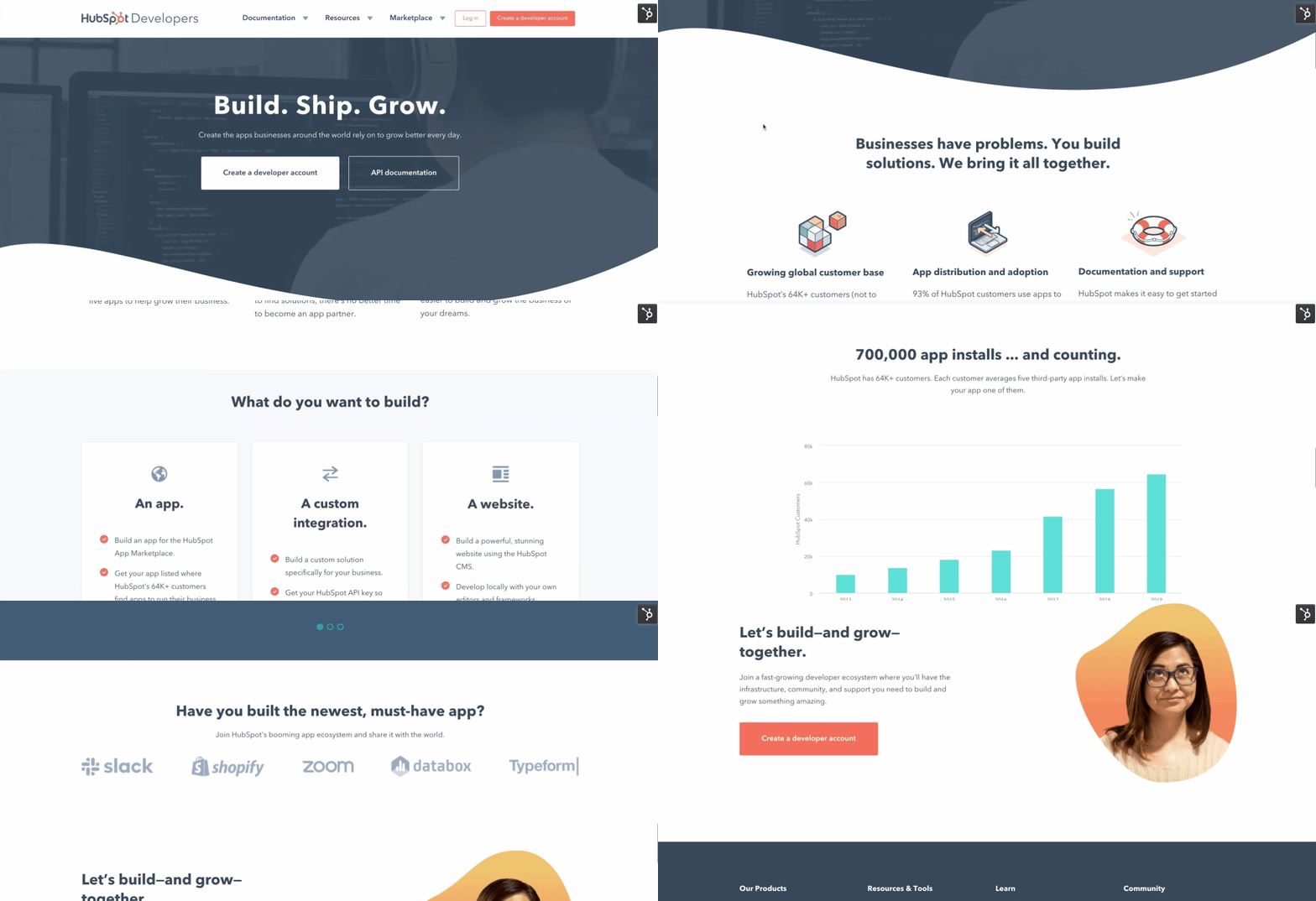
If you’re an app developer — or aspire to become one — we warmly invite you to join our platform ecosystem. Tens of thousands of HubSpot customers around the world are eager for new and innovative solutions that will help them manage, streamline, and integrate their business activities. And we’re committed to doing our very best to deliver an excellent experience to developers and customers to help them connect and grow better together.
As our CEO Brian Halligan said in our public earnings call last month:
“This year we’re adding fuel to the platform fire… Through our partners we’ll be able to do more and, our customers themselves will be able to do more. We’re just getting started here.”
Learn more at developers.hubspot.com.

Lead Generation: A Beginner’s Guide to Generating Business Leads the Inbound Way
We’ve all been through it. You know: the moment you’re about to dig into the best darn pile of spaghetti and meatballs you’ve ever seen.
Just as you twist your fork in the pasta, spear a mouth-watering meatball, and go in for the first savory bite … the phone rings. “May I speak to Lindsay Kow-low-witch?” asks the telemarketer on the other end. “This is an important message regarding your oven preferences.”
This frustrating interruption is exactly why we’re here to discuss inbound lead generation. What is inbound lead generation? It’s a solution that can save your business or organization from being that annoying, disruptive cold caller who is ruining spaghetti nights for pasta lovers all over the world.
Let’s start with defining a lead, and then we’ll cover what online lead generation is, why you need lead generation, how you qualify someone as a lead, how you generate leads, and why inbound lead generation is much more effective than simply buying leads.
What is a lead?
A lead is any person who indicates interest in a company’s product or service in some way, shape, or form.
Leads typically hear from a business or organization after opening communication (by submitting personal information for an offer, trial, or subscription) … instead of getting a random cold call from someone who purchased their contact information.
Let’s say you take an online survey to learn more about how to take care of your car. A day or so later, you receive an email from the auto company that created the survey about how they could help you take care of your car. This process would be far less intrusive than if they’d just called you out of the blue with no knowledge of whether you even care about car maintenance, right? This is what it’s like to be a lead.
And from a business perspective, the information the auto company collects about you from your survey responses helps them personalize that opening communication to address your existing problems — and not waste time calling leads who aren’t at all interested in auto services.
Leads are part of the broader lifecycle that consumers follow when they transition from visitor to customer. Not all leads are created equal (nor are they qualified the same). There are different types of leads based on how they are qualified and what lifecycle stage they’re in.
Marketing Qualified Lead (MQL)
Marketing qualified leads are contacts who’ve engaged with your marketing team’s efforts but aren’t ready to receive a sales call. An example of an MQL is a contact who fills out a landing page form for an offer (like in our lead generation process scenario below).
Sales Qualified Lead (SQL)
Sales qualified leads are contacts who’ve taken actions that expressly indicate their interest in becoming a paying customer. An example of an SQL is a contact who fills out a form to ask a question about your product or service.
Product Qualified Lead (PQL)
Product qualified leads are contacts who’ve used your product and taken actions that indicate interest in becoming a paying customer. PQLs typically exist for companies who offer a product trial or a free or limited version of their product (like HubSpot!) with options to upgrade, which is where your sales team comes in. An example of a PQL is a customer who uses your free version but engages or asks about features that are only available upon payment.
Service Qualified Lead
Service qualified leads are contacts or customers who’ve indicated to your service team that they’re interested in becoming a paying customer. An example of an service qualified lead is a customer who tells their customer service representative that they’d like to upgrade their product subscription; at this time, the customer service representative would up-level this customer to the appropriate sales team or representative.
These lead generators are just a few examples of lead generation strategies you can use to attract potential customers and guide them towards your offers. (We talk about more strategies later.)
Whenever someone outside the marketing world asks me what I do, I can’t simply say, “I create content for lead generation.” It’d be totally lost on them, and I’d get some really confused looks.
So instead, I say, “I work on finding unique ways to attract people to my business. I want to provide them with enough goodies to get them naturally interested in my company so they eventually warm up to the brand enough to want to hear from us!”
That usually resonates better, and that’s exactly what lead generation is: It’s a way of warming up potential customers to your business and getting them on the path to eventually making a purchase.
Why do you need lead generation?
When a stranger initiates a relationship with you by showing an organic interest in your business, the transition from stranger to customer is much more natural.
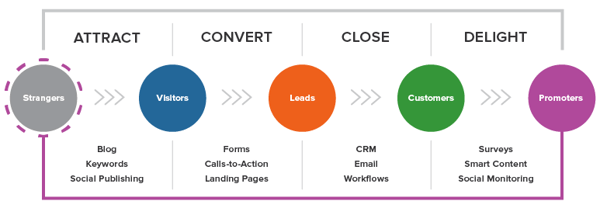
Lead generation falls within the second stage of the inbound marketing methodology. It occurs after you’ve attracted an audience and are ready to convert those visitors into leads for your sales team (namely sales-qualified leads).
As you can see in the diagram below, generating leads is a fundamental point in an individual’s journey to becoming a delighted customer.
Lead Generation Process
Now that we understand how lead generation fits into the inbound marketing methodology, let’s walk through the steps of the lead generation process.
- First, a visitor discovers your business through one of your marketing channels, such as your website, blog, or social media page.
- That visitor then clicks on your call-to-action (CTA) — an image, button, or message that encourages website visitors to take some sort of action.
- That CTA takes your visitor to a landing page, which is a web page that is designed to capture lead information in exchange for an offer.
Note: An offer is the content or something of value that’s being “offered” on the landing page, like an ebook, a course, or a template. The offer must have enough perceived value to a visitor for them to provide their personal information in exchange for access to it.)
- Once on the landing page, your visitor fills out a form in exchange for the offer. (Forms are typically hosted on landing pages, although they can technically be embedded anywhere on your site.) Voila! You have a new lead. That is, as long as you’re following lead-capture form best practices.
See how everything fits together?
To sum it up: Visitor clicks a CTA that takes them to a landing page where they fill out a form to get an offer, at which point they become a lead.
By the way, you should check out our free lead generation tool. It helps you create lead capture forms directly on your website. Plus, it’s really easy to set up.
Lead Generation Marketing
Once you put all of these elements together, you can use your various promotional channels to drive traffic to your landing page to start generating leads.
But what channels should you use to promote your landing page? Let’s talk about the front-end of lead generation — lead gen marketing.
If you’re a visual learner, this chart shows the flow from promotional marketing channels to a generated lead.
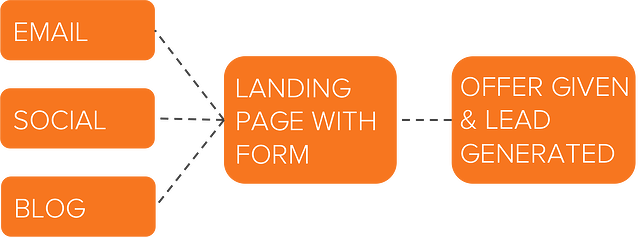
There are even more channels you can use to get visitors to become leads. Let’s go into depth on these and talk about a few others.
Content
Content is a great way to guide users to a landing page. Typically, you create content to provide visitors with useful, free information. You can include CTAs anywhere in your content — inline, bottom-of-post, in the hero, or even on the side panel. The more delighted a visitor is with your content, the more likely they are to click your call-to-action and move onto your landing page.
Featured Resource
Email is a great place to reach the people who already know your brand and product or service. It’s much easier to ask them to take an action since they’ve previously subscribed to your list. Emails tend to be a bit cluttered, so use CTAs that have compelling copy and an eye-catching design to grab your subscriber’s attention.
Featured Resource
Ads and Retargeting
The sole purpose of an ad is to get people to take an action. Otherwise, why spend the money? If you want people to convert, be sure that your landing page and offer match exactly what is promised in the ad, and that the action you want users to take is crystal clear.
Blog
The great thing about using your blog posts to promote an offer is that you can tailor the entire piece to the end goal. So, if your offer is an instructional video on setting up Google Search Console, then you can write a blog post about how to select your marketing metrics … which would make your CTA highly relevant and easy to click.
Featured Resource
Social Media
Social media platforms make it easy to guide your followers to take action, from the swipe up option on Instagram stories to Facebook bio links to bitly URLs on Twitter. You can also promote your offerings on your social posts and include a call-to-action in your caption. Learn more about social media campaigns in this post.
Product Trials
You can break down a lot of barriers to a sale by offering trials of your product or service. Once a prospect is using your product, you can entice them with additional offers or resources to encourage them to buy. Another good practice is to include your branding in your free versions so you can capture other potential customers, too.
Referral Marketing
Referral, or word-of-mouth, marketing is useful for lead generation in a different way. That is, it gets your brand in front of more people, which, in turn, increases your chances of generating more leads.
Whatever channel you use to generate leads, you’ll want to guide users to your landing page. As long as you’ve built a landing page that converts, the rest will handle itself.
Why not just buy leads?
Marketers and salespeople alike want to fill their sales funnel — and they want to fill it quickly. Enter: The temptation to buy leads.
Buying leads, as opposed to organically generating them, is much easier and takes far less time and effort, despite being more expensive. But, you might be paying for advertising anyway … so, why not just buy leads?
First and foremost, any leads you’ve purchased don’t actually know you. Typically, they’ve “opted in” at some other site when signing up for something, and didn’t actually opt into receiving anything from your company.
The messages you send them are therefore unwanted messages, and sending unwanted messages is intrusive. (Remember that disruptive call I got when I was trying to eat my spaghetti? That’s how people feel when they receive emails and other messages from people they didn’t ask to hear from.)
If the prospect has never been to your website and indicated an interest in your, products or services, then you’re interrupting them … plain and simple.
If they never opted in to receive messages specifically from you, then there’s a high chance they could flag your messages as spam, which is quite dangerous for you. Not only does this train to filter out emails from you, but it also indicates to their email provider which emails to filter out.
Once enough people flag your messages as spam, you go on a “blacklist,” which is then shared with other email providers. Once you get on the blacklist, it’s really, really hard to get back off of it. In addition, your email deliverability and IP reputation will likely be harmed.
It’s always, always, always better to generate leads organically rather than buy them. Read this blog post to learn how to grow an opt-in email list instead of buying one.
How to Qualify a Lead
As we covered in the first section, a lead is a person who has indicated interest in your company’s product or service. Now, let’s talk about the ways in which someone can actually show that interest.
Essentially, a sales lead is generated through information collection. That information collection could come as the result of a job seeker showing interest in a position by completing an application, a shopper sharing contact information in exchange for a coupon, or a person filling out a form to download an educational piece of content.
Gauging a Lead’s Level of Interest
Below are just a few of the many ways in which you could qualify someone as a lead. Each of these examples shows that the amount of collected information used to qualify a lead, as well as their level of interest, can vary.
Let’s assess each scenario:
- Job Application: An individual that fills out an application form is willing to share a lot of personal information because he/she wants to be considered for a position. Filling out that application shows their true interest in the job, therefore qualifying the person as a lead for the company’s recruiting team — not marketing or sales teams.
- Coupon: Unlike the job application, you probably know very little about someone who has stumbled upon one of your online coupons. But if they find the coupon valuable enough, they may be willing to provide their name and email address in exchange for it. Although it’s not a lot of information, it’s enough for a business to know that someone has interest in their company.
- Content: While the download of a coupon shows an individual has a direct interest in your product or service, content (like an educational ebook or webinar) does not. Therefore, to truly understand the nature of the person’s interest in your business, you’ll probably need to collect more information to determine whether the person is interested in your product or service and whether they’re a good fit.
These three general examples highlight how lead generation differs from company to company, and from person to person. You’ll need to collect enough information to gauge whether someone has a true, valid interest in your product or service — how much information is enough information will vary depending on your business.
Let’s look at Episerver, for example. They use web content reports for lead generation, collecting six pieces of information from prospective leads.
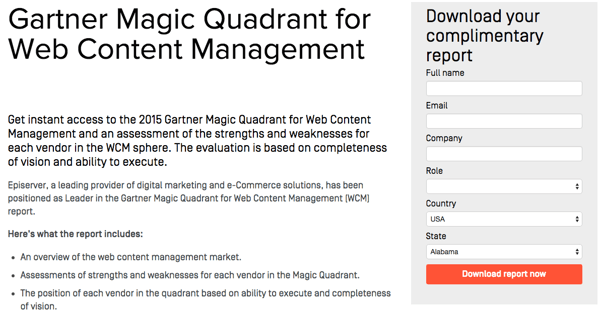
Episerver provides a great example for what to ask for in a lead gen form:
- Full Name: The most fundamental information needed to personalize your communication with each lead.
- Email: This serves as a unique identifier and is how you will contact your lead.
- Company: This will give you the ability to research your lead’s industry and company and how the lead might benefit from your product or service (mainly for B2B).
- Role: Understanding an individual’s role will help you understand how to communicate with them. Every brand stakeholder will have a different take and perspective on your offering (mainly for B2B).
- Country: Location information can help you segment your contact by region and time zone, and help you qualify the lead depending on your service.
- State: The more detailed information you can obtain without sacrificing conversions, the better. Knowing your leads state can help you further qualify them.
If you’d like to learn more intermediate-level tips on information collection and what you should ask for on your lead gen forms, read our post about it here.
Lead Scoring
Lead scoring is a way to qualify leads quantitatively. Using this technique, leads are assigned a numerical value (or score) to determine where they fall on the scale from “interested” to “ready for a sale”. The criteria for these actions is completely up to you, but it must be uniform across your marketing and sales department so that everyone is working on the same scale.
A lead’s score can be based on actions they’ve taken, information they’ve provided, their level of engagement with your brand, or other criteria that your sales team determines. For instance, you may score someone higher if they regularly engage with you on social media or if their demographic information matches your target audience.
Borrowing from the examples above, you might give a lead a higher score if they used one of your coupons — an action that would signify this person is interested in your product.
The higher a lead’s score, the closer they are to becoming a sales-qualified lead (SQL), which is only a step away from becoming a customer. The score and criteria is something you may need to tweak along the way until you find the formula that works, but once you do, you’ll transform your lead generation into customer generation.
Lead Generation Strategies
Online lead generation encompasses a wide range of tactics, campaigns, and strategies depending on the platform on which you wish to capture leads. We talked about lead capture best practices once you have a visitor on your site … but how can you get them there in the first place?
Let’s dive into lead generation strategies for a few popular platforms.
Facebook Lead Generation
Facebook has been a method for lead generation since its inception. Originally, companies could use outbound links in their posts and information in their bios to attract strangers to their websites. However, when Facebook Ads was launched in 2007, and its algorithm began to favor accounts that used paid advertising, there was a major shift in how businesses used the platform to capture leads. Facebook created Lead Ads for this purpose. Facebook also has a feature that lets you put a simple call-to-action button at the top of your Facebook Page, helping you send Facebook followers directly to your website.
Get some lead generation tips for Facebook.
Featured Resource
Twitter Lead Generation
Twitter has Twitter Lead Gen Cards, which let you generate leads directly within a tweet without having to leave the site. A user’s name, email address, and Twitter username are automatically pulled into the card, and all they have to do is click “Submit” to become a lead. (Hint for HubSpot users: You can connect Twitter Lead Gen Cards to your HubSpot Forms. Learn how to do that here).
Learn some lead generation tips for Twitter.
Featured Resource
LinkedIn Lead Generation
LinkedIn has been increasing its stake in the advertising space since its early days. When it comes to lead generation, LinkedIn created Lead Gen Forms, which auto-populate with a users profile data when they click a CTA, making it easy to capture information.
Get tips from our experience using LinkedIn ads.
PPC Lead Generation
When we say pay-per-click (PPC), we’re referring to ads on search engine result pages (SERPs). Google gets 3.5 billion searches a day, making it prime real estate for any ad campaign, especially lead gen. The effectiveness of your PPC campaign relies heavily on a seamless user flow, as well as your budget, target keywords, and a few other factors.
Learn more about how to setup successful PPC ads.
B2B Lead Generation
B2B is a particular business model that requires a particular approach to lead generation. HubSpot found that SEO is the top resource for capturing business leads, followed closely by email marketing and social media. Not to mention, effectiveness varies by channel.
Learn the B2B lead generation techniques for every channel.
Tips for Lead Generation Campaigns
In any given lead generation campaign, there can be a lot of moving parts. It can be difficult to tell which parts of your campaign are working and which need some fine-tuning. What exactly goes into a best-in-class lead generation engine? Here are a few tips when building lead gen campaigns.
Use the right lead generation tools.
As you saw in our data, the most successful marketing teams use a formal system to organize and store their leads. That’s where lead generation tools and lead generation software come into play.
How much do you know about the people visiting your website? Do you know their names or their email addresses? How about which pages they visited, how they’re navigating around, and what they do before and after filling out a lead conversion form?
If you don’t know the answers to these questions, chances are you’re having a hard time connecting with the people who are visiting your site. These are questions you should be able to answer — and you can with the right lead generation tools.
There are a few different tools and templates out there that’ll help you create different lead gen assets to use on your site:
- CTA Templates: 50+ free, customizable call-to-action (CTA) templates in PowerPoint that you can use to create clickable CTA buttons to use on your blog, landing pages, and elsewhere on your site.
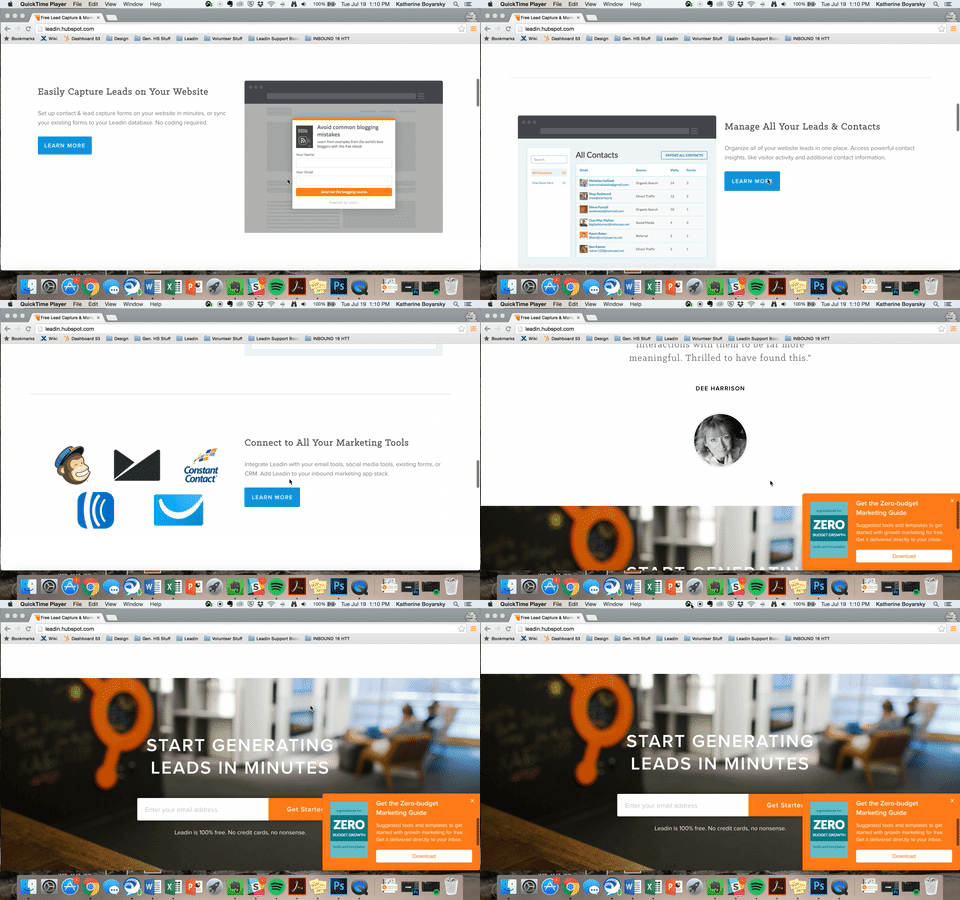
- Lead Generation Software Tools: This free tool from HubSpot includes lead capture and contact insights features, which will scrape any pre-existing forms you have on your website and add those contacts to your existing contact database. It also lets you create pop-ups, hello bars, or slide-ins — called “lead flows” — that’ll help you turn website visitors into leads immediately.
Example of a slide-in lead flow.
- Visitor Tracking: Hotjar has a heatmap tool — a virtual tool which creates a color-coded representation of how a user navigates your site — that helps you understand what users want, care about, and do on your site. It records visitors and tells you where they spend the most time on your site. You can use it to gather information on your lead generation forms, feedback forms and surveys, and more.
- Form-Scraping Tool: A form scraping tool that collects submissions on your website’s existing forms helps you automatically consolidate all your leads into your contact database, regardless of which form visitors submitted on your website. HubSpot customers can create and embed forms using HubSpot, which automatically populate into your CMS. Non-HubSpot customers can use a form creation tool like Contact Form 7, JetPack, or Google Forms, and then use HubSpot’s free collected forms feature to automatically capture form submissions and input them to a contact database.
Create amazing offers for all different stages of the buying cycle.
Not all of your site visitors are ready to talk to your sales team or see a demo of your product. Someone at the beginning of the buyer’s journey might be interested in an informational piece like an ebook or a guide, whereas someone who’s more familiar with your company and near the bottom of the journey might be more interested in a free trial or demo.
Make sure you’re creating offers for each phase and offering CTAs for these offers throughout your site.
Yes, it takes time to create valuable content that teaches and nurtures your leads down the funnel, but if you don’t offer anything for visitors who aren’t ready to buy, then they may never come back to your website. From checklists to templates to free tools, here are 23 ideas for lead generation content to get you started.
If you want to take personalization a step further — which will help boost your conversion rate — try using smart CTAs. Smart CTAs detect where a person is in the buyer’s journey, whether they’re a new visitor, a lead, or a customer, and display CTAs accordingly. Personalized CTAs convert a whopping 42% more visitors than basic calls-to-action.
Keep your messaging consistent and deliver on your promise.
The highest-converting lead gen campaigns are the ones that deliver on what they promise and create a seamless transition from ad copy and design to the deliverable itself. Make sure that you’re presenting a consistent message throughout the process and providing value to everyone that engages with your lead capture.
The aspects of your lead gen campaign should mirror everything else on your website, on your blog, and within the product that you will eventually try to sell. If not, you’ll have a difficult time getting your lead to the next lifecycle stage. Your campaign should be about more than just obtaining an email address — it should be about developing a new customer.
Link your CTA to a dedicated landing page.
This may seem obvious to you, but you’d be surprised how many marketers don’t create dedicated landing pages for their offers. CTAs are meant to send visitors to a landing page where they can receive a specific offer.
Don’t use CTAs to drive people to your homepage, for instance. Even if your CTA is about your brand or product (and perhaps not an offer like a download), you should still be sending them to a targeted landing page that’s relevant to what they are looking for and includes an opt-in form. If you have the opportunity to use a CTA, send them to a page that will convert them into a lead.
If you want to learn more about how to build and promote high-converting landing pages, then download our ebook on optimizing landing pages for conversions.
Get your sales team involved.
Remember when we talked about lead scoring? Well, it isn’t exactly doable without your sales team’s input. How will you know what qualifies a lead for sales without knowing if your defined SQLs are successfully sold? Your marketing and sales teams need to be aligned on the definitions and the process of moving a lead from MQL to SQL to opportunity before you even begin to capture leads.
Also, be open to evolving your relationship with sales and how you guide leads along your funnel. Your definitions will likely need to be refined over time; just make sure to keep everyone involved up-to-date.
Use social media strategically.
While marketers typically think of social media as best for top-of-the-funnel marketing, it can still be a helpful and low-cost source for lead generation as shared in the lead gen strategies above. The key is using social media strategically for lead generation.
Start by adding links directly to the landing pages of high-performing offers within your Facebook, Twitter, LinkedIn, and other social media posts. Tell visitors that you’re sending them to a landing page. That way, you’re setting expectations. Here’s an example from one of our Facebook posts:
You can also do a lead generation analysis of your blog to figure out which posts generate the most leads, and then make a point of regularly linking social media posts to them.
Another way to generate leads from social media is to run a contest. Contests are fun and engaging for your followers, and they can also teach you a ton about your audience. It’s a win-win. Read our step-by-step guide for growing your email list using social media contests, which covers everything from choosing a platform, to picking a winner, all the way to analyzing your results.
Remain flexible and constantly iterate.
Your lead generation strategy needs to be as dynamic as the people you’re targeting. Trends change, behaviors shift, opinions morph … so should your lead gen marketing. Use A/B split testing to see what CTAs perform best, which landing pages convert better, and which copy captures your target audience. Experiment with layout changes, design, UX, content, and advertising channels until you find what works.
Lead Generation Trends & Benchmarks
So … you’re getting web traffic and generating leads. But how are you doing compared to other companies in your industry? How many leads should you really be generating?
It’s tough to figure out if your lead generation strategy is working if you aren’t looking at industry data. That’s why we partnered with Qualtrics to survey more than 900 marketers from all different industries in North America and Europe to create a demand generation report with data on website visitors, leads, opportunities, customers, and revenue.
Did you know that 74% of companies that weren’t exceeding revenue goals didn’t know their visitor, lead, MQL, or sales opportunities numbers? How about that over 70% of companies not achieving their revenue goals generate fewer than 100 leads per month, and only 5% generate more than 2,500 leads per month? These are just a few examples of what you’ll find in the report.
For in-depth reports, download our Demand Generation Benchmarks Report. Below are some useful highlights.
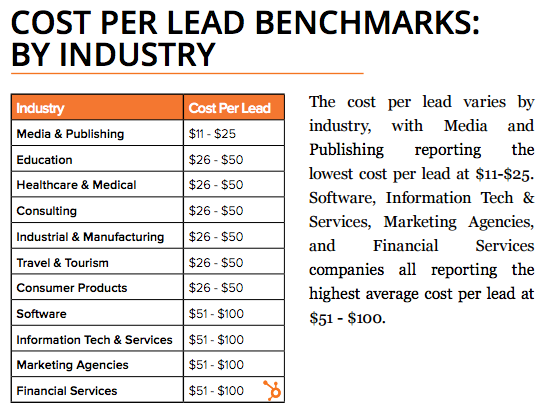
Cost per Lead, by Industry
The media and publishing industries report the lowest cost per lead at $11 to $25. Software, information technology and services, marketing agencies, and financial services companies all report the highest average cost per lead at $51 to $100.
Leads Generated per Month, by Annual Revenue
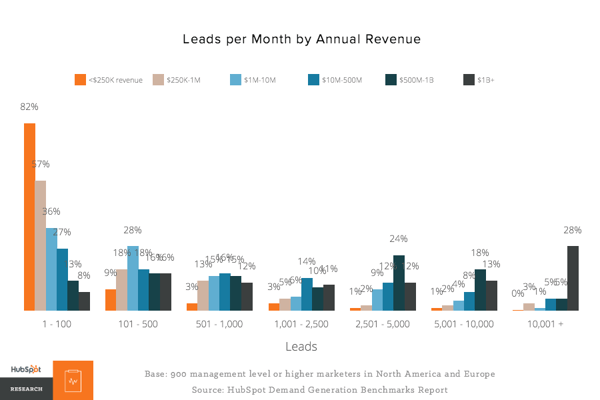
Unsurprisingly, the more revenue a company has, the more leads they generate. The differences are most drastic at the highest and lowest end of the spectrum: 82% of companies with $250,000 or less in annual revenue report generating less than 100 leads per month, whereas only 8% of companies generating $1 billion in annual revenue report less than 100 leads per month.
Leads per Month
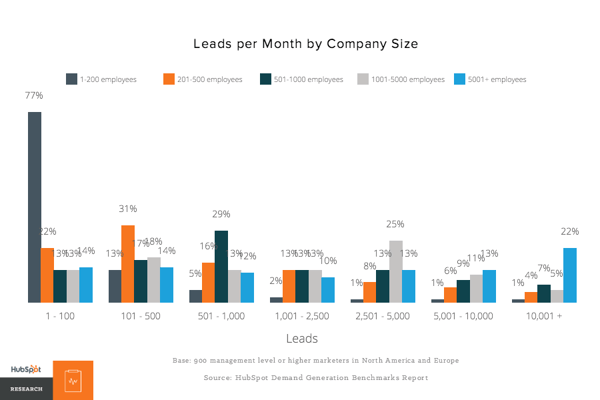
We found that 58% of companies generated 500 leads per month or fewer, and 71% generated 1,000 or fewer. However, as we saw previously, the companies having the most success are also the ones generating the most leads.
Here’s how the data broke down by company size:
Lead Generation Software
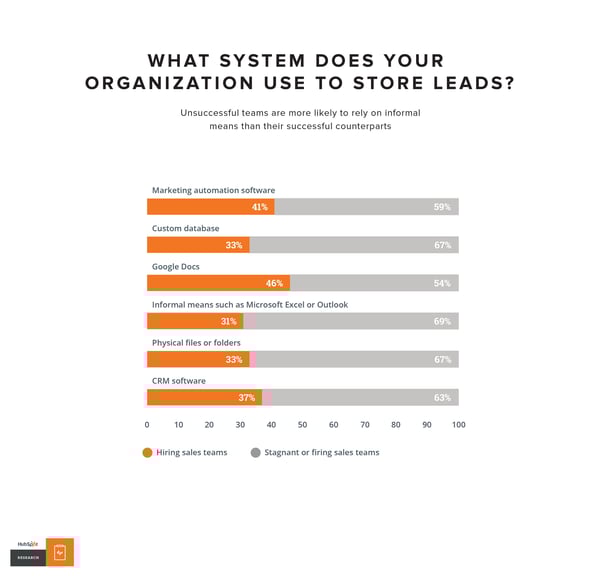
We found that the most successful teams use a formal system to organize and store leads: 46% use Google Docs, 41% use marketing automation software, and 37% use CRM software. (Hint for HubSpot customers: Google Drive integrates with both HubSpot Marketing Hub and HubSpot CRM.)
Grow Better with Lead Generation
There you have it, folks. Now that you know more about how to generate leads for your business, we recommend you try HubSpot’s free lead generation tool. Use it to add simple conversion assets to your site (or scrape your existing forms) to help you learn more about your site visitors and what content prompts them to convert.
The basics we’ve gone over in this blog post are just the beginning. Keep creating great offers, CTAs, landing pages, and forms — and promote them in multi-channel environments. Be in close touch with your sales team to make sure you’re handing off high-quality leads on a regular basis. Last but not least, never stop testing. The more you tweak and test every step of your inbound lead generation process, the more you’ll improve lead quality and increase revenue.

Experience Disruptors: A New Breed of Growth Leaders
I’ve been doing a lot of research and thinking this year about how consumer behavior has changed, and how businesses can take advantage of these shifts to grow better and faster. So often, sweeping shifts in business strategy begin with subtle shifts in our own lives.
To explain what I mean, let me tell you about a typical night in my house.
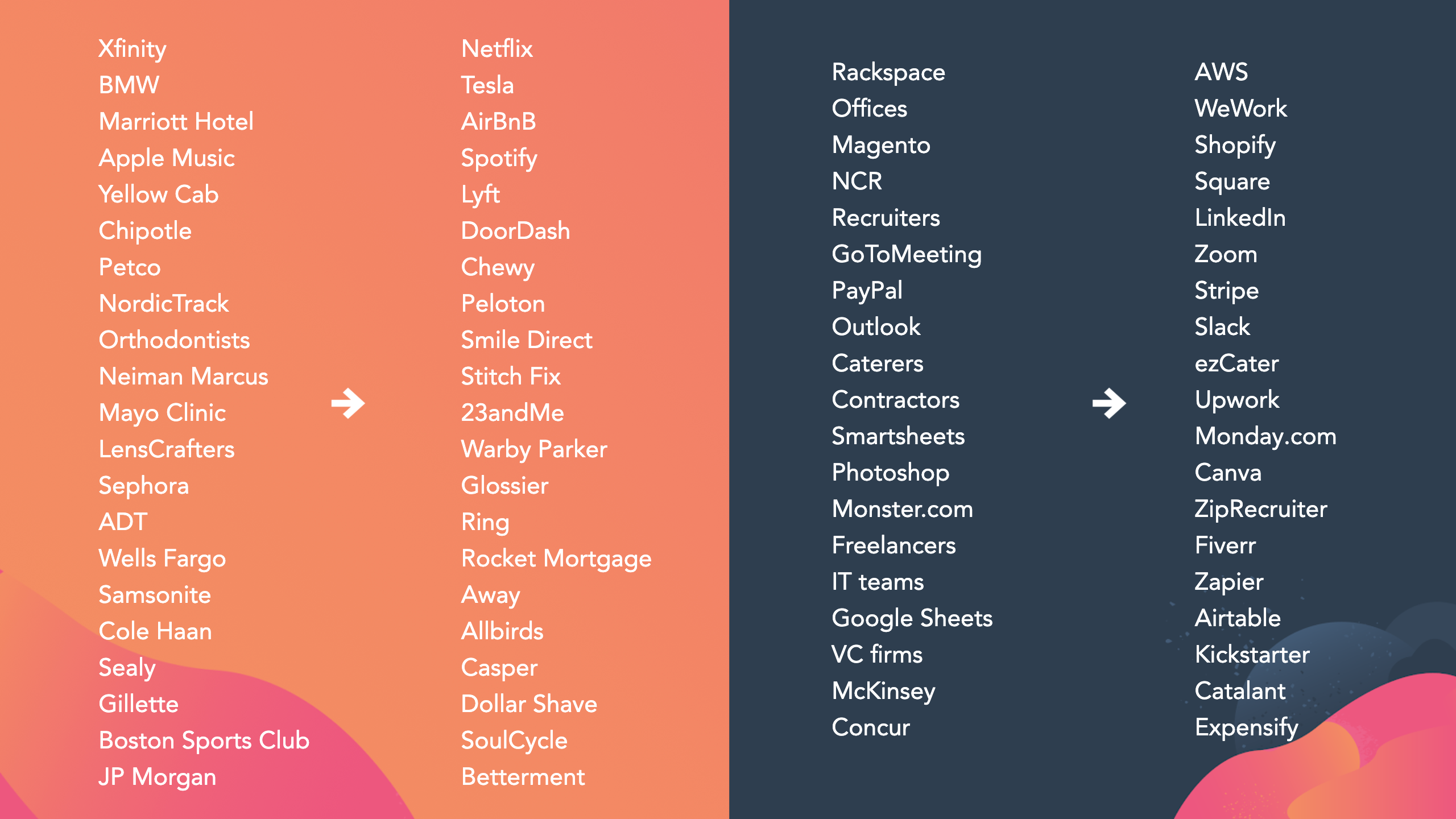
HubSpot is dog friendly, so everyday I bring my dog Romeo to the office and then, at day’s end, we ride home together in a Lyft. At home, we fire up the Grateful Dead on Spotify. I head to the kitchen and Romeo goes directly to where he keeps his stuffed dog toys and the new treats he got in from Chewy. We put our paws up and order some Thai food from DoorDash. We fire our favorite movie up on Netflix. Then we crawl into our Casper bed and catch up on some reading. In the morning, we wake up, and I shower and shave with a razor from Dollar Shave Club. Then we begin the cycle again.
I list all of these companies not to brand-drop, but to make a point. What do all these companies have in common? They make it incredibly easy on the customer to do business with them. You can’t find a speck of friction in their customer experience. My daily and nightly routine is seamless in large part due to these companies.
It’s not just consumer companies. In the B2B space, I’ve noticed a similar sea change of companies with the most frictionless and customer-focused experience taking over from incumbents because they provide a much better customer and user experience.
It’s not just a better experience — they’re disrupting our very notion of what we as consumers should be able to expect from companies.
The Changing Nature of Disruption
The word disruption is ranked #3 on my list of most overused and under-understood words in business (wedged right between machine learning and blockchain).
“Disruption” is typically used to describe technology disruptions that turn industries upside down. When I first started in this industry these were the great tech leaders: Netscape’s browser, Google’s search engine, Intel’s chip, the iPhone, Tesla’s car. One thing they all have in common is the fact that there is some pretty deep and fundamental technology underpinning their business. In most of these cases, this technology was a real competitive advantage that was hard to overcome.
If you add up all the patents of these five companies, there are over 56,000.
But something has shifted, because the companies overthrowing incumbents today do not have deep technological advantages. For the most part, these companies’ competitive advantage isn’t due to technology innovation at all.
If you add up all of the patents for the companies I mentioned above that are infused in my daily routine, there are only about 500 between them.
So, if these companies aren’t technology disruptors, what are they?
I call them experience disruptors. These companies represent a new breed of growth leader that gets ahead by completely disrupting and reinventing the treatment we’ve come to expect out of companies as consumers.
Over the last six months I’ve dug into each of these so-called experience disruptors in my regular routine both in my home and business life. I used all their products, read all their terms and conditions, interviewed many of their founders and senior executives, and talked with their investors. All to understand what’s really happening here. What I found was really telling.
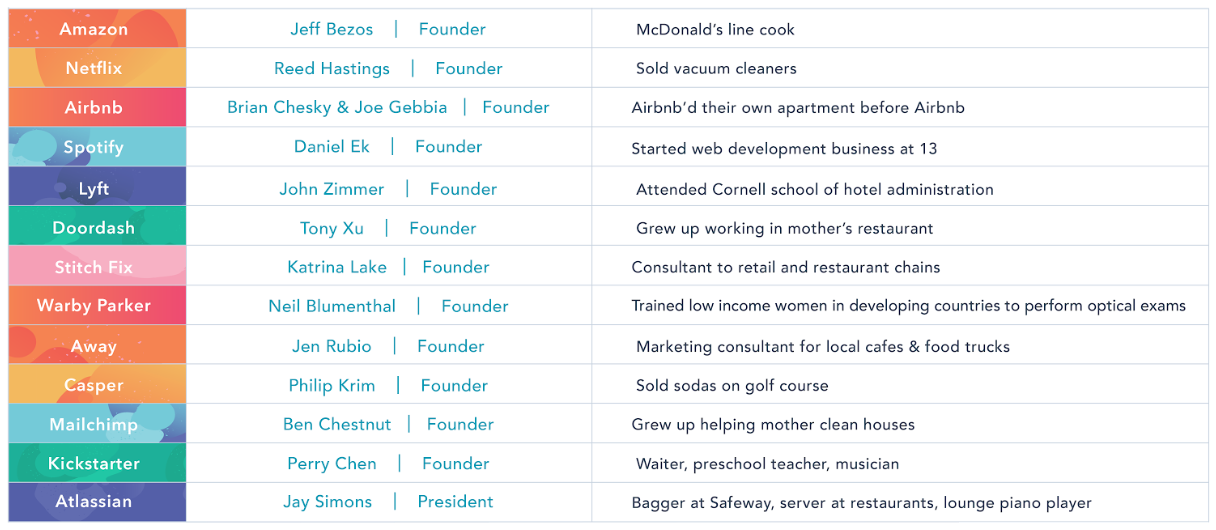
They come from hospitality roots.
The first thing you’ll notice about these companies is none of them really behave like traditional tech companies. They are genetically more similar to a great hospitality company like the Four Seasons or the Ritz-Carlton than to Oracle or Cisco.
In fact, I was surprised to hear that a lot of the founders have backgrounds in the hospitality industry. These roots create the foundation of how these leaders view the customer experience they’re trying to create, and that foundation shapes the culture of their teams and angle of their approaches.
They measure the experience, not just the product.
Most companies use metrics to understand how their products are working: purchases, uptime, usage, etc. But even in measuring the product, experience disruptors look to the experience of the product rather than just the feature functionality.
For example, payments software company Square doesn’t just measure the number of transactions it’s processing, it measures something it calls “the perfect swipe.” This is a blended metric that captures measures like time to complete transaction, percentage of successful swipes, and the time it takes for a receipt to arrive after the purchase is made. This is a far better reflection of what the end user experiences during the transaction.
They are secret shoppers of their own products.
Many Lyft executives sign up as drivers to understand the driver experience. Eric Yuan, CEO of Zoom is one of its heaviest users and feedback providers. In fact, he ran his entire IPO roadshow from an office using Zoom. He quite literally bet the success of his initial public offering on the strength, reliability, and experience of the product.
Using your own product in a broad and sweeping fashion inside your company gives you an empathy for the customer experience that no level of user research or persona-building can match.
They have moved from personas to people.
Speaking of personas, experience disruptors seem to put less stake in them than in the immense diversity of their audience. Stitch Fix CEO Katrina Lake has stopped using personas and instead uses data “clusters.” These clusters aren’t based on a limited collection of variables like age and size — instead, they’re based on a living, endless set of data.
Similarly, Spotify stopped using personas and switched to use cases like “summer barbecue,” “PRIDE,” and “focus.” This setup enables them to adapt to the myriad of ways that people change and evolve their tastes in music.
They only charge for what you use.
The experience disruptors I studied all had ways to delight users by only charging them for what they use. They build trust by creating a one-for-one exchange and not letting packaging over-prescribe pricing. For example, Stitch Fix sends me a box with about $500 worth of clothes in it every month. I pick the stuff I want and the rest goes back to Stitch Fix. They charge me $20/box as a base fee, but any charge on top of that is only for what I keep.
Similarly, we use Slack in our offices at HubSpot. When we signed that contract, we estimated what we were going to need in terms of seats, but we found that if we didn’t use them, Slack would credit us the difference. This setup aligns incentives masterfully and makes renewals an easy decision.
They lean into cancellations and returns.
Pet product company Chewy is renowned for the grace and intelligence with which they handle returns and cancellations. Stories have spread around the internet of Chewy customers who have cancelled orders when their beloved pets passed away and found that not only was Chewy immediate in processing the cancellation, the company actually sent them flowers and heartfelt sympathy notes for their loss.
Additionally, when customers call to return items that don’t fit, Chewy sends them a replacement, but instead of processing the return, Chewy often encourages the customer to give the unwanted item to a friend. This is smart on multiple levels. First, it could cost more to process the return, and second, the item out in the wild might introduce a new prospective customer to the company.
They drop the middleman.
Part of making a better experience relies on being able to influence all of it. When you add in a distributor or retail channel, oftentimes you lose that control. So a number of experience disruptors have opted to skip the middleman and sell direct-to-consumer.
Away.com, Chewy, and Glossier all have built their businesses by cutting out the retail store and selling directly to people. We see this on the B2B side, too. You don’t sign up with WeWork through a commercial real estate broker. You get WeWork from WeWork. Experience disruptors own both the customer relationship and the channel that delivers it.
They see support as an opportunity.
The old view on customer support was to see it as a cost center — an obligation the company needed to fill that didn’t really lead to business growth. Experience disruptors come at support from the opposite direction.
A great example of this is Tesla, which shifted its approach to support to align business goals and customer goals. Tesla noticed that customers were spending a lot of time waiting for repairs to be completed in their repair rooms. This is a bad experience for everyone. Most of the wait time was due to limited bay openings in the support center. They had two options: build more bays, or change their model. Looking at the common causes of repair requests, they realized that 80% of the cars coming in only needed 5-10 minute repairs. So, Tesla came up with a new approach — send a mechanic to go fix the 5-10 minute problems in the car owner’s driveway. This led to a greater efficiency in the company’s use of bays and a better experience for owners.
There is one more observation I want to spend some time on. This is really more of an underpinning of all of the experience disruptors we talked to in our research. Most companies fall victim to what I call the Tyranny of “Or.” They feel they have to choose between growing fast or growing well. Between pleasing investors or pleasing customers. Between investing in the product or investing in customer experience.
After talking with many of today’s leading companies, it’s clear to me how short-sighted this thinking is.
Rather than focus on the tyranny of “or,” experience disruptors lean into the audacity of “and.” The more you invest in customers, the more investors will be rewarded. The better you grow, the faster you’ll grow. The more you create a good customer experience, the better the product will get. They create a flywheel effect by focusing on the decisions they need to make to create the greatest customer experience, and that makes all the difference.
This is how we hope to grow as a business, today and in the years and decades to come. Today at INBOUND, HubSpot announced a slew of features and enhancements sourced directly from the customer base. Take a look, perhaps see something that you’ve requested, and keep sending feedback to make us better. Thank you.

A Complete Guide to PMIS

11 Creative (But 100% White Hat!) Ways to Earn Backlinks in 2019
Earning high-quality backlinks is probably the most challenging part of SEO.
That’s because a link to another website is more than just a link — it’s a vote of confidence, a recommendation, a way for publishers to say to their readers: “Here’s a source I trust. Go check it out yourself.”
It’s incredibly difficult to get that kind of endorsement, especially for small businesses or startups. But if you want to boost your SEO performance, you need to make sure you consistently earn high-quality backlinks to your website, better and faster than your competition.
In fact, while there are 200 known Google ranking factors, backlinks counts as one of the top eight most important ranking factors for Google search.
As an SEO strategist specifically focusing on link building at HubSpot, I’m no stranger to the challenge of finding high-quality sources that will link back to your site. To help you improve your company’s SEO ranking, I’ve cultivated this list of 11 creative and unique ways to earn backlinks in 2019.
1. Reclaim Unlinked Mentions
Reclaiming unlinked brand mentions is probably the easiest, quickest way to build high-quality backlinks.
All you need to do is keep an eye on who is mentioning your brand, on blogs or in the news. You can do that using something as simple (and free) as Google Alerts. If you want more insights into your mentions, like the number of shares or the domain authority of the website where the mention comes from, you can opt for tools like BuzzSumo, Ahrefs Content Explorer or Mention.
%20Ways%20to%20Earn%20Backlinks%20in%202019-2.png)
Oftentimes, you’ll notice the author hasn’t included a link back to your website when they mention your brand, product, or service. That’s when you can send them a quick note, asking for a proper link attribution. This also allows the publisher to give their readers a better experience, letting them click through and learn more about the brand mentioned. It’s a win, win.
The creative part of this tactic is that you can use the same method to reclaim links for other mentions that are related to your brand — including events you organize, employees names, research reports, etc.
For example, you can keep a lookout for interviews that feature your company’s executives and ask for a link back to their profile page on your website. Or, you can look for mentions of reports or statistics you’ve published, and ask for a proper link attribution to the original source.
2. Get Contextual Links
Have you noticed how some articles feature additional resources, either recommended in text or inside a “Read more” section?
Here’s an example of a “read more” section from SEJ, where they link to a related piece:
%20Ways%20to%20Earn%20Backlinks%20in%202019-1.png)
These links embedded in the text of an article are called contextual links. Search engines see contextual links as stronger “recommendations” than a link found elsewhere on the page.
Ultimately, getting featured in “Read more” sections is incredibly valuable for your SEO performance.
The key to getting contextual links is to find the right link prospect to reach out to. You can find them by researching articles that are related to the content you’re promoting and already have a “Read more” section.
For instance, let’s say you have a new study on email marketing. Try looking for articles that speak about marketing trends and recommend other articles.
Here’s how to find them using search engines like Google:
- marketing trends inurl:blog intext:”Read more”
- marketing trends inurl:blog intext:”Recommended articles”
- marketing trends inurl:blog intext:”Recommended reading”
When you reach out to the author to pitch your study, don’t forget to mention why your content is worth getting featured. A persuasive boilerplate and a personalized email will go a long way.
3. Get “Best X” List Mentions
Today’s consumers look for all available options before making a purchasing decision. They often use comparison websites or articles, like “The 9 Best Free Email Marketing Tools in 2019” to see what others recommend.
To get a sense of how popular these Best X articles are in your industry, use a keyword research tool and check for monthly search volume. For instance, there are more than 4,800 searches per month for the query “best CRM for small businesses” (according to data from Ahrefs).
Getting mentioned on articles that list the best products like the one you offer is a fantastic way to reinforce your brand, get more people to try out your product and, of course, earn high-quality backlinks.
Alex Birkett, Senior Growth Marketing Manager at HubSpot, explains why getting featured on these lists is so important for your business: “If you look at these search results in terms of pure click-through rate, there’s an upper limit on how much traffic you can bring to your own product page by ranking on your own site’s listicle.”
Birkett continues to say — “As Nick Eubanks has mentioned, if you can broaden your view from trying to rank #1 to trying to monopolize all of the sites on the first page of a search query, you can multiply the amount of click-throughs to your site, your website traffic, and, down the line, your sales volume. And that’s not even factoring in the less trackable aspects, such as social proof and brand awareness.”
“In other words, this tactic goes beyond just link building and taps into acquisition and brand awareness potential, too.”
To get your product or service included in a list round-up, start with a simple Google search to find high-ranking blogs that write about your product or industry.
Here are some useful search terms to help you find relevant prospects:
- Best [X]
- Best [X] for [Y] e.g. Best CRM for entrepreneurs
- Top [X]
- Top [X] for [Y] e.g. Top 10 CRM for small businesses
Collect the most relevant prospects in a list and prioritize them based on domain authority (or Domain Rating if you’re using Ahrefs), backlink profile, ranking, and referral traffic potential.
Once your final list is ready, write a short pitch for the author to show them why your product or service deserves to be included in their list.
As per any outreach campaign, a short, persuasive pitch and a customized email will help you stand out.
4. Become a Source for Other Publishers
By using your expertise and unique data, you can become a source for other bloggers and journalists.
Every time someone quotes you, you’ll earn a backlink. But high-domain authority backlinks aren’t the only benefit of this tactic (although they are a huge benefit on their own). By becoming a trusted source, you’ll also increase your brand awareness and drive referral traffic to your website.
Best of all, it isn’t as difficult as you may think.
To start, simply subscribe to HARO (Help A Reporter Out). This is a free service that connects expert sources (like yourself) with bloggers and journalists who are looking for contributors.
Here’s how it works — every day, HARO will send you an email with queries from writers in your industry. You can pick the ones that resonate with your business and respond via email, including your credentials.
Speed is very important here, as most of these writers get many submissions. If you’re among the first to respond, you have a bigger chance to be seen and selected for the final piece. If you’re selected, you’ll likely receive an email from a journalist or blogger letting you know the article is live.
For instance, here’s an email I got a few days after I submitted a quote on HARO:
%20Ways%20to%20Earn%20Backlinks%20in%202019-5.png)
From my experience with HARO, it takes about four weeks for an article to get published after you send your response. Even if you don’t receive a follow-up email from the writer, keep an eye on the publication to see if your quote ends up making it into the piece.
I found that, on average, two out of 10 answers get picked up. That isn’t too bad, but if you’re like me, you don’t want to waste those eight other answers that don’t get to be published.
To ensure you still use those quotes elsewhere, I suggest you create a backlog of content and use it to answer similar questions on Quora, LinkedIn, or even your own blog or social channels.
5. Reach Out to Journalists
Oftentimes, bloggers and journalists are bombarded with emails pitching them information that is too promotional and doesn’t add value to their readers. That’s why many outreach emails don’t get any responses.
However, there are effective methods to make your pitch stand out. Paddy Moogan, from Aira, explains how his team uses this tactic successfully to earn high-quality backlinks for their clients:
“We take an individual from a client’s company, usually the founder, Managing Director, or CEO (although it can be anyone, really) and get them to provide us with their views and opinions on a set of topics.
These topics should be a sweet spot between what their company is credible to talk about, and general newsworthy topics. Classic examples at the moment are things such as what Brexit means for the X industry or what the future of X industry is in the world of AI or automation.
These broader topics are being talked about a lot in the press, so tying it to a topic that your client can talk about allows you to approach journalists and offer their comments for any upcoming articles. They often link to you because of this, and will also often link to profile pages on your client’s website, as well.”
6. Update Old Content
If you find an article or a research report that hasn’t been updated in a while, check how many backlinks the piece has. If there are many publications referencing that content, then you found yourself a real gem.
You can simply go ahead and create a better, fresh piece, with more relevant data.
Once the content is live, you can then reach out to bloggers or journalists who’ve linked to the old content to let them know about your updated version.
Oftentimes, you’ll see the results of your outreach in a matter of days or weeks in the form of backlinks or social media shares. But there are also other benefits that come out of building that relationship in the first place. For instance, you might end up collaborating on other projects that can help you grow your brand, and your traffic.
Ultimately, when building your email outreach list, have a long-term benefit in mind and try building a relationship — instead of just focusing on the backlink.
7. Build Free Tools
Creating free tools, like calculators or template generators, is an effective method for earning links and even generating new leads.
In a nutshell, here’s how to get started:
- Start with keyword research and see what comes up for “templates”, “tools”, or “generator” in your industry.
- Check out what tools appear in Top 10 search results for those keywords.
- Try to figure out which tool or generator receives the most backlinks right now.
- Build something similar but way better, e.g. better design, more customizable options etc.
For example, take HubSpot’s Email Signature Generator. There are over 25,000 searches for “signature generator” on any given month on Google, and our tool offers a very simple, aesthetically-pleasing solution.
Since we launched it, it’s been highly used and recommended, having earned over 1,700 backlinks from 670 referring domains.
8. Publish Ultimate Guides
An Ultimate Guide is a piece of content designed to be the best, most comprehensive resource on a given topic. It covers enough information that you don’t need to go elsewhere to learn more about that subject.
Here are two examples from our own blog:
The reason why these Ultimate Guides attract inbound backlinks is because they help bloggers and journalists reference a concept they mention.
For instance, if someone writes an article titled “How to get started with SEO”, they can focus on a few tips and tactics without explaining, in-depth, what SEO is — instead, they can simply link to an SEO Ultimate Guide, if their readers have further questions.
Here’s an example:
%20Ways%20to%20Earn%20Backlinks%20in%202019.png)
Alex Birkett, Senior Growth Marketing Manager at HubSpot, use this approach with his personal blog, as well. Here’s how he explains it: “An Ultimate Guide doesn’t have to explicitly tell you it is an Ultimate Guide. It simply has to go above-and-beyond in its utility or perceived value.”
“For example,” Birkett continues, “I recently wrote a 6,500 word guide on A/B testing. It ranges from beginner issues all the way through advanced topics and fringe cases. Basically, it’s a bookmarkable article for anyone who runs A/B tests. Not only did it get a really solid initial spike of traffic from social shares, but it consistently gains organic links month-by-month.”
%20Ways%20to%20Earn%20Backlinks%20in%202019-4.png)
9. Use Images to Earn Links & Mentions
Infographics are probably the most common visual asset used to earn backlinks. It’s always good to experiment with them, if you haven’t done it before.
However, if you feel infographics don’t work well for your brand, here are a few other visuals you might consider creating:
- Charts and graphs with original data
- Diagrams to visually explain complex concepts
- One-page templates
- Free photo galleries for others to use
To give you an idea of how other brands use free photo galleries, check out this creative campaign from LinkedIn: The Real Face of Sales. The brand has created a free downloadable library of photos that feature real, non-cliche salespeople.
The photos are also available on Unsplash and Pexels (where they got over 35 million views), which helped with distribution.
%20Ways%20to%20Earn%20Backlinks%20in%202019-3.png)
10. Use Directories (yes, Directories!)
Despite what you may have heard, directories aren’t dead. In fact, they are probably one of the best ways to improve your local SEO and help potential customers find your business.
Of course, I’m not talking about spammy directories that are there just for the sake of links. Those are more likely to harm your SEO performance than anything else.
The directories you need to be on are the ones people actually use — like Google My Business, Yelp, and TripAdvisor. Beyond these famous ones, there are many other general and niche directories that can help your rankings and traffic.
Here are a few resources to help you find relevant directories:
- 21 Web Directories That Still Have Value in 2019 (Search Engine Journal)
- 1,000+ Niche Citation Sites in 43 Business Categories (BrightLocal)
- The Ultimate List: 57 Online Local Business Directories (HubSpot)
11. Use the Broken Link Building Method
This tactic involves reaching out to a website that has a broken outbound link (a link to an external source) and suggest they update it with a link to one of your pages. Of course, your page has to be a good resource on the topic to which they were originally linking, so it makes sense to swap the broken link with yours.
The reason this tactic works so well is because it’s adding a ton of value to the webmasters — it helps them fix an error on their website and it improves the experience for their readers.
The challenge with this tactic is, of course, finding these broken links.
You have a couple of options here:
- You can look for websites with broken links and find relevant resources on your website that you might suggest in its place.
- You can look for one dead page (404) that used to get a ton of links, recreate that article or offer with better, more relevant content, and then reach out to those who linked to the initial piece.
Either way, you’ll need a good SEO tool to help you identify broken links. You can try Siteliner, which is free if you have under 250 pages to review, or Ahrefs, which also published a guide on how to use the broken link building method using their tool.
Once you identify the target websites and have your content ready, you can start working on your outreach. Make sure to keep your email short and sweet and focus on being helpful, rather than just getting a backlink.
Make Sure You Have The Right Backlink Checkers in Your SEO Toolbox
Now that you have a list of tactics to try out in your next link building campaign, it’s time to make sure you also have the tools you need to succeed.
Because there are so many options out there, I thought I’d end this article with a list of my top free, tried-and-tested backlinks checkers.
To make it easier for you to pick the right tool for your next project, I went ahead and tested each tool to see how many backlinks they can find, as well as other unique features they each offer.
I used our domain (www.hubspot.com) to test the capabilities of each tool and here’s what I found:
1. Ahrefs Backlink Checker
Backlinks: 96,269,064
Referring domains: 164,206
Aside from the total numbers above, in the free version of the tool, Ahrefs also shows you Top 100 backlinks, Top 5 anchors and Top 5 pages. That’s enough to get a birds-eye view of your website’s backlinks.
If you’d like to get into more details, the paid version offers far more extensive data and access to other tools that might be useful in a link building campaign, like Content Explorer or Broken Outbound links, to name a few.
2. Backlinks by Neil Patel
Backlinks: 11,652,446
Referring domains: 79,883
It may not pick up as many backlinks or referring domains as Ahrefs, but this tool gives a lot of value in the free version. For one, you can export to CSV up to 5,000 backlinks and see the Source Page Title, URL, and anchor text. You can also filter the view by including or excluding domains, anchors or zones (.es, .de etc.). All in all, I’d definitely recommend checking out this free tool.
3. MonitorBacklinks
Backlinks: 64,300,000
Referring domains: 121,500
MonitorBacklinks picks up almost as many referring domains as Ahrefs. Additionally, what’s unique about MonitorBacklinks is that it offers details on the top 300 backlinks that you can see based on Trust Flow or Citation Flow. However, to access more of their database, you need to switch to their paid version.
4. OpenLinkProfiler
Backlinks: 439,377
Referring domains: 39,170
OpenLinkProfiler is a great tool for analyzing your backlink profile. The downside is that their database of links is fairly limited compared to Ahrefs or MonitorBacklinks. Still, there’s a lot of insights you can gain (for free) by filtering the available backlinks by categories such as industry, TLDs, anchors, or LIS (Link Influence Score). That’s something I haven’t seen in other free tools.
This tool also provides charts to show you which pages get the most links, or which countries link most to your website.
5. RankWatch
Backlinks: 66,710,000
Referring domains: N/A
RankWatch has a great Dashboard feature where you can visualize your backlink profile. Among other things, you can see your link acquisition trend for the past three months, referring domains acquisition, and anchor distribution. The overall summary charts are available for free. However, if you want to see the exact list of backlinks or referring domains you’ve earned, you need to switch to the paid version.
6. CognitiveSEO
Backlinks: 66,160,000
Referring domains: 126,182
CognitiveSEO is great for getting a birds-eye view of the total backlinks and referring domains — and, most importantly, checking your link velocity. You can see the link acquisition trend for the past 14 days for free, even without creating an account. Another interesting visual report is the Top 5 website pages, where you can see how your website performs by backlinks or referral domains.
All of the above tools provide valuable insights that can help you get started with link building. They all give a birds-eye view on your backlink profile, but each one comes with different additional information. Try them out and see which one is best for you.

How to Create a Social Media Marketing Plan: The Consultant Cheat Sheet
Need to spec out a plan for a client? Wondering what the core elements of a good social marketing strategy ought to include? In this article, you’ll find a good strategy, workflows, and more. #1: Clarify Your Social Media Strategy to Develop a Clear Path Forward Marketers know that having a documented strategy is strongly […]
The post How to Create a Social Media Marketing Plan: The Consultant Cheat Sheet appeared first on Social Media Marketing | Social Media Examiner.
from Social Media Marketing | Social Media Examiner https://ift.tt/2LrJIO1
via socialmediaexaminer
How to Create an Email Newsletter People Actually Read
For most marketers, this will sound familiar. You’re sitting around a conference room, trying to figure out how to best engage your leads and customers, sell more products, or just “stay top-of-mind” for your target audience, and someone decides there’s a solution that can solve all of those problems at once: an email newsletter!
Suddenly you’re “volunteered” to do it. And you’ve got make sure that open and clickthrough rates don’t dip. Oh, and the first one needs to go out tomorrow.
That sound good?
I’ve been in that situation before, and I was terrified. Even though e-newsletters are one of the most common types of emails to send, they are actually some of the hardest to do right.
Want to ace your new email newsletter project, or rejuvenate an old one? Below are 10 things you need to make sure to do. And if you’re looking for some inspiration, here are some awesome email newsletter examples you can check out.
1. Evaluate whether or not you need an email newsletter.
I know it can be kind of scary pushing back on your boss about a project you’ve been handed, but if an email newsletter isn’t right for your marketing, you shouldn’t waste your time working on one.
To figure out what you need to do, first do some research. In your industry, are there successful email newsletters that people like to subscribe to? What’s in them? With the resources you have available to you — budget, time, and internal support — could you be successful?
Then, re-examine your business’ goals. Are they trying to increase the number of leads? Better qualify leads to speak with salespeople? Close more deals? Retain more customers?
If your industry isn’t really interested in email newsletters, or if your goals don’t line up with what a newsletter could accomplish, your time might be better spent creating something else like a lead nurturing email workflow or content for your blog.
So gather some data, create a plan-of-action (either for a successful newsletter or another activity), and go chat with your superior. Even if you disagree with his or her vision in doing an email newsletter, your boss will be glad you came prepared with a plan for success.
Okay, let’s say you’ve found that you should do an email newsletter. What next?
2. Figure out what kind of newsletter you want to send.
One of the biggest problems with email newsletters is that they’re often cluttered and unfocused because they’re supporting every aspect of your business. Product news goes right next to PR stories, blog posts go next to a random event week … it’s kind of a mess. Email — whether it’s a newsletter or not — needs one common thread to hold it together.
One way to help reduce the randomness of an email newsletter is by keeping it to one very specific topic. So instead of it being about your company in general, maybe it’s dedicated to one vertical.
An example of a great, topic-based email newsletter is BuzzFeed’s “This Week in Cats” newsletter. (Don’t judge … I recently adopted a kitten and I’ve become full-on obsessed with cats.) Though BuzzFeed writes about pretty much everything under the sun, they offer up one specific newsletter for people who love reading about cats. Because the niche is aligned with a specific interest, the articles have an opportunity to get way more engagement than they would in a newsletter featuring content from all over the website.

3. Balance your newsletter content to be 90% educational and 10% promotional.
Chances are, your email newsletter subscribers don’t want to hear about your products and services 100% of the time. While they may love you and want to hear from you, there’s only so much shilling you can do before they tune out.
Case in point: I have a thing for shoes, and I especially love this one shoe site. I willingly opted in to the company’s email list, but it now sends me emails 2-3 times a day to buy, buy, buy … and when I see it’s sender name pop up in my inbox, I want to scream. If they sent me educational content — maybe about the latest styles of shoes, or how to pair certain styles with certain outfits — I might be more inclined to buy from them, or at least start opening their emails again.
Don’t be that company. In your email newsletters, get rid of the self-promotion (most of the time) and focus on sending your subscribers educational, relevant, timely information. Unless you actually have an exciting, big piece of news about your product, service, or company, leave out the promotional parts.
4. Set expectations on your “Subscribe” page.
Once you’ve figured out your newsletter’s focus and content balance, make sure you’re properly communicating about them on your subscribe landing page.
Get specific. Tell potential subscribers exactly what will be in the newsletter as well as how often they should expect to hear from you. Take a page out of SmartBrief’s book: On the subscribe landing page, it says what’ll be in the newsletter and gives potential subscribers a preview link. Check it out:
As a subscriber, wouldn’t that be awesome? You’d go in with open eyes knowing exactly who you’ll be receiving email from, what they’ll be sending you, and how often they’ll be sending it. As a marketer, having this information up front will help diminish your unsubscribe and spam rates as well.
5. Get creative with email subject lines.
Even if your subscribers sign up for your emails, there’s no guarantee that they will open your emails once they get them in their inbox. Many marketers try increasing familiarity with their subscribers by keeping the subject line the same each day, week, or month that they send it.
But let’s face it, those subject lines get old for subscribers — and fast. Why? Because there’s no incentive from the subject line to click on that specific email right this instant. A better approach would be to try to have a different, creative, engaging subject line for each newsletter you send.
One company who does this really well is Thrillist. Here’s a collection of email newsletters I’ve received recently:
I’ve opened every single one of these because of the company’s subject lines. Even though I know that these emails are coming in my inbox every morning, the subject lines are what entice me to click.
If you need help with your email newsletter subject lines, check out this recipe.
6. Pick one primary call-to-action.
Okay, part of what makes a newsletter a newsletter is that you’re featuring multiple pieces of content with multiple calls-to-action (CTAs). But, that doesn’t mean you should let those CTAs share equal prominence.
Instead, let there be one head honcho CTA — just one main thing that you would like your subscribers to do. The rest of the CTAs should be “in-case-you-have-time” options. Whether it’s simply to click through to see a blog post or just to forward the email to a friend, make it super simple for your subscribers to know what you want them to do.
Check out Second Glass‘ email newsletter below, which was promoting their most recent Wine Riot event in Boston. It’s colorful and chock-full of information … but it’s also pretty obvious what they want you to do: purchase tickets for the event. By placing this CTA above all the other pieces of information, Second Glass increases the chance that their email recipients will click on it.
7. Keep design and copy minimal.
Like we said before, a newsletter can easily feel cluttered because of its nature. The trick for email marketers to look uncluttered revolves around two things: concise copy and enough white space in the design.
Concise copy is key — because you don’t actually want to have your subscribers hang out and read your email all day. You want to send them elsewhere (your website or blog, for instance) to actually consume the whole piece of content. Concise copy gives your subscribers a taste of your content — just enough that they want to click and learn more.
White space is key in email newsletters because it helps visually alleviate the cluttered feel, and on mobile, makes it much easier for people to click the right link.
Look to Tom Fishburne’s blog post newsletters to see how this should be done. The main blog post has one large comic, a few small paragraphs of introduction, and a link. The rest of the newsletter components are smaller and more visual, making the whole design feel uncluttered an easy to read.
8. Make sure images have alt text.
Given that visual content is incredibly important to the rest of your marketing activities, it’d make sense that you’d want to include them in your emails … right?
Right. But email’s a little bit trickier. Most of the time, people won’t have images enabled, so you’ve got to make sure your images have one essential component: alt text. Alt text is the alternative text that appears when images aren’t loaded in an email. This is especially important if your CTAs are images — you want to make sure people are clicking even without the image enabled.
Each email marketing program is different, but here is one tutorial for adding alt text to email.
9. Make it easy for people to unsubscribe.
This seems kinda counter-intuitive, but it’s key if you want to maintain an active, engaged subscriber list. Don’t use weird language like “Alter your communication with us.” Don’t hide an unsubscribe button behind an image without alt text. Besides keeping your list healthy, having a clear unsubscribe process will help ensure your email isn’t marked SPAM before it hits the rest of your list’s inbox.
Take a look at charity: water’s newsletter below to see how to do this right. The link to unsubscribe is bolded and capitalized, making it really easy for you to take action on it (if you wanted). No footer hunting required to uncover where the heck you can change your email settings.
10. Test, test, test.
I know I just listed out nine things you should do to make sure you’re doing email newsletters right, but you’ve also got to find out what works for your company and your list. Just like different cultures of people prefer different things, different groups of email subscribers prefer different things.
So use these email newsletter best practices as a jumping off point … and then experiment to find your secret sauce. Here are a few things you can try:
Short, Funny Subject Lines
All of your subject lines should be on the short side. (They work better that way.) But have you ever tried infusing a little humor into your copy? It could put a smile on your recipients’ faces — and potentially improve your open and clickthrough rates. Below’s a really cute subject line example from Airbnb:
CTA Copy & Design
Maybe your readers like loud, bright colors on your CTA — or maybe drab, bland ones are the way to go. Maybe they prefer really fun, excitable, action-oriented copy — or maybe a simple “click here” works. Definitely test out your CTA language and copy to see what resonates.
As a good example to follow, Litmus has a ton of CTAs in their email newsletter, but the way that they use color and copy makes them seem very natural and easy-to-read.

No Images
Most of the emails featured in this post have lots of gorgeous, compelling images … but that doesn’t mean you need them in your emails. Try stripping away images in favor of seriously well-written copy.
Below is a great example of a plain text email with excellent copy from Maple Jeans. I especially love the P.S. bits toward the end. They increase the spacing between the different CTAs, making it even easier to click on mobile and giving the whole email a less promotional feel. 
Source: ReallyGoodEmails
Mobile Version
More and more people are surfing the web and checking their emails on mobile devices, so you should make sure that whatever design you work with is both visually pleasing and functional. This will ensure that your mobile email is engaging to both desktop and mobile users.
Want to learn more about this? Here’s a detailed guide that walks you through how to optimize your email for mobile devices.
Sender Name
Last but certainly not least is an example from my colleagues running our INBOUND conference. Recently, to alert INBOUND attendees of a special ticket sale, they sent an email from Romeo, our CEO’s dog, in honor of the Boston Red Sox’s season home opener. And it worked: the email received 7% more opens and 2% more clicks than typical INBOUND emails sent. Even if your CEO doesn’t have a dog, running a sender name test could be very worthwhile.
Putting Together Your Newsletter
Once you’re ready to put together your newsletter, be sure to follow the above steps. You should also keep a few major things in mind, regardless of your newsletter’s formatting:
- Keep things short and sweet. Don’t overwhelm people with too much text or imagery. Level things out. Even if you choose a photo-less newsletter, keep your message quick and to the point so the email cuts to the chase and grabs attention the whole time.
- Make your content valuable. No one wants to open an email with a bunch of advertisements in it. So, include gems of wisdom, tips, and helpful blog posts along the way so the reader feels like they’re actually learning something. This will make the subscription feel much more valuable to them.
- Always test your emails. It’s embarrassing when a link doesn’t work or a design aspect looks wonky. So be sure to send test emails to yourself and a colleague who can give you helpful feedback. Check them on both a computer and a smartphone inbox so you can confirm that both the mobile and desktop designs look good.
Want to start designing but aren’t sure how? Use a template! Check out our long list of effective email templates that are free or very affordable.

The Best Editing Apps for Photos
By now, it’s clear that creating great visual content is critical for marketers — and that’s especially true on social media.
As of 2017, Instagram has doubled its monthly active user base in the last two years, which means a lot more people are viewing and sharing photos in 2018. Plus, visual content is 40X more likely to get shared on social media than other types.
In other words, people like to be shown, not told — and in turn, they share.
For that reason, it’s important for marketers to know how to create compelling photos for their business’ social networks and blogs. And while it can be worth putting the investment of time and money into photo editing software on your computer, many of us are using our phones to take pictures and could stand to edit them without uploading them to a desktop. That’s especially true when you’re posting in real time, like at an event.
Luckily, there are numerous great inexpensive and free photo editing apps out there for mobile devices — some of them even cost just a few bucks. But which apps are the best?
Check out our short list of 12 apps below — organized by apps that are compatible with both iOS and Android, apps offered just for the iPhone, and apps designed to edit face-focused photos.
Best Photo Editing Apps for Android
1. Afterlight
$0.99 | iOS | Android | Windows
There was a time when I was a bit more old-school in my photo editing. I counted on Instagram tools alone, sometimes combining them with the “enhance” feature on my phone’s Photos app. Then, I learned about Afterlight — a somewhat rudimentary tool, but one that has all the features you need to do a basic photo edit.
From controlling the color tones, to adjusting exposure and brightness, to rotating and straightening a photo, it has everything you need for lighting or color fixes. It also contains 74 filters, including a Fusion feature that lets you mix tools, filters, and textures to create your own personal look. Into frames? Afterlight has a whopping 128 to choose from, boasting a perfect pairing with Instagram.
My favorite tools, though, have to be the ones for Brightness and Shadows. Some pictures do well with a decrease in shadows and increase in brightness for cleaner, fresher look. But flipping those around can also create a more mysterious, nighttime feel — That’s what I did with this photo of tree ornaments.


2. VSCO Cam
Free | iOS | Android
Over the past few years, VSCO Cam has become a highly popular photo editing app for mobile. While it does boast a wider set of editing tools than most other editing apps, its main claim to fame is its filters.
These filters have a softer, more authentic look that resembles real film, compared to the over-saturated looks of many Instagram filters. Plus, it’s great for when you need to edit a photo on the fly. Simply upload the photo to VSCO Cam, slap on one of the great filters — I used C1 below — and call it a day. (There are more filters available for purchase, too.)


3. Photoshop Express
Free | iOS | Android
Believe it or not, Adobe Photoshop isn’t just for your computer. Adobe Photoshop Express puts most of what people love about Adobe’s popular photo editing program in their pockets — lighting, color, and sharpness options included.
Photoshop Express is especially useful for making photo collages — something the app’s developers likely highlighted for mobile users who want to share many photos at once on Facebook or Instagram. The app’s “Decorate” setting even allows you to annotate your photo with digital stickers before saving and posting directly on social media.
Although this photo editor makes Photoshop’s best features easily accessible, keep in mind it does carry the natural limitations of a mobile app. Specifically, you can only upload JPG files smaller than 16 megapixels (MP).
Nonetheless, what it does on a smaller platform is still super impressive. You should also try similar Adobe photo editing apps such as Adobe Lightroom and Adobe Capture.
Here’s how Photoshop Express helps you choose different collage orientations for multiple photos:

4. Snapseed
Free | iOS | Android
Snapseed is another app that’s great for basic image enhancements. It’s got all the classic adjustment tools, such as tuning, cropping, and straightening. Plus, its sharpening tool is one of the best we’ve seen — it really does enhance a photo’s detail, without making it look grainy, like many other photo sharpening adjusters out there.
But what makes this tool particularly unique is its “Selective Adjust” tool. It allows you to pinpoint an area in a photo and adjust the brightness, contrast, and saturation of that single point. So if you want viewers to focus on a certain part of your photo — say, the buds in the center of a plant — then you can make the buds more vivid.
Want more help with Snapseed? Google, the maker of the app, created a dedicated support page with tips and instructions.
5. SKRWT
$0.99 | iOS | Android
Ever taken a picture of something straight-on — a doorway, a building, your food — and found the perspective was just a little bit askew or tilted? The SKRWT app lets you adjust the perspective of your photos to make the lines look clean and square.
Have a look at what I was able to do with a simple window shot.
Before:

After:

At first, the “before” image doesn’t look that skewed, but seeing the “after” version really shows what a difference symmetry can make. If it bugs you to see a photo that’s slightly at an angle, then this app is well worth the dollar.
6. Live Collage
Free | iOS | Android
Collages made on Photoshop Express can be great, whether it’s to show a comparison (like a before-and-after series), or to highlight multiple photos from the same event or theme. But our favorite photo collage app is Live Collage, mostly because of its wide variety of layouts. It contains several options for photo organization, both classic and fun, with interesting and colorful backgrounds. Plus, you can add customized text in different fonts, colors, and sizes.
If you’re strapped for time, there are basic photo editing options within the app, too, making it a handy one-stop shop.
7. Foodie
Free | iOS | Android
If you’re anything like I am, your personal social media feeds are loaded with images of food. It’s no wonder that food-specific apps are coming out of the woodwork to make photos look even more delectable.
Called out by Bustle for taking “food pictures to some next level gorgeous,” Foodie uses more than 30 filters and other editing features to turn what might otherwise be a humdrum snack into a visual feast.
When I applied the CR2 filter to a photo of chocolate candy, this was the result:

Best Photo Editing Apps for iPhone
8. Camera+
$2.99 | iOS only
With the highest price tag on the list, you have to wonder what makes Camera+ so special. When it was first released, Lifehacker called it “The Best Camera App for iPhone,” with TIME writing, “If the iPhone’s standard camera is like a digital point-and-shoot, the Camera+ app is like a high-quality SLR lens.”
While the app has many of the classic photo editing tools like color tints, retro effects, and crops, there are a few gems that make it unique. First is its image stabilizer, which helps you capture the sharpest photos possible before you even take a picture. It also lets you zoom in up to 6X, which can really up the quality of your shot if you’re trying to hone in on something far away.
Finally, its Clarity filter is what The Wall Street Journal‘s Kevin Sintumuang calls its “secret sauce — it adds pro-camera crispness to almost any shot.” I’d have to agree — just check out how it enhanced this photo of my dog.


9. Mextures
$0.99 | iOS only
Mextures is one of the more advanced apps on this list — and its crown jewel is layer-based editing. That allows users to stack different adjustment layers on top of each other, moving and editing them individually, allowing for nearly limitless creativity. You can also apply multiple filters, textures, and blending models to the same photo to create a really unique look. If you find an editing formula you really like, you can save it to apply to other photos later, or even share it with your friends.
Here’s what happened when I took a simple photo of candlesticks on a white background only and applied three enhancements — Waterfront overlay, Bokeh Baby Overlay, and the Color Dodge blending mode.

10. Enlight
$3.99 | iOS only
I’ll just say how I feel: This app is incredible.
Winner of the Apple Design Award in 2017, Enlight will change the way you see even the most ordinary picture the next time you open your iPhone camera. Among its 10 different photo editing features, the app’s Photo Mixer allows you to blend multiple photos together — or combine a photo with text — for a super artistic result.
According to Les Shu of Digital Trends, Enlight is “a powerful Photoshop-like app, minus the steep learning curve.”
Check out a stunning example of what the app’s Photo Mixer can do below.
Best Face Editing Apps
11. Facetune
$3.99 on iOS | $5.99 on Android
Never take a selfie you don’t like again. Facetune is considered the top photo app in more than 120 countries, allowing you to make up for unflattering mobile photos with professional-level corrections to numerous facial features.
The app offers eight different types of corrections and enhancements to a person’s face in a given photo — including to the hair, eyes, skin, and smile. Taking a new professional headshot? I highly recommend you touch it up in the Facetune app before adding the photo to your LinkedIn profile (not that I don’t think you’re beautiful already).
Here’s just one example of a skin tone correction done with Facetune, making all the difference:
12. Visage Makeup Editor
Free | iOS | Android
Disclaimer: There’s absolutely nothing wrong with under-eye circles. We all have them, and we sometimes wear them like medals. (We do, however, take issue with and don’t recommend a lack of sleep.)
That said, when it comes to sharing photos of ourselves on social media, vanity sometimes enters the picture. Sound familiar? There’s an app for that.
We like the Visage makeup editor, which instantly retouches photos and lets you add some special effects, like a “Pop Art Style” filter that can make your selfie look slightly Warhol-esque. The app comes equipped with some interesting backgrounds, as well as lighting and color features, with more available for purchase.
The only drawback? The free version is a bit ad-heavy, and unless you upgrade to pro, your finished product will be stuck with a branded hashtag at the bottom.
GIMP
GIMP stands for “generic image manipulation program.” It’s available for download on both Mac and PC and has an incredibly similar interface to Photoshop — just slightly less intuitive. This is a great alternative for someone who wants to do some detailed photo editing that involves layers, color manipulation, and other more advanced design strategies.
Here’s a quick beginner’s guide:
While Photoshop will give you the quickest, smoothest editing experience, GIMP will get the job done if you need to do a more intricate edit of a photo but don’t have the resources for a subscription. This could be great for beginner photographers, marketing or journalism students, or people in a role where they’ll need to do light editing without a software budget.
Photos from Apple
Apple’s Photos app is free to those who have an Apple computer. In fact, its pre-downloaded on to all Apple computers.
This software’s interface is really easy to understand, however it is very basic. While you can add filters, crop, remove blemishes, whiten teeth, and use other basic tools that are common to most free photo editing apps, you won’t be able to do anything fancy.
If you’re a nature, architecture, or portrait photographer that just wants to add an extra touch or refinement to your photos, this software will be more than suitable. But, if you want to do special effects or something out of the ordinary, you’ll want to consider software that’s more advanced, like GIMP, or a paid Photoshop subscription.
 If you have Photos and want to use it, simply click into the app and press File > Import to import your images. Once they’re in, double click on the photo to expand it. Then, click Edit in the top right corner.
If you just want to do a quick color correction, you can also click the Enhance wand next to the Edit button.
Pixlr
For those who don’t want to download a program, such as GIMP, you could also try Pixlr. This editing software has a very similar interface and editing toolset to GIMP. The key difference? It’s all online.

You don’t even need a membership to start editing your first photo. All you have to do is go to Pixlr’s website and click the CTA on its homepage that says “Use Pixlr Editor.” Once you do that, you’ll be instructed to choose a photo or make a canvas.
Then, you’ll be sent to the editing page. Again, it’s very similar to GIMP. The tools are all pretty similar, but the interface is a little brighter and the icons are a little bigger. This might make a detailed editing process a bit easier on the eyes.
Fotor
Like Pixlr, Fotor is a slightly-more basic free online photo editor. It includes many of the editing tools you’d need for light editing. For those who don’t know what image editing symbols look like, you might enjoy Fotor because they replace those with buttons that simply say want each feature does.
Here’s a quick image of what the basic interface looks like. Users who want more features can also upgrade to a plan which is $3.99 per month.
If you want to see the product in action, here’s a tutorial the Fotor shows new users:
Now Comes the Fun Part
See how easy it is to create and share visual content? Of course, mastering these apps will require a bit of practice, but if you’re unsure where to start, just look around you — that’s what we did when we tried each of them.
Think about your marketing goals for this year. Then, ask yourself what kind of photos will help you accomplish them. From there, you can pick and choose the best apps from this list.
So start getting visual. We can’t wait to see what you create.
Want to learn more about video editing? Check out 10 Easy-to-Use Tools for Creating Animated Images and Videos.

5 Project Management Techniques Every PM Should Know
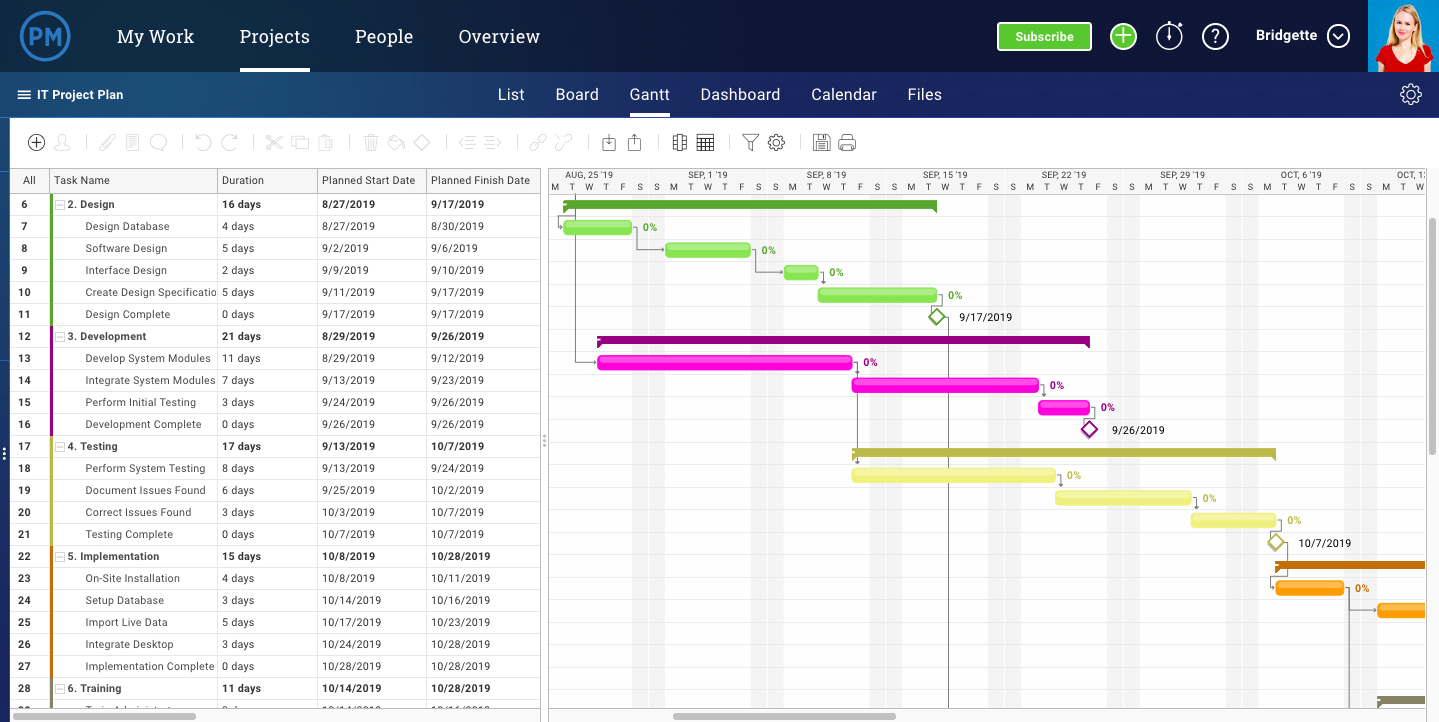
How 19 Brands are Using Instagram Stories
According to Instagram, one-third of the platform’s most-viewed Stories are from businesses.
Why could this be? As people are increasingly using social media to research prospective purchases, Instagram Stories serves as an outlet for brands to creatively show their products, services, or happy customers in action.
Branded Instagram Stories also enable audiences to learn more about topics related to your brand’s industry. Helpful and valuable content might also allow prospective buyers to trust your brand more.
And as video marketing becomes more and more prominent, the same benefits could exist for visual storytellers on platforms like Instagram.
If you’re not a natural storyteller and haven’t done any visual marketing before, the idea of this creative strategy can seem intimidating or tricky.
Luckily, Instagram, which is booming with brand activity, has a helpful and easy-to-use Stories feature that allows influencers, individuals, and brands to easily tell stories with images, videos, interactive elements, and basic effects. Because the platform is so fast-paced, engaging stories don’t even have to be that long or time-consuming.
If you’ve been on Instagram for a while now, you’re probably more than familiar with its Stories feature. But if you’re new to the platform, here’s a quick explanation of Stories:
While an individual might use a Story to show photos or videos from a vacation, work, or other aspects of their daily life, brands often use this feature to highlight photo or video content about their product, brand, or a topic related to their industry. By doing this, the brand might entertain and gain awareness from Instagrammers who enjoy tapping through random Stories.
To make your content even more interesting, you can also add GIF stickers, text overlays, filters, and interactive features — like polls and quizzes — to Stories after you upload or shoot them. You can also optimize your Story by adding text overlays with relevant hashtags or by adding handles of users that are affiliated with the content.
Whether you’re new to the app or a pro, you might be wondering where to start when it comes to using this feature for your brand. You might also worry that this strategy could be expensive, time-consuming, or require graphic design skills.
The truth is, creating Instagram Stories can actually be pretty simple and fun for your social media managers. Because Instagram offers a variety of unique effects and features, you can also do a lot of your story editing in the app itself.
To help you plan your Instagram Story strategy, we’ve compiled a list of 19 brands that have mastered the app feature. Although the brands on this list are larger companies, all of them have strategies that could be easily scaled to fit the marketing budget of smaller companies.
19 Brands Using Instagram Stories
LEGO
While LEGO commercials and other branding material might be more targeted to children, its Instagram approach is targeted to older audiences that will buy the product. These audiences could include young adults that love puzzle projects, or parents that might buy a set for their children.
LEGO’s Instagram primarily highlights works of art made with their products. While this might be interesting for younger people on Instagram, it could also be fascinating to older people who used to play with LEGOs and might want to buy them for their children.
LEGO adds to these Stories with interactive polls and quizzes. In a recent Story celebrating Harley Davidson, they showed a LEGO replica of a motorcycle and included a quiz that asked, “How many LEGO elements are in this life-size Harley?” This is a great example of how a brand can use a relevant quiz to engage people in an interesting way.

LEGO’s Instagram is a great example of how a brand that sells a product primarily to one age group can adjust its content for social platforms that host audiences from other generations. While they’re still on brand and hone in on LEGO nostalgia, they do a great job of creating interactive content specifically for the young adults on the platform.
NASA
NASA leverages beautiful space imagery, pictures of cool gadgets they work with, and interesting space discovery news to create Stories that speak to science lovers. On any given day, you might see a Story about a new planet, polls related to space travel, or quick historical fun facts.
NASA’s style is surprisingly casual and easy to comprehend. Although the organization’s content discusses complex topics like space, science, and technology, its Stories do a great job at cutting to the chase by explaining what’s interesting or newsworthy in a way that’s understandable to those without science degrees.
To pull in viewers, NASA begins Stories with an interactive element or text that summarizes the topic they’ll discuss. Here are two pages they used to kick off different Story editions:
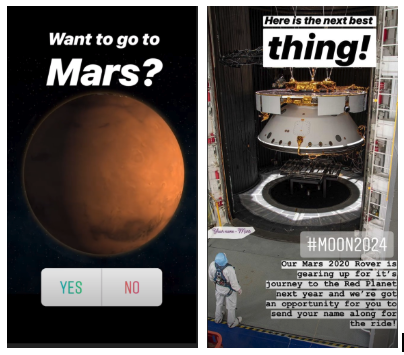
Takeaways
NASA’s strategy of grabbing audiences with quick, understandable, and interesting information can be key on many fast-paced social media platforms where people merely glance at a post or tap quickly through a Story before moving on to the next interesting piece of content.
When it comes to their overall approach, NASA does a great job at leveraging the strong content and information it has readily available to create unique Stories about space. While some brands might need to get super creative and brainstorm Story content from scratch, NASA recognized that its photo and video content would align well with Instagram Stories.
If you’re part of a smaller brand that has highly visual products or content, you might want to prioritize visual social platforms like NASA has done. Not only will it be easier for you to leverage visual content that you’re already creating, but you’ll have a leg up on brands that aren’t as visual.
Additionally, while some people might be intimidated by scientific discussions, they might still follow NASA because the brand publishes jargon-free stories that simply explain need-to-know details about complex topics. if you have a highly technical or complicated product or service, take a page from NASA’s book and use Stories as a chance to be more accessible to your audience.
MIT Technology Review
MIT Technology Review’s Instagram content isn’t only for academics and science experts. The publication actually does a great job of creating and telling stories most of the Instagram’s audiences can understand.
One of the publication’s Instagram Story strategies involves taking long-form pieces of content and abridging them for the platform. Because MIT Tech Review is verified with over 10,000 followers, it’s able to include “swipe ups” in Stories. A swipe up is a CTA that says something like, “Swipe up” or “Read more.” When a viewer sees it, they can swipe their finger upward to see a page or article from the publisher’s website.
If you can include swipe ups, this tactic is both creative and might be helpful for boosting traffic to full stories. Users might read an interesting, but short, Story — like the one below about 2019 technology fails — and want to swipe up to see a full long-form article.

Takeaways
While NASA leverages its exclusive visuals, MIT Tech Review similarly leverages its readily available editorial content. Rather than writing seperate news content for Instagram Stories, they adapt pre-written articles that they think will be interesting to Instagram readers.
This abridged-content strategy could be excellent for publishers or brands that regularly blog. If a brand can’t link Stories to their website just yet, they could still create a shortened version of a blog post and alternatively include a page that says the article’s link can be found in the Instagram account’s bio.
Harvard Business Review
The Harvard Business Review often centers Stories around management, professionalism, and career-life. Like the MIT Tech Review, it uses a casual tone of voice and similarly adapts long-form content into abridged Stories. However, one key difference is that HBR is a bit more interactive.
While HBR embraces Instagram’s poll, quiz, and other interactive Story features, it also gets creative by adding its own spin on interactivity to a story. In the example before, the publication shows users a burn-out checklist which they can screenshot and check off. The story then gives you advice for what to do if you checked any of the boxes.
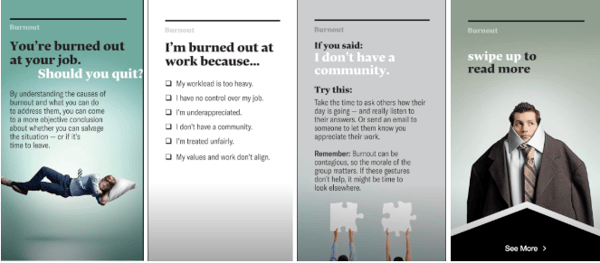
For readers that want to know more, they offer a swipe up to a long-form article on their website.
Takeaways
Although the name “Harvard” can sound intimidating, the publication’s Stories are easy for any reader to follow. This is a great example of how a brand can succeed by talking directly to the young, more casual audience of Instagram.
On top of an understandable and relatable tone, interactive elements like checklists, polls, and quizzes might make readers think more deeply about a topic than they had before. This might pull them into content because they want to learn more or dive deeper into a topic they were asked to vote on.
Even if you aren’t a publisher, doing something similar could be equally as beneficial to your content.
For example, if you’re running an Instagram account for an extermination company, you might start a story with a poll saying, “Do you know where bed bugs come from?” Then, you could tell a story of where they come from, how to prevent them, and how they can call an exterminator if their preventative measures don’t work.
People might tap through after taking the poll to see if they’re right about bed bug origins or because the question made them realize how worried they are about bed bugs.
America’s Test Kitchen
Like NASA, America’s Test Kitchen, a website and video blog with recipe content, doesn’t go too far off-brand with its Instagram Stories. While many of America’s Test Kitchen’s videos on other platforms show you how to make a recipe, the brand publishes behind-the-scenes kitchen videos and shots of ingredients to amp up audiences for upcoming recipe videos.
In a recent story, the Test Kitchen showed photographs and videos of bacon as chefs were testing out bacon recipes. The Story then offered up a poll that asked viewers how crispy they like their bacon.
The Test Kitchen doesn’t swipe up to its website yet, but because they’re posting behind the scenes videos while cooking new recipes, users can get an idea of what’s going live on the website.

Takeaways
If you’re not verified or are just starting to grow your following, this is a good example of how you can still promote your content without using a link to direct traffic to your site.
While America’s Test Kitchen’s Story strategy is perfect for food publications, it could also be helpful for restaurants as well. When someone sees a video of a restaurant’s chef cooking a new dish, it might make them crave that meal and go to the restaurant to order it. Additionally, as prospective customers see chefs cooking thoroughly and with care, they might also trust that their food will be prepared well
Museum of Fine Arts, Boston
The Museum of Fine Arts, Boston uses Instagram Stories bring its current statues and paintings to life. While you might think that looking at pictures of 17th-century art might bore you, the MFA zests things up by partnering them with funny quotes, meme references, and polls.
For example, they recently presented multiple pictures of horse-related art accompanied with lyrics from the highly-memed song, “Old Town Road.”

Takeaways
While the MFA is known for being prestigious and academic, it uses Instagram Stories like this to show that the brand can still be both humorous and hip.
This is an example of how a brand that could’ve been considered “dry” on Instagram thought outside the box to show off their product in a whole new way. While it can be beneficial to stay on brand if you align well with a platform, some companies or organizations, like museums or national parks, might want to experiment with odd new content strategies on fast-paced platforms like Instagram.
National Geographic
Aside from Instagram’s own account, National Geographic is the most-followed brand on the platform. Like its standard photo posts, the publisher experiments with a variety of different content styles.
While NatGeo’s Stories usually highlight mini-documentaries, they also occasionally include polls or quizzes. This is a good example of how mixing things up and experimenting with different content styles can keep your audiences on the edge wondering what type of content they might see next.
Like MIT and Harvard, National Geographic also occasionally abridges long-form content in order to promote an article or video that a viewer can swipe up to. In the example screenshotted below, they promote a video that discusses the history of NASA’s Apollo mission, while tagging NASA for some added Story optimization.

The brand has also dabbled with sponsored content. In one edition, sponsored by Barbie, they told the story of a female conservation photographer. This was an interesting example of a sponsorship which allowed National Geographic to tell a beautifully shot story about nature, while aligning with Barbie’s mission to encourage female empowerment.

Takeaways
Like MIT Tech Review and NASA, National Geographic leverages the beautiful and exclusive imagery it already has to adapt interesting on-brand content for Instagram. This allows the company to use their resources in an economic way while also promoting long-form content that goes into more detail than the Story does.
While NatGeo does a great job of adapting content, it also experiments with partner content. When even small brands partner with other companies to create content, production can be more affordable, and launching the content could help both brands gain fans from the other’s base.
Outback Steakhouse
Like America’s Test Kitchen, the restaurant chain Outback Steakhouse leverages images of delicious food and polls to engage its Instagram Story audiences.
While some Stories feel like ads by discussing promos and deals, others feel more interactive and creative.
For example, in one recent Story, users were shown multiple Outback menu items for each dinner course, then they were asked to vote on which meal they wanted for each course. At the end of the Story, Outback noted a multicourse dinner deal they were offering. This is a great way of highlighting multiple products at once without making your audiences feel overwhelmed.

Takeaways
If you can’t think of an idea for a Story with a more traditional plot and narrative, Outback proves that you can still pull people through a series of images in a way that feels more like an interactive experience than an ad.
A variety of different brands could take on a similar strategy. For example, if you were a marketer for a shoe company could post a Story that allows people to vote on the shoe styles that they’d wear for different occasions. This type of story would allow your audiences to see and weigh in on two different styles of your products at once.
Later, when they can’t figure out which shoes they want to wear to an outing, they might remember your Story and go to your shoe outlet knowing you have a bunch of different options.
Nike
Nike’s Instagram Stories feature interviews with prominent athletes who use Nike products. During the interviews, the athletes talk about their career accomplishments, rather than focusing on Nike products.
In the example below, soccer player Alex Morgan told the story about how she realized she wanted a different career path than her sister.

Although this has nothing to do with shoes, the content aims to motivate athletes who might want to purchase shoes worn by other successful people in the sporting industry.
Takeaways
Leveraging relevant influencers, like Nike, allows you to create content that aligns with your brand without purely focusing on your product.
People might watch these Stories to learn more about the famous athletes being interviewed. Then, they might trust Nike’s brand more because these successful athletes also trust its products.
While a small company might not be able to hire or film a famous athlete or influencer, they could still experiment with a similar strategy by interviewing smaller influencers or experts within their industry.
For example, if a gym owner wants to gain more clients, they could interview a local athlete about their goals, accomplishments, and what motivates them. People interested in the local athlete might watch the video to learn more about the person, but then consider a gym membership if they want to have similar athletic accomplishments.
Airbnb
Stories are a major part of the travel company’s Instagram strategy. In fact, they have a few different styles of Stories. For example, which gives short profiles of Airbnb customers is called “Experiences, while another — called “Adventures” combines curated and Airbnb-recorded content to show documentaries of unique vacations around the world.
Here’s an example of one of Airbnb’s Experience pieces which centers around a customer who regularly stays in Brooklyn. Aside from explaining what the customer does, AIrbnb also uses polls and quizzes related to her job to get people interested in the history she researches:
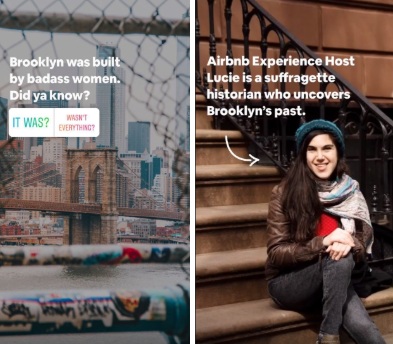
While Airbnb creates a lot of high-quality video and animated content for its stories, they also don’t shy away from sharing high definition customer videos while crediting and tagging them.
Here’s another screenshot from one of the brand’s Adventure Stories where they included videos of an Airbnb customer swimming with sharks and credited them with their account handle:

Takeaways
One of the best ways to gain brand trust is by telling or presenting stories from happy customers. Airbnb’s Instagram team recognizes this and centers its storytelling strategy around that.
While they film and present their own beautiful footage and documentaries, they also are wise to share user curated videos and images.
While curation can obviously save you time and money on creating content, it also gives happy customers a new way to interact with the brand. Not to mention, it gives the brand a great opportunity to show its fans how pleased customers were with their trips.
If a prospective customer worries that a startup ro non-traditional company is untrustworthy, videos from customers could ease their nerves or give them a sense of FOMO (or fear of missing out) that makes them want to book a flight.
Although this customer experience strategy works well for Airbnb, it could work for a variety of other companies, especially if they are still building up their customer base or selling a disruptive product that no one’s used before.
For example, if a new ride-share company had a few happy customers but wanted to boost its marketing strategy, it might create Stories where customers talk about interesting places that their shared ride brought them to, or maybe they’d discuss an interesting driver they met on a long ride. They could earn trust when prospective customers see how happy and safe customers felt when using the ride-share service.
Starbucks
Starbucks uses Stories to share customer testimonies, new product launches, and other interactive content. Although some a lot of the brand’s content revolves around its drinks, the Stories don’t feel like advertisements because they embrace fun facts and interactive polls and quizzes.
In one example, Starbucks asks viewers to guess which drink is coming back. It then shares the best answers and reveals the S’mores Frap and image. To add some extra interactivity, viewers can vote on what type of S’mores Frap they prefer and guess how many s’mores are shown in a video.
Takeaways
Even if they center specifically around a product rather than a narrative or plotline, Stories like these can still be fun from beginning to end. Starbucks does a great job of using interactive features to engage viewers.
By offering open ended questions and quizzes, they might engage with people who don’t like a specific beverage, but want to guess anyway. With the polls, they can gain similar engagement, while also possibly learning more about what drinks and flavors their audience prefers.
Yes. Obviously Instagram is excellent at posting Stories on its own platform. But, even though the brand is giant, they still rely on their fanbase for most of the content.
Almost all of Instagram’s Stories are filled with photos or videos submitted by users. This allows Instagram to show off some of the most beautiful imagery and the most interesting videos on the platform. Because they tag and credit users who submitted content, they also give those accounts some great promotion. This, in turn, makes Instagram look like they care about their community and how people are using the app.
Here’s a screenshot from a motivational story created by an Instagram user:

Takeaways
Whether you’re marketing a small business or large business, you always want to be picking “low hanging fruit.” For those that don’t know this common startup saying, it means that if you see a huge opportunity in front of you, you should grab it. Just like you would grab a delicious-looking apple that was hanging low to the ground off of a tall tree.
By sourcing and republishing interesting content from some of its most engaging users, Instagram grabs its low hanging fruit and makes a delicious juice out of it.
Odds are, you’re not Instagram’s size — and you probably don’t have your own thriving social platform to pull content from. But, this doesn’t mean you can’t curate content from your customers in a more scalable way.
Like Airbnb, Instagram benefits greatly from highlighting content that was already created by its fans. If you’re a small business that regularly gets some type of content from your customers or fans, you can create a sense of trust and community by sharing it and acknowledging those individuals.
For example, if you run marketing for a clothing outlet and keep getting pictures of people wearing the dresses it sells, you could make a Story that shows photos from customers who wore those outfits to different outings. Like Instagram, you could tag those customers so they or their followers might see the Story.
In another scenario, say you’re running a local art studio. You might want to publish a Story that includes photos, sculptures, and paintings from your students. This allows your students to feel like you care about their success and want to share it, while also showing prospective students how much they could learn if they took your classes.
NBA
The NBA regularly posts behind-the-scenes styled Instagram Stories which might highlight post-game celebrations, interviews, and other off-the-court happenings.
For example, a recent Story followed the Toronto Raptors parade in Ontario, Canada and showed clips of players with family members and posing for photo ops with the Canadian rapper, Drake.

Takeaways
When you show the people behind a company or brand, it makes it feel more relatable or trustworthy. With the NBA, we often see players looking serious and tough as they play basketball. But, when you see them off the court, you realize that they’re human, just like you.
Although someone might not be a sports fan, they might still watch behind-the-scenes stories like this to learn more about the faces behind the brand or to get insight on how the world of sports works.
In other industries, people might also respond well to behind-the-scenes video. For example, if you’re marketing for a school or gym where professors and trainers might seem intimidating to prospects, showing Instagram Stories that follow them in their daily lives might make prospects less apprehensive about signing up for a course or membership.
Wayfair
Wayfair, an online furniture and home-decor company, publishes Stories that fall into five home-related categories: Wall Art Wednesday, #WayfairAtHome, Home Renos, Multifunctional, and Design Services.
When you visit its account page, instead of featuring multiple individual stories, they show you icons for each category. Once you click in, you’ll see multiple Stories that relate to each group.
Regardless of which category the Story falls into, Wayfair is always creatively weaving product shots into it in either a humorous or creative way.
Here’s a screenshot from a Story where the brand uses humor to show off wall art:

In another example, they give valuable tips for home renovation that acknowledge Wayfair products:

Wayfair includes a “See more.” swipe up call to action in every page of its Stories which allows viewers to swipe directly to a product immediately after its shown.
Takeaways
If you’re working at an ecommerce company, or want to highlight and sell products quickly, Wayfair’s strategy could be beneficial. These Stories allow possible customers to see products in action and used in real-life scenarios, which might make them want to make a purchase.
If you can’t link your website to your Story, you could alternatively stick a product line link in your Instagram bio, then create a Story highlighting products that will be shown on that webpage. At the end of it, rather than including a linked call to action, you could direct viewers to your bio.
If you end up creating a bunch of Stories that fit into just a few categories, you might also want to consider presenting them as featured Stories like Wayfair does on its profile. That way, if someone is interested in one product category over another, they’ll know where to click to see relevant content.
Caffe Nero
The New England-based Italian coffee chain, Caffe Nero, uses its Instagram Stories to highlight new products, menu items, and it’s baristas. Recently, the company posted a Story about its “Barista of the Year” competition and award which highlighted the winner as well as eight baristas who were named as finalists.

Takeaways
Whether you’re marketing for a local business or a chain, Stories can be a helpful way to highlight unique aspects of your brand — especially devoted and friendly staff.
By highlighting nine highly-skilled baristas and showing an award ceremony, Caffe Nero shows prospective customers that its employees are pleasant, want to help customers, are good at making coffee, and enjoy their jobs. It also makes Caffe Nero look like a brand that cares about both its staff and good customer experiences.
If someone has to pick between a huge restaurant chain with unhappy staff and a smaller chain with staff that cares about customer happiness, odds are, they’ll probably choose the second option because their experience might be smoother and more pleasant.
New York University
NYU’s Stories center around topics that you might see in a student newspaper. In any given story edition, you might find student profiles, historical fun facts about NYU, graduation speeches, and university-related newsbites.
In one Story, published on Valentine’s Day, NYU discussed alumni who fell in love:

In the same Story, they also highlighted instances of sibling students
And just recently, NYU published footage of its Pride Parade:

Takeaways
Because Gen-Z and millennials flock to Instagram, this type of student-friendly content seems very well targeted. While many in Gen-Z are starting to enroll in college programs, some millennials might still be thinking about getting a first or second degree.
When prospective students are preparing to make a huge investment in college, they want to choose a school that cares about its students. With the strategy of telling interesting student stories and covering campus events, NYU gives possible students an idea of what going to the school might be like. These Stories might also show them how fun and diverse NYU could be.
If you’re part of a business that requires students or customers to pay large annual fees, one great way of showing them it’s worth it is by highlighting current customers or students. Emotionally, prospects might connect with people in their situation who are happy with a big investment that they made.
While this strategy works well for colleges and universities, it might also benefit other programs, such as a networking organization. For example, if you’re trying to market a group where members pay to attend networking events, workshops, or other career training, you might post Stories that talk about members who found jobs after joining, or use the platform to show videos of current members at an interesting networking workshop.
Planet Fitness
Planet Fitness leverages its diverse customer base by promoting gym triumphs in its Instagram Stories. Its featured Story includes one customer triumph or success story on each page with teaser language encouraging viewers to swipe up to the Planet Fitness website.
The best thing about this Story is that it shows successes from a wide range of people at different ages and fitness levels. While you might see a highlight about an athlete preparing for a marathon one day, you’ll also regularly see moms going to the gym to lose baby-weight, friends working out together to keep each other accountable, or other testimonials about customer weight-loss or wellness milestones.
Takeaways
While some gyms might promote their most athletic, body-building members to show how successful they are, Planet Fitness continues to define itself as a “judgement-free zone” by showing realistic accomplishments by every-day people.
Those who want to go to the gym, but feel intimidated or worried that athletes will be judging their fitness level might see these stories and feel like Planet Fitness is a realistic and welcoming place for them to start working out.
Furthermore, when they see a success story about someone losing just a few pounds or inches, they might trust that Planet Fitness is a more realistic gym with staff that will help them reach healthy and achievable goals, rather than pressure them to overwork themselves.
Every-day person success Stories can be a great way to lighten up your brand image if you think prospects are too nervous to come to you. Aside from gyms, this could be an approach for other businesses or brands that might be intimidating to customers.
For example, because people can get nervous around lawyers, a law firm might want to use Stories to post video testimonials from clients who won their court cases with help from the organization. In another scenario, a nutritionist might have patients volunteer to talk about their wellness success. Viewers who are worried that they’ll have to change their whole diet with a nutritionist might be comforted by seeing that expert advice can help them be healthier.
The Jimmy Fund
The non-profit organization which raises money for cancer research and treatments regularly keeps Instagram followers up to date with the projects its funding, cancer-survivor testimonials, and updates on its annual 5K Fun Runs.
Although cancer is a tough topic, The Jimmy Fund’s Stories are optimistic and promote the charity’s successes.
In one Story, the organization toured a state of the art cancer treatment center that they had helped fund:
In another, a cancer survivor gives five tips for living with the disease:
Takeaways
If you’re a marketer for an organization that asks for donations or funding, you might already know that you’ll need to gain trust from your following in order to get the money you need. One of the best ways to show that someone’s donation will be put to good use is to promote how the funds are effectively being used to help others.
By using the Stories feature to present funded projects, like new cancer treatment centers, viewers can literally see what their money could go toward.
If you’re just getting a philanthropic organization or fund off of the ground, another way to earn trust could be by creating content that is valuable to the group you’re trying to help.
For example, along with noting what the charity has been funding, The Jimmy Fund also posts advice for cancer patients and cancer survivors. While those living with cancer can benefit from this, those who aren’t will see that the organization genuinely cares about the group it says it supports.
Lowe’s
The home-improvement store uses a variety of different story styles to show off its products. While most are created by Lowe’s, other [1]stories are curated from customers.
In one curated story, viewers can watch a woman refloor her bathroom with tiles she bought at Lowe’s:

In a story created by Lowe’s, the brand takes a similar approach as Outback Steakhouse by allowing viewers to vote on which type of paint color they preferred in a specific room:

Takeaways
While home-improvement might be nerve-wracking to someone who hasn’t done it before, Lowe’s uses colorful imagery and creative stories to show how fun and creative it can be. Because Lowe’s shows its own tools in these stories, novices who don’t want to be overwhelmed by product choices might just buy the exact same supplies so they can replicate what they’ve already seen.
If your company offers DIY products, whether they relate to home-making, cooking, art, or other activities, showing them in action can be a really great way to encourage purchases. How-tos and demonstrations can excite prospective customers and show them how easy it can be to do a home project. Because of this, they might run straight to your store to buy similar supplies or ask your staff to show them other products for another DIY project.
Tips for Creating an Instagram Story
If this list has inspired you to create a branded Instagram Story, here are a few key takeaways to remember as you begin to brainstorm your first edition.
- Identify and leverage content that might already align well with the platform. Do you have great customers that you can interview on camera? Or photos or videos of your product or service in action? While you’ll still want to adapt imagery or Story lengths to fit the platform, don’t be afraid to publish Stories with curated or pre-created content that you think will engage Instagrammers and prospective customers.
- Create content specifically for the platform’s audience. Whether you’re adapting content or creating it from scratch, make sure you’re posting about topics that younger and more-visual Instagram audiences will engage with.
- Use interactive features like questions, polls, and quizzes. These add depth to a story and might enable users to think about each topic more seriously.
- Keep stories quick and to the point. Don’t overwhelm your audiences with too much text or too many pages. This might cause them to tap out of your story.
- Add a swipe up if you can. These can be a great way to gain traffic through Instagram. Don’t have the swipe up feature yet? Here’s how you can get it.
Stories can be a great way to add some unique and engaging content to your Instagram strategy. If you’re ready to make one, but feel overwhelmed by all the app’s features, you can check out this detailed how-to guide.
If you’re looking to up your Instagram game even more, click here to learn more about the strategies of its most-followed brands and individuals. You can also check out our Ultimate Guide to Instagram Marketing.

4 Ways to Customize Your Facebook Link Posts for More Clicks
Want more people to click on your Facebook link posts? Looking for hacks to customize your Facebook links? In this article, you’ll discover how to use little-known features in Facebook that will drive more traffic to your site. #1: Hack Facebook Ads Manager to Use a Square Image in Your Facebook Page Link Post Using […]
The post 4 Ways to Customize Your Facebook Link Posts for More Clicks appeared first on Social Media Marketing | Social Media Examiner.
from Social Media Marketing | Social Media Examiner https://ift.tt/34kDWXi
via socialmediaexaminer
How to Use Instagram Carousel Posts: 10 Tips
When opening Instagram, how often do you “swipe left to see more?” Maybe it’s to see that a blog post from your favorite media site was uploaded. Or to watch the entire trailer for the latest season of “Stranger Things” (guilty).
Whether you double-tapped on a “Throwback Thursday” post or commented on how helpful that newsletter on managing spreadsheets was, these engagements are an excellent use of Instagram’s Carousel feature, an expansive tool that fits into countless marketing campaigns.
Instagram Carousel Ads
Instagram’s Carousels allow an account to use multiple media (images or video) in one post. This is indicated by a post having the icon of two squares in the upper-right corner.
 Image source: TechCrunch
Businesses are using the Carousel feature on Instagram to serve their current customers and generate new leads. As the number one social network for organic engagement, it’s a cost-effective, succinct, and engaging way to communicate your marketing message.
Carousels don’t necessarily have to be ads. In order to create a Carousel Ad, there are two requirements: switching to an Instagram Business account and having a connected Facebook Business page. That way, you can create Instagram Carousels from your Facebook page.
Here’s a step-by-step guide to creating a Carousel Ad:
- Open Facebook’s Power Editor.
- Select the campaign you want to be in the ad, click “Create Ad Set.”
- Fill out the information requested, including targeting and placements options.
- In the placements stage, make sure only Instagram is selected.
- Proceed with Facebook’s instructions and click “Create.”
- Your Carousel ad will then be published on Instagram, in either a Story or on your main feed.
Instagram offers two types of Carousel Ads for Stories that cater to your objective, assets, and target audiences: Native Stories and Expandable Stories.
For Native Stories, all of the cards are automatically displayed, meaning viewers won’t have to “swipe to see more,” the ad will autoplay. Because these cards are automatic, there’s a max number of three for each ad.
A Native Story is an effective Carousel Ad for a full-length commercial or demonstration. Think of them as commercial breaks as viewers tap through their stories.
Expandable Stories are more traditional. Viewers can tap to keep watching and can tap through a max of 10 cards. Expandable Stories are great for mixed media ads and audiences who usually buy on mobile.
Both Story formats support mixed media and allow one CTA per ad. If any card, or all the cards, are seen by the same viewer, only one impression is counted. Finally, these ads can either have different web destinations per card or one destination for the entire ad.
New to the Carousel feature? We’ve put together 10 ways you can start using Carousels to promote your business.
10 Ways to Use Instagram Carousels
1. Product launch
Instagram is a perfect way to tease your followers with your next product launch. Use the Carousel to include pictures, specs, and even a first look, like Audio-Technica did below with their new headphones.
Since Instagram is known for business engagement, (about 80% of Instagram users follow a business), this is a great chance to answer questions and build hype. For instance, if a customer asked, “Are these headphones available for purchase?” Audio-Technica could mention them in a reply comment so others with the same question can see the answer.
Image source: Audio-Technica
2. Full-length videos/images
Have a full-length commercial or photo that’s too big for Instagram? Give it the Carousel treatment. TechCrunch highlights a packing robot from Amazon in the two-video Carousel featured below. Sometimes full videos can do what a commercial or quick clip can’t.
Image source: TechCrunch
3. Before and after
One of the first questions asked when releasing a new product – or marketing an existing one – is “How does it work?” The Container Store uses Carousels to answer that question. Visually showing the benefits of your product gives your target audience the chance to see how your product fits into their lives.
Image source: The Container Store
4. Recap
If your business hosts events, and you’d like to boost attendance and thank attendees, consider using Carousels to recap those events. Followers can swipe through and reminisce on that rooftop dinner or RSVP for the next one. Take this example, from INBOUND:
Image source: INBOUND
5. Blog content
A secret weapon to promoting blog content? Teasing it on Instagram. IBM does this well by using the Carousel to tease their blog posts without giving the message away – a throwback theme for a throwback post.
Image source: IBM
6. Brand personality
Instagram is the perfect place to build your brand and company culture. Show the people behind the screen and highlight those who make your business what it is. Check out how Boston-based coffee company Pavement does this by spotlighting their employees and their favorite coffee blend.
Image source: Pavement Coffeehouse
7. Customer testimonials
Ecommerce giant Shopify uses Carousels to promote its customer reviews in a weekly podcast. This is a great way to generate more leads and maintain existing customer relationships.
Image source: Shopify
8. Group themed images
Who doesn’t love dogs? Social media management platform Hootsuite sure does. They posted a Carousel of everyone’s best friend in incredible costumes. Not only does this showcase company culture, but it shows how using Carousel themes brings vibrancy to a business’s page.
Image source: Hootsuite
9. Storytelling
Carousels can do more than announce a product. They can also tell the story of a potential customer. Pepsi recently posted a comic-book style Carousel about a sixth sense: Pepsi style. They released it right around the time “Spiderman: Far From Home” was released, and it shows how Carousels can build suspense.
Image source: Pepsi
10. Process demonstration
Orangetheory Fitness has Carousels on their Instagram page to demonstrate how fitness helps the body in more ways than on the scale. Demonstrating a process is a great way of engaging potential customers who might be on the fence about buying a product. If your business offers long-term results, Carousels can be used to show the progression of the benefits your customers will enjoy.
Image source: Orangetheory Fitness
Instagram users are currently limited to adding 10 photos/videos per Carousel post. Use those 10 to your benefit, but don’t commit information overload. Images keep the content light and ultimately drive traffic to your website. Instagram is an aid, not the main event.
Don’t limit yourself to only photos or videos. Mix it up. Including a snippet of an interview as well as a promotional image is a smart way to show customers and leads what you’re all about.
Adding a consistent theme to your account makes it stand out and adds brand personality. Use carousels to post what you normally wouldn’t on your website. For more tips on how to wield Instagram marketing, check out our ultimate guide.

How to Use TikTok: A Step-by-Step Guide
With more than 500 million monthly active users, TikTok is taking app stores by storm and serving as a worthy competitor to apps like Snapchat and Instagram.
While Gen-Z has flocked to the app, brands like Chipotle and The Washington Post are also starting to experiment with TikTok’s video marketing opportunities.
The best way to learn more about the app, its user base, and the type of content that engages audiences is to start producing your own posts on a personal or business account.
However, if you’re a marketer that’s never used a niche social platform before, TikTok can be pretty hard to navigate. Even I — a social media-obsessed millennial blogger — had trouble figuring out how the heck it worked when I first logged on last year.
If you identify with that struggle, don’t worry! I eventually figured it out — and you will too!
To help you conquer the app, I’ve put together a quick guide to show you how to use it.
Here’s a list instructions — with pictures — that will walk you through setting up your profile, filming your first video, adding special effects, and using challenges or duets to engage with other users.
Setting Up Your Account
1. Download the app and sign up.
Go to the App Store or Google Play and download TikTok. When you open it, TikTok makes it pretty easy to sign up. You can do an instant sign up with Facebook, Gmail, or Twitter, or add a standard username and password if you don’t want any of those accounts connected.
2. Set up your profile.
Once you’re logged in, you’ll instantly be brought to the feed of videos. I’ll show you how it works in step three. But first, tap the icon in the lower right that looks like a person’s outline to see and edit your profile.
Once you enter your profile, tap the Edit Profile button, then select a profile photo or video. You should also add your username and bio information. If you want to show off your other social media profiles, you can link up your Youtube and Instagram pages. If you’re a business, this could be a helpful way to advertise your other visual platforms.
Finding Videos and Engaging with Users
3. View the video feed,
Now that you’ve set up your profile, tap back to the first tab which shows you the video feed.

Think of this feed like Twitter’s, but where video is the primary content. If you don’t have any followers yet, the app will send you random trending videos. As you begin following and interacting with more people, your feed will become more personalized to your interests.
4. Like, comment, or share videos you enjoy.
When you find a video you like, you can tap the heart to like it or the speech bubble to comment on it. To share the video, press the forward sign underneath the comment symbol to see your sharing options. These symbols are all located on the right side of the video.

If you really like a video and want to see if the user has more posts you’ll enjoy, swipe left to toggle to their profile.

5. Search for videos.
Tap on the second tab, or magnifying glass, to enter the app’s search area. On this tab, you can either search out accounts or videos, or you can look below the search bar to see videos by trending topic.
6. Follow users via videos, search, and TikCode.
If you want to keep up with a great video creator, you can follow them by pressing the icon that includes their profile picture and a plus sign above the heart button on their video.

If you already know of a TikTok account or person that you want to follow, you can search for them in the search bar and then press the “Users” filter. You can also find them by scanning their TikCode. This can be helpful for brands or people that want to promote their TikTok channel on other websites or in the physical world. It can also be great if you run into a friend in-person who wants to add you.
To find your own TikCode, go to your profile and tap the icon with four squares in the top right.
To scan another TikCode, go to the search tab and tap the square scan button next to the search bar.
When the scan screen opens, hold it up to the TikCode you want to scan. The scanning process will begin instantly so you don’t have to press any other buttons. Within seconds of a successful scan, you’ll be sent to that person’s profile. If you have a screenshot of a code, you can also press “Photos” in the top corner of the scan page to upload and scan the code.
How to Post on TikTok
7. Set up your shot and pick out special effects.
Tap the center tab to enter camera mode. To face the camera in the right direction, tap the Flip icon in the top right. On the right side of the screen, you’ll also see icons for the following:
- Speed: Allows you to record your video in slow motion or sped up.
- Beauty: An AR filter that can hide blemishes and smooth out your skin.
- Filters: Lets you change the color filter of the camera.
- Timer: Allows you to set an auto-record countdown if you want to film hands-free.
- Flash

Music and Effects
On the top center of the camera screen, you’ll also see music notes with “Add a Sound” next to them. Tap this to choose the musical overlay or sound effect that you want to work with.
On the bottom of the camera, you’ll also see an Effects icon to the right and an upload button to the left — in case you want to record your videos outside of the app.
When you tap the Effects button, you’ll see a giant lineup of AR filters and other special effects that can augment your face or your surroundings. You can also pick out a video overlay-styled filter here.

In the black bar under the camera, you can set the time limit for your video or tap Photo Template to create a photo slideshow instead of a video.

8. Record the video.
Once you’re ready, press and hold the red record button. You can either record your video all at once or in pieces.

If you want to fit different shots in each video or record it in pieces, simply hold the record button for each segment, then let go, then press and hold it again when you’re ready for your next shot.
Don’t want to hold your record button the whole time? Before you enter record mode, you can also use the timer to give yourself enough time to prop up your phone and pose in front of it before it starts automatically recording.
9. Make final edits and add a caption to the video.
When you’re done recording the video, you’ll still be able to add a musical overlay, filters, and other basic special effects. You can also add stickers and text overlays on top of the video.

When you’re done, press Next. You’ll be directed to a page similar to Instagram’s post page where you can add a caption, relevant hashtags, and account handles of others. You can also set the privacy of the video, turn comments on or off, allow duets or reactions, and tap “Save to Album” to download it to your smartphone’s photos.
If you aren’t ready to post yet, just press the Drafts button at the bottom left to save it for later.
10. Duet with other users.
See a musical post that you love? Want to join in with the person who made it? TikTok allows you to reply with a Duet video. To use this former Musical.ly feature, find a video you want to duet with, press the Share button to see sharing options, then press the “Duet” option on the bottom row in the center.

Your camera screen will appear next to the video. From there, you can press record and sing along, dance, or do whatever you want to the music.

To show you what a finished product looks like, here’s one great example:
If you make a post and don’t want anyone to duet with you, you can tap the “Duet/React Off” button on your Post page before publishing.
11. Participate in a challenge.
Like other social media platforms, you’ll occasionally see videos with hashtags for “challenges.” A challenge is when a video post, company, or person encourages users to film themselves doing something oddly specific — like flipping the lid of a Chipotle to-go bowl with no hands. Participants then film themselves doing the action and hashtag the challenge name in their post captions.
There usually aren’t any winners in a TikTok challenge, but hashtagging it might help you get more followers or views as people find you when searching the hashtag.
To give you a quick idea of what participating in challenge entails, here’s a video of someone doing the above-mentioned #ChipotleLidFlip challenge:
A Few TikTok Takeaways
Yes, TikTok may seem like a pretty odd platform right now, but it might be a great tool for engaging and spreading awareness to your younger audiences later. Because it is only one year old, it is also a great place for early video experimentation.
As you’re brainstorming or filming your first videos, here are a few tips to help you create unique and engaging posts:
- Have fun with the special effects. There are a ton of ways to zest up your video, and audiences on TikTok expect it. So play around and experiment with them.
- Embrace the music. Most videos on the platform have some type of song or sound effect in the background.
- Film a few videos with multiple shots. This will make it feel more interesting and active.
- Don’t be afraid to show a lighter side or a sense of humor. People come to this platform to be entertained.
- Use trendy hashtags and try out a challenge video. Then, include relevant hashtags in your post caption so your video shows up when people search it.
- Look at what other brands are doing. While your company might not need to jump on TikTok just yet, videos posted by other brands could inspire some ideas for your own strategy.
Want to learn more about TikTok’s backstory and what it might mean for brands? Check out this post. If you’re interested in checking out other emerging platforms, we’ve also got this great guide for you.

How to Drive More Facebook Organic Traffic to Your Site

Want more traffic from your Facebook posts? Need algorithm-friendly ideas that will get your content seen? In this article, you’ll learn what to avoid and discover ideas that will help you get more Facebook traffic. #1: Avoid Posts That Don’t Play to the Facebook Algorithm Facebook marketing has never been harder. What used to be […]
The post How to Drive More Facebook Organic Traffic to Your Site appeared first on Social Media Marketing | Social Media Examiner.
from Social Media Marketing | Social Media Examiner https://ift.tt/2kmaBJR
via socialmediaexaminer
14 Essential Tips for an Engaging Facebook Business Page
Whether you’re setting up a brand new Facebook Page for your brand, or you just want to make the most of your existing one, it’s probably a smart move — Facebook is home to nearly 2 billion monthly active users.
It should be easy enough, right? Just slap together a photo, a couple of posts, and expect the leads and customers to roll on in, right?
Wrong.
If you’re not creating a Facebook Page with a comprehensive strategy to get noticed, Liked, and engaged with, the chances of actually generating leads and customers from it are pretty slim.
For example, you can’t just choose any picture — you have to choose one that’s the right dimensions, high-resolution, and properly represents your brand.
But it doesn’t end there — so we compiled the tips below to make sure you’re creating an engaging page that takes full advantage of everything Facebook marketing has to offer.
Listen to an audio summary of this post:
14 Facebook Business Page Tips
Don't miss this live virtual event with Facebook and HubSpot on how to grow your business faster than ever with Facebook
1) Don’t create a personal profile for your business.
We’ve come across many well-meaning marketers and entrepreneurs who create personal profiles for their brands, instead of an actual Facebook Business Page. That puts you at a huge disadvantage — you’re missing out on all of the content creation tools, paid promotional opportunities, and analytics/insights that come with a Facebook Business Page. Plus, a personal profile would require people to send you a friend request in order to engage with you, and the last thing you want to do is make that more difficult for customers.
And while you’re at it — don’t create an additional public, “professional” profile associated with your business. For example, I already have a personal profile on Facebook that I largely keep private; the practice I’m talking about would be if I created a second, public one under the name “AmandaZW HubSpot,” or something along those lines. People usually do that to connect with professional contacts on Facebook, without letting them see personal photos or other posts. But the fact of the matter is that creating more than one personal account goes against Facebook’s terms of service.
2) Avoid publishing mishaps with Page roles.
We’ve all heard those horror stories about folks who accidentally published personal content to their employers’ social media channels — a marketer’s worst nightmare. So to avoid publishing mishaps like those, assign Facebook Business Page roles only to the employees who absolutely need it for the work they do each day. And before you do that, be sure to provide adequate training to those who are new to social media management, so they aren’t confused about when they should be hitting “publish,” what they should be posting, if something should be scheduled first, and who they should be posting it as.
To assign these, on your business page, click “Settings,” then click “Page Roles.”
Also, when sharing content on behalf of your brand, make sure you’re posting it as your brand, and not as yourself. You can check that by going into your settings and clicking “Page Attribution.”
3) Add a recognizable profile picture.
You’ll want to pick a profile picture that’s easy for your audience to recognize — anything from a company logo for a big brand, to a headshot of yourself if you’re a freelancer or consultant. Being recognizable is important to getting found and Liked, especially in Facebook Search. It’s what shows up in search results, pictured at the top of your Facebook Page, the thumbnail image that gets displayed next to your posts in people’s feeds … so choose wisely.
When choosing a photo, keep in mind that Facebook frequently changes its picture dimensions, which you can find at any given time here. As of publication, Page profile pictures display at 170×170 pixels on desktop, and 128×128 pixels on smartphones.
4) Choose an engaging cover photo.
Next, you’ll need to pick an attractive cover photo. Since your cover photo takes up the most real estate above the fold on your Facebook Page, make sure you’re choosing one that’s high-quality and engaging to your visitors, like this one from MYOB’s Facebook Page:
Keep in mind that, like profile images, Facebook Page cover photo dimensions also frequently change, so we advise keeping an eye on the official guidelines. As of publication, Page cover photos display at 820×312 pixels on computers, and 640×360 pixels on smartphones.
5) Add a call-to-action (CTA) button.
Since Facebook first launched the feature in December 2014, the options for brands to add call-to-action buttons to their Facebook Page’s have vastly expanded. These are things like “Watch Video,” “Sign Up,” or “Book Now” — and each can be customized with a destination URL or piece of content of their choosing.
It’s a great way for marketers to drive more traffic to their websites, or to get more eyeballs on the Facebook content they want to promote. This is a great way for marketers to drive traffic from their Facebook Business Page back to their website. Check out how Mandarin Oriental uses the “Book Now” button in this way, to make it easier for viewers to make reservations.

To add a call-to-action to your Page, click the blue “Add a Button” box.

You’ll then be able to choose which type of CTA you want to create, and which URL or existing content on your Facebook Page you want it to direct visitors to. To get data on how many people are clicking it, simply click the drop-down arrow on your button and select “View Insights.”
6) Fill out your ‘About’ section with basic information, and add company milestones.
We’ve arrived at one of the most important sections of your Facebook Page: the ‘About’ section.
Although visitors no longer see a preview of your “About” text when they land on your page — instead, they have to click on the “About” option on the left-hand column next to your content — it’s still one of the first places they’ll look when trying to get more information about your page.
Even within the “About” section, however, there are many options for copy to add. Consider optimizing the section that best aligns with your brand — a general description, a mission, company information, or your story — with brief, yet descriptive copy. By doing so, your audience can get a sense of what your Page represents before they decide to Like it.
You might also want to populate sections that allow you to record milestones and awards — like when you launched popular products and services — as well as the day/year your company was founded, or when you hosted major events.
7) Post photos and videos to your Timeline.
Visual content has pretty much become a requirement of any online presence, including social media channels. After all, it’s 40X more likely to get shared on social media than other types of content.
And while photos are a wonderful way to capture moments and an actual look at your brand, you should probably invest a good amount of time and other resources into video. The 2017 State of Inbound report cited video as the “main disruptor,” with 24% of marketers naming it as a top priority.
“Watch video” is one of the CTAs that Facebook allows brands to add to their Pages for a reason — because it’s becoming one of the most popular ways to consume content. But it’s not just pre-recording videos. According to the social media channel’s newsroom, “People spend more than 3x more time watching a Facebook Live video on average compared to a video that’s no longer live.” So don’t be afraid to give viewers an in-the-moment look at what your organization does, but do make sure you’re prepared.
Not sure what your videos should look like? Here’s a fun one that we put together on business lingo.
8) Determine the ideal timing and frequency for your posts.
An important consideration in your Facebook content strategy should be how frequently you post, and when. If you don’t post frequently enough, you won’t look as reliable or authentic — after all, how much faith do you put in a brand that hasn’t updated its Facebook Page for several months? Post too often, however, and people might get sick of having their feeds flooded with your content.
Here’s where a social media editorial calendar can be particularly helpful. Like any other online content, it can help you establish a schedule for when you share particular posts according to season or general popularity. You’ll probably have to adjust your calendar several times, especially in the earliest stages of setting up your Page, since you’ll want to check the performance of your updates in your Facebook Insights (which you can navigate to via the tab at the very top of your page). Once you’ve observed popular times and other analytics for your first several posts, you can tailor your posting frequency and strategy accordingly.
Wondering how to schedule posts? You can either use an external publishing tool like the Social Inbox within HubSpot software, or the Facebook interface itself. For the latter, click the arrow next to the “Publish” button and click “Schedule Post.”
9) Leverage Facebook’s targeting tools.
Facebook allows you to target certain audiences with specific updates — be it gender, relationship or educational status, age, location, language, or interests, you can segment individual page posts by these criteria.
Just click the small bullseye symbol on the bottom of the post you want to publish, and you can set metrics for both a preferred audience, and one you think might not want to see your content.
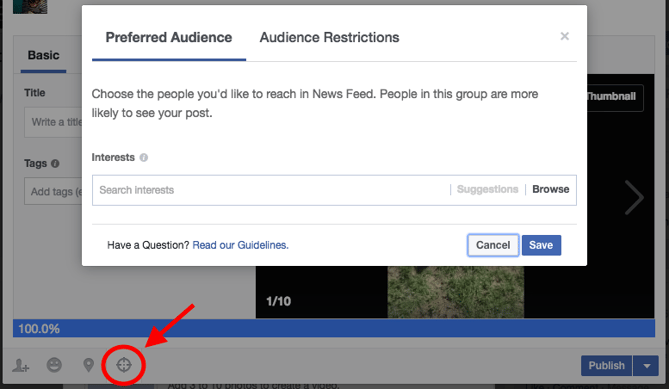
10) Pin important posts to the top of your page.
When you post new content to your Facebook Page, older posts get pushed farther down your Timeline. But sometimes, you might want a specific post to stay at the top of your page for longer — even after you publish new updates.
To solve for this, Facebook offers the ability to “pin” one post at a time to the top of your page. You can use pinned posts as a way to promote things like new lead-gen offers, upcoming events, or important product announcements.
To pin a post, click on the drop-down arrow in the top-right corner of a post on your page, and click ‘Pin to Top.’ It will then appear at the top of your page, flagged with a little bookmark. Just keep in mind that you can only have one pinned post at any given time.
11) Decide whether you want Facebook fans to message you privately.
If you want your Facebook fans to be able to privately message you directly through your page, definitely enable the messages feature. You can do so by going to your settings, clicking on “General” on the left-hand column, and then looking for “Messages” on the list of results.

We recommend enabling messaging on your page to make it as easy as possible for your fans to reach out to you — but only do so if you have the time to monitor and respond to your messages. Facebook Pages now have a section that indicates how quickly a brand responds to messages, so if you don’t want that section saying that you’re slow to answer, you might just want to skip enabling that feature.

12) Monitor and respond to comments on your page.
Speaking of monitoring the interactions your fans have with your page, don’t forget about comments. You can monitor and respond to comments via the ‘Notifications’ tab at the very top of your page. While it may not be necessary to respond to every single comment you receive, you should definitely monitor the conversations happening there (especially to stay on top of potential social media crises.
13) Promote your page to generate more followers.
Now that you’ve filled your page with content, it’s time to promote the heck out of it.
One of the first things you can do is to create an ad promoting your Page. To do that, click the three dots at the top menu bar above your posts and select “Create Ad.” From there, Facebook will let you start creating an ad from scratch based on your goals — things like reach, traffic, or general brand awareness. Choose yours, then scroll down and click “continue.”
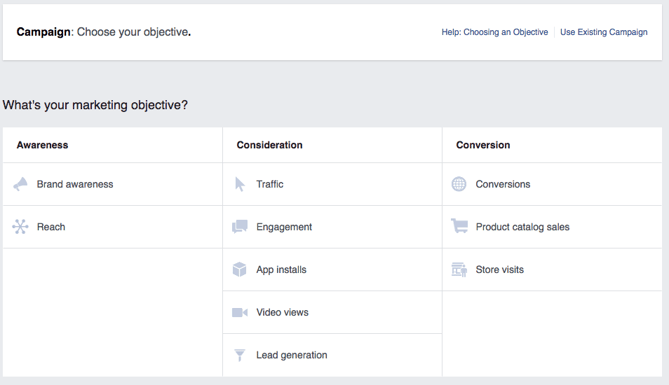
After that, you can choose your targeted audience (similar to what you did with your promoted posts above), where on Facebook you want it to be placed, and your budget — you can learn more about paying for Facebook Ads here.
You’ll probably also be asked to add some creative assets or copy. Remember, you’re paying for this, so choose something that’s going to grab attention, but also has high quality and represents your brand well.
14) Finally, measure the success of your Facebook efforts.
There are a couple of ways to execute this step. You can use something like the social media reports tool in your HubSpot software, and you can dig into your Page’s Insights, which allow you to track Facebook-specific engagement metrics. Here, you’ll be able to analyze things like the demographics of your Page audience and, if you reach a certain threshold, the demographics of people engaging with your page and posts. As we mentioned earlier, the latter is especially helpful to modify your Facebook content strategy to publish more of what works, and less of what doesn’t. You can access your Facebook Page Insights via the tab at the top of your page.
How have you set up top-notch Facebook Pages? Let us know in the comments.

The Complicated Relationship Between Social Media and SEO
Inbound marketing is in the middle of an interesting evolution. Historically, search has been a major source of traffic and leads for businesses leveraging online marketing.
But, with the growth of social networks, social media marketing is even more heavily embraced today.
But, you might ask, which is more important?
The answer? Both can be key to your strategy.
Search is a huge source of customers, but slowly, social media is gradually increasing in importance as a marketing platform. The important distinction to make is that search and social are not competitive forces. Instead, these two facets of inbound marketing can work together to amplify the results of each other.
The key to understanding that search and social media marketing need to work together is to think about the problem both search and social solve: information discovery. People use Google to find an answer to a question. People use social media to discover answers to questions they haven’t yet thought of. However, the difference between search engines and social media platforms is blurring. For example, Facebook search is one of the network’s core features.
As a marketer, how can you integrate your efforts across both platforms?
Social Media SEO Strategy
1. Social Sharing Buttons on Your Website
It may seem simple, but search engines like Google are starting to use social media sharing data to influence search rankings. As a marketer, it is critically important to have social media sharing buttons on your blog and website to encourage visitors to share content in social media. These buttons will not only help to increase traffic from social media but will also play an important role today and in the future for ranking positions in search engines.
2. Integrated Keyword Strategy
As I mentioned earlier, the line between search engines and social media platforms is blurring. Take the keyword strategy you are using for your website and apply it to your social media engagement when appropriate. This doesn’t mean cramming tweets full of keywords. Instead, be aware of how you are wording social media messages. By incorporating keywords into social media content, you can increase the reach of your messages.
3. Include Links in Social Profiles
The links in social media messages such as tweets and Facebook status updates are traditionally no-follow links. This means they don’t pass any SEO authority to the site they’re linking to. While this is starting to change, it is important to understand that the URL in the actual bio of a social media account is a follow link. Keep this in mind, and make sure you are taking advantage of these extra links.
4. Incorporate Links Into Video and Presentation Content
Some of the most powerful social media platforms are those that facilitate content sharing, such as YouTube for video and SlideShare for presentations. When sharing content on these types of networks, be sure to share links to related blog posts or other content on your website. Yes, this will increase traffic to your website, but it will also help build new inbound links. When someone writes a blog post about your content, it is likely they will also include a link from the presentation, simply because it is the “easy” thing to do.
5. Optimize Social Profiles
Think of social media profile pages as extensions of your website. In the same way that you would optimize website pages for page titles and keywords, audit your social media profiles to ensure they mirror the search engine optimization strategy of your website.
6. Build Links and Social Media Reach
Search engine optimization has long been about inbound links to your website. While inbound links are still really important, a secondary metric for marketers looking to increase search traffic should be social media reach. As we talked about earlier, social media data is becoming a factor in search engine rankings. In order to get more people to share your content in social media, you need to increase the number of fans or followers of your account. By doing this through quality content creation and engagement, you will not only build social media reach but also inbound links.
7. Establish New Relationships
The web is now a social communications channel. Similar to sales, relationships are huge for driving inbound links and social media attention. Building relationships using social media can open opportunities for guest blog posts and other link-building opportunities.
How Social Media Effects SEO
As we mentioned above, leveraging both strategies will give you more chances for audiences to discover your brand. But, it might slightly help your search results page rankings indirectly.
When you get a lot of traffic to your website, search engines that crawl your the internet will notice and think your brand is credible. Then, they might place your search result higher than others. So, if you post interesting content on social media that is incredibly click-worthy, you might see a boost in traffic.
Furthermore, if people or credible brands see your posts on social and share your website’s link on their own blogs or websites, that could boost your page authority. This is something that might also move you up in rankings.
While this might not make a major dent in your rankings or total page authority score, especially when you’re starting out, social media marketing couldn’t hurt you.
If you’ve just focused purely on SEO and are ready to zone in on a complimenting social media strategy, check out our guide to social media marketing.
