
Welcome to My Blog
Everything You Need to Know About Landing Page Design
Whoever said “You never have a second chance to make a great first impression,” makes a valid point. You only get one opportunity to have your first interaction with another person … and the last thing you want is for that first interaction to be a bad one. After all, humans are known to remember negative experiences more vividly than positive ones.
Great first impressions matter when meeting someone, going to a new place, and even visiting a website.
In a world where virtually every business has a website, creating a positive first impression when your target audience members click on your site via the search engine results page (SERP) is critical. That’s because your landing page is your site’s “destination page”, or the first page that visitors land on when they open your site.
Also, to really put the pressure on, you only have about 7 seconds to make that great first impression with your website before the average visitor decides whether or not they’re going to stay or bounce elsewhere.
So, how do you ensure that first interaction your target audience has with your website is positive?
The answer: Great landing page design.
Landing Page Design
Landing page design is the process of creating an enticing site page for your target audience and website visitors. It should encourage them to convert from leads into subscribers or customers. Effective landing page design is on-brand, includes your product or service and company information, and incorporates relevant offers and calls-to-action (CTAs).
Responsive Design
You may have also heard about responsive design, or responsive web design, before.
A web page with responsive design automatically appears an optimized form on any device. This means a responsive web page or site reformats itself as needed to fit any screen or device you’re viewing it on (i.e. desktop, laptop, tablet, or smartphone).
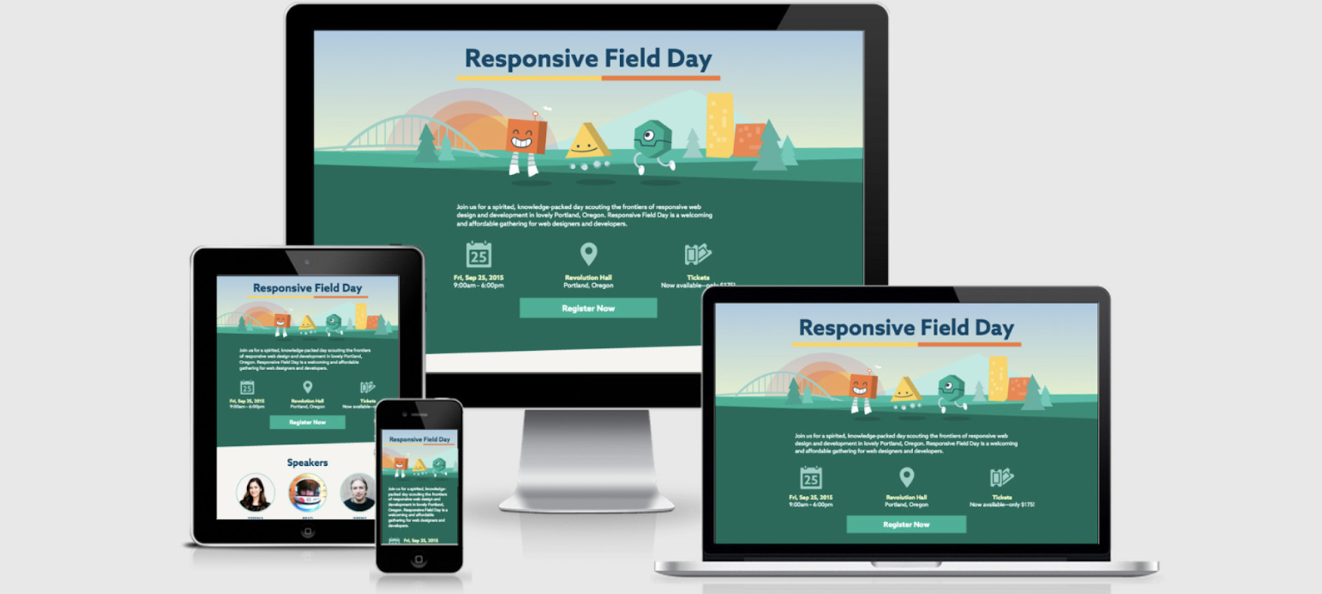
Since so many more people search the Internet from different devices and locations, responsive design is necessary to ensure visitors and customers have a pleasant experience on your site. Although it’s recommended that your entire website is responsive, it’s critical to at least have responsive landing page design — again, this is the first page every visitor interacts with and sees when they open your website, so outstanding user experience (UX) is crucial.
Web pages without responsive design can make for a frustrating experience for visitors — they’ll be dealing with images and text that don’t fit their screen. This can potentially cause visitors to abandon your site completely or even visit a competitor’s site instead.
Note: Depending on the landing page design software you choose to work with (we’ll cover some options shortly), responsive design might be an automatic feature for you. In this case, you won’t have to worry about responsive design — when you design your landing page, it’ll already be responsive.
In addition to having a responsive design, there are many other aspects of creating and designing a landing page that impact your ability to convert visitors into customers and enhance UX. So, let’s review some of the most common and important steps for you to take into consideration while designing your landing page.
1. Identify your target audience and their needs.
No matter which part of your business you’re working on, you should be thinking about who your target audience is and how you can resolve their pain points — and designing your landing page is no exception to this rule of thumb.
While planning your landing page design, think about what your target audience expects and needs to see when they open your site. Ask yourself the following questions to help you with this:
- What questions does the landing page immediately need to answer for your audience?
- How can you brand your landing page so your audience knows they’re in the correct place?
- What attention-grabbing headline, relevant content, and CTA can you include on your landing page to efficiently and effectively meet the needs of your audience?
- How can you ensure your landing page is unique in comparison to those of your competitors?
- How can you prove the value that your company, products, and services provide to your audience?
If you need additional help thinking about who your target audience is, try creating buyer personas for your business.
2. Ensure the landing page has a specific purpose.
For your landing page design to be successful, it needs a clear purpose. When visitors come to your landing page, they should immediately know why the page exists.
For example, you can use landing page design to clearly define the purpose of your page in the following ways:
- Increase conversions by sharing relevant CTAs
- Enhance brand awareness by including an email newsletter sign-up form
- Boost sales by displaying your top-selling product
- Develop greater interest in your product or service by incorporating information about how they solve your visitors’ pain points
Without a defined landing page purpose, your visitors may feel confused about what to do once they’ve landed on the page or uncertain about whether or not they’re in the right place. This may cause them to lose interest and abandon your page entirely. So, use your design to ensure your landing page has a clear purpose.
3. Choose a landing page design software.
There are dozens of software options made to help you with the design of your landing page. The key is finding one that works for you. Review the five software options we recommend below and the various features they each offer below.
Note: The landing page design software below automatically include responsive design. If you decide to go with another option, be sure to determine whether or not responsive design is a built-in feature.
4. Write enticing leading page headers.
The purpose of a header is to catch your visitors’ attention and/or make them want to do something — meaning, headers should be enticing, impactful, and action-oriented. This is most likely one of the very first (if not the first) things your website visitors will have read about your company. For this reason, your landing page headers should also complement the tone and copy everywhere else on your site (and your meta description).
When you use enticing and value-driven vocabulary in your landing page headers, you ensure your visitors know they’re going to get something worthwhile out of converting and spending time on your site.
For example, look at HubSpot’s Buyer Persona Generator landing page. The headline says, “Make My Persona … A Buyer Persona Generator From HubSpot.” Thanks to the header, visitors know where they are and what they’ll get out of visiting the landing page.
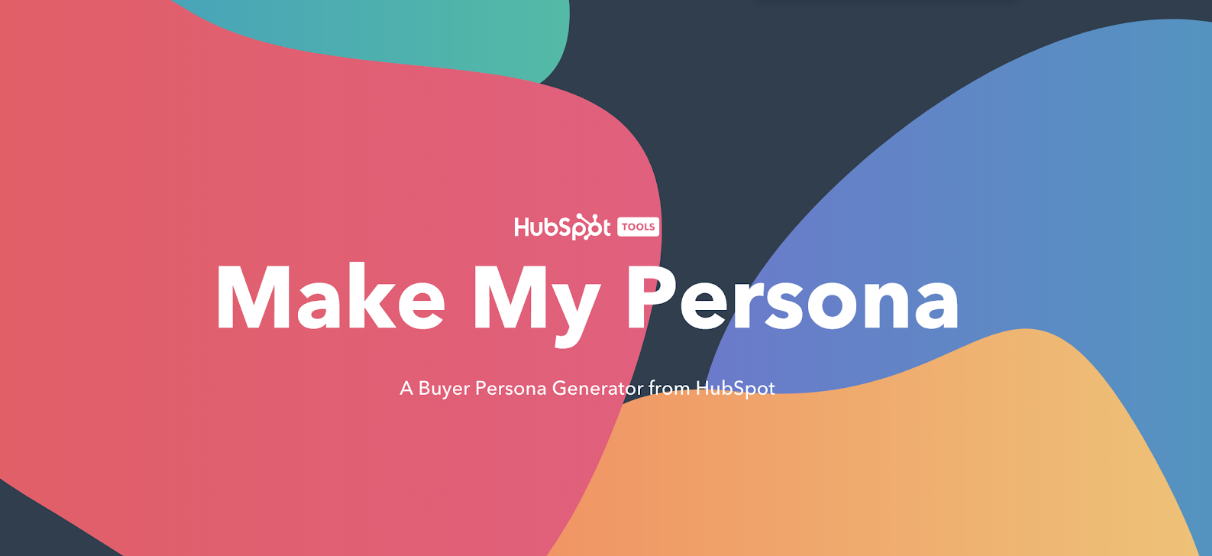
Visitors are then automatically directed to the second part of the landing page which also includes enticing and value-driven language.
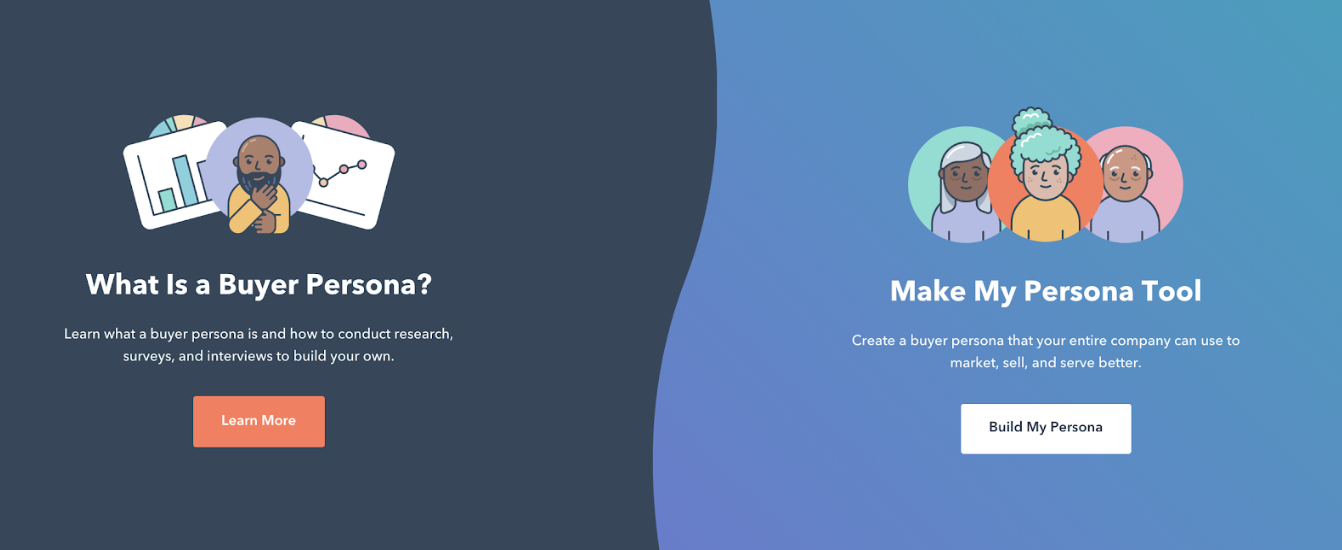
The design includes two CTAs visitors can click based on their needs and interests. The headers on this landing page are useful, relevant, eye-catching, and on-brand
5. Make the landing page beautiful and helpful.
We’ve talked a lot about the fact your landing page is the first thing your website visitors are going to see when they open your website. So, in addition to compelling headers and language, you also want your page to be beautiful and helpful.
Make your landing page beautiful by:
- Incorporating consistent, on-brand colors and fonts
- Keeping your page organized
- Remembering less is more while designing
- Including aesthetically-pleasing visuals (images and/or videos)
- Designing obvious and exciting CTAs
Make your landing page helpful by:
- Incorporating content that pertains to your target audience’s needs and challenges
- Designing CTAs that provide visitors with value
- Including information that tells visitors why they should convert
- Making sure visitors know how to convert
- Ensuring visitors have easy access to your contact information
6. Publish and test your landing page design.
Once you have your design set, it’s time to publish and test it among your audience members. After your landing page is published, you can A/B test different design factors (colors, CTA buttons, phrases, font, etc.) to see which options lead to the highest number of conversions.
This way, you can ensure your landing page meets your audience’s needs while also guaranteeing you’re getting the best results that will impact your business’s bottom line.
In addition to keeping these landing page design steps in mind, consider these landing page best practices as well. You’ll notice some of these best practices are also directly tied to the specific steps we’ve just reviewed above.
Remember your audience throughout the design process.
As we reviewed above, the first part of designing your landing page is identifying your target audience. So, remember to keep them in mind throughout the design process. This way you’ll create a design and incorporate content that resonates with your audience. By doing so, you’ll have a larger chance of increasing conversions among site visitors.
Write a compelling and helpful headline.
Add a compelling headline to your landing page to immediately grab your visitors’ attention. A great landing page headline should be eye-catching and helpful.
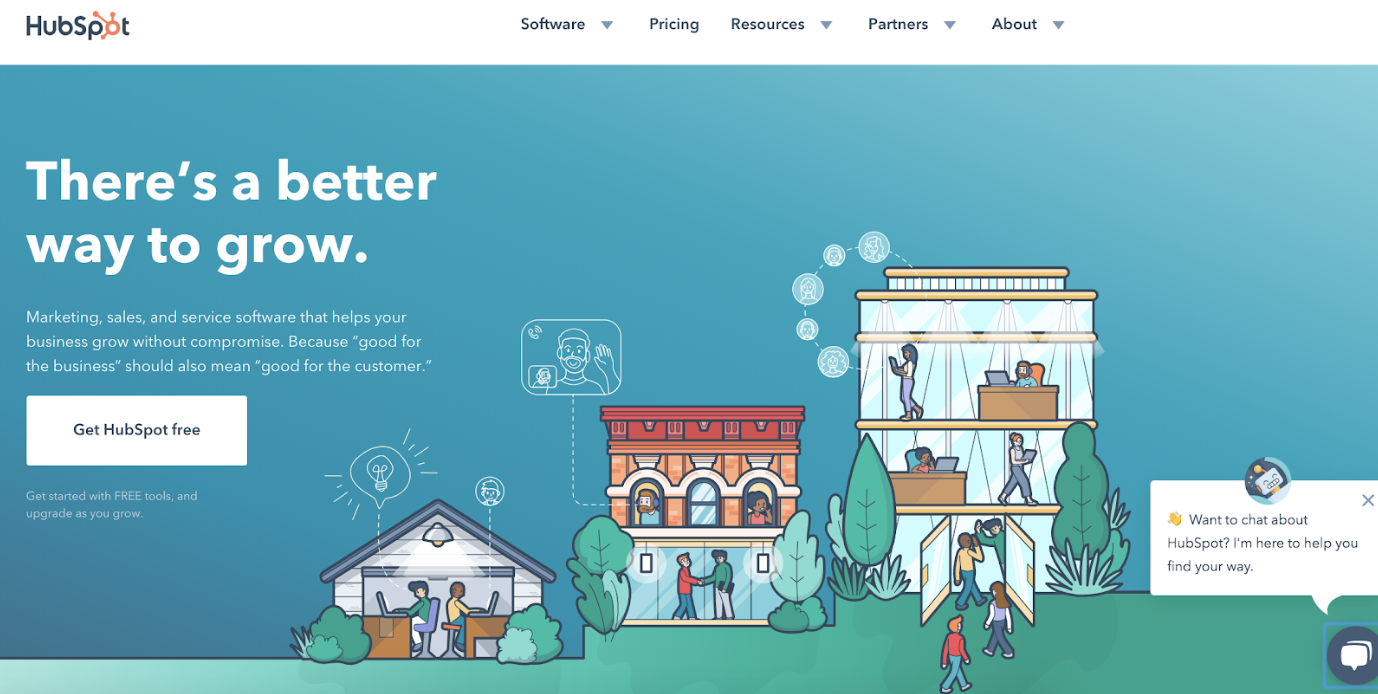
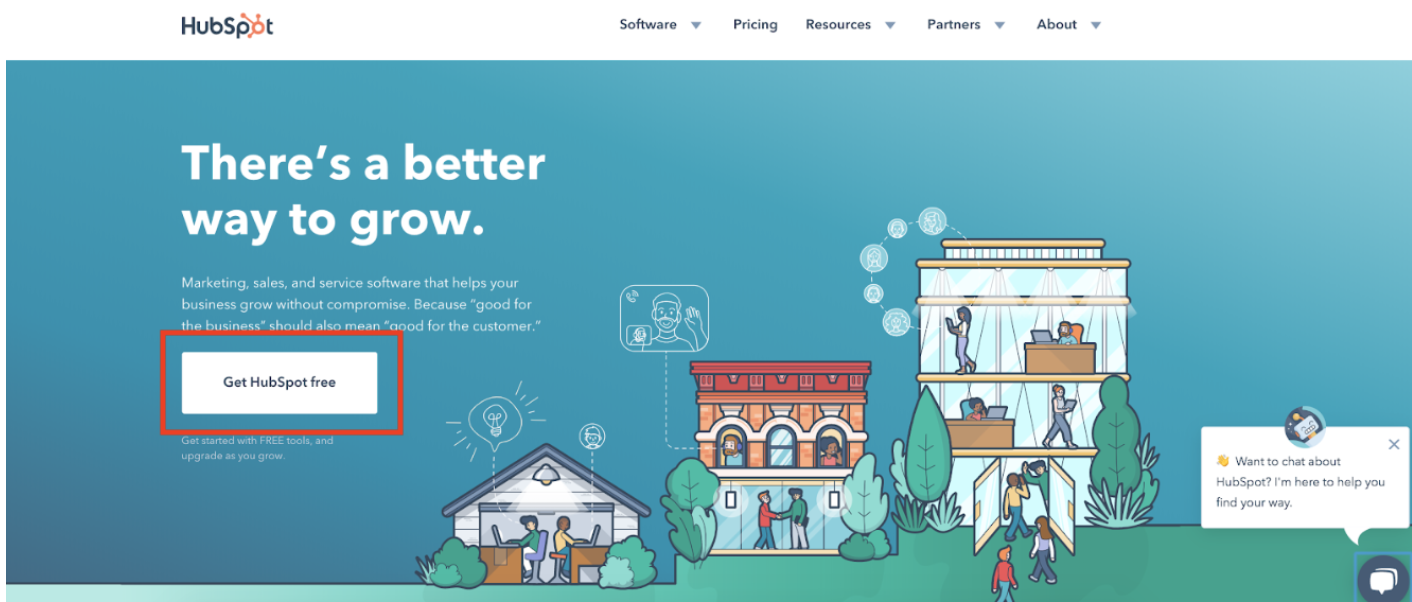
For example, HubSpot’s landing page says, “There’s a better way to grow.” This headline gets visitors in the mindset of HubSpot being something they need to improve and expand their business.
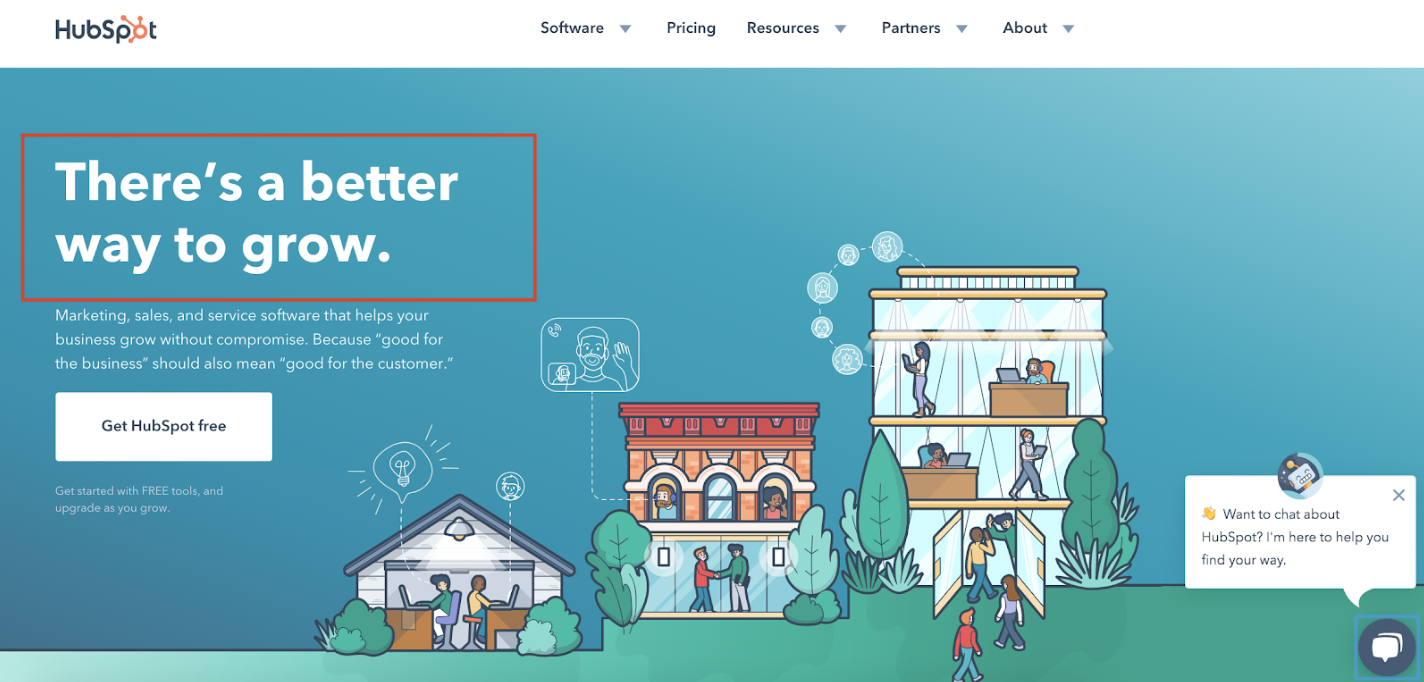
Additionally, “grow better” is a saying HubSpot uses throughout all marketing materials. It’s something the company works to do every day — to help other businesses grow better. This makes the headline on-brand too (which is another best practice we’ll talk more about momentarily).
Include unique and engaging visuals.
Include engaging visual content on your landing page. Whether it’s a photo, video, or animation, you want your landing page design to somehow pique the interest of your visitors.
The HubSpot landing page’s visual content is unique to the company — the animated design and colors are on-brand. They also don’t take attention away from the written content on the page.
Keep it simple.
Although you want to include a headline, written content, CTA, and visual content on your landing page, that doesn’t mean you want your design to be too busy. In fact, you want the opposite.
Remember: Less is more when it comes to the design of your landing page (and your entire website for that matter). This keeps things clean, organized, and simple to understand and navigate for your visitors.
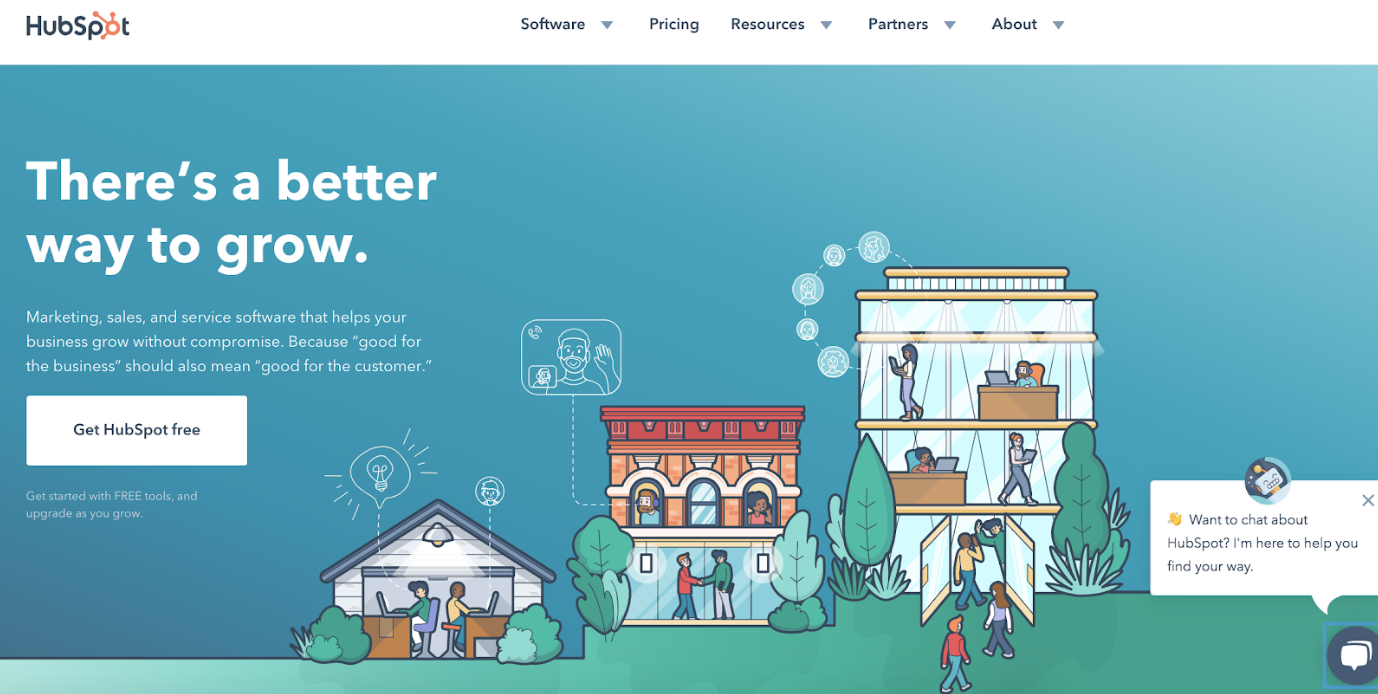
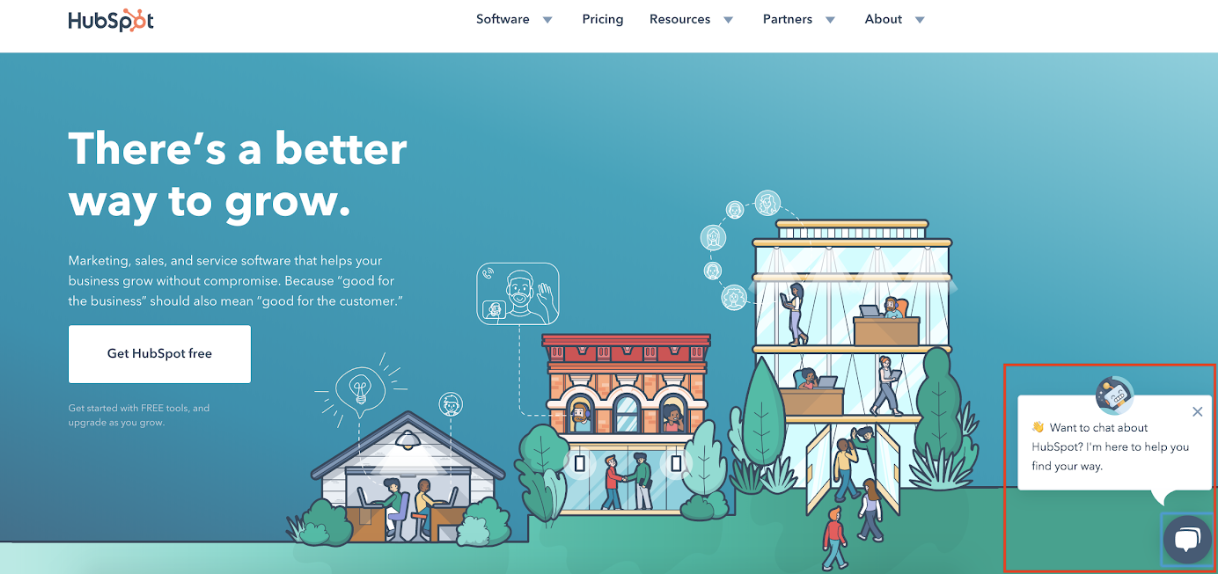
As you can see on HubSpot’s landing page, although the visual takes up a lot of the page, the headline, written content, and CTA are organized in a simplistic and aesthetically-pleasing way. The navigation at the top of the page is minimalist and the live chat box on the bottom right can collapse to make the landing page appear even cleaner for visitors.
Make sure it has a responsive design.
Remember, the chances of your website visitors, leads, and customers visiting your website via a mobile device or tablet is high. So, ensure your landing page has a responsive design that automatically changes format based on the device it’s being viewed on.
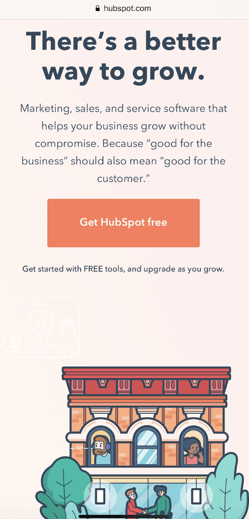
For example, here’s what HubSpot’s landing page looks like via my iPhone. As you can see, all of the content is the same and it includes the same CTA and visuals, but it’s organized and formatted in a way that fits my screen.
Keep it on-brand.
When a visitor comes to your landing page, they should automatically know it belongs to your business. Brand your landing page in a way that complements the rest of your marketing content, logo, and colors. Your visitors should be able to immediately know your landing page belongs to your business due to the branding you incorporate.
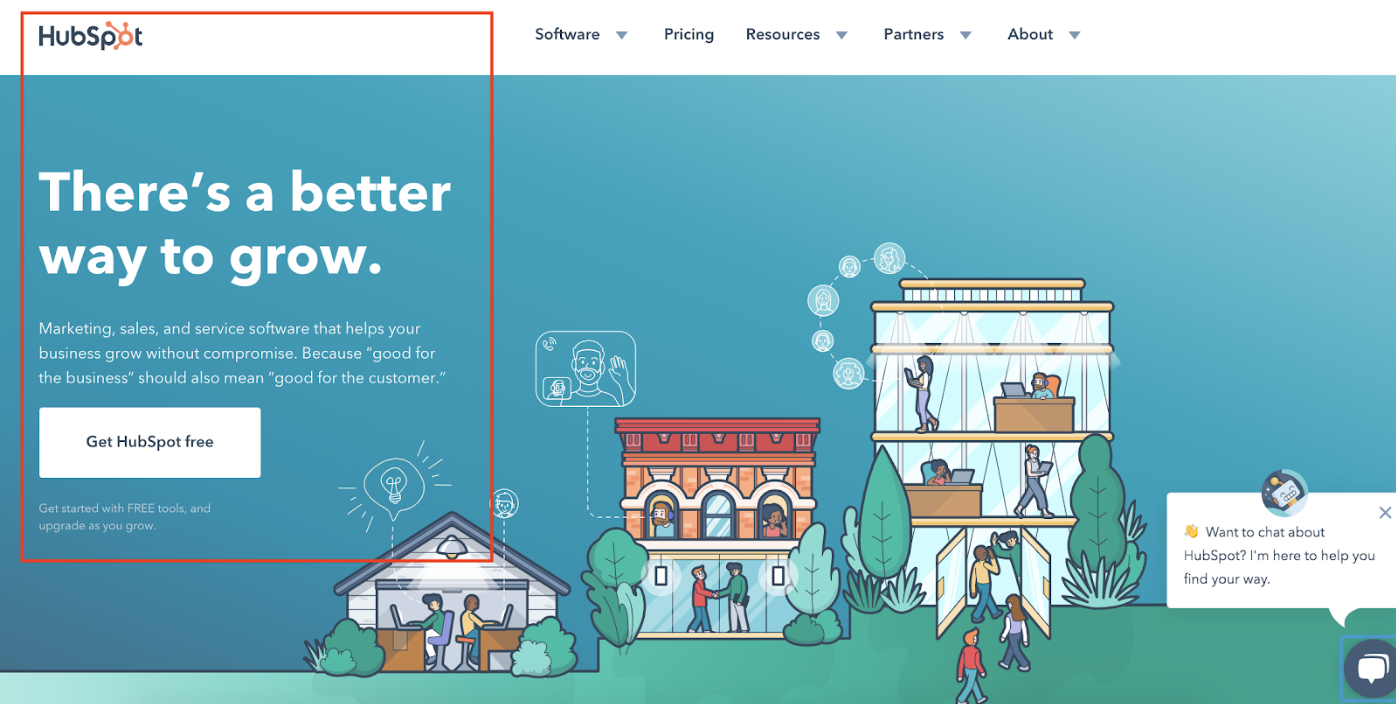
HubSpot’s landing page does this well — it adheres to the requirements found in HubSpot’s Brand Guidelines. The HubSpot logo lives at the top of the landing page. And as we mentioned, the message “grow better”, which is located on the page, is used throughout a large proportion of HubSpot’s marketing materials. The CTA button includes the HubSpot’s name, and the visual on the page matches the look and feel of all other visual content on HubSpot’s website.
Optimize your landing page with CTAs.
Your landing page should include at least one relevant CTA, located above the fold (meaning, visitors don’t have to scroll to get to the form because it’s in view as soon they hit the page), so visitors can come to your landing page and convert within seconds. This CTA might be used to learn more about your product or service, purchase your product, sign up for a special offer, or subscribe to your email newsletter.
HubSpot’s CTA button is one of the most obvious features on the landing page. The CTA button clearly states what visitors get out of converting (a free CRM). Since the CTA button has the word “free” in it, it becomes even more enticing … who doesn’t love free? Lastly, it’s located above the fold of the page, so it’s visible to everyone the moment they open it.
Add your contact information.
Your visitors may come directly to your site in search of your contact information or determine they want to contact you for assistance or support after spending some time on your page.
To avoid wasting their time and causing them any unnecessary frustration while trying to locate your contact information, place these details on your landing page. This keeps the process of contacting you as simple and straightforward as possible for your visitors.
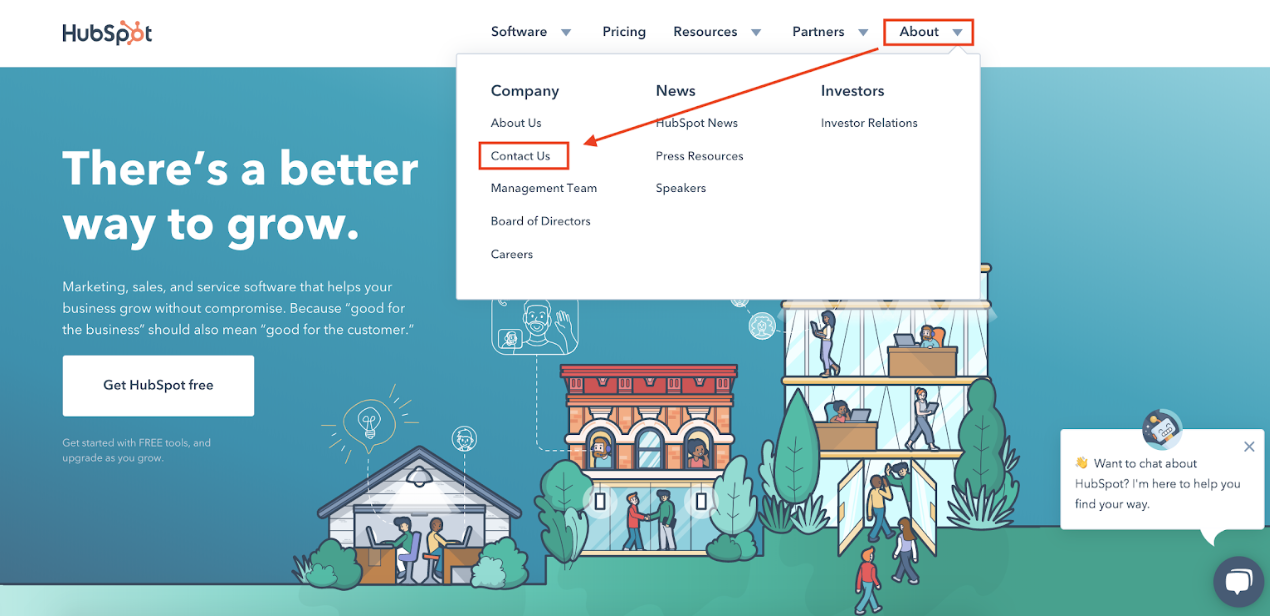
HubSpot has contact information listed under the navigation bar at the top of the landing page. This is a great option if you’re looking to keep your landing page as minimalist as possible.
Include live chat on the landing page.
If possible, include a live chat function on your landing page. This way, visitors can get the immediate assistance they want and need from the moment they open your page.
HubSpot’s landing page has a live chat feature for easy access to immediate support. The location of the collapsible chat box keeps the page looking organized.
Use A/B testing to determine which design works best.
Once you’ve created your initial landing page design, don’t feel locked in — this is an iterative process. Meaning, test your designs among your target audience to determine which colors, CTA buttons, headlines, visuals, and written content resonate with them best and result in the highest number of conversions.
You can A/B test your designs and review your results. Then, once you’ve determined which design works best for your target audience and boosts conversions, stick with that design (until you have a new and improved design to share — then, start this process again).
Since we’ve covered how to create your landing page and the best design practices, let’s take a look at the software options you have to get your landing page up and running so you can begin converting more visitors into customers.
Landing Page Design Software
There are a plethora of landing page design software options to choose from, all of which can help you design your entire website (not just your landing page). The following five options simplify the design process and don’t require you to have any previous web or design experience.
1. HubSpot
HubSpot allows you to create multiple landing page designs. The software includes a built-in library of responsive landing page templates and an on-page editor for adding images and copy. You can also create personalized CTAs, content, and forms for visitors to help you boost conversions. HubSpot also provides you with the ability to test and analyze the performance of your landing page design so you can make improvements.
2. Instapage
Instapage allows you to design and publish custom post-click landing pages with a variety of template options. The page builder is easy to use and offers the ability to A/B test different designs to determine which works best for your audience. The software also helps you optimize your landing page with dynamic text replacement, which is a feature that allows you to automate the opt-in content on your page.
3. Unbounce
Unbounce has a landing page creator with over 100 templates to choose from so your design complements your brand and content. Templates are organized by business type and include options for SaaS companies, agencies, and ecommerce businesses. Unbounce landing pages are responsive and completely customizable.
4. Mailchimp
Mailchimp allows you to design your landing page in minutes, thanks to their drag-and-drop page builder. You can also set up your other website content to populate your landing page, further simplifying the design process. You can add custom CTA buttons to entice your target audience to convert or sign up. And, if you need help personalizing your landing page, you can review and reference the variety of tutorial videos Mailchimp automatically provides.
5. Leadpages
Leadpages is a landing page design software with a drag-and-drop builder that makes it easy to customize your landing page to suit your brand, and you can A/B test your designs with the software to efficiently determine which option converts the most visitors.
As you begin thinking about your landing page design and working through the details we’ve provided in this guide, you may feel as though you need additional design inspiration. If this is the case, check out our blog post on great landing page design.
Download dozens of free landing page examples to inspire your business’s design.
Begin Designing Your Landing Page
Your landing page is the first thing any visitor who comes to your website sees and experiences. That’s why great landing page design is so important — it’s every visitor’s first impression of your website … and possibly their first impression of your business as a whole.
A great landing page has the power to help you generate more leads, close more deals, enhance your website’s user experience, impress visitors, and ensure your site has a professional, on-brand feel. Work through these landing page design steps and best practices above to ensure your landing page accurately represents your business and makes your leads want to become customers.

Everything You Need to Know About Brand Management
If your business was a person, your brand would be its personality. It’d be how you introduce yourself to new friends (er, customers) and how you build a trusting relationship with them. Your brand is a living, breathing entity … and it’s your job to help it grow and improve.
This is what we call brand management.
Creating a brand is thrilling, but it’s not enough. As your business scales, grows, changes, and succeeds, your brand must follow suit. That’s why we created this guide — to cover the basics of brand management and equip you with the tools you need to manage and maintain a fantastic brand.
Shall we dive in?
What is brand management?
Brand management is the process of managing your brand reputation and improving your audience’s perception of your brand in a way that builds brand awareness, equity, and loyalty.
While branding is the process of building your brand, brand management is the process of monitoring and maintaining it.
Your brand is a living, breathing thing, which means it’s constantly changing. It’s also very susceptible to external factors like news, trends, and current events. In a world where journalists, influencers, and social media users (just to mention a few) influence virtually every narrative, brand management is how you can take control of your business’s story. It is using your branding and brand assets to communicate value and build loyal relationships with your followers, fans, and customers.
In short, your brand needs a manager to ensure its success. Don’t let your brand be like Kanye.

We’ve discussed in other blog posts how important word-of-mouth (WOM) marketing is in retaining and attracting new customers. While you can’t always control what others say about your brand, strategic brand management is the process of responding to them in a way that elevates your brand and remains true to your core brand values — all while remaining consistent across teams and channels.
As an example, read how Zappo’s used brand management to make the most of a $1.6 million mistake.
For that reason, brand management extends far beyond marketing. Brand management should be intertwined with sales, human resources, and customer service — basically, any department that “touches” your followers, customers, and even potential employees.
When done successfully, brand management can:
- Boost your brand awareness
- Allow you to charge more for your products or services
- Influence your audience’s purchase decisions
- Build customer loyalty
- Increase sales
- Create happy customers that become brand advocates
Principles of Brand Management
Brand management is comprised of both tangible and intangible components. We’ll discuss the tangibles in the following section.
The intangible components, however, include the principles that help you measure your brand management efforts and achieve those brand management success indicators that we discussed above.
You’ll also note that each of these principles can influence the others on this list. For example, heightened brand awareness can contribute to brand reputation, and increased brand loyalty can affect brand equity.
Brand Awareness
Brand awareness is how familiar the general public and your target audience is with your brand. Brand awareness is important because consumers can’t engage with or purchase products or services from your brand if they’re not aware of it.
Brand Equity
Brand equity is how consumers value your brand based on their experiences, perceptions, and associations. (This concept goes hand-in-hand with brand valuation, which is the commercial value of your brand as perceived by the market.) Brand equity is important because a valuable brand can support higher prices and increase your merit among investors, shareholders, and potential buyers.
Brand Loyalty
Brand loyalty refers to how consistently your customers and followers engage with and purchase from your brand. While your marketing can’t necessarily influence this, your customer service department can — focusing on satisfaction and relationship-building can bring customers back time and time again. Brand loyalty is important because it creates brand ambassadors who do your marketing for you.
Brand Recognition
Brand recognition is how well a consumer, ideally in your target audience, can recognize your brand — through your logo, tagline, packaging, etc. — without seeing your brand name. This concept goes hand-in-hand with brand recall, which is the ability to think of a brand without seeing or hearing any branding prompts. Brand recognition is important because, by recognizing and recalling your brand, consumers keep your brand top-of-mind and are more likely to choose your brand above the competition.
Brand Reputation
Brand reputation refers to how the general public and your target audience perceive the character, status, and quality of your brand. Your reputation can be influenced by internal factors (customer service, product quality, etc.) and external factors (customer reviews, WOM marketing, news mentions, etc.). Brand reputation is important because it can be some consumers’ first impression of your brand.
Brand Asset Management
Your brand assets are the tangible components of the brand management process, the parts of your branding that your audience can see, experience, and remember. Brand assets include any piece of your branding or marketing that is seen by the “outside world” — customers, employees, or the general public.
Brand asset management is the process of crafting and maintaining these tangible elements as well as keeping them consistent throughout your branding. This could look like:
- Organizing your brand assets (both digitally and physically)
- Creating an accessible digital and/or physical storage system for your brand assets, or implementing a tool that does this for you
- Instructing your team on how to access and use your brand assets
- Conducting routine checks for brand inconsistencies and correcting when necessary
What constitutes a brand asset? Let’s cover the assets you’re likely working with for your business.
Brand Name
Your brand name is the primary identity of your company. As your other brand assets evolve, your brand name likely won’t ever change. If you haven’t trademarked your brand name, we encourage you to do so.
By owning the rights to your brand name, you have better leverage over unauthorized use and any competitors who attempt to copy or steal your brand. Check out HubSpot’s trademarks and Trademark Usage Guidelines as an example.
Your brand name will also likely be reflected in your website domain and social media pages. Keeping these names, identities, and handles consistent will help customers discover and follow your business.
Logo and Color Palette
Your logo and color palette embody the creative representation of your brand. These assets are important parts of your branding as they tap into emotional marketing tactics. If designed properly, they can help you attract and convert customers.
Typography
Your typography refers to your fonts and text-based assets and how they’re used in your branding. These guidelines inform any branding or marketing asset that’s designed on behalf of your business, including your website, paid advertising, social media posts, and more — all the way down to the spacing between the letters.
Graphics
Your graphics include many different brand assets — basically anything specifically designed for your brand or marketing. These could be used on your digital marketing channels (which we’ll discuss next) or developed as standalone assets, such as external slide decks, letterheads, press releases, or even marketing videos.
Your brand graphics will likely be utilized by a wide variety of people (from designers to social media marketers to content writers), so they should be well-organized and have clear instructions on how to use them.
Digital Marketing Channels
Your website, social media, and paid advertising are a few of the most important iterations of your brand. Millions of people access the internet daily, and your digital channels are likely the branding assets the most viewed by potential customers. For this reason, they must reflect your branding, and they must be consistent.
Also included in this section is your employees’ and executives’ social media accounts, as these are a reflection of your brand and a fantastic marketing opportunity to give your audience an inside look at your company and the opportunity to connect with your brand on a personal level. If your employees desire to use their profiles to market your business, ensure their accounts reflect your brand assets and follow your style guide.
Note: If members of your leadership team also manage a personal brand, chat among your team about how to align (or separate completely) this brand with your business brand. If their brand is connected in any way to your company, it should complement yours.
Packaging
If your business sells a physical product, your packaging is a critical part of your branding. For some customers (if not most), your packaging might be their first impression of your brand. Also, one-third of customers say they make purchase decisions on the packaging itself.
Your packaging is also the most tangible, experiential way that customers interact with your brand. For that reason, your packaging should reflect your branding — in its design, colors, size, and feel.
Style Guide
Your style guide is a document that instructs employees, designers, and other businesses on how to use your branding. This is an important brand asset because it informs how all other brand assets should be utilized, designed, printed, and more — all the way down to what size your logo should be and what colors are and aren’t allowed in your marketing materials.
Not only does this help others create on-brand designs; but it also informs them of how to follow branding guidelines and legal/licensing restrictions. Take a look at HubSpot’s Brand Guidelines as an example.
Brand management can be a serious undertaking, especially when working with a large brand or perhaps a brand with multiple brand extensions. Also, if you’ve outsourced your branding to a creative agency or individual, it can be difficult to assume the task of managing it.
Check out these brand management companies and services that can help you maintain a successful brand.
Northeastern Region
1. Dirigo Design and Development
Dirigo Design and Development is a Maine-based marketing agency. The company offers various marketing services, including branding, strategy, and reputation management. Notable Dirigo clients include Dunkin’ Donuts, Harvard University, and The Wall Street Journal.
2. Jax Media Design Group
Jax Media Design Group is a D.C.-based agency focused on digital design and development. The company creates digital marketing assets using your brand guidelines and helps you implement them in campaigns. Notable Jax Media clients include Geico, AARP, and National Geographic.
3. RP3 Agency
RP3 Agency is a Maryland-based marketing agency. The company offers services for brand strategy and positioning, message strategy, and audience insights. Notable RP3 clients include Coca-Cola, Ripley’s Believe It or Not!, and Giant Food.
Midwestern Region
4. Hangar 12
Hangar 12 is a Chicago-based agency that specializes in consumer packaged goods (CPG) brands. The company focuses on marketing strategy and brand positioning, as well as digital and social media marketing. Notable Hangar 12 clients include Purdue, Conagra, and Hostess.
5. Brandgarten
Brandgarten is a Wisconsin-based agency focused on telling brand stories using customer insights. The company offers brand development and strategy services as well as brand training for your team. Notable Brandgarten clients include Johnson & Johnson, Alliant Energy, and Organic Valley.
6. DEKSIA
DEKSIA is a Michigan-based marketing agency. The company has cross-industry experience in marketing and brand development and management. Notable DEKSIA clients include Visa, Uber, and Twitter.
Southern Region
7. Matchstic
Matchstic is a Georgia-based brand identity agency. The company offers services that help you define, promote, and evolve your brand. Notable Matchstic clients include Chick-fil-A, Prudential, and Spanx.
8. Spire
Spire is a Dallas-based branding and marketing agency. The company specializes in B2B brands and offers brand audit, articulation, and integration services. Notable Spire clients include American Airlines, Texas Capital Bank, and Airbus.
9. Proof Branding
Proof Branding is a Nashville-based branding agency. The company offers services that distill, develop, and deploy brands. Notable Proof Branding clients include Vanderbilt University, Barista Parlor, and The Grand Ole Opry.
Western Region
10. BLVR
BLVR is a San Diego-based branding agency. The company works with customers on brand auditing, brand identity, brand development, and brand strategy. Notable BLVR clients include Andis, Tony Robbins, and World Vision.
11. BrandJuice
BrandJuice is a Denver-based branding agency. The company focuses on strategy, innovation, and design services. Notable BrandJuice clients include Denver International Airport, DISH Network, and Red Canary.
12. modern8
modern8 is a Salt Lake City-based design studio. The company offers services for brand strategy, identity design, and asset management. Notable modern8 clients include Yesco, Architecture Week, and School Improvement Network.
Pacific Northwest Region
13. Parliament
Parliament is a Portland-based brand-focused design studio. The company creates brands, products, and experiences for their customers. Notable Parliament clients include Olympia Beer, Nike, and Capital One.
14. States of Matter
States of Matter is a Seattle-based branding and design agency. The company helps you audit, develop, and deliver their customers’ brand assets. Notable States of Matter clients include Modbar, Dolly, and Blue Nile.
15. S’more Brands
S’more Brands is a Vancouver-based branding and marketing agency. The company offers a Brand Camp that helps businesses develop and manage their brands. Notable S’more Brands clients include Spring Lake Manor and Lemon Wing.
Brand Management Software
If you’d rather manage your brand in-house, there are plenty of tools available to help. These tools are either platform solutions or online software tools, and some provide free accounts or trials that allow you to test them out.
Canva
Canva is an online graphic design tool that helps you create simple, gorgeous designs. It’s helpful for brand management because, with a paid subscription, it allows you to upload your brand assets — your logo, colors, typography, and more — with which you can create designs. Regardless of how many team members you have working within Canva, you can be confident that they’re using the correct brand assets and creating on-brand designs.
Brandfolder
Brandfolder is a digital asset management platform that helps you collect, organize, and share your brand assets with your team. It allows your team to easily collaborate when creating brand assets, launching new products, or working on marketing campaigns.
BrandVerity
BrandVerity is a brand monitoring tool that helps you monitor for noncompliance and trademark infringement. You can customize the BrandVerity crawler to search for your specific guidelines and trademarks and use the tool’s email templates for easy remedying.
Bynder
Bynder is a digital marketing asset solution that provides access to your company’s branding depending on your role within your team. It keeps your branding consistent and helps you keep your team up-to-date with any new or upgraded branding assets.
Lucidpress
Lucidpress is a tool that offers multiple solutions — a design program, brand management platform, and marketing template library. Similar to Canva, you can upload your brand assets to Lucidpress and have your team create your brand and marketing materials within the software. From there, your team can re-use on-brand templates to ensure consistency in your branding.
TrustPilot
TrustPilot is a review software that can help you build your brand reputation, create brand equity, and build brand loyalty. Collect reviews from real customers and share them with followers and potential customers to harness the power of word-of-mouth marketing.
Wedia
Wedia is a marketing platform that allows you to manage your creative projects, create and store your digital assets, and distribute your marketing material across multiple channels. It acts as a central location for your team to access your brand assets and allows you to keep your team and creative projects aligned and consistent.
Brand Management Courses
If you’re interested in learning more about managing your brand, there are dozens of fantastic courses available online. We’ve collected some of the leading courses below.
- Measuring Brand Engagement and Emotional Connection by HubSpot Academy
- Design Foundations: Building Brand Guidelines and Consistency by HubSpot Academy
- Brand Management: Aligning Business, Brand and Behaviour by Coursera
- Strategic Brand Management by edX
- Brand Management: Build Successful Long Lasting Brands by Udemy
A Well-Managed Brand is a Successful One
Brand management, as auxiliary as it seems, does affect your bottom line.
Strong brands aren’t built by marketing or product alone but by constantly iterating on your customers’ brand experience. It’s easy to overlook the impact of consistent, intelligent brand experiences — and brand management can help you provide this for your followers, customers, and brand advocates.

Instagram Stories for Business: How to Create Engaging Stories
Do you want to do more with Instagram Stories? Wondering how to create Instagram Stories that engage viewers? To explore how to create compelling Instagram Stories for business, I interview Alex Beadon. Alex is an Instagram Stories expert who specializes in helping people use Instagram for business. Her course is Gram Slam and her podcast […]
The post Instagram Stories for Business: How to Create Engaging Stories appeared first on Social Media Marketing | Social Media Examiner.
from Social Media Marketing | Social Media Examiner https://ift.tt/32b8NU8
via socialmediaexaminer
August 29, 2019 at 04:20PM
Tenemos fecha & hs 14:00hs de Arg. Presentación #iPhone11
Como siempre todas las novedades en VIVO de San Francisco por nuestra pagina https://ift.tt/2ZDMaWJ
#iPhone #iOS13 #apple #Rosario #update #soportetecnico #stevejobs https://ift.tt/2L5W3Zp
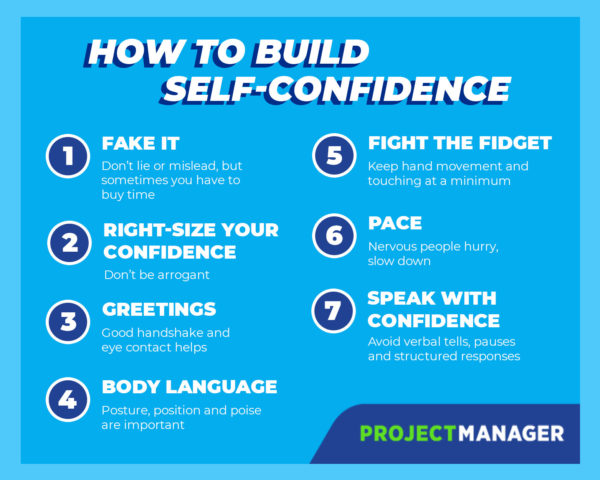
7 Secrets for Conveying Confidence as a Project Manager
13 PR Blogs You Should Be Reading This Year
One of my first jobs out of college was working as an entry-level PR associate. Like most recent grads without any real industry experience, I’d spend my days blasting out the same artless, impersonal pitch to any journalist who had ever covered a beat even vaguely adjacent to one of our client’s products.
Unsurprisingly, I got very few emails back.
If you work in PR, you don’t need me to tell you it’s a hard field to get started in. Now that I’m on the other side of it — receiving dozens of pitches per day — I appreciate a well-executed pitch even more because I understand just how much thought and energy goes into it.
Whether you’re a seasoned PR pro or an associate looking to break into the industry, reading expert blogs is a smart way to stay up to date on the latest PR happenings, expand your skills, and get inspired to do your best work. We’ve put together a list of some of our favorite PR blogs (in no particular order) for you to get started. Let’s dive in.
1. PRNEWS
PRNEWS started as a weekly print newsletter over 70 years ago, and today still serves as a comprehensive, go-to resource for the PR community. The PRNEWS Blog features in-depth analysis of current industry news, useful how-tos, career advice, and opinion articles from PR pros across numerous industries. I also recommend (and personally subscribe to) their weekly email subscription, The Skinny, which offers a thoughtfully curated rundown of the latest PR, marketing, and communications news and trends.
Three posts to check out:
- Why Does a Woman CEO Need to Be a News Story?
- From Media Royalty, Career Advice for PR Pros in the Margins
- 7 Business Writing Sins PR Pros Commit Regularly
2. PRWeek
PRWeek bills itself as “the essential title for PR professionals in the US,” and it has an expansive, high-quality content library to back this statement up. Covering topics from notable agency happenings to how brands are adopting new strategies, PRWeek is as entertaining as it is informative. Plus, their daily Breakfast Briefing is the perfect early morning subway read. It features a quick rundown of the latest PR news in a format simple enough to digest before you’ve had your coffee.
Three posts to check out:
- Do Brands Really Need to Be on Twitter?
- Female Agency Leaders Are Breaking Through the Glass Ceiling
- Brand Mascots: A Dying Breed?
3. PR Daily
With sections on social media management, crisis communications, media relations, marketing, and more, PR Daily serves up a diverse range of topics for PR and comms pros. They’re quick to publish expert analysis on current events concerning the PR community, and also offer beginner guides on the tools and platforms you need to do your job — like social media ads, monitoring tools, and more.
Three posts to check out:
- Why Empathy is a Crucial Skill for Marketers and PR Pros
- 3 ‘Boring’ Brands that Have Made a Social Media Splash
- A Lesson in PR Ethics, Courtesy of ‘The Great Hack’
4. Digiday
While not strictly a PR industry publication, Digiday is a valuable read for anyone interested in how technology impacts media, marketing, and communications. Their editorial team leverages expert, insider interviews and original data to show how innovations in the tech landscape are changing the way brands and consumers communicate — for better or worse. If nothing else, I’d recommend checking out their ongoing column, The Confessions, which features anonymous interviews with professionals working in media. They dig deeply into revealing topics like working conditions in the industry and the (sometimes harsh) realities of advancing your career in a competitive environment.
Three posts to check out:
- ‘People are scared to speak up’: Confessions of a minority marketer
- How publishers navigate ‘bullshit briefs’ from agencies
- Google proposes tighter standards around data collected for digital ads
5. Spin Sucks
If you work in PR or corporate communications, chances are someone’s jokingly (or not so jokingly) called you a “spin doctor.” Spin Sucks is a blog dedicated to breaking down the negative perceptions of the PR field by calling out destructive practices in the industry and celebrating the authentic ones. The Spin Sucks team dissects recent campaigns and brand news to separate the spin from the reality, and share their own expert take on what could have been done better. They also regularly feature guest contributors, interviews with pros in different industries, and open-ended questions posed to their community of readers.
Three posts to check out:
- The Communications Professional’s Customer Behavior Playbook
- What College Football Teaches Us About Brand Development
- Spin Sucks Question: How Do You Respond to Internet Trolls?
6. Institute for Public Relations
IPR is a nonprofit organization that conducts and publishes in-depth research on the factors impacting the public relations and corporate communications fields. In addition to their extensive library of original research, IPR’s blog is a treasure trove of expert opinion pieces, strategy recommendations backed by credible studies, and takes on how new trends and tech will change the landscape of PR. Committed to sharing “the science beneath the art of public relations™,” IPR helps PR pros stay ahead of the curve.
Three posts to check out:
- Is Earned Media More Credible Than Advertising?
- How Artificial Intelligence and Big Data Will Affect the Future of PR
- The End of Linear Storytelling: The #Thumbstopping Story of Our Digital Future Or Trading Catharsis for Engagement
7. PRSay
PRSay shares thought leadership, tactical pieces, and professional advice for both seasoned PR pros and folks at the beginning of the careers. Their blog features helpful, how-to sections on training and development, but they also have dedicated sections that discuss diversity, inclusion, and ethics in the PR field.
Three posts to check out:
- The Business Benefits of Strategic Diversity and Inclusion
- Wildest Dreams? Far From: Why Taylor Swift Is a PR Role Model
- What Ohio Butter Sculptures Can Teach Us About Improving Annual Content Packages
8. Public Relations Today
This blog aggregates the best content for PR and comms professionals across the web into one convenient, easy-to-navigate location. Their team of expert curators shares pieces on everything from branding to crisis management. Their homepage is also ordered by what’s trending in the industry on social media, so it’s easy to discover articles other PR professionals are reading and discussing.
Three (aggregated) posts to check out:
- “Stakeholder Value” Is Good PR — And Good Business
- How Simple Automation Saves Time And Tedium In PR
- Online Reviews and How to Handle Them
9. ImPRessions
Crenshaw, a public relations consulting agency, started ImPRessions as a way to “share expertise, industry insights, and impressions” of the industry with an audience of PR pros. Their blog features thought-provoking investigations into PR best practices, trends, and lessons from real brands. The blog also offers actionable strategies and advice for PR firms big and small.
Three posts to check out:
- What The Best PR Strategies Have In Common
- Smart Speakers Offer A Clear Opportunity For PR
- Has Apple Lost Its Magic?
10. Solo PR Pro
If you’re a freelance or independent PR consultant, the challenges you face are certainly different than those experienced by an agency, in-house team, or large consulting group. Solo PR Pro is a blog specifically for PR and communication pros looking to “break free of the cubical” and be their own boss. The site focuses on topics relevant to the unique experiences of freelancers in the PR world, like promoting your services, building a client base, and balancing clients on your own.
Three posts to check out:
- How to Get Paid for Your Work
- The Introverted Solo PR Pro: Not an Oxymoron
- Search Engine Optimization is a PR Pro’s Friend
11. O’Dwyer’s PR News
Founded in 1968 as a print publication, O’Dwyer’s PR News diligently covers the latest industry happenings and keeps a running ranking of top PR agencies. For folks in the agency world, O’Dwyer’s is a good place to stay up to date on breaking agency news, big brand accounts, and controversies. The site also helps connect agencies with clients, with a section dedicated to RFPs and an extensive PR services database.
Three posts to check out:
- Crisis Communications and the Role of the CEO
- Why PR Needs Financial Literacy
- Uber Begins Rebuild of Marketing Capability
12. Edelman Insights
Edelman, a top global communications firm, shares articles concerning industry news, best practices, corporate culture, and more on their Insights blog. With pieces written by influential industry leaders (like Edelman CEO Richard Edelman), Insights gives readers an inside look at the topics PR pros should be paying attention to. In addition to tactical and opinion pieces, the blog tackles meaty topics impacting the soul of the industry, like diversity and inclusion, and the responsibilities of professional communicators in the “fake news” era.
Three posts to check out:
- Crippling the Creative Agency
- 3 Takeaways from Women Leading Change
- Why Diverse Voices are Better for Brands
13. The Future Buzz
Founded by San Francisco-based PR agency EZPR, The Future Buzz covers all things public relations and digital marketing with a refreshingly straightforward, decidedly un-sugarcoated tone. With headlines like “PR People: Don’t Do This” and “You Pitch Sucks,” you can trust this editorial team to tell it like it is. The Future Buzz is a solid source for hands-on advice, reflections on the industry, and commentary on the latest trends.
Three posts to check out:
- Marketing and Branding is Not a Tagline or Logo
- PR People: Don’t Do This
- Your Pitch Sucks – One of the Reasons Why No One Is Reading Your Boring Pitch

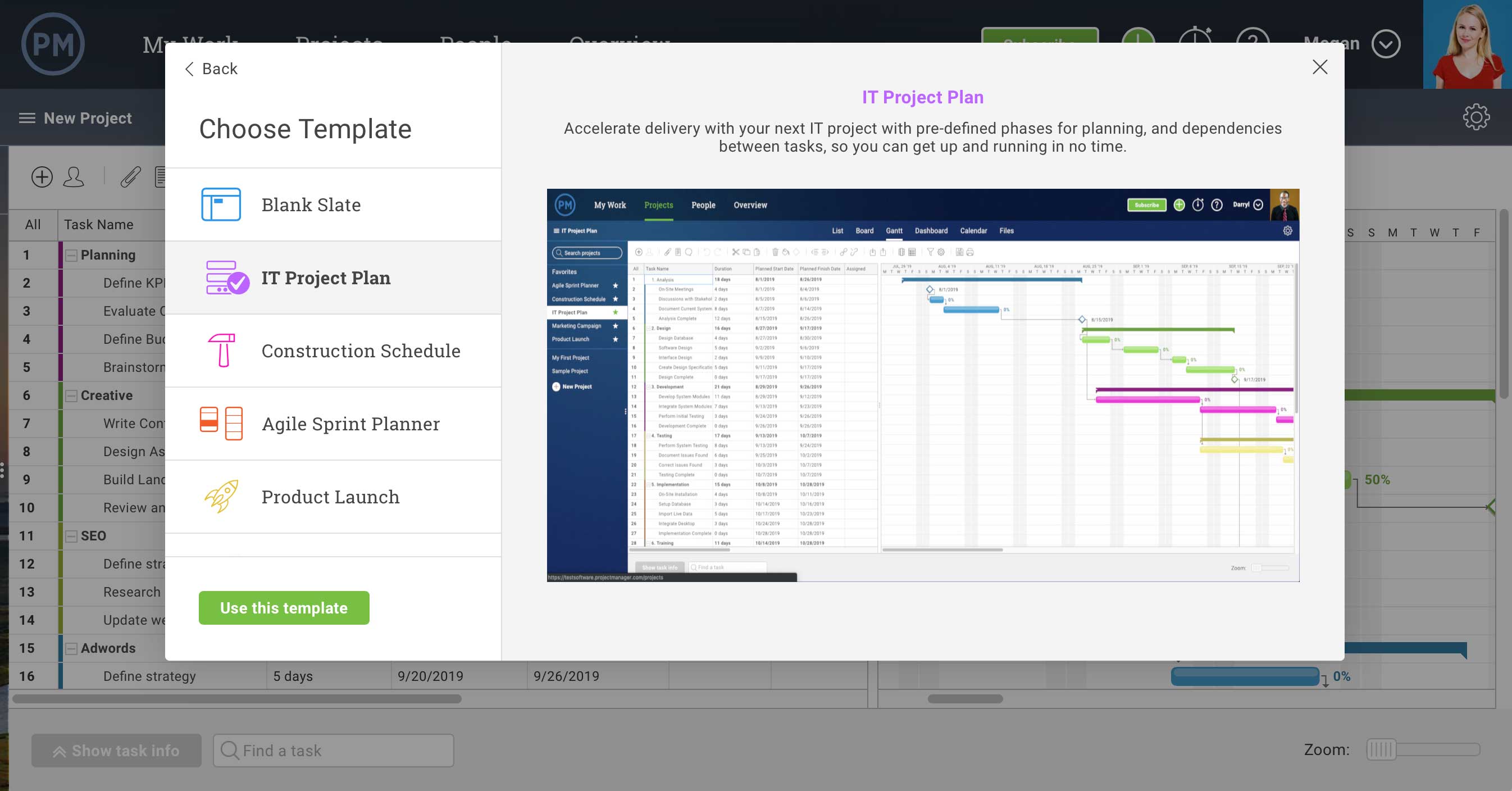
Product Update: New Templates & Imports in ProjectManager.com
How to Send Effective Order Confirmation Emails [Examples + Template]
If you’re a frequent online shopper like I am, you’re likely already well-acquainted with order confirmation emails.
At its most basic, an order confirmation email needs to signal to the customer that their order has been processed — without receiving one, a customer might believe their transaction hasn’t gone through properly.
But an order confirmation email can do more than just act as a digital receipt.
For instance, take a look at the order confirmation email I received from Massachusetts’ Franklin Park Zoo, upon my recent purchase:
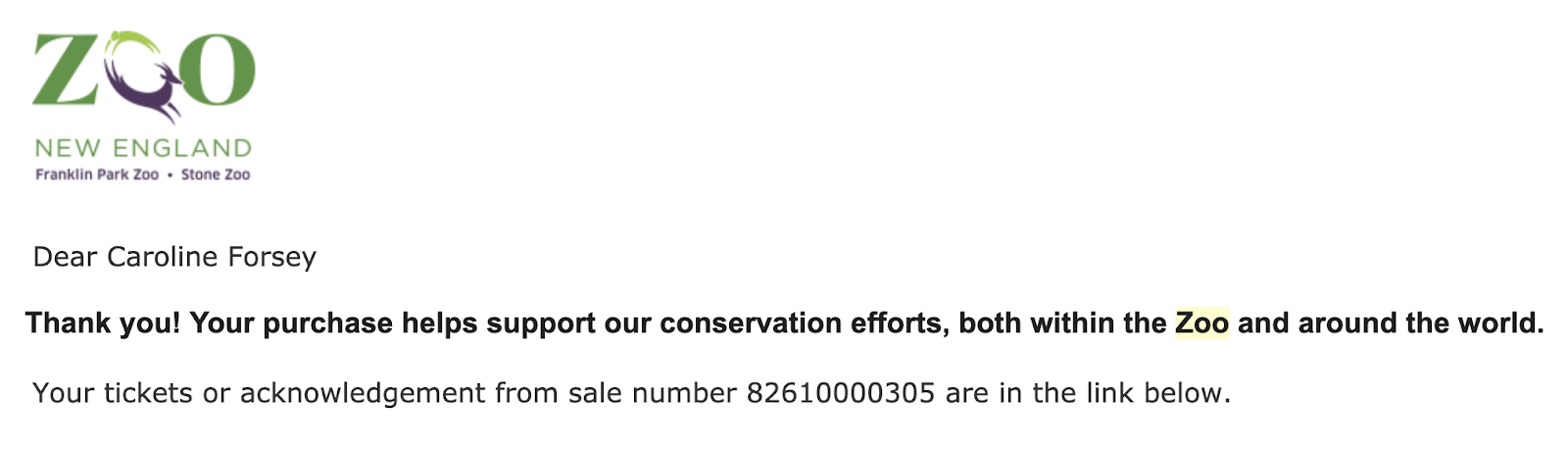
This email provided me with all the information I needed, but it also made me feel good about my purchase by letting me know that my money was helping support conservation efforts.
Ultimately, when done right, email confirmations can help create customer loyalty, build awareness around other products or services, and drive traffic to your blog or social media accounts.
Order confirmation emails are also phenomenal for lead generation. In fact, order confirmation emails have the highest average open rates of all email types, with about a 70% open rate. So if you’re not optimizing your order confirmation emails, you’re missing out on a major opportunity to engage with your customers.
Here, we’re going to explore some unique and effective order confirmation email examples to provide inspiration for your own transactional emails. We’ve also included templates to help get you started on your own order confirmation email.
Order Confirmation Email Examples
1. Uber
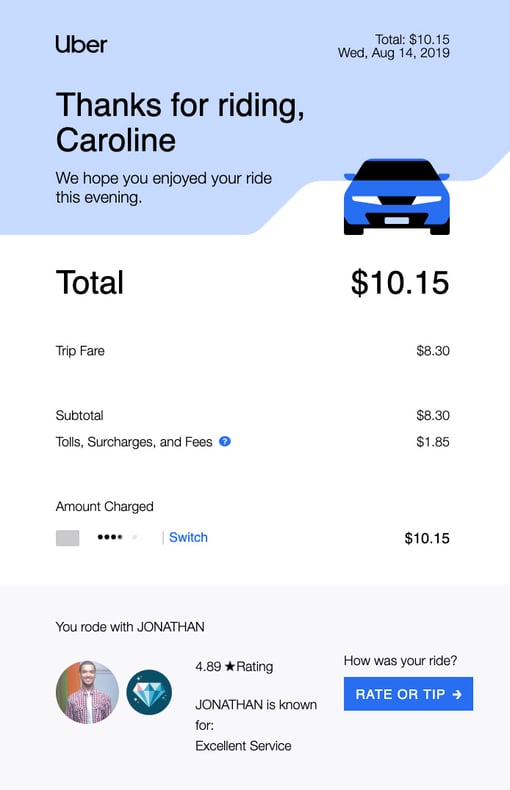
Uber’s order confirmation emails are sleek, clean, and aesthetically-pleasing, with large text, plenty of white space, and a blue CTA to incentivize the rider to “rate or tip” the driver. The email is organized so the rider sees the most critical information above-the-fold — “Thank you” followed by the price — to ensure the recipient only needs to scroll if they want to.
2. JetBlue
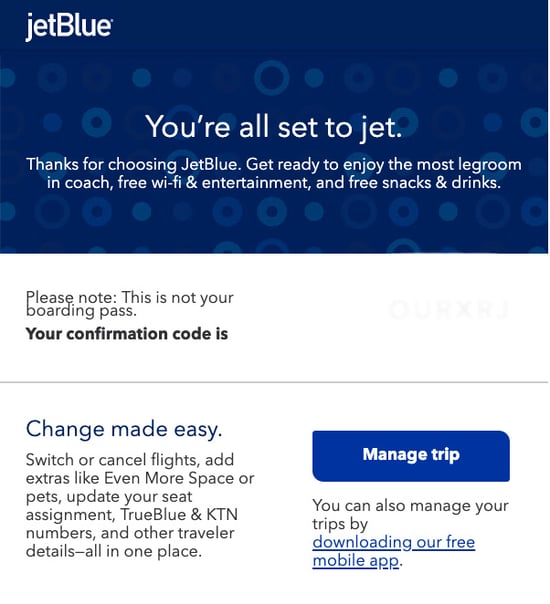
JetBlue’s order confirmation email opens with their fun and clever slogan, “You’re all set to jet”, which immediately reassures the recipient that their order was successfully processed.
Additionally, the text below the initial slogan promises the recipient “the most legroom in coach, free wi-fi & entertainment, and free snacks & drinks” — even though the recipient has already paid, JetBlue does a good job ensuring the customer doesn’t experience any buyer’s remorse, and uses the order confirmation email as another opportunity to cultivate stronger customer loyalty.
Below the confirmation, JetBlue provides a simple “Manage trip” CTA, so the customer can easily update a seat assignment, add extras, or switch flights. Best of all, they’ve included a link to their mobile app — it’s likely that any customer receiving an order confirmation from JetBlue will need their app to access their mobile ticket, so it’s a smart strategy for JetBlue to include the app link.
3. Hausera
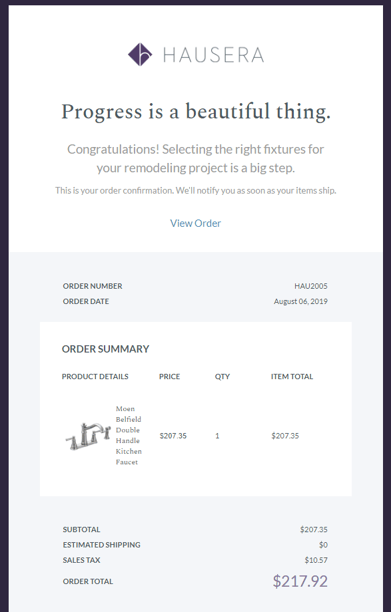
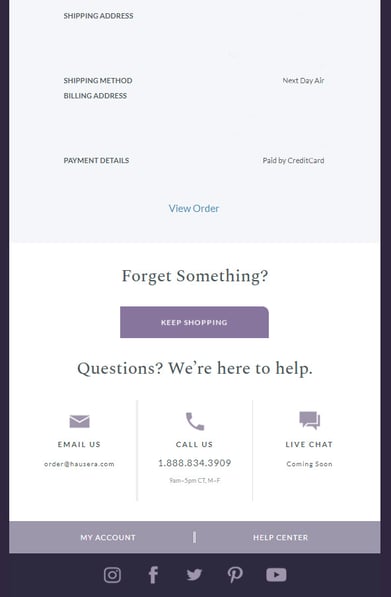
Hausera, an ecommerce site that sells kitchen and bathroom fixtures for remodeling projects, does an excellent job ensuring their order confirmation email is sleek while offering the recipient any information they may need. At the beginning, they’ve included positive messaging like “Progress is a beautiful thing” and “Congratulations” to thank the customer for their order.
Additionally, below the order summary, they include helpful CTAs such as “Keep Shopping”, as well as options to either email, call, or live chat with a support rep. Whether a customer has an issue with their order or simply wants to continue perusing Hausera, the ecommerce site does a good job ensuring the customer can find next-steps from within the order confirmation itself.
4. Tobi
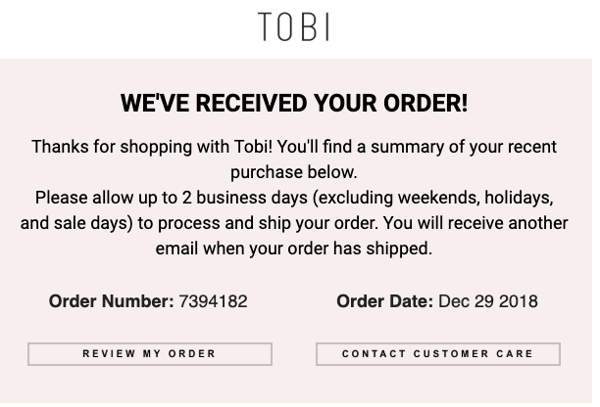
Tobi’s order confirmation email is simple and straightforward. The ecommerce site offers two critical CTAs — “review my order” and “contact customer care” — within the email itself so that the recipient is able to immediately check and correct any information if their order doesn’t look right.
Tobi also effectively outlines their order process within the body text of their email, telling the customer “Please allow up to 2 business days to process and ship your order. You will receive another email when your order has shipped.” By including this information in their email, Tobi ensures minimal outreach from customers who are wondering when their order will ship, or why they haven’t received shipping information already.
5. BigStub
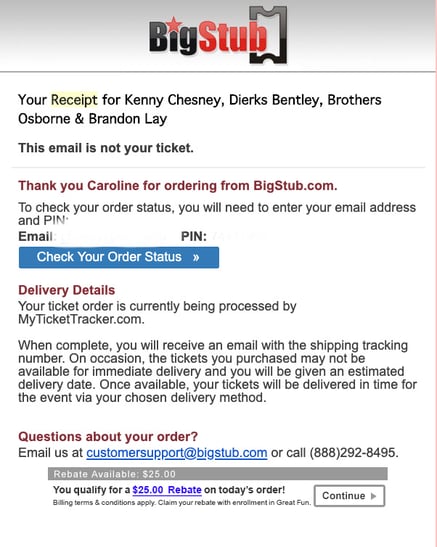
BigStub’s order confirmation email, while admittedly text-heavy, does a good job providing the customer with plenty of critical information throughout their email, including a CTA to check order status, a phone number to contact customer support, and a note regarding delivery details for the recipient’s ticket.
Additionally, BigStub offers a $25 rebate within the order confirmation email with enrollment in Great Fun. Even if the customer doesn’t apply for the rebate, the inclusion is still an effective method that allows BigStub to potentially boost positive brand perception.
6. JustBats
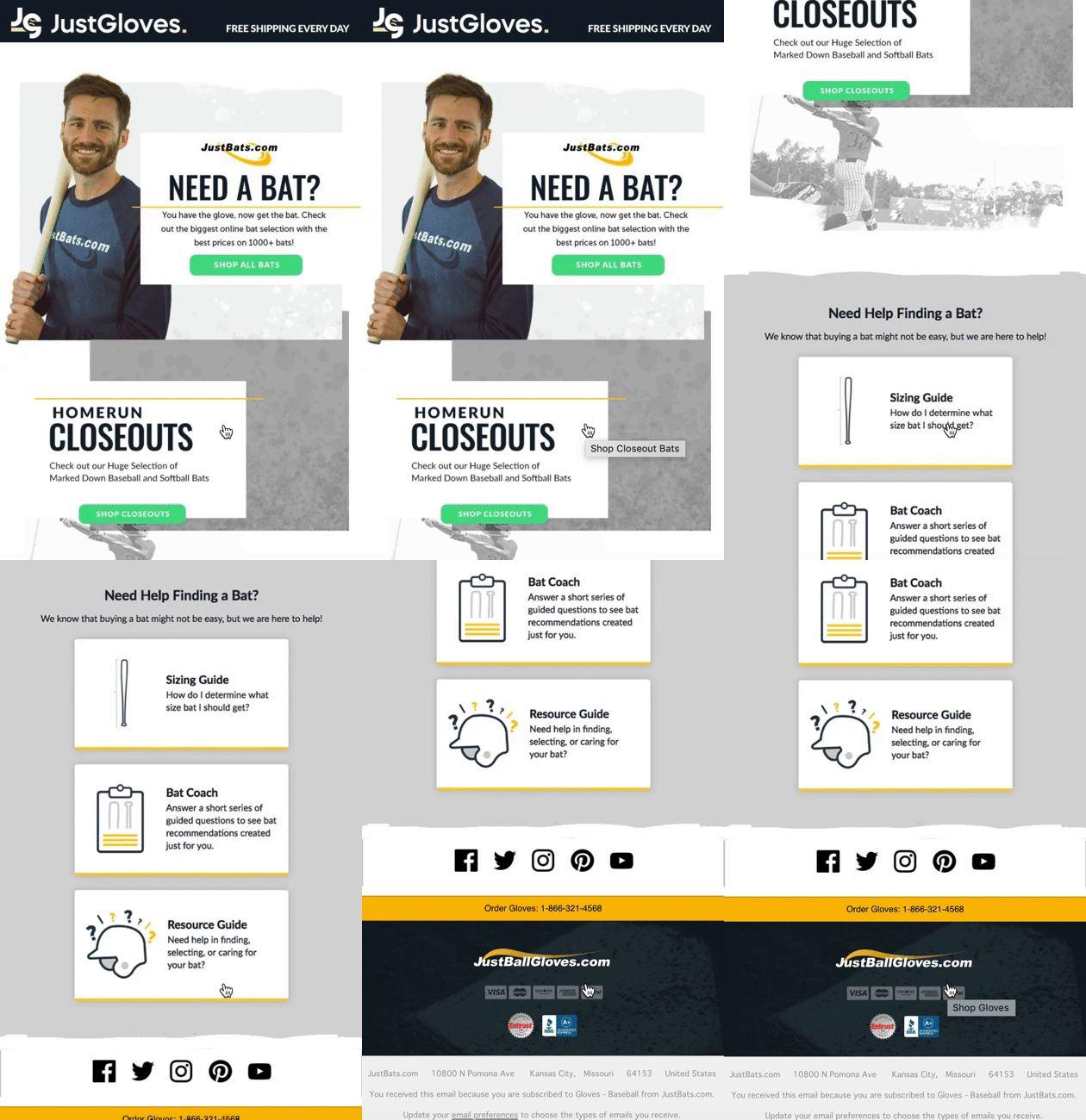
JustBats, an ecommerce site that sells baseball and softball equipment, does an excellent job of cross-selling other products in their order confirmation emails. For instance, if you purchase a glove on their site, you’ll receive an email with the following message — “Need a bat? You have the glove, now get the bat.”
The rest of the email is designed to help a user choose a bat, with CTAs like “Shop all bats” and “Shop closeouts”, as well as helpful resources to ensure the recipient is able to find the right bat for his or her needs. Alternatively, if you purchase a bat from their site, you’ll receive an order confirmation email that helps you choose a glove.
JustBats proves an order confirmation email can be an effective opportunity to suggest other relevant products or services, particularly since the order can help you understand the customer’s needs. In the above example, a glove is a logical next step for someone who has just purchased a bat, and vice versa.
7. SoulCycle
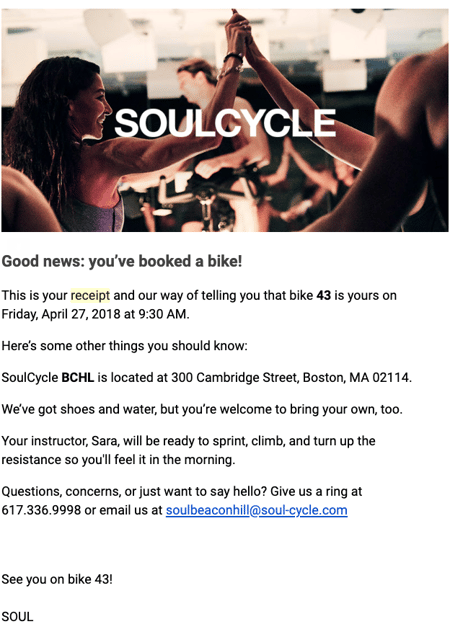
SoulCycle’s order confirmation email, while simple, effectively provides all relevant information and demonstrates SoulCycle’s ability to go above-and-beyond in customer service. Once they’ve outlined when, where, and on which bike the customer will be riding, SoulCycle includes other useful information including studio address, and a note that shoes and water will be provided.
At the bottom of their email, they send a cheerful invitation that reads “Questions, concerns, or just want to say hello?” with both a phone number and email if the recipient needs to reach customer support.
Ultimately, it’s important to pay attention to your language in your order confirmation email, and look for areas where you can add brand voice.
Order Confirmation Email Template
There are plenty of online sites with email templates that allow you to build an order confirmation email today.
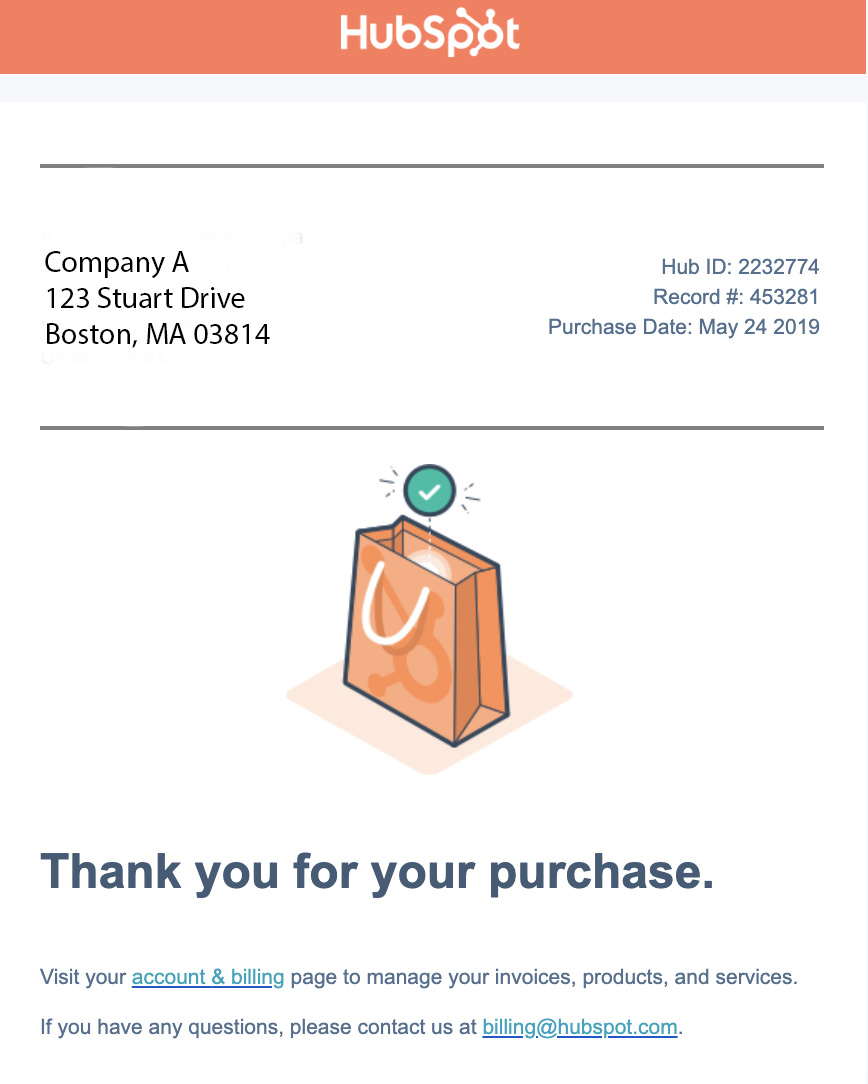
For instance, you can create an order confirmation email within the HubSpot Email Marketing tool for free. You can either choose a pre-made template and customize text, images, and overall design, or you can create one from scratch. Here’s an example of an order confirmation email made with HubSpot’s email tool:
There are plenty of other order confirmation email templates available through tools such as Stripo and Squarespace.
Alternatively, if you use an ecommerce website builder like X-Cart, you can use one of their email tool add-ons to create your own order confirmation email within the tool.
It’s important to note — there are a few best practices you’ll want to follow regardless of the template builder you use.
For instance, it’s critical your order confirmation email:
- Is mobile-friendly, since many recipients will check their email on their phones to see whether an order processed.
- Is skim-able, since many customers are on-the-go and don’t have time to read dense text. If you have important delivery information you’d like to include, consider linking to it instead of including it in the body text.
- Provides an email and phone number of your customer support, in case the recipient’s order is incorrect.
- Outlines next-steps, i.e. when the customer should expect an order to ship, or how the customer can find/track their order.
- Includes shipping address, payment method, and order number.
Additionally, consider how you can include brand voice in your text to cultivate customer loyalty, particularly with first-time customers who might not know your brand yet. You might also add links to your social media accounts or blog, so new customers can find other ways to engage with your brand.
Order Confirmation Page
Typically, when a customer places an order, they’ll see a confirmation page before they even receive the confirmation email.
For instance, here’s what you’ll see when you place an order on Amazon:
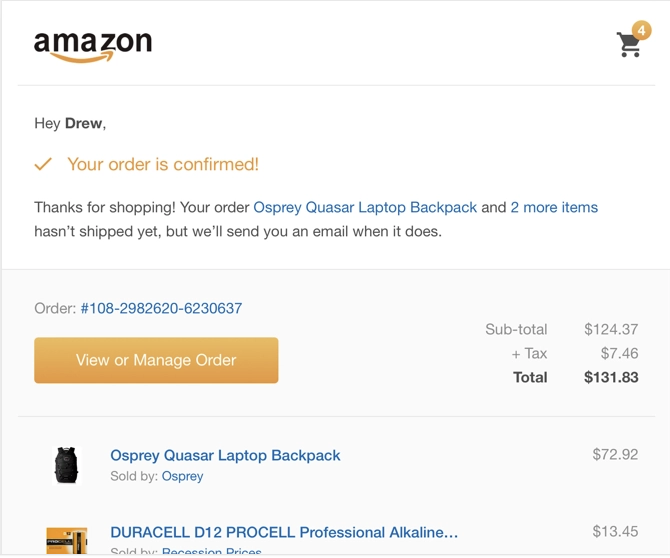
Ultimately, an order confirmation page is a page you’re re-directed to when you click the “Buy” or “Purchase” button, and signifies that an email should be on its way. An online confirmation page is a temporary notice that tells your customer that their transaction went through correctly. If a customer doesn’t see this page, he or she will likely assume their transaction didn’t work.
When you’re creating an online confirmation page, here are a few things you should include:
- Messaging such as “Success! Your order is confirmed”, as well as a note that the customer should expect an email in their inbox soon.
- An order number, delivery details, and order summary (including total cost).
- Optional: Images of the products or services bought.
Additionally, you might include other relevant “Popular Items Based On Your Order” on a customer’s order confirmation page, to incentivize them to purchase other related products. For instance, if they’ve purchased a blender on your site, perhaps you want to show them a smoothie recipe book on their order confirmation page.
Ultimately, it’s critical you remember your order confirmation page and email can serve as major lead generation opportunities if you optimize them correctly, and will ensure your customer feels supported throughout their entire buyer’s journey.

How to Create LinkedIn Articles That People Will Read and Share
Do you create written content? Wondering how LinkedIn articles can improve your exposure? In this article, you’ll learn how to create LinkedIn articles that amplify your reach and engagement on LinkedIn. LinkedIn Articles vs. LinkedIn Posts: What Is the Difference? While LinkedIn posts and status updates are limited to 1,300 characters, LinkedIn articles can be […]
The post How to Create LinkedIn Articles That People Will Read and Share appeared first on Social Media Marketing | Social Media Examiner.
from Social Media Marketing | Social Media Examiner https://ift.tt/2Pf9eeH
via socialmediaexaminer
Everything You Need to Know About Instagram’s Secret Shadowban
When you’re trying to grow a following on Instagram, you depend on hashtags and engagement to expand your audience and reach. So it can feel more than a little disheartening when it suddenly seems like your content isn’t showing up anywhere.
If you feel like your posts are receiving fewer likes and comments, or aren’t appearing for certain hashtags, you might be shadowbanned.
From Instagram’s point of view, shadowbanning makes sense. Shadowbanning allows Instagram to filter out accounts that don’t comply with their terms. Some people use inauthentic measures to expand their Instagram following, like automated bots or hundreds of hashtags irrelevant to their content. If that’s the case, it seems only fair for Instagram to block those accounts, so users can continue receiving genuine and helpful content.
While Instagram doesn’t openly admit to shadowbanning, they released a statement in February that addressed the problem users were having with their content not showing up for certain hashtags.
Their statement at least confirms the hashtag dilemma as a real one — but many speculate that the statement is Instagram’s way of admitting to shadowbanning, without actually admitting it.
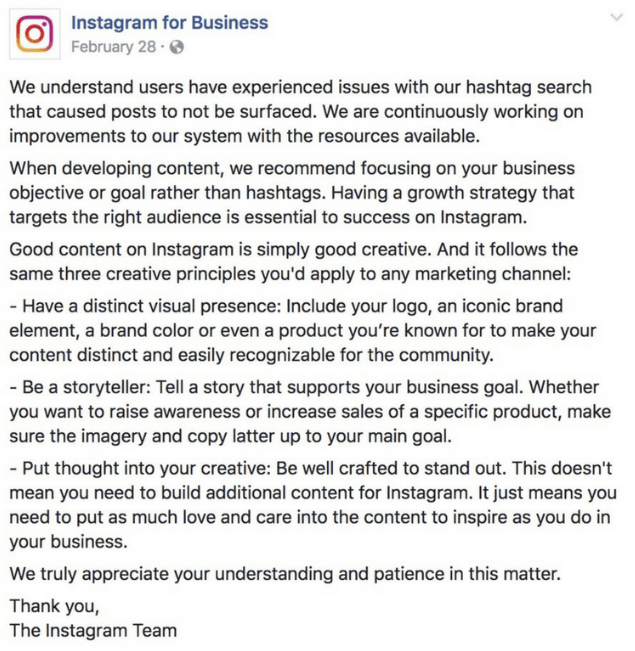
It’s important to note that Instagram changes its algorithm often, so those alterations could be the reason you have witnessed a drop in your engagement.
However, there’s a possibility shadowbanning is a real tactic meant to hide users’ content from the wider Instagram audience, and if you’re being shadowbanned, it’s important you take the necessary measures to get your content seen.
Let’s explore how to know if you’re shadowbanned, as well as our tips for getting yourself off the list.
Luckily, there’s an easy trick to figure out if your account is shadowbanned.
If one or two of your employees can see your post, you might simply be dealing with a drop in engagement. If that’s the case, you can take a number of steps to fix this. (Check out our Instagram Marketing: The Ultimate Guide for advice).
If you run this test and believe you’ve been shadowbanned, don’t worry — we have a solution for you.
Why You Got Shadowbanned, and How to Fix It
There are a few potential reasons your account could have been shadowbanned. To ensure this doesn’t happen again, let’s explore some actions you might have taken that led you to being shadowbanned:
You use bots or another automated “Instagram growth” tool.
If you aren’t putting in the hard work yourself, you’re not growing a following authentically. Instagram frowns on this — in their statement above, for instance, they encourage users to have a strategy that focuses on connecting with the right audience. Using bots is a spammy tactic, and could result in a shadowban.
You use broken hashtags.
Occasionally, a popular hashtag will become overrun with inappropriate content. When this happens, Instagram can remove the hashtag or limit its use. If you use a broken hashtag, it will prevent your other hashtags from ranking, and could also result in a blocked account.
Your account is often reported.
When users repeatedly report an account, Instagram will assume your account is posting inappropriate content or violating their terms of service. They might disable your account, or they could shadowban it.
You’ve been posting, commenting, engaging, or following people too quickly.
Instagram places time constraints on how often you can follow, unfollow, like, comment, or post within an hour or day. This makes sense — if you’re following 80 people within an hour, it’s likely a bot doing the work, not you.
These actions might help you grow a following quickly, but they can’t help you connect with the right people, which is why you’re on Instagram in the first place. Additionally, these behaviors likely result in shadowban, which severely restricts your exposure to a new audience.
How to Fix or Prevent an Instagram Shadowban
To get your account back to normal, you’ll want to reverse the damage. Here’s how:
If you use a bot or another automated service, stop using them and delete them immediately.
To make sure the accounts aren’t still attached to you, go to your desktop Instagram and click “Edit Profile”, and then “Authorized Applications”. If you see any of your bot accounts in the list, click “Revoke Access” to remove them completely. Remember, it’s better to have 100 followers who love your brand and purchase your products, than 1,000 followers who never buy from you or interact with your content.
Don’t use hashtags that are already been banned.
Take a look at Preview’s list of banned hashtags for 2018, and make sure to remove all broken hashtags from your content. Moving forward, be selective and careful with the hashtags you choose, and when in doubt, take a look at the hashtag’s page — Instagram will likely post a message like, “Recent posts from #summer2018 are currently hidden … “, which will indicate to you that the hashtag is no longer in use.
Take a two-day break.
People have reported a full 48-hour break from using their Instagram accounts can reset the system and get you back on track, and it’s worth the temporary social media cleanse anyway, isn’t it?
Follow Instagram’s rules and regulations.
Read and follow Instagram’s Terms of Use and Community Guidelines.
Most importantly, it’s critical you’re posting helpful, authentic content, and abiding by best practices when growing your audience. It will take longer to do this, but slow and steady wins the race — and doesn’t get shadowbanned — right?

The Ultimate Guide to Instagram Filters
Instagram isn’t a new platform, but it changes so often, sometimes it’s hard to keep up.
You might have some questions: how can I add the new geofilters feature to my Instagram Story? Can I use my Snapchat filters on my Instagram pictures? What’s up with this new update — how do I even apply a filter anymore?
Whether you’re an Instagram pro and stuck on choosing the best filter, or an Instagram beginner and not sure how to even apply a filter, you’re in luck. Here, we’ve covered everything from the most popular filters in the U.S., to how to use Instagram filters and even how to use a Snapchat filter on Instagram. Get ready to take your Instagram images to the next level.
Most Popular Filters
There’s a reason most of us turn to our friends to ask, “Which filter should I use?”
With 25 Instagram filter options, it can be tough to choose one. A filter can change the whole mood of an image, and it can even lead to more likes and comments. So wouldn’t it be helpful to know which filters the majority of the U.S. likes best?
Luckily for you, Canva recently analyzed the filters of over one million Instagram photos to figure out which filters are most popular.
Next time you’re in decision-paralysis over an Instagram filter, take a look at this list of the top eight Instagram filters below.
What are the most popular filters on Instagram?
- Clarendon
- Gingham
- Juno
- Lark
- Mayfair
- Sierra
- Valencia
- Walden
1. Clarendon

2. Gingham

3. Juno

4. Lark

5. Mayfair

6. Sierra

7. Valencia

8. Walden

How to Use Instagram Filters?
Using Instagram filters is relatively simple. After opening the app and either taking a picture or uploading your own, tap “next” and then tap the filter you wish to apply. You can also adjust the filter’s strength by tapping the filter again. When you’re happy with your filter, click “done.”
To use Instagram filters, open the app and either take a picture or upload a picture (or video) from your camera roll.

Tap next, and then tap the filter you want to apply.
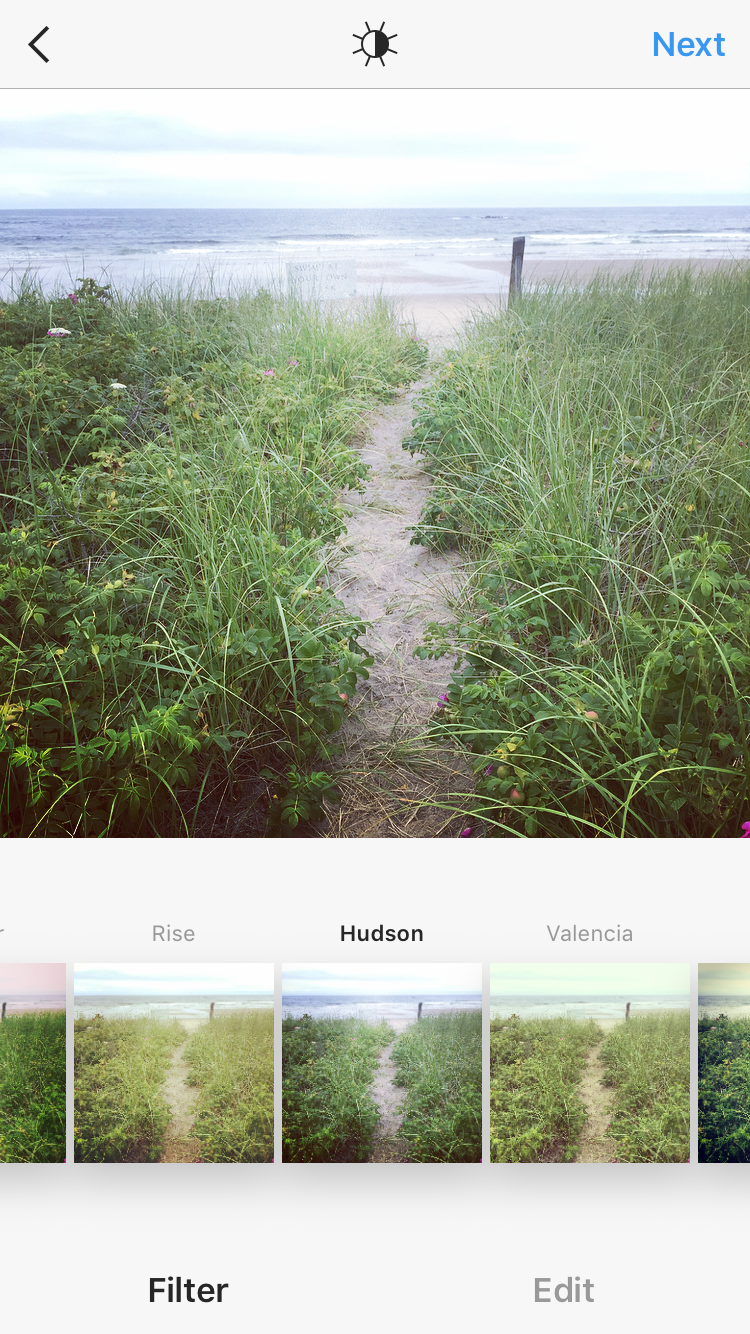
If you want to adjust the filter’s strength, tap the filter again.
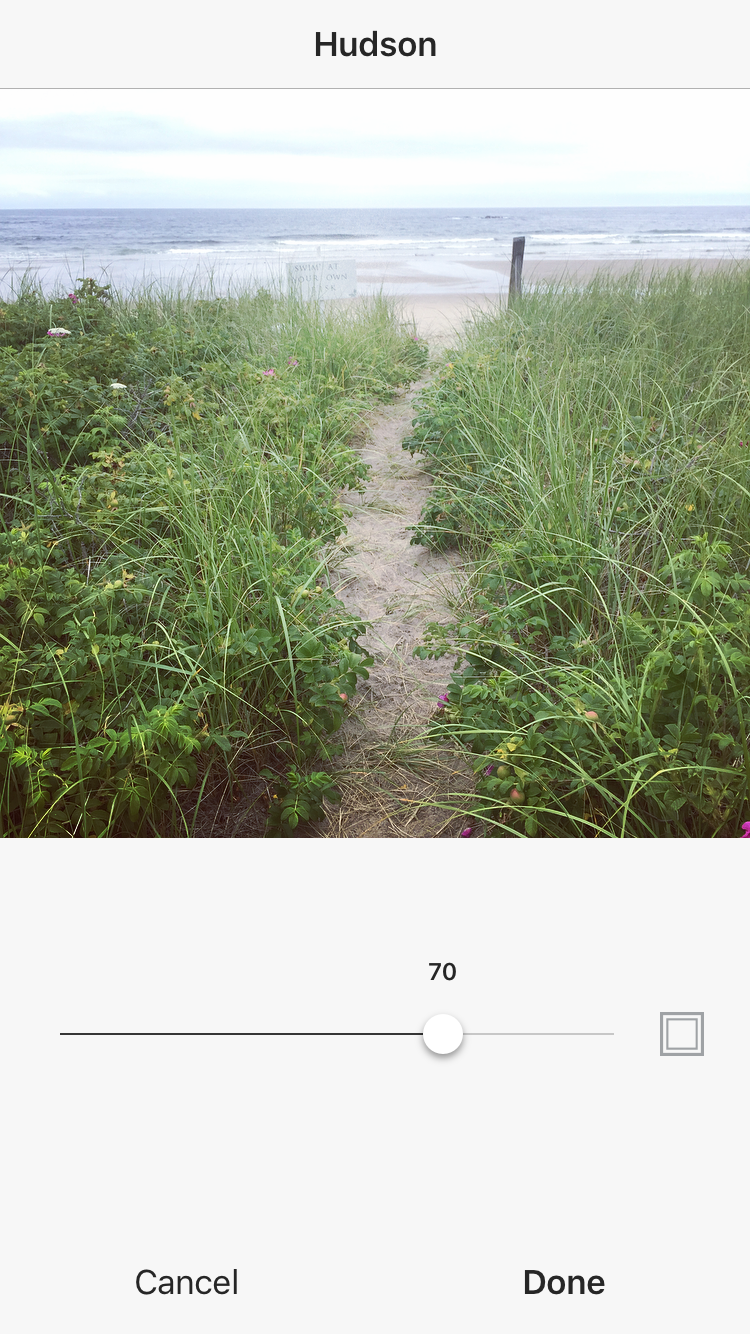
Click done when you’re happy with your filter.
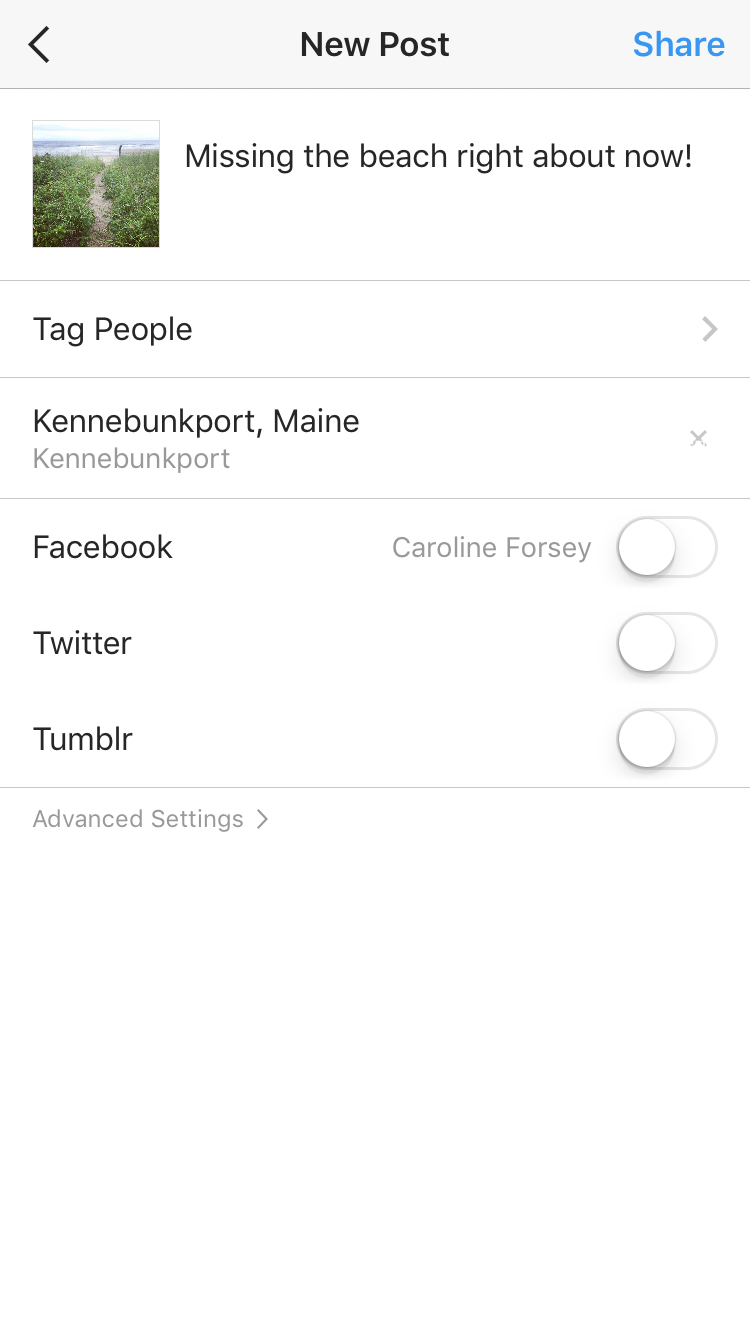 On the next page, you can add captions, tag people, or add locations. When you’re ready, click share in the top right corner.

How to Use Snapchat Filters on Instagram
But what about when you want to use a filter outside of Instagram’s options? Snapchat offers a whole different array of filters, including face filters and animated filters. If you want to show your Instagram audience your goofiest Snapchat puppy-dog face, you’re in luck. Here’s how.
How can I use a Snapchat filter on Instagram?
Add Snapchat filters to your image in the Snapchat app, and then tap the download/save button in the bottom left hand corner. This Snaptchat-filtered image is now saved to your phone’s camera roll. Open the Instagram app and either post the image to your feed, or to Instagram Stories.
When you post a picture to your Instagram story, have you ever been frustrated you can’t add a fun geofilter to the image like you can on Snapchat? Recently, Instagram released its own version of Snapchat’s geofilters, called Instagram “Geostickers.” Right now, Geostickers are only available in New York City and Jakarta, Indonesia, so if you live in one of those places, here’s how you can use the new Geosticker feature.
How to use Instagram Geofilters
Instagram Geostickers are currently only available in New York City and Jakarta, Indonesia. If you’re in one of those cities, take or upload a photo to your Instagram Story, and then swipe up to reveal your Geostickers, Instagram’s version of Geofilters.

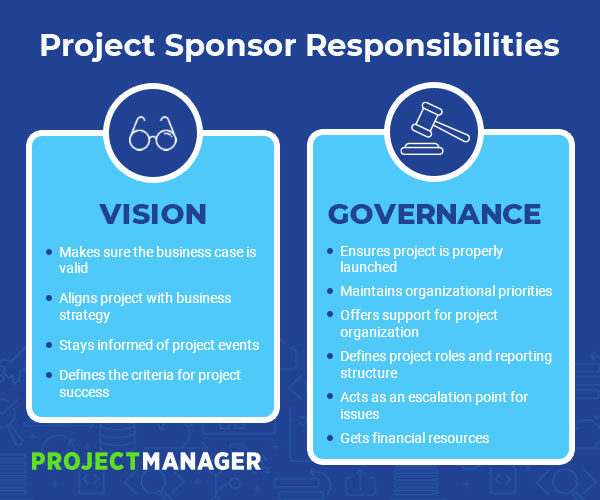
What Is a Project Sponsor? Defining This PM Role
9 Creative Ways to Use Instagram Questions & Engage Your Followers
Instagram is an undeniably powerful channel for businesses to reach a larger audience — in fact, approximately 80% of the platform’s one billion users follow at least one business on Instagram.
The platform is ultimately a site for engagement: we “like” friends’ photos, comment on their posts, and tag friends in influencer giveaways to try and win a free pair of yoga pants.
In short — if your brand is on Instagram, you need to be communicating and engaging with your audience.
Engaging with your audience will help boost brand awareness and create customer loyalty. It can also help inform your knowledge of brand perception, and gain a deeper understanding of what your customers care about.
Fortunately, in 2018 Instagram introduced a new feature that makes it easier than ever to engage with, and receive feedback from, your followers — the Questions Sticker.
Here, we’re going to explore nine creative ways to use Instagram’s Questions Sticker to properly engage your followers. But first, let’s dive into how to use it.
How to Use Instagram’s Questions Sticker
1. Go to your Stories feature, and either upload a photo or take one (I took one within the Stories feature of my pizza box). Then, click the square smiley face in the top right of your screen.
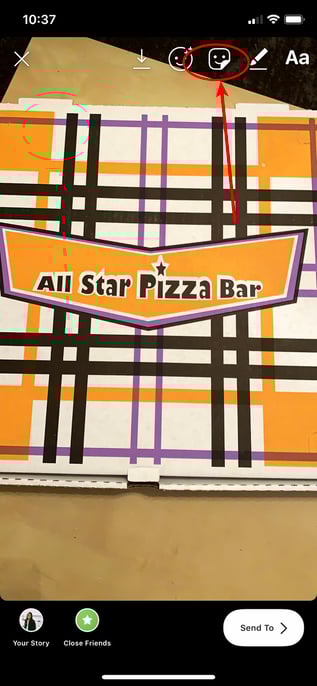
2. Click the “Questions” module.
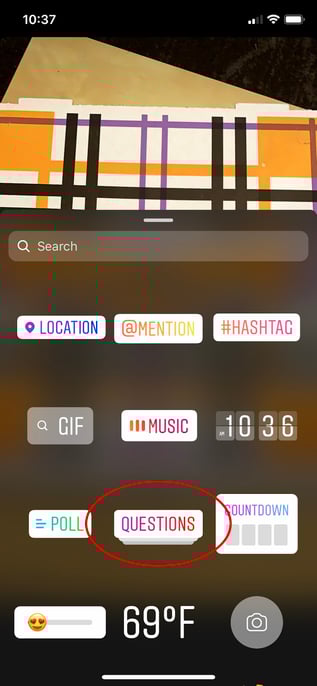
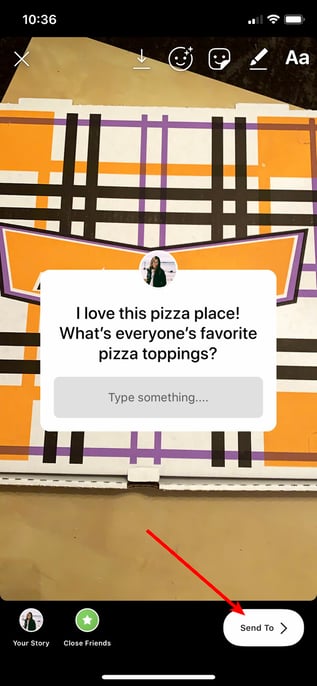
3. The default for the Questions Sticker is “Ask me a question” but you can click the text to type a customized question — for instance, I typed “I love this pizza place! What’s everyone’s favorite pizza toppings?” Once you’re done, add filters or any other features you’d like to include.
When you’re ready to post, click “Send To” in the bottom right.
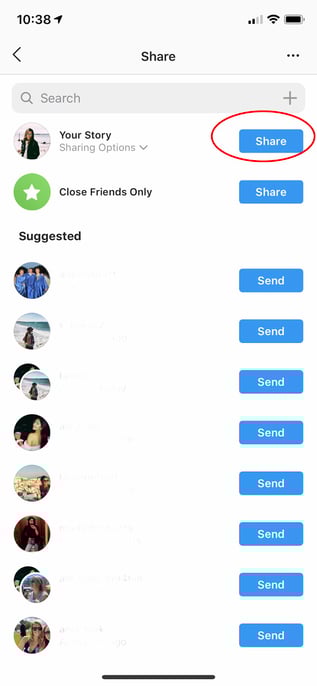
4. Finally, click “Share” beside “Your Story” to post your question to your Story.
5. When you’re ready to see your followers’ answers to your question, open your Story and click the images of the profiles in the bottom left (these are the people who’ve seen your Story).
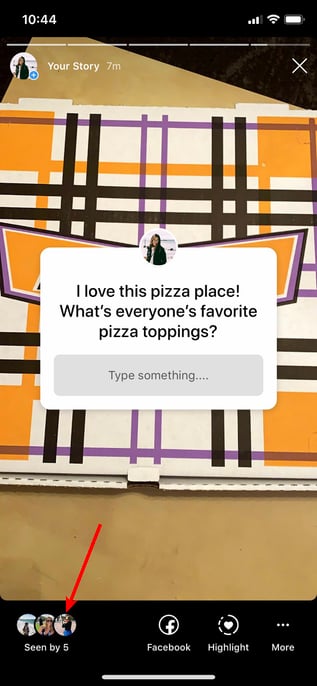
6. You’ll see “Responses” above the list of people who’ve seen your post. To individually share one to your Story, click on it.
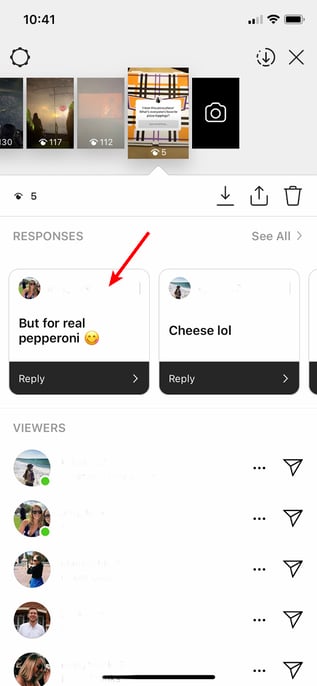
7. Click “Share Response” to share an individual response to your Story for your other followers to see.
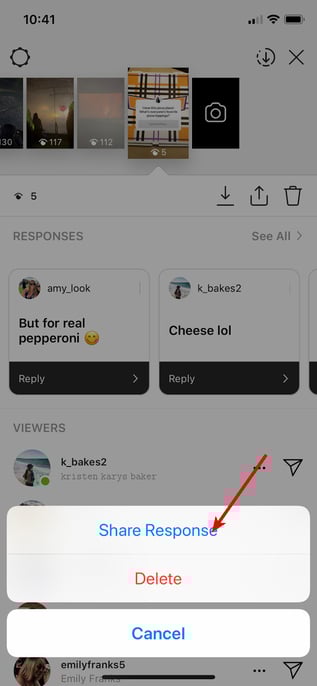
8. Next, take a photo or upload one, and the follower’s response you chose will appear on top of the image. When you’re ready to post, click “Send To” in the bottom right.

It’s important to note — your followers will become tired of constantly answering questions on your Story, so use the Questions feature sparingly. You don’t want to overuse the Questions Sticker and risk answer-fatigue from participants.
Additionally, you have a “Poll” feature if you want to ask your followers a binary question, like “Which pizza topping is better, cheese or pepperoni?” Save your Questions feature for more complex questions — and try to make them fun. Remember, your followers are on Instagram for entertainment, so they don’t want to feel quizzed by tough questions.
Lastly, consider what types of questions might actually help you know more about your audience. This will take some trial-and-error, since every brand’s audience is unique, so test a few different formats. For instance, if your brand is in the tech industry, perhaps you want to post a Question asking your followers’ their feedback on an innovative new tech product.
Alternatively, if your brand is in the retail industry, maybe you want to ask more generic questions like, “Do you still follow the no-white after Labor Day rule? If so, tell me why.”
For more inspiration, let’s explore some creative ways influencers, celebrities, and brands use the Questions Sticker.
Instagram Questions Ideas
1. Conduct a Q&A with your followers.
Influencers and celebrities often use the Question feature to conduct Q&As with their fans. For instance, Ali Fedotowsky, a blogger and former Bachelorette, will typically tell her followers to “Ask me stuff :)” at the end of the day.
Her responses are usually fun, casual, and friendly — like “Today? The wine” in response to “Best part of being a mom?”. These Q&A’s enable Ali’s followers to feel like they’re having a casual conversation with a friend. Additionally, the Q&A’s help Ali create stronger relationships with her fans and gear content towards what they want to know.


2. Showcase your brand’s values.
Away, a luggage company with 502K followers on Instagram, used the Questions Sticker to demonstrate their support for Pride week while engaging meaningfully with followers. In the first post, they wrote “Happy #Pride from all of us at Away”, and followed the post with a question — “How are you celebrating?” to further engage with followers.


3. Conduct a pop quiz.
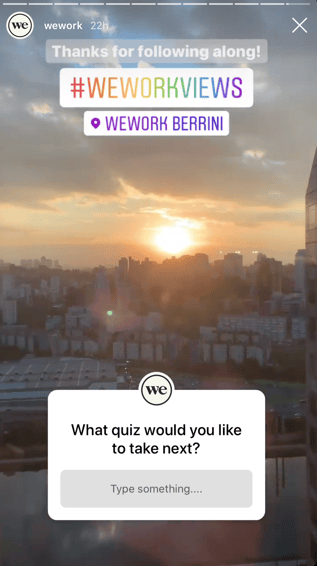
WeWork, a company that provides collaborative workspaces for startups and entrepreneurs, used their Stories to feature WeWork spaces around the globe with “fill-in-the-blank” quiz questions, such as “WeWork in ____”.
Best of all, they finish their round-up of quiz questions with a “What quiz would you like to take next?” It’s a good idea to use the Questions Sticker as an opportunity to ask followers what they want to see more or less of on your feed — it can help your team brainstorm more content while ensuring you’re making viewers feel like their opinion is valuable to your brand.

4. Ask followers their thoughts on a new product or service launch.
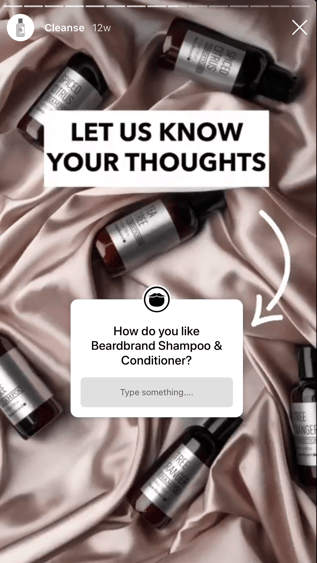
If done wisely, you might consider using the Questions Sticker to ask your followers what they think about a new product or service — but conduct these Questions sparingly, since they might seem too self-promotional.
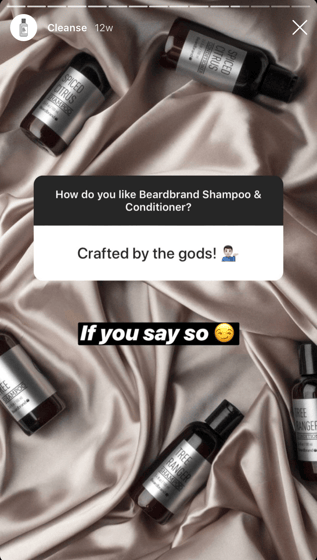
Beardbrand, a line of high-quality grooming products for men, effectively used the Questions Sticker to ask their niche audience how they felt about Beardbrand’s new shampoo and conditioner products. Beardbrand also posted their followers’ answers, and used it as an opportunity to demonstrate the brand’s sense of humor — for instance, in response to a follower’s “Crafted by the gods” answer, Beardbrand posted “If you say so” with a side-eye emoji.
If you do decide to ask followers about their thoughts on your product or service, consider posting their answers with funny or unique responses, as well.
5. Share information from a thought leader or expert.
Your Questions feature doesn’t just have to feature your own brand — you might also use it to post useful content from other experts in the field, as long as you believe your followers would still be interested in it.
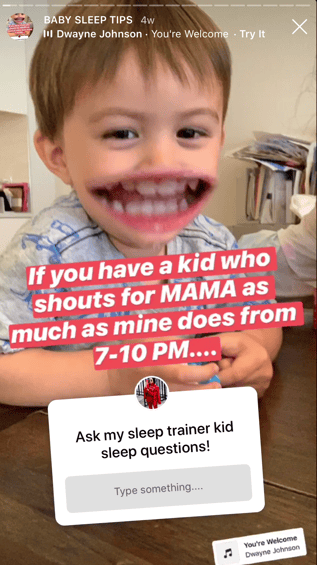
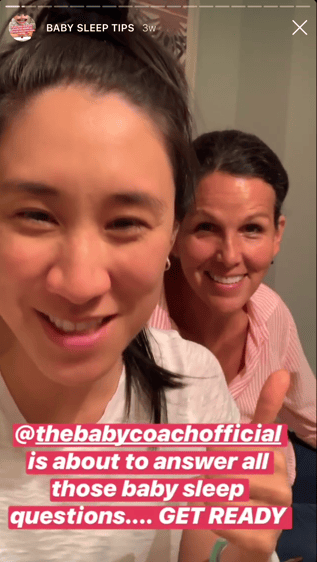
For instance, Eva Chen, an author and influencer with 1.2 million followers on Instagram, knows a good portion of her followers are mothers as well — which is why she featured her sleep trainer, @thebabycoachofficial, on her Story to answer some of her followers’ biggest sleep-related questions. This partnership helps @thebabycoachofficial reach a new audience and grow her following, while providing Eva Chen’s followers with free, useful tips — a win, win.
6. Use Questions as a lead generation strategy.
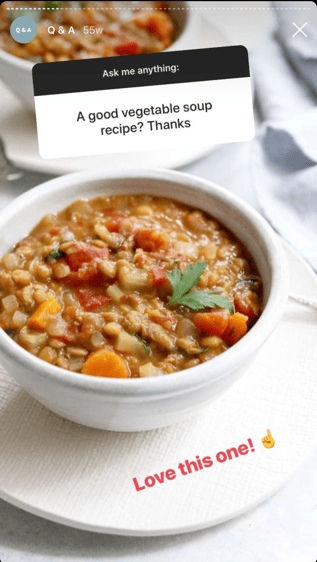
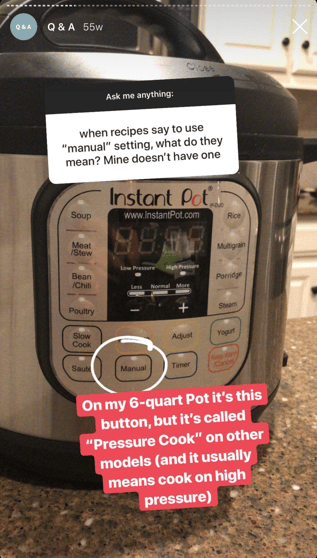
Megan Gilmore is a best-selling author and creator of the Instagram account @Detoxinista, which posts healthy recipes as well as Instant Pot tips-and-tricks. When Gilmore conducts “Ask me anything” Q&A’s, her followers typically ask recipe-related questions, which allows Gilmore to organically link to recipes on her blog — for instance, in response to “A good vegetable soup recipe”, Gilmore links to her vegetable soup recipe.
However, it’s important to note Gilmore doesn’t just link externally in her Q&A’s — she also provides useful tips and content from within the Story itself. When followers ask her about an Instant Pot, for instance, she posted the answer right within the Story for other followers to see.
Simply put, you can use Questions as an opportunity to link to your website, blog posts, or other helpful content, but do so sparingly, and ensure some of your responses to your followers’ questions can be found within the Story itself. This can help drive traffic to other content, but doesn’t require your followers to be ready to click-away from your Instagram page if they don’t want to.
7. Share tips from within the industry.
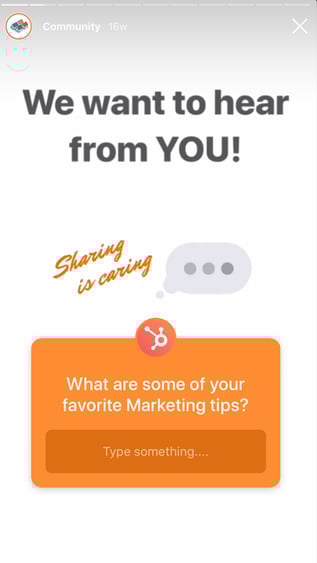
On Instagram, HubSpot’s followers are often other marketers — which is why it’s helpful for @HubSpot to post “What are some of your favorite marketing tips?” and share the responses of some of its followers, so other marketers within the industry can collect tips from a myriad of sources.
Ultimately, you might use Questions as an opportunity to connect with your followers and learn from them, as well. Rather than asking questions directly related to your product or service, consider how you might ask a question that helps your followers learn more about the state of the industry, including tips, trends, and new ideas to improve their own business strategy. Show them their voice is valuable, too.
8. Have fun with your followers!
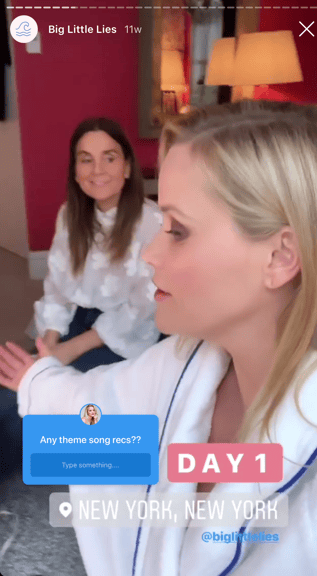
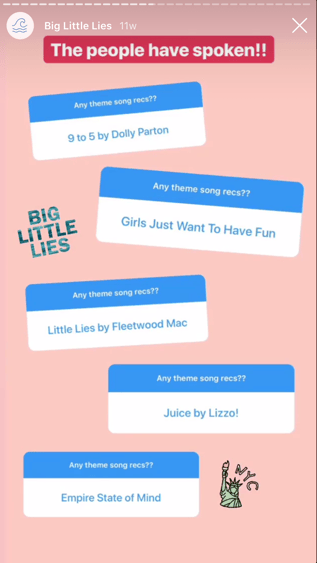
Reese Witherspoon is an exceptional example of someone who uses Stories, and Questions Sticker, to have fun with her fans — for instance, during the press tour for Big Little Lies, Witherspoon used the Questions feature to ask her fans for theme song recommendations for the tour. Later, she posted some of her favorites.
Ultimately, the Questions Sticker is a chance to have fun with followers and post lighter, more entertaining content. If your brand is heading to a conference, you might use Witherspoon’s tactic to ask followers a good “theme song for the conference” or “favorite ice breakers to use at a conference”. Plus, posting their responses shows them you’re listening, and might make other followers more willing to partake in future Questions you post.
9. Announce new releases.
Starbucks playfully quizzed their followers with a question that added up fire, chocolate, and sun emojis, and said “The __ _____ is coming back…”. Starbucks then posted followers responses throughout the day, before finally posting one page with the “correct” answer — “S’mores Frappuccino”.
By building suspense (and showcasing some funny followers’ responses), Starbucks successfully created excitement around their new product while quickly (and cost-efficiently) spreading the word. You might consider using a similar strategy when announcing an upcoming new product or event.
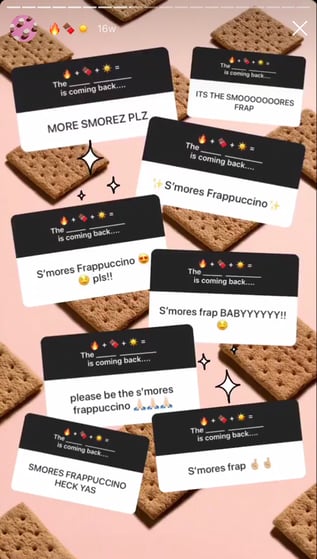
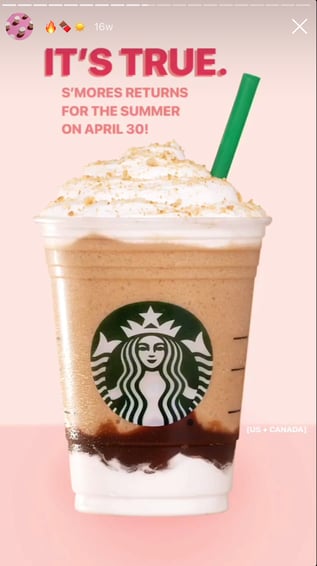

How to Organize Your Team for Successful Organic Social Campaigns
Do you want to do more with your organic social media activities? Is working with many different team members and departments slowing you down? In this article, you’ll discover how to increase the success of your organic social activities while working with many people. #1: Gather Your Foundational Campaign Elements Start by building your organic […]
The post How to Organize Your Team for Successful Organic Social Campaigns appeared first on Social Media Marketing | Social Media Examiner.
from Social Media Marketing | Social Media Examiner https://ift.tt/2U65OcS
via socialmediaexaminer
How to Build A Business Plan That Actually Works [Free Template]
We’re living in a golden age of startups and side hustles, where it seems like more people than ever before are striking out on their own with new business ventures.
Whether you’re just beginning to think about starting a business, or already drafting a formal document with your current business goals, it’s crucial to clearly define the scope of every aspect of the company — from mission, to target customers, to funding and finances, and beyond.
When you’re just getting started, it can be tempting to think of a business plan as just a catchy company name and a quick description of what you’re selling.
But in the back of your mind, you’re probably aware that planning a business involves thinking through a huge number of details and decisions. It can be daunting to consider the full scope of all that starting your business really takes.
HubSpot and General Assembly have teamed up to help get you started on the right foot with our free Business Plan Template. Inside, you’ll find templates and checklists to help you:
- Sell the story of your company
- Describe your product line and plan for how to stand out among competitors
- Put together the necessary financial projections to make a strong start
- Plan longer-term goals and metrics
- Consider legal formalities that require attention
- Create your buyer persona and determine your product/marketing fit

How to Become an Influencer in Your Industry
Influencer marketing has skyrocketed since it first made its mark.
That’s very much due to the way purchasing decisions have changed over the years. In 2018, a study found that only 4% of people trusted celebrity endorsements. This is probably because they prefer to seek product and service recommendations from those who are, above all, knowledgeable and credible.
And today, those qualities often come in the form of social media influencers.
When it comes to getting advice or recommendations on what to do — which product to buy, which movie to see, and where to travel on vacation — there are still areas where we trust our peers more than we do “experts.”
But that’s part of what makes an influencer so powerful: Despite perhaps being an expert in his or her field, by sharing content and insight in a certain way, consumers view that person more as a peer. We have things like constant access to video and other visual content to thank for that — the tools that help us “get to know” people online in ways that weren’t quite as accessible only a few years ago.
So, how can you tap into this area, and become an influencer in your own field?
Influencers are ordinary people who have earned a substantial loyal following because of their expertise and transparency. Unlike celebrities actively endorse products on their social media accounts, influencers achieved their fame because of the valuable information they share with their followers.
It’s for this reason why one of the influencer marketing trends experts anticipate in 2019 is the increase in demand for social media influencers, specifically micro-influencers (influencers with less than 100K followers). Not surprising, more and more people want to become social media influencers.
The question is: where do you start?
In this blog post, I’ll be laying out ten ways how to become a social media influencer. On their own, they will help you slowly make your mark and establish you as an influencer in your industry. But do all these together, and you have a powerful strategy that will help speed things up exponentially.
1. Find your niche.
If you want to become a social media influencer, the very first thing you need to do is to choose a specific niche where you want to be known.
Although most social media influencers start out posting content, they’re passionate about, what sets them apart is the fact that they tend to focus on a particular niche within the industry they’re passionate about.
To find your little corner of influence, you’ll need first to determine who is your target audience by developing a unique persona—a semi-fictional representation of your ideal reader. Tools like HubSpot’s Buyer Persona Generation Tool can help you identify the individual wants, needs, challenges, and goals of your ideal reader that you can help solve and address, pointing you to the right niche to establish yourself and grow as an influencer.
2. Use the First Principles Thinking approach.
In an interview with Kevin Rose, Elon Musk explained that there are two reasoning approaches people use. The first and most common is the analogy approach. People that use this reasoning method decide to do things based on what has happened in the past.
That’s why we often see many people in a particular industry doing nearly the same thing, talking about the same topics, and even using similar formats when it comes to publishing and promoting their content.
The second reasoning approach is what Musk refers to as the First Principles Thinking approach. Instead of basing decisions on past successes or failures, Musk and others that use this reasoning approach study objective fundamentals and make their decisions based solely on that.
What’s good about following Musk’s way of thinking and reasoning is that it opens you up to other possibilities and approaches by “forcing” you to disregard the status quo, and think differently. Doing that can help set yourself apart from other influencers in your niche, and allow you to bring something new and fresh to the table for your target audience.
3. Choose your social media channel.
It’s important to pick the right social platforms where audiences with interests that align with your brand could engage with you. Two of the most prominent social networks where influencers are thriving in 2019 are Instagram and LinkedIn.
Instagram is the channel where 93% of social media influencers focus their content — because it gives them the best results.
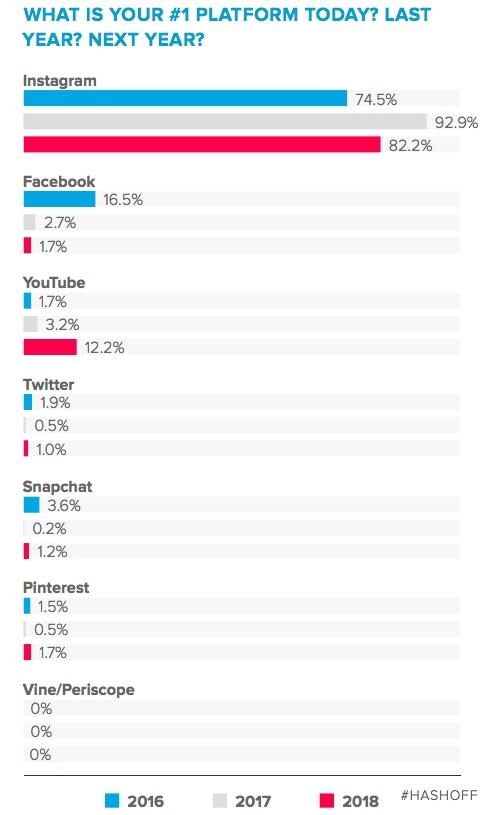
Source: Marketing Profs
However, just because those are the current statistics doesn’t mean that Instagram is a perfect choice all the time.
The reason is simple: Your ideal audience may not be spending most of their time here.
On Instagram, you might see influencers that focus on lifestyle-oriented industries. For example, you might see a travel blogger posting about hotel stays or videos of food bloggers making a recipe. Because Instagram is quickly becoming video friendly with its Stories feature, you might also see sponsored content and marketing videos such as influencer hosted makeup tutorials.
Although LinkedIn is gaining more traction with lifestyle content, influencers can succeed on this platform when they focus on career or academic tips, or job-related content. While LinkedIn does offer video posting options, influencers can also embrace text more heavily on this platform by publishing blog-styled posts or regular text-posts.
If you want to quickly grow your following and establish yourself as a social media influencer, you need to make sure that you choose the right social media channel based on your niche and ideal audience.
Here are three questions to ask to help guide you in choosing the right social media channel:
Who is your target audience?
Again, this is where creating a holistic persona of your ideal audience is crucial. Instagram and Pinterest are excellent choices if you’re aspiring to reach out to millennials. On the other hand, if your target audience consists mostly of business executives, LinkedIn may be your best bet.
Where are the other influencers in your niche?
Aside from sharing the same target audience, being active in social media channels where the big influencers in your niche open the door for you to reach out to them, and even collaborate with them in the future.
One tool I found extremely useful for this is BuzzSumo. When you do a search here using your targeted keyword, you’ll not only see what topics other influencers have tackled, but where they also share these pieces of content.
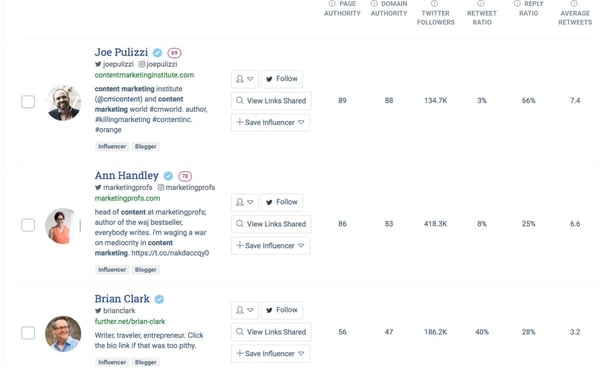
What type of content will you create?
Some social media channels like Facebook and LinkedIn allow you to post a diverse range of content formats while others like YouTube and Instagram only focus on providing users a specific content format.
That said, it’s vital that you select the social media channel that best suit the content strategy you’ll develop, which we will look into in the next section.
Regardless of which social media channel(s) you choose, remember not to go overboard with your selection. Stick to using two to three networks. Otherwise, you’ll be spreading yourself too thin, and will find it difficult to build your credibility and following.
4. Develop your content strategy.
Just like in inbound marketing, the format and quality of the content you publish will make or break your chances of successfully building yourself as a social media influencer.
Decide on the format you’ll use when creating your content. It should be one through which you’re able not only to deliver valuable information, but also, express your personality and voice — which help add uniqueness to the content you produce for your target audience.
Part of developing an effective content strategy is giving your audience the right balance of informative content and personal content. Remember, one reason why people trust influencers is due to their relatability.
One efficient way to do this is through the 5-3-2 principle: Out of every 10 posts you publish in your social media account, five of these should be valuable content written by someone else, three are educational and informative content you created yourself, and two should be posts about yourself.
Now, you may be thinking, “How will this help me become an influencer if half of the content I’ll be publishing is curated content?”
For starters, influencers are known for being able to provide valuable content to their audience. That includes sharing content written by others that they believe their followers will find useful.
More important, sharing content published by other influencers in your niche will help you slowly get their attention. As a result, it will be much easier to reach out to them and ask them to do the same for you later on.
If you need help discovering topic ideas for your content, try these resources.
Google Related Search Keywords
This is found at the bottom of the page after you search on Google. It lists down the most frequently used long-tail keywords used by your target audience when searching for content on the internet.
Answer the Public
Answer the Public is a website that gives you a comprehensive list of the different questions that are commonly asked around your chosen keywords, which you can then answer through your content.
Quora
Similar to Answer the Public, Quora gives you a list of different questions asked surrounding your selected keyword. The main difference between the two is that unlike Answer the Public, which offers you a list of questions based on search algorithms, the questions you find in Quora are those that were left explicitly by individuals currently facing a problem or challenge.
At the same time, Quora allows its members to leave answers to these posted questions. This gives aspiring social media influencers the chance to flex their muscles, and showcase knowledge on this topic — and, eventually, your niche.
5. Distribute your content.
No matter how great your content is, if you’re not getting people to see it and engage with it, it’s not exactly useful.
That said, it’s important that you carefully plan out when you’ll be publishing and distributing your content on social media.
The best time to post content on social media hugely depends on which social media channel you chose to use. This infographic provides a detailed breakdown of the best days and times when to distribute content for each of the most popular social media networks.
It’s just as critical to know how to post your content on social media. While each social media channel has its own rules and guidelines, here are some general best practices that are applicable regardless on which social media channel you use.
Stick to one theme per social media channel.
Focusing on one specific theme for each of your social media channels allows you to give your followers a more holistic picture of who you are, what you do, and what you stand for. That way, you’re able to publish more diverse content while still keeping your profiles very sleek and cohesive.
More important, it helps you categorize the different types of content you publish. That way, your followers know which social media channel they’ll find the content they need from you.
Customize your message.
Even if you’re posting the same piece of content on different social media channels, always take the time to make sure that you customize the message you include in it. Not only does it make each of your posts more personalized, but as Aaron Haynes, founder of Fenix Pro points out, it prevents your followers from feeling like their being spammed on their social media feeds.
“You need to make sure that you tailor every single content you post caters to the wants and needs of your followers, whether it’s a regular post or a paid post,” he explains. “The worst thing is that they can report your account as spammy, which could mean the end of your social media influencer dream.”
Optimize posts for mobile.
The average person spends over three hours on his or her mobile device.
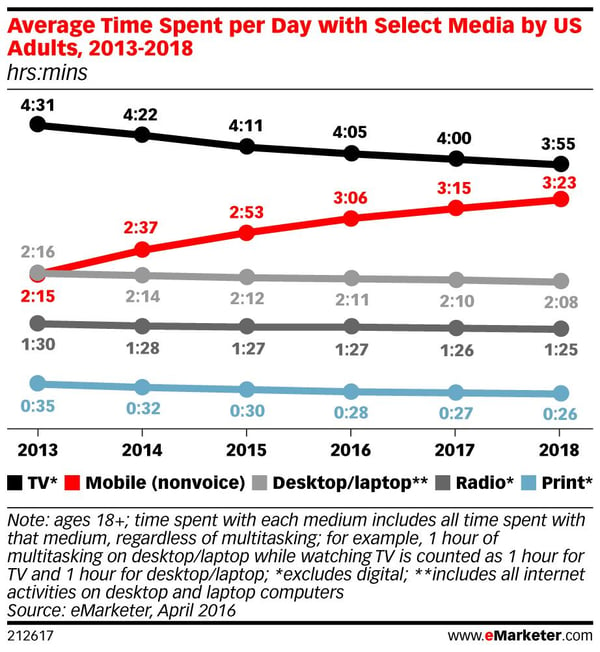
Source: eMarketer
And within that time, 80% of it is spent on social media. That said, make sure that the posts you publish are just as appealing in mobile as they would be when viewed on desktops or laptops.
6. Post tutorials on Instagram, YouTube, or Facebook.
People who are looking to learn more about brands or products love to use video to do so. If your strategy or industry is highly visual, consider showing audiences how to use a product you’re trying to promote with a quick how-to.
Once audiences see a product in use, they might want to replicate the how-to project you’re doing or feel like the product is easy to use. These thoughts might lead them to an actual purchase and make your clients or sponsors very happy.
To help you brainstorm ideas, here’s a quick guide to how-to videos that really work.
7. Or, write LinkedIn or Medium thought leadership.
Thought leadership is content from an industry expert that offers advice or information on a certain topic. If you want to be an influencer in a business-related industry, or have people look to you as a leader or management-guru, a great place to start posting thought leadership is on LinkedIn.
As we mentioned above, you can use LinkedIn’s blog post feature to write a more long-form post, comment on other posts or discussions, or just publish standard posts. If you prefer video, the platform also has options for that as well.
If you want to write a lot of blog posts, another great place to publish your work could be Medium. Users on Medium see posts on their feed based on their interests and who they follow. So, if users share the same interests as you, they might be directed to your post.
8. Grow your network.
While you’re still in the process of establishing your credibility and expertise as a social media influencer, you’ll need to actively grow your follower base.
One of the most effective ways of doing this is through blogging. Even though more Internet users are turning to social media networks for information, the fact remains that you don’t entirely own your space here. One misstep can easily cause these social media networks to take down your account, causing you to lose all of your content and followers.
Blogging can help you kickstart your follower base by helping you get discovered. By including social media sharing buttons on each of your blog posts, your visitors can share your content with their respective social media networks.
If you have the budget, and you have a premium content offer on your blog, Justin Morgan — a.k.a., the Dental Marketing Guy –recommends promoting it as a sponsored post. That way, your content can find its way onto the feeds of those that match your ideal persona, introducing yourself and what you have to offer to them.
Blogging is also an efficient way to reach out and connect with is influencers in your niche as well as those related to yours. Blogging was how I connected with key influencers in my niche and exponentially grew my follower base.
Creating guest posts is another way of growing your followers. Getting featured on a reputable site within your niche helps you further establish your credibility and authority. At the same time, it will help you capture the attention of the more prominent influencers in your niche, and even open the door for collaboration with them.
9. Engage with your followers.
When your followers leave a question or comment on your posts, take the time to acknowledge and respond to them. That can make them feel like they’re valued and that you sincerely want to help them. It will also help you develop a relationship with them.
Of course, not all of the comments and questions will be positive. As an influencer, expect that you’ll have your fair share of negative comments and criticisms. Make it a point to keep your cool and address them professionally.
10. Evaluate your progress.
This step is crucial, especially if you’re looking to collaborate with brands for their influencer marketing campaigns, since this is one of the things that brands look for in an influencer to partner with.
Most social media channels give you insights and analytics to monitor your progress — things like demographics, reach, and engagement rate, that will show how quickly (or slowly) you’re building your audience. It will also shed light on which content formats get the highest engagement rates, so that you can create more of these.
11. Stay updated.
If you’ve been active on any social media channel, you know how often networks update their algorithms, as well as their posting terms and conditions. As an aspiring influencer, you need to keep yourself updated with these changes to avoid penalizations.
You’ll also need to familiarize yourself with FTC guidelines and policies, especially if you’re going to be collaborating with brands to promote their products and services on your social media accounts.
With influencer marketing proving itself as a highly effective marketing strategy, the FTC has become even more vigilant in monitoring brands and partner influencers that might be violating marketing guidelines.
12. Be consistent.
According to Adam Steele, founder of Loganix, if there’s one thing that surpasses quality content, it’s consistency.
That’s because your followers need to be able to count on you to deliver quality content on a consistent basis. If you don’t, they’ll eventually stop following you, or at least paying attention to you.
Scheduling your posts using a social automation tool like eClincher or HubSpot’s social publishing tools can help ensure that you stay consistent with your posts. Instead of manually publishing on each of your social media profiles, these tool allow you to create, upload, and schedule posts in batches.
Positioning yourself as a social media influencer will take some time, so you’ll need to be patient with the process, and stay consistent with it.
Most important, understand that becoming a social media influencer in your industry is not the end destination. Instead, it’s a stepping stone to more significant opportunities and responsibilities.

What is TikTok? And Why Marketers Need to Care
A year ago, I downloaded a trendy new app called TikTok. When I opened it, I was overwhelmed by a feed of hilarious looping videos and bizarre music montages made by other users. It reminded me of Vine, the looping video platform that was killed by Twitter a few years beforehand.
As I continued to explore the app, I felt like I was witnessing utter chaos — but in a good way. The stream of odd videos had no rhyme or reason to it, but it kept me entertained and easily distracted for the whole weekend.
As the app neared its one-year mark, a news story caught my eye about how brands were becoming more interested in TikTok due to its astounding user growth. I was shocked that this funny platform was starting to be taken seriously.
When I offered up a few TikTok-related post ideas at a HubSpot Blog pitch session, colleagues who knew of the app were also as surprised as I was about this marketing trend.
Meanwhile, others were asking, “What the heck is TikTok? All I can think of is that Ke$ha song.”
While many marketers have heard of it — and might even know that it got over 1 billion downloads in its first year, they might still scratch their heads when they read about TikTok or see some of its nonsensical videos.
So, why are people so obsessed with it? And — most importantly — should marketers even care about this super bizarre, niche app?
In this post, I’ll attempt to unravel some of the mystery behind TikTok and explain how marketers can leverage it now or in the future. To give you some added marketing inspiration, I’ll also touch on a few brands that have already conquered the platform.
In 2017, ByteDance acquired the app Musical.ly and later merged it with its new app, TikTok, in 2018.
The app, which now has more than 500 million monthly active users, is like a combination of its predecessor, Musical.ly, and the discontinued short-video app, Vine.
Before essentially becoming TikTok, Musical.ly had nearly the exact same layout. The app allowed users to lip-sync and virtually duets with friends to musical overlays. To give you an idea of what the app looked like, here’s an old ad for it:
Image from TikTok
Meanwhile, users on Vine had a similar layout to Instagram. They could record and post basic 10-second looping videos. Most of which had a comedic tone to them. Although Vine didn’t have a musical overlay feature til later in its existence, users would often play music in the background or work in sound effects in other creative ways.
When you enter TikTok, you’ll see a video feed — similarly to Musical.ly’s — with a wider variety of post styles, from music montages to funny shorts with insane AR filters. Here’s a screenshot of what this feed looks like:

Like other visual apps such as Snapchat or Instagram, TikTok has become a creative outlet for young adults and teens. To give you an idea of what you might see on the platform, here’s a highlight reel published on TikTok’s official Youtube page:
Soon after its launch and youth popularity, celebrities and comedians, like Jimmy Fallon, began to discuss it and use the app themselves. Here’s a quick video of Fallon showing it to his audience on an episode of The Tonight Show:
Examples of TikTok Posts
If you’re interested in joining TikTok for personal or business-related reasons, it can be helpful — and pretty entertaining — to look at other posts for inspiration. Here are a few of the common post styles you’ll see there:
Music Videos or Montages
On any given day, you’ll see a number of musical montages or mini music videos on the platform. While some people are just lip-syncing to songs, others might get more creative. In this interesting example, a user combines a video game’s storyline with a song with lyrics that relate well to what the main character is doing.
Comedic Shorts
Most of the posts you’ll see on TikTok are aimed at getting laughs. While you might see shorter and simpler funny videos, you’ll also see more detailed, well-planned posts that feel like short narratives. Here’s a great example of a post which tells the story of a cat going on vacation.
Videos with Special Effects
In this funny example, users take advantage of TikTok’s AR face filters.
Duets
With the Duets feature, you can reply to a musical post by recording your own video to the same music. Your video will then display back-to-back with the original post. While some people will use this former Musical.ly feature for lip-syncing videos, others will get more creative by adding a visual response, like this:
Challenge Videos
On TikTok, you’ll also regularly see hashtagged challenges. These videos will often encourage you to record yourself doing something odd to join in on the challenge. Here’s an example of someone participating in the Chipotle’s #ChipotleLidFlipChallenge. The goal of the challenge is to flip a Chipotle to-go bowl’s lid with only the bowl:
Brands on TikTok
Although TikTok might feel like just a hub of odd posts, its popularity and video-focused layout opens brands up to a variety of unique marketing and brand awareness opportunities. In fact, it’s already becoming a tool that companies like Chipotle and Washington Post use to engage new audiences.
But, because TikTok doesn’t hyperlink posts to websites and only recently started to allow advertising, these businesses seem to be focusing on boosting brand awareness, rather than leads or traffic.
To succeed on TikTok, marketers will have to get creative. While entertainers and publishers might have an easier time transitioning content into a TikTok videos, some brands will require more brainstorming.
One brand that creatively and virally highlighted a product line naturally on the app was Guess. The major fashion brand recently launched the #inMyDenimChallenge, which encouraged TikTok users to film a music video while wearing Guess’ new denim line.
Two other notable companies that are taking a unique approach are The Washington Post and the United Nations.
The Washington Post’s account takes shockingly casual and comedic approach with the app. Here’s an example of one of their recent posts:
While The Post publishes a variety of funny shorts about the newsroom, the United Nations has started dance challenges to spread awareness about more serious topics like global warming and world hunger. Here’s a video post that responded to the UN’s #danceforchange challenge:
Although some of the first brands to join TikTok were large, well-known companies, it can still be helpful for small businesses to look at what businesses and influencers are trying on the platform.
Branded video examples, even from bigger companies, could arm you with helpful takeaways related to creative marketing strategies and experimenting with new platforms. Even if you don’t join TikTok, checking out these videos could also help you come up with ideas for posts on other visual platforms, like Instagram.
If you’ve enjoyed the examples we’ve shown you so far and want to start making your own, below are a few basic instructions for filming your first video. Because TikTok has so many features, we’ll also be publishing a detailed guide on how to use the entire app. Stay tuned.
1. Open the app and go to the center camera tab.

2. Use the labeled icons around the screen to explore and add filters or music.
The Music icon will appear in the top center of the screen while the more intense AR filters and video overlays can be found by tapping the “Effects” button on the bottom left of the camera screen.
3. Tap a time setting at the bottom to choose how long your video will be.
Your video can be 15 or 60 seconds long. You can also use this bar to enter Photo Template mode. This will allow you to upload photos into slide-show styled templates.

4. Start recording all at once or in segments.
Hold down your finger on the record button and release it when you’d like to pause recording.
5. After recording, add more filters, text or musical overlays, and stickers.
6. Press Next to enter post settings.
Include a caption and relevant hashtags to make it more searchable. You can also tap Drafts to save the post for later.
7. Adjust the privacy and comment style by tapping on the settings under the video caption.
You can also turn Duets on or off if you don’t want people to share a video response to your post.
8. Publish it!
What’s Next for TikTok
TikTok isn’t going anywhere anytime soon. While companies like Facebook have tried to recreate the app, they haven’t been nearly as successful.
With TikTok’s growth and lack of competition, we highly recommend keeping this app on your radar — even if you aren’t sure of how you’ll use it yet.
If you think TikTok could be a great part of your strategy, download it and start experimenting. This will help you learn about what content is or isn’t engaging long before your competitors. Not to mention, the app is so new that there aren’t many rules or norms around what you can or can’t post.
So far, if TikTok has taught marketers one thing, it’s that experimenting with new platforms and thinking outside of the box can help you engage new audiences and boost brand awareness.
As you start to brainstorm your first TikTok posts, here are some tips to help you get your creative juices flowing:
- Embrace the filters and musical overlays.
- Don’t be afraid to be funny.
- Use hashtags and reply to challenges for more engagement.
- Come up with creative ways to show off your brand, product, service — or even a company jingle.
- Consider using videos to give fans a behind-the-scenes look at your work.
To learn about other new and emerging social platforms, check out this helpful post.

How to Set Up a Facebook Ad Funnel for eCommerce Products
Wondering how to sell your eCommerce products with Facebook ads? Looking for an easy-to-follow Facebook ad funnel you can adapt to your business? In this article, you’ll find a step-by-step guide for creating a complete Facebook ad funnel that works. #1: Set Up Your eCommerce Site With Facebook Before diving into how to set up […]
The post How to Set Up a Facebook Ad Funnel for eCommerce Products appeared first on Social Media Marketing | Social Media Examiner.
from Social Media Marketing | Social Media Examiner https://ift.tt/2ZhuncD
via socialmediaexaminer