
Welcome to My Blog
Facebook Advertising Advice: 10 Tips From Experts at Trello, WeWork & More
Facebook started as a way for college classmates to communicate, and it’s since evolved into a hub for content creation, sharing, and advertising.
Over one billion active users engage on Facebook every day, which represents a tremendous opportunity for advertisers to leverage their content in front of potential customers.
The variety of targeting options available allow marketers to get the greatest value out of each ad dollar spent on this vast network, making it an ideal place to drive conversions, downloads, and lead generation. In fact, Social Media Examiner found that 55% of social media marketers use Facebook as their primary platform, and eMarketer learned that nearly 68% of all social media ad spending is on Facebook Ads.
We decided to consult with a variety of successful social media marketers to learn more about their strategies for Facebook Ad targeting. Whether you’ve been advertising on the platform for years or are just starting out with Facebook marketing, check out these lessons from the pros to maximize your social media advertising ROI.
1. Keep track of qualitative metrics.
Matt Diederichs, Social Marketing Lead at Hootsuite:
“We focused on two metrics [in our Facebook Ads campaign] — video views and offer redemptions. These help us to understand whether it’s worth our investment to pay for direct customer acquisition.”
“Video views are primarily an efficiency spend, looking at the gross number of video views we can get for our investment, at the lowest possible CPV (cost per view). In the offer redemption area, we can go a bit deeper and also calculate our CPA (cost per acquisition) for each person who redeems the offer.
Through all of this, we [also] look really hard at qualitative feedback. Facebook’s Reactions allow us to see not only how many people ‘like’ our content, but also when people ‘love’ or uh … [don’t] love our content. We also aspire for our content to be shareable, so we look for post shares and for comments on Ads. To us, that’s a leading indicator of content resonation.”
2. Take advantage of Facebook’s precise Ad targeting.
Shari Medini, Co-Host of the Push Pull Sales & Marketing Podcast:
“You can target any audience [using Facebook Ads]. Almost everyone is on Facebook, and we all share incredible amounts of information about ourselves. Facebook compiles and organizes all of that data for their Ads platform so that marketers can go as broad or as narrow as they’d like.”
“You want to target moms of young children in a 15-mile radius from a [children’s] clothing consignment store? Facebook lets you do that. You want to get young men in the sales profession between the ages of 30 and 35 to click through to your site? Facebook lets you do that.”
Andy Odom, Digital Marketing Director at Santander Consumer USA
“Use the Audience Insights feature in your Ads Account to research all of Facebook, fans of your Page, or people in any custom audience to gain better insights into who they are and how to target them.”
“You can upload [an email list] as a custom audience and serve special ads just to them.”
Haidi Zhu, Head of Performance Marketing at WeWork:
[With Facebook Ads,] we start by analyzing the demographics of our current members to better understand who they are based on location, interests, industry, and more. We use this data to develop audiences to identify potential members and further segment down to deliver ads that feature the WeWork offerings, locations, and services that we strongly believe will benefit them most.”
3. Test different creative assets for best results.
Frank Emanuele, Co-Host of The Marketers Next Door Podcast:
“It’s easy to think you know what will capture your audience’s attention, but you’ll be surprised when you actually test it. I always compare at least two options and track their performance carefully. Then I put my spend toward the top performer to get the most bang for my buck. I often find that the creative I liked best actually isn’t my top performer.”
4. Pay attention to what visitors do after they click.
Alicia Palmieri, Senior Social Media & Content Specialist at 2U:
“2U uses the ‘Learn More’ call-to-action because it performs well with the type of thought leadership [education] content we share.
Our end goal when advertising on Facebook is to get people to view longform, data-rich content.”
“Since we host most of this on our website, we work with our web analytics team to track behavior of people coming from our Ads. This helps us ensure that we’re targeting the right people and providing engaging content that they will enjoy.”
5. Don’t force new trends into your Ad strategy.
Rachael Samuels, Social Media Specialist at Sprout Social:
“The social landscape is constantly evolving, and our social team is constantly adapting to meet the needs of our community and stay authentic in our social presence. It’s great to be aware of trends, but you shouldn’t force a trend or new network if it’s not the right fit for your brand.”
“You have to determine a trend’s genuine value offer before diving in headfirst. If something isn’t resonating with your audience, there’s no reason to continue chasing the hype just to be seen doing it — your audience could see that as a major turnoff.”
Aaron Moreno, Digital Advertising Specialist at Sprout Social:
“It’s important to have a clear objective for your ads, clear KPIs and a desired cost-per-conversion.”
“Identifying these metrics, setting up proper tracking and keeping a pulse on performance is key to determining ROI from social advertising.”
Chelsea Hunersen, Social Media Manager at HubSpot:
“The principles of creating a good post and grabbing attention are the same no matter what the medium.”
For example, providing clear value and connecting about [your audience’s] real needs is something I always try to do.
“I’m less concerned about using a new medium like video or canvas just to use it, but I will try it if the technology gives us a better way to reach our audience.”
6. Find inspiration from your competition.
Rebecca White, Community Manager at TrackMaven:
Being able to tell what your competitors are promoting on social is invaluable. Comparing our Facebook spend with that of our competitors gives us a level playing field on which to evaluate the impact of our content.”
7. Publish videos that are short and sweet.
Erica Moss, Community Manager at Trello:
Because [Facebook offers] such a small amount of real estate, it’s important to get to the point quickly with one specific call-to-action, whether it’s a discount to redeem, an event to attend or a prompt to learn more about your product or service.”
“Avoid lofty or flowery language.
When considering images, faces and bright colors pop more (high-res only), and video can be super impactful for ads when kept to 30 seconds or less. Bonus points if your video has closed captioning so that users don’t need audio to consume your message.”
8. Don’t fixate on vanity metrics alone.
Jenna Dutcher, Content Marketing Manager at Localist.com:
“Facebook Ads can be a valuable tool, but only if you put effort into actually optimizing and measuring them. We’re big fans of A/B testing here at Localist, and always have at least two iterations of an ad running, sometimes 10-20 versions, where we’ll test things as small as capitalization, imagery, headlines, and CTAs.”
“You also need to be mindful of what you’re measuring. Success can’t just be based on how many people click or view an ad — what does 500 clickthroughs to a post mean to you and your company? Be sure to tie superficial metrics like this to an acquisition goal or metric that you actually value, like cost-per-download or cost-per-lead.”
9. Focus on the mobile experience.
Jason Myers, Social Media Manager at The Content Factory:
Try composing, or at least previewing, your Ad on a mobile device. Most people view Ads on a phone screen which is why those with stark, text-free images and simple messages get more engagement.”
10. Experiment with video.
Ben Kessler, Director of Marketing at WeWork:
We are always eager to test new products and the latest betas to innovate with our marketing. This includes 360” video, renderings, and more, all developed by our in-house team.”
“Because WeWork is truly something you need to experience in person, we’ve seen a lot of success with video to convey our brand and message within Facebook.”
11. Diversify your ad format.
Alex York, Senior SEO Specialist at Sprout Social:
There are so many different ad channels on Facebook, and choosing which ones to invest in can effectively increase your reach and brand awareness.
“Not every type of ad will work for your brand. However, one of the best techniques to follow when creating paid content is to seamlessly blend into feeds, walls and timelines.”
“It’s necessary to learn the various ad formats so you can fit in well with organic content on the network. For example, if you only used text ads, the ‘pop’ or ‘wow factor’ would be much less than a video or brightly colored image.”
There are messenger ads, dynamic ads, video ads, sponsored mentions, slideshow ads, collections, instant experiences, lead ads, and more. Different formats lead to different results, so Facebook will recommend formats that are most conducive for your objectives.
12. Pay attention to load time.
Sandra Rand, Director of Marketing at Tinuiti:
The longer your website takes to load, the more it adversely affects your conversion rate. Even if your CTR from Facebook Ads is pretty high, your advertising efforts and budget will be wasted if your website takes more than 7.5 seconds to load.
“For the retail e-commerce brand, the difference between 7.5 second load times and 11.5 second load times (which, if my math serves me correctly is a whopping FOUR seconds), meant a conversion rate that plummeted 60% and a revenue drop of 62%.”
By connecting with your developers and eliminating unnecessary parts of your landing page, you can cut down on load time and boost your ROI.
13. Convert high-performing content into ads.
Dooley Tombras, President at Tombras Group:
Dooley Tombras claims that we are in the third phase of social media advertising, where companies need to strike a balance between editorial and real-time content.
“Pay to boost above-average performing content, let below average posts die, and when content blows up, put real advertising muscle behind it to drive sales. Only then does the post become accountable for driving sales.”
Organic social is a powerful platform of mass reach and content distribution as well as a great space for content experimentation. When something really resonates with your audience, it’s a positive sign to put advertising budget behind it.
Learn From the Pros
Now that you’ve learned different strategies for successful Facebook Advertising, apply them to your next campaign. A common thread among the responses we received for this article was the importance of constantly testing and evaluating results.
Don’t hesitate to change tactics midway through a campaign to drive greater value and conversions from your Ads. If you’re unsure where to begin with launching an Ads campaign, we have a step-by-step guide to start you off on the right foot.
What advice would you give for Facebook Advertising best practices? Share with us in the comments below.

Social Media Marketing Strategy: A Modern No-Nonsense Guide
Wondering how to create an effective social media strategy? Looking for a current, proven guide to follow? In this article, you’ll find a step-by-step plan for developing a social media marketing strategy that really works—all based on modern marketing principles. How This Social Media Marketing Strategy Works This social media marketing strategy works by mapping […]
The post Social Media Marketing Strategy: A Modern No-Nonsense Guide appeared first on Social Media Marketing | Social Media Examiner.
from Social Media Marketing | Social Media Examiner https://ift.tt/2GqEfFQ
via socialmediaexaminer
5 New Social Media Platforms Marketers Should Watch in 2019
When you visit the App Store or Google Play and search “social media,” there are hundreds of apps to choose from. But, as the pool of social platforms grows, will any of them really change the game for marketers this year?
The truth is, probably not. In fact, HubSpot’s own social media experts say we should be paying attention to how older platforms evolve in 2019.
“For 2019, what I’m keeping my eye on is some of the forgotten channels. Those will be the ‘new’ channels for 2019,” says Kelly Hendrickson, HubSpot’s Social Media Manager.
She adds, “We’re seeing Snapchat make a play to provide more relevance to new demographics, especially with the gender-swap feature’s popularity. And with Facebook’s push for privacy and connections with friends and family, Facebook Groups could be seen as a new channel as the newsfeed becomes more challenging.”
Aside from Facebook and Snapchat, we’ve also been watching platforms like Reddit and Pinterest aim to improve on advertising and marketing features.
But, if your role specializes in social media, audience growth, or online engagement — or if your company targets the early-adopters in Gen-Z or millennial age groups — you’ll still want to be on the lookout for platforms that could gain momentum later on.
Why? Watching the growth of young, promising social channels will help you determine which are worth joining and which aren’t worth your time. And, if you do end up joining a hot new social channel early on, you may have more time to pick up on what promotional really content works there. This will put you ahead of competitors that launch their accounts later and might struggle to come up with creative post ideas.
To help you stay on the cutting edge of social media, we’ve compiled a list of five young social platforms that you might want to put on your radar this year. These platforms were either launched or completely rebranded in 2016 or later. They’ve also all gained a large user base, interest from investors, or news buzz in recent months.
For each platform, we’ll walk you through how it works, its user base, why it might be promising to marketers later on, and how you should approach it today.
1. TikTok
Year Launched: 2017 (Founded in 2016)
Number of Users: 500 million+ monthly active users
In 2018, the lip-syncing app, Musical.ly merged with a similar one-year-old app called TikTok. Since then, TikTok has reportedly passed 500 million active monthly users. With more than 800 million global downloads, TikTok is now more popular in app stores than Facebook, Instagram, and other prominent social media platforms.
For those who remember Vine or Musical.ly, TikTok is like a mix of the two. The platform allows you to film short videos that play on a repetitive loop just like Vine. But, like Musical.ly or Snapchat, you can add fun effects, AR filters, text, and musical overlays to zest things up. Like similar video platforms, it has been primarily adopted by users under 30 years old.
Once you make a video, the app also allows you to optimize it by adding hashtags that can make it easier to find via search.
One way hashtags have been embraced on TikTok is through its “Challenges” tab. This area of the platform prompts you to propose a challenge with a themed hashtag. When you post a video that responds to a challenge, you can include the corresponding hashtag so those following the challenge can see your videos.
Along with being widely discussed by publications including the New York Times and Digiday, the app has also gained notoriety from comedians like Jimmy Fallon. Here’s a clip from The Tonight Show where he talks about the app and tells fans to compete in his #tumbleweed challenge:
Aside from being fun and entertaining, the app is “leaking into brand territory,” according to Krystal Wu, HubSpot’s Social Media Community Manager. She explained that more brands are on the platform, adding that, “The Washington Post is on TikTok and they are pretty popular too.”
The Washington Post, as she mentioned, has already gained more than 54,000 followers.
While you would expect a newspaper like this to post content with a more serious or investigative tone, the Post shows off a lighter, behind-the-scenes look at its newsroom. In this example, one of its journalists struggles to walk up the stairs to the sounds of MGMT’s “Electric Feel”:
Brands like Guess have also started to experiment with TikTok. To highlight its new line of denim clothing, Guess launched the #inMyDenim challenge encouraging users to publish videos of themselves wearing Guess denim with Bebe Rexha’s song, “I’m a Mess.” playing in the background.
Here’s a video that someone posted in response to the challenge:
At the moment, fashion, publishing, and entertainment companies are starting to play with TikTok. As the platform grows, we might see it expand to other industries that are able to get creative and visual with their marketing tactics.
While you might not want to focus all of your social media resources on TikTok just yet, it’s a great time to familiarize yourself with the app and start experimenting with a few fun videos. You could also try to brainstorm a few challenges or video ideas that could align well with your brand and the platform’s young audience. If you see any brands that are in a similar space as you, follow them for some added inspiration.
2. Caffeine
Year Launched: Founded in 2016 and unveiled in 2018
Number of Users: Unspecified
Caffeine.tv, a platform built by ex-Apple designers, allows you to create live broadcasts for friends and followers. The broadcasts show up in a feed where you can give an emoji reaction or respond with comments.
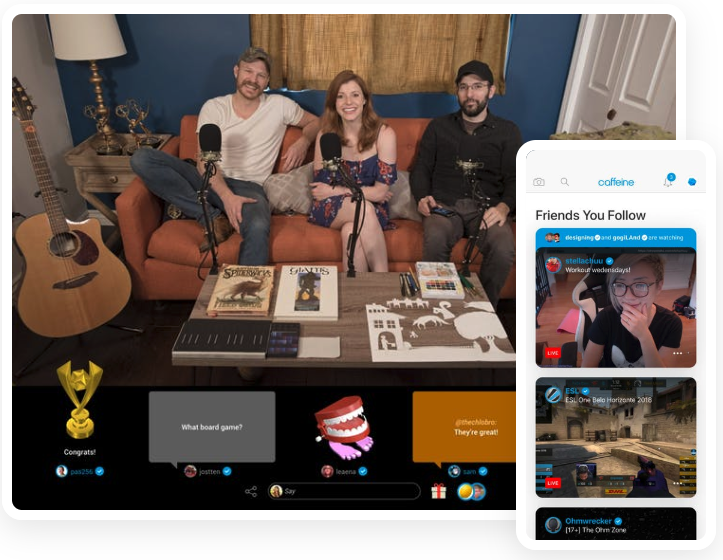
Along with live video broadcasts, you can also stream your computer or TV screens as you play video games. This makes Caffeine a possible competitor to the slightly older game-streaming service, Twitch.tv. Like Twitch, which offers you money for high views or subscriptions, Caffeine has launched a monetization program that rewards engaging broadcasters.
The company hasn’t specified user numbers yet, but its Crunchbase profile reveals that is has over $140 million in investments so far. Caffeine’s biggest investor to date is 21st Century Fox.
Aside from investor interest, the platform is starting to make waves in the worlds of entertainment and sports. Recently, Fox launched a broadcasting initiative with the company. The platform was also used to broadcast the 2019 X Games in Aspen.
Caffeine’s success so far demonstrates how live video and video platforms are gaining quick adoption from younger audiences, especially in the Gen-Z age group. If the app continues to gain interest, marketers might consider using it to show off their brand through a variety of strategies, like behind-the-scenes content, Q&As, or other live videos. This platform could also be useful to marketers in a wide variety of industries, including news, entertainment, gaming, and sports.
If live streaming could help your company spread awareness of a product, it might be a good time to familiarize yourself with both Caffeine and Twitch. As you learn more about the platforms, be sure to determine if your audience is actually using either of them and what they’re using them for. Similarly to TikTok, you should also check out what similar brands are doing if you find any with active accounts.
If you have an idea for a live stream that seems too out of the ordinary for Facebook or Instagram, Caffeine could be an interesting place to test it. Because the platform is new, there might not be many norms or rules associated with what content works or doesn’t work just yet.
3. Lasso by Facebook
Year Launched: 2018
Number of Downloads: 70,000+ in the U.S.
Lasso, which was quietly launched by Facebook in 2018, competes directly with TikTok as you can use the platform to make short videos with filters and musical overlays. Here’s a quick example of a Lasso post with a musical overlay:
While Lasso is just getting started, it might be a promising platform in the future because it’s owned by Facebook. This could mean the app might benefit from Facebook’s user base, technological resources, and financing.
While the user base for Lasso is still small and its demographics aren’t yet specified, this might be Facebook’s attempt to reach younger audiences similar to those on TikTok. If that’s the case, companies targeting Gen-Z or millennials should continue watching and comparing Lasso and TikTok to see what types of content thrives on these platforms.
Like TikTok, this type of social platform could be of interest to people in visual or creative fields like publishing, entertainment, and fashion.
4. Houseparty
Year Launched: 2016
Number of Users: 20 million+
Houseparty is a group-video messaging app that allows video chats that can host eight users at a time. To make things more fun for everyone in the chat, you can use video filters, stickers and other fun effects while a live conversation is in session.
While the app itself has been around for a few years, it has gone through a few evolutions and recently gained large bumps in interest and usership. The app first started as Meerkat, but rebranded itself to Houseparty and revamped its features in 2016. Since then, Houseparty has climbed app store charts and risen from 1 million to 20 million users in 2018.
In 2018, Houseparty continued to expand by launching an in-chat gaming feature which allows you to play games with your friends. The app company reports that over 10 million users have already played the trivia game, Heads Up, on the platform.
Although the app does offer ad-space, marketers of the future might use it in other creative ways. For example, a small makeup company might sponsor a “houseparty” where an influencer can answer beauty questions and show attendees how to use one of their new beauty products.
Although it might sound promising, still keep in mind that this app has a number of big-name competitors, including Snapchat which rolled out group video chats in 2018.
This app might also take added time and creativity. If you don’t have time to host a houseparty or can’t think of one that would effectively market your product, you might want to prioritize other platforms first..
5. Steemit
Year Launched: 2016
Number of Users: Nearly 1.2 million
This platform is like Reddit with a cryptocurrency twist. While Reddit rewards “upvoted” engaging posts by pushing them to the top of feeds, Steemit also gives you “Steem” coin if your post does well. Like Reddit, you can engage with posts by sharing, commenting on, or upvoting them.
Here’s a look at the platform’s “life” category feed. The site’s design is simple and similar to Reddit’s older website designs with a white background and basic feed style.
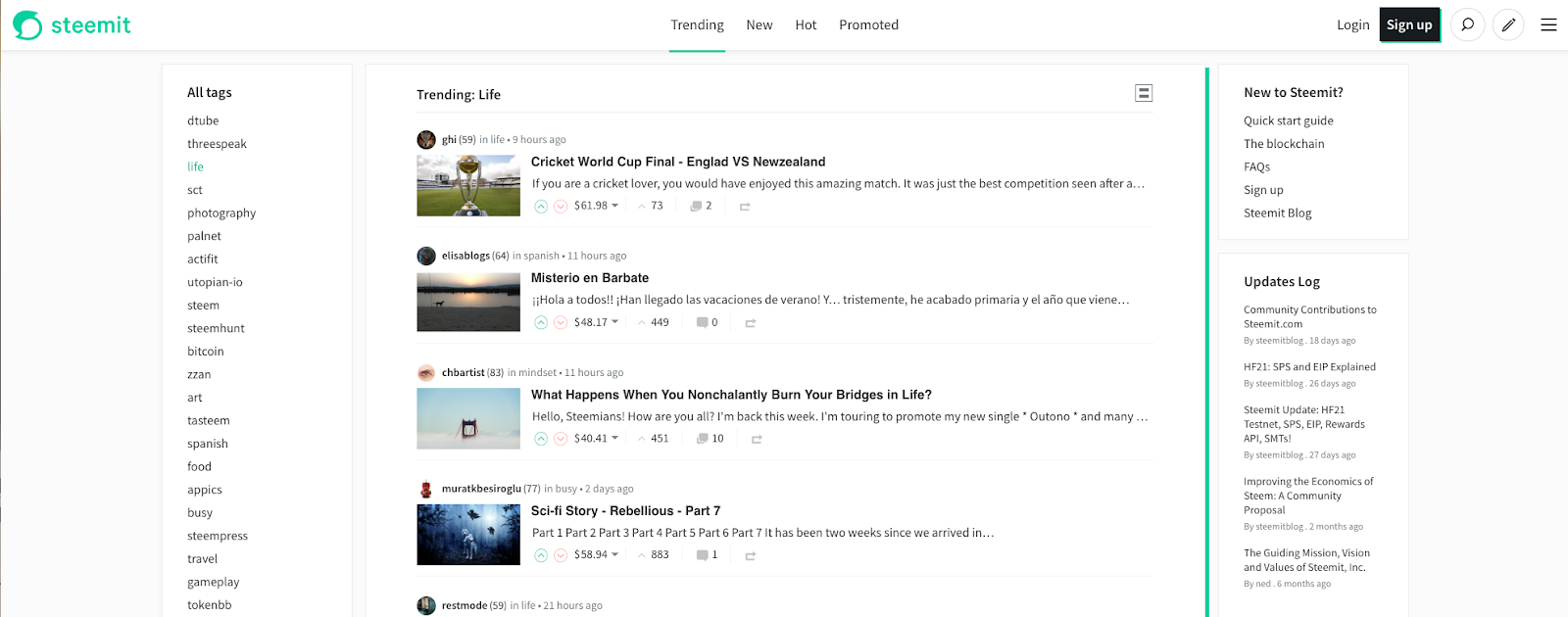
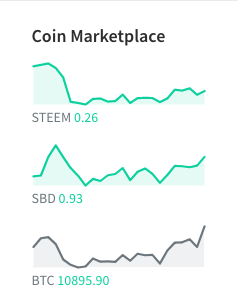
Because users might be aiming to earn, use, or sell Steem coin, the interface also includes a sidebar that shows the cryptocurrency’s live value up against other prominent coinage like Bitcoin.
Steemit claims to have over 1 million users and over 50,000 monthly active users. While its user base is still much smaller than other platforms, it has been buzzed about by TechCrunch, WIRED, and other publications. It has also been called a leading social platform in the world of cryptocurrency.
Even though Steemit is still small, we’ve included it on this list because it’s notable in cryptocurrency communities, discussed by tech journalists, and seems to be one of the first platforms of its kind. Even if the platform does not take off, it’s a good example of how cryptocurrency and social media could align to create a social platform in the future.
However, we encourage this to stay just on your watchlist for now. Although Steemit seems new and unique, marketers shouldn’t heavily invest time or money into it just yet. Its biggest flaw is that it relies on a strong cryptocurrency market to succeed.
The platform already took a huge hit during the “cryptocurrency winter” of 2018 when most major coinages lost serious value. While Steem began at $7 USD, the coin’s value dropped to just over 40 cents. Today, the coin’s value is only 25 cents — equal to 2.5 Bitcoin Bits.
According to TechCrunch, this loss led to mass layoffs at the company. Since then. Steemit has begun to hire more staff and recently named a new chief officer.
If this platform, or one like it, were to take off, it could be a great marketing tool for companies that sell products or services in exchange for cryptocurrency. If cryptocurrency gains more adoption and gains a greater sense of understanding from younger, more tech-savvy audiences, this could boost opportunities on other social platforms like this.
How to Navigate This Crowded Landscape
A marketer who discovers a hot new social channel first can become an expert on posting engaging content before their competitors even sign up. But, while it’s important for marketers to keep interesting platforms on their radar, the first priority should still be to focus time, effort, and resources into the platforms that are already thriving.
To make sure you’re balancing your time between new and old channels accordingly, focus on growing and refining strategies on the successful platforms, then timebox an hour or so once a month to look into newer platforms.
If you find a platform like TIkTok, that’s both relatively new and has a fast-growing user base, brainstorm and schedule a few experimental posts.
Be sure to use experimentation time wisely and on the right platforms. While TikTok is a great place to experiment and doesn’t seem like it’s going anywhere soon, there’s always a chance that an extremely niche platform, like Steemit, could get purchased and absolved — or that it could shut down quickly if it fails to grow.
When you’re determining which platforms are worth watching or experimenting on, here are six questions your team should ask themselves:
- What are its active user numbers? Big numbers could mean that the platform is gaining momentum and that you have even more chances to engage with a large pool of users.
- Are publications or thought leaders talking about it? If a platform doesn’t specify exact numbers, but a lot of people, prominent figures, or news publications are discussing it — it might be promising.
- Do older platforms have a similar tool and a bigger user base? If an older platform does the same thing, people might hesitate to adopt a newer platform. For example, marketers primarily use Stories on Instagram as opposed to Snapchat. Although Snapchat pioneered the story, the Instagram interface and experience is something that a lot more people know, understand, and trust.
- Will my audiences understand how to use the platform? It might be challenging to get a less tech-savvy person to join Snapchat or TikTok, but they might love a platform like Facebook or Twitter because the interfaces might be easier to understand. Pick platforms that your audience can easily use and enjoy.
- Will audiences even be interested in the platform? While a tech novice might not enjoy TikTok, a teenager might get bored on a platform like Facebook. In fact, younger people prefer visual apps like TikTok and Instagram. While you want to pay attention to the level of adaptability, you also should pay attention to how your audience wants to consume media.
- What type of content or post could we use to promote our brand on the platform? You should always make a plan of action when considering or launching a social platform. If you can’t come up with any interesting ways to market your specific product on a really niche platform, you might want to hold off on making an account. On the other hand, experimenting with different posting strategies could allow your brand to look creative and cool to the platform’s audience.
If you ultimately decide that you aren’t ready to jump on to a new platform right now, and just want to focus on the bigger platforms, here’s a guide to the different types of social media and how you can use them for your next marketing campaign.

How to Deal With a Toxic Work Environment, According to Science [Infographic]
A toxic work environment can impact your physical health, mental health, and overall level of happiness at work. As a result, it can compromise the quality of work you produce — which can negatively impact both your team, and your career.
Negativity in the workplace can manifest in a variety of forms — including bullying, mismanagement, aggressiveness, and distrust among team members. If it makes you dread going to work each day, it’s an issue that needs to be solved.
However, if you’re suffering in a toxic workplace, it’s not your responsibility to fix it. The causes are typically partly systemic, and partly cultural — alternatively, perhaps it’s the behaviors of your colleagues or boss that leads to such negativity.
Therefore, to deal with it, you need to work on protecting yourself. Self-care, personal development, and certain choices around the workplace can help you form a protective barrier against the onslaught of negativity, while preparing yourself to find a better job. Being positive and supportive to colleagues who are similarly affected by this toxicity can help create a sense of collective resilience.
Luckily, the people at resume.io have figured out some precise steps you can take to make these things happen — and they’ve created a new visual guide to cope with a toxic work environment. Have a look through it, and start protecting yourself against negativity today.


6 Facebook Ad Copy Secrets to Improve Your Conversions
Want better Facebook ad conversions? Wondering how to write compelling Facebook ad copy? In this article, you’ll learn how to write Facebook ad copy that improves your conversions. #1: Use the “So That” Statement The most common Facebook ad copy mistake I see is writing about the features of a product or service, rather than […]
The post 6 Facebook Ad Copy Secrets to Improve Your Conversions appeared first on Social Media Marketing | Social Media Examiner.
from Social Media Marketing | Social Media Examiner https://ift.tt/2SzLvnj
via socialmediaexaminer
The Ultimate Guide to Instagram Hashtags for 2019
Did you know an Instagram post with at least one hashtag averages 12.6% more engagement than a post with no hashtags?
Hashtags are powerful. They can help your posts reach a target audience, attract followers in your niche, increase engagement, and develop a more positive and recognizable brand image.
Here’s the thing, though: with great power comes great responsibility (#spiderman).
Hashtags can skyrocket your business to new heights, but if used too frequently or without a clear strategy in mind, they become pointless and inefficient, e.g.: #happy #superhappy #ecstatic #jumpingforjoy #whatsanothersynonym.
We want your business’s Instagram posts to receive optimal engagement, so we’ve put together an ultimate guide for using Instagram hashtags in 2018. With this guide, you won’t just attract followers — you’ll attract the right followers.
Why are hashtags important?
Hashtags are essentially Instagram’s sorting process. With around 95 million photos posted on Instagram every day, it’s difficult for Instagram to efficiently deliver the right content to the right people. Hashtags help your post get discovered by viewers most interested in seeing it.
Krystal Gillespie, HubSpot’s Social Media Community Manager, explains the importance of hashtags this way: “Hashtags are like a funnel. For instance, #marketing is incredibly broad and attracts all types of posts. We’ve found #digitalmarketing or #marketingmotivation gives us a more specific, targeted reach. The audience searching for these hashtags are also trying to narrow their search to what we offer related to Marketing, so we’re actually reaching more of the right people.”
Essentially, hashtags are a better way to categorize your posts. They help you reach a target audience, and more importantly, they help your target audience find you. These users are more likely to engage with your post because your post is exactly what they wanted.
Top Instagram Hashtags 2018
- #love
- #instagood
- #style
- #dogstagram
- #me
- #fashion
- #cute
- #tbt
- #foodporn
- #photooftheday
- #instamood
- #follow
- #iphonesia
- #food
- #motivation
- #Instagramhub
Adding one of the most popular Instagram hashtags to your post doesn’t necessarily mean you’ll see more interaction. Since the hashtags above are so popular, they are being used by millions of people, so your post will most likely be obscured by the competition. Narrowing your hashtag topic is important, but we’ll get to that next.
Here are some of the top Instagram hashtags of 2018.
1. #love
Instagram users build their photo galleries on good feelings. For this reason, the #love hashtag is ever present next to the pics of friends, family, vacations, and beautiful scenery.
2. #instagood
Occurrences of this hashtag are inspired by the @instagood Instagram account, which scours the Instagram community for excellent photos and videos that are just too #instagood not to share. Add this hashtag to your content for a chance to be reposted.
3. #style
This hashtag has more than 400 million posts associated with it, making it one of the top tags in 2019. It’s used for beautifully edited photos of outfits, vacations, luxury products, and anything aesthetically stunning. Tag #style on a gorgeous outfit inspiration or new product, and Instagram users looking to add a little glamour to their lives will find you.
4. #dogstagram
We all know that the internet loves cute puppies, so it shouldn’t be surprising when a hashtag for our beloved doggos trends on Instagram. It’s always a good idea to include man’s best friend in an Instagram post — your followers will love it and you’re almost guaranteed dozens of heart emojis in your comments.
 Source: Instagram
5. #me
This is the quintessential selfie hashtag, indicating to the Instagram community that the photo it’s captioning is a picture of you.
6. #fashion
People often turn to Instagram to see what styles are “in”, looking at posts ranging from fashion week to everyday outfit inspirations. This means that a significant portion of the content on Instagram revolves around fashion — in fact, there are more than 700 million #fashion posts on Instagram today. You will find celebrities, luxury brands, clothes, makeup, and other aspirational images tagged with #fashion.
7. #cute
#Cute puts your content in a pool of Instagram photos and videos that elicit “awes” from all over the Instaverse. If you think your puppy is the cutest puppy that ever lived, it deserves a photo with this esteemed hashtag.
8. #tbt
#Tbt stands for “Throwback Thursday,” and encourages Instagram users to post an old photo of themselves or an event they’re reminiscing over. Everyone likes content from the good old days — here’s your hashtag for enjoying the nostalgia.
9. #foodporn
I hope you’re hungry! The #foodporn tag is brimming with mouthwatering posts of desserts, pizza, recipe videos, and so much more. This hashtag is for the best of the best when it comes to delectable treats on Instagram — find the most original, delicious, and tantalizing food pictures on the internet under this hashtag.
10. #photooftheday
Managing a business account? This hashtag is a surefire way to attract more followers and repeat visitors. If you plan to post daily content, all around a common theme, add the #photooftheday hashtag to increase your exposure.
11. #instamood
#Instamood is all about the vibe or emotion a photo or video elicits. Pretty scenery, a day at the beach, or a night out with good people were all prominent under the #instamood hashtag in 2018. Landscapes are a popular starting point when figuring out what to post on Instagram, according to Jumper Media, and they fit into this hashtag perfectly.
12. #follow
This hashtag — currently tagged on half a billion posts — is a tactic used by public accounts looking to gain more followers. It’s a ubiquitous tag, non-specific to any one type of content creator, so you’ll see #follow on fashion accounts, travel blogs, makeup tutorials, celebrity fan pages, and much more. The idea is that if a user comes across content that they like on your explore page, they might be motivated to follow the account for more of that content.
13. #iphonesia
#Iphonesia is dedicated to the burgeoning community of Instagrammers in Indonesia.
14. #food
Meal pics are the bread and butter (no pun intended) of a people-oriented Instagram account — and 2018 was no exception. Use the #food hashtag to caption your next delicious Instagram photo.
15. #motivation
On Twitter, #MondayMotivation encourages inspiring quotes and messages to help people start the week off on the right foot. On Instagram, the #motivation hashtag has come to caption anything from a photo of a user after a big gym session, to a computer screen right before he or she gets to work.
The above 10 hashtags might have helped define Instagram over the last year, but there are still plenty more that end up trending every year. The following hashtags can help inspire photos and videos that Instagram users always seem to find captivating — and are sure to in 2019.
16. #Instagramhub
This hashtag isn’t specific to one type of post — #instagramhub is a place for active Instagram users to demonstrate their presence on the platform and reach larger audiences. By including this popular hashtag, influencers on Instagram are able to connect with as many users as possible.
Top Trending Instagram Hashtags
- #life
- #beautiful
- #travel
- #fitness
- #happy
- #repost
- #igers
- #photography
- #instadaily
- #bestoftheday
- #followforfollow
- #likeforlike
- #tweegram
- #summer
- #nofilter
- #ootd
- #instafood
- #fun
1. #life
This one goes out to all the photos and videos that encompass the essence of your life.
2. #beautiful
Instagram is the place to go to put your best foot forward — whether it be your amazing getaway, a new hairstyle, or a breath-taking sunset, #beautiful photos encompass the best of what the platform has to offer.
 Source: Instagram
3. #travel
Away for the weekend? Show your followers where you are, using this hashtag to indicate you’re traveling somewhere new.
4. #fitness
Get in on a trending community of workout warriors with photos and videos from your best exercise sessions, using the #fitness hashtag to share the moment.
5. #happy
Sometimes the best part of feeling good is sharing that sunshine with others. The #happy group of posts is full of radiant people and lighthearted content that brings us joy. Tag a photo of a cute kitten or one of yourself after getting a promotion with #happy.
6. #repost
Reposting is a common function on Instagram that allows you to share content from other users, with credit back to the original user. Use the hashtag, #repost, to tell others on Instagram that you were inspired by this photo or video.
7. #igers
#Igers is short for “Instagram users.” If you’ve got a photo or video that encompasses the Instagram community, show your solidarity with this colloquial hashtag.
8. #photography
At its core, Instagram is a photo sharing media, so it makes sense that there are some stunning and artistic images shared in #photography. Instagram is unique in that a user could be scrolling through the #photography posts and see National Geographic and professional photos next to amateur photographers.
9. #instadaily
This hashtag is similar to #photooftheday — one of the most popular hashtags of 2018 above this list — and is perfect for Instagrammers who post every day.
10. #bestoftheday
The #bestoftheday tag offers a glimpse into the massive amount of varied content that is posted to Instagram every day. Here, you’ll find some of the most noteworthy images on the platform — images of beautiful spots around the world, award-winning photos, yummy recipes, adorable animals, and so much more.
11. #followforfollow
Interested in building a fast list of followers on Instagram? #Followforfollow tells everyone who browses this hashtag that you’ll follow users who choose to follow you. This hashtag is always trending highly.
12. #likeforlike
#Likeforlike is similar to the #followforfollow hashtag explained above. Use this hashtag if you want to increase engagement on your Instagram account, telling users that you’ll like their photo or video if they like yours.
13. #tweegram
There is plenty of multi-platform sharing across social media sites, and in #tweegram, you’ll find images taken from Twitter, Pinterest, and more. #Tweegram is best known for quotes, screenshots of Tweets, and memes.
14. #summer
The summertime is the best season to enjoy fun vacations, fruity drinks, and time by the pool. This tag is full of Instagram users enjoying the long summertime hours on the beach or showing off the breezy outfits keeping them cool under the hot #summer sun.
15. #nofilter
Instagram offers so many different filters to help enhance photos, it’s practically assumed that any picture on Instagram has been edited. But if you’re posting a pic that was beautiful all by itself, let the world know that this gem didn’t need a filter to look so nice.
16. #ootd
#Ootd stands for “Outfit of the Day,” a hashtag dedicated to Instagram users who love showing off new clothing and styles on a regular basis.
17. #instafood
This popular tag is different from other food hashtags because it accompanies food pictures that are gorgeous, creative, and, most importantly, worthy of Instagram. Instagram posts are known for being aesthetically appealing, and #instafood is no different. Use this tag if you’re posting a photo of a colorful, unique, and sumptuous dish!
18. #fun
If it’s not fun, it’s not Instagram-worthy. Make it known to millions of Instagram users that you had a blast in your latest photo or video with this popular hashtag.
How to Use Hashtags on Instagram for Business
- Keep your hashtags organized.
- Figure out your magic number.
- Narrow your hashtags.
- Research what other people are hashtagging.
- Test out related hashtags.
- Follow your own hashtag.
- Create a brand campaign hashtag.
1. Keep your hashtags organized.
To create an efficient hashtag system, you can use Excel or an Instagram analytics tool. If you choose an excel sheet, you’ll need to manually keep track of which hashtags you use, how often, and which ones correlate to your most popular posts. Over time, you’ll see relationships between certain hashtags and your most popular posts, and this can help you decide which hashtags work best for your brand.
If you have a more advanced social media team, you might want to consider a tool like Iconosquare, which automatically stores top hashtags and provides reports on which hashtags reach the most people.
For smaller businesses with limited budgets, Krystal Gillespie says that, “an excel sheet is the best way to start. Once you get more advanced I would highly recommend using a tool to track the data. A manual system can get overwhelming when you’re posting three times a day and using about 20 hashtags per post.”
2. Figure out your magic number.
Most top brands — 91% of them, to be exact — use seven or fewer hashtags per post, so it’s easy to assume that’s the magic number for everyone … right? Krystal explains that this isn’t always the case: She told me HubSpot has been more successful with hashtags ranging in the low 20s.
The point is, you can’t know how many hashtags work best for you until you test it. For HubSpot, it took the team several months to find a number that worked best, and during our trial period, we ranged from seven to 30. Give yourself the same flexibility for trial and error.
3. Narrow your hashtags.
There are two big reasons more specific, smaller-volume hashtags are better for your brand: first, you can compete in a smaller pool. HubSpot, for example, doesn’t typically use the hashtag #marketing because it’s too broad. If you search #marketing, you’ll find pictures of restaurants, inspirational quotes, before-and-after hair style pictures, and memes.
The randomness of #marketing leads me to the second reason specific hashtags are a good idea: as a user, I’m more likely to find what I need if I search for something specific, and when your business comes up for my specific search request, I’m more likely to be happy with what I found.
Krystal explains: “Keeping a hashtag close to the interests of your brand really helps. We try to use hashtags tailored for a specific topic and then narrow it down further — for instance, we’d use #SEOTips if our marketing post was mostly about SEO.”
Think of it this way: #dogs is more popular, but it has a wide demographic. If I search #goldenretrieverpuppies and I find your post, I’m more likely to engage with it because it’s exactly what I wanted.
4. Research what other people are hashtagging.
An easy way to generate hashtag ideas is to make a list of your followers or competitors and research what they’re hashtagging on their own photos. It can also be particularly helpful to research what influencers in your industry are hashtagging — by definition, influencers are people with a large social media following, so they must be doing something right.
5. Test out related hashtags.
When you type a hashtag into Instagram’s search bar, Instagram shows you related hashtags in the scroll-down menu. Instagram also delivers related hashtags on the next page after you click on a hashtag. This is a simple way to create a longer list of hashtags to try out.
6. Follow your own hashtag.
Another way to use Instagram hashtags for your marketing purposes is to follow your own hashtag. Krystal explains, “On Instagram I actually follow the hashtag #hubspot so I can find anyone who talks about us and connect with them. As long as your account isn’t private, people will be able to find you via the hashtag.”
Following your own hashtag is an effective way to engage with other people talking about your brand and develop better relationships with them.
7. Create a brand campaign hashtag.
This is the trickiest item on the list, but if done successfully, it can pay off big time. Some businesses have successfully attracted followers by creating their own campaign hashtag. A campaign hashtag needs to be funny, clever, or at least memorable in order to work.
Campaign hashtags are particularly useful for promoting a new product or upcoming event, or even just inspiring people. Red Bull, for example, encouraged followers to post Red Bull pictures with a #putacanonit hashtag (see what I mean about clever?). LuLuLemon, rather than running a more traditional ad campaign, developed a positive connotation for their brand by asking followers to post real, active pictures of themselves with a #sweatlife hashtag.
Now that we’ve covered the importance of using Instagram hashtags for your business, you might be wondering how to search for Instagram hashtags within the app, or how to use the search function to find related ideas. If you’re unsure of the technical process for hashtag searching, here’s how:
How to Search Hashtags on Instagram
To search hashtags on Instagram, tap the magnifying glass at the bottom of your screen, then tap the search bar at the top. Selecting the “Tags” option will enable you to search hashtags and related hashtags based on the popularity of each one.
1. Open Instagram and tap the search icon.
Instagram wants you to use hashtags, and has made it extremely easy to find the perfect ones for your post. To start, open the Instagram app on your mobile device and tap the magnifying glass at the bottom of your screen.
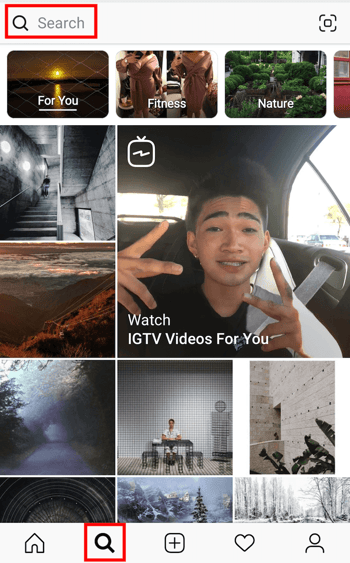
2. Tap the search bar at the top of your screen.
The search screen on your Instagram might first send you to a newsfeed-style page with suggested content based on topics you’ve demonstrated an interest in on social media. To switch to a hashtag search, tap the search bar at the top of this page, as shown in the screenshot above.
3. Tap “Tags.”
Once you’ve tapped the search bar at the top of your screen, Instagram will give you four options with which to filter your search. Instagram refers to hashtags as simply “Tags,” as shown in the screenshot below. Tap this “Tags” option, then tap the search bar above it, and begin searching topics for which you want to find a trending hashtag.
You don’t have to include the pound sign (#) in your search — your results will be the same with or without it — but you will need to use this pound sign in the caption of your photo once you choose a hashtag.
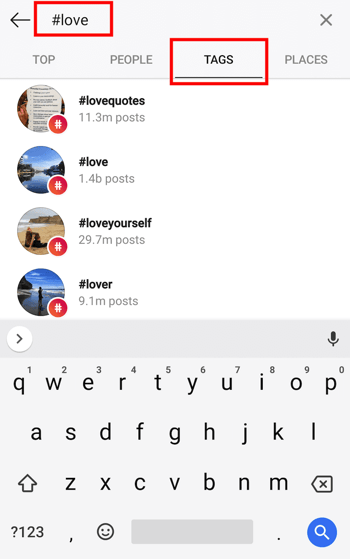
4. Browse hashtags based on post count and current content.
Voila! You should see multiple options for hashtags based on your search. Browse around at each related hashtag that Instagram suggests for you — you might find that a hashtag with slightly fewer posts includes photos or videos that are more in line with the content you’re posting.
Happy hashtagging!

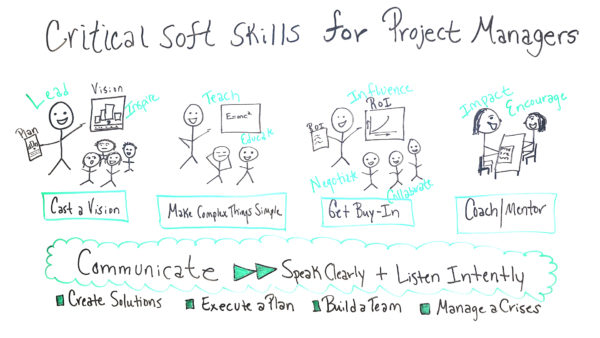
Critical Soft Skills for Project Managers
Why Digital Media is Killing TV Advertising
In 2018, research conducted by the Leichtman Research Group found that 78% of households still watch traditional satellite or cable TV.
Looking at that statistic, you wouldn’t think that TV viewing is on the decline — but it is, and with it, TV ad spend.
For instance, considering research from the same group in 2018, you’ll see 69% of homes in 2018 were subscribed to a video streaming service — which is up from 52%, just two years prior.
On top of all that, internet usage itself has risen to over four billion users since last year. That number encompasses over half of the global population, with China, India and the United States ranking ahead of all other countries in terms of internet users.
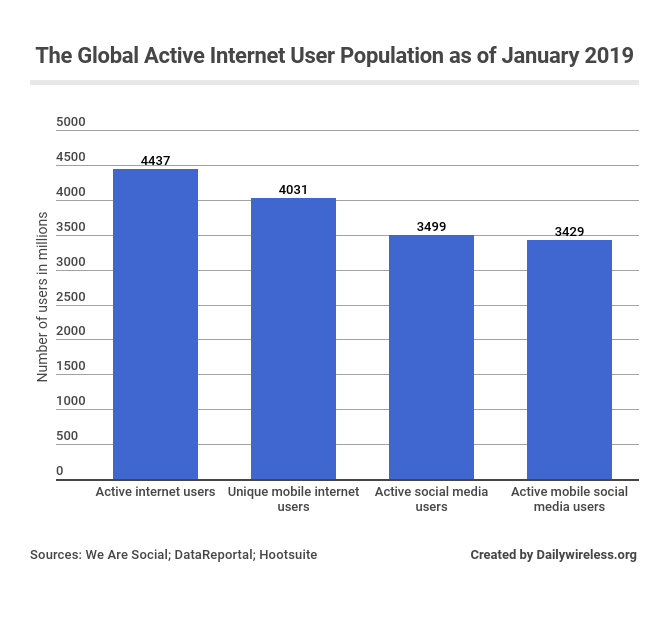
Traditional TV viewing has dropped dramatically since 2012, particularly among 18-24 year olds. In the next few years, we’re going to continue to see a decline of TV viewing — and with it, a steep drop-off of traditional TV advertising in favor of using digital media as the preferred advertising platform.
Here, I’m going to explain why.
The Decline of TV Advertising
TV advertising spend actually climbed 16% from 2010 to 2017, according to analysis by ARK Investment Management. And yet, conversely, TV viewing decreased in that time by 20%.
In years past, TV was the only form of media you could use to reach a massive market during prime hours — but now, people aren’t watching as much.
The way we see it, there are a few components to this shift.
First, a study by Omnicom Media Group’s Hearts & Science agency found that nearly half of Millennials and Gen Xers are no longer viewing video content on traditional TV.
Instead, they are choosing to view content on newer streaming platforms — Netflix, Hulu, Amazon Prime, and YouTube TV, which have been taking over the viewing space.
In fact, on average, they’re consuming 30 hours of video content on streaming platforms per week. This makes these generations “unreachable” through traditional advertising methods, particularly since most streaming platforms, like Netflix, don’t allow brands to advertise on the site.
Additionally, when these audiences do watch regular TV, they aren’t solely engaged in the show — for instance, on commercial breaks they’re likely to pull out their phones or other devices, so they might not remember or watch TV commercials at all.
If these losses continue as projected, by 2023 viewing hours could be less than half what they were in 2010, and cut in half again by the year 2028.
ARK’s research suggests that if marketers begin to take these dropping viewing hours into account and continue to shift their budgets toward digital methods, the United States’ TV ad revenue could plummet to less than half its current levels over the next 10 years.
The Rise of Digital Advertising
In contrast, online streaming platforms have been experiencing massive growth. For example, YouTube TV increased its viewership by more than 10X between 2010 and 2017.
Even social networks like Facebook and Twitter are creating their own versions of video streaming.
In addition, in 2019, digital ad spending will surpass TV ad spend, and traditional ad spend, for the first time ever. It’s also projected that by 2023, digital will exceed two-thirds of total media spending.
But why exactly is this happening? Why the shift? Let’s dive into that further. Here, I’ll outline five reasons digital ad spending is surpassing traditional.
1. Digital media is cheaper.
The cost difference between TV advertising and digital marketing methods is tremendous. A 30-second TV ad — which may or may not reach your ideal audience — will cost you over one-third of a million dollars … plus setup costs.
In contrast, while you need to hire employees to conduct SEO and potentially invest in SEO products, SEO itself is free, and can help you organically reach your target audience over the long-term. PPC and email marketing have cheap set-ups, and could cost anywhere from a few cents per click to a few dollars.
Frankly, that sort of disparity — while it makes sense logistically — is fairly ludicrous.
2. Digital marketing allows for better segmentation.
Traditional TV advertising lets you broadcast to anyone who turns on the channel. To reach a specific audience to whom your product will appeal, you need to guess what sort of TV programming could appeal to your ideal demographic — it’s difficult to apply or collect any audience-specific analytics.
With TV advertising, the closest you can get to understanding a TV channel’s audience is through ratings like Nielsen ratings or the Gross Ratings Point. These ratings are used to estimate the percentage of the desired demographic on a particular channel through statistically relevant sampling.
The downside to TV ratings like Nielsen is that, 1) these are estimates, not exact numbers; and 2) as an advertiser, you still need to pay to broadcast to anyone who views that channel, not just your intended demographic. It’s a wide-net strategy.
Digital media methods, however, are able to mine personal data on a more individual level, allowing for dramatically greater personalization. You’re searching for a “green Columbia jacket?” Well, my company has that jacket, and we’ve applied the right filter to catch your search term on Google instantly.
If you don’t buy the jacket today, that’s okay — we can use retargeting to show you an ad on your social networks about our green Columbia jacket, and remind you of your interest in the future.
Plus, we can create different ads for different segments — hikers looking for sturdy Columbia jackets in the summertime, versus skiers who need athletic cold-weather jackets.
TV can’t say the same — it’s estimates and wide-nets all around.
3. Digital marketing is more agile.
Leading off the last point, digital media advertising methods allow you to track, measure, and make adjustments necessary to optimize your ads — in real time. Everything from adjusting a few words, a color, or a filter can be done quickly, and cheaply.
Every change you make to your digital marketing campaigns or content can be made quantifiable by tracking CTRs and conversion rates to identify exactly where something needs to be tweaked, and how — and, again, you’ll see quickly if you made the right choice.
TV ads, in contrast, need time to see if they’ll pan out, and they can’t be adjusted easily … or affordably. You can make multiple versions upfront of the same advertisement to air in different regions, but beyond that, it’s clumsy and expensive to make tweaks and adjustments.
4. Video ads are online now, too.
TV used to be the king of storytelling — in a short span of time, you’d get a scene, a protagonist, a problem, and a solution. Internet initially just used banner ads, which, while annoying, were effective — but only in the short-term.
Eventually, digital advertisers had to figure something else out. Slowly, they started to determine more versatile methods — images, images in slide decks, and video.
Users are already increasingly shifting toward the internet and internet content as their preferred method of entertainment. Online video ads are a powerful threat to TV because it’s ultimately a familiar type of storytelling, and on the platform preferred by consumers.
5. Advertising follows attention.
As mentioned earlier, viewing has shifted from traditional media to digital. And ultimately, where attention shifts, advertising should follow. In 2019, brands will need to consider digital methods if they want to reach their target audience, many of whom are using online streaming services more than they’re using their cable box.
Why TV Is Still Around
I’m going to play contrarian for a moment, here.
Digital media seems to be killing TV advertising, but maybe it’s not — or, at least not entirely. Research by WARC suggests that consumers actually pay more attention to ads on TV than they do on YouTube or Facebook. In fact, TV held more than twice the active viewing than YouTube, and 15 times more than Facebook.
Ultimately, TV still works for advertising. It’s often effective to diversify the channels on which you promote your products or services — and TV is one of those channels. So, while digital media may be killing TV advertising’s spot as the #1 channel, it likely won’t go entirely by the wayside.
However, we’re going to say it again — where attention shifts, advertising follows. Despite research suggesting things aren’t as dire for TV ads as you might think, the numbers are still pretty clear on at least one front: more consumers are shifting toward viewing content online.
This means, as marketers, you need to be devoting more of your budget to where your audience is. TV doesn’t have to be cut entirely — and probably shouldn’t be — but finding the right mix of digital and TV is critical for finding success in this new age of online-first viewing.

Instagram Stories Ads: How to Improve Your Results
Do you advertise on Instagram? Wondering how to get better conversions on your Instagram Stories ads? In this article, you’ll learn how to optimize your Instagram Stories ads placements. How Instagram Stories Ads and Instagram Feed Ads Differ Unlike a static image or video that appears in the Instagram feed, Instagram stories are treated as […]
The post Instagram Stories Ads: How to Improve Your Results appeared first on Social Media Marketing | Social Media Examiner.
from Social Media Marketing | Social Media Examiner https://ift.tt/32JUqar
via socialmediaexaminer
13 Clever Ways to Get More Comments on Instagram This Month
If you’re not a total Instagram addict like me, you might go a day or two without checking your app. And when you check your feed, you might notice that some posts from friends were shared mere minutes ago, while others might be a few days old.
So, what gives? Why isn’t your Instagram feed chronological anymore?
Like many other social networks, Instagram’s algorithm changed.
In this post, we’ll give you a quick rundown of what’s new with the algorithm, along with tips on how to create the most engaging posts possible to get more comments on Instagram — which help you jump higher in the feed and get discovered by new users.
Guide to the Instagram Feed Algorithm
In June 2016, Instagram announced it was changing its algorithm to show users content they cared about first — no matter when it was posted. This could make it tougher for social media marketers to get organic Instagram posts seen because most users were missing 70% of the content on their feeds.
Shortly after Facebook began to prioritize posts of users’ friends and family in 2018, Instagram followed suit. Its algorithms began prioritizing brands and advertisements less heavily.
But brand posts with natural engagement can sometimes defeat these algorithms. There are a few factors that influence a post’s ranking on the Instagram feed, and the number of likes and comments a post achieves is one of them. Here’s what matters when it comes to ranking on an Instagram user’s feed:
- The number of Likes and comments a post has
- If that user has interacted with your content in the past
- How recently you posted
If your organic Instagram posts get engagement from your followers, it creates a positive feedback loop: the more people like and comment on a post, the greater likelihood it will appear on the Explore tab, where users who don’t already follow you can check out your popular content.
Before we jump into strategies for attracting more comments, there are a few things you need to do:
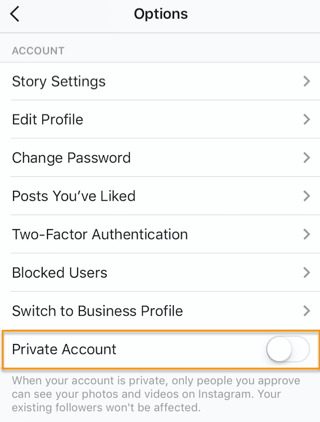
1. Make your account public.
Make sure new followers can find your content by opening your account. Navigate to your profile, tap the Settings gear icon in the upper right-hand corner, and toggle the Private Account button to the Off position.
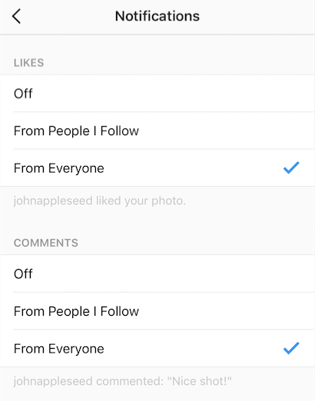
2. Enable push notifications.
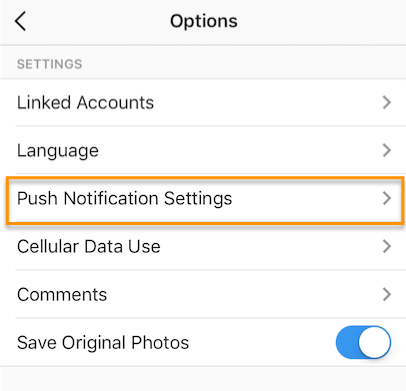
Turn on push notifications so you can quickly reply to or like your followers’ comments. Remember, the more users interact with your account, the higher on their feeds your content will appear.
Navigate to your profile, tap the Settings gear icon in the upper right-hand corner, tap Push Notification Settings, and choose which Instagram actions you want to be notified for.
3. Curate engaging content.
People aren’t going to comment on uninteresting content, so enlist one team member to manage the scheduling and editing of Instagram content, but open it up to a larger team to source different photos, videos, and ideas to keep your Instagram feed fresh and interesting.
4. Develop an Instagram editorial calendar.
Figure out an Instagram publishing cadence that works for you — and we recommend posting no more than once per day. Remember, timing is a factor in the algorithm, so you don’t want posts from earlier in the day to get lost in the shuffle. Download our social media content calendar to keep track of what you’re posting across other social platforms so you’re not repetitive and you’re covering all of your bases.
Now that we’re all on the same page, let’s dive into strategies for getting more comments (and likes) on Instagram.
13 Ways to Get More Comments on Instagram
1. Host a giveaway or contest.
A fun and easy way to get followers to comment on your Instagram posts is by hosting an Instagram contest or giveaway. You could post on Instagram promoting the contest, then ask users to enter by commenting on your post. You could make your contest a weeklong campaign, where users have to comment each day. You could even incorporate user-generated content (UGC) and ask followers to post their own photos and to tag/mention your brand in the post.
Here’s an example of an Instagram contest we ran for our attendees at INBOUND 2016, HubSpot’s annual marketing and sales event:
Social Media Examiner has a great guide for running Instagram contests — check it out here.
2. Host an Instagram takeover.
Instagram takeovers are a fun way to get fresh content on your Instagram and to work with colleagues and influencers. They’re a smart way to generate more Instagram engagement, too.
Takeovers involve one Instagram user taking over another’s feed, usually for a day, and posting from their point of view. Takeovers are often done from the perspective of:
- A colleague
- An influencer
- Another organization in your industry
These takeovers help generate more Instagram comments whether it takes place on your account or you’re taking over another account. Here’s an example of a takeover we hosted with our friends over at WeWork. WeWork was able to share brand and member stories to a whole new audience of HubSpot’s engaged followers.
WeWork closed the takeover with a call-to-action (CTA) to follow its Instagram account — where new followers will start liking and commenting on new posts. And over at HubSpot, we enjoyed comments from WeWork fans and others interested in the takeover.
Takeovers are a win-win for hosts and guests. Learn how to host one with help from Buffer.
3. Ask users to engage in the comments.
A simple way to get more Instagram comments is to ask for them.
Post content on Instagram that lends itself to sharing, and ask users to answer a question or tag their friends and coworkers in the comments. It’s a fun and easy way to interact with your audience, and it helps you garner more comments, too.
Here’s an example of an Instagram post we shared in which we asked our followers a question. You can caption posts with simple questions like “Agree or disagree?” or “What’s your advice?” to prompt responses and earn more comments.
4. Post something funny, surprising, or provocative.
In a study of what makes content go viral, research revealed some of the most viral internet moments also provoked high-arousal emotions. Among the most common were posts that created anticipation, surprised the viewer, and provoked curiosity and uncertainty. Emotions that incited feelings of joy were also among the most common, so think about content you could share on Instagram that makes people feel an emotion so strongly that they’re compelled to comment on it.
Is there content you could post about a surprising fact, a happy moment, or an intriguing industry trend? It doesn’t need to be specifically about your brand, either — content that’s enjoyable for a broad audience will likely attract more comments.
It can be silly, too — here’s our teaser video for our April Fool’s Day prank about “gorilla” marketing that attracted a lot of attention — while building anticipation and a sense of surprise.
5. Post videos.
Time spent viewing videos on Instagram increased 40% in 2016, and now, users can post videos up to one minute in length. Post this engaging content to get followers to stop scrolling through their busy Instagram feeds and watch your video — and make sure it’s intriguing. Your audience wants more video content — especially on social media — so if you share something compelling and ask viewers to comment on it in the caption, they’ll most likely do it.
6. Use relevant hashtags.
When you post your content with relevant, popular Instagram hashtags, your posts appear in searches for those hashtags and the Explore tab. In fact, posts with at least one hashtag typically attain more than 12% more engagement. Influencers and interested users might organically comment when they see you talking about topics they’re also interested in, or you could combine some of the strategies above to generate engagement.
Ask followers how they celebrated #SundayFunday, acknowledge a #ThrowbackThursday, or use one of the hundreds of hashtags relevant to your industry or your content to get new audience members involved in the conversation. We did this with Earth Day hashtags in the example below:
Here’s a guide to finding and using Instagram hashtags, as well as a massive list of the most popular hashtags you can use.
7. Publish at the right time of day.
There’s a lot of debate over the best time of day to post on social media, and that’s because the answer varies depending on your industry, your followers, and what type of content you’re posting.
Our best advice is to test out your engagement rates on Instagram when you post at different times throughout the week, and determine your publishing schedule based on the results.
Whether it’s bright and early on Monday morning or later in the afternoon, try to figure out the time when your followers are more willing to stop and leave a comment to maximize the engagement of your posts each day. Use a social media content calendar to track scheduling and results.
8. Post photos of people’s faces.
Let’s face it — selfies are fun. And as it turns out, they’re good for your Instagram strategy, too.
An analysis of more than 1 million Instagram posts by Georgia Institute of Technology and Yahoo Labs found that posts with human faces are 32% more likely to attract comments — and 38% more likely to garner likes.
There isn’t a ton of insight into why this is, but the researchers suspected that it’s partly because faces are effective sources of nonverbal communication that people respond to — even as infants.
Post Instagram content featuring selfies, group shots, and candid photos, and see if your audience likes the human side of your brand, too.
Here’s an example of how HubSpot incorporated Ellen Degeneres’ face into an inspirational quote post:
9. Post photos of animals.
There isn’t a lot of research to back this one up, but you know as well as I do that animals on social media are powerful. Animals have been popular on the web for a long time, and animal influencers can earn just as much money as human influencers on Instagram.
Whether you have animals in your office or a cute picture of a coworker’s pet, try posting lighter, fun content on Instagram accompanied by a furry friend to see if your audience likes commenting on animals, too.
Here’s a great example where an Instagram user tells people to tag someone that loves puppies:
10. Respond to the comments you get.
Just like other forms of social media, responding to comments can give your audience a sense of community and make you look like you’re actually interested in what they have to say. When users get a comment in response, they might continue the comment thread.
Additionally, when others see that your account is responding to comments, they might comment on the post as well to join in on the discussion or ask a question about your post.
11. Use relevant emojis to make captions eye-catching.
While hashtags work to pull your post into searches, emojis will gravitate people’s eyes to your captions. More eyes on your captions might mean more engagement, comments, and likes for the overall post.
When using emojis, be sure they make sense for what you are posting and seem appropriate for your company. Two to three emojis can be colorful and interesting, but don’t go overboard with too many of them.
Here’s an example where HubSpot accompanied an infographic with a caption that had an emoji in it:
12. Post more frequently.
Like many other social media platforms, posting more frequently will make your account look active and up-to-date. If you only post once in a while, your posts might get drowned out by others in the Instagram feed.
If you post regularly and at optimized times of the day, more people will see your posts. This could result in more people following you and ultimately commenting or reacting to your regular posts.
13. Promote a future Q&A and ask fans to comment with their questions.
Now that we have features like Instagram Stories and IGTV, we can host and promote live Q&A’s which might be published with these tools. If you’re planning to interview someone over a live feed, publish a few standard posts to promote the event.
For each promotional post, ask users to comment with a question that they’d like to ask the person who’s being interviewed. Depending on the interview subject, you might see a flood of question comments from users. Along with more comments, this strategy will also allow your followers to feel like they’re directly engaging with and contributing to your content.
Engagement Is Key
Likes, comments, and video views are valuable on Instagram because they influence where your posts sit in the feed. Additionally, your content will be discoverable on the Explore tab if a lot of users interact with your posts — so test out these methods for attracting more responses on Instagram. For more ideas, check out our guide to Instagram for business.

New YouTube Revenue Opportunities for Channels
Welcome to this week’s edition of the Social Media Marketing Talk Show, a news show for marketers who want to stay on the leading edge of social media. On this week’s Social Media Marketing Talk Show, we explore YouTube revenue opportunities for channels, learning playlists, and more with special guest, Luria Petrucci of Live Streaming […]
The post New YouTube Revenue Opportunities for Channels appeared first on Social Media Marketing | Social Media Examiner.
from Social Media Marketing | Social Media Examiner https://ift.tt/2YgPMBE
via socialmediaexaminer
Paid Media, Explained in 400 Words or Less
An effective content strategy doesn’t rely on only one tactic.
Generating qualified leads requires you to regularly publish compelling, valuable content, explore guest blogging opportunities, identify co-marketing campaigns, and devise a strategy for promoting said content.
Ultimately, by sponsoring content, you’re able to reach audiences that might not have come across you otherwise.
While content is a fairly general term, it’s important to note that there are different types of media that can be leveraged in the process. Knowing the differences between paid and other forms of media — earned and owned — is critical to the success of your lead generation efforts.
To help you effectively execute on sponsored content, we’ll walk you through different types of media, examples of paid media, and some strategies on how to best leverage them for your company.
The Difference Between Earned, Owned, and Paid Media
Combining earned, owned, and paid media will help you attract, nurture, and close leads, but what do those terms really mean? And when it comes to your company’s content strategy, how do they fit into the equation?
While all three media efforts are important to your overall goals and should converge in your strategy, there are still distinct differences.
Earned Media
Quite simply, earned media refers to media exposure you’ve earned through word-of-mouth. Whether it was the fantastic content you’ve distributed, the influence of your SEO efforts, the customer experience you’ve delivered, or a combination of all three, earned media refers to the recognition you receive as a result.
You can earn media by getting press mentions, positive reviews, reposts, recommendations, etc. You can also facilitate earned media by helping journalists and content writers author their articles, or contributing your own thought leadership content to industry publications.
Thanks to the rise in popularity of social media platforms like Twitter and Quora, it has become easier for content writers and journalists to reach out to your business for quotes and insights to mention in their articles. This type of accreditation helps build trust around your expertise.
At Influence & Co., we earn most of our media through press mentions with our partners and our own guest-contributed content. For example, our co-founder, John Hall, has a regular column on Forbes, where his contributed content helps to drive both traffic and leads for our company.
So whether you’re earning mentions on external sites or you’ve earned an opportunity to contribute to them regularly, this type of media helps to fuel the top of your funnel and introduce you to new leads.
Owned Media
Owned media is content you’re in full control of. Think of content for your company website, your blog, and your social media accounts.
While owned media content can take on a variety of forms — blog posts, case studies, whitepapers, etc. — the primary goal of this content is to continue providing value to leads as they move down the funnel. These assets offer a more controlled — but not overly promotional — message about your company.
So if you’re looking to warm up leads that you’ve generated with earned media or win over some more, it’s important that you’re focusing on producing these educational, valuable resources. At the end of the day, this content can help leads determine whether or not working with you is the right choice for them.
Paid Media
While today’s media influx may make it difficult to get your company’s message heard organically, it also brings with it an influx of methods to promote it. Paid media serves as a method for promoting content and driving exposure. And there are variety of paid techniques you can use to amplify your owned media and help you win more earned media.
For example, social media platforms such as Twitter, LinkedIn, Facebook, and Pinterest offer advertising options that can be leveraged to boost your exposure. We’ve found that LinkedIn and Twitter are the most effective promotion platform for our audience of B2B marketers, but you can utilize a similar strategy on Facebook or Pinterest. It all depends on where your target audience is the most active and engaged with your brand.
Paid Media Strategy
As I mentioned before, combining these elements can prove to be really powerful in terms of generating and engaging leads. To help illustrate this, let’s dive into two examples of content promotion tactics that my company has successfully utilized to amplify our owned media.
Sponsored Media
LinkedIn: Sponsored Updates
Our marketing team utilizes sponsored updates on LinkedIn to promote our gated content. We set a budget for each campaign; target users based on interest, industry, and job title; and deliver a link to a landing page with a relevant piece of gated content.
Our reasoning behind promoting gated content via sponsored updates verses our blog content goes back to the idea of delivering the right content to your audience, through the right medium, at the right time. We’ve found that when our audience is on LinkedIn, it’s the perfect time to serve up a piece of gated content.
For example, when looking at the performance of our sponsored posts, we found that the offers that linked straight to a landing page converted at a 500% higher visitors-to-leads conversion rate than sponsored posts that link to blog content.
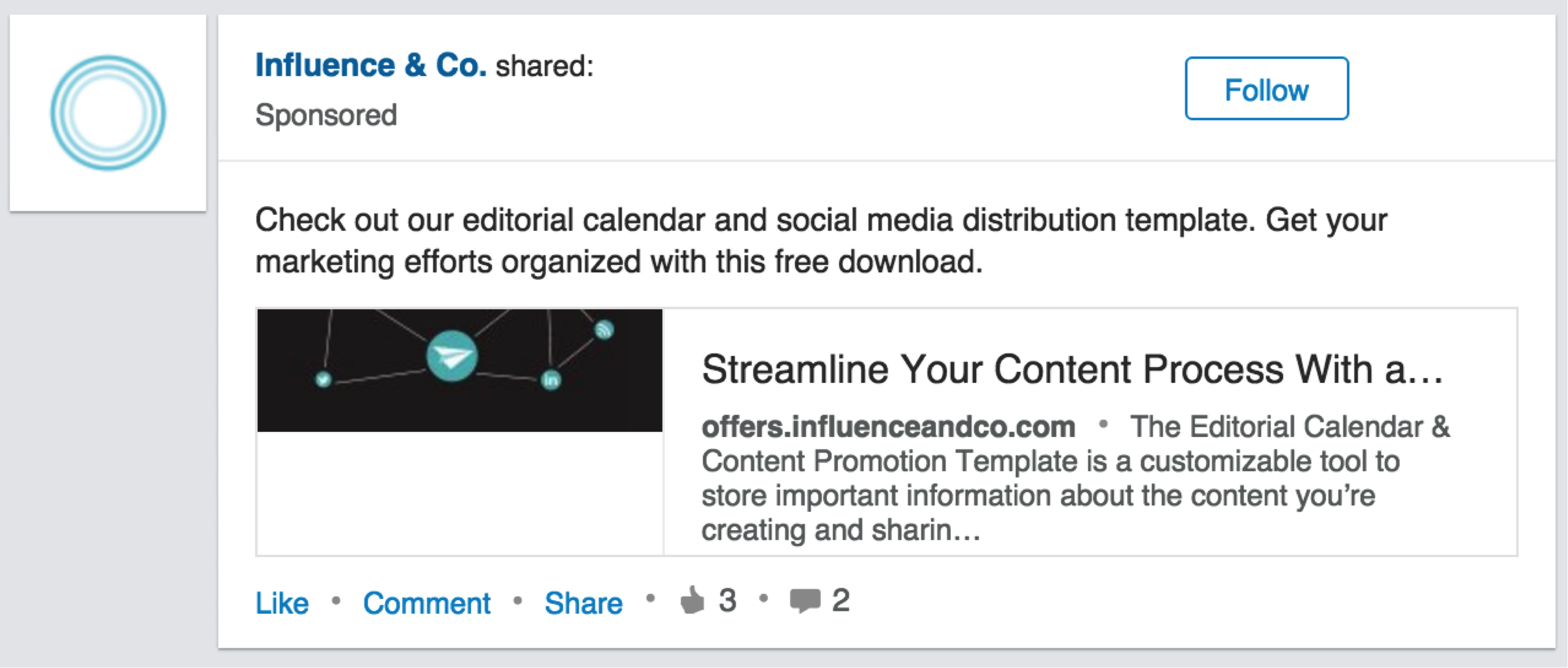
Promoted Media
Twitter: Promoted Tweets
We’ve also recently seen success with promoting tweets that have the most engagement. For instance, we promoted this tweet about our “5 Unexpected Content Marketing Trends from CMI’s 2016 Report” blog post after we saw that it was garnering a lot of initial engagement. It generated an additional 111 clicks to the post with only $50 in ad spend.
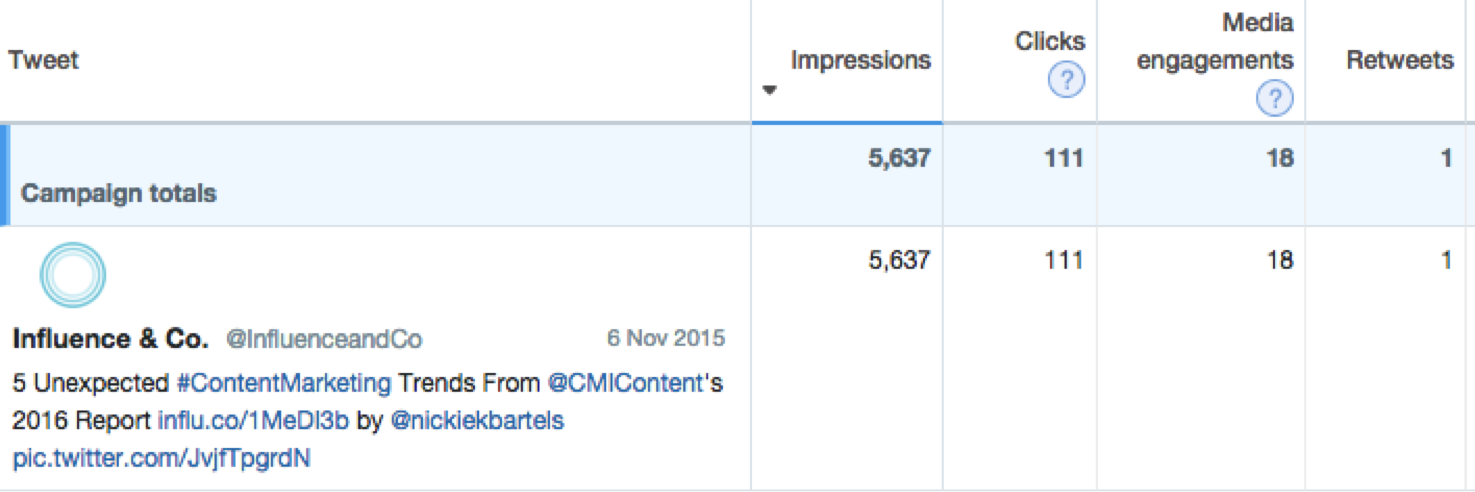
Promoting tweets is a great way to boost the reach of your most engaging tweets and get them in front of a new audience. To determine whether a tweet is worthy of promotion, we ask ourselves two questions:
- Did it perform well? When a post is performing well organically, it will automatically perform better than your other posts when you sponsor them. Our rule of thumb is to only promote the top 1-3% of tweets that have gotten the most engagement recently.
- Is the content you’re promoting converting well? If we’re considering promoting a tweet, we look at the piece of content it references to determine the conversion rate of that piece. If it didn’t perform well, we try to pick a new tweet that links to a high-performing piece of content or look at how we can optimize the blog post for better conversion before putting dollars behind promoting it on social media.
Paid Media Examples
There are a variety of paid media avenues on Facebook. First, you can experiment with paid targeted advertising that shows up on users’ news feeds. These are often single space ads. Alternatively, you can buy carousel ads: these are a swipeable series of images in a single ad space, allowing advertisers to tell a better story and showcase more products.
 Image Courtesy of Facebook.
Besides the homepage, there are many different options for ad placements, like Facebook Marketplace, Facebook Suggested Video, Facebook Right Column, and Messenger Inbox.
Facebook ads are often incredibly tailored to your marketing goals: you start by setting your objective, choosing your ideal audience, deciding where to place your ads, and setting a budget, and so on to increase the likelihood of attracting your target market.
Much like Facebook, LinkedIn offers sponsored content or updates in and around users’ feeds across devices. They also offer Sponsored InMail, where advertisers can deliver content to target audiences through their Messaging feature. The sponsored messages only deliver when the user is live on LinkedIn, meaning that the paid message will pop up in her chat box at the bottom of the screen, drawing her attention to the offering and increasing your chances of being noticed.
There are multiple Twitter ad campaigns to choose from, each designed to solve a specific problem: increasing brand awareness or engagement, growing your follower count, incentivizing website clicks, increasing app installs, or quickly promoting a new offer.
After setting your ads objective, advertisers then choose the audiences to target, bid on the cost per interaction, and select which tweets to sponsor. Promoted Tweets are paid, placed ads on users’ Twitter feeds, search results page, promoted trends, or through official Twitter advertising partners. (We walked through this strategy in greater depth above.)
YouTube
Youtube is a versatile platform when it comes to its paid media — it can be anything from bumper ads (six second ads), Google Preferred (non-skippable, mid-length ads), TrueView InStream (skippable, long format ads), or TrueView Action (video format with a CTA). Alternatively, you might consider partnering with content creators on YouTube to promote your brand.
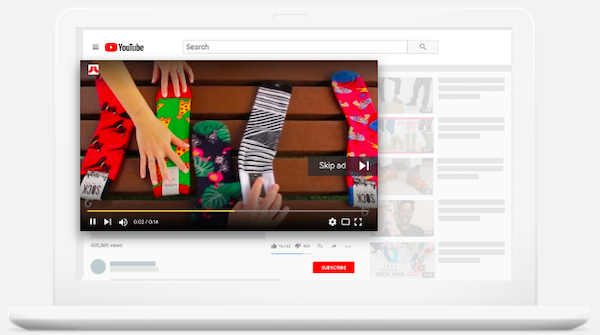 Image Courtesy of YouTube.
PPC
Pay-Per-Click — or PPC — is a paid search results strategy that charges advertisers for each click a promoted result receives. These paid search ads are the first few hits on a keyword’s search results page and are marked with a green “Ad” label. Since most search engine users don’t tend to look beyond the first few hits — let alone beyond the first results page — they can be an effective way to boost awareness and drive traffic to your site.
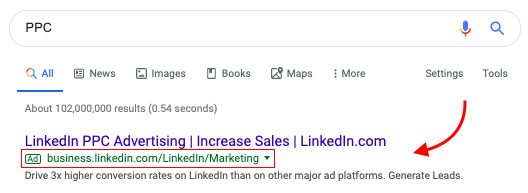
Display Ads
This type of paid media is likely the most recognized, as pop-ups, wallpaper ads, banners, and video ads can be found on almost every web page on the internet. They are usually pretty affordable on a cost-per-click basis and are an excellent way to increase brand awareness and recognition. The problem with display ads is that because they are so prolific, users tend to ignore them or even block them entirely.

How HubSpot’s Paid Team Leverages Their CRM
When you think about it, advertisers have an endless list of tools at their disposal.
For instance, we might build our ads directly within Facebook, LinkedIn, or Google. Perhaps we have a budgeting tool that helps us properly allocate our ad spend. Additionally, maybe we use a tool like SEMRush to do keyword research.
There’s a number of interesting reporting options out there. And I’m willing to bet when you’re working on your ads strategy, you’re leveraging much more than just the tools within the social media networks to find success.
We’re no different here at HubSpot. Everything from keyword research tools to Microsoft Excel and HubSpot’s own ads tool is booted up to aid us in reaching you with the perfect ad at exactly the right moment in your buyer’s journey.
But when people ask me, “What tool has the biggest impact on your ads strategy?” — without a doubt, it’s our CRM. Here, I’m going to explain why.
Why Advertisers Should Leverage Their CRM
When I take a look at my most successful ad campaigns, they have a few things in common.
First, they’re highly targeted. I’m not just blasting an ad out to any random group. Instead, I’m taking a look at our CRM data, and using it to create very specific segments of leads that will go into my audiences.
Second, my ad and the offer behind it is tailored to the audience I’m targeting. I don’t ask every single lead to buy our software, and I don’t target people who are ready to speak to our sales team with HubSpot Academy Lessons or introductory blog posts. Knowing where a lead is in their buyer’s journey, what content they’ve already interacted with, and what touchpoints they’ve already had with our brand is critical for success.
Third — and maybe most importantly — my most successful ads have clear next steps outlined for each lead that converts. You don’t see ROI on your ad spend if you don’t continue to work with the leads that come in through your ads. Whether you’ll pass them off to the sales team for direct outreach, or enter them into a nurturing flow, next steps need to be outlined from the start when devising an ad campaign.
These three components are hallmarks of any sound journey-based advertising strategy. If I feel confident about those three components of my ad campaign — my targeting, my offer, and my lead nurturing — then we push forward.
This is where a CRM comes into play. A CRM is vital for helping ensure each of those three components are working in sync.
Your CRM gives you a full overview of your customer’s experience with your brand. No tool is better for gathering deep insights on your leads. With these insights, you can start to create ad campaigns that feel personalized to each person who interacts with them.
Additionally, you can use your CRM to create better alignment between your marketing and sales teams to ensure everyone has complete insights into which campaigns your customers are interacting with.
Every interaction, both online and offline, will start to feel like a natural next step along the buyer’s journey. In short, the CRM is an advertiser’s dream.
But how do you properly use it to work seamlessly with you ad strategy?
Using Your CRM in Your Ad Targeting
Your ad has no chance of being successful if you don’t get your targeting right. Your ad content could be incredibly high-quality and engaging, but if you’re targeting the wrong group of people, it’s all for nothing.
Your targeting options are extensive. At the highest level, you can target your ads using either third-party data or first-party data.
Simply put, third-party data is aggregated data on large groups of people made available on advertising platforms. First-party data, on the other hand, is information that you’ve collected directly from your customers. Maybe it’s information they’ve submitted on a lead ad form, or the specific blog posts that they’re visiting on your site. Because this data comes directly from your customers, it’s extremely powerful when leveraged in your audiences.
Your CRM aggregates all this first-party data together into one place. Essentially, it’s a one-stop shop for everything you need to create highly targeted audiences.
When I’m creating audiences for HubSpot’s ad campaigns, I’m constantly leveraging data within our CRM. I do this to ensure the ads you see are contextual, and relevant — not just promoting HubSpot for the sake of doing so. It’s a better experience for you, and it ensures we’re spending our ad dollars wisely.
For example, we have two groups of leads — those who download a piece of content on HubSpot.com or subscribe to our blog, and those who sign up for our free tools. From these two “base groups”, we can start layering on additional information.
For the leads who subscribed to our blog, we might look at what content they’re regularly consuming, or information we know about the company they work for, in order to ensure the ads they see reflect the topics around which they’ve demonstrated interest.
For instance, if we know we have a group of blog subscribers who frequently read our Sales blog — and run a Sales team at mid-sized software companies — chances are they could be interested in a Sales Hub case study about a current customer who looks just like them. We could even go a step further and see who has visited our Sales Hub product page.
In just a few simple steps, we’re able to take a group of leads who are interested in our content, and use the data in our CRM to create a highly targeted audience for an upcoming ad campaign.
For free users of our software, CRM data is just as valuable for ads targeting. For this group, information on their job roles and the content they’re consuming is just as valuable, but we can also start to explore how they’re using our product. Just like we track website activity within our CRM, we also track product usage.
For example, if someone signed up for our free CRM, I’ll look at how often they use the tool. If they’re actively using the tool and seeing value, we might decide not to target ads at them. If we think they’d find value in our paid product based on their product usage, we might target them with ads that are specific to which tools they use the most.
On the other hand, If they aren’t using the CRM at all, we might explore how we can help them find value in the tool. To do this, we’ll mine our CRM for information on what led to them to signing up for the free tools in the first place. Were they looking for a way to manage their deals pipeline, or were they interested in exploring our free email marketing tool? Knowing this, we can start to recommend educational content through HubSpot Academy, which can help them find success within the tool.
Additionally, let’s not forget about the power of lookalike audiences or exclusionary audiences. A lookalike audience is an audience type provided by the networks — essentially, a network like Facebook will take one of your existing audiences and go out and serve your ad to similar individuals.
Lookalikes are powerful, and they automatically expand your advertising reach. Best of all, they become more powerful when paired with highly targeted audiences built off CRM data.
It’s also critical you’re strategic with how you use exclusion audiences. These can be used in a number of different ways. For example, almost every ad I run excludes our current paying customers. There are also key events that a lead could take, where I’ll hold off on targeting them for a few weeks at a time to ensure we’re not negatively impacting their buyer’s journey. By doing this, I’m making sure I’m spending my ads budget wisely and efficiently.
Remember, lookalikes can also be used for audience exclusion. For example, we’ve created lookalikes in the past off of lists of leads that weren’t performing well, and excluded them from our ads targeting.
The targeting strategies above are only possible through leveraging the data we’ve collected within our CRM. In practice, we’ll start with broad groups of leads, and continue to layer on audience conditions, filters, and lookalikes until we’ve reached a group of leads in our CRM that we believe will be highly interested in the ads we have to offer.
Leveraging Your CRM in Your Follow-Up
Too many people I speak with about ads talk about an ad campaign as an isolated marketing action — something that occurs independently from your email marketing, your content marketing, or even your sales process. This couldn’t be further from the truth.
Few things can hamper your success with digital ads like ignoring the context under which someone will see your ad.
For example, consider this — what if in the same day, one of your leads has an ad targeted at them, a marketing email sent to them, and a sales rep call them? Chances are that lead is sick of hearing from you. What’s even worse is if the ad, email, and sales call all speak to different offers. Not creating alignment across each interaction your leads and customers have with your brand is a quick way to drive potential business away.
Luckily, your CRM gives you everything you need to create ads that fit perfectly into every stage of your buyer’s journey. By leveraging your CRM, you can see how each lead interacts with your content across all channels, ensuring you don’t miss obvious opportunities or overwhelm your leads.
Your CRM is useful when crafting your ads strategy to align with other marketing efforts, but it becomes essential when determining how you’ll follow-up with and nurture the leads that convert on your ads. Each lead’s experience will be unique, and the follow up that they receive after converting on your ad should reflect their experience.
Obviously, if they’re downloading an e-book through your ad, ensuring that they receive that content offer is step one. But what if that’s the third e-book they’ve downloaded this month? The nurturing flow that someone enters should look a lot different for a first time e-book downloader compared to someone who regularly interacts with your content, and shows high-buying intent.
HubSpot customer Airstream does a great job of leveraging their CRM data to ensure their customers receive follow-up that is relevant and actionable for them. Once a lead converts on one of their ads, they use CRM data to send an automated follow-up email — delivering not only the content offer promised within the ad, but the location of their nearest Airstream dealer. Without leveraging their CRM, Airstream’s follow-up wouldn’t be as contextualized to each person who converts on their ads.
We use lead scoring within our CRM to ensure leads that convert on our ads receive a follow-up message tailored to their experience with our brand. Based on their score, they might enter into a nurturing campaign, or get passed to our sales team. The experience will be different for each lead, but by leveraging the CRM, we’re able to ensure that our teams are aligned, and everyone who interacts with that lead has full insight into what their experience with our brand has been so far.
Using Your CRM to Determine ROI & Ad Spend
Lastly, the CRM is essential for helping us calculate the ROI of our ad spend. One of the great things about running your marketing and sales efforts out of the same tool, is that ROI calculations are simple.
Attributing an ad campaign to a closed deal can be done without having to hop between multiple systems, helping you avoid mistakes when measuring the success of your ad spend.
Additionally, when I’m calculating ROI, I often exclude the three most recent months of leads that converted on my ads. Why? Because those leads just entered the system. They’re still being nurtured into SQLs, and they haven’t had enough time to close. Figure out how long your sales process usually takes, and consider excluding the leads, and the ad spend that brought them into your CRM, from your ROI calculation until later on.
Another piece of data within your CRM that is invaluable to advertisers is conversion data. I use this to help me strategically plan my ads budget. When determining ad spend, it’s important to keep the ROI of your ad spend in mind. The problem is that far too often, you might not have enough purchase data to determine what your ads budget should be. If this is the case, take a look at a combination of your sales and marketing data captured in your CRM.
For instance, let’s say you know your sales team can convert one out of every 10 leads that convert on a form, and you know that about 20% of your website visitors will convert on a form.
Doing some simple math, you can determine that you’ll need 50 clicks on your ads to generate one new customer. If you also leverage your CRM to understand what that one customer is worth to you, or their lifetime value, you can start to make smarter, more accurate decisions on what your ad spend should be.
Ads are one of the most powerful tools for a marketer, but only when executed properly. Using your CRM, you can provide your customers with targeted, contextual ads that help them make educated buying decisions, and move them through their buyer’s journey.

Building a Community in a Changing Social Media World
Could your business benefit from a dedicated community? Wondering where you should build your community? To explore why building community and groups is essential for marketers, I interview community-building expert Gina Bianchini. She’s the former CEO and co-founder of Ning. She’s also the founder and CEO of Mighty Networks. Gina explains how a community differs […]
The post Building a Community in a Changing Social Media World appeared first on Social Media Marketing | Social Media Examiner.
from Social Media Marketing | Social Media Examiner https://ift.tt/2JW8uW6
via socialmediaexaminer
An Introduction to Supply Chain Management (SCM)

The Ultimate Guide to Integrations and Why Your Business Needs Them
Have you ever found yourself working on a project in which you had to toggle between multiple software and applications? Perhaps you had to plug data from one system into another or rewrite the same content over and over again to ensure it was in multiple locations.
Although few people have the time or patience for this type of tedious work, it’s highly common and often critical to your business’s success — these mundane tasks need to get done.
What if there was a way to connect your software to the applications you use in a way that successfully brings them together? This would mean all of your information and data would live in a central location with no manual entry required, even if those applications don’t actually come with the software itself … sound nice?
Well, good news! This type of solution exists … it’s called an integration.
Integrations are a complex topic to understand. So, let’s simplify the concept with the help of an analogy we can reference throughout this guide. Let’s pretend you want to plug your MacBook laptop into your TV using a connector cable so you can watch reruns of Friends on Netflix on the big screen. And integration kind of works like this — I’ll explain more as we go.
Back to our analogy: If your software is your laptop, you’ll use a connector cable, or integration, to then watch Friends on the TV, or application.
Now, let’s run through some commonly asked questions about integrations to help you get a better grasp on what they are, how they work, and why your company needs them.
Why use integrations?
Integrations solve and simplify your need for new software as your business grows and evolves. They allow you to keep the system you’re currently using by simply adding connections to third-party applications to enhance system functionality and provide additional features you may need but aren’t able to build within your software. You can keep your current laptop and TV, and simply use the connector cable to watch Friends on the big screen.
By leveraging integration connections across your systems, you can power your business to achieve a much wider range of tasks on your software as you enhance its functionality. This is especially helpful as your business expands since your needs are bound to change.
Although your software may have the functionality you need when you start your business, you’re likely going to want additional applications to provide the features you end up needing later on, as you grow.
There are many types of integrations, each of which have specific functions to help meet different needs. The easiest way to think about the various types of integrations is by category. Some integrations have several functions, meaning they could technically fit into many categories because they serve more than one main purpose. Other integrations have one specific function.
Who needs integrations?
Integrations are helpful tools for virtually every business, no matter the size or industry. There are integrations suited for every type of company (startups, SMBs, and enterprise companies) with any purpose (advertising, analytics, or content).
If you sell software, as we do at HubSpot, you’ll find yourself not only using connections for your internal software but also for your customers to use along with your software. This is because your software may not have every feature and function your customers need to run their business. So, by adding an integration, they’ll get that added feature or function while continuing to use your software.
Referring back to our analogy, without the integration, or connector cable, your laptop wouldn’t be able to communicate with your TV to allow you to watch Friends on the big screen. You need that integration, or cable, to allow for added functionality and watch the show on TV — without it, this wouldn’t be possible.
How do you get integrations?
Integrations are almost always located in some type of marketplace, where customers can review and browse all of their options. The HubSpot Integrations & Application Marketplace is an example of this. Our marketplace allows visitors to search and learn more about the various integrations and their functions, and then connect HubSpot to their integration of choice.
(No, you can’t go to Best Buy to pick up your integration as you would with your connector cable to watch Friends on your TV… you’re right, the example doesn’t quite work here.)
How do integrations work with APIs?
API stands for application programming interface. An API is an interface that software uses to receive information (whether that’s data, servers, applications, etc.).
All of the integrations we’re going to discuss below are built on APIs. By building integrations on APIs, you can connect your integrations to your software and use them in tandem with one another. The integration allows for the flow of information to and from apps and devices in real time — APIs allow them to talk to one another.
Think about this in terms of our analogy from above: The application is the TV, the programming allows your laptop to communicate with the TV, and the interface is how you (the user) are able to interact with the application (by watching Friends on your TV). In this example, the API is the port on the side of your laptop in which you actually insert your integration (the cable) to then connect your laptop to your TV.
Integration vs. iPaaS Solution
If you’ve heard of integrations before, chances are you’ve also heard about iPaaS, or Integration Platform as a Service. The difference between the two is an important distinction to make when determining which one you need for your business. While an integration is a one-to-one, direct connection solution, an iPaaS solution is not.
Instead, iPaaS is a cloud-based platform that connects your applications and systems — whether that’s in the cloud or on-premise — between an organization and third-party software without the use of middleware.
So, if you look for an integration solution on your software’s marketplace and don’t find the connection you’re looking for, then you’d turn to an iPaaS solution to solve your need for that connection. There are a few integrations available today (called “connector integrations”, which we’ll cover an example of below) that can help you build custom integrations..
So, which integrations should you actually use? Let’s look at a list of some of the most popular integrations available.
Popular Integrations
The following integrations are categorized by business need to help you browse through your options. (Almost all of these integrations fit into multiple categories, as they have functions that allow them to do multiple things. Below, we placed them in the category they’re best suited for.)
It’s important to note these are just some of today’s popular integrations — there are hundreds of more integrations to learn about and choose from as your business grows. The list we’ve compiled below is of integrations that connect with HubSpot. This isn’t to say these HubSpot integrations don’t also work with other software. In fact, most of these integrations are compatible with dozens of programs in addition to HubSpot.
Let’s take a look.
Advertising Integrations
Advertising integrations help you market to and reach your target audience. Data about the success of your ads and/ or the leads obtained from them is automatically added to your HubSpot CRM so you can learn more about the people who interact with your ads and nurture them into customers.
1. Facebook Ads
The Facebook Ads integration allows you to connect your Facebook Ads account to HubSpot. This integration gives you the ability to attribute your ads directly to the contacts who interact with them. It also allows you to review real data about which ads impact your bottom line. This simplifies the reporting process for all of your Facebook Ad efforts.
2. AdRoll
Different businesses and products have various buyer personas. The AdRoll integration gives you the opportunity to create personalized retargeting ads for different lead segments in your HubSpot contacts. You can personalize several parts of the ads, such as content and formatting, that will best relate to your prospect. This allows you to focus on your audience’s attributes so you can effectively reach your prospects — you can gather intricate details about your prospects from your CRM via the integration so you’re able to successfully retarget them.
3. Instapage
If you’re not a developer, creating your website’s landing page might sound like an overwhelming task. The Instapage integration provides a straightforward option for anyone who wants to create and personalize their landing page and then send lead information straight to HubSpot. These details are automatically placed under the associated contact in HubSpot for you— meaning, there’s no need to perform this transfer manually.
ABM Integrations
ABM stands for account-based marketing. These integrations help you leverage your account and audience data so you can tailor your messaging, CTAs, and marketing strategies to close deals and attract customers.
1. OrgChartHub
The OrgChartHub integration allows you to efficiently build customer organization charts without ever leaving HubSpot. You can create customer organization charts while in HubSpot so you’re able to easily identify unknown contacts, visualize key stakeholders, and customize your sales personas without manually sending any of this information back and forth.
2. CaliberMind
With the CaliberMind integration, you’ll be able to look at your cross-channel account engagement and create alerts for your reps about which deals they should focus on closing to meet quota. The integration takes your contacts directly from HubSpot and automatically matches them to their associated accounts so you don’t have to.
3. Metadata
The Metadata integration provides account-based advertising services. You can automatically identify specific target accounts and contacts from HubSpot to create personalized advertisements at scale to help you close more deals and reach your target audience more effectively.
Analytics and Data Integrations
These integrations help you measure your success across a number of analytics platforms. You can look at your data in different ways and ensure all of this information is well-organized in HubSpot so your team can review it at any time. These integrations help you learn more about which of your efforts are working and which ones need to be modified.
1. Databox
With the increase of remote employees across businesses and the number of people who access their work while on-the-go, having the ability to review and manage your key performance indicators (KPIs) from anywhere can be quite helpful. The Databox integration provides you with access to all of your analytics data in HubSpot from a wide variety of sources including Google Analytics, SEMRush, mobile, desktop, Facebook, and more.
2. Hotjar
In a world where many website visitors are uninterested in completing forms and providing their personal information, Hotjar is a great way to learn about who your visitors are and what they’re looking for on your site. The Hotjar integration gives you insight into who your website and mobile visitors are and what their needs consist of directly from HubSpot.
3. Klipfolio
The Klipfolio integration shows you your most important metrics in real-time and creates easy-to-read dashboards in HubSpot so you can track and analyze performance across all of your platforms from one location. This allows you to improve your data transparency and reach your targets faster.
Calling Integrations
Whether it’s a meeting with fellow employees or your prospective and current customers, calling integrations will make all phone and video call interactions simple. Your contact’s information and details about the call will be recorded in HubSpot for easy access. This also provides sales reps and support team members with the necessary background information to assist the prospect or customer appropriately.
1. UberConference
With UberConference, it takes just seconds to schedule your meetings with colleagues and prospective customers so you can focus on tasks that require more attention. The integration allows you to schedule meetings quickly and easily without ever having to leave your HubSpot portal.
2. Aircall
Phone calls remain one of the most effective ways to interact with your prospective and current customers. Whether it’s a sales or support call, the Aircall integration allows you to manage your call flows and attentively assist your leads and customers all within HubSpot so your contact’s information lives in one, central location.
3. CallRail
The CallRail integration is a call tracking and analytics system which allows you to customize segments and actions based on your specific calls with prospects and customers. All of your call and text data will automatically be added and organized in HubSpot under the associated contact so you don’t have to manually enter any data.
Connector Integrations
Connector integrations provide you with access to dozens of applications which sync to HubSpot to save you time and add functionality. Some connector integrations offer a wide range of applications and some have more specific types of applications. Additionally, some connector integrations can assist in creating a custom integration to suit your needs.
1. Automate.io
The Automate.io integration connects to HubSpot to give you access to over 80 applications. By syncing with these apps, you’ll be able to transfer data to them to create customized integrations so you can manage all of your data in a way that works for your business all within HubSpot.
2. Zapier
The Zapier integration allows you to automatically connect your software to over 1,000 applications. It links your apps to HubSpot for you in just a few clicks to save you time. There’s no coding required and your apps will be able to begin sharing data in an easy-to-read workflow format in your HubSpot portal.
3. PieSync
The PieSync integration provides real-time, two-way contact sync. This means every time you add a contact to HubSpot, it automatically syncs to an application (such as Google Contacts or Outlook), and vice versa — you don’t need to worry about any importing or exporting, expediting and simplifying your contact syncs.
Content Integrations
Content integrations help you create, design, and share custom content for your website. They also help you learn about who’s interacting with the content and how they’re interacting with it. That information is then synced to HubSpot so you can organize it and add it to specific contacts.
1. Beacon
If your website has a collection of blog posts, the Beacon integration might be a good option for you. The integration ensures your content looks professional and allows you to drive more leads by getting more value out of your existing content — it connects to HubSpot to automatically convert your blog posts into downloadable content such as eBooks.
2. briX
The briX integration connects to HubSpot so you can design and personalize web pages for your site. You don’t need a background in web design or coding to create beautiful pages — the drag-and-drop template and 100+ customizable features make it easy to organize your content in any way you choose. This integration is ideal for easily designing and personalizing web pages directly from HubSpot.
3. Belch.io
Customized landing pages, web pages, and emails provide a professional look and feel for your visitors, leads, and customers while interacting with your business online. The Belch.io integration connects to HubSpot so you can personalize and brand all of these things in just minutes. It’s a great option for anyone without a background in coding or web development who wants to design and customize their site pages and emails to complement their brand all from HubSpot.
Customer Success Integrations
Customer success integrations connect to HubSpot to make your internal and external interactions with employees (cross-team) and customers straightforward. They simplify communication and help you share information and/or data when you need to.
1. Slack
The Slack integration is a digital workspace and communication tool that allows you to connect and talk with your team members. The integration is ideal for team collaboration and coordination from anywhere. By connecting the integration to your software, you can use Slack’s and HubSpot’s features in either the application or the software so you don’t have to waste time toggling back and forth — the same information will be found in both locations in real time.
2. Zendesk
Zendesk offers a ticketing system to keep track of customer inquiries and allows you to keep details about all of your customer interactions in one place. It helps you provide consistent customer experiences among your fellow employees and customers.
By connecting HubSpot to the Zendesk integration, you’ll be able to bring the work of your sales, marketing, and support teams together in a central location. It also allows these departments to communicate with each other while in HubSpot as well.
3. LiveChat
The LiveChat integration allows you to communicate with potential customers in real-time when they need assistance or guidance while on your website from HubSpot. Whether it’s a question about your product or the need for help in the checkout process, LiveChat allows you to walk them through the information they need to help you boost conversions and build strong relationships with prospects and customers.
Ecommerce Integrations
If you have an online store, ecommerce integrations are a great way to learn about what your customers and visitors are doing while they’re on your website. By connecting these integrations to HubSpot, you’ll know when your visitors are most frequently abandoning your site or their carts so you can create re-engagement content to regain their interest.
1. Shopify
The Shopify integration allows you to easily incorporate all of your ecommerce data and customer data within HubSpot. It automatically syncs customer, product, and deal information in HubSpot under the associated customer’s profile, so your entire team can view all of these details in one location. You can also create cart abandonment nurturing tactics, re-engagement ads for your website from HubSpot once you connect the integration to the software.
2. Typeform
The Typeform integration helps you create and design web and mobile forms for your leads. You can create contact forms, sign up forms, quizzes, and more, and all of your responses will automatically be sent directly to HubSpot so you can easily review your results and responses and compile them under the associated contact in HubSpot.
3. Magento
The Magento integration helps you create and send upsell, cross-sell, and reorder emails as well as develop abandoned cart nurturing tactics to boost your conversions. It automatically sends all of your customers’ ecommerce-related data, as well as emails between you and your customers, straight to their respective HubSpot contact record.
Email Integrations
Email integrations help you track a prospect’s interactions with sales reps, personalize your email automation with certain contacts, and measure the success of your email campaigns among your target audience — all from HubSpot.
1. MailChimp
The MailChimp integration allows you to sync HubSpot with your email service provider. You can build email campaigns and rest easy knowing the Intelligent Error Handling feature will continue engaging your contacts even if a syncing error occurs between the software and application. By connecting MailChimp to HubSpot, you’ll have the ability to automatically add contacts from HubSpot into your application’s email lists and vice versa so you never have to do it manually.
2. Privy
Privy helps you make more sales and turn more prospects into delighted customers. The integration uses targeted pop-up ads, banners, bars, and more to help you boost conversions and decrease page abandonment. It also automatically syncs all of your new leads from your website to HubSpot so the software can help you nurture them and convert them into customers.
3. Front
The Front integration is a collaborative inbox, meaning all members of your team can see and access your contacts, review deals, and see all activity history while working in HubSpot. All of these details are automatically synced in Front and your CRM. This helps you improve your customer experience and ensure it remains consistent no matter which employees your customers work with.
Event and Webinar Integrations
Whether it’s an in-person event, a webinar, an online meeting, or a video conference, the following integrations simplify every aspect of hosting an event. They allow your contacts to book meetings with you and you can update all information related to your contacts post-event or meeting in HubSpot.
1. Eventbrite
Eventbrite helps you use inbound marketing tactics to attract more prospects and customers to your in-person events. Once connected to your software, the integration automatically takes data from your contact lists in HubSpot to help you uncover effective ways to connect with your target audience, face-to-face.
2. GoToWebinar
No matter the type of event you’re hosting, the GoToWebinar integration automatically syncs all of your registrant and participant information in HubSpot under the associated contact. You’ll never have to worry about manually importing data about your webinar contacts again — instead, you’ll have more time to focus on the event itself.
3. Setmore
The Setmore integration simplifies appointment scheduling for you. It automatically imports your booked appointments (and information about the customer who booked the appointment) to HubSpot under the correct contact’s profile so you don’t have to do it manually.
Lead Generation Integrations
Lead generation integrations help you transition early-stage leads into delighted customers. All of your leads’ information will automatically be synced to HubSpot so you can view it at any point during the buyer’s journey. This is helpful to learn more about your target audience and to manage customer information so your sales and support teams can refer to it if needed, all from one location.
1. WordPress
The WordPress integration helps you optimize and align your WordPress website with the data about your contacts and business goals you have in HubSpot. Your HubSpot account and all of your growth tools will automatically be connected to your WordPress site so you can work to attract, engage, and delight site visitors and customers on your site from either WordPress or HubSpot.
2. Unbounce
The Unbounce integration helps you with the lead capturing and nurturing processes. You can create lead generation forms and send all data collected about your leads directly to HubSpot. At any point in time, you can take this data about your leads and use it to create campaigns. You’ll also have the ability to export any data in just seconds from your Unbounce account and share it anywhere.
3. SurveyMonkey
With the SurveyMonkey integration, you can create and distribute custom surveys to your prospects and customers, collect all data obtained, and view your responses within HubSpot. This is ideal because you can then segment and organize all your contacts based on their survey responses to easily manage the type of content and/or follow up they receive.
Live Chat Integrations
By adding live chat integrations to your website, you’ll be able to communicate with prospects in real time and nurture them into customers. You can answer their questions, respond to their concerns, and assist them in their purchase decisions. Then, this data is compiled into HubSpot under the specific contact it belongs to so you can follow up appropriately.
1. Intercom
The Intercom integration allows you to capture new leads and prospective customers with the help of live chat on your website. Intercom allows you to convert more leads by actively engaging with them at any time while they’re on your website once connected to HubSpot. You can then qualify your leads with custom bots, talk with them directly, and track them — and then you can have all of this information automatically organized under their contact in HubSpot.
2. ManyChat
Once connected to HubSpot, the ManyChat integration allows you to automate your messenger marketing so you can easily organize, nurture, and track your leads from the software. You can also take any HubSpot form and submit information obtained from it by sending custom field data to HubSpot Form Submissions.
3. Drift
The Drift integration provides live chat for your website so you can assist your leads in real time form HubSpot. The integration allows you to watch and save all of the lead’s activity on your site in HubSpot under the correct contact. Additionally, your sales reps can use Drift to customize their outreach and follow-ups based on that activity to improve the chances of conversion.
Sales Integrations
Sales integrations help you bring your sales tools, tactics, and prospects’ information together using HubSpot. You’ll be able to keep your marketing, support, and sales details in a central location for all teams to access, analyze, and refer to as needed.
1. HelloSign
Once connected to HubSpot, you’ll automatically be notified of any action a prospect takes on any document you send them with the HelloSign integration. Examples of the actions you’ll be notified about include when a prospect or customer receives, opens, or signs the document. Then, this activity data is sent to the contact it belongs to in HubSpot so reps know where the prospect or customer is in the buyer’s journey and how they should go about following up with them.
2. Salesforce
If you’re a Salesforce user, you can automatically sync all of your contacts’ information from the database into HubSpot once connected to the Salesforce integration. This allows you to work with reps to get strong lead intelligence and revenue reporting. You can mesh your marketing and sales work, content, and information so you and your team can access any information from either system at any point in time.
3. PandaDoc
When it comes to sales work, there are many tasks involved that don’t necessarily include the process of actually closing a deal. The PandaDoc integration automatically organizes and reviews information from HubSpot about your prospect to help you with non-selling tasks like creating and sending quotes, proposals, and contracts.
Social Media Integrations
Understanding your social media following is a huge part of successful marketing. Social media integrations help you learn about your followers, understand the type of content they interact with and share, and automate specific parts of your social media strategy.
1. Facebook
With the Facebook integration, you can automatically connect your business’s Facebook account to HubSpot. Schedule Facebook posts ahead of time analyze and measure post’s performance. This integration is ideal if you want to manage your Facebook marketing strategy alongside your other social media marketing strategies directly from HubSpot.
2. LinkedIn
By connecting your LinkedIn account to HubSpot through the LinkedIn integration, you can easily engage with your network and communicate with all of your contacts from HubSpot. You can also auto-publish your blogs and share specific content with your followers to nurture them into leads and customers. This integration is also great for tracking engagement along with all of your other social media channels and marketing efforts all from HubSpot’s social media tool.
3. Twitter
Schedule Tweets ahead of time, monitor Twitter streams, view Tweets and Twitter interactions of your competitors, and monitor accounts that are important to your brand from HubSpot with the Twitter integration. All information about your current and new followers will be added to your contact lists in HubSpot so everything is organized appropriately.
Video Integrations
With the rise of video and video marketing in business today, integrations that help you incorporate this media on your website have become quite useful. They allow you to create and implement videos on your site pages and forms as well as measure the success of your video marketing efforts.
1. Wistia
The Wistia integration provides you with the ability to integrate videos on your website, and then incorporate HubSpot forms with those videos to improve video engagement (and hopefully, conversion) rates. If any lead converts on a video, their information is automatically sent to HubSpot so you’ll have their video-viewing data paired with their contact details.
2. YouTube
The YouTube integration connects your YouTube channel to HubSpot. This way, you can easily report on your video and channel success and compare this data to that of your other social platforms using HubSpot’s analytics and social media tools and dashboards.
3. Promo
With the Promo integration, you can choose from over three million clips, templates, and music options to use to create a video for your site directly from HubSpot. You can easily throw in custom messaging, branding, or logos to personalize the video for your business based on a specific prospect’s needs and interests, found under their specific contact in HubSpot.
Get Integrated to Grow Better
Integrations have the power to enhance all aspects of your business. No matter the software you use to run your company, you can find integrations that can help simplify your processes, optimize your efforts, and empower your fellow employees. So, find the right integration marketplace for your software and begin connecting to the applications suited for your business needs.

SEO vs. PPC: When to Optimize and When to Pay for Traffic
Let’s say you have an amazing new product — you’ve created a software that recommends the perfect pizza toppings for your personality, and you’re excited to share your business with the world.
Unfortunately, you have no idea how to share this revolutionary product with as many of your target users as possible.
Many small businesses are faced with a similar problem of getting found by the right audience — it doesn’t matter how accurate your pizza bot is in determining whether or not you like pineapple on your pizza, if users can’t find you.
There are two popular search strategies by which organizations solve this problem — Search Engine Optimization (SEO) and Pay-Per-Click (PPC). But which method is right for you and your pizza software company? Is it better to pursue an organic-first approach and find consumers through search engine rankings, or is it better to invest in an advertisement at the top of a keyword results page?
Here, we’ve explored what each of these two acquisition strategies do and provided some descriptive statistics to help you decide whether you’re business is best suited for SEO or PPC — or both.
What is SEO?
Just as you turn to your favorite search engine to look up a new marketing acronym or where to get good pizza, so do your consumers. By investing in SEO, or search engine optimization, you’re increasing the likelihood of your target audience finding you when they search for things related to your product or service.
It’s important to build a Google presence if you want your organization to succeed, and by increasing your rank among search results you’re improving your online visibility and domain authority. In other words, by building up the content on your site, optimizing for keywords on which to rank, publishing your NAP (name, address, and phone number), and more, Google is more likely to think your site is relevant and push your link higher up on a keyword’s search results page.
What is PPC?
PPC, or pay-per-click, is a form of search engine marketing (SEM) where an advertiser pays a publisher (such as Google or Facebook) every time the ad is clicked. This model allows advertisers to only pay when consumers interact with their listing — meaning you attract people who are interested in your offer.
This method is mostly associated with search engines as advertisers bid on search keywords relevant to their target markets. You may have noticed that the top search results are tagged with an “Ad” marker. The higher the keyword search volume, the more advertisers need to pay.
If an organization does not have the domain authority to get their website ranking on search engines organically, PPC can help businesses stay competitive in a crowded market and quickly get in front of their target consumers.
SEO vs PPC Statistics
PPC
1. The top 3 paid advertising spots get 46% of the clicks on the page. According to Power Traffick, the top three links on a search engine results page (SERP) capture almost half of all traffic for that keyword. This data supports the PPC method as it involves buying ad space at the top of the SERP.
2. Businesses make, on average, $3 in revenue for every $1.60 they spend on AdWords. PPC is a relatively inexpensive way to experiment, and there is a solid average ROI for investing in paid search ads.
3. More than 615 million devices use Adblock. As a consumer, Adblock is amazing: it stops all those eerily targeted ads from popping up on your Facebook feed. However, as a marketer, it can be frustrating to invest in PPC if huge numbers of your target consumers will never see your ad. Additionally, this number is growing quickly: ad blocking has grown 15-30% in the last four years.
4. PPC Ads can boost awareness by 80%. In spite of ad blockers, PPC is still effective in increasing your brand’s reach and awareness.
5. Google’s algorithm updates don’t affect PPC. While not a stat per se, a big benefit of PPC is that it’s immune to Google’s changing SERP ranking algorithm. In 2018, Google reported that they had updated their algorithm 3,234 times! If you’re using the SEO method, you have to adjust your content optimization to rank better according to the updated algorithm requirements.
6. 63% of people reported that they would click on a Google ad. A high CTR is the goal driving both PPC and SEO, and if the majority of surveyed consumers report that they would click into a paid search ad, it is a compelling statistic for investing in PPC.
7. 75% say it’s easier to find what they’re looking for from paid ads. The reason the first page of search results — especially the few few hits — get the vast majority of clicks is due to the combination of ease of use and finding what the searcher is looking for. Bidding on target keywords through PPC accomplishes both of these needs: the paid ads are easy to find at the top of the SERP and they answer the question of the searcher.
SEO
1. Nearly 80% of users ignore paid ads in search results. People tend to prefer organic links more than paid ones, and of the links search users click, about 70% are organic.
2. Search is the #1 driver of traffic to content sites, beating social media by more than 300%. Organic search is one of the most effective marketing channels, often being a consumer’s first point of contact with an organization.
3. SEO drives 30% of traffic, and 20% of revenue. SEO ROI accumulates over time as content creators establish authority and visibility. Prospects often visit a website more than once before filling out a form or making a purchase, so ranking higher for more keywords increases the likelihood of conversions over time.
4. 36.2% of consumers recognize links that are paid advertisements, but don’t click on them. Many search users aren’t able to differentiate between paid ads and organic links — in fact, only half of searchers correctly identify ads. In spite of this, consumers are still preferring the organic links over the PPC ones.
5. 88% of searches for local businesses on a mobile device either call or visit the business within 24 hours. Local SEO has excellent SEO — the number of local searches are increasing by 900% in two years, and by optimizing content and web pages for nearby audiences, organizations can see remarkable growth.
6. One in ten blog posts are compounding. This means that organic search increases their traffic over time, and as the number of visitors aggregates, so does the number of conversions. Historical content is a critical part of both SEO and customer acquisition strategy.
7. Organic SEO is about 5.66 times better than paid search ads. HubSpot’s co-founder, Brian Halligan, ardently believes in an organic-first strategy for its longevity and strong conversion performance. According to HubSpot’s inbound marketing philosophy, paid outbound marketing interrupts audiences with outreach they don’t want, whereas organic optimization draws in consumers with content they love.
Ultimately, whichever strategy you choose will depend on your business’s needs, budget, and mission. Oftentimes, organizations will invest in both to see which strategy will help them grow better.

6 of the Best SEO Link Building Software Solutions in 2019
All search engine algorithms are driven at least in part by links, which makes link building an essential aspect of SEO. It’s also a cost-effective marketing principle that, when done right, allows you to essentially advertise on other reputable websites for free, while gaining high-quality referral traffic.
The term “link building” refers to the process of creating links on other websites to increase search engine rankings and drive referral traffic back to your site. You can embed links to your site within various forms of content — including, but not limited to, blog posts, infographics, articles, press releases, and images.
Link building is one of the most important SEO practices today, and using the best link building software is essential to getting it right.
Here, we’re going to explore six of the best SEO link building software solutions. But first, let’s dive into the importance of link building.
The Important Role Links Play
If you’re a marketer, you want to increase your business’s online presence, but that’s nearly impossible to do without a fair number of quality inbound links pointing to your site. Online, links are the infrastructure that people rely on to reach you. Ignoring them is like building a brick-and-mortar store without any roads leading to it.
In a 2017 survey of online marketers, nearly three-quarters of respondents said they believe that link building is a critical SEO factor. It helps establish you as an authority in your area of expertise by connecting your website to highly reputable and credible sites in the same niche.
As you build your brand with quality backlinks from credible sites, Google will trust your content more and, eventually, you’ll see your website’s organic rankings increase.
Ultimately, links enable you to build brand recognition, and increase trust among your clients. By link building with high-quality sites, you also generate higher-quality leads that are more likely to follow the path to becoming loyal clients.
However, not all link building is created equal. I preach white hat link building, and we transparently showcase our link building process on our site. We believe that if you create useful content, websites will gladly link to you — and our methodology supports that.
The success of your link building campaign will naturally boost your brand’s relationship with other brands and their websites. Customers can more easily connect with other great products and services, and your network of links will boost your website’s value in the eyes of the search engines that crawl, index, and rank it.
Link Building Best Practices
The bare-bones definition of link building is strategically acquiring links pointing back to your website to increase organic rankings and potentially drive referral traffic.
However, successful link building is more than that — it also means carefully considering where you place your links, the type and format of the links, the links’ anchor text, and how diversified the backlink portfolio is.
I’ve found these best practices to be effective parts of an overall link building strategy:
- Create awesome content: While there are several best practices you should follow, it all starts with surrounding your links with stellar content. High-quality content is the most important part of the value you can bring to online users. The more valuable and engaging your content is, the more likely you can earn coveted spots on popular websites. That includes making your content easy to read but full of valuable information like stats, quotes, and other trustworthy data.
- Keep links relevant: The links should also lead back to high-quality and relevant information on your site. Search engines emphasize relevance, which is another reason it’s important to target websites within your industry. For example, if your site offers professional cleaning services, linking to a site offering cleaning equipment would be more relevant than linking to a sports equipment company.
- Less is more: As you aim for quality, you’ll realize that placing a few links on high-quality sites is much more effective than placing a larger number of links on suspicious or spammy sites. For instance, with the right social media management tools, you can make the most of your link building software on the most visible online platforms. It’s all about quality over quantity. I also recommend diversifying your link portfolio to have a mix of different kinds of links.
- Build relationships: Popular blogs are quickly becoming the place we go for reliable, relevant news for just about any industry. Take advantage of the existing audiences on blogs in your industry by commenting on posts or even guest blogging if you can. Blog comment links won’t pass any clout, but it will grab the author’s attention. If you are adding value, that will make it easier to partner up on content opportunities. Similarly, developing strong ties with industry influencers and reputable authors can help you add to your arsenal of well-placed links.
- Aim for resource pages: One of the more proven link building strategies is to get links included on a popular resource page. Websites often list helpful links and resources for specific topics, such as a recipe page on a food blog centered on a particular restaurant. If you have a recipe or related content to share, you can reach out to the website’s author to ask if he or she could include your links on the page. If it’s a good fit for the page and your brand, it can turn into a home run.
SEO Link Building Software
While there are many different ways to execute a successful link building strategy, one constant is the need for the right software for SEO link building to accomplish your goals. There are several to choose from, though — so how do you know which one is best?
Don’t worry. Here, we’ve compiled some of the best SEO link building software programs in 2019.
1. HubSpot
HubSpot’s link builder tool can assess the number of links and their overall contribution to your company’s SEO efforts — which means you can use the tool to measure the effectiveness of your links. First, you need to open a HubSpot account to get a clear picture of all your metrics. Then you can track domains linking to your website, see the total number of links to your site from those domains, and view the sites linking to your competitors so you can add them to your list of inbound link targets.
HubSpot’s link building software is part of a larger set of Marketing tools that HubSpot offers.
2. Mailshake
Mailshake is a simple-to-use software that sends email requests for link building, guest posting, and networking opportunities. The software allows you to choose from a collection of message templates, personalize your favorite, and send. This strategy improves the effectiveness of your email campaign as well as your business’s overall efficiency.
In addition to saving you time, Mailshake allows you to monitor replies, clicks, and more. The tool costs $29 per month to use, making it an affordable link building software solution for marketers who are just starting out with their cold email outreach.
3. Ahrefs
Ahrefs is a powerful, well-rounded SEO software that provides several link building treats. With Ahrefs, you can analyze backlinks and referring domains, narrow them down with filters, and even secure your profile against suspicious links. The full suite of options lets you do anything you need your SEO link building software to do.
Ahrefs also features a speedy crawler that crawls over four million pages with no delays. Find link prospects by viewing your competitors’ data — including their top linked pages, new links, broken links, and more. To access Ahrefs, sign up for a seven-day trial, and then choose the plan that fits your needs and budget best after the trial expires.
4. Check My Links
Check My Links is a free Google Chrome extension that crawls through any web page to check for broken links. It’s one of the fastest link checkers you can use, and registers and reports all of the broken links on a website within 20 to 30 seconds. This gives you a significant advantage when reaching out to websites to promote links.
After checking a site with Check My Links, you can compile the broken links that are most relevant to your subject matter and propose replacing them with your own functional links. Hopefully, the site’s owner will appreciate you pointing out the broken links and offering a solution, and will update the post with your replacement links ASAP.
5. Screaming Frog
Screaming Frog is another popular software among SEO experts. It’s able to automatically monitor link building profiles and generate accurate reports. Screaming Frog’s most notable value is that it enables you to thoroughly understand your backlink profile as well as the other various factors that impact your website’s current search ranking. As a link building software, it also ensures that all of your links are working correctly.
Screaming Frog has a free and a paid version, both of which highlight any broken links and generate reports. However, for $149 per year, you can enjoy all of the software’s features along with unlimited website crawling.
6. ScrapeBox
ScrapeBox is a comprehensive link building software that pulls links out from search engines that match your keywords. It’s most useful if you want to analyze your competitors’ link profiles to gain insight into where you should target your link building efforts. You can even scrape hundreds of proxies to be used in other link building SEO software.
ScrapeBox offers several important advantages for your link building campaign, including the competitive edge of seeing into other brands’ link profiles. It also offers you the option of adding custom search engines and collecting not only the usual URLs, but all of their proxies, as well.
Link building is essential for the success of any online business, which you can measure by the volume of targeted traffic to your website. By following proven best practices and investing in the best SEO link building software, you can ensure that both traffic and prosperity remain high.
