
Welcome to My Blog
6 of the Best Video Formats for 2019
As a video marketer, you know there’s no cookie-cutter approach to crafting engaging videos. Each of your stories have unique concepts, contexts, and characters, so you need to account for these variables in the creative process in order to craft a video that tells your story in the most authentic and compelling way possible.
The same principle applies to choosing video formats. There is no one-size-fits-all video format — not every computer, video platform, or website browser supports every video format. Fortunately, we’ve rounded up the best video formats around and listed out their pros and cons so you can learn which video format to use in different situations.
6 of the Best Video Formats for 2019
1. MP4
Most digital devices and platforms support MP4, rendering it the most universal video format around. The MP4 can also store video files, audio files, text, and still images. Additionally, they can retain high video quality while maintaining relatively small file sizes.
2. MOV
Developed by Apple, MOV is the video format specifically designed for QuickTime Player. But since there’s a version of QuickTimePlayer for Windows, MOV is also compatible with Windows. The MOV video format can store audio, text, and video effects, but since its quality is usually so high, it’ll take up significantly more space on people’s computer.
3. WMV
WMV was developed by Microsoft, so your audience can play these types of videos on Windows Media Player. If they have a Mac, though, they can just download a WMV player to play WMV videos. Just like the MOV format, the WMV format boasts high video quality but its at the expense of a small file size.
4. FLV
Specifically designed for Adobe Flash Video Players, FLV is one of the most versatile and popular video formats around — each web browser and each video platform supports this type of video format.
If your audience streams a lot of videos on online platforms, like YouTube and Google Video, FLV is the video format for you. Their file sizes are usually small, so people can quickly download them. The video format’s only drawback is that it’s not compatible with iOS devices and a lot of other mobile devices.
5. AVI
One of the oldest video formats out there, AVI was developed by Microsoft in 1992. Since it’s been around for so long, the AVI video format is one of the most versatile video formats, compatible with Windows, Mac, and Linux and supported by most web browsers.
However, with such high quality, the AVI video format file size is large, which is more conducive for people to store on their computers than to stream or download.
6. AVCHD
Panasonic and Sony developed the AVCHD specifically for digital camcorders, so if you regularly shoot high-end videos, the AVCHD video format is perfect for you.
Powered by H.264/MPEG-4 video compression technology, the video format also lets you store hours of high-quality video using only a tiny amount of data. Additionally, the video format has both standard and high definition variations, and its latest variation, AVCHD 2.0, even supports three dimensional video.

4 Ways to Use Google Tag Manager With Facebook
Wondering how to easily install Facebook features on your website without editing the code? In this article, you’ll discover easy ways to install the Facebook pixel, the Facebook Messenger customer chat plugin, alerts for Facebook comments, and Facebook standard events with Google Tag Manager. Install Google Tag Manager on Your Website Google Tag Manager is […]
The post 4 Ways to Use Google Tag Manager With Facebook appeared first on Social Media Marketing | Social Media Examiner.
from Social Media Marketing | Social Media Examiner http://bit.ly/2GNz7ut
via socialmediaexaminer
5 Marketing Plan Examples to Help You Write Your Own
You did it.
You’ve been spearheading your organization’s content marketing efforts for a while now, and your team’s performance has convinced your boss to fully adopt content marketing. There’s one small problem, though.
your boss wants you to write and present a content marketing plan to her, but you’ve never done something like that before. You don’t even know where to start.
Fortunately, we’ve curated the best content marketing plans to help you write a concrete marketing plan that’s rooted in data and produces real results.
Read on to find out what a marketing plan is and how some of the best marketing plans implement strategies that serve their respective businesses. Click the following links to jump to a specific section of this blog post:
Keep in mind that there’s a difference between a marketing plan and a marketing strategy.
Marketing Strategy vs. Marketing Plan
A marketing strategy describes how a business will accomplish a particular mission or goal. This includes which campaigns, content, channels, and marketing software they’ll use to execute on that mission and track its success. A marketing plan contains one or more marketing strategies. It is the framework from which all of your marketing strategies are created, and helps you connect each strategy back to a larger marketing operation and business goal.
Let’s say, for example, your company is launching a new software product it wants customers to sign up for. This calls for the marketing department to develop a marketing plan that’ll help introduce this product to the industry and drive the desired signups. The department decides to launch a blog dedicated to this industry, a new YouTube video series to establish expertise, and an account on Twitter to join the conversation around this subject — all of which serve to attract an audience and convert this audience into software users.
Can you see the distinction between the business’s marketing plan and their three marketing strategies?
In the above example, the business’s marketing plan is dedicated to introducing a new software product to the marketplace and driving signups to that product. The business will execute on that plan with three marketing strategies: a new industry blog, a YouTube video series, and a Twitter account.
Of course, the business might also consider these three things one giant marketing strategy, each with their own specific content strategies. How granular you want your marketing plan to get is up to you. Nonetheless, there are a certain set of steps every marketing plan goes through in its creation. Learn what they are below.
1. State your business’s mission.
Your first step in writing a marketing plan is to state your mission. Although this mission is specific to your marketing department, it should serve your business’s main mission statement. Be specific, but not too specific. You have plenty of space left in this marketing plan to elaborate on how you’ll acquire new customers and accomplish this mission.
For example, if your business’s mission is “to make booking travel a delightful experience,” your marketing mission might be “to attract an audience of travelers, educate them on the tourism industry, and convert them into users of our bookings platform.”
2. Determine the KPIs for this mission.
Every good marketing plan describes how the department will track its mission’s progress. To do so, you’ll need to determine your key performance indicators, or “KPIs” for short. KPIs are individual metrics that measure the various elements of a marketing campaign. These units help you establish short-term goals within your mission and communicate your progress to business leaders.
Let’s take our example marketing mission from the above step. If part of our mission is “to attract an audience of travelers,” we might track websites visits using organic page views. In this case, “organic page views” is one KPI, and we can see our number of page views grow over time.
These KPIs will come into the conversation again in step 4, below.
3. Identify your buyer personas.
A buyer persona is a description of whom you want to attract. This can include age, sex, location, family size, job title, and more. Each buyer persona should be a direct reflection of your business’s customers and potential customers. Therefore, it’s critical that business leaders all agree on what your buyer personas are.
You can develop buyer personas for free right here.
4. Describe your content initiatives and strategies.
Here’s where you’ll include the main points of your marketing and content strategy. Because there are a laundry list of content types and channels available to you today, it’s critical that you choose wisely and explain how you’ll use your content and channels in this section of your marketing plan.
A content strategy should stipulate:
- Which types of content you’ll create. These can include blog posts, YouTube videos, infographics, ebooks, and more.
- How much of it you’ll create. You can describe content volume in daily, weekly, monthly, or even quarterly intervals. It all depends on your workflow and the short-term goals you set for your content.
- The goals (and KPIs) you’ll use to track each type. KPIs can include organic traffic, social media traffic, email traffic, and referral traffic. Your goals should also include which pages you want to drive that traffic to, such as product pages, blog pages, or landing pages.
- The channels on which you’ll distribute this content. Some popular channels at your disposal include Facebook, Twitter, LinkedIn, YouTube, Pinterest, and Instagram.
- Any paid advertising that will take place on these channels.
5. Clearly define your plan’s omissions.
A marketing plan explains what the marketing team is going to focus on. However, it also explains what the marketing team is not going to focus on.
If there are other aspects of your business that you aren’t serving in this particular plan, include them in this section. These omissions help to justify your mission, buyer personas, KPIs, and content. You can’t please everyone in a single marketing campaign, and if your team isn’t on the hook for something, you need to make it known.
6. Define your marketing budget.
Your content strategy might leverage many free channels and platforms, but there are a number of hidden expenses to a marketing team that need to be accounted for.
Whether it’s freelance fees, sponsorships, or a new full-time marketing hire, use these costs to develop a marketing budget and outline each expense in this section of your marketing plan.
7. Identify your competition.
Part of marketing is knowing whom you’re marketing against. Research the key players in your industry and consider profiling each one in this section.
Keep in mind not every competitor will pose the same challenges to your business. For example, while one competitor might be ranking highly on search engines for keywords you want your website to rank for, another competitor might have a heavy footprint on a social network where you plan to launch an account.
8. Outline your plan’s contributors and their responsibilities.
With your marketing plan fully fleshed out, it’s time to explain who’s doing what. You don’t have to delve too deeply into your employees’ day-to-day projects, but it should be known which teams and team leaders are in charge of specific content types, channels, KPIs, and more.
Ready to make your own marketing plan? Get started using this free template and take some inspiration from the real examples below.
5 Marketing Plan Examples to Help You Write Your Own
1. Shane Snow’s Marketing Plan for His Book Dream Team
A successful book launch is a prime example of data-driven content marketing. Using data to optimize your content strategy spreads more awareness for your book, gets more people to subscribe to your content, converts more subscribers into buyers, and encourages more buyers to recommend your book to their friends.
When Shane Snow started promoting his new book Dream Team, he knew he had to leverage a data-driven content strategy framework. So he chose his favorite one: the content strategy waterfall, which is defined by Economic Times as a model used to create a system with a linear and sequential approach. To get a better idea of what this means, take a look at the diagram below:
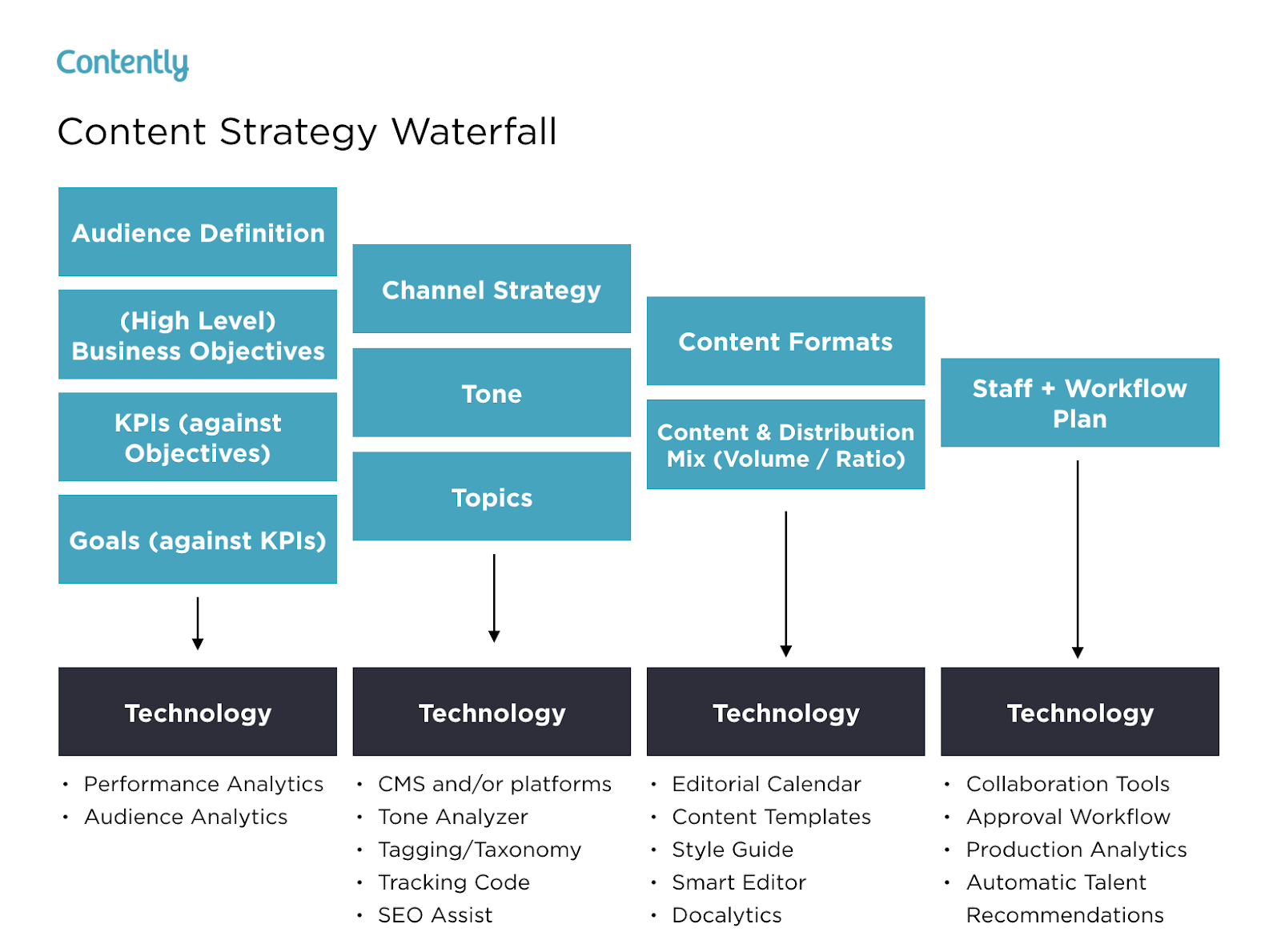
Snow wrote a blog post about how the content strategy waterfall helped him successfully launch his new book. After reading it, you can use his tactics to inform your own marketing plan. More specifically, you’ll learn how he:
- Applied his business objectives to decide which marketing metrics to track.
- Used his ultimate business goal of earning $200,000 of sales or 10,000 purchases to estimate the conversion rate of each stage of his funnel.
- Created buyer personas to determine which channels his audience would prefer to consume his content on.
- Used his average post view on each of his marketing channels to estimate how much content he had to create and how often he had to post on social media.
- Calculated how much earned and paid media could cut down the amount of content he had to create and post.
- Designed his process and workflow, built his team, and assigned members to tasks.
- Analyzed content performance metrics to refine his overall content strategy.
You can use Snow’s marketing plan to cultivate a better content strategy plan, know your audience better, and think outside the box when it comes to content promotion and distribution.
2. Buffer’s Content Marketing Strategy Template
Writing a content plan is challenging, especially if you’ve never written one before. Since only 55% of marketing teams have a documented content strategy, Buffer decided to help out the content marketing community.
By sifting through countless content marketing strategy templates and testing the best, they crafted a content marketing plan template with instructions and examples for marketers who’ve never documented their content strategy.
After reading Buffer’s marketing plan template, you’ll learn how to:
- Answer four basic questions that’ll help you form a clear executive summary.
- Set SMART content marketing goals.
- Create highly accurate audience personas by interviewing real content strategists.
- Solve your audience’s problems with your content.
- Do competitive research by analyzing your competitors’ and industry thought leaders’ content.
- Evaluate your existing content strategy by examining the topics and themes of your highest and lowest performing pieces.
- Determine which types of new content to craft, based on your team’s ability and bandwidth.
- Establish an editorial calendar.
- Develop a promotional workflow.
Buffer’s template is an incredibly thorough step-by-step guide, with examples for each section. The audience persona section, for example, has case studies of real potential audience personas like “Blogger Brian”. If you’re feeling overwhelmed by the process of creating a marketing guide, this can help ease you into it.
3. Contently’s Content Plan
Contently’s content methodology works like a flywheel. Instead of applying an entirely new strategy to each new marketing campaign, they leverage the strategy of their previous marketing campaign to drive the next one. Similar to a flywheel, their content methodology needs an initial push of energy to get the gears in motion.
What supplies this energy? Their content plan.
Contently fleshed out their entire content plan in a blog post to help marketers develop a self-sustaining marketing process. After reading it, you’ll learn how to:
- Align your content objectives and KPIs with your business goals.
- Create highly detailed buyer personas using psychographics instead of traditional demographics.
- Craft content for each stage of your marketing funnel, based off your prospects’ pain and passion points.
- Identify your most effective marketing channels.
- Discover the content topics your audience actually craves.
- Assess your organization’s need for resources.
By applying a flywheel-like strategy to your own marketing efforts, you essentially take away the burden of applying new strategies to each individual marketing campaign. Instead, your prior efforts gain momentum over time, and dispel continual energy into whatever you publish next.
4. Forbes’ Marketing Plan Template
An oldie, but a goodie — Forbes published a marketing plan template that has amassed almost four million views since late 2013. To help you sculpt a marketing roadmap with true vision, their template teaches you how to fill out the 15 key sections of a marketing plan, which are:
- Executive Summary
- Target Customers
- Unique Selling Proposition
- Pricing & Positioning Strategy
- Distribution Plan
- Your Offers
- Marketing Materials
- Promotions Strategy
- Online Marketing Strategy
- Conversion Strategy
- Joint Ventures & Partnerships
- Referral Strategy
- Strategy for Increasing Transaction Prices
- Retention Strategy
- Financial Projections
If you’re truly lost on where to start with a marketing plan, this guide can help you define your target audience, figure out how to reach them, and ensure that audience becomes loyal customers.
5. HubSpot’s Comprehensive Guide for Content Marketing Strategy
At HubSpot, we’ve built our marketing team from two business school graduates working from a coffee table to a powerhouse of over 200 employees. Along the way, we’ve learned countless lessons that’ve shaped our current content marketing strategy, so we decided to illustrate our insights in a blog post to teach marketers how to develop a successful content marketing strategy, regardless of their team’s size.
In this comprehensive guide for modern marketers, you’ll learn:
- What exactly content marketing is.
- Why your business needs a content marketing strategy.
- Who should lead your content marketing efforts.
- How to structure your content marketing team, based on your company’s size.
- How to hire the right people for each role on your team.
- What marketing tools and technology you’ll need to succeed.
- What type of content your team should create, and which employees should be responsible for creating them.
- The importance of distributing your content through search engines, social media, email, and paid ads.
- And finally, the recommended metrics each of your teams should measure and report to optimize your content marketing program.
These marketing plans serve as initial resources to get your content marketing plan started — but to truly deliver what your audience wants and needs, you’ll likely need to test some different ideas out, measure their success, and then refine your goals as you go.


The Landing Page Template HubSpot Uses to Convert at a 35% Rate
In sales, most professionals say getting prospects 99% of the way towards a purchase is easy, but getting them across the final 1% is the hardest part of the job. Crossing the finish line, just like in a marathon, is extremely challenging.
In marketing, the same principle applies. You can write the most gripping blog post you’ve ever written, persuading an audience that your offer is just as engaging and insightful, but if your landing page or even one of its elements disengages them, their odds of downloading it will plummet.
Fortunately, we’ve tested and iterated our landing pages enough to determine which template converts our website visitors into leads at the highest rate possible, and we want to share it with you.
Check out our analysis of each segment of our Customer Service Metrics Calculator offer’s landing page to learn how we convert visitors into leads at a 35% rate.
The Landing Page Template HubSpot Uses to Convert at a 35% Rate
1. The Hook

By leading off our landing page with a graphic, title, and synopsis of our offer, we could visually and mentally engage our audience right off the bat, which grabbed their attention and generated interest in the rest of the landing page and the offer. We also included a CTA at the beginning of the landing page to enable readers who were already interested in our offer to immediately download it.
2. The Reason Why People Should Care About the Offer

Spotlighting your offer’s insights is crucial for generating conversions. But before you do that, you need to clarify why people should care about you offer in the first place. People buy the “why” behind things, not the “what” or “how”, so when you’re asking for someone’s contact information, which is basically a transaction today, you should be able to give your audience a good reason to do so.
For our Customer Service Metrics Calculator offer, our “why” was that word of marketing one is of the largest business acquisition sources today and certain metrics can track your customers’ happiness and, in turn, their willingness to refer your product or service to their family, friends, and colleagues.
3. The Summary of the Offer

After we clarify why people should care about our offer’s topic, we naturally segue into what our audience will learn by reading our offer. This is a logical transition that answers the question our audience most likely thought of after they grasped the importance of tracking customer service metrics — “Which customer service metrics are the most important to track?”
4. The Sneak Peek of the Offer

Sneak peeks are just like movie or TV show trailers. They offer you an inside look at what you’re about to experience, which builds suspense and anticipation for its content. To generate as much hype as possible without giving away too much information, we usually reveal our offer’s most important concepts or the pages that preview the majority of our offer’s insights.
5. The FAQs

Concerns about privacy and personal data collection are at an all-time high now, so it’s easy to understand why people usually ask why they need to enter their contact information to access our offers. To relieve them of any stress or anxiety they might feel about filling out a form, we cleared all the ambiguity out of the way by informing them why we ask people to fill out forms and that it doesn’t cost any money.
With your landing pages, make sure you can field questions from your audience about them and provide the answers to the most frequently asked questions on your landing pages.
6. The Call-To-Action

A wise content marketer once said, “If you don’t tell your reader what to do next, you might as well have never written your content in the first place.” This principle rings especially true when you create landing pages. Obviously, if you don’t include a call-to-action on your landing pages, no one can actually download the offer. But creating effective call-to-actions hinges more heavily on your CTA’s copy and its ease of use — and less on if it exists.
The best CTAs command your audience’s attention with a gripping headline and makes it easy for your audience to actually download the offer by limiting the amount of forms your audience needs to fill out or auto populating their information in your form, if their cookies are turned on.

HubSpot’s 12 Favorite Digital Marketing Tips
I think you’ll agree with me when I say digital marketing — and all its sub-categories, including SEO, social media, content creation, email, and more — is critical for any company’s growth in 2019.
With over four billion internet users globally, and more than 3.4 billion active social media users, it stands to reason digital marketing is vital for reaching a larger audience than you could through traditional methods alone.
Plus, digital marketing can help you better engage prospects, turn prospects into leads, and ultimately convert leads into loyal, delighted customers.
However, embarking on a digital marketing journey, particularly as a start-up or smaller company with limited online presence, can be both overwhelming and frustrating at times.
To help inspire your marketing team and kick-start your 2019 digital marketing strategy, we’ve cultivated a comprehensive list of digital marketing tips from marketers here at HubSpot. Keep reading to learn the 12 critical tips HubSpotters want you to know before you implement or refine your own digital strategy.

1. Know your customer.
Ari Plaut, a Product Marketer at HubSpot, suggests: “Keep on top of the pulse of the customer, and hold yourself accountable to it. Schedule monthly time to shadow your support team and your sales team. Your best content ideas will come straight from the source — your customers.”
2. Match your content to every stage of a buyer’s journey.
Alex Girard, an Associate Product Marketing Manager at HubSpot, says: “Personally, I think a big ‘Ah-ha’ moment for our customers when talking about ads strategy is when we tell them they need to match their content offer to a moment in the buyer’s journey. It doesn’t make sense to target an ad for a sales demo at someone in the awareness stage. It also doesn’t make sense to target an awareness stage offer, like a recommended blog post, at someone who is ready to buy.”
3. Don’t just write about your products or services.
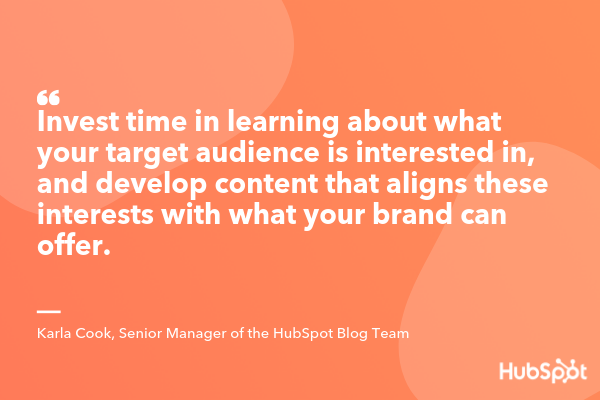
Karla Cook, a Senior Manager of the HubSpot Blog Team, advises: “Don’t just write about your products or services on your blog. That can immediately alienate anyone who isn’t already close to purchasing. Instead, invest the time in learning about what your target audience is interested in, and develop content that aligns these interests with what your brand can offer. For example, if you’re selling coffee makers, you might create a blog series that looks at different ways to improve your morning routine.”
4. Focus on the long-term.
Jeff Vocell, a HubSpot Product Marketer, suggests — “Focus on delight, not short-sighted acquisition. I’m a marketer, and I understand the pressure to deliver leads to sales each month. But employing short-sighted tactics that generate some attention and may result in a momentary spike ultimately won’t set you, or your customers, up for success in the long-term. As marketers, we should focus on generating demand through helpful and customer-centric campaigns.”
5. Incorporate SEO into your overall content strategy.
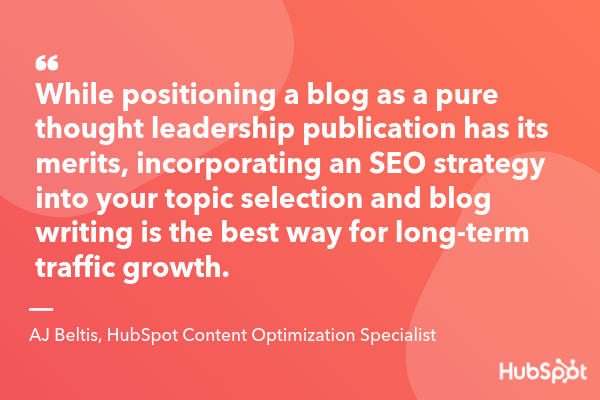
AJ Beltis, a HubSpot Content Optimization Specialist, told me — “While positioning a blog as a pure thought leadership publication has its merits, incorporating an SEO strategy into your topic selection and blog writing is the best way for long-term traffic growth. Use sites like Ahrefs or SEMRush to find out what people in your industry are searching for and talking about as a first step to maximizing your blog’s potential.”
6. Understand the big picture when analyzing an advertisement’s performance.
Cathleen Smith, a CSM at HubSpot, notes: “A good approach to take when you see bad ads is to understand the big picture. What is the overall journey someone is taking to get to the point where they see your ad? For Google ads, someone had to search for a keyword you chose, see your ad, have it resonate with them, click on the ad directly, and then have the landing page feel relevant and easily digestable.”
Additionally, Smith says, “If your ad isn’t performing well, don’t just look at the messaging itself, but see if there’s a mismatch between what someone is searching for, the messaging you are showing them, and the landing page on which they end up. With that bigger picture in mind, when you see a ‘bad’ ad, look at all the different pieces of your campaign to determine what needs optimization.”
7. Remain flexible as audience preferences shift.
Kristen Baker, an Associate Content Strategist at HubSpot, says, “The world of digital marketing is ever-changing — businesses constantly need to ensure their digital strategy remains relevant to their target audience. For instance, if you’re targeting a group who’s primarily active on Instagram, focus on that platform and consider using your resources to create engaging Instagram Stories, instead of spending too much time making YouTube videos. However, pay attention to if, and when, your audiences’ preferences shift.”
8. Remain consistent in design when launching a campaign.
Brittany Geoffroy, a Marketing Manager of Global Acquisition, told me — “When launching an integrated campaign on multiple channels, make sure you tie together your creative design and messaging so there is a red thread throughout the campaign.”
9. Become a growth leader for your company.
Jeff Vocell, a HubSpot Product Marketer, advises, “Marketers have never had a better opportunity to be growth leaders. Marketing has historically been responsible for attracting new leads and then passing them off to Sales. Today, in a world where customer experience has to come first, marketers have an opportunity to architect the path to growth through sales and services as well.
“Instead of solely thinking about how you can bring in new customers, start to ask yourself, and your colleagues around you, what happens when this lead is passed over to sales? and, what happens when sales pass them to services as a customer? It’s likely you’ll find opportunities for advocacy and marketing embedded in those moments that will help you grow better.”
10. Personalize your content.
Clint Fontanella, a Junior Staff Writer at HubSpot, says — “Personalize your content to differentiate your business from competitors and create a unique customer experience. More than 40% of customers switch brands dues to poor online personalization.”
11. Try new things
Meredith Hart, a Junior Staff Writer at HubSpot, suggests: “If you see that something could be working better, go back to the drawing board and try something new. This can apply to internal processes within your team or with your digital marketing efforts. For example, if you’re experiencing low engagement with your marketing emails, test out creative subject lines to boost your open rates. Or release a series of themed content that keeps your audience coming back for more. Small changes can have big results.”
12. Don’t underestimate backlinks.
Braden Becker, a Senior Staff Writer at HubSpot, notes — “Marketers are increasingly shifting their SEO strategies from keywords to topics. In other words, the more keywords you target that all belong to a similar topic, the more expertise you’ll demonstrate, and the better you can perform for each individual keyword. But expertise and organic traffic don’t happen at the same time.”
Additionally, Becker suggests, “While topics are important to building your reputation, you still need the backlinks — a major ranking factor for Google — to back it up. While you create content on each topic, share this content in as many ways as you can. By networking with people in your industry, and tracking how many other publishers are linking back to your content, you can get a better sense of how quickly your content will perform the way you want it to.”

How to Use the Facebook Event Setup Tool
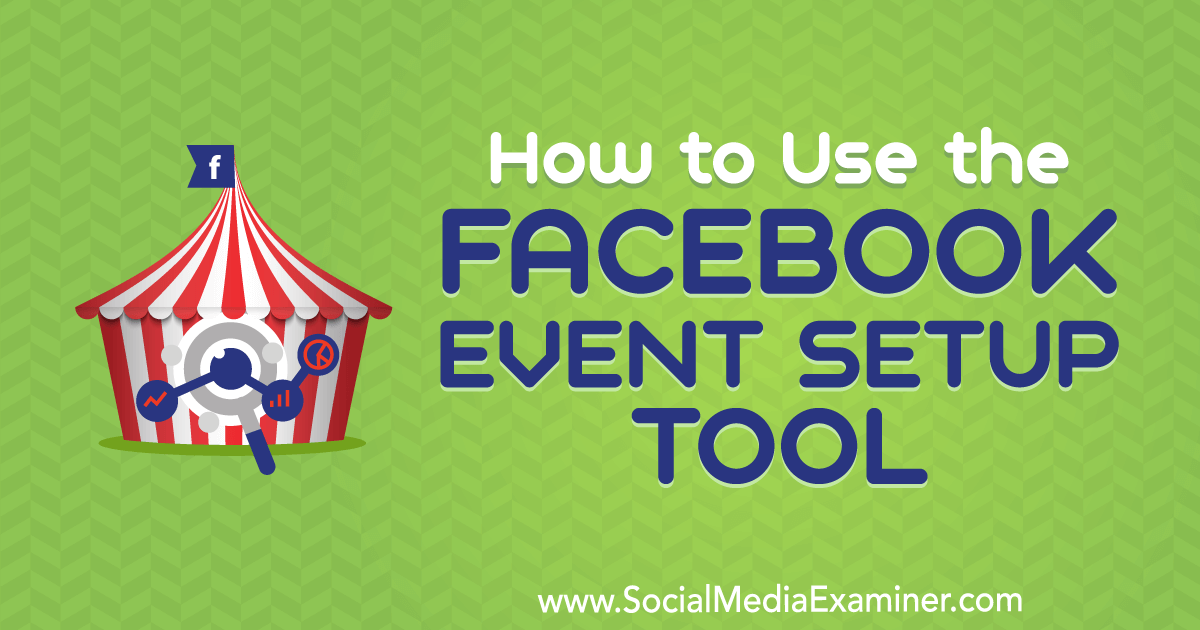
Do you use the Facebook pixel? Want an easier way to assign Facebook event tracking to specific URLs on your website? In this article, you’ll learn how to set up Facebook event tracking with the Facebook Event Setup Tool for Web. What Is the Facebook Event Setup Tool? Previously, setting up Facebook pixel events required […]
The post How to Use the Facebook Event Setup Tool appeared first on Social Media Marketing | Social Media Examiner.
from Social Media Marketing | Social Media Examiner http://bit.ly/2vtuxfG
via socialmediaexaminer
20 of the Best Form Builder Tools for 2019
You’ve heard it before — forms are the gold standard when it comes to capturing leads, learning about industry trends, doing market research, and even just getting some customer feedback. It might be one of the older methods in the book, but old is gold.
Before we dive into the best form builder tools for 2018, though, let’s talk about what a form builder exactly is.
With no shortage of options, the best form builder apps tend to be quite similar and user-friendly. Whether you want to make a contact form, a sign-up form, or a survey, form tools are the easiest way to create web forms, with drag and drop questions, multiple form fields, and different color and structure options.
Once your responses start coming in, most forms will also import each entry into a spreadsheet or centralized database and send you notifications when people complete them.
Form tools today usually offer many different features too, like progressive profiling, smart fields, and interactivity.
Easily build and embed forms on your site. Try HubSpot Forms for free!
Ultimately, there’s a form for each of your business’ needs and goals — and we’re here to help you pick the best-fit tool specifically for you.
20 of the Best Form Builder Tools for 2018
1. HubSpot’s Free Online Form Builder
HubSpot’s online form builder is one of the most powerful form builder tools available. The tool combines the foundations of form creation with cutting-edge technology to give you much more capability than a normal online form builder can — and it’s also free.
Even though it’s one the more advanced form builder tools, you don’t need any technical expertise when you use HubSpot’s form builder. You can quickly create forms with the drag-and-drop form builder and convert anonymous website visitors into leads with unlimited forms, fields, submissions, and custom forms that all connect to your contact database.
Once someone fills your form out, they’re automatically routed to HubSpot CRM. Once they’re in your CRM system, you can set reminder tasks, call them, and send them one-to-one personalized emails, letting you better manage and nurture relationships with your contacts.
HubSpot’s form builder also has data enrichment for contact profiles and deep integration with HubSpot’s marketing hub, making it a good option for teams who want a single system to manage their forms, contacts, and marketing efforts.

2. Google Forms
Google Forms’ unique selling point is that it’s fast, free, and easy to use, with unlimited forms and entries. It’s also built into the Google Docs suite, so it automatically pulls your data into a Google Sheet for you to analyze.
While Google Forms’ design may not be customizable, this form tool is best for quick market surveys, rather than a professional survey or lead capture form placed on your website.

Image Source: Google
3. JotForm
JotForm is an online form builder with an intuitive visual editor, known for making form building faster than ever.
The tool has all the normal form building capabilities as well as unique fields to customize your own forms. It also integrates with almost every marketing platform.The free plan caps out at 5 forms, with up to a 100 entries per month.
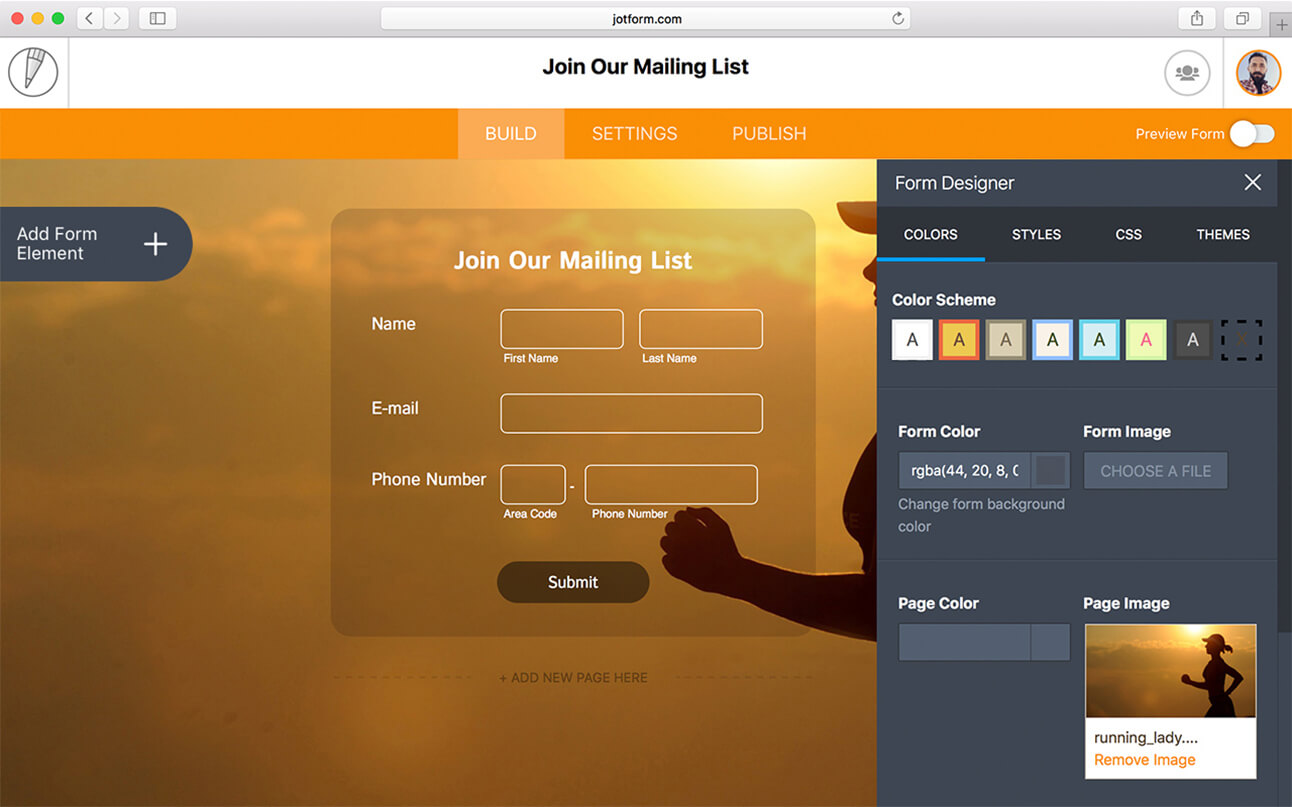
Image Source: JotForm
4. Typeform
Typeform takes an innovative approach to the world of form building. With an intuitive design, the tool guides you through the form creation process one question at a time and makes the experience of building a survey fun and interactive.
Typeform is also great for customer surveys and user research — you can create and send standalone survey links out to your list. If you want to try something with an engaging, straightforward user experience, the tool is a solid option.

Image Source: Typeform
5. Microsoft Forms
Microsoft Forms is a simple, easy-to-use form creator that integrates with the Microsoft Office suite. With full customization options, users can quickly make surveys, feedback forms, quizzes, and lead forms.
Since Microsoft forms doesn’t integrate directly with an online CMS, the tool might not be the best option for lead generation. But the form builder can collect data in real-time and import all your responses in an Excel spreadsheet, so you can perform powerful yet simple analysis with Excel filters and pivot tables.
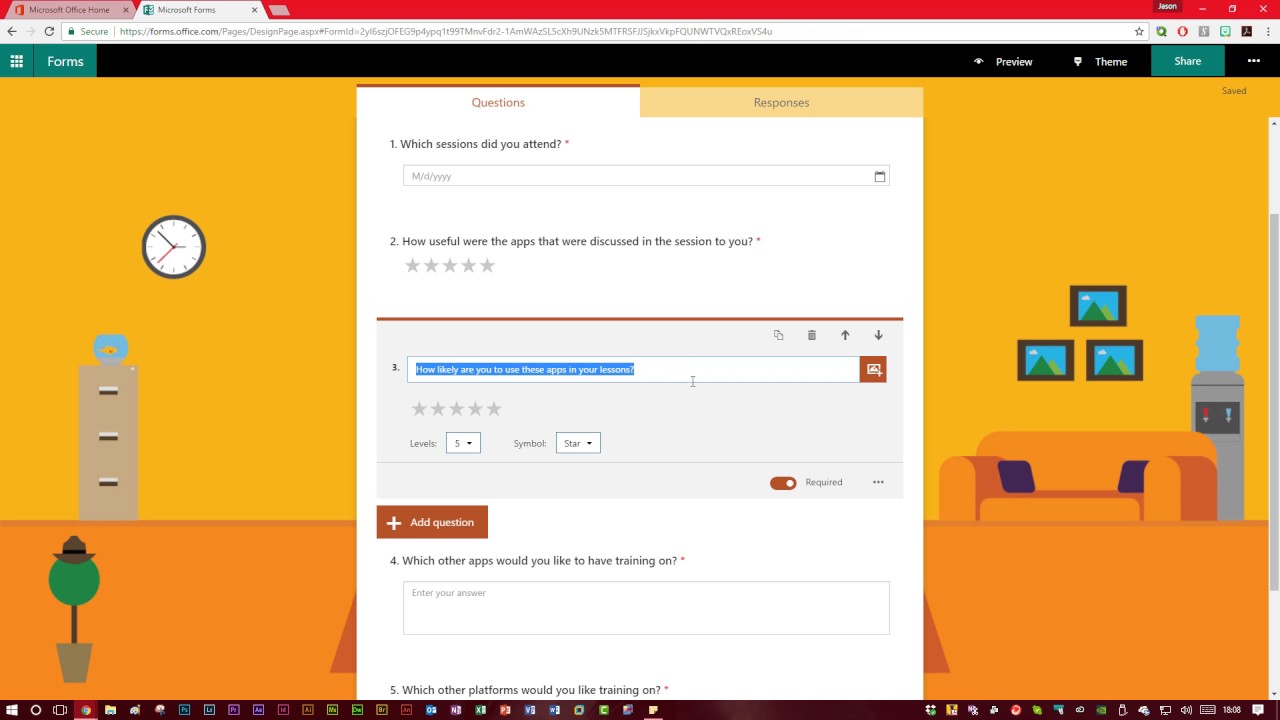
Image Source: YouTube
6. Form Crafts
Form Crafts is a basic form builder tool that has a user-friendly interface and simple design.
The WordPress plugin allows you to create moderately customizable lead capture forms, email sign-up forms, surveys, and feedback collection forms. One of Form Crafts’ best features is that it’ll send you email notifications about your lead generation process, so you don’t need to constantly monitor your results anymore.

Image Source: WordPress
7. FormTools
FormTools is a flexible form creator that focuses on feedback, data, insights, and beautiful form building.
The form builder tool allows you to create most types of forms and tracks your results on a visually appealing dashboard. FormTools also give you an option to integrate their app with a third party provider of your choosing, like Salesforce or Dropbox.

Image Source: Form Tools
8. Wufoo
Part of the SurveyMonkey family, Wufoo is one of the oldest form tools in the space. You can design some appealing online forms with it and it’s super easy to use.
The app also allows you to embed forms on your website, set up payment fields that are compatible with a number of payment processing services, and turn on automatic email notifications to alert you when someone fills out your form.

Image Source: WuFoo
9. Ninja Forms
Ninja Forms is a powerful WordPress form tool that’s used by wide range of marketers, from novices to gurus.
The tool is free, integrates quickly and easily with a number of different tools, and it can greatly boost your marketing efforts. Ninja Forms also offers unlimited forms, fields and submissions. But, sometimes, the tool lacks clear documentation and can be difficult to use when you want to customize your forms.

Image Source: CodeCanyon
10. Cognito Forms
If you’re looking for a form builder with sound logic branches and robust payment fields, Cognito Forms is for you. The form tool also offers calculated fields, conditional logic, repeating fields, and more, making it easy and simple to create advanced forms.
Cognito Forms integrates with Stripe, PayPal, and Square and offers a free version that includes unlimited forms with 500 entries per month.

Image Source: Microsoft Store
11. FormStack
FormStack is mostly focused on building business and professional style forms. The tool’s best features include intelligent forms, built-in workflows, and seamless integrations with Google Sheets, PayPal, and MailChimp (and others through their API).
One of FormStack’s more sophisticated features is an A/B testing tool that can compare different versions of your forms and tell you what performs better.
The tool also offer electronic signatures and payments, and users can save their form drafts and return later to finish them.

Image Source: GetApp
12. FormSite
FormSite has all the essential features you need for cranking out some quick “prototypical” web forms. As one of the more basic form builders, it’s often used for simple contact or feedback forms.
The tool also has a number of pricing plans that can suit your specific business needs. The free version offers 5 forms each month with 10 results per form.
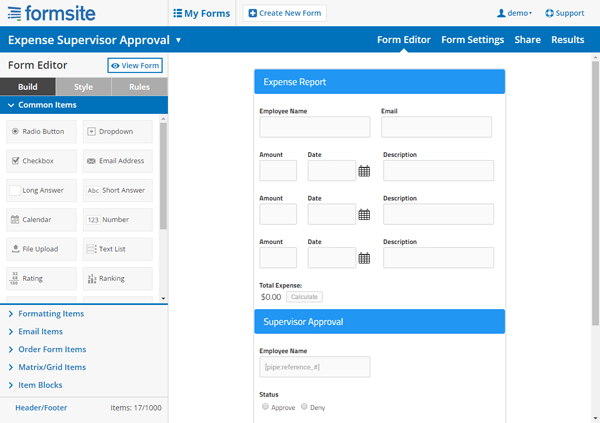
Image Credit: FormSite
13. Clearbit Forms
Clearbit Forms lets you leverage smart forms and flexible data enrichment technology to automatically collect specific user information. This lets you create shorter forms with less fields, and, in turn, produce happier customers (because who doesn’t love a short survey?)
With two plans designed for startups and enterprises, Clearbit can definitely meet your modern marketing needs.

Image Source: Clearbit
14. FormKeep
FormKeep is a tool unlike most on this list — it’s an easy-to-use tool that finds a happy medium between coded and drag and drop forms.
With FormKeep, you have the option to code your own form, style it according to your brand guidelines, and integrate it with Zapier to manage your submission data.

Image Source: Intercom
15. Gravity Forms
Another WordPress-powered plugin, Gravity Forms helps you create amazing forms with the help of multi-page/multi-step forms and a number of time-saving features.
With this tool, you have access to a variety of integration options and add-ons for email software, messenger platforms, payment options, and automation software. You can also create advanced forms, but, for non-techies, they can be a little complicated to set up.

Image Source: WPML
16. SurveyAnyPlace
SurveyAnyPlace has proven that surveys don’t have to be boring. With their gamification elements, interactive features, and incentives like coupon codes, you can make all your surveys and quizzes fun and enjoyable.
By leveraging SurveyAnyPlace’s unique approach to form building, you can easily collect leads, information, and insights from visitors.

Image Source: GetApp
17. Contact Form 7
One of the most popular WordPress plugins, Contact Form 7, has upwards of 5 million active installations on the CMS.
A free tool for everyone to use, it’s a super simple and basic form creator with a heavy focus on contact forms. But it’s also important to note that the tool has some limitations, especially with its customization options.

Image Source: WordPress
18. Conversational Form
An open source platform, Conversational Form lets you transform your web form into a simple chatbot.
By using a novel and clever way to gather data, this form builder is bound to drive user engagement. At the same time, though, due to its new entrance into the marketing space, it might be difficult to learn your way around the tool.

Image Source: Pagely
19. FormBakery
As one of the easiest drag and drop form tools out there, FormBakery lets you build professional forms in the most straightforward way possible.
For those looking to build a super simple form in under 5 minutes, the tool is a great choice. You can quickly customize forms with your own designs, with no coding necessary. If you’re looking to build a more advanced form, though, FormBakery may not be the right choice for you.

Image Source: AppStorm
20. DeviceMagic
DeviceMagic is a mobile form solution on a mission to ditch all paperwork, automate lead generation processes, and enhance data collection.
Since the tool solely focuses on building mobile forms, it has a number of great benefits over other form builders, like quick and accurate data collection, lower operations costs, and less time wasted on administrative work.

Image Source: Device Magic
The options are endless for form builder tools.
Most form builders offer all the essentials needed to make a basic form, but your options start to narrow down when you want better customization and deeper data analysis. Ultimately, for you, the best form tool depends on your team’s purpose and particular business needs.

Earned Media, Explained in 400 Words or Less [Examples]
Remember when people used to learn about upcoming events, the latest trends, and cool new products exclusively from magazines, newspapers, and TV shows?
These publications and broadcasts are where brands used to get all their earned media. But earned media has expanded beyond print and TV, and marketers can harness it in several ways.
In many ways, earned media’s nickname is “publicity.” You haven’t paid for this media to be created — the way you would for, say, an advertisement — and therefore your actions alone “earned” you this attention. But because the places we get information have changed over the last 30 years, how has earned media changed as a result?

Still you might also hear earned media referred to as “free media,” because you haven’t paid for this media to take place.
How Earned Media Has Changed
Earned media used to be the 90-minute segment on cable news about a new consumer product. And to some extent, this is still a critical source of earned media.
However, earned media now also comes in the form of a customer tweet about “the best brunch ever!” at a restaurant that got several likes and retweets. It’s that horrible Yelp review about how a different customer had “the worst brunch ever” at that very same restaurant. And, it’s that technology blogger’s “Top 10 Apps of The Year” article that was viewed and shared by thousands of people after you launched your new mobile app.
What Earned Media Isn’t
Earned media isn’t publicity you pay for or own. When a company pays a publication to write a glowing article about them, for example, that’s not an example of paying for earned media — that’s just paid media. And when you write a blog post for your company blog about your latest product release, that’s not earned media, either — that’s owned media, since you own that blog post.
The distinctions are fairly clear between these camps, but they’re important for any marketer to know.
How effective is earned media?
In short, very. Today’s consumers are influenced greatly by family, friends, and what they read and see online. People no longer share the good, the bad, and the ugly of brands exclusively at the water cooler — they share it with everyone they’re connected with online, which can include hundreds, thousands, or maybe even millions of people.
And a lot of those people listen and use those stories to make buying decisions. In fact, according to HubSpot Research, 57% of people in the U.S. trust what they hear from friends and family the most when they discover a new product. About one third of U.S. buyers prefer what information they can find from a Google search.
As digital marketing and social media continue to evolve, so will earned media — and departments other than public relations, like marketing and customer service, will become more responsible for capturing earned media attention.
To make sure you’re caught up on this “web 2.0” version of an old-school term, let’s dive into what earned media means today and the various ways you can use it in your marketing.
Earned Media Examples
You may have heard of earned media as compared with paid media and owned media. As we hinted to above, there are pretty thick lines between paid media, owned media, and earned media: You “pay” for paid media, you “own” owned media, and you “earn” earned media. To show you what this looks like in practice, here are some common examples of earned media today.
TV News Segment
If your business makes a big-enough splash in its industry, you can still expect to see earned media in the form of a 90-second news spot on a local (or national) station. This is some of the oldest earned media out there, and it still occurs today.
For example, a business that relocates its headquarters to a new city — and promotes that relocation online — might capture an interview opportunity with the city’s local news station about some of the new jobs it will be hiring for.
Newspaper Article
Newspapers, both in print and online, constantly share big community developments that impact people both locally and nationally. So, just like a story on TV about a new business development, local newspapers can just as easily pick this story up and write it down for online readers.
Tweet
Twitter might revolve around trending topics worldwide, but there are also countless smaller communities of Twitter users who broadcast their thoughts on issues related to their industry. A tweet, therefore, is a tiny instance of earned media. But it depends on whom the tweet comes from.
For example, if a business starts using new lead-generation software to help their marketing team, and an employee tweets, “Just started using @HubSpot and it’s helped us deliver amazing leads to our sales team!” We here at HubSpot might call that a positive dose of earned media.
Article on a Trade Publication
Smaller business developments might not earn the attention of major media conglomerates, but they very well could capture the interest of a trade publication focused on their industry. This, too, is earned media.
For example, an environmental business that creates a new method of composting might get overlooked by the evening news, but a magazine all about sustainability is likely to want to write an article about this innovative method for its niche audience.
Product Roundup
There are always content creators out there who are writing “roundup” articles, which list the best of a particular type of product for customers who seek high-quality items. If you build a product, and it’s good enough, getting included in somebody’s roundup is a form of earned media.
For example, a tent maker that develops a new one-person tent for a low price could wind up in an article called “The 10 Best One-Person Tents for Campers on a Budget.”
Organic Traffic
This example is a tricky one to define. Earned media usually comes in the form of content, either in written or video form. But if you create your own content, and “earn” traffic to this content from ranking highly on search engines, the traffic you receive to this content is, in some ways, earned media. But let’s be clear: There’s an important difference between SEO and organic traffic …
For example, if you write a blog post — a form of owned media — and conduct keyword research on this blog post to optimize it for Google Search, your blue linked result shown on Google’s search engine results page (SERP) is an “earned” ranking. This makes the traffic you get from people who click on this result earned media attention.
Customer Review
One of the biggest things to change in the world of earned media over the last decade is how customers express their feelings about a product they’ve used. Gone are the days where your clients’ opinions of you are limited to phone calls and dinner conversations. When people love or a hate a product, they make it known in writing via reviews on sites like Yelp, Google Reviews, TripAdvisor, Amazon, and more. Every review about you is earned media.
Word of Mouth
You might not think of “word of mouth” as an example of earned media, but today, it continues to be as free and impactful as a tweet or Yelp review.
Every time your business affects a customer, whether that effect is good or bad, you earn a place in day-to-day conversation. This means departments like marketing and customer service are just as critical to the tone of that conversation as the product itself.
For example, when a marketing team creates helpful or entertaining content for its audience, it’s making potential customers happy. When a customer service team solves a critical problem for someone, it’s making current customers happy. And the happier your customers, the more positive earned media you’ll get the next time they’re chatting with someone who’s looking to buy a product like yours.
Of course, the lines between earned and paid media can blur at times. Take viral videos, for example. A video doesn’t just go viral by accident — most of the time, there is a lot of careful planning involved to kick start the video’s exposure with paid media, and at some point the paid media stops once earned media picks up.
The lines can blur between earned and owned media, as well. A blog post you write featuring your own industry research, for example, could get picked up by other bloggers and media outlets. Similarly, a press release you write following a product launch serves to encourage others in the industry to share your news on other publications. So, while earned media isn’t always a direct result of owned media, owned media can help you get more attention from third parties.
The key to understanding the difference between the three is this: Unlike paid and owned media, earned media isn’t controlled by brands, which makes it less biased and more trusted.
How do you “earn” earned media?
Because earned media is owned by third parties, it may seem like it’s out of your hands — but that’s actually not true. Marketers have the tools to influence some (not all) conversations about their brands. Here are three of the best ways to do just that:
1. Create content worth sharing.
Get people to want to share your content with one another by … drum roll please … creating awesome content worth sharing! Shareable content tends to be either really useful or really funny, and in the form of a list, infographic, or video. There’s even a science to what makes content shareable. Also, make it easy for people to actually share your content by placing social share buttons where appropriate.
2. Invest plenty of time in interacting on social media.
Without social media, you and your potential customers are basically strangers. That’s the really cool thing about social media: It brings you so much closer to consumers. To have an impact on them and to encourage them to talk about your brand, you should spend plenty of time and energy interacting with them individually online.
Set up filters in your social monitoring tools to help monitor conversations about your brand, and jump in when you can add something to the conversations. Ask your followers questions about their daily lives or about their experiences with your brand. Give your biggest fans a shout out from your account. Your willingness to show people you care enough about them, about their experience, and about your own business to respond to their posts can elicit positive emotions about your brand, and those positive emotions are share-worthy.
3. Make your customers really, really happy.
All customers don’t automatically become brand promoters — you have to put the work in to not only meet their expectations, but exceed them. When you go above and beyond for your customers, you become a lovable brand. And when customers love you, they are more likely to give referrals, share good things about you on social media, give testimonials, and remain loyal to your brand for a long time.
According to research published by Oberlo, 54% of people on social media are researching products they’re interested in. Product sentiment can spread virally through social media sites like Facebook — and that positive vibes spread faster than negative ones. Create cool content, interact with people, and delight your customers — and you can bet they’ll spread the word.


Future of Facebook and Twitter
Welcome to this week’s edition of the Social Media Marketing Talk Show, a news show for marketers who want to stay on the leading edge of social media. On this week’s Social Media Marketing Talk Show, we explore where Facebook and Twitter are heading based on signals from this week’s Q1 2019 earnings calls. Our […]
The post Future of Facebook and Twitter appeared first on Social Media Marketing | Social Media Examiner.
from Social Media Marketing | Social Media Examiner http://bit.ly/2W8wIRz
via socialmediaexaminer
A New Class on Digital Fluency for Project Managers

Why We Interviewed a Bunch of Rappers About Marketing
Can you imagine a world without music?
I can’t.
When I think about the things in life for which I’m the most grateful, music always falls on the list — rap music, in particular.
For me, rap is the thing to listen to when I’m happy. Sad. Angry. Tired. When I have a big meeting to prepare for. When I’m dreading a workout. When I’m not feeling any particular way, but just want to disrupt the silence around me. And as we’re about to see — it has not only profoundly carved out my own path thus far, but those of myriad consumers, business owners, and artists.
Before I worked for HubSpot and started covering marketing and tech news, I wrote primarily about two things — food, and indie hip hop.
Indie artists are those who aren’t
signed to a major label,
and are often responsible for things
like their own marketing,
tour scheduling,
and the business side of music
that we don’t often think about
as listeners.
A quick vocabulary lesson: Indie artists are those who aren’t signed to a major label, and are often responsible for things like their own marketing, tour scheduling, and the business side of music that we don’t often think about as listeners.
Keep that in mind — we’ll get back to it in a bit.
As it turns out, these two categories — food and hip hop — have more in common than I first imagined. Years ago, the former introduced me to the latter. I wrote about one rapper’s journey to food consciousness, who then introduced me to another rapper whose mother owns a grass-fed cattle ranch. These various things we consume, it seems, are quite inter-connected.
I had to ask: Is there a chance that indie hip hop is somehow connected to marketing and tech, too?
 Rappers Astronautalis and P.O.S — a.k.a. Four Fists –discuss their career growth
Let’s go back to the earlier quick-and-dirty definition of what constitutes the responsibilities of an indie rapper:
- The many elements of promotion.
- Planning events (tours and shows = experiential marketing).
- Connecting with and building audiences (fans = customers).
- Finding the right people to collaborate with (side projects and recording tracks with other artists = co-branding).
… All while cultivating both awareness and a career trajectory (name recognition = brand recognition).
Sound familiar? That’s because indie rappers are quintessentially very human, creative, small-to-midsize businesses. Of course we had something to learn from them — and we think everyone else does, too.
That’s why we decided to film a series of interviews with indie rappers who have been tasked with and mastered many of the same things that you — our dear readers — have also experienced.
 Following a conversation about growth, Four Fists performs live in our studio
We asked them about where they’ve been, where they are now, and how different everything looked in between — and how, throughout it all, they’ve continued to create music that remains core to who they are. And, just for fun, we had them play a song or two during their times with us. In a way, it all sheds new light on marketing that gives it, well, a different sound and energy. After all, around here, we’re big into work that has heart.
As the rap group Dead Prez once so perfectly phrased it: This is bigger than hip hop. This is about the humans behind the music, their journeys to and through it, and how it’s not only shaped their lives, but those on the receiving end of their work.
These are their stories. This is Growth Raps.

How to Boost a Post on Social Media [Facebook, Instagram, and Twitter]
In the social media marketing world, marketers reminisce about the times where they could fill up on organic reach a lot like my parents reflect on their college years — those were the good old days.
But similar to how the real world flipped most people’s life upside down when they graduated from college, social media’s purge of organic reach flung marketers on a spinning teacup ride.
With almost 3 billion social media users today, millions of brands have promoted their content on these platforms for years. But the popularity of social media has flooded each platform with hoards of articles, photos, and videos, skyrocketing the supply of content while the demand for it has plateaued. This has decimated the amount of opportunities that brands can leverage to interact naturally with their fans.
Needless to say, social media marketing is a pay-to-play strategy now. And one of the most effective ways to leverage paid social media advertising is by boosting your posts.
How to Boost a Post on Social Media
1. Pick an existing post on your Facebook Business Page that you want to boost.
2. Click “Boost Post” on the bottom right corner of your Facebook post.
3. Choose your audience.
Before you boost your Facebook post, you can either distribute your post to a recommended audience that Facebook will make for you or create a new audience based on a robust set of targeting options and distribute your post to them.
4. Set your boosted post’s budget and duration.
Your budget is how much money you’ll spend to boost your post. Your duration is how long you’ll boost your post for. Facebook will estimate how many people your post will reach based on your budget and duration.
1. Click the “Promote” button at the bottom of your post.
2. Pick a goal.
Before you boost your post, Instagram will ask you whether you want to attract more profile visits, website traffic, or promotion views. Whatever your goal is for the specific post you want to boost, make sure you choose the option that best aligns with it.
3. Choose an audience.
After choosing your goal, you can pick from three different targeting options: Automatic, Local, and Manual. Automatic tells Instagram to target people who are just like your followers, Local lets you target people in a specific location, and Manual lets you target specific people, places, or interests.
4. Set your budget and duration.
Instagram will estimate the expected reach and clicks that your post will attract after you set your post’s budget and ad duration.
1. Click “View Tweet Activity” at the bottom of your Tweet.
2. Click “Promote Your Tweet”.
3. Choose your targeting.
Twitter’s targeting is less sophisticated than Facebook’s and Instagram’s. You can only target based off location, like country, state/province/region, or metropolitan area.
4. Set your budget.
After setting your budget, Twitter will estimate the amount of impressions and engagements your boosted Tweet will attract.

First vs. Third-Party APIs: What You Need to Know
Have you ever wondered how Google Maps is able to deliver relevant information depending on your location? Or, alternatively, how Hotels.com knows when a random hotel in Austin, Texas has a specific room available?
The answer is APIs, or application programming interface.
At its most basic definition, APIs let applications communicate with each other.
If you’re a HubSpot customer and you want to integrate your WordPress website with your HubSpot CRM, an API is an interface that allows you to do just that, since an API can allow the two applications to access data from each other.
In today’s world, whether you’re aware of it or not, APIs are everywhere — they control how we get information from social media sites, how we navigate our GPS’s, and how we book tickets online.
Additionally, they’re incredibly helpful for businesses. At HubSpot, for instance, APIs are necessary as we strive to become an “all-on-one” platform, which will enable our customers to use all their favorite software and applications in one place.
But whether you’re interested in developing a unique one-of-a-kind API for your client, or want to install one for your own internal systems, you might be wondering — should I use time and resources to build my own internal API, or should I access a Third Party API?
Here, we’re going to explore the pros and cons of First vs. Third Party APIs, so you can ensure you’re choosing the best option for your business.
Pros and Cons of First Party APIs
A First Party API gives you complete control over every aspect of the API lifecycle, including development, design, and implementation. Developing a First Party API, then, makes the most sense for unique client cases or security scenarios.
For instance, Connor Barley, who’s on HubSpot’s Developer Support team, told me — “The obvious benefits to developing an API ‘in-house’ is that you have total control over what data is returned, its capabilities like filtering and pagination, and you can safely know exactly what data you’ll get back every time. You also have the added bonus of being able to iterate quickly, and really tailor the API to your businesses particular needs.”
However, developing and implementing an API in-house is expensive and takes time and resources to ensure it’s functioning properly at all times. As Barley notes, “Good software requires constant upkeep and time spent on it, so you need to be willing to put in the time and money to keep your API up-to-date and able to be used.”
Additionally, as complexity increases, so does expense. In the long run, particularly if you believe you’ll need an API that can scale as your business grows, it might not be an optimal solution for your budget.
Next, let’s consider the benefits and limitations of a Third Party API.
Pros and Cons of Third Party APIs
An API developed by a third-party will have requirements and regulations, so it’s not necessarily an optimal solution if you need to tailor an API for specific business or client needs. However, most of the time, a Third Party API will meet your needs and be a safer and more effective solution.
As Brett Adkins, a Business Technology Analyst at Deloitte Consulting, notes — “An API can expose a lot of data that you don’t necessarily want certain users to access, so it has to be secure and have the right rules in place. Unless you work for a large company that does a lot of development work, it’s unlikely you’ll have the resources to efficiently develop an effective and safe API. In the long run it’s probably much safer, and a better use of resources, to have an expert third-party develop it.”
Oftentimes, there’s no real need to reinvent the wheel. For instance, why go through the trouble of developing, designing, and implementing a maps platform with an in-house API when you can just as easily use Google Maps?
Plus, and perhaps most appealingly — since you don’t own a Third Party API, there’s very little upkeep. As Barley notes, “Third Party APIs are reliable if you pick a good service, and can provide you with all the data you might need to run your business, without the hassle of developing it yourself.”
Additionally, a Third Party API might enable you to approach a problem from a unique point-of-view that you wouldn’t get from your developers in-house.
Of course, it’s critical to note, you’ll want to consider Third Party APIs rules and regulations before choosing one. You might find a Third Party APIs’ rules are too constricting, and won’t enable you to do what you need to do.
So … First or Third Party, which should you pick?
Ultimately, the decision to choose First vs. Third Party is entirely dependent on your resources, existing software infrastructure, budget, and business goals.
Isaac Takushi, a Developer Support Specialist at HubSpot, sums it up like this — “A decision between first and third-party APIs is generally one between full control and out-of-the-box simplicity. When you decide to develop your own API, you must be prepared to embark on a journey and weather its perils. You’re able to tailor your solutions to fit into your organization’s existing infrastructure and meet your users’ specific needs, but it can be easy to get tunnel vision. Third-party APIs, on the other hand, can open up worlds of possibilities that aren’t afforded by your organization’s time and resources, but force you to put trust and information in others’ hands.”
If you’re considering using a Third Party API for your business, here are a few you might explore:
Additionally, if you’re a HubSpot customer, take a look at some of the apps and web services you’re able to integrate with — an example of an API, in action.

Global Buying Behavior in 2019 [New Data]
In early 2019, HubSpot Research partnered with SurveyMonkey to conduct new research on social media preferences and buying preferences. We used SurveyMonkey Audience to ask over 2,700 consumers in Colombia, France, Germany, Mexico, Spain, the UK and the U.S. questions on how they buy.
This report highlights the fascinating differences we’ve discovered in buying preferences worldwide.
For data on how people feel about social media, check out SurveyMonkey’s summary here.
Keep reading to learn some of the buying trends we observed through our research.
1. Consumers share the products they love — a lot!
At HubSpot, we believe happy customers are core to any businesses’ success. Delighted customers help speed up a business’ flywheel by sharing their positive experiences with friends and peers, and those word-of-mouth reviews matter most to people who are making purchasing decisions.

Our study found that over half of consumers tell friends and family about their favorite products at least once a week or more.
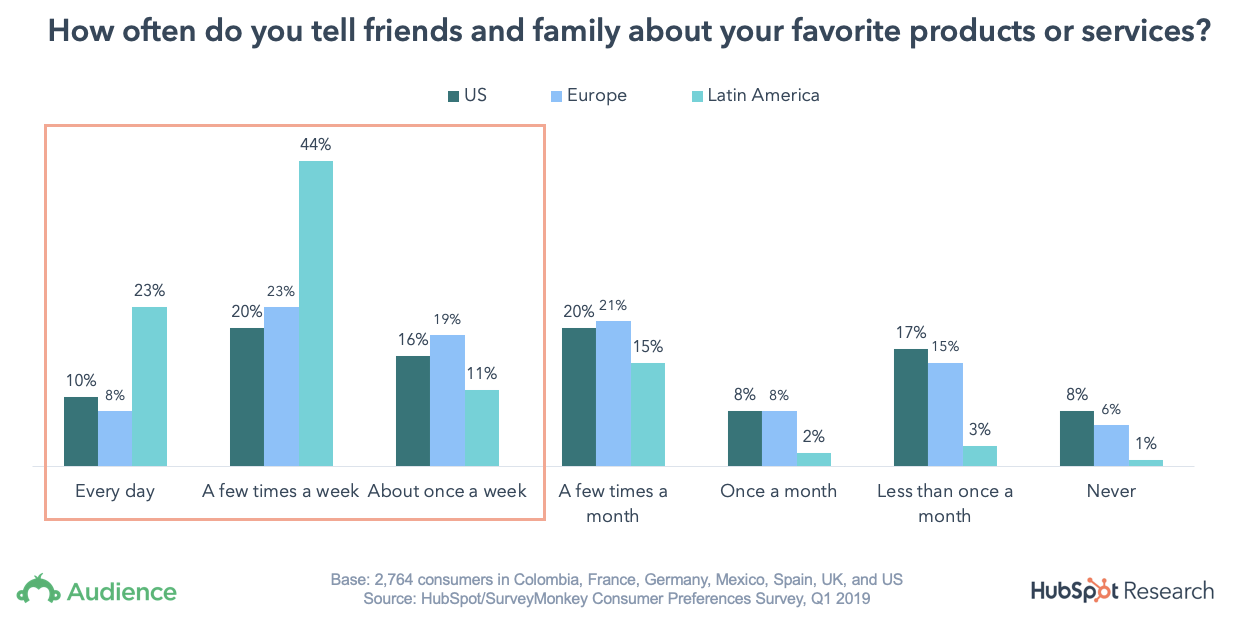
Consumers in Latin America are especially big on sharing — 78% of consumers based in Colombia and Mexico tell friends and family about products they like at least once a week, and 23% share their favorites every day!
2. Consumers trust word of mouth the most.
You might be wondering — how do people find out about products or services to begin with?
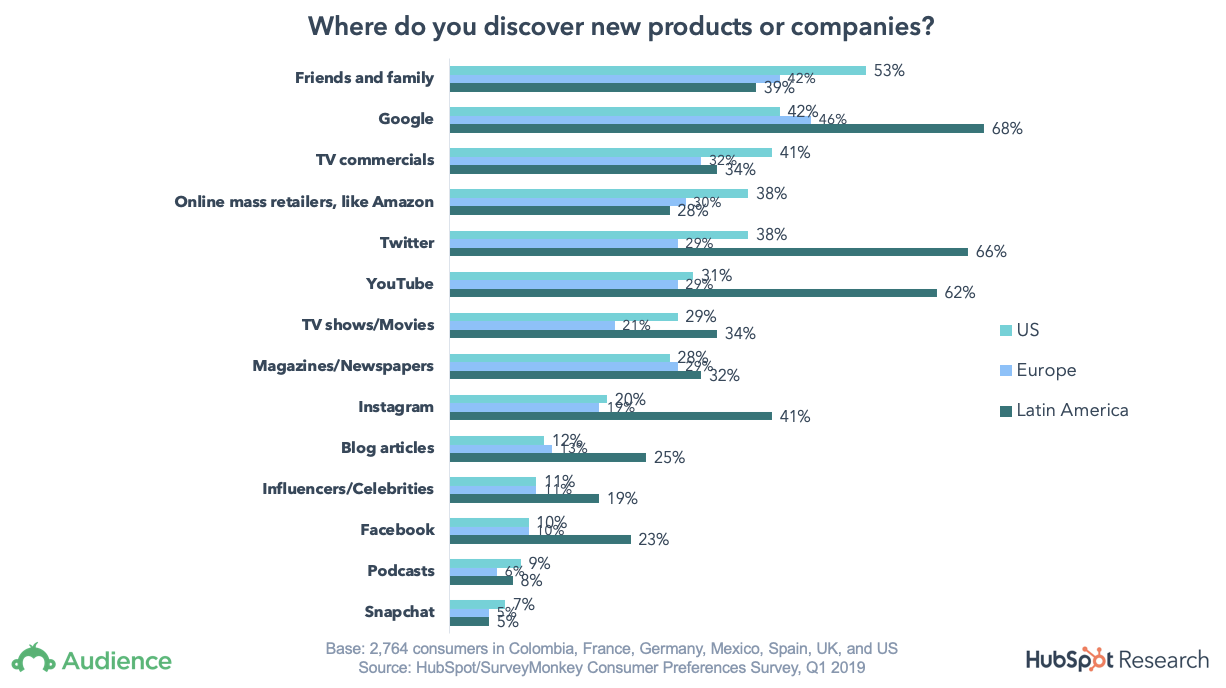
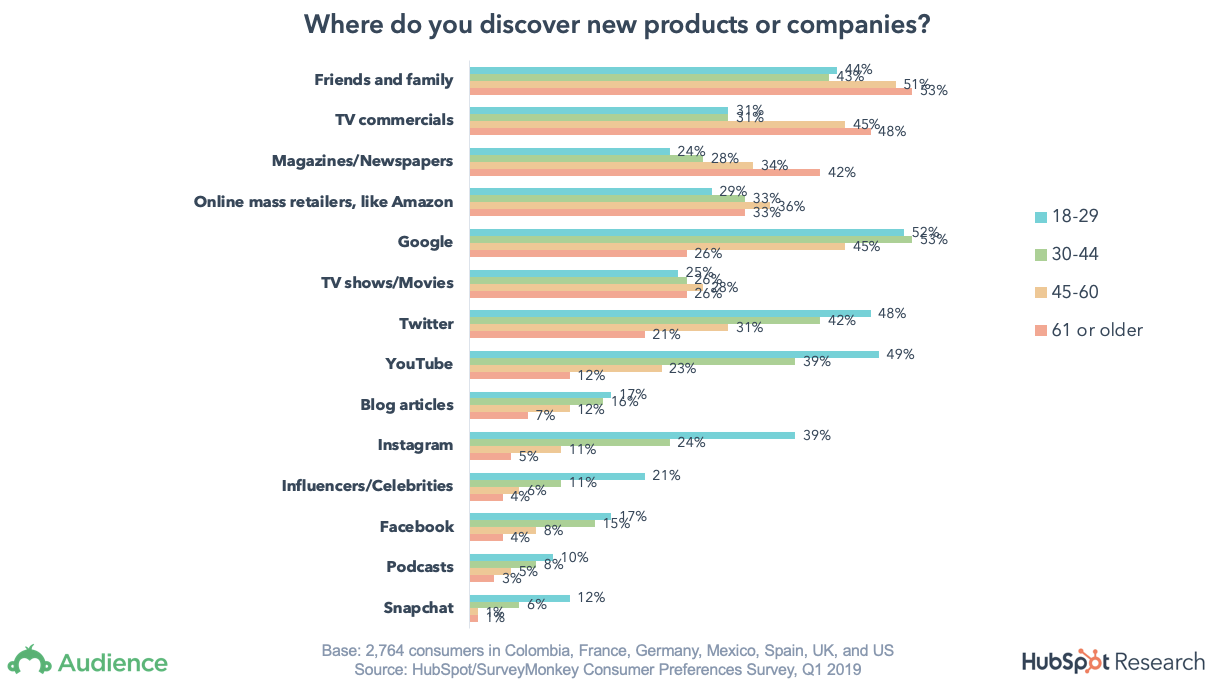
Ultimately, we found friends, family, and Google to be the top discovery sources for new products or services overall. In Latin America especially, we see a considerable influence from online channels for product discovery, including Google, Twitter, YouTube, and Instagram.
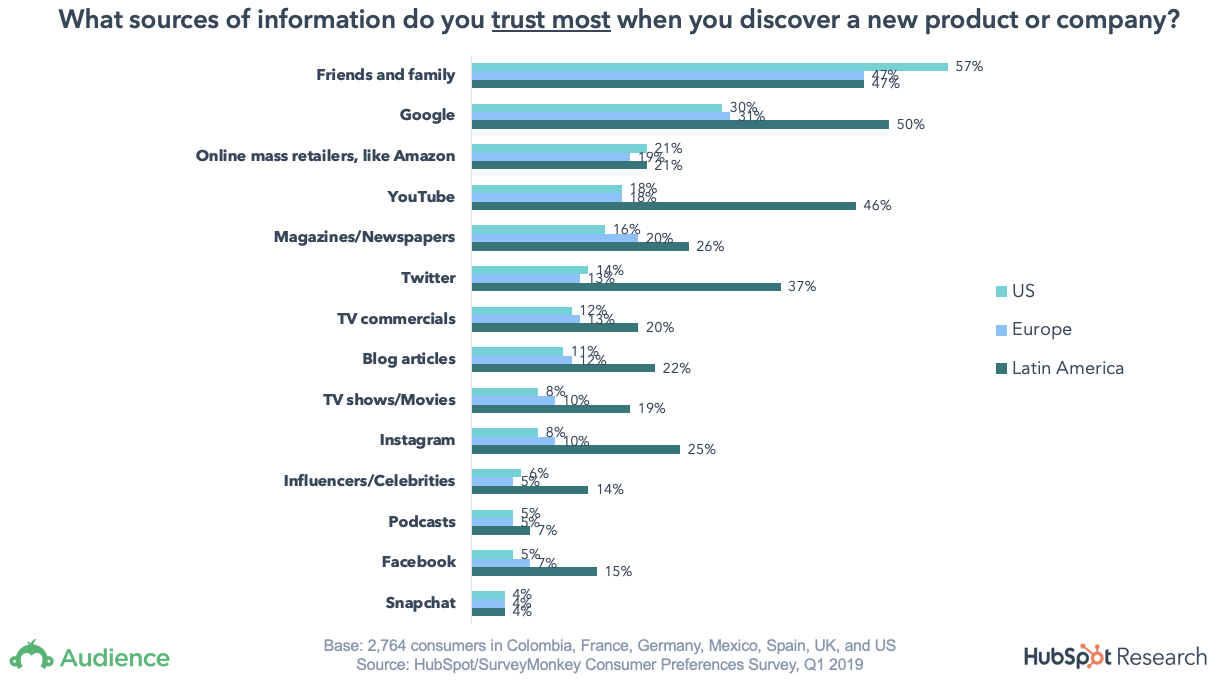
Friends and family top the list as the most trustworthy source for discovering new products or services overall. Consumers prefer having real life experiences and examples from people they know well to inform their buying decisions.
When cut by region, we once again see Latin American consumers’ preference for online channels — not only do they use Google and Youtube to discover new things, but they typically trust those platforms, as well.
3. Expectations are low, which means great experiences matter.
Our findings reveal people are highly likely to share insights about products they love to friends and family, and that friends and family are the most trusted source of information for buying. From that information alone, it’s clear what businesses should do — focus on delighting their customers with great products and/or services.
Unfortunately, very few people believe it when they hear businesses say they “solve for the customer”. There’s clearly a gap that businesses who are determined to delight customers can fill.
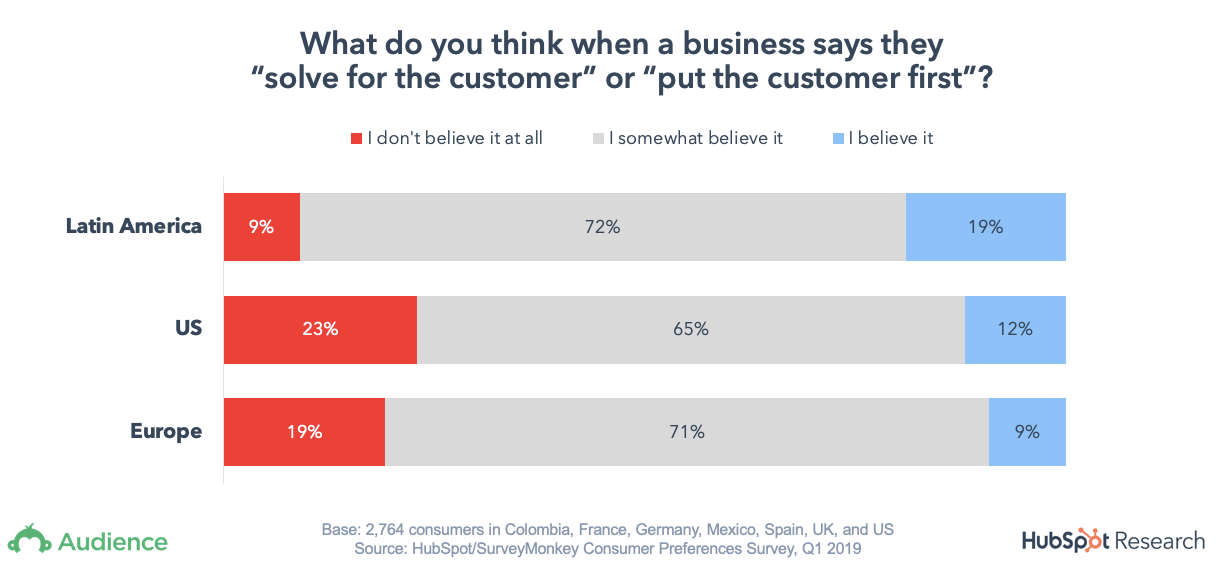
Consumers have low expectations when it comes to customer experience, so businesses that make the effort can differentiate themselves and add further momentum to their business’s flywheel. Consider beloved companies like LL Bean, Nordstrom, and Zappos.com — they have devoted customers thanks to the superior service they provide.
4. Social is a major discovery channel for young consumers.
Despite the bad press, and even mixed feelings about social media’s impact on society across generations, our data shows that social media sites like YouTube and Twitter are still major discovery channels for Gen Z, Millennials, and Gen X. In fact, consumers ages 18 to 29 are nearly eight times more likely to discover new products from Instagram, compared to consumers aged 61 or older.
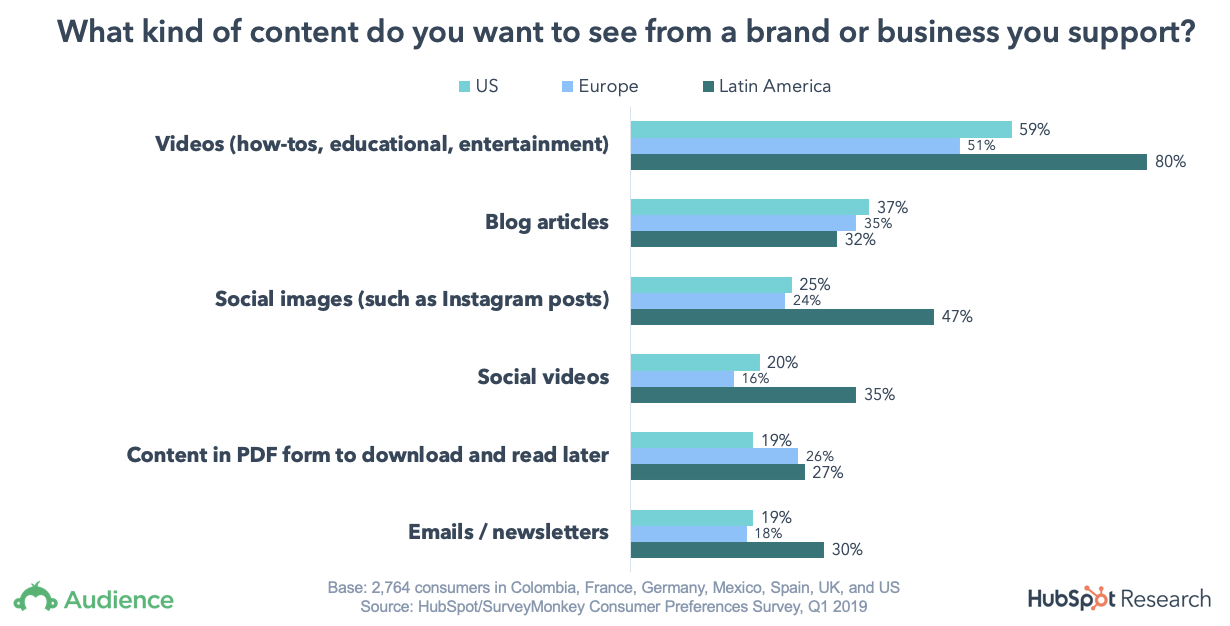
5. Videos and your website are both crucial for brand engagement.
Video is still the top type of content people want to see from businesses, which is consistent with our research from 2017. Incredibly, this preference spans all locations and most age ranges.
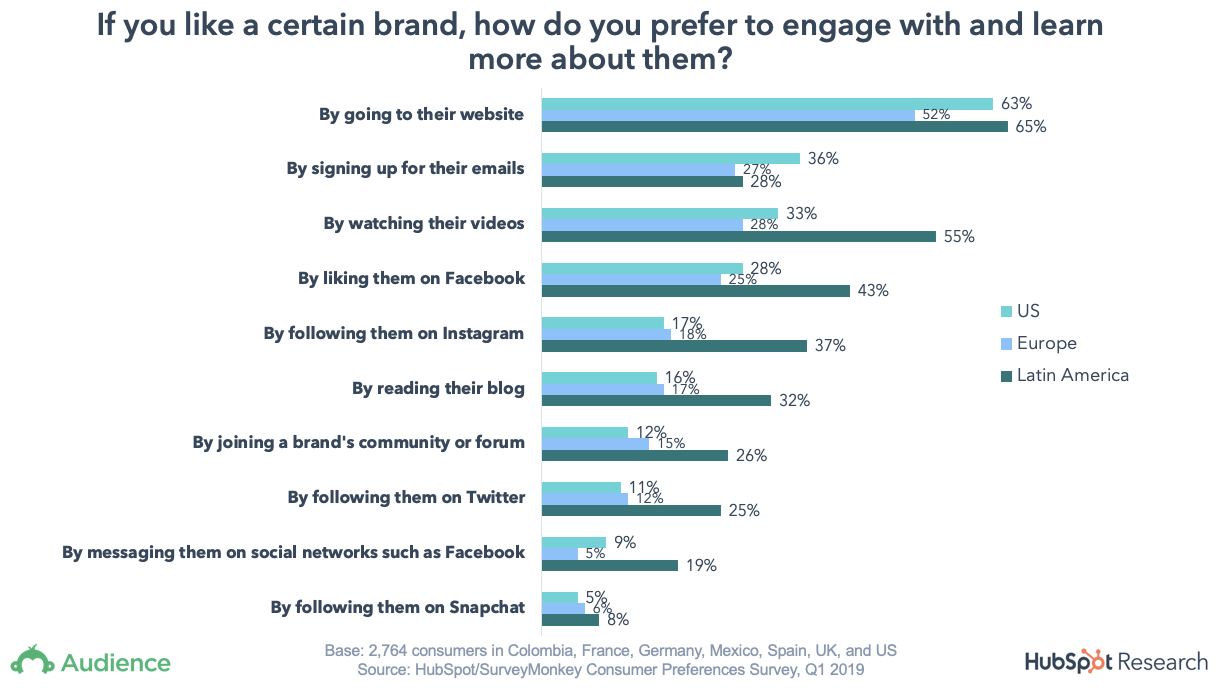
In terms of where people go to learn about a brand, the official company website is the key property that everyone visits to get information. It’s critical you ensure your business’ website is easy to navigate and your content is up-to-date.
Additionally, make sure your business’s website clearly articulates the value that you can provide, along with clear next steps on how to engage with a sales rep or make a purchase.
Methodology
The survey was conducted using SurveyMonkey Audience and was based on 2,700 responses. The sample was balanced by age and gender and representative of an employed adult online population in The United States, UK, Mexico, Colombia, France, and Spain.

Advanced Facebook Retargeting: How to Up Your Ads Game
Do you want to run successful Facebook retargeting ads? Wondering what tactics can improve your Facebook campaign performance? To explore advanced Facebook retargeting, I interview Susan Wenograd. Susan is a Facebook ads expert, a regular columnist at Search Engine Journal, and an account director for AimClear, an integrated digital agency. You’ll discover the biggest mistakes […]
The post Advanced Facebook Retargeting: How to Up Your Ads Game appeared first on Social Media Marketing | Social Media Examiner.
from Social Media Marketing | Social Media Examiner http://bit.ly/2UCqYOr
via socialmediaexaminer
The Top 21 Creative Advertising Agencies to Follow on Instagram
Instagram has evolved into a perfect visual platform for agencies, filled with photos of office parties, company outings, and creatives hard at work behind their Macs.
And while there were more than a few pictures of agency pups and craft beers, Instagram has also become a place where agencies can share behind-the-scenes shots of their latest work and highlight their accomplishments.
While there probably aren’t that many CMOs who troll Instagram looking for their next agency partner, there is little competition and even more opportunity to make it your agency’s platform of choice for attracting new talent and clients — a differentiator when it comes to that next visual campaign.
If you are looking for some inspiration or just want some “inside” looks at a few agencies, then check out this ultimate — yet not exhaustive — list of ad agencies to follow on Instagram:
21 Creative Agencies To Follow on Instagram
1. Huge: @hugeinc
This meticulously curated Instagram from Huge is chock full of high-quality photography, graphic design inspiration, and quirky snaps of daily office antics. A must-follow if you want a glimpse of what life is like at a top agency.
2. Motherlondon: @motherlondon
Mother London, the world’s leading independent creative agency network, has a unique approach to Instagram. Each week, they hand over the reins to a different creative, allowing them to showcase their work and highlight their unique design perspective. The result is a truly inspiring feed that’s sure to inject a little inspiration into your daily life.
3. ustwo: @ustwo
Even though ustwo, a digital product studio, has worked with major brands like Google, Adidas, and Ford, their Instagram presence is surprisingly personal. Take a scroll through their gallery and you’ll find colorful photos of office events, team outings, and even birthdays alongside glimpses of their latest work.
4. Wolff Olins: @wolffolins
Wolff Olins‘ Instagram gives followers a glimpse at the agency’s work-hard-play-hard approach to creative strategy, including design inspiration and behind-the-scenes snaps.
5. Revenue River: @revenue_river
This Colorado-based marketing agency and HubSpot partner helps its clients use digital assets more effectively. What sets its Instagram apart from the competition is “On the Hot Seat,” a video series featuring a different employee every episode to learn about what they do for the company. Many businesses’ Instagram accounts focus on its people — not many dedicate a talk show to them.
6. Red Antler: @redantler
Brooklyn-based agency Red Antler is the epitome of cool and inventive New York charm, and their Instagram reflects this identity. Follow along for design inspiration, office culture, and photos of their work with startups.
7. Skirt PR: @skirtpr
The folks at Skirt PR know their way around a glamorous party. Whether it’s a cool boutique opening, a cozy cafe gathering, or a champagne celebration, you can follow along with the action on their Instagram. Their feed is also a colorful source of design inspiration — perfect for a mid-week pick-me-up.
8. Agency V CPH: @agencyvcph
If you ever feel like your life could use more Scandinavian minimalism, you should add Agency V CPH to your list of accounts to follow. The Copenhagen-based agency shares pictures of sleek interiors, style inspiration from their clients, and city snapshots from the rainy streets of Copenhagen.
9. Frelon Bleu: @frelon_bleu
This France-based digital agency and HubSpot Partner “appreciates what is different, beautiful, and impactful,” and its outspoken Instagram account proves it. Here, you’ll find snapshots of creative and provocative street art that show you what Frelon Bleu values and how it thinks about design and culture.
10. SPARK: @sparkbrand
SPARK‘s creative team takes followers behind the scenes and on location as they shoot and edit ads for brands like Hilton, Visit Florida, and The Dalí Museum. Their account is also worth a follow for the illustrations and other design work they regularly share.
11. BBDO San Francisco: @bbdosf
As their Instagram bio proudly declares, BBDO San Francisco is “all about The Work The Work The Work.” Their account showcases their recent campaigns, high-profile events (such as Cannes), and their team’s creative process — which sometimes involves bowling nights.
12. Anomaly: @anomaly
AdAge named Los Angeles-based shop Anomaly Agency of the Year in 2017, and we think their Instagram account is also a winner. With colorful snaps of daily office life, upcoming campaigns for clients, and scenic shots from their seven global locations, Anomaly is worth a follow.
13. Martin Agency: @martinagency
You’ve seen Martin Agency’s impressive work for Geico, Chevrolet, and Oreos, but you probably didn’t know they have an affinity for flannel shirts and a love of street art. Martin Agency’s Instagram is an intimate look at how employees at one of the world’s most influential agencies work day-to-day.
14. Salted Stone: @saltedstone
This agency’s Instagram following may be small in comparison to some of the other accounts features here, but the quality of their content speaks for itself. Salted Stone, a California-based digital agency and HubSpot Partner, uses Instagram to share behind-the-scenes peeks at their latest projects, industry events (like INBOUND), and favorite lunch spots.
15. Talk Shop Media: @talkshopmedia
No, your eyes don’t deceive you — that’s really Prince William and the Duchess of Cambridge chowing down on some treats from one of Talk Shop Media’s clients. This digital marketing agency specializes in influencer relations, and their Instagram is like having a free pass to all the coolest events.
16. Goodby Silverstein & Partners: @goodby_silverstein
Margaret Johnson, chief creative officer at Goodby Silverstein & Partners, was recently honored on Business Insider’s 30 Most Creative People in Advertising list. Her agency’s Instagram account gives followers the opportunity to see how Johnson and her team produce major global campaigns, and some of the interesting people who inspire them.
17. RPA Advertising: @rpa_advertising
RPA Advertising’s Instagram account makes the daily office grind look pretty darn fun. The Santa Monica-based agency recently hosted a summer concert series, and — based on their feed — they make sure their creative teams are just as loud.
18. Colle + McVoy: @collemcvoy
Dogs and design? Count us in. Colle + McVoy’s Instagram account puts the spotlight on their design work and company culture.
19. hzdg: @hzdg
hzdg’s Instagram account is a veritable treasure trove of design inspiration, ranging from their own work to the work of designers and artists their team admires. They even recently took followers on a virtual tour of the world’s most colorful places.
20. Social Distillery: @socialdistillery
Social Distillery is an Austin, Texas-based social media agency specializing in digital communications and consumer engagement. They might be a relatively small agency, but their Instagram account makes a big impression with snapshots of their energetic team and latest work.
21. st8mnt: @st8mnt
Last but certainly not least is st8mt, a Nashville-based branding agency that boasts powerful design chops and a laid-back company culture. Their Instagram is full of their recent work and company events. You could say it really makes, well, a statement.

The 12 Best Email Newsletter Tools in 2019
Email marketing is a key component of any successful marketing strategy — in fact, email marketing provides companies with a potential ROI of $44 for every $1 spent.
In particular, email newsletters are an essential way for your business to keep your subscribers up-to-date with relevant information, and ultimately drive more leads. Newsletters give marketers the ability to capture email sign-ups through form submissions, and nurture leads.
If you have a blog, you’ve probably sent newsletters to notify subscribers about new blog posts. Alternatively, perhaps you’ve used newsletters to send business-related information to your subscribers.
Anyway you slice it, newsletters help you keep your contacts engaged with your business.
An email newsletter tool is essential, since it allows you to beautifully design a newsletter email, deliver the email to your subscribers with features such as A/B testing and smart content, and monitor and analyze how the newsletter performed.
However, not all email newsletter tools are created equal. With differences in features, pricing, and availability, choosing an email newsletter can be hard — especially with the number of options available. Additionally, newsletter tools differ in how much of the customer journey they can cover.
Ultimately, when choosing your email newsletter tool, you’ll want to ensure the tool matches your business’s goals — which is why we wanted to take out the guesswork, and highlight the top email newsletters out there for your business.
1. HubSpot’s Email Newsletter Tool
Designing, sending, and analyzing email newsletters has never been easier with the HubSpot Email tool. HubSpot offers a drag-and-drop email editor so you can easily create a polished email newsletter that you can personalize to fit your brand’s design without needing a designer or IT professional.
Additionally, you can experiment with smart content rules, personalization, A/B testing, and advanced reporting — ensuring your email newsletters are optimized for your business. You can also see who’s engaging with each newsletter email and when, what device they’re using, the most popular links and documents, and more. You can use these insights to design tests that will take conversion rates to new heights for your business.
Ultimately, what makes HubSpot’s Email tool so exceptional is its ability to pair with HubSpot’s free forms tool to easily collect email leads, as well as HubSpot’s free CRM to give you insight into how your marketing emails are performing.
For example, you can use an email subscriber’s lifecycle stage, list membership, or any information in their contact records to automatically serve up the most relevant subject lines, content, links, attachments, and calls-to-action.
HubSpot’s email tool starts at $50 per month and is included in the Marketing Hub Starter tier.
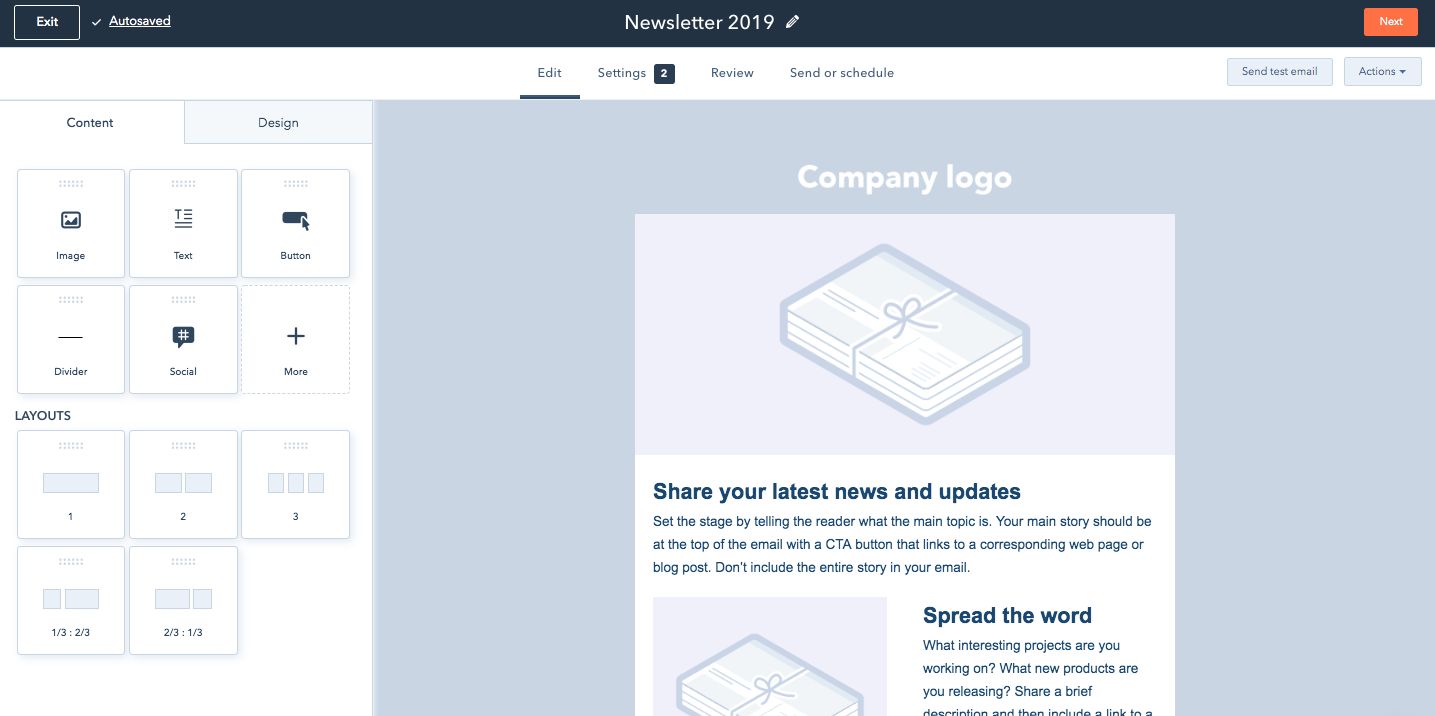
HubSpot’s Newsletter Email Template Drag-and-Drop Editor
2. Benchmark
Benchmark offers the ability to easily create email newsletters via drag-and-drop functionality, giving non-technical marketers the power to create beautiful newsletters. There’s also a good selection of newsletter templates that you can choose from in the Benchmark template library.
Some of Benchmark’s most valuable features include detailed analytics on how each email campaign performs, A/B split testing to ensure you’re sending the best emails, spam testing tools that ensure your emails get to inboxes, responsive designs and templates, list segmentation tools, and auto-responders.
Benchmark is free for up to 2,000 subscribers, and lets you send up to 14,000 emails per month.

Source: Benchmark
3. GetResponse
GetResponse offers features that become available as you need them, from a range of starter features all the way to enterprise features such as webinars and landing pages. Hosting landing pages in GetResponse will further enable you to capture email subscribers for your newsletter.
GetResponse also allows you to create well-designed email newsletters with their drag-and-drop email editor, segment contacts tool, campaigns creator, and A/B testing tool. With a ton of templates to choose from, you can create an email to match your brand, and send emails more efficiently.
GetResponse does not offer a free tier, but they have a 30-day trial, and pricing starts at $15 per month.

Image source: GetResponse
4. SendInBlue
With SendInBlue, you don’t need technical skills to create well-designed email newsletters. The drag-and-drop functionality, HTML editor, and expansive template gallery gives you the tools you need to create stunning emails.
You can personalize the design of your newsletters with easy builders, choose the form fields for your subscription form, and design many ways for your visitors to opt-in. SendInBlue has a robust automation pipeline, allowing you to send different emails based on specific actions taken by your contacts. However, SendInBlue does not have a CRM, so it’s not the best option for scaling teams.
SendInBlue lets you send 300 emails per day (6,000 emails per month) for free, and pricing starts at $25 per month for 40,000 emails.
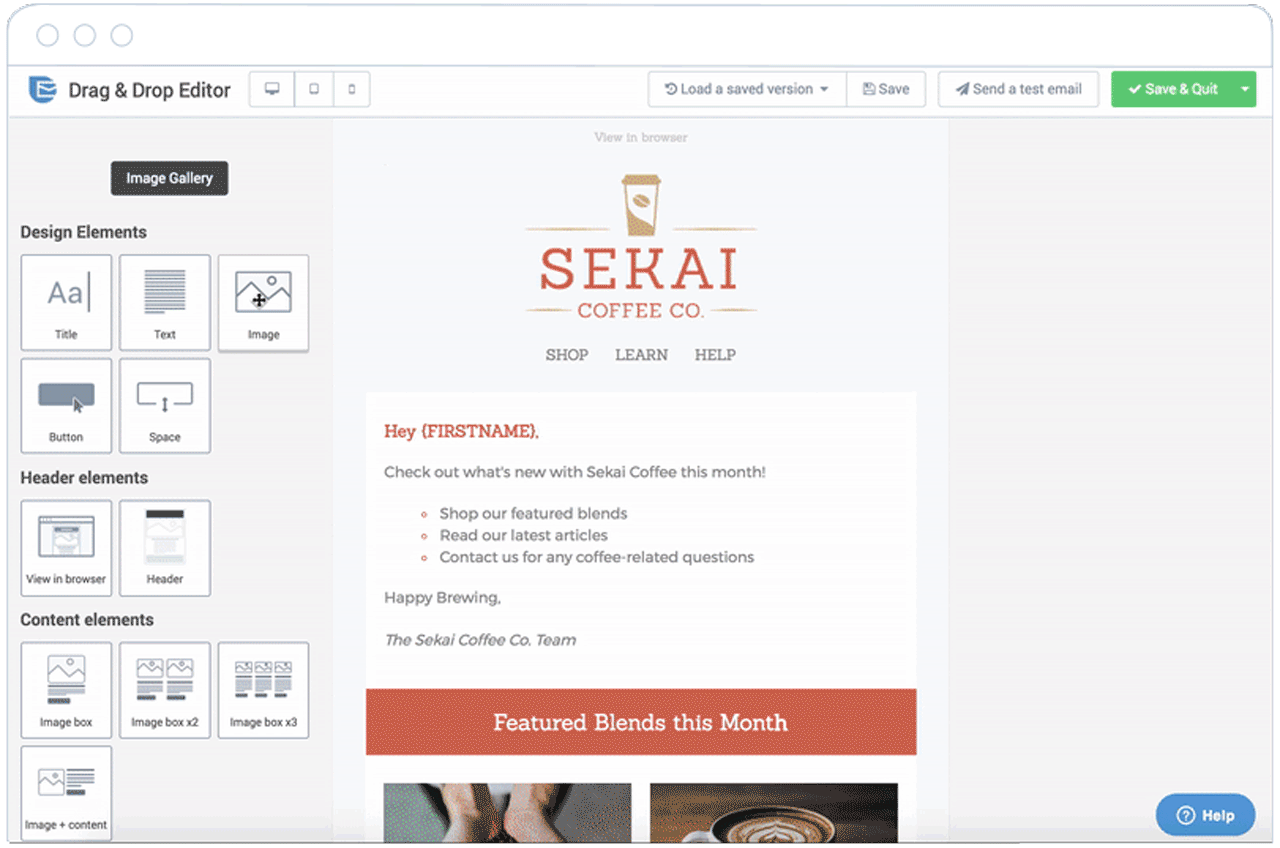
Image source: SendInBlue
5. Mailjet
Mailjet offers email solutions for fast moving teams, especially in Europe, and great scaling opportunities for larger companies. The service is keen on being developer-friendly with a powerful API solution for engineers to build on their email platform. One appealing feature of Mailjet is the ability to create dynamic content that is personalized for each recipient based on data such as name and location.
If your team demands email newsletters be built together and reviewed often before sending, Mailjet’s collaborative tools make it easy for teams to work together on emails. For example, you can create a draft of your newsletter in Mailjet, and your teammates can suggest edits before it’s sent — all within the app.
Mailjet gives 200 emails per day (6,000 emails per month) for free, and pricing starting at $8.69 per month for 30,000 emails.

Image source: Mailjet
6. MailChimp
MailChimp offers a free email marketing service with a large selection of templates to choose from for newsletters. MailChimp is ideal for small and medium-sized businesses looking to get their feet wet in email marketing, but is not suited for scaling teams since it lacks powerful automation and segmenting features.
MailChimp is a valuable tool nonetheless, especially since its free plan generously offers up to 12,000 free email sends per month. You’ll also like the variety of newsletter templates that MailChimp offers, and the drag-and-drop builder that lets you rework the designs.
MailChimp offers 12,000 email sends per month to a list size up to 2,000 for free. Pricing starts at $10 per month for 500 subscribers.
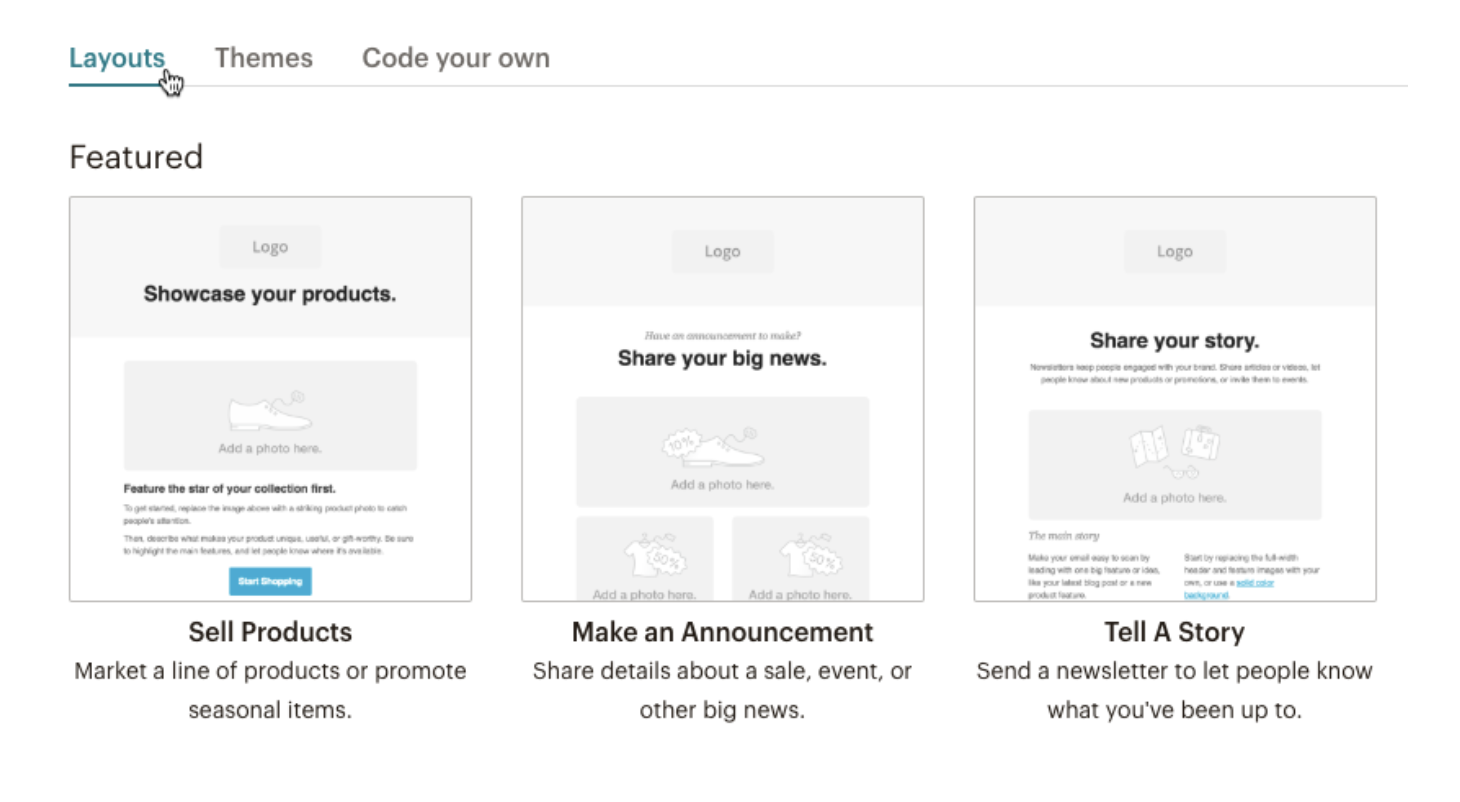
Image source: Mailchimp
7. Constant Contact
Constant Contact provides a reliable email newsletter solution for small to large businesses. Constant Contact provides a helpful user on-boarding for anyone looking to get started quickly, and offers easy-to-use features. If you think you’ll be running into complexity with the email marketing tool, you’ll be happy to know that Constant Contact’s multi-channel support system can help walk you through most issues.
In Constant Contact, you can use their email builder to create newsletters that match your brand, select from a variety of templates, and edit to ensure it looks exactly how you want it — although I’m not a big fan of the templates, since most of the templates look outdated. Additionally, if you need sophisticated automation features and workflows, I would advise staying away from Constant Contact because it lacks a strong automation system.
Constant contact does not offer a free tier. You can try out the service for 60 days before paying, then prices start at $20 per month for a list size up to 500 contacts.
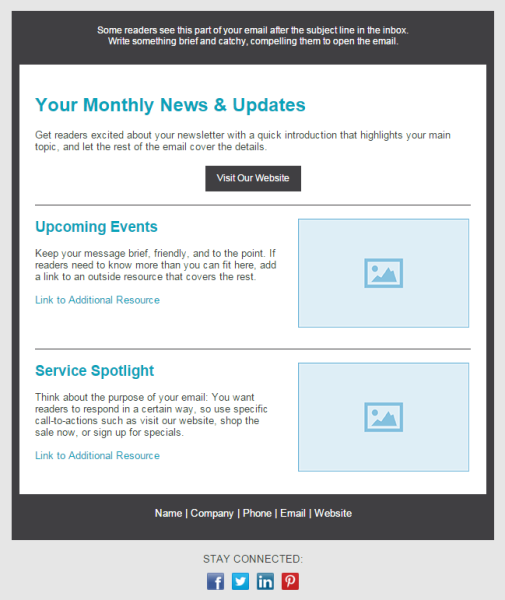
Image source: Constant Contact
8. MailUp
MailUp offers plenty of the same functionality from what you’d expect from an email marketing service, including a drag-and-drop email builder, beautifully designed templates, and an HTML editor.
However, it’s critical to note — you get more value from MailUp if you choose to send out emails at a slower pace, since the price varies depending on delivery speed. So, if your business has a specific number of contacts and doesn’t mind sending newsletters slower, you could save money by using MailUp. If you use WordPress, MailUp also offers a WordPress plugin that you can use to capture newsletter subscribers on your website.
Like Constant Contact, MailUp does not offer a free tier option. You can try out the service for 30 days, and prices start at $49 per month.
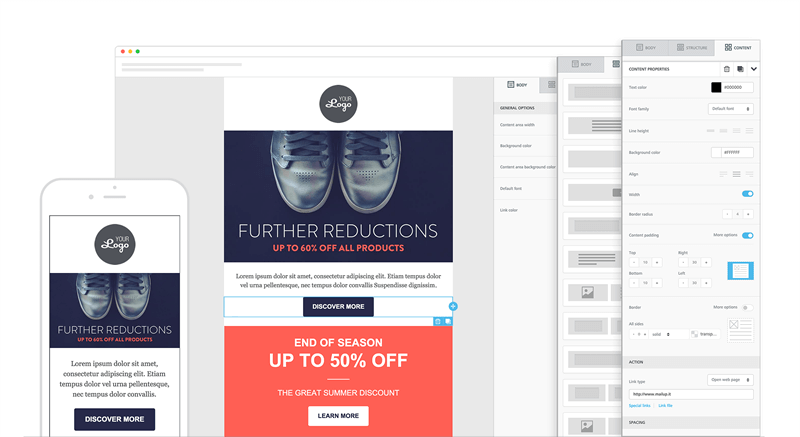
Image source: MailUp
9. Zoho Campaigns
Zoho offers a great email solution for marketers looking to utilize automation features, including auto-responders and workflows. If you’re already a Zoho CRM customer, it might be worth checking out Zoho Campaigns for an email newsletter tool, since they work better together.
Zoho includes many modern and well-designed templates to choose from. If you’re worried about how your newsletter will look on different mobile devices or browsers, Zoho gives you the ability to check to see how your newsletters look on various devices to ensure your newsletter is optimized for mobile, tablet, and desktop.
Zoho offers 12,000 emails per month for free for up to 2,000 subscribers. Then there’s pricing based on plans, or pay-as-you-go credits.
 Image source: Zoho
10. AWeber
AWeber delivers a well-established email marketing newsletter tool with an array of features for your business, including email designs, list segmentation, automation tools, and detailed reporting. To make design easier, AWeber has more than 6,000 royalty-free stock photos to include in your emails. Of course, you can also upload your own images and gifs.
AWeber is a great solution if your business uses WordPress, since AWeber easily integrates with WordPress. However, it’s important to note you can’t specify multiple segments at once when sending an email newsletter — plus, AWeber lacks some powerful automation features.
AWeber does not have a free version. However, you can try it out for 30 days. If you want to upgrade, prices start at $19 per month for 500 subscribers and unlimited email sends.
Image source: AWeber
11. Campaigner
Campaigner is a good option if you work for a growing team, since the tool offers robust automation and workflow features available at the enterprise tier. You can set up systems that send email newsletters when contacts fill out specific forms, make a purchase, or engage with a previous email.
As with most of the email newsletter tools in this list, Campaigner offers easy-to-use email builders and a large selection of templates to get you started. If you run into trouble, their support is noted as being helpful at solving technical challenges.
Campaigner offers a 30-day free trial but you’ll need to put in your credit card information. Prices starting at 19.95 per month for up to 5,000 contacts.
Image source: Campaigner
12. Drip
Drip is ideal for more experienced email marketers, since it’s not as intuitive and easy-to-use as some of the others in the list. For example, there’s a limited email template library, so you’ll have to spend time designing your email newsletter. With that said, Drip comes packed with automation features that could be beneficial for your business, particularly if you work in e-commerce.
With Drip’s “ECRM”, you can run personalized email newsletter campaigns that work with information gathered from contact purchases and checkout information, like abandoned cart details. One thing to note — Drip does not offer phone support, so you won’t have that added peace of mind.
Drip offers a 14-day free trial, with prices starting at $49 for up to 2,500 subscribers and unlimited email sends.
Image source: Drip
That’s it! These are the best email newsletter tools that I recommend. You can’t go wrong with any of these tools since they all offer similar features, but there will be one that’s best suited for your business. The great thing about HubSpot is that we offer a free solution to get you started — and then, once your business grows, we have plenty of advanced features you’ll need in order to deliver a successful newsletter marketing strategy down the road.
Once you’ve selected your email newsletter tool, you can begin creating your newsletter marketing strategy, which, in the most simplified version, looks like:
- Capture subscribers on your website via form submissions.
- Create email content in a newsletter design.
- Send the newsletter consistently, like once a week or bi-weekly.
If you want to learn more about how to create an email newsletter, please check out our guide.

How to Create a Profitable Amazon Marketing Strategy for 2019
In today’s e-commerce universe, Amazon is a behemoth.We all know it, and we all use it … whether we want to admit it or not.
But today’s consumers don’t just use Amazon to buy stuff. They also use it to check prices (90% of consumers use Amazon to price check a product), discover new products (72% of consumers visit Amazon for product ideas), and start product searches (56% of consumers visit Amazon before any other site).
Have you utilized Amazon for any of these purposes? I know I have.
Here are some other fascinating Amazon statistics:
- Amazon sells over 12 million products, not including books, wine, media, and services.
- Amazon has over 310 million active users, including 90 million U.S.-based Prime members.
- Amazon Prime members spend almost $1.5k every year. 7% of Prime members purchase something every day.
Wow. Like I said — behemoth.
In 25 years, Amazon has grown exponentially. It sees over 2,000 new sellers every day. Whether you’re a veteran Amazon seller or considering becoming one, it can be an intimidating place.
That’s why we’ve built this guide — to help you build a profitable marketing strategy and succeed in the jungle that is Amazon. Literally.
Bookmark this post for later, and use the chapter links below to jump ahead to sections of interest.
Optimizing Your Amazon Product Pages
12 million-plus products. That’s a dense jungle. It might seem nearly impossible to find success as a seller on Amazon, but the answer is actually quite simple: You must think like a buyer.
Before you build an Amazon marketing strategy, you must ensure your Amazon product pages are ready to receive new shoppers. You can do this by optimizing your pages to attract buyers. (These practices also support Amazon SEO — which we’ll get into later.)
Amazon is a remarkable platform because, unlike Google and other search engines, people who visit Amazon are already in a “shopping” mindset. Any traffic that hits your Amazon product pages is already primed to buy, even if they’re merely checking prices or researching new products.
It’s your job as a seller to recognize this primed audience and optimize your page to capture a potential buyer.
Let’s review the specific components of your product pages as organized from top to bottom. (If you’re interested in what Amazon has to say, check out their Quick Start Style Guide here.)
Product Title
 This is an Amazon product I actually purchased. You’ll see this example throughout the piece.
Your product title is a consumer’s first introduction to your product when browsing Amazon. While you should keep your titles concise, Amazon does allow up to 200 characters. Use this character limit wisely, though.
Here’s what we recommend including:
- Your brand name
- The product name
- Specific features (such as size, color, material, quantity, etc.)
- One or two distinguishing benefits or values
Additionally, here are some of Amazon’s title formatting rules:
- Capitalize the first letter of every word (except for words like “and”).
- Use “and” instead of “&” and numerals (“10”) instead of written numbers (“ten”).
- Don’t put pricing, seller information, promotions, and opinion-based copy (words like “best” or “leading”) in the title.
- Leave out details like color or size if irrelevant to the product.
Your title is prime real estate for two things: product information and keywords. For most products, these are one and the same, but some sellers opt to add a few additional keywords to increase their chances of popping up on Amazon SERPs.
Ultimately, your title should match the words shoppers use to discover your product and educate them on your product before they get to your page.
👉🏼HubSpot Tip: Use tools like Merchant Words and Simple Keyword Inspector to research potential keywords and their search volume.
Product Images
While your titles communicate your product information, consumers use your imagery to decide whether or not to further explore your product page. On a long list of Amazon search results, product imagery can help your product stand out.
Once a shopper visits your product page, however, imagery is even more important — it can dictate whether a consumer makes a purchase not. Amazon allows up to nine product images. We recommend using all of them, only if you have nine high-quality, relevant images.
Amazon requires your main product image needs to be on a plain, white background, but here are some tips for your other eight product images:
- Capture your product from different angles.
- Show your product being used or worn by a real person (not a mannequin or computer-generated human).
- Include content submitted by real customers — and make note of that on the image.
- Upload images that include charts, lists, or competitor comparison tables.
Amazon also offers shoppers the ability to zoom into each image, which is why your product images should be at least 1,000px x 1,000px.
👉🏼HubSpot Tip: Test your product images to see which one converts more shoppers (like an A/B test). To do this, record your sessions, sales, conversion rate, and revenue over the course of a week or month — and make a note of which image was set as the main image. Then, change the image and capture the same data.
Product Key Features (Bullet Points)
Successful Amazon sellers use these bullet points to expand on features and benefits and to address common questions, misconceptions, or issues.
Here’s how we recommend you approach your product key features list:
- Write a paragraph for each bullet and include two to four sentences or phrases that are relevant to that bullet’s topic.
- Capitalize the first few words of each bullet to emphasize the feature, benefit, or question you’re addressing.
- Treat these paragraphs as you would an advertising campaign. This copy could be the key to converting page visitors.
- Avoid wasting space on information that’s obvious from product images or mentioned in your product title.
👉🏼HubSpot Tip: Look at reviews, complaints, and FAQs to learn what your customers love and not-so-love about your products. Proactively include and address these points in your list .
Product Description
Seriously. They have to scroll past Amazon ads, sponsored products, and other featured information. If they make it to your product description, they’re expecting to learn more about your product and finalize their purchase (or ditch your page altogether).
So , use your product description to expand on your product bullet points, address some lesser known features and benefits, and perhaps include some more images of your product. Additionally, consider listing details that sets your product apart from competitors’.
Amazon provides basic HTML markup in this section — bold, italics, and page breaks — so utilize these to avoid publishing one big, boring paragraph of information.
👉🏼HubSpot Tip: Utilize Amazon’s Enhanced Brand Content option to make your content more scannable, professional, and consistent with your overall branding. We cover how to do this next.
Amazon Enhanced Brand Content
Enhanced Brand Content (EBC) is a way to “upgrade” your Amazon product descriptions for no additional cost. Historically, Amazon reserved EBC for products sold through Amazon and seller in the Vendor program, but they recently opened up this feature to all sellers through Seller Central under Advertising.
EBC provides pre-built templates that allow you to add additional features to your product descriptions, such as banners, tables, bullets, and interactive images and copy.
Simply opening an Amazon seller account won’t give you access to EBC. You’ll also need to open an Amazon Seller Central account with a Pro subscription, enroll each of your brands with Amazon Brand Registry, and possess a registered word trademark for each brand name.
Now that you’ve optimized your Amazon product pages, you’re ready to start driving traffic to your products through a well-crafted, profitable Amazon marketing strategy. Note: Most of these strategies work in tandem (as you’ll see), so don’t be afraid to test out one or two at the same time.
Amazon Advertising (or Amazon Marketing Services)
Amazon sellers advertise on the platform through Amazon Marketing Services (AMS). AMS is similar to Google Ads in that sellers pay only when shoppers click on ads. The service uses keywords, related products, and shopper interests to place ads where consumers are most likely to click on them.
As a seller, you can choose how you want your product to be seen. Product Display ads show up on the side or bottom of Amazon SERPs and along the side of related product pages. When clicked, Product Display ads lead to a product page.
Headline Search ads are the most customizable Amazon ad. They appear at the top of Amazon SERPs and can include custom ad copy as well as link to a branded landing page on which you can feature custom navigation, branded imagery, and select products.
Like with your Amazon marketing strategy, consider creating an Amazon advertising strategy to best target your ads and drive shopping traffic to your product pages.
Amazon SEO
As I said above, Amazon is a very popular search engine. (To reiterate what we said above, over 70% of shoppers visit Amazon for new product ideas, and over 50% start their product search on Amazon.) Amazon isn’t just an e-commerce site; it’s also a search engine. And as a search engine, it has its own search engine optimization, or SEO.
Amazon’s search engine is called A9. It operates on its own algorithm and comes with its own unpredictable updates — similar to Google. A9 is similar to Google in another key way: it cares about its buyers (a.k.a. searchers), and its buyers alone.
This is great when you’re shopping … but not so fun when you’re selling.
However, it’s important to remember this as a seller, too. Think like a buyer, and you’ll get along with A9 just fine. (Remember how we talked about optimizing your Amazon product pages to think like a buyer? This is one of the main reasons why.)
When it comes to A9 and Amazon SEO, you want to optimize your content for three things: discoverability, relevance, and sales. In other words, you want shoppers to see, click, and buy your products.
Discoverability
Let’s talk first about discoverability. Think: What will help shoppers find my products?
- Invest in Amazon advertising (as we discussed above) as well as Facebook and Google Ads to drive traffic to your product pages.
- Create product titles that read naturally and reflect a handful of relevant keywords. Use special characters (like | or — or ,) to make your title more readable.
- Place the most relevant, searched-for terms first (in an order that makes sense).
- Look at competitors’ titles, especially those in the first few spots on the SERP. They’re doing something right if they’re ranking that high.
- Take advantage of Amazon’s backend Search Terms, found under Keywords as you edit a product listing. Amazon allows for up to 250 characters (including spaces, commas, etc.), so use this space wisely. Use hyphenated words (like water-resistant) to cover all possible combinations and the individual words, too.
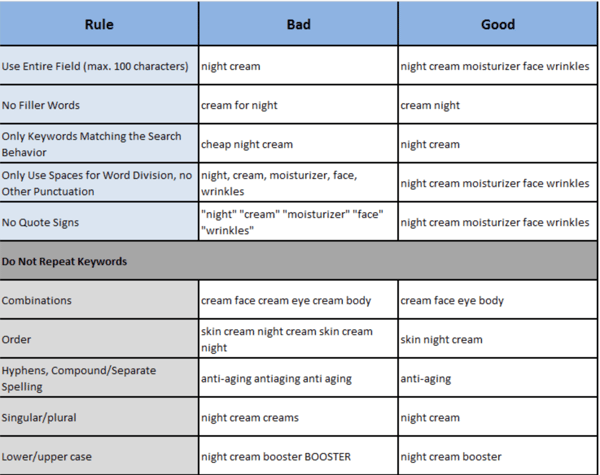
Relevance
Next, relevance. Think: What will help shoppers click on my products?
- Ensure your product images are crystal clear and display your product in the best light … literally. Shoppers will decide whether or not to click based on your main image.
- While your product bullet points can’t necessarily influence your product’s ranking, they can support product relevance once a shopper lands on your page. Use relevant keywords in your bullet points (especially those you couldn’t fit in your title) to further entice shoppers to buy.
- The same tips apply for your product titles, too. Shoppers will judge these for product relevance.
Sales
Finally, sales. Think: What will help shoppers purchase my product?
- Ensure your product page delivers on what your product title and images promise.
- Optimize your product page for conversions. We talked about this at the beginning of this guide.
- Feature as many customer reviews as possible. We talk about how to do this next.
Product Reviews
Customer reviews and ratings are important. They’re even more important in the world of e-commerce, where shoppers can’t physically see or touch a product before buying. In the case of Amazon, almost 90% of shoppers have said they wouldn’t purchase a product with fewer than three stars.
Amazon recognizes the power of customer reviews, and — true to their buyer-first mindset — make reviews a major part of each product page. Shoppers can view customer images, filter reviews by suggested keywords, search for content within reviews, sort reviews by stars, and review customer questions and answers.
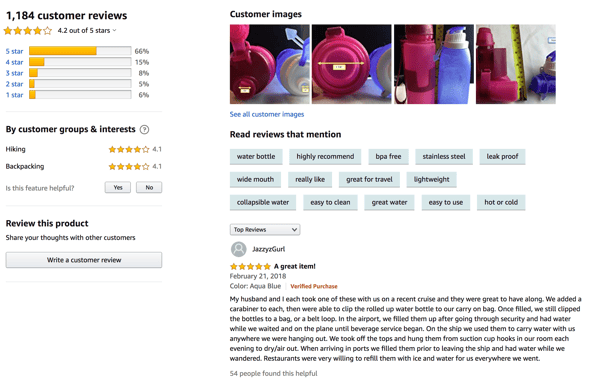
omer reviews for products before I buy. My favorite section is the customer images, where I can see the product used or worn in real-life.
As a seller, you should also prioritize reviews. They can make or break a shopper’s decision to purchase — perhaps more than your optimized product pages.
While you can’t incentivize reviews anymore, you can kindly ask your customers to complete one. Here are a few ways to do this:
- Include a thank-you note and review request in your product shipment
- Send a follow-up email with a review request
- Sell a reviewable product
Finally, Amazon allows sellers to respond to reviews. This is yet another way to engage with customers, express gratitude, and address issues or complaints.
Direct Marketing
A lot of Amazon marketing takes place within the platform (through advertising and SEO), but some sellers follow traditional direct marketing methods, too. While they require extra work, they can be beneficial for creating loyal customers and eventually bringing business off of Amazon to an e-commerce site (if you’re interested in that).
Note: Be sure to read through Amazon’s prohibited seller activites and actions to ensure you remain compliant.
Have you ever ordered something off Amazon and received an email from the seller afterwards? I have. I’ve received emails thanking me for my purchase, asking for a product review, and even offering a discount code for my next purchase.
The first few caught me off guard (I was only used to emails from Amazon about my purchase), but I could appreciate the seller’s intent. Many sellers opt to conduct separate email marketing practices to promote their store and grow their list.
👉🏼HubSpot Tip: If you decide to do email marketing for your Amazon products, don’t forget to ask subscribers if they want to opt-in!
Social Media
Some Amazon sellers also create social media profiles for their brand. This serves as another avenue through which to connect with customers and potential customers.
Use your social media to share product updates, announce sales and giveaways, and invest in some paid advertising.
👉🏼HubSpot Tip: Share your social media accounts on your Amazon brand page and product listings to build your follower list.
Website
Did you know that over 80% of Amazon sellers also sell through other channels, like eBay, brick-and-mortar, and third-party websites? It’s not uncommon to own and operate a separate e-commerce website in addition to your Amazon store.
While Amazon can help you be discovered and subsidize your shipping and customer support cost, creating a separate website can help build your brand beyond Amazon and aggregate customers and email subscribers of your own.
👉🏼HubSpot Tip: If you have no interest in building and managing an entire website, create a simple landing page to start. This will at least give your brand an online identity outside of your Amazon store and provide another place to collect emails and promote your social media.
Affiliate Marketing
I’m a big fan of those product round-ups published by Buzzfeed or other bloggers. It’s so easy to scan a list of recommended products and — best of all — be sent directly to Amazon to check out the ones I’m interested in.
Have you ever wondered how those products end up on the list? Through affiliate marketing. Affiliate marketing is essentially marketing your products through an affiliate — in this case, Buzzfeed. In exchange for your product being published/mentioned/shared, you pay a small fee if readers click and purchase. It’s a win-win and helps you drive sales, collect reviews, and build awareness.
👉🏼HubSpot Tip: Tap into Amazon’s Affiliate Program. It’s free and easy to use and immediately connects you with approved affiliates.
You’re Now the King 👑 (or Queen) of the Jungle
Amazon doesn’t seem so scary now, does it? The platform may be 12 million products wide, but as a seller, your priority should be on your products alone.
First, optimize your product pages so that your marketing efforts can drive buyers that convert. Next, apply these Amazon marketing strategies above to capture new traffic and more profit.
In two simple steps, you’ll see your Amazon products meet consumers wherever they are — whether they’re researching products, comparing prices, or looking to buy.
