
Welcome to My Blog
How to Create Infographics in Under an Hour [15 Free Infographic Templates]
Wouldn’t it be great if creating infographics was as simple as writing regular old text-based blog posts? Unfortunately, making visual content like this usually takes a lot more time, effort, and let’s face it — skill — than the written word. Usually.
But considering the popularity and effectiveness of visual content in marketing today, you can’t just afford to throw in the towel.
That’s why we decided to take all the pain and suffering out of infographic creation. Seriously — don’t give up just yet. You, too, can create infographics that are professional-looking, high-quality, and completed in under an hour. I’m going to prove it. First things first:
Download our 15 free infographic templates here.
Then, all you have to do is provide the content to use inside them. Easy as that. In fact, I’m going to show you just how easy it is to make your own infographic by demonstrating with one of our 15 infographic templates in PowerPoint (pictured above). Then, I’ll explain exactly what I did so you get a sense of how easy it really is.
Want to watch and listen to the instructions as you read the steps below? Check out the video below:
How to Make an Infographic
- Identify the audience for your infographic.
- Collect your content and relevant data.
- Choose your desired infographic template.
- Download your template to PowerPoint.
- Customize your infographic.
- Include a footer with your sources and logo.
- Add an embed code and Pinterest button, and publish it.
1. Identify the audience for your infographic.
Infographics don’t sell themselves on design alone. You need to deliver “info” that’s just as compelling as the “graphic,” and to do that, you need to know the audience your infographic intends to reach.
According to Harvard Business Review, there are five possible audiences that can change how you choose and visualize your data: novice, generalist, managerial, expert, and executive. Start by comparing your infographic’s ideal reader with one of these five audiences — which one applies to your reader?
When thinking about the data you want to visualize, let the five audiences above dictate how advanced your data will be. A “novice” audience, for example, might need data whose meaning is more obvious at first blush. An “expert” might be more interested in getting into the weeds of your numbers and posing theories around them. An “executive” has more in common with a novice audience in that they only have time for the simplest or most critical information, and the affect it’ll have on the business.
2. Collect your content and relevant data
Using the audience you’ve chosen above, your next step is to organize all the content and data you’ll use in the infographic. You can either collect third-party data or use your own original data. If you use third-party data, just be sure you properly cite your sources — just like in any other good piece of content.
Organizing Your Data
When collecting your data, make sure you know what story you want to tell through this information. Data for the sake of data won’t add value to your infographic at all.
Compelling data needs to be “comprehensive” enough to give your readers proper context around the data you’re presenting. For example, a spike in website traffic from one month to the next doesn’t mean much — until, say, you reveal that traffic was on a steady decline over the previous three months. Suddenly you have a story of how you were able to reverse a downward trend.
Citing Your Sources
To keep your infographic uncluttered by a ton of different source URLs, a great way to cite your sources is to include a simple URL at the bottom of your infographic that links to a page on your site. You can also list the individual stats used in your infographic, and their sources — such as the landing page to the full offer on which you’re basing this free infographic. I’ll show you what this citation looks like in a minute.
That way, your infographic looks clean and professional, yet people will still be able to access the sources no matter where the infographic gets shared or embedded. It may also even drive visitors back to your site.
3. Choose your desired infographic template.
Your next step is to choose an infographic template appropriate for representing that data. The important thing is to choose a template that specifically works for the type of data set/content you want to present. As you saw pictured above, you can download our 15 infographic templates in PowerPoint and choose whichever template you’d like.
Some of your template options in the offer linked above include a timeline, flowchart, side-by-side comparison, and a data-driven infographic. Here are some basic ideas for choosing an infographic template that suits the story you want your data to tell:
- Side-by-side comparison infographic: This infographic design can help prove the advantage of one concept over another, or simply explain the differences between two competing entities.
- Flowchart infographic: This design is perfect for presenting a new workflow for your organization, or how a linear or cyclical process works across your industry.
- Timeline infographic: This design can tell a chronological story, or history, of a business, industry, product, or concept.
- Graph-based infographic: This design is suitable for content creators publishing a high volume of data and statistical information, making it a good fit for expert-level audiences, too.
- Image-heavy infographic: This design caters to content creators who are trying to reveal trends and information from shapes, designs, or photography — rather than just numbers and figures.
4. Download your template to PowerPoint.
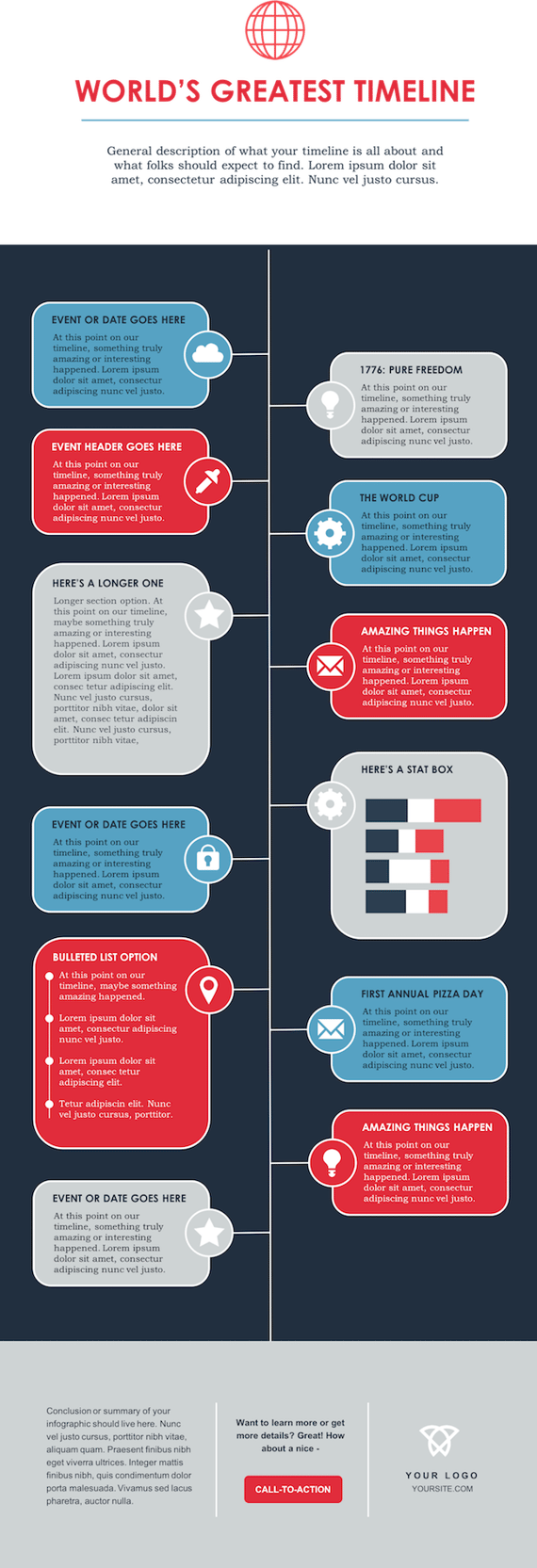
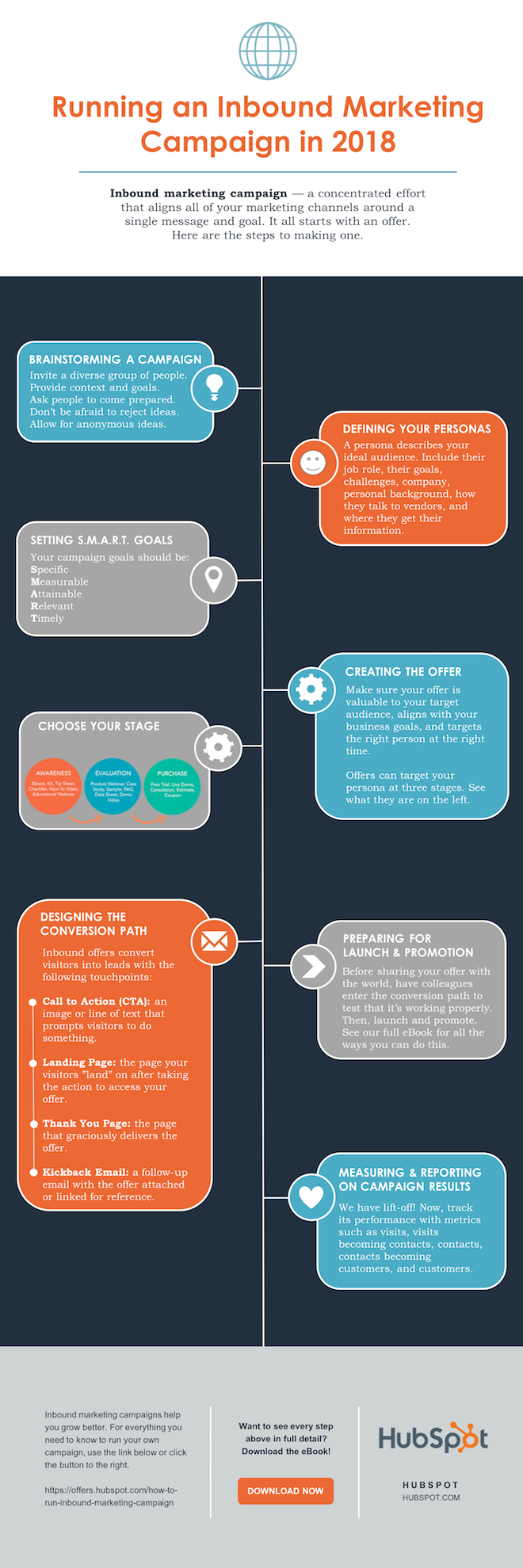
For the sake of time (remember, our mission is to create an infographic in under an hour), I’m going to create an infographic based on a compilation of steps and best practices we’ve put together in our new guide, How to Run an Inbound Marketing Campaign in 2018. For this, I’ve picked the “World’s Greatest Timeline” infographic template from our collection of infographic templates, which is helpful for my data set since it outlines each step of the campaign creation process in order.
The timeline infographic template is pictured below, and full of opportunities to make it your own:
 5. Customize your infographic
Obviously, this is the most time-consuming part — but it’s also the most fun. Simply come up with a catchy title, plug in your data/content, and adjust your font sizes and formatting. Feel free to switch up the graphics and colors, too, so they’re relevant to your brand and the data you’re providing. For other templates, you can use the simple graphs and charts provided by PowerPoint to create things like the bar graph or the pie chart. (Note: Download our free infographic templates for a cheat sheet for using PowerPoint’s various features and tools.)
To customize the look of the infographic even more, you might add or change up the colors or font styles.
6. Include a footer with your sources and logo.
Finally, I included a link to my source (which can be found here), as well as the HubSpot logo so people know who created the infographic if it gets shared in social media or embedded on other websites — which is definitely something you want, since one of the main benefits of creating infographics is their shareability.
That’s it! This whole thing took me under an hour to put together — much shorter than it would’ve taken me if I’d started from scratch (not to mention more professional looking … and less expensive than hiring a designer). Here it is:

Share This Image On Your Site
<p><strong>Please include attribution to blog.hubspot.com with this graphic.</strong><br /><br /><a href=’https://ift.tt/2Hw9RZq src=’https://ift.tt/2oi2Lio’ alt=’free_infographic_template_custom-1′ width=’660px’ border=’0′ /></a></p>
7. Add embed code and a Pinterest button, and publish it.
The only thing left to do is to publish and promote your awesome new infographic. As I mentioned earlier, we recommend using your blog to publish it (including your list of sources), including a Pinterest button for visitors to easily “pin” your infographic on Pinterest, and create and add an embed code for visitors to share it on their own websites and blogs, as we did above.
Want more? Read How to Create Top-Notch Visual Content in PowerPoint [Tutorial].


How to Make a Product Vision Everyone Can Appreciate
The Ultimate Guide to Cybersecurity
If I were to ask you to list the most valuable things you own, what would you say? I guess this would be another way of asking the infamous “What would you grab if your house was on fire?” question.
As for me, I’d grab an old keepsake box filled with things from my childhood, a necklace from my boyfriend, my phone and computer (for pictures and writings!), and an old Iowa sweatshirt of my dad’s.
But I’d also have to say that my identity, social security number, credit cards, and bank accounts are valuable to me. While these things can’t exactly burn down in a fire, they can be stolen … and if I were to ask a computer hacker what he or she thought my most valuable possessions were, they’d probably quote the intangible.
That’s why we’ve compiled this guide on cybersecurity. Below, we’ll talk about why you should care about cybersecurity, how to secure your and your customer’s digital data, and what resources to follow to stay up-to-date with emerging tech.
Personal data is incredibly valuable. Hackers know it, and businesses know it. That’s why both go to great lengths to collect it — albeit one following a much more legal and moral avenue to do so.
Unfortunately, as technology and data collection practices progress, so do the methods that hackers follow to steal data. As business owners, we have a special responsibility to protect our customer’s data and be transparent with our practices.
Why You Should Care About Cybersecurity
In 2017, organizations providing online services (a.k.a. e-commerce companies) contributed to the largest number of compromised credentials: over 2 billion. 🤯
Small to medium-sized businesses (SMBs) are especially at risk. You might see corporations like Target and Sears topping the headlines as top data breach victims, but it’s actually SMBs that hackers prefer to target.
Why? They have more — and more valuable — digital assets than your average consumer but less security than a larger enterprise-level company … placing them right in a “hackers’ cybersecurity sweet spot.”
Security breaches are frustrating and frightening for both businesses and consumers.
Studies show that, after a company data breach, many consumers take a break from shopping at that business — and some consumers quit altogether.
But cybersecurity is about more than just avoiding a PR nightmare. Investing in cybersecurity builds trust with your customers. It encourages transparency and reduces friction as customers become advocates for your brand.
Keep your business ahead of the tech curve with the tips, systems & recommended resources in our guide to staying current on emerging tech.
Cybersecurity Terms to Know
Cybersecurity is a very intimidating topic, much like cryptocurrency and artificial intelligence. It can be hard to understand, and, frankly, it sounds kind of ominous and complicated.
But fear not. We’re here to break this topic down into digestible pieces that you can rebuild into your own cybersecurity strategy. Bookmark this post to keep this handy glossary at your fingertips.
Here’s a comprehensive list of general cybersecurity terms you should know.
Authentication
Authentication is the process of verifying who you are and why you need access to an account or software. Many organizations use two-factor authentication, which we cover later.
Backup
A backup refers to the process of transferring important data to a secure location, such as the cloud or a physical, offsite server in case of a cyber attack or system crash.
Data Breach
A data breach refers to the moment a hacker gains unauthorized entry or access to a company’s or an individual’s data.
Digital Certificate
A digital certificate, also known as an identity certificate or public key certificate, is a type of passcode used to securely exchange data over the internet. It’s essentially a digital file embedded in a device or piece of hardware that provides authentication when it sends and receives data to and from another device or server.
Encryption
Encryption is the practice of using codes and ciphers to encrypt data. This algorithmic technique changes important data to a “language” that’s only able to be read by certain software.
HTTP and HTTPS
Hypertext Transfer Protocol (HTTP) is how internet browsers communicate. You’ll probably see an http:// or https:// in front of most websites you visit. HTTP and HTTPS are the same, except HTTPS encrypts all data sent between you and the web server — hence the “S” for security. HTTPS is used for e-commerce websites and other places that you submit sensitive data online.
Vulnerability
A vulnerability is a place of weakness, either digitally or physically, that a hacker might exploit when launching a cyber attack. Vulnerabilities might include the check-out page on an e-commerce site where users enter delicate information or an outside bank ATM where users insert debit cards and enter PIN numbers. Defensive cybersecurity measures (like the ones we talk about later) can help prevent attacks on these vulnerabilities.
Types of Cyber Attacks
- Brute Force Attack
- Distributed Denial of Service (DDoS) Attack
- Malware Attack
- Phishing Attack
A cyber attack is a deliberate and typically malicious intent to capture, modify, or erase private data. Cyber attacks are committed by external security hackers and, sometimes, unintentionally by compromised users or employees. These cyber attacks are committed for a variety of reasons. The majority are looking for ransom, while some are simply launched for fun.
Here are the four most common cyber threats.
Brute Force Attack
A brute force attack is when a hacker overloads a system or computer until they ultimately gain access. This is typically done by continually guessing passwords manually or through a computer application. Consider this type of attack the digital equivalent of beating on a door until it breaks. (This is why super strong passwords are so important, as we talk about later.)
Distributed Denial of Service (DDoS) Attack
A distributed denial of service (DDoS) attack is when a hacker floods a network or system with a ton of activity (such as messages, requests, and traffic) in order to paralyze and officially exploit the system. This is typically done through bots and botnets, which are networks of computers infected by viruses that allow a hacker to control and use them as bots for other forms of attacks.
Malware Attack
Malware refers to all types of malicious software used by hackers to infiltrate computers and networks and collect susceptible private data. Types of malware include:
- Keylogger malware tracks everything a person types on their keyboard. Keyloggers are usually used to capture passwords and other private information, such as social security numbers.
- Ransomware encrypts data and holds it hostage, forcing users to pay a ransom in order to unlock and access the infected files.
- Spyware monitors and “spies” on user activity on behalf of a hacker.
- Trojan horses infect networks through a single entry point, often disguised as a legitimate download or link, and give hackers complete control of users’ computers.
- Viruses corrupt, erase, modify, or capture data and, at times, physically damage computers. Viruses can be unintentionally installed by compromised users.
- Worms are designed to self-replicate and autonomously spread through all computers connected to an infected network.
Phishing Attack
A phishing attack is when hackers disguise their identity and intent through a seemingly legitimate download, link, or message. It’s a very common type of cyber attack — over 75% of organizations fell victim to phishing in 2018. Phishing is typically done over email or through a fake website; it’s also known as spoofing. Additionally, spear phishing refers to when a hacker pretends to be a particular person or business, instead of using a general name or identity.
Cybersecurity Best Practices: How to Secure Your Data
Cybersecurity can’t be boiled down into a 1-2-3-step process. Securing your data involves a mix of best practices and defensive cybersecurity techniques. Dedicating time and resources to both is the best way to secure your — and your customers’ — data.
Defensive Cybersecurity Solutions
All businesses should invest in preventative cybersecurity solutions. Implementing these systems and adopting good cybersecurity habits (which we discuss next) will protect your network and computers from outside threats.
Here’s a list of six defensive cybersecurity systems and software options that can prevent cyber attacks — and the inevitable headache that follows. Consider combining these solutions to cover all your digital bases.
Antivirus Software
Antivirus software is the digital equivalent of taking that vitamin C boost during flu season. It’s a preventative measure that monitors for bugs. The job of antivirus software is to detect viruses on your computer and remove them, much like vitamin C does when bad things enter your immune system. (Spoken like a true medical professional …) Antivirus software also alerts you to potentially unsafe web pages and software.
Learn more: McAfee, Norton. or Panda (for free)
Firewall
A firewall is a digital wall that keeps malicious users and software out of your computer. It uses a filter that assesses the safety and legitimacy of everything that wants to enter your computer; it’s like an invisible judge that sits between you and the internet. Firewalls are both software and hardware-based.
Learn more: McAfee LiveSafe or Kaspersky Internet Security
Honeypot
A honeypot is a fake server set up for the sole purpose of enticing malicious software. It’s used as a decoy to lead hackers away from the actual high-value servers on the network. Honeypots are also valuable as businesses can watch their activity and learn about hackers’ techniques without actually falling victim to them.
Learn more: KFSensor, HoneyPot, or Honeyd
Single Sign-On (SSO)
Single sign-on (SSO) is a centralized authentication service through which one login is used to access an entire platform of accounts and software. If you’ve ever used your Google account to sign up or into an account, you’ve used SSO. Enterprises and corporations use SSO to allow employees access to internal applications that contain proprietary data.
Two-Factor Authentication (2FA)
Two-factor authentication (2FA) is a login process that requires a username or pin number and access to an external device or account, such as an email address, phone number, or security software. 2FA requires users to confirm their identity through both and, because of that, is far more secure than single factor authentication.
Learn more: Duo
Virtual Private Network (VPN)
A virtual private network (VPN) creates a “tunnel” through which your data travels when entering and exiting a web server. That tunnel encrypts and protects your data so that it can’t be read (or spied on) by hackers or malicious software. While a VPN protects against spyware, it can’t prevent viruses from entering your computer through seemingly legitimate channels, like phishing or even a fake VPN link. Because of this, VPNs should be combined with other defensive cybersecurity measures in order to protect your data.
Learn more: Cisco’s AnyConnect or Palo Alto Networks’ GlobalProtect
Cybersecurity Tips for Business
Defensive cybersecurity solutions won’t work unless you do. To ensure your business and customer data is protected, adopt these good cybersecurity habits across your organization.
Require strong credentials.
Require both your employees and users (if applicable) to create strong passwords. This can be done by implementing a character minimum as well as requiring a mix of upper and lowercase letters, numbers, and symbols. More complicated passwords are harder to guess by both individuals and bots. Also, require that passwords be changed regularly.

Control and monitor employee activity.
Within your business, only give access to important data to authorized employees who need it for their job. Prohibit data from sharing outside the organization, require permission for external software downloads, and encourage employees to lock their computers and accounts whenever not in use.
Know your network.
With the rise of the Internet of Things, IoT devices are popping up on company networks like crazy. These devices, which are not under company management, can introduce risk as they’re often unsecured and run vulnerable software that can be exploited by hackers and provide a direct pathway into an internal network.
“Make sure you have visibility into all the IoT devices on your network. Everything on your corporate network should be identified, properly categorized, and controlled. By knowing what devices are on your network, controlling how they connect to it, and monitoring them for suspicious activities, you’ll drastically reduce the landscape attackers are playing on.” — Nick Duda, Principal Security Officer at HubSpot
Read about how HubSpot gains device visibility and automates security management in this case study compiled by security software ForeScout.
Download patches and updates regularly.
Software vendors regularly release updates that address and fix vulnerabilities. Keep your software safe by updating it on a consistent basis. Consider configuring your software to update automatically so you never forget.
Make it easy for employees to escalate issues.
If your employee comes across a phishing email or compromised web page, you want to know immediately. Set up a system for receiving these issues from employees by dedicating an inbox to these notifications or creating a form that people can fill out.
Cybersecurity Tips for Individuals
Cyber threats can affect you as an individual consumer and internet user, too. Adopt these good habits to protect your personal data and avoid cyber attacks.
Mix up your passwords.
Using the same password for all your important accounts is the digital equivalent of leaving a spare key under your front doormat. A recent study found that over 80% of data breaches were a result of weak or stolen passwords. Even if a business or software account doesn’t require a strong password, always choose one that has a mix of letters, numbers, and symbols and change it regularly.
Monitor your bank accounts and credit frequently.
Review your statements, credit reports, and other critical data on a regular basis and report any suspicious activity. Additionally, only release your social security number when absolutely necessary.
Be intentional online.
Keep an eye out for phishing emails or illegitimate downloads. If a link or website looks fishy (ha — get it?), it probably is. Look for bad spelling and grammar, suspicious URLs, and mismatched email addresses. Lastly, download antivirus and security software to alert you of potential and known malware sources.
Back up your data regularly.
This habit is good for businesses and individuals to master — data can be compromised for both parties. Consider backups on both cloud and physical locations, such as a hard drive or thumb drive.
Cybersecurity Resources
To learn more about cybersecurity and how to better equip your business and team, tap into the resources below. Check out some of the most popular cybersecurity podcasts and cybersecurity blogs, too.
National Institute of Standards and Technology (NIST)
NIST is a government agency that promotes excellence in science and industry. It also contains a Cybersecurity department and routinely publishes guides that standards.
Bookmark: The Computer Security Resource Center (CSRC) for security best practices, called NIST Special Publications (SPs).
The Center for Internet Security (CIS)
CIS is a global, non-profit security resource and IT community used and trusted by experts in the field.
Bookmark: The CIS Top 20 Critical Security Controls, which is a prioritized set of best practices created to stop the most pervasive and dangerous threats of today. It was developed by leading security experts from around the world and is refined and validated every year.
Cybrary
Cybrary is an online cybersecurity education resource. It offers mostly free, full-length educational videos, certifications, and more for all kinds of cybersecurity topics and specializations.
Signing Off … Securely
Cyber attacks may be intimidating, but cybersecurity as a topic doesn’t have to be. It’s imperative to be prepared and armed, especially if you’re handling others’ data. Businesses should dedicate time and resources to protecting their computers, servers, networks, and software and should stay up-to-date with emerging tech. Handling data with care only makes your business more trustworthy and transparent — and your customers more loyal.
Note: Any legal information in this content is not the same as legal advice, where an attorney applies the law to your specific circumstances, so we insist that you consult an attorney if you’d like advice on your interpretation of this information or its accuracy. In a nutshell, you may not rely on this as legal advice or as a recommendation of any particular legal understanding.

7 of the Best Website Builders for 2019
After strolling out of my Computer Science I final during my freshman year of college, I knew I’d never code anything in my life again. My computer science class was incredibly interesting when we learned about the theory of programming languages. But when we had to put theory into practice, the only programing I was doing was texting my friend to email me the code of whatever project I was working on (sorry Professor Harms!).
If you have the same sentiment toward programming as me, but you need to build a website for your business or your personal portfolio, don’t fret. There are affordable, intuitive website builders that can help you develop a robust website without any coding knowledge. And we’ve rounded up the seven of the best ones for 2019 below.
Best Website Builders
- WordPress
- Wix
- Squarespace
- Weebly
- Google Sites
- Shopify
- HubSpot’s Content Management System
1. WordPress

Image Credit: WordPress
G2Crowd Rating: 4.3/5.0 (1,670 reviews)
Pricing:
Personal – $5 per month
Premium – $8 per month
Business – $25 per month
eCommerce – $45 per month
Powering over 30% of the websites on the internet, WordPress is arguably the most popular website builder out there. Whether you want to develop a website for your business or your own personal projects, you can use WordPress’ intuitive editor to build an entire website and blog.
With WordPress, you can also easily add images to your website with their drag-and-drop editor and embed audio, video, and documents in your website. If you want visibility into your website’s analytics and SEO data, WordPress has these features built into their platform.
Additionally, WordPress offers hundreds of themes that you can leverage to build a beautiful website without much coding knowledge, as well as an online store builder.
2. Wix
-13.png)
Image Credit: Wix
G2Crowd Rating: 4.2/5.0 (947 reviews)
Pricing:
Combo – $11 per month
Unlimited – $14 per month
Pro – $19 per month
VIP – $29 per month
Wix is one of the most versatile website builders on the market. The website builder offers the ability to build a website specifically for stores, musicians, events, and restaurants.
If your business doesn’t operate under one of the previously mentioned categories, don’t worry, Wix is still a viable option. Their code-free editor is robust and intuitive, providing over 500 website templates, over 100 fonts, scroll effects, an app market, and a drag-and-drop functionality, letting you build a website for nearly any type of organization.
If you’d rather have full control over your website’s functionality, you can build custom web applications on your website with Wix’s Code APIs and JavaScript. Wix also offers Artificial Design Intelligence (ADI), which uses a questionnaire you fill out and artificial intelligence to design a personalized professional website for you.
3. Squarespace
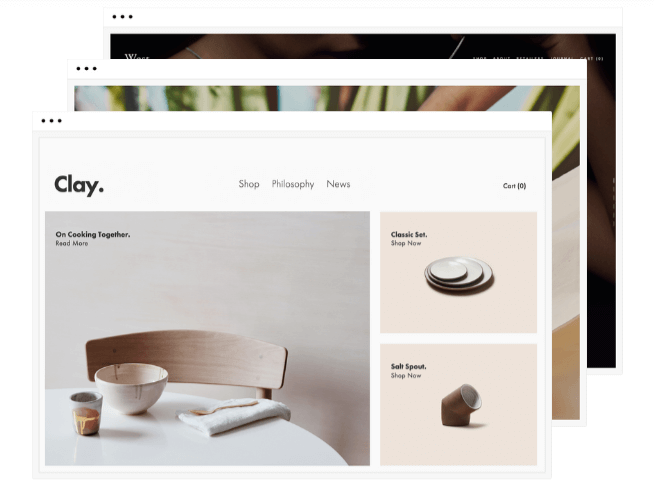
G2Crowd Rating: 4.4/5.0 (753 reviews)
Pricing:
Personal Website – $12 per month
Business Website – $18 per month
Basic Online Store – $26 per month
Advanced Online Store – $40 per month
With award-winning, fully customizable website templates designed by their own team of web designers, Squarespace gives you the ability to craft some of the most visually aesthetic websites that a website builder can possibly develop.
Squarespace also offers some robust marketing tools, like email campaigns, SEO features, blogging, social integration, analytics, lead capture features, a map of your store location, calendars, and an online store builder.
Additionally, Squarespace offers dozens of integrations to amplify your design and marketing efforts, like Getty Images, Unsplash, Eventbrite, Disqus, PayPal, OpenTable, Google Maps, Google AMP, and more.
4. Weebly
-10.png)
Image Credit: Weebly
G2Crowd Rating: 4.2/5.0 (374 reviews)
Pricing:
Free – $0 per month
Connect – $5 per month
Pro – $12 per month
Business – $25 per month
Performance – $38 per month
Weebly is an intuitive website builder that offers over 50 website themes and a drag-and-drop editor. With custom fonts, an image editor, video backgrounds, and animation effects like parallax and reveal, you can truly build a visually pleasing website. If you’d rather customize your entire website, Wix gives you the option to employ your own custom HTML/CSS & JavaScript.
Wix also lets you store your contacts in a contact database, write blog posts, create and send emails, share content on your social profiles, analyze your SEO, and examine your website analytics. If you have an online store, you can even create Facebook ads inside of their platform.
Additionally, Weebly will host your website on their servers for free, transfer your domain from another website builder, keep your website safe by offering SSL security and DDoS protection, and provides 24/7 email & chat support.
5. Google Sites
-9.png)
Image Credit: Google My Business
G2Crowd Rating: 4.4/5.0 (247 reviews)
Pricing: Free
in June 2017, Google gave every business with a Google My Business account access to a free, intuitive single-page website builder. The tool is fully customizable, automatically updates with the account user’s GMB listing information, and works with AdWords Express.
Tailored for small businesses, Google Sites can automatically generate your company’s information on your website with information from your Google My Business profile. You can also customize your website’s text, photos, and design themes. Additionally, Google Sites are mobile responsive, can use custom domains, and can display your Google Maps location.
6. Shopify
-8.png)
G2Crowd Rating: 4.3/5.0 (2,386 reviews)
Pricing:
Basic Shopify – $29 per month
Shopify – $79 per month
Advanced Shopify – $299 per month
Powering over 500,000 businesses that have generated more than $40 billion in sales, Shopify is the leading online store builder for retailers. And for good reason, too. Shopify’s eCommerce functionality is second-to-none, offering advanced inventory management, store management, and selling and shipping solutions.
Shopify also provides over 70 website themes, customizable templates, a blogging platform, and access to your website’s HTML and CSS, which allows you to intuitively build a robust website for your online store. Additionally, Shopify enables you to build your brand by offering SEO tools, social media integration, the ability to sell your products on Facebook, analytics reports, and an integration with Google Analytics.
If you need help building your store, Shopify can connect you with a retail expert to photograph your inventory, market your store, set up your website, and even help you create 3D models of your products.
7. HubSpot’s Content Management System
-4.png)
G2Crowd Rating: 4.5/5.0 (1,503 reviews)
Pricing: Contact Sales
WIth HubSpot’s content management system, or CMS, you can create blog posts, landing pages, website pages, and emails in one platform, and then manage, optimize, and track your content’s performance in the same exact place.
HubSpot’s CMS also automatically optimizes your content for mobile and search engines by leveraging responsive design and a built-in SSL. Additionally, you can personalize your content for each website visitor based on location, source, device, language, or any other detail stored in your HubSpot CRM, from demographic information to your contacts’ interactions with your brand.
You can either buy HubSpot’s CMS as a standalone product, or as an add-on to HubSpot’s all-in-one marketing software.

Everything You Need to Know About Employer Branding
When a job seeker begins her search, one of the first things she’s going to Google is this — “Top companies to work for in 2019” or, alternatively, “Top companies in X industry.”
It makes sense — nowadays, a company’s reputation matters more than ever. In fact, 86% of workers would not apply for, or continue to work for, a company that has a bad reputation with former employees, or the general public.
Ultimately, you spend plenty of time creating a compelling, incentivizing brand story surrounding your products or services. But how long do you spend cultivating a powerful employer brand to ensure you attract and retain top talent?
Here, we’re going to explore what employer branding means, examples of good employer branding, and how you can implement your own employer branding strategy, today.
What is employer branding?
At its most basic, an employer brand is your reputation as a place to work, as well as your employees’ perception of you as an employer.
In other words, employer branding is how you market your company to job seekers, as well as internal employees. The better you are at employer branding, the more likely you are to attract top talent. Additionally, a positive employer brand can also help you retain top talent.
Let’s say you’ve done a phenomenal job building up a strong brand in relation to your products or services. Unfortunately, that alone won’t convince someone to work at, or stay at, your company. You need to implement the same branding strategy when it comes to communicating your company’s leadership, values, and culture.
If a job seeker asks an employee at your company, “What’s it like to work there?” the employee isn’t going to say, “We’ve built some awesome merchandise.” Instead, he’s going to lay into the day-to-day of people management, company values, and workplace culture. To ensure a good employer brand, then, you need to tell a compelling story.
However, it goes deeper than storytelling — you also need to walk the walk. Telling your employees, and the general public, that your company is a great place to work because you have ping-pong tables isn’t going to cut it.
At this point, you might be wondering, Does this really matter to me and my company?
Actually, employer branding is critical to your bottom-line. A good employer brand can reduce turnover rates by 28%, and cut your costs-per-hire by half. Additionally, candidates who apply for roles are 50% more qualified when the company has a good employer brand.
Ultimately, an employer brand can help you greatly reduce recruitment and hiring costs, while ensuring higher morale and more productivity among members of your teams. Plus, you have an employer brand whether you’ve put effort behind it or not — so why not put effort in, to ensure it’s a brand you can be proud of?
Next, let’s explore how you can implement an employer brand strategy today.
Employer branding strategy
An employer branding strategy allows you to control and positively change the dialogue surrounding your company, to ensure higher talent acquisition and retention. At its most basic, employer branding is how you market your company to job seekers, and what employees say about your company as a workplace. A good employer branding strategy can help you attract better talent, cut down on hiring costs, and reduce employee turnover.
1. Know your company’s unique value proposition.
To create a powerful employer brand, it’s critical you start by focusing on your company’s mission statement, values, vision, and culture. It could be helpful to identify what your business needs are, and then work backwards to understand what type of talent you need to acquire to fulfill those objectives.
For instance, consider Teach for America’s mission statement — “One day, all children in this nation will have the opportunity to attain an excellent education.”
Using this statement as a guideline, Teach for America is then able to tell a compelling brand employer story on their Values page. Among other things, they promise employees the chance for continuous learning, stating, “We operate with curiosity and embrace new ideas to innovate and constantly improve. We take informed risks and learn from successes, setbacks, and each other.”
In this way, they’ve aligned their values, and their employer brand, with their business goal.
2. Conduct an employer brand audit.
You might not be fully aware of the reputation your company has among job seekers or even your own employees. Send out internal surveys, conduct social media searches, check out sites like Glassdoor to read reviews, or hire a firm that administers reputation monitoring.
Ultimately, your research should uncover your employees’ favorite aspects of your company culture that you can focus on highlighting, as well as any areas for improvement to ensure a strong employer brand.
3. Write an employer value proposition.
Once you’ve done your research and cultivated a list of values and benefits your company offers, you’ll want to create an employer value proposition. An employer value proposition is a marketing message and a promise — so you shouldn’t say anything that isn’t true, or that your employees wouldn’t agree with. You might use your employer value proposition on your website, recruitment materials, or LinkedIn company page.
Additionally, your employer value proposition is something your recruiters and HR team can discuss with potential candidates.
Your employer value proposition should have nothing to do with compensation. Instead, you want to evoke passion in potential candidates by expressing your company’s positive impact on the world, or deeper purpose. People want to feel their work is meaningful, often even at the expense of a bigger paycheck.
For instance, Accenture, a global management consulting and professional services firm, created this employer value proposition, which they’ve displayed prominently on their Careers page — “Help build the future. Be yourself, make a difference. Work where you’re inspired to explore your passions, where your talents are nurtured and cultivated. Innovate with leading-edge technologies on some of the coolest projects you can imagine. And get the tools you need to keep learning and growing so you stay continually ahead of the game while making a difference in the world.”
4. Leverage current employees.
When job seekers want to learn more about your employer brand, they’re going to want to hear from and see real employees at your company. Leverage your employees by conducting employee interviews or testimonials to share on your website.
You also might leverage employees by asking them to post on their social media accounts when your company does a fun giveaway or company outing. For instance, perhaps you create a Women in Tech event and hold a panel discussion. Afterwards, you might simply ask your employees to post a picture on Instagram or Facebook with a hashtag you’ve created. This is a fun yet powerful way for your own employees to share your company’s culture with their own networks.
5. Cultivate a strong onboarding process.
According to an infographic by O.C. Tanner, 69% of employees are more likely to stay with a company for at least three years after a great onboarding experience.
Ultimately, instilling a positive company brand image starts with a good onboarding process. It’s critical you get employees engaged and excited about their roles, and their teams, from the start. By arming your new employees with the instructions and tools necessary to excel in their roles, you’re ensuring a smooth transition, lower turnover rates, and more productive teams.
6. Offer learning and development opportunities.
In 2018, the number one reason people left their jobs was because they were bored, and needed a new challenge. Ultimately, this should be a relatively easy fix.
If you allow employees to pursue learning opportunities and become proficient in new skills, you’re demonstrating your company’s emphasis on continuous learning and improvement. And by challenging your employees, you’re ensuring they won’t get bored in their roles — which could lead to higher retention rates.
Plus, as they develop new skills, they become more valuable employees for your company. A win, win.
7. Use video, blog posts, photos, and slideshows to tell your company story.
When you’re implementing a strategy to improve the market’s perception of your product or service, you don’t just communicate your message through one channel. Instead, you provide videos, photos, slideshows, blogs, and other forms of messaging to ensure you’re reaching the largest audience on whichever platform they want to be found.
Similarly, it’s critical you use high-quality videos, photos, and text to tell your company story. You might consider putting employee interviews on your job page, or a slideshare created by your CEO on your About Us page.
8. Create a strong diversity and inclusion initiative.
If you want to create a strong employer brand, it’s critical you show your commitment to building diverse teams. There are plenty of company benefits to investing in D&I initiatives, including more innovative ideas, a stronger workplace culture, and better customer service. However, it’s also necessary for cultivating a positive employer brand, by ensuring your extending your brand’s reach to new groups of people.
Employer branding examples
- Starbucks
- HubSpot
- SoulCycle
- Eventbrite
- Jet
1. Starbucks
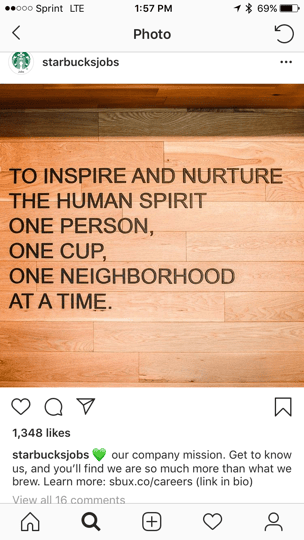
Starbucks does a good job ensuring they cultivate a strong community among their employees. For instance, they refer to current employees as partners, instilling a sense of pride in each employee. Additionally, Starbucks created Instagram and Twitter accounts specifically for @StarbucksJobs, which they use to promote their employer brand and interact with job seekers.
By creating social media accounts with the sole purpose of demonstrating appreciation for current employees and evoking passion in potential candidates, Starbucks shows its commitment to being more than just a product.
Rather than posting about their drinks, Starbucks uses its social media accounts to share their company mission, congratulate employees on college graduation, and share personal employee stories. The company also uses the platforms to demonstrate its commitment to diversity and inclusion.

2. HubSpot
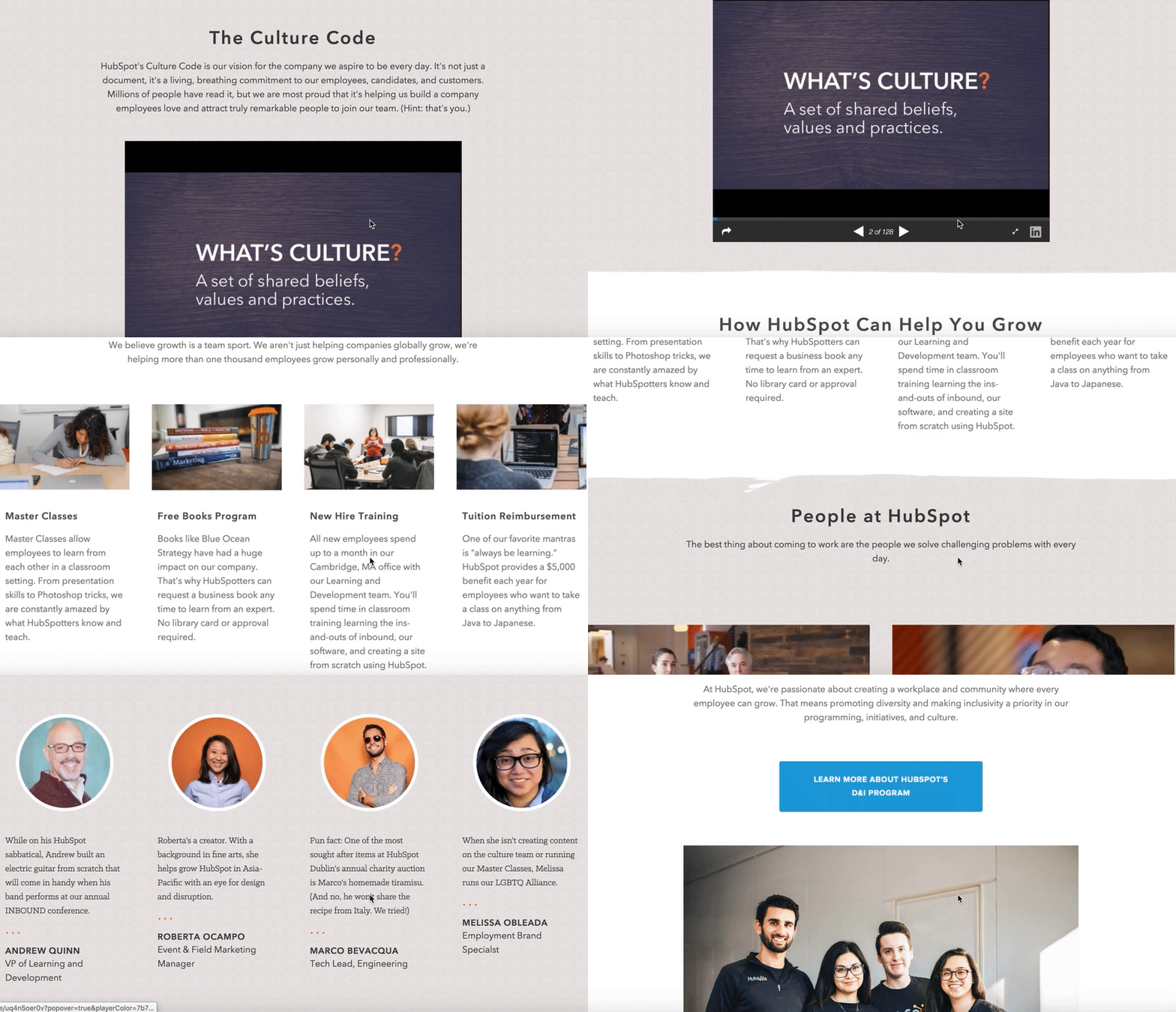
HubSpot’s Culture Page begins with a document called the Culture Code, which publically pronounces every vision and value HubSpot hopes to promote and instill in its employees, candidates, and customers.
Moving further down the page, you’ll find sections discussing opportunities for learning and development, HubSpot’s commitment to diversity and inclusion, and interviews with real HubSpot employees. The language also consistently focuses on the job seeker — “Here’s how we can help you grow”.
The page ends with a “day in the life” video made by HubSpot employee Matthew Watkins, demonstrating HubSpot’s relentless commitment to communicating its culture via its employees. Ultimately, the page is a powerful example for how you might use interactive media to promote your employer brand.
3. SoulCycle
SoulCycle isn’t just transforming the boutique fitness space — it’s also aiming to transform the traditional corporate culture, by offering benefits it feels will evoke a sense of purpose and belonging in each of its employees.
For instance, Soul gives its employees two paid business days off per year to volunteer at a charity of their choice, with the hope that the charity days will help employees feel happy and more fulfilled.
Additionally, Soul offers free classes (about a $30-per-class value) to employees whenever it suits their schedule. This displays Soul’s deeper commitment to making fitness fun, and using exercise as an outlet to de-stress and connect with the community.
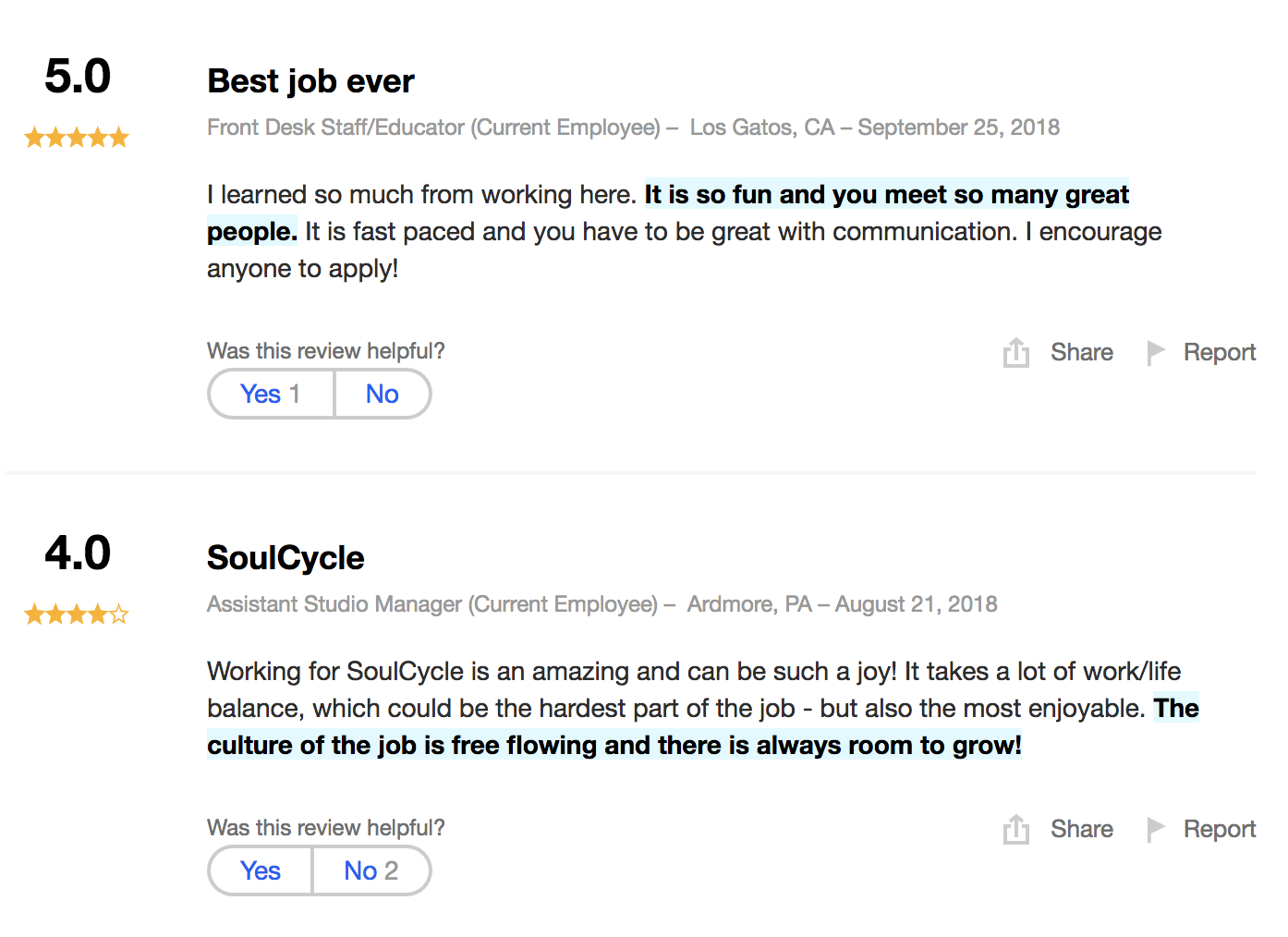
With high ratings in each category on Indeed, including four stars on work-life balance and four stars on management, SoulCycle has undoubtedly cultivated a strong employer brand.
4. Eventbrite
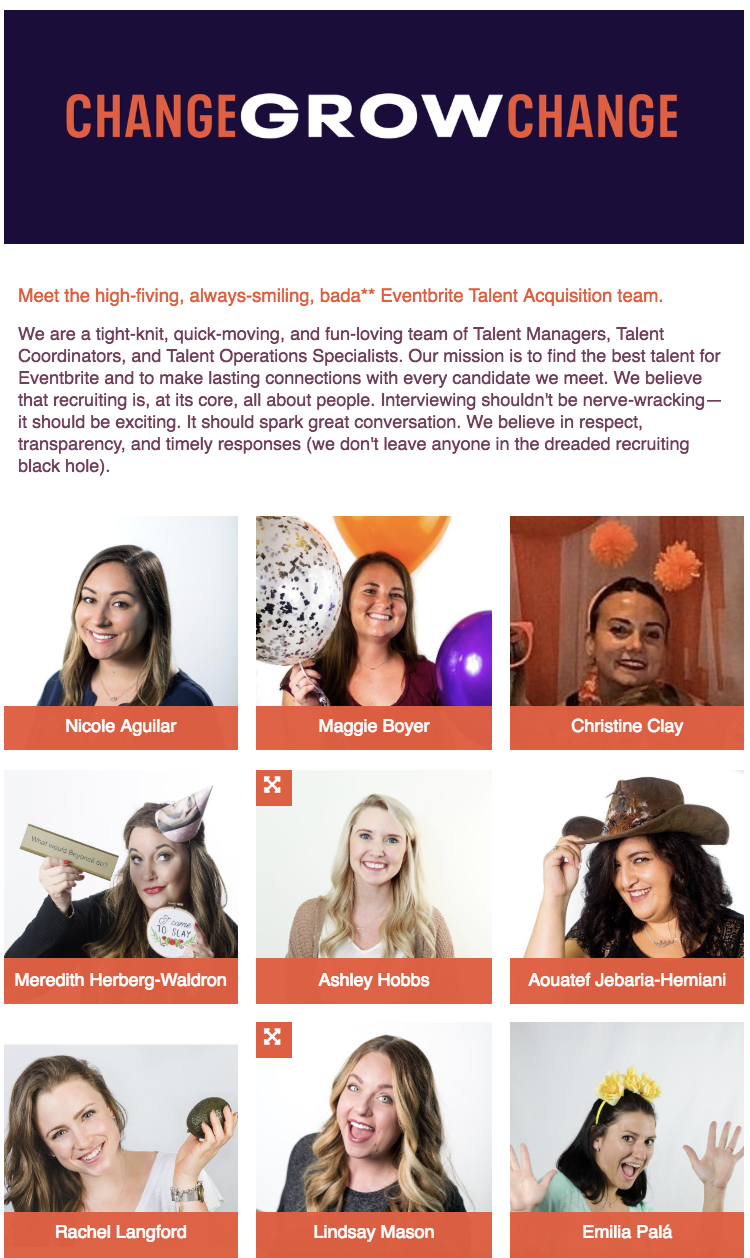
To demonstrate its commitment to recruiting high-quality talent, Eventbrite created a web page to introduce job seekers to its recruitment team. The bios are funny and relatable, with fun facts about each recruiter.
Additionally, the Eventbrite recruitment team page states, “Interviewing shouldn’t be nerve-wracking — it should be exciting. It should spark great conversation. We believe in respect, transparency, and timely responses (we don’t leave anyone in the dreaded recruiting black hole).”
Their language reflects their values, likely inspiring job seekers to apply.
5. Jet
The ecommerce site Jet created this inspirational, employee-focused video to spread awareness for its fun, engaging, motivational workplace. The video is especially powerful because it uses real employee interviews, giving the job seeker a sense for Jet’s work culture and values.
Additionally, the video is likely empowering and pride-evoking for current employees, who can see their company’s clear commitment to carrying out its mission statement through videos of its workers.
Featured image courtesy of SoulCycle Instagram.

How to Breathe New Life Into Your Google Search Results With Rich Snippets
Google rich snippets. What the heck are those?
They’re these awesome things that can help you improve your website’s SEO and generate more site traffic from search engine results pages (SERPs), and in this article, I’m going to tell you how to set them up.
Let me first pose a question to you: Have you noticed that when doing a Google search, certain listings just look a little sexier than others? For example, if you were doing a search for “apple pie,” which of these listings when you rather click on?
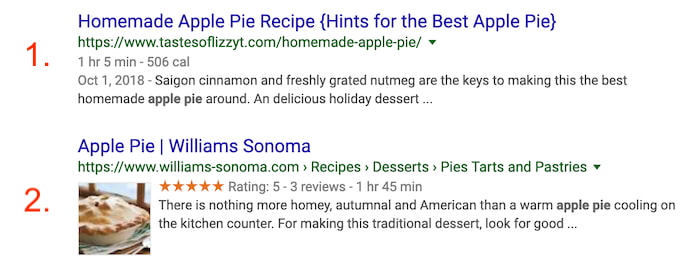
I’ll bet you chose option #2. If you didn’t, you must really not like apple pie.
Between the thumbnail image and the five-star rating scale, what are these sites doing to make their Google listings include this extra media? The secret to these fancy pieces of information are rich snippets, which these websites have optimized for using the HTML of their website pages.
Google Rich Snippets
Google rich snippets are enhanced search results that produce more details about a website than the average link. This “rich” media can include images, ratings, authors, dates, locations, and more. Publishers can give Google these details by including structured data in the backend of their webpages.
Google rich snippets — also called “rich results” — extract information from your website to display on your site’s listing in the search results, in addition to the typical page title, page URL, and meta description.
Each search result is guaranteed to display these three pieces of information, making up an individual snippet. The thinking is, the more information included in a search result’s snippet, the more likely users are to click on that result. With enough structured data on the page, you can earn a rich snippet.

Rich snippets are often overlooked in businesses’ SEO strategies because they are more difficult to implement than traditional on-page SEO. But with how complex Google search results look today, it would be worth your while to spend a little time learning how to do this. Adding this content-rich information to your Google search listings draws the eye and can increase your listings’ click-through rates, even when you’re not ranking in the #1 position.
There are a few options for how to install rich snippets, but I’m going to show you the easiest method: using microdata.
Keep in mind this process won’t guarantee that you’ll get a rich snippet. But giving these details special treatment can dramatically increase your chances of enhancing the appearance of your search result — and, in turn, the traffic you get from it.
How to Create Rich Snippets
- Identify which details you want Google to focus on.
- Define your webpage using Google’s Structured Data Markup Helper.
- Create microdata for your webpage using your selected data type.
- Create new HTML from this microdata.
- Tag your content with this microdata.
- Test your rich snippet.
- Be patient.
1. Identify which details you want Google to focus on.
Your webpage’s topic and format will dictate which types of information you want Google to display in its search results. Are you writing an article? An event page? A book review? A product page? Here are some examples of details included in rich snippets for the several types of snippets available to you:
- Article: You can add tags for the article title, author, meta description, publish date, featured image, and more.
- Restaurant pages: You can add tags for food items, item prices, item descriptions, item images, item calories, and more.
- Product page: You can add tags for product names, product ratings, product prices, product availability, product images, and more.
- Event page: You can add tags for the event name, event speakers, event schedule, event dates, and more.
- Recipe: You can add tags for recipe rating, ingredients, image of final product, cooking duration, total calories, and more.
2. Define your webpage using Google’s Structured Data Markup Helper.
So, how do you create the tags listed above? Unfortunately, it’s not as easy as writing “Here’s the product’s price” in your webpage’s HTML and expecting Google to take the hint. To properly communicate this information to Google, the company offers a handy tool for creating structured datasets based on the type of webpage you’re publishing. It’s called the Structured Data Markup Helper. Use it here, and see it below.
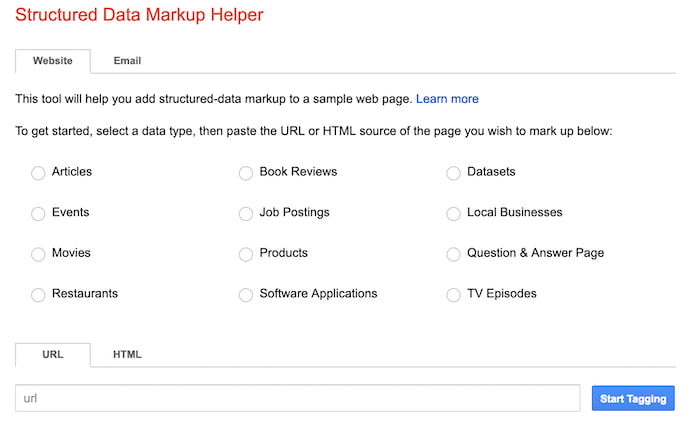
As you can see, above, you’ll start by selecting the attribute that best describes the content you’re creating. Then, at the bottom of this page, enter the existing URL of the webpage to which your content has been published. (Note: To use this tool, you’ll publish your content first, and then retrieve the URL so you can structure your data accordingly.)
3. Create microdata for your webpage using your selected data type.
Microdata is a way to label content to describe what this content represents. An event, for example, has all sorts of information associated with it, including the venue, starting time, name, and category. You can then use a bit of code to basically tell Google, “Here’s my event and the most important information people would need to know about it.”
How Microdata Can Be Used
Microdata wraps your text in very simple HTML tags, such as <span> or <div> tags, to assign descriptive terms to each bit of information. Here’s an example block of HTML showing some basic information about me — the author of this article — below.
<p>My name is Diana Urban, and I was born and raised in New York. I’m on the marketing team at HubSpot, an all-in-one marketing software company in Cambridge, MA.</p>
See those <p> tags at the beginning and end of the copy, above? This denotes text that is in standard paragraph style. There’s nothing unique about the text above compared to any other paragraph in this article. This makes it hard for Google to interpret it the way you might want it to be interpreted.
Now, here is the same HTML tagged with microdata:
<div itemscope itemtype=”https://ift.tt/18j3LkpPerson“>
My name is <span itemprop=”name“>Diana Urban</span>, and I was born and raised in New York.
I’m the <span itemprop=”title“>Head of Prospect Marketing</span> at <span itemprop=”affiliation“>HubSpot</span>, an all-in-one marketing software company in Cambridge, MA.</div>
Those bold tags in the HTML above tell Google what each piece of my author bio actually is. The “person” tag indicates this is about a person. The “name” tag indicates the following text is my name. The “title” tag indicates the following text is my job title. The “div” tags single out the entire section of HTML so Google knows it can highlight it in my article’s snippet, given the appropriate search term a user might enter.
Creating Your Microdata
Once you’ve selected your data type in the previous step, you’ll be taken to a page where you can automatically associate certain details of your webpage with microdata that describes those details. To create microdata for an article’s author, for example, you’ll highlight the author’s name on the webpage — which Google projects on the lefthand side of the tool — and select “Author” in the dropdown that appears. See how this looks, below.
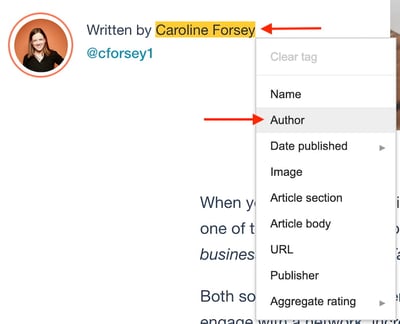
4. Create new HTML from this microdata.
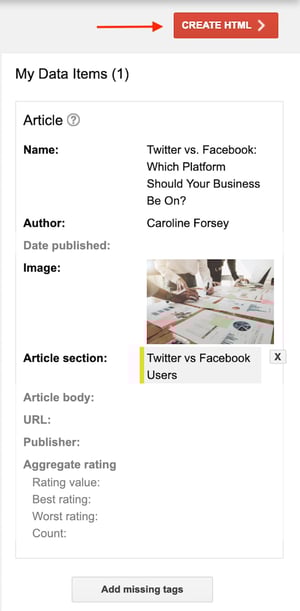
Next, you’ll create new strings of HTML from the microdata you created in the previous step. Once you’ve finished assigning each part of your webpage a proper tag, click the red “Create HTML” button on the top-righthand corner of the tool, as shown below.
5. Tag your content with this microdata.
With your HTML successfully created, you’ll see every tag you created in step 3, above, listed in a block of code you can then insert into your article’s HTML. You’ll insert this code in your content management system (CMS).
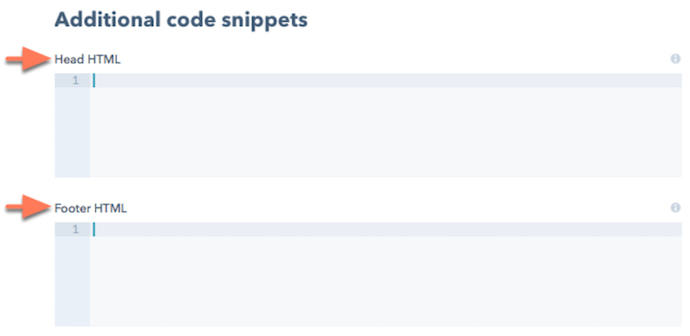
Google recommends adding the HTML it created for you into the “head section” of your article’s HTML. If you use HubSpot’s CMS, you’ll find separate HTML boxes designed just for this occasion, as shown below.
 Learn more about adding HTML to webpages in HubSpot Academy.
Want another way to tag your HTML with various pieces of microdata? Review the different examples of rich snippets below this list of instructions. Each of these rich snippets link to separate Google instructions on how to optimize for each type of rich snippet. (When you load their page, always select the “microdata” approach to get the right instructions.)
6. Test your rich snippet.
Google Webmaster Tools has another nifty feature that lets you test your rich snippet. Click here to use their Structured Data Testing Tool. This will confirm whether or not Google can read your markup data and whether your rich snippets are appearing in their search results.
7. Be patient.
If you don’t see your rich snippets in Google’s search results right away, don’t freak out. It actually takes Google as long as a few weeks to crawl and index this new data. So go to the beach. Sip a margarita. Soak in some sun.
Okay, it’s more likely that you’ll just keep working on other stuff in the meantime, but a girl can dream …
Rich Snippets Examples
Let’s run through some of the different types of rich snippets that are available to use on your website. Each section links to Google’s instructions on how to actually install the rich snippets — remember to select the microdata option for the easiest installation process!
Business and Organization Snippets
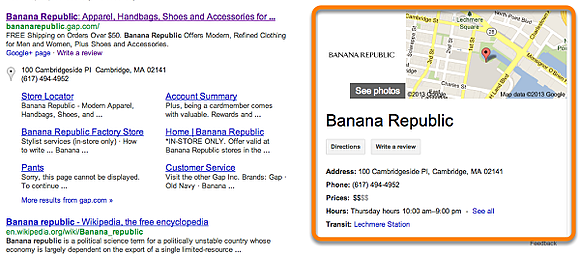
A rich snippet about a business or organization can include location information, contact information, price ranges, hours, and customer reviews, if there are any available.
Learn how to create rich snippets for organizations >
Event Snippets
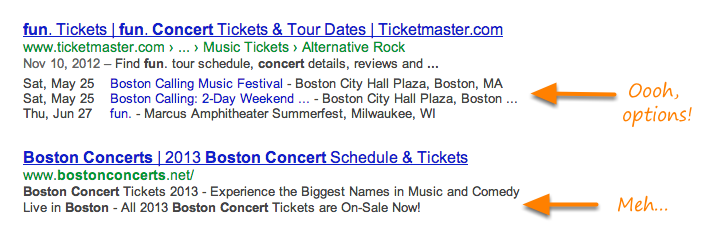
Event snippets include the date, location, and time of the event. If there are more than one option for the events, up to three will be displayed.
Learn how to create rich snippets for events >
Music Album Snippets
Using music album rich snippets will display links to individual songs in an album, or even lyrics to the song if available.
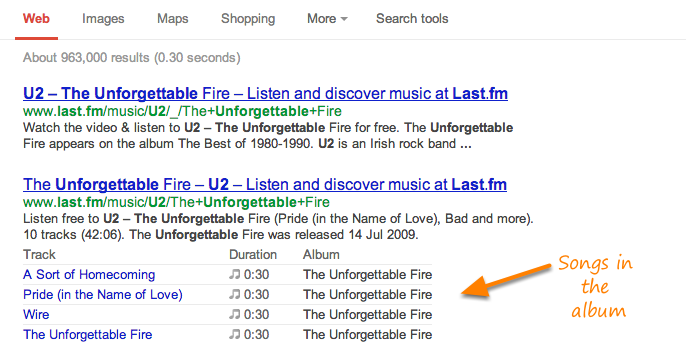
Learn how to create rich snippets for music >
People Snippets
The people snippet displays information such as a person’s job title, the company they work for (a.k.a. affiliation), and location. It can also display a photo, nickname, and more.
People snippets are different than author snippets. Here is the difference, with an example of yours truly.
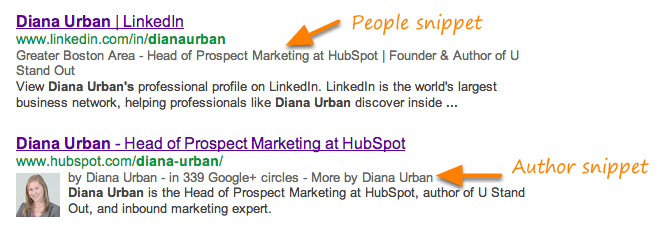
Learn how to create rich snippets for people >
Product Snippets
Product rich snippets include things like a picture of a product, ratings, and price range of the product.
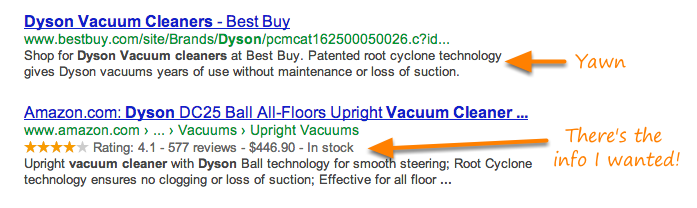
Learn how to create rich snippets for products >
Recipe Snippets
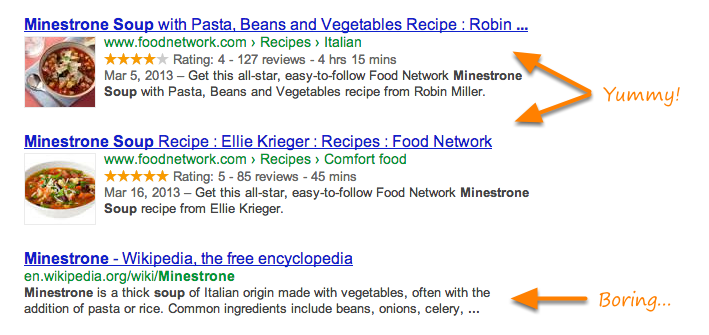
Recipe rich snippets provide users with additional information about a specific cooking recipe, such as the ratings (1 to 5 stars), cook/prep time, and calorie information.
In order to qualify as a recipe, you must have at least two of the following tags in place:
- A photo of the dish
- The tag: prepTime, cookTime, totalTime, or ingredients
- Calories
- Review
Review Snippets
You’ve already seen a bunch of examples of snippets that have 5-star ratings included. But you can also set up a snippet that is just the review portion.
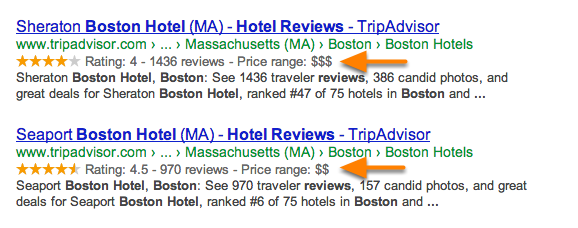
Learn how to create rich snippets for reviews >
Video Snippets
If you want a thumbnail of a video to display next to your search listing, the markup works a little different. Google recognizes the Facebook Share markup code, so you might as well kill two birds with one stone.
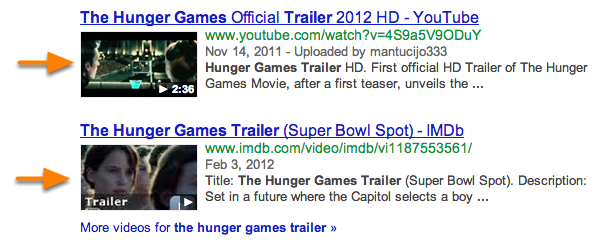
Learn how to create rich snippets for videos >


4 Ways to Build Transparency as a Leader
Trust and transparency are fundamental to business success. A recent survey by Ernst & Young found that less than half of global professionals trust their employer, boss, team or colleagues. A host of factors improve trust in the workplace — from diversity and inclusion to individual leaders being more open and transparent with their teams.
To discuss trust in the workplace, I spoke with best-selling author Marcus Buckingham, who recently finished his latest book Nine Lies About Work (co-authored with Ashley Goodall).
Our conversation, coupled with my own experience, solidified 4 keys to help leaders build trust and transparency with their team, while also reinforcing why it matters in the workplace:
1. Build connection through swift and focused frequency.
One of the biggest takeaways from my conversation with Marcus is the importance of holding quick and frequent check-ins or 1:1s with your team. Trust starts with honest, open dialogue, and the frequency of that dialogue matters just as much as the content itself.
“Building trust isn’t just about intent, but also frequency and detail,” shares Buckingham. “Employees need to know that you have their back and that only happens through regular check-ins or light touch, individualized communications. If you meet with employees once a week for 10-15 minutes and simply ask, ‘what are you working on and how can I help?’, it goes a long way toward building trust.”
Create a foundation of trust through regular communication and engagement. “People want to know where they stand with you as a manager, and every employee knows that’s a moveable feast,” notes Buckingham. “When you take time to hear from each team member on their near-term priorities, while also letting them know ‘we don’t need to solve everything this week’, you move the relationship forward, and see stronger engagement and performance as a result.”
2. Build transparency into culture.
Employees want to work for leaders who are authentic and transparent — who openly seek new solutions and ideas. However, many leaders struggle with consistency in this area. Trust takes commitment. Embracing transparency requires leaders to openly share both good and bad news. Effective communication, listening, and clear and quality feedback go a long way in creating a positive and open dialogue.
Many leaders hesitate to be transparent because they worry they’ll be viewed as less authoritative or directional as a leader. This is completely false. People want to connect with their leaders.
Leaders have to exhibit behavior they want their team to imitate, and openly share problems they’re facing and lessons they’ve learned. They should take stock of how the team is performing and what issues need to be addressed and what areas will require change. When leaders do this in an open and constructive way with their team, it builds trust.
When leaders aren’t open to discussing challenges facing their business, or the picture they paint doesn’t match the team’s day-to-day experience, the gap can create a loss of trust. Once trust is lost, it is extremely difficult to rebuild.
3. Activate experimentation.
Building a foundation of trust with employees requires leaders to create a positive environment, where everyone on the team feels empowered to openly speak and problem-solve. Great leaders give team members the space, autonomy and feedback they need to be successful with specific projects they are owning.
Fear of failure prompts behaviors that can diminish the effectiveness of a team. In absence of trust, employees are guarded, less engaged and less likely to stretch themselves beyond their comfort zones. Empower employees to experiment. This flexibility demonstrates your trust in your team and in turn their trust in their leader.
Focus on creating an environment that empowers employees to succeed. This means providing a safe place for exploration, experimentation and risk-taking, which translates into success for the organization, increased profitability and talent attraction.
4. Encourage and empower.
Enthusiasm is contagious and it’s a force multiplier. Negativity impacts energy and optimism with decreases motivation and productivity by creating stress and pressure.
Maximize every opportunity you can find to provide positive encouragement. Doing so requires some effort, but the results are impactful. In my experience, employees will find ways to deliver results beyond expectation, when leaders express encouragement and sincere appreciation for their accomplishments.
By recognizing employees for their performance, you give them the opportunity to shine through projects, which increases motivation and confidence.
Empower your team and amplify their strengths. Organizations that put people first and allow team members to leverage their individual strengths will see stronger results, better employee engagement and lower turnover.
Why This Matters
With transparency and trust, comes higher levels of performance. When leaders and teams focus on transparent and frequent communications, authentic relationships develop naturally. With a foundation of trust, people work better together and develop faster as a team – making it much easier to build momentum, retain high performing employees and attract new talent.
Ultimately leaders who focus on each of these areas position themselves to succeed in motivating their teams to do their best work, while building relationships that are vital to the success of their business in the future.

The Ultimate Guide to Amazon Advertising
In 2018, the advertising duopoly of Google and Facebook seemed to dominate the market once again, owning 37% and 20% of the pie, respectively, while Amazon owned a measly 7%. However, if you dig a little deeper into the numbers, Amazon isn’t actually the third wheel in this equation.
While they own significantly less market share than Google and Facebook, Amazon’s advertising revenue skyrocketed by 250% in the third quarter of 2018 compared to the third quarter of 2017. And some industry experts predict that the long-standing advertising duopoly of Google and Facebook will turn into a triopoly as soon as next year, with Amazon charging right behind these established incumbents.
One of the biggest reasons brands are dedicating more advertising spend to Amazon is because it has become the central hub for online shopping. In fact, 44% of shoppers start their online shopping sessions on Amazon (which is 11% more than Google) and 40% of Americans buy products on the website at least once every month.
If you’re in the ecommerce industry, advertising on Amazon is your best bet for maximizing your revenue. So to help you start advertising on Amazon, we’ve created this simplified guide that fleshes out each type of ad you can run on Amazon and some of their best practices. Read on to learn how to advertise on the eCommerce platform in 2019.
Amazon Advertising Strategy
Even though we’ll be describing five unique types of Amazon advertisements that all have different best practices, here are three general tips for shaping a successful Amazon advertising strategy.
1. Determine your goals.
Whether you want to drive more sales or boost brand awareness, Amazon allows you to align your targets with your goals. For instance, you can deem your Advertising Cost of Sales (ACoS) as your metric of success if you’re focusing on driving more sales. Alternatively, you can deem impressions as your metric of success if you’re focusing on boosting brand awareness.
2. Choose the right products to advertise.
Advertising your most popular products gives you the best chance to convert clicks into purchases. You should also make sure these products are in stock and priced competitively.
3. Craft clear, concise, and compelling product detail pages.
Amazon ads can entice shoppers to visit your product detail pages, but the product detail page is what will ultimately turn those shoppers into customers. To craft a persuasive product detail page, consider including accurate and descriptive titles, high-quality images, and relevant and useful product information.
Amazon Sponsored Ads
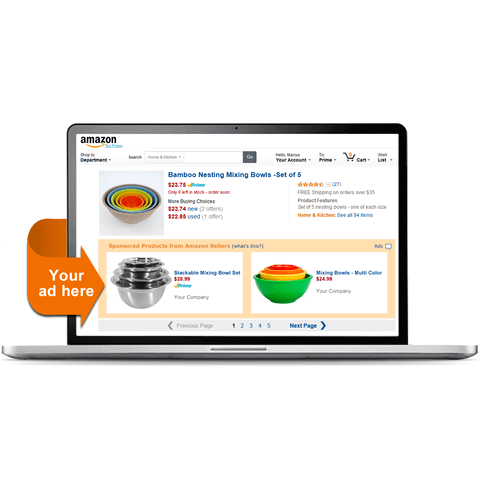
Image Credit: Shopify
Amazon Sponsored Product Ads are pay-per-click, keyword-targeted display ads for individual products that appear on search results and product detail pages. With Sponsored Product Ads, there are three types of keywords you can bid on if you decide to leverage manual targeting: broad, phrase, and exact.
Broad keywords can include words before and after the target keyword, like “white hand mixers”, if you sell hand mixers. Targeting these keywords will expose your ads to the greatest amount of traffic.
Phrase keywords focus on how the sequence of the words you use changes the context of a query. For example, “stainless steel hand mixer” indicates you sell hand mixers. But “hand stainless steel mixer” indicates you sell stainless steel mixers, but not necessarily stainless steel hand mixers.
Exact keywords are the most constraining type of targeted keyword — a shopper’s search query must contain the exact keyword for your ad to show up and no words can come before or after the keyword. For example, if you choose to target exact keywords, you can target an ad for “hand mixer”, but it won’t show up for the query “electric hand mixer”.
Using Sponsored Product Ads, you can also use automatic keyword targeting, which leverages an algorithm to target the most relevant keywords for your product ads.
To gauge the performance of your ads, Sponsored Product Ads offers a reporting tool that displays your ads’ clicks, spend, sales, and advertising cost of sales (ACoS).
Amazon Sponsored Ads Best Practices
Targeting
With Amazon Sponsored Product Ads, you can find keywords that have low conversion rates and flag them as negative. This way, Amazon will stop showing your ad to shoppers who search for those queries. Ensuring you flag certain keywords as negative is critical — even if these keywords have a high click-through-rate, their low conversion rate means they’re probably not reaching the right type of shoppers.
Bidding
Available in Manual Targeting ad campaigns, you can leverage Bid+ to boost the odds of your ad appearing at the top of search results. You can only use Bid+ on ads that are eligible to appear at the top of search results, but when you do, you can increase your default bid by up to 50%, keeping your top performing campaigns competitive, without having to constantly adjust your bids manually.
Amazon Headline Search Ads (Now Known as Sponsored Brand Campaigns)
-12.png)
Image Credit: Amazon Advertising
Currently known as Sponsored Brand Campaigns, this type of Amazon advertising allows you to promote keyword-targeted ads of multiple products above, below, and alongside search results. Using Sponsored Brand Campaigns, you can target three types of keywords: branded product keywords, complimentary product keywords, and sponsored products automatic targeting keywords.
Branded product keywords are a combination of your brand name and a product you sell.
Complimentary product keywords are a bundle of two individual products that influence the demand for each other and can be sold together (like ketchup and mustard).
Sponsored products automatic targeting keywords are search queries that you’ve already experienced success with while running automatic targeted sponsored product campaigns.
Sponsored Brand Campaigns also lets you feature up to three unique products in your ads, customize your ads’ image, headline, and landing page, and even tests these elements.
To determine how much you pay for Sponsored Brand Campaigns, Amazon uses a pay-per-click, auction-based pricing model, so you’ll never pay more than you bid per click. In addition to manual bidding, you can choose automated bidding, which will optimize your ads for conversion.
If you want to know how well your advertisements are performing, Sponsored Brand Campaigns offers a reporting feature that displays your ads’ clicks, spend, sales, estimated win rate for keywords, and ACoS (Advertising Cost of Sales).
Sponsored Brand Campaigns Best Practices
Ad Creative
It’s a good idea to feature three top-performing products in your Sponsored Brands Campaign to increase the amount of clicks and sales your ads generate.
Amazon also recommends including your product’s top benefit in your ad’s headline because mobile shoppers can only see the ad’s main image and headline.
Additionally, when describing your product, try not to claim your product is “#1” or a “Best Seller” — your ad won’t get approved.
Testing
To run the most accurate and fruitful tests, consider only changing one variable at a time, run them for at least two weeks, and anchor the success of your tests to business goals.
Landing Page Design
With Sponsored Brands, you can direct shoppers to your Amazon store or a customized product page. Consider testing how different product pages convert visitors into customers, as well as the order in which your products appear.
Amazon Product Display Ads
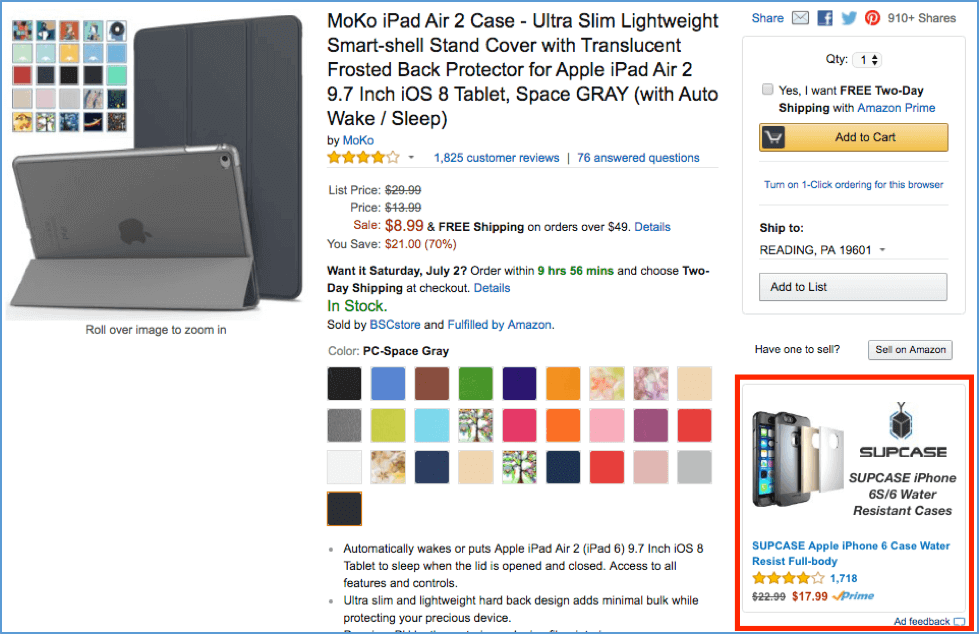 Image Credit: CrazyLister
Product display ads are pay-per-click ads that appear on product detail pages, customer review pages, on top of the offer listing page, and below search results. You can also place these ads on abandoned cart emails, follow-up emails, and recommendations emails. Their main objective is to cross-sell or upsell your customers.
Using product display ads, you can use two types of campaign targeting: product and interest. Product targeting is a contextual form of targeting, so you can target specific products and related categories. Interest targeting is a behavioral form of targeting, so you can target shopper interest and reach a larger audience.
Product display ads also let you choose which in-category detail pages you want to advertise on, customize your creative, and offers a reporting tool that displays your campaigns’ clicks, spend, sales, advertising cost of sales (ACoS), detail page views, spend, units sold, total sales, and average cost-per-click (ACPC).
Amazon Product Display Ads Best Practices
Targeting
Use product targeting on competitor pages, complimentary product detail pages, and your own product detail pages to cross-sell and upsell similar products. Using product targeting on related categories also extends your reach to sections of Amazon’s catalog that are related to your products.
Ad Creative
When crafting your headlines, Amazon allows you to include phrases like “Exclusive”, “New”, “Buy Now”, and “Save Now”, but making claims like “#1” or “Beat Seller” will get your ad rejected.
Amazon Native Ads
Amazon Native Ads are ads that you can place on your brand’s own website. There are three types of native ads: recommendation ads, search ads, and custom ads.
Recommendation ads are ads you can place in product article pages on your website. These ads are dynamic, so Amazon will populate your most relevant product recommendation based on your web page’s content and visitors.
-9.png)
Image Credit: Amazon Associates
Search ads are ads that populate on your website based off keywords that your customers search for on Amazon or on your website.
-8.png)
Image Credit: Amazon Associates
Custom ads allow you to select your own assortment of products you’d like to promote and place them on your product article posts.
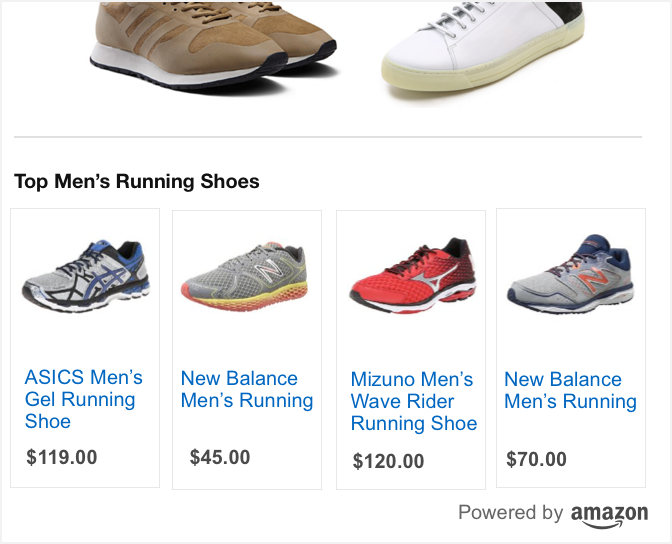
Image Credit: Amazon Associates
Amazon Native Ads Best Practice
Just like a call-to-action on a blog post, make sure your native shopping ads are extremely relevant to the pages you place them on. This way, when your website visitors finish reading your post, the ads are a natural next step and can lead to more conversions.
Amazon Video Ads
Amazon Video Ads are ads that you can place on Amazon-owned sites like Amazon.com and IMDb, Amazon devices like Fire TV, and various properties across the web. You can buy Amazon video ads regardless of whether you sell products on Amazon or not, and you can set your ad’s landing page as an Amazon product page, your own website, or any other web page on the internet.
-7.png)
Image Credit: Amazon Advertising
If you want to work with Amazon’s video ad consultants, you can sign up for their managed-service option, but to be eligible, you usually need to spend a minimum of $35,000 on video ads.

Twitter vs. Facebook: Which Platform Should Your Business Be On?
When you begin implementing a social media strategy for your business, one of the first questions you’ll ask yourself is this one — Should my business be on Twitter, or Facebook?
Both social media sites offer considerable opportunities to connect and engage with a network, increase brand awareness, and drive traffic to your site. But they’re also incredibly different in terms of purpose.
Ultimately, Facebook’s purpose is to connect people with their friends and family. People use Facebook to share photos, videos, and general updates on their lives.
Twitter, on the other hand, is used to share ideas, real-time information, and trending news. While people may also use Twitter to connect with friends and family, they largely use it for a bigger purpose — to connect to the wider world as a whole, and hear what’s happening (in 140 characters or less).
Of course, this still begs the question — where does your business fit into all this? To explore the pros and cons of Twitter vs Facebook, we’ve created a comprehensive breakdown of both.
Keep reading to figure out which platform is a better business investment for your company.

Twitter vs Facebook Users
Twitter vs Facebook Demographics
To start, let’s consider the potential demographic your business could reach on each platform.
The total number of U.S. adults who use Twitter is 24%. By comparison, Facebook undoubtedly reaches a wider demographic, with nearly 70% of U.S. adults on the platform.
Twitter typically appeals to a younger demographic — 40% of Twitter users are between the ages of 18-29, while less than 20% of people ages 50 and up use the platform.
While Facebook also appeals to the 18-29 age group (attracting over 80%), it proves more popular for an older demographic, as well. 65% of people ages 50 and up use Facebook.
In terms of mass appeal, then, Facebook wins by a landslide.
Twitter vs Facebook Engagement
It’s equally critical you determine quality over quantity — how long does each site’s audience stay on the platform? Or, alternatively, how many minutes per day do they spend on each?
Here’s a quick breakdown — roughly 46% of Twitter users are on the platform daily, and 81% of millennials check Twitter at least once per day.
Since Twitter is popular with journalists, politicians, and celebrities, many users turn to Twitter for trending news. In fact, 74% of Twitter users say they use Twitter to get their news.
Additionally, Twitter accounts for 16% of referrals to longer articles from social sites and 14% for shorter news articles.
With all this in mind, you might ask yourself — does your business have content that aligns well with Twitter’s fast-paced community? If you have quick, easily digestible business tips or news articles you’re eager to share with your audience, Twitter might be a better bet.
However, it’s important to note, Twitter is meant for quick, compelling 140-character statements that can quickly get buried under new Tweets. To build brand awareness, Twitter might be a good platform. However, its fast-paced nature might make it difficult for you to gain traction on a post for long.
In terms of long-term engagement, then, Facebook is a superior alternative. For instance, for every one million Facebook followers, brands can expect to receive about 700 likes, comments, and shares. Alternatively, for every one million Twitter followers, brands can expect about 300 interactions.
Additionally, people tend to check their Facebook an average of eight times per day, compared to just five for Twitter. If Facebook is more addictive by nature, it makes sense you might consider putting more effort into appealing to a Facebook audience, instead of Twitter.
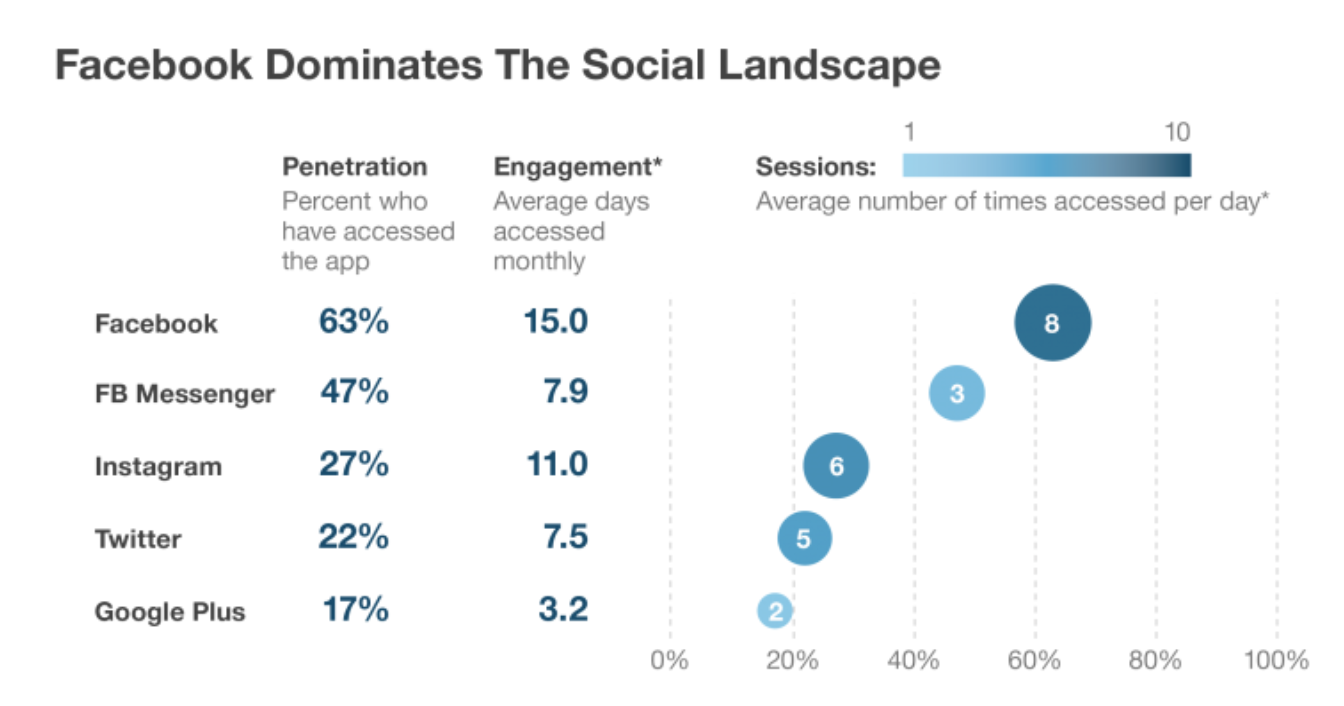
Image courtesy of Smart Insights.
Twitter vs Facebook Usage
With less than 140 characters to convey your brand’s message, you might think of Twitter as your business’ “elevator pitch”. What do you want to get across to your audience quickly and succinctly?
While this might feel stressful, think of it this way — today, many of your consumers are oversaturated with content, and easily distracted. This attention-deficit lends itself well to Twitter’s platform, where you’re able to quickly engage with your consumers with less risk of losing their attention halfway through.
Alternatively, Facebook is your opportunity to engage more in-depth with an audience. You can create full business pages, share videos and images, and further incentivize prospects to engage with your brand by offering 10% off if they “like” your business page, for instance.
When you consider their vastly different purposes, then, it makes sense to try both. Twitter can be seen as your initial handshake, while Facebook is that first full-length conversation.
Twitter Ads vs Facebook Ads
In general, advertising on Facebook allows you to reach a larger audience. Additionally, Facebook ads comes with some impressive targeting tools, so you’re able to narrow down salary, purchase behavior, hobbies, Facebook communities, and more.
Facebook advertising’s interface is relatively easy and intuitive for the user. Facebook ads can be relatively cheap, as well — in fact, Facebook boasts “Some people spend more on coffee each day than they do on their ad campaigns”. While it depends on the campaign you’re running, you can often set a budget as little as $2 to $3 per day.
Twitter also offers targeting capabilities, including purchase behavior, language, interest, and followers. However, Twitter advertising is typically more expensive than Facebook.
It may be worth the extra money, though — according to AdWeek, engagement rates for Twitter ads can be as high as 1-3%, much higher than Facebook’s average CTR of 0.119%.
Twitter vs Facebook
It’s important to consider the different purposes of Twitter vs Facebook. Twitter is primarily meant for sharing ideas, while Facebook is meant for connecting with friends and family. Additionally, Facebook has a larger audience of various age ranges, while Twitter’s audience is largely between the ages of 18-29. It’s critical you determine which one your audience prefers, however, and tailor your content to match either platform.
Ultimately, it’s likely best to try both Twitter and Facebook for a while if you’re unsure which one works better for your brand. Over time, you’ll gain valuable insights into how well your posts perform on either site, enabling you to dedicate more time to one over the other. Since they’re both free to use, there’s no harm in initially trying both.
Once you see true, valuable engagement on one, you might then consider implementing an advertising strategy to turn that traffic into conversions.
Alternatively, try researching which platform most of your competitors use. If you work for a PR agency and most PR professionals use Twitter to promote their clients, it’s critical you also appear on the tool. Alternatively, if you work for a retail store and you find Facebook is often used for promoting retail products, it’s probably best to put effort behind Facebook.

How to Improve Your Instagram Photos
Are you happy with your Instagram marketing images? Looking for tips to improve your photos? In this article, you’ll discover four tips to help you create better photos so you can stand out, drive more clicks, and generate more revenue. Why Good Photography Matters on Instagram The imagery you’re posting to Instagram can help make […]
The post How to Improve Your Instagram Photos appeared first on Social Media Marketing | Social Media Examiner.
from Social Media Marketing | Social Media Examiner https://ift.tt/2Sazl2F
via socialmediaexaminer
How to Create a Twitter Moment: A Step-by-Step Guide
Sometimes an event is so big, it completely takes over social media — often for days. Think back to the last awards show, sporting event, or viral meme: How many tweets about it popped onto your Twitter timeline?
When more than 6,000 tweets are published per second, it can be hard to find great content on the platform. So, in 2015, Twitter rolled out Twitter Moments — curated tweets revolving around a single topic or story, all in one place.
In this blog post, we’ll give you the 4-1-1 on Twitter Moments, how to create them, and how businesses can use them to grow their list of followers and capture more branded experiences when a few tweets just won’t suffice.
What are Twitter Moments?
Twitter Moments are collections of tweets about a topic or event. They can be tweeted, liked, pinned, and embedded like normal tweets, but when you tap to open a Moment, it shows you a collection of different tweets. Moments are published with a cover photo and introduction, likening them to a “best of” compilation article.
Initially, Twitter and its editorial partners, such as BuzzFeed and The New York Times, were the only ones who could curate Twitter Moments. But in 2016, Twitter opened up Moments for all Twitter users. Now, all content creators on the platform can compile groups of tweets. Whether it’s about an event, a campaign, or a pop culture moment, marketers can take advantage of this feature and potentially get discovered by new followers.
Moments are categorized under the following interest areas: News, Sports, Entertainment, and Fun. Additionally, there is a Today tab that shares the biggest moments of the day on Twitter. Here’s how to access Twitter Moments:
Twitter Moments on Desktop
Twitter Moments are available via desktop and your mobile device. On desktop, you can find Twitter Moments by tapping the lightning bolt icon — it’s in the top-left corner of Twitter on your browser, as shown below.
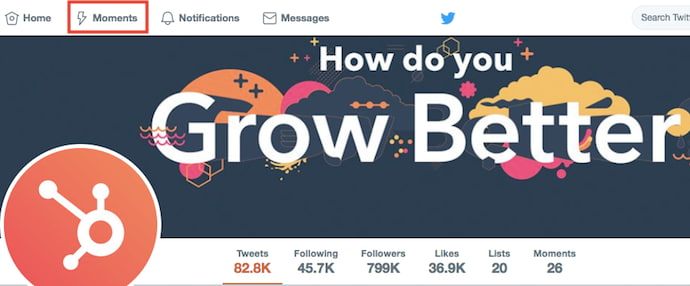
The button highlighted in red above will bring you to your Twitter Moments feed, where you can shuffle between five Moments categories across the top: News, Sports, Entertainment, Fun, and Today. Here’s what a single Twitter Moment looks like when you open it up to read on a desktop:

Twitter Moments on Mobile
On your mobile device, you can access Twitter Moments by tapping the magnifying glass icon. This will take you to the Explore tab, where you can shuffle between Twitter Moments sorted into News, Sports, Fun, or Entertainment across the top — as shown below.
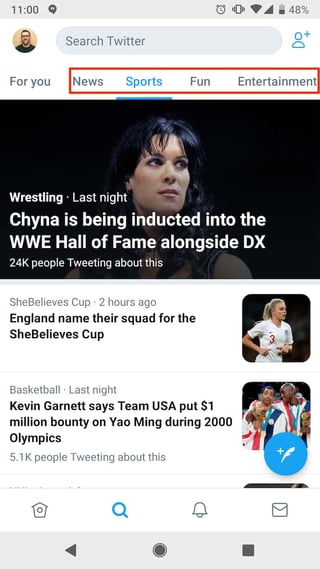
When you tap on a Moment to read more, scroll down to begin reading tweets about the topic. On mobile, the tweets belonging to a single Twitter Moment are sorted into two categories: Recap and Latest. You’ll see these options in the screenshot below. These categories allow you to read the most recent tweets related to a Moment or all of the most popular tweets related to that Moment.
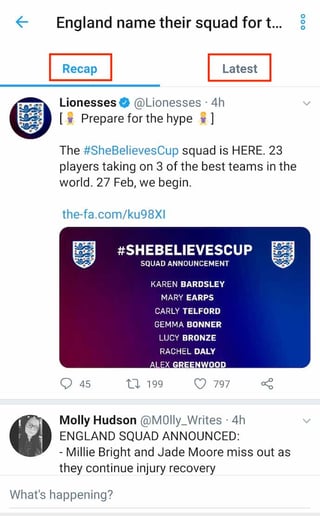
Ultimately, Twitter Moments help Twitter users find more quality content about topics they’re interested in. Moments also help brands and content creators get discovered in a different way than relying on the Twitter timeline and retweets alone.
Now, let’s dive into how to make Moments across all platforms and devices. We’ll focus primarily on desktop in the steps below, as Twitter’s desktop client is easiest and most customizable for creating a Twitter Moment for the first time.
Then, we’ll go over how to make a Twitter moment via mobile and how to add individual tweets to the Moments you’ve created.
How to Create a Twitter Moment
- Click “Create new Moment” on the top-righthand side of your Twitter Moments feed.
- Choose a title, description, and cover photo for your Moment.
- Add tweets you want to include in your Moment.
- Remove or reorder your Twitter Moment content using the icons to the right of each added tweet.
- Click “Finish later” to save a draft of your Moment or “Publish” to push it live to Twitter.
1. Click “Create new Moment” on the top-righthand side of your Twitter Moments feed.
To start, click the “Moments” icon on the top-lefthand side of your Twitter dashboard. Then, click “Create new Moment” on the far-righthand side, as shown below.

2. Choose a title, description, and cover photo for your Moment.
These will appear as a preview of your Moment on the Moments tab and on the Twitter timeline.
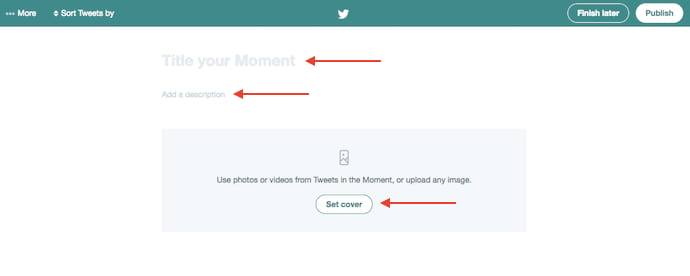
3. Add tweets you want to include in your Moment.
Once you’ve described your Twitter Moment using the fields shown above, it’s time to seed your Moment with the first few tweets related to your topic. You can choose from tweets you’ve liked, review different Twitter accounts to select tweets from a certain brand or individual, or search for tweets by specific keywords and hashtags. You can also enter the URL of a tweet you want to include.
You can add tweets to your Moment by tapping the grayed-out check mark next to the tweet, as shown below.
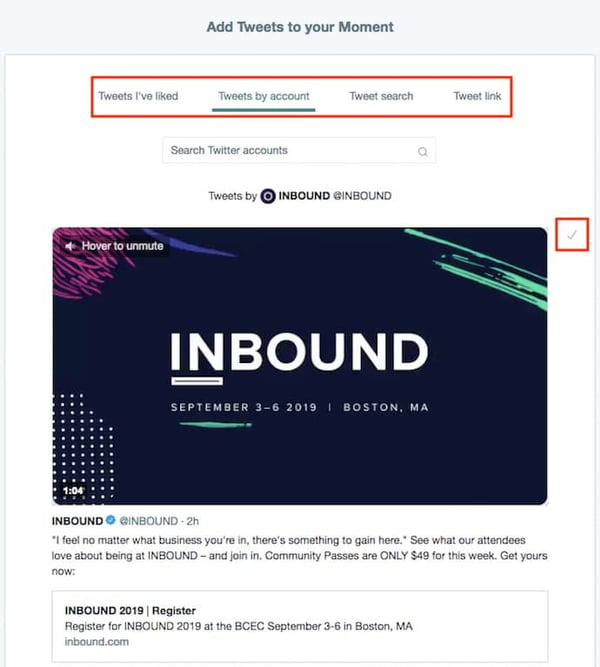
4. Remove or reorder your Twitter Moment content using the icons to the right of each added tweet.
As you add more tweets to your Twitter Moment, you’ll see them appear above the “Add Tweets to your Moment” section. Here, you can reorder your tweets by clicking the up and down arrows or remove those you no longer want to include in your Moment by clicking the “X” symbol. See these options in the screenshot, below.
5. Click “Finish later” to save a draft of your Moment or “Publish” to push it live on Twitter.
Got everything you want, right where you want it? The only thing left to do is to publish your Twitter Moment. Do so using the “Publish” button on the top-righthand corner of your screen. You can also save your Moment as a draft by clicking the “Finish later” button to the left of “Publish.”
Once your Moment is published, you can share it in a tweet, embed it on your website, or share a link to your Moment.
How to Add a Tweet to a Moment
You can also using individual tweets you find while browsing Twitter to create a new Moment, or add these newly discovered tweets to an existing Moment.
To create a new Twitter Moment from a tweet you find on Twitter, start by tapping the downward-facing arrow next to a tweet and selecting “Add to new Moment.” This will direct you to the Moment creation dashboard described in step 2 in the section above. See how this looks below.
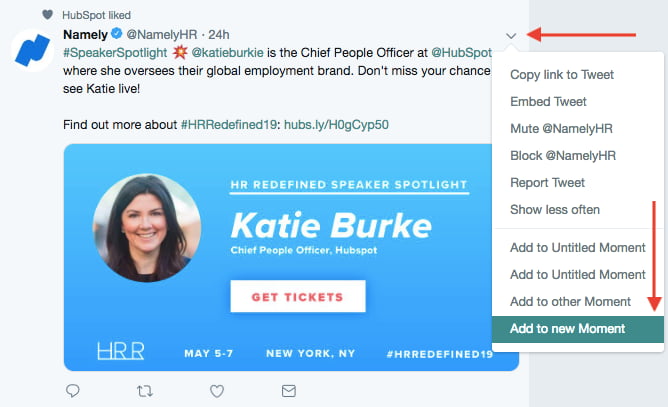
To add a tweet to an existing Twitter moment, on the other hand, you’ll follow the exact same steps as you would in the above paragraph, but click “Add the other moment,” right before the highlighted option in the screenshot above. This will open a window where you can choose from every Twitter moment you’ve created, whether it’s published or saved as a draft. See what this window looks like below.
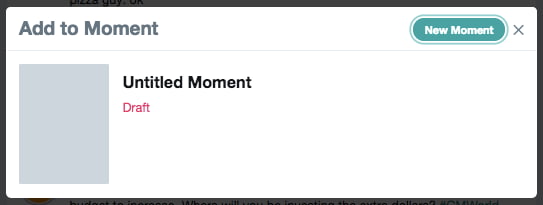
How to Create a Twitter Moment on a Mobile Device
1. Tap the gear icon next to your profile picture (or your actual profile photo on Android devices) and select “Moments.”
Creating a twitter moment on a mobile device is a fairly easy process. Start by tapping the “Me” silhouette icon on the lower-righthand side of your screen. Then, tap the gear icon next to your profile picture and select “Moments.”
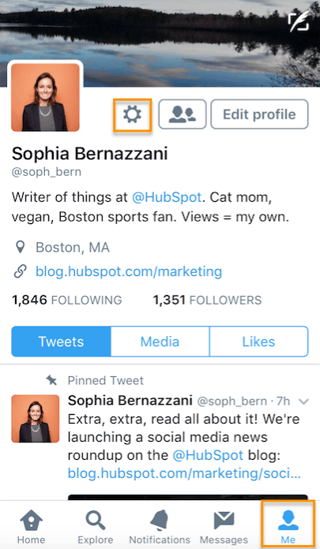
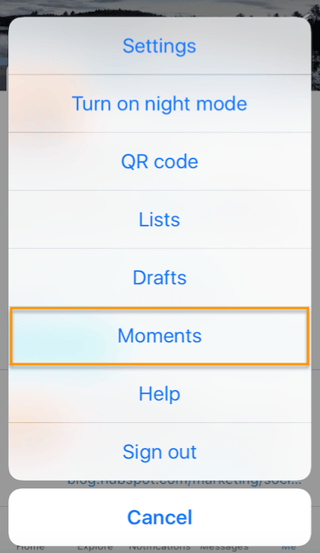
To create a Twitter Moment on Android devices, the process is virtually the same — except you access the Moments menu by tapping on your profile picture when you open up Twitter:
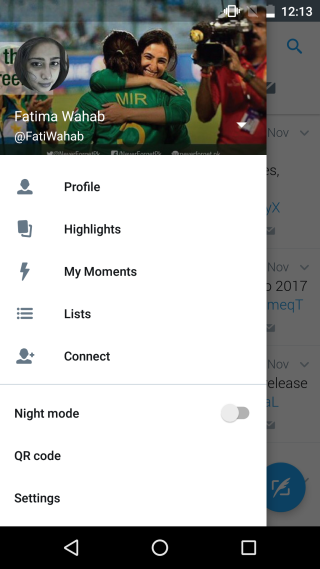
Source: Addictive Tips
2. Tap “+” in your “My Moments” screen to customize your Moment.
To add a title, description, and cover photo for your Twitter Moment, tap the “+” symbol in the top-righthand corner of the “My Moments” screen. From there, you’ll reach a dashboard where you can customize your Moment’s title, description and cover photo.
3. Add tweets to your Moment by tapping the “Add Tweets” button in the bottom center of your screen.
You can choose from your tweets, tweets you’ve liked, and by searching for tweets. Add them by tapping the tweets and then tapping the green “Add 1 Tweet” button.
4. Tap the “Reorder” button in the bottom-lefthand corner of your Moments dashboard to customize your Moment.
5. When you’re done, tap “Finish later” to save a draft, or “Publish” to share your Moment on Twitter.
You can also create a new Moment by tapping the downward-facing arrow next to a tweet and selecting “Add to Moment.” This will direct you to the Moment dashboard in step 2, above.
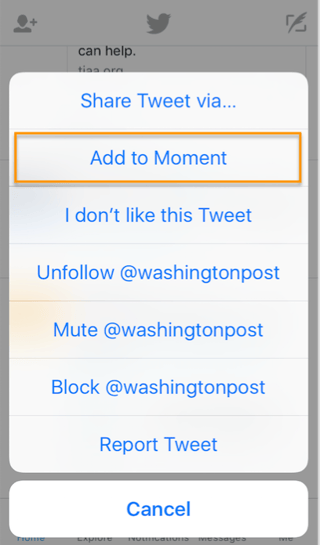
How Brands Can Use Twitter Moments
1. Events
Create a Twitter Moment that showcases what’s going on at an event your brand is hosting or participating in. You can share what others are saying about your brand and keep followers up-to-date about what’s going on if they can’t attend the event themselves.
Here’s a Twitter moment published by INBOUND at the kickoff of INBOUND 2016, when Gary Vaynerchuk kicked off the weeklong marketing and sales event with a keynote speech. The Moment compiled various tweets about the speech from different attendees and influencers and provided an inside look at the event for those following along at home.
Gary Vaynerchuk Kicks Off #INBOUND16
2. Tweetstorms
For those times when live-tweeting a series of related tweets is necessary, a Moment can serve to showcase a tweetstorm after it’s happened to bring attention to what a brand or individual is tweeting about.
Here’s an example from Persil UK & Ireland, a laundry detergent brand that created a Twitter Moment tweetstorm to promote its social media conversation, #DirtIsGood, about the importance of kids getting outside:
Kids spend less time outdoors than prisoners
3. Breaking News
Another great use case for Twitter Moments is breaking news. Journalists and publications can produce Twitter Moments to group together tons of tweets about an emerging story. Whether the tweets are all originals from the brand’s account or are a compilation of different voices, the Moment serves to provide Twitter users with as much information as possible.
Here’s a breaking news Twitter Moment from Bloomberg about the World Economic Forum in Davos:
Thursday at Davos has been all about Brexit
4. Behind-the-scenes
One of the great things about social media is it gives customers a window into brands they love that they wouldn’t otherwise have. Brands can use Moments to create behind-the-scenes looks at products, employees, and events on Twitter.
Here’s Allure‘s Moment featuring a behind-the-scenes look at ringing the New York Stock Exchange opening bell:
This is what it’s like to ring the opening bell at the New York Stock Exchange
5. Content Promotion
A multi-channel strategy is key to successfully promoting content you publish on your blog and website, and social media channels are no exception. Try publishing insights and data from your latest blog post or research report in the form of a Twitter Moment.
Here’s an example from the team here at HubSpot. We published a Moment about our annual State of Inbound survey results back in 2016:
(Want to see our 2018 State of Inbound report? Get it here.)
Now that you’re a pro at creating Twitter Moments, try publishing one today to see how it impacts your Twitter engagement. Don’t let your clever tweets and hashtags go to waste — create a Moment and share content with your audience year-round.
How do you use Twitter Moments? Share with us in the comments below.

The Non-Techie’s Guide to Adding Music to Videos
As a video marketer, choosing the right music can be the difference between crafting a video that grips your audience from start to finish and one that they can barely get halfway through. Play a fitting soundtrack, and you’ll be able to evoke the exact emotions you want your audience to experience while watching your video. Neglect the musical aspect of your video, and it might not even be able to hold your parents’ full attention.
Music can make your videos much more captivating, impactful, and, in turn, convincing. Whether you’re creating fun social media videos, persuasive product videos, or even serious training videos, music can separate your video from the rest of the pack.
If you need a refresher on how to add music to your videos or you want to learn how to do it, we’ve got you covered. Check out our quick and easy rundown of adding music to videos in Adobe Premiere Pro.
How to Add Music to Videos
1. Download music onto your computer.
If you don’t have any music saved on your computer, check out our roundup of the best royalty-free music sites. By signing up for their services, you pay a monthly fee to get access to thousands of songs rather than paying an individual fee for each song you download.
2. Import the music into Premiere.
Once you’re in Premiere, select “Window”, “Workspaces”, and then “Audio”. After you do that, open the Media Browser panel by choosing “Window” and then ”Media Browser”.
In the Media Browser panel, right click on your audio file and press “Import”.
-1.jpg)
Image Credit: Adobe
3. Add the music to your Timeline panel and edit accordingly.
After you import your music into Premiere, open up the Project panel by selecting “Window” and then “Project”. You will see your imported audio files stored there. Next, drag your audio clips under the video clips in the Timeline panel. You can trim your audio clips and adjust their volume just like you can with a video clip.
 Image Credit: Adobe

Everything Our Paid Team Learned From Attempting a Reddit Advertising Strategy
With 69,000 subscribers and a ranking as one of the top ten most popular sites on the internet, Reddit is undoubtedly an intriguing channel for advertising purposes.
However, the site can often seem intimidating, and perhaps even too random to create a cohesive advertising strategy. Plus, since its primary purpose is to expose viewers to the top-trending content of the moment, Reddit users are notoriously anti-marketing.
Regardless of its challenges, its potential advantages proved too good an opportunity to pass up. At HubSpot, we decided to implement a strategy to see for ourselves whether Reddit can serve as a promising channel for the future.
Here, learn what our team figured out about advertising on Reddit, and whether it’s worth the attempt for your own company.
The Strategy Behind Reddit Advertising
1. Identify subreddit topics which are well-aligned with your target audience.
To investigate the benefits of advertising on Reddit, I first spoke with Josh Chang, a Senior Marketing Manager at HubSpot. He told me HubSpot’s initial strategy on Reddit involved highly targeted campaigns on specific subreddits, including r/entrepreneur and r/sales.
“The goal of the campaign,” Chang explained, “was to drive awareness and conversion for our products. In terms of results, we saw cost-per-acquisition similar to what we’ve achieved on Facebook in North America, although we did notice a lower activation rate from Reddit — suggesting lower-quality conversions.”
If you’re interested in testing out a campaign for yourself, then, you’ll want to start by identifying subreddits which can likely help foster genuine connections between your brand and your ideal audience. Consider topics your target audience is most interested in, and make a list. Then, narrow your list by investigating how many subscribers each subreddit topic has, whether it’s relatively active, and whether self-promotion or sharing content is allowed on the subreddit topic.
Chang told me, “One of the main things we learned was targeting subreddits specifically was much more effective than broader interest targeting. However, this strategy requires a lot of research, and getting to know which subreddits are most relevant to your audience.”
Additionally, Chang said, “We noticed tailoring our ad creative for individual subreddits helped improve our conversion rates.”
2. Begin engaging with your subreddit communities.
Once you’ve cultivated a list of subreddits that are likely of interest to your target audience, it’s time to start engaging with those subreddit communities.
However, it’s critical you don’t begin by promoting your own content.
To build a level of trust and authentic connection, begin by upvoting other submissions you find interesting and that align well with your brand. Next, share valuable content — but not your own. Instead, post interesting content produced by other media outlets or blogs that you believe will be useful to your subreddit community.
It’s vital you genuinely use the Reddit platform as an opportunity to get to know your target audience before you offer them your own content. Not only will this show your community you’re not simply joining the site to self-promote, but it will also help you tailor your content more accurately down-the-road.
3. Begin promoting your own content, paid or otherwise, on the subreddit platforms.
At this point, you might consider simply posting valuable content from your company that you feel will benefit your community — for free.
However, you might alternatively try spending money on a paid sponsored post, which essentially guarantees your post will be pinned to the top of the subreddit. Here’s what a sponsored post looks like, for context:

In many ways, this post looks similar to all other Reddit content. However, there’s a blue “Promoted” tag in the top left, signifying it’s a paid ad.
In HubSpot’s case, we decided to test out the power of paid advertising on the site. However, it’s still critical you follow the steps listed above to cultivate authentic relationships with your subreddit communities.
Think of it this way — if I begin engaging with a brand on one of the subreddit groups I’ve joined, and notice they typically post helpful content (including content from other publications), then I’m much more likely to take notice when they pay for a sponsored post. If they appear out of nowhere, I have no sense of brand awareness and probably won’t trust the advertisement.
Reddit Advertising Cost
As of right now, the minimum daily spend for an ad on Reddit is $5.
Additionally, Reddit FAQ states, “The Reddit Ads platform uses a second price auction based system, which means you pay a cent higher than the next highest bidder. Because we are using an auction based system, there is a risk of 20% over-delivery when setting up an individual campaign.”
However, as of January 2019, Reddit changed their pricing model from CPM (cost-per-impression) bidding to CPC (cost-per-click). The CPC model will likely make it easier for brands to track conversion or traffic goals, and could result in changes in prices over time.
Advertising on Reddit: Worth it?
When I asked Chang whether he felt advertising on Reddit is a worthwhile investment, he offered a candid response, admitting HubSpot has temporarily halted its efforts on Reddit.
“We saw promising results,” Chang told me, “But because we were targeting specific subreddits, it wasn’t crazy volume that could really move the needle. However, we have on our docket to re-test Reddit to see if we can improve performance and scalability in the future.”
It’s important to note, there have been success stories — Findlay Hats, for instance, drove $28,000 in sales from one viral Reddit post.
However, most brands see better results simply by relying on Reddit for community engagement and brand awareness. Alex Berman found one of his free, unpromoted videos got 25,000 views when it hit the top of a subreddit — but, when he put $250 behind his Reddit posts, he acquired zero leads.
Ultimately, it’s worth considering using Reddit as a platform for sharing content for the sake of helpfulness and audience engagement, rather than as a cost-effective advertising strategy.

3 Instagram Marketing Mistakes and How to Fix Them
Is your Instagram marketing working? Wondering if you’re making mistakes that could hurt you? In this article, we asked some of today’s top Instagram marketers to share common mistakes they see and how to avoid them. #1: Using Instagram Hashtags Incorrectly In 2018, Instagram finally allowed hashtags in a profile’s bio description to be clickable […]
The post 3 Instagram Marketing Mistakes and How to Fix Them appeared first on Social Media Marketing | Social Media Examiner.
from Social Media Marketing | Social Media Examiner http://bit.ly/2DNCznm
via socialmediaexaminer
Everything You Need to Know to Start a Retail Business
I worked in three different retail stores while growing up. The most memorable experience I had was working at a clothing store on Cape Cod when I was 18. The store had been recently renovated and looked beautiful — the desk with the cash register was designed to look like it was built from parts of a large fishing boat and the nautical theme continued to the inventory, floors, and gift boxes.
The store manager was also incredible — she was meticulous, caring, a natural problem solver, highly organized, and knew our products inside and out. She trained all employees to ensure we were prepared to assist any customer who entered the store in a way that was helpful and on-brand. My experience working at this store was a prime example of everything a retail business should be.
From your store’s appearance to inventory to the manager you hire, there are a multitude of factors that impact the creation of a prosperous retail business Follow along and we’ll cover the steps you should take to start your retail business, the resources and tools you’ll need to manage your store, and how to find the right employees to work in your store.
But first, a critical question.
Now that you understand what type of store falls under the definition of a retail business, you might be wondering how to actually go about starting one. Let’s review 11 steps that are critical when beginning your retail business.
Each of these 11 steps should be thoughtfully considered and completed when building your retail business as some are actually federal and state legal obligations. Also, these steps aren’t listed in any specific order so feel free to jump around and work through them in any way that makes sense to you.
1. Create a Business Plan
One of the first things anyone looking to start a business should do is create a business plan. This is the document that details all aspects of your company including what you’ll sell, how your business will be structured, who your target audience is, and your financial information.
Creating a business plan is crucial because it provides you (and your partners) with a comprehensive overview of your business at once making it easy for you to determine what will or will not work and what needs to be modified. Your business plan should be concise, yet informative and detailed. It’s also important to remember this is a living document, meaning you can always make changes as you start to implement different aspects of your plan.
Discover how to create a business plan to help you kickstart your company.
2. Choose Your Legal Structure
Disclaimer: This post is not legal advice for your company to use when choosing your legal structure or building your retail business. Instead, it provides background information to help you better understand these processes. This legal information is not the same as legal advice, where an attorney applies the law to your specific circumstances, so we insist that you consult an attorney if you’d like advice on your interpretation of this information or its accuracy. In a nutshell, you may not rely on any of this piece as legal advice, or as a recommendation of any particular legal understanding.
When starting a retail business, you’ll have to choose a legal structure. Legal structures are recognized by the Internal Revenue Service (IRS) and determine which income tax forms you have to complete and submit for your business. Here are five common business legal structures for your consideration:
- Sole Proprietorship
- Corporation (C Corp)
- S Corporation (S Corp)
- Partnership (LP and LLP)
- Limited Liability Corporation (LLC)
Learn how to choose the right legal structure for your new business.
3. Name Your Business
Your business’ name should be catchy, easy to say and repeat, unique, and convey meaning. This way you know it’ll resonate with your customers and be memorable.
You should also search the web to ensure it hasn’t been used. To double check your name hasn’t already been taken, you can search for a trademark through the United States Patent and Trademark Office (USPTO) database. If you are beginning a C Corp or an LLC, you’ll need to visit your Secretary of State’s website to ensure your business entity’s name hasn’t already been used. (Here’s what the Massachusetts Secretary of State website looks like for reference.)
4. File for an Employer Identification Number
You’re most likely going to need to file for something called an Employer Identification Number (EIN), also known as a Federal Tax Identification Number, when you start your business. This is an identifier almost every business in the US and US territories — provided by the IRS — must obtain. Your EIN is what your business will use to report income tax activity.
You can check with your state to make sure you need an EIN as well as review the IRS EIN checklist to make sure you qualify. Once you’ve done that, you’re ready to apply for your employer identification number.
5. Understand Other Retail Business Laws
One final legal step for you to complete to set up your business — understand all other retail business laws at both the state and federal levels. We’ve covered a lot of the tax information you’ll need to be aware of, how to legally name and trademark your business, and how to file for an EIN. But you’ll also want to make sure you have all other legal matters taken care of before opening up your retail business.
Every state’s government website should have a section that reads something like “starting a business”, similar to this one from the Massachusetts government site. Here, you’ll be able to work through a checklist of items to make sure everything you’re doing is legal. You’ll also be able to acquire any other necessary retail business papers and permits. In terms of government laws related to your business you should have a general understanding of tax, employment, and labor, antitrust, advertising, environmental, and licensing laws among other retail laws.
Our recommendation to you is hire a lawyer or consultant to help you throughout this process — or at least get you started. The last thing you want to do is go through the effort or starting your retail business and then find yourself in legal trouble. A lawyer or consultant can ensure you consider and understand all retail business laws and requirements.
Now, it’s time to get out of the legal mindset and move onto some more creative aspects of your retail business.
6. Pick a Location and Make Your Store Attractive
Your store’s location and appearance matter. This is how you’re going to make sure you have the foot traffic and visibility you need to kickstart and maintain a high volume of customers. It’s also how you’ll attract customers and make them want to enter your store.
Retail Store Location
If you decide to go with commercial space for your retail business — which is a building intended for stores or companies to conduct business and make a profit — make sure your location is a good one by chatting with other businesses next door and nearby. You can even conduct an informal foot traffic study by hanging out in the area to observe the number of people who shop there as well as the type of clientele to determine whether or not it resembles that of your buyer personas.
When looking at commercial spaces, you should also think about whether or not you want to rent/ lease the space and work with a landlord or buy the space so you have full control.
Learn how to create buyer personas for your business to enhance your marketing strategy.
You might decide to conduct your retail business out your of your home rather than a commercial space. While this will save you a lot of money because you won’t be putting any towards a separate building or retail space, it might feel slightly less professional to your customers. It may also be harder to bring in foot traffic depending on the location of your home.
No matter what type of retail location you choose, be sure to look into your city’s zoning and planning details. These are typically provided by every town’s zoning commission and tell you whether or not changes to the area, such as construction or traffic, will create any problems or limitations for your store.
Retail Store Appearance
From the way your inventory is presented to your choice in cashier counter to your window displays, everything your customers see and experience should feel and look professional, clean, and beautiful. This way customers want to enter your store and feel excited to do business with you.
You can make your store look great and feel inviting by using visual merchandising techniques to help you design it in a way that’s well-organized, well-lit, and on-brand. You can also hire a consultant to come in and help you lay out your store in a way that’s visually appealing.
7. Find Your Inventory
Finding the right inventory to sell is crucial. You need to give your customers a reason to come to your store by providing them with unique items they’d have a hard time finding anywhere else — especially since online shopping is so common today due to its convenience. To help get you started, you can search for one of a kind items and unique pieces at fairs, trade shows, and festivals.
Here are a couple more things to think about when trying to determine how you’ll source your business’ inventory:
Current Trends
Keep up with current trends within your retail niche (clothing, jewelry, accessories, etc.) to determine the type of inventory you should sell. With the help of social media, retail blogs, and magazines, and by simply learning about what’s doing well in other retail stores similar to yours, you’ll be able to determine the ideal inventory for your brand and buyer personas. These resources will ensure there’s a base of customers looking for the type of inventory you’re going to be selling.
Supplier
Consider the type of supplier you want to get your inventory from — this might be through a manufacturer, individual maker, or wholesale.
- Manufacturer
- Individual Maker
- Wholesale
Working with a manufacturer gives you a lot of flexibility because they help you create products that don’t already exist. Although you can determine the design, quality, and look of the product you crate, this also means working with a manufacturer can become expensive and time-consuming.
Individual makers are people who create unique pieces of inventory themselves. An example of this would be someone in town who makes knit scarves and hats and sells them to you to then sell in your store. This is a great way to ensure your store has one of a kind pieces. It also means you’ll have to take the time to find talented makers who create quality items that are on-brand and would appeal to your buyer personas.
Using wholesalers is a great option if you want to sell products in your store that are already being sold by other stores and online retailers. You’ll receive wholesale items directly from the company that makes them for a lower price but you’ll have less say when it comes to your selling margins, as the wholesaler will have control over them.
8. Create Store Policies and Procedures
Creating store policies and procedures for your customers and employees is critical if you want to maintain a sense of order within your retail business. Policies and procedures between your business and customers may include things like your return and exchange policies or whether not you want to allow pets in your store. Policies and procedures between your business and employees may include things like dress code and scheduling expectations.
By creating these store policies and procedures you avoid making customers and employees feel confused about the way something works within your business or at your store. This also helps you set standards for the way you want people to interact with your business on a regular basis.
9. Develop a Customer Service Plan
When starting your retail business, you’ll want to think about how you’re going to develop a customer service plan. Customer service is how you help your customers solve problems, teach them how to use your products, and answer their questions. Your customer service plan details the ways you’re going to do this. Customer service work is proactive. Meaning the point of developing a customer service plan and related policies is to solve for your customer’s problem prior to them even realizing they have an issue.
Let’s cover a few ways you can implement a customer service plan for your retail business through customer-friendly policies, employee training, and customer-loyalty programs.
Customer-Friendly Policies
By creating customer-friendly policies, you’ll make shopping at your retail store simple and stress-free for your customers. For example, you can can create return policies that allow your customers to bring an item back for a full refund with or without a receipt.
Other policies that prevent pain points and enhance customer service include a 100% satisfaction guarantee or complimentary hemming when you buy a piece of clothing in store.
Employee Training
You should train your employees about how to handle different situations with your customers such as exchanges, complaints, and refunds. Training will provide your employees with the exact steps they should take to ensure a professional interaction with your customers that resolves the issue at hand.
Your customer service training should also cover how you expect your employees to deal with larger customer issues and disputes. Provide them with a way to escalate an issue to you — or your store manager — when they’re unable to reach a resolution that satisfies your customer on their own.
Customer Loyalty Program
By proactively providing an incentive for people to return to your store with a customer loyalty program, you’ll likely increase your sales and number of promoters (the people who tell their network about your business). You also enhance their experience doing business with your business as well because you’ll be providing them with discount codes, details about sales, information about your latest products, and any other exciting event or piece of news you have to share.
10. Recruit a Team of Employees
It’d be difficult to grow your retail business without bringing on some team members. You may start as your sole employee, but as your business flourishes you’ll likely need some assistance. You can determine the most important qualities you’re going to look for in candidates, whether they’re related to personality, prior retail experience, or culture-fit. Then you can select and tailor specific retail interview questions to help you narrow down your pool of candidates. (We’ll cover more details about which skills you should look for in your candidates shortly.)
11. Host a Grand Opening
You might choose to have a grand opening for your retail store. This marks the date in which you are officially open for business. Grand openings may include celebratory beverages, food, and sale items to excite your new customers.
Prior to your grand opening, you might also have a soft launch, or soft opening, for your business. Soft launches are when you, the business owner, invite a group of guests to your store to essentially test everything out. These events are a great way to make sure everything works perfectly before your grand opening — meaning this is your last chance to ensure your customers love your inventory, your store is appealing to your guests, and your everything in your store, such as your POS system, functions perfectly.
You’ve officially worked through all 11 steps required to build your own retail business — congrats! Now, you’ll need to create your retail marketing strategy.
Every retail business should have a retail marketing strategy — this will serve as the marketing plan you’ll use to promote your business. It’ll be the way you get the word out about your business and help you build your base of customers and promoters. Here are six steps to work through when creating your retail marketing strategy.
1. Define your positioning.
Defining your positioning is a critical part of your marketing strategy. That’s because your positioning is what makes your retail business stand out and differ from your competitors. Think about what it is that makes your business unique and use those details to define your positioning. This might be where or how you source your inventory, how you display all of the items in your store, or your impeccable end to end customer service experience.
2. Define your audience.
Once you define your positioning, you should be able to get a better idea of the audience you’re going after. Think about what type of consumer would appreciate your positioning, the products you sell, and how you sell them. By clearly defining your audience, you’ll be able to create buyer personas to help you develop a steady customer base and understand their wants and needs.
Learn how to create buyer personas for your business with easy to use templates.
3. Create your mission statement.
Your mission statement is another critical part of both your retail marketing strategy and your business as a whole. It’s a formally written statement explaining your business’ goals and values — it essentially explains the reason why your business exists, the purpose it serves its audience, and how it differs from competitors. Your mission statement is what you and your employees can turn to when you need guidance or inspiration, and it’s what your customers can turn to when they want to learn about who you really are as a business and brand. And if you need some help envisioning what yours should say, you can always review mission statement examples from other companies.
Naturally, as your company evolves and grows, the details of your mission statement may also shift. That’s alright because your mission statement is a living document, meaning it can (and should) be updated over time as you see fit.
4. Decide on your branding.
Your retail business’ branding should feel like a combination of your audience and mission statement. Meaning you should think about what type of branding your chosen audience will respond well to and how it’ll help you represent and depict your company’s goals and values.
You should study the branding of your competitors to ensure yours stands out and looks unique to your customers. Lastly, make sure your branding is memorable — you want someone to look at any piece of your marketing and know it’s yours.
5. Think about your content marketing strategy.
A great retail marketing strategy includes a content marketing plan. This consists of media you create for your retail business such as written and visual content. A comprehensive content marketing strategy will help you establish a strong online presence and promote your business.
For example, a common way to establish an online presence through content marketing is via social media. Social media marketing allows you to promote your business through various platforms such as Instagram and Facebook. Once you determine the different aspects of your content marketing strategy, you’ll want to ensure you plan and schedule all of that great content you’ve just created.
Content marketing schedule
Once you have developed your content marketing strategy, you’ll need to make sure the actual content you’ve created is posted, distributed, and shared when you want it to be. Create a content marketing schedule that you and your team can work from to ensure all content is shared as planned.
There are a number of different content marketing scheduling software options, such as CoSchedule, to help you do this. Depending on your business’ needs, you may also choose to use a much broader marketing automation software such as HubSpot, or a more specific social media automation software such as Hootsuite. These software options speed up the scheduling process, ensure your content is shared on time and as planned, and allow you to dedicate employees to certain content.
6. Decide on your budget.
You’ll need to set a marketing strategy budget to work within when developing all of these different pieces to your plan. Think about how much money you want to put towards each of these steps so everyone on your team is aware of the parameters they’ll need to work within.
When determining your budget, you might find that you’re a bit limited to the amount you can put towards each of these retail marketing strategy steps simply because you’re a new business with fewer resources. That’s alright and totally expected — just remember to expand your budget when necessary as your business grows.
To help get you started, you can consider the following recommendation regarding marketing strategy budgets by the US Small Business Administration: If you’re doing less than $5 million a year in sales and your net profit range is 10-12%, spend 7-8% of your gross revenue for marketing and advertising.
Now that you’ve worked through the steps to building your retail business from the ground up and have a better understanding about how you can approach the creation of your retail marketing plan, let’s discuss some of the resources and software you’ll need to run your retail business.
Resources and Software Every Retail Business Needs
The following six resources and software are tools often used by retail businesses. As you start planning your business, you may think of more tools you’ll need depending on the retail business you’re opening. The following list will get you started most likely need to be modified for your store needs.
1. POS System
One of the most important tools you’ll need to run your retail business is a point of sales system or POS.
A point of sales system is a software that allows you to conduct customer checkouts and accept multiple forms of payment such as cash, credit cards, and mobile payments. The software also prints receipts, scans inventory barcodes, and stores cash. There are a number of retail-focused point of sales systems to choose from to help you manage all of your customer transactions which we’ll discuss shortly. Without a POS system, it would be exceptionally time-consuming and difficult to keep track of all of your sales and payments.
Here are some POS systems for retail businesses to help kickstart your search for the perfect one for your business:
You may also want an inventory management software for your retail business. This will keep track of all information about your inventory to understand which items you need to replenish and how often you need to do so. These days, many POS systems, including the five we just listed, have inventory management systems built into them so you may not need to worry about finding another software.
2. Stock Keeping Units
Typically, retail businesses will have some type of stock keeping unit, or SKU, system to keep track of every single piece of inventory they have. A SKU — which is typically located alongside an item’s barcode — is a combination of numbers and letters used to identify and organize each piece of your inventory by characteristics such as size, color, and brand.

Instead of having to come up with your own SKU, POS systems with included inventory management capabilities also have SKU creation features.
4. Retail Blogs
Every business owner needs inspiration every now and then. Retail blogs are a great way for you to keep up with the latest retail trends and learn about what is and isn’t working well for other similar businesses. Retail blogs, such as The Retail Doctor and Medallion Retail, are focused on topics including growth, industry trends, new software, and in-store business vs. online business.
6. Employee Scheduling Software
As your retail business grows, you’ll most likely find yourself adding members to your team. Managing any number employees — and their schedules — is simple with an employee scheduling software, such as Ximble or TSheets, which allows you to organize and update your business schedule so your employees know exactly when to show up for work.
Now that you have a better understanding about the resources and tools you’ll need to start your retail business, let’s talk about how you’re going to find the right employees to work in your store.
What to Look For In a Retail Employee Candidate
Who are the people that are going to help you grow your business? What traits should your employees possess to ensure they’ll be impactful additions to your store? Let’s cover some of these important characteristics to help you identify candidates who will be quality employees.
Communication Skills
Retail employees need to be great communicators — they’re interacting with your customers every day. They must be able to communicate details about your inventory to help them find the items they’re looking for. If someone calls your business with a question or issue, they’ll need to communicate their answer or provide a solution. Lastly, your employees need to be able to communicate with you about things such as their schedule and how their experiences with your customers are going.
Positive Personality
Whether your employees are chatting with your customers in person or online, about a topic that’s good or bad, your employees need to maintain a positive attitude. They act as the face of your brand and you want them to represent your business well. So, hiring people with a positive, can-do attitude that’s ready to tackle any situation that may arise — even if it’s a complex and involves an unhappy customer — is important.
Patience
You’re bound to have an unsatisfied customer at one point in time. Your employees must be patient as they listen to the issue in which the customer describes. They also need to be patient while working with that customer to find a solution. Otherwise, it’d be difficult for your employees to turn your customer’s negative experience around.
Empathy
Empathy is feeling and understanding another’s emotions. Whether a customer is in a rush, has to purchase a sympathy gift, or is unhappy with an item of yours, your employees must be empathetic. This is how they’ll find a solution that fits the needs of the given customer. Empathy is what will help turn a customer’s negative experience into a positive one so they’ll continue doing business with you in the future.
Dependability
Whether you have one employee or 10, they need to be dependable. You depend on your employees to represent your business, work hard to delight your customers, be professional and kind, and simply show up to work (on time, of course) when scheduled.
Prior Retail Experience
Requiring your employees to have prior retail experience is up to your discretion. You may choose to focus on personality traits and culture fit instead of work history. However, if you do want employees with prior experience, you could look for candidates who have worked in other stores before or even have an education in fashion, design, or communications.
Start Selling
Starting a retail business is hard work. But, by following the steps we discussed, you can make it happen. Remember there are a lot of moving parts that come with starting a retail business that may change, such as your business plan and mission statement, as you begin putting your ideas into action. Start by obtaining the right resources and tools and hiring the right people to help you start growing your retail business.

22 Striking Examples of Minimal Design That’ll Kickstart Your Creative Process
Whether you’re curating an Instagram feed or designing a web page, there are plenty of advantages to minimalist design.
Rather than bogging your audience down with vibrant patterns or paragraphs of text, a minimalist approach allows you to focus on a few key components of your brand you feel are truly important.
However, minimalist isn’t as simple as white space. To avoid creating boring or uninspiring designs in your attempt to become minimalist, it’s critical you take a look at some successful examples of minimal design, ranging from posters to logos, to kickstart your creative process.
Minimalist Graphic Design
These Braga Da Cruz jewelry store business cards, designed by Luke Halota, are a good example of how minimalism can help brand name stand out on the page. Halota uses grids to center the company name on one side, with a small, unobtrusive logo placed above. On the back, he makes sure to use simple white space to make Francisco Cruz the focal point.
2. Visme

Minimalism doesn’t have to be boring. Here, Visme created a pop-up ad where the primary focus remains on the “Join us!” blue button, which contrasts nicely against the orange background. Additionally, to grab the viewer’s attention, Visme placed a large lion’s head image on the left side of the ad.
Heather Shaw ensures true simplicity in her Ocean Conservancy book, which grabs the reader’s attention with minimal text and colors. The information is plainly outlined and easy-to-follow. Additionally, there’s a lightly outlined sketch of an ocean behind the text — while not overbearing, it adds texture to the design.
4. Helix Sleep by Stefanie Brückler
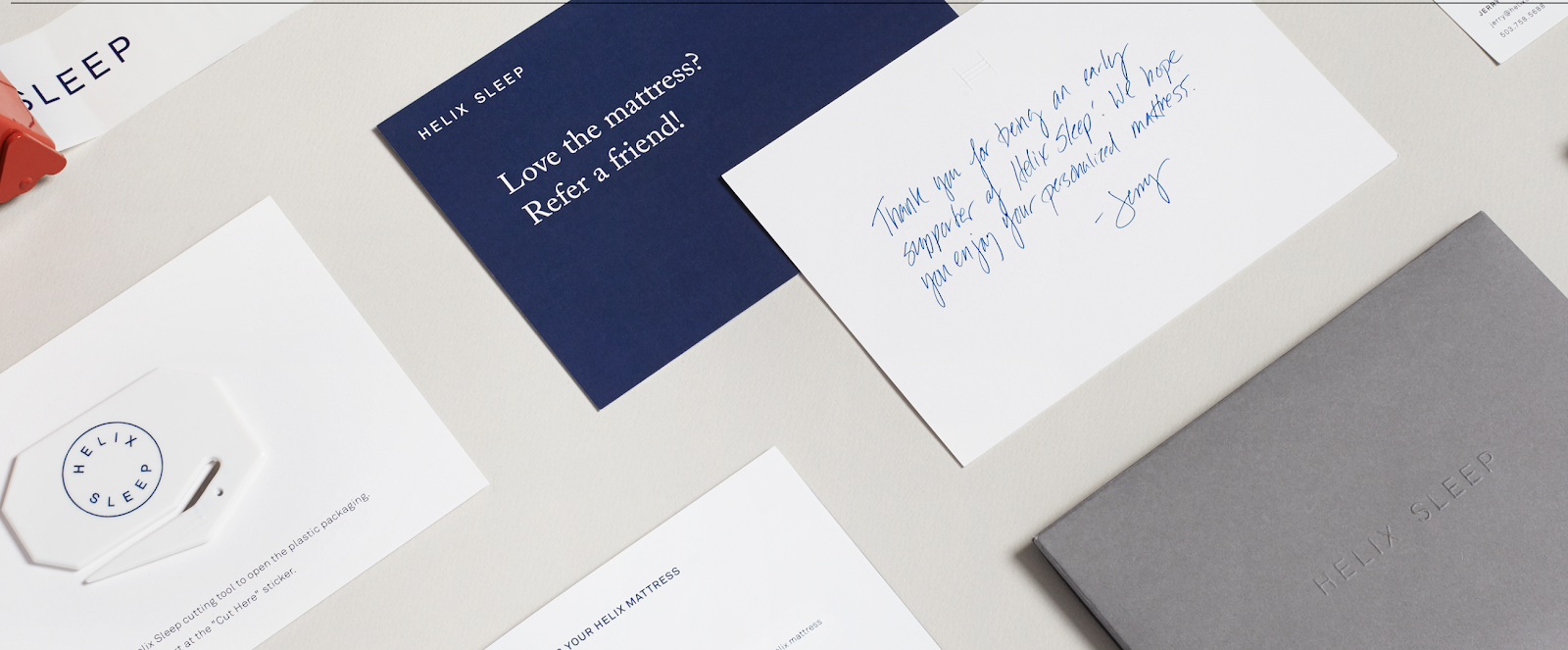
These Helix Sleep referral cards look both sleek and helpful. Stefanie Brückler uses contrasting colors and clean font to ensure the cards can do their jobs without seeming unoriginal.
5. Pixite by Peter Komierowski

On his page, Komierowski explains, “I was asked by Pixite to create a set of nature-inspired shapes for their app Fragment.” Ultimately, his design is aesthetically-pleasing and fun, with simple, cohesive lines that form the shape of a fox.

One of the most iconic minimalist designs, Mastercard’s financial design is undoubtedly a staple of the brand. The simple red and orange circles signify connectedness and seamlessness. The circles are recognizable enough that Mastercard can use the icon in place of any brand text, and still convey its ownership.
Minimalist Web Design
1. Huge Inc.

Huge Inc.’s homepage is clean and polished, with minimal text to ensure a new viewer doesn’t feel overwhelmed by the page. Additionally, the small details — like the black that appears in the logo as well as the second half of realtor.com, and the small jagged line in the bottom right corner — signify a sense of cohesiveness.
2. Bedow
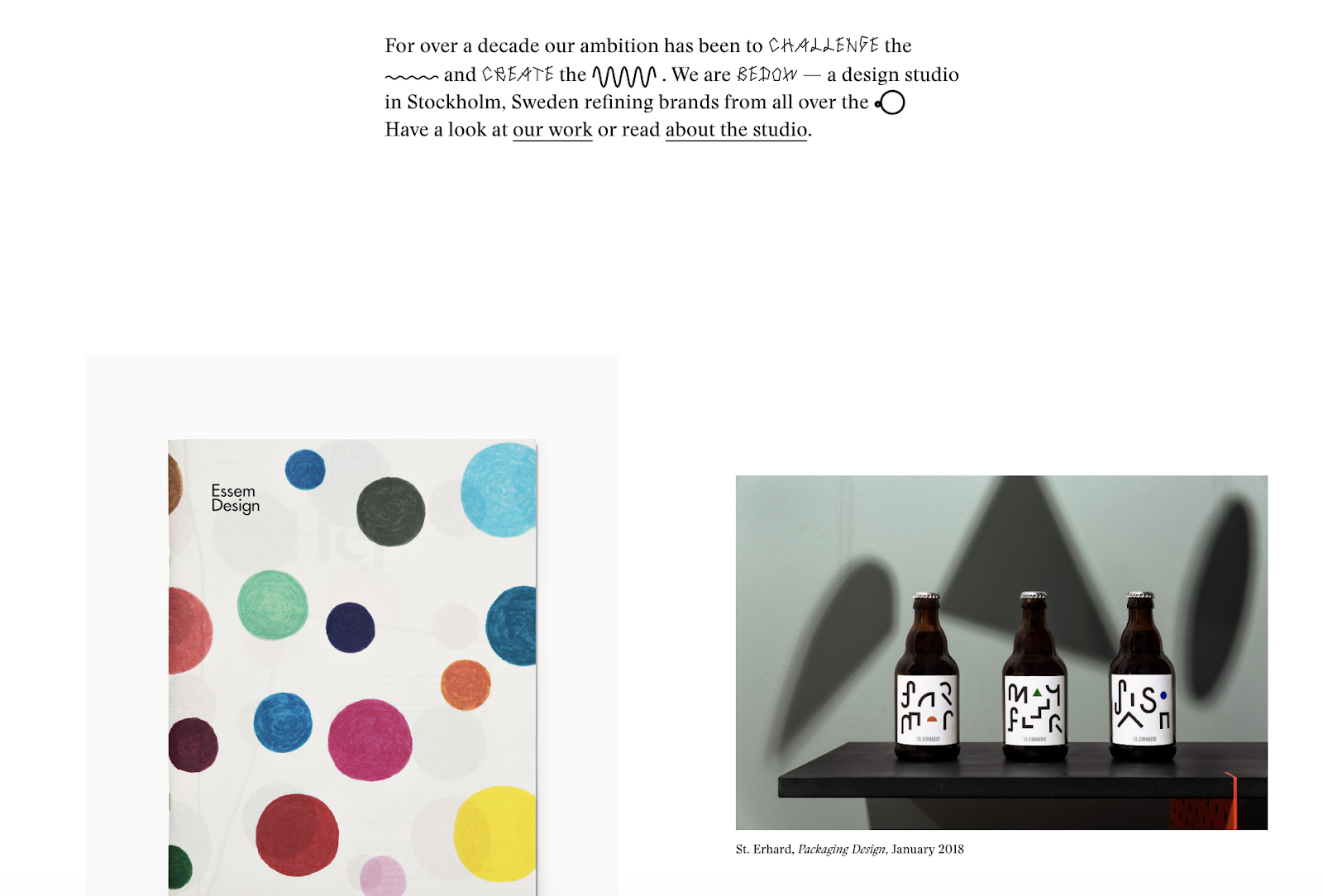
Bedow, a Stockholm-based design studio, knows its viewers priorities, and thus doesn’t waste time with a busy homepage — instead, they include a short blurb about their studio, and then leave a section of white space before displaying some of their designs.
One of the more simple designs in the list, Reducing the Obvious’s design is compelling and mysterious, with little information displayed on the homepage. However, the page is still helpful and inviting, with a small “Use buttons to navigate!” command in the bottom left.
Jorgeriera Flores’ page is fun and inviting, with a blinking, life-like design and a clean navigation bar. Additionally, the creature’s nose serves as a “J”, demonstrating Flores’ attention-to-detail.
5. Design Co.

Oftentimes, minimalist design enables a brand to convey its purpose more powerfully than it could with a busier page. Design Co., for instance, is able to capture the viewer’s attention with its compelling message — spreading the creative spirit across 7,107 islands — by ensuring its background, while colorful, is devoid of distracting add-ons. Additionally, the small white logo serves to reinforce their main point.
6. Evoulve

It’s impossible to see a page like this and not find yourself curious to explore further. Evoulve does a good job expressing a sense of innovation and sleekness — with its world-icon and bright, futuristic design — without needing any additional text or imagery to compel the user to explore further.
7. Tim Brack

Brack’s use of white space and overlapping elements serves to create a clean and inviting homepage. Additionally, the photo of himself with a pig highlights a sense of playfulness and humor, and you’re able to obtain most relevant information — including Tim’s title as art director — instantly, without any distraction.
8. Tinker
Minimalism is often accomplished best when a brand knows exactly why a visitor might come across their website. In this case, Tinker understands its viewers are looking to browse and potentially purchase a watch, so it aims its design-elements to drive attention toward that single purpose.
The close-up of the shoe offers a new viewpoint, making ETQ’s homepage intriguing and original even in its simplicity. Additionally, the small white font looks simple and clean against the photo background.
Minimalist Logo Design
1. UBAR

The bold block text and black-and-white contrast lends itself well to Simon McWhinnie’s UBAR design. The simplicity allows the text to dominate the logo and evokes a sense of power and strength.

If you have one product you sell well, why complicate it? This logo, designed by Michael Spitz, communicates the brand’s product — bedding — without text. Additionally, it’s clean and calming, particularly with the use of light blue and white, which ensures a sense of calmness for the viewer.
3. Varnom Ross by Bibliothèque
Varnom Ross’s logo is bold, powerful, and striking. Additionally, the replicated box shape around the Varnom, used again as the “o” in Ross, signifies a sense of cohesiveness.
4. The Row Apartment Homes by PurdyLogo

This logo looks retro and funky, but it uses plenty of white space, as well as white lines within the letters, to maintain simplicity. Additionally, the colors work well together, ensuring “Row” stands out most prominently in the logo.
Minimalist Poster Design
1. Miselu
Miselu’s graphic design undoubtedly supports the notion that less is more. On their page, Miselu explains the design as “simultaneously edgy, approachable, and clearly expresses our core business: music”. Ultimately, these posters, along with their other designs, reinforce their core products while remaining simple enough to be adaptable as their brand changes over time.

Ilmars Rumpeters created multiple simple covers for Jauna Gaita magazine, and this one in particular stands out as attention-grabbing and bold, with its vibrant colors and intriguing font. With minimalism, you want your focus to be on one or two elements — in this case, Rumpeters succeeded in drawing primary attention to the apple, and then to the magazine title itself.
3. Paul Rand

Paul Rand, a famous logo creator and graphic designer, created this poster to advertise the International Design Conference in Aspen, 1966. Ultimately, the piece is intriguing and complex even in its minimalism, causing viewers to likely pause and wonder over the significance of the black splatters or egg-shape in the background.

The 9 Best Marketing Articles of All Time, According to HubSpot’s Marketing Team
One of the best ways to tell if a show or movie is worthwhile is if people never get tired of re-watching it. Whether it’s the hit television show Friends or the classic movie Forrest Gump, most people never turn down an opportunity to watch Ross pivot his couch or witness Forrest develop into a ping pong celebrity — even if they’ve already watched it 27 times.
Content marketing is in its infancy compared to television and film, but some of the best writers and publications in our industry have already crafted articles that we revere as the Friends or Forrest Gump of the space.
To pinpoint some of these articles and share them with you, I asked nine marketers at HubSpot what their favorite marketing article is and why. Check out the ones they read on repeat.
1. What Creativity Looks Like in Marketing Today | Harvard Business Review
Recommended By: Caroline Forsey, Staff Writer at HubSpot, Marketing Blog
Why She Loves It:
“It’s tricky to choose a single marketing article as my favorite, but the one that has had a lasting impression on me is HBR’s ‘What Creativity in Marketing Looks Like Today’. Mark Bonchek and Cara France do a great job distilling the wisdom of senior marketing executives from dozens of top brands, varying from Old Navy to OpenTable. One of my favorite lines is this one — ‘People are the new channel. The way to amplify impact is by inspiring creativity in others’. Ultimately, I’m a fan of anything HBR, and this piece in particular is a good one to check out if you want to learn more about what top brands are doing to stand out in the industry today.”
2. SEO Is Back. Thank God. | New York Magazine – Intelligencer
Recommended By: Braden Becker, Senior Staff Writer at HubSpot, Historical Optimization
Why He Loves It:
“This article took a brilliant position on search engine optimization (SEO) and how search engines have stood the test of time as new channels break into a marketer’s arsenal. Lots of articles assert the importance of SEO, but few of them consider the implications sites like Google have on how the public finds, consumes, and expects to see information online. The piece boldly defends the positive role ranking algorithms play in an industry that is often saturated with manipulation and clickbait. It’s something both consumers and marketers can learn from, and I gained a ton of respect for New York Magazine after reading this.”
3. ‘We want these platforms to be healthy’: Why top marketers won’t quit Facebook after 2018 scandals | Digiday
Recommended By: Amanda Zantal-Wiener, Senior Staff Writer at HubSpot, News & Trends
Why She Loves It:
“As someone who lives a ‘double life’ as a marketer and a tech writer, I found this article both intriguing and valuable. It explores Facebook’s rocky year from an interesting lens: one that’s of interest to those who live in the trenches of the tech industry and those who cover it alike. Throughout 2018, I studied and reported on the consumer sentiment toward and use of Facebook, despite these events. But it’s important to ask an audience of marketers and growth companies the same questions. This article does a great job of that.”
4. How to Become a Customer Acquisition Expert | Brian Balfour
Recommended By: Christina Perricone, Content Marketing Strategist at HubSpot
Why She Loves It:
“Marketing has expanded into a field with countless designations — simply calling yourself a marketer is no longer a sufficient response to the question, ‘What do you do?’ Balfour explains how to build yourself into an indispensable, T-shaped marketer by layering your skills as you progress. This evergreen piece teaches us that marketers are experimenters, risk takers, and problem solvers, proving that nearly anyone has the propensity to be successful in this field if they have the patience to build and stick to a plan. It’s a gem for any marketer who is struggling to determine their path.”
5. An Incomplete Guide to Inclusive Language for Startups and Tech | Buffer
Recommended By: Karla Cook, Editor & Team Manager at HubSpot, Marketing Blog
Why She Loves It:
“This is article is a must-read for anyone who creates content. It’s a reminder that the seemingly inconsequential choices we make about language on a daily basis actually hold a lot of power. Creating content with inclusive language in mind can seem tricky or even silly to some (especially when the word choices seem minor), but this article poses the question: why not just try?”
6. Why Marketing Analytics Hasn’t Lived Up to Its Promise | Harvard Business Review
Recommended By: Josh Chang, Senior Marketing Manager at HubSpot, Analytics & Paid Acquisition
Why He Loves It:
“I love this article because while everyone knows marketing analytics is important, HBR illustrates the many challenges of doing marketing analytics right so that it has a significant impact on the overall business. Many companies suffer from having too much data and not knowing what to do with it. But if you have the right data, systems, processes, and people in place, you can better ensure that marketing analytics isn’t wasted and has a tangible and positive impact.”
7. 4 Lessons We’ve Learned, Sometimes the Hard Way, About Inclusive Marketing | Think With Google
Recommended By: Sammi Kim, Associate Marketing Manager at HubSpot, Leadership Rotational Program
Why She Loves It:
“Written by the SVP of Global Marketing at Google, this article speaks to the importance of inclusive marketing. I was impressed by how the first lesson was that the diversity among marketers at Google directly impacted their marketing campaigns. And based on the article’s third lesson on the importance of excluding stereotypes from marketing campaigns, I strongly believe that having diverse marketing teams will help run more nuanced, empathetic campaigns.”
8. Reflecting on My Failure to Build a Billion-Dollar Company | Medium – Startups
Recommended By: Nate Medina, Associate Marketing Manager at HubSpot, Leadership Rotational Program
Why He Loves It:
“I love this article because it tells the intimate story of a founder who had ambitious dreams, but ultimately, didn’t pan out the way he expected. In the pursuit of trying to create a billion dollar company, however, he learned that success isn’t just about money. It’s about creating something you’re truly interested in rather than something that you chase revenue with.”
9. The Strange Thing That Happens In Your Brain When You Hear a Good Story — And How to Use It to Your Advantage | HubSpot Marketing Blog
Recommended By: Clifford Chi, Junior Staff Writer at HubSpot, Marketing Blog
Why I Love It:
Don’t worry, this isn’t a shameless plug of one of my blog posts or even of HubSpot. Last year, Joe Lazauskas and Shane Snow, marketing executives at Contently, wrote a book called The Storytelling Edge and they promoted it by releasing one of the book’s chapters on our marketing blog.
Anyways, this is my favorite marketing article because it uses neuroscience to prove that storytelling is much more than a trendy buzzword. In their excerpt, Joe and Shane weave in compelling psychological and neurological evidence into a narrative about how storytelling is the best way to capture people’s attention, bake information into their brains, and forge close, personal bonds. And in an industry where 5% of branded content attracts 95% of attention, their article makes you realize that content marketers can’t just write listicles and ultimate guides anymore. We must tell gripping stories.

How to Get Leads With Facebook Messenger Ads
Want to generate more leads from your Facebook marketing? Have you tried Messenger ads? In this article, you’ll discover how to create Messenger ad campaigns that will generate new leads for your business. A Note on Using Messenger Ad Destinations Before diving into Messenger ads, it’s worth noting that this article isn’t about the Messenger […]
The post How to Get Leads With Facebook Messenger Ads appeared first on Social Media Marketing | Social Media Examiner.
from Social Media Marketing | Social Media Examiner http://bit.ly/2SJdUuI
via socialmediaexaminer