
Welcome to My Blog
51 YouTube Stats Every Video Marketer Should Know in 2019
In 2005, when I was 10 years old, a kid from my neighborhood was bear hugging a fallen tree trunk that bridged across our creek and yelled, “I better not see this on YouTube!”
That was the first time I’d ever heard of YouTube. And it definitely wasn’t the last time I’d hear about it. YouTube has experienced explosive growth since it was founded in an office garage in 2005. Just one year after its inception, it was attracting more than 65,000 new video uploads and 100 million video views per day. A couple of months later, the high-growth startup was acquired for over $1 billion by a titan in the tech industry — Google.
Since then, YouTube has opened up avenues for brands to advertise on their videos and, in turn, let content creators earn a living just by making videos. This potential for monetization has incentivized content creators to craft the most engaging videos possible and host them on the platform, which has enabled YouTube to become the second most trafficked website and the second largest search engine in the world.
As a video marketer, you already know how crucial building a YouTube presence is for boosting your videos’ and brand’s visibility. But if you just started your brand’s YouTube channel or need some help convincing your boss to double down on your YouTube efforts, we’ve got you covered.
Check out these 51 stats about the platform’s mobile usage, its demographics, subscriber growth, general usage, and history that can help you build your YouTube following or persuade your boss to focus more of your efforts on the video platform.
51 YouTube Stats Every Video Marketer Should Know in 2019
How many videos are on YouTube?
1. Since 400 hours of video are uploaded to YouTube every minute (and a lot of those videos violate YouTube’s guidelines and subsequently get taken down) it’s impossible to determine the exact number of videos hosted on the platform. However, over one billion hours of videos are watched on YouTube every day.
What is the most-watched video on YouTube?
2. “Despacito” by Luis Fonsi featuring Daddy Yankee is the most-watched video on YouTube. It has received over 5.96 billion views in a little over two years.
How many people use YouTube?
3. YouTube has over 1.9 billion monthly active logged-in users.
YouTube Mobile Stats
4. On mobile devices alone, YouTube reaches more adults aged 18-49 during prime time than any cable network does in an average week.
5. 75% of adults report watching YouTube on their mobile devices.
6. More than 70% of YouTube watch time is generated from mobile devices.
7. YouTube mobile ads are 84% more likely to hold attention than TV ads.
8. Over 50,000 years of product review videos have been watched on mobile devices over the past two years.
9. In 2018, YouTube was the most popular IOS app.
YouTube Demographics Stats
10. Over 90% of 18-44 year old American internet users watch videos on YouTube.
11. Over half of American internet users who are aged 75 and over watch videos on YouTube.
12. Over 50% of YouTube’s audience is female.
13. 59% of Generation Z (16-24-year-olds) have increased their YouTube usage since last year.
14. 46% of millennials (25-34-year-olds) have increased their YouTube usage since last year.
15. 70% of millennial YouTube users watched a YouTube video to learn how to do something new or learn about something they’re interested in.
16. 15.8% of YouTube users are from the United States.
17. YouTube attracts the most visitors from the United States, India, Japan, Russia, and China.
18. YouTube is available in more than 91 countries.
19. YouTube is available in 80 different languages.
YouTube Subscriber Growth Stats
20. The number of channels with more than 1 million subscribers increased by more than 75% since 2017.
21. The number of YouTubers who earn six figures per year has increased by more than 40% since 2017.
22. The number of YouTubers who earn five figures per year has increased by more than 50% since 2017.
23. The top ten YouTubers earned 42% more revenue in 2018 compared to 2017.
24. PewDiePie is the most popular YouTube channel, with 85 million subscribers.
25. The most popular branded YouTube channel is LEGO, which has over 7.1 million subscribers and has received over 8.7 billion views.
YouTube Usage Stats
26. YouTube is the world’s second largest search engine.
27. YouTube is the second most trafficked website behind Google.
28. YouTube users collectively watch over 46,000 years of content each year.
29. 68% of YouTube users watched a video to help them make a purchase decision.
30. 80% of YouTube users who watched a video to help them make a purchase decision said they watched the video at the beginning of the shopping process.
31. 95% of the most popular YouTube videos are music videos.
32. 47% of on-demand music streaming was listened to on YouTube.
33. There are twice as many small- and medium-sized businesses advertising on YouTube since 2016.
34. Four times as many people prefer watching video on YouTube rather than on social media platforms.
35. YouTube users watch more than 180 million hours of content on TV screens every day.
36. YouTube users are three times more likely to prefer watching a YouTube tutorial video compared to reading the product’s instructions.
37. “Relaxing” and “feeling entertained” are the top two reasons viewers watch YouTube.
38. Relaxation videos like soap cutting and slime playing experienced a 70% increase in watch time in 2018.
39. Comedy, music, entertainment/pop culture, and “how to” are the four most popular content categories on YouTube.
YouTube History Stats
40. “YouTube.com” was activated on February 14, 2005.
41. “Me at the zoo” was the first video uploaded to YouTube on April 25, 2005.
42. Google purchased YouTube for $1.65 billion on October 9, 2006.
43. YouTube launched InVideo ads in December 2007.
44. YouTube streamed the United States presidential debates for the first time in 2012.
45. The youngest YouTuber is Ryan ToysReview, who is a 7-year old boy who makes $11 million a year and has 18.2 million subscribers.
46. “Gangnam Style”’s surge in popularity broke the video’s view counter.
47. YouTube provides a free space in Los Angeles where YouTubers with over 10,000 subscribers can learn, connect, and create videos with each other.
48. The first YouTube video that reached one million views was a 2005 Nike ad that featured football star, Ronaldinho.
49. The YouTube video that received the most views in 24 hours is Ariana Grande’s “Thank U, Next” music video, which attracted 55.4 million views in a single day.
50. The most liked video on YouTube is the music video for the song “Despacito” by Luis Fonsi featuring Daddy Yankee. It has received over 31.96 million likes and boasts an 89.25% like percentage.
51. YouTube’s own YouTube Rewind 2018 video is the most disliked video on the platform. It has received over 16 million dislikes and owns an 86.53% dislike percentage.

How to Run a Structured Interview (Questions Included)
Imagine this — a hiring manager is choosing between two candidates of similar expertise, so she invites them both into the office for an in-person interview. However, she’s given power to choose which questions she asks each one.
She notices the first candidate went to school at her alma mater, so she decides to gear her initial questions towards that commonality to build rapport. On the other hand, she will begin the other interview with a basic, “Tell me about yourself” question.
Seem fair? Probably not.
If an interview is unstructured, it doesn’t mean the hiring manager didn’t prepare questions ahead of time. However, an unstructured interview allows employees to ask different questions to each candidate — which could become an opportunity for employees to judge candidates based on who they get along well with, as opposed to whether the candidate is qualified for the role.
Structured interviews help you minimize biases or personality preferences that could otherwise affect a hiring manager’s decision to move forward with a candidate.
A structured interview is a process established by HR in which all candidates are asked the same predetermined questions in the same order. Your team will then rate each candidate using a standardized scoring system.
Structured interviews have demonstrated a high degree of reliability, validity, and legal defensibility compared to unstructured interviews. Additionally, a structured interview makes it easier to provide interview feedback to a candidate.
To implement a structured or semi-structured interview at your company, keep reading.

Structured Interview Questions
To create structured interview questions, you must first craft a detailed job description with all the necessary components of the role, as well as any “nice-to-haves”. Once you have a job description, use it as a guide to write a list of hard and soft skills you’re looking for in a candidate.
Next, you’ll want to create a list of role-specific questions. For instance, you might consider asking:
- Give me an example of a time you had to [important job skill].
- What do you think will be your biggest challenge with this role?
- What most excites you about this role?
- Tell me how you would handle [specific job challenge].
These questions will vary depending upon the role. You’ll also want to gauge the candidate’s interest in your company in general, as well as her work ethic.
Here are a few general structured interview questions:
- Can you tell me a little about yourself?
- What do you know about the company?
- What are your greatest professional strengths? Alternatively, what are your weaknesses?
- What is your greatest professional achievement?
- Where do you see yourself in five years?
Lastly, there are structured interview questions you might want to ask to get a better sense for someone’s leadership skills, willingness to learn, or ability to handle herself under pressure.
Take a look at the following structured interview questions, divided by category, for further inspiration.
To rate leadership ability
- You indicated on your resume that leadership is one of your strengths. Describe an experience in which you used your leadership abilities.
- Tell me about a time when you delegated a project to others effectively.
- 3. Tell me about a time you took the lead in a team project. What was the project outcome?
- 4. Can you recall a time where you had to give negative feedback to a colleague. How did you express this feedback?
To rate dependability
- If your manager asked you to complete a task you thought impossible at first, what would you do?
- Tell me about a time when you had multiple important projects to finish and how you prioritize them.
To rate willingness to learn
- Tell me about a time you failed at a project. How did you try to avoid failure? What did that experience teach you?
- Tell me about a time you had to learn something you weren’t familiar with very quickly.
- Which other companies in [your industry] do you admire? Why?
Semi-structured Interview
A structured interview has plenty of benefits — but, of course, it also has its drawbacks.
A structured interview leaves little room for building rapport. When a candidate answers a question, you’re simply instructed to move to the next question, even if the following question has little relevance to the candidate’s unique response.
If you feel a structured interview is too rigid for your workplace, but still want to use general guidelines to ensure fairness in your recruitment process, you might consider a semi-structured interview as an alternative.
A semi-structured interview still requires your HR team to create a list of open-ended questions, and subsequently train interviewers to ensure they ask role-specific questions and use a standardized rating system to determine a candidate’s fit.
However, a semi-structured interview also provides more opportunity for the interviewer to tailor the conversation naturally, either by excluding questions they feel are redundant, or asking follow-up questions when they feel it’s necessary.
Ultimately, a semi-structured interview requires your team to follow a predetermined set of questions, but allows the interview itself to feel more conversational by nature. The interviewer has the power to change the wording of the question, or the order of the questions, which could enable the interviewer to dive deeper or ask follow-up questions depending on the candidate’s responses.

A 7-Step Process to Make Marketing Videos That Work
Do you need to work with experts or employees to create marketing videos? Looking for a proven process that results in great content? In this article, you’ll learn how to guide experts to deliver talking points you can use in your marketing videos. Explain the Process to Your Interview Subject While you may think what […]
The post A 7-Step Process to Make Marketing Videos That Work appeared first on Social Media Marketing | Social Media Examiner.
from Social Media Marketing | Social Media Examiner http://bit.ly/2UWBalE
via socialmediaexaminer
Everything You Need to Know About the Principles and Types of Design
Furniture. Clothing. Software. Posters. Maps. Experience. Buildings. Websites.
These are all things that can be designed. Heck, design has so many different meanings and application you wonder if the term can be defined at all.
Answer: It can. Design has a variety of definitions, but in its simplest form, it can be defined as both a verb and a noun: It can refer to the act of creating a composition or or to the composition itself.
Design is about creating feasible, functional solutions to a variety of problems, and always happens with a particular goal in mind. — Amanda Chong, HubSpot designer
As ambiguous as it seems, design can be defined … particularly when it comes to how it applies to marketing. That’s why we compiled this guide — to help you better understand design and it’s principles and types. Bookmark this guide for future reference, and use the chapter links to jump ahead to any section that interests you.
Design has many different connotations depending on its application. It’s is an incredibly fluid industry. In short, design can be whatever you want it to be — as long as you don’t forget some of its predefined tenets. These are known as the principles of design.
There are many additional terms related to these principles: movement rhythm, symmetry, and white space. These design concepts fall under and/or are based on the above tenets and therefore aren’t considered standalone principles.
Let’s break down each principle of design and their associated design concepts.
Balance
Balance is how objects in a composition are arranged and what visual weight they carry. Balance can be achieved using the following methods.
- Symmetry (Formal balance): When objects are arranged evenly around a vertical or horizontal axis. Objects are arranged around a central point (or a radius) is known as radial symmetry.
- Asymmetry (Informal balance): When objects are arranged unevenly around a vertical or horizontal axis. Typically, there’s one dominant side or element in an asymmetrical composition.
Contrast
Contrast refers to how elements in a composition differ. This principle is often paired with the principle of similarity, which is how composition elements resemble each other. Contrast can be established using design elements like space, form, size, color, and texture.
White space is also an important element of contrast. Often called negative space, which space refers to the empty parts of a composition. White space can help organize the elements in a composition and emphasize the most important ones. It also creates an aura of luxury and minimalism.
Dominance
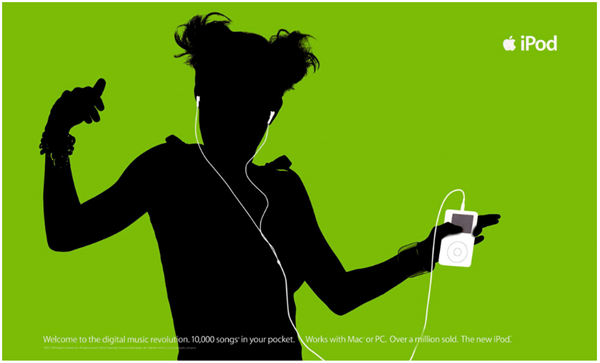
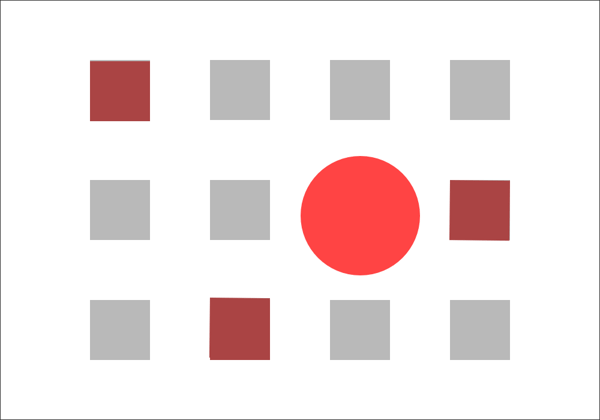
Dominance refers to the varying degrees of emphasis within a composition. Emphasis is typically achieved using elements like size, font choice, and certain color combinations (that may create contrast). There are three main stages of dominance in design.
- Dominant — The object of primary emphasis. It’s given the most visual weight and is typically found in the foreground of a composition.
- Sub-dominant — The object(s) of secondary emphasis typically found in the middle ground.
- Subordinate — The object(s) of tertiary emphasis typically found in the background.
Fun fact: The visual center is where we naturally focus on a piece of visual design. It’s slightly above and to the right of the actual center of a composition and is often referred to as “museum height”.
Movement
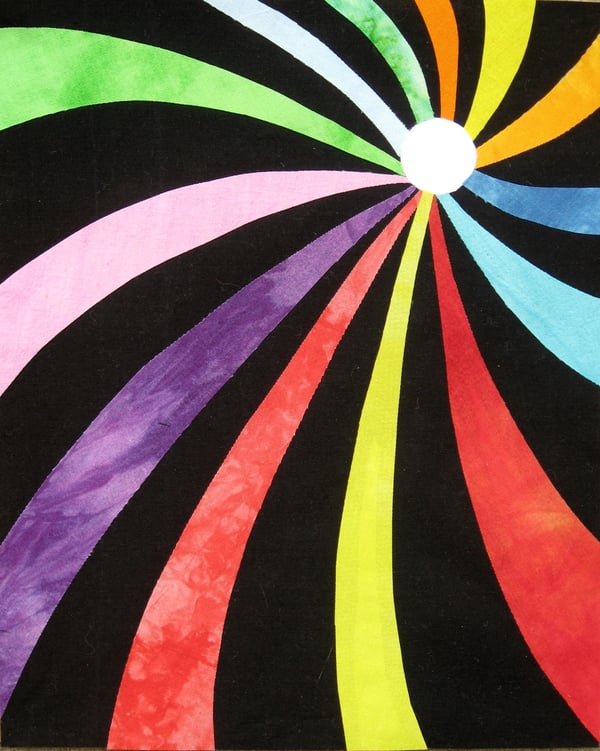
Movement is the visual path a viewer follows when viewing a composition. With proper movement, a composition can create a narrative and provide a high-quality user experience (UX). Movement can be established using design elements like lines, shapes, and colors.
Proportion or Scale
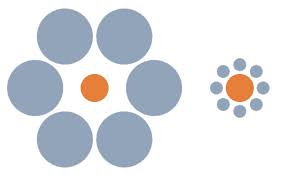
Proportion refers to the visual weight and size of a composition’s elements and how they relate to each other. This principle is also known as scale.
The relative size of one object to another can help create a focal point or movement along the composition. Also, varying sizes of objects can help communicate the importance and dominance of one element over another.
Unity
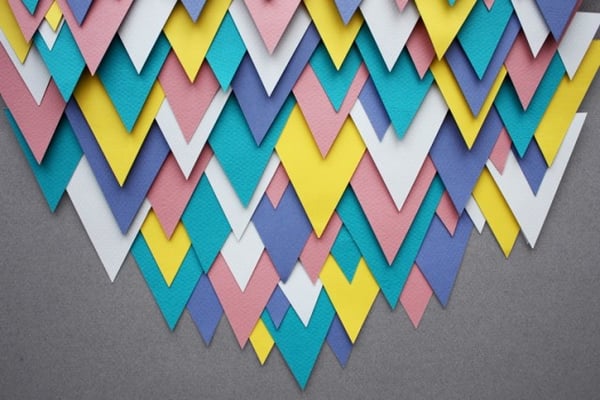
Visual unity has been said to be the main goal of design, although that opinion differs among designers and certain design communities. Unity, or harmony, refers to the relationship between the individual parts and the whole of a composition. When a composition’s elements are in agreement, there exists unity; when the elements aren’t in agreement, a composition is said to have variety.
The following design principles are associated with unity.
- Alignment — When objects are lined up on a certain axis or cadence
- Continuation — When a line or pattern extends
- Perspective — When there’s a distance between elements
- Proximity — When objects are placed close together
- Repetition — When objects are copied multiple times
- Rhythm — When objects recur with a slight change or interruption
While the principles of design are considered universal, they look a little different as applied to different design communities and practices. Below, we’ve reviewed the top seven types of design in marketing.
Types of Design in Marketing
- Graphic Design
- Branding and Logo Design
- UI and UX Design
- Web (Front-End) Design
- Multimedia Design
- Environmental Design
Let’s break down each type of design and how they apply to the marketing industry.
Graphic Design
Graphic design is probably what you picture when you think of design in the marketing field: social media images, email marketing headers, infographics, postcards, and much more.
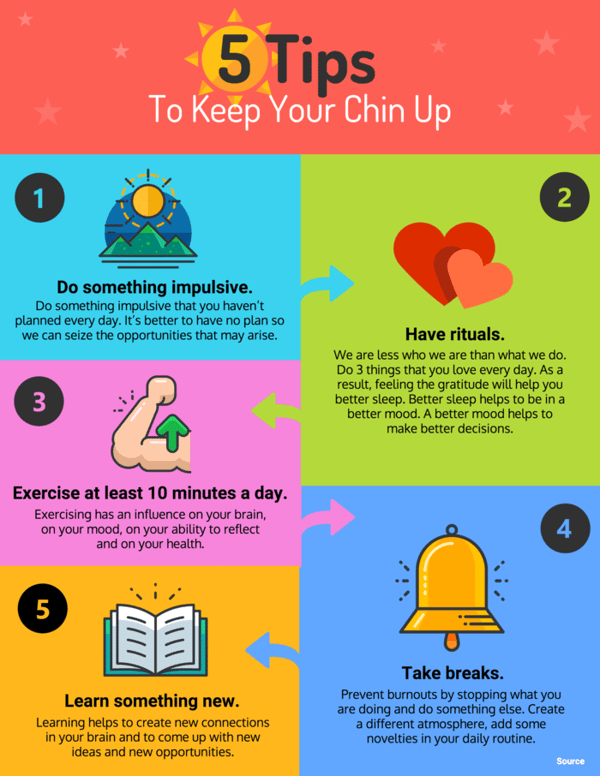
Since visual content is a highly valuable and engaging marketing medium, companies rely on graphic designers to create assets that represent their brand and communicate with their audience.
Need templates to help you create content for any online channel? Download our free library of over 195 visual marketing design templates.
Branding and Logo Design
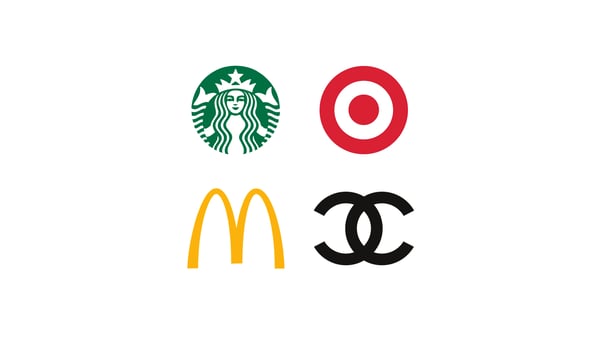
Branding and logo design is a subset of graphic design. It includes the visual elements of a brand and brand identity, such as logos, typography, color palettes, style guides, and more.
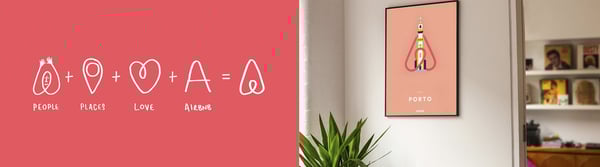
Branding and logo designers create assets that represent a brand, illustrate the brand’s mission, vision, and values, and promote brand awareness for the company.
Learn the fundamental concepts of graphic design and how to use them to create high-quality graphics by taking the HubSpot Academy Graphic Design Essentials course.
UI and UX Design
User interface (UI) and user experience (UX) design focus on improving how website, app, and software users interact with and experience a product.
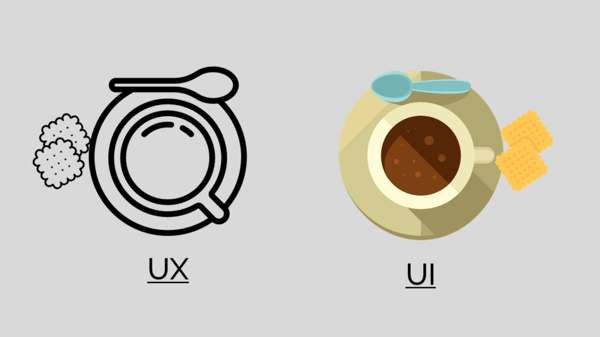
While some roles combine UI and UX design, the two practices are quite different. UI designers are responsible for creating a visually-pleasing, on-brand experience for users through web page design, app design, and theme design on sites like WordPress and Shopify.
UX designers, on the other hand, are responsible for making sure a product actually solves a problem through usability testing, user flows, and digital prototypes.
Web (Front-End) Design
Web design applies to the front-end (public-facing) side of a website. Front-end designers are like UI designers equipped with coding knowledge — they design static UI mockups for a website and then translate them into HTML, CSS, and JavaScript code. (But don’t confuse this practice with front-end web development.)
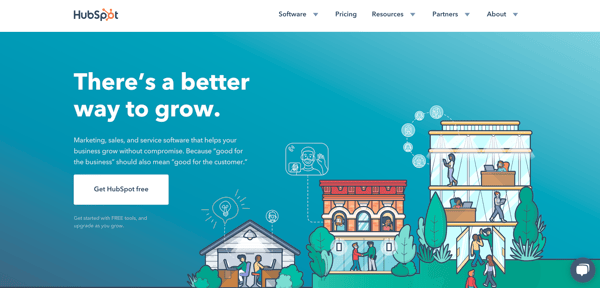
Web designers create assets that produce an attractive and fully-functional website, such as splash pages, navigational elements, sitemaps and pages, scrolling and clicking features, and content management systems.
Multimedia Design
Multimedia (or motion graphic) design is designing graphics for a variety of media, particularly video and animation. Because of its time and cost requirements, this type of design has historically been reserved for those in TV and film. But with advancements in technology and a recent rise in video content marketing, motion graphic design has become more accessible than ever.
Multimedia designers are responsible for creating moveable assets that communicate and delight with an audience, like moveable logos, GIFs, animated videos, tutorial videos, and animated websites.
Environmental Design
Environmental design, also known as environmental graphic design, is intended to improve a person’s experience by furthering the purpose of an environment, whether that’s to be memorable, exciting, informative, motivational, or easily navigable. The practice merges interior design, architecture, graphic design, landscape design, and industrial design.

Environmental designers create assets that connect people to their environment, such as, murals, office design and branding, store interiors, event space design, and signage and interactive advertising.
Marketing Design Tips
We’ve covered the basics of the most common types of design in marketing: graphic, branding, UI and UX, and web, multimedia, and environmental. Now, we’re going to dive into some tips for the top four.
Note: Keep an eye out for the principles of design we discussed above … they’ll make an appearance in this section, too.
Graphic Design Tips
1. Start with the purpose
What type of content are you designing … a social media ad, email template header, or ebook? These are three different pieces of content with three wildly different purposes and goals. Before you create your piece of graphic design, jot down the purpose of the content. This can help keep your design goals aligned with your content goals as you create your piece of art.
2. Apply your style guide
When deciding on what design elements to include, consider your company’s branding style guide. (We’ll get into how and why to create a style guide next.) This guide will immediately show you what colors, fonts, and other design elements to use when designing your content. From there, you can make small tweaks depending on what type of content you’re creating.
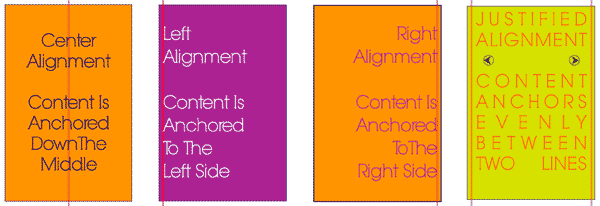
3. Create order with lines and alignment
Lines and alignment in your graphic design can create movement and order. Align the text in your graphic to guide your viewer as they read, or incorporate horizontal lines to section off your text and imagery. Similar to how you format long blog posts in small paragraphs, lines and alignment make pieces of graphic design easier to digest.
4. Pepper in some icons and illustrations
Colors, text, and images make for gorgeous graphics, but don’t limit your elements to those three. Icons and illustrations can also spice up an otherwise text or image-heavy piece of content. Icons might also be able to illustrate concepts that photos can’t, and they serve as creative bullet points for long lists.
Spruce up your graphic design today with our 135 free icons to use in your marketing graphics.
Branding and Logo Design Tips
1. Design the aesthetic of your personality
How do you visually present the personality of your brand and company? If your brand was a person, what would he or she be like? Your branding design should reflect the answers to these questions.
Before starting your design, make a list of adjectives that describe your brand, company, and culture. This will help you choose color combinations, images, fonts, and other design elements and bring out the key points of your personality. Also, using your brand adjectives as guidance, build a collection of images, graphics, color samples, and similar logos that represent the “mood” of your brand — a.k.a. a mood board.
2. Get a little funky
Your logo and brand assets don’t have to be a straightforward representation of what your company does. Heck, HubSpot’s logo has really nothing to do with marketing, sales, or service software. Yet, it represents our company perfectly while being memorable and distinctive.
 As you design your brand’s visual identity, don’t be afraid to get a little funky and incorporate some unique design aspects. Doing so may help your brand stand out from the rest.
3. Keep it simple
Your branding should communicate your aesthetic in a less than a second. Impressions are made in the blink of an eye, and your logo and brand identity is no exception. Consumers will decide if they like, dislike, are impressed by, or want nothing to do with your brand in a split second, so keep your design simple and to the point.
4. Prioritize consistency
This is perhaps the most important tip when it comes to branding and logo design: Be consistent. You can spend hundreds of hours and thousands of dollars developing a gorgeous visual identity for your brand — but if it’s not reflected on every piece of print and digital content, all your resources have gone to waste.
Consistency applies on a couple different axes — horizontally along your content elements, i.e. in your fonts, spacing, and color combinations, and vertically across your content outlets, i.e. between your social media, email, website, and print materials. Create a style guide to encourage everyone to adhere to your new branding. Here’s HubSpot’s Style Guide as an example.
Learn the key elements you need to create a strong brand by downloading The Essential Guide to Branding Your Company here.
UI and UX Design Tips
Note: UI and UX design are considered two different types of design, but because they’re so similar, we’ve collected a few tips that can apply to both practices.
1. Adapt a user’s perspective
Whether you’re designing the interface or the experience of an app, website, or online tool, always adapt the perspective of a user. Why would someone use your site? What would they hope to achieve? What might their challenges be? It’s important to research your user base and better understand how they’d approach or your site or application. Consider doing first-hand user research through a focus group or by talking to current customers.

2. Anticipate mistakes
Regardless of much you talk to users, there will always be a handful (or more) of people who’ll stumble through your website or application. Anticipate these mistakes by incorporating fool-proof mechanisms, such as not letting someone submit a web form if they’ve skipped a box or having a user confirm they’d like to exit in case they accidentally clicked off the screen. These mechanisms can help prevent mistakes before they happen and let your users know you’ve got their backs.
3. Don’t neglect standards and trends
Designers love paving a new path and “reinventing the wheel” with their designs. While this can create something unique and memorable for the user, it may also confuse them if you’ve gone too far. Consider sticking with known design patterns, standards, and trends, such as a navigation bar the top right corner or contact information along the bottom of the page. This can help your users already subconsciously know how to navigate your site without explanation.
4. Be mobile-friendly friendly
Responsive design is a non-negotiable for websites and applications, but is your design mobile-friendly friendly? Consider the spacing of your buttons, the size of the text, and any other navigational or organizational elements that might be inconvenient in a responsive design. Also, look at how your site may change when viewed on a desktop, tablet, and various types of smartphones.
Web (Front-End) Design Tips
1. Consider the fold
On a website, the fold is considered the bottom of the screen — where your page would “fold” if it were a physical item, like a newspaper. The most important information on a websites should always be placed “above the fold” (like in newspapers) so a visitor doesn’t have to scroll down to see it.
2. Leverage white space to draw focus
In the case of web design, less is often more. With lots of information to share with visitors, it can be tempting to clutter it all above the fold so folks see it right away. But less cluttered websites are easier to read, navigate, and digest. Keep your visitors on your website by putting plenty of white space around your content; it’ll be easier for them to focus on reading and understanding your content.
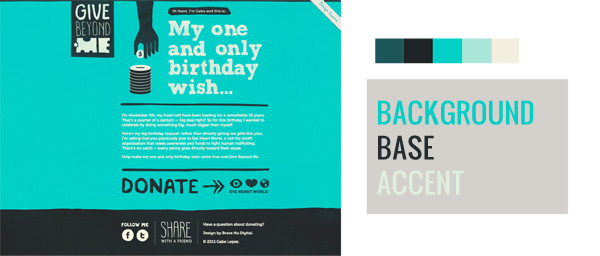
3. Use color to guide action
Color psychology plays a big role in marketing. Without us even knowing it, certain colors can encourage us to do certain things, such as click a button or continue on to the next page of a web form. Use colors to guide the same types of action on your website. Make all of your CTAs a bold color to help them stand out.
4. Avoid generic stock images
There are lots of ways to use images in your marketing, but the one method to avoid is using generic stock images. Generic, cheesy stock images make a brand seem lazy and disengaged with their buyer persona. The images on your website should be a representation of your audience, and if you can’t capture your actual audience, you should work hard to find stock images that do. Tip: One great way to collect audience images is by running a user-generated content (UGC) campaign.
Download our free guide to growth-driven web design for even more web design tips.
Time to Design
Design comes in all shapes and sizes … literally. From websites to print graphics to office space design, it plays a major role in marketing our businesses and brands. Even if you don’t consider yourself a designer, we encourage you to become more familiar with the elements and types of design. You never know when you may have to consult on a project or whip up a design of your own.

What Is Marketing? [FAQ]
Dictionary.com defines marketing as, “the action or business of promoting and selling products or services, including market research and advertising.”
If you work in a marketing role like I do, it’s probably difficult for you to define marketing even though you see and use it every day — the term marketing is a bit all-encompassing and variable for a straightforward definition.
This definition feels unhelpful.
The selling part, for instance, overlaps a little too snuggly with a “what is sales” definition, and the word advertising makes me think of Mad Men brainstorming sessions.
But upon digging deeper, I began seeing that actually, marketing does overlap heavily with advertising and sales. Marketing is present in all stages of the business, beginning to end.
At first, I wondered why marketing was a necessary component during product development, or a sales pitch, or retail distribution. But it makes sense when you think about it — marketers have the firmest finger on the pulse of your consumer persona. They research and analyze your consumers all the time, conducting focus groups, sending out surveys, studying online shopping habits, and asking one underlying question: “Where, when, and how does our consumer want to communicate with our business?”
Marketing
Marketing is the process of getting people interested in your company’s product or service. This happens through market research, analysis, and understanding your ideal customer’s interests. Marketing pertains to all aspects of a business, including product development, distribution methods, sales, and advertising.
Modern marketing began in the 1950s with the emergence of mediums beyond simply print and radio, allowing marketers to conduct entire campaigns across multiple platforms. And as you might expect, over the last 70 years, marketers have become increasingly important to fine-tuning how a business sells a product to consumers to optimize success.
Today, there are literally dozens of places one can carry out a marketing campaign — what constitutes actual marketing in the 21st century?
Types of Marketing
Where your marketing campaigns live depends entirely on where your customers spend their time. It’s up to you to conduct market research that determines which types of marketing — and which mix of tools within each type — is best for building your brand. Here are several types of marketing that are relevant today, some of which have stood the test of time:
- Internet marketing: Having started with an Excedrin product campaign, the very idea of having a presence online for business reasons was a type of marketing in an of itself.
- Search engine optimization: Abbreviated “SEO,” this is the process of optimizing content on a website so that it appears in search engine results. It’s used by marketers to attract people who perform searches that imply they’re interested in learning about a particular industry.
- Blog marketing: Blogs are no longer exclusive to the individual writer. Brands now publish blogs to write about their industry and nurture the interest of potential customers who browse the internet for information.
- Social media marketing: Businesses can use Facebook, Instagram, Twitter, LinkedIn, and similar social networks to create impressions on their audience over time.
- Print marketing: As newspapers and magazines get better at understanding who subscribes to their print material, businesses continue to sponsor articles, photography, and similar content in the publications their customers are reading.
- Search engine marketing: This type of marketing is a bit different than SEO, which is described above. Businesses can now pay a search engine to place links on pages of its index that get high exposure to their ideal audience. (It’s a concept called “pay-per-click” — I’ll show you an example of this in the next section).
- Video marketing: While there were once just commercials, marketers now put money into creating and publishing all kinds of videos that entertain and educate their core customers.
Marketing and Advertising
If marketing is a wheel, advertising is one spoke of that wheel.
Marketing entails product development, market research, product distribution, sales strategy, public relations, and customer support. Marketing is necessary in all stages of a business’s selling journey, and it can use numerous platforms, social media channels, and teams within their organization to identify their audience, communicate to it, amplify its voice, and build brand loyalty over time.
On the other hand, advertising is just one component of marketing. It’s a strategic effort, usually paid for, to spread awareness of a product or service as a part of the more holistic goals outlined above. Put simply, it’s not the only method used by marketers to sell a product.
Here’s an example (keep reading, there’s a quiz at the end of it) …
Let’s say a business is rolling out a brand new product and wants to create a campaign promoting that product to its customer base. This company’s channels of choice are Facebook, Instagram, Google, and its company website. It uses all of these spaces to support its various campaigns every quarter and generate leads through those campaigns.
To broadcast its new product launch, it publishes a downloadable product guide to its website, posts a video to Instagram demonstrating its new product, and invests in a series of sponsored search results on Google directing traffic to a new product page on its website.
Now, which of the above decisions were marketing, and which were advertising?
…
The advertising took place on Instagram and, specifically, Google. Instagram generally isn’t an advertising channel, but when used for branding, you can develop a base of followers that’s primed for a gentle product announcement every now and again. Google was definitely used for advertising in this example; the company paid for space on Google — a program known as pay-per-click (PPC) — on which to drive traffic to a specific page focused on its product. A classic online ad.
Where did the marketing take place? This was a bit of a trick question, as the marketing was the entire process. Aligning Instagram, Google, and its own website around a shared campaign — one designed to generate traffic, leads, and ultimately customers — was a three-part marketing campaign that identified its audience, created a message for that audience, and delivered it across the industry to maximize its impact.
The 4 Ps of Marketing
In the 1960’s, E Jerome McCarthy came up with the 4 Ps of marketing: product, price, place, promotion.
Essentially, these 4 Ps explain how marketing interacts with each stage of the business.
Product
Let’s say you come up with an idea for a product you want your business to sell. What’s next? You probably won’t be successful if you just start selling it.
Instead, you need your marketing team to do market research and answer some critical questions: Who’s your target audience? Is there market fit for this product? What messaging will increase product sales, and on which platforms? How should your product developers modify the product to increase likelihood of success? What do focus groups think of the product, and what questions or hesitations do they have?
Marketers use the answers to these questions to help businesses understand the demand for the product and increase product quality by mentioning concerns stemming from focus group or survey participants.
Price
Your marketing team will check out competitors’ product prices, or use focus groups and surveys, to estimate how much your ideal customer is willing to pay. Price it too high, and you’ll lose out on a solid customer base. Price it too low, and you might lose more money than you gain. Fortunately, marketers can use industry research and consumer analysis to gauge a good price range.
Place
It’s critical that your marketing department uses their understanding and analysis of your business’s consumers to offer suggestions for how and where to sell your product. Perhaps they believe an ecommerce site works better than a retail location, or vice versa. Or, maybe they can offer insights into which locations would be most viable to sell your product, either nationally and internationally.
Promotion
This P is likely the one you expected from the get-go: promotion entails any online or print advertisement, event, or discount your marketing team creates to increase awareness and interest in your product, and, ultimately, lead to more sales. During this stage, you’ll likely see methods like public relations campaigns, advertisements, or social media promotions.
Hopefully, our definition and the four Ps help you understand marketing’s purpose and how to define it. Marketing intersects with all areas of a business, so it’s important you understand how to use marketing to increase your business’s efficiency and success.

7 of the Most Creative Interactive Videos We’ve Ever Seen
Choose your own adventure stories aren’t just limited to the form of books anymore. In December 2018, Netflix’s Black Mirror released Bandersnatch, an interactive film about a young programmer named Stefan who adapts his favorite choose your own adventure novel into a video game for a major gaming company.
However, as his deadline looms and the pressure to perfect his game mounts, Stefan starts to question his own reality, growing increasingly paranoid that he’s actually a character in a choose your own adventure story. Throughout the film, you must make every one of Stefan’s major decisions, and each of your choices alter the narrative he experiences, which has five endings and over one trillion story combinations.
Netflix’s experimentation into interactive content piqued a massive amount of interest and generated just as much buzz. But the film industry isn’t the first to dabble in interactive content. Marketing blazed that trail, and there are brands who have created interactive videos that are arguably just as entertaining as Bandersnatch.
Below, we’ve curated a list of the seven most creative interactive videos we’ve ever seen. Read on to get some inspiration for your own interactive video in 2019.
7 of the Most Creative Interactive Videos We’ve Ever Seen
1. Major Lazer | Know No Better Interactive Music Video
Watch video here.
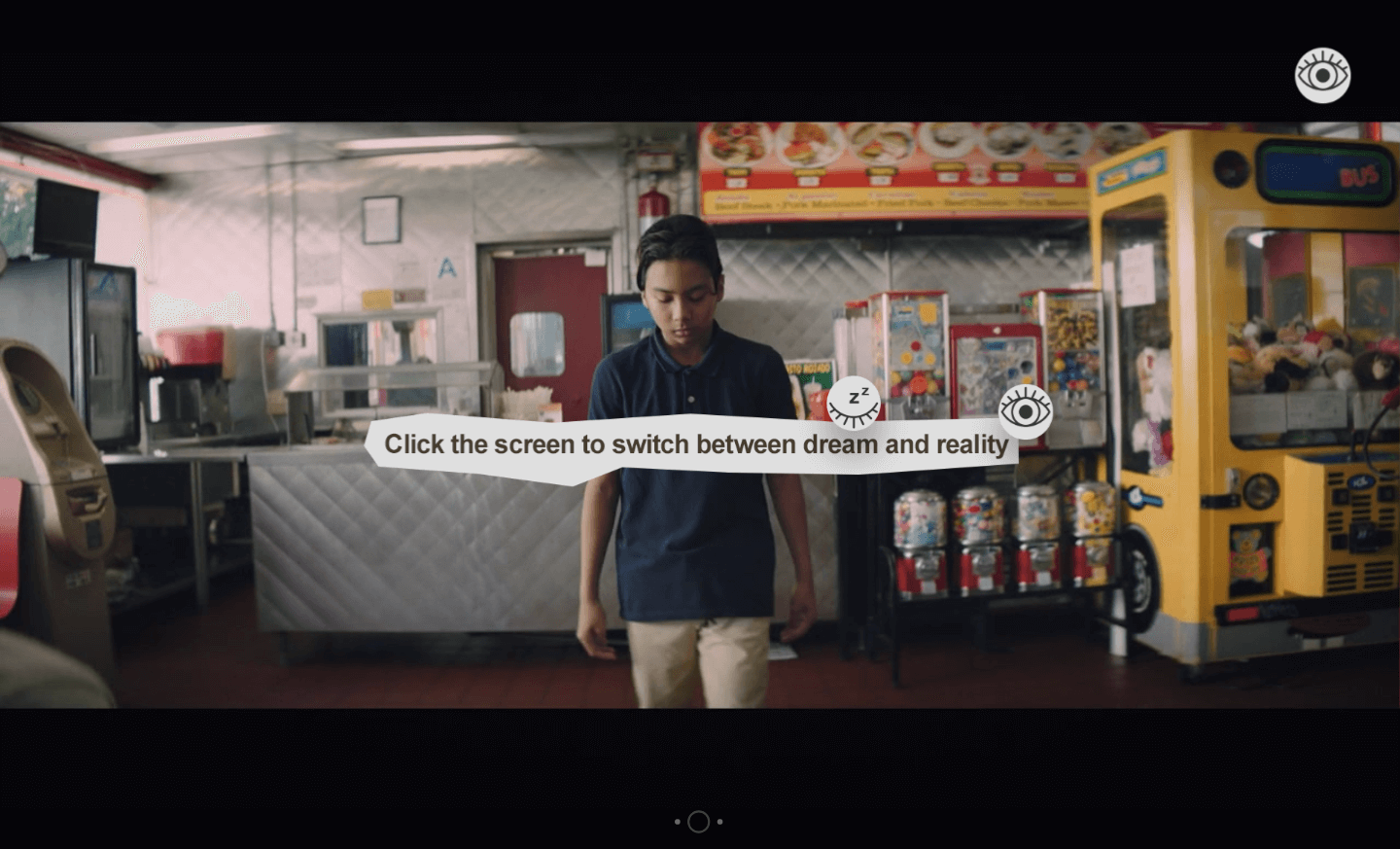
Everyone has a dream that they fantasize about from time to time, but what would it take for us to actually pursue this dream and turn it into a reality? Well, Major Lazer’s interactive music video for their song “Know No Better” could be your spark of inspiration.
As the video plays, you can leap from a young boy’s dream of being a famous dancer who dates his dream girl to his stark reality where he’s a shy loser who feels frustrated with his actual life.
Towards the end of the video, however, these contrasting narratives start to converge, and you witness him muster enough courage to dance with his dream girl in reality, rather than only in his dream.
2. Eko | That Moment When
Watch video here.
There are quite a few brands creating films in the interactive space, but most aren’t creating original shows like Eko does, which has produced five original interactive shows, ranging from animated comedies to technological thrillers.
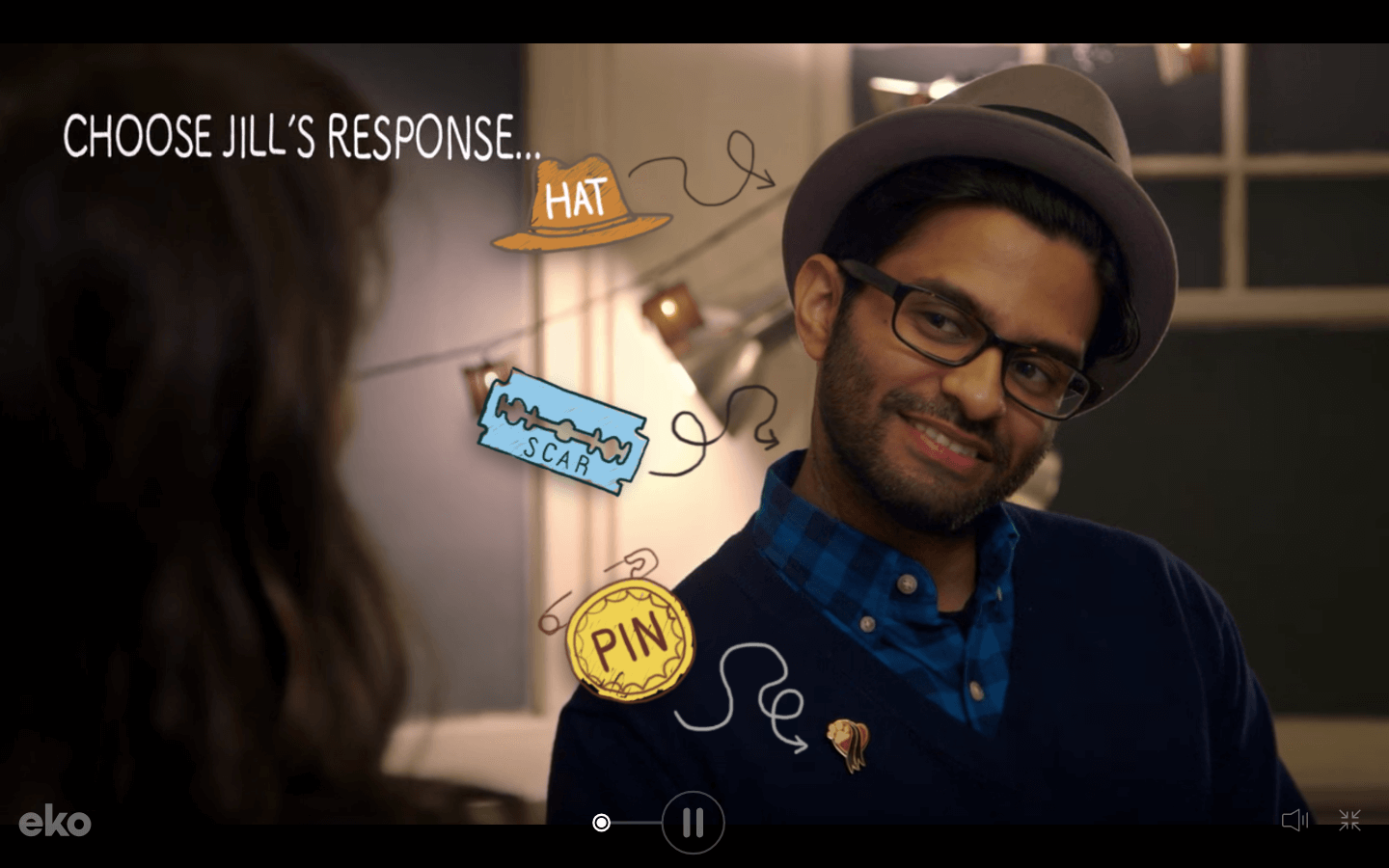
One of their best interactive shows is a hilarious series called That Moment When, which is about a woman named Jill who encounters awkward moments at the beginning of each episode, and your job is to help her maneuver them as gracefully as possible.
If you interact with the video above, you’re tasked with helping Jill navigate the awkward situation of vaguely remembering a guy who totally knows her. As you struggle through this cringeworthy interaction, you have to predict certain traits about the guy, and if you guess correctly, you earn points that buy you letters of his name, like Jeopardy, and they ultimately help you remember it at the end of the episode.
That Moment When is as funny as it is engaging, and by weaving a relatable and hilarious theme through this interactive show, Eko can entice viewers to watch the entire series, just like a great Netflix show.
3. Aardman Animations | Dead Lonely (A Zombie Romance)

Watch video here.
Aardman Animations, a four-time Oscar winning production studio, collaborated with Rapt Media, a company that offers interactive video solutions, to create this charming interactive film that lets you help a zombie, Fred, find his long-lost love, Barbara, in a post-apocalyptic world where the living dead lead surprisingly normal lives.
Even though Dead Lonely seems like an innocent tale, it can be more grisly than Bandersnatch at times. But once you reunite Fred with Barbara, all the trials and tribulations you struggled through all seem to be worth it.
4. Bob Dylan | Like a Rolling Stone Interactive Music Video
Watch video here.
To promote the release of Bob Dylan’s CD Box set that included all 41 of his official albums in 2013, Sony Music teamed up with Eko, who is mentioned above, to make a creatively and unexpectedly refreshing interactive music video for “Like a Rolling Stone”, one of Bob Dylan’s most iconic songs.
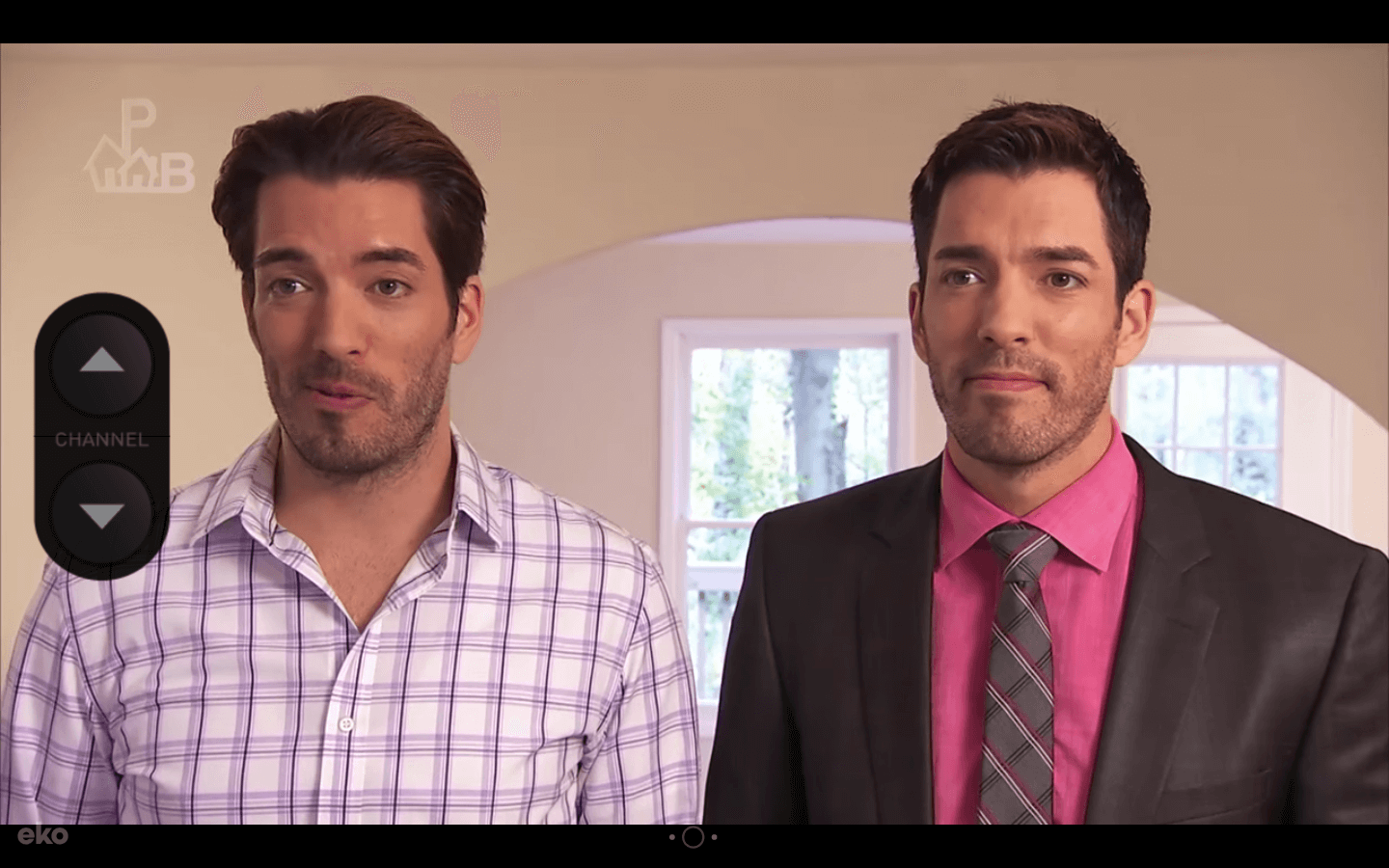
Sony’s interactive music video lets you flip through 16 channels, ranging from shopping, history, movies, reality TV, news, cooking, fashion, sports, and game shows. Each channel features different characters lip synching “Like a Rolling Stone”.
Sony also included some big TV personalities in this video, like Drew Carey from The Price is Right, Steve Levy from SportsCenter, and Jonathan and Drew Scott from Property Brothers, making this experience even more pleasantly surprising and hilarious.
5. BBC Scotland
In 2019, Rough Guides, a renowned travel guidebook, named Scotland the most beautiful country in the world. And a big reason why it’s such a spectacle is because Glen Coe, a Scottish valley that cuts through the ruins of an ancient super-volcano, is one of the most striking landscapes in the world.
BBC Scotland’s immersive, 360 degree video of Glen Coe grips viewers because they’re able to experience the landscape from an intimate point of view at every possible angle, which makes them feel like they’re actually there.
6. Disney | The Jungle Book Interactive Video
With the help of Wirewax, a company that offers interactive video technology and creative solutions, Disney decided to give their fans an inside look at how the live-action version of The Jungle Book was made.
Fans can move a slider to see how Disney actually filmed the movie, and they can also click on each character’s hotspot, which opens up a profile that gives a brief description of the character. By doing this, Disney is able to reveal how they produced one of the most compelling stories ever told, helping the media giant forge an even closer bond with their fans.
7. Coldplay | Ink Interactive Music Video
Watch video here.
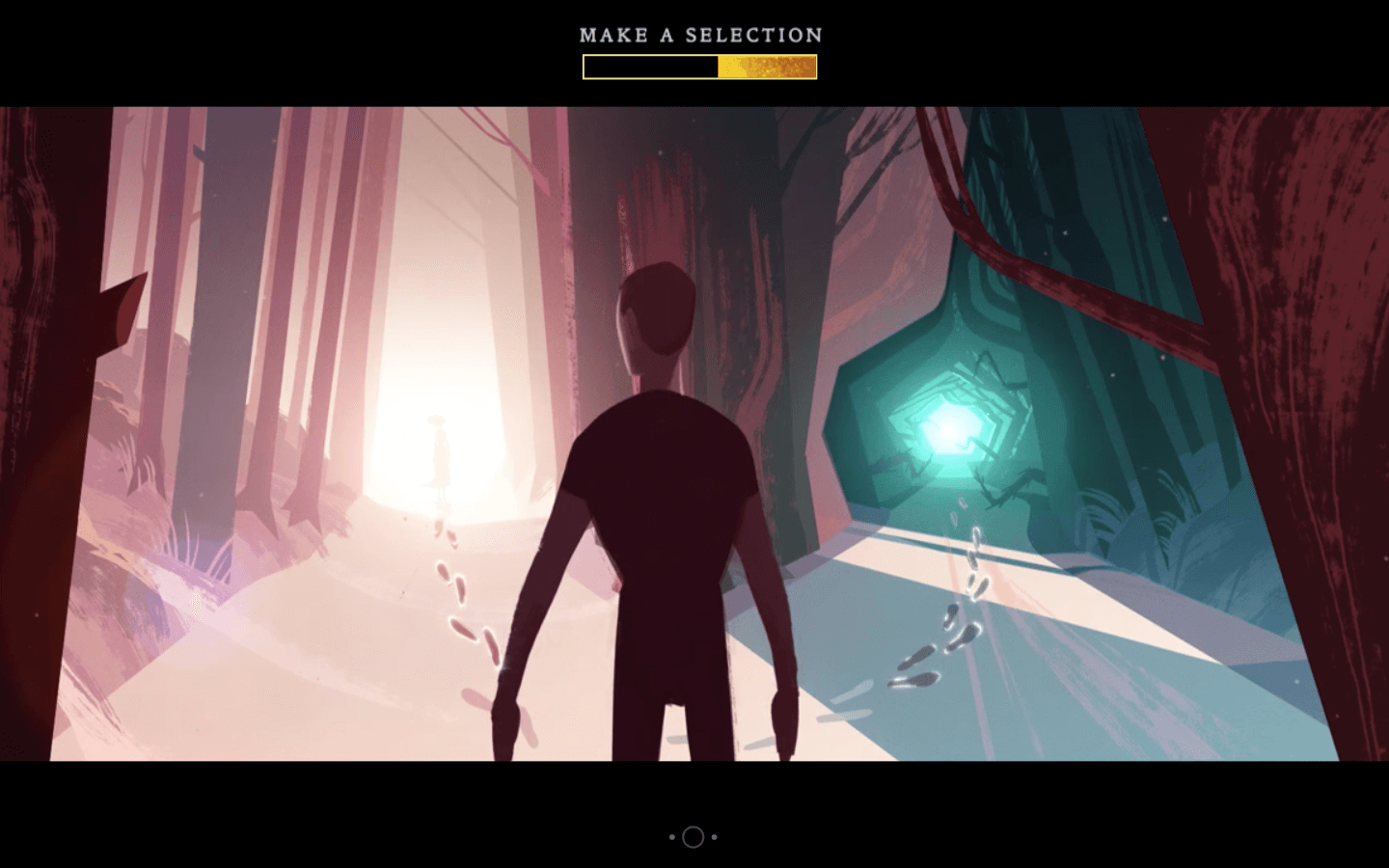
Coldplay’s interactive music video for their song “Ink” absorbs you in an adventurous yet forlorn journey of a man searching for his lost love. By making most of his crucial decisions for him, you’re tasked with helping him find her.
As you embark on the quest to find this man’s significant other, you’re led through beautiful environments, such as an evergreen forest, a bustling city, a serene ocean, and even the cosmos. And with more than 300 storylines in this video, you can either help the man reunite with his lover or come to grips with losing her forever.

27 Quotes About Design to Get Your Creativity Flowing
Inspiration can often seem illusive and out-of-reach when you need it most.
Unfortunately, you often can’t call it a day when you’re feeling uninspired or frustrated by your designs — or lack thereof. Oftentimes, you’re working on a strict deadline, keeping you up late into the night thinking, How can I make this design great?
When this is the case, it’s likely helpful to read some wisdom from some true masters of design. Here, we’ve cultivated a list of 27 inspiring and thought-provoking quotes that will undoubtedly get your creative juices flowing.
Keep reading, and remember, it’s like Maya Angelou said — “You can’t use up creativity. The more you use, the more you have.”

Design Quotes
- “Have no fear of perfection — you’ll never reach it.” — Salvador Dali, artist
- “Design is intelligence made visible.” — Alina Wheeler, author
- “Everything is designed. Few things are designed well.” — Brian Reed, front-end developer and musician
- “You can’t use up creativity. The more you use, the more you have.” — Maya Angelou, author, poet, civil rights activist
- “Design adds value faster than it adds costs.” — Joel Spolsky, web programmer, writer, and creator of Trello
- “The public is more familiar with bad design than good design. It is, in effect, conditioned to prefer bad design, because that is what it lives with. The new becomes threatening, the old reassuring.” — Paul Rand, graphic designer
- “Designers are meant to be loved, not to be understood.” — Margaret Oscar, designer
- “Make it simple, but significant.” — Don Draper, fictional character on Mad Men
- “Don’t bunt. Aim out of the ballpark. Aim for the company of immortals.” — David Ogilvy, advertising tycoon, known as the “Father of Advertising”
- “Every great design begins with an even better story.” — Lorinda Mamo, designer
- “Design creates culture. Culture shapes values. Values determine the future.” — Robert L. Peters, designer and author
- “The function of design is letting design function.” — Micha Commeren, designer
- “Design is not just what it looks like and feels like. Design is how it works.” — Steve Jobs, co-founder of Apple, Inc.
- “The more I deal with the work as something that is my own, as something that is personal, the more successful it is.” — Marian Bantjes, designer and author
- “Design is not a single object or dimension. Design is messy and complex.” — Natasha Jen, designer and educator
- “Design is the intermediary between information and understanding.” — Hans Hoffman, artist and teacher
- “A designer knows he has achieved perfection not when there is nothing left to add, but when there is nothing left to take away.” — Antoine de Saint-Exupéry, French writer and poet
- “Design is a formal response to a strategic question.” — Mariona Lopez, business owner
- “Styles come and go. Good design is a language, not a style.” — Massimo Vignelli, Italian designer
- “The alternative to good design is always bad design. There is no such thing as no design.” — Adam Judge, author
- “Design can be art. Design can be aesthetics. Design is so simple, that’s why it is so complicated.” — Paul Rand, graphic designer
- “It’s through mistakes that you actually can grow. You have to get bad in order to get good.” — Paula Scher, graphic designer and painter
- “Good design is good business.” — Thomas Watson Jr., businessman, second president of IBM
- “Accessible design is good design.” — Steve Ballmer, American businessman and former CEO of Microsoft
- “Where you innovate, how you innovate, and what you innovate are design problems.” — Tim Brown, CEO and president of IDEO
- “I strive for two things in design: simplicity and clarity. Great design is born of those two things.” — Lindo Leader, graphic designer and creator of the FedEx logo
- “Design is as much an act of spacing as an act of marking.” — Ellen Lupton, designer and educator
27 Quotes About Design to Get Your Creativity Flowing
1. “Have no fear of perfection — you’ll never reach it.” — Salvador Dali, artist
2. “Design is intelligence made visible.” — Alina Wheeler, author
3. “Everything is designed. Few things are designed well.” — Brian Reed, front-end developer and musician
4. “You can’t use up creativity. The more you use, the more you have.” — Maya Angelou, author, poet, civil rights activist
5. “Design adds value faster than it adds costs.” — Joel Spolsky, web programmer, writer, and creator of Trello
6. “The public is more familiar with bad design than good design. It is, in effect, conditioned to prefer bad design, because that is what it lives with. The new becomes threatening, the old reassuring.” — Paul Rand, graphic designer
7. “Designers are meant to be loved, not to be understood.” — Margaret Oscar, designer
8. “Make it simple, but significant.” — Don Draper, fictional character on Mad Men
9. “Don’t bunt. Aim out of the ballpark. Aim for the company of immortals.” — David Ogilvy, advertising tycoon, known as the “Father of Advertising”
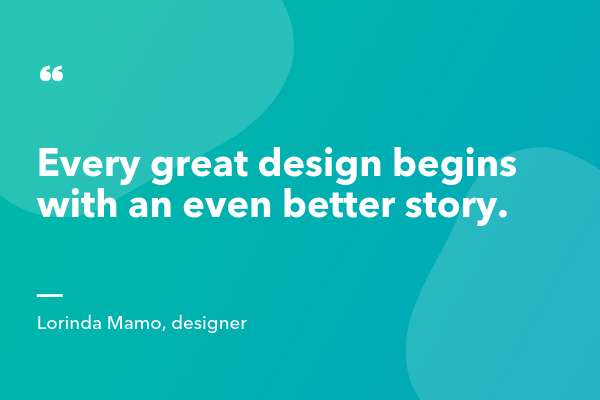
10. “Every great design begins with an even better story.” — Lorinda Mamo, designer
11. “Design creates culture. Culture shapes values. Values determine the future.” — Robert L. Peters, designer and author
12. “The function of design is letting design function.” — Micha Commeren, designer
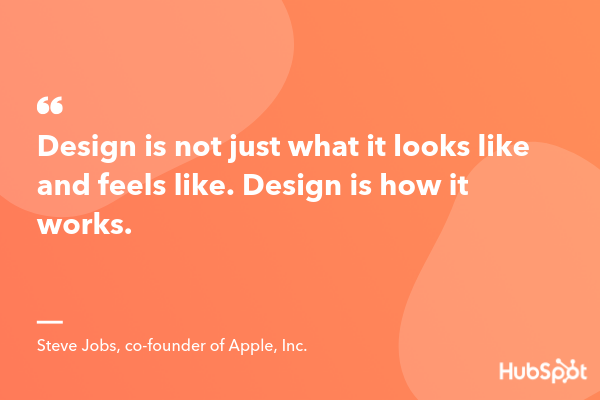
13. “Design is not just what it looks like and feels like. Design is how it works.” — Steve Jobs, co-founder of Apple, Inc.
14. “The more I deal with the work as something that is my own, as something that is personal, the more successful it is.” — Marian Bantjes, designer and author
15. “Design is not a single object or dimension. Design is messy and complex.” — Natasha Jen, designer and educator
16. “Design is the intermediary between information and understanding.” — Hans Hoffman, artist and teacher
17. “A designer knows he has achieved perfection not when there is nothing left to add, but when there is nothing left to take away.” — Antoine de Saint-Exupéry, French writer and poet
18. “Design is a formal response to a strategic question.” — Mariona Lopez, business owner
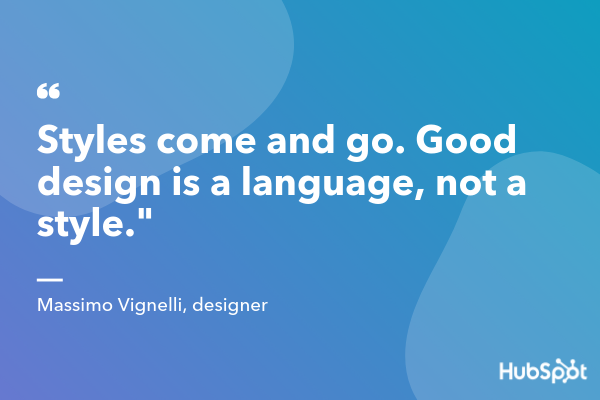
19. “Styles come and go. Good design is a language, not a style.” — Massimo Vignelli, Italian designer
20. “The alternative to good design is always bad design. There is no such thing as no design.” — Adam Judge, author
21. “Design can be art. Design can be aesthetics. Design is so simple, that’s why it is so complicated.” — Paul Rand, graphic designer
22. “It’s through mistakes that you actually can grow. You have to get bad in order to get good.” — Paula Scher, graphic designer and painter
23. “Good design is good business.” — Thomas Watson Jr., businessman, second president of IBM
24. “Accessible design is good design.” — Steve Ballmer, American businessman and former CEO of Microsoft
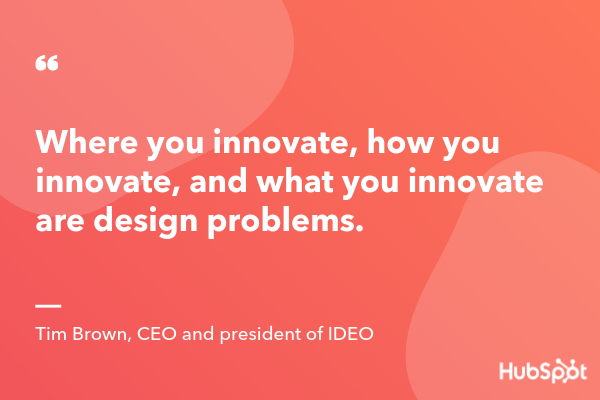
25. “Where you innovate, how you innovate, and what you innovate are design problems.” — Tim Brown, CEO and president of IDEO
26. “I strive for two things in design: simplicity and clarity. Great design is born of those two things.” — Lindo Leader, graphic designer and creator of the FedEx logo
27. “Design is as much an act of spacing as an act of marking.” — Ellen Lupton, designer and educator

3 Ways to Improve Instagram Engagement
Is Instagram marketing a priority for you? Wondering what types of organic Instagram posts people engage with most? In this article, you’ll discover how you can generate more organic engagement on Instagram. Instagram Marketing Changes to Watch For In 2018, eMarketer estimated that 31.8% of the U.S. population uses Instagram. That’s a lot of potential fans […]
The post 3 Ways to Improve Instagram Engagement appeared first on Social Media Marketing | Social Media Examiner.
from Social Media Marketing | Social Media Examiner http://bit.ly/2SCNvhn
via socialmediaexaminer
YouTube Growth: Audience and Subscriber Numbers Are Rising
Welcome to this week’s edition of the Social Media Marketing Talk Show, a news show for marketers who want to stay on the leading edge of social media. On this week’s Social Media Marketing Talk Show, we explore YouTube audience and subscriber growth and Periscope live streaming with guests with special guest Luria Petrucci. Watch […]
The post YouTube Growth: Audience and Subscriber Numbers Are Rising appeared first on Social Media Marketing | Social Media Examiner.
from Social Media Marketing | Social Media Examiner http://bit.ly/2BsbHZL
via socialmediaexaminer
The Ultimate Guide to Crowdsourcing
When Charlie Jabaley, co-founder of the artist management and marketing firm Street Execs, released one of his first client t-shirt designs, the euphoric high he felt in the morning plummeted to a heartbreaking low by night.
He had only sold a total of eight t-shirts.
With famous clients like 2 Chains and Travis Porter, Jabaley’s pressure to succeed was already stifling. But this failed merchandising campaign had just jacked it up to suffocating. Instead of freaking out and sulking about his woes, though, Jabaley took a step back and breathed in some well-needed fresh air.
He decided to frame this embarrassing flop as an opportunity to learn. And after some deep reflection and analysis, he dug up a silver lining that would eventually lead to a multi-million dollar model for merchandise design.
The silver lining Jabaley plucked from the shambles of his failed campaign was realizing he needed to focus on his customers more. More specifically, he needed to understand their’ true preferences. So rather than following the standard formula of merchandising — which was designing products based off a whim, buying hoards of inventory, and then marketing them — he broke conventional thinking by reverse-engineering the process.
Before he bought inventory, Jabaley would post merchandise designs on Instagram and use follower behavior and feedback to help him scrap unpopular designs and turn popular designs into merchandise.
By following his new method, Jabaley knew exactly what his customers wanted and what they were willing to buy, allowing him to solely focus on creating products that had proven demand, avoid wasting precious cash on unwanted inventory, and unload a huge amount of risk off the merchandising process.
Eventually, Jabaley’s method for determining which merchandise designs would sell, and which would not, helped him produce his first merchandising hit — a Dabbing Santa sweater that generated $2.1 million in only 30 days.

Image Credit: Shopify Plus
Charlie Jabaley isn’t the first person to inform his product design using the public’s opinion, though. It’s actually a method that iconic brands like Budweiser, Pepsi, and Oreo have leveraged for years — a method called crowdsourcing.
What is crowdsourcing?
When businesses crowdsource, they ask the public for ideas, information, and opinions to help them craft better products and services. By crowdsourcing, companies can tap into a huge group of people’s expertise and skill sets, ensuring diversity of thought, expedited production, and cost-cutting, since they don’t need to hire new, in-house employees.
Companies who crowdsource usually break massive projects into individual tasks, which allows them to assign hundreds or thousands of people small jobs that they can work on by themselves.
Companies can also crowdsource on social media to gauge people’s opinion on their new product releases or updates. Additionally, companies can run contests to see who can create the best marketing material for them — like a logo, jingle, or commercial.
To help you fully grasp the concept of crowdsourcing, here are some concrete examples of the practice in action.
Crowdsourcing Examples
1. Waze
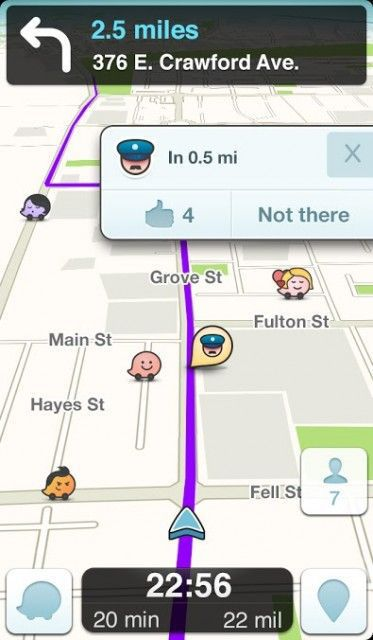
Image Credit: Mashable
Waze is a community-based GPS traffic and navigation app. Their users, which has grown to over 90 million around the globe, report real-time traffic and road information, like police traps, accidents, road hazards, traffic jams, and the cheapest gas stations near your route. All of this crowdsourced information allows users to help each other reach their destinations promptly and safely.
2. Unsplash
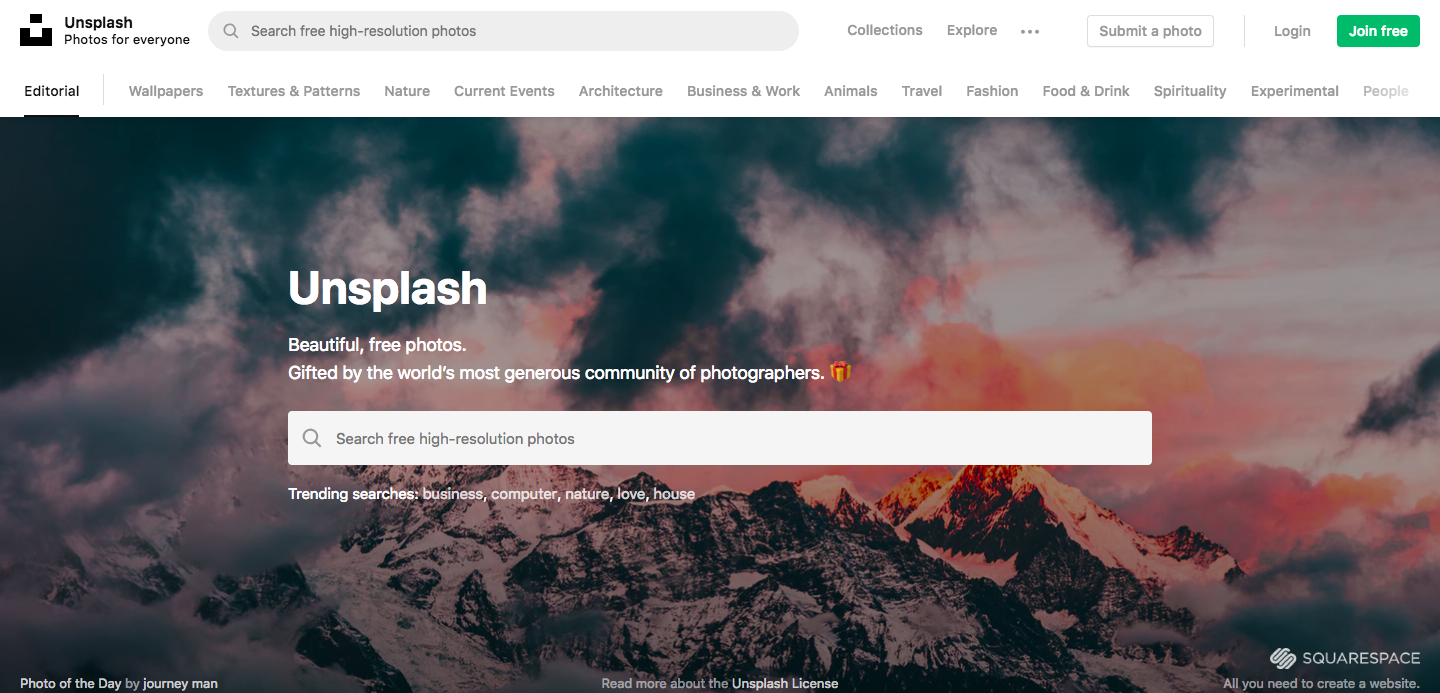
What started out as Mikael Cho’s fun side project on Tumblr, taking half a day and $19 to create, eventually turned into his flailing startup’s top referral source and became its own standalone company — Unsplash.
Unsplash experienced hockey-stick growth because their service offered the ultimate remedy for a huge pain point in the content marketing space — free, unlicensed stock photos. And by using their initial boom in buzz and traffic to convince photographers to contribute free photos to their library as a way to market their art, Unsplash has successfully fostered a community of over 110,000 photographers, built a library of over 850,000 photos, and generates more than nine billion photo impressions per month.
3. Contently’s Freelance Rates Calculator
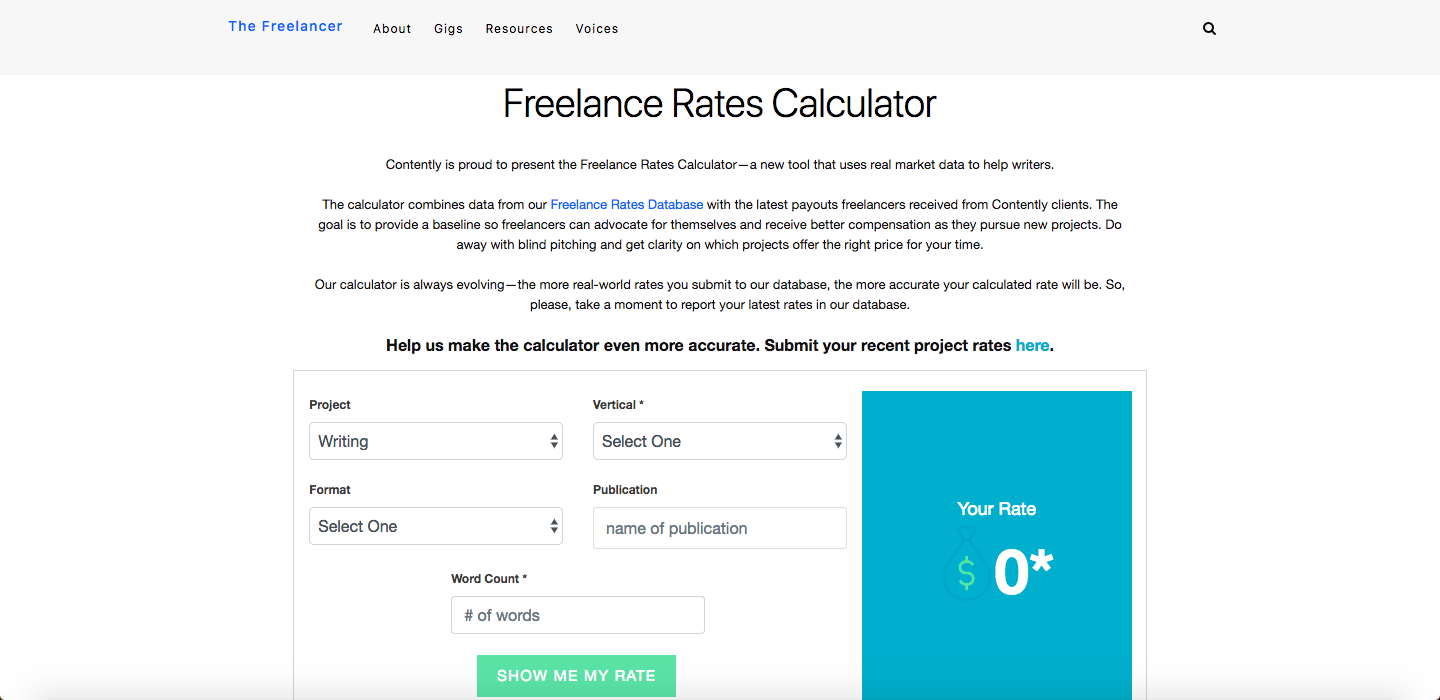
Contently, a content creation platform that also connects brands with freelance talent, built a freelance rates calculator to provide more transparency across the industry and help freelancers better negotiate their rates.
By combining their public freelance rates database, where freelancers anonymously submit the rate they received from various companies, with their platform’s own internal data, Contently has crowdsourced precious information from freelancers in order to help the entire freelance community earn a fair rate in the future.
4. Doritos’ Crash the Super Bowl
“Time Machine” is arguably one of Doritos most memorable commercials, but you might be surprised that it had a budget of $300 and only took six hours to make. Well, that’s because it was created by an aspiring filmmaker who entered the spot into Doritos’ annual Crash the Super Bowl contest in 2014, and won the whole thing.
Frito-Lay, Dorito’s conglomerate, ran Crash the Super Bowl every year from 2007 through 2016, awarding the winner with a huge cash prize and an airing of their commercial during the Super Bowl. And by offering such a can’t-miss opportunity, which allowed them to tap into tens of thousands of people’s creativity, Doritos could associate some of the most unforgettable Super Bowl ads with their brand.
Crowdsourcing Sites
- Fiverr
- Upwork
- CrowdSource
- Contently
- Skyword
If you’re a freelancer looking for work or a brand looking for talent, check out the following crowdsourcing sites.
1. Fiverr
Fiverr is a freelance service marketplace that empowers freelancers. Instead of being a platform where freelancers search for jobs posted by brands, Fiverr is a place where brands search for freelancers with the expertise and skills for which they’re looking. Most freelancers on Fiverr offer skills and expertise in graphic design, digital marketing, writing & translation, video & animation, music & audio, programming & tech, business, and lifestyle.
2. Upwork
Similar to Fiverr, Upwork is a freelance service marketplace where freelancers create profiles, and then brands can hire them for short-term tasks, recurring projects, or full-time contract work. Most freelancers have skills and expertise in web development, mobile development, design, writing, administrative work, customer service, sales, marketing, accounting, and consulting.
3. CrowdSource
Trusted by brands like Target, Coca-Cola, and Major League Baseball, CrowdSource has trained, tested, and qualified a community of over 200,000 freelancers who can provide copywriting, content moderation, data entry, and transcription expertise and skills. Brands can also search for freelancers by the agency, marketing, publishing, retail, and service provider industries.
4. Contently
Contently is a content creation software that connects enterprise brands with freelance talent, so they’re constantly on the lookout for freelancers who can fulfill their clients’ needs, as well as their own.
If you’re a freelance creative looking for gigs with some big brands, you can register as a freelancer on Contently’s platform and create a free portfolio. You’ll need to get approved and complete their training before you can work with any of their clients, but once you do that, you’ll be apart of their freelance network.
If you’re a brand looking for freelancers to help you craft original stories, check out Contently’s platform here.
5. Skyword
Similar to Contently, Skyword is a content creation software that also connects enterprise brands with freelance talent. If you’re a videographer, writer, photographer, or designer, you can create a portfolio that Skyword’s clients will have direct access to.
If you’re a brand looking for freelance talent, check out Skyword’s platform here.
Crowdsourcing Jobs
If you’re interested in working a crowdsourced job, check out the following gigs you could find in each of the job categories below.
Marketing
Writing
Videography
Design
Photography
Animation
Web development
Mobile development
Editing Jobs
Copy editing
Content evaluation
Content moderation
Proofreading
Administrative
Virtual assitant
Customer service
Usability testing
Audio transcription
Social media post categorization
Image and video processing
Image categorization
Data Jobs
Data entry
Data research
Data categorization
Data processing
Data verification and clean up
Research Jobs
Information gathering
Price checking
Product display checking
Business location verification
Web research
Google searching
Odd Jobs
Making deliveries
Cleaning
Dog walking
Survey taking

The 4-Minute Guide to How Biweekly Pay Works
One of the first concerns your new business is likely to face is pay period — should you pay your employees weekly? Biweekly? Monthly?
Of course, you’ll want to take into consideration both the needs of your employees, and your HR payroll administrators. In other words, what is the easiest system for your HR team to process, and what will make most of your employees happiest?
Biweekly is a good option to consider, and it’s also the most popular option in the U.S. — the U.S. Bureau of Labor Statistics reports 36.5% of private businesses have decided to use biweekly pay as their pay system of choice.

Biweekly Pay
Biweekly is the most common option for a business’s pay period in the U.S. Biweekly pay means you pay your employees on a set day once every two weeks, resulting in 26 paychecks per year. Because payday occurs once every two weeks, some months will have three paychecks. Biweekly can be helpful if most of your employees are hourly workers. Additionally, your employees will be happy to be paid more often (as opposed to monthly or semimonthly).
If you’re wondering which pay period option is best to implement at your company — or if you’re just curious what biweekly pay entails — keep reading.
What Is Biweekly Pay?
Biweekly pay means you pay your employees once every two weeks, on a set day you choose.
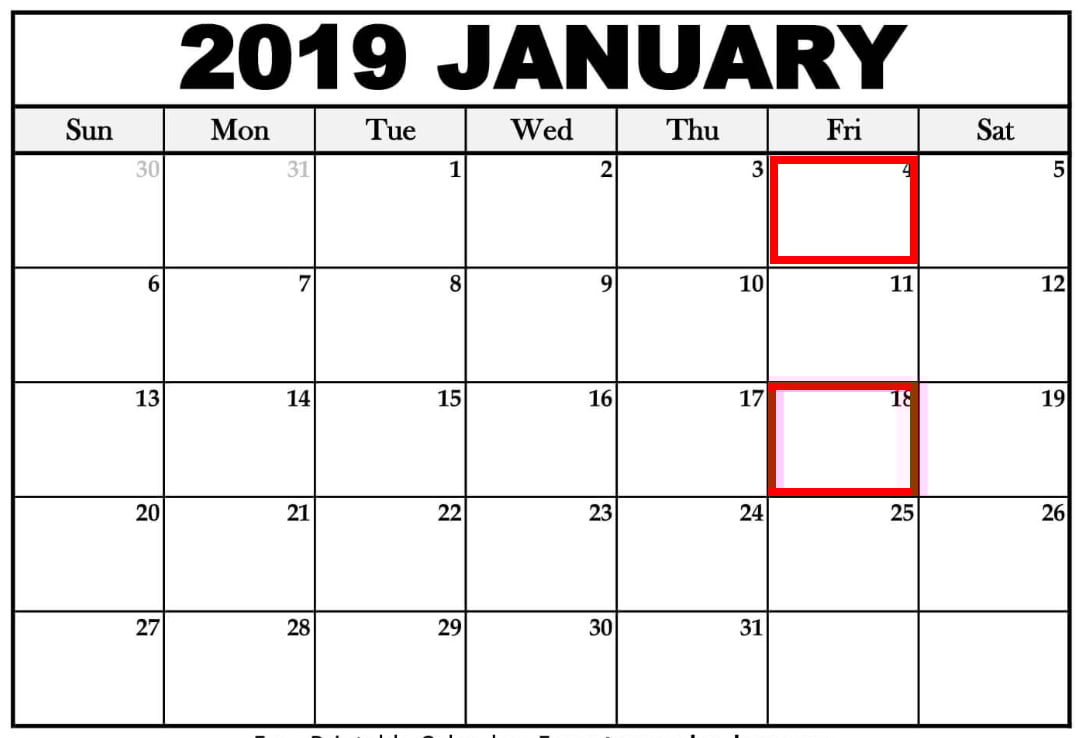
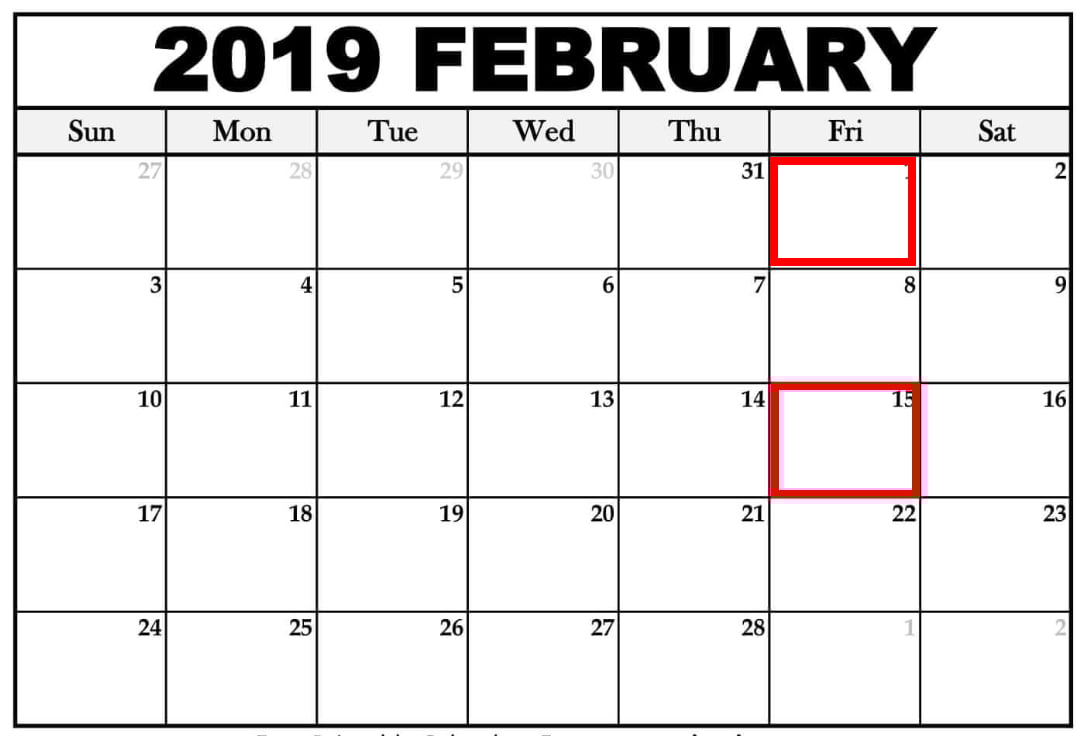
For instance, let’s say you choose to pay your employees once every two weeks, on Friday.
Take a look at the following calendar for the months of January and February, 2019:
 Calendar courtesy of Towncalendars.com
As you can see, it doesn’t matter which day of the month you pay your employees — you can pay them on the 4th one month, and then the 1st another. It’s only important you pay once every two weeks.
Once you start the year, you’ll pay your employees once every two weeks. This might sound simple, but that means for two months out of the year, you’ll have three pay periods instead of two.
Pros of Biweekly Pay:
- Your HR team needs to process payroll once every two weeks, which can reduce the likelihood of payroll errors and time spent on payroll processing, in comparison to weekly pay periods.
- Employees receive more pay checks during the year than semimonthly, even if those paychecks are slightly lower than they would be on a semimonthly schedule.
- A biweekly system is more consistent for employees — for instance, an employee can expect to receive a paycheck on every other Friday. With a semimonthly pay period, the days of the week will vary, with an employee potentially receiving a paycheck on a Monday, and then a Wednesday.
- It likely makes your employees happier than operating on a monthly schedule, which requires employees to budget for a longer period of time.
Cons of Biweekly Pay:
- If you use biweekly pay, your business must be prepared for the months with three paychecks, and budget accordingly to ensure the payroll account has enough money for those extra expenses.
- Your payroll provider might charge your business for each payroll run, which results in higher annual fees than if you opt for semimonthly.
- Your employees might want to get paid every week, so they have more consistent money coming into their accounts.
- If your industry operates on contract work, where projects can stall for periods of time, employees might appreciate weekly pay for a sense of security.
Ultimately, it’s critical you consider what your competitors are doing, and what makes the most sense for your employees, when choosing a pay period. Your decision might vary depending on the size of your HR team, whether you can find a payroll provider with fair payroll fees, and whether your employees are salaried or hourly workers.
How many biweekly pay periods in 2019?
There will be 26 biweekly pay periods in 2019. Since biweekly means once every two weeks, you simply need to take the number of weeks there are in 2019 — 52 — and divide that number by two.
The Difference Between Semimonthly and Biweekly
At first glance, these two terms sound awfully similar — once every two weeks or twice a month are the same thing, aren’t they?
Actually, they’re not. Semimonthly means your employees get paid on two specific days of the month, regardless of when they fall. For instance, you might choose to pay your employees on the 15th and 30th of every month. Biweekly, on the other hand, promises employees a paycheck once every two weeks regardless of what day of the month it is — hence, in the calendars above, employees receive paychecks on the 4th, 18th, 1st, and 15th of the month.
Semimonthly means employees receive 24 paychecks per year, instead of 26. Additionally, the 15th and 30th of each month could fall on a holiday or weekend depending on the month, so your HR team needs to ensure they’re on-top of processing deadlines and pay dates to ensure your employees still receive a paycheck.
How to calculate biweekly pay
- Figure out your gross annual salary
- Divide that number by 26
- That number is the amount you’ll receive biweekly
- If you want to know your hourly pay, take your biweekly paycheck and divide by the number of hours worked every two weeks
- For instance, someone who makes 60,000 gross annual salary will make $2,307.69 biweekly, or $28.84 per hour for a 40-hour work week
- You might need to factor certain benefits, such as health insurance or 401(k), into your biweekly pay if you get money taken out of your paycheck for those benefits


Marketing Reimagined: Why Marketers Must Change Now
Is your marketing working as well as it used to? Have you noticed that consumers and customers are behaving differently online? To explore how marketing has shifted recently, I interview social media strategist Mark Schaefer. Mark co-hosts the Marketing Companion podcast, and is the author of multiple books, including Known, The Tao of Twitter, and […]
The post Marketing Reimagined: Why Marketers Must Change Now appeared first on Social Media Marketing | Social Media Examiner.
from Social Media Marketing | Social Media Examiner http://bit.ly/2TCuSr1
via socialmediaexaminer
How to Create a YouTube Channel
If you’re reading this article, I probably don’t need to tell you that video content accounts for over 74% of all online traffic, or that over five billion YouTube videos are watched every single day.
You already know YouTube is an important content tool, and you’re ready to start leveraging video for your own business. I’m here to show you how to do it.

This article will cover everything you need to know about creating a YouTube channel, so you can start uploading your own videos and growing your audience today.
How to Make a YouTube Channel
- Register a Google account (if you don’t already have one).
- Create a new YouTube channel using you Google account.
- Optimize your channel for discoverability.
- Add links and descriptive details to your channel.
- Upload a profile photo and cover art to your channel.
- Add a banner image.
- Add videos and optimize them for search.
1. Register a Google account (if you don’t already have one).
To watch, share, create, and comment on YouTube content, you’ll need a Google account.
If You Don’t Already Have a Google Account
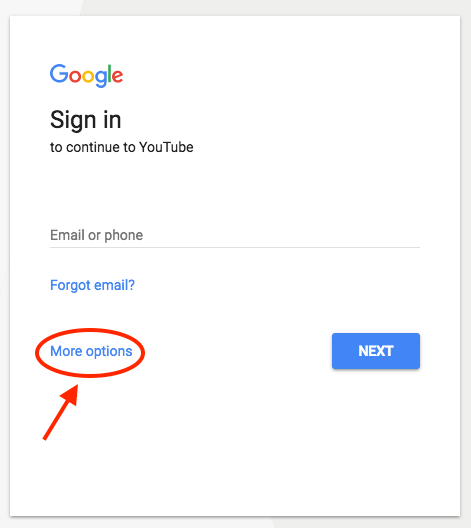
Go to youtube.com and click “sign in” in the upper right-hand corner. From there, you’ll be taken to a Google sign-in page. Click “more options”:
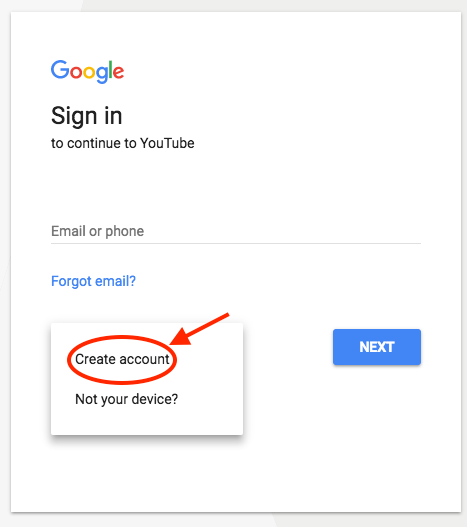
 Then, click “create account”:
From there, you’ll be asked to follow a few steps to create a Google account. Once you’ve completed them, proceed with the steps below.
If You Do Already Have a Google Account
Go to youtube.com and click “sign in” in the upper right-hand corner. From there, you’ll be taken to the same Google sign-in page above. If you have multiple Google accounts, be sure to select the one you want to be associated with the YouTube channel.
2. Create a new YouTube channel using your Google account.
Once you’re set up with and signed into your Google account, it’s time to create a channel. Back at youtube.com, click your user icon in the upper right-hand corner. This represents both your Google account and you YouTube account (as YouTube is owned by Google). You’ll see a drop-down menu, where you’ll want to click “settings.”
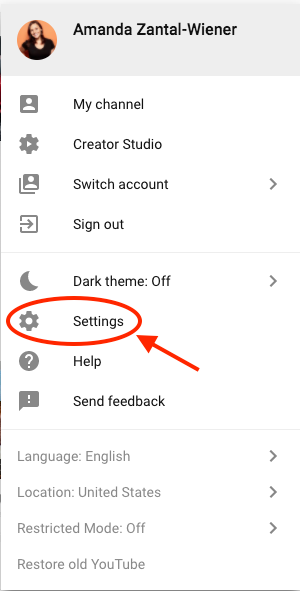
From there, you’ll be taken to your account overview. Under “additional features,” click “create a new channel.”
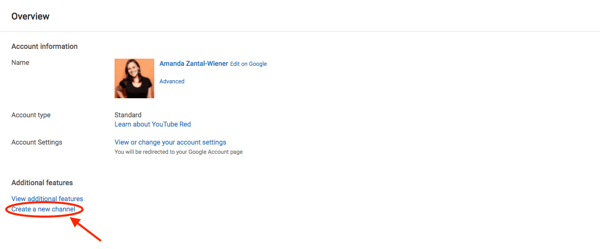
The first step is to create a Brand Account. It can be whatever name you want, and doesn’t have to be the same name that you used to create your Google account — but we do recommend that it reflects the brand the YouTube Channel will represent.
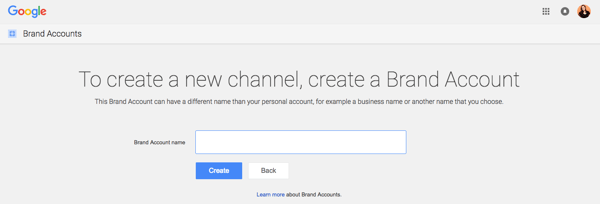
After you enter the Brand Account name, you might be asked to verify the account via text message or voice call. If that happens, enter the code you receive from the option you choose.
Once you’ve verified your Brand Account, you’ll be taken to the dashboard for your channel. Now, it’s time to start customizing it.
3. Optimize your channel for discoverability.
We’ll start with the fundamental details about your channel. From your channel dashboard, click “customize channel.”
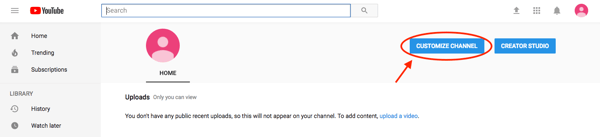
After you click “customize channel,” you’ll be taken to your basic channel page, where you’ll see a cogwheel on the right, as shown below.
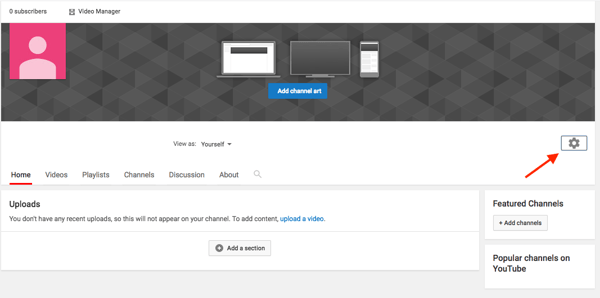
Click this cogwheel icon, then click on the section that says “advanced settings.”
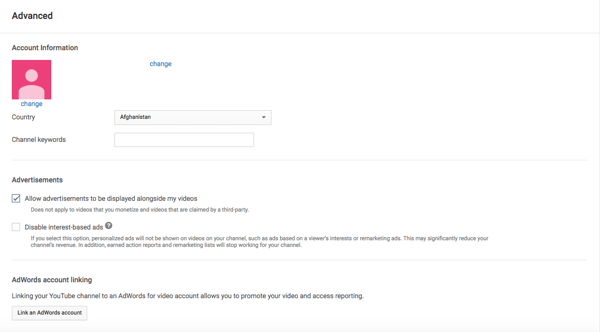
Here’s where you’ll enter some basic information about your channel, like the country where it’s based, as well keywords that help it people discover your channel when they enter search terms that describe what videos they’re looking for. These keywords can include what your channel is about, the problems it helps solve, the people and products featured, your industry, and more.
From the page shown above, you can then select whether or not you want to appear as a recommended channel on other account pages. It’s also within these settings that you can link a Google Ads account, add a Google Analytics property tracking ID, and make various advertising selections for your channel when you’re ready to promote certain videos across the YouTube platform.
4. Add links and descriptive details to your channel.
There are two elements of customization for a new YouTube channel: descriptive details, and visuals. Descriptive details tell your channel visitors (and, eventually, subscribers) what purpose your channel serves and the type of video content they should expect to see published by you. Let’s add those details now.
To describe your YouTube channel for your viewers, you’ll want to add a channel description and links to other webpages associated with your brand. Back on your channel customization dashboard, click on the “About” tab.
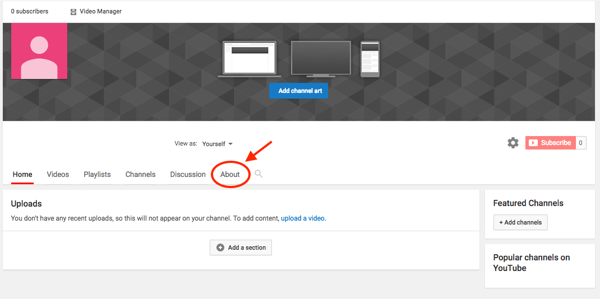
There, you’ll be asked to fill in such details as a channel description — which you can optimize with keywords for more discoverability — as well as contact information and links to your website and social media channels.
Up to five links can overlay your channel art, meaning that the banner on your profile page will contain icons for the links you choose to overlay on this list. To add these links, navigate to the About section of your YouTube channel and click “+ Links.” This button will reveal a space where you can add branded links directing users to various websites and social networks where they can learn about and consume more content from you. See what this space looks like below, and how a business might add links to its Facebook, Twitter, and personal website.
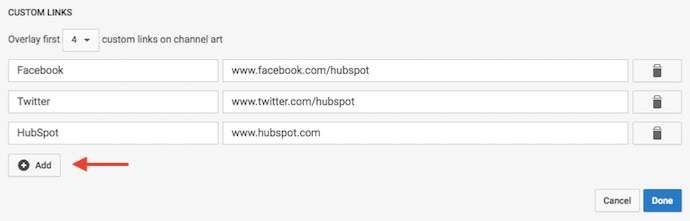
For example, if you wanted to overlay your banner with a link to your Facebook Page, it might look like this as a result:

Your channel art is part of your channel’s customization, which we’ll move onto next.
5. Upload a profile photo to your channel.
When it comes to creating and adding channel art, Google has a plethora of resources for content owners, from a gallery of images to image editing tools.
Among this channel art is your profile photo — this is how YouTube users will identify the creator of a video when browsing video content. You’ll see this image appear beneath YouTube videos on the play page, as shown below.
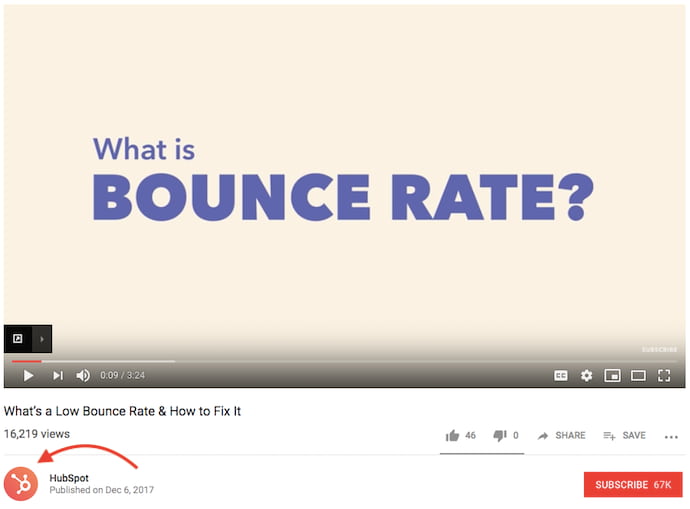
If your YouTube channel is linked to a Brand Account, as is the example we used in the previous step, you’ll need to update this image in the “About” section of your Google account. Note that this rule also applies to your channel name when using a Brand Account.
When you click “change” under your profile icon, you might see this message:
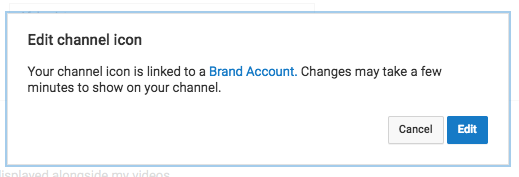
Click “edit,” and you’ll be taken to the page shown below, where you can edit your Brand Account information, including your profile photo (which will be displayed on your YouTube channel).
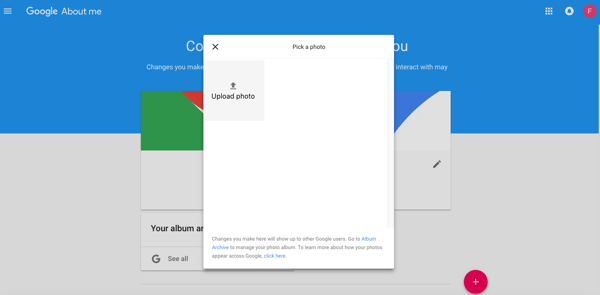
We recommend choosing an image with dimensions of 800 x 800 pixels for this profile photo.
6. Add a banner image.
Next, it’s time to add your banner image. Back on your channel customization dashboard, along the top, you’ll see your newly added profile photo on the top-lefthand corner. As far as that gray background surrounding it is concerned, you can (and should) change it to something more, well, you. Here’s how.
Hover your cursor over this gray background to reveal a small pencil icon on the top-righthand corner. Click this icon and select “Edit channel art” when this option appears, as shown below.
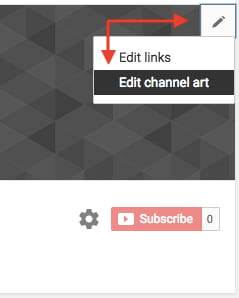
One of the trickiest parts of channel art is creating a responsive banner that matches dimensions for various user experiences, like desktop, mobile, or TV. Luckily, Google has this handy image that represents the best dimension for each viewing platform …
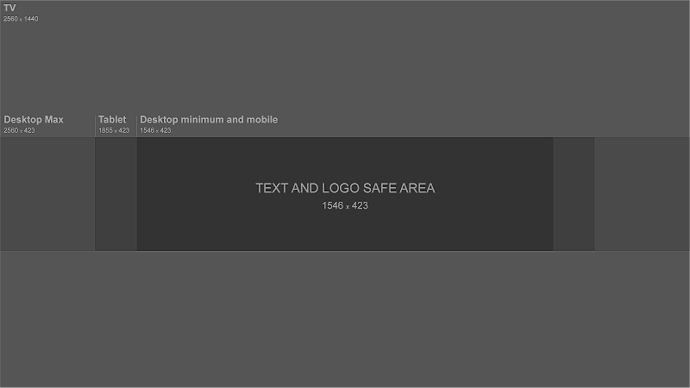
Source: Google
… as well as this concise video explainer:
Need a little inspiration? Check out this post with some of the best YouTube banners we’ve found.
As you can see from the resources above, the minimum dimensions for your YouTube banner image are 1546 x 423 — this size prevents relevant text and images contained in your banner image from leaking off of someone’s screen — whether that screen is a desktop, laptop, or mobile device. The maximum width for your banner image is 2560 x 423, and your image’s file size shouldn’t exceed 6MB.
7. Add videos and optimize them for search.
Optimizing your channel for discoverability is just the beginning. Once you start adding videos, you’ll want to optimize them for search, which in turn helps users discover your video.
But this goes beyond giving your videos accurate, clear, and concise titles — though that is important. Below, we describe some of the most important things to optimize on YouTube. (For a fully comprehensive post on YouTube SEO, visit this post.)
Title
When we search for videos, one of the first things that our eyes are drawn to is the title. That’s often what determines whether or not the viewer will click to watch your video, so the title should not only be compelling, but also, clear and concise.
Description
This should be limited to 1,000 characters — and remember that your viewer came here to watch a video, not to read a lot of text. Plus, YouTube only displays the first two or three lines of text, which comes to about 100 characters, so front-load the description with the most important information.
Tags
Using tags doesn’t just let viewers know what your video is about — they inform YouTube, too, which uses tags “to understand the content and context of your video,” according to Backlinko. That way, YouTube can associate your video with similar videos, which can broaden your content’s reach. But approach with caution — just as with your title, don’t use misleading tags because they might get you more views — in fact, Google might penalize you for that.
Category
Choosing a category is another way to group your video with similar content on YouTube — but that might not be as simple as it sounds. YouTube’s Creator Academy suggests that marketers “think about what is working well for each category” you’re considering by answering questions like:
- Who are the top creators within the category? What are they known for, and what do they do well?
- Are there any patterns between the audiences of similar channels within a given category?
- Do the videos within a similar category have share qualities like production value, length, or format?
That’s it — you’ve officially not only created a YouTube channel, but now also know how to optimize its content for discoverability. For more information on how to best leverage YouTube for marketing, check our entire collection of resources.


The 18 Most Influential People in Project Management
Do the Right Thing, Even When It’s Hard [The Customer Code Series]
Editor’s note: This is the final post in a series on the HubSpot Customer Code.
I haven’t decided yet if this is the final tenet in The Customer Code or the “platform” that supports the entire Code. But I think it’s the most important of all — do the right thing, even when it’s hard … especially when it’s hard.
It’s hard to admit you made a mistake, and hold the midnight meeting to fix it.
It’s hard to look at your business critically and put in the time, money, and thought to fix pain points in your customer experience.
It’s hard to solve for the success of customers over the success of systems when we know that systems are how a business scales. Making those tradeoffs is hard!
But it’s the difficulty and the rarity that makes this work valuable.
Doing the hard things is an opportunity to differentiate ourselves and stand out.
At HubSpot, we talk about wanting to build a business that we’re proud of and that has long-lasting positive impact. We won’t achieve that by just doing the easy things.
At the start of the series I wrote about how growth alone doesn’t interest me anymore. I want HubSpot to grow, but more importantly, I want us to grow better. I want us to grow in a way that is good for our customers, partners, and employees.
That’s what The Customer Code is all about. It’s an attempt to create a sort of “code of conduct” that defines how we run our business, and early indicators are that it is working. In our annual planning and in our investments and product decisions, one question keeps coming up: “Does this approach support the tenets of the Customer Code?”
For years we’ve talked about “Solving for the customer.” It’s been a pillar of our philosophy, but it always felt a bit nebulous. The Customer Code is how we now turn that philosophy into practice. It’s how we hold ourselves accountable to do the right thing, even when it’s hard, complicated, expensive, or time-consuming.
In the same way that The Culture Code gave us common language to describe how we as individuals work with each other, the Customer Code is giving us a common language to describe how we as teams and leaders solve for our customers.
So I hope you’ll join us. Either in adopting the Customer Code or creating a code that makes sense for your customers and business.
Every business seeks to grow, but doing the right thing for customers, even when it’s hard (especially when it’s hard) is how we grow better. The Customer Code makes sure we here at HubSpot keep on doing the hard things.
This post is the final installment in a series on HubSpot’s Customer Code. You can find more info on The Customer Code and how we score ourselves here, and watch my INBOUND talk on this topic here.

The Plain-English Guide to Domains & Domain Names
In 2009, the domain Fly.com was sold for $1.76 million. Even though this domain seems like it would be highly sought after, the asking price still seems a little steep. But Fly.com attracts over a million unique visits per month, justifying its million dollar cost and illustrating just how important it is to have a domain that reflects your business’ name and what you actually do.
If you’re in the process of setting up a website for your business, you might’ve come across two terms: domain and domain name. On the surface, domain and a domain name might seem like the same exact thing. And if you dig a little deeper, that’s exactly the case — a domain and domain name are often used interchangeably.
What is a domain?
A domain is the part of a URL that’s after “https://”. In simple terms, it’s the address people type in to visit your website. For example, “hubspot.com” is HubSpot’s domain.

Image Credit: Computer Hope
Every website has an IP address, which is a unique string of numbers that connect computers to web servers, but people don’t want to memorize an IP address just to visit a website. Fortunately, domains fill in for a website’s IP address, allowing people to easily remember and identify websites.
Essentially, domains are like your house’s address. Instead of your friends using your house’s GSP coordinate every time they want to visit you, they can just plug in your street address, which is much easier to remember.
Not including its extension, like “.com”, the maximum length a domain can be is 63 characters. The minimum length can be one character.
If you want to acquire a domain, you must buy one and register it. To do this, visit a domain name registrar, like GoDaddy or Google Domains, plug your desired domain name in, check its availability and price, and then buy it, if it’s in your price range.
Domains also let you create a custom email address for your business. To do this, you just need to register your domain and then sign up for an email hosting service, like Microsoft Office 365 Business Essentials or Zoho.
The Parts of a Domain
There are two parts of a domain: the second-level domain and the top-level domain. The second-level domain is the part of your domain that comes before “.com”.
If you’re building a website for your business, consider buying a domain that reflects your business’s name. This will make it easier for people to find your website without needing to spend a lot of time scouring Google for it. For instance, hubspot.com’s top-level domain is “hubspot”.
The top-level domain is the part of your domain that comes after your second-level domain.
It specifies what type of entity your organization registers as on the internet. For example, HubSpot’s top-level domain is “.com” since we’re a commercial entity in the United States. Most American businesses also register their website with “.com”. Similarly, a lot of academic institutions in the United States register with a top-level domain of “.edu”. There are over 1,500 top-level domains available worldwide, but other common ones are “.org” and “.net”.
What is a domain name?
The term “domain name” is often used interchangeably with the term “domain”. That’s because they refer to the same thing — the specific text that people can reference to identify your website.

Why Our Formula for Success Is All Wrong
Welcome to The Science Behind Success — a new blog series that explores the best ways to help our brains perform better at work. With psychological research and interviews with leaders in the field, we’re showing you how psychology can help you overcome workplace obstacles and excel in your career. Because a little mindset change could go a long way.
When Shawn Achor initially began his research at Harvard, he noticed something surprising — Harvard students, who should have been ecstatic to be at one of the most prestigious universities in the world, were relatively unhappy.
In his popular TED Talk, which has over 19 million views, Achor says, “I found that these students — no matter how happy they were with their original success of getting into the school — two weeks later their brains were focused, not on the privilege of being there, nor on their philosophy or physics, but on the competition, the workload, the hassles, stresses, [and the] complaints.”
Perhaps you aren’t all that surprised by his observation, after all. Imagine this scenario as it plays out in your own life. Consider the last time you got a promotion, lost five pounds, received an A in a difficult class, or landed your dream job.
How quickly did that initial rush of happiness dissipate?
My guess is — almost immediately.
More than likely, you received the promotion and thought, “Okay, what’s next?” You graduated college and worried about getting a job. You landed your dream job and became increasingly anxious that maybe you weren’t cut out for it, or maybe you’d never rise up in the ranks like your peers.
Alternatively, maybe you lost five pounds and decided you wanted to lose ten more.
Ultimately, you’ve placed happiness over a horizon that Achor stresses you’ll never reach.
Achor — who’s positive psychology research has been published in Harvard Business Review, The Journal of Personality and Social Psychology, and in his own books, including The Happiness Advantage — has worked with over a third of Fortune 100 companies, as well as the NFL, the NBA, and the White House.
Additionally, he’s been featured on Oprah, and his TED Talk is one of the most popular TED Talk videos of all time.
All of which is to say, I was undoubtedly thrilled when he agreed to speak with me about how he views our society’s current formula for success, and why we’ve got it all wrong. Read on to learn his thoughts on happiness and success, as well as how you might use positive psychology tactics to become a better, more satisfied employee. 
Why Our Formula for Success is Inherently Flawed
In his TED Talk, Achor describes an all-too-familiar scenario, in which you think to yourself, If I work harder, I’ll be more successful. And if I’m more successful, then I’ll be happier.
This reasoning likely plays on an endless loop in your mind as you make professional and personal decisions. Because, if happiness wasn’t a driving factor, why would you work quite so hard each and every day?
We use this “success = happiness” formula in school, at work, and even in our relationships, assuming working harder at parenting, for instance, could make you a more successful mother or father — and, thus, a happier one.
But, in his TED Talk, Achor says our formula is both broken, and backwards — “Every time your brain has a success, you just changed the goalpost of what success looks like … You got a good job, now you have to get a better job, you hit your sales target, we’re going to change it. And if happiness is on the opposite side of success, your brain never gets there.”
“We’ve pushed happiness over the cognitive horizon, as a society. And that’s because we think we have to be successful — then we’ll be happier.”
Achor continues to explain, “Our brains work in the opposite order. If you can raise somebody’s level of positivity in the present, then their brain experiences what we now call a ‘happiness advantage’, which is your brain at positive performs significantly better than at negative, neutral, or stressed. Your intelligence rises, your creativity rises, your energy levels rise. In fact, we’ve found that every single business outcome improves.”
There’s truth to his claim — for instance, one study found happy employees are up to 20% more productive than unhappy employees. Additionally, happy salespeople produce 37% more sales than their unhappy counterparts.
Ultimately, our formula for success is backwards because we believe happiness to be a result of success, when really, success is much more likely to be a result of happiness. It isn’t, “If I get a great job, then I’ll be happy” at all — instead, it’s “If I’m happy, then I’ll get a great job.”
To further examine his claim, let’s take a look at how Achor’s research plays out in the real world.
The Real Effects of Positive Psychology in The Workplace
In 2009, Achor decided to test the ROI of happiness with the auditing and tax accounting firm KPMG. The timing was intentional — Achor wanted to examine employees who were experiencing high stress, and the firm’s employees were still dealing with challenges following the banking crisis in 2008.
I’d say that sounds like high stress to me.
In December, Achor administered a survey to 77 KPMG managers, evaluating their stress levels, social support, and optimism.
Following the survey, Achor provided a three-hour introduction to his positive psychology research, and how to apply the principles in the workplace, to half of those managers. He used the other half as a control group.
A week after the training, each employee was evaluated using the same survey again. Achor also tested KPMG employees four months later, to see whether his principles resulted in long-term improvements.
Interestingly, Achor found every positive metric, including life satisfaction, perceived stress, social support, perceived effectiveness at work, and work optimism, improved significantly for the positive psychology training group, compared to the control group.
Additionally, he found life satisfaction scores continued to rise steadily, and were significantly higher four months later than they were a week after the training.
Despite the validity of Achor’s research, it might seem like a difficult theory to adopt. How, for instance, are you supposed to raise your happiness levels if you find yourself in a very unfulfilling role? If we often use external factors, like a promotion or a good grade, to raise our happiness levels, how are we supposed to remove those factors and find happiness in spite of our surroundings?
Fortunately, Achor’s answer to happiness doesn’t rely on any major changes. In fact, he stresses the importance of minor alterations, and has seen first-hand how the immense power of little steps can deeply accelerate your professional success — and an entire company’s.
Let’s explore his tactics in-depth, now.
How to Increase Your Happiness (and Your Team’s) Today
1. Tackle these five strategies for a period of 21 days.
In his TED Talk, Achor lists five critical strategies you can employ immediately to begin increasing your happiness levels, including:
- Writing down three new things you’re grateful for, for 21 days in a row
- Journaling about one positive experience you’ve had over the past 24 hours, allowing your brain to relive it
- Exercising
- Meditating
- Conducting random acts of kindness, such as writing one positive email praising or thanking somebody in your support network
These strategies are not random — thinking of new things to be grateful for reminds your brain to scan its surroundings for the positive, not the negative. Meditation enables your brain to focus on a task at hand, and exercise tells your body that behavior matters.
Additionally, he encourages people to start with 21 days, or three weeks, as a jumping-off point. Three weeks feels manageable, but it’s all it takes for you to begin to see results and slowly turn these actions into habit.
I asked Achor if, along with these five strategies, he had any other helpful suggestions to improve an employee’s daily happiness. He told me, “In [my book] Big Potential, I describe research showing that your brain is weakest and has the least resources for the first and last 30 minutes of the day. So I create a ‘mental moat’ around my day — during the weakest times, I protect my mindset by not checking email, news, or social media.”
He also suggested making gratitude a communal activity. He told me when he worked with Orlando Health, “We got the leaders to start staff meetings by going around and having each member of the team say one thing for which they were grateful. This not only helps raise optimism, but actually, even more importantly, it raises social knowledge and social connection — the greatest predictor of long-term happiness and performance.”
2. Cultivate social connection, and foster it in your workplace.
There are also strategies you can employ to create a happier, more productive workplace. In particular, Achor notes the importance of implementing actions to encourage social connection.
Both providing and receiving connection is important, Achor told me, and it’s equally critical you create a structure in which social connection can be fostered.
While it’s important you have people to rely on and trust when times are challenging, Achor explained it’s also vital to become a person to whom people can turn to when they need help or want connection.
Being someone who gives social connection, even just by saying hello to people in the office or asking someone to coffee, can significantly increase your own happiness and success. In fact, Achor found “the work altruists in the top quartile of social support provision had a 40% higher likelihood of promotion in a two-year period of time, and significantly higher happiness.”
This makes sense — being the person to whom people can turn to when they need help undoubtedly makes you more indispensable as an employee, and will also make you feel needed and important. This, in turn, will result in both increased happiness and increased productivity.
Additionally, he told me it’s critical your leadership team value connection, and implement cultural changes to ensure social connection among employees is both possible and encouraged.
For instance, perhaps your business can hold more conferences or events for the entire company. Alternatively, as a leader, maybe you need to encourage more team members to speak up during meetings, or implement team-bonding outings to encourage social connection within your department.
3. Focus on small wins.
Oftentimes, a goal can feel daunting and even paralyzing in scope.
When this happens, it’s critical you re-focus your mind on small victories.
Achor told me there are only three things that can accelerate the brain toward a goal:
- Meaning
- Proximity
- Progress
First off, let’s focus on meaning. Achor notes, “Embedded in every stress is meaning. If I tell you someone is failing English, you don’t feel stress. If I tell you that your kid is failing English, you feel stress because there is meaning in that relationship. Acknowledge your stress. Reconnect to the meaning in the stress. [And] channel your response toward that meaning.”
It’s critical you’re able to understand why you feel stressed, and why it’s meaningful to you. This small step can help your brain rewire itself to use stress as a powerful source of motivation and energy, rather than a debilitating emotion.
Second, it’s important you and your team are able to visualize your progress. Rather than focusing only on the end-goal, perhaps you can create weekly progress reports or slide decks to demonstrate your project’s progress.
Finally, Achor stresses the importance of small wins, and says he makes those possible by “simulating the ‘x-spot’ in a marathon — the last 0.2 of a mile where the brain feels that the goal is close, and releases extra resources.”
To simulate the end of a marathon, you might create daily habits and goals to feel you’re close to completing the task, rather than focusing solely on quarterly or yearly goals. For instance, perhaps each Sunday night you make a weekly to-do list, with tasks you can check-off each day.
4. Encourage employee check-ins.
At a large insurance company Achor worked with, he decided to take the employees off the phones for ten minutes a day to create a “huddle”, in which six-to-eight employees would check-in with one another, rotate a leader for each day of the huddle, and talk about one thing for which they were grateful.
Achor told me, “With the traditional ‘time worked = profit’ model, they should have lost money. [Instead], over the next 18 months revenue improved by nearly 50%, and they had the highest rate of engagement change.”
Alternatively, Achor worked with LinkedIn to create a program in which peers praised one another using a Globoforce platform. They found that three touchpoints of praise — as opposed to one or two, which yielded minimal results — resulted in a significant increase in retention rates, from 80% to 94%.
Ultimately, Achor told me the biggest challenge he’s seen across industries, from the NFL to tax auditors, is mental: “Most people deep down don’t think change is possible. They have been taught that they are their genes and their environment, and they expect to be the same person tomorrow as they are today. But all this research shows that if you make even tiny changes to your daily patterns and work routines, you reap a massive reward in terms of positive change.”
The tactics and practices that allow you to find daily, sustainable happiness will differ depending on your individual preferences. However, Achor’s research demonstrates the universal importance of finding time and space to become happier now, not later — your success depends on it.

Surveying for Better Decisions: The Journey: Season 2, Episode 20
Wonder if you should survey your customers? Then watch The Journey, Social Media Examiner’s episodic video documentary that shows you what really happens inside a growing business. Watch the Journey This episode of the Journey goes behind the scenes to reveal how Social Media Examiner uses an annual survey of its customers to inform content […]
The post Surveying for Better Decisions: The Journey: Season 2, Episode 20 appeared first on Social Media Marketing | Social Media Examiner.
from Social Media Marketing | Social Media Examiner http://bit.ly/2WNWn2T
via socialmediaexaminer