
Welcome to My Blog
Project Integration Management – A Quick Guide

The most expensive MacBook Pro will now cost you a cool $6,699 (or $6,898)

We noted earlier that the upgraded MacBook Pro models announced today not only offer the latest 8th-generation processors, but also allow you to spec them up to a maximum of 32GB DDR4 RAM and a massive 4TB PCIe SSD …
Apple discontinues its own photo printing service, recommends third-party Photos Projects apps instead

Apple is discontinuing its Photo Print Products service, which has been integrated into iPhoto since its launch in 2002. The service expanded from simple prints, to albums, photo books, and calendars. It stayed around on the Mac when iPhoto was replaced with the Photos app a couple of years ago, but the service never made the leap to iOS.
Later this year, Apple will stop offering the service altogether. A new message in macOS 10.13.6 Photos app says that final orders for Apple’s built-in service must be placed by September 30, 2018.
Apple stops selling 2015 MacBook Pro

In the wake of the new 13-inch and 15-inch Touch Bar models today, Apple has stopped selling the much-beloved 2015 MacBook Pro. For people who despised butterfly keys, or mourned the lack of legacy ports on the 2016 and later MacBook Pro, until today Apple Store stocked a 15-inch 2015 model as an alternative. It may not have been as fast or as svelte as the latest models, but for people who had become disenchanted with Apple’s latest direction, it was their favorite computer.
Alongside new models, Apple launches leather sleeves for 13- and 15-inch MacBook Pro

Alongside the upgraded MacBook Pro models, Apple is also offering leather sleeves to keep both existing and new models safe …
Apple worked with Blackmagic Design on new Radeon Pro 580-powered eGPU

Apple’s launch of refreshed MacBook Pros is the big news for today, and rightfully so. The update checks off many customers wants, such as DDR4 with up to 32GB of RAM on the 15-inch model, and quad-core CPUs on the 13-inch model.
But graphics are still an area that could use assistance, and Apple recognizes this. Earlier this spring it launched a new version of macOS with official eGPU support in tow. Today, it’s been revealed by The Verge that Apple has worked with Blackmagic Design, known for its DaVinci Resolve NLE, on a brand new all-in-one $699 eGPU. more…
Apple MacBook Pro with Touch Bar updated with max 32 GB RAM, ‘improved’ third-generation keyboard, True Tone, and new Intel chips

Apple has today updated the 13-inch and 15-inch MacBook Pro with a spec bump refresh. The laptops feature Intel’s latest eighth-generation Intel processors, with a six-core option on the 15-inch model. The new MacBook Pros can now be specced with up to 32 GB RAM, with a DDR4 configuration.
The new laptops also bring Apple’s True Tone display technology to the Mac lineup for the first time,, as well as a third-generation butterfly keyboard.
Match-owned Hinge dating app uses ‘stable marriage’ AI algorithm for its matches

If you’re single and tired of swiping on photos or browsing endless profiles in the hope of the perfect match, a dating app is now using an AI algorithm to do the work for you …
Apple’s higher education website down, possible Back to School deal on the way

Apple’s higher education website is currently down, with a ‘back soon’ message. The message says ‘We’ll be back. We’re busy updating the Apple Store for you. Please check back soon.’ …
Latest patent troll accuses Apple’s Siri of infringing a purchased patent

Apple regularly faces lawsuits from patent trolls – companies whose only business is buying patents and then suing companies for alleged infringement of them.
We noted only yesterday one relating to the ‘Do Not Disturb While Driving’ feature introduced in iOS 11, and today there’s a report of a new claim that Siri infringes a similarly purchased patent …
Fornite season 5 adds all-terrain kart and new places to explore with it [Video]

Latest Apple Pay promo offers $10 off at StubHub

Apple continues to offer weekly deals for iOS-based shopping when using Apple Pay as your payment method. Apple just emailed out their new weekly promo, and you can get $10 off in the StubHub app when your purchase is $100 or more.
How to Bulk Schedule Facebook Posts Without Paid Tools

Want to save time by bulk scheduling your Facebook posts? Wondering how to schedule posts without using a paid third-party tool? In this article, you’ll discover a three-step process to schedule multiple posts to your Facebook page and group using free tools. Why Bypass Third-Party Apps to Schedule Your Facebook Posts (and Tweets)? There has […]
The post How to Bulk Schedule Facebook Posts Without Paid Tools appeared first on Social Media Examiner.
from Social Media Examiner https://ift.tt/2zyPRFI
via socialmediaexaminer
How to Block Websites on Chrome Desktop and Mobile
Let’s say you want to block certain websites, like Facebook or Pinterest, on your work computer to ensure those distractions aren’t inhibiting your productivity.
Or, maybe you just want to guarantee all Google searches aren’t available to your six-year-old.
Whatever the case, blocking a website on Chrome desktop or mobile is an easy and simple process. Best of all, it’s just as effortless to unblock those sites — so you can scroll through Pinterest, post-workday.
How to Block Websites on Chrome Desktop
How to Block Websites on Chrome Desktop
- Go to the Block Site extension, and click “Add to Chrome”.
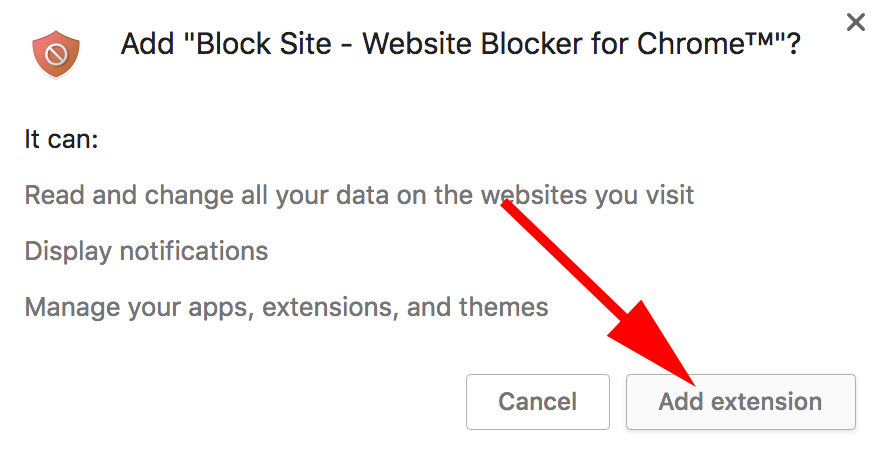
- Click “Add extension” in the pop-up box.
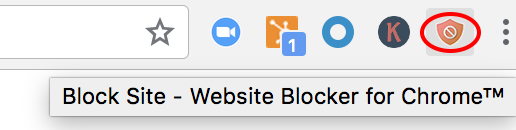
- Now, you’ll see an orange shield icon at the top right of your Chrome screen. On a website you want to block, click that icon, and then click “Block this site”.
- Go to the Block Site extension, and click “Add to Chrome”.
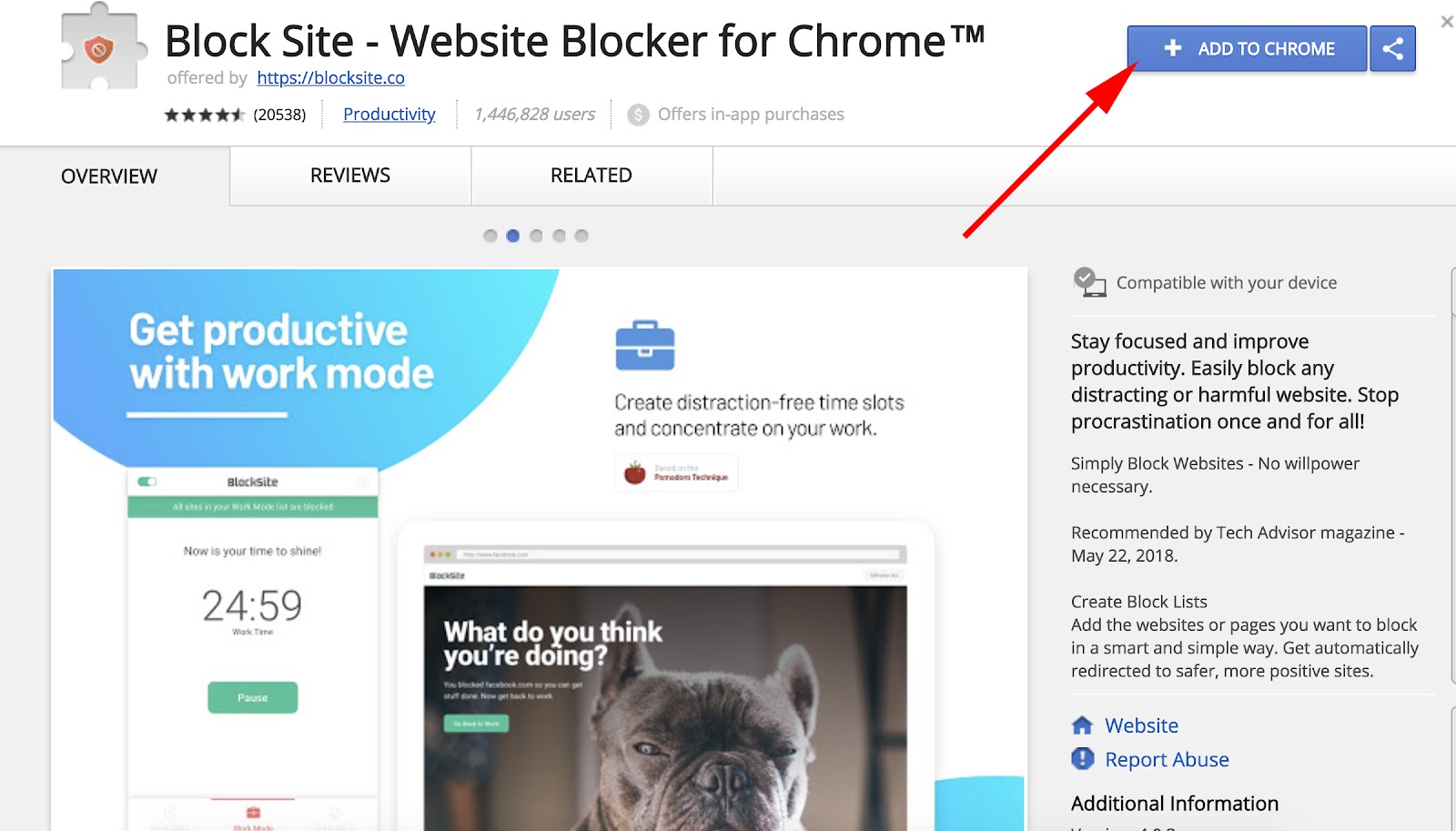
2. Click “Add extension” in the pop-up box.
3. You’ll see an icon at the top right of your Chrome screen — an orange shield with a circle and a diagonal line through the middle.
4. Let’s say you’re feeling a little bitter from a recent World Cup loss, and want to block sports’ sites for a while. Simply go to a website, click that orange shield icon in the top right, and click “Block this site”.

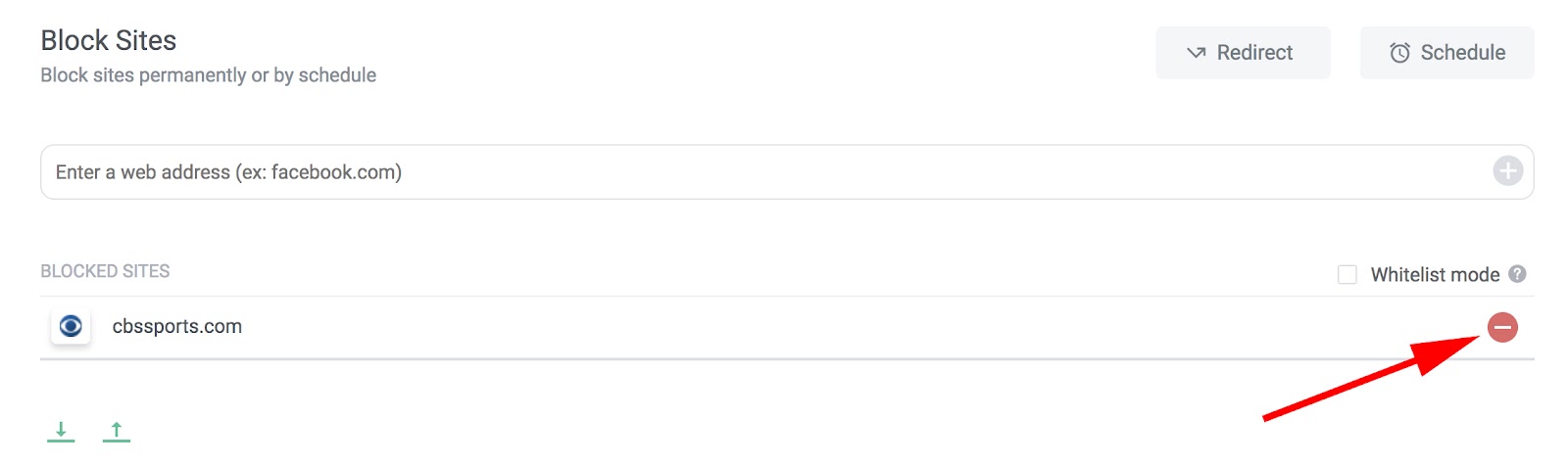
5. Now, you won’t be able to reach cbssports.com (or any other website you chose). You’ve successfully blocked it. To unblock the site, click “Edit your list” in the top right (or click the icon, and then click “Edit block sites list”).

6. Each of your blocked websites will have a “minus” icon to the right — click that minus button, and your site will be unblocked.
How to Block Websites on Chrome Mobile (Android)
If you often surf the web via Chrome on your Android, you might need to block certain websites to ensure increased productivity at all times of day. Here are six easy steps to block websites on your Android Chrome browser (or any Android browser):
- Open Google Play Store and install the BlockSite app.
- Open the downloaded BlockSite app.
- Click “Enable” to allow the app to block websites.
- Click “Got it” — this will take you to your Accessibility settings.
- Select “BlockSite” and turn the switch from “OFF” to “ON”. Then click “OK” in the pop-up window.
- Click the “+” button in the bottom right.
- Enter any websites you want to block and click the check mark in the top right corner.
How to Block Websites on iOS Devices
There are a few apps in the app store that allow you to block websites on your iOS device. Here are two options with similar functions:
- Zero Willpower: This app is $1.99, and lets you create an easy list of all websites you want to block from Safari on your iPhone. Even better, there’s a timer, so you can block a website for a limited period of time.
- Site Blocker: Similar to Zero Willpower, Site Blocker lets you block distracting or unwanted websites on Safari on an iOS device, and includes a timer and suggestions as well. This app is free.
Now you’re all set to block distracting websites from your Chrome browser on desktop or Android. If you find you’re still struggling with productivity, take a look at our Ultimate Guide to the Best Productivity Apps.

8 Essential Budget Templates for Marketers [Free Download]
Let’s face it: Executing a successful marketing plan requires time, energy, and money.
And with so many different facets of marketing to consider — branding and creative, product marketing, hosting events, etc. — your marketing budget can disappear real fast.
Ever found yourself scratching your head with a depleted budget at the end of the month, quarter, or year? Ready to leave behind the days of ambiguous spending and vanishing budgets? Well, we have the perfect resource for you: 8 Budget Templates to Manage Your Marketing Spend.
These helpful templates make it easy to manage all of the moving pieces of your budget at a monthly and quarterly level.
With a separate Excel file for each team to keep track of their spending, as well as a “master” template for collecting all the totals, creating a high-level view of your marketing expenses is a breeze.
The templates can be used to track your expenses in the following areas:
- Branding & Creative
- Content
- Events
- Paid Advertising
- Project Marketing
- Public Relations
- Website Redesign
Does your team favor the Cloud over Microsoft Office? We’ve still got you covered. You can try the Google Sheets version of the same eight templates to share access with other Gmail users and keep your budget in one place.
Check out our 8 Budget Templates to Manage Your Marketing Spend for access to both the Excel and Google Sheets templates.


Affinity Publisher beta for Mac slated to arrive before end of August

Affinity Publisher is an upcoming desktop publishing app that many are hoping will serve as legitimate Adobe InDesign alternative, much like sister apps Affinity Photo and Affinity Designer have served as viable alternatives to Adobe Photoshop and Adobe Illustrator. Lost amid the shuffle of today’s release of Designer for iPad, developer Serif says that the Publisher beta will arrive before the end of August. more…
Timehop says more user data was comprised in data breach than initially thought

Timehop today is providing additional information on the data breach it first revealed yesterday. According to TechCrunch, Timehop has discovered that the breach included more user data than it initially thought…
macOS: How to set a custom Siri keyboard shortcut

While many will argue that Siri on macOS needs a lot of work, it is still useful in some situations. In certain scenarios, you’ll want to use a keyboard shortcut to invoke Siri, especially since macOS is not capable of doing hands-free “Hey Siri” just yet.