
Welcome to My Blog
Jony Ive told Angela Ahrendts ‘Don’t mess with the tables’ as she set about revamping Apple’s retail stores
When Angela Ahrendts was head-hunted by Apple to head up its retail operations, she said she was given one constraint on what she could change.
“In one of those very early conversations,” Ahrendts recalled, Ive said, ‘Don’t mess with the tables. They’re the same tables we used in our design studio and I love that it goes from the studio to the stores.’ He said, ‘They’re sacred.’”
She recounted the instruction in a new profile of her work …
PMI Tour Cono Sur 2017 Llega a ROSARIO
CONGRESO INTERNACIONAL DE DIRECCION DE PROYECTOS, LIDERAZGO & ESTRATEGIAS.
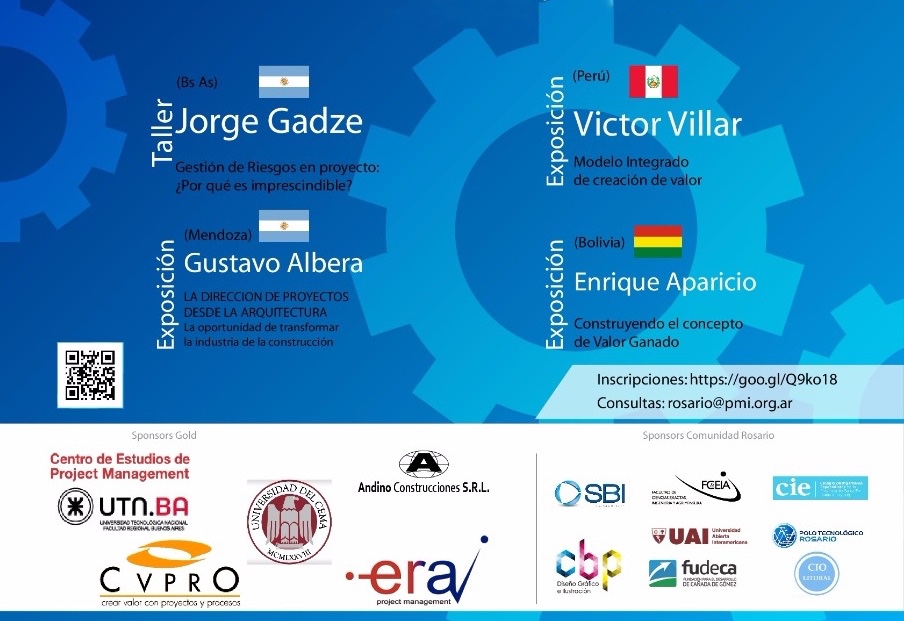
El Evento MAS IMPORTANTE dedicado a la GESTION DE PROYECTOS, tendrá lugar en la ciudad de Rosario el día 08 de Noviembre de 2017. Horario: 15:00 a 20:30 hs te esperamos en
Universidad Católica Argentina
Av Pellegrini 3314 – Rosario
ENTRADAS “LIMITADAS”¡Save the Date!
Un encuentro IMPERDIBLE donde encontrar COLEGAS y conocer las novedades de lo que está sucediendo en la profesión. Conferencistas internacionales y nacionales.
Este año, el Tour Cono Sur Buenos Aires desde la Comunidad Rosario busca evidenciar el valor de la Dirección Profesional de Proyectos en el marco de la innovación y la mejora continua, no olvidando su misión fundamental de contribuir con el desarrollo de las capacidades y conocimientos de todos los profesionales de nuestra comunidad, sean ellos principiantes o experimentados, con el siguiente tema: “Innovación, Sustentabilidad y Posicionamiento Estratégico para una Dirección de Proyectos Eficaz”, considerada esta temática clave para el desarrollo socio-económico de las naciones.
Valores de las entradas:
Precios hasta el 20/09
Asistentes Generales $400
Asistentes por Convenios Sponsors 1 $360
Asistentes por Convenios Sponsors 2 $320
Asistentes Estudiantes $250
Asistentes Miembros PMI $250
Precios desde el 21/09
Asistentes Generales $450
Asistentes por Convenios Sponsors 1 $405
Asistentes por Convenios Sponsors 2 $360
Asistentes Estudiantes $280
Asistentes Miembros PMI $280
Kaspersky Lab says popular dating apps vulnerable to three types of attack
Security researchers at Kaspersky Lab say that a number of popular dating apps are vulnerable to up to three types of attack, potentially revealing anything from user location to full identity and employer …
How comfortable do you feel using a smart lock to allow unattended entry to your home? [Poll]
Smart locks offer a number of benefits over the traditional key-operated kind. There’s the fact that you are less likely to get locked out if you have multiple methods of entry – key, phone and Watch, for example. Auto-unlocking is also convenient when you are carrying shopping and don’t have any free hands.
Typical smart locks offer another key benefit: the ability to allow other people entry into your home when you’re not there. For example, if a family member is visiting, and will arrive before you get home from work, you can create a ‘guest pass’ for them that allows them entry.
Today, Amazon has taken that one step further …
Amazon launches smart lock and security cam system to take in-home deliveries for Prime members, with iPhone app alerts
Amazon has today announced its latest expansion into smart home ecosystem, with a new Alexa Cloud Cam security camera ($120) and a new Amazon Key service, which works with some smart locks to allow Amazon couriers to unlock your front door and deliver packages inside your house.
Amazon Key sends a notification to your iPhone that a courier is outside. If you aren’t at home, the Amazon courier will walk in and leave your parcel inside your house. You can use the security cam to keep eyes on the delivery person as they drop off your package.
iPhone LCD panel supplier LG Display says demand remains strong
Target adds augmented reality shopping to mobile website, doesn’t (yet) use ARKit
Target is the latest retailer to offer augmented reality shopping, allowing customers to see how furniture would look in their own homes. It currently offers the feature with 200 items, but says it plans to offer hundreds more by the end of the year and ‘thousands’ of products next year.
The feature works much the same way as Ikea’s app, but doesn’t (yet) take advantage of ARKit …
HubSpot’s Marketing Team Worked Remotely for One Week. Here’s What We Learned.
Think about the last time you were on a conference call with someone in a different location. Did you run into any communication challenges — technical, or otherwise? Did you find yourself trying to speak up but failing to get a word in? If there were multiple people on that call, did you find that everyone was able to participate?
Remote meetings are becoming increasingly commonplace. Not everyone you work with is able to sit down in the same room with you. For many of us, most of our meetings now include remote employees or team members from across the globe.
That’s the trend we started to see at HubSpot. As we expand globally, more and more of our meetings and teams are spread out across our different offices. That doesn’t just mean waking up early or staying up late to have a call with colleagues in Sydney. It means learning to work with our colleagues in a completely different (and potentially challenging) way.
After talking to other companies with growing numbers of remote employees (including Zapier CEO Wade Foster), our marketing team decided to do “Remote Week.”
We had 3 goals for Remote Week:
- To work more effectively as a highly distributed team, and help pave the way for more effective collaboration across geographies for HubSpot as a whole.
- To cultivate empathy for full-time remote workers.
- To improve our communication with remote workers, and be at our best when working remotely.
And we had a couple of rules:
- Everyone on the team must be remote for the week. They could work from anywhere they wanted, but they could not be in a HubSpot office.
- Everyone must have an internet connection and be able to join meetings with video.
- No one should postpone or reschedule any meetings. They should try all different types of meetings while remote: 1:1s, team meetings, cross-functional meetings, etc.
After a week, we gathered feedback from everyone who participated, and discovered some common trends that will help us more effectively manage our remote employees moving forward.
Lessons From Remote Week
1) For larger meetings, you need a facilitator.
For meetings on the larger side, it can be a real challenge to ensure everyone’s voice gets heard. Everyone is talking, side conversations happen between people in different locations, and before you know it the meeting is over and you didn’t get the chance to weigh in on the discussion.
This is where the team facilitator comes in. The job of the facilitator is twofold: 1) Make sure everyone gets a chance to talk. 2) Recognize when side conversations happen so you can make sure these are shared with the full group.
To make sure everyone gets a chance to talk, it’s important to notice when someone is trying to get a word in and keeps getting overlooked. A good way to spot this is to have the facilitator keep a lookout for “the goldfish face”: the face someone makes when they keep opening and closing their mouth before they get the chance to actually say anything. By having a facilitator picking up on this and prompting participants to speak in turn, the issue can be eliminated.
Another issue with large remote meetings is side conversations that happen with people in the same location. For example, my team is spread out across Cambridge and Dublin. There are often side conversations that go on between the teams in Cambridge and Dublin by muting the call to say something to their colleague sitting next to them.
One effective way that we learned to solve this is making everyone go in a different room (even if they are in the same location) to give everyone a fair chance to speak and to make sure these side conversations derail the main discussion.
2) Take advantage of spontaneous discussions.
When you are physically in the same location as your colleagues, you have the opportunity for spontaneous conversations throughout the day. Whether it’s a morning recap of the latest Game of Thrones episode, or a quick chat to hash out the details of a problem that couldn’t be solved over email, these unplanned face-to-face meetings bring us closer to our colleagues and help us discover new perspectives.
During our remote week, we knew we needed a way to recreate the beauty of these spontaneous conversations. In practice, it takes a bit of effort. It means you have to be open to hoping on a quick, unplanned video call to answer a question or clarify the details of an email.
We also are big proponents of recording a quick video over Loom to communicate something when your team isn’t all available for a live call. In fact, I have woken up to many Loom recordings from my team in Dublin to explain a detailed analysis or the latest experiment they wanted to run.
Having regular, open communication like this is key to avoiding any miscommunications and making sure your team still feels like a unit even if they do not see each other face to face.
3) Find your ideal routine, and stick to it.
In the morning I wake up, shower, get dressed, walk my dog, and catch the bus. I get to work, make my tea, do some morning reading, respond to emails, and start my day. I have my morning routine, and I have another routine at the end of the day to wrap up.
We are creatures of habit — having a clear routine gives us structure and enables us to be productive. And that’s doubly true for remote workers.
At the beginning of Remote Week a lot of us found that our routine was just off. We woke up and then were unsure what to do next. Do we start responding to emails? Do we work on that next experiment? Do we make breakfast? Workout? What do we do first? At the end of the day, we had the same conundrum. When do we stop working? Should we have dinner, and then go back to work?
Even when you work remotely and don’t have to get into the office by a certain time, it’s still important to have a routine. Though it took us all a couple of days to figure out how to structure our time during Remote Week, we eventually all figured out our own individual rhythms to ensure we were getting our work done without burning out.
4) Remain visible within your team even if you aren’t actually visible.
If you are one of the only remote workers on your team, it can be easy to get heads down on your work and lose out on the regular communication that goes on with the rest of the team. Something that our team became very aware of during Remote Week was finding a way to remain available and visible to our colleagues even when we weren’t directly in touch.
There are a couple of key you can stay on your team’s radar, even when you’re not in sight. One of them is through participation in team meetings. When you’re remote, it’s extremely important to speak up and share your thoughts during big discussions.
Another way to remain visible is to participate in group discussions over chat. At HubSpot we use Slack for our communications, and have cross-team channels devoted to everything from work-related projects to out-of-office interests, like yoga and dogs. It’s easy to not participate in those discussions, but it’s way more rewarding and valuable to share your ideas, the latest interesting article you read, or even what you did that weekend.
Even if you can’t be physically visible in the office, it’s important to stay visible within the organization.
5) It seems obvious, but you need good WiFi.
I saved the best, and arguably most important, for last. Ensuring you have the proper technology to do your job and stay in touch with colleagues is absolutely essential. It can be frustrating for everyone involved if all of a sudden your computer freezes, or your internet crashes and your call is disconnected. And you know that always happens when its least convenient.
Before you plan to work remotely (even if it’s just for a day), test out the locations you plan to call in from. If you are working from home, make sure that you have a strong WiFi connection. Test it out with a friend or colleague ahead of time to make sure you’ll be able to get your job done effectively and stay in touch with the necessary people.
If you think you might want to journey to an alternative location during your remote work week, test that out as well. I encourage my team to test out new coffee shops they want to work from during lower-stakes meetings — like 1:1s with their manager — instead of waiting until a larger team meeting. This reduces the danger of your technical difficulties impacting more people.
As you’re getting your remote setup ready, figure out if you need other tech besides WiFi. Having a second monitor at home for example can help increase your efficiency. Having a standing desk is another way to make sure you get to move around during the day.
Taking Remote Week Back to the Office
Remote Week was a fantastic experience for the team. It gave us a unique opportunity to put ourselves in our teammates’ shoes and truly understand the pros and cons of remote work.
Since this experience, we’ve learned to be more collaborative with our remote counterparts, make sure everyone has a voice in team meetings, and be more flexible when hoping on a quick video chat with a remote colleague. The next time you interact with a remote colleague, remember these lessons to ensure you build a productive and collaborative environment for your team and co-workers, no matter where they work.
How to Legally Leverage User-Generated Content in Your Marketing
Do you want to use the images your fans and customers post on social media? Wondering how to secure permission to use your customers’ content? If you want user-generated content (UGC) for your marketing, you need to take steps to avoid potential legal hassles. In this article, you’ll discover how to use fan content legally […]
This post How to Legally Leverage User-Generated Content in Your Marketing first appeared on .
– Your Guide to the Social Media Jungle
from http://ift.tt/2yPoa9n
via socialmediaexaminer
Bloomberg: Apple lowered Face ID component specifications to make iPhone X easier to produce
The problems with the iPhone X production are very well documented by this point. We have been hearing for months that suppliers were having yield issues with the 3D-sensing components.
Bloomberg reports Apple helped suppliers increase production by lowering the specifications of the components that make up Face ID, which allowed the supply chain to test dot projector modules faster and push out units at a faster rate.
Nintendo announces Animal Crossing: Pocket Camp coming to iOS next month
As expected, Nintendo this evening announced that it is bringing Animal Crossing to iOS and Android next month. The game is called Animal Crossing: Pocket Camp and it brings many of the things gamers love about the Animal Crossing franchise to mobile devices, with a few new twists…
iPhone X takes over Apple’s homepage ahead of pre-orders
The iPhone X officially goes up for pre-order on Friday morning and Apple has dramatically overhauled its homepage tonight to better showcase the upcoming flagship. Apple.com now features nothing but the iPhone X, with a slew of images and animations touting various features of the device.
Brief hands-on video offers closer look at app switching on iPhone X
Earlier today, a video hit YouTube seemingly showcasing the iPhone X in use on Apple’s campus. Now, a shorter video is making the rounds and it offers a close up look at the app switching process on the iPhone X…
The 6 Key Marketing Metrics Your CEO Actually Cares About
Gone are the days of the CMO who isn’t fluent in metrics, analytics, and spreadsheets. The internet has made marketing far more measurable (and therefore more accountable to the CEO) than ever before.
But CMOs struggle to find the right metrics that will get them credibility, and show how marketing contributes to the bottom line — especially when 80% of CEOs don’t trust the efforts of their marketing teams.
Some of the best marketing metrics look at the total cost of marketing — including program spend, salaries of the team, and overhead — and relate those costs to the results you care about: revenue and customer acquisition.
Other metrics, like cost per lead, cost per follower, or cost per page view can be useful to look at within a marketing team, because they can help you make decisions about where to focus, and what parts of your marketing process are broken.
But most CEOs care more about the cost and the net results than the interim steps. This list of metrics is meant to focus on the most critical measures of marketing that your CEO will likely want to discuss with you.
Here are some metrics the HubSpot marketing team has found most useful over the years while growing our company and working with other members of senior leadership and our board.
The 6 Marketing Metrics Your CEO Cares About Most
1) Customer Acquisition Cost (CAC)
This is your total Sales and Marketing cost: Add up all the program or advertising spend, plus salaries, plus commissions and bonuses, plus overhead within a given time period. Then, divide it by the number of new customers in that same time period.
For instance, if you spent $300,000 on Sales and Marketing in a month and added 30 customers that month, then your CAC is $10,000.
2) Marketing Percentage of Customer Acquisition Cost (M%-CAC)
We compute the marketing portion of CAC and call it M-CAC, and then compute that as a percentage of the overall CAC. The M%-CAC is interesting to watch over time, and any change signals that something has changed in either your strategy or your effectiveness.
For instance, an increase either means that 1) you are spending too much on marketing, 2) sales costs are lower because they missed quota, or 3) you are trying to raise sales productivity by spending more on marketing, and providing more and higher-quality leads to Sales.
For a company that does mostly outside sales with a long and complicated sales cycle, M%-CAC might be only 10-20%. For companies that have an inside sales team and a less complicated sales process, M%-CAC might be more like 20-50%. And for companies that have a low cost and simpler sales cycle where sales are somewhat humanless, the M%-CAC might be more like 60-90%.
3) Ratio of Customer Lifetime Value to CAC (LTV:CAC)
For companies that have a recurring revenue stream from their customers — or even any way for customers to make a repeat purchase — you need to estimate the current value of a customer and compare that to what you spent to acquire that new customer.
To compute the LTV, you need to take the revenue the customer pays you in a period, subtract out the gross margin, and then divide by the estimated churn percentage (cancellation rate) for that customer. So, for a type of customer who pays you $100,000 per year where your gross margin on the revenue is 70%, and that customer type is predicted to cancel at a rate of 16% per year, then the LTV is $437,500.
Now, once you have the LTV and the CAC, you compute the ratio of the two. If it cost you $100,000 to acquire this customer with an LTV of $437,500, then your LTV:CAC is 4.4 to 1. For growing SaaS companies, most investors and board members want this ratio to be greater than 3X — because a higher ratio means your sales and marketing teams have a higher ROI.
Higher is not always better, though. When the ratio is too high, you might want to spend more on Sales and Marketing to grow faster, because you are restraining your growth by under-spending, and making life easy for your competition.
4) Time to Payback CAC
This is the number of months it takes you to earn back the CAC you spent to get a new customer. You take the CAC and divide by margin-adjusted revenue per month for the average new customer you just signed up, and the resulting number is the number of months to payback.
In industries where customers pay one time up-front, this metric is less relevant, because the upfront payment should be greater than the CAC — otherwise, you’re losing money on every customer. On the other hand, in industries where customers pay a monthly or annual fee (as is the case for many SaaS companies like HubSpot), you usually want the payback time to be under 12 months, meaning that you become “profitable” on a new customer in under a year, and after that, you start making money.
5) Marketing-Originated Customer Percentage
This ratio shows what percentage of your new business is driven by marketing efforts. To compute it, take all of the new customers you signed up in a period, and look at what percentage of them started with a lead that the marketing team generated. This is much, much easier to do when you have a closed-loop marketing analytics system, but you can do it manually — just know it will be time-consuming.
What we like about this metric is that it directly shows what portion of the overall customer acquisition originated in Marketing, and it is often higher than what you might think. In our experience, this number varies widely from company to company. For companies with an outside sales team supported by an inside sales team with cold callers, this percentage might be pretty small, perhaps 20-40%. But for a company with an inside sales team that is supported by a lot of lead generation from Marketing, it might be as high as 40-80%.
Note: You can also compute this percentage using revenue instead customers, depending on how you prefer to look at your business.
6) Marketing Influenced Customer Percentage
This number is similar to the Marketing Originated Customer Percentage, but it adds in all the new customers in cases where Marketing touched and nurtured the lead at any point during the sales process, not only by originating the lead.
For instance, if a salesperson found a lead, but then the lead attended a marketing event and then later closed, that new customer was influenced by Marketing. This number is obviously higher than the “Originated” percentage, and for most companies, we think this number should be between 50% and 99%.
Marketing Metrics Cheat Sheet
Apple acquires New Zealand wireless charging company as it ‘works to create a wireless future’
Just after bringing wireless charging to the iPhone for the first time this year, Apple has acquired Auckland-based wireless charging company PowerbyProxi. While it’s unclear how much Apple paid for the company, it was founded in 2007 as a spin-out from the University of Auckland.
Exclusive ‘On The Record’ Sam Smith documentary coming to Apple Music next month
Apple Music has secured yet another documentary in its growing list of exclusive video content. Joining the likes of Harry Styles and Nial Horan, pop artist Sam Smith today announced an Apple Music-exclusive documentary that covers the creation of his sophomore album, “The Thrill Of It All.”
Roundup: Carrier details and tips for preordering iPhone X
While going directly through Apple may be the most popular way to preorder the iPhone X, it’s always good to have options. This week, carriers are sharing more details about preordering Apple’s premium iPhone.
more…